Were here to help OneTimePassword Soon Soon CHINA
- Slides: 186
We’re here to help One-Time-Password Soon Soon
CHINA BANK ONLINE CORPORATE Secure and convenient online banking Forgotten Access Credentials China Bank Corporate Mobile App | BACK TO HOME |
Access Credentials What is your query? What are the User Access Credentials? How to: v x. Retrieve Forgotten Corporate ID v x. Retrieve Forgotten User ID v Retrieve Primary or Secondary x. Passwords Retrieving both Primary and v x. Secondary Passwords v x. Request for Password Unlock | BACK TO CHINA BANK ONLINE |
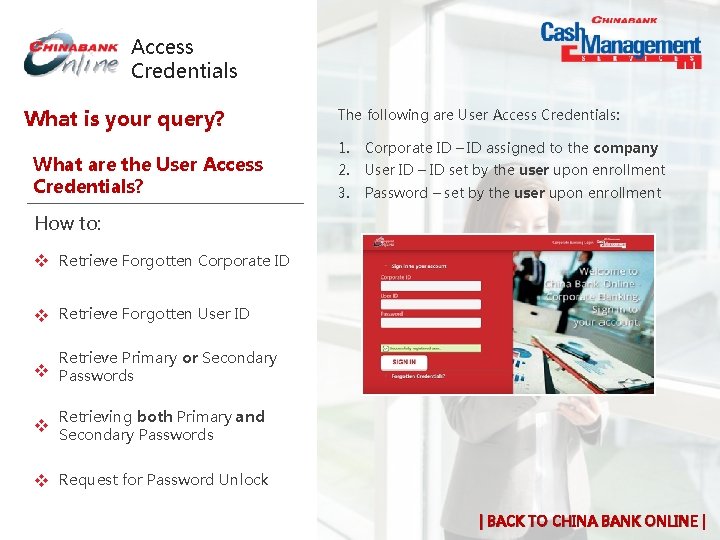
Access Credentials What is your query? What are the User Access Credentials? The following are User Access Credentials: 1. Corporate ID – ID assigned to the company 2. User ID – ID set by the user upon enrollment 3. Password – set by the user upon enrollment How to: v x. Retrieve Forgotten Corporate ID v x. Retrieve Forgotten User ID v Retrieve Primary or Secondary x. Passwords Retrieving both Primary and v x. Secondary Passwords v x. Request for Password Unlock | BACK TO CHINA BANK ONLINE |
Access Credentials What is your query? What are the User Access Credentials? How to: v x. Retrieve Forgotten Corporate ID Request Corporate ID by contacting the following: • China Bank Branch of Account • Cash Management Services through: +632 8885 5888 (press 1 then 0 Customer Contact to speak to a phone banker Center contactcenter@chinabank. ph CMS Client Services Unit cashmgt@chinabank. ph v x. Retrieve Forgotten User ID v Retrieve Primary or Secondary x. Passwords Retrieving both Primary and v x. Secondary Passwords v x. Request for Password Unlock | BACK TO CHINA BANK ONLINE |
Access Credentials What is your query? 1. What are the User Access Credentials? How to: v x. Retrieve Forgotten Corporate ID v x. Retrieve Forgotten User ID v Retrieve Primary or Secondary x. Passwords 2. Upon entering China Bank Online Corporate: a. Click “Forgotten Credentials? ” in the login page b. Click “Forgotten your User ID? ” c. Provide all information required Await for system generated email for User ID. Notes: a. Information provided must match information in the submitted Enrollment & Maintenance Form. If information does not match, User will not receive an email on the forgotten User ID. b. System generated email will be sent to the User’s registered email address. Retrieving both Primary and v x. Secondary Passwords v x. Request for Password Unlock | BACK TO CHINA BANK ONLINE |
Access Credentials What is your query? 1. What are the User Access Credentials? How to: v x. Retrieve Forgotten Corporate ID v x. Retrieve Forgotten User ID v Retrieve Primary or Secondary x. Passwords 2. Upon entering China Bank Online Corporate: a. Click “Forgotten Credentials? ” in the login page b. Click “Forgotten your Password? ” c. Provide all information required Await for system generated email for Password. Notes: a. Information provided must match information in the submitted Enrollment & Maintenance Form. If information does not match, User will not receive an email on the forgotten Password. b. System generated email will be sent to the User’s registered email address. Retrieving both Primary and v x. Secondary Passwords v x. Request for Password Unlock | BACK TO CHINA BANK ONLINE |
Access Credentials What is your query? 1. What are the User Access Credentials? How to: v x. Retrieve Forgotten Corporate ID v x. Retrieve Forgotten User ID v Retrieve Primary or Secondary x. Passwords 2. Upon entering China Bank Online Corporate: a. Click “Forgotten Credentials? ” in the login page b. Click “Forgotten your Password? ” c. Click “Both” and provide all information required Await for system generated email for Password. Notes: a. Information provided must match information in the submitted Enrollment & Maintenance Form. If information does not match, User will not receive an email on the forgotten Password. b. System generated email will be sent to the User’s registered email address. Retrieving both Primary and v x. Secondary Passwords v x. Request for Password Unlock | BACK TO CHINA BANK ONLINE |
Access Credentials What is your query? 1. What are the User Access Credentials? How to: v x. Retrieve Forgotten Corporate ID 2. Notes: a. v x. Retrieve Forgotten User ID v Retrieve Primary or Secondary x. Passwords Retrieving both Primary and Upon entering China Bank Online Corporate: a. Click “Forgotten Credentials? ” in the login page b. Click “Request for Password Unlock? ” c. Provide all information required Await for system generated email for password unlock. Information provided must match information in the submitted Enrollment & Maintenance Form. If information does not match, User will not receive an email on password unlock. b. System generated email will be sent to the User’s registered email address. v x. Secondary Passwords v x. Request for Password Unlock | BACK TO CHINA BANK ONLINE |
CBC Corporate Mobile App What is your query? What is a China Bank Corporate v XMobile App? What is the difference between the v XMobile OTP and Mobile App? v Does the User need to enter or Xgenerate OTP to use the Mobile App? v What are the online banking xtransactions or services available in the Mobile App? Does the Mobile App require v xseparate enrollment? Does the User need to register in v xorder to use the Mobile App? PAGE |1 | 2 | 3 | | BACK TO CHINA BANK ONLINE |
CBC Corporate Mobile App What is your query? What is a China Bank Corporate v XMobile App? § China Bank Online Corporate Mobile App, is the mobile version of China Bank Online Corporate web version § User can view the balance of all its enrolled account and approve all pending transactions. What is the difference between the v XMobile OTP and Mobile App? v Does the User need to enter or Xgenerate OTP to use the Mobile App? v What are the online banking xtransactions or services available in the Mobile App? Does the Mobile App require v xseparate enrollment? Does the User need to register in v xorder to use the Mobile App? PAGE |1 | 2 | 3 | | BACK TO CHINA BANK ONLINE |
CBC Corporate Mobile App What is your query? What is a China Bank Corporate v XMobile App? What is the difference between § Mobile OTP is an application that generates the required OTP to login and do transaction in China Bank Online Corporate web/browser version. § Mobile App is an online banking system design to run on a mobile device used to view account balance and approve transactions. v Xthe Mobile OTP and Mobile App? v Does the User need to enter or Xgenerate OTP to use the Mobile App? v What are the online banking xtransactions or services available in the Mobile App? Does the Mobile App require v xseparate enrollment? Does the User need to register in v xorder to use the Mobile App? PAGE |1 | 2 | 3 | | BACK TO CHINA BANK ONLINE |
CBC Corporate Mobile App What is your query? NO, the User need not enter or generate OTP in order to use the Mobile App. What is a China Bank Corporate v XMobile App? What is the difference between the v XMobile OTP and Mobile App? v Does the User need to enter or Xgenerate OTP to use the Mobile App? v What are the online banking xtransactions or services available in the Mobile App? Does the Mobile App require v xseparate enrollment? Does the User need to register in v xorder to use the Mobile App? PAGE |1 | 2 | 3 | | BACK TO CHINA BANK ONLINE |
CBC Corporate Mobile App What is your query? What is a China Bank Corporate v XMobile App? User can do the following: § View balance of all accounts enrolled. § View and approve all transactions initiated by the Maker at China Bank Online Corporate web/browser version. What is the difference between the v XMobile OTP and Mobile App? v Does the User need to enter or Xgenerate OTP to use the Mobile App? v What are the online banking xtransactions or services available in the Mobile App? Does the Mobile App require v xseparate enrollment? Does the User need to register in v xorder to use the Mobile App? PAGE |1 | 2 | 3 | | BACK TO CHINA BANK ONLINE |
CBC Corporate Mobile App What is your query? NO separate enrollment is required for the Customer, its accounts and its Users. What is a China Bank Corporate v XMobile App? What is the difference between the v XMobile OTP and Mobile App? v Does the User need to enter or Xgenerate OTP to use the Mobile App? v What are the online banking xtransactions or services available in the Mobile App? Does the Mobile App require v xseparate enrollment? Does the User need to register in v xorder to use the Mobile App? PAGE |1 | 2 | 3 | | BACK TO CHINA BANK ONLINE |
CBC Corporate Mobile App What is your query? YES, 1. Upon successful downloading of the Mobile App, the User will receive an e-mail containing a registration code. 2. He has to enter the code on his mobile device. 3. Once the correct code is entered, he can already start using the application. What is a China Bank Corporate v XMobile App? What is the difference between the v XMobile OTP and Mobile App? v Does the User need to enter or Xgenerate OTP to use the Mobile App? v What are the online banking xtransactions or services available in the Mobile App? Does the Mobile App require v xseparate enrollment? Does the User need to register in v xorder to use the Mobile App? PAGE |1 | 2 | 3 | | BACK TO CHINA BANK ONLINE |
CBC Corporate Mobile App What is your query? v Does the User have to nominate and use a different/separate XAccess Credentials for the Mobile App? can the User download the v XWhere Mobile App? Will the bank charge a fee for v XMobile App? the Mobile App require v x. Does internet connection? Can the User use the Mobile App v xoutside of the Philippines? PAGE |1 | 2 | 3 | | BACK TO CHINA BANK ONLINE |
CBC Corporate Mobile App What is your query? v Does the User have to nominate and use a different/separate XAccess Credentials for the Mobile App? NO, the User can use the same set of credentials he is using to access the China Bank Online Corporate web/browser version. can the User download the v XWhere Mobile App? Will the bank charge a fee for v XMobile App? the Mobile App require v x. Does internet connection? Can the User use the Mobile App v xoutside of the Philippines? PAGE |1 | 2 | 3 | | BACK TO CHINA BANK ONLINE |
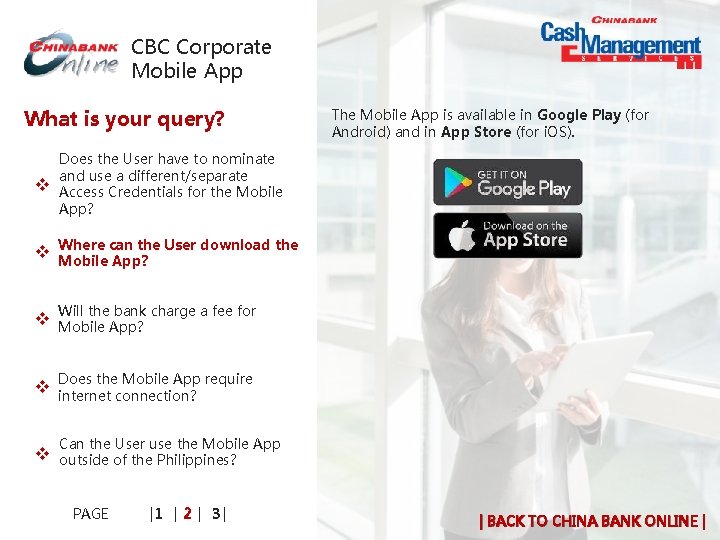
CBC Corporate Mobile App What is your query? v The Mobile App is available in Google Play (for Android) and in App Store (for i. OS). Does the User have to nominate and use a different/separate XAccess Credentials for the Mobile App? can the User download the v XWhere Mobile App? Will the bank charge a fee for v XMobile App? the Mobile App require v x. Does internet connection? Can the User use the Mobile App v xoutside of the Philippines? PAGE |1 | 2 | 3 | | BACK TO CHINA BANK ONLINE |
CBC Corporate Mobile App What is your query? v NO, the Mobile App is FREE. Does the User have to nominate and use a different/separate XAccess Credentials for the Mobile App? can the User download the v XWhere Mobile App? Will the bank charge a fee for v XMobile App? the Mobile App require v x. Does internet connection? Can the User use the Mobile App v xoutside of the Philippines? PAGE |1 | 2 | 3 | | BACK TO CHINA BANK ONLINE |
CBC Corporate Mobile App What is your query? v YES, the Mobile App requires internet connection. Does the User have to nominate and use a different/separate XAccess Credentials for the Mobile App? can the User download the v XWhere Mobile App? Will the bank charge a fee for v XMobile App? the Mobile App require v x. Does internet connection? Can the User use the Mobile App v xoutside of the Philippines? PAGE |1 | 2 | 3 | | BACK TO CHINA BANK ONLINE |
CBC Corporate Mobile App What is your query? v YES, the User can use the Mobile App outside of the Philippines. Does the User have to nominate and use a different/separate XAccess Credentials for the Mobile App? can the User download the v XWhere Mobile App? Will the bank charge a fee for v XMobile App? the Mobile App require v x. Does internet connection? Can the User use the Mobile App v xoutside of the Philippines? PAGE |1 | 2 | 3 | | BACK TO CHINA BANK ONLINE |
CBC Corporate Mobile App What is your query? v What is the minimum system Xrequirement of Mobile App to work? Will the Mobile App work on v Xtablets? v v Can the User download and use xthe Mobile App in several devices? How will the User know if the x. Mobile Application he downloaded is the official version? v x. Does the User need to uninstall the Mobile App to get a new version? PAGE |1 | 2 | 3 | | BACK TO CHINA BANK ONLINE |
CBC Corporate Mobile App What is your query? v The Mobile App only works on Android and i. OS mobile devices. What is the minimum system Xrequirement of Mobile App to work? Will the Mobile App work on v Xtablets? v v Can the User download and use xthe Mobile App in several devices? How will the User know if the x. Mobile Application he downloaded is the official version? v x. Does the User need to uninstall the Mobile App to get a new version? PAGE |1 | 2 | 3 | | BACK TO CHINA BANK ONLINE |
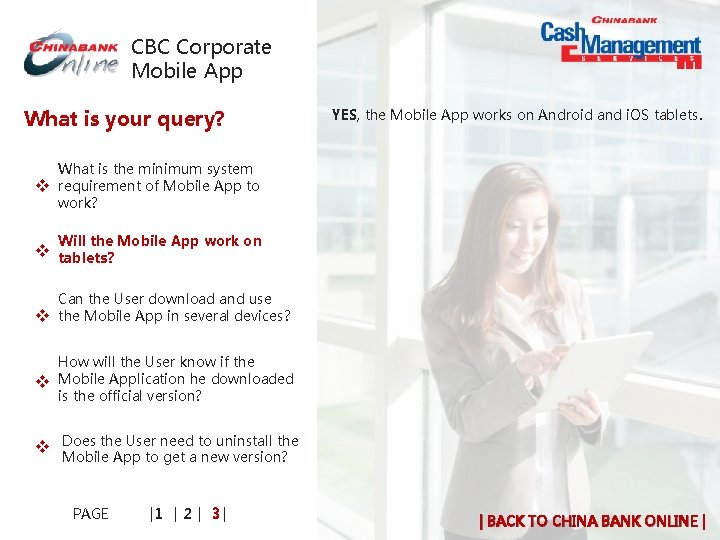
CBC Corporate Mobile App What is your query? v YES, the Mobile App works on Android and i. OS tablets. What is the minimum system Xrequirement of Mobile App to work? Will the Mobile App work on v Xtablets? v v Can the User download and use xthe Mobile App in several devices? How will the User know if the x. Mobile Application he downloaded is the official version? v x. Does the User need to uninstall the Mobile App to get a new version? PAGE |1 | 2 | 3 | | BACK TO CHINA BANK ONLINE |
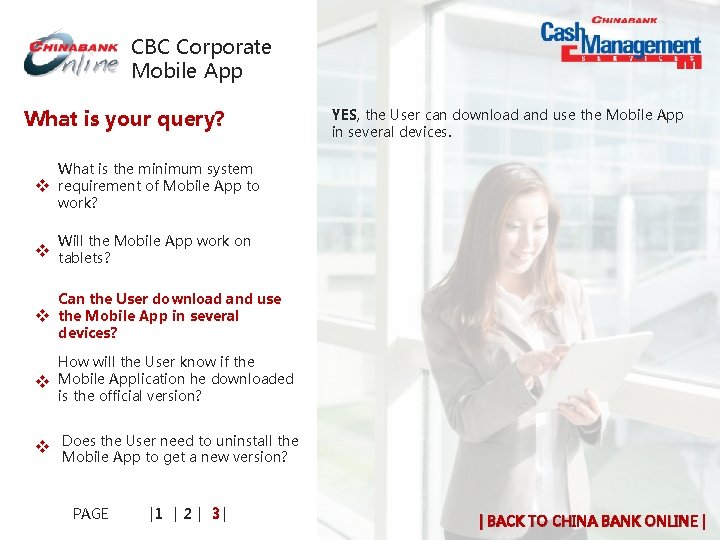
CBC Corporate Mobile App What is your query? v YES, the User can download and use the Mobile App in several devices. What is the minimum system Xrequirement of Mobile App to work? Will the Mobile App work on v Xtablets? v Can the User download and use xthe Mobile App in several devices? v How will the User know if the x. Mobile Application he downloaded is the official version? v x. Does the User need to uninstall the Mobile App to get a new version? PAGE |1 | 2 | 3 | | BACK TO CHINA BANK ONLINE |
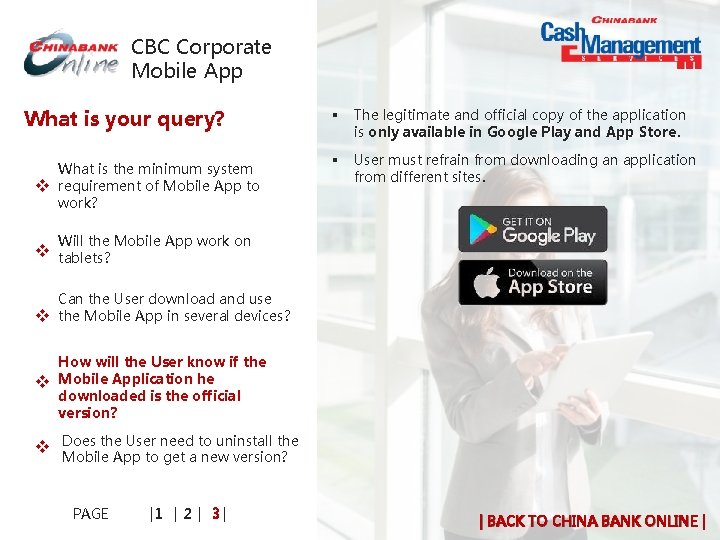
CBC Corporate Mobile App What is your query? v What is the minimum system Xrequirement of Mobile App to work? § The legitimate and official copy of the application is only available in Google Play and App Store. § User must refrain from downloading an application from different sites. Will the Mobile App work on v Xtablets? v v Can the User download and use xthe Mobile App in several devices? How will the User know if the x. Mobile Application he downloaded is the official version? v x. Does the User need to uninstall the Mobile App to get a new version? PAGE |1 | 2 | 3 | | BACK TO CHINA BANK ONLINE |
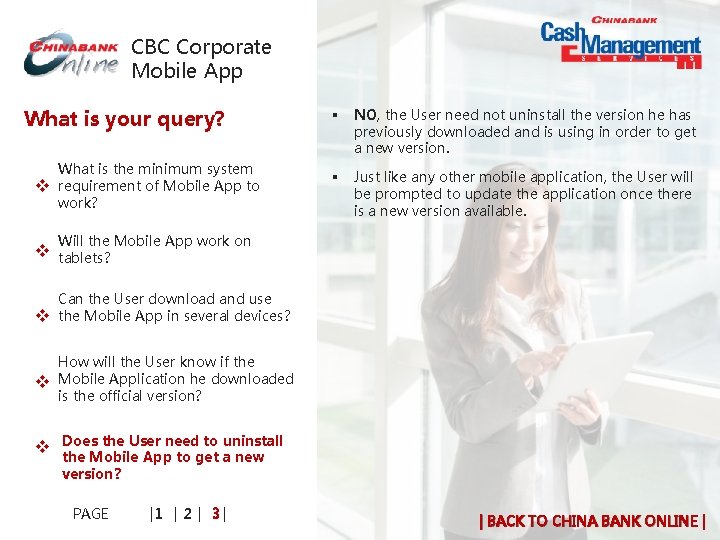
CBC Corporate Mobile App What is your query? v What is the minimum system Xrequirement of Mobile App to work? § NO, the User need not uninstall the version he has previously downloaded and is using in order to get a new version. § Just like any other mobile application, the User will be prompted to update the application once there is a new version available. Will the Mobile App work on v Xtablets? v v Can the User download and use xthe Mobile App in several devices? How will the User know if the x. Mobile Application he downloaded is the official version? v x. Does the User need to uninstall the Mobile App to get a new version? PAGE |1 | 2 | 3 | | BACK TO CHINA BANK ONLINE |
ONE-TIME-PASSWORD (OTP) One-Time Password (General Query) SMS OTP Mobile OTP App | BACK TO HOME |
One-Time. Password What is your query? v x. What is a One-Time Password (OTP)? v x. Why is there a need for OTP? v x. How and When will the User receive the OTP? v x. Will the Bank charge the User for the use of the OTP? | BACK TO OTP |
One-Time. Password What is your query? v x. What is a One-Time Password (OTP)? The China Bank Online Corporate adopts a two factor authentication before granting access to the User. 1. Use of characters that the User knows, i. e. Corporate ID, User ID, Passwords 2. Use of something that the User has, i. e. OTP v x. Why is there a need for OTP? § A One-Time Password or OTP is a unique 6 digit code that will be required from the User in order to access the China Bank Online Corporate and do online banking transactions. v x. How and When will the User receive the OTP? § The OTP is system generated, unique per use and is sent to the user’s mobile phone via SMS or generated through the Mobile OTP App. v x. Will the Bank charge the User for the use of the OTP? | BACK TO OTP |
One-Time. Password What is your query? § All BSP-Supervised Financial Institution (BSFI) have been required by BSP to adopt a minimum of two factor authentication to validate and verify the identity and authorization of the customers for online transactions. § Provides an additional layer of security to company and users § Globally accepted process for Financial Institutions v x. What is a One-Time Password (OTP)? v x. Why is there a need for OTP? v x. How and When will the User receive the OTP? v x. Will the Bank charge the User for the use of the OTP? | BACK TO OTP |
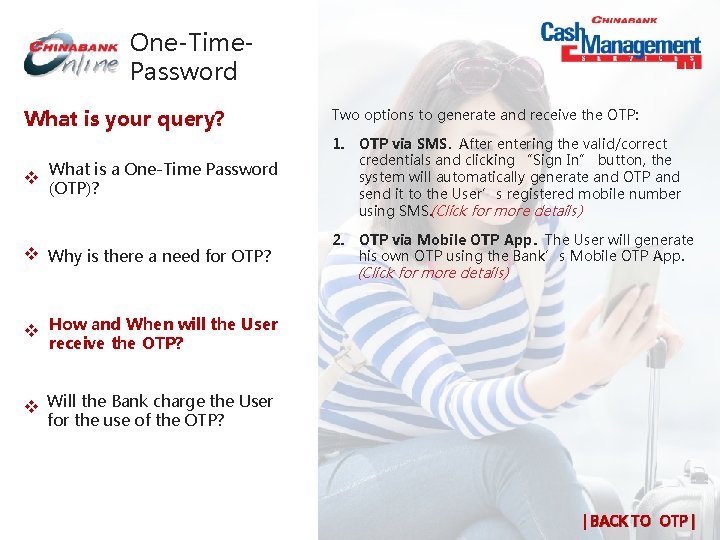
One-Time. Password What is your query? Two options to generate and receive the OTP: v x. What is a One-Time Password 1. OTP via SMS. After entering the valid/correct credentials and clicking “Sign In” button, the system will automatically generate and OTP and send it to the User’s registered mobile number using SMS. (Click for more details) v x. Why is there a need for OTP? 2. OTP via Mobile OTP App. The User will generate his own OTP using the Bank’s Mobile OTP App. (Click for more details) (OTP)? v x. How and When will the User receive the OTP? v x. Will the Bank charge the User for the use of the OTP? | BACK TO OTP |
One-Time. Password What is your query? OTP Generation via Mobile App and sending via SMS is FREE. v x. What is a One-Time Password (OTP)? v x. Why is there a need for OTP? v x. How and When will the User receive the OTP? v x. Will the Bank charge the User for the use of the OTP? | BACK TO OTP |
SMS One-Time -Password What is your query? Does the User need to register his v Mobile x Phone to receive the SMS OTP? Can the User register more than one v (1) x mobile number? What if the User changes his v mobile x number? Can the User register an international v mobile x number? v What will the User do if he did not x receive the SMS OTP? v How x long is the SMS OTP valid? PAGE | 1 | 2| | BACK TO OTP |
SMS One-Time -Password What is your query? Does the User need to register his v Mobile x Phone to receive the SMS No, the User has to register his mobile number, but not the mobile phone. This is to ensure that the User can still receive the SMS OTP even if he decides to change his mobile phone. OTP? Can the User register more than one v (1) x mobile number? What if the User changes his v mobile x number? Can the User register an international v mobile x number? v Note: a. Registration of the mobile number is performed at the time of enrollment. b. The mobile number that will be registered in the system is the number that the User has indicated on the China Bank Online Corporate – Enrollment and Maintenance Form. What will the User do if he did not x receive the SMS OTP? v How x long is the SMS OTP valid? PAGE | 1 | 2| | BACK TO OTP |
SMS One-Time -Password What is your query? NO, only one mobile number is allowed. Does the User need to register his v Mobile x Phone to receive the SMS OTP? Can the User register more than one v (1) x mobile number? What if the User changes his v mobile x number? Can the User register an international v mobile x number? v What will the User do if he did not x receive the SMS OTP? v How x long is the SMS OTP valid? PAGE | 1 | 2| | BACK TO OTP |
SMS One-Time -Password What is your query? Does the User need to register his v Mobile x Phone to receive the SMS OTP? 1. User has to accomplish China Bank Online Corporate – Maintenance Sheet duly signed by its authorized signatory(ies) of the company. 2. Submit it China Bank Branch of Account Can the User register more than one v (1) x mobile number? What if the User changes his v mobile x number? Can the User register an international v mobile x number? v What will the User do if he did not x receive the SMS OTP? v How x long is the SMS OTP valid? PAGE | 1 | 2| | BACK TO OTP |
SMS One-Time -Password What is your query? Does the User need to register his v Mobile x Phone to receive the SMS OTP? § NO, we do not allow registration of international mobile number. § To access China Bank Online Corporate outside the Philippines, the User can use the Mobile OTP App (Click for more details) to generate OTP. Can the User register more than one v (1) x mobile number? What if the User changes his v mobile x number? Can the User register an v international x mobile number? v What will the User do if he did not x receive the SMS OTP? v How x long is the SMS OTP valid? PAGE | 1 | 2| | BACK TO OTP |
SMS One-Time -Password What is your query? Does the User need to register his v Mobile x Phone to receive the SMS OTP? Can the User register more than one To trigger the system to generate and send a new SMS OTP to the registered mobile number: 1. Close the browser 2. Reopen the page and login again by entering access credentials. v (1) x mobile number? What if the User changes his v mobile x number? Can the User register an international v mobile x number? v What will the User do if he did not x receive the SMS OTP? v How x long is the SMS OTP valid? PAGE | 1 | 2| | BACK TO OTP |
SMS One-Time -Password What is your query? The SMS OTP is valid for five (5) minutes from the time it was generated by the system. Does the User need to register his v Mobile x Phone to receive the SMS OTP? Can the User register more than one v (1) x mobile number? What if the User changes his v mobile x number? Can the User register an international v mobile x number? v What will the User do if he did not x receive the SMS OTP? long is the SMS OTP valid? v How x PAGE | 1 | 2| | BACK TO OTP |
SMS One-Time -Password What is your query? What happens if the User did not enter v the x SMS OTP right away? v What will the User do if he receives SMS x OTP even if he did not attempt to login? v Is there a minimum system requirement for a mobile phone to x receive the SMS OTP? v Will the User receive the SMS OTP in his x local mobile number even if he is outside the Philippines? PAGE | 1 | 2| | BACK TO OTP |
SMS One-Time -Password What is your query? The SMS OTP will expire within 5 minutes and the User has to: v What happens if the User did not x enter the SMS OTP right away? 1. Close the browser 2. Reopen the page/revisit the site and login again by entering his access credentials. v What will the User do if he receives SMS x OTP even if he did not attempt to login? This will trigger the system to generate and send a new SMS OTP to the registered mobile number. v Is there a minimum system requirement for a mobile phone to x receive the SMS OTP? v Will the User receive the SMS OTP in his x local mobile number even if he is outside the Philippines? PAGE | 1 | 2| | BACK TO OTP |
SMS One-Time -Password What is your query? What happens if the User did not enter v the x SMS OTP right away? v What will the User do if he receives SMS OTP even if he did not attempt x to login? v Is there a minimum system requirement for a mobile phone to x receive the SMS OTP? v Will the User receive the SMS OTP in his x local mobile number even if he is outside the Philippines? PAGE | 1 | 2| The User has to call Customer Contact Center or Cash Management Client Servicing Unit to report the incident. Customer Contact Center +632 8885 5888 (press 1 then 0 to speak to a phone banker) contactcenter@chinabank. ph CMS Client Services Unit cashmgt@chinabank. ph | BACK TO OTP |
SMS One-Time -Password What is your query? The mobile phone must be capable of receiving SMS. What happens if the User did not enter v the x SMS OTP right away? v What will the User do if he receives SMS x OTP even if he did not attempt to login? v Is there a minimum system requirement for a mobile phone to x receive the SMS OTP? v Will the User receive the SMS OTP in his x local mobile number even if he is outside the Philippines? PAGE | 1 | 2| | BACK TO OTP |
SMS One-Time -Password What is your query? What happens if the User did not enter v the x SMS OTP right away? v What will the User do if he receives SMS x OTP even if he did not attempt to login? v Is there a minimum system requirement for a mobile phone to x receive the SMS OTP? v Will the User receive the SMS OTP in his x local mobile number even if he is outside the Philippines? PAGE | 1 | 2| § § NO, the User will not be able to receive the SMS OTP. To access China Bank Online Corporate outside the Philippines, the User can use the Mobile OTP App (Click for more details) to generate OTP. | BACK TO OTP |
Mobile One. Time-Password App What is your query? is a Mobile OTP App? v What x How to download and activate the v xmobile OTP app? v x. How to generate OTP via Mobile OTP App? v Can x. OTP? the User use both SMS and Mobile can the User switch from SMS v How x. OTP to Mobile OTP? v Will the user still receive SMS OTP even if he has already switched to x Mobile OTP? PAGE |1 | 2 | 3 | | BACK TO OTP |
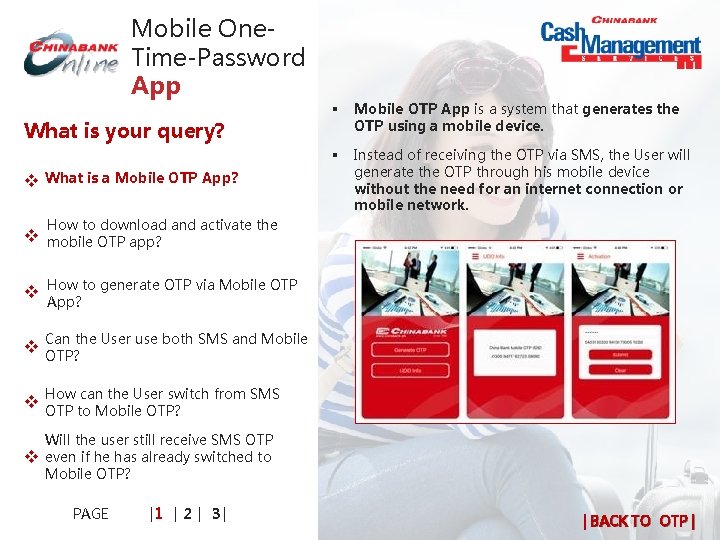
Mobile One. Time-Password App What is your query? is a Mobile OTP App? v What x § Mobile OTP App is a system that generates the OTP using a mobile device. § Instead of receiving the OTP via SMS, the User will generate the OTP through his mobile device without the need for an internet connection or mobile network. How to download and activate the v xmobile OTP app? v x. How to generate OTP via Mobile OTP App? v Can x. OTP? the User use both SMS and Mobile can the User switch from SMS v How x. OTP to Mobile OTP? v Will the user still receive SMS OTP even if he has already switched to x Mobile OTP? PAGE |1 | 2 | 3 | | BACK TO OTP |
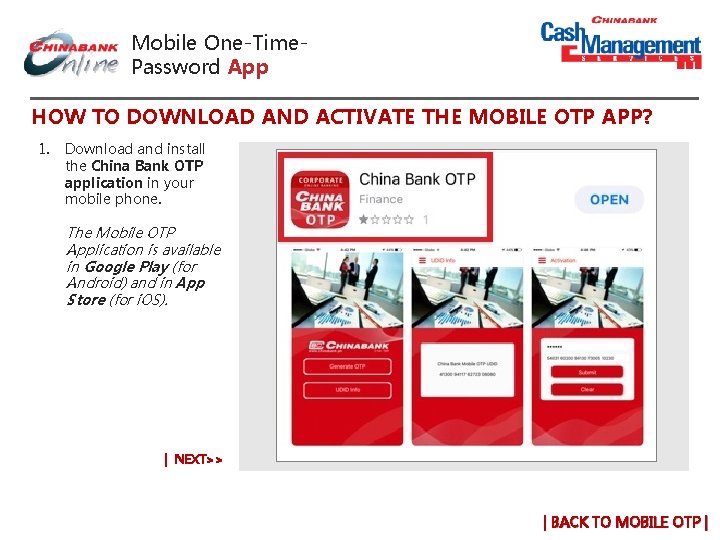
Mobile One-Time. Password App HOW TO DOWNLOAD AND ACTIVATE THE MOBILE OTP APP? 1. Download and install the China Bank OTP application in your mobile phone. The Mobile OTP Application is available in Google Play (for Android) and in App Store (for i. OS). | NEXT>> | BACK TO MOBILE OTP |
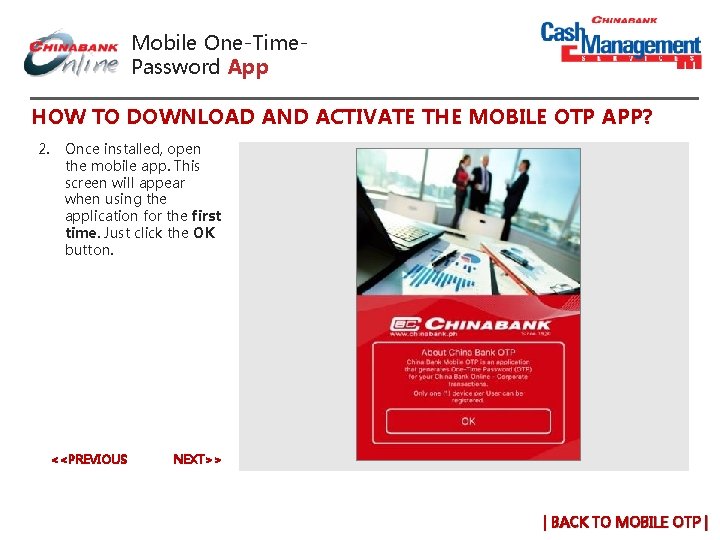
Mobile One-Time. Password App HOW TO DOWNLOAD AND ACTIVATE THE MOBILE OTP APP? 2. Once installed, open the mobile app. This screen will appear when using the application for the first time. Just click the OK button. <<PREVIOUS NEXT>> | BACK TO MOBILE OTP |
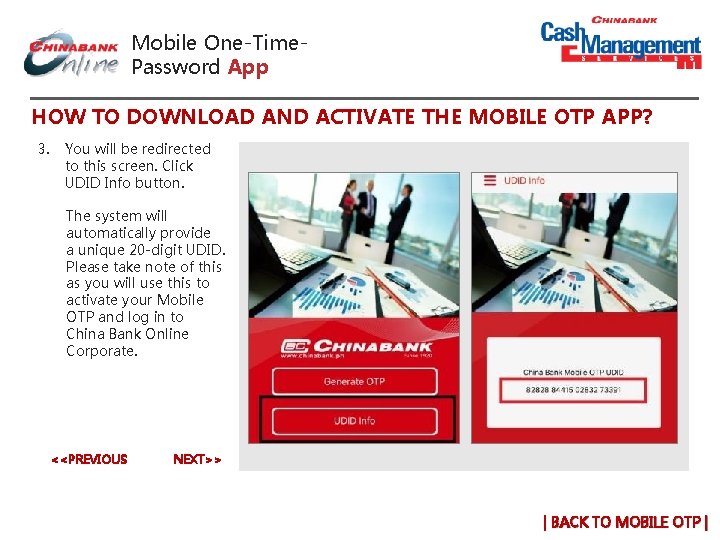
Mobile One-Time. Password App HOW TO DOWNLOAD AND ACTIVATE THE MOBILE OTP APP? 3. You will be redirected to this screen. Click UDID Info button. The system will automatically provide a unique 20 -digit UDID. Please take note of this as you will use this to activate your Mobile OTP and log in to China Bank Online Corporate. <<PREVIOUS NEXT>> | BACK TO MOBILE OTP |
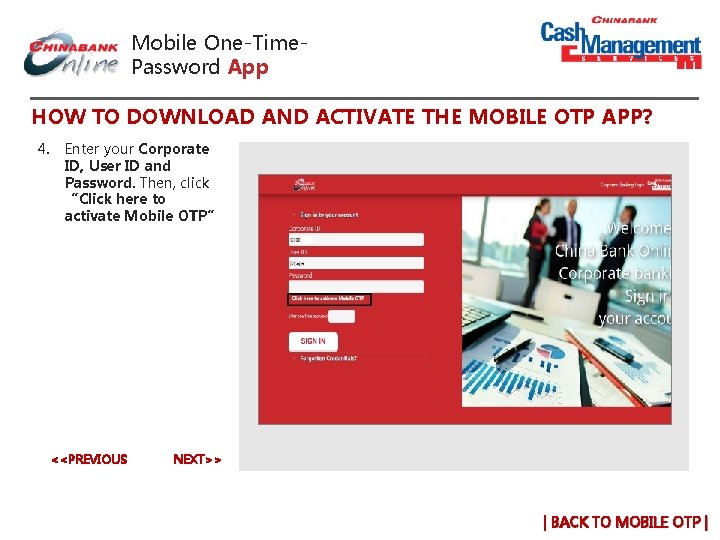
Mobile One-Time. Password App HOW TO DOWNLOAD AND ACTIVATE THE MOBILE OTP APP? 4. Enter your Corporate ID, User ID and Password. Then, click “Click here to activate Mobile OTP” <<PREVIOUS NEXT>> | BACK TO MOBILE OTP |
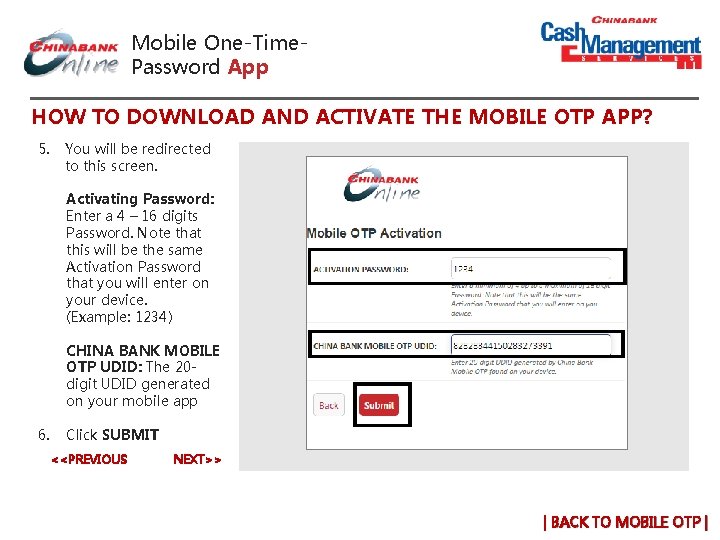
Mobile One-Time. Password App HOW TO DOWNLOAD AND ACTIVATE THE MOBILE OTP APP? 5. You will be redirected to this screen. Activating Password: Enter a 4 – 16 digits Password. Note that this will be the same Activation Password that you will enter on your device. (Example: 1234) CHINA BANK MOBILE OTP UDID: The 20 digit UDID generated on your mobile app 6. Click SUBMIT <<PREVIOUS NEXT>> | BACK TO MOBILE OTP |
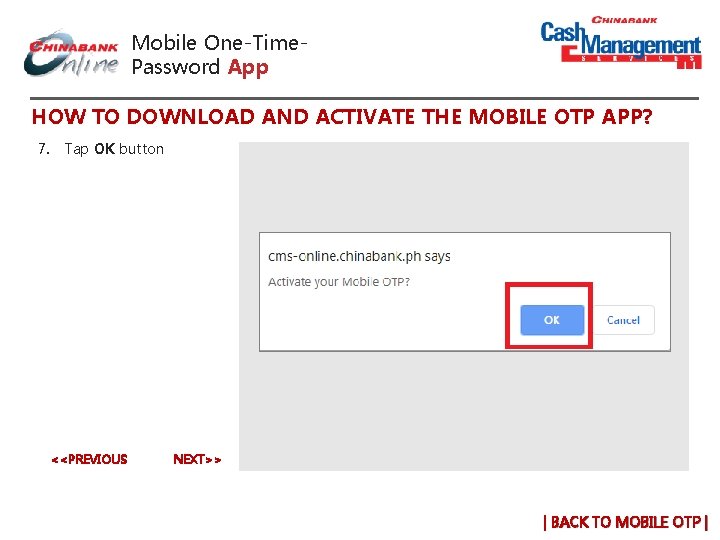
Mobile One-Time. Password App HOW TO DOWNLOAD AND ACTIVATE THE MOBILE OTP APP? 7. Tap OK button <<PREVIOUS NEXT>> | BACK TO MOBILE OTP |
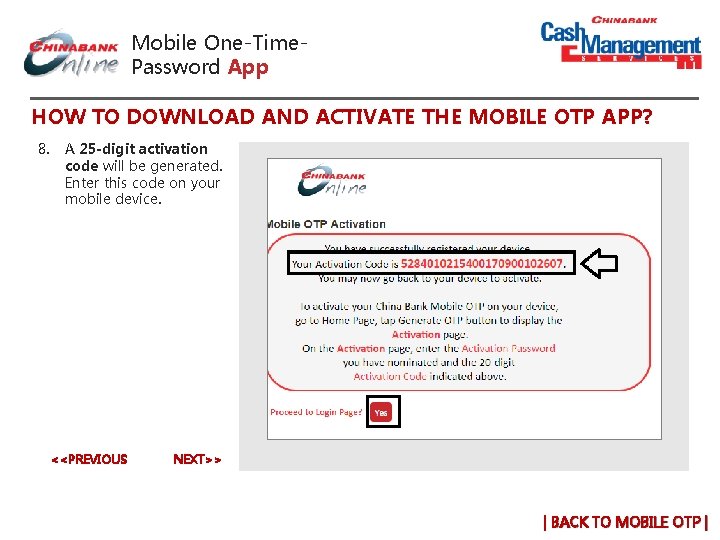
Mobile One-Time. Password App HOW TO DOWNLOAD AND ACTIVATE THE MOBILE OTP APP? 8. A 25 -digit activation code will be generated. Enter this code on your mobile device. <<PREVIOUS NEXT>> | BACK TO MOBILE OTP |
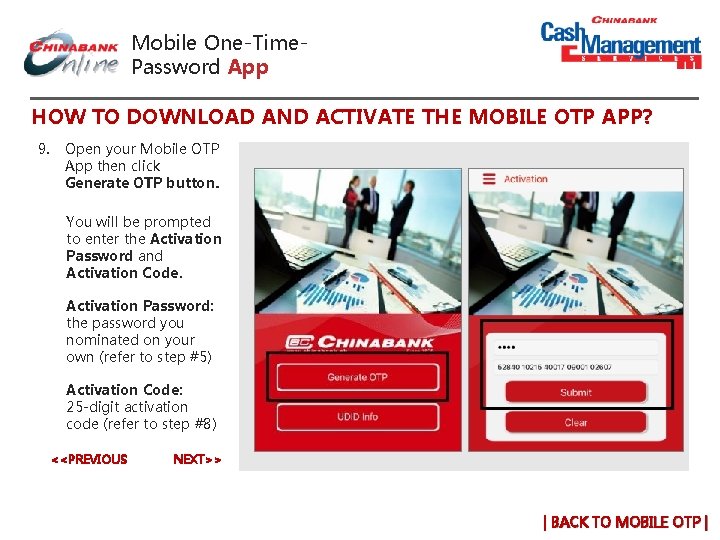
Mobile One-Time. Password App HOW TO DOWNLOAD AND ACTIVATE THE MOBILE OTP APP? 9. Open your Mobile OTP App then click Generate OTP button. You will be prompted to enter the Activation Password and Activation Code. Activation Password: the password you nominated on your own (refer to step #5) Activation Code: 25 -digit activation code (refer to step #8) <<PREVIOUS NEXT>> | BACK TO MOBILE OTP |
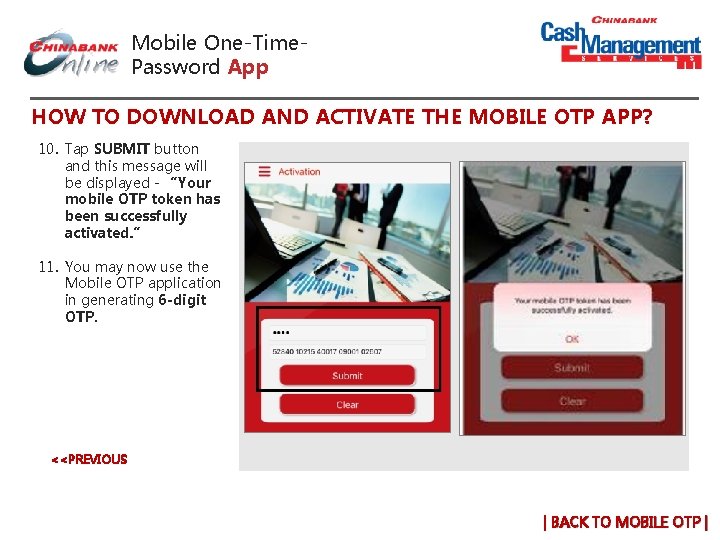
Mobile One-Time. Password App HOW TO DOWNLOAD AND ACTIVATE THE MOBILE OTP APP? 10. Tap SUBMIT button and this message will be displayed - “Your mobile OTP token has been successfully activated. ” 11. You may now use the Mobile OTP application in generating 6 -digit OTP. <<PREVIOUS | BACK TO MOBILE OTP |
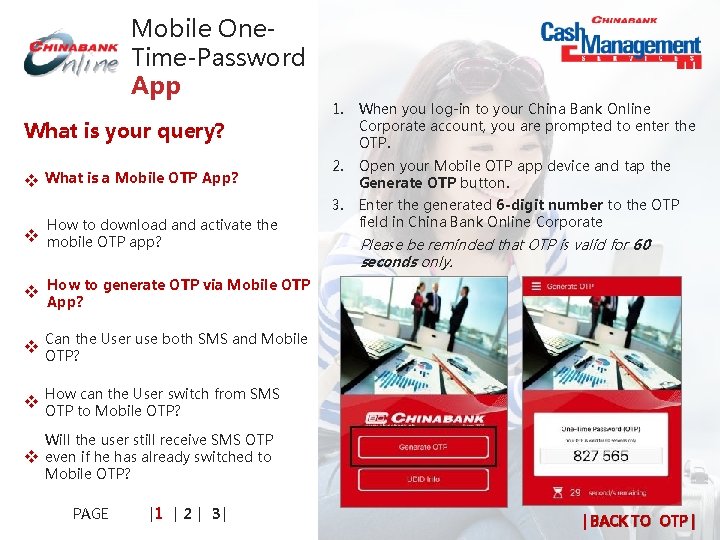
Mobile One. Time-Password App What is your query? v What is a Mobile OTP App? x How to download and activate the v xmobile OTP app? 1. When you log-in to your China Bank Online Corporate account, you are prompted to enter the OTP. 2. Open your Mobile OTP app device and tap the Generate OTP button. 3. Enter the generated 6 -digit number to the OTP field in China Bank Online Corporate Please be reminded that OTP is valid for 60 seconds only. v x. How to generate OTP via Mobile OTP App? v Can x. OTP? the User use both SMS and Mobile can the User switch from SMS v How x. OTP to Mobile OTP? v Will the user still receive SMS OTP even if he has already switched to x Mobile OTP? PAGE |1 | 2 | 3 | | BACK TO OTP |
Mobile One. Time-Password App What is your query? § NO, the User has to choose which of the two OTP generator he wants to use. § SMS OTP is the default OTP generator for all Users. is a Mobile OTP App? v What x How to download and activate the v xmobile OTP app? v x. How to generate OTP via Mobile OTP App? the User use both SMS and v Can x. Mobile OTP? can the User switch from SMS v How x. OTP to Mobile OTP? v Will the user still receive SMS OTP even if he has already switched to x Mobile OTP? PAGE |1 | 2 | 3 | | BACK TO OTP |
Mobile One. Time-Password App What is your query? 1. The User has to fill out the necessary One-Time Password Maintenance Form 2. Submit it to the China Bank Branch of Account. is a Mobile OTP App? v What x How to download and activate the v xmobile OTP app? v x. How to generate OTP via Mobile OTP App? v Can x. OTP? the User use both SMS and Mobile can the User switch from v How x. SMS OTP to Mobile OTP? v Will the user still receive SMS OTP even if he has already switched to x Mobile OTP? PAGE |1 | 2 | 3 | | BACK TO OTP |
Mobile One. Time-Password App What is your query? is a Mobile OTP App? v What x No, once his request is successfully processed and he was able to successfully download and activate the Mobile OTP App, the User will no longer receive SMS OTP. How to download and activate the v xmobile OTP app? v x. How to generate OTP via Mobile OTP App? v Can x. OTP? the User use both SMS and Mobile can the User switch from SMS v How x. OTP to Mobile OTP? v Will the user still receive SMS OTP even if he has already switched to x Mobile OTP? PAGE |1 | 2 | 3 | | BACK TO OTP |
Mobile One. Time-Password App What is your query? v What will the User do once the request xto switch has been processed by CMSD? the User immediately use the v Can x. Mobile OTP App upon downloading? happens if the User erroneously v What xentered the wrong OTP? is the minimum system v What x requirement for Mobile OTP to work? v Will x the Mobile OTP work on tablets? the User need internet v Does x connection in using the Mobile OTP? PAGE |1 | 2 | 3 | | BACK TO OTP |
Mobile One. Time-Password App What is your query? v 1. Download the Mobile OTP Application 2. Follow the instruction written on the screen. What will the User do once the xrequest to switch has been processed by CMSD? the User immediately use the v Can x. Mobile OTP App upon downloading? happens if the User erroneously v What xentered the wrong OTP? is the minimum system v What x requirement for Mobile OTP to work? v Will x the Mobile OTP work on tablets? the User need internet v Does x connection in using the Mobile OTP? PAGE |1 | 2 | 3 | | BACK TO OTP |
Mobile One. Time-Password App What is your query? v What will the User do once the request xto switch has been processed by CMSD? NO, the mobile phone has to be registered and activated before he can use the Mobile OTP Application. the User immediately use the v Can x. Mobile OTP App upon downloading? happens if the User erroneously v What xentered the wrong OTP? is the minimum system v What x requirement for Mobile OTP to work? v Will x the Mobile OTP work on tablets? the User need internet v Does x connection in using the Mobile OTP? PAGE |1 | 2 | 3 | | BACK TO OTP |
Mobile One. Time-Password App What is your query? v What will the User do once the request xto switch has been processed by CMSD? v Can x the User immediately use the Mobile OTP App upon downloading? happens if the User erroneously v What xentered the wrong OTP? is the minimum system v What x requirement for Mobile OTP to work? Entering incorrect OTP for five (5) consecutive times will block the OTP license assigned to the User. § To unblock the OTP, the User has to call Customer Contact Center or CMSD Client Servicing Unit and request for unblocking. § Once unblocked, the User can immediately receive or generate the OTP. Customer Contact Center +632 8885 5888 (press 1 then 0 to speak to a phone banker) contactcenter@chinabank. ph CMS Client Services Unit cashmgt@chinabank. ph v Will x the Mobile OTP work on tablets? the User need internet v Does x connection in using the Mobile OTP? PAGE |1 | 2 | 3 | | BACK TO OTP |
Mobile One. Time-Password App What is your query? v Mobile OTP will run in any Android or i. OS Smart Phones. What will the User do once the request xto switch has been processed by CMSD? the User immediately use the v Can x. Mobile OTP App upon downloading? happens if the User erroneously v What xentered the wrong OTP? is the minimum system v What x requirement for Mobile OTP to work? v Will x the Mobile OTP work on tablets? the User need internet v Does x connection in using the Mobile OTP? PAGE |1 | 2 | 3 | | BACK TO OTP |
Mobile One. Time-Password App What is your query? v Yes, the Mobile OTP Application will work on Android and i. OS tablets. What will the User do once the request xto switch has been processed by CMSD? the User immediately use the v Can x. Mobile OTP App upon downloading? happens if the User erroneously v What xentered the wrong OTP? is the minimum system v What x requirement for Mobile OTP to work? v Will x the Mobile OTP work on tablets? the User need internet v Does x connection in using the Mobile OTP? PAGE |1 | 2 | 3 | | BACK TO OTP |
Mobile One. Time-Password App What is your query? v NO, internet connection is not needed to use and generate OTP using the Mobile OTP App. What will the User do once the request xto switch has been processed by CMSD? Can the User immediately use the v Mobile x OTP App upon downloading? happens if the User erroneously v What xentered the wrong OTP? is the minimum system v What x requirement for Mobile OTP to work? v Will x the Mobile OTP work on tablets? the User need internet v Does x connection in using the Mobile OTP? PAGE |1 | 2 | 3 | | BACK TO OTP |
Mobile One. Time-Password App What is your query? What if the User changed his mobile v device? x v Does the User have to uninstall the Mobile OTP App from his old device in x order to use the app on his new device? the maximum number of v What xmobileisdevice per User? Will the Bank charge the User for using v Mobile x OTP in multiple devices? v How will the User know if the Mobile OTP x App he downloaded is the legitimate? User need to uninstall the v Does x. Mobilethe. OTP to get a new version? PAGE |1 | 2 | 3 | | BACK TO OTP |
Mobile One. Time-Password App What is your query? What if the User changed his mobile v device? x v 1. The User has to download the Mobile OTP App 2. Follow the same procedure in registering the device and activating the application on his device. (Click to see steps) Does the User have to uninstall the Mobile OTP App from his old device in x order to use the app on his new device? the maximum number of v What xmobileisdevice per User? Will the Bank charge the User for using v Mobile x OTP in multiple devices? v How will the User know if the Mobile OTP x App he downloaded is the legitimate? User need to uninstall the v Does x. Mobilethe. OTP to get a new version? PAGE |1 | 2 | 3 | | BACK TO OTP |
Mobile One. Time-Password App What is your query? What if the User changed his mobile NO, the User need not uninstall the Mobile OTP Application from his old device. The Mobile OTP Application will run on both devices. v device? x v Does the User have to uninstall the Mobile OTP App from his old device x in order to use the app on his new device? the maximum number of v What xmobileisdevice per User? Will the Bank charge the User for using v Mobile x OTP in multiple devices? v How will the User know if the Mobile OTP x App he downloaded is the legitimate? User need to uninstall the v Does x. Mobilethe. OTP to get a new version? PAGE |1 | 2 | 3 | | BACK TO OTP |
Mobile One. Time-Password App What is your query? Two (2) is the maximum number of devices per User. What if the User changed his mobile v device? x v Does the User have to uninstall the Mobile OTP App from his old device in x order to use the app on his new device? the maximum number of v What xmobileisdevice per User? Will the Bank charge the User for using v Mobile x OTP in multiple devices? v How will the User know if the Mobile OTP x App he downloaded is the legitimate? User need to uninstall the v Does x. Mobilethe. OTP to get a new version? PAGE |1 | 2 | 3 | | BACK TO OTP |
Mobile One. Time-Password App What is your query? What if the User changed his mobile NO, the User will not be charged with any subscription or license fee for using the Mobile OTP in multiple devices. v device? x v Does the User have to uninstall the Mobile OTP App from his old device in x order to use the app on his new device? the maximum number of v What xmobileisdevice per User? Will the Bank charge the User for v using x Mobile OTP in multiple v devices? How will the User know if the Mobile OTP x App he downloaded is the legitimate? User need to uninstall the v Does x. Mobilethe. OTP to get a new version? PAGE |1 | 2 | 3 | | BACK TO OTP |
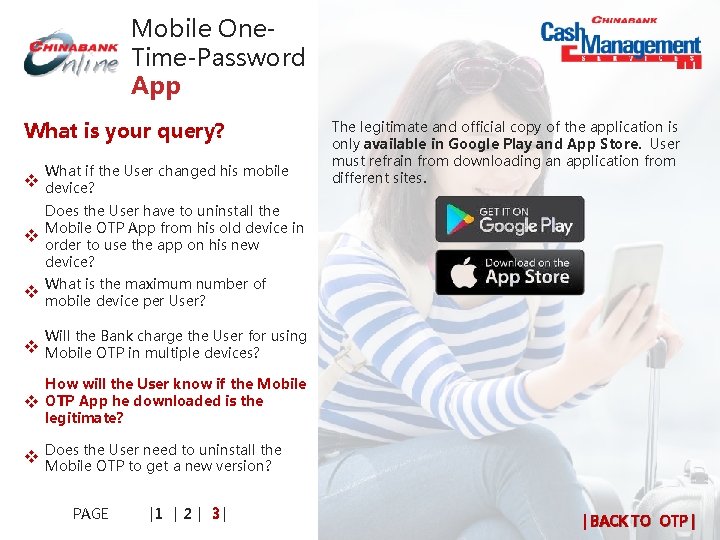
Mobile One. Time-Password App What is your query? What if the User changed his mobile v device? x v The legitimate and official copy of the application is only available in Google Play and App Store. User must refrain from downloading an application from different sites. Does the User have to uninstall the Mobile OTP App from his old device in x order to use the app on his new device? the maximum number of v What xmobileisdevice per User? Will the Bank charge the User for using v Mobile x OTP in multiple devices? v How will the User know if the Mobile OTP x App he downloaded is the legitimate? User need to uninstall the v Does x. Mobilethe. OTP to get a new version? PAGE |1 | 2 | 3 | | BACK TO OTP |
Mobile One. Time-Password App What is your query? What if the User changed his mobile v device? x v Does the User have to uninstall the Mobile OTP App from his old device in x order to use the app on his new device? 1. NO, the User need not uninstall the version he has previously downloaded and is using in order to get a new version. 2. The User will be prompted to update the application once there is a new version available. the maximum number of v What xmobileisdevice per User? Will the Bank charge the User for the v using x Mobile OTP in multiple devices? v How will the User know if the Mobile OTP x App he downloaded is the legitimate? the User need to uninstall the v Does x. Mobile OTP to get a new version? PAGE |1 | 2 | 3 | | BACK TO OTP |
GOVERNMENT PAYMENT & COLLECTIONS A better way to settle government obligations Soon | BACK TO HOME |
General e. Gov Inquiry File and remit contributions and/or payments to government agencies electronically. | BACK TO GOV’T PAYMENTS |
Government Payment and Collections How can we help you? e. Gov Manual v Request x Completion v Profile x Password v Reset x Users v Add/Delete x Registered Email v Change x PIN (Same PIN v Unlock x new PIN v Request x Role of Users v Change x Primary Account v Add/Delete x v View x Receipts e. Gov site thru Bannet v Access x | BACK TO e. GOV |
Government Payment and Collections How can we help you? Email cashmgt@chinabank. ph • Indicate company name • State request for e. Gov Manual v Request x Completion v Profile x Password v Reset x Users v Add/Delete x Registered Email v Change x PIN (Same PIN v Unlock x new PIN v Request x Role of Users v Change x Primary Account v Add/Delete x v View x Receipts e. Gov site thru Bannet v Access x | BACK TO e. GOV |
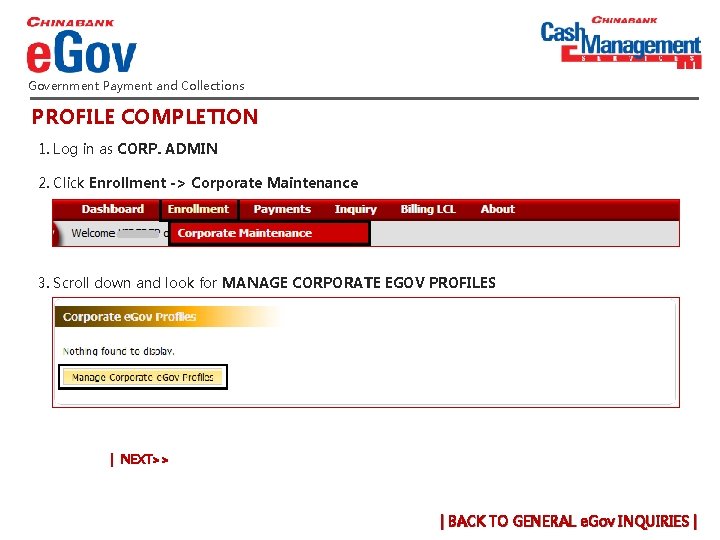
Government Payment and Collections PROFILE COMPLETION 1. Log in as CORP. ADMIN 2. Click Enrollment -> Corporate Maintenance 3. Scroll down and look for MANAGE CORPORATE EGOV PROFILES | NEXT>> | BACK TO GENERAL e. Gov INQUIRIES |
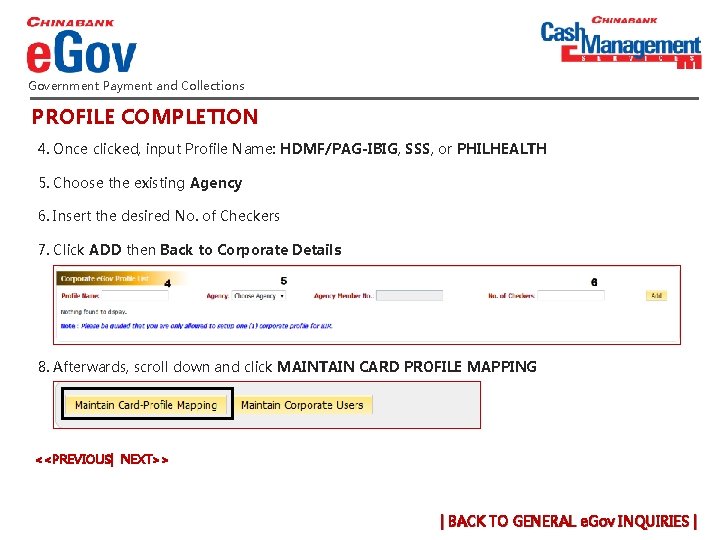
Government Payment and Collections PROFILE COMPLETION 4. Once clicked, input Profile Name: HDMF/PAG-IBIG, SSS, or PHILHEALTH 5. Choose the existing Agency 6. Insert the desired No. of Checkers 7. Click ADD then Back to Corporate Details 8. Afterwards, scroll down and click MAINTAIN CARD PROFILE MAPPING <<PREVIOUS| NEXT>> | BACK TO GENERAL e. Gov INQUIRIES |
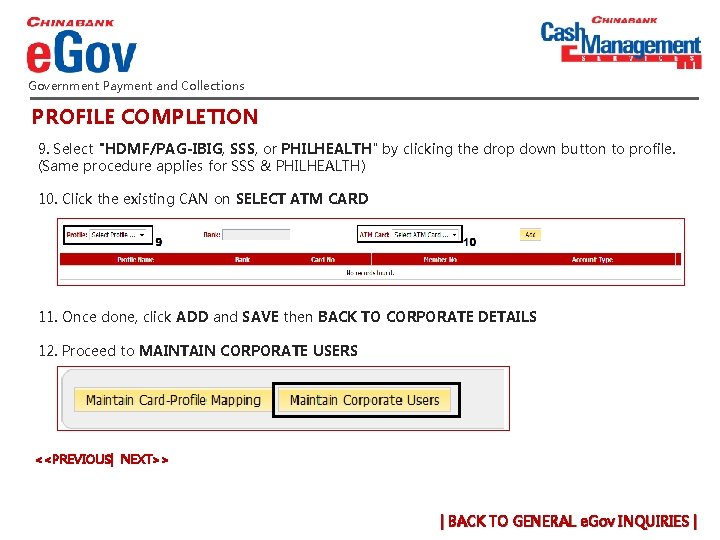
Government Payment and Collections PROFILE COMPLETION 9. Select "HDMF/PAG-IBIG, SSS, or PHILHEALTH" by clicking the drop down button to profile. (Same procedure applies for SSS & PHILHEALTH) 10. Click the existing CAN on SELECT ATM CARD 11. Once done, click ADD and SAVE then BACK TO CORPORATE DETAILS 12. Proceed to MAINTAIN CORPORATE USERS <<PREVIOUS| NEXT>> | BACK TO GENERAL e. Gov INQUIRIES |
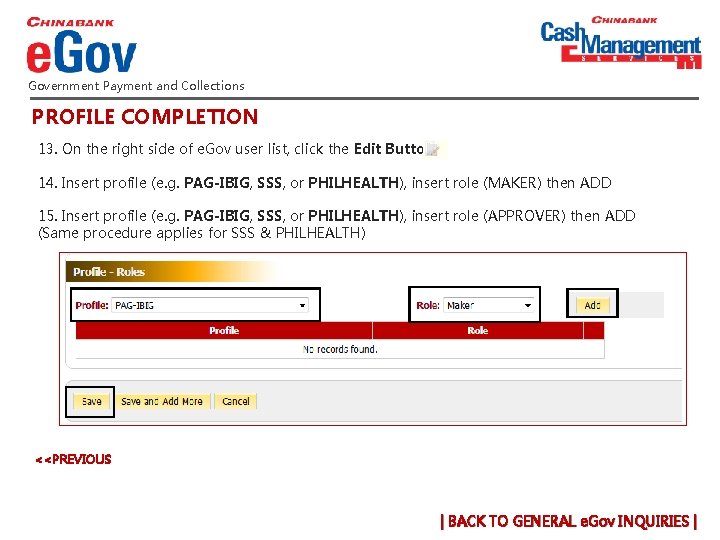
Government Payment and Collections PROFILE COMPLETION 13. On the right side of e. Gov user list, click the Edit Button 14. Insert profile (e. g. PAG-IBIG, SSS, or PHILHEALTH), insert role (MAKER) then ADD 15. Insert profile (e. g. PAG-IBIG, SSS, or PHILHEALTH), insert role (APPROVER) then ADD (Same procedure applies for SSS & PHILHEALTH) <<PREVIOUS | BACK TO GENERAL e. Gov INQUIRIES |
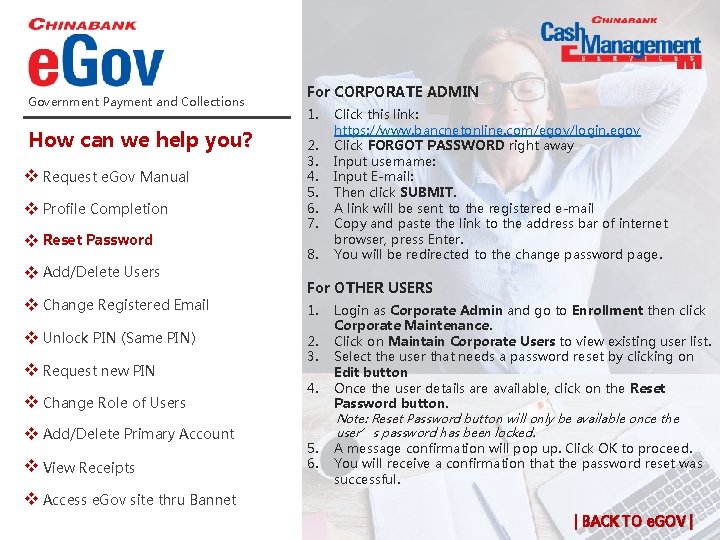
Government Payment and Collections How can we help you? e. Gov Manual v Request x Completion v Profile x Password v Reset x Users v Add/Delete x Registered Email v Change x PIN (Same PIN) v Unlock x new PIN v Request x Role of Users v Change x Primary Account v Add/Delete x v View x Receipts For CORPORATE ADMIN 1. 2. 3. 4. 5. 6. 7. 8. Click this link: https: //www. bancnetonline. com/egov/login. egov Click FORGOT PASSWORD right away Input username: Input E-mail: Then click SUBMIT. A link will be sent to the registered e-mail Copy and paste the link to the address bar of internet browser, press Enter. You will be redirected to the change password page. For OTHER USERS 1. 2. 3. 4. 5. 6. Login as Corporate Admin and go to Enrollment then click Corporate Maintenance. Click on Maintain Corporate Users to view existing user list. Select the user that needs a password reset by clicking on Edit button Once the user details are available, click on the Reset Password button. Note: Reset Password button will only be available once the user’s password has been locked. A message confirmation will pop up. Click OK to proceed. You will receive a confirmation that the password reset was successful. e. Gov site thru Bannet v Access x | BACK TO e. GOV |
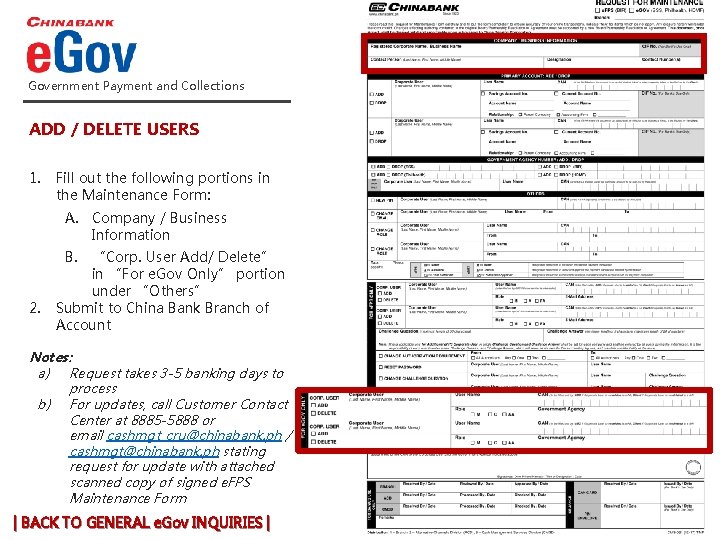
Government Payment and Collections ADD / DELETE USERS 1. Fill out the following portions in the Maintenance Form: A. Company / Business Information 2. B. “Corp. User Add/ Delete” in “For e. Gov Only” portion under “Others” Submit to China Bank Branch of Account Notes: a) Request takes 3 -5 banking days to process b) For updates, call Customer Contact Center at 8885 -5888 or email cashmgt_cru@chinabank. ph / cashmgt@chinabank. ph stating request for update with attached scanned copy of signed e. FPS Maintenance Form | BACK TO GENERAL e. Gov INQUIRIES |
Government Payment and Collections How can we help you? e. Gov Manual v Request x Completion v Profile x For CORPORATE ADMIN § Call +632 8885 5888 (press 1 then 0 to speak to a phone banker or email cashmgt@chinabank. ph For OTHER USERS (Click here to see steps) Password v Reset x Users v Add/Delete x Registered Email v Change x PIN (Same PIN) v Unlock x new PIN v Request x Role of Users v Change x Primary Account v Add/Delete x v View x Receipts e. Gov site thru Bannet v Access x | BACK TO e. GOV |
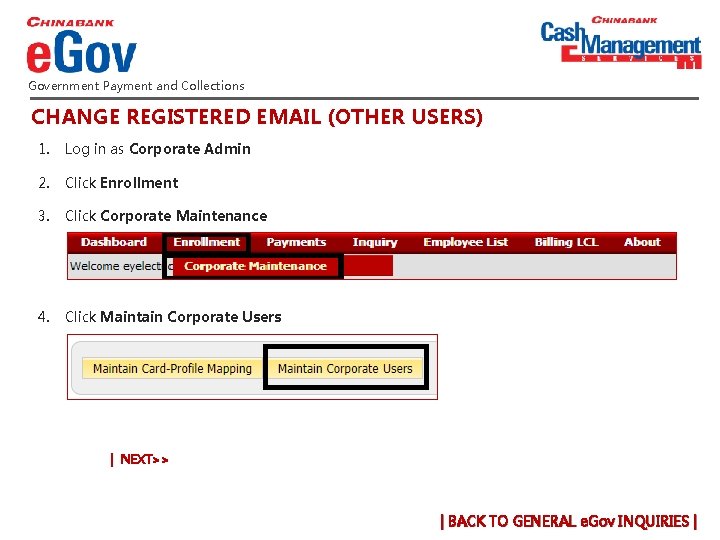
Government Payment and Collections CHANGE REGISTERED EMAIL (OTHER USERS) 1. Log in as Corporate Admin 2. Click Enrollment 3. Click Corporate Maintenance 4. Click Maintain Corporate Users | NEXT>> | BACK TO GENERAL e. Gov INQUIRIES |
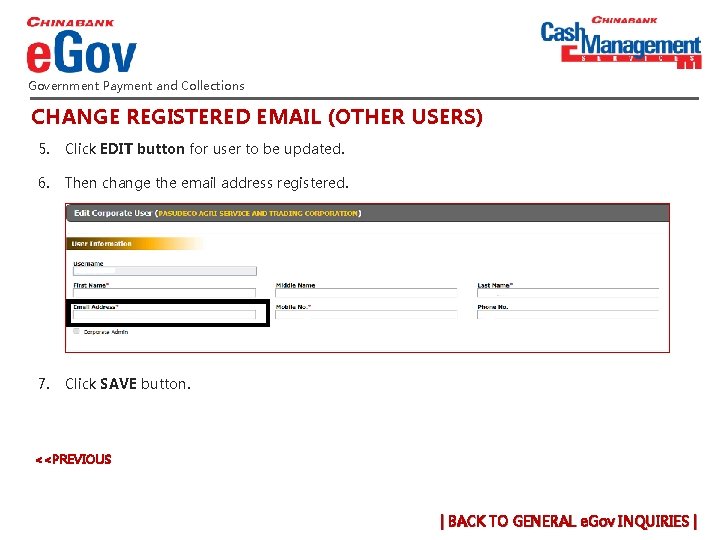
Government Payment and Collections CHANGE REGISTERED EMAIL (OTHER USERS) 5. Click EDIT button for user to be updated. 6. Then change the email address registered. 7. Click SAVE button. <<PREVIOUS | BACK TO GENERAL e. Gov INQUIRIES |
Government Payment and Collections How can we help you? e. Gov Manual v Request x Completion v Profile x Password v Reset x 1. Call China Bank Branch of Account stating request and provide the following details: A. Name of Approver B. Corporate Access Number (CAN) Notes: a) b) Request takes 1 banking day to process For updates, contact your China Bank Branch of Account Users v Add/Delete x Registered Email v Change x PIN (Same PIN) v Unlock x new PIN v Request x Role of Users v Change x Primary Account v Add/Delete x v View x Receipts e. Gov site thru Bannet v Access x | BACK TO e. GOV |
Government Payment and Collections NEW PIN REQUEST 1. 2. Fill out the following portions in the Maintenance Form: A. Company / Business Information B. “New PIN” portion under “Others” Submit to China Bank Branch of Account Notes: a) b) Request takes 3 -5 banking days to process For updates, contact your China Bank Branch of Account | BACK TO GENERAL e. Gov INQUIRIES |
Government Payment and Collections CHANGE ROLE OF USERS 1. Fill out the following portions in the Maintenance Form: A. Company / Business Information B. “Change Role” portion under “Others” 2. Submit to China Bank Branch of Account Notes: a) Request takes 3 -5 banking days to process b) For updates, call Customer Contact Center at 8885 -5888 or email cashmgt_cru@chinabank. ph / cashmgt@chinabank. ph stating request for update with attached scanned copy of signed e. FPS Maintenance | BACK TO GENERAL e. Gov INQUIRIES |
Government Payment and Collections ADD OR DELETE PRIMARY ACCOUNT 1. Fill out the following portions in the Maintenance Form: a. Company / Business Information b. Primary Account: Add / Drop 2. Submit to China Bank Branch of Account Notes: a. Request takes 3 -5 banking days to process b. For updates, call Customer Contact Center at 8885 -5888 or email cashmgt_cru@chinabank. ph / cashmgt@chinabank. ph stating request for update with attached scanned copy of signed e. FPS Maintenance | BACK TO GENERAL e. Gov INQUIRIES |
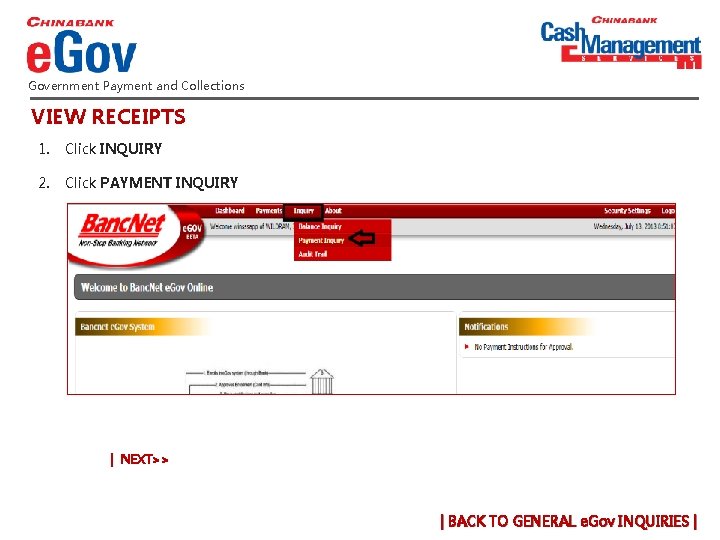
Government Payment and Collections VIEW RECEIPTS 1. Click INQUIRY 2. Click PAYMENT INQUIRY | NEXT>> | BACK TO GENERAL e. Gov INQUIRIES |
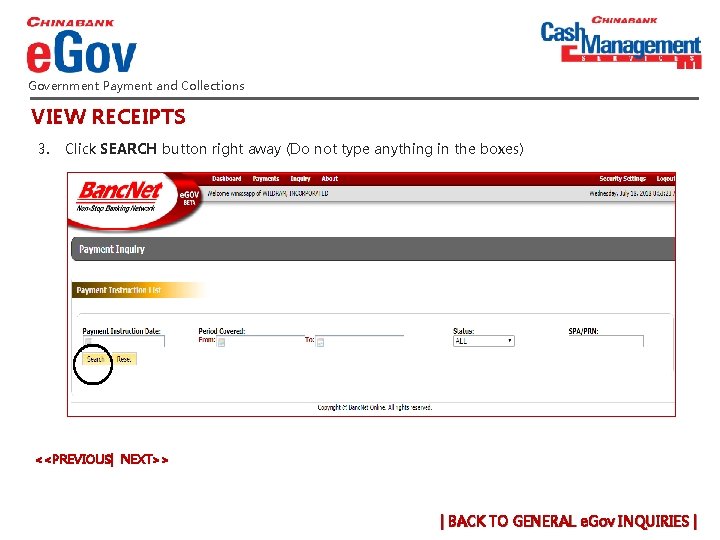
Government Payment and Collections VIEW RECEIPTS 3. Click SEARCH button right away (Do not type anything in the boxes) <<PREVIOUS| NEXT>> | BACK TO GENERAL e. Gov INQUIRIES |
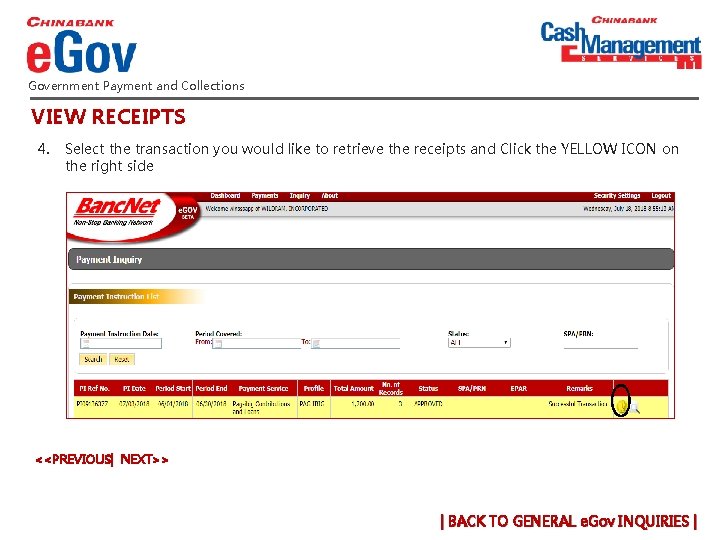
Government Payment and Collections VIEW RECEIPTS 4. Select the transaction you would like to retrieve the receipts and Click the YELLOW ICON on the right side <<PREVIOUS| NEXT>> | BACK TO GENERAL e. Gov INQUIRIES |
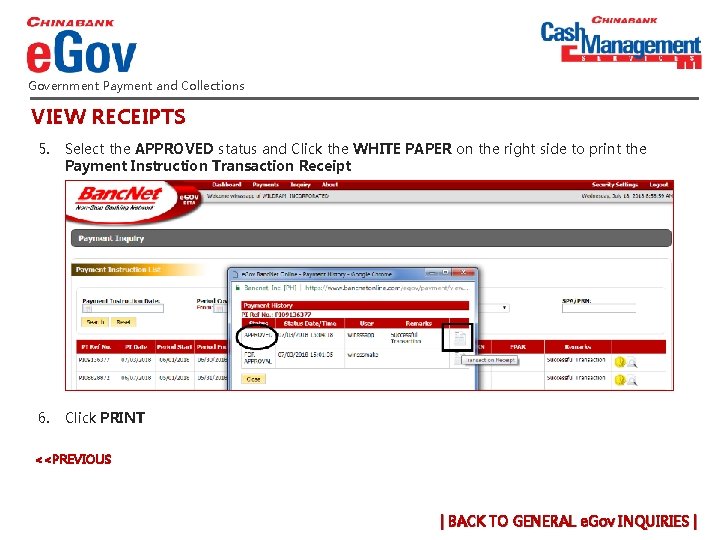
Government Payment and Collections VIEW RECEIPTS 5. Select the APPROVED status and Click the WHITE PAPER on the right side to print the Payment Instruction Transaction Receipt 6. Click PRINT <<PREVIOUS | BACK TO GENERAL e. Gov INQUIRIES |
Government Payment and Collections How can we help you? e. Gov Manual v Request x 1. Go to www. bancnetonline. com 2. Click Corporate > E-Gov 3. Click the EGOV link to redirect to login site. Completion v Profile x Password v Reset x Users v Add/Delete x Registered Email v Change x PIN (Same PIN v Unlock x new PIN v Request x Role of Users v Change x Primary Account v Add/Delete x v View x Receipts e. Gov site thru Bannet v Access x | BACK TO e. GOV |
Government Payment and Collections How can we help you? v x. Where to file SSS contributions? v x. Where to file SSS loan payments? can employers get respective Payment v x. How Reference Numbers (PRN)? v x. Can payments be reversed? v Where can employers relay PRN or payment xconcerns to? (e. g. un-posted or mis-posted, over or under payment, etc. ) v What are the effects of the SSS deactivation to x employers enrolled in e. GOV prior to February 1, 2018? are the effects of the SSS deactivation to v x. What employers enrolled in e. GOV February 1, 2018 onwards? | BACK TO e. GOV |
Government Payment and Collections How can we help you? v x. Where to file SSS contributions? § Contributions are filed via the SSS website (My. SSS) § Payment Reference Number (PRN) must be inputted in SSS e. Gov v x. Where to file SSS loan payments? can employers get respective Payment v x. How Reference Numbers (PRN)? v x. Can payments be reversed? v Where can employers relay PRN or payment xconcerns to? (e. g. un-posted or mis-posted, over or under payment, etc. ) v What are the effects of the SSS deactivation to x employers enrolled in e. GOV prior to February 1, 2018? are the effects of the SSS deactivation to v x. What employers enrolled in e. GOV February 1, 2018 onwards? | BACK TO e. GOV |
Government Payment and Collections How can we help you? Loan payments are filed via SSS e. GOV v x. Where to file SSS contributions? v x. Where to file SSS loan payments? can employers get respective Payment v x. How Reference Numbers (PRN)? v x. Can payments be reversed? v Where can employers relay PRN or payment xconcerns to? (e. g. un-posted or mis-posted, over or under payment, etc. ) v What are the effects of the SSS deactivation to x employers enrolled in e. GOV prior to February 1, 2018? are the effects of the SSS deactivation to v x. What employers enrolled in e. GOV February 1, 2018 onwards? | BACK TO e. GOV |
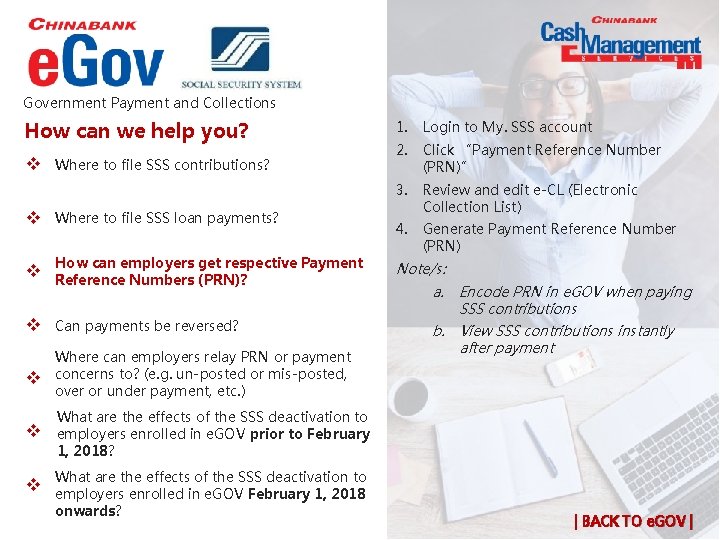
Government Payment and Collections How can we help you? v x. Where to file SSS contributions? v x. Where to file SSS loan payments? can employers get respective Payment v x. How Reference Numbers (PRN)? v x. Can payments be reversed? v Where can employers relay PRN or payment xconcerns to? (e. g. un-posted or mis-posted, over or under payment, etc. ) v What are the effects of the SSS deactivation to x employers enrolled in e. GOV prior to February 1, 2018? 1. Login to My. SSS account 2. Click “Payment Reference Number (PRN)” 3. Review and edit e-CL (Electronic Collection List) 4. Generate Payment Reference Number (PRN) Note/s: a. Encode PRN in e. GOV when paying SSS contributions b. View SSS contributions instantly after payment are the effects of the SSS deactivation to v x. What employers enrolled in e. GOV February 1, 2018 onwards? | BACK TO e. GOV |
Government Payment and Collections How can we help you? v x. Where to file SSS contributions? § Payments cannot be reversed. § Employers must directly coordinate with their corresponding SSS Branch. v x. Where to file SSS loan payments? can employers get respective Payment v x. How Reference Numbers (PRN)? v x. Can payments be reversed? v Where can employers relay PRN or payment xconcerns to? (e. g. un-posted or mis-posted, over or under payment, etc. ) v What are the effects of the SSS deactivation to x employers enrolled in e. GOV prior to February 1, 2018? are the effects of the SSS deactivation to v x. What employers enrolled in e. GOV February 1, 2018 onwards? | BACK TO e. GOV |
Government Payment and Collections How can we help you? v x. Where to file SSS contributions? v x. Where to file SSS loan payments? Employers can directly coordinate through: a. Corresponding SSS Branch b. SSS PRN Customer Hotline at 9206446 to 55. can employers get respective Payment v x. How Reference Numbers (PRN)? v x. Can payments be reversed? v Where can employers relay PRN or payment xconcerns to? (e. g. un-posted or mis-posted, over or under payment, etc. ) v What are the effects of the SSS deactivation to x employers enrolled in e. GOV prior to February 1, 2018? are the effects of the SSS deactivation to v x. What employers enrolled in e. GOV February 1, 2018 onwards? | BACK TO e. GOV |
Government Payment and Collections How can we help you? § No effect on enrolment and activation on access of SSS and previously set users and user profiles. § Reactivation is not required as China Bank will automatically be included in the list of SSS agencies. v x. Where to file SSS contributions? v x. Where to file SSS loan payments? can employers get respective Payment v x. How Reference Numbers (PRN)? v x. Can payments be reversed? v Where can employers relay PRN or payment xconcerns to? (e. g. un-posted or mis-posted, over or under payment, etc. ) v What are the effects of the SSS deactivation x to employers enrolled in e. GOV prior to February 1, 2018? are the effects of the SSS deactivation to v x. What employers enrolled in e. GOV February 1, 2018 onwards? | BACK TO e. GOV |
Government Payment and Collections How can we help you? 1. Corporate Administrator is required to set-up SSS in e. Gov, including users and user profiles. 2. Payments can be processed immediately after set-up. No approval from SSS is required. v x. Where to file SSS contributions? v x. Where to file SSS loan payments? can employers get respective Payment v x. How Reference Numbers (PRN)? v x. Can payments be reversed? v Where can employers relay PRN or payment xconcerns to? (e. g. un-posted or mis-posted, over or under payment, etc. ) v What are the effects of the SSS deactivation to x employers enrolled in e. GOV prior to February 1, 2018? are the effects of the SSS deactivation v x. What to employers enrolled in e. GOV February 1, 2018 onwards? | BACK TO e. GOV |
Government Payment and Collections How can we help you? v x. Enrolment Approval v x. File Conversion Errors v x. File Uploading v x. File Validation v x. Validation Error Messages v x. File Approval PAGE | 1 | 2| | BACK TO e. GOV |
Government Payment and Collections How can we help you? v x. Enrolment Approval Pag-ibi e. Gov applications are manually approved at Pag -ibig agency’s end. Users may check their e. Gov accounts from time to see if they have been granted approval. v x. File Conversion Errors v x. File Uploading v x. File Validation v x. Validation Error Messages v x. File Approval PAGE | 1 | 2| | BACK TO e. GOV |
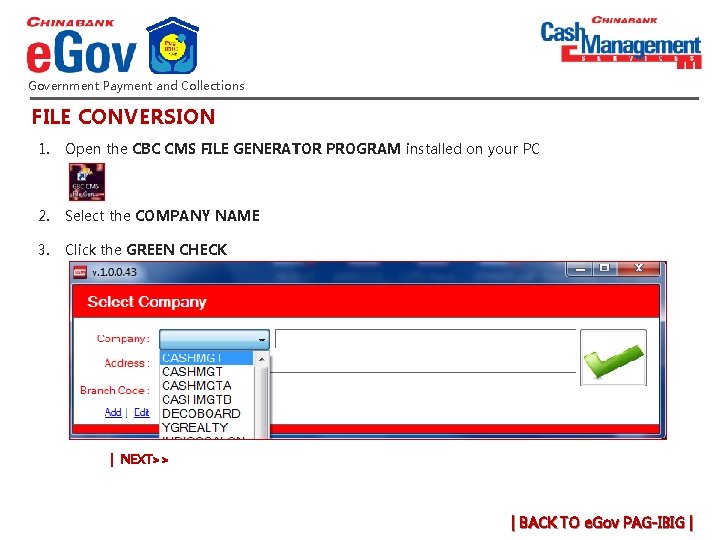
Government Payment and Collections FILE CONVERSION 1. Open the CBC CMS FILE GENERATOR PROGRAM installed on your PC 2. Select the COMPANY NAME 3. Click the GREEN CHECK | NEXT>> | BACK TO e. Gov PAG-IBIG |
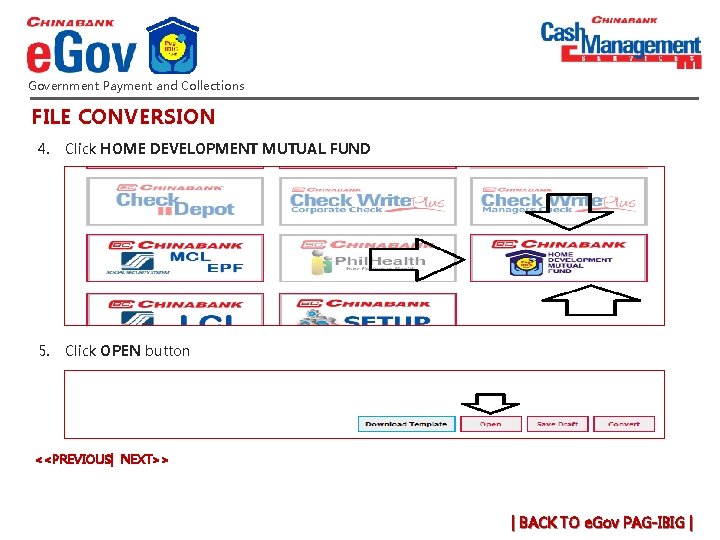
Government Payment and Collections FILE CONVERSION 4. Click HOME DEVELOPMENT MUTUAL FUND 5. Click OPEN button <<PREVIOUS| NEXT>> | BACK TO e. Gov PAG-IBIG |
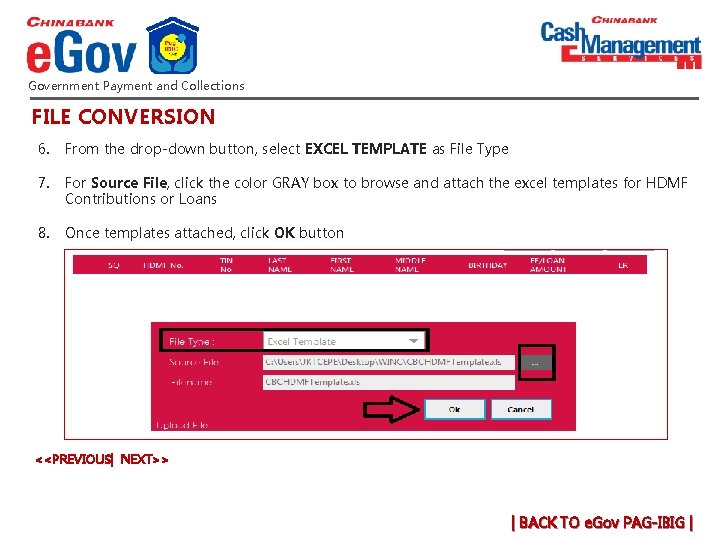
Government Payment and Collections FILE CONVERSION 6. From the drop-down button, select EXCEL TEMPLATE as File Type 7. For Source File, click the color GRAY box to browse and attach the excel templates for HDMF Contributions or Loans 8. Once templates attached, click OK button <<PREVIOUS| NEXT>> | BACK TO e. Gov PAG-IBIG |
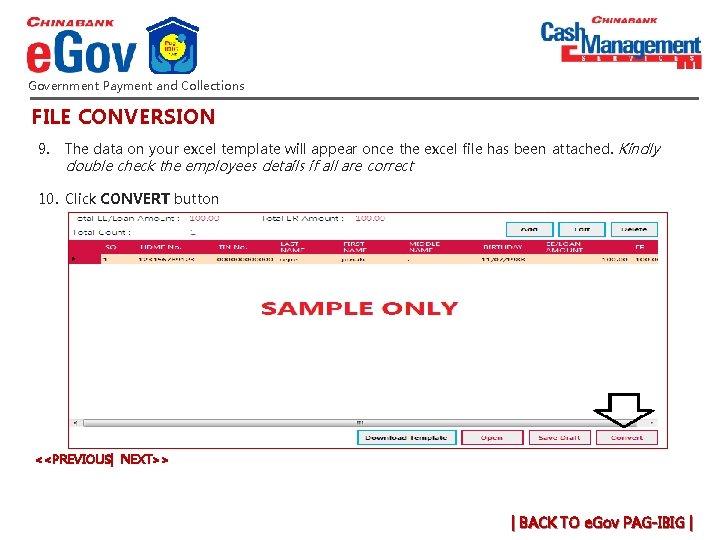
Government Payment and Collections FILE CONVERSION 9. The data on your excel template will appear once the excel file has been attached. Kindly double check the employees details if all are correct 10. Click CONVERT button <<PREVIOUS| NEXT>> | BACK TO e. Gov PAG-IBIG |
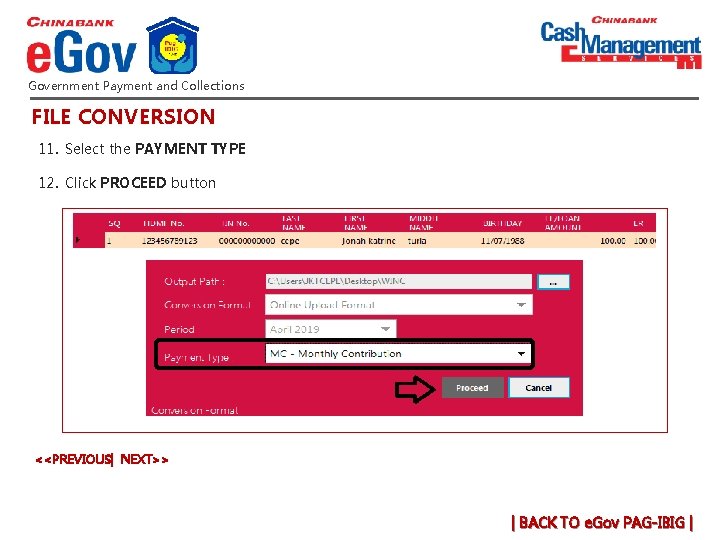
Government Payment and Collections FILE CONVERSION 11. Select the PAYMENT TYPE 12. Click PROCEED button <<PREVIOUS| NEXT>> | BACK TO e. Gov PAG-IBIG |
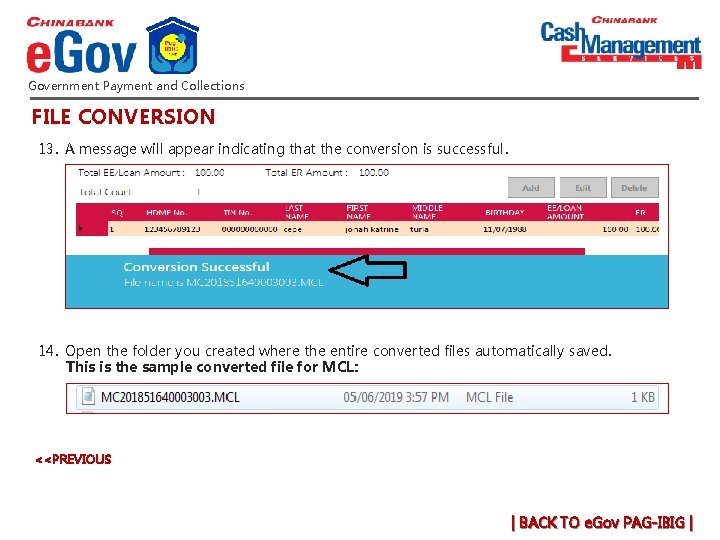
Government Payment and Collections FILE CONVERSION 13. A message will appear indicating that the conversion is successful. 14. Open the folder you created where the entire converted files automatically saved. This is the sample converted file for MCL: <<PREVIOUS | BACK TO e. Gov PAG-IBIG |
Government Payment and Collections How can we help you? v x. Enrolment Approval Errors in conversion of Pag-Ibig File and how to resolve: § “Cannot find SQ column" Call +632 8885 5888 (press 1 then 0 to speak to a phone banker or email cashmgt@chinabank. ph to request for a new converter v x. File Conversion Errors § "Expected error from external database driver" Leave the excel template file open when converting. v x. File Uploading § "String was not recognized as valid date time" Check if the date format of PC currently using, follows dd/mm/yyyy format. § "Index was outside the bounds of array" Email the excel file to cashmgt@chinabank. ph for checking as the formula was disarranged. Also, refrain from copying & pasting as excel file is formula-protected. v x. File Conversion v x. File Validation v x. Validation Error Messages v x. File Approval PAGE | 1 | 2| | BACK TO e. GOV |
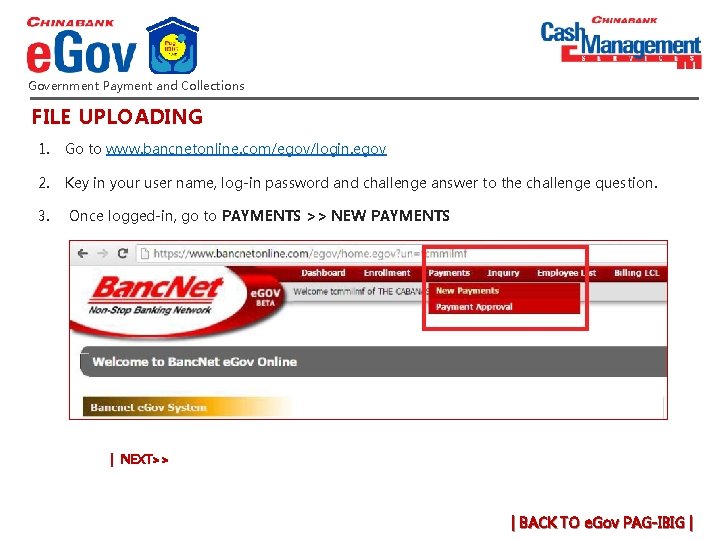
Government Payment and Collections FILE UPLOADING 1. Go to www. bancnetonline. com/egov/login. egov 2. Key in your user name, log-in password and challenge answer to the challenge question. 3. Once logged-in, go to PAYMENTS >> NEW PAYMENTS | NEXT>> | BACK TO e. Gov PAG-IBIG |
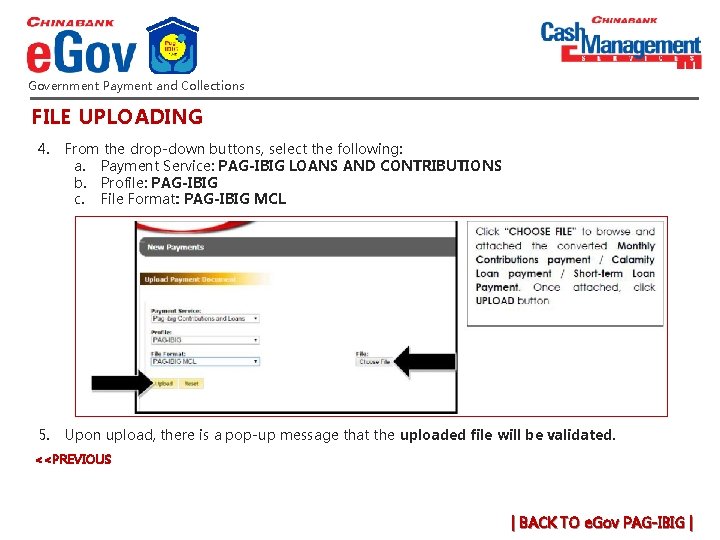
Government Payment and Collections FILE UPLOADING 4. From the drop-down buttons, select the following: a. Payment Service: PAG-IBIG LOANS AND CONTRIBUTIONS b. Profile: PAG-IBIG c. File Format: PAG-IBIG MCL 5. Upon upload, there is a pop-up message that the uploaded file will be validated. <<PREVIOUS | BACK TO e. Gov PAG-IBIG |
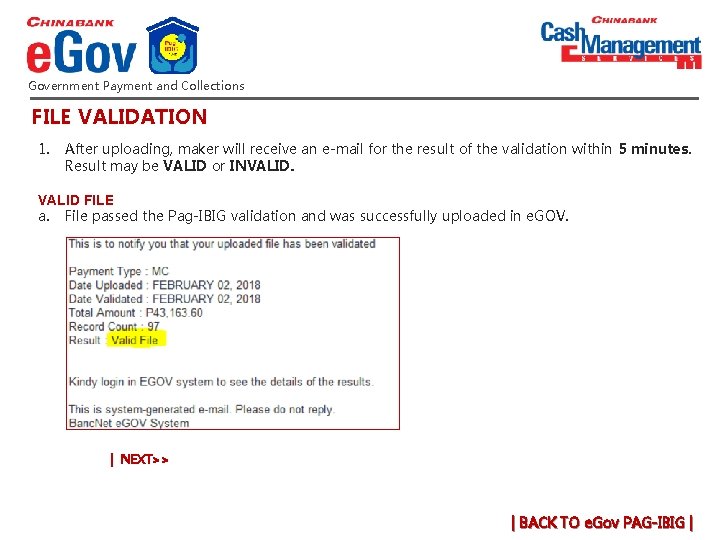
Government Payment and Collections FILE VALIDATION 1. After uploading, maker will receive an e-mail for the result of the validation within 5 minutes. Result may be VALID or INVALID. VALID FILE a. File passed the Pag-IBIG validation and was successfully uploaded in e. GOV. | NEXT>> | BACK TO e. Gov PAG-IBIG |
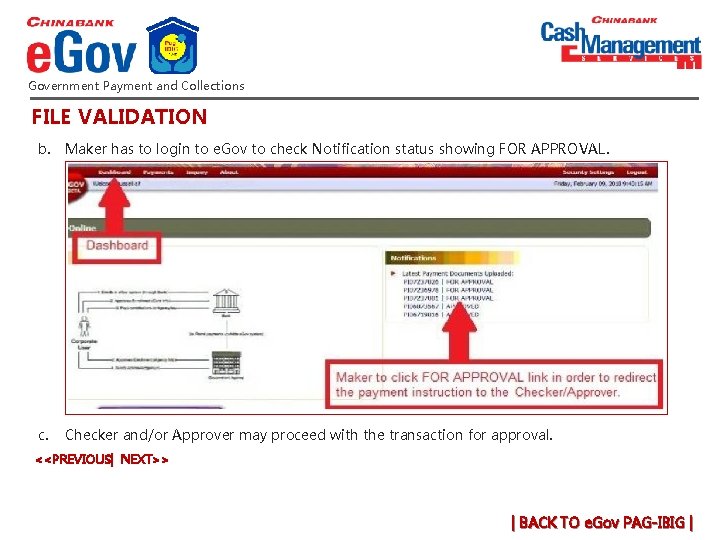
Government Payment and Collections FILE VALIDATION b. Maker has to login to e. Gov to check Notification status showing FOR APPROVAL. c. Checker and/or Approver may proceed with the transaction for approval. <<PREVIOUS| NEXT>> | BACK TO e. Gov PAG-IBIG |
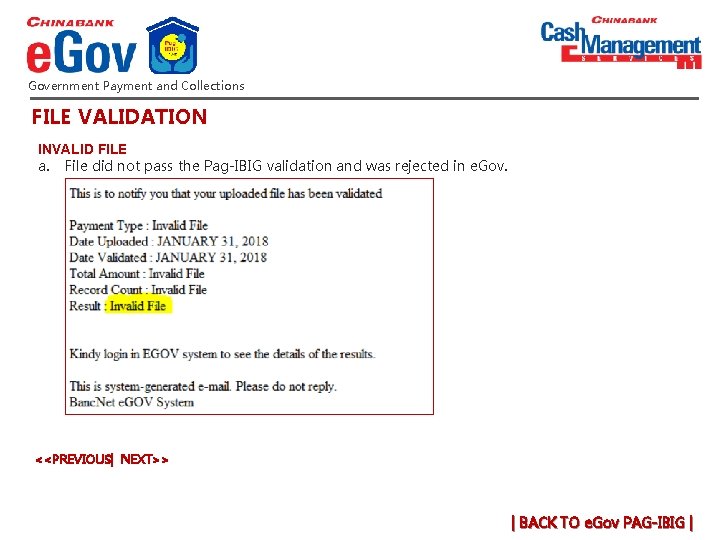
Government Payment and Collections FILE VALIDATION INVALID FILE a. File did not pass the Pag-IBIG validation and was rejected in e. Gov. <<PREVIOUS| NEXT>> | BACK TO e. Gov PAG-IBIG |
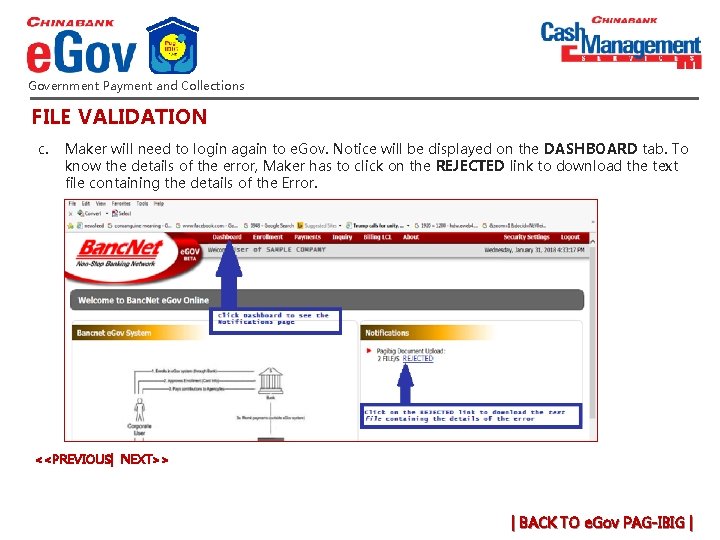
Government Payment and Collections FILE VALIDATION c. Maker will need to login again to e. Gov. Notice will be displayed on the DASHBOARD tab. To know the details of the error, Maker has to click on the REJECTED link to download the text file containing the details of the Error. <<PREVIOUS| NEXT>> | BACK TO e. Gov PAG-IBIG |
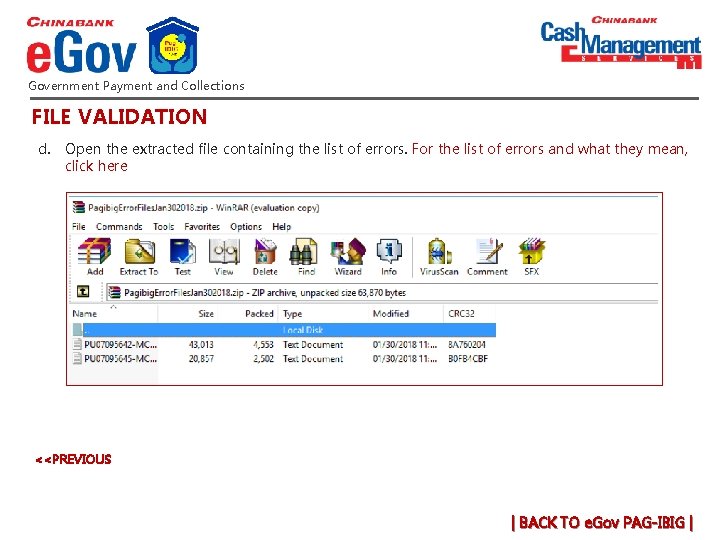
Government Payment and Collections FILE VALIDATION d. Open the extracted file containing the list of errors. For the list of errors and what they mean, click here <<PREVIOUS | BACK TO e. Gov PAG-IBIG |
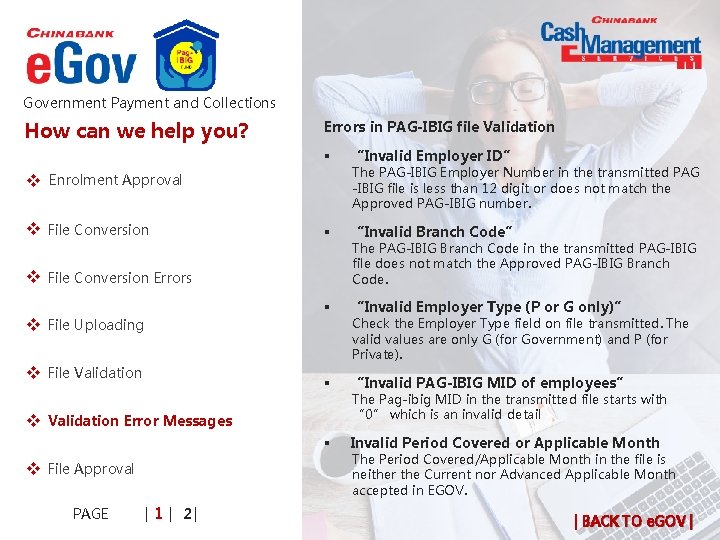
Government Payment and Collections How can we help you? Errors in PAG-IBIG file Validation § “Invalid Employer ID” § “Invalid Branch Code” § “Invalid Employer Type (P or G only)” § “Invalid PAG-IBIG MID of employees” § Invalid Period Covered or Applicable Month v x. Enrolment Approval v x. File Conversion Errors v x. File Uploading v x. File Validation v x. Validation Error Messages v x. File Approval PAGE | 1 | 2| The PAG-IBIG Employer Number in the transmitted PAG -IBIG file is less than 12 digit or does not match the Approved PAG-IBIG number. The PAG-IBIG Branch Code in the transmitted PAG-IBIG file does not match the Approved PAG-IBIG Branch Code. Check the Employer Type field on file transmitted. The valid values are only G (for Government) and P (for Private). The Pag-ibig MID in the transmitted file starts with “ 0” which is an invalid detail The Period Covered/Applicable Month in the file is neither the Current nor Advanced Applicable Month accepted in EGOV. | BACK TO e. GOV |
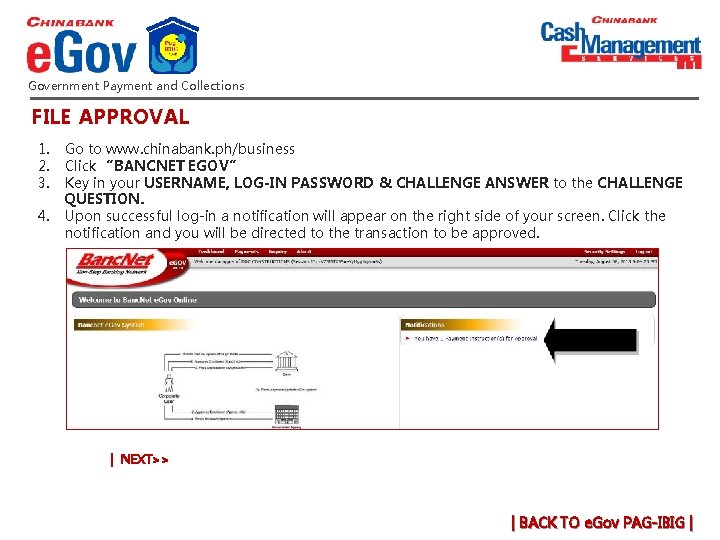
Government Payment and Collections FILE APPROVAL 1. 2. 3. 4. Go to www. chinabank. ph/business Click “BANCNET EGOV” Key in your USERNAME, LOG-IN PASSWORD & CHALLENGE ANSWER to the CHALLENGE QUESTION. Upon successful log-in a notification will appear on the right side of your screen. Click the notification and you will be directed to the transaction to be approved. | NEXT>> | BACK TO e. Gov PAG-IBIG |
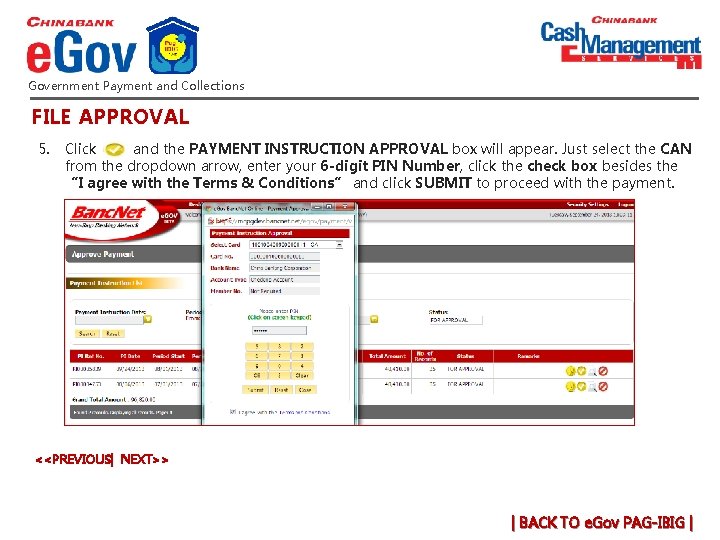
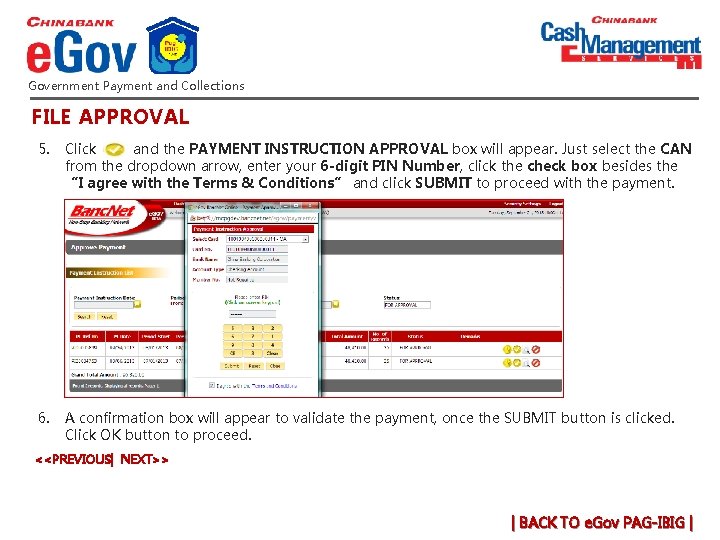
Government Payment and Collections FILE APPROVAL 5. Click and the PAYMENT INSTRUCTION APPROVAL box will appear. Just select the CAN from the dropdown arrow, enter your 6 -digit PIN Number, click the check box besides the “I agree with the Terms & Conditions” and click SUBMIT to proceed with the payment. <<PREVIOUS| NEXT>> | BACK TO e. Gov PAG-IBIG |
Government Payment and Collections FILE APPROVAL 5. Click and the PAYMENT INSTRUCTION APPROVAL box will appear. Just select the CAN from the dropdown arrow, enter your 6 -digit PIN Number, click the check box besides the “I agree with the Terms & Conditions” and click SUBMIT to proceed with the payment. 6. A confirmation box will appear to validate the payment, once the SUBMIT button is clicked. Click OK button to proceed. <<PREVIOUS| NEXT>> | BACK TO e. Gov PAG-IBIG |
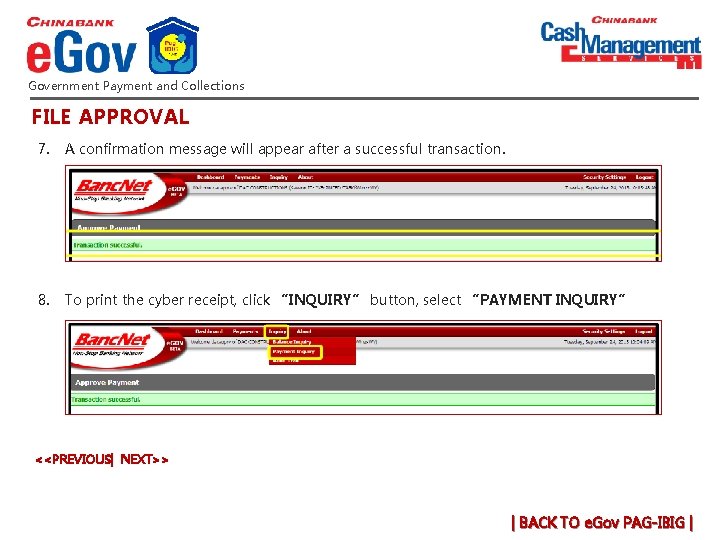
Government Payment and Collections FILE APPROVAL 7. A confirmation message will appear after a successful transaction. 8. To print the cyber receipt, click “INQUIRY” button, select “PAYMENT INQUIRY” <<PREVIOUS| NEXT>> | BACK TO e. Gov PAG-IBIG |
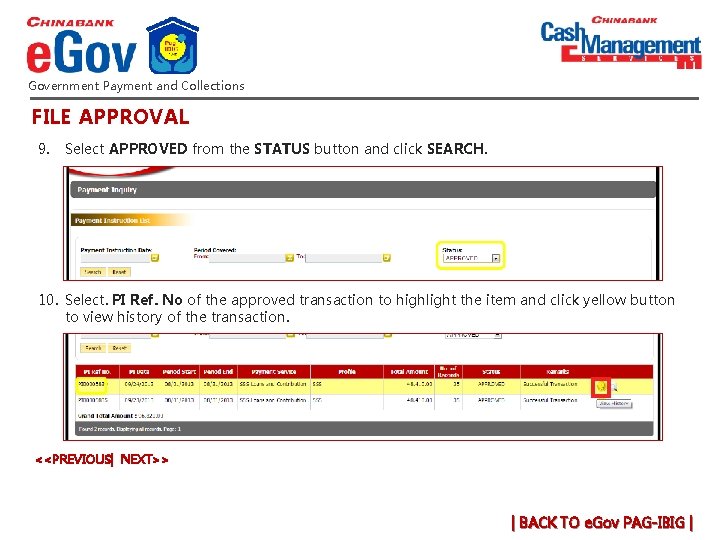
Government Payment and Collections FILE APPROVAL 9. Select APPROVED from the STATUS button and click SEARCH. 10. Select. PI Ref. No of the approved transaction to highlight the item and click yellow button to view history of the transaction. <<PREVIOUS| NEXT>> | BACK TO e. Gov PAG-IBIG |
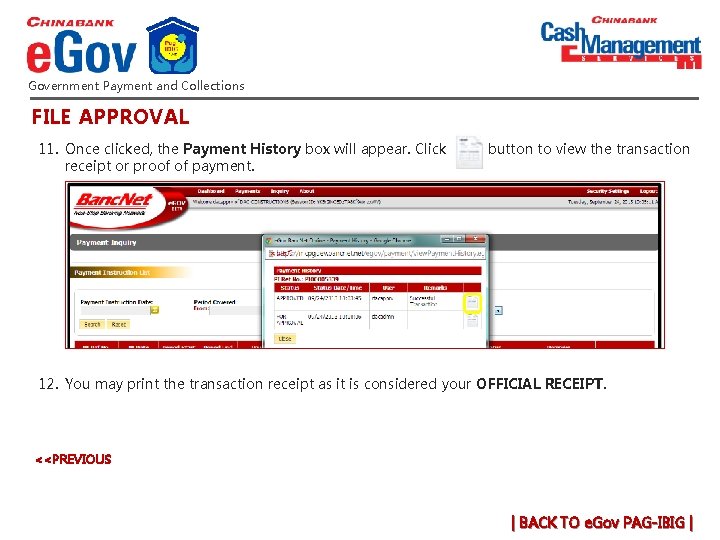
Government Payment and Collections FILE APPROVAL 11. Once clicked, the Payment History box will appear. Click receipt or proof of payment. button to view the transaction 12. You may print the transaction receipt as it is considered your OFFICIAL RECEIPT. <<PREVIOUS | BACK TO e. Gov PAG-IBIG |
Government Payment and Collections How can we help you? v x. Payment Confirmation Cancellation (If not yet v x. Payment approved) Reversal (If already v x. Payment approved) v x. Link of converter program v x. Late payments v x. Certification PAGE | 1 | 2| | BACK TO e. GOV |
Government Payment and Collections How can we help you? For payment confirmation, call or visit your PAG_IBIG branch. v x. Payment Confirmation Cancellation (If not yet v x. Payment approved) Reversal (If already v x. Payment approved) v x. Link of converter program v x. Late payments v x. Certification PAGE | 1 | 2| | BACK TO e. GOV |
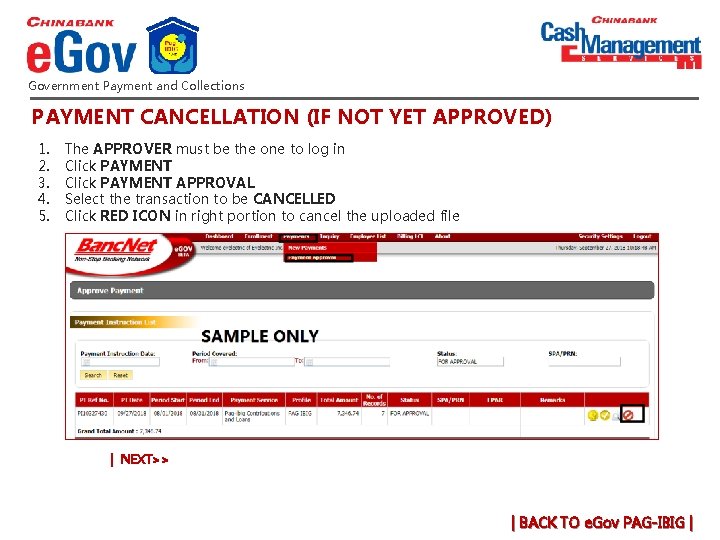
Government Payment and Collections PAYMENT CANCELLATION (IF NOT YET APPROVED) 1. 2. 3. 4. 5. The APPROVER must be the one to log in Click PAYMENT APPROVAL Select the transaction to be CANCELLED Click RED ICON in right portion to cancel the uploaded file | NEXT>> | BACK TO e. Gov PAG-IBIG |
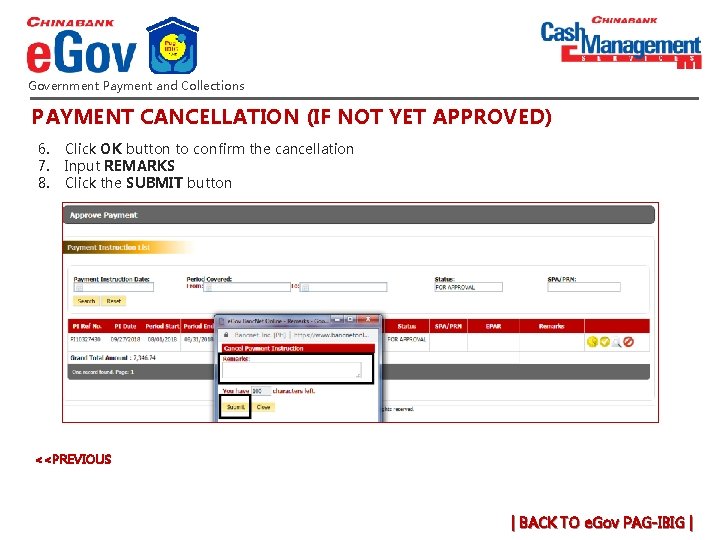
Government Payment and Collections PAYMENT CANCELLATION (IF NOT YET APPROVED) 6. 7. 8. Click OK button to confirm the cancellation Input REMARKS Click the SUBMIT button <<PREVIOUS | BACK TO e. Gov PAG-IBIG |
Government Payment and Collections How can we help you? For payment reversal, call or visit your PAG_IBIG branch. v x. Payment Confirmation Cancellation (If not yet v x. Payment approved) Reversal (If already v x. Payment approved) v x. Link of converter program v x. Late payments v x. Certification PAGE | 1 | 2| | BACK TO e. GOV |
Government Payment and Collections How can we help you? v x. Payment Confirmation Call +632 8885 5888 (press 1 then 0 to speak to a phone banker or email cashmgt@chinabank. ph to request for the converter program. Cancellation (If not yet v x. Payment approved) Reversal (If already v x. Payment approved) v x. Link of converter program v x. Late payments v x. Certification PAGE | 1 | 2| | BACK TO e. GOV |
Government Payment and Collections How can we help you? For late payments, call or visit your PAG_IBIG branch. v x. Payment Confirmation Cancellation (If not yet v x. Payment approved) Reversal (If already v x. Payment approved) v x. Link of converter program v x. Late payments v x. Certification PAGE | 1 | 2| | BACK TO e. GOV |
Government Payment and Collections How can we help you? If PAG-IBIG e. Gov enrolment is still pending, please call or visit your China Bank branch. v x. Payment Confirmation Cancellation (If not yet v x. Payment approved) Reversal (If already v x. Payment approved) v x. Link of converter program v x. Late payments v x. Certification PAGE | 1 | 2| | BACK TO e. GOV |
Government Payment and Collections How can we help you? v x. Payment Filing v x. File Approval v x. Payment Confirmation Payment Cancellation v x(If not yet approved) Payment Reversal v x(If already approved) v x. Late Payments v x. Error Messages | BACK TO e. GOV |
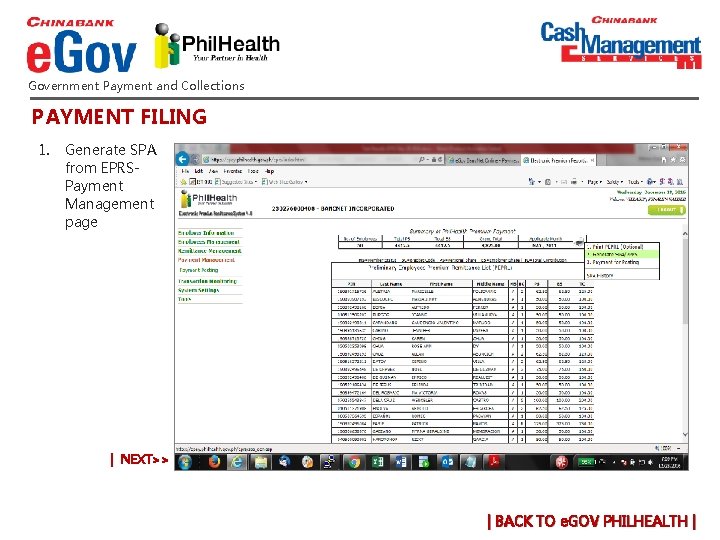
Government Payment and Collections PAYMENT FILING 1. Generate SPA from EPRSPayment Management page | NEXT>> | BACK TO e. GOV PHILHEALTH |
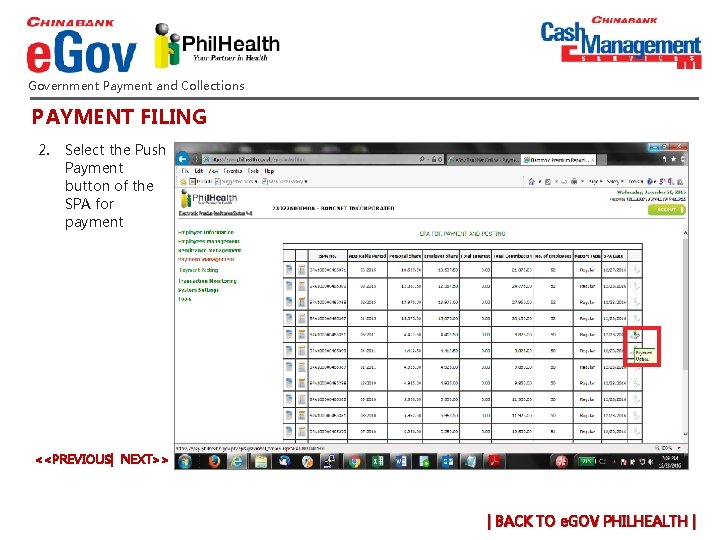
Government Payment and Collections PAYMENT FILING 2. Select the Push Payment button of the SPA for payment <<PREVIOUS| NEXT>> | BACK TO e. GOV PHILHEALTH |
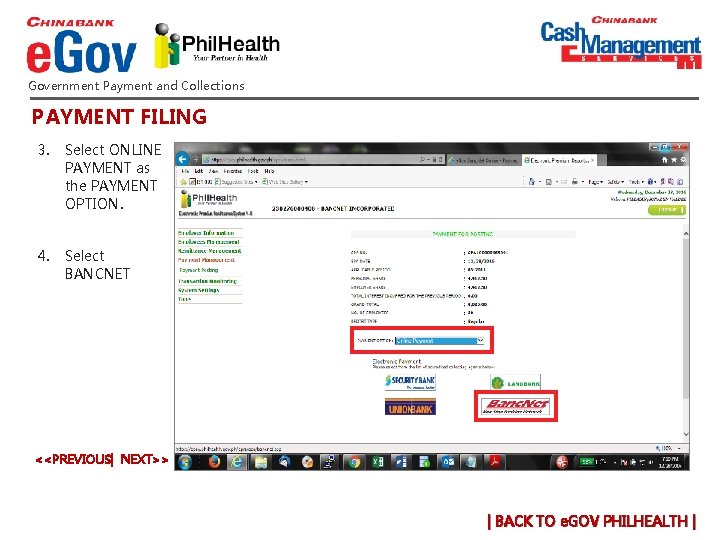
Government Payment and Collections PAYMENT FILING 3. Select ONLINE PAYMENT as the PAYMENT OPTION. 4. Select BANCNET <<PREVIOUS| NEXT>> | BACK TO e. GOV PHILHEALTH |
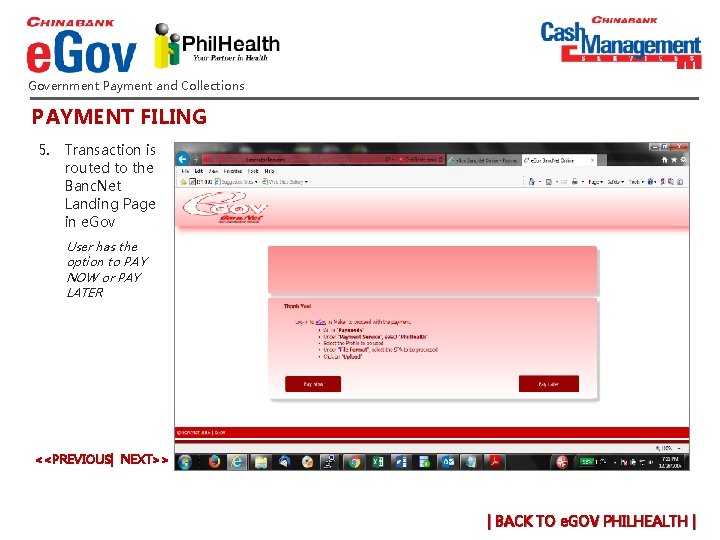
Government Payment and Collections PAYMENT FILING 5. Transaction is routed to the Banc. Net Landing Page in e. Gov User has the option to PAY NOW or PAY LATER <<PREVIOUS| NEXT>> | BACK TO e. GOV PHILHEALTH |
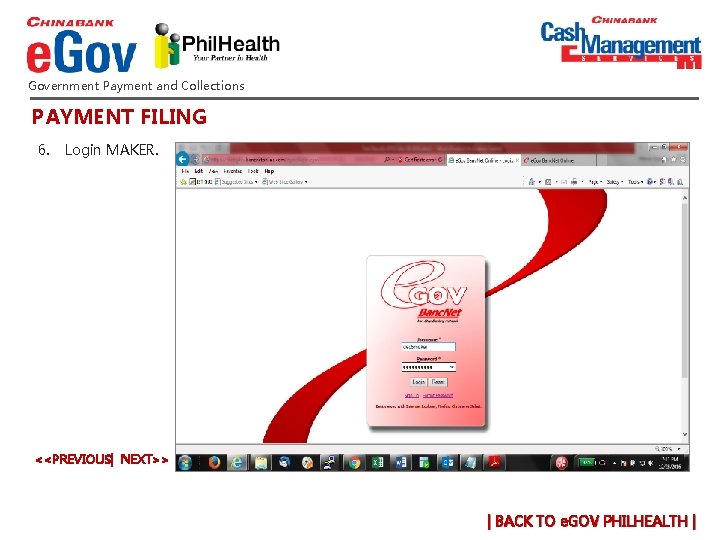
Government Payment and Collections PAYMENT FILING 6. Login MAKER. <<PREVIOUS| NEXT>> | BACK TO e. GOV PHILHEALTH |
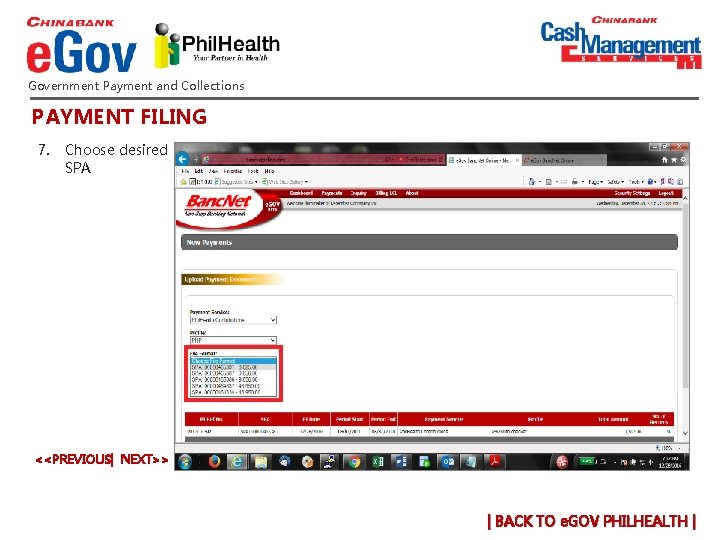
Government Payment and Collections PAYMENT FILING 7. Choose desired SPA <<PREVIOUS| NEXT>> | BACK TO e. GOV PHILHEALTH |
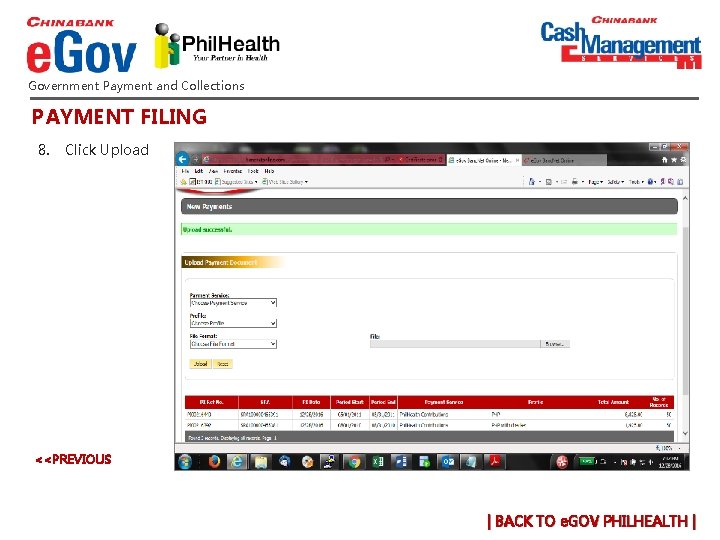
Government Payment and Collections PAYMENT FILING 8. Click Upload <<PREVIOUS | BACK TO e. GOV PHILHEALTH |
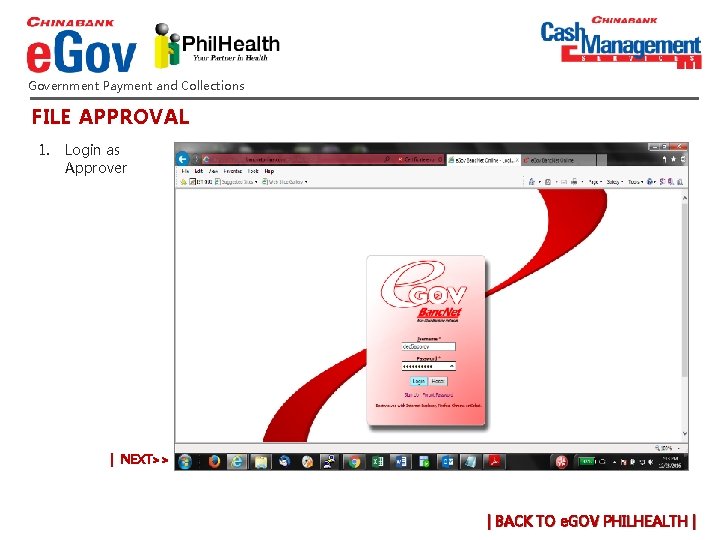
Government Payment and Collections FILE APPROVAL 1. Login as Approver | NEXT>> | BACK TO e. GOV PHILHEALTH |
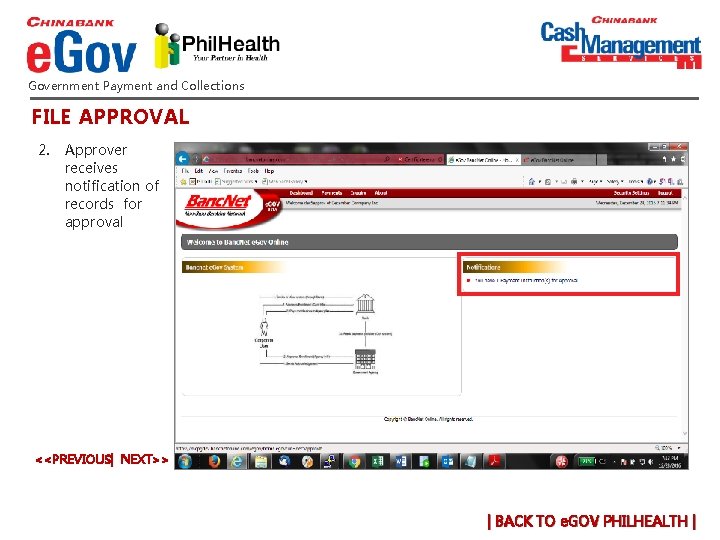
Government Payment and Collections FILE APPROVAL 2. Approver receives notification of records for approval <<PREVIOUS| NEXT>> | BACK TO e. GOV PHILHEALTH |
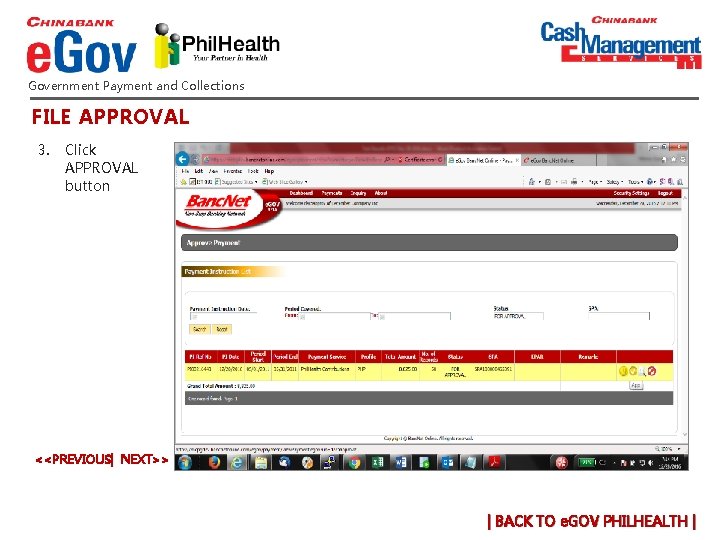
Government Payment and Collections FILE APPROVAL 3. Click APPROVAL button <<PREVIOUS| NEXT>> | BACK TO e. GOV PHILHEALTH |
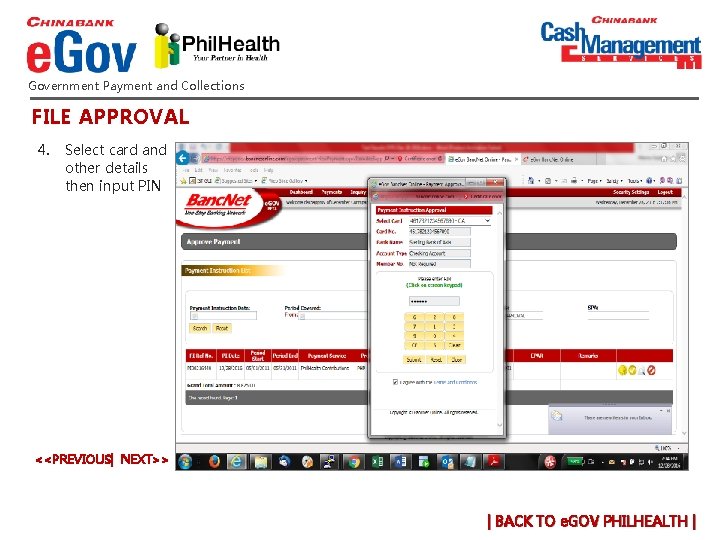
Government Payment and Collections FILE APPROVAL 4. Select card and other details then input PIN <<PREVIOUS| NEXT>> | BACK TO e. GOV PHILHEALTH |
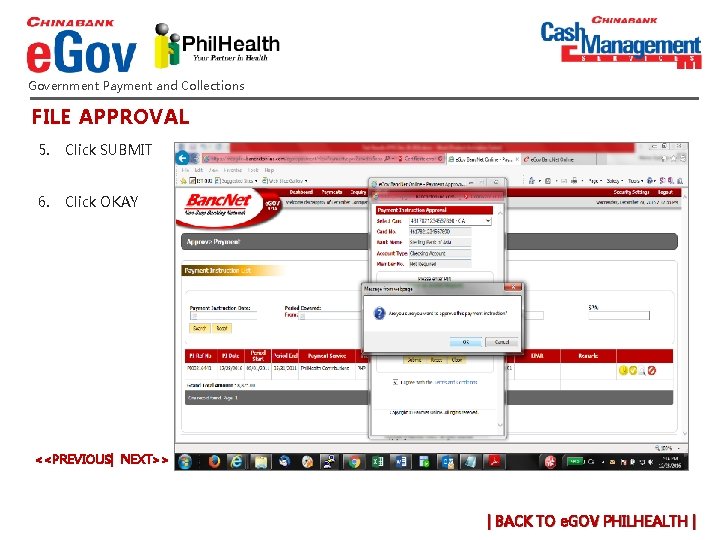
Government Payment and Collections FILE APPROVAL 5. Click SUBMIT 6. Click OKAY <<PREVIOUS| NEXT>> | BACK TO e. GOV PHILHEALTH |
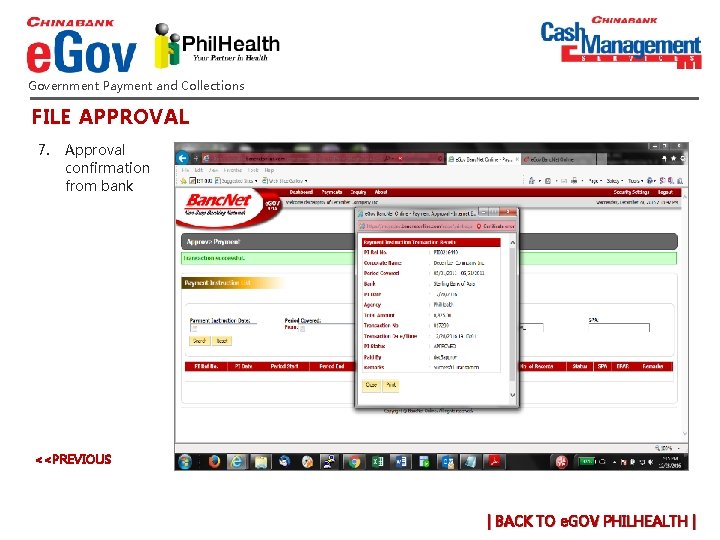
Government Payment and Collections FILE APPROVAL 7. Approval confirmation from bank <<PREVIOUS | BACK TO e. GOV PHILHEALTH |
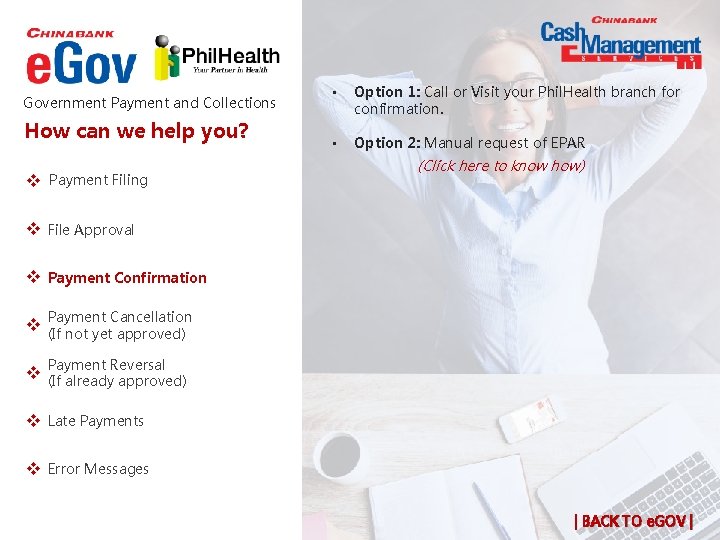
Government Payment and Collections How can we help you? v x. Payment Filing • Option 1: Call or Visit your Phil. Health branch for confirmation. • Option 2: Manual request of EPAR (Click here to know how) v x. File Approval v x. Payment Confirmation Payment Cancellation v x(If not yet approved) Payment Reversal v x(If already approved) v x. Late Payments v x. Error Messages | BACK TO e. GOV |
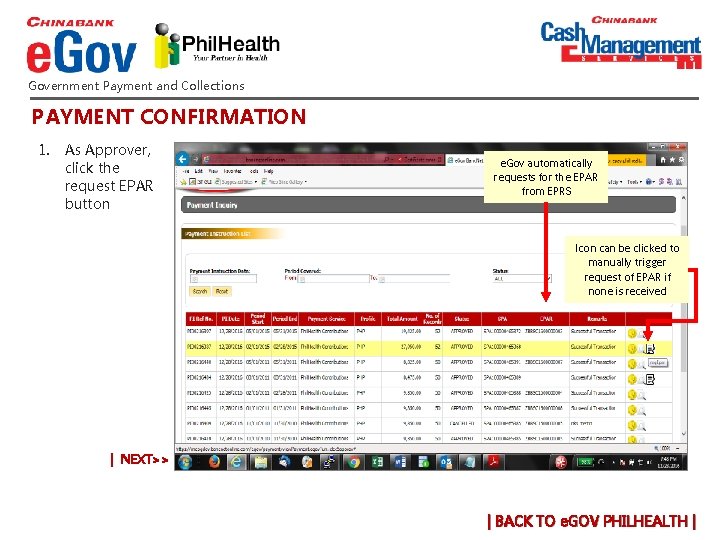
Government Payment and Collections PAYMENT CONFIRMATION 1. As Approver, click the request EPAR button e. Gov automatically requests for the EPAR from EPRS Icon can be clicked to manually trigger request of EPAR if none is received | NEXT>> | BACK TO e. GOV PHILHEALTH |
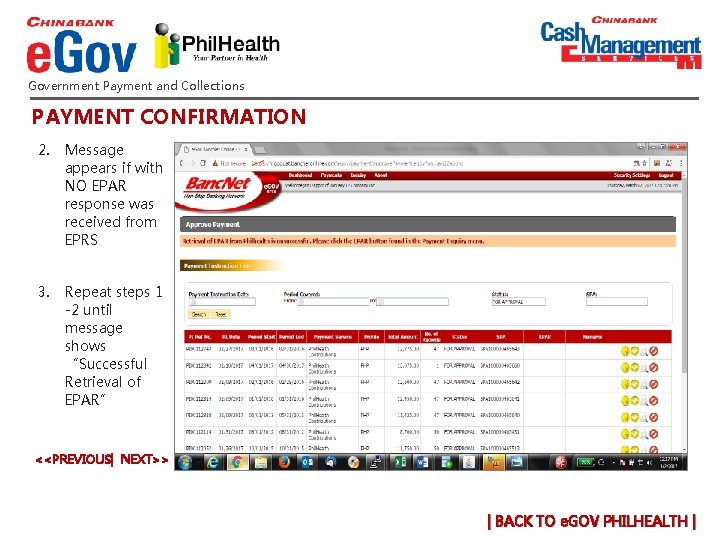
Government Payment and Collections PAYMENT CONFIRMATION 2. Message appears if with NO EPAR response was received from EPRS 3. Repeat steps 1 -2 until message shows “Successful Retrieval of EPAR” <<PREVIOUS| NEXT>> | BACK TO e. GOV PHILHEALTH |
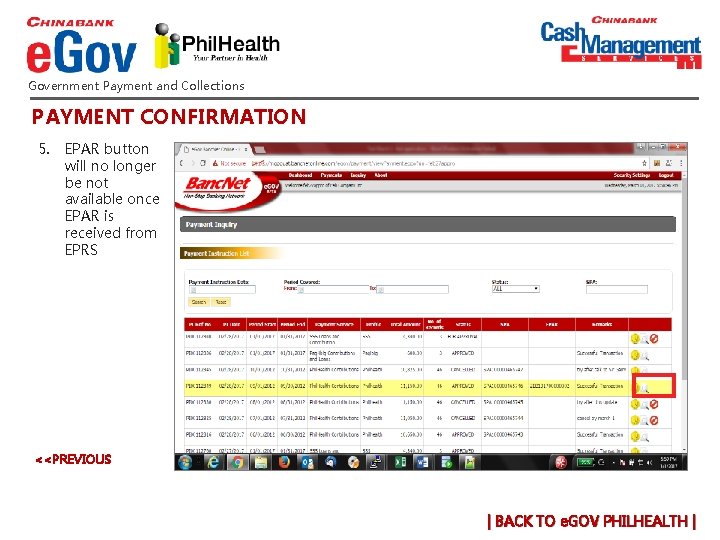
Government Payment and Collections PAYMENT CONFIRMATION 5. EPAR button will no longer be not available once EPAR is received from EPRS <<PREVIOUS | BACK TO e. GOV PHILHEALTH |
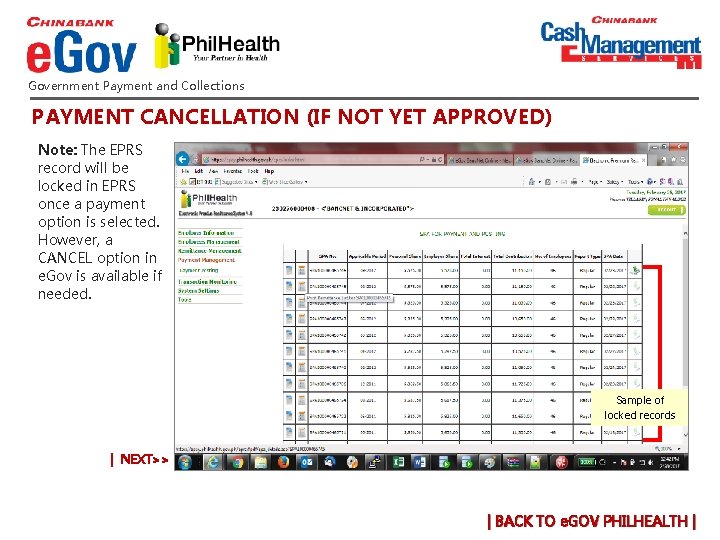
Government Payment and Collections PAYMENT CANCELLATION (IF NOT YET APPROVED) Note: The EPRS record will be locked in EPRS once a payment option is selected. However, a CANCEL option in e. Gov is available if needed. Sample of locked records | NEXT>> | BACK TO e. GOV PHILHEALTH |
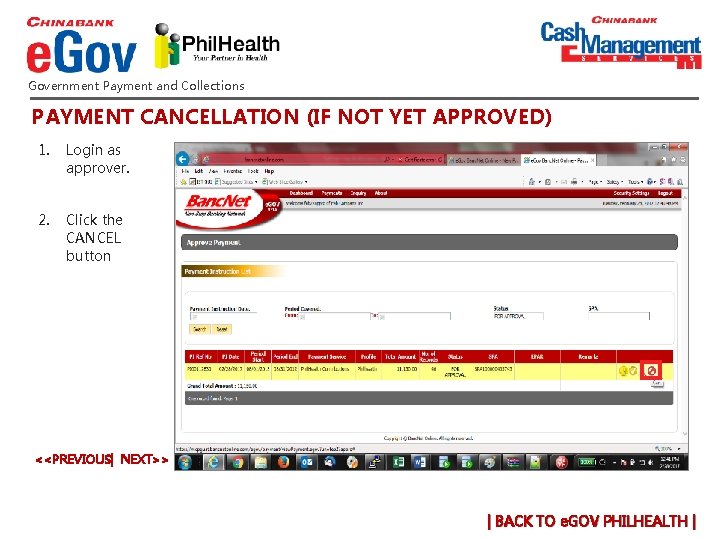
Government Payment and Collections PAYMENT CANCELLATION (IF NOT YET APPROVED) 1. Login as approver. 2. Click the CANCEL button <<PREVIOUS| NEXT>> | BACK TO e. GOV PHILHEALTH |
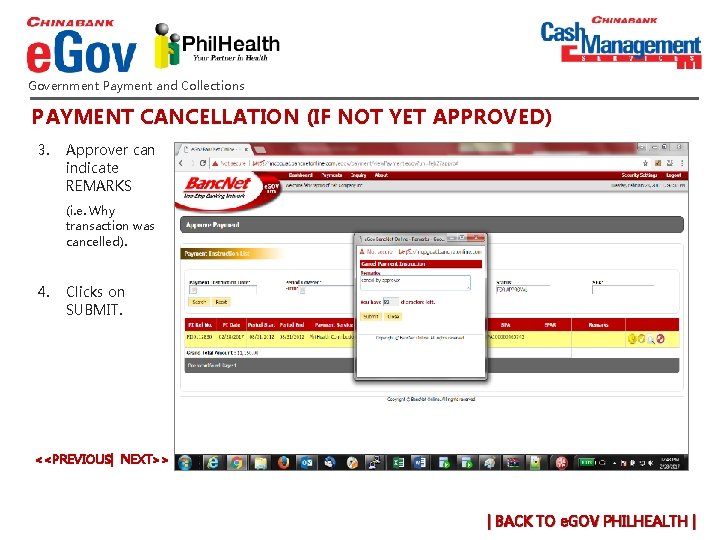
Government Payment and Collections PAYMENT CANCELLATION (IF NOT YET APPROVED) 3. Approver can indicate REMARKS (i. e. Why transaction was cancelled). 4. Clicks on SUBMIT. <<PREVIOUS| NEXT>> | BACK TO e. GOV PHILHEALTH |
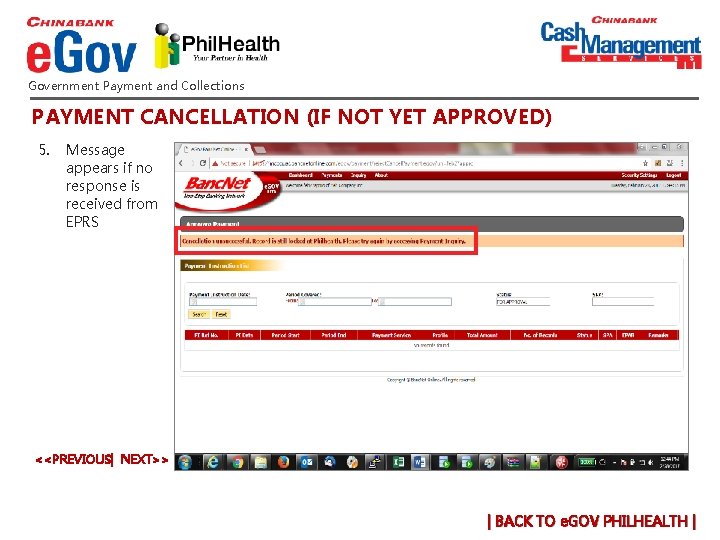
Government Payment and Collections PAYMENT CANCELLATION (IF NOT YET APPROVED) 5. Message appears if no response is received from EPRS <<PREVIOUS| NEXT>> | BACK TO e. GOV PHILHEALTH |
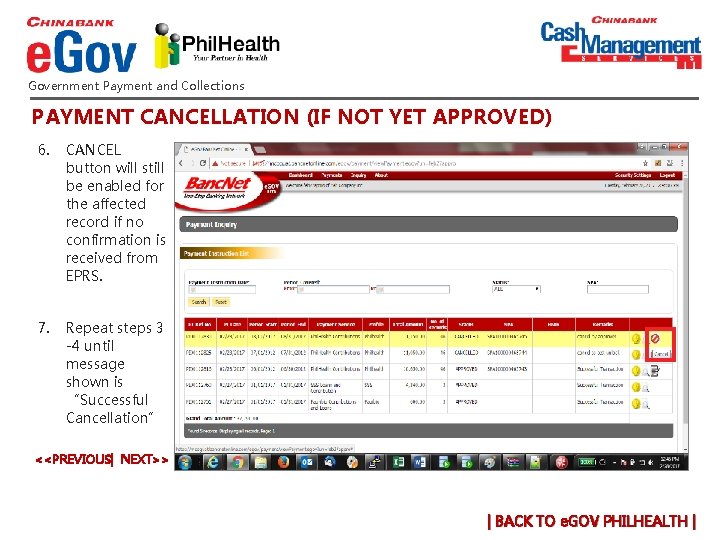
Government Payment and Collections PAYMENT CANCELLATION (IF NOT YET APPROVED) 6. CANCEL button will still be enabled for the affected record if no confirmation is received from EPRS. 7. Repeat steps 3 -4 until message shown is “Successful Cancellation” <<PREVIOUS| NEXT>> | BACK TO e. GOV PHILHEALTH |
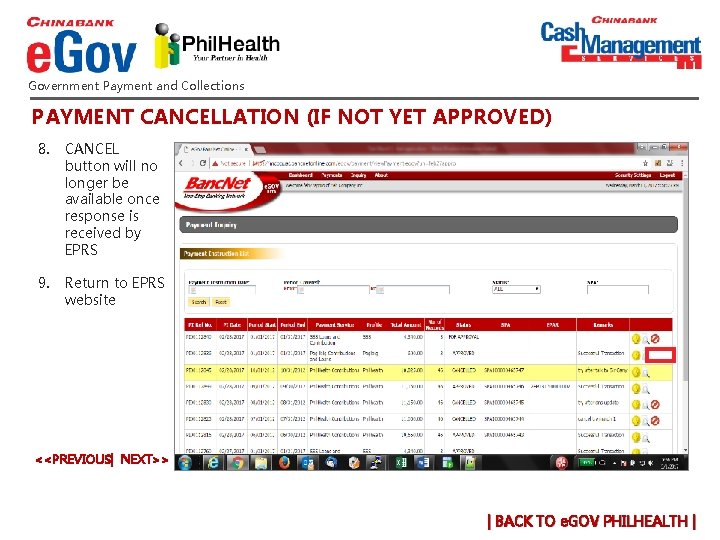
Government Payment and Collections PAYMENT CANCELLATION (IF NOT YET APPROVED) 8. CANCEL button will no longer be available once response is received by EPRS 9. Return to EPRS website <<PREVIOUS| NEXT>> | BACK TO e. GOV PHILHEALTH |
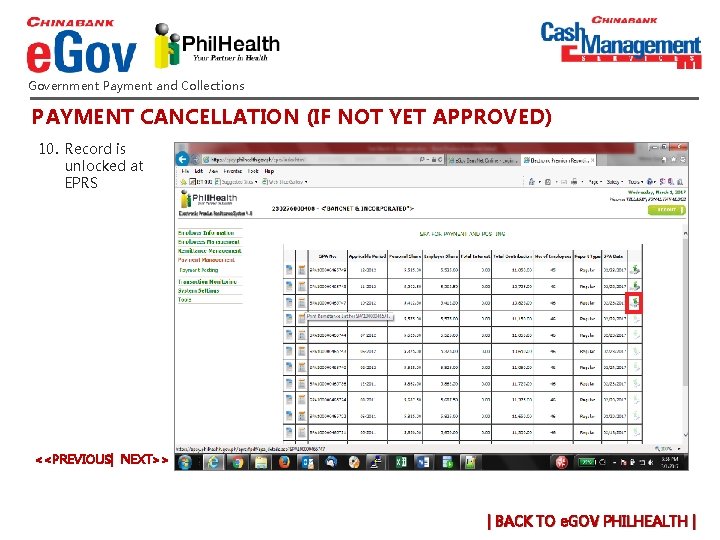
Government Payment and Collections PAYMENT CANCELLATION (IF NOT YET APPROVED) 10. Record is unlocked at EPRS <<PREVIOUS| NEXT>> | BACK TO e. GOV PHILHEALTH |
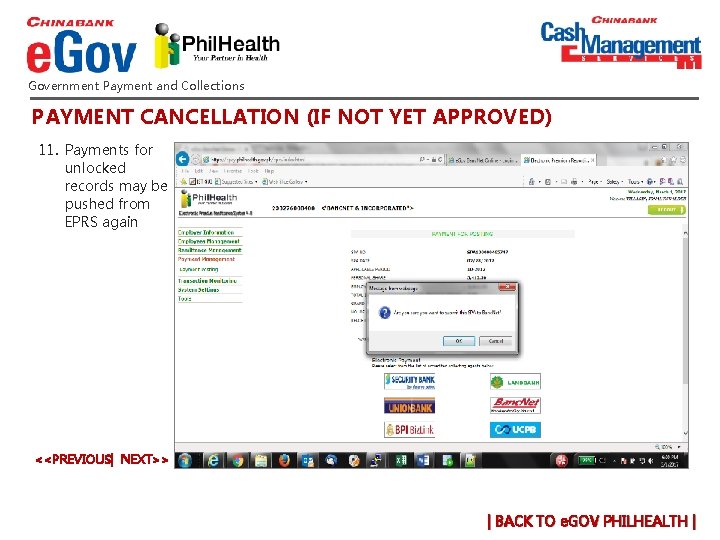
Government Payment and Collections PAYMENT CANCELLATION (IF NOT YET APPROVED) 11. Payments for unlocked records may be pushed from EPRS again <<PREVIOUS| NEXT>> | BACK TO e. GOV PHILHEALTH |
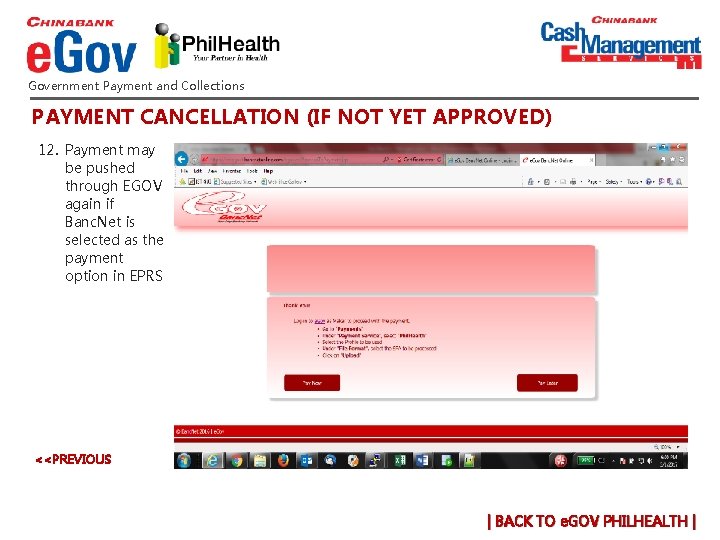
Government Payment and Collections PAYMENT CANCELLATION (IF NOT YET APPROVED) 12. Payment may be pushed through EGOV again if Banc. Net is selected as the payment option in EPRS <<PREVIOUS | BACK TO e. GOV PHILHEALTH |
Government Payment and Collections How can we help you? For payment reversals, coordinate directly with your Phil. Health branch. v x. Payment Filing v x. File Approval v x. Payment Confirmation Payment Cancellation v x(If not yet approved) Payment Reversal v x(If already approved) v x. Late Payments v x. Error Messages | BACK TO e. GOV |
Government Payment and Collections How can we help you? • • Company can only make PHIC payments via e. Gov for its current and previous month transactions. For late payments, please coordinated directly with your Phil. Health branch. v x. Payment Filing v x. File Approval v x. Payment Confirmation Payment Cancellation v x(If not yet approved) Payment Reversal v x(If already approved) v x. Late Payments v x. Error Messages | BACK TO e. GOV |
Government Payment and Collections How can we help you? v x. Payment Filing v x. File Approval v x. Payment Confirmation Payment Cancellation v x(If not yet approved) Error Messages: ***"Retrieval of EPAR from PHIC is unsuccessful. “ • Call +632 8885 5888 (press 1 then 0 to speak to a phone banker or email cashmgt@chinabank. ph • Indicate your company name in the email and a screenshot of the error for checking ***SPA not yet uploaded • Call +632 8885 5888 (press 1 then 0 to speak to a phone banker or email cashmgt@chinabank. ph • Indicate your company name in the email and a screenshot of the error for checking Payment Reversal v x(If already approved) v x. Late Payments v x. Error Messages | BACK TO e. GOV |
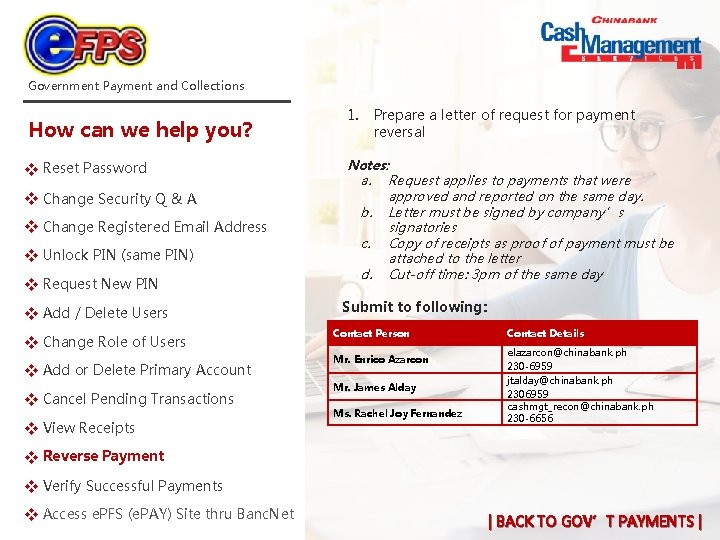
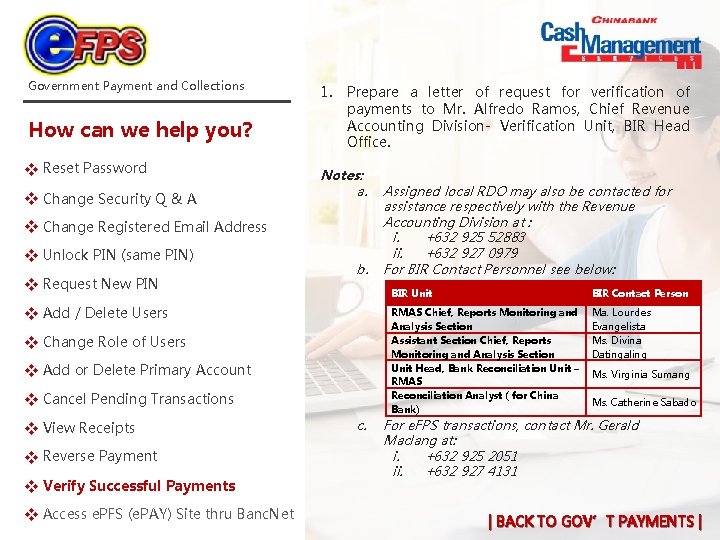
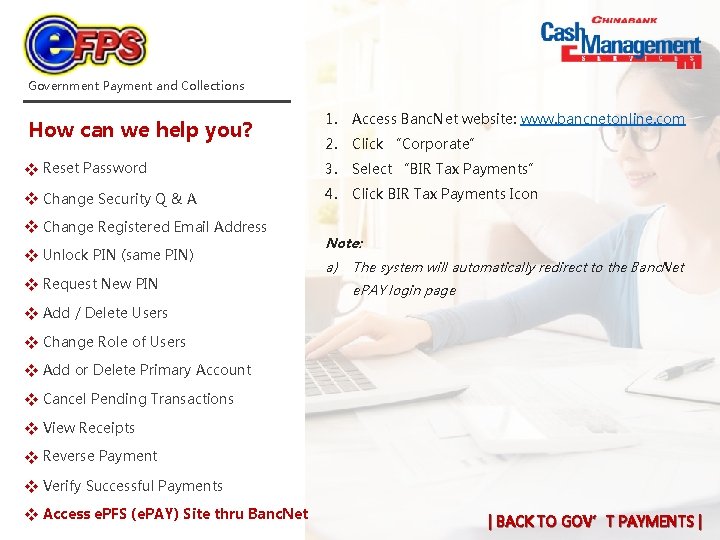
Government Payment and Collections How can we help you? Password v Reset x Security Q & A v Change x Registered Email Address v Change x PIN (same PIN) v Unlock x New PIN v Request x v Add x / Delete Users Role of Users v Change x v Add x or Delete Primary Account Pending Transactions v Cancel x v View x Receipts Payment v Reverse x Successful Payments v Verify x e. PFS (e. PAY) Site thru Banc. Net v Access x | BACK TO GOV’T PAYMENTS |
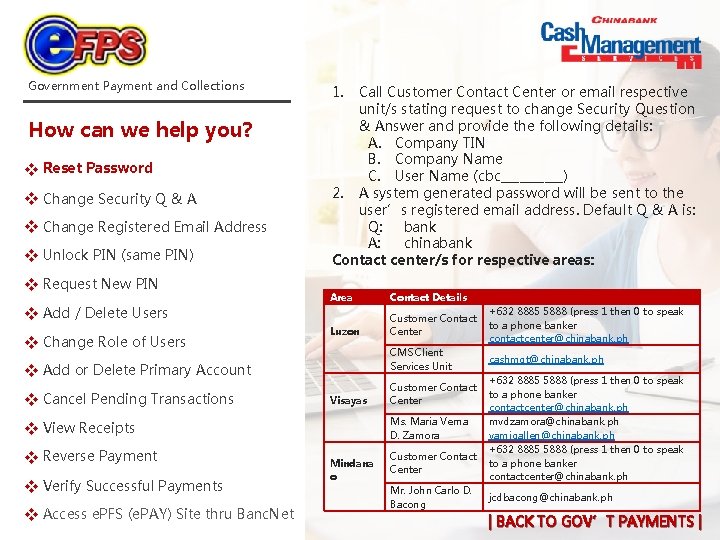
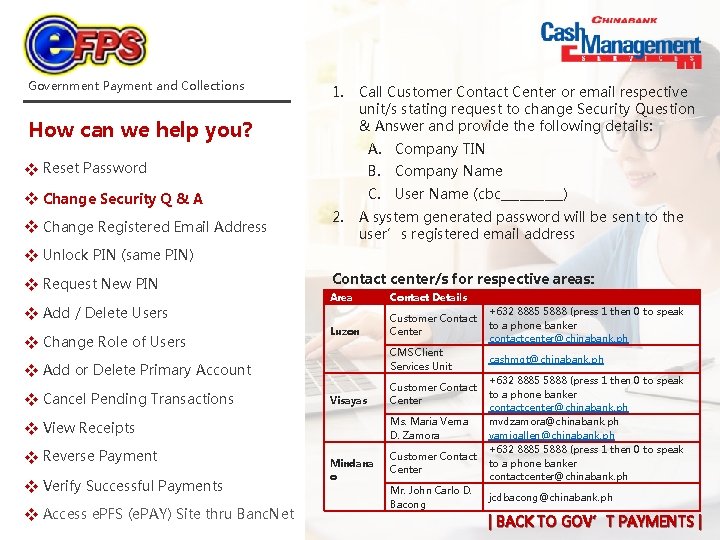
Government Payment and Collections How can we help you? Password v Reset x Security Q & A v Change x Registered Email Address v Change x PIN (same PIN) v Unlock x New PIN v Request x v Add x / Delete Users Role of Users v Change x 1. Call Customer Contact Center or email respective unit/s stating request to change Security Question & Answer and provide the following details: A. Company TIN B. Company Name C. User Name (cbc_____) 2. A system generated password will be sent to the user’s registered email address. Default Q & A is: Q: bank A: chinabank Contact center/s for respective areas: Area Contact Details Luzon Customer Contact Center +632 8885 5888 (press 1 then 0 to speak to a phone banker contactcenter@chinabank. ph CMS Client Services Unit cashmgt@chinabank. ph v Add x or Delete Primary Account Pending Transactions v Cancel x Visayas Ms. Maria Verna D. Zamora v View x Receipts Payment v Reverse x Successful Payments v Verify x e. PFS (e. PAY) Site thru Banc. Net v Access x Customer Contact Center Mindana o Customer Contact Center Mr. John Carlo D. Bacong +632 8885 5888 (press 1 then 0 to speak to a phone banker contactcenter@chinabank. ph mvdzamora@chinabank. ph vamigallen@chinabank. ph +632 8885 5888 (press 1 then 0 to speak to a phone banker contactcenter@chinabank. ph jcdbacong@chinabank. ph | BACK TO GOV’T PAYMENTS |
Government Payment and Collections 1. How can we help you? Call Customer Contact Center or email respective unit/s stating request to change Security Question & Answer and provide the following details: A. Company TIN Password v Reset x B. Company Name Security Q & A v Change x C. User Name (cbc_____) Registered Email Address v Change x 2. A system generated password will be sent to the user’s registered email address PIN (same PIN) v Unlock x New PIN v Request x v Add x / Delete Users Role of Users v Change x Contact center/s for respective areas: Area Contact Details Luzon Customer Contact Center +632 8885 5888 (press 1 then 0 to speak to a phone banker contactcenter@chinabank. ph CMS Client Services Unit cashmgt@chinabank. ph v Add x or Delete Primary Account Pending Transactions v Cancel x Visayas Ms. Maria Verna D. Zamora v View x Receipts Payment v Reverse x Successful Payments v Verify x e. PFS (e. PAY) Site thru Banc. Net v Access x Customer Contact Center Mindana o Customer Contact Center Mr. John Carlo D. Bacong +632 8885 5888 (press 1 then 0 to speak to a phone banker contactcenter@chinabank. ph mvdzamora@chinabank. ph vamigallen@chinabank. ph +632 8885 5888 (press 1 then 0 to speak to a phone banker contactcenter@chinabank. ph jcdbacong@chinabank. ph | BACK TO GOV’T PAYMENTS |
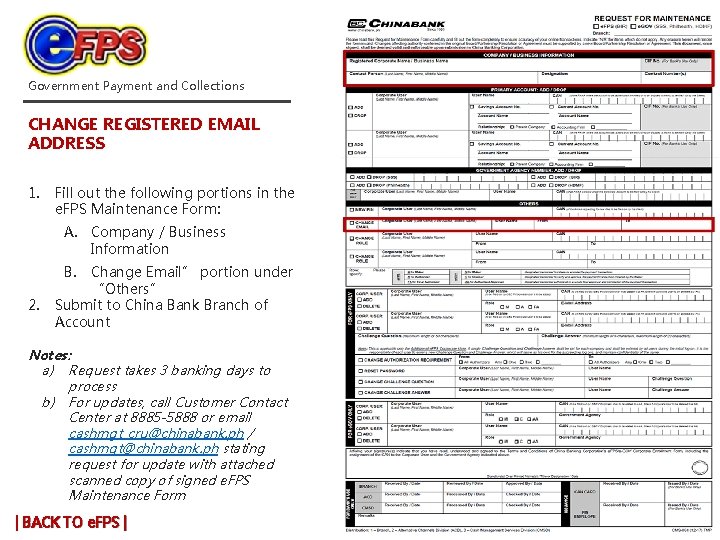
Government Payment and Collections CHANGE REGISTERED EMAIL ADDRESS 1. Fill out the following portions in the e. FPS Maintenance Form: A. Company / Business Information 2. B. Change Email” portion under “Others” Submit to China Bank Branch of Account Notes: a) Request takes 3 banking days to process b) For updates, call Customer Contact Center at 8885 -5888 or email cashmgt_cru@chinabank. ph / cashmgt@chinabank. ph stating request for update with attached scanned copy of signed e. FPS Maintenance Form | BACK TO e. FPS |
Government Payment and Collections How can we help you? Password v Reset x Security Q & A v Change x Registered Email Address v Change x PIN (same PIN) v Unlock x New PIN v Request x 1. Call China Bank Branch of Account stating request and provide the following details: A. Name of Approver B. Corporate Access Number (CAN) Notes: a) b) Request takes 1 banking day to process For updates, contact your China Bank Branch of Account v Add x / Delete Users Role of Users v Change x v Add x or Delete Primary Account Pending Transactions v Cancel x v View x Receipts Payment v Reverse x Successful Payments v Verify x e. PFS (e. PAY) Site thru Banc. Net v Access x | BACK TO GOV’T PAYMENTS |
Government Payment and Collections NEW PIN REQUEST 1. 2. Fill out the following portions in the e. FPS Maintenance Form: A. Company / Business Information B. “New PIN” portion under “Others” Submit to China Bank Branch of Account Notes: a) b) Request takes 3 -5 banking days to process For updates, contact your China Bank Branch of Account | BACK TO e. FPS |
Government Payment and Collections ADD / DELETE USERS 1. Fill out the following portions in the e. FPS Maintenance Form: A. Company / Business Information 2. B. “Corp. User Add/ Delete” in “For e. FPS Only” portion under “Others” Submit to China Bank Branch of Account Notes: a) Request takes 3 -5 banking days to process b) For updates, call Customer Contact Center at 8885 -5888 or email cashmgt_cru@chinabank. ph / cashmgt@chinabank. ph stating request for update with attached scanned copy of signed e. FPS Maintenance Form | BACK TO e. FPS |
Government Payment and Collections CHANGE ROLE OF USERS 1. Fill out the following portions in the e. FPS Maintenance Form: A. Company / Business Information B. “Change Role” portion under “Others” 2. Submit to China Bank Branch of Account Notes: a) Request takes 3 -5 banking days to process b) For updates, call Customer Contact Center at 8885 -5888 or email cashmgt_cru@chinabank. ph / cashmgt@chinabank. ph stating request for update with attached scanned copy of signed e. FPS Maintenance | BACK TO e. FPS |
Government Payment and Collections ADD OR DELETE PRIMARY ACCOUNT 1. Fill out the following portions in the e. FPS Maintenance Form: a. Company / Business Information b. Primary Account: Add / Drop 2. Submit to China Bank Branch of Account Notes: a. Request takes 3 -5 banking days to process b. For updates, call Customer Contact Center at 8885 -5888 or email cashmgt_cru@chinabank. ph / cashmgt@chinabank. ph stating request for update with attached scanned copy of signed e. FPS Maintenance | BACK TO e. FPS |
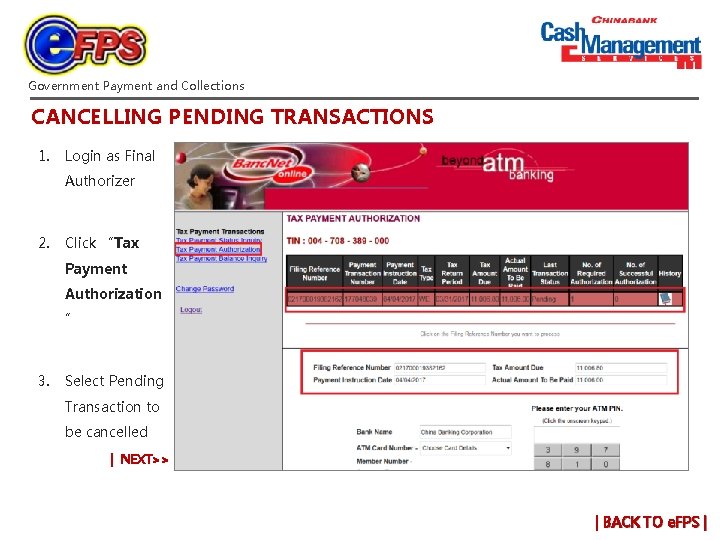
Government Payment and Collections CANCELLING PENDING TRANSACTIONS 1. Login as Final Authorizer 2. Click “Tax Payment Authorization ” 3. Select Pending Transaction to be cancelled | NEXT>> | BACK TO e. FPS |
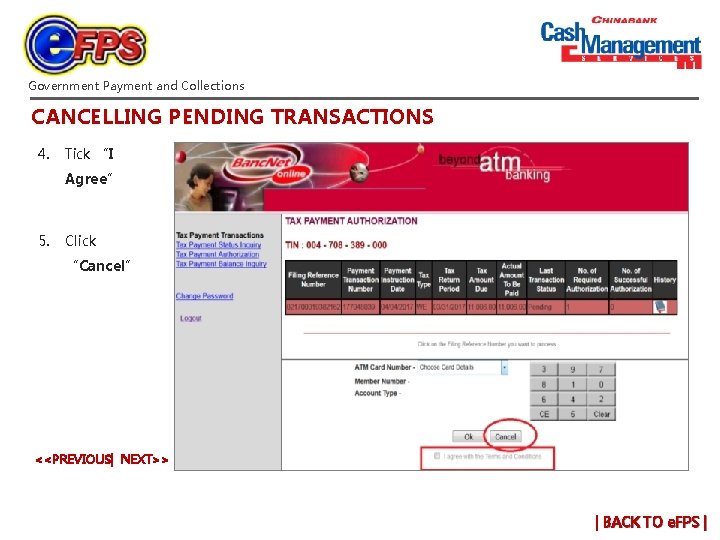
Government Payment and Collections CANCELLING PENDING TRANSACTIONS 4. Tick “I Agree” 5. Click “Cancel” <<PREVIOUS| NEXT>> | BACK TO e. FPS |
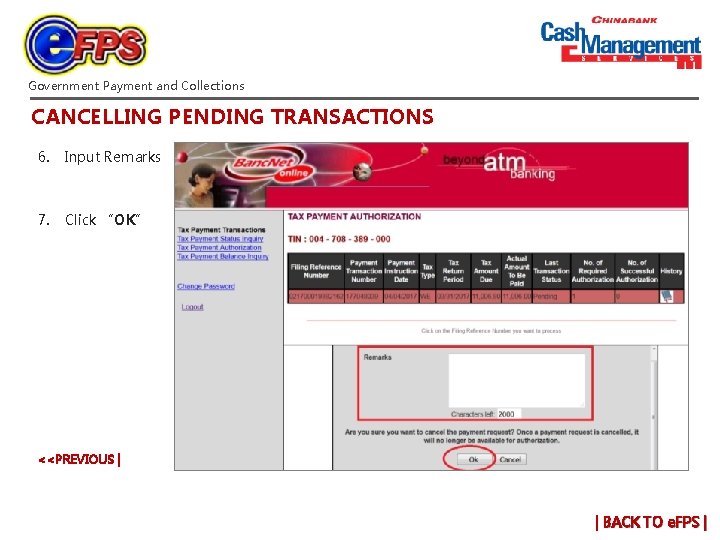
Government Payment and Collections CANCELLING PENDING TRANSACTIONS 6. Input Remarks 7. Click “OK” <<PREVIOUS | | BACK TO e. FPS |
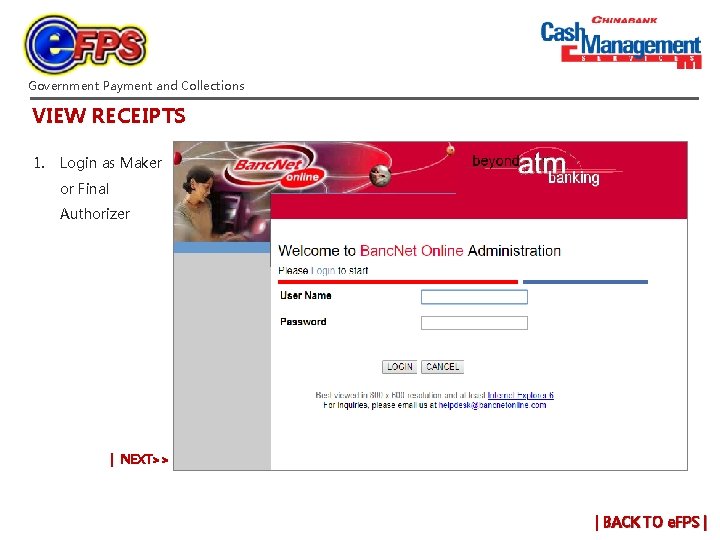
Government Payment and Collections VIEW RECEIPTS 1. Login as Maker or Final Authorizer | NEXT>> | BACK TO e. FPS |
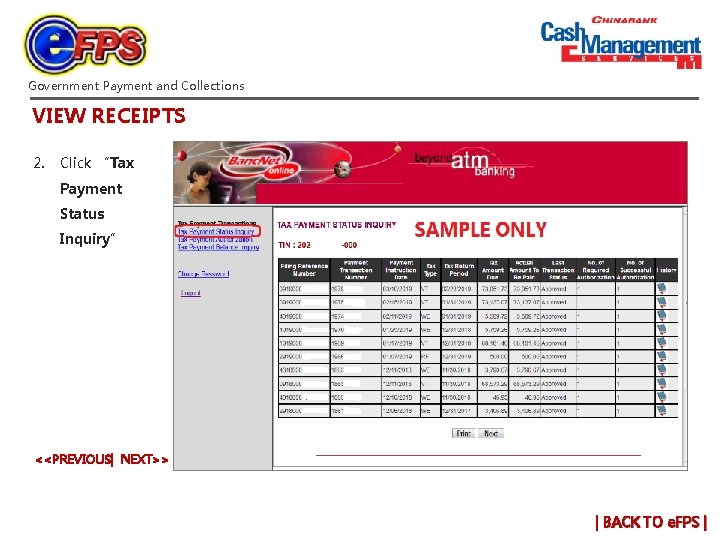
Government Payment and Collections VIEW RECEIPTS 2. Click “Tax Payment Status Inquiry” <<PREVIOUS| NEXT>> | BACK TO e. FPS |
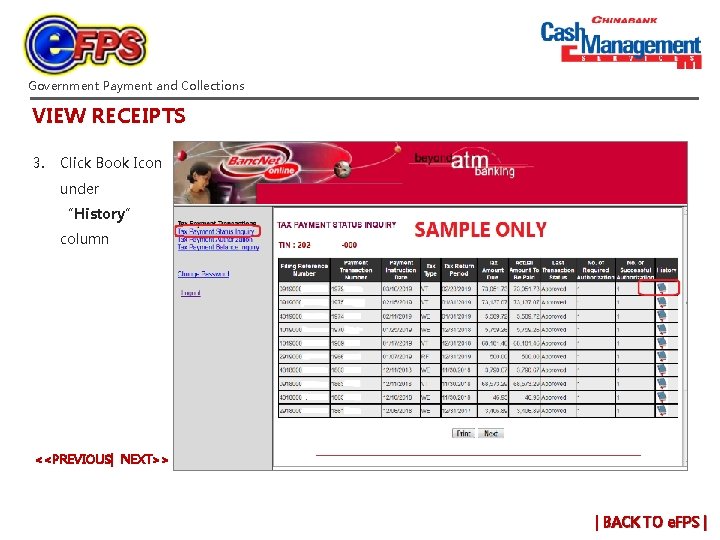
Government Payment and Collections VIEW RECEIPTS 3. Click Book Icon under “History” column <<PREVIOUS| NEXT>> | BACK TO e. FPS |
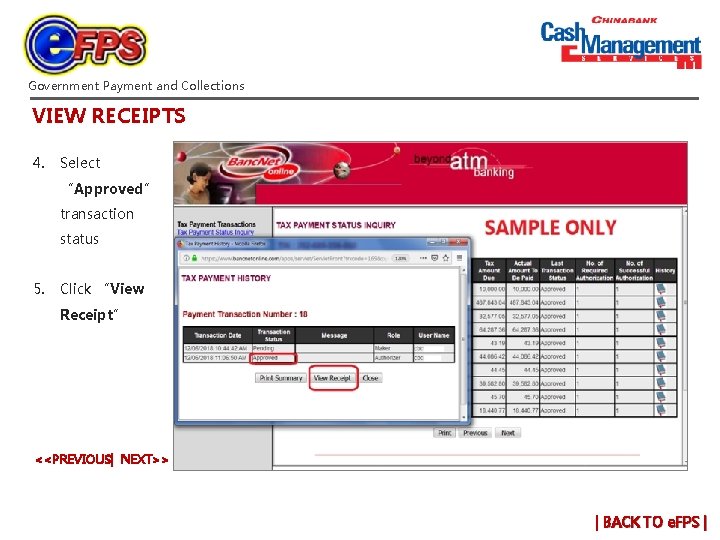
Government Payment and Collections VIEW RECEIPTS 4. Select “Approved” transaction status 5. Click “View Receipt” <<PREVIOUS| NEXT>> | BACK TO e. FPS |
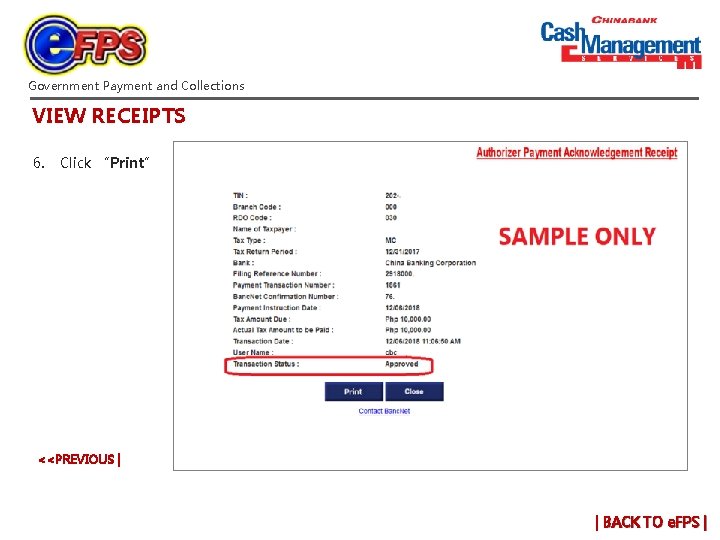
Government Payment and Collections VIEW RECEIPTS 6. Click “Print” <<PREVIOUS | | BACK TO e. FPS |
Government Payment and Collections How can we help you? Password v Reset x Security Q & A v Change x Registered Email Address v Change x PIN (same PIN) v Unlock x New PIN v Request x v Add x / Delete Users Role of Users v Change x v Add x or Delete Primary Account Pending Transactions v Cancel x v View x Receipts 1. Prepare a letter of request for payment reversal Notes: a. Request applies to payments that were approved and reported on the same day. b. Letter must be signed by company’s signatories c. Copy of receipts as proof of payment must be attached to the letter d. Cut-off time: 3 pm of the same day Submit to following: Contact Person Mr. Enrico Azarcon Mr. James Alday Ms. Rachel Joy Fernandez Contact Details elazarcon@chinabank. ph 230 -6959 jtalday@chinabank. ph 2306959 cashmgt_recon@chinabank. ph 230 -6656 Payment v Reverse x Successful Payments v Verify x e. PFS (e. PAY) Site thru Banc. Net v Access x | BACK TO GOV’T PAYMENTS |
Government Payment and Collections How can we help you? Password v Reset x Security Q & A v Change x 1. Prepare a letter of request for verification of payments to Mr. Alfredo Ramos, Chief Revenue Accounting Division- Verification Unit, BIR Head Office. Notes: a. Registered Email Address v Change x PIN (same PIN) v Unlock x New PIN v Request x b. v Add x / Delete Users Role of Users v Change x v Add x or Delete Primary Account Pending Transactions v Cancel x v View x Receipts Payment v Reverse x Successful Payments v Verify x e. PFS (e. PAY) Site thru Banc. Net v Access x c. Assigned local RDO may also be contacted for assistance respectively with the Revenue Accounting Division at : i. +632 925 52883 ii. +632 927 0979 For BIR Contact Personnel see below: BIR Unit BIR Contact Person RMAS Chief, Reports Monitoring and Analysis Section Assistant Section Chief, Reports Monitoring and Analysis Section Unit Head, Bank Reconciliation Unit – RMAS Reconciliation Analyst ( for China Bank) Ma. Lourdes Evangelista Ms. Divina Datingaling Ms. Virginia Sumang Ms. Catherine Sabado For e. FPS transactions, contact Mr. Gerald Maclang at: i. +632 925 2051 ii. +632 927 4131 | BACK TO GOV’T PAYMENTS |
Government Payment and Collections 1. Access Banc. Net website: www. bancnetonline. com 2. Click “Corporate” Password v Reset x 3. Select “BIR Tax Payments” Security Q & A v Change x 4. Click BIR Tax Payments Icon How can we help you? Registered Email Address v Change x PIN (same PIN) v Unlock x New PIN v Request x Note: a) The system will automatically redirect to the Banc. Net e. PAY login page v Add x / Delete Users Role of Users v Change x v Add x or Delete Primary Account Pending Transactions v Cancel x v View x Receipts Payment v Reverse x Successful Payments v Verify x e. PFS (e. PAY) Site thru Banc. Net v Access x | BACK TO GOV’T PAYMENTS |