Version 4 6 The Visuals Using PI Data







- Slides: 123
Version 4. 6 The Visuals Using PI Data. Link and Processbook Copyright © 2008 OSIsoft, Inc
Introductions l l Instructor Students § § § Tell us about your PI System What is your role with PI? What skills do you need to learn? Copyright © 2008 OSIsoft, Inc 2
Course Overview l l Length: 1 day Interactive course: § § Theory 50% Exercises and examples 50% Copyright © 2008 OSIsoft, Inc 3
Objectives l l l Understand the fundamentals of PI technology Learn to access data in the PI server Become familiar with the use of PI Datalink and Processbook Please ask questions as they arise! Copyright © 2008 OSIsoft, Inc 4
Course Content § § § § Introduction to PI Common Dialog Windows PI Tags Data Flow PI Time Format PI Processbook PI Datalink Copyright © 2008 OSIsoft, Inc 5
1. 0 Introduction to PI Copyright © 2008 OSIsoft, Inc
1. 0 PI Basics Copyright © 2010 OSIsoft, LLC 7
1. 1 What is a PI System? Copyright © 2010 OSIsoft, LLC
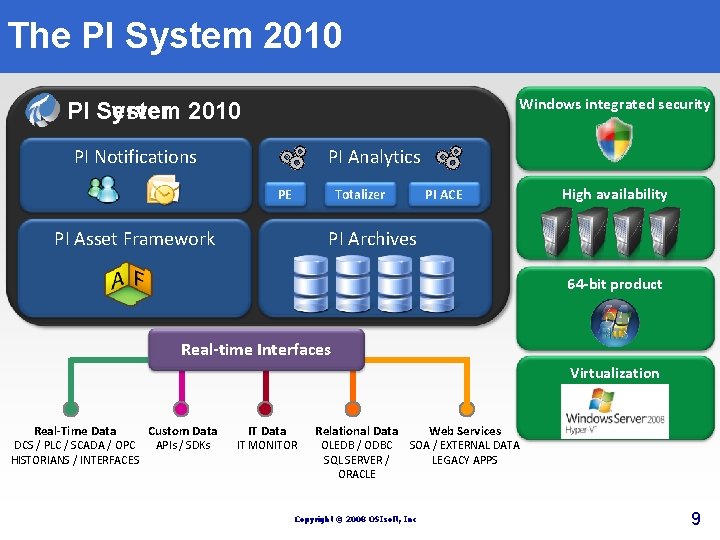
The PI System 2010 Windows integrated security PI System 2010 PI Server PI Notifications PI Analytics PE Totalizer PI ACE High availability PI Archives PI Asset Framework 64 -bit product Real-time Interfaces Virtualization Real-Time Data DCS / PLC / SCADA / OPC HISTORIANS / INTERFACES Custom Data APIs / SDKs IT Data IT MONITOR Relational Data OLEDB / ODBC SQL SERVER / ORACLE Web Services SOA / EXTERNAL DATA LEGACY APPS Copyright © 2008 OSIsoft, Inc 9
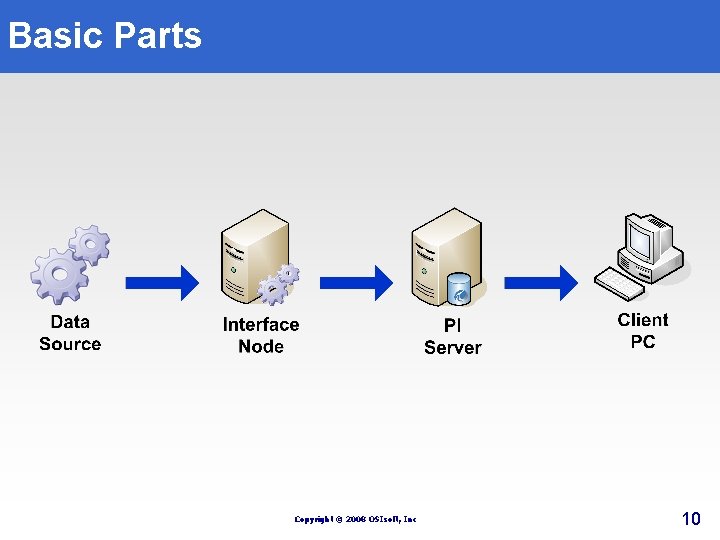
Basic Parts Copyright © 2008 OSIsoft, Inc 10
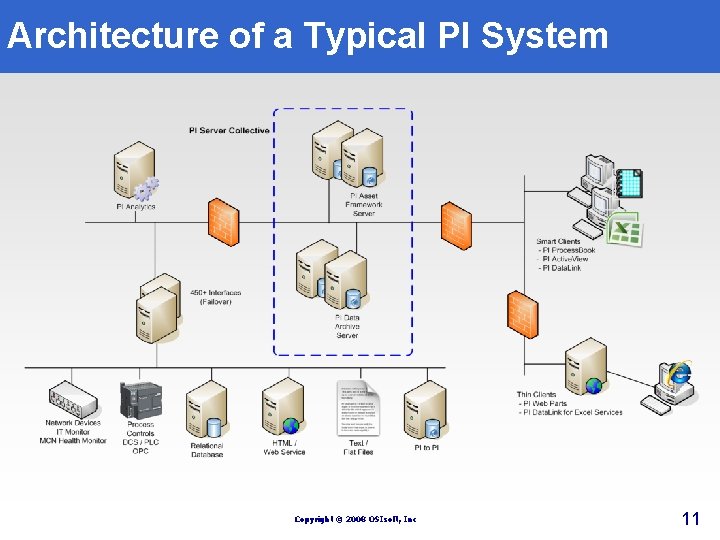
Architecture of a Typical PI System Copyright © 2008 OSIsoft, Inc 11
1. 2 PI Tags Copyright © 2010 OSIsoft, LLC 12
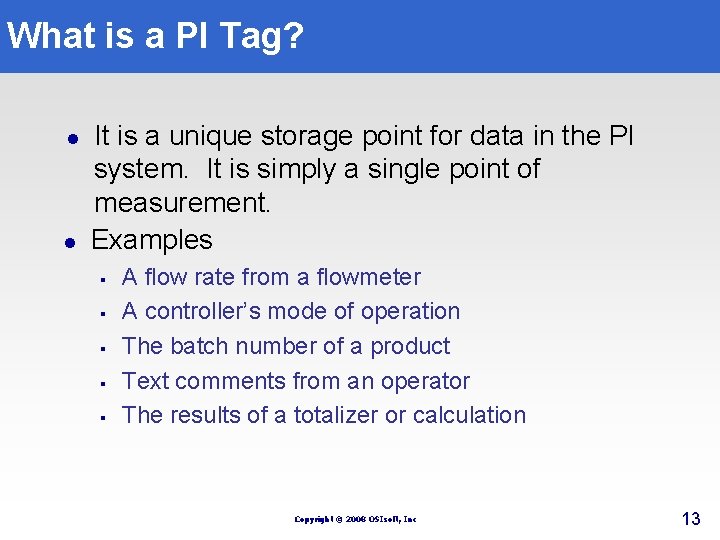
What is a PI Tag? l l It is a unique storage point for data in the PI system. It is simply a single point of measurement. Examples § § § A flow rate from a flowmeter A controller’s mode of operation The batch number of a product Text comments from an operator The results of a totalizer or calculation Copyright © 2008 OSIsoft, Inc 13
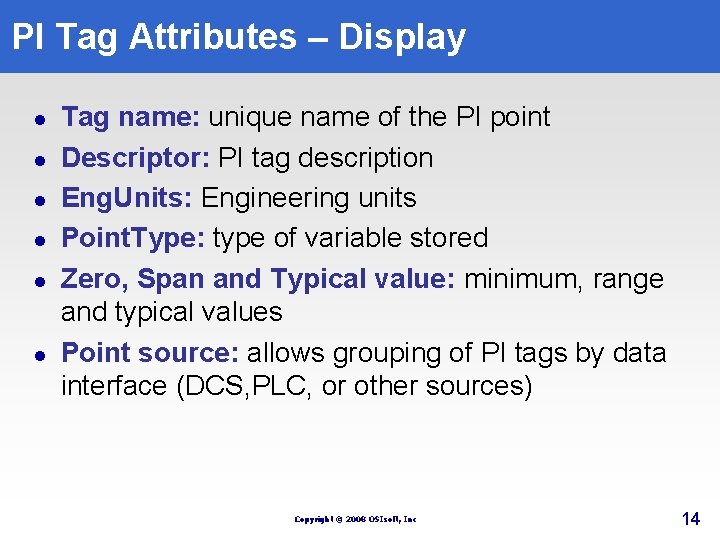
PI Tag Attributes – Display l l l Tag name: unique name of the PI point Descriptor: PI tag description Eng. Units: Engineering units Point. Type: type of variable stored Zero, Span and Typical value: minimum, range and typical values Point source: allows grouping of PI tags by data interface (DCS, PLC, or other sources) Copyright © 2008 OSIsoft, Inc 14
Data Flow Copyright © 2010 OSIsoft, Inc.
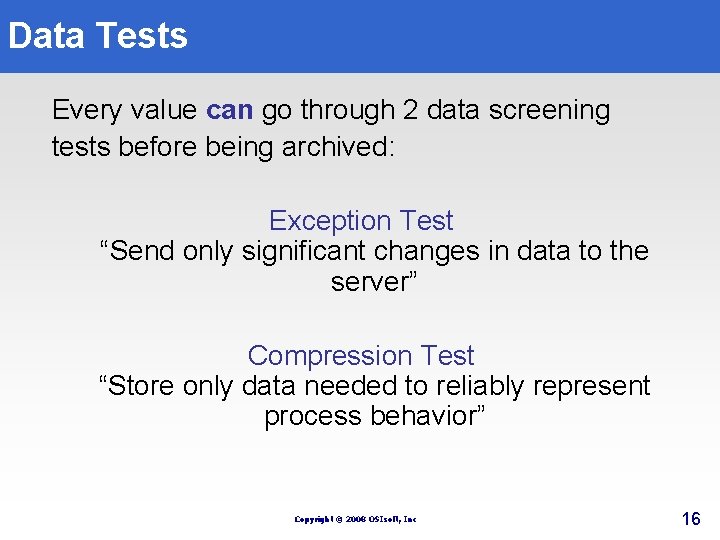
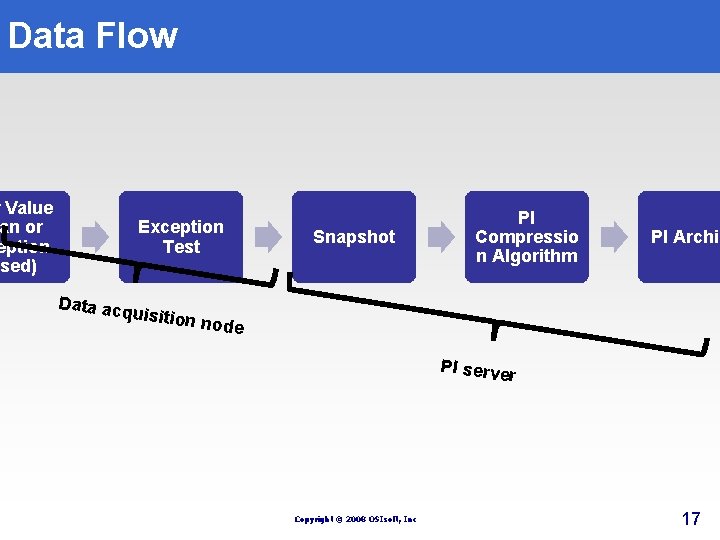
Data Tests Every value can go through 2 data screening tests before being archived: Exception Test “Send only significant changes in data to the server” Compression Test “Store only data needed to reliably represent process behavior” Copyright © 2008 OSIsoft, Inc 16
Data Flow w Value an or eption ased) Data acq Exception Test Snapshot PI Compressio n Algorithm PI Archiv uisition node PI serve r Copyright © 2008 OSIsoft, Inc 17
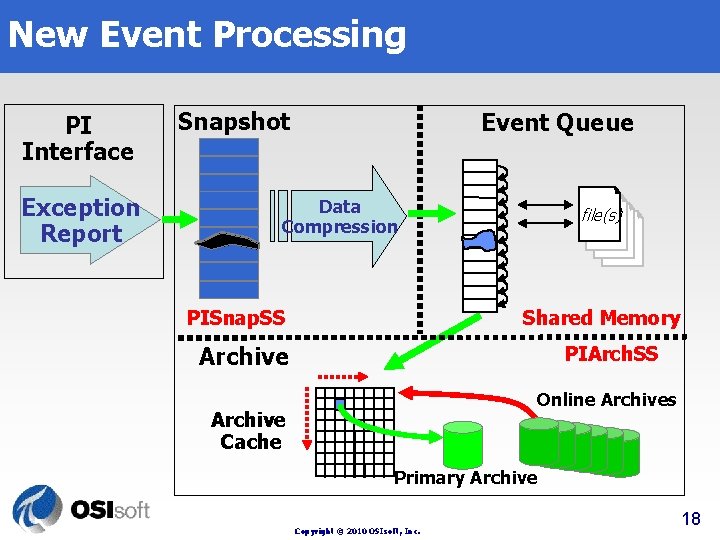
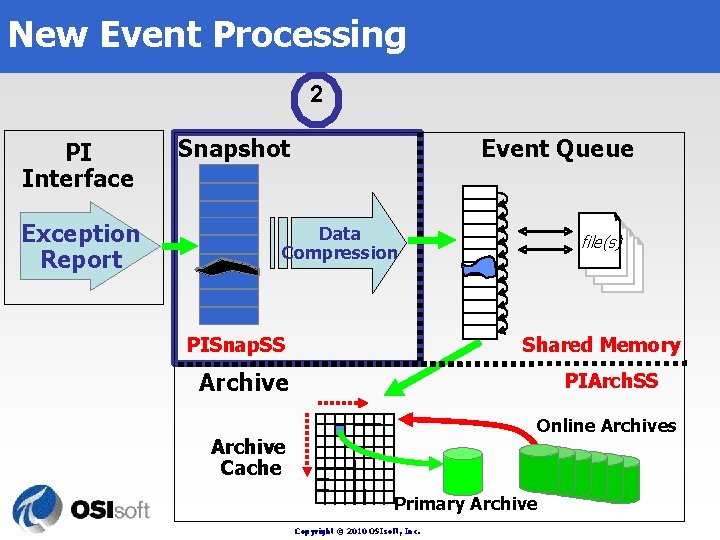
New Event Processing PI Interface Exception Report Snapshot Event Queue Data Compression PISnap. SS file(s) Shared Memory Archive PIArch. SS Online Archives Archive Cache Primary Archive Copyright © 2010 OSIsoft, Inc. 18
Exception Filtering Copyright © 2010 OSIsoft, Inc.
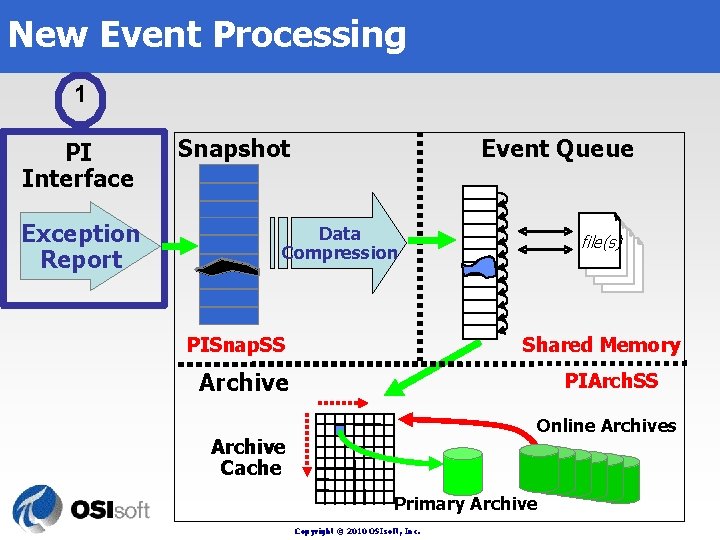
New Event Processing 1 PI Interface Exception Report Snapshot Event Queue Data Compression PISnap. SS file(s) Shared Memory Archive PIArch. SS Online Archives Archive Cache Primary Archive Copyright © 2010 OSIsoft, Inc.
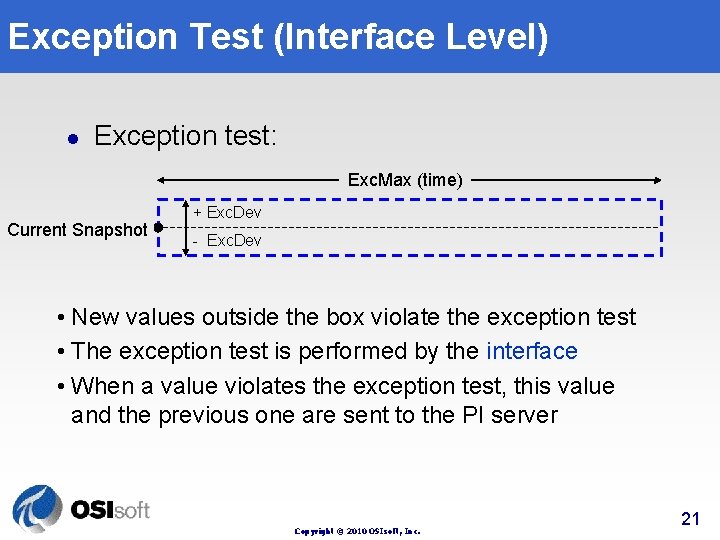
Exception Test (Interface Level) l Exception test: Exc. Max (time) Current Snapshot + Exc. Dev - Exc. Dev • New values outside the box violate the exception test • The exception test is performed by the interface • When a value violates the exception test, this value and the previous one are sent to the PI server Copyright © 2010 OSIsoft, Inc. 21
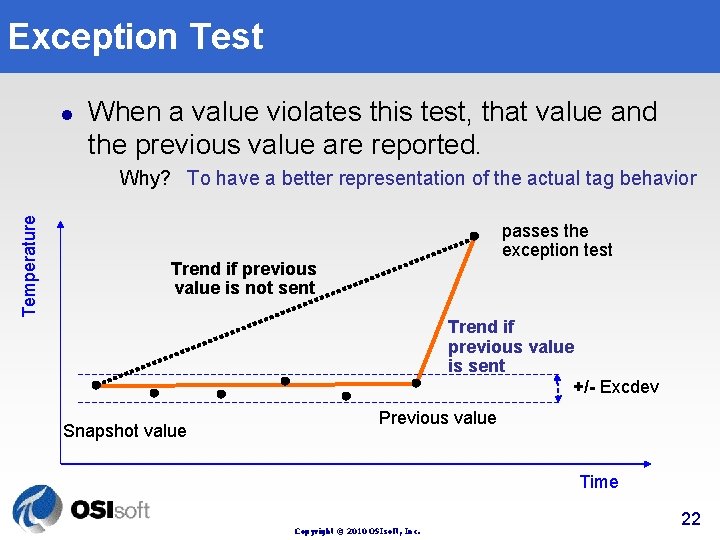
Exception Test l When a value violates this test, that value and the previous value are reported. Temperature Why? To have a better representation of the actual tag behavior passes the exception test Trend if previous value is not sent Snapshot value Trend if previous value is sent +/- Excdev Previous value Time Copyright © 2010 OSIsoft, Inc. 22
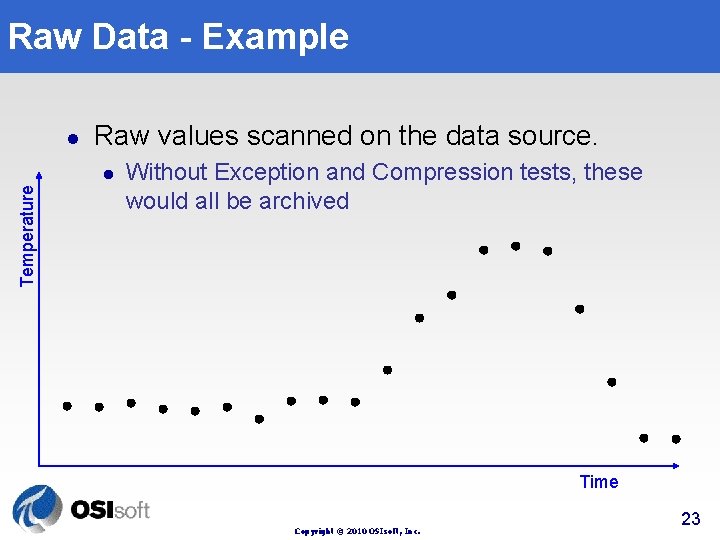
Raw Data - Example l Raw values scanned on the data source. Temperature l Without Exception and Compression tests, these would all be archived Time Copyright © 2010 OSIsoft, Inc. 23
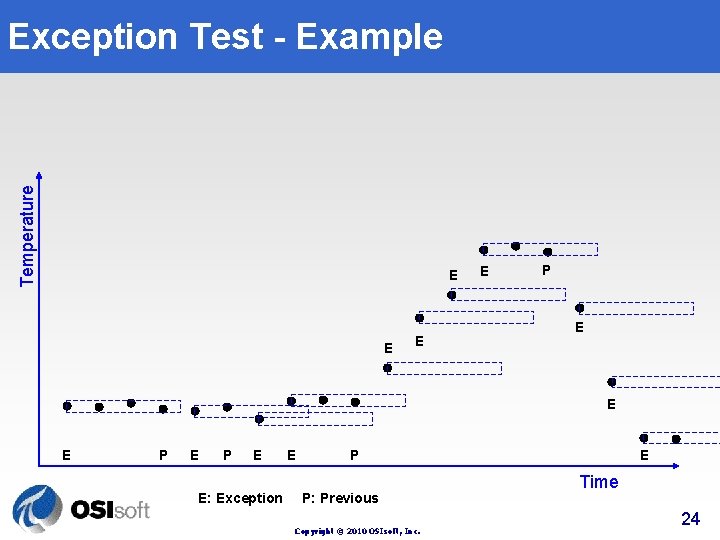
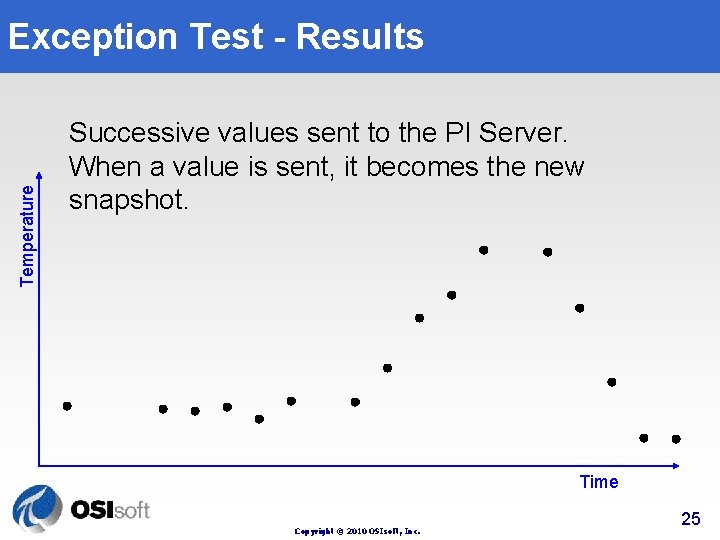
Temperature Exception Test - Example E E P E E P E: Exception P: Previous Copyright © 2010 OSIsoft, Inc. E Time 24
Temperature Exception Test - Results Successive values sent to the PI Server. When a value is sent, it becomes the new snapshot. Time Copyright © 2010 OSIsoft, Inc. 25
Turning Off Exception? l Behavior of Exc. Dev = 0, Exc. Max = 0, is that Exception Test is turned off: l l All values are sent to PI; This will increase the traffic between the data collection node and the server. Copyright © 2010 OSIsoft, Inc. 26
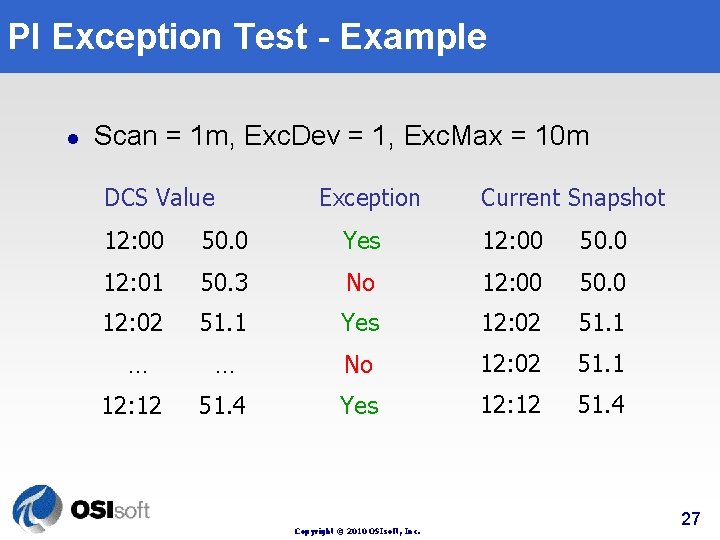
PI Exception Test - Example l Scan = 1 m, Exc. Dev = 1, Exc. Max = 10 m DCS Value Exception Current Snapshot 12: 00 50. 0 Yes 12: 00 50. 0 12: 01 50. 3 No 12: 00 50. 0 12: 02 51. 1 Yes 12: 02 51. 1 … … No 12: 02 51. 1 12: 12 51. 4 Yes 12: 12 51. 4 Copyright © 2010 OSIsoft, Inc. 27
PI Server Snapshot and Data Compression Copyright © 2010 OSIsoft, Inc.
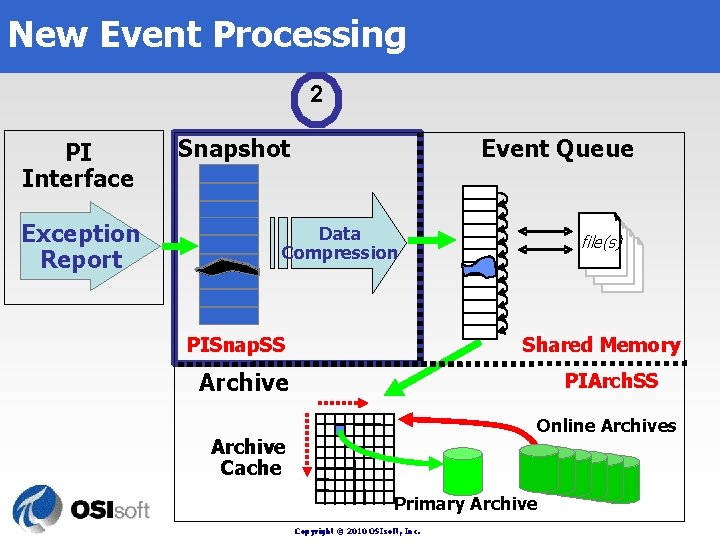
New Event Processing 2 PI Interface Exception Report Snapshot Event Queue Data Compression PISnap. SS file(s) Shared Memory Archive PIArch. SS Online Archives Archive Cache Primary Archive Copyright © 2010 OSIsoft, Inc.
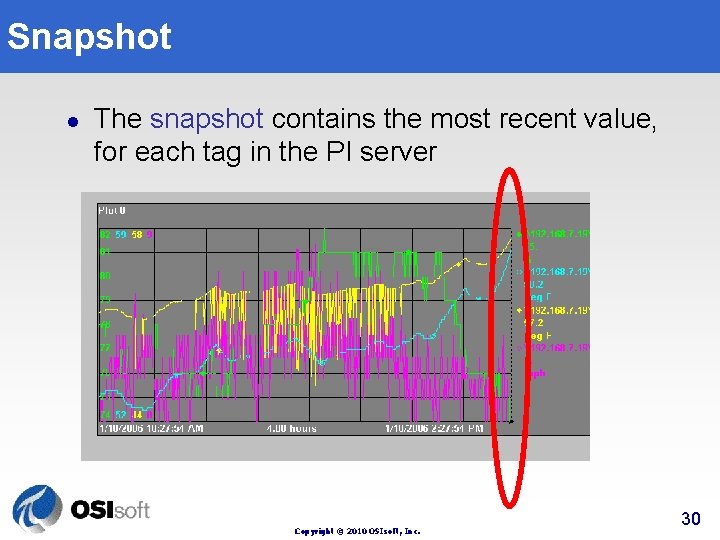
Snapshot l The snapshot contains the most recent value, for each tag in the PI server Copyright © 2010 OSIsoft, Inc. 30
New Event Processing 2 PI Interface Exception Report Snapshot Event Queue Data Compression PISnap. SS file(s) Shared Memory Archive PIArch. SS Online Archives Archive Cache Primary Archive Copyright © 2010 OSIsoft, Inc.
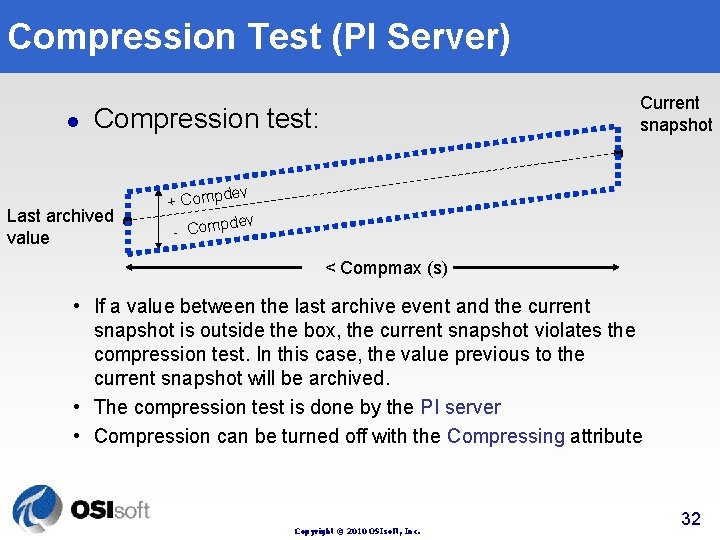
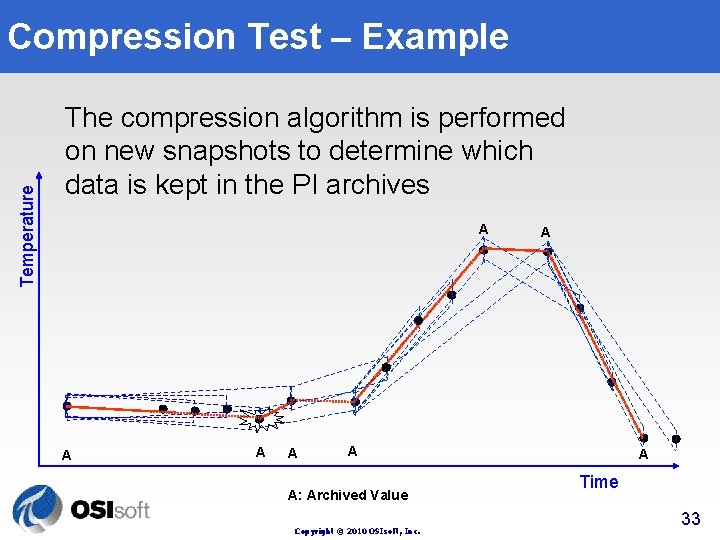
Compression Test (PI Server) l Current snapshot Compression test: Last archived value ev + Compd ev - Compd < Compmax (s) • If a value between the last archive event and the current snapshot is outside the box, the current snapshot violates the compression test. In this case, the value previous to the current snapshot will be archived. • The compression test is done by the PI server • Compression can be turned off with the Compressing attribute Copyright © 2010 OSIsoft, Inc. 32
Temperature Compression Test – Example The compression algorithm is performed on new snapshots to determine which data is kept in the PI archives A A A A: Archived Value Copyright © 2010 OSIsoft, Inc. A Time 33
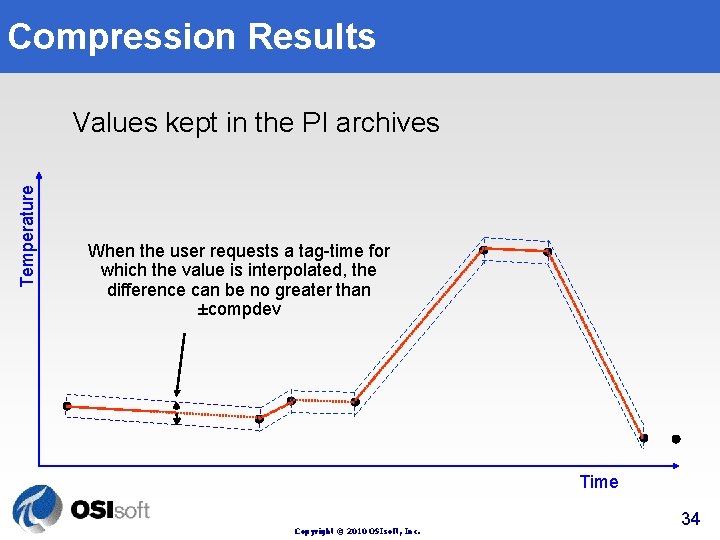
Compression Results Temperature Values kept in the PI archives When the user requests a tag-time for which the value is interpolated, the difference can be no greater than ±compdev Time Copyright © 2010 OSIsoft, Inc. 34
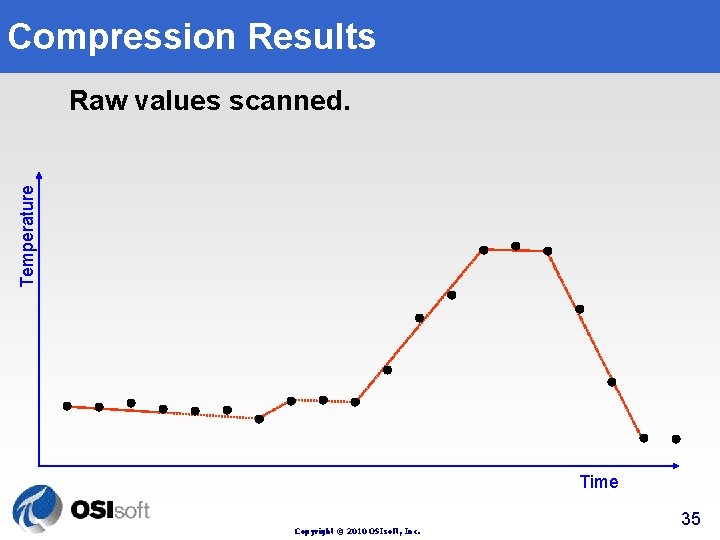
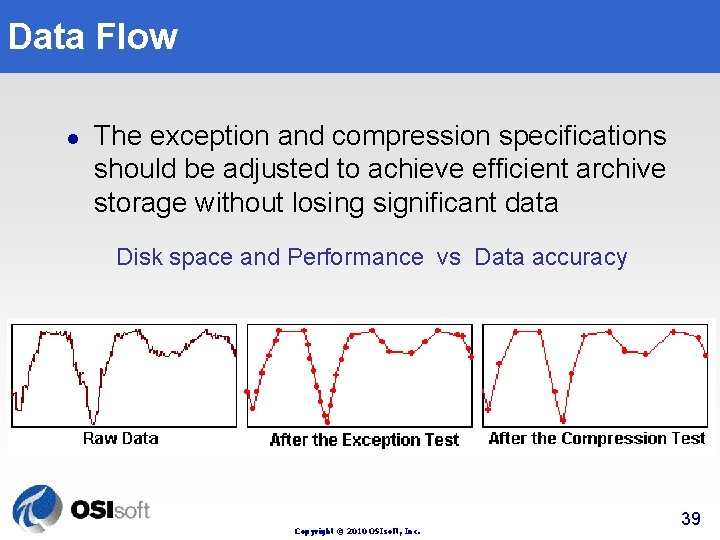
Compression Results Temperature Raw values scanned. After Exception. After Compression. Time Copyright © 2010 OSIsoft, Inc. 35
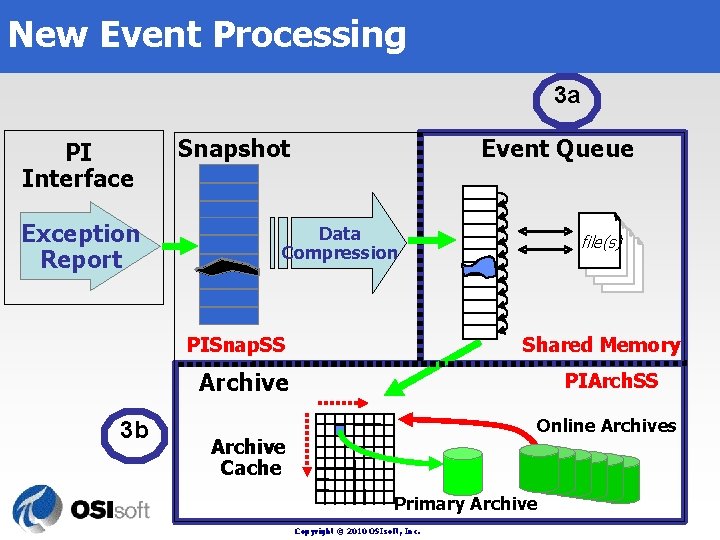
New Event Processing 3 a PI Interface Exception Report Snapshot Event Queue Data Compression PISnap. SS file(s) Shared Memory Archive 3 b PIArch. SS Online Archives Archive Cache Primary Archive Copyright © 2010 OSIsoft, Inc.
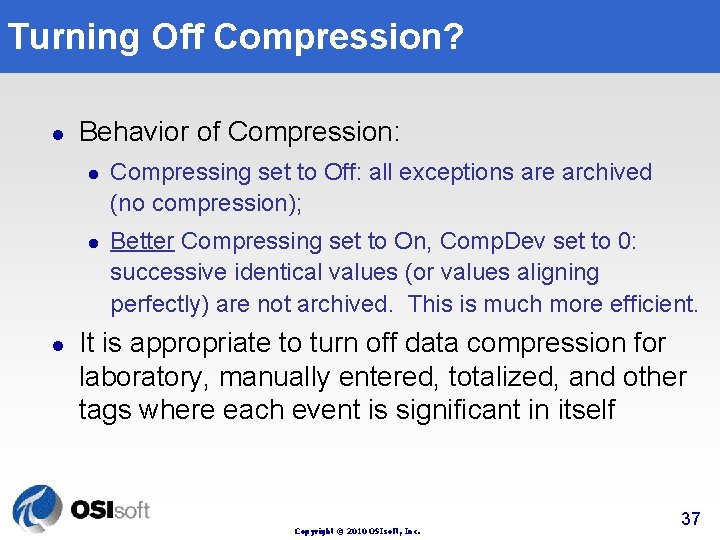
Turning Off Compression? l Behavior of Compression: l l l Compressing set to Off: all exceptions are archived (no compression); Better Compressing set to On, Comp. Dev set to 0: successive identical values (or values aligning perfectly) are not archived. This is much more efficient. It is appropriate to turn off data compression for laboratory, manually entered, totalized, and other tags where each event is significant in itself Copyright © 2010 OSIsoft, Inc. 37
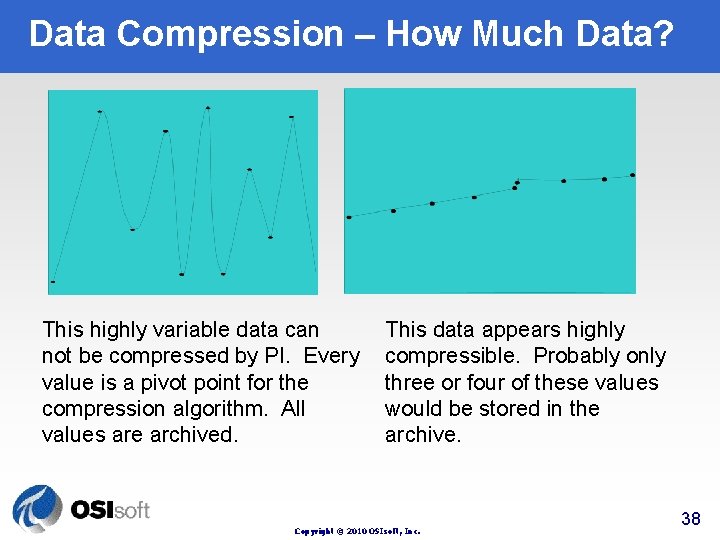
Data Compression – How Much Data? This highly variable data can not be compressed by PI. Every value is a pivot point for the compression algorithm. All values are archived. This data appears highly compressible. Probably only three or four of these values would be stored in the archive. Copyright © 2010 OSIsoft, Inc. 38
Data Flow l The exception and compression specifications should be adjusted to achieve efficient archive storage without losing significant data Disk space and Performance vs Data accuracy Copyright © 2010 OSIsoft, Inc. 39
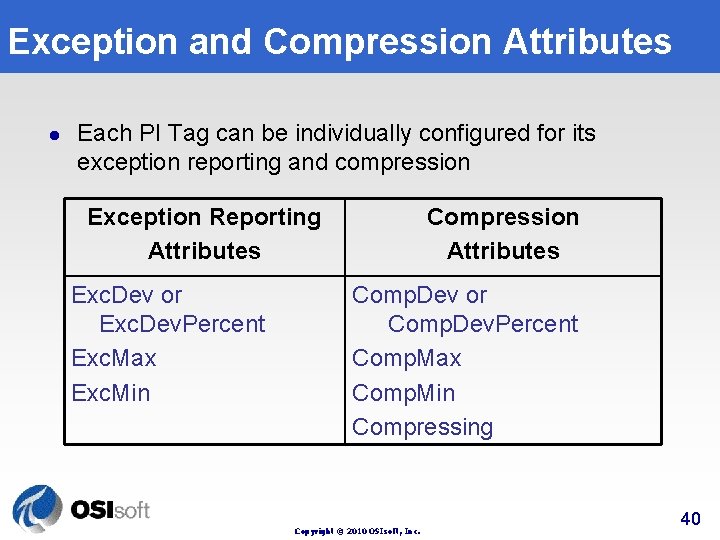
Exception and Compression Attributes l Each PI Tag can be individually configured for its exception reporting and compression Exception Reporting Attributes Exc. Dev or Exc. Dev. Percent Exc. Max Exc. Min Compression Attributes Comp. Dev or Comp. Dev. Percent Comp. Max Comp. Min Compressing Copyright © 2010 OSIsoft, Inc. 40
Set Appropriate Zero & Span l Be careful when defining Zero and Span attributes because: l l l Exc. Dev. Percent and Comp. Dev. Percent attributes are automatically adjusted according to Span; The accuracy and range of Float 16 values are set by the Zero and Span; Zero and Span are used by many functions in PI Process. Book. Copyright © 2010 OSIsoft, Inc. 41
Step Attribute l The Step attribute affects both display and compression: l Instead of using the usual compression algorithm, a second exception test is applied using the Comp. Dev value. Copyright © 2010 OSIsoft, Inc. 42
Exception and Compression Defaults l l l Exc. Dev. Percent = 1 (% of span) Exc. Max = 600 (10 minutes) Comp. Dev. Percent = 2 (% of span) Comp. Max = 28800 (8 hours) Zero = 0 Span = 100 Copyright © 2010 OSIsoft, Inc. 43
Recommendations l l l Set the compression deviation to the minimum change that is measurable by the instrument. Set the exception deviation to ½ of the compression deviation. These are starting point recommendations. Copyright © 2010 OSIsoft, Inc. 44
1. 3 PI Time Format Copyright © 2008 OSIsoft, Inc
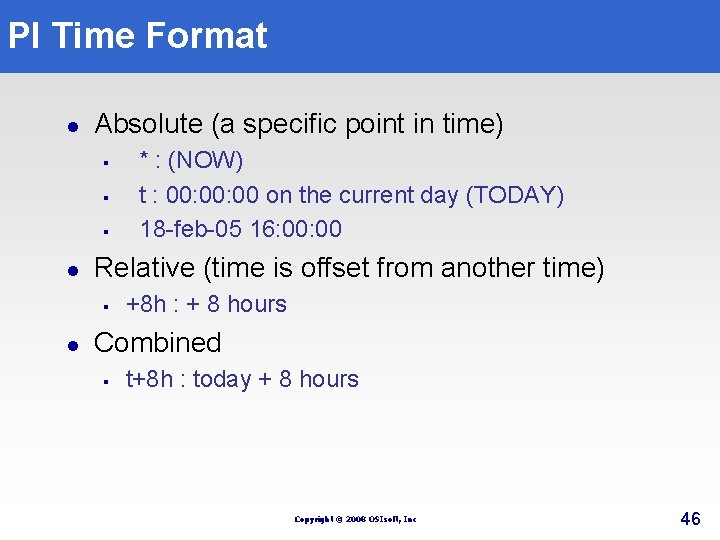
PI Time Format l Absolute (a specific point in time) § § § l Relative (time is offset from another time) § l * : (NOW) t : 00: 00 on the current day (TODAY) 18 -feb-05 16: 00 +8 h : + 8 hours Combined § t+8 h : today + 8 hours Copyright © 2008 OSIsoft, Inc 46
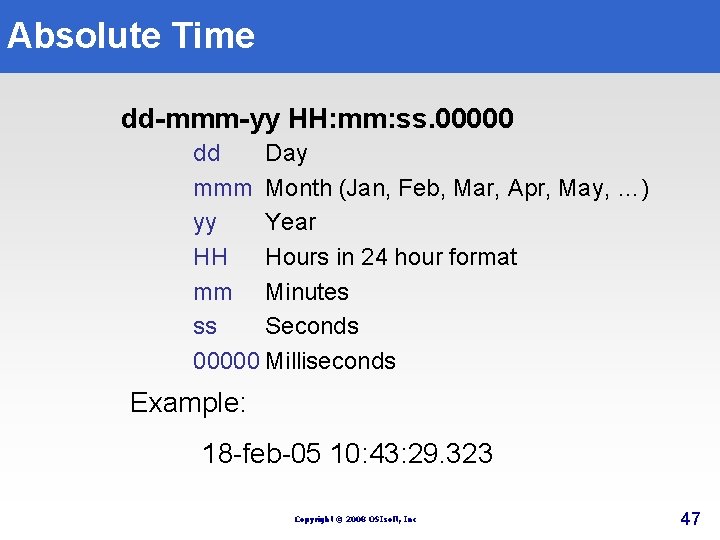
Absolute Time dd-mmm-yy HH: mm: ss. 00000 dd Day mmm Month (Jan, Feb, Mar, Apr, May, …) yy Year HH Hours in 24 hour format mm Minutes ss Seconds 00000 Milliseconds Example: 18 -feb-05 10: 43: 29. 323 Copyright © 2008 OSIsoft, Inc 47
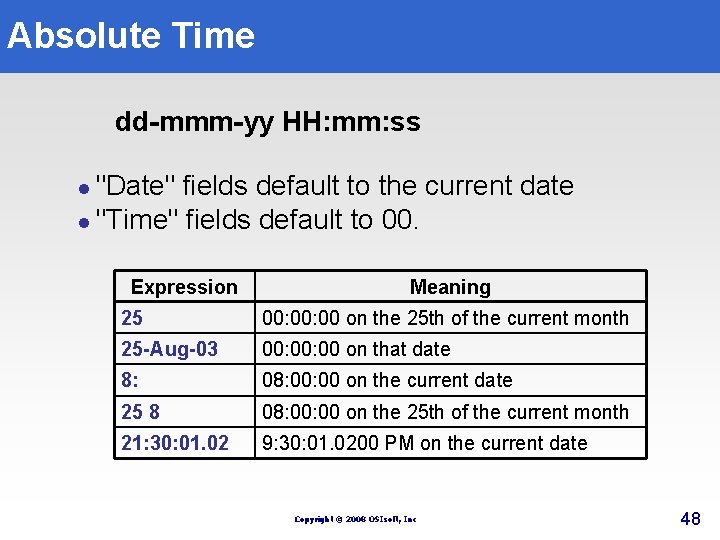
Absolute Time dd-mmm-yy HH: mm: ss "Date" fields default to the current date l "Time" fields default to 00. l Expression Meaning 25 00: 00 on the 25 th of the current month 25 -Aug-03 00: 00 on that date 8: 08: 00 on the current date 25 8 08: 00 on the 25 th of the current month 21: 30: 01. 02 9: 30: 01. 0200 PM on the current date Copyright © 2008 OSIsoft, Inc 48
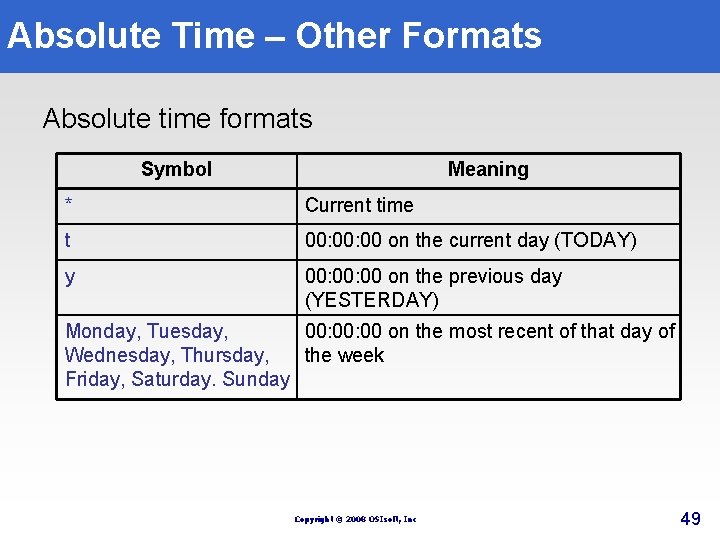
Absolute Time – Other Formats Absolute time formats Symbol Meaning * Current time t 00: 00 on the current day (TODAY) y 00: 00 on the previous day (YESTERDAY) Monday, Tuesday, 00: 00 on the most recent of that day of Wednesday, Thursday, the week Friday, Saturday. Sunday Copyright © 2008 OSIsoft, Inc 49
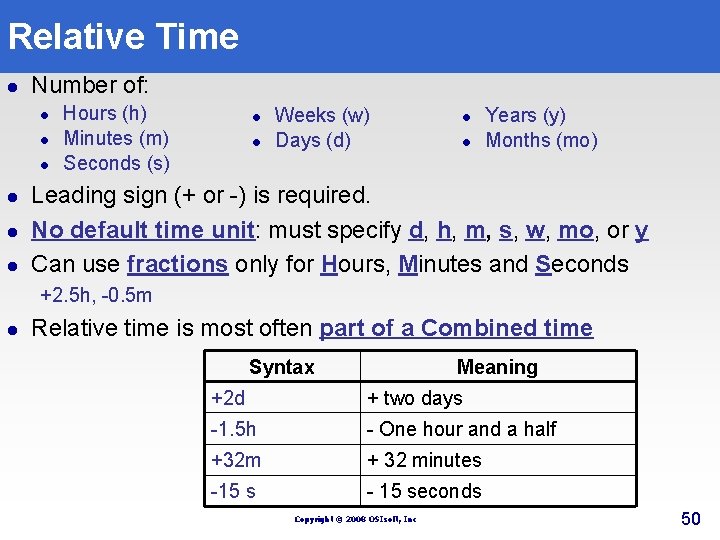
Relative Time l Number of: l l l Hours (h) Minutes (m) Seconds (s) l l Weeks (w) Days (d) l l Years (y) Months (mo) Leading sign (+ or -) is required. No default time unit: must specify d, h, m, s, w, mo, or y Can use fractions only for Hours, Minutes and Seconds +2. 5 h, -0. 5 m l Relative time is most often part of a Combined time Syntax Meaning +2 d + two days -1. 5 h - One hour and a half +32 m + 32 minutes -15 s - 15 seconds Copyright © 2008 OSIsoft, Inc 50
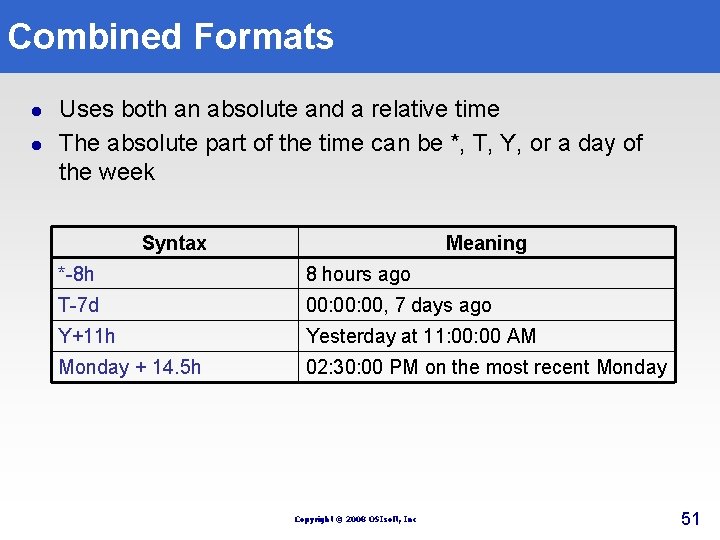
Combined Formats l l Uses both an absolute and a relative time The absolute part of the time can be *, T, Y, or a day of the week Syntax Meaning *-8 h 8 hours ago T-7 d 00: 00, 7 days ago Y+11 h Yesterday at 11: 00 AM Monday + 14. 5 h 02: 30: 00 PM on the most recent Monday Copyright © 2008 OSIsoft, Inc 51
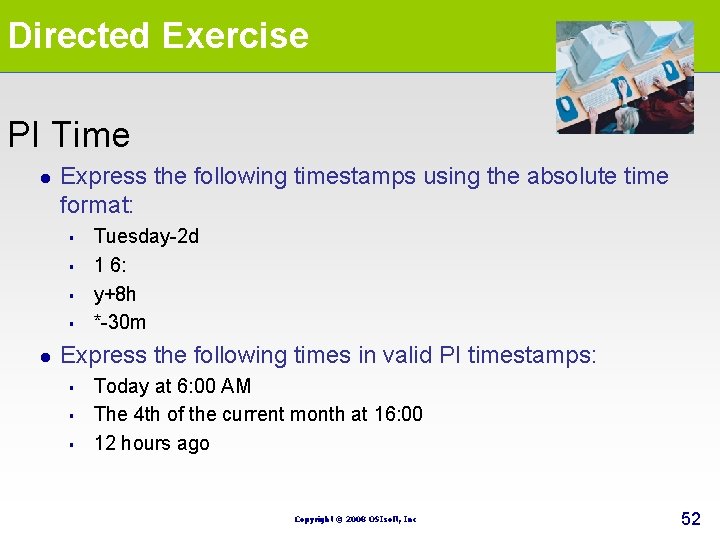
Directed Exercise PI Time l Express the following timestamps using the absolute time format: § § l Tuesday-2 d 1 6: y+8 h *-30 m Express the following times in valid PI timestamps: § § § Today at 6: 00 AM The 4 th of the current month at 16: 00 12 hours ago Copyright © 2008 OSIsoft, Inc 52
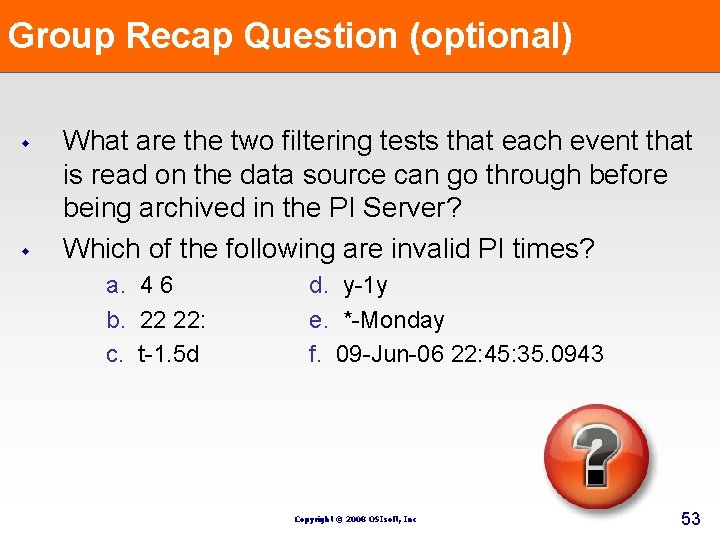
Group Recap Question (optional) w w What are the two filtering tests that each event that is read on the data source can go through before being archived in the PI Server? Which of the following are invalid PI times? a. 4 6 b. 22 22: c. t-1. 5 d d. y-1 y e. *-Monday f. 09 -Jun-06 22: 45: 35. 0943 Copyright © 2008 OSIsoft, Inc 53
2. 0 Common Dialog Windows Copyright © 2008 OSIsoft, Inc
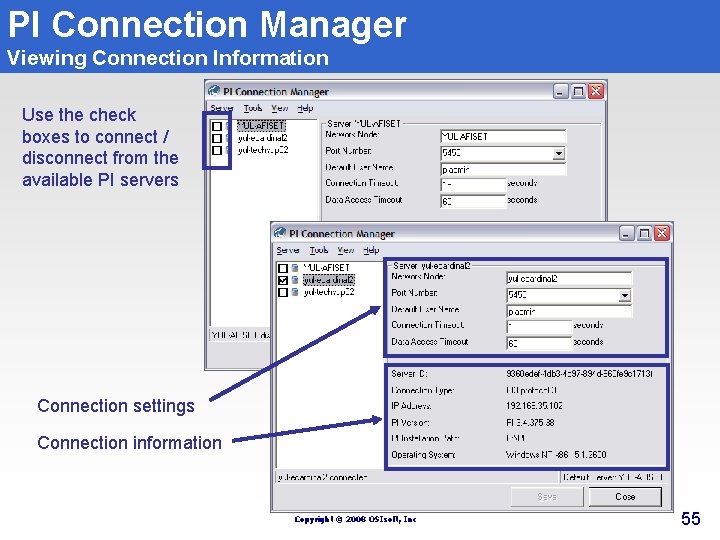
PI Connection Manager Viewing Connection Information Use the check boxes to connect / disconnect from the available PI servers Connection settings Connection information Copyright © 2008 OSIsoft, Inc 55
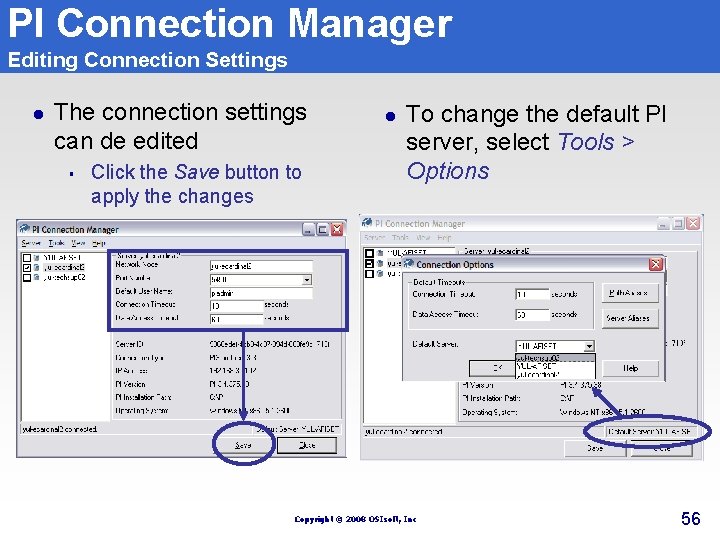
PI Connection Manager Editing Connection Settings l The connection settings can de edited § Click the Save button to apply the changes l To change the default PI server, select Tools > Options Copyright © 2008 OSIsoft, Inc 56
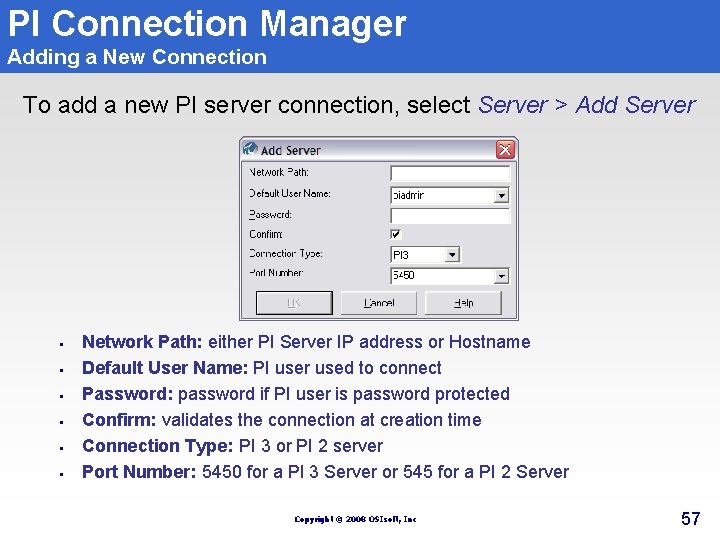
PI Connection Manager Adding a New Connection To add a new PI server connection, select Server > Add Server § § § Network Path: either PI Server IP address or Hostname Default User Name: PI user used to connect Password: password if PI user is password protected Confirm: validates the connection at creation time Connection Type: PI 3 or PI 2 server Port Number: 5450 for a PI 3 Server or 545 for a PI 2 Server Copyright © 2008 OSIsoft, Inc 57
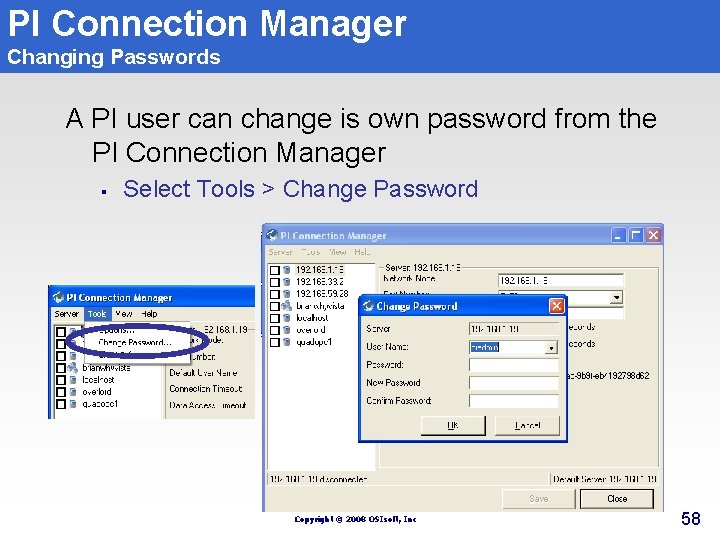
PI Connection Manager Changing Passwords A PI user can change is own password from the PI Connection Manager § Select Tools > Change Password Copyright © 2008 OSIsoft, Inc 58
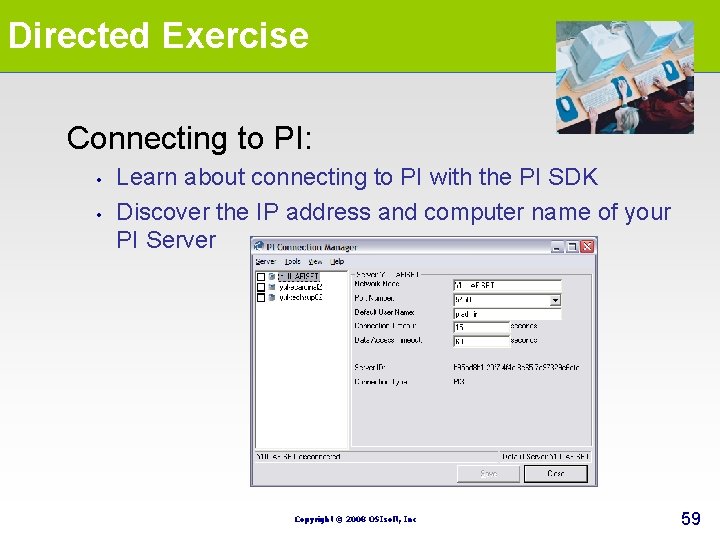
Directed Exercise Connecting to PI: • • Learn about connecting to PI with the PI SDK Discover the IP address and computer name of your PI Server Copyright © 2008 OSIsoft, Inc 59
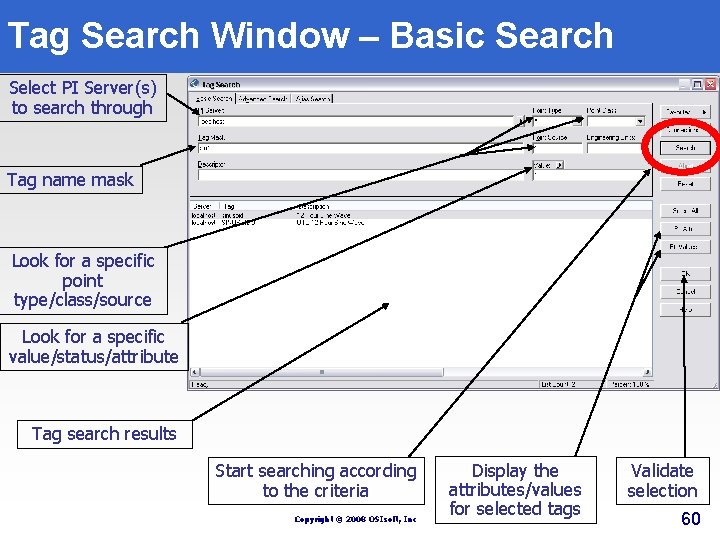
Tag Search Window – Basic Search Select PI Server(s) to search through Tag name mask Look for a specific point type/class/source Look for a specific value/status/attribute Tag search results Start searching according to the criteria Copyright © 2008 OSIsoft, Inc Display the attributes/values for selected tags Validate selection 60
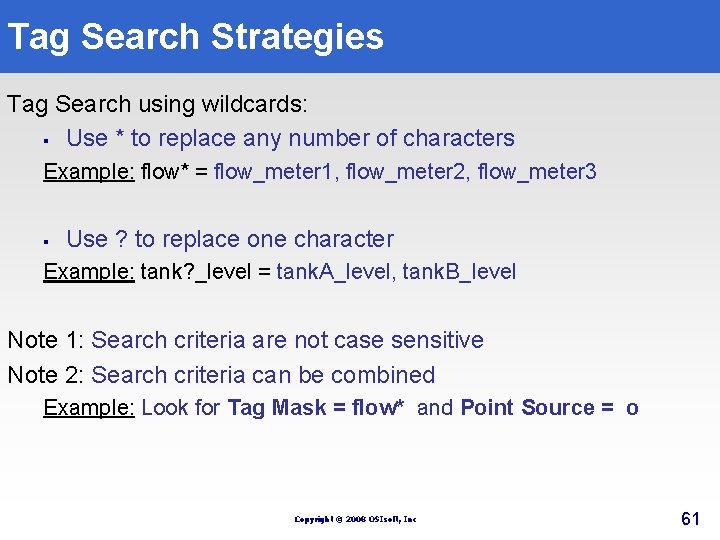
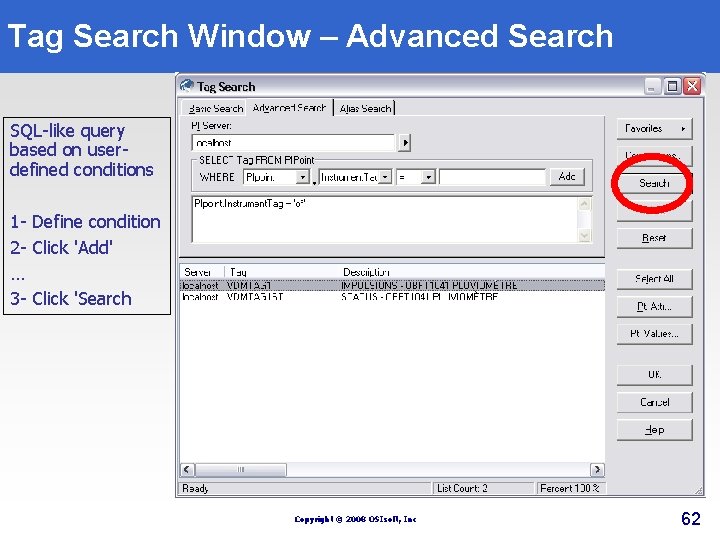
Tag Search Strategies Tag Search using wildcards: § Use * to replace any number of characters Example: flow* = flow_meter 1, flow_meter 2, flow_meter 3 § Use ? to replace one character Example: tank? _level = tank. A_level, tank. B_level Note 1: Search criteria are not case sensitive Note 2: Search criteria can be combined Example: Look for Tag Mask = flow* and Point Source = o Copyright © 2008 OSIsoft, Inc 61
Tag Search Window – Advanced Search SQL-like query based on userdefined conditions 1 - Define condition 2 - Click 'Add' … 3 - Click 'Search Copyright © 2008 OSIsoft, Inc 62
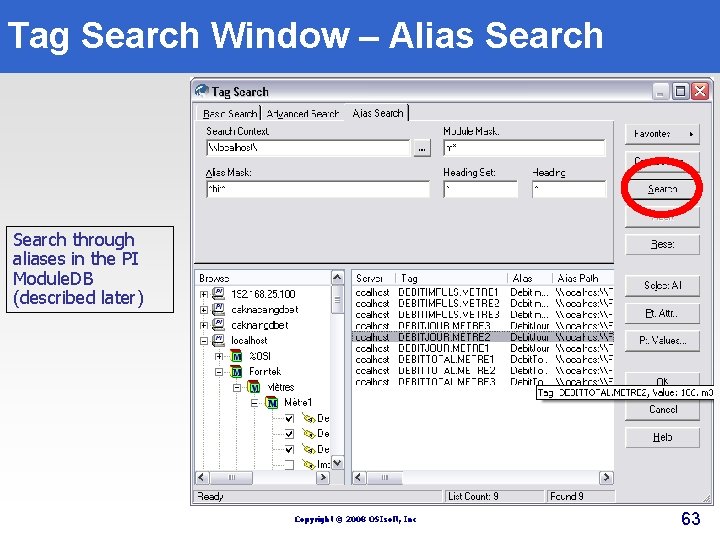
Tag Search Window – Alias Search through aliases in the PI Module. DB (described later) Copyright © 2008 OSIsoft, Inc 63
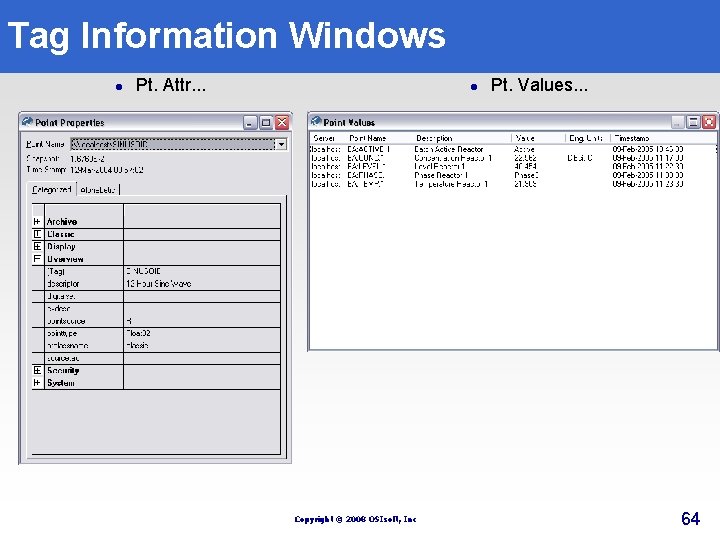
Tag Information Windows l Pt. Attr. . . l Copyright © 2008 OSIsoft, Inc Pt. Values. . . 64
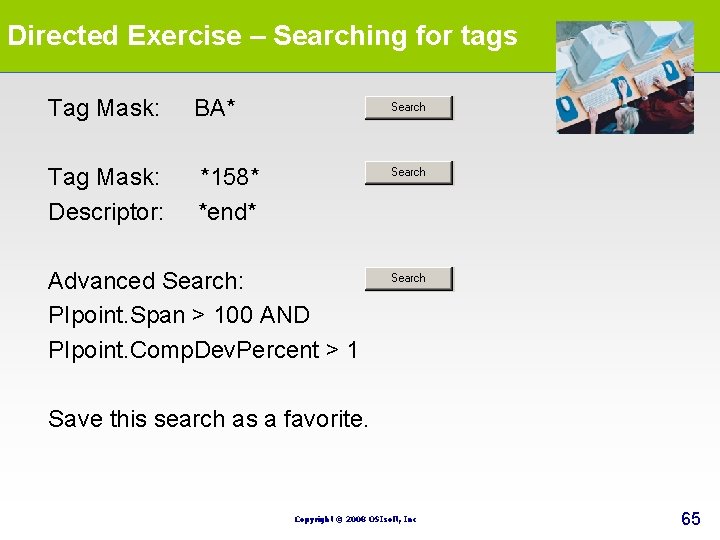
Directed Exercise – Searching for tags Tag Mask: BA* Tag Mask: *158* Descriptor: *end* Advanced Search: PIpoint. Span > 100 AND PIpoint. Comp. Dev. Percent > 1 Save this search as a favorite. Copyright © 2008 OSIsoft, Inc 65
Group Recap Question (optional) w w What information needs to be specified when creating a new connection to a PI server? What are the two wildcard characters available in a tag search? Copyright © 2008 OSIsoft, Inc 66
4. 0 PI Processbook Copyright © 2008 OSIsoft, Inc
5. 0 PI Data. Link Copyright © 2008 OSIsoft, Inc
PI Data. Link Objectives § § § § Learn how to effectively use PI Data. Link in MS Excel Be able to retrieve current and archived values Be able to retrieve sampled values from the archive Learn how to retrieve calculated values Learn how to retrieve PI expressions values Learn how to filter the results Learn how to use the trend element Copyright © 2008 OSIsoft, Inc 69
What is PI Data. Link ? l l PI Data. Link is an OSIsoft Add-In for Microsoft Excel (and Lotus 1 -2 -3) This Add-In lets you import data from the PI System into a spreadsheet for further analysis Copyright © 2008 OSIsoft, Inc 70
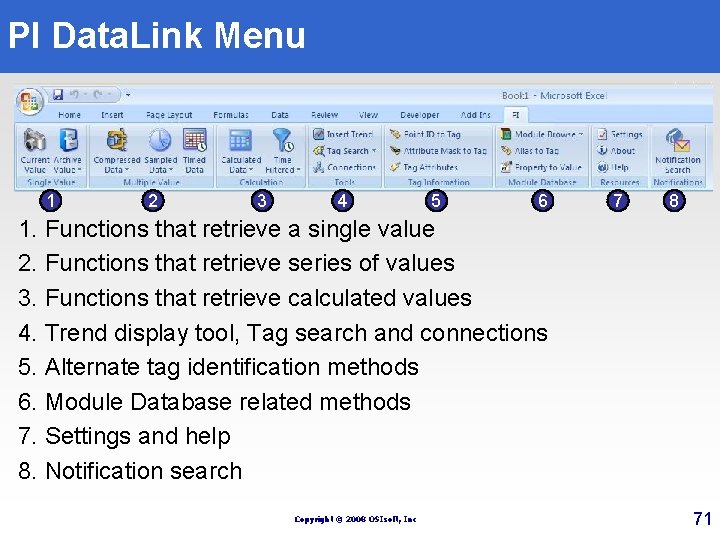
PI Data. Link Menu 1 2 3 4 5 6 7 8 1. Functions that retrieve a single value 2. Functions that retrieve series of values 3. Functions that retrieve calculated values 4. Trend display tool, Tag search and connections 5. Alternate tag identification methods 6. Module Database related methods 7. Settings and help 8. Notification search Copyright © 2008 OSIsoft, Inc 71
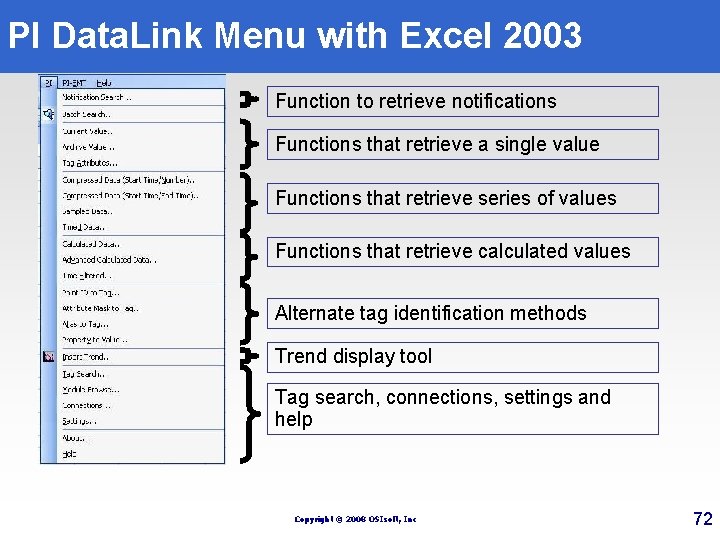
PI Data. Link Menu with Excel 2003 Function to retrieve notifications Functions that retrieve a single value Functions that retrieve series of values Functions that retrieve calculated values Alternate tag identification methods Trend display tool Tag search, connections, settings and help Copyright © 2008 OSIsoft, Inc 72
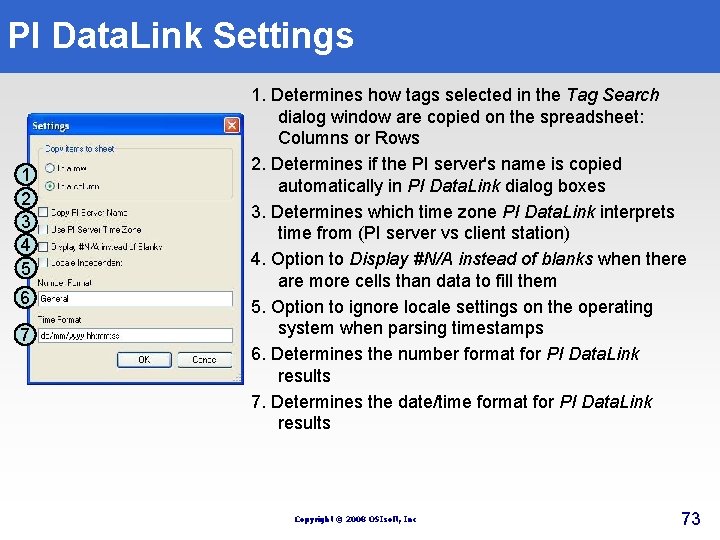
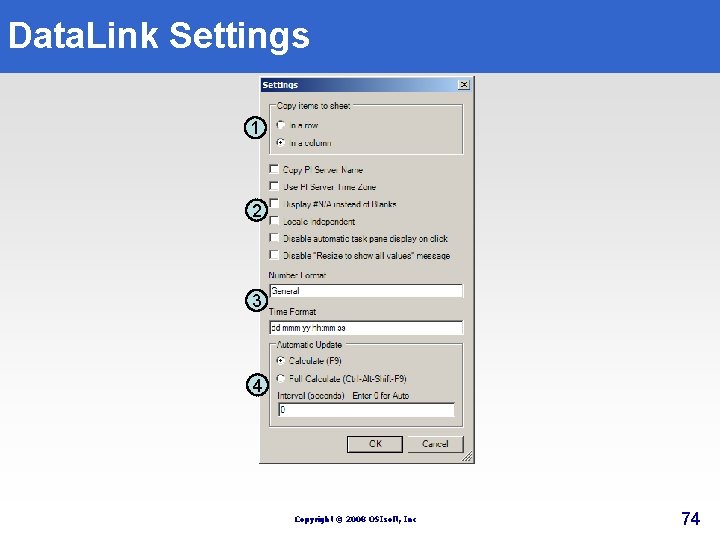
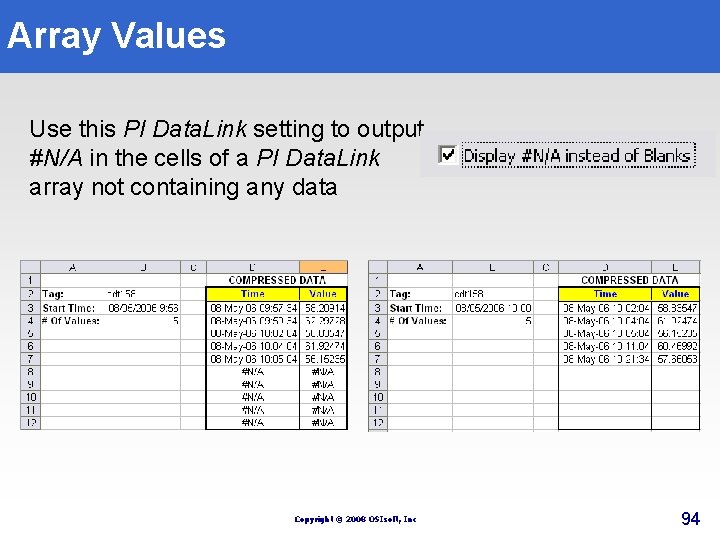
PI Data. Link Settings 1 2 3 4 5 6 7 1. Determines how tags selected in the Tag Search dialog window are copied on the spreadsheet: Columns or Rows 2. Determines if the PI server's name is copied automatically in PI Data. Link dialog boxes 3. Determines which time zone PI Data. Link interprets time from (PI server vs client station) 4. Option to Display #N/A instead of blanks when there are more cells than data to fill them 5. Option to ignore locale settings on the operating system when parsing timestamps 6. Determines the number format for PI Data. Link results 7. Determines the date/time format for PI Data. Link results Copyright © 2008 OSIsoft, Inc 73
Data. Link Settings 1 2 3 4 Copyright © 2008 OSIsoft, Inc 74
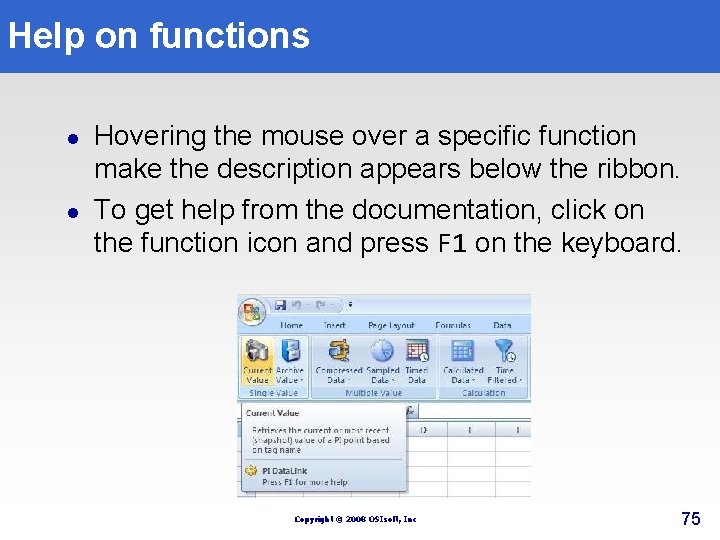
Help on functions l l Hovering the mouse over a specific function make the description appears below the ribbon. To get help from the documentation, click on the function icon and press F 1 on the keyboard. Copyright © 2008 OSIsoft, Inc 75
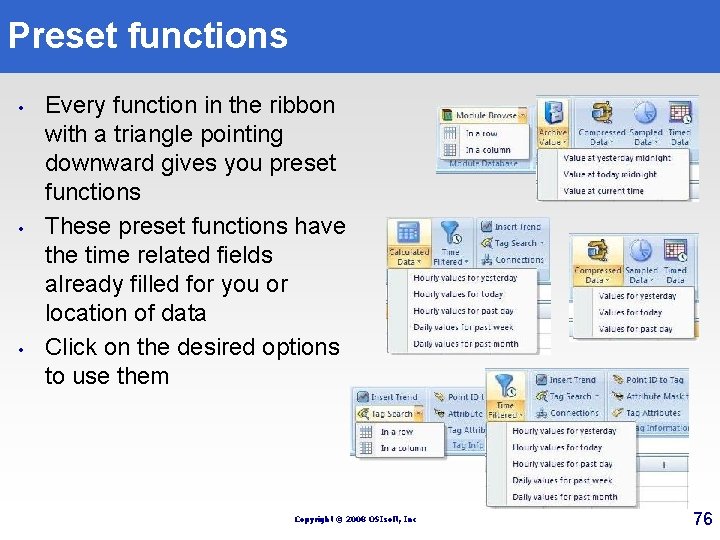
Preset functions • • • Every function in the ribbon with a triangle pointing downward gives you preset functions These preset functions have the time related fields already filled for you or location of data Click on the desired options to use them Copyright © 2008 OSIsoft, Inc 76
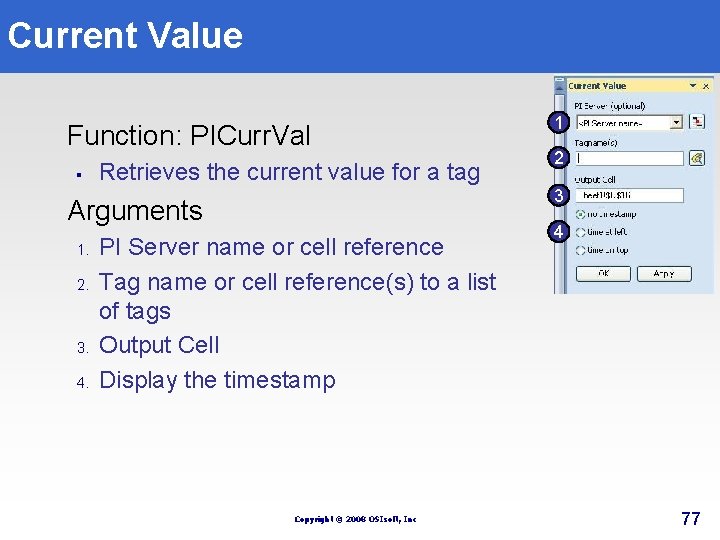
Current Value Function: PICurr. Val § Retrieves the current value for a tag 2. 3. 4. 2 3 Arguments 1. 1 PI Server name or cell reference Tag name or cell reference(s) to a list of tags Output Cell Display the timestamp Copyright © 2008 OSIsoft, Inc 4 77
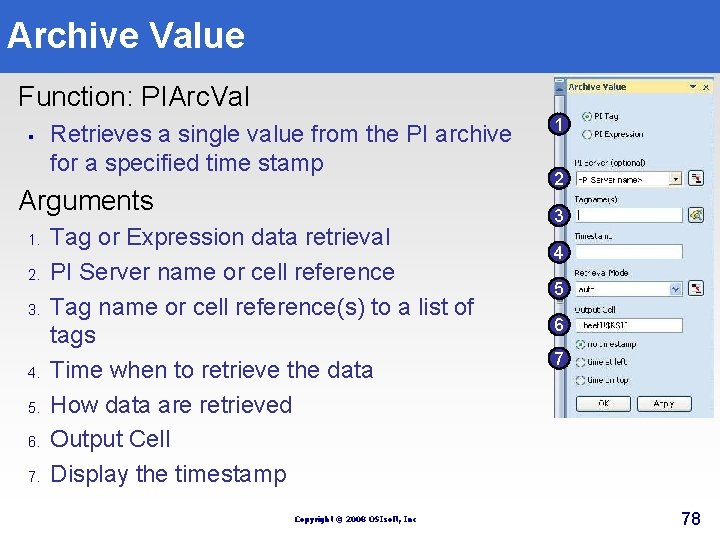
Archive Value Function: PIArc. Val § Retrieves a single value from the PI archive for a specified time stamp Arguments 1. 2. 3. 4. 5. 6. 7. Tag or Expression data retrieval PI Server name or cell reference Tag name or cell reference(s) to a list of tags Time when to retrieve the data How data are retrieved Output Cell Display the timestamp Copyright © 2008 OSIsoft, Inc 1 2 3 4 5 6 7 78
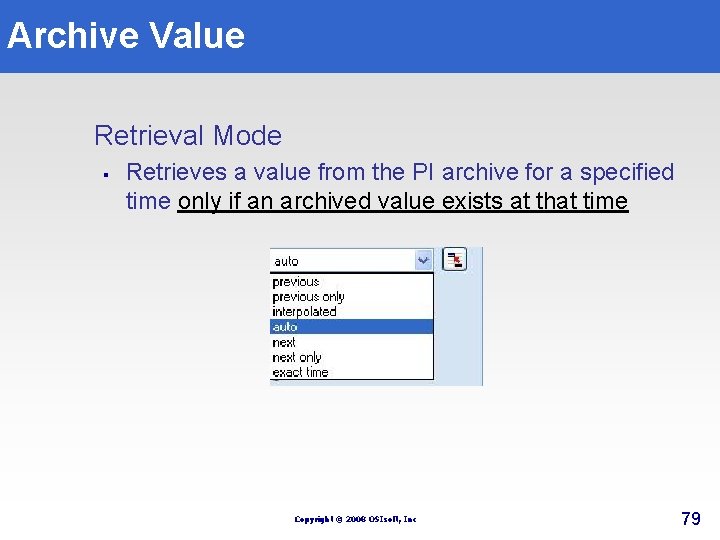
Archive Value Retrieval Mode § Retrieves a value from the PI archive for a specified time only if an archived value exists at that time Copyright © 2008 OSIsoft, Inc 79
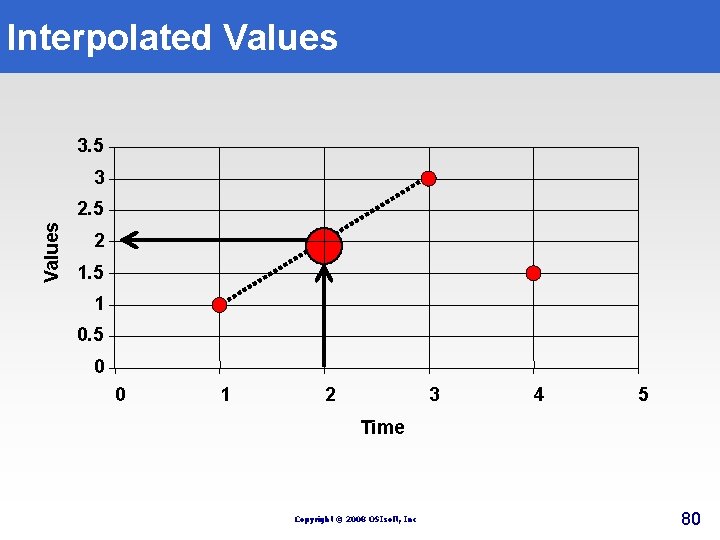
Interpolated Values 3. 5 3 Values 2. 5 2 1. 5 1 0. 5 0 0 1 2 3 4 5 Time Copyright © 2008 OSIsoft, Inc 80
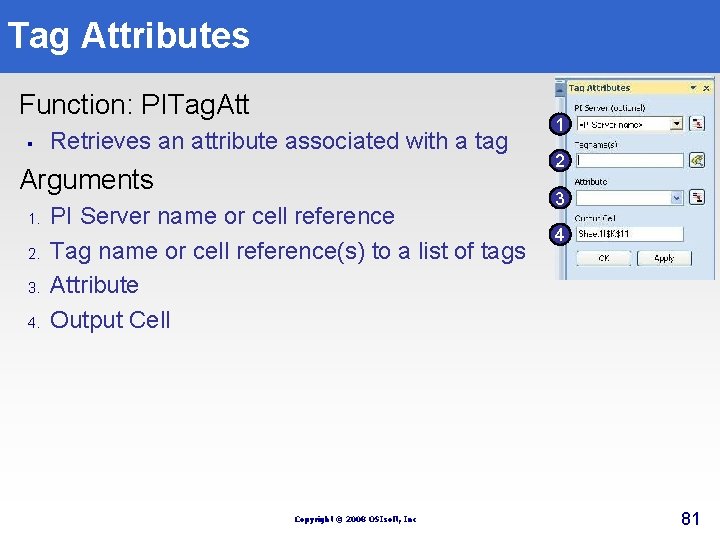
Tag Attributes Function: PITag. Att § Retrieves an attribute associated with a tag Arguments 1. 2. 3. 4. PI Server name or cell reference Tag name or cell reference(s) to a list of tags Attribute Output Cell Copyright © 2008 OSIsoft, Inc 1 2 3 4 81
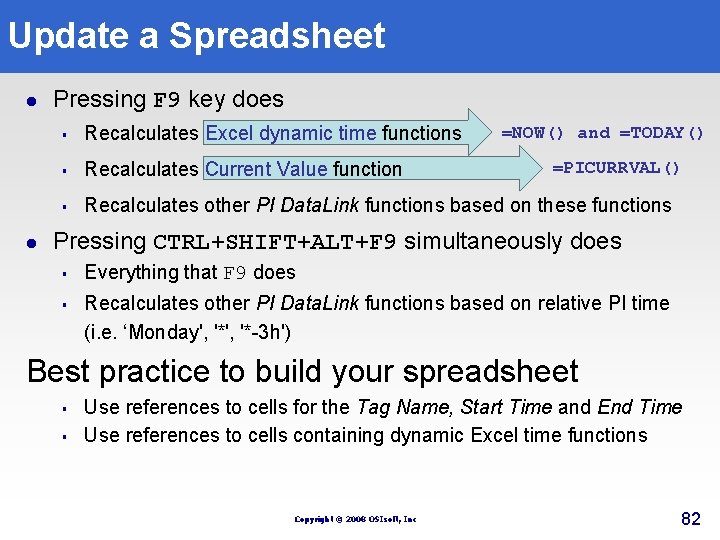
Update a Spreadsheet l l Pressing F 9 key does § Recalculates Excel dynamic time functions § Recalculates Current Value function § Recalculates other PI Data. Link functions based on these functions =NOW() and =TODAY() =PICURRVAL() Pressing CTRL+SHIFT+ALT+F 9 simultaneously does § § Everything that F 9 does Recalculates other PI Data. Link functions based on relative PI time (i. e. ‘Monday', '*-3 h') Best practice to build your spreadsheet § § Use references to cells for the Tag Name, Start Time and End Time Use references to cells containing dynamic Excel time functions Copyright © 2008 OSIsoft, Inc 82
Refreshing Your Queries Copyright © 2008 OSIsoft, Inc 83
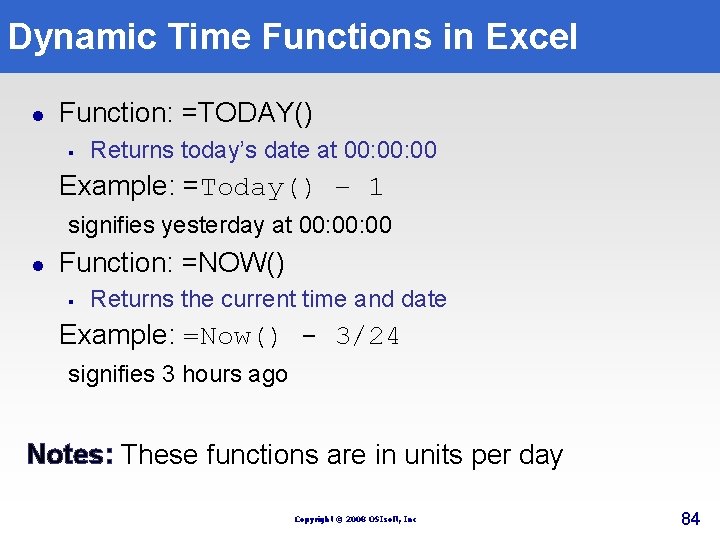
Dynamic Time Functions in Excel l Function: =TODAY() § Returns today’s date at 00: 00 Example: =Today() – 1 signifies yesterday at 00: 00 l Function: =NOW() § Returns the current time and date Example: =Now() - 3/24 signifies 3 hours ago Notes: These functions are in units per day Copyright © 2008 OSIsoft, Inc 84
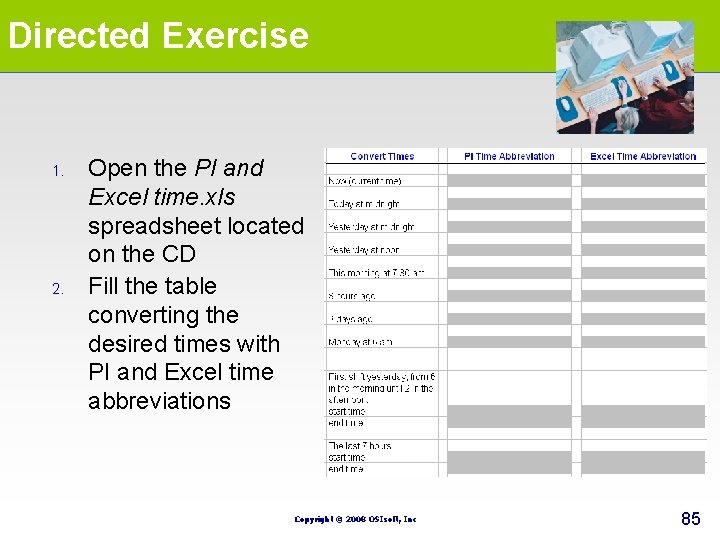
Directed Exercise 1. 2. Open the PI and Excel time. xls spreadsheet located on the CD Fill the table converting the desired times with PI and Excel time abbreviations Copyright © 2008 OSIsoft, Inc 85
Exercise DL 1 Activity Report Objective: Learn to extract a single value from a PI Database using the following functions: § § § Current value function Archive value function Tag attributes function Copyright © 2008 OSIsoft, Inc 86
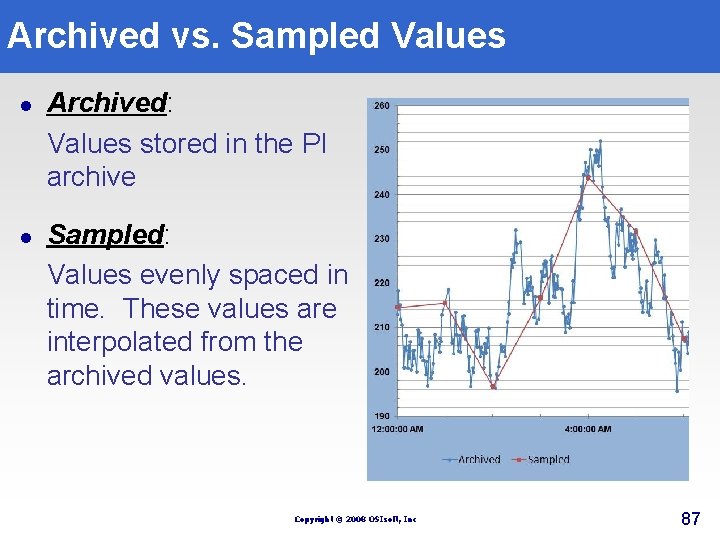
Archived vs. Sampled Values l l Archived: Values stored in the PI archive Sampled: Values evenly spaced in time. These values are interpolated from the archived values. Copyright © 2008 OSIsoft, Inc 87
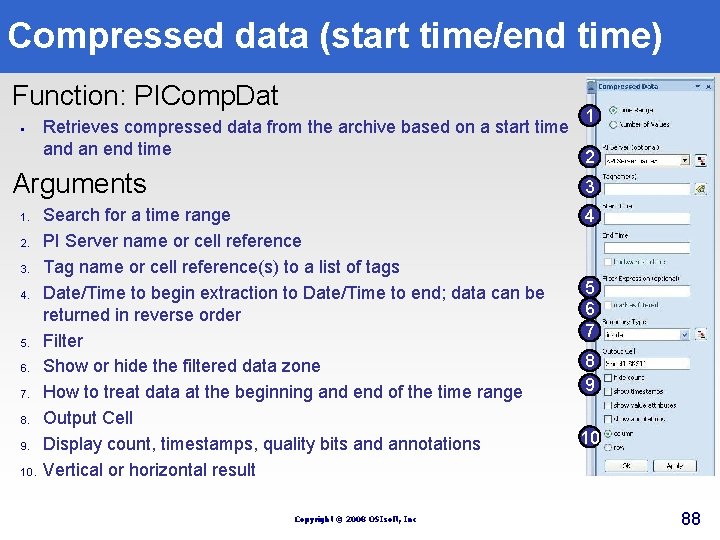
Compressed data (start time/end time) Function: PIComp. Dat § 1 Retrieves compressed data from the archive based on a start time and an end time 2 Arguments 1. 2. 3. 4. 5. 6. 7. 8. 9. 10. 3 Search for a time range PI Server name or cell reference Tag name or cell reference(s) to a list of tags Date/Time to begin extraction to Date/Time to end; data can be returned in reverse order Filter Show or hide the filtered data zone How to treat data at the beginning and end of the time range Output Cell Display count, timestamps, quality bits and annotations Vertical or horizontal result Copyright © 2008 OSIsoft, Inc 4 5 6 7 8 9 10 88
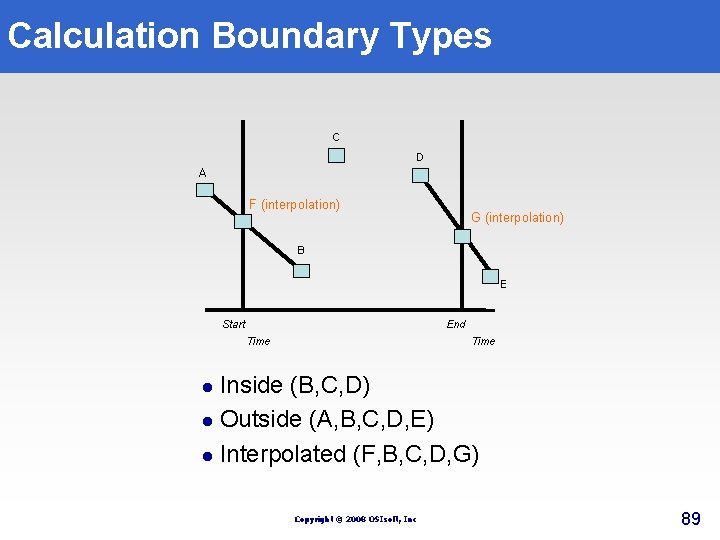
Calculation Boundary Types C D A F (interpolation) G (interpolation) B E Start End Time Inside (B, C, D) l Outside (A, B, C, D, E) l Interpolated (F, B, C, D, G) l Copyright © 2008 OSIsoft, Inc 89
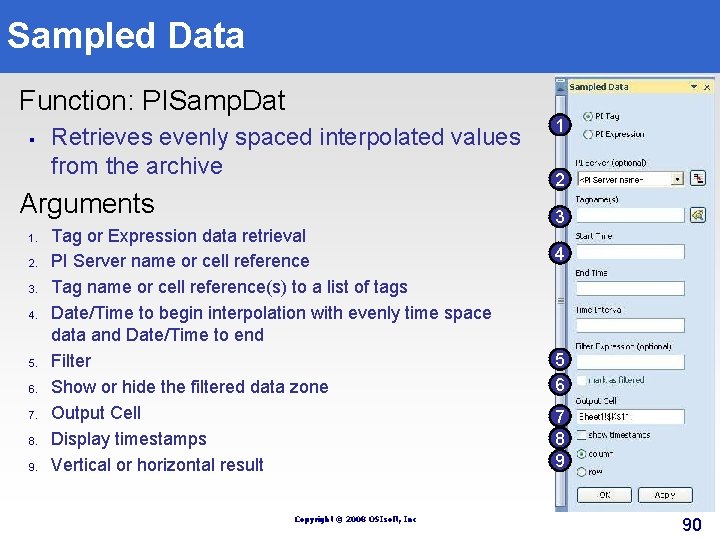
Sampled Data Function: PISamp. Dat § Retrieves evenly spaced interpolated values from the archive Arguments 1. 2. 3. 4. 5. 6. 7. 8. 9. Tag or Expression data retrieval PI Server name or cell reference Tag name or cell reference(s) to a list of tags Date/Time to begin interpolation with evenly time space data and Date/Time to end Filter Show or hide the filtered data zone Output Cell Display timestamps Vertical or horizontal result Copyright © 2008 OSIsoft, Inc 1 2 3 4 5 6 7 8 9 90
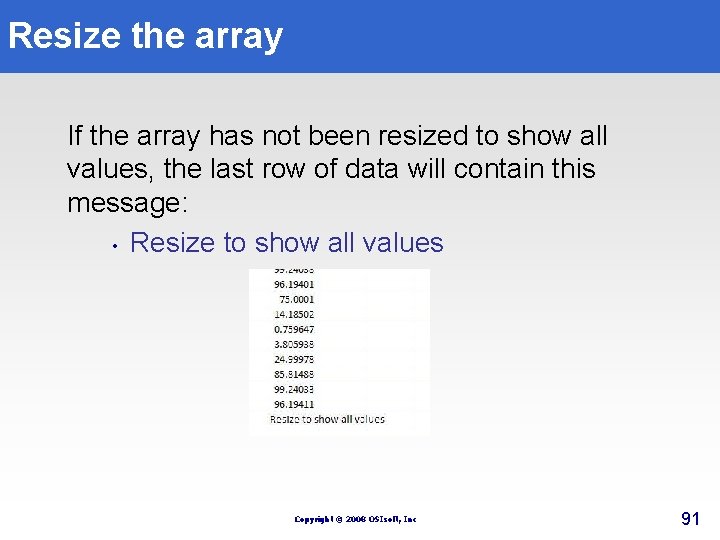
Resize the array If the array has not been resized to show all values, the last row of data will contain this message: • Resize to show all values Copyright © 2008 OSIsoft, Inc 91
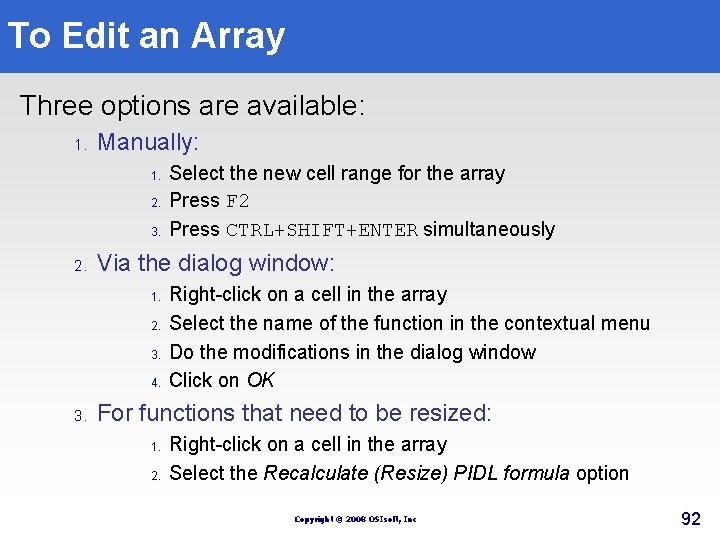
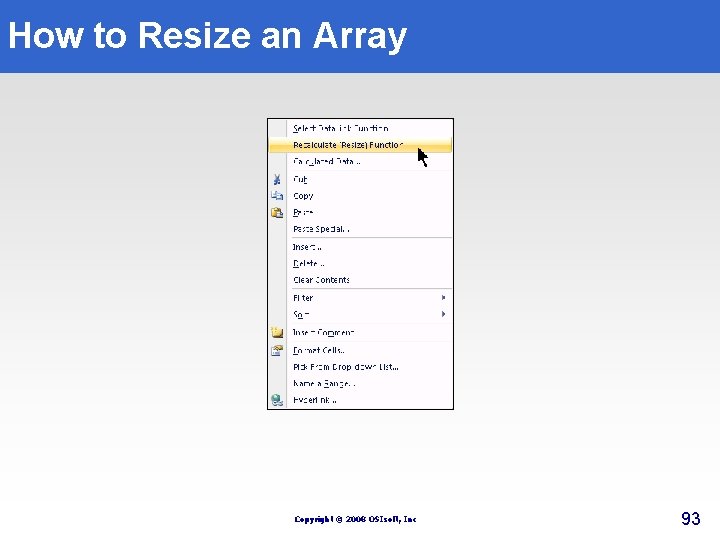
To Edit an Array Three options are available: 1. Manually: 1. 2. 3. 2. Via the dialog window: 1. 2. 3. 4. 3. Select the new cell range for the array Press F 2 Press CTRL+SHIFT+ENTER simultaneously Right-click on a cell in the array Select the name of the function in the contextual menu Do the modifications in the dialog window Click on OK For functions that need to be resized: 1. 2. Right-click on a cell in the array Select the Recalculate (Resize) PIDL formula option Copyright © 2008 OSIsoft, Inc 92
How to Resize an Array Copyright © 2008 OSIsoft, Inc 93
Array Values Use this PI Data. Link setting to output #N/A in the cells of a PI Data. Link array not containing any data Copyright © 2008 OSIsoft, Inc 94
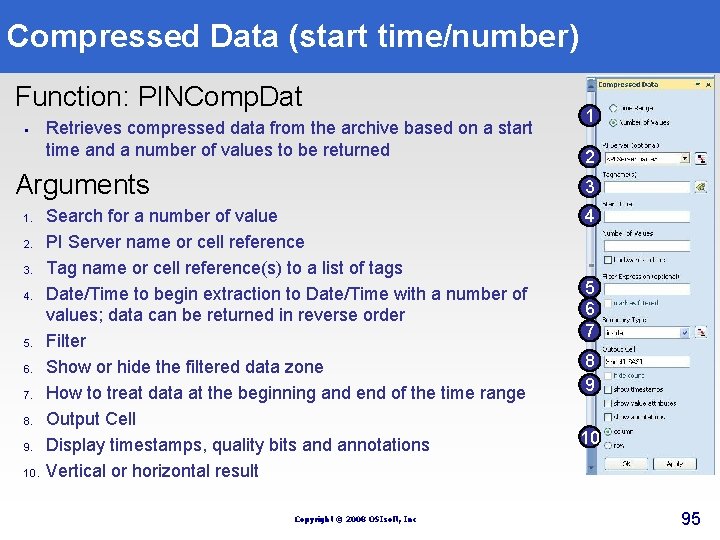
Compressed Data (start time/number) Function: PINComp. Dat § Retrieves compressed data from the archive based on a start time and a number of values to be returned Arguments 1. 2. 3. 4. 5. 6. 7. 8. 9. 10. 1 2 3 Search for a number of value PI Server name or cell reference Tag name or cell reference(s) to a list of tags Date/Time to begin extraction to Date/Time with a number of values; data can be returned in reverse order Filter Show or hide the filtered data zone How to treat data at the beginning and end of the time range Output Cell Display timestamps, quality bits and annotations Vertical or horizontal result Copyright © 2008 OSIsoft, Inc 4 5 6 7 8 9 10 95
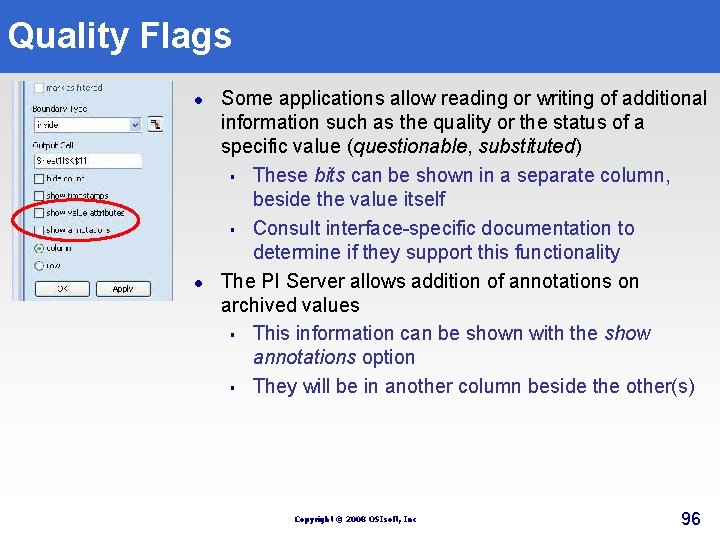
Quality Flags l l Some applications allow reading or writing of additional information such as the quality or the status of a specific value (questionable, substituted) § These bits can be shown in a separate column, beside the value itself § Consult interface-specific documentation to determine if they support this functionality The PI Server allows addition of annotations on archived values § This information can be shown with the show annotations option § They will be in another column beside the other(s) Copyright © 2008 OSIsoft, Inc 96
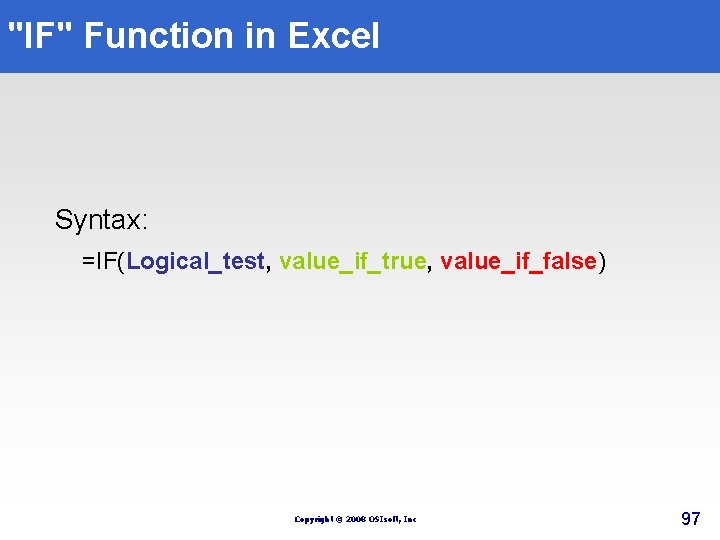
"IF" Function in Excel Syntax: =IF(Logical_test, value_if_true, value_if_false) Copyright © 2008 OSIsoft, Inc 97
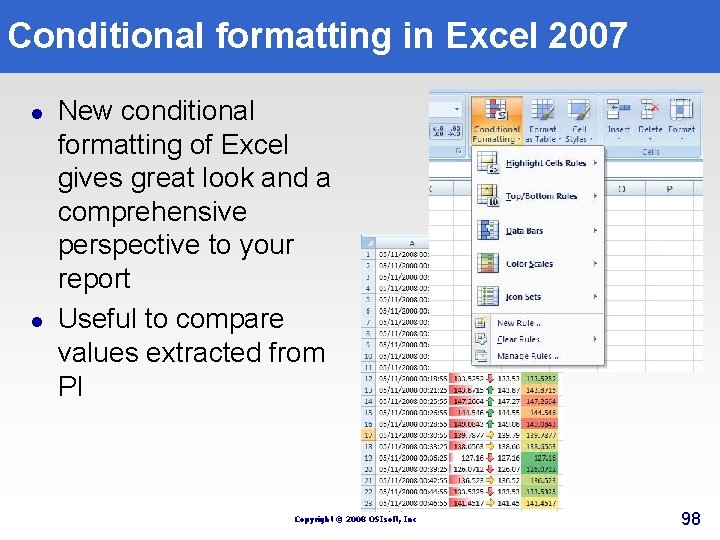
Conditional formatting in Excel 2007 l l New conditional formatting of Excel gives great look and a comprehensive perspective to your report Useful to compare values extracted from PI Copyright © 2008 OSIsoft, Inc 98
Exercise DL 2 Operational Start Up Objective: Learn to retrieve process data using the Compressed Data function Copyright © 2008 OSIsoft, Inc 99
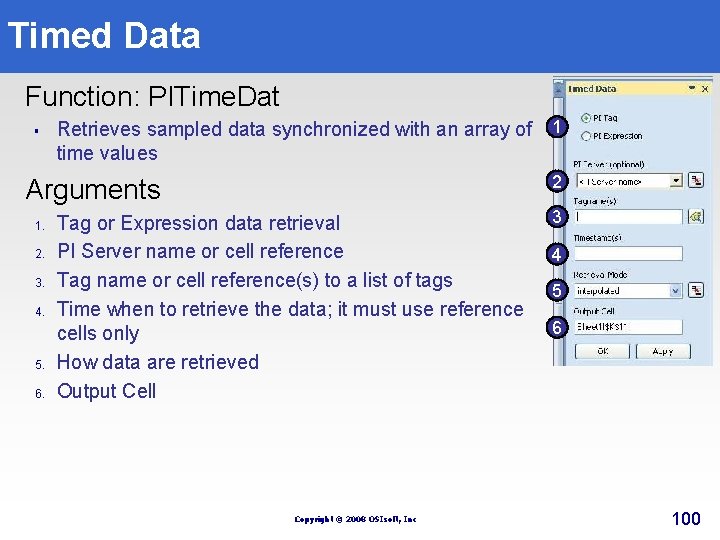
Timed Data Function: PITime. Dat § Retrieves sampled data synchronized with an array of 1 time values 2 Arguments 1. 2. 3. 4. 5. 6. Tag or Expression data retrieval PI Server name or cell reference Tag name or cell reference(s) to a list of tags Time when to retrieve the data; it must use reference cells only How data are retrieved Output Cell Copyright © 2008 OSIsoft, Inc 3 4 5 6 100
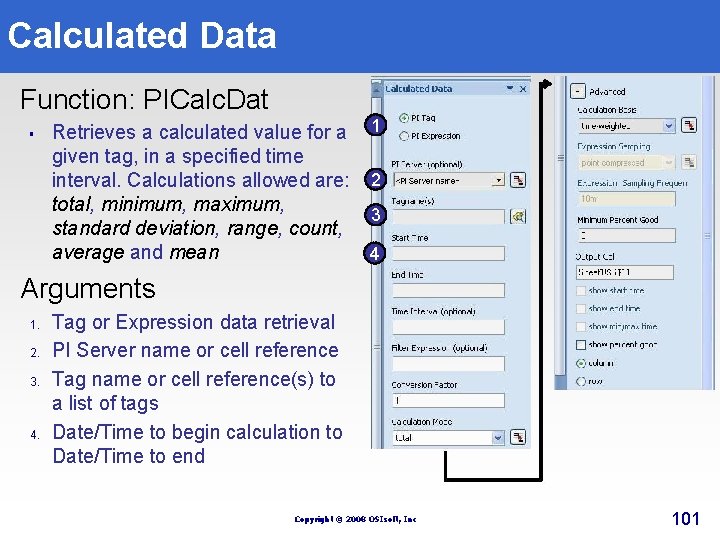
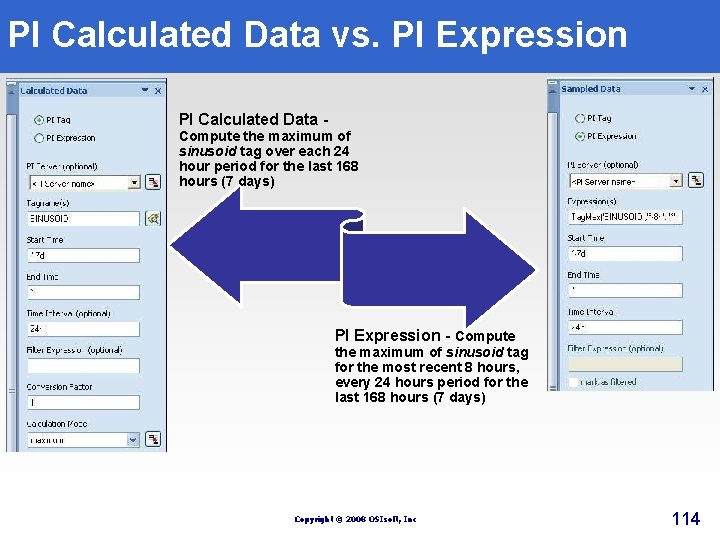
Calculated Data Function: PICalc. Dat § Retrieves a calculated value for a given tag, in a specified time interval. Calculations allowed are: total, minimum, maximum, standard deviation, range, count, average and mean 1 2 3 4 Arguments 1. 2. 3. 4. Tag or Expression data retrieval PI Server name or cell reference Tag name or cell reference(s) to a list of tags Date/Time to begin calculation to Date/Time to end Copyright © 2008 OSIsoft, Inc 101
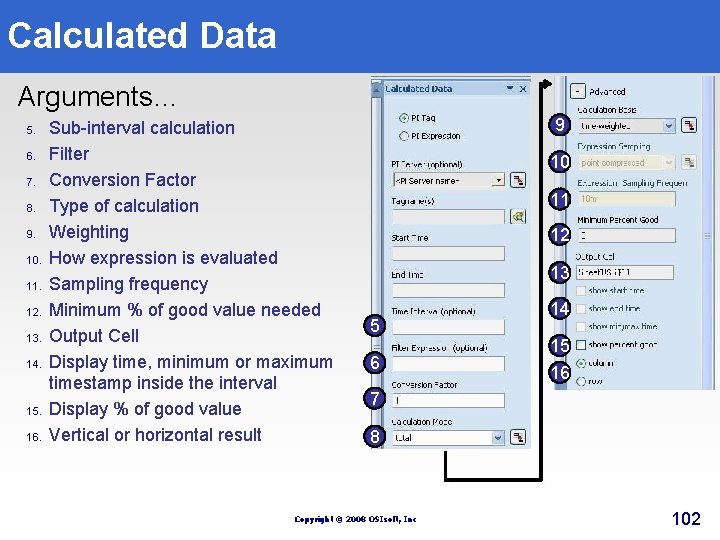
Calculated Data Arguments… 5. 6. 7. 8. 9. 10. 11. 12. 13. 14. 15. 16. Sub-interval calculation Filter Conversion Factor Type of calculation Weighting How expression is evaluated Sampling frequency Minimum % of good value needed Output Cell Display time, minimum or maximum timestamp inside the interval Display % of good value Vertical or horizontal result 9 10 11 12 13 5 6 14 15 16 7 8 Copyright © 2008 OSIsoft, Inc 102
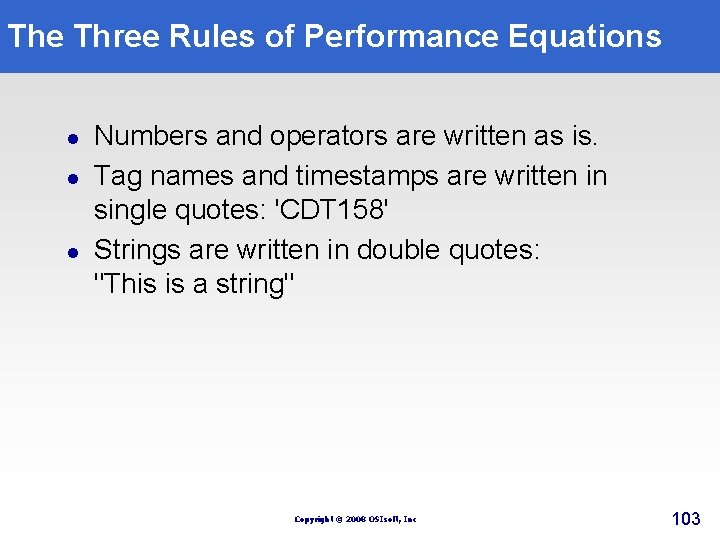
The Three Rules of Performance Equations l l l Numbers and operators are written as is. Tag names and timestamps are written in single quotes: 'CDT 158' Strings are written in double quotes: "This is a string" Copyright © 2008 OSIsoft, Inc 103
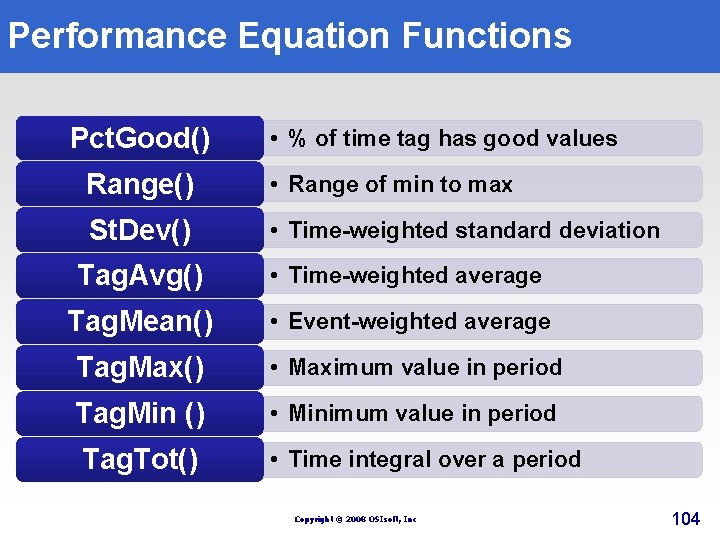
Performance Equation Functions Pct. Good() • % of time tag has good values Range() • Range of min to max St. Dev() • Time-weighted standard deviation Tag. Avg() • Time-weighted average Tag. Mean() • Event-weighted average Tag. Max() • Maximum value in period Tag. Min () • Minimum value in period Tag. Tot() • Time integral over a period Copyright © 2008 OSIsoft, Inc 104
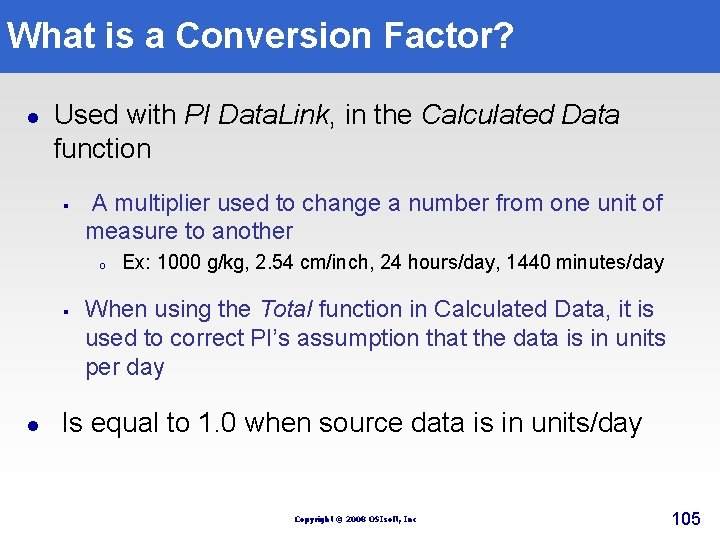
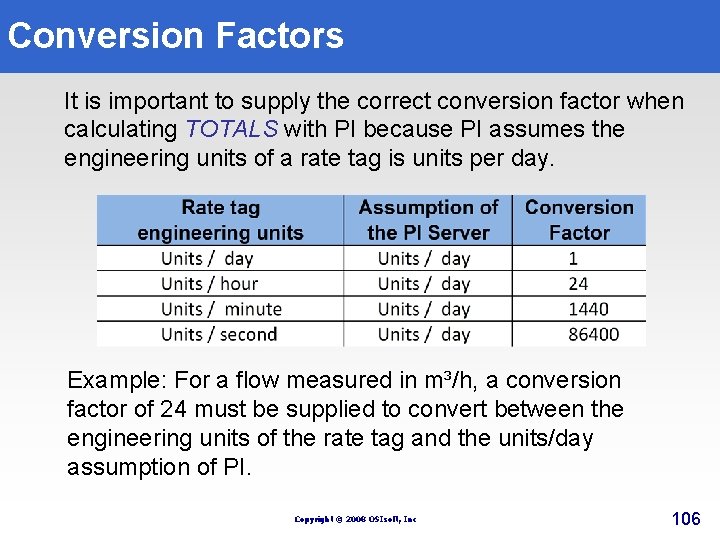
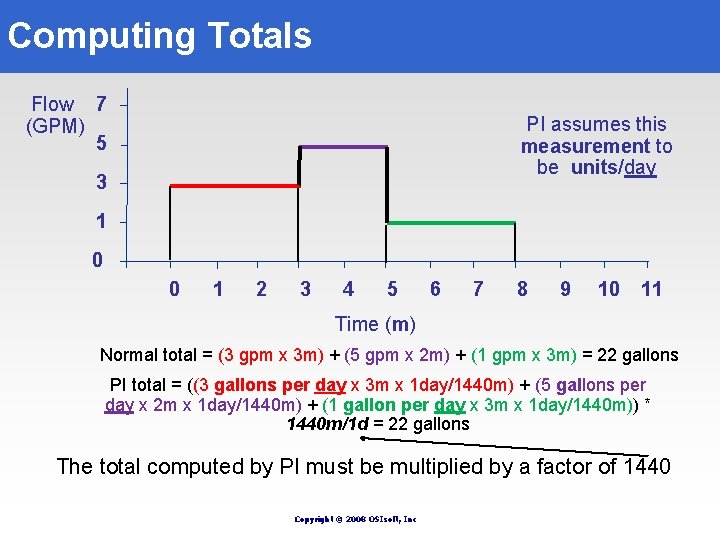
What is a Conversion Factor? l Used with PI Data. Link, in the Calculated Data function § A multiplier used to change a number from one unit of measure to another o Ex: 1000 g/kg, 2. 54 cm/inch, 24 hours/day, 1440 minutes/day § l When using the Total function in Calculated Data, it is used to correct PI’s assumption that the data is in units per day Is equal to 1. 0 when source data is in units/day Copyright © 2008 OSIsoft, Inc 105
Conversion Factors It is important to supply the correct conversion factor when calculating TOTALS with PI because PI assumes the engineering units of a rate tag is units per day. Example: For a flow measured in m³/h, a conversion factor of 24 must be supplied to convert between the engineering units of the rate tag and the units/day assumption of PI. Copyright © 2008 OSIsoft, Inc 106
Computing Totals Flow 7 (GPM) 5 PI assumes this measurement to be units/day 3 1 0 0 1 2 3 4 5 6 7 8 9 10 11 Time (m) Normal total = (3 gpm x 3 m) + (5 gpm x 2 m) + (1 gpm x 3 m) = 22 gallons PI total = ((3 gallons per day x 3 m x 1 day/1440 m) + (5 gallons per day x 2 m x 1 day/1440 m) + (1 gallon per day x 3 m x 1 day/1440 m)) * 1440 m/1 d = 22 gallons The total computed by PI must be multiplied by a factor of 1440 Copyright © 2008 OSIsoft, Inc
Exercise DL 3 Daily Production Objective: Learn to extract multiple calculated values from a PI Database using the Calculated Data function Copyright © 2008 OSIsoft, Inc 108
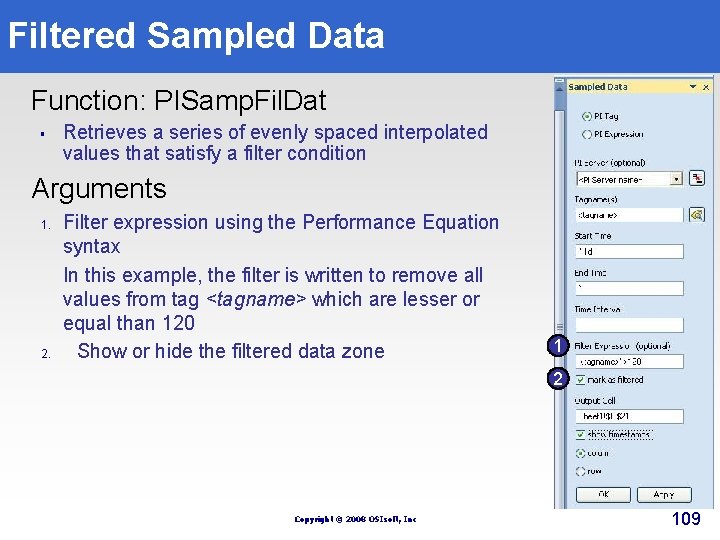
Filtered Sampled Data Function: PISamp. Fil. Dat § Retrieves a series of evenly spaced interpolated values that satisfy a filter condition Arguments 1. 2. Filter expression using the Performance Equation syntax In this example, the filter is written to remove all values from tag <tagname> which are lesser or equal than 120 Show or hide the filtered data zone 1 2 Copyright © 2008 OSIsoft, Inc 109
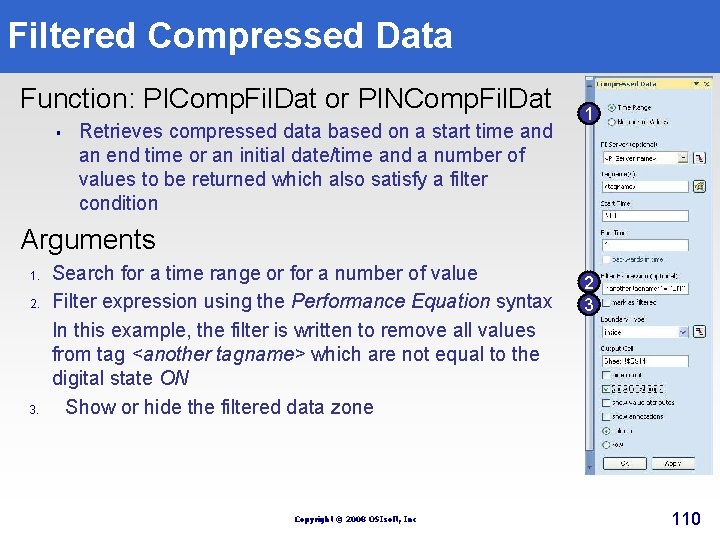
Filtered Compressed Data Function: PIComp. Fil. Dat or PINComp. Fil. Dat § Retrieves compressed data based on a start time and an end time or an initial date/time and a number of values to be returned which also satisfy a filter condition 1 Arguments 1. 2. 3. Search for a time range or for a number of value Filter expression using the Performance Equation syntax In this example, the filter is written to remove all values from tag <another tagname> which are not equal to the digital state ON Show or hide the filtered data zone Copyright © 2008 OSIsoft, Inc 2 3 110
Exercise DL 4 Off-Specification Production Objective: Learn to apply filters to select the values to extract from a PI Database using the following function Sampled Data Copyright © 2008 OSIsoft, Inc 111
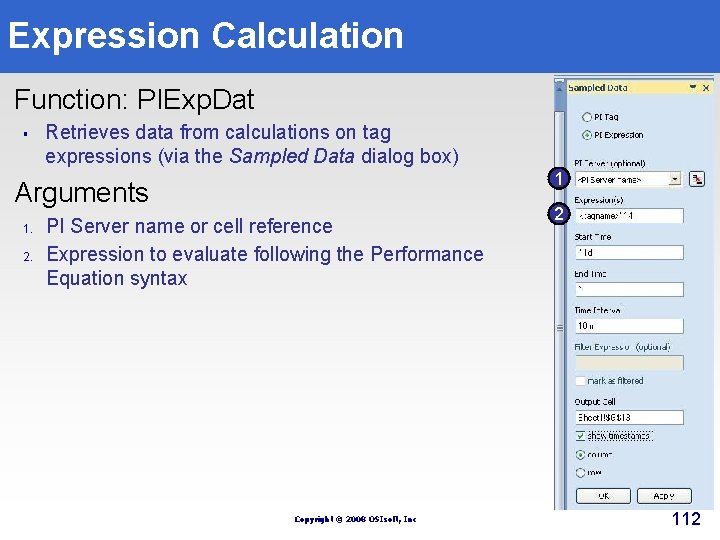
Expression Calculation Function: PIExp. Dat § Retrieves data from calculations on tag expressions (via the Sampled Data dialog box) 1 Arguments 1. 2. PI Server name or cell reference Expression to evaluate following the Performance Equation syntax Copyright © 2008 OSIsoft, Inc 2 112
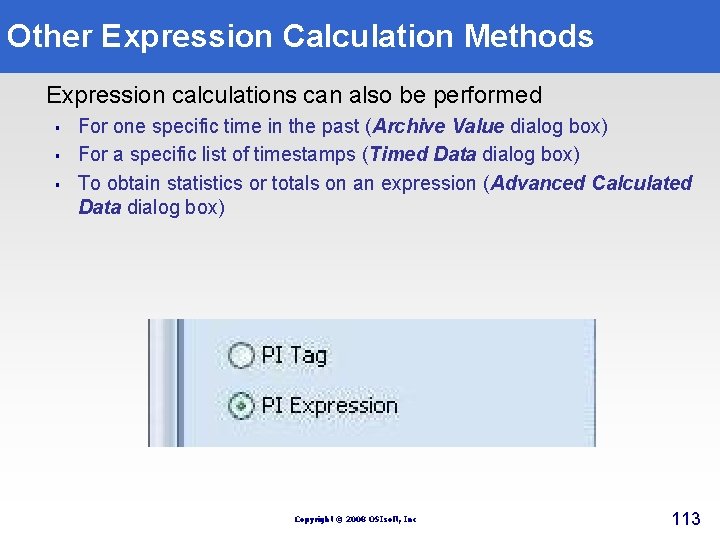
Other Expression Calculation Methods Expression calculations can also be performed § § § For one specific time in the past (Archive Value dialog box) For a specific list of timestamps (Timed Data dialog box) To obtain statistics or totals on an expression (Advanced Calculated Data dialog box) Copyright © 2008 OSIsoft, Inc 113
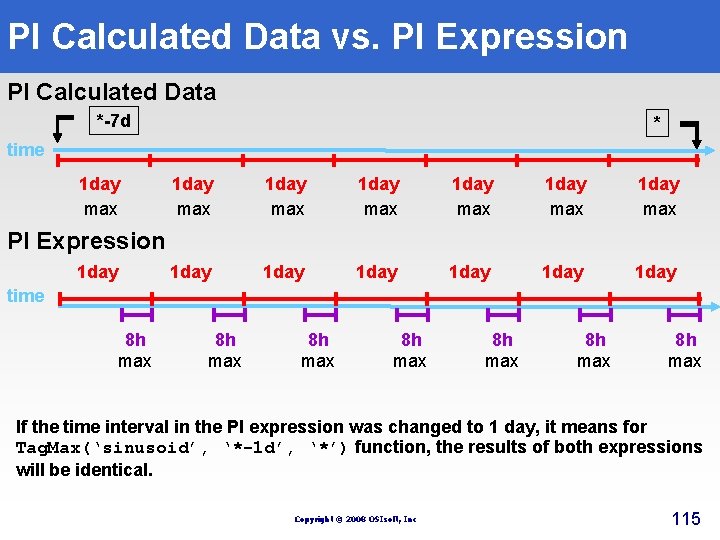
PI Calculated Data vs. PI Expression PI Calculated Data - Compute the maximum of sinusoid tag over each 24 hour period for the last 168 hours (7 days) PI Expression - Compute the maximum of sinusoid tag for the most recent 8 hours, every 24 hours period for the last 168 hours (7 days) Copyright © 2008 OSIsoft, Inc 114
PI Calculated Data vs. PI Expression PI Calculated Data *-7 d * time 1 day max 1 day max 1 day 1 day PI Expression 1 day time 8 h max 8 h max If the time interval in the PI expression was changed to 1 day, it means for Tag. Max(‘sinusoid’, ‘*-1 d’, ‘*’) function, the results of both expressions will be identical. Copyright © 2008 OSIsoft, Inc 115
Exercise DL 5 Expression Calculation Objectives: Learn to carry out a calculation for the current value of an expression; Use MS Excel’s Conditional Formatting to make your PI Data Link reports more useful. Copyright © 2008 OSIsoft, Inc 116
Exercise DL 6 (Optional) Quality Control Report Objectives: § § Learn to apply complex filters to extract archived values Learn to synchronize data extraction Learn to extract maximum value of a time range using Calculated data function Use MS Excel’s Conditional Formatting to make your PI Data. Link report easy to use Copyright © 2008 OSIsoft, Inc 117
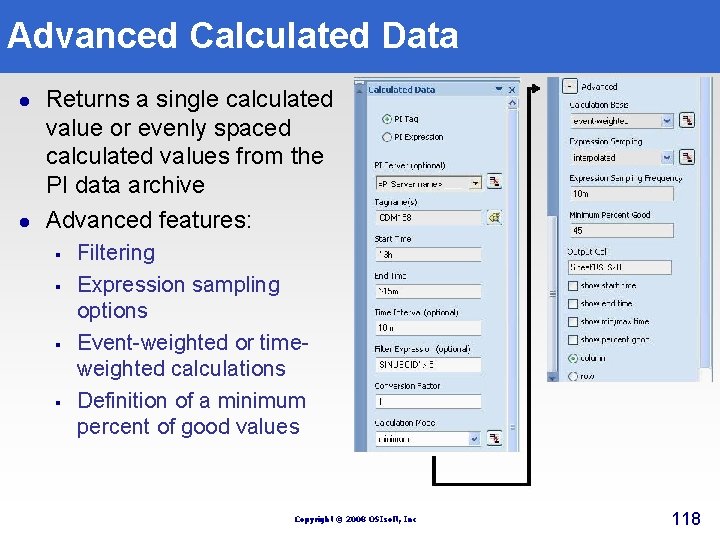
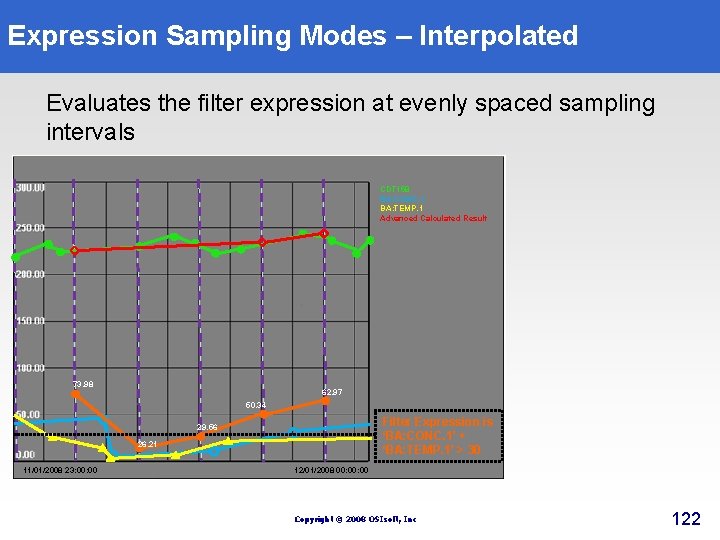
Advanced Calculated Data l l Returns a single calculated value or evenly spaced calculated values from the PI data archive Advanced features: § § Filtering Expression sampling options Event-weighted or timeweighted calculations Definition of a minimum percent of good values Copyright © 2008 OSIsoft, Inc 118
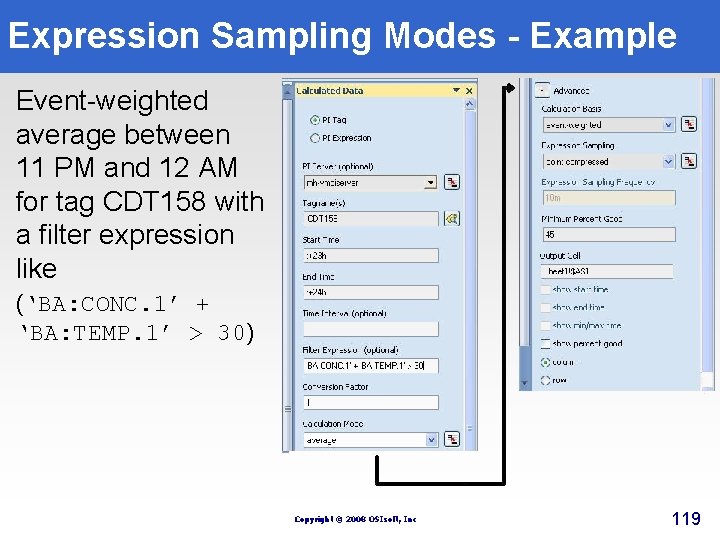
Expression Sampling Modes - Example Event-weighted average between 11 PM and 12 AM for tag CDT 158 with a filter expression like (‘BA: CONC. 1’ + ‘BA: TEMP. 1’ > 30) Copyright © 2008 OSIsoft, Inc 119
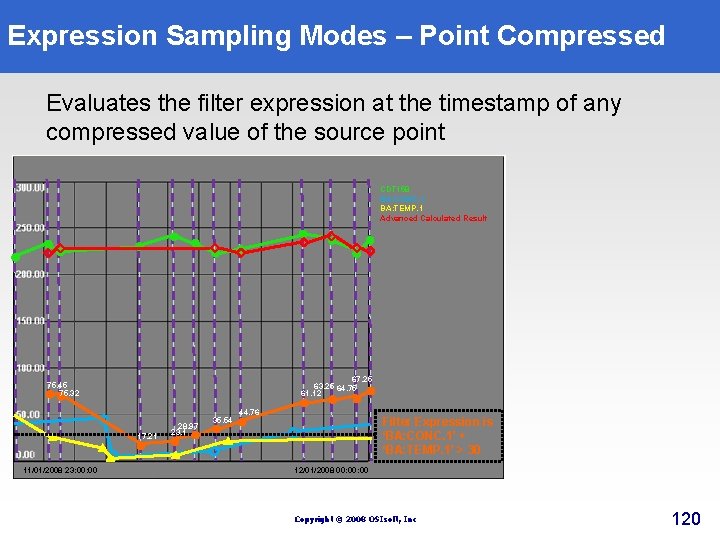
Expression Sampling Modes – Point Compressed Evaluates the filter expression at the timestamp of any compressed value of the source point CDT 158 BA: CONC. 1 BA: TEMP. 1 Advanced Calculated Result 67. 25 63. 25 64. 75 61. 12 75. 45 75. 32 17. 21 11/01/2008 23: 00 28. 97 23. 1 35. 54 44. 76 Filter Expression is ‘BA: CONC. 1’ + ‘BA: TEMP. 1’ > 30 12/01/2008 00: 00 Copyright © 2008 OSIsoft, Inc 120
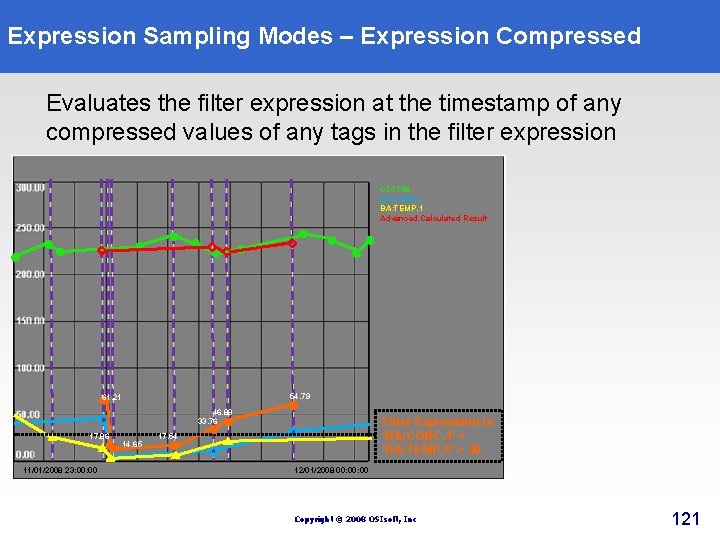
Expression Sampling Modes – Expression Compressed Evaluates the filter expression at the timestamp of any compressed values of any tags in the filter expression CDT 158 BA: CONC. 1 BA: TEMP. 1 Advanced Calculated Result 54. 79 61. 21 46. 89 33. 76 17. 86 11/01/2008 23: 00 14. 65 Filter Expression is ‘BA: CONC. 1’ + ‘BA: TEMP. 1’ > 30 17. 54 12/01/2008 00: 00 Copyright © 2008 OSIsoft, Inc 121
Expression Sampling Modes – Interpolated Evaluates the filter expression at evenly spaced sampling intervals CDT 158 BA: CONC. 1 BA: TEMP. 1 Advanced Calculated Result 73. 98 62. 97 50. 34 Filter Expression is ‘BA: CONC. 1’ + ‘BA: TEMP. 1’ > 30 29. 56 26. 21 11/01/2008 23: 00 12/01/2008 00: 00 Copyright © 2008 OSIsoft, Inc 122
Questions Copyright © 2008 OSIsoft, Inc 124