
Information Management DIG 3563 Source and Version Control
- Slides: 61
Information Management DIG 3563 Source and Version Control Systems: Lecture 16 J. Michael Moshell University of Central Florida Original image* by Moshell et al. 1
SCM: Software Configuration Management Source-Code Configuration Management Revision Control. Version Control. . . All these are names for an essential process in software development: www. wikipedia. org - GNU FDL -2 -
SCM: Software Configuration Management • Configuration control Controlling the release of successive versions of a product. • Build Management Managing the process and tools used for 'builds' – combining many complex pieces into a product • Defect tracking Bugs identified, managed, fixed, archived -3 -
SCM: Software Configuration Management Many of the ideas and tools for SCM were co-evolved with the UNIX operating system. Some history thereof would be useful. So. . -4 -
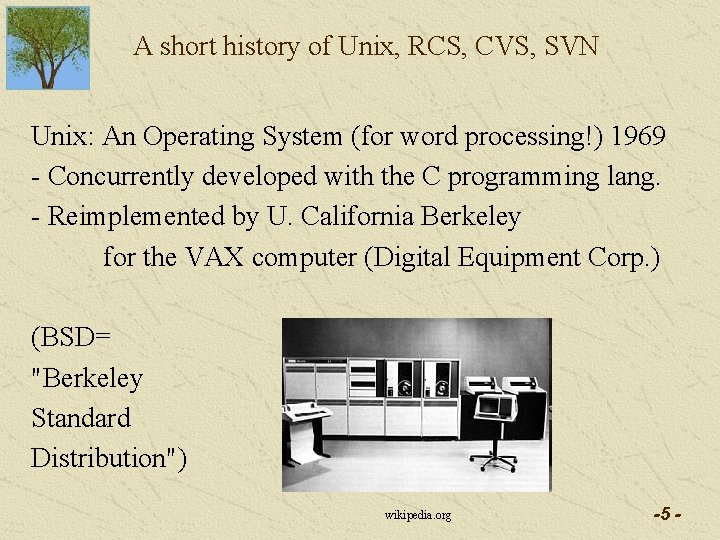
A short history of Unix, RCS, CVS, SVN Unix: An Operating System (for word processing!) 1969 - Concurrently developed with the C programming lang. - Reimplemented by U. California Berkeley for the VAX computer (Digital Equipment Corp. ) (BSD= "Berkeley Standard Distribution") wikipedia. org -5 -
A short history of Unix, RCS, CVS, SVN Unix: Open source? Well, sorta. AT&T gave away licenses to universities, sold them to commercial firms. Unlike many other systems, you got the source code. Many people improved it, published add-ons: - editors - compilers - database management systems -6 -
A short history of Unix, RCS, CVS, SVN Unix: Why build it? (This was 20 years before PCs. ) It was, in effect, a time shared content management system! - file management - spelling checking - layout programs (typesetting) runoff, nroff There were no laser printers; output to optical typesetters -7 -
A short history of Unix, RCS, CVS, SVN Unix and the Internet TCP/IP was added to the Unix Kernel in BSD version. Computer networks grew out of Unix -8 -
A short history of Unix, RCS, CVS, SVN Unix and the Internet TCP/IP was added to the Unix Kernel in BSD version. Computer networks grew out of Unix The Unix Wars. Sun Solaris. . . System V (AT&T). . . U. S. government established the POSIX standard, 1988 -9 -
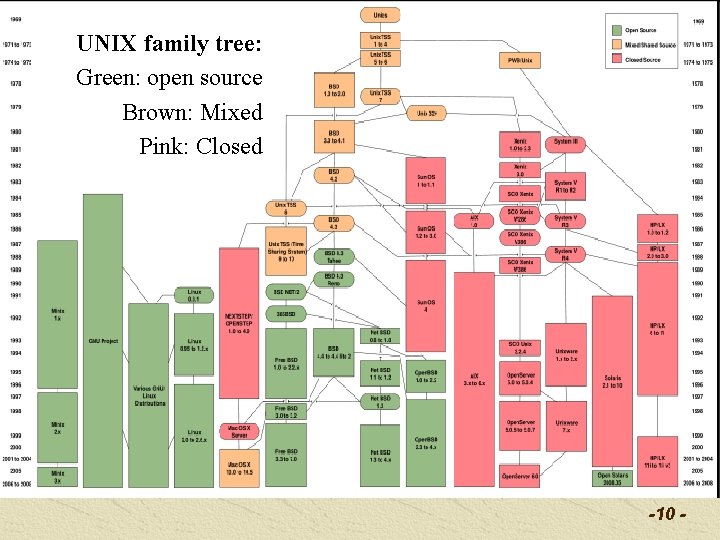
UNIX family tree: Green: open source Brown: Mixed Pink: Closed -10 -
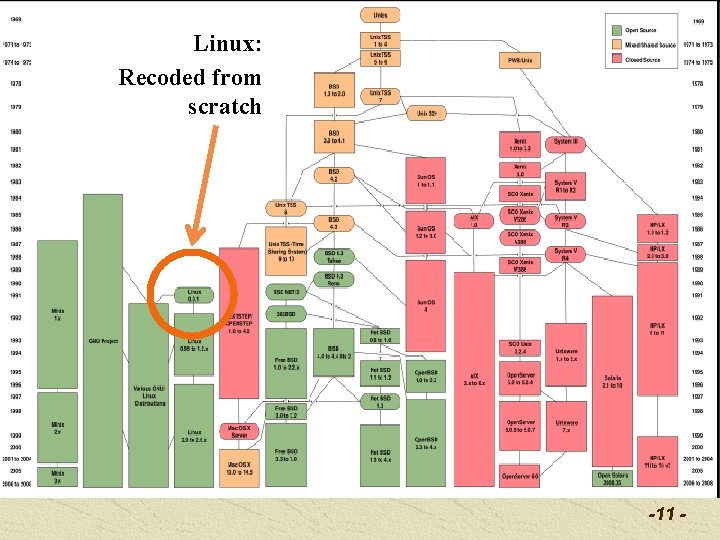
Linux: Recoded from scratch -11 -
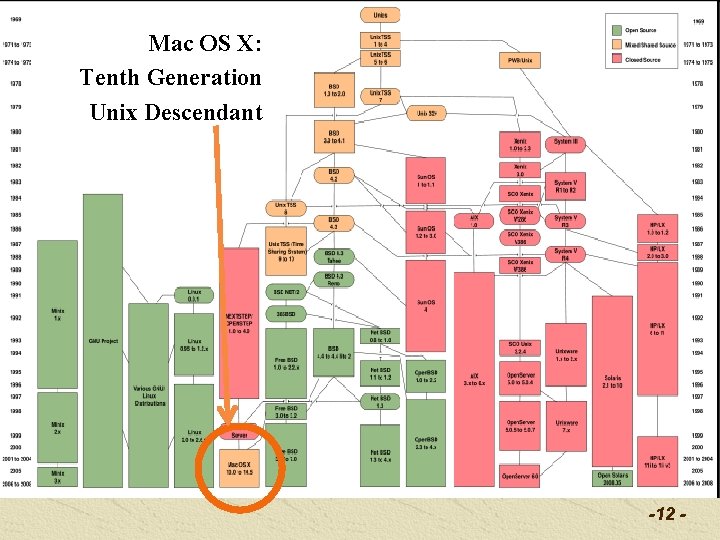
Mac OS X: Tenth Generation Unix Descendant -12 -
A short history of Unix, RCS, CVS, SVN Lawsuits over "Who owns UNIX". . got messy. 1992: Linus Torvald released Linux, a reimplementation of the Unix Kernel, free to the world. The Gnu General Public License: You can copy and modify the software but you must grant the same privilege to others, and distribute the source code. ('copyleft' protection) -13 -
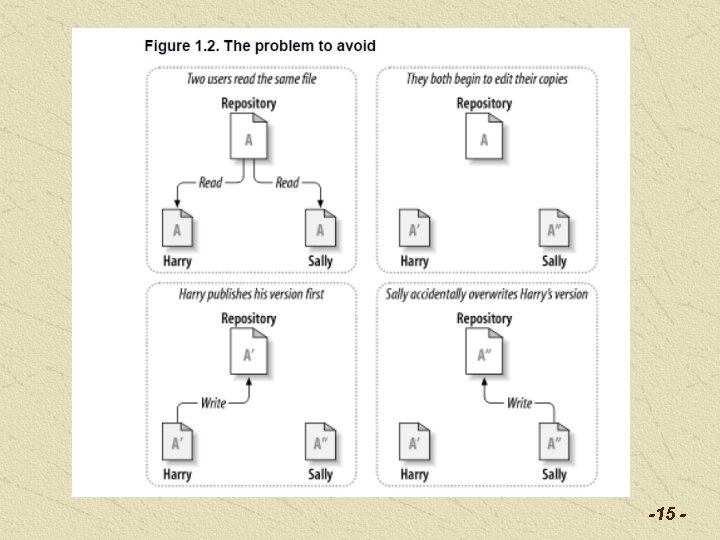
A short history of Unix, RCS, CVS, SVN RCS: Single-file version control, early 1980's led to. . . CVS: Concurrent Versioning System, late 80's (multiple files in file hierarchy) led to. . . Subversion (2000) – re-thought, re-implemented Following images are from the "SVN-book. pdf", an open source reference work for Subversion. Available at http: //svnbook. red-bean. com/ -14 -
-15 -
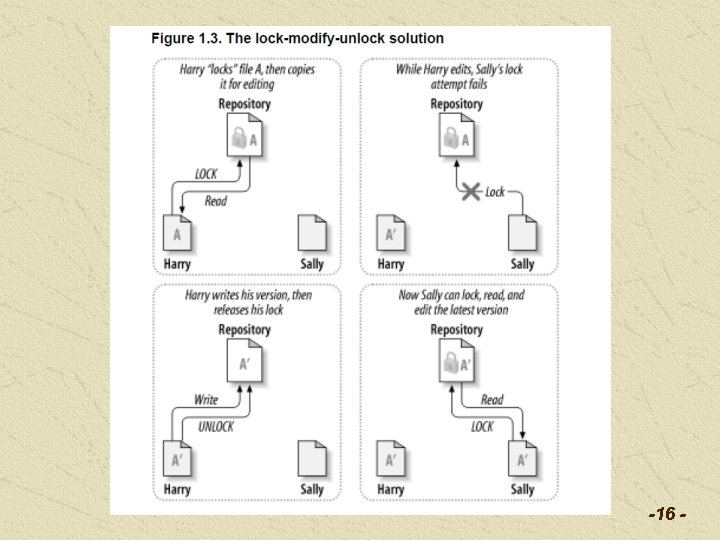
-16 -
What's Wrong with Locking? * Administrative problems: - Harry locks a file and forgets about it, goes vacation. - Sally has to get an administrator to unlock it. - Harry doesn't know about it, version conflict comes. * Unnecessary serialization. Harry needs to fix the front part of a file, Sally needs to fix the back part of it. They SHOULD be able to merge their work. -17 -
What's Wrong with Locking? * False sense of security - If two files A and B have mutual dependencies, Harry locks A and works on it Sally locks B and works on it -The results don't work together. NET EFFECT: Locking doesn't promote teamwork. It can become a substitute for real communication. -18 -
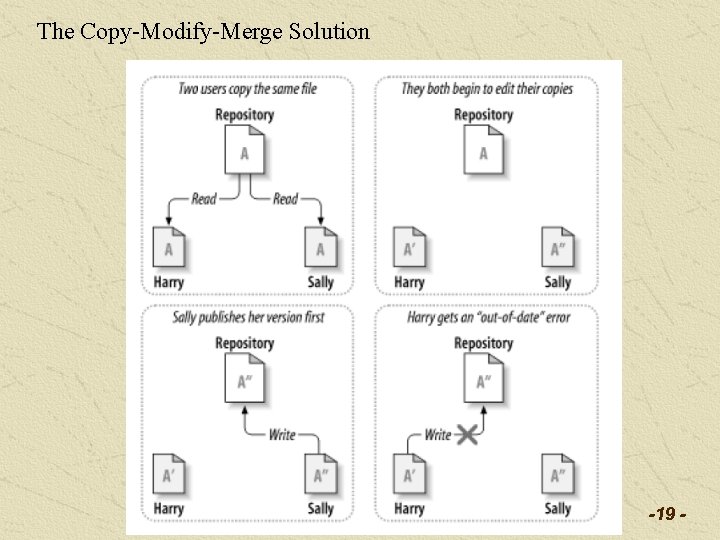
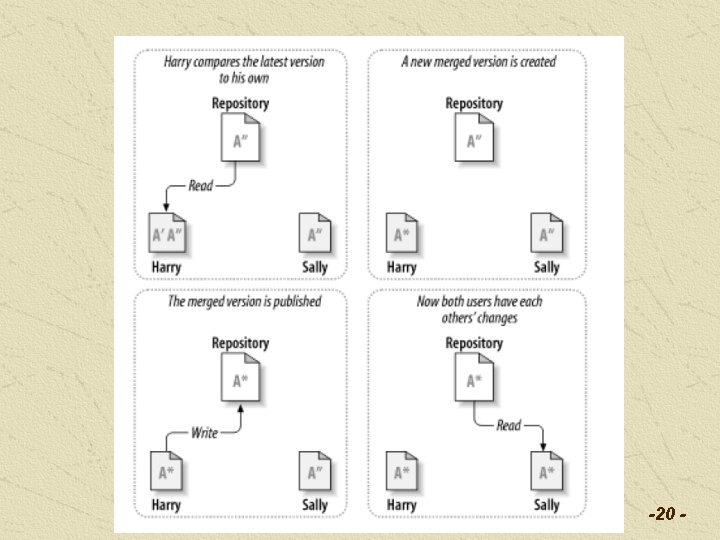
The Copy-Modify-Merge Solution -19 -
-20 -
But sometimes, Locking is the Way to Go Binary files (e. g. TIFF) cannot easily be merged like text files (programs, html) can be. So you need to serialize the work, or risk badly clobbering your team's previous efforts. In this case, SVN supports a locking checkout. -21 -
So what's the SCM to do? • Keep track of what you have done • Support roll-back to previous versions if necessary • Support the merging process *** by remembering each change, and recording special "commit notes" that you write, to document what you did. We look at a few things that Subversion does. -22 -
SUBVERSION (SVN) - Concepts • The Virtual filesystem - A set of files in the repository that correspond to the ones in your working copy directory. - Key operations: * checkout – get a copy of a file from the repository * commit – put your work into the repository * branch – produce your own version of a file * merge – unify two branches -23 -
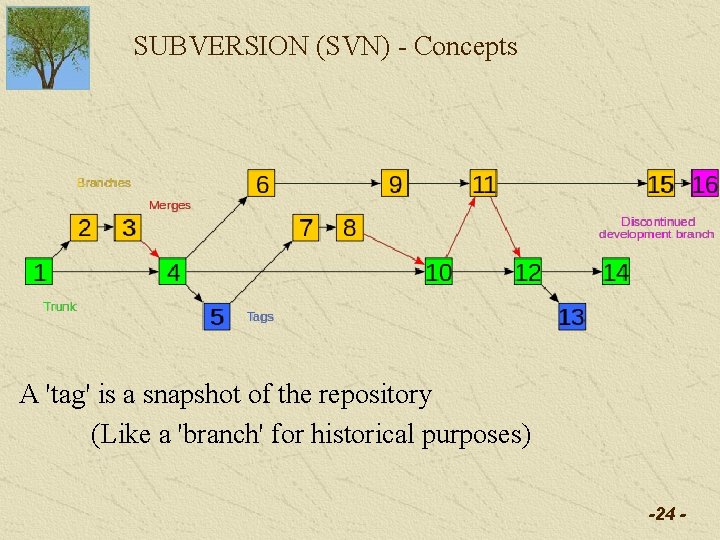
SUBVERSION (SVN) - Concepts A 'tag' is a snapshot of the repository (Like a 'branch' for historical purposes) -24 -
Subversion Concepts • The Repository is normally REMOTE (not on your PC) That's because it's SHARED -25 -
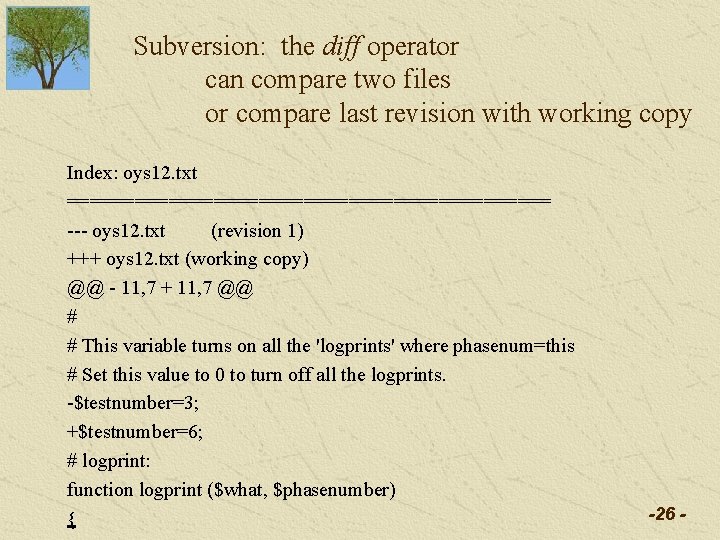
Subversion: the diff operator can compare two files or compare last revision with working copy Index: oys 12. txt ====================== --- oys 12. txt (revision 1) +++ oys 12. txt (working copy) @@ - 11, 7 + 11, 7 @@ # # This variable turns on all the 'logprints' where phasenum=this # Set this value to 0 to turn off all the logprints. -$testnumber=3; +$testnumber=6; # logprint: function logprint ($what, $phasenumber) { -26 -
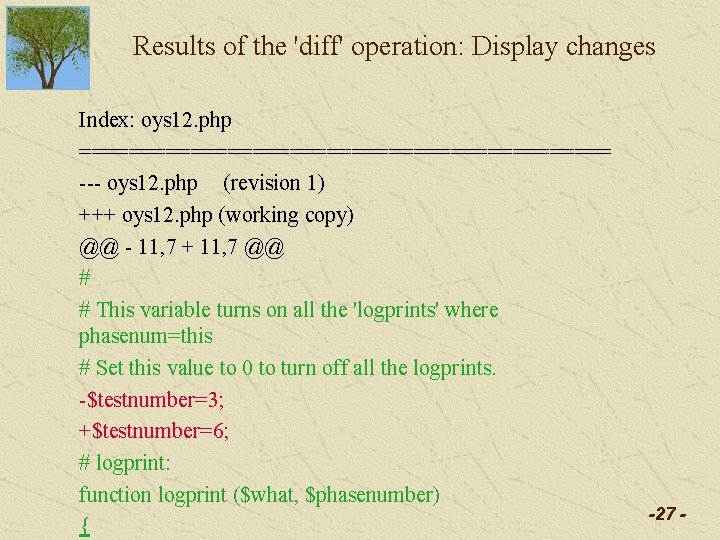
Results of the 'diff' operation: Display changes Index: oys 12. php ====================== --- oys 12. php (revision 1) +++ oys 12. php (working copy) @@ - 11, 7 + 11, 7 @@ # # This variable turns on all the 'logprints' where phasenum=this # Set this value to 0 to turn off all the logprints. -$testnumber=3; +$testnumber=6; # logprint: function logprint ($what, $phasenumber) { -27 -
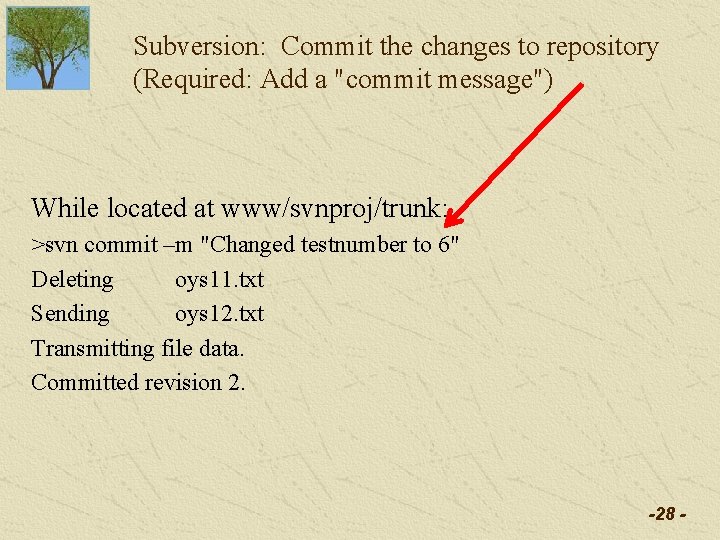
Subversion: Commit the changes to repository (Required: Add a "commit message") While located at www/svnproj/trunk: >svn commit –m "Changed testnumber to 6" Deleting oys 11. txt Sending oys 12. txt Transmitting file data. Committed revision 2. -28 -
Subversion: Summary The 'workhorse' version control system, 2000 ->2009 Media Convergence Lab (SREAL, E 2 I) Use Subversion to manage project assets It's free, and part of the UNIX "culture" Now part of the Apache Software Foundation -29 -
A Commercial SCM System The 'industrial strength' version control system Used at Electronic Arts �/ Tiburon (Orlando) Key differences with Subversion: 1) Commercial -> somebody to call when trouble comes 2) A different approach to the lock/merge question 3) An image diff tool -30 -
Concurrency Model Like Subversion, Perforce uses a hybrid of the merge and lock concurrency models. Subversion: deal with merge AFTER a divergence. Perforce: notify the system BEFORE divergence starts. The second user accessing a file is notified that someone else is working on it too. Both systems: humans have to reconcile differences to produce merged files. -31 -
Image Diff Tool Watch the video at http: //filehost. perforce. com/downloads/media/imagediff/ima gediff. html Be able to describe how the Perforce Image Diff tool uses the concept of alpha blending to help artists work with divergent versions of images. -32 -
Subversion is a creature of the Unix universe git is a creature of the Linux universe (in fact, it was developed by Linus Torvald) -33 -
What is Git and why do we care? Git is the 'new testament' in SCM systems • The key features of Subversion: - A central shared repository - Version control and rollback - Branch: parallel developments - Merge: bringing branches together -34 -
What is Git and why do we care? Git is the 'new testament' in SCM systems • Key features of Subversion: • Key features of Git: - A central shared repository - Version control, rollback - Branch: parallel devel - Merge: - distributed repository - Version control and rollback - Branch: parallel development - Merge: very efficient for multi-way merges -Git is designed to be FAST for common operations -35 -
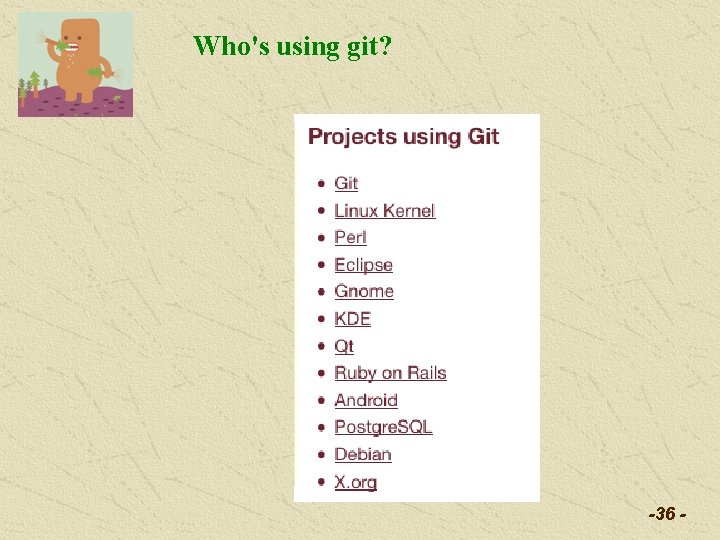
Who's using git? -36 -
Git's weaknesses (versus SVN and others) 1. Subversion is the 800 pound gorilla (among free systems) - so, many people know how to use it already. - excellent clients like Tortoise. SVN exist. 2. Commercial systems like Perforce are common in really BIG application builders, e. g. Electronic Arts 3. Git is quite efficient in linux/unix, quite slow in Windows 4. Git assumes pretty good knowledge of linux/unix (Example: popping into the vi editor for commit annotation. ) www. wikipedia. org - GNU FDL -37 -
Git's weaknesses (versus SVN and others) 1. Subversion is the 800 pound gorilla (among free systems) - so, many people know how to use it already. - excellent clients like Tortoise. SVN exist. 2. Commercial systems like Perforce are common in really BIG application builders, e. g. Electronic Arts 3. Git is quite efficient in linux/unix, quite slow in Windows 4. Git assumes pretty good knowledge of linux/unix (Example: popping into the vi editor for commit annotation. ). . . BUT. . . there are GUIs available! www. wikipedia. org - GNU FDL -38 -
Let's see at 10 minute video about GIT (part of a 59 minute talk. ) http: //www. youtube. com/watch? v=8 dh. Z 9 BXQgc 4 -39 -
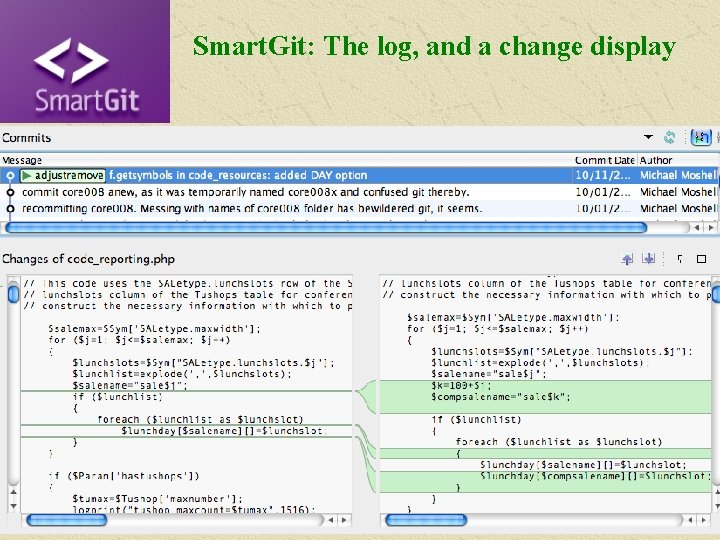
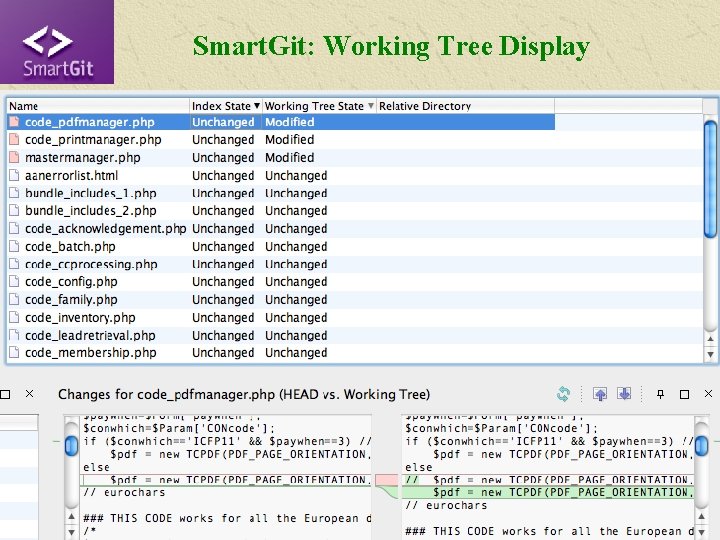
Smart. Git: A User-Friendly git Client We all love GUIs (and they improve productivity) Smart. GIT displays a log of commits and a side-by-side DIFF display that highlights the changes between two versions of your code. -40 -
Smart. Git: The log, and a change display -41 -
Smart. Git: Working Tree Display -42 -
Smart. Git: Is it Free? For non-commercial purposes, yes. For commercial purposes, about $50 per year per user. A very reasonable price for a very useful tool. -43 -
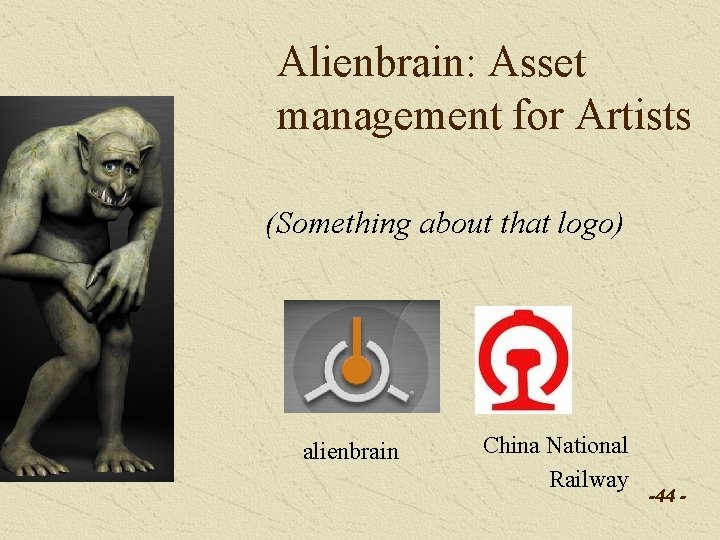
Alienbrain: Asset management for Artists (Something about that logo) alienbrain China National Railway -44 -
Key Concepts for understanding Alienbrain: Client-server architecture, using built-in Apache: Artist’s client: integrates with Maya, Photoshop, 3 dmax etc. Uses exclusive locking: no parallel development Programmer’s client: (no longer emphasized) Manager’s client: Can see all the views of artists & programmers Can manage work-flow, approve & lock files -45 -
Key Concepts for understanding Alienbrain: Principal activities: check-out, check-in. Check-out: copy from server to your local computer. Mark server copy as “locked” – (by whom? ) Or as “shared” if programming – (by whom? ) Check-in: copy changed version back to server. (Previous version is also preserved. ) Mark server copy as unlocked. Notify appropriate manager that work is done. -46 -
Key Concepts for understanding Alienbrain: Other activities: approval, viewing Approval: Manager looks at work, may give feedback via ‘scribbles’, or may approve and lock the file. Viewing: you don’t have to lock a file to view it. Viewers are notified if a file is in use, but can still see the “previous version” for reference. -47 -
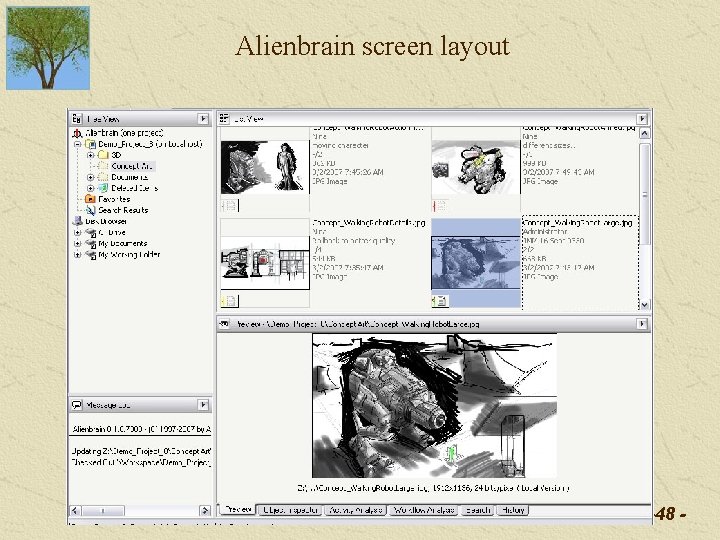
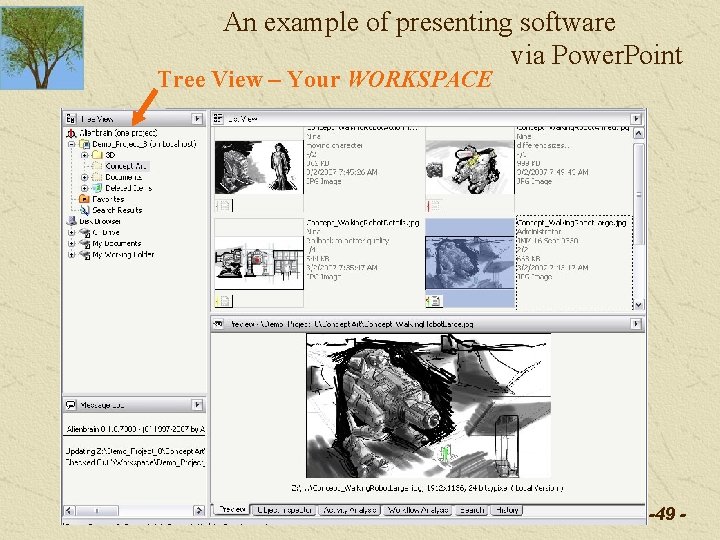
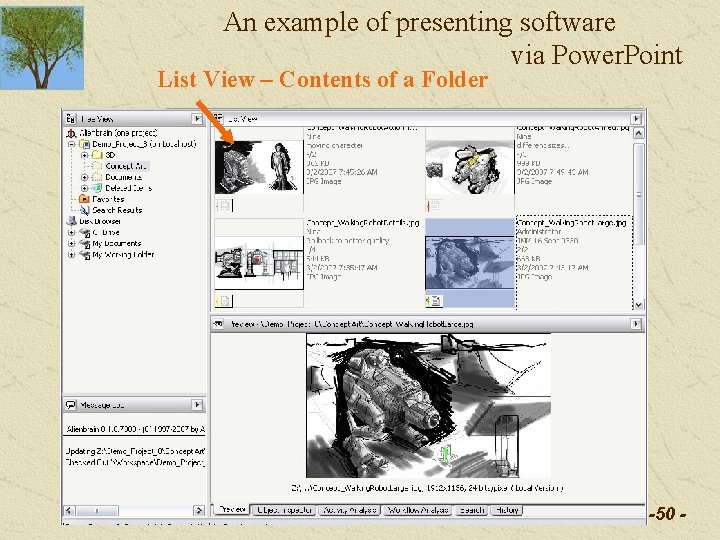
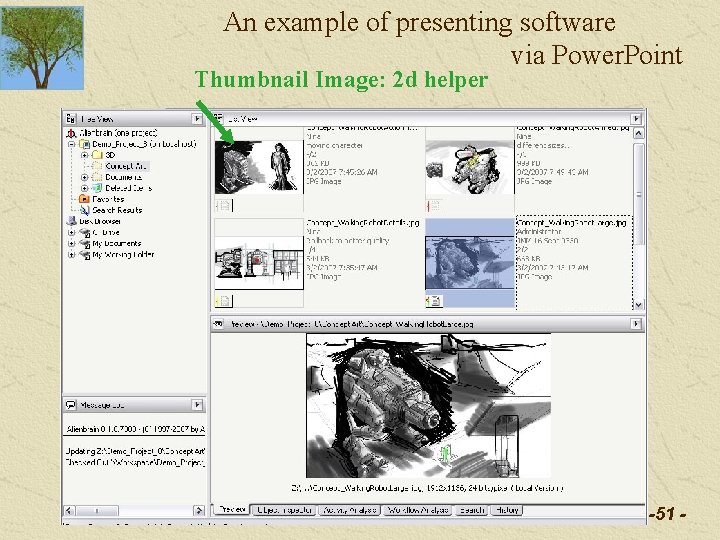
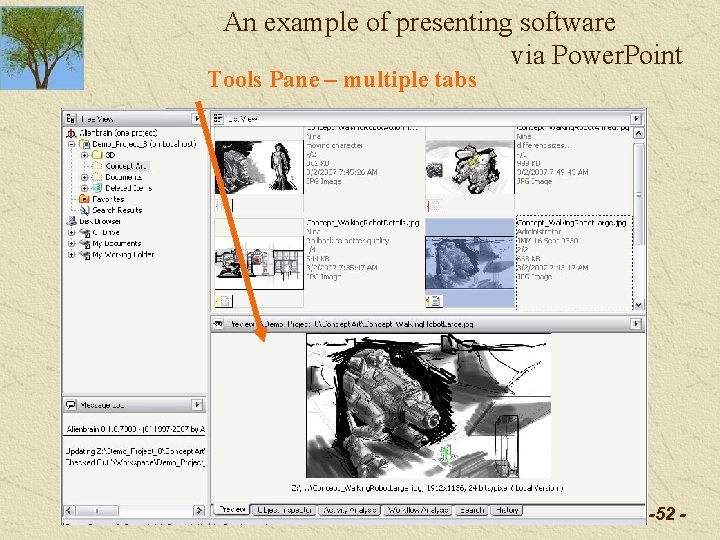
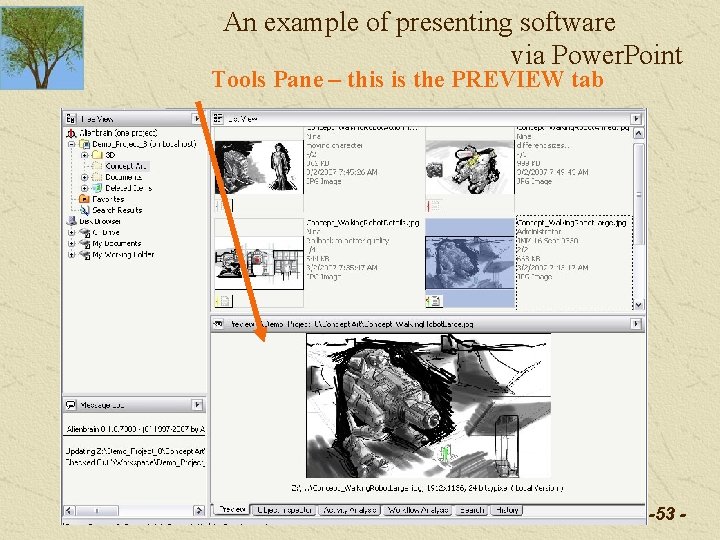
Alienbrain screen layout -48 -
An example of presenting software via Power. Point Tree View – Your WORKSPACE -49 -
An example of presenting software via Power. Point List View – Contents of a Folder -50 -
An example of presenting software via Power. Point Thumbnail Image: 2 d helper -51 -
An example of presenting software via Power. Point Tools Pane – multiple tabs -52 -
An example of presenting software via Power. Point Tools Pane – this is the PREVIEW tab -53 -
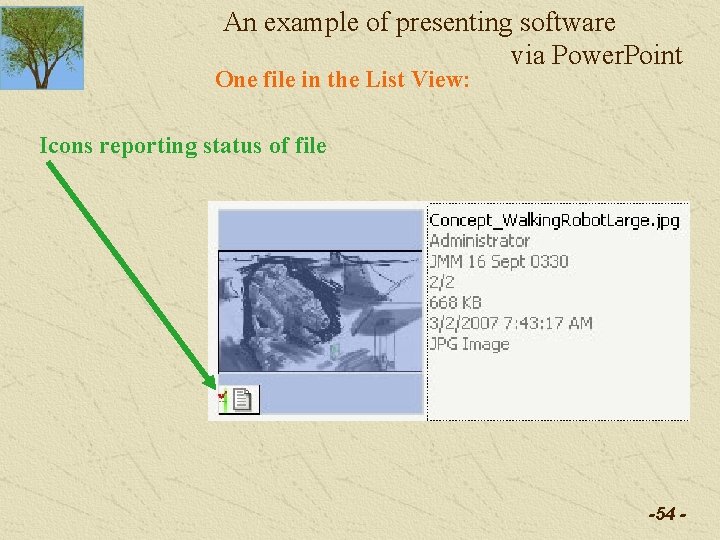
An example of presenting software via Power. Point One file in the List View: Icons reporting status of file -54 -
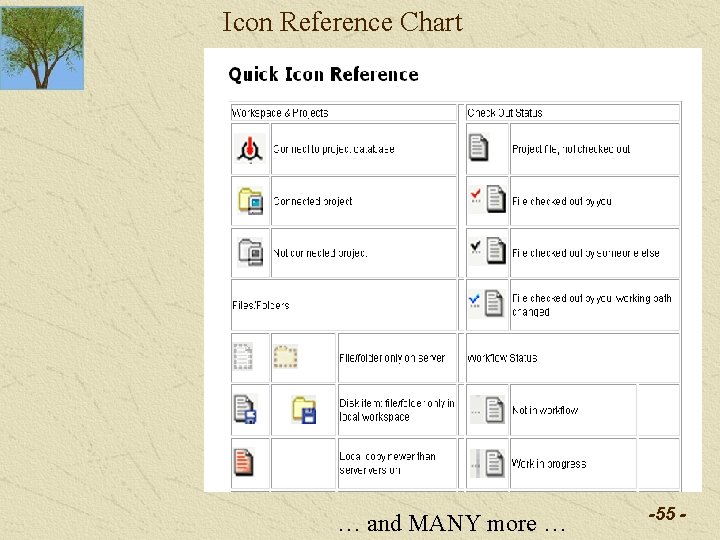
Icon Reference Chart … and MANY more … -55 -
Watch a video about Alienbrain http: //www. alienbrain. com/videos/ Visit the website to investigate this question: How does Alienbrain assist two artists who must MERGE their work on a scene being developed for a game? -56 -
Strengths and Weaknesses Strengths: Ease of use Good integration with production tools. Positive evidence: Large list of clients on the alienbrain website -57 -
Strengths and Weaknesses: High cost for small shops (but cheaper than BIG systems. . ) Alienbrain: $12 k to $100 k + $200 to $400 per client per year North Plains, Artesia: BIG systems: $600 k up, plus $250 k a year -58 -
Strengths and Weaknesses: High cost for small shops (but cheaper than BIG systems. . ) Minimal metadata support Negative evidence: No way to search on "label" field names or contents No other available metadata channel except the general "comment" field, history and message log, and asset names. -59 -
Challenges Server Must run on Windows Server 2003 or Windows XP Clients There exist Mac as well as Windows clients, but the Mac ones can only be tested by running a Windows server somewhere. -60 -
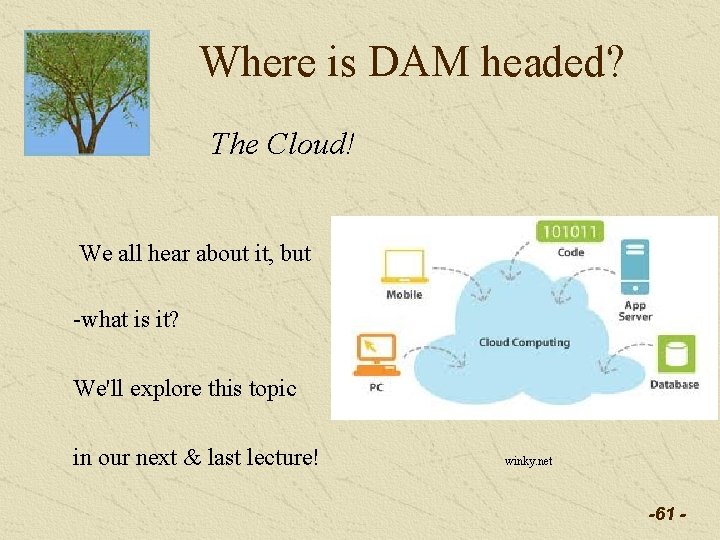
Where is DAM headed? The Cloud! We all hear about it, but -what is it? We'll explore this topic in our next & last lecture! winky. net -61 -