OO Using UML Dynamic Models Defining how the
![Ambiguous Semantics 1 Is F transition ever taken? How? A E F B [G]](https://slidetodoc.com/presentation_image_h/d49ce182ded2516a7cffe23e63a2271e/image-32.jpg "Ambiguous Semantics 1 Is F transition ever taken? How? A E F B [G]")
![Transition Syntax Event[Guard]/Action 1; Action 2; …. ; Action. N Actions include: send(event) Events](https://slidetodoc.com/presentation_image_h/d49ce182ded2516a7cffe23e63a2271e/image-39.jpg "Transition Syntax Event[Guard]/Action 1; Action 2; …. ; Action. N Actions include: send(event) Events")
![Even More Dynamic Model Controller Temperature respond-temp(x)[x>desired-temp+2]/stop-heating timeout(5 s) request-temp Temp-Low Temp-Normal timeout(5 s)](https://slidetodoc.com/presentation_image_h/d49ce182ded2516a7cffe23e63a2271e/image-48.jpg "Even More Dynamic Model Controller Temperature respond-temp(x)[x>desired-temp+2]/stop-heating timeout(5 s) request-temp Temp-Low Temp-Normal timeout(5 s)")
- Slides: 62
OO Using UML: Dynamic Models Defining how the objects behave 07 -UML-Dynamic 1
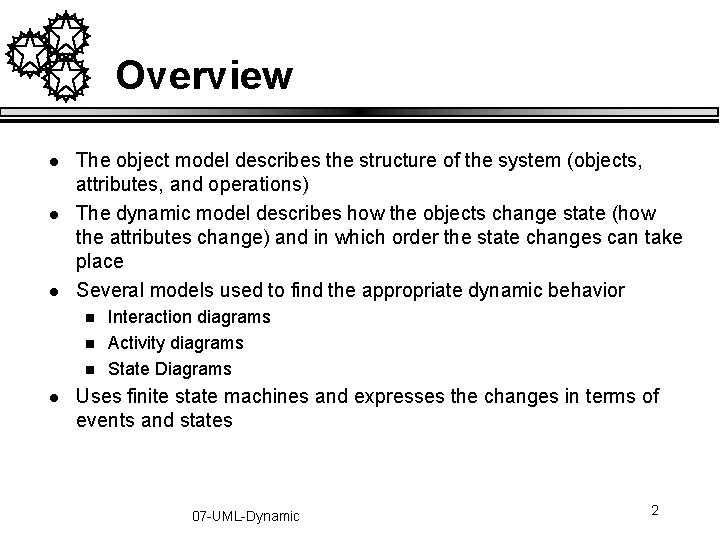
Overview l l l The object model describes the structure of the system (objects, attributes, and operations) The dynamic model describes how the objects change state (how the attributes change) and in which order the state changes can take place Several models used to find the appropriate dynamic behavior n n n l Interaction diagrams Activity diagrams State Diagrams Uses finite state machines and expresses the changes in terms of events and states 07 -UML-Dynamic 2
Interaction Diagrams 07 -UML-Dynamic 3
We Will Cover l l Why interaction diagrams? Sequence diagrams n n l l l Capturing use-cases Dealing with concurrency Collaboration diagrams When to use what When to use interaction diagrams 07 -UML-Dynamic 4
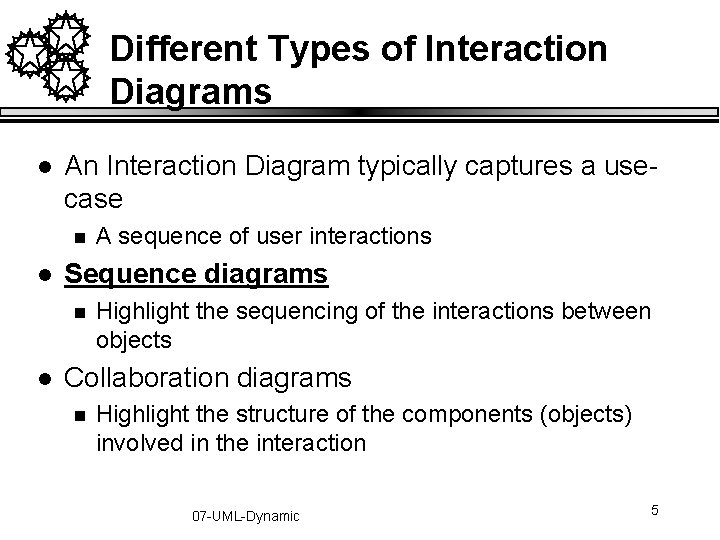
Different Types of Interaction Diagrams l An Interaction Diagram typically captures a usecase n l Sequence diagrams n l A sequence of user interactions Highlight the sequencing of the interactions between objects Collaboration diagrams n Highlight the structure of the components (objects) involved in the interaction 07 -UML-Dynamic 5
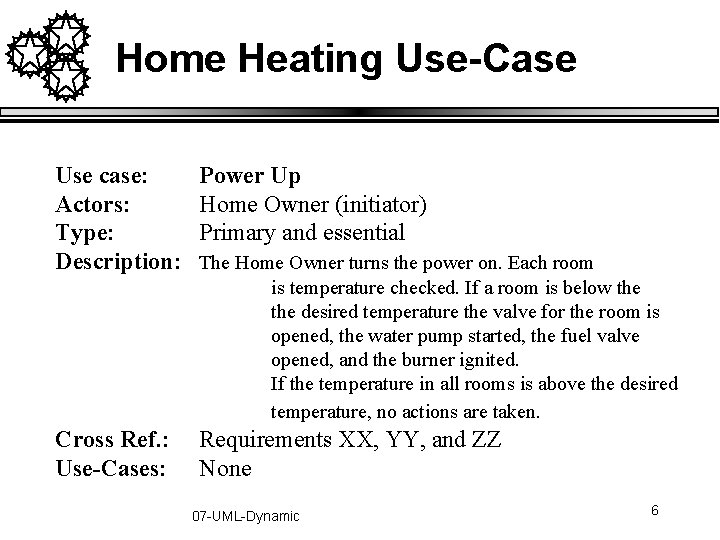
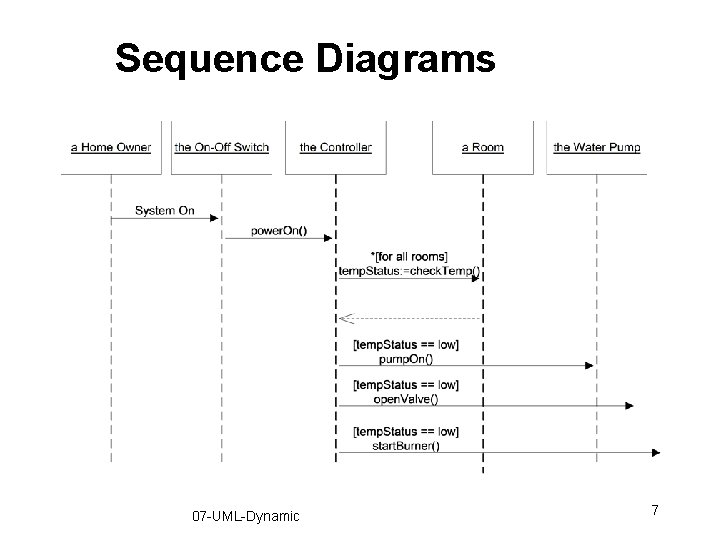
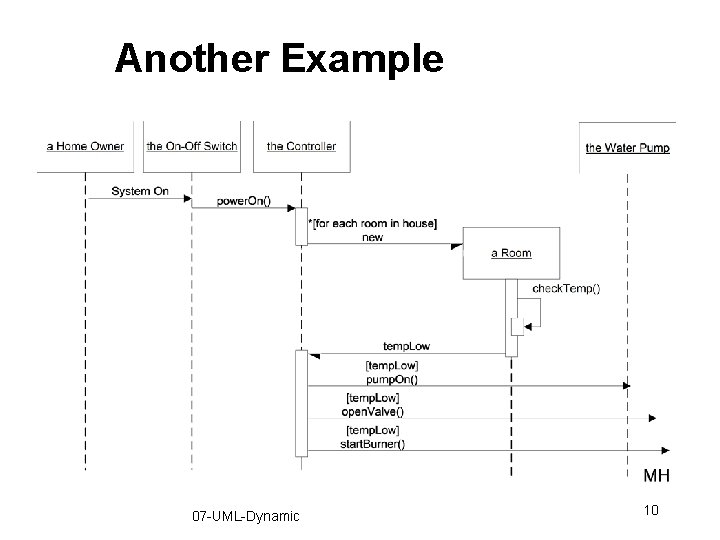
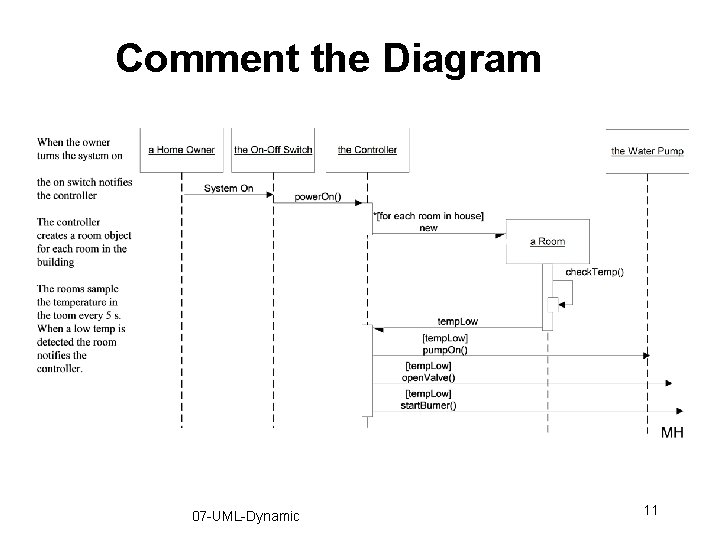
Home Heating Use-Case Use case: Actors: Type: Description: Power Up Home Owner (initiator) Primary and essential Cross Ref. : Use-Cases: Requirements XX, YY, and ZZ None The Home Owner turns the power on. Each room is temperature checked. If a room is below the desired temperature the valve for the room is opened, the water pump started, the fuel valve opened, and the burner ignited. If the temperature in all rooms is above the desired temperature, no actions are taken. 07 -UML-Dynamic 6
Sequence Diagrams 07 -UML-Dynamic 7
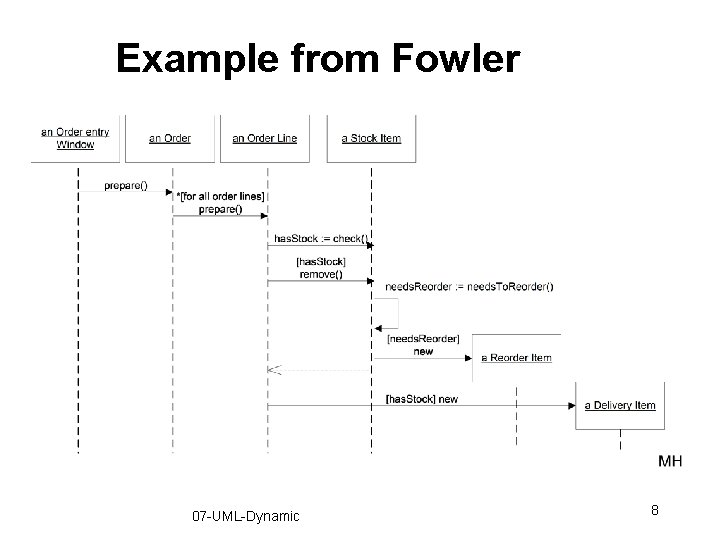
Example from Fowler 07 -UML-Dynamic 8
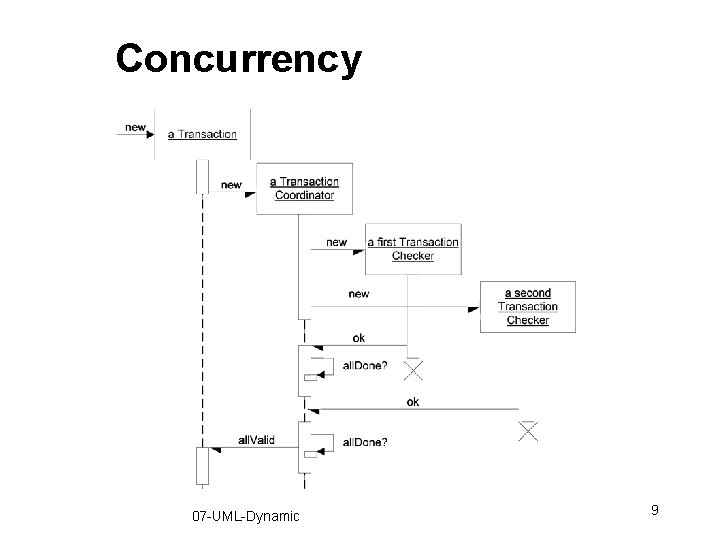
Concurrency 07 -UML-Dynamic 9
Another Example 07 -UML-Dynamic 10
Comment the Diagram 07 -UML-Dynamic 11
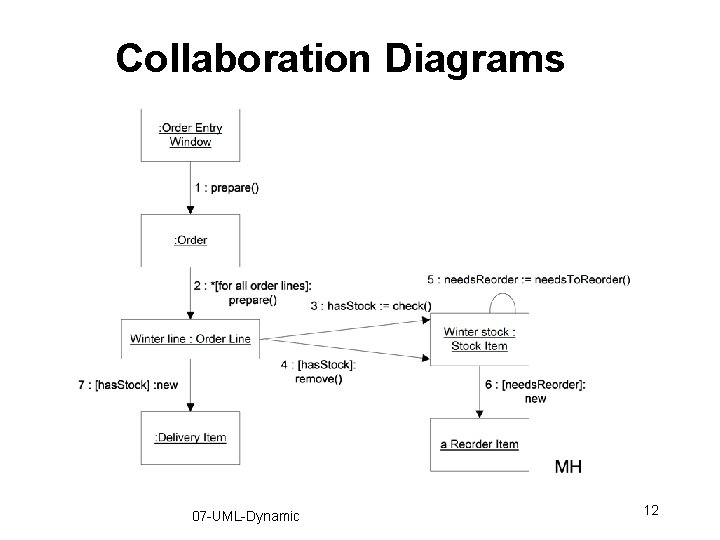
Collaboration Diagrams 07 -UML-Dynamic 12
Conditional Behavior l Something you will encounter trying to capture complex use-cases n l Split the diagram into several n l Split the use-case also Use the conditional message n l The user does something. If this something is X do this… If this something is Y do something else… If this something is Z… Could become messy Remember, clarity is the goal! 07 -UML-Dynamic 13
Comparison l Both diagrams capture the same information n l We prefer sequence diagrams n n l People just have different preferences They clearly highlight the order of things Invaluable when reasoning about multi-tasking Others like collaboration diagrams n Shows the static structure u l Very useful when organizing classes into packages We get the structure from the Class Diagrams 07 -UML-Dynamic 14
When to Use Interaction Diagrams l When you want to clarify and explore single usecases involving several objects n l l Quickly becomes unruly if you do not watch it If you are interested in one object over many usecases -- state transition diagrams If you are interested in many objects over many use cases -- activity diagrams 07 -UML-Dynamic 15
State Diagrams 07 -UML-Dynamic 16
We Will Cover l State Machines n An alternate way of capturing scenarios u l l Large classes of scenarios Syntax and Semantics When to use state machines 07 -UML-Dynamic 17
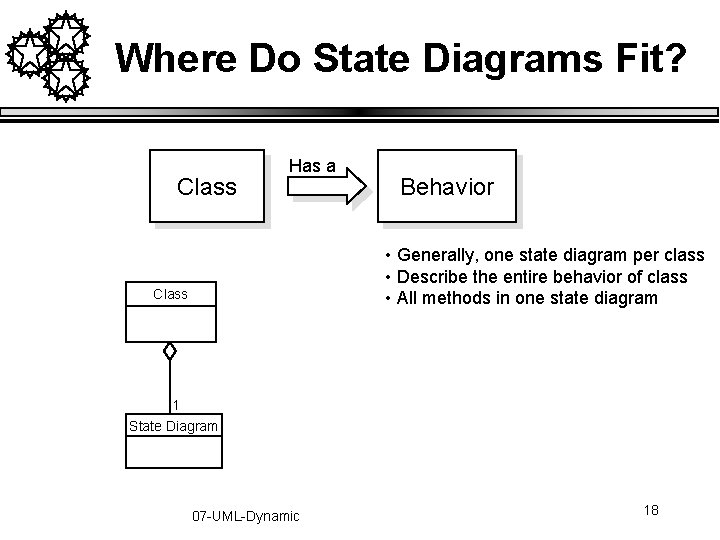
Where Do State Diagrams Fit? Class Has a Behavior • Generally, one state diagram per class • Describe the entire behavior of class • All methods in one state diagram Class 1 State Diagram 07 -UML-Dynamic 18
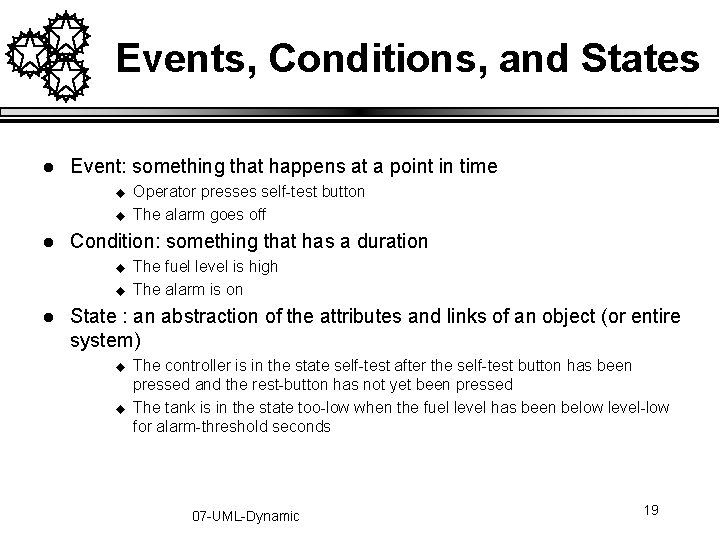
Events, Conditions, and States l Event: something that happens at a point in time u u l Condition: something that has a duration u u l Operator presses self-test button The alarm goes off The fuel level is high The alarm is on State : an abstraction of the attributes and links of an object (or entire system) u u The controller is in the state self-test after the self-test button has been pressed and the rest-button has not yet been pressed The tank is in the state too-low when the fuel level has been below level-low for alarm-threshold seconds 07 -UML-Dynamic 19
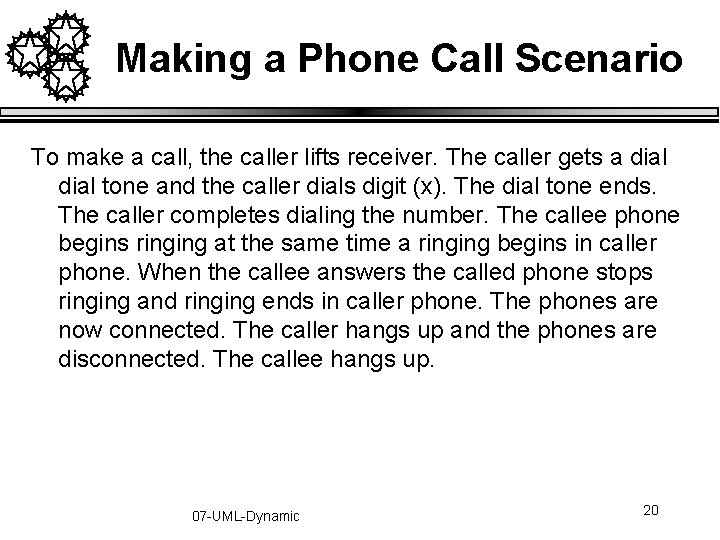
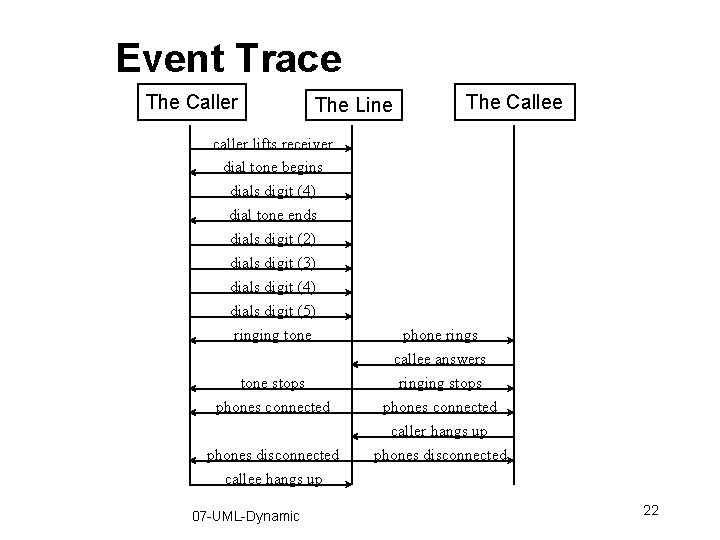
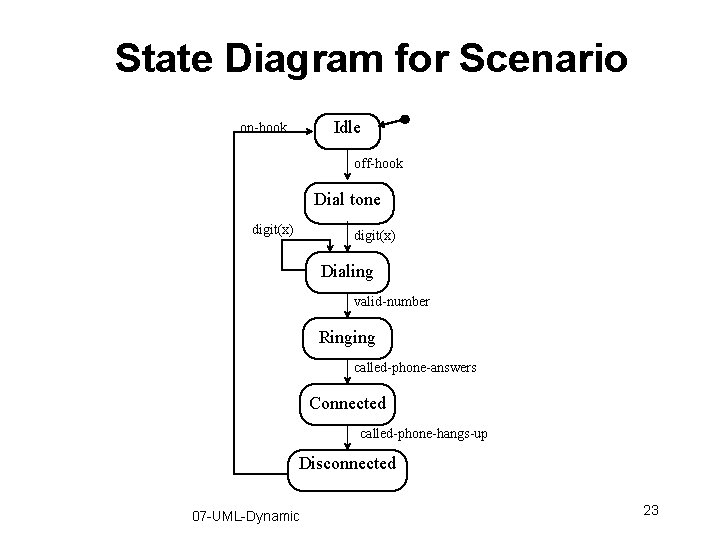
Making a Phone Call Scenario To make a call, the caller lifts receiver. The caller gets a dial tone and the caller dials digit (x). The dial tone ends. The caller completes dialing the number. The callee phone begins ringing at the same time a ringing begins in caller phone. When the callee answers the called phone stops ringing and ringing ends in caller phone. The phones are now connected. The caller hangs up and the phones are disconnected. The callee hangs up. 07 -UML-Dynamic 20
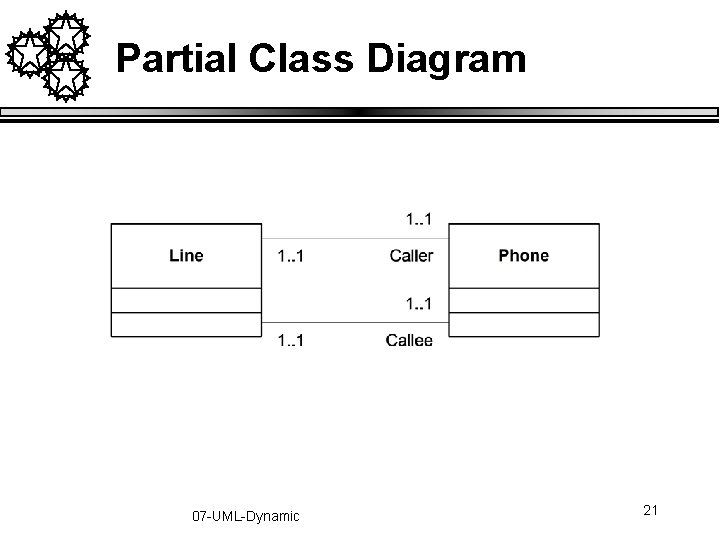
Partial Class Diagram 07 -UML-Dynamic 21
Event Trace The Caller The Line The Callee caller lifts receiver dial tone begins dials digit (4) dial tone ends dials digit (2) dials digit (3) dials digit (4) dials digit (5) ringing tone phone rings tone stops phones connected callee answers ringing stops phones connected phones disconnected callee hangs up 07 -UML-Dynamic caller hangs up phones disconnected 22
State Diagram for Scenario Idle on-hook off-hook Dial tone digit(x) Dialing valid-number Ringing called-phone-answers Connected called-phone-hangs-up Disconnected 07 -UML-Dynamic 23
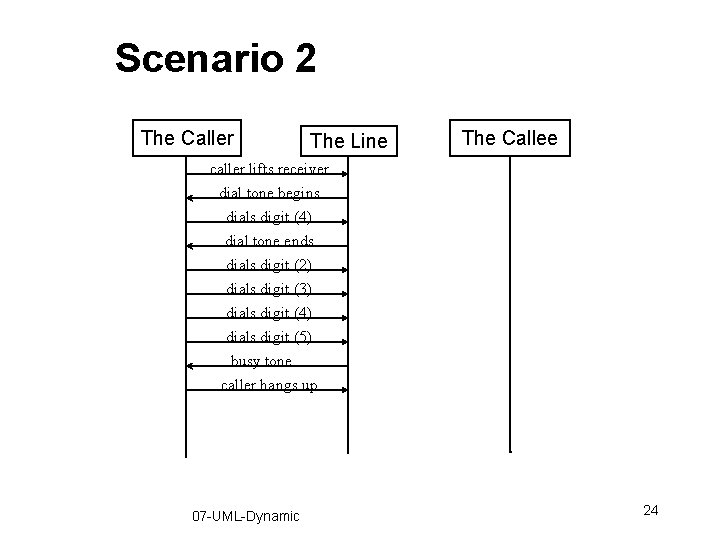
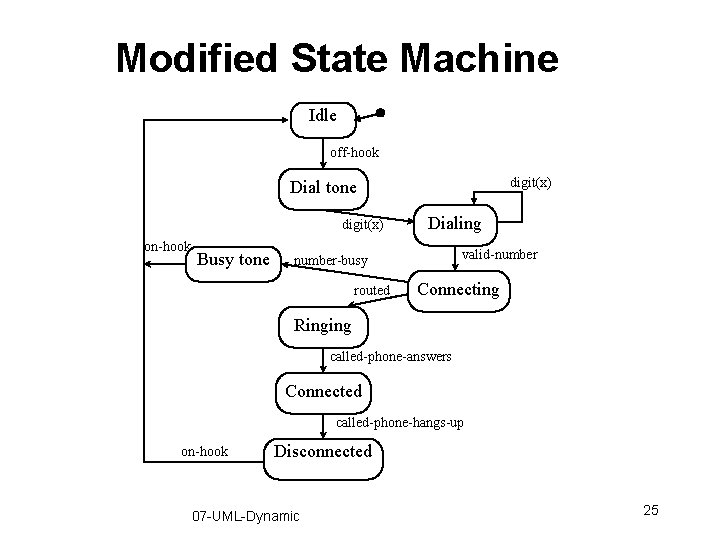
Scenario 2 The Caller The Line The Callee caller lifts receiver dial tone begins dials digit (4) dial tone ends dials digit (2) dials digit (3) dials digit (4) dials digit (5) busy tone caller hangs up 07 -UML-Dynamic 24
Modified State Machine Idle off-hook digit(x) Dial tone digit(x) on-hook Busy tone Dialing valid-number-busy routed Connecting Ringing called-phone-answers Connected called-phone-hangs-up on-hook Disconnected 07 -UML-Dynamic 25
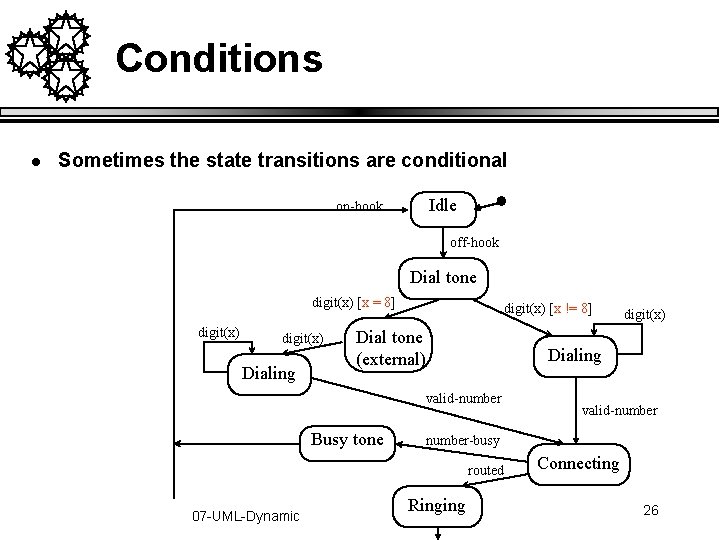
Conditions l Sometimes the state transitions are conditional Idle on-hook off-hook Dial tone digit(x) [x = 8] digit(x) Dialing digit(x) [x != 8] Dial tone (external) Dialing valid-number Busy tone valid-number-busy routed 07 -UML-Dynamic digit(x) Ringing Connecting 26
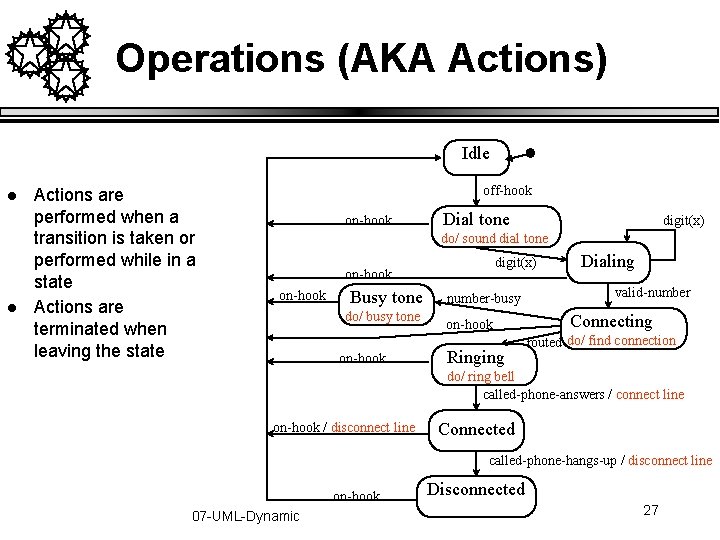
Operations (AKA Actions) Idle l l Actions are performed when a transition is taken or performed while in a state Actions are terminated when leaving the state off-hook on-hook Dial tone digit(x) do/ sound dial tone digit(x) on-hook Busy tone do/ busy tone on-hook number-busy on-hook Ringing Dialing valid-number Connecting routed do/ find connection do/ ring bell called-phone-answers / connect line on-hook / disconnect line Connected called-phone-hangs-up / disconnect line on-hook 07 -UML-Dynamic Disconnected 27
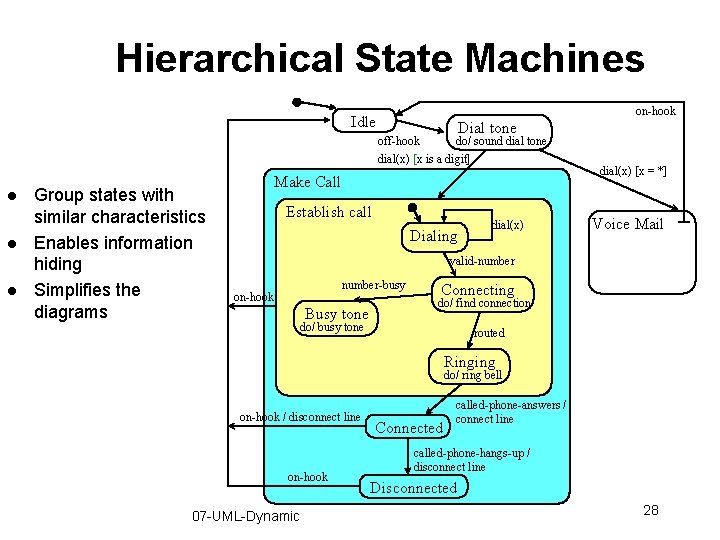
Hierarchical State Machines on-hook Idle Dial tone off-hook do/ sound dial tone dial(x) [x is a digit] l l l Group states with similar characteristics Enables information hiding Simplifies the diagrams Make Call Establish call Dialing dial(x) [x = *] Voice Mail valid-number-busy on-hook Busy tone Connecting do/ find connection do/ busy tone routed Ringing do/ ring bell on-hook / disconnect line on-hook 07 -UML-Dynamic Connected called-phone-answers / connect line called-phone-hangs-up / disconnect line Disconnected 28
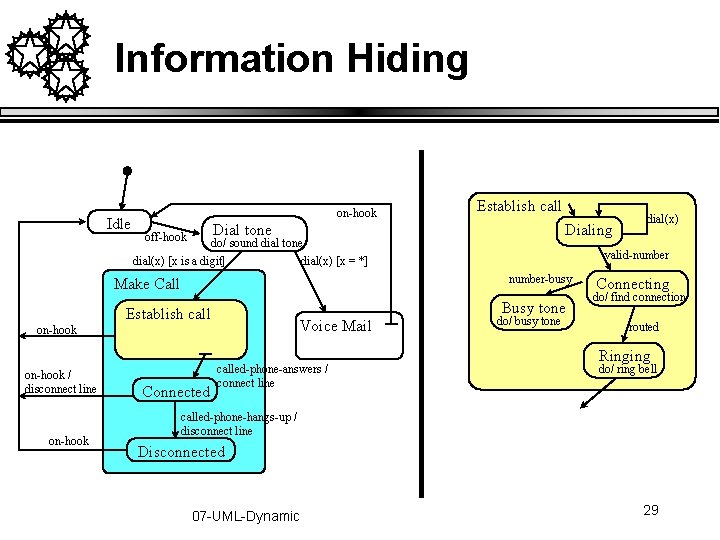
Information Hiding Idle on-hook Establish call Dial tone off-hook Dialing do/ sound dial tone dial(x) [x is a digit] dial(x) [x = *] Busy tone Establish call Voice Mail on-hook / disconnect line on-hook valid-number-busy Make Call Connected called-phone-answers / connect line dial(x) do/ busy tone Connecting do/ find connection routed Ringing do/ ring bell called-phone-hangs-up / disconnect line Disconnected 07 -UML-Dynamic 29
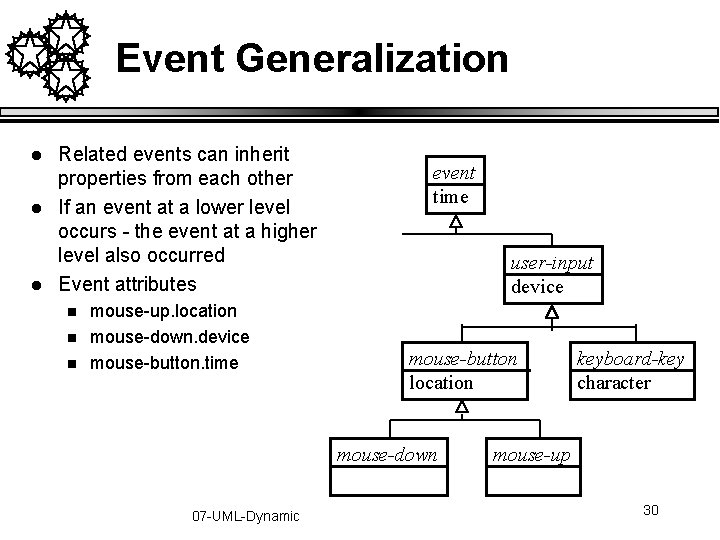
Event Generalization l l l Related events can inherit properties from each other If an event at a lower level occurs - the event at a higher level also occurred Event attributes n n n mouse-up. location mouse-down. device mouse-button. time event time user-input device mouse-button location mouse-down 07 -UML-Dynamic keyboard-key character mouse-up 30
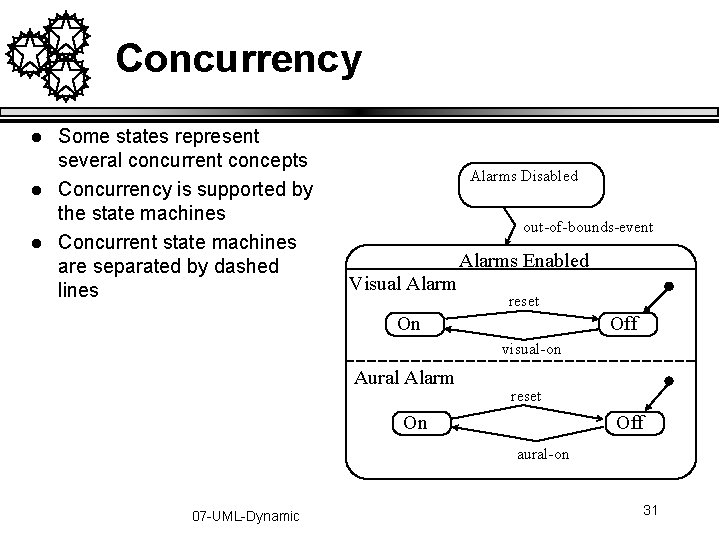
Concurrency l l l Some states represent several concurrent concepts Concurrency is supported by the state machines Concurrent state machines are separated by dashed lines Alarms Disabled out-of-bounds-event Alarms Enabled Visual Alarm reset On Off visual-on Aural Alarm reset On Off aural-on 07 -UML-Dynamic 31
Ambiguous Semantics 1 Is F transition ever taken? How? A E F B [G] 07 -UML-Dynamic 32
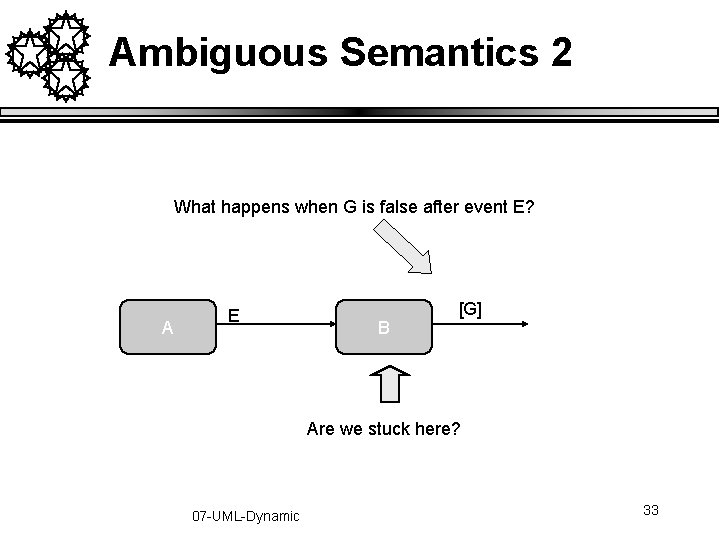
Ambiguous Semantics 2 What happens when G is false after event E? A E B [G] Are we stuck here? 07 -UML-Dynamic 33
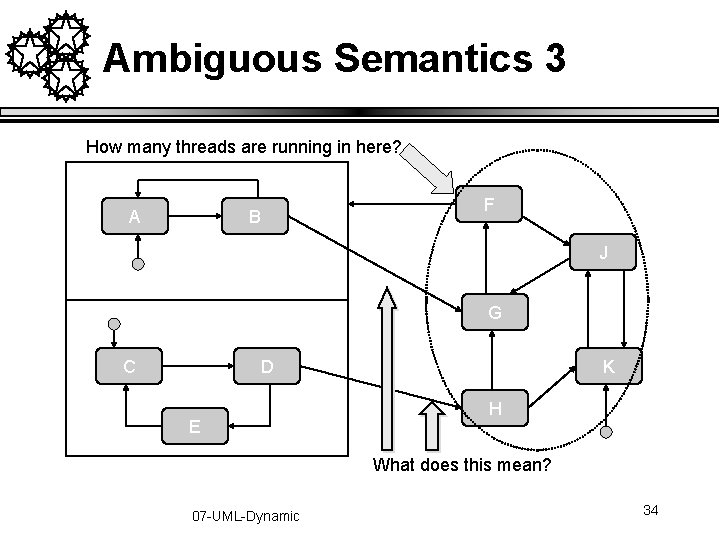
Ambiguous Semantics 3 How many threads are running in here? A B F J G C D E K H What does this mean? 07 -UML-Dynamic 34
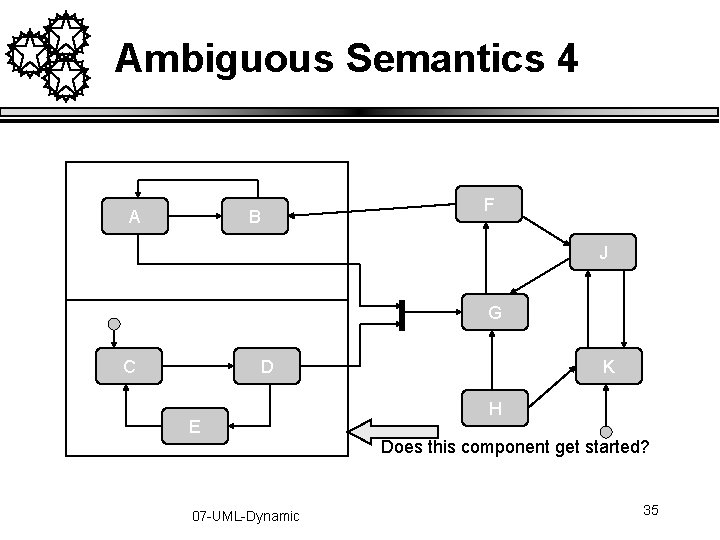
Ambiguous Semantics 4 A B F J G C D E K H Does this component get started? 07 -UML-Dynamic 35
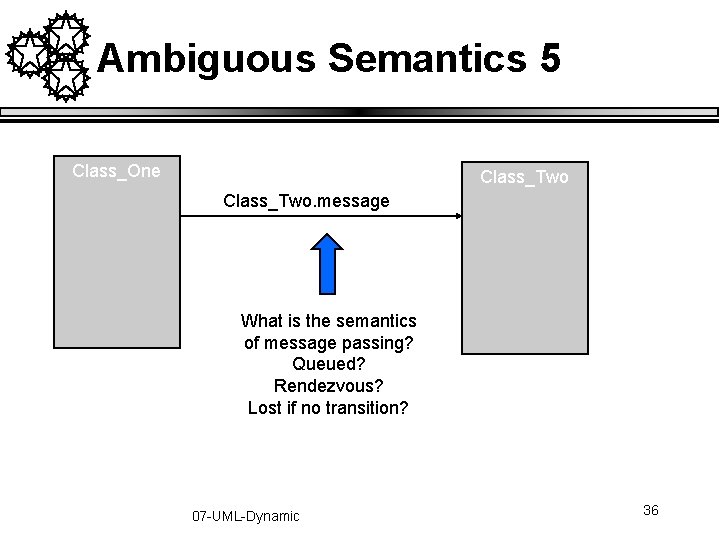
Ambiguous Semantics 5 Class_One Class_Two. message What is the semantics of message passing? Queued? Rendezvous? Lost if no transition? 07 -UML-Dynamic 36
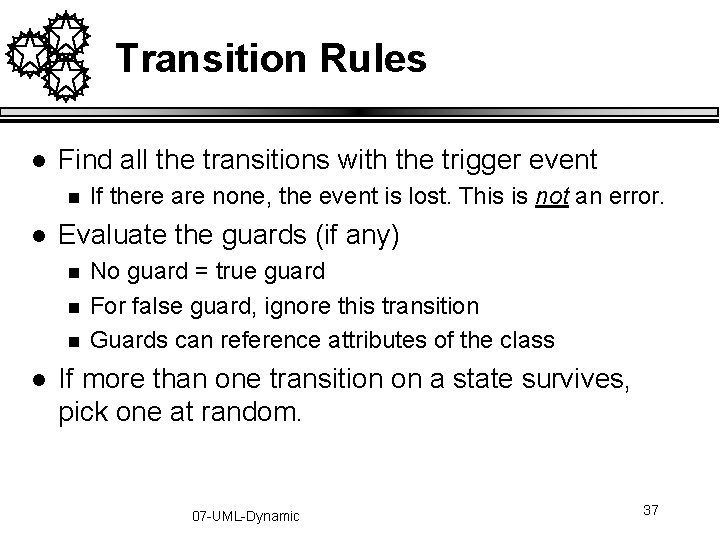
Transition Rules l Find all the transitions with the trigger event n l Evaluate the guards (if any) n n n l If there are none, the event is lost. This is not an error. No guard = true guard For false guard, ignore this transition Guards can reference attributes of the class If more than one transition on a state survives, pick one at random. 07 -UML-Dynamic 37
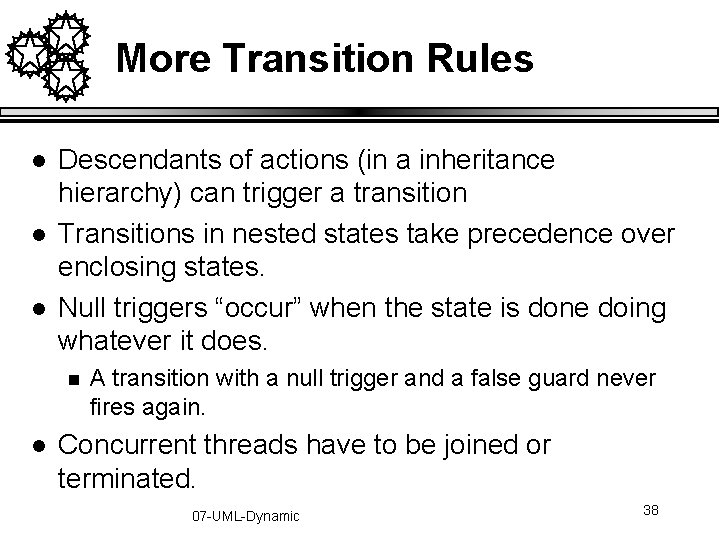
More Transition Rules l l l Descendants of actions (in a inheritance hierarchy) can trigger a transition Transitions in nested states take precedence over enclosing states. Null triggers “occur” when the state is done doing whatever it does. n l A transition with a null trigger and a false guard never fires again. Concurrent threads have to be joined or terminated. 07 -UML-Dynamic 38
Transition Syntax Event[Guard]/Action 1; Action 2; …. ; Action. N Actions include: send(event) Events include: timeout(), when(boolean) Pulse[pulsemode]/count++ Sample triggers: Timeout(10 s)/send(reset) Digit(d)[isvalid(d)]/stash(d) 07 -UML-Dynamic 39
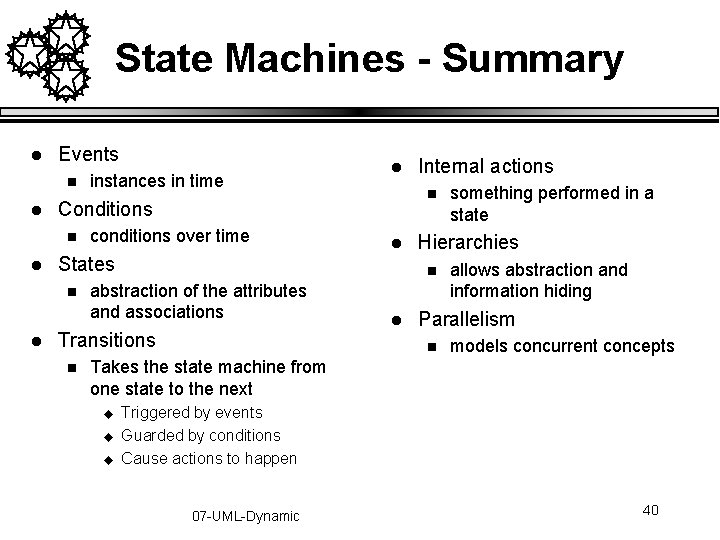
State Machines - Summary l Events n l conditions over time States n l l l abstraction of the attributes and associations l something performed in a state Hierarchies n Transitions n Internal actions n Conditions n l instances in time allows abstraction and information hiding Parallelism n models concurrent concepts Takes the state machine from one state to the next u u u Triggered by events Guarded by conditions Cause actions to happen 07 -UML-Dynamic 40
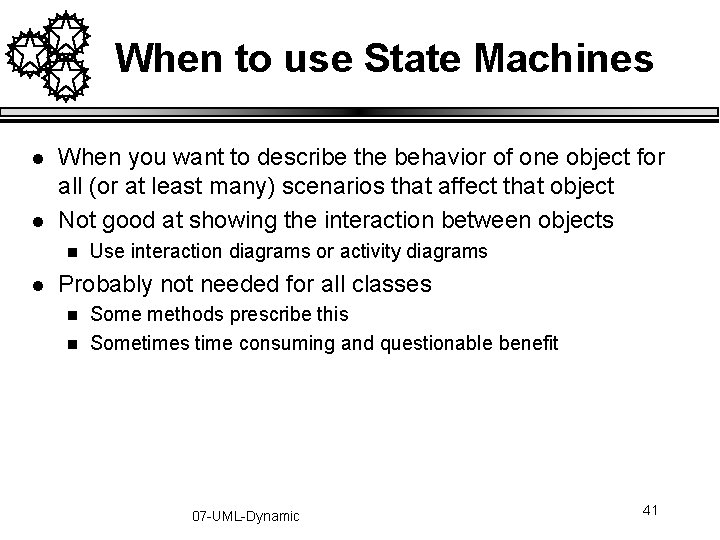
When to use State Machines l l When you want to describe the behavior of one object for all (or at least many) scenarios that affect that object Not good at showing the interaction between objects n l Use interaction diagrams or activity diagrams Probably not needed for all classes n n Some methods prescribe this Sometimes time consuming and questionable benefit 07 -UML-Dynamic 41
Coming up with the State Diagrams 07 -UML-Dynamic 42
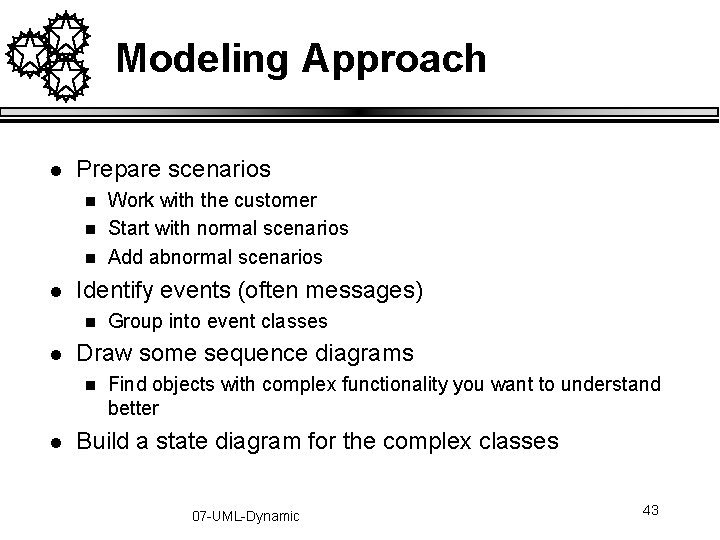
Modeling Approach l Prepare scenarios n n n l Identify events (often messages) n l Group into event classes Draw some sequence diagrams n l Work with the customer Start with normal scenarios Add abnormal scenarios Find objects with complex functionality you want to understand better Build a state diagram for the complex classes 07 -UML-Dynamic 43
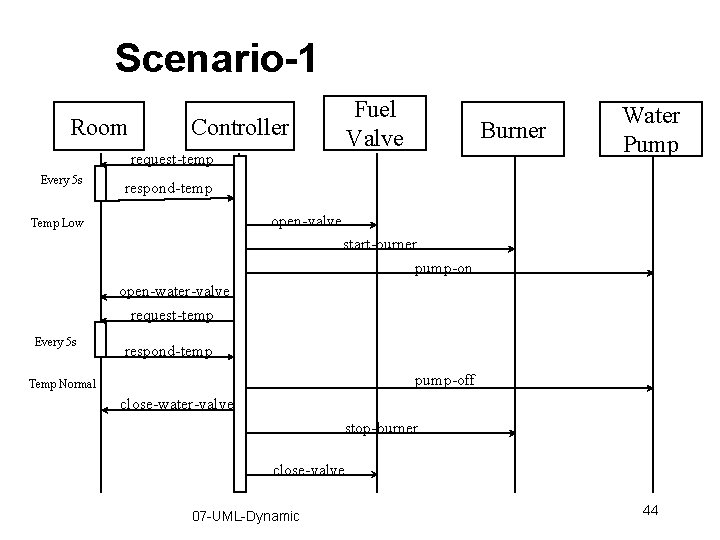
Scenario-1 Room Fuel Valve Controller request-temp Every 5 s Burner Water Pump respond-temp open-valve Temp Low start-burner pump-on open-water-valve request-temp Every 5 s respond-temp pump-off Temp Normal close-water-valve stop-burner close-valve 07 -UML-Dynamic 44
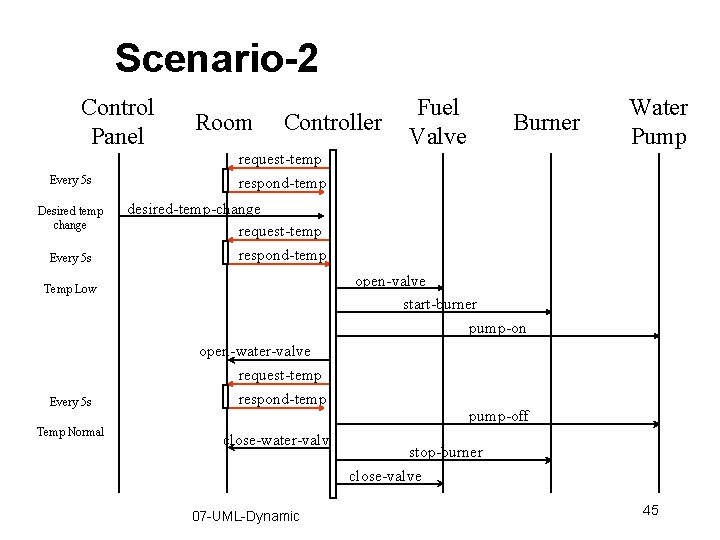
Scenario-2 Control Panel Every 5 s Desired temp change Every 5 s Room Controller Temp Normal Burner Water Pump request-temp respond-temp desired-temp-change request-temp respond-temp open-valve start-burner pump-on Temp Low Every 5 s Fuel Valve open-water-valve request-temp respond-temp close-water-valve 07 -UML-Dynamic pump-off stop-burner close-valve 45
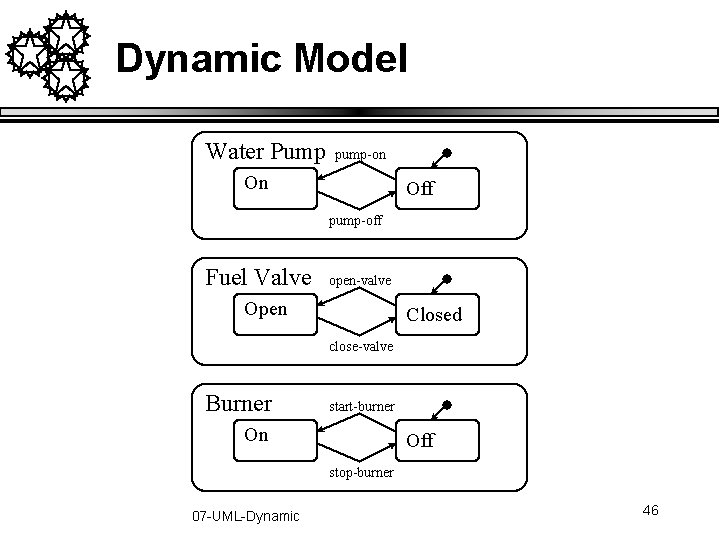
Dynamic Model Water Pump pump-on On Off pump-off Fuel Valve open-valve Open Closed close-valve Burner start-burner On Off stop-burner 07 -UML-Dynamic 46
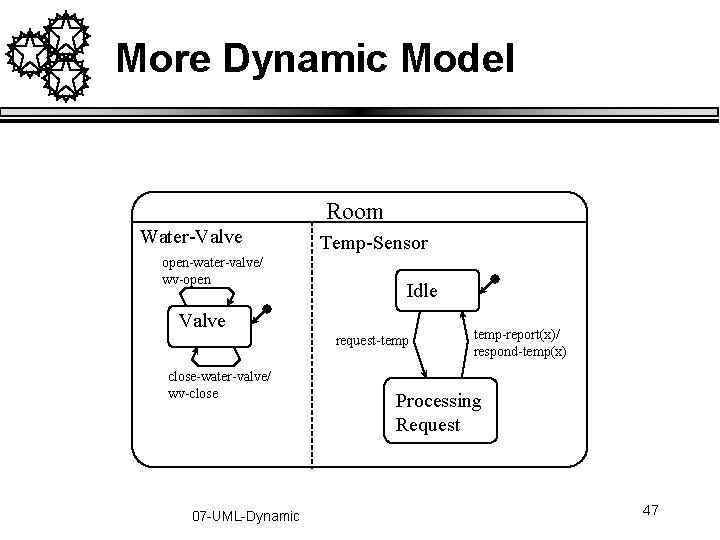
More Dynamic Model Room Water-Valve open-water-valve/ wv-open Temp-Sensor Idle Valve request-temp close-water-valve/ wv-close 07 -UML-Dynamic temp-report(x)/ respond-temp(x) Processing Request 47
Even More Dynamic Model Controller Temperature respond-temp(x)[x>desired-temp+2]/stop-heating timeout(5 s) request-temp Temp-Low Temp-Normal timeout(5 s) request-temp respond-temp(x)[x<desired-temp-2]/start-heating Home Heating System timeout(1 s)/ pump-on, open-water-valve timeout(1 s)/start-burner Burner-On Fuel-Open All-Running stop-heating/ pump-off, close-water-valve start-heating/open-valve All-Off Water-Off 07 -UML-Dynamic Fuel-Off timeout(1 s)/close-valve timeout(1 s)/stop-burner 48
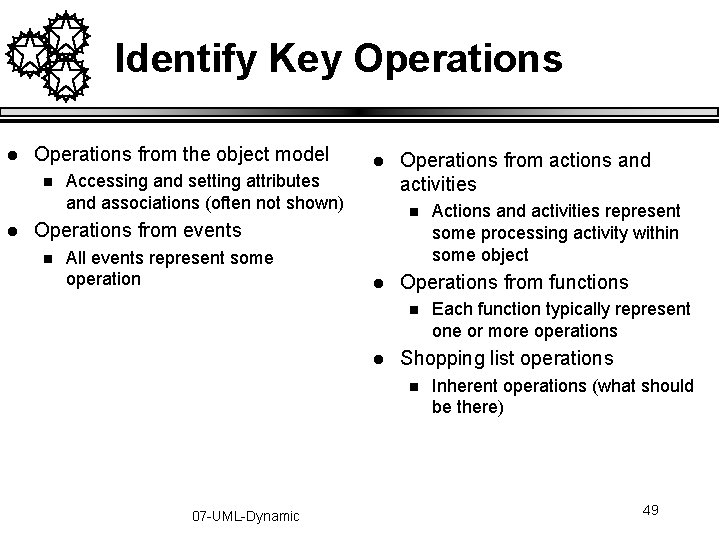
Identify Key Operations l Operations from the object model n l l Accessing and setting attributes and associations (often not shown) n Operations from events n All events represent some operation Operations from actions and activities l Operations from functions n l Each function typically represent one or more operations Shopping list operations n 07 -UML-Dynamic Actions and activities represent some processing activity within some object Inherent operations (what should be there) 49
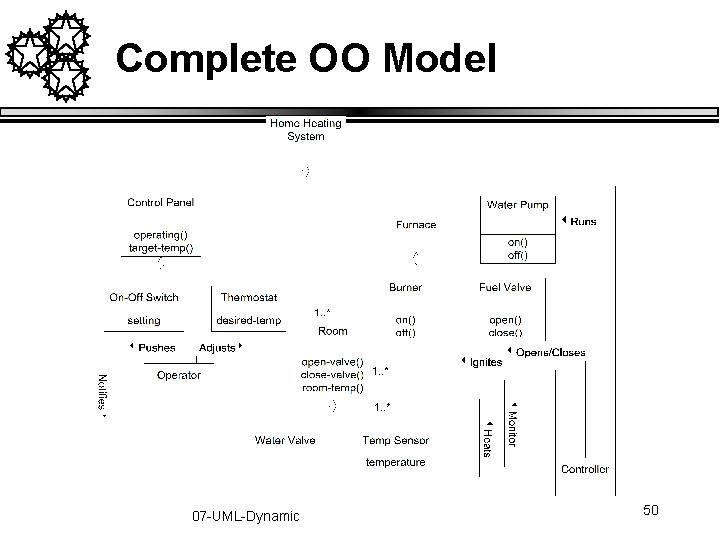
Complete OO Model 07 -UML-Dynamic 50
Iterate the Model l Keep on doing this until you, your customer, and your engineers are happy with the model Iterate 07 -UML-Dynamic 51
Activity Diagrams 07 -UML-Dynamic 52
We Will Cover l History of activity diagrams in UML n l l l A highly personal perspective Activity diagrams Swimlanes When to use activity diagrams n When not to 07 -UML-Dynamic 53
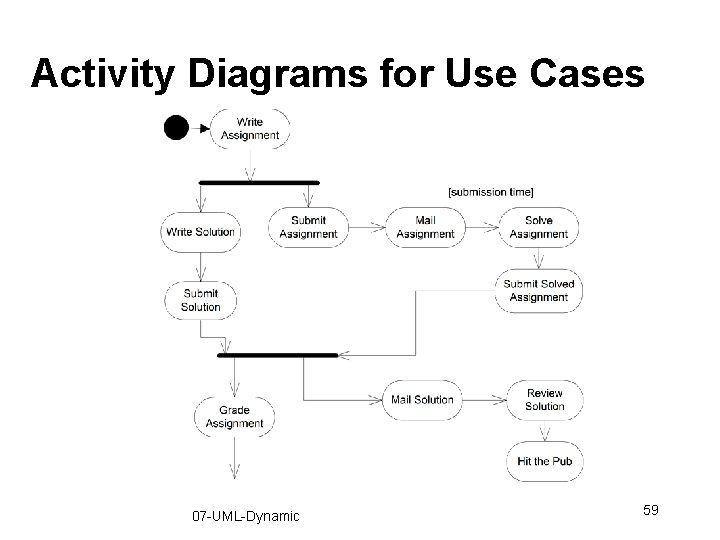
Activity Diagrams l Shows how activities are connected together n n l Mechanisms to express n n n l Shows the order of processing Captures parallelism Processing Synchronization Conditional selection of processing A glorified flowchart 07 -UML-Dynamic 54
Why Activity Diagrams l Very good question n l Suitable for modeling of business activities n n n l Not part of any previous (UML related) method Introduced for activities, like business processes Introduced to sell products (drawing tools) UML and OO is becoming more prevalent in business applications Object frameworks are making an inroad Stay within one development approach and notation Generally a flowchart and I do not really see the need in OO modeling n Probably because I do not do business systems B. H. C. 07 -UML-Dynamic 55
Why Activity Diagrams l Very good question n l Suitable for modeling of business activities n n n l Not part of any previous (UML related) method Introduced for activities, like business processes Introduced to sell products (drawing tools) UML and OO is becoming more prevalent in business applications Object frameworks are making an inroad Stay within one development approach and notation Not bad for group-capture of a business process n n n Swimlanes are useful State diagrams are not very clear to many people Suitable for customer viewing w. e. m. 07 -UML-Dynamic 56
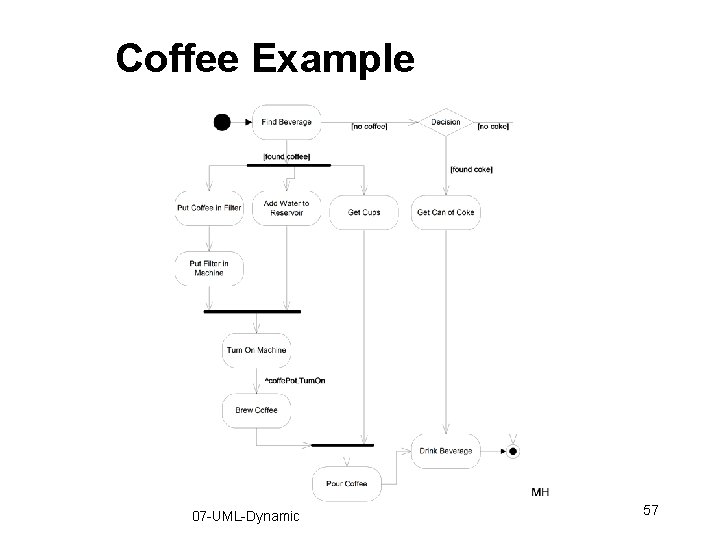
Coffee Example 07 -UML-Dynamic 57
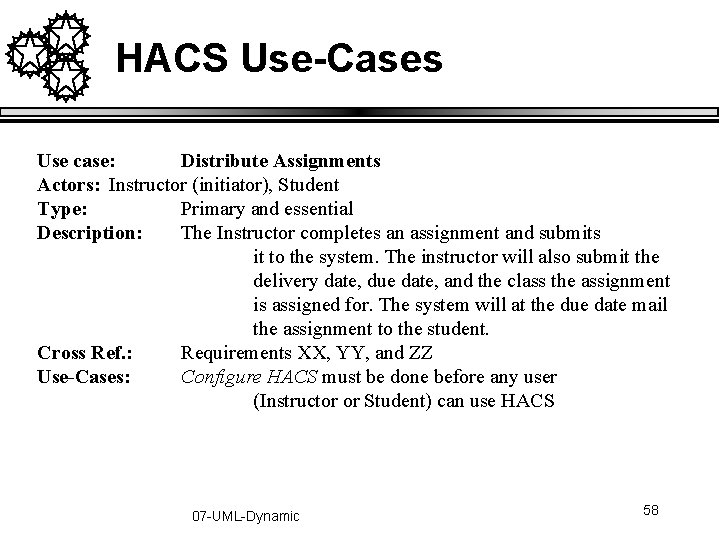
HACS Use-Cases Use case: Distribute Assignments Actors: Instructor (initiator), Student Type: Primary and essential Description: The Instructor completes an assignment and submits it to the system. The instructor will also submit the delivery date, due date, and the class the assignment is assigned for. The system will at the due date mail the assignment to the student. Cross Ref. : Requirements XX, YY, and ZZ Use-Cases: Configure HACS must be done before any user (Instructor or Student) can use HACS 07 -UML-Dynamic 58
Activity Diagrams for Use Cases 07 -UML-Dynamic 59
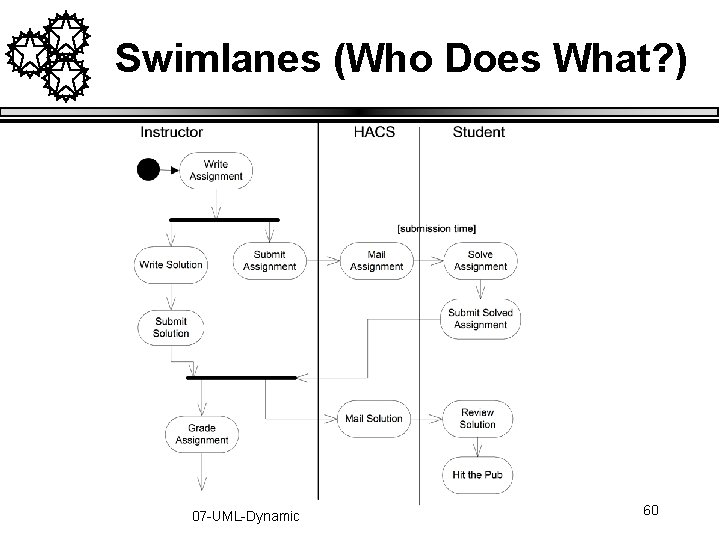
Swimlanes (Who Does What? ) 07 -UML-Dynamic 60
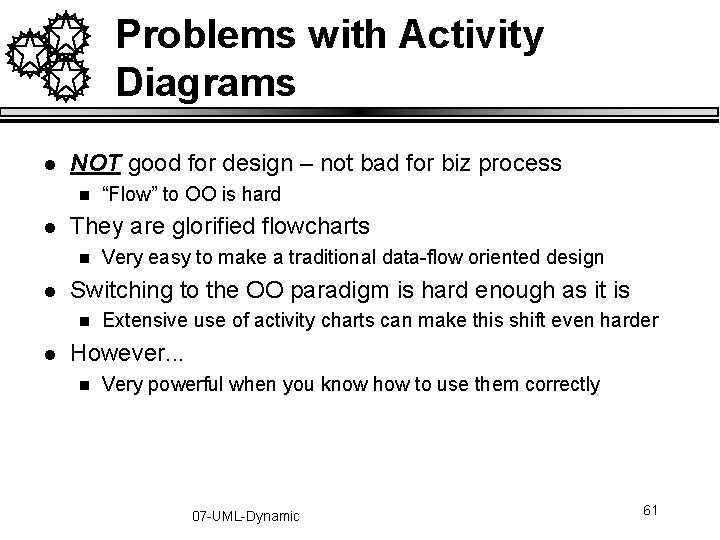
Problems with Activity Diagrams l NOT good for design – not bad for biz process n l They are glorified flowcharts n l Very easy to make a traditional data-flow oriented design Switching to the OO paradigm is hard enough as it is n l “Flow” to OO is hard Extensive use of activity charts can make this shift even harder However. . . n Very powerful when you know how to use them correctly 07 -UML-Dynamic 61
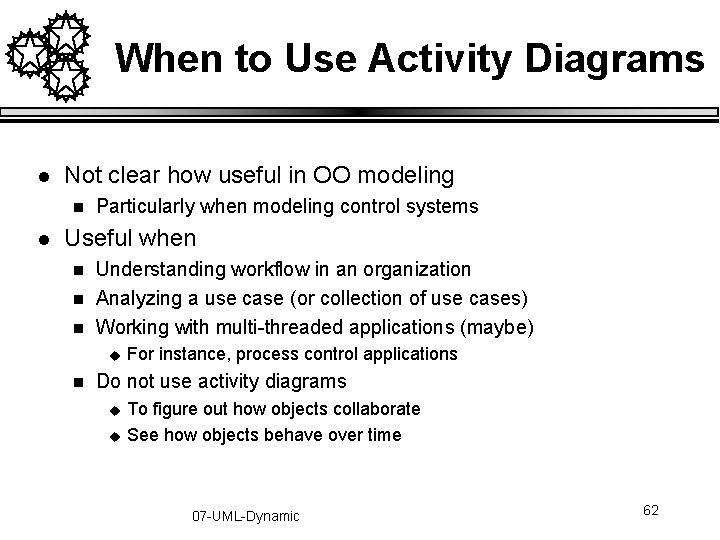
When to Use Activity Diagrams l Not clear how useful in OO modeling n l Particularly when modeling control systems Useful when n Understanding workflow in an organization Analyzing a use case (or collection of use cases) Working with multi-threaded applications (maybe) u n For instance, process control applications Do not use activity diagrams u u To figure out how objects collaborate See how objects behave over time 07 -UML-Dynamic 62