Developing the Project Plan n The Project Network
- Slides: 51
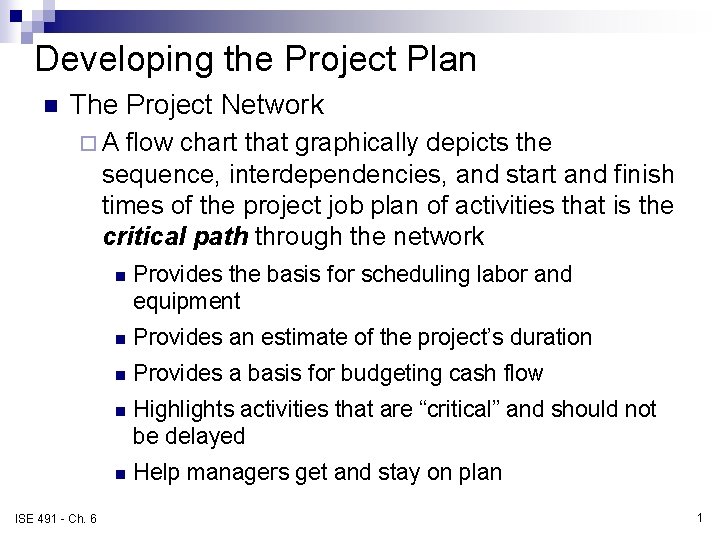
Developing the Project Plan n The Project Network ¨A flow chart that graphically depicts the sequence, interdependencies, and start and finish times of the project job plan of activities that is the critical path through the network ISE 491 - Ch. 6 n Provides the basis for scheduling labor and equipment n Provides an estimate of the project’s duration n Provides a basis for budgeting cash flow n Highlights activities that are “critical” and should not be delayed n Help managers get and stay on plan 1
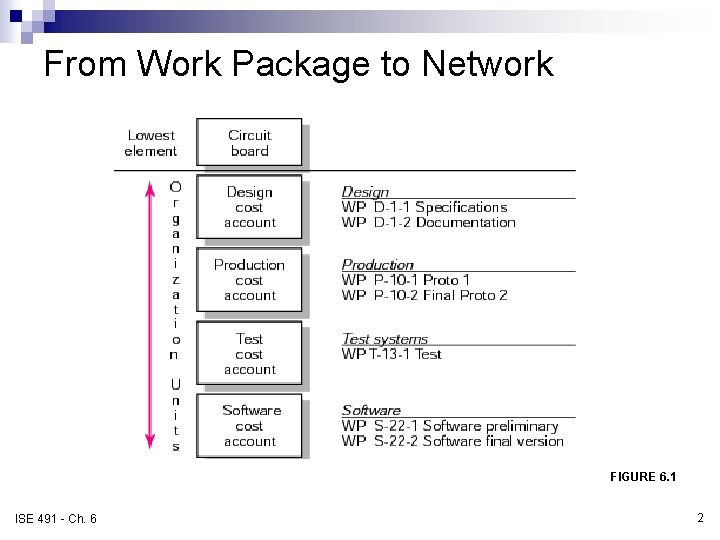
From Work Package to Network WBS/Work Packages to Network FIGURE 6. 1 ISE 491 - Ch. 6 2
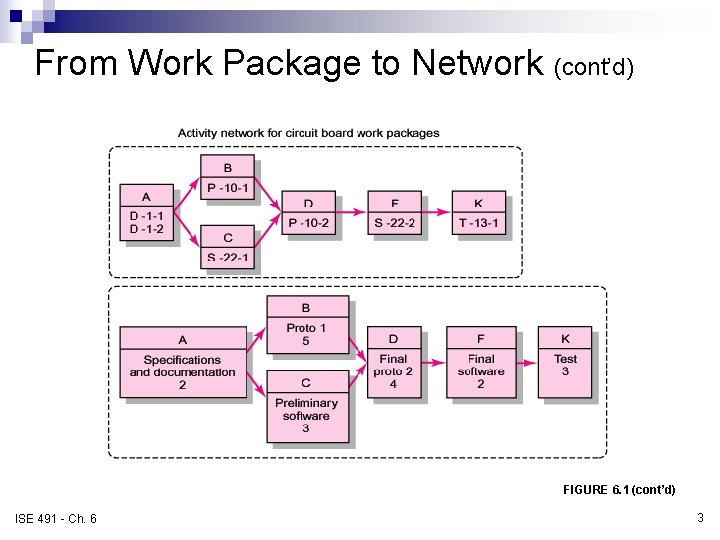
From Work Package to Network (cont’d) WBS/Work Packages to Network (cont’d) FIGURE 6. 1 (cont’d) ISE 491 - Ch. 6 3
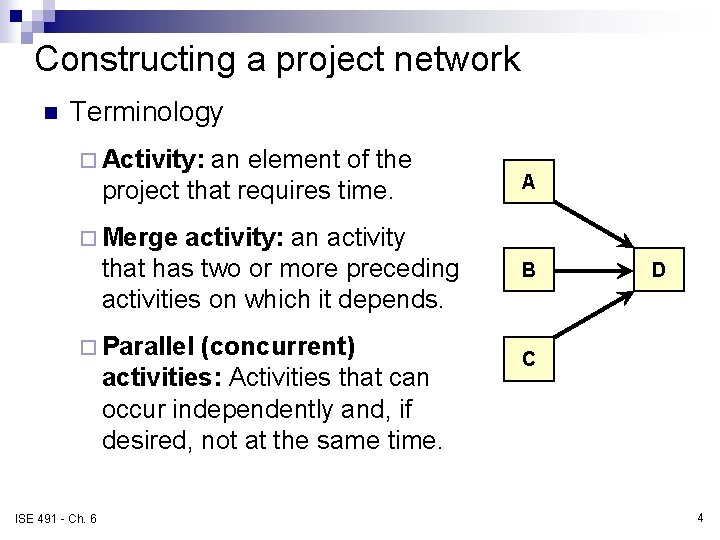
Constructing a project network n Terminology ¨ Activity: an element of the project that requires time. activity: an activity that has two or more preceding activities on which it depends. A ¨ Merge ¨ Parallel (concurrent) activities: Activities that can occur independently and, if desired, not at the same time. ISE 491 - Ch. 6 B D C 4
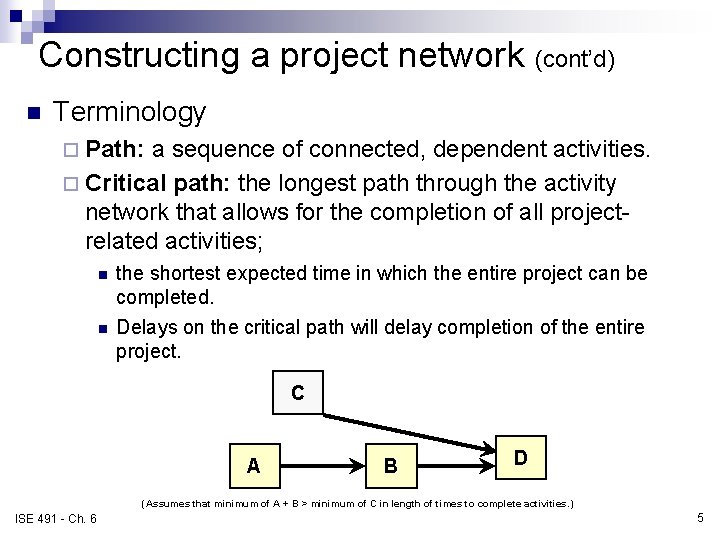
Constructing a project network (cont’d) n Terminology ¨ Path: a sequence of connected, dependent activities. ¨ Critical path: the longest path through the activity network that allows for the completion of all projectrelated activities; n n the shortest expected time in which the entire project can be completed. Delays on the critical path will delay completion of the entire project. C A B D (Assumes that minimum of A + B > minimum of C in length of times to complete activities. ) ISE 491 - Ch. 6 5
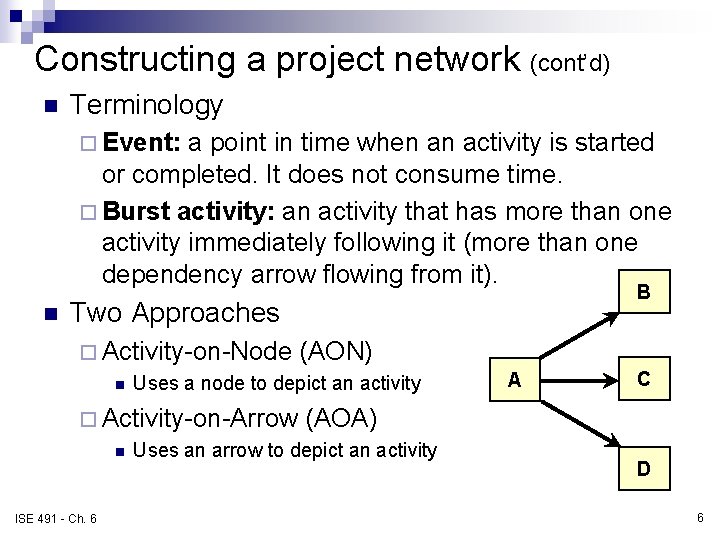
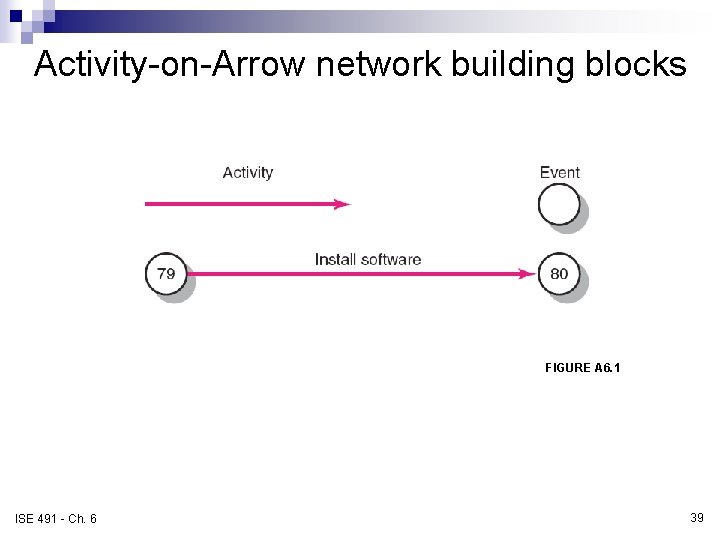
Constructing a project network (cont’d) n Terminology ¨ Event: a point in time when an activity is started or completed. It does not consume time. ¨ Burst activity: an activity that has more than one activity immediately following it (more than one dependency arrow flowing from it). n B Two Approaches ¨ Activity-on-Node n Uses a node to depict an activity ¨ Activity-on-Arrow n ISE 491 - Ch. 6 (AON) A C (AOA) Uses an arrow to depict an activity D 6
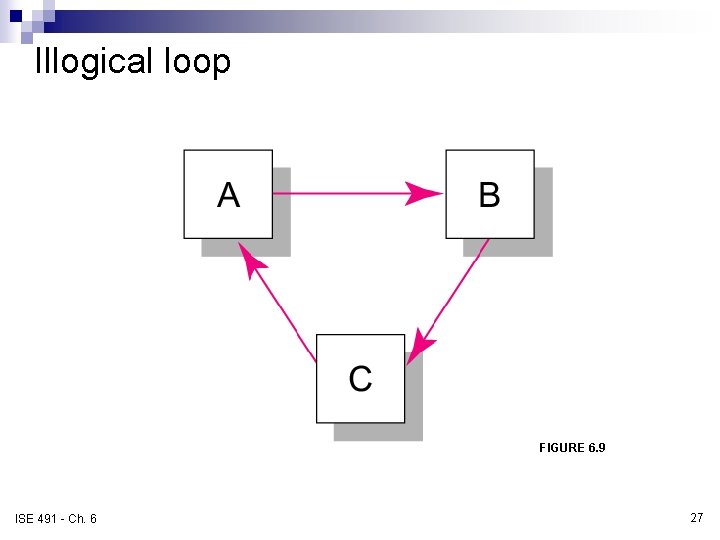
Basic rules for project networks n n n n Networks typically flow from left to right. An activity cannot begin until all of its activities are complete. Arrows indicate precedence and flow and can cross over each other. Identify each activity with a unique number; this number must be greater than its predecessors. Looping is not allowed. Conditional statements are not allowed. Use common start and stop nodes. ISE 491 - Ch. 6 7
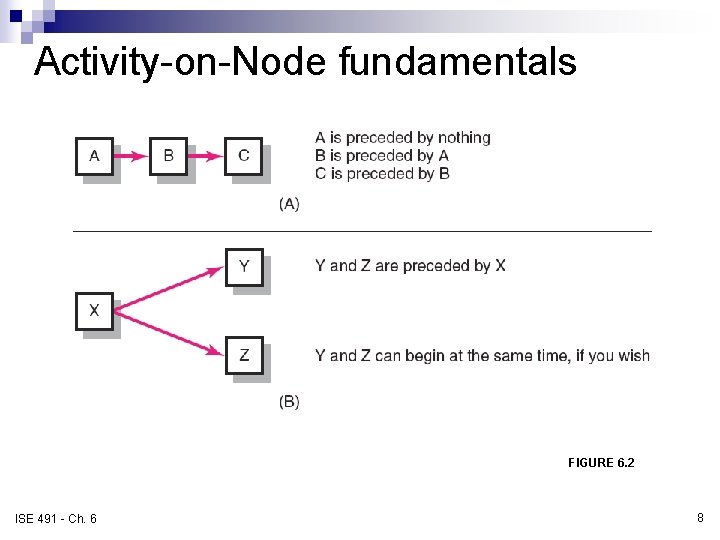
Activity-on-Node fundamentals FIGURE 6. 2 ISE 491 - Ch. 6 8
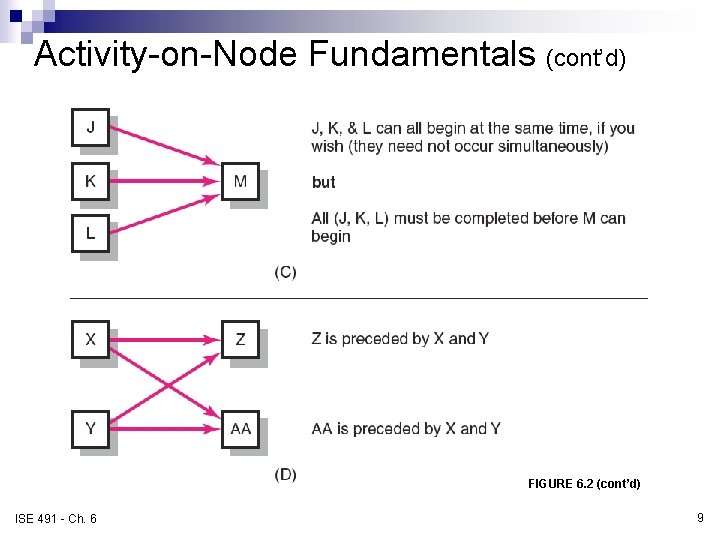
Activity-on-Node Fundamentals (cont’d) FIGURE 6. 2 (cont’d) ISE 491 - Ch. 6 9
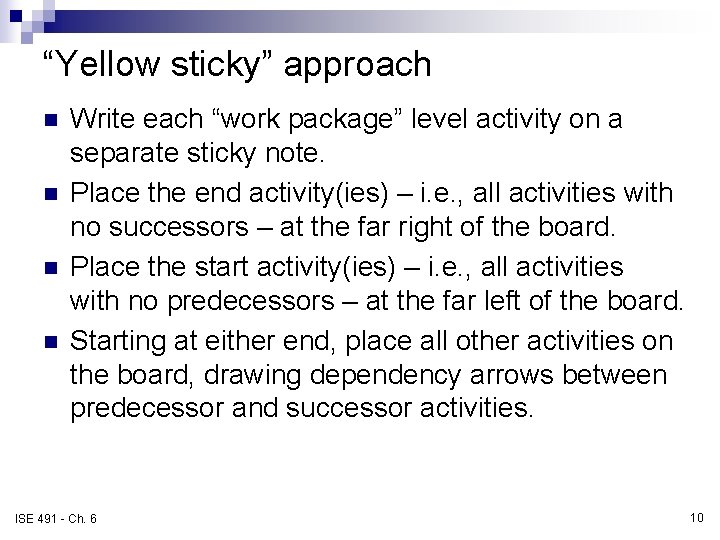
“Yellow sticky” approach n n Write each “work package” level activity on a separate sticky note. Place the end activity(ies) – i. e. , all activities with no successors – at the far right of the board. Place the start activity(ies) – i. e. , all activities with no predecessors – at the far left of the board. Starting at either end, place all other activities on the board, drawing dependency arrows between predecessor and successor activities. ISE 491 - Ch. 6 10
Your turn … n Create the network from Exercise 1 (pg. 171172) – on the board. ISE 491 - Ch. 6 11
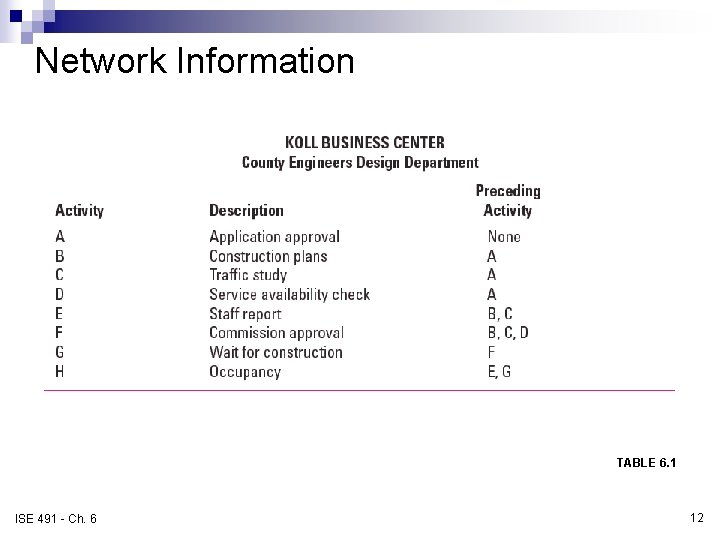
Network Information TABLE 6. 1 ISE 491 - Ch. 6 12
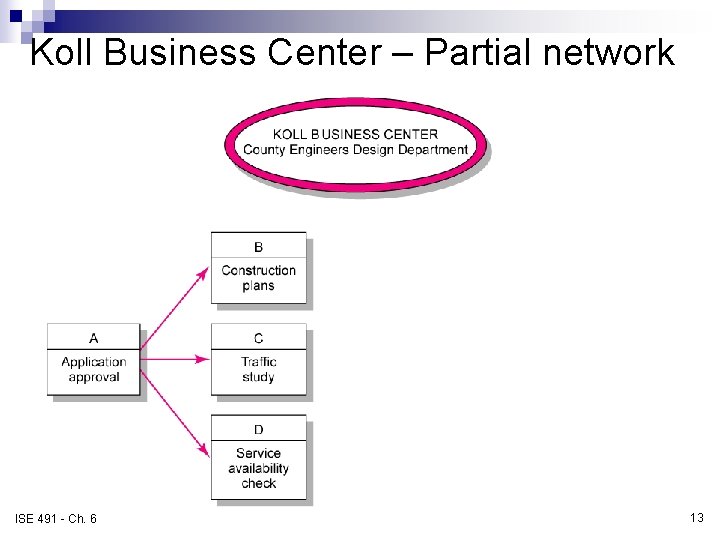
Koll Business Center – Partial network FIGURE 6. 3 ISE 491 - Ch. 6 13
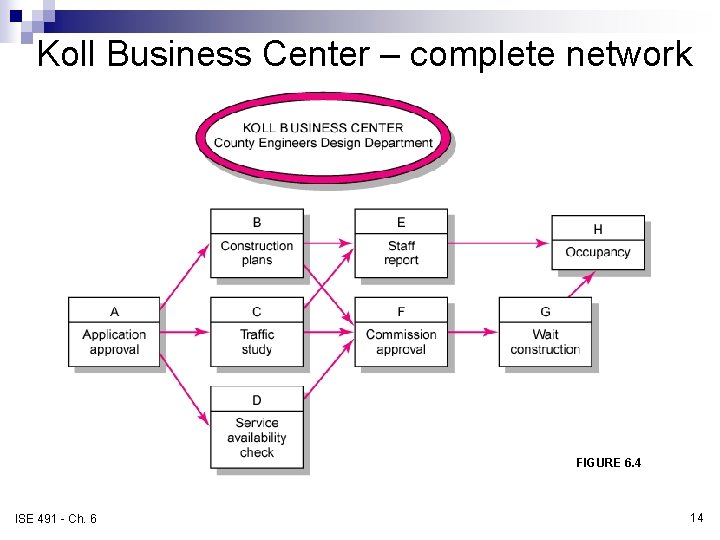
Koll Business Center – complete network FIGURE 6. 4 ISE 491 - Ch. 6 14
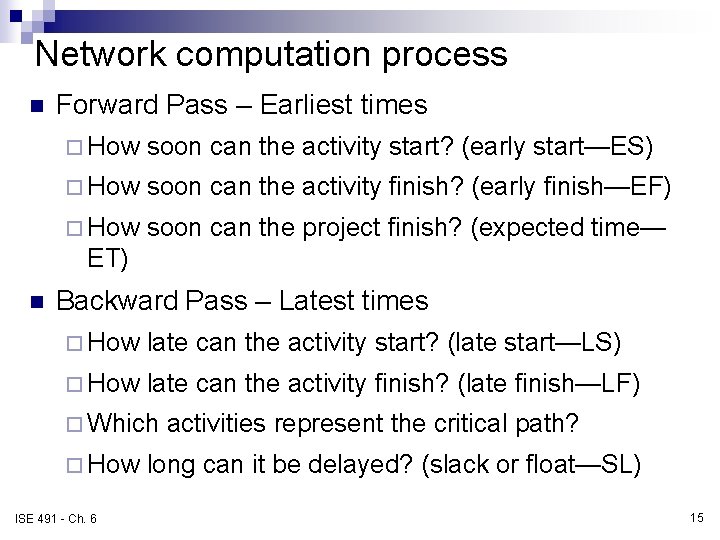
Network computation process n Forward Pass – Earliest times ¨ How soon can the activity start? (early start—ES) ¨ How soon can the activity finish? (early finish—EF) ¨ How soon can the project finish? (expected time— ET) n Backward Pass – Latest times ¨ How late can the activity start? (late start—LS) ¨ How late can the activity finish? (late finish—LF) ¨ Which ¨ How ISE 491 - Ch. 6 activities represent the critical path? long can it be delayed? (slack or float—SL) 15
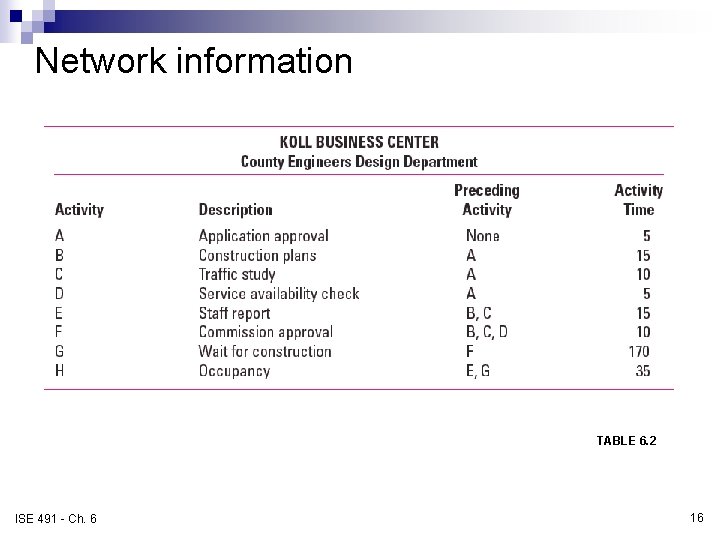
Network information TABLE 6. 2 ISE 491 - Ch. 6 16
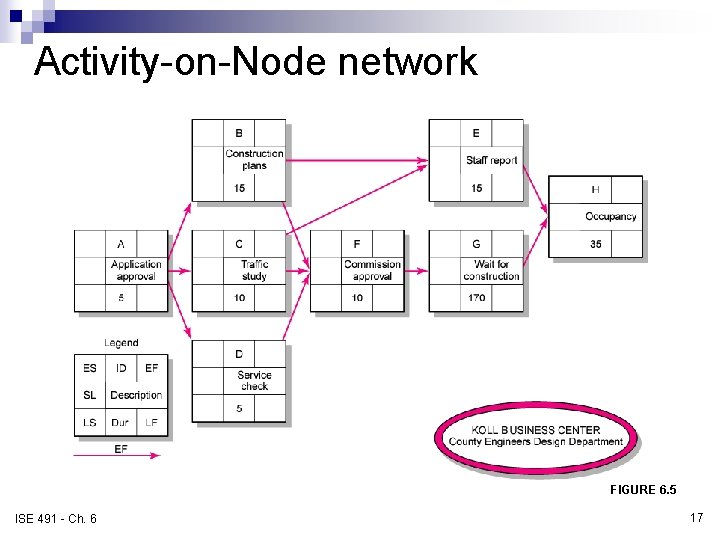
Activity-on-Node network FIGURE 6. 5 ISE 491 - Ch. 6 17
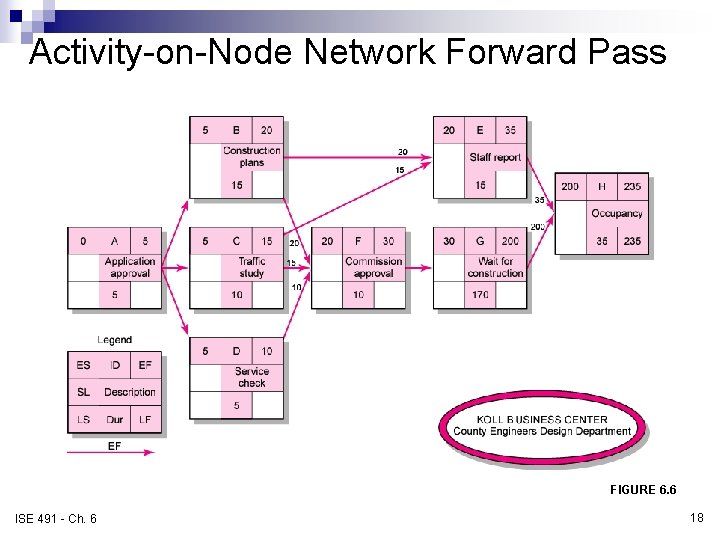
Activity-on-Node Network Forward Pass FIGURE 6. 6 ISE 491 - Ch. 6 18
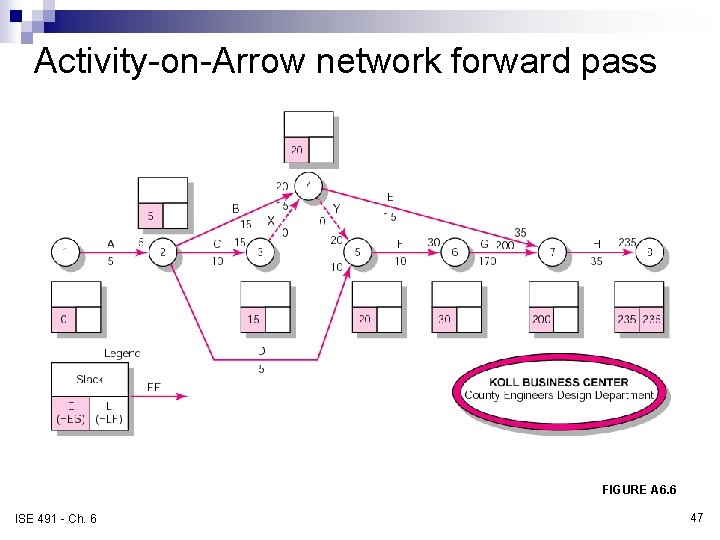
Forward pass computation n Add activity times along each path in the network (ES + Duration = EF). n Carry the early finish (EF) to the next activity where it becomes its early start (ES) unless… n The next succeeding activity is a merge activity, in which case the largest EF of all preceding activities is selected. ISE 491 - Ch. 6 19
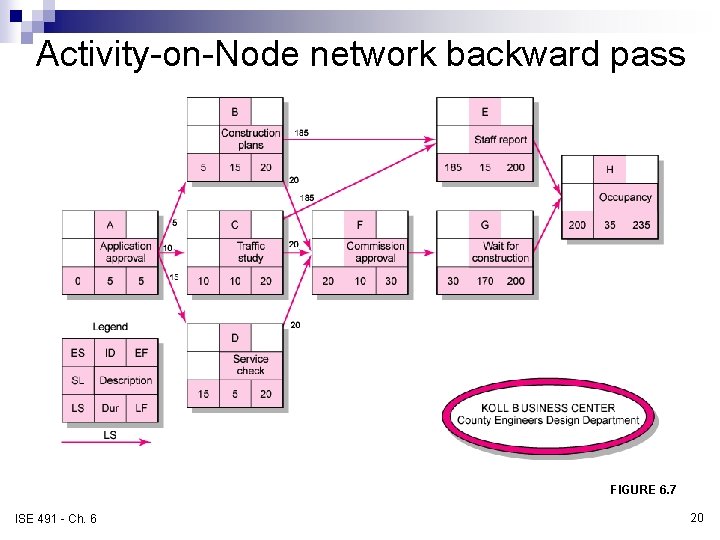
Activity-on-Node network backward pass FIGURE 6. 7 ISE 491 - Ch. 6 20
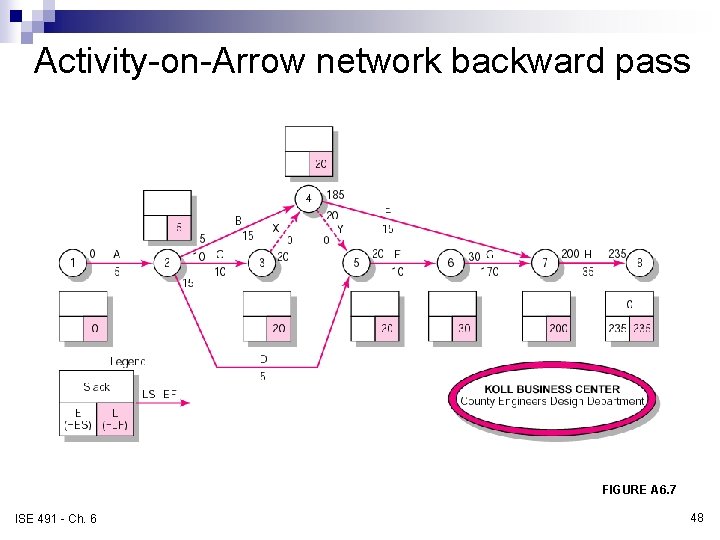
Backward pass computation n Subtract activity times along each path in the network (LF - Duration = LS). n Carry the late start (LS) to the next activity where it becomes its late finish (LF) unless. . . n The next succeeding activity is a burst activity, in which case the smallest LF of all preceding activities is selected. ISE 491 - Ch. 6 21
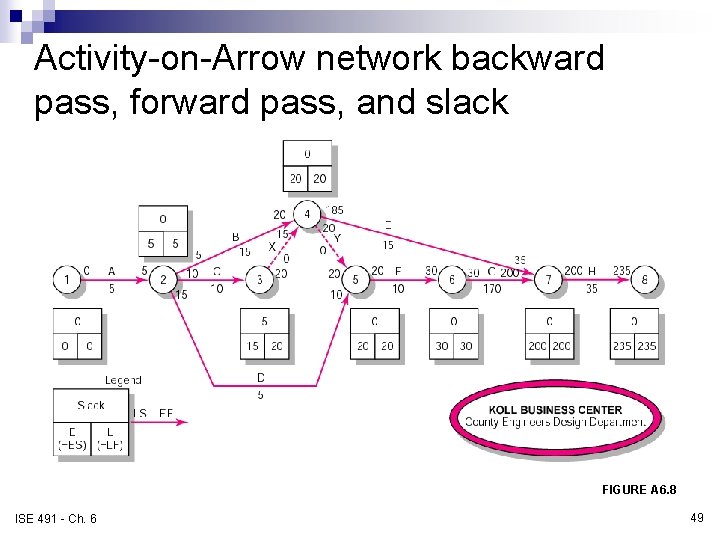
Determining slack (or float) n Free slack (or float) ¨ The amount of time an activity can be delayed without delaying connected successor activities n Total slack ¨ The amount of time an activity can be delayed without delaying the entire project n The critical path is the network path(s) that has (have) the least slack in common. ISE 491 - Ch. 6 22
Sensitivity of a network n The likelihood the original critical path(s) will change once the project is initiated. ¨ Function of: n The number of critical paths n The amount of slack across near critical activities ISE 491 - Ch. 6 23
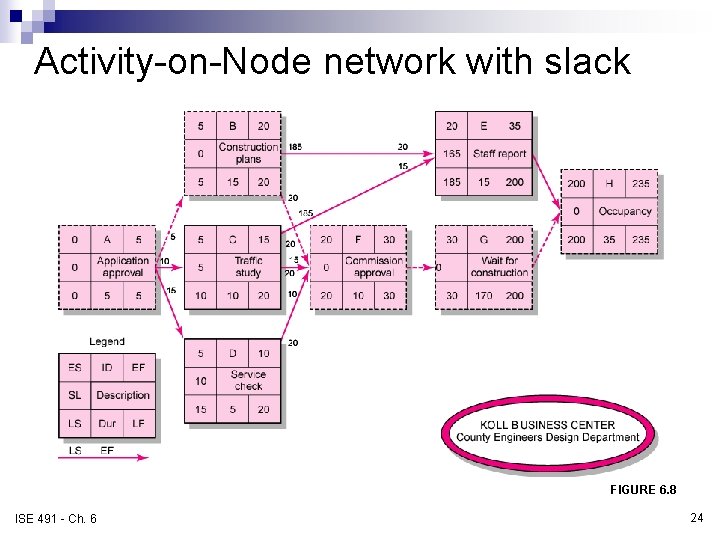
Activity-on-Node network with slack FIGURE 6. 8 ISE 491 - Ch. 6 24
Your turn … n Exercise 7, pg. 174 ISE 491 - Ch. 6 25
Practical considerations n Network logic errors n Activity numbering n Use of computers to develop networks n Calendar dates n Multiple starts and multiple projects ISE 491 - Ch. 6 26
Illogical loop FIGURE 6. 9 ISE 491 - Ch. 6 27
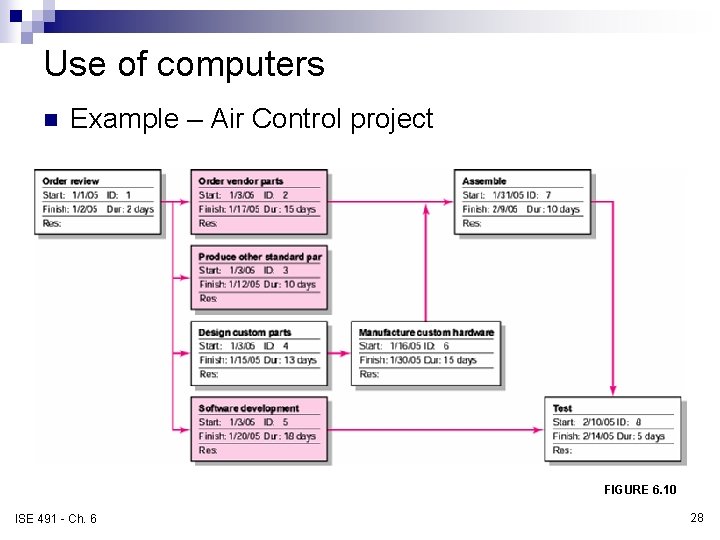
Use of computers n Example – Air Control project FIGURE 6. 10 ISE 491 - Ch. 6 28
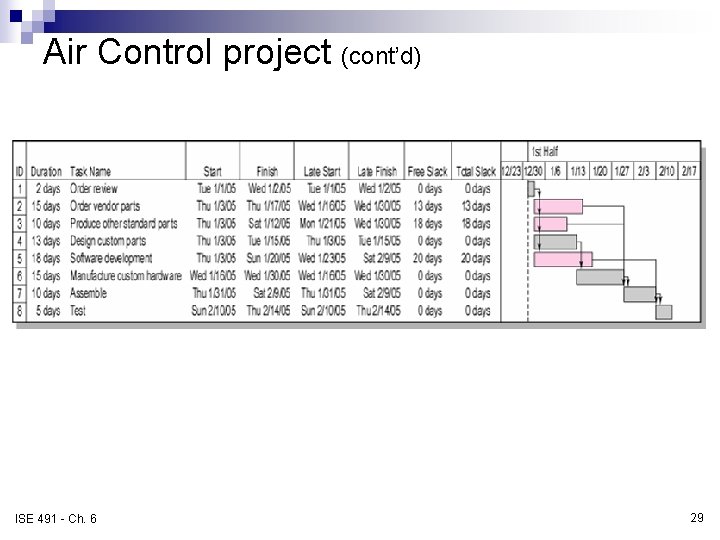
Air Control project (cont’d) FIGURE 6. 11 ISE 491 - Ch. 6 29
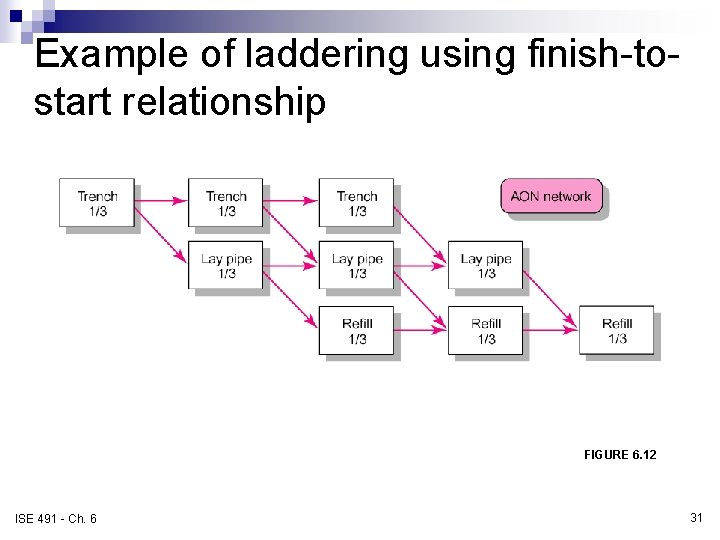
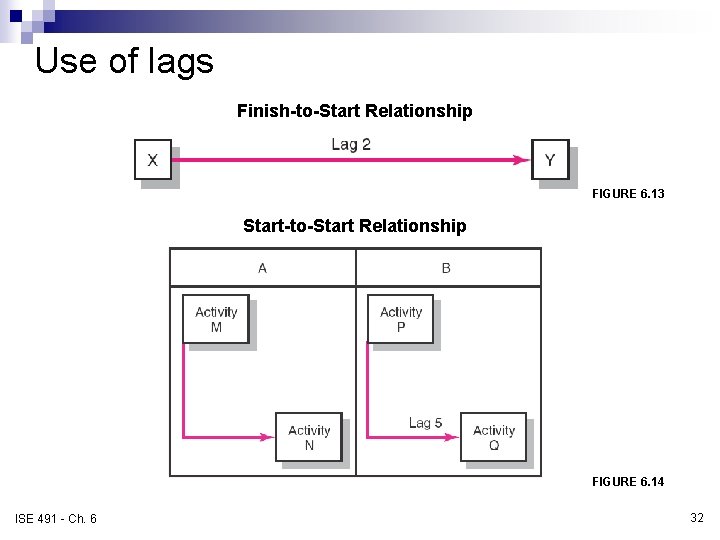
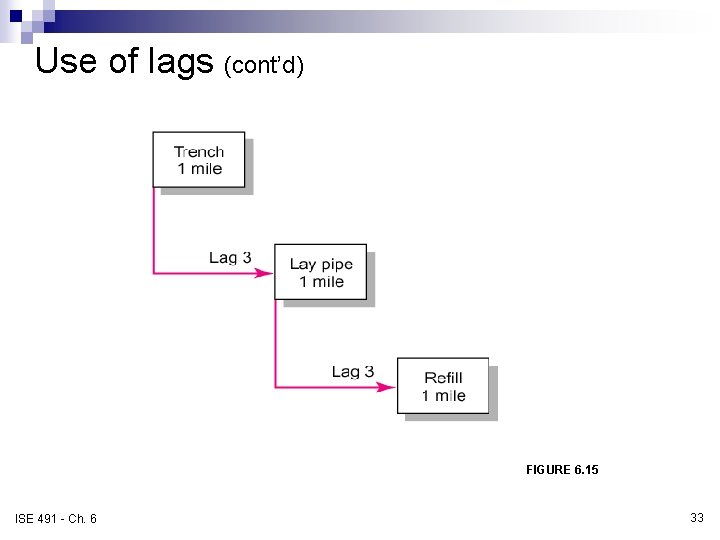
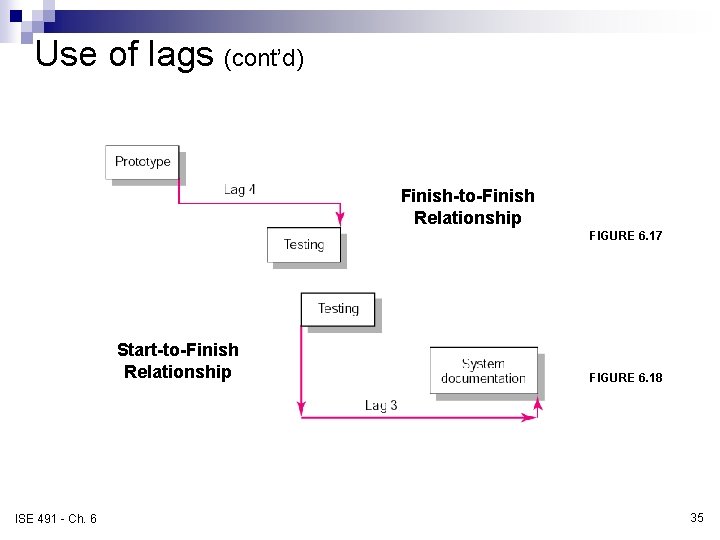
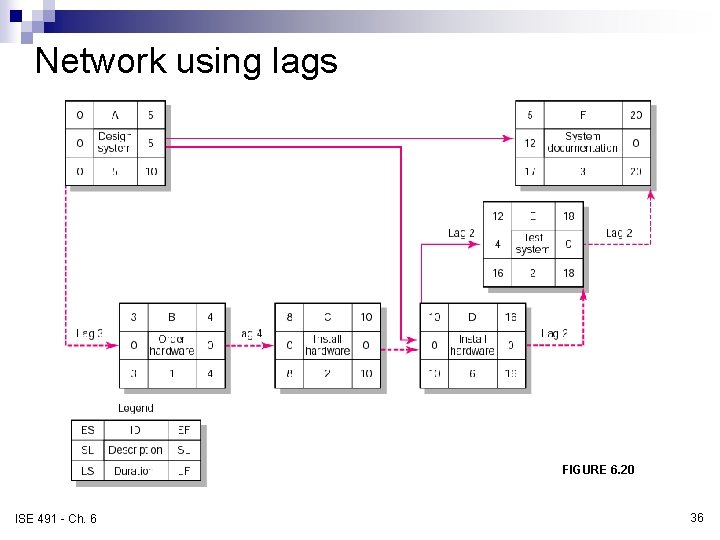
Extended network techniques to come close to reality n Laddering ¨ Activities are broken into segments so the following activity can begin sooner and not delay the work. n Lags ¨ The minimum amount of time a dependent activity must be delayed to begin or end n n ISE 491 - Ch. 6 Lengthy activities are broken down to reduce the delay in the start of successor activities. Lags can be used to constrain finish-to-start, start-tostart, finish-to-finish, start-to-finish, or combination relationships. 30
Example of laddering using finish-tostart relationship FIGURE 6. 12 ISE 491 - Ch. 6 31
Use of lags Finish-to-Start Relationship FIGURE 6. 13 Start-to-Start Relationship FIGURE 6. 14 ISE 491 - Ch. 6 32
Use of lags (cont’d) Use of Lags to Reduce Detail FIGURE 6. 15 ISE 491 - Ch. 6 33
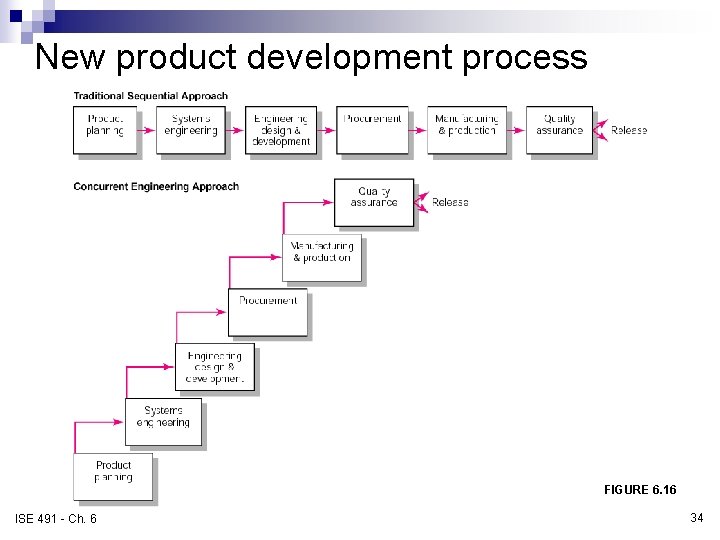
New product development process FIGURE 6. 16 ISE 491 - Ch. 6 34
Use of lags (cont’d) Finish-to-Finish Relationship FIGURE 6. 17 Start-to-Finish Relationship ISE 491 - Ch. 6 FIGURE 6. 18 35
Network using lags FIGURE 6. 20 ISE 491 - Ch. 6 36
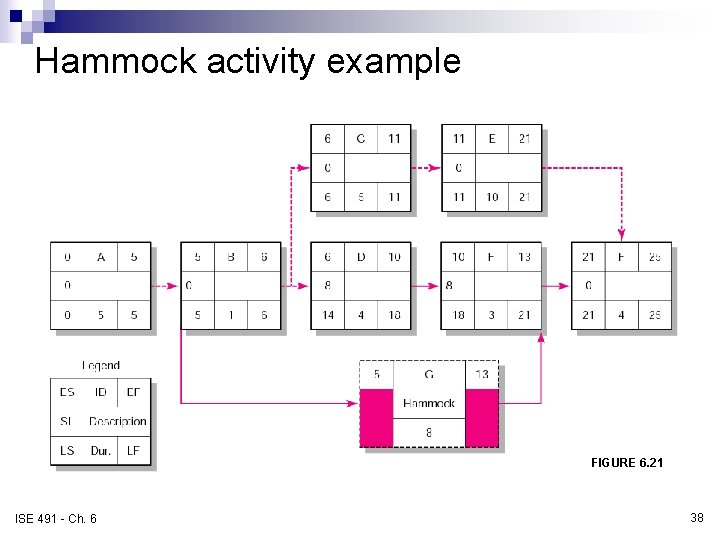
Hammock activities n Hammock activity ¨ An activity that spans over a segment of a project ¨ Duration of hammock activities is determined after the network plan is drawn. ¨ Hammock activities are used to aggregate sections of the project to facilitate getting the right amount of detail for specific sections of a project. ISE 491 - Ch. 6 37
Hammock activity example FIGURE 6. 21 ISE 491 - Ch. 6 38
Activity-on-Arrow network building blocks FIGURE A 6. 1 ISE 491 - Ch. 6 39
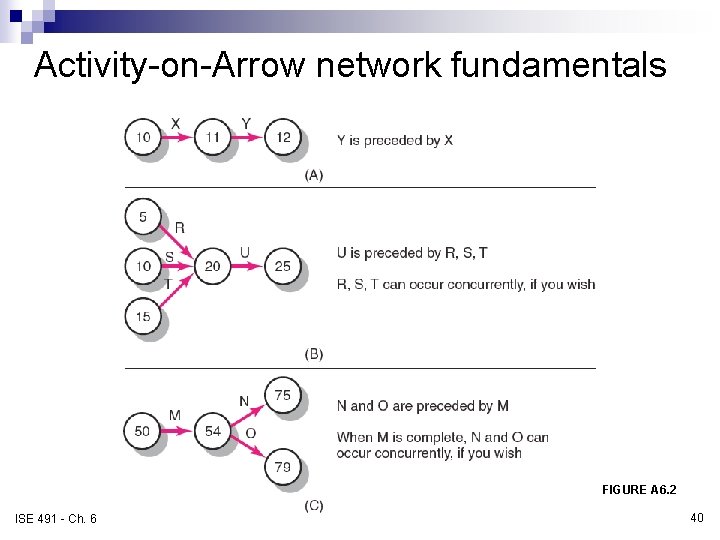
Activity-on-Arrow network fundamentals FIGURE A 6. 2 ISE 491 - Ch. 6 40
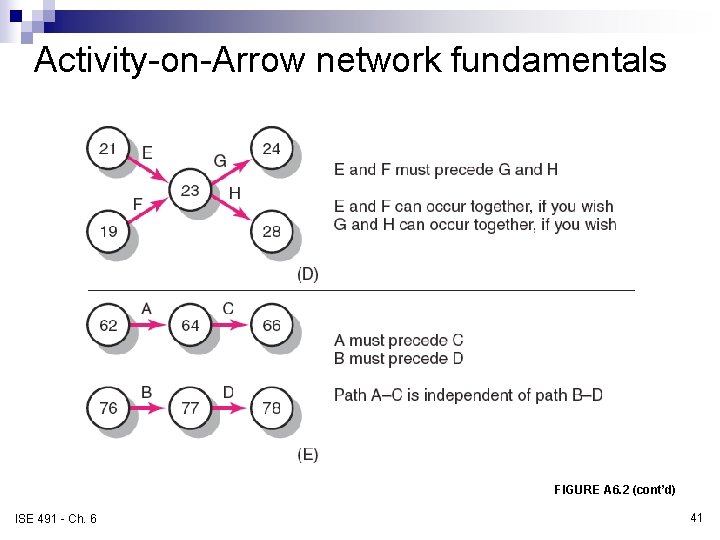
Activity-on-Arrow network fundamentals FIGURE A 6. 2 (cont’d) ISE 491 - Ch. 6 41
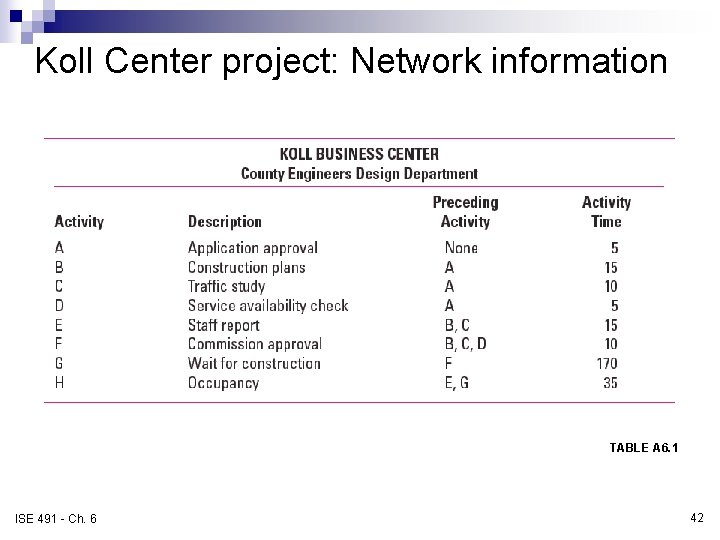
Koll Center project: Network information TABLE A 6. 1 ISE 491 - Ch. 6 42
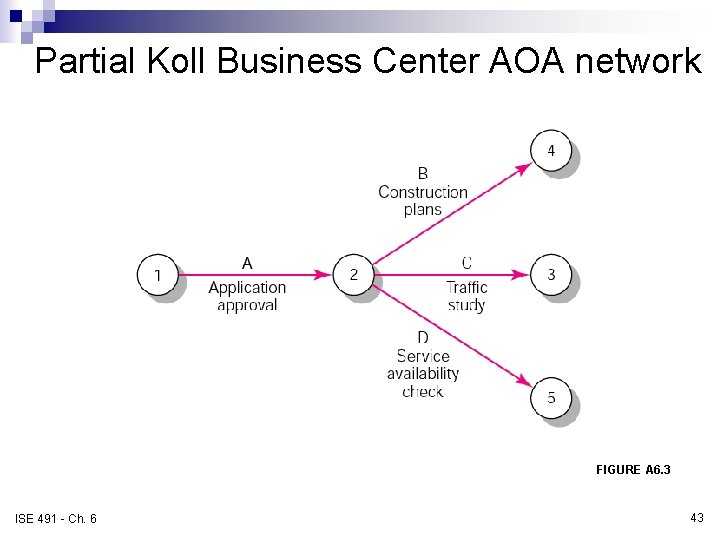
Partial Koll Business Center AOA network FIGURE A 6. 3 ISE 491 - Ch. 6 43
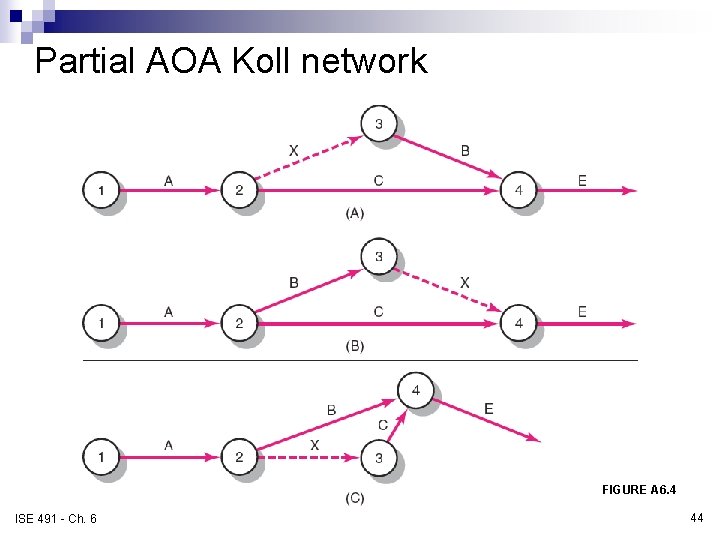
Partial AOA Koll network FIGURE A 6. 4 ISE 491 - Ch. 6 44
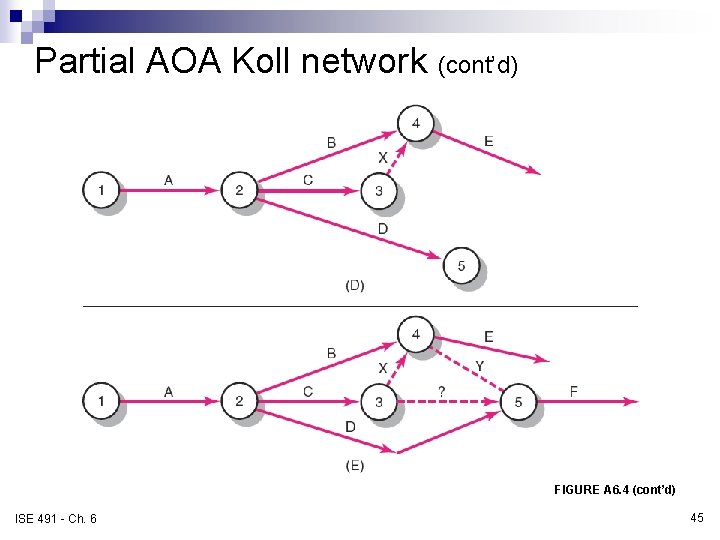
Partial AOA Koll network (cont’d) FIGURE A 6. 4 (cont’d) ISE 491 - Ch. 6 45
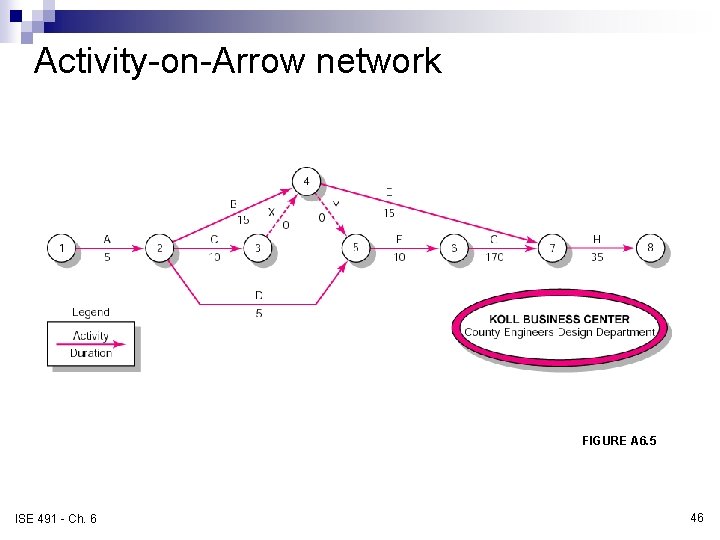
Activity-on-Arrow network FIGURE A 6. 5 ISE 491 - Ch. 6 46
Activity-on-Arrow network forward pass FIGURE A 6. 6 ISE 491 - Ch. 6 47
Activity-on-Arrow network backward pass FIGURE A 6. 7 ISE 491 - Ch. 6 48
Activity-on-Arrow network backward pass, forward pass, and slack FIGURE A 6. 8 ISE 491 - Ch. 6 49
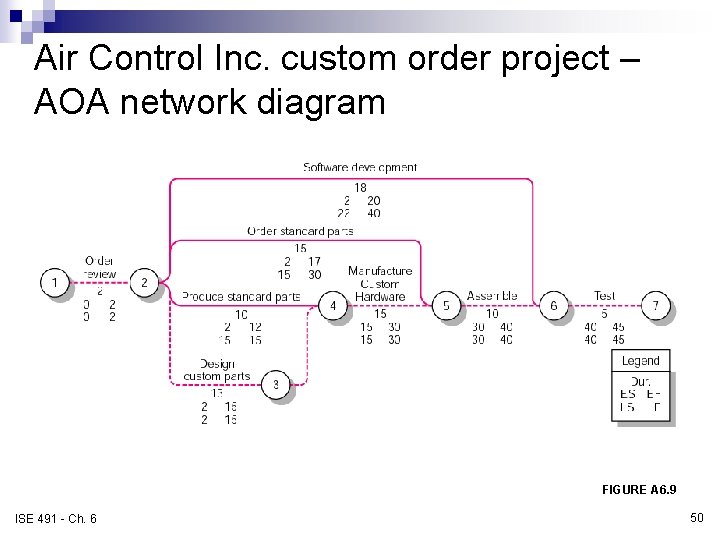
Air Control Inc. custom order project – AOA network diagram FIGURE A 6. 9 ISE 491 - Ch. 6 50
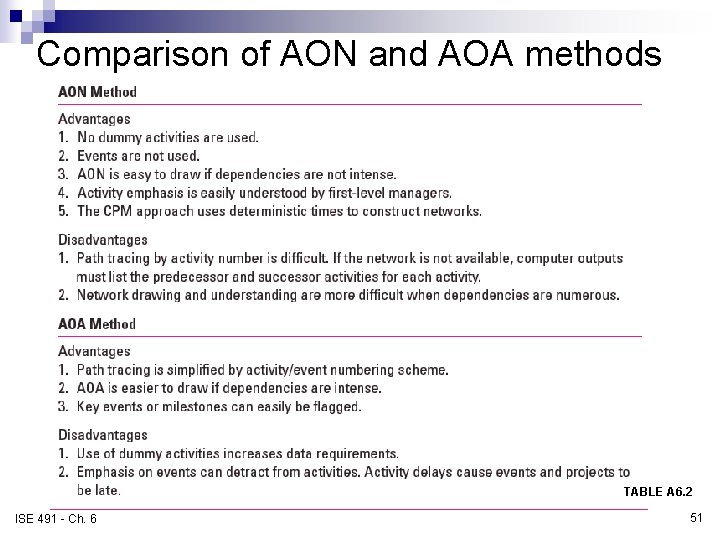
Comparison of AON and AOA methods TABLE A 6. 2 ISE 491 - Ch. 6 51