CENG 789 Digital Geometry Processing 11 Mesh Deformation
- Slides: 114
CENG 789 – Digital Geometry Processing 11 - Mesh Deformation Assoc. Prof. Yusuf Sahillioğlu Computer Eng. Dept, , Turkey
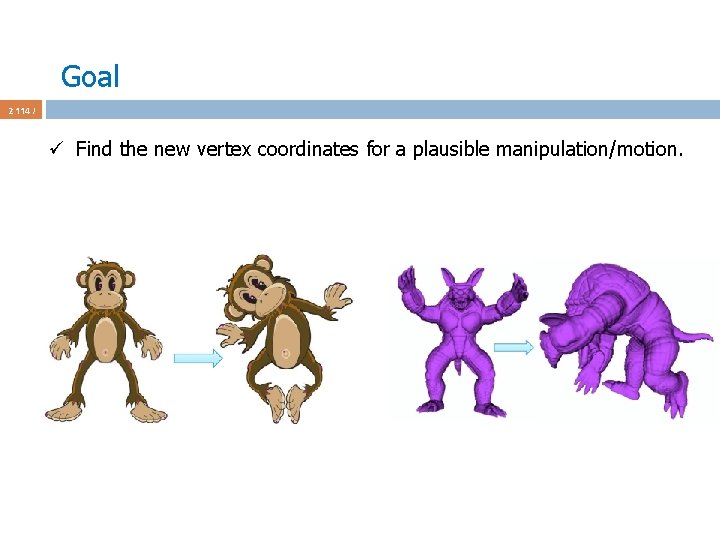
Goal 2 114 / ü Find the new vertex coordinates for a plausible manipulation/motion.
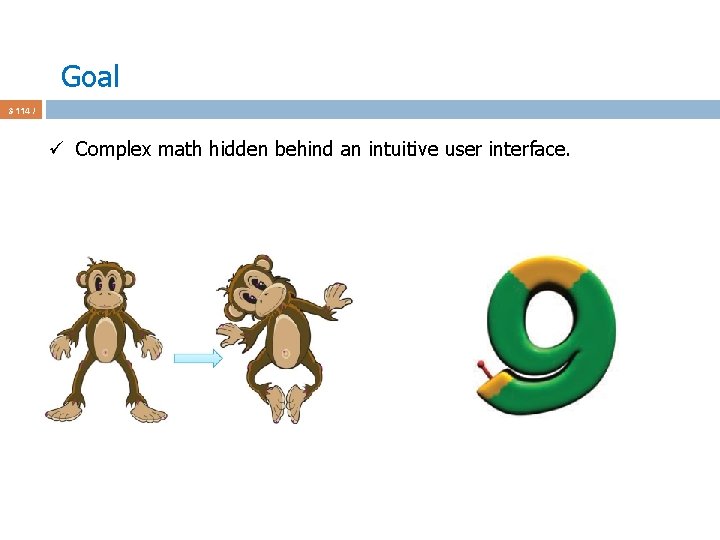
Goal 3 114 / ü Complex math hidden behind an intuitive user interface.
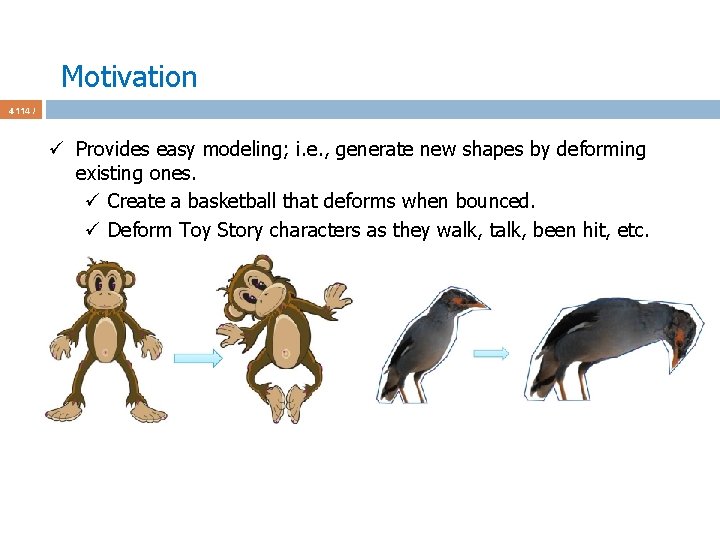
Motivation 4 114 / ü Provides easy modeling; i. e. , generate new shapes by deforming existing ones. ü Create a basketball that deforms when bounced. ü Deform Toy Story characters as they walk, talk, been hit, etc.
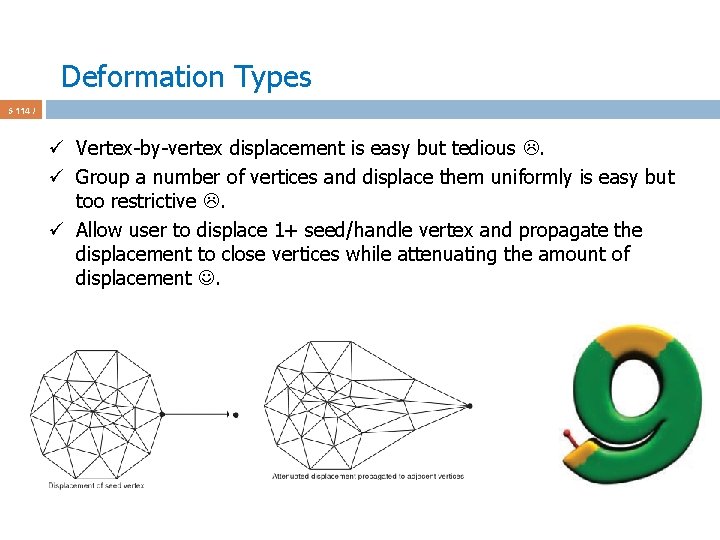
Deformation Types 5 114 / ü Vertex-by-vertex displacement is easy but tedious . ü Group a number of vertices and displace them uniformly is easy but too restrictive . ü Allow user to displace 1+ seed/handle vertex and propagate the displacement to close vertices while attenuating the amount of displacement .
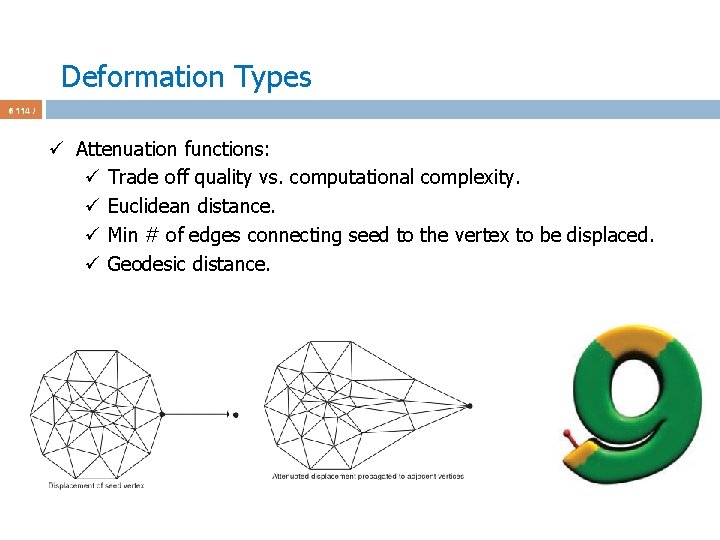
Deformation Types 6 114 / ü Attenuation functions: ü Trade off quality vs. computational complexity. ü Euclidean distance. ü Min # of edges connecting seed to the vertex to be displaced. ü Geodesic distance.
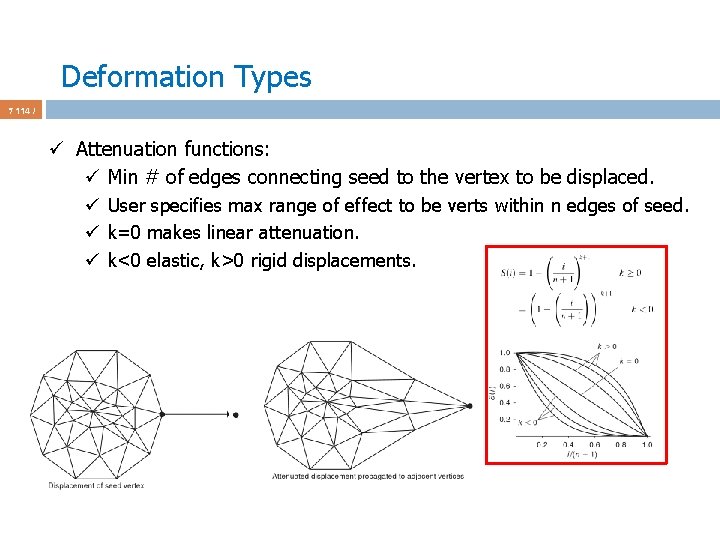
Deformation Types 7 114 / ü Attenuation functions: ü Min # of edges connecting seed to the vertex to be displaced. ü User specifies max range of effect to be verts within n edges of seed. ü k=0 makes linear attenuation. ü k<0 elastic, k>0 rigid displacements.
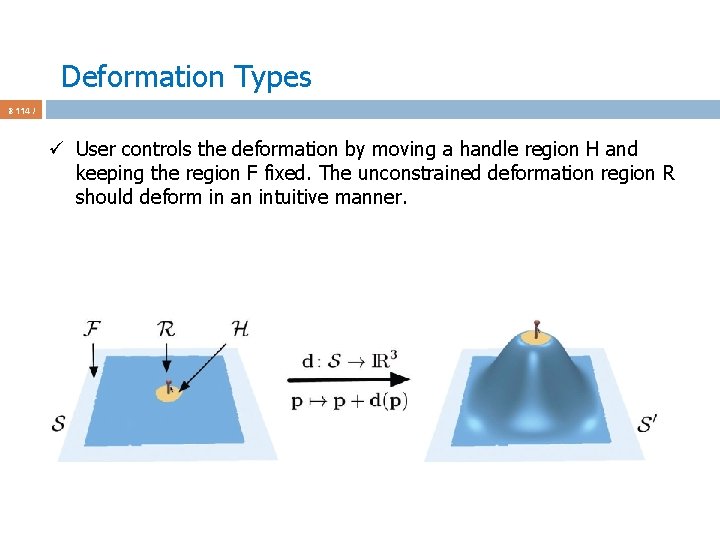
Deformation Types 8 114 / ü User controls the deformation by moving a handle region H and keeping the region F fixed. The unconstrained deformation region R should deform in an intuitive manner.
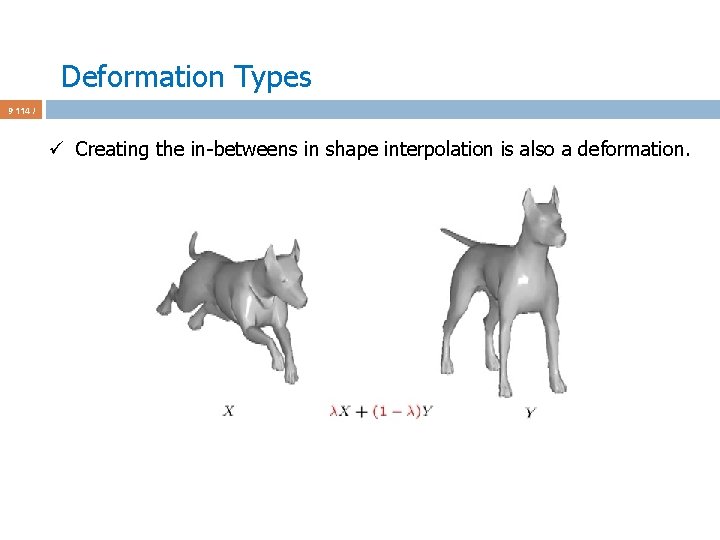
Deformation Types 9 114 / ü Creating the in-betweens in shape interpolation is also a deformation.
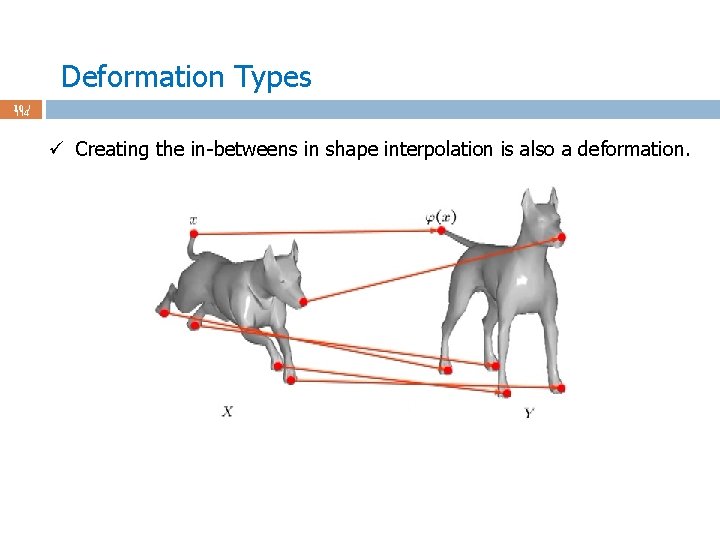
Deformation Types 10 / 114 ü Creating the in-betweens in shape interpolation is also a deformation.
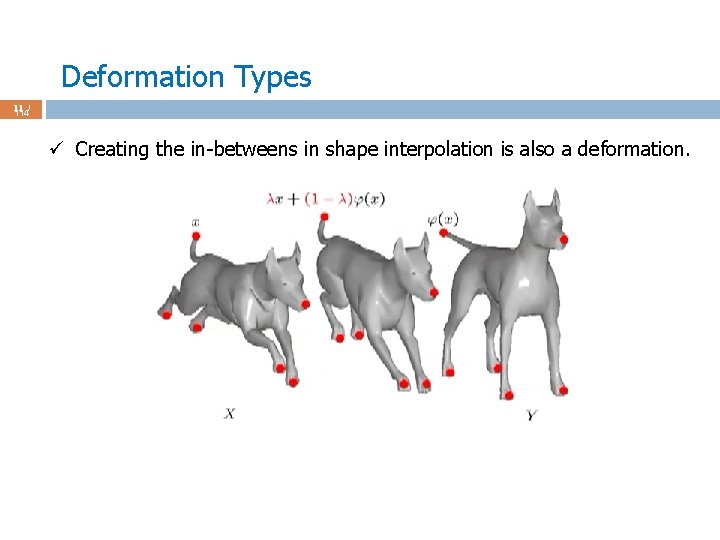
Deformation Types 11 / 114 ü Creating the in-betweens in shape interpolation is also a deformation.
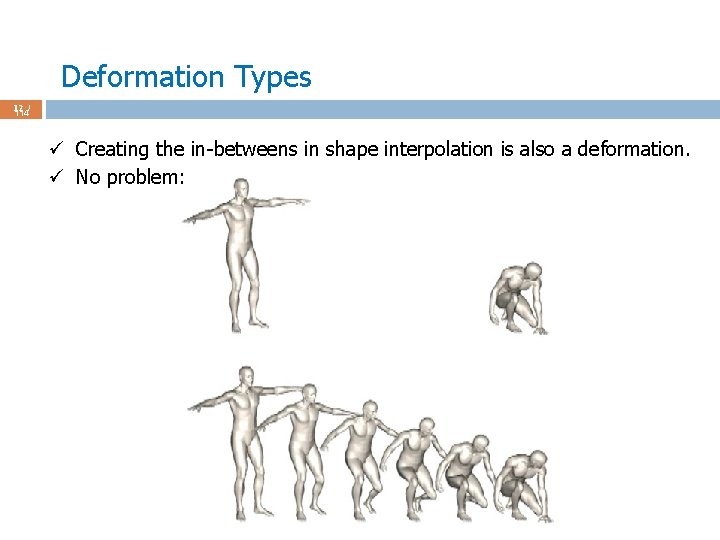
Deformation Types 12 / 114 ü Creating the in-betweens in shape interpolation is also a deformation. ü No problem:
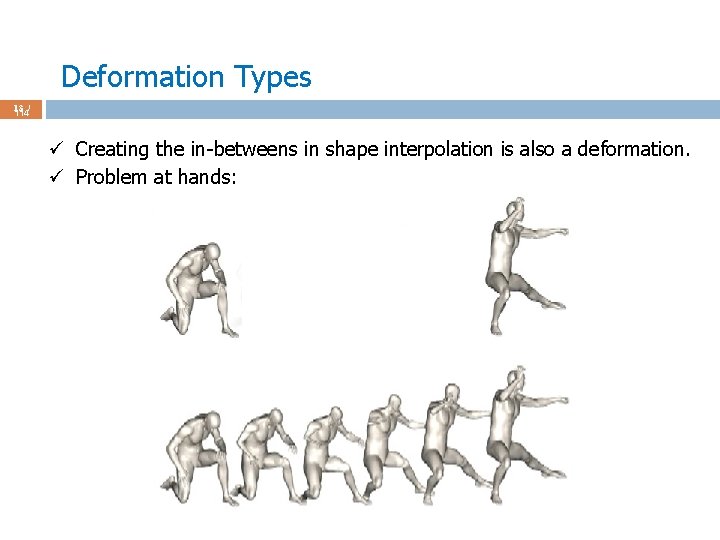
Deformation Types 13 / 114 ü Creating the in-betweens in shape interpolation is also a deformation. ü Problem at hands:
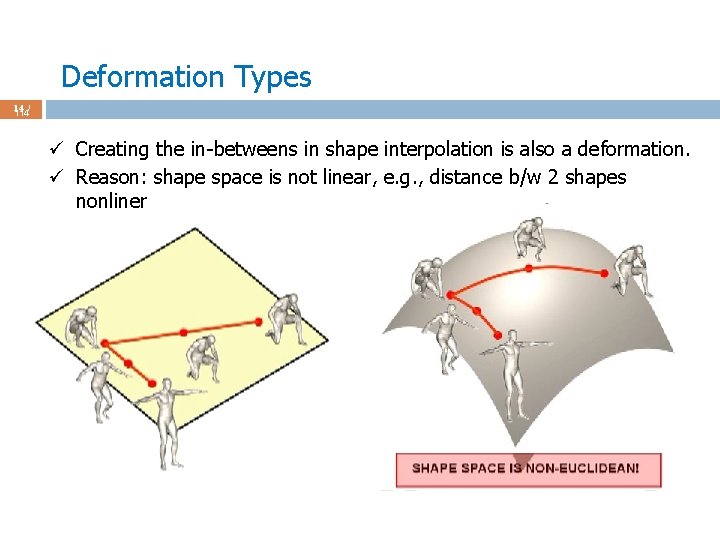
Deformation Types 14 / 114 ü Creating the in-betweens in shape interpolation is also a deformation. ü Reason: shape space is not linear, e. g. , distance b/w 2 shapes nonliner
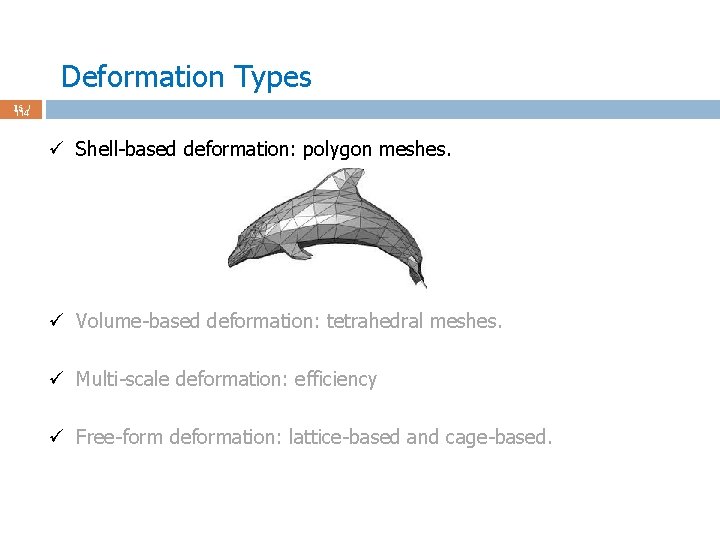
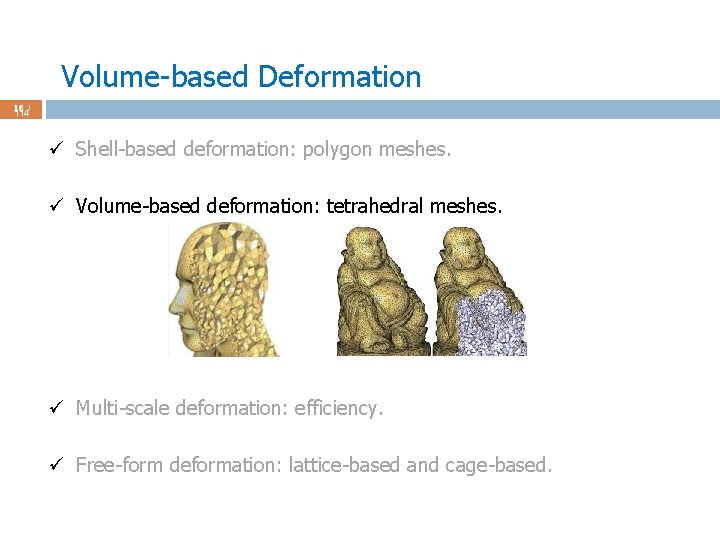
Deformation Types 15 / 114 ü Shell-based deformation: polygon meshes. ü Volume-based deformation: tetrahedral meshes. ü Multi-scale deformation: efficiency ü Free-form deformation: lattice-based and cage-based.
Volume-based Deformation 16 / 114 ü Shell-based deformation: polygon meshes. ü Volume-based deformation: tetrahedral meshes. ü Multi-scale deformation: efficiency. ü Free-form deformation: lattice-based and cage-based.
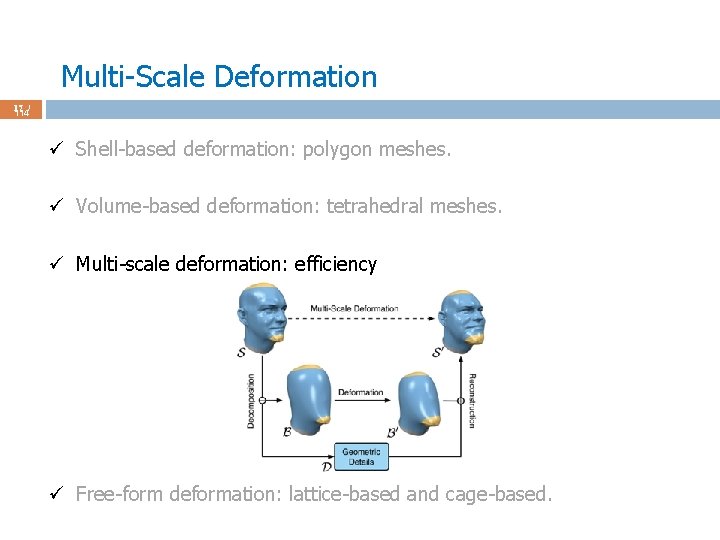
Multi-Scale Deformation 17 / 114 ü Shell-based deformation: polygon meshes. ü Volume-based deformation: tetrahedral meshes. ü Multi-scale deformation: efficiency ü Free-form deformation: lattice-based and cage-based.
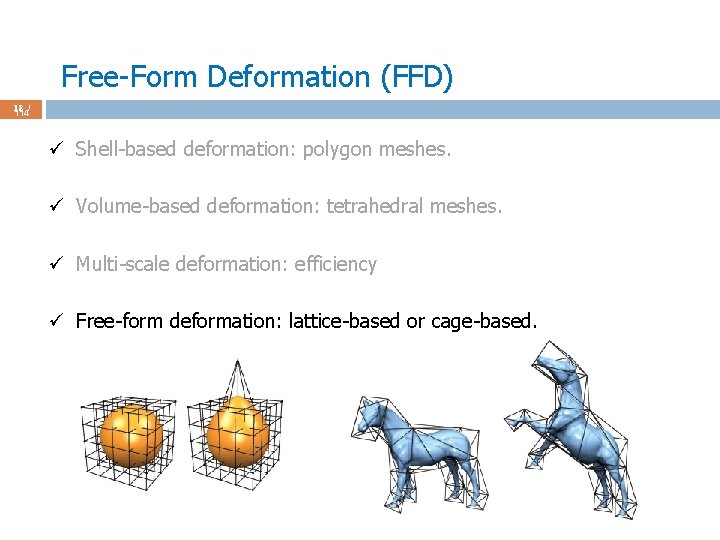
Free-Form Deformation (FFD) 18 / 114 ü Shell-based deformation: polygon meshes. ü Volume-based deformation: tetrahedral meshes. ü Multi-scale deformation: efficiency ü Free-form deformation: lattice-based or cage-based.
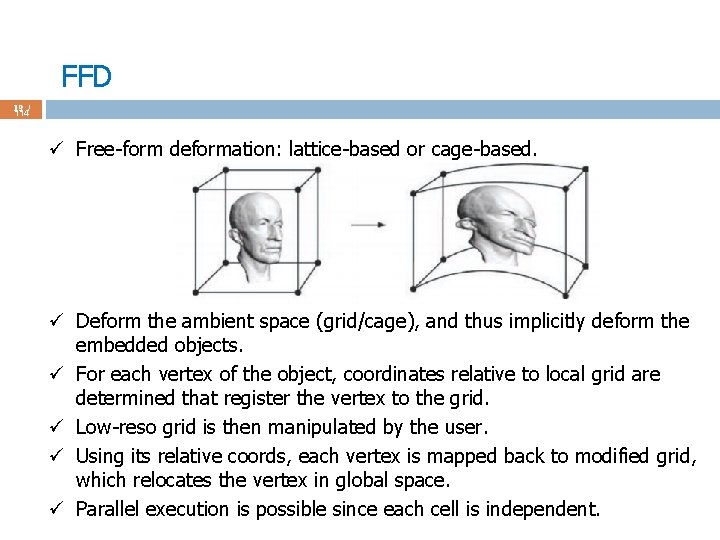
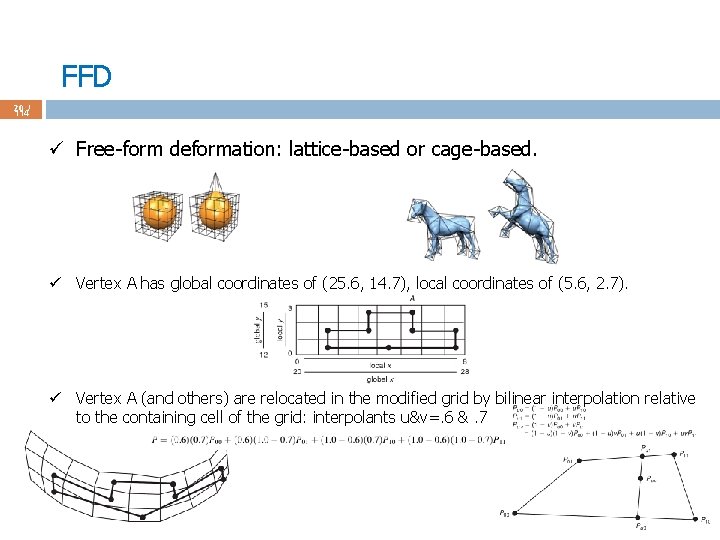
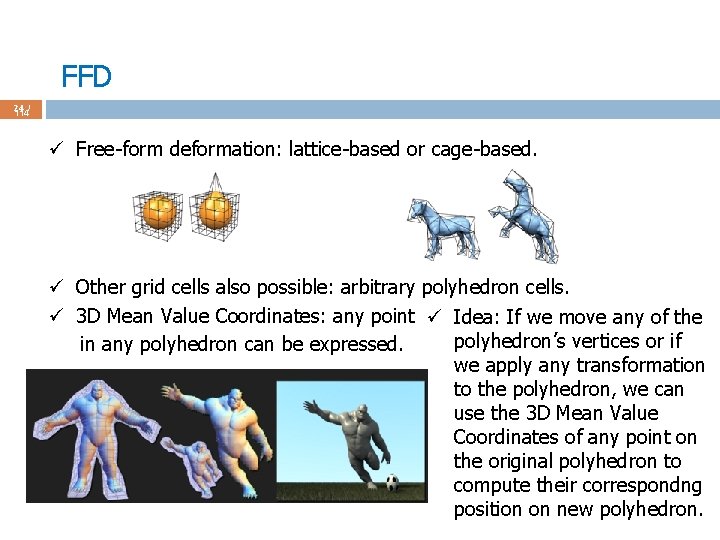
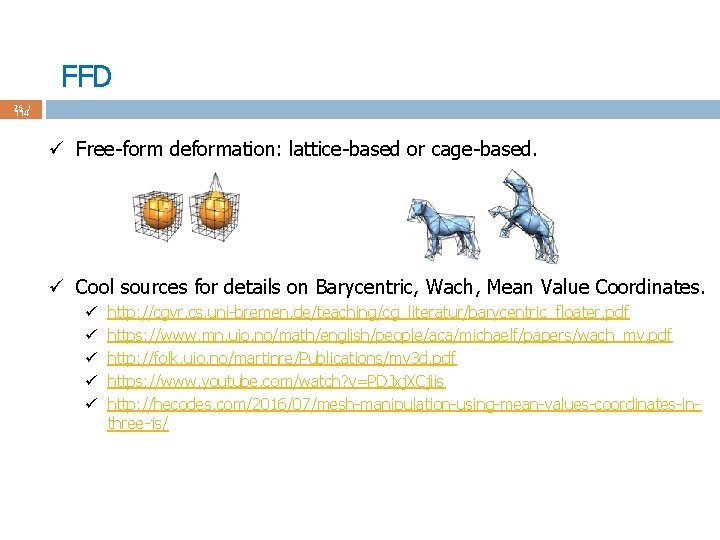
FFD 19 / 114 ü Free-form deformation: lattice-based or cage-based. ü Deform the ambient space (grid/cage), and thus implicitly deform the embedded objects. ü For each vertex of the object, coordinates relative to local grid are determined that register the vertex to the grid. ü Low-reso grid is then manipulated by the user. ü Using its relative coords, each vertex is mapped back to modified grid, which relocates the vertex in global space. ü Parallel execution is possible since each cell is independent.
FFD 20 / 114 ü Free-form deformation: lattice-based or cage-based. ü Vertex A has global coordinates of (25. 6, 14. 7), local coordinates of (5. 6, 2. 7). ü Vertex A (and others) are relocated in the modified grid by bilinear interpolation relative to the containing cell of the grid: interpolants u&v=. 6 &. 7
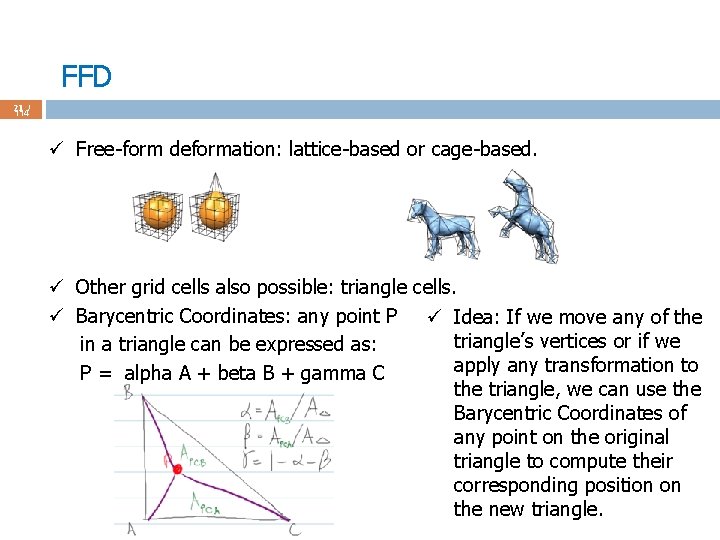
FFD 21 / 114 ü Free-form deformation: lattice-based or cage-based. ü Other grid cells also possible: triangle cells. ü Barycentric Coordinates: any point P ü Idea: If we move any of the triangle’s vertices or if we in a triangle can be expressed as: apply any transformation to P = alpha A + beta B + gamma C the triangle, we can use the Barycentric Coordinates of any point on the original triangle to compute their corresponding position on the new triangle.
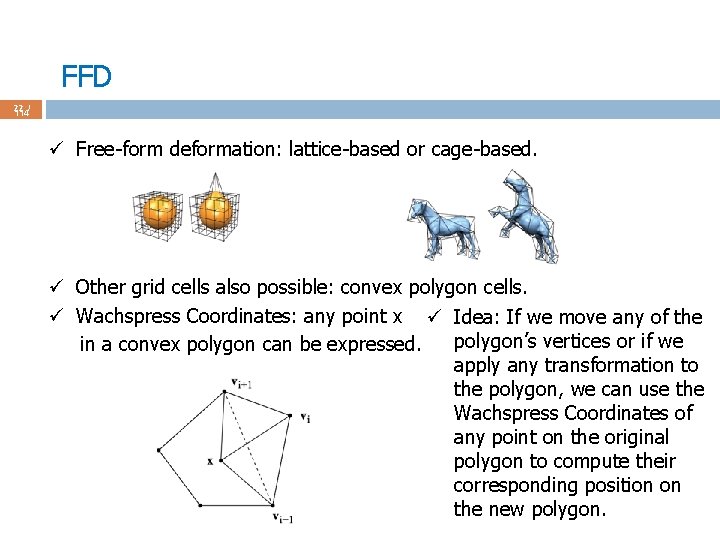
FFD 22 / 114 ü Free-form deformation: lattice-based or cage-based. ü Other grid cells also possible: convex polygon cells. ü Wachspress Coordinates: any point x ü Idea: If we move any of the polygon’s vertices or if we in a convex polygon can be expressed. apply any transformation to the polygon, we can use the Wachspress Coordinates of any point on the original polygon to compute their corresponding position on the new polygon.
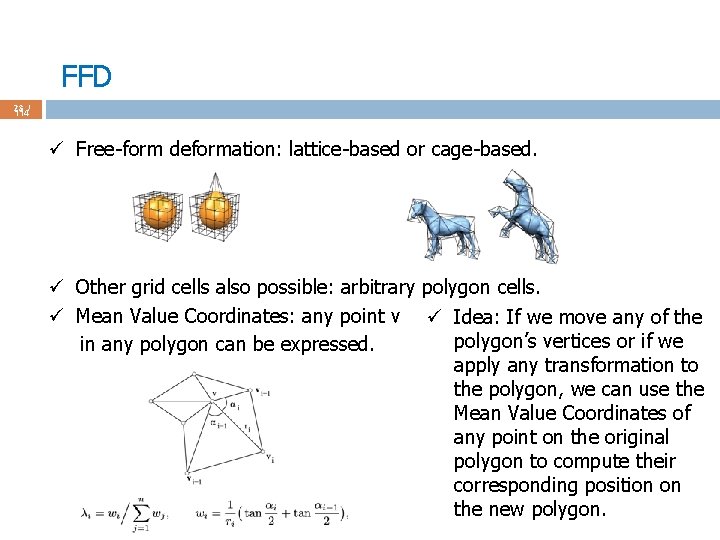
FFD 23 / 114 ü Free-form deformation: lattice-based or cage-based. ü Other grid cells also possible: arbitrary polygon cells. ü Mean Value Coordinates: any point v ü Idea: If we move any of the polygon’s vertices or if we in any polygon can be expressed. apply any transformation to the polygon, we can use the Mean Value Coordinates of any point on the original polygon to compute their corresponding position on the new polygon.
FFD 24 / 114 ü Free-form deformation: lattice-based or cage-based. ü Other grid cells also possible: arbitrary polyhedron cells. ü 3 D Mean Value Coordinates: any point ü Idea: If we move any of the polyhedron’s vertices or if in any polyhedron can be expressed. we apply any transformation to the polyhedron, we can use the 3 D Mean Value Coordinates of any point on the original polyhedron to compute their correspondng position on new polyhedron.
FFD 25 / 114 ü Free-form deformation: lattice-based or cage-based. ü Cool sources for details on Barycentric, Wach, Mean Value Coordinates. ü ü ü http: //cgvr. cs. uni-bremen. de/teaching/cg_literatur/barycentric_floater. pdf https: //www. mn. uio. no/math/english/people/aca/michaelf/papers/wach_mv. pdf http: //folk. uio. no/martinre/Publications/mv 3 d. pdf https: //www. youtube. com/watch? v=PDJxj. XCjiis http: //hecodes. com/2016/07/mesh-manipulation-using-mean-values-coordinates-inthree-js/
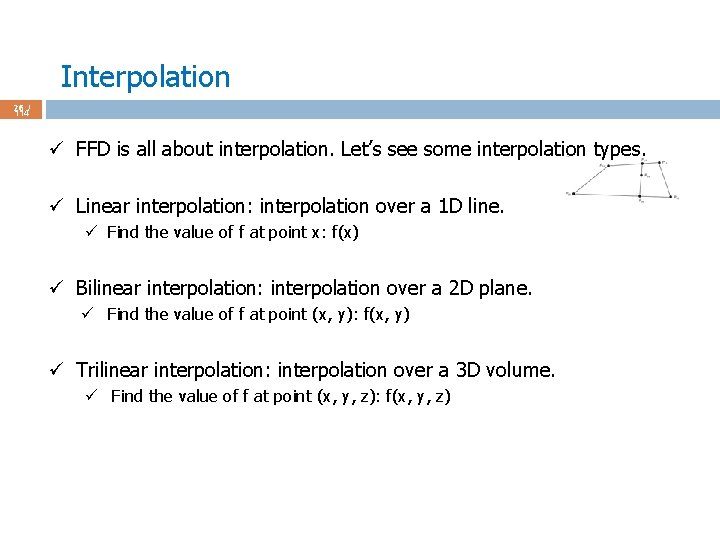
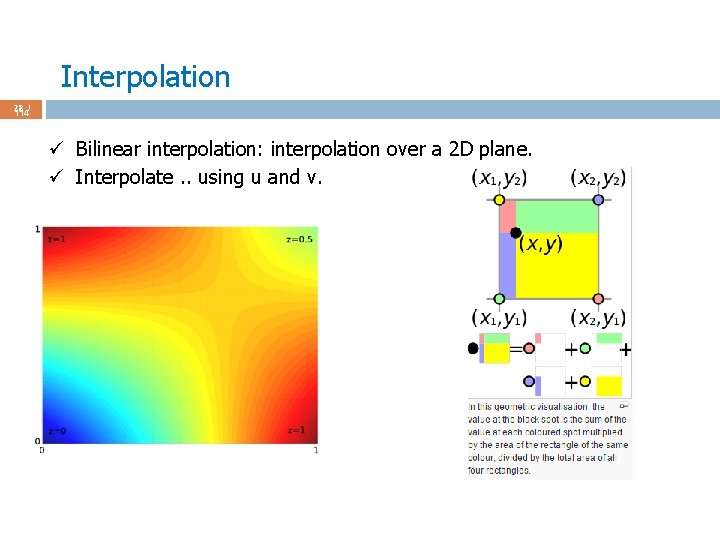
Interpolation 26 / 114 ü FFD is all about interpolation. Let’s see some interpolation types. ü Linear interpolation: interpolation over a 1 D line. ü Find the value of f at point x: f(x) ü Bilinear interpolation: interpolation over a 2 D plane. ü Find the value of f at point (x, y): f(x, y) ü Trilinear interpolation: interpolation over a 3 D volume. ü Find the value of f at point (x, y, z): f(x, y, z)
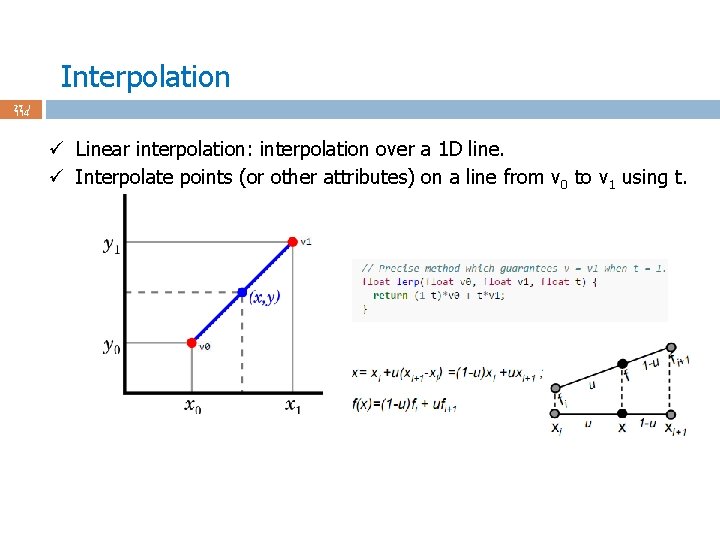
Interpolation 27 / 114 ü Linear interpolation: interpolation over a 1 D line. ü Interpolate points (or other attributes) on a line from v 0 to v 1 using t.
Interpolation 28 / 114 ü Bilinear interpolation: interpolation over a 2 D plane. ü Interpolate. . using u and v.
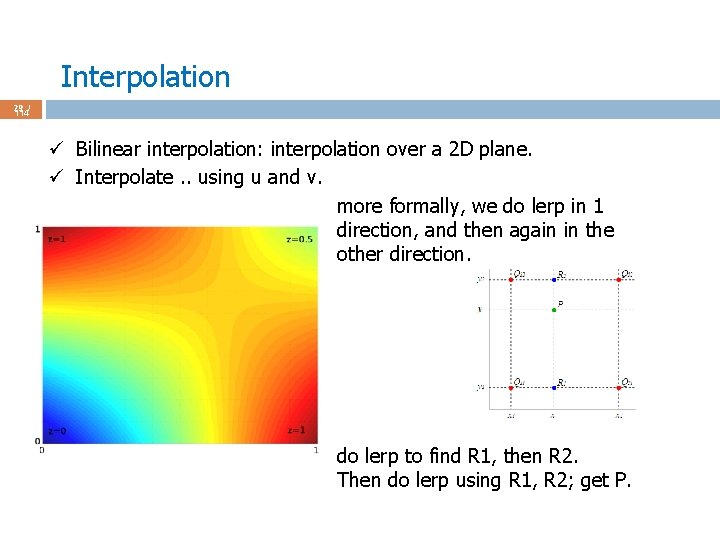
Interpolation 29 / 114 ü Bilinear interpolation: interpolation over a 2 D plane. ü Interpolate. . using u and v. more formally, we do lerp in 1 direction, and then again in the other direction. do lerp to find R 1, then R 2. Then do lerp using R 1, R 2; get P.
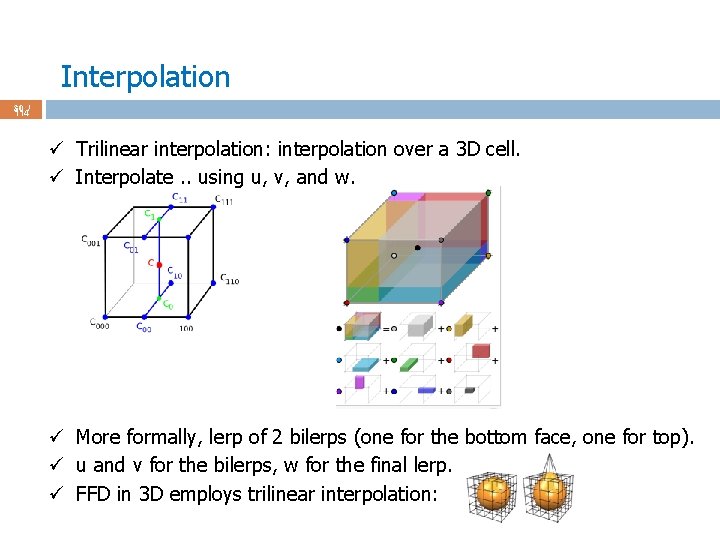
Interpolation 30 / 114 ü Trilinear interpolation: interpolation over a 3 D cell. ü Interpolate. . using u, v, and w. ü More formally, lerp of 2 bilerps (one for the bottom face, one for top). ü u and v for the bilerps, w for the final lerp. ü FFD in 3 D employs trilinear interpolation:
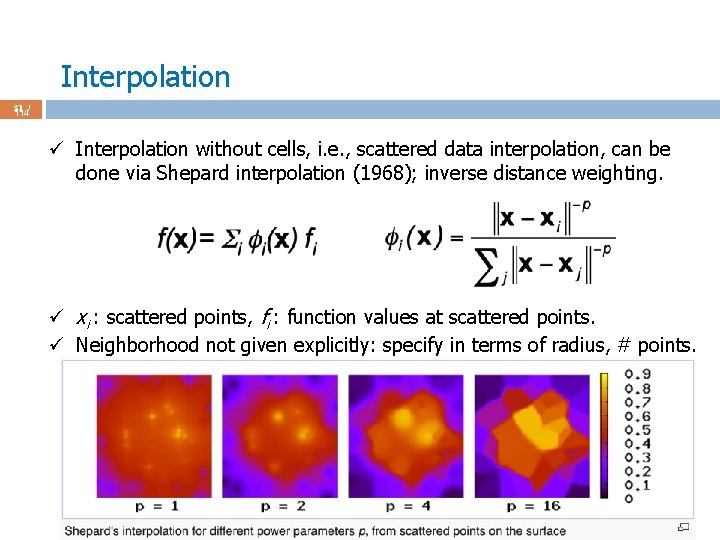
Interpolation 31 / 114 ü Interpolation without cells, i. e. , scattered data interpolation, can be done via Shepard interpolation (1968); inverse distance weighting. ü xi : scattered points, fi : function values at scattered points. ü Neighborhood not given explicitly: specify in terms of radius, # points.
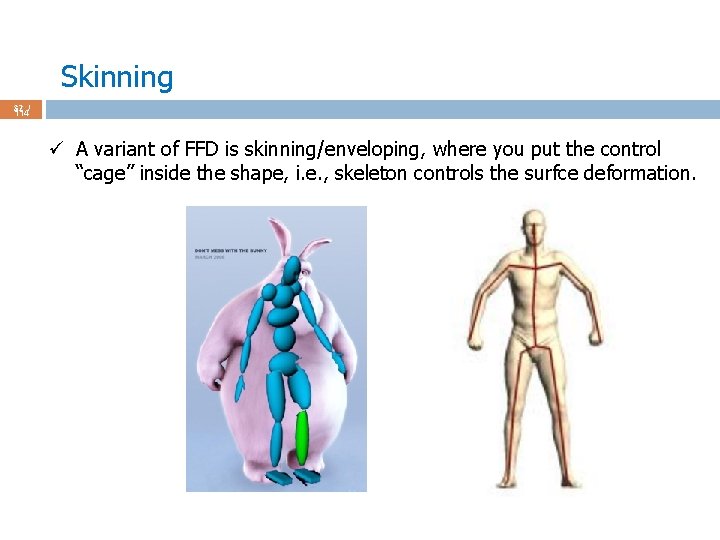
Skinning 32 / 114 ü A variant of FFD is skinning/enveloping, where you put the control “cage” inside the shape, i. e. , skeleton controls the surfce deformation.
Skinning 33 / 114 ü A variant of FFD is skinning/enveloping, where you put the control “cage” inside the shape, i. e. , skeleton controls the surfce deformation. ü Bind skin vertices to bones. ü Animate skeleton (easy: change the joint angles), skin'll move with it. ü Skinning is aka ü Skeletal subspace deformation (SSD). ü Linear blend skinning (LBS).
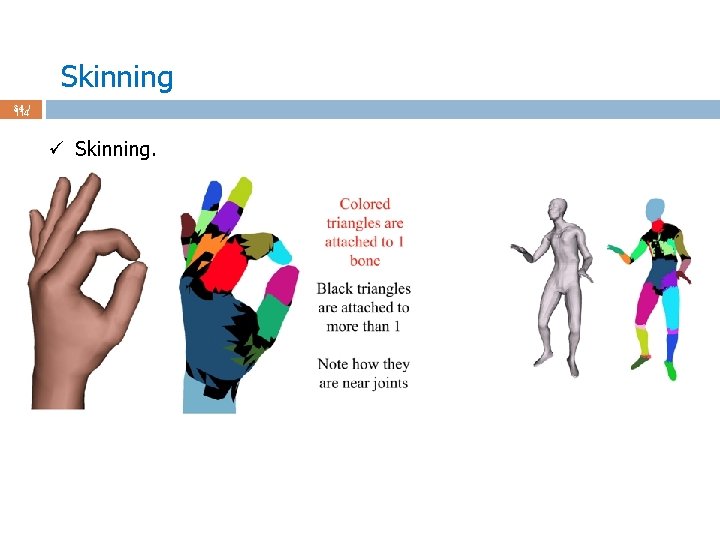
Skinning 34 / 114 ü Skinning.
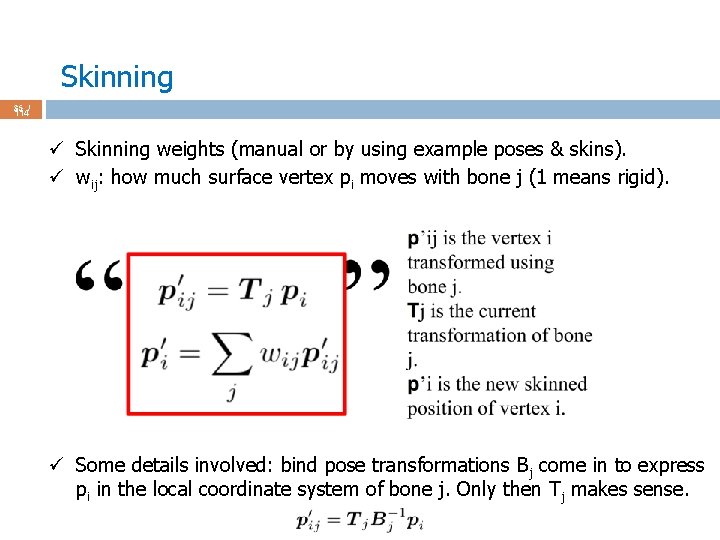
Skinning 35 / 114 ü Skinning weights (manual or by using example poses & skins). ü wij: how much surface vertex pi moves with bone j (1 means rigid). ü Some details involved: bind pose transformations Bj come in to express pi in the local coordinate system of bone j. Only then T j makes sense.
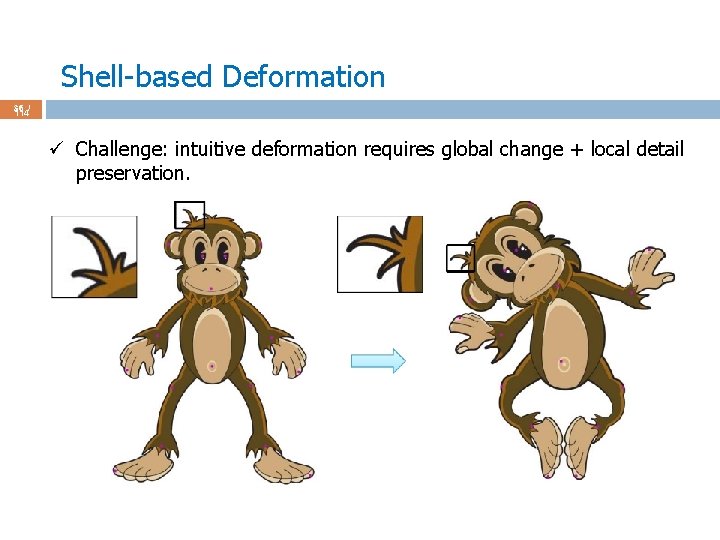
Shell-based Deformation 36 / 114 ü Challenge: intuitive deformation requires global change + local detail preservation.
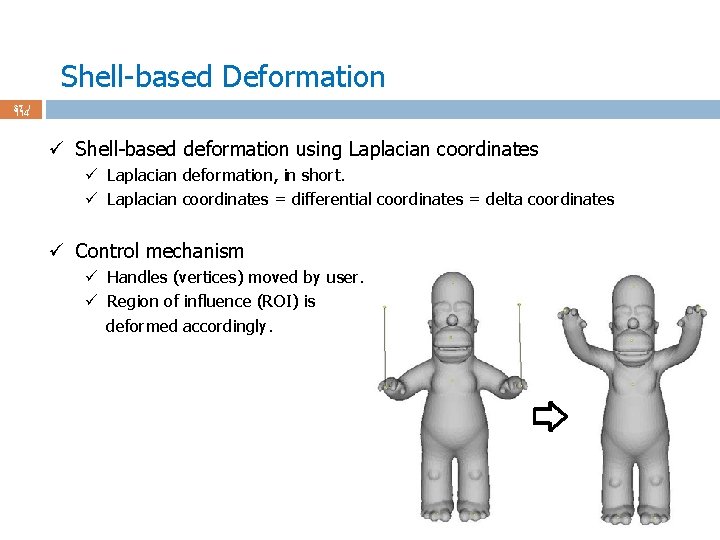
Shell-based Deformation 37 / 114 ü Shell-based deformation using Laplacian coordinates ü Laplacian deformation, in short. ü Laplacian coordinates = differential coordinates = delta coordinates ü Control mechanism ü Handles (vertices) moved by user. ü Region of influence (ROI) is deformed accordingly.
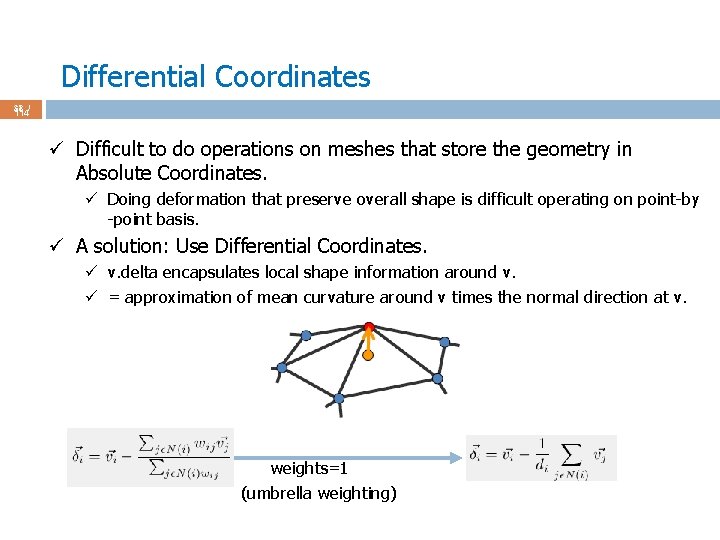
Differential Coordinates 38 / 114 ü Difficult to do operations on meshes that store the geometry in Absolute Coordinates. ü Doing deformation that preserve overall shape is difficult operating on point-by -point basis. ü A solution: Use Differential Coordinates. ü v. delta encapsulates local shape information around v. ü = approximation of mean curvature around v times the normal direction at v. weights=1 (umbrella weighting)
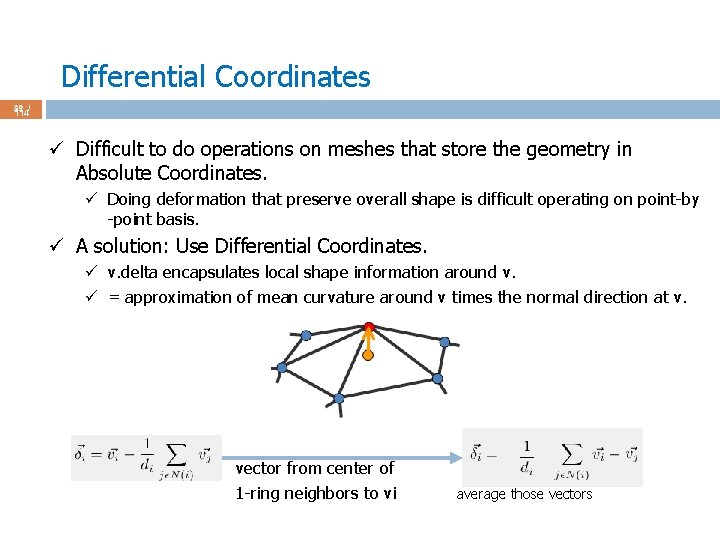
Differential Coordinates 39 / 114 ü Difficult to do operations on meshes that store the geometry in Absolute Coordinates. ü Doing deformation that preserve overall shape is difficult operating on point-by -point basis. ü A solution: Use Differential Coordinates. ü v. delta encapsulates local shape information around v. ü = approximation of mean curvature around v times the normal direction at v. vector from center of 1 -ring neighbors to vi average those vectors
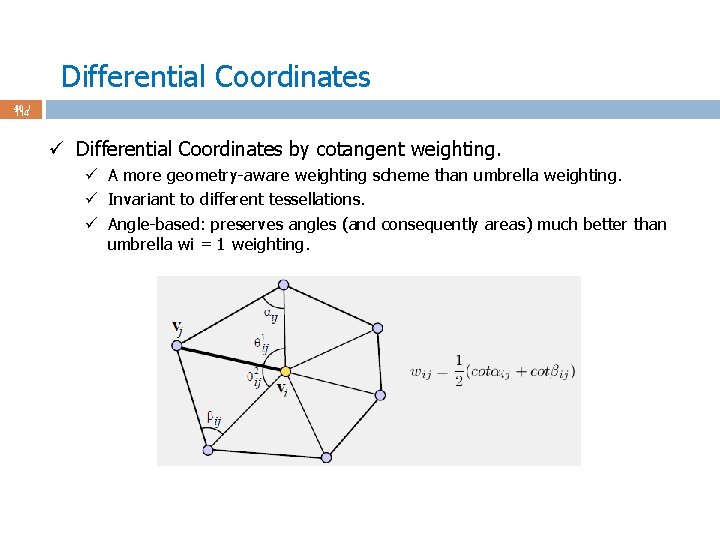
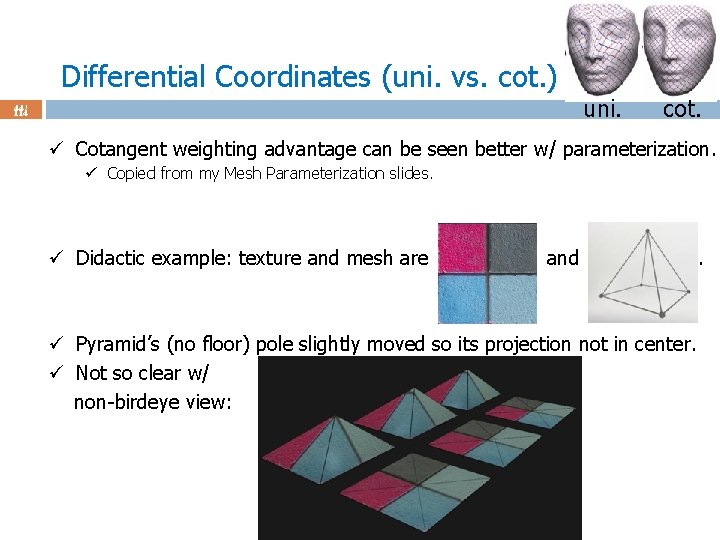
Differential Coordinates 40 / 114 ü Differential Coordinates by cotangent weighting. ü A more geometry-aware weighting scheme than umbrella weighting. ü Invariant to different tessellations. ü Angle-based: preserves angles (and consequently areas) much better than umbrella wi = 1 weighting.
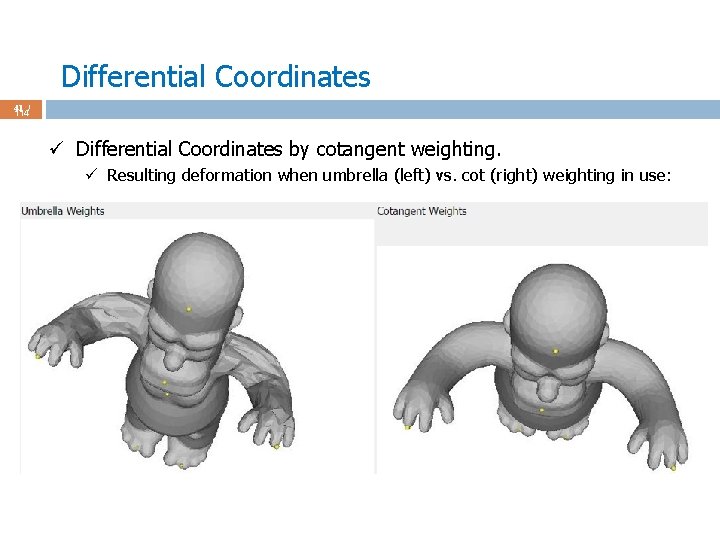
Differential Coordinates 41 / 114 ü Differential Coordinates by cotangent weighting. ü Resulting deformation when umbrella (left) vs. cot (right) weighting in use:
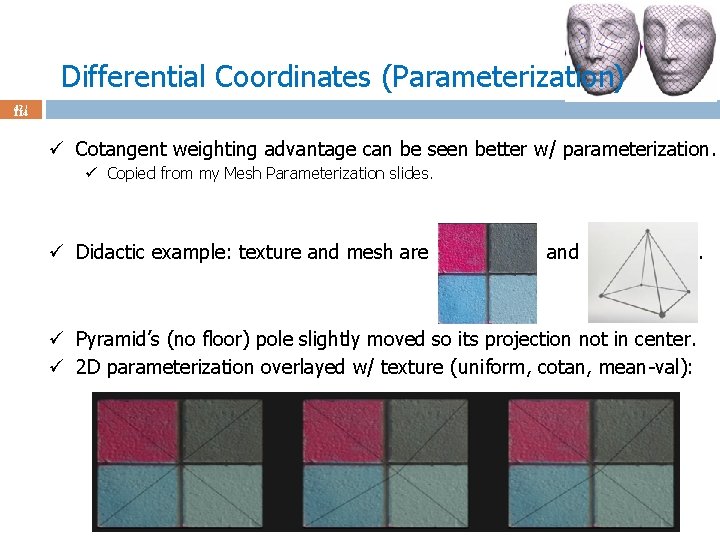
Differential Coordinates (Parameterization) 42 / 114 ü Cotangent weighting advantage can be seen better w/ parameterization. ü Copied from my Mesh Parameterization slides. ü Didactic example: texture and mesh are and ü Pyramid’s (no floor) pole slightly moved so its projection not in center. ü 2 D parameterization overlayed w/ texture (uniform, cotan, mean-val): .
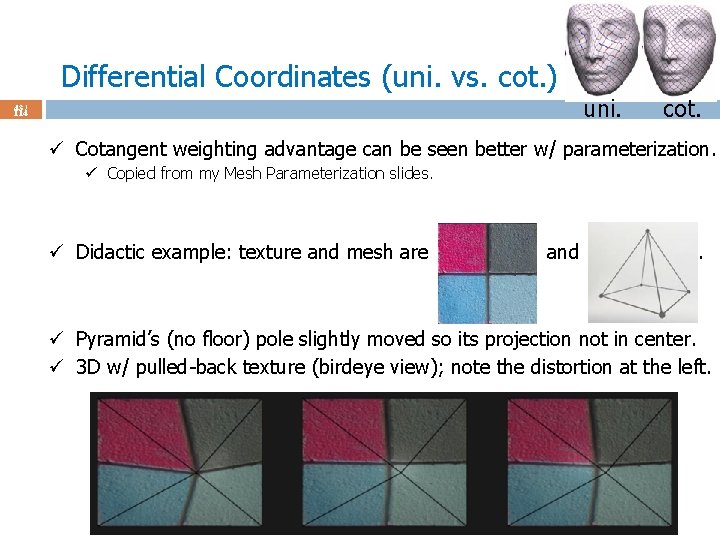
Differential Coordinates (uni. vs. cot. ) uni. 43 / 114 cot. ü Cotangent weighting advantage can be seen better w/ parameterization. ü Copied from my Mesh Parameterization slides. ü Didactic example: texture and mesh are and . ü Pyramid’s (no floor) pole slightly moved so its projection not in center. ü 3 D w/ pulled-back texture (birdeye view); note the distortion at the left.
Differential Coordinates (uni. vs. cot. ) uni. 44 / 114 cot. ü Cotangent weighting advantage can be seen better w/ parameterization. ü Copied from my Mesh Parameterization slides. ü Didactic example: texture and mesh are and ü Pyramid’s (no floor) pole slightly moved so its projection not in center. ü Not so clear w/ non-birdeye view: .
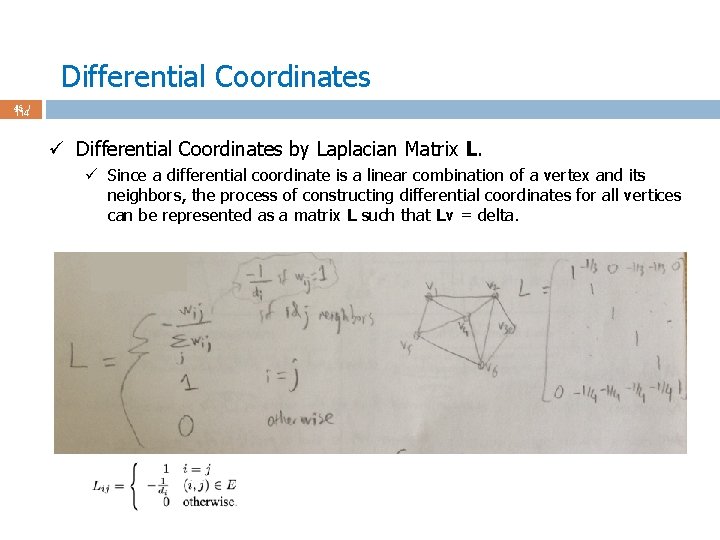
Differential Coordinates 45 / 114 ü Differential Coordinates by Laplacian Matrix L. ü Since a differential coordinate is a linear combination of a vertex and its neighbors, the process of constructing differential coordinates for all vertices can be represented as a matrix L such that Lv = delta.
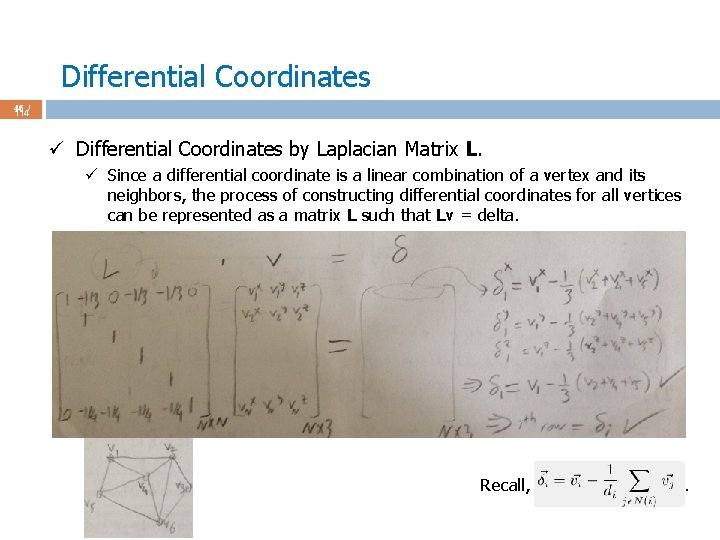
Differential Coordinates 46 / 114 ü Differential Coordinates by Laplacian Matrix L. ü Since a differential coordinate is a linear combination of a vertex and its neighbors, the process of constructing differential coordinates for all vertices can be represented as a matrix L such that Lv = delta. Recall, .
Differential Coordinates 47 / 114 ü Differential Coordinates by Laplacian Matrix L. ü Nx. N matrix L is extremely sparse: degree = 6 (6+1) out of N non-zero entries per row where N is the number of vertices; typically N > 10000. ü Use a sparse matrix package: Eigen http: //eigen. tuxfamily. org/index. php? title=Main_Page ü Eigen’ll also be handy while solving linear system Ax = b for the deformation. ü Useful for eigenanalysis too. ü In short, a cool linear algebra library.
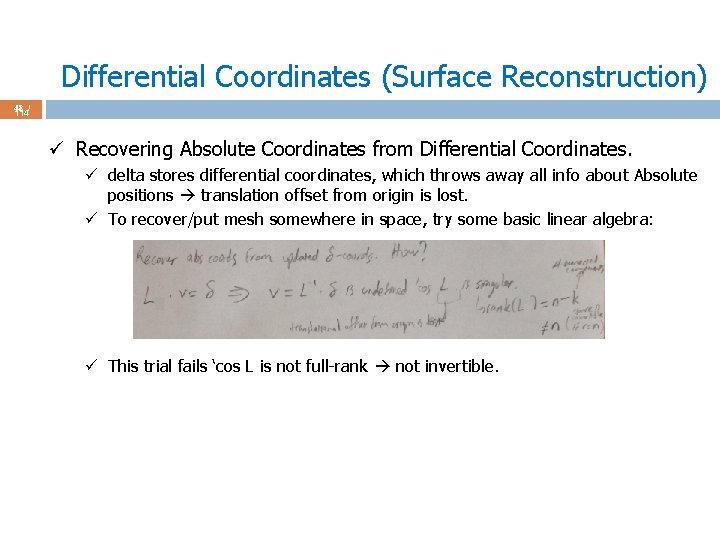
Differential Coordinates (Surface Reconstruction) 48 / 114 ü Recovering Absolute Coordinates from Differential Coordinates. ü delta stores differential coordinates, which throws away all info about Absolute positions translation offset from origin is lost. ü To recover/put mesh somewhere in space, try some basic linear algebra: ü This trial fails ‘cos L is not full-rank not invertible.
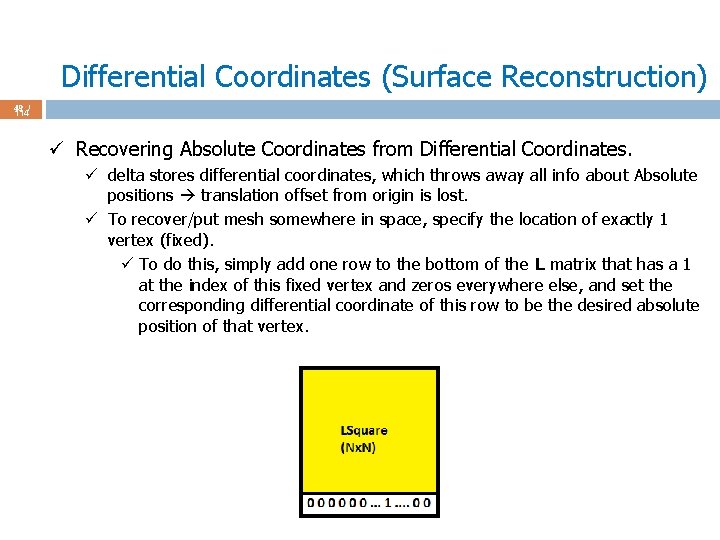
Differential Coordinates (Surface Reconstruction) 49 / 114 ü Recovering Absolute Coordinates from Differential Coordinates. ü delta stores differential coordinates, which throws away all info about Absolute positions translation offset from origin is lost. ü To recover/put mesh somewhere in space, specify the location of exactly 1 vertex (fixed). ü To do this, simply add one row to the bottom of the L matrix that has a 1 at the index of this fixed vertex and zeros everywhere else, and set the corresponding differential coordinate of this row to be the desired absolute position of that vertex.
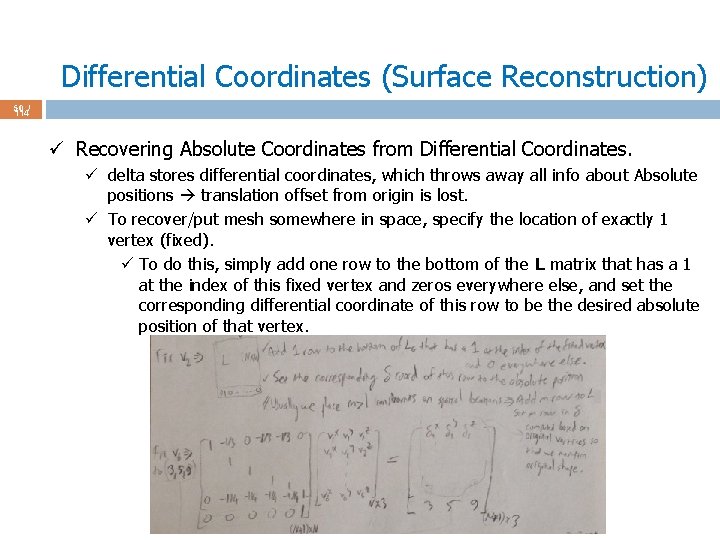
Differential Coordinates (Surface Reconstruction) 50 / 114 ü Recovering Absolute Coordinates from Differential Coordinates. ü delta stores differential coordinates, which throws away all info about Absolute positions translation offset from origin is lost. ü To recover/put mesh somewhere in space, specify the location of exactly 1 vertex (fixed). ü To do this, simply add one row to the bottom of the L matrix that has a 1 at the index of this fixed vertex and zeros everywhere else, and set the corresponding differential coordinate of this row to be the desired absolute position of that vertex.
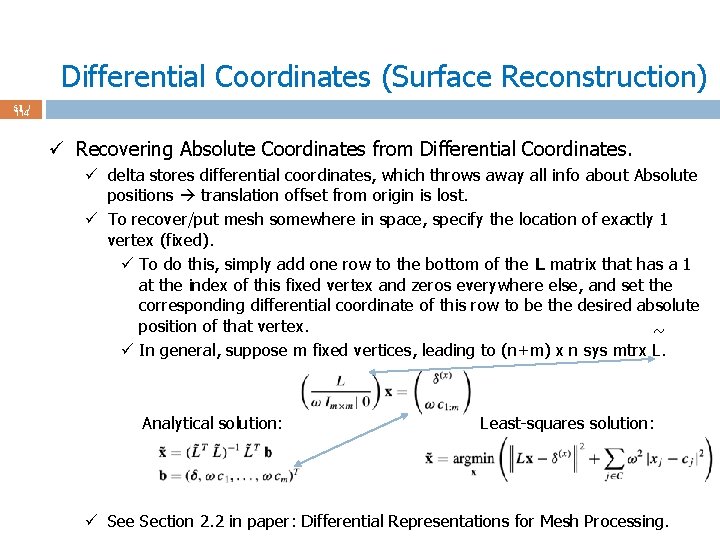
Differential Coordinates (Surface Reconstruction) 51 / 114 ü Recovering Absolute Coordinates from Differential Coordinates. ü delta stores differential coordinates, which throws away all info about Absolute positions translation offset from origin is lost. ü To recover/put mesh somewhere in space, specify the location of exactly 1 vertex (fixed). ü To do this, simply add one row to the bottom of the L matrix that has a 1 at the index of this fixed vertex and zeros everywhere else, and set the corresponding differential coordinate of this row to be the desired absolute position of that vertex. ~ ü In general, suppose m fixed vertices, leading to (n+m) x n sys mtrx L. Analytical solution: Least-squares solution: ü See Section 2. 2 in paper: Differential Representations for Mesh Processing.
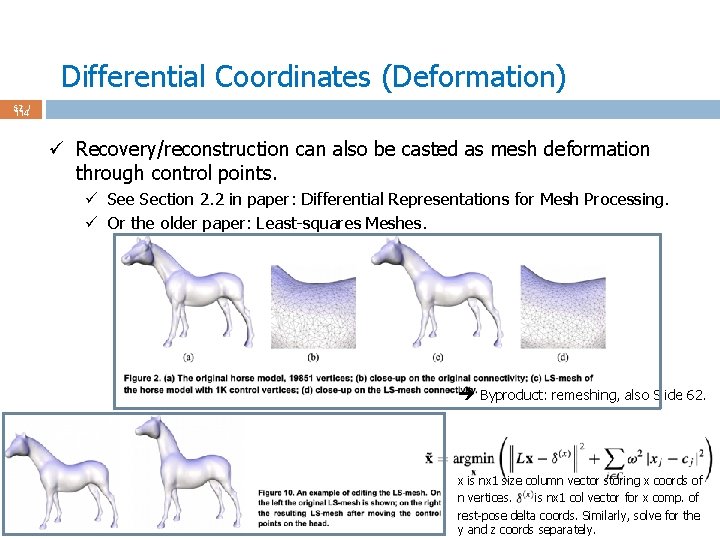
Differential Coordinates (Deformation) 52 / 114 ü Recovery/reconstruction can also be casted as mesh deformation through control points. ü See Section 2. 2 in paper: Differential Representations for Mesh Processing. ü Or the older paper: Least-squares Meshes. Byproduct: remeshing, also Slide 62. x is nx 1 size column vector storing x coords of n vertices. is nx 1 col vector for x comp. of rest-pose delta coords. Similarly, solve for the y and z coords separately.
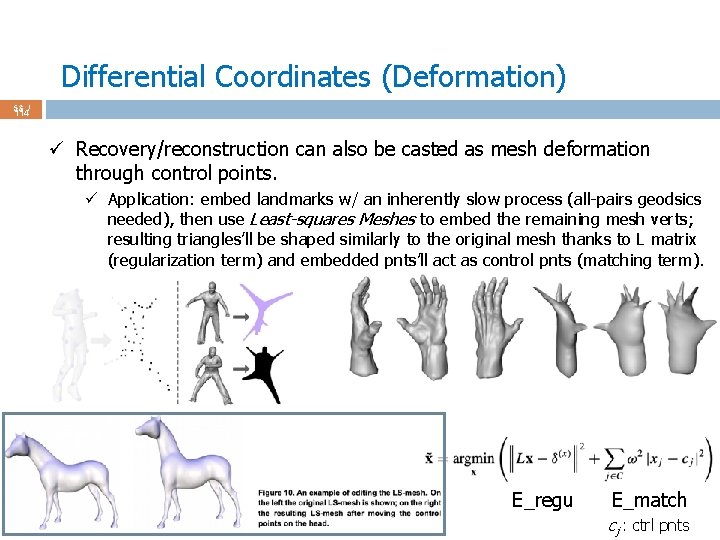
Differential Coordinates (Deformation) 53 / 114 ü Recovery/reconstruction can also be casted as mesh deformation through control points. ü Application: embed landmarks w/ an inherently slow process (all-pairs geodsics needed), then use Least-squares Meshes to embed the remaining mesh verts; resulting triangles’ll be shaped similarly to the original mesh thanks to L matrix (regularization term) and embedded pnts’ll act as control pnts (matching term). E_regu E_match cj : ctrl pnts
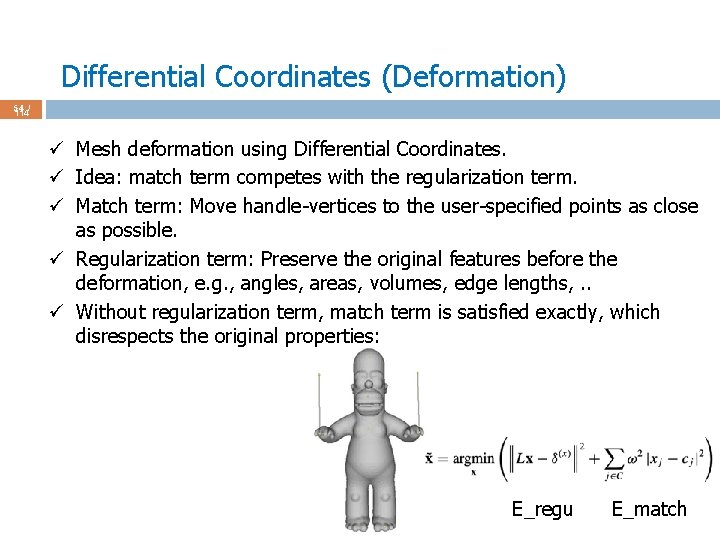
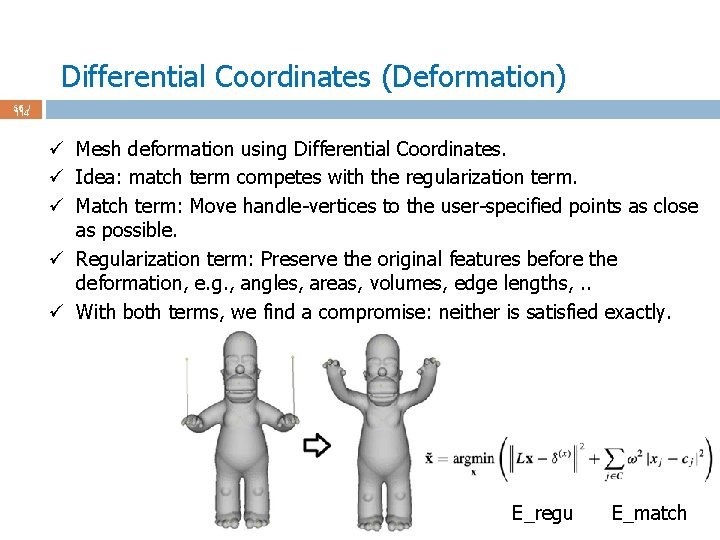
Differential Coordinates (Deformation) 54 / 114 ü Mesh deformation using Differential Coordinates. ü Idea: match term competes with the regularization term. ü Match term: Move handle-vertices to the user-specified points as close as possible. ü Regularization term: Preserve the original features before the deformation, e. g. , angles, areas, volumes, edge lengths, . . ü Without regularization term, match term is satisfied exactly, which disrespects the original properties: E_regu E_match
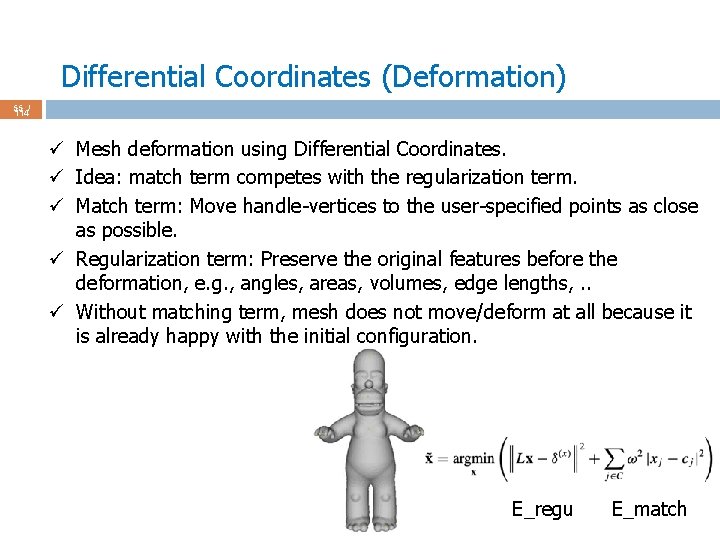
Differential Coordinates (Deformation) 55 / 114 ü Mesh deformation using Differential Coordinates. ü Idea: match term competes with the regularization term. ü Match term: Move handle-vertices to the user-specified points as close as possible. ü Regularization term: Preserve the original features before the deformation, e. g. , angles, areas, volumes, edge lengths, . . ü Without matching term, mesh does not move/deform at all because it is already happy with the initial configuration. E_regu E_match
Differential Coordinates (Deformation) 56 / 114 ü Mesh deformation using Differential Coordinates. ü Idea: match term competes with the regularization term. ü Match term: Move handle-vertices to the user-specified points as close as possible. ü Regularization term: Preserve the original features before the deformation, e. g. , angles, areas, volumes, edge lengths, . . ü With both terms, we find a compromise: neither is satisfied exactly. E_regu E_match
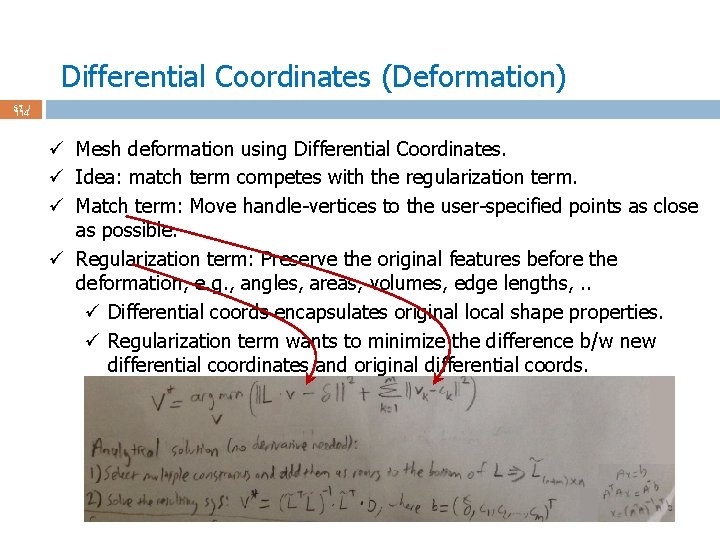
Differential Coordinates (Deformation) 57 / 114 ü Mesh deformation using Differential Coordinates. ü Idea: match term competes with the regularization term. ü Match term: Move handle-vertices to the user-specified points as close as possible. ü Regularization term: Preserve the original features before the deformation, e. g. , angles, areas, volumes, edge lengths, . . ü Differential coords encapsulates original local shape properties. ü Regularization term wants to minimize the difference b/w new differential coordinates and original differential coords.
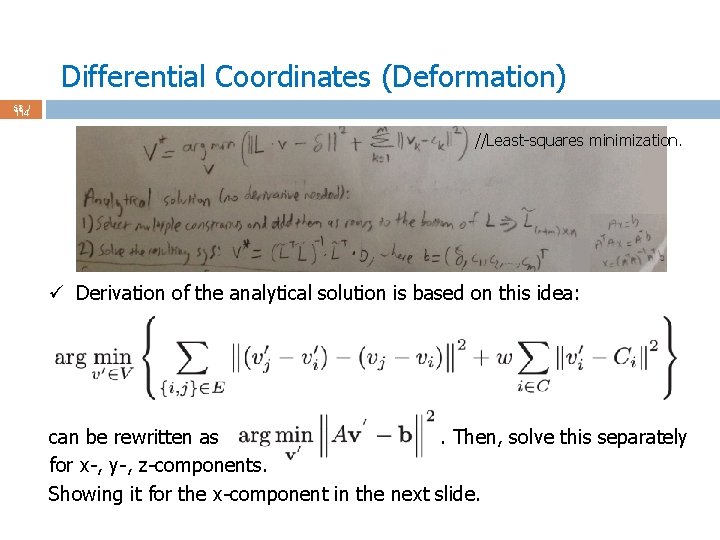
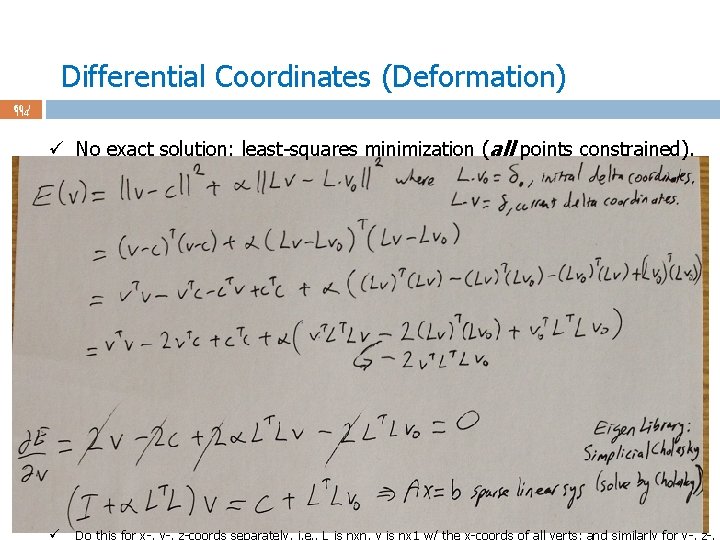
Differential Coordinates (Deformation) 58 / 114 //Least-squares minimization. ü Derivation of the analytical solution is based on this idea: can be rewritten as. Then, solve this separately for x-, y-, z-components. Showing it for the x-component in the next slide.
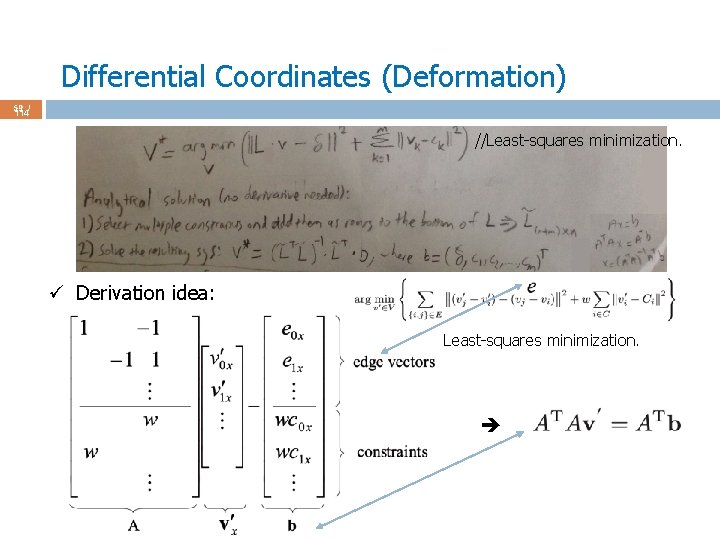
Differential Coordinates (Deformation) 59 / 114 //Least-squares minimization. ü Derivation idea: Least-squares minimization.
Differential Coordinates (Deformation) 60 / 114 ü No exact solution: least-squares minimization (all points constrained). ü Do this for x-, y-, z-coords separately, i. e. , L is nxn, v is nx 1 w/ the x-coords of all verts; and similarly for y-, z-.
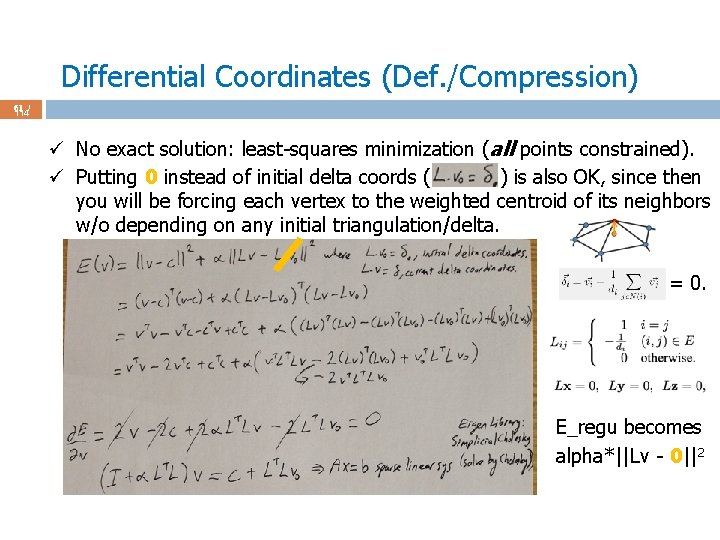
Differential Coordinates (Def. /Compression) 61 / 114 ü No exact solution: least-squares minimization (all points constrained). ü Putting 0 instead of initial delta coords ( ) is also OK, since then you will be forcing each vertex to the weighted centroid of its neighbors w/o depending on any initial triangulation/delta. = 0. E_regu becomes alpha*||Lv - 0||2
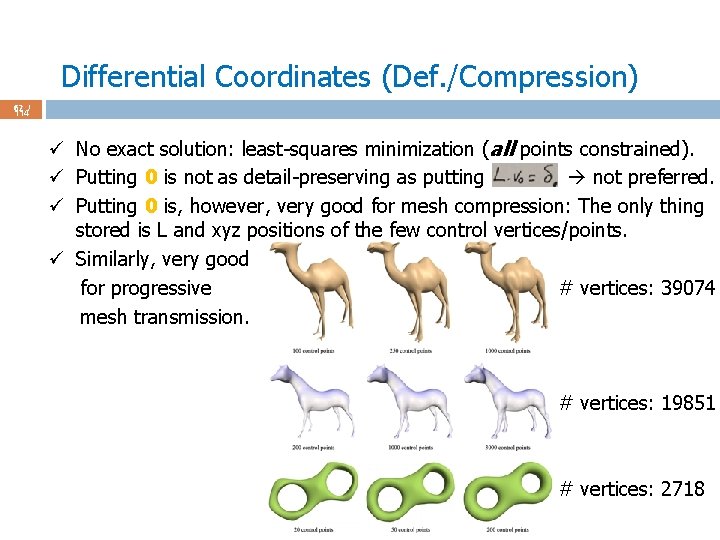
Differential Coordinates (Def. /Compression) 62 / 114 ü No exact solution: least-squares minimization (all points constrained). ü Putting 0 is not as detail-preserving as putting not preferred. ü Putting 0 is, however, very good for mesh compression: The only thing stored is L and xyz positions of the few control vertices/points. ü Similarly, very good for progressive # vertices: 39074 mesh transmission. # vertices: 19851 # vertices: 2718
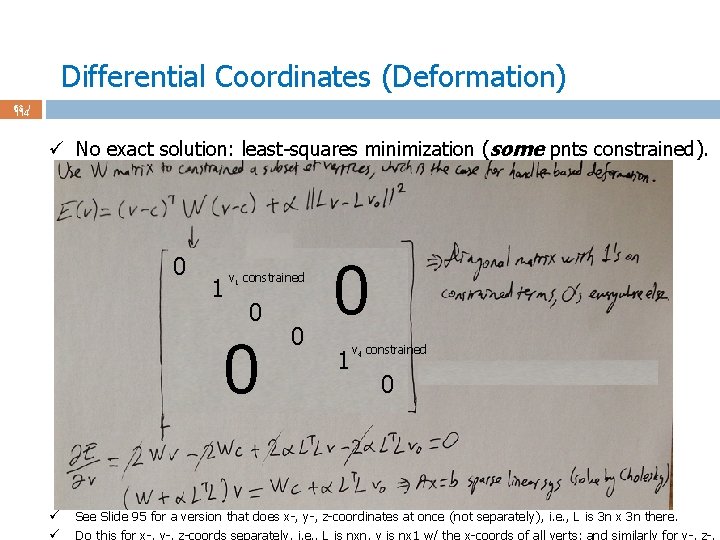
Differential Coordinates (Deformation) 63 / 114 ü No exact solution: least-squares minimization (some pnts constrained). 0 1 v 1 constrained 0 0 ü ü 0 0 1 v 4 constrained 0 See Slide 95 for a version that does x-, y-, z-coordinates at once (not separately), i. e. , L is 3 n x 3 n there. Do this for x-, y-, z-coords separately, i. e. , L is nxn, v is nx 1 w/ the x-coords of all verts; and similarly for y-, z-.
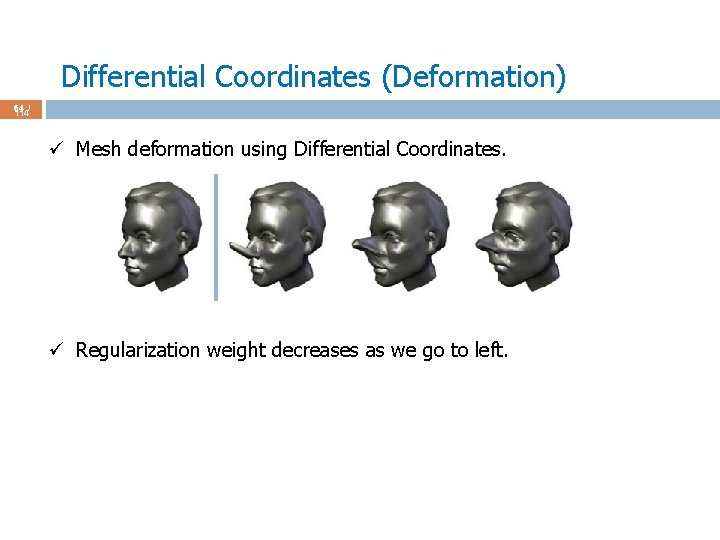
Differential Coordinates (Deformation) 64 / 114 ü Mesh deformation using Differential Coordinates. ü Regularization weight decreases as we go to left.
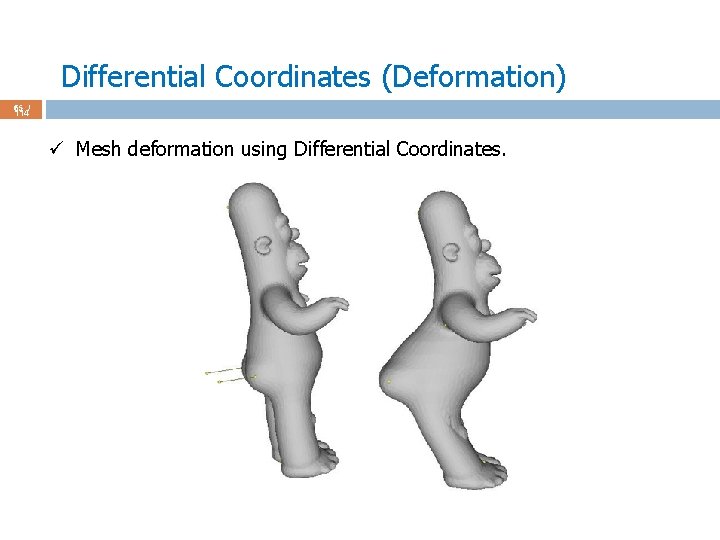
Differential Coordinates (Deformation) 65 / 114 ü Mesh deformation using Differential Coordinates.
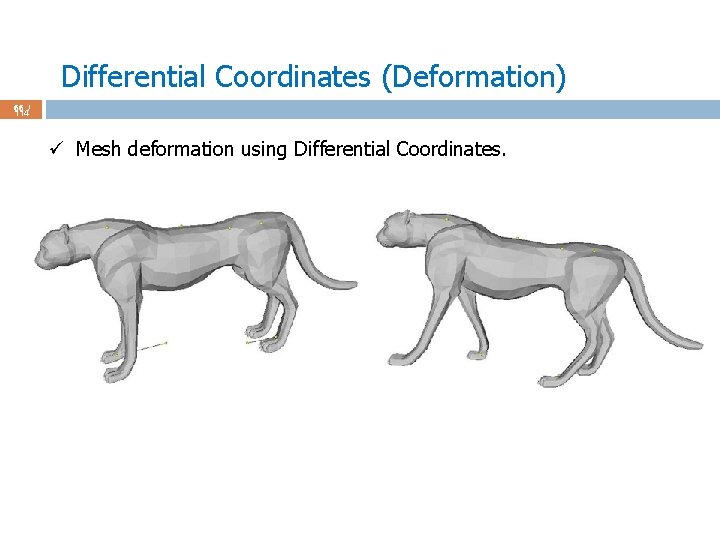
Differential Coordinates (Deformation) 66 / 114 ü Mesh deformation using Differential Coordinates.
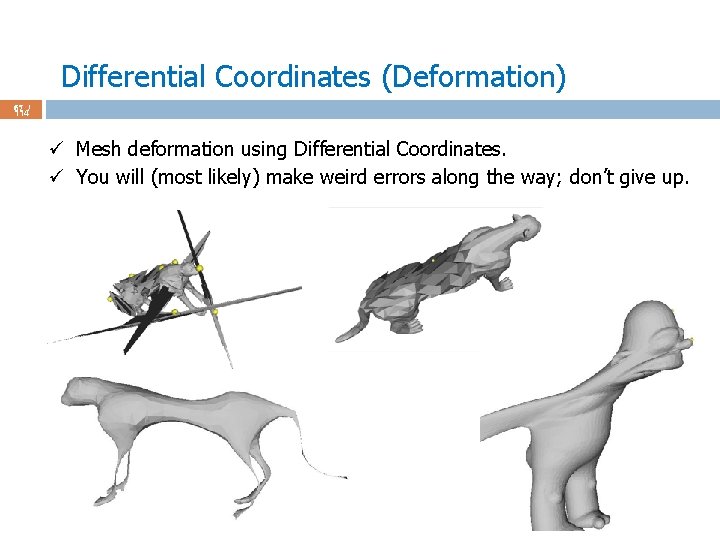
Differential Coordinates (Deformation) 67 / 114 ü Mesh deformation using Differential Coordinates. ü You will (most likely) make weird errors along the way; don’t give up.
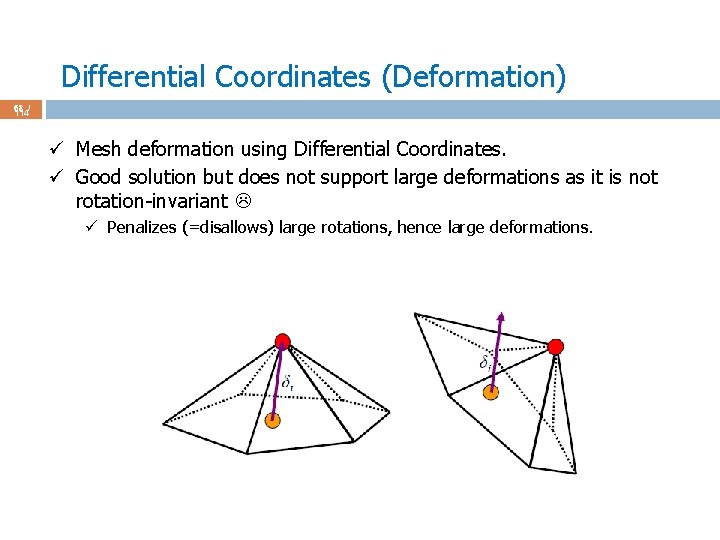
Differential Coordinates (Deformation) 68 / 114 ü Mesh deformation using Differential Coordinates. ü Good solution but does not support large deformations as it is not rotation-invariant ü Penalizes (=disallows) large rotations, hence large deformations.
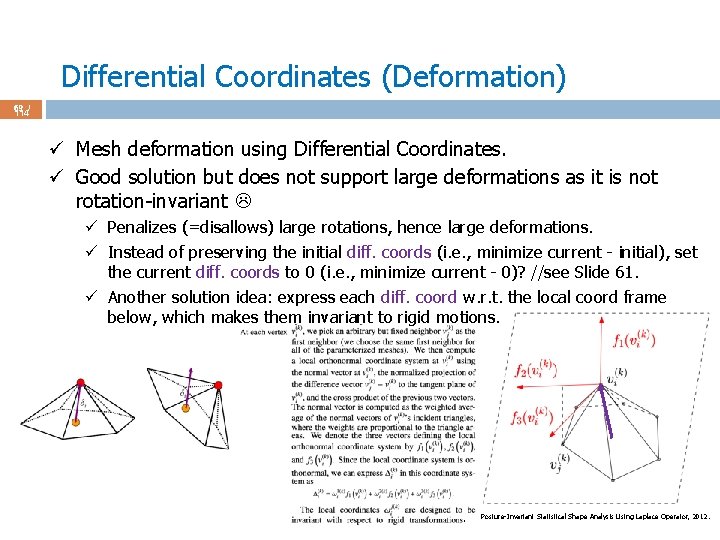
Differential Coordinates (Deformation) 69 / 114 ü Mesh deformation using Differential Coordinates. ü Good solution but does not support large deformations as it is not rotation-invariant ü Penalizes (=disallows) large rotations, hence large deformations. ü Instead of preserving the initial diff. coords (i. e. , minimize current - initial), set the current diff. coords to 0 (i. e. , minimize current - 0)? //see Slide 61. ü Another solution idea: express each diff. coord w. r. t. the local coord frame below, which makes them invariant to rigid motions. . Posture-Invariant Statistical Shape Analysis Using Laplace Operator, 2012.
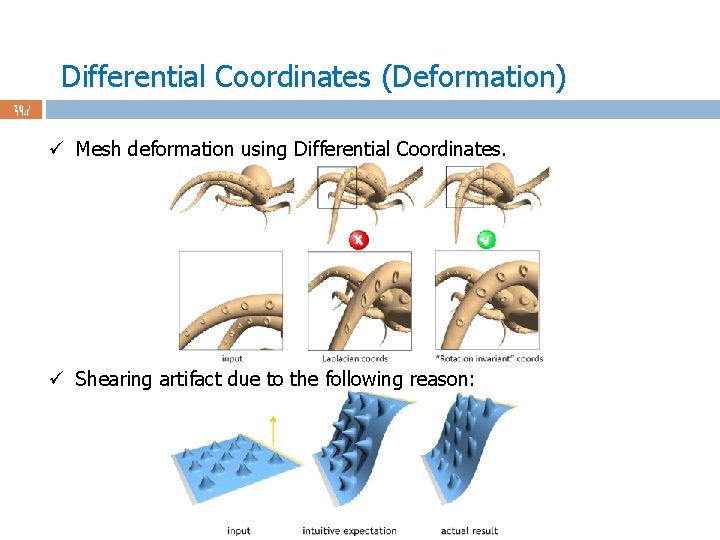
Differential Coordinates (Deformation) 70 / 114 ü Mesh deformation using Differential Coordinates. ü Shearing artifact due to the following reason:
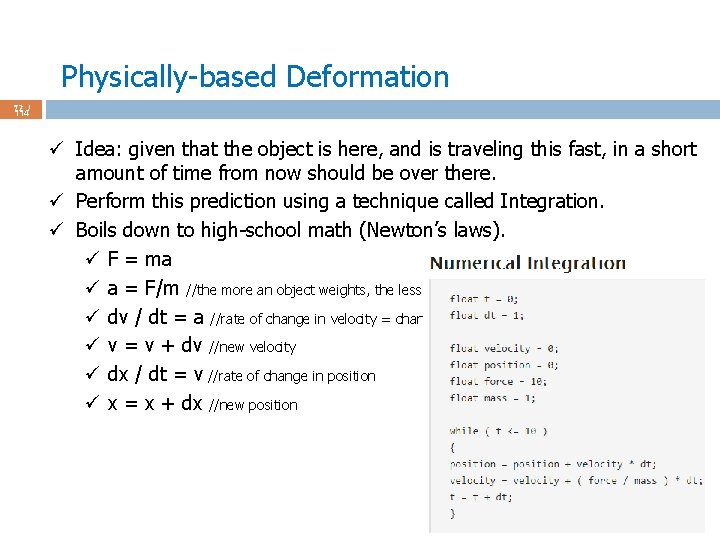
Physically-based Deformation 71 / 114 ü Idea: given that the object is here and traveling this fast, in a short amount of time from now should be over there. ü Perform this prediction using a technique called Integration. ü Boils down to basic math (Newton’s laws). ü F = ma ü a = F/m //the more an object weights, the less its acceleration from the same force ü dv / dt = a //rate of change in velocity = change in velocity per dt (= per 1 sec); dv = a dt ü v = v + dv //new velocity ü dx / dt = v //rate of change in position; dx = v dt ü x = x + dx //new position
Physically-based Deformation 72 / 114 ü Idea: given that the object is here, and is traveling this fast, in a short amount of time from now should be over there. ü Perform this prediction using a technique called Integration. ü Boils down to high-school math (Newton’s laws). ü F = ma ü a = F/m //the more an object weights, the less its acceleration from the same force ü dv / dt = a //rate of change in velocity = change in velocity per dt (= per 1 sec) ü v = v + dv //new velocity ü dx / dt = v //rate of change in position ü x = x + dx //new position
Physically-based Deformation 73 / 114 ü Numerical integration: numerically integrate to find the solution, instead of solving differential equations. ü Start at a certain initial position and velocity. ü Take a small step forward in time to find the velocity and position at the next time value. ü Do this repeatedly to go forward in time in small increments, each time taking the results of the previous integration as the starting point for the next. ü aka Euler Integration. ü More sophisticated (and accurate) integrators (x = vt + at^2) ü Semi-implicit and implicit Euler. ü Runge Kutta order 4.
Physically-based Deformation 74 / 114 ü Euler integration (Euler’s method) with damping. ü Damping is an influence on an oscillatory system that has good effect of reducing, restricting, or preventing its oscillations. ü With damping, e. g. , a car stays steady/smooth on a rough road.
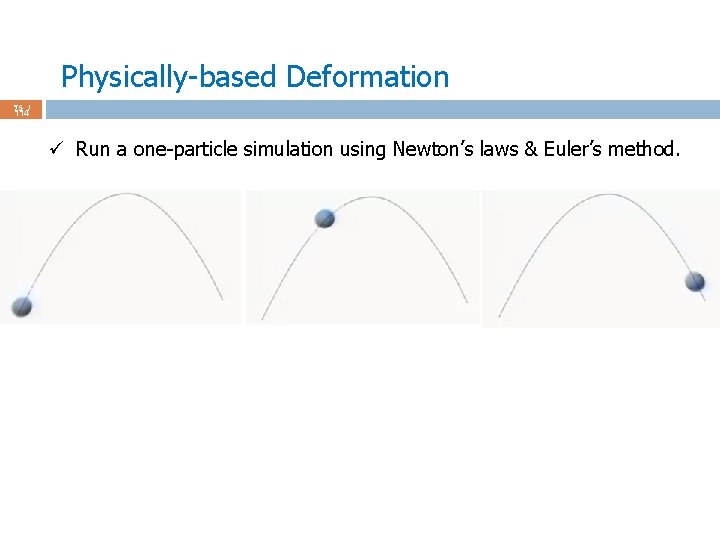
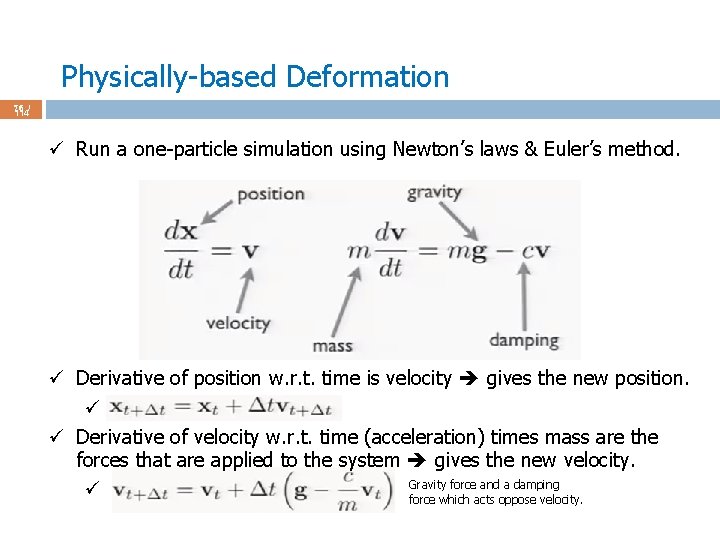
Physically-based Deformation 75 / 114 ü Run a one-particle simulation using Newton’s laws & Euler’s method.
Physically-based Deformation 76 / 114 ü Run a one-particle simulation using Newton’s laws & Euler’s method. ü Derivative of position w. r. t. time is velocity gives the new position. ü ü Derivative of velocity w. r. t. time (acceleration) times mass are the forces that are applied to the system gives the new velocity. Gravity force and a damping ü force which acts oppose velocity.
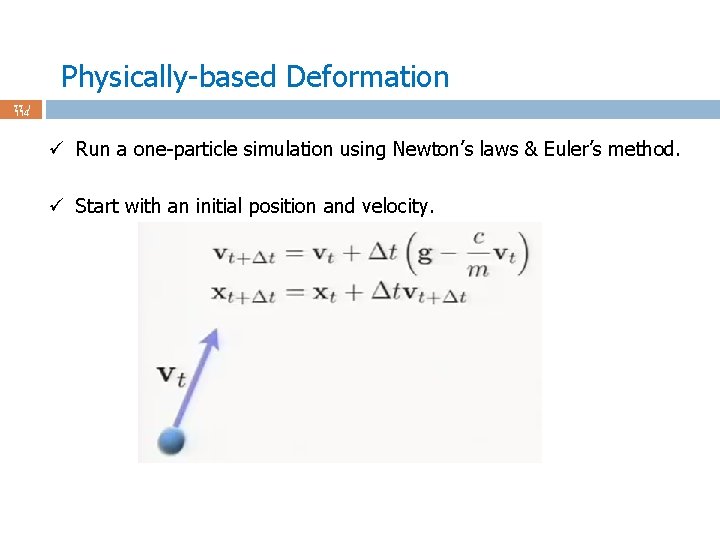
Physically-based Deformation 77 / 114 ü Run a one-particle simulation using Newton’s laws & Euler’s method. ü Start with an initial position and velocity.
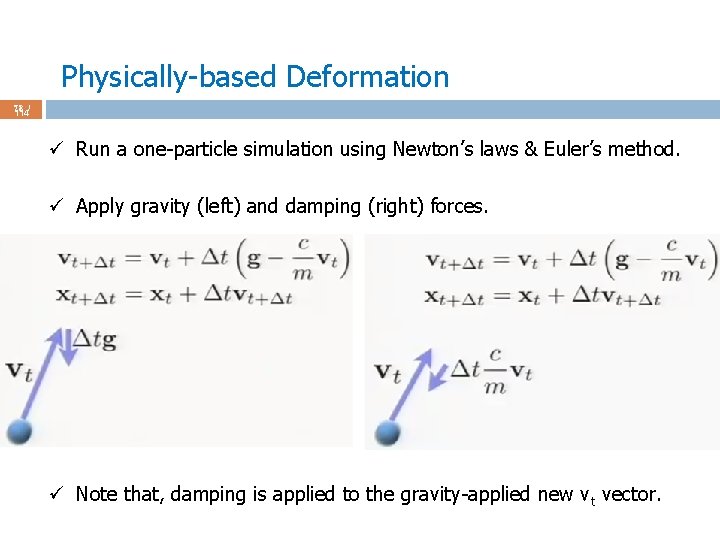
Physically-based Deformation 78 / 114 ü Run a one-particle simulation using Newton’s laws & Euler’s method. ü Apply gravity (left) and damping (right) forces. ü Note that, damping is applied to the gravity-applied new v t vector.
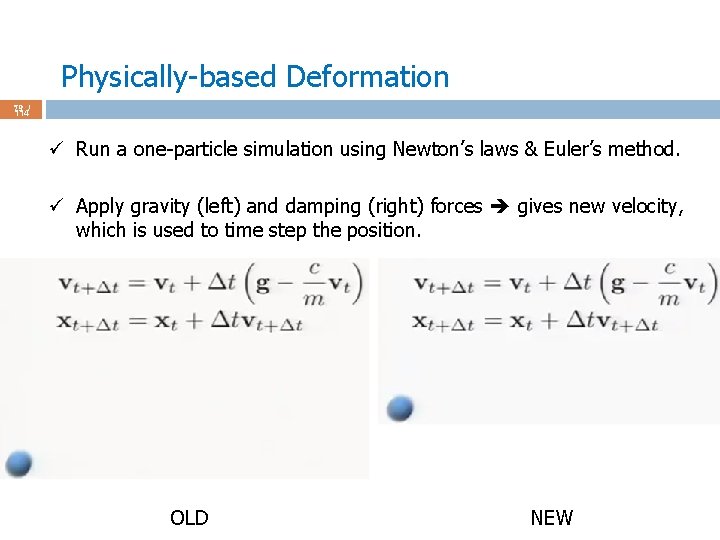
Physically-based Deformation 79 / 114 ü Run a one-particle simulation using Newton’s laws & Euler’s method. ü Apply gravity (left) and damping (right) forces gives new velocity, which is used to time step the position. OLD NEW
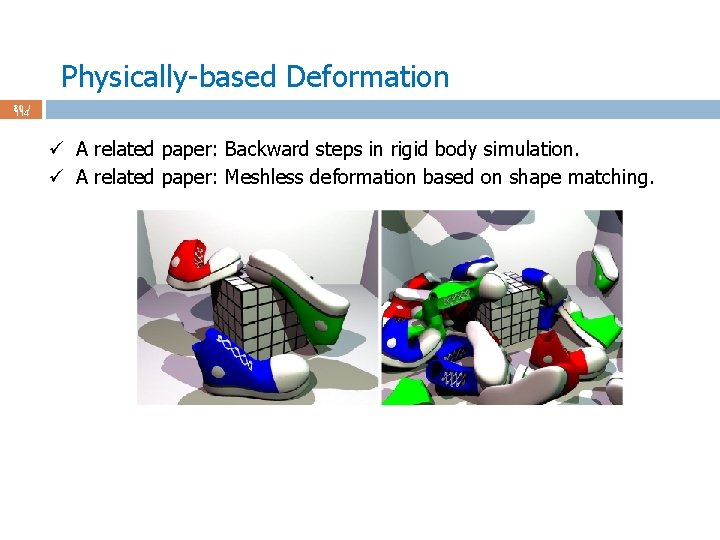
Physically-based Deformation 80 / 114 ü A related paper: Backward steps in rigid body simulation. ü A related paper: Meshless deformation based on shape matching.
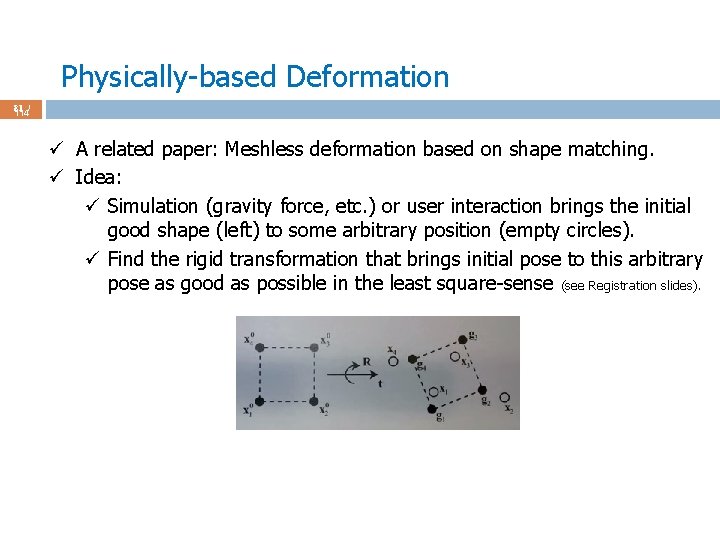
Physically-based Deformation 81 / 114 ü A related paper: Meshless deformation based on shape matching. ü Idea: ü Simulation (gravity force, etc. ) or user interaction brings the initial good shape (left) to some arbitrary position (empty circles). ü Find the rigid transformation that brings initial pose to this arbitrary pose as good as possible in the least square-sense (see Registration slides).
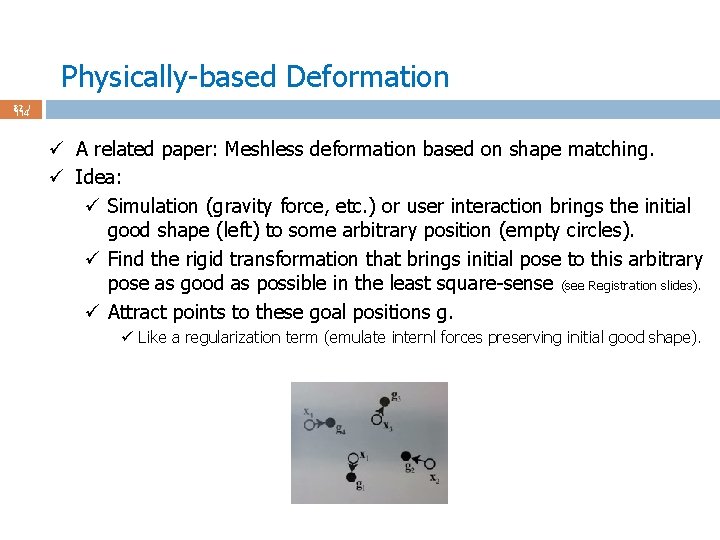
Physically-based Deformation 82 / 114 ü A related paper: Meshless deformation based on shape matching. ü Idea: ü Simulation (gravity force, etc. ) or user interaction brings the initial good shape (left) to some arbitrary position (empty circles). ü Find the rigid transformation that brings initial pose to this arbitrary pose as good as possible in the least square-sense (see Registration slides). ü Attract points to these goal positions g. ü Like a regularization term (emulate internl forces preserving initial good shape).
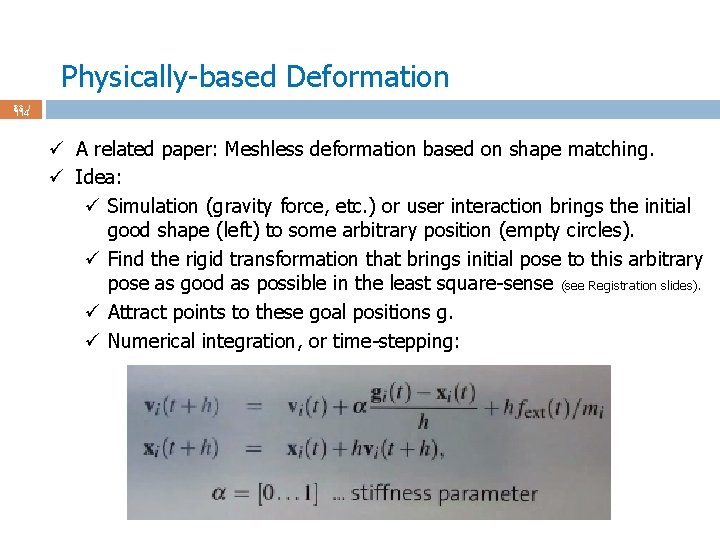
Physically-based Deformation 83 / 114 ü A related paper: Meshless deformation based on shape matching. ü Idea: ü Simulation (gravity force, etc. ) or user interaction brings the initial good shape (left) to some arbitrary position (empty circles). ü Find the rigid transformation that brings initial pose to this arbitrary pose as good as possible in the least square-sense (see Registration slides). ü Attract points to these goal positions g. ü Numerical integration, or time-stepping:
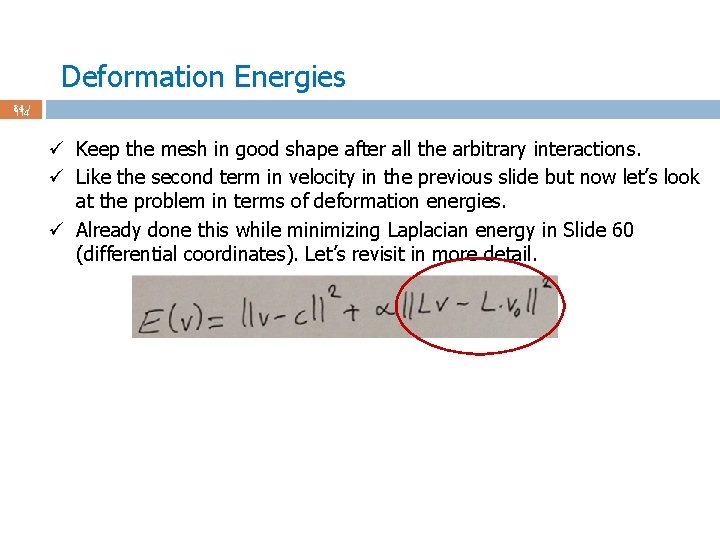
Deformation Energies 84 / 114 ü Keep the mesh in good shape after all the arbitrary interactions. ü Like the second term in velocity in the previous slide but now let’s look at the problem in terms of deformation energies. ü Already done this while minimizing Laplacian energy in Slide 60 (differential coordinates). Let’s revisit in more detail.
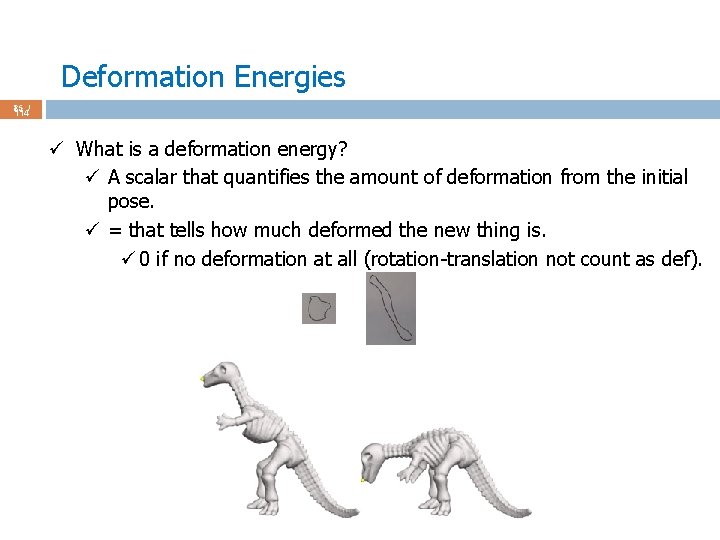
Deformation Energies 85 / 114 ü What is a deformation energy? ü A scalar that quantifies the amount of deformation from the initial pose. ü = that tells how much deformed the new thing is. ü 0 if no deformation at all (rotation-translation not count as def).
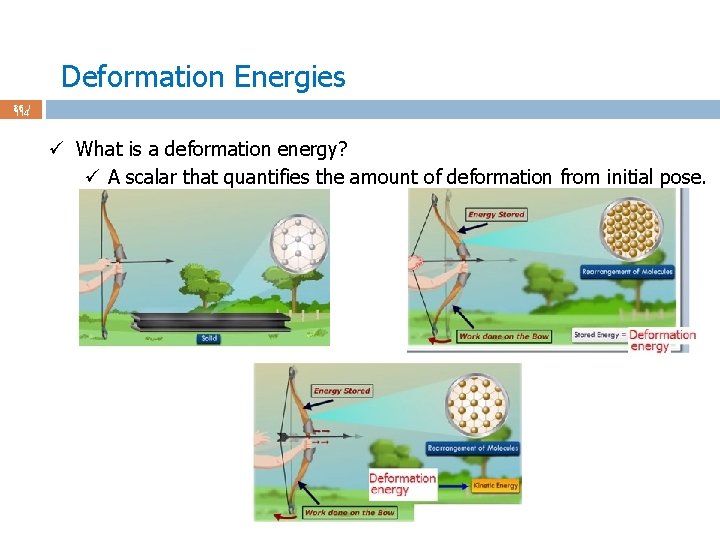
Deformation Energies 86 / 114 ü What is a deformation energy? ü A scalar that quantifies the amount of deformation from initial pose.
Deformation Energies 87 / 114 ü Minimize deformation energy to keep the new mesh as close as possible to the initial mesh. ü Without any other term, not interesting: just freeze the mesh. ü With matching term (external force, user interaction, . . ), keeps the new mesh in good shape (assuming initial mesh is already good).
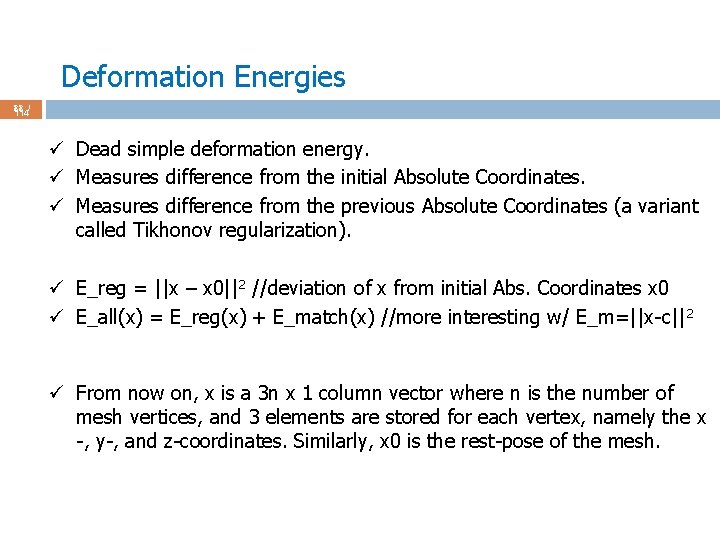
Deformation Energies 88 / 114 ü Dead simple deformation energy. ü Measures difference from the initial Absolute Coordinates. ü Measures difference from the previous Absolute Coordinates (a variant called Tikhonov regularization). ü E_reg = ||x – x 0||2 //deviation of x from initial Abs. Coordinates x 0 ü E_all(x) = E_reg(x) + E_match(x) //more interesting w/ E_m=||x-c|| 2 ü From now on, x is a 3 n x 1 column vector where n is the number of mesh vertices, and 3 elements are stored for each vertex, namely the x -, y-, and z-coordinates. Similarly, x 0 is the rest-pose of the mesh.
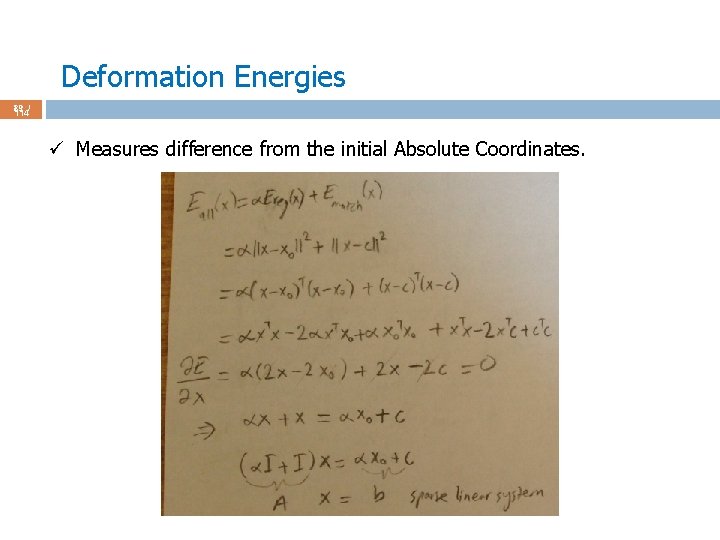
Deformation Energies 89 / 114 ü Measures difference from the initial Absolute Coordinates.
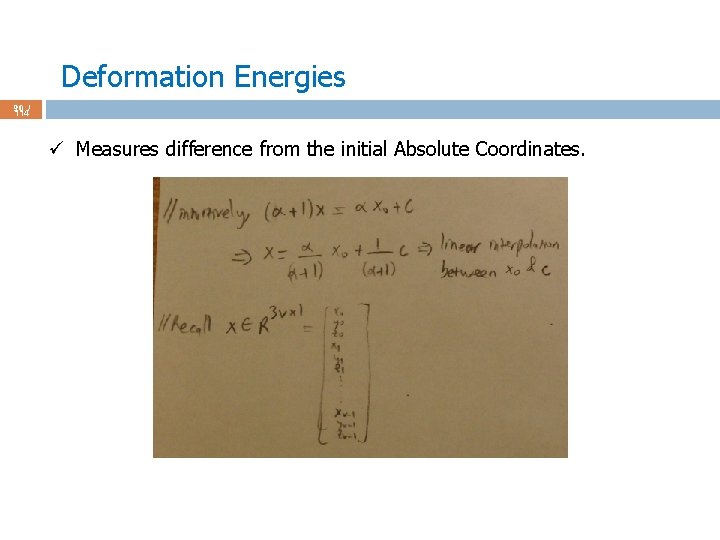
Deformation Energies 90 / 114 ü Measures difference from the initial Absolute Coordinates.
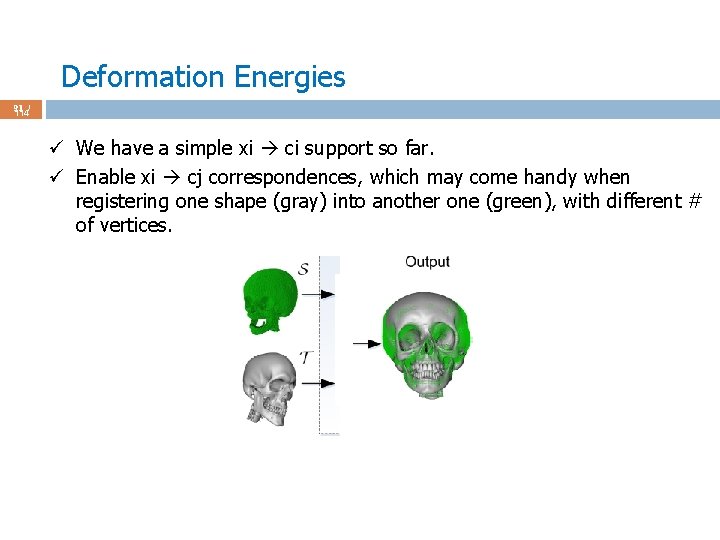
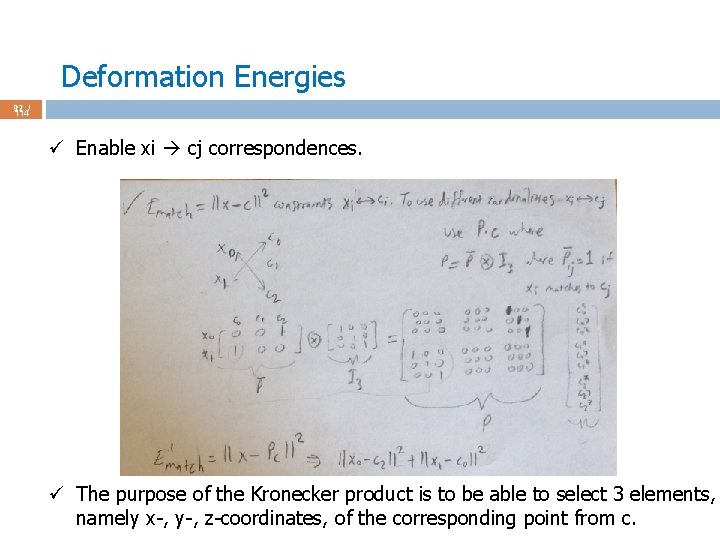
Deformation Energies 91 / 114 ü We have a simple xi ci support so far. ü Enable xi cj correspondences, which may come handy when registering one shape (gray) into another one (green), with different # of vertices.
Deformation Energies 92 / 114 ü Enable xi cj correspondences. ü The purpose of the Kronecker product is to be able to select 3 elements, namely x-, y-, z-coordinates, of the corresponding point from c.
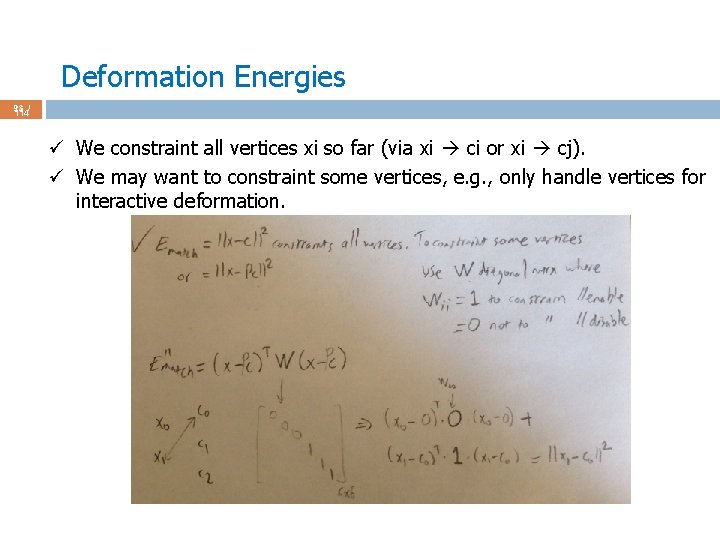
Deformation Energies 93 / 114 ü We constraint all vertices xi so far (via xi ci or xi cj). ü We may want to constraint some vertices, e. g. , only handle vertices for interactive deformation.
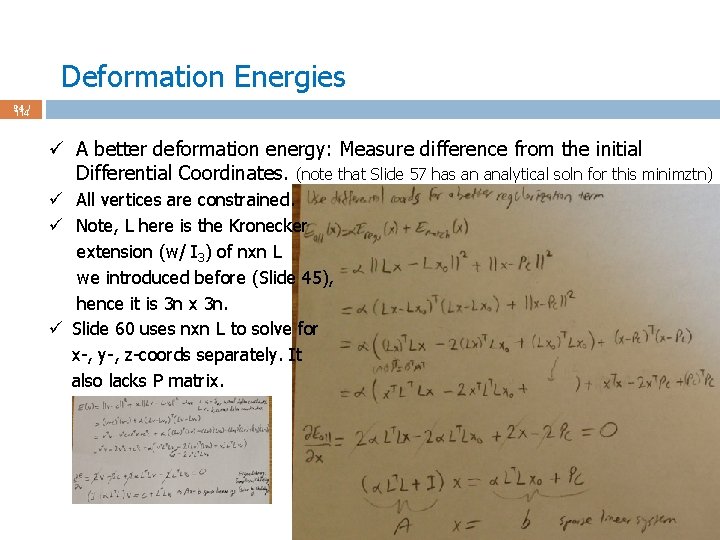
Deformation Energies 94 / 114 ü A better deformation energy: Measure difference from the initial Differential Coordinates. (note that Slide 57 has an analytical soln for this minimztn) ü All vertices are constrained. ü Note, L here is the Kronecker extension (w/ I 3) of nxn L we introduced before (Slide 45), hence it is 3 n x 3 n. ü Slide 60 uses nxn L to solve for x-, y-, z-coords separately. It also lacks P matrix.
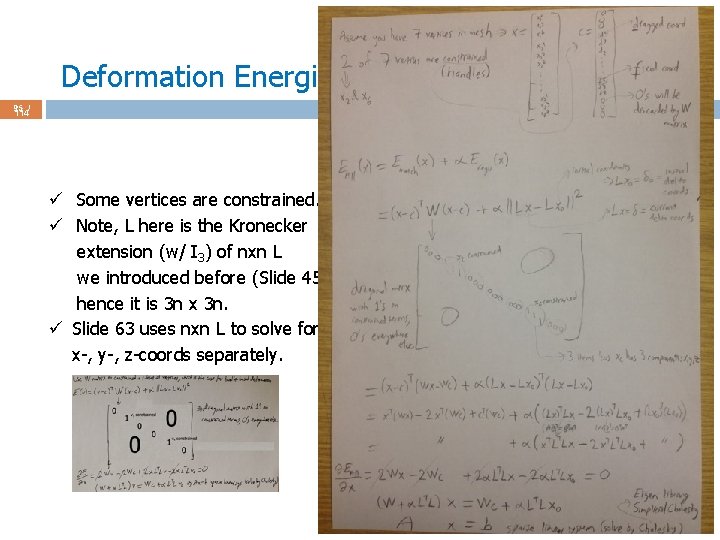
Deformation Energies 95 / 114 better deformation energy: Measure difference from the initial Differential Coordinates. (note that slide 56 has an analytical soln for this minimztn) ü Some vertices are constrained. ü Note, L here is the Kronecker extension (w/ I 3) of nxn L we introduced before (Slide 45), hence it is 3 n x 3 n. ü Slide 63 uses nxn L to solve for x-, y-, z-coords separately.
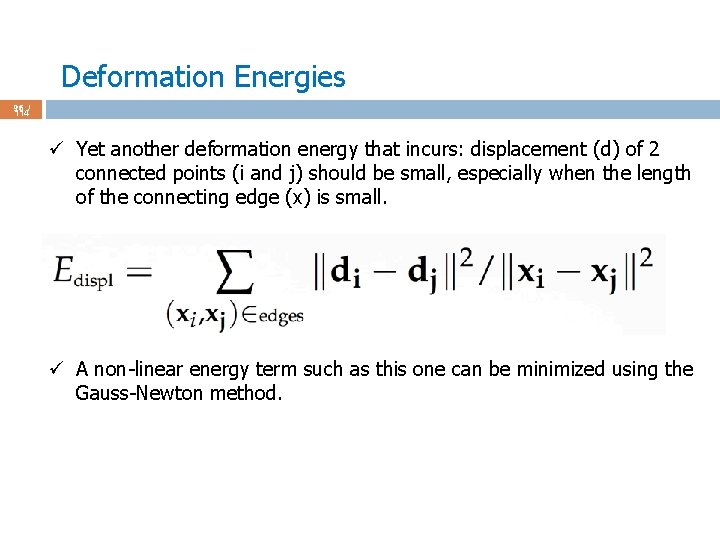
Deformation Energies 96 / 114 ü Yet another deformation energy that incurs: displacement (d) of 2 connected points (i and j) should be small, especially when the length of the connecting edge (x) is small. ü A non-linear energy term such as this one can be minimized using the Gauss-Newton method.
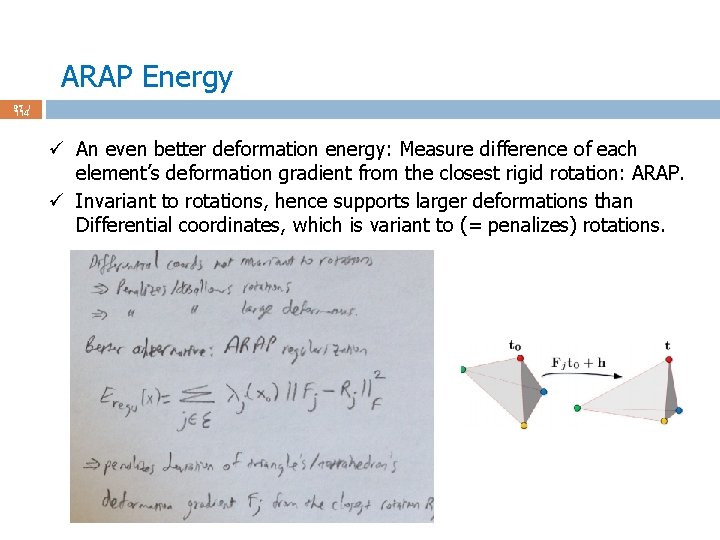
ARAP Energy 97 / 114 ü An even better deformation energy: Measure difference of each element’s deformation gradient from the closest rigid rotation: ARAP. ü Invariant to rotations, hence supports larger deformations than Differential coordinates, which is variant to (= penalizes) rotations.
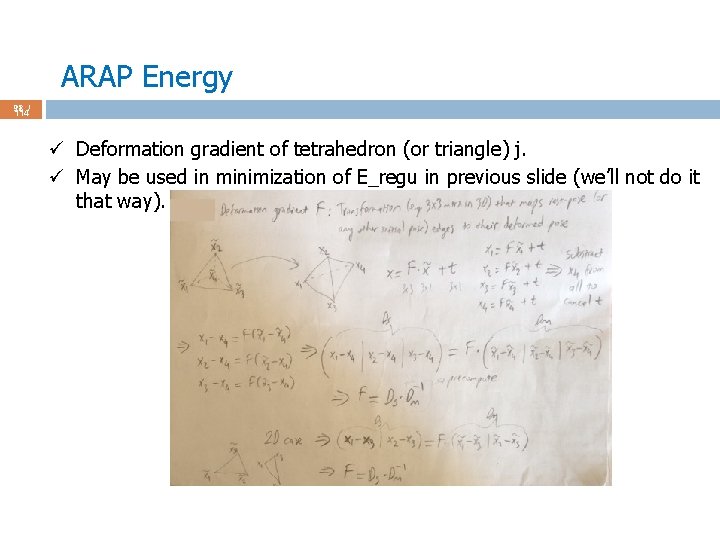
ARAP Energy 98 / 114 ü Deformation gradient of tetrahedron (or triangle) j. ü May be used in minimization of E_regu in previous slide (we’ll not do it that way).
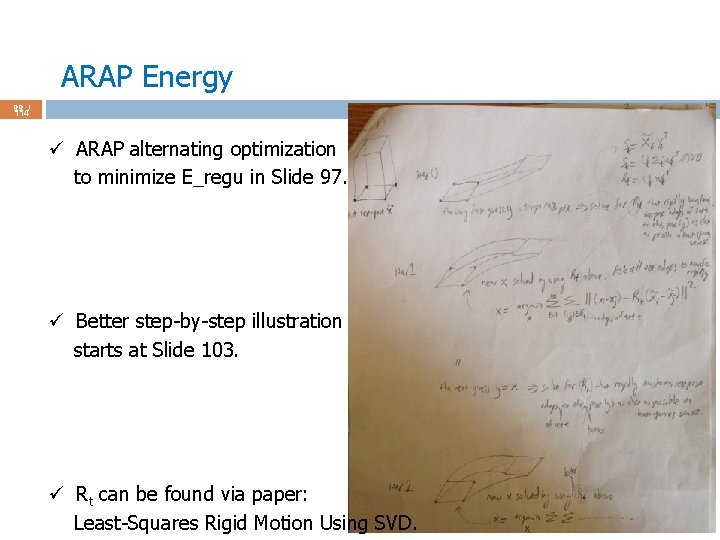
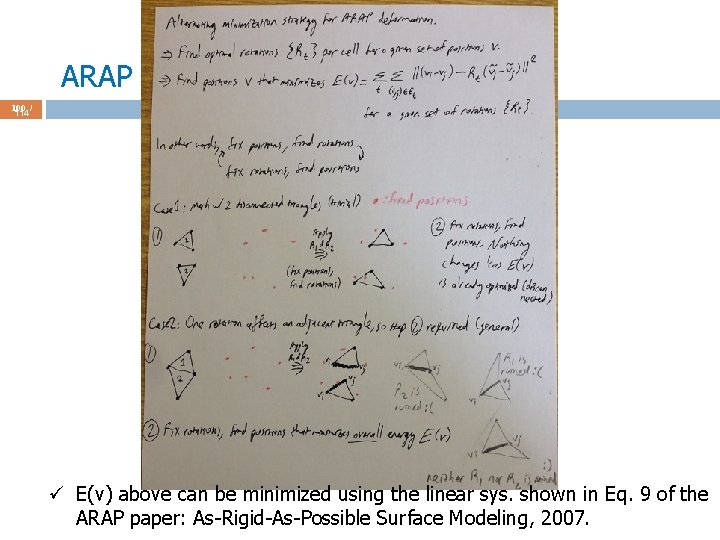
ARAP Energy 99 / 114 ü ARAP alternating optimization to minimize E_regu in Slide 97. ü Better step-by-step illustration starts at Slide 103. ü Rt can be found via paper: Least-Squares Rigid Motion Using SVD.
ARAP Energy 100 / 114 ü E(v) above can be minimized using the linear sys. shown in Eq. 9 of the ARAP paper: As-Rigid-As-Possible Surface Modeling, 2007.
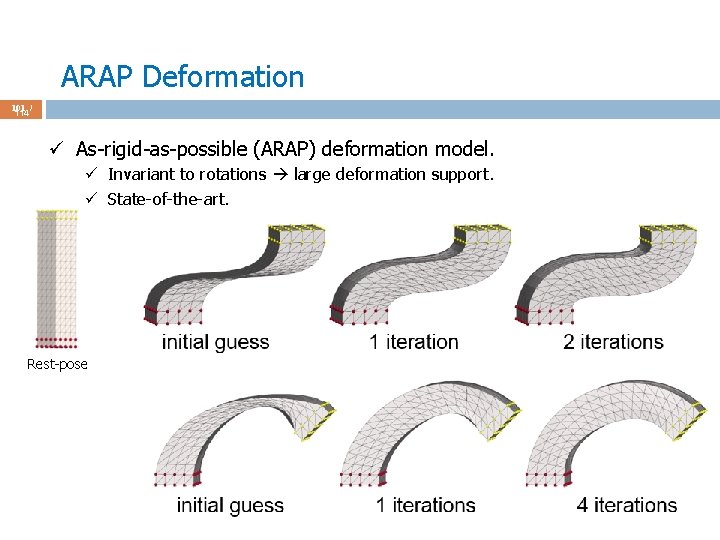
ARAP Deformation 101 / 114 ü As-rigid-as-possible (ARAP) deformation model. ü Invariant to rotations large deformation support. ü State-of-the-art. Rest-pose
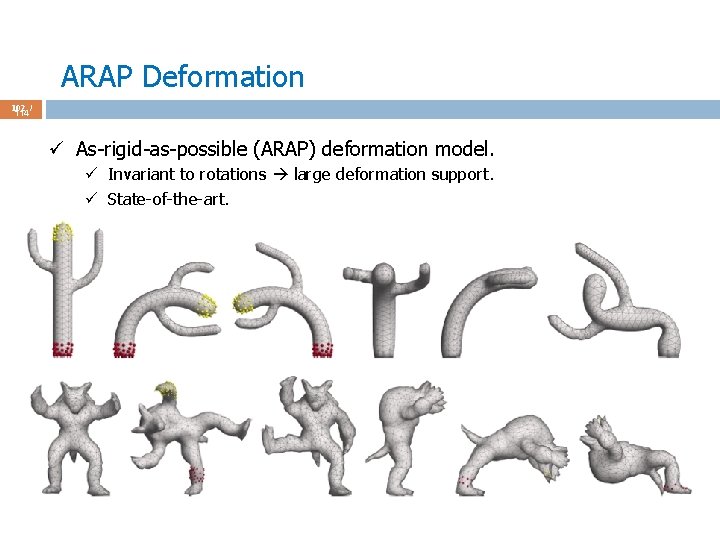
ARAP Deformation 102 / 114 ü As-rigid-as-possible (ARAP) deformation model. ü Invariant to rotations large deformation support. ü State-of-the-art.
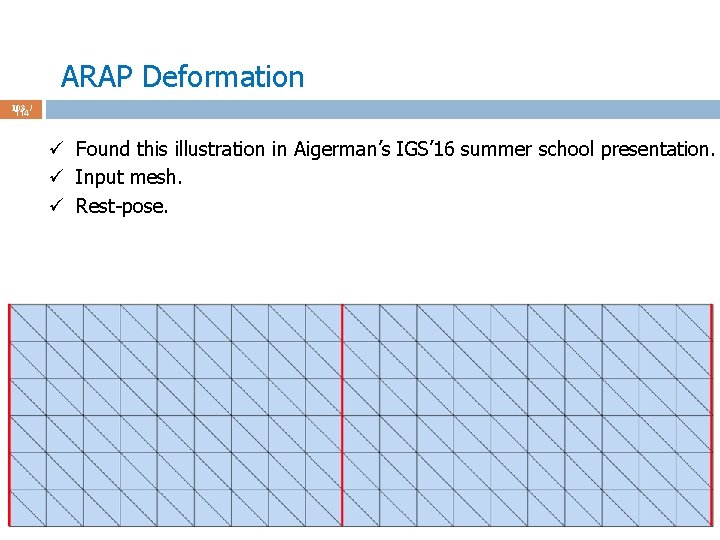
ARAP Deformation 103 / 114 ü Found this illustration in Aigerman’s IGS’ 16 summer school presentation. ü Input mesh. ü Rest-pose.
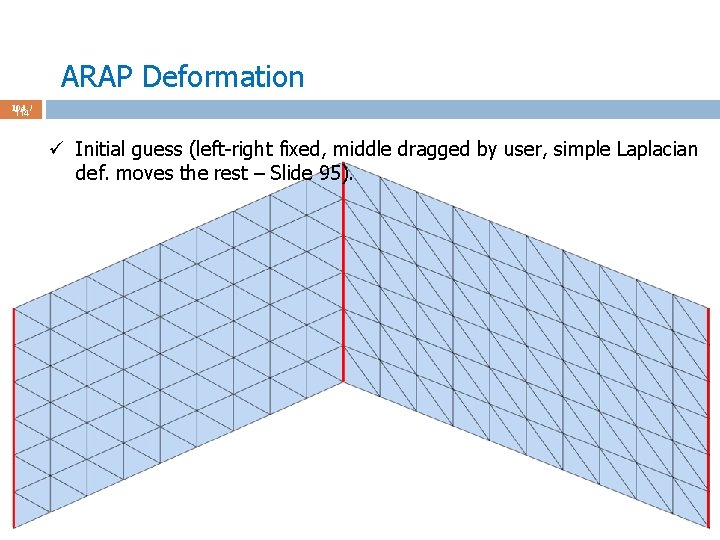
ARAP Deformation 104 / 114 ü Initial guess (left-right fixed, middle dragged by user, simple Laplacian def. moves the rest – Slide 95).
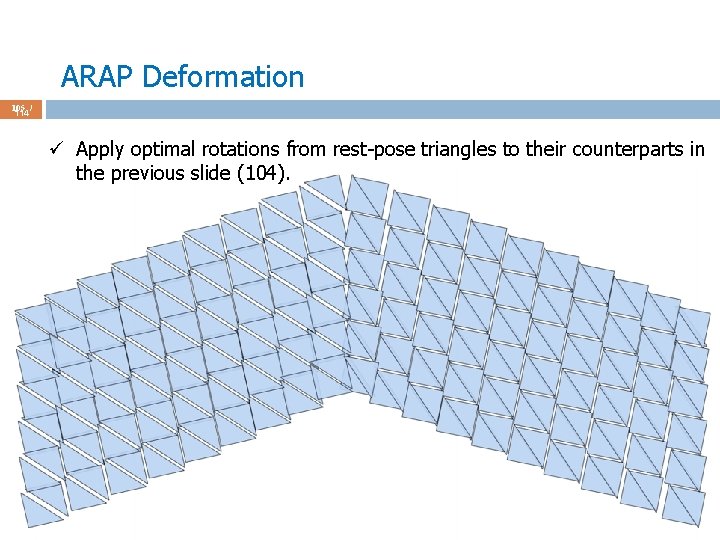
ARAP Deformation 105 / 114 ü Apply optimal rotations from rest-pose triangles to their counterparts in the previous slide (104).
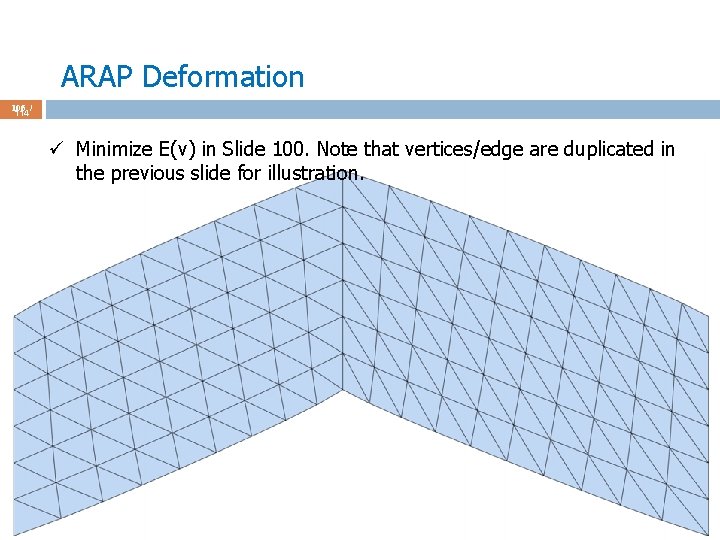
ARAP Deformation 106 / 114 ü Minimize E(v) in Slide 100. Note that vertices/edge are duplicated in the previous slide for illustration.
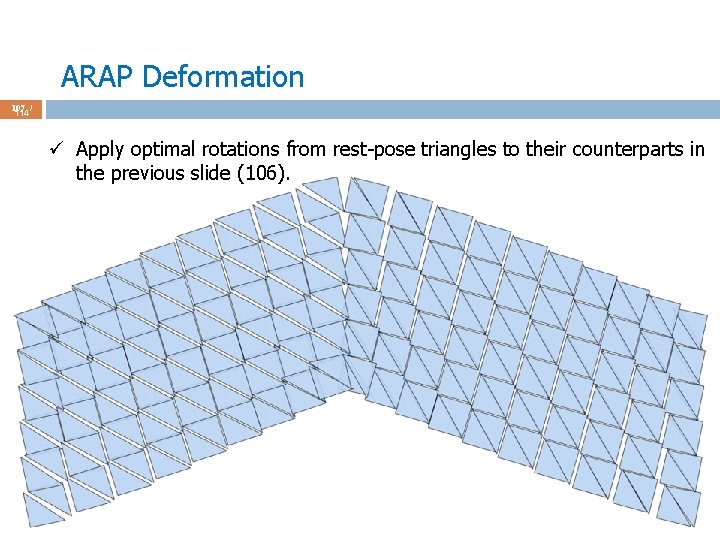
ARAP Deformation 107 / 114 ü Apply optimal rotations from rest-pose triangles to their counterparts in the previous slide (106).
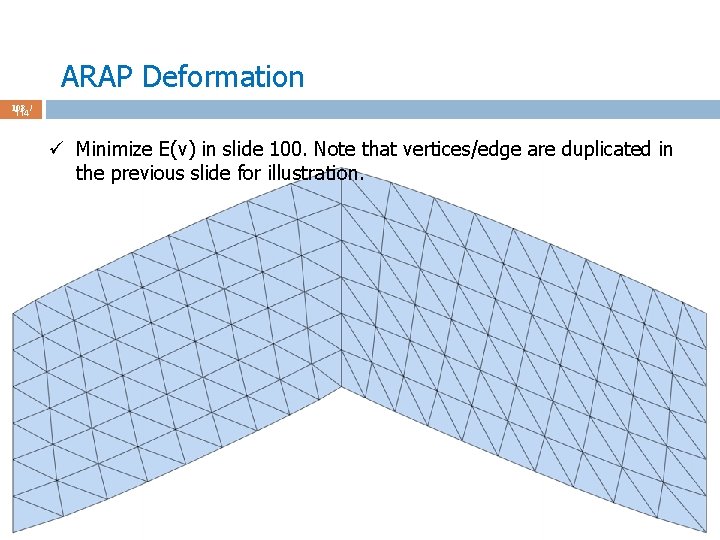
ARAP Deformation 108 / 114 ü Minimize E(v) in slide 100. Note that vertices/edge are duplicated in the previous slide for illustration.
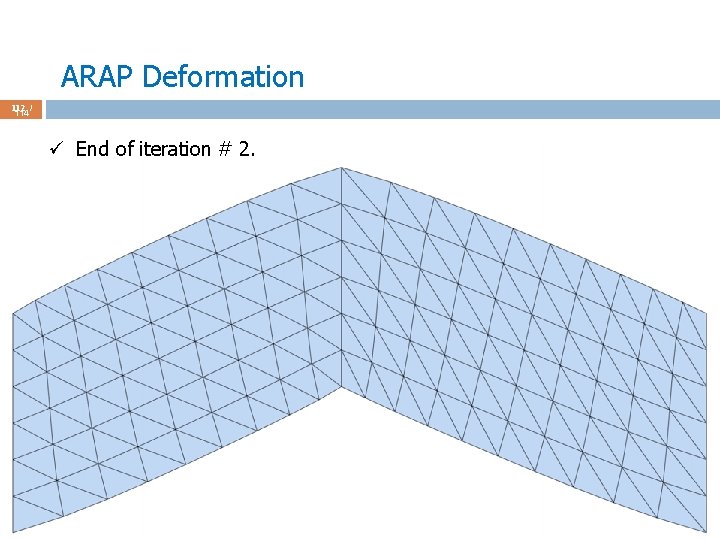
ARAP Deformation 109 / 114 ü And so on. 5 -6 iterations sufficient for most cases. Stop automatically when displacement b/w two consecutive iterations is sufficiently small. ü Note that SVD decomposition of 3 x 3 matrix for rotation is super-fast. ü I recommend: http: //pages. cs. wisc. edu/~sifakis/project_pages/svd. html ü Note that Laplace system matrix (minimization of E(v)) is constant throughout the iterations and has to be factored only once (super-fast). ü Let’s see the iteration results again w/o the rotation slides.
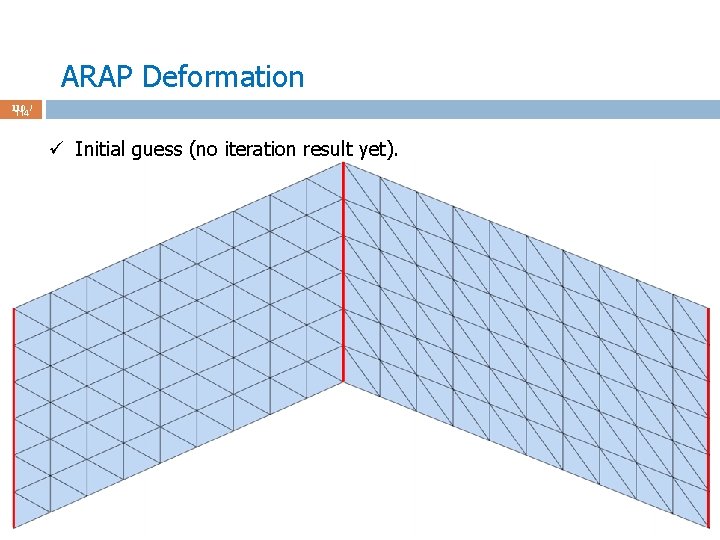
ARAP Deformation 110 / 114 ü Initial guess (no iteration result yet).
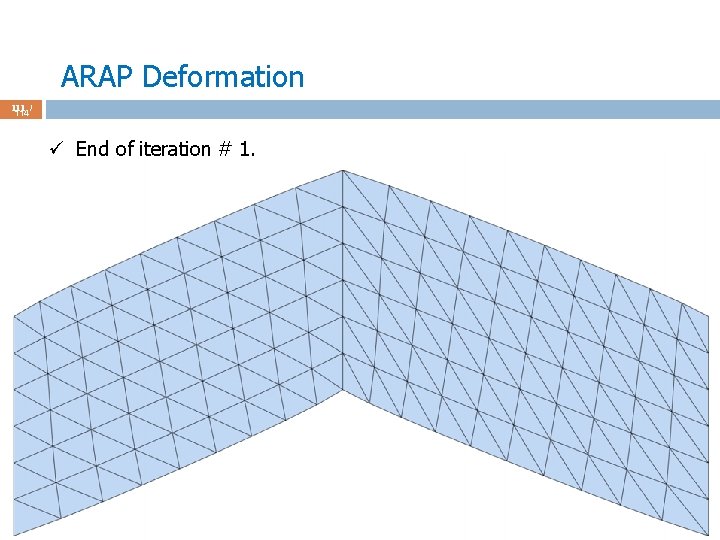
ARAP Deformation 111 / 114 ü End of iteration # 1.
ARAP Deformation 112 / 114 ü End of iteration # 2.
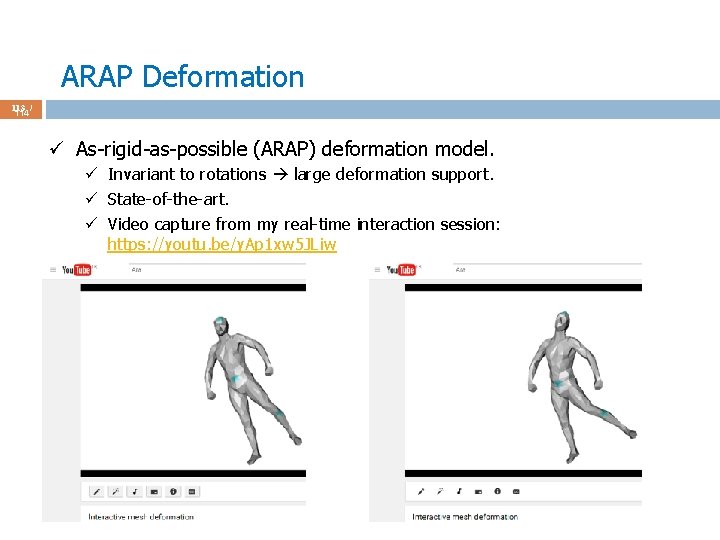
ARAP Deformation 113 / 114 ü As-rigid-as-possible (ARAP) deformation model. ü Invariant to rotations large deformation support. ü State-of-the-art. ü Video capture from my real-time interaction session: https: //youtu. be/y. Ap 1 xw 5 JLiw
Potential Project Topics 114 / 114 ü Implement a paper about interpolation on polygons. ü http: //cgvr. cs. uni-bremen. de/teaching/cg_literatur/barycentric_floater. pdf ü https: //www. mn. uio. no/math/english/people/aca/michaelf/papers/wach_m v. pdf ü http: //folk. uio. no/martinre/Publications/mv 3 d. pdf ü https: //www. youtube. com/watch? v=PDJxj. XCjiis ü http: //hecodes. com/2016/07/mesh-manipulation-using-mean-valuescoordinates-in-three-js/ ü Implement a paper about interpolation on surfaces. ü Weighted Averages on Surfaces, 2013. ü Barycentric Coordinates on Surfaces, 2010. ü Implement deformation via FFD, ARAP, Least-squares Meshes paper, or the local coord. Laplacian in Slide 69. ü Implement physically-based deformation, e. g. , the paper titled Meshless deformation based on shape matching.