Ch 1 Support vector machine SVM KH Wong

![• Prove d=2/|w| • • • Answer: w=[w 1, w 2]T, at A](https://slidetodoc.com/presentation_image_h2/41c1baaf9c8f83a07af5bdf0f5b26083/image-10.jpg "• Prove d=2/|w| • • • Answer: w=[w 1, w 2]T, at A")

![Find w from • • • • %alpha=quadprog(H, f, [], Aeq, beq, lb, ub,](https://slidetodoc.com/presentation_image_h2/41c1baaf9c8f83a07af5bdf0f5b26083/image-30.jpg "Find w from • • • • %alpha=quadprog(H, f, [], Aeq, beq, lb, ub,")










- Slides: 80
Ch 1. Support vector machine SVM KH Wong Ch 13. SVM, V. 0. 1. c 5 1
Overview • • • Introduction Problem definition Linear method Non-linear method Summary Ch 13. SVM, V. 0. 1. c 5 2
Introduction • For making 2 -classifiers • Can solve non-linear problems using the kernel trick Ch 13. SVM, V. 0. 1. c 5 3
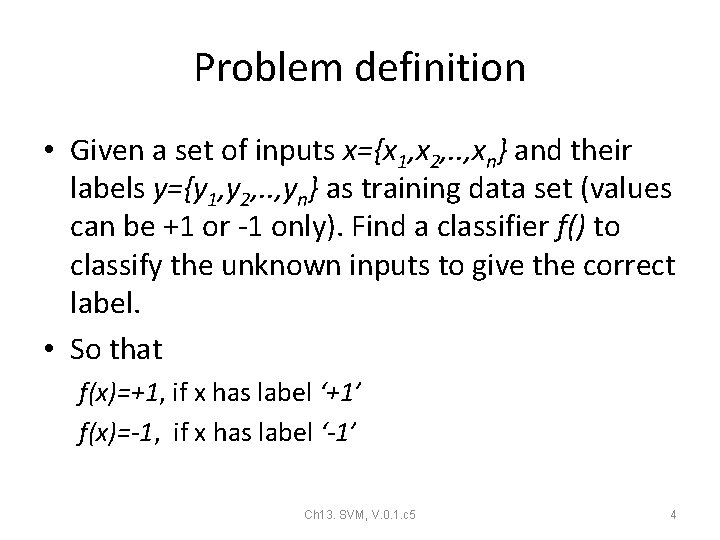
Problem definition • Given a set of inputs x={x 1, x 2, . . , xn} and their labels y={y 1, y 2, . . , yn} as training data set (values can be +1 or -1 only). Find a classifier f() to classify the unknown inputs to give the correct label. • So that f(x)=+1, if x has label ‘+1’ f(x)=-1, if x has label ‘-1’ Ch 13. SVM, V. 0. 1. c 5 4
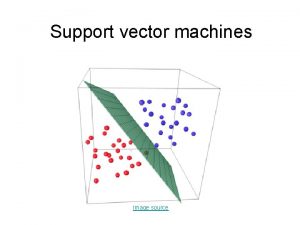
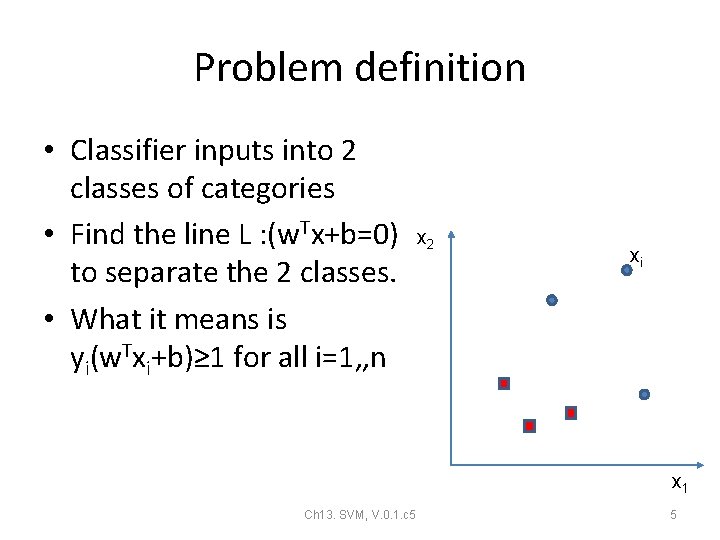
Problem definition • Classifier inputs into 2 classes of categories • Find the line L : (w. Tx+b=0) to separate the 2 classes. • What it means is yi(w. Txi+b)≥ 1 for all i=1, , n x 2 xi x 1 Ch 13. SVM, V. 0. 1. c 5 5
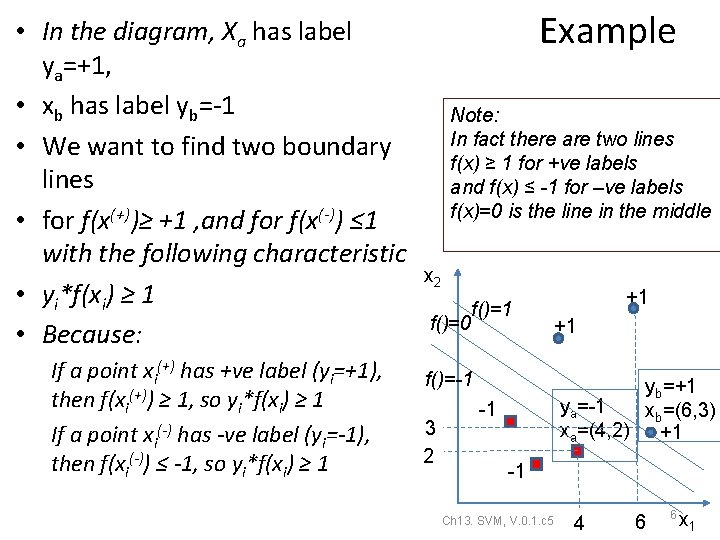
• In the diagram, Xa has label ya=+1, • xb has label yb=-1 • We want to find two boundary lines • for f(x(+))≥ +1 , and for f(x(-)) ≤ 1 with the following characteristic • yi*f(xi) ≥ 1 • Because: If a point xi(+) has +ve label (yi=+1), then f(xi(+)) ≥ 1, so yi*f(xi) ≥ 1 If a point xi(-) has -ve label (yi=-1), then f(xi(-)) ≤ -1, so yi*f(xi) ≥ 1 Example Note: In fact there are two lines f(x) ≥ 1 for +ve labels and f(x) ≤ -1 for –ve labels f(x)=0 is the line in the middle x 2 f()=1 f()=0 f()=-1 3 2 +1 +1 yb=+1 ya=-1 xb=(6, 3) xa=(4, 2) +1 -1 -1 Ch 13. SVM, V. 0. 1. c 5 4 6 6 x 1
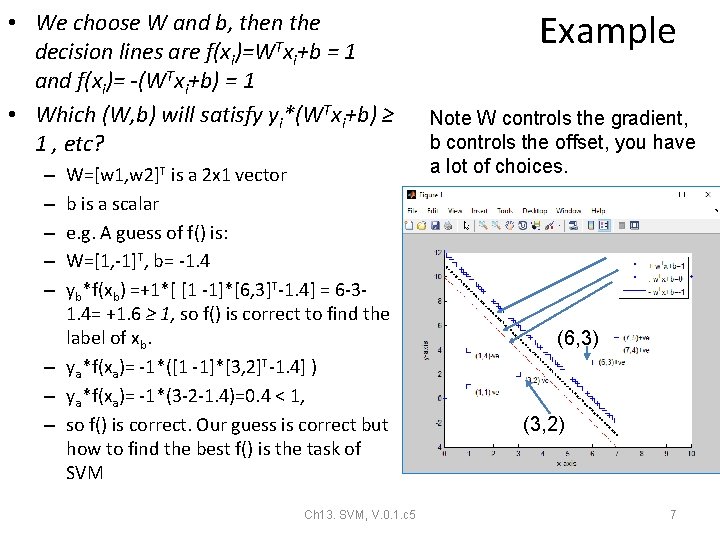
• We choose W and b, then the decision lines are f(xi)=WTxi+b = 1 and f(xi)= -(WTxi+b) = 1 • Which (W, b) will satisfy yi*(WTxi+b) ≥ 1 , etc? W=[w 1, w 2]T is a 2 x 1 vector b is a scalar e. g. A guess of f() is: W=[1, -1]T, b= -1. 4 yb*f(xb) =+1*[ [1 -1]*[6, 3]T-1. 4] = 6 -31. 4= +1. 6 ≥ 1, so f() is correct to find the label of xb. – ya*f(xa)= -1*([1 -1]*[3, 2]T-1. 4] ) – ya*f(xa)= -1*(3 -2 -1. 4)=0. 4 < 1, – so f() is correct. Our guess is correct but how to find the best f() is the task of SVM – – – Ch 13. SVM, V. 0. 1. c 5 Example Note W controls the gradient, b controls the offset, you have a lot of choices. (6, 3) (3, 2) 7
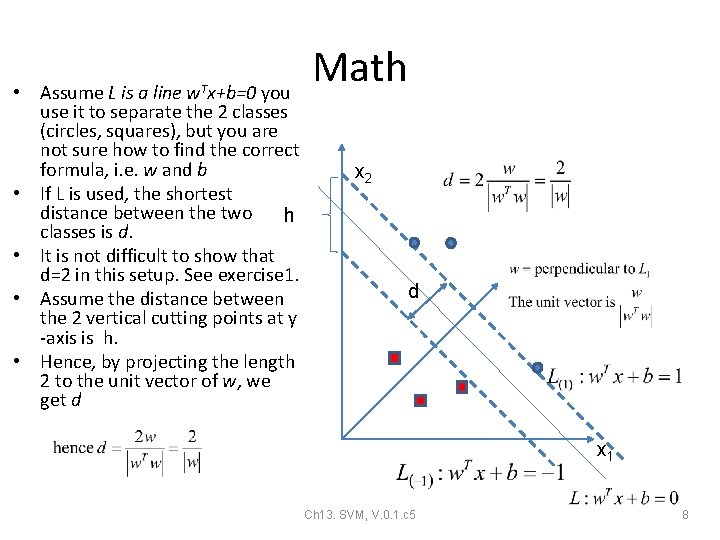
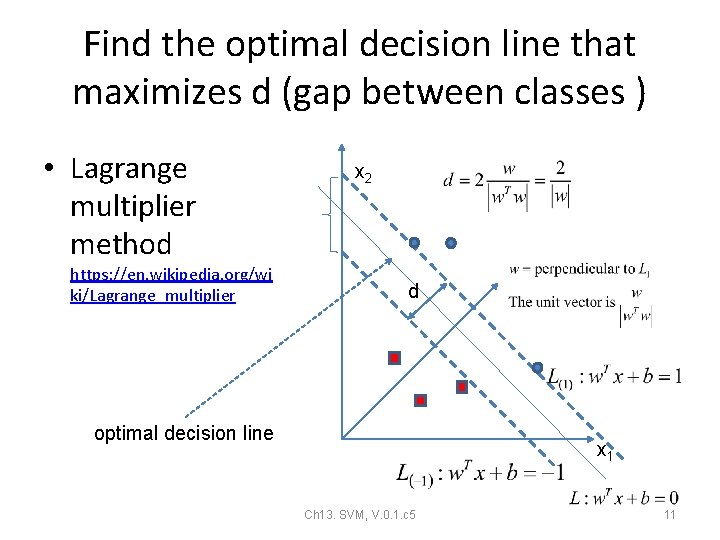
w. Tx+b=0 • Assume L is a line you use it to separate the 2 classes (circles, squares), but you are not sure how to find the correct formula, i. e. w and b • If L is used, the shortest distance between the two h classes is d. • It is not difficult to show that d=2 in this setup. See exercise 1. • Assume the distance between the 2 vertical cutting points at y -axis is h. • Hence, by projecting the length 2 to the unit vector of w, we get d Math x 2 d x 1 Ch 13. SVM, V. 0. 1. c 5 8
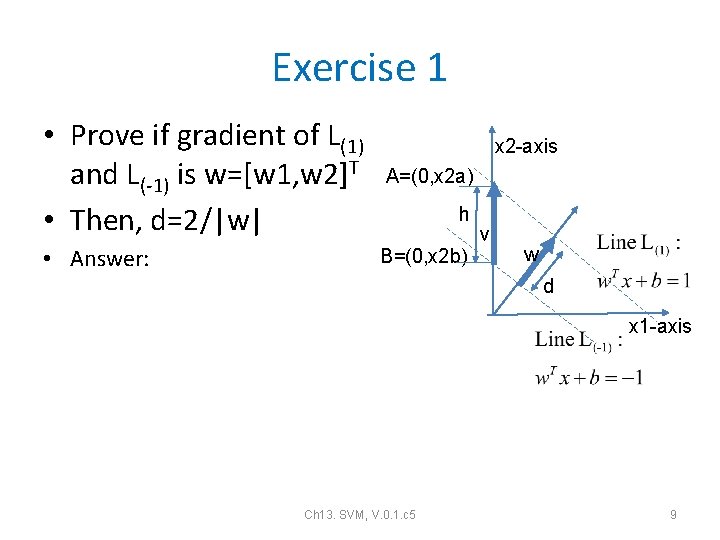
Exercise 1 • Prove if gradient of L(1) and L(-1) is w=[w 1, w 2]T • Then, d=2/|w| A=(0, x 2 a) • Answer: B=(0, x 2 b) x 2 -axis h v w d x 1 -axis Ch 13. SVM, V. 0. 1. c 5 9
• Prove d=2/|w| • • • Answer: w=[w 1, w 2]T, at A L(1): [w 1, w 2]*[x 1 a, x 2 a]T+b= +1 When x 1 a=0, w 2*x 2 a+b= 1 X 2 a=(1 -b)/w 2 -----(i) • • At B L(-1): [w 1, w 2]*[x 1 b, x 2 b]T +b= -1 When x 1 b=0, w 2*x 2 b+b= -1 X 2 b=(-1 -b)/w 2 -----(ii) • • Vector v=[0 , (x 2 a-x 2 b)]T Unit vector of w = u =[w 1, w 2] T /|w| d=v. T. u=[0 , (x 2 a-x 2 b)]. [w 1, w 2] T /|w|= d=(x 2 a-x 2 b)*w 2/|w| From (i) and (ii) d=[(1 -b)/w 2 - (-1 -b)/w 2) ]*w 2/|w| d=2/|w| proved Answer 1 x 2 -axis A=(0, x 2 a) h B=(0, x 2 b) Ch 13. SVM, V. 0. 1. c 5 v w d x 1 -axis 10
Find the optimal decision line that maximizes d (gap between classes ) • Lagrange multiplier method https: //en. wikipedia. org/wi ki/Lagrange_multiplier x 2 d optimal decision line x 1 Ch 13. SVM, V. 0. 1. c 5 11
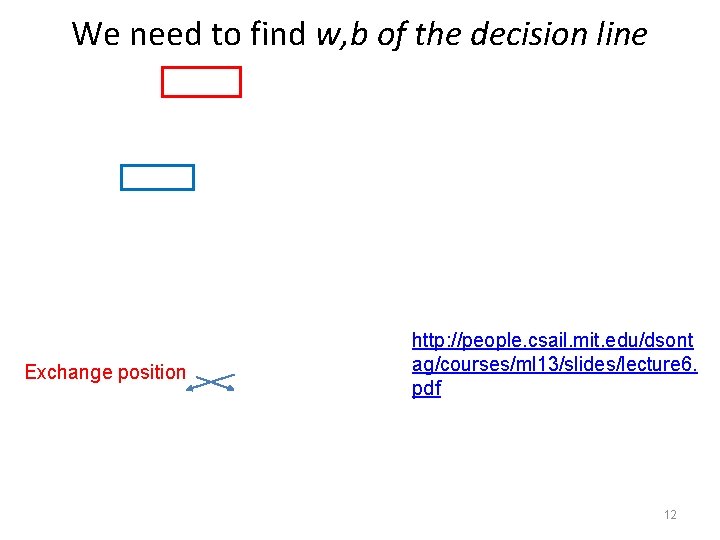
We need to find w, b of the decision line http: //people. csail. mit. edu/dsont ag/courses/ml 13/slides/lecture 6. pdf Exchange position • Ch 13. SVM, V. 0. 1. c 5 12
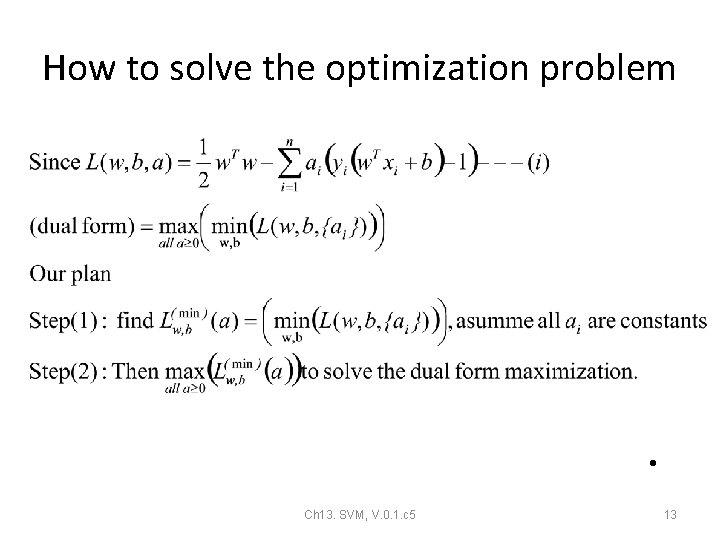
How to solve the optimization problem • Ch 13. SVM, V. 0. 1. c 5 13
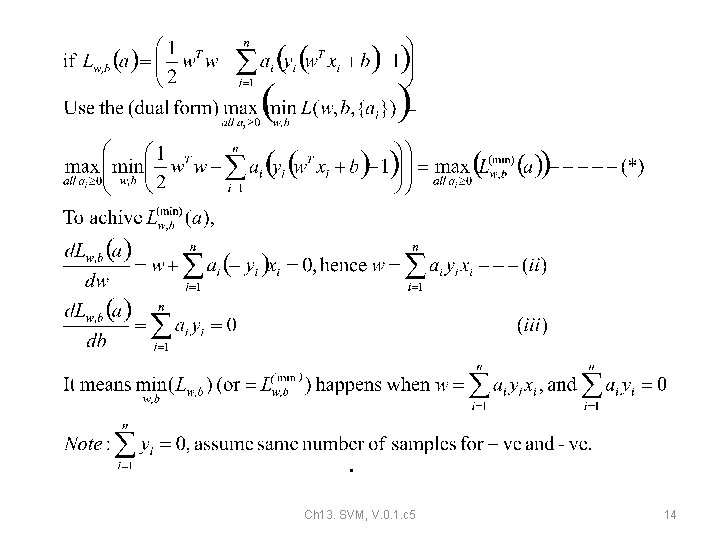
• Ch 13. SVM, V. 0. 1. c 5 14
Exercise 2: Lagrangian dual problem: for finding ai first , then find w and b • Ch 13. SVM, V. 0. 1. c 5 15
ANSWER 2 a: Lagrangian dual problem: find ai first, then w & b 16 • Ch 13. SVM, V. 0. 1. c 5
ANSWER 2 b : Lagrangian dual problem: for finding ai , then w & b • Ch 13. SVM, V. 0. 1. c 5 17
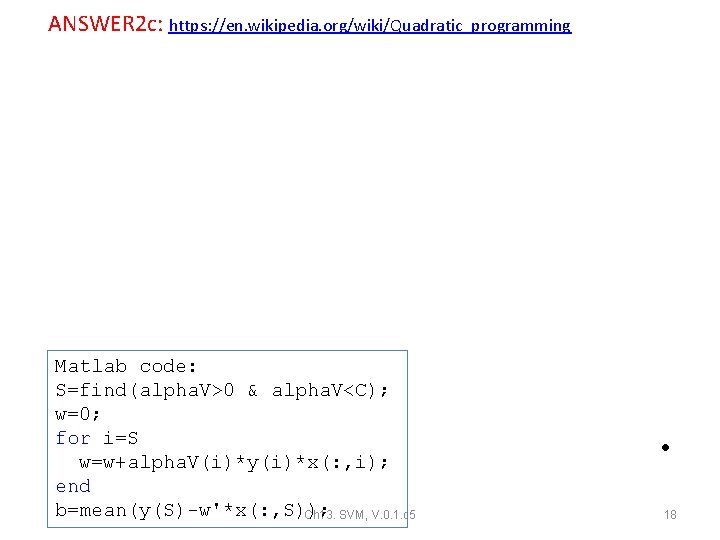
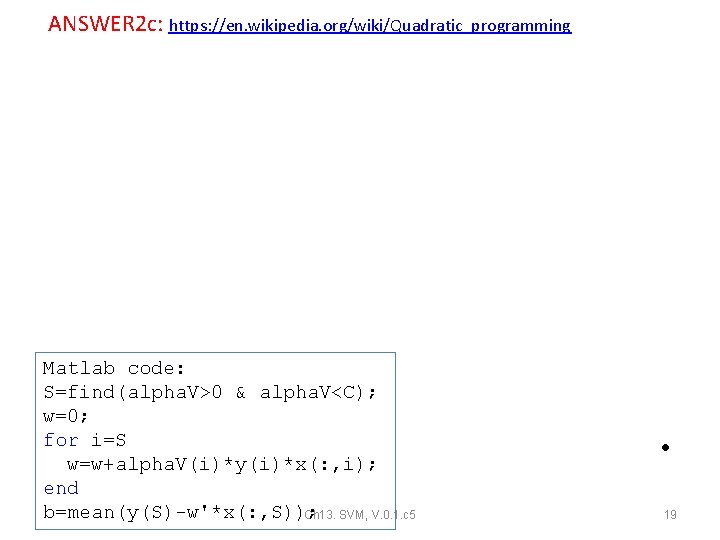
ANSWER 2 c: https: //en. wikipedia. org/wiki/Quadratic_programming • Matlab code: S=find(alpha. V>0 & alpha. V<C); w=0; for i=S w=w+alpha. V(i)*y(i)*x(: , i); end b=mean(y(S)-w'*x(: , S)); Ch 13. SVM, V. 0. 1. c 5 18
ANSWER 2 c: https: //en. wikipedia. org/wiki/Quadratic_programming • Matlab code: S=find(alpha. V>0 & alpha. V<C); w=0; for i=S w=w+alpha. V(i)*y(i)*x(: , i); end b=mean(y(S)-w'*x(: , S)); Ch 13. SVM, V. 0. 1. c 5 19
Linear Kernel: how to classify a new input Ch 13. SVM, V. 0. 1. c 5 • 20
Implementation of SVM for Linear problems How to solve it by Matlab Ch 13. SVM, V. 0. 1. c 5 21
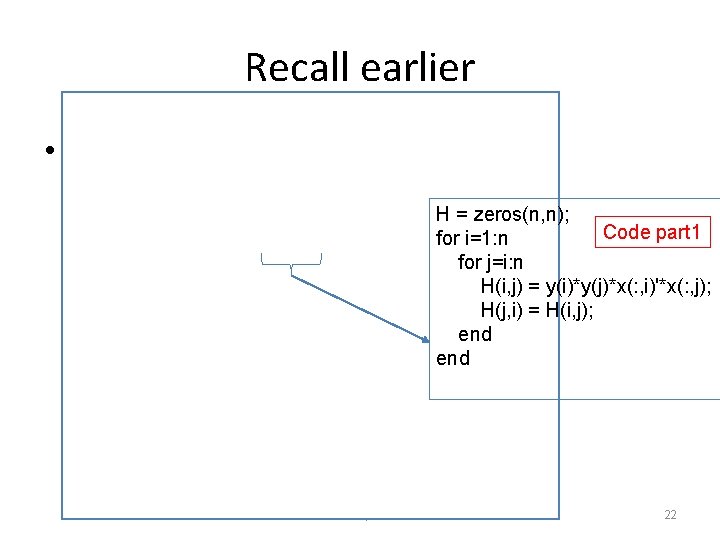
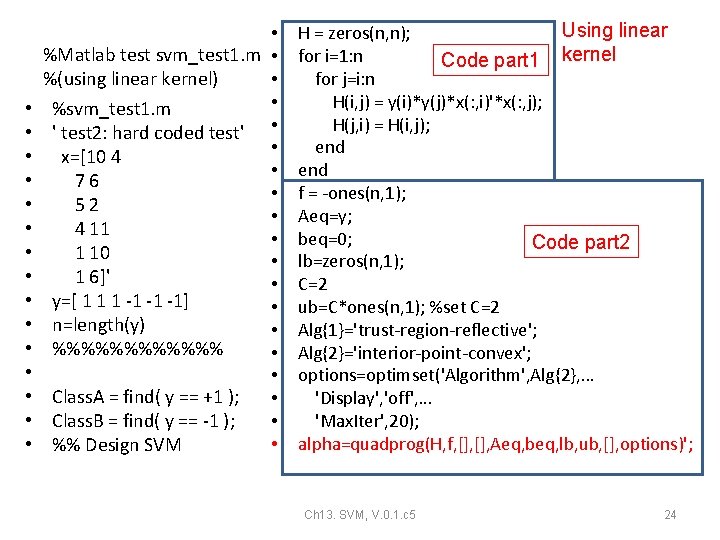
Recall earlier • H = zeros(n, n); Code part 1 for i=1: n for j=i: n H(i, j) = y(i)*y(j)*x(: , i)'*x(: , j); H(j, i) = H(i, j); end Ch 13. SVM, V. 0. 1. c 5 22
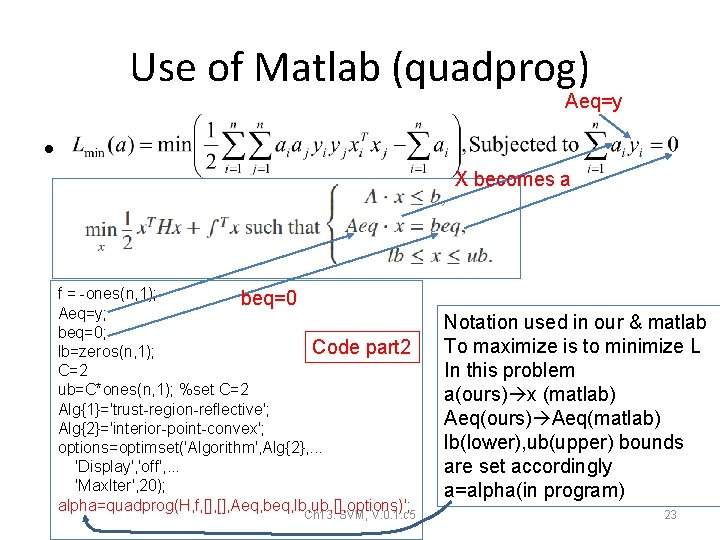
Use of Matlab (quadprog) Aeq=y • X becomes a f = -ones(n, 1); beq=0 Aeq=y; beq=0; Code part 2 lb=zeros(n, 1); C=2 ub=C*ones(n, 1); %set C=2 Alg{1}='trust-region-reflective'; Alg{2}='interior-point-convex'; options=optimset('Algorithm', Alg{2}, . . . 'Display', 'off', . . . 'Max. Iter', 20); alpha=quadprog(H, f, [], Aeq, beq, lb, ub, [], options)'; Ch 13. SVM, V. 0. 1. c 5 Notation used in our & matlab To maximize is to minimize L In this problem a(ours) x (matlab) Aeq(ours) Aeq(matlab) lb(lower), ub(upper) bounds are set accordingly a=alpha(in program) 23
• • • • %Matlab test svm_test 1. m • • %(using linear kernel) • %svm_test 1. m ' test 2: hard coded test' • • x=[10 4 • 76 • 52 • 4 11 • 1 10 • 1 6]' • y=[ 1 1 1 -1 -1 -1] • n=length(y) • %%%%%% • • Class. A = find( y == +1 ); • Class. B = find( y == -1 ); • • %% Design SVM Using linear H = zeros(n, n); for i=1: n Code part 1 kernel for j=i: n H(i, j) = y(i)*y(j)*x(: , i)'*x(: , j); H(j, i) = H(i, j); end f = -ones(n, 1); Aeq=y; beq=0; Code part 2 lb=zeros(n, 1); C=2 ub=C*ones(n, 1); %set C=2 Alg{1}='trust-region-reflective'; Alg{2}='interior-point-convex'; options=optimset('Algorithm', Alg{2}, . . . 'Display', 'off', . . . 'Max. Iter', 20); alpha=quadprog(H, f, [], Aeq, beq, lb, ub, [], options)'; Ch 13. SVM, V. 0. 1. c 5 24
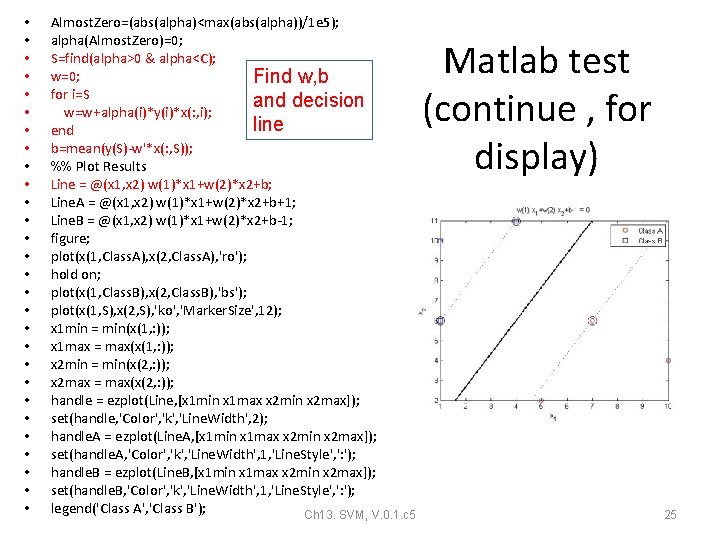
• • • • • • • Almost. Zero=(abs(alpha)<max(abs(alpha))/1 e 5); alpha(Almost. Zero)=0; S=find(alpha>0 & alpha<C); w=0; Find w, b for i=S and decision w=w+alpha(i)*y(i)*x(: , i); line end b=mean(y(S)-w'*x(: , S)); %% Plot Results Line = @(x 1, x 2) w(1)*x 1+w(2)*x 2+b; Line. A = @(x 1, x 2) w(1)*x 1+w(2)*x 2+b+1; Line. B = @(x 1, x 2) w(1)*x 1+w(2)*x 2+b-1; figure; plot(x(1, Class. A), x(2, Class. A), 'ro'); hold on; plot(x(1, Class. B), x(2, Class. B), 'bs'); plot(x(1, S), x(2, S), 'ko', 'Marker. Size', 12); x 1 min = min(x(1, : )); x 1 max = max(x(1, : )); x 2 min = min(x(2, : )); x 2 max = max(x(2, : )); handle = ezplot(Line, [x 1 min x 1 max x 2 min x 2 max]); set(handle, 'Color', 'k', 'Line. Width', 2); handle. A = ezplot(Line. A, [x 1 min x 1 max x 2 min x 2 max]); set(handle. A, 'Color', 'k', 'Line. Width', 1, 'Line. Style', ': '); handle. B = ezplot(Line. B, [x 1 min x 1 max x 2 min x 2 max]); set(handle. B, 'Color', 'k', 'Line. Width', 1, 'Line. Style', ': '); legend('Class A', 'Class B'); Ch 13. SVM, V. 0. 1. c 5 Matlab test (continue , for display) 25
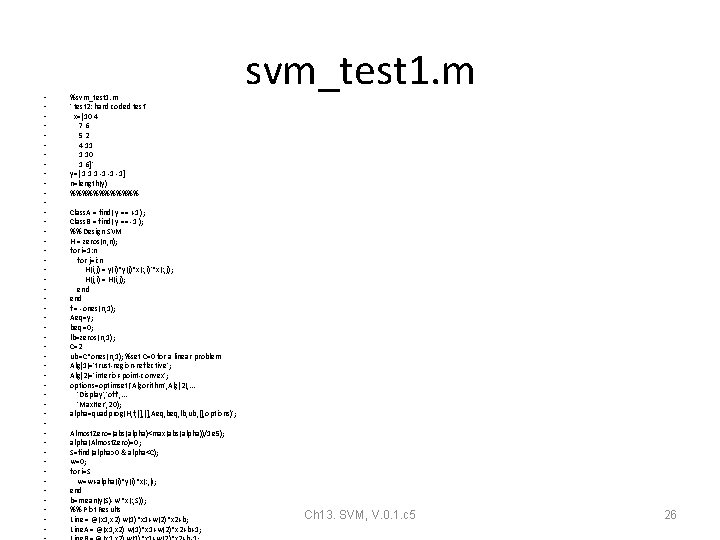
• • • • • • • • • • • • %svm_test 1. m ' test 2: hard coded test' x=[10 4 76 52 4 11 1 10 1 6]' y=[ 1 1 1 -1 -1 -1] n=length(y) %%%%%% svm_test 1. m Class. A = find( y == +1 ); Class. B = find( y == -1 ); %% Design SVM H = zeros(n, n); for i=1: n for j=i: n H(i, j) = y(i)*y(j)*x(: , i)'*x(: , j); H(j, i) = H(i, j); end f = -ones(n, 1); Aeq=y; beq=0; lb=zeros(n, 1); C=2 ub=C*ones(n, 1); %set C=0 for a linear problem Alg{1}='trust-region-reflective'; Alg{2}='interior-point-convex'; options=optimset('Algorithm', Alg{2}, . . . 'Display', 'off', . . . 'Max. Iter', 20); alpha=quadprog(H, f, [], Aeq, beq, lb, ub, [], options)'; Almost. Zero=(abs(alpha)<max(abs(alpha))/1 e 5); alpha(Almost. Zero)=0; S=find(alpha>0 & alpha<C); w=0; for i=S w=w+alpha(i)*y(i)*x(: , i); end b=mean(y(S)-w'*x(: , S)); %% Plot Results Line = @(x 1, x 2) w(1)*x 1+w(2)*x 2+b; Line. A = @(x 1, x 2) w(1)*x 1+w(2)*x 2+b+1; Ch 13. SVM, V. 0. 1. c 5 26
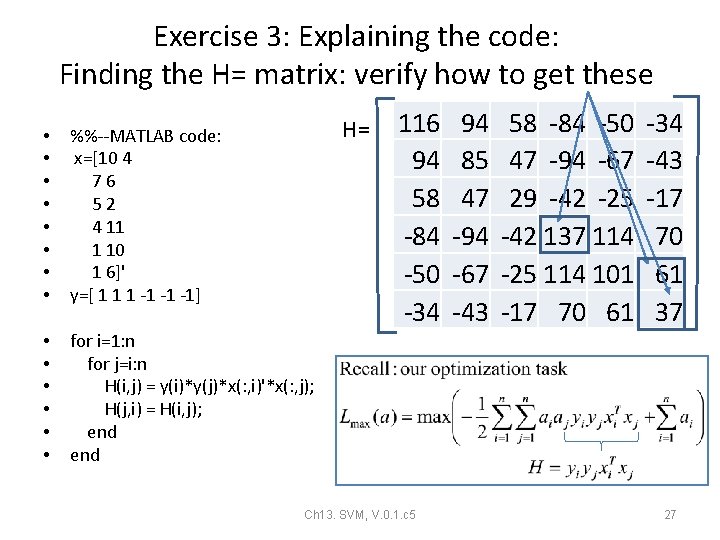
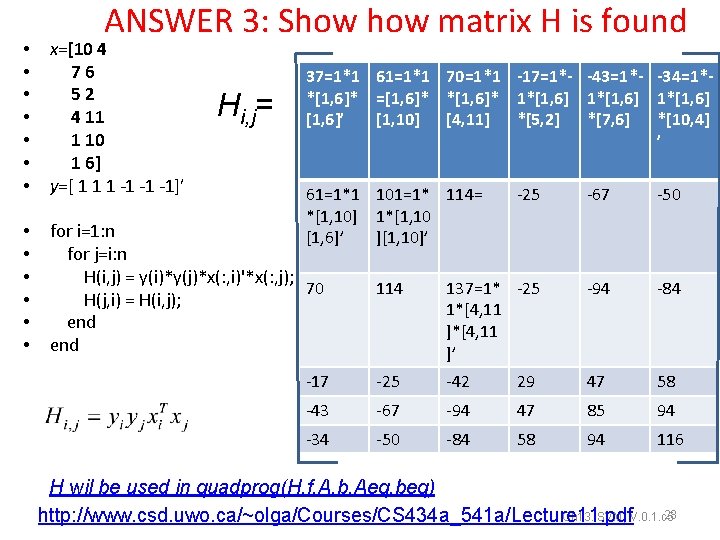
Exercise 3: Explaining the code: Finding the H= matrix: verify how to get these H= • • %%--MATLAB code: x=[10 4 76 52 4 11 1 10 1 6]' y=[ 1 1 1 -1 -1 -1] • • • for i=1: n for j=i: n H(i, j) = y(i)*y(j)*x(: , i)'*x(: , j); H(j, i) = H(i, j); end 116 94 58 -84 -50 -34 Ch 13. SVM, V. 0. 1. c 5 94 85 47 -94 -67 -43 58 -84 -50 47 -94 -67 29 -42 -25 -42 137 114 -25 114 101 -17 70 61 -34 -43 -17 70 61 37 27
ANSWER 3: Show matrix H is found • • x=[10 4 76 52 4 11 1 10 1 6] y=[ 1 1 1 -1 -1 -1]’ • • • for i=1: n for j=i: n H(i, j) = y(i)*y(j)*x(: , i)'*x(: , j); 70 H(j, i) = H(i, j); end Hi, j= 37=1*1 61=1*1 70=1*1 -17=1*- -43=1*- -34=1**[1, 6]* =[1, 6]* *[1, 6]* 1*[1, 6] [1, 6]’ [1, 10] [4, 11] *[5, 2] *[7, 6] *[10, 4] ’ 61=1*1 101=1* 114= *[1, 10] 1*[1, 10 [1, 6]’ ][1, 10]’ -25 -67 -50 114 137=1* -25 1*[4, 11 ]’ -94 -84 -17 -25 -42 29 47 58 -43 -67 -94 47 85 94 -34 -50 -84 58 94 116 H wil be used in quadprog(H, f, A, b, Aeq, beq) 28 Ch 13. SVM, V. 0. 1. c 5 http: //www. csd. uwo. ca/~olga/Courses/CS 434 a_541 a/Lecture 11. pdf
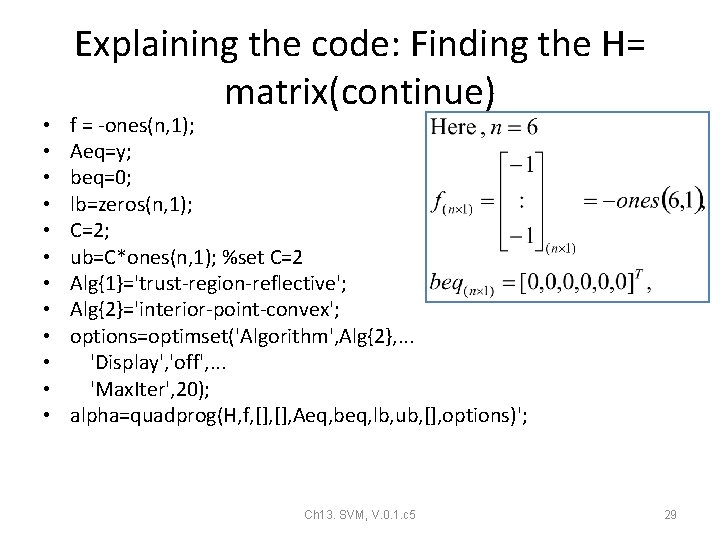
• • • Explaining the code: Finding the H= matrix(continue) f = -ones(n, 1); Aeq=y; beq=0; lb=zeros(n, 1); C=2; ub=C*ones(n, 1); %set C=2 Alg{1}='trust-region-reflective'; Alg{2}='interior-point-convex'; options=optimset('Algorithm', Alg{2}, . . . 'Display', 'off', . . . 'Max. Iter', 20); alpha=quadprog(H, f, [], Aeq, beq, lb, ub, [], options)'; Ch 13. SVM, V. 0. 1. c 5 29
Find w from • • • • %alpha=quadprog(H, f, [], Aeq, beq, lb, ub, [], options)'; alpha Almost. Zero=(abs(alpha)<max(abs(alpha))/1 e 5); alpha(Almost. Zero)=0; S=find(alpha>0 & alpha<C); w=0; for i=S w=w+alpha(i)*y(i)*x(: , i); end b=mean(y(S)-w'*x(: , S)); %% Plot Results Line = @(x 1, x 2) w(1)*x 1+w(2)*x 2+b; Line. A = @(x 1, x 2) w(1)*x 1+w(2)*x 2+b+1; Line. B = @(x 1, x 2) w(1)*x 1+w(2)*x 2+b-1; Ch 13. SVM, V. 0. 1. c 5 30
Plotting • • • • figure; plot(x(1, Class. A), x(2, Class. A), 'ro'); hold on; plot(x(1, Class. B), x(2, Class. B), 'bs'); plot(x(1, S), x(2, S), 'ko', 'Marker. Size', 12); x 1 min = min(x(1, : )); x 1 max = max(x(1, : )); x 2 min = min(x(2, : )); x 2 max = max(x(2, : )); handle = ezplot(Line, [x 1 min x 1 max x 2 min x 2 max]); set(handle, 'Color', 'k', 'Line. Width', 2); handle. A = ezplot(Line. A, [x 1 min x 1 max x 2 min x 2 max]); set(handle. A, 'Color', 'k', 'Line. Width', 1, 'Line. Style', ': '); handle. B = ezplot(Line. B, [x 1 min x 1 max x 2 min x 2 max]); set(handle. B, 'Color', 'k', 'Line. Width', 1, 'Line. Style', ': '); legend('Class A', 'Class B'); Ch 13. SVM, V. 0. 1. c 5 31
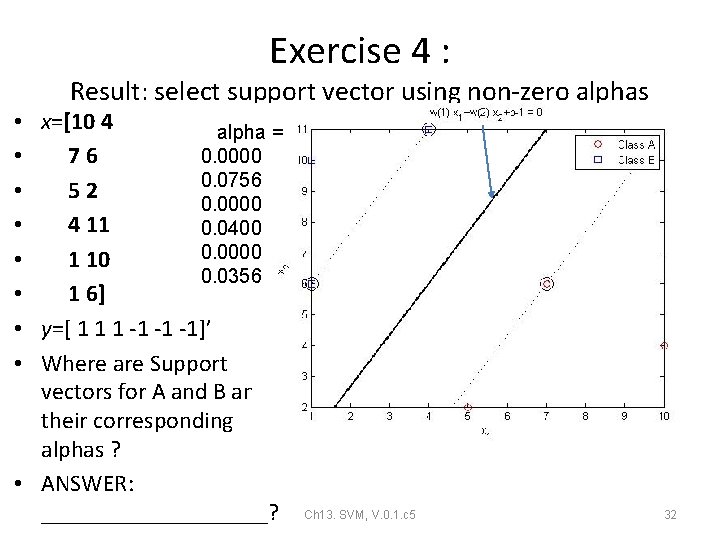
Exercise 4 : Result: select support vector using non-zero alphas • x=[10 4 alpha = • 76 0. 0000 0. 0756 • 52 0. 0000 • 4 11 0. 0400 0. 0000 • 1 10 0. 0356 • 1 6] • y=[ 1 1 1 -1 -1 -1]’ • Where are Support vectors for A and B andd their corresponding alphas ? • ANSWER: __________? Ch 13. SVM, V. 0. 1. c 5 32
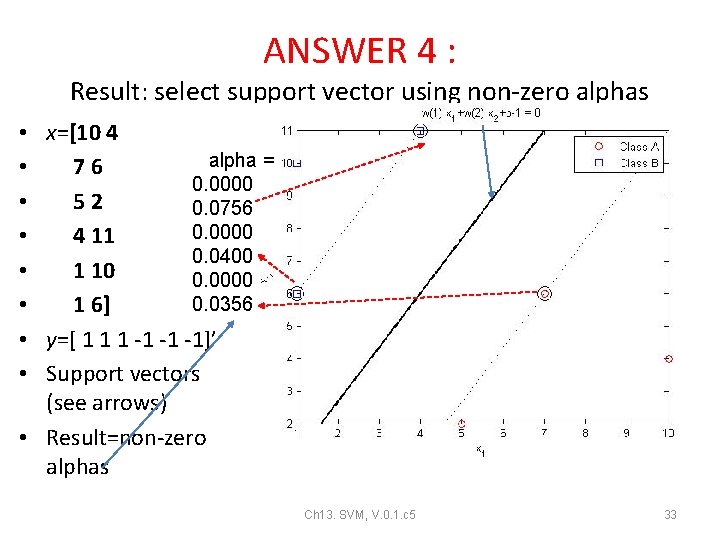
ANSWER 4 : Result: select support vector using non-zero alphas • x=[10 4 alpha = • 76 0. 0000 • 52 0. 0756 0. 0000 • 4 11 0. 0400 • 1 10 0. 0000 0. 0356 • 1 6] • y=[ 1 1 1 -1 -1 -1]’ • Support vectors (see arrows) • Result=non-zero alphas Ch 13. SVM, V. 0. 1. c 5 33
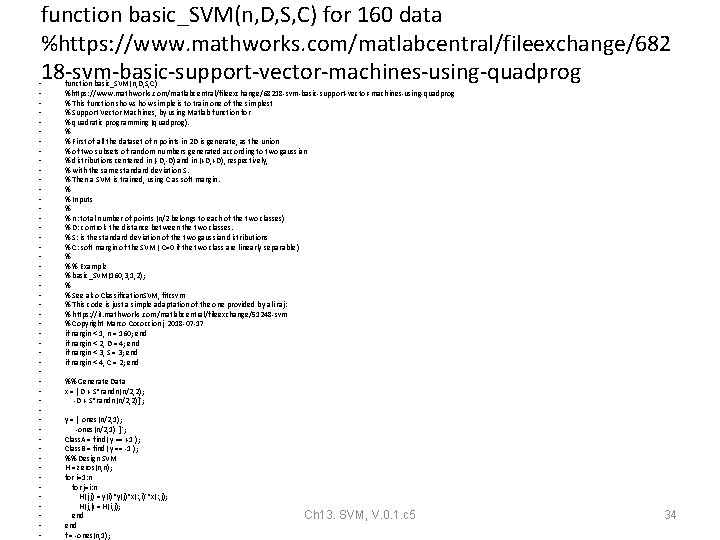
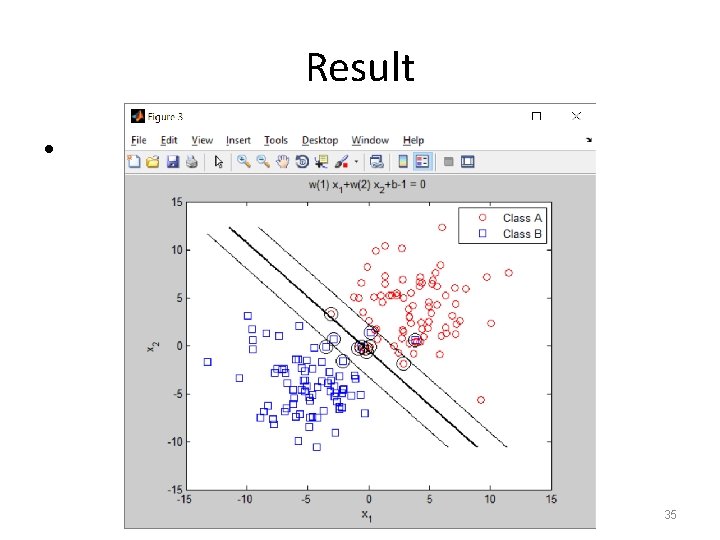
function basic_SVM(n, D, S, C) for 160 data %https: //www. mathworks. com/matlabcentral/fileexchange/682 18 -svm-basic-support-vector-machines-using-quadprog • • • • • • • • • • • • function basic_SVM(n, D, S, C) %https: //www. mathworks. com/matlabcentral/fileexchange/68218 -svm-basic-support-vector-machines-using-quadprog % This function shows how simple is to train one of the simplest % Support Vector Machines, by using Matlab function for % quadratic programming (quadprog). % % First of all the dataset of n points in 2 D is generate, as the union % of two subsets of random numbers generated according to two gaussian % distributions centered in (-D, -D) and in (+D, +D), respectively, % with the same standard deviation S. % Then a SVM is trained, using C as soft margin. % % Inputs % % n: total number of points (n/2 belongs to each of the two classes) % D: controls the distance between the two classes. % S: is the standard deviation of the two gaussian distributions % C: soft margin of the SVM ( C=0 if the two class are linearly separable ) % % % Example % basic_SVM(160, 3, 1, 2); % % See also Classification. SVM, fitcsvm % This code is just a simple adaptation of the one provided by ali raj: % https: //it. mathworks. com/matlabcentral/fileexchange/51248 -svm % Copyright Marco Cococcioni, 2018 -07 -17 if nargin < 1, n = 160; end if nargin < 2, D = 4; end if nargin < 3, S = 3; end if nargin < 4, C = 2; end %% Generate Data x = [ D + S*randn(n/2, 2); -D + S*randn(n/2, 2)]'; y = [ ones(n/2, 1); -ones(n/2, 1) ]'; Class. A = find( y == +1 ); Class. B = find( y == -1 ); %% Design SVM H = zeros(n, n); for i=1: n for j=i: n H(i, j) = y(i)*y(j)*x(: , i)'*x(: , j); H(j, i) = H(i, j); end f = -ones(n, 1); Ch 13. SVM, V. 0. 1. c 5 34
Result • Ch 13. SVM, V. 0. 1. c 5 35
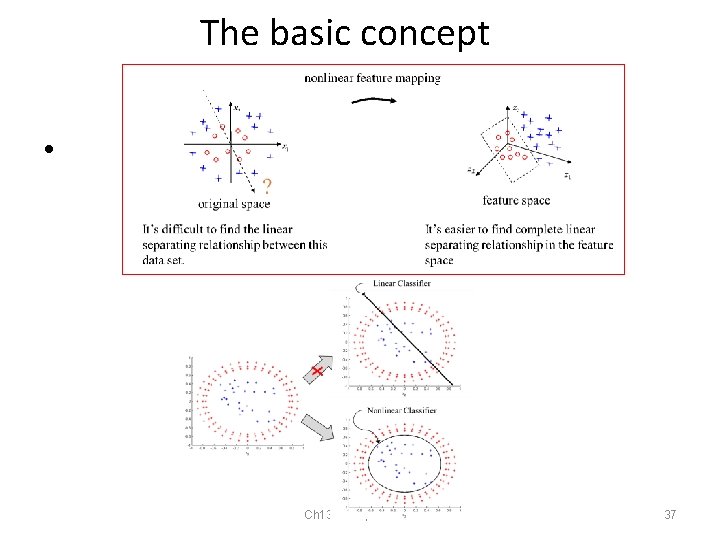
SVM implementation for Nonlinear problems Using the kernel trick Ch 13. SVM, V. 0. 1. c 5 36
The basic concept • Ch 13. SVM, V. 0. 1. c 5 37
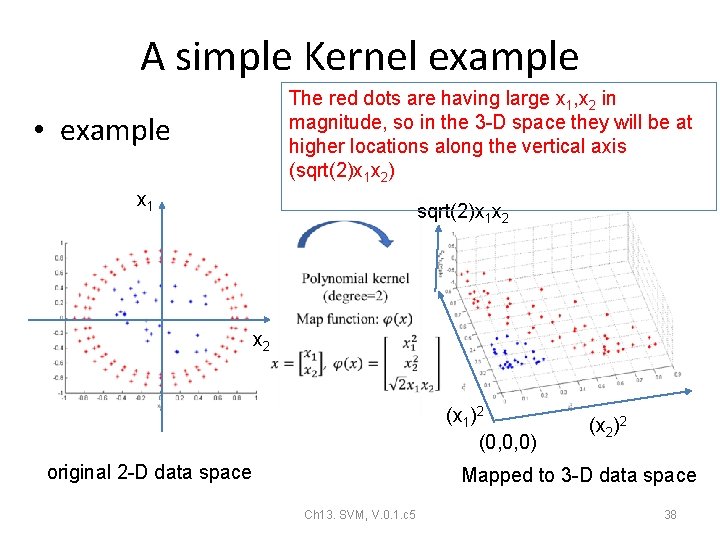
A simple Kernel example The red dots are having large x 1, x 2 in magnitude, so in the 3 -D space they will be at higher locations along the vertical axis (sqrt(2)x 1 x 2) • example x 1 sqrt(2)x 1 x 2 (x 1)2 (0, 0, 0) original 2 -D data space (x 2)2 Mapped to 3 -D data space Ch 13. SVM, V. 0. 1. c 5 38
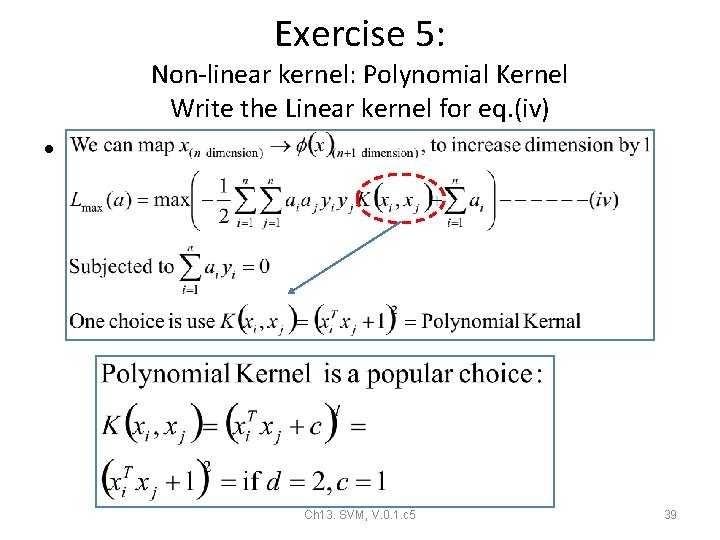
Exercise 5: Non-linear kernel: Polynomial Kernel Write the Linear kernel for eq. (iv) • Ch 13. SVM, V. 0. 1. c 5 39
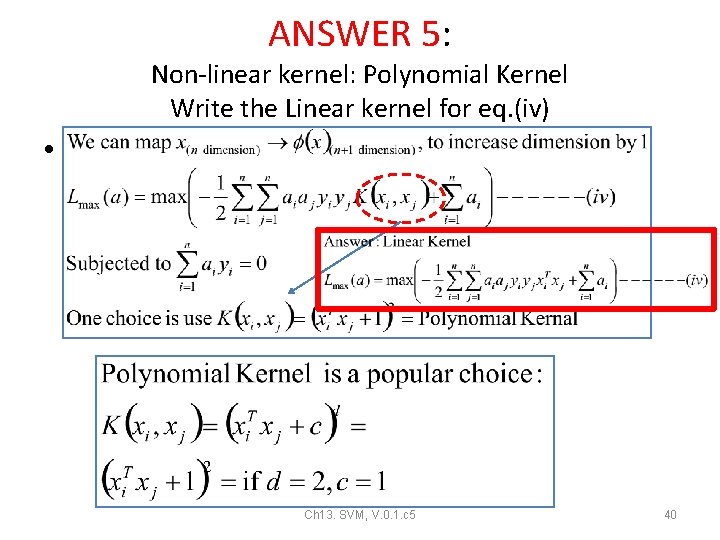
ANSWER 5: Non-linear kernel: Polynomial Kernel Write the Linear kernel for eq. (iv) • Ch 13. SVM, V. 0. 1. c 5 40
Non-Linear Kernel: how to classify a new input s{ }=set of support vectors Ch 13. SVM, V. 0. 1. c 5 41 •
The Kernel trick A more complex kernel • Ch 13. SVM, V. 0. 1. c 5 42 https: //towardsdatascience. com/support-vector-machines-svm-c 9 ef 22815589
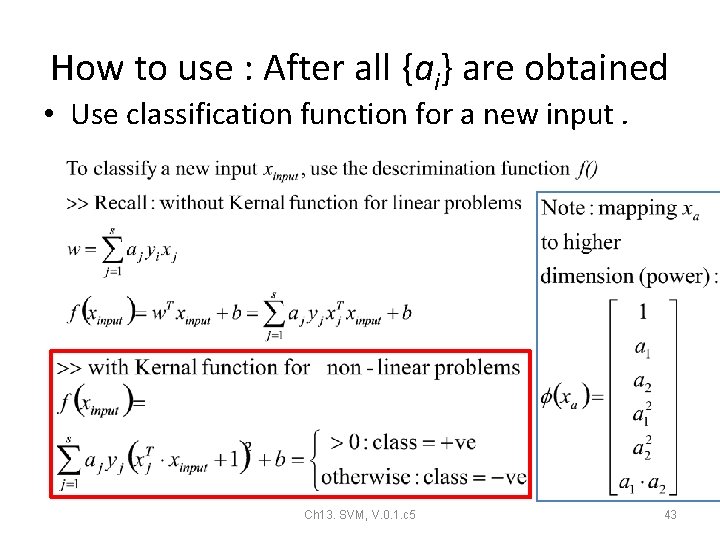
How to use : After all {ai} are obtained • Use classification function for a new input. Ch 13. SVM, V. 0. 1. c 5 43
Implementation Using Non-linear kernel for nonlinear problems. Ch 13. SVM, V. 0. 1. c 5 44
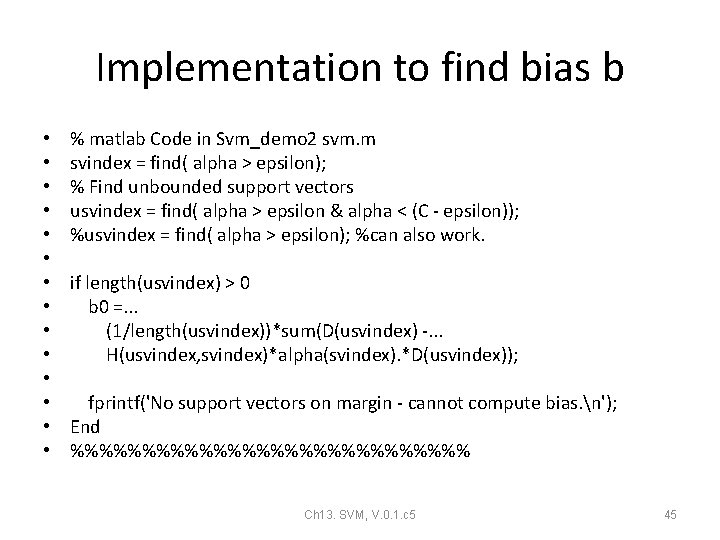
Implementation to find bias b • • • • % matlab Code in Svm_demo 2 svm. m svindex = find( alpha > epsilon); % Find unbounded support vectors usvindex = find( alpha > epsilon & alpha < (C - epsilon)); %usvindex = find( alpha > epsilon); %can also work. if length(usvindex) > 0 b 0 =. . . (1/length(usvindex))*sum(D(usvindex) -. . . H(usvindex, svindex)*alpha(svindex). *D(usvindex)); fprintf('No support vectors on margin - cannot compute bias. n'); End %%%%%%%%%%%%%% Ch 13. SVM, V. 0. 1. c 5 45
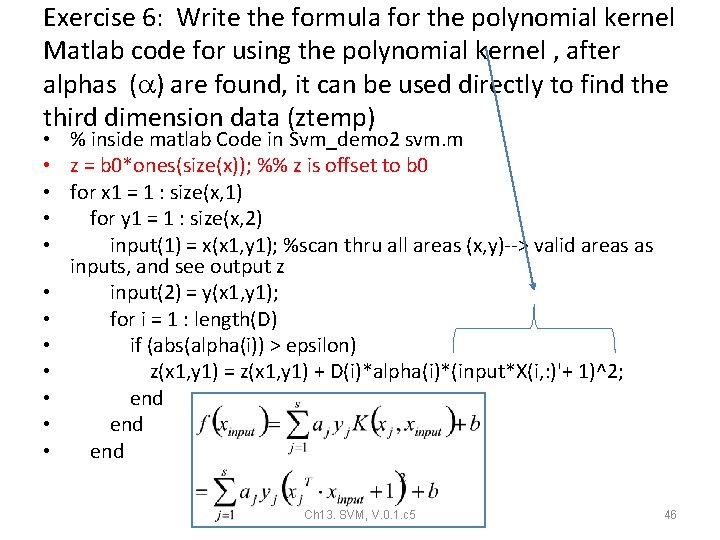
Exercise 6: Write the formula for the polynomial kernel Matlab code for using the polynomial kernel , after alphas ( ) are found, it can be used directly to find the third dimension data (ztemp) • % inside matlab Code in Svm_demo 2 svm. m • z = b 0*ones(size(x)); %% z is offset to b 0 • for x 1 = 1 : size(x, 1) • for y 1 = 1 : size(x, 2) • input(1) = x(x 1, y 1); %scan thru all areas (x, y)--> valid areas as inputs, and see output z • input(2) = y(x 1, y 1); • for i = 1 : length(D) • if (abs(alpha(i)) > epsilon) • z(x 1, y 1) = z(x 1, y 1) + D(i)*alpha(i)*(input*X(i, : )'+ 1)^2; • end Ch 13. SVM, V. 0. 1. c 5 46
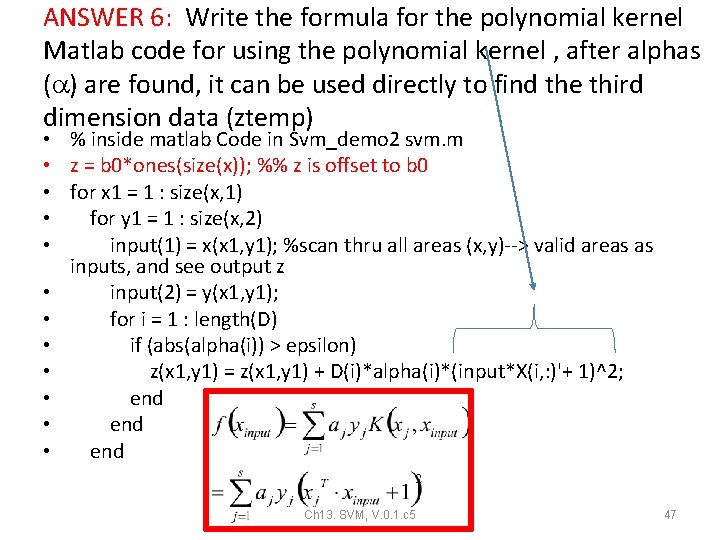
ANSWER 6: Write the formula for the polynomial kernel Matlab code for using the polynomial kernel , after alphas ( ) are found, it can be used directly to find the third dimension data (ztemp) • % inside matlab Code in Svm_demo 2 svm. m • z = b 0*ones(size(x)); %% z is offset to b 0 • for x 1 = 1 : size(x, 1) • for y 1 = 1 : size(x, 2) • input(1) = x(x 1, y 1); %scan thru all areas (x, y)--> valid areas as inputs, and see output z • input(2) = y(x 1, y 1); • for i = 1 : length(D) • if (abs(alpha(i)) > epsilon) • z(x 1, y 1) = z(x 1, y 1) + D(i)*alpha(i)*(input*X(i, : )'+ 1)^2; • end Ch 13. SVM, V. 0. 1. c 5 47
Svm_demo 1 (new_basic_SVM) using matlab: Non-linear example using Polynomial kernel https: //notendur. hi. is/tpr/tutorials/s vm/notes/chapter 5_6. pdf Ch 13. SVM, V. 0. 1. c 5 48
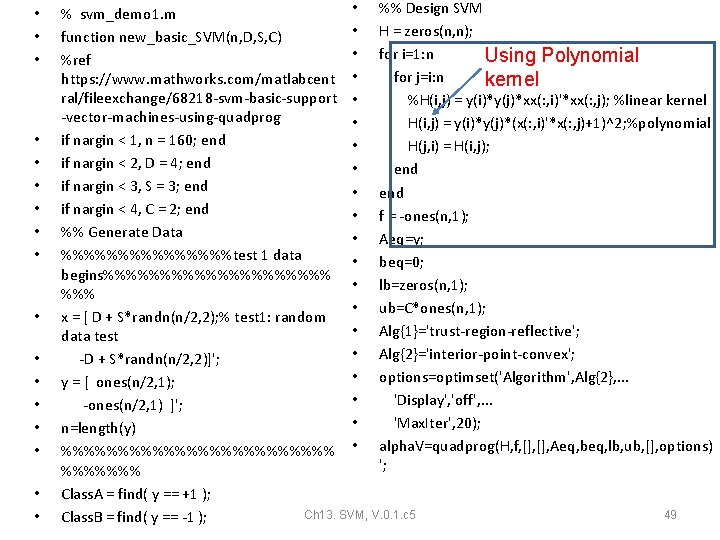
• • • • • %% Design SVM % svm_demo 1. m • H = zeros(n, n); function new_basic_SVM(n, D, S, C) • for i=1: n Using Polynomial %ref for j=i: n https: //www. mathworks. com/matlabcent • kernel ral/fileexchange/68218 -svm-basic-support • %H(i, j) = y(i)*y(j)*xx(: , i)'*xx(: , j); %linear kernel -vector-machines-using-quadprog • H(i, j) = y(i)*y(j)*(x(: , i)'*x(: , j)+1)^2; %polynomial if nargin < 1, n = 160; end • H(j, i) = H(i, j); if nargin < 2, D = 4; end • end if nargin < 3, S = 3; end • end if nargin < 4, C = 2; end • f = -ones(n, 1); %% Generate Data • Aeq=y; %%%%%%%%test 1 data • beq=0; begins%%%%%%%%%% • lb=zeros(n, 1); %%% • ub=C*ones(n, 1); x = [ D + S*randn(n/2, 2); % test 1: random • Alg{1}='trust-region-reflective'; data test • Alg{2}='interior-point-convex'; -D + S*randn(n/2, 2)]'; • options=optimset('Algorithm', Alg{2}, . . . y = [ ones(n/2, 1); • 'Display', 'off', . . . -ones(n/2, 1) ]'; • 'Max. Iter', 20); n=length(y) %%%%%%%%%%%% • alpha. V=quadprog(H, f, [], Aeq, beq, lb, ub, [], options) '; %%%%%%% Class. A = find( y == +1 ); Ch 13. SVM, V. 0. 1. c 5 49 Class. B = find( y == -1 );
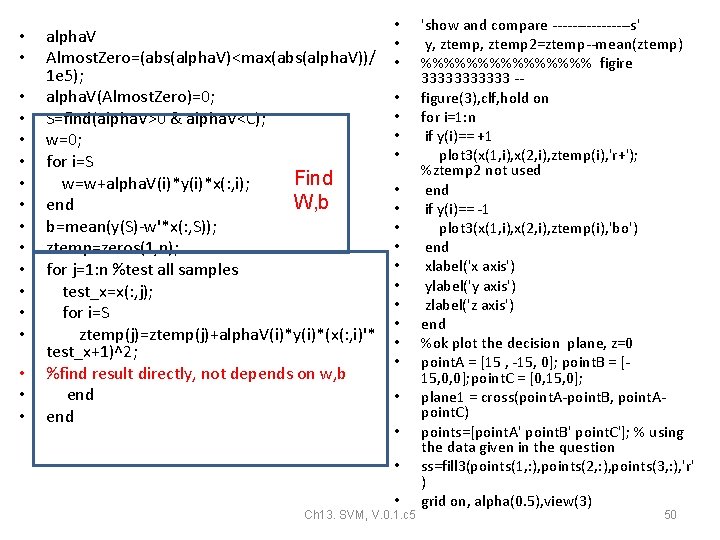
• • • • • alpha. V Almost. Zero=(abs(alpha. V)<max(abs(alpha. V))/ 1 e 5); alpha. V(Almost. Zero)=0; S=find(alpha. V>0 & alpha. V<C); w=0; for i=S Find w=w+alpha. V(i)*y(i)*x(: , i); W, b end b=mean(y(S)-w'*x(: , S)); ztemp=zeros(1, n); for j=1: n %test all samples test_x=x(: , j); for i=S ztemp(j)=ztemp(j)+alpha. V(i)*y(i)*(x(: , i)'* test_x+1)^2; %find result directly, not depends on w, b end • • • • • • Ch 13. SVM, V. 0. 1. c 5 'show and compare --------s' y, ztemp 2=ztemp--mean(ztemp) %%%%%%%% figire 333333 -figure(3), clf, hold on for i=1: n if y(i)== +1 plot 3(x(1, i), x(2, i), ztemp(i), 'r+'); %ztemp 2 not used end if y(i)== -1 plot 3(x(1, i), x(2, i), ztemp(i), 'bo') end xlabel('x axis') ylabel('y axis') zlabel('z axis') end %ok plot the decision plane, z=0 point. A = [15 , -15, 0]; point. B = [15, 0, 0]; point. C = [0, 15, 0]; plane 1 = cross(point. A-point. B, point. Apoint. C) points=[point. A' point. B' point. C']; % using the data given in the question ss=fill 3(points(1, : ), points(2, : ), points(3, : ), 'r' ) grid on, alpha(0. 5), view(3) 50
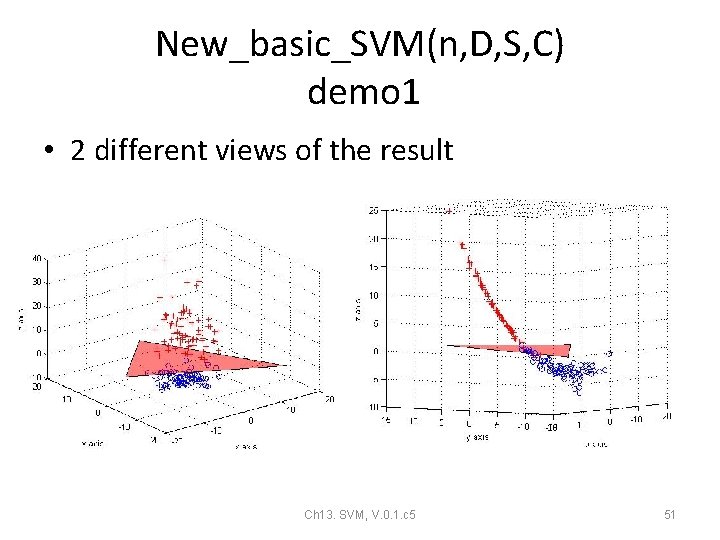
New_basic_SVM(n, D, S, C) demo 1 • 2 different views of the result Ch 13. SVM, V. 0. 1. c 5 51
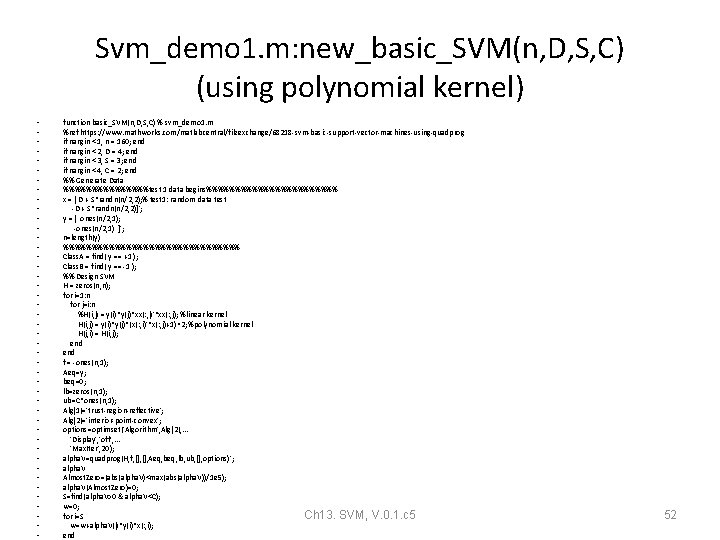
Svm_demo 1. m: new_basic_SVM(n, D, S, C) (using polynomial kernel) • • • • • • • • • • • function basic_SVM(n, D, S, C) % svm_demo 1. m %ref https: //www. mathworks. com/matlabcentral/fileexchange/68218 -svm-basic-support-vector-machines-using-quadprog if nargin < 1, n = 160; end if nargin < 2, D = 4; end if nargin < 3, S = 3; end if nargin < 4, C = 2; end %% Generate Data %%%%%%%%test 1 data begins%%%%%%%%%%%% x = [ D + S*randn(n/2, 2); % test 1: random data test -D + S*randn(n/2, 2)]'; y = [ ones(n/2, 1); -ones(n/2, 1) ]'; n=length(y) %%%%%%%%%%%%%%%% Class. A = find( y == +1 ); Class. B = find( y == -1 ); %% Design SVM H = zeros(n, n); for i=1: n for j=i: n %H(i, j) = y(i)*y(j)*xx(: , i)'*xx(: , j); %linear kernel H(i, j) = y(i)*y(j)*(x(: , i)'*x(: , j)+1)^2; %polynomial kernel H(j, i) = H(i, j); end f = -ones(n, 1); Aeq=y; beq=0; lb=zeros(n, 1); ub=C*ones(n, 1); Alg{1}='trust-region-reflective'; Alg{2}='interior-point-convex'; options=optimset('Algorithm', Alg{2}, . . . 'Display', 'off', . . . 'Max. Iter', 20); alpha. V=quadprog(H, f, [], Aeq, beq, lb, ub, [], options)'; alpha. V Almost. Zero=(abs(alpha. V)<max(abs(alpha. V))/1 e 5); alpha. V(Almost. Zero)=0; S=find(alpha. V>0 & alpha. V<C); w=0; for i=S Ch 13. SVM, V. 0. 1. c 5 w=w+alpha. V(i)*y(i)*x(: , i); end 52
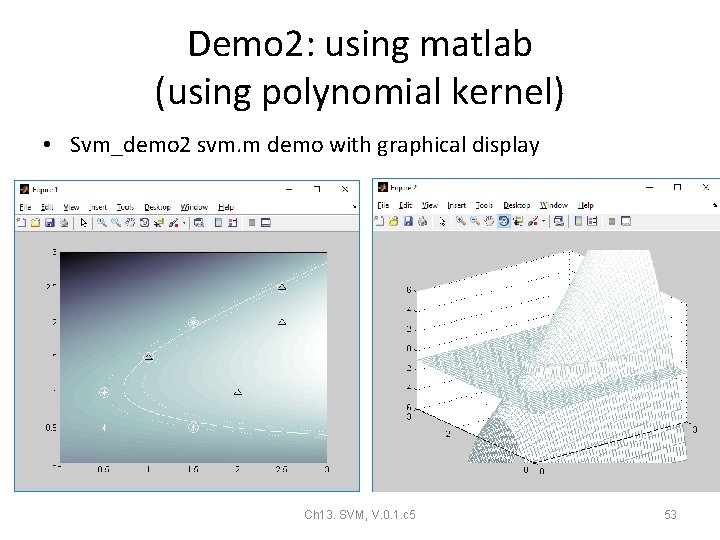
Demo 2: using matlab (using polynomial kernel) • Svm_demo 2 svm. m demo with graphical display Ch 13. SVM, V. 0. 1. c 5 53
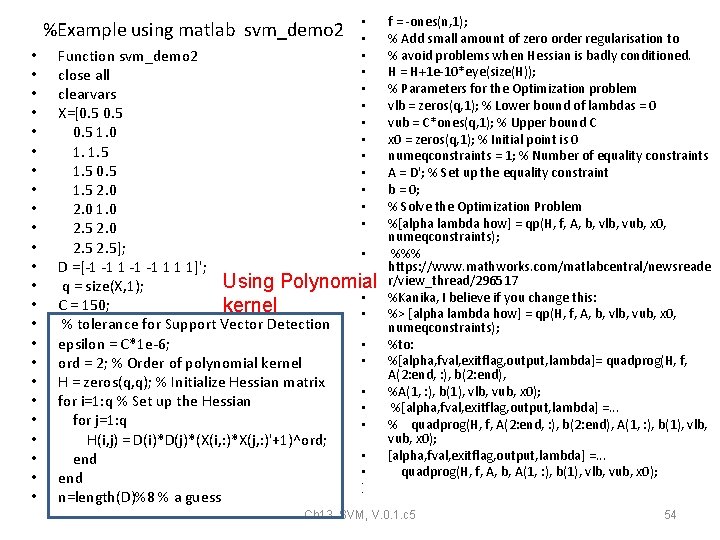
%Example using matlab svm_demo 2 • • • • • • • • • • Function svm_demo 2 close all clearvars X=[0. 5 1. 0 1. 1. 5 0. 5 1. 5 2. 0 1. 0 2. 5]; • D =[-1 -1 1 1 1]'; Using Polynomial q = size(X, 1); • C = 150; kernel • % tolerance for Support Vector Detection epsilon = C*1 e-6; • • ord = 2; % Order of polynomial kernel H = zeros(q, q); % Initialize Hessian matrix • for i=1: q % Set up the Hessian • for j=1: q • H(i, j) = D(i)*D(j)*(X(i, : )*X(j, : )'+1)^ord; • end • • n=length(D)%8 % a guess f = -ones(n, 1); % Add small amount of zero order regularisation to % avoid problems when Hessian is badly conditioned. H = H+1 e-10*eye(size(H)); % Parameters for the Optimization problem vlb = zeros(q, 1); % Lower bound of lambdas = 0 vub = C*ones(q, 1); % Upper bound C x 0 = zeros(q, 1); % Initial point is 0 numeqconstraints = 1; % Number of equality constraints A = D'; % Set up the equality constraint b = 0; % Solve the Optimization Problem %[alpha lambda how] = qp(H, f, A, b, vlb, vub, x 0, numeqconstraints); %%% https: //www. mathworks. com/matlabcentral/newsreade r/view_thread/296517 %Kanika, I believe if you change this: %> [alpha lambda how] = qp(H, f, A, b, vlb, vub, x 0, numeqconstraints); %to: %[alpha, fval, exitflag, output, lambda]= quadprog(H, f, A(2: end, : ), b(2: end), %A(1, : ), b(1), vlb, vub, x 0); %[alpha, fval, exitflag, output, lambda] =. . . % quadprog(H, f, A(2: end, : ), b(2: end), A(1, : ), b(1), vlb, vub, x 0); [alpha, fval, exitflag, output, lambda] =. . . quadprog(H, f, A, b, A(1, : ), b(1), vlb, vub, x 0); Ch 13. SVM, V. 0. 1. c 5 54
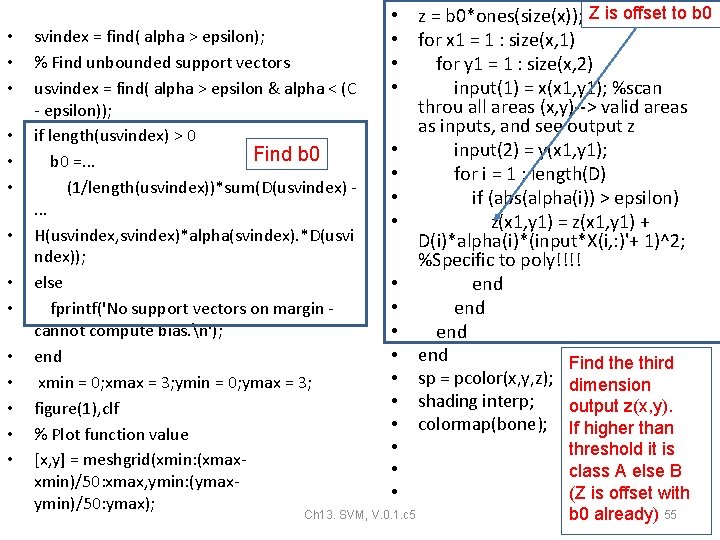
• • • • svindex = find( alpha > epsilon); % Find unbounded support vectors usvindex = find( alpha > epsilon & alpha < (C - epsilon)); if length(usvindex) > 0 Find b 0 =. . . (1/length(usvindex))*sum(D(usvindex). . . H(usvindex, svindex)*alpha(svindex). *D(usvi ndex)); else fprintf('No support vectors on margin cannot compute bias. n'); end xmin = 0; xmax = 3; ymin = 0; ymax = 3; figure(1), clf % Plot function value [x, y] = meshgrid(xmin: (xmaxxmin)/50: xmax, ymin: (ymaxymin)/50: ymax); • z = b 0*ones(size(x)); Z is offset to b 0 • for x 1 = 1 : size(x, 1) • for y 1 = 1 : size(x, 2) • input(1) = x(x 1, y 1); %scan throu all areas (x, y)--> valid areas as inputs, and see output z • input(2) = y(x 1, y 1); • for i = 1 : length(D) • if (abs(alpha(i)) > epsilon) • z(x 1, y 1) = z(x 1, y 1) + D(i)*alpha(i)*(input*X(i, : )'+ 1)^2; %Specific to poly!!!! • end Find the third • sp = pcolor(x, y, z); dimension • shading interp; output z(x, y). • colormap(bone); If higher than • threshold it is • class A else B • (Z is offset with Ch 13. SVM, V. 0. 1. c 5 b 0 already) 55
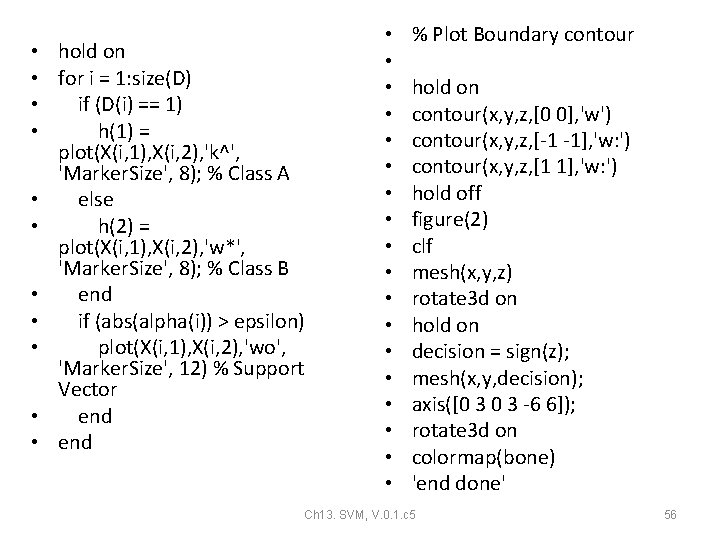
• hold on • for i = 1: size(D) • if (D(i) == 1) • h(1) = plot(X(i, 1), X(i, 2), 'k^', 'Marker. Size', 8); % Class A • else • h(2) = plot(X(i, 1), X(i, 2), 'w*', 'Marker. Size', 8); % Class B • end • if (abs(alpha(i)) > epsilon) • plot(X(i, 1), X(i, 2), 'wo', 'Marker. Size', 12) % Support Vector • end • • • • • % Plot Boundary contour hold on contour(x, y, z, [0 0], 'w') contour(x, y, z, [-1 -1], 'w: ') contour(x, y, z, [1 1], 'w: ') hold off figure(2) clf mesh(x, y, z) rotate 3 d on hold on decision = sign(z); mesh(x, y, decision); axis([0 3 -6 6]); rotate 3 d on colormap(bone) 'end done' Ch 13. SVM, V. 0. 1. c 5 56
svm_demo 2: with Graphic Display • • • • • • • • • • • • • • • • • • • • • • • • • • • • • • • • • • % ============================= %https: //www. mathworks. com/matlabcentral/newsreader/view_thread/296517 % Neural Networks A Classroom Approach % Satish Kumar % Copyright Tata Mc. Graw Hill, 2004 % % MATLAB code that implements the SVM for non-linearly % separable data % Reference: Table 8. 6; Page 294 % % ============================= function svm_demo 2 close all clearvars X=[0. 5 1. 0 1. 1. 5 0. 5 1. 5 2. 0 1. 0 2. 5]; D =[-1 -1 1 1 1]'; q = size(X, 1); C = 150; % tolerance for Support Vector Detection epsilon = C*1 e-6; ord = 2; % Order of polynomial kernel H = zeros(q, q); % Initialize Hessian matrix for i=1: q % Set up the Hessian for j=1: q H(i, j) = D(i)*D(j)*(X(i, : )*X(j, : )'+1)^ord; end n=length(D)%8 % a guess f = -ones(n, 1); % Add small amount of zero order regularisation to % avoid problems when Hessian is badly conditioned. H = H+1 e-10*eye(size(H)); % Parameters for the Optimization problem vlb = zeros(q, 1); % Lower bound of lambdas = 0 vub = C*ones(q, 1); % Upper bound C x 0 = zeros(q, 1); % Initial point is 0 numeqconstraints = 1; % Number of equality constraints A = D'; % Set up the equality constraint b = 0; % Solve the Optimization Problem %[alpha lambda how] = qp(H, f, A, b, vlb, vub, x 0, numeqconstraints); %%% https: //www. mathworks. com/matlabcentral/newsreader/view_thread/296517 %Kanika, I believe if you change this: %> [alpha lambda how] = qp(H, f, A, b, vlb, vub, x 0, numeqconstraints); %to: %[alpha, fval, exitflag, output, lambda]= quadprog(H, f, A(2: end, : ), b(2: end), %A(1, : ), b(1), vlb, vub, x 0); %[alpha, fval, exitflag, output, lambda] =. . . % quadprog(H, f, A(2: end, : ), b(2: end), A(1, : ), b(1), vlb, vub, x 0); [alpha, fval, exitflag, output, lambda] =. . . quadprog(H, f, A, b, A(1, : ), b(1), vlb, vub, x 0); svindex = find( alpha > epsilon); % Find unbounded support vectors usvindex = find( alpha > epsilon & alpha < (C - epsilon)); if length(usvindex) > 0 b 0 =. . . (1/length(usvindex))*sum(D(usvindex) -. . . H(usvindex, svindex)*alpha(svindex). *D(usvindex)); else fprintf('No support vectors on margin - cannot compute bias. n'); end xmin = 0; xmax = 3; ymin = 0; ymax = 3; figure(1) clf % Plot function value [x, y] = meshgrid(xmin: (xmax-xmin)/50: xmax, ymin: (ymax-ymin)/50: ymax); z = b 0*ones(size(x)); for x 1 = 1 : size(x, 1) for y 1 = 1 : size(x, 2) input(1) = x(x 1, y 1); input(2) = y(x 1, y 1); for i = 1 : length(D) if (abs(alpha(i)) > epsilon) z(x 1, y 1) = z(x 1, y 1) + D(i)*alpha(i)*(input*X(i, : )'+ 1)^2; %Specific to poly!!!! end end sp = pcolor(x, y, z); shading interp; colormap(bone); hold on for i = 1: size(D) if (D(i) == 1) h(1) = plot(X(i, 1), X(i, 2), 'k^', 'Marker. Size', 8); % Class A else h(2) = plot(X(i, 1), X(i, 2), 'w*', 'Marker. Size', 8); % Class B end if (abs(alpha(i)) > epsilon) plot(X(i, 1), X(i, 2), 'wo', 'Marker. Size', 12) % Support Vector end % Plot Boundary contour hold on contour(x, y, z, [0 0], 'w') contour(x, y, z, [-1 -1], 'w: ') contour(x, y, z, [1 1], 'w: ') hold off figure(2) clf mesh(x, y, z) rotate 3 d on hold on decision = sign(z); mesh(x, y, decision); axis([0 3 -6 6]); rotate 3 d on colormap(bone) 'end done' • https: //www. mathworks. com/matlabcentral/newsreader/view_thread/296517 Ch 13. SVM, V. 0. 1. c 5 57
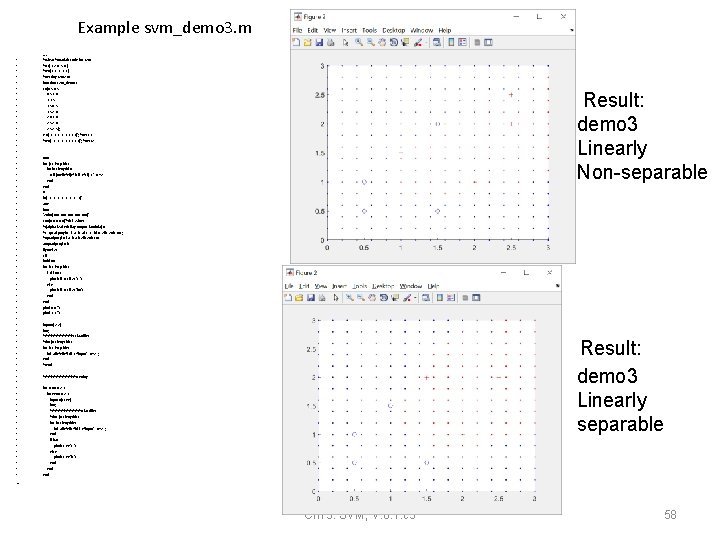
Example svm_demo 3. m • %Clear %matlab code for svm • • • • • • • • • • • • • • • • • • • %Clear %matlab code for svm %x=[1 2 4 5 6 ] %y=[1 1 -1 -1 1 ] %testing svm 2. m function svm_demo 3 x=[0. 5 1. 0 1. 1. 5 0. 5 1. 5 2. 0 1. 0 2. 5]; y =[-1 -1 1 1 1]'; %test 1 %y =[-1 -1 1 1 1 1]'; %test 2 Result: demo 3 Linearly Non-separable H=0 for j=1: length(x) for i=1: length(y) H(i, j)=y(i)*y(j)* (x(i, : )*x(j, : )'+1)^2 end H f=[-1 -1 -1]' A=y b=0 'vub=[100 100 100]' x 0=[0 0 0]'%init values %[alpha, fval, exitflag, output, lambda] =. . . % quadprog(H, f, A, b, A(1, : ), b(1), vlb, vub, x 0); %quadprog(H, f, A, b, vlb, vub, x 0) a=quadprog(H, f) figure(2) clf hold on for i=1: length(x) if y(i)==1 plot(x(i, 1), x(i, 2), 'r+') else plot(x(i, 1), x(i, 2), 'bo') end plot(0, 0, '. ') plot(3, 3, '. ') input=[2, 2] f=0; %%%%%% claasifier %for j=1: length(x) for i=1: length(y) f=f+a(i)*y(i)*(x(i, : )*input'+1)^2 ; end %end Result: demo 3 Linearly separable %%%%%%testing for xx=0: 0. 2: 3 for yy=0: 0. 2: 3 input=[xx, yy] f=0; %%%%%% classifier %for j=1: length(x) for i=1: length(y) f=f+a(i)*y(i)*(x(i, : )*input'+1)^2 ; end if f>0 plot(xx, yy, 'r. ') else plot(xx, yy, 'b. ') end end • Ch 13. SVM, V. 0. 1. c 5 58
Appendix Ch 13. SVM, V. 0. 1. c 5 59
Dual • The Lagrangian Dual Problem: instead of minimizing over w, b, • subject to constraints involving a’s, we can maximize over a (the • dual variable) subject to the relations obtained previously for w and b • http: //web. mit. edu/6. 034/wwwbob/svm-notes-long 08. pdf • https: //en. wikipedia. org/wiki/Duality_(optimization) • https: //en. wikipedia. org/wiki/Lagrange_multiplier • https: //en. wikipedia. org/wiki/Quadratic_programming Ch 13. SVM, V. 0. 1. c 5 60
Demos • https: //www. youtube. com/watch? v=3 li. Cb. RZP r. ZA Ch 13. SVM, V. 0. 1. c 5 61
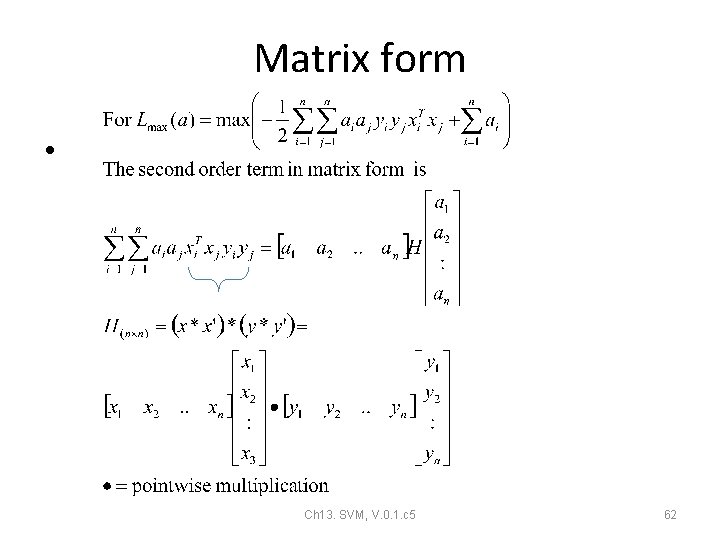
Matrix form • Ch 13. SVM, V. 0. 1. c 5 62
Example Ch 13. SVM, V. 0. 1. c 5 63
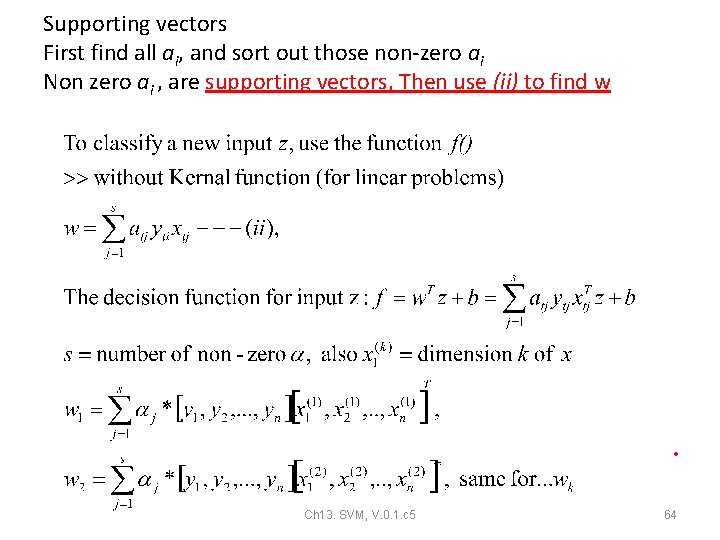
Supporting vectors First find all ai, and sort out those non-zero ai Non zero ai , are supporting vectors, Then use (ii) to find w • Ch 13. SVM, V. 0. 1. c 5 64
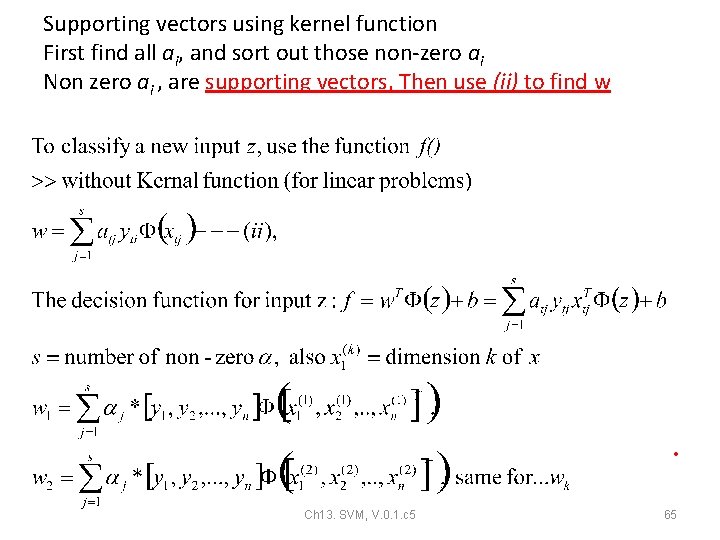
Supporting vectors using kernel function First find all ai, and sort out those non-zero ai Non zero ai , are supporting vectors, Then use (ii) to find w • Ch 13. SVM, V. 0. 1. c 5 65
• Ch 13. SVM, V. 0. 1. c 5 66
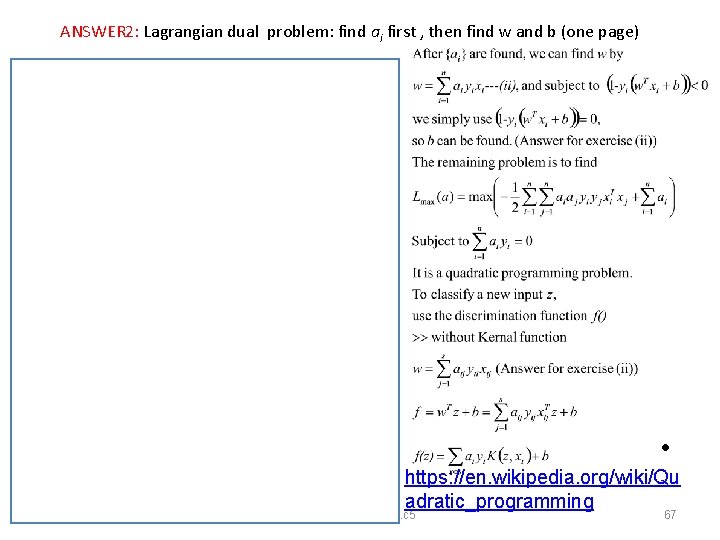
ANSWER 2: Lagrangian dual problem: find ai first , then find w and b (one page) • https: //en. wikipedia. org/wiki/Qu adratic_programming Ch 13. SVM, V. 0. 1. c 5 67
Summary Ch 13. SVM, V. 0. 1. c 5 • 68
Non-linear Kernel • Ch 13. SVM, V. 0. 1. c 5 69
• Ch 13. SVM, V. 0. 1. c 5 70
• Ch 13. SVM, V. 0. 1. c 5 71
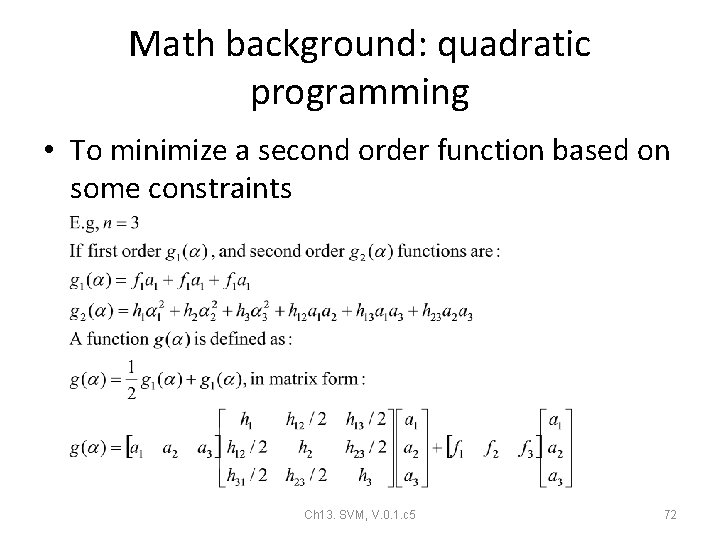
Math background: quadratic programming • To minimize a second order function based on some constraints Ch 13. SVM, V. 0. 1. c 5 72
Quadratic programming • Ch 13. SVM, V. 0. 1. c 5 73
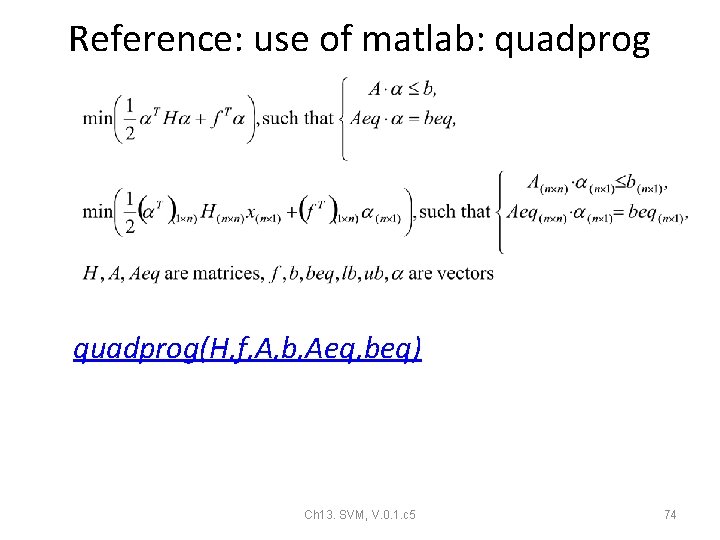
Reference: use of matlab: quadprog(H, f, A, b, Aeq, beq) Ch 13. SVM, V. 0. 1. c 5 74
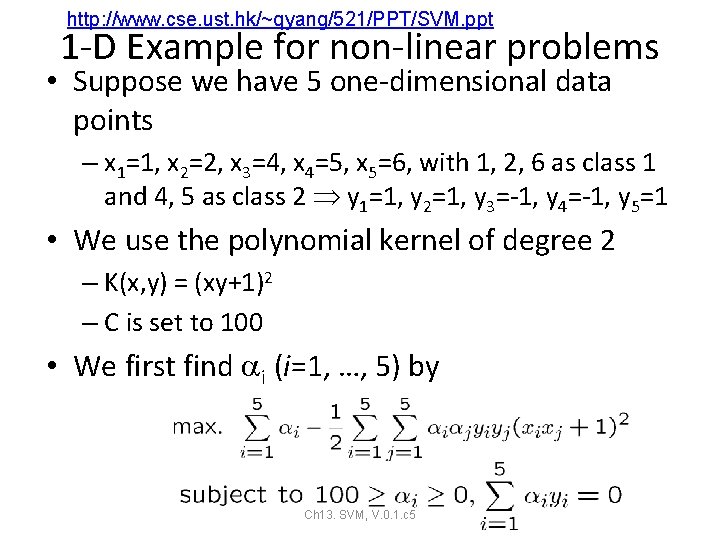
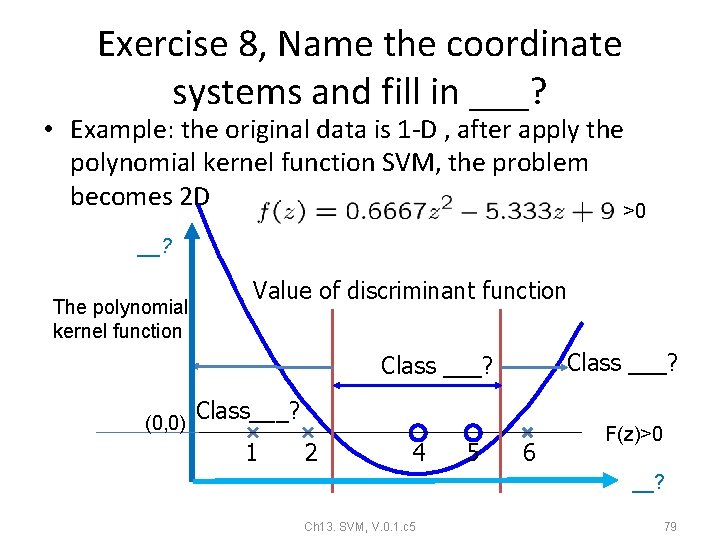
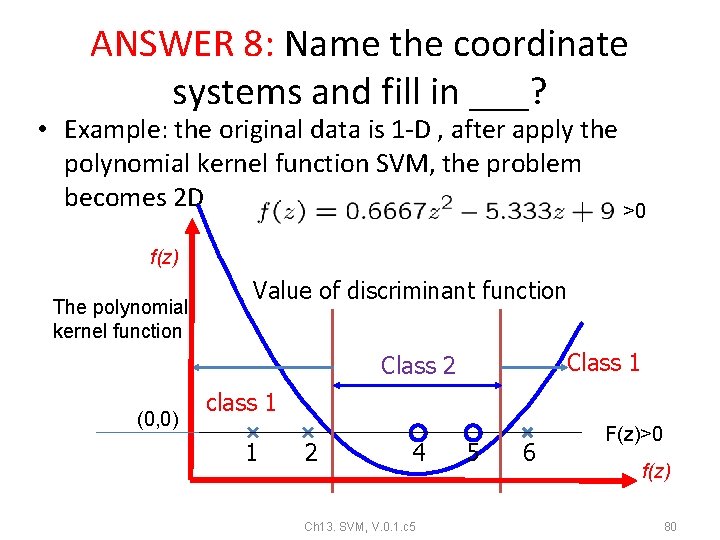
http: //www. cse. ust. hk/~qyang/521/PPT/SVM. ppt 1 -D Example for non-linear problems • Suppose we have 5 one-dimensional data points – x 1=1, x 2=2, x 3=4, x 4=5, x 5=6, with 1, 2, 6 as class 1 and 4, 5 as class 2 y 1=1, y 2=1, y 3=-1, y 4=-1, y 5=1 • We use the polynomial kernel of degree 2 – K(x, y) = (xy+1)2 – C is set to 100 • We first find i (i=1, …, 5) by Ch 13. SVM, 75 V. 0. 1. c 5
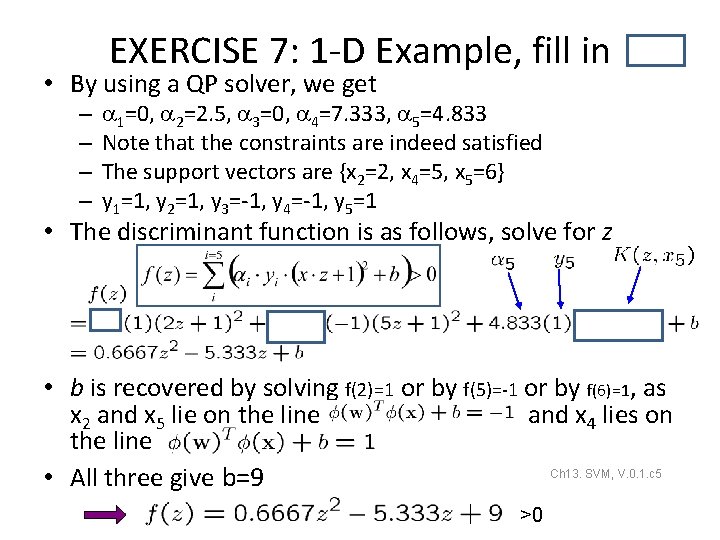
EXERCISE 7: 1 -D Example, fill in • By using a QP solver, we get – – 1=0, 2=2. 5, 3=0, 4=7. 333, 5=4. 833 Note that the constraints are indeed satisfied The support vectors are {x 2=2, x 4=5, x 5=6} y 1=1, y 2=1, y 3=-1, y 4=-1, y 5=1 • The discriminant function is as follows, solve for z • b is recovered by solving f(2)=1 or by f(5)=-1 or by f(6)=1, as x 2 and x 5 lie on the line and x 4 lies on the line Ch 13. SVM, V. 0. 1. c 5 • All three give b=9 76 >0
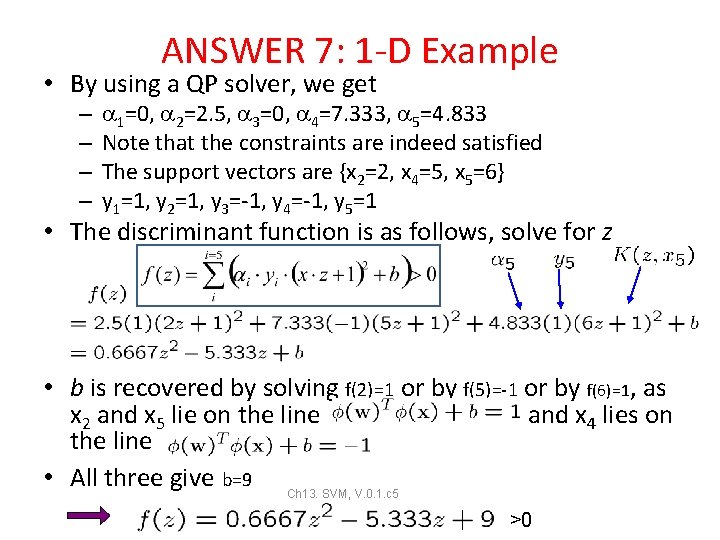
ANSWER 7: 1 -D Example • By using a QP solver, we get – – 1=0, 2=2. 5, 3=0, 4=7. 333, 5=4. 833 Note that the constraints are indeed satisfied The support vectors are {x 2=2, x 4=5, x 5=6} y 1=1, y 2=1, y 3=-1, y 4=-1, y 5=1 • The discriminant function is as follows, solve for z • b is recovered by solving f(2)=1 or by f(5)=-1 or by f(6)=1, as x 2 and x 5 lie on the line and x 4 lies on the line • All three give b=9 Ch 13. SVM, V. 0. 1. c 5 77 >0
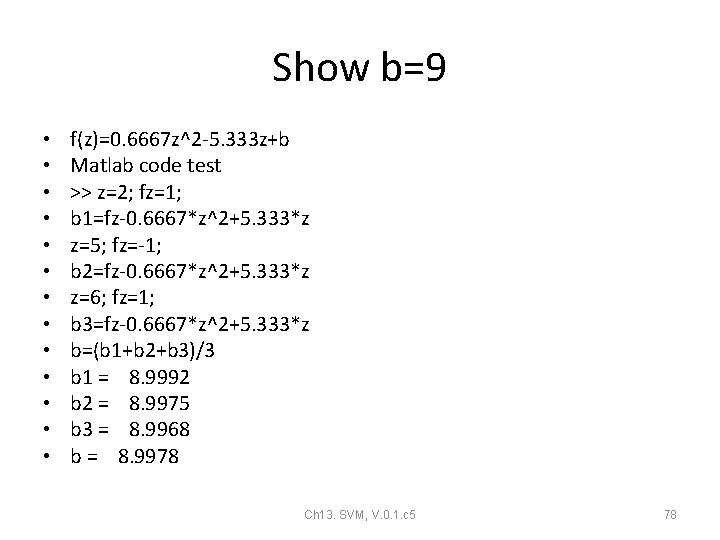
Show b=9 • • • • f(z)=0. 6667 z^2 -5. 333 z+b Matlab code test >> z=2; fz=1; b 1=fz-0. 6667*z^2+5. 333*z z=5; fz=-1; b 2=fz-0. 6667*z^2+5. 333*z z=6; fz=1; b 3=fz-0. 6667*z^2+5. 333*z b=(b 1+b 2+b 3)/3 b 1 = 8. 9992 b 2 = 8. 9975 b 3 = 8. 9968 b = 8. 9978 Ch 13. SVM, V. 0. 1. c 5 78
Exercise 8, Name the coordinate systems and fill in ___? • Example: the original data is 1 -D , after apply the polynomial kernel function SVM, the problem becomes 2 D >0 __? The polynomial kernel function Value of discriminant function Class ___? (0, 0) Class___? 1 2 4 5 6 F(z)>0 __? Ch 13. SVM, V. 0. 1. c 5 79
ANSWER 8: Name the coordinate systems and fill in ___? • Example: the original data is 1 -D , after apply the polynomial kernel function SVM, the problem becomes 2 D >0 f(z) The polynomial kernel function Value of discriminant function Class 1 Class 2 (0, 0) class 1 1 2 4 Ch 13. SVM, V. 0. 1. c 5 5 6 F(z)>0 f(z) 80