Advanced Computing G 80 Seminar The Unified Modeling
![Elements of the activity diagrams. Event_1 Decision Wait event Activity_C Activity_A [T>20º] [T<=20º] Activity_A](https://slidetodoc.com/presentation_image/1f02eeb092ea10b7ee8f12ddb156b016/image-31.jpg "Elements of the activity diagrams. Event_1 Decision Wait event Activity_C Activity_A [T>20º] [T<=20º] Activity_A")
![Additional syntax in sequence charts Object_2 Object_1 [Condition] Message_1 if Condition then message_1 else](https://slidetodoc.com/presentation_image/1f02eeb092ea10b7ee8f12ddb156b016/image-40.jpg "Additional syntax in sequence charts Object_2 Object_1 [Condition] Message_1 if Condition then message_1 else")
- Slides: 58
Advanced Computing (G 80) Seminar The Unified Modeling Language (UML) Julio Medina Computadores y Tiempo Real
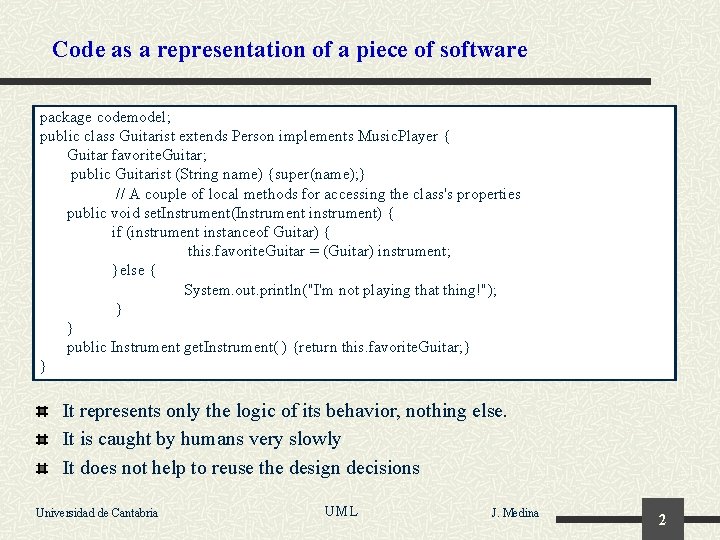
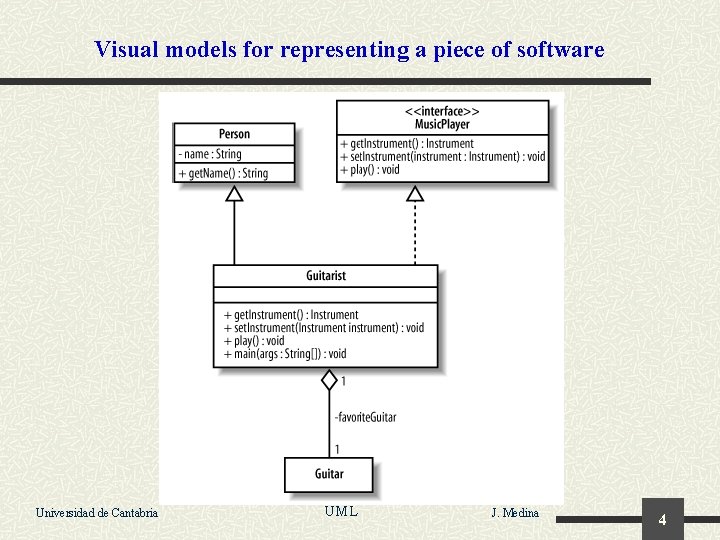
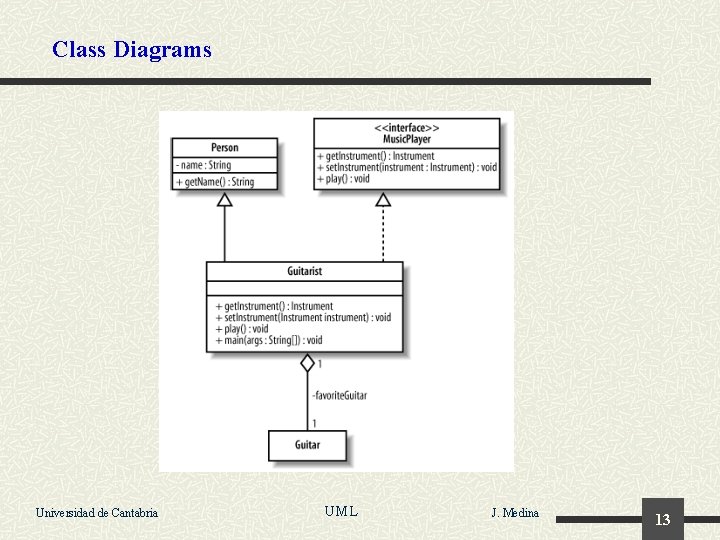
Code as a representation of a piece of software package codemodel; public class Guitarist extends Person implements Music. Player { Guitar favorite. Guitar; public Guitarist (String name) {super(name); } // A couple of local methods for accessing the class's properties public void set. Instrument(Instrument instrument) { if (instrument instanceof Guitar) { this. favorite. Guitar = (Guitar) instrument; }else { System. out. println("I'm not playing that thing!"); } } public Instrument get. Instrument( ) {return this. favorite. Guitar; } } It represents only the logic of its behavior, nothing else. It is caught by humans very slowly It does not help to reuse the design decisions Universidad de Cantabria UML J. Medina 2
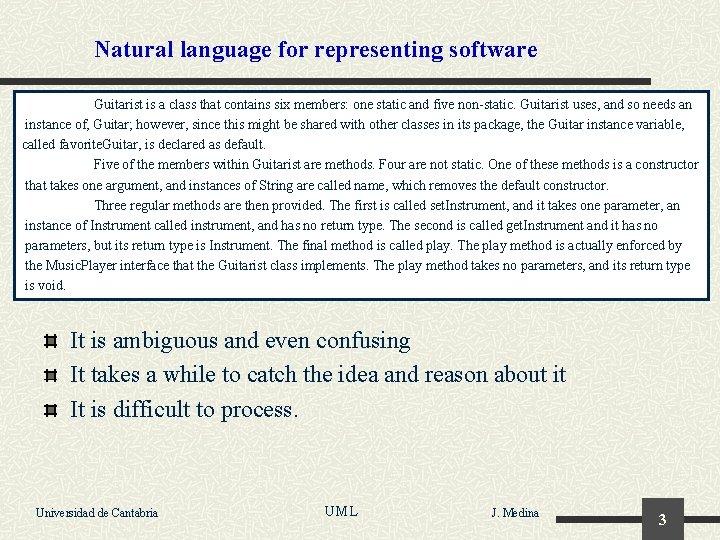
Natural language for representing software Guitarist is a class that contains six members: one static and five non-static. Guitarist uses, and so needs an instance of, Guitar; however, since this might be shared with other classes in its package, the Guitar instance variable, called favorite. Guitar, is declared as default. Five of the members within Guitarist are methods. Four are not static. One of these methods is a constructor that takes one argument, and instances of String are called name, which removes the default constructor. Three regular methods are then provided. The first is called set. Instrument, and it takes one parameter, an instance of Instrument called instrument, and has no return type. The second is called get. Instrument and it has no parameters, but its return type is Instrument. The final method is called play. The play method is actually enforced by the Music. Player interface that the Guitarist class implements. The play method takes no parameters, and its return type is void. It is ambiguous and even confusing It takes a while to catch the idea and reason about it It is difficult to process. Universidad de Cantabria UML J. Medina 3
Visual models for representing a piece of software Universidad de Cantabria UML J. Medina 4
Unified Modeling Language The Unified Modeling Language (UML) is a conceptual modeling language based on an object oriented methodology. The objective of UML is enabling the representation of models for systems in general but in particular for software applications. A model is a set of abstractions that represents a system in order to cope with its complexities in a given domain. A UML model is formed by : n n A set of modeling elements and rules that define the structure and functionality of the system collected in a common repository. The presentation of those concepts by means of multiple graphical views, which formalize the creation and edition of the models according to the rules of the language and the purpose of the model. Universidad de Cantabria UML J. Medina 5
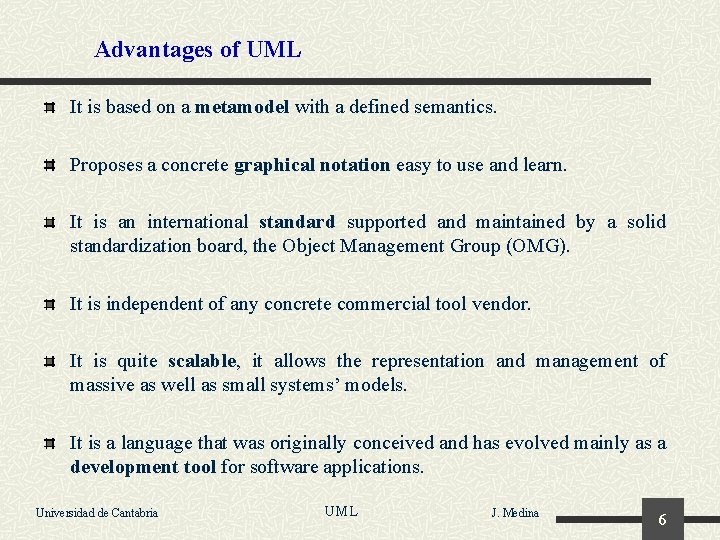
Advantages of UML It is based on a metamodel with a defined semantics. Proposes a concrete graphical notation easy to use and learn. It is an international standard supported and maintained by a solid standardization board, the Object Management Group (OMG). It is independent of any concrete commercial tool vendor. It is quite scalable, it allows the representation and management of massive as well as small systems’ models. It is a language that was originally conceived and has evolved mainly as a development tool for software applications. Universidad de Cantabria UML J. Medina 6
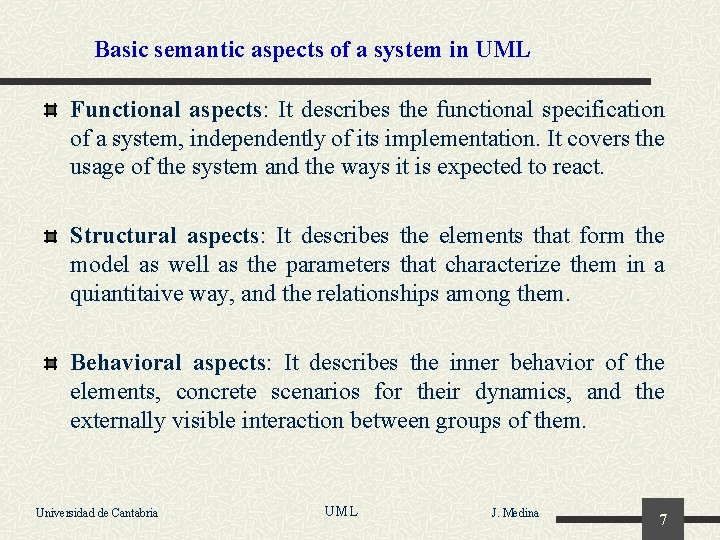
Basic semantic aspects of a system in UML Functional aspects: It describes the functional specification of a system, independently of its implementation. It covers the usage of the system and the ways it is expected to react. Structural aspects: It describes the elements that form the model as well as the parameters that characterize them in a quiantitaive way, and the relationships among them. Behavioral aspects: It describes the inner behavior of the elements, concrete scenarios for their dynamics, and the externally visible interaction between groups of them. Universidad de Cantabria UML J. Medina 7
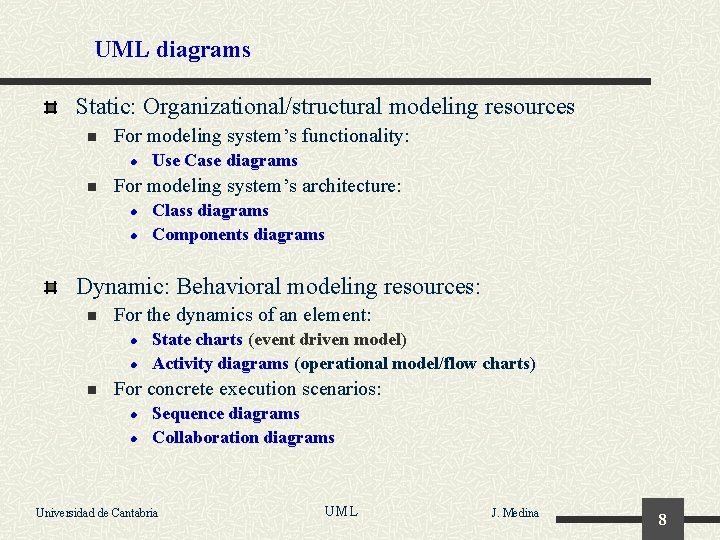
UML diagrams Static: Organizational/structural modeling resources n For modeling system’s functionality: l n Use Case diagrams For modeling system’s architecture: l l Class diagrams Components diagrams Dynamic: Behavioral modeling resources: n For the dynamics of an element: l l n State charts (event driven model) Activity diagrams (operational model/flow charts) For concrete execution scenarios: l l Sequence diagrams Collaboration diagrams Universidad de Cantabria UML J. Medina 8
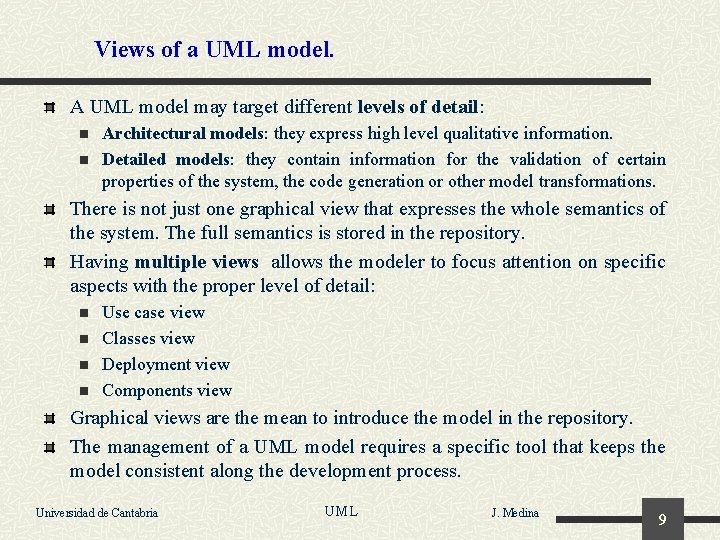
Views of a UML model. A UML model may target different levels of detail: n n Architectural models: they express high level qualitative information. Detailed models: they contain information for the validation of certain properties of the system, the code generation or other model transformations. There is not just one graphical view that expresses the whole semantics of the system. The full semantics is stored in the repository. Having multiple views allows the modeler to focus attention on specific aspects with the proper level of detail: n n Use case view Classes view Deployment view Components view Graphical views are the mean to introduce the model in the repository. The management of a UML model requires a specific tool that keeps the model consistent along the development process. Universidad de Cantabria UML J. Medina 9
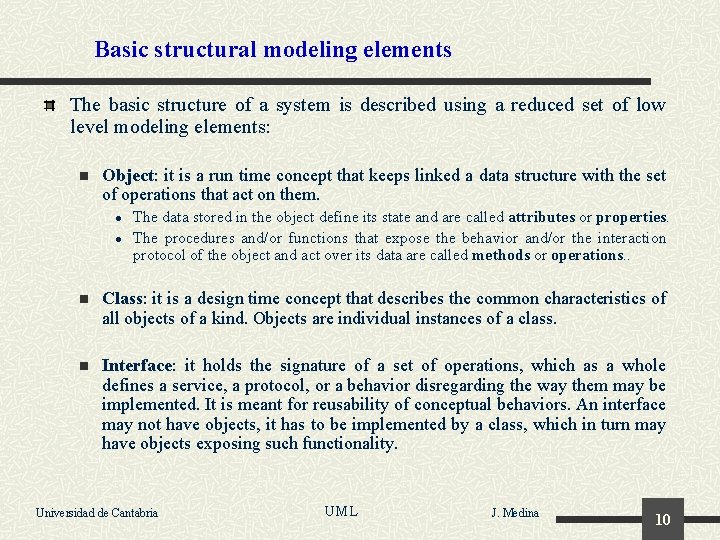
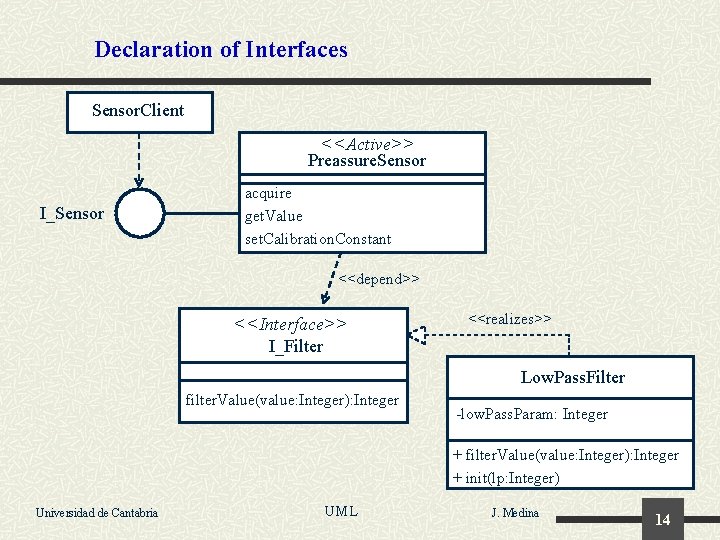
Basic structural modeling elements The basic structure of a system is described using a reduced set of low level modeling elements: n Object: it is a run time concept that keeps linked a data structure with the set of operations that act on them. l l The data stored in the object define its state and are called attributes or properties. The procedures and/or functions that expose the behavior and/or the interaction protocol of the object and act over its data are called methods or operations. . n Class: it is a design time concept that describes the common characteristics of all objects of a kind. Objects are individual instances of a class. n Interface: it holds the signature of a set of operations, which as a whole defines a service, a protocol, or a behavior disregarding the way them may be implemented. It is meant for reusability of conceptual behaviors. An interface may not have objects, it has to be implemented by a class, which in turn may have objects exposing such functionality. Universidad de Cantabria UML J. Medina 10
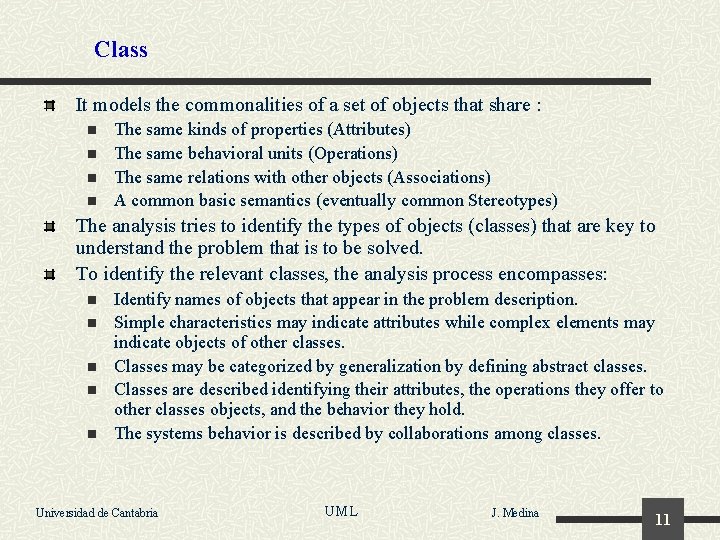
Class It models the commonalities of a set of objects that share : n n The same kinds of properties (Attributes) The same behavioral units (Operations) The same relations with other objects (Associations) A common basic semantics (eventually common Stereotypes) The analysis tries to identify the types of objects (classes) that are key to understand the problem that is to be solved. To identify the relevant classes, the analysis process encompasses: n n n Identify names of objects that appear in the problem description. Simple characteristics may indicate attributes while complex elements may indicate objects of other classes. Classes may be categorized by generalization by defining abstract classes. Classes are described identifying their attributes, the operations they offer to other classes objects, and the behavior they hold. The systems behavior is described by collaborations among classes. Universidad de Cantabria UML J. Medina 11
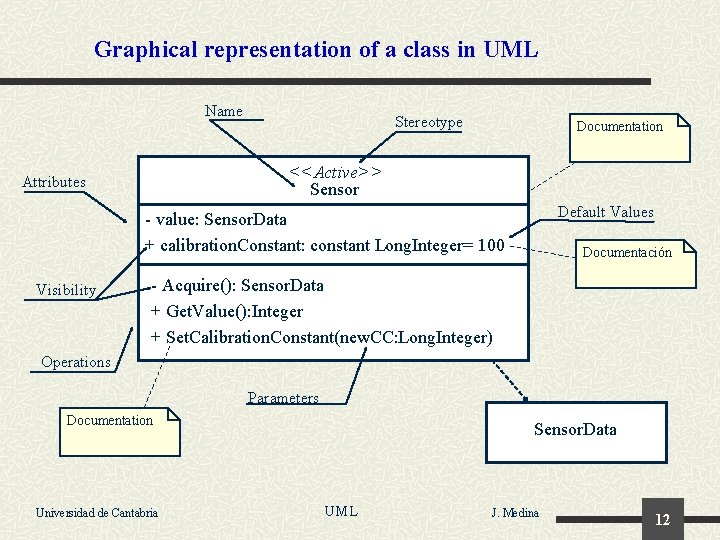
Graphical representation of a class in UML Name Stereotype Documentation <<Active>> Sensor Attributes Default Values - value: Sensor. Data + calibration. Constant: constant Long. Integer= 100 Visibility Documentación - Acquire(): Sensor. Data + Get. Value(): Integer + Set. Calibration. Constant(new. CC: Long. Integer) Operations Parameters Documentation Universidad de Cantabria Sensor. Data UML J. Medina 12
Class Diagrams Universidad de Cantabria UML J. Medina 13
Declaration of Interfaces Sensor. Client <<Active>> Preassure. Sensor I_Sensor acquire get. Value set. Calibration. Constant <<depend>> <<Interface>> I_Filter <<realizes>> Low. Pass. Filter filter. Value(value: Integer): Integer -low. Pass. Param: Integer + filter. Value(value: Integer): Integer + init(lp: Integer) Universidad de Cantabria UML J. Medina 14
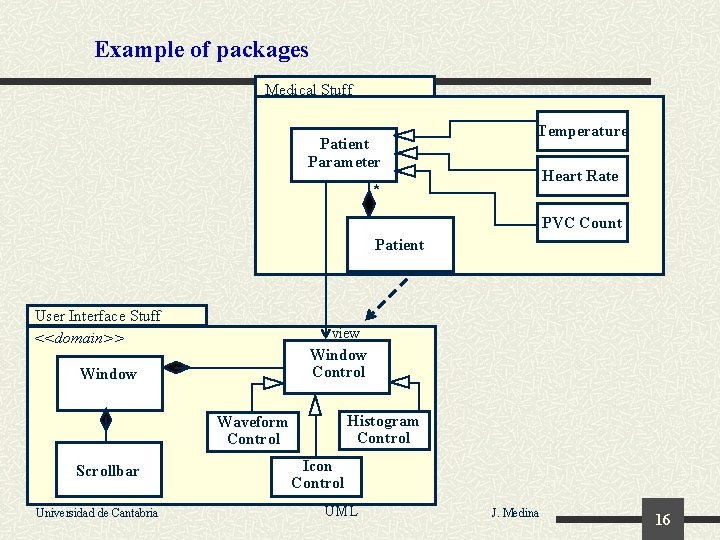
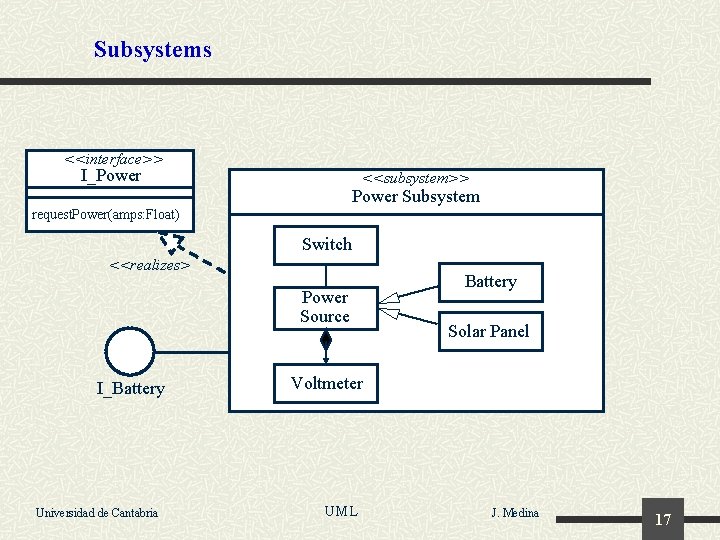
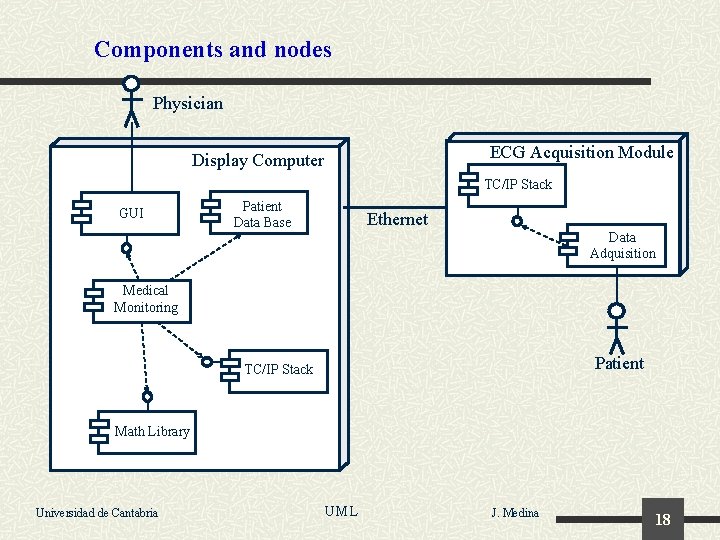
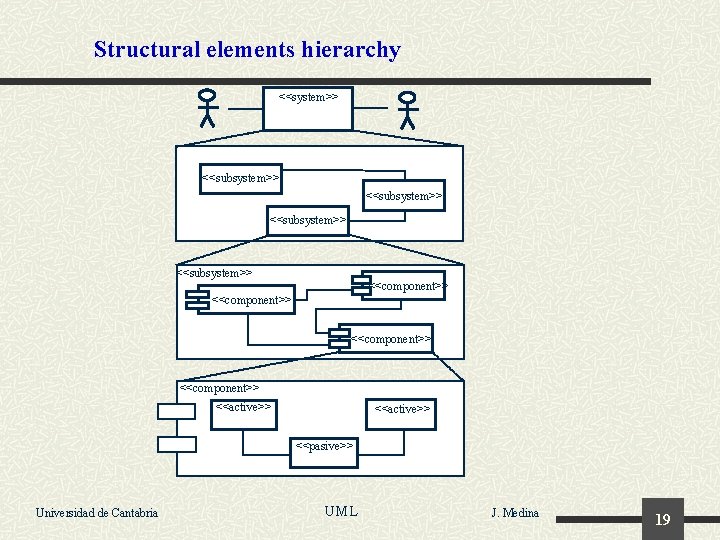
High-level structural modeling elements These elements describe the system architecture from a high level of abstraction point of view: n Package: It is a container, used to manage modeling elements in an organized way. n Subsystem: This is a very high-level structural element, used to decompose the whole system into complementary blocks usually with a clearly distinctive functional interaction among them. n Component: A set of modeling elements that group them as a replaceable whole. This implies the need to specify its offered as well as its required interfaces. n Node: It models a physical computational element on which software elements can be executed. Universidad de Cantabria UML J. Medina 15
Example of packages Medical Stuff Patient Parameter Temperature Heart Rate * PVC Count Patient User Interface Stuff <<domain>> view Window Control Window Histogram Control Waveform Control Scrollbar Universidad de Cantabria Icon Control UML J. Medina 16
Subsystems <<interface>> I_Power <<subsystem>> Power Subsystem request. Power(amps: Float) Switch <<realizes> Power Source I_Battery Universidad de Cantabria Battery Solar Panel Voltmeter UML J. Medina 17
Components and nodes Physician ECG Acquisition Module Display Computer TC/IP Stack GUI Patient Data Base Ethernet Data Adquisition Medical Monitoring Patient TC/IP Stack Math Library Universidad de Cantabria UML J. Medina 18
Structural elements hierarchy <<system>> <<subsystem>> <<component>> <<active>> <<pasive>> Universidad de Cantabria UML J. Medina 19
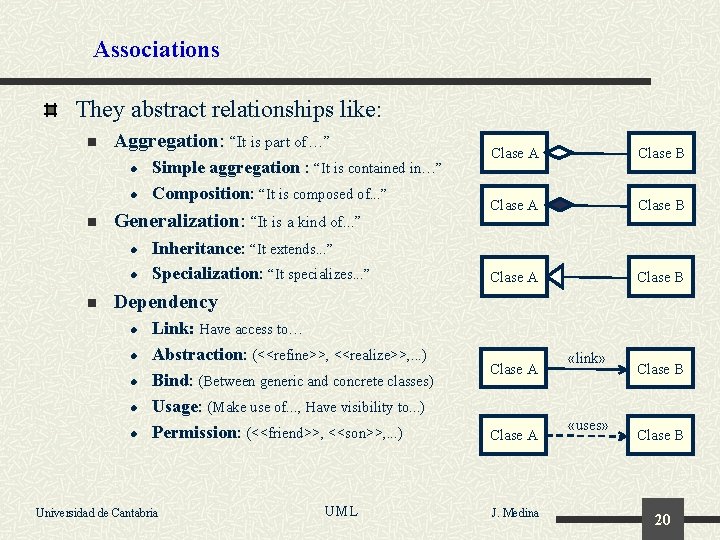
Associations They abstract relationships like: n Aggregation: “It is part of…” l l n Generalization: “It is a kind of. . . ” l l n Simple aggregation : “It is contained in…” Composition: “It is composed of. . . ” Inheritance: “It extends. . . ” Specialization: “It specializes. . . ” Clase A Clase B Dependency l l l Link: Have access to… Abstraction: (<<refine>>, <<realize>>, . . . ) Bind: (Between generic and concrete classes) Usage: (Make use of. . . , Have visibility to. . . ) Permission: (<<friend>>, <<son>>, . . . ) Universidad de Cantabria UML Clase A J. Medina «link» «uses» Clase B 20
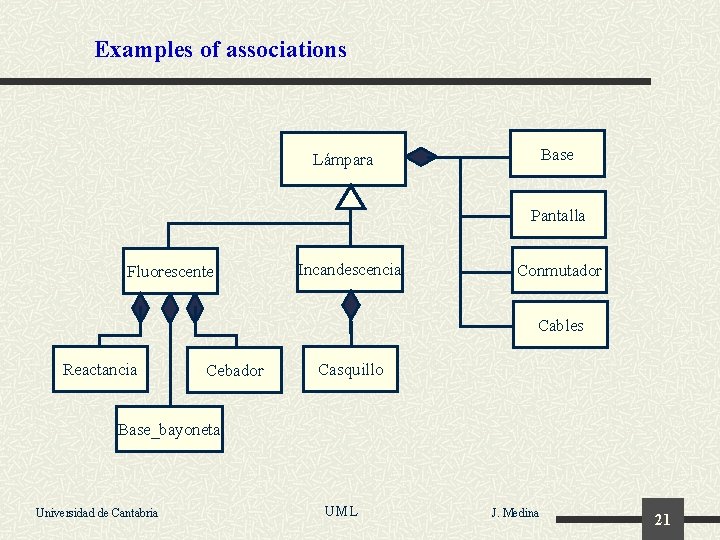
Examples of associations Base Lámpara Pantalla Fluorescente Incandescencia Conmutador Cables Reactancia Cebador Casquillo Base_bayoneta Universidad de Cantabria UML J. Medina 21
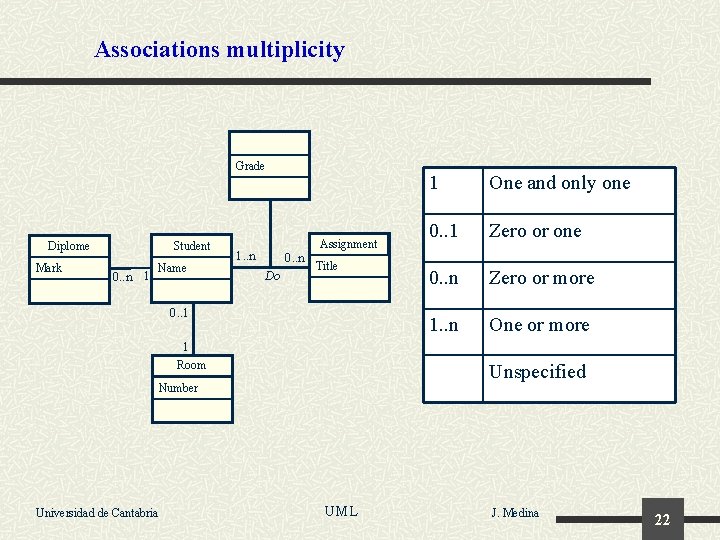
Associations multiplicity Grade Student Diplome Mark 0. . n 1 Name 1. . n 0. . n Do Assignment Title 0. . 1 1 One and only one 0. . 1 Zero or one 0. . n Zero or more 1. . n One or more 1 Room Unspecified Number Universidad de Cantabria UML J. Medina 22
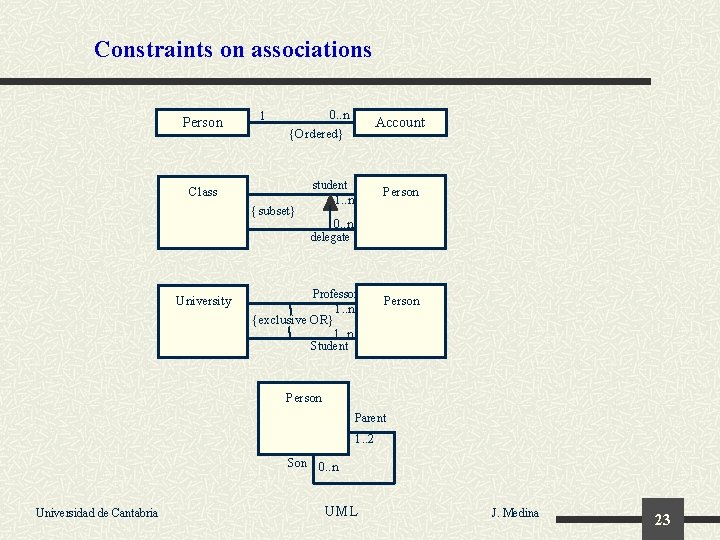
Constraints on associations Person 1 0. . n {Ordered} Account student Class Person 1. . n {subset} 0. . n delegate University Professor 1. . n Person {exclusive OR} 1. . n Student Person Parent 1. . 2 Son 0. . n Universidad de Cantabria UML J. Medina 23
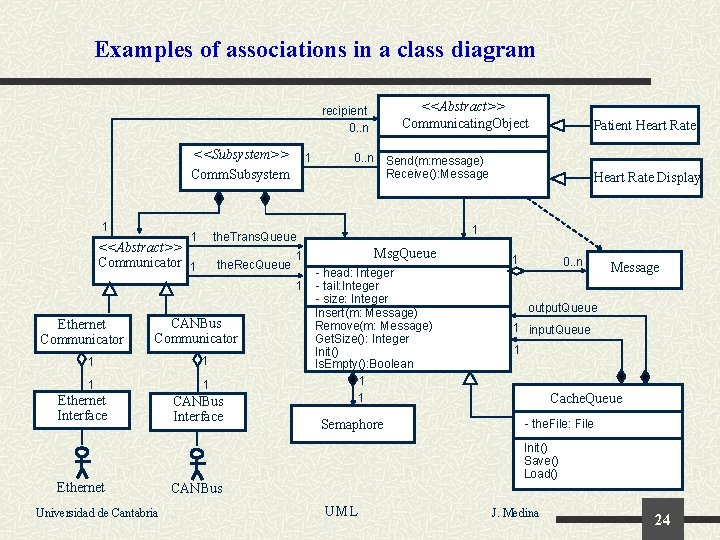
Examples of associations in a class diagram <<Abstract>> Communicating. Object recipient 0. . n <<Subsystem>> Comm. Subsystem 1 1 1 the. Rec. Queue CANBus Communicator 1 1 Ethernet Interface Ethernet Universidad de Cantabria CANBus Interface Heart Rate Display 1 Msg. Queue 1 1 Ethernet Communicator 0. . n Send(m: message) Receive(): Message the. Trans. Queue <<Abstract>> Communicator 1 Patient Heart Rate - head: Integer - tail: Integer - size: Integer Insert(m: Message) Remove(m: Message) Get. Size(): Integer Init() Is. Empty(): Boolean 1 1 Semaphore 1 0. . n Message output. Queue 1 input. Queue 1 Cache. Queue - the. File: File Init() Save() Load() CANBus UML J. Medina 24
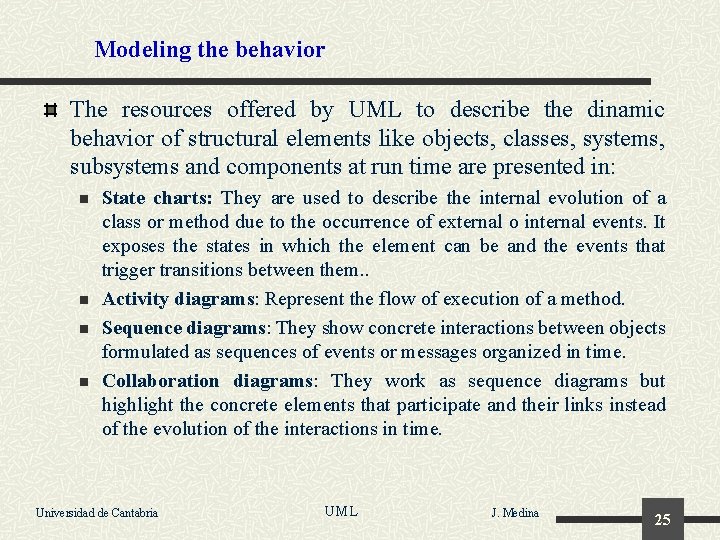
Modeling the behavior The resources offered by UML to describe the dinamic behavior of structural elements like objects, classes, systems, subsystems and components at run time are presented in: n n State charts: They are used to describe the internal evolution of a class or method due to the occurrence of external o internal events. It exposes the states in which the element can be and the events that trigger transitions between them. . Activity diagrams: Represent the flow of execution of a method. Sequence diagrams: They show concrete interactions between objects formulated as sequences of events or messages organized in time. Collaboration diagrams: They work as sequence diagrams but highlight the concrete elements that participate and their links instead of the evolution of the interactions in time. Universidad de Cantabria UML J. Medina 25
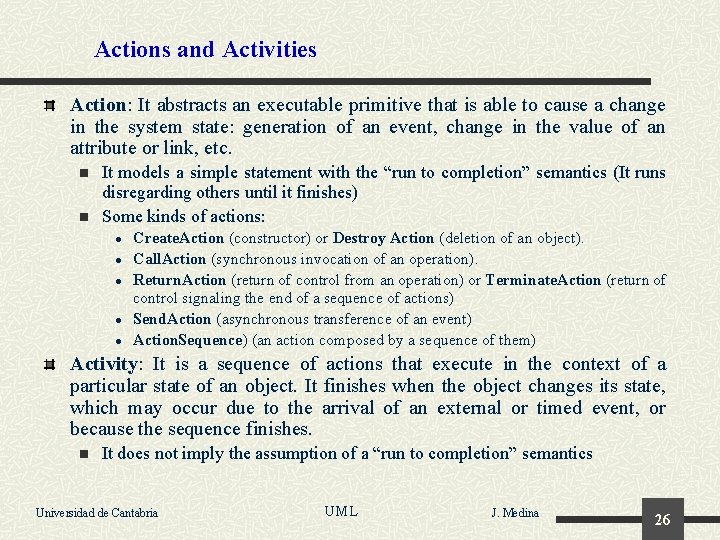
Actions and Activities Action: It abstracts an executable primitive that is able to cause a change in the system state: generation of an event, change in the value of an attribute or link, etc. n n It models a simple statement with the “run to completion” semantics (It runs disregarding others until it finishes) Some kinds of actions: l l l Create. Action (constructor) or Destroy Action (deletion of an object). Call. Action (synchronous invocation of an operation). Return. Action (return of control from an operation) or Terminate. Action (return of control signaling the end of a sequence of actions) Send. Action (asynchronous transference of an event) Action. Sequence) (an action composed by a sequence of them) Activity: It is a sequence of actions that execute in the context of a particular state of an object. It finishes when the object changes its state, which may occur due to the arrival of an external or timed event, or because the sequence finishes. n It does not imply the assumption of a “run to completion” semantics Universidad de Cantabria UML J. Medina 26
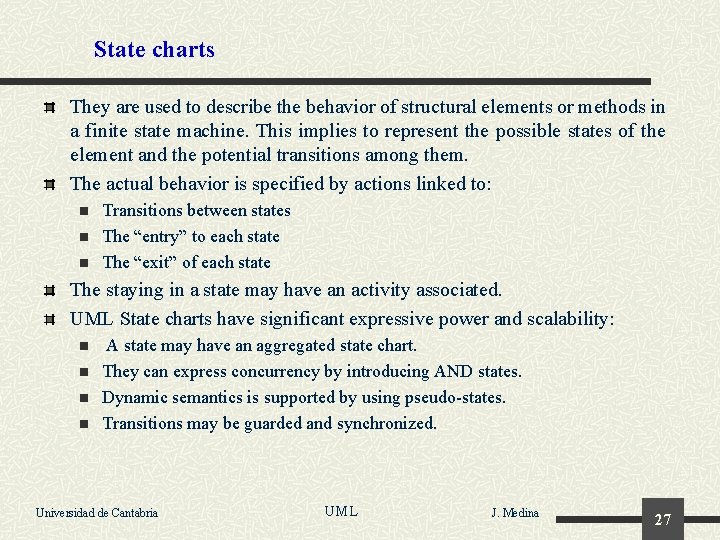
State charts They are used to describe the behavior of structural elements or methods in a finite state machine. This implies to represent the possible states of the element and the potential transitions among them. The actual behavior is specified by actions linked to: n n n Transitions between states The “entry” to each state The “exit” of each state The staying in a state may have an activity associated. UML State charts have significant expressive power and scalability: n n A state may have an aggregated state chart. They can express concurrency by introducing AND states. Dynamic semantics is supported by using pseudo-states. Transitions may be guarded and synchronized. Universidad de Cantabria UML J. Medina 27
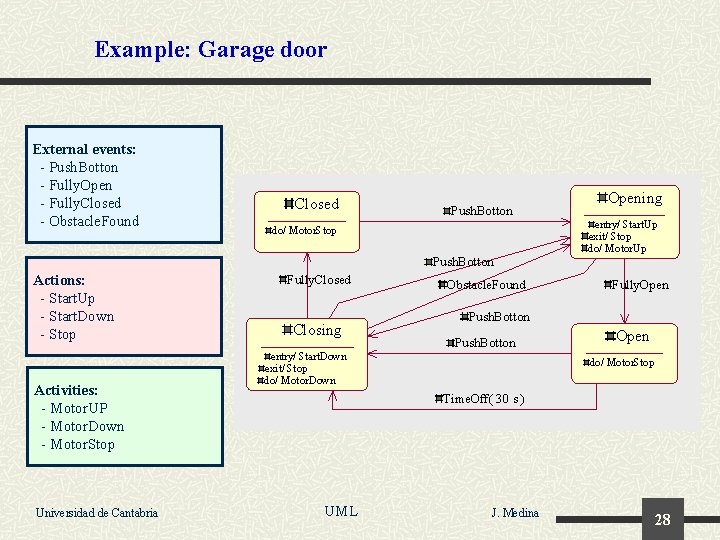
Example: Garage door External events: - Push. Botton - Fully. Open - Fully. Closed - Obstacle. Found Closed Push. Botton do/ Motor. Stop Opening entry/ Start. Up exit/ Stop do/ Motor. Up Push. Botton Actions: - Start. Up - Start. Down - Stop Activities: - Motor. UP - Motor. Down - Motor. Stop Universidad de Cantabria Fully. Closed Closing Obstacle. Found Fully. Open Push. Botton entry/ Start. Down exit/ Stop do/ Motor. Down Open do/ Motor. Stop Time. Off( 30 s ) UML J. Medina 28
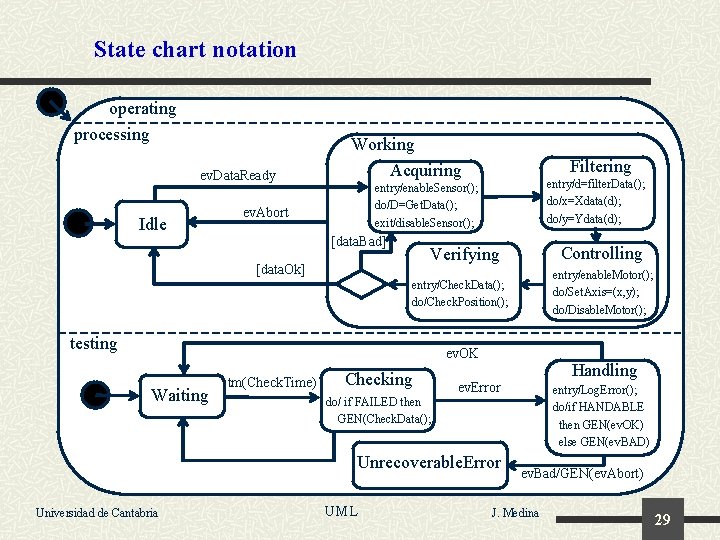
State chart notation operating processing ev. Data. Ready Idle Working Acquiring Filtering entry/d=filter. Data(); do/x=Xdata(d); do/y=Ydata(d); entry/enable. Sensor(); do/D=Get. Data(); exit/disable. Sensor(); ev. Abort [data. Bad] Controlling Verifying [data. Ok] entry/enable. Motor(); do/Set. Axis=(x, y); do/Disable. Motor(); entry/Check. Data(); do/Check. Position(); testing ev. OK Waiting tm(Check. Time) Checking ev. Error entry/Log. Error(); do/if HANDABLE then GEN(ev. OK) else GEN(ev. BAD) do/ if FAILED then GEN(Check. Data(); Unrecoverable. Error Universidad de Cantabria Handling UML ev. Bad/GEN(ev. Abort) J. Medina 29
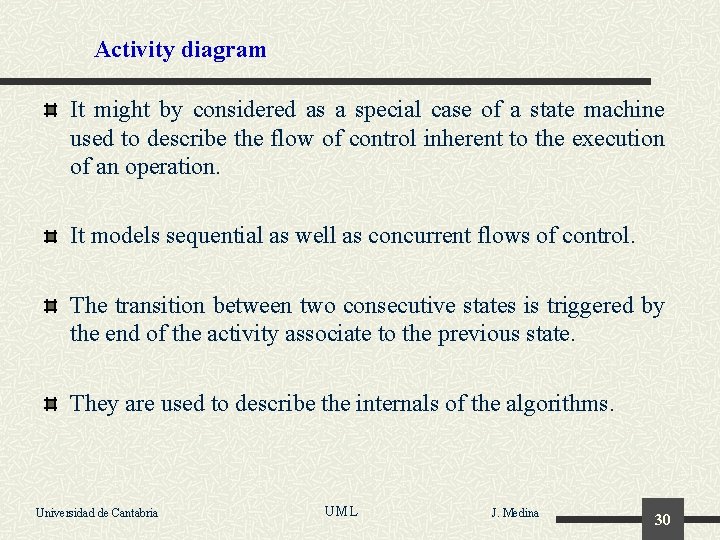
Activity diagram It might by considered as a special case of a state machine used to describe the flow of control inherent to the execution of an operation. It models sequential as well as concurrent flows of control. The transition between two consecutive states is triggered by the end of the activity associate to the previous state. They are used to describe the internals of the algorithms. Universidad de Cantabria UML J. Medina 30
Elements of the activity diagrams. Event_1 Decision Wait event Activity_C Activity_A [T>20º] [T<=20º] Activity_A finished State Activity_D Activity_E Activity_B Raise event Universidad de Cantabria Activity_F Event_2 UML J. Medina 31
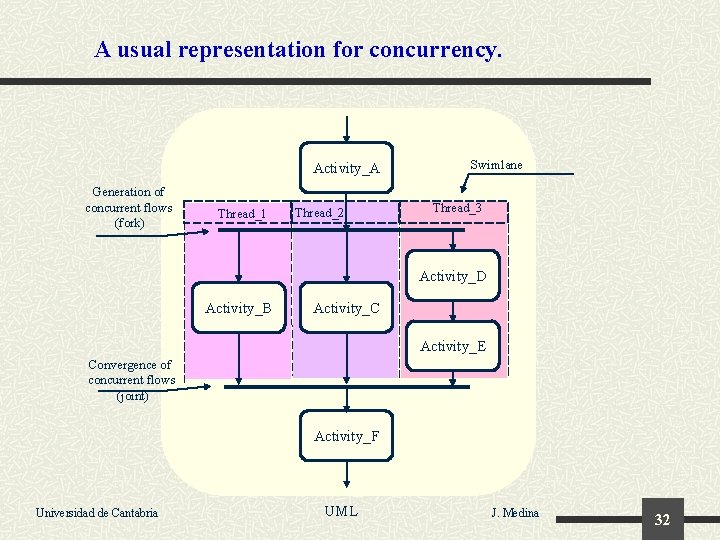
A usual representation for concurrency. Activity_A Generation of concurrent flows (fork) Thread_1 Thread_2 Swimlane Thread_3 Activity_D Activity_B Activity_C Activity_E Convergence of concurrent flows (joint) Activity_F Universidad de Cantabria UML J. Medina 32
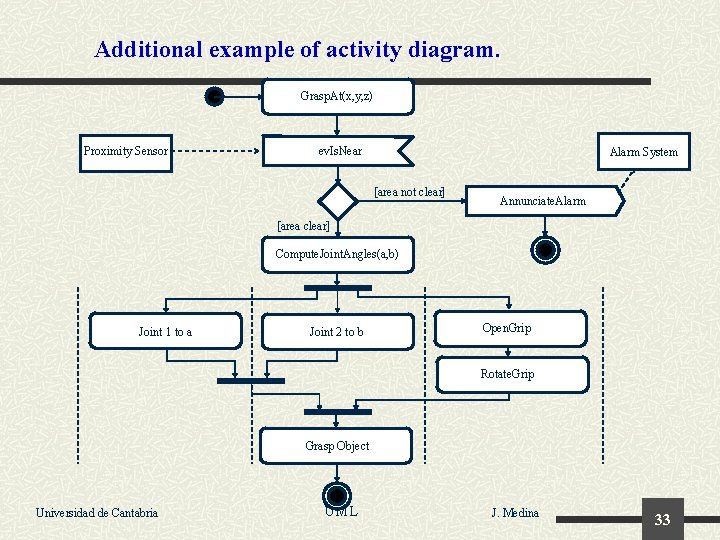
Additional example of activity diagram. Grasp. At(x, y, z) Proximity Sensor ev. Is. Near Alarm System [area not clear] Annunciate. Alarm [area clear] Compute. Joint. Angles(a, b) Joint 1 to a Joint 2 to b Open. Grip Rotate. Grip Grasp Object Universidad de Cantabria UML J. Medina 33
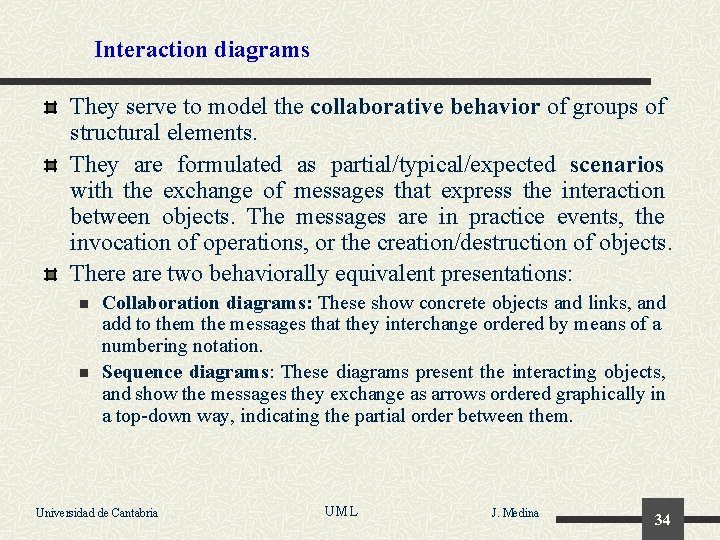
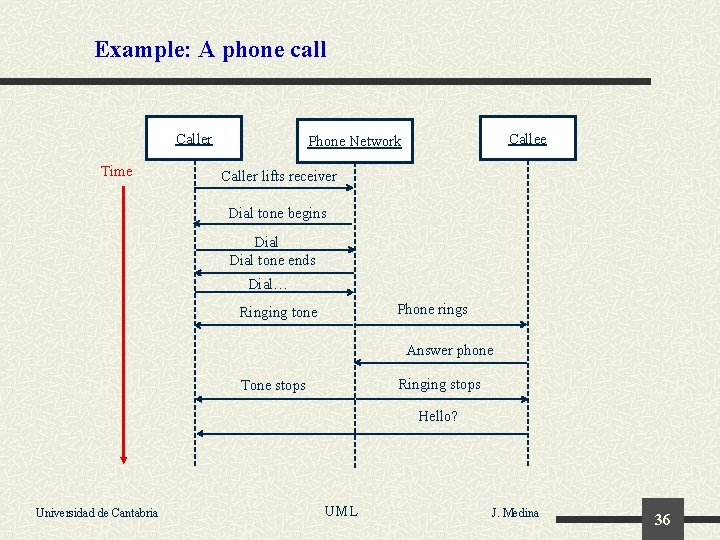
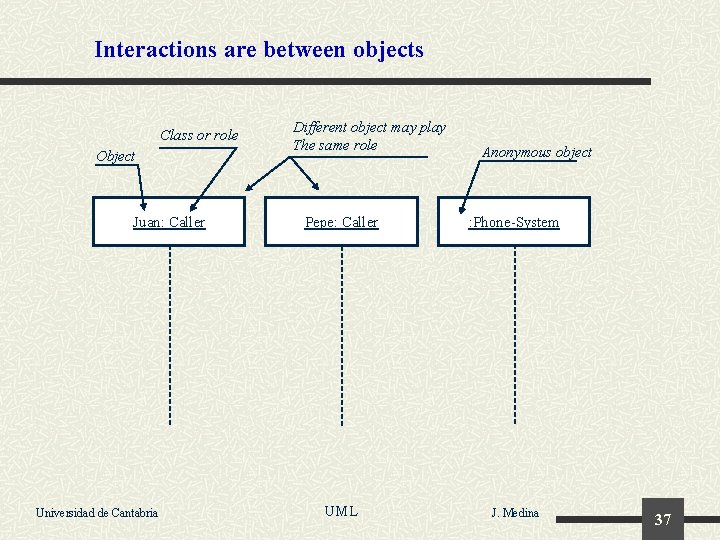
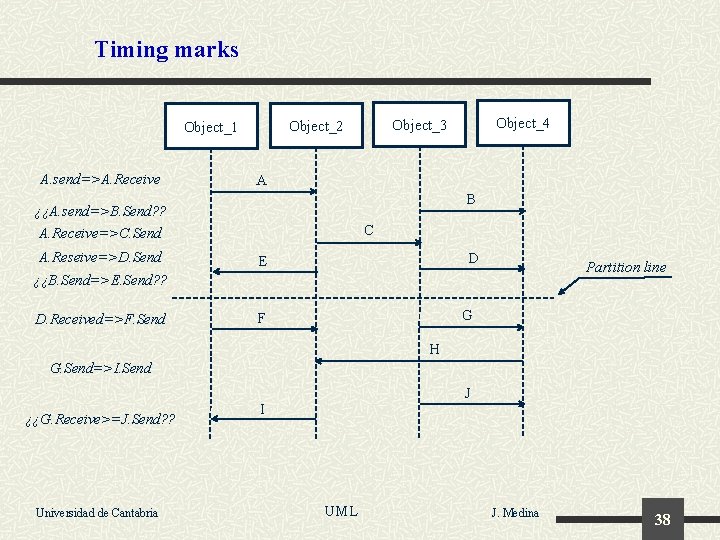
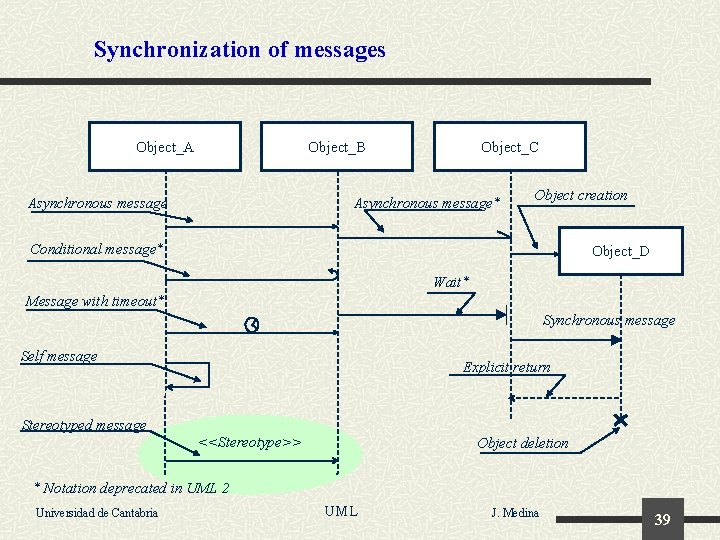
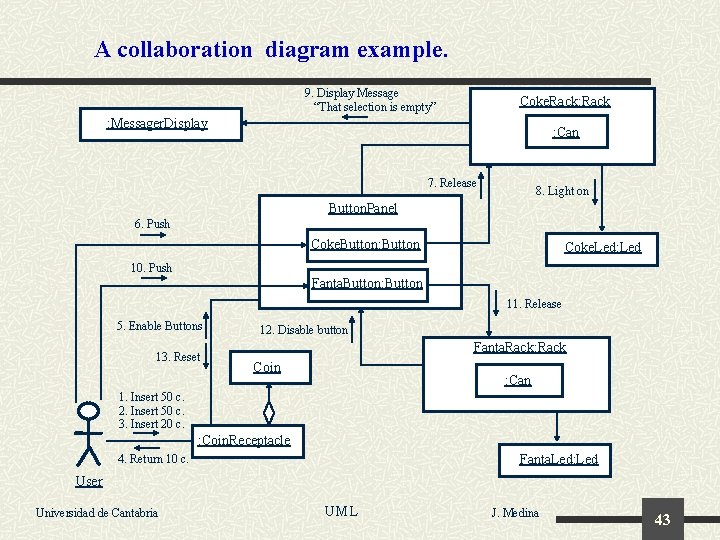
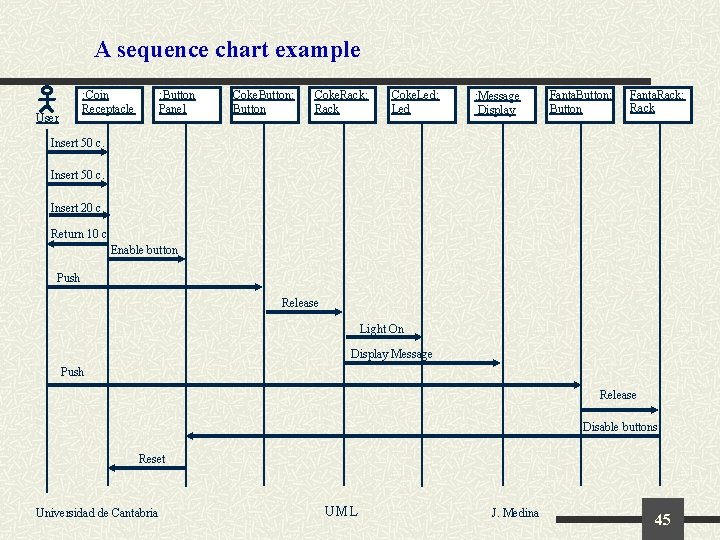
Interaction diagrams They serve to model the collaborative behavior of groups of structural elements. They are formulated as partial/typical/expected scenarios with the exchange of messages that express the interaction between objects. The messages are in practice events, the invocation of operations, or the creation/destruction of objects. There are two behaviorally equivalent presentations: n n Collaboration diagrams: These show concrete objects and links, and add to them the messages that they interchange ordered by means of a numbering notation. Sequence diagrams: These diagrams present the interacting objects, and show the messages they exchange as arrows ordered graphically in a top-down way, indicating the partial order between them. Universidad de Cantabria UML J. Medina 34
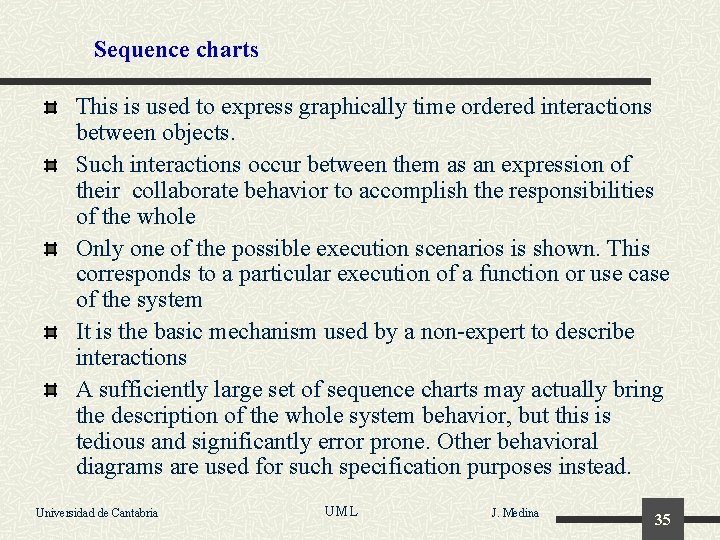
Sequence charts This is used to express graphically time ordered interactions between objects. Such interactions occur between them as an expression of their collaborate behavior to accomplish the responsibilities of the whole Only one of the possible execution scenarios is shown. This corresponds to a particular execution of a function or use case of the system It is the basic mechanism used by a non-expert to describe interactions A sufficiently large set of sequence charts may actually bring the description of the whole system behavior, but this is tedious and significantly error prone. Other behavioral diagrams are used for such specification purposes instead. Universidad de Cantabria UML J. Medina 35
Example: A phone call Caller Time Callee Phone Network Caller lifts receiver Dial tone begins Dial tone ends Dial… Phone rings Ringing tone Answer phone Ringing stops Tone stops Hello? Universidad de Cantabria UML J. Medina 36
Interactions are between objects Class or role Object Juan: Caller Universidad de Cantabria Different object may play The same role Anonymous object Pepe: Caller : Phone-System UML J. Medina 37
Timing marks A. send=>A. Receive A B ¿¿A. send=>B. Send? ? A. Receive=>C. Send A. Reseive=>D. Send Object_4 Object_3 Object_2 Object_1 C D E Partition line ¿¿B. Send=>E. Send? ? D. Received=>F. Send G F H G. Send=>I. Send ¿¿G. Receive>=J. Send? ? Universidad de Cantabria J I UML J. Medina 38
Synchronization of messages Object_A Object_B Asynchronous message Object_C Asynchronous message* Object creation Conditional message* Object_D Wait* Message with timeout* Synchronous message Self message Explicit return Stereotyped message <<Stereotype>> Object deletion * Notation deprecated in UML 2 Universidad de Cantabria UML J. Medina 39
Additional syntax in sequence charts Object_2 Object_1 [Condition] Message_1 if Condition then message_1 else message_2 [not Condition] Message_2 [X] Message_1 case Variable of X=> message_1 Y=> message_2 While X do Message Universidad de Cantabria [Y] Message_2 *[X] Message UML J. Medina 40
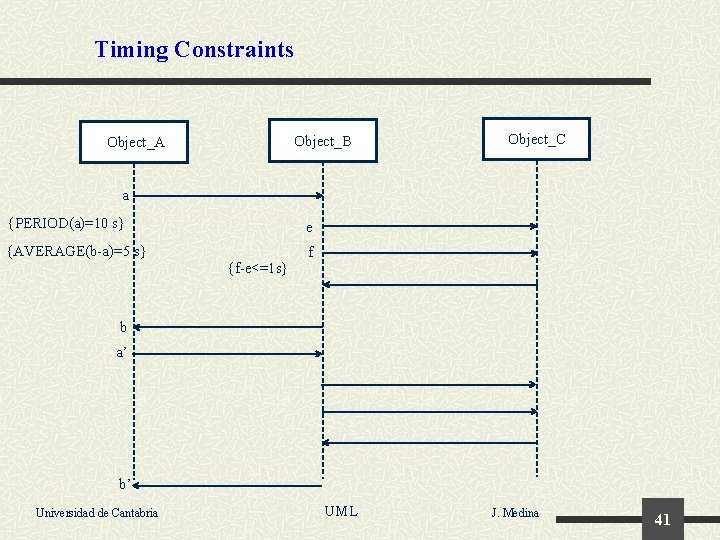
Timing Constraints Object_B Object_A Object_C a {PERIOD(a)=10 s} e {AVERAGE(b-a)=5 s} f {f-e<=1 s} b a’ b’ Universidad de Cantabria UML J. Medina 41
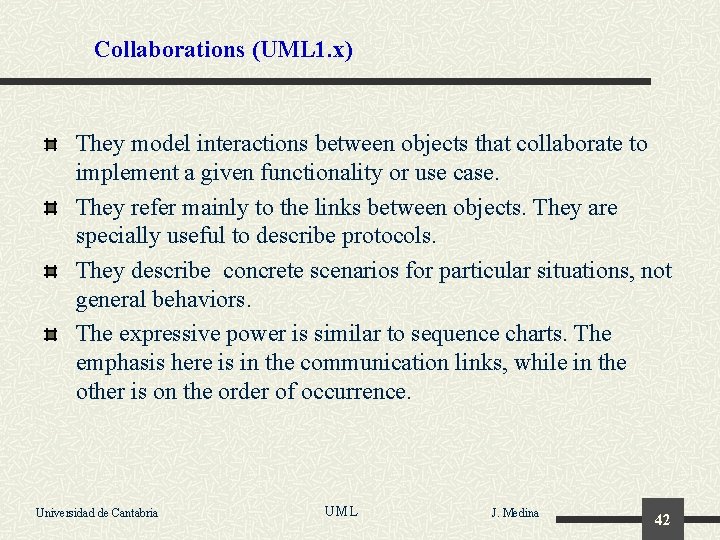
Collaborations (UML 1. x) They model interactions between objects that collaborate to implement a given functionality or use case. They refer mainly to the links between objects. They are specially useful to describe protocols. They describe concrete scenarios for particular situations, not general behaviors. The expressive power is similar to sequence charts. The emphasis here is in the communication links, while in the other is on the order of occurrence. Universidad de Cantabria UML J. Medina 42
A collaboration diagram example. 9. Display Message “That selection is empty” Coke. Rack: Rack : Messager. Display : Can 7. Release 8. Light on Button. Panel 6. Push Coke. Button: Button Coke. Led: Led 10. Push Fanta. Button: Button 11. Release 5. Enable Buttons 13. Reset 12. Disable button Fanta. Rack: Rack Coin : Can 1. Insert 50 c. 2. Insert 50 c. 3. Insert 20 c. : Coin. Receptacle Fanta. Led: Led 4. Return 10 c. User Universidad de Cantabria UML J. Medina 43
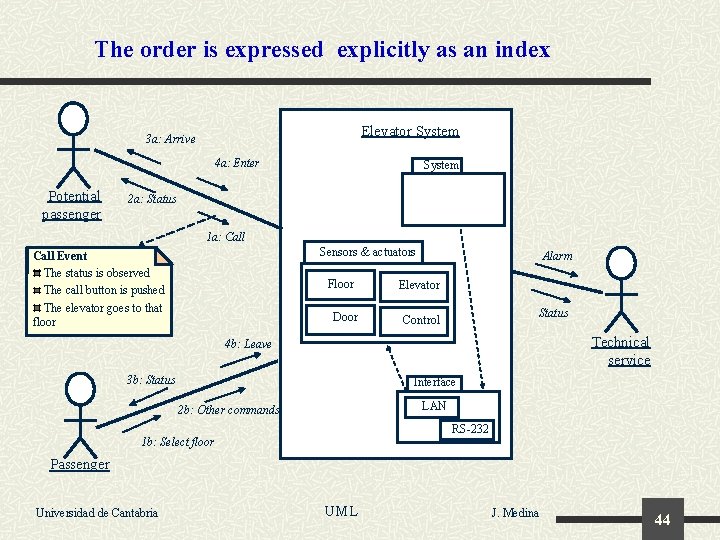
The order is expressed explicitly as an index Elevator System 3 a: Arrive 4 a: Enter Potential passenger System 2 a: Status 1 a: Call Sensors & actuators Call Event The status is observed The call button is pushed The elevator goes to that floor Floor Door Alarm Elevator Status Control Technical service 4 b: Leave 3 b: Status Interface LAN 2 b: Other commands RS-232 1 b: Select floor Passenger Universidad de Cantabria UML J. Medina 44
A sequence chart example : Coin Receptacle User : Button Panel Coke. Button: Button Coke. Rack: Rack Coke. Led: Led : Message Display Fanta. Button: Button Fanta. Rack: Rack Insert 50 c. Insert 20 c. Return 10 c. Enable button Push Release Light On Display Message Push Release Disable buttons Reset Universidad de Cantabria UML J. Medina 45
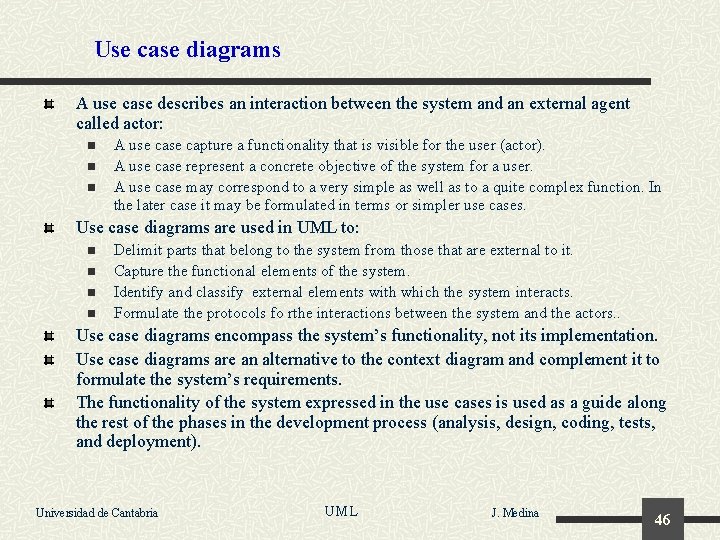
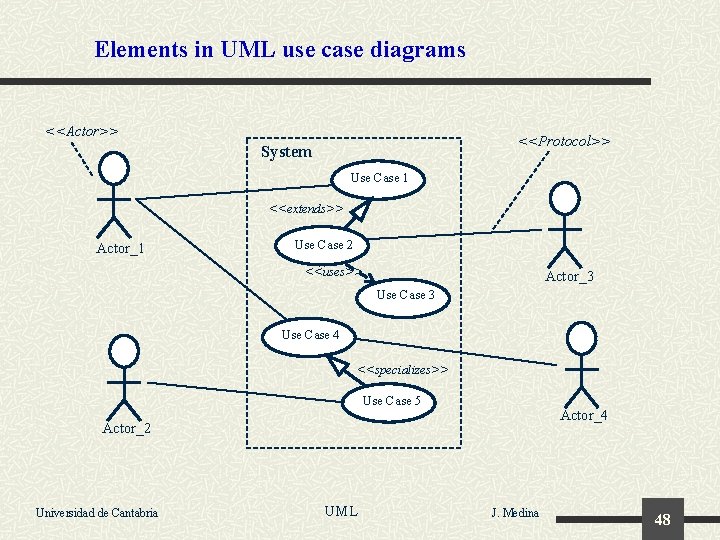
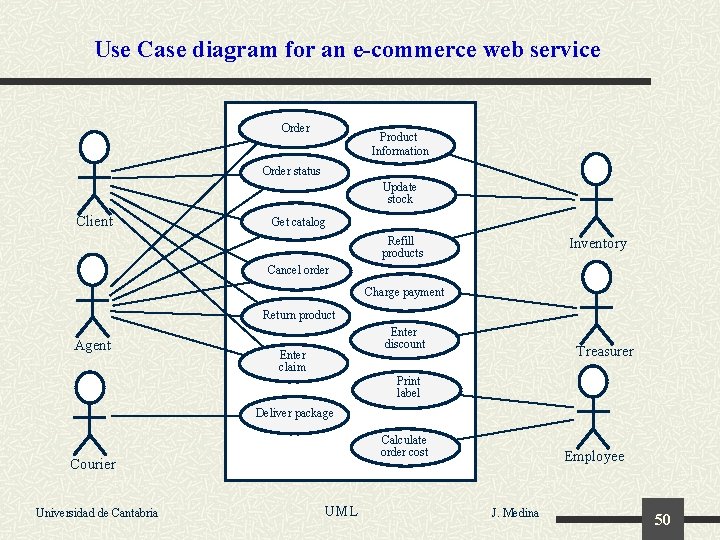
Use case diagrams A use case describes an interaction between the system and an external agent called actor: n n n A use capture a functionality that is visible for the user (actor). A use case represent a concrete objective of the system for a user. A use case may correspond to a very simple as well as to a quite complex function. In the later case it may be formulated in terms or simpler use cases. Use case diagrams are used in UML to: n n Delimit parts that belong to the system from those that are external to it. Capture the functional elements of the system. Identify and classify external elements with which the system interacts. Formulate the protocols fo rthe interactions between the system and the actors. . Use case diagrams encompass the system’s functionality, not its implementation. Use case diagrams are an alternative to the context diagram and complement it to formulate the system’s requirements. The functionality of the system expressed in the use cases is used as a guide along the rest of the phases in the development process (analysis, design, coding, tests, and deployment). Universidad de Cantabria UML J. Medina 46
Use cases: Modeling requirements A use case describes a concrete capacity or functionality required for the system that is offered to a concrete actor. It specifies a function of the system as a whole, disregarding its internal parts or the concrete mechanisms used to deliver it. It acts as a container for the diagrams or texts that are needed to describe its functionality and the quality of service required from the system. Among use cases can be established relations like: n n n Generalization. Inclusion. Extension. Universidad de Cantabria UML J. Medina 47
Elements in UML use case diagrams <<Actor>> <<Protocol>> System Use Case 1 <<extends>> Actor_1 Use Case 2 <<uses>> Actor_3 Use Case 4 <<specializes>> Use Case 5 Actor_4 Actor_2 Universidad de Cantabria UML J. Medina 48
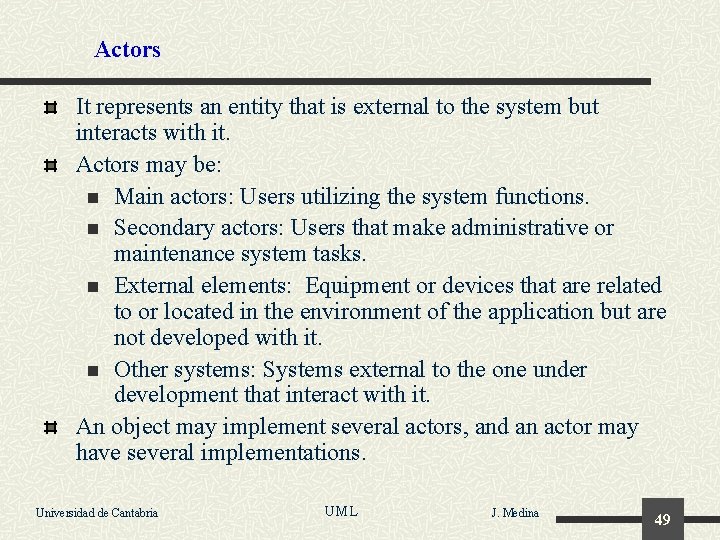
Actors It represents an entity that is external to the system but interacts with it. Actors may be: n Main actors: Users utilizing the system functions. n Secondary actors: Users that make administrative or maintenance system tasks. n External elements: Equipment or devices that are related to or located in the environment of the application but are not developed with it. n Other systems: Systems external to the one under development that interact with it. An object may implement several actors, and an actor may have several implementations. Universidad de Cantabria UML J. Medina 49
Use Case diagram for an e-commerce web service Order Product Information Order status Update stock Client Get catalog Refill products Inventory Cancel order Charge payment Return product Agent Enter discount Enter claim Treasurer Print label Deliver package Calculate order cost Courier Universidad de Cantabria UML Employee J. Medina 50
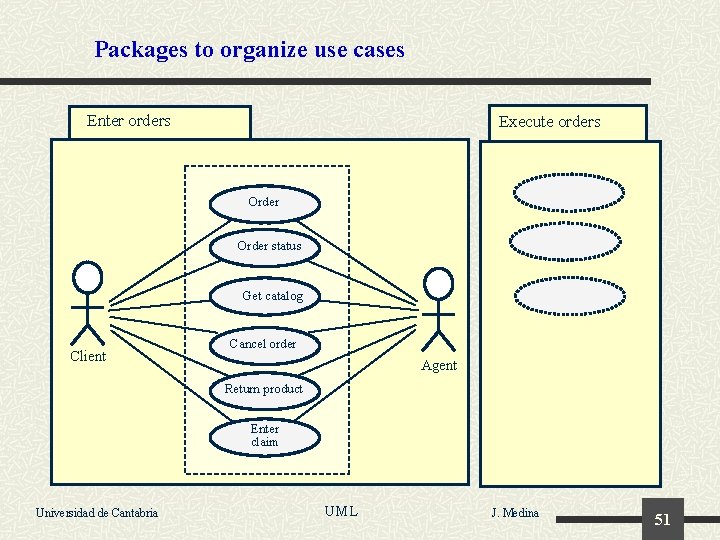
Packages to organize use cases Enter orders Execute orders Order status Get catalog Client Cancel order Agent Return product Enter claim Universidad de Cantabria UML J. Medina 51
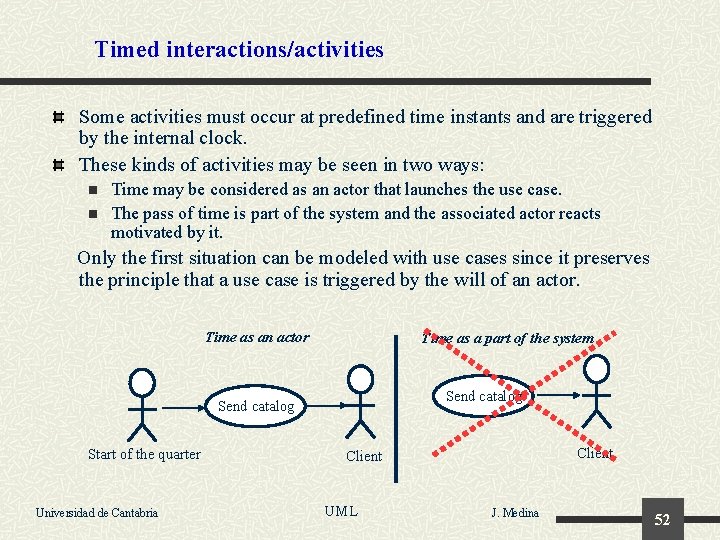
Timed interactions/activities Some activities must occur at predefined time instants and are triggered by the internal clock. These kinds of activities may be seen in two ways: n n Time may be considered as an actor that launches the use case. The pass of time is part of the system and the associated actor reacts motivated by it. Only the first situation can be modeled with use cases since it preserves the principle that a use case is triggered by the will of an actor. Time as an actor Time as a part of the system Send catalog Start of the quarter Universidad de Cantabria Client UML J. Medina 52
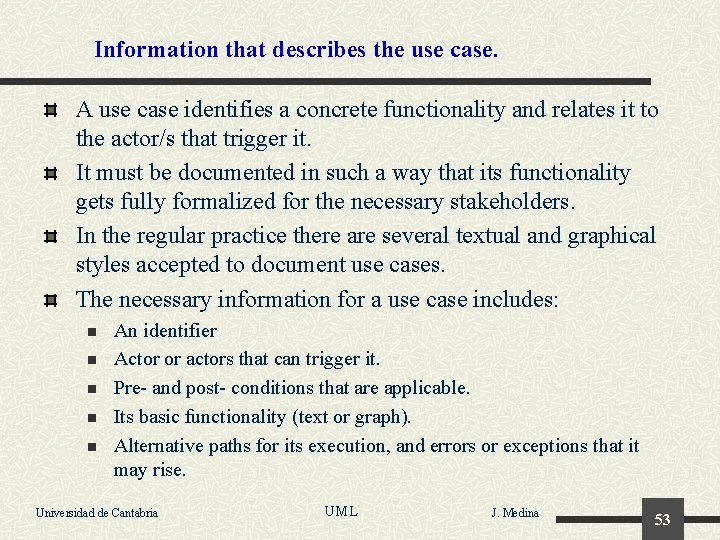
Information that describes the use case. A use case identifies a concrete functionality and relates it to the actor/s that trigger it. It must be documented in such a way that its functionality gets fully formalized for the necessary stakeholders. In the regular practice there are several textual and graphical styles accepted to document use cases. The necessary information for a use case includes: n n n An identifier Actor or actors that can trigger it. Pre- and post- conditions that are applicable. Its basic functionality (text or graph). Alternative paths for its execution, and errors or exceptions that it may rise. Universidad de Cantabria UML J. Medina 53
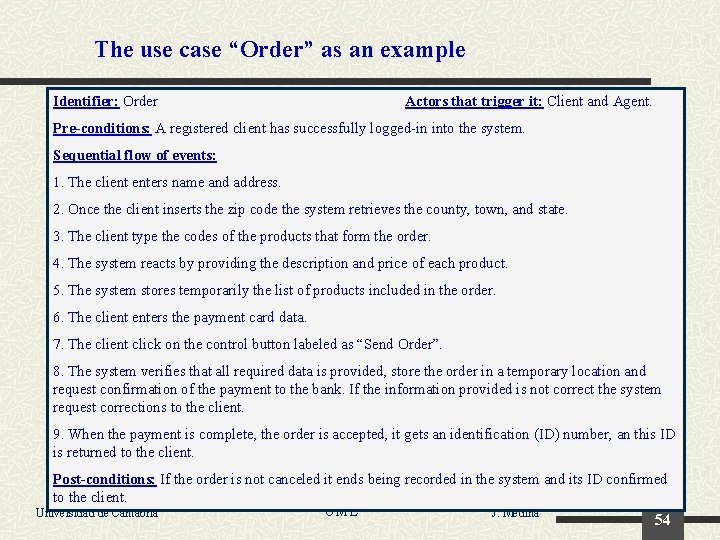
The use case “Order” as an example Identifier: Order Actors that trigger it: Client and Agent. Pre-conditions: A registered client has successfully logged-in into the system. Sequential flow of events: 1. The client enters name and address. 2. Once the client inserts the zip code the system retrieves the county, town, and state. 3. The client type the codes of the products that form the order. 4. The system reacts by providing the description and price of each product. 5. The system stores temporarily the list of products included in the order. 6. The client enters the payment card data. 7. The client click on the control button labeled as “Send Order”. 8. The system verifies that all required data is provided, store the order in a temporary location and request confirmation of the payment to the bank. If the information provided is not correct the system request corrections to the client. 9. When the payment is complete, the order is accepted, it gets an identification (ID) number, an this ID is returned to the client. Post-conditions: If the order is not canceled it ends being recorded in the system and its ID confirmed to the client. UML Universidad de Cantabria J. Medina 54
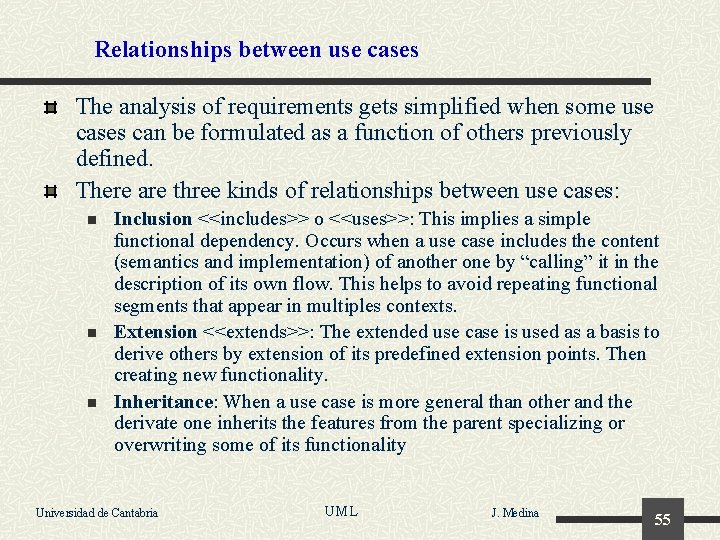
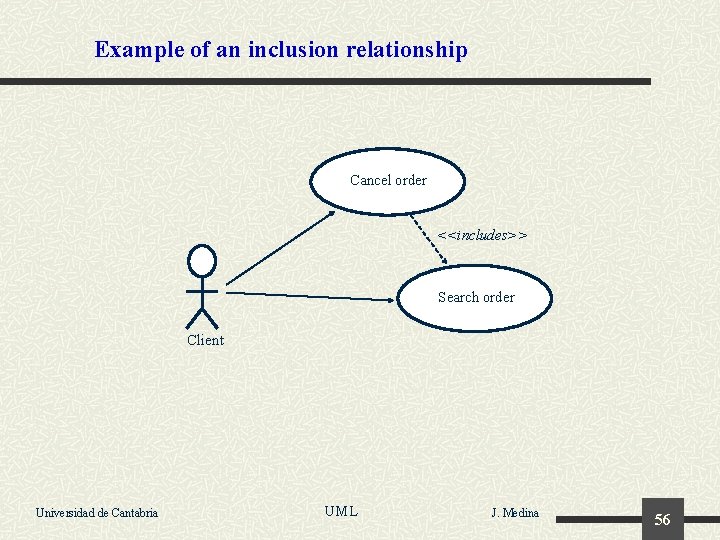
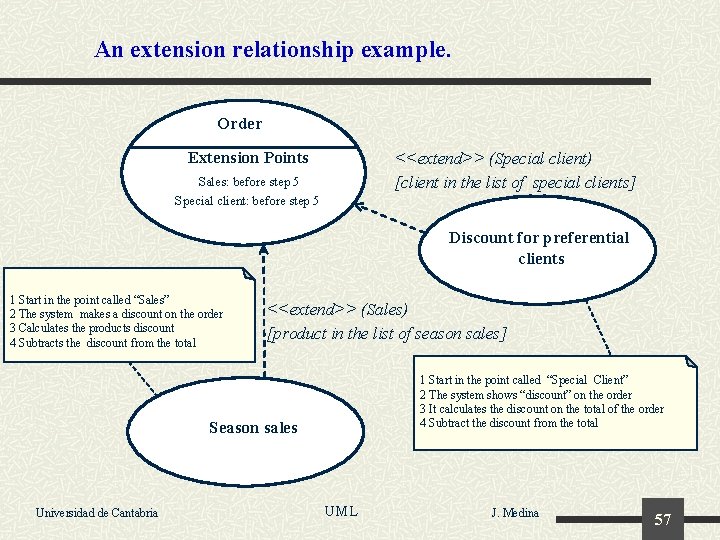
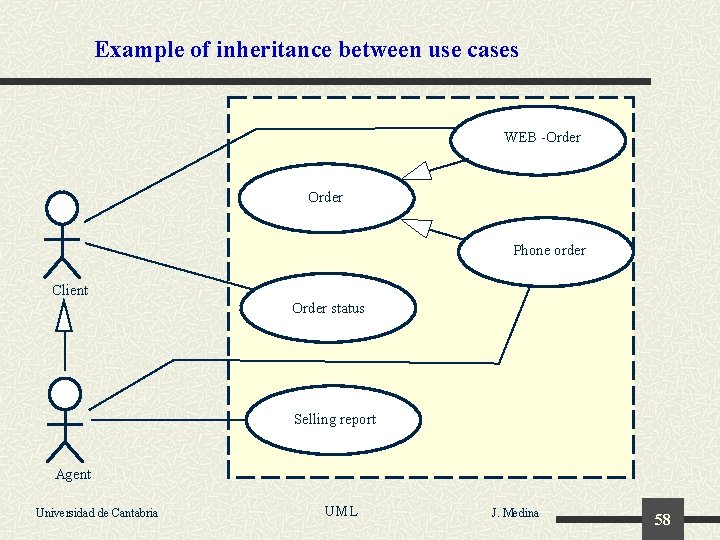
Relationships between use cases The analysis of requirements gets simplified when some use cases can be formulated as a function of others previously defined. There are three kinds of relationships between use cases: n n n Inclusion <<includes>> o <<uses>>: This implies a simple functional dependency. Occurs when a use case includes the content (semantics and implementation) of another one by “calling” it in the description of its own flow. This helps to avoid repeating functional segments that appear in multiples contexts. Extension <<extends>>: The extended use case is used as a basis to derive others by extension of its predefined extension points. Then creating new functionality. Inheritance: When a use case is more general than other and the derivate one inherits the features from the parent specializing or overwriting some of its functionality Universidad de Cantabria UML J. Medina 55
Example of an inclusion relationship Cancel order <<includes>> Search order Client Universidad de Cantabria UML J. Medina 56
An extension relationship example. Order Extension Points <<extend>> (Special client) [client in the list of special clients] Sales: before step 5 Special client: before step 5 Discount for preferential clients 1 Start in the point called “Sales” 2 The system makes a discount on the order 3 Calculates the products discount 4 Subtracts the discount from the total <<extend>> (Sales) [product in the list of season sales] 1 Start in the point called “Special Client” 2 The system shows “discount” on the order 3 It calculates the discount on the total of the order 4 Subtract the discount from the total Season sales Universidad de Cantabria UML J. Medina 57
Example of inheritance between use cases WEB -Order Phone order Client Order status Selling report Agent Universidad de Cantabria UML J. Medina 58