1 Chapter 9 UserDefined Functions EEE 1002 Introduction
- Slides: 72
마스터 제목 스타일 편집 1 Chapter 9. User-Defined Functions EEE 1002
Introduction 2 § We have used functions in every program that we have discussed so far § However, they have been primarily limited to the three functions, namely, main, scanf main printf, and printf scanf § C functions can be classified into two categories, v library functions printf and scanf printf scanf v user-defined functions main is an example of user-defined functions main EEE 1002
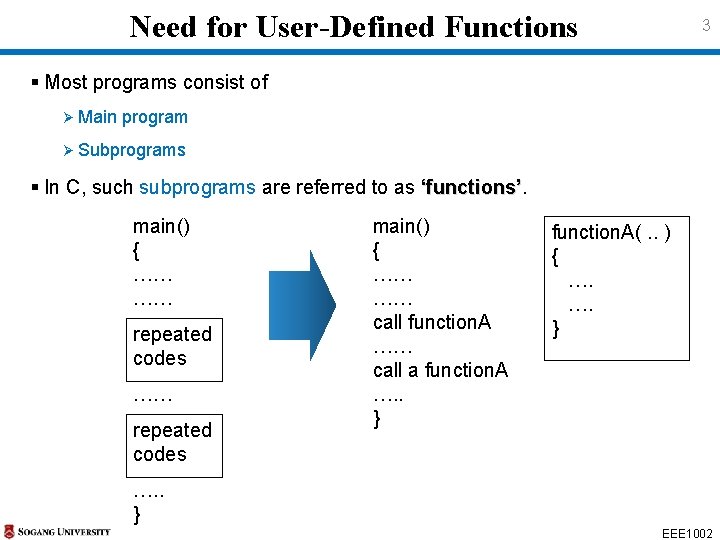
Need for User-Defined Functions 3 § Most programs consist of Ø Main program Ø Subprograms § In C, such subprograms are referred to as ‘functions’ main() { …… …… repeated codes main() { …… …… call function. A …… call a function. A …. . } function. A(. . ) { …. …. } …. . } EEE 1002
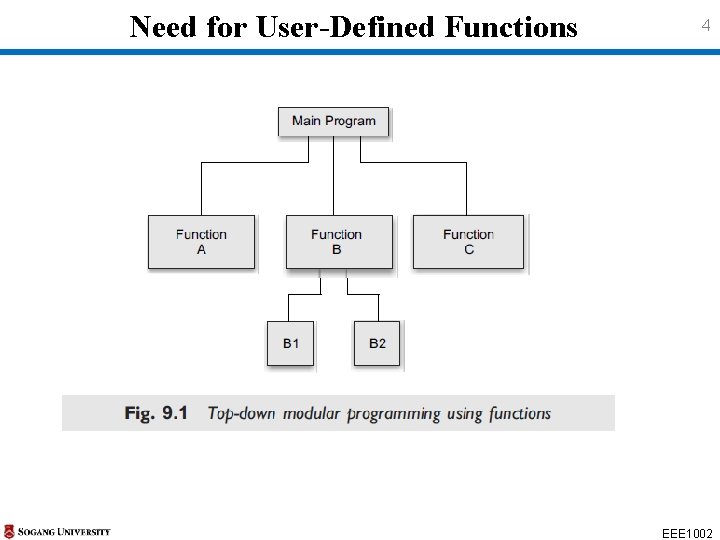
Need for User-Defined Functions 4 EEE 1002
Need for User-Defined Functions 5 § Modular programming is much nore compact and easier to Ø understand, Ø debug, and Ø Test § A function is a self-contained block of code that performs a particular code task § Once a function has been designed and packed, it can be treated as a ‘black box’ EEE 1002
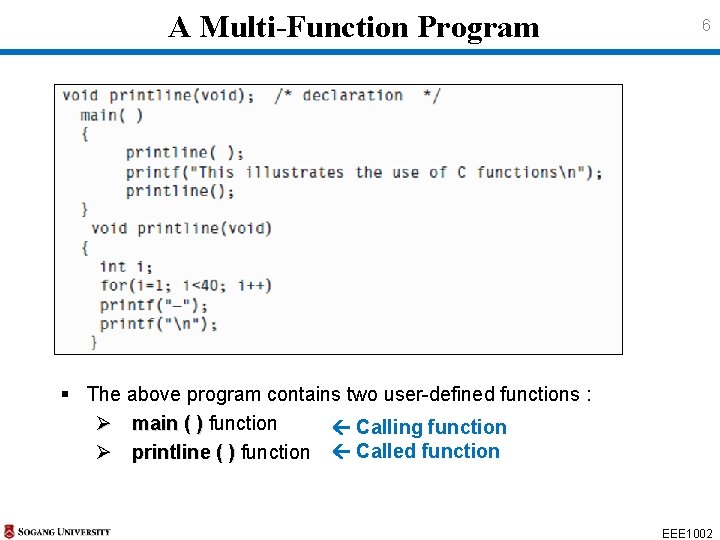
A Multi-Function Program 6 § The above program contains two user-defined functions : Ø main ( ) function Calling function Ø printline ( ) function Called function EEE 1002
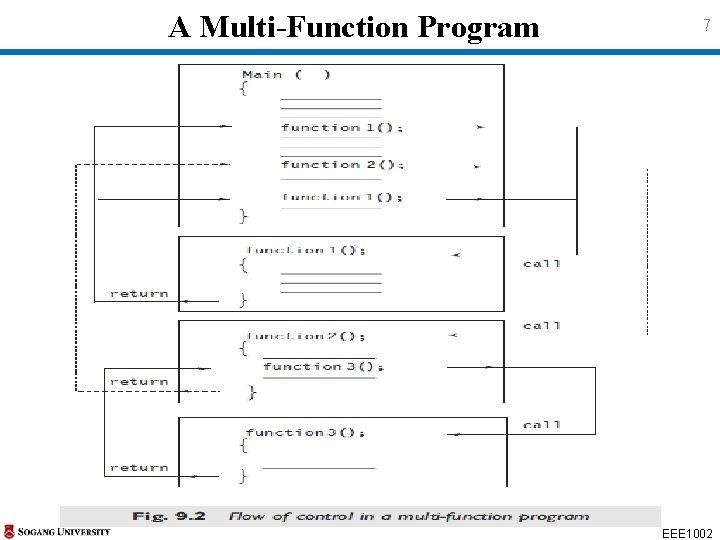
A Multi-Function Program 7 EEE 1002
Elements of User-defined Functions 8 § Both function names and variables names are considered identifiers Must obey the rules for identifiers § Like variables, functions have types (int, float, . . ) § Functions must be declared and defined before they are used in a program § In order to make use of a user-defined function, we need to establish three elements that are related to functions 1. Function definition 2. Function call 3. Function declaration EEE 1002
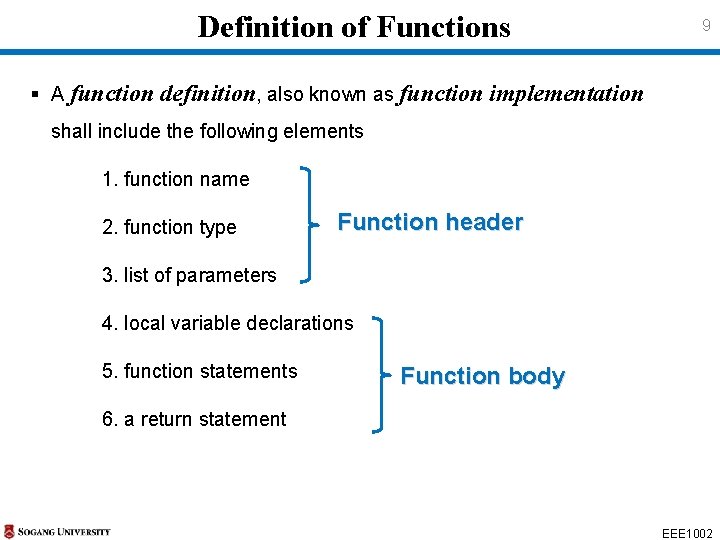
Definition of Functions 9 § A function definition, also known as function implementation shall include the following elements 1. function name 2. function type Function header 3. list of parameters 4. local variable declarations 5. function statements Function body 6. a return statement EEE 1002
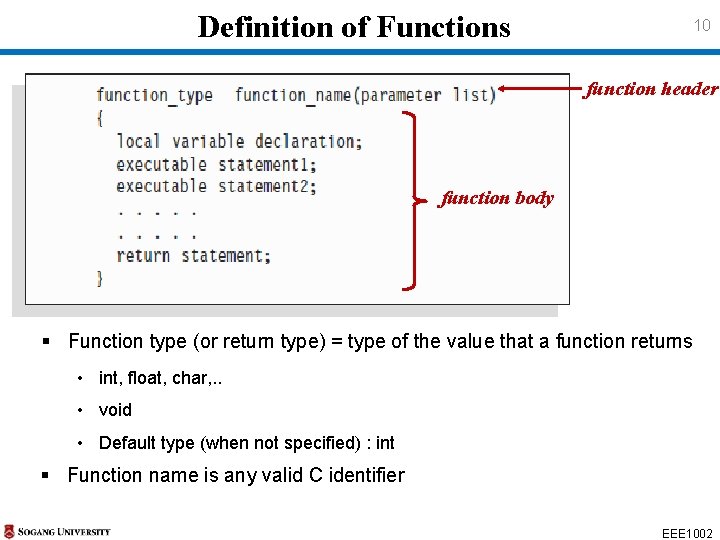
Definition of Functions 10 function header function body § Function type (or return type) = type of the value that a function returns • int, float, char, . . • void • Default type (when not specified) : int § Function name is any valid C identifier EEE 1002
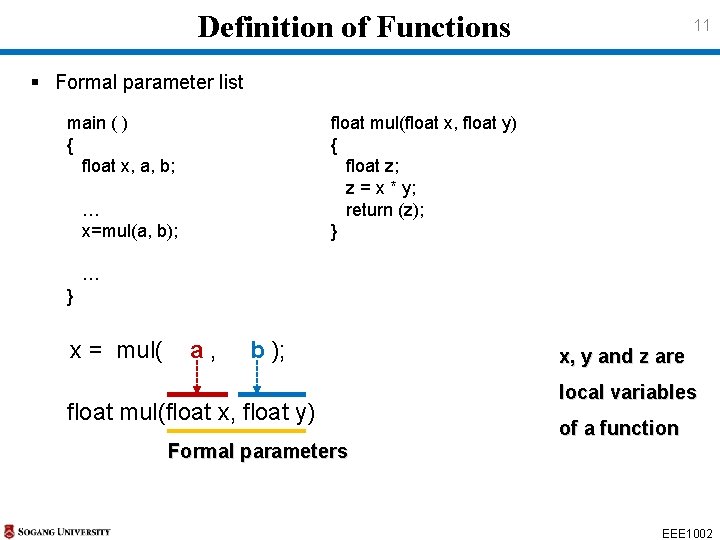
Definition of Functions 11 § Formal parameter list main ( ) { float x, a, b; … x=mul(a, b); float mul(float x, float y) { float z; z = x * y; return (z); } … } x = mul( a , b ); float mul(float x, float y) Formal parameters x, y and z are local variables of a function EEE 1002
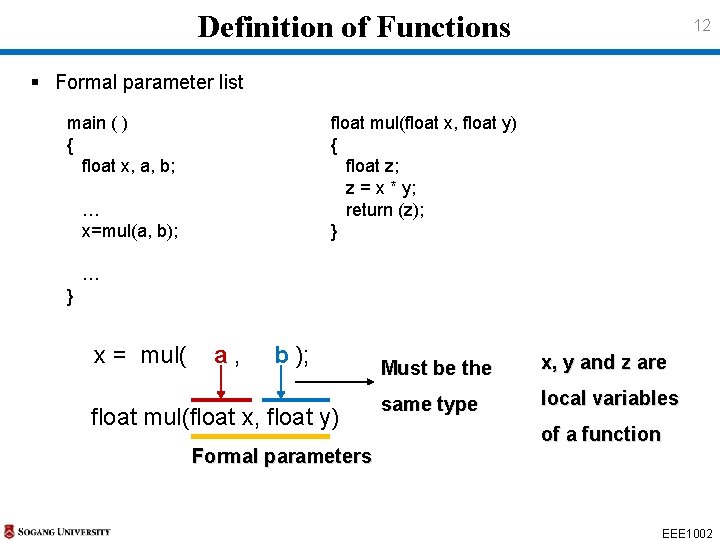
Definition of Functions 12 § Formal parameter list main ( ) { float x, a, b; float mul(float x, float y) { float z; z = x * y; return (z); } … x=mul(a, b); … } x = mul( a , b ); float mul(float x, float y) Formal parameters Must be the x, y and z are same type local variables of a function EEE 1002
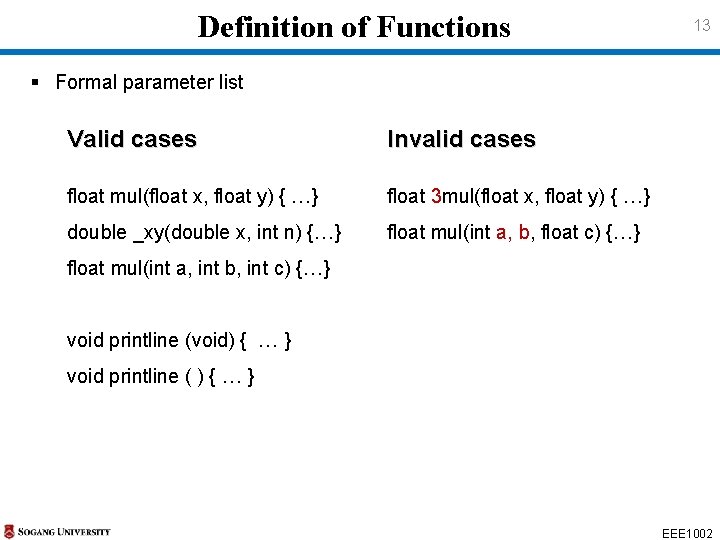
Definition of Functions 13 § Formal parameter list Valid cases Invalid cases float mul(float x, float y) { …} float 3 mul(float x, float y) { …} double _xy(double x, int n) {…} float mul(int a, b, float c) {…} float mul(int a, int b, int c) {…} void printline (void) { … } void printline ( ) { … } EEE 1002
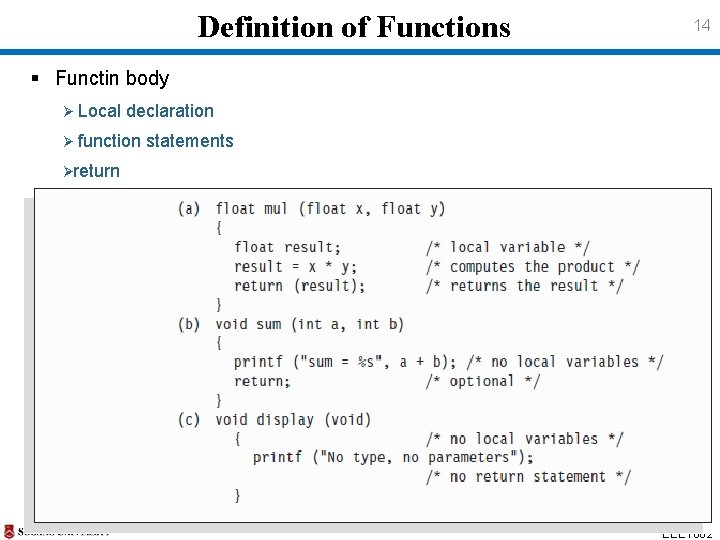
Definition of Functions 14 § Functin body Ø Local declaration Ø function statements Øreturn EEE 1002
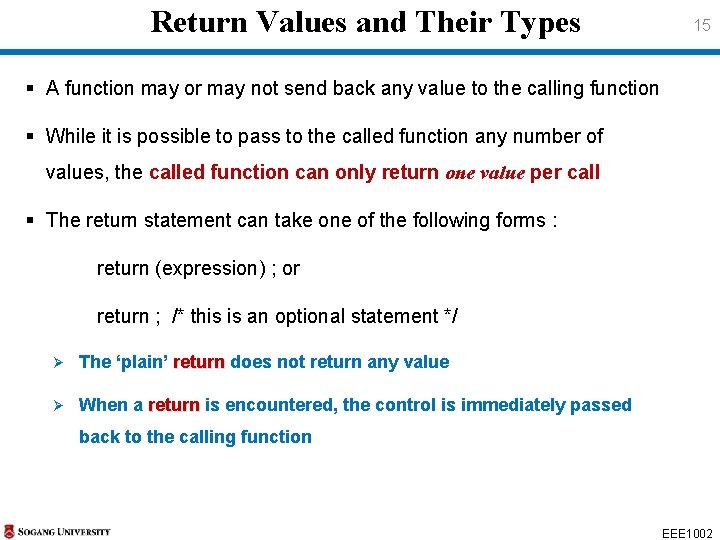
Return Values and Their Types 15 § A function may or may not send back any value to the calling function § While it is possible to pass to the called function any number of values, the called function can only return one value per call § The return statement can take one of the following forms : return (expression) ; or return ; /* this is an optional statement */ Ø The ‘plain’ return does not return any value Ø When a return is encountered, the control is immediately passed back to the calling function EEE 1002
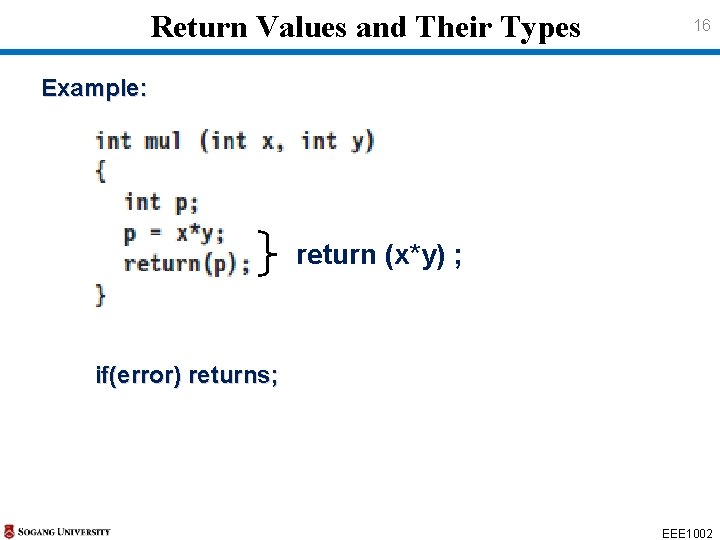
Return Values and Their Types 16 Example: return (x*y) ; if(error) returns; EEE 1002
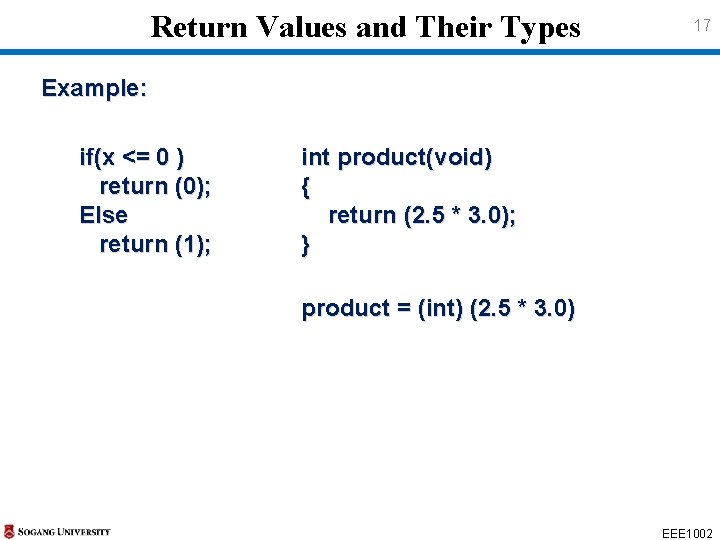
Return Values and Their Types 17 Example: if(x <= 0 ) return (0); Else return (1); int product(void) { return (2. 5 * 3. 0); } product = (int) (2. 5 * 3. 0) EEE 1002
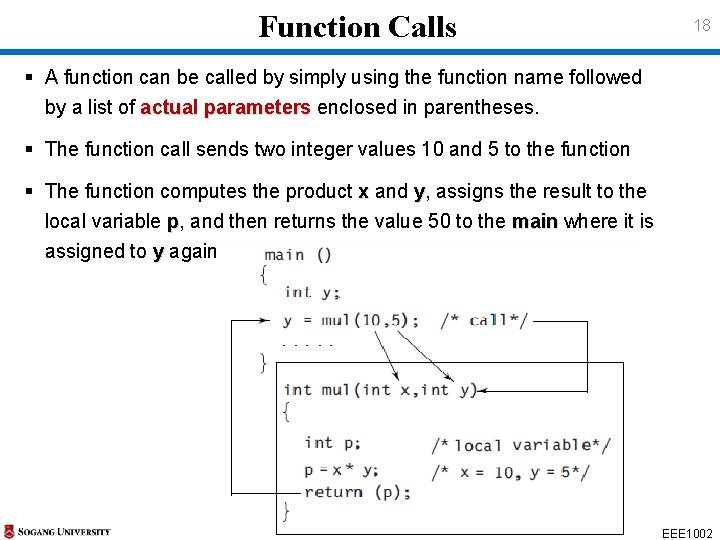
Function Calls 18 § A function can be called by simply using the function name followed by a list of actual parameters enclosed in parentheses. § The function call sends two integer values 10 and 5 to the function § The function computes the product x and y, assigns the result to the local variable p, and then returns the value 50 to the main where it is main assigned to y again EEE 1002
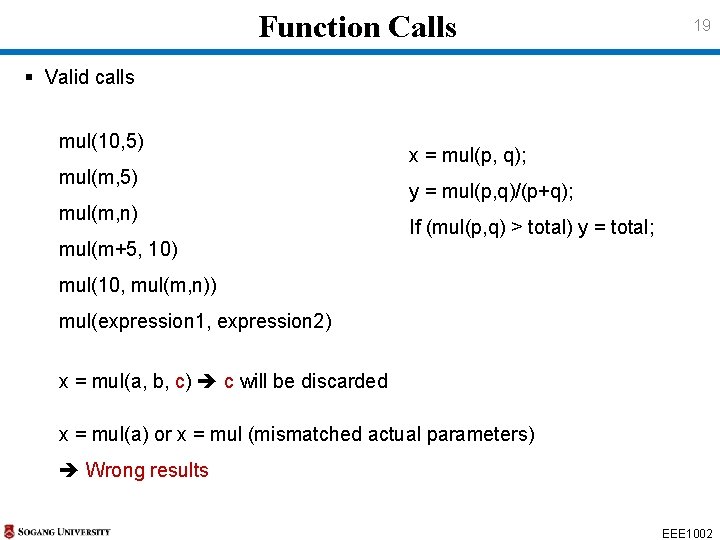
Function Calls 19 § Valid calls mul(10, 5) mul(m, n) mul(m+5, 10) x = mul(p, q); y = mul(p, q)/(p+q); If (mul(p, q) > total) y = total; mul(10, mul(m, n)) mul(expression 1, expression 2) x = mul(a, b, c) c will be discarded x = mul(a) or x = mul (mismatched actual parameters) Wrong results EEE 1002
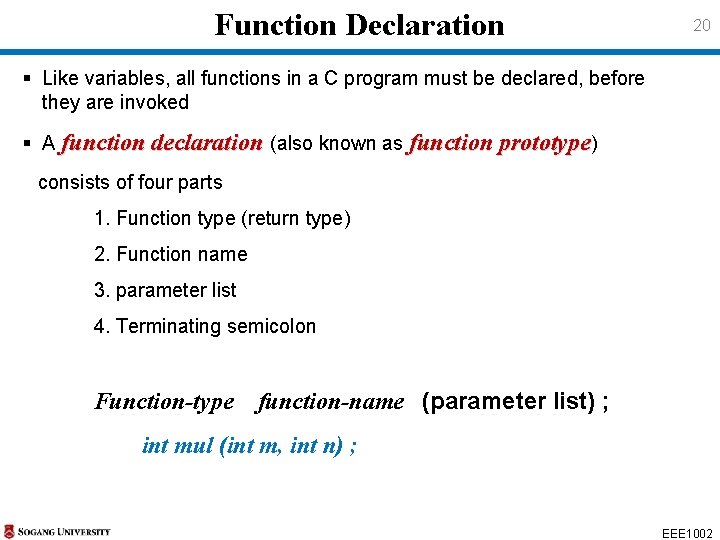
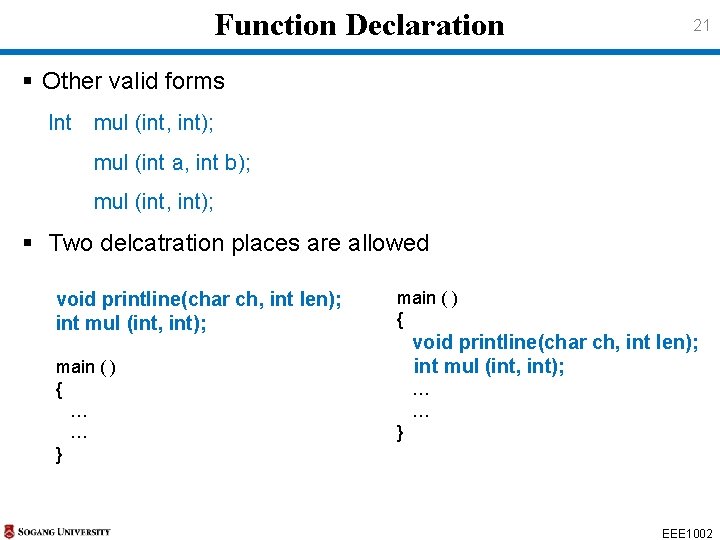
Function Declaration 20 § Like variables, all functions in a C program must be declared, before they are invoked § A function declaration (also known as function prototype) consists of four parts 1. Function type (return type) 2. Function name 3. parameter list 4. Terminating semicolon Function-type function-name (parameter list) ; int mul (int m, int n) ; EEE 1002
Function Declaration 21 § Other valid forms Int mul (int, int); mul (int a, int b); mul (int, int); § Two delcatration places are allowed void printline(char ch, int len); int mul (int, int); main ( ) { … … } main ( ) { void printline(char ch, int len); int mul (int, int); … … } EEE 1002
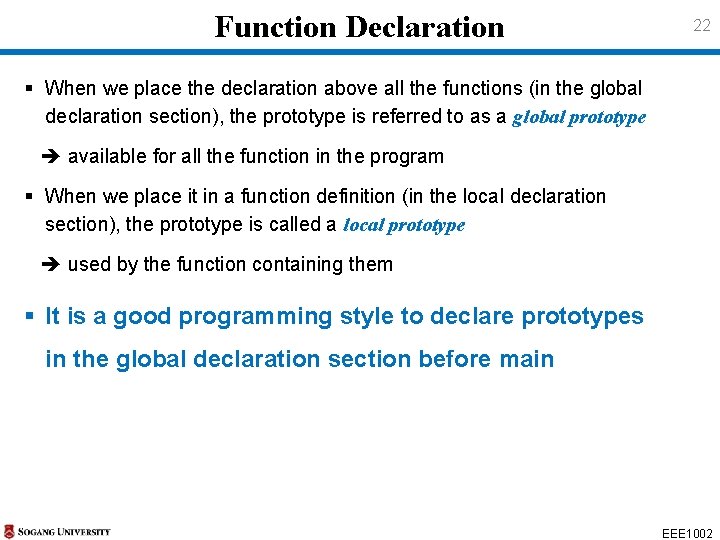
Function Declaration 22 § When we place the declaration above all the functions (in the global declaration section), the prototype is referred to as a global prototype available for all the function in the program § When we place it in a function definition (in the local declaration section), the prototype is called a local prototype used by the function containing them § It is a good programming style to declare prototypes in the global declaration section before main EEE 1002
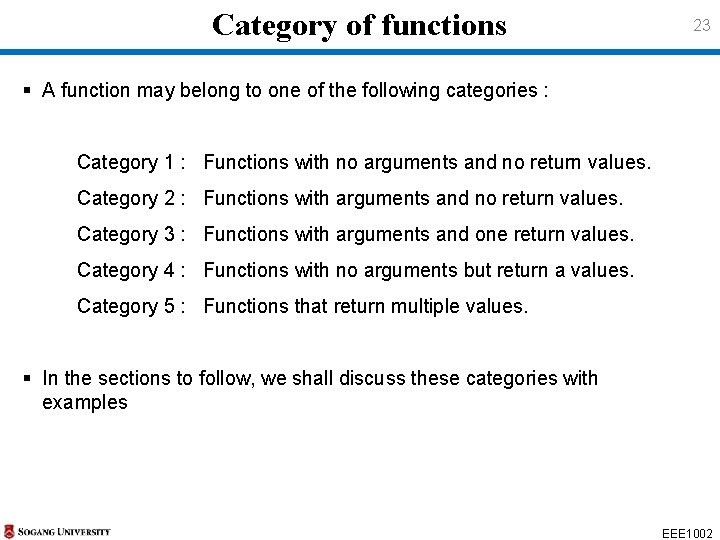
Category of functions 23 § A function may belong to one of the following categories : Category 1 : Functions with no arguments and no return values. Category 2 : Functions with arguments and no return values. Category 3 : Functions with arguments and one return values. Category 4 : Functions with no arguments but return a values. Category 5 : Functions that return multiple values. § In the sections to follow, we shall discuss these categories with examples EEE 1002
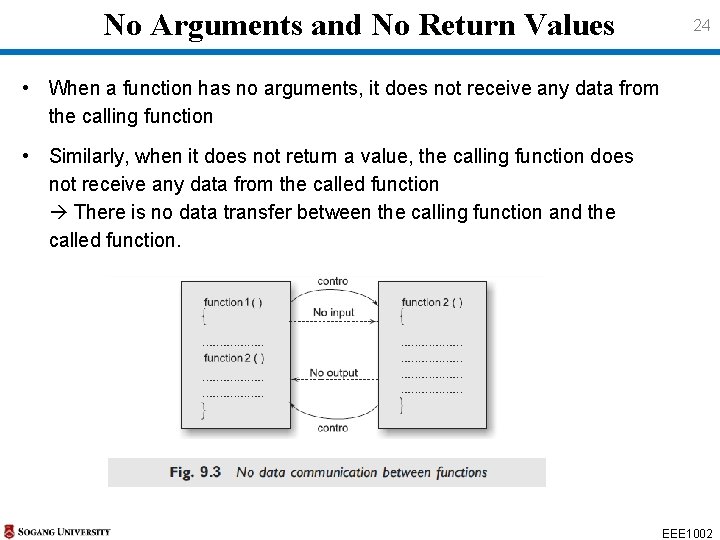
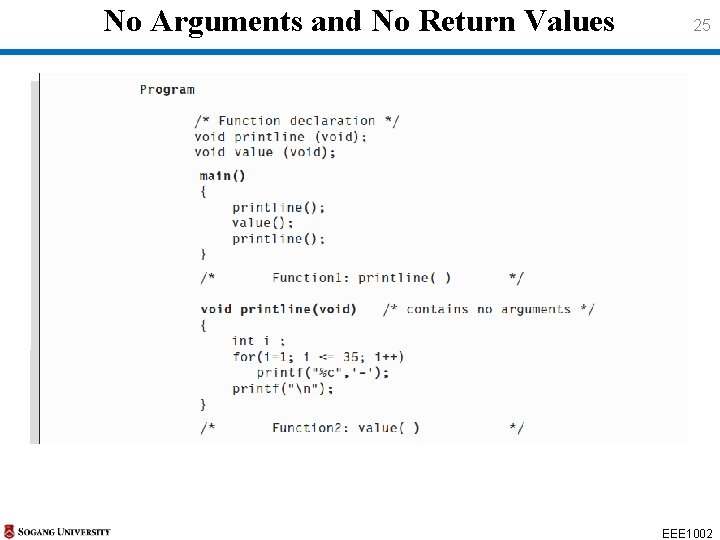
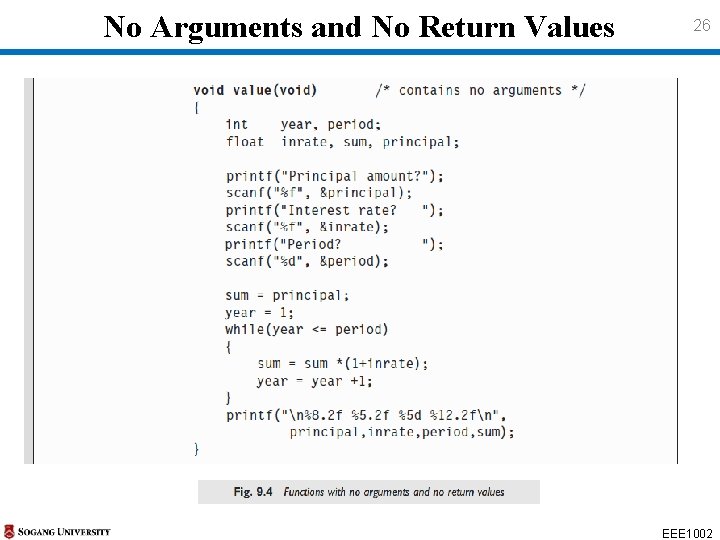
No Arguments and No Return Values 24 • When a function has no arguments, it does not receive any data from the calling function • Similarly, when it does not return a value, the calling function does not receive any data from the called function There is no data transfer between the calling function and the called function. EEE 1002
No Arguments and No Return Values 25 EEE 1002
No Arguments and No Return Values 26 EEE 1002
No Arguments and No Return Values 27 • It is important to note that the function value receives its data directly value from the terminal • The input data include principal amount, interest rate and the period for which the final value is to be calculated • The while loop calculates the final value and the results are printed while by the library function printf • When the closing brace of value ( ) is reached, the control is transferred back to the calling function main • Return types of both printline and value are declared as void printline value EEE 1002
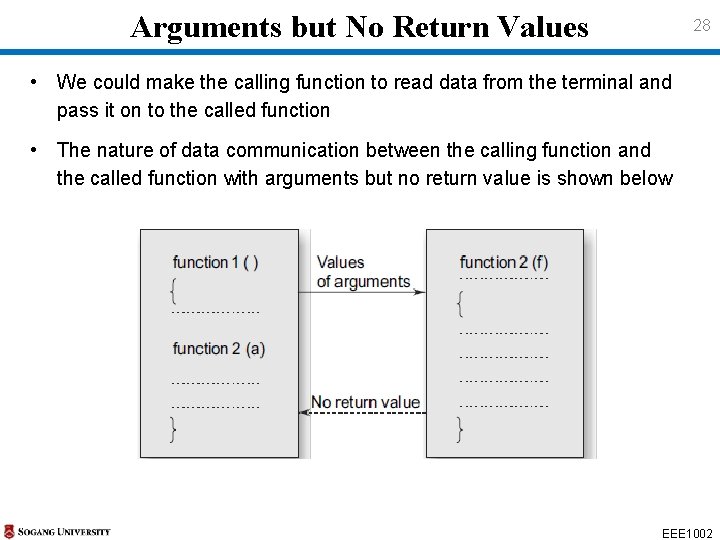
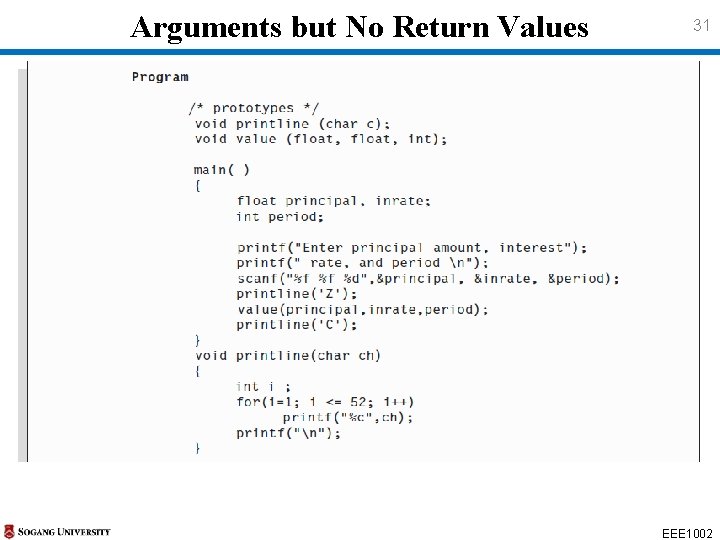
Arguments but No Return Values 28 • We could make the calling function to read data from the terminal and pass it on to the called function • The nature of data communication between the calling function and the called function with arguments but no return value is shown below EEE 1002
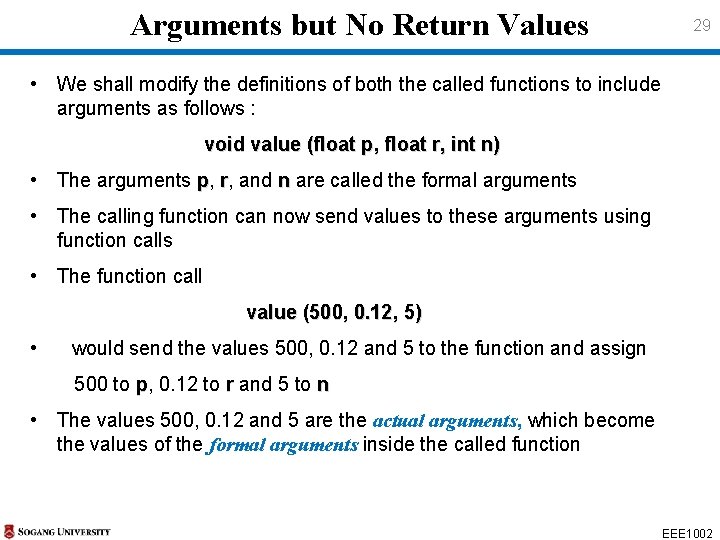
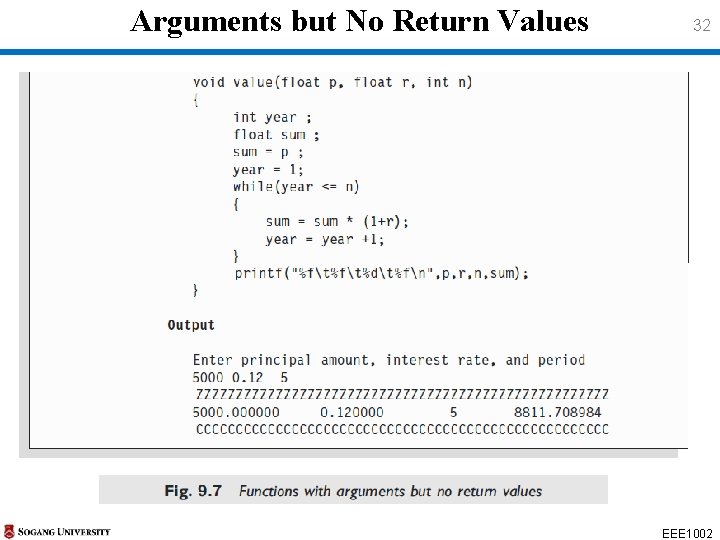
Arguments but No Return Values 29 • We shall modify the definitions of both the called functions to include arguments as follows : void value (float p, float r, int n) • The arguments p, r, and n are called the formal arguments • The calling function can now send values to these arguments using function calls • The function call value (500, 0. 12, 5) • would send the values 500, 0. 12 and 5 to the function and assign 500 to p, 0. 12 to r and 5 to n • The values 500, 0. 12 and 5 are the actual arguments, which become the values of the formal arguments inside the called function EEE 1002
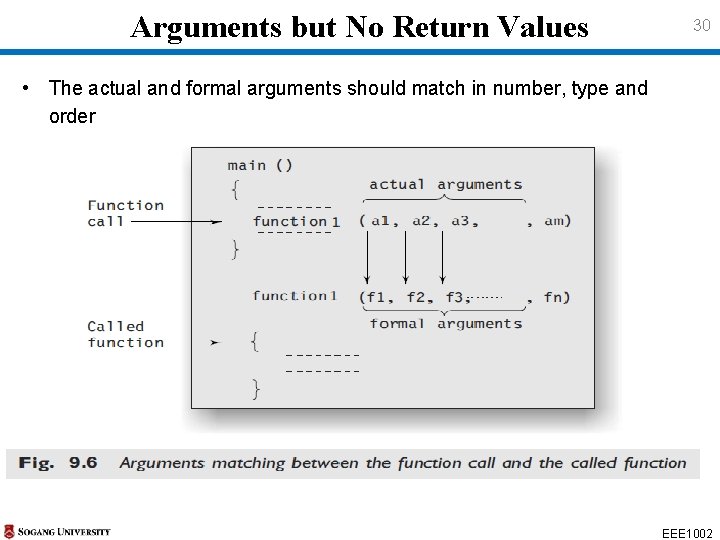
Arguments but No Return Values 30 • The actual and formal arguments should match in number, type and order EEE 1002
Arguments but No Return Values 31 EEE 1002
Arguments but No Return Values 32 EEE 1002
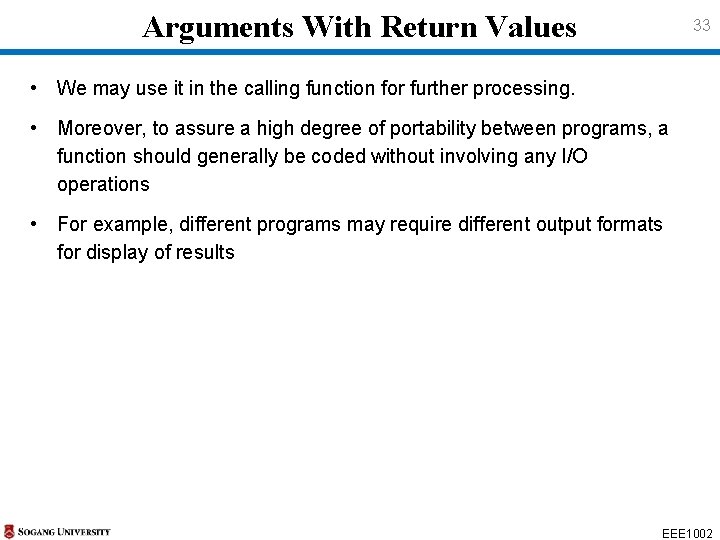
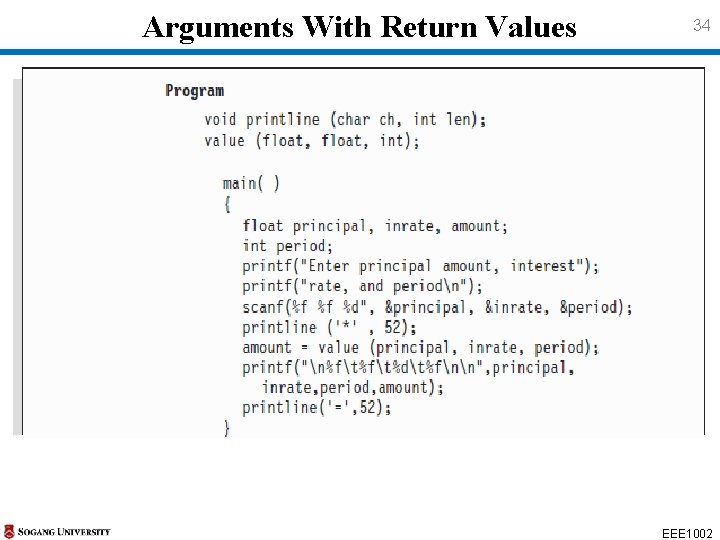
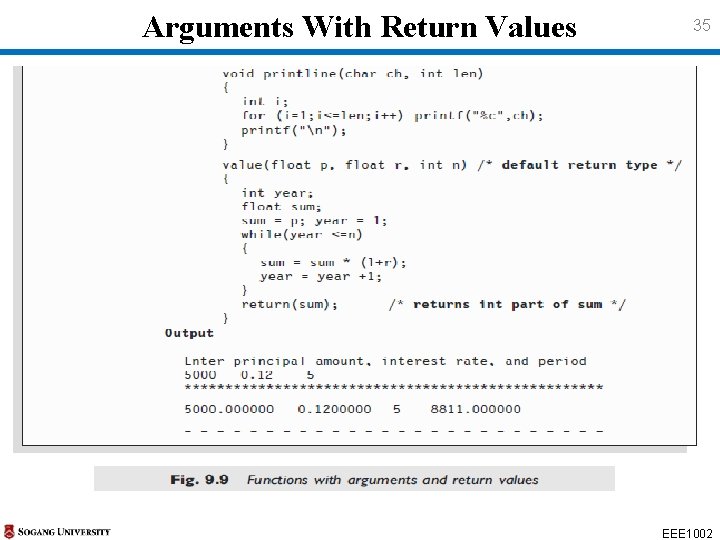
Arguments With Return Values 33 • We may use it in the calling function for further processing. • Moreover, to assure a high degree of portability between programs, a function should generally be coded without involving any I/O operations • For example, different programs may require different output formats for display of results EEE 1002
Arguments With Return Values 34 EEE 1002
Arguments With Return Values 35 EEE 1002
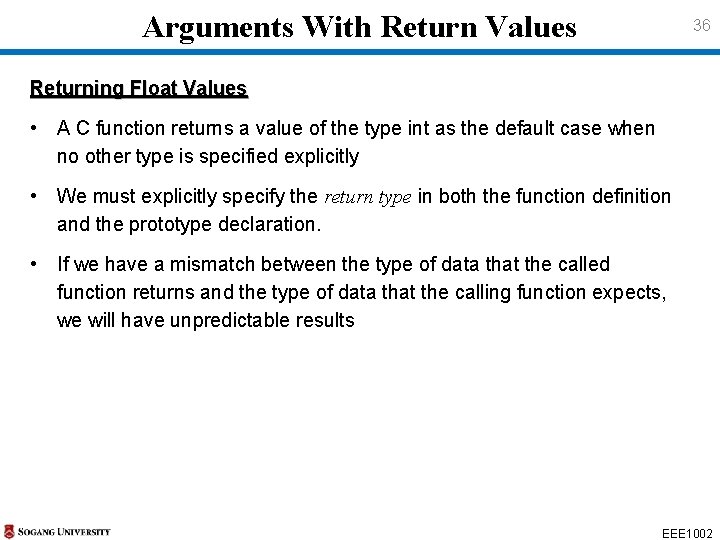
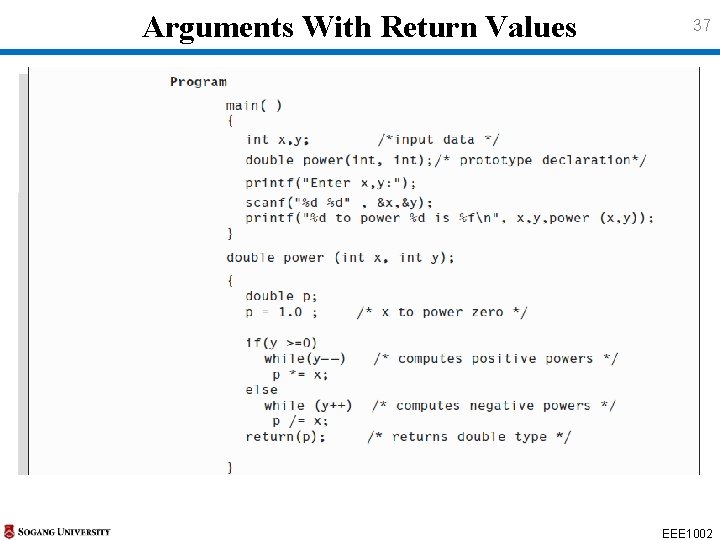
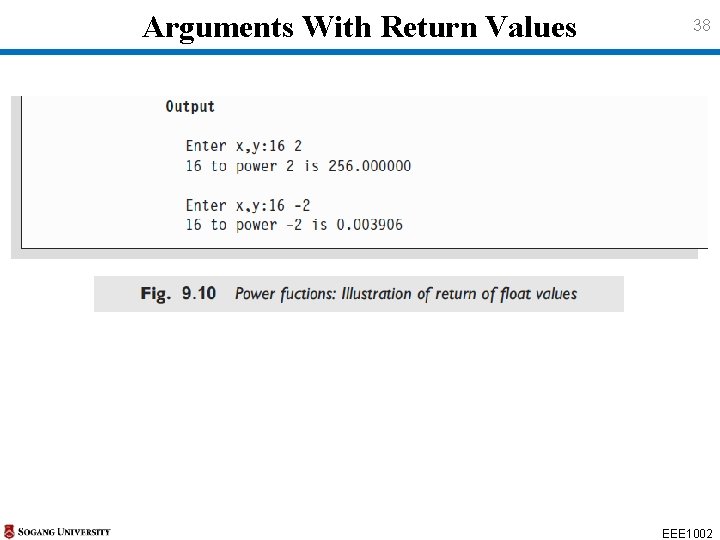
Arguments With Return Values 36 Returning Float Values • A C function returns a value of the type int as the default case when no other type is specified explicitly • We must explicitly specify the return type in both the function definition and the prototype declaration. • If we have a mismatch between the type of data that the called function returns and the type of data that the calling function expects, we will have unpredictable results EEE 1002
Arguments With Return Values 37 EEE 1002
Arguments With Return Values 38 EEE 1002
No Arguments but Returns a Value 39 • We may need to design functions that may not take any arguments but returns a value to the calling function • A typical example is the getchar function declared in the header file getchar <stdio. h> • We have used this function earlier in a number of places • getchar function has no parameters, but it returns an integer type getchar data that represents a character ch = getchar( ); EEE 1002
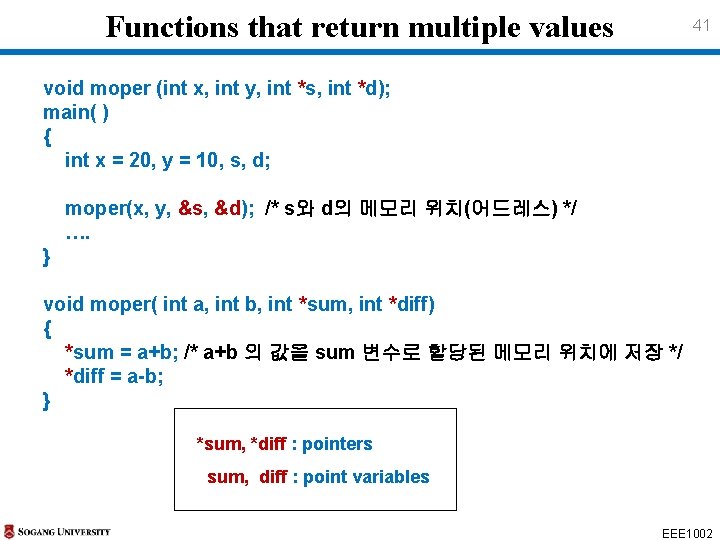
Functions that return multiple values 40 • Multiple values can be returned by use of multiple “output parameters” • The arguments for sending back information(values) must be addresses of the memory that the values are stored • Such arguments(parameters) are declared using Ø Address operator ( & ) or Ø Indirection operator ( * ) • This approach is called “Call by reference (or address)” or “Pass by pointers” EEE 1002
Functions that return multiple values 41 void moper (int x, int y, int *s, int *d); main( ) { int x = 20, y = 10, s, d; moper(x, y, &s, &d); /* s와 d의 메모리 위치(어드레스) */ …. } void moper( int a, int b, int *sum, int *diff) { *sum = a+b; /* a+b 의 값을 sum 변수로 할당된 메모리 위치에 저장 */ *diff = a-b; } *sum, *diff : pointers sum, diff : point variables EEE 1002
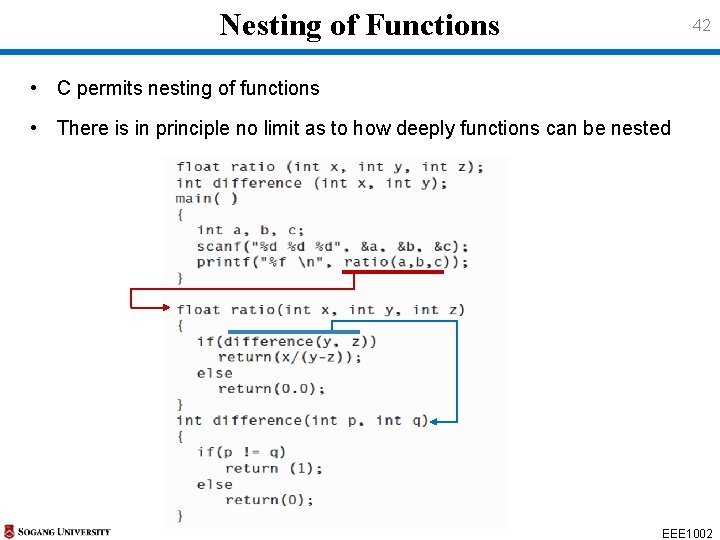
Nesting of Functions 42 • C permits nesting of functions • There is in principle no limit as to how deeply functions can be nested EEE 1002
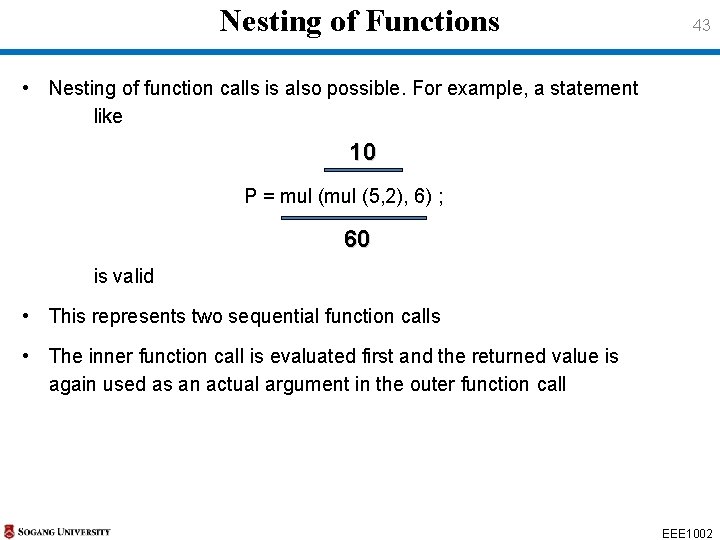
Nesting of Functions 43 • Nesting of function calls is also possible. For example, a statement like 10 P = mul (5, 2), 6) ; 60 is valid • This represents two sequential function calls • The inner function call is evaluated first and the returned value is again used as an actual argument in the outer function call EEE 1002
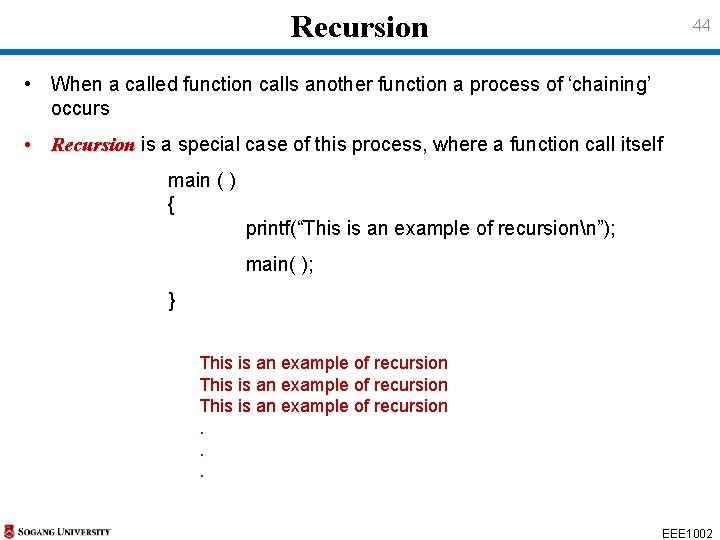
Recursion 44 • When a called function calls another function a process of ‘chaining’ occurs • Recursion is a special case of this process, where a function call itself main ( ) { printf(“This is an example of recursionn”); main( ); } This is an example of recursion. . . EEE 1002
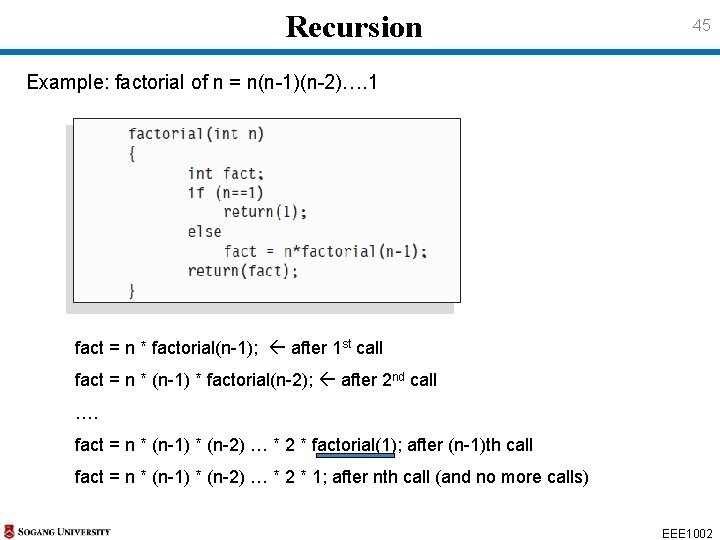
Recursion 45 Example: factorial of n = n(n-1)(n-2)…. 1 fact = n * factorial(n-1); after 1 st call fact = n * (n-1) * factorial(n-2); after 2 nd call …. fact = n * (n-1) * (n-2) … * 2 * factorial(1); after (n-1)th call fact = n * (n-1) * (n-2) … * 2 * 1; after nth call (and no more calls) EEE 1002
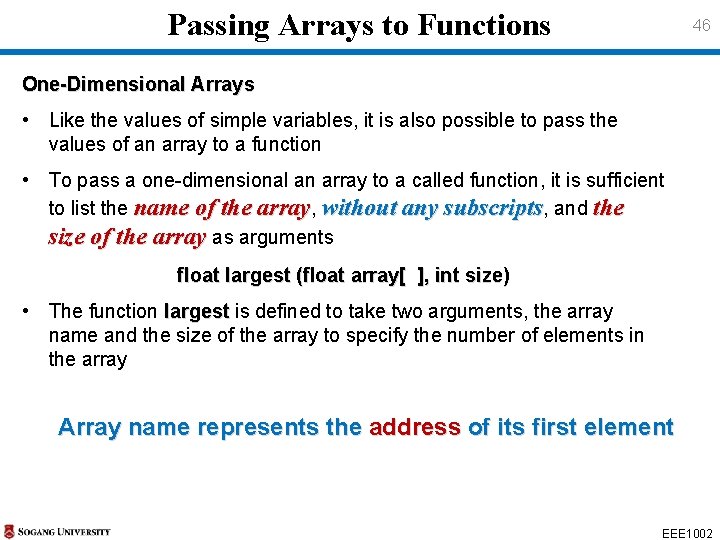
Passing Arrays to Functions 46 One-Dimensional Arrays • Like the values of simple variables, it is also possible to pass the values of an array to a function • To pass a one-dimensional an array to a called function, it is sufficient to list the name of the array, without any subscripts, and the size of the array as arguments float largest (float array[ ], int size) • The function largest is defined to take two arguments, the array largest name and the size of the array to specify the number of elements in the array Array name represents the address of its first element EEE 1002
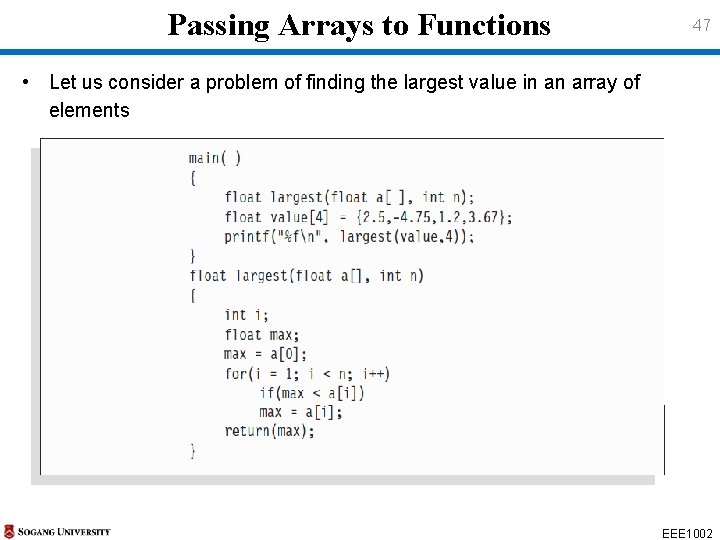
Passing Arrays to Functions 47 • Let us consider a problem of finding the largest value in an array of elements EEE 1002
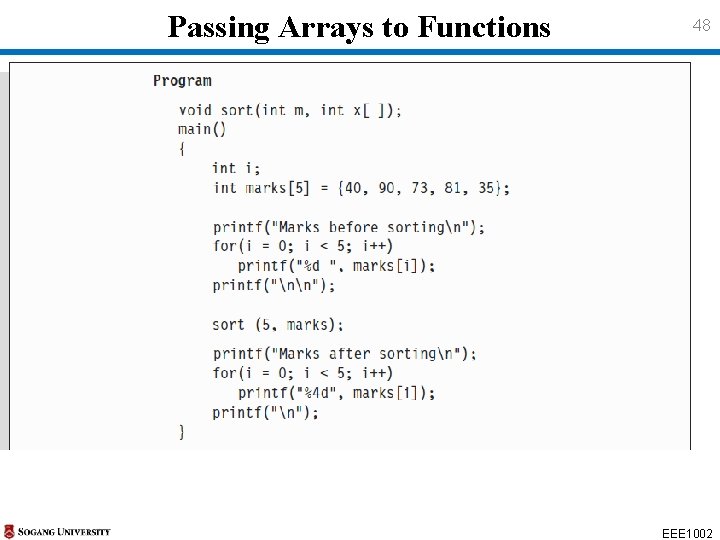
Passing Arrays to Functions 48 EEE 1002
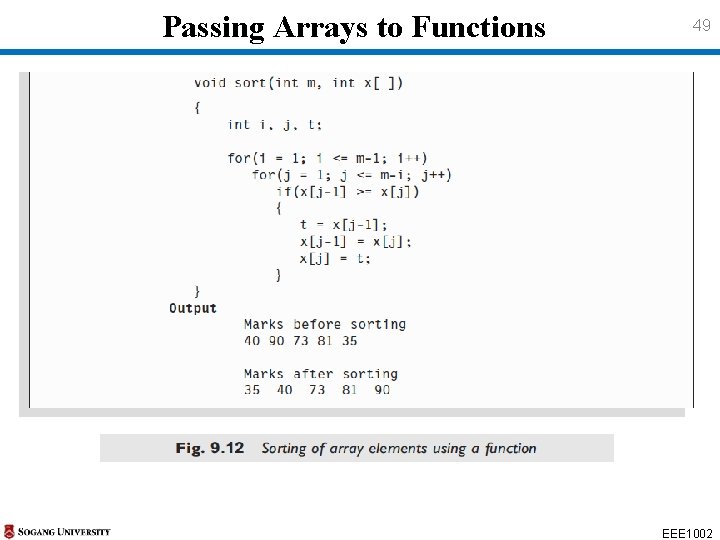
Passing Arrays to Functions 49 EEE 1002
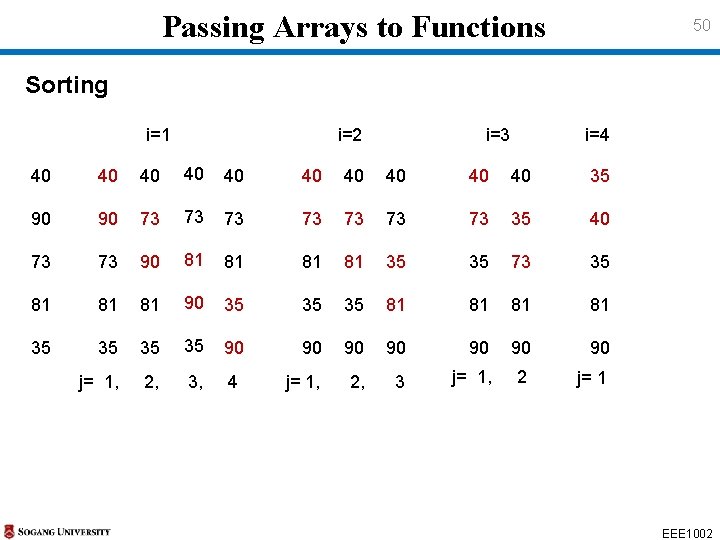
Passing Arrays to Functions 50 Sorting i=1 i=2 i=3 i=4 40 40 40 35 90 90 73 73 35 40 73 73 90 81 81 35 35 73 35 81 81 81 90 35 35 35 81 81 35 35 90 90 j= 1, 2, 3, 4 j= 1, 2, 3 EEE 1002
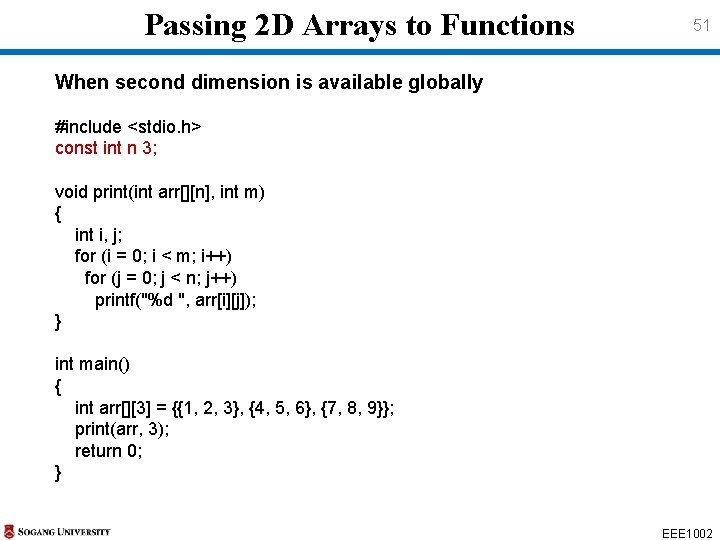
Passing 2 D Arrays to Functions 51 When second dimension is available globally #include <stdio. h> const int n 3; void print(int arr[][n], int m) { int i, j; for (i = 0; i < m; i++) for (j = 0; j < n; j++) printf("%d ", arr[i][j]); } int main() { int arr[][3] = {{1, 2, 3}, {4, 5, 6}, {7, 8, 9}}; print(arr, 3); return 0; } EEE 1002
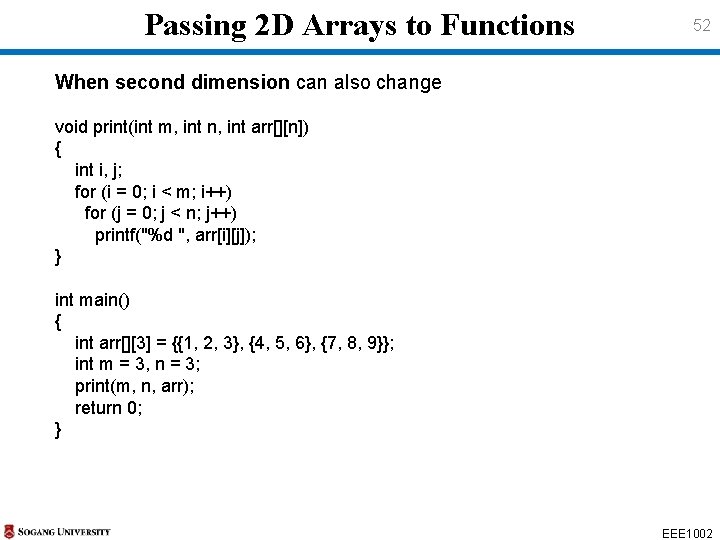
Passing 2 D Arrays to Functions 52 When second dimension can also change void print(int m, int n, int arr[][n]) { int i, j; for (i = 0; i < m; i++) for (j = 0; j < n; j++) printf("%d ", arr[i][j]); } int main() { int arr[][3] = {{1, 2, 3}, {4, 5, 6}, {7, 8, 9}}; int m = 3, n = 3; print(m, n, arr); return 0; } EEE 1002
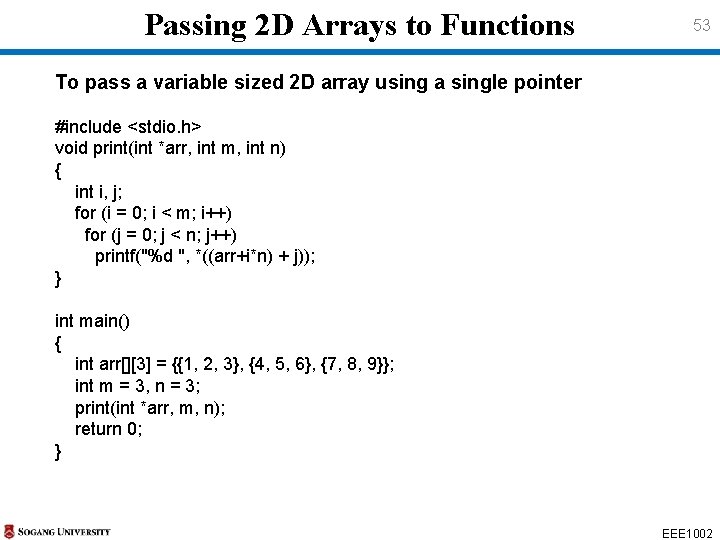
Passing 2 D Arrays to Functions 53 To pass a variable sized 2 D array using a single pointer #include <stdio. h> void print(int *arr, int m, int n) { int i, j; for (i = 0; i < m; i++) for (j = 0; j < n; j++) printf("%d ", *((arr+i*n) + j)); } int main() { int arr[][3] = {{1, 2, 3}, {4, 5, 6}, {7, 8, 9}}; int m = 3, n = 3; print(int *arr, m, n); return 0; } EEE 1002
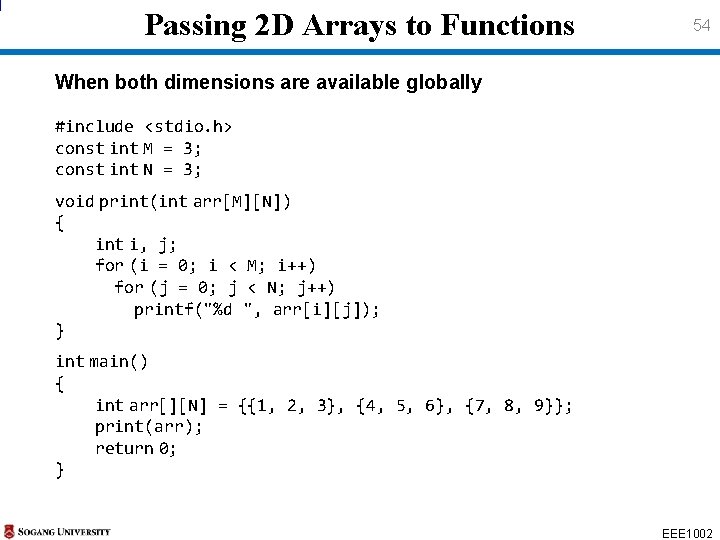
Passing 2 D Arrays to Functions 54 When both dimensions are available globally #include <stdio. h> const int M = 3; const int N = 3; void print(int arr[M][N]) { int i, j; for (i = 0; i < M; i++) for (j = 0; j < N; j++) printf("%d ", arr[i][j]); } int main() { int arr[][N] = {{1, 2, 3}, {4, 5, 6}, {7, 8, 9}}; print(arr); return 0; } EEE 1002
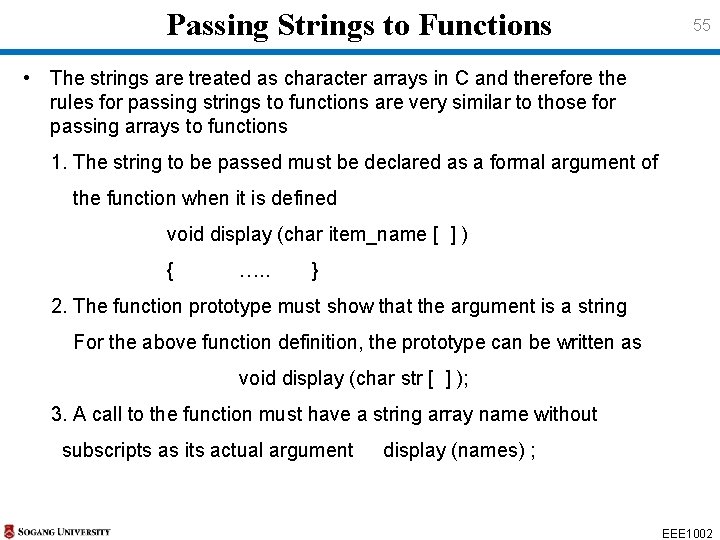
Passing Strings to Functions 55 • The strings are treated as character arrays in C and therefore the rules for passing strings to functions are very similar to those for passing arrays to functions 1. The string to be passed must be declared as a formal argument of the function when it is defined void display (char item_name [ ] ) { …. . } 2. The function prototype must show that the argument is a string For the above function definition, the prototype can be written as void display (char str [ ] ); 3. A call to the function must have a string array name without subscripts as its actual argument display (names) ; EEE 1002
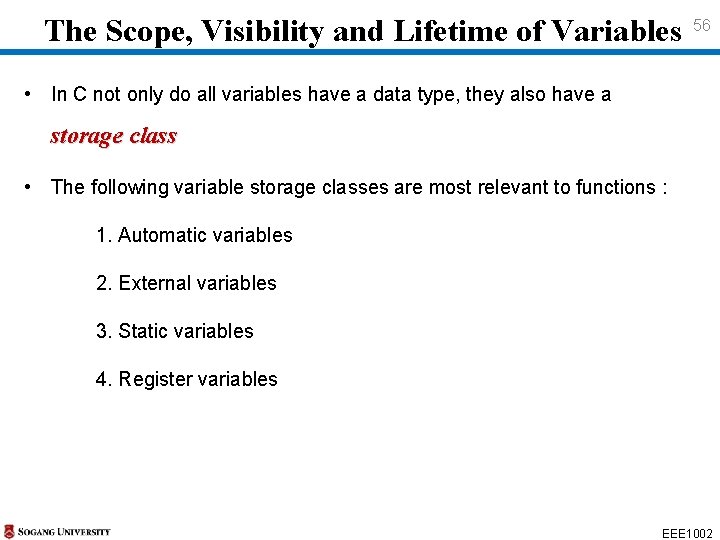
The Scope, Visibility and Lifetime of Variables 56 • In C not only do all variables have a data type, they also have a storage class • The following variable storage classes are most relevant to functions : 1. Automatic variables 2. External variables 3. Static variables 4. Register variables EEE 1002
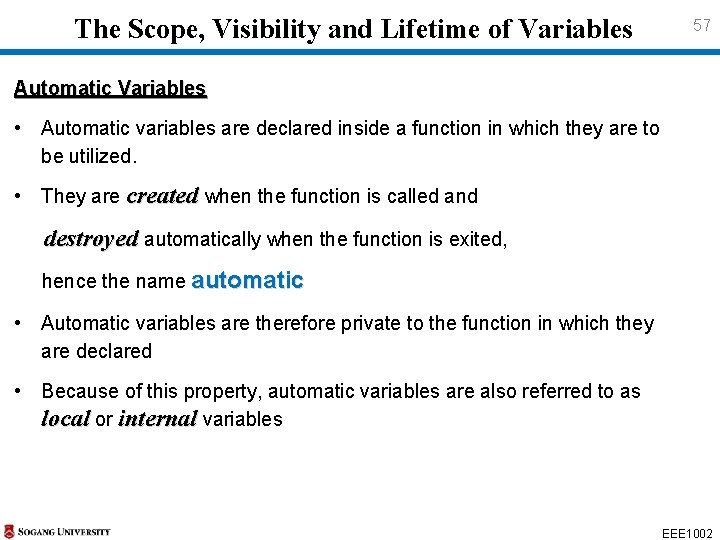
The Scope, Visibility and Lifetime of Variables 57 Automatic Variables • Automatic variables are declared inside a function in which they are to be utilized. • They are created when the function is called and destroyed automatically when the function is exited, hence the name automatic • Automatic variables are therefore private to the function in which they are declared • Because of this property, automatic variables are also referred to as local or internal variables EEE 1002
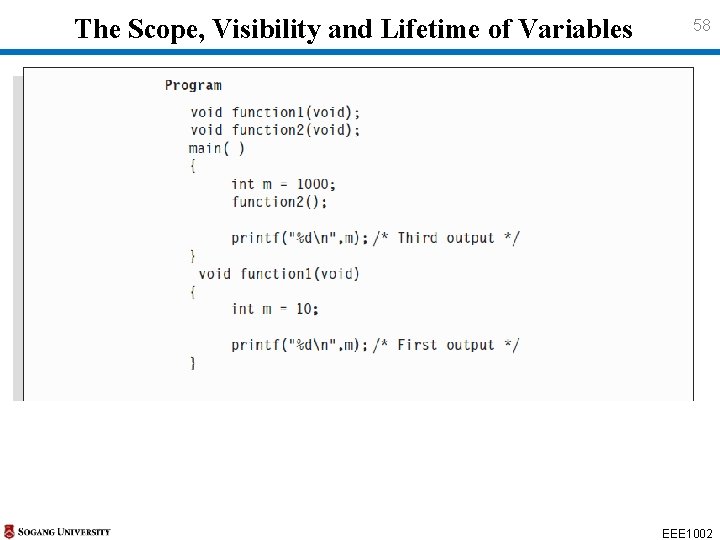
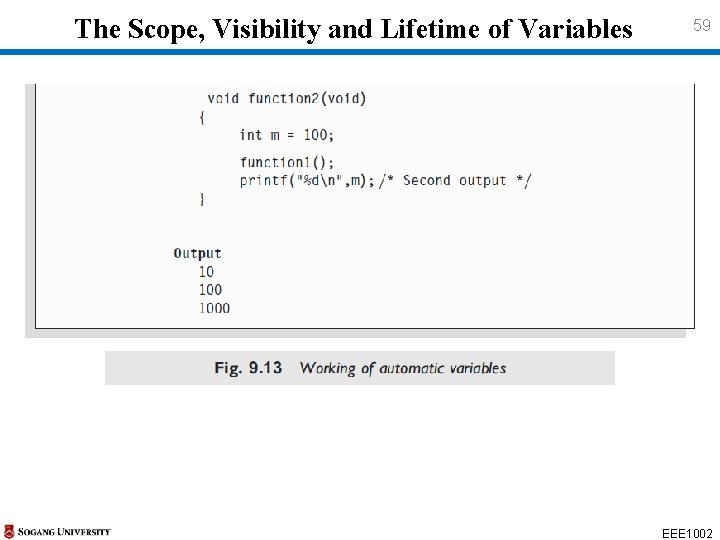
The Scope, Visibility and Lifetime of Variables 58 EEE 1002
The Scope, Visibility and Lifetime of Variables 59 EEE 1002
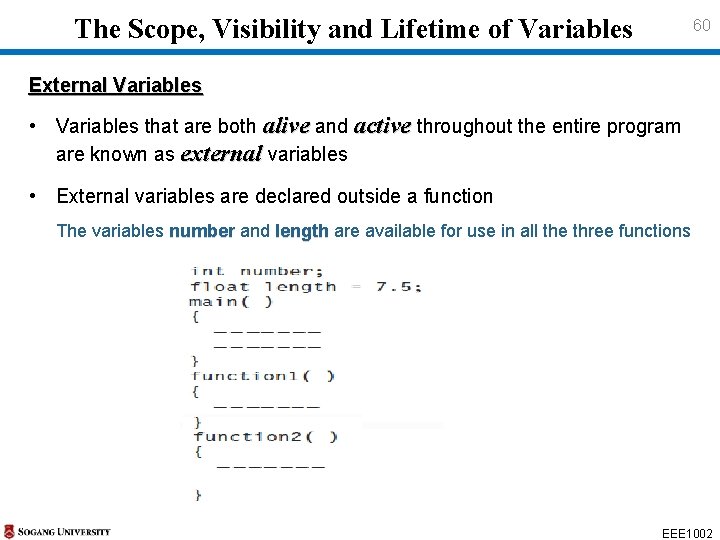
The Scope, Visibility and Lifetime of Variables 60 External Variables • Variables that are both alive and active throughout the entire program are known as external variables • External variables are declared outside a function The variables number and length are available for use in all the three functions number EEE 1002
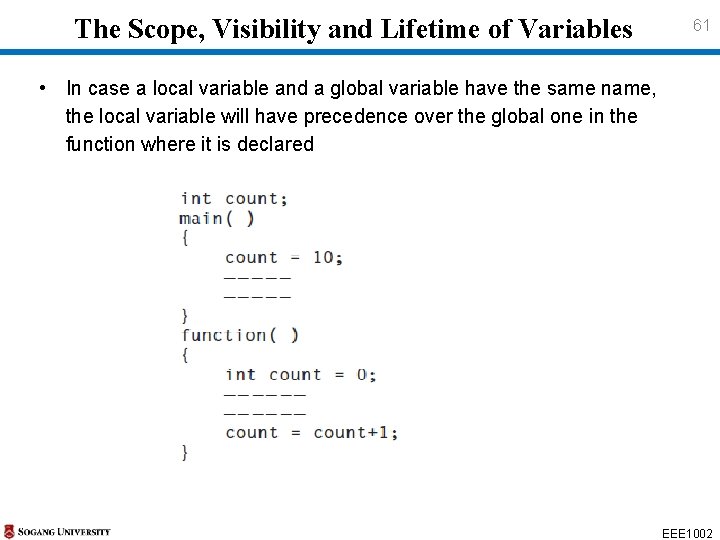
The Scope, Visibility and Lifetime of Variables 61 • In case a local variable and a global variable have the same name, the local variable will have precedence over the global one in the function where it is declared EEE 1002
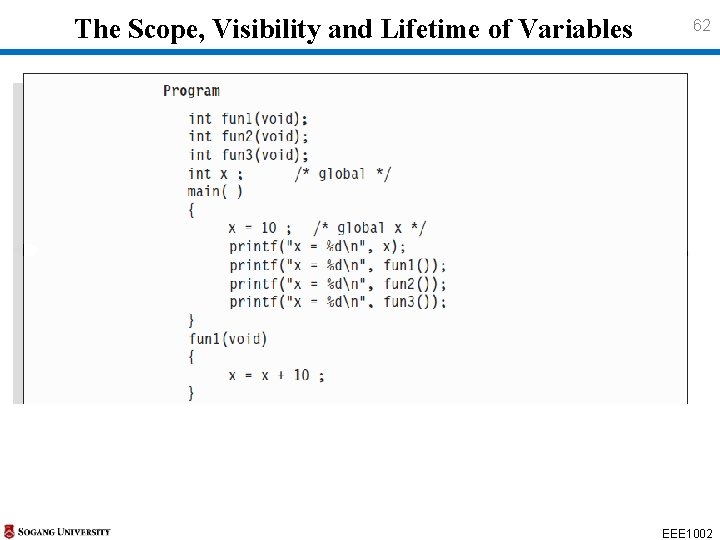
The Scope, Visibility and Lifetime of Variables 62 EEE 1002
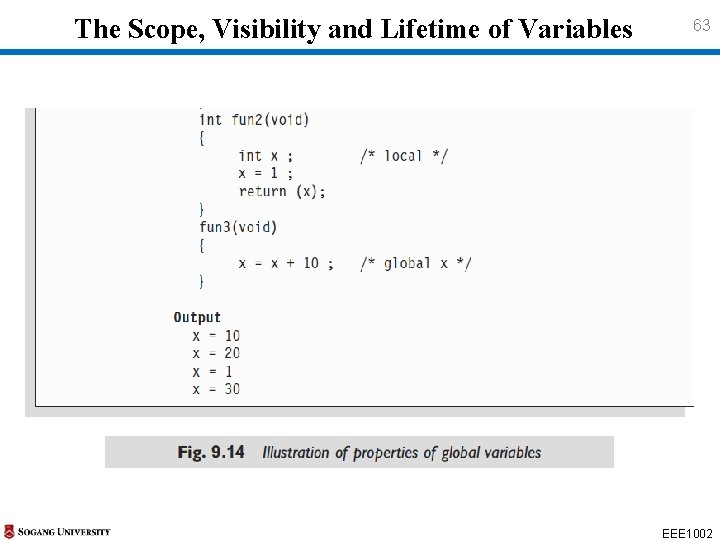
The Scope, Visibility and Lifetime of Variables 63 EEE 1002
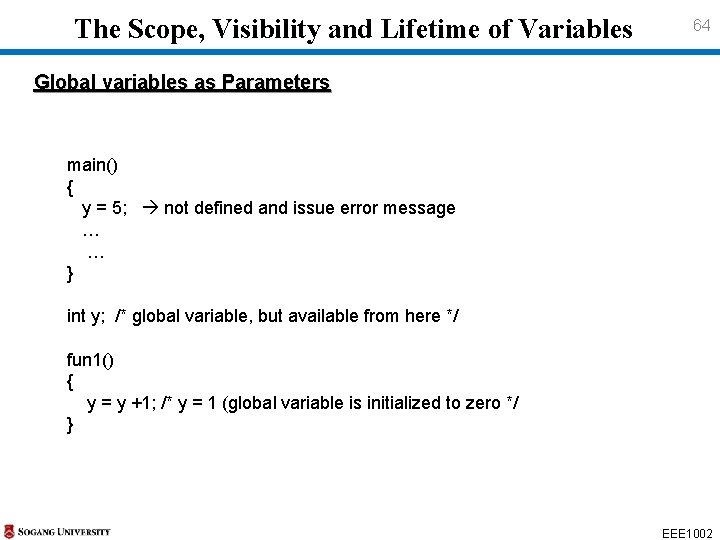
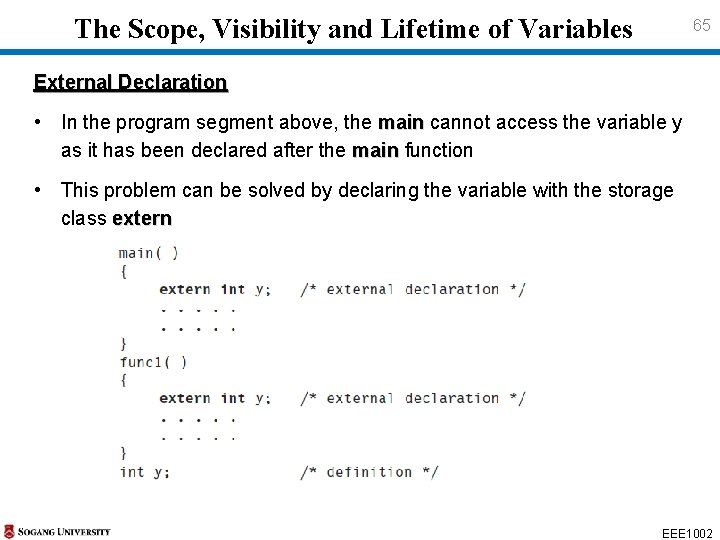
The Scope, Visibility and Lifetime of Variables 64 Global variables as Parameters main() { y = 5; not defined and issue error message … … } int y; /* global variable, but available from here */ fun 1() { y = y +1; /* y = 1 (global variable is initialized to zero */ } EEE 1002
The Scope, Visibility and Lifetime of Variables 65 External Declaration • In the program segment above, the main cannot access the variable y as it has been declared after the main function main • This problem can be solved by declaring the variable with the storage class extern EEE 1002
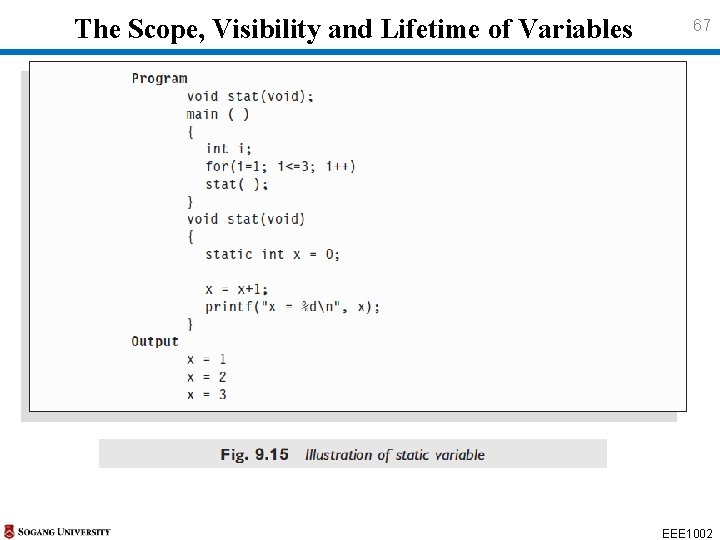
The Scope, Visibility and Lifetime of Variables 66 Static Variables • The value of static variables persists until the end of the program • A variable can be declared static using the keyword static like static int x ; • A static variable may be either an internal type or an external type depending on the place of declaration • Internal static variables are similar to auto variables, except that they remain in existence throughout the remainder of the program • Therefore, internal static variables can be used to retain values between function calls EEE 1002
The Scope, Visibility and Lifetime of Variables 67 EEE 1002
The Scope, Visibility and Lifetime of Variables 68 • A static variable is initialized only once, when the program is compiled • An external static variable is declared outside of all functions and is available to all the functions in that program • static external variable is available only within the file is defined • simple external variable can be accessed by other files EEE 1002
The Scope, Visibility and Lifetime of Variables 69 Register Variables • Since a register access is much faster than a memory access, keeping the frequently accessed variables in the register will lead to faster execution of programs register int count ; • Since only a few variables can be placed in the register, it is important to carefully select the variables for this purpose However, C will automatically convert register variables into nonregister variables once the limit is reached EEE 1002
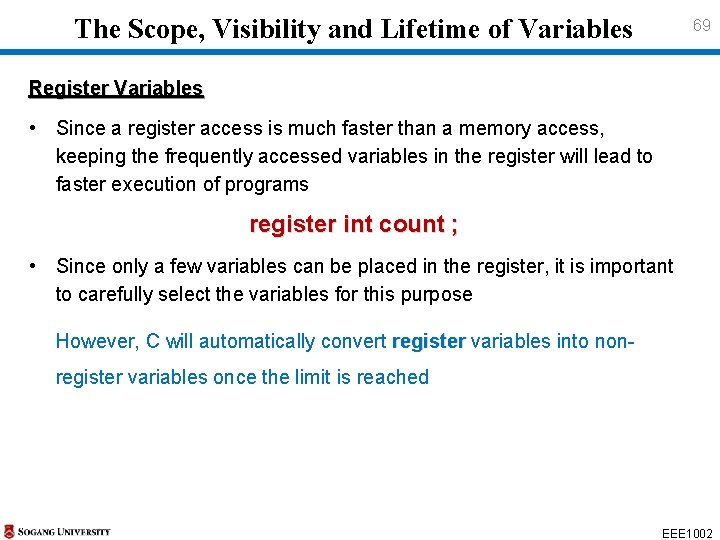
Case Study 70 EEE 1002
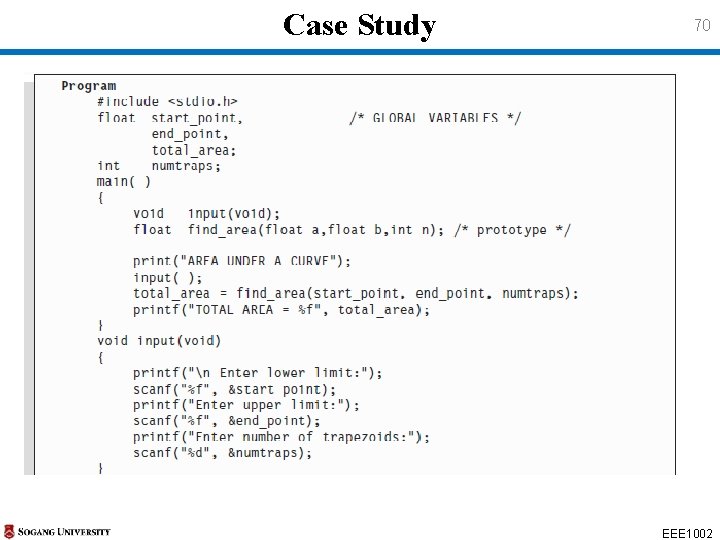
Case Study 71 EEE 1002
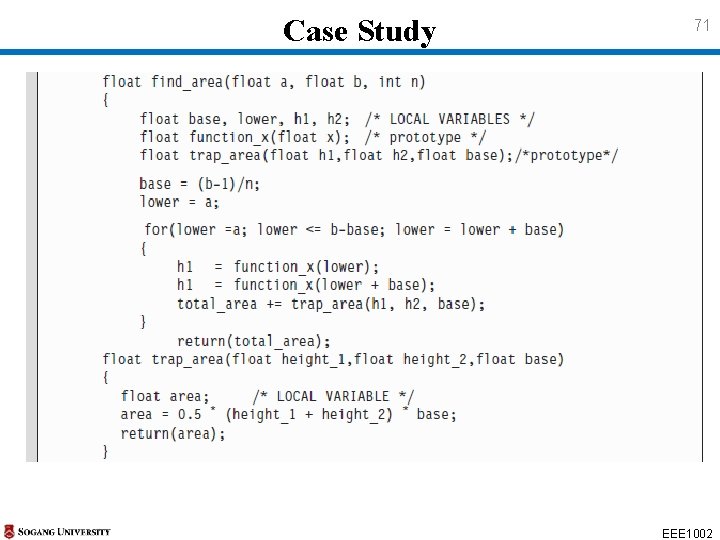
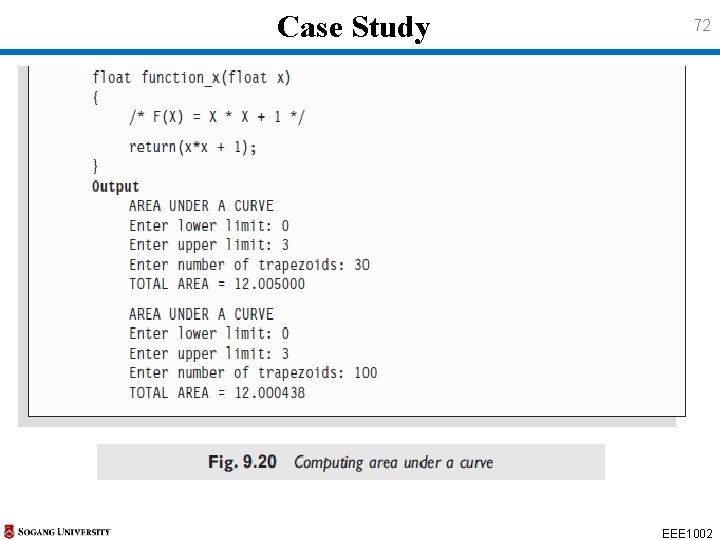
Case Study 72 EEE 1002