Minnesota Assessment of Parenting for Children and Youth
- Slides: 69
Minnesota Assessment of Parenting for Children and Youth (MAPCY) Jody Mc. Elroy| Agency Policy Specialist Worker Mentor Meeting – August 16, 2018
Agenda • MAPCY Overview • SSIS - Placement • SSIS – Tool • Benefit Levels • What’s Up? • FAQs 2
MAPCY Overview
MAPCY Overview • The Minnesota Assessment of Parenting for Children and Youth (MAPCY), is the tool used to determine monthly payment for foster care, adoption assistance and kinship assistance within Northstar Care for Children • Effective 1/1/15, the MAPCY became the uniform assessment process to determine supplemental benefit levels for children eligible for Northstar Care for Children 4
Northstar Benefits 1. Basic payment o Basic payment is set by child’s age (gets larger as child gets older) o Provides for child’s food, clothing, shelter, and daily supervision o Not available for at-risk adoption assistance 2. Supplemental payment o o o Determined by the MAPCY Provides for extra care and attention needed to meet child’s needs Not available for at-risk adoption assistance 3. Medical Assistance (MA) o Not automatic for Non–Title IV-E kinship assistance 5
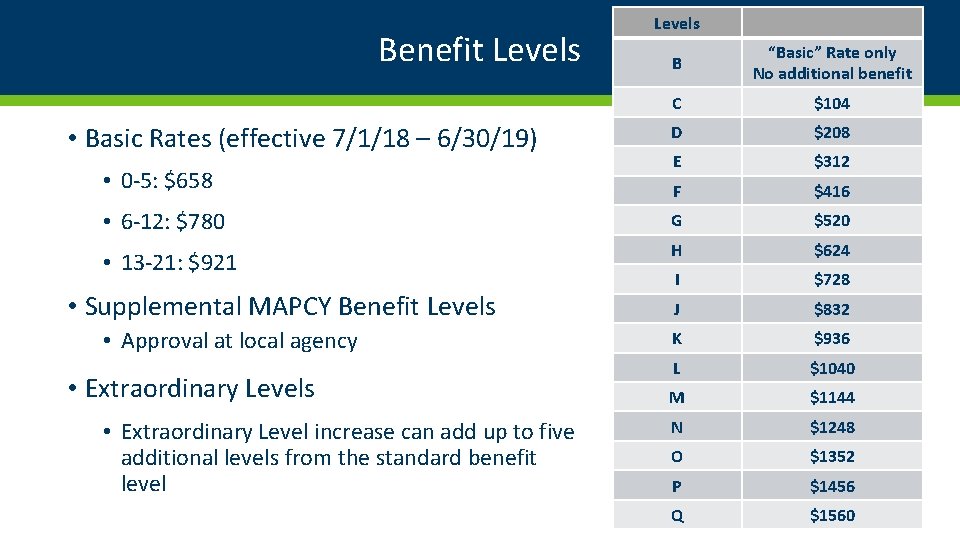
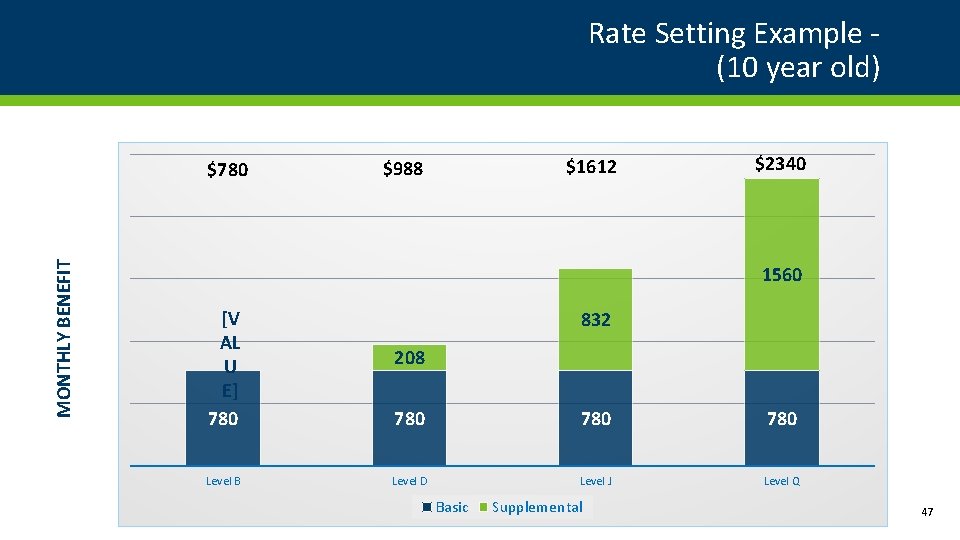
Supplemental Payments work the same for eligible children in foster care, adoption assistance, and kinship assistance: • Supplemental payment • Available to many children • Amount set by the MAPCY assessment • Reflects how much extra care and attention is needed for many children and youth • Payments can range from Level B (basic only), up to a very high level (Level Q) – each level adds a supplemental payment in increments of $104 beginning at Level C 6
MAPCY Overview • Minnesota county and tribal service agencies use the MAPCY when working with: • Foster families • Kinship families • Adoptive families • Assesses a child/youth’s well-being 7
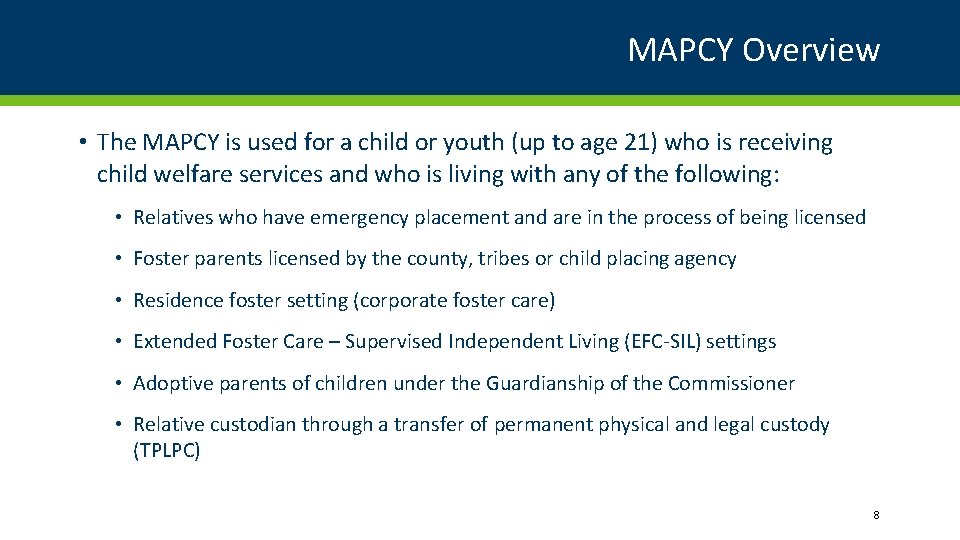
MAPCY Overview • The MAPCY is used for a child or youth (up to age 21) who is receiving child welfare services and who is living with any of the following: • Relatives who have emergency placement and are in the process of being licensed • Foster parents licensed by the county, tribes or child placing agency • Residence foster setting (corporate foster care) • Extended Foster Care – Supervised Independent Living (EFC-SIL) settings • Adoptive parents of children under the Guardianship of the Commissioner • Relative custodian through a transfer of permanent physical and legal custody (TPLPC) 8
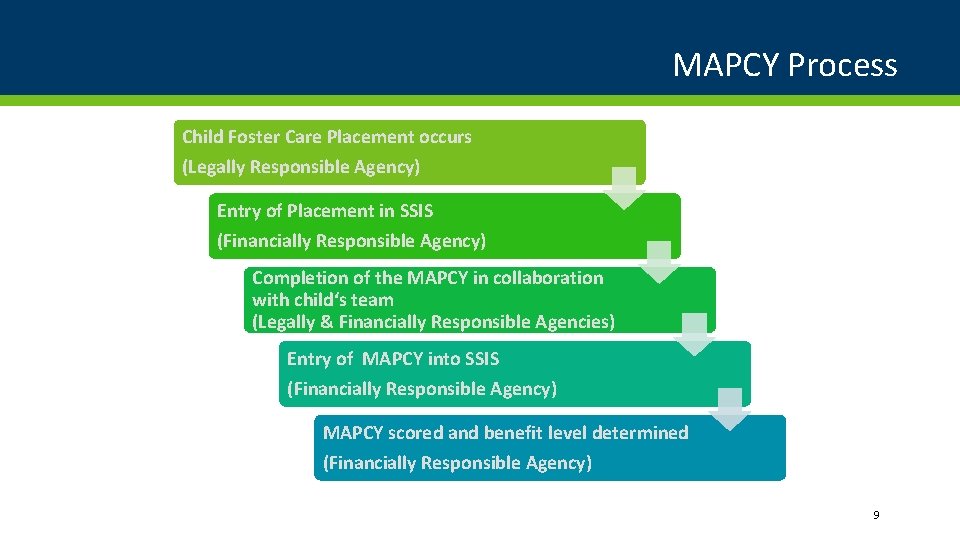
MAPCY Process Child Foster Care Placement occurs (Legally Responsible Agency) Entry of Placement in SSIS (Financially Responsible Agency) Completion of the MAPCY in collaboration with child‘s team (Legally & Financially Responsible Agencies) Entry of MAPCY into SSIS (Financially Responsible Agency) MAPCY scored and benefit level determined (Financially Responsible Agency) 9
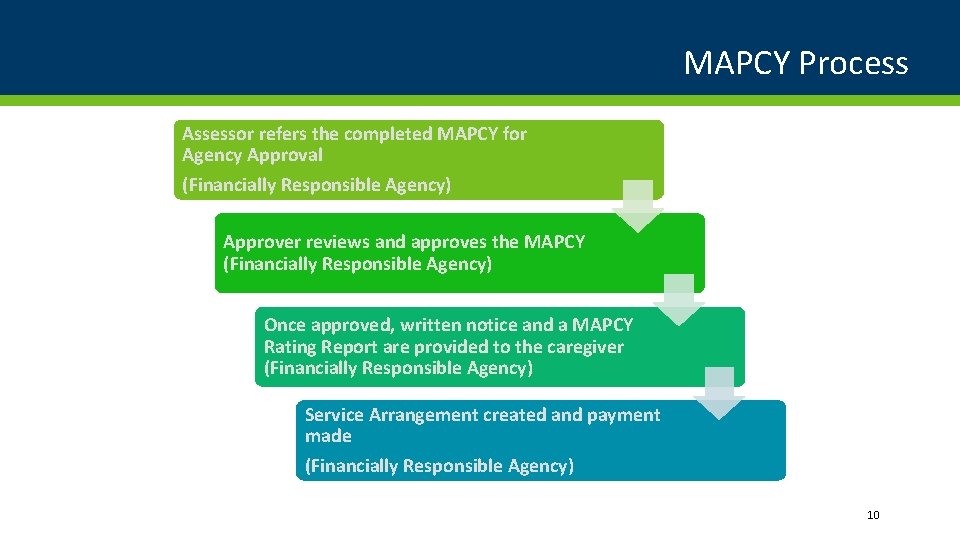
MAPCY Process Assessor refers the completed MAPCY for Agency Approval (Financially Responsible Agency) Approver reviews and approves the MAPCY (Financially Responsible Agency) Once approved, written notice and a MAPCY Rating Report are provided to the caregiver (Financially Responsible Agency) Service Arrangement created and payment made (Financially Responsible Agency) 10
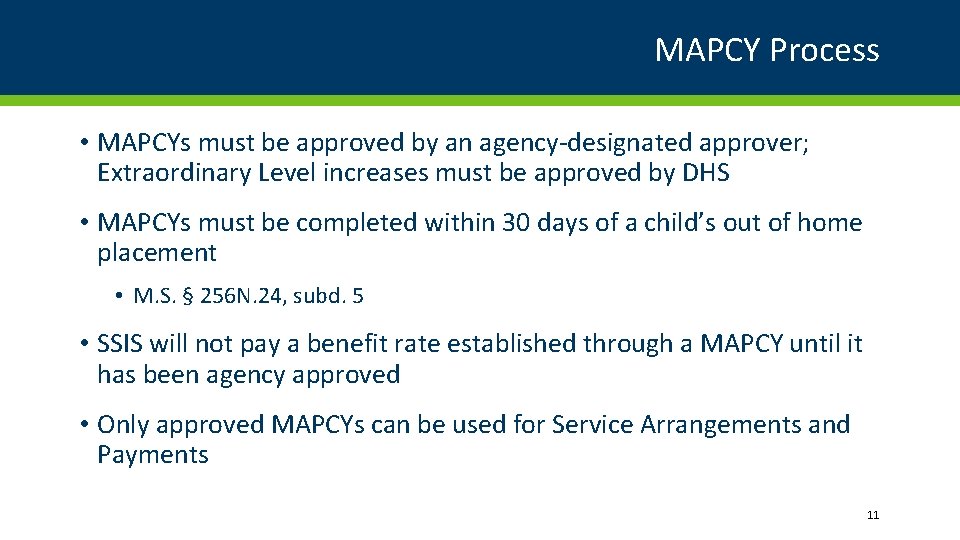
MAPCY Process • MAPCYs must be approved by an agency-designated approver; Extraordinary Level increases must be approved by DHS • MAPCYs must be completed within 30 days of a child’s out of home placement • M. S. § 256 N. 24, subd. 5 • SSIS will not pay a benefit rate established through a MAPCY until it has been agency approved • Only approved MAPCYs can be used for Service Arrangements and Payments 11
Approval and Fiscal When approving MAPCY assessments check the following that affect Service Arrangements, Payments and Child Foster Care claims: • Effective Date of MAPCY • If it is the initial MAPCY for the placement, the system sets the effective date based on the emergency benefit level rules • If not the first MAPCY for the placement, is the effective date the 1 st of a month? • Correct placement has been selected • Has the existing Service Arrangement been ended? • If the effective date is backdated: • Has a fiscal person in your agency been notified that additional payments may be needed if the level increased or existing payments need to be split if the level decreased? 12
Service Arrangements & Payments for Child/Youth Tool Service Arrangements & Payments for Brass Codes 180 (Treatment Foster Care) and 181 (Child Family Foster Care) • Basic per diem and Supplemental per diem (determined by the MAPCY) autofill into the Service Arrangement 13
MAPCY and EFC-SIL Payment • Youth in an Extended Foster Care – Supervised Independent Living (EFC-SIL) settings are the “owners” of their MAPCY; they receive the same benefits as if they were in foster care • Some funds may be paid directly to vendors • Some funds may be paid directly to the youth 14
Service Arrangements & Payments for EFC-SIL Service Arrangements & Payments for Service 188 -SIL (18 up to 21) EFC • Supplemental per diem (MAPCY level), Basic per diem & Rate fields DO NOT autofill • Unit type, Units & Rate fields are required • Amount payable cannot be more than the determined Basic + MAPCY Supplemental amount • Errors and warnings associated to Payments with Service 188 are identified on the Child Foster Care Report 15
MAPCY SSIS - Placement
Continuous Placement • Begins when the agency has placement and care responsibilities and child/youth is removed from the home. • The initial removal may be based on: • A 72 hour hold • Parents placed child in treatment prior to requesting services from local agency; a VPA is signed • Defined as the entire time a child lives away from their home through legal authority • Ends when the child is living with their parent, legal custodian, finalized adoption, tribal customary adoption or reaches age of majority Adoption and Foster Care Analysis and Reporting System (AFCARS) DHS Bulletin 16 -68 -16 C 17
Placements • All placements over 24 hours must be entered in SSIS • Exception: law enforcement or tribal social services “places” child with the child’s other parent • This is not a placement, do not enter Continuous Placement or Placement • A Location can be entered so agency knows where the child is 18
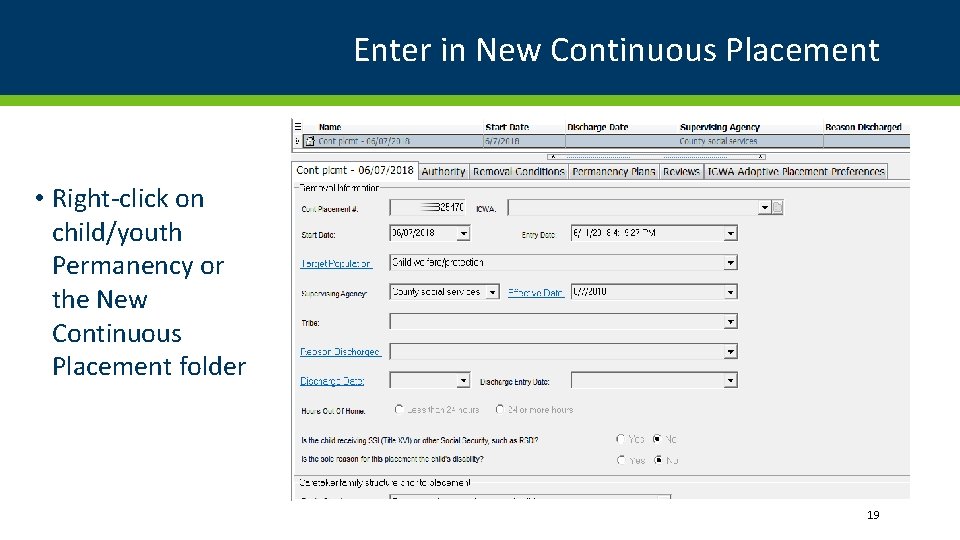
Enter in New Continuous Placement • Right-click on child/youth Permanency or the New Continuous Placement folder 19
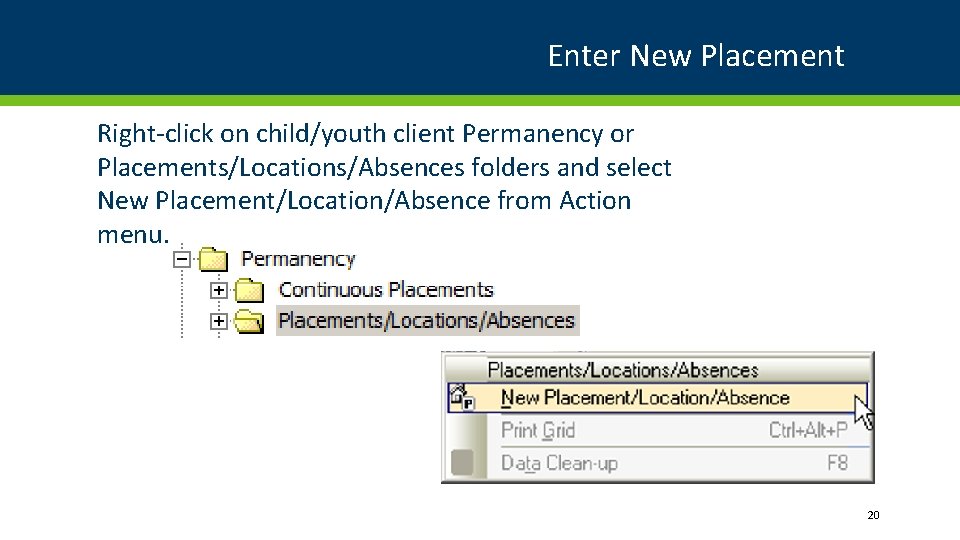
Enter New Placement Right-click on child/youth client Permanency or Placements/Locations/Absences folders and select New Placement/Location/Absence from Action menu. 20
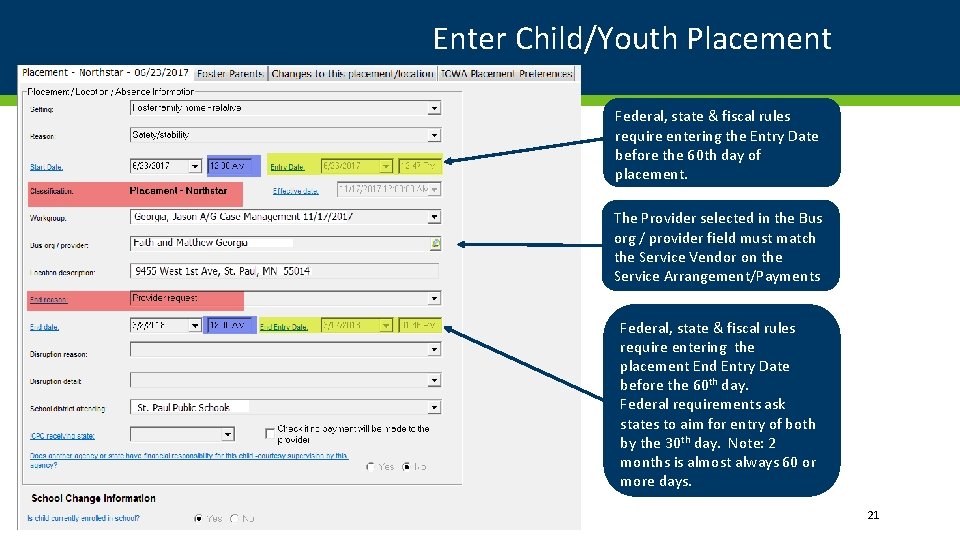
Enter Child/Youth Placement Federal, state & fiscal rules require entering the Entry Date before the 60 th day of placement. The Provider selected in the Bus org / provider field must match the Service Vendor on the Service Arrangement/Payments Federal, state & fiscal rules require entering the placement End Entry Date before the 60 th day. Federal requirements ask states to aim for entry of both by the 30 th day. Note: 2 months is almost always 60 or more days. 21
Important to Double-Check • Double-check foster care/shelter care/residential treatment center/group home business organization/vendor • Some business organizations have different licenses for different levels or population of care • Legal authority changes (state law, tribal codes, corrections) • Resource (Foster Care) family address change 22
MAPCY SSIS – Tool
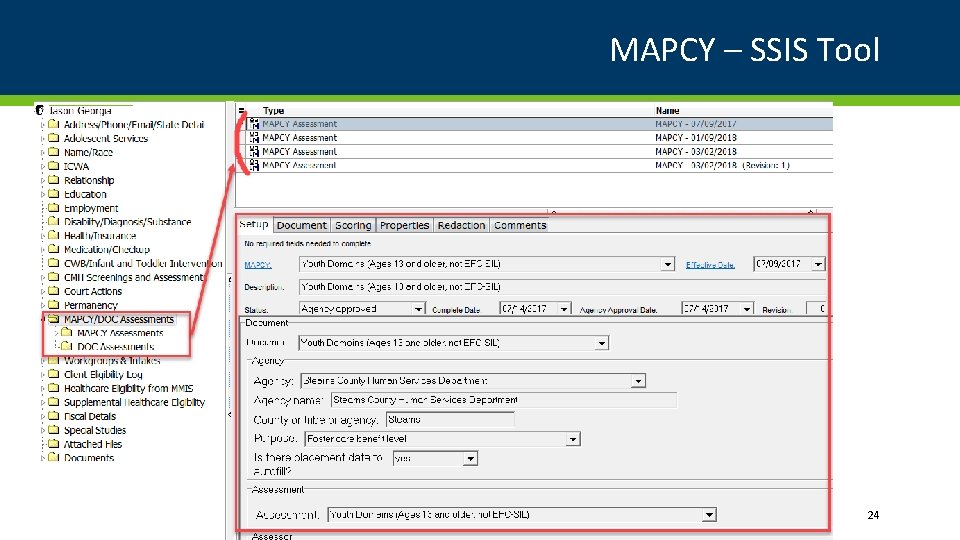
MAPCY – SSIS Tool 24
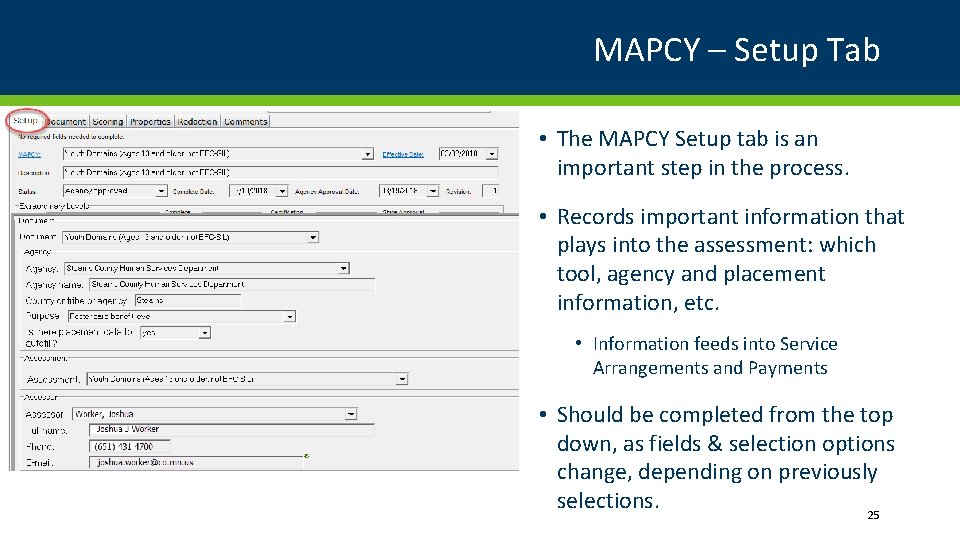
MAPCY – Setup Tab • The MAPCY Setup tab is an important step in the process. • Records important information that plays into the assessment: which tool, agency and placement information, etc. • Information feeds into Service Arrangements and Payments • Should be completed from the top down, as fields & selection options change, depending on previously selections. 25
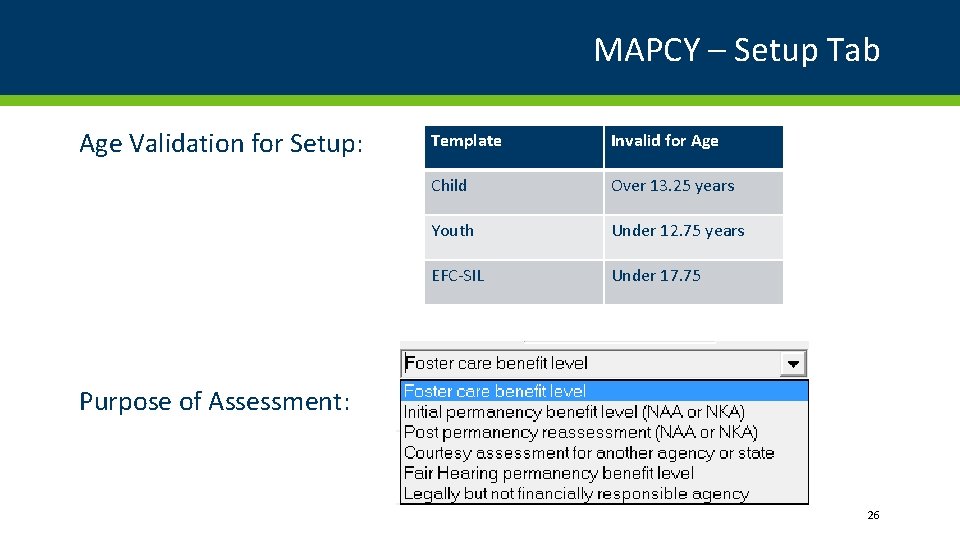
MAPCY – Setup Tab Age Validation for Setup: Template Invalid for Age Child Over 13. 25 years Youth Under 12. 75 years EFC-SIL Under 17. 75 Purpose of Assessment: 26
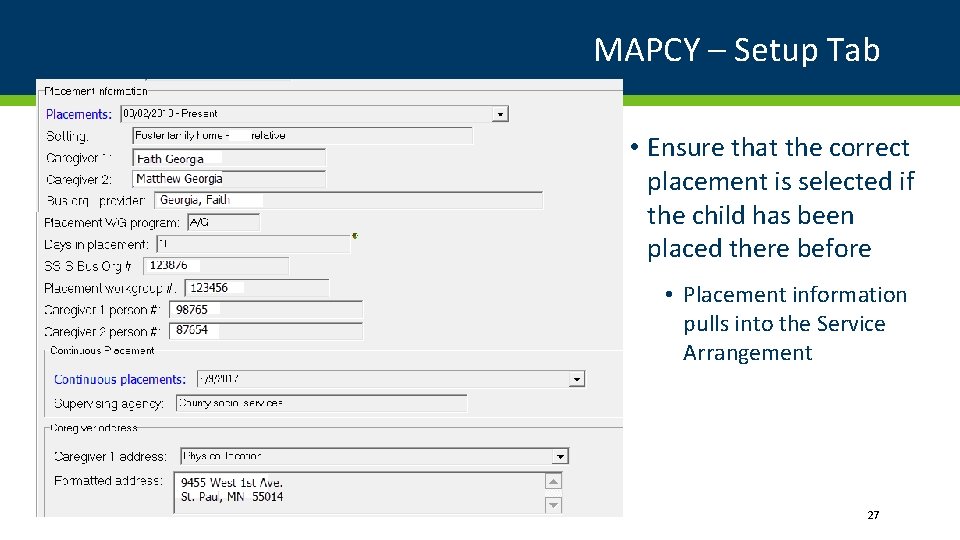
MAPCY – Setup Tab • Ensure that the correct placement is selected if the child has been placed there before • Placement information pulls into the Service Arrangement 27
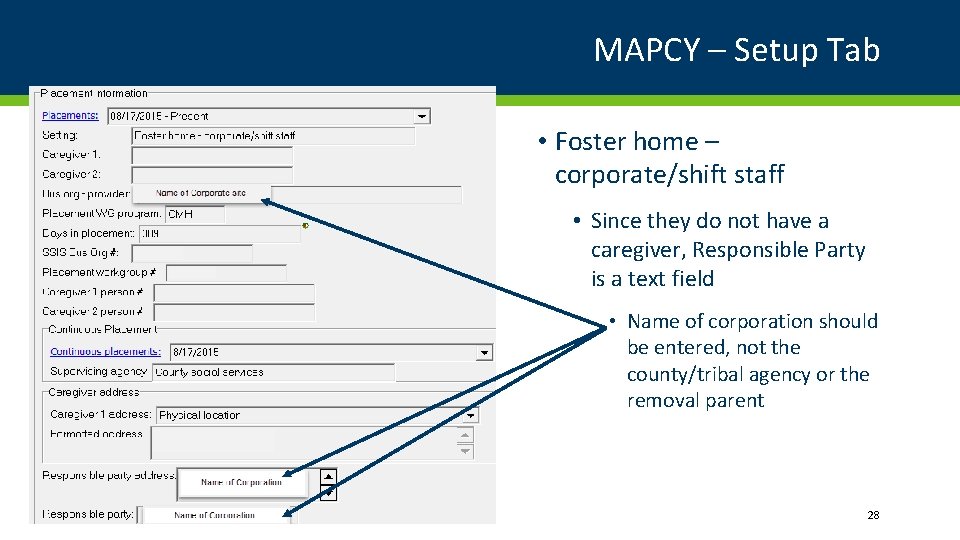
MAPCY – Setup Tab • Foster home – corporate/shift staff • Since they do not have a caregiver, Responsible Party is a text field • Name of corporation should be entered, not the county/tribal agency or the removal parent 28
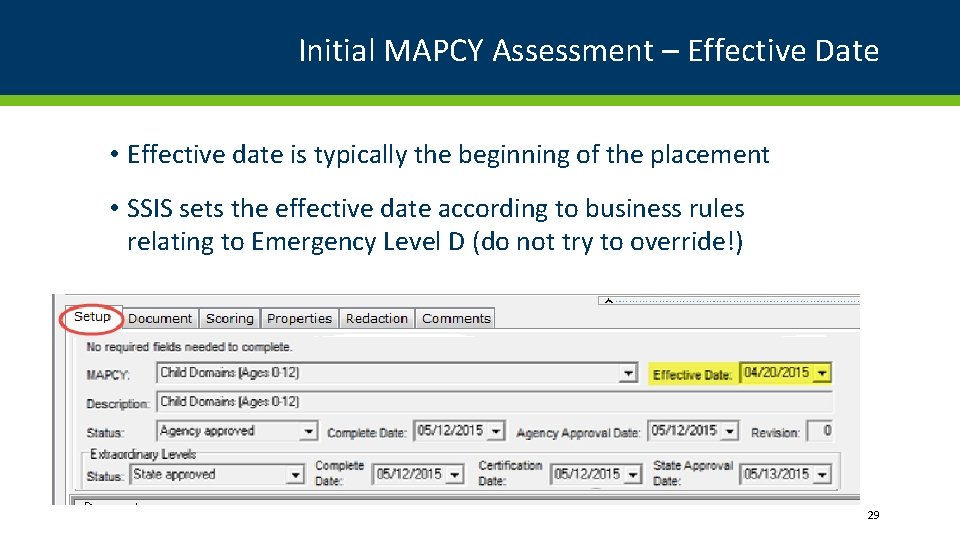
Initial MAPCY Assessment – Effective Date • Effective date is typically the beginning of the placement • SSIS sets the effective date according to business rules relating to Emergency Level D (do not try to override!) 29
Emergency Level D • Available to agencies within the first 30 days of a child’s continuous placement, but does not have to be used • If the MAPCY is completed within or after the first 30 days and the amount is greater than Level D, the higher rate will go back to the first date of placement (SSIS will keep the effective date) • Service Arrangement – use Special Cost Code 19 (MAPCY adjustment) M. S. § 256 N. 26, subd. 6 30
Emergency Level D • Available to agencies within the first 30 days of a child’s continuous placement, but does not have to be used • If the MAPCY is completed within the first 30 days and the amount is lower than Level D, the lower rate will become effective the date of the approval (SSIS will adjust the effective date automatically – do not try to override) • Service Arrangement – use Special Cost Code 10 (Reduced foster care rate) M. S. § 256 N. 26, subd. 6 31
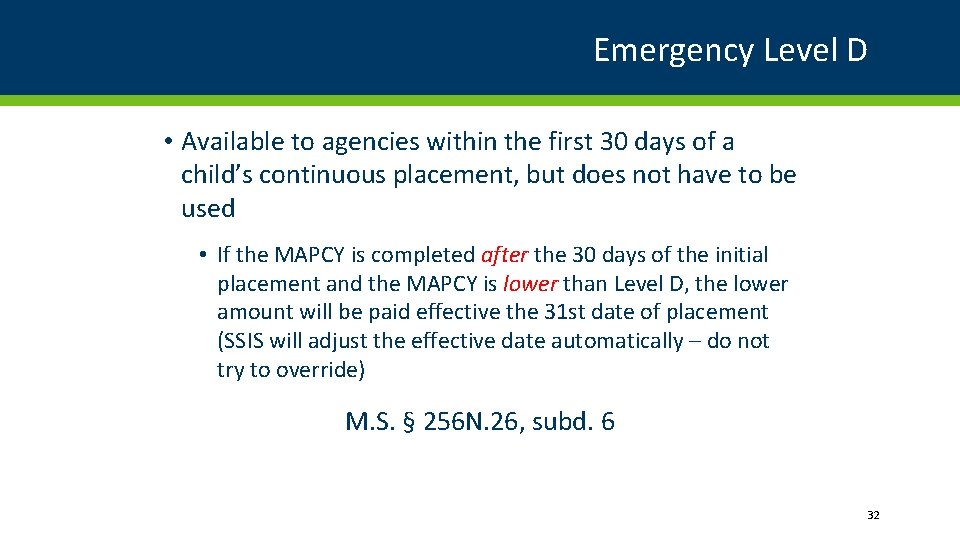
Emergency Level D • Available to agencies within the first 30 days of a child’s continuous placement, but does not have to be used • If the MAPCY is completed after the 30 days of the initial placement and the MAPCY is lower than Level D, the lower amount will be paid effective the 31 st date of placement (SSIS will adjust the effective date automatically – do not try to override) M. S. § 256 N. 26, subd. 6 32
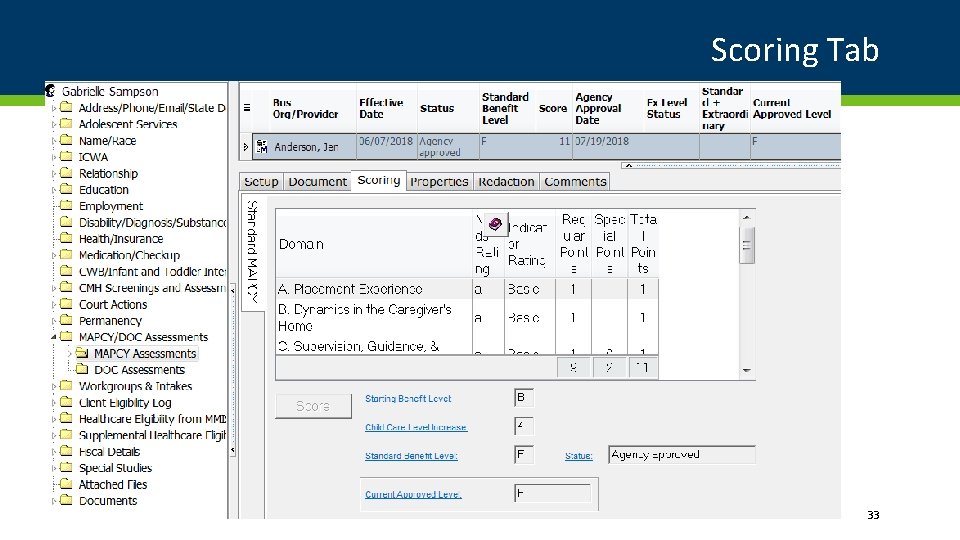
Scoring Tab 33
Extraordinary Levels
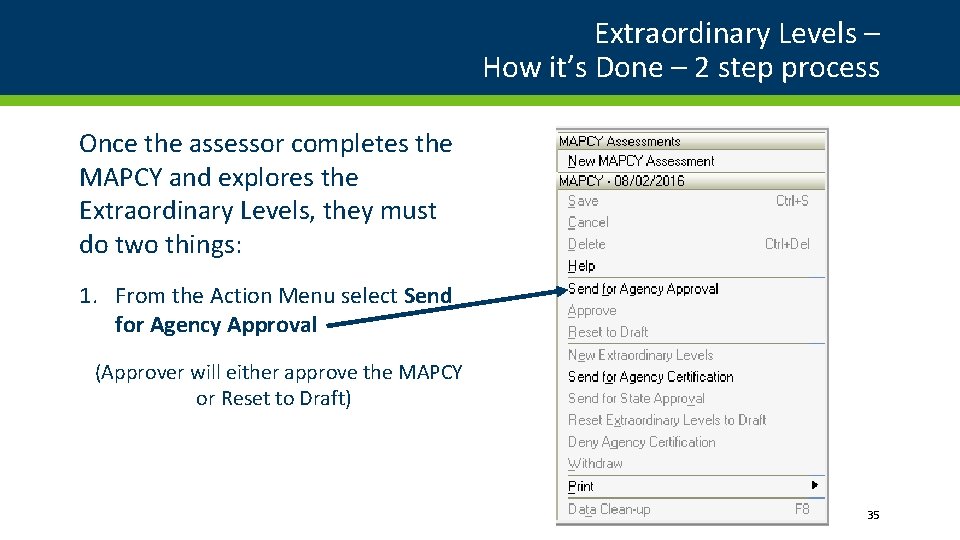
Extraordinary Levels – How it’s Done – 2 step process Once the assessor completes the MAPCY and explores the Extraordinary Levels, they must do two things: 1. From the Action Menu select Send for Agency Approval (Approver will either approve the MAPCY or Reset to Draft) 35
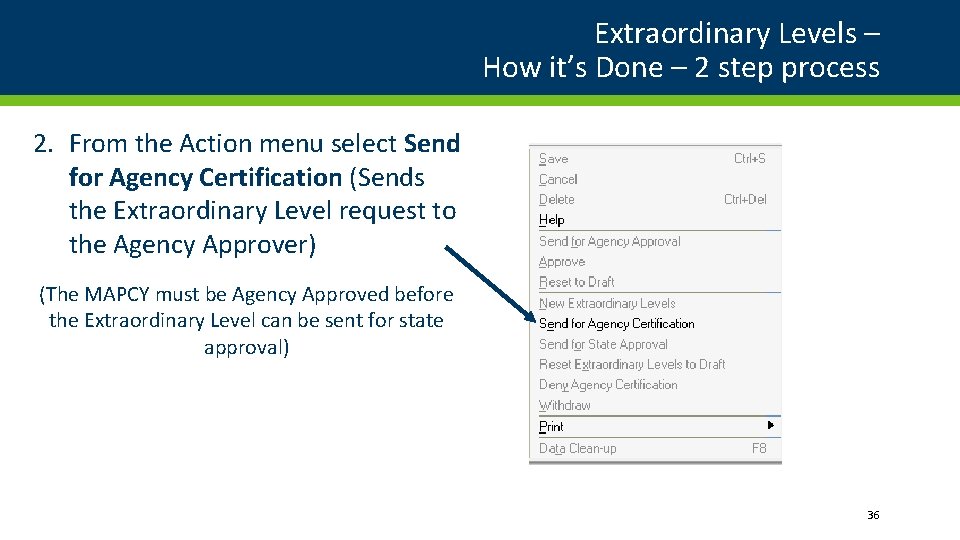
Extraordinary Levels – How it’s Done – 2 step process 2. From the Action menu select Send for Agency Certification (Sends the Extraordinary Level request to the Agency Approver) (The MAPCY must be Agency Approved before the Extraordinary Level can be sent for state approval) 36
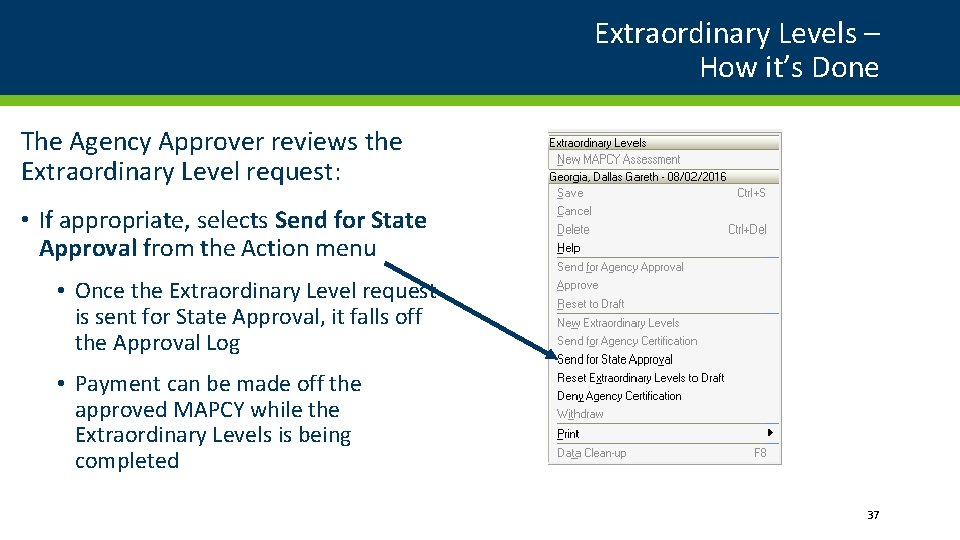
Extraordinary Levels – How it’s Done The Agency Approver reviews the Extraordinary Level request: • If appropriate, selects Send for State Approval from the Action menu • Once the Extraordinary Level request is sent for State Approval, it falls off the Approval Log • Payment can be made off the approved MAPCY while the Extraordinary Levels is being completed 37
Extraordinary Levels – How it’s Done DHS staff reviews the request within 15 days and will either: • Approve • Deny • Request Clarification • Once Clarification is requested, the agency has 30 days to reply • If clarification is not sent, the request will auto-deny NOTE: DHS is responsible for sending notices for all Extraordinary Level approvals or denials (if “withdrawn” the agency must send out notice) 38
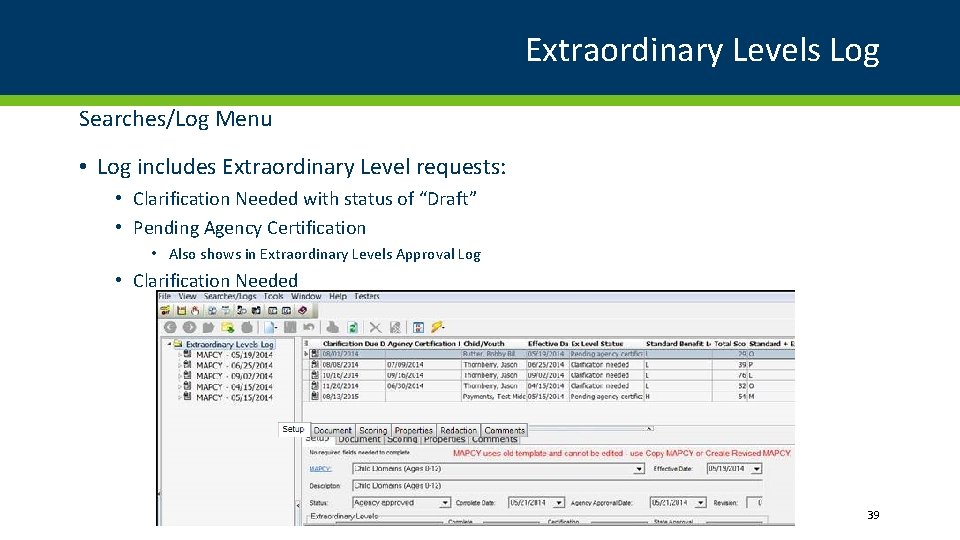
Extraordinary Levels Log Searches/Log Menu • Log includes Extraordinary Level requests: • Clarification Needed with status of “Draft” • Pending Agency Certification • Also shows in Extraordinary Levels Approval Log • Clarification Needed 39
Benefits
Benefit Level • Payment is based solely on the MAPCY (Supplemental) + Basic Per Diem • SSIS programming does not allow an assessor or approver to override the benefit level 41
Benefit Levels B “Basic” Rate only No additional benefit C $104 D $208 E $312 F $416 • 6 -12: $780 G $520 • 13 -21: $921 H $624 I $728 J $832 K $936 L $1040 M $1144 N $1248 O $1352 P $1456 Q $1560 • Basic Rates (effective 7/1/18 – 6/30/19) • 0 -5: $658 • Supplemental MAPCY Benefit Levels • Approval at local agency • Extraordinary Levels • Extraordinary Level increase can add up to five additional levels from the standard benefit level 42
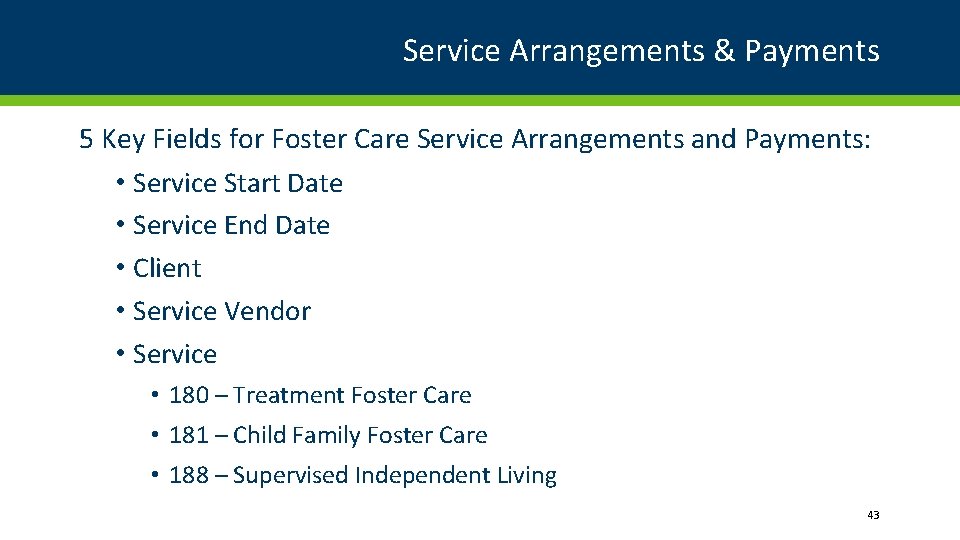
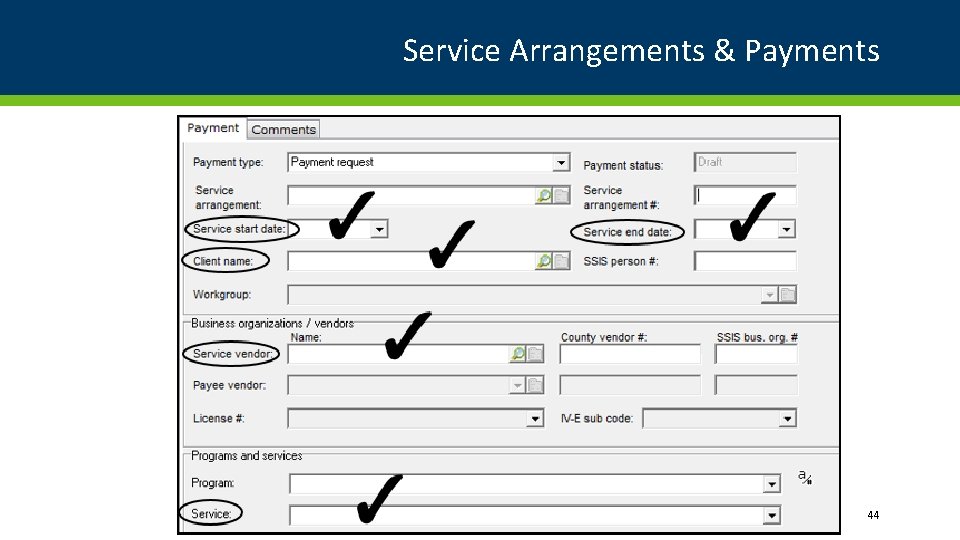
Service Arrangements & Payments 5 Key Fields for Foster Care Service Arrangements and Payments: • Service Start Date • Service End Date • Client • Service Vendor • Service • 180 – Treatment Foster Care • 181 – Child Family Foster Care • 188 – Supervised Independent Living 43
Service Arrangements & Payments 44
Service Arrangements & Payments • A valid Placement is required • Service vendor must match Placement provider on Placement • An Approved MAPCY is required to pay Supplemental per diem • Not required if placement is less than 30 days • Service vendor must match Provider selected on MAPCY Assessment • If no MAPCY exists, or the MAPCY is not approved, Payments are based on the Emergency Rate for Foster Care • If no Approved MAPCY exists - Basic or Level D defaults • If waiting on Extraordinary Level approval from State, the Agency Approved MAPCY level defaults 45
Move to Another Placement – New MAPCY • A new MAPCY must be completed when a child in foster care has a change of placement • Each MAPCY is unique to a particular child in a particular placement with a particular caregiver • End the current Service Arrangement when the Placement ends and create a new Service Arrangement for the new Foster Home once the MAPCY Assessment is approved 46
Rate Setting Example (10 year old) MONTHLY BENEFIT $780 $1612 $988 $2340 1560 [V AL U E] 780 Level B 832 208 780 780 Level D Level J Level Q Basic Supplemental 47
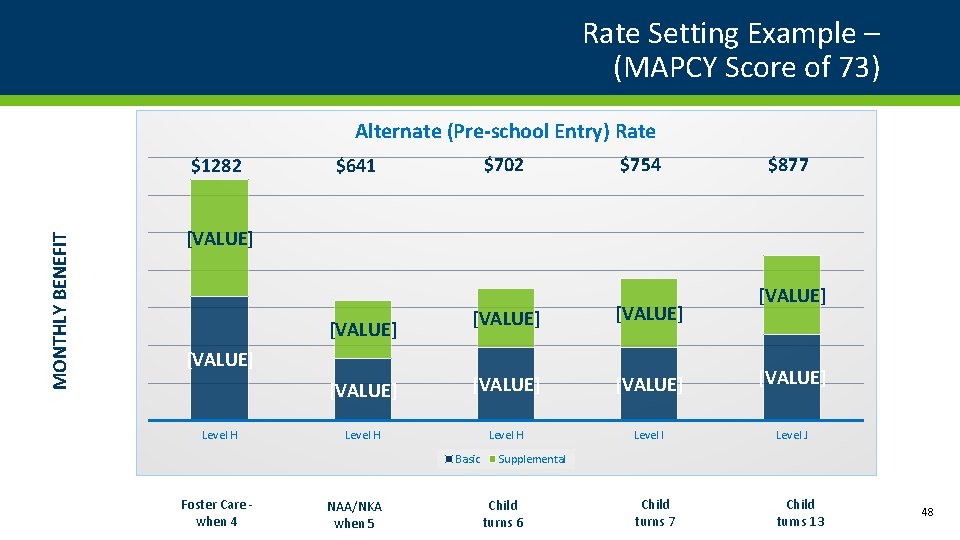
Rate Setting Example – (MAPCY Score of 73) Alternate (Pre-school Entry) Rate MONTHLY BENEFIT $1282 $702 $641 $754 $877 [VALUE] [VALUE] Level H Level I Level J Child turns 7 Child turns 13 [VALUE] Level H Basic Foster Care when 4 [VALUE] NAA/NKA when 5 [VALUE] Supplemental Child turns 6 48
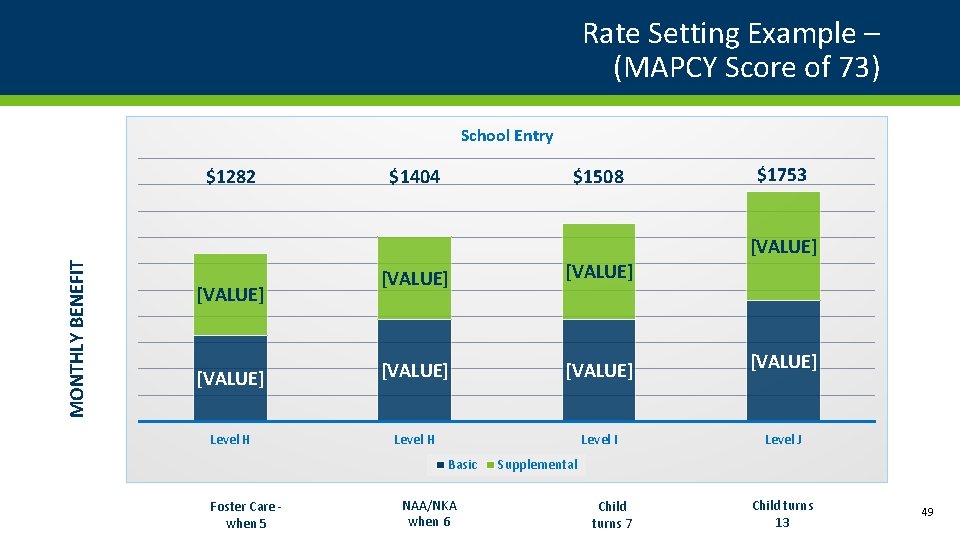
Rate Setting Example – (MAPCY Score of 73) School Entry $1282 $1404 $1508 $1753 MONTHLY BENEFIT [VALUE] 300 [VALUE] 670 [VALUE] 790 200 565 [VALUE] Level H [VALUE] 670 Level H Level I Basic Foster Care when 5 NAA/NKA when 6 [VALUE] Level J Supplemental Child turns 7 Child turns 13 49
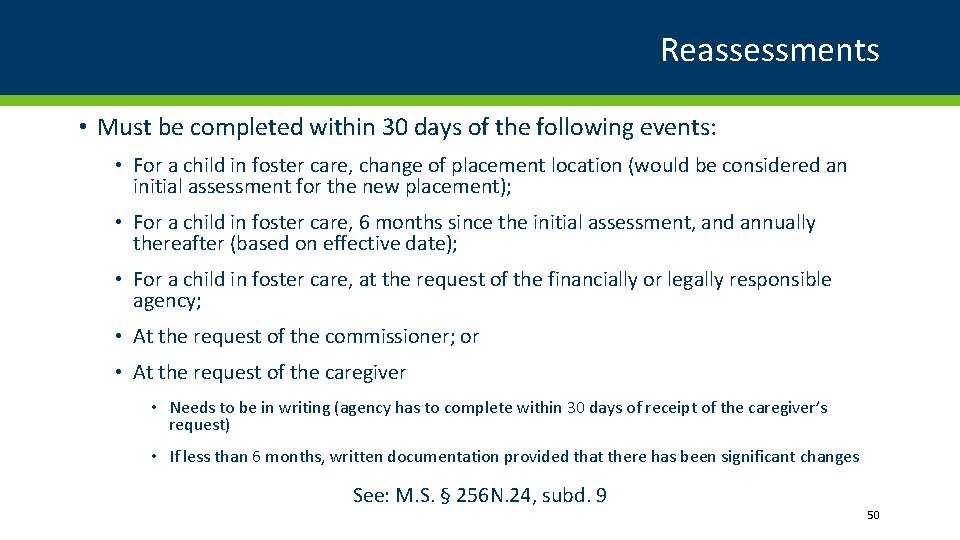
Reassessments • Must be completed within 30 days of the following events: • For a child in foster care, change of placement location (would be considered an initial assessment for the new placement); • For a child in foster care, 6 months since the initial assessment, and annually thereafter (based on effective date); • For a child in foster care, at the request of the financially or legally responsible agency; • At the request of the commissioner; or • At the request of the caregiver • Needs to be in writing (agency has to complete within 30 days of receipt of the caregiver’s request) • If less than 6 months, written documentation provided that there has been significant changes See: M. S. § 256 N. 24, subd. 9 50
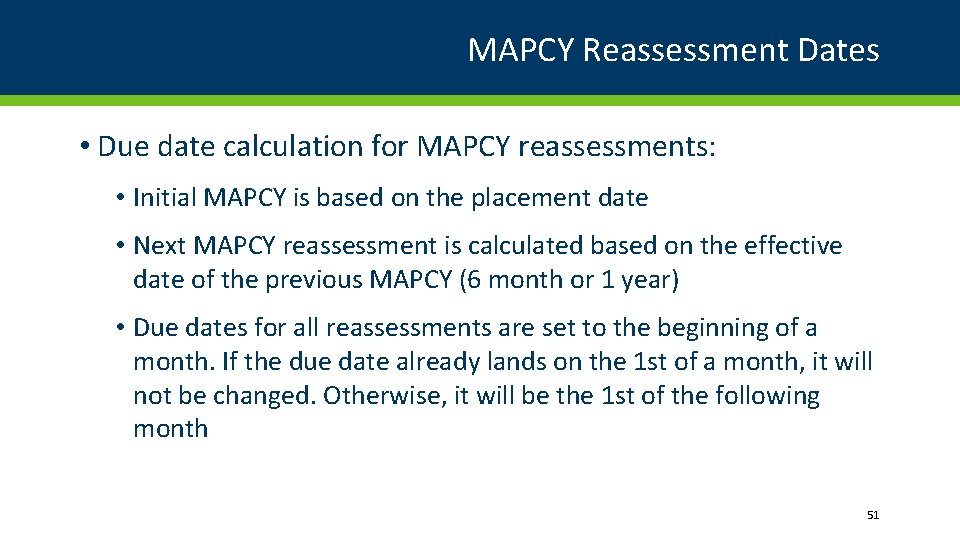
MAPCY Reassessment Dates • Due date calculation for MAPCY reassessments: • Initial MAPCY is based on the placement date • Next MAPCY reassessment is calculated based on the effective date of the previous MAPCY (6 month or 1 year) • Due dates for all reassessments are set to the beginning of a month. If the due date already lands on the 1 st of a month, it will not be changed. Otherwise, it will be the 1 st of the following month 51
Reassessments • Recommended Effective Date: • 1 st of the month for any MAPCY completed after the initial assessment • Makes it easier for Fiscal when making payments for the child in placement 52
MAPCY Assessment – Permanency • New MAPCY does not need to be completed if a child already has an active MAPCY • If child is in Northstar Foster Care, then completing a MAPCY for the purpose of permanency will change the foster care payments until finalization occurs (based on the effective date) • Must complete a new MAPCY if: • A reassessment is due • There is a new resource family • Child is moving from Legacy Foster Care to a Northstar permanency option • Complete MAPCY on/after the Adoption/Kinship Placement Agreement 53
MAPCY Assessment – Permanency • At-risk cases (adoption only): • MAPCY not needed since no benefit will be paid • Once an Eligibility Determination has a status of “Determination Confirmed”, the next MAPCY due date will be 25 months out. 54
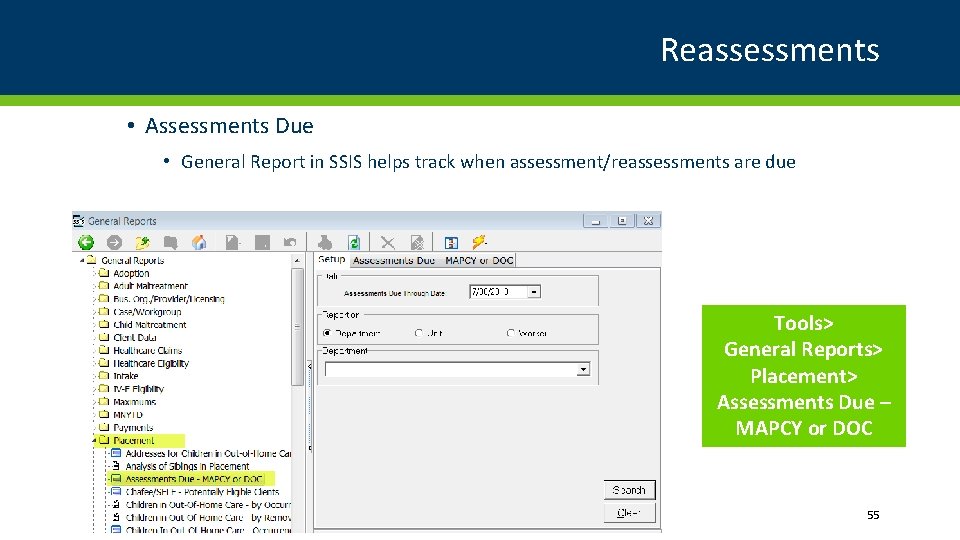
Reassessments • Assessments Due • General Report in SSIS helps track when assessment/reassessments are due Tools> General Reports> Placement> Assessments Due – MAPCY or DOC 55
Revise MAPCY • REVISE MAPCY • Keeps the same information, yet allows assessor to change needs/indicators • Useful when there is an appeal • Useful when SSIS templates change • Keeps the same effective date – cannot change 56
Revise MAPCY Fiscal Impacts Complete a Revised MAPCY if you do not want to change the effective date • If the MAPCY level increases: • A new Service Arrangement must be created for any service dates not already paid • A new Service Arrangement and/or Payments must be made for MAPCY adjustments (Special Cost Code 19) • If the MAPCY level decreases: • A new Service Arrangement must be created for any service dates not already paid • Any payments made to the provider will need to be split in order to claim to Northstar • If the MAPCY level remains the same: • No changes are necessary to Service Arrangements and Payments 57
Copy MAPCY • COPY MAPCY • Keeps the same information, yet allows assessor to change needs/indicators • Useful when completing a reassessment • Useful when a child changes placements • Useful when SSIS templates change • Must have a different effective date 58
Copy MAPCY Fiscal Impacts Copy a MAPCY if you want the effective date to change: • If the MAPCY level increases: • A new Service Arrangement must be created for any service dates not already paid • Any Payments made where the service dates include the new effective date may need additional MAPCY adjustment payments (Special Cost Code 19) • If the MAPCY level decreases: • A new Service Arrangement must be created • Any Payments made where the service dates include the new effective date need to be split in order to claim to Northstar • If the MAPCY level remains the same but the effective date is not the 1 st of the month: • A new Service Arrangement must be created for any service dates not already paid • Any Payments made where the service dates include the new effective date need to be split in order to claim to Northstar 59
Post-Permanency Reassessments • Family or county contacts DHS Adoption/Kinship worker to request a reassessment • Must be 6 months since the last assessment • Must be in writing from the family • DHS locates the child in SSIS-DHS and initiates a reassessment to the county of financial responsibility • County manages the log for new requests • Log in SSIS-Worker that allows agency to view pending reassessments (Searches/Logs – Post Permanency Reassessment Log) • Request to county will include both the pre-adoptive and post-adoptive names and SWNDX numbers and current MAPCY level 60
Post-Permanency Reassessments • Financially responsible agency conducts person search on post adoptive/post kinship child/youth • If child/youth does not exist in the county, the county worker creates a new person record for the post adoptive/kinship identity and clears to the county and SWNDX. • SSIS-Worker allows the completion of a new MAPCY and compares the results of the original MAPCY • Notifications within SSIS-Worker to notify adoptive parent/relative custodian if MAPCY results are the same or lower 61
Post-Permanency Reassessments • If a higher benefit level is determined and approved, SSIS-Worker automatically sends a notification with the proposed benefit level increase to SSIS-DHS • Financially responsible agency must send a copy of the MAPCY Rating Report to the DHS Adoption Assistance worker. • DHS reviews the MAPCY Rating Report • DHS creates and sends out an amendment to the adoption/kinship benefit agreement to the family for signature. • Once signed and returned, DHS signs the amendment, sets up new payment and issues back payment if necessary. • New rates goes into effect the date DHS Adoption Assistance signs the amendment. 62
What’s Up?
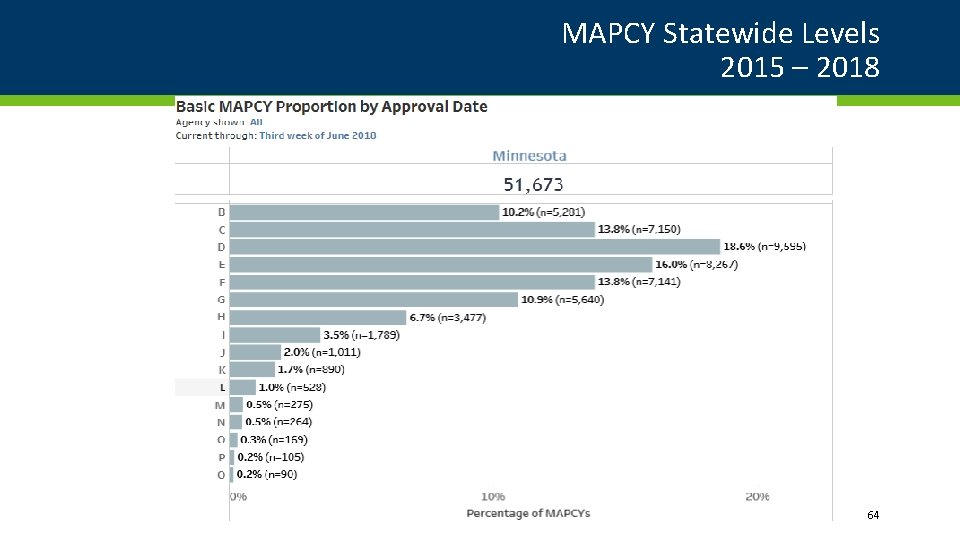
MAPCY Statewide Levels 2015 – 2018 64
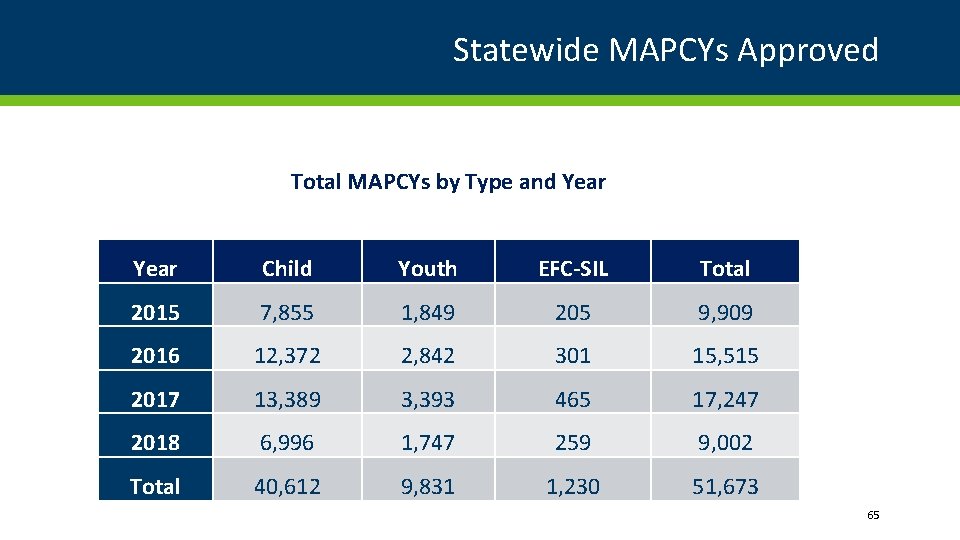
Statewide MAPCYs Approved Total MAPCYs by Type and Year Child Youth EFC-SIL Total 2015 7, 855 1, 849 205 9, 909 2016 12, 372 2, 842 301 15, 515 2017 13, 389 3, 393 465 17, 247 2018 6, 996 1, 747 259 9, 002 Total 40, 612 9, 831 1, 230 51, 673 65
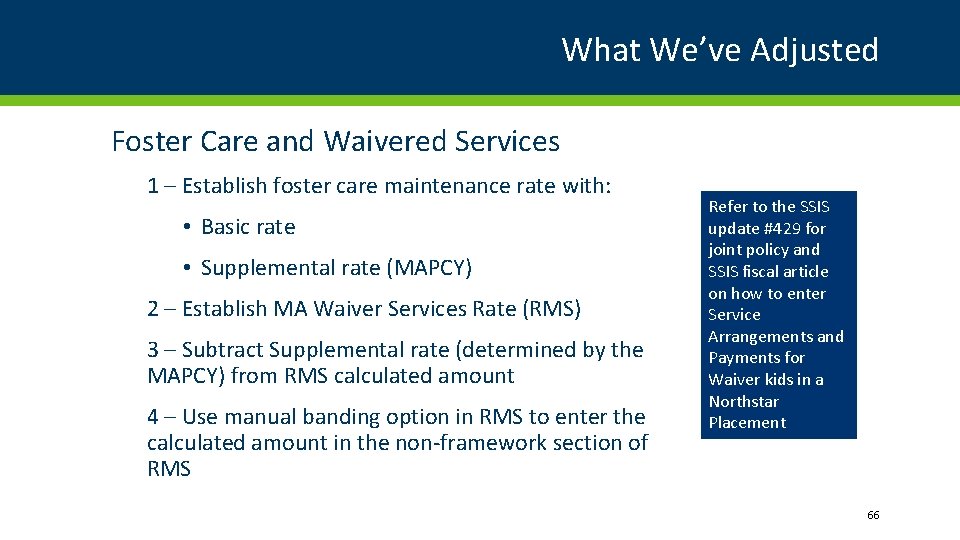
What We’ve Adjusted Foster Care and Waivered Services 1 – Establish foster care maintenance rate with: • Basic rate • Supplemental rate (MAPCY) 2 – Establish MA Waiver Services Rate (RMS) 3 – Subtract Supplemental rate (determined by the MAPCY) from RMS calculated amount 4 – Use manual banding option in RMS to enter the calculated amount in the non-framework section of RMS Refer to the SSIS update #429 for joint policy and SSIS fiscal article on how to enter Service Arrangements and Payments for Waiver kids in a Northstar Placement 66
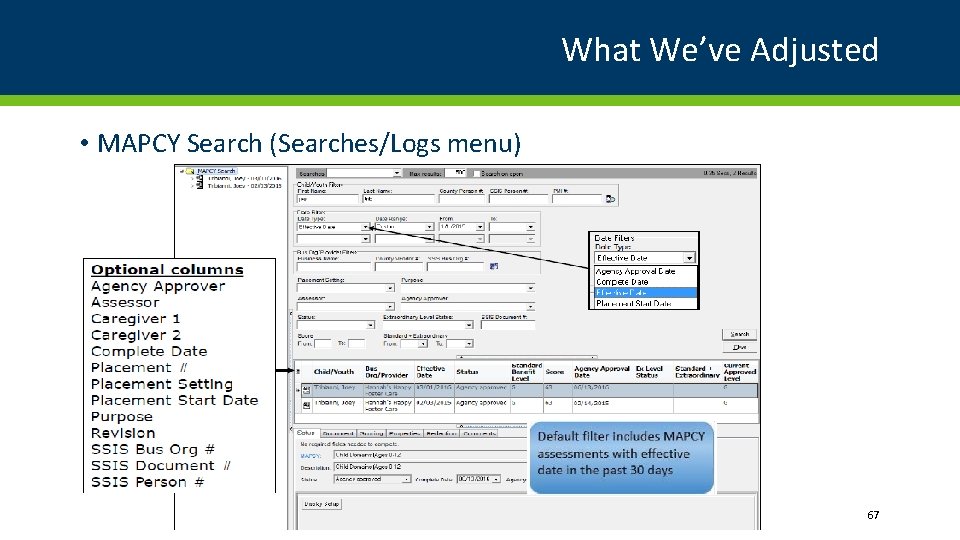
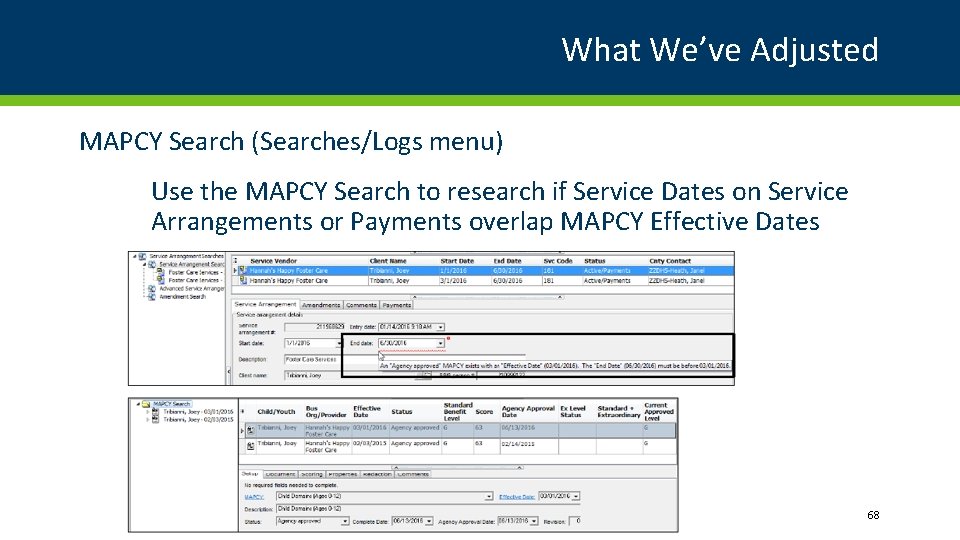
What We’ve Adjusted • MAPCY Search (Searches/Logs menu) 67
What We’ve Adjusted MAPCY Search (Searches/Logs menu) Use the MAPCY Search to research if Service Dates on Service Arrangements or Payments overlap MAPCY Effective Dates 68
Questions? Jody Mc. Elroy - Agency Policy Specialist, MAPCY QA and Extraordinary Level 651 -431 -4730 | jody. mcelroy@state. mn. us 69