Protecting Applications with Microsoft System Center Data Protection




- Slides: 74
Protecting Applications with Microsoft System Center Data Protection Manager 2007 with SP 1 Jason Buffington Senior Technical Product Manager Microsoft Corporation blog. Jason. Buffington. com jbuff@microsoft. com MGT 204
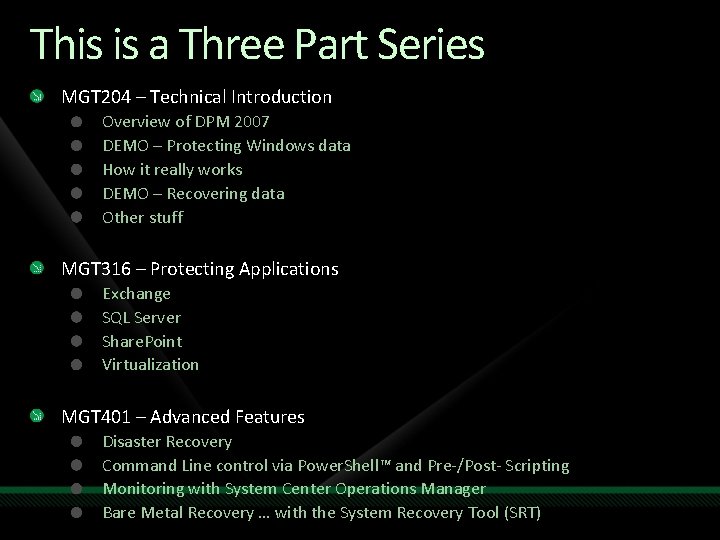
This is a Three Part Series MGT 204 – Technical Introduction Overview of DPM 2007 DEMO – Protecting Windows data How it really works DEMO – Recovering data Other stuff MGT 316 – Protecting Applications Exchange SQL Server Share. Point Virtualization MGT 401 – Advanced Features Disaster Recovery Command Line control via Power. Shell™ and Pre-/Post- Scripting Monitoring with System Center Operations Manager Bare Metal Recovery … with the System Recovery Tool (SRT)
Agenda Two-slide refresher on DPM 2007 How does data protection REALLY work Exchange SQL Server Share. Point Virtualization Putting it all together Questions and Answers There are slides I will not cover in this PPT – for your reference
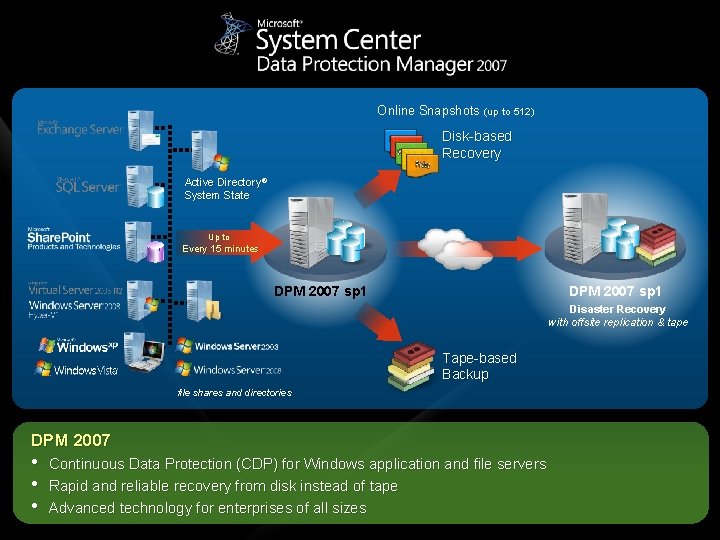
Online Snapshots (up to 512) Disk-based Recovery Active Directory® System State Up to Every 15 minutes DPM 2007 sp 1 Disaster Recovery with offsite replication & tape Tape-based Backup file shares and directories DPM 2007 • • • Continuous Data Protection (CDP) for Windows application and file servers Rapid and reliable recovery from disk instead of tape Advanced technology for enterprises of all sizes
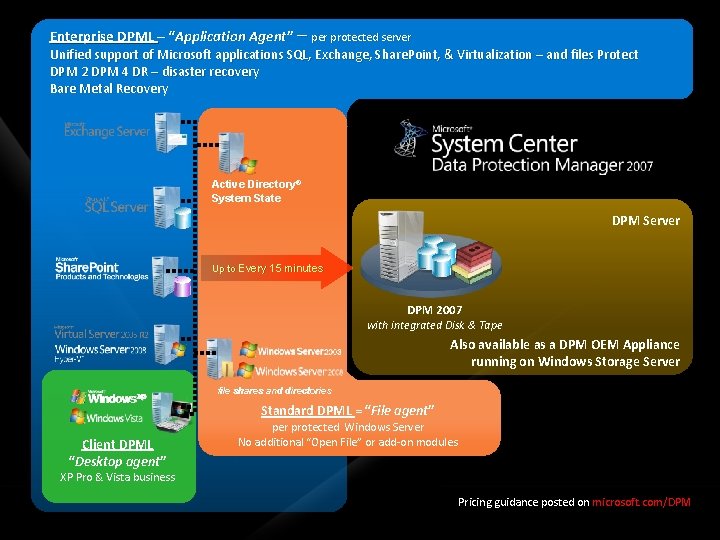
Enterprise DPML – “Application Agent” – per protected server Unified support of Microsoft applications SQL, Exchange, Share. Point, & Virtualization – and files Protect DPM 2 DPM 4 DR – disaster recovery Bare Metal Recovery Active Directory® System State DPM Server Up to Every 15 minutes DPM 2007 with integrated Disk & Tape Also available as a DPM OEM Appliance running on Windows Storage Server file shares and directories Standard DPML = “File agent” Client DPML “Desktop agent” per protected Windows Server No additional “Open File” or add-on modules XP Pro & Vista business Pricing guidance posted on microsoft. com/DPM
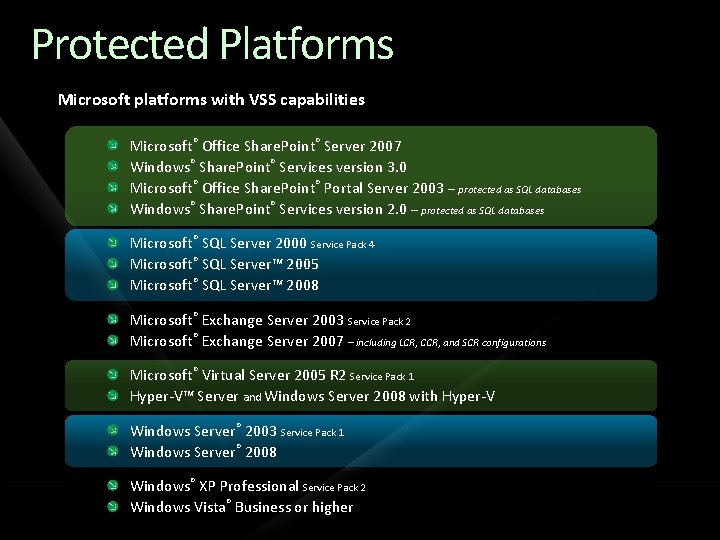
Protected Platforms Microsoft platforms with VSS capabilities Microsoft® Office Share. Point® Server 2007 Windows® Share. Point® Services version 3. 0 Microsoft® Office Share. Point® Portal Server 2003 – protected as SQL databases Windows® Share. Point® Services version 2. 0 – protected as SQL databases Microsoft® SQL Server 2000 Service Pack 4 Microsoft® SQL Server™ 2005 Microsoft® SQL Server™ 2008 Microsoft® Exchange Server 2003 Service Pack 2 Microsoft® Exchange Server 2007 – including LCR, CCR, and SCR configurations Microsoft® Virtual Server 2005 R 2 Service Pack 1 Hyper-V™ Server and Windows Server 2008 with Hyper-V Windows Server® 2003 Service Pack 1 Windows Server® 2008 Windows® XP Professional Service Pack 2 Windows Vista® Business or higher
How DPM 2007 Protects Data DPM 2007 – Express Full Using the native application VSS writer Check out http: //edge. technet. com/Media/DPM-2007 -SP 1 -How-does-DPM-really-work/ … or Jason. Buffington. com
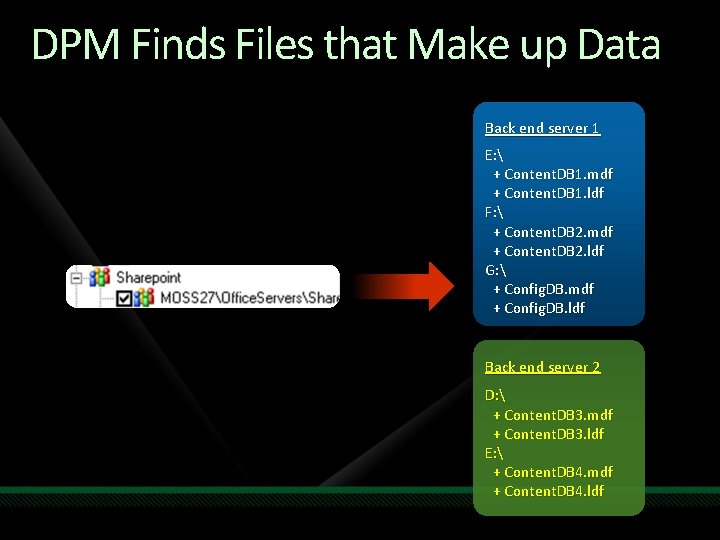
DPM Finds Files that Make up Data Back end server 1 E: + Content. DB 1. mdf + Content. DB 1. ldf F: + Content. DB 2. mdf + Content. DB 2. ldf G: + Config. DB. mdf + Config. DB. ldf Back end server 2 D: + Content. DB 3. mdf + Content. DB 3. ldf E: + Content. DB 4. mdf + Content. DB 4. ldf
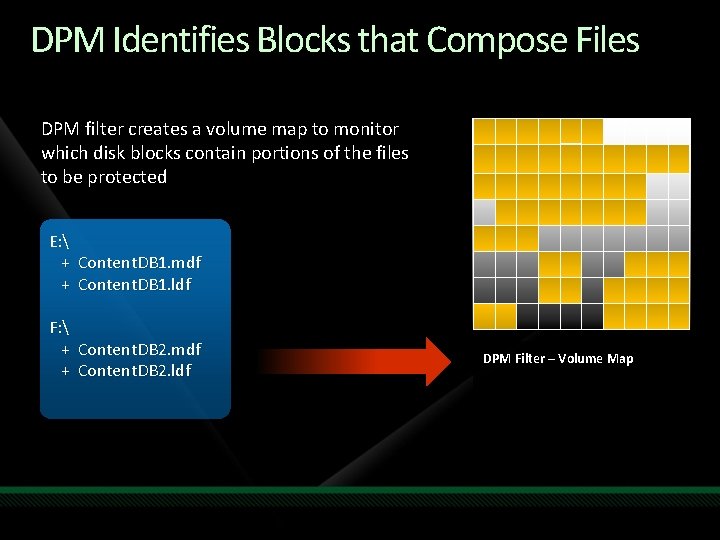
DPM Identifies Blocks that Compose Files DPM filter creates a volume map to monitor which disk blocks contain portions of the files to be protected E: + Content. DB 1. mdf + Content. DB 1. ldf F: + Content. DB 2. mdf + Content. DB 2. ldf DPM Filter – Volume Map
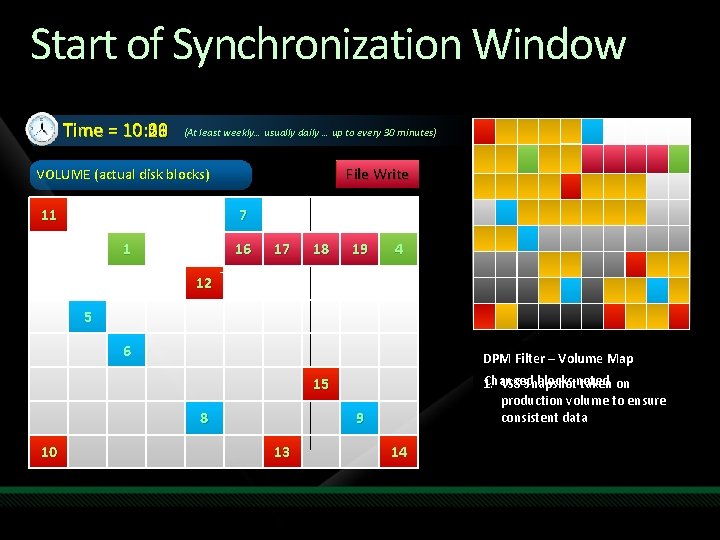
Start of Synchronization Window 10: 01 Time = 10: 00 10: 30 10: 06 10: 18 10: 26 (At least weekly… usually daily … up to every 30 minutes) File Write VOLUME (actual disk blocks) 11 7 1 16 17 2 18 3 19 4 12 5 6 DPM Filter – Volume Map Changed blocks noted 1. VSS Snapshot taken on production volume to ensure consistent data 15 8 10 9 13 14
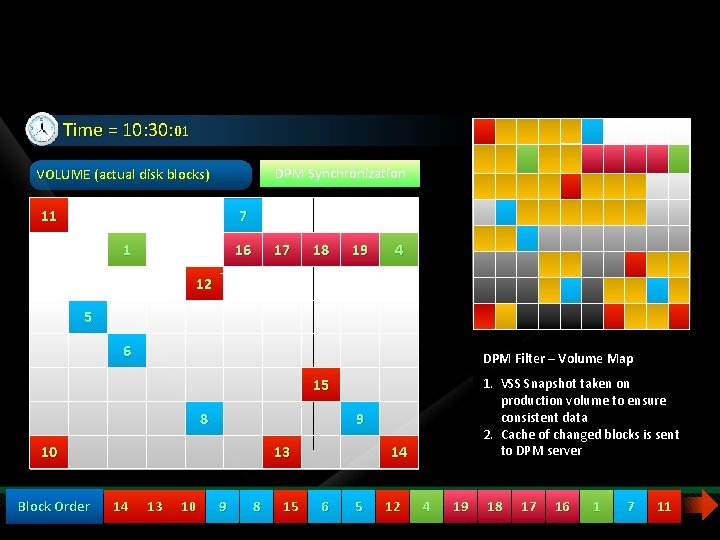
Start of Synchronization Window Time = 10: 30: 01 DPM Synchronization VOLUME (actual disk blocks) 11 7 1 16 17 18 19 4 12 5 6 DPM Filter – Volume Map 1. VSS Snapshot taken on production volume to ensure consistent data 2. Cache of changed blocks is sent to DPM server 15 8 9 10 Block Order 13 14 13 10 9 8 15 14 6 5 12 4 19 18 17 16 1 7 11
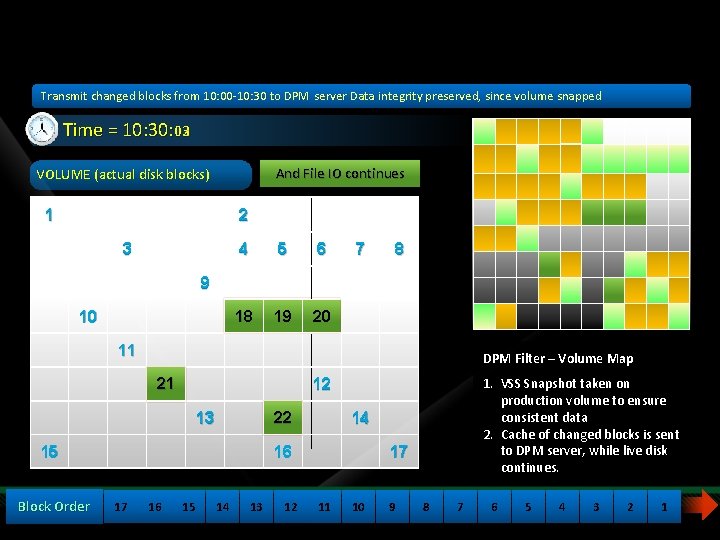
Start of Synchronization Window Transmit changed blocks from 10: 00 -10: 30 to DPM server Data integrity preserved, since volume snapped Time = 10: 30: 03 02 And File IO continues DPM Synchronization VOLUME (actual disk blocks) 1 2 3 4 5 6 18 19 20 7 8 9 10 11 DPM Filter – Volume Map 21 13 22 15 Block Order 14 16 17 16 1. VSS Snapshot taken on production volume to ensure consistent data 2. Cache of changed blocks is sent to DPM server, server while live disk continues. 12 15 14 13 12 17 11 10 9 8 7 6 5 4 3 2 1
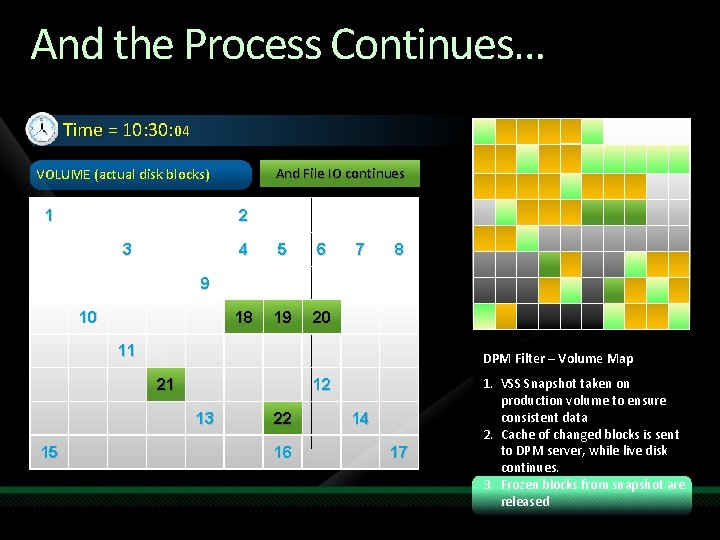
And the Process Continues… Time = 10: 30: 04 And File IO continues VOLUME (actual disk blocks) 1 2 3 4 5 6 18 19 20 7 8 9 10 11 DPM Filter – Volume Map 21 12 13 15 22 16 14 17 1. VSS Snapshot taken on production volume to ensure consistent data 2. Cache of changed blocks is sent to DPM server, while live disk continues. 3. Frozen blocks from snapshot are released
How DPM 2007 Protects Data Transactional Log backups
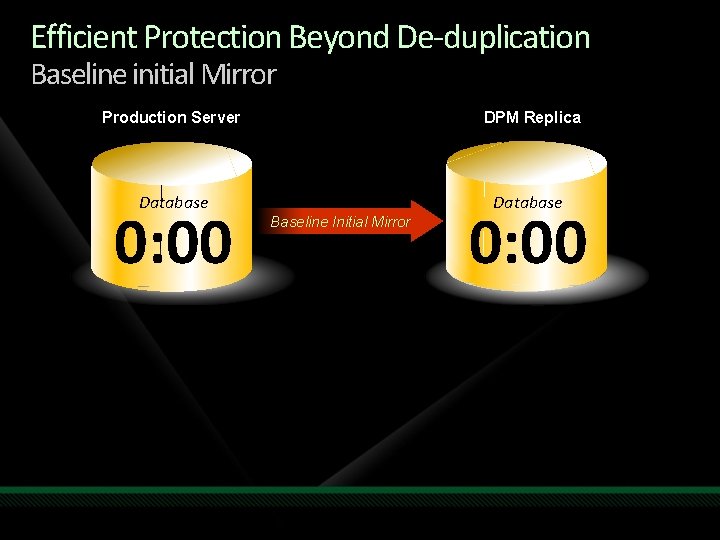
Efficient Protection Beyond De-duplication Baseline initial Mirror Production Server DPM Replica Database 0: 00 Baseline Initial Mirror 0: 00
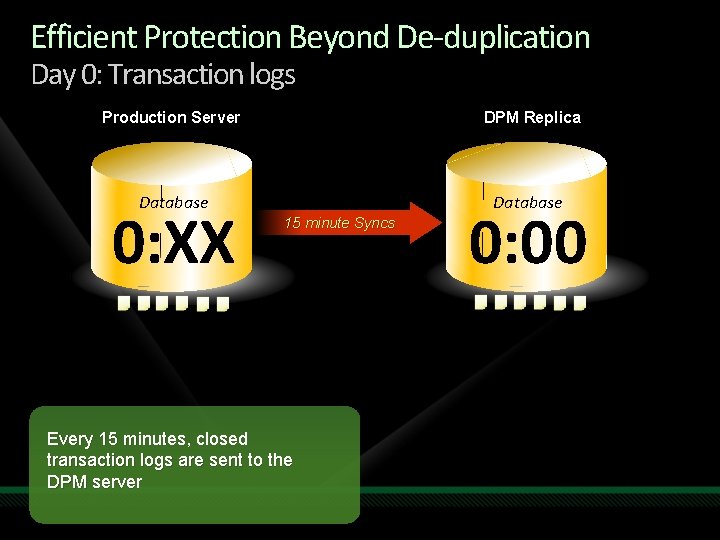
Efficient Protection Beyond De-duplication Day 0: Transaction logs Production Server DPM Replica Database 0: XX 15 minute Syncs Every 15 minutes, closed transaction logs are sent to the DPM server 0: 00
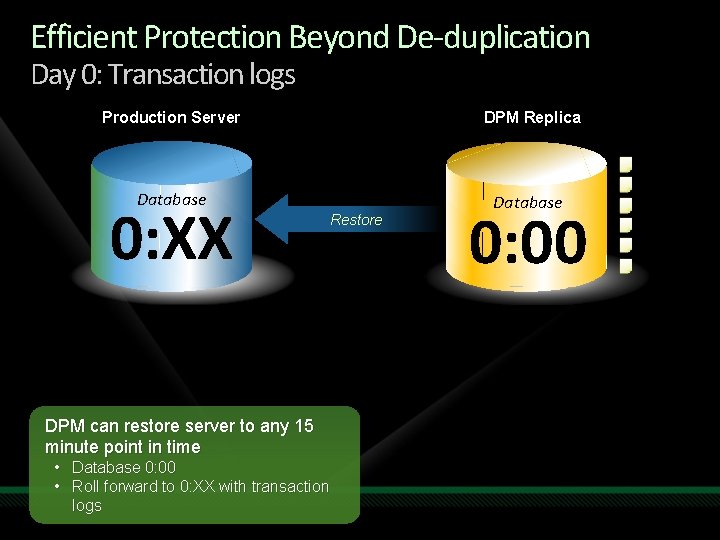
Efficient Protection Beyond De-duplication Day 0: Transaction logs Production Server DPM Replica Database 0: XX Restore DPM can restore server to any 15 minute point in time • Database 0: 00 • Roll forward to 0: XX with transaction logs 0: 00
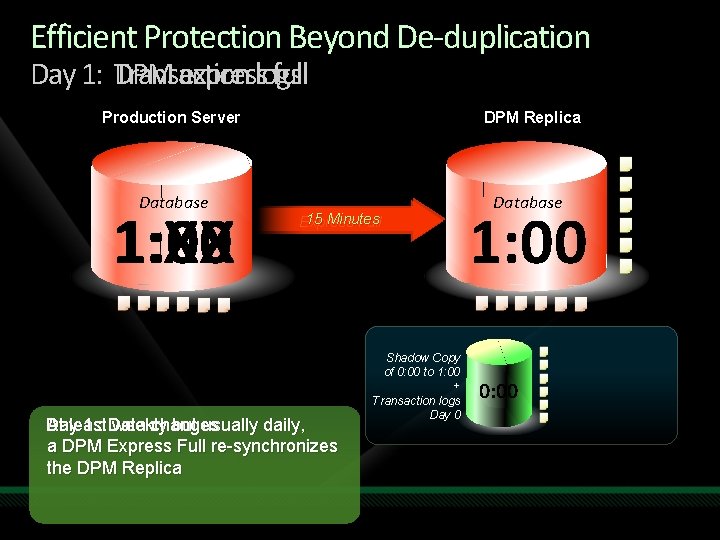
Efficient Protection Beyond De-duplication Day 1: Transaction DPM expresslogs full Production Server DPM Replica Database 1: XX 1: 00 15 Minutes Express Full Day At least 1 : Data weekly changes but usually daily, a DPM Express Full re-synchronizes the DPM Replica Shadow Copy of 0: 00 to 1: 00 + Transaction logs Day 0 1: 00 0: 00
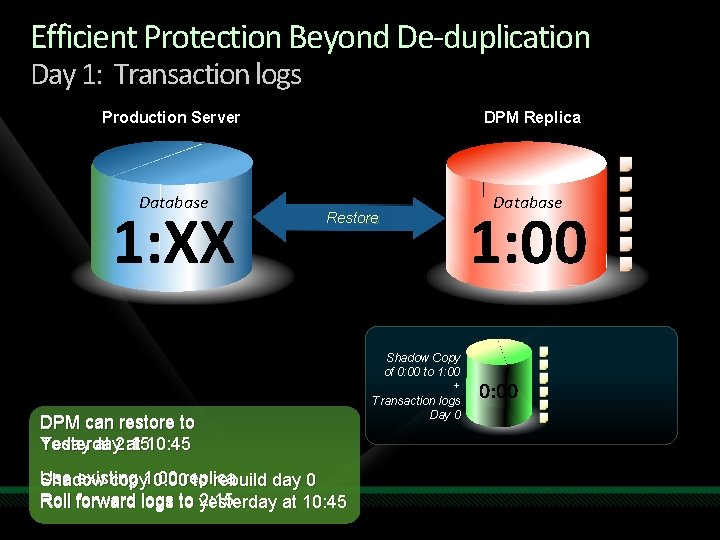
Efficient Protection Beyond De-duplication Day 1: Transaction logs Production Server Database 1: XX DPM Replica 15 Restore Minutes DPM can restore to Yesterday at 10: 45 Today at 2: 15 Use existing Shadow copy 1: 00 0: 00 replica to rebuild day 0 Roll forward logs to 2: 15 yesterday at 10: 45 Shadow Copy of 0: 00 to 1: 00 + Transaction logs Day 0 Database 1: 00 0: 00
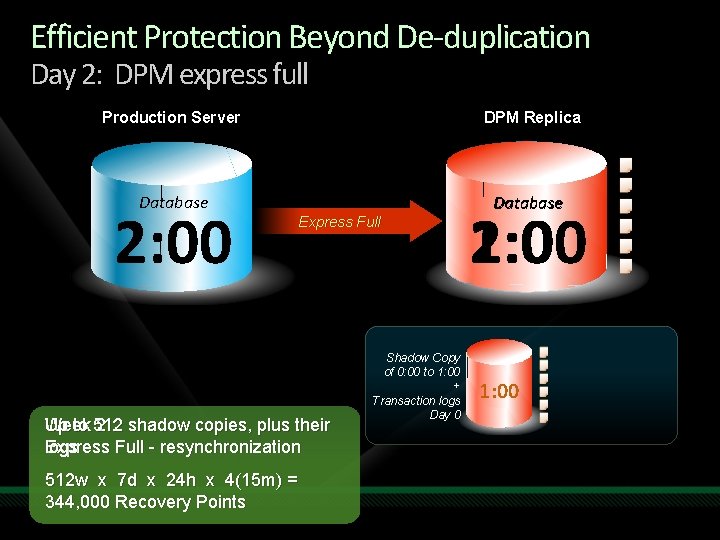
Efficient Protection Beyond De-duplication Day 2: DPM express full Production Server DPM Replica Database 2: 00 Express Full Up to 512 Week 2 : shadow copies, plus their Express Full - resynchronization logs 512 w x 7 d x 24 h x 4(15 m) = 344, 000 Recovery Points Shadow Copy of 0: 00 to 1: 00 + Transaction logs Day 0 1: 00 2: 00 0: 00 1: 00
Exchange Server protection specifics
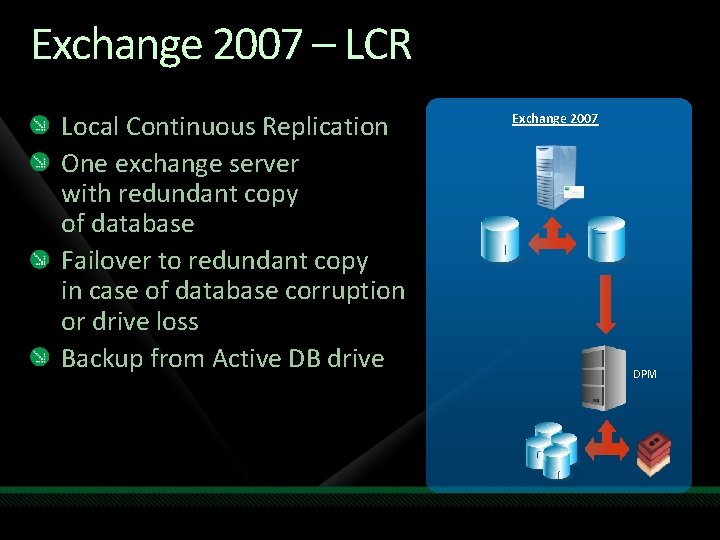
Exchange 2007 – LCR Local Continuous Replication One exchange server with redundant copy of database Failover to redundant copy in case of database corruption or drive loss Backup from Active DB drive Exchange 2007 DPM
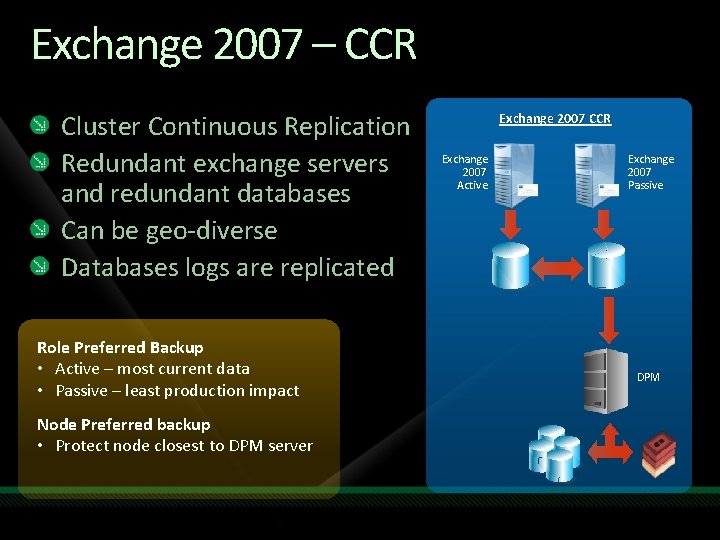
Exchange 2007 – CCR Cluster Continuous Replication Redundant exchange servers and redundant databases Can be geo-diverse Databases logs are replicated Role Preferred Backup • Active – most current data • Passive – least production impact Node Preferred backup • Protect node closest to DPM server Exchange 2007 CCR Exchange 2007 Active Exchange 2007 Passive DPM
Key Highlights – Exchange Protection DPM protects both Exchange 2003 and Exchange 2007 DPM supports stand alone, MSCS clusters, CCR, LCR and SCR Protection continues after planned failover One time full backup followed by periodic express fulls and incrementals Logs truncated after successful backups only Eseutil runs on DPM – lower load on Exchange, faster completion
Key Highlights – Exchange Protection Failover behavior for CCR DPM protects selected node After failover, incrementals continue without any issues Next full will fail, but DPM automatically schedules a Consistency check 30 minutes after the scheduled Express full After the consistency check, protection continues seamlessly
Key Highlights – Exchange Recovery DPM supports recovering SG level DB level Mailbox level For Exchange DB level recoveries, Recovery to original location will recover to latest point only To recover to older point, bring DB to clean shutdown state and then mount it
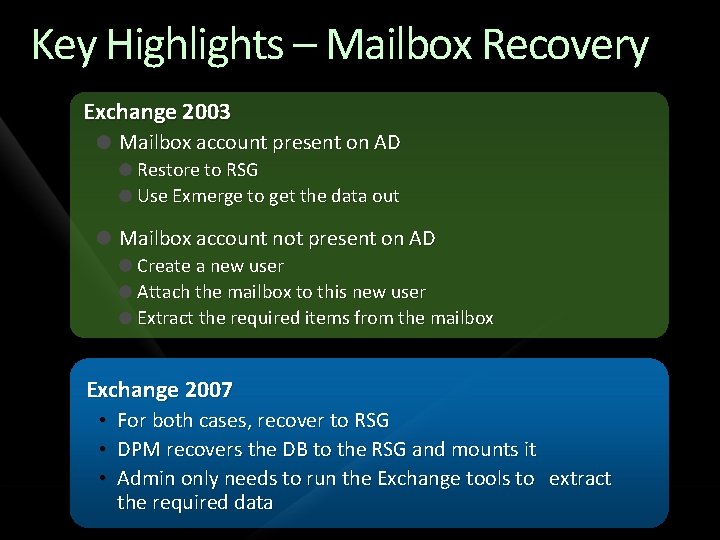
Key Highlights – Mailbox Recovery Exchange 2003 Mailbox account present on AD Restore to RSG Use Exmerge to get the data out Mailbox account not present on AD Create a new user Attach the mailbox to this new user Extract the required items from the mailbox Exchange 2007 • • • For both cases, recover to RSG DPM recovers the DB to the RSG and mounts it Admin only needs to run the Exchange tools to extract the required data
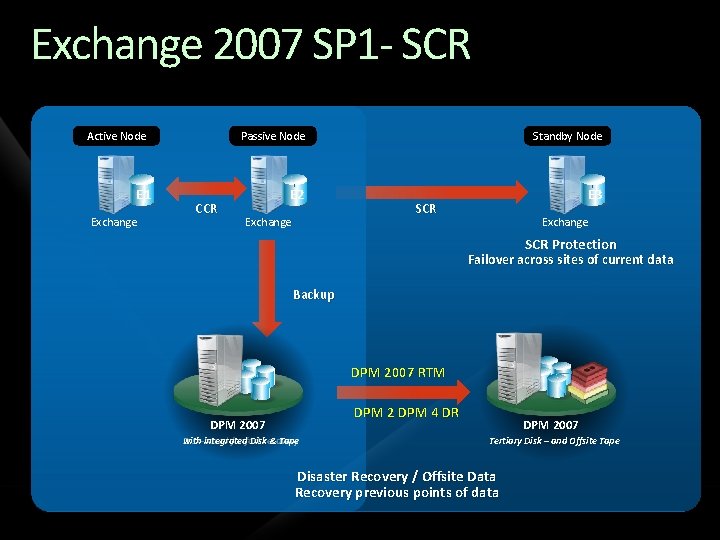
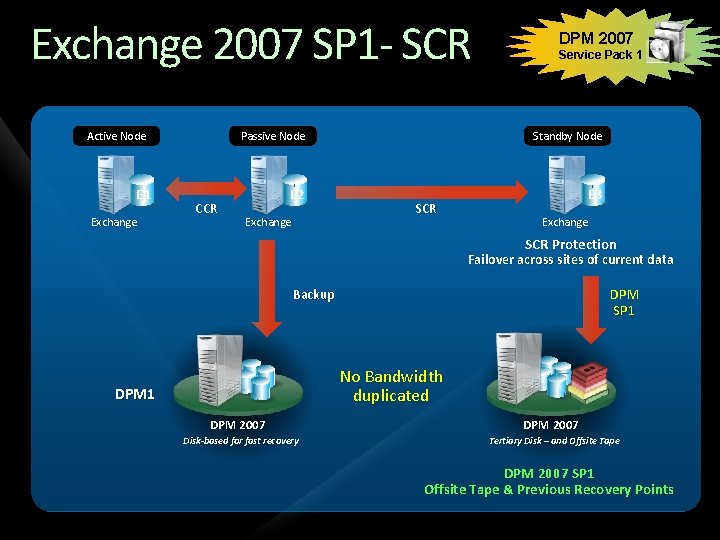
Exchange 2007 SP 1 - SCR Active Node E 1 Exchange CCR Passive Node Standby Node E 2 E 3 Exchange SCR Protection Failover across sites of current data Backup DPM 2007 RTM DPM 2 DPM 4 DR DPM 2007 with Disk-based integrated for fast Diskrecovery & Tape DPM 2007 Tertiary Disk – and Offsite Tape Disaster Recovery / Offsite Data Recovery previous points of data
Exchange 2007 SP 1 - SCR Active Node E 1 Exchange CCR DPM 2007 Service Pack 1 Passive Node Standby Node E 2 E 3 Exchange SCR Protection Failover across sites of current data DPM SP 1 Backup No Bandwidth duplicated DPM 1 DPM 2007 Disk-based for fast recovery DPM 2007 Tertiary Disk – and Offsite Tape DPM 2007 SP 1 Offsite Tape & Previous Recovery Points
SQL Server Protection Specifics
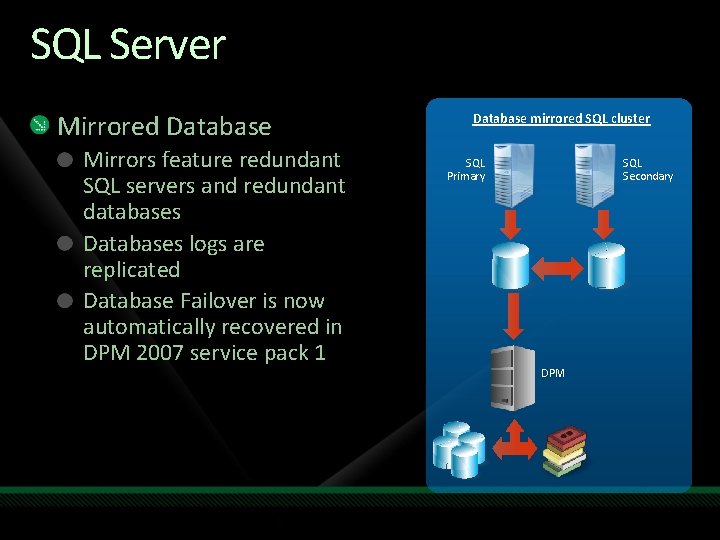
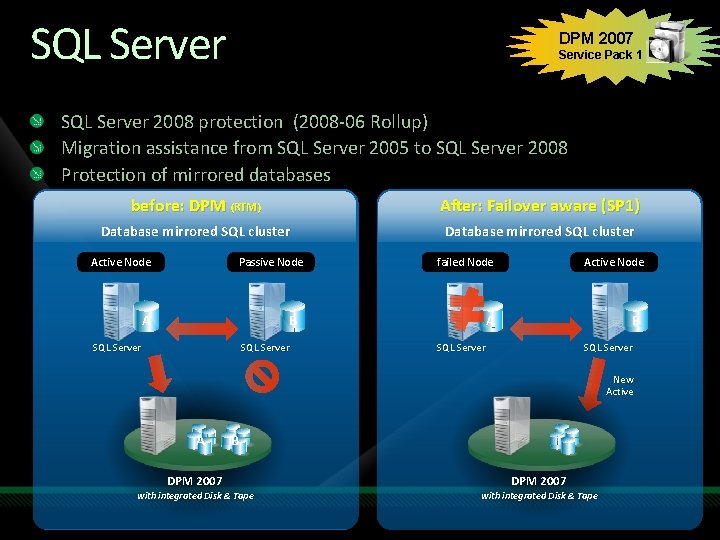
SQL Server Mirrored Database Mirrors feature redundant SQL servers and redundant databases Databases logs are replicated Database Failover is now automatically recovered in DPM 2007 service pack 1 Database mirrored SQL cluster SQL Primary SQL Secondary DPM
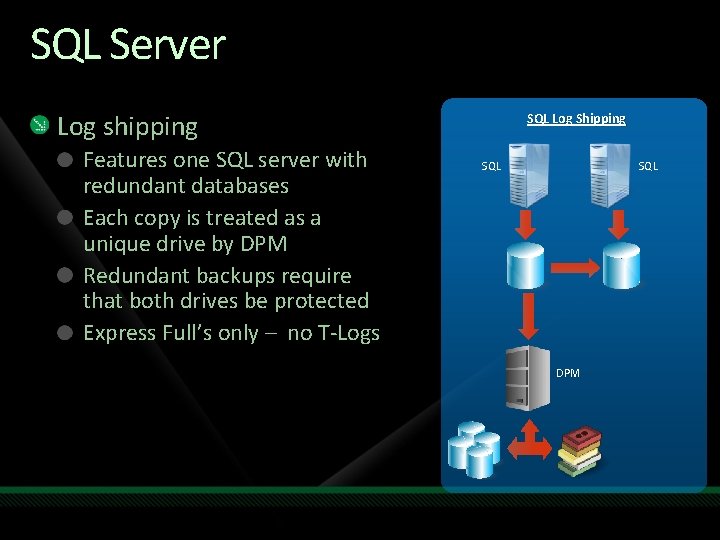
SQL Server Log shipping Features one SQL server with redundant databases Each copy is treated as a unique drive by DPM Redundant backups require that both drives be protected Express Full’s only – no T-Logs SQL Log Shipping SQL DPM
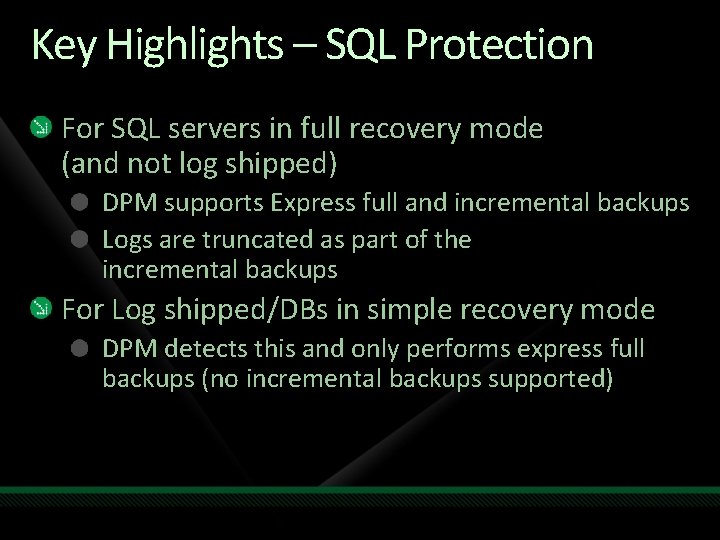
Key Highlights – SQL Protection For SQL servers in full recovery mode (and not log shipped) DPM supports Express full and incremental backups Logs are truncated as part of the incremental backups For Log shipped/DBs in simple recovery mode DPM detects this and only performs express full backups (no incremental backups supported)
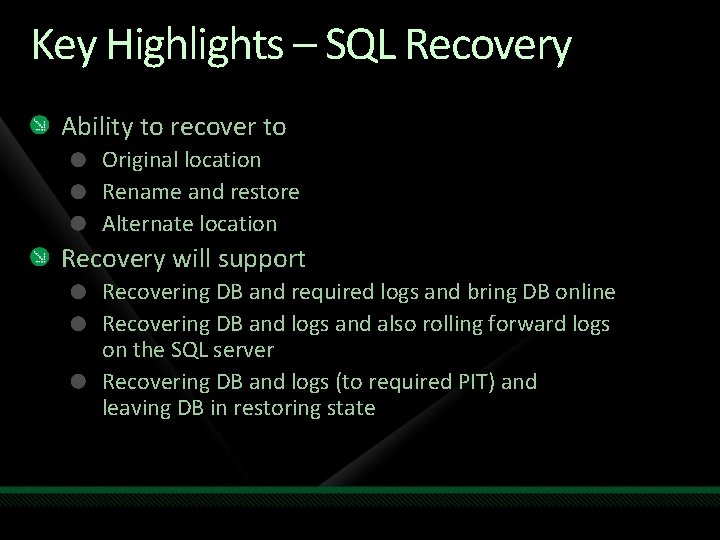
Key Highlights – SQL Recovery Ability to recover to Original location Rename and restore Alternate location Recovery will support Recovering DB and required logs and bring DB online Recovering DB and logs and also rolling forward logs on the SQL server Recovering DB and logs (to required PIT) and leaving DB in restoring state
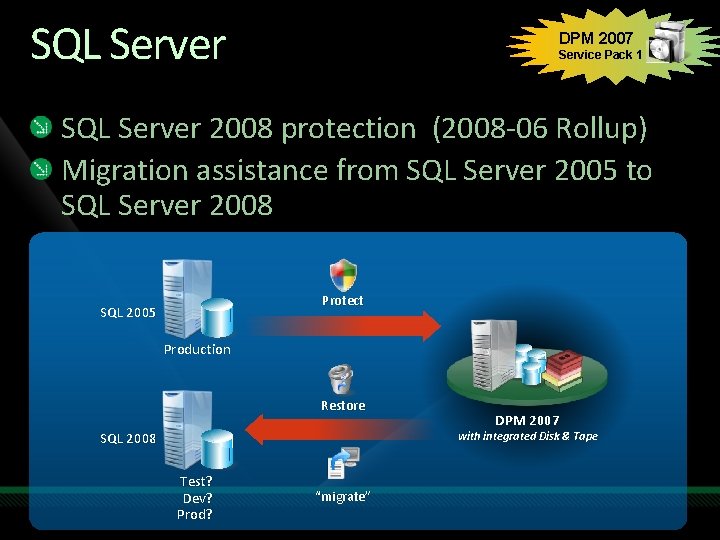
SQL Server DPM 2007 Service Pack 1 SQL Server 2008 protection (2008 -06 Rollup) Migration assistance from SQL Server 2005 to SQL Server 2008 Protect SQL 2005 Production Restore DPM 2007 with integrated Disk & Tape SQL 2008 Test? Dev? Prod? “migrate”
SQL Server DPM 2007 Service Pack 1 SQL Server 2008 protection (2008 -06 Rollup) Migration assistance from SQL Server 2005 to SQL Server 2008 Protection of mirrored databases before: DPM (RTM) After: Failover aware (SP 1) Database mirrored SQL cluster Active Node Passive Node A failed Node Active Node A B B SQL Server New Active A B DPM 2007 with integrated Disk & Tape
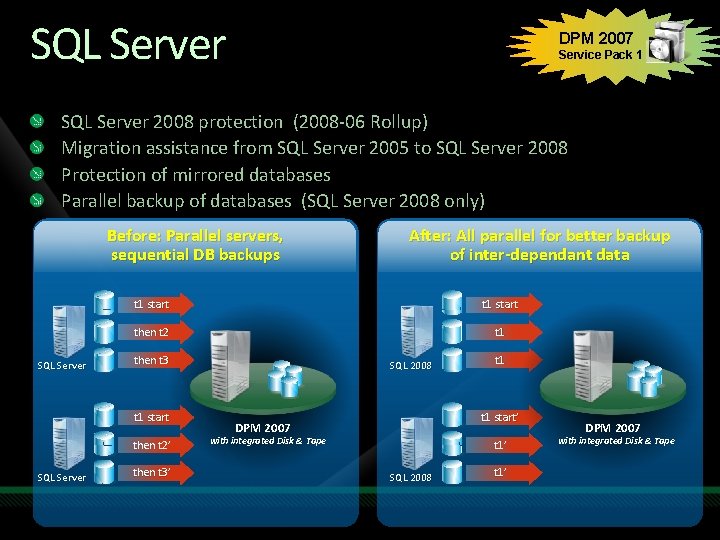
SQL Server DPM 2007 Service Pack 1 SQL Server 2008 protection (2008 -06 Rollup) Migration assistance from SQL Server 2005 to SQL Server 2008 Protection of mirrored databases Parallel backup of databases (SQL Server 2008 only) Before: Parallel servers, sequential DB backups SQL Server t 1 start then t 2 t 1 then t 3 t 1 start then t 2’ SQL Server After: All parallel for better backup of inter-dependant data then t 3’ SQL 2008 t 1 start’ DPM 2007 with integrated Disk & Tape t 1’ SQL 2008 t 1’ DPM 2007 with integrated Disk & Tape
demo SQL Server and Exchange
Share. Point Microsoft Office Share. Point Server 2007 Windows Share. Point Services 3. 0
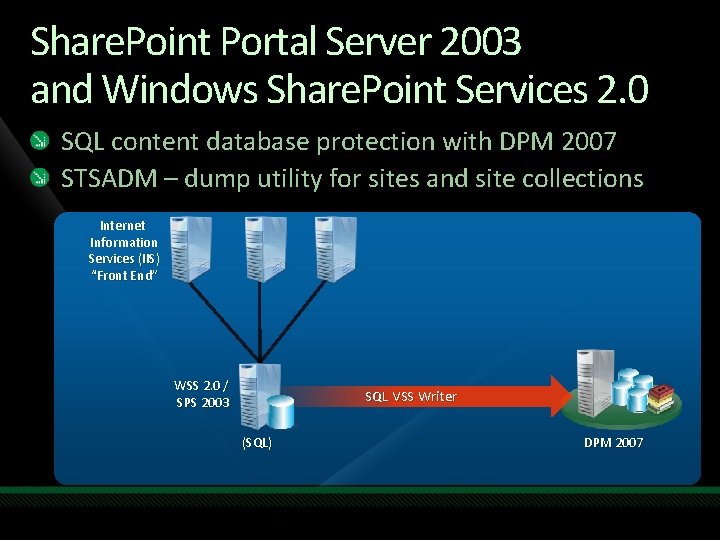
Share. Point Portal Server 2003 and Windows Share. Point Services 2. 0 SQL content database protection with DPM 2007 STSADM – dump utility for sites and site collections Internet Information Services (IIS) “Front End” WSS 2. 0 / SPS 2003 SQL VSS Writer (SQL) DPM 2007
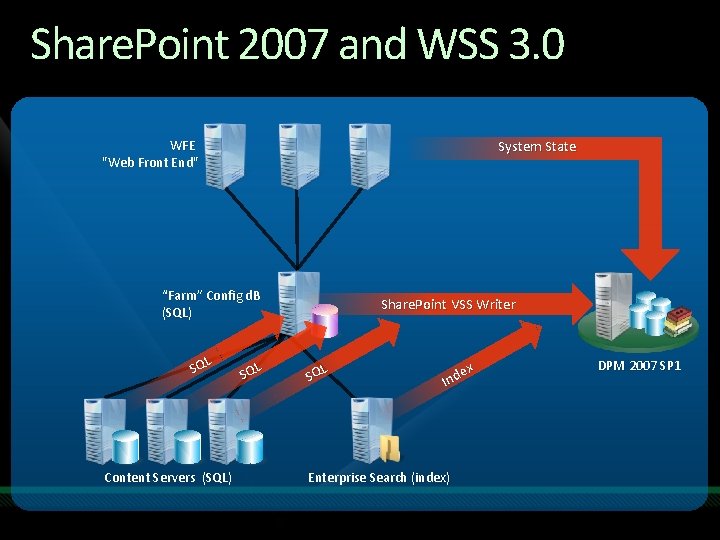
Microsoft Office Share. Point Server 2007 Share. Point 2007 and WSS 3. 0 and Windows Share. Point Services 3. 0 WFE "Web Front End" System State “Farm” Config d. B (SQL) L SQ Content Servers (SQL) L SQ Share. Point VSS Writer L SQ ex Ind Enterprise Search (index) DPM 2007 SP 1
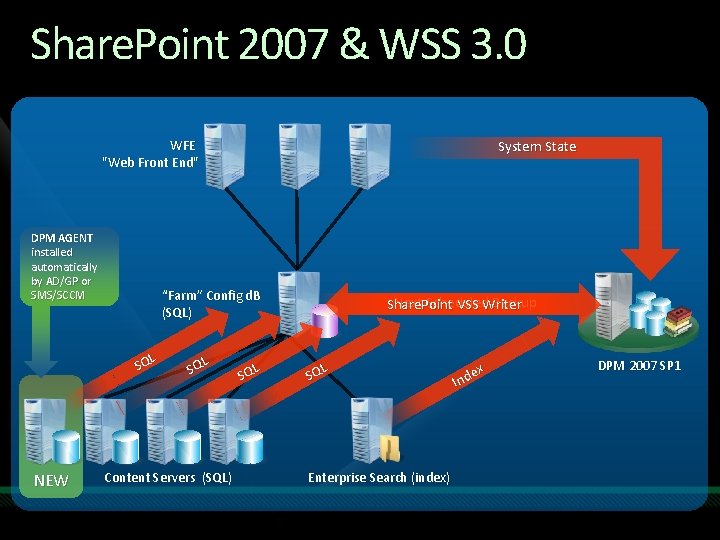
Microsoft Office Share. Point Server 2007 Share. Point 2007 & WSS 3. 0 and Windows Share. Point Services 3. 0 WFE "Web Front End" DPM AGENT installed automatically by AD/GP or SMS/SCCM “Farm” Config d. B (SQL) L SQ NEW System State L SQ Content Servers (SQL) L SQ Next Scheduled Backup Share. Point VSS Writer L SQ Enterprise Search (index) ex Ind DPM 2007 SP 1
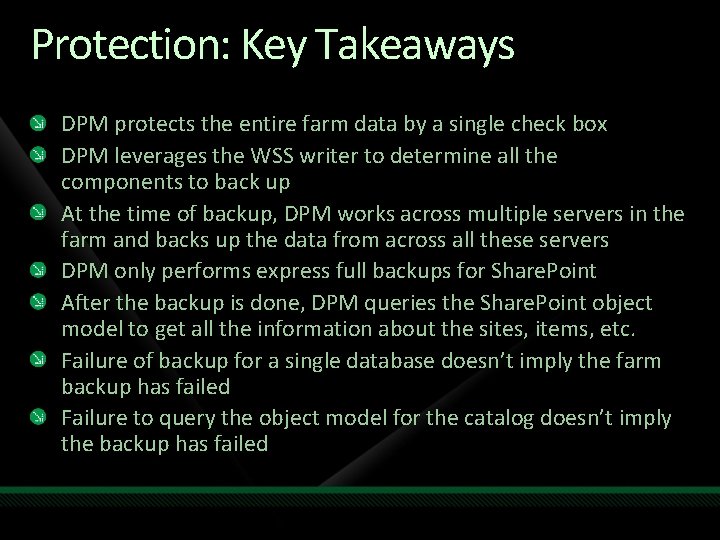
Protection: Key Takeaways DPM protects the entire farm data by a single check box DPM leverages the WSS writer to determine all the components to back up At the time of backup, DPM works across multiple servers in the farm and backs up the data from across all these servers DPM only performs express full backups for Share. Point After the backup is done, DPM queries the Share. Point object model to get all the information about the sites, items, etc. Failure of backup for a single database doesn’t imply the farm backup has failed Failure to query the object model for the catalog doesn’t imply the backup has failed
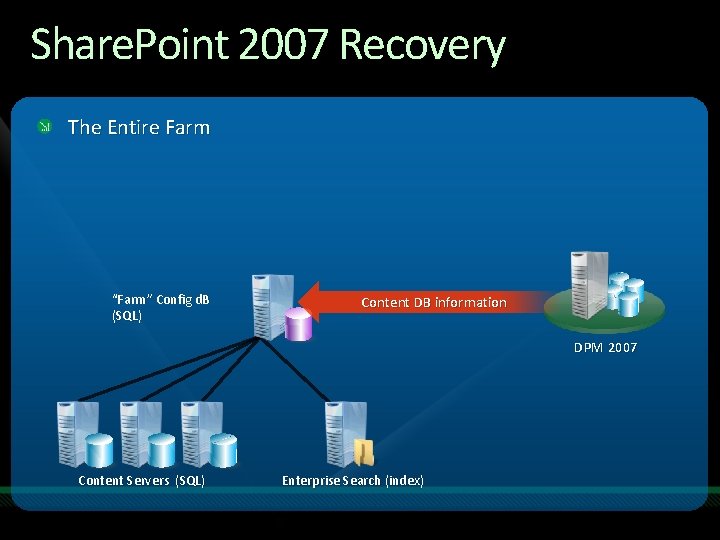
Share. Point 2007 Recovery The Entire Farm “Farm” Config d. B (SQL) Content DB information DPM 2007 Content Servers (SQL) Enterprise Search (index)
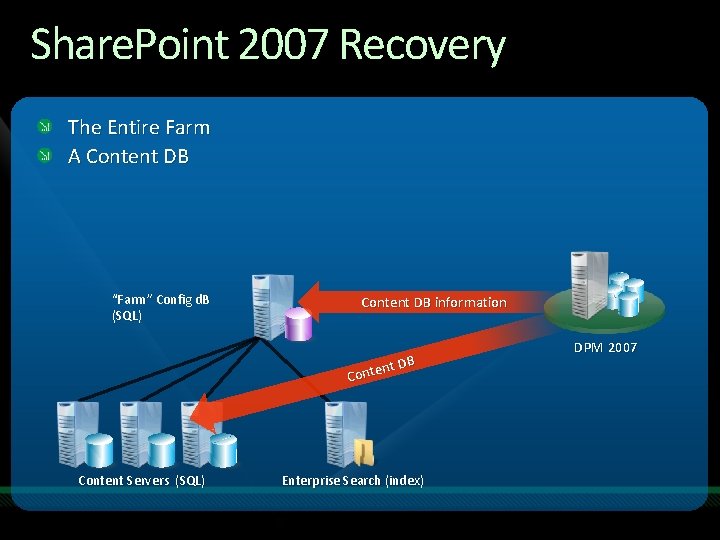
Share. Point 2007 Recovery The Entire Farm A Content DB “Farm” Config d. B (SQL) Content DB information t DB n e t n Co Content Servers (SQL) Enterprise Search (index) DPM 2007
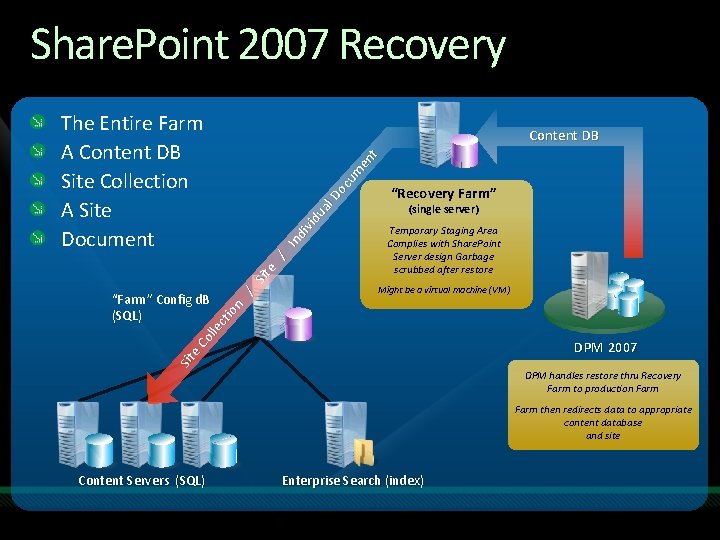
Share. Point 2007 Recovery The Entire Farm A Content DB Site Collection A Site Document “Recovery Farm” (single server) Temporary Staging Area Complies with Share. Point Server design Garbage scrubbed after restore Might be a virtual machine (VM) Sit e. C ol lec tio n “Farm” Config d. B (SQL) / Sit e / In di vid ua l. D oc um en t Content DB DPM 2007 DPM handles restore thru Recovery Farm to production Farm then redirects data to appropriate content database and site Content Servers (SQL) Enterprise Search (index)
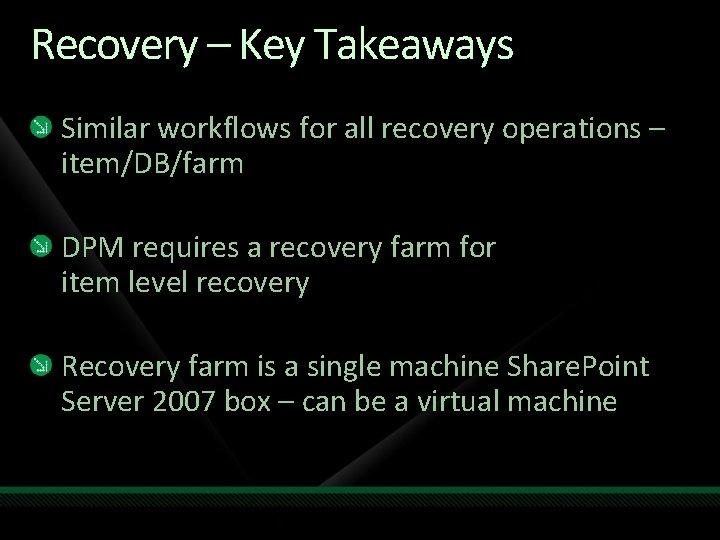
Recovery – Key Takeaways Similar workflows for all recovery operations – item/DB/farm DPM requires a recovery farm for item level recovery Recovery farm is a single machine Share. Point Server 2007 box – can be a virtual machine
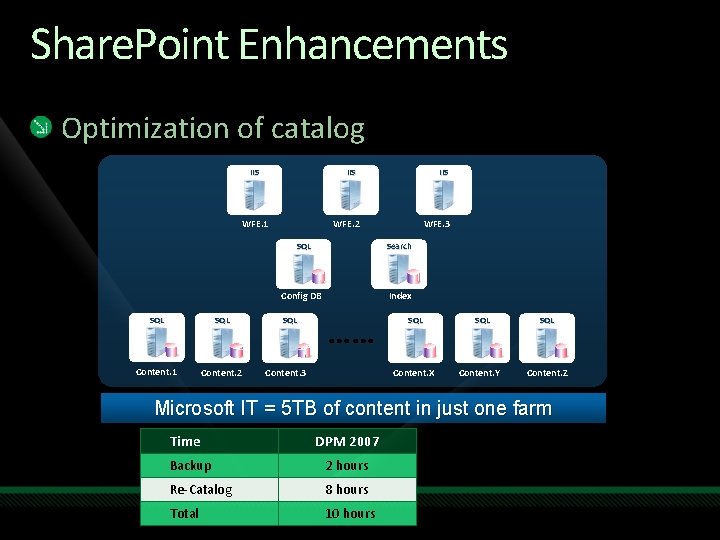
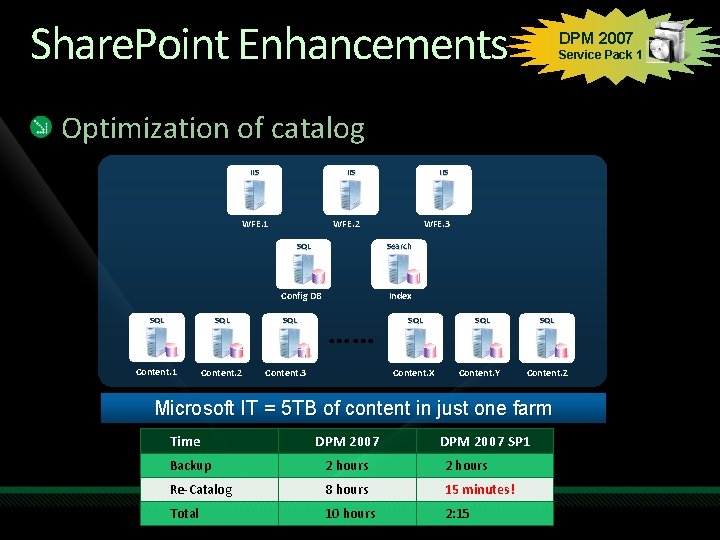
Share. Point Enhancements Optimization of catalog IIS WFE. 1 SQL Content. 1 Content. 2 IIS WFE. 2 WFE. 3 SQL Search Config DB Index SQL Content. 3 Content. X SQL Content. Y SQL Content. Z Microsoft IT = 5 TB of content in just one farm Time DPM 2007 Backup 2 hours Re-Catalog 8 hours Total 10 hours
Share. Point Enhancements DPM 2007 Service Pack 1 Optimization of catalog IIS WFE. 1 SQL Content. 1 Content. 2 IIS WFE. 2 WFE. 3 SQL Search Config DB Index SQL Content. 3 Content. X SQL Content. Y SQL Content. Z Microsoft IT = 5 TB of content in just one farm Time DPM 2007 SP 1 Backup 2 hours Re-Catalog 8 hours 15 minutes! Total 10 hours 2: 15
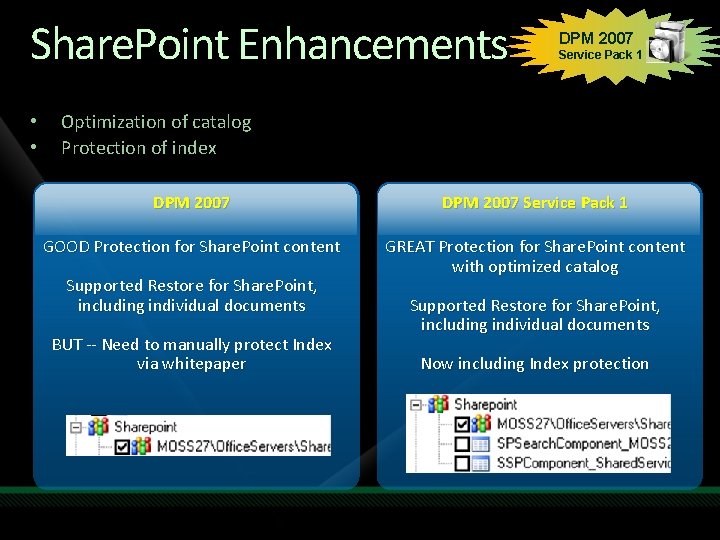
Share. Point Enhancements • • DPM 2007 Service Pack 1 Optimization of catalog Protection of index DPM 2007 Service Pack 1 GOOD Protection for Share. Point content GREAT Protection for Share. Point content with optimized catalog Supported Restore for Share. Point, including individual documents BUT -- Need to manually protect Index via whitepaper Supported Restore for Share. Point, including individual documents Now including Index protection
Virtualization Virtual Server and Hyper-V specifics Hyper-V – NEW in Service Pack 1
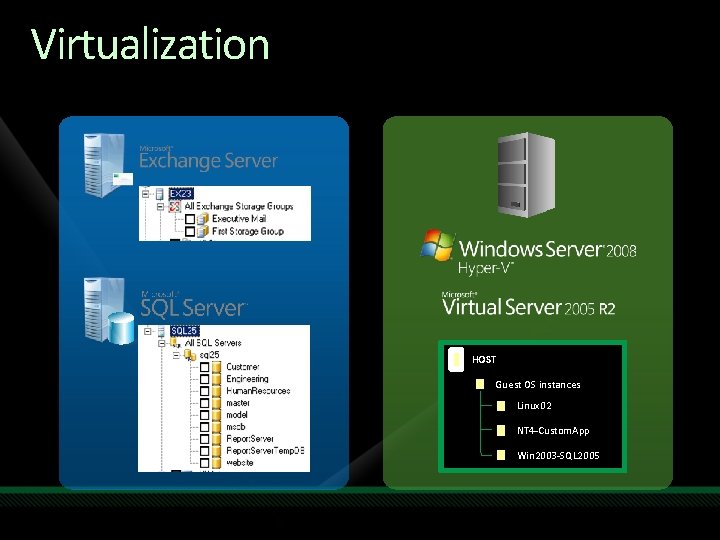
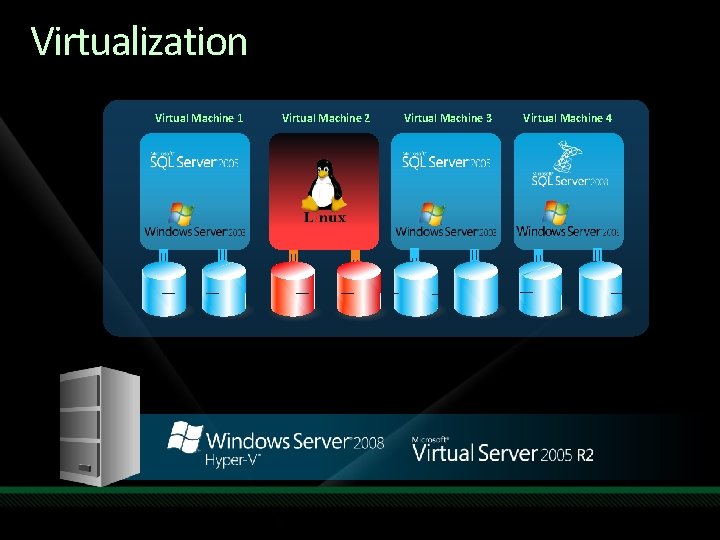
Virtualization HOST Guest OS instances Linux 02 NT 4 -Custom. App Win 2003 -SQL 2005
Virtualization Virtual Machine 1 Virtual Machine 2 Virtual Machine 3 Virtual Machine 4
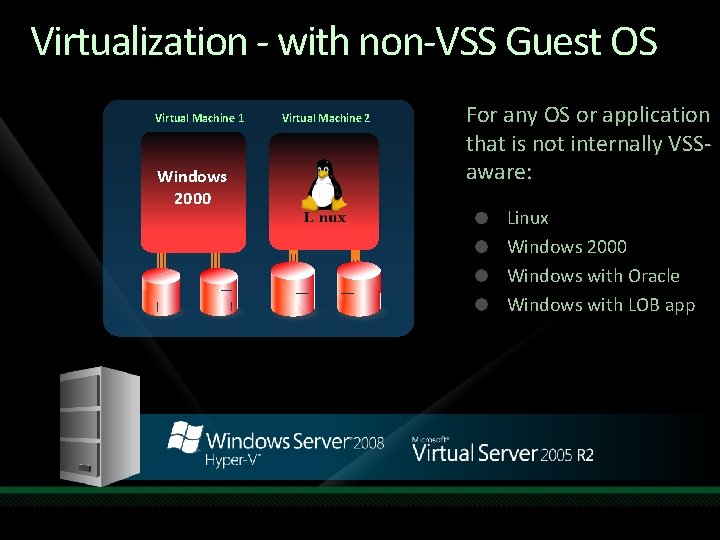
Virtualization - with non-VSS Guest OS Virtual Machine 1 Windows 2000 Virtual Machine 2 For any OS or application that is not internally VSSaware: Linux Windows 2000 Windows with Oracle Windows with LOB app
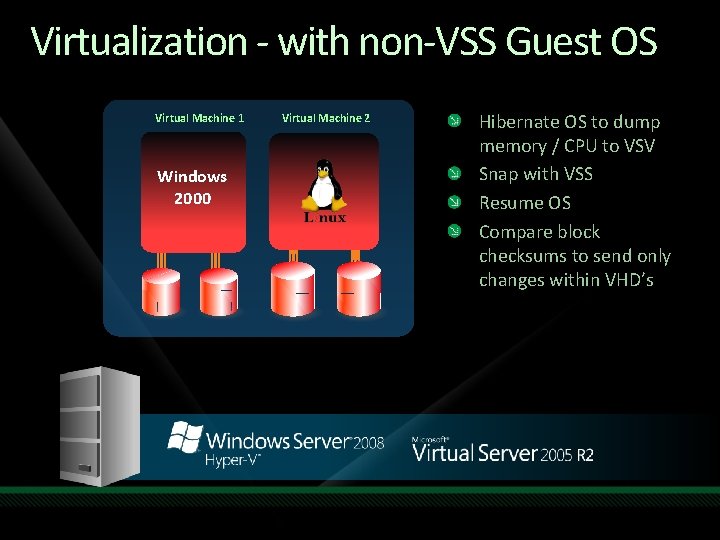
Virtualization - with non-VSS Guest OS Virtual Machine 1 Windows 2000 Virtual Machine 2 Hibernate OS to dump memory / CPU to VSV Snap with VSS Resume OS Compare block checksums to send only changes within VHD’s
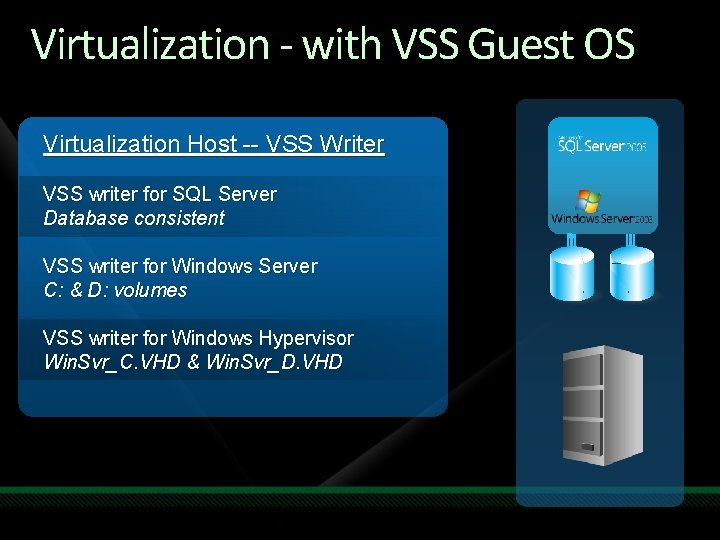
Virtualization - with VSS Guest OS Virtualization Host -- VSS Writer VSS writer for SQL Server Database consistent VSS writer for Windows Server C: & D: volumes VSS writer for Windows Hypervisor Win. Svr_C. VHD & Win. Svr_D. VHD
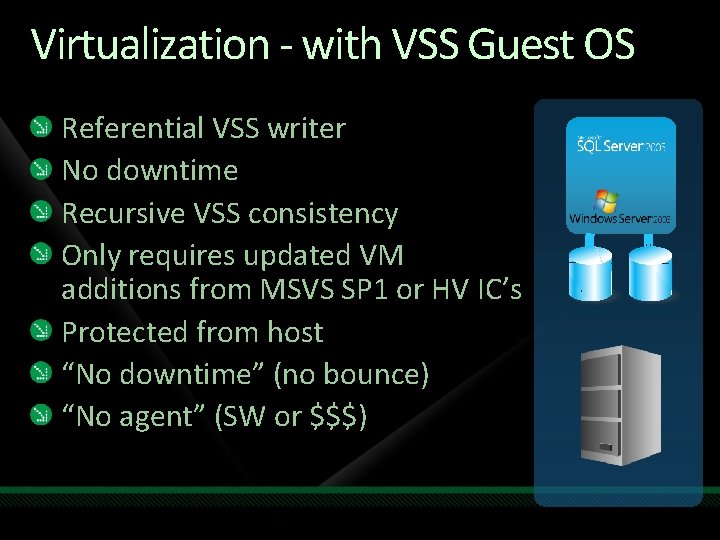
Virtualization - with VSS Guest OS Referential VSS writer No downtime Recursive VSS consistency Only requires updated VM additions from MSVS SP 1 or HV IC’s Protected from host “No downtime” (no bounce) “No agent” (SW or $$$)
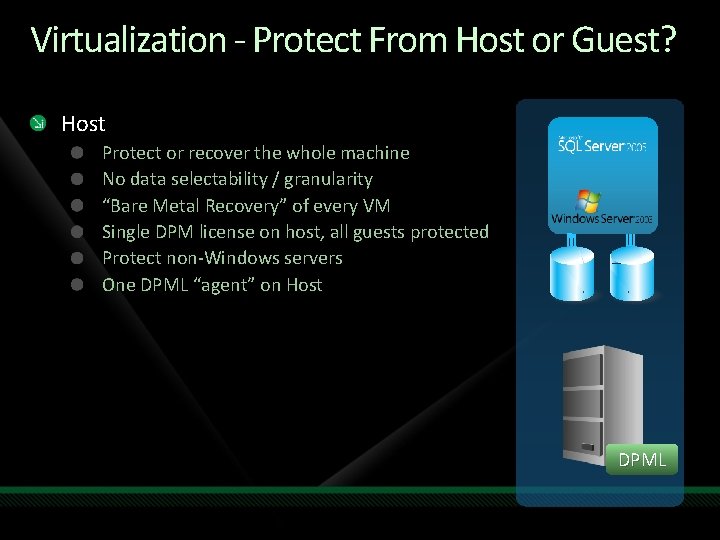
Virtualization - Protect From Host or Guest? Host Protect or recover the whole machine No data selectability / granularity “Bare Metal Recovery” of every VM Single DPM license on host, all guests protected Protect non-Windows servers One DPML “agent” on Host DPML
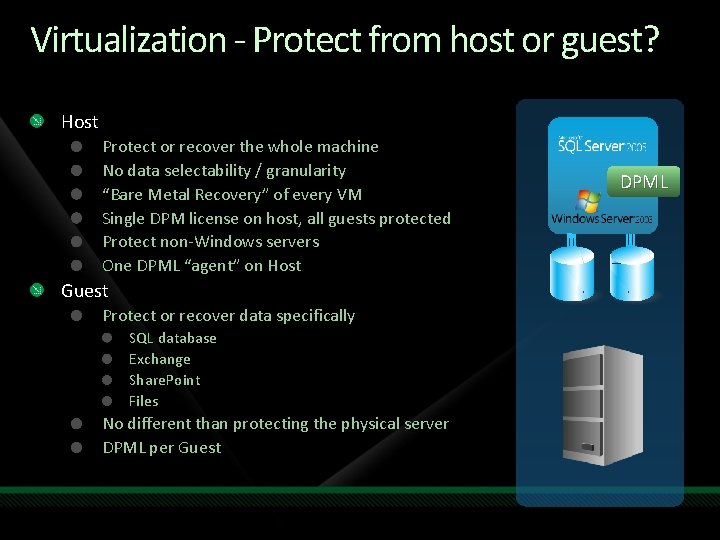
Virtualization - Protect from host or guest? Host Protect or recover the whole machine No data selectability / granularity “Bare Metal Recovery” of every VM Single DPM license on host, all guests protected Protect non-Windows servers One DPML “agent” on Host Guest Protect or recover data specifically SQL database Exchange Share. Point Files No different than protecting the physical server DPML per Guest DPML
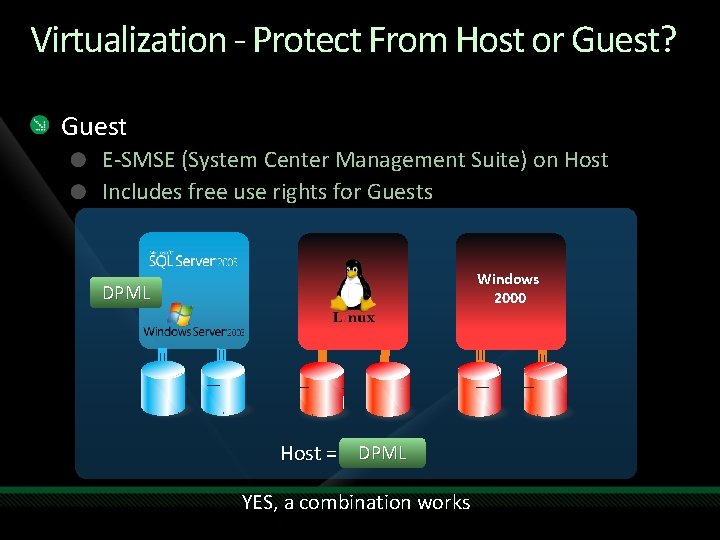
Virtualization - Protect From Host or Guest? Guest E-SMSE (System Center Management Suite) on Host Includes free use rights for Guests Windows 2000 DPML Host = E-DPML YES, a combination works
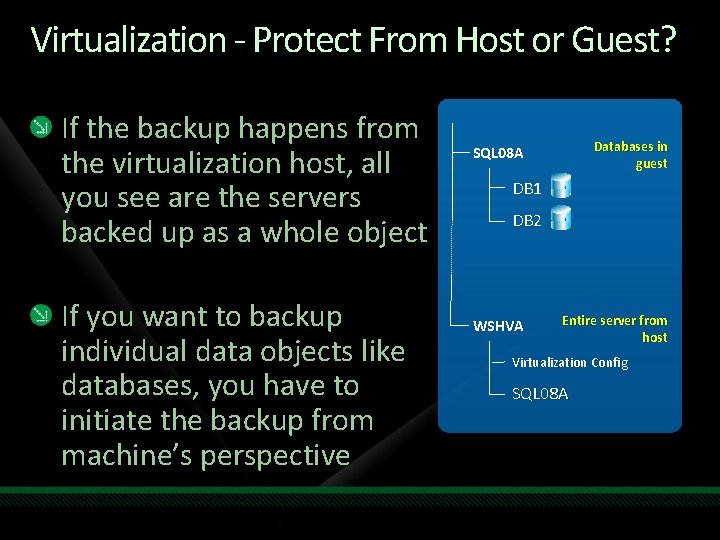
Virtualization - Protect From Host or Guest? If the backup happens from the virtualization host, all you see are the servers backed up as a whole object If you want to backup individual data objects like databases, you have to initiate the backup from machine’s perspective Databases in guest SQL 08 A DB 1 DB 2 WSHVA Entire server from host Virtualization Config SQL 08 A
WORKLOAD schedule specifics “when to do what for which”
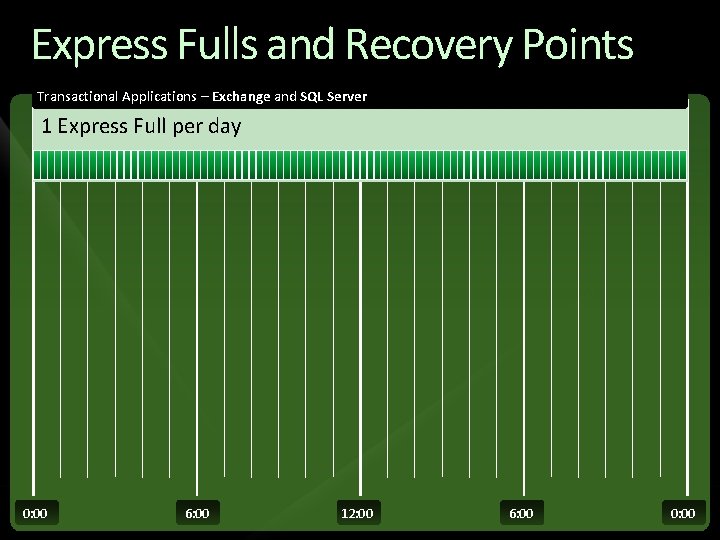
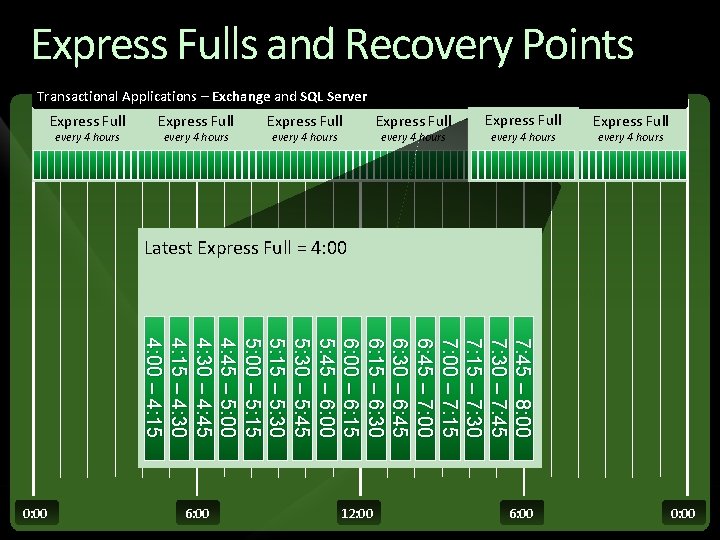
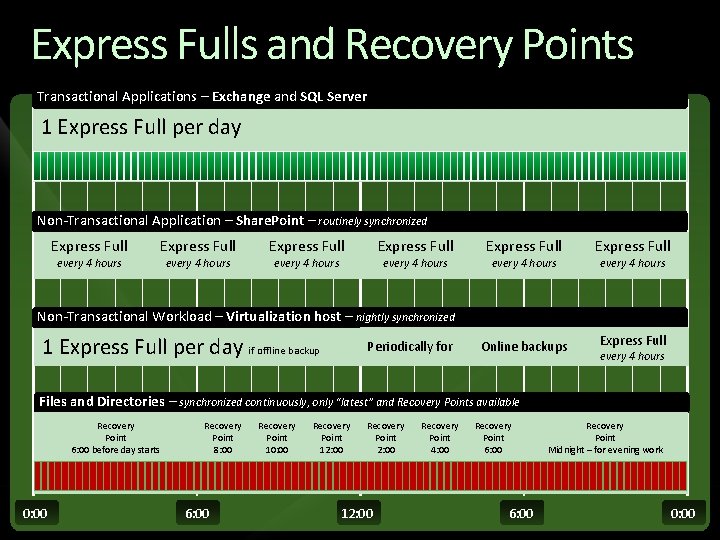
Express Fulls and Recovery Points Transactional Applications – Exchange and SQL Server 1 Express Full per day 0: 00 6: 00 12: 00 6: 00 0: 00
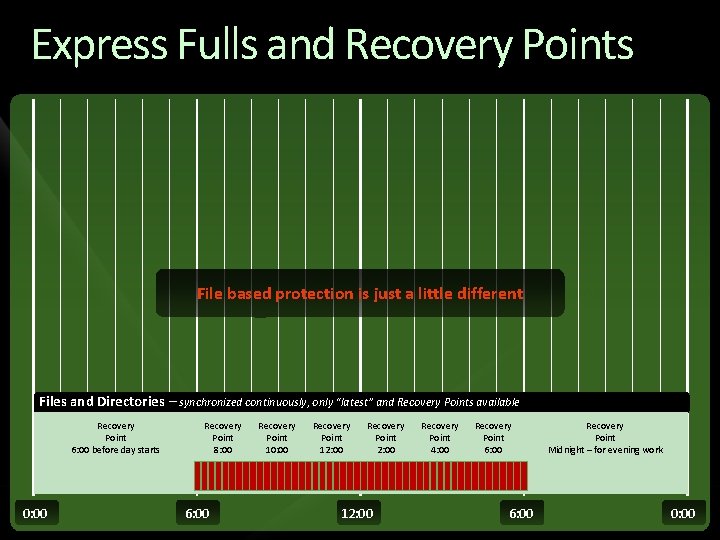
Express Fulls and Recovery Points File based protection is just a little different Files and Directories – synchronized continuously, only “latest” and Recovery Points available Recovery Point 6: 00 before day starts 0: 00 Recovery Point 8: 00 6: 00 Recovery Point 10: 00 Recovery Point 12: 00 Recovery Point 2: 00 12: 00 Recovery Point 4: 00 Recovery Point 6: 00 Recovery Point Midnight – for evening work 0: 00
Express Fulls and Recovery Points Transactional Applications – Exchange and SQL Server Express Full every 4 hours Express Full every 4 hours Latest Express Full = 4: 00 7: 45 – 8: 00 7: 30 – 7: 45 7: 15 – 7: 30 7: 00 – 7: 15 6: 45 – 7: 00 6: 30 – 6: 45 6: 15 – 6: 30 6: 00 – 6: 15 5: 45 – 6: 00 5: 30 – 5: 45 5: 15 – 5: 30 5: 00 – 5: 15 4: 45 – 5: 00 4: 30 – 4: 45 4: 15 – 4: 30 4: 00 – 4: 15 0: 00 6: 00 12: 00 6: 00 0: 00
Express Fulls and Recovery Points Transactional Applications – Exchange and SQL Server 1 Express Full per day Non-Transactional Application – Share. Point – routinely synchronized Express Full every 4 hours Express Full Online backups Express Full every 4 hours Non-Transactional Workload – Virtualization host – nightly synchronized 1 Express Full per day if offline backup Periodically for every 4 hours Files and Directories – synchronized continuously, only “latest” and Recovery Points available Recovery Point 6: 00 before day starts 0: 00 Recovery Point 8: 00 6: 00 Recovery Point 10: 00 Recovery Point 12: 00 Recovery Point 2: 00 12: 00 Recovery Point 4: 00 Recovery Point 6: 00 Recovery Point Midnight – for evening work 0: 00
Resources/Tools for DPM Web site www. microsoft. com/DPM blogs. technet. com/DPM Info DPM 2007 overview datasheet and webcast Datasheets, technical white papers and on-demand webcasts: How to Protect SQL Server with DPM 2007 How to Protect Microsoft Exchange Server with DPM 2007 How to Protect Virtualization Servers with DPM 2007 How to Protect Share. Point Server with DPM 2007 Tech. Net virtual labs - for hands-on learning with DPM 2007 SP 1 E-mail dpm. INFO@microsoft. com
question & answer jbuff@microsoft. com blog at Jason. Buffington. com
Related Content MGT 204 Technical Introduction to Microsoft System Center Data Protection Manager 2007 with SP 1 MGT 316 - Protecting Applications with Microsoft System Center Data Protection Manager 2007 with SP 1 MGT 401 - Advanced Capabilities of Microsoft System Center Data Protection Manager 2007 with SP 1 MGT 02 -INT - How to Protect Share. Point with Microsoft System Center Data Protection Manager 2007 SP 1 MGT 18 -HOL - Technical Introduction to Microsoft System Center Data Protection Manager 2007
Track Resources Key Microsoft Sites System Center on Microsoft. com: http: //www. microsoft. com/systemcenter System Center on Tech. Net: http: //technet. microsoft. com/systemcenter/ Virtualization on Microsoft. com: http: //www. microsoft. com/virtualization Community Resources System Center Team Blog: http: //blogs. technet. com/systemcenter System Center Central: http: //www. systemcentercentral. com System Center Community: http: //www. my. ITforum. com System Center on Tech. Net Edge: http: //edge. technet. com/systemcenter System Center on Twitter: http: //twitter. com/system_center Virtualization Feed: http: //www. virtualizationfeed. com System Center Influencers Program: Content, connections, and resources for influencers in the System Center Community. For information, contact scnetsup@microsoft. com
Resources www. microsoft. com/teched www. microsoft. com/learning Sessions On-Demand & Community Microsoft Certification & Training Resources http: //microsoft. com/technet http: //microsoft. com/msdn Resources for IT Professionals Resources for Developers www. microsoft. com/learning Microsoft Certification and Training Resources
Complete an evaluation on Comm. Net and enter to win!
© 2009 Microsoft Corporation. All rights reserved. Microsoft, Windows Vista and other product names are or may be registered trademarks and/or trademarks in the U. S. and/or other countries. The information herein is for informational purposes only and represents the current view of Microsoft Corporation as of the date of this presentation. Because Microsoft must respond to changing market conditions, it should not be interpreted to be a commitment on the part of Microsoft, and Microsoft cannot guarantee the accuracy of any information provided after the date of this presentation. MICROSOFT MAKES NO WARRANTIES, EXPRESS, IMPLIED OR STATUTORY, AS TO THE INFORMATION IN THIS PRESENTATION.