Organization of Course INTRODUCTION 1 Course overview 2
![q Run the HYSPLIT Trajectory program by typing: . . exechyts_std [enter] q HYSPLIT](https://slidetodoc.com/presentation_image_h/00f3be880a854904d728943ddb84a6ef/image-20.jpg "q Run the HYSPLIT Trajectory program by typing: . . exechyts_std [enter] q HYSPLIT")


- Slides: 70
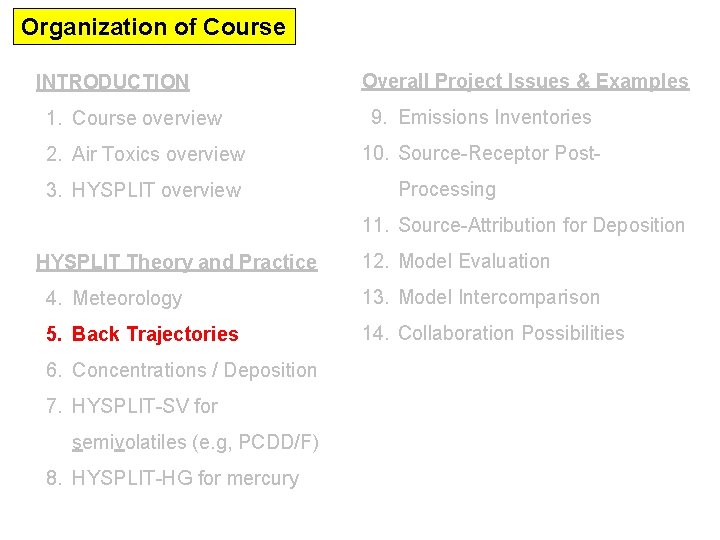
Organization of Course INTRODUCTION 1. Course overview 2. Air Toxics overview 3. HYSPLIT overview Overall Project Issues & Examples 9. Emissions Inventories 10. Source-Receptor Post. Processing 11. Source-Attribution for Deposition HYSPLIT Theory and Practice 12. Model Evaluation 4. Meteorology 13. Model Intercomparison 5. Back Trajectories 14. Collaboration Possibilities 6. Concentrations / Deposition 7. HYSPLIT-SV for semivolatiles (e. g, PCDD/F) 8. HYSPLIT-HG for mercury
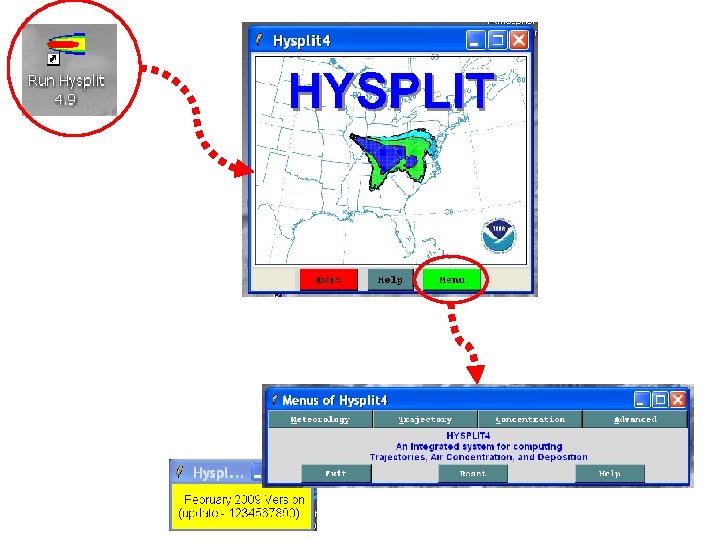
“Hands On” HYSPLIT Modeling Exercise #1 Running and Mapping a Single Back-Trajectory using the Graphical User Interface (GUI)
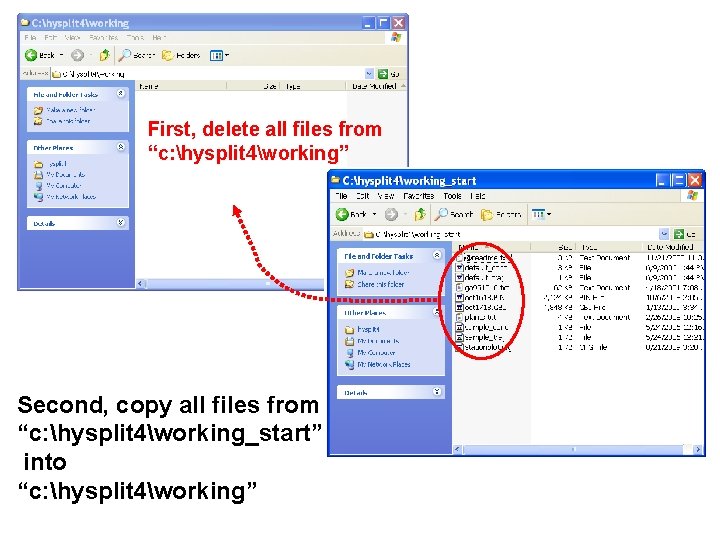
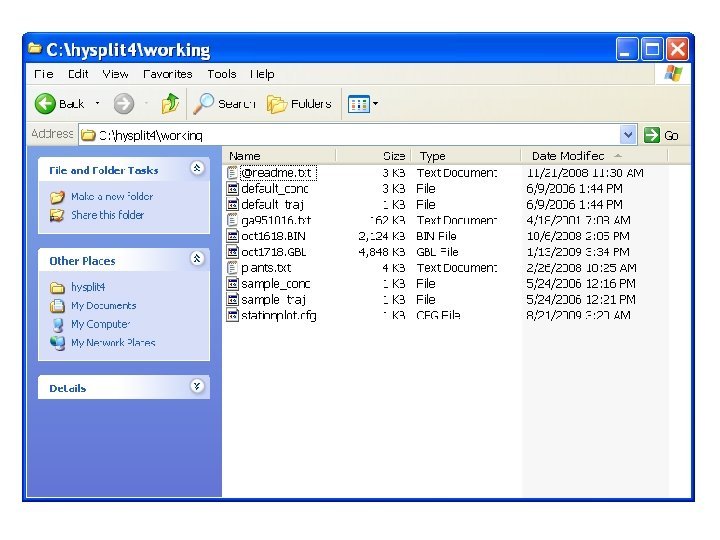
First, delete all files from “c: hysplit 4working” Second, copy all files from “c: hysplit 4working_start” into “c: hysplit 4working”
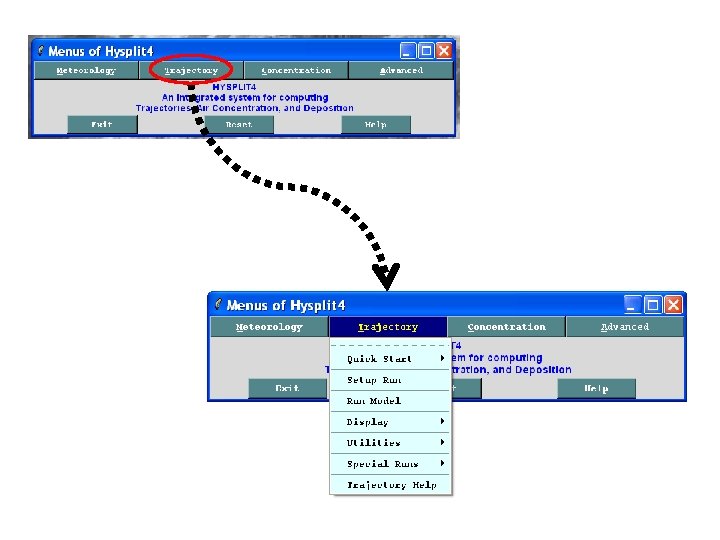
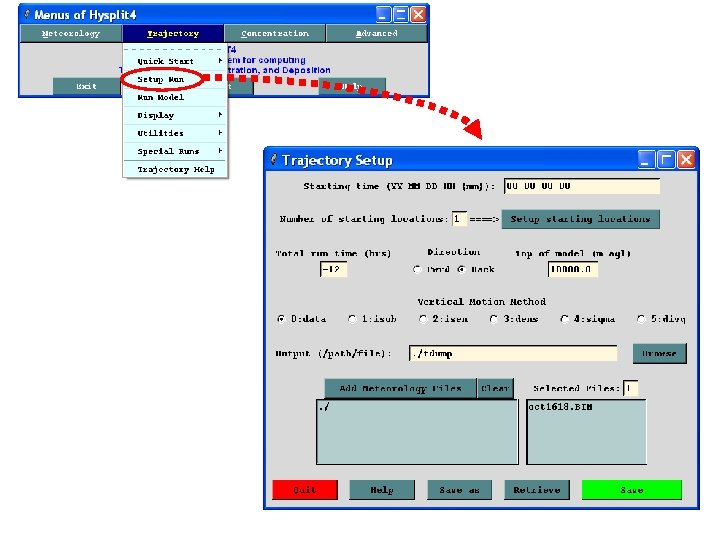
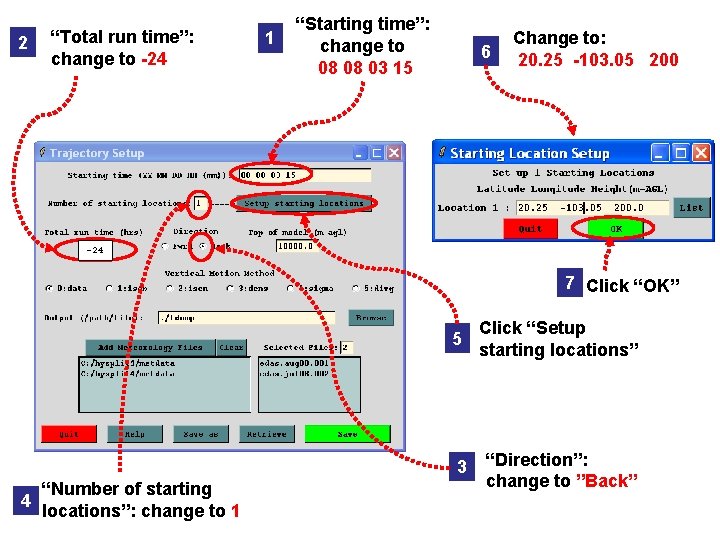
2 “Total run time”: change to -24 1 “Starting time”: change to 08 08 03 15 6 Change to: 20. 25 -103. 05 200 -24 7 Click “OK” 4 “Number of starting locations”: change to 1 5 Click “Setup starting locations” 3 “Direction”: change to ”Back”
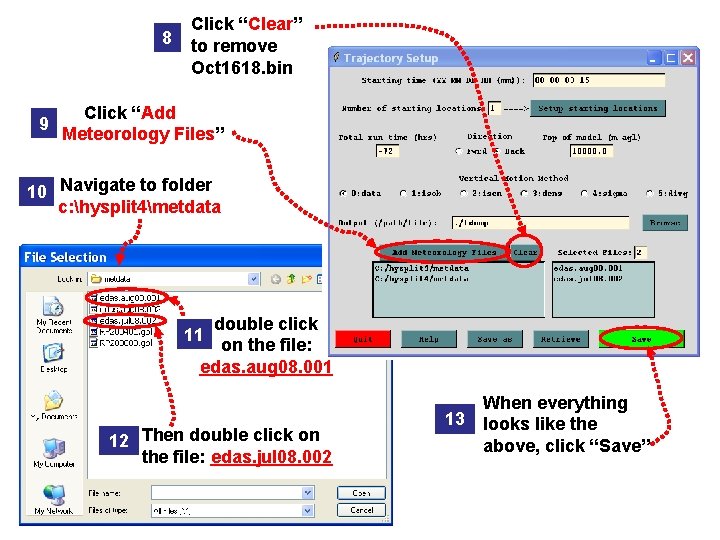
8 9 Click “Clear” to remove Oct 1618. bin Click “Add Meteorology Files” 10 Navigate to folder c: hysplit 4metdata double click on the file: edas. aug 08. 001 11 12 Then double click on the file: edas. jul 08. 002 13 When everything looks like the above, click “Save”
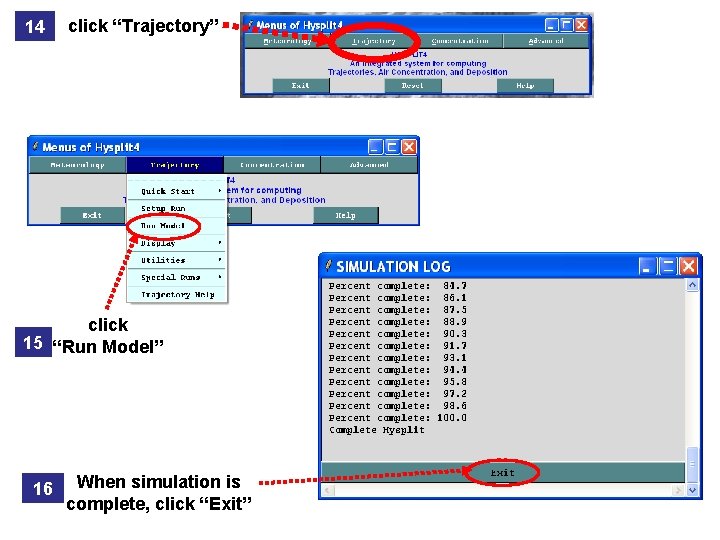
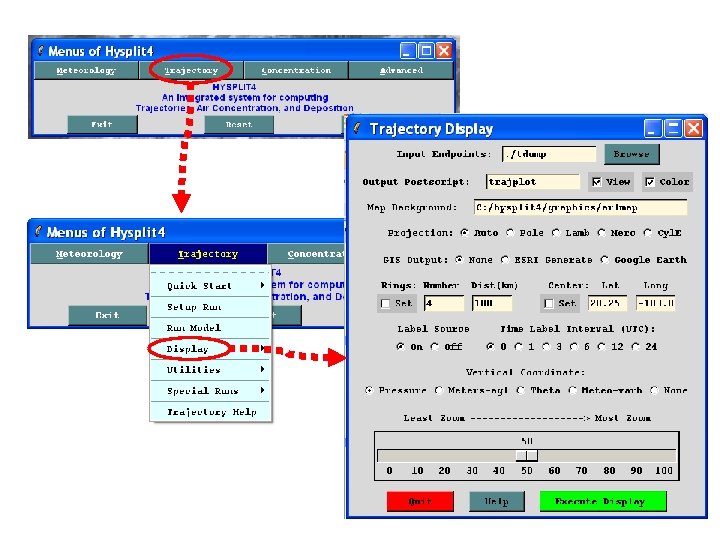
14 click “Trajectory” click 15 “Run Model” 16 When simulation is complete, click “Exit”
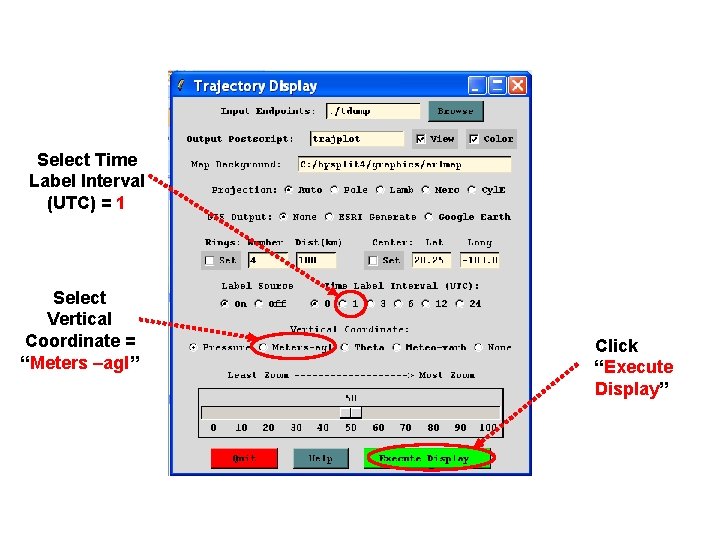
Select Time Label Interval (UTC) = 1 Select Vertical Coordinate = “Meters –agl” Click “Execute Display”
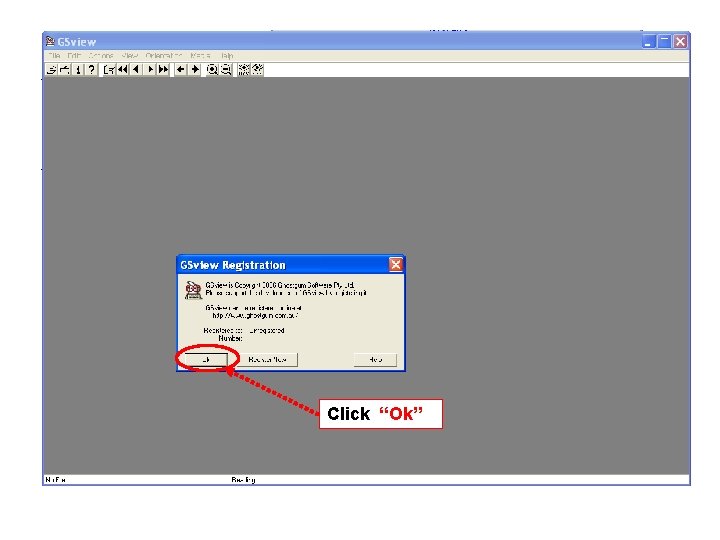
Click “Ok”
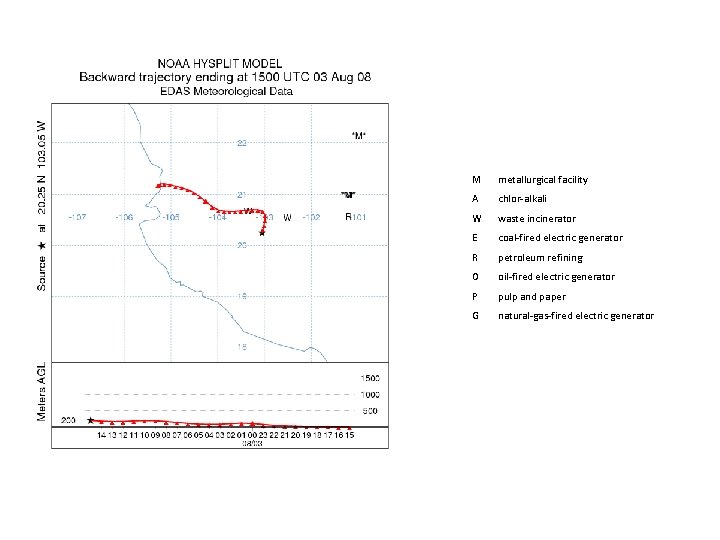
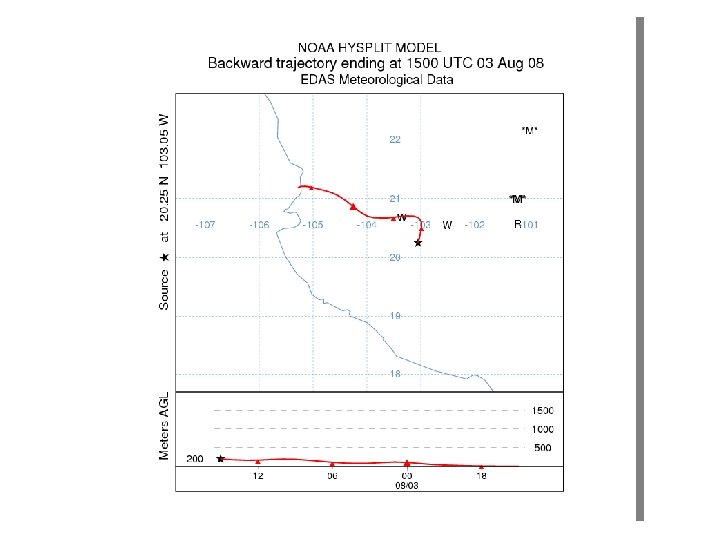
M metallurgical facility A chlor-alkali W waste incinerator E coal-fired electric generator R petroleum refining O oil-fired electric generator P pulp and paper G natural-gas-fired electric generator
If there is time, we can vary the trajectory setup (and then rerun the trajectory) and/or vary the trajectory display features and look at how the trajectory changes…
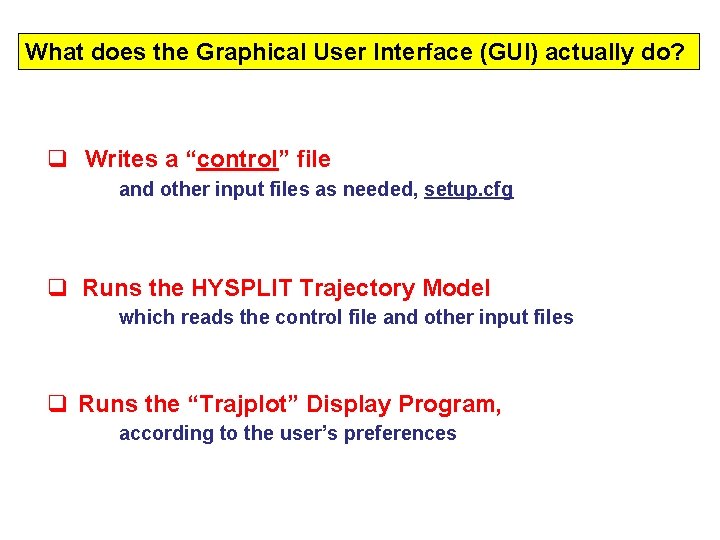
What does the Graphical User Interface (GUI) actually do? q Writes a “control” file and other input files as needed, setup. cfg q Runs the HYSPLIT Trajectory Model which reads the control file and other input files q Runs the “Trajplot” Display Program, according to the user’s preferences
“Hands On” HYSPLIT Modeling Exercise #2 Running and Mapping a Single Back-Trajectory from the DOS Command Line
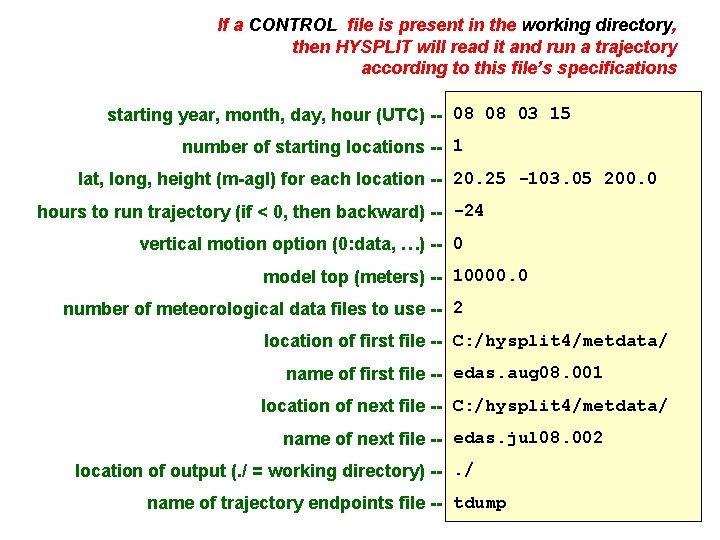
If a CONTROL file is present in the working directory, then HYSPLIT will read it and run a trajectory according to this file’s specifications starting year, month, day, hour (UTC) -- 08 08 03 15 number of starting locations -- 1 lat, long, height (m-agl) for each location -- 20. 25 -103. 05 200. 0 hours to run trajectory (if < 0, then backward) -- -24 vertical motion option (0: data, …) -- 0 model top (meters) -- 10000. 0 number of meteorological data files to use -- 2 location of first file -- C: /hysplit 4/metdata/ name of first file -- edas. aug 08. 001 location of next file -- C: /hysplit 4/metdata/ name of next file -- edas. jul 08. 002 location of output (. / = working directory) --. / name of trajectory endpoints file -- tdump
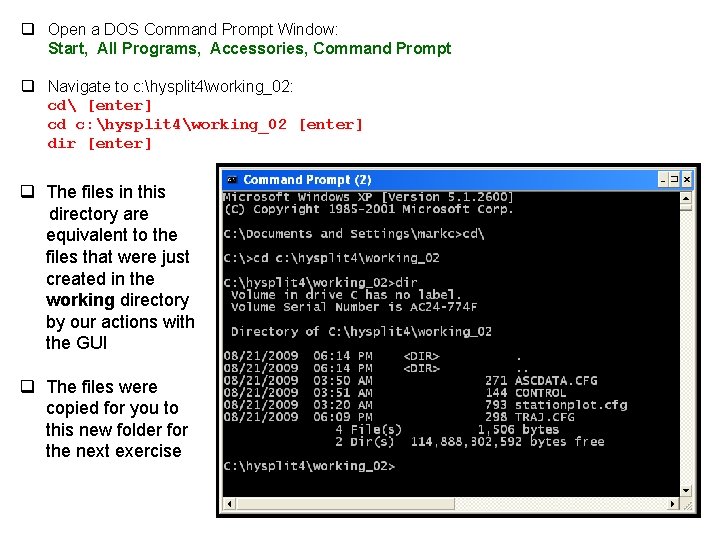
q Open a DOS Command Prompt Window: Start, All Programs, Accessories, Command Prompt q Navigate to c: hysplit 4working_02: cd [enter] cd c: hysplit 4working_02 [enter] dir [enter] q The files in this directory are equivalent to the files that were just created in the working directory by our actions with the GUI q The files were copied for you to this new folder for the next exercise
q Run the HYSPLIT Trajectory program by typing: . . exechyts_std [enter] q HYSPLIT runs! q Display files in directory: dir [enter] q There are two new files: MESSAGE tdump
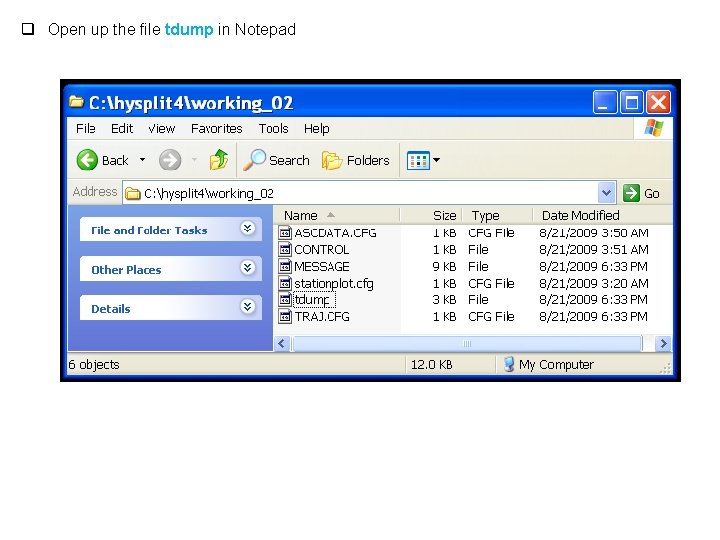
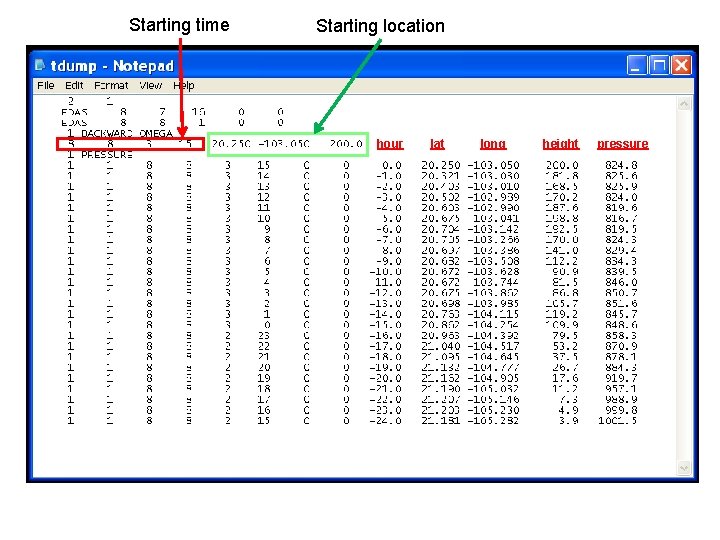
q Open up the file tdump in Notepad
Starting time Starting location hour lat long height pressure
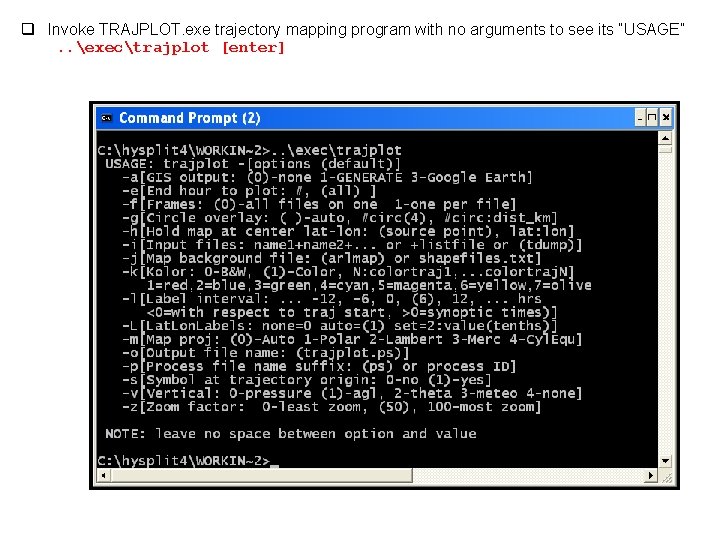
q Invoke TRAJPLOT. exe trajectory mapping program with no arguments to see its “USAGE”. . exectrajplot [enter]
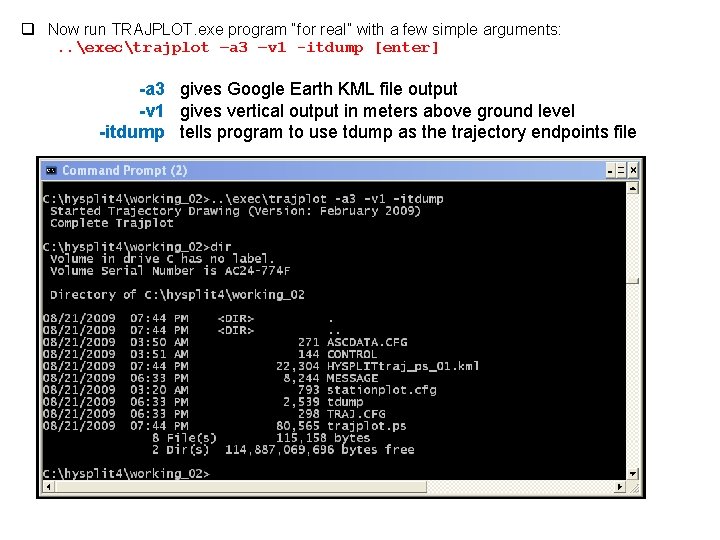
q Now run TRAJPLOT. exe program “for real” with a few simple arguments: . . exectrajplot –a 3 –v 1 -itdump [enter] -a 3 gives Google Earth KML file output -v 1 gives vertical output in meters above ground level -itdump tells program to use tdump as the trajectory endpoints file
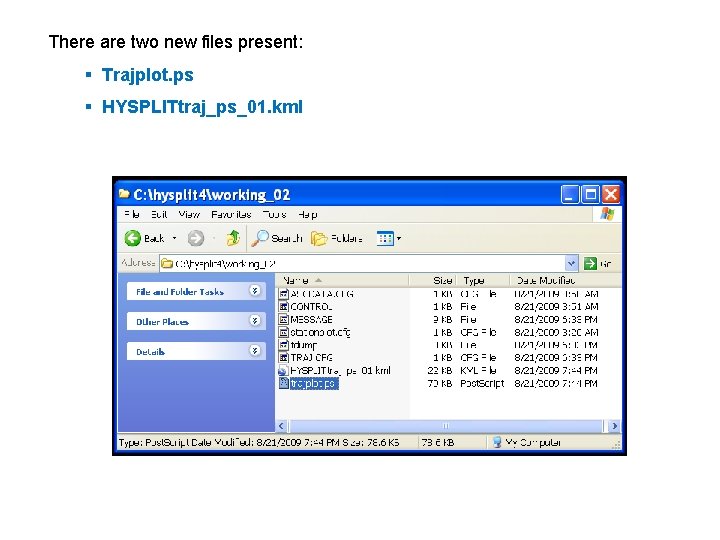
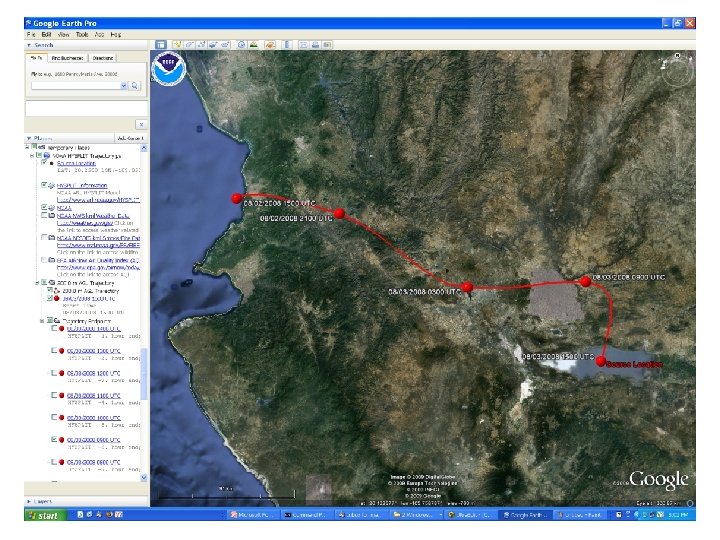
There are two new files present: § Trajplot. ps § HYSPLITtraj_ps_01. kml
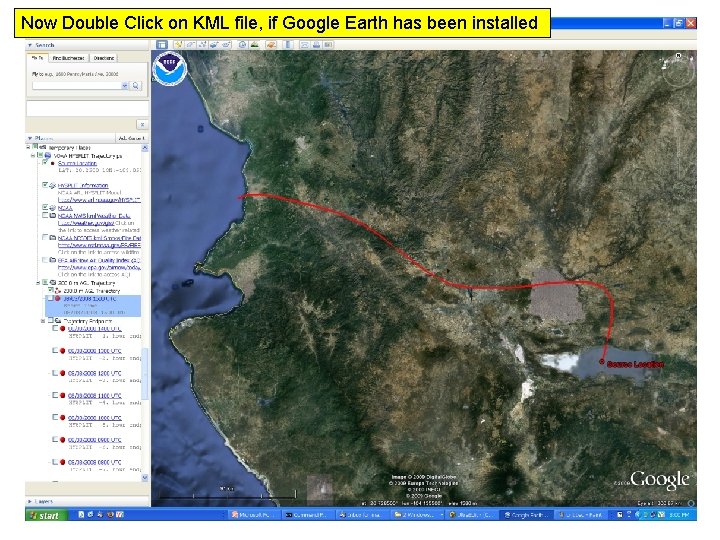
Now Double Click on KML file, if Google Earth has been installed
q You can see this can all be done from the Command Line q It can also be done using a DOS Batch File Has anyone had experience using DOS Batch Files?
“Hands On” HYSPLIT Modeling Exercise #3 Running and Mapping a Single Back-Trajectory with a DOS Batch File
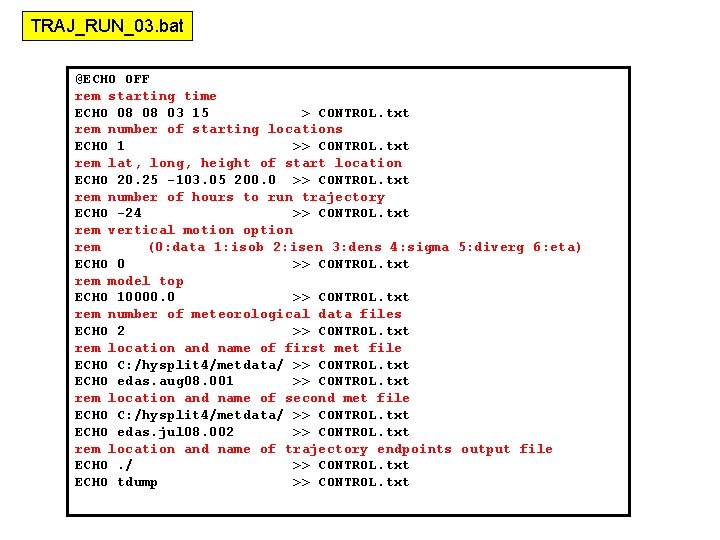
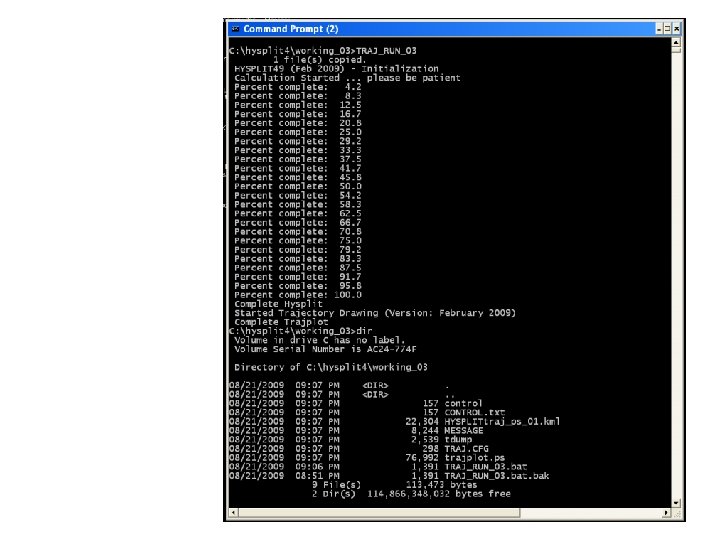
TRAJ_RUN_03. bat @ECHO OFF rem starting time ECHO 08 08 03 15 > CONTROL. txt rem number of starting locations ECHO 1 >> CONTROL. txt rem lat, long, height of start location ECHO 20. 25 -103. 05 200. 0 >> CONTROL. txt rem number of hours to run trajectory ECHO -24 >> CONTROL. txt rem vertical motion option rem (0: data 1: isob 2: isen 3: dens 4: sigma 5: diverg 6: eta) ECHO 0 >> CONTROL. txt rem model top ECHO 10000. 0 >> CONTROL. txt rem number of meteorological data files ECHO 2 >> CONTROL. txt rem location and name of first met file ECHO C: /hysplit 4/metdata/ >> CONTROL. txt ECHO edas. aug 08. 001 >> CONTROL. txt rem location and name of second met file ECHO C: /hysplit 4/metdata/ >> CONTROL. txt ECHO edas. jul 08. 002 >> CONTROL. txt rem location and name of trajectory endpoints output file ECHO. / >> CONTROL. txt ECHO tdump >> CONTROL. txt
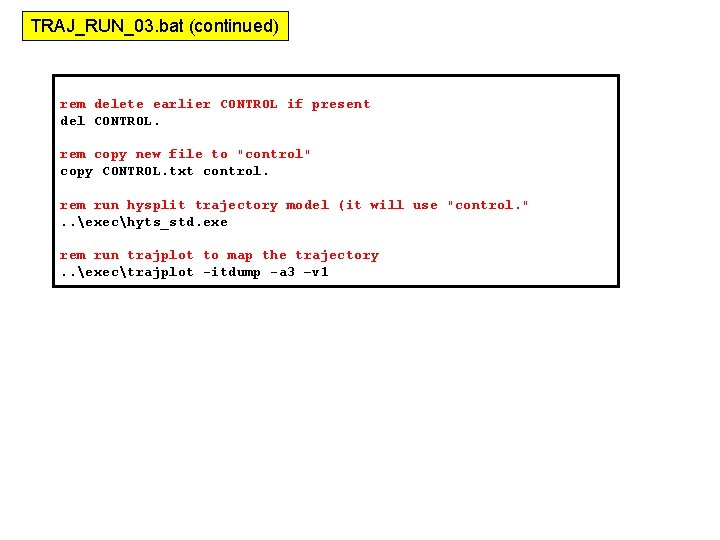
TRAJ_RUN_03. bat (continued) rem delete earlier CONTROL if present del CONTROL. rem copy new file to "control" copy CONTROL. txt control. rem run hysplit trajectory model (it will use "control. ". . exechyts_std. exe rem run trajplot to map the trajectory. . exectrajplot -itdump -a 3 –v 1
“Hands On” HYSPLIT Modeling Exercise #4 Running and Mapping a Single Back-Trajectory with a DOS Batch File with Replaceable Parameters
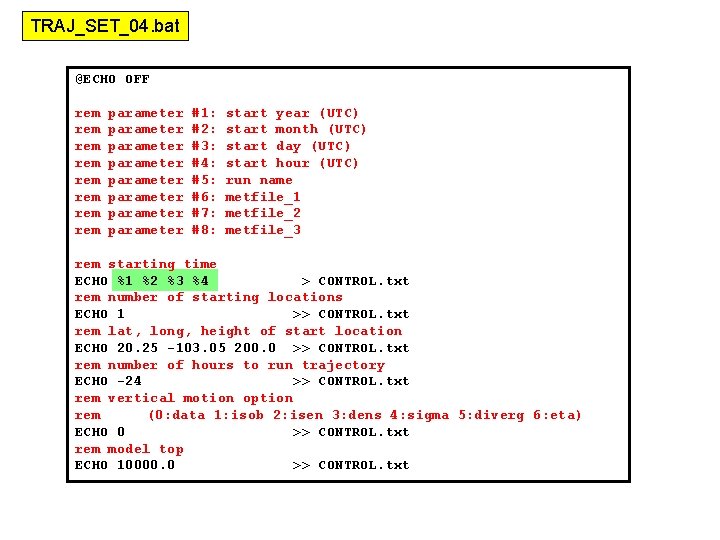
TRAJ_SET_04. bat @ECHO OFF rem rem parameter parameter #1: #2: #3: #4: #5: #6: #7: #8: start year (UTC) start month (UTC) start day (UTC) start hour (UTC) run name metfile_1 metfile_2 metfile_3 rem starting time ECHO %1 %2 %3 %4 > CONTROL. txt rem number of starting locations ECHO 1 >> CONTROL. txt rem lat, long, height of start location ECHO 20. 25 -103. 05 200. 0 >> CONTROL. txt rem number of hours to run trajectory ECHO -24 >> CONTROL. txt rem vertical motion option rem (0: data 1: isob 2: isen 3: dens 4: sigma 5: diverg 6: eta) ECHO 0 >> CONTROL. txt rem model top ECHO 10000. 0 >> CONTROL. txt
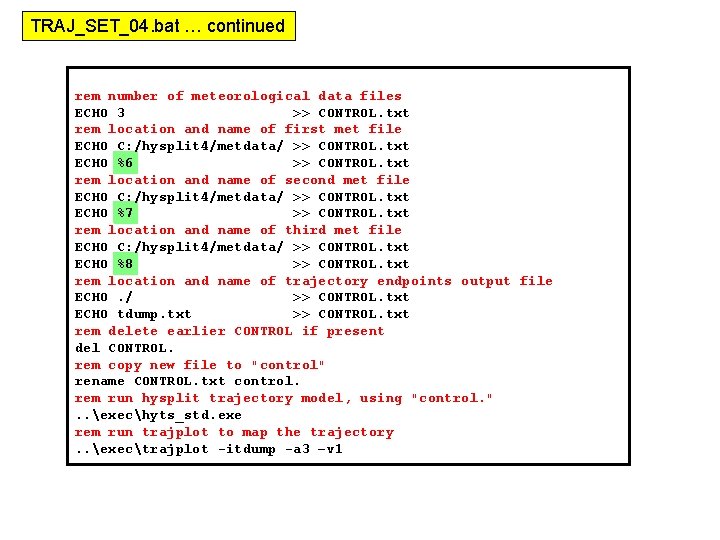
TRAJ_SET_04. bat … continued rem number of meteorological data files ECHO 3 >> CONTROL. txt rem location and name of first met file ECHO C: /hysplit 4/metdata/ >> CONTROL. txt ECHO %6 >> CONTROL. txt rem location and name of second met file ECHO C: /hysplit 4/metdata/ >> CONTROL. txt ECHO %7 >> CONTROL. txt rem location and name of third met file ECHO C: /hysplit 4/metdata/ >> CONTROL. txt ECHO %8 >> CONTROL. txt rem location and name of trajectory endpoints output file ECHO. / >> CONTROL. txt ECHO tdump. txt >> CONTROL. txt rem delete earlier CONTROL if present del CONTROL. rem copy new file to "control" rename CONTROL. txt control. rem run hysplit trajectory model, using "control. ". . exechyts_std. exe rem run trajplot to map the trajectory. . exectrajplot -itdump -a 3 –v 1
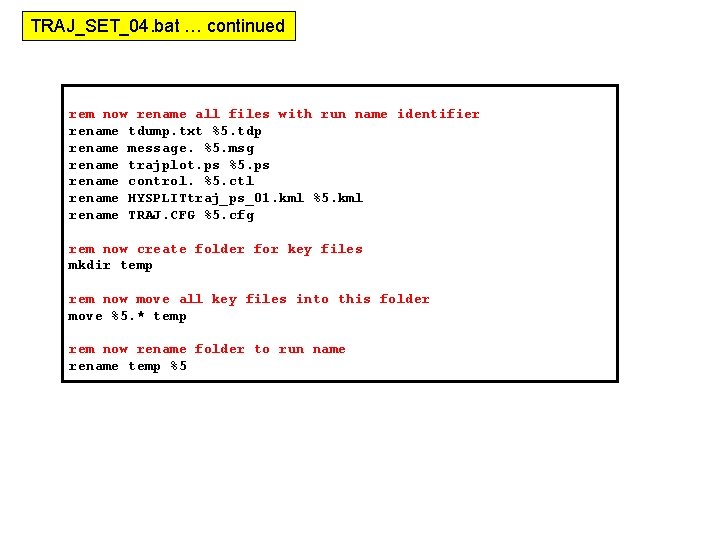
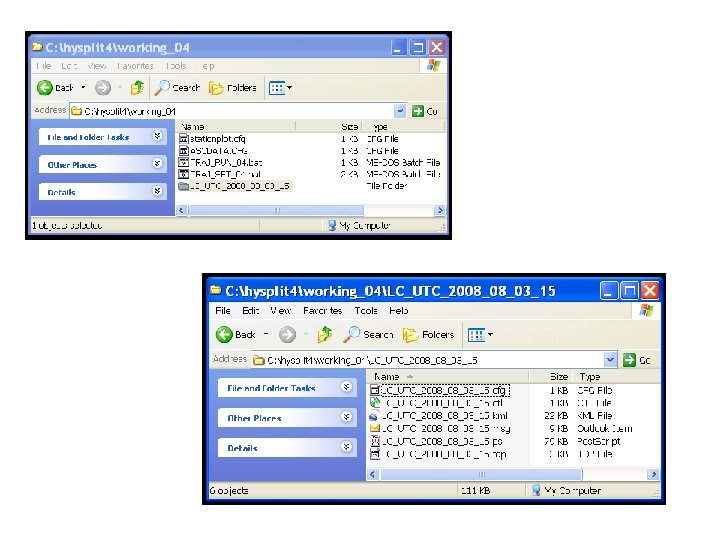
TRAJ_SET_04. bat … continued rem now rename all files with run name identifier rename tdump. txt %5. tdp rename message. %5. msg rename trajplot. ps %5. ps rename control. %5. ctl rename HYSPLITtraj_ps_01. kml %5. kml rename TRAJ. CFG %5. cfg rem now create folder for key files mkdir temp rem now move all key files into this folder move %5. * temp rem now rename folder to run name rename temp %5
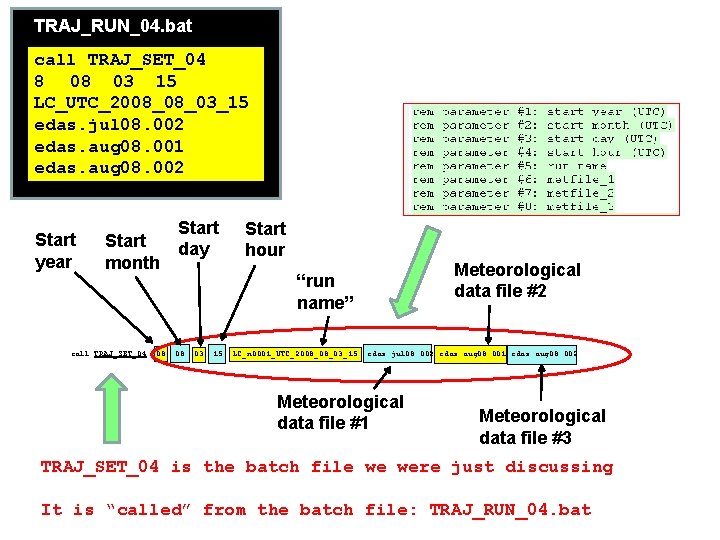
TRAJ_RUN_04. bat call TRAJ_SET_04 8 08 03 15 LC_UTC_2008_08_03_15 edas. jul 08. 002 edas. aug 08. 001 edas. aug 08. 002 Start year Start month call TRAJ_SET_04 08 Start day Start hour Meteorological data file #2 “run name” 08 03 15 LC_n 0001_UTC_2008_08_03_15 edas. jul 08. 002 edas. aug 08. 001 edas. aug 08. 002 Meteorological data file #1 Meteorological data file #3 TRAJ_SET_04 is the batch file we were just discussing It is “called” from the batch file: TRAJ_RUN_04. bat
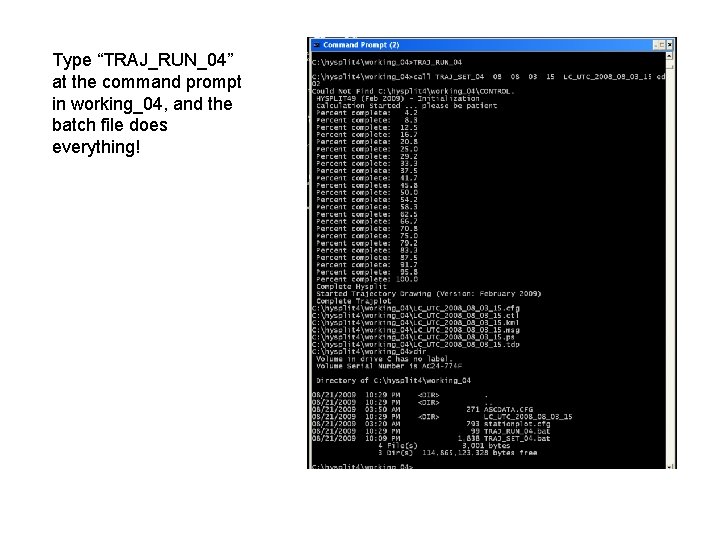
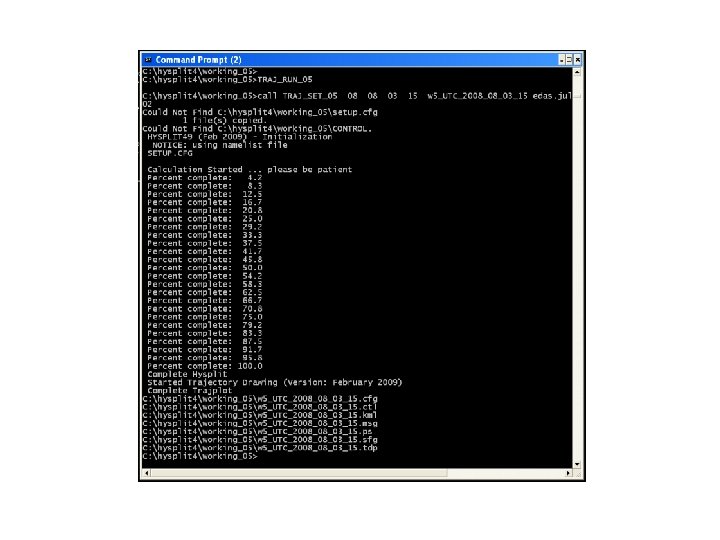
Type “TRAJ_RUN_04” at the command prompt in working_04, and the batch file does everything!
Measurement of ambient air concentrations
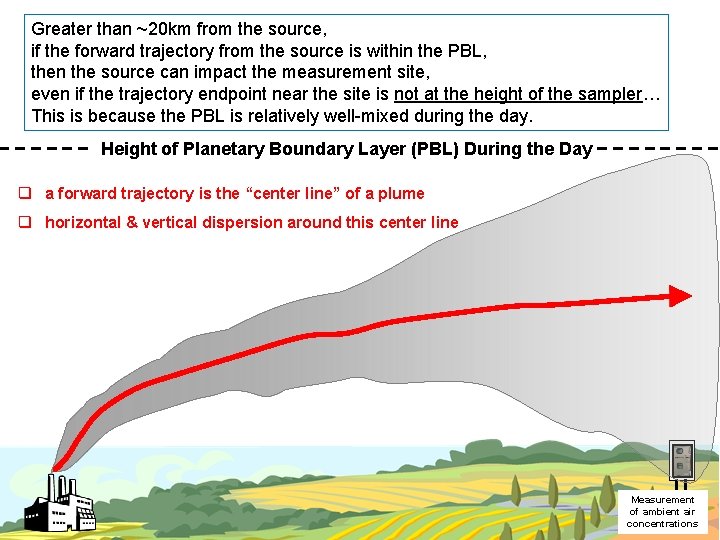
Greater than ~20 km from the source, if the forward trajectory from the source is within the PBL, then the source can impact the measurement site, even if the trajectory endpoint near the site is not at the height of the sampler… This is because the PBL is relatively well-mixed during the day. Height of Planetary Boundary Layer (PBL) During the Day q a forward trajectory is the “center line” of a plume q horizontal & vertical dispersion around this center line Measurement of ambient air concentrations
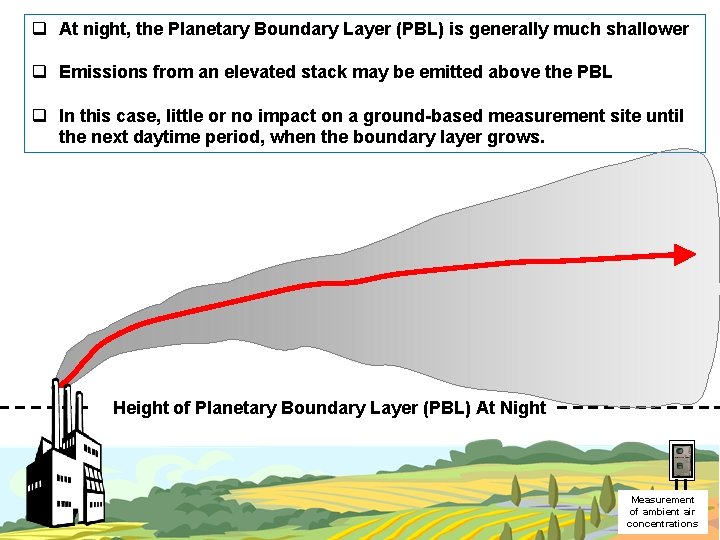
q At night, the Planetary Boundary Layer (PBL) is generally much shallower q Emissions from an elevated stack may be emitted above the PBL q In this case, little or no impact on a ground-based measurement site until the next daytime period, when the boundary layer grows. Height of Planetary Boundary Layer (PBL) At Night Measurement of ambient air concentrations
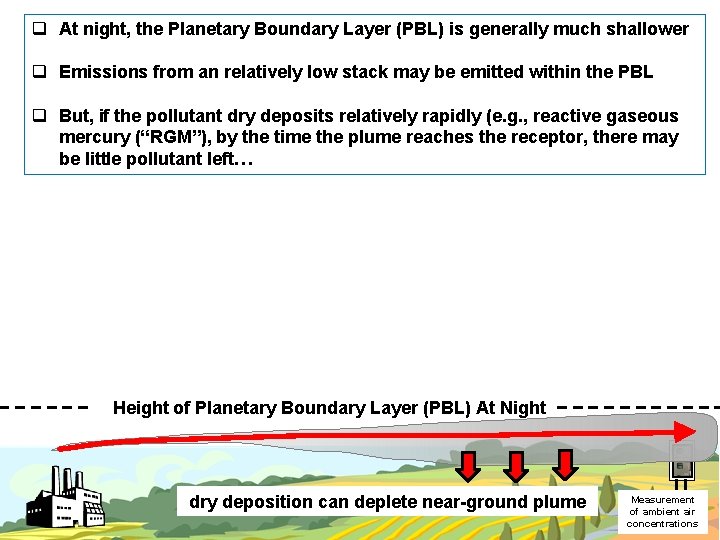
q At night, the Planetary Boundary Layer (PBL) is generally much shallower q Emissions from an relatively low stack may be emitted within the PBL q But, if the pollutant dry deposits relatively rapidly (e. g. , reactive gaseous mercury (“RGM”), by the time the plume reaches the receptor, there may be little pollutant left… Height of Planetary Boundary Layer (PBL) At Night dry deposition can deplete near-ground plume Measurement of ambient air concentrations
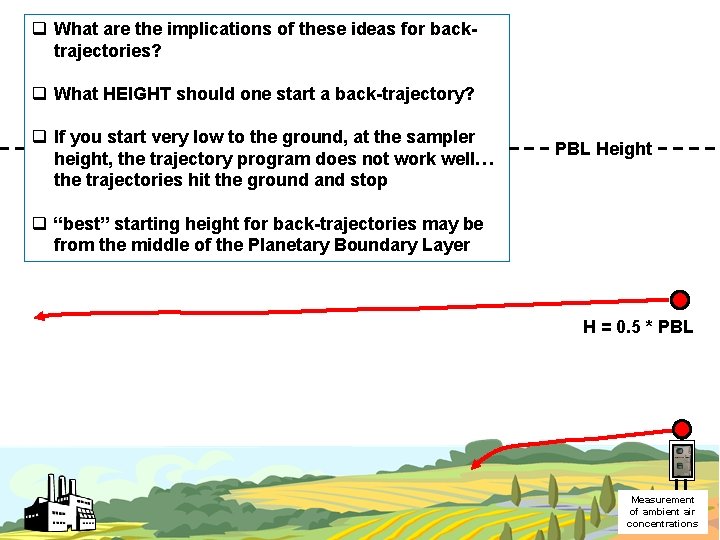
q What are the implications of these ideas for backtrajectories? q What HEIGHT should one start a back-trajectory? q If you start very low to the ground, at the sampler height, the trajectory program does not work well… the trajectories hit the ground and stop PBL Height q “best” starting height for back-trajectories may be from the middle of the Planetary Boundary Layer H = 0. 5 * PBL Measurement of ambient air concentrations
“Hands On” HYSPLIT Modeling Exercise #5 Running and Mapping a Multiple Back-Trajectories with a DOS Batch File with Replaceable Parameters with variations in the SETUP. CFG file, e. g. , specifying starting height as fraction of the Planetary Boundary Layer
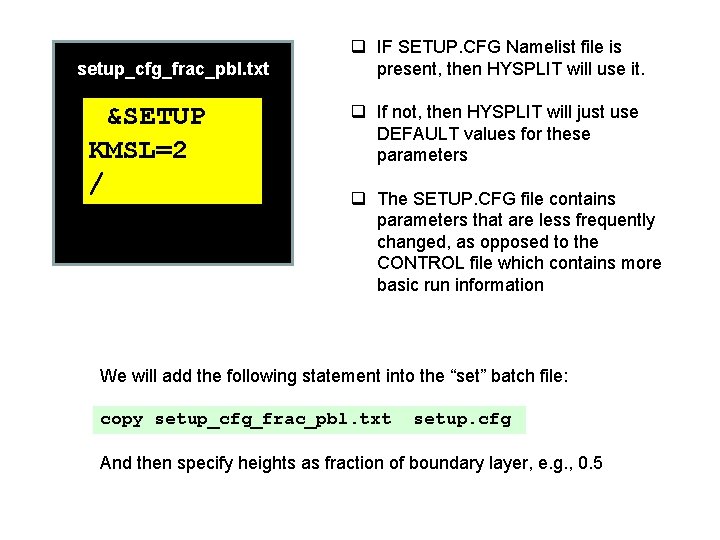
setup_cfg_frac_pbl. txt &SETUP KMSL=2 / q IF SETUP. CFG Namelist file is present, then HYSPLIT will use it. q If not, then HYSPLIT will just use DEFAULT values for these parameters q The SETUP. CFG file contains parameters that are less frequently changed, as opposed to the CONTROL file which contains more basic run information We will add the following statement into the “set” batch file: copy setup_cfg_frac_pbl. txt setup. cfg And then specify heights as fraction of boundary layer, e. g. , 0. 5
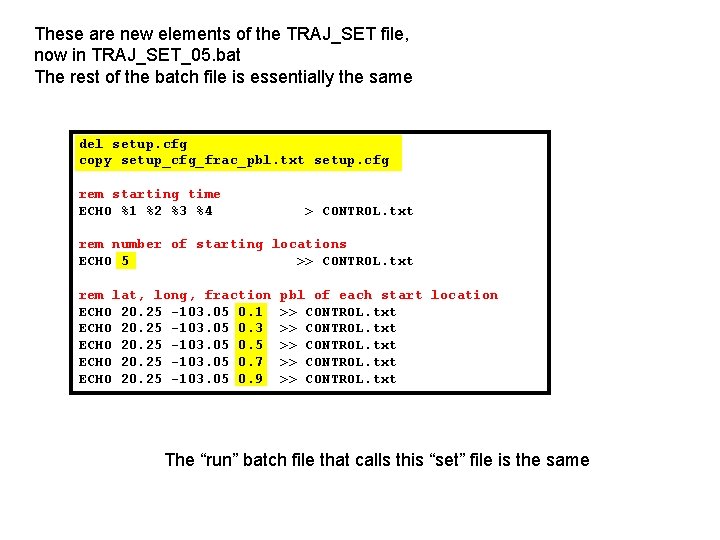
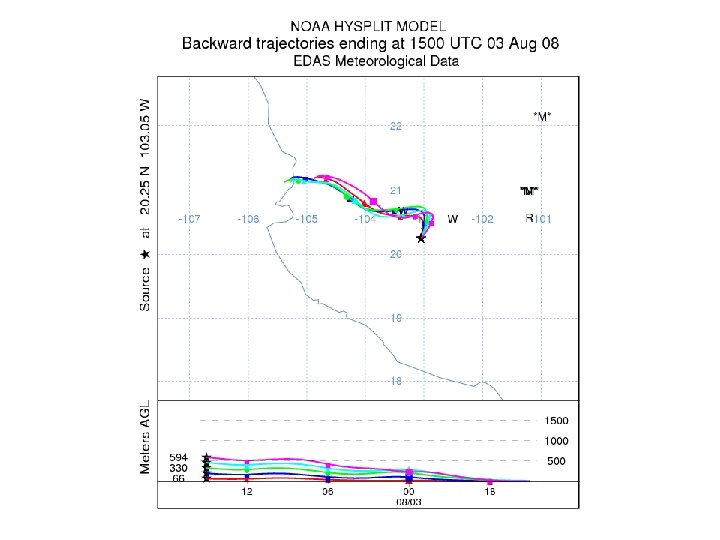
These are new elements of the TRAJ_SET file, now in TRAJ_SET_05. bat The rest of the batch file is essentially the same del setup. cfg copy setup_cfg_frac_pbl. txt setup. cfg rem starting time ECHO %1 %2 %3 %4 > CONTROL. txt rem number of starting locations ECHO 5 >> CONTROL. txt rem lat, long, fraction ECHO 20. 25 -103. 05 0. 1 ECHO 20. 25 -103. 05 0. 3 ECHO 20. 25 -103. 05 0. 5 ECHO 20. 25 -103. 05 0. 7 ECHO 20. 25 -103. 05 0. 9 pbl of each start location >> CONTROL. txt The “run” batch file that calls this “set” file is the same
“Hands On” HYSPLIT Modeling Exercise #6 Running and Mapping a Multiple Back-Trajectories with a DOS Batch File with Replaceable Parameters with variations in the SETUP. CFG file, e. g. , specifying starting height as fraction of the Planetary Boundary Layer, with a range of starting times (in this example, each hour of one day)
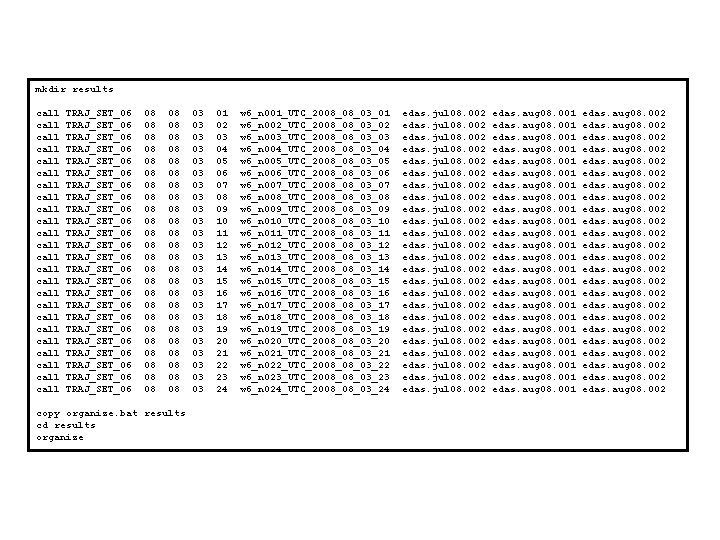
mkdir results call call call call call call TRAJ_SET_06 TRAJ_SET_06 TRAJ_SET_06 TRAJ_SET_06 TRAJ_SET_06 TRAJ_SET_06 08 08 08 08 08 08 08 08 08 08 08 08 copy organize. bat results cd results organize 03 03 03 03 03 03 01 02 03 04 05 06 07 08 09 10 11 12 13 14 15 16 17 18 19 20 21 22 23 24 w 6_n 001_UTC_2008_08_03_01 w 6_n 002_UTC_2008_08_03_02 w 6_n 003_UTC_2008_08_03_03 w 6_n 004_UTC_2008_08_03_04 w 6_n 005_UTC_2008_08_03_05 w 6_n 006_UTC_2008_08_03_06 w 6_n 007_UTC_2008_08_03_07 w 6_n 008_UTC_2008_08_03_08 w 6_n 009_UTC_2008_08_03_09 w 6_n 010_UTC_2008_08_03_10 w 6_n 011_UTC_2008_08_03_11 w 6_n 012_UTC_2008_08_03_12 w 6_n 013_UTC_2008_08_03_13 w 6_n 014_UTC_2008_08_03_14 w 6_n 015_UTC_2008_08_03_15 w 6_n 016_UTC_2008_08_03_16 w 6_n 017_UTC_2008_08_03_17 w 6_n 018_UTC_2008_08_03_18 w 6_n 019_UTC_2008_08_03_19 w 6_n 020_UTC_2008_08_03_20 w 6_n 021_UTC_2008_08_03_21 w 6_n 022_UTC_2008_08_03_22 w 6_n 023_UTC_2008_08_03_23 w 6_n 024_UTC_2008_08_03_24 edas. jul 08. 002 edas. jul 08. 002 edas. aug 08. 001 edas. aug 08. 001 edas. aug 08. 002 edas. aug 08. 002 edas. aug 08. 002
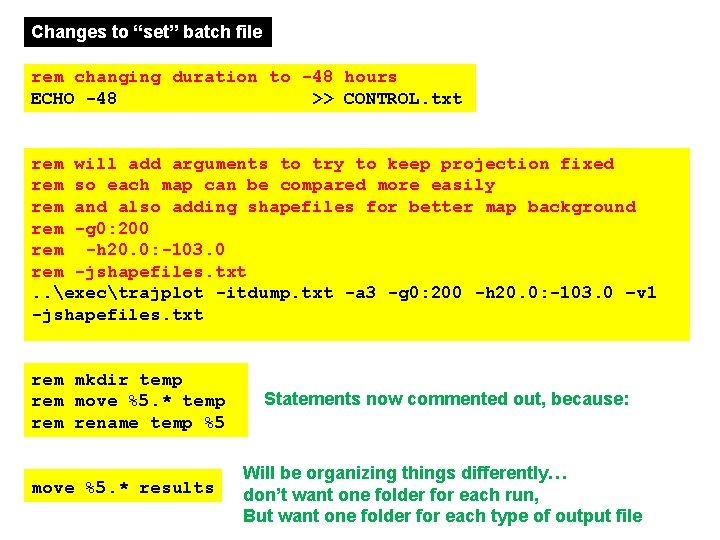
Changes to “set” batch file rem changing duration to -48 hours ECHO -48 >> CONTROL. txt rem will add arguments to try to keep projection fixed rem so each map can be compared more easily rem and also adding shapefiles for better map background rem -g 0: 200 rem -h 20. 0: -103. 0 rem -jshapefiles. txt. . exectrajplot -itdump. txt -a 3 -g 0: 200 -h 20. 0: -103. 0 –v 1 -jshapefiles. txt rem mkdir temp rem move %5. * temp rem rename temp %5 move %5. * results Statements now commented out, because: Will be organizing things differently… don’t want one folder for each run, But want one folder for each type of output file
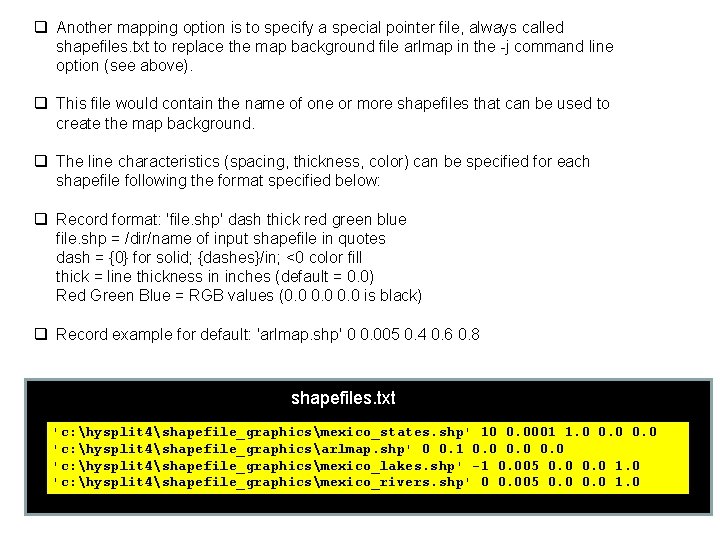
q Another mapping option is to specify a special pointer file, always called shapefiles. txt to replace the map background file arlmap in the -j command line option (see above). q This file would contain the name of one or more shapefiles that can be used to create the map background. q The line characteristics (spacing, thickness, color) can be specified for each shapefile following the format specified below: q Record format: 'file. shp' dash thick red green blue file. shp = /dir/name of input shapefile in quotes dash = {0} for solid; {dashes}/in; <0 color fill thick = line thickness in inches (default = 0. 0) Red Green Blue = RGB values (0. 0 is black) q Record example for default: 'arlmap. shp' 0 0. 005 0. 4 0. 6 0. 8 shapefiles. txt 'c: hysplit 4shapefile_graphicsmexico_states. shp' 10 0. 0001 1. 0 0. 0 'c: hysplit 4shapefile_graphicsarlmap. shp' 0 0. 1 0. 0 'c: hysplit 4shapefile_graphicsmexico_lakes. shp' -1 0. 005 0. 0 1. 0 'c: hysplit 4shapefile_graphicsmexico_rivers. shp' 0 0. 005 0. 0 1. 0
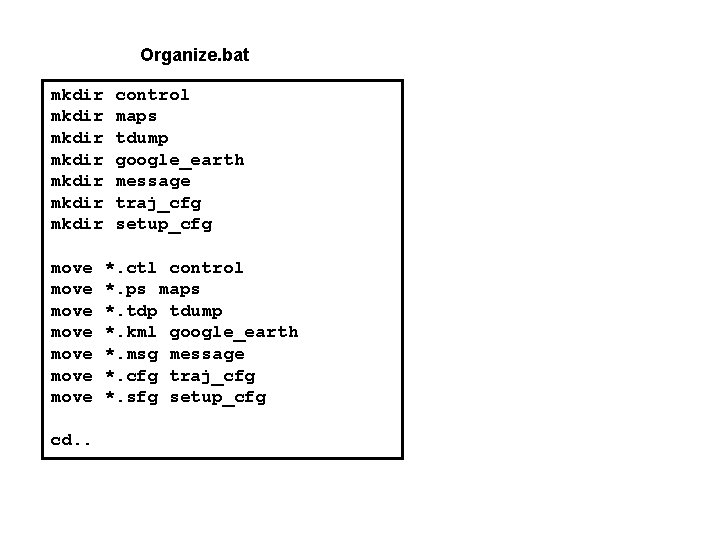
Organize. bat mkdir mkdir move move cd. . control maps tdump google_earth message traj_cfg setup_cfg *. ctl control *. ps maps *. tdp tdump *. kml google_earth *. msg message *. cfg traj_cfg *. sfg setup_cfg
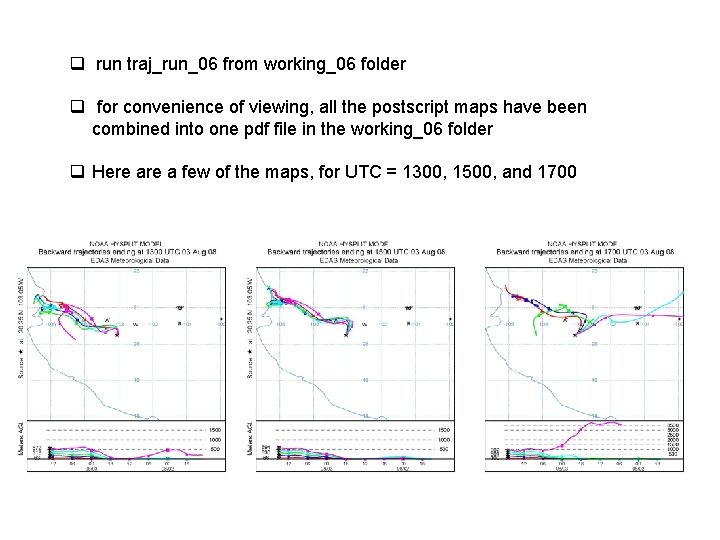
q run traj_run_06 from working_06 folder q for convenience of viewing, all the postscript maps have been combined into one pdf file in the working_06 folder q Here a few of the maps, for UTC = 1300, 1500, and 1700
Some Additional Trajectory Examples
Episode Analysis
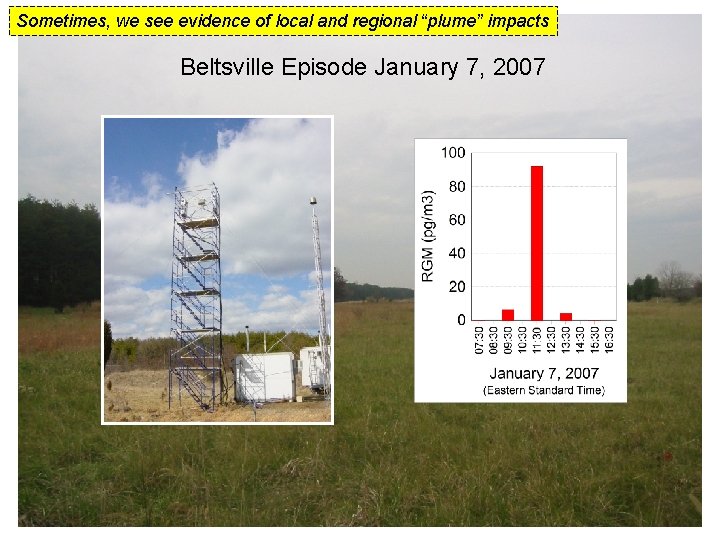
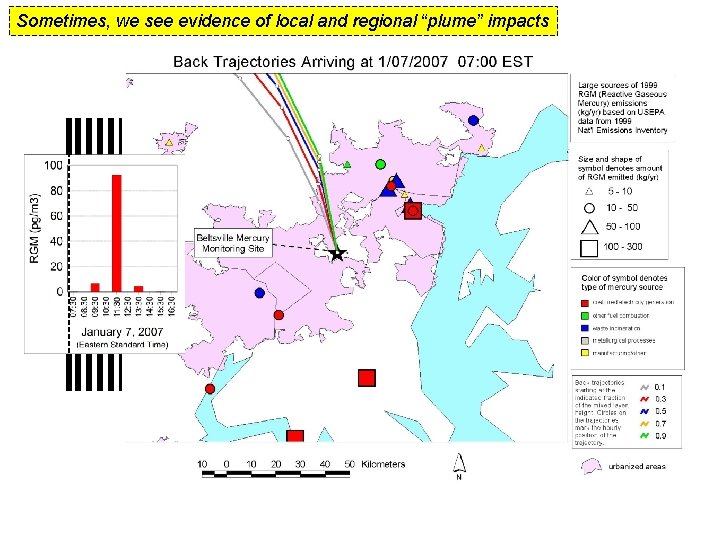
Sometimes, we see evidence of local and regional “plume” impacts Beltsville Episode January 7, 2007
Sometimes, we see evidence of local and regional “plume” impacts
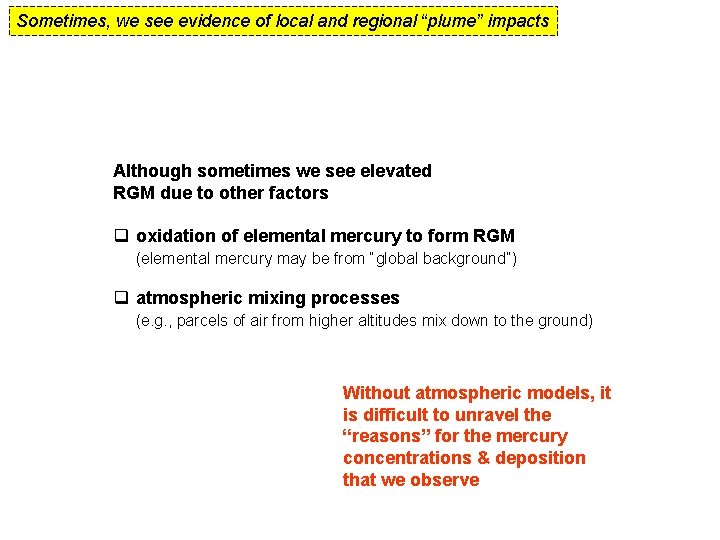
Sometimes, we see evidence of local and regional “plume” impacts Although sometimes we see elevated RGM due to other factors q oxidation of elemental mercury to form RGM (elemental mercury may be from “global background”) q atmospheric mixing processes (e. g. , parcels of air from higher altitudes mix down to the ground) Without atmospheric models, it is difficult to unravel the “reasons” for the mercury concentrations & deposition that we observe
Gridded Frequency Trajectory Statistics
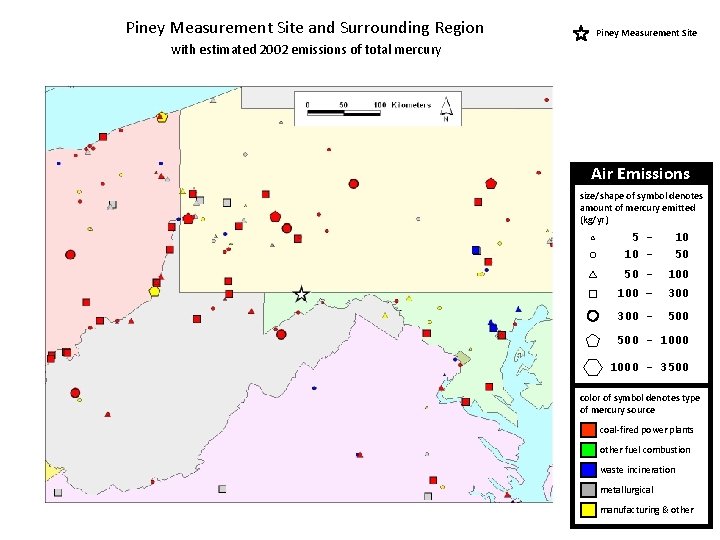
Piney Measurement Site and Surrounding Region Piney Measurement Site with estimated 2002 emissions of total mercury Air Emissions size/shape of symbol denotes amount of mercury emitted (kg/yr) 5 10 - 10 50 50 - 100 – 300 - 500 - 1000 - 3500 color of symbol denotes type of mercury source coal-fired power plants other fuel combustion waste incineration metallurgical manufacturing & other
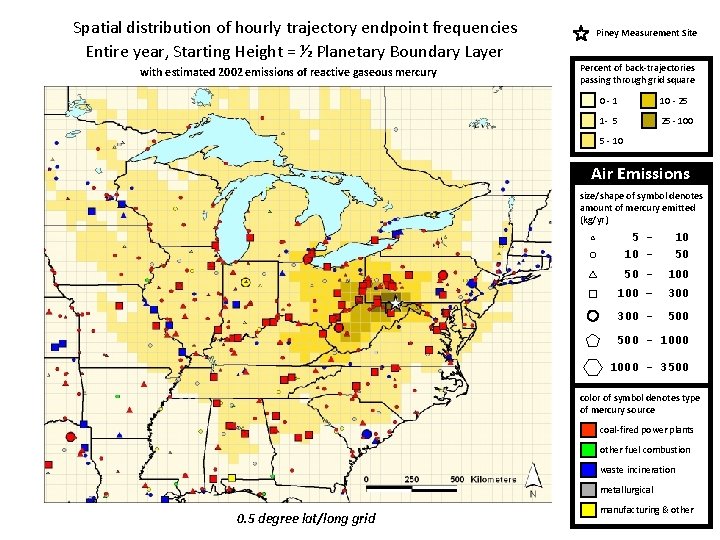
Spatial distribution of hourly trajectory endpoint frequencies Entire year, Starting Height = ½ Planetary Boundary Layer with estimated 2002 emissions of reactive gaseous mercury Piney Measurement Site Percent of back-trajectories passing through grid square 0 -1 10 - 25 1 - 5 25 - 100 5 - 10 Air Emissions size/shape of symbol denotes amount of mercury emitted (kg/yr) 5 10 - 10 50 50 - 100 – 300 - 500 - 1000 - 3500 color of symbol denotes type of mercury source coal-fired power plants other fuel combustion waste incineration metallurgical 0. 5 degree lat/long grid manufacturing & other
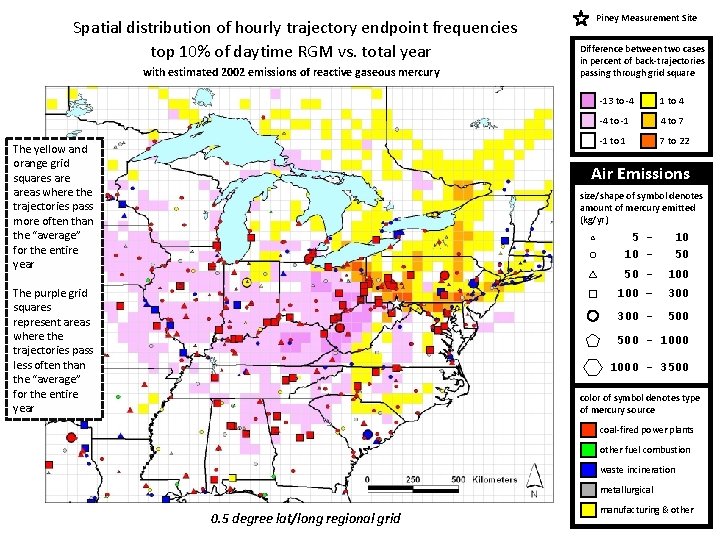
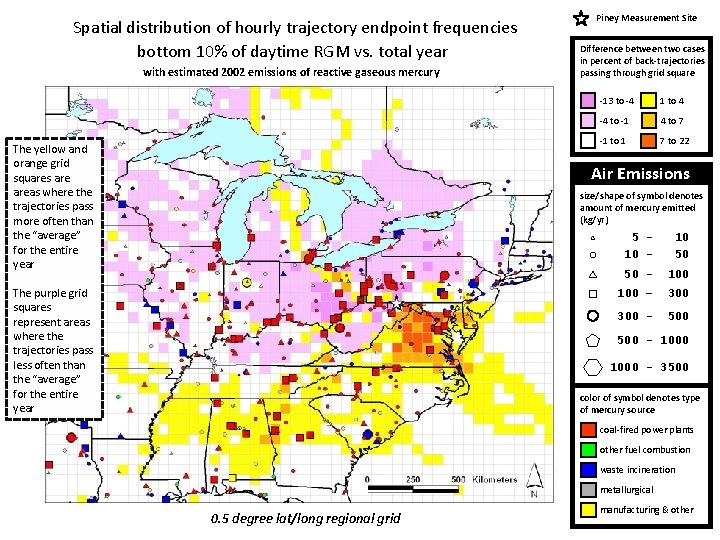
Same 0. 5 degree grid, but now look at differences… Trajectory Endpoint Frequency Graphics showing the difference in grid frequencies between the trajectories corresponding to a given set of measurements and those for the entire year 0. 5 degree lat/long regional grid Starting height for all trajectories in this group = ½ planetary boundary layer height
Spatial distribution of hourly trajectory endpoint frequencies top 10% of daytime RGM vs. total year with estimated 2002 emissions of reactive gaseous mercury The yellow and orange grid squares areas where the trajectories pass more often than the “average” for the entire year Piney Measurement Site Difference between two cases in percent of back-trajectories passing through grid square -13 to -4 1 to 4 -4 to -1 4 to 7 -1 to 1 7 to 22 Air Emissions size/shape of symbol denotes amount of mercury emitted (kg/yr) The purple grid squares represent areas where the trajectories pass less often than the “average” for the entire year 5 10 - 10 50 50 - 100 – 300 - 500 - 1000 - 3500 color of symbol denotes type of mercury source coal-fired power plants other fuel combustion waste incineration metallurgical 0. 5 degree lat/long regional grid manufacturing & other
Spatial distribution of hourly trajectory endpoint frequencies bottom 10% of daytime RGM vs. total year with estimated 2002 emissions of reactive gaseous mercury The yellow and orange grid squares areas where the trajectories pass more often than the “average” for the entire year Piney Measurement Site Difference between two cases in percent of back-trajectories passing through grid square -13 to -4 1 to 4 -4 to -1 4 to 7 -1 to 1 7 to 22 Air Emissions size/shape of symbol denotes amount of mercury emitted (kg/yr) The purple grid squares represent areas where the trajectories pass less often than the “average” for the entire year 5 10 - 10 50 50 - 100 – 300 - 500 - 1000 - 3500 color of symbol denotes type of mercury source coal-fired power plants other fuel combustion waste incineration metallurgical 0. 5 degree lat/long regional grid manufacturing & other
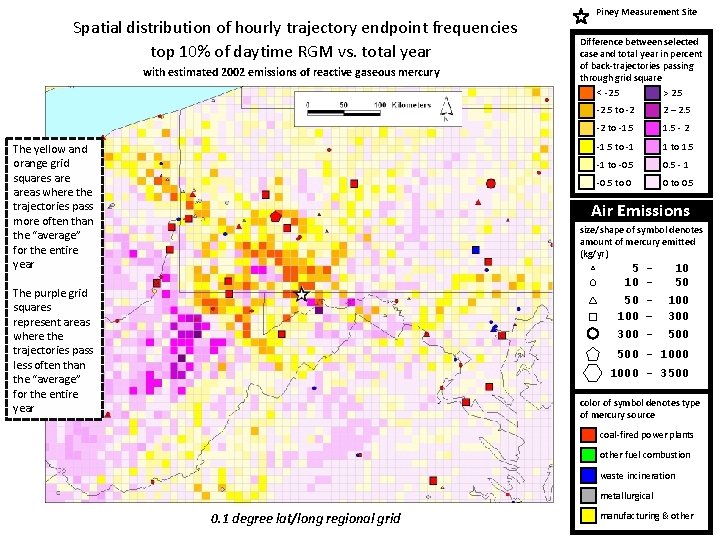
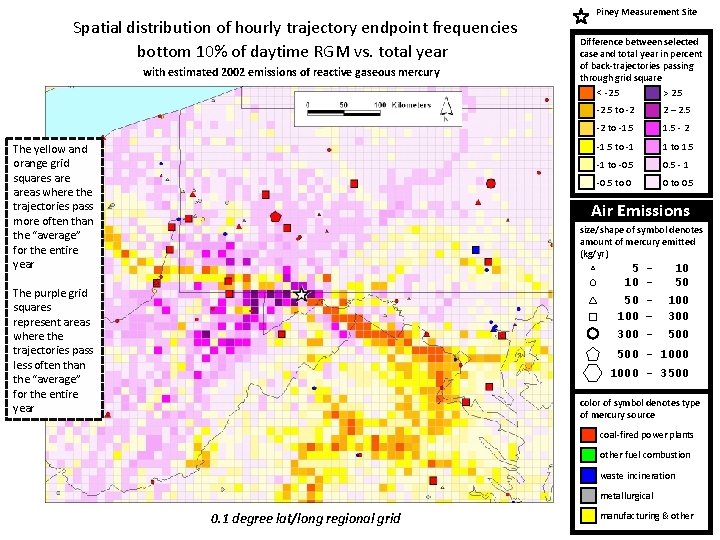
Now look at differences with 0. 1 degree grid… Trajectory Endpoint Frequency Graphics showing the difference in grid frequencies between the trajectories corresponding to a given set of measurements and those for the entire year 0. 1 degree lat/long regional grid Starting height for all trajectories in this group = ½ planetary boundary layer height
Spatial distribution of hourly trajectory endpoint frequencies top 10% of daytime RGM vs. total year with estimated 2002 emissions of reactive gaseous mercury The yellow and orange grid squares areas where the trajectories pass more often than the “average” for the entire year Piney Measurement Site Difference between selected case and total year in percent of back-trajectories passing through grid square < -2. 5 > 2. 5 -2. 5 to -2 2 – 2. 5 -2 to -1. 5 - 2 -1. 5 to -1 1 to 1. 5 -1 to -0. 5 - 1 -0. 5 to 0 0 to 0. 5 Air Emissions size/shape of symbol denotes amount of mercury emitted (kg/yr) The purple grid squares represent areas where the trajectories pass less often than the “average” for the entire year 5 10 - 10 50 50 100 – 300 - 100 300 500 - 1000 - 3500 color of symbol denotes type of mercury source coal-fired power plants other fuel combustion waste incineration metallurgical 0. 1 degree lat/long regional grid manufacturing & other
Spatial distribution of hourly trajectory endpoint frequencies bottom 10% of daytime RGM vs. total year with estimated 2002 emissions of reactive gaseous mercury The yellow and orange grid squares areas where the trajectories pass more often than the “average” for the entire year Piney Measurement Site Difference between selected case and total year in percent of back-trajectories passing through grid square < -2. 5 > 2. 5 -2. 5 to -2 2 – 2. 5 -2 to -1. 5 - 2 -1. 5 to -1 1 to 1. 5 -1 to -0. 5 - 1 -0. 5 to 0 0 to 0. 5 Air Emissions size/shape of symbol denotes amount of mercury emitted (kg/yr) The purple grid squares represent areas where the trajectories pass less often than the “average” for the entire year 5 10 - 10 50 50 100 – 300 - 100 300 500 - 1000 - 3500 color of symbol denotes type of mercury source coal-fired power plants other fuel combustion waste incineration metallurgical 0. 1 degree lat/long regional grid manufacturing & other