Digital Image Processing Chapter 3 Image Enhancement in

![Basic Concepts Spatial domain enhancement methods can be generalized as g(x, y)=T[f(x, y)] f(x,](https://slidetodoc.com/presentation_image/38bc360505f287066e6da620f7a4aae8/image-5.jpg "Basic Concepts Spatial domain enhancement methods can be generalized as g(x, y)=T[f(x, y)] f(x,")
![Basic Concepts g(x, y) = T [f(x, y)] Pixel/point operation: Neighborhood of size 1](https://slidetodoc.com/presentation_image/38bc360505f287066e6da620f7a4aae8/image-7.jpg "Basic Concepts g(x, y) = T [f(x, y)] Pixel/point operation: Neighborhood of size 1")
- Slides: 107
Digital Image Processing Chapter # 3 Image Enhancement in Spatial Domain
ALI JAVED Lecturer SOFTWARE ENGINEERING DEPARTMENT U. E. T TAXILA Email: : alijaved@uettaxila. edu. pk Office Room #: : 7 § § These slides have been created form the slides of Hassan Bhatti, Lecturer(U. E. T TAXILA, PAKISTAN) and Wanasanan Thongsongkrit, Asstt. Prof. (Chiang Mai University, THAILAND )
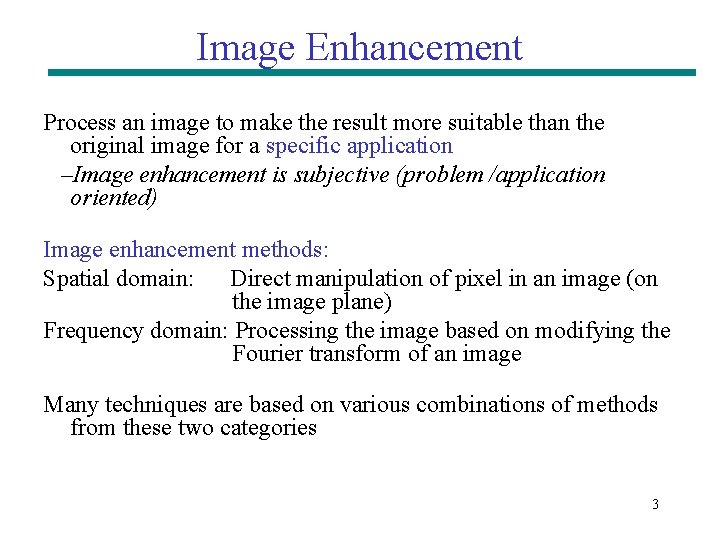
Image Enhancement Process an image to make the result more suitable than the original image for a specific application –Image enhancement is subjective (problem /application oriented) Image enhancement methods: Spatial domain: Direct manipulation of pixel in an image (on the image plane) Frequency domain: Processing the image based on modifying the Fourier transform of an image Many techniques are based on various combinations of methods from these two categories 3
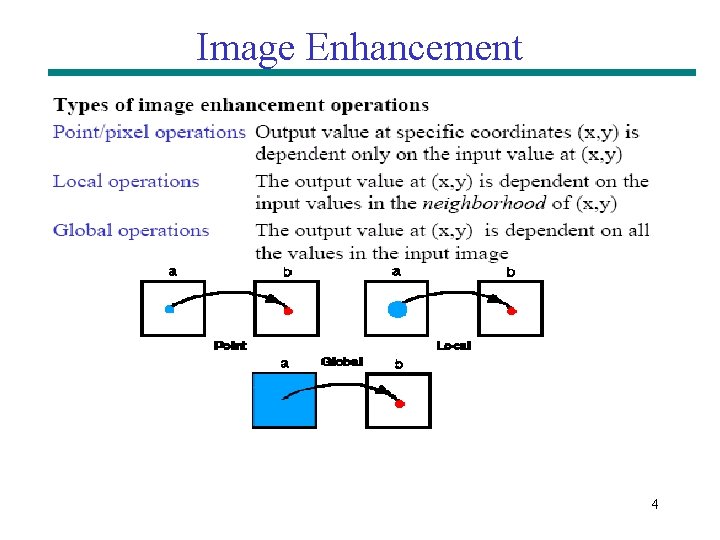
Image Enhancement 4
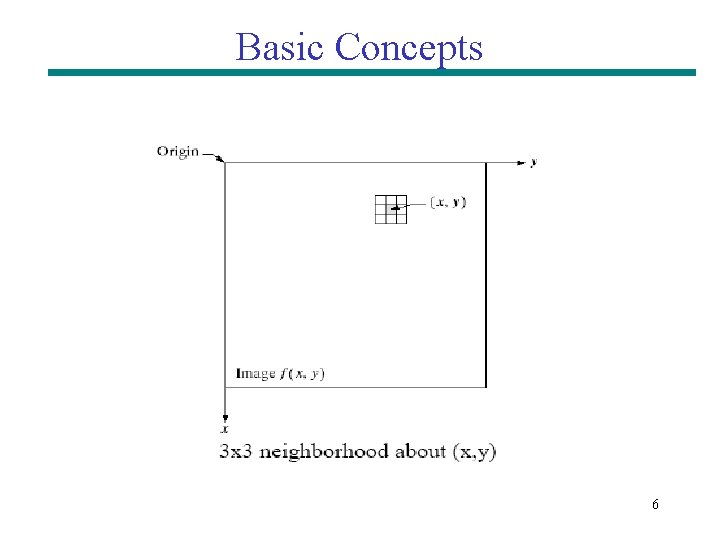
Basic Concepts Spatial domain enhancement methods can be generalized as g(x, y)=T[f(x, y)] f(x, y): input image g(x, y): processed (output) image T[*]: an operator on f (or a set of input images), defined over neighborhood of (x, y) Neighborhood about (x, y): a square or rectangular sub-image area centered at (x, y) 5
Basic Concepts 6
Basic Concepts g(x, y) = T [f(x, y)] Pixel/point operation: Neighborhood of size 1 x 1: g depends only on f at (x, y) T: a gray-level/intensity transformation/mapping function Let r = f(x, y) s = g(x, y) r and s represent gray levels of f and g at (x, y) Then s = T(r) Local operations: g depends on the predefined number of neighbors of f at (x, y) Implemented by using mask processing or filtering Masks (filters, windows, kernels, templates) : a small (e. g. 3× 3) 2 -D array, in which the values of the coefficients determine the nature of the process 7
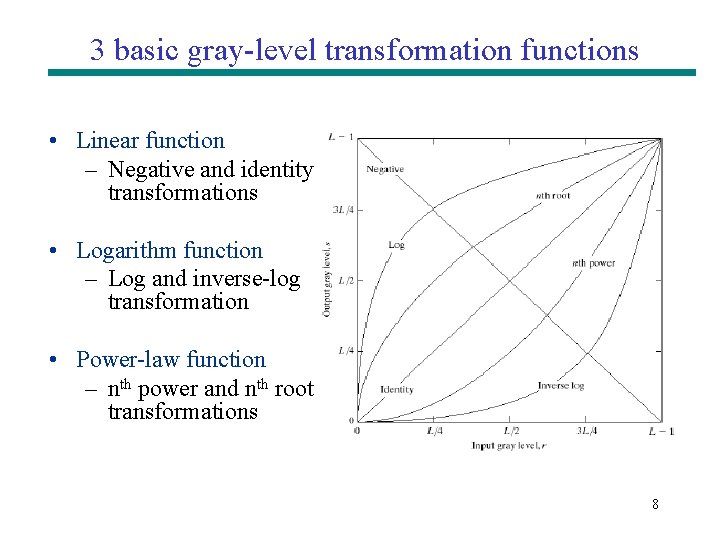
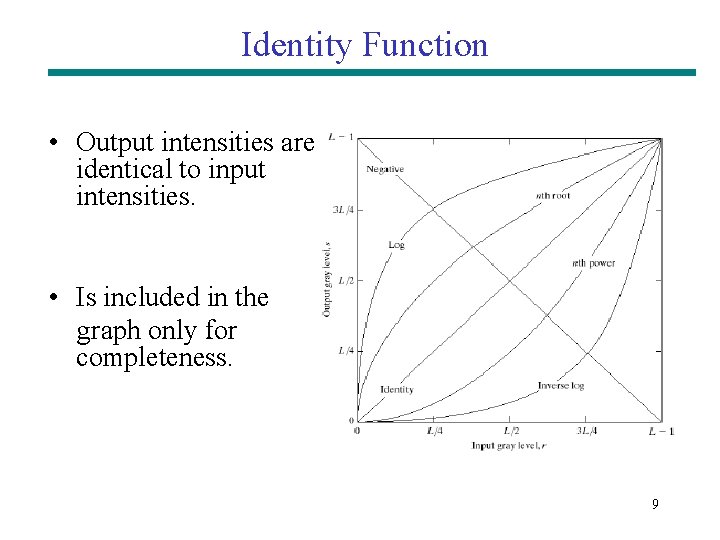
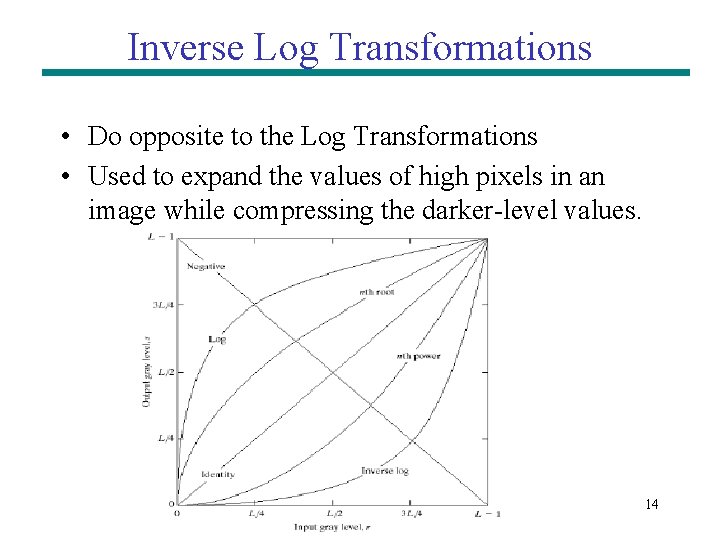
3 basic gray-level transformation functions • Linear function – Negative and identity transformations • Logarithm function – Log and inverse-log transformation • Power-law function – nth power and nth root transformations 8
Identity Function • Output intensities are identical to input intensities. • Is included in the graph only for completeness. 9
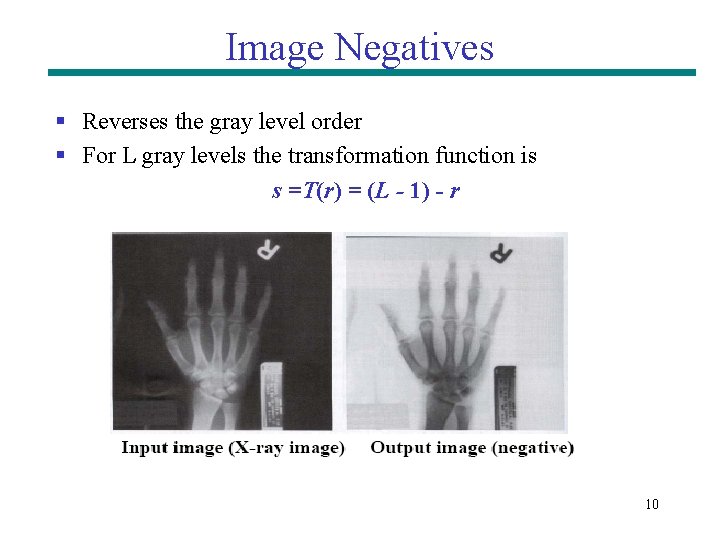
Image Negatives § Reverses the gray level order § For L gray levels the transformation function is s =T(r) = (L - 1) - r 10
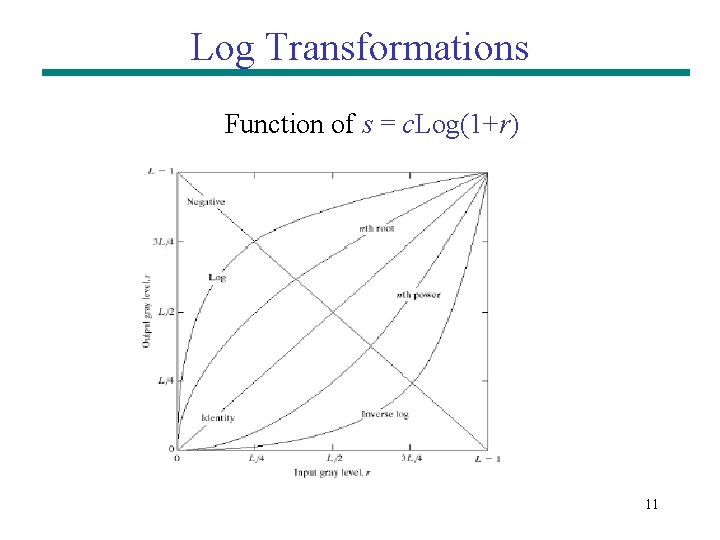
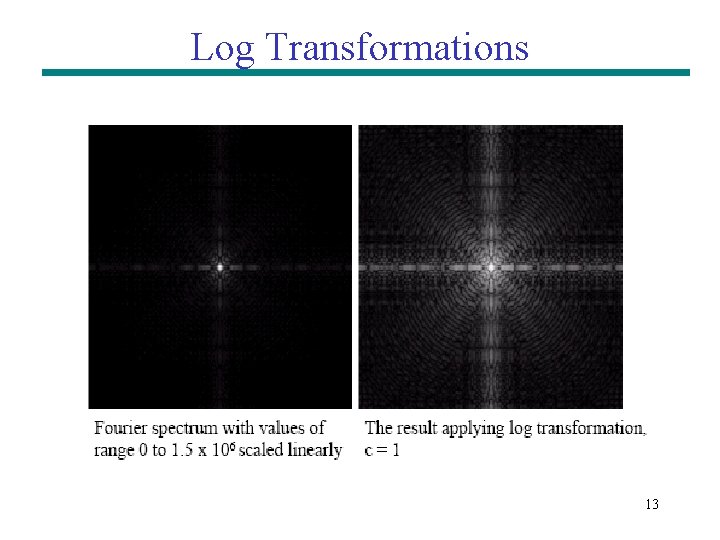
Log Transformations Function of s = c. Log(1+r) 11
Log Transformations Properties of log transformations –For lower amplitudes of input image the range of gray levels is expanded –For higher amplitudes of input image the range of gray levels is compressed Application: – This transformation is suitable for the case when the dynamic range of a processed image far exceeds the capability of the display device (e. g. display of the Fourier spectrum of an image) – Also called “dynamic-range compression / expansion” 12
Log Transformations 13
Inverse Log Transformations • Do opposite to the Log Transformations • Used to expand the values of high pixels in an image while compressing the darker-level values. 14
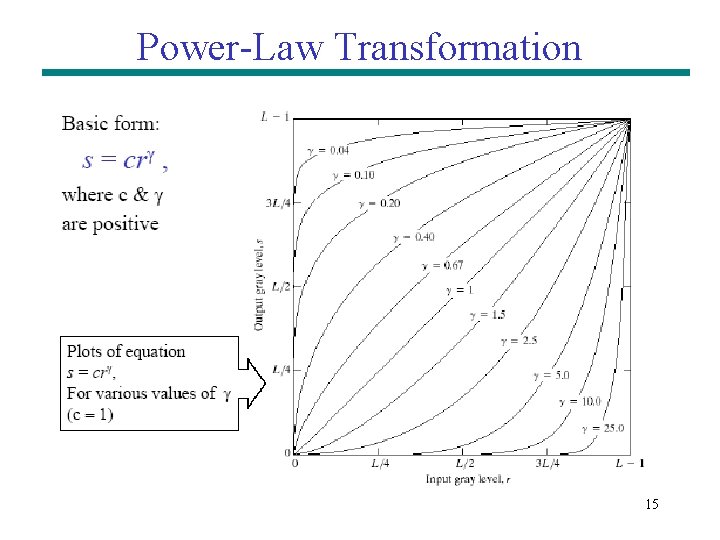
Power-Law Transformation 15
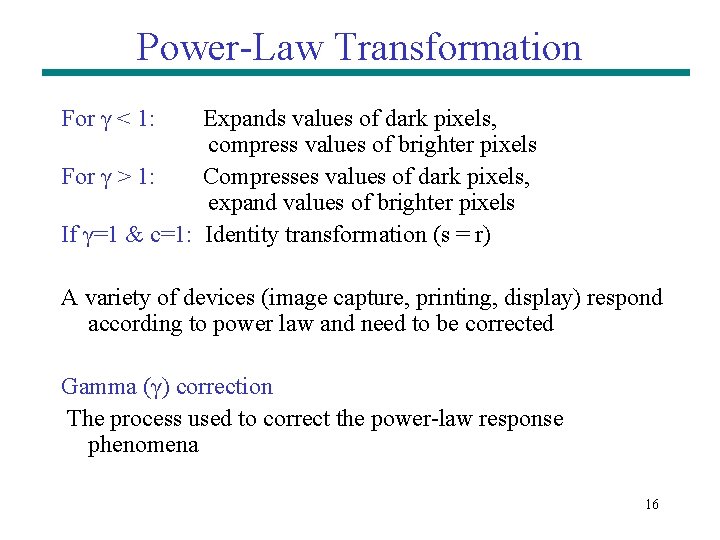
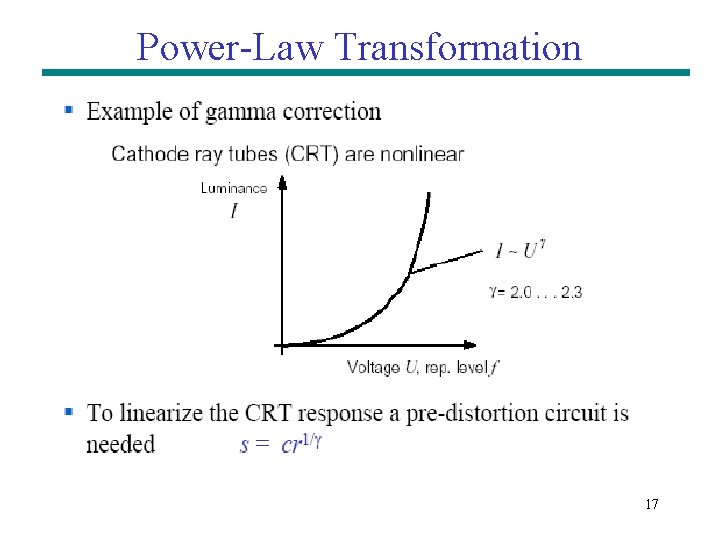
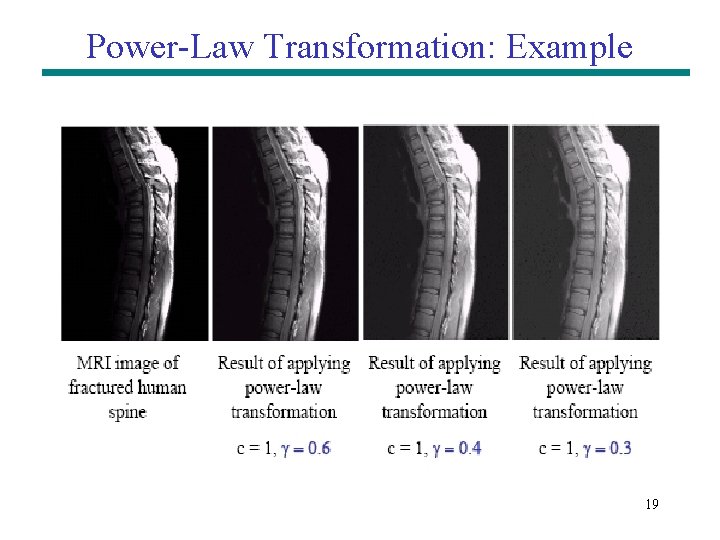
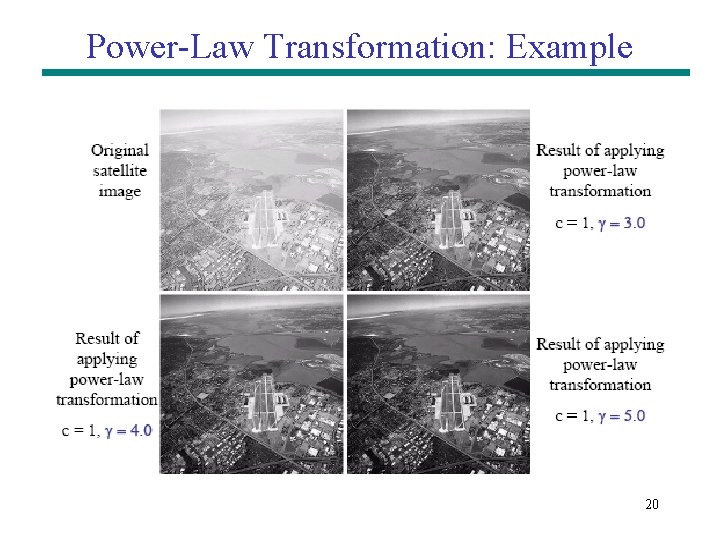
Power-Law Transformation For γ < 1: Expands values of dark pixels, compress values of brighter pixels For γ > 1: Compresses values of dark pixels, expand values of brighter pixels If γ=1 & c=1: Identity transformation (s = r) A variety of devices (image capture, printing, display) respond according to power law and need to be corrected Gamma (γ) correction The process used to correct the power-law response phenomena 16
Power-Law Transformation 17
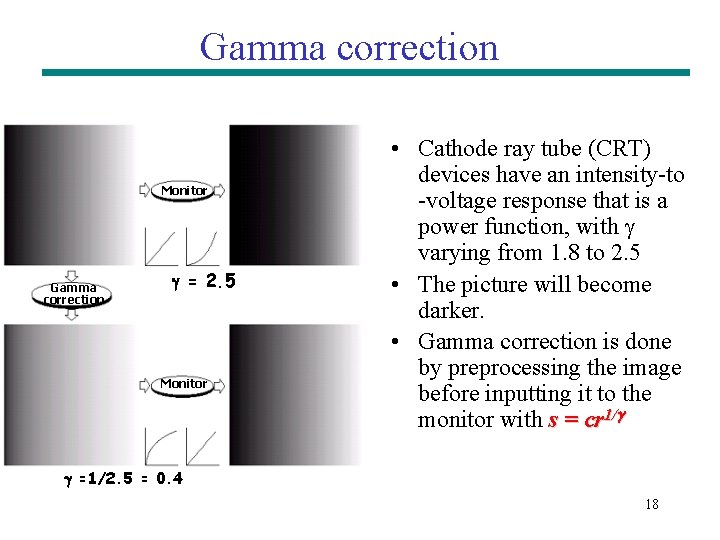
Gamma correction Monitor Gamma correction = 2. 5 Monitor • Cathode ray tube (CRT) devices have an intensity-to -voltage response that is a power function, with varying from 1. 8 to 2. 5 • The picture will become darker. • Gamma correction is done by preprocessing the image before inputting it to the monitor with s = cr 1/ =1/2. 5 = 0. 4 18
Power-Law Transformation: Example 19
Power-Law Transformation: Example 20
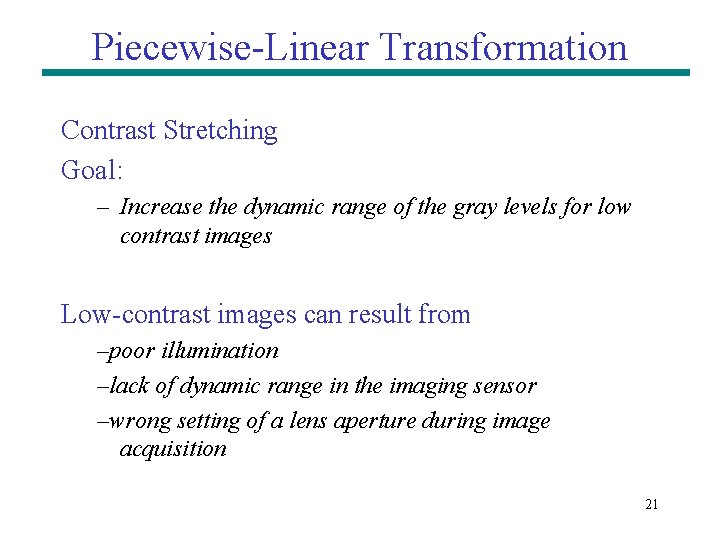
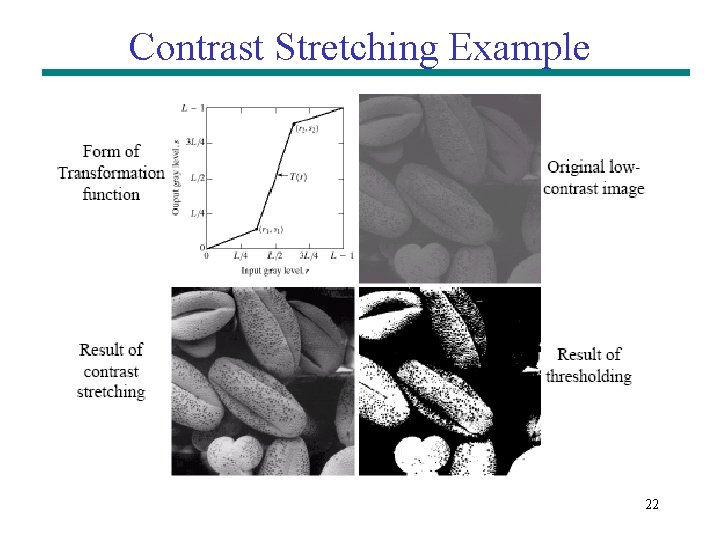
Piecewise-Linear Transformation Contrast Stretching Goal: – Increase the dynamic range of the gray levels for low contrast images Low-contrast images can result from –poor illumination –lack of dynamic range in the imaging sensor –wrong setting of a lens aperture during image acquisition 21
Contrast Stretching Example 22
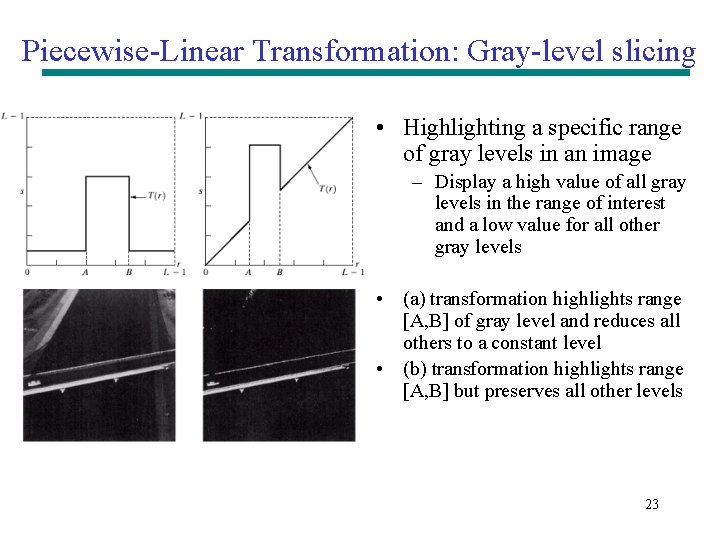
Piecewise-Linear Transformation: Gray-level slicing • Highlighting a specific range of gray levels in an image – Display a high value of all gray levels in the range of interest and a low value for all other gray levels • (a) transformation highlights range [A, B] of gray level and reduces all others to a constant level • (b) transformation highlights range [A, B] but preserves all other levels 23
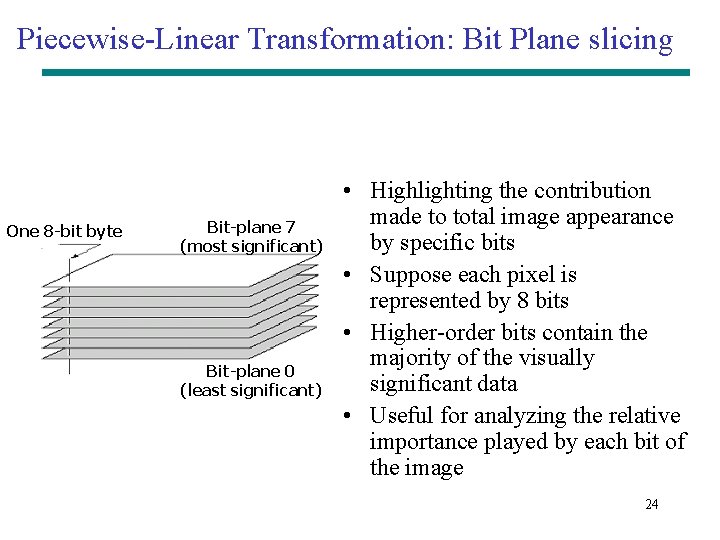
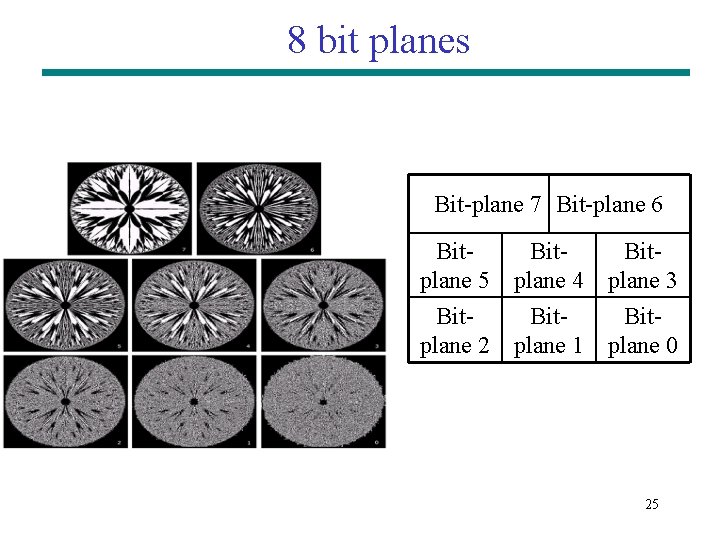
Piecewise-Linear Transformation: Bit Plane slicing One 8 -bit byte Bit-plane 7 (most significant) Bit-plane 0 (least significant) • Highlighting the contribution made to total image appearance by specific bits • Suppose each pixel is represented by 8 bits • Higher-order bits contain the majority of the visually significant data • Useful for analyzing the relative importance played by each bit of the image 24
8 bit planes Bit-plane 7 Bit-plane 6 Bitplane 5 Bitplane 2 Bitplane 4 Bitplane 1 Bitplane 3 Bitplane 0 25
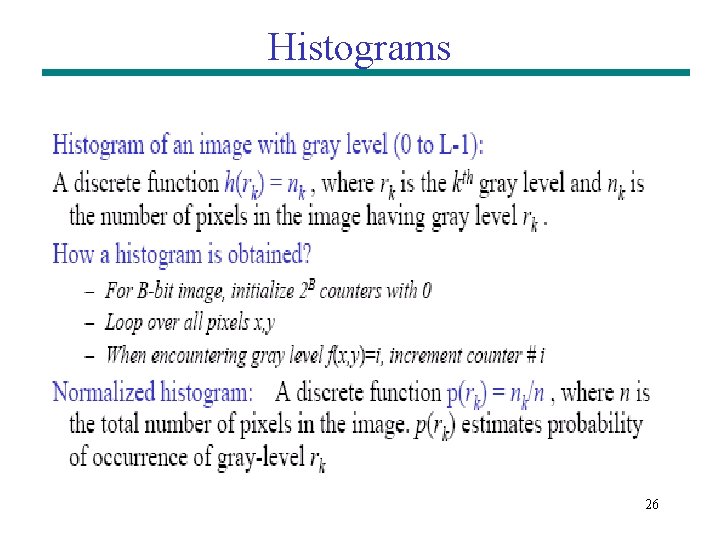
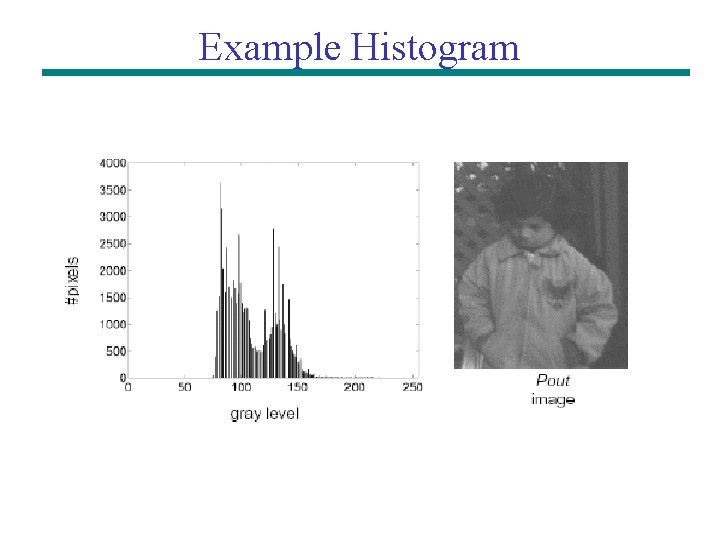
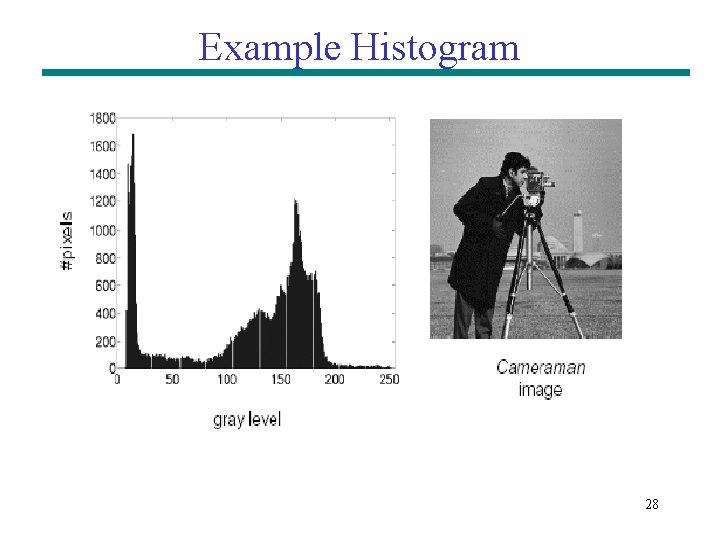
Histograms 26
Example Histogram 11/1/2020 27
Example Histogram 28
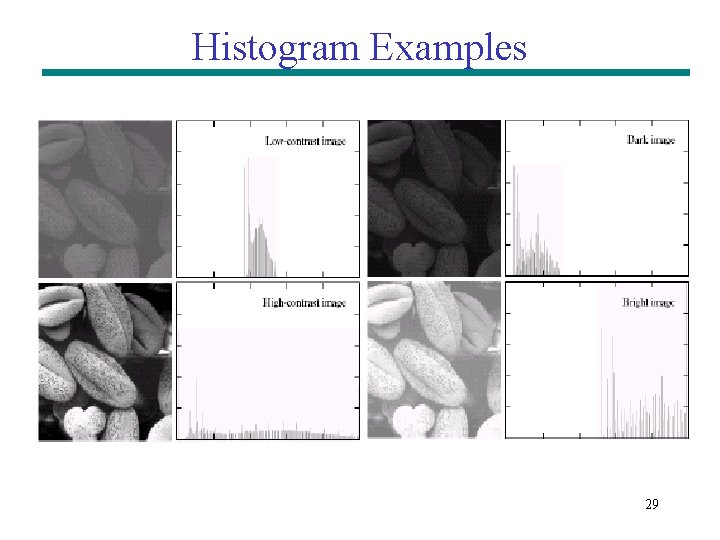
Histogram Examples 29
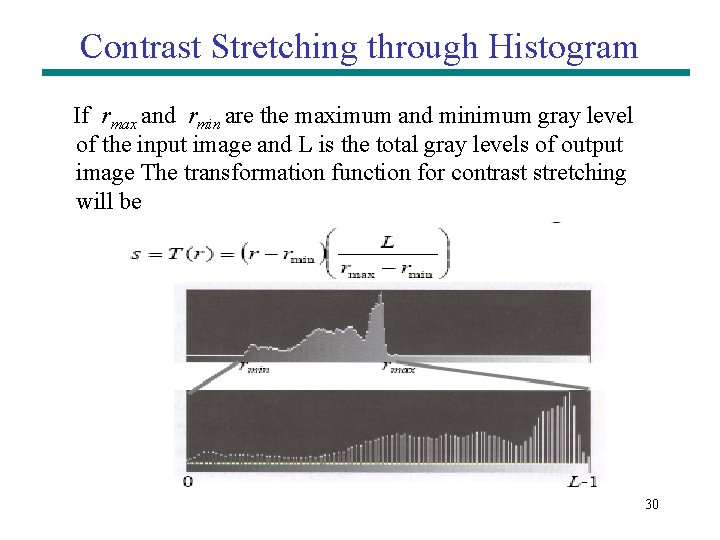
Contrast Stretching through Histogram If rmax and rmin are the maximum and minimum gray level of the input image and L is the total gray levels of output image The transformation function for contrast stretching will be 30
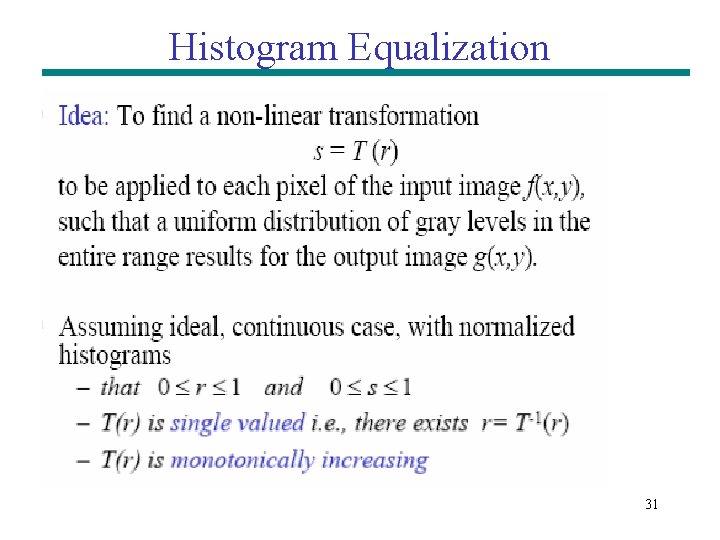
Histogram Equalization 31
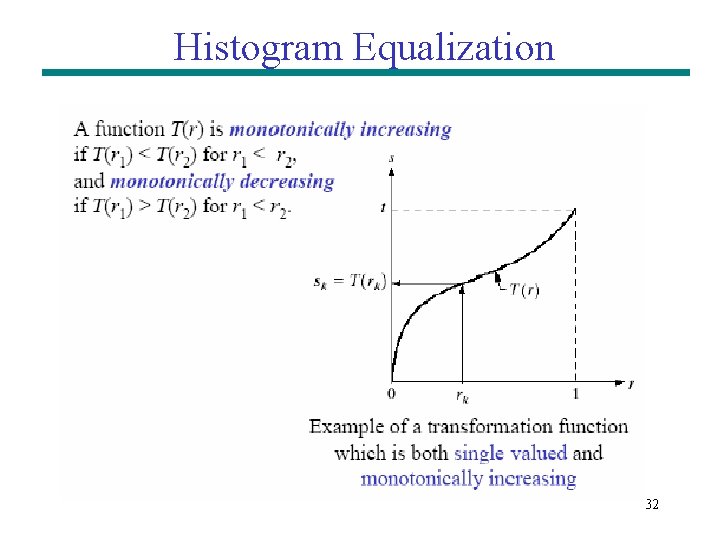
Histogram Equalization 32
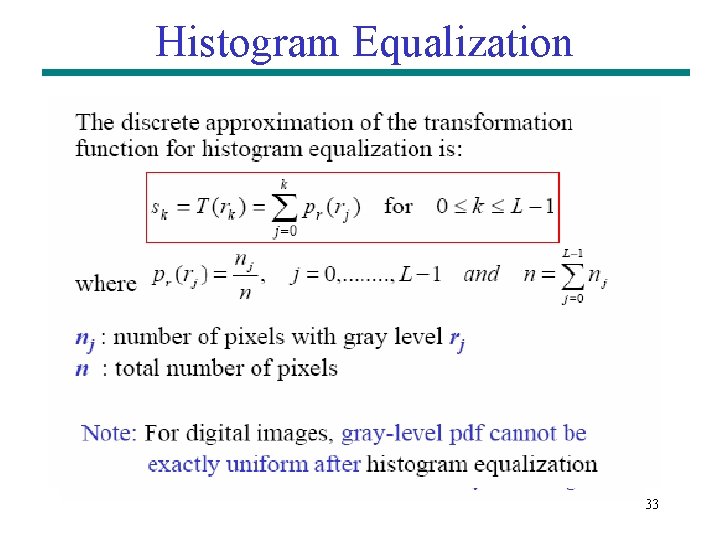
Histogram Equalization 33
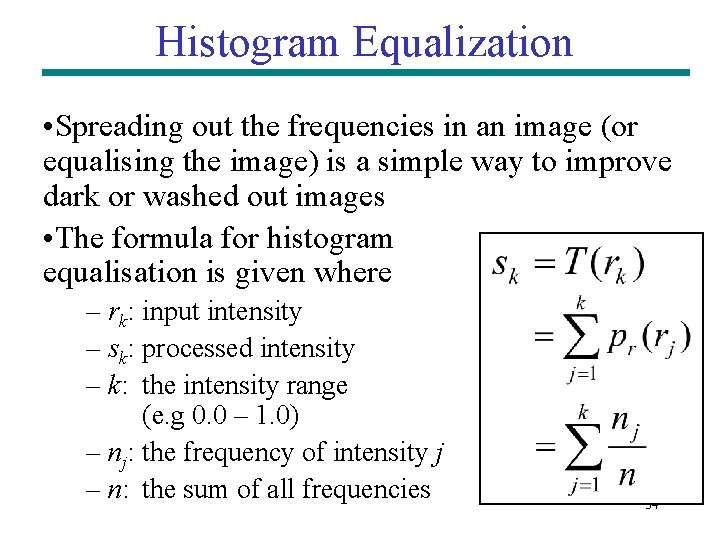
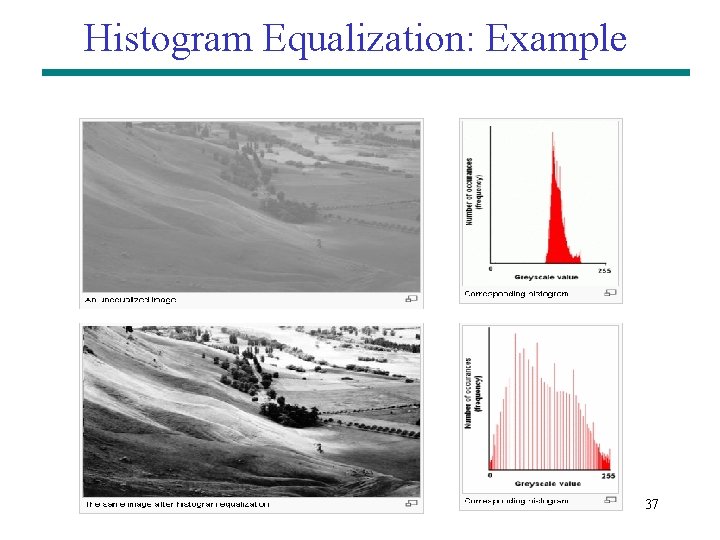
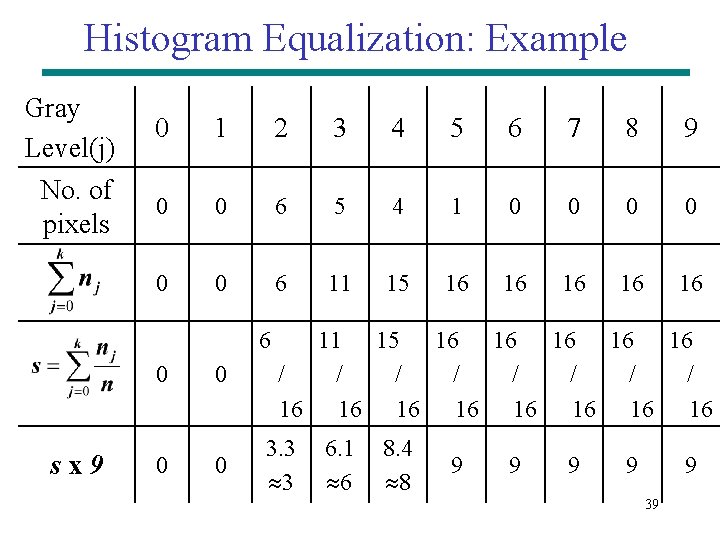
Histogram Equalization • Spreading out the frequencies in an image (or equalising the image) is a simple way to improve dark or washed out images • The formula for histogram equalisation is given where – rk: input intensity – sk: processed intensity – k: the intensity range (e. g 0. 0 – 1. 0) – nj: the frequency of intensity j – n: the sum of all frequencies 34
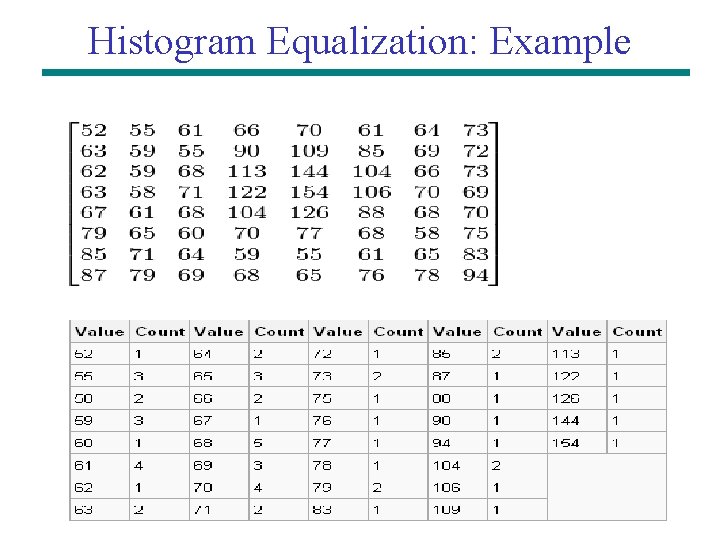
Histogram Equalization: Example 35
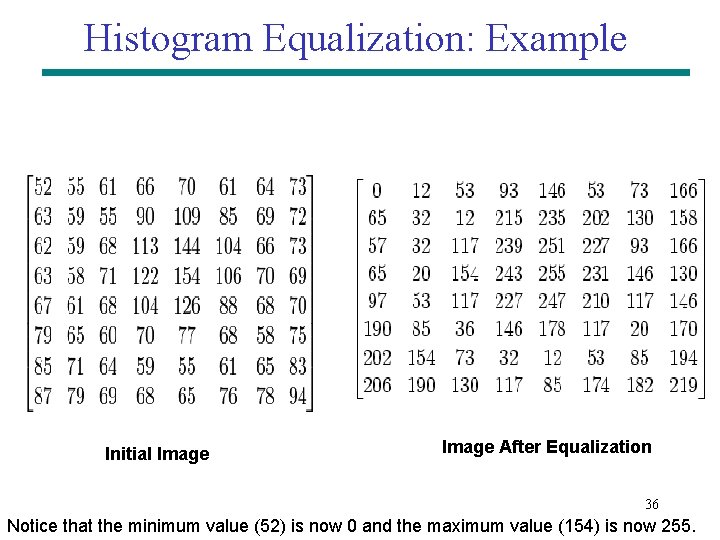
Histogram Equalization: Example Initial Image After Equalization 36 Notice that the minimum value (52) is now 0 and the maximum value (154) is now 255.
Histogram Equalization: Example 37
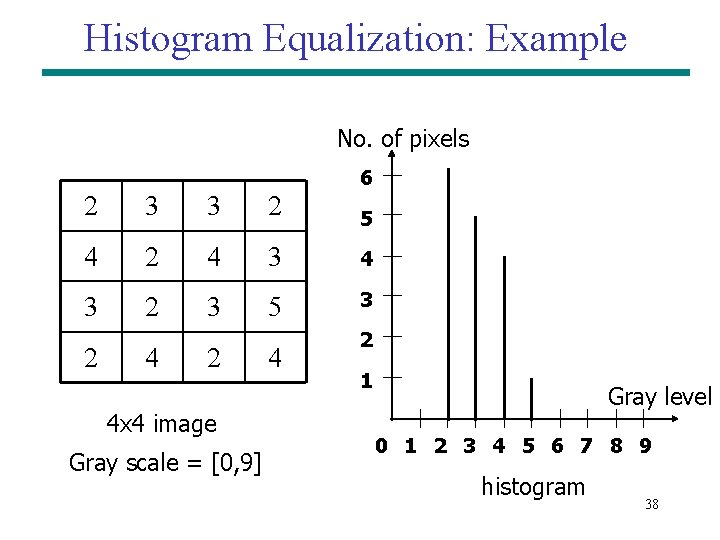
Histogram Equalization: Example No. of pixels 6 2 3 3 2 5 4 2 4 3 2 3 5 3 2 4 x 4 image Gray scale = [0, 9] 4 2 1 Gray level 0 1 2 3 4 5 6 7 8 9 histogram 38
Histogram Equalization: Example Gray Level(j) 0 1 2 3 4 5 6 7 8 9 No. of pixels 0 0 6 5 4 1 0 0 0 6 11 15 16 16 16 6 0 sx 9 0 0 0 11 15 16 16 16 / / / / 16 16 3. 3 3 6. 1 6 8. 4 8 9 9 9 39
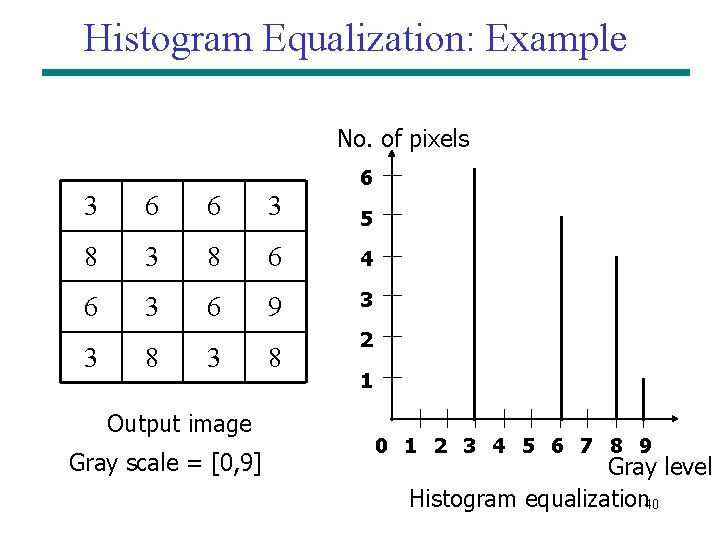
Histogram Equalization: Example No. of pixels 6 3 6 6 3 5 8 3 8 6 4 6 3 6 9 3 3 8 3 Output image Gray scale = [0, 9] 8 2 1 0 1 2 3 4 5 6 7 8 9 Gray level Histogram equalization 40
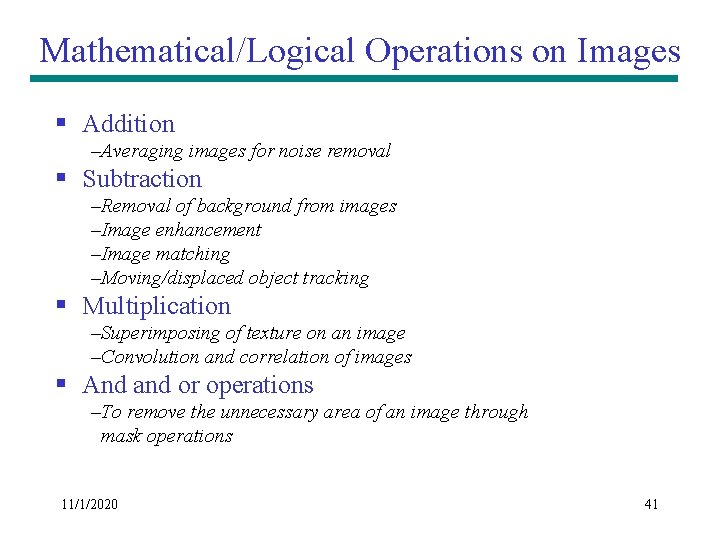
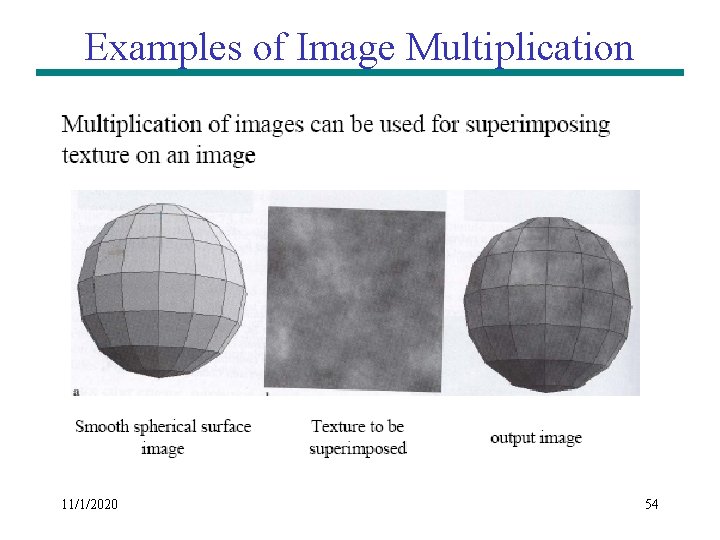
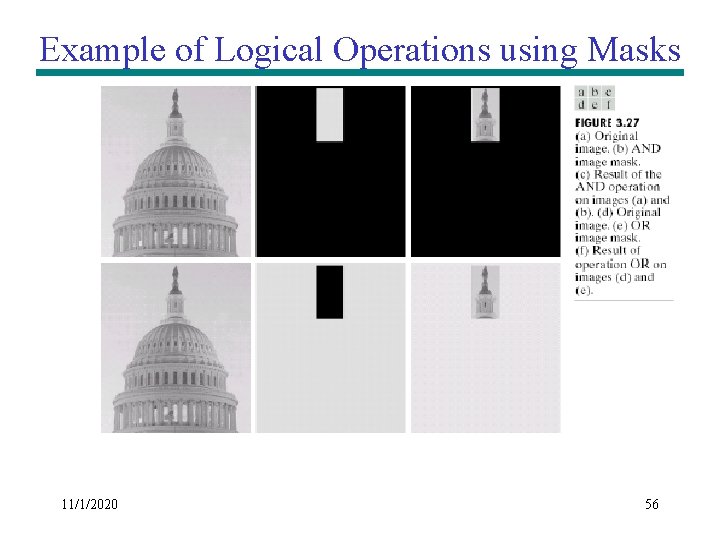
Mathematical/Logical Operations on Images § Addition –Averaging images for noise removal § Subtraction –Removal of background from images –Image enhancement –Image matching –Moving/displaced object tracking § Multiplication –Superimposing of texture on an image –Convolution and correlation of images § And and or operations –To remove the unnecessary area of an image through mask operations 11/1/2020 41
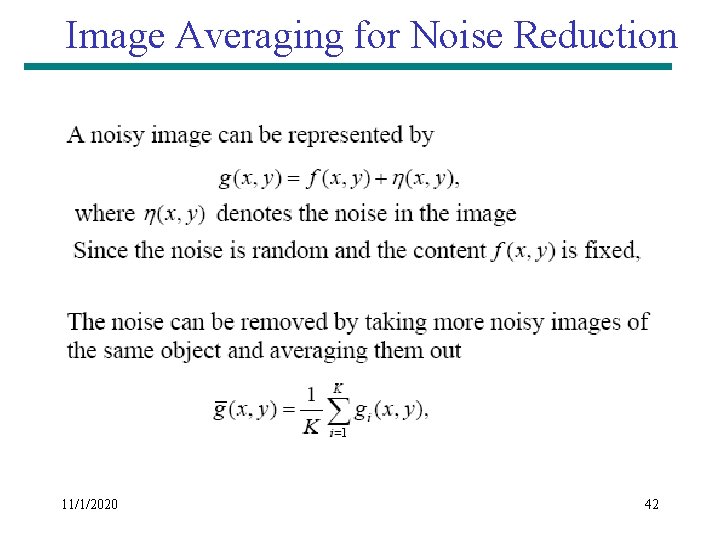
Image Averaging for Noise Reduction 11/1/2020 42
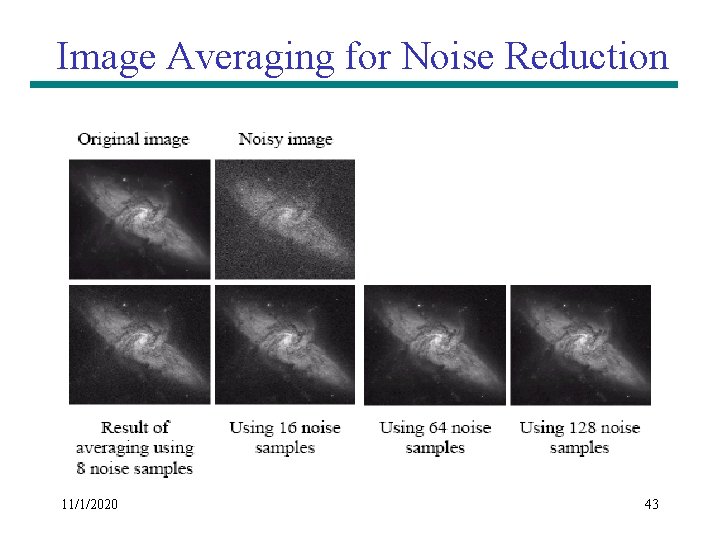
Image Averaging for Noise Reduction 11/1/2020 43
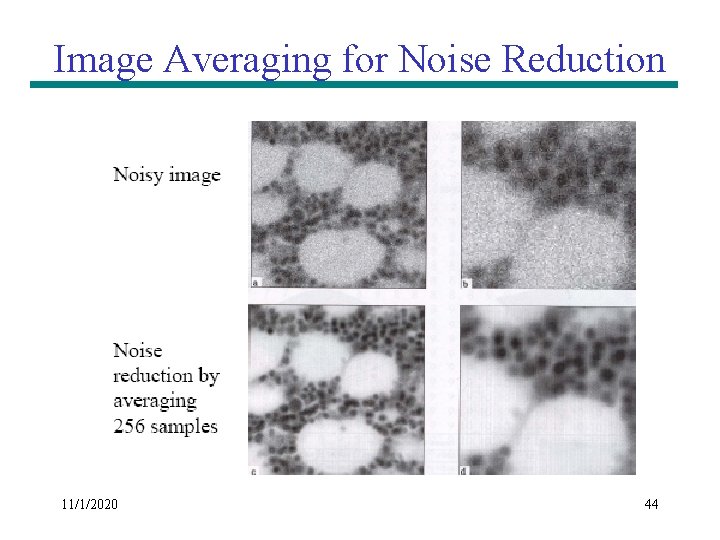
Image Averaging for Noise Reduction 11/1/2020 44
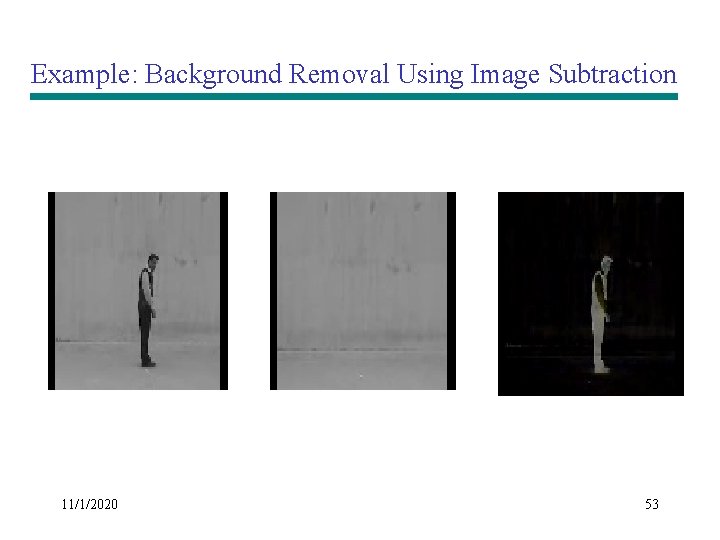
Image Subtraction • Takes two images as input and produces a third image whose pixel values are those of the first image minus the corresponding pixel values from the second image • Variants – It is also often possible to just use a single image as input and subtract a constant value from all the pixels – Just output the absolute difference between pixel values, rather than the straightforward signed output. 11/1/2020 45
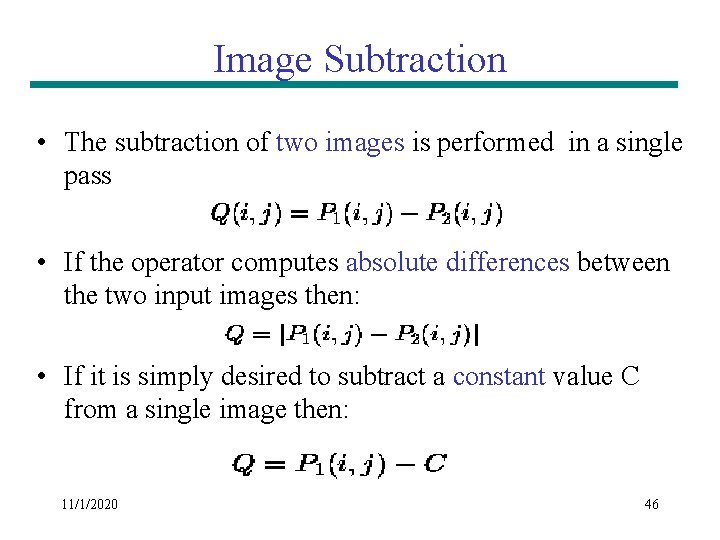
Image Subtraction • The subtraction of two images is performed in a single pass • If the operator computes absolute differences between the two input images then: • If it is simply desired to subtract a constant value C from a single image then: 11/1/2020 46
Image Subtraction • If the operator calculates absolute differences, then it is impossible for the output pixel values to be outside the range • In rest of the two cases the pixel value may become negative • This is one good reason for using absolute differences. • How to solve problem of negative pixels? 11/1/2020 47
Image Subtraction • How to solve problem of negative pixels? • Let we have an 8 bit Grayscale image (Value Range= 0 t 0 255) • The result of image subtraction may come in the range of -255 to +255 • One scheme can be to add 255 to every pixel and then divide by 2 • Method is easy and fast • Limitations – Truncation errors can cause loss of accuracy – Full range of display may not be utilized 11/1/2020 48
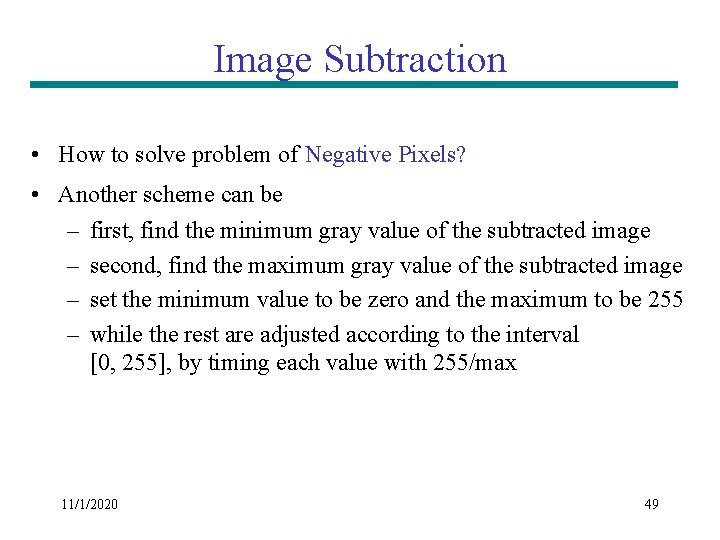
Image Subtraction • How to solve problem of Negative Pixels? • Another scheme can be – first, find the minimum gray value of the subtracted image – second, find the maximum gray value of the subtracted image – set the minimum value to be zero and the maximum to be 255 – while the rest are adjusted according to the interval [0, 255], by timing each value with 255/max 11/1/2020 49
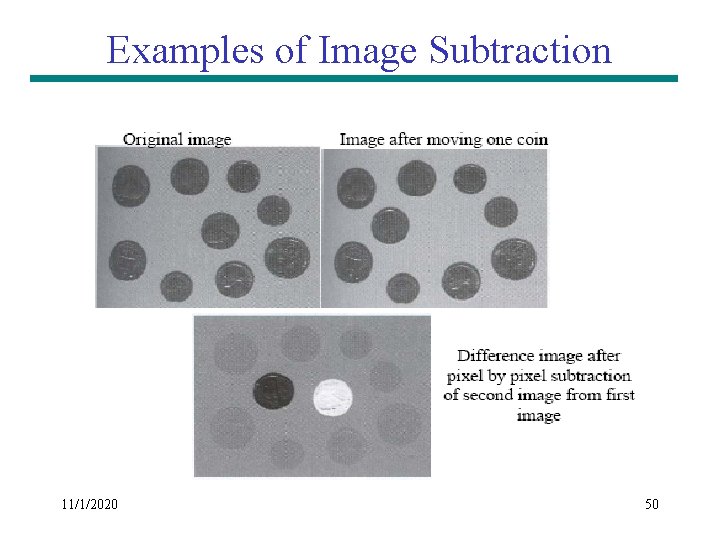
Examples of Image Subtraction 11/1/2020 50
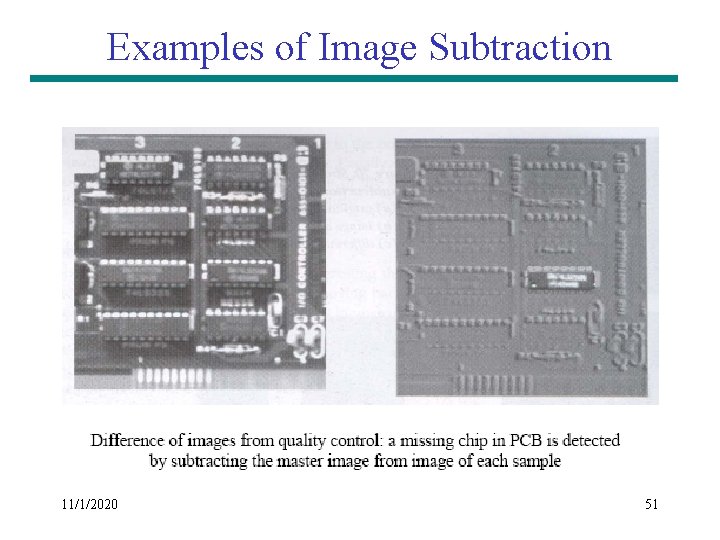
Examples of Image Subtraction 11/1/2020 51
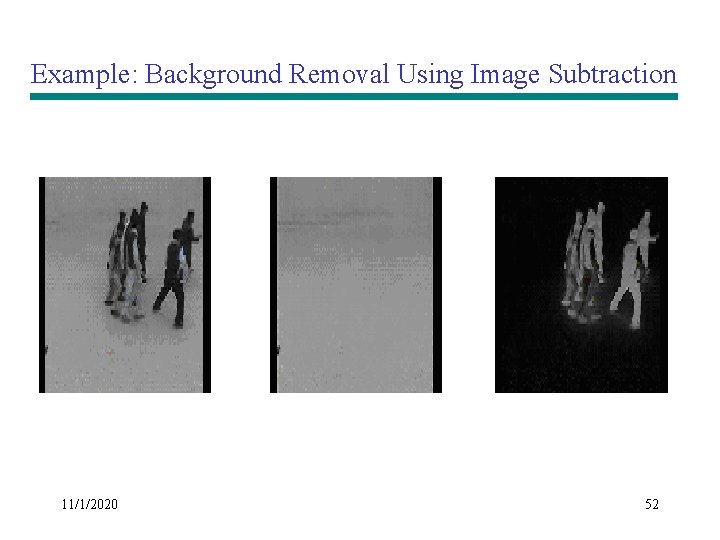
Example: Background Removal Using Image Subtraction 11/1/2020 52
Example: Background Removal Using Image Subtraction 11/1/2020 53
Examples of Image Multiplication 11/1/2020 54
Logic Operations • Logic operation performs on gray-level images, the pixel values are processed as binary numbers • Light represents a binary 1, and dark represents a binary 0 • NOT operation = negative transformation 11/1/2020 55
Example of Logical Operations using Masks 11/1/2020 56
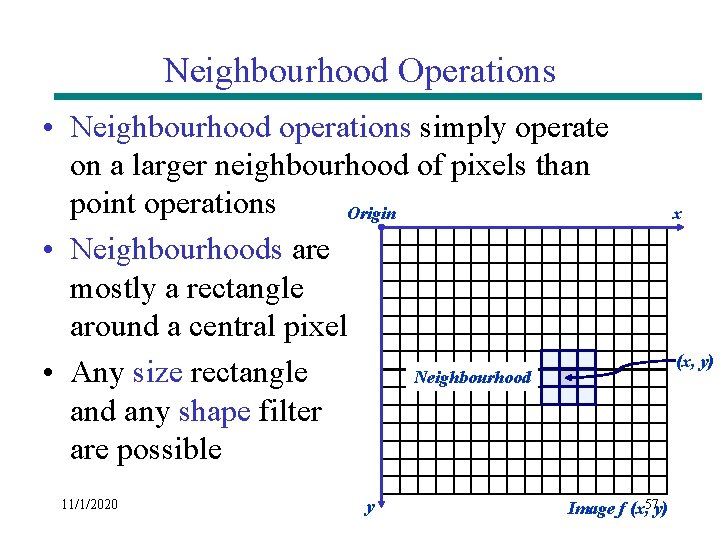
Neighbourhood Operations • Neighbourhood operations simply operate on a larger neighbourhood of pixels than point operations Origin • Neighbourhoods are mostly a rectangle around a central pixel • Any size rectangle Neighbourhood any shape filter are possible 11/1/2020 y Image f (x, 57 y) x (x, y)
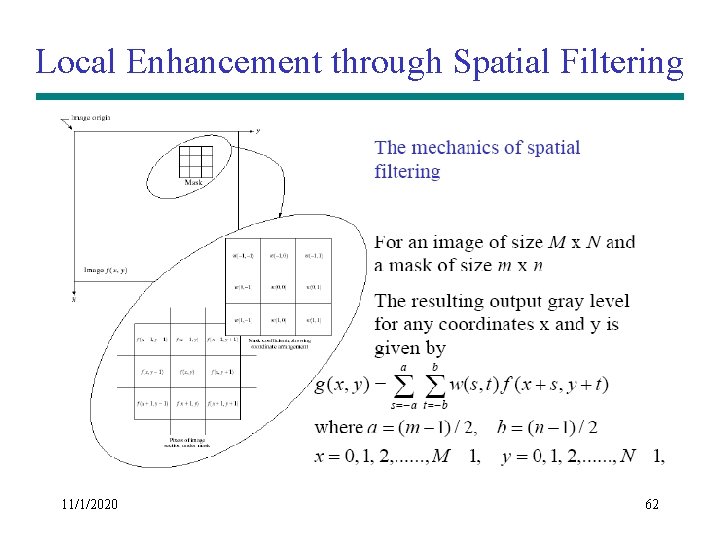
Local Enhancement through Spatial Filtering § The output intensity value at (x, y) depends not only on the input intensity value at (x, y) but also on the specified number of neighboring intensity values around (x, y) § Spatial masks (also called window, filter, kernel, template) are used and convolved over the entire image for local enhancement (spatial filtering) § The size of the mask determines the number of neighboring pixels which influence the output value at (x, y) § The values (coefficients) of the mask determine the nature and properties of enhancing technique 11/1/2020 58
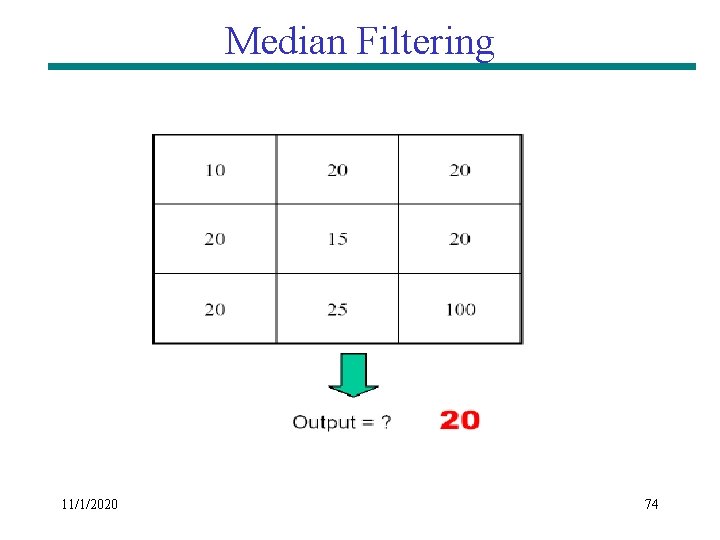
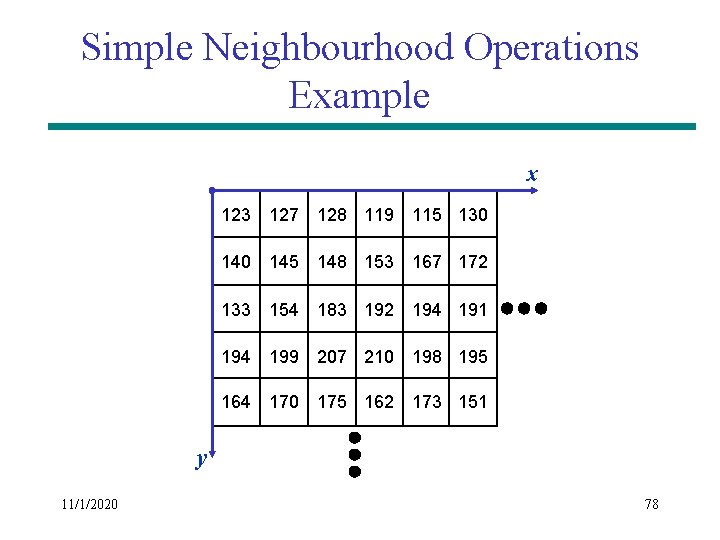
Simple Neighbourhood Operations • Some simple neighbourhood operations include: – Min: Set the pixel value to the minimum in the neighbourhood – Max: Set the pixel value to the maximum in the neighbourhood – Median: The median value of a set of numbers is the midpoint value in that set (e. g. from the set [1, 7, 15, 18, 24] 15 is the median). Sometimes the median works better than the average 11/1/2020 59
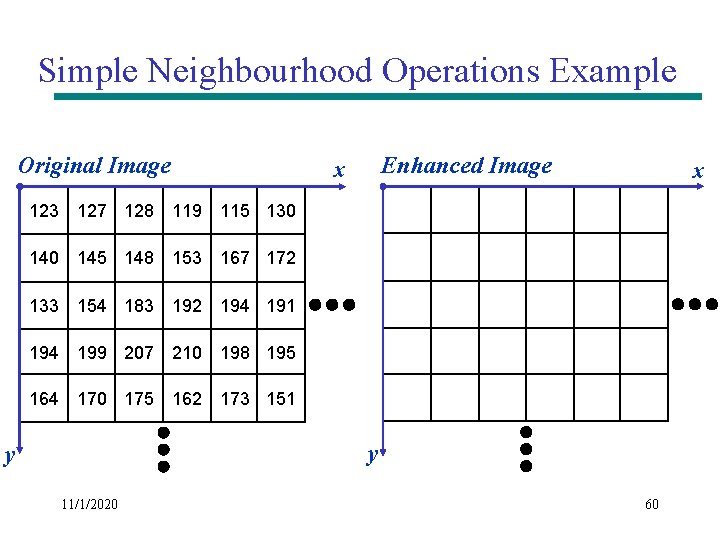
Simple Neighbourhood Operations Example Original Image Enhanced Image x x 123 127 128 119 115 130 145 148 153 167 172 133 154 183 192 194 191 194 199 207 210 198 195 164 170 175 162 173 151 y y 11/1/2020 60
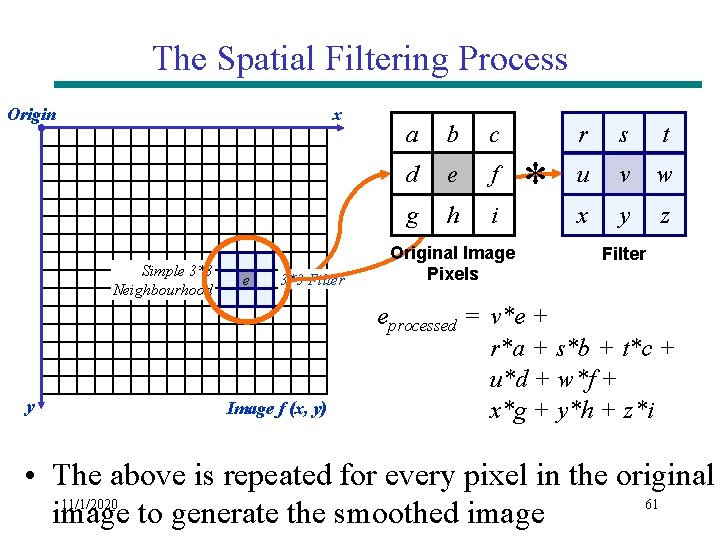
The Spatial Filtering Process Origin x Simple 3*3 Neighbourhood y e 3*3 Filter Image f (x, y) a b c d e f g h i Original Image Pixels * r s t u v w x y z Filter eprocessed = v*e + r*a + s*b + t*c + u*d + w*f + x*g + y*h + z*i • The above is repeated for every pixel in the original 11/1/2020 61 image to generate the smoothed image
Local Enhancement through Spatial Filtering 11/1/2020 62
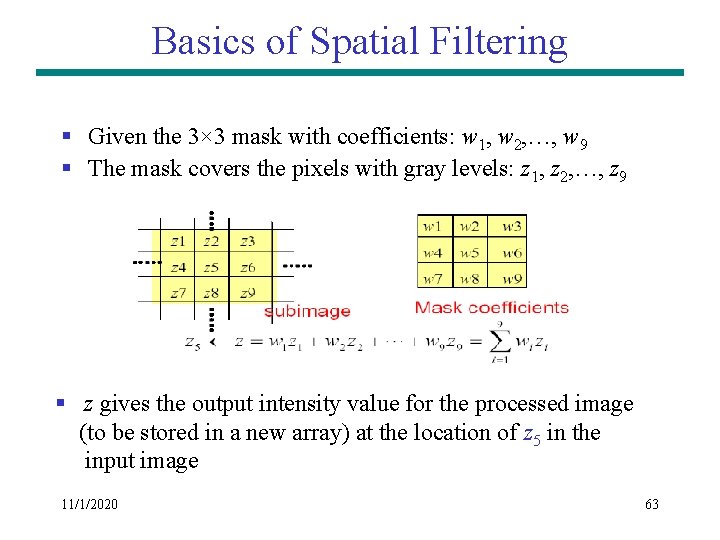
Basics of Spatial Filtering § Given the 3× 3 mask with coefficients: w 1, w 2, …, w 9 § The mask covers the pixels with gray levels: z 1, z 2, …, z 9 § z gives the output intensity value for the processed image (to be stored in a new array) at the location of z 5 in the input image 11/1/2020 63
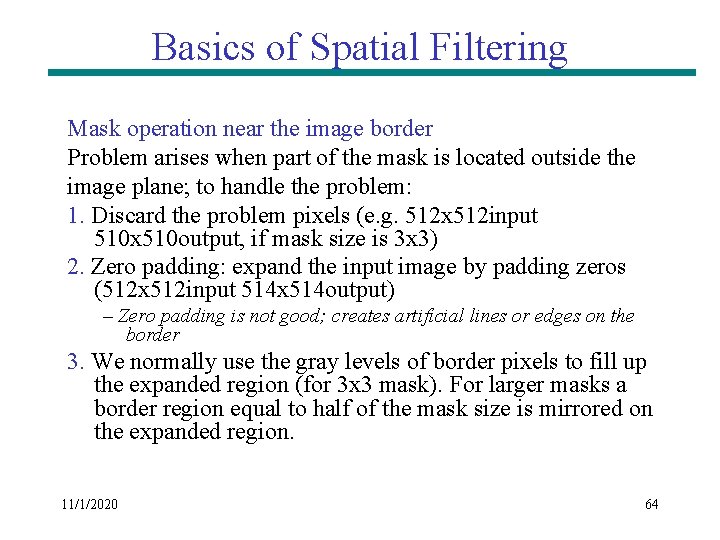
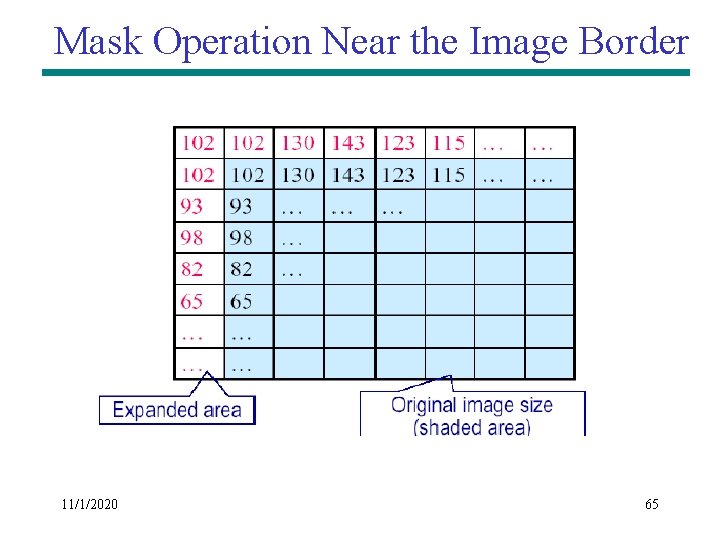
Basics of Spatial Filtering Mask operation near the image border Problem arises when part of the mask is located outside the image plane; to handle the problem: 1. Discard the problem pixels (e. g. 512 x 512 input 510 x 510 output, if mask size is 3 x 3) 2. Zero padding: expand the input image by padding zeros (512 x 512 input 514 x 514 output) – Zero padding is not good; creates artificial lines or edges on the border 3. We normally use the gray levels of border pixels to fill up the expanded region (for 3 x 3 mask). For larger masks a border region equal to half of the mask size is mirrored on the expanded region. 11/1/2020 64
Mask Operation Near the Image Border 11/1/2020 65
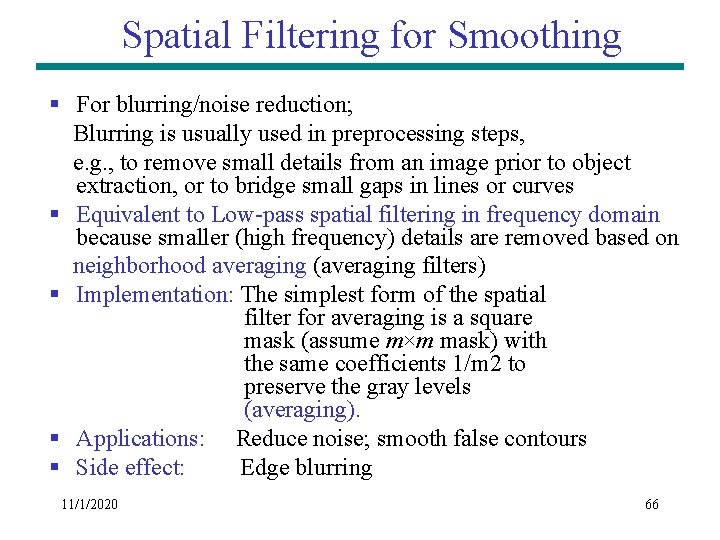
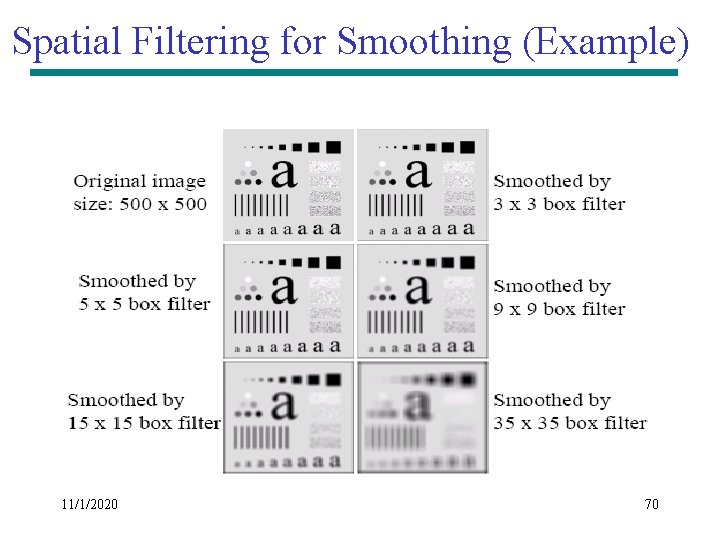
Spatial Filtering for Smoothing § For blurring/noise reduction; Blurring is usually used in preprocessing steps, e. g. , to remove small details from an image prior to object extraction, or to bridge small gaps in lines or curves § Equivalent to Low-pass spatial filtering in frequency domain because smaller (high frequency) details are removed based on neighborhood averaging (averaging filters) § Implementation: The simplest form of the spatial filter for averaging is a square mask (assume m×m mask) with the same coefficients 1/m 2 to preserve the gray levels (averaging). § Applications: Reduce noise; smooth false contours § Side effect: Edge blurring 11/1/2020 66
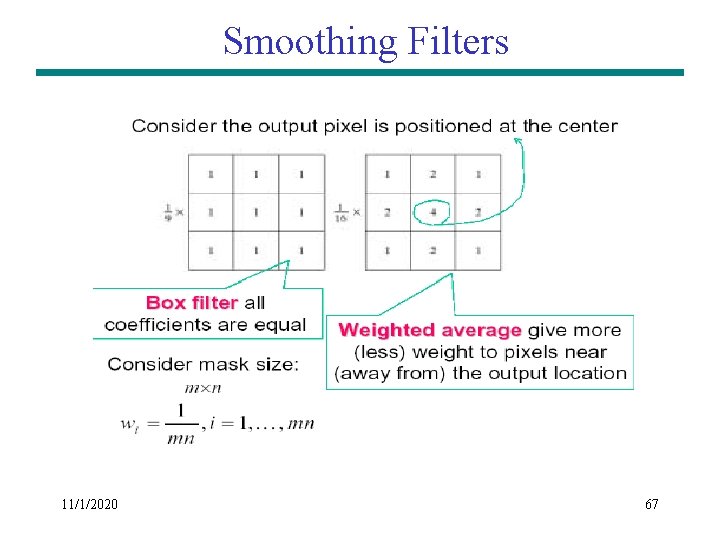
Smoothing Filters 11/1/2020 67
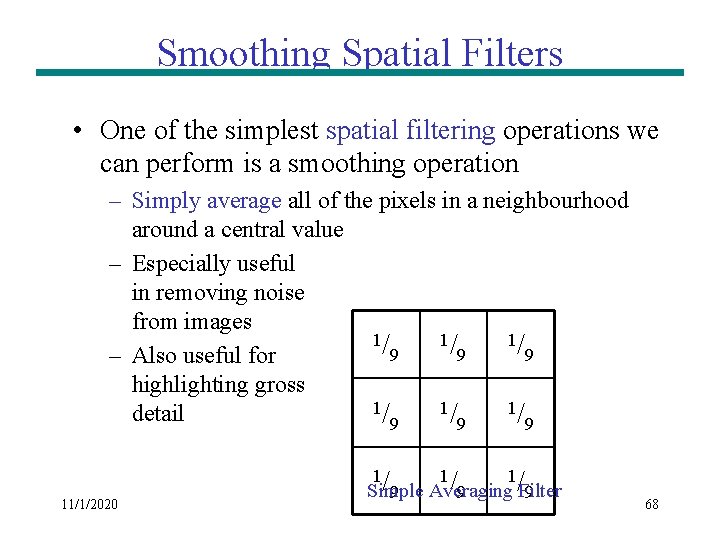
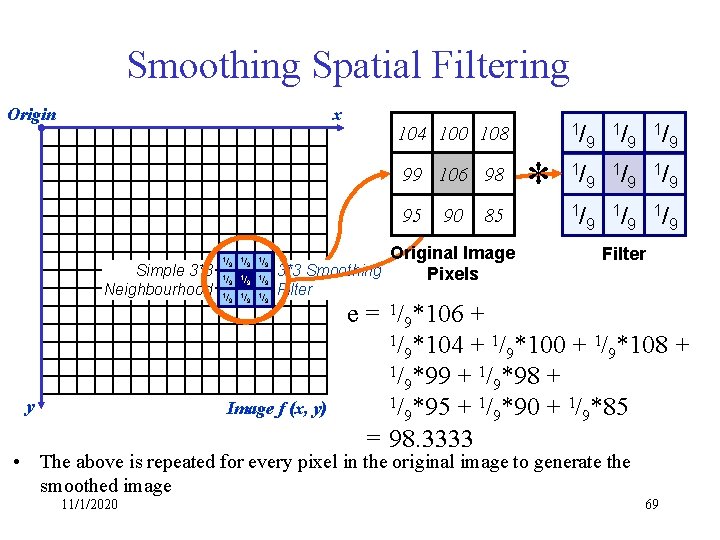
Smoothing Spatial Filters • One of the simplest spatial filtering operations we can perform is a smoothing operation – Simply average all of the pixels in a neighbourhood around a central value – Especially useful in removing noise from images 1/ 1/ 1/ 9 9 9 – Also useful for highlighting gross 1/ 1/ 1/ detail 9 9 9 11/1/2020 1/ 1/ 1/ Simple Averaging Filter 9 9 9 68
Smoothing Spatial Filtering Origin x 99 106 98 95 Simple 3*3 Neighbourhood y 1/ 100 1/ 108 1/ 104 9 9 9 1/ 99 9 1 106 /9 198 /9 195 /9 190 /9 185 /9 1/ 104 100 108 90 85 Original Image 3*3 Smoothing Pixels * 9 1/ 9 1/ 9 Filter Image f (x, y) e = 1/9*106 + 1/ *104 + 1/ *100 + 1/ *108 + 9 9 9 1/ *99 + 1/ *98 + 9 9 1/ *95 + 1/ *90 + 1/ *85 9 9 9 = 98. 3333 • The above is repeated for every pixel in the original image to generate the smoothed image 11/1/2020 69
Spatial Filtering for Smoothing (Example) 11/1/2020 70
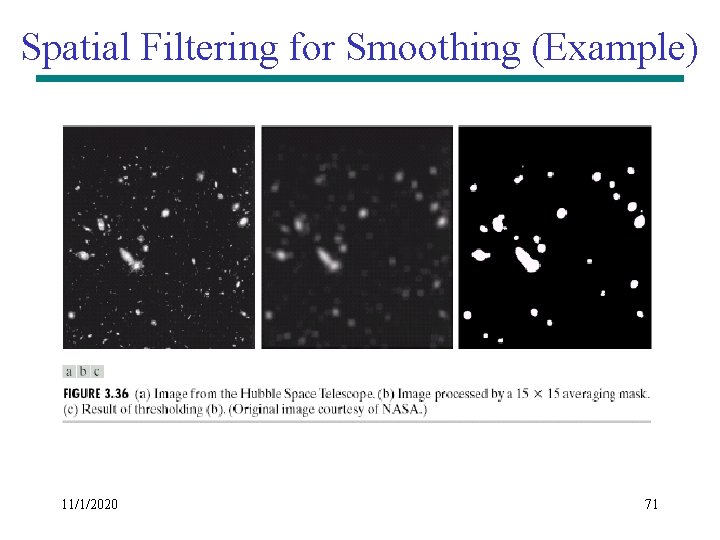
Spatial Filtering for Smoothing (Example) 11/1/2020 71
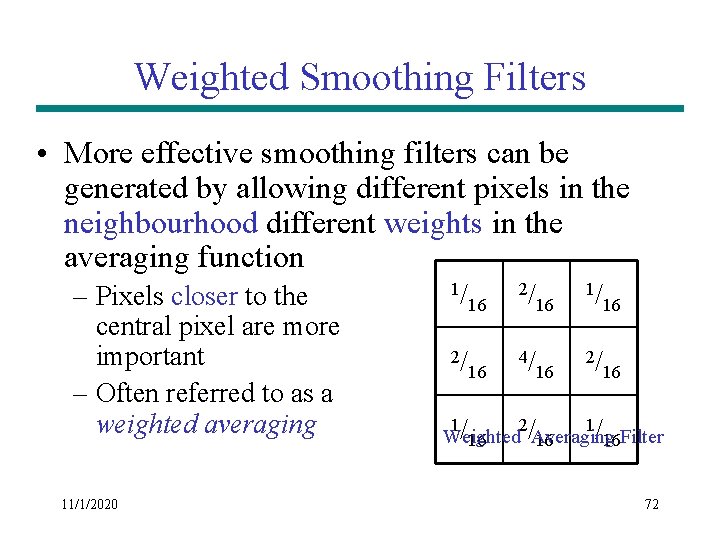
Weighted Smoothing Filters • More effective smoothing filters can be generated by allowing different pixels in the neighbourhood different weights in the averaging function – Pixels closer to the central pixel are more important – Often referred to as a weighted averaging 11/1/2020 1/ 2/ 16 4/ 16 16 2/ 16 /Averaging /16 Filter Weighted 16 1 2 1 72
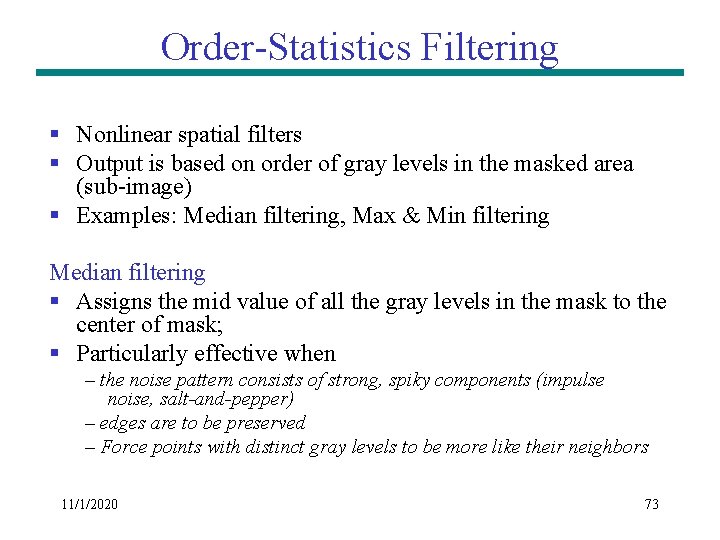
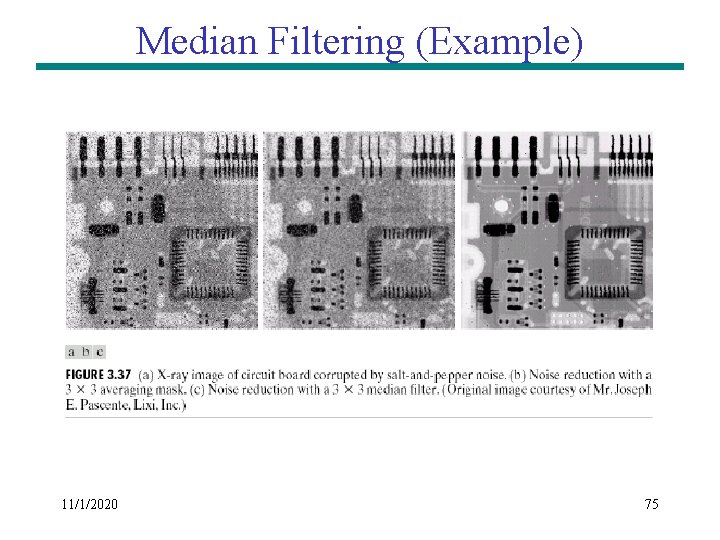
Order-Statistics Filtering § Nonlinear spatial filters § Output is based on order of gray levels in the masked area (sub-image) § Examples: Median filtering, Max & Min filtering Median filtering § Assigns the mid value of all the gray levels in the mask to the center of mask; § Particularly effective when – the noise pattern consists of strong, spiky components (impulse noise, salt-and-pepper) – edges are to be preserved – Force points with distinct gray levels to be more like their neighbors 11/1/2020 73
Median Filtering 11/1/2020 74
Median Filtering (Example) 11/1/2020 75
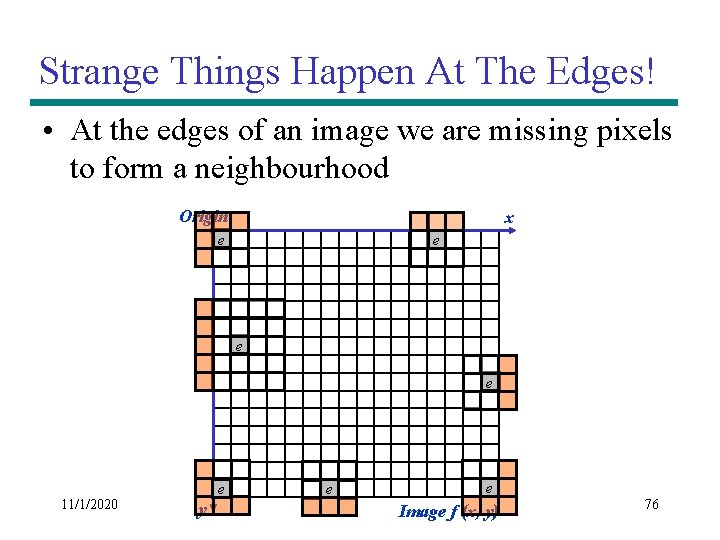
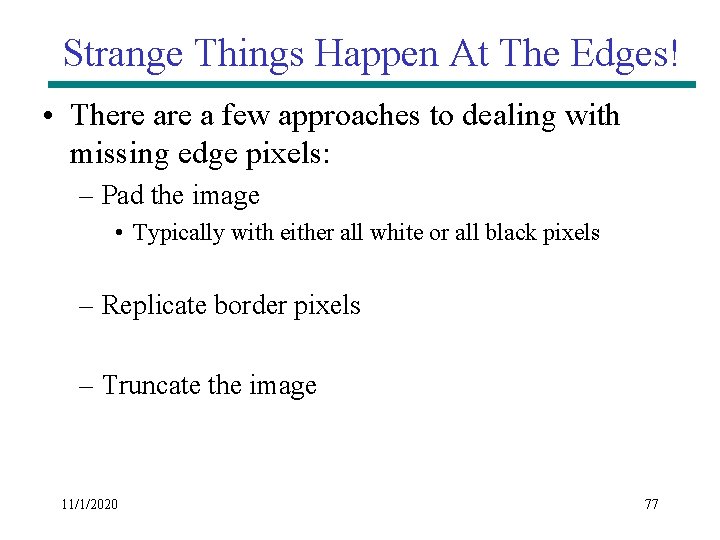
Strange Things Happen At The Edges! • At the edges of an image we are missing pixels to form a neighbourhood Origin x e e 11/1/2020 e y e e Image f (x, y) 76
Strange Things Happen At The Edges! • There a few approaches to dealing with missing edge pixels: – Pad the image • Typically with either all white or all black pixels – Replicate border pixels – Truncate the image 11/1/2020 77
Simple Neighbourhood Operations Example x 123 127 128 119 115 130 145 148 153 167 172 133 154 183 192 194 191 194 199 207 210 198 195 164 170 175 162 173 151 y 11/1/2020 78
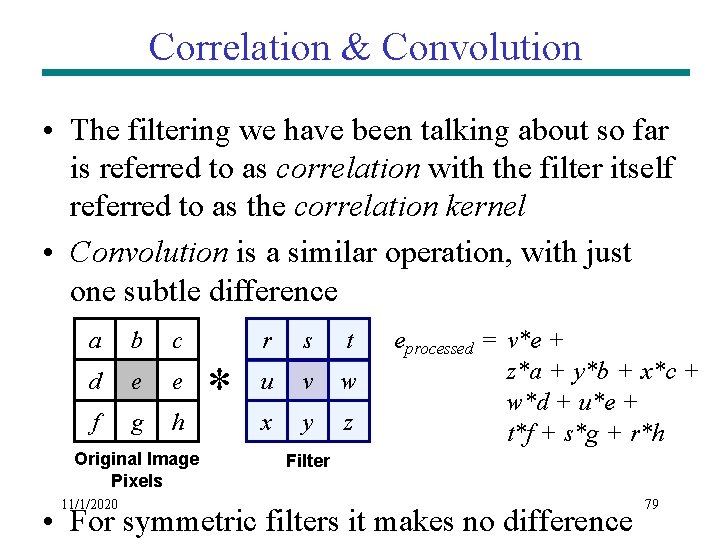
Correlation & Convolution • The filtering we have been talking about so far is referred to as correlation with the filter itself referred to as the correlation kernel • Convolution is a similar operation, with just one subtle difference a b c d e e f g h Original Image Pixels 11/1/2020 * r s t u v w x y z eprocessed = v*e + z*a + y*b + x*c + w*d + u*e + t*f + s*g + r*h Filter • For symmetric filters it makes no difference 79
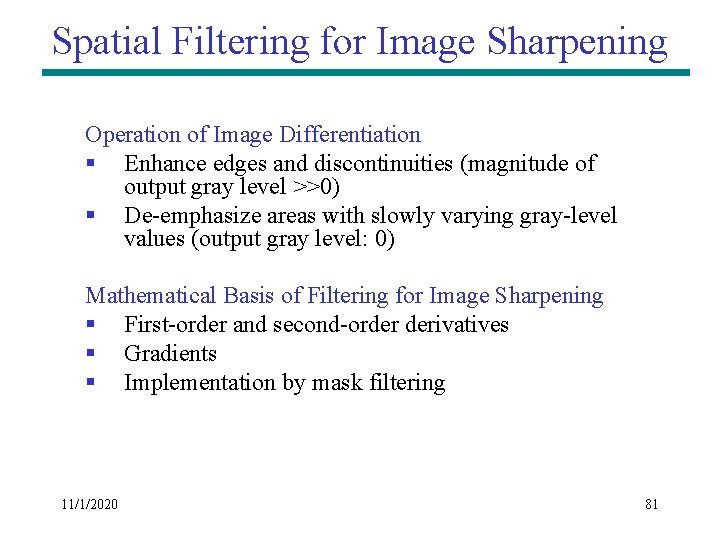
Spatial Filtering for Image Sharpening Background: to highlight fine detail in an image or to enhance blurred detail Applications: electronic printing, medical imaging, industrial inspection, autonomous target detection (smart weapons). . . Foundation (Blurring vs Sharpening): § Blurring/smoothing is performed by spatial averaging (equivalent to integration) § Sharpening is performed by noting only the gray level changes in the image that is the differentiation 11/1/2020 80
Spatial Filtering for Image Sharpening Operation of Image Differentiation § Enhance edges and discontinuities (magnitude of output gray level >>0) § De-emphasize areas with slowly varying gray-level values (output gray level: 0) Mathematical Basis of Filtering for Image Sharpening § First-order and second-order derivatives § Gradients § Implementation by mask filtering 11/1/2020 81
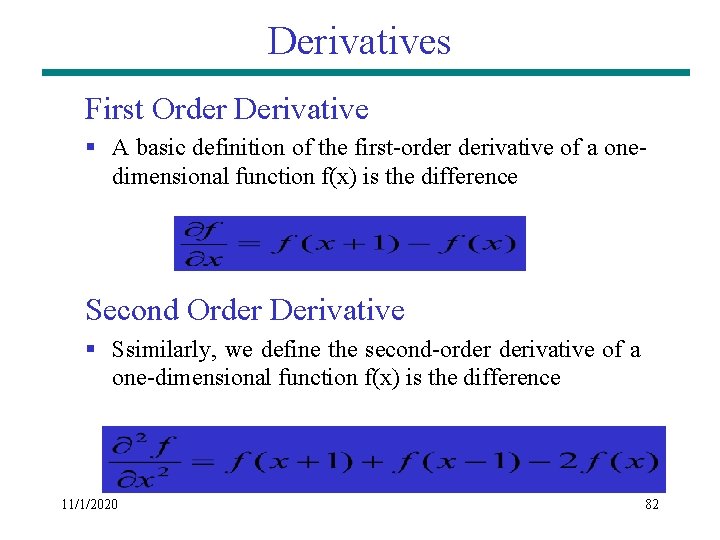
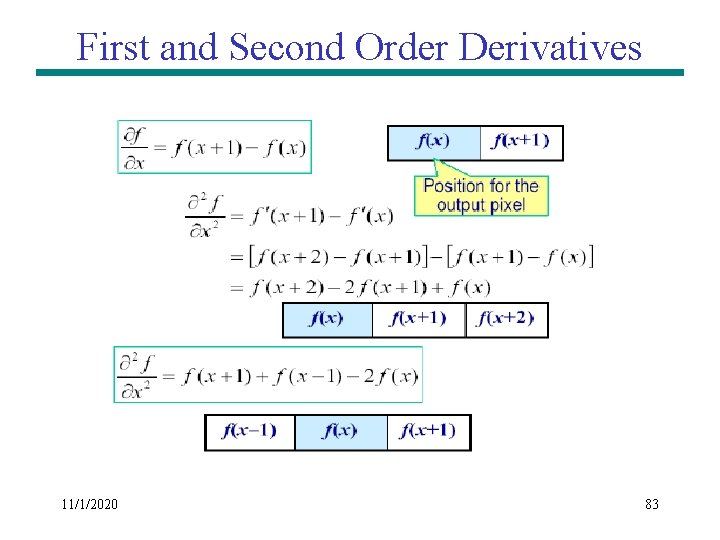
Derivatives First Order Derivative § A basic definition of the first-order derivative of a onedimensional function f(x) is the difference Second Order Derivative § Ssimilarly, we define the second-order derivative of a one-dimensional function f(x) is the difference 11/1/2020 82
First and Second Order Derivatives 11/1/2020 83
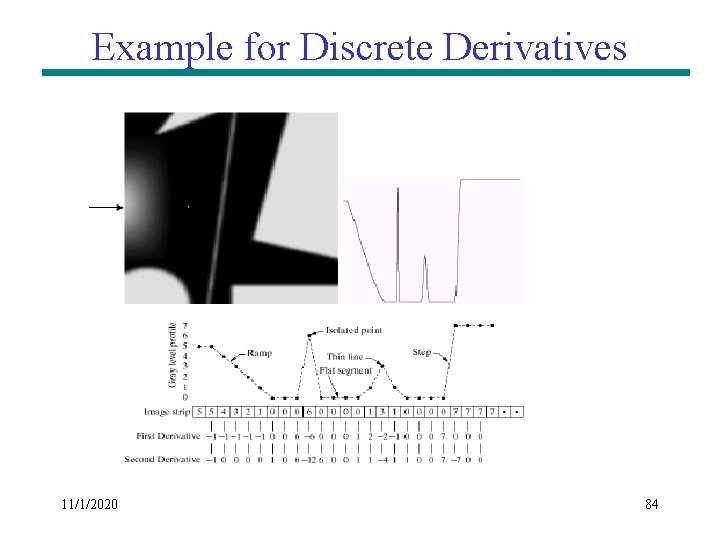
Example for Discrete Derivatives 11/1/2020 84
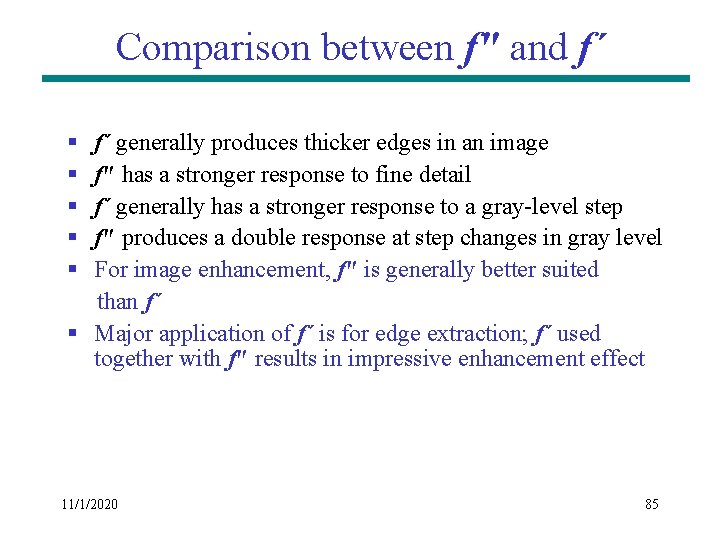
Comparison between f" and f´ § § § f´ generally produces thicker edges in an image f" has a stronger response to fine detail f´ generally has a stronger response to a gray-level step f" produces a double response at step changes in gray level For image enhancement, f" is generally better suited than f´ § Major application of f´ is for edge extraction; f´ used together with f" results in impressive enhancement effect 11/1/2020 85
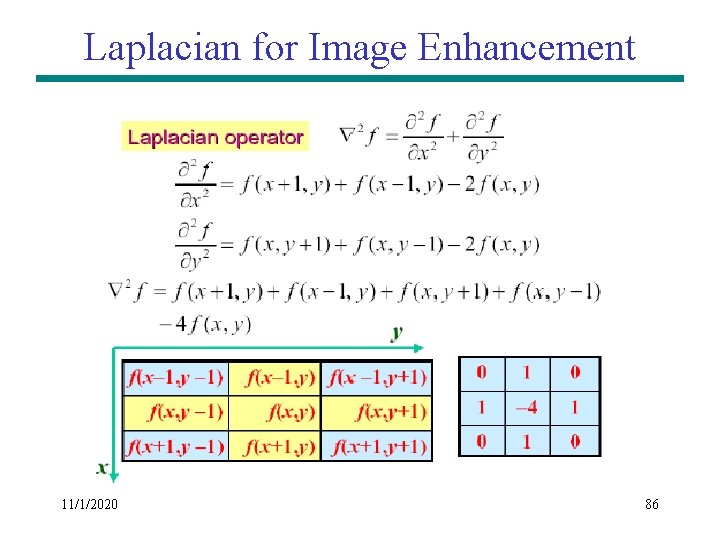
Laplacian for Image Enhancement 11/1/2020 86
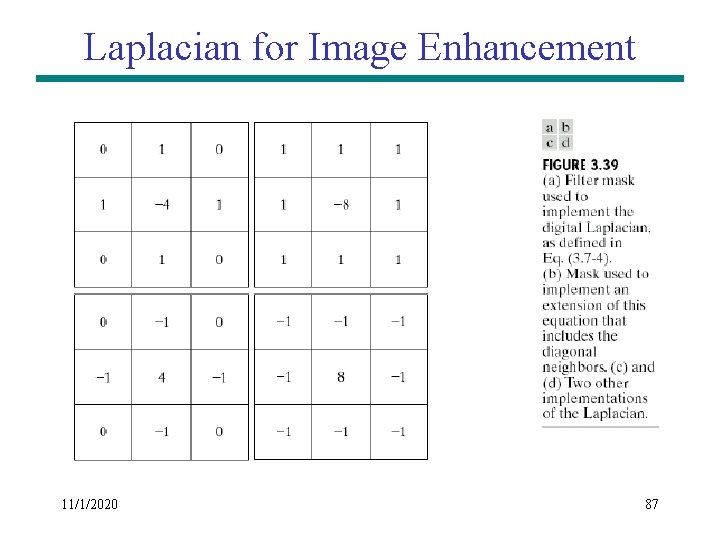
Laplacian for Image Enhancement 11/1/2020 87
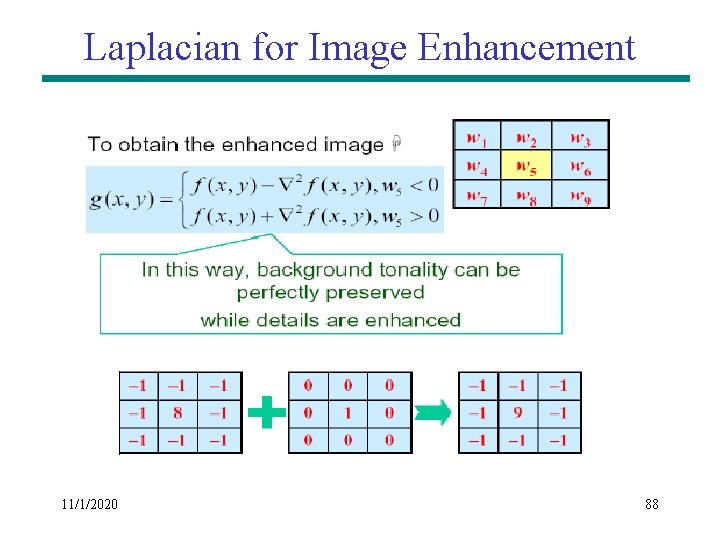
Laplacian for Image Enhancement 11/1/2020 88
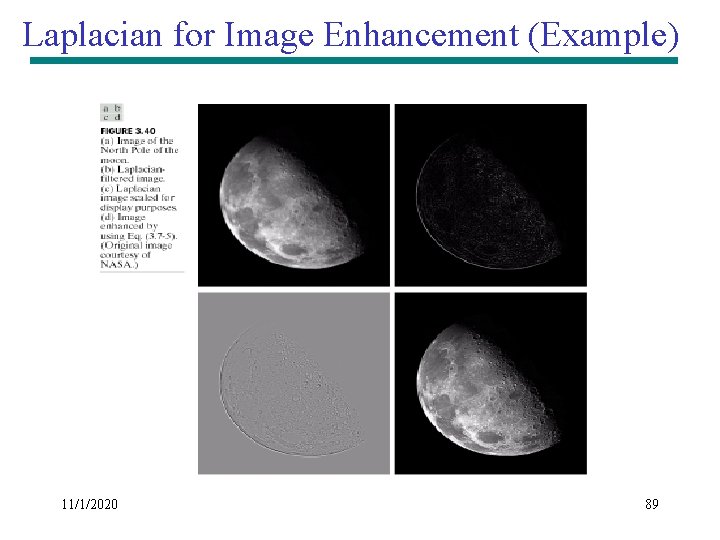
Laplacian for Image Enhancement (Example) 11/1/2020 89
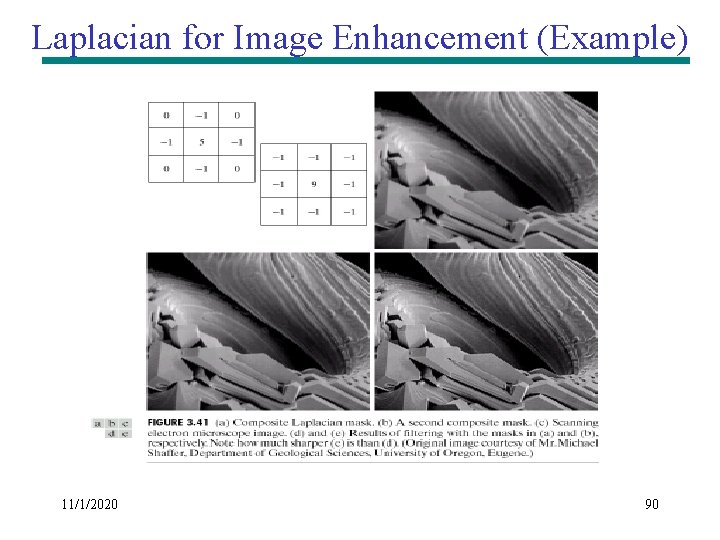
Laplacian for Image Enhancement (Example) 11/1/2020 90
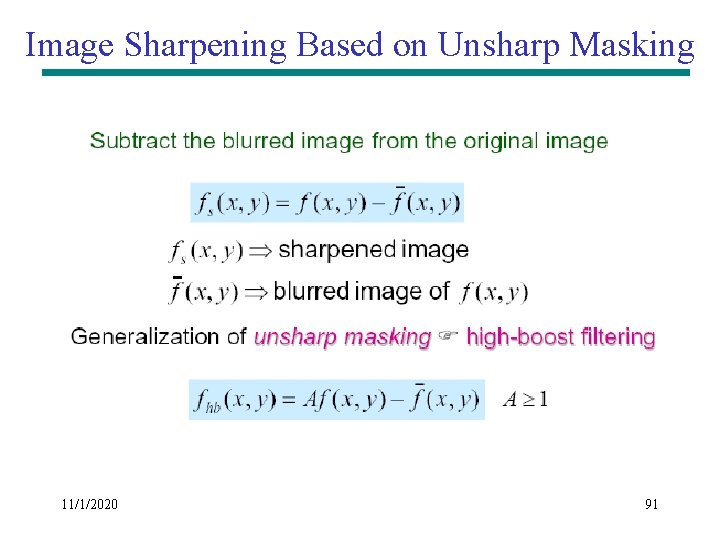
Image Sharpening Based on Unsharp Masking 11/1/2020 91
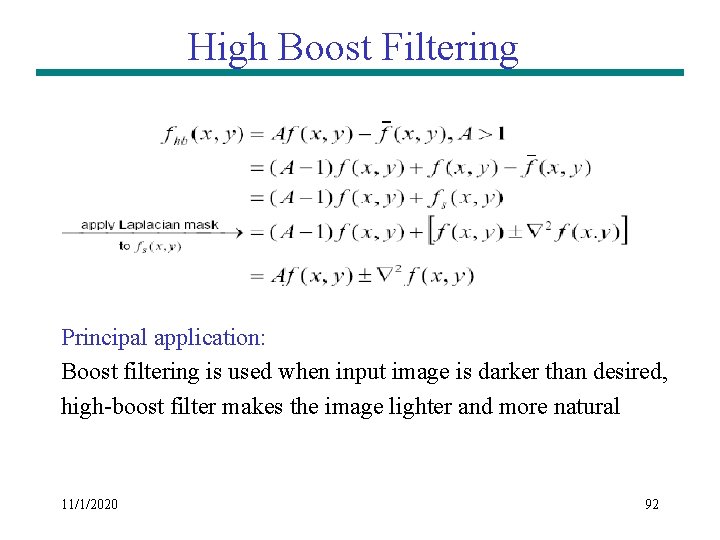
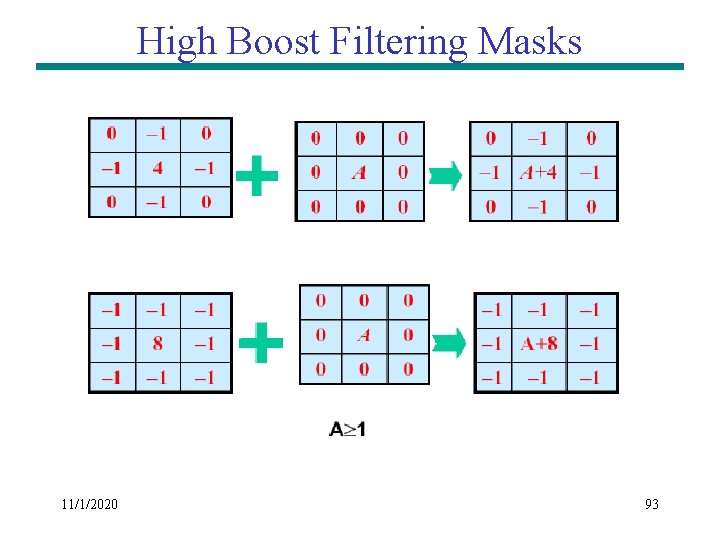
High Boost Filtering Principal application: Boost filtering is used when input image is darker than desired, high-boost filter makes the image lighter and more natural 11/1/2020 92
High Boost Filtering Masks 11/1/2020 93
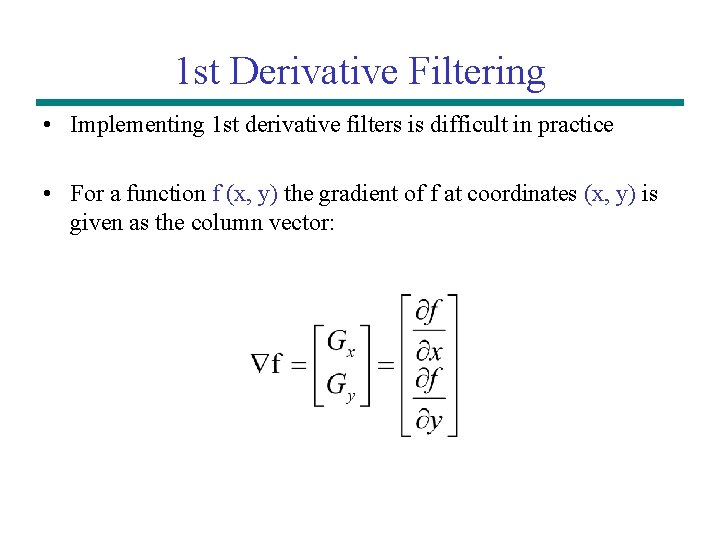
1 st Derivative Filtering • Implementing 1 st derivative filters is difficult in practice • For a function f (x, y) the gradient of f at coordinates (x, y) is given as the column vector:
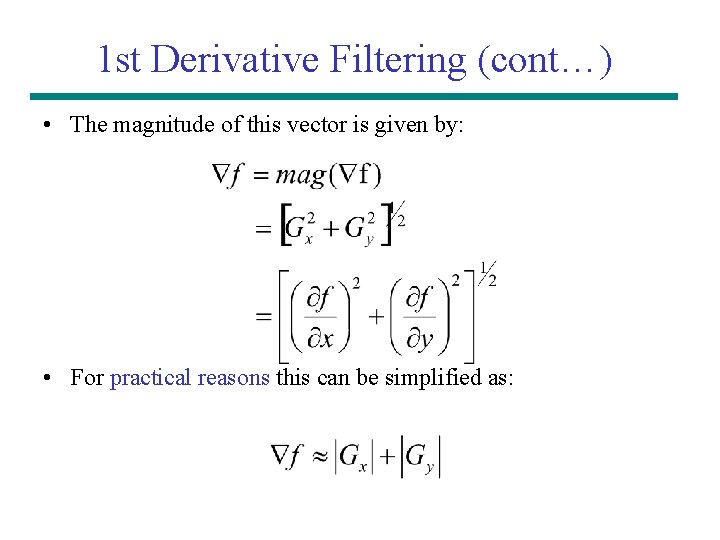
1 st Derivative Filtering (cont…) • The magnitude of this vector is given by: • For practical reasons this can be simplified as:
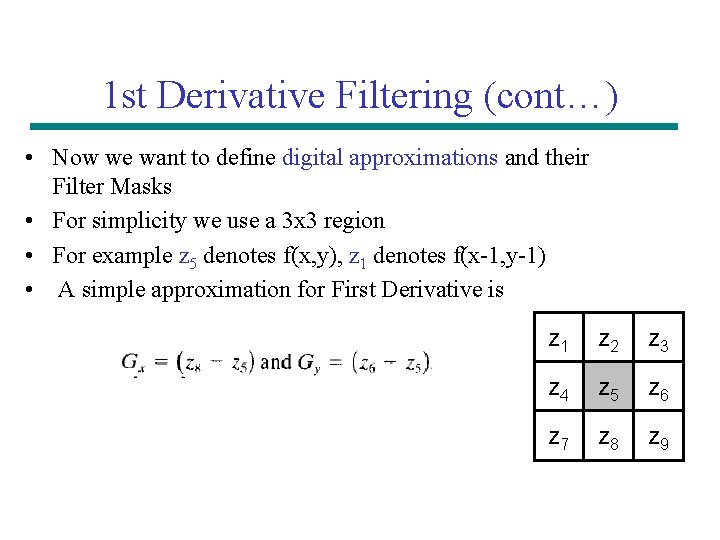
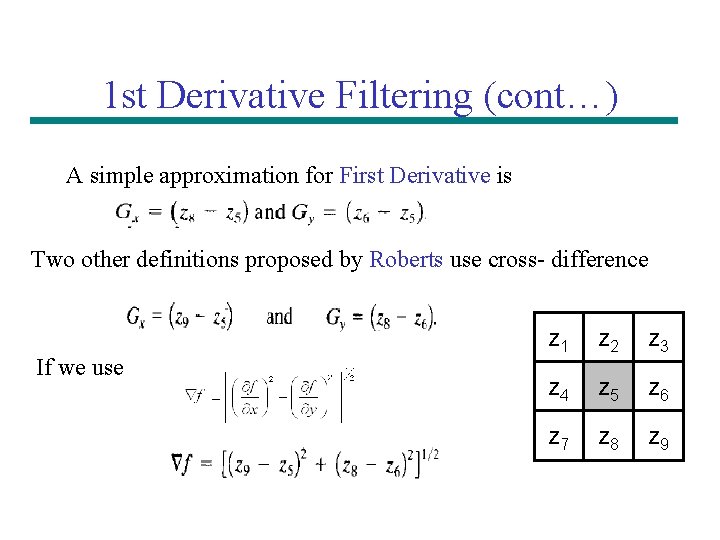
1 st Derivative Filtering (cont…) • Now we want to define digital approximations and their Filter Masks • For simplicity we use a 3 x 3 region • For example z 5 denotes f(x, y), z 1 denotes f(x-1, y-1) • A simple approximation for First Derivative is z 1 z 2 z 3 z 4 z 5 z 6 z 7 z 8 z 9
1 st Derivative Filtering (cont…) A simple approximation for First Derivative is Two other definitions proposed by Roberts use cross- difference If we use z 1 z 2 z 3 z 4 z 5 z 6 z 7 z 8 z 9
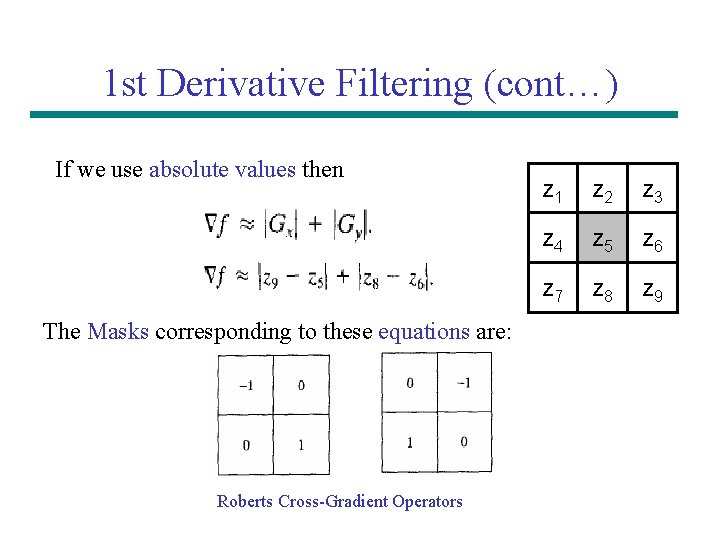
1 st Derivative Filtering (cont…) If we use absolute values then The Masks corresponding to these equations are: Roberts Cross-Gradient Operators z 1 z 2 z 3 z 4 z 5 z 6 z 7 z 8 z 9
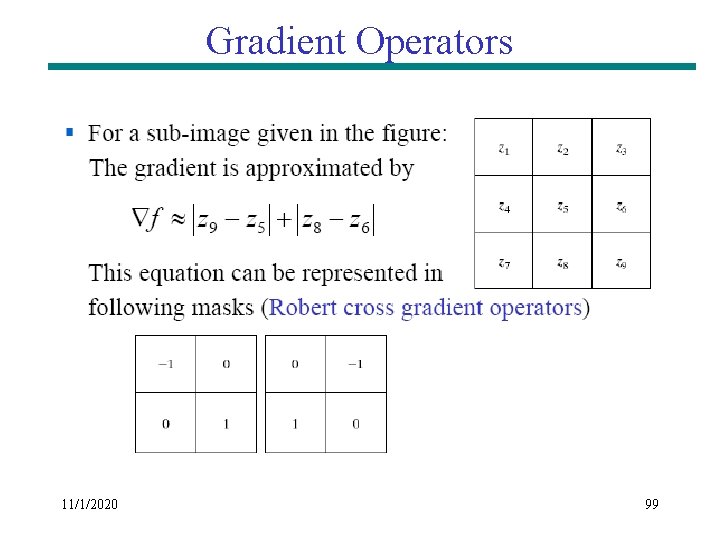
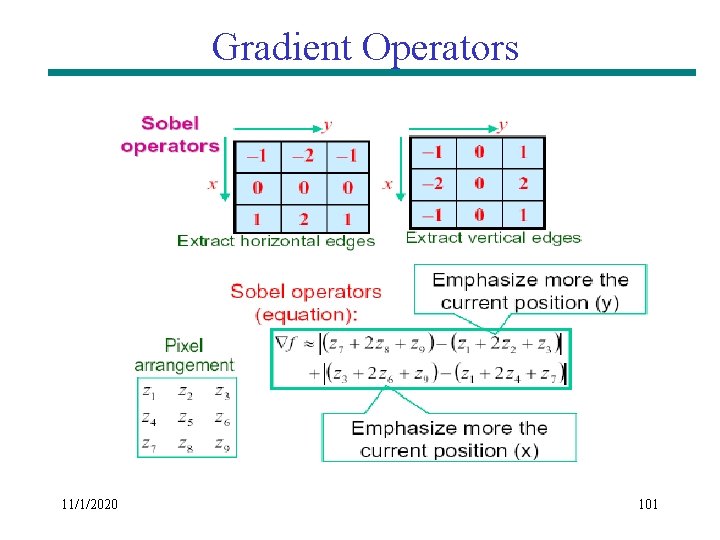
Gradient Operators 11/1/2020 99
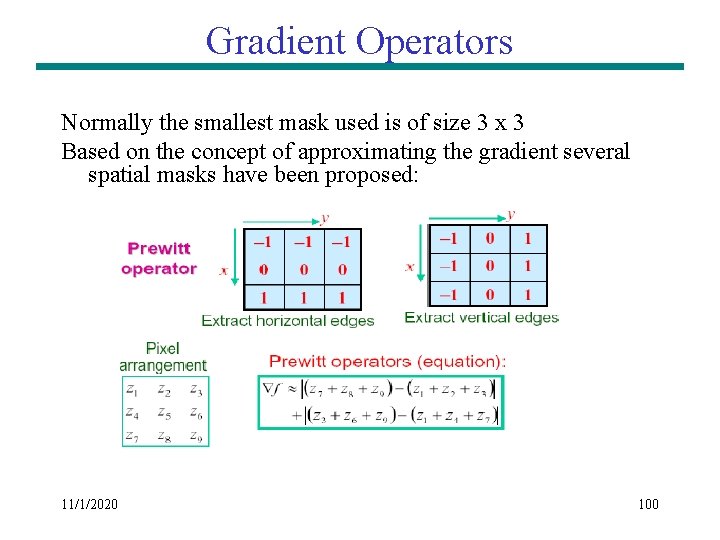
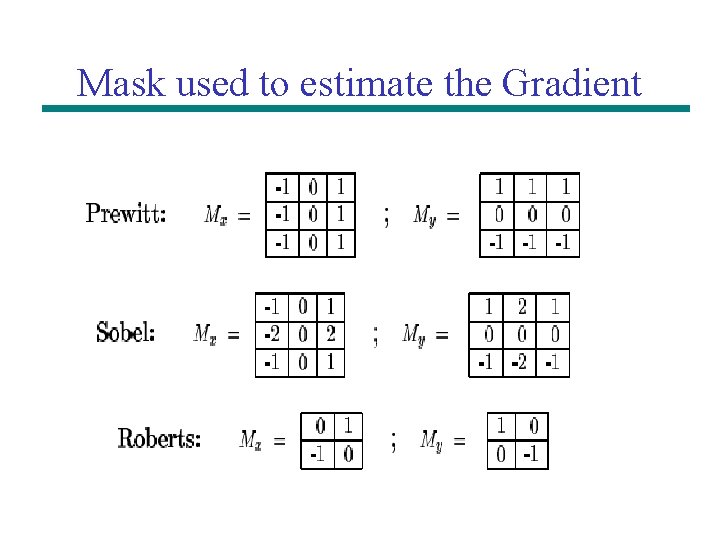
Gradient Operators Normally the smallest mask used is of size 3 x 3 Based on the concept of approximating the gradient several spatial masks have been proposed: 11/1/2020 100
Gradient Operators 11/1/2020 101
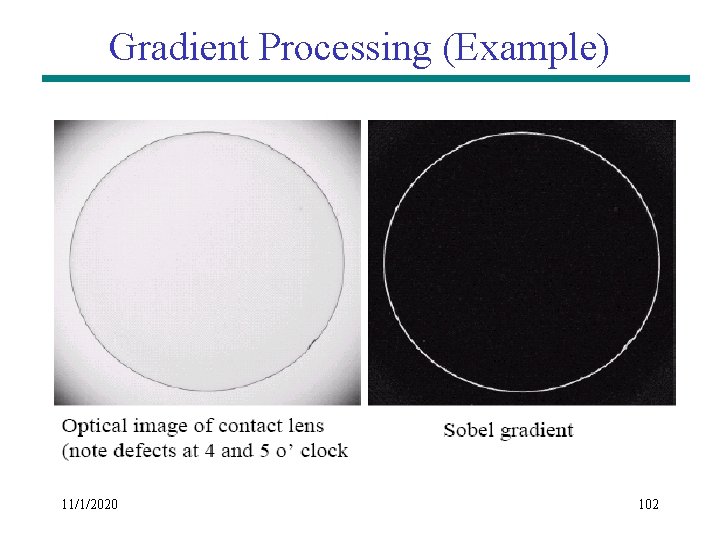
Gradient Processing (Example) 11/1/2020 102
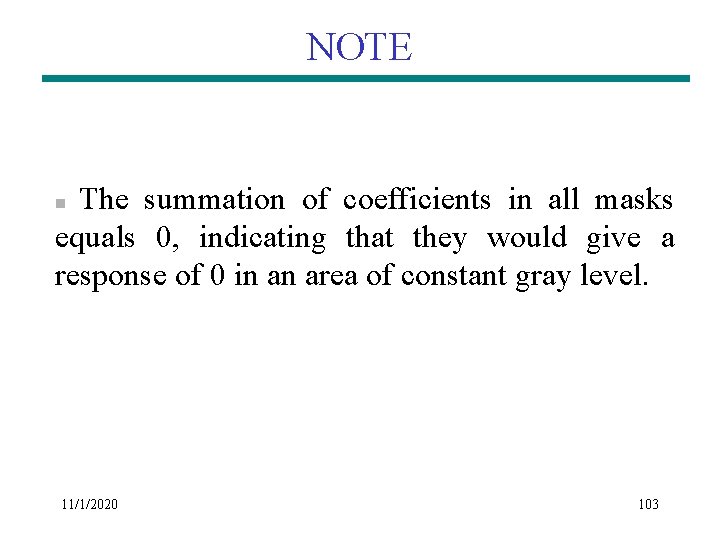
NOTE The summation of coefficients in all masks equals 0, indicating that they would give a response of 0 in an area of constant gray level. n 11/1/2020 103
Mask used to estimate the Gradient
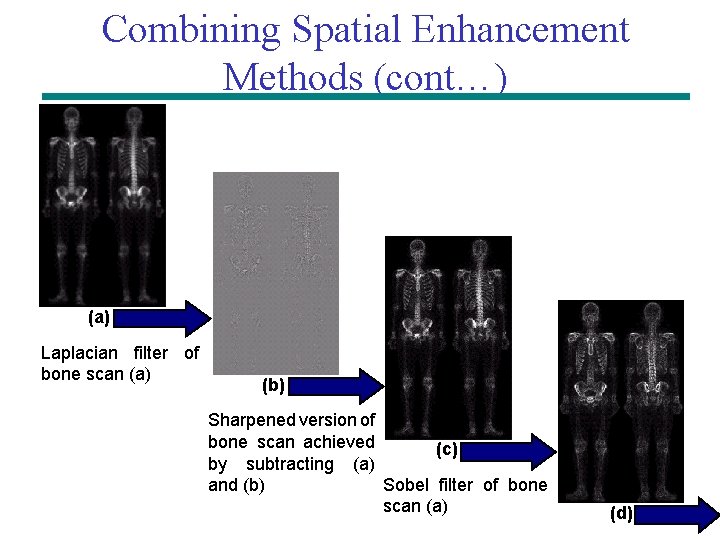
Combining Spatial Enhancement Methods (cont…) (a) Laplacian filter of bone scan (a) (b) Sharpened version of bone scan achieved (c) by subtracting (a) Sobel filter of bone and (b) scan (a) (d)
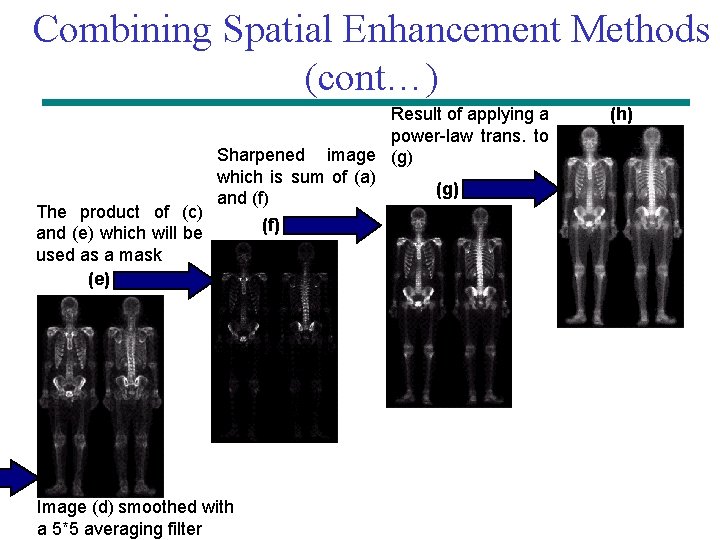
Combining Spatial Enhancement Methods (cont…) The product of (c) and (e) which will be used as a mask (e) Result of applying a power-law trans. to Sharpened image (g) which is sum of (a) (g) and (f) Image (d) smoothed with a 5*5 averaging filter (f) (h)
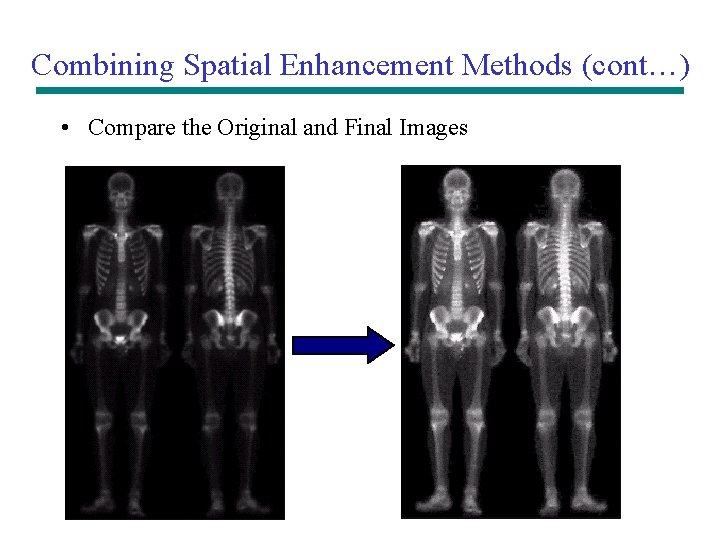
Combining Spatial Enhancement Methods (cont…) • Compare the Original and Final Images