Unified PC Maintenance Console UPCMC V 4 0




- Slides: 42
Unified PC Maintenance Console (UPCMC) V 4. 0 PBX Web Manager Panasonic Communications Co. , Ltd. Communication Network Company Edition 1. 1 06 January, 2009 Confidential 1
Update history 17/Nov/2008 06/Jan/2009 Confidential Hayashida 1 st edition 2 nd edition 2
1. Concept Confidential 3
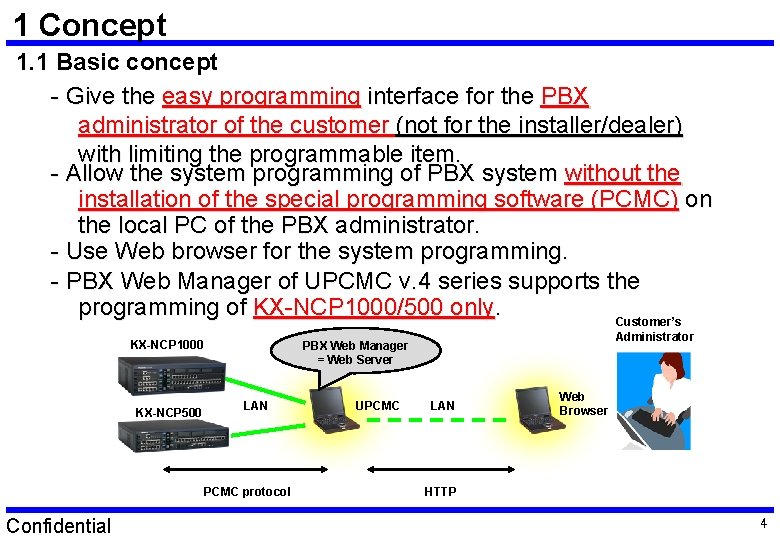
1 Concept 1. 1 Basic concept - Give the easy programming interface for the PBX administrator of the customer (not for the installer/dealer) with limiting the programmable item. - Allow the system programming of PBX system without the installation of the special programming software (PCMC) on the local PC of the PBX administrator. - Use Web browser for the system programming. - PBX Web Manager of UPCMC v. 4 series supports the programming of KX-NCP 1000/500 only. Customer’s KX-NCP 1000 KX-NCP 500 LAN PCMC protocol Confidential Administrator PBX Web Manager = Web Server UPCMC LAN Web Browser HTTP 4
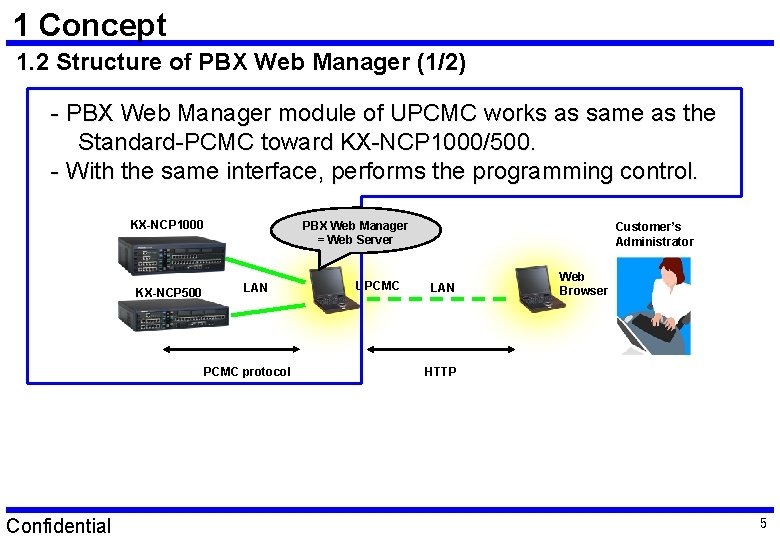
1 Concept 1. 2 Structure of PBX Web Manager (1/2) - PBX Web Manager module of UPCMC works as same as the Standard-PCMC toward KX-NCP 1000/500. - With the same interface, performs the programming control. KX-NCP 1000 KX-NCP 500 PBX Web Manager = Web Server LAN PCMC protocol Confidential UPCMC Customer’s Administrator LAN Web Browser HTTP 5
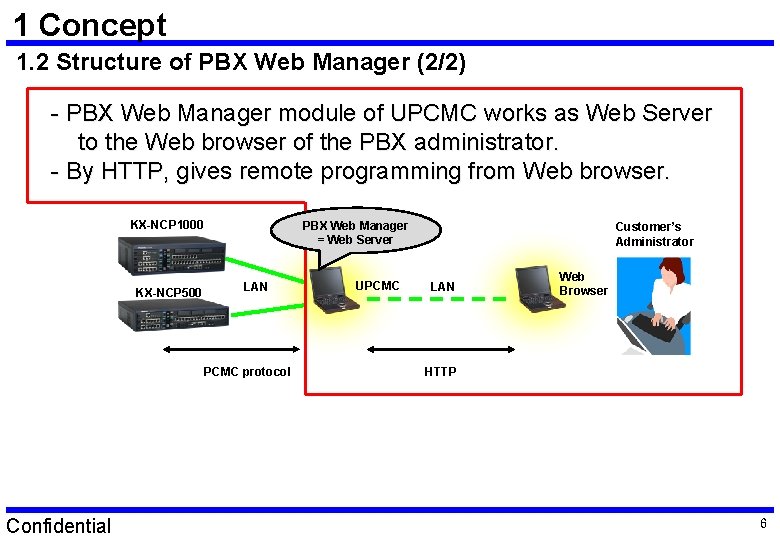
1 Concept 1. 2 Structure of PBX Web Manager (2/2) - PBX Web Manager module of UPCMC works as Web Server to the Web browser of the PBX administrator. - By HTTP, gives remote programming from Web browser. KX-NCP 1000 KX-NCP 500 PBX Web Manager = Web Server LAN PCMC protocol Confidential UPCMC Customer’s Administrator LAN Web Browser HTTP 6
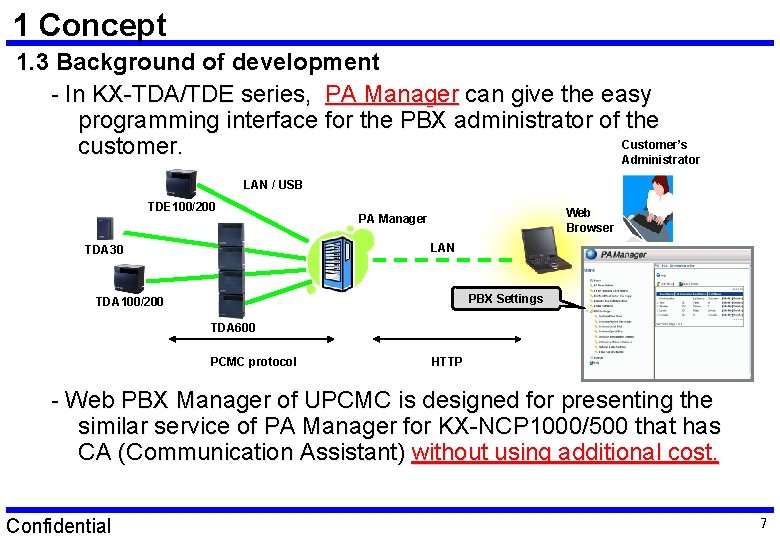
1 Concept 1. 3 Background of development - In KX-TDA/TDE series, PA Manager can give the easy programming interface for the PBX administrator of the Customer’s customer. Administrator LAN / USB TDE 100/200 Web Browser PA Manager LAN TDA 30 PBX Settings TDA 100/200 TDA 600 PCMC protocol HTTP - Web PBX Manager of UPCMC is designed for presenting the similar service of PA Manager for KX-NCP 1000/500 that has CA (Communication Assistant) without using additional cost. Confidential 7
2. Installation Confidential 8
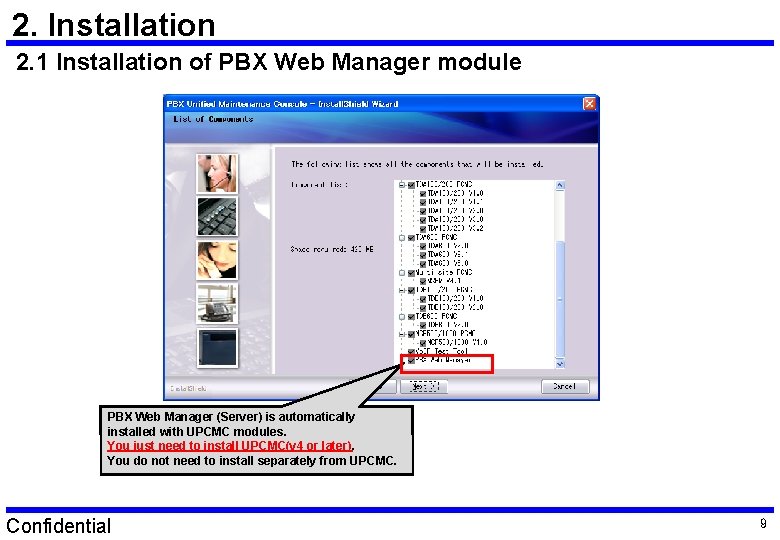
2. Installation 2. 1 Installation of PBX Web Manager module PBX Web Manager (Server) is automatically installed with UPCMC modules. You just need to install UPCMC(v 4 or later). You do not need to install separately from UPCMC. Confidential 9
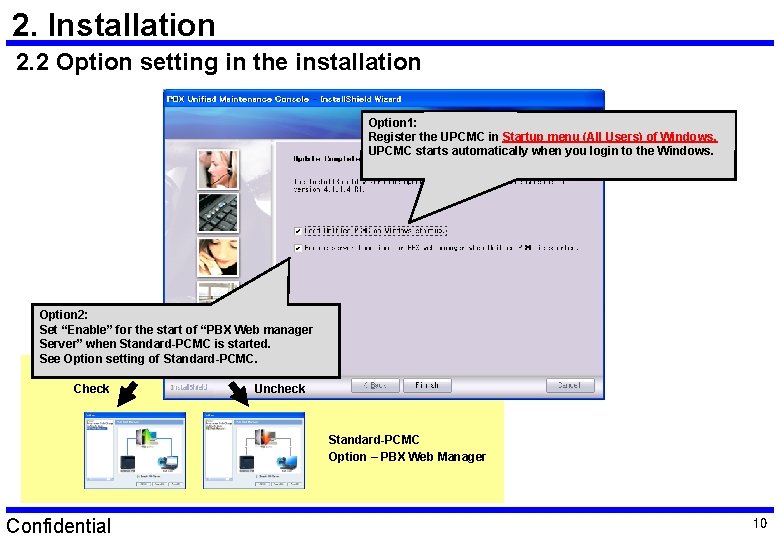
2. Installation 2. 2 Option setting in the installation Option 1: Register the UPCMC in Startup menu (All Users) of Windows. UPCMC starts automatically when you login to the Windows. Option 2: Set “Enable” for the start of “PBX Web manager Server” when Standard-PCMC is started. See Option setting of Standard-PCMC. Check Uncheck Standard-PCMC Option – PBX Web Manager Confidential 10
3. Operation Confidential 11
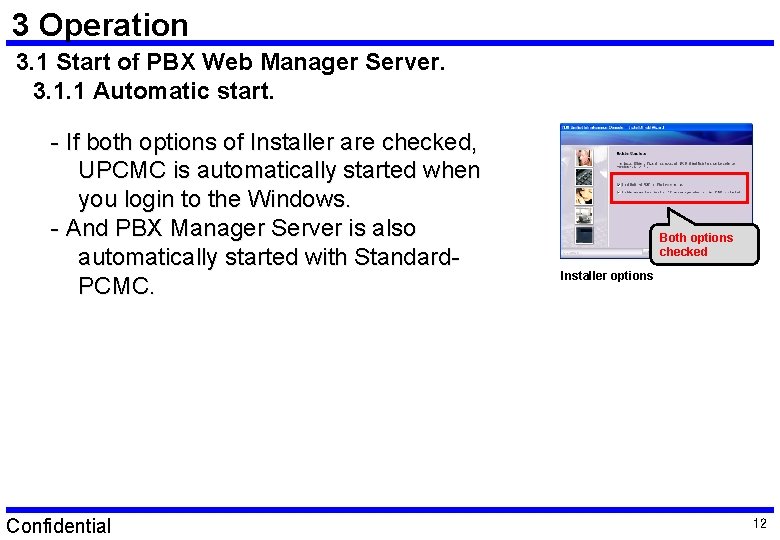
3 Operation 3. 1 Start of PBX Web Manager Server. 3. 1. 1 Automatic start. - If both options of Installer are checked, UPCMC is automatically started when you login to the Windows. - And PBX Manager Server is also automatically started with Standard. PCMC. Confidential Both options checked Installer options 12
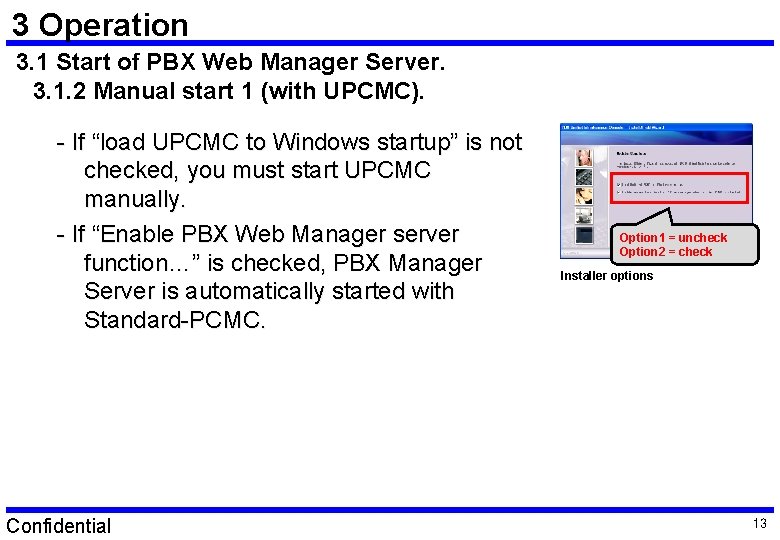
3 Operation 3. 1 Start of PBX Web Manager Server. 3. 1. 2 Manual start 1 (with UPCMC). - If “load UPCMC to Windows startup” is not checked, you must start UPCMC manually. - If “Enable PBX Web Manager server function…” is checked, PBX Manager Server is automatically started with Standard-PCMC. Confidential Option 1 = uncheck Option 2 = check Installer options 13
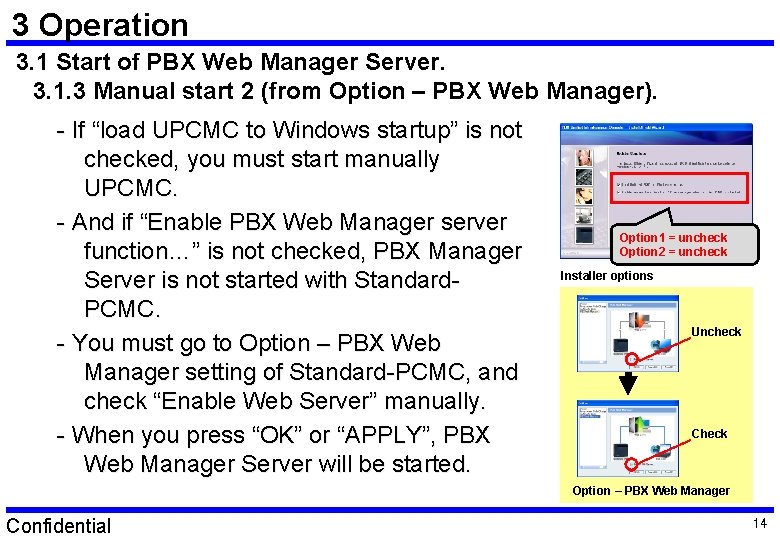
3 Operation 3. 1 Start of PBX Web Manager Server. 3. 1. 3 Manual start 2 (from Option – PBX Web Manager). - If “load UPCMC to Windows startup” is not checked, you must start manually UPCMC. - And if “Enable PBX Web Manager server function…” is not checked, PBX Manager Server is not started with Standard. PCMC. - You must go to Option – PBX Web Manager setting of Standard-PCMC, and check “Enable Web Server” manually. - When you press “OK” or “APPLY”, PBX Web Manager Server will be started. Option 1 = uncheck Option 2 = uncheck Installer options Uncheck Check Option – PBX Web Manager Confidential 14
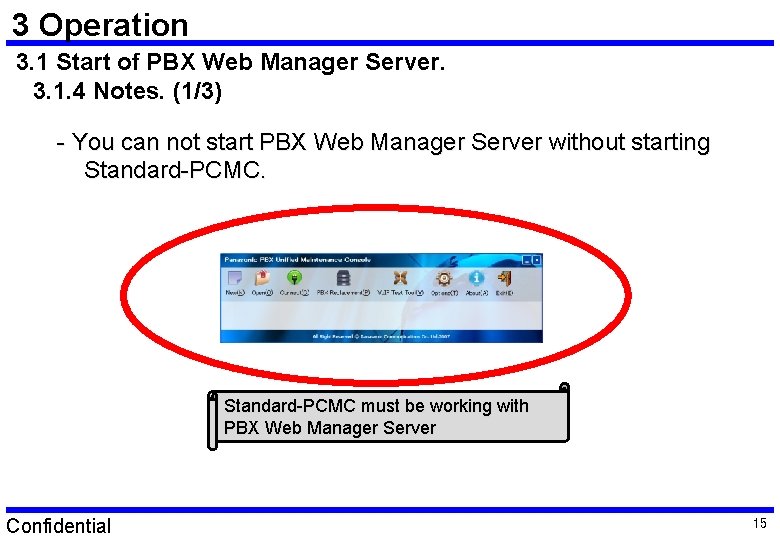
3 Operation 3. 1 Start of PBX Web Manager Server. 3. 1. 4 Notes. (1/3) - You can not start PBX Web Manager Server without starting Standard-PCMC must be working with PBX Web Manager Server Confidential 15
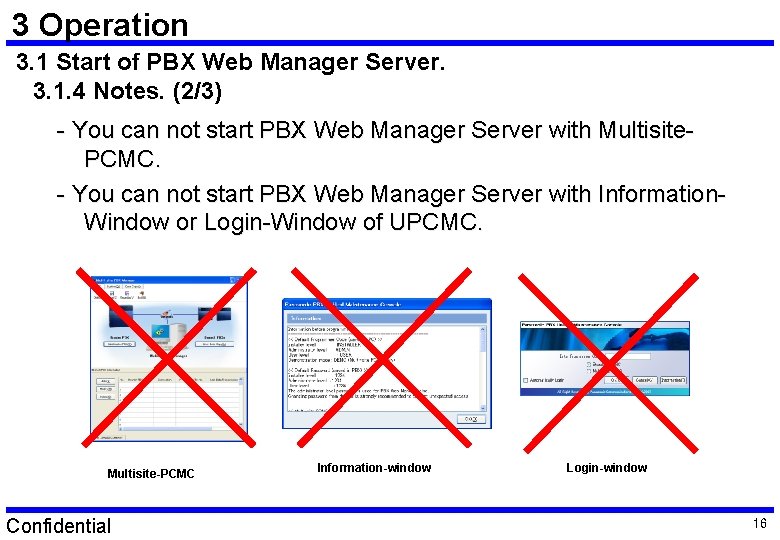
3 Operation 3. 1 Start of PBX Web Manager Server. 3. 1. 4 Notes. (2/3) - You can not start PBX Web Manager Server with Multisite. PCMC. - You can not start PBX Web Manager Server with Information. Window or Login-Window of UPCMC. Multisite-PCMC Confidential Information-window Login-window 16
3 Operation 3. 1 Start of PBX Web Manager Server. 3. 1. 4 Notes. (3/3) - You can not start PBX Web Manager Server as the background service of Windows that allows Web service without login to the Windows. - Starting of service by Power-On of PC is not available. Confidential 17
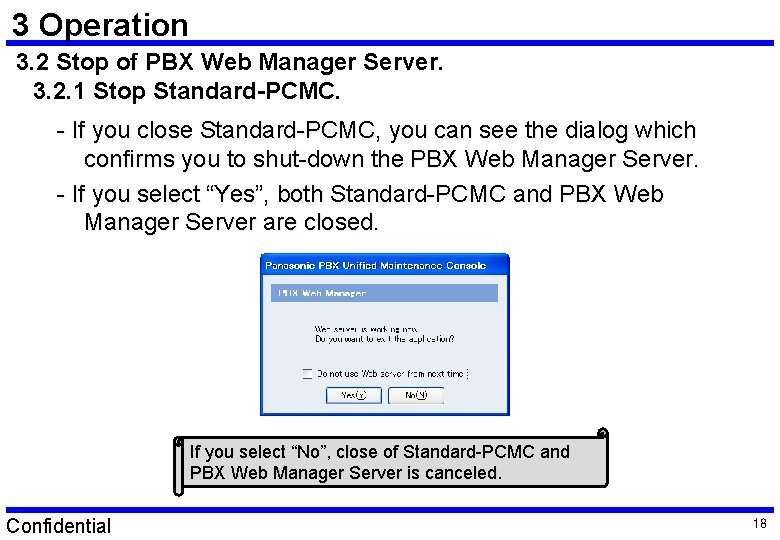
3 Operation 3. 2 Stop of PBX Web Manager Server. 3. 2. 1 Stop Standard-PCMC. - If you close Standard-PCMC, you can see the dialog which confirms you to shut-down the PBX Web Manager Server. - If you select “Yes”, both Standard-PCMC and PBX Web Manager Server are closed. If you select “No”, close of Standard-PCMC and PBX Web Manager Server is canceled. Confidential 18
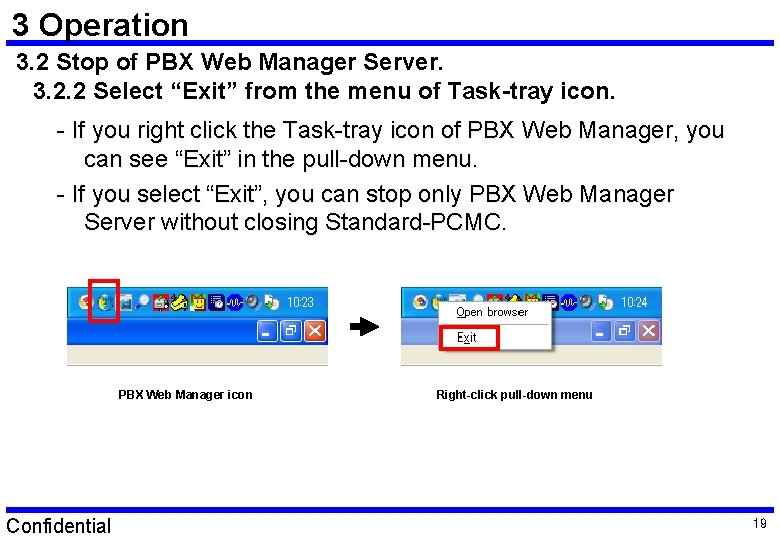
3 Operation 3. 2 Stop of PBX Web Manager Server. 3. 2. 2 Select “Exit” from the menu of Task-tray icon. - If you right click the Task-tray icon of PBX Web Manager, you can see “Exit” in the pull-down menu. - If you select “Exit”, you can stop only PBX Web Manager Server without closing Standard-PCMC. PBX Web Manager icon Confidential Right-click pull-down menu 19
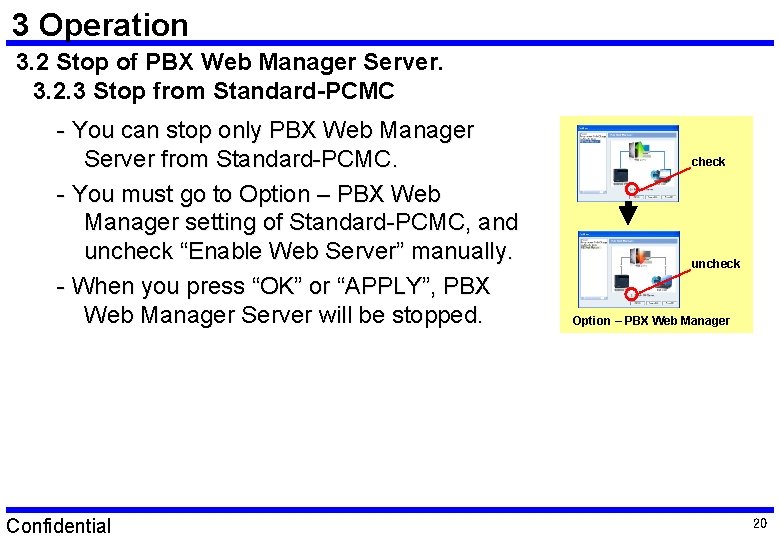
3 Operation 3. 2 Stop of PBX Web Manager Server. 3. 2. 3 Stop from Standard-PCMC - You can stop only PBX Web Manager Server from Standard-PCMC. - You must go to Option – PBX Web Manager setting of Standard-PCMC, and uncheck “Enable Web Server” manually. - When you press “OK” or “APPLY”, PBX Web Manager Server will be stopped. Confidential check uncheck Option – PBX Web Manager 20
3 Operation 3. 2 Stop of PBX Web Manager Server. 3. 2. 4 Notes. - You do not have any way of keeping working of PBX Web Manager Server with stopping Standard-PCMC. - Standard-PCMC must be working with PBX Web Manager Server. Confidential 21
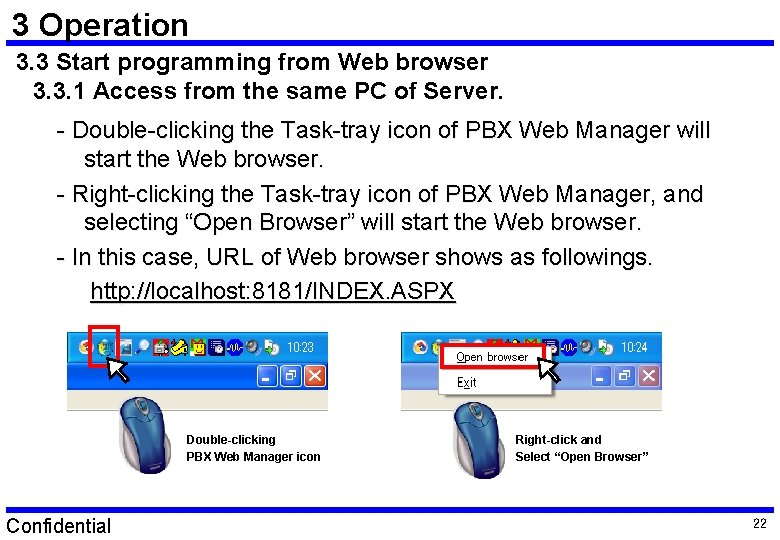
3 Operation 3. 3 Start programming from Web browser 3. 3. 1 Access from the same PC of Server. - Double-clicking the Task-tray icon of PBX Web Manager will start the Web browser. - Right-clicking the Task-tray icon of PBX Web Manager, and selecting “Open Browser” will start the Web browser. - In this case, URL of Web browser shows as followings. http: //localhost: 8181/INDEX. ASPX Double-clicking PBX Web Manager icon Confidential Right-click and Select “Open Browser” 22
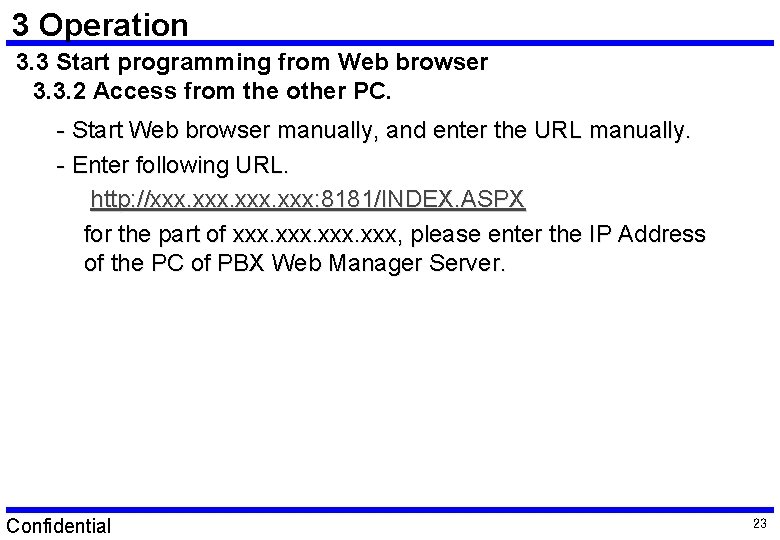
3 Operation 3. 3 Start programming from Web browser 3. 3. 2 Access from the other PC. - Start Web browser manually, and enter the URL manually. - Enter following URL. http: //xxx. xxx: 8181/INDEX. ASPX for the part of xxx, please enter the IP Address of the PC of PBX Web Manager Server. Confidential 23
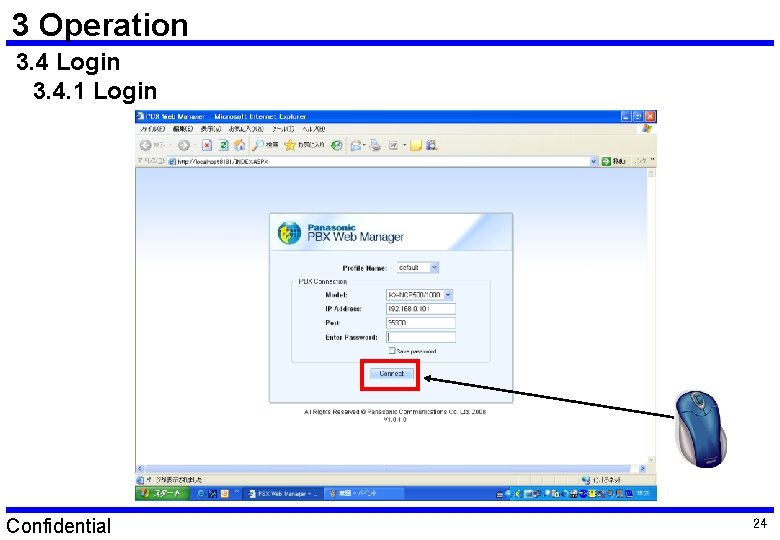
3 Operation 3. 4 Login 3. 4. 1 Login Confidential 24
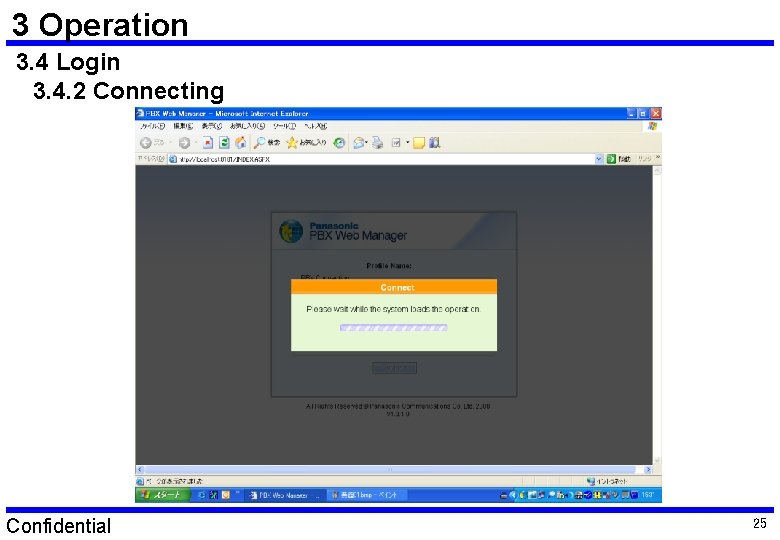
3 Operation 3. 4 Login 3. 4. 2 Connecting Confidential 25
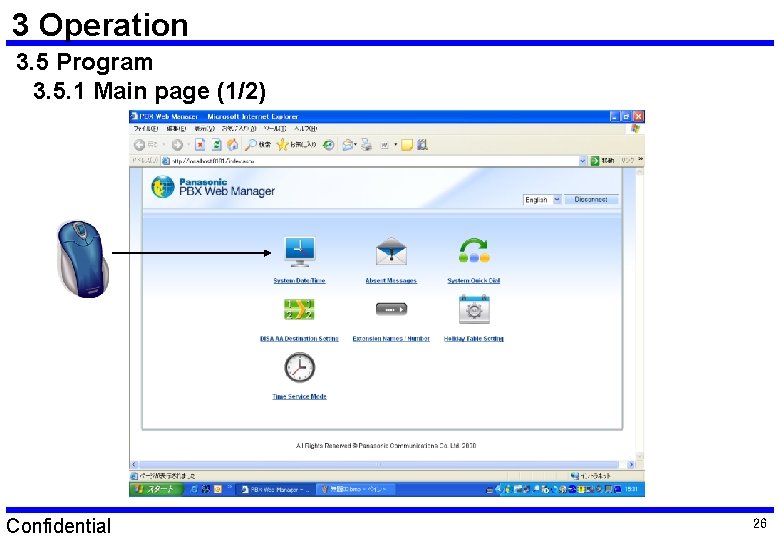
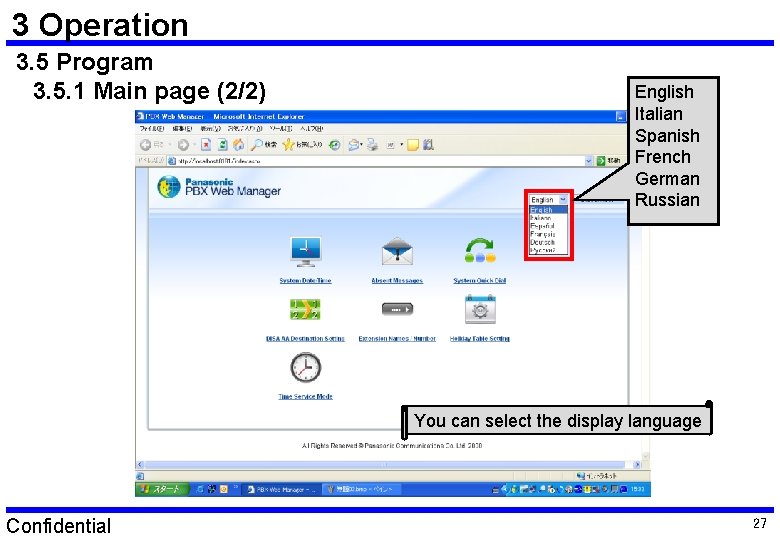
3 Operation 3. 5 Program 3. 5. 1 Main page (1/2) Confidential 26
3 Operation 3. 5 Program 3. 5. 1 Main page (2/2) English Italian Spanish French German Russian You can select the display language Confidential 27
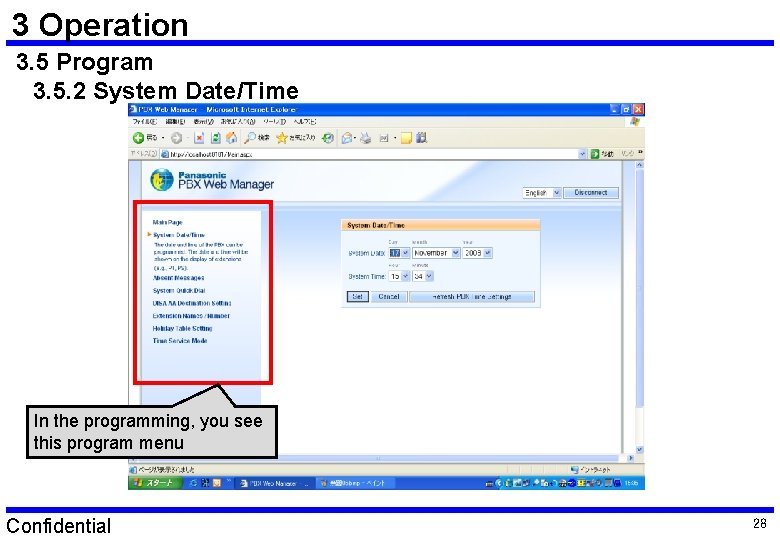
3 Operation 3. 5 Program 3. 5. 2 System Date/Time In the programming, you see this program menu Confidential 28
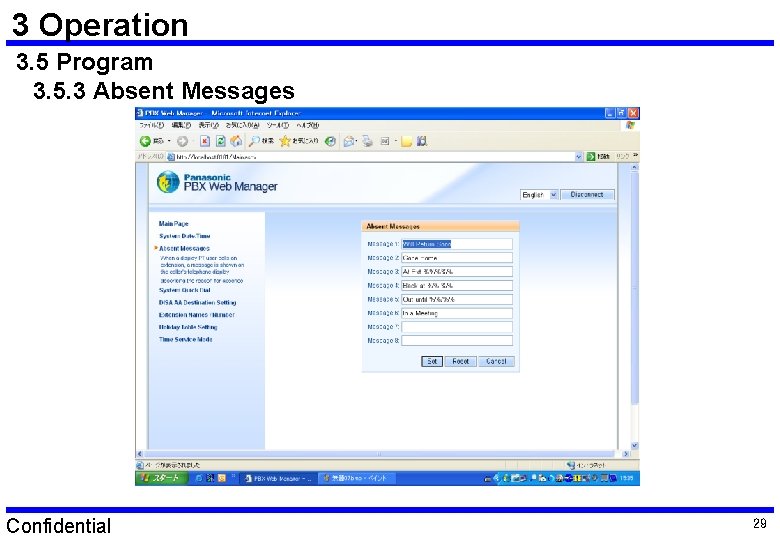
3 Operation 3. 5 Program 3. 5. 3 Absent Messages Confidential 29
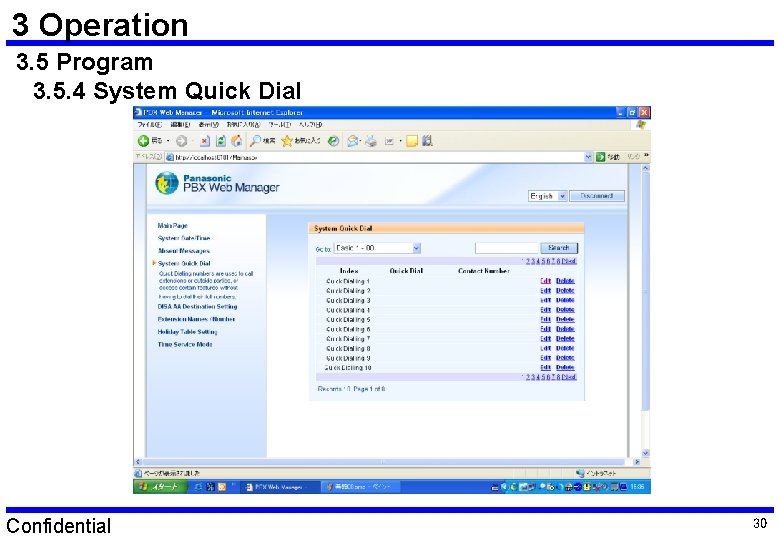
3 Operation 3. 5 Program 3. 5. 4 System Quick Dial Confidential 30
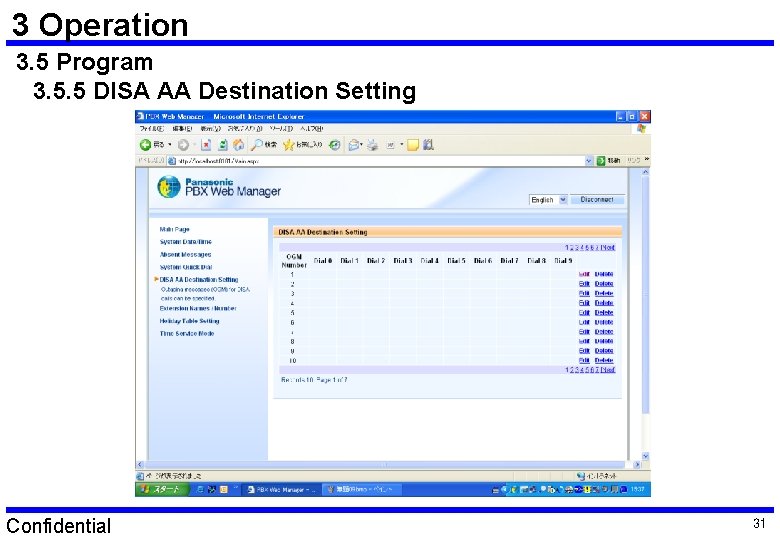
3 Operation 3. 5 Program 3. 5. 5 DISA AA Destination Setting Confidential 31
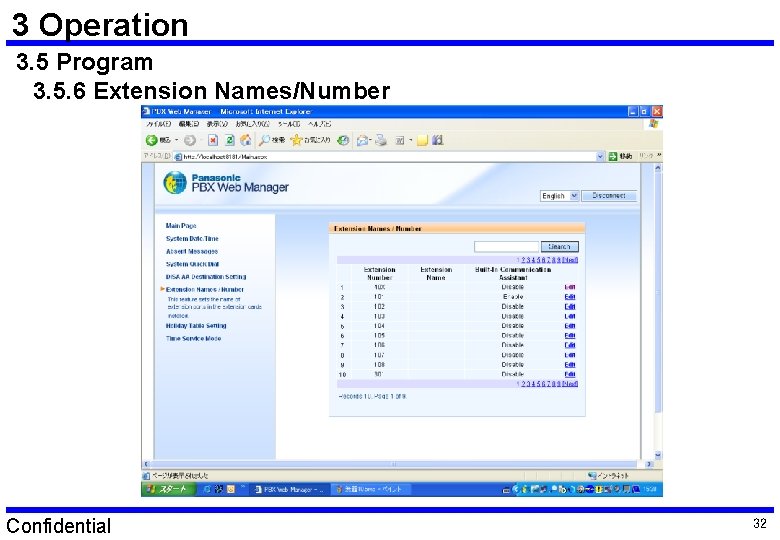
3 Operation 3. 5 Program 3. 5. 6 Extension Names/Number Confidential 32
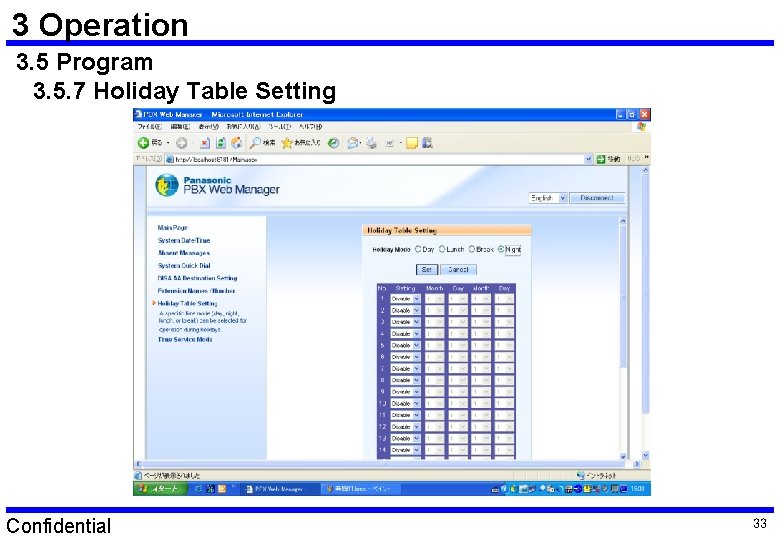
3 Operation 3. 5 Program 3. 5. 7 Holiday Table Setting Confidential 33
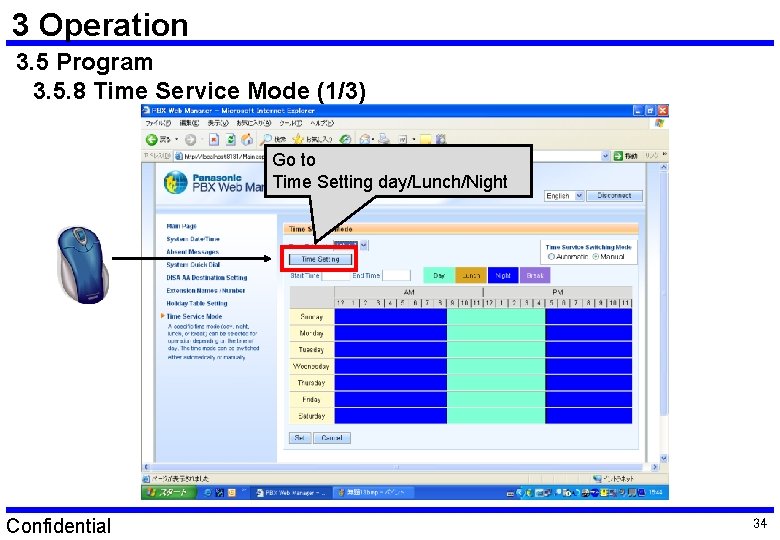
3 Operation 3. 5 Program 3. 5. 8 Time Service Mode (1/3) Go to Time Setting day/Lunch/Night Confidential 34
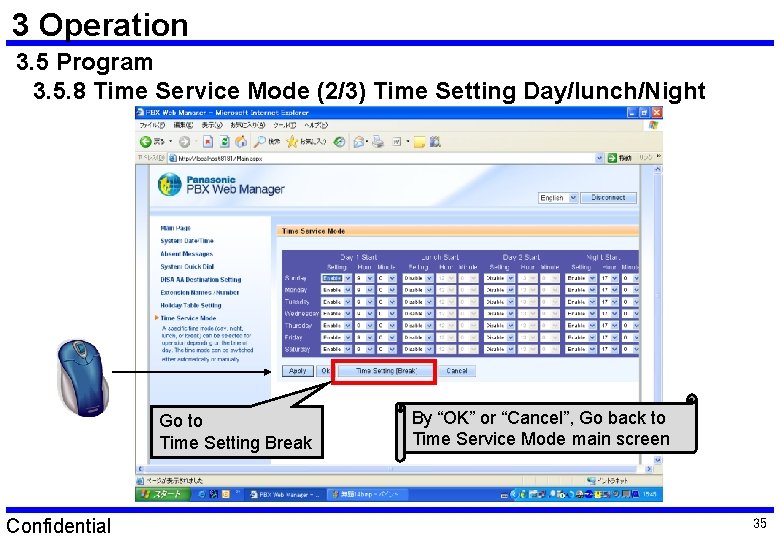
3 Operation 3. 5 Program 3. 5. 8 Time Service Mode (2/3) Time Setting Day/lunch/Night Go to Time Setting Break Confidential By “OK” or “Cancel”, Go back to Time Service Mode main screen 35
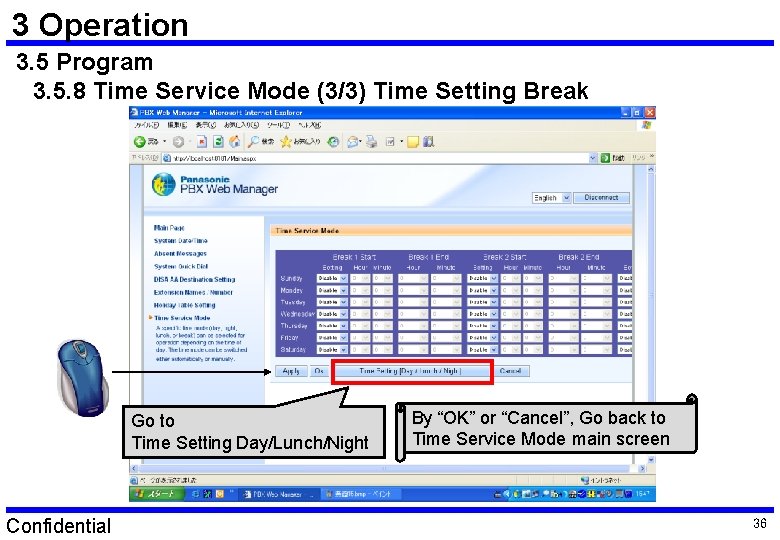
3 Operation 3. 5 Program 3. 5. 8 Time Service Mode (3/3) Time Setting Break Go to Time Setting Day/Lunch/Night Confidential By “OK” or “Cancel”, Go back to Time Service Mode main screen 36
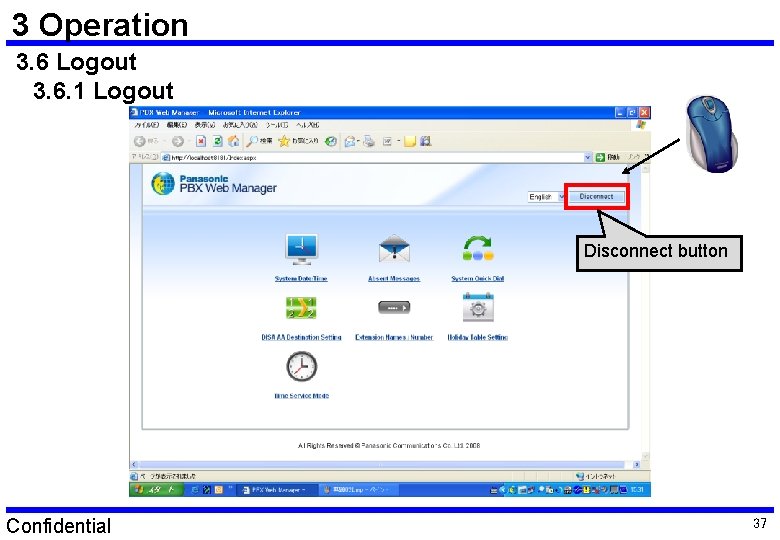
3 Operation 3. 6 Logout 3. 6. 1 Logout Disconnect button Confidential 37
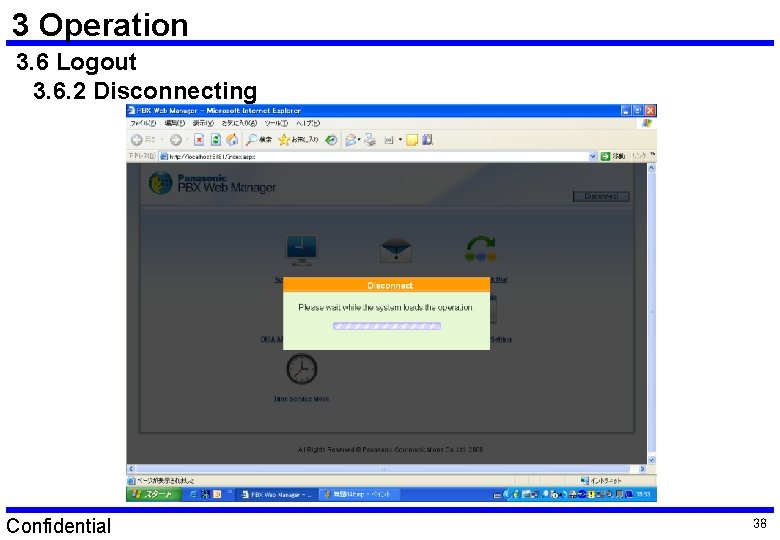
3 Operation 3. 6 Logout 3. 6. 2 Disconnecting Confidential 38
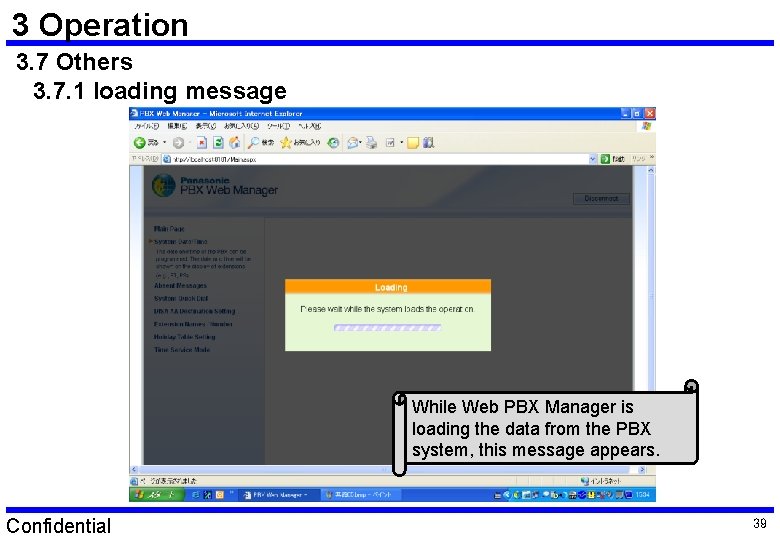
3 Operation 3. 7 Others 3. 7. 1 loading message While Web PBX Manager is loading the data from the PBX system, this message appears. Confidential 39
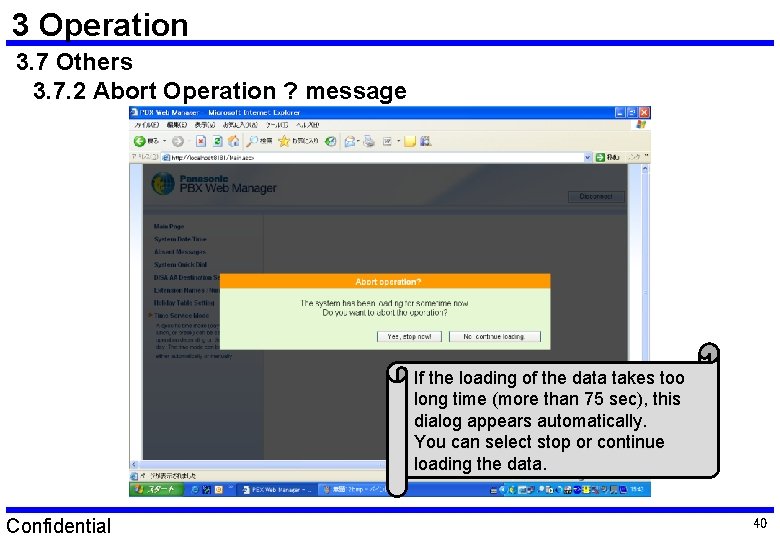
3 Operation 3. 7 Others 3. 7. 2 Abort Operation ? message If the loading of the data takes too long time (more than 75 sec), this dialog appears automatically. You can select stop or continue loading the data. Confidential 40
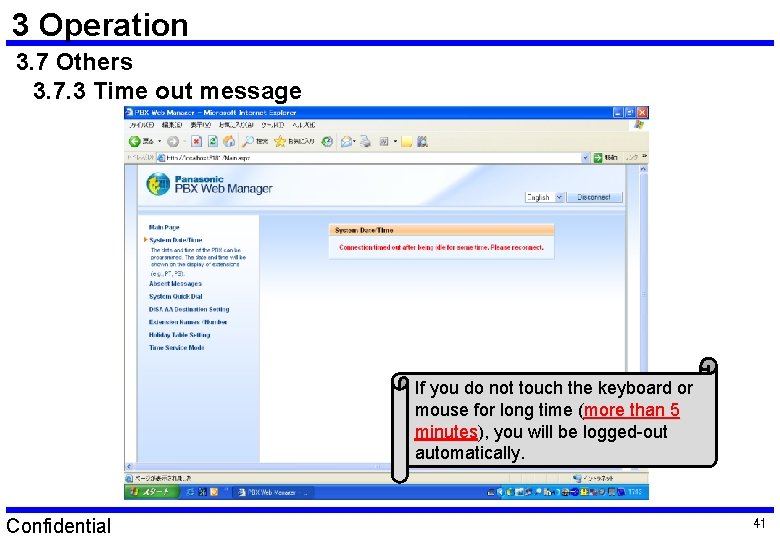
3 Operation 3. 7 Others 3. 7. 3 Time out message If you do not touch the keyboard or mouse for long time (more than 5 minutes), you will be logged-out automatically. Confidential 41
Thank you very much ! Confidential 42