My Florida Market Place System Administrator Training Agenda

- Slides: 47
My. Florida. Market. Place System Administrator Training
Agenda q System Administrator Responsibilities q Understanding Groups and Roles q Establishing a profile in MFMP q Password changes q Inactivation Procedures q Address Maintenance q Confidential Information q Secure Reports Page - 2
System Administrator Responsibilities q My. Florida. Market. Place (MFMP) System/Security Administrator responsibilities include: Ø Establishing and maintaining the agency customer’s (hereinafter referred to as customer) profile Ø Each PUI that an agency processes for will require a unique profile Ø Resetting Passwords Ø Establishing and maintaining the agency’s ship to and bill to addresses Ø Assisting the agency in the monitoring and removal of any confidential information that may have been input in MFMP q There are several Job Aids available on the MFMP Toolkit http: //dms. myflorida. com/buyertoolkit designed to assist the System/Security Administrator in performing these functions: Ø Security Administrator Guidance – This document details the responsibilities of the System/Security Administrators referenced above Ø MFMP Role Guide - This document defines the functionality of the groups and roles available in My. Florida. Market. Place so System Administrators can make informed decisions when assigning groups and roles to new and Page - 3 current customers
System Administrator Responsibilities q MFMP Inactivations - This document provides the necessary steps for inactivating the customer in MFMP q Understanding the Management Level – This document outlines the MFMP Management Level structure which correlates to the customer spend authority q MFMP Scanning and File Attachment Guidelines - This document gives guidance for attaching documents, the size of file you can attach, and recommended file types q Confidential Information Purge Request Process - This document explains the process of removing any confidential information from MFMP q Confidential Information Purge Request Form - Form to remove confidential information from MFMP q Sample Confidential Information Policy - This document gives Security Administrators a sample policy on how their agency should handle the monitoring and removal of any confidential information that may have been input in MFMP Page - 4
Agenda q System Administrator Responsibilities q Understanding Groups and Roles q Establishing a profile in MFMP q Password changes q Inactivation Procedures q Address Maintenance q Confidential Information q Secure Reports Page - 5
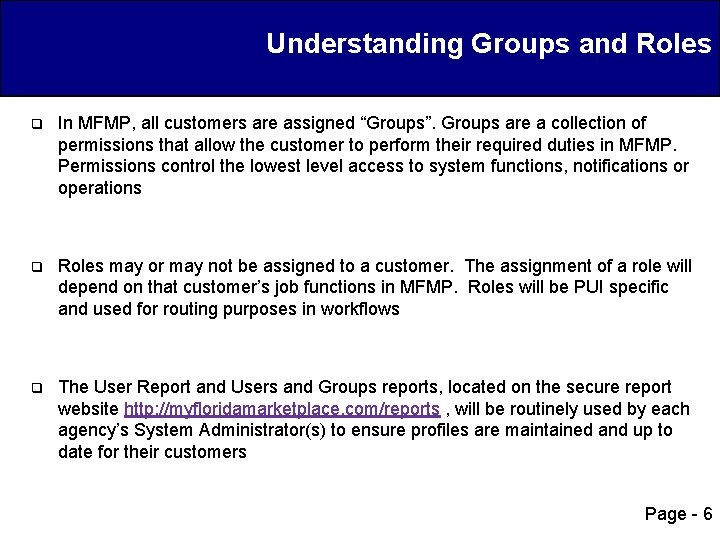
Understanding Groups and Roles q In MFMP, all customers are assigned “Groups”. Groups are a collection of permissions that allow the customer to perform their required duties in MFMP. Permissions control the lowest level access to system functions, notifications or operations q Roles may or may not be assigned to a customer. The assignment of a role will depend on that customer’s job functions in MFMP. Roles will be PUI specific and used for routing purposes in workflows q The User Report and Users and Groups reports, located on the secure report website http: //myfloridamarketplace. com/reports , will be routinely used by each agency’s System Administrator(s) to ensure profiles are maintained and up to date for their customers Page - 6
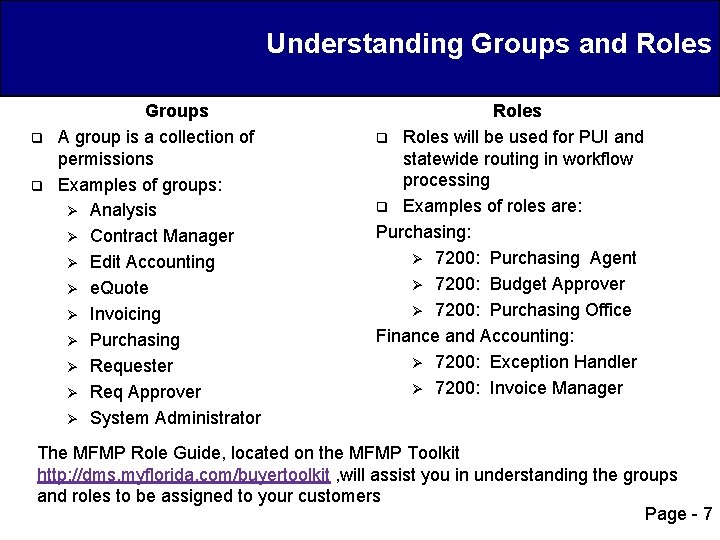
Understanding Groups and Roles q q Groups A group is a collection of permissions Examples of groups: Ø Analysis Ø Contract Manager Ø Edit Accounting Ø e. Quote Ø Invoicing Ø Purchasing Ø Requester Ø Req Approver Ø System Administrator Roles q Roles will be used for PUI and statewide routing in workflow processing q Examples of roles are: Purchasing: Ø 7200: Purchasing Agent Ø 7200: Budget Approver Ø 7200: Purchasing Office Finance and Accounting: Ø 7200: Exception Handler Ø 7200: Invoice Manager The MFMP Role Guide, located on the MFMP Toolkit http: //dms. myflorida. com/buyertoolkit , will assist you in understanding the groups and roles to be assigned to your customers Page - 7
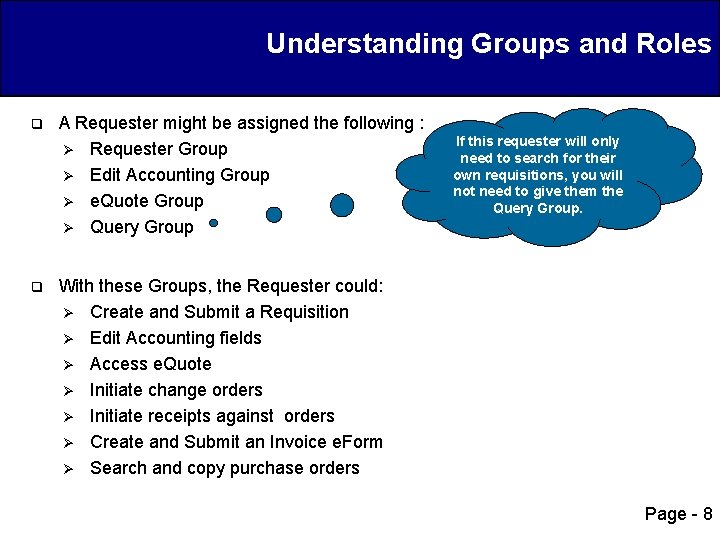
Understanding Groups and Roles q q A Requester might be assigned the following : Ø Requester Group Ø Edit Accounting Group Ø e. Quote Group Ø Query Group If this requester will only need to search for their own requisitions, you will not need to give them the Query Group. With these Groups, the Requester could: Ø Create and Submit a Requisition Ø Edit Accounting fields Ø Access e. Quote Ø Initiate change orders Ø Initiate receipts against orders Ø Create and Submit an Invoice e. Form Ø Search and copy purchase orders Page - 8
Agenda q System Administrator Responsibilities q Understanding Groups and Roles q Establishing a profile in MFMP q Password changes q Inactivation Procedures q Address Maintenance q Confidential Information q Secure Reports Page - 9
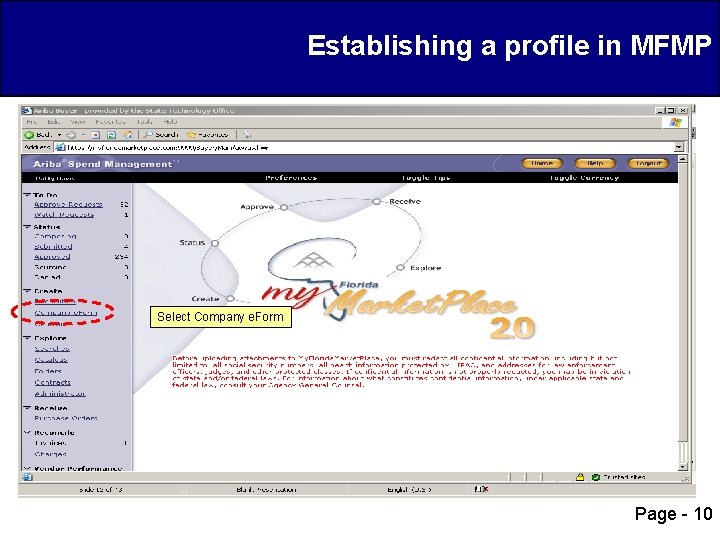
Establishing a profile in MFMP Select Company e. Form Page - 10
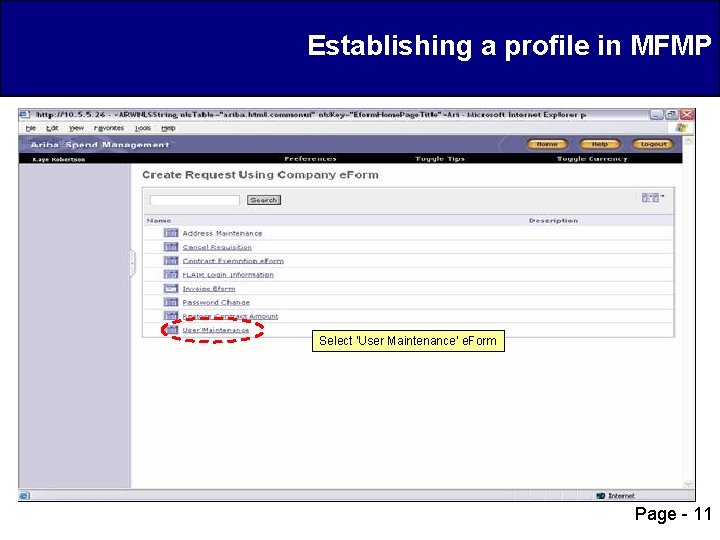
Establishing a profile in MFMP Select ‘User Maintenance’ e. Form Page - 11
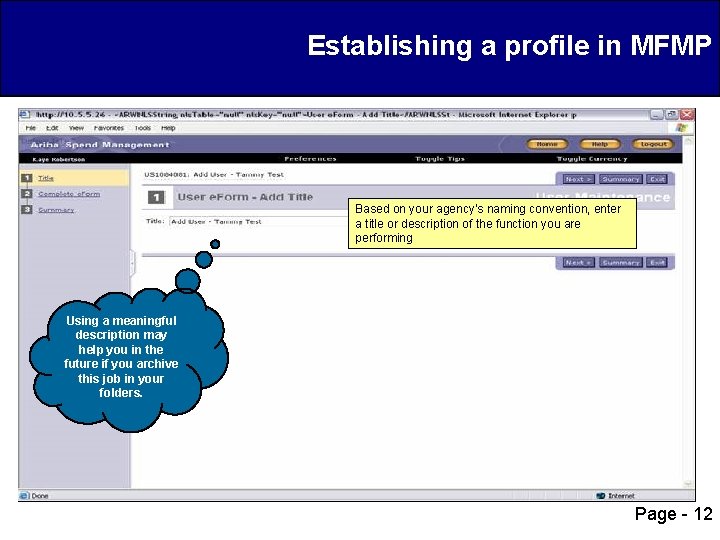
Establishing a profile in MFMP Based on your agency’s naming convention, enter a title or description of the function you are performing Using a meaningful description may help you in the future if you archive this job in your folders. Page - 12
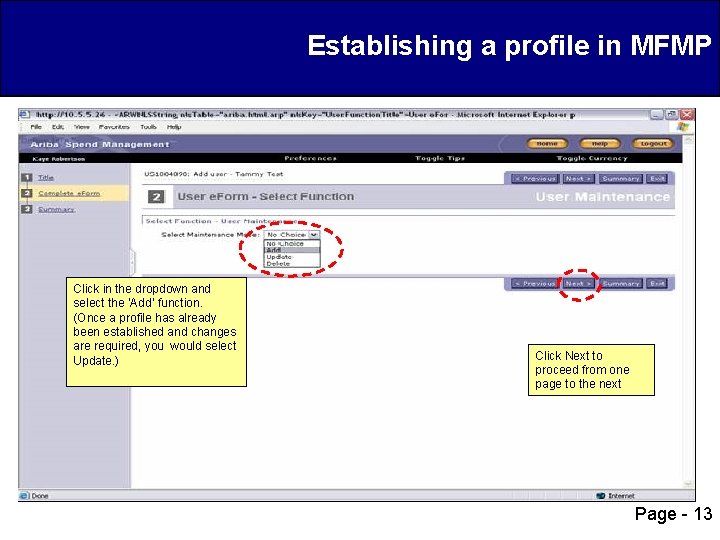
Establishing a profile in MFMP Click in the dropdown and select the ‘Add’ function. (Once a profile has already been established and changes are required, you would select Update. ) Click Next to proceed from one page to the next Page - 13
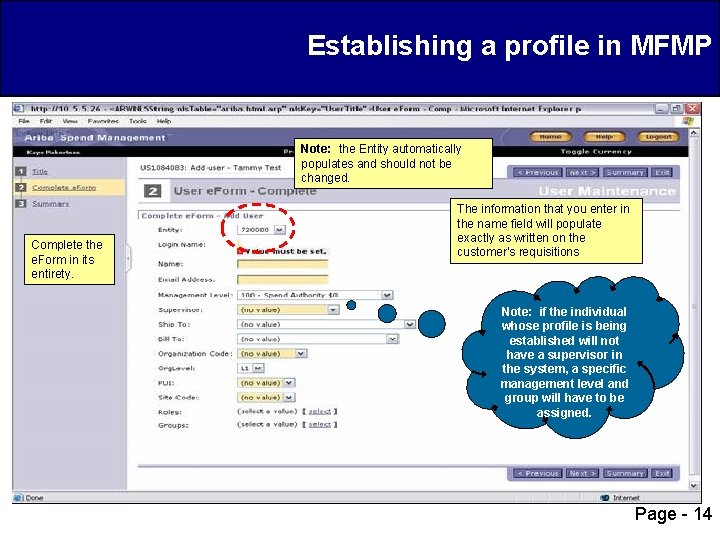
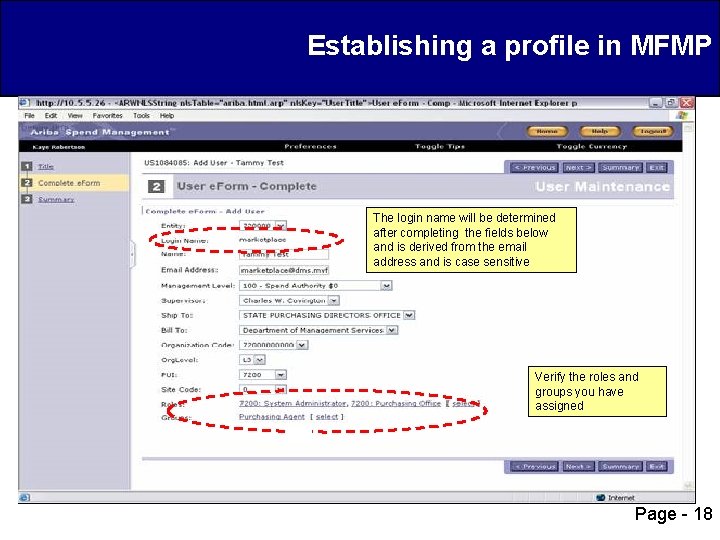
Establishing a profile in MFMP Note: the Entity automatically populates and should not be changed. Complete the e. Form in its entirety. The information that you enter in the name field will populate exactly as written on the customer’s requisitions Note: if the individual whose profile is being established will not have a supervisor in the system, a specific management level and group will have to be assigned. Page - 14
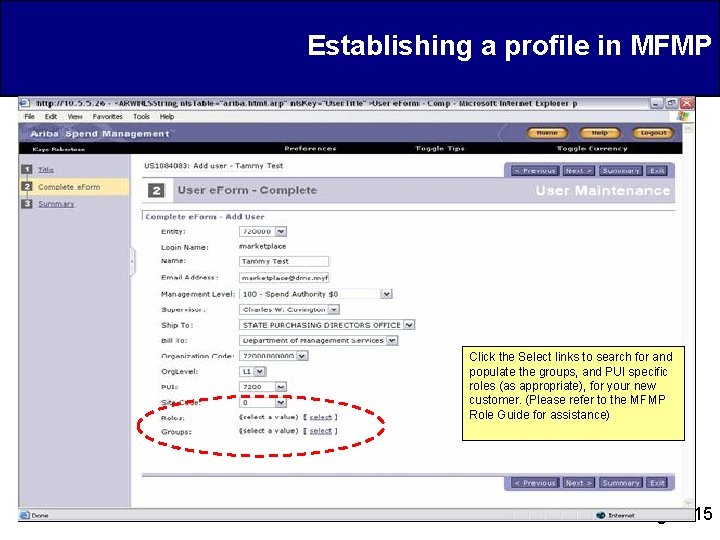
Establishing a profile in MFMP Click the Select links to search for and populate the groups, and PUI specific roles (as appropriate), for your new customer. (Please refer to the MFMP Role Guide for assistance) Page - 15
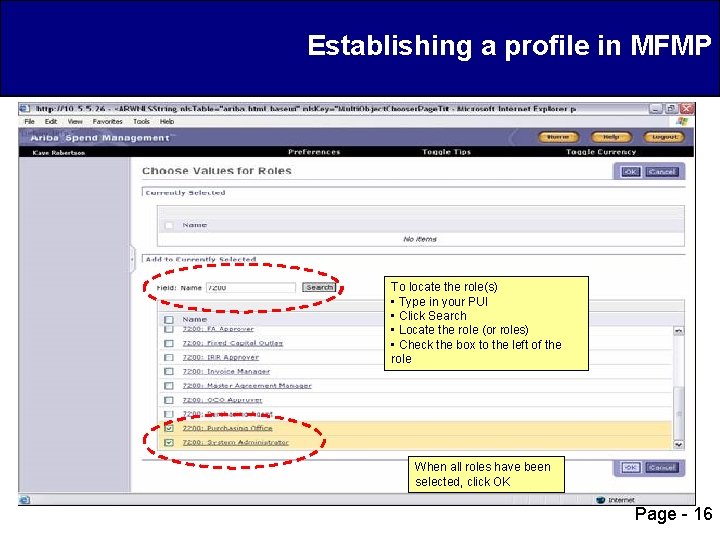
Establishing a profile in MFMP To locate the role(s) • Type in your PUI • Click Search • Locate the role (or roles) • Check the box to the left of the role When all roles have been selected, click OK Page - 16
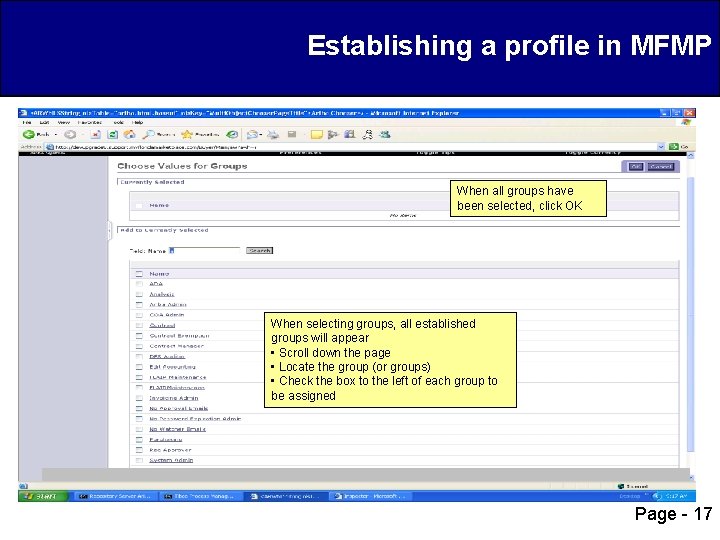
Establishing a profile in MFMP When all groups have been selected, click OK When selecting groups, all established groups will appear • Scroll down the page • Locate the group (or groups) • Check the box to the left of each group to be assigned Page - 17
Establishing a profile in MFMP The login name will be determined after completing the fields below and is derived from the email address and is case sensitive Verify the roles and groups you have assigned Page - 18
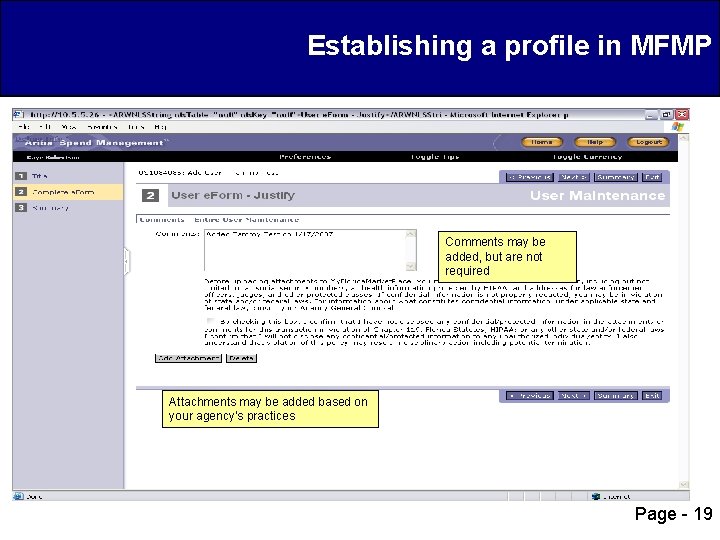
Establishing a profile in MFMP Comments may be added, but are not required Attachments may be added based on your agency’s practices Page - 19
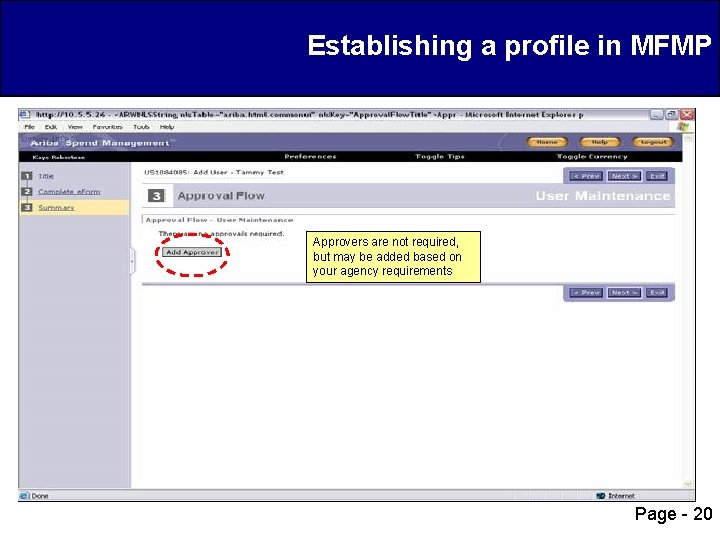
Establishing a profile in MFMP Approvers are not required, but may be added based on your agency requirements Page - 20
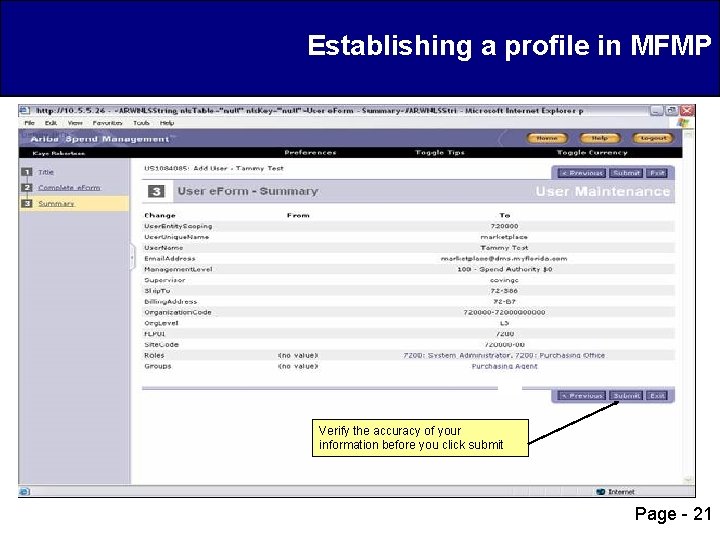
Establishing a profile in MFMP Verify the accuracy of your information before you click submit Page - 21
Agenda q System Administrator Responsibilities q Understanding Groups and Roles q Establishing a profile in MFMP q Password changes q Inactivation Procedures q Address Maintenance q Confidential Information q Secure Reports Page - 22
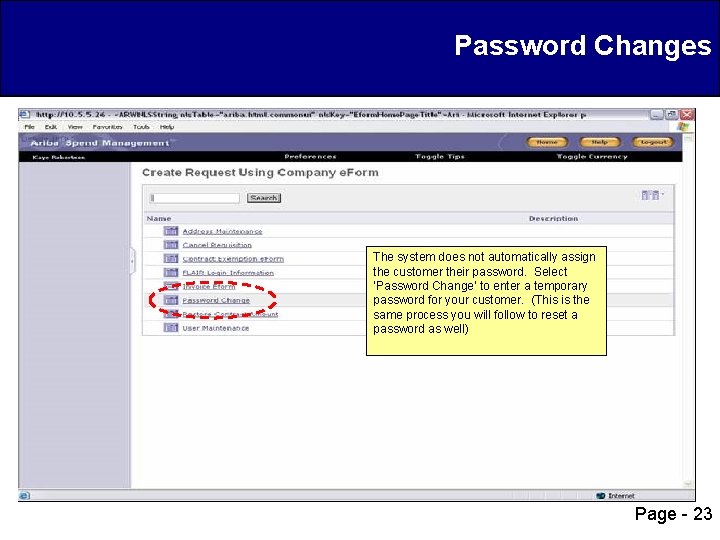
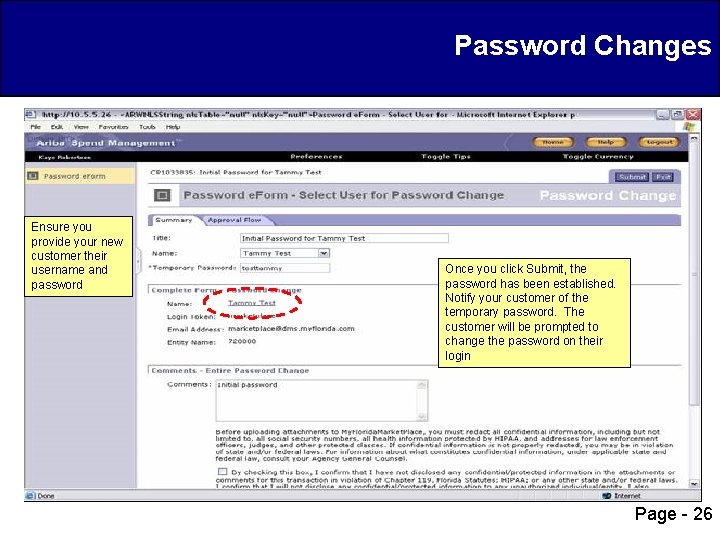
Password Changes The system does not automatically assign the customer their password. Select ‘Password Change’ to enter a temporary password for your customer. (This is the same process you will follow to reset a password as well) Page - 23
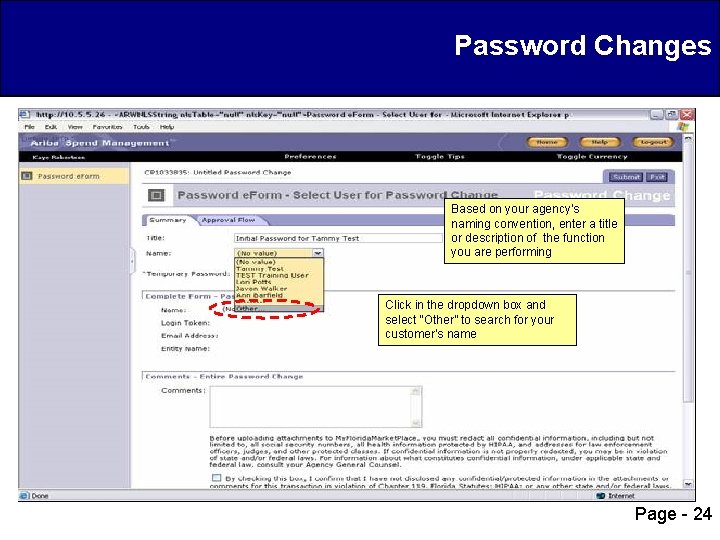
Password Changes Based on your agency’s naming convention, enter a title or description of the function you are performing Click in the dropdown box and select “Other” to search for your customer’s name Page - 24
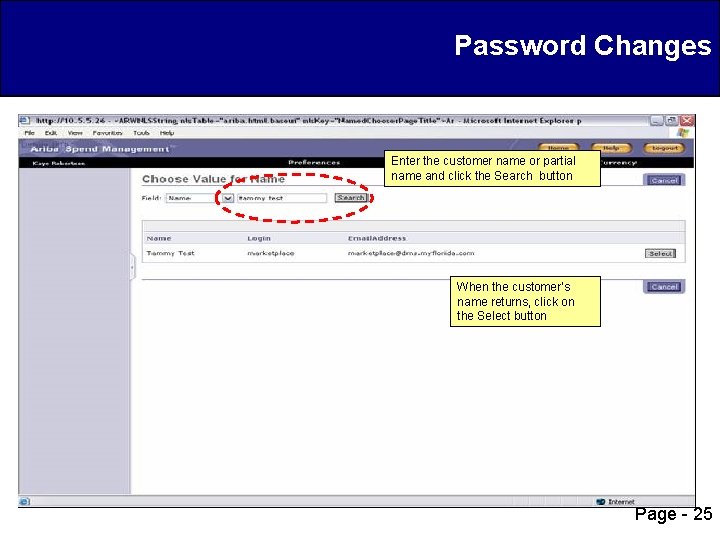
Password Changes Enter the customer name or partial name and click the Search button When the customer’s name returns, click on the Select button Page - 25
Password Changes Ensure you provide your new customer their username and password Once you click Submit, the password has been established. Notify your customer of the temporary password. The customer will be prompted to change the password on their login Page - 26
Agenda q System Administrator Responsibilities q Understanding Groups and Roles q Establishing a profile in MFMP q Password changes q Inactivation Procedures q Address Maintenance q Confidential Information q Secure Reports Page - 27
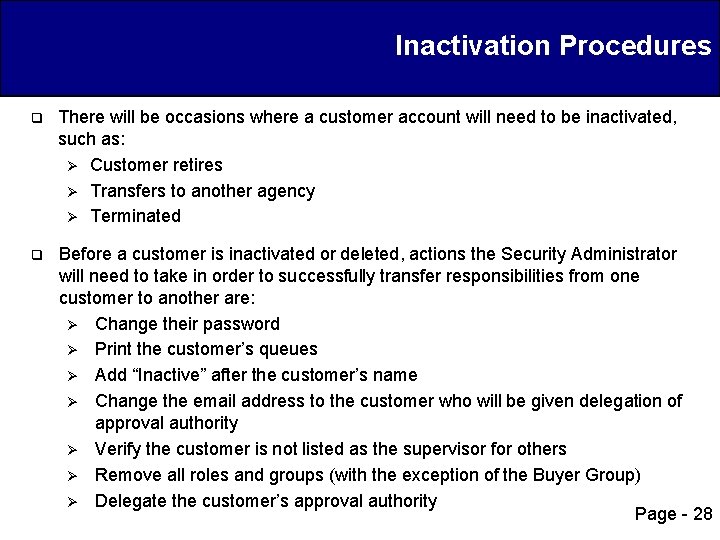
Inactivation Procedures q There will be occasions where a customer account will need to be inactivated, such as: Ø Customer retires Ø Transfers to another agency Ø Terminated q Before a customer is inactivated or deleted, actions the Security Administrator will need to take in order to successfully transfer responsibilities from one customer to another are: Ø Change their password Ø Print the customer’s queues Ø Add “Inactive” after the customer’s name Ø Change the email address to the customer who will be given delegation of approval authority Ø Verify the customer is not listed as the supervisor for others Ø Remove all roles and groups (with the exception of the Buyer Group) Ø Delegate the customer’s approval authority Page - 28
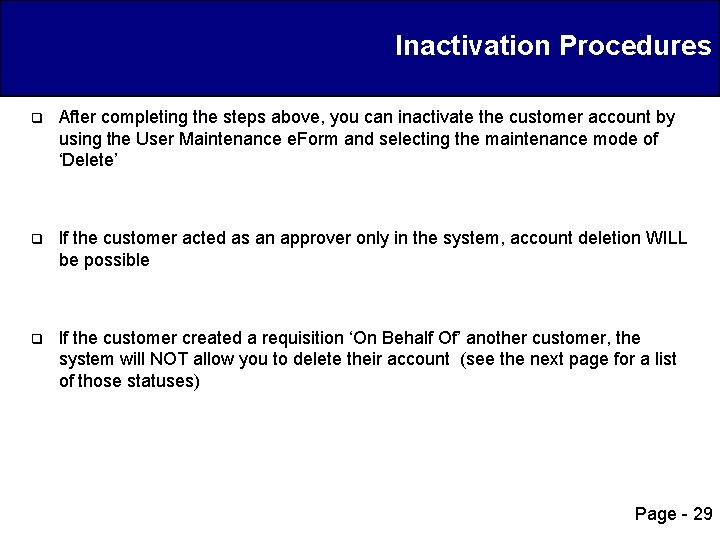
Inactivation Procedures q After completing the steps above, you can inactivate the customer account by using the User Maintenance e. Form and selecting the maintenance mode of ‘Delete’ q If the customer acted as an approver only in the system, account deletion WILL be possible q If the customer created a requisition ‘On Behalf Of’ another customer, the system will NOT allow you to delete their account (see the next page for a list of those statuses) Page - 29
Inactivation Procedures q A customer account can only be deleted if a request they create is NOT in one of the following statuses: Ø Composing Ø Submitted Ø Approved Ø Ordering Ø Ordered Ø Canceling Ø Receiving q For complete step-by-step instructions, follow the MFMP Inactivations Job Aid found on the Toolkit http: //dms. myflorida. com/buyertoolkit Page - 30
Agenda q System Administrator Responsibilities q Understanding Groups and Roles q Establishing a profile in MFMP q Password changes q Inactivation Procedures q Address Maintenance q Confidential Information q Secure Reports Page - 31
Address Maintenance q If a new or modified Ship To and/or Bill To address is needed, the Security Administrator will handle this function. Agencies may, and often will, have multiple Ship To and Bill To locations q The requester’s Ship To and Bill To address automatically populate on the purchase requisition/ purchase order based on the information in the customer’s profile. The requester can change this information by selecting a different Ship To and Bill To address for their agency, as directed by their agency policy q As locations change they can be modified or deleted as appropriate Page - 32
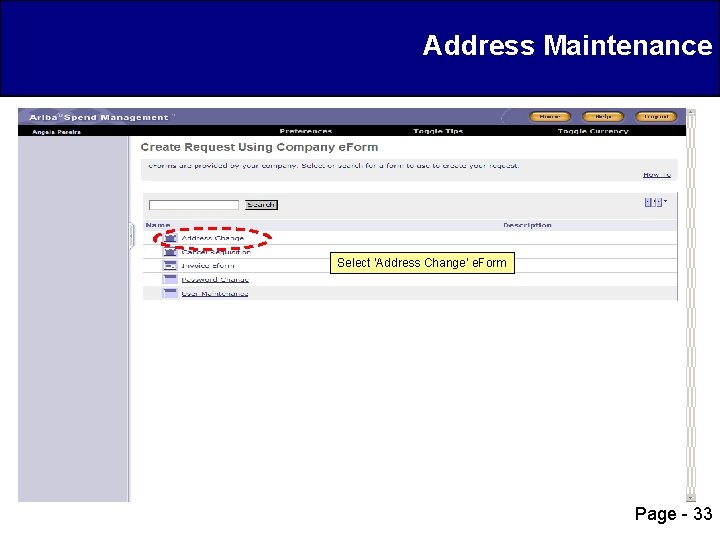
Address Maintenance Select ‘Address Change’ e. Form Page - 33
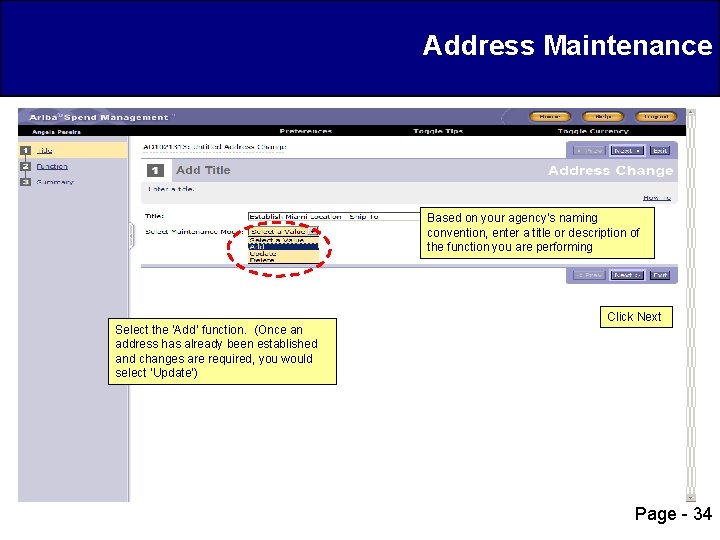
Address Maintenance Based on your agency’s naming convention, enter a title or description of the function you are performing Select the ‘Add’ function. (Once an address has already been established and changes are required, you would select ‘Update’) Click Next Page - 34
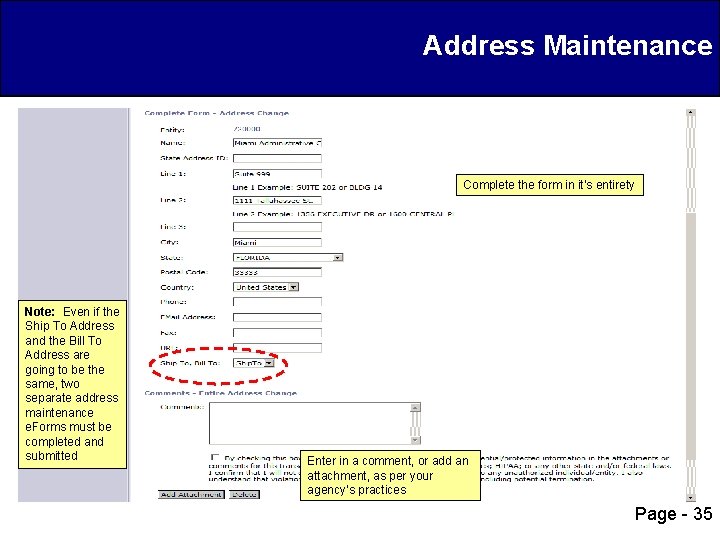
Address Maintenance Complete the form in it’s entirety Note: Even if the Ship To Address and the Bill To Address are going to be the same, two separate address maintenance e. Forms must be completed and submitted Enter in a comment, or add an attachment, as per your agency’s practices Page - 35
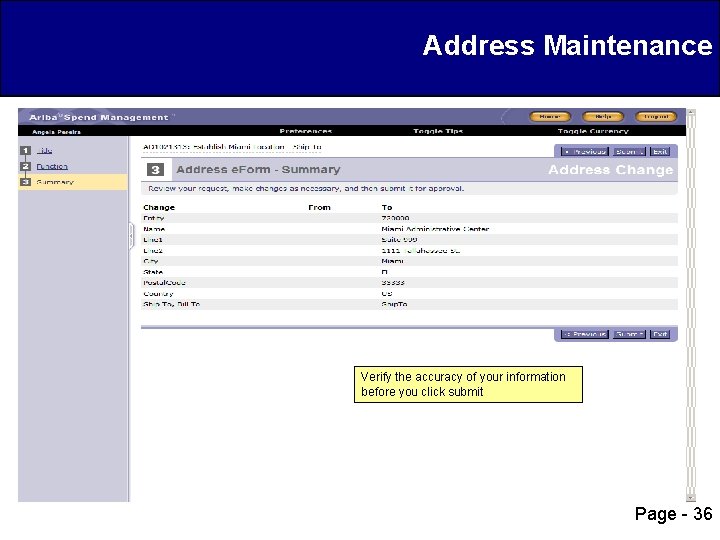
Address Maintenance Verify the accuracy of your information before you click submit Page - 36
Agenda q System Administrator Responsibilities q Understanding Groups and Roles q Establishing a profile in MFMP q Password changes q Inactivation Procedures q Address Maintenance q Confidential Information q Secure Reports Page - 37
Confidential Information q Confidential Information that is directly related to an individual is prohibited from being included in MFMP. This includes information included in the comments field, line item description as well as attachments. Including such information in MFMP may violate F. S. 119. 071 as well as comparable federal regulations relating to confidentiality such as the Health Insurance Portability and Accountability Act (HIPAA) q Agency specific questions about confidential information should be directed to their agency’s HIPAA compliance officer or General Counsel’s Office q It is the agency’s responsibility to redact this information prior to posting it to MFMP. Workflow approvals that are included in MFMP offer the opportunity for multiple customers to identify and take action against a transaction that includes confidential information, including initiating the Confidential Information Purge Request process. The form and process are posted on the MFMP toolkit http: //dms. myflorida. com/buyertoolkit under Job Aids Page - 38
Confidential Information q Examples of confidential information include, but are not limited to, the following items: Ø Names Ø All elements of dates (except year) directly related to an individual, including birth date, admission date, discharge date, and date of death Ø Telephone numbers Ø Electronic mail addresses Ø Social security numbers Ø Medical record numbers Ø Health plan beneficiary numbers Ø Account numbers Ø Certificate/license numbers Ø All geographic subdivisions smaller than a state, including street addresses, city, county and zip codes Page - 39
Confidential Information q Confidential Information Policy: Ø Each agency is to submit a policy stating no confidential information will be input in MFMP Ø The policy will state how the agency will monitor for confidential information that may be input Ø Each policy will have a training plan which includes how to train customers not to put in confidential information Ø Each agency will have a security officer who is responsible for their agency’s policy Ø There is a sample policy (Sample Confidential Information Policy) posted on the MFMP toolkit http: //dms. myflorida. com/buyertoolkit under Job Aids for agencies to use as an example Page - 40
Confidential Information q MFMP can assist you in following your agency’s confidential information policy by providing you with reports that search invoices, invoice e. Forms and purchase orders for predefined commodity codes thought to be most likely to contain confidential data/information q These reports are available on the secure website at: http: //myfloridamarketplace. com/reports Ø PR_Audit_by_Commodity_Code Ø Invoice_Attachments_by_CCode Ø Invoice_Eform_Attachments_by_CCode q A description of these reports are available in the MFMP Reporting Job Aid posted on the Toolkit at: http: //dms. myflorida. com/buyertoolkit Page - 41
Agenda q System Administrator Responsibilities q Understanding Groups and Roles q Establishing a profile in MFMP q Password changes q Inactivation Procedures q Address Maintenance q Scanning and Attachment Guidelines q Confidential Information q Secure Reports Page - 42
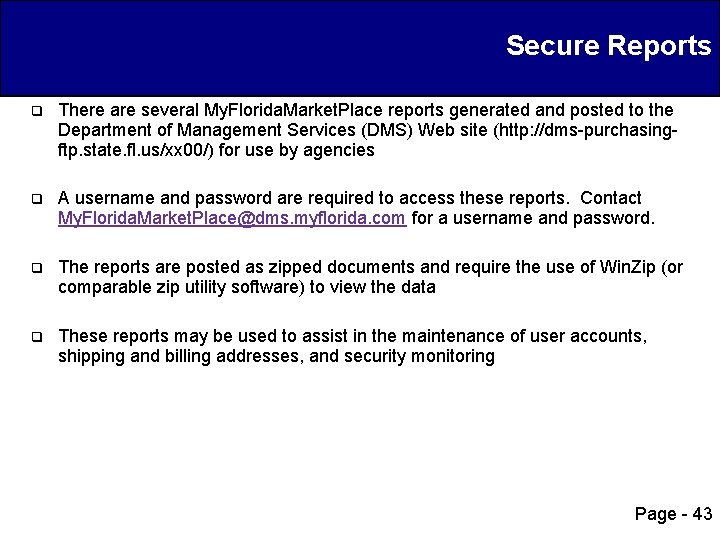
Secure Reports q There are several My. Florida. Market. Place reports generated and posted to the Department of Management Services (DMS) Web site (http: //dms-purchasingftp. state. fl. us/xx 00/) for use by agencies q A username and password are required to access these reports. Contact My. Florida. Market. Place@dms. myflorida. com for a username and password. q The reports are posted as zipped documents and require the use of Win. Zip (or comparable zip utility software) to view the data q These reports may be used to assist in the maintenance of user accounts, shipping and billing addresses, and security monitoring Page - 43
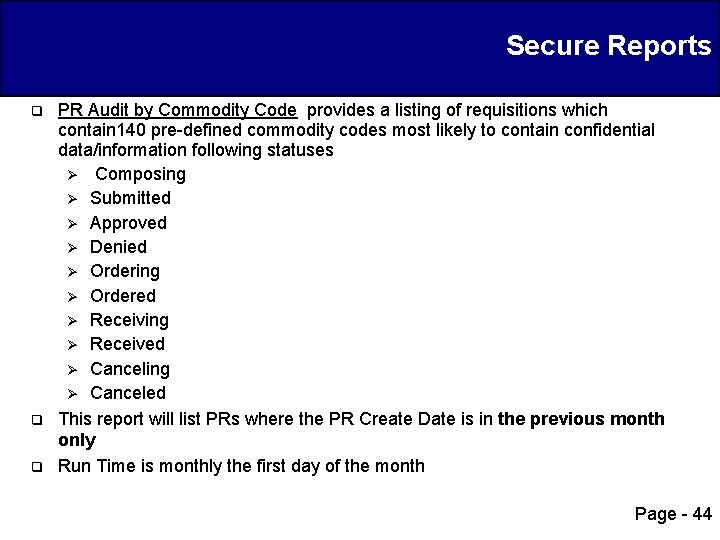
Secure Reports q q q PR Audit by Commodity Code provides a listing of requisitions which contain 140 pre-defined commodity codes most likely to contain confidential data/information following statuses Ø Composing Ø Submitted Ø Approved Ø Denied Ø Ordering Ø Ordered Ø Receiving Ø Received Ø Canceling Ø Canceled This report will list PRs where the PR Create Date is in the previous month only Run Time is monthly the first day of the month Page - 44
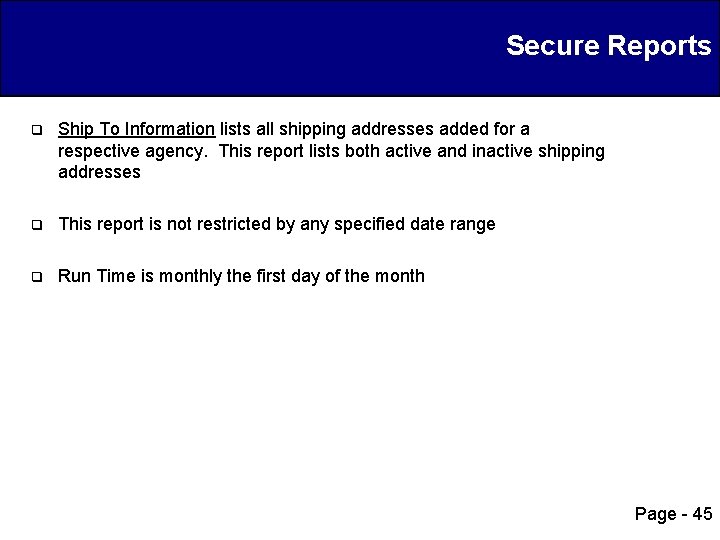
Secure Reports q Ship To Information lists all shipping addresses added for a respective agency. This report lists both active and inactive shipping addresses q This report is not restricted by any specified date range q Run Time is monthly the first day of the month Page - 45
Secure Reports q Users and Groups Report lists users with an account within MFMP. This report is used to assist with the maintenance of customer user accounts for their respective agency Ø The report lists what Roles and Groups the users have q This report is not restricted by any specified date range q Run Time is weekly on Monday q This report is best viewed by utilizing a Excel Pivot Table Page - 46
Thank you for your attendance. We’re here to help. Contact the Customer Service Desk at 1 -866 -352 -3776 or Buyer. Help@myfloridamarketplace. com or the MFMP Team with any questions that you may have. Kasey. Bickley@dms. myflorida. com Kasey Bickley, CPPB, FCCM Purchasing Process Analyst (850) 294 -0494 Anne Rabon, LSSG F&A Process Analyst Anne. Rabon@dms. myflorida. com (850) 294 -0739 Eric Swanson Vendor Management Eric. Swanson@dms. myflorida. com Analyst (850) 487 -9981 Amy Smyth Zeigler, M. S. , PMP Communications Analyst Amy. Smyth@dms. myflorida. com Rachael Lieblick, PMP, FCCM Operations Manager Rachael. Lieblick@dms. myflorida. com (850) 414 -6735 (850) 294 -3080 Page - 47