LOGO Virtual LAN 16 Sep20 Jaringan KomputerD 3

- Slides: 56
LOGO Virtual LAN 16 -Sep-20 Jaringan Komputer_D 3 TT 1
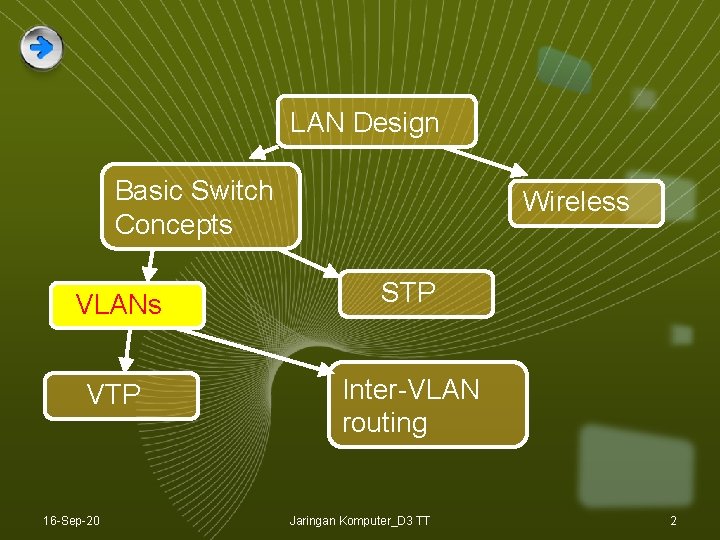
LAN Design Basic Switch Concepts Wireless VLANs STP VTP Inter-VLAN routing 16 -Sep-20 Jaringan Komputer_D 3 TT 2
Some requirements of LANs v Need to split up broadcast domains to make good use of bandwidth v People in the same department may need to be grouped together for access to servers v Security: restrict access by certain users to some areas of the LAN v Provide a way for different areas of the LAN to communicate with each other 16 -Sep-20 Jaringan Komputer_D 3 TT 3
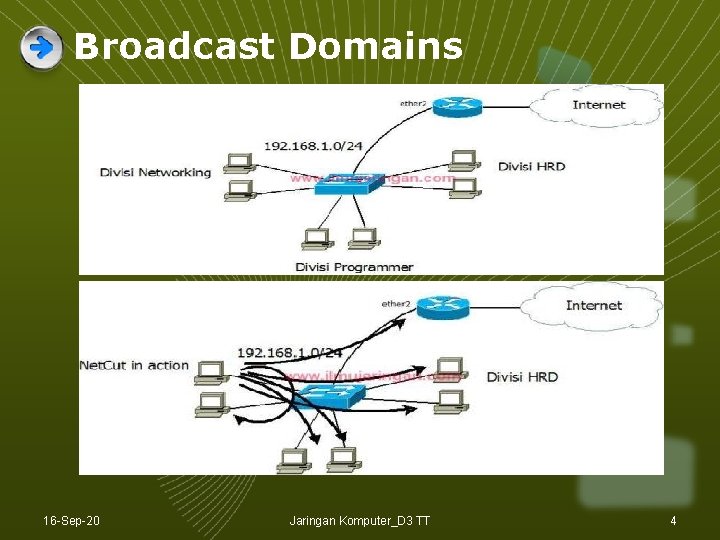
Broadcast Domains 16 -Sep-20 Jaringan Komputer_D 3 TT 4
Broadcast Domains • Topologi jaringan terdiri dari 1 (satu) broadcast domain, dengan jumlah penghuni broadcast domain adalah 7 host (6 unit komputer dan 1 router). • Kondisi ini menyebabkan jika salah satu komputer mengirimkan packet broadcast, maka packet tersebut akan diterima oleh 6 host yang lain (termasuk router tadi). • Packet broadcast adalah jenis packet yang ditujukan bagi seluruh penghuni jaringan. Beberapa protocol akan menggunakan packet broadcast, seperti ARP (Address Resolution Protocol), bahkan aplikasi Net. Cut juga bekerja dengan memanfaatkan broadcast. • Jika salah satu komputer menjalankan Net. Cut, maka keseluruhan komputer akan terkena dampak serangan Net. Cut tersebut. Ini dikarenakan semua komputer tersebut berada di dalam satu broadcast domain, berada dalam satu switch, berada dalam satu segmen jaringan. 16 -Sep-20 Jaringan Komputer_D 3 TT 5
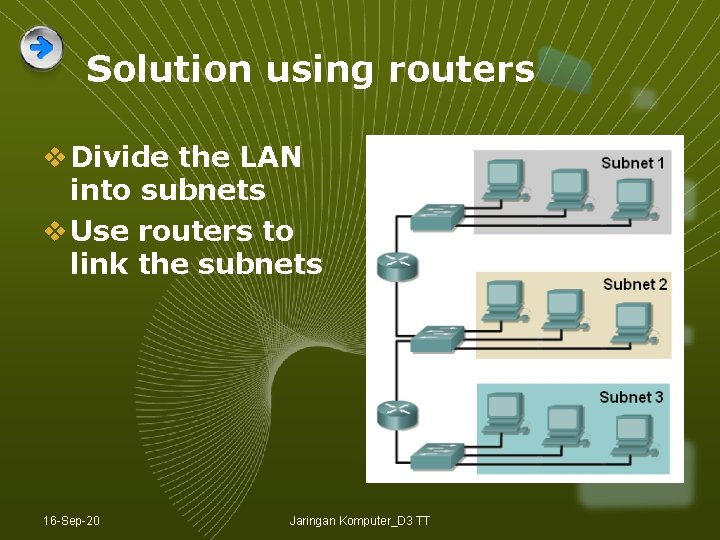
Solution using routers v Divide the LAN into subnets v Use routers to link the subnets 16 -Sep-20 Jaringan Komputer_D 3 TT
Solution using routers BUT v Routers are expensive v Routers are slower than switches v Subnets are restricted to limited physical areas v Subnets are inflexible 16 -Sep-20 Jaringan Komputer_D 3 TT 7
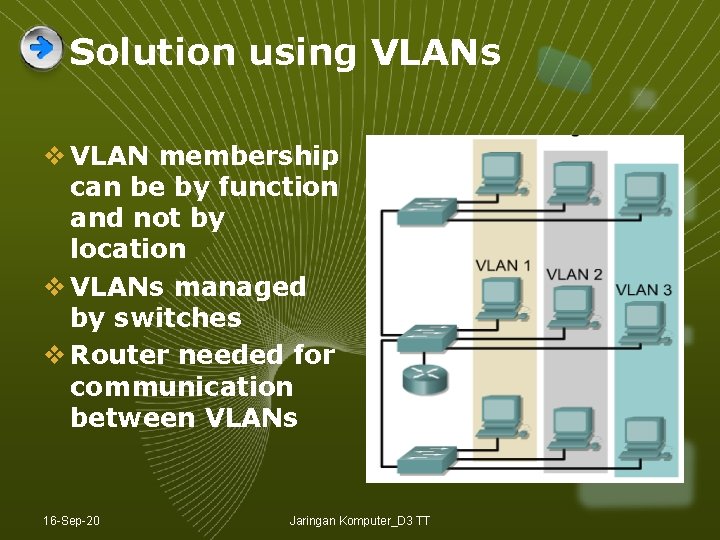
Solution using VLANs v VLAN membership can be by function and not by location v VLANs managed by switches v Router needed for communication between VLANs 16 -Sep-20 Jaringan Komputer_D 3 TT
VLANs v All hosts in a VLAN have addresses in the same subnet. A VLAN is a subnet. v Broadcasts are kept within the VLAN. A VLAN is a broadcast domain. v The switch has a separate MAC address table for each VLAN. Traffic for each VLAN is kept separate from other VLANs. v Layer 2 switches cannot route between VLANs. 16 -Sep-20 Jaringan Komputer_D 3 TT 9
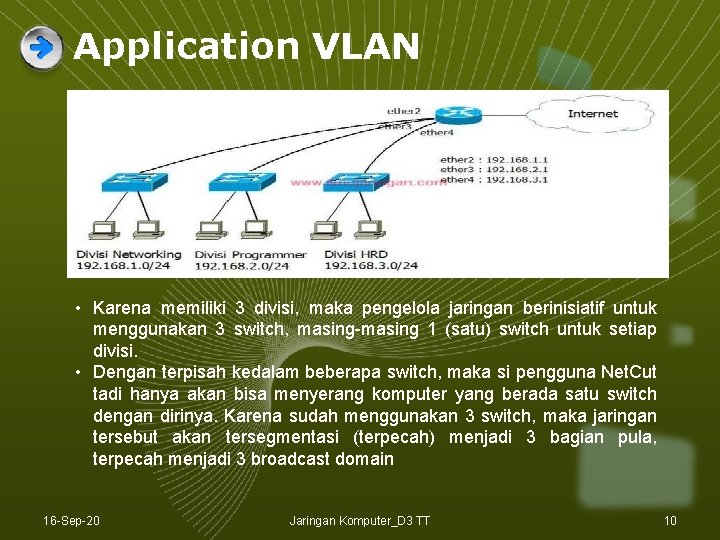
Application VLAN • Karena memiliki 3 divisi, maka pengelola jaringan berinisiatif untuk menggunakan 3 switch, masing-masing 1 (satu) switch untuk setiap divisi. • Dengan terpisah kedalam beberapa switch, maka si pengguna Net. Cut tadi hanya akan bisa menyerang komputer yang berada satu switch dengan dirinya. Karena sudah menggunakan 3 switch, maka jaringan tersebut akan tersegmentasi (terpecah) menjadi 3 bagian pula, terpecah menjadi 3 broadcast domain 16 -Sep-20 Jaringan Komputer_D 3 TT 10
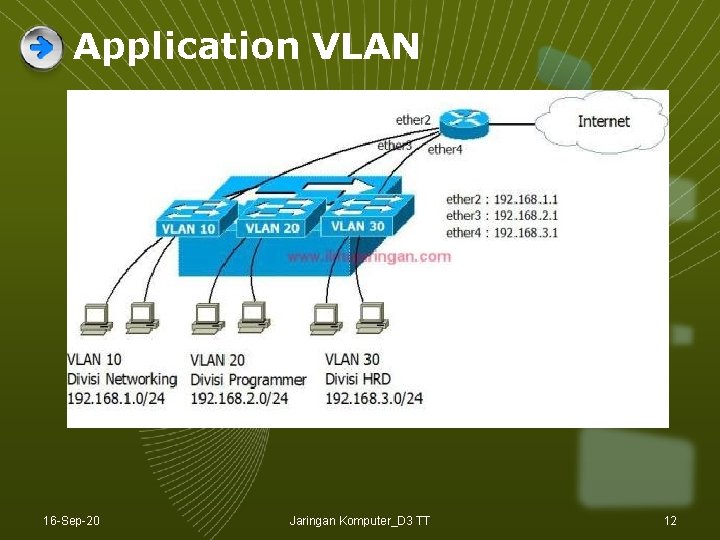
Application VLAN • 3 broadcast domain router harus menyediakan 3 interface • Pengelola jaringan harus menyediakan 3 unit switch, dan harus pula menyediakan 3 interface pada router. • Tidak efisien menghabiskan jumlah interface pada router. • Untuk meningkatkan efisiensi pada jaringan teknik VLAN dapat diterapkan. • VLAN pengelola jaringan cukup hanya akan menyediakan satu unit switch dan satu interface pada router. • Switch VLAN Manageable Switch • Switch VLAN membuat Switch di dalam Switch (Virtual) • 3 divisi yang ingin disegmentasi pengelola jaringan cukup membuat 3 VLAN, 3 switch virtual di dalam 1 unit switch fisik 16 -Sep-20 Jaringan Komputer_D 3 TT 11
Application VLAN 16 -Sep-20 Jaringan Komputer_D 3 TT 12
16 -Sep-20 Jaringan Komputer_D 3 TT 13
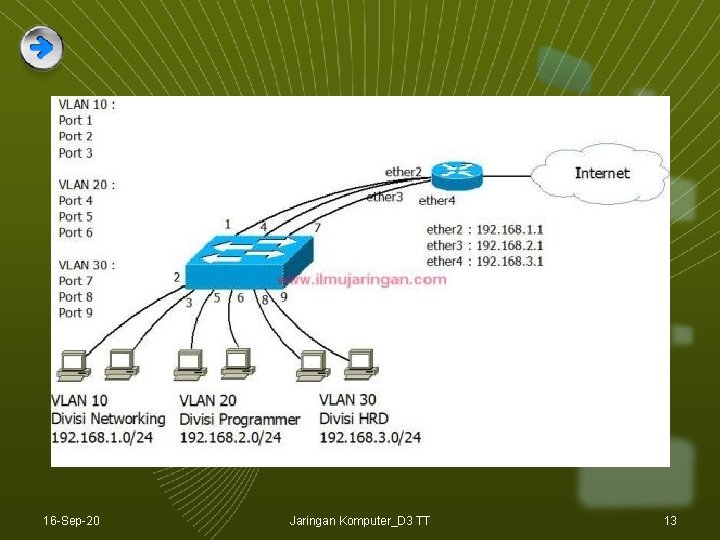
TRUNK VLAN • Setiap VLAN membutuhkan satu port untuk terhubung ke router (dibutuhkan 3 kabel menghubungkan masing-masing VLAN ke router). • Jika VLAN bertambah maka kabel yang terhubung ke router harus ditambah pula, • Interface Router bertambanh switch menambah VLAN. • Sangat tidak efisien dan membuat teknik VLAN malah memberatkan router dan membuat jaringan bertambah rumit. • Dalam teknik VLAN sebuah port (Switch) dapat dikonfigurasikan sebagai trunk • Port switch dikonfigurasikan trunk, maka hanya dibutuhkan satu kabel saja untuk terhubung ke router, • Begitu pula dengan router yang cukup menyediakan satu interface untuk digunakan bersama-sama oleh VLAN 10, 20 dan 30 tadi. 16 -Sep-20 Jaringan Komputer_D 3 TT 14
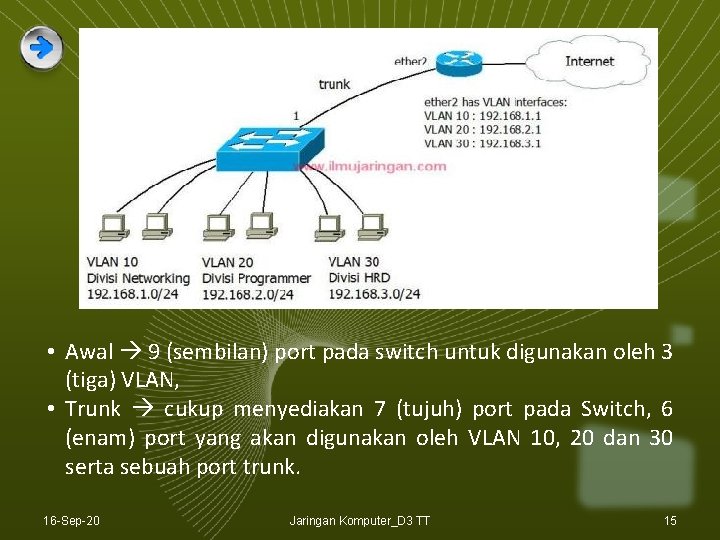
• Awal 9 (sembilan) port pada switch untuk digunakan oleh 3 (tiga) VLAN, • Trunk cukup menyediakan 7 (tujuh) port pada Switch, 6 (enam) port yang akan digunakan oleh VLAN 10, 20 dan 30 serta sebuah port trunk. 16 -Sep-20 Jaringan Komputer_D 3 TT 15
VLAN numbers v VLAN 1: default Ethernet LAN, all ports start in this VLAN. v VLANs 1002 – 1005 automatically created for Token Ring and FDDI v Numbers 2 to 1001 can be used for new VLANs v Up to 255 VLANs on Catalyst 2960 switch v Extended range 1006 – 4094 possible but fewer features 16 -Sep-20 Jaringan Komputer_D 3 TT 16
VLAN information v VLAN information is stored in the VLAN database. v vlan. dat in the flash memory of the switch. 16 -Sep-20 Jaringan Komputer_D 3 TT 17
Port based v Each switch port intended for an end device is configured to belong to a VLAN. v Any device connecting to that port belongs to the port’s VLAN. v There are other ways of assigning VLANs but this is now the normal way. v Ports that link switches can be configured to carry traffic for all VLANs (trunking) 16 -Sep-20 Jaringan Komputer_D 3 TT 18
Types of VLAN v Data or user VLAN v Voice VLAN v Management VLAN v Native VLAN v Default VLAN 16 -Sep-20 Jaringan Komputer_D 3 TT 19
Data VLAN v Carry files, e-mails, shared application traffic, most user traffic. v Separate VLAN for each group of users. 16 -Sep-20 Jaringan Komputer_D 3 TT 20
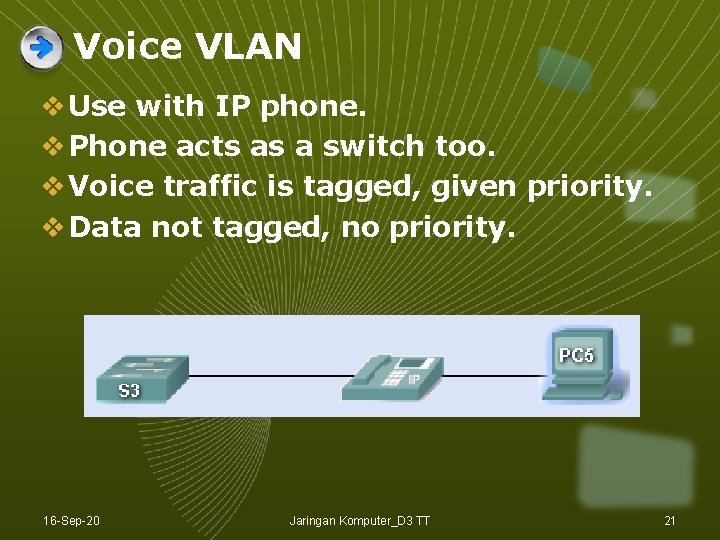
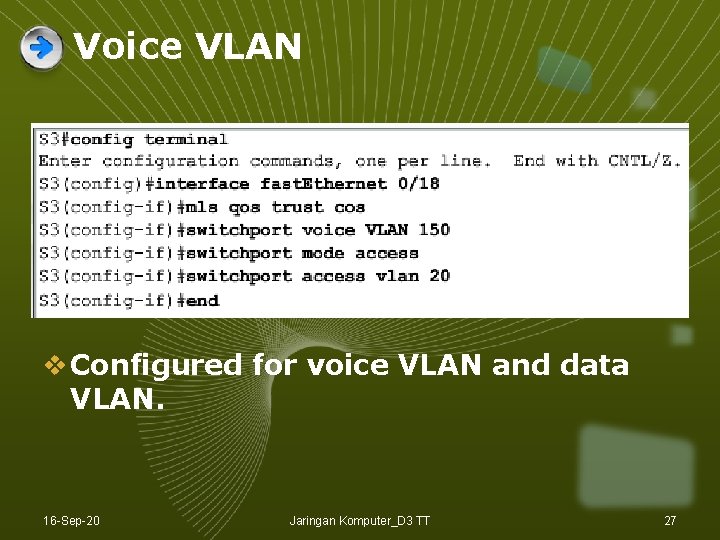
Voice VLAN v Use with IP phone. v Phone acts as a switch too. v Voice traffic is tagged, given priority. v Data not tagged, no priority. 16 -Sep-20 Jaringan Komputer_D 3 TT 21
Management VLAN v Has the switch IP address. v Used for telnet/SSH or web access for management purposes. v Better not to use VLAN 1 for security reasons. 16 -Sep-20 Jaringan Komputer_D 3 TT 22
Native VLAN v For backward compatibility with older systems. v Relevant to trunk ports. v Trunk ports carry traffic from multiple VLANs. v VLAN is identified by a “tag” in the frame. v Native VLAN does not have a tag. 16 -Sep-20 Jaringan Komputer_D 3 TT 23
Default VLAN v VLAN 1 on Cisco switches. v Carries CDP and STP (spanning tree protocol) traffic. v Initially all ports are in this VLAN. v Do not use it for data, voice or management traffic for security reasons. 16 -Sep-20 Jaringan Komputer_D 3 TT 24
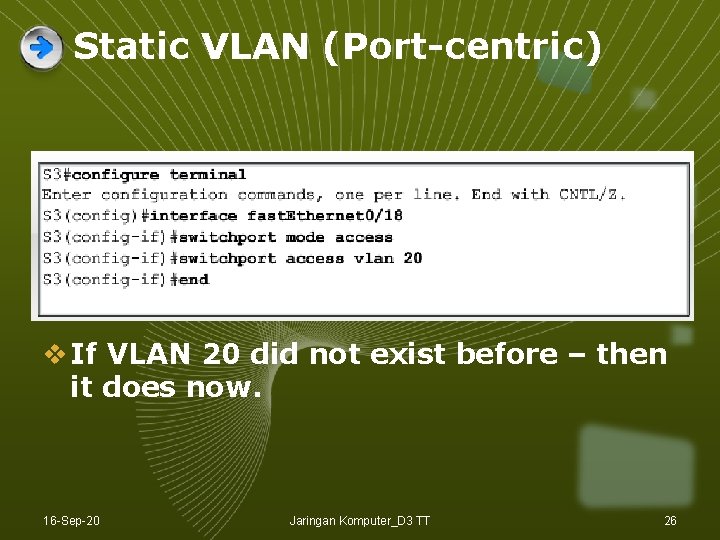
Static VLAN v The normal type. Port configured to be on a VLAN. Connected device is on this VLAN. v VLAN can be created using CLI command, given number and name. v VLAN can be learned from another switch. v If a port is put on a VLAN and the VLAN does not exist, then the VLAN is created. 16 -Sep-20 Jaringan Komputer_D 3 TT 25
Static VLAN (Port-centric) v If VLAN 20 did not exist before – then it does now. 16 -Sep-20 Jaringan Komputer_D 3 TT 26
Voice VLAN v Configured for voice VLAN and data VLAN. 16 -Sep-20 Jaringan Komputer_D 3 TT 27
Dynamic VLAN v Not widely used. v Use a VLAN Membership Policy Server (VMPS). v Assign a device to a VLAN based on its MAC address. v Connect device, server assigns VLAN. v Useful if you want to move devices around. 16 -Sep-20 Jaringan Komputer_D 3 TT 28
Traffic between VLANs v Layer 2 switch keeps VLANs separate. v Router can route between VLANs. It needs to provide a default gateway for each VLAN as VLANs are separate subnets. v Layer 3 switch has a switch virtual interface (SVI) configured for each VLAN. These act like router interfaces to route between VLANs. 16 -Sep-20 Jaringan Komputer_D 3 TT 29
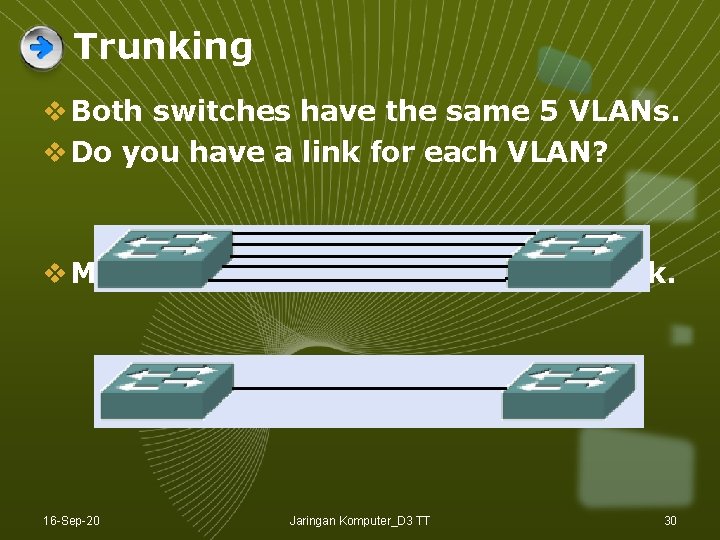
Trunking v Both switches have the same 5 VLANs. v Do you have a link for each VLAN? v More efficient for them to share a link. 16 -Sep-20 Jaringan Komputer_D 3 TT 30
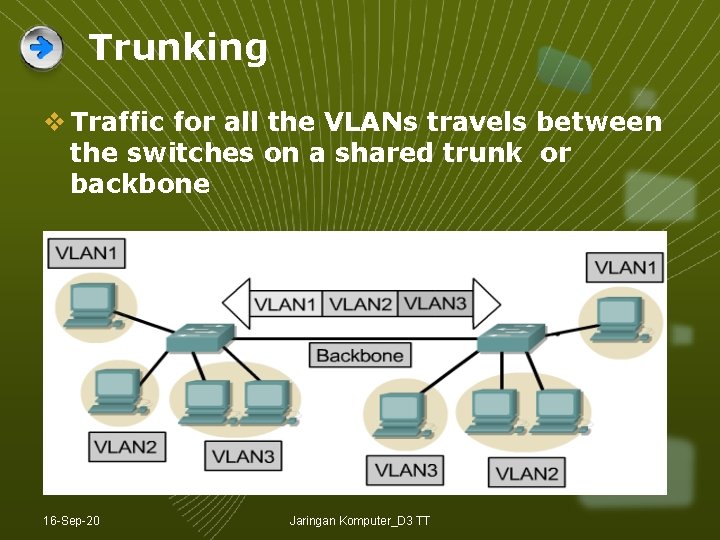
Trunking v Traffic for all the VLANs travels between the switches on a shared trunk or backbone 16 -Sep-20 Jaringan Komputer_D 3 TT
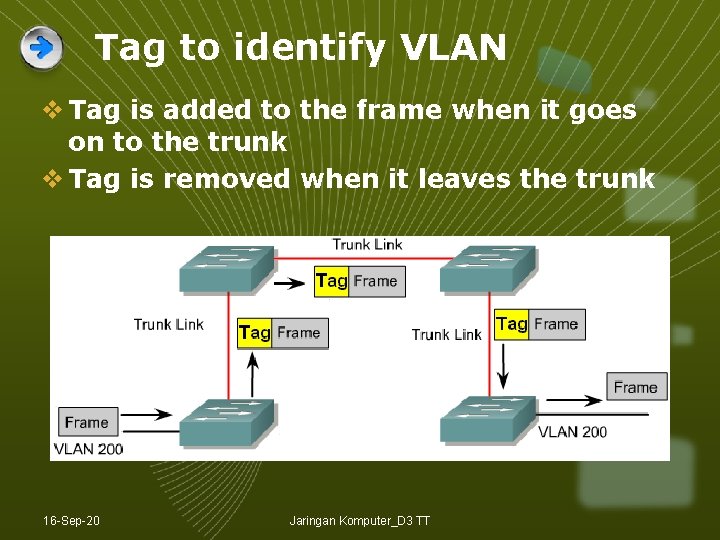
Tag to identify VLAN v Tag is added to the frame when it goes on to the trunk v Tag is removed when it leaves the trunk 16 -Sep-20 Jaringan Komputer_D 3 TT
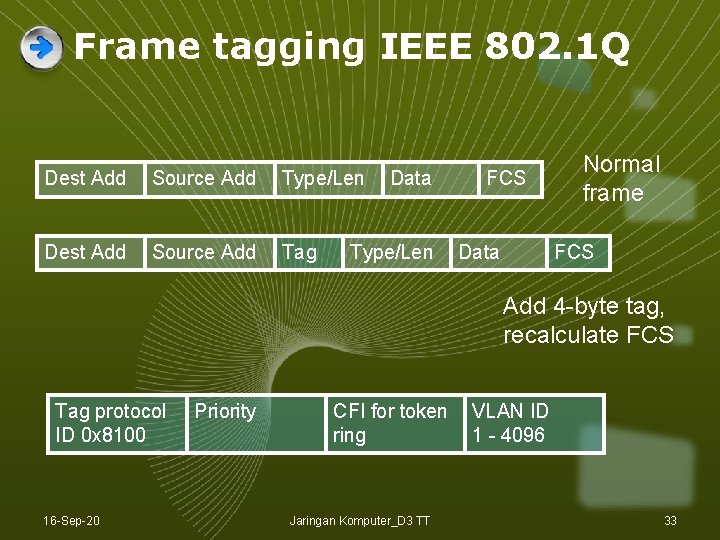
Frame tagging IEEE 802. 1 Q Dest Add Source Add Type/Len Dest Add Source Add Tag Data Type/Len FCS Data Normal frame FCS Add 4 -byte tag, recalculate FCS Tag protocol ID 0 x 8100 16 -Sep-20 Priority CFI for token ring Jaringan Komputer_D 3 TT VLAN ID 1 - 4096 33
Native VLAN v Untagged frames received on a trunk port are forwarded on to the native VLAN. v Frame received from the native VLAN should be untagged. v Switch will drop tagged frames received from the native VLAN. This can happen if non-Cisco devices are connected. 16 -Sep-20 Jaringan Komputer_D 3 TT 34
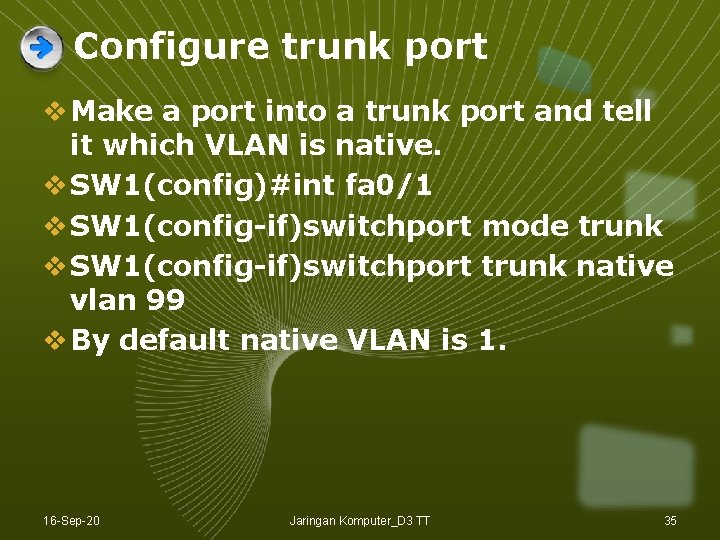
Configure trunk port v Make a port into a trunk port and tell it which VLAN is native. v SW 1(config)#int fa 0/1 v SW 1(config-if)switchport mode trunk v SW 1(config-if)switchport trunk native vlan 99 v By default native VLAN is 1. 16 -Sep-20 Jaringan Komputer_D 3 TT 35
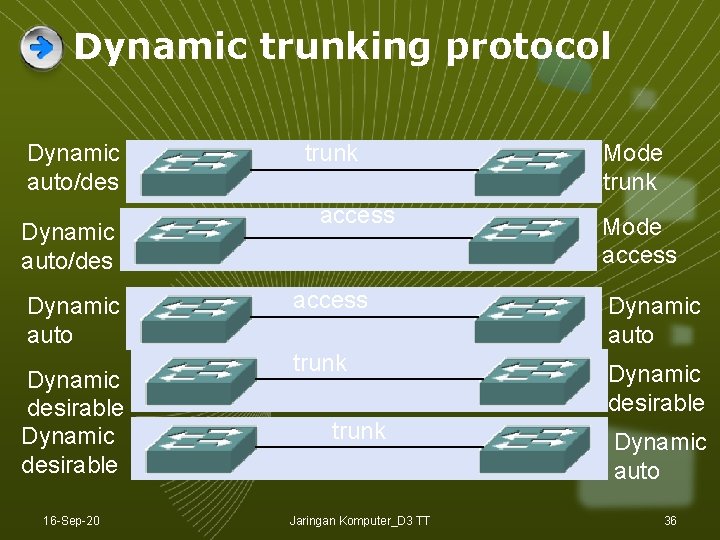
Dynamic trunking protocol Dynamic auto/des Dynamic auto Dynamic desirable 16 -Sep-20 trunk access Mode trunk Mode access Dynamic auto trunk Dynamic desirable trunk Jaringan Komputer_D 3 TT Dynamic auto 36
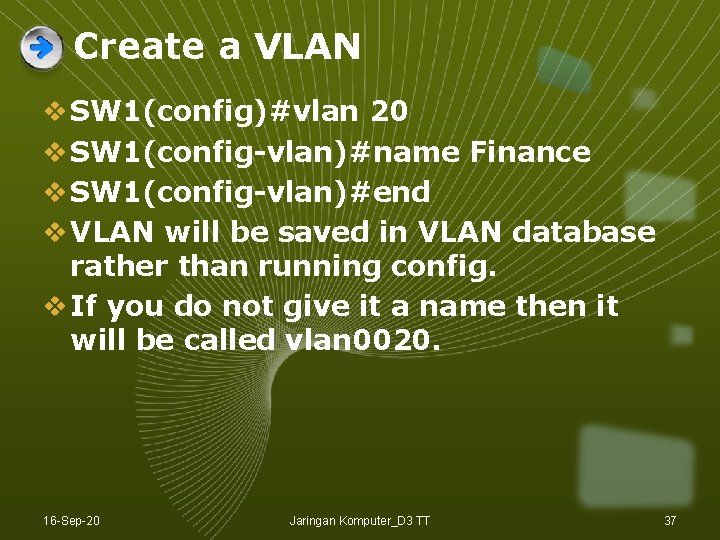
Create a VLAN v SW 1(config)#vlan 20 v SW 1(config-vlan)#name Finance v SW 1(config-vlan)#end v VLAN will be saved in VLAN database rather than running config. v If you do not give it a name then it will be called vlan 0020. 16 -Sep-20 Jaringan Komputer_D 3 TT 37
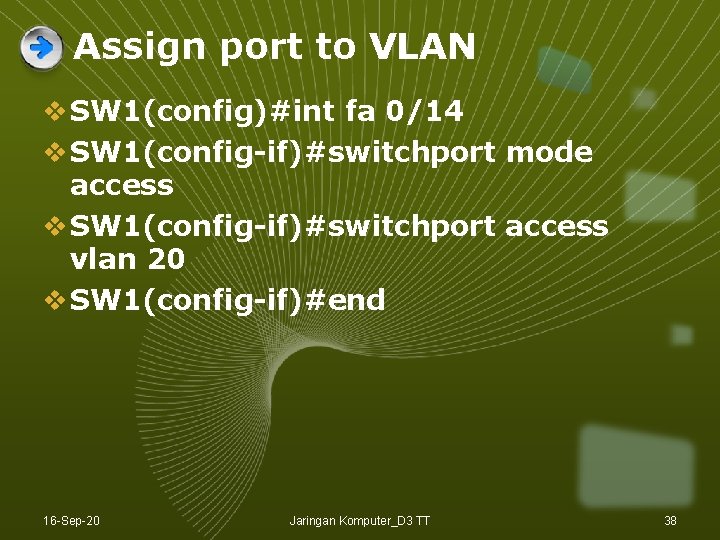
Assign port to VLAN v SW 1(config)#int fa 0/14 v SW 1(config-if)#switchport mode access v SW 1(config-if)#switchport access vlan 20 v SW 1(config-if)#end 16 -Sep-20 Jaringan Komputer_D 3 TT 38
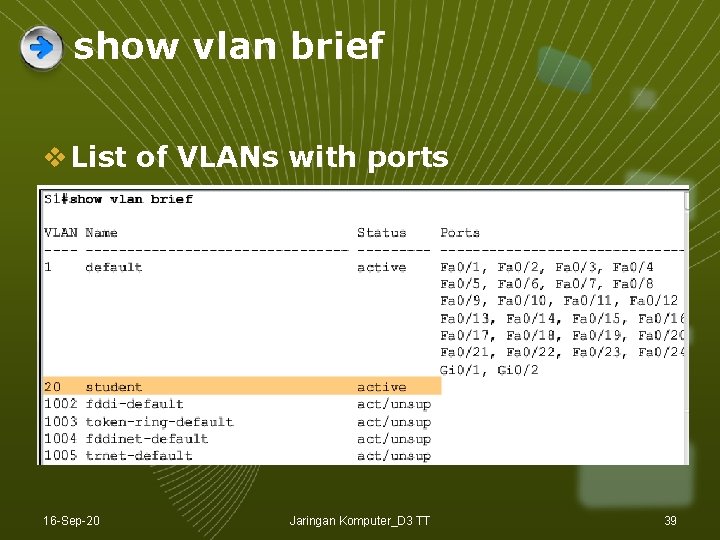
show vlan brief v List of VLANs with ports 16 -Sep-20 Jaringan Komputer_D 3 TT 39
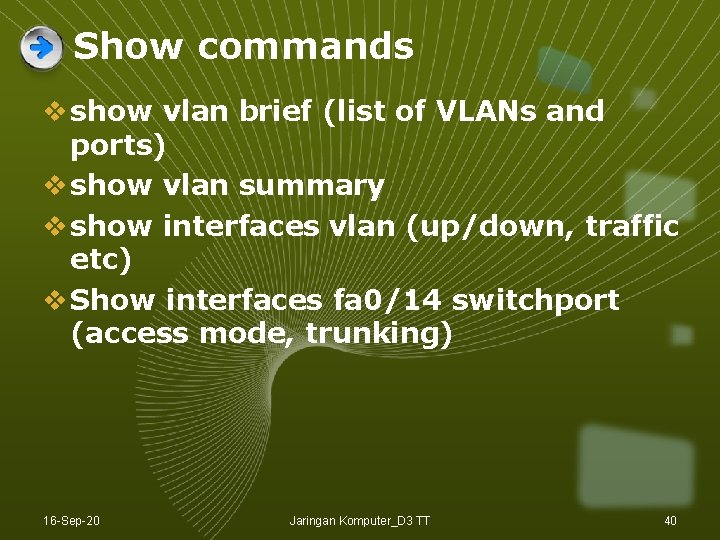
Show commands v show vlan brief (list of VLANs and ports) v show vlan summary v show interfaces vlan (up/down, traffic etc) v Show interfaces fa 0/14 switchport (access mode, trunking) 16 -Sep-20 Jaringan Komputer_D 3 TT 40
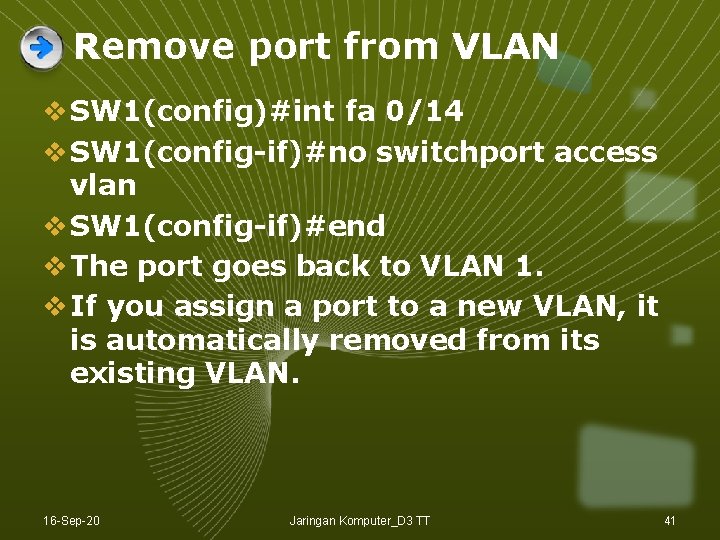
Remove port from VLAN v SW 1(config)#int fa 0/14 v SW 1(config-if)#no switchport access vlan v SW 1(config-if)#end v The port goes back to VLAN 1. v If you assign a port to a new VLAN, it is automatically removed from its existing VLAN. 16 -Sep-20 Jaringan Komputer_D 3 TT 41
Delete a VLAN v SW 1(config)#no vlan 20 v SW 1(config)#end v VLAN 20 is deleted. v Any ports still on VLAN 20 will be inactive – not on any VLAN. They need to be reassigned. 16 -Sep-20 Jaringan Komputer_D 3 TT 42
Delete VLAN database v Erasing the startup configuration does not get rid of VLANs because they are saved in a separate file. v SW 1#delete flash: vlan. dat v Switch goes back to the default with all ports in VLAN 1. v You cannot delete VLAN 1. 16 -Sep-20 Jaringan Komputer_D 3 TT 43
Configure trunk v SW 1(config)#int fa 0/1 v SW 1(config-if)#switchport mode trunk v SW 1(config-if)#switchport trunk native vlan 99 v SW 1(config-if)#switchport trunk allowed vlan add 10, 20, 30 v SW 1(config-if)#end 16 -Sep-20 Jaringan Komputer_D 3 TT 44
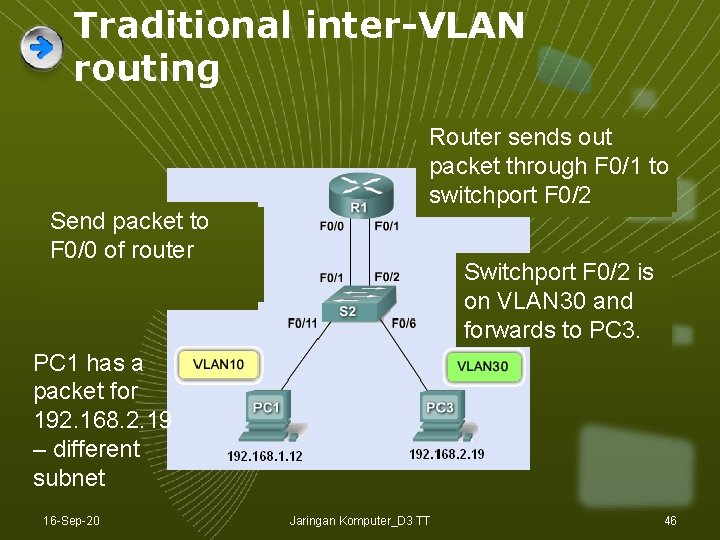
Traditional inter-VLAN routing v The router has one physical port for each VLAN. v Each port has an IP address on its own VLAN. v Routing is the same as routing between any subnets. 16 -Sep-20 Jaringan Komputer_D 3 TT 45
Traditional inter-VLAN routing Send packet toto ARP request F 0/0 of router find MAC address of default gateway Router looks sendsup out Router packet through F 0/1 – to 192. 168. 2. 0 network switchport F 0/1 F 0/2 Switchport F 0/2 is on VLAN 30 and forwards to PC 3. PC 1 has a packet for 192. 168. 2. 19 – different subnet 16 -Sep-20 Jaringan Komputer_D 3 TT 46
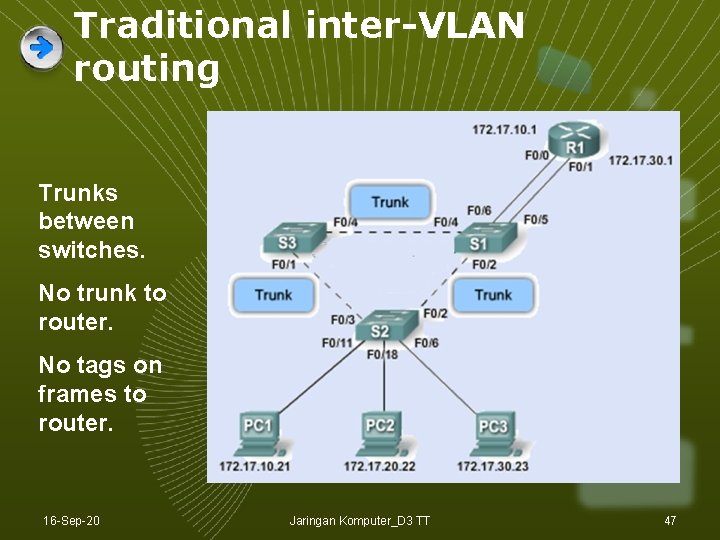
Traditional inter-VLAN routing Trunks between switches. No trunk to router. No tags on frames to router. 16 -Sep-20 Jaringan Komputer_D 3 TT 47
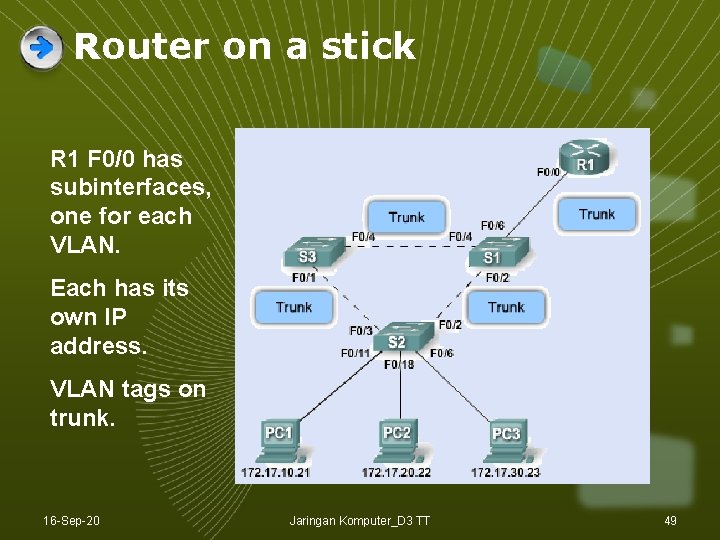
Trunk to the router v You soon run out of router ports. v What about making a trunk link to the router? v A trunk link can be used with several VLANs on the same physical port. v But each VLAN needs a different IP address. v So use subinterfaces, each with its own IP address. 16 -Sep-20 Jaringan Komputer_D 3 TT 48
Router on a stick R 1 F 0/0 has subinterfaces, one for each VLAN. Each has its own IP address. VLAN tags on trunk. 16 -Sep-20 Jaringan Komputer_D 3 TT 49
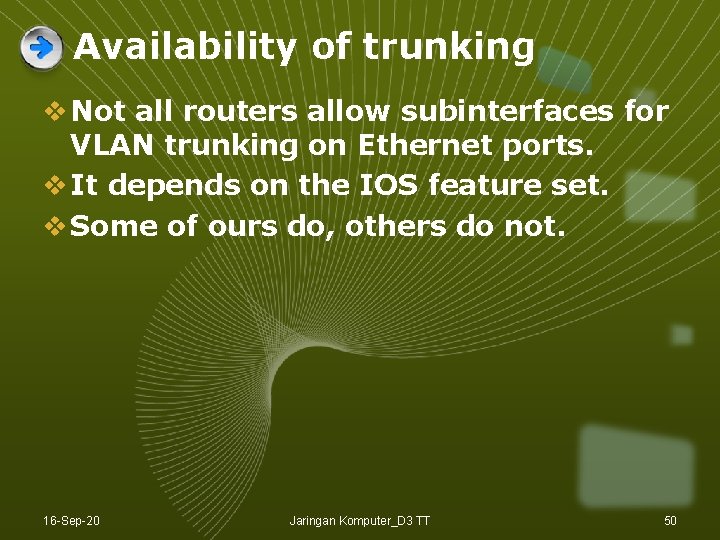
Availability of trunking v Not all routers allow subinterfaces for VLAN trunking on Ethernet ports. v It depends on the IOS feature set. v Some of ours do, others do not. 16 -Sep-20 Jaringan Komputer_D 3 TT 50
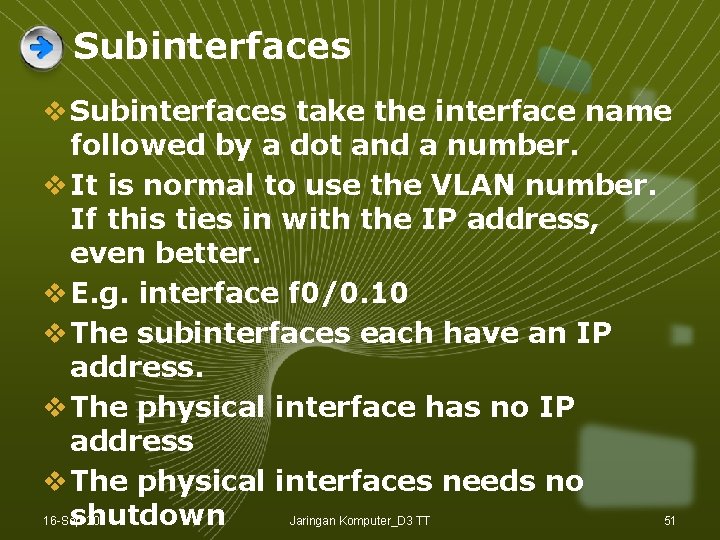
Subinterfaces v Subinterfaces take the interface name followed by a dot and a number. v It is normal to use the VLAN number. If this ties in with the IP address, even better. v E. g. interface f 0/0. 10 v The subinterfaces each have an IP address. v The physical interface has no IP address v The physical interfaces needs no shutdown 16 -Sep-20 Jaringan Komputer_D 3 TT 51
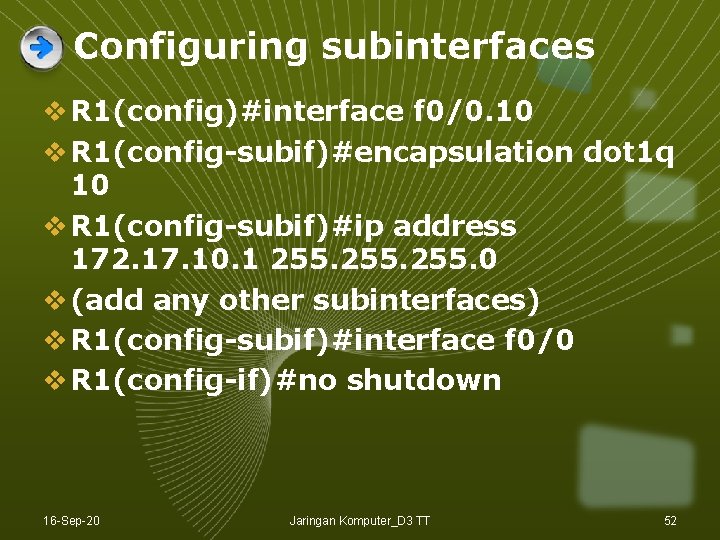
Configuring subinterfaces v R 1(config)#interface f 0/0. 10 v R 1(config-subif)#encapsulation dot 1 q 10 v R 1(config-subif)#ip address 172. 17. 10. 1 255. 0 v (add any other subinterfaces) v R 1(config-subif)#interface f 0/0 v R 1(config-if)#no shutdown 16 -Sep-20 Jaringan Komputer_D 3 TT 52
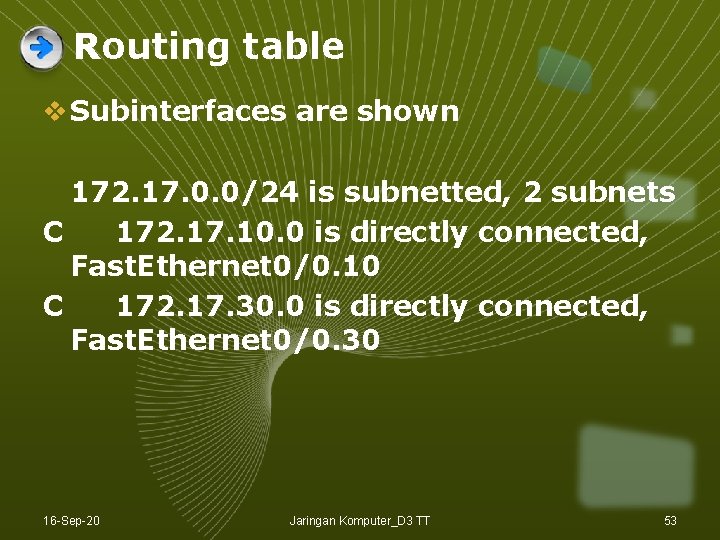
Routing table v Subinterfaces are shown 172. 17. 0. 0/24 is subnetted, 2 subnets C 172. 17. 10. 0 is directly connected, Fast. Ethernet 0/0. 10 C 172. 17. 30. 0 is directly connected, Fast. Ethernet 0/0. 30 16 -Sep-20 Jaringan Komputer_D 3 TT 53
Subinterface considerations v Routers have a limited number of interfaces, so subinterfaces help where there are many VLANs. v Subinterfaces share the bandwidth on a physical interface so can cause bottlenecks. v Cheaper to use subinterfaces. v Simpler physical layout but more complex configuration with subinterfaces. 16 -Sep-20 Jaringan Komputer_D 3 TT 54
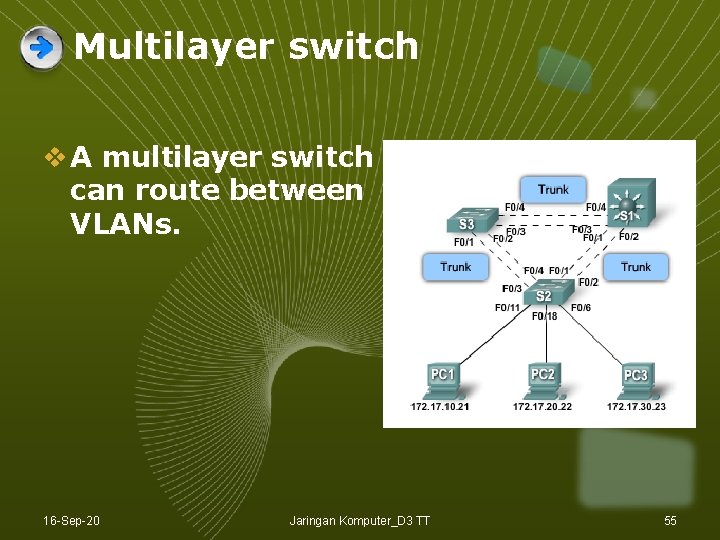
Multilayer switch v A multilayer switch can route between VLANs. 16 -Sep-20 Jaringan Komputer_D 3 TT 55
LOGO Thank You Ref : S Ward Abingdon and Witney College 16 -Sep-20 Jaringan Komputer_D 3 TT 56