Java Programming Course XML Processing with Java Session

- Slides: 140
Java Programming Course XML Processing with Java
Session objectives Introduction XML, DTD, XSD XPath, XQuery XSLT Parsing XML document Using SAX St. AX Using DOM XML transformation 2
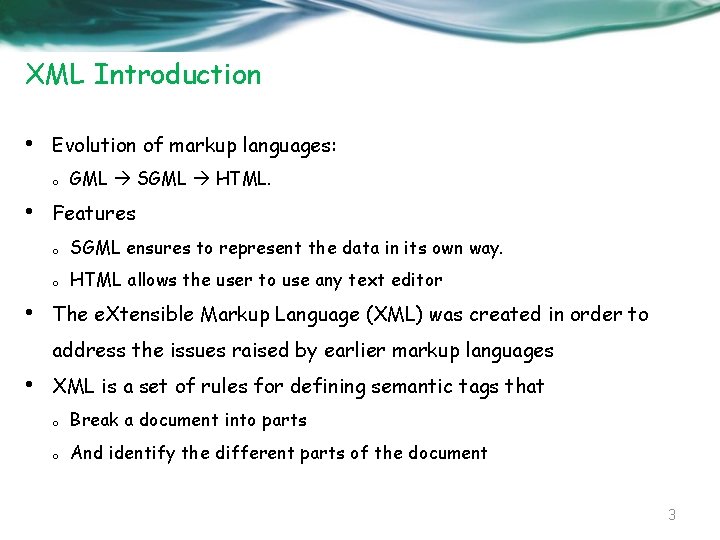
XML Introduction • Evolution of markup languages: o • • GML SGML HTML. Features o SGML ensures to represent the data in its own way. o HTML allows the user to use any text editor The e. Xtensible Markup Language (XML) was created in order to address the issues raised by earlier markup languages • XML is a set of rules for defining semantic tags that o Break a document into parts o And identify the different parts of the document 3
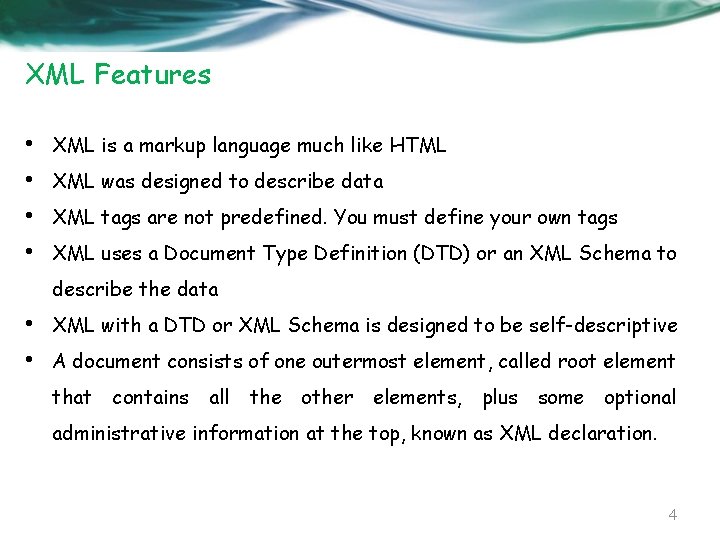
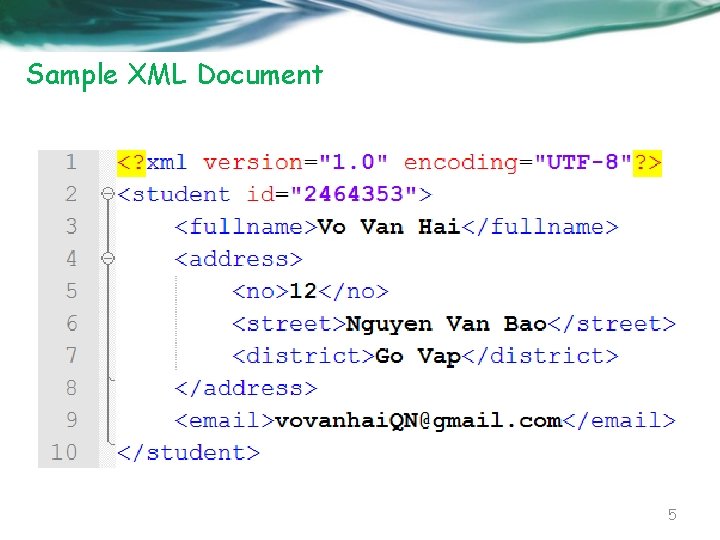
XML Features • • XML is a markup language much like HTML XML was designed to describe data XML tags are not predefined. You must define your own tags XML uses a Document Type Definition (DTD) or an XML Schema to describe the data • • XML with a DTD or XML Schema is designed to be self-descriptive A document consists of one outermost element, called root element that contains all the other elements, plus some optional administrative information at the top, known as XML declaration. 4
Sample XML Document 5
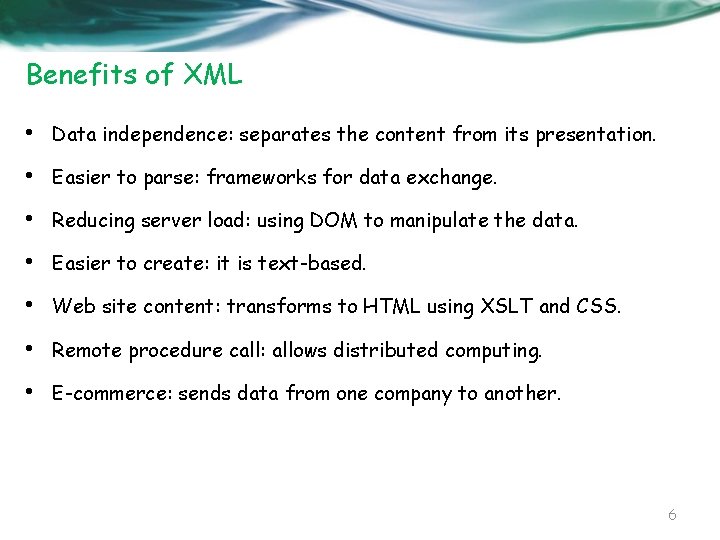
Benefits of XML • Data independence: separates the content from its presentation. • Easier to parse: frameworks for data exchange. • Reducing server load: using DOM to manipulate the data. • Easier to create: it is text-based. • Web site content: transforms to HTML using XSLT and CSS. • Remote procedure call: allows distributed computing. • E-commerce: sends data from one company to another. 6
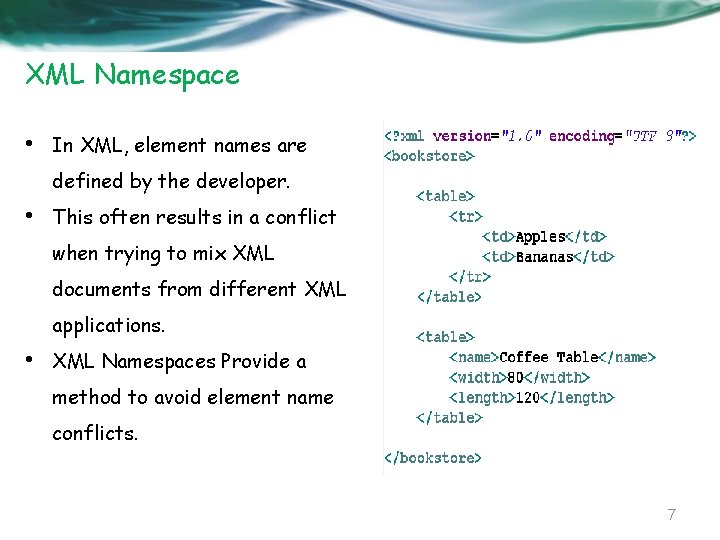
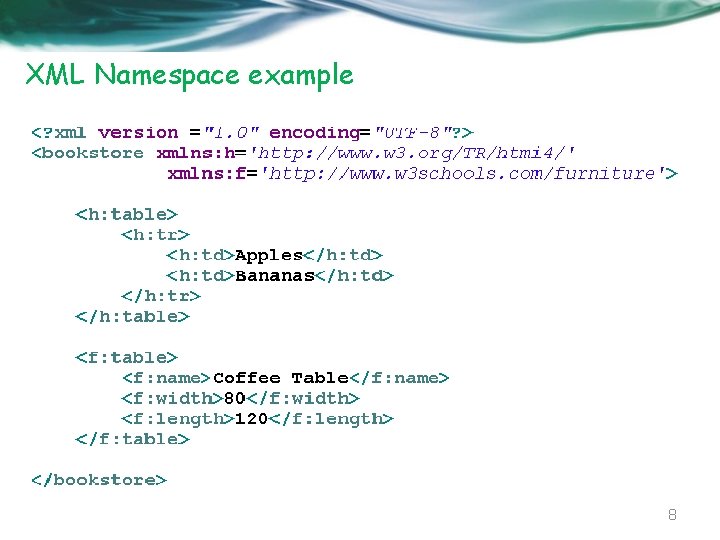
XML Namespace • In XML, element names are defined by the developer. • This often results in a conflict when trying to mix XML documents from different XML applications. • XML Namespaces Provide a method to avoid element name conflicts. 7
XML Namespace example 8
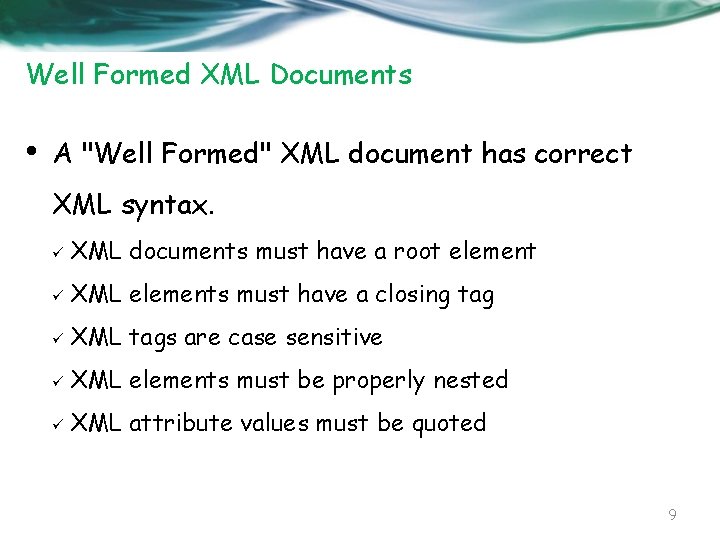
Well Formed XML Documents • A "Well Formed" XML document has correct XML syntax. ü XML documents must have a root element ü XML elements must have a closing tag ü XML tags are case sensitive ü XML elements must be properly nested ü XML attribute values must be quoted 9
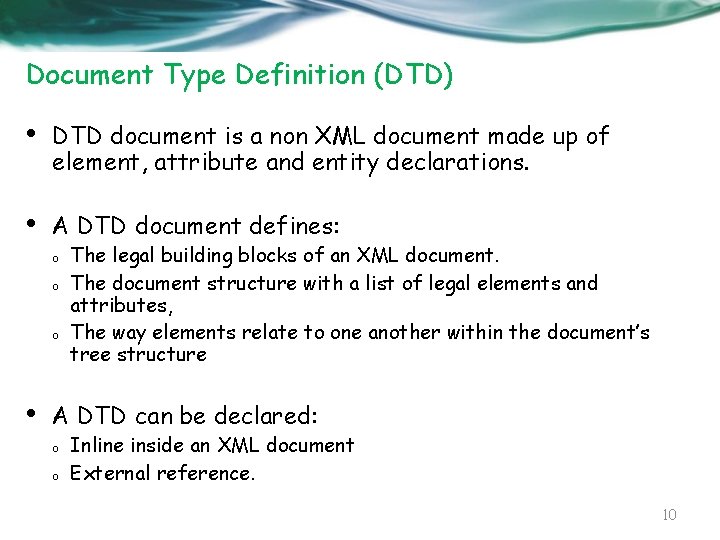
Document Type Definition (DTD) • DTD document is a non XML document made up of element, attribute and entity declarations. • A DTD document defines: o o o • The legal building blocks of an XML document. The document structure with a list of legal elements and attributes, The way elements relate to one another within the document’s tree structure A DTD can be declared: o o Inline inside an XML document External reference. 10
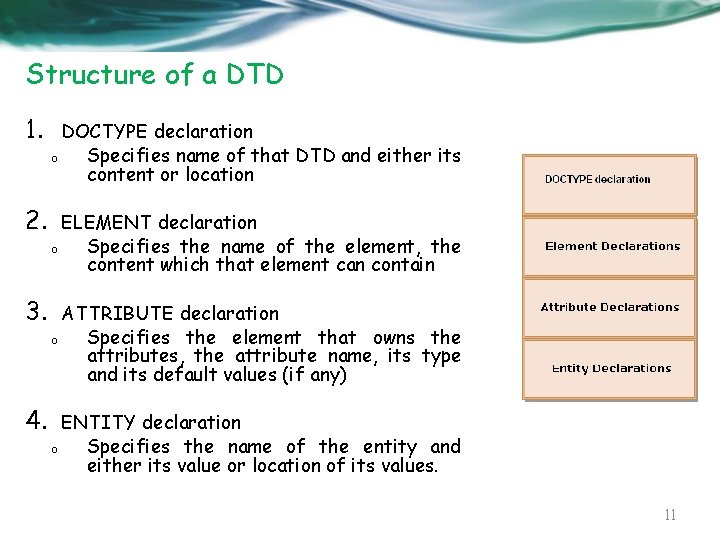
Structure of a DTD 1. DOCTYPE declaration o Specifies name of that DTD and either its content or location 2. ELEMENT declaration o Specifies the name of the element, the content which that element can contain 3. ATTRIBUTE declaration o Specifies the element that owns the attributes, the attribute name, its type and its default values (if any) 4. ENTITY declaration o Specifies the name of the entity and either its value or location of its values. 11
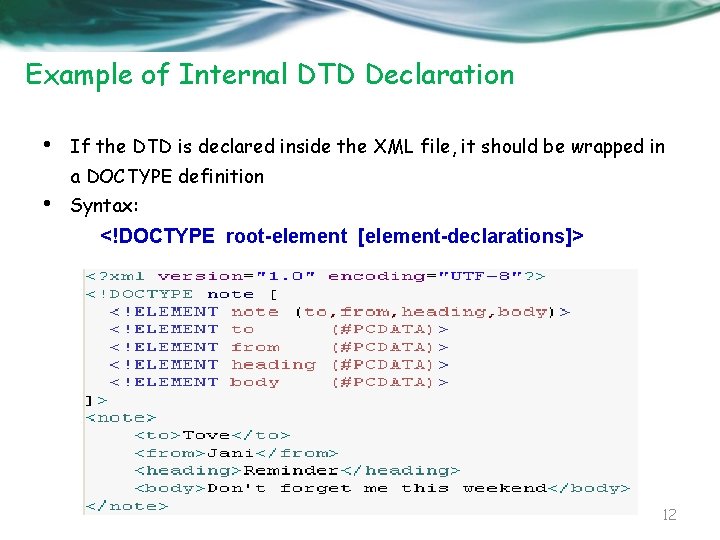
Example of Internal DTD Declaration • If the DTD is declared inside the XML file, it should be wrapped in a DOCTYPE definition • Syntax: <!DOCTYPE root-element [element-declarations]> 12
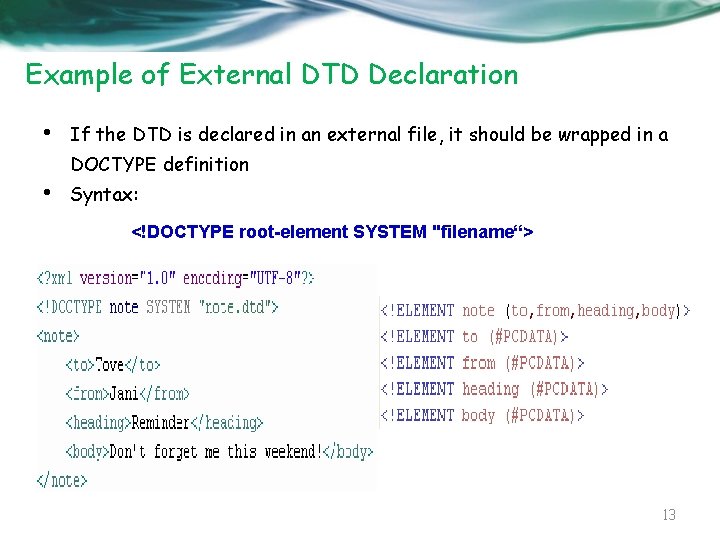
Example of External DTD Declaration • If the DTD is declared in an external file, it should be wrapped in a DOCTYPE definition • Syntax: <!DOCTYPE root-element SYSTEM "filename“> 13
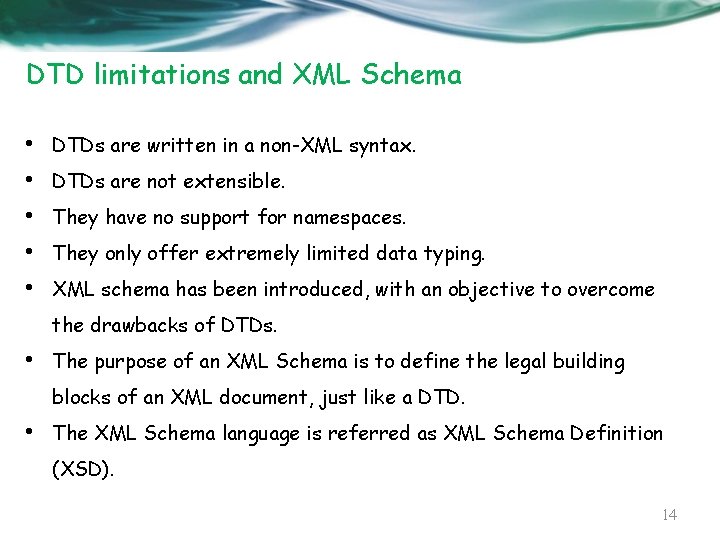
DTD limitations and XML Schema • • • DTDs are written in a non-XML syntax. DTDs are not extensible. They have no support for namespaces. They only offer extremely limited data typing. XML schema has been introduced, with an objective to overcome the drawbacks of DTDs. • The purpose of an XML Schema is to define the legal building blocks of an XML document, just like a DTD. • The XML Schema language is referred as XML Schema Definition (XSD). 14
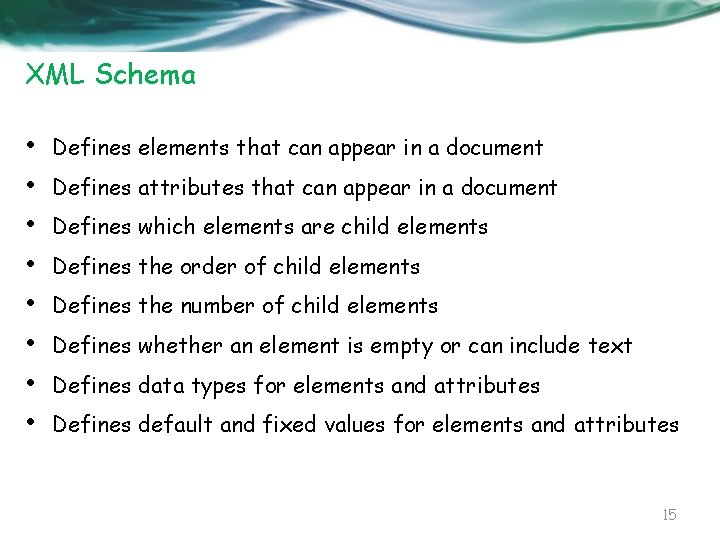
XML Schema • • Defines elements that can appear in a document Defines attributes that can appear in a document Defines which elements are child elements Defines the order of child elements Defines the number of child elements Defines whether an element is empty or can include text Defines data types for elements and attributes Defines default and fixed values for elements and attributes 15
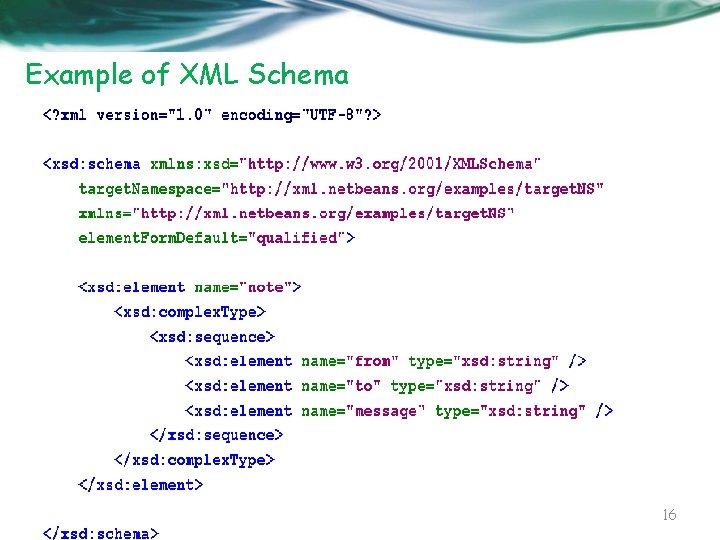
Example of XML Schema 16
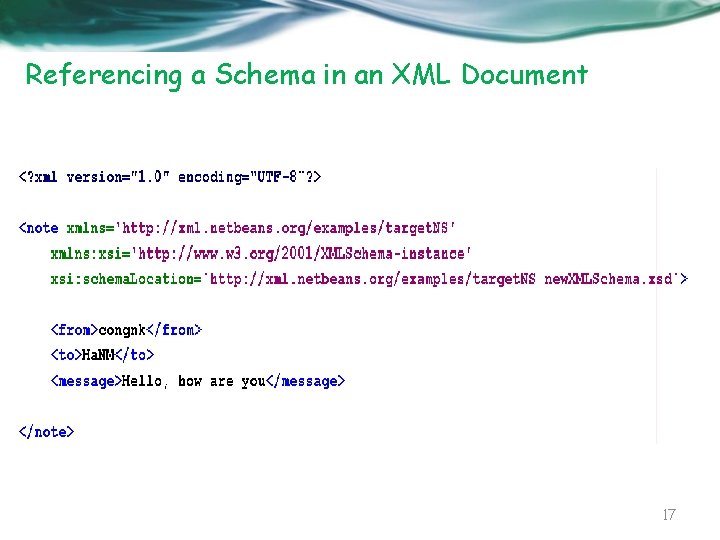
Referencing a Schema in an XML Document 17
• Read more: http: //www. w 3 schools. com/xml/default. asp • … 18
JAXP Java API for XML Processing 19
Parsing anh Parser • • Parsing is a process XML data by using programs (parsers) These programs are able to extract and manipulate data in XML documents. • Parsers are software program that check the syntax used in an xml file. • Types of Parser o Event-Based Parsers: generate events while traversing through an XML document. (SAX) o Object-Based Parsers: arrange XML document in a tree-like structure. (DOM). 20
JAXP – Java API for XML Processing • JAXP is a collection of APIs that you can use in your Java applications to process and translate XML documents • Consists of three APIs: o Simple API for XML (SAX): Allows you to use a SAX parser to process the XML documents serially. o Document Object Model (DOM): Allows you to use a DOM parser to process the XML documents in an object-oriented manner. o XML Stylesheet Language for Transformation (XSLT): Allows you to transform XML documents in other formats, such as Hyper. Text Markup Language (HTML) 21
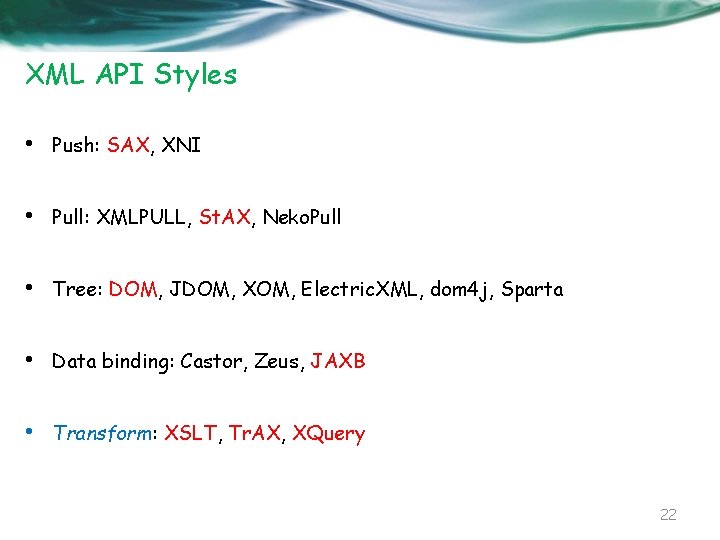
XML API Styles • Push: SAX, XNI • Pull: XMLPULL, St. AX, Neko. Pull • Tree: DOM, JDOM, XOM, Electric. XML, dom 4 j, Sparta • Data binding: Castor, Zeus, JAXB • Transform: XSLT, Tr. AX, XQuery 22
SAX Simple API for XML 23
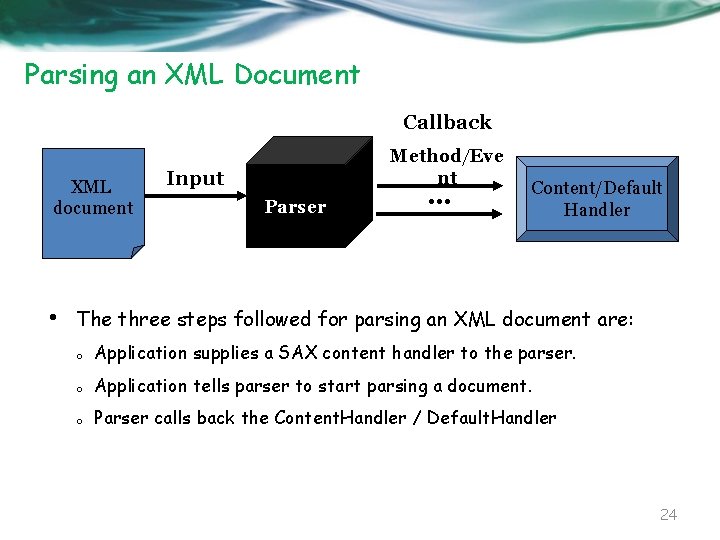
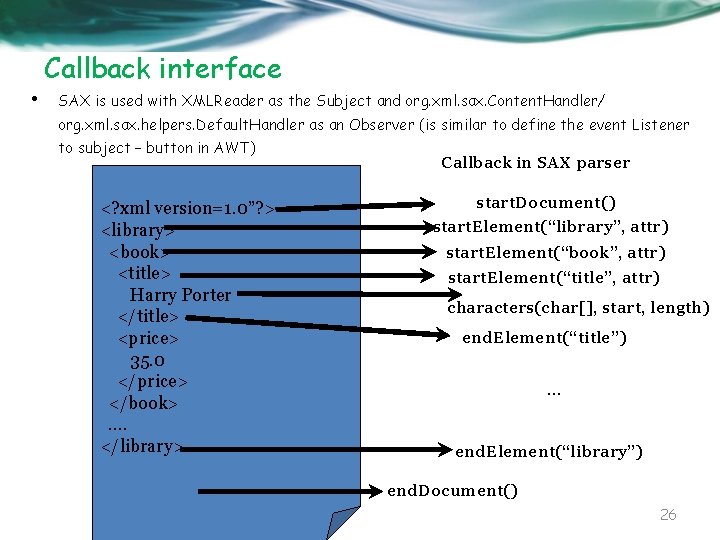
Parsing an XML Document Callback XML document • Method/Eve nt Input Parser . . . Content/Default Handler The three steps followed for parsing an XML document are: o Application supplies a SAX content handler to the parser. o Application tells parser to start parsing a document. o Parser calls back the Content. Handler / Default. Handler 24
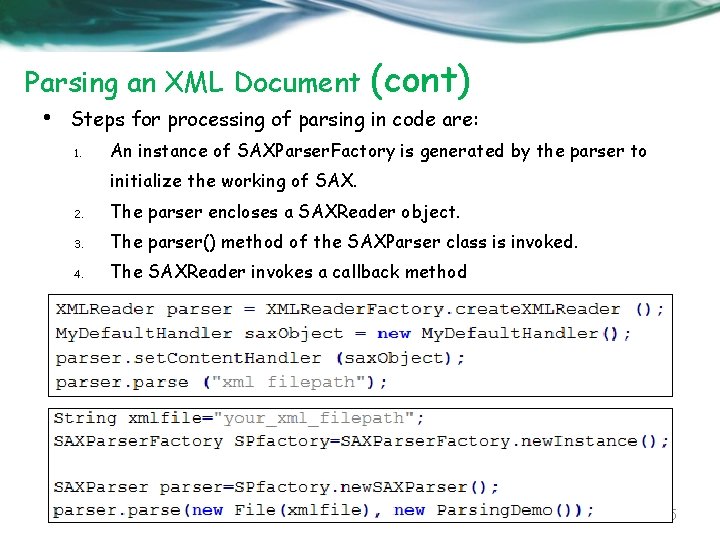
Parsing an XML Document • (cont) Steps for processing of parsing in code are: 1. An instance of SAXParser. Factory is generated by the parser to initialize the working of SAX. 2. The parser encloses a SAXReader object. 3. The parser() method of the SAXParser class is invoked. 4. The SAXReader invokes a callback method 25
Callback interface • SAX is used with XMLReader as the Subject and org. xml. sax. Content. Handler/ org. xml. sax. helpers. Default. Handler as an Observer (is similar to define the event Listener to subject – button in AWT) <? xml version=1. 0”? > <library> <book> <title> Harry Porter </title> <price> 35. 0 </price> </book>. . </library> Callback in SAX parser start. Document() start. Element(“library”, attr) start. Element(“book”, attr) start. Element(“title”, attr) characters(char[], start, length) end. Element(“title”). . . end. Element(“library”) end. Document() 26
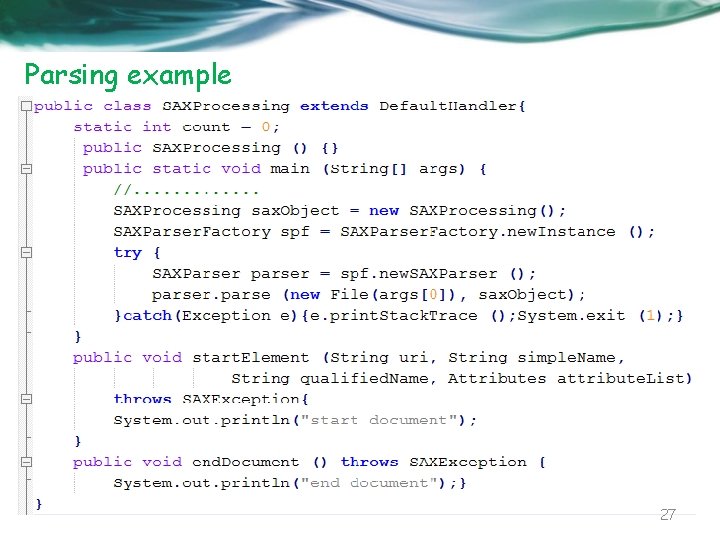
Parsing example 27
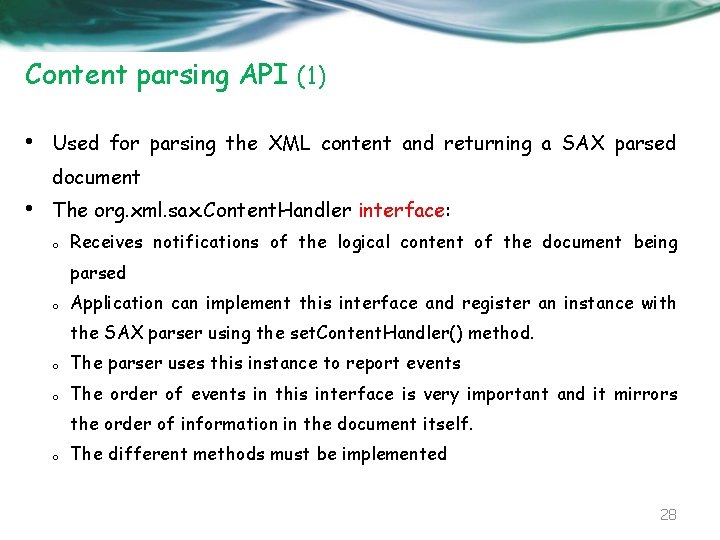
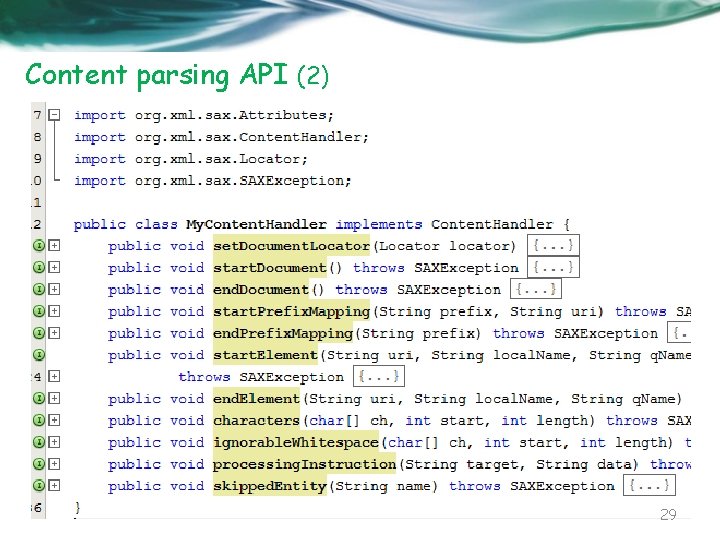
Content parsing API (1) • Used for parsing the XML content and returning a SAX parsed document • The org. xml. sax. Content. Handler interface: o Receives notifications of the logical content of the document being parsed o Application can implement this interface and register an instance with the SAX parser using the set. Content. Handler() method. o The parser uses this instance to report events o The order of events in this interface is very important and it mirrors the order of information in the document itself. o The different methods must be implemented 28
Content parsing API (2) 29
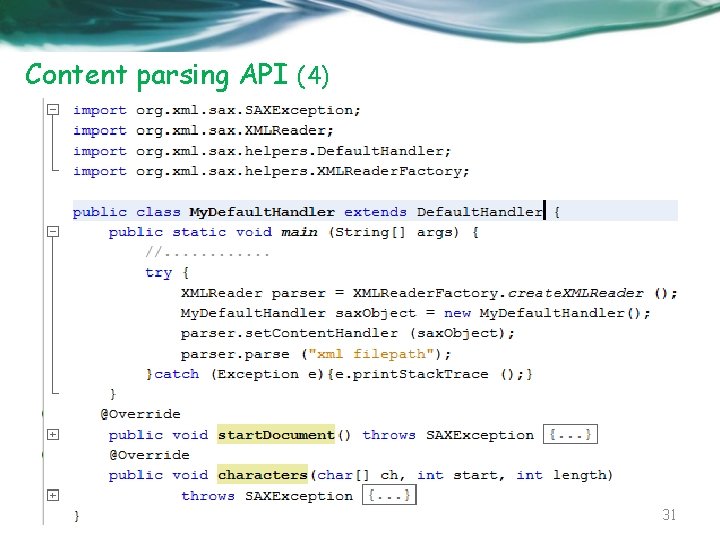
Content parsing API (3) • The org. xml. sax. helpers. Default. Handler class: o Is default base class for SAX 2 event handlers. o Provides default implementations for all of the callbacks in the four core SAX 2 handler classes: Content. Handler, DTD Handler, Error Handle, Entity Resolver. o Provided as a convenience base class for SAX 2 applications. Thus, the application developer will need to override only those for which additional or custom functionality is desired. 30
Content parsing API (4) 31
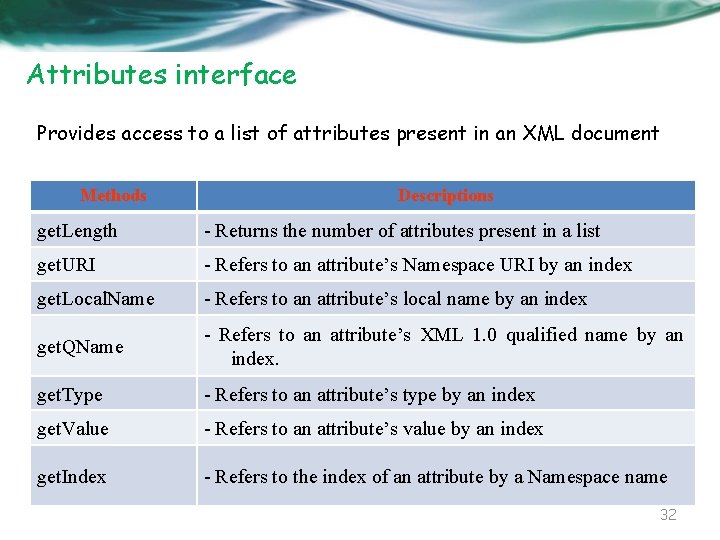
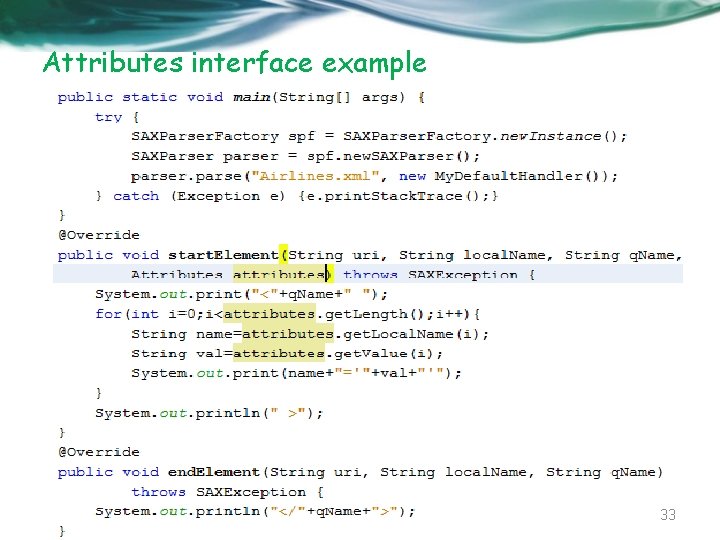
Attributes interface Provides access to a list of attributes present in an XML document Methods Descriptions get. Length - Returns the number of attributes present in a list get. URI - Refers to an attribute’s Namespace URI by an index get. Local. Name - Refers to an attribute’s local name by an index get. QName - Refers to an attribute’s XML 1. 0 qualified name by an index. get. Type - Refers to an attribute’s type by an index get. Value - Refers to an attribute’s value by an index get. Index - Refers to the index of an attribute by a Namespace name 32
Attributes interface example 33
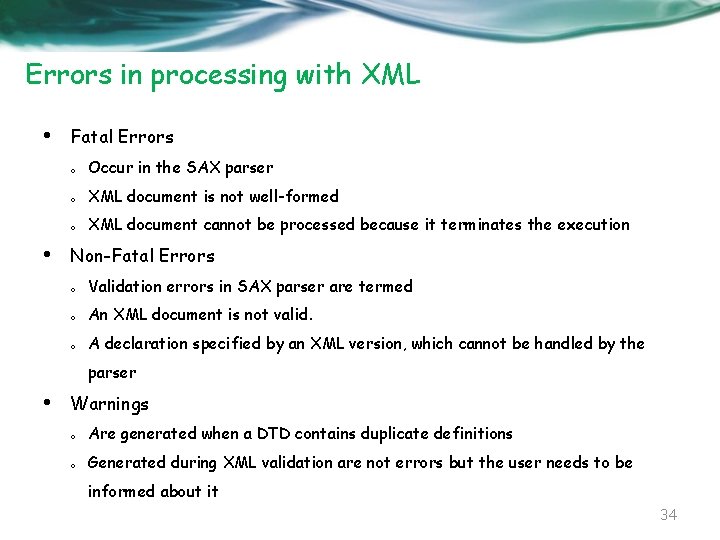
Errors in processing with XML • • Fatal Errors o Occur in the SAX parser o XML document is not well-formed o XML document cannot be processed because it terminates the execution Non-Fatal Errors o Validation errors in SAX parser are termed o An XML document is not valid. o A declaration specified by an XML version, which cannot be handled by the parser • Warnings o Are generated when a DTD contains duplicate definitions o Generated during XML validation are not errors but the user needs to be informed about it 34
Read more • http: //www. cafeconleche. org/slides/sd 2000 east/sax/ 35
St. AX Streaming API for XML 36
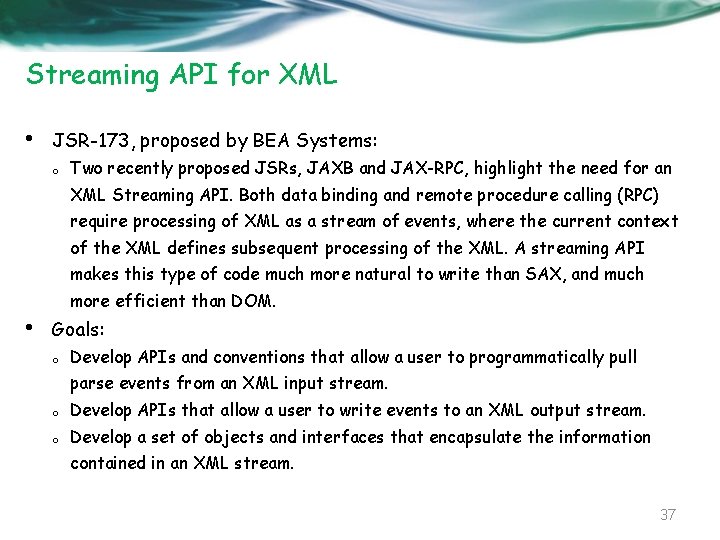
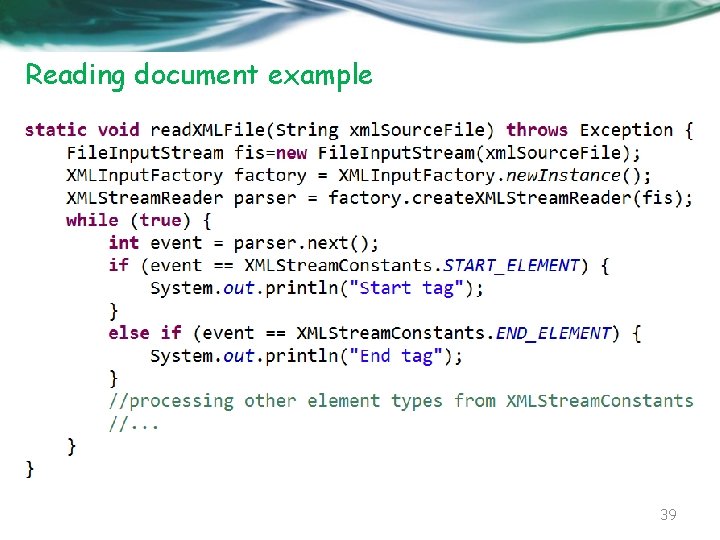
Streaming API for XML • JSR-173, proposed by BEA Systems: o Two recently proposed JSRs, JAXB and JAX-RPC, highlight the need for an XML Streaming API. Both data binding and remote procedure calling (RPC) require processing of XML as a stream of events, where the current context of the XML defines subsequent processing of the XML. A streaming API makes this type of code much more natural to write than SAX, and much more efficient than DOM. • Goals: o Develop APIs and conventions that allow a user to programmatically pull parse events from an XML input stream. o Develop APIs that allow a user to write events to an XML output stream. o Develop a set of objects and interfaces that encapsulate the information contained in an XML stream. 37
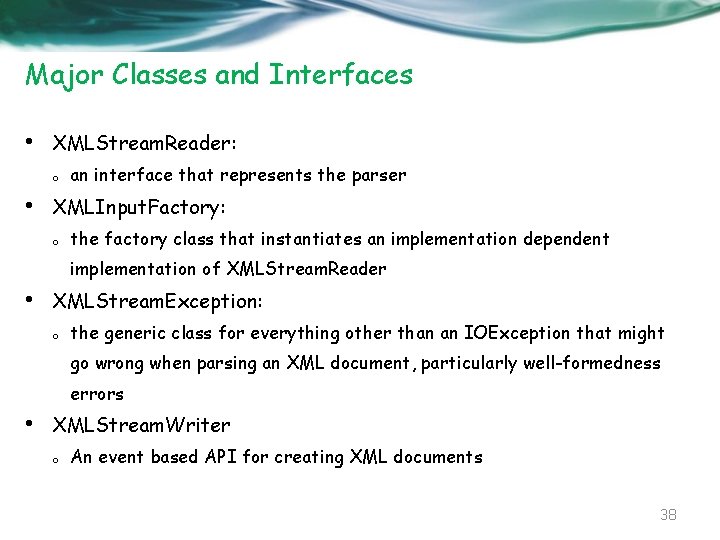
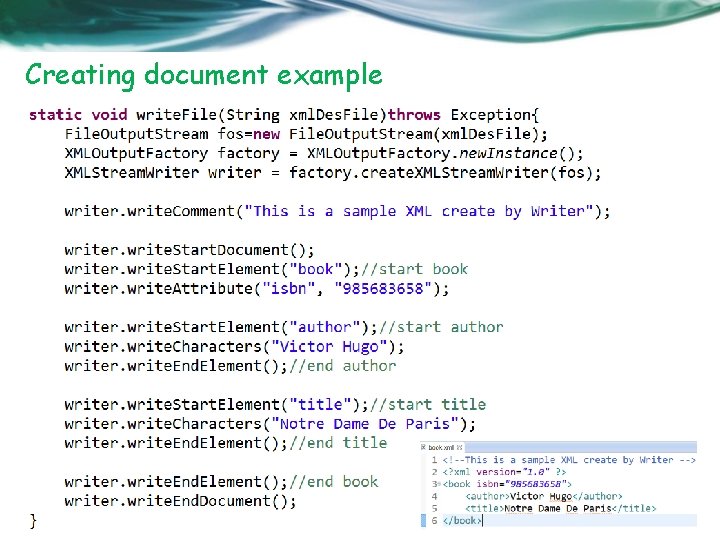
Major Classes and Interfaces • XMLStream. Reader: o • an interface that represents the parser XMLInput. Factory: o the factory class that instantiates an implementation dependent implementation of XMLStream. Reader • XMLStream. Exception: o the generic class for everything other than an IOException that might go wrong when parsing an XML document, particularly well-formedness errors • XMLStream. Writer o An event based API for creating XML documents 38
Reading document example 39
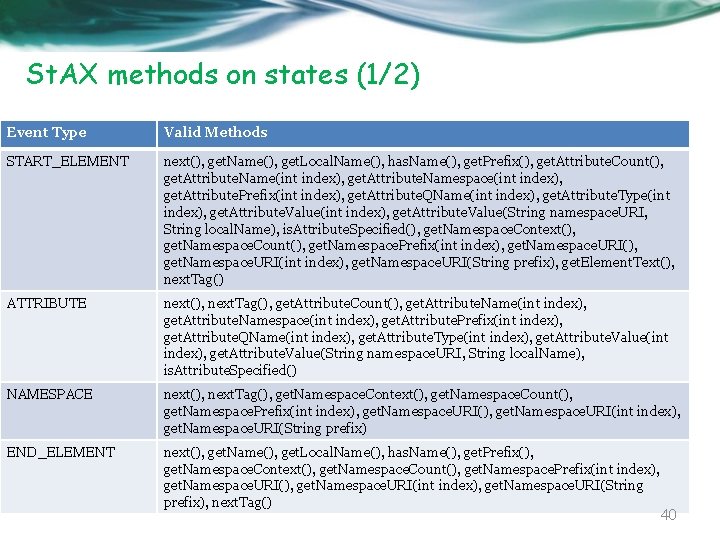
St. AX methods on states (1/2) Event Type Valid Methods START_ELEMENT next(), get. Name(), get. Local. Name(), has. Name(), get. Prefix(), get. Attribute. Count(), get. Attribute. Name(int index), get. Attribute. Namespace(int index), get. Attribute. Prefix(int index), get. Attribute. QName(int index), get. Attribute. Type(int index), get. Attribute. Value(String namespace. URI, String local. Name), is. Attribute. Specified(), get. Namespace. Context(), get. Namespace. Count(), get. Namespace. Prefix(int index), get. Namespace. URI(int index), get. Namespace. URI(String prefix), get. Element. Text(), next. Tag() ATTRIBUTE next(), next. Tag(), get. Attribute. Count(), get. Attribute. Name(int index), get. Attribute. Namespace(int index), get. Attribute. Prefix(int index), get. Attribute. QName(int index), get. Attribute. Type(int index), get. Attribute. Value(String namespace. URI, String local. Name), is. Attribute. Specified() NAMESPACE next(), next. Tag(), get. Namespace. Context(), get. Namespace. Count(), get. Namespace. Prefix(int index), get. Namespace. URI(int index), get. Namespace. URI(String prefix) END_ELEMENT next(), get. Name(), get. Local. Name(), has. Name(), get. Prefix(), get. Namespace. Context(), get. Namespace. Count(), get. Namespace. Prefix(int index), get. Namespace. URI(int index), get. Namespace. URI(String prefix), next. Tag() 40
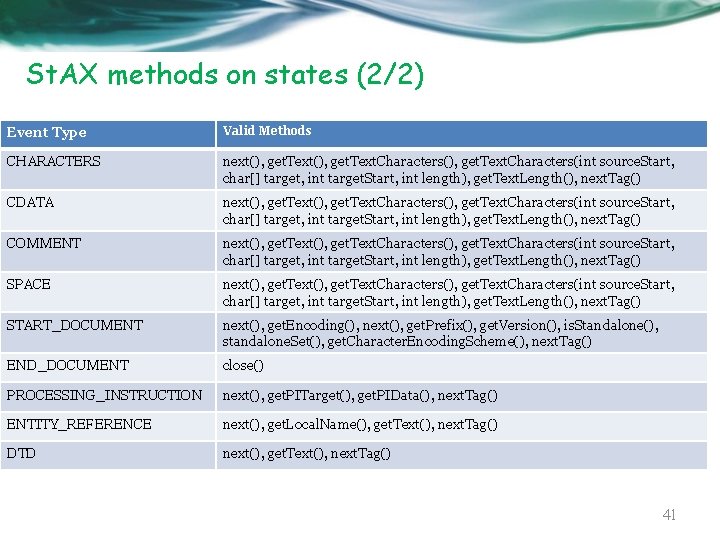
St. AX methods on states (2/2) Event Type Valid Methods CHARACTERS next(), get. Text. Characters(), get. Text. Characters(int source. Start, char[] target, int target. Start, int length), get. Text. Length(), next. Tag() CDATA next(), get. Text. Characters(), get. Text. Characters(int source. Start, char[] target, int target. Start, int length), get. Text. Length(), next. Tag() COMMENT next(), get. Text. Characters(), get. Text. Characters(int source. Start, char[] target, int target. Start, int length), get. Text. Length(), next. Tag() SPACE next(), get. Text. Characters(), get. Text. Characters(int source. Start, char[] target, int target. Start, int length), get. Text. Length(), next. Tag() START_DOCUMENT next(), get. Encoding(), next(), get. Prefix(), get. Version(), is. Standalone(), standalone. Set(), get. Character. Encoding. Scheme(), next. Tag() END_DOCUMENT close() PROCESSING_INSTRUCTION next(), get. PITarget(), get. PIData(), next. Tag() ENTITY_REFERENCE next(), get. Local. Name(), get. Text(), next. Tag() DTD next(), get. Text(), next. Tag() 41
Creating document example 42
Read more • http: //www. cafeconleche. org/slides/sd 2004 west/stax/index. html 43
DOM Document Object Model 44
DOM • Provides reference of the complete tree structure of an XML document and stores it in memory • Benefits o Provides Access to Multiple Documents: DOM creates the whole tree structure of XML documents while processing o Manages Complex Data Structures: DOM creates a structures documenttree for an XML document having complex cross references o Allows Modification of Documents: it allows both reading and modifying a parsed XML document o Allows Many Methods to Access a Document Simultaneously: As the entire document is available in memory after it is parsed, you may use any of the DOM API calls multiple times to access, update, and delete document contents and structure 45
DOM components • • DOM is an API for HTML and XML documents A Java implementation of the DOM model defines the logical structure of XML documents and the way a document is accessed and manipulated • DOM acts as a language-independent interface between programs to access and modify data in a document. This provides the retrieved data in XML document a logical structure and style of representation. XML presents data in a tree format so DOM also presents the XML data in the same way • DOM creates a tree structure of the XML document with each XML element represented as a node • DOM more effective to act as an interface between an application written in Java and XML data because both Java and DOM are platform independent 46
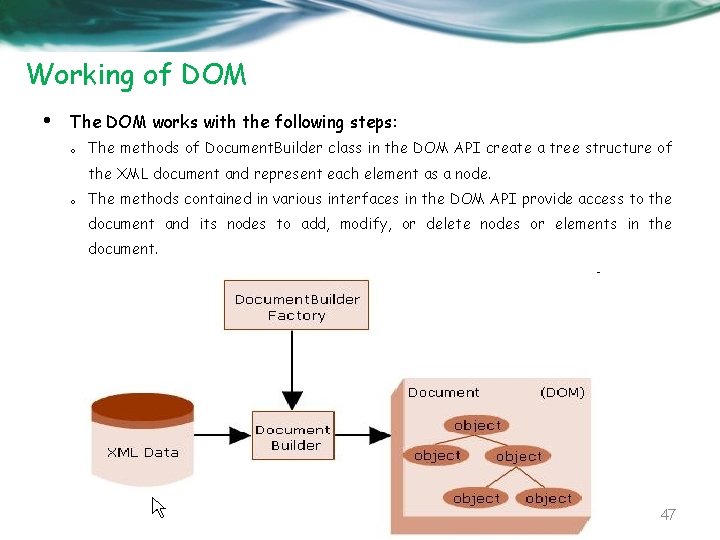
Working of DOM • The DOM works with the following steps: o The methods of Document. Builder class in the DOM API create a tree structure of the XML document and represent each element as a node. o The methods contained in various interfaces in the DOM API provide access to the document and its nodes to add, modify, or delete nodes or elements in the document. 47
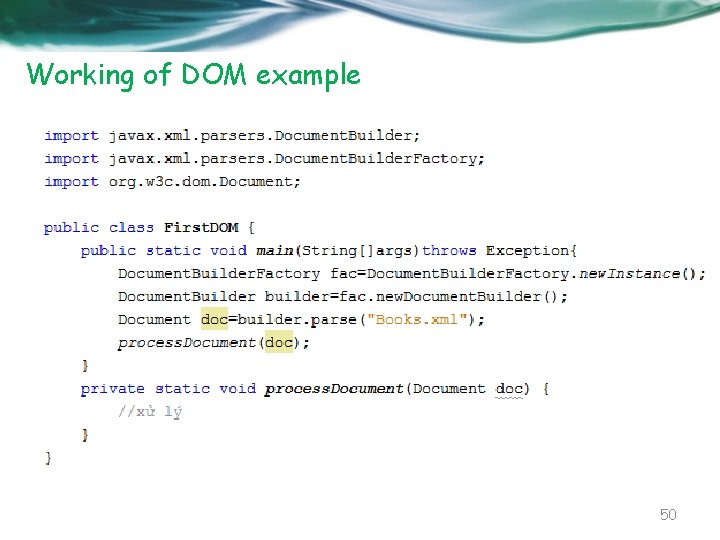
Document. Builder. Factory • A class defines a factory API. This API is used for creating objects of similar design pattern • Enables the application to obtain the parser needed to produre DOM object tree from the XML document • The Document. Builder. Factory performs the following steps to parse an XML document: o The Document. Builder. Factory creates its instance by the new. Instance() method: o The factory instance then creates the DOM parser for parsing the XML document using the new. Document. Builder() method. 48
Document. Builder • The class defines the API necessary to obtain the instance of a DOM document from an XML document • An instance of this class can be obtained by the new. Document. Builder() method of the Document. Builder. Factory class • After obtaining an instance of the class, the XML document is parsed from input sources such as Input. Streams, files, URLs, and SAX input sources 49
Working of DOM example 50
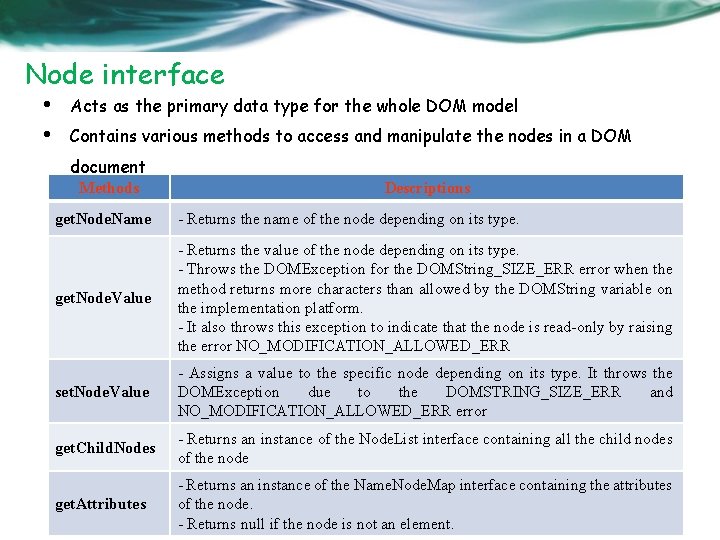
Node interface • • Acts as the primary data type for the whole DOM model Contains various methods to access and manipulate the nodes in a DOM document Methods Descriptions get. Node. Name - Returns the name of the node depending on its type. get. Node. Value - Returns the value of the node depending on its type. - Throws the DOMException for the DOMString_SIZE_ERR error when the method returns more characters than allowed by the DOMString variable on the implementation platform. - It also throws this exception to indicate that the node is read-only by raising the error NO_MODIFICATION_ALLOWED_ERR set. Node. Value - Assigns a value to the specific node depending on its type. It throws the DOMException due to the DOMSTRING_SIZE_ERR and NO_MODIFICATION_ALLOWED_ERR error get. Child. Nodes - Returns an instance of the Node. List interface containing all the child nodes of the node get. Attributes - Returns an instance of the Name. Node. Map interface containing the attributes of the node. 51 - Returns null if the node is not an element.
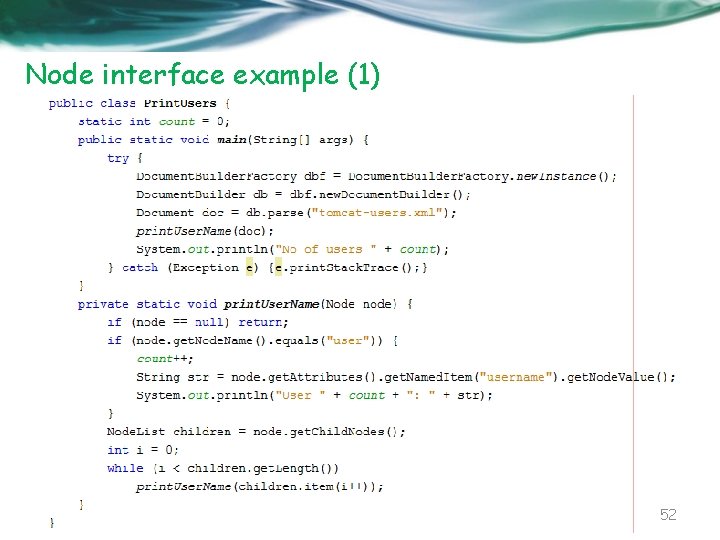
Node interface example (1) 52
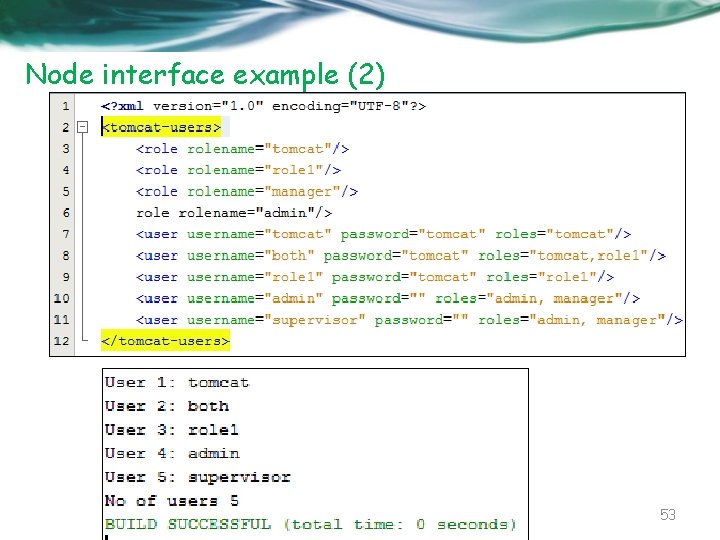
Node interface example (2) 53
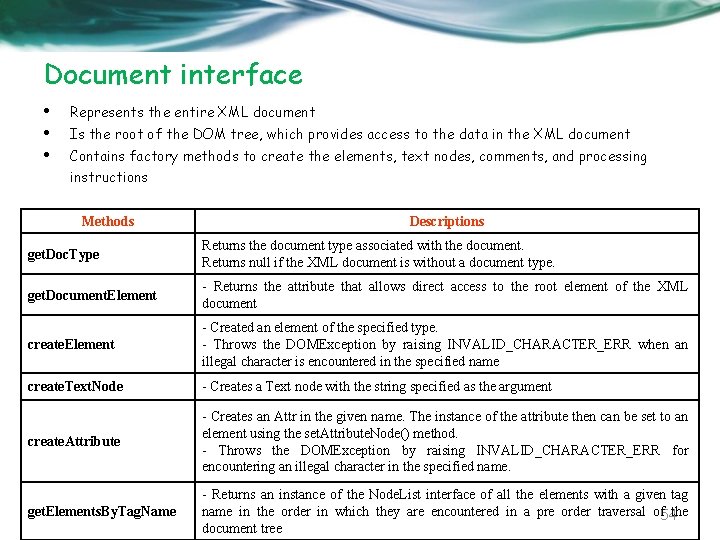
Document interface • • • Represents the entire XML document Is the root of the DOM tree, which provides access to the data in the XML document Contains factory methods to create the elements, text nodes, comments, and processing instructions Methods Descriptions get. Doc. Type Returns the document type associated with the document. Returns null if the XML document is without a document type. get. Document. Element - Returns the attribute that allows direct access to the root element of the XML document create. Element - Created an element of the specified type. - Throws the DOMException by raising INVALID_CHARACTER_ERR when an illegal character is encountered in the specified name create. Text. Node - Creates a Text node with the string specified as the argument create. Attribute - Creates an Attr in the given name. The instance of the attribute then can be set to an element using the set. Attribute. Node() method. - Throws the DOMException by raising INVALID_CHARACTER_ERR for encountering an illegal character in the specified name. get. Elements. By. Tag. Name - Returns an instance of the Node. List interface of all the elements with a given tag name in the order in which they are encountered in a pre order traversal of 54 the document tree
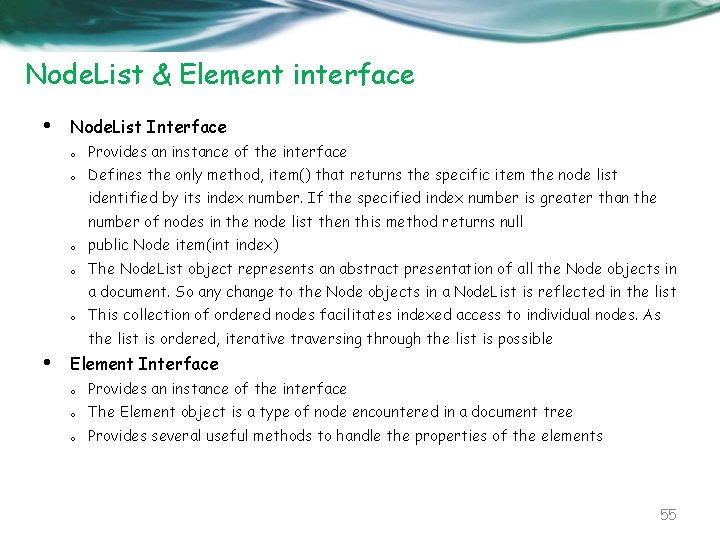
Node. List & Element interface • Node. List Interface o Provides an instance of the interface o Defines the only method, item() that returns the specific item the node list identified by its index number. If the specified index number is greater than the number of nodes in the node list then this method returns null o public Node item(int index) o The Node. List object represents an abstract presentation of all the Node objects in a document. So any change to the Node objects in a Node. List is reflected in the list o This collection of ordered nodes facilitates indexed access to individual nodes. As the list is ordered, iterative traversing through the list is possible • Element Interface o Provides an instance of the interface o The Element object is a type of node encountered in a document tree o Provides several useful methods to handle the properties of the elements 55
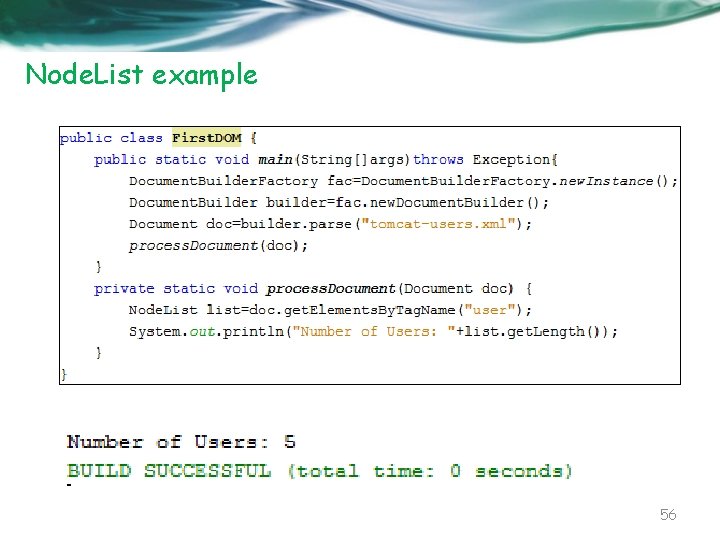
Node. List example 56
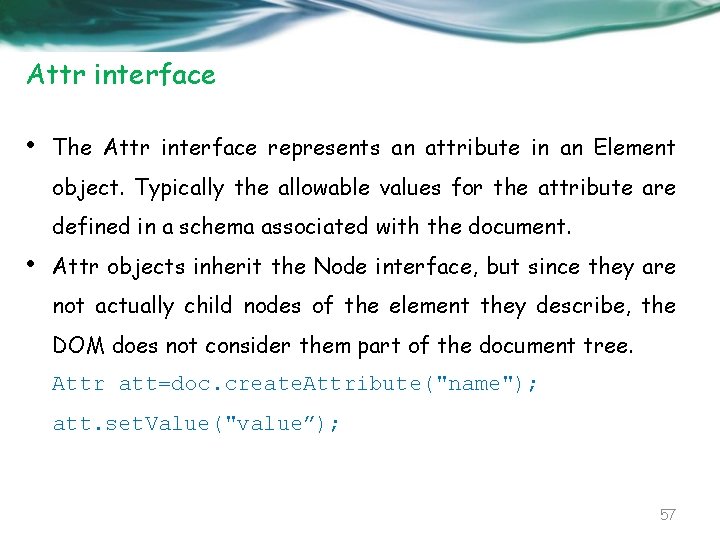
Attr interface • The Attr interface represents an attribute in an Element object. Typically the allowable values for the attribute are defined in a schema associated with the document. • Attr objects inherit the Node interface, but since they are not actually child nodes of the element they describe, the DOM does not consider them part of the document tree. Attr att=doc. create. Attribute("name"); att. set. Value("value”); 57
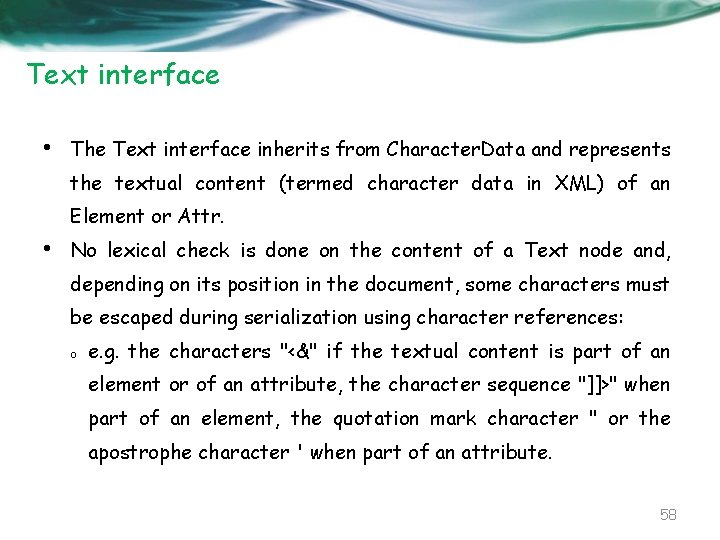
Text interface • The Text interface inherits from Character. Data and represents the textual content (termed character data in XML) of an Element or Attr. • No lexical check is done on the content of a Text node and, depending on its position in the document, some characters must be escaped during serialization using character references: o e. g. the characters "<&" if the textual content is part of an element or of an attribute, the character sequence "]]>" when part of an element, the quotation mark character " or the apostrophe character ' when part of an attribute. 58
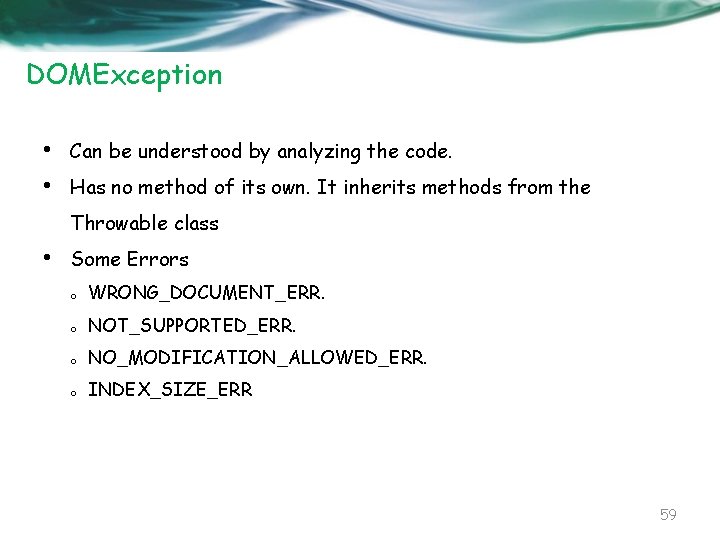
DOMException • • Can be understood by analyzing the code. Has no method of its own. It inherits methods from the Throwable class • Some Errors o WRONG_DOCUMENT_ERR. o NOT_SUPPORTED_ERR. o NO_MODIFICATION_ALLOWED_ERR. o INDEX_SIZE_ERR 59
Manipulating DOM 60
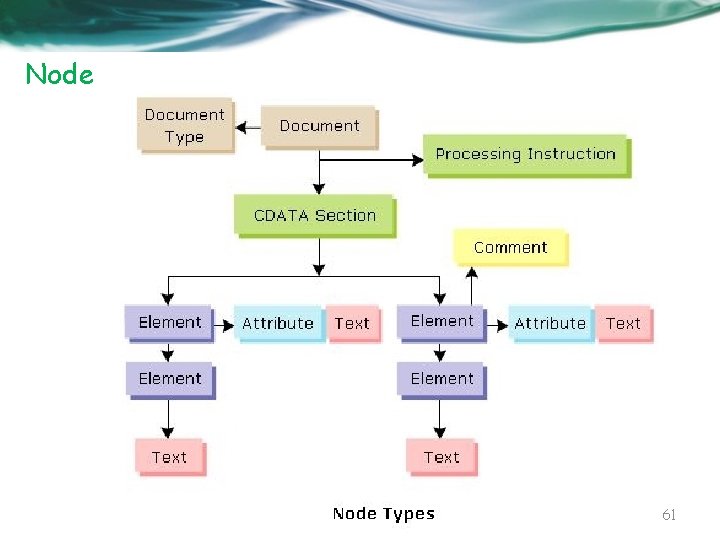
Node 61
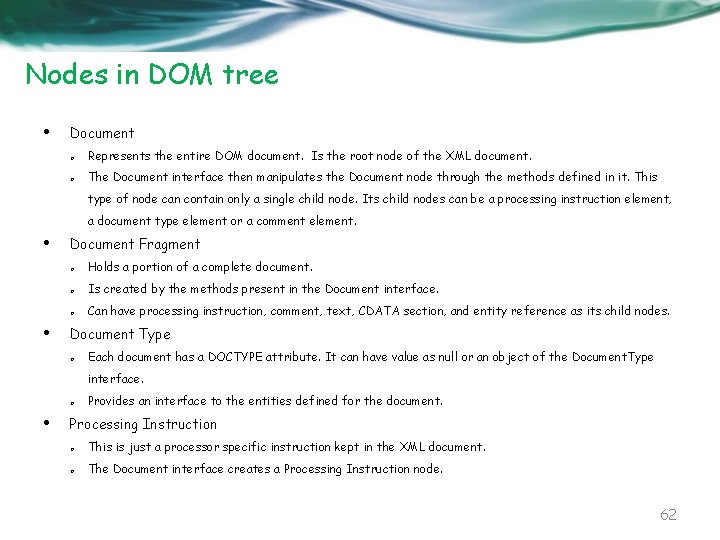
Nodes in DOM tree • Document o Represents the entire DOM document. Is the root node of the XML document. o The Document interface then manipulates the Document node through the methods defined in it. This type of node can contain only a single child node. Its child nodes can be a processing instruction element, a document type element or a comment element. • • Document Fragment o Holds a portion of a complete document. o Is created by the methods present in the Document interface. o Can have processing instruction, comment, text, CDATA section, and entity reference as its child nodes. Document Type o Each document has a DOCTYPE attribute. It can have value as null or an object of the Document. Type interface. o • Provides an interface to the entities defined for the document. Processing Instruction o This is just a processor specific instruction kept in the XML document. o The Document interface creates a Processing Instruction node. 62
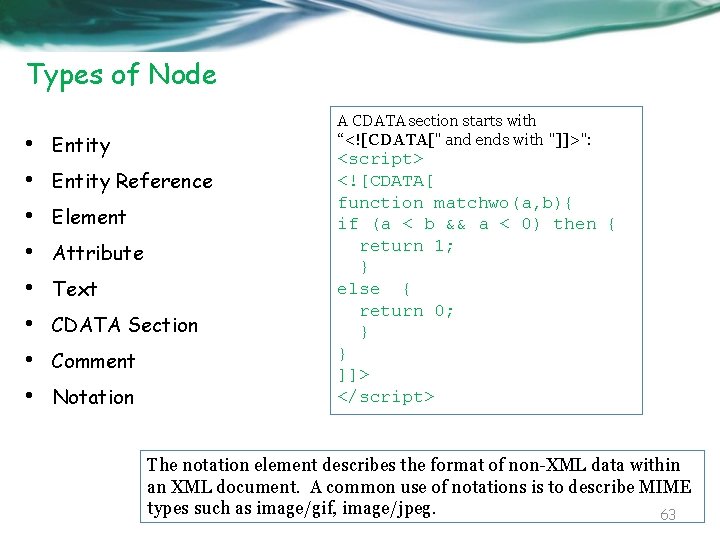
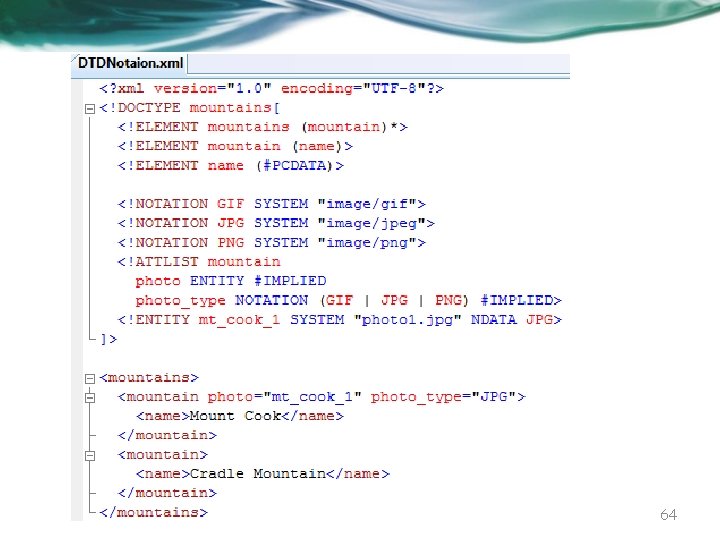
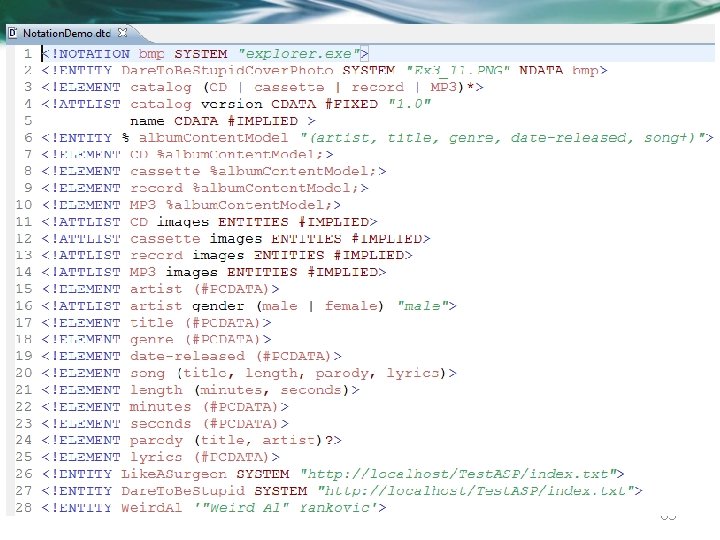
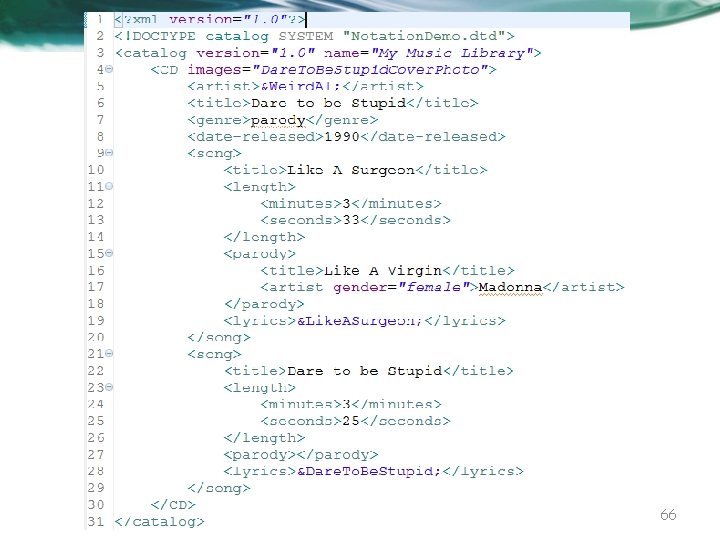
Types of Node • • A CDATA section starts with “<![CDATA[" and ends with "]]>": Entity Reference Element Attribute Text CDATA Section Comment Notation <script> <![CDATA[ function matchwo(a, b){ if (a < b && a < 0) then { return 1; } else { return 0; } } ]]> </script> The notation element describes the format of non-XML data within an XML document. A common use of notations is to describe MIME types such as image/gif, image/jpeg. 63
64
65
66
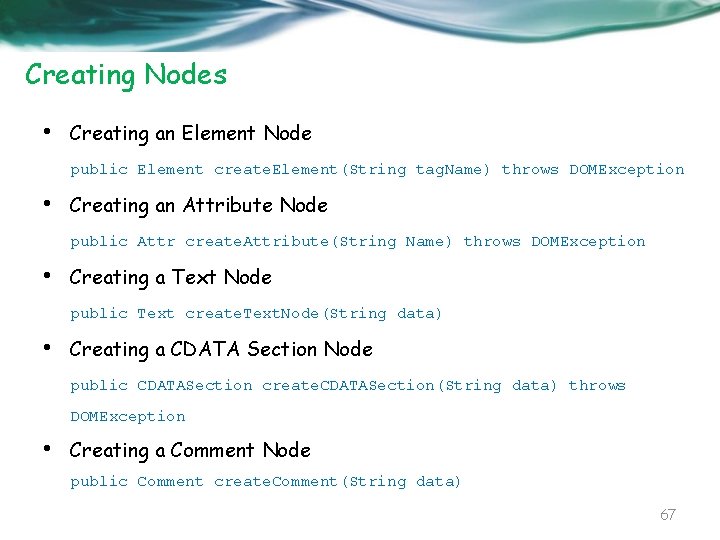
Creating Nodes • Creating an Element Node public Element create. Element(String tag. Name) throws DOMException • Creating an Attribute Node public Attr create. Attribute(String Name) throws DOMException • Creating a Text Node public Text create. Text. Node(String data) • Creating a CDATA Section Node public CDATASection create. CDATASection(String data) throws DOMException • Creating a Comment Node public Comment create. Comment(String data) 67
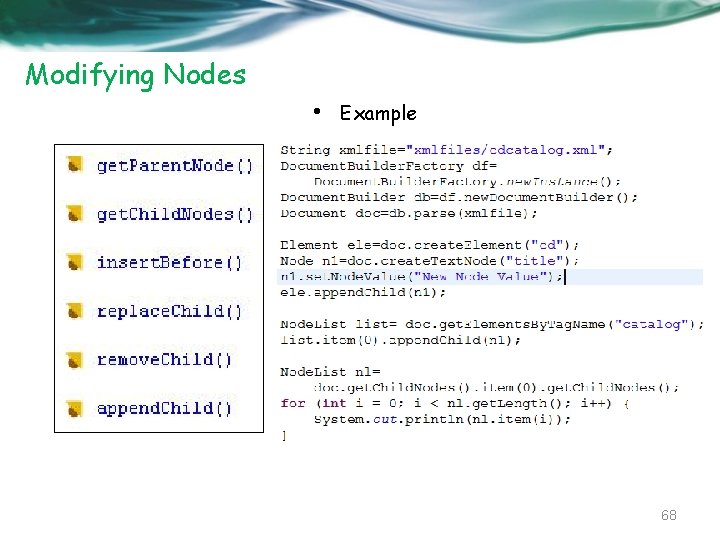
Modifying Nodes • Example 68
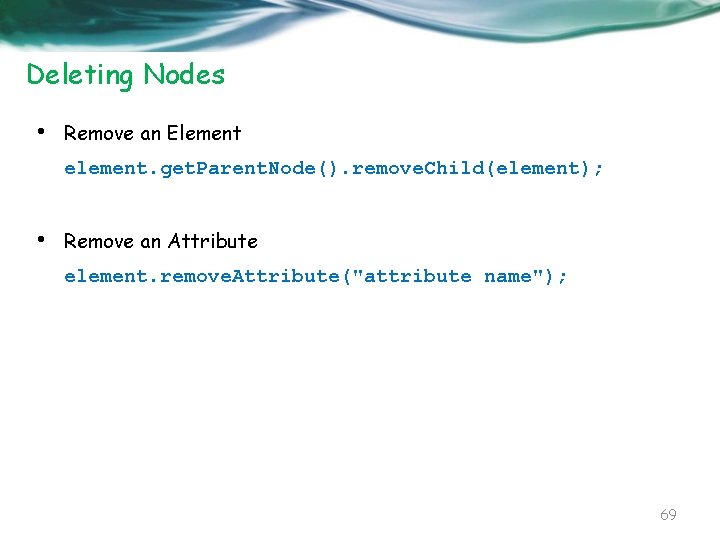
Deleting Nodes • Remove an Element element. get. Parent. Node(). remove. Child(element); • Remove an Attribute element. remove. Attribute("attribute name"); 69
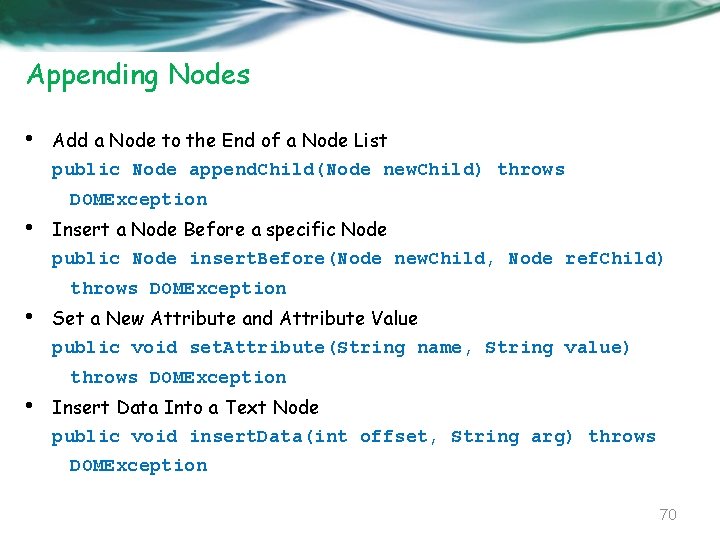
Appending Nodes • Add a Node to the End of a Node List public Node append. Child(Node new. Child) throws DOMException • Insert a Node Before a specific Node public Node insert. Before(Node new. Child, Node ref. Child) throws DOMException • Set a New Attribute and Attribute Value public void set. Attribute(String name, String value) throws DOMException • Insert Data Into a Text Node public void insert. Data(int offset, String arg) throws DOMException 70
Seeking Nodes • • • get. Parent. Node get. Child. Node get. First. Child get. Last. Child get. Node. Name 71
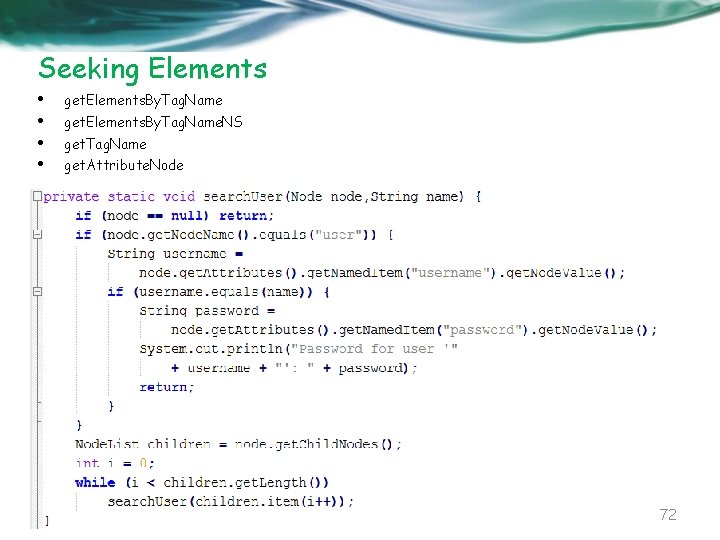
Seeking Elements • • get. Elements. By. Tag. Name. NS get. Tag. Name get. Attribute. Node 72
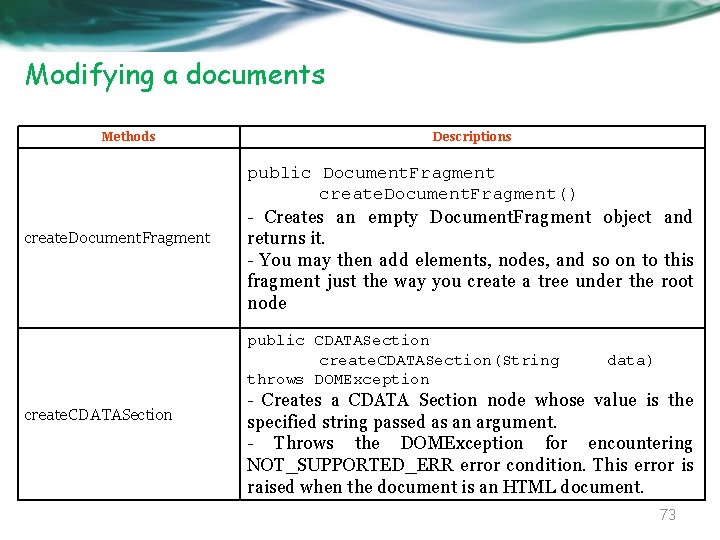
Modifying a documents Methods create. Document. Fragment create. CDATASection Descriptions public Document. Fragment create. Document. Fragment() - Creates an empty Document. Fragment object and returns it. - You may then add elements, nodes, and so on to this fragment just the way you create a tree under the root node public CDATASection create. CDATASection(String data) throws DOMException - Creates a CDATA Section node whose value is the specified string passed as an argument. - Throws the DOMException for encountering NOT_SUPPORTED_ERR error condition. This error is raised when the document is an HTML document. 73
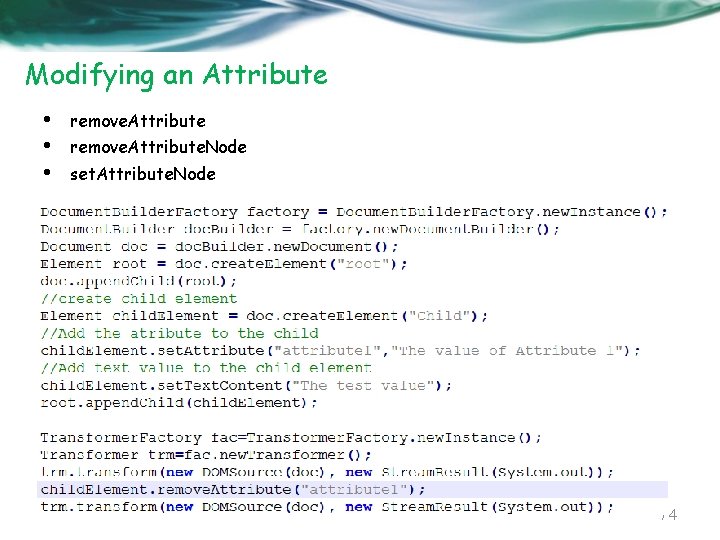
Modifying an Attribute • • • remove. Attribute. Node set. Attribute. Node 74
DOM Level 2 Modules 75
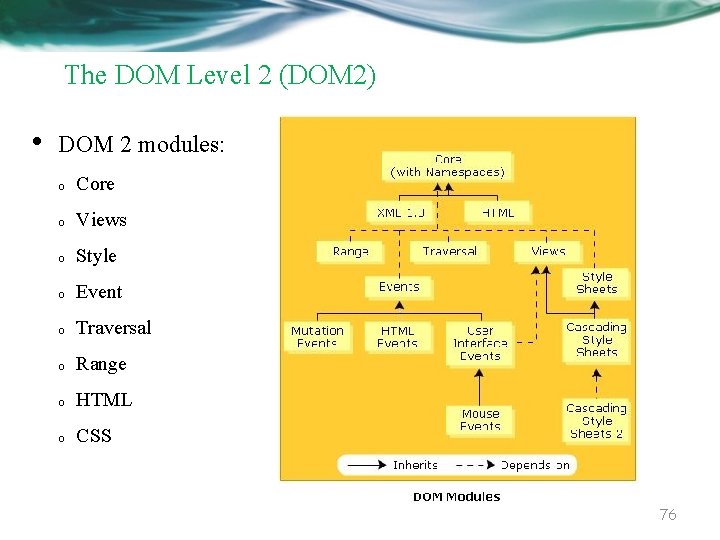
The DOM Level 2 (DOM 2) • DOM 2 modules: o Core o Views o Style o Event o Traversal o Range o HTML o CSS 76
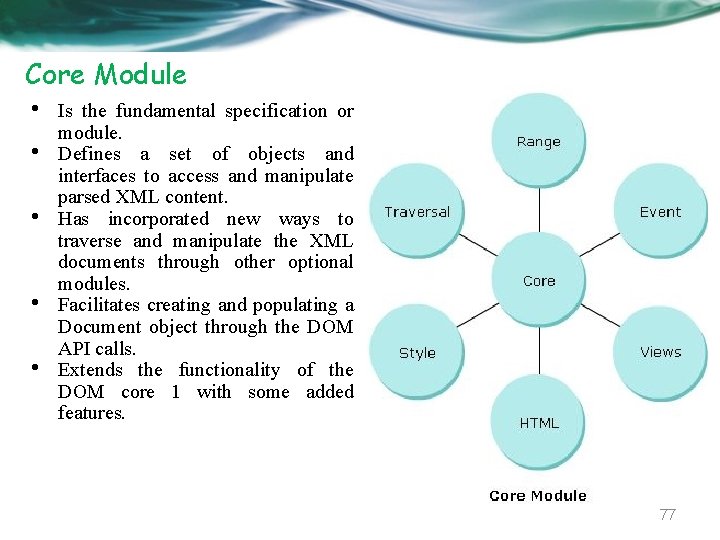
Core Module • • • Is the fundamental specification or module. Defines a set of objects and interfaces to access and manipulate parsed XML content. Has incorporated new ways to traverse and manipulate the XML documents through other optional modules. Facilitates creating and populating a Document object through the DOM API calls. Extends the functionality of the DOM core 1 with some added features. 77
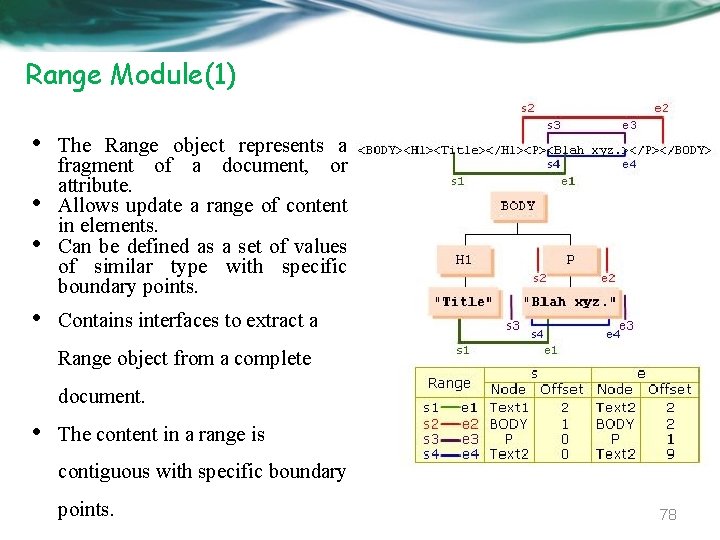
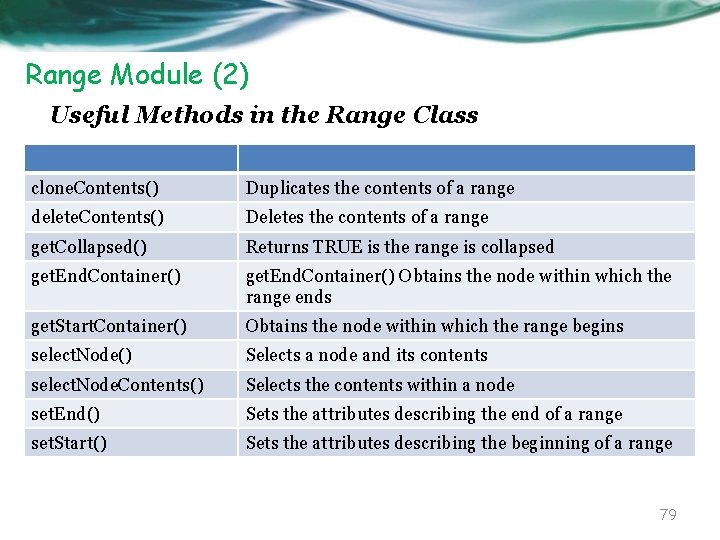
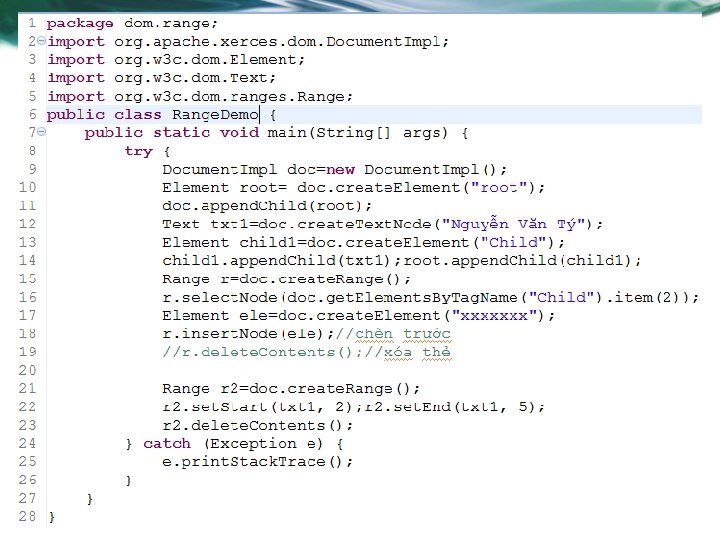
Range Module(1) • • • The Range object represents a fragment of a document, or attribute. Allows update a range of content in elements. Can be defined as a set of values of similar type with specific boundary points. • Contains interfaces to extract a Range object from a complete document. • The content in a range is contiguous with specific boundary points. 78
Range Module (2) Useful Methods in the Range Class clone. Contents() Duplicates the contents of a range delete. Contents() Deletes the contents of a range get. Collapsed() Returns TRUE is the range is collapsed get. End. Container() Obtains the node within which the range ends get. Start. Container() Obtains the node within which the range begins select. Node() Selects a node and its contents select. Node. Contents() Selects the contents within a node set. End() Sets the attributes describing the end of a range set. Start() Sets the attributes describing the beginning of a range 79
80
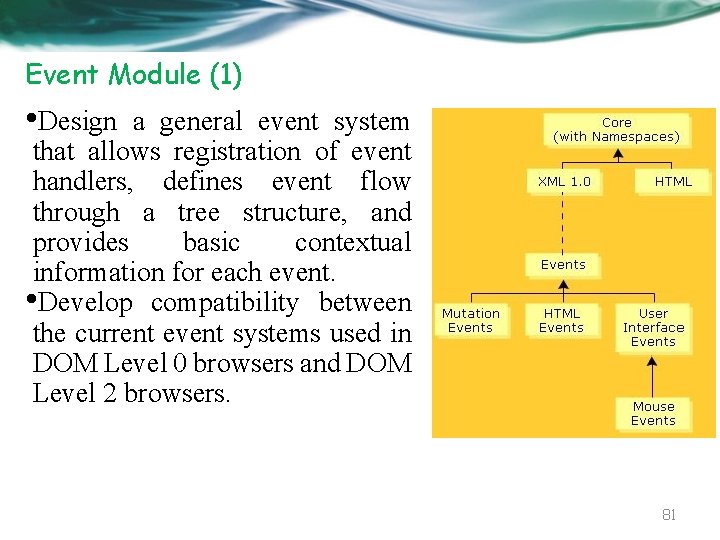
Event Module (1) • Design a general event system that allows registration of event handlers, defines event flow through a tree structure, and provides basic contextual information for each event. • Develop compatibility between the current event systems used in DOM Level 0 browsers and DOM Level 2 browsers. 81
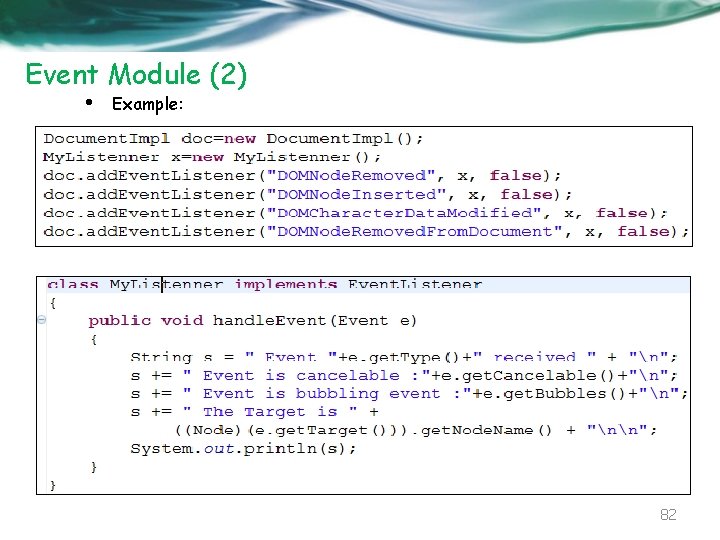
Event Module (2) • Example: 82
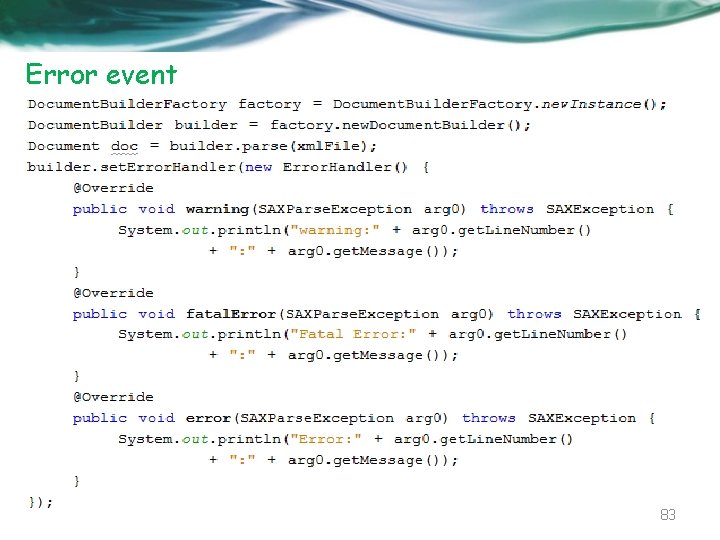
Error event 83
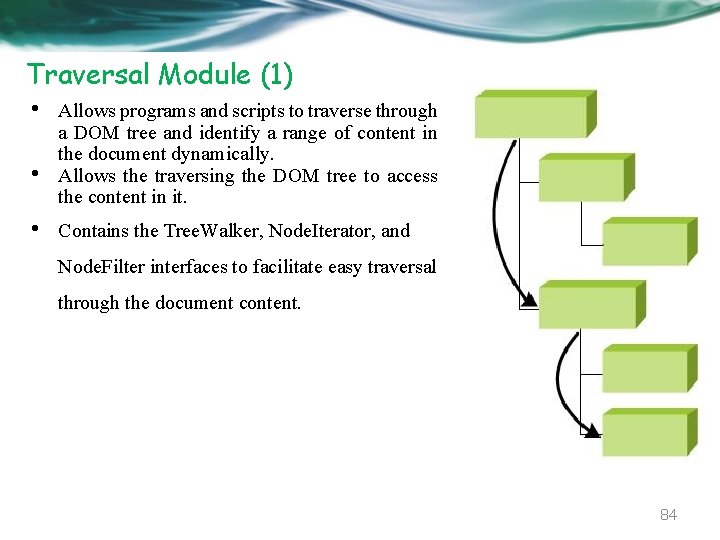
Traversal Module (1) • • • Allows programs and scripts to traverse through a DOM tree and identify a range of content in the document dynamically. Allows the traversing the DOM tree to access the content in it. Contains the Tree. Walker, Node. Iterator, and Node. Filter interfaces to facilitate easy traversal through the document content. 84
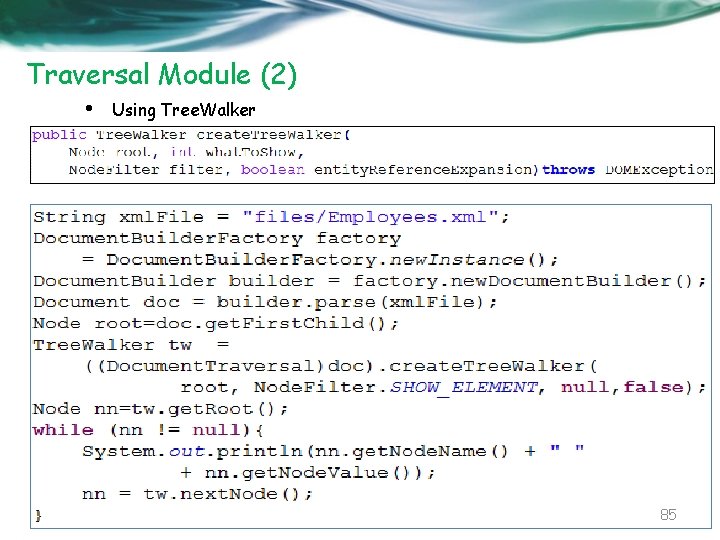
Traversal Module (2) • Using Tree. Walker 85
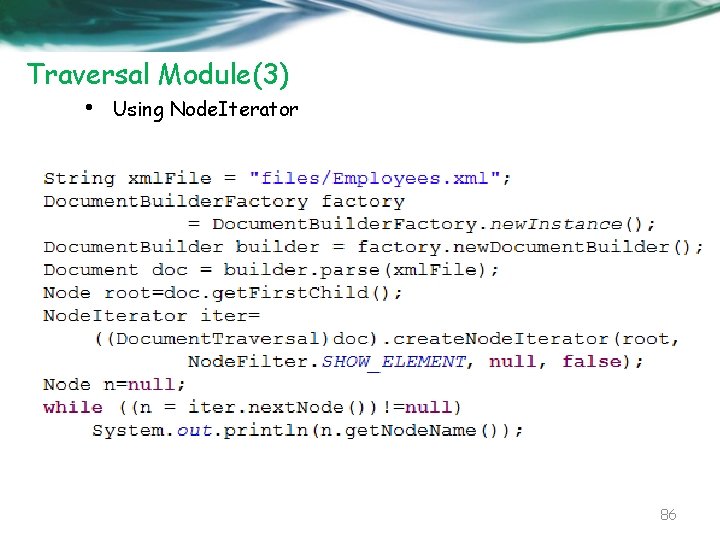
Traversal Module(3) • Using Node. Iterator 86
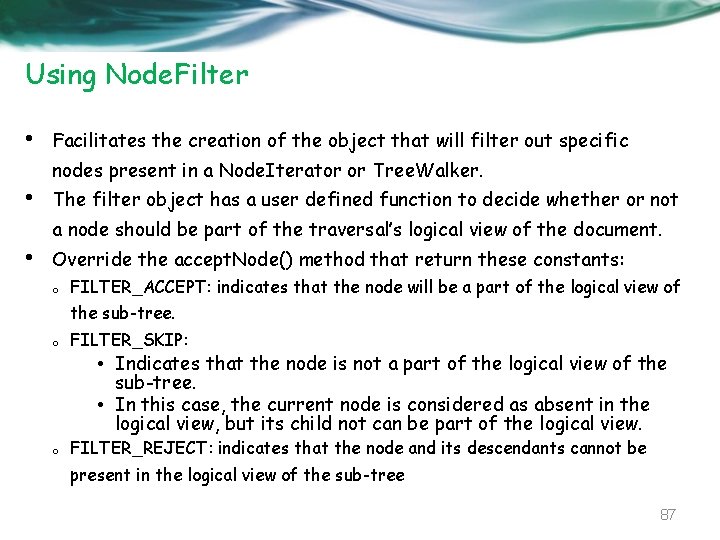
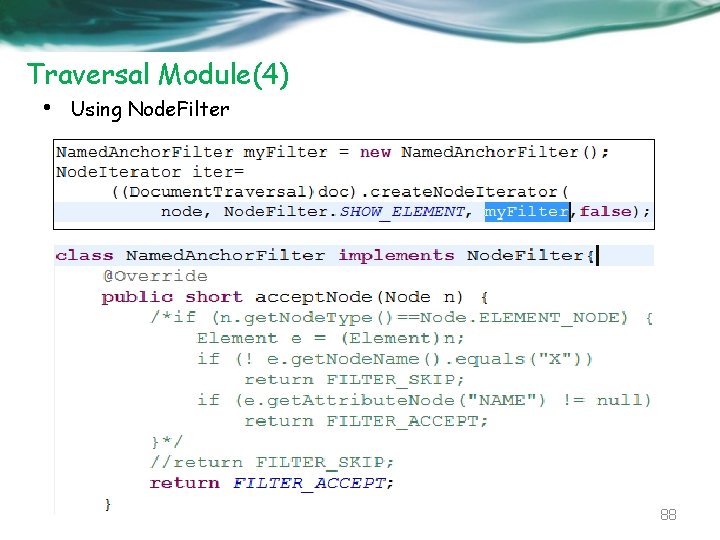
Using Node. Filter • Facilitates the creation of the object that will filter out specific nodes present in a Node. Iterator or Tree. Walker. • The filter object has a user defined function to decide whether or not a node should be part of the traversal’s logical view of the document. • Override the accept. Node() method that return these constants: o FILTER_ACCEPT: indicates that the node will be a part of the logical view of the sub-tree. o FILTER_SKIP: • Indicates that the node is not a part of the logical view of the sub-tree. • In this case, the current node is considered as absent in the logical view, but its child not can be part of the logical view. o FILTER_REJECT: indicates that the node and its descendants cannot be present in the logical view of the sub-tree 87
Traversal Module(4) • Using Node. Filter 88
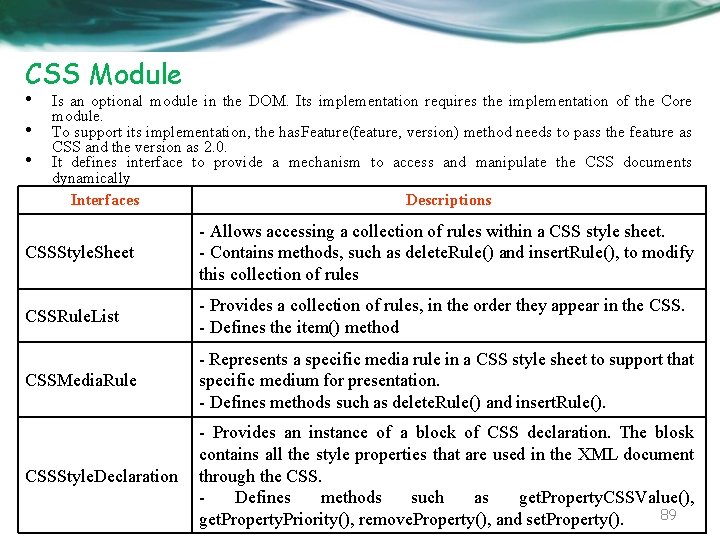
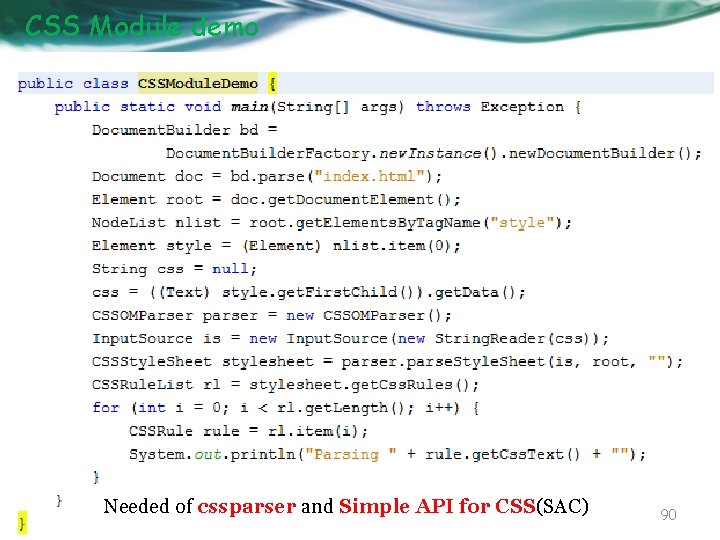
CSS Module • • • Is an optional module in the DOM. Its implementation requires the implementation of the Core module. To support its implementation, the has. Feature(feature, version) method needs to pass the feature as CSS and the version as 2. 0. It defines interface to provide a mechanism to access and manipulate the CSS documents dynamically Interfaces Descriptions CSSStyle. Sheet - Allows accessing a collection of rules within a CSS style sheet. - Contains methods, such as delete. Rule() and insert. Rule(), to modify this collection of rules CSSRule. List - Provides a collection of rules, in the order they appear in the CSS. - Defines the item() method CSSMedia. Rule - Represents a specific media rule in a CSS style sheet to support that specific medium for presentation. - Defines methods such as delete. Rule() and insert. Rule(). CSSStyle. Declaration - Provides an instance of a block of CSS declaration. The blosk contains all the style properties that are used in the XML document through the CSS. Defines methods such as get. Property. CSSValue(), 89 get. Property. Priority(), remove. Property(), and set. Property().
CSS Module demo Needed of cssparser and Simple API for CSS(SAC) 90
Other Modules • View Module o Provides interfaces to facilitate the presentation of XML documents. o Is optional in nature. Its implementation requires the implementation of the DOM 2 Core module. • Style Module o Provides interfaces to enable programmers to dynamically access and manipulate style sheets. o Is optional in nature. Its implementation requires the implementation of the DOM 2 Core module. • HTML Module o o Allows programs and scripts to access and modify the content and structure of HTML documents dynamically. Extends the interfaces defined in the DOM 1 HTML module. 91
XSLT 92
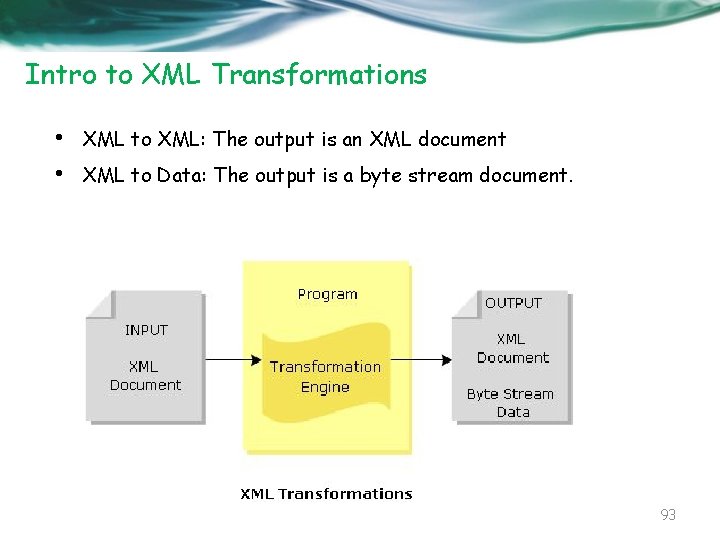
Intro to XML Transformations • • XML to XML: The output is an XML document XML to Data: The output is a byte stream document. 93
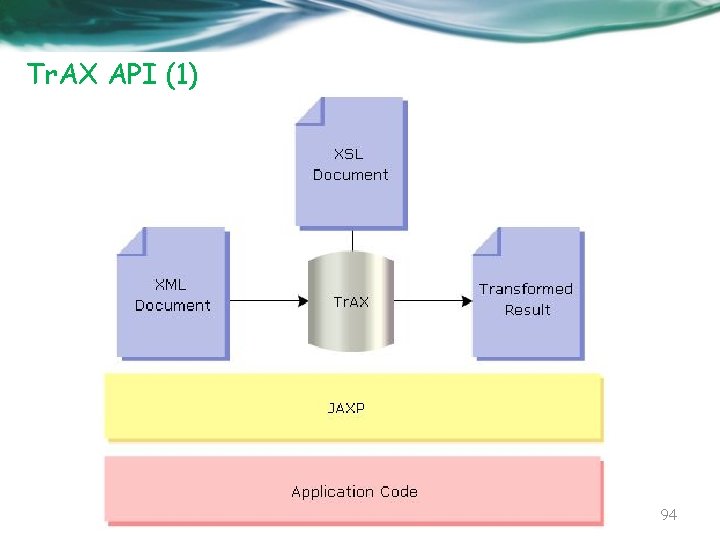
Tr. AX API (1) 94
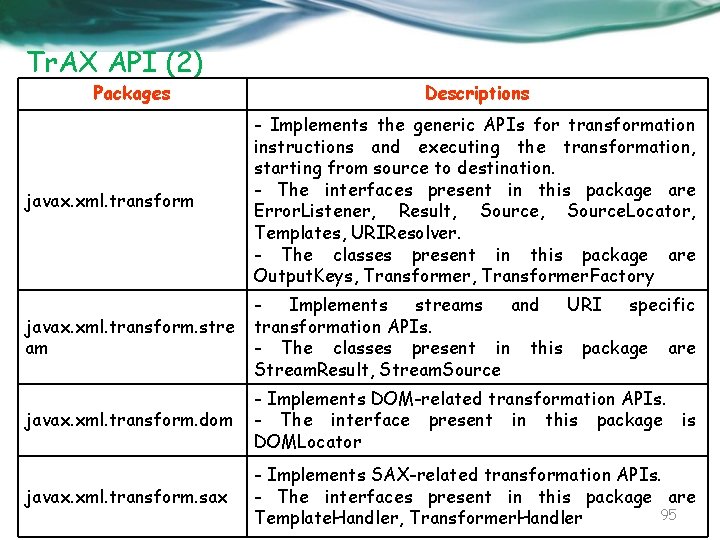
Tr. AX API (2) Packages Descriptions javax. xml. transform - Implements the generic APIs for transformation instructions and executing the transformation, starting from source to destination. - The interfaces present in this package are Error. Listener, Result, Source. Locator, Templates, URIResolver. - The classes present in this package are Output. Keys, Transformer. Factory javax. xml. transform. stre am Implements streams and URI specific transformation APIs. - The classes present in this package are Stream. Result, Stream. Source javax. xml. transform. dom - Implements DOM-related transformation APIs. - The interface present in this package is DOMLocator javax. xml. transform. sax - Implements SAX-related transformation APIs. - The interfaces present in this package are 95 Template. Handler, Transformer. Handler
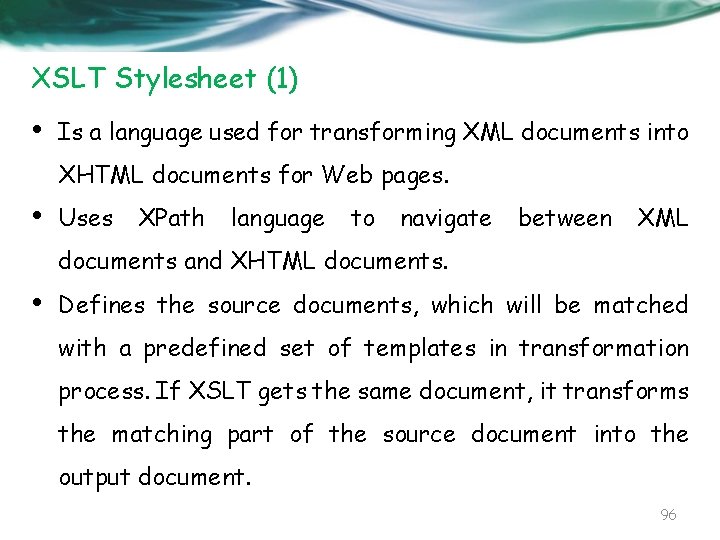
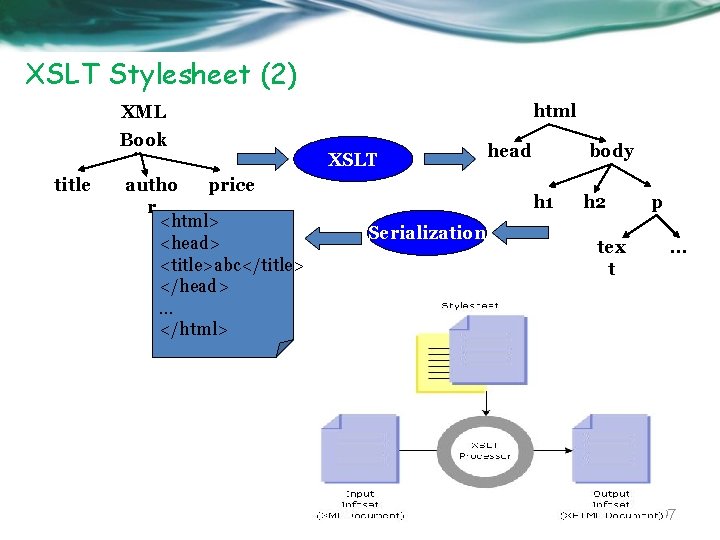
XSLT Stylesheet (1) • Is a language used for transforming XML documents into XHTML documents for Web pages. • Uses XPath language to navigate between XML documents and XHTML documents. • Defines the source documents, which will be matched with a predefined set of templates in transformation process. If XSLT gets the same document, it transforms the matching part of the source document into the output document. 96
XSLT Stylesheet (2) html XML Book title autho price r <html> <head> <title>abc</title> </head>. . . </html> XSLT head body h 1 Serialization h 2 tex t p. . . 97
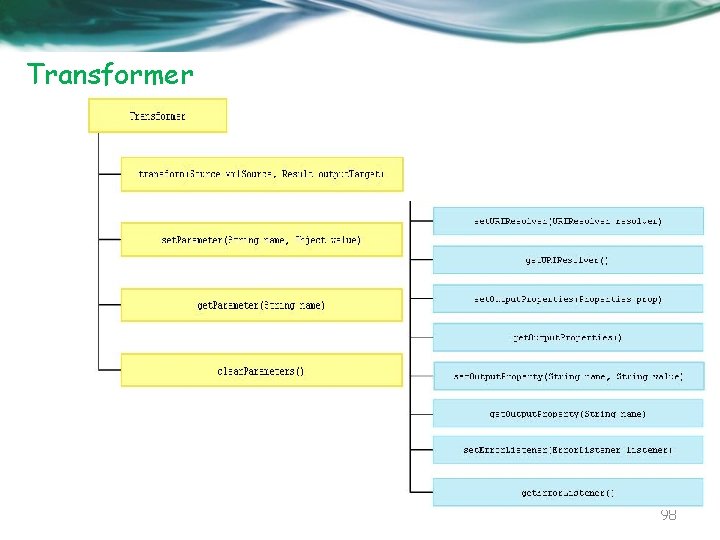
Transformer 98
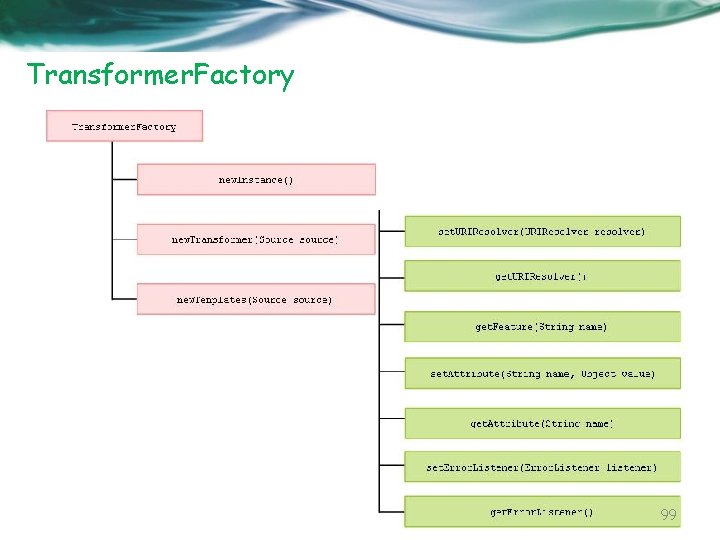
Transformer. Factory 99
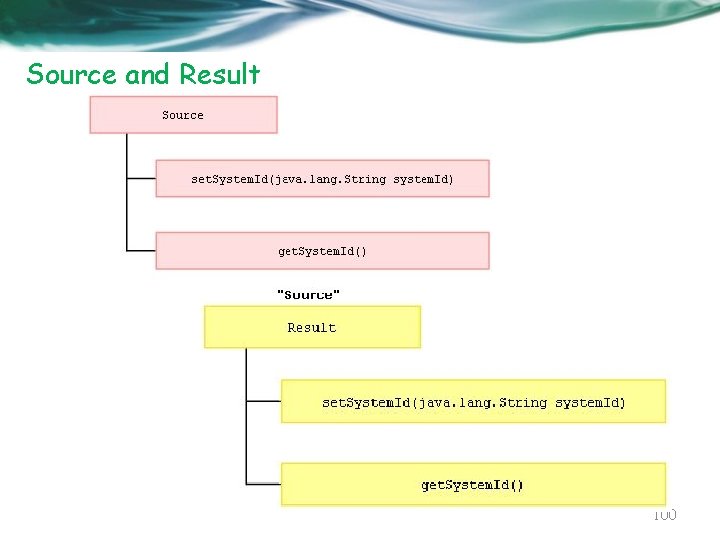
Source and Result 100
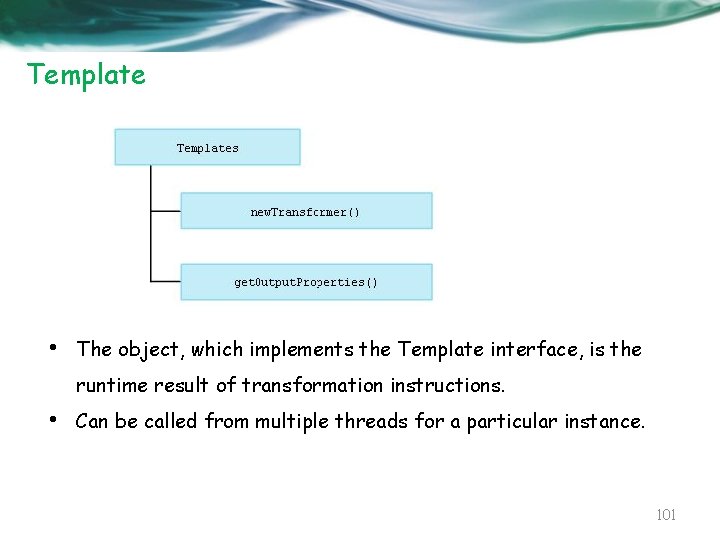
Template • The object, which implements the Template interface, is the runtime result of transformation instructions. • Can be called from multiple threads for a particular instance. 101
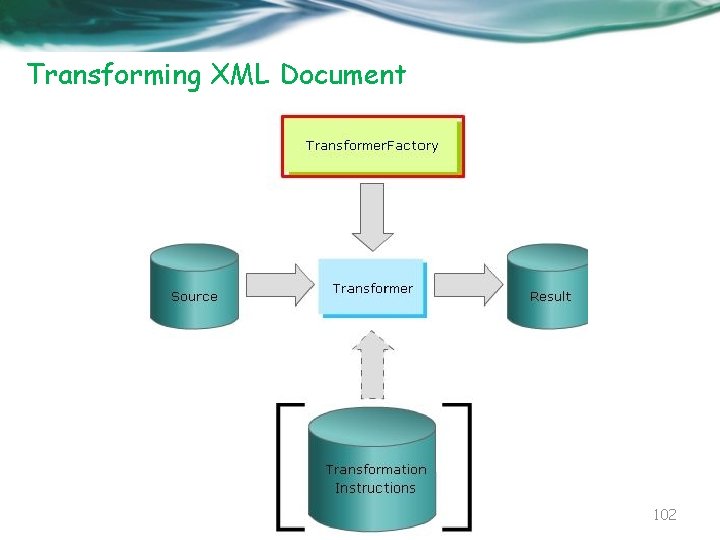
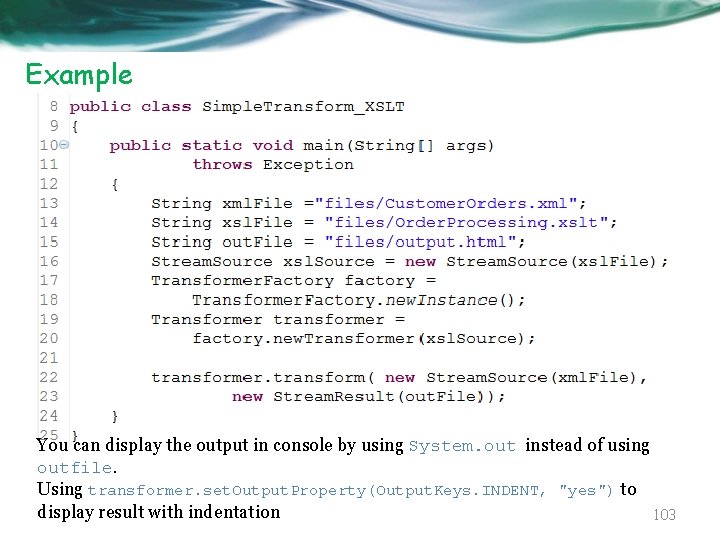
Transforming XML Document 102
Example You can display the output in console by using System. out instead of using outfile. Using transformer. set. Output. Property(Output. Keys. INDENT, "yes") to display result with indentation 103
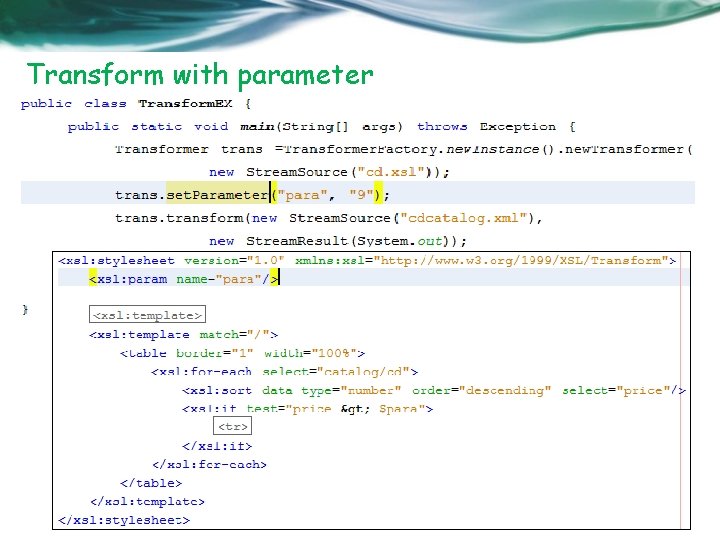
Transform with parameter 104
JAXP API For XPath Processing 105
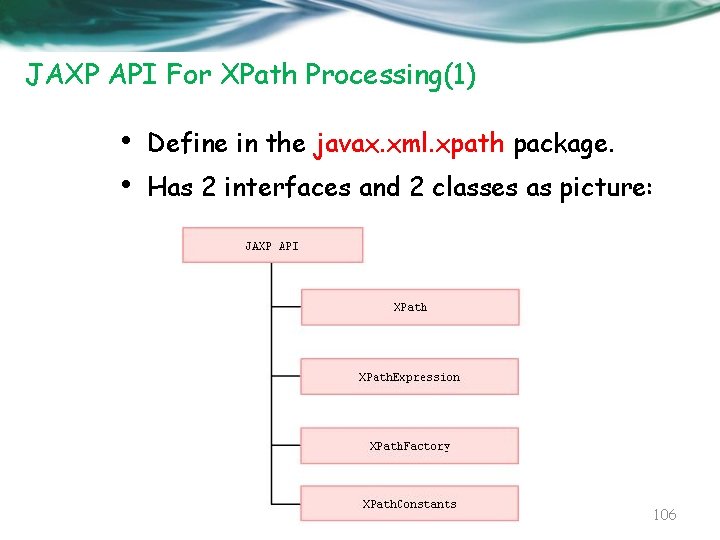
JAXP API For XPath Processing(1) • • Define in the javax. xml. xpath package. Has 2 interfaces and 2 classes as picture: 106
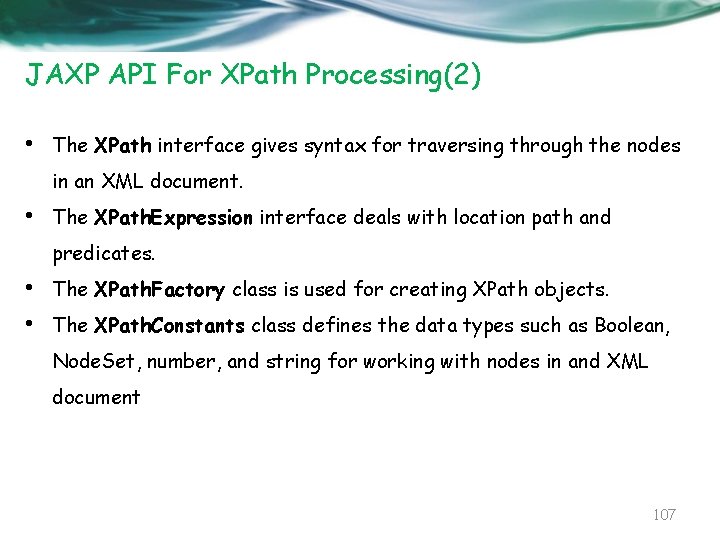
JAXP API For XPath Processing(2) • The XPath interface gives syntax for traversing through the nodes in an XML document. • The XPath. Expression interface deals with location path and predicates. • • The XPath. Factory class is used for creating XPath objects. The XPath. Constants class defines the data types such as Boolean, Node. Set, number, and string for working with nodes in and XML document 107
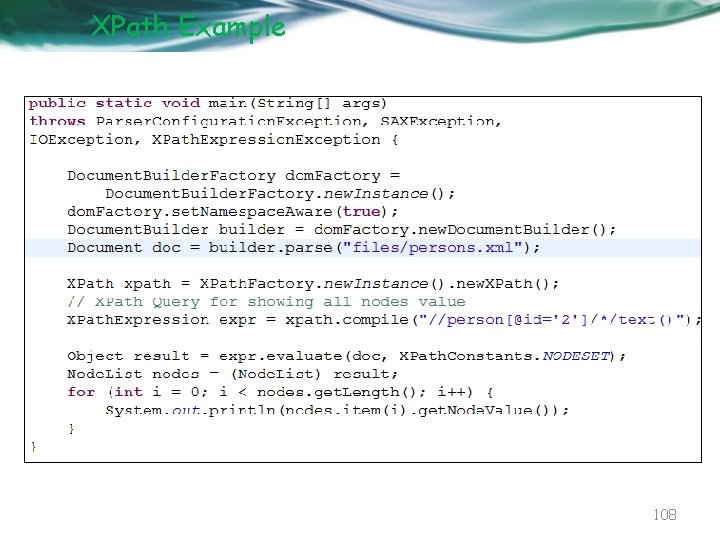
XPath Example 108
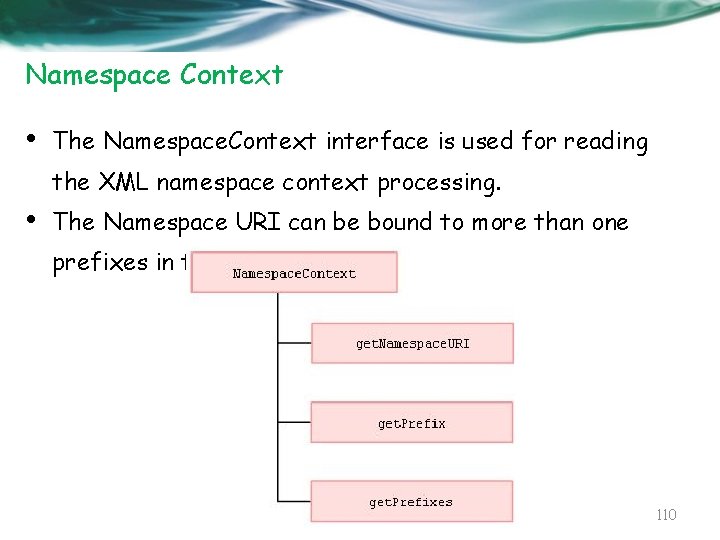
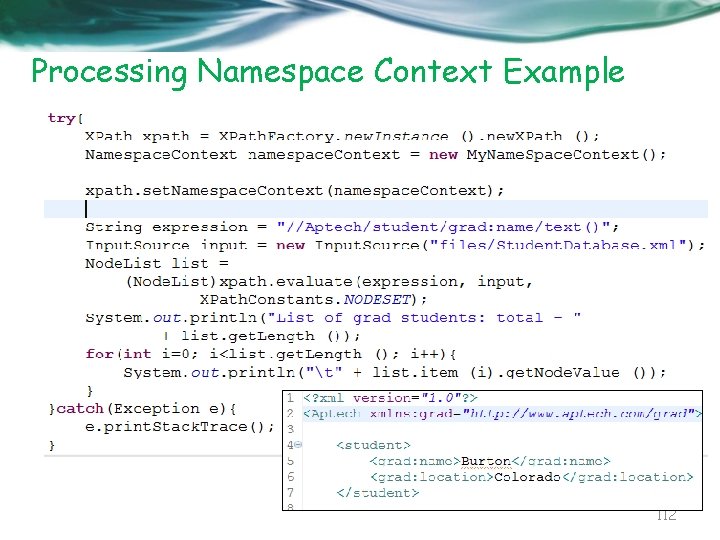
Namespace Context • The Namespace. Context interface is used for reading the XML namespace context processing. • The Namespace URI can be bound to more than one prefixes in the current scope. 110
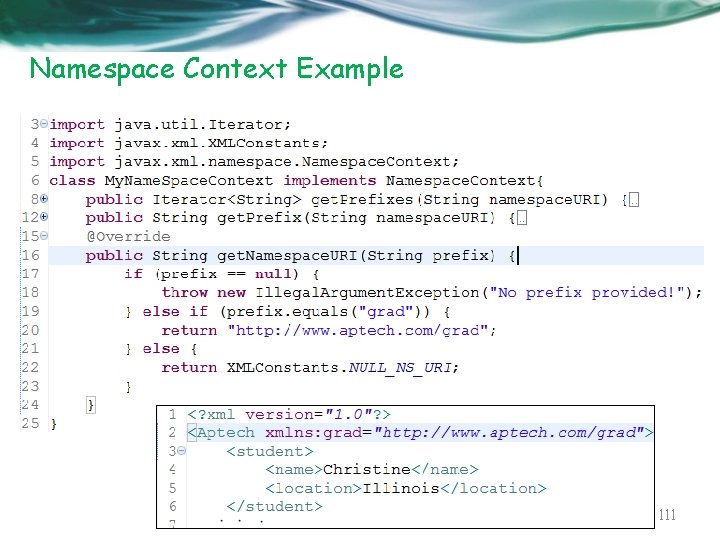
Namespace Context Example 111
Processing Namespace Context Example 112
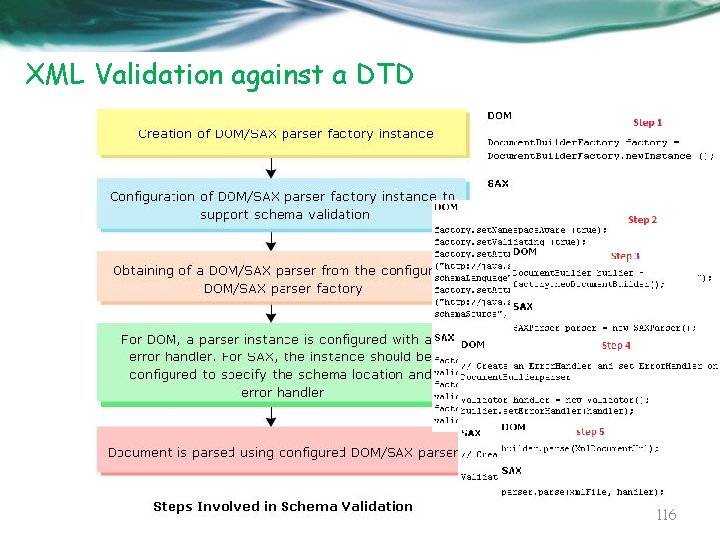
Schema Validation Framework 113
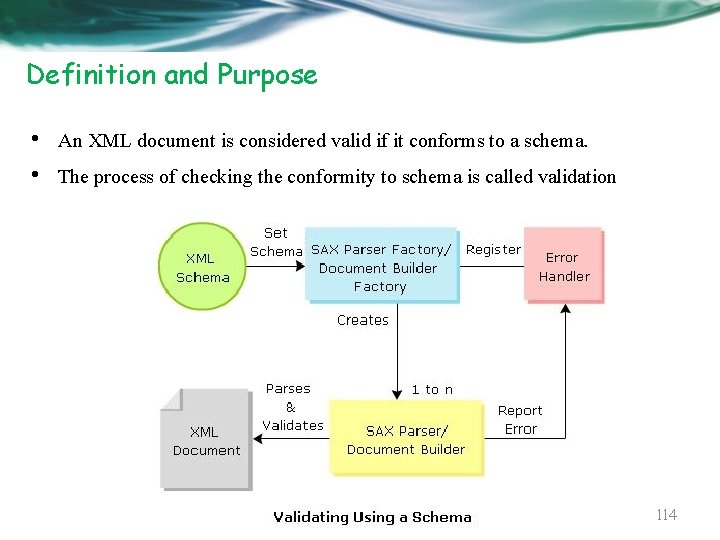
Definition and Purpose • • An XML document is considered valid if it conforms to a schema. The process of checking the conformity to schema is called validation 114
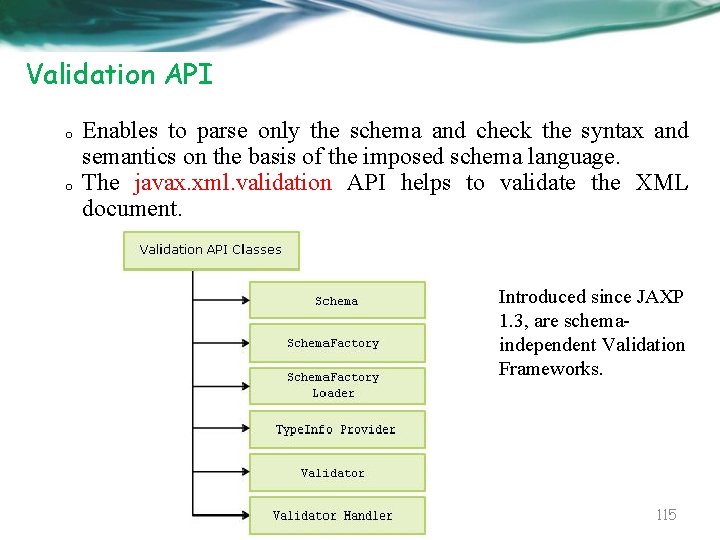
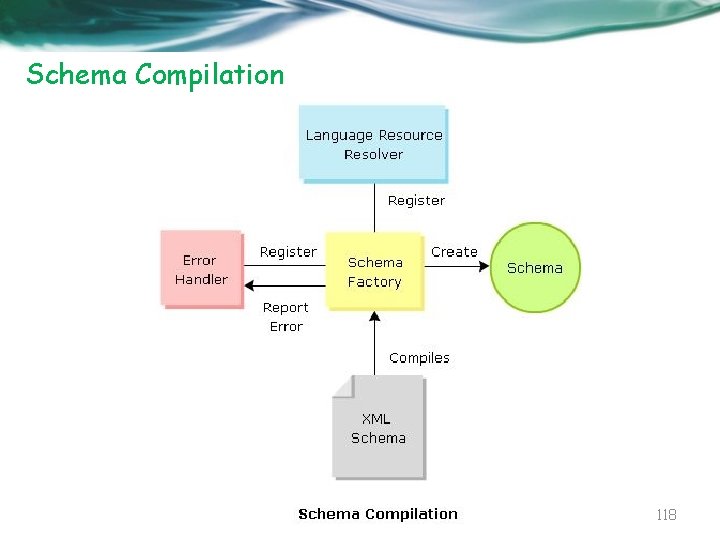
Validation API o o Enables to parse only the schema and check the syntax and semantics on the basis of the imposed schema language. The javax. xml. validation API helps to validate the XML document. Introduced since JAXP 1. 3, are schemaindependent Validation Frameworks. 115
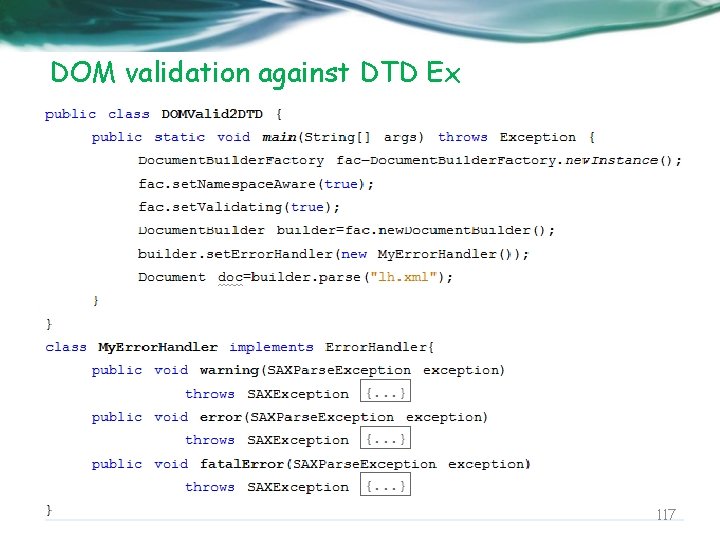
XML Validation against a DTD 116
DOM validation against DTD Ex 117
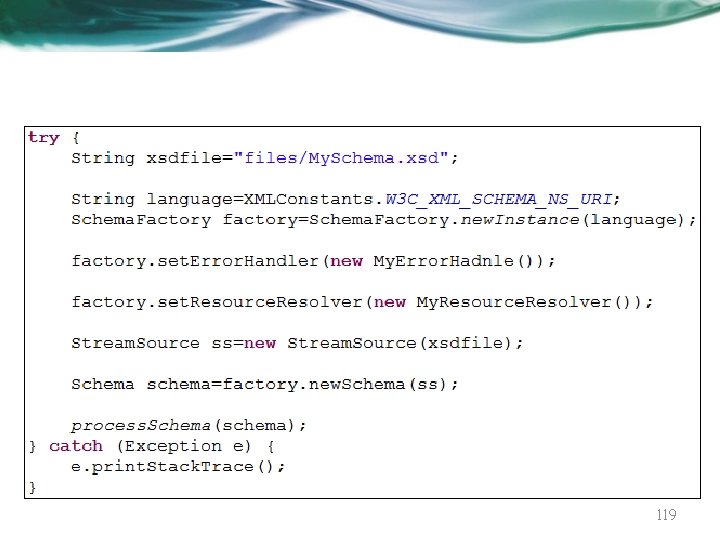
Schema Compilation 118
119
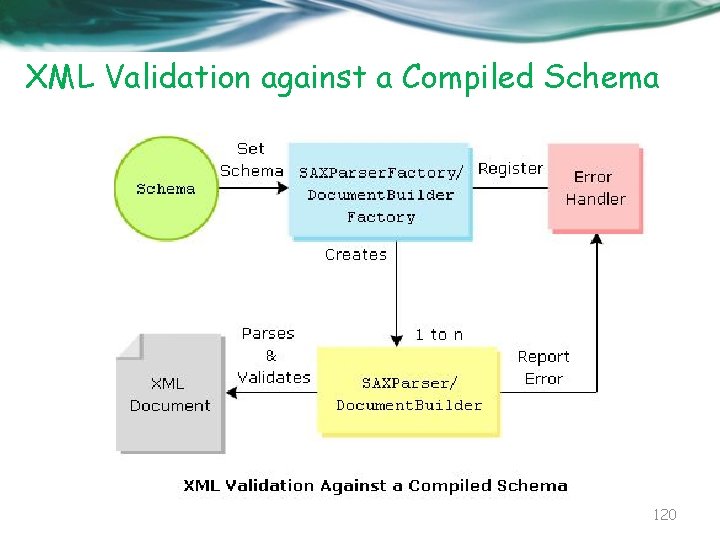
XML Validation against a Compiled Schema 120
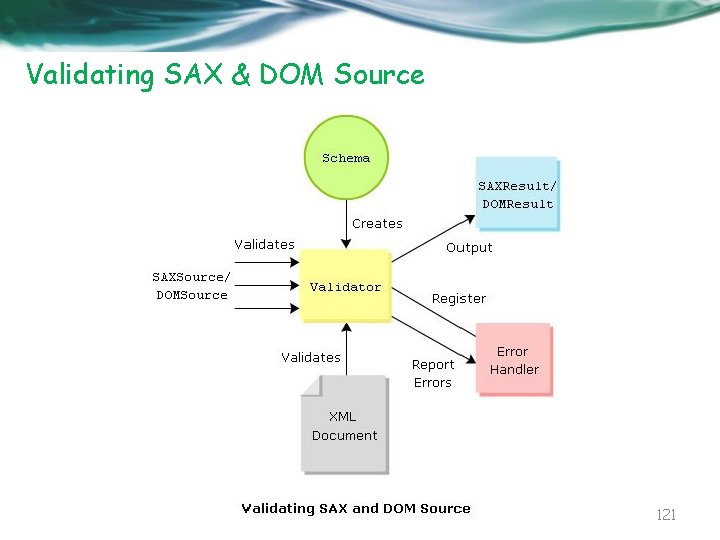
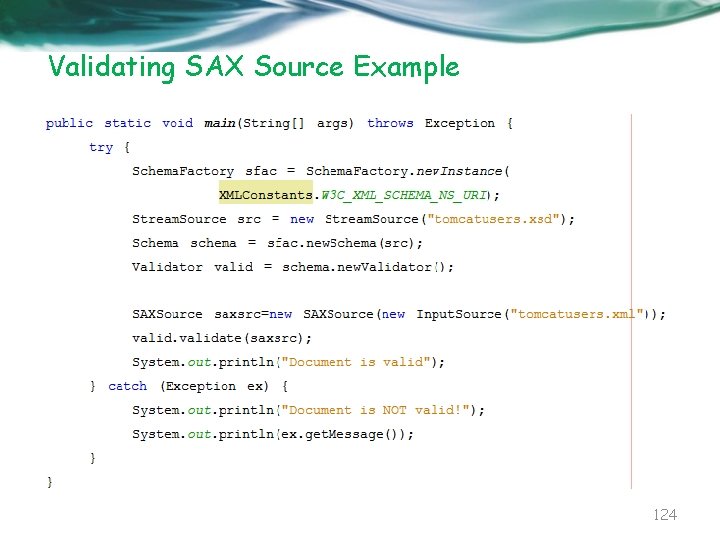
Validating SAX & DOM Source 121
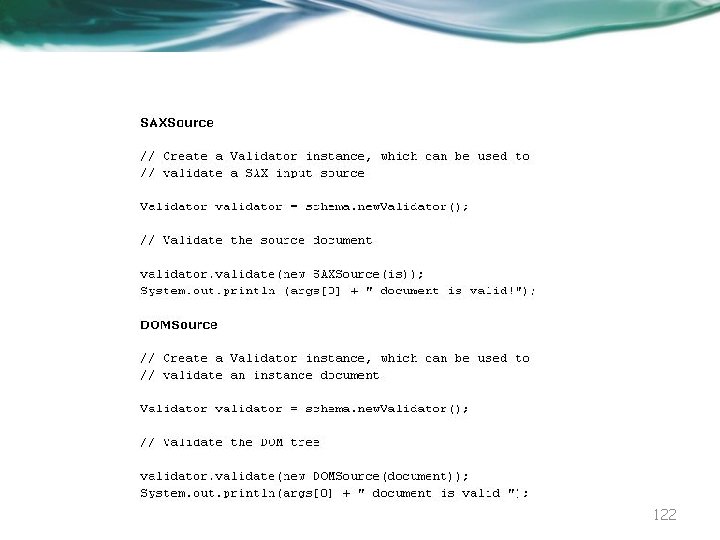
122
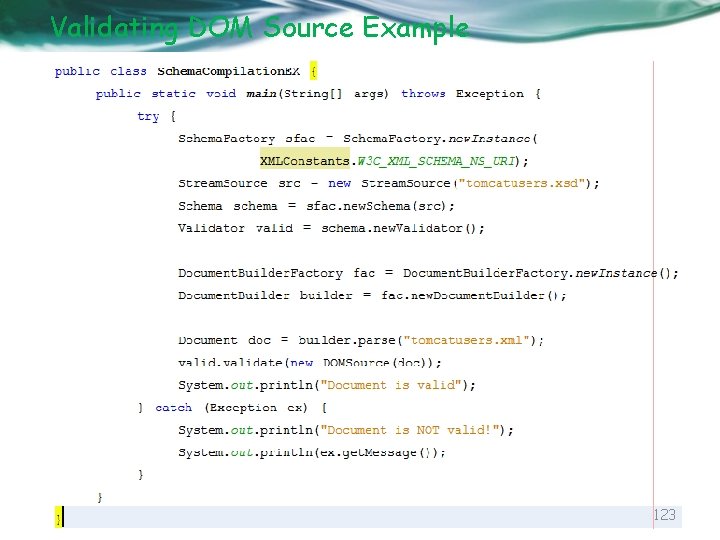
Validating DOM Source Example 123
Validating SAX Source Example 124
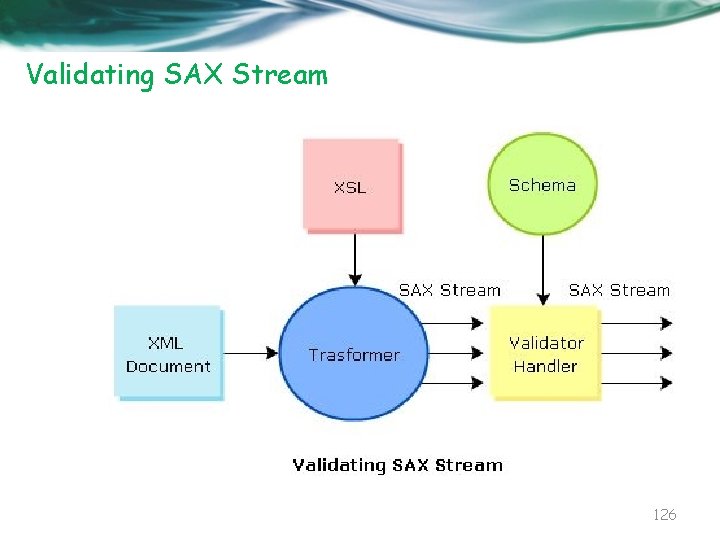
XML Validation After Transformation 125
Validating SAX Stream 126
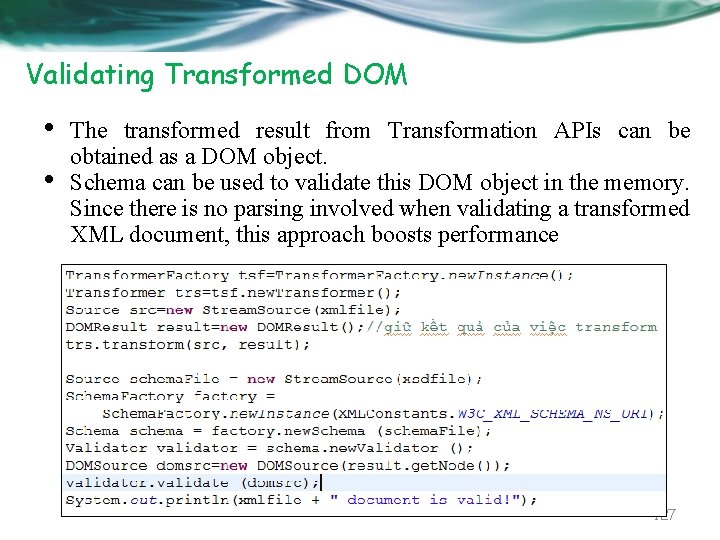
Validating Transformed DOM • • The transformed result from Transformation APIs can be obtained as a DOM object. Schema can be used to validate this DOM object in the memory. Since there is no parsing involved when validating a transformed XML document, this approach boosts performance 127
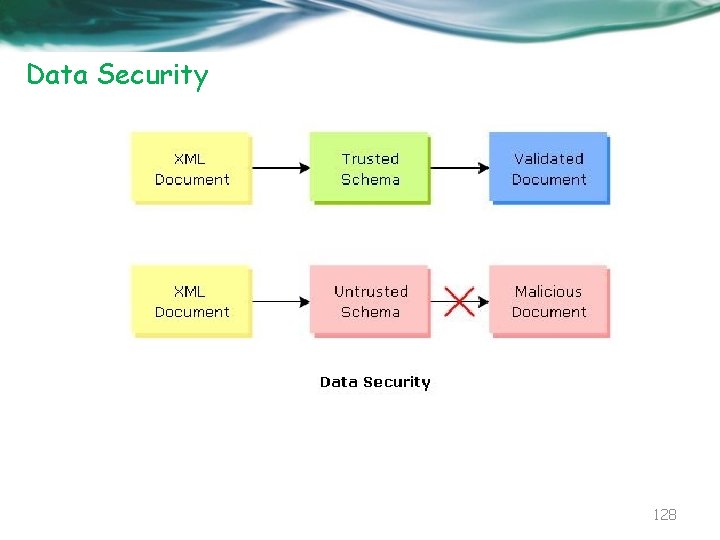
Data Security 128
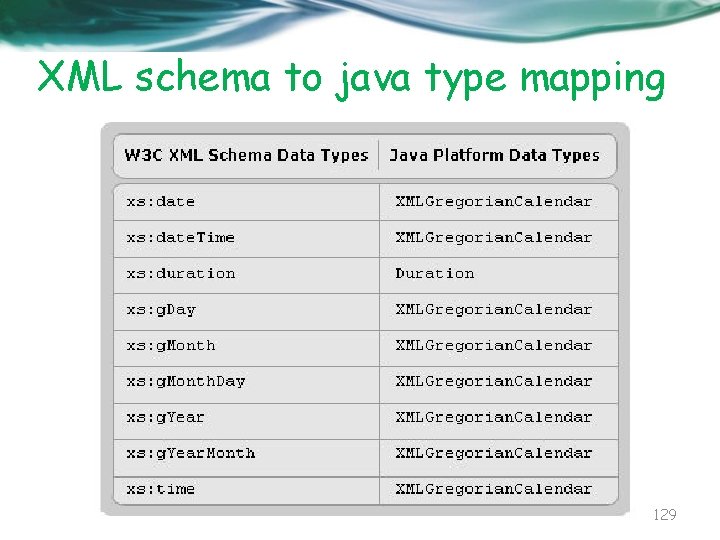
XML schema to java type mapping 129
JAXB Java API for XML Binding 130
JAXB • JAXB simplifies access to an XML document from a Java program by presenting the XML document to the program in a Java format. The first step in this process is to bind the schema for the XML document into a set of Java classes that represents the schema. • A schema is an XML specification that governs the allowable components of an XML document and the relationships between the components. • An XML document does not have to have a schema, but if it does, it must conform to that schema to be a valid XML document. • JAXB requires the XML document you want to access has a schema 131
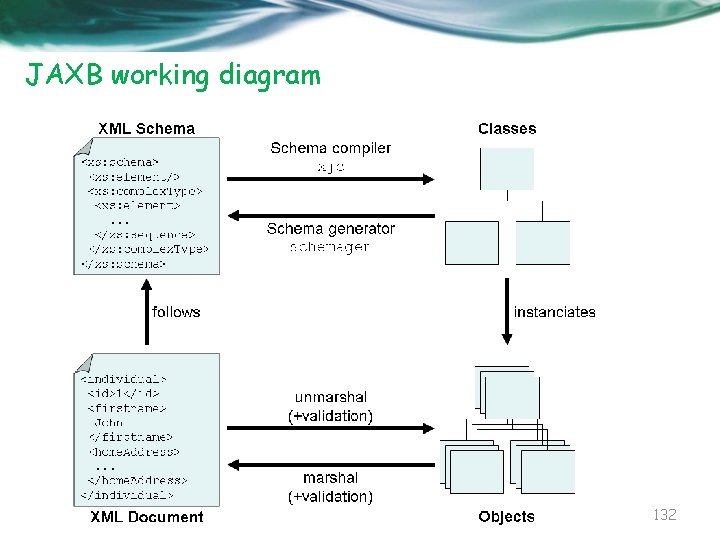
JAXB working diagram 132
JAXB Architecture • The JAXB API, defined in the javax. xml. bind package, is a set of interfaces and classes through which applications communicate with code generated from a schema. • • • The center of the JAXB API is the javax. xml. bind. JAXBContext class. JAXBContext is an abstract class that manages the XML/Java binding. It can be seen as a factory because it provides: o An Unmarshaller class that deserializes XML into Java and optionally validates the XML (using the set. Schema method). o A Marshaller class that serializes an object graph into XML data and optionally validates it. 133
JAXB Architecture • First of all, JAXB can define a set of classes into an XML schema by using a schema generator. • It also enables the reverse action, allowing you to generate a collection of Java classes from a given XML schema through the schema compiler. • The schema compiler takes XML schemas as input and generates a package of Java classes and interfaces that reflect the rules defined in the source schema. • These classes are annotated to provide the runtime framework with a customized Java-XML mapping. 134
JAXB Architecture • JAXB also can generate a Java object hierarchy from an XML schema using a schema generator, or give an object Java hierarchy to describe the corresponding XML schema. • The runtime framework provides the corresponding unmarshalling, and validation functionalities. • That is, it lets you transform an XML document into an object graph (unmarshalling) or transform an object graph into XML format (marshalling). 135
JAXB Architecture • These capabilities are why JAXB is often associated with web services. • Web services use the API to transform objects into messages that they then send through SOAP. • This isn't a web services article, however. Using an example address book application for a fictional music company called Watermelon, it focuses on JAXB's XML binding features for round -tripping XML to Java. 136
demo • • Generate class using xjc tool • • Using JAXB to read xml file and generate objects Generate Schema using schemagen tool Using JAXB to generate xml file from objects 137
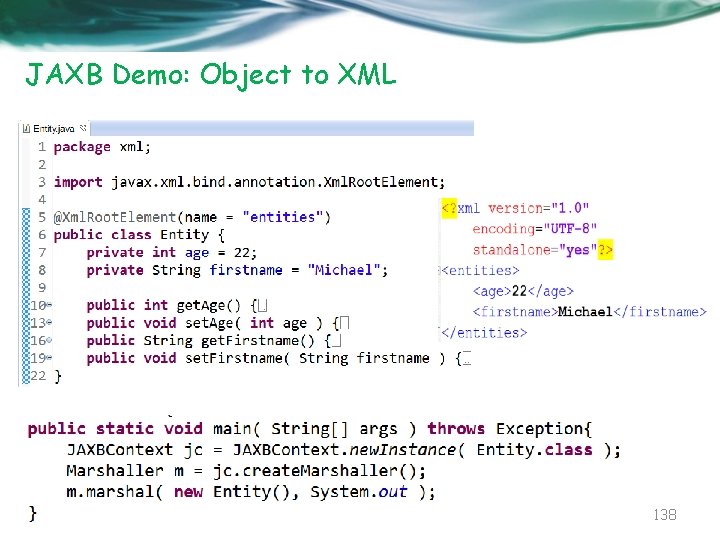
JAXB Demo: Object to XML 138
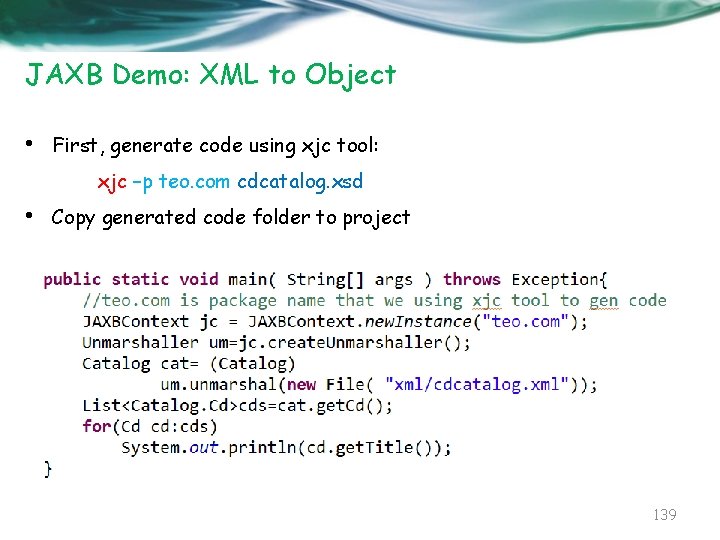
JAXB Demo: XML to Object • First, generate code using xjc tool: xjc –p teo. com cdcatalog. xsd • Copy generated code folder to project 139
Questions 140
That’s all for this session! Thank you all for your attention and patient ! 141/27

















![[author] java message service - jms fundamentals course](https://slidetodoc.com/wp-content/uploads/2020/09/381247_2ef7a792adac8a30d3544ffd2fa051e8-300x225.jpg "[author] java message service - jms fundamentals course")
![[author] java message service - jms fundamentals course](https://slidetodoc.com/wp-content/uploads/2020/12/3153209_df26b9e82fd50550f981af9733a3f0c2-300x225.jpg "[author] java message service - jms fundamentals course")