Chap 3 A TopLevel View and Interconnection An
- Slides: 82
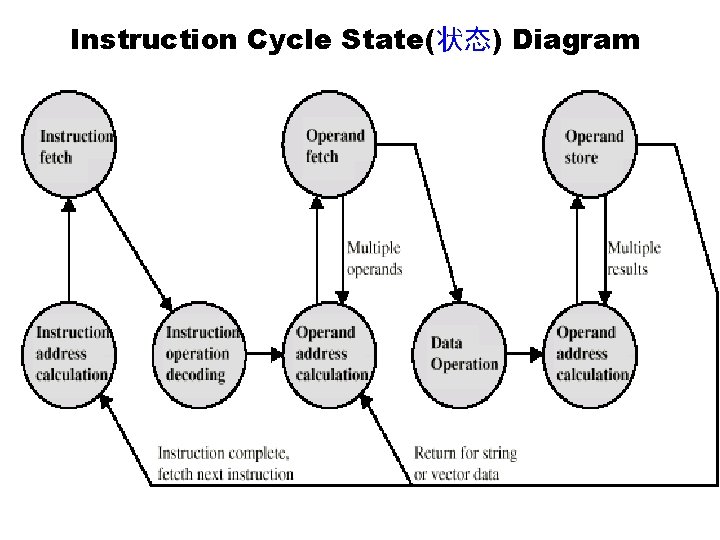
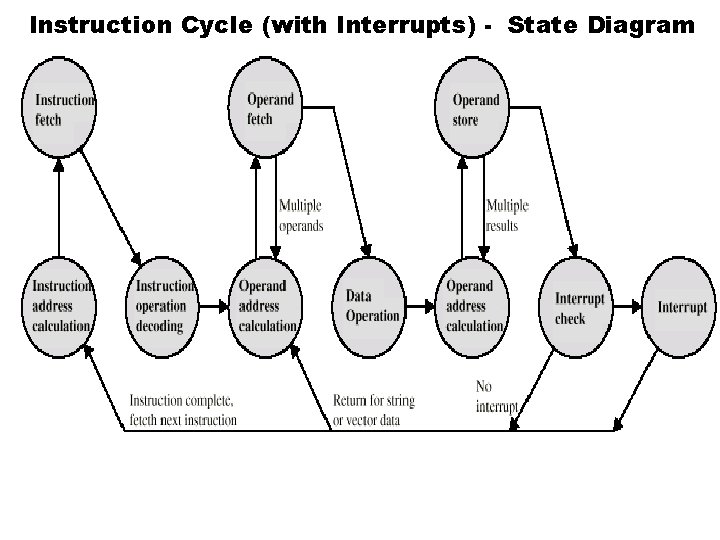
Chap. 3 A Top-Level View and Interconnection § An instruction cycle consists of an instruction fetch(取), followed by zero or more operand fetches, followed by zero or more operand (操作数) stores, followed by an interrupt(中断) check(if interrupts are enabled). § The major computer system components (processor, main memory, I/O modules)need to be interconnected in order to exchange data and control signals. The most popular means of interconnection is the use of a shared system bus consisting of multiple lines. In contemporary systems, there typically is a hierarchy(层次) of buses to improve performance.
§ Key design elements for buses include arbitration(仲裁)(whether permission to send signals on bus lines is controlled centrally or in a distributed(分布) fashion); timing(时序)(whether signals on the bus are synchronized(同步) to a central clock or are sent asynchronously based on the most recent transmission); and width(宽 度)(number of address lines and number of data lines).
3. 1 Computer Components § Von Neumann(冯. 诺依曼) architecture • Data and instructions are stored in a single read-write memory(内存) • The contents of this memory are addressable(可寻址的) by location, without regard to the type of data contained there • Execution occurs in a sequential fashion(unless explicitly(显式地/明确地) modified) from one instruction to the next
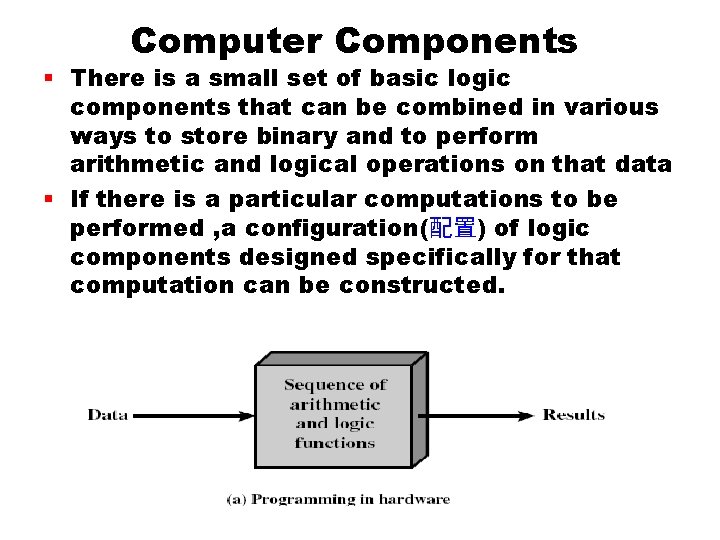
Computer Components § There is a small set of basic logic components that can be combined in various ways to store binary and to perform arithmetic and logical operations on that data § If there is a particular computations to be performed , a configuration(配置) of logic components designed specifically for that computation can be constructed.
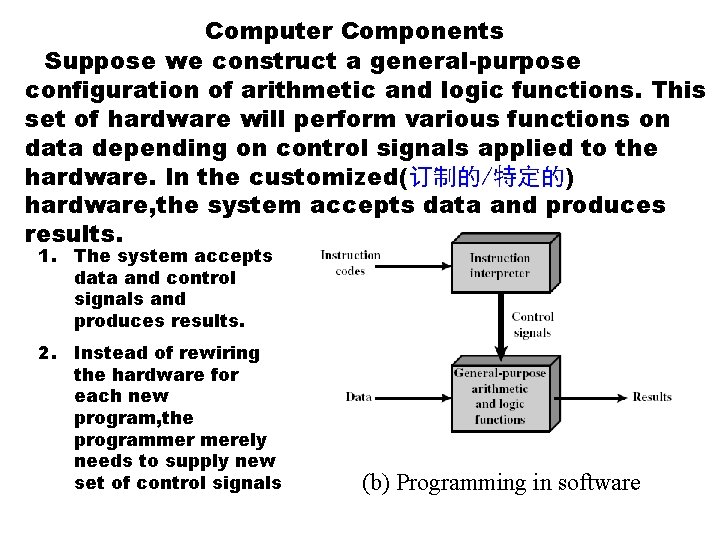
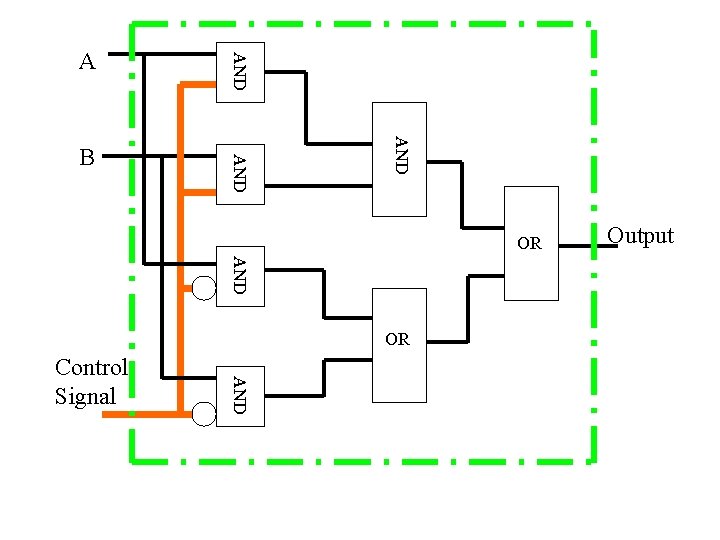
Computer Components Suppose we construct a general-purpose configuration of arithmetic and logic functions. This set of hardware will perform various functions on data depending on control signals applied to the hardware. In the customized(订制的/特定的) hardware, the system accepts data and produces results. 1. The system accepts data and control signals and produces results. 2. Instead of rewiring the hardware for each new program, the programmer merely needs to supply new set of control signals (b) Programming in software
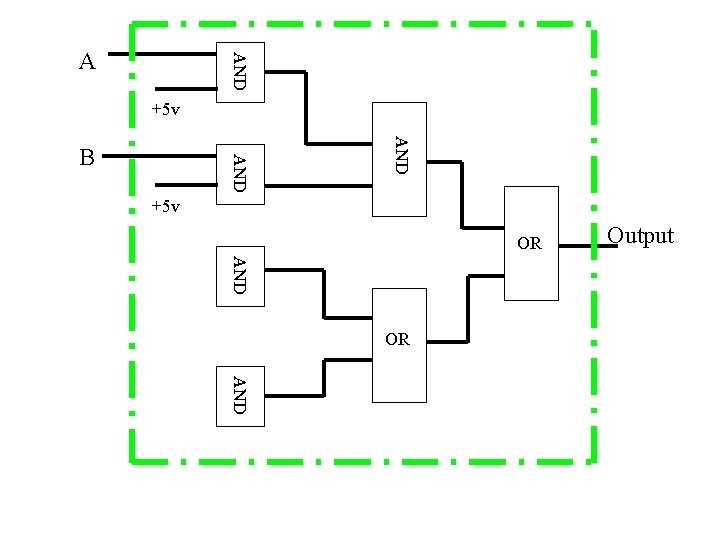
AND A +5 v AND B +5 v OR AND OR Output AND
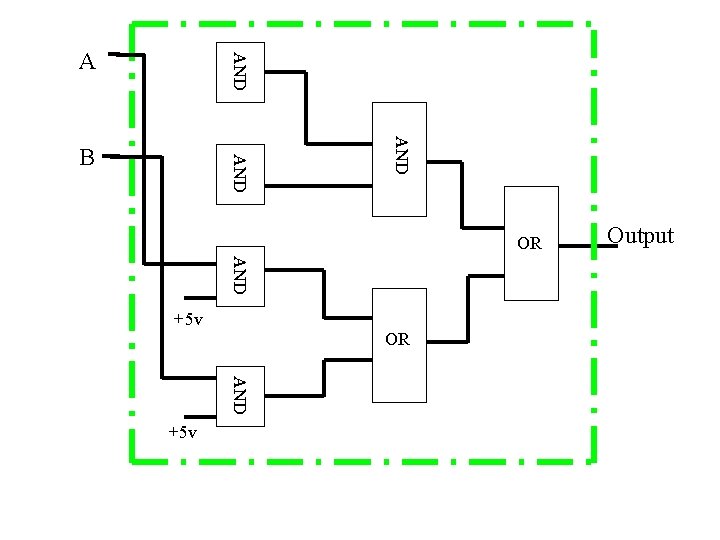
AND A AND B OR AND +5 v Output
AND B AND A OR AND Control Signal Output
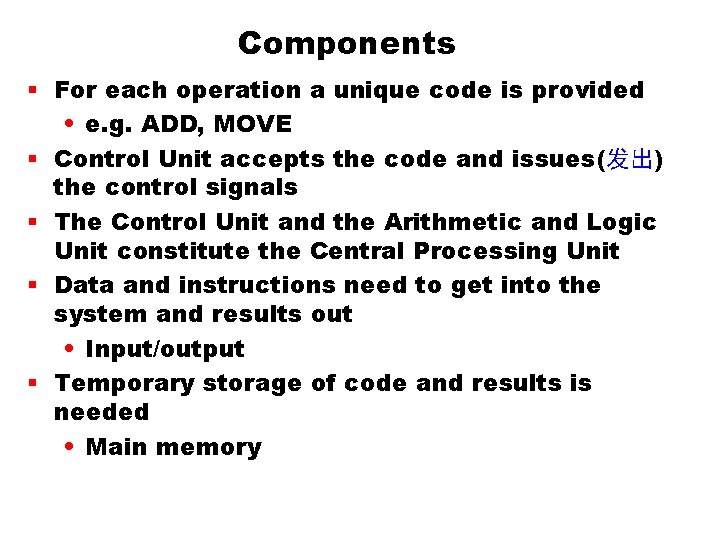
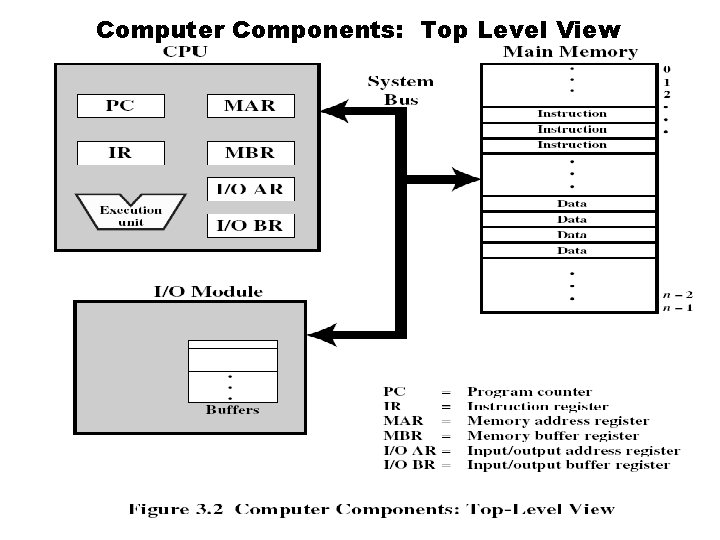
Components § For each operation a unique code is provided • e. g. ADD, MOVE § Control Unit accepts the code and issues(发出) the control signals § The Control Unit and the Arithmetic and Logic Unit constitute the Central Processing Unit § Data and instructions need to get into the system and results out • Input/output § Temporary storage of code and results is needed • Main memory
Computer Components: Top Level View
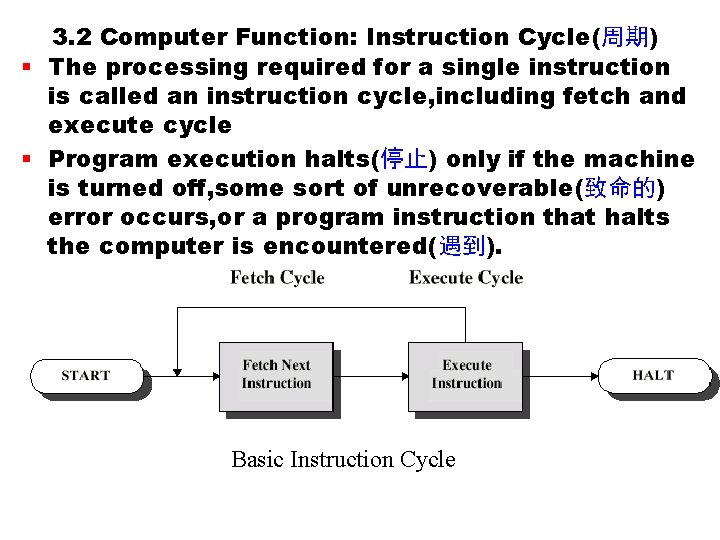
3. 2 Computer Function: Instruction Cycle(周期) § The processing required for a single instruction is called an instruction cycle, including fetch and execute cycle § Program execution halts(停止) only if the machine is turned off, some sort of unrecoverable(致命的) error occurs, or a program instruction that halts the computer is encountered(遇到). Basic Instruction Cycle
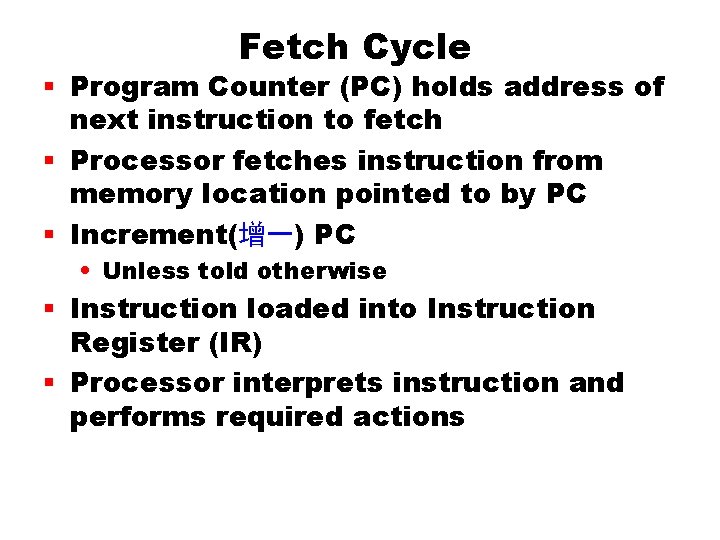
Fetch Cycle § Program Counter (PC) holds address of next instruction to fetch § Processor fetches instruction from memory location pointed to by PC § Increment(增一) PC • Unless told otherwise § Instruction loaded into Instruction Register (IR) § Processor interprets instruction and performs required actions
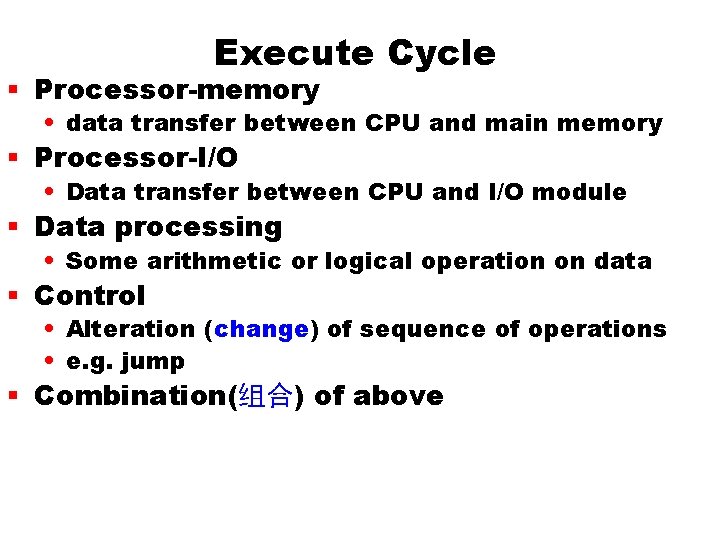
Execute Cycle § Processor-memory • data transfer between CPU and main memory § Processor-I/O • Data transfer between CPU and I/O module § Data processing • Some arithmetic or logical operation on data § Control • Alteration (change) of sequence of operations • e. g. jump § Combination(组合) of above
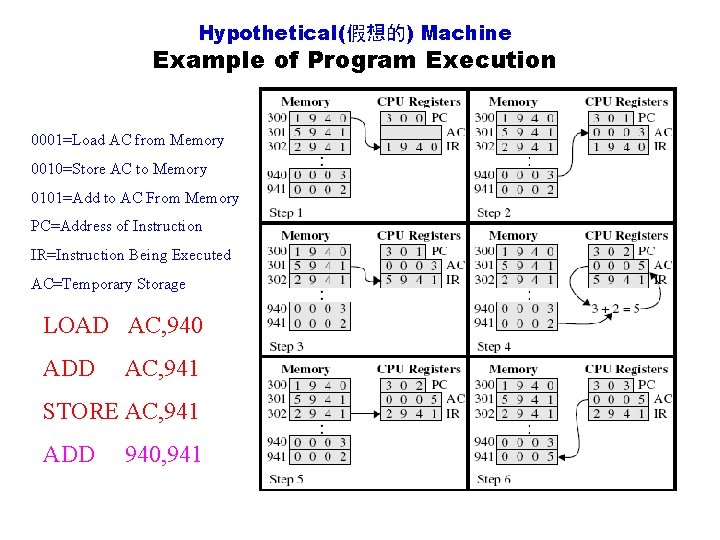
Hypothetical(假想的) Machine Example of Program Execution 0001=Load AC from Memory 0010=Store AC to Memory 0101=Add to AC From Memory PC=Address of Instruction IR=Instruction Being Executed AC=Temporary Storage LOAD AC, 940 ADD AC, 941 STORE AC, 941 ADD 940, 941
Instruction Cycle State(状态) Diagram
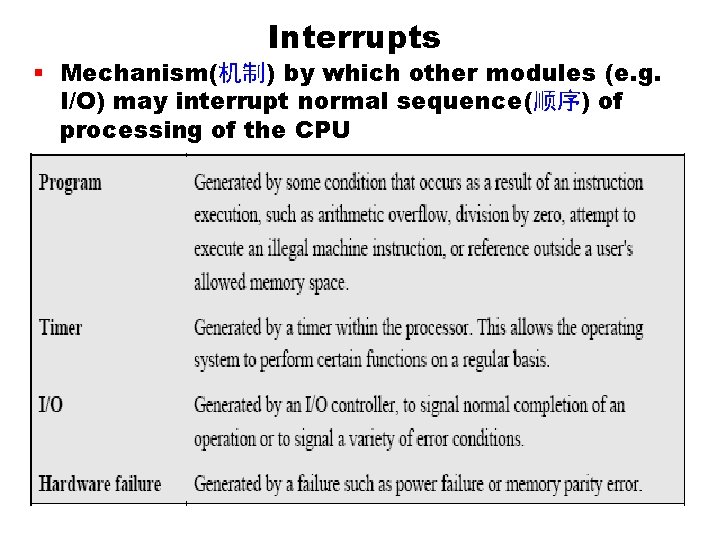
Interrupts § Mechanism(机制) by which other modules (e. g. I/O) may interrupt normal sequence(顺序) of processing of the CPU
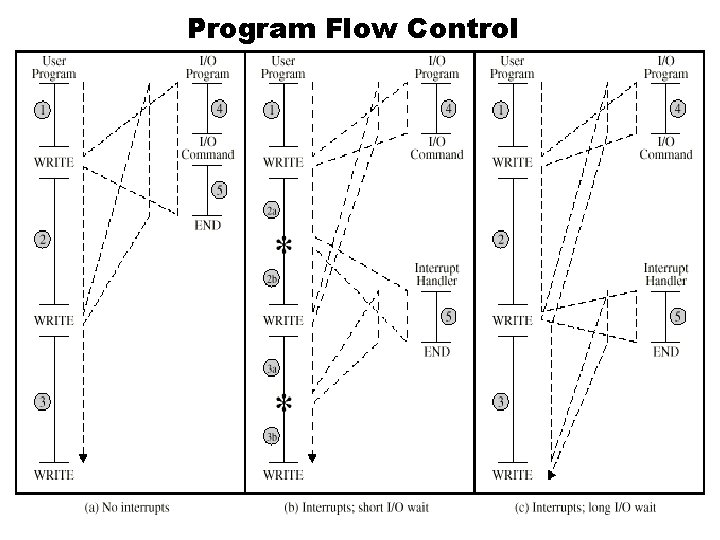
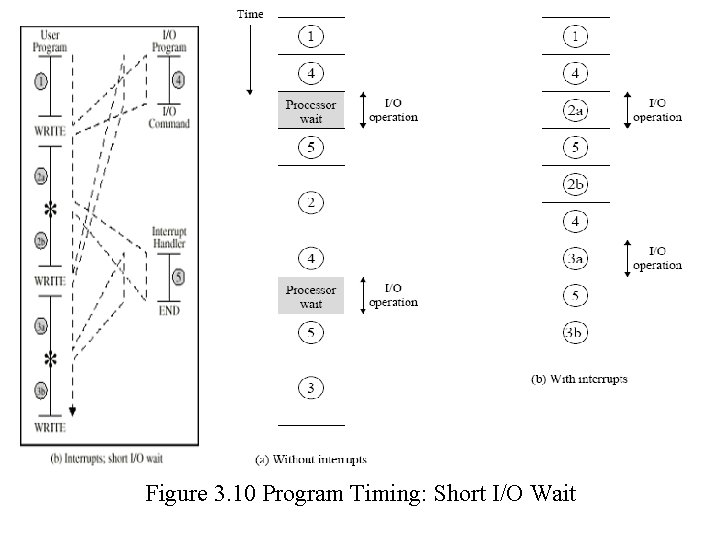
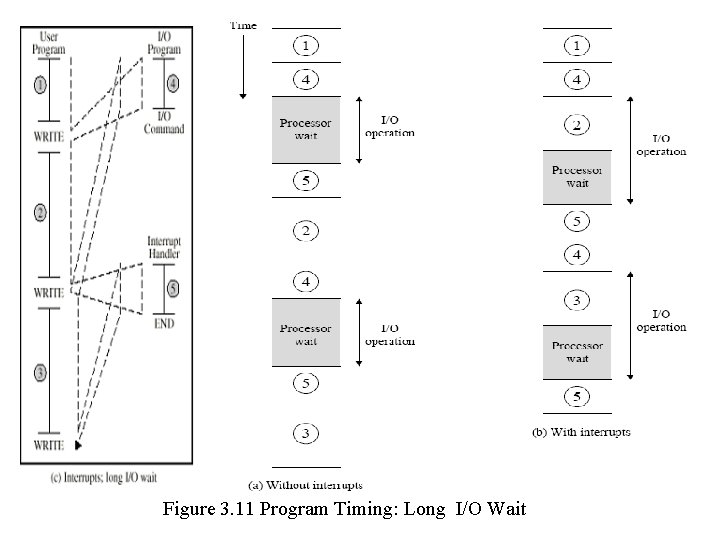
Interrupt Function § Interrupts are provided primarily as a way to improve processing efficiency(效率). § After each write operation, the processor must pause(暂停) and remain idle(空闲) until the printer catches up. § The length of this pause may be on the order of many hundreds of even thousands of instruction cycles. § This is a very wasteful use of the processor.
Program Flow Control
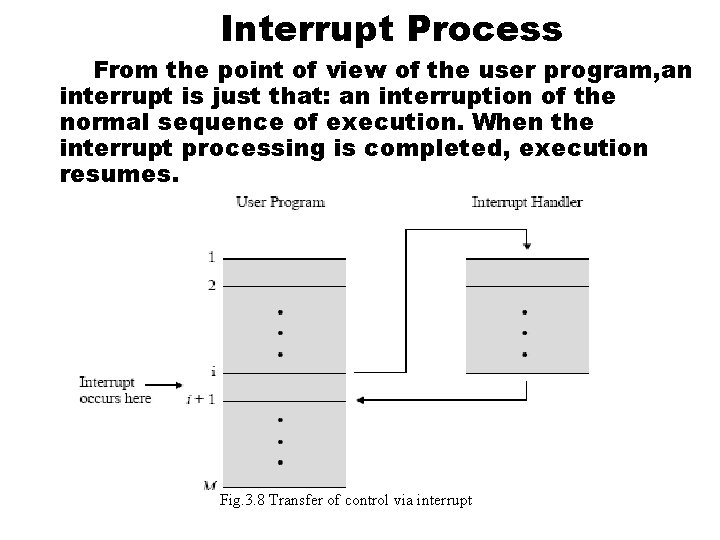
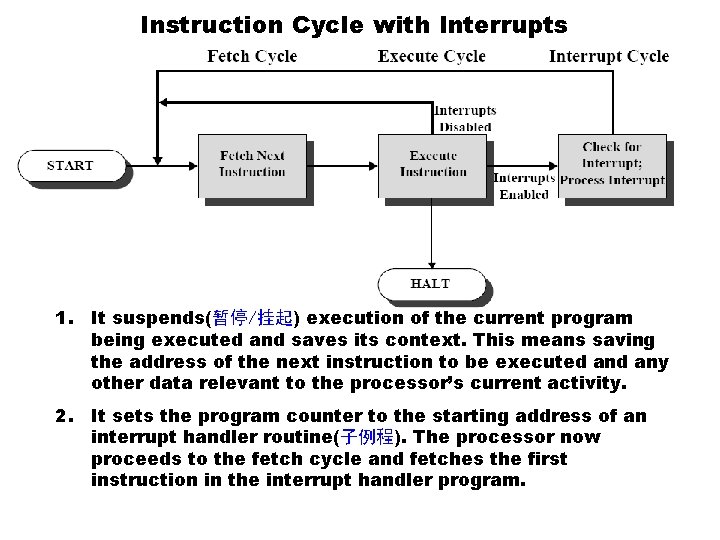
Interrupt Process From the point of view of the user program, an interrupt is just that: an interruption of the normal sequence of execution. When the interrupt processing is completed, execution resumes. Fig. 3. 8 Transfer of control via interrupt
Instruction Cycle with Interrupts 1. It suspends(暂停/挂起) execution of the current program being executed and saves its context. This means saving the address of the next instruction to be executed any other data relevant to the processor’s current activity. 2. It sets the program counter to the starting address of an interrupt handler routine(子例程). The processor now proceeds to the fetch cycle and fetches the first instruction in the interrupt handler program.
Figure 3. 10 Program Timing: Short I/O Wait
Figure 3. 11 Program Timing: Long I/O Wait
Instruction Cycle (with Interrupts) - State Diagram
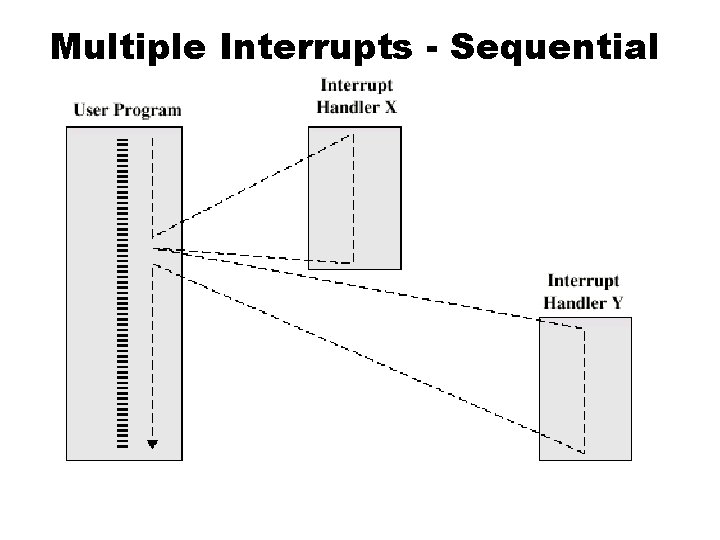
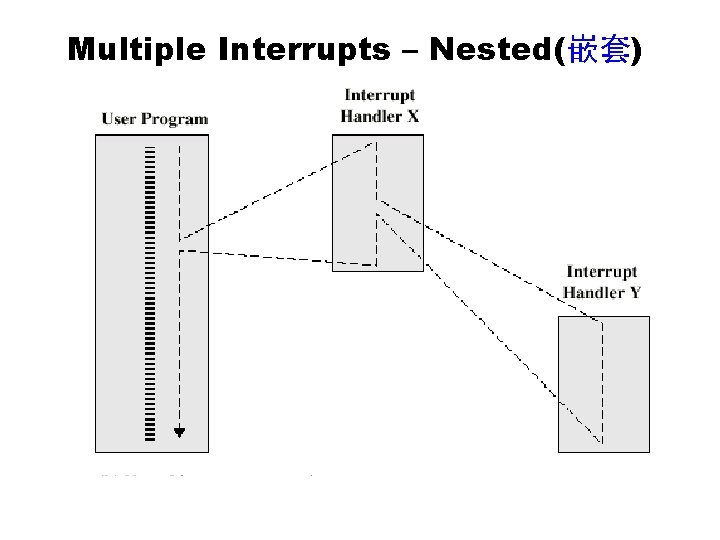
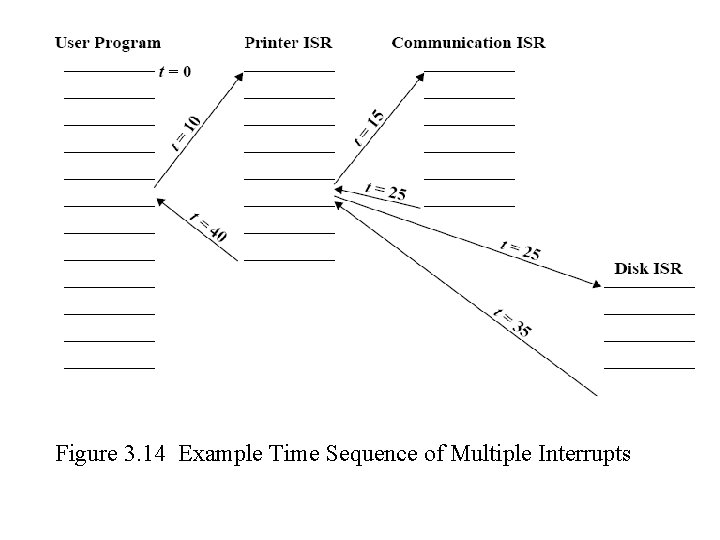
Multiple(多级) Interrupts § Disable(禁止) interrupts • Processor will ignore further interrupts while processing one interrupt • Interrupts remain pending(悬而未决) and are checked after first interrupt has been processed • Interrupts handled in sequence as they occur • The drawback is that it does not take into account relative priority or time-critical needs. § Define priorities(优先级) • Low priority interrupts can be interrupted by higher priority interrupts • When higher priority interrupt has been processed, processor returns to previous interrupt
Multiple Interrupts - Sequential
Multiple Interrupts – Nested(嵌套)
Figure 3. 14 Example Time Sequence of Multiple Interrupts
3. 3 Interconnection Structure § A computer consists of a set of modules of three basic types(CPU, Memory, I/O) that communicate with each other. § All the units(modules) must be connected § The collection of paths connecting the various modules is called the interconnection structure § Different type of connection for different type of unit • Memory • Input/Output • CPU
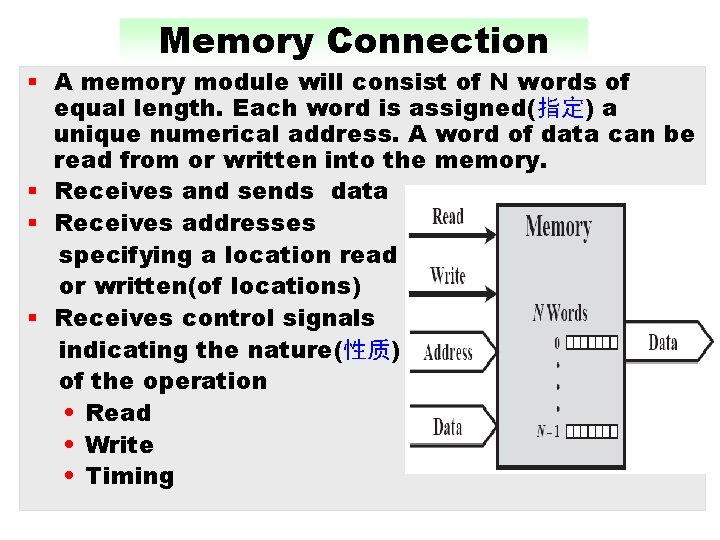
Memory Connection § A memory module will consist of N words of equal length. Each word is assigned(指定) a unique numerical address. A word of data can be read from or written into the memory. § Receives and sends data § Receives addresses specifying a location read or written(of locations) § Receives control signals indicating the nature(性质) of the operation • Read • Write • Timing
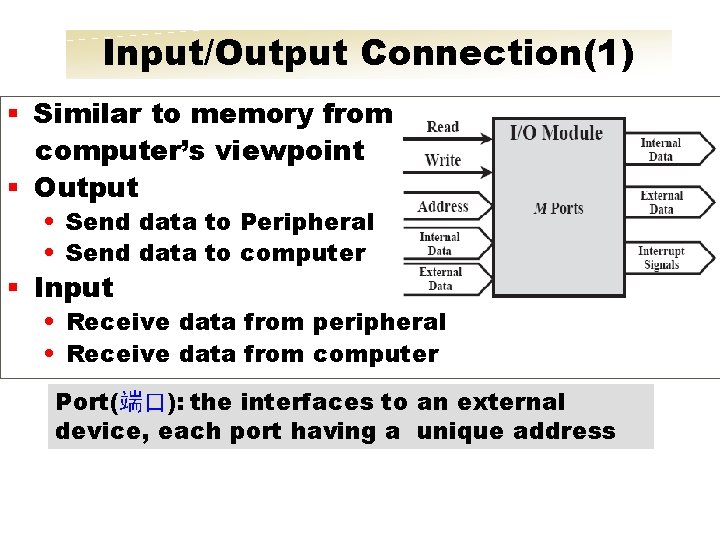
Input/Output Connection(1) § Similar to memory from computer’s viewpoint § Output • Send data to Peripheral • Send data to computer § Input • Receive data from peripheral • Receive data from computer Port(端口): the interfaces to an external device, each port having a unique address
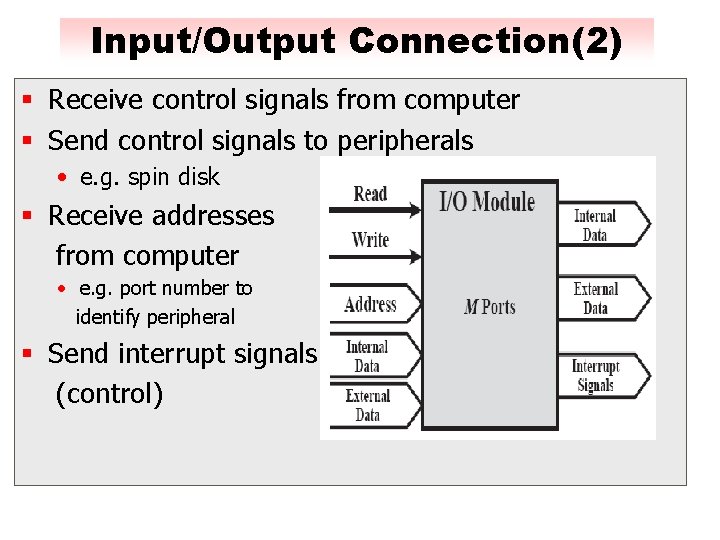
Input/Output Connection(2) § Receive control signals from computer § Send control signals to peripherals • e. g. spin disk § Receive addresses from computer • e. g. port number to identify peripheral § Send interrupt signals (control)
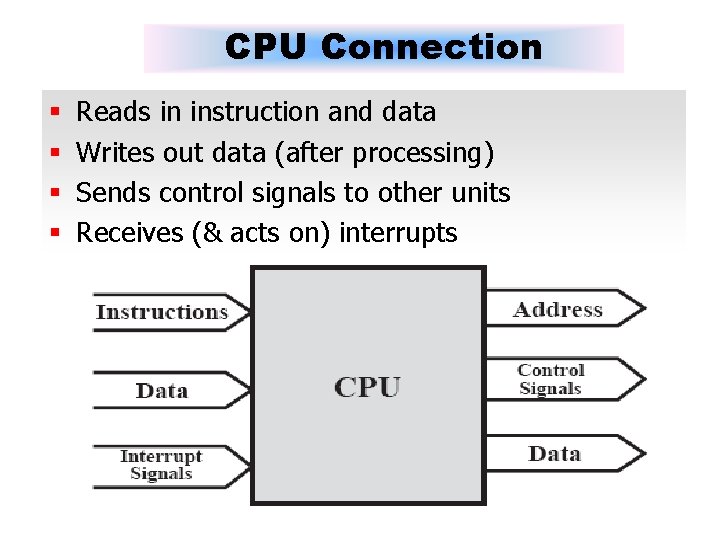
CPU Connection § § Reads in instruction and data Writes out data (after processing) Sends control signals to other units Receives (& acts on) interrupts
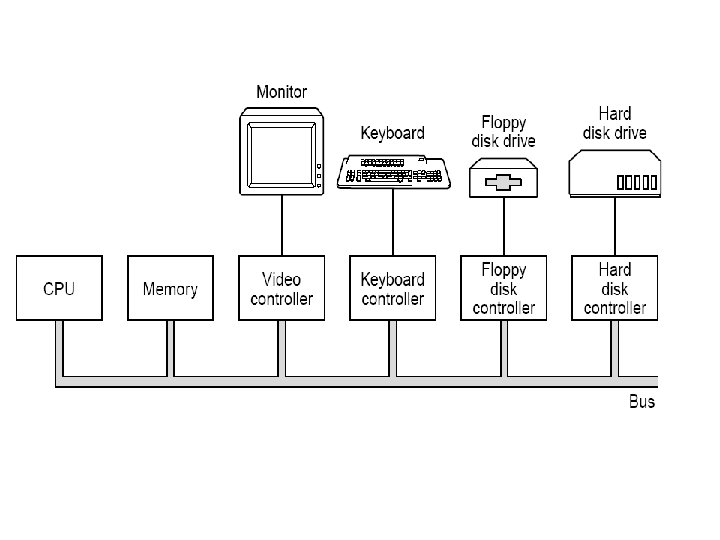
3. 4 BUS INTERCONNECTION What is a Bus? § A bus is a communication pathway connecting two or more devices. A key characteristic of a bus is that it is a shared transmission medium(媒介)( i. e. multiple devices connect to the bus) § A signal transmitted by any one device is available for reception(接收) by all other devices attached to the bus(Usually broadcast(广播))
3. 4 BUS INTERCONNECTION What is a Bus? § If two devices transmit during the same time period, their signals will overlap(重 叠) and become garbled(篡改). Thus, only one device at a time can successfully transmit. § A bus consists of multiple lines. Each line is capable of transmitting signals representing binary 1 or 0. Over time, a sequence of bits can be transmitted across a single line. Taken together, several lines of a bus can be used to transmit bits simultaneously.
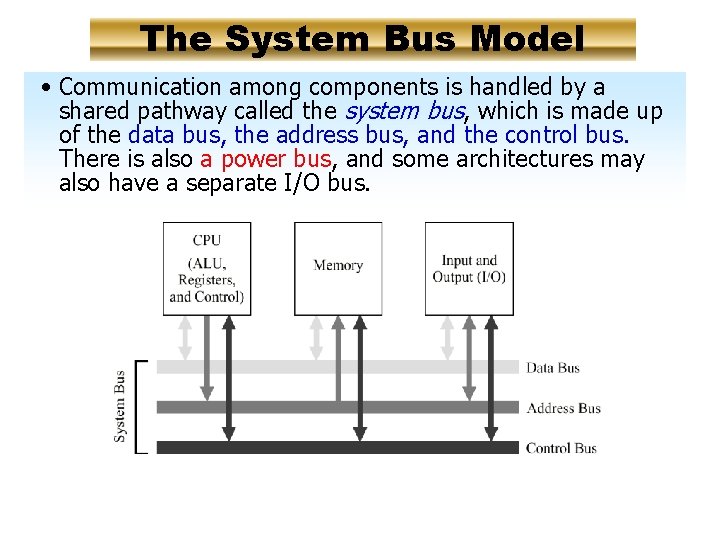
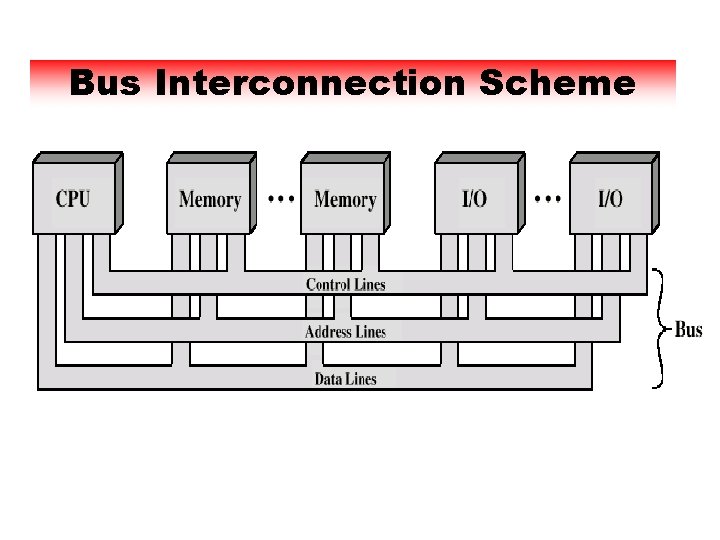
Bus Structure § A number of different buses provided at various levels of the computer system hierarchy § A system bus: connecting major computer components § A system bus consists of from 50 to 100 separate lines. Each line is assigned a particular meaning or function § The lines classified into three functional groups: data, address, and control lines. In addition, power distribution lines
The System Bus Model • Communication among components is handled by a shared pathway called the system bus, which is made up of the data bus, the address bus, and the control bus. There is also a power bus, and some architectures may also have a separate I/O bus.
Bus Interconnection Scheme
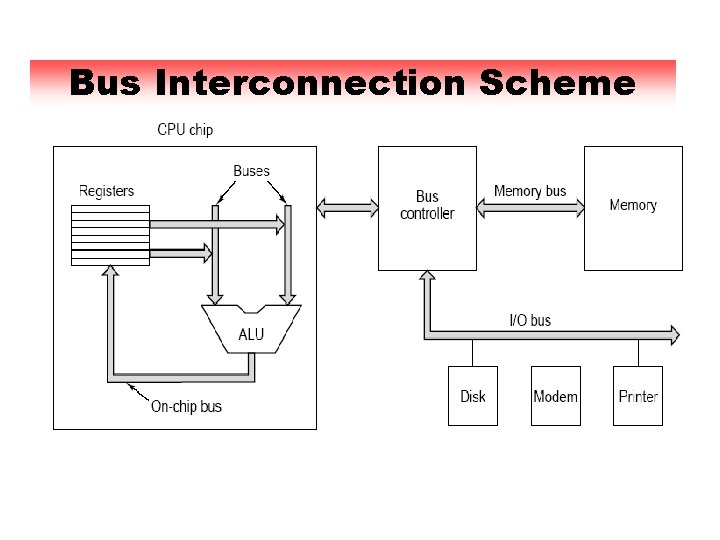
Bus Interconnection Scheme
Data Bus § Carries data between system modules. • Remember that there is no difference between “data” and “instruction” at this level § The number of lines being referred to as the width of the data bus, which determines how many bits can be transferred at a time § Width is a key factor in determining overall system performance. • 8, 16, 32, 64 bit
Address bus § Identify the source or destination of data • e. g. CPU needs to read an instruction (data) from a given location in memory § Bus width determines maximum memory capacity of system • e. g. 8080 has 16 bit address bus giving 64 k address space § Used to address I/O ports § The higher-order bits are used to select a particular module on the bus, and the lower-order bits select a memory location or I/O port within the module.
Control Bus § The control bus used to control the access to and the use of the data and address lines. § Carries control signals • Command timing information ü Timing signals indicate the validity of data and address information ü Command signals specify operations to be performed § Typical control lines include the following: • Memory write: Causes data on the bus to be written into the addressed location • Memory read: Causes data from the addressed location to be placed on the bus.
Control Bus • I/o write: Causes data on the bus to be output to the addressed I/O ports • I/O read: Causes data from the addressed l/O port to be placed on the bus. • Transfer ACK: Indicates that data have been accepted from or placed on the bus. • Bus request: Indicates that a module needs to gain control of the bus
Control Bus • Bus grant(允许/批准): Indicates that a requesting module has been granted control of the bus. • Interrupt request: Indicates that an interrupt is pending(悬而未决). • Interrupt ACK: Acknowledges that the pending interrupt has been recognized • Clock: used to synchronize operation • Reset: Initializes(初始化) all modules
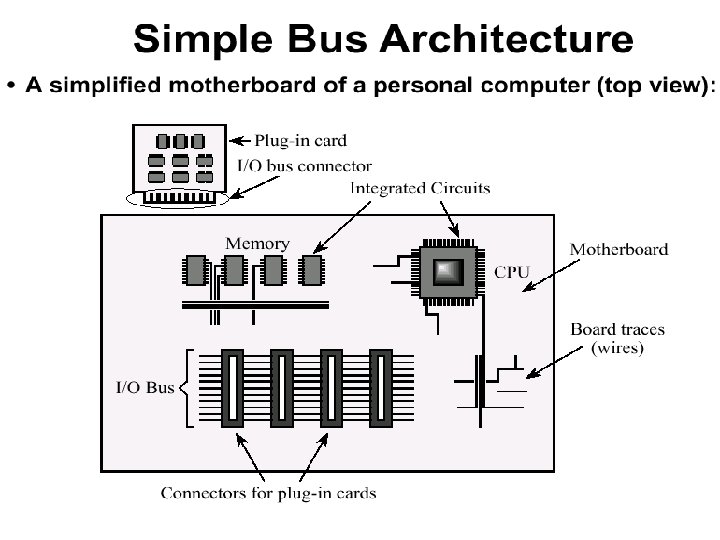
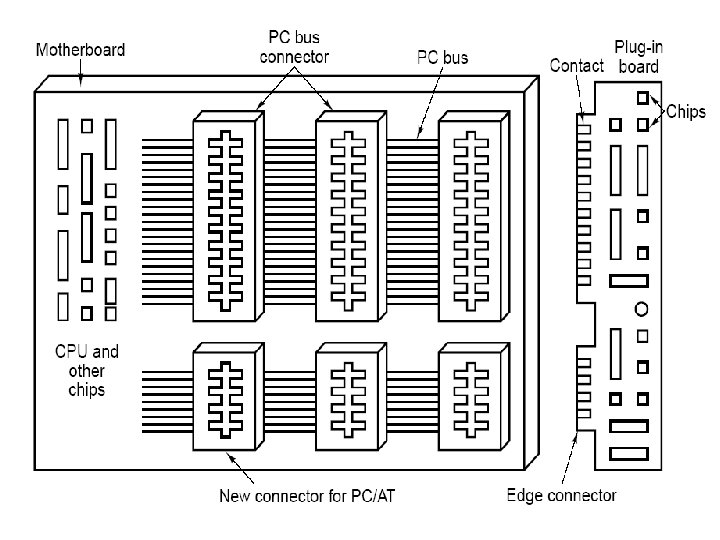
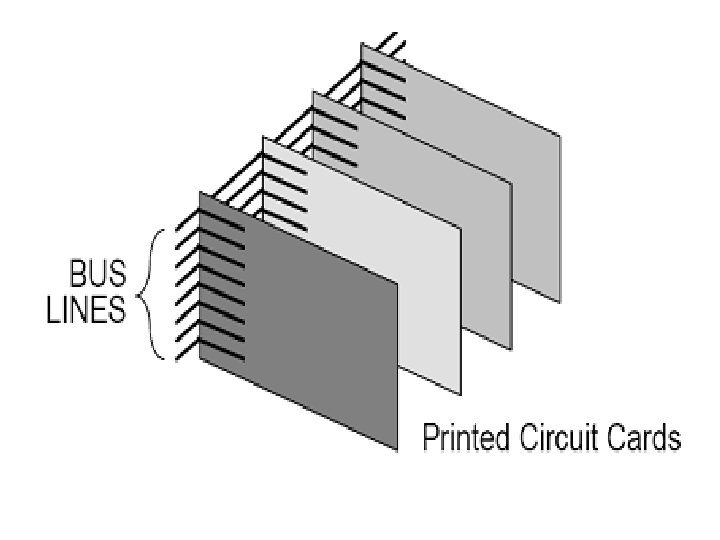
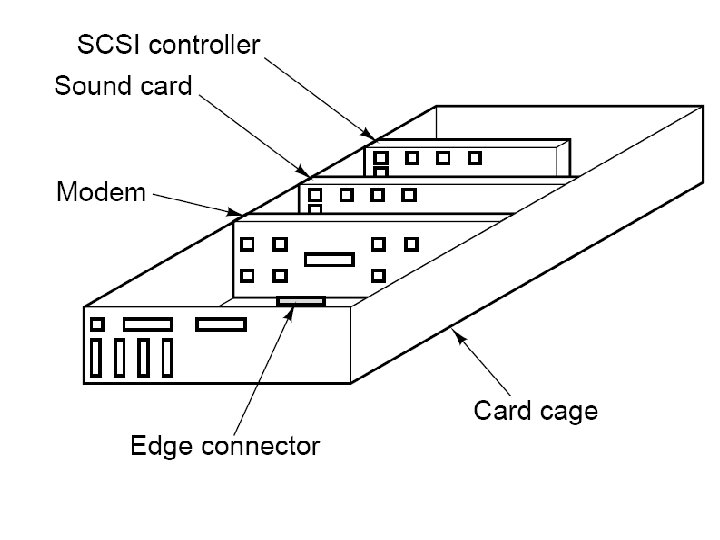
Bus Operation • If one module wishes to send data to another, it must do two things (1) obtain the use of the bus, and (2) transfer data via the bus • If one module wishes to request data from another module, it must (1) obtain the use of the bus, and (2) transfer a request to the other module over the appropriate control and address lines. It must then wait for that second module to send the data. • The system bus is actually a number of parallel electrical conductors. These conductors are metal lines etched in a card or board(printed circuit board). The bus extends across all of the system components, each of which taps into some or all of the bus lines.
Multiple-Bus Hierarchies § If a great number of devices are connected to the bus, performance will suffer(降低). • In general, the more devices attached to the bus, the greater the bus length and hence the greater the propagation(传播) delay(延迟). This delay determines the time it takes for devices to coordinate(协调) the use of the bus. When control of the bus passes from one device to another frequently, these propagation delays can noticeably affect performance.
Multiple-Bus Hierarchies • The bus may become a bottleneck(瓶颈) as the aggregate(聚集) data transfer demand approaches (逼近) the capacity(容量) of the bus. This problem can be countered(克服) to some extent by increasing the data rate that the bus can carry and by using wider buses. However, because the data rates generated by attached devices are growing rapidly, this is a race that a single bus is ultimately destined(注定) to lose.
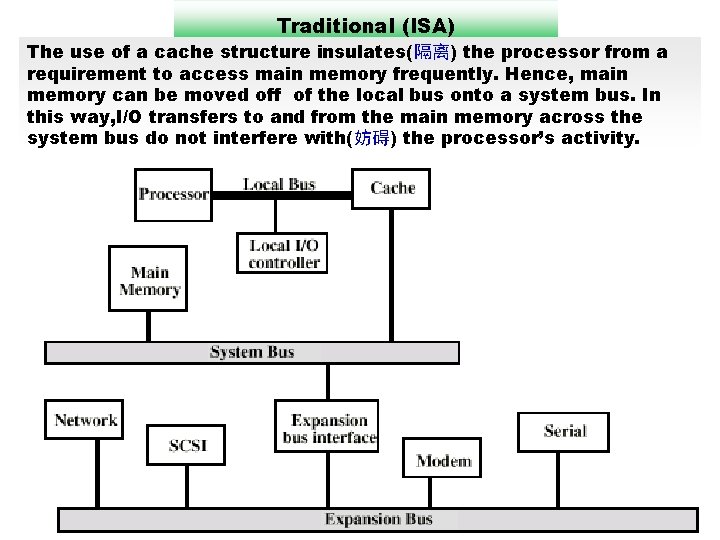
Traditional (ISA) The use of a cache structure insulates(隔离) the processor from a requirement to access main memory frequently. Hence, main memory can be moved off of the local bus onto a system bus. In this way, I/O transfers to and from the main memory across the system bus do not interfere with(妨碍) the processor’s activity.
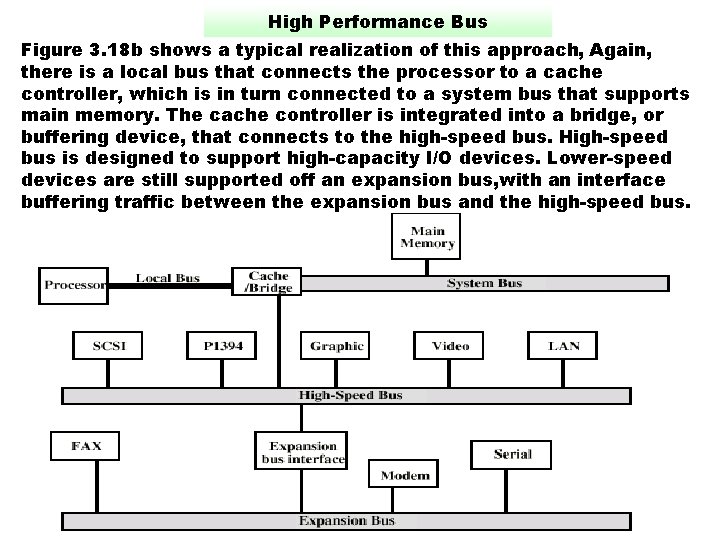
High Performance Bus Figure 3. 18 b shows a typical realization of this approach, Again, there is a local bus that connects the processor to a cache controller, which is in turn connected to a system bus that supports main memory. The cache controller is integrated into a bridge, or buffering device, that connects to the high-speed bus. High-speed bus is designed to support high-capacity I/O devices. Lower-speed devices are still supported off an expansion bus, with an interface buffering traffic between the expansion bus and the high-speed bus.
Elements of Bus Design § Table 3. 2 lists key elements. § Bus Types • Dedicated(专用): permanently assigned either to one function or to a physical subset of computer components ü An example of functional dedication is the use of separate dedicated address and data lines. ü Physical dedication refers to the use of multiple buses, each of which connects only a subset of modules. A typical example is the use of an I/O bus to interconnect all I/O adapter module. The potential advantage of physical dedication is high throughput, because there is less bus contention. A disadvantage is the increased size and cost of the system.
Time-Multiplexed Bus § Multiplexed(复用): the same lines used for multiple purposes at different time periods. For example, address and data information may be transmitted over the same set of lines using an Address Valid control line. • At the beginning of a data transfer, the address is placed on the bus and the Address Valid line is activated. At this point, each module has a specified period of time to copy the address and determine if it is the addressed module. The address is then removed from the bus, and the same bus connections are used for the subsequent read or write data transfer. • Advantage - Shared lines, Hence, fewer lines • Disadvantages ü More complex control ü Potential reduction in performance(because certain events that share the same lines cannot take place in parallel)
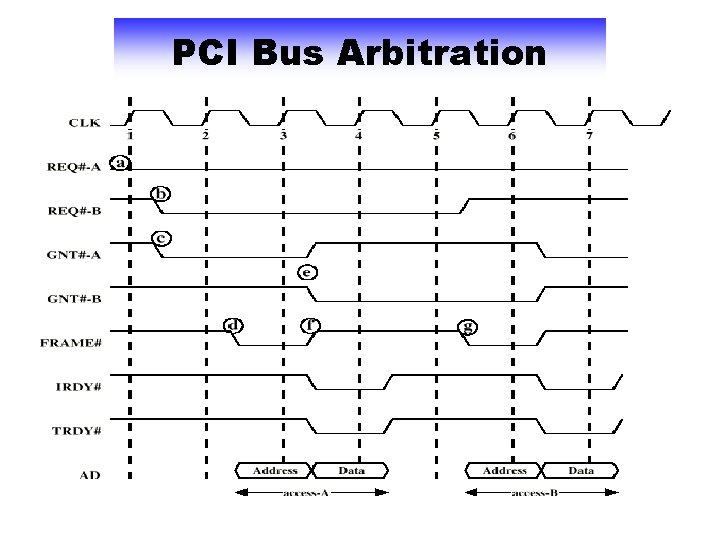
Bus Arbitration(仲裁) § More than one module controlling the bus • e. g. CPU and DMA controller § Only one module may control bus at one time § Arbitration may be centralized or distributed • Centralized(集中式): A single hardware device, referred to as a bus controller or arbiter, is responsible for allocating time on the bus. The device may be a separate module or part of the processor. • Distributed(分布式): There is no central controller. Rather, each module contains access control logic and the modules act together to share the bus. § Purpose: Designate(指定) one device, either the processor or an I/O module, as master. The master may then initiate a data transfer with some other device, which acts as slave for this particular exchange.
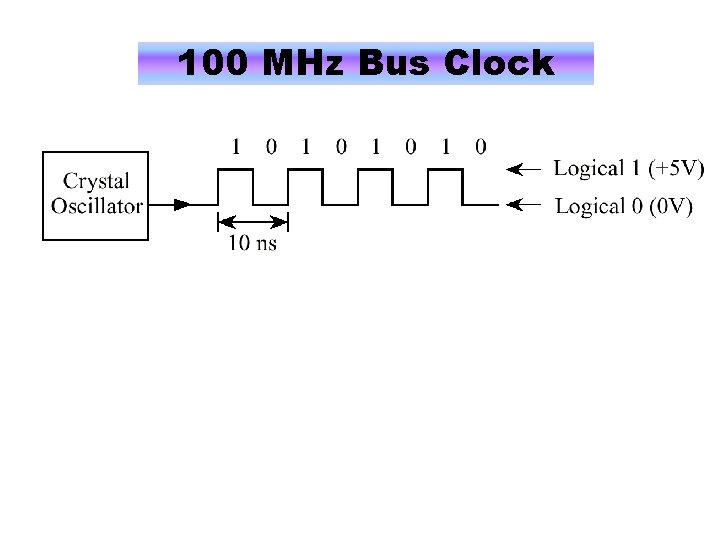
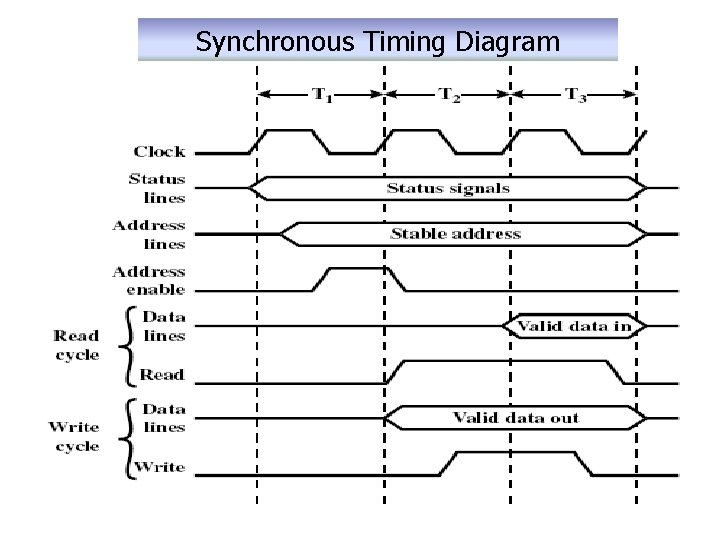
Timing § Timing refers to the way in which events are coordinated on the bus. § Synchronous: The occurrence of events on the bus is determined by a clock. The bus includes a clock line upon which a clock transmits a regular sequence of alternating(交替) 1 s and 0 s of equal duration. All other devices on the bus can read the clock line, and all events start at the beginning of a clock cycle. Other bus signals may change at the leading edge(上升沿) of the clock signal(with a slight reaction delay). Most events occupy a single clock cycle. A single 1 -0 transmission is referred to as a clock cycle
100 MHz Bus Clock
Synchronous Timing Diagram
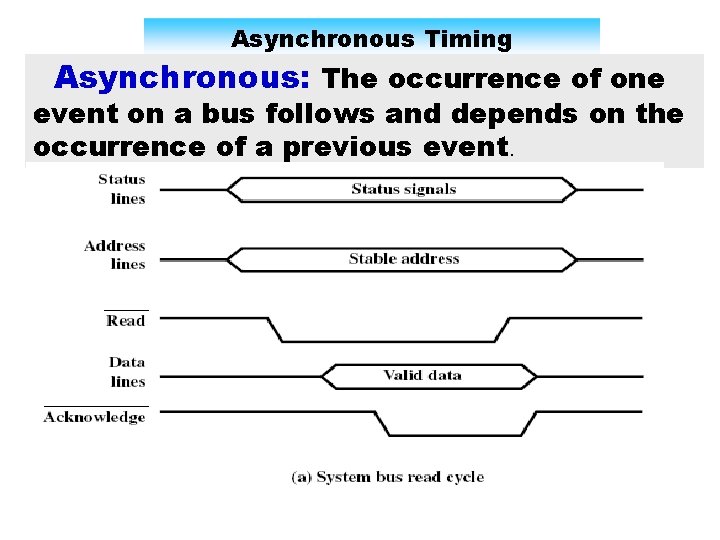
Asynchronous Timing Asynchronous: The occurrence of one event on a bus follows and depends on the occurrence of a previous event.
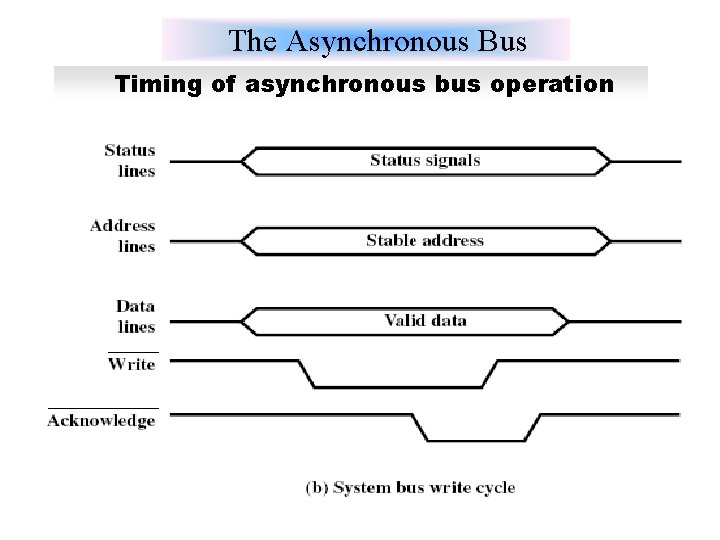
The Asynchronous Bus Timing of asynchronous bus operation
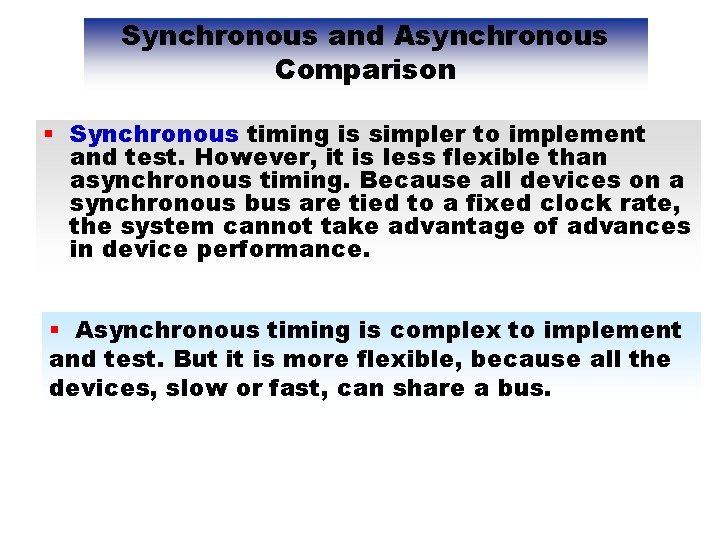
Synchronous and Asynchronous Comparison § Synchronous timing is simpler to implement and test. However, it is less flexible than asynchronous timing. Because all devices on a synchronous bus are tied to a fixed clock rate, the system cannot take advantage of advances in device performance. § Asynchronous timing is complex to implement and test. But it is more flexible, because all the devices, slow or fast, can share a bus.
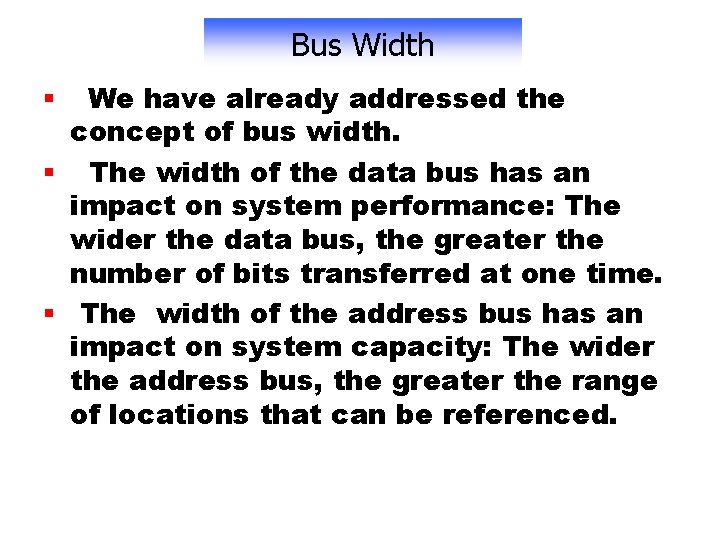
Bus Width We have already addressed the concept of bus width. § The width of the data bus has an impact on system performance: The wider the data bus, the greater the number of bits transferred at one time. § The width of the address bus has an impact on system capacity: The wider the address bus, the greater the range of locations that can be referenced. §
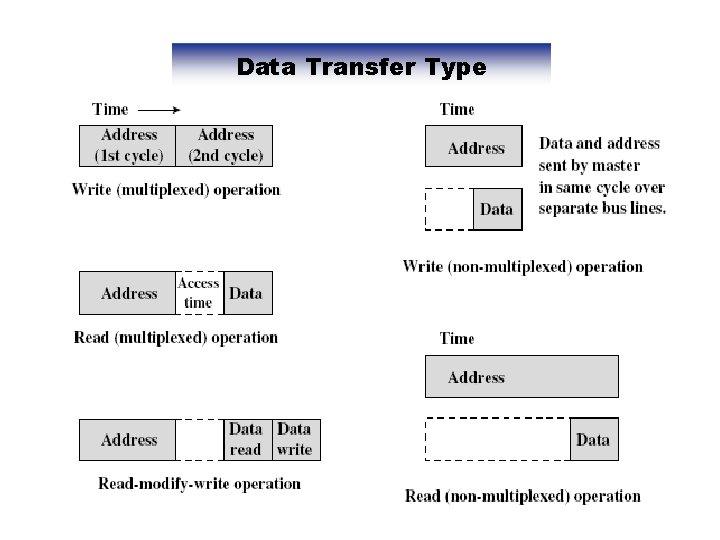
Data Transfer Type
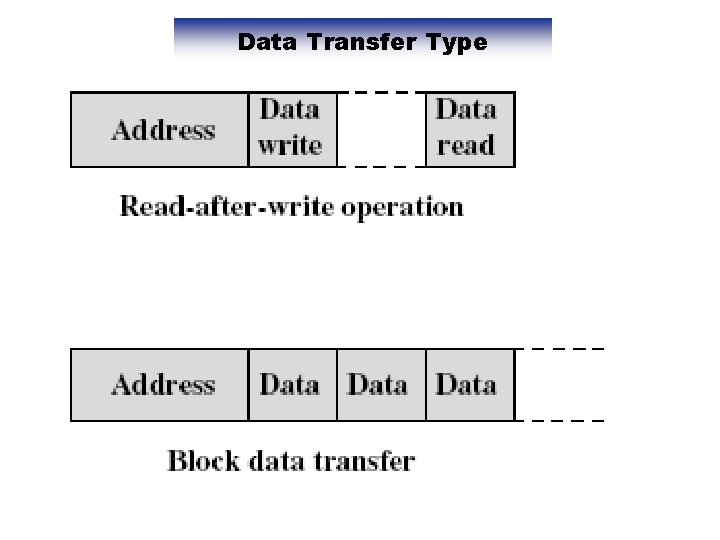
Data Transfer Type
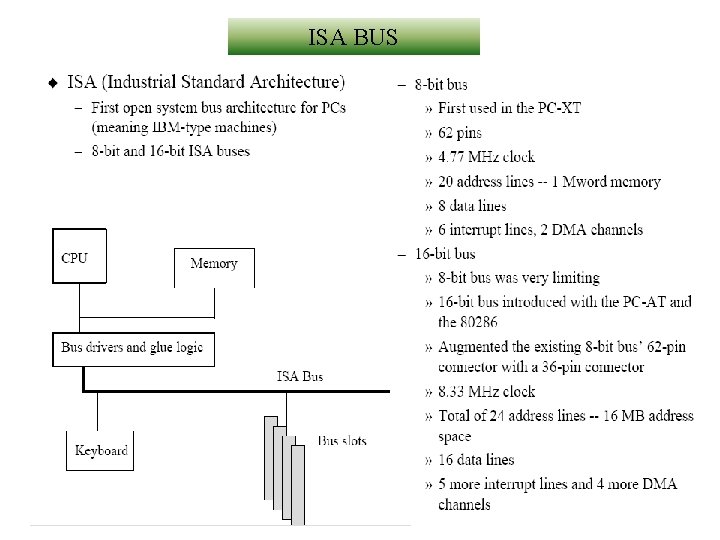
ISA BUS
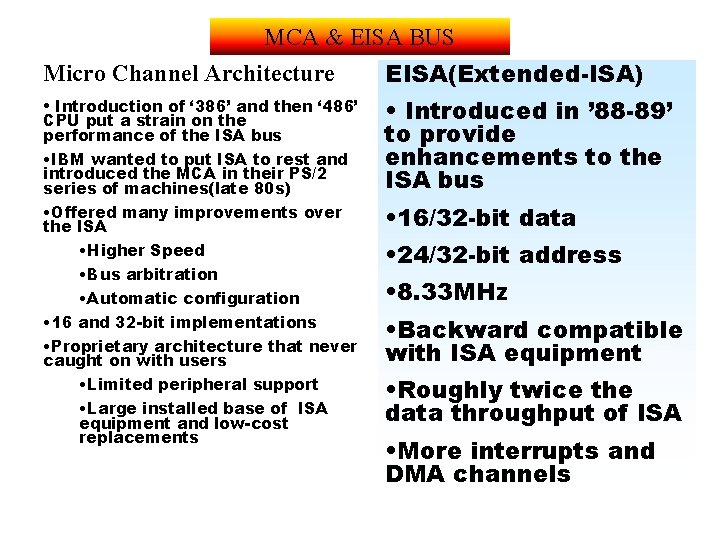
MCA & EISA BUS Micro Channel Architecture EISA(Extended-ISA) • Introduction of ‘ 386’ and then ‘ 486’ • Introduced in ’ 88 -89’ to provide enhancements to the ISA bus • Offered many improvements over the ISA • Higher Speed • Bus arbitration • Automatic configuration • 16 and 32 -bit implementations • Proprietary architecture that never caught on with users • Limited peripheral support • Large installed base of ISA equipment and low-cost replacements • 16/32 -bit data CPU put a strain on the performance of the ISA bus • IBM wanted to put ISA to rest and introduced the MCA in their PS/2 series of machines(late 80 s) • 24/32 -bit address • 8. 33 MHz • Backward compatible with ISA equipment • Roughly twice the data throughput of ISA • More interrupts and DMA channels
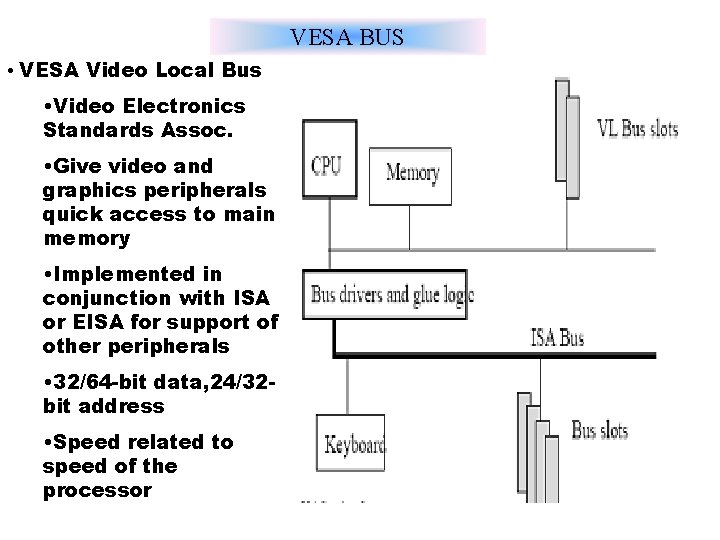
VESA BUS • VESA Video Local Bus • Video Electronics Standards Assoc. • Give video and graphics peripherals quick access to main memory • Implemented in conjunction with ISA or EISA for support of other peripherals • 32/64 -bit data, 24/32 bit address • Speed related to speed of the processor
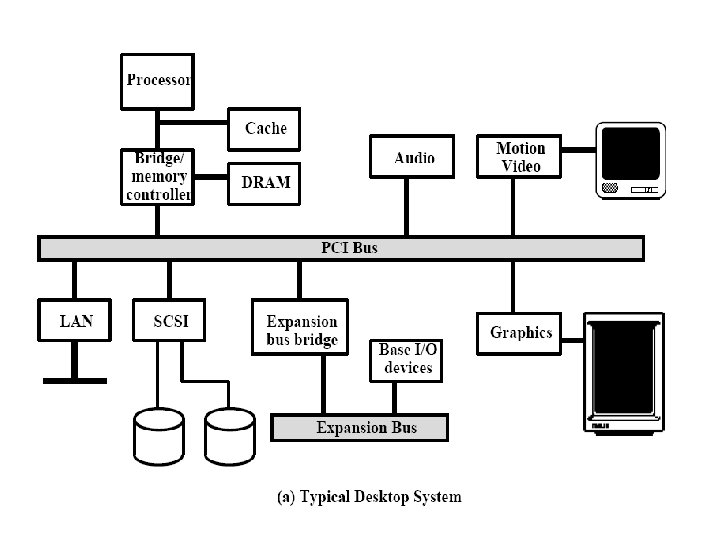
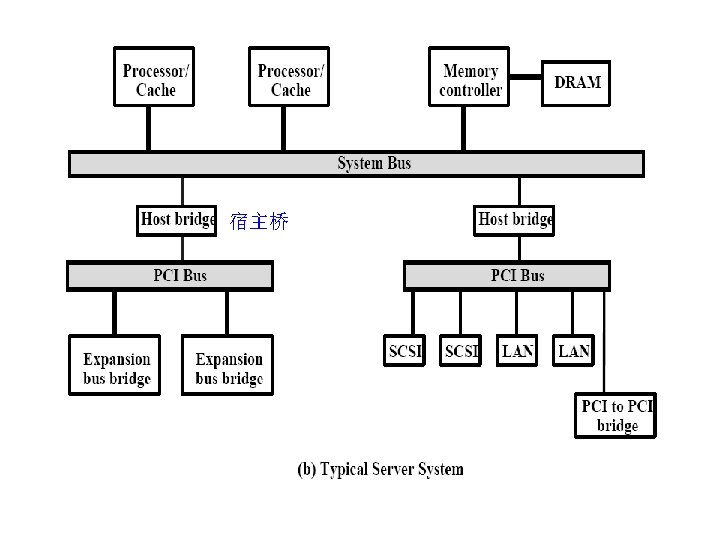
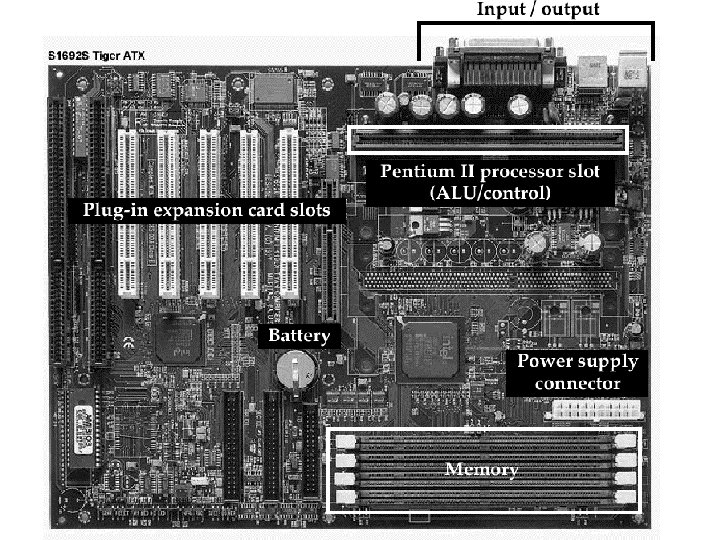
3. 5 PCI (Peripheral Component interconnection) § PCI is a poplar high-bandwidth, processorindependent bus that can function as a mezzanine or peripheral bus. § The current standard allows the use of up to 64 data lines at 66 MHz, for a raw transfer rate of 528 Mbyte/s, or 4. 224 Gbps. § Developed by Intel in 1990 for its Pentium-based systems. All the patents released to the public domain and promote the creation of an industry association. § PCI SIG(Special Interesting Group) developing further and maintain the compatibility of the PCI specifications. § As of this writing , the current version is PCI 2. 1, released in 1995.
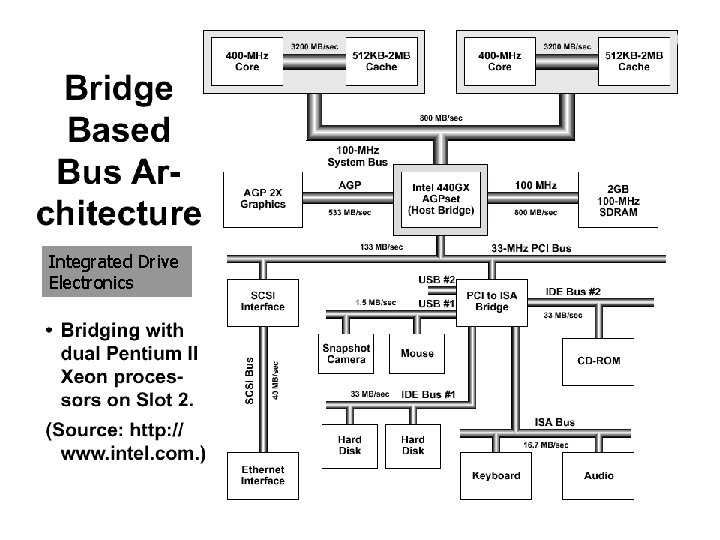
Integrated Drive Electronics
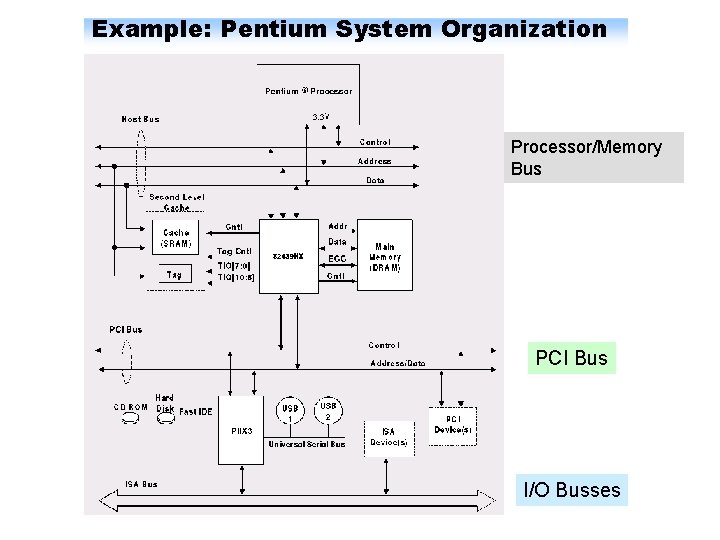
Example: Pentium System Organization Processor/Memory Bus PCI Bus I/O Busses
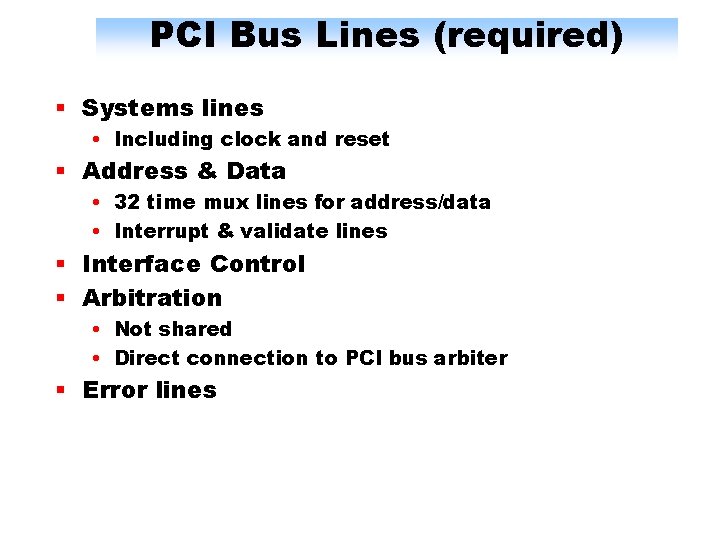
PCI Bus Lines (required) § Systems lines • Including clock and reset § Address & Data • 32 time mux lines for address/data • Interrupt & validate lines § Interface Control § Arbitration • Not shared • Direct connection to PCI bus arbiter § Error lines
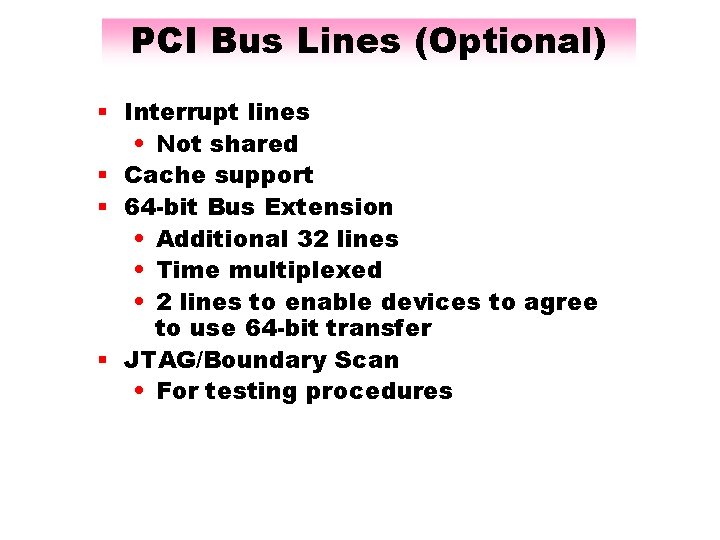
PCI Bus Lines (Optional) § Interrupt lines • Not shared § Cache support § 64 -bit Bus Extension • Additional 32 lines • Time multiplexed • 2 lines to enable devices to agree to use 64 -bit transfer § JTAG/Boundary Scan • For testing procedures
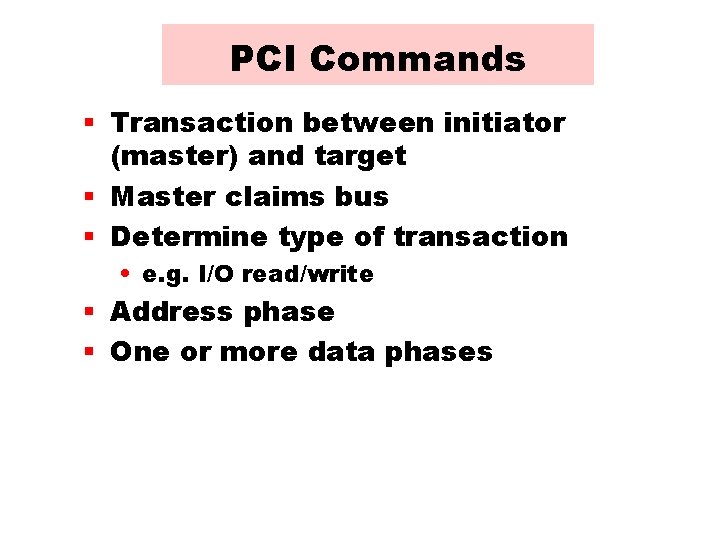
PCI Commands § Transaction between initiator (master) and target § Master claims bus § Determine type of transaction • e. g. I/O read/write § Address phase § One or more data phases
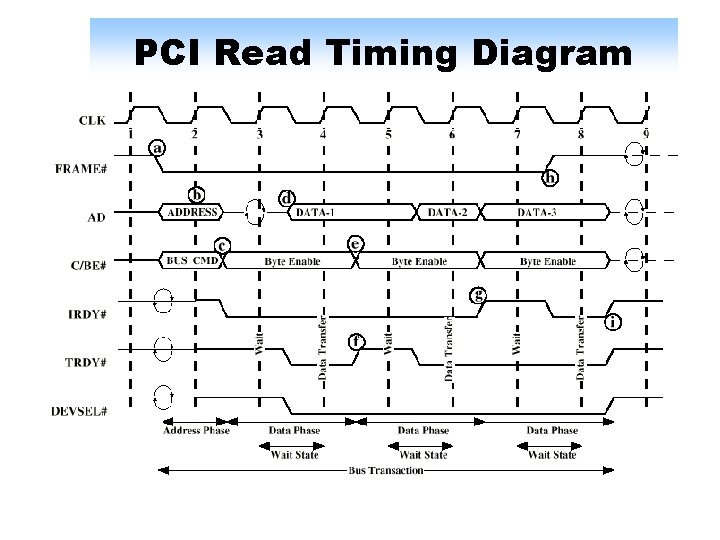
PCI Read Timing Diagram
PCI Bus Arbitration
PCI-X & PCI-Express PCI-X (Peripheral Component Interconnect Extended) is a computer bus technology (the "data pipes" between parts of a computer) that increases the speed that data can move within a computer from 66 MHz to 133 MHz. The technology was developed jointly by IBM, HP, and Compaq. PCI-X doubles the speed and amount of data exchanged between the computer processor and peripheral. With the current PCI design, one 64 -bit bus runs at 66 MHz and additional buses move 32 bits at 66 MHz or 64 bits at 33 MHz. The maximum amount of data exchanged between the processor and peripherals using the current PCI design is 532 MB per second. With PCI-X, one 64 -bit bus runs at 133 MHz with the rest running at 66 MHz, allowing for a data exchange of 1. 06 GB per second. PCI-X is backwards-compatible, meaning that you can, for example, install a PCI -X card in a standard PCI slot but expect a decrease in speed to 33 MHz. You can also use both PCI and PCI-X cards on the same bus but the bus speed will run at the speed of the slowest card. PCI-X is more fault tolerant than PCI. For example, PCI-X is able to reinitialize a faulty card or take it offline before computer failure occurs. PCI-Express
Infini. Band bus Infini. Band is an architecture and specification for data flow between processors and I/O devices that promises greater bandwidth and almost unlimited expandability in tomorrow's computer systems. In the next few years, Infini. Band is expected to gradually replace the existing Peripheral Component Interconnect (PCI) shared-bus approach used in most of today's personal computers and servers. Offering throughput of up to 2. 5 gigabytes per second and support for up to 64, 000 addressable devices, the architecture also promises increased reliability, better sharing of data between clustered processors, and built-in security. Infini. Band is the result of merging two competing designs, Future I/O, developed by Compaq, IBM, and Hewlett-Packard, with Next Generation I/O, developed by Intel, Microsoft, and Sun Microsystems. For a short time before the group came up with a new name, Infini. Band was called System I/O.
Internal and system buses The bus that moves data around within the CPU is usually referred to as the PC’s internal bus Today’s computers typically have a specific system bus to connect the CPU to RAM called the frontside bus(FSB). The backside bus(BSB) transfers data between the CPU and external cache. Many CPUs today have 64 -bit internal and system buses. Generally a faster system bus indicates a faster PC, and a faster frontside bus creates less of a bottleneck in the overall performance of the system.