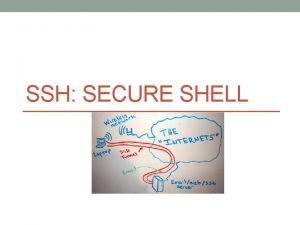
C ONTENTS 01 Secure ShellSSH 02 PART 01





![追加公钥到known_host [xiaohong@xh ~]# ssh xiaoming@172. 16. 4. 5 The authenticity of host ‘ 172.](https://slidetodoc.com/presentation_image_h2/52ae1bfa2e1eb1f1cddcba7693c5528e/image-14.jpg "追加公钥到known_host [xiaohong@xh ~]# ssh xiaoming@172. 16. 4. 5 The authenticity of host ‘ 172.")

![生成公钥私钥 [xiaohong@xh ~]# ssh-keygen –t rsa Gnerating public/private rsa key pair. Enter file in](https://slidetodoc.com/presentation_image_h2/52ae1bfa2e1eb1f1cddcba7693c5528e/image-19.jpg "生成公钥私钥 [xiaohong@xh ~]# ssh-keygen –t rsa Gnerating public/private rsa key pair. Enter file in")
![复制到服务器 [xiaohong@xh ~]# scp id_rsa. pub xiaoming@172. 16. 4. 5 : /home/xiaoming/. ssh/id_rsa. pub.](https://slidetodoc.com/presentation_image_h2/52ae1bfa2e1eb1f1cddcba7693c5528e/image-20.jpg "复制到服务器 [xiaohong@xh ~]# scp id_rsa. pub xiaoming@172. 16. 4. 5 : /home/xiaoming/. ssh/id_rsa. pub.")
![复制到服务器 在服务器端xiaoming的. ssh目录下可以看到传送过来的id_rsa. pub. xiaohong [xiaoming@xm ~]# scp authorized_keys xiaohong@172. 16. 4. 9: /home/xiaohong/.](https://slidetodoc.com/presentation_image_h2/52ae1bfa2e1eb1f1cddcba7693c5528e/image-21.jpg "复制到服务器 在服务器端xiaoming的. ssh目录下可以看到传送过来的id_rsa. pub. xiaohong [xiaoming@xm ~]# scp authorized_keys xiaohong@172. 16. 4. 9: /home/xiaohong/.")
![复制到服务器 在服务器端xiaoming的. ssh目录下可以看到传送过来的id_rsa. pub. xiaohong [xiaoming@xm ~]# scp authorized_keys xiaohong@172. 16. 4. 9: /home/xiaohong/.](https://slidetodoc.com/presentation_image_h2/52ae1bfa2e1eb1f1cddcba7693c5528e/image-22.jpg "复制到服务器 在服务器端xiaoming的. ssh目录下可以看到传送过来的id_rsa. pub. xiaohong [xiaoming@xm ~]# scp authorized_keys xiaohong@172. 16. 4. 9: /home/xiaohong/.")
![复制到服务器 [xiaohong@xh ~]# ssh-copy-id –i ~/. ssh/id_rsa. pub xiaoming@172. 16. 4. 5 /usr/bin/ssh-copy-id: INFO:](https://slidetodoc.com/presentation_image_h2/52ae1bfa2e1eb1f1cddcba7693c5528e/image-23.jpg "复制到服务器 [xiaohong@xh ~]# ssh-copy-id –i ~/. ssh/id_rsa. pub xiaoming@172. 16. 4. 5 /usr/bin/ssh-copy-id: INFO:")
![四个文件 [xiaohong@xh ~]# cd /home/xiaohong/. ssh [xiaohong@xh ~/. ssh]# ll 总用量 20 drwx------ 2](https://slidetodoc.com/presentation_image_h2/52ae1bfa2e1eb1f1cddcba7693c5528e/image-26.jpg "四个文件 [xiaohong@xh ~]# cd /home/xiaohong/. ssh [xiaohong@xh ~/. ssh]# ll 总用量 20 drwx------ 2")


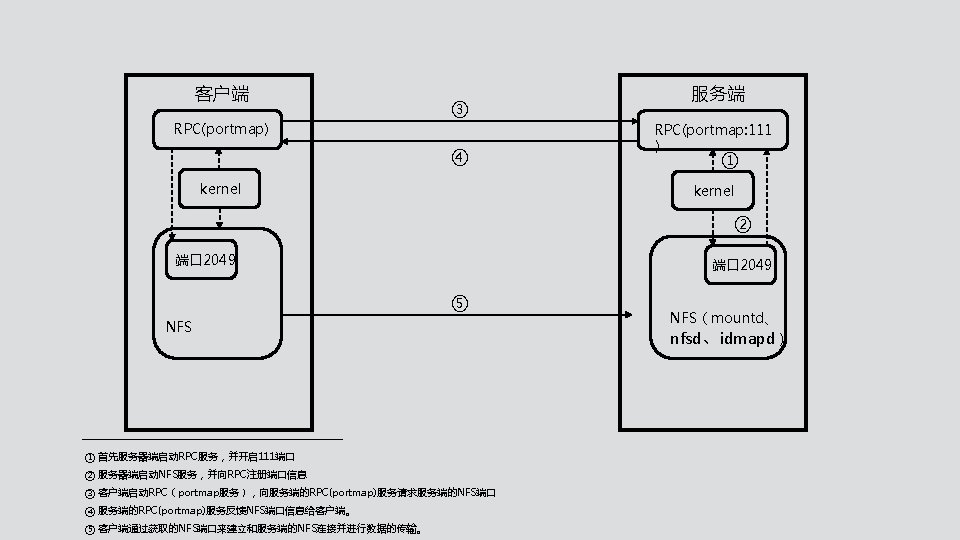
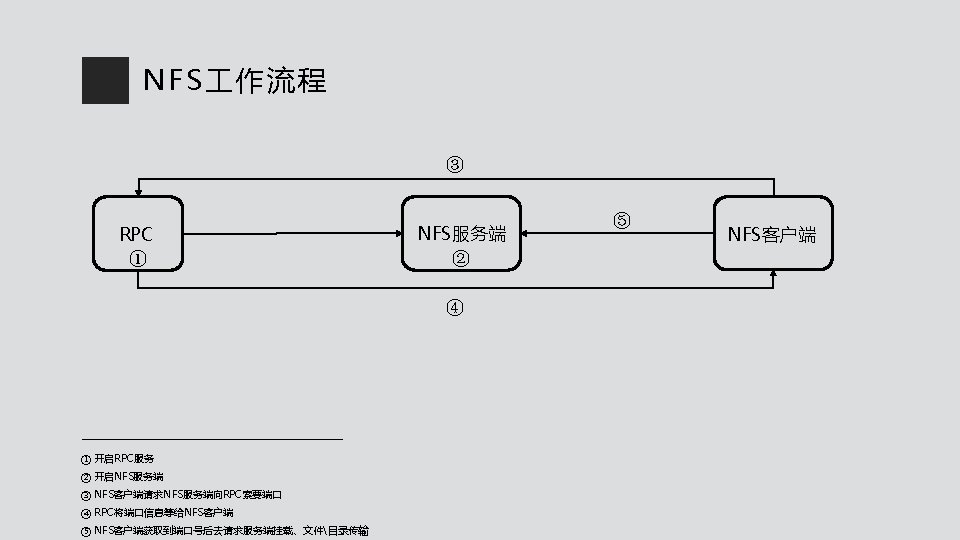
![安装程序 [xiaoming@xm ~]# sudo yum -y install rpcbind nfs-utils Loaded plugins: fastestmirror Determining fastest](https://slidetodoc.com/presentation_image_h2/52ae1bfa2e1eb1f1cddcba7693c5528e/image-38.jpg "安装程序 [xiaoming@xm ~]# sudo yum -y install rpcbind nfs-utils Loaded plugins: fastestmirror Determining fastest")
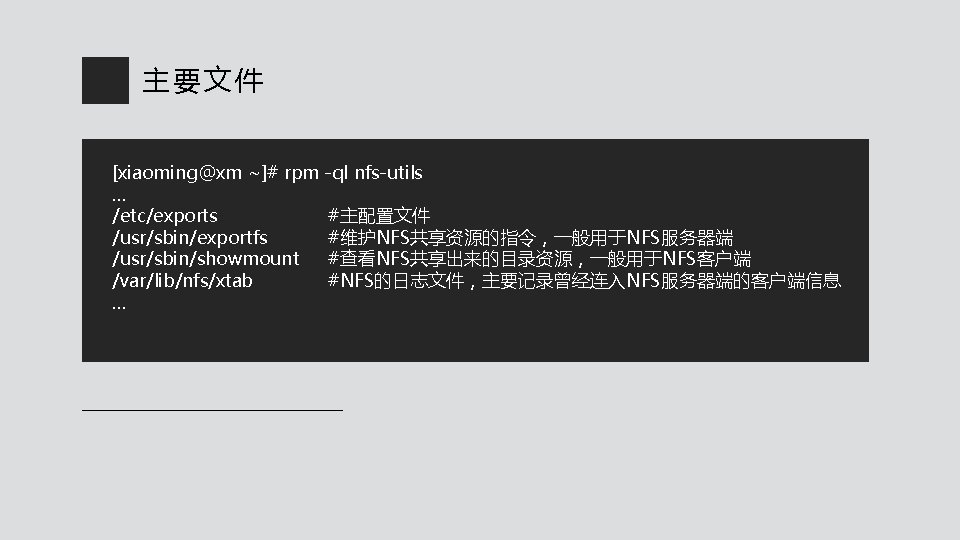
![配置 [xiaoming@xm ~]# vim /etc/exports /cluster/server 172. 16. 4. 9(rw, async, no_root_squash) 172. 16.](https://slidetodoc.com/presentation_image_h2/52ae1bfa2e1eb1f1cddcba7693c5528e/image-40.jpg "配置 [xiaoming@xm ~]# vim /etc/exports /cluster/server 172. 16. 4. 9(rw, async, no_root_squash) 172. 16.")
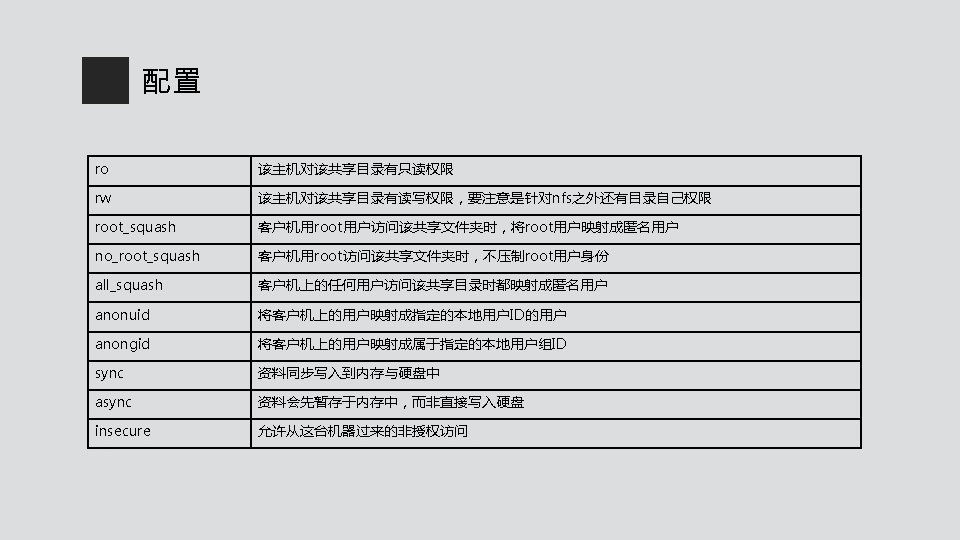
![查看共享 [xiaohong@xh ~]# showmount -e 172. 16. 4. 5 Export list for 172. 16.](https://slidetodoc.com/presentation_image_h2/52ae1bfa2e1eb1f1cddcba7693c5528e/image-42.jpg "查看共享 [xiaohong@xh ~]# showmount -e 172. 16. 4. 5 Export list for 172. 16.")
![挂载 [xiaohong@xh ~]# mkdir -p /cluster/client [xiaohong@xh ~]# mount -t nfs 172. 16. 4.](https://slidetodoc.com/presentation_image_h2/52ae1bfa2e1eb1f1cddcba7693c5528e/image-43.jpg "挂载 [xiaohong@xh ~]# mkdir -p /cluster/client [xiaohong@xh ~]# mount -t nfs 172. 16. 4.")
![验证共享 [xiaoming@xm ~]# echo “ 1234” > /cluster/server/test. txt [xiaohong@xh ~]# cat /cluster/client/test. txt](https://slidetodoc.com/presentation_image_h2/52ae1bfa2e1eb1f1cddcba7693c5528e/image-44.jpg "验证共享 [xiaoming@xm ~]# echo “ 1234” > /cluster/server/test. txt [xiaohong@xh ~]# cat /cluster/client/test. txt")
![卸载挂载和开机自动挂载 使用完后卸载该共享目录 [xiaohong@xh ~]# umount /cluster/client/ vim 打开/etc/fstab,在文件末尾添加如下行即可实现Linux系统开机自动挂载 tail -1 /etc/fstab 172. 16. 4.](https://slidetodoc.com/presentation_image_h2/52ae1bfa2e1eb1f1cddcba7693c5528e/image-45.jpg "卸载挂载和开机自动挂载 使用完后卸载该共享目录 [xiaohong@xh ~]# umount /cluster/client/ vim 打开/etc/fstab,在文件末尾添加如下行即可实现Linux系统开机自动挂载 tail -1 /etc/fstab 172. 16. 4.")

- Slides: 46
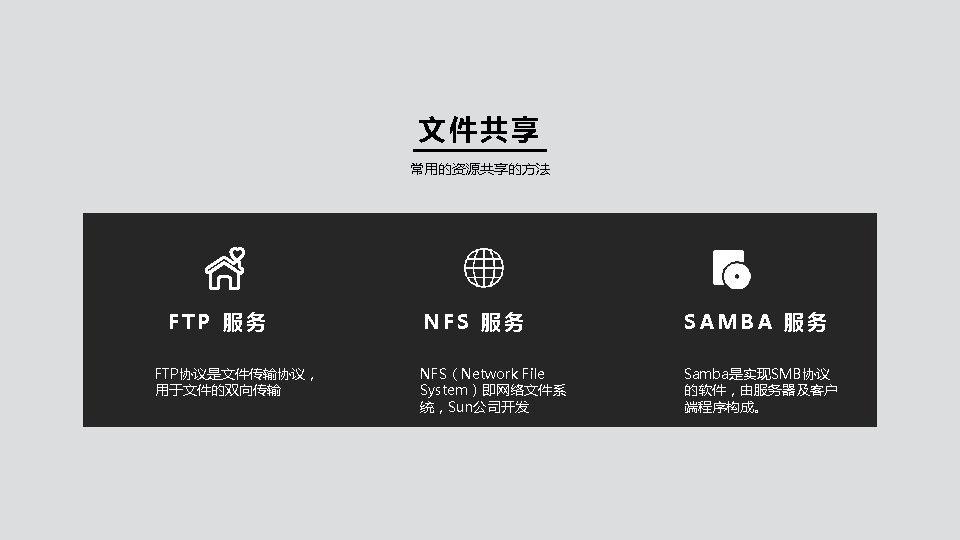
C ONTENTS 01. Secure Shell(SSH) 02. 文件共享
PART. 01 Secure Shell ( 安 全 外 壳 协 议 )
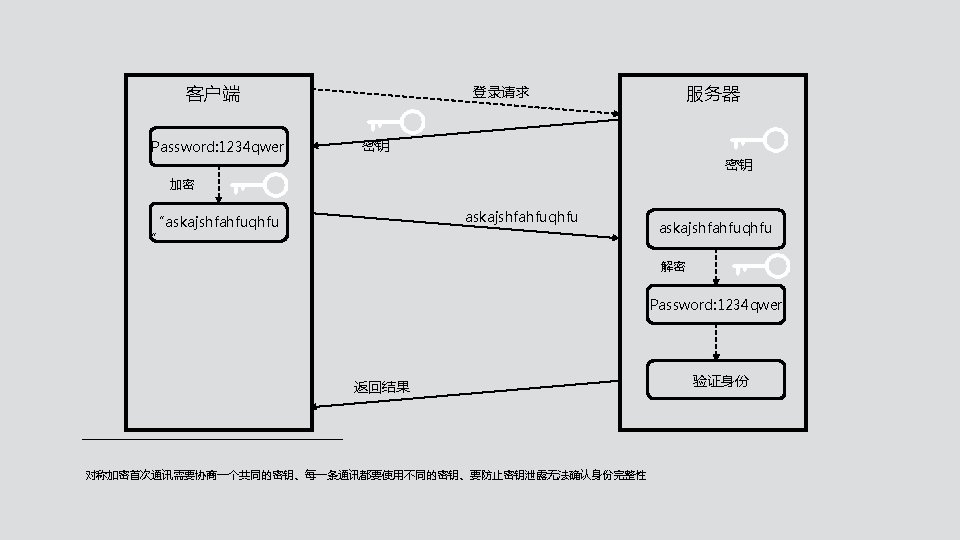
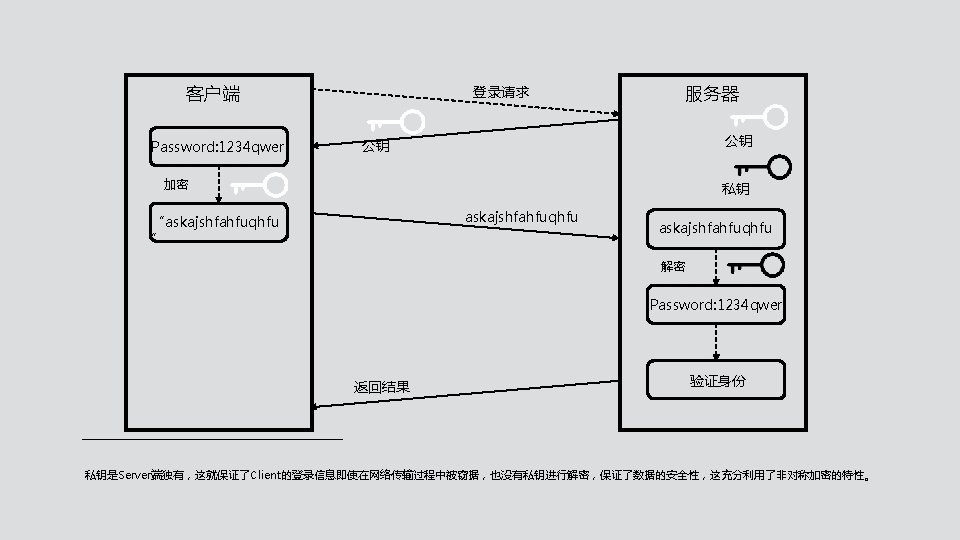
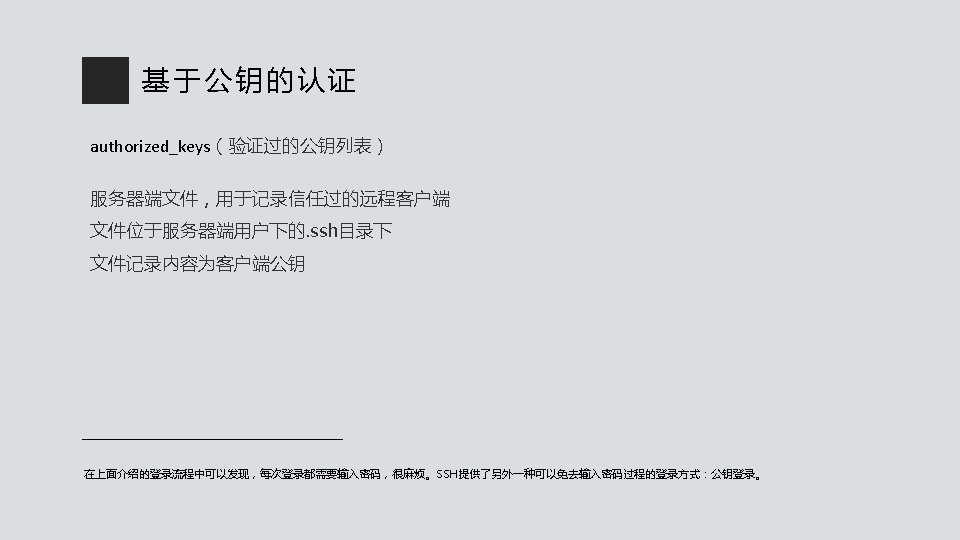
关于远程登录 使用非对称加密方案登录,linux内置服务Open. SSH yum install openssh-server yum install openssh-client
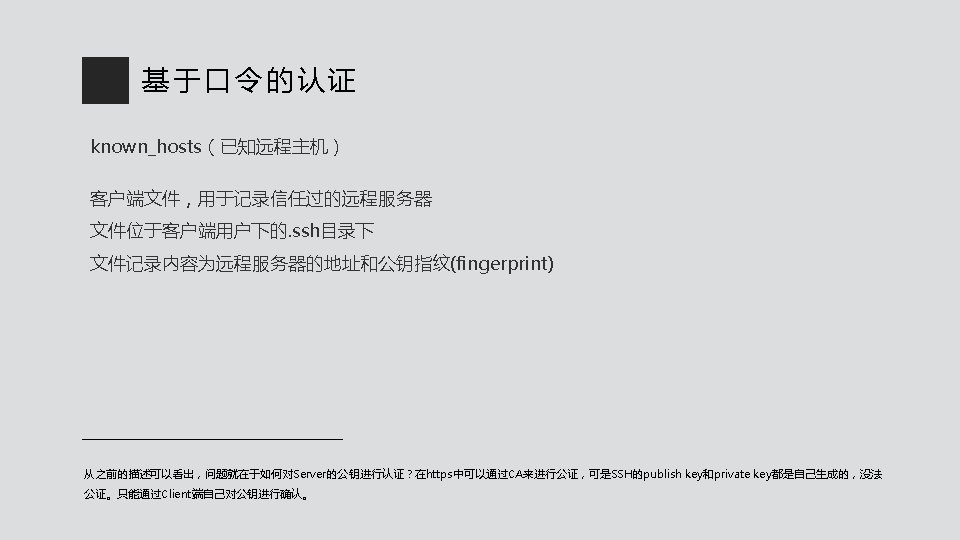
追加公钥到known_host [xiaohong@xh ~]# ssh xiaoming@172. 16. 4. 5 The authenticity of host ‘ 172. 16. 4. 5 (172. 16. 4. 5)' can't be established. ECDSA key fingerprint is SH 256: UE 9 DK 3 E+q. VPlmnq. SNYsjx. Zb 07 ixy. Bi. Bhe 0 G 8 f. A 9 qjl. Kk. Are you sure you want to continue connecting (yes/no)? Warning: Permanently added ' 172. 16. 4. 5 ' (ECDSA) to the list of known hosts. xiaoming@172. 16. 4. 5’s password: 通常在第一次登录的时候,系统会出现上面提示信息:无法确认主机 202. 201. 3. 11的真实性,不过知道它的公钥指纹,是否继续连接? 如果输入yes后,该host已被确认,并被追加到文件known_hosts中,然后就需要输入密码,之后的流程就是上图的流程。
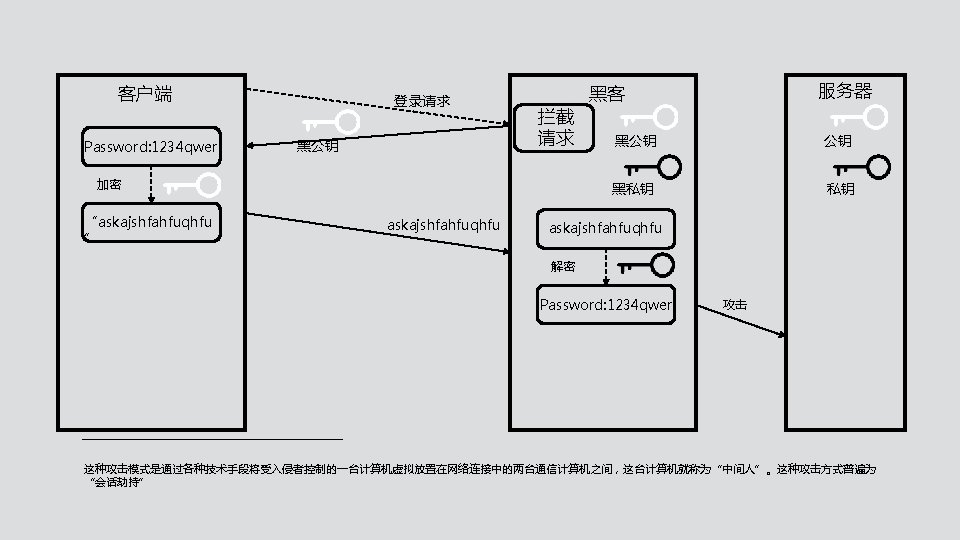
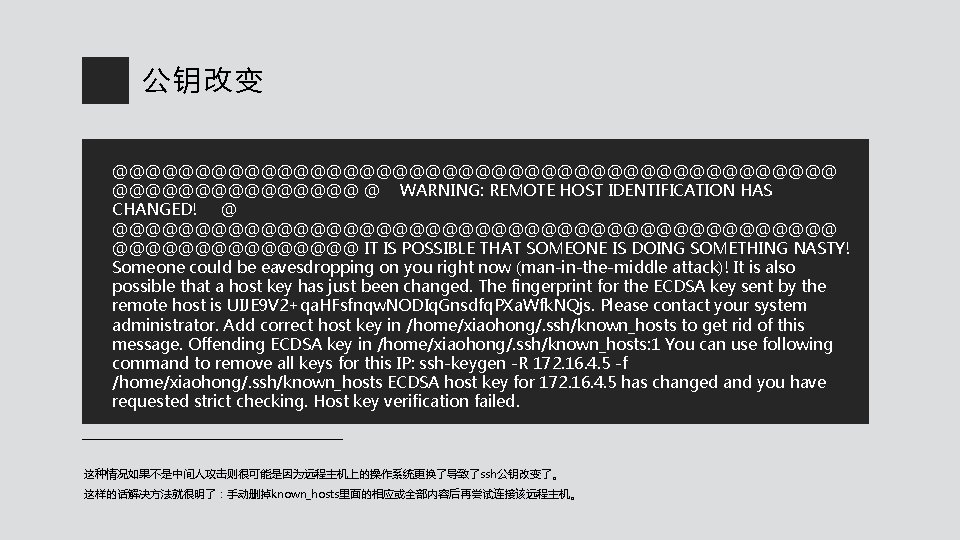
公钥改变 @@@@@@@@@@@@@@@@@@@@@@ @ WARNING: REMOTE HOST IDENTIFICATION HAS CHANGED! @ @@@@@@@@@@@@@@@@@@@@@@ IT IS POSSIBLE THAT SOMEONE IS DOING SOMETHING NASTY! Someone could be eavesdropping on you right now (man-in-the-middle attack)! It is also possible that a host key has just been changed. The fingerprint for the ECDSA key sent by the remote host is UIJE 9 V 2+qa. HFsfnqw. NODIq. Gnsdfq. PXa. Wfk. NQjs. Please contact your system administrator. Add correct host key in /home/xiaohong/. ssh/known_hosts to get rid of this message. Offending ECDSA key in /home/xiaohong/. ssh/known_hosts: 1 You can use following command to remove all keys for this IP: ssh-keygen -R 172. 16. 4. 5 -f /home/xiaohong/. ssh/known_hosts ECDSA host key for 172. 16. 4. 5 has changed and you have requested strict checking. Host key verification failed. 这种情况如果不是中间人攻击则很可能是因为远程主机上的操作系统更换了导致了ssh公钥改变了。 这样的话解决方法就很明了:手动删掉known_hosts里面的相应或全部内容后再尝试连接该远程主机。
生成公钥私钥 [xiaohong@xh ~]# ssh-keygen –t rsa Gnerating public/private rsa key pair. Enter file in which to save the key (/home/gezirong/. ssh/id_rsa): Enter passphrase (empty for no passsphrase): Your identification has been saved in /home/xiaohong/. ssh/id_rsa. Your public key has been saved in /home/xiaohong/. ssh/id_rsa. pub. The key fingerprint is: SHA 256: p. G/UNz. NFEu. FCVGLh. P 58 VBt. R 2 Df 9 i. KPKRow. UQs. Ya. MT 8 A xiaohong@xh ssh-keygen是用于生产密钥的 具。 -t:指定生成密钥类型(rsa、dsa、ecdsa等) -P:指定密码,用于确保私钥的安全 -f:指定存放密钥的文件(公钥文件默认和私钥同目录下,不同的是,存放公钥的文件名需要加上后缀. pub)
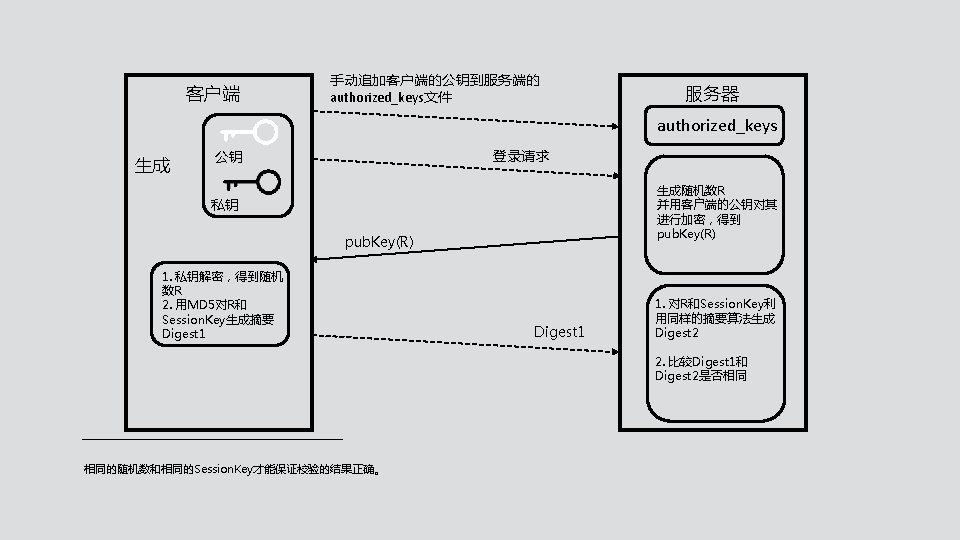
复制到服务器 [xiaohong@xh ~]# scp id_rsa. pub xiaoming@172. 16. 4. 5 : /home/xiaoming/. ssh/id_rsa. pub. xiaohong 在服务器端xiaoming的. ssh目录下可以看到传送过来的id_rsa. pub. xiaohong [xiaoming@xm ~]# cat id_rsa. pub. xiaohong >> authorized_keys
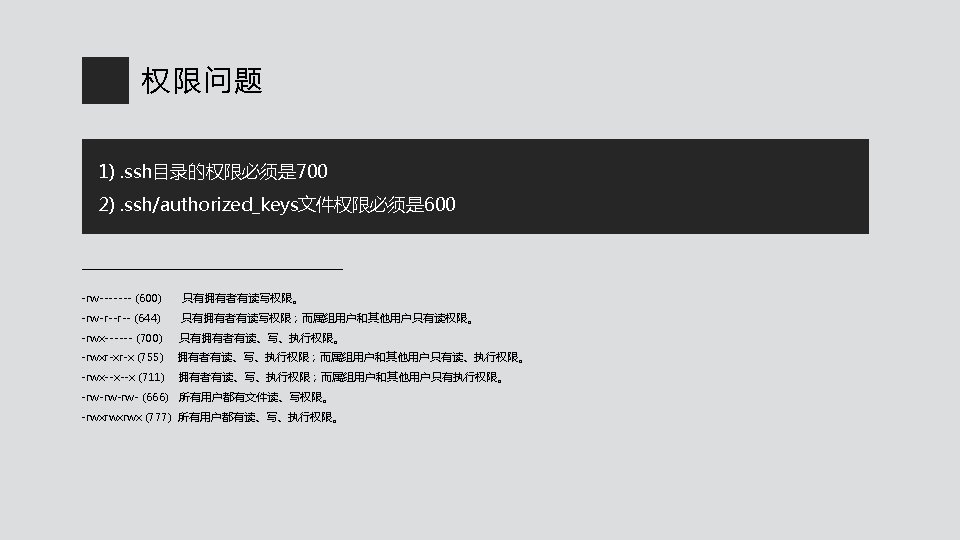
复制到服务器 在服务器端xiaoming的. ssh目录下可以看到传送过来的id_rsa. pub. xiaohong [xiaoming@xm ~]# scp authorized_keys xiaohong@172. 16. 4. 9: /home/xiaohong/. ssh/ 分别在客户端和服务端上修改authorized_keys的权限 [xiaohong@xh ~/. ssh]# chmod 600 authorized_keys [xiaoming@xm ~/. ssh]# chmod 600 authorized_keys 600表示只有拥有者有读写权限
复制到服务器 在服务器端xiaoming的. ssh目录下可以看到传送过来的id_rsa. pub. xiaohong [xiaoming@xm ~]# scp authorized_keys xiaohong@172. 16. 4. 9: /home/xiaohong/. ssh/ 分别在客户端和服务端上修改authorized_keys的权限 [xiaohong@xh ~/. ssh]# chmod 600 authorized_keys [xiaoming@xm ~/. ssh]# chmod 600 authorized_keys 600表示只有拥有者有读写权限
复制到服务器 [xiaohong@xh ~]# ssh-copy-id –i ~/. ssh/id_rsa. pub xiaoming@172. 16. 4. 5 /usr/bin/ssh-copy-id: INFO: Source of key(s) to be installed: “/home/xh/. ssh/id_rsa_pub” /usr/bin/ssh-copy-id: INFO: attempting to log in with the new key(s), to filter out any that are already installed /usr/bin/ssh-copy-id: INFO: 1 key(s) remain to be installed – if you are prompted now it is to install the new keys xiaoming@172. 16. 4. 5’s password: 还可以用其他方法手动添加公钥,用ssh-copy-id命令会自动在authorized_keys文件结尾添加而非覆盖,所以更方便。
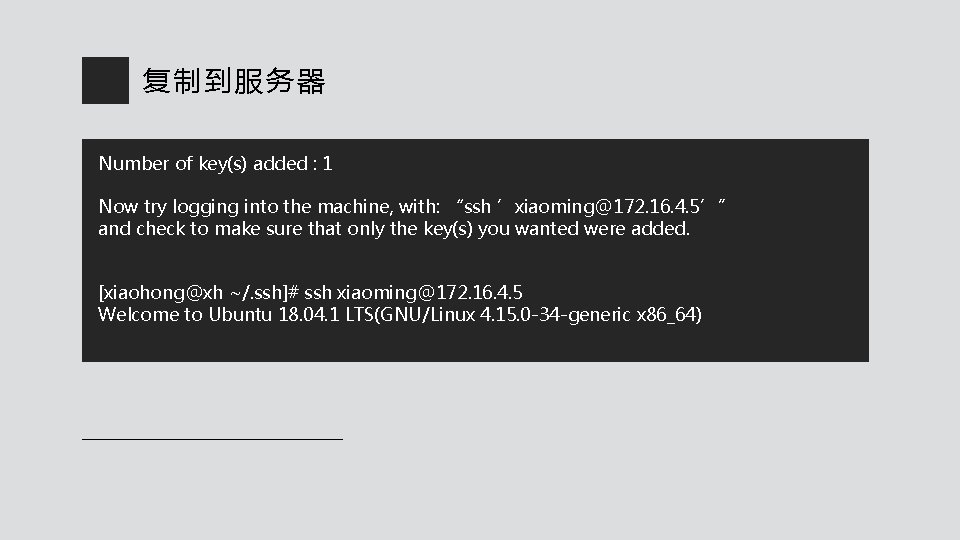
复制到服务器 Number of key(s) added : 1 Now try logging into the machine, with: “ssh ’xiaoming@172. 16. 4. 5’” and check to make sure that only the key(s) you wanted were added. [xiaohong@xh ~/. ssh]# ssh xiaoming@172. 16. 4. 5 Welcome to Ubuntu 18. 04. 1 LTS(GNU/Linux 4. 15. 0 -34 -generic x 86_64)
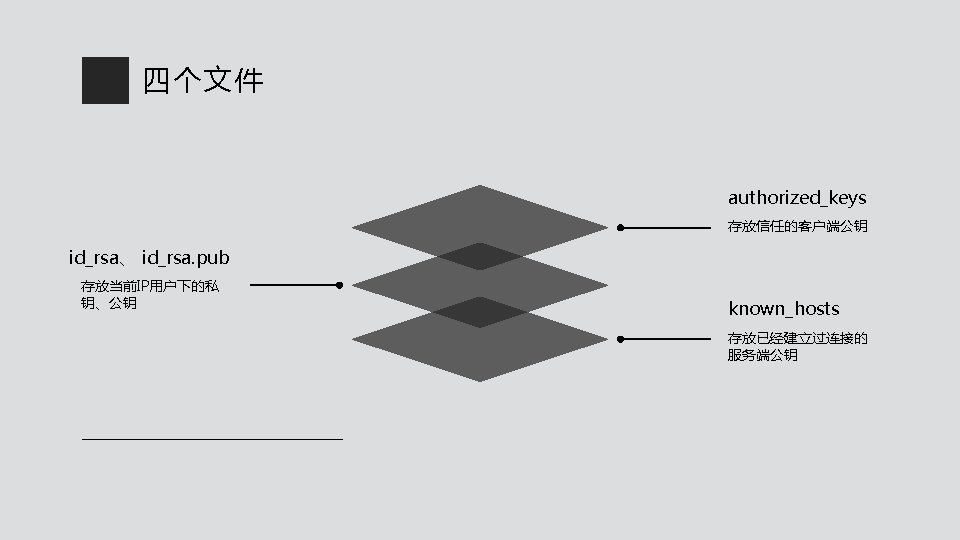
四个文件 [xiaohong@xh ~]# cd /home/xiaohong/. ssh [xiaohong@xh ~/. ssh]# ll 总用量 20 drwx------ 2 xiaohong 4096 10月 10 19: 32. / drwxr-xr-x 19 xiaohong 4096 10月 10 19: 26. . / -rw------- 1 xiaohong 1675 10月 10 19: 32 id_rsa -rw-r--r-- 1 xiaohong 391 10月 10 19: 32 id_rsa. pub -rw-r--r-- 1 xiaohong 222 10月 10 19: 26 know_hosts -rw-r--r-- 1 xiaohong 267 10月 10 19: 47 authorized_keys
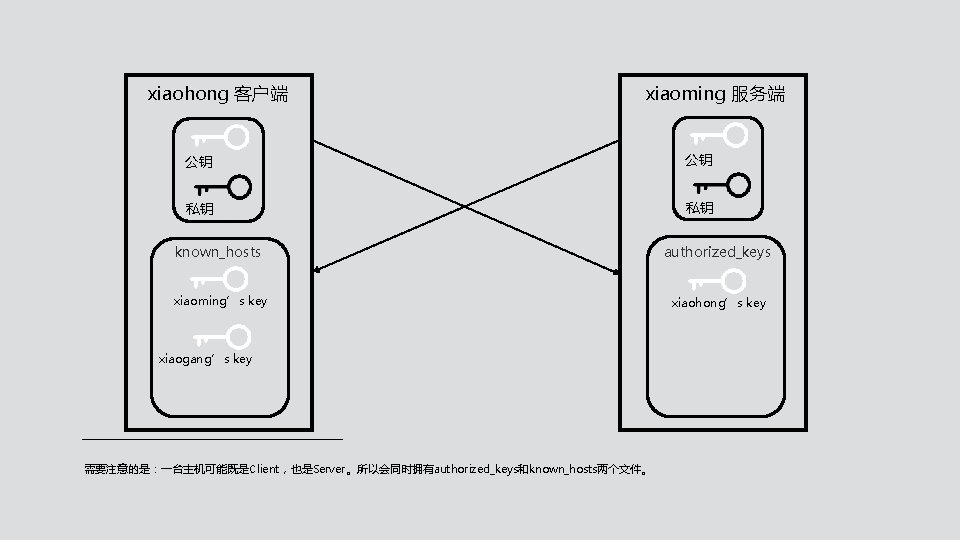
xiaohong 客户端 xiaoming 服务端 公钥 公钥 私钥 私钥 known_hosts authorized_keys xiaoming’s key xiaohong’s key xiaogang’s key 需要注意的是:一台主机可能既是Client,也是Server。所以会同时拥有authorized_keys和known_hosts两个文件。
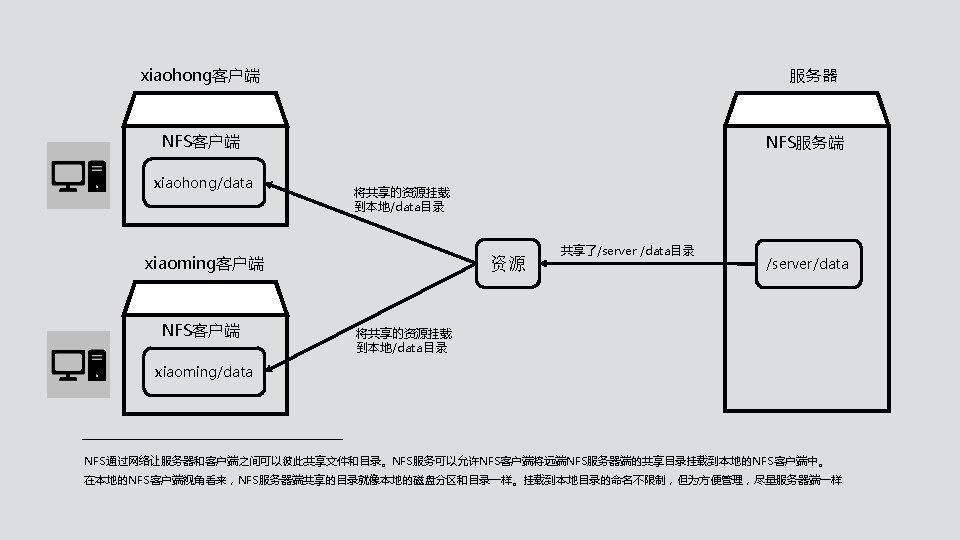
安装程序 [xiaoming@xm ~]# sudo yum -y install rpcbind nfs-utils Loaded plugins: fastestmirror Determining fastest mirrors … Package rpcbind-0. 2. 0 -47. el 7. x 86_64 already installed and latest version Package 1: nfs-utils-1. 3. 0 -0. 61. el 7. x 86_64 already installed and latest version Nothing to do nfs-utils: NFS主程序,包含rpc. nfsd rpc. mount两个deamons rpcbind: RPC主程序
配置 [xiaoming@xm ~]# vim /etc/exports /cluster/server 172. 16. 4. 9(rw, async, no_root_squash) 172. 16. 4. 10(rw, async, no_root_squash) [xiaoming@xm ~]# exports -r 共享目录 [客户端 1(选项 1,选项 2…)]…
查看共享 [xiaohong@xh ~]# showmount -e 172. 16. 4. 5 Export list for 172. 16. 4. 5: /cluster/server 172. 16. 4. 10, 172. 16. 4. 9 [xiaohong@xh ~]# showmount -e 172. 16. 4. 5 clnt_create: RPC: Port mapper failure - Unable to receive: errno 113 (No route to host) 发生错误的原因在于111、2049等rpc和nfs端口都被防火墙挡住了。 解决办法:通过修改/etc/iptables脚本目录,添加 111、2049等nfs和rpc服务使用的端口或直接关闭服务器防火墙(不建议)
挂载 [xiaohong@xh ~]# mkdir -p /cluster/client [xiaohong@xh ~]# mount -t nfs 172. 16. 4. 5: /cluster/server /cluster/client [xiaohong@xh ~]# df -h /cluster/client Filesystem Size Used Avail Use% Mounted on 172. 16. 4. 5: /cluster/server 50 G 1. 5 G 49 G 3% /cluster/client
验证共享 [xiaoming@xm ~]# echo “ 1234” > /cluster/server/test. txt [xiaohong@xh ~]# cat /cluster/client/test. txt “ 1234” [xiaohong@xh ~]# echo “ 5678” > /cluster/client/test. txt [xiaoming@xm ~]# cat /cluster/server/test. txt “ 5678”
卸载挂载和开机自动挂载 使用完后卸载该共享目录 [xiaohong@xh ~]# umount /cluster/client/ vim 打开/etc/fstab,在文件末尾添加如下行即可实现Linux系统开机自动挂载 tail -1 /etc/fstab 172. 16. 4. 5: /cluster/server /cluster/client nfs defaults 0 0
THANKS