Navigation and Ancillary Information Facility Writing an Ephemeris























- Slides: 55
Navigation and Ancillary Information Facility Writing an Ephemeris File In SPICE SPK Format April 2006 Writing an SPK File
Table of Contents Navigation and Ancillary Information Facility • • • Purpose Scope Assumptions about user’s knowledge SPK overview Summary of SPK architecture Discussion applicable to all production methods – • • Recommended SPK types Selecting the polynomial degree (for polynomial SPK types) SPK production methods – – • Using the “Make SPK” (MKSPK) program Using SPICELIB, CSPICE or IDL writer modules (subroutines) Finishing up, applicable to all methods – – – • Adding comments Validation Merging Special requirements for making SPKs to be used in DSN/NSS metric predicts or short-range scheduling – • Writing an SPK File Applies only to those entities not making JPL NAV-style “p-files” Issues affecting performance (reading efficiency) and usability 2
Purpose Navigation and Ancillary Information Facility • This tutorial provides guidance for producing (writing) an SPK file using software provided by NAIF: – the MKSPK application program or – SPK writer modules from the SPICELIB (FORTRAN) or CSPICE (C-language) library, or from the Icy (IDL) system » (Only partial implementation in Icy) Writing an SPK File 3
Scope Navigation and Ancillary Information Facility • This tutorial addresses production of SPK files. – For general purposes. – For use with NASA’s Deep Space Network (the “NSS”). » For antenna scheduling purposes. » For operational metric predicts (tracking) using currently operational DSN software systems. • It does not address the presumably less restricted case of metric predicts production once new DSN SPS software is in use. – SPS is planned for full operational deployment around June 2006. • This tutorial does not address SPK production by JPL NAV teams using the NIOSPK application, which was specially built to process JPL’s NAVIO-format ephemeris/trajectory files. – Those NAV teams may simply learn how to use the NIOSPK program and any useful SPK-related utilities. Writing an SPK File 4
Background Assumptions Navigation and Ancillary Information Facility • It is assumed the reader has some familiarity with the SPICE system, and with basic ideas of orbital mechanics. – The SPICE Overview tutorial is available at: ftp: //naif. jpl. nasa. gov/pub/naif/toolkit_docs/Tutorials/pdf/individual_docs/05_SPICE_overview. pdf • It is assumed the reader has read the “SPK Tutorial” that characterizes much of the SPK subsystem, but with emphasis on reading SPK files. – The SPK “reading” tutorial is available at: ftp: //naif. jpl. nasa. gov/pub/naif/toolkit_docs/Tutorials/pdf/individual_docs/14_spk. ppt • It is assumed the reader has available the SPK reference document entitled “SPK Required Reading, ” supplied with each copy of the SPICE Toolkit (. . . /doc/spk. req) – SPK Required Reading is also available at: http: //naif. jpl. nasa. gov/naif/documentation. html Writing an SPK File 5
SPK References Navigation and Ancillary Information Facility • References for SPK production – – – Writing an SPK File “Making an SPK” tutorial (this document) “SPK (Ephemeris System)” tutorial (focused on reading an SPK) “SPK Required Reading” (spk. req) “MKSPK Users Guide” (mkspk. ug) “SPKMERGE User’s Guide (spkmerge. ug) The source code “headers” provided as part of the SPK writer modules (subroutines) 6
Brief Overview - 1 Navigation and Ancillary Information Facility • Understand the physics of your data and how that relates to SPK type. – Type 5 implies an orbit well approximated by a sequence of one or more conic orbits. – Types 9 and 13 fit data regardless of the expected physics. » Caution: a good fit in the mathematical realm may not respect the physics of the trajectory. For example, fitting polynomials to an excessively sparse set of states for a planetary orbiter could result in an interpolated path that intersects the planet. Writing an SPK File 7
Brief Overview - 2 Navigation and Ancillary Information Facility • Ordinarily, use the NAIF mkspk application to create SPKs from Cartesian state data or conic elements. – Depending on your source data, SPK types 5, 9, 10, and 13 will satisfy the requirements for most users. » Type 5, yields compact SPK files when the trajectory is well approximated by piecewise two-body motion. May be the best choice for planetary or solar orbiters when available state data are sparse. » Type 9, a good, general choice » Type 13, when you have very accurate velocity data » Type 10 applies ONLY to Two Line Element Sets (TLEs). • Alternatively, use the Toolkit’s SPK writing subroutines in your own production program. • Caution: an SPK made for DSN metric predicts has special requirements, discussed later on. Writing an SPK File 8
Navigation and Ancillary Information Facility Summary of SPK Architecture Writing an SPK File 9
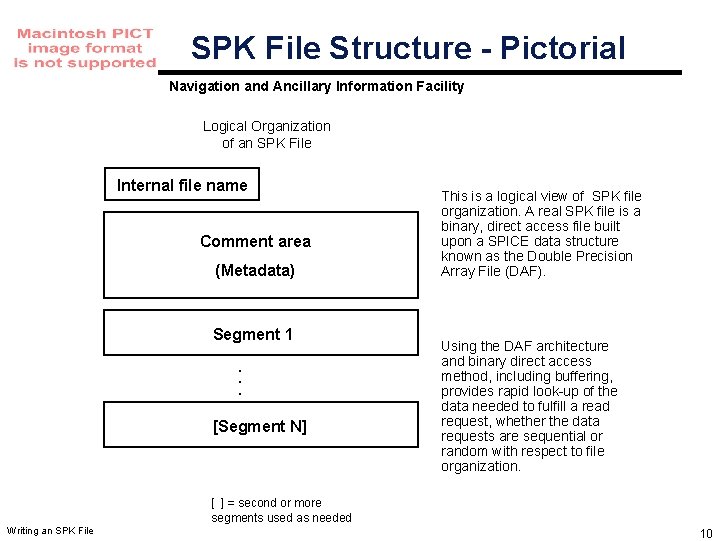
SPK File Structure - Pictorial Navigation and Ancillary Information Facility Logical Organization of an SPK File Internal file name Comment area (Metadata) Segment 1. . . [Segment N] This is a logical view of SPK file organization. A real SPK file is a binary, direct access file built upon a SPICE data structure known as the Double Precision Array File (DAF). Using the DAF architecture and binary direct access method, including buffering, provides rapid look-up of the data needed to fulfill a read request, whether the data requests are sequential or random with respect to file organization. [ ] = second or more segments used as needed Writing an SPK File 10
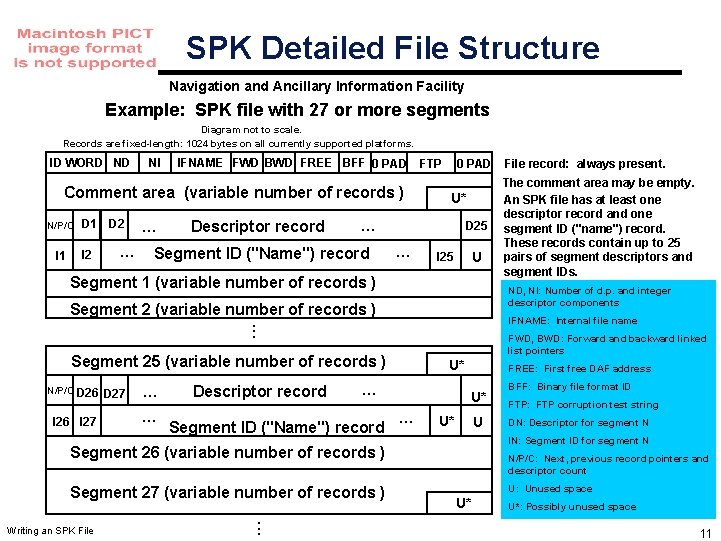
SPK Detailed File Structure Navigation and Ancillary Information Facility Example: SPK file with 27 or more segments Diagram not to scale. Records are fixed-length: 1024 bytes on all currently supported platforms. ID WORD ND NI IFNAME FWD BWD FREE BFF 0 PAD Comment area (variable number of records ) N/P/C I 1 D 2 I 2 … … Descriptor record FTP 0 PAD U* … Segment ID ("Name") record D 25 … U I 25 Segment 1 (variable number of records ) IFNAME: Internal file name . . . FWD, BWD: Forward and backward linked list pointers Segment 25 (variable number of records ) I 26 I 27 D 27 … … Descriptor record U* … Segment ID ("Name") record FREE: First free DAF address U* … U* U Writing an SPK File . . . BFF: Binary file format ID FTP: FTP corruption test string DN: Descriptor for segment N IN: Segment ID for segment N Segment 26 (variable number of records ) Segment 27 (variable number of records ) The comment area may be empty. An SPK file has at least one descriptor record and one segment ID ("name") record. These records contain up to 25 pairs of segment descriptors and segment IDs. ND, NI: Number of d. p. and integer descriptor components Segment 2 (variable number of records ) N/P/C D 26 File record: always present. N/P/C: Next, previous record pointers and descriptor count U: Unused space U* U*: Possibly unused space 11
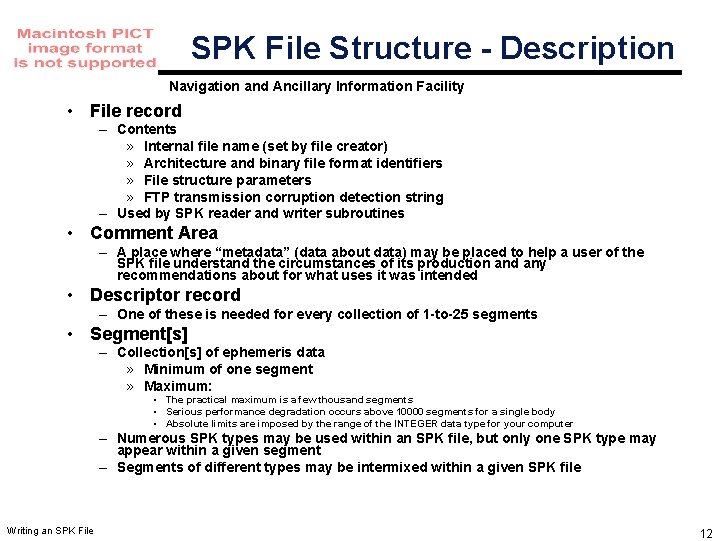
SPK File Structure - Description Navigation and Ancillary Information Facility • File record – Contents » Internal file name (set by file creator) » Architecture and binary file format identifiers » File structure parameters » FTP transmission corruption detection string – Used by SPK reader and writer subroutines • Comment Area – A place where “metadata” (data about data) may be placed to help a user of the SPK file understand the circumstances of its production and any recommendations about for what uses it was intended • Descriptor record – One of these is needed for every collection of 1 -to-25 segments • Segment[s] – Collection[s] of ephemeris data » Minimum of one segment » Maximum: • The practical maximum is a few thousand segments • Serious performance degradation occurs above 10000 segments for a single body • Absolute limits are imposed by the range of the INTEGER data type for your computer – Numerous SPK types may be used within an SPK file, but only one SPK type may appear within a given segment – Segments of different types may be intermixed within a given SPK file Writing an SPK File 12
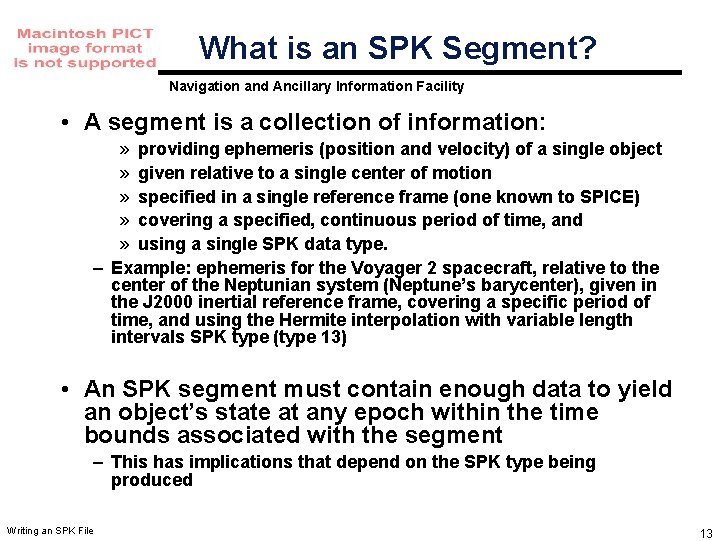
What is an SPK Segment? Navigation and Ancillary Information Facility • A segment is a collection of information: » providing ephemeris (position and velocity) of a single object » given relative to a single center of motion » specified in a single reference frame (one known to SPICE) » covering a specified, continuous period of time, and » using a single SPK data type. – Example: ephemeris for the Voyager 2 spacecraft, relative to the center of the Neptunian system (Neptune’s barycenter), given in the J 2000 inertial reference frame, covering a specific period of time, and using the Hermite interpolation with variable length intervals SPK type (type 13) • An SPK segment must contain enough data to yield an object’s state at any epoch within the time bounds associated with the segment – This has implications that depend on the SPK type being produced Writing an SPK File 13
Navigation and Ancillary Information Facility Discussion applicable to all SPK production methods Writing an SPK File 14
The SPK Family Navigation and Ancillary Information Facility Writing an SPK File 15
Recommended SPK Data Types - 1 Navigation and Ancillary Information Facility • SPK type 2 (Chebyshev polynomials for position, velocity given by differentiation) Used at JPL for planetary ephemerides. • SPK type 3 (Separate Chebyshev polynomials for position and velocity) Used at JPL for satellite ephemerides. • SPK type 5 (Weighted two-body extrapolation) Often used for comets and asteroids, as well as for sparse data sets where a two-body approximation is acceptable. • SPK types 9 and 13 (Sliding-window Lagrange and Hermite interpolation of unequally-spaced states) Often used by non-JPL ephemeris producers and by users of NAIF’s “Make SPK” (MKSPK) application. • SPK type 10 (weighted Space Command two-line element extrapolation) Often used for earth orbiters. • SPK type 14 (Separate Chebyshev polynomials for position and velocity, with variable time steps) This is the most flexible Chebyshev data type. • SPK type 15 (Precessing conic elements) Provides a very compact ephemeris representation; limited to orbits where this type of approximation is valid. • SPK type 17 (Equinoctial elements) Most suited for representation of ephemerides of natural satellites in equatorial or near-equatorial orbits. Writing an SPK File 16
Recommended SPK Data Types - 2 Navigation and Ancillary Information Facility • Each type has certain properties that may promote or limit its usefulness in a particular application. These properties include, but are not limited to the following. » Ability to model the actual ephemeris to be represented with the accuracy required for your application. » Consistency between velocity and derivative of position. » Evaluation speed (performance). » Compactness (file size). » Availability of SPICE software needed to write files of that type. • Users are encouraged to consult with NAIF about the suitability of an SPK type for a particular purpose. Writing an SPK File 17
Creating Multiple SPK Segments Navigation and Ancillary Information Facility • Each SPK segment must have a single object, center of motion, reference frame and SPK data type. • Limiting segment size to 10, 000 states or “packets of ephemeris data” can improve performance when searching within a segment. – Absolute limits on segment size depend on size of INTEGER data type. • For good SPK reading performance, the total number of segments for any given body in a file should be kept under the dimension of the SPKBSR segment buffer, currently set to 30, 000. – More details about reading efficiency are provided at the end of this tutorial. – When reading data from multiple SPK files, a more stringent limit applies: the total number of loaded segments for any body, possibly contributed by multiple files, should be less than the SPKBSR segment buffer size. – For best efficiency, the total number of segments loaded should be less than this buffer size. • One may elect to initiate a new segment (or more) as the means for modeling a propulsive maneuver. – This is because the SPK reader modules will NOT allow interpolation over a segment boundary. • When starting a new segment it is suggested, although not required, that you use a new segment identifier. Writing an SPK File 18
Choosing Polynomial Degree Navigation and Ancillary Information Facility • If you make a type 8 or 9 (Lagrange interpolation) or a type 12 or 13 (Hermite interpolation) SPK file you must specify the degree of the interpolating polynomial that the SPK reader subroutine will use. – This choice needs some consideration about desired accuracy, file size and evaluation speed (performance). – This choice is also affected by the “smoothness” of the orbit data you wish to represent with an SPK file. – The allowed range of degree is 1 -to-15. In addition, to ensure position and velocity continuity over the time span covered by the orbit data: » for types 8 and 9, the polynomial degree must be odd. » for types 12 and 13, the polynomial degree must be 3 -mod-4, meaning degree 3, 7, 11 or 15. Writing an SPK File 19
Navigation and Ancillary Information Facility SPK Production Methods Writing an SPK File
Choices for Making an SPK File Navigation and Ancillary Information Facility • There are two methods available for making an SPK file. 1. Take a data file produced by your own trajectory propagator program and input this into the conversion utility (MKSPK) provided by NAIF that outputs an SPK file. 2. Incorporate the appropriate SPK writer modules (subroutines) into your own code. » Add these routines to your trajectory estimator/ propagator. . . » Write your own “post-processor” conversion utility, similar to MKSPK described above. • Both methods are described in the next few pages. Writing an SPK File 21
Making Your Choice - 1 Navigation and Ancillary Information Facility • Using the MKSPK program provided in the Toolkit could be easiest for “simple” situations. – Provides considerable flexibility for accepting a wide assortment of input data formats. – Does allow one to make multi-segment SPK files when the target, center of motion, reference frame, or SPK type changes, but not as straight forward as it could/should be. » Best done through multiple program executions (although one could be tricky and accomplish this in a single execution). » A future version of MKSPK may better accommodate this. » Note: production of multiple segments in type 5, 8, 9, 12 and 13 files when the amount of input data requires so, is automatically handled. Writing an SPK File 22
Making Your Choice - 2 Navigation and Ancillary Information Facility • Using the SPK “writer” modules found in SPICELIB, CSPICE, and Icy offers the greatest flexibility and user control. – Using these requires that you write your own program. – You’ll likely need to use some additional SPICE modules as well. Writing an SPK File 23
Navigation and Ancillary Information Facility Using NAIF’s MKSPK Application Program Writing an SPK File 24
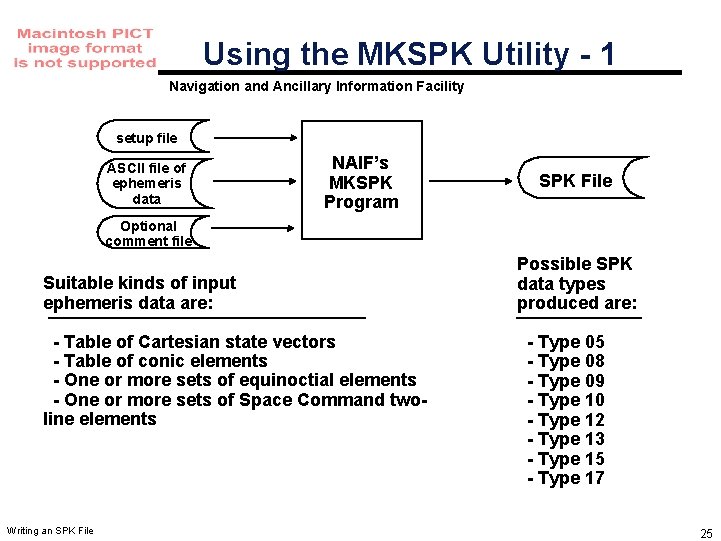
Using the MKSPK Utility - 1 Navigation and Ancillary Information Facility setup file ASCII file of ephemeris data NAIF’s MKSPK Program SPK File Optional comment file Suitable kinds of input ephemeris data are: - Table of Cartesian state vectors - Table of conic elements - One or more sets of equinoctial elements - One or more sets of Space Command twoline elements Writing an SPK File Possible SPK data types produced are: - Type 05 - Type 08 - Type 09 - Type 10 - Type 12 - Type 13 - Type 15 - Type 17 25
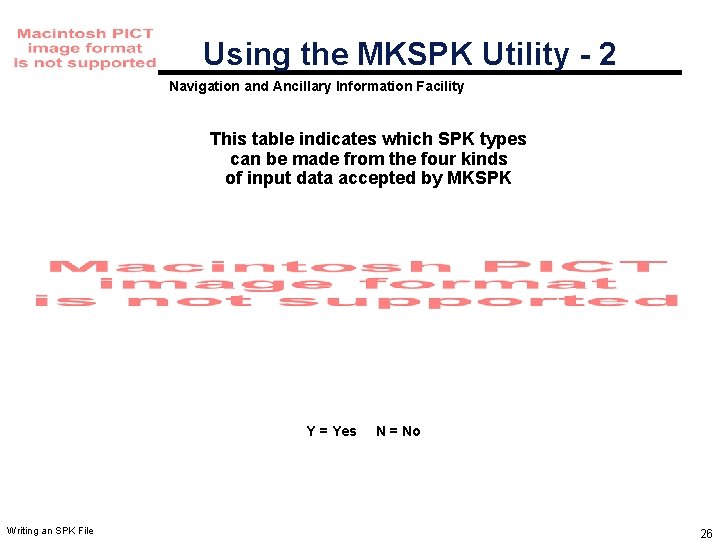
Using the MKSPK Utility - 2 Navigation and Ancillary Information Facility This table indicates which SPK types can be made from the four kinds of input data accepted by MKSPK Y = Yes Writing an SPK File N = No 26
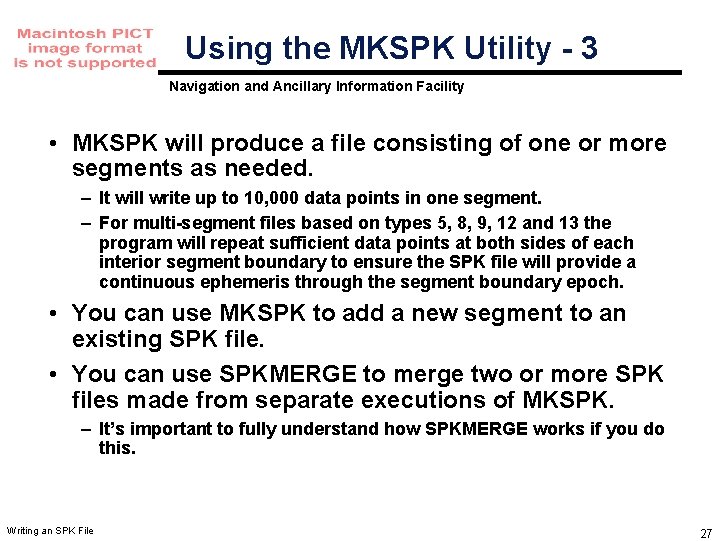
Using the MKSPK Utility - 3 Navigation and Ancillary Information Facility • MKSPK will produce a file consisting of one or more segments as needed. – It will write up to 10, 000 data points in one segment. – For multi-segment files based on types 5, 8, 9, 12 and 13 the program will repeat sufficient data points at both sides of each interior segment boundary to ensure the SPK file will provide a continuous ephemeris through the segment boundary epoch. • You can use MKSPK to add a new segment to an existing SPK file. • You can use SPKMERGE to merge two or more SPK files made from separate executions of MKSPK. – It’s important to fully understand how SPKMERGE works if you do this. Writing an SPK File 27
Using the MKSPK Utility - 4 Navigation and Ancillary Information Facility • MKSPK does not provide direct/specific means for including propulsive maneuvers within an SPK file. – Instead, use either of these two methods. » Append a new SPK segment to an existing SPK file, using MKSPK. » Merge a collection of SPK files, using SPKMERGE. Writing an SPK File 28
Navigation and Ancillary Information Facility Using SPK “Writer” Modules Writing an SPK File 29
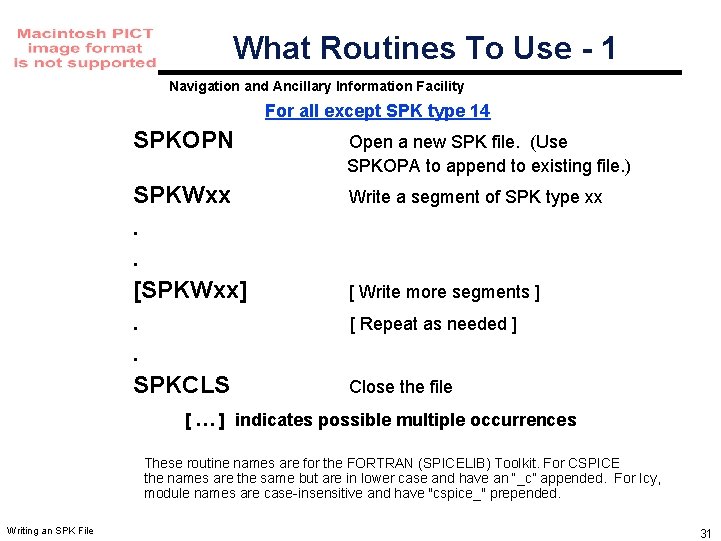
Using SPK Writer Routines Navigation and Ancillary Information Facility • The next several charts outline how to use the“SPK writer” modules available in the Toolkit libraries. – SPICELIB (FORTRAN) – CSPICE (C) » All types supported except Type 1 – Icy (IDL) » All types supported except Type 1, 15, 17, 18 • These routines could be embedded in your existing trajectory propagator program, or they could be used to build a separate conversion program analogous to MKSPK. Writing an SPK File 30
What Routines To Use - 1 Navigation and Ancillary Information Facility For all except SPK type 14 SPKOPN Open a new SPK file. (Use SPKOPA to append to existing file. ) SPKWxx. . [SPKWxx]. . SPKCLS Write a segment of SPK type xx [ Write more segments ] [ Repeat as needed ] Close the file [ … ] indicates possible multiple occurrences These routine names are for the FORTRAN (SPICELIB) Toolkit. For CSPICE the names are the same but are in lower case and have an “_c” appended. For Icy, module names are case-insensitive and have "cspice_" prepended. Writing an SPK File 31
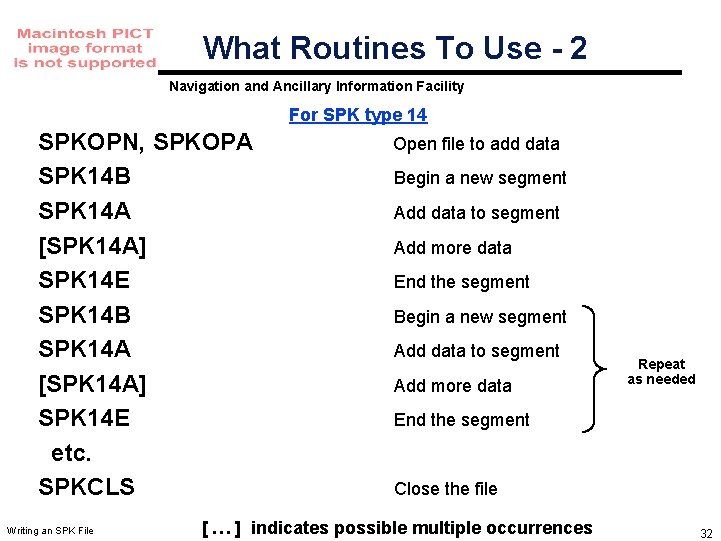
What Routines To Use - 2 Navigation and Ancillary Information Facility For SPK type 14 SPKOPN, SPKOPA SPK 14 B SPK 14 A [SPK 14 A] SPK 14 E etc. SPKCLS Writing an SPK File Open file to add data Begin a new segment Add data to segment Add more data End the segment Begin a new segment Add data to segment Add more data Repeat as needed End the segment Close the file [ … ] indicates possible multiple occurrences 32
Close the SPK File Navigation and Ancillary Information Facility • Once you have completed the addition of all data to your SPK file, be sure to call the SPKCLS routine to close the file. – Failure to properly close an SPK file will result in a problem file having been produced. • This point is emphasized here because it has been a frequent problem. Writing an SPK File 33
Navigation and Ancillary Information Facility Finishing Up Writing an SPK File 34
Not Quite Done Yet Navigation and Ancillary Information Facility • You’ve now used either MKSPK or the appropriate SPK writer routines to produce an SPK file. To complete the job you should consider the following. – Add comments (metadata) to the comment area of the SPK file. » This could have been done during execution of MKSPK. » It can be done after the SPK has been created by using the Toolkit’s “commnt” utility program. – Validate the file before sending it off to your customer. – Consider if there is a need to merge this newly made SPK file with others. • See the next several charts for more information on these subjects. Writing an SPK File 35
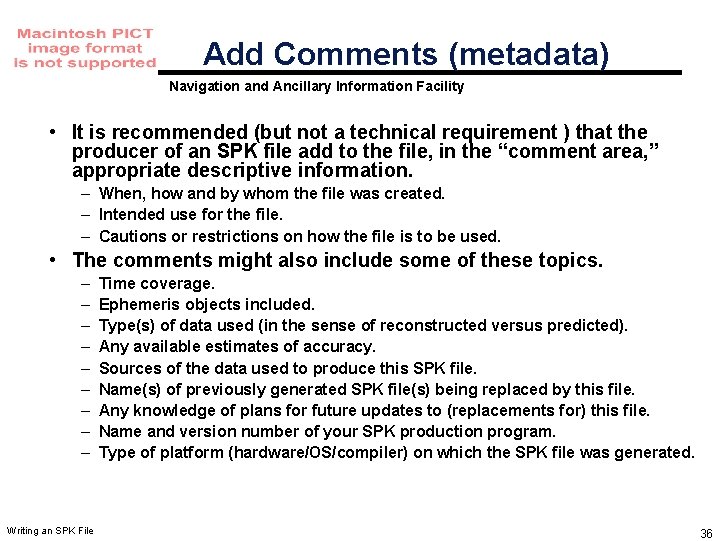
Add Comments (metadata) Navigation and Ancillary Information Facility • It is recommended (but not a technical requirement ) that the producer of an SPK file add to the file, in the “comment area, ” appropriate descriptive information. – When, how and by whom the file was created. – Intended use for the file. – Cautions or restrictions on how the file is to be used. • The comments might also include some of these topics. – – – – – Writing an SPK File Time coverage. Ephemeris objects included. Type(s) of data used (in the sense of reconstructed versus predicted). Any available estimates of accuracy. Sources of the data used to produce this SPK file. Name(s) of previously generated SPK file(s) being replaced by this file. Any knowledge of plans for future updates to (replacements for) this file. Name and version number of your SPK production program. Type of platform (hardware/OS/compiler) on which the SPK file was generated. 36
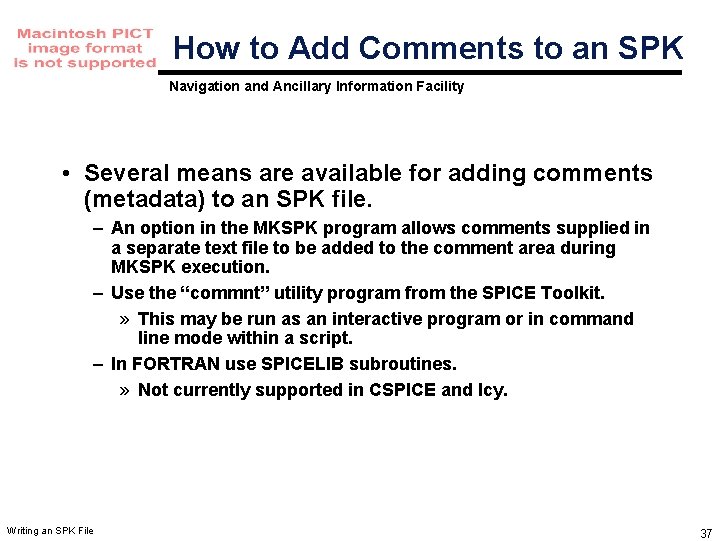
How to Add Comments to an SPK Navigation and Ancillary Information Facility • Several means are available for adding comments (metadata) to an SPK file. – An option in the MKSPK program allows comments supplied in a separate text file to be added to the comment area during MKSPK execution. – Use the “commnt” utility program from the SPICE Toolkit. » This may be run as an interactive program or in command line mode within a script. – In FORTRAN use SPICELIB subroutines. » Not currently supported in CSPICE and Icy. Writing an SPK File 37
Validate the SPK File Navigation and Ancillary Information Facility • Validation of SPK files is recommended – Caution is needed more for one-of-a-kind files than for those generated in a previously tested, unchanging process. – Some SPICE utility programs might help with this validation. » The following are under development at NAIF and will become available in the future. • “CHECKER” - examines the structure and some contents of an SPK file and reports any errors found. • “CMPSPK 2” - reads data from two supposedly similar SPK files and provides statistics on the differences in both position and velocity, mapped into downtrack, cross-track and out-of-plane components. • “DUMP 13” - does an ASCII “dump” of a type 9 or type 13 SPK file. – Consider writing your own validation program. – Caution: successfully running an SPK summary program (e. g. BRIEF or SPACIT) or successfully running the format conversion program (TOXFR or SPACIT) is a positive sign, but is not a fully sufficient test. Writing an SPK File 38
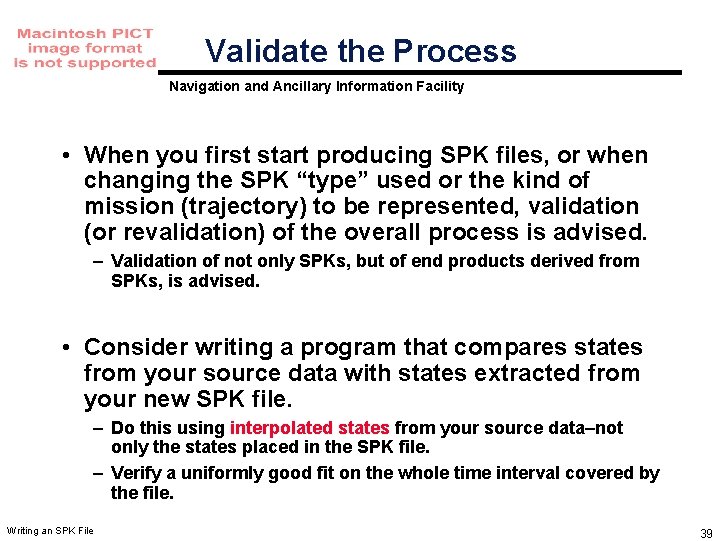
Validate the Process Navigation and Ancillary Information Facility • When you first start producing SPK files, or when changing the SPK “type” used or the kind of mission (trajectory) to be represented, validation (or revalidation) of the overall process is advised. – Validation of not only SPKs, but of end products derived from SPKs, is advised. • Consider writing a program that compares states from your source data with states extracted from your new SPK file. – Do this using interpolated states from your source data–not only the states placed in the SPK file. – Verify a uniformly good fit on the whole time interval covered by the file. Writing an SPK File 39
Make a Merged SPK File ? Navigation and Ancillary Information Facility • Sometimes it is helpful to customers if portions of two or more SPK files are merged into just one. – (Sometimes the opposite is true, so be careful!) • If making a merged product is appropriate, use the SPICE utility SPKMERGE. – Read the SPKMERGE User’s Guide. » Be especially aware of how SPKMERGE directives affect the precedence order of the data being merged. (This is different from the precedence order that applies when one reads an SPK file or files. ) – Carefully examine your results (probably using either BRIEF or SPACIT) to help verify you got what you expected. Writing an SPK File 40
Get Help Navigation and Ancillary Information Facility • Ask JPL’s NAIF team for assistance with: – picking the SPK type to be used – picking the method for producing SPK files – designing tests to validate the process • Ask NAIF for samples of SPK files from other missions that could help you check your process. Writing an SPK File 41
Navigation and Ancillary Information Facility What SPK Type to Use for Interfaces with the DSN? Writing an SPK File
DSN Interface Overview Navigation and Ancillary Information Facility • The version of the DSN “operating system” current as of March 2006 is known as the Network Support System (NSS). This has been in use for many years. – SPK files intended for use in generating DSN/NSS operational metric predicts and/or short-range scheduling must meet some strict limitations, delineated in the next few pages. – When the future DSN “operating system” known as the Service Preparation Subsystem (SPS) can be used, many fewer--if any-restrictions on SPK files are expected. » SPS is expected to become operational around December 2006. » Consult with DSN staff to determine specific requirements. Writing an SPK File 43
What SPK Type to Use for Interfaces with the DSN/NSS? Navigation and Ancillary Information Facility • For short-term scheduling of DSN antennas, and for producing “metric predicts” that control DSN antennas during tracking operations, limitations in the current end-to-end DSN software system (the “NSS”) restrict the SPK choice to only type 13*. – See next pages for additional restrictions and recommendations. • Long range SPICE-based scheduling software not associated with the NSS is not restricted to these two SPK types. *JPL navigation teams can and always do provide type 1 files. This type is unique to JPL software. Writing an SPK File 44
Restrictions for DSN/NSS Use of Type 13 SPKs Navigation and Ancillary Information Facility • These apply only when the DSN’s “NSS” software will be used – The SPK must contain data for a single spacecraft » If the SPK also contains data for natural bodies, it’s ok; these will be ignored – The maximum size of an acceptable SPK file is limited and must be determined by consulting with the DSN. » This limitation appears to stem from: • Disk space limitations on the NSS VAX computer • Slow CPU of the NSS VAX as compared to modern computers – The minimum spacing between states must be at least one second. » This limitation is inherent in the implementation of the NSS metric predicts software and cannot be changed. – The degree specified for the type 13 polynomials must be 3 -mod -4, which means degree 3, 7, 11 or 15. Writing an SPK File 45
Navigation and Ancillary Information Facility Issues Affecting SPK Reading Efficiency The way you write an SPK file could substantially affect how quickly your customers will be able to read the file. Writing an SPK File
SPK Reading: Efficiency Issues - 1 Navigation and Ancillary Information Facility • SPK file creators should design files to support efficient read access. – This requires knowledge of how SPK file attributes impact efficiency. • When you store "large" amounts (>10^5 states or data packets) of ephemeris data in one or more SPK files, SPK reading efficiency may be affected by: – – – SPK segment size Number of segments for a body in one SPK file Number of segments for a body contributed by multiple SPK files The number of loaded segments for all bodies The number of loaded files Writing an SPK File 47
SPK Reading: Efficiency Issues - 2 Navigation and Ancillary Information Facility • Segment size – When a segment contains more than 10, 000 states or data packets, the SPK readers will generally take longer to search the segment for requested data. » When the segment is larger than this size, more records are read to look up segment directory information. If these records are not buffered, more physical records are read from the SPK file. – There is a trade-off between segment size and numbers of segments and files. » It can be preferable to have large segments rather than have "too many" segments or files. (Read on) Writing an SPK File 48
SPK Reading: Efficiency Issues - 3 Navigation and Ancillary Information Facility • Number of segments for a body in one SPK file – An SPK file MUST not contain more segments for one body than can be "buffered" at one time. » The SPK reading system buffers coverage descriptions ("segment descriptors") for segments it has examined to satisfy previous requests for state data. • Don't confuse descriptor buffering with data buffering. – The SPK reading system also buffers segment DATA, as opposed to segment descriptors, but this is not relevant to this discussion. » One fixed-size buffer is used for all SPK segments. • The size of this buffer is given by the parameter "STSIZE, " declared in the SPKBSR suite of routines. • STSIZE is currently set by NAIF to 30, 000. – NAIF recommends that users NOT change this parameter, since maintenance problems may result. » Unsurprisingly, the system works best when all needed segment descriptors are buffered simultaneously. Writing an SPK File continues 49
SPK Reading: Efficiency Issues - 4 Navigation and Ancillary Information Facility • Number of segments for a body in one SPK file, continued: » The buffering scheme is "lazy": no descriptors are buffered for segments that haven't been examined. • But when an SPK file is searched for data for a specified body, descriptor data for ALL segments in the file for that body are buffered. » The buffering algorithm can "make room" in the buffer by discarding unneeded, buffered descriptor data. • A "least cost" algorithm decides which buffered data to discard. » When more buffer room is needed than can be found: • The SPK reading system reads data directly from SPK files without buffering descriptor information. • This is NOT an error case: the SPK system will continue to provide correct answers. • BUT: the system will run VERY SLOWLY. – This situation is analogous to "thrashing" in a virtual-memory operating system. – If buffer overflow occurs frequently, the SPK reading system may be too slow to be of practical use. Writing an SPK File 50
SPK Reading: Efficiency Issues - 5 Navigation and Ancillary Information Facility • Number of segments for a body contributed by multiple SPK files: – Buffer overflow can occur if too many segments for one body are contributed by multiple loaded SPK files. » Overflow can take longer to occur than in the single-SPK case, due to lazy buffering: files that haven't been searched don't consume buffer space. • Thus an impending overflow problem may not be detected early in a program run. – User applications can avoid buffer overflow if data are appropriately spread across multiple SPK files. » Applications can avoid buffer overflow by: • loading only those files of immediate interest • unloading files once they're no longer needed Writing an SPK File 51
SPK Reading: Efficiency Issues - 6 Navigation and Ancillary Information Facility • Number of segments for all bodies, contributed by all loaded SPK files: – Buffer overflow does not result from loading SPK files contributing more than STSIZE segments for different bodies. – However, if the total number of loaded segments for bodies of interest exceeds STSIZE, thrashing can occur as descriptor data are repeatedly discarded from the buffer and then re-read. » Loaded segments for bodies for which data are not requested do not contribute to the problem. – For best efficiency, load only files contributing fewer than a total of STSIZE segments for all bodies of interest. » When more than STSIZE segments are needed, applications should process data in batches: unload files containing unneeded data in order to make room for new files. Writing an SPK File 52
SPK Reading: Efficiency Issues - 7 Navigation and Ancillary Information Facility • Number of loaded SPK files: – Up to 1000 SPK files may be loaded at one time by an application. » The "1000" limit applies to DAF-based files, so loaded C-kernels and binary PCK kernels count against this limit. – But loading large numbers of SPK files hurts efficiency: » Since operating systems usually allow a process to open much fewer than 1000 files, the SPK system must open and close files via the host system's file I/O API in order to provide a "virtual" view of 1000 open files. • The more such file I/O, the slower an application runs. » Loading a large number of SPK files could result in a buffering problem if too many segments are loaded for bodies of interest. Writing an SPK File 53
SPK Reading: Efficiency Issues - 8 Navigation and Ancillary Information Facility • Recommendations – Limit segment counts to avoid buffer overflow and thrashing » Never have more than STSIZE segments for one body in an SPK file and never have more than STSIZE segments for one body loaded simultaneously. » Don't require users to have more than STSIZE segments loaded at one time. » If necessary, use larger segments to enable smaller segment counts. – Consider distributing SPK data across multiple files: » so as to make selective SPK loading convenient • facilitate processing data in batches » so that loading very large numbers of SPK files at once is unnecessary Writing an SPK File 54
SPK Reading: Further Usability Issues Navigation and Ancillary Information Facility • We've discussed reading efficiency in terms of application execution speed; other usability concerns include: – ease with which files can be transferred between systems – simplicity of file management required of user applications – ease with which files of interest can be identified by users, both for current use and in an archival setting Writing an SPK File 55