CIS 185 CCNP ROUTE Ch 8 Implementing IPv



![R 1# show ipv 6 route eigrp D 3: 1: : /64 [90/2297856] via](https://slidetodoc.com/presentation_image_h/e7e7c8d231c1c6cdcf43c4deb0371ee1/image-34.jpg "R 1# show ipv 6 route eigrp D 3: 1: : /64 [90/2297856] via")

![R 1# show ipv 6 route rip R 24: : /64 [120/2] via FE](https://slidetodoc.com/presentation_image_h/e7e7c8d231c1c6cdcf43c4deb0371ee1/image-61.jpg "R 1# show ipv 6 route rip R 24: : /64 [120/2] via FE")
![L 104: : 1/64 R 3# show ipv 6 route | 10[14]: : /64](https://slidetodoc.com/presentation_image_h/e7e7c8d231c1c6cdcf43c4deb0371ee1/image-69.jpg "L 104: : 1/64 R 3# show ipv 6 route | 10[14]: : /64")
- Slides: 81
CIS 185 CCNP ROUTE Ch. 8 Implementing IPv 6 – Part 2 Rick Graziani Cabrillo College graziani@cabrillo. edu Last Updated: Fall 2010
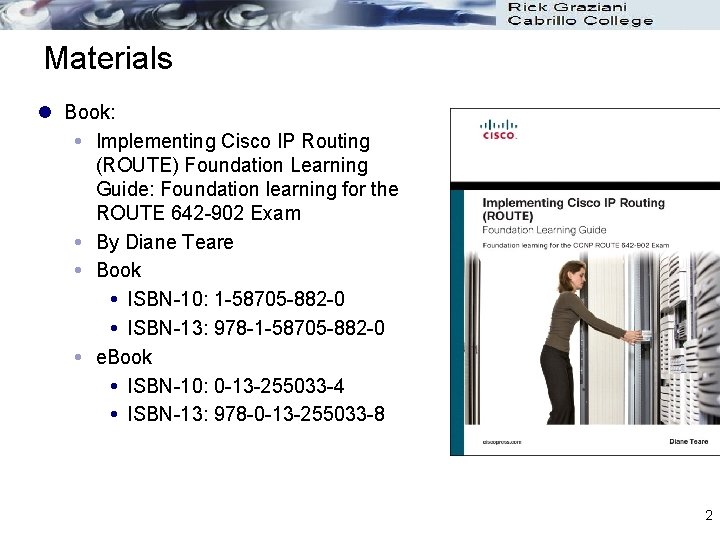
Materials l Book: Implementing Cisco IP Routing (ROUTE) Foundation Learning Guide: Foundation learning for the ROUTE 642 -902 Exam By Diane Teare Book ISBN-10: 1 -58705 -882 -0 ISBN-13: 978 -1 -58705 -882 -0 e. Book ISBN-10: 0 -13 -255033 -4 ISBN-13: 978 -0 -13 -255033 -8 2
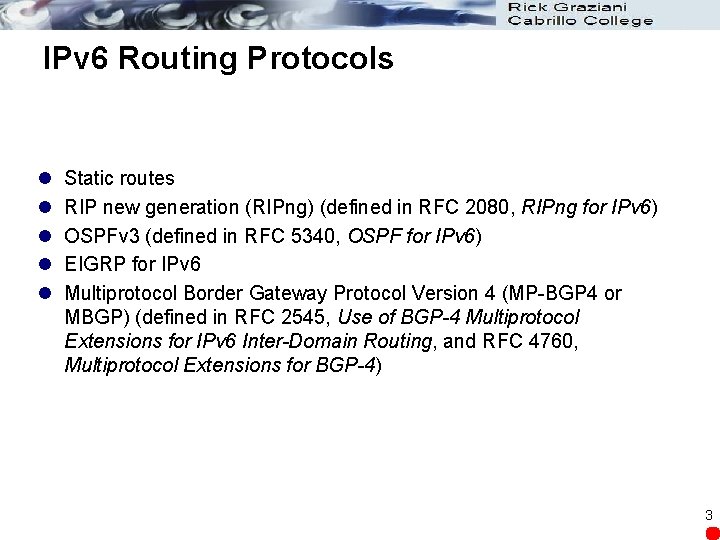
IPv 6 Routing Protocols l l l Static routes RIP new generation (RIPng) (defined in RFC 2080, RIPng for IPv 6) OSPFv 3 (defined in RFC 5340, OSPF for IPv 6) EIGRP for IPv 6 Multiprotocol Border Gateway Protocol Version 4 (MP-BGP 4 or MBGP) (defined in RFC 2545, Use of BGP-4 Multiprotocol Extensions for IPv 6 Inter-Domain Routing, and RFC 4760, Multiprotocol Extensions for BGP-4) 3
Router(config)# ipv 6 unicast-routing l Ipv 6 unicast-routing global configuration command l enables IPv 6 routing l Required before any ipv 6 routing protocol can be configured 4
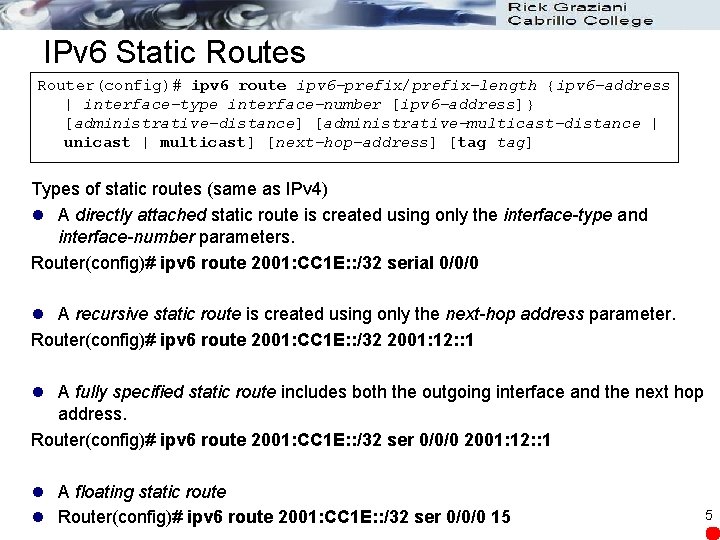
IPv 6 Static Routes Router(config)# ipv 6 route ipv 6 -prefix/prefix-length {ipv 6 -address | interface-type interface-number [ipv 6 -address]} [administrative-distance] [administrative-multicast-distance | unicast | multicast] [next-hop-address] [tag tag] Types of static routes (same as IPv 4) l A directly attached static route is created using only the interface-type and interface-number parameters. Router(config)# ipv 6 route 2001: CC 1 E: : /32 serial 0/0/0 l A recursive static route is created using only the next-hop address parameter. Router(config)# ipv 6 route 2001: CC 1 E: : /32 2001: 12: : 1 l A fully specified static route includes both the outgoing interface and the next hop address. Router(config)# ipv 6 route 2001: CC 1 E: : /32 ser 0/0/0 2001: 12: : 1 l A floating static route l Router(config)# ipv 6 route 2001: CC 1 E: : /32 ser 0/0/0 15 5
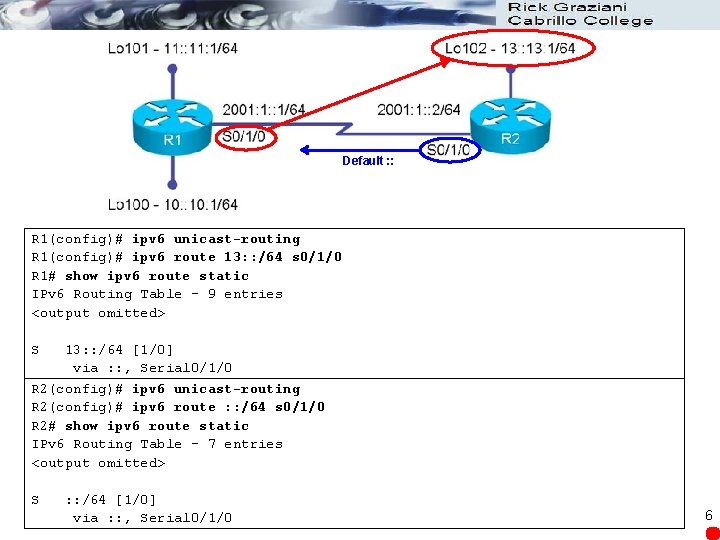
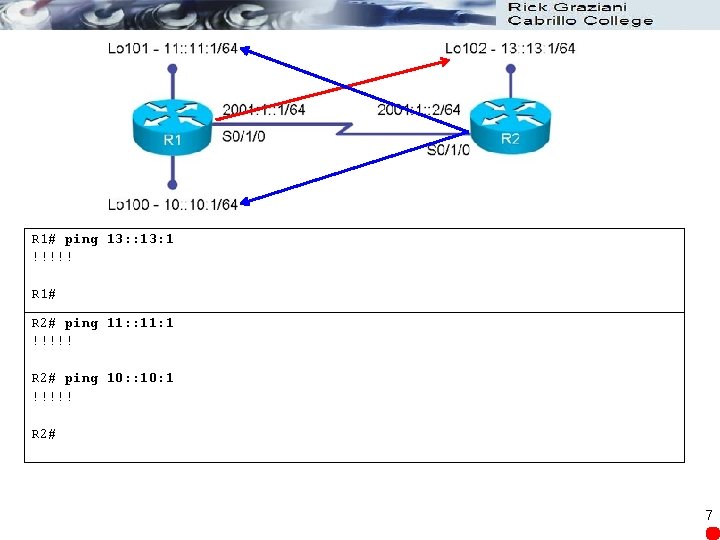
Default : : R 1(config)# ipv 6 unicast-routing R 1(config)# ipv 6 route 13: : /64 s 0/1/0 R 1# show ipv 6 route static IPv 6 Routing Table - 9 entries <output omitted> S 13: : /64 [1/0] via : : , Serial 0/1/0 R 2(config)# ipv 6 unicast-routing R 2(config)# ipv 6 route : : /64 s 0/1/0 R 2# show ipv 6 route static IPv 6 Routing Table - 7 entries <output omitted> S : : /64 [1/0] via : : , Serial 0/1/0 6
R 1# ping 13: : 13: 1 !!!!! R 1# R 2# ping 11: : 11: 1 !!!!! R 2# ping 10: : 10: 1 !!!!! R 2# 7
RIPng (the Next Generation) For Enterprise Networks 8
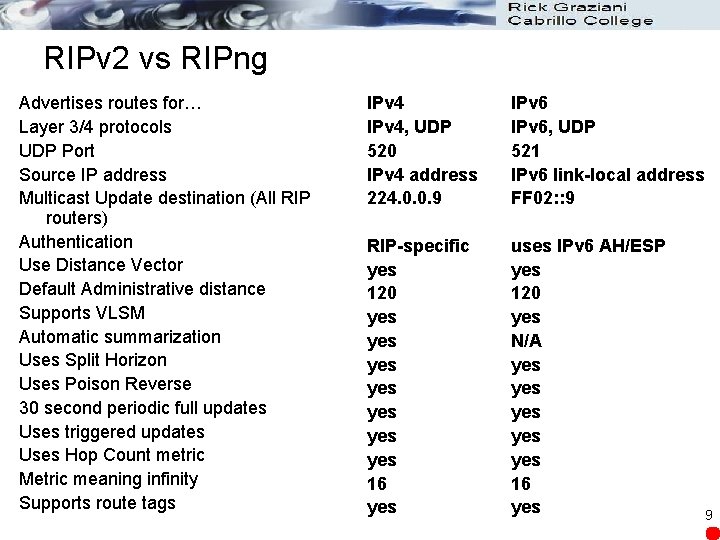
RIPv 2 vs RIPng Advertises routes for… Layer 3/4 protocols UDP Port Source IP address Multicast Update destination (All RIP routers) Authentication Use Distance Vector Default Administrative distance Supports VLSM Automatic summarization Uses Split Horizon Uses Poison Reverse 30 second periodic full updates Uses triggered updates Uses Hop Count metric Metric meaning infinity Supports route tags IPv 4, UDP 520 IPv 4 address 224. 0. 0. 9 IPv 6, UDP 521 IPv 6 link-local address FF 02: : 9 RIP-specific yes 120 yes yes 16 yes uses IPv 6 AH/ESP yes 120 yes N/A yes yes yes 16 yes 9
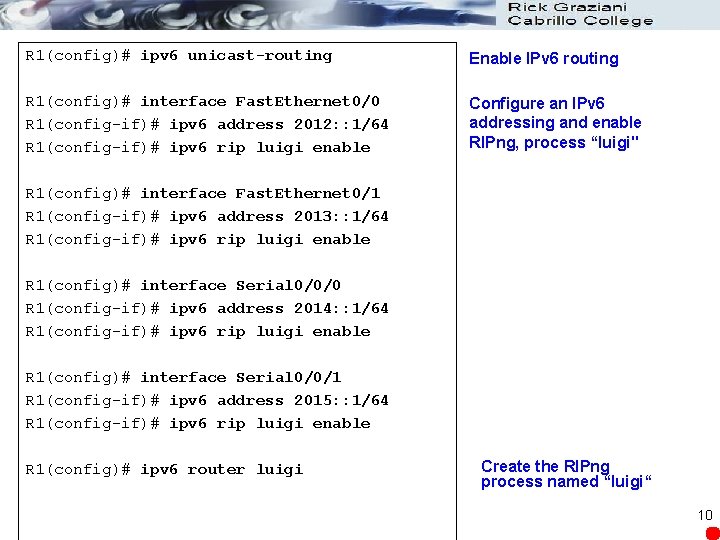
R 1(config)# ipv 6 unicast-routing Enable IPv 6 routing R 1(config)# interface Fast. Ethernet 0/0 R 1(config-if)# ipv 6 address 2012: : 1/64 R 1(config-if)# ipv 6 rip luigi enable Configure an IPv 6 addressing and enable RIPng, process “luigi" R 1(config)# interface Fast. Ethernet 0/1 R 1(config-if)# ipv 6 address 2013: : 1/64 R 1(config-if)# ipv 6 rip luigi enable R 1(config)# interface Serial 0/0/0 R 1(config-if)# ipv 6 address 2014: : 1/64 R 1(config-if)# ipv 6 rip luigi enable R 1(config)# interface Serial 0/0/1 R 1(config-if)# ipv 6 address 2015: : 1/64 R 1(config-if)# ipv 6 rip luigi enable R 1(config)# ipv 6 router luigi Create the RIPng process named “luigi“ 10
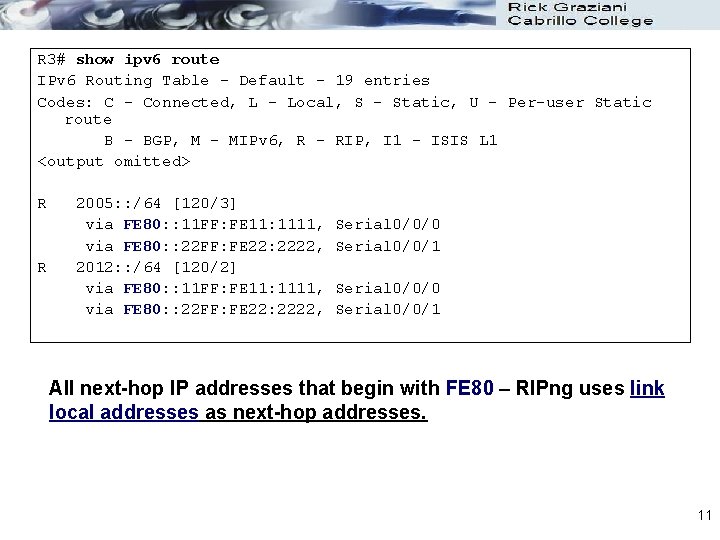
R 3# show ipv 6 route IPv 6 Routing Table - Default - 19 entries Codes: C - Connected, L - Local, S - Static, U - Per-user Static route B - BGP, M - MIPv 6, R - RIP, I 1 - ISIS L 1 <output omitted> R R 2005: : /64 [120/3] via FE 80: : 11 FF: FE 11: 1111, via FE 80: : 22 FF: FE 22: 2222, 2012: : /64 [120/2] via FE 80: : 11 FF: FE 11: 1111, via FE 80: : 22 FF: FE 22: 2222, Serial 0/0/0 Serial 0/0/1 All next-hop IP addresses that begin with FE 80 – RIPng uses link local addresses as next-hop addresses. 11
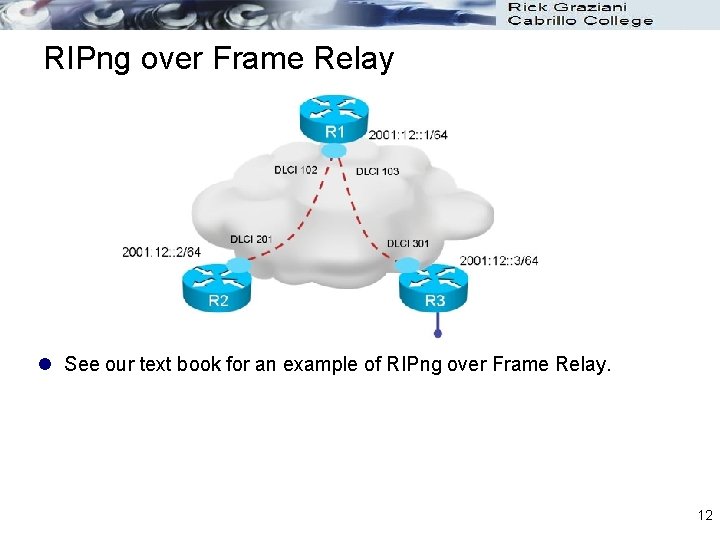
RIPng over Frame Relay l See our text book for an example of RIPng over Frame Relay. 12
OSPFv 3 13
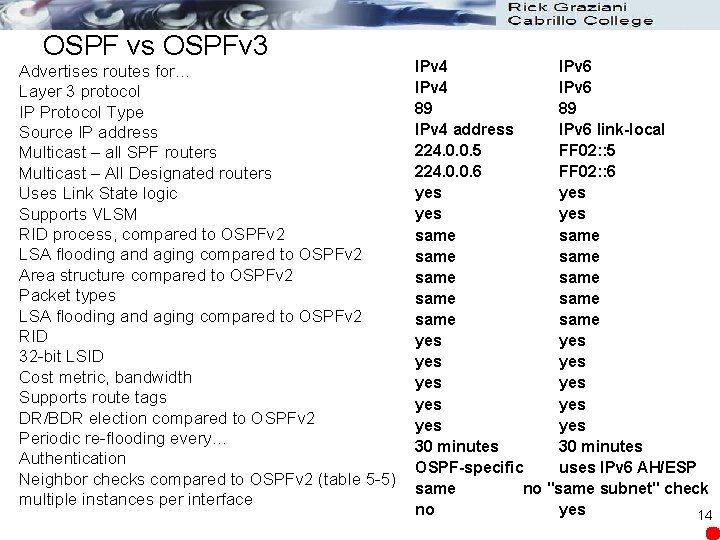
OSPF vs OSPFv 3 Advertises routes for… Layer 3 protocol IP Protocol Type Source IP address Multicast – all SPF routers Multicast – All Designated routers Uses Link State logic Supports VLSM RID process, compared to OSPFv 2 LSA flooding and aging compared to OSPFv 2 Area structure compared to OSPFv 2 Packet types LSA flooding and aging compared to OSPFv 2 RID 32 -bit LSID Cost metric, bandwidth Supports route tags DR/BDR election compared to OSPFv 2 Periodic re-flooding every… Authentication Neighbor checks compared to OSPFv 2 (table 5 -5) multiple instances per interface IPv 4 IPv 6 89 89 IPv 4 address IPv 6 link-local 224. 0. 0. 5 FF 02: : 5 224. 0. 0. 6 FF 02: : 6 yes yes same same same yes yes yes 30 minutes OSPF-specific uses IPv 6 AH/ESP same no "same subnet" check no yes 14
OSPF Version 3 (OSPFv 3) (RFC 2740) l Router ID: OSPFv 3 uses the same process as OSPFv 2 including an IPv 4 address. If there are no IPv 4 addresses configured, the router ID (IPv 4 address) must be explicitly configured. l Similar to OSPF for IPv 4: Same mechanisms, but a major rewrite of the internals of the protocol l Updated features for IPv 6: Every IPv 4 -specific semantic is removed Carry IPv 6 addresses Link-local addresses used as source 15
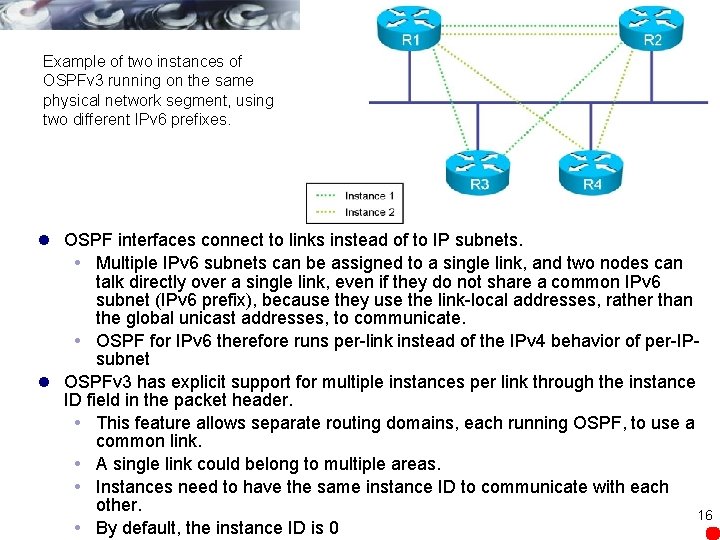
Example of two instances of OSPFv 3 running on the same physical network segment, using two different IPv 6 prefixes. l OSPF interfaces connect to links instead of to IP subnets. Multiple IPv 6 subnets can be assigned to a single link, and two nodes can talk directly over a single link, even if they do not share a common IPv 6 subnet (IPv 6 prefix), because they use the link-local addresses, rather than the global unicast addresses, to communicate. OSPF for IPv 6 therefore runs per-link instead of the IPv 4 behavior of per-IPsubnet l OSPFv 3 has explicit support for multiple instances per link through the instance ID field in the packet header. This feature allows separate routing domains, each running OSPF, to use a common link. A single link could belong to multiple areas. Instances need to have the same instance ID to communicate with each other. 16 By default, the instance ID is 0
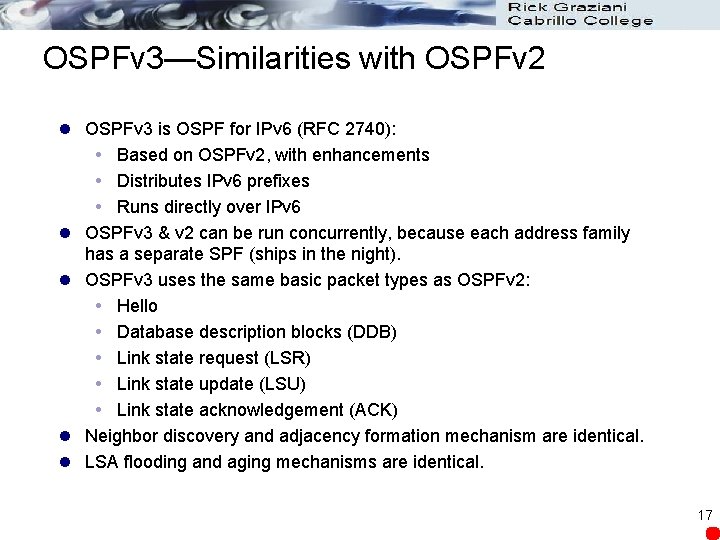
OSPFv 3—Similarities with OSPFv 2 l OSPFv 3 is OSPF for IPv 6 (RFC 2740): Based on OSPFv 2, with enhancements Distributes IPv 6 prefixes Runs directly over IPv 6 l OSPFv 3 & v 2 can be run concurrently, because each address family has a separate SPF (ships in the night). l OSPFv 3 uses the same basic packet types as OSPFv 2: Hello Database description blocks (DDB) Link state request (LSR) Link state update (LSU) Link state acknowledgement (ACK) l Neighbor discovery and adjacency formation mechanism are identical. l LSA flooding and aging mechanisms are identical. 17
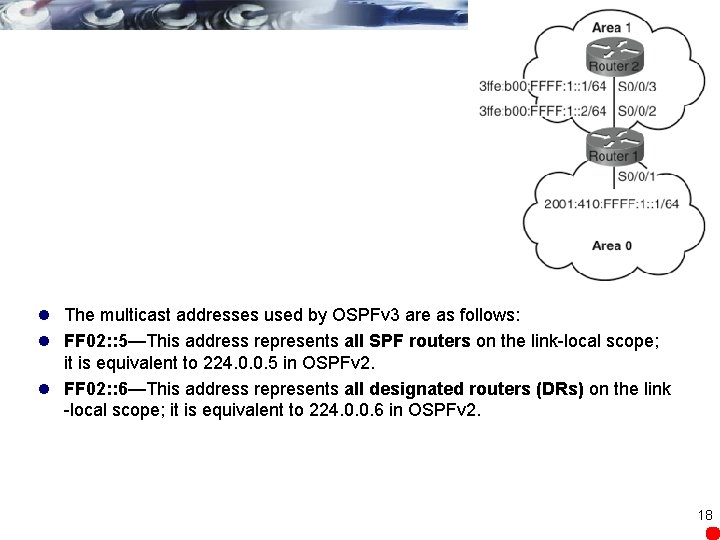
l The multicast addresses used by OSPFv 3 are as follows: l FF 02: : 5—This address represents all SPF routers on the link-local scope; it is equivalent to 224. 0. 0. 5 in OSPFv 2. l FF 02: : 6—This address represents all designated routers (DRs) on the link -local scope; it is equivalent to 224. 0. 0. 6 in OSPFv 2. 18
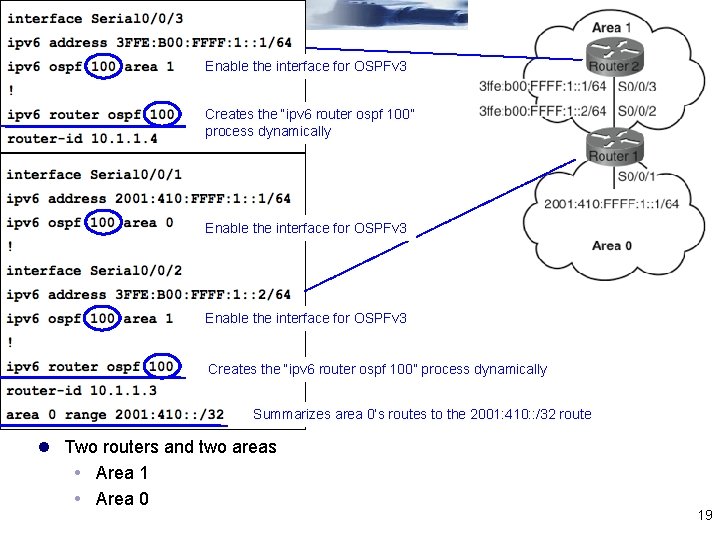
Enable the interface for OSPFv 3 Creates the “ipv 6 router ospf 100” process dynamically Summarizes area 0’s routes to the 2001: 410: : /32 route l Two routers and two areas Area 1 Area 0 19
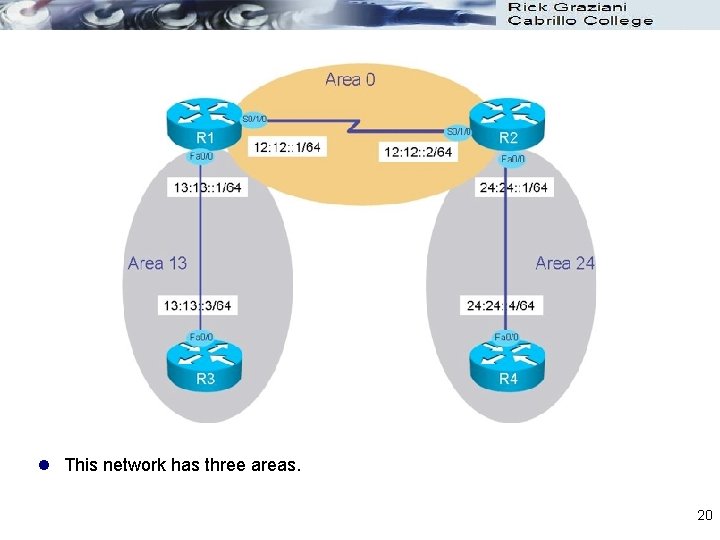
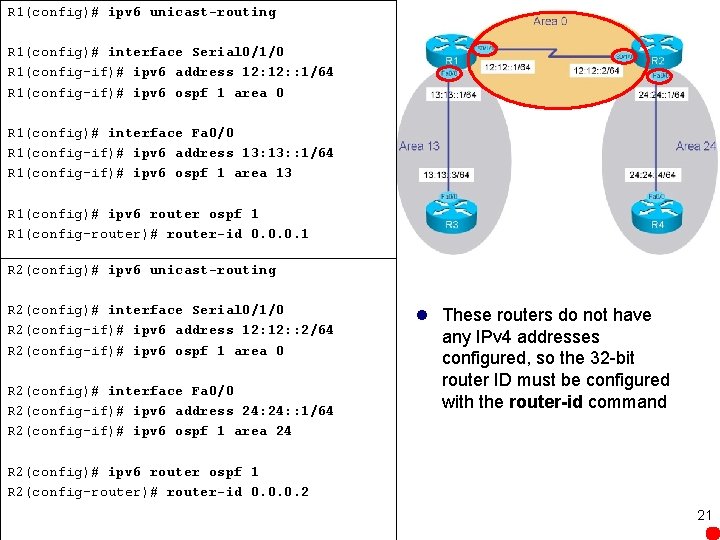
l This network has three areas. 20
R 1(config)# ipv 6 unicast-routing R 1(config)# interface Serial 0/1/0 R 1(config-if)# ipv 6 address 12: : 1/64 R 1(config-if)# ipv 6 ospf 1 area 0 R 1(config)# interface Fa 0/0 R 1(config-if)# ipv 6 address 13: : 1/64 R 1(config-if)# ipv 6 ospf 1 area 13 R 1(config)# ipv 6 router ospf 1 R 1(config-router)# router-id 0. 0. 0. 1 R 2(config)# ipv 6 unicast-routing R 2(config)# interface Serial 0/1/0 R 2(config-if)# ipv 6 address 12: : 2/64 R 2(config-if)# ipv 6 ospf 1 area 0 R 2(config)# interface Fa 0/0 R 2(config-if)# ipv 6 address 24: : 1/64 R 2(config-if)# ipv 6 ospf 1 area 24 l These routers do not have any IPv 4 addresses configured, so the 32 -bit router ID must be configured with the router-id command R 2(config)# ipv 6 router ospf 1 R 2(config-router)# router-id 0. 0. 0. 2 21
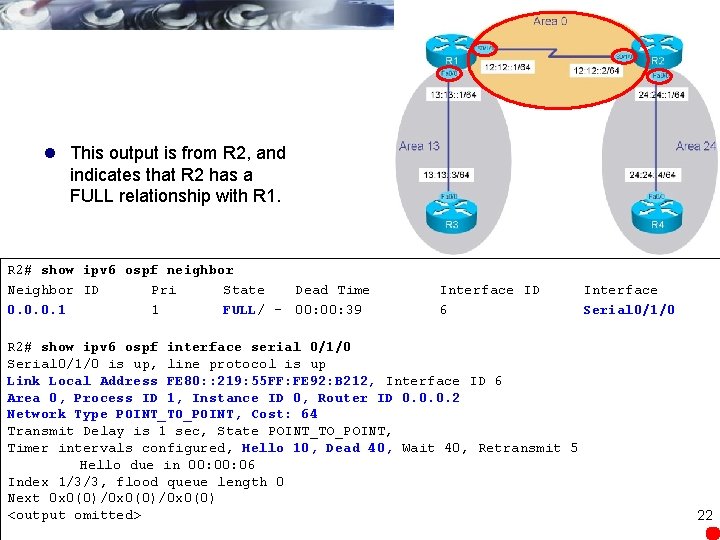
l This output is from R 2, and indicates that R 2 has a FULL relationship with R 1. R 2# show ipv 6 ospf neighbor Neighbor ID Pri State Dead Time 0. 0. 0. 1 1 FULL/ - 00: 39 Interface ID 6 R 2# show ipv 6 ospf interface serial 0/1/0 Serial 0/1/0 is up, line protocol is up Link Local Address FE 80: : 219: 55 FF: FE 92: B 212, Interface ID 6 Area 0, Process ID 1, Instance ID 0, Router ID 0. 0. 0. 2 Network Type POINT_TO_POINT, Cost: 64 Transmit Delay is 1 sec, State POINT_TO_POINT, Timer intervals configured, Hello 10, Dead 40, Wait 40, Retransmit 5 Hello due in 00: 06 Index 1/3/3, flood queue length 0 Next 0 x 0(0)/0 x 0(0) <output omitted> Interface Serial 0/1/0 22
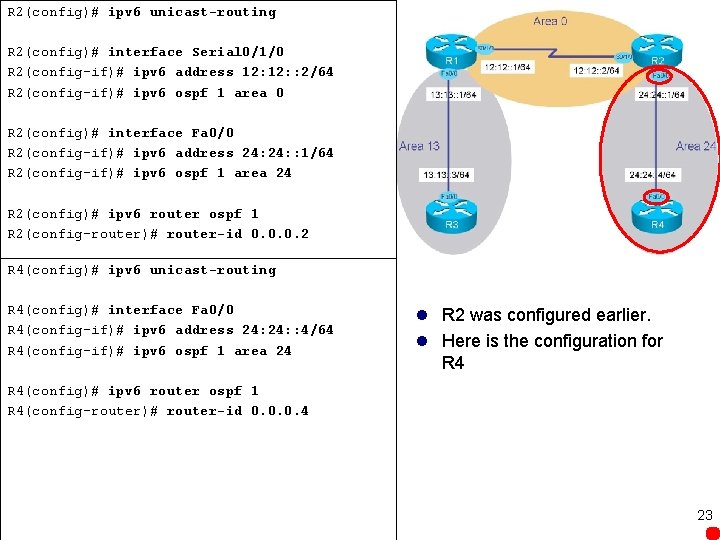
R 2(config)# ipv 6 unicast-routing R 2(config)# interface Serial 0/1/0 R 2(config-if)# ipv 6 address 12: : 2/64 R 2(config-if)# ipv 6 ospf 1 area 0 R 2(config)# interface Fa 0/0 R 2(config-if)# ipv 6 address 24: : 1/64 R 2(config-if)# ipv 6 ospf 1 area 24 R 2(config)# ipv 6 router ospf 1 R 2(config-router)# router-id 0. 0. 0. 2 R 4(config)# ipv 6 unicast-routing R 4(config)# interface Fa 0/0 R 4(config-if)# ipv 6 address 24: : 4/64 R 4(config-if)# ipv 6 ospf 1 area 24 l R 2 was configured earlier. l Here is the configuration for R 4(config)# ipv 6 router ospf 1 R 4(config-router)# router-id 0. 0. 0. 4 23
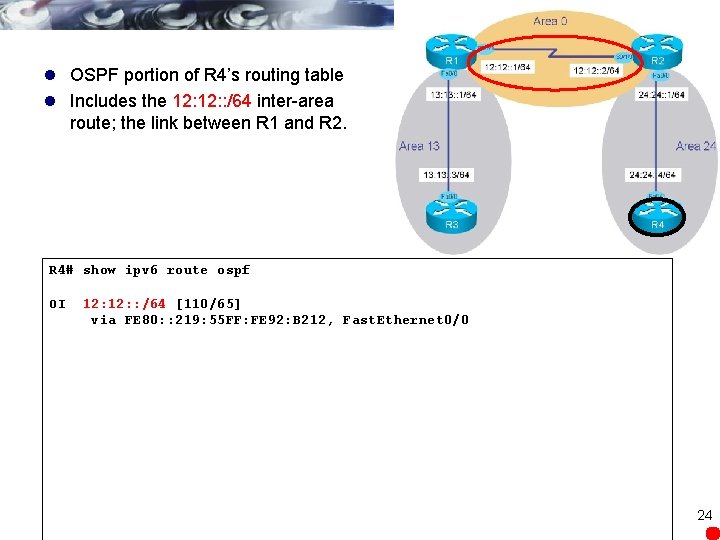
l OSPF portion of R 4’s routing table l Includes the 12: : /64 inter-area route; the link between R 1 and R 2. R 4# show ipv 6 route ospf OI 12: : /64 [110/65] via FE 80: : 219: 55 FF: FE 92: B 212, Fast. Ethernet 0/0 24
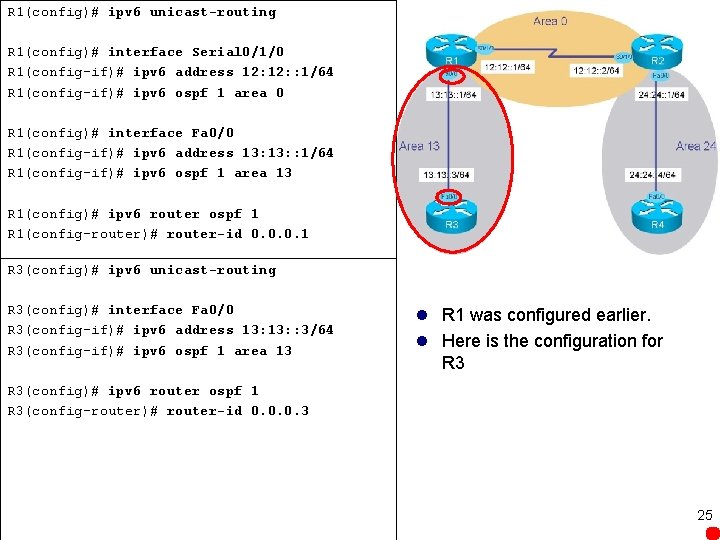
R 1(config)# ipv 6 unicast-routing R 1(config)# interface Serial 0/1/0 R 1(config-if)# ipv 6 address 12: : 1/64 R 1(config-if)# ipv 6 ospf 1 area 0 R 1(config)# interface Fa 0/0 R 1(config-if)# ipv 6 address 13: : 1/64 R 1(config-if)# ipv 6 ospf 1 area 13 R 1(config)# ipv 6 router ospf 1 R 1(config-router)# router-id 0. 0. 0. 1 R 3(config)# ipv 6 unicast-routing R 3(config)# interface Fa 0/0 R 3(config-if)# ipv 6 address 13: : 3/64 R 3(config-if)# ipv 6 ospf 1 area 13 l R 1 was configured earlier. l Here is the configuration for R 3(config)# ipv 6 router ospf 1 R 3(config-router)# router-id 0. 0. 0. 3 25
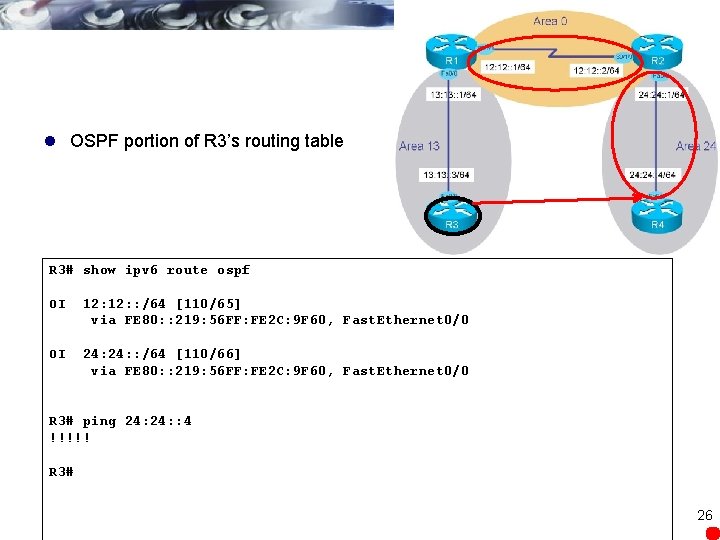
l OSPF portion of R 3’s routing table R 3# show ipv 6 route ospf OI 12: : /64 [110/65] via FE 80: : 219: 56 FF: FE 2 C: 9 F 60, Fast. Ethernet 0/0 OI 24: : /64 [110/66] via FE 80: : 219: 56 FF: FE 2 C: 9 F 60, Fast. Ethernet 0/0 R 3# ping 24: : 4 !!!!! R 3# 26
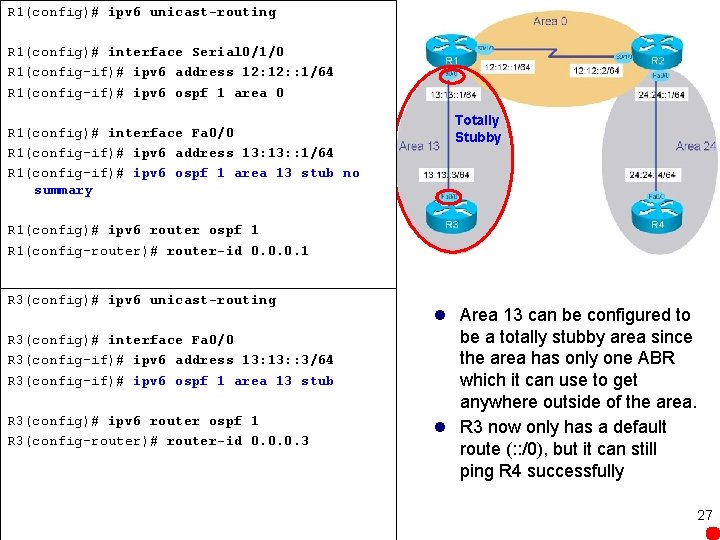
R 1(config)# ipv 6 unicast-routing R 1(config)# interface Serial 0/1/0 R 1(config-if)# ipv 6 address 12: : 1/64 R 1(config-if)# ipv 6 ospf 1 area 0 R 1(config)# interface Fa 0/0 R 1(config-if)# ipv 6 address 13: : 1/64 R 1(config-if)# ipv 6 ospf 1 area 13 stub no summary Totally Stubby R 1(config)# ipv 6 router ospf 1 R 1(config-router)# router-id 0. 0. 0. 1 R 3(config)# ipv 6 unicast-routing R 3(config)# interface Fa 0/0 R 3(config-if)# ipv 6 address 13: : 3/64 R 3(config-if)# ipv 6 ospf 1 area 13 stub R 3(config)# ipv 6 router ospf 1 R 3(config-router)# router-id 0. 0. 0. 3 l Area 13 can be configured to be a totally stubby area since the area has only one ABR which it can use to get anywhere outside of the area. l R 3 now only has a default route (: : /0), but it can still ping R 4 successfully 27
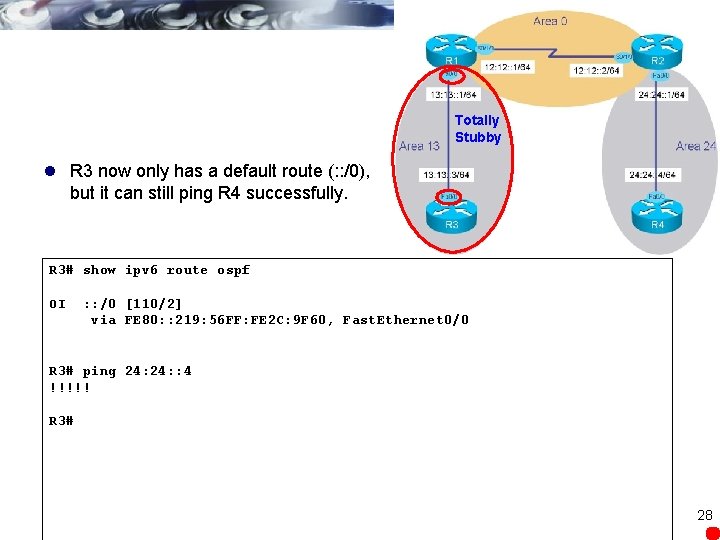
Totally Stubby l R 3 now only has a default route (: : /0), but it can still ping R 4 successfully. R 3# show ipv 6 route ospf OI : : /0 [110/2] via FE 80: : 219: 56 FF: FE 2 C: 9 F 60, Fast. Ethernet 0/0 R 3# ping 24: : 4 !!!!! R 3# 28
EIGRP for IPv 6 For Winnebago Networks 29
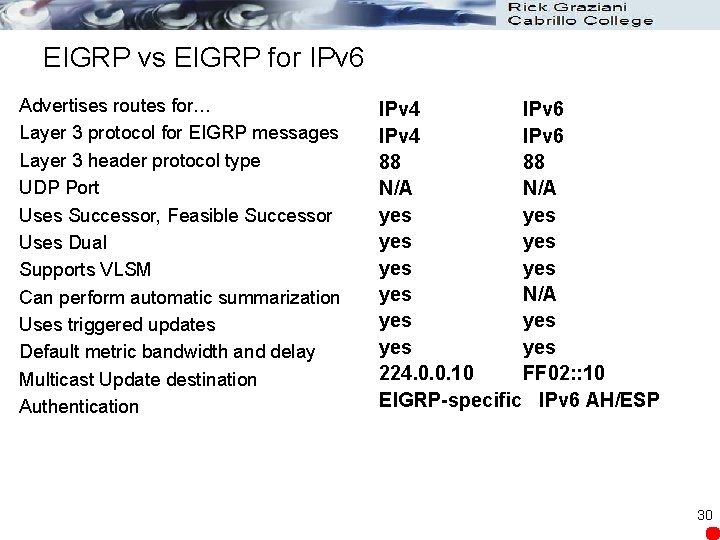
EIGRP vs EIGRP for IPv 6 Advertises routes for… Layer 3 protocol for EIGRP messages Layer 3 header protocol type UDP Port Uses Successor, Feasible Successor Uses Dual Supports VLSM Can perform automatic summarization Uses triggered updates Default metric bandwidth and delay Multicast Update destination Authentication IPv 4 IPv 6 88 88 N/A yes yes N/A yes yes 224. 0. 0. 10 FF 02: : 10 EIGRP-specific IPv 6 AH/ESP 30
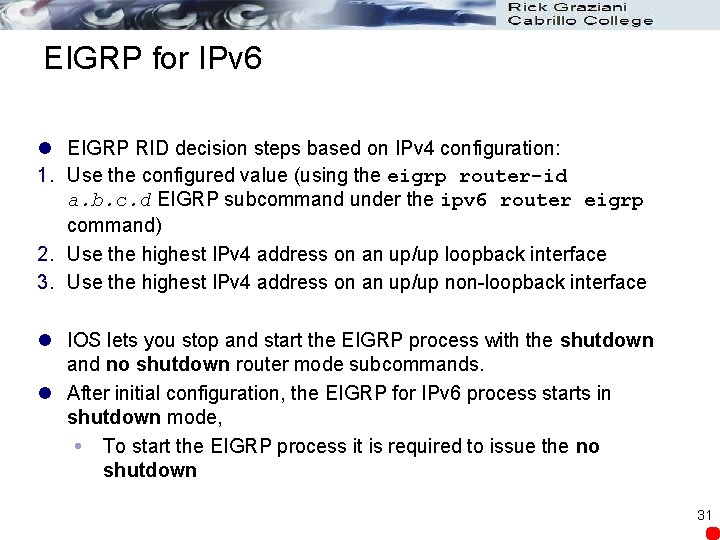
EIGRP for IPv 6 l EIGRP RID decision steps based on IPv 4 configuration: 1. Use the configured value (using the eigrp router-id a. b. c. d EIGRP subcommand under the ipv 6 router eigrp command) 2. Use the highest IPv 4 address on an up/up loopback interface 3. Use the highest IPv 4 address on an up/up non-loopback interface l IOS lets you stop and start the EIGRP process with the shutdown and no shutdown router mode subcommands. l After initial configuration, the EIGRP for IPv 6 process starts in shutdown mode, To start the EIGRP process it is required to issue the no shutdown 31
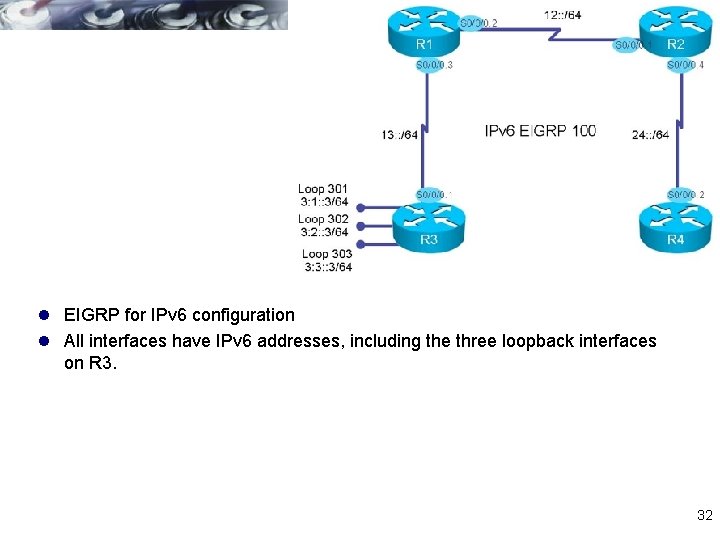
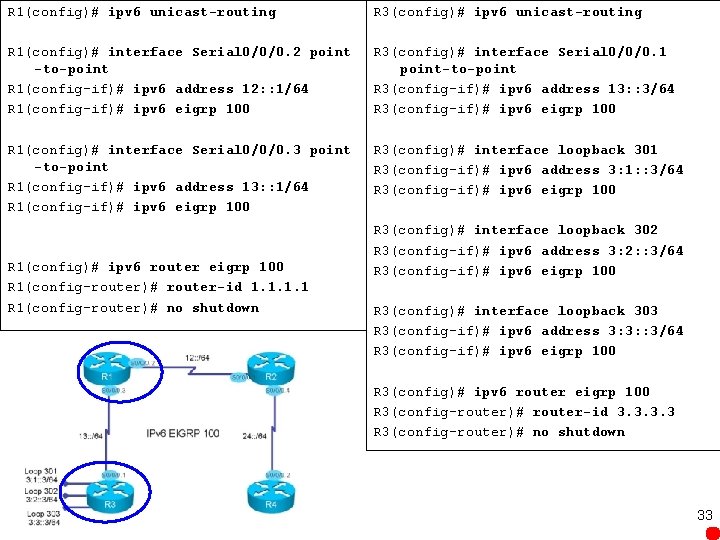
l EIGRP for IPv 6 configuration l All interfaces have IPv 6 addresses, including the three loopback interfaces on R 3. 32
R 1(config)# ipv 6 unicast-routing R 3(config)# ipv 6 unicast-routing R 1(config)# interface Serial 0/0/0. 2 point -to-point R 1(config-if)# ipv 6 address 12: : 1/64 R 1(config-if)# ipv 6 eigrp 100 R 3(config)# interface Serial 0/0/0. 1 point-to-point R 3(config-if)# ipv 6 address 13: : 3/64 R 3(config-if)# ipv 6 eigrp 100 R 1(config)# interface Serial 0/0/0. 3 point -to-point R 1(config-if)# ipv 6 address 13: : 1/64 R 1(config-if)# ipv 6 eigrp 100 R 3(config)# interface loopback 301 R 3(config-if)# ipv 6 address 3: 1: : 3/64 R 3(config-if)# ipv 6 eigrp 100 R 1(config)# ipv 6 router eigrp 100 R 1(config-router)# router-id 1. 1 R 1(config-router)# no shutdown R 3(config)# interface loopback 302 R 3(config-if)# ipv 6 address 3: 2: : 3/64 R 3(config-if)# ipv 6 eigrp 100 R 3(config)# interface loopback 303 R 3(config-if)# ipv 6 address 3: 3: : 3/64 R 3(config-if)# ipv 6 eigrp 100 R 3(config)# ipv 6 router eigrp 100 R 3(config-router)# router-id 3. 3 R 3(config-router)# no shutdown 33
R 1# show ipv 6 route eigrp D 3: 1: : /64 [90/2297856] via FE 80: : 3, Serial 0/0/0. 3 D 3: 2: : /64 [90/2297856] via FE 80: : 3, Serial 0/0/0. 3 D 3: 3: : /64 [90/2297856] via FE 80: : 3, Serial 0/0/0. 3 34
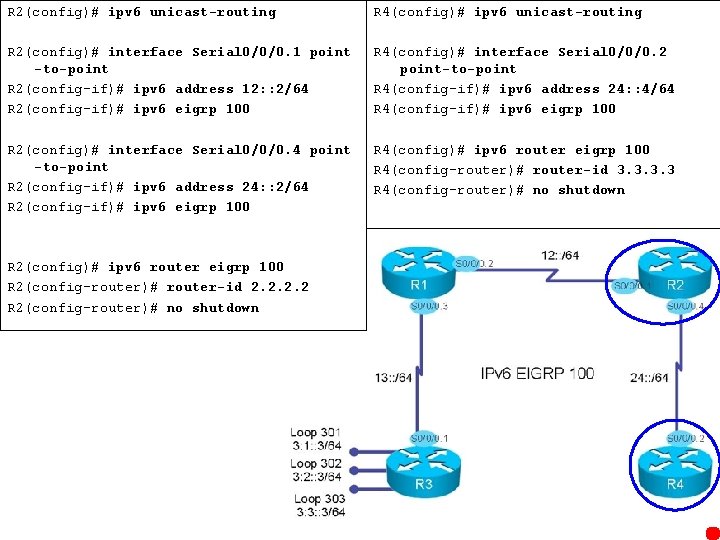
R 2(config)# ipv 6 unicast-routing R 4(config)# ipv 6 unicast-routing R 2(config)# interface Serial 0/0/0. 1 point -to-point R 2(config-if)# ipv 6 address 12: : 2/64 R 2(config-if)# ipv 6 eigrp 100 R 4(config)# interface Serial 0/0/0. 2 point-to-point R 4(config-if)# ipv 6 address 24: : 4/64 R 4(config-if)# ipv 6 eigrp 100 R 2(config)# interface Serial 0/0/0. 4 point -to-point R 2(config-if)# ipv 6 address 24: : 2/64 R 2(config-if)# ipv 6 eigrp 100 R 4(config)# ipv 6 router eigrp 100 R 4(config-router)# router-id 3. 3 R 4(config-router)# no shutdown R 2(config)# ipv 6 router eigrp 100 R 2(config-router)# router-id 2. 2 R 2(config-router)# no shutdown 35
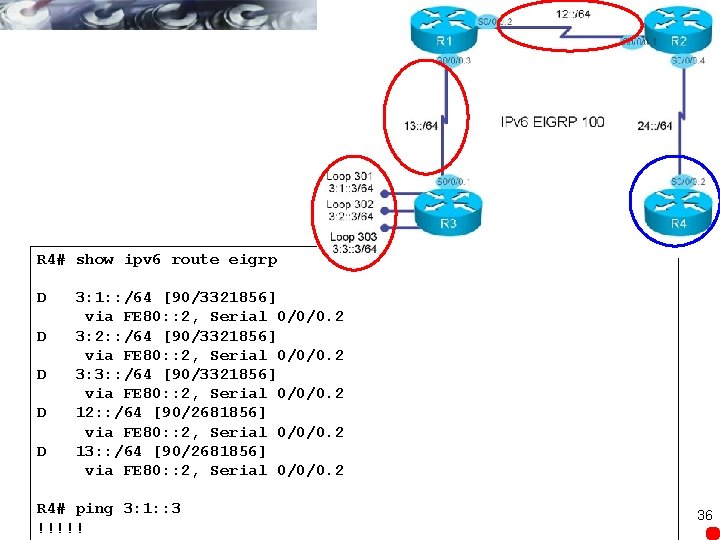
R 4# show ipv 6 route eigrp D D D 3: 1: : /64 [90/3321856] via FE 80: : 2, Serial 0/0/0. 2 3: 2: : /64 [90/3321856] via FE 80: : 2, Serial 0/0/0. 2 3: 3: : /64 [90/3321856] via FE 80: : 2, Serial 0/0/0. 2 12: : /64 [90/2681856] via FE 80: : 2, Serial 0/0/0. 2 13: : /64 [90/2681856] via FE 80: : 2, Serial 0/0/0. 2 R 4# ping 3: 1: : 3 !!!!! 36
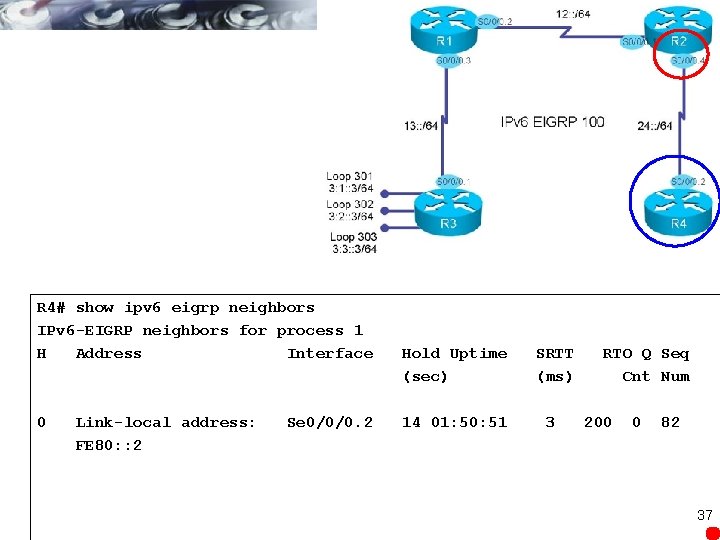
R 4# show ipv 6 eigrp neighbors IPv 6 -EIGRP neighbors for process 1 H Address Interface 0 Link-local address: FE 80: : 2 Se 0/0/0. 2 Hold Uptime (sec) 14 01: 50: 51 SRTT (ms) 3 RTO Q Seq Cnt Num 200 0 82 37
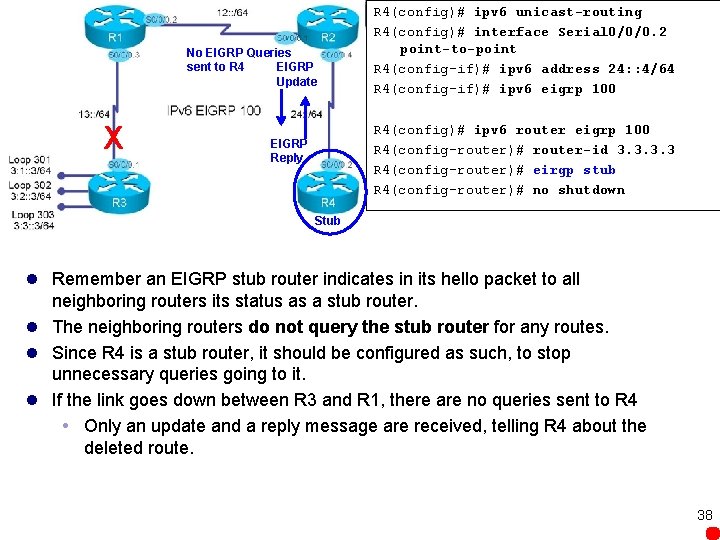
No EIGRP Queries sent to R 4 EIGRP Update X R 4(config)# ipv 6 unicast-routing R 4(config)# interface Serial 0/0/0. 2 point-to-point R 4(config-if)# ipv 6 address 24: : 4/64 R 4(config-if)# ipv 6 eigrp 100 R 4(config)# ipv 6 router eigrp 100 R 4(config-router)# router-id 3. 3 R 4(config-router)# eirgp stub R 4(config-router)# no shutdown EIGRP Reply Stub l Remember an EIGRP stub router indicates in its hello packet to all neighboring routers its status as a stub router. l The neighboring routers do not query the stub router for any routes. l Since R 4 is a stub router, it should be configured as such, to stop unnecessary queries going to it. l If the link goes down between R 3 and R 1, there are no queries sent to R 4 Only an update and a reply message are received, telling R 4 about the deleted route. 38
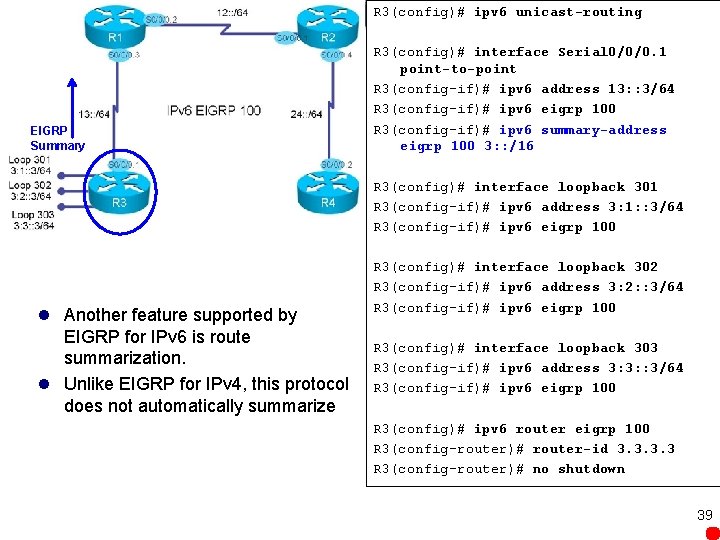
R 3(config)# ipv 6 unicast-routing EIGRP Summary R 3(config)# interface Serial 0/0/0. 1 point-to-point R 3(config-if)# ipv 6 address 13: : 3/64 R 3(config-if)# ipv 6 eigrp 100 R 3(config-if)# ipv 6 summary-address eigrp 100 3: : /16 R 3(config)# interface loopback 301 R 3(config-if)# ipv 6 address 3: 1: : 3/64 R 3(config-if)# ipv 6 eigrp 100 l Another feature supported by EIGRP for IPv 6 is route summarization. l Unlike EIGRP for IPv 4, this protocol does not automatically summarize R 3(config)# interface loopback 302 R 3(config-if)# ipv 6 address 3: 2: : 3/64 R 3(config-if)# ipv 6 eigrp 100 R 3(config)# interface loopback 303 R 3(config-if)# ipv 6 address 3: 3: : 3/64 R 3(config-if)# ipv 6 eigrp 100 R 3(config)# ipv 6 router eigrp 100 R 3(config-router)# router-id 3. 3 R 3(config-router)# no shutdown 39
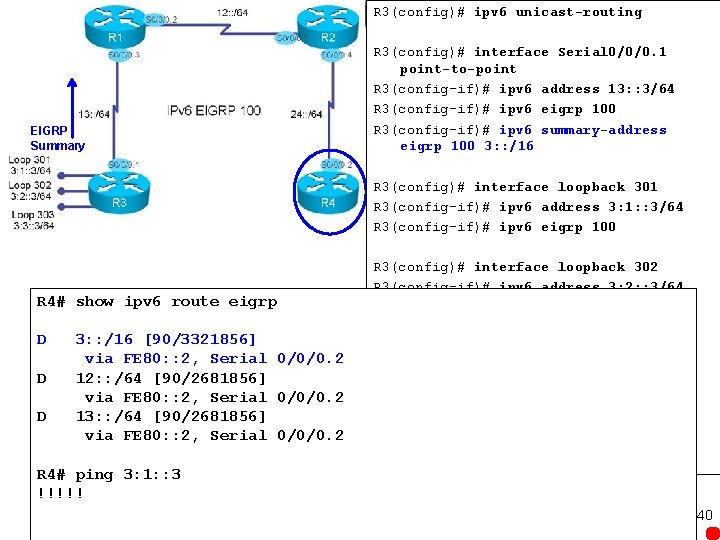
R 3(config)# ipv 6 unicast-routing EIGRP Summary R 3(config)# interface Serial 0/0/0. 1 point-to-point R 3(config-if)# ipv 6 address 13: : 3/64 R 3(config-if)# ipv 6 eigrp 100 R 3(config-if)# ipv 6 summary-address eigrp 100 3: : /16 R 3(config)# interface loopback 301 R 3(config-if)# ipv 6 address 3: 1: : 3/64 R 3(config-if)# ipv 6 eigrp 100 R 4# show ipv 6 route eigrp D D D 3: : /16 [90/3321856] via FE 80: : 2, Serial 0/0/0. 2 12: : /64 [90/2681856] via FE 80: : 2, Serial 0/0/0. 2 13: : /64 [90/2681856] via FE 80: : 2, Serial 0/0/0. 2 R 4# ping 3: 1: : 3 !!!!! R 3(config)# interface loopback 302 R 3(config-if)# ipv 6 address 3: 2: : 3/64 R 3(config-if)# ipv 6 eigrp 100 R 3(config)# interface loopback 303 R 3(config-if)# ipv 6 address 3: 3: : 3/64 R 3(config-if)# ipv 6 eigrp 100 R 3(config)# ipv 6 router eigrp 100 R 3(config-router)# router-id 3. 3 R 3(config-router)# no shutdown 40
MBGP 41
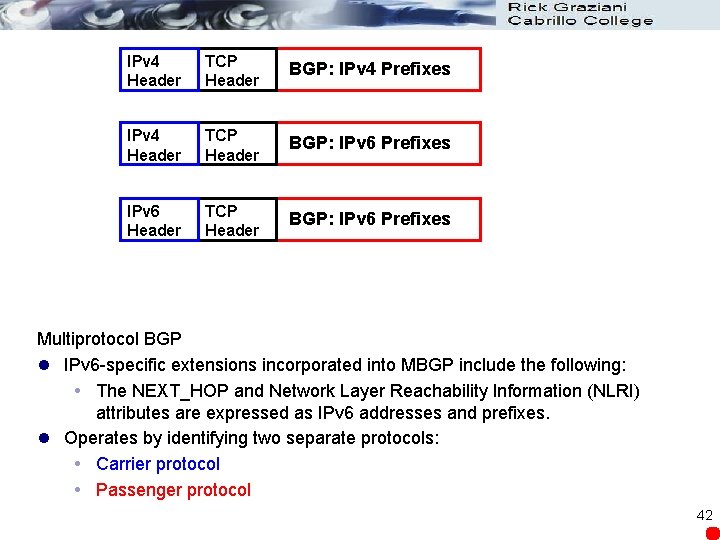
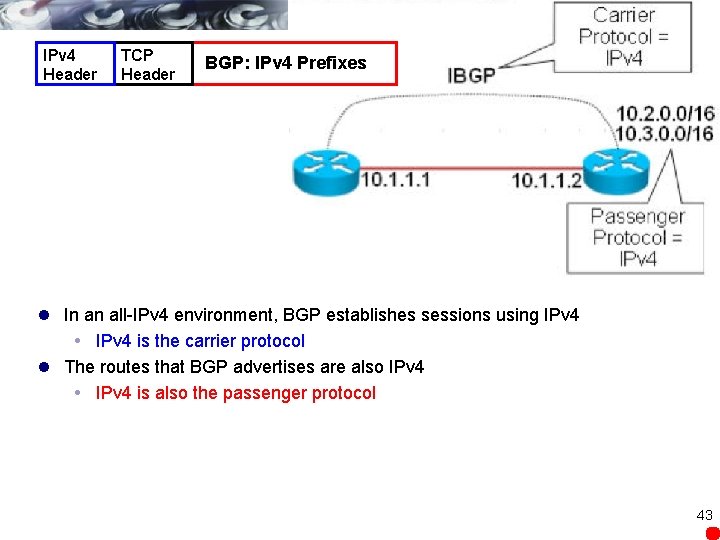
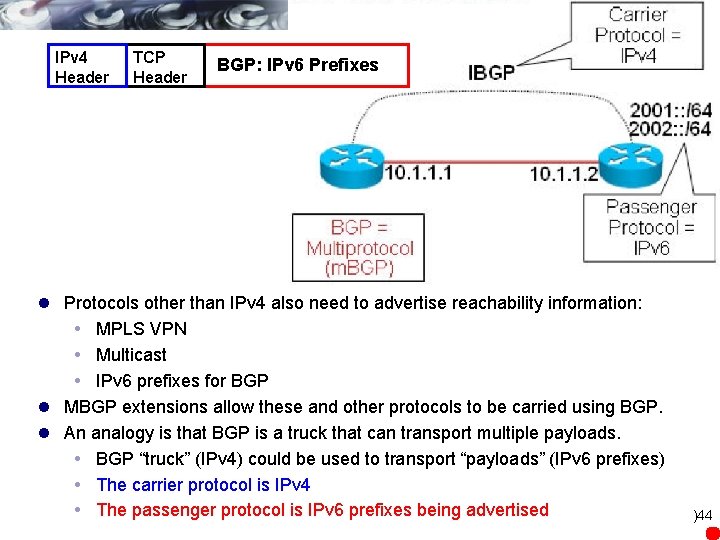
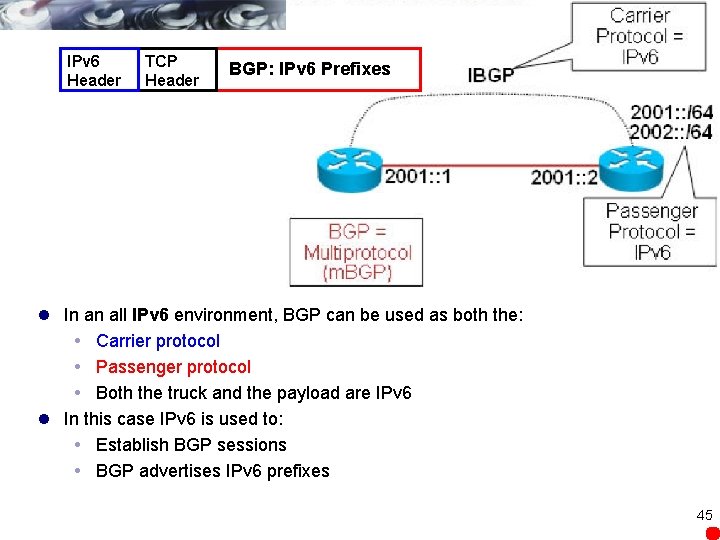
IPv 4 Header TCP Header BGP: IPv 4 Prefixes IPv 4 Header TCP Header BGP: IPv 6 Prefixes IPv 6 Header TCP Header BGP: IPv 6 Prefixes Multiprotocol BGP l IPv 6 -specific extensions incorporated into MBGP include the following: The NEXT_HOP and Network Layer Reachability Information (NLRI) attributes are expressed as IPv 6 addresses and prefixes. l Operates by identifying two separate protocols: Carrier protocol Passenger protocol 42
IPv 4 Header TCP Header BGP: IPv 4 Prefixes l In an all-IPv 4 environment, BGP establishes sessions using IPv 4 is the carrier protocol l The routes that BGP advertises are also IPv 4 is also the passenger protocol 43
IPv 4 Header TCP Header BGP: IPv 6 Prefixes l Protocols other than IPv 4 also need to advertise reachability information: MPLS VPN Multicast IPv 6 prefixes for BGP l MBGP extensions allow these and other protocols to be carried using BGP. l An analogy is that BGP is a truck that can transport multiple payloads. BGP “truck” (IPv 4) could be used to transport “payloads” (IPv 6 prefixes) The carrier protocol is IPv 4 The passenger protocol is IPv 6 prefixes being advertised )44
IPv 6 Header TCP Header BGP: IPv 6 Prefixes l In an all IPv 6 environment, BGP can be used as both the: Carrier protocol Passenger protocol Both the truck and the payload are IPv 6 l In this case IPv 6 is used to: Establish BGP sessions BGP advertises IPv 6 prefixes 45
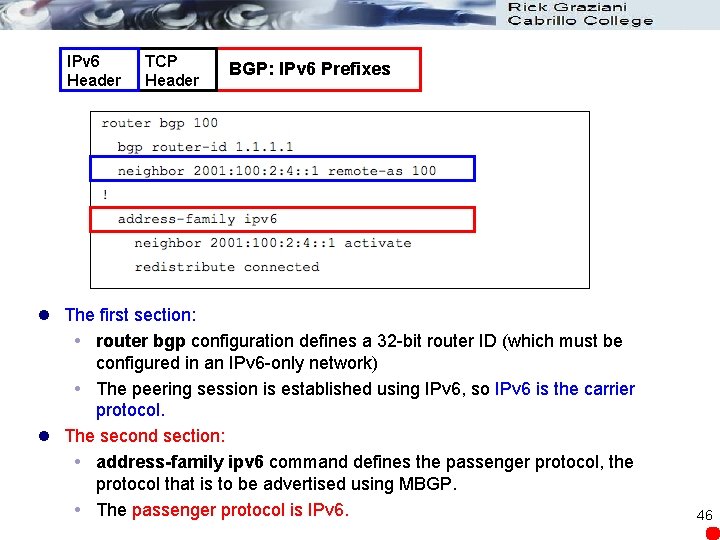
IPv 6 Header TCP Header BGP: IPv 6 Prefixes l The first section: router bgp configuration defines a 32 -bit router ID (which must be configured in an IPv 6 -only network) The peering session is established using IPv 6, so IPv 6 is the carrier protocol. l The second section: address-family ipv 6 command defines the passenger protocol, the protocol that is to be advertised using MBGP. The passenger protocol is IPv 6. 46
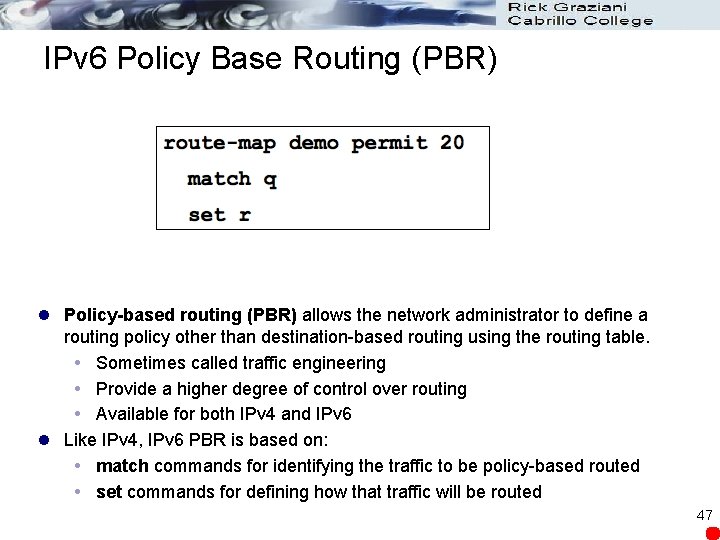
IPv 6 Policy Base Routing (PBR) l Policy-based routing (PBR) allows the network administrator to define a routing policy other than destination-based routing using the routing table. Sometimes called traffic engineering Provide a higher degree of control over routing Available for both IPv 4 and IPv 6 l Like IPv 4, IPv 6 PBR is based on: match commands for identifying the traffic to be policy-based routed set commands for defining how that traffic will be routed 47
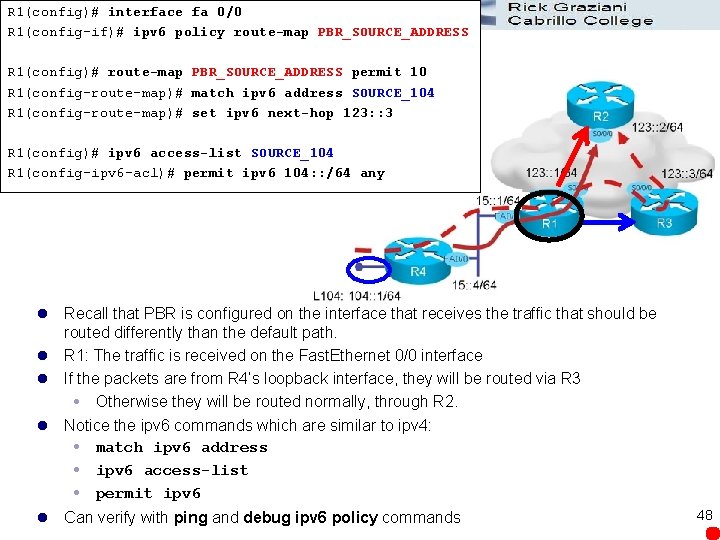
R 1(config)# interface fa 0/0 R 1(config-if)# ipv 6 policy route-map PBR_SOURCE_ADDRESS R 1(config)# route-map PBR_SOURCE_ADDRESS permit 10 R 1(config-route-map)# match ipv 6 address SOURCE_104 R 1(config-route-map)# set ipv 6 next-hop 123: : 3 R 1(config)# ipv 6 access-list SOURCE_104 R 1(config-ipv 6 -acl)# permit ipv 6 104: : /64 any l Recall that PBR is configured on the interface that receives the traffic that should be routed differently than the default path. l R 1: The traffic is received on the Fast. Ethernet 0/0 interface l If the packets are from R 4’s loopback interface, they will be routed via R 3 Otherwise they will be routed normally, through R 2. l Notice the ipv 6 commands which are similar to ipv 4: match ipv 6 address ipv 6 access-list permit ipv 6 l Can verify with ping and debug ipv 6 policy commands 48
IPv 6 Redistribution
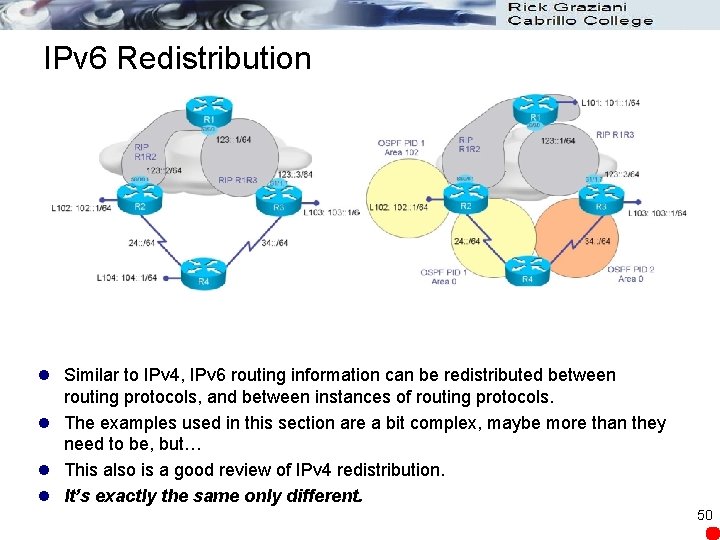
IPv 6 Redistribution l Similar to IPv 4, IPv 6 routing information can be redistributed between routing protocols, and between instances of routing protocols. l The examples used in this section are a bit complex, maybe more than they need to be, but… l This also is a good review of IPv 4 redistribution. l It’s exactly the same only different. 50
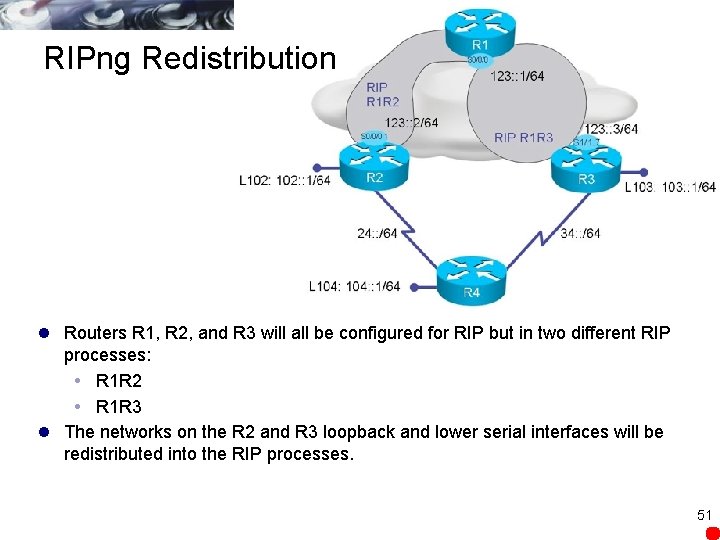
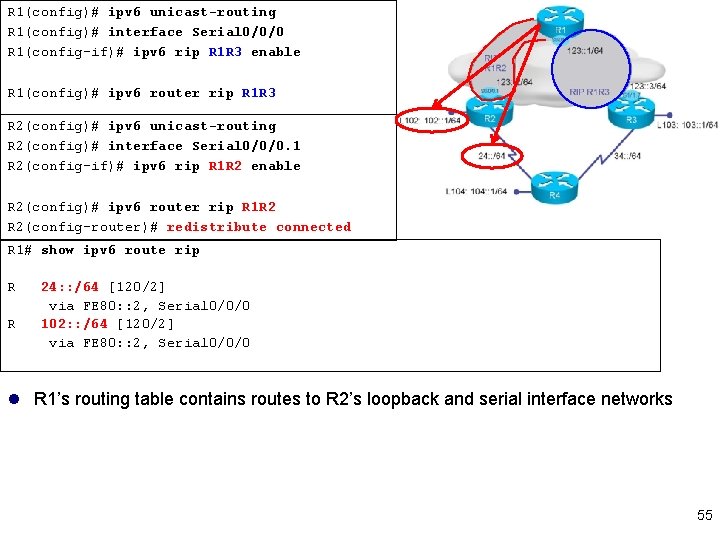
RIPng Redistribution l Routers R 1, R 2, and R 3 will all be configured for RIP but in two different RIP processes: R 1 R 2 R 1 R 3 l The networks on the R 2 and R 3 loopback and lower serial interfaces will be redistributed into the RIP processes. 51
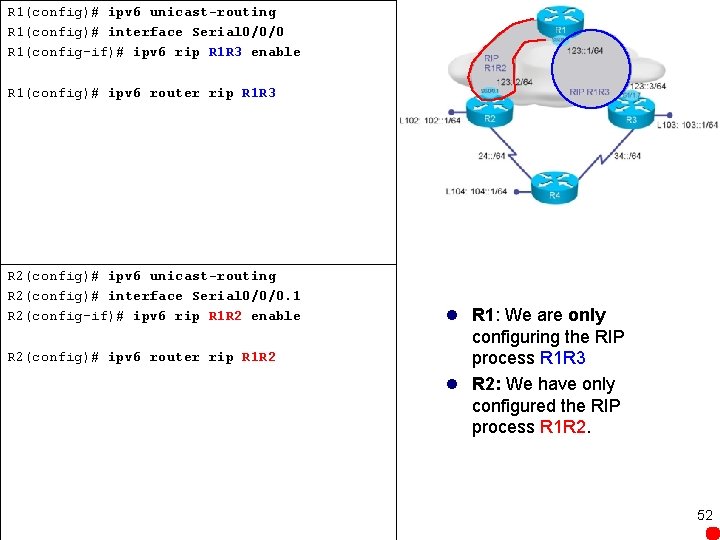
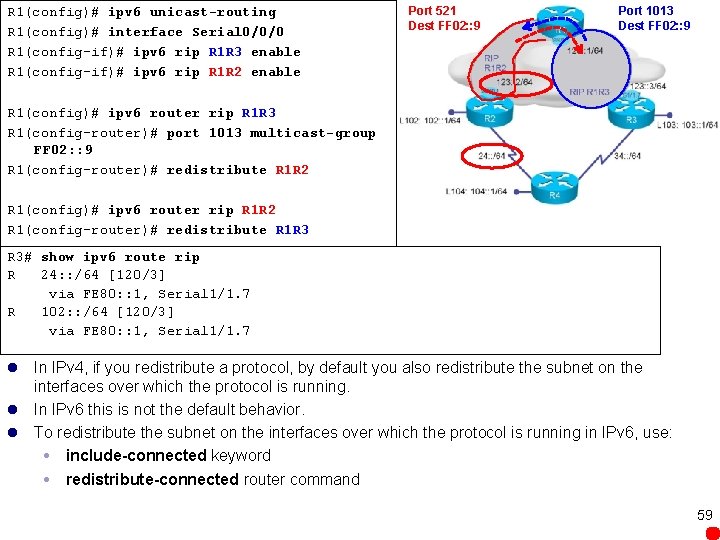
R 1(config)# ipv 6 unicast-routing R 1(config)# interface Serial 0/0/0 R 1(config-if)# ipv 6 rip R 1 R 3 enable R 1(config)# ipv 6 router rip R 1 R 3 R 2(config)# ipv 6 unicast-routing R 2(config)# interface Serial 0/0/0. 1 R 2(config-if)# ipv 6 rip R 1 R 2 enable R 2(config)# ipv 6 router rip R 1 R 2 l R 1: We are only configuring the RIP process R 1 R 3 l R 2: We have only configured the RIP process R 1 R 2. 52
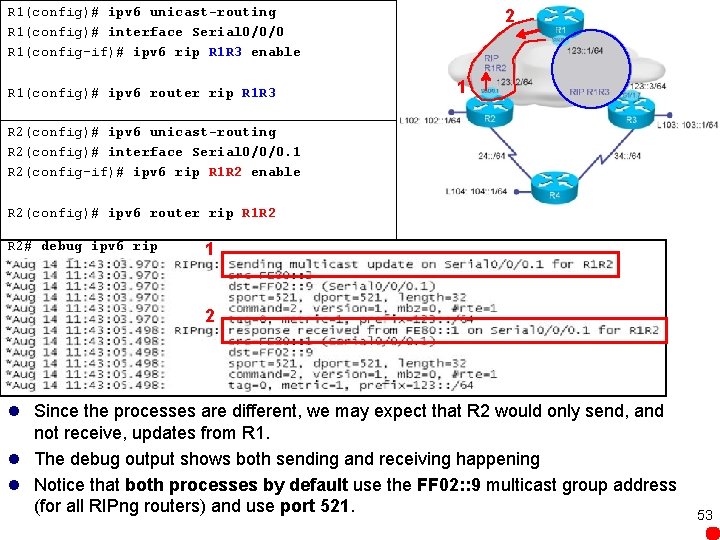
R 1(config)# ipv 6 unicast-routing R 1(config)# interface Serial 0/0/0 R 1(config-if)# ipv 6 rip R 1 R 3 enable R 1(config)# ipv 6 router rip R 1 R 3 2 1 R 2(config)# ipv 6 unicast-routing R 2(config)# interface Serial 0/0/0. 1 R 2(config-if)# ipv 6 rip R 1 R 2 enable R 2(config)# ipv 6 router rip R 1 R 2 R 2# debug ipv 6 rip 1 2 l Since the processes are different, we may expect that R 2 would only send, and not receive, updates from R 1. l The debug output shows both sending and receiving happening l Notice that both processes by default use the FF 02: : 9 multicast group address (for all RIPng routers) and use port 521. 53
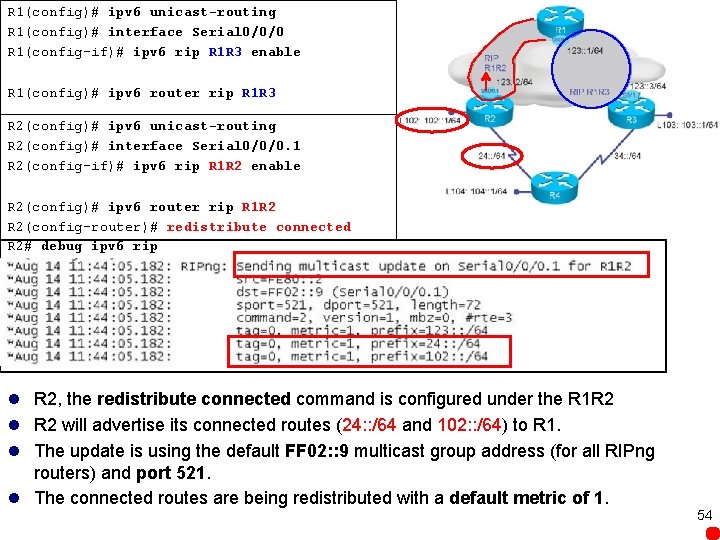
R 1(config)# ipv 6 unicast-routing R 1(config)# interface Serial 0/0/0 R 1(config-if)# ipv 6 rip R 1 R 3 enable R 1(config)# ipv 6 router rip R 1 R 3 R 2(config)# ipv 6 unicast-routing R 2(config)# interface Serial 0/0/0. 1 R 2(config-if)# ipv 6 rip R 1 R 2 enable R 2(config)# ipv 6 router rip R 1 R 2 R 2(config-router)# redistribute connected R 2# debug ipv 6 rip l R 2, the redistribute connected command is configured under the R 1 R 2 l R 2 will advertise its connected routes (24: : /64 and 102: : /64) to R 1. l The update is using the default FF 02: : 9 multicast group address (for all RIPng routers) and port 521. l The connected routes are being redistributed with a default metric of 1. 54
R 1(config)# ipv 6 unicast-routing R 1(config)# interface Serial 0/0/0 R 1(config-if)# ipv 6 rip R 1 R 3 enable R 1(config)# ipv 6 router rip R 1 R 3 R 2(config)# ipv 6 unicast-routing R 2(config)# interface Serial 0/0/0. 1 R 2(config-if)# ipv 6 rip R 1 R 2 enable R 2(config)# ipv 6 router rip R 1 R 2 R 2(config-router)# redistribute connected R 1# show ipv 6 route rip R R 24: : /64 [120/2] via FE 80: : 2, Serial 0/0/0 102: : /64 [120/2] via FE 80: : 2, Serial 0/0/0 l R 1’s routing table contains routes to R 2’s loopback and serial interface networks 55
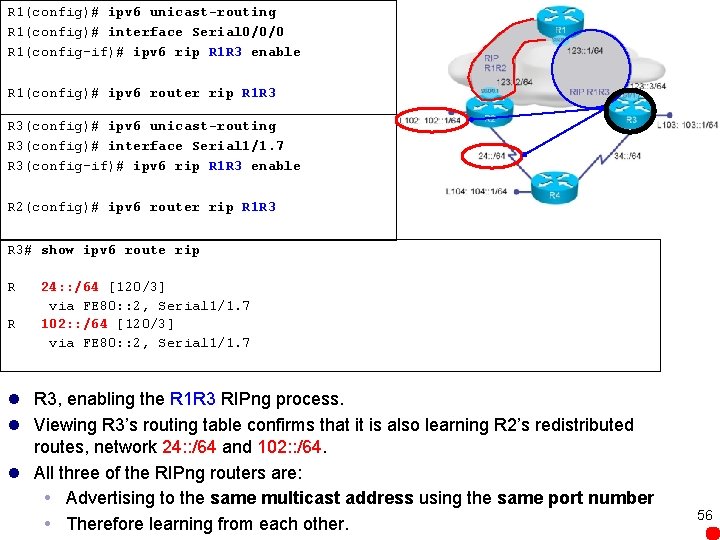
R 1(config)# ipv 6 unicast-routing R 1(config)# interface Serial 0/0/0 R 1(config-if)# ipv 6 rip R 1 R 3 enable R 1(config)# ipv 6 router rip R 1 R 3 R 3(config)# ipv 6 unicast-routing R 3(config)# interface Serial 1/1. 7 R 3(config-if)# ipv 6 rip R 1 R 3 enable R 2(config)# ipv 6 router rip R 1 R 3 R 3# show ipv 6 route rip R R 24: : /64 [120/3] via FE 80: : 2, Serial 1/1. 7 102: : /64 [120/3] via FE 80: : 2, Serial 1/1. 7 l R 3, enabling the R 1 R 3 RIPng process. l Viewing R 3’s routing table confirms that it is also learning R 2’s redistributed routes, network 24: : /64 and 102: : /64. l All three of the RIPng routers are: Advertising to the same multicast address using the same port number Therefore learning from each other. 56
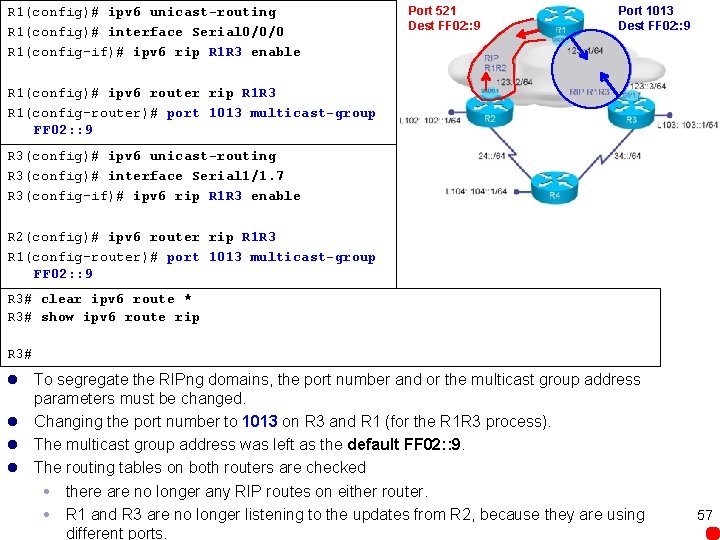
R 1(config)# ipv 6 unicast-routing R 1(config)# interface Serial 0/0/0 R 1(config-if)# ipv 6 rip R 1 R 3 enable Port 521 Dest FF 02: : 9 Port 1013 Dest FF 02: : 9 R 1(config)# ipv 6 router rip R 1 R 3 R 1(config-router)# port 1013 multicast-group FF 02: : 9 R 3(config)# ipv 6 unicast-routing R 3(config)# interface Serial 1/1. 7 R 3(config-if)# ipv 6 rip R 1 R 3 enable R 2(config)# ipv 6 router rip R 1 R 3 R 1(config-router)# port 1013 multicast-group FF 02: : 9 R 3# clear ipv 6 route * R 3# show ipv 6 route rip R 3# l To segregate the RIPng domains, the port number and or the multicast group address parameters must be changed. l Changing the port number to 1013 on R 3 and R 1 (for the R 1 R 3 process). l The multicast group address was left as the default FF 02: : 9. l The routing tables on both routers are checked there are no longer any RIP routes on either router. R 1 and R 3 are no longer listening to the updates from R 2, because they are using different ports. 57
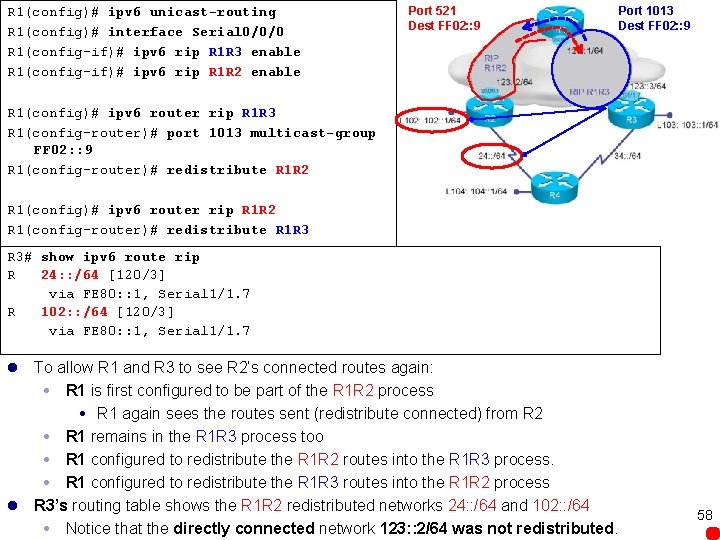
R 1(config)# ipv 6 unicast-routing R 1(config)# interface Serial 0/0/0 R 1(config-if)# ipv 6 rip R 1 R 3 enable R 1(config-if)# ipv 6 rip R 1 R 2 enable Port 521 Dest FF 02: : 9 Port 1013 Dest FF 02: : 9 R 1(config)# ipv 6 router rip R 1 R 3 R 1(config-router)# port 1013 multicast-group FF 02: : 9 R 1(config-router)# redistribute R 1 R 2 R 1(config)# ipv 6 router rip R 1 R 2 R 1(config-router)# redistribute R 1 R 3 R 3# show ipv 6 route rip R 24: : /64 [120/3] via FE 80: : 1, Serial 1/1. 7 R 102: : /64 [120/3] via FE 80: : 1, Serial 1/1. 7 l To allow R 1 and R 3 to see R 2’s connected routes again: R 1 is first configured to be part of the R 1 R 2 process R 1 again sees the routes sent (redistribute connected) from R 2 R 1 remains in the R 1 R 3 process too R 1 configured to redistribute the R 1 R 2 routes into the R 1 R 3 process. R 1 configured to redistribute the R 1 R 3 routes into the R 1 R 2 process l R 3’s routing table shows the R 1 R 2 redistributed networks 24: : /64 and 102: : /64 Notice that the directly connected network 123: : 2/64 was not redistributed. 58
R 1(config)# ipv 6 unicast-routing R 1(config)# interface Serial 0/0/0 R 1(config-if)# ipv 6 rip R 1 R 3 enable R 1(config-if)# ipv 6 rip R 1 R 2 enable Port 521 Dest FF 02: : 9 Port 1013 Dest FF 02: : 9 R 1(config)# ipv 6 router rip R 1 R 3 R 1(config-router)# port 1013 multicast-group FF 02: : 9 R 1(config-router)# redistribute R 1 R 2 R 1(config)# ipv 6 router rip R 1 R 2 R 1(config-router)# redistribute R 1 R 3 R 3# show ipv 6 route rip R 24: : /64 [120/3] via FE 80: : 1, Serial 1/1. 7 R 102: : /64 [120/3] via FE 80: : 1, Serial 1/1. 7 l In IPv 4, if you redistribute a protocol, by default you also redistribute the subnet on the interfaces over which the protocol is running. l In IPv 6 this is not the default behavior. l To redistribute the subnet on the interfaces over which the protocol is running in IPv 6, use: include-connected keyword redistribute-connected router command 59
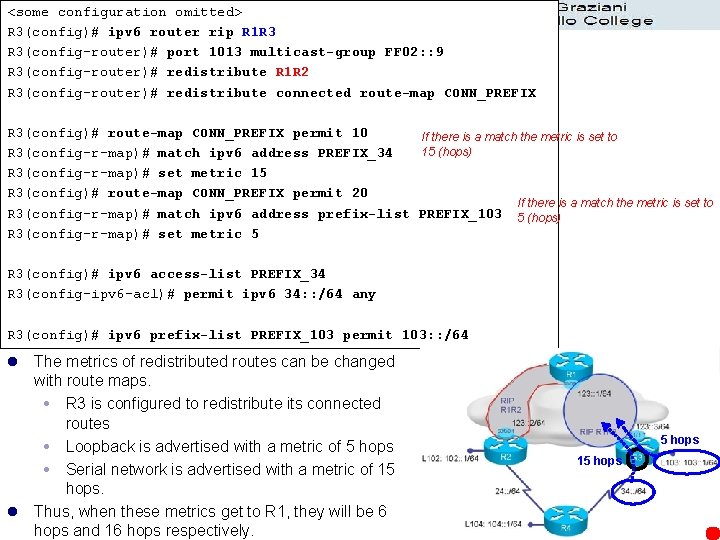
<some configuration omitted> R 3(config)# ipv 6 router rip R 1 R 3 R 3(config-router)# port 1013 multicast-group FF 02: : 9 R 3(config-router)# redistribute R 1 R 2 R 3(config-router)# redistribute connected route-map CONN_PREFIX R 3(config)# route-map CONN_PREFIX permit 10 If there is a match the metric is set to 15 (hops) R 3(config-r-map)# match ipv 6 address PREFIX_34 R 3(config-r-map)# set metric 15 R 3(config)# route-map CONN_PREFIX permit 20 If there is a match the metric is set to R 3(config-r-map)# match ipv 6 address prefix-list PREFIX_103 5 (hops) R 3(config-r-map)# set metric 5 R 3(config)# ipv 6 access-list PREFIX_34 R 3(config-ipv 6 -acl)# permit ipv 6 34: : /64 any R 3(config)# ipv 6 prefix-list PREFIX_103 permit 103: : /64 l The metrics of redistributed routes can be changed with route maps. R 3 is configured to redistribute its connected routes Loopback is advertised with a metric of 5 hops Serial network is advertised with a metric of 15 hops. l Thus, when these metrics get to R 1, they will be 6 hops and 16 hops respectively. 5 hops 15 hops 60
R 1# show ipv 6 route rip R 24: : /64 [120/2] via FE 80: : 2, Serial 1/1. 7 R 102: : /64 [120/2] via FE 80: : 2, Serial 1/1. 7 R 103: : /64 [120/6] via FE 80: : 1, Serial 1/1. 7 l R 1 has learned about network 103: : /64 with a metric of 6. l However R 1 has no knowledge of network 34: : /64 because it had reached a metric of 16(unreachable) l This example shows the importance of the seed metric value chosen when redistributing.
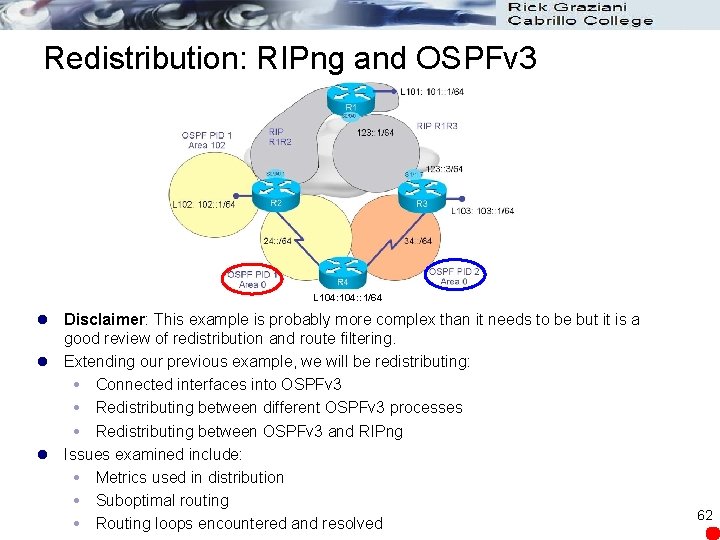
Redistribution: RIPng and OSPFv 3 L 104: : 1/64 l Disclaimer: This example is probably more complex than it needs to be but it is a good review of redistribution and route filtering. l Extending our previous example, we will be redistributing: Connected interfaces into OSPFv 3 Redistributing between different OSPFv 3 processes Redistributing between OSPFv 3 and RIPng l Issues examined include: Metrics used in distribution Suboptimal routing Routing loops encountered and resolved 62
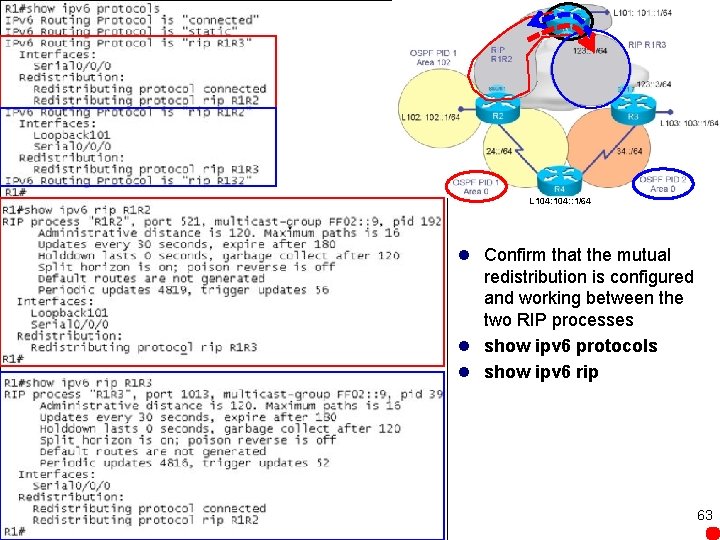
L 104: : 1/64 l Confirm that the mutual redistribution is configured and working between the two RIP processes l show ipv 6 protocols l show ipv 6 rip 63
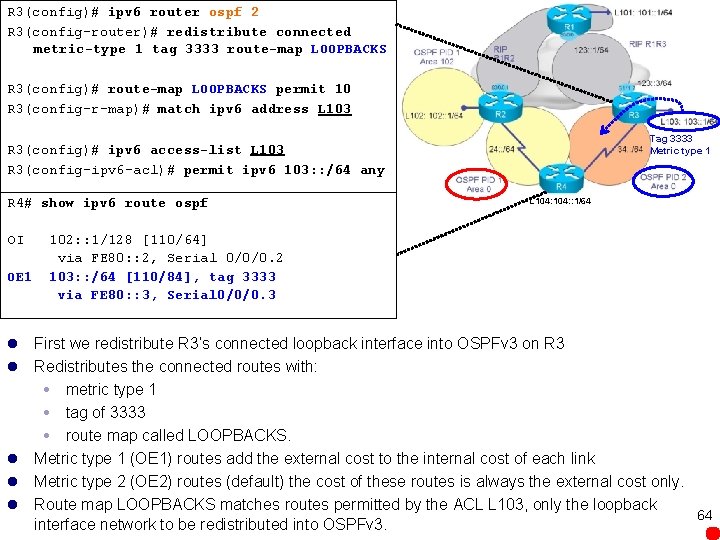
R 3(config)# ipv 6 router ospf 2 R 3(config-router)# redistribute connected metric-type 1 tag 3333 route-map LOOPBACKS R 3(config)# route-map LOOPBACKS permit 10 R 3(config-r-map)# match ipv 6 address L 103 Tag 3333 Metric type 1 R 3(config)# ipv 6 access-list L 103 R 3(config-ipv 6 -acl)# permit ipv 6 103: : /64 any R 4# show ipv 6 route ospf OI OE 1 L 104: : 1/64 102: : 1/128 [110/64] via FE 80: : 2, Serial 0/0/0. 2 103: : /64 [110/84], tag 3333 via FE 80: : 3, Serial 0/0/0. 3 l First we redistribute R 3’s connected loopback interface into OSPFv 3 on R 3 l Redistributes the connected routes with: metric type 1 tag of 3333 route map called LOOPBACKS. l Metric type 1 (OE 1) routes add the external cost to the internal cost of each link l Metric type 2 (OE 2) routes (default) the cost of these routes is always the external cost only. l Route map LOOPBACKS matches routes permitted by the ACL L 103, only the loopback 64 interface network to be redistributed into OSPFv 3.
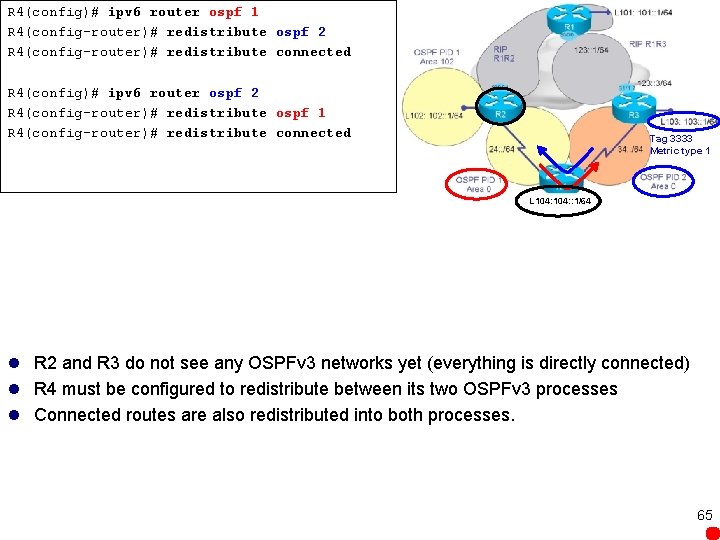
R 4(config)# ipv 6 router ospf 1 R 4(config-router)# redistribute ospf 2 R 4(config-router)# redistribute connected R 4(config)# ipv 6 router ospf 2 R 4(config-router)# redistribute ospf 1 R 4(config-router)# redistribute connected Tag 3333 Metric type 1 L 104: : 1/64 l R 2 and R 3 do not see any OSPFv 3 networks yet (everything is directly connected) l R 4 must be configured to redistribute between its two OSPFv 3 processes l Connected routes are also redistributed into both processes. 65
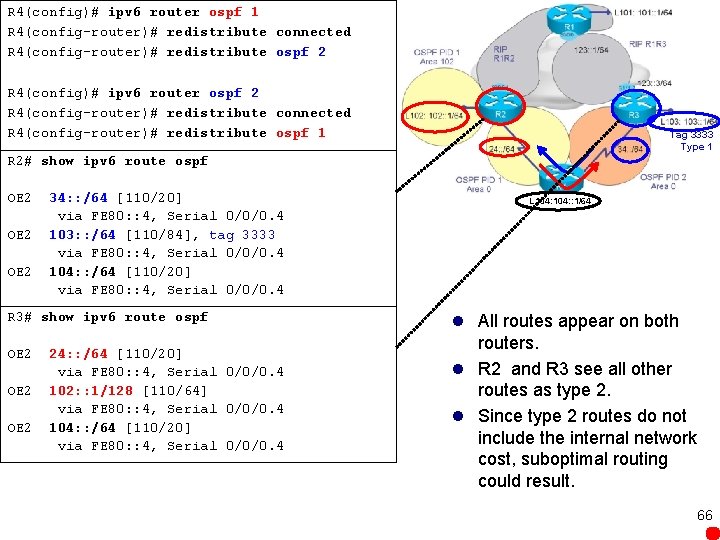
R 4(config)# ipv 6 router ospf 1 R 4(config-router)# redistribute connected R 4(config-router)# redistribute ospf 2 R 4(config)# ipv 6 router ospf 2 R 4(config-router)# redistribute connected R 4(config-router)# redistribute ospf 1 Tag 3333 Type 1 R 2# show ipv 6 route ospf OE 2 34: : /64 [110/20] via FE 80: : 4, Serial 0/0/0. 4 103: : /64 [110/84], tag 3333 via FE 80: : 4, Serial 0/0/0. 4 104: : /64 [110/20] via FE 80: : 4, Serial 0/0/0. 4 R 3# show ipv 6 route ospf OE 2 24: : /64 [110/20] via FE 80: : 4, Serial 0/0/0. 4 102: : 1/128 [110/64] via FE 80: : 4, Serial 0/0/0. 4 104: : /64 [110/20] via FE 80: : 4, Serial 0/0/0. 4 L 104: : 1/64 l All routes appear on both routers. l R 2 and R 3 see all other routes as type 2. l Since type 2 routes do not include the internal network cost, suboptimal routing could result. 66
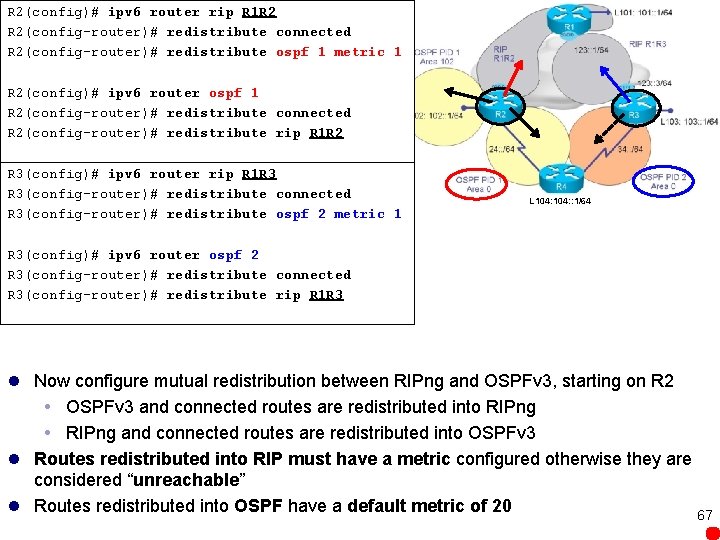
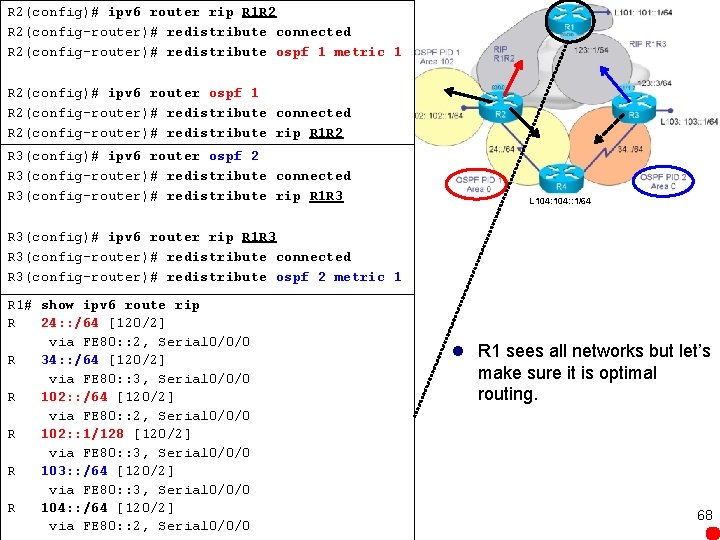
R 2(config)# ipv 6 router rip R 1 R 2 R 2(config-router)# redistribute connected R 2(config-router)# redistribute ospf 1 metric 1 R 2(config)# ipv 6 router ospf 1 R 2(config-router)# redistribute connected R 2(config-router)# redistribute rip R 1 R 2 R 3(config)# ipv 6 router rip R 1 R 3 R 3(config-router)# redistribute connected R 3(config-router)# redistribute ospf 2 metric 1 L 104: : 1/64 R 3(config)# ipv 6 router ospf 2 R 3(config-router)# redistribute connected R 3(config-router)# redistribute rip R 1 R 3 l Now configure mutual redistribution between RIPng and OSPFv 3, starting on R 2 OSPFv 3 and connected routes are redistributed into RIPng and connected routes are redistributed into OSPFv 3 l Routes redistributed into RIP must have a metric configured otherwise they are considered “unreachable” l Routes redistributed into OSPF have a default metric of 20 67
R 2(config)# ipv 6 router rip R 1 R 2 R 2(config-router)# redistribute connected R 2(config-router)# redistribute ospf 1 metric 1 R 2(config)# ipv 6 router ospf 1 R 2(config-router)# redistribute connected R 2(config-router)# redistribute rip R 1 R 2 R 3(config)# ipv 6 router ospf 2 R 3(config-router)# redistribute connected R 3(config-router)# redistribute rip R 1 R 3 L 104: : 1/64 R 3(config)# ipv 6 router rip R 1 R 3 R 3(config-router)# redistribute connected R 3(config-router)# redistribute ospf 2 metric 1 R 1# show ipv 6 route rip R 24: : /64 [120/2] via FE 80: : 2, Serial 0/0/0 R 34: : /64 [120/2] via FE 80: : 3, Serial 0/0/0 R 102: : /64 [120/2] via FE 80: : 2, Serial 0/0/0 R 102: : 1/128 [120/2] via FE 80: : 3, Serial 0/0/0 R 103: : /64 [120/2] via FE 80: : 3, Serial 0/0/0 R 104: : /64 [120/2] via FE 80: : 2, Serial 0/0/0 l R 1 sees all networks but let’s make sure it is optimal routing. 68
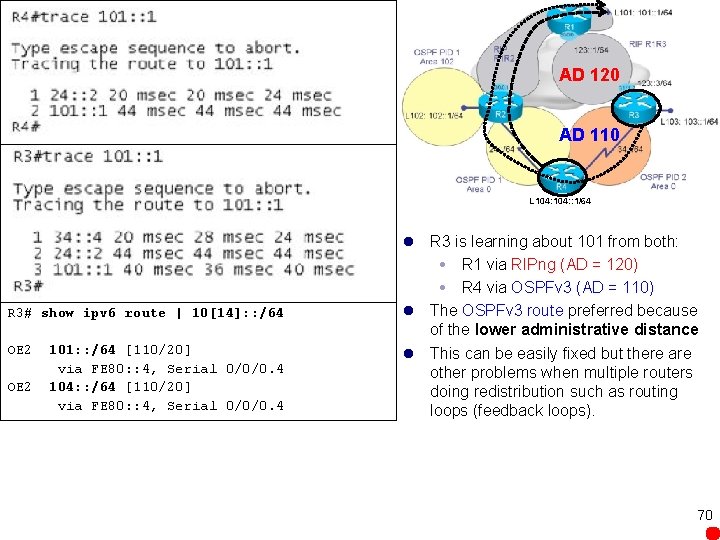
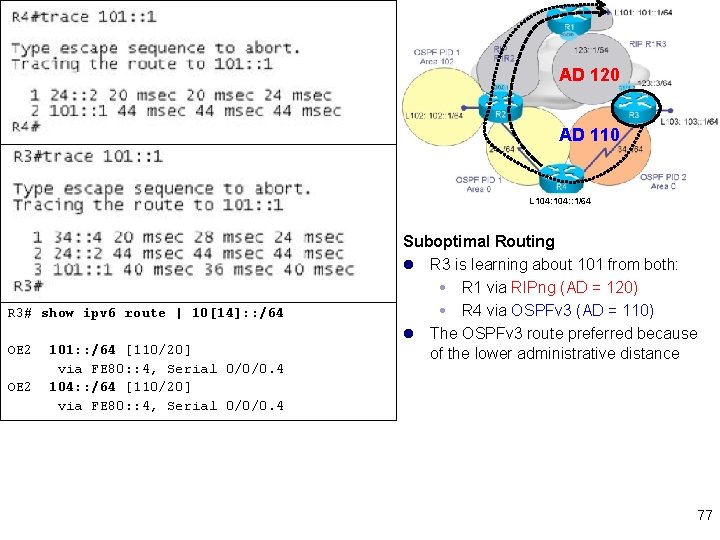
L 104: : 1/64 R 3# show ipv 6 route | 10[14]: : /64 OE 2 101: : /64 [110/20] via FE 80: : 4, Serial 0/0/0. 4 104: : /64 [110/20] via FE 80: : 4, Serial 0/0/0. 4 l R 4 trace - The path goes through R 2 (24: : 2) and then to R 1, which is the optimal path. l Also shown in R 3’s routing table l Command regular expression section 10[14]: : 64 means that only networks 101 or 104 are displayed). l R 3 is learning about both 101 and 104 via R 4 with OSPFv 3 (AD = 110) l However it would be better to get to 101 via R 1 with RIPng (AD = 120) l This is suboptimal routing. l A trace from R 3 to the 101 loopback 69 confirms that it goes via R 4, to R 2, and then to R 1.
AD 120 AD 110 L 104: : 1/64 R 3# show ipv 6 route | 10[14]: : /64 OE 2 101: : /64 [110/20] via FE 80: : 4, Serial 0/0/0. 4 104: : /64 [110/20] via FE 80: : 4, Serial 0/0/0. 4 l R 3 is learning about 101 from both: R 1 via RIPng (AD = 120) R 4 via OSPFv 3 (AD = 110) l The OSPFv 3 route preferred because of the lower administrative distance l This can be easily fixed but there are other problems when multiple routers doing redistribution such as routing loops (feedback loops). 70
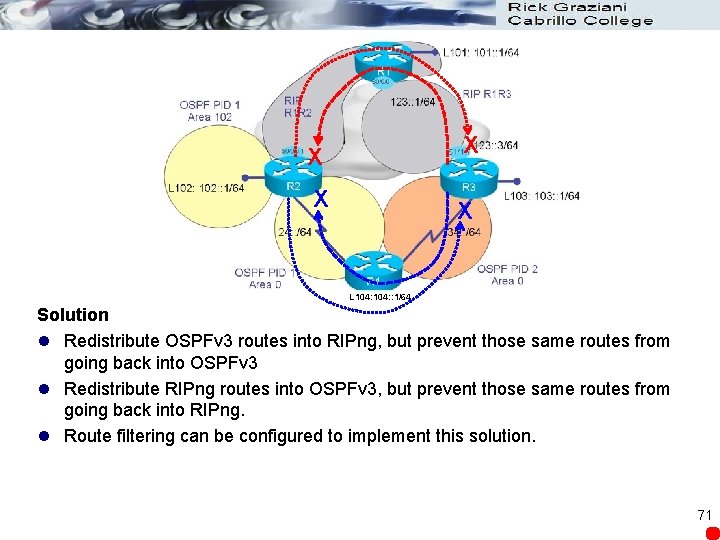
X X L 104: : 1/64 Solution l Redistribute OSPFv 3 routes into RIPng, but prevent those same routes from going back into OSPFv 3 l Redistribute RIPng routes into OSPFv 3, but prevent those same routes from going back into RIPng. l Route filtering can be configured to implement this solution. 71
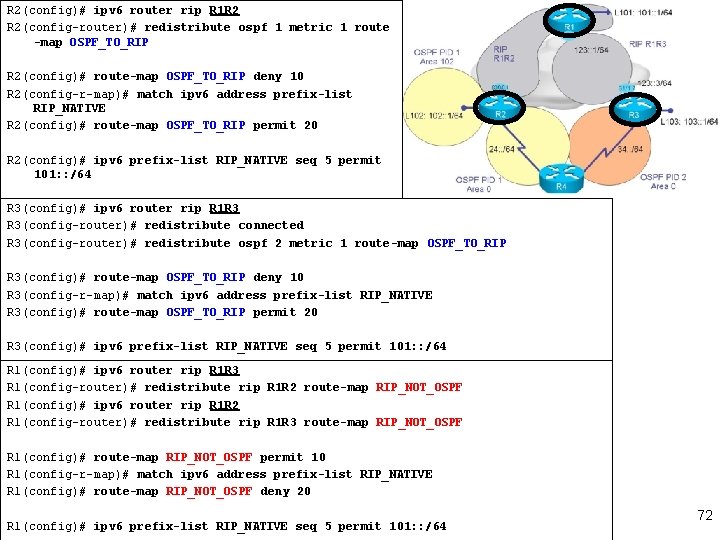
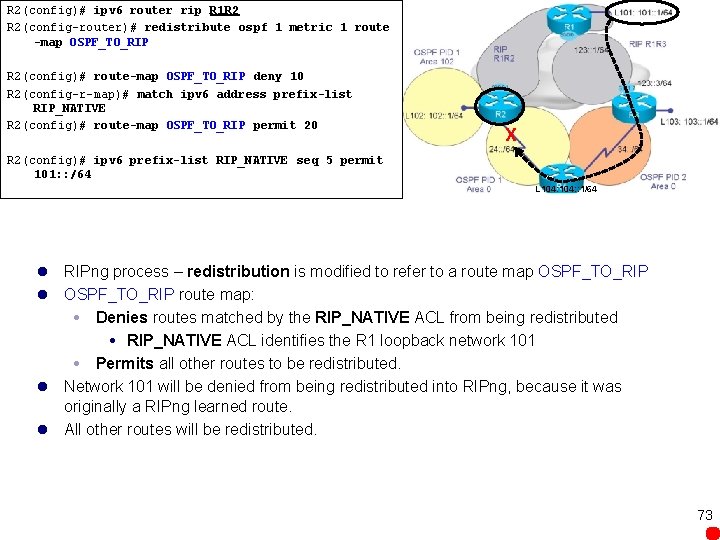
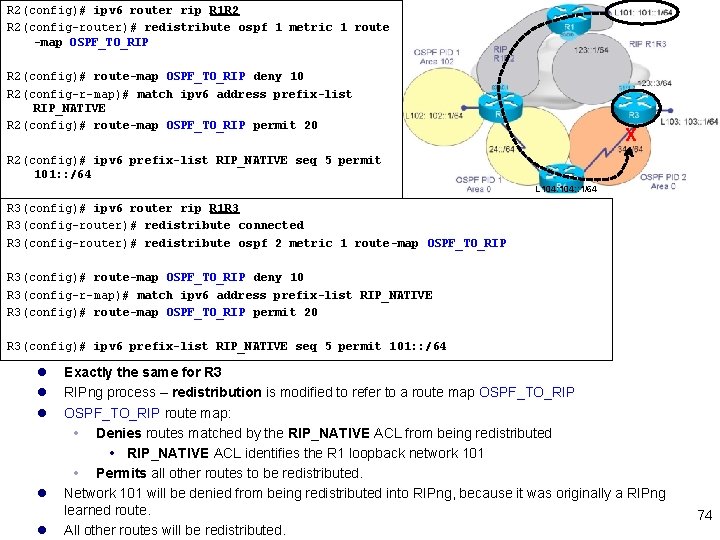
R 2(config)# ipv 6 router rip R 1 R 2 R 2(config-router)# redistribute ospf 1 metric 1 route -map OSPF_TO_RIP R 2(config)# route-map OSPF_TO_RIP deny 10 R 2(config-r-map)# match ipv 6 address prefix-list RIP_NATIVE R 2(config)# route-map OSPF_TO_RIP permit 20 R 2(config)# ipv 6 prefix-list RIP_NATIVE seq 5 permit 101: : /64 R 3(config)# ipv 6 router rip R 1 R 3 R 3(config-router)# redistribute connected R 3(config-router)# redistribute ospf 2 metric 1 route-map OSPF_TO_RIP R 3(config)# route-map OSPF_TO_RIP deny 10 R 3(config-r-map)# match ipv 6 address prefix-list RIP_NATIVE R 3(config)# route-map OSPF_TO_RIP permit 20 R 3(config)# ipv 6 prefix-list RIP_NATIVE seq 5 permit 101: : /64 R 1(config)# ipv 6 router rip R 1 R 3 R 1(config-router)# redistribute rip R 1 R 2 route-map RIP_NOT_OSPF R 1(config)# ipv 6 router rip R 1 R 2 R 1(config-router)# redistribute rip R 1 R 3 route-map RIP_NOT_OSPF R 1(config)# route-map RIP_NOT_OSPF permit 10 R 1(config-r-map)# match ipv 6 address prefix-list RIP_NATIVE R 1(config)# route-map RIP_NOT_OSPF deny 20 R 1(config)# ipv 6 prefix-list RIP_NATIVE seq 5 permit 101: : /64 72
R 2(config)# ipv 6 router rip R 1 R 2 R 2(config-router)# redistribute ospf 1 metric 1 route -map OSPF_TO_RIP R 2(config)# route-map OSPF_TO_RIP deny 10 R 2(config-r-map)# match ipv 6 address prefix-list RIP_NATIVE R 2(config)# route-map OSPF_TO_RIP permit 20 X R 2(config)# ipv 6 prefix-list RIP_NATIVE seq 5 permit 101: : /64 L 104: : 1/64 l RIPng process – redistribution is modified to refer to a route map OSPF_TO_RIP l OSPF_TO_RIP route map: Denies routes matched by the RIP_NATIVE ACL from being redistributed RIP_NATIVE ACL identifies the R 1 loopback network 101 Permits all other routes to be redistributed. l Network 101 will be denied from being redistributed into RIPng, because it was originally a RIPng learned route. l All other routes will be redistributed. 73
R 2(config)# ipv 6 router rip R 1 R 2 R 2(config-router)# redistribute ospf 1 metric 1 route -map OSPF_TO_RIP R 2(config)# route-map OSPF_TO_RIP deny 10 R 2(config-r-map)# match ipv 6 address prefix-list RIP_NATIVE R 2(config)# route-map OSPF_TO_RIP permit 20 X R 2(config)# ipv 6 prefix-list RIP_NATIVE seq 5 permit 101: : /64 L 104: : 1/64 R 3(config)# ipv 6 router rip R 1 R 3 R 3(config-router)# redistribute connected R 3(config-router)# redistribute ospf 2 metric 1 route-map OSPF_TO_RIP R 3(config)# route-map OSPF_TO_RIP deny 10 R 3(config-r-map)# match ipv 6 address prefix-list RIP_NATIVE R 3(config)# route-map OSPF_TO_RIP permit 20 R 3(config)# ipv 6 prefix-list RIP_NATIVE seq 5 permit 101: : /64 l l l Exactly the same for R 3 RIPng process – redistribution is modified to refer to a route map OSPF_TO_RIP route map: Denies routes matched by the RIP_NATIVE ACL from being redistributed RIP_NATIVE ACL identifies the R 1 loopback network 101 Permits all other routes to be redistributed. Network 101 will be denied from being redistributed into RIPng, because it was originally a RIPng learned route. All other routes will be redistributed. 74
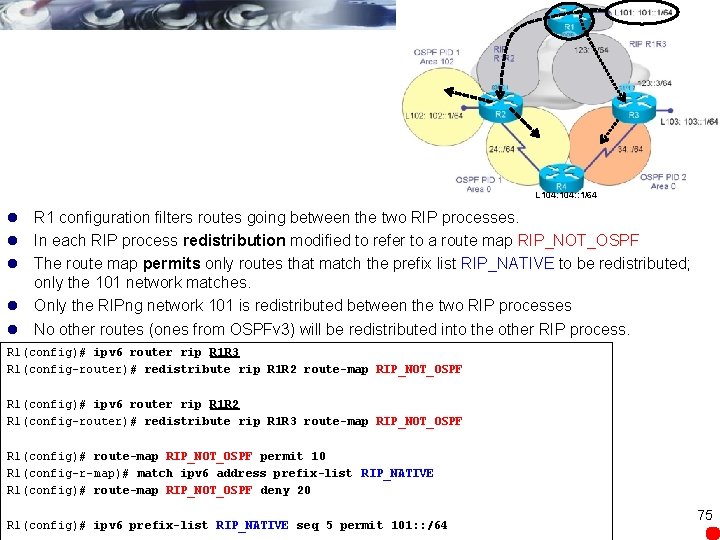
L 104: : 1/64 l R 1 configuration filters routes going between the two RIP processes. l In each RIP process redistribution modified to refer to a route map RIP_NOT_OSPF l The route map permits only routes that match the prefix list RIP_NATIVE to be redistributed; only the 101 network matches. l Only the RIPng network 101 is redistributed between the two RIP processes l No other routes (ones from OSPFv 3) will be redistributed into the other RIP process. R 1(config)# ipv 6 router rip R 1 R 3 R 1(config-router)# redistribute rip R 1 R 2 route-map RIP_NOT_OSPF R 1(config)# ipv 6 router rip R 1 R 2 R 1(config-router)# redistribute rip R 1 R 3 route-map RIP_NOT_OSPF R 1(config)# route-map RIP_NOT_OSPF permit 10 R 1(config-r-map)# match ipv 6 address prefix-list RIP_NATIVE R 1(config)# route-map RIP_NOT_OSPF deny 20 R 1(config)# ipv 6 prefix-list RIP_NATIVE seq 5 permit 101: : /64 75
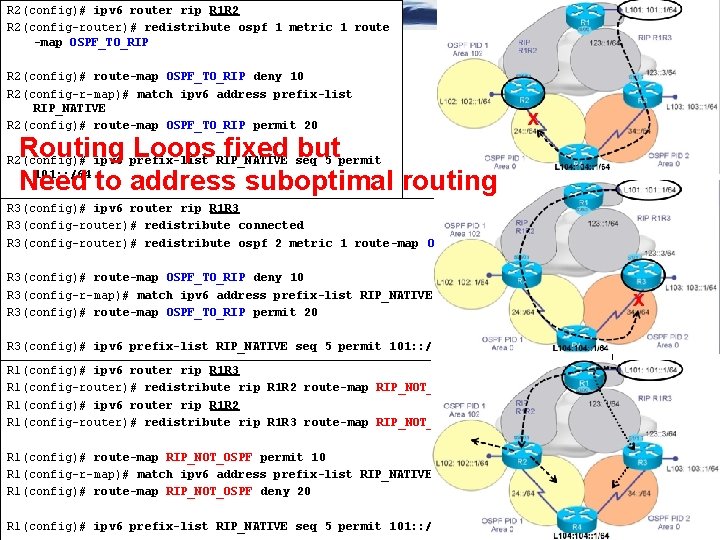
R 2(config)# ipv 6 router rip R 1 R 2 R 2(config-router)# redistribute ospf 1 metric 1 route -map OSPF_TO_RIP R 2(config)# route-map OSPF_TO_RIP deny 10 R 2(config-r-map)# match ipv 6 address prefix-list RIP_NATIVE R 2(config)# route-map OSPF_TO_RIP permit 20 Routing Loops fixed but Need to address suboptimal routing R 2(config)# ipv 6 prefix-list RIP_NATIVE seq 5 permit 101: : /64 R 3(config)# ipv 6 router rip R 1 R 3 R 3(config-router)# redistribute connected R 3(config-router)# redistribute ospf 2 metric 1 route-map OSPF_TO_RIP R 3(config)# route-map OSPF_TO_RIP deny 10 R 3(config-r-map)# match ipv 6 address prefix-list RIP_NATIVE R 3(config)# route-map OSPF_TO_RIP permit 20 R 3(config)# ipv 6 prefix-list RIP_NATIVE seq 5 permit 101: : /64 R 1(config)# ipv 6 router rip R 1 R 3 R 1(config-router)# redistribute rip R 1 R 2 route-map RIP_NOT_OSPF R 1(config)# ipv 6 router rip R 1 R 2 R 1(config-router)# redistribute rip R 1 R 3 route-map RIP_NOT_OSPF R 1(config)# route-map RIP_NOT_OSPF permit 10 R 1(config-r-map)# match ipv 6 address prefix-list RIP_NATIVE R 1(config)# route-map RIP_NOT_OSPF deny 20 R 1(config)# ipv 6 prefix-list RIP_NATIVE seq 5 permit 101: : /64
AD 120 AD 110 L 104: : 1/64 R 3# show ipv 6 route | 10[14]: : /64 OE 2 101: : /64 [110/20] via FE 80: : 4, Serial 0/0/0. 4 104: : /64 [110/20] via FE 80: : 4, Serial 0/0/0. 4 Suboptimal Routing l R 3 is learning about 101 from both: R 1 via RIPng (AD = 120) R 4 via OSPFv 3 (AD = 110) l The OSPFv 3 route preferred because of the lower administrative distance 77
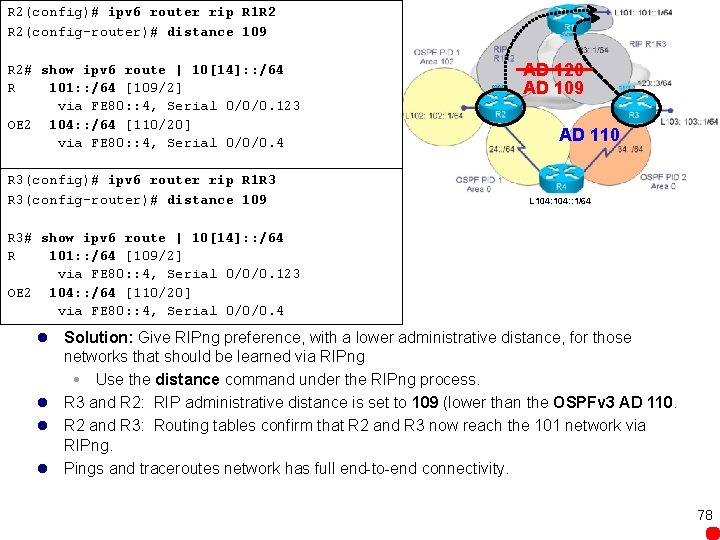
R 2(config)# ipv 6 router rip R 1 R 2 R 2(config-router)# distance 109 R 2# show ipv 6 route | 10[14]: : /64 R 101: : /64 [109/2] via FE 80: : 4, Serial 0/0/0. 123 OE 2 104: : /64 [110/20] via FE 80: : 4, Serial 0/0/0. 4 R 3(config)# ipv 6 router rip R 1 R 3 R 3(config-router)# distance 109 AD 120 AD 109 AD 110 L 104: : 1/64 R 3# show ipv 6 route | 10[14]: : /64 R 101: : /64 [109/2] via FE 80: : 4, Serial 0/0/0. 123 OE 2 104: : /64 [110/20] via FE 80: : 4, Serial 0/0/0. 4 l Solution: Give RIPng preference, with a lower administrative distance, for those networks that should be learned via RIPng Use the distance command under the RIPng process. l R 3 and R 2: RIP administrative distance is set to 109 (lower than the OSPFv 3 AD 110. l R 2 and R 3: Routing tables confirm that R 2 and R 3 now reach the 101 network via RIPng. l Pings and traceroutes network has full end-to-end connectivity. 78
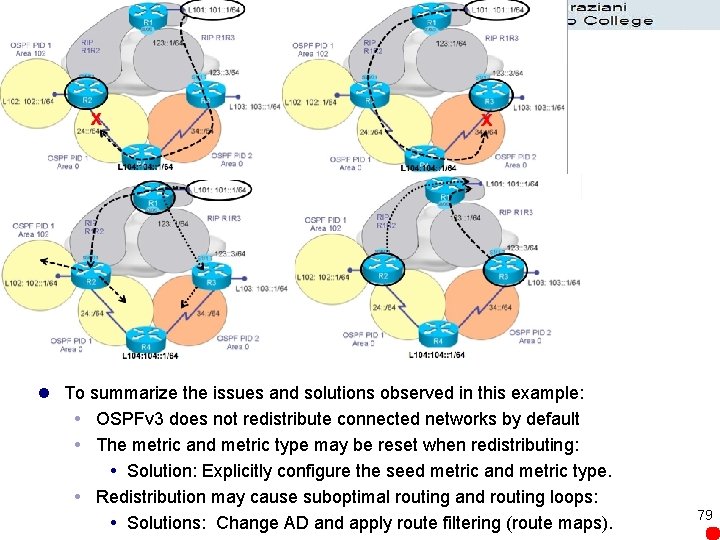
l To summarize the issues and solutions observed in this example: OSPFv 3 does not redistribute connected networks by default The metric and metric type may be reset when redistributing: Solution: Explicitly configure the seed metric and metric type. Redistribution may cause suboptimal routing and routing loops: Solutions: Change AD and apply route filtering (route maps). 79
l Not covered in this section of Chapter 8: l RIPng, OSPFv 3, and MBGP Redistribution 80
CIS 185 CCNP ROUTE Ch. 8 Implementing IPv 6 – Part 2 Rick Graziani Cabrillo College graziani@cabrillo. edu Last Updated: Fall 2010