Chapter 14 Graphical User Interfaces Part 2 Outline
- Slides: 53
Chapter 14 – Graphical User Interfaces Part 2 Outline 14. 1 Introduction 14. 2 Menus 14. 3 Menus 14. 4 14. 5 14. 6 14. 7 14. 8 Menus Link. Labels List. Boxes Checked. List. Boxes Combo. Boxes 2007 Dr. Natheer Khasaneh 1
2 14. 1 Introduction • Continues study of Graphical User Interface • Explores: – – – – Menus Link. Labels List. Box Checked. List. Box Combo. Boxes Tree. View control Tab controls Multiple-document interface windows 2007 Dr. Natheer Khasaneh
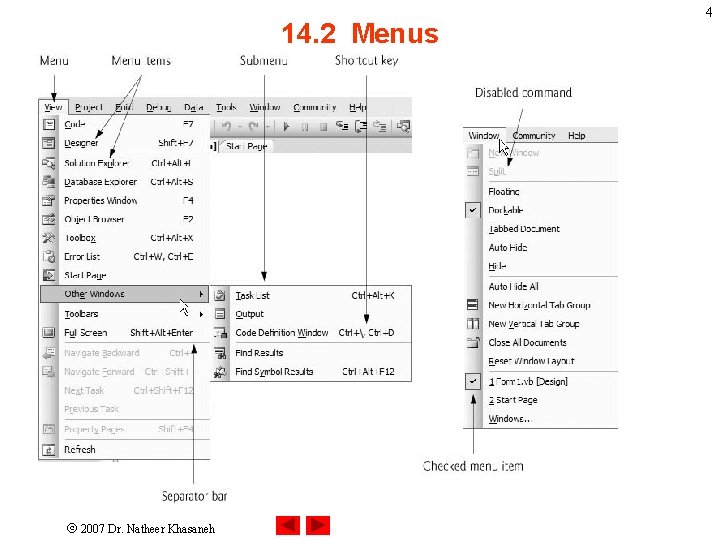
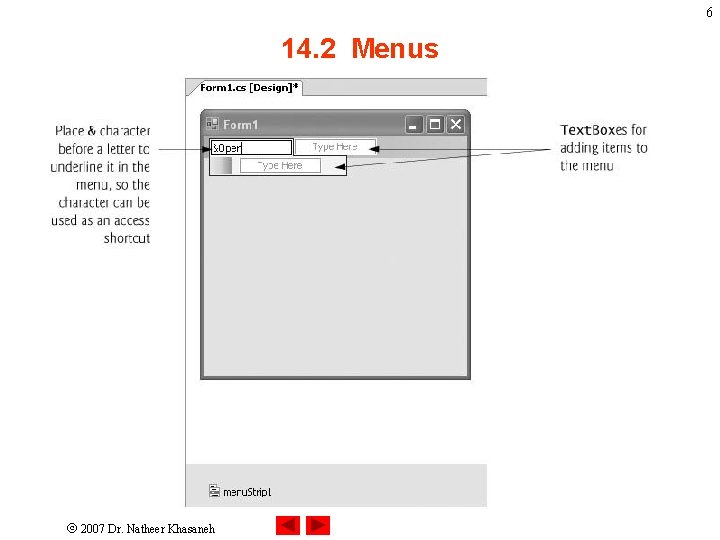
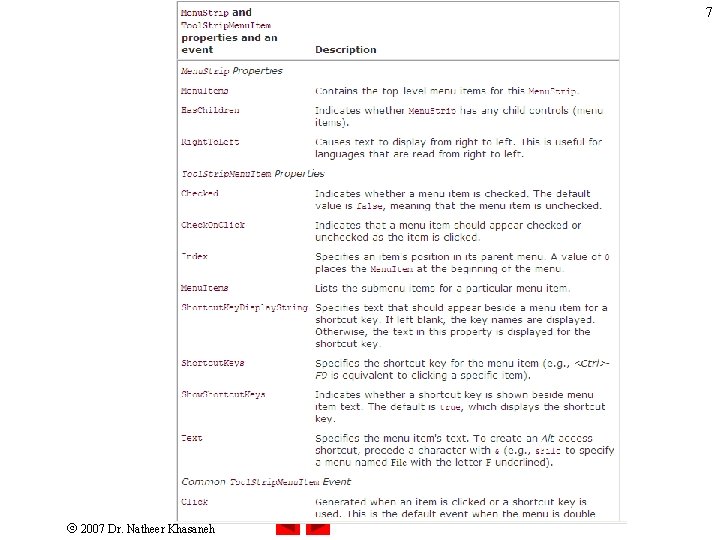
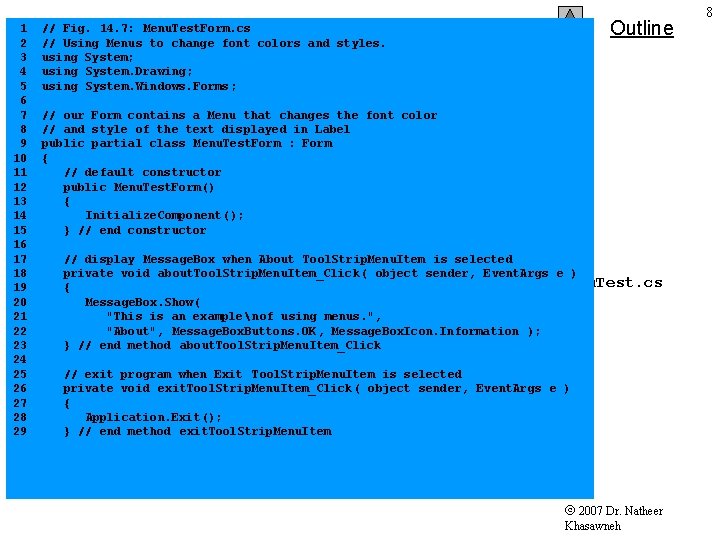
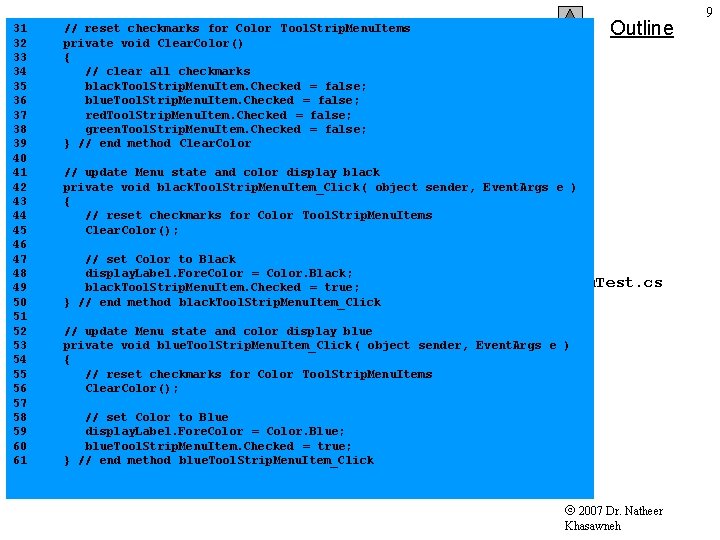
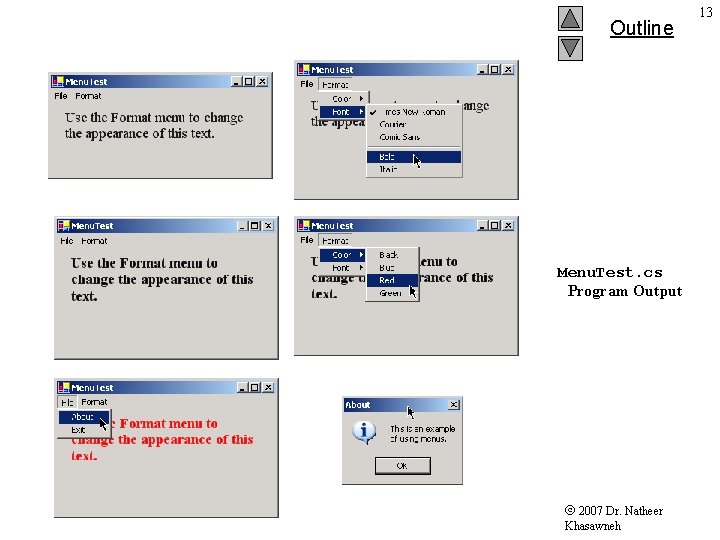
3 14. 2 Menus • Group related commands together • Contain: – Commands – Submenus • • Exit uses Application class to quit Color options mutually exclusive Every option has its own event handler Font style options use Xor operator 2007 Dr. Natheer Khasaneh
14. 2 Menus 2007 Dr. Natheer Khasaneh 4
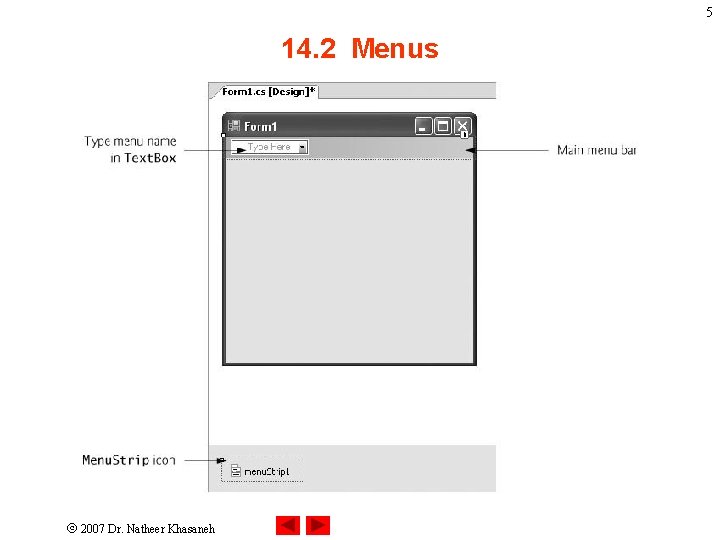
5 14. 2 Menus 2007 Dr. Natheer Khasaneh
6 14. 2 Menus 2007 Dr. Natheer Khasaneh
7 2007 Dr. Natheer Khasaneh
1 2 3 4 5 6 7 8 9 10 11 12 13 14 15 16 17 18 19 20 21 22 23 24 25 26 27 28 29 Outline // Fig. 14. 7: Menu. Test. Form. cs // Using Menus to change font colors and styles. using System; using System. Drawing; using System. Windows. Forms; // our Form contains a Menu that changes the font color // and style of the text displayed in Label public partial class Menu. Test. Form : Form { // default constructor public Menu. Test. Form() { Initialize. Component(); } // end constructor // display Message. Box when About Tool. Strip. Menu. Item is selected private void about. Tool. Strip. Menu. Item_Click ( object sender, Event. Args e ) Menu. Test. cs { Message. Box. Show( "This is an example nof using menus. ", "About", Message. Box. Buttons. OK, Message. Box. Icon. Information ); } // end method about. Tool. Strip. Menu. Item_Click // exit program when Exit Tool. Strip. Menu. Item is selected private void exit. Tool. Strip. Menu. Item_Click ( object sender, Event. Args e ) { Application. Exit(); } // end method exit. Tool. Strip. Menu. Item 2007 Dr. Natheer Khasawneh 8
31 32 33 34 35 36 37 38 39 40 41 42 43 44 45 46 47 48 49 50 51 52 53 54 55 56 57 58 59 60 61 Outline // reset checkmarks for Color Tool. Strip. Menu. Items private void Clear. Color() { // clear all checkmarks black. Tool. Strip. Menu. Item. Checked = false; blue. Tool. Strip. Menu. Item. Checked = false; red. Tool. Strip. Menu. Item. Checked = false; green. Tool. Strip. Menu. Item. Checked = false; } // end method Clear. Color // update Menu state and color display black private void black. Tool. Strip. Menu. Item_Click ( object sender, Event. Args e ) { // reset checkmarks for Color Tool. Strip. Menu. Items Clear. Color(); // set Color to Black display. Label. Fore. Color = Color. Black; black. Tool. Strip. Menu. Item. Checked = true; } // end method black. Tool. Strip. Menu. Item_Click Menu. Test. cs // update Menu state and color display blue private void blue. Tool. Strip. Menu. Item_Click ( object sender, Event. Args e ) { // reset checkmarks for Color Tool. Strip. Menu. Items Clear. Color(); // set Color to Blue display. Label. Fore. Color = Color. Blue; blue. Tool. Strip. Menu. Item. Checked = true; } // end method blue. Tool. Strip. Menu. Item_Click 2007 Dr. Natheer Khasawneh 9
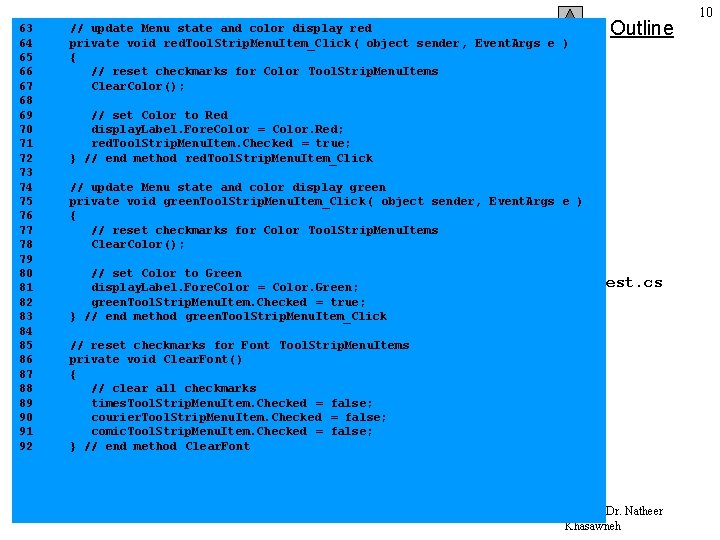
63 64 65 66 67 68 69 70 71 72 73 74 75 76 77 78 79 80 81 82 83 84 85 86 87 88 89 90 91 92 // update Menu state and color display red private void red. Tool. Strip. Menu. Item_Click ( object sender, Event. Args e ) { // reset checkmarks for Color Tool. Strip. Menu. Items Clear. Color(); Outline // set Color to Red display. Label. Fore. Color = Color. Red; red. Tool. Strip. Menu. Item. Checked = true; } // end method red. Tool. Strip. Menu. Item_Click // update Menu state and color display green private void green. Tool. Strip. Menu. Item_Click ( object sender, Event. Args e ) { // reset checkmarks for Color Tool. Strip. Menu. Items Clear. Color(); // set Color to Green display. Label. Fore. Color = Color. Green; green. Tool. Strip. Menu. Item. Checked = true; } // end method green. Tool. Strip. Menu. Item_Click Menu. Test. cs // reset checkmarks for Font Tool. Strip. Menu. Items private void Clear. Font() { // clear all checkmarks times. Tool. Strip. Menu. Item. Checked = false; courier. Tool. Strip. Menu. Item. Checked = false; comic. Tool. Strip. Menu. Item. Checked = false; } // end method Clear. Font 2007 Dr. Natheer Khasawneh 10
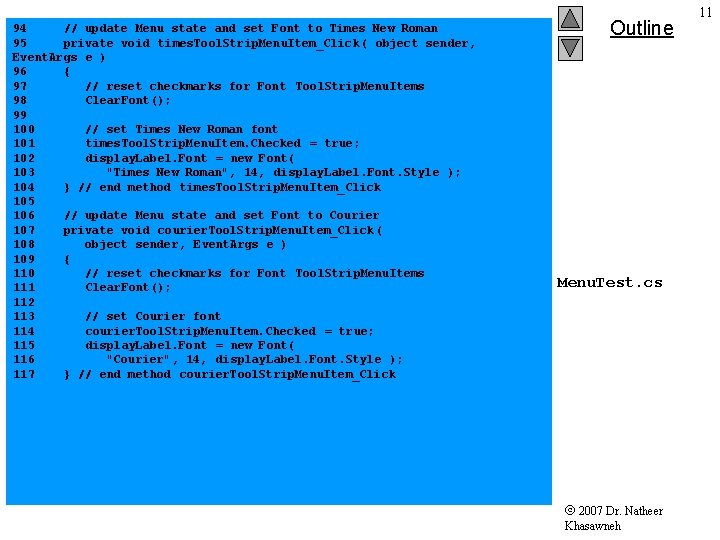
94 // update Menu state and set Font to Times New Roman 95 private void times. Tool. Strip. Menu. Item_Click ( object sender, Event. Args e ) 96 { 97 // reset checkmarks for Font Tool. Strip. Menu. Items 98 Clear. Font(); 99 100 // set Times New Roman font 101 times. Tool. Strip. Menu. Item. Checked = true; 102 display. Label. Font = new Font( 103 "Times New Roman", 14, display. Label. Font. Style ); 104 } // end method times. Tool. Strip. Menu. Item_Click 105 106 // update Menu state and set Font to Courier 107 private void courier. Tool. Strip. Menu. Item_Click ( 108 object sender, Event. Args e ) 109 { 110 // reset checkmarks for Font Tool. Strip. Menu. Items 111 Clear. Font(); 112 113 // set Courier font 114 courier. Tool. Strip. Menu. Item. Checked = true; 115 display. Label. Font = new Font( 116 "Courier", 14, display. Label. Font. Style ); 117 } // end method courier. Tool. Strip. Menu. Item_Click Outline Menu. Test. cs 2007 Dr. Natheer Khasawneh 11
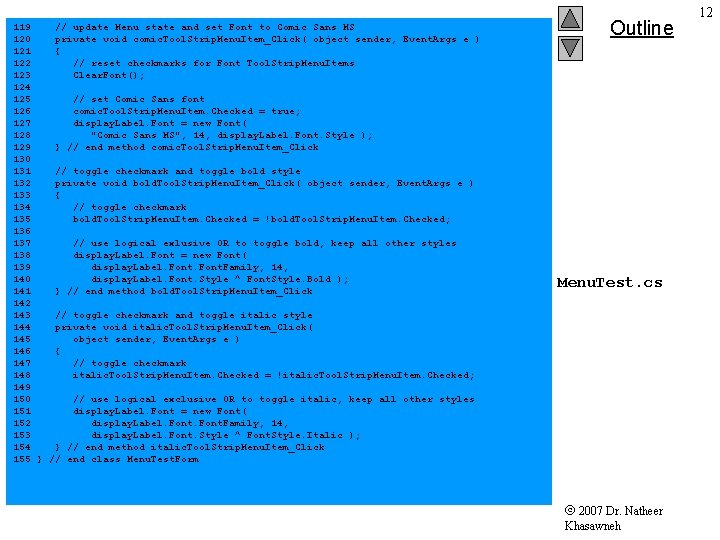
119 // update Menu state and set Font to Comic Sans MS 120 private void comic. Tool. Strip. Menu. Item_Click( object sender, Event. Args e ) 121 { 122 // reset checkmarks for Font Tool. Strip. Menu. Items 123 Clear. Font(); 124 125 // set Comic Sans font 126 comic. Tool. Strip. Menu. Item. Checked = true; 127 display. Label. Font = new Font( 128 "Comic Sans MS", 14, display. Label. Font. Style ); 129 } // end method comic. Tool. Strip. Menu. Item_Click 130 131 // toggle checkmark and toggle bold style 132 private void bold. Tool. Strip. Menu. Item_Click( object sender, Event. Args e ) 133 { 134 // toggle checkmark 135 bold. Tool. Strip. Menu. Item. Checked = !bold. Tool. Strip. Menu. Item. Checked; 136 137 // use logical exlusive OR to toggle bold, keep all other styles 138 display. Label. Font = new Font( 139 display. Label. Font. Family, 140 display. Label. Font. Style ^ Font. Style. Bold ); 141 } // end method bold. Tool. Strip. Menu. Item_Click 142 143 // toggle checkmark and toggle italic style 144 private void italic. Tool. Strip. Menu. Item_Click( 145 object sender, Event. Args e ) 146 { 147 // toggle checkmark 148 italic. Tool. Strip. Menu. Item. Checked = !italic. Tool. Strip. Menu. Item. Checked; 149 150 // use logical exclusive OR to toggle italic, keep all other styles 151 display. Label. Font = new Font( 152 display. Label. Font. Family, 14, 153 display. Label. Font. Style ^ Font. Style. Italic ); 154 } // end method italic. Tool. Strip. Menu. Item_Click 155 } // end class Menu. Test. Form Outline Menu. Test. cs 2007 Dr. Natheer Khasawneh 12
Outline Menu. Test. cs Program Output 2007 Dr. Natheer Khasawneh 13
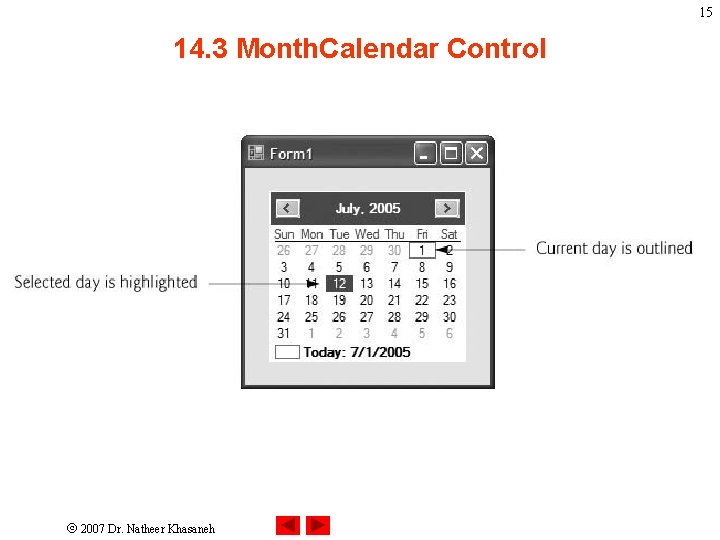
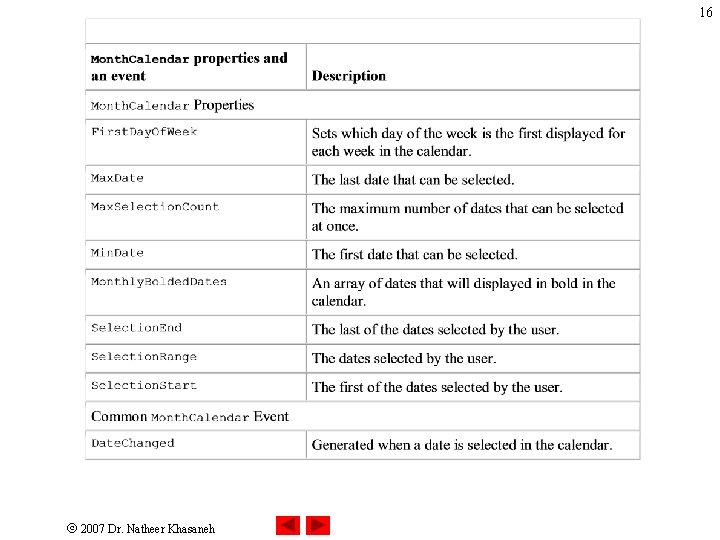
14 14. 3 Month. Calendar Control • The Month. Calendar control displays a monthly calendar on the Form. • The user can select a date from the currently displayed month. • When a date is selected, it is highlighted. • Multiple dates can be selected. • The default event for this control is Date. Changed. 2007 Dr. Natheer Khasaneh
15 14. 3 Month. Calendar Control 2007 Dr. Natheer Khasaneh
16 2007 Dr. Natheer Khasaneh
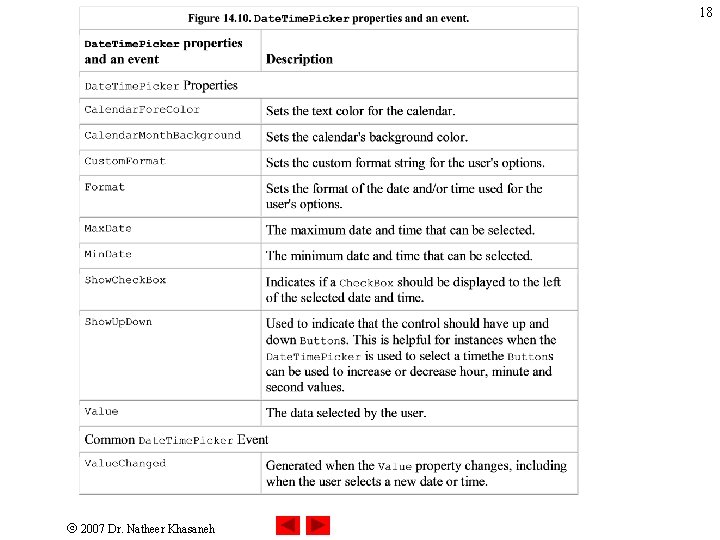
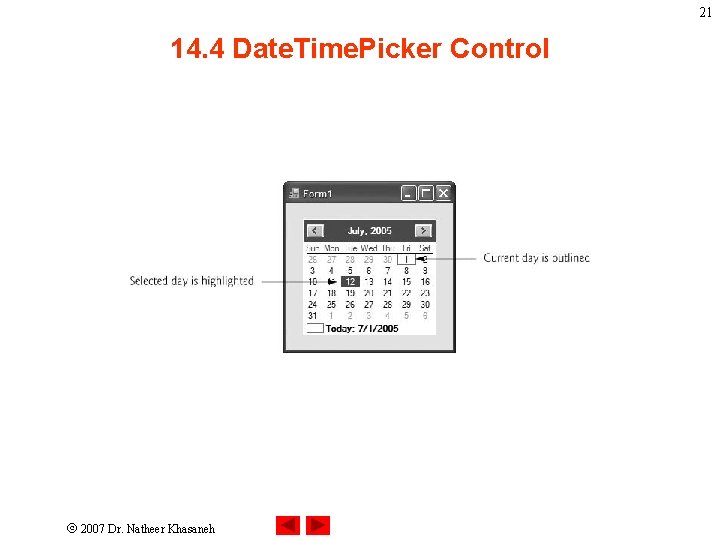
17 14. 4 Date. Time. Picker Control • The Date. Time. Picker control is similar to the Month. Calendar control • But displays the calendar when a down arrow is selected 2007 Dr. Natheer Khasaneh
18 2007 Dr. Natheer Khasaneh
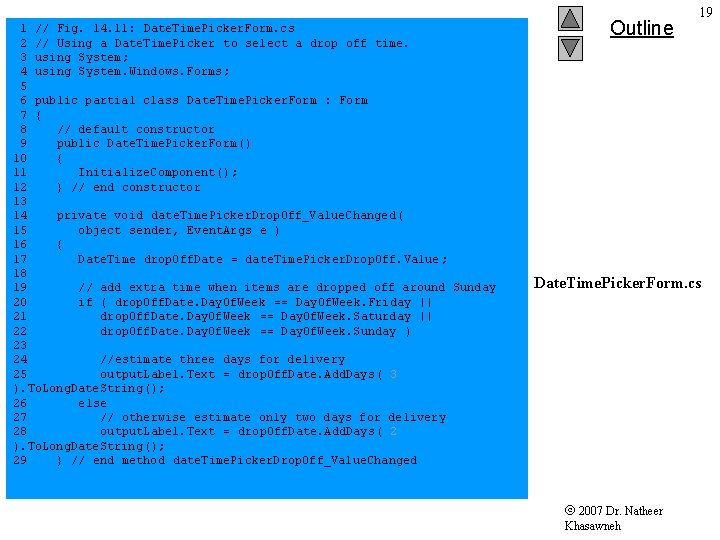
1 // Fig. 14. 11: Date. Time. Picker. Form. cs 2 // Using a Date. Time. Picker to select a drop off time. 3 using System; 4 using System. Windows. Forms; 5 6 public partial class Date. Time. Picker. Form : Form 7 { 8 // default constructor 9 public Date. Time. Picker. Form() 10 { 11 Initialize. Component(); 12 } // end constructor 13 14 private void date. Time. Picker. Drop. Off_Value. Changed ( 15 object sender, Event. Args e ) 16 { 17 Date. Time drop. Off. Date = date. Time. Picker. Drop. Off. Value ; 18 19 // add extra time when items are dropped off around Sunday 20 if ( drop. Off. Date. Day. Of. Week == Day. Of. Week. Friday || 21 drop. Off. Date. Day. Of. Week == Day. Of. Week. Saturday || 22 drop. Off. Date. Day. Of. Week == Day. Of. Week. Sunday ) 23 24 //estimate three days for delivery 25 output. Label. Text = drop. Off. Date. Add. Days( 3 ). To. Long. Date. String(); 26 else 27 // otherwise estimate only two days for delivery 28 output. Label. Text = drop. Off. Date. Add. Days( 2 ). To. Long. Date. String(); 29 } // end method date. Time. Picker. Drop. Off_Value. Changed Outline 19 Date. Time. Picker. Form. cs 2007 Dr. Natheer Khasawneh
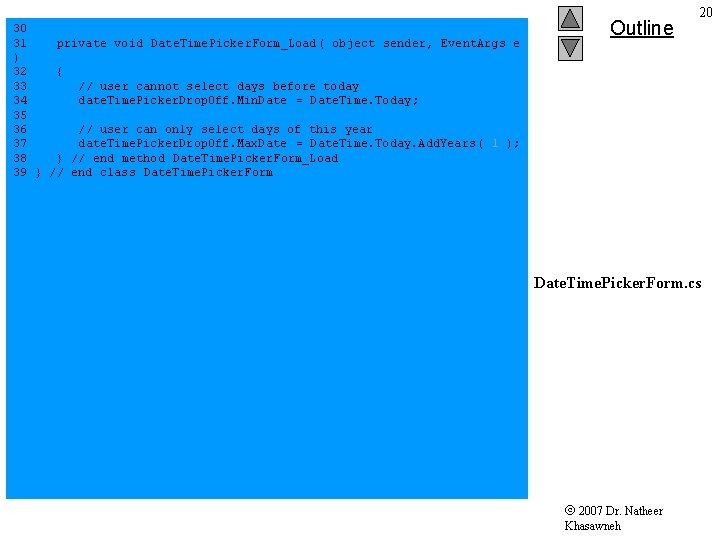
30 31 private void Date. Time. Picker. Form_Load( object sender, Event. Args e ) 32 { 33 // user cannot select days before today 34 date. Time. Picker. Drop. Off. Min. Date = Date. Time. Today; 35 36 // user can only select days of this year 37 date. Time. Picker. Drop. Off. Max. Date = Date. Time. Today. Add. Years( 1 ); 38 } // end method Date. Time. Picker. Form_Load 39 } // end class Date. Time. Picker. Form Outline 20 Date. Time. Picker. Form. cs 2007 Dr. Natheer Khasawneh
21 14. 4 Date. Time. Picker Control 2007 Dr. Natheer Khasaneh
22 14. 5 Link. Labels • Displays links to other objects – Uses event handlers to link to right file or program – Start method of Process class opens other programs • Derived from class Label, inherits functionality 2007 Dr. Natheer Khasaneh
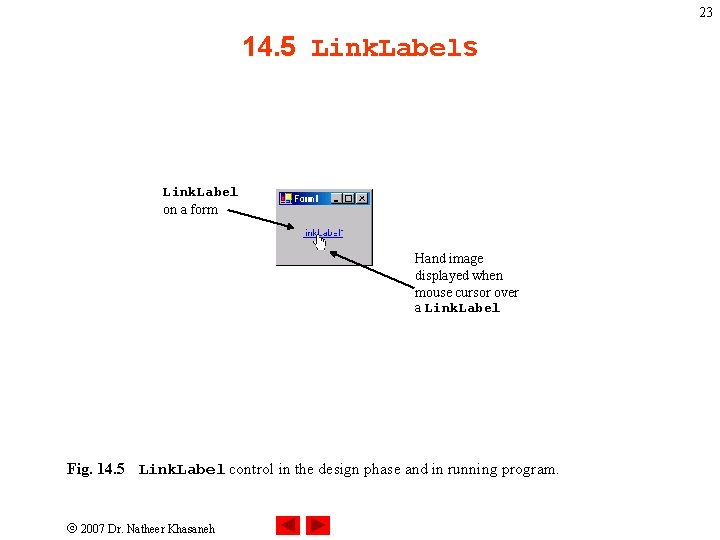
23 14. 5 Link. Labels Link. Label on a form Hand image displayed when mouse cursor over a Link. Label Fig. 14. 5 Link. Label control in the design phase and in running program. 2007 Dr. Natheer Khasaneh
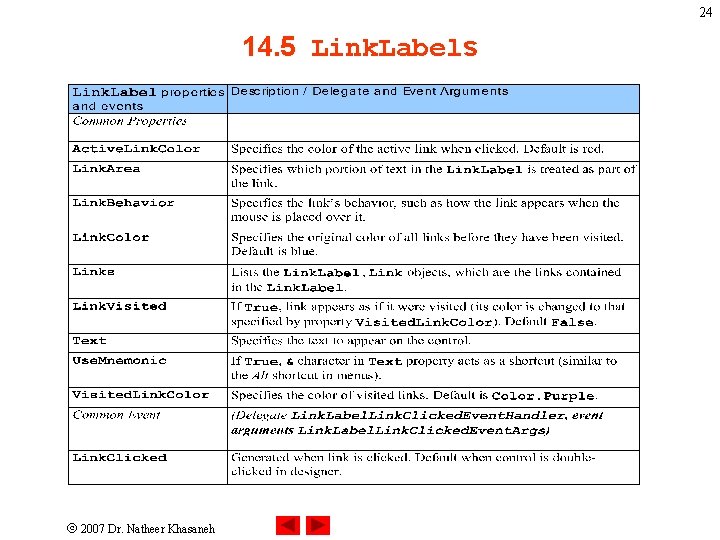
24 14. 5 Link. Labels 2007 Dr. Natheer Khasaneh
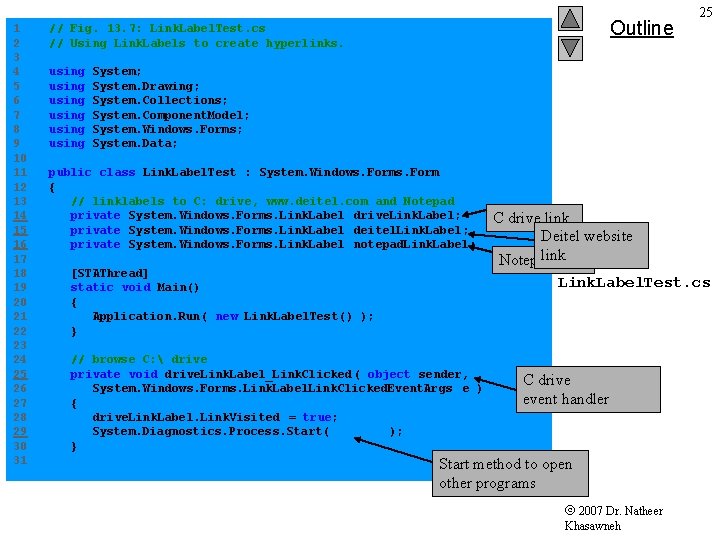
1 2 3 4 5 6 7 8 9 10 11 12 13 14 15 16 17 18 19 20 21 22 23 24 25 26 27 28 29 30 31 Outline // Fig. 13. 7: Link. Label. Test. cs // Using Link. Labels to create hyperlinks. using using 25 System; System. Drawing; System. Collections; System. Component. Model; System. Windows. Forms; System. Data; public class Link. Label. Test : System. Windows. Form { // linklabels to C: drive, www. deitel. com and Notepad private System. Windows. Forms. Link. Label drive. Link. Label; private System. Windows. Forms. Link. Label deitel. Link. Label; private System. Windows. Forms. Link. Label notepad. Link. Label; [STAThread] static void Main() { Application. Run( new Link. Label. Test() ); } // browse C: drive private void drive. Link. Label_Link. Clicked ( object sender, System. Windows. Forms. Link. Label. Link. Clicked. Event. Args e ) { drive. Link. Label. Link. Visited = true; System. Diagnostics. Process. Start( "C: \" ); } C drive link Deitel website link Notepad link Link. Label. Test. cs C drive event handler Start method to open other programs 2007 Dr. Natheer Khasawneh
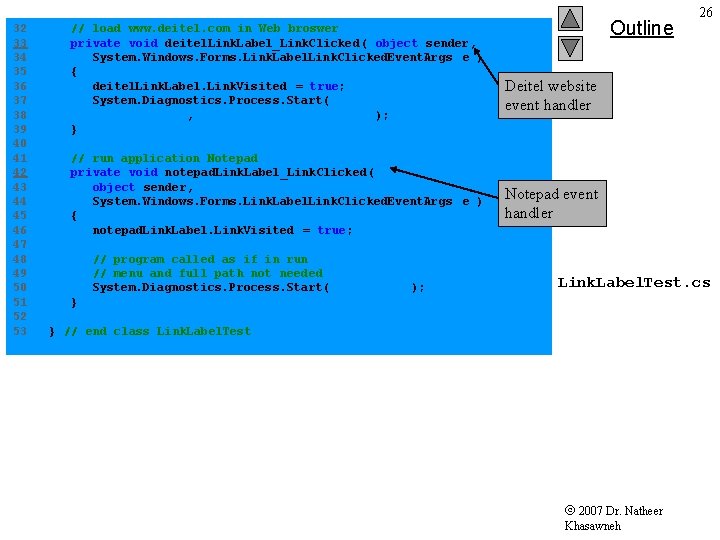
32 33 34 35 36 37 38 39 40 41 42 43 44 45 46 47 48 49 50 51 52 53 // load www. deitel. com in Web broswer private void deitel. Link. Label_Link. Clicked ( object sender, System. Windows. Forms. Link. Label. Link. Clicked. Event. Args e ) { deitel. Link. Label. Link. Visited = true; System. Diagnostics. Process. Start( "IExplore", "http: //www. deitel. com" ); } // run application Notepad private void notepad. Link. Label_Link. Clicked ( object sender, System. Windows. Forms. Link. Label. Link. Clicked. Event. Args e ) { notepad. Link. Label. Link. Visited = true; // program called as if in run // menu and full path not needed System. Diagnostics. Process. Start( "notepad" ); Outline 26 Deitel website event handler Notepad event handler Link. Label. Test. cs } } // end class Link. Label. Test 2007 Dr. Natheer Khasawneh
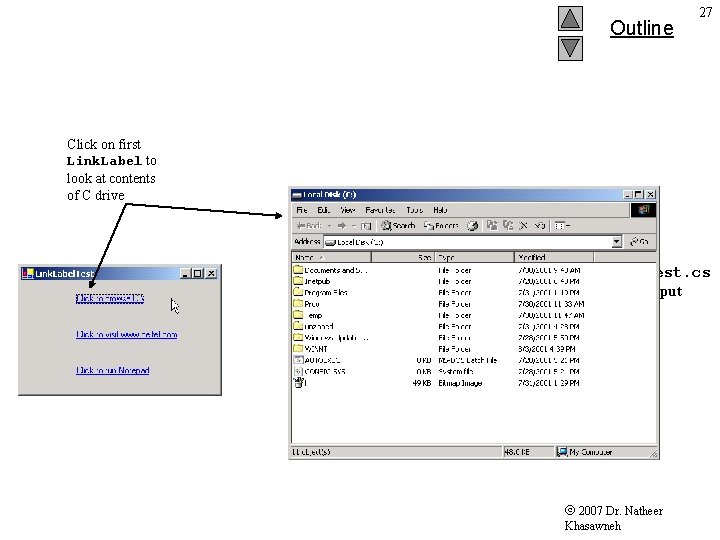
Outline 27 Click on first Link. Label to look at contents of C drive Link. Label. Test. cs Program Output 2007 Dr. Natheer Khasawneh
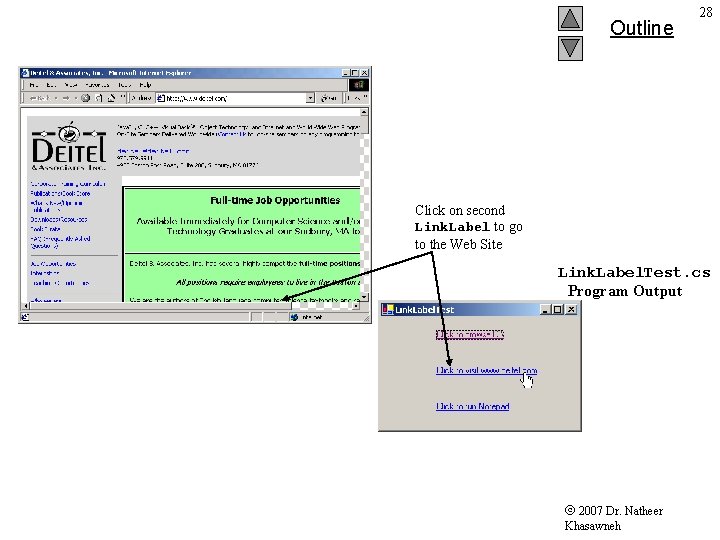
Outline 28 Click on second Link. Label to go to the Web Site Link. Label. Test. cs Program Output 2007 Dr. Natheer Khasawneh
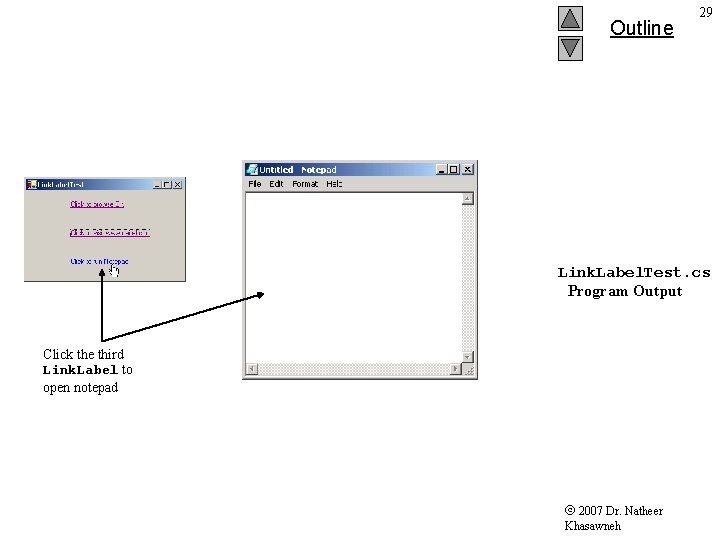
Outline 29 Link. Label. Test. cs Program Output Click the third Link. Label to open notepad 2007 Dr. Natheer Khasawneh
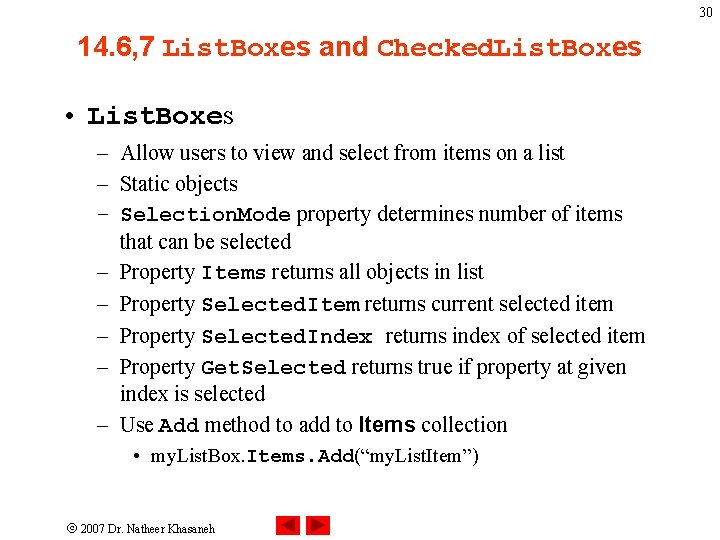
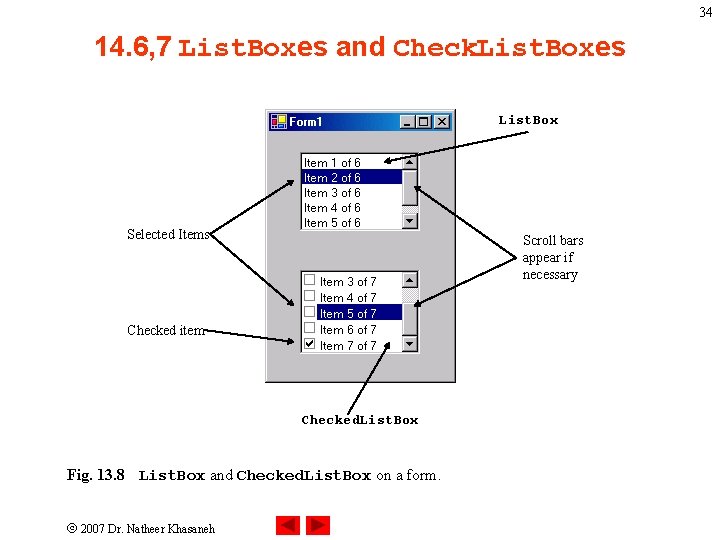
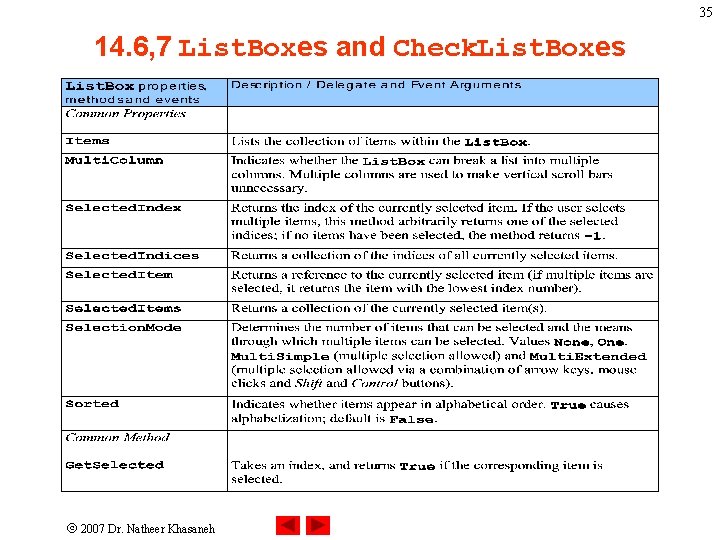
30 14. 6, 7 List. Boxes and Checked. List. Boxes • List. Boxes – Allow users to view and select from items on a list – Static objects – Selection. Mode property determines number of items that can be selected – Property Items returns all objects in list – Property Selected. Item returns current selected item – Property Selected. Index returns index of selected item – Property Get. Selected returns true if property at given index is selected – Use Add method to add to Items collection • my. List. Box. Items. Add(“my. List. Item”) 2007 Dr. Natheer Khasaneh
31 14. 6, 7 List. Boxes and Checked. List. Boxes • Checked. List. Boxes – Extends List. Box by placing check boxes next to items – Can select more than one object at one time 2007 Dr. Natheer Khasaneh
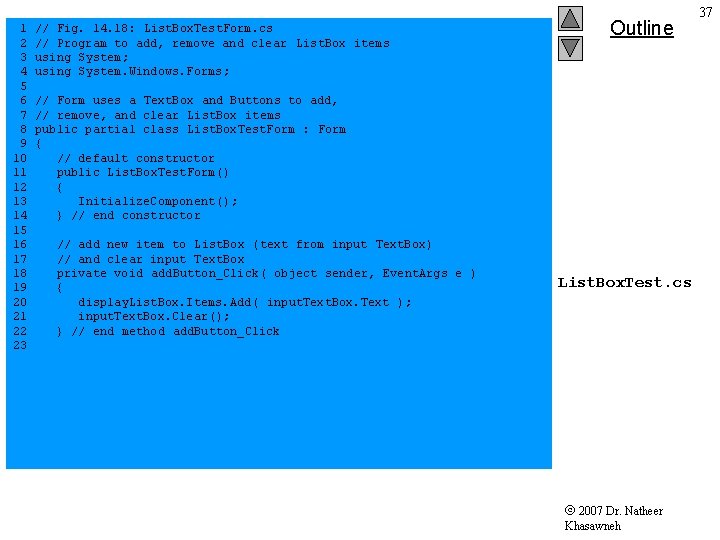
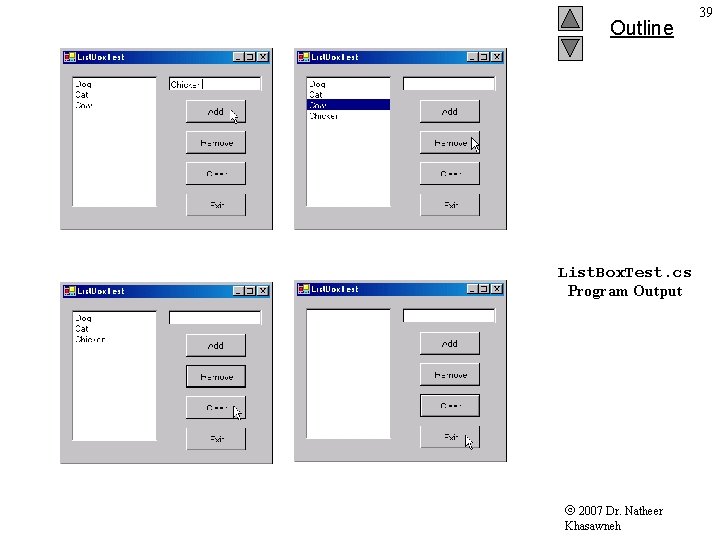
32 14. 6 List. Boxes • Class List. Box. Test – Allows users to add and remove items from List. Box – Uses event handlers to add to, remove from and clear list 2007 Dr. Natheer Khasaneh
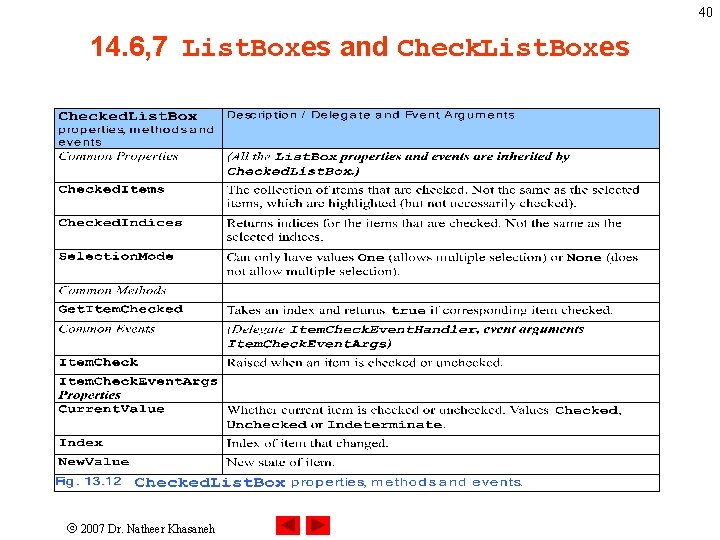
33 14. 7 Checked. List. Boxes • Checked. List. Box derives from class List. Box – Can add to, remove from or clear list – Can select multiple items from the list – Properties Current. Value and New. Value return state of object selected – Properties Checked. Items and Checked. Indices return the objects and indices of selected items respectively 2007 Dr. Natheer Khasaneh
34 14. 6, 7 List. Boxes and Check. List. Boxes List. Box Selected Items Scroll bars appear if necessary Checked item Checked. List. Box Fig. 13. 8 List. Box and Checked. List. Box on a form. 2007 Dr. Natheer Khasaneh
35 14. 6, 7 List. Boxes and Check. List. Boxes 2007 Dr. Natheer Khasaneh
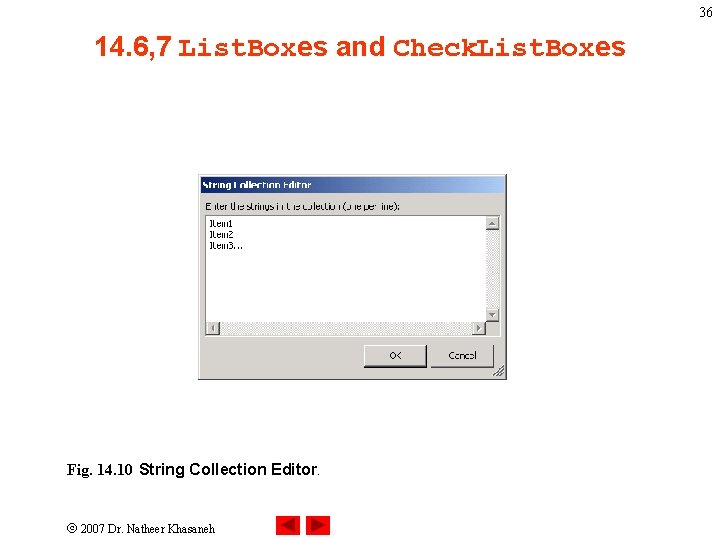
36 14. 6, 7 List. Boxes and Check. List. Boxes Fig. 14. 10 String Collection Editor. 2007 Dr. Natheer Khasaneh
1 2 3 4 5 6 7 8 9 10 11 12 13 14 15 16 17 18 19 20 21 22 23 // Fig. 14. 18: List. Box. Test. Form. cs // Program to add, remove and clear List. Box items using System; using System. Windows. Forms; Outline // Form uses a Text. Box and Buttons to add, // remove, and clear List. Box items public partial class List. Box. Test. Form : Form { // default constructor public List. Box. Test. Form() { Initialize. Component(); } // end constructor // add new item to List. Box (text from input Text. Box) // and clear input Text. Box private void add. Button_Click( object sender, Event. Args e ) { display. List. Box. Items. Add ( input. Text. Box. Text ); input. Text. Box. Clear(); } // end method add. Button_Click List. Box. Test. cs 2007 Dr. Natheer Khasawneh 37
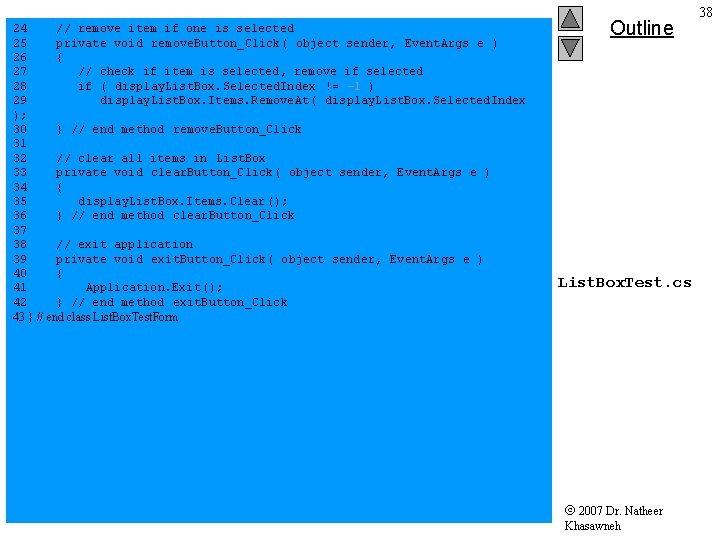
24 // remove item if one is selected 25 private void remove. Button_Click( object sender, Event. Args e ) 26 { 27 // check if item is selected, remove if selected 28 if ( display. List. Box. Selected. Index != -1 ) 29 display. List. Box. Items. Remove. At ( display. List. Box. Selected. Index ); 30 } // end method remove. Button_Click 31 32 // clear all items in List. Box 33 private void clear. Button_Click( object sender, Event. Args e ) 34 { 35 display. List. Box. Items. Clear (); 36 } // end method clear. Button_Click 37 38 // exit application 39 private void exit. Button_Click( object sender, Event. Args e ) 40 { 41 Application. Exit(); 42 } // end method exit. Button_Click 43 } // end class List. Box. Test. Form Outline List. Box. Test. cs 2007 Dr. Natheer Khasawneh 38
Outline List. Box. Test. cs Program Output 2007 Dr. Natheer Khasawneh 39
40 14. 6, 7 List. Boxes and Check. List. Boxes 2007 Dr. Natheer Khasaneh
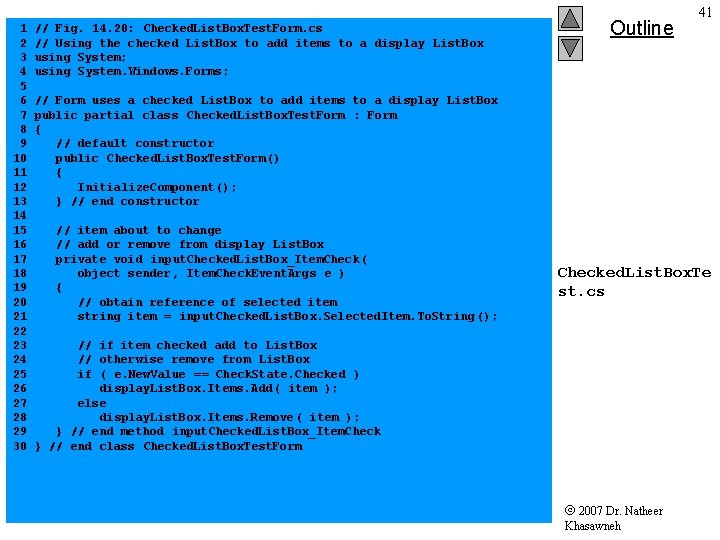
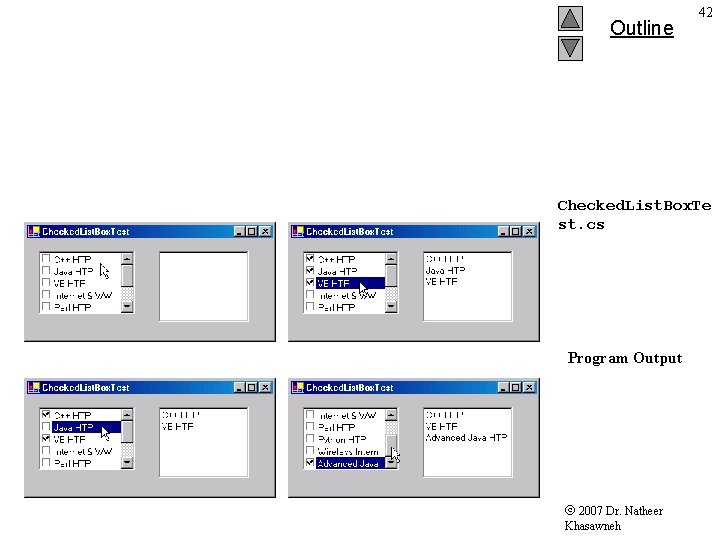
1 2 3 4 5 6 7 8 9 10 11 12 13 14 15 16 17 18 19 20 21 22 23 24 25 26 27 28 29 30 // Fig. 14. 20: Checked. List. Box. Test. Form. cs // Using the checked List. Box to add items to a display List. Box using System; using System. Windows. Forms; Outline 41 // Form uses a checked List. Box to add items to a display List. Box public partial class Checked. List. Box. Test. Form : Form { // default constructor public Checked. List. Box. Test. Form() { Initialize. Component(); } // end constructor // item about to change // add or remove from display List. Box private void input. Checked. List. Box_Item. Check ( object sender, Item. Check. Event. Args e ) { // obtain reference of selected item string item = input. Checked. List. Box. Selected. Item. To. String (); Checked. List. Box. Te st. cs // if item checked add to List. Box // otherwise remove from List. Box if ( e. New. Value == Check. State. Checked ) display. List. Box. Items. Add ( item ); else display. List. Box. Items. Remove ( item ); } // end method input. Checked. List. Box_Item. Check } // end class Checked. List. Box. Test. Form 2007 Dr. Natheer Khasawneh
Outline 42 Checked. List. Box. Te st. cs Program Output 2007 Dr. Natheer Khasawneh
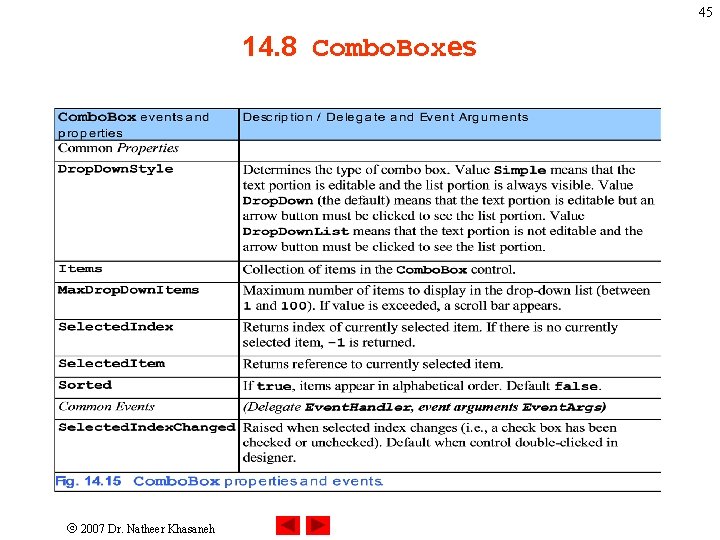
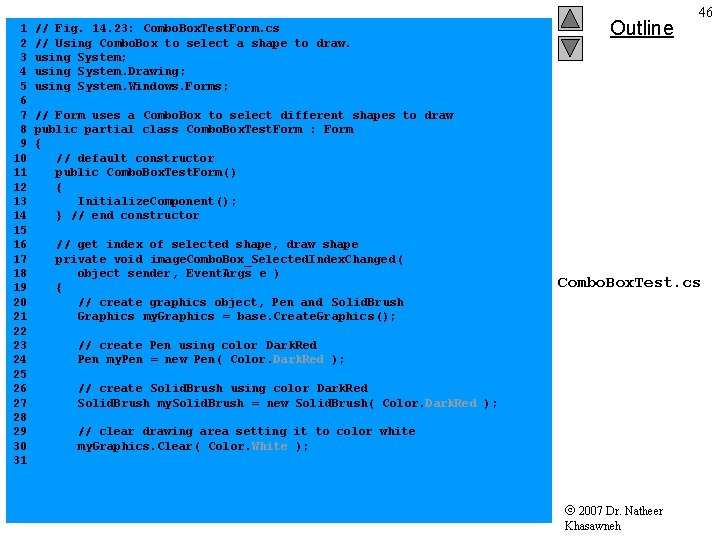
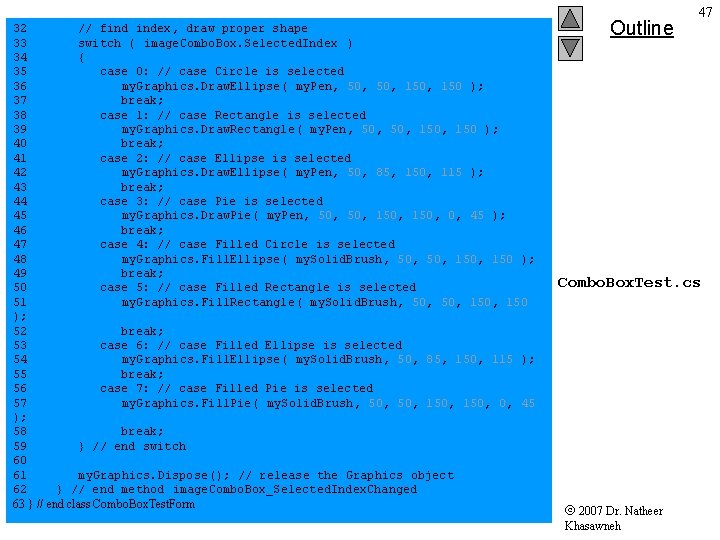
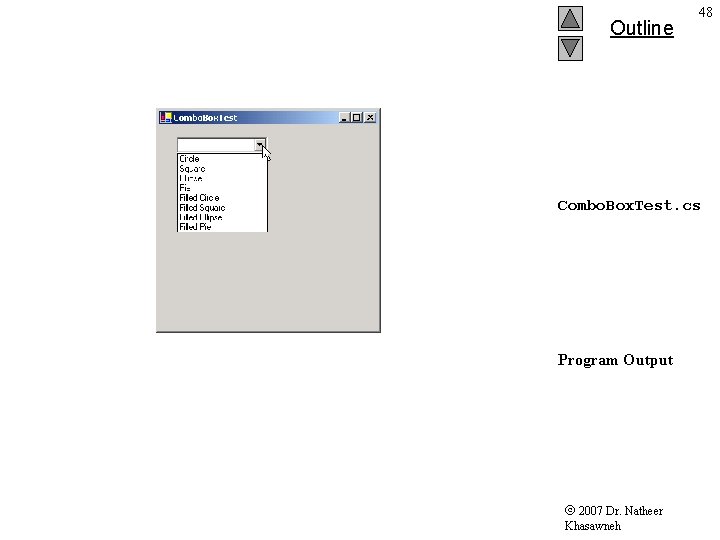
43 14. 8 Combo. Boxes • Combine Text. Box and drop-down list • Add method adds object to collection • Properties: – – Drop. Down. Style: determines type of Combo. Box Items: returns objects in the list Selected. Item: returns object selected Selected. Index: returns index of selected item 2007 Dr. Natheer Khasaneh
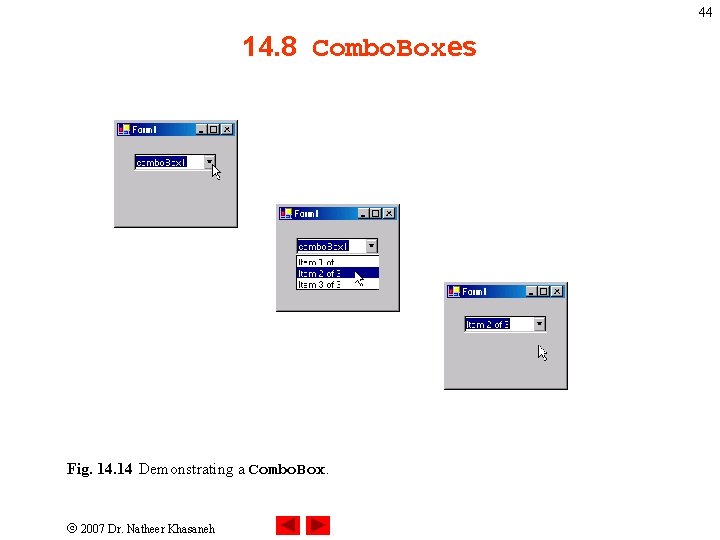
44 14. 8 Combo. Boxes Fig. 14 Demonstrating a Combo. Box. 2007 Dr. Natheer Khasaneh
45 14. 8 Combo. Boxes 2007 Dr. Natheer Khasaneh
1 2 3 4 5 6 7 8 9 10 11 12 13 14 15 16 17 18 19 20 21 22 23 24 25 26 27 28 29 30 31 // Fig. 14. 23: Combo. Box. Test. Form. cs // Using Combo. Box to select a shape to draw. using System; using System. Drawing; using System. Windows. Forms; Outline 46 // Form uses a Combo. Box to select different shapes to draw public partial class Combo. Box. Test. Form : Form { // default constructor public Combo. Box. Test. Form() { Initialize. Component(); } // end constructor // get index of selected shape, draw shape private void image. Combo. Box_Selected. Index. Changed ( object sender, Event. Args e ) { // create graphics object, Pen and Solid. Brush Graphics my. Graphics = base. Create. Graphics(); Combo. Box. Test. cs // create Pen using color Dark. Red Pen my. Pen = new Pen( Color. Dark. Red ); // create Solid. Brush using color Dark. Red Solid. Brush my. Solid. Brush = new Solid. Brush( Color. Dark. Red ); // clear drawing area setting it to color white my. Graphics. Clear( Color. White ); 2007 Dr. Natheer Khasawneh
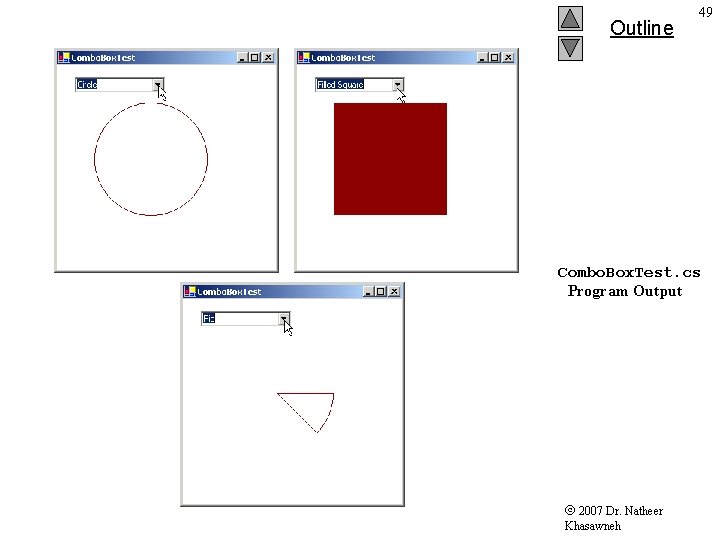
32 // find index, draw proper shape 33 switch ( image. Combo. Box. Selected. Index ) 34 { 35 case 0: // case Circle is selected 36 my. Graphics. Draw. Ellipse( my. Pen, 50, 150 ); 37 break; 38 case 1: // case Rectangle is selected 39 my. Graphics. Draw. Rectangle ( my. Pen, 50, 150 ); 40 break; 41 case 2: // case Ellipse is selected 42 my. Graphics. Draw. Ellipse( my. Pen, 50, 85, 150, 115 ); 43 break; 44 case 3: // case Pie is selected 45 my. Graphics. Draw. Pie( my. Pen, 50, 150, 0, 45 ); 46 break; 47 case 4: // case Filled Circle is selected 48 my. Graphics. Fill. Ellipse( my. Solid. Brush, 50, 150 ); 49 break; 50 case 5: // case Filled Rectangle is selected 51 my. Graphics. Fill. Rectangle ( my. Solid. Brush, 50, 150 ); 52 break; 53 case 6: // case Filled Ellipse is selected 54 my. Graphics. Fill. Ellipse( my. Solid. Brush, 50, 85, 150, 115 ); 55 break; 56 case 7: // case Filled Pie is selected 57 my. Graphics. Fill. Pie( my. Solid. Brush, 50, 150, 0, 45 ); 58 break; 59 } // end switch 60 61 my. Graphics. Dispose(); // release the Graphics object 62 } // end method image. Combo. Box_Selected. Index. Changed 63 } // end class Combo. Box. Test. Form Outline 47 Combo. Box. Test. cs 2007 Dr. Natheer Khasawneh
Outline 48 Combo. Box. Test. cs Program Output 2007 Dr. Natheer Khasawneh
Outline 49 Combo. Box. Test. cs Program Output 2007 Dr. Natheer Khasawneh
50 Data. Source Property • Gets or sets the data source for this List. Control • An object that implements the IList or IList. Source interfaces, such as a Data. Set or an Array. 2007 Dr. Natheer Khasaneh
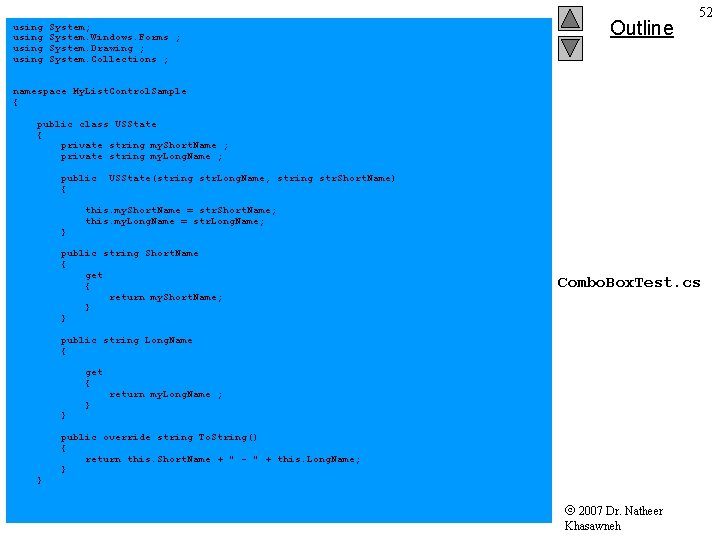
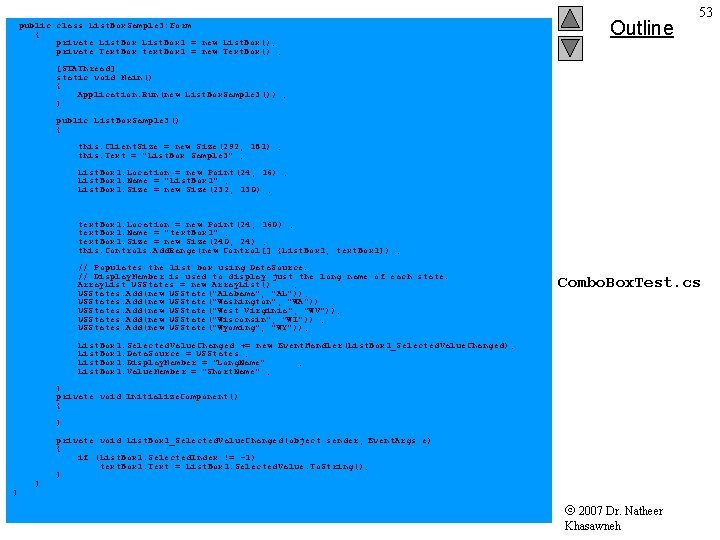
51 • There are two ways to fill the Combo. Box and List. Box controls. • You can add objects to the Combo. Box by using the Add method. • You can also add objects to a Combo. Box by using the Data. Source, Display. Member, and Value. Member properties to fill the Combo. Box. 2007 Dr. Natheer Khasaneh
using System; System. Windows. Forms ; System. Drawing ; System. Collections ; Outline 52 namespace My. List. Control. Sample { public class USState { private string my. Short. Name ; private string my. Long. Name ; public { } USState(string str. Long. Name, string str. Short. Name) this. my. Short. Name = str. Short. Name; this. my. Long. Name = str. Long. Name; public string Short. Name { get { return my. Short. Name; } } Combo. Box. Test. cs public string Long. Name { get { } } } return my. Long. Name ; public override string To. String() { return this. Short. Name + " - " + this. Long. Name; } 2007 Dr. Natheer Khasawneh
public class List. Box. Sample 3: Form { private List. Box 1 = new List. Box(); private Text. Box text. Box 1 = new Text. Box() ; Outline 53 [STAThread] static void Main() { Application. Run(new List. Box. Sample 3()) ; } public List. Box. Sample 3() { this. Client. Size = new Size(292, 181) ; this. Text = "List. Box Sample 3" ; List. Box 1. Location = new Point(24, 16) ; List. Box 1. Name = "List. Box 1" ; List. Box 1. Size = new Size(232, 130) ; text. Box 1. Location = new Point(24, 160) ; text. Box 1. Name = "text. Box 1" ; text. Box 1. Size = new Size(240, 24) ; this. Controls. Add. Range(new Control[] {List. Box 1, text. Box 1}) ; // Populates the list box using Data. Source. // Display. Member is used to display just the long name of each state. Array. List USStates = new Array. List() ; USStates. Add(new USState("Alabama", "AL")); USStates. Add(new USState("Washington", "WA")) ; USStates. Add(new USState("West Virginia", "WV")); USStates. Add(new USState("Wisconsin", "WI")) ; USStates. Add(new USState("Wyoming", "WY")); Combo. Box. Test. cs List. Box 1. Selected. Value. Changed += new Event. Handler(List. Box 1_Selected. Value. Changed); List. Box 1. Data. Source = USStates ; List. Box 1. Display. Member = "Long. Name" ; List. Box 1. Value. Member = "Short. Name" ; } private void Initialize. Component() { } } } private void List. Box 1_Selected. Value. Changed(object sender, Event. Args e) { if (List. Box 1. Selected. Index != -1) text. Box 1. Text = List. Box 1. Selected. Value. To. String(); } 2007 Dr. Natheer Khasawneh