Chapter 10 Software Engineering Presentation slides for Java
- Slides: 51
Chapter 10: Software Engineering Presentation slides for Java Software Solutions Foundations of Program Design Third Edition by John Lewis and William Loftus Java Software Solutions is published by Addison-Wesley Presentation slides are copyright 2002 by John Lewis and William Loftus. All rights reserved. Instructors using the textbook may use and modify these slides for pedagogical purposes.
Software Engineering Ø The quality of the software is a direct result of the process we follow to create it Ø Chapter 10 focuses on: • • • software development models the software life cycle and its implications linear vs. iterative development approaches goals and techniques of testing an evolutionary approach to object-oriented development a nontrivial evolutionary development example 2
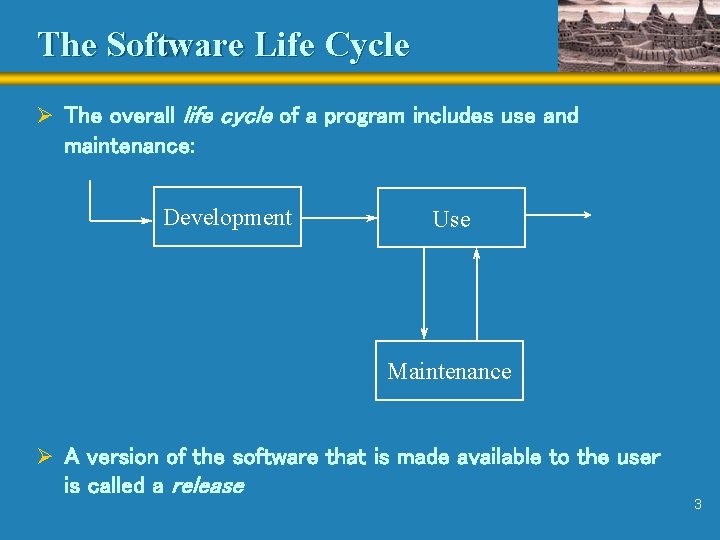
The Software Life Cycle Ø The overall life cycle of a program includes use and maintenance: Development Use Maintenance Ø A version of the software that is made available to the user is called a release 3
Maintenance Ø Maintenance tasks include any modifications to an existing program; it includes enhancements and defect removal Ø The characteristics of a program that make it easy to develop also make it easy to maintain Ø Maintenance efforts tend to far outweigh the development effort in today’s software Ø Small increases in effort at the development stage greatly reduce maintenance tasks Ø The goal is to minimize the overall effort required to create and to maintain the program 4
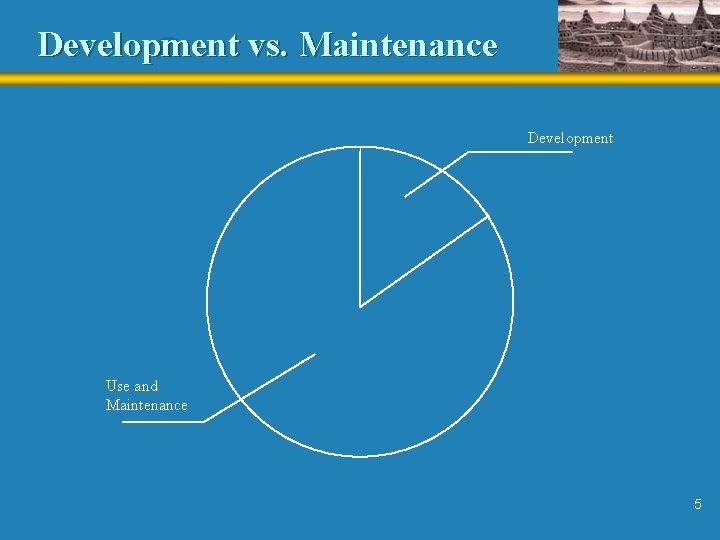
Development vs. Maintenance Development Use and Maintenance 5
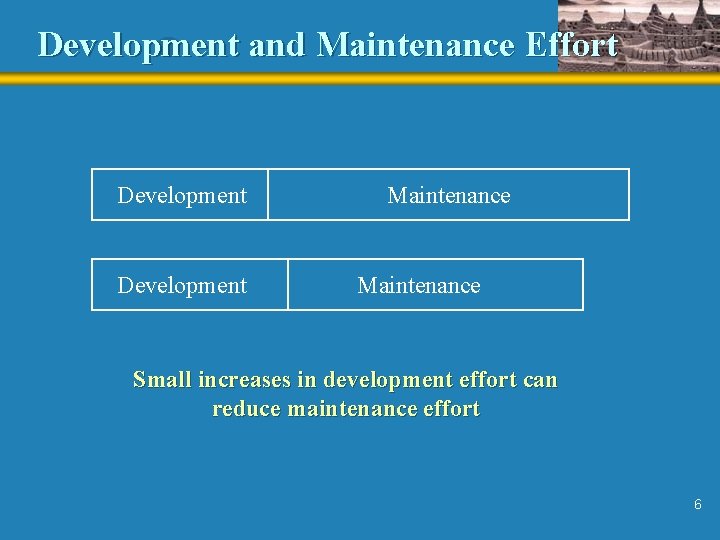
Development and Maintenance Effort Development Maintenance Small increases in development effort can reduce maintenance effort 6
Development and Maintenance Effort Ø Often the maintainers of a program are not the program’s original developers Ø Maintainers must be able to understand a program they didn’t design Ø The ability to read and understand a program depends on • • how how clearly the requirements are established well the program is designed well the program is implemented well the program is documented
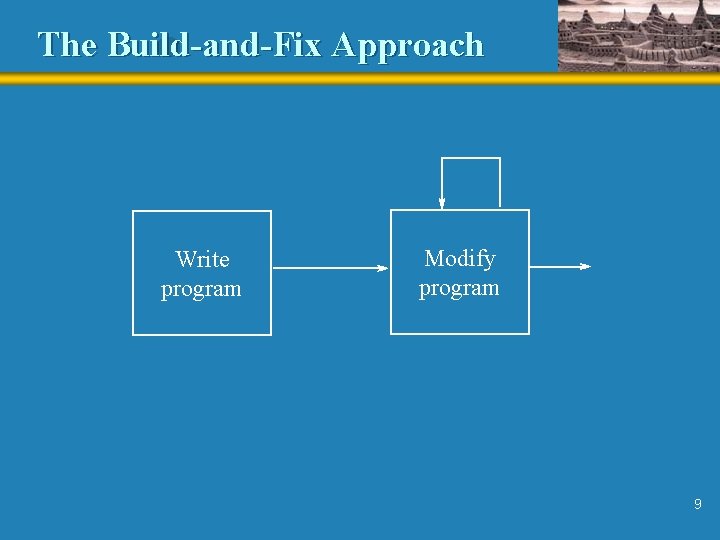
Software Development Models Ø A software development model is an organized approach to creating quality software Ø Too many programmers follow a build-and-fix approach • They write a program and modify it until it is functional, without regard to system design • Errors are addressed haphazardly if and as they are discovered • It is not really a development model at all 8
The Build-and-Fix Approach Write program Modify program 9
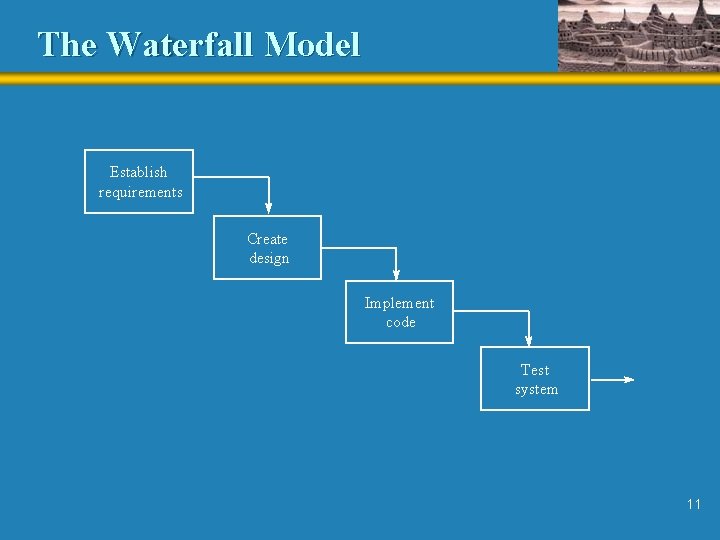
The Waterfall Model Ø The waterfall model was developed in the mid 1970 s Ø Activities that must be specifically addressed during development include: • • Establishing clear and unambiguous requirements Creating a clean design from the requirements Implementing the design Testing the implementation Ø Originally it was proposed as a linear model, without backtracking Ø It is a nice goal, but it is generally unrealistic 10
The Waterfall Model Establish requirements Create design Implement code Test system 11
Iterative Development Ø Iterative development allows the developer to cycle through the different development stages Ø It is essentially the waterfall model with backtracking Ø However backtracking should not be used irresponsibly Ø It should be used as a technique available to the developer to deal with unexpected problems that may arise in later stages of development 12
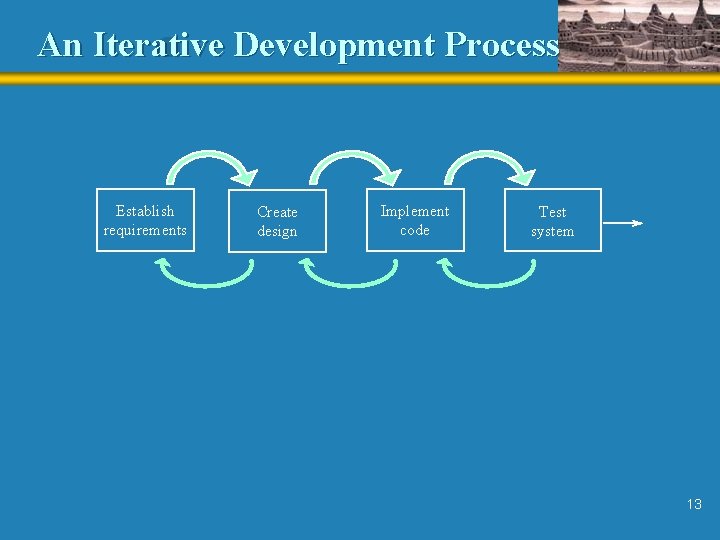
An Iterative Development Process Establish requirements Create design Implement code Test system 13
Testing Ø The results of each stage should be evaluated carefully prior to going on to the next stage Ø Before moving on to the design, for example, the requirements should be evaluated to ensure completeness, consistency, and clarity Ø A design evaluation should ensure that each requirement was addressed adequately 14
Testing Techniques Ø A design or an implementation may be evaluated during a walkthrough Ø The goal of a walkthrough is to identify problems, not to solve them
Testing Techniques Ø Generally, the goal of testing is to find errors Ø Often it is called defect testing Ø A good test uncovers problems in a program Ø A test case includes • a set of inputs • user actions or other initial conditions • expected output Ø It is not feasible to test every possible case 16
Black-Box Testing Ø Black-box testing maps a set of specific inputs to a set of expected outputs Ø An equivalence category is a collection of input sets Ø Two input sets belong to the same equivalence category if there is reason to believe that if one works, it will work for the other Ø Therefore testing one input set essentially tests the entire category 17
White-Box Testing Ø White-box testing also is referred to as glass-box testing Ø It focuses on the internal logic such as the implementation of a method Ø Statement coverage guarantees that all statements in a method are executed Ø Condition coverage guarantees that all paths through a method are executed 18
Prototypes Ø A prototype is a program created to explore a particular concept Ø Prototyping is more useful, time-effective, and cost- effective than merely acting on an assumption that later may backfire Ø Usually a prototype is created to communicate to the client: • a particular task • the feasibility of a requirement • a user interface Ø It is a way of validating requirements 19
Throw-away vs. Evolutionary Prototypes Ø A “quick and dirty” prototype to test an idea or a concept is called a throw-away prototype Ø Throw-away prototypes should not be incorporated into final systems Ø Because it is designed more carefully, an evolutionary prototype can be incorporated into the final system Ø Evolutionary prototypes provide a double benefit, but at a higher cost
Evolutionary Development Ø Evolutionary development divides the design process into • architectural design - primary classes and interaction • detailed design - specific classes, methods, and algorithms Ø This allows us to create refinement cycles Ø Each refinement cycle focuses on one aspect of the system Ø As each refinement cycle is addressed, the system evolves 21
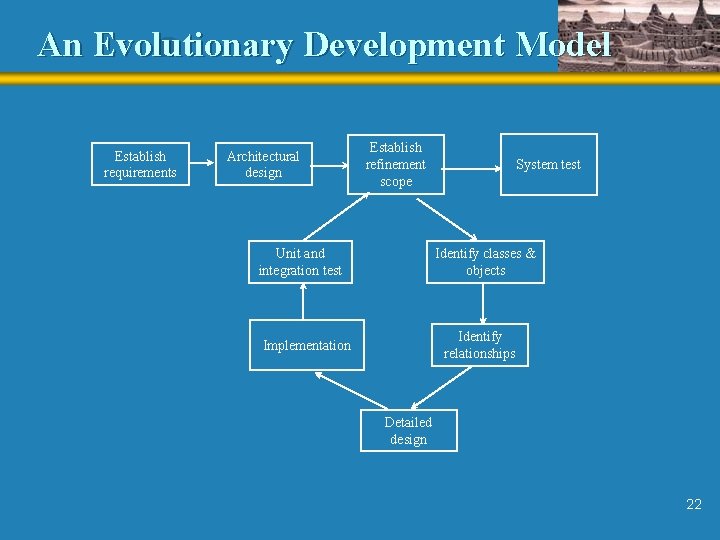
An Evolutionary Development Model Establish requirements Architectural design Establish refinement scope Unit and integration test System test Identify classes & objects Identify relationships Implementation Detailed design 22
Refinement Cycle Ø First, we establish the refinement scope to define the specific nature of the next refinement Ø For example: • the user interface • the feasibility of a particular requirement • utility classes for general program support Ø Object-oriented programming is well suited to this approach Ø Choosing the most appropriate next refinement is important and requires experience 23
Refinement Cycle Ø Next, we identify classes and objects that relate to the current refinement Ø Look at the nouns in the requirements document Ø Candidates categories include • • • physical objects people places containers occurrences information stores Ø Categories may overlap 24
Refinement Cycle Ø Next we identify relationships among classes • general association (“uses”) • aggregation (“has-a”) • inheritance (“is-a”) Ø Associated objects use each other for the services they provide Ø Aggregation, also called composition, permits one object to become part of another object • Cardinality describes the numeric relationship between the objects • For example, a car might have four wheels associated with it 25
Refinement Cycle Ø Inheritance, discussed in detail in Chapter 7, may lead to the creation of a new class whose sole purpose is to gather common data and common methods in one place Ø Relationships can be described using UML class diagrams
Refinement Cycle Ø Finally, a refinement cycle includes detailed design, implementation, and testing • All the members of each class need to be defined • Each class must be implemented (coded) • Stubs sometimes are created to permit the refinement code to be tested Ø A unit test focuses on one particular component, such as a method or a class Ø An integration test focuses on the interaction between components 27
The Paint. Box Project Ø Now we explore the evolutionary development model using a project larger than any we’ve seen so far Ø The Paint. Box program allows the user to create drawings with various shapes and colors Ø After establishing the requirements, the following refinement steps are established: • • • create the basic user interface allow the user to draw and fill shapes and to change color allow the user to select, to move, and to modify shapes allow the user to cut, copy, and paste shapes allow the user to save and to reload drawings allow the user to begin a new drawing at any time
The Paint. Box Project Ø (Figure 10. 8 here)
The Paint. Box Project Ø Discussions with the client lead to additional requirements which are integrated into the requirements document Ø Next the architectural design is prepared Ø Refinement steps are determined • • the basic user interface drawing basic shapes using different stroke colors cutting, copying, and pasting shapes selecting, moving, and filling shapes modifying the dimensions of shapes saving and reloading drawings final touches such as the splash screen
The Paint. Box Project Ø The order of refinements is determined Ø (Figure 10. 9 here)
Paint. Box Refinement #1 Ø The first refinement establishes the basic user interface Ø (Figure 10. 10 here)
Paint. Box Refinement #1 (Editor: please remove the underlining of “(page xxx)”) Ø See Paint. Box. java (page xxx) Ø See Paint. Frame. java (page xxx) Ø See Button. Bar. java (page xxx) Ø See Drawing. Panel. java (page xxx)
Paint. Box. java
Paint. Frame. jave
Button. Bar. java
Drawing. Panel. java
Paint. Box Refinement #2 Ø The second refinement allows the user to draw shapes and change colors Ø (Figure 10. 12 here)
(Editor: please remove the underlining of “(page xxx)”) Ø See Paint. Box. java (page xxx) Ø See Paint. Frame. java (page xxx) Ø See Button. Bar. java (page xxx) Ø See Drawing. Panel. java (page xxx) Ø See Shape. java (page xxx) Ø See Line. java (page xxx) Ø See Bounded. Shape. java (page xxx) Ø See Rect. java (page xxx) Ø See Oval. java (page xxx) Ø See Poly. java (page xxx)
Paint. Box. java
Paint. Frame. java
Button. Bar. java
Drawing. Panel. java
Shape. java
Line. java
Bounded. Shape. java
Rect. java
Oval. java
Poly. java
Remaining Paint. Box Refinements Ø The full implementation of the first two refinements can be downloaded Ø The remaining five refinements are left as programming projects Ø (Figure 10. 14 here)
Summary Ø Chapter 10 has focused on: • • • software development models the software life cycle and its implications linear vs. iterative development approaches goals and techniques of testing an evolutionary approach to object-oriented development a nontrivial evolutionary development example