Avaya Aura Contact Center 2010 Voice agent Fax
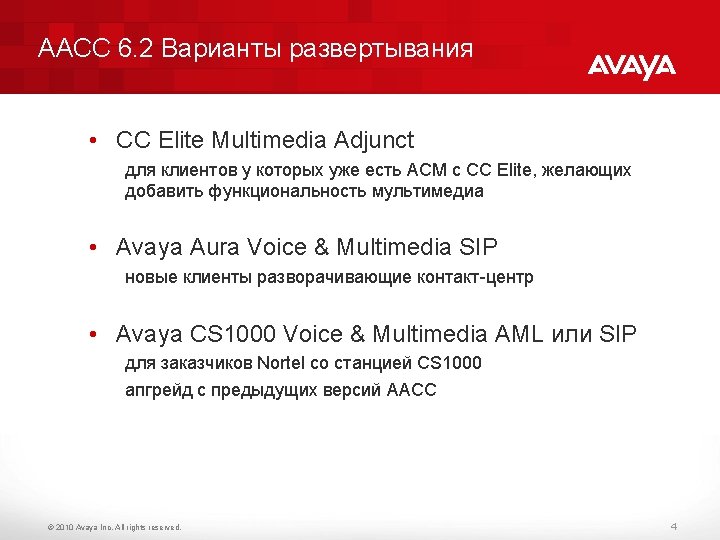
- Slides: 45
Avaya Aura Contact Center
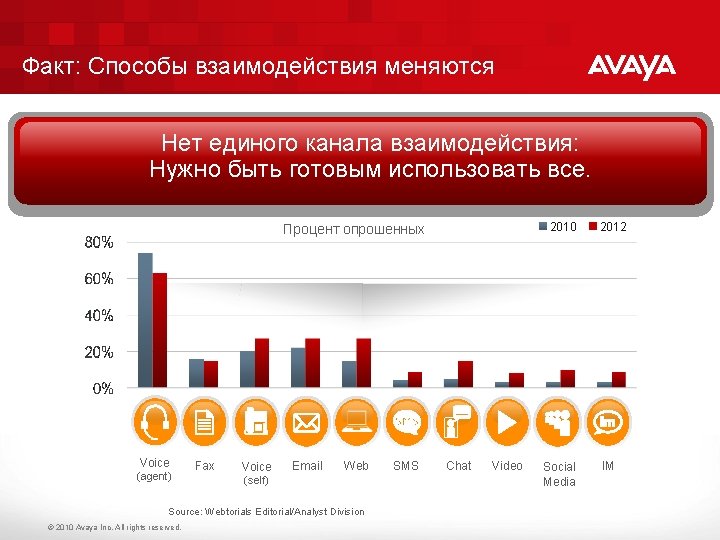
Факт: Способы взаимодействия меняются Нет единого канала взаимодействия: Нужно быть готовым использовать все. 2010 Процент опрошенных Voice (agent) Fax Voice Email Web (self) Source: Webtorials Editorial/Analyst Division © 2010 Avaya Inc. All rights reserved. SMS Chat Video Social Media 2012 IM
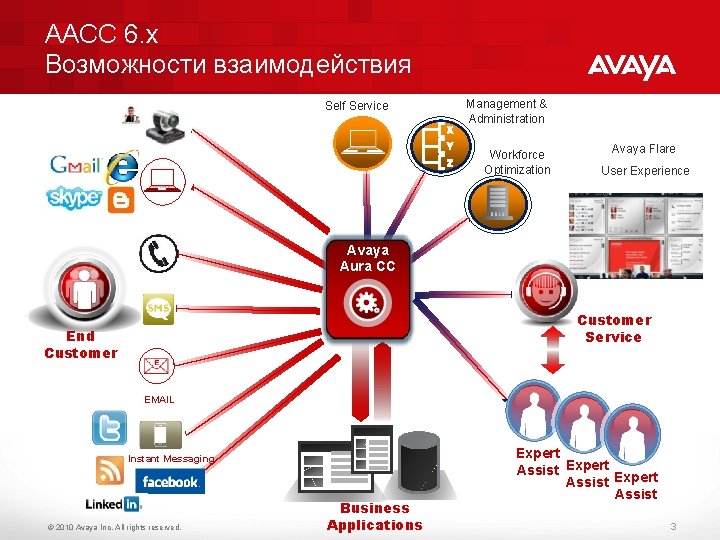
AACC 6. x Возможности взаимодействия Self Service Management & Administration Workforce Optimization Avaya Flare User Experience Avaya Aura CC Customer Service End Customer EMAIL Instant Messaging © 2010 Avaya Inc. All rights reserved. Business Applications Expert Assist 3
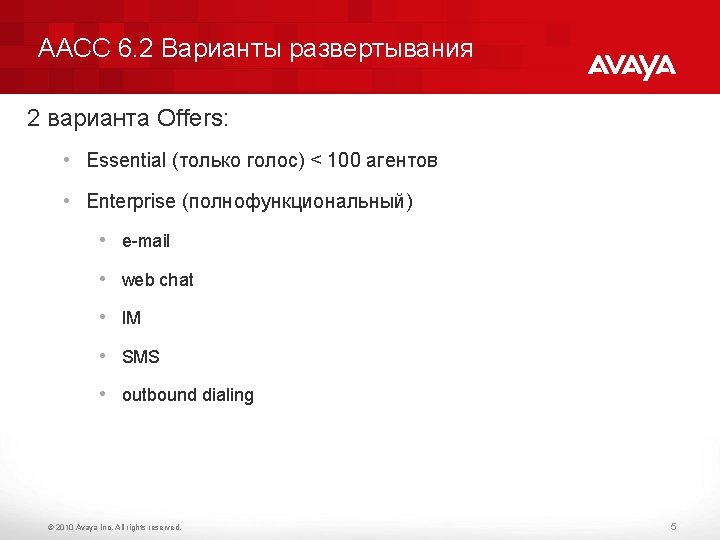
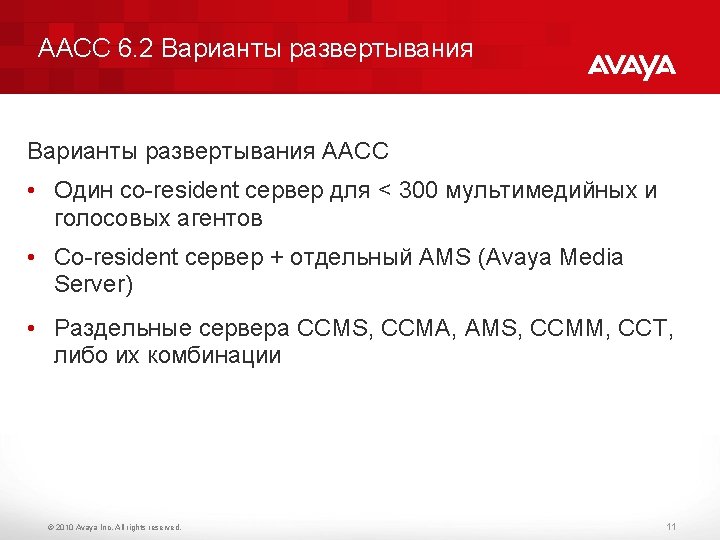
AACC 6. 2 Варианты развертывания 2 варианта Offers: • Essential (только голос) < 100 агентов • Enterprise (полнофункциональный) • e-mail • web chat • IM • SMS • outbound dialing © 2010 Avaya Inc. All rights reserved. 5
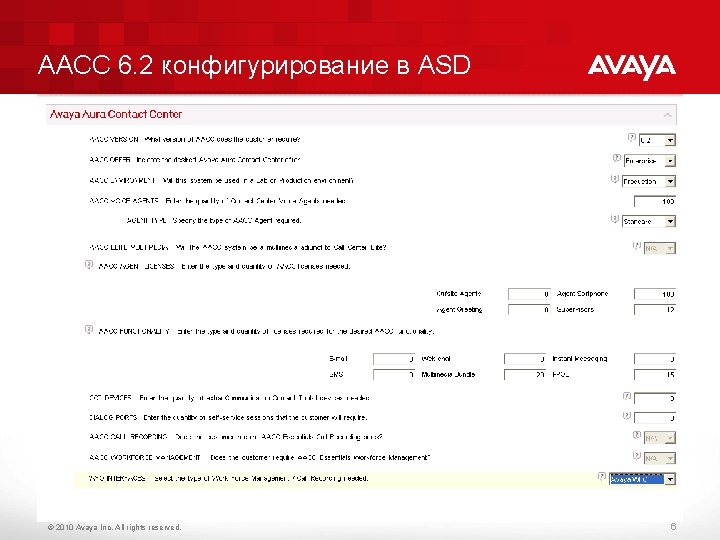
AACC 6. 2 конфигурирование в ASD © 2010 Avaya Inc. All rights reserved. 6
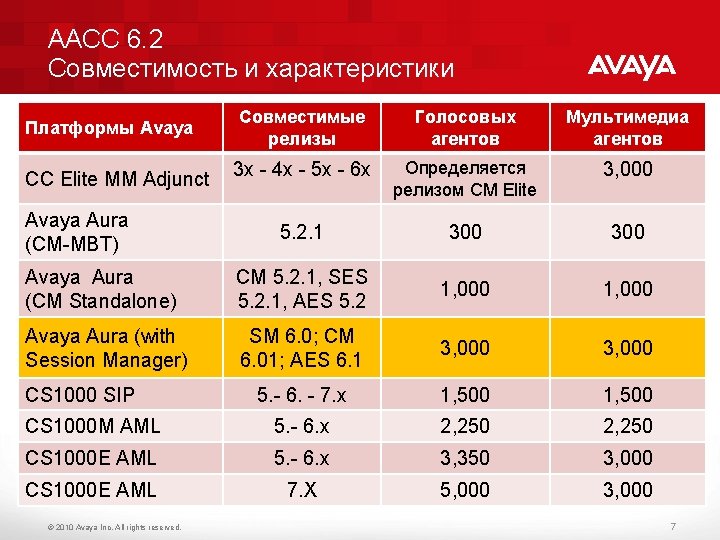
AACC 6. 2 Совместимость и характеристики Совместимые релизы Голосовых агентов Мультимедиа агентов 3 x - 4 x - 5 x - 6 x Определяется релизом CM Elite 3, 000 5. 2. 1 300 Avaya Aura (CM Standalone) CM 5. 2. 1, SES 5. 2. 1, AES 5. 2 1, 000 Avaya Aura (with Session Manager) SM 6. 0; CM 6. 01; AES 6. 1 3, 000 5. - 6. - 7. x 1, 500 CS 1000 M AML 5. - 6. x 2, 250 CS 1000 E AML 5. - 6. x 3, 350 3, 000 CS 1000 E AML 7. X 5, 000 3, 000 Платформы Avaya CC Elite MM Adjunct Avaya Aura (CM-MBT) CS 1000 SIP © 2010 Avaya Inc. All rights reserved. 7
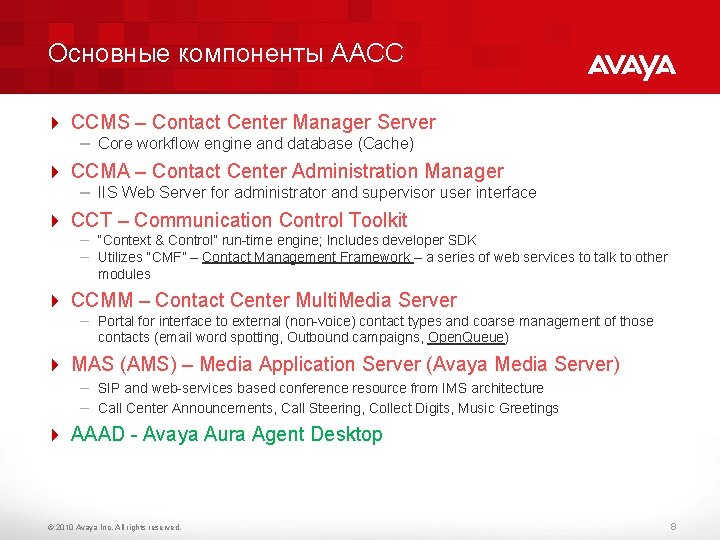
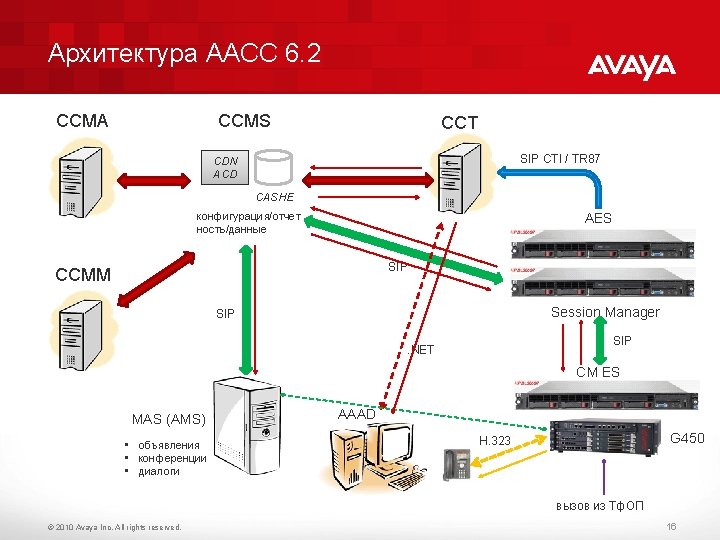
Основные компоненты AACC 4 CCMS – Contact Center Manager Server – Core workflow engine and database (Cache) 4 CCMA – Contact Center Administration Manager – IIS Web Server for administrator and supervisor user interface 4 CCT – Communication Control Toolkit – “Context & Control” run-time engine; Includes developer SDK – Utilizes “CMF” – Contact Management Framework – a series of web services to talk to other modules 4 CCMM – Contact Center Multi. Media Server – Portal for interface to external (non-voice) contact types and coarse management of those contacts (email word spotting, Outbound campaigns, Open. Queue) 4 MAS (AMS) – Media Application Server (Avaya Media Server) – SIP and web-services based conference resource from IMS architecture – Call Center Announcements, Call Steering, Collect Digits, Music Greetings 4 AAAD - Avaya Aura Agent Desktop © 2010 Avaya Inc. All rights reserved. 8
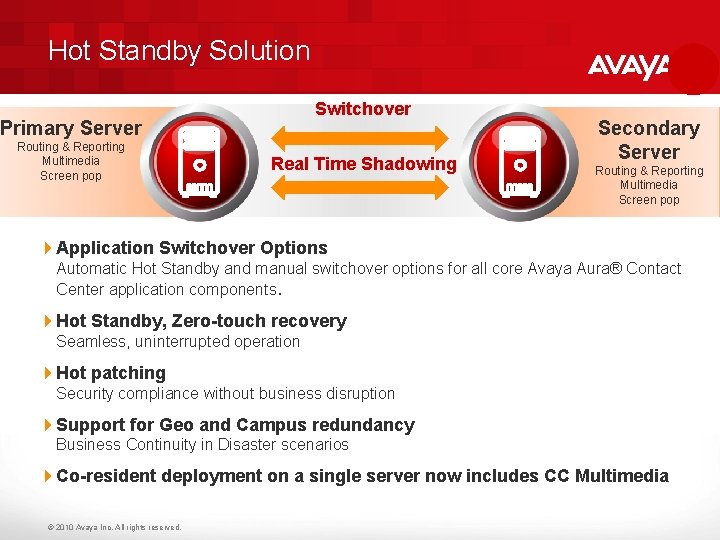
Hot Standby Solution Switchover Primary Server Routing & Reporting Multimedia Screen pop Real Time Shadowing Secondary Server Routing & Reporting Multimedia Screen pop 4 Application Switchover Options Automatic Hot Standby and manual switchover options for all core Avaya Aura® Contact Center application components. 4 Hot Standby, Zero-touch recovery Seamless, uninterrupted operation 4 Hot patching Security compliance without business disruption 4 Support for Geo and Campus redundancy Business Continuity in Disaster scenarios 4 Co-resident deployment on a single server now includes CC Multimedia © 2010 Avaya Inc. All rights reserved.
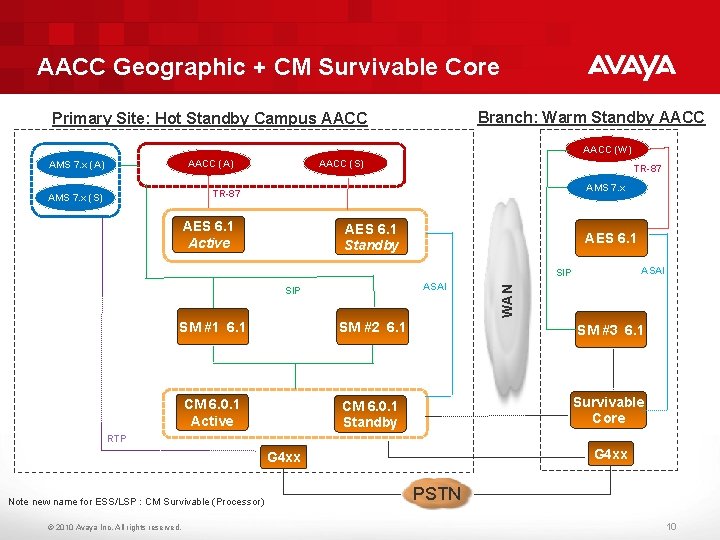
AACC Geographic + CM Survivable Core Branch: Warm Standby AACC Primary Site: Hot Standby Campus AACC (W) AACC (A) AMS 7. x (A) AACC (S) TR-87 AMS 7. x (S) AES 6. 1 Active AES 6. 1 Standby AES 6. 1 ASAI SIP SM #2 6. 1 SM #1 6. 1 WAN SIP SM #3 6. 1 CCMM (S) CM 6. 0. 1 Active Survivable Core CM 6. 0. 1 Standby RTP G 4 xx Note new name for ESS/LSP : CM Survivable (Processor) © 2010 Avaya Inc. All rights reserved. PSTN 10
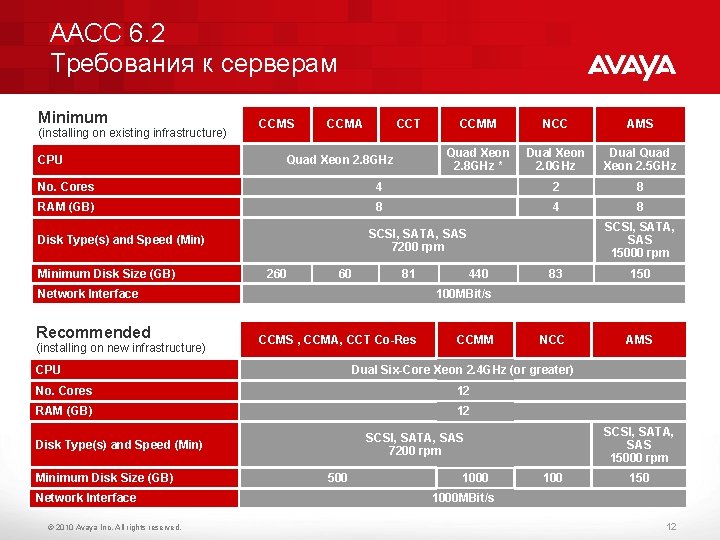
AACC 6. 2 Требования к серверам Minimum (installing on existing infrastructure) CPU CCMS CCMA CCT Quad Xeon 2. 8 GHz CCMM NCC AMS Quad Xeon 2. 8 GHz * Dual Xeon 2. 0 GHz Dual Quad Xeon 2. 5 GHz No. Cores 4 2 8 RAM (GB) 8 4 8 Disk Type(s) and Speed (Min) Minimum Disk Size (GB) 260 60 81 Network Interface Recommended (installing on new infrastructure) SCSI, SATA, SAS 15000 rpm SCSI, SATA, SAS 7200 rpm 440 CCMS , CCMA, CCT Co-Res CCMM 12 RAM (GB) 12 AMS SCSI, SATA, SAS 15000 rpm SCSI, SATA, SAS 7200 rpm Disk Type(s) and Speed (Min) © 2010 Avaya Inc. All rights reserved. NCC Dual Six-Core Xeon 2. 4 GHz (or greater) No. Cores Network Interface 150 100 MBit/s CPU Minimum Disk Size (GB) 83 500 100 150 1000 MBit/s 12
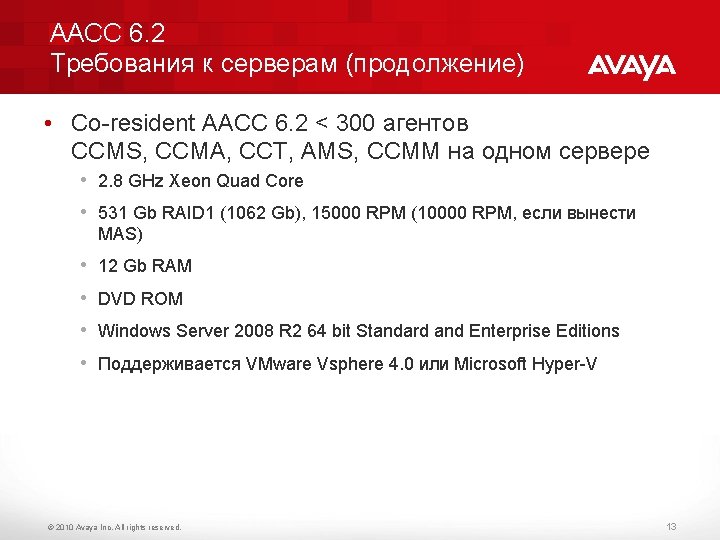
AACC 6. 2 Требования к серверам (продолжение) • Co-resident AACC 6. 2 < 300 агентов CCMS, CCMA, CCT, AMS, CCMM на одном сервере • 2. 8 GHz Xeon Quad Core • 531 Gb RAID 1 (1062 Gb), 15000 RPM (10000 RPM, если вынести MAS) • 12 Gb RAM • DVD ROM • Windows Server 2008 R 2 64 bit Standard and Enterprise Editions • Поддерживается VMware Vsphere 4. 0 или Microsoft Hyper-V © 2010 Avaya Inc. All rights reserved. 13
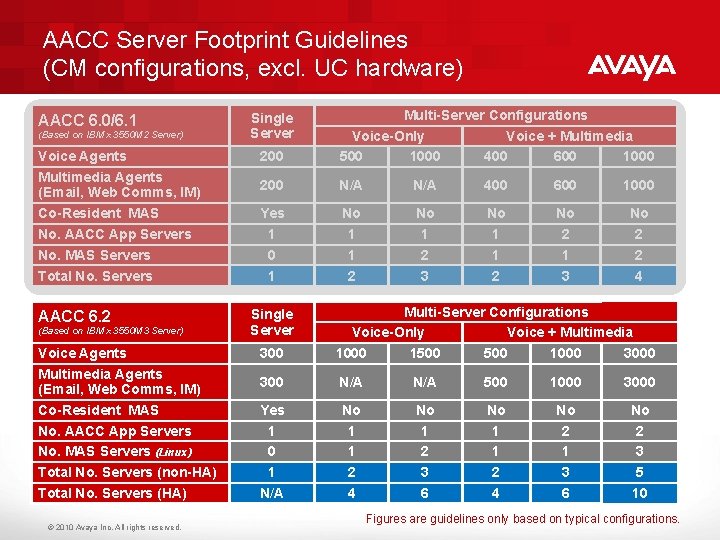
AACC Server Footprint Guidelines (CM configurations, excl. UC hardware) AACC 6. 0/6. 1 (Based on IBM x 3550 M 2 Server) Voice Agents Multimedia Agents (Email, Web Comms, IM) Co-Resident MAS No. AACC App Servers No. MAS Servers Total No. Servers AACC 6. 2 (Based on IBM x 3550 M 3 Server) Voice Agents Multimedia Agents (Email, Web Comms, IM) Co-Resident MAS No. AACC App Servers No. MAS Servers (Linux) Total No. Servers (non-HA) Total No. Servers (HA) © 2010 Avaya Inc. All rights reserved. 200 Multi-Server Configurations Voice-Only Voice + Multimedia 500 1000 400 600 1000 200 N/A 400 600 1000 Yes 1 0 1 No 1 1 2 No 1 2 3 No 1 1 2 No 2 1 3 No 2 2 4 Single Server 300 Multi-Server Configurations Voice-Only Voice + Multimedia 1000 1500 1000 300 N/A 500 1000 3000 Yes 1 0 1 N/A No 1 1 2 4 No 1 2 3 6 No 1 1 2 4 No 2 1 3 6 No 2 3 5 10 Single Server Figures are guidelines only based on typical configurations.
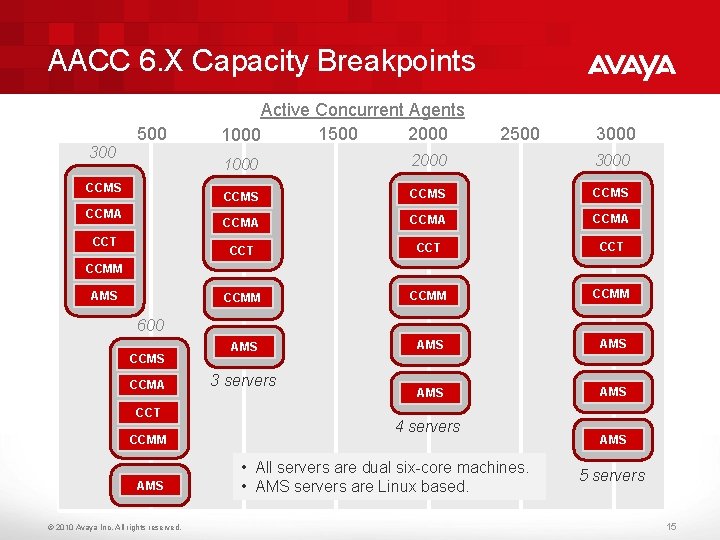
AACC 6. X Capacity Breakpoints 500 300 CCMS CCMA CCT Active Concurrent Agents 1500 2000 1000 2500 3000 1000 2000 3000 CCMS CCMA CCT CCT CCMM AMS AMS AMS CCMM AMS 600 CCMS CCMA CCT CCMM AMS © 2010 Avaya Inc. All rights reserved. 3 servers 4 servers • All servers are dual six-core machines. • AMS servers are Linux based. AMS 5 servers 15
Архитектура AACC 6. 2 CCMA CCMS CCT SIP CTI / TR 87 CDN ACD CASHE конфигурация/отчет ность/данные AES SIP CCMM Session Manager SIP . NET CM ES MAS (AMS) • объявления • конференции • диалоги AAAD G 450 H. 323 вызов из Тф. ОП © 2010 Avaya Inc. All rights reserved. 16
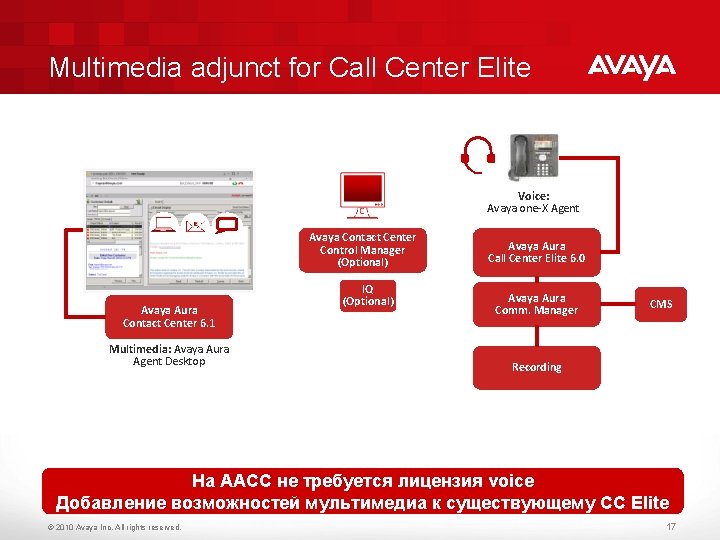
Multimedia adjunct for Call Center Elite Voice: Avaya one-X Agent Avaya Contact Center Control Manager (Optional) Avaya Aura Contact Center 6. 1 Multimedia: Avaya Aura Agent Desktop IQ (Optional) Avaya Aura Call Center Elite 6. 0 Avaya Aura Comm. Manager CMS Recording На ААСС не требуется лицензия voice Добавление возможностей мультимедиа к существующему CC Elite © 2010 Avaya Inc. All rights reserved. 17
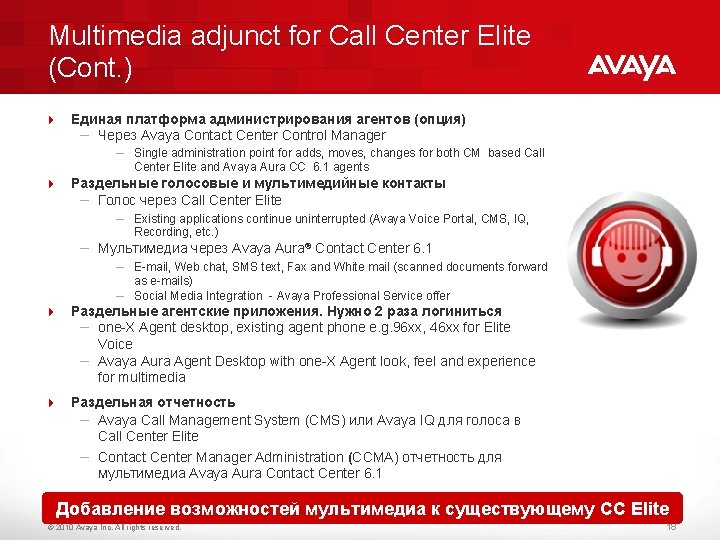
Multimedia adjunct for Call Center Elite (Cont. ) 4 Единая платформа администрирования агентов (опция) – Через Avaya Contact Center Control Manager – Single administration point for adds, moves, changes for both CM based Call Center Elite and Avaya Aura CC 6. 1 agents 4 Раздельные голосовые и мультимедийные контакты – Голос через Call Center Elite – Existing applications continue uninterrupted (Avaya Voice Portal, CMS, IQ, Recording, etc. ) – Мультимедиа через Avaya Aura® Contact Center 6. 1 – E-mail, Web chat, SMS text, Fax and White mail (scanned documents forward as e-mails) – Social Media Integration - Avaya Professional Service offer 4 Раздельные агентские приложения. Нужно 2 раза логиниться – one-X Agent desktop, existing agent phone e. g. 96 xx, 46 xx for Elite Voice – Avaya Aura Agent Desktop with one-X Agent look, feel and experience for multimedia 4 Раздельная отчетность – Avaya Call Management System (CMS) или Avaya IQ для голоса в Call Center Elite – Contact Center Manager Administration (CCMA) отчетность для мультимедиа Avaya Aura Contact Center 6. 1 Добавление возможностей мультимедиа к существующему CC Elite © 2010 Avaya Inc. All rights reserved. 18
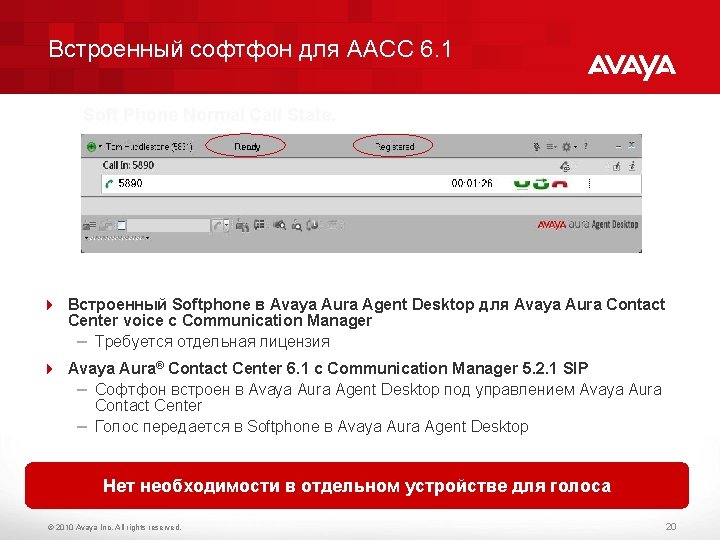
Встроенный софтфон для AACC 6. 1 Soft Phone Normal Call State. 4 Встроенный Softphone в Avaya Aura Agent Desktop для Avaya Aura Contact Center voice с Communication Manager – Требуется отдельная лицензия 4 Avaya Aura® Contact Center 6. 1 с Communication Manager 5. 2. 1 SIP – Софтфон встроен в Avaya Aura Agent Desktop под управлением Avaya Aura Contact Center – Голос передается в Softphone в Avaya Aura Agent Desktop Нет необходимости в отдельном устройстве для голоса © 2010 Avaya Inc. All rights reserved. 20
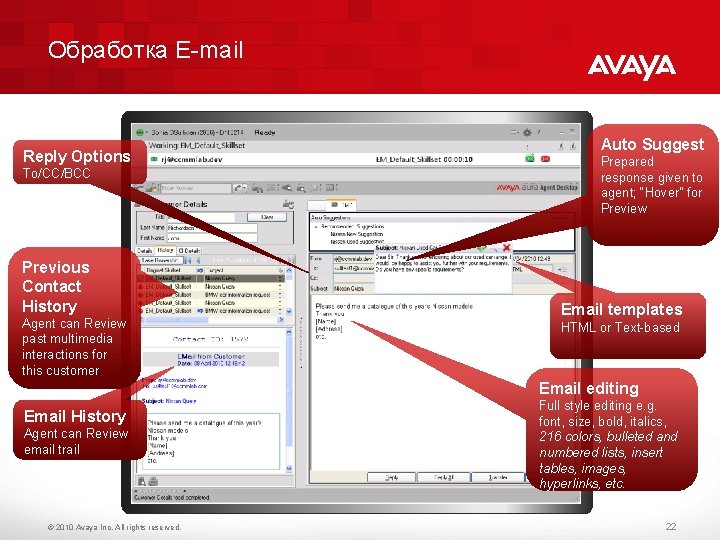
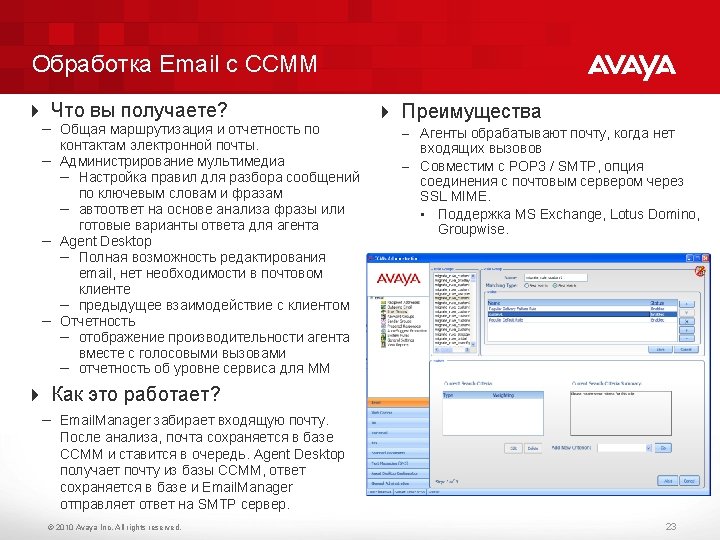
Обработка E-mail Reply Options To/CC/BCC Previous Contact History Agent can Review past multimedia interactions for this customer Auto Suggest Prepared response given to agent; “Hover” for Preview Email templates HTML or Text-based Email editing Email History Agent can Review email trail © 2010 Avaya Inc. All rights reserved. Full style editing e. g. font, size, bold, italics, 216 colors, bulleted and numbered lists, insert tables, images, hyperlinks, etc. 22
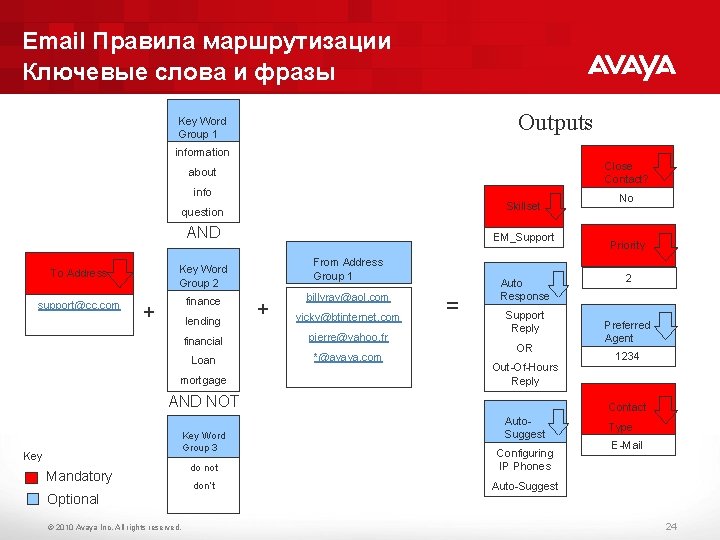
Email Правила маршрутизации Ключевые слова и фразы Outputs Key Word Group 1 information Close Contact? about info Skillset question AND To Address Key Word Group 2 support@cc. com finance + lending EM_Support From Address Group 1 + billyray@aol. com vicky@btinternet. com financial pierre@yahoo. fr Loan *@avaya. com mortgage = Auto Response Support Reply OR Out-Of-Hours Reply AND NOT Key Word Group 3 Key Mandatory Optional © 2010 Avaya Inc. All rights reserved. No Priority 2 Preferred Agent 1234 Contact Auto. Suggest do not Configuring IP Phones don’t Auto-Suggest Type E-Mail 24
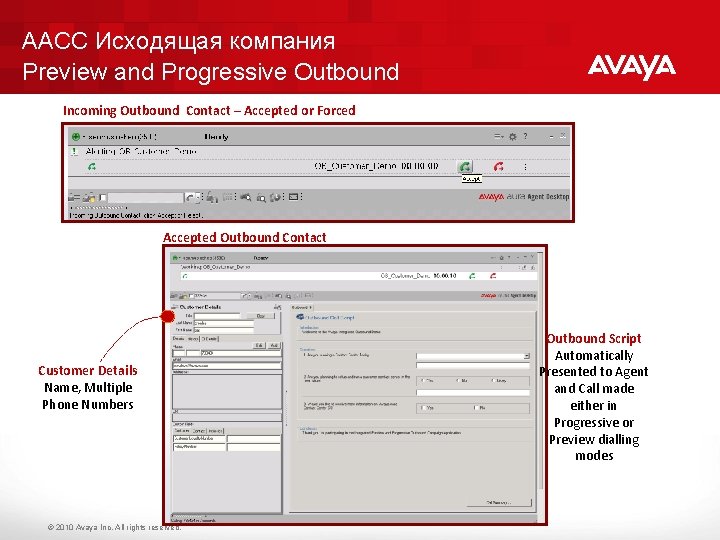
AACC Исходящая компания Preview and Progressive Outbound Incoming Outbound Contact – Accepted or Forced Accepted Outbound Contact Customer Details Name, Multiple Phone Numbers © 2010 Avaya Inc. All rights reserved. Outbound Script Automatically Presented to Agent and Call made either in Progressive or Preview dialling modes
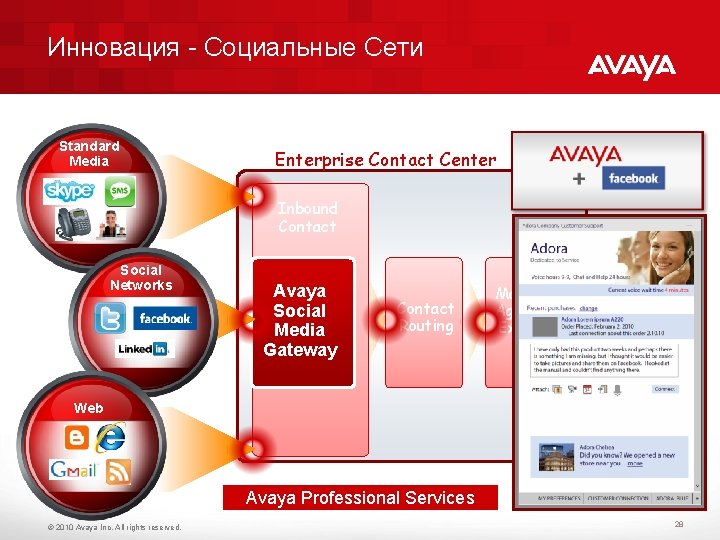
Инновация - Социальные Сети Standard Media Enterprise Contact Center Inbound Contact Social Networks Avaya Social Media Gateway Contact Routing Managed Agents & Experts Web Avaya Professional Services © 2010 Avaya Inc. All rights reserved. 28
AACC 6. x Возможности интеграции 4 CTI интеграция с пользовательскими приложениями через Communication Control Toolkit на основе. NET и Web Services 4 Интеграция с Siebel Avaya Professional Sevices 4 Интеграция с SAP Avaya Professional Sevices © 2010 Avaya Inc. All rights reserved. 30
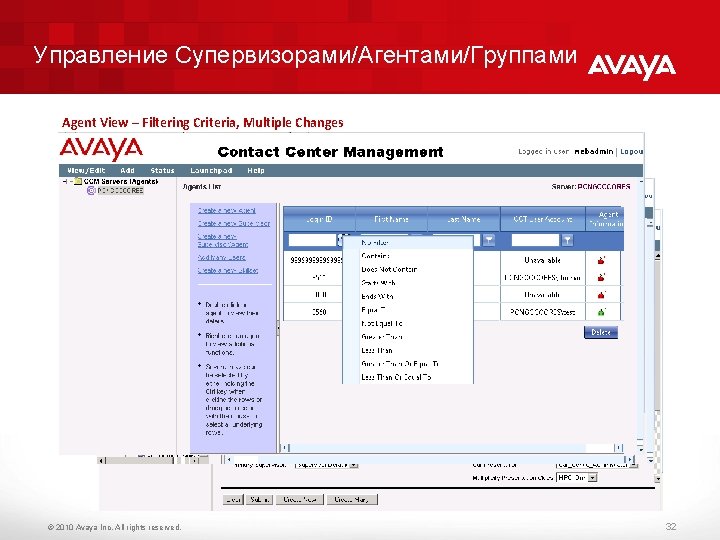
Управление Супервизорами/Агентами/Группами Agent View – Filtering Criteria, Multiple Changes Skillset View – One to Many Changes, Multiple Selects Supervisor – Agent View; Drag and Drop © 2010 Avaya Inc. All rights reserved. 32
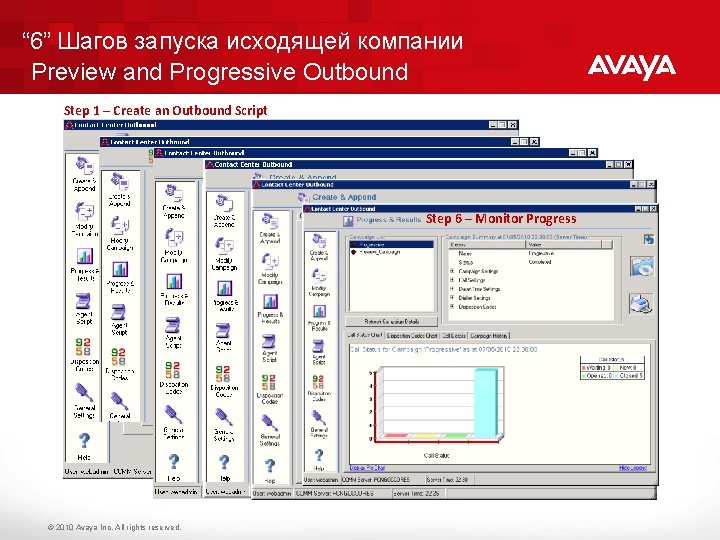
“ 6” Шагов запуска исходящей компании Preview and Progressive Outbound Step 1 – Create an Outbound Script Step 2 – Create an Disposition Code Step 3– Create an Outbound Campaign with Script Step 4 – Add Customer Details 5 – Activate Campaign Step 6 – Monitor Progress © 2010 Avaya Inc. All rights reserved.
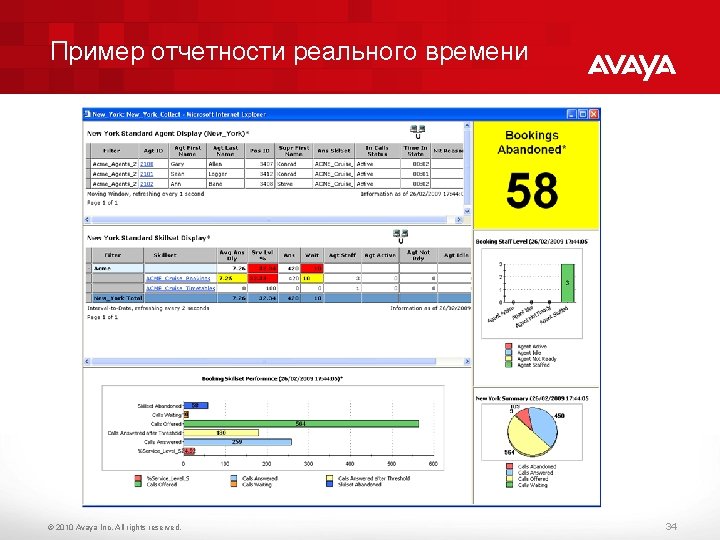
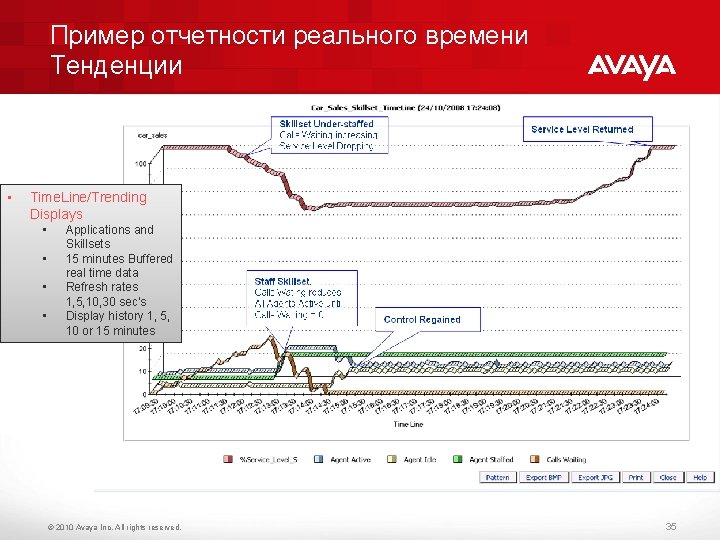
Пример отчетности реального времени Тенденции • Time. Line/Trending Displays • • Applications and Skillsets 15 minutes Buffered real time data Refresh rates 1, 5, 10, 30 sec’s Display history 1, 5, 10 or 15 minutes © 2010 Avaya Inc. All rights reserved. 35
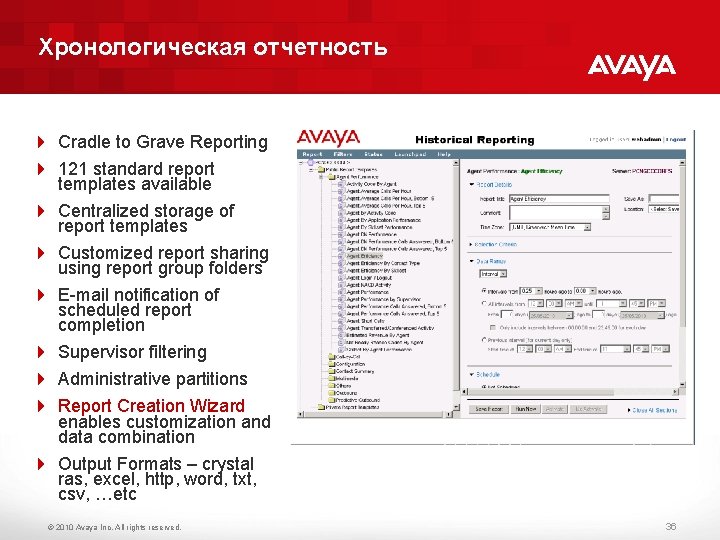
Хронологическая отчетность 4 Cradle to Grave Reporting 4 121 standard report templates available 4 Centralized storage of report templates 4 Customized report sharing using report group folders 4 E-mail notification of scheduled report completion 4 Supervisor filtering 4 Administrative partitions 4 Report Creation Wizard enables customization and data combination 4 Output Formats – crystal ras, excel, http, word, txt, csv, …etc © 2010 Avaya Inc. All rights reserved. 36
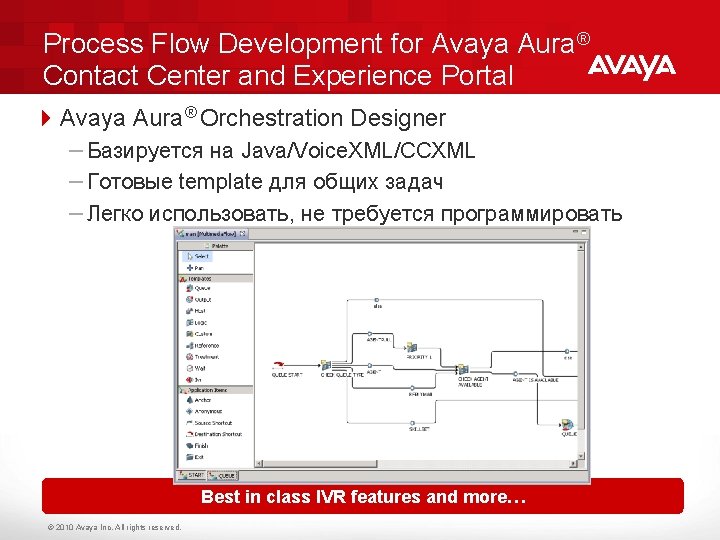
Process Flow Development for Avaya Aura® Contact Center and Experience Portal 4 Avaya Aura® Orchestration Designer – Базируется на Java/Voice. XML/CCXML – Готовые template для общих задач – Легко использовать, не требуется программировать Best in class IVR features and more… © 2010 Avaya Inc. All rights reserved.
Улучшения в версии ААСС 6. 2 • Единый интерфейс агента Avaya Aura Agent Desktop для режима Multimedia Adjunct к CM Elite • Интеграция AACC c Microsoft OCS 2007 IM и Avaya Aura Presence Server – агенты видят кто из экспертов свободен • Поддержка CM ESS/LSP • Расширенный режим AACC Hot Standby High Availability для SIP • Алгоритмы распределения like Business Advocate: Service Level Routing, Dynamic Skillset • Интеграция с Avaya Aura Experience Portal 6. 0 • Интеграция AACC Script Creation Environment (SCE) с Orchestration Designer. Общий интерфейс SCE и OD 6. 0. • Общий интерфейс администрирования Avaya Contact Center Control Manager 6. 2 • Общая система отчетности Avaya IQ 5. 2 для Multi. Media Adjunct © 2010 Avaya Inc. All rights reserved. 39
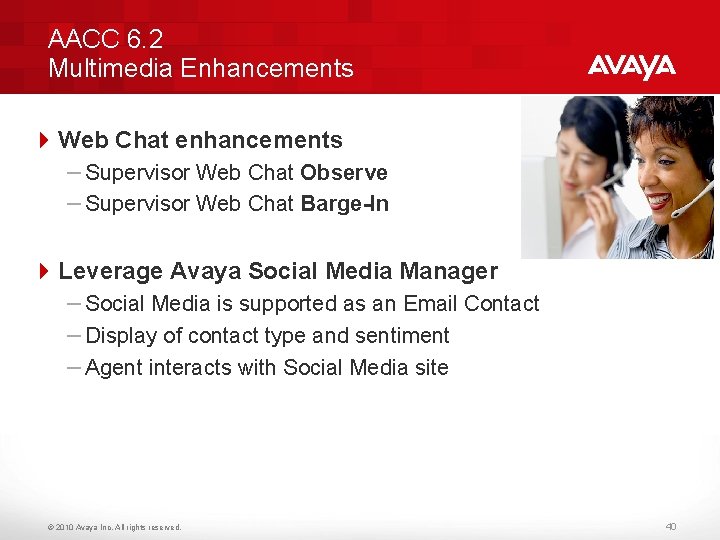
AACC 6. 2 Multimedia Enhancements 4 Web Chat enhancements – Supervisor Web Chat Observe – Supervisor Web Chat Barge-In 4 Leverage Avaya Social Media Manager – Social Media is supported as an Email Contact – Display of contact type and sentiment – Agent interacts with Social Media site © 2010 Avaya Inc. All rights reserved. 40
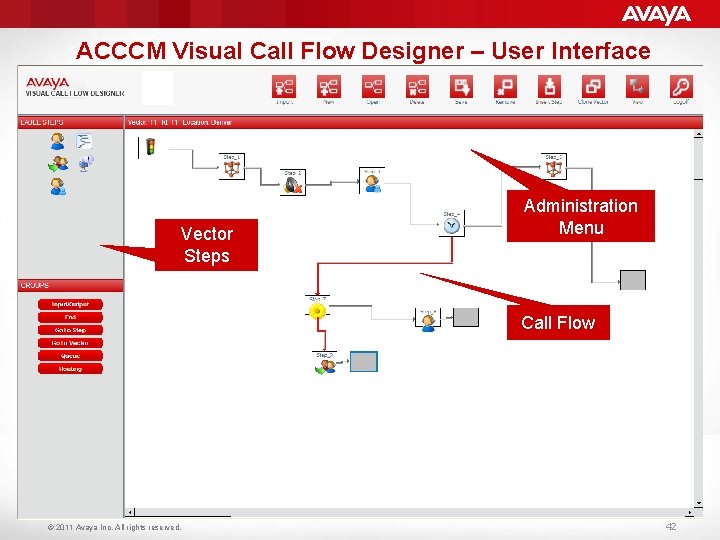
Avaya Contact Center Control Manager 4 Единая точка администрирования в смешанном режиме Elite и Avaya Aura Contact Center – Поддержка нескольких Avaya Communication Manager, в многостанционной и multi-tenant конфигурации 4 Улучшенная секретность базирующаяся на контроле доступа и разделении прав, интегрированная с Microsoft active directory 4 Avaya Contact Center Control Manager : – Для управления Avaya Call Center Elite, Avaya Call Management System, Avaya IQ, Avaya Aura Workforce Optimization, Avaya Voice Portal, Avaya one-X Agent – Включает visual call flow designer который позволяет пользователям интуитивно создавать Vectors, Variables-in-Vectors, VDN Variables, Holiday Tables, Vector Routing Tables, Service Hours Tables и Policy Routing Tables for Percent Allocation Единая точка администрирования, ниже TCO © 2010 Avaya Inc. All rights reserved. 41
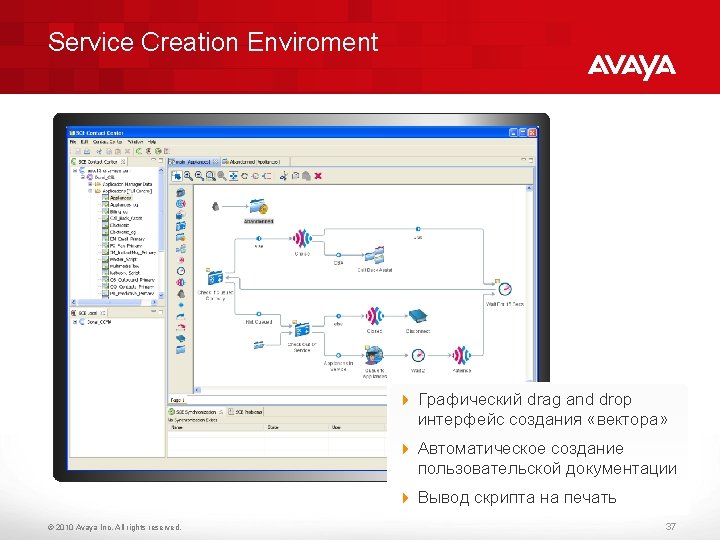
ACCCM Visual Call Flow Designer – User Interface Vector Steps Administration Menu Call Flow © 2011 Avaya Inc. All rights reserved. 42
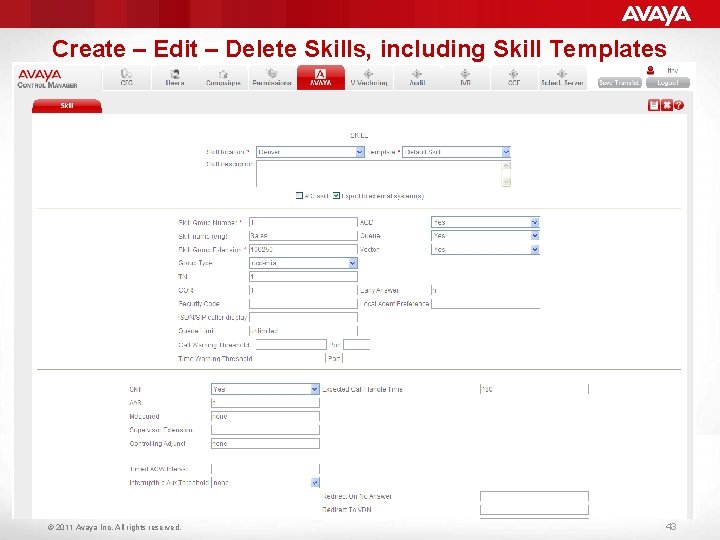
Create – Edit – Delete Skills, including Skill Templates © 2011 Avaya Inc. All rights reserved. 43
Курсы по Avaya Aura Contact Center (AACC) 6. 2 Required – Prior to Ride-along 4 3616 W – Configure Avaya Aura Communication Manager 4 3608 C – Avaya Aura Contact Center – Installation and Configuration ( 4 hours) (40 hours) 4 Familiarity with the following adjuncts: • Aura Communication Manager • Aura System and Session Manager • SES • AES Highly Recommended 4 3609 C – Avaya Aura Contact Center Administration 4 3610 C – Avaya Aura Contact Center – Service Creation Environment 4 3611 C – Avaya Aura Contact Center Networking 4 3612 C – Avaya Aura Contact Center Suite Engineering 4 3607 C – Avaya Aura Contact Center CCT & CC Multimedia 4 3627 W – Avaya Aura Agent Desktop – Overview 4 3621 C – Avaya Aura Contact Center Fast Track – Installation 4 3626 W – Avaya Aura Contact Center Multimedia with Call Center © 2010 Avaya Inc. All rights reserved. (40 hours) (24 hours) (40 hours) ( 2 hours) (80 hours) ( 4 hours) 44
Course end Вопросы? © 2010. All rights reserved. 45