Open Frame Introduction Online Tmax Soft Co Ltd
- Slides: 53
Open. Frame Introduction Ⅰ (Online) Tmax. Soft Co. , Ltd © 2013 Tmax. Soft Co. , Ltd. All Rights Reserved. 0/67 0/51
Contents 1. Online System Overview 1. 1 What is Open. Frame Online System ? 1. 2 Online System Components 1. 3 Architecture 1. 4 Major Characteristics 2. OSC Core 2. 1 What is OSC Core? 2. 2 Tmax Modules 2. 3 Major Functions 3. OSC Resources 3. 1 OSC Resource Overview 3. 2 Resource Categories 3. 3 Interface to Resources 3. 4 Resource Definition 3. 5 Resource Usage Management 3. 6 Major Resources © 2013 Tmax. Soft Co. , Ltd. All Rights Reserved. 4. OSC Supplied Transactions 4. 1 What is an OSC Supplied Transaction? 4. 2 OSC Supplied Transactions 5. Mapping Support 5. 1 What is Mapping Support? 5. 2 Mapping Support Structure 5. 3 Mapping Support Components 5. 4 Mapping Support Characteristics Q&A
1. Online System Overview 1. 1 What is Open. Frame Online System? 1. 2 Online System Components 1. 3 Architecture 1. 4 Major Characteristics © 2013 Tmax. Soft Co. , Ltd. All Rights Reserved.
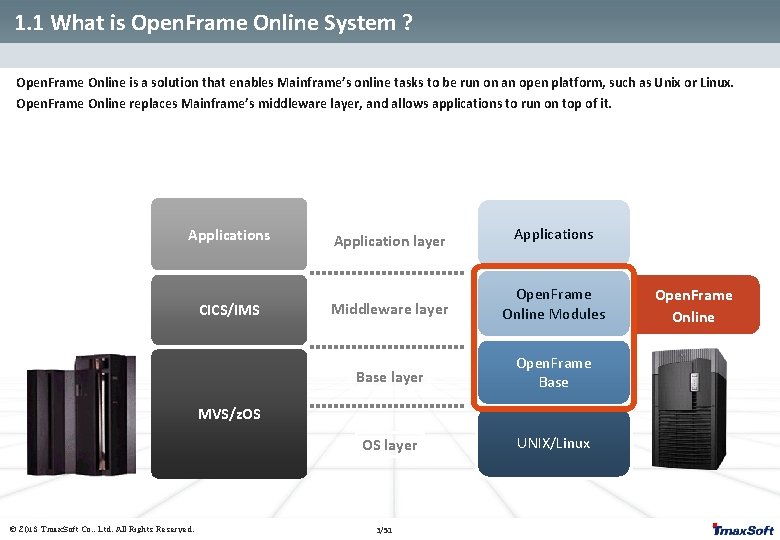
1. 1 What is Open. Frame Online System ? Open. Frame Online is a solution that enables Mainframe’s online tasks to be run on an open platform, such as Unix or Linux. Open. Frame Online replaces Mainframe’s middleware layer, and allows applications to run on top of it. Applications CICS/IMS Application layer Applications Middleware layer Open. Frame Online Modules Base layer Open. Frame Base OS layer UNIX/Linux MVS/z. OS © 2013 Tmax. Soft Co. , Ltd. All Rights Reserved. 3/51 Open. Frame Online
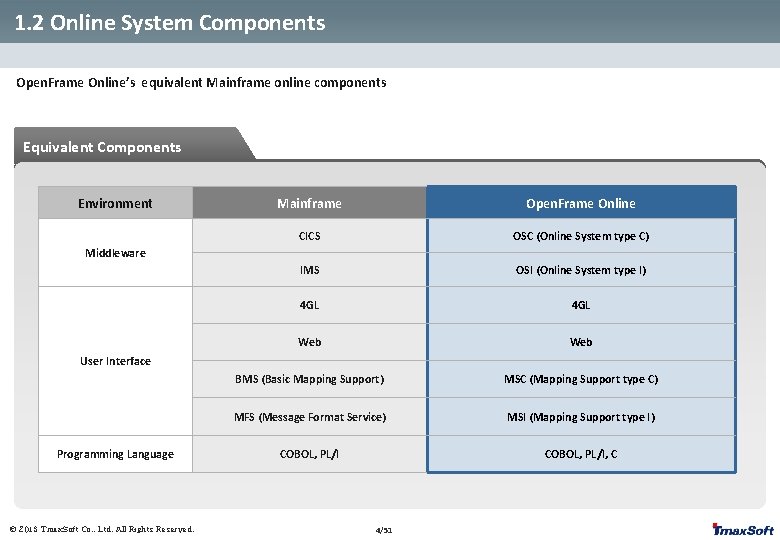
1. 2 Online System Components Open. Frame Online’s equivalent Mainframe online components Equivalent Components Environment Mainframe Open. Frame Online CICS OSC (Online System type C) IMS OSI (Online System type I) 4 GL Web BMS (Basic Mapping Support) MSC (Mapping Support type C) MFS (Message Format Service) MSI (Mapping Support type I) COBOL, PL/I, C Middleware User Interface Programming Language © 2013 Tmax. Soft Co. , Ltd. All Rights Reserved. 4/51
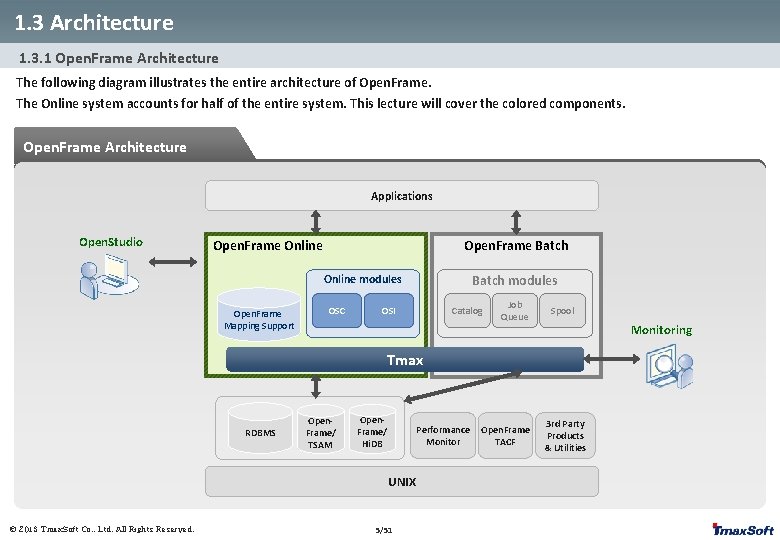
1. 3 Architecture 1. 3. 1 Open. Frame Architecture The following diagram illustrates the entire architecture of Open. Frame. The Online system accounts for half of the entire system. This lecture will cover the colored components. Open. Frame Architecture Applications Open. Studio Open. Frame Batch Open. Frame Online Batch modules Online modules Open. Frame Mapping Support OSC Catalog OSI Job Queue Spool Monitoring Tmax RDBMS Open. Frame/ TSAM Open. Frame/ Hi. DB Performance Monitor UNIX © 2013 Tmax. Soft Co. , Ltd. All Rights Reserved. 5/51 Open. Frame TACF 3 rd Party Products & Utilities
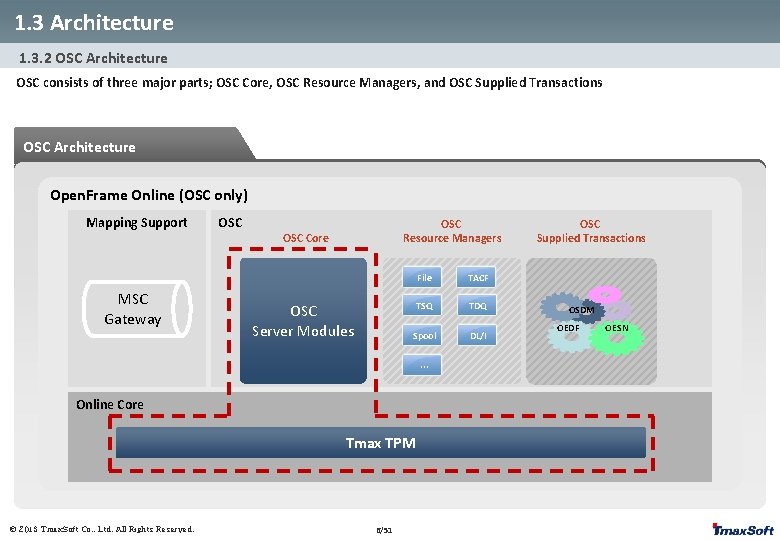
1. 3 Architecture 1. 3. 2 OSC Architecture OSC consists of three major parts; OSC Core, OSC Resource Managers, and OSC Supplied Transactions OSC Architecture Open. Frame Online (OSC only) Mapping Support MSC Gateway OSC Resource Managers OSC Core OSC Server Modules File TACF TSQ TDQ Spool DL/I . . . Online Core Tmax TPM © 2013 Tmax. Soft Co. , Ltd. All Rights Reserved. 6/51 OSC Supplied Transactions OSDM OEDF OESN
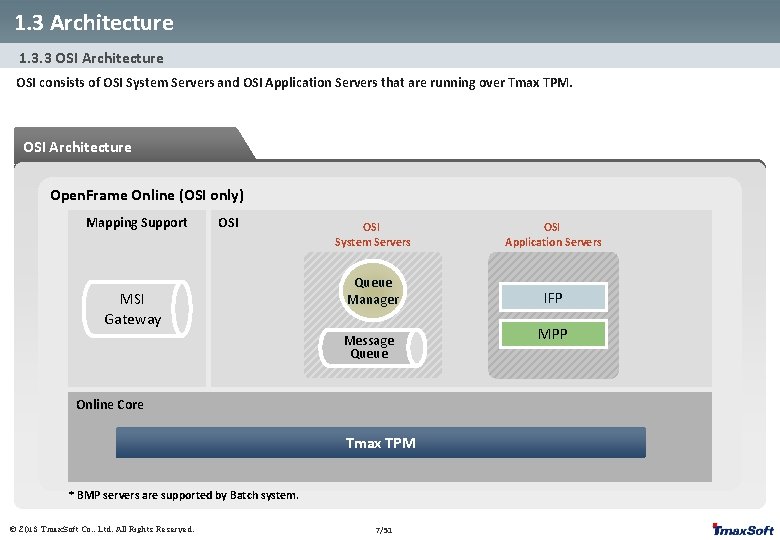
1. 3 Architecture 1. 3. 3 OSI Architecture OSI consists of OSI System Servers and OSI Application Servers that are running over Tmax TPM. OSI Architecture Open. Frame Online (OSI only) Mapping Support OSI MSI Gateway OSI System Servers OSI Application Servers Queue Manager IFP Message Queue Online Core Tmax TPM * BMP servers are supported by Batch system. © 2013 Tmax. Soft Co. , Ltd. All Rights Reserved. 7/51 MPP
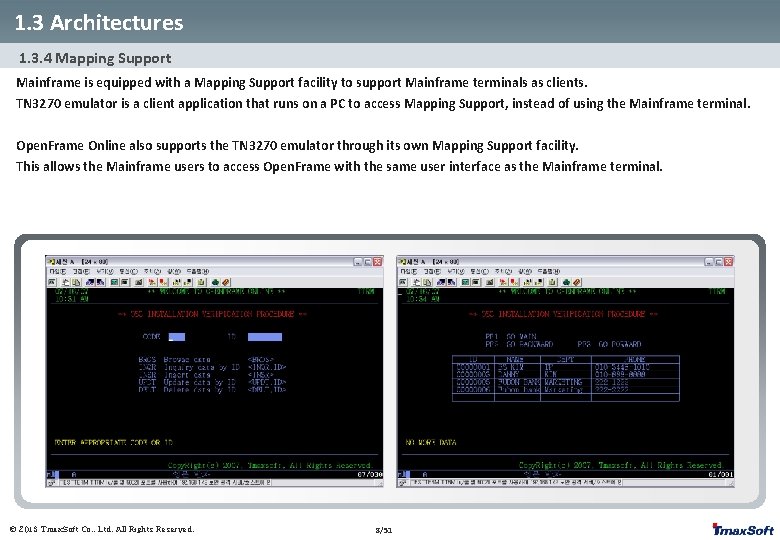
1. 3 Architectures 1. 3. 4 Mapping Support Mainframe is equipped with a Mapping Support facility to support Mainframe terminals as clients. TN 3270 emulator is a client application that runs on a PC to access Mapping Support, instead of using the Mainframe terminal. Open. Frame Online also supports the TN 3270 emulator through its own Mapping Support facility. This allows the Mainframe users to access Open. Frame with the same user interface as the Mainframe terminal. © 2013 Tmax. Soft Co. , Ltd. All Rights Reserved. 8/51
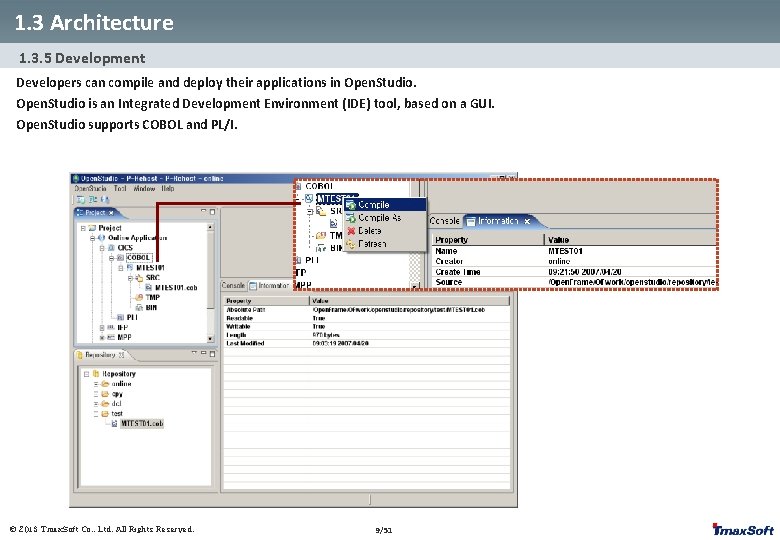
1. 3 Architecture 1. 3. 5 Development Developers can compile and deploy their applications in Open. Studio is an Integrated Development Environment (IDE) tool, based on a GUI. Open. Studio supports COBOL and PL/I. © 2013 Tmax. Soft Co. , Ltd. All Rights Reserved. 9/51
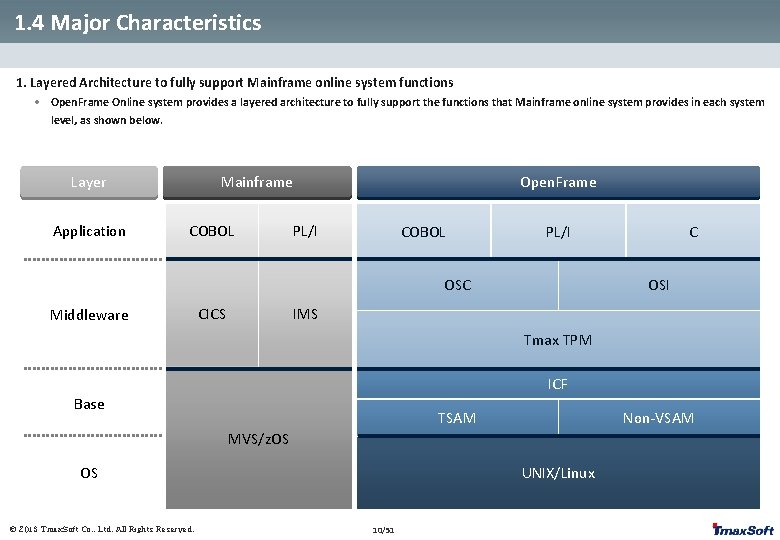
1. 4 Major Characteristics 1. Layered Architecture to fully support Mainframe online system functions • Open. Frame Online system provides a layered architecture to fully support the functions that Mainframe online system provides in each system level, as shown below. Layer Application Mainframe COBOL Open. Frame PL/I COBOL PL/I OSC Middleware CICS C OSI IMS Tmax TPM ICF Base TSAM Non-VSAM MVS/z. OS OS © 2013 Tmax. Soft Co. , Ltd. All Rights Reserved. UNIX/Linux 10/51
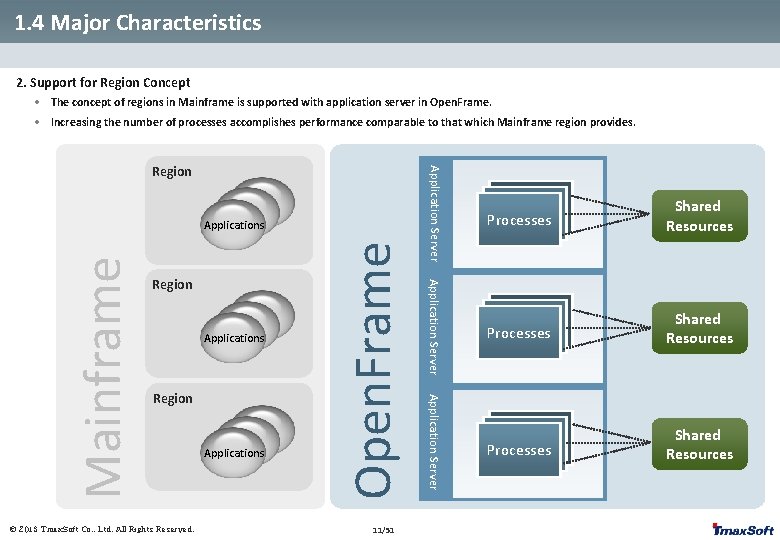
1. 4 Major Characteristics 2. Support for Region Concept • The concept of regions in Mainframe is supported with application server in Open. Frame. • Increasing the number of processes accomplishes performance comparable to that which Mainframe region provides. Applications © 2013 Tmax. Soft Co. , Ltd. All Rights Reserved. Applications 11/51 Application Server Region Open. Frame Region Application Server Mainframe Applications Application Server Region Processes Shared Resources
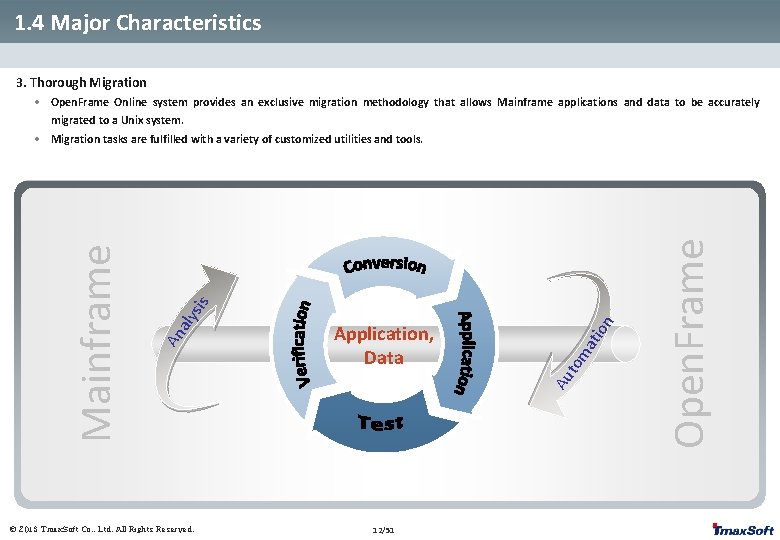
1. 4 Major Characteristics 3. Thorough Migration • Open. Frame Online system provides an exclusive migration methodology that allows Mainframe applications and data to be accurately migrated to a Unix system. © 2013 Tmax. Soft Co. , Ltd. All Rights Reserved. 12/51 Open. Frame ma to Au Application, Data tio n sis aly An Mainframe • Migration tasks are fulfilled with a variety of customized utilities and tools.
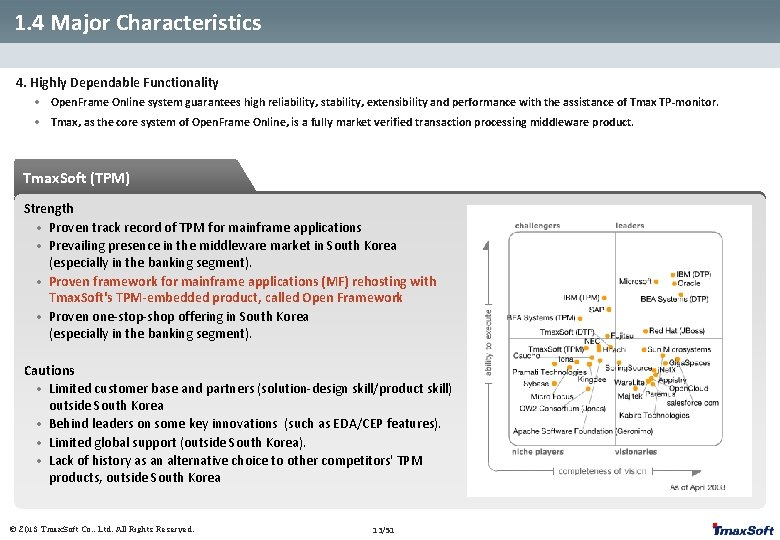
1. 4 Major Characteristics 4. Highly Dependable Functionality • Open. Frame Online system guarantees high reliability, stability, extensibility and performance with the assistance of Tmax TP-monitor. • Tmax, as the core system of Open. Frame Online, is a fully market verified transaction processing middleware product. Tmax. Soft (TPM) Strength • Proven track record of TPM for mainframe applications • Prevailing presence in the middleware market in South Korea (especially in the banking segment). • Proven framework for mainframe applications (MF) rehosting with Tmax. Soft's TPM-embedded product, called Open Framework • Proven one-stop-shop offering in South Korea (especially in the banking segment). Cautions • Limited customer base and partners (solution-design skill/product skill) outside South Korea • Behind leaders on some key innovations (such as EDA/CEP features). • Limited global support (outside South Korea). • Lack of history as an alternative choice to other competitors' TPM products, outside South Korea © 2013 Tmax. Soft Co. , Ltd. All Rights Reserved. 13/51
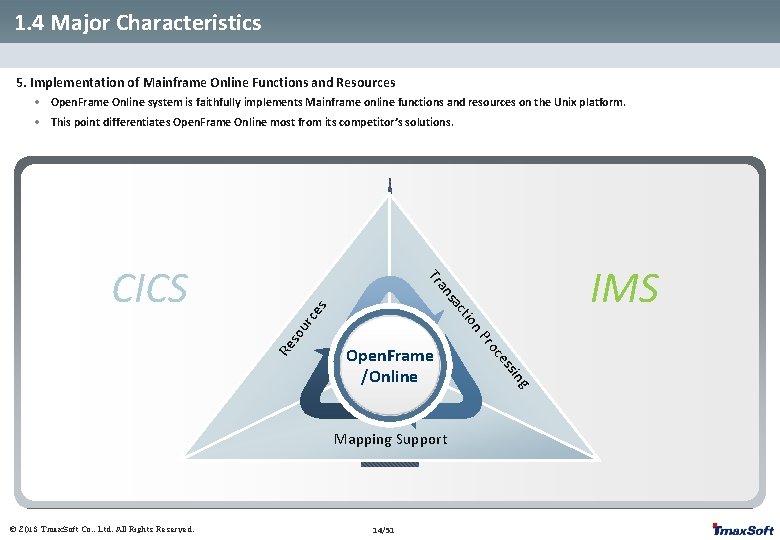
1. 4 Major Characteristics 5. Implementation of Mainframe Online Functions and Resources • Open. Frame Online system is faithfully implements Mainframe online functions and resources on the Unix platform. • This point differentiates Open. Frame Online most from its competitor’s solutions. g sin ce s ur Re so s ce 14/51 ro n. P tio ac ns Open. Frame /Online Mapping Support © 2013 Tmax. Soft Co. , Ltd. All Rights Reserved. IMS a Tr CICS
2. OSC Core 2. 1 What is OSC Core ? 2. 2 Tmax Modules 2. 3 Major Functions © 2013 Tmax. Soft Co. , Ltd. All Rights Reserved.
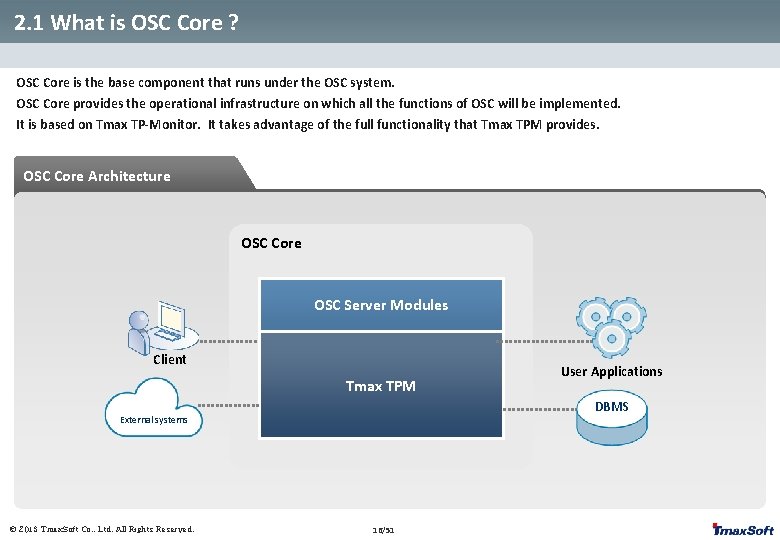
2. 1 What is OSC Core ? OSC Core is the base component that runs under the OSC system. OSC Core provides the operational infrastructure on which all the functions of OSC will be implemented. It is based on Tmax TP-Monitor. It takes advantage of the full functionality that Tmax TPM provides. OSC Core Architecture OSC Core OSC Server Modules Client Tmax TPM DBMS External systems © 2013 Tmax. Soft Co. , Ltd. All Rights Reserved. User Applications 16/51
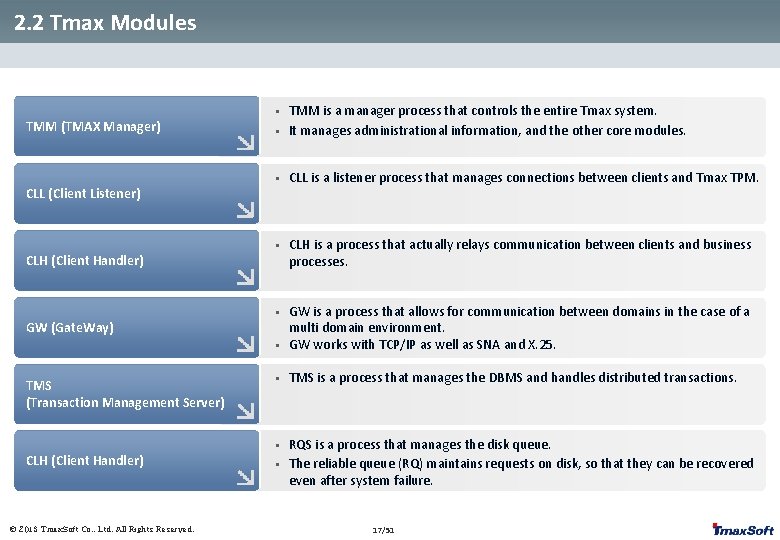
2. 2 Tmax Modules TMM (TMAX Manager) CLL (Client Listener) CLH (Client Handler) • TMM is a manager process that controls the entire Tmax system. It manages administrational information, and the other core modules. • CLL is a listener process that manages connections between clients and Tmax TPM. • CLH is a process that actually relays communication between clients and business processes. • • GW is a process that allows for communication between domains in the case of a multi domain environment. GW works with TCP/IP as well as SNA and X. 25. • TMS is a process that manages the DBMS and handles distributed transactions. • RQS is a process that manages the disk queue. The reliable queue (RQ) maintains requests on disk, so that they can be recovered even after system failure. • GW (Gate. Way) TMS (Transaction Management Server) CLH (Client Handler) © 2013 Tmax. Soft Co. , Ltd. All Rights Reserved. • 17/51
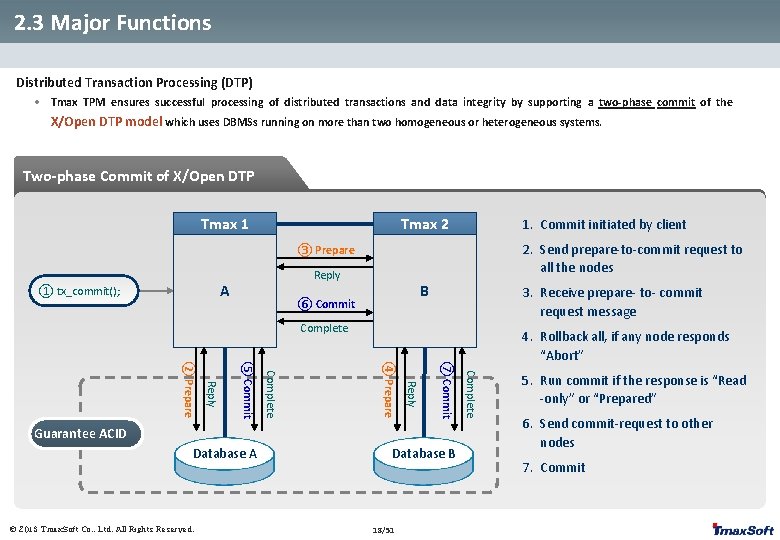
2. 3 Major Functions Distributed Transaction Processing (DTP) • Tmax TPM ensures successful processing of distributed transactions and data integrity by supporting a two-phase commit of the X/Open DTP model which uses DBMSs running on more than two homogeneous or heterogeneous systems. Two-phase Commit of X/Open DTP Tmax 1 Tmax 2 1. Commit initiated by client 2. Send prepare-to-commit request to all the nodes ③ Prepare Reply A ① tx_commit(); B ⑥ Commit 3. Receive prepare- to- commit request message Complete Database A © 2013 Tmax. Soft Co. , Ltd. All Rights Reserved. Database B 18/51 Complete ⑦ Commit Reply ④ Prepare Complete ⑤ Commit Reply ② Prepare Guarantee ACID 4. Rollback all, if any node responds “Abort” 5. Run commit if the response is “Read -only” or “Prepared” 6. Send commit-request to other nodes 7. Commit
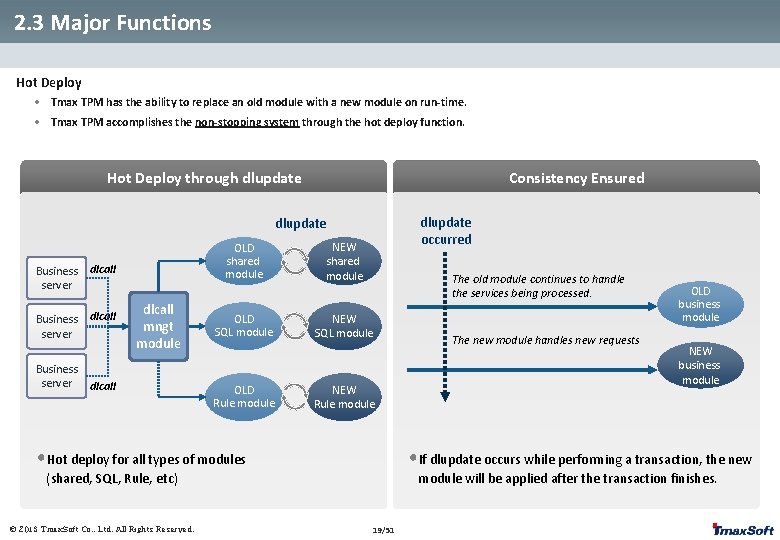
2. 3 Major Functions Hot Deploy • Tmax TPM has the ability to replace an old module with a new module on run-time. • Tmax TPM accomplishes the non-stopping system through the hot deploy function. Hot Deploy through dlupdate Consistency Ensured dlupdate occurred dlupdate Business server dlcall Business server OLD shared module dlcall mngt module dlcall OLD SQL module OLD Rule module NEW shared module The old module continues to handle the services being processed. NEW SQL module NEW Rule module • Hot deploy for all types of modules NEW business module • If dlupdate occurs while performing a transaction, the new (shared, SQL, Rule, etc) © 2013 Tmax. Soft Co. , Ltd. All Rights Reserved. The new module handles new requests OLD business module will be applied after the transaction finishes. 19/51
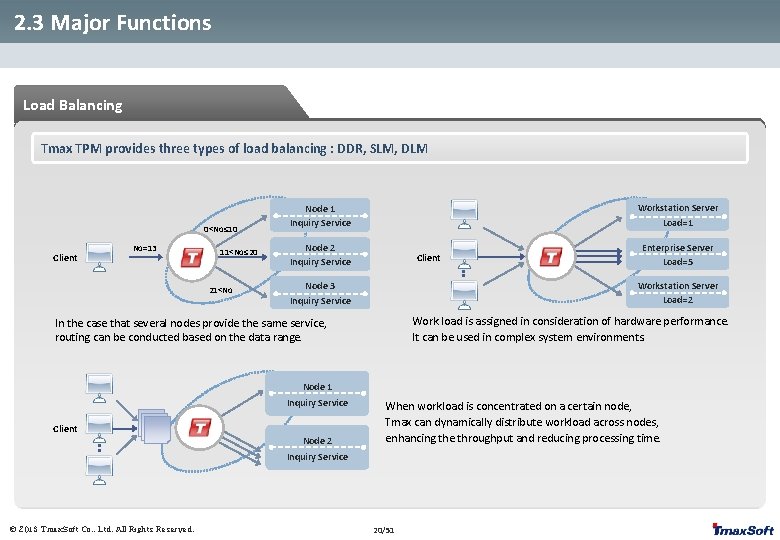
2. 3 Major Functions Load Balancing Tmax TPM provides three types of load balancing : DDR, SLM, DLM 0<No≤ 10 Client No=13 11<No≤ 20 21<No Workstation Server Load=1 Node 1 Inquiry Service Node 2 Inquiry Service Client Enterprise Server Load=5 Workstation Server Load=2 Node 3 Inquiry Service Work load is assigned in consideration of hardware performance. It can be used in complex system environments. In the case that several nodes provide the same service, routing can be conducted based on the data range. Node 1 Inquiry Service Client Node 2 When workload is concentrated on a certain node, Tmax can dynamically distribute workload across nodes, enhancing the throughput and reducing processing time. Inquiry Service © 2013 Tmax. Soft Co. , Ltd. All Rights Reserved. 20/51
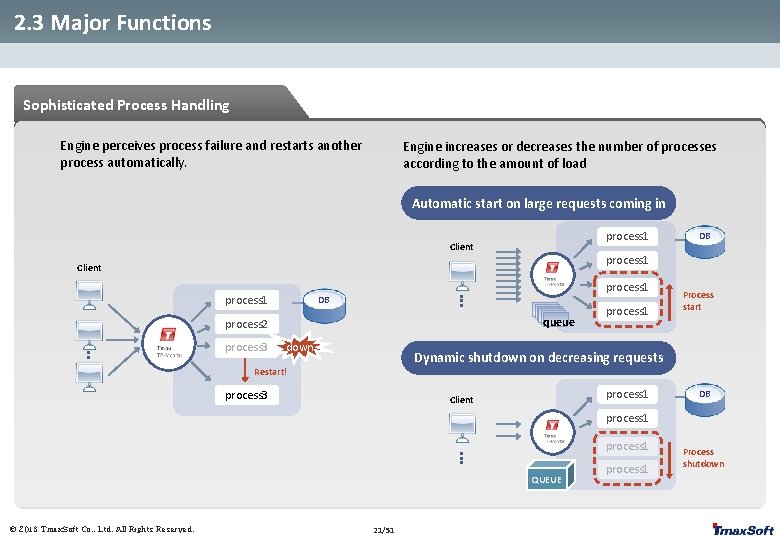
2. 3 Major Functions Sophisticated Process Handling Engine perceives process failure and restarts another process automatically. Engine increases or decreases the number of processes according to the amount of load Automatic start on large requests coming in process 1 Client DB process 1 Client process 1 DB queue process 2 process 3 down process 1 Process start Dynamic shutdown on decreasing requests Restart! process 3 process 1 Client DB process 1 QUEUE © 2013 Tmax. Soft Co. , Ltd. All Rights Reserved. 21/51 process 1 Process shutdown
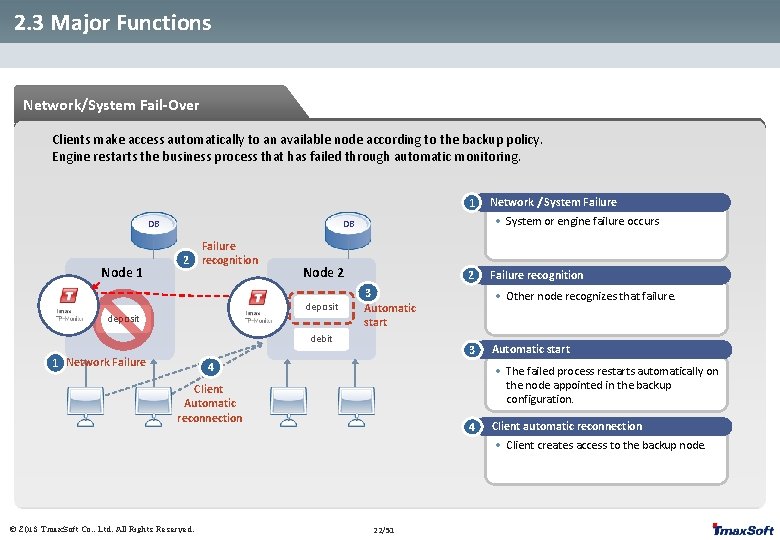
2. 3 Major Functions Network/System Fail-Over Clients make access automatically to an available node according to the backup policy. Engine restarts the business process that has failed through automatic monitoring. 1 DB Node 1 • System or engine failure occurs DB 2 Failure recognition Node 2 deposit 2 3 Automatic start debit 1 Network Failure Network / System Failure recognition • Other node recognizes that failure. 3 4 Automatic start • The failed process restarts automatically on the node appointed in the backup configuration. Client Automatic reconnection 4 Client automatic reconnection • Client creates access to the backup node. © 2013 Tmax. Soft Co. , Ltd. All Rights Reserved. 22/51
3. OSC Resources 3. 1 OSC Resource Overview 3. 2 Resource Categories 3. 3 Interface to Resources 3. 4 Resource Definition 3. 5 Resource Usage Management 3. 6 Major Resources © 2013 Tmax. Soft Co. , Ltd. All Rights Reserved.
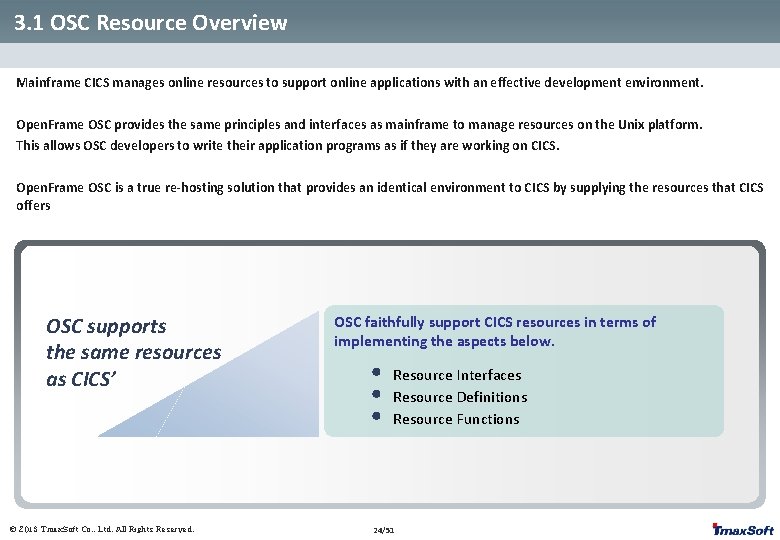
3. 1 OSC Resource Overview Mainframe CICS manages online resources to support online applications with an effective development environment. Open. Frame OSC provides the same principles and interfaces as mainframe to manage resources on the Unix platform. This allows OSC developers to write their application programs as if they are working on CICS. Open. Frame OSC is a true re-hosting solution that provides an identical environment to CICS by supplying the resources that CICS offers OSC supports the same resources as CICS’ © 2013 Tmax. Soft Co. , Ltd. All Rights Reserved. OSC faithfully support CICS resources in terms of implementing the aspects below. • • • Resource Interfaces Resource Definitions Resource Functions 24/51
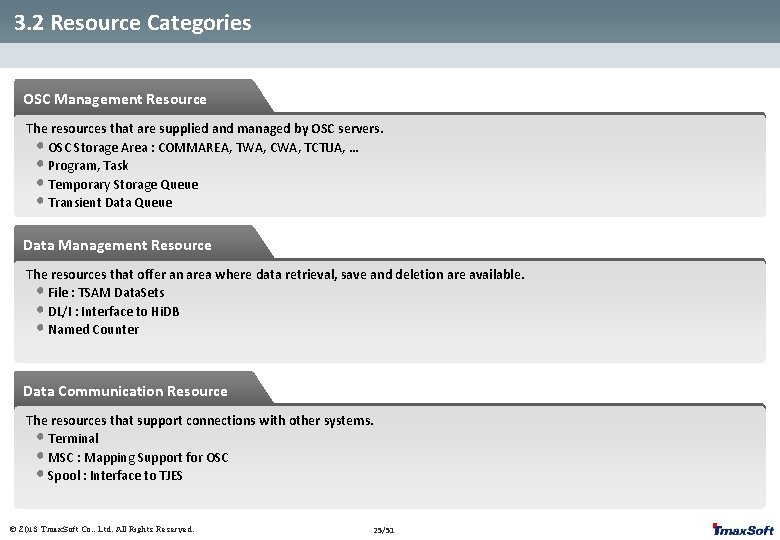
3. 2 Resource Categories OSC Management Resource The resources that are supplied and managed by OSC servers. • OSC Storage Area : COMMAREA, TWA, CWA, TCTUA, … • Program, Task • Temporary Storage Queue • Transient Data Queue Data Management Resource The resources that offer an area where data retrieval, save and deletion are available. • File : TSAM Data. Sets • DL/I : Interface to Hi. DB • Named Counter Data Communication Resource The resources that support connections with other systems. • Terminal • MSC : Mapping Support for OSC • Spool : Interface to TJES © 2013 Tmax. Soft Co. , Ltd. All Rights Reserved. 25/51
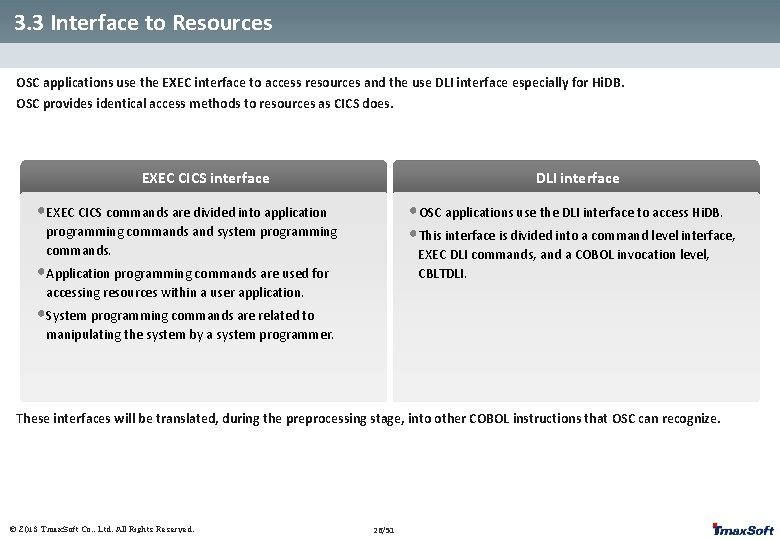
3. 3 Interface to Resources OSC applications use the EXEC interface to access resources and the use DLI interface especially for Hi. DB. OSC provides identical access methods to resources as CICS does. EXEC CICS interface DLI interface • EXEC CICS commands are divided into application • OSC applications use the DLI interface to access Hi. DB. • This interface is divided into a command level interface, programming commands and system programming commands. EXEC DLI commands, and a COBOL invocation level, CBLTDLI. • Application programming commands are used for accessing resources within a user application. • System programming commands are related to manipulating the system by a system programmer. These interfaces will be translated, during the preprocessing stage, into other COBOL instructions that OSC can recognize. © 2013 Tmax. Soft Co. , Ltd. All Rights Reserved. 26/51
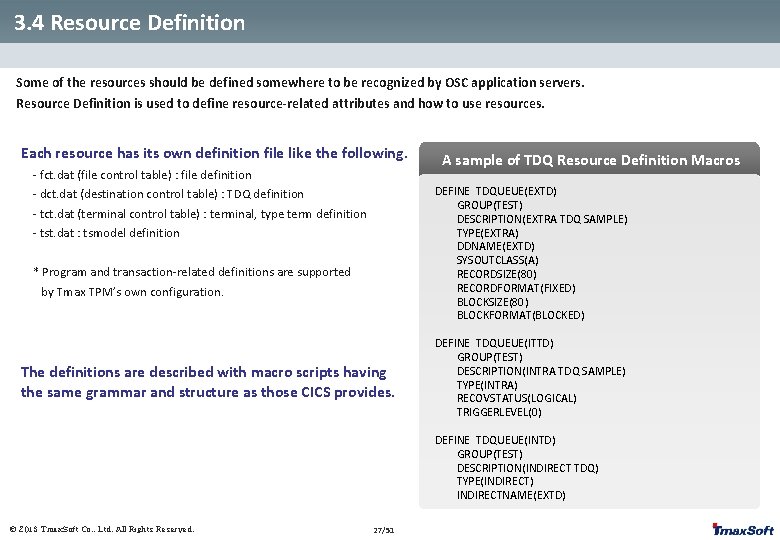
3. 4 Resource Definition Some of the resources should be defined somewhere to be recognized by OSC application servers. Resource Definition is used to define resource-related attributes and how to use resources. Each resource has its own definition file like the following. - fct. dat (file control table) : file definition - dct. dat (destination control table) : TDQ definition A sample of TDQ Resource Definition Macros DEFINE TDQUEUE(EXTD) GROUP(TEST) DESCRIPTION(EXTRA TDQ SAMPLE) TYPE(EXTRA) DDNAME(EXTD) SYSOUTCLASS(A) RECORDSIZE(80) RECORDFORMAT(FIXED) BLOCKSIZE(80) BLOCKFORMAT(BLOCKED) - tct. dat (terminal control table) : terminal, type term definition - tst. dat : tsmodel definition * Program and transaction-related definitions are supported by Tmax TPM’s own configuration. The definitions are described with macro scripts having the same grammar and structure as those CICS provides. DEFINE TDQUEUE(ITTD) GROUP(TEST) DESCRIPTION(INTRA TDQ SAMPLE) TYPE(INTRA) RECOVSTATUS(LOGICAL) TRIGGERLEVEL(0) DEFINE TDQUEUE(INTD) GROUP(TEST) DESCRIPTION(INDIRECT TDQ) TYPE(INDIRECT) INDIRECTNAME(EXTD) © 2013 Tmax. Soft Co. , Ltd. All Rights Reserved. 27/51
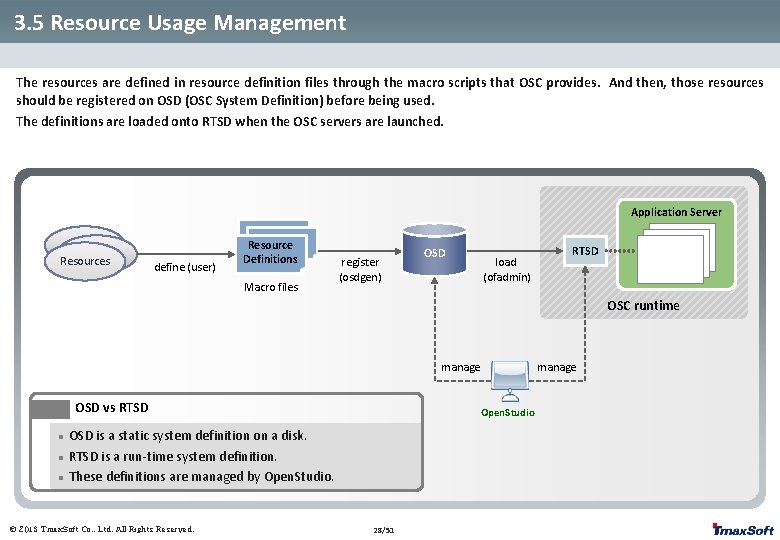
3. 5 Resource Usage Management The resources are defined in resource definition files through the macro scripts that OSC provides. And then, those resources should be registered on OSD (OSC System Definition) before being used. The definitions are loaded onto RTSD when the OSC servers are launched. Application Server Resources define (user) Resource Definitions Macro files register (osdgen) OSD load (ofadmin) RTSD OSC runtime manage OSD vs RTSD l l l Open. Studio OSD is a static system definition on a disk. RTSD is a run-time system definition. These definitions are managed by Open. Studio. © 2013 Tmax. Soft Co. , Ltd. All Rights Reserved. manage 28/51
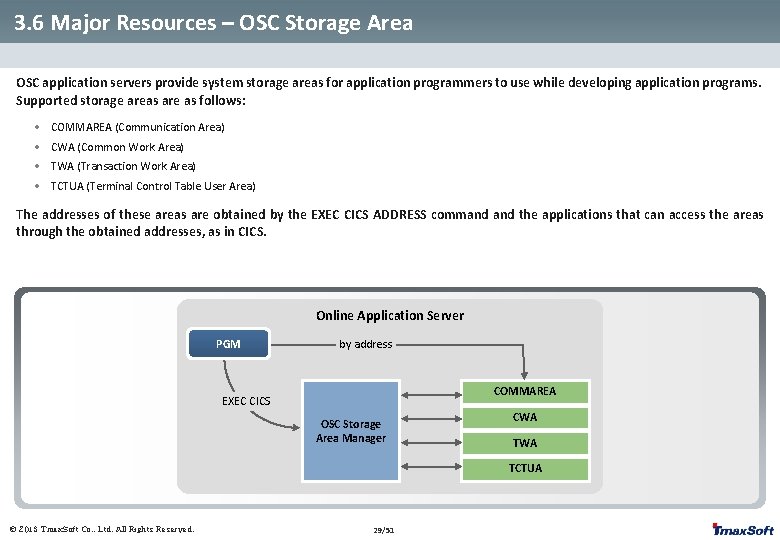
3. 6 Major Resources – OSC Storage Area OSC application servers provide system storage areas for application programmers to use while developing application programs. Supported storage areas are as follows: • COMMAREA (Communication Area) • CWA (Common Work Area) • TWA (Transaction Work Area) • TCTUA (Terminal Control Table User Area) The addresses of these areas are obtained by the EXEC CICS ADDRESS command the applications that can access the areas through the obtained addresses, as in CICS. Online Application Server PGM by address COMMAREA EXEC CICS OSC Storage Area Manager CWA TCTUA © 2013 Tmax. Soft Co. , Ltd. All Rights Reserved. 29/51
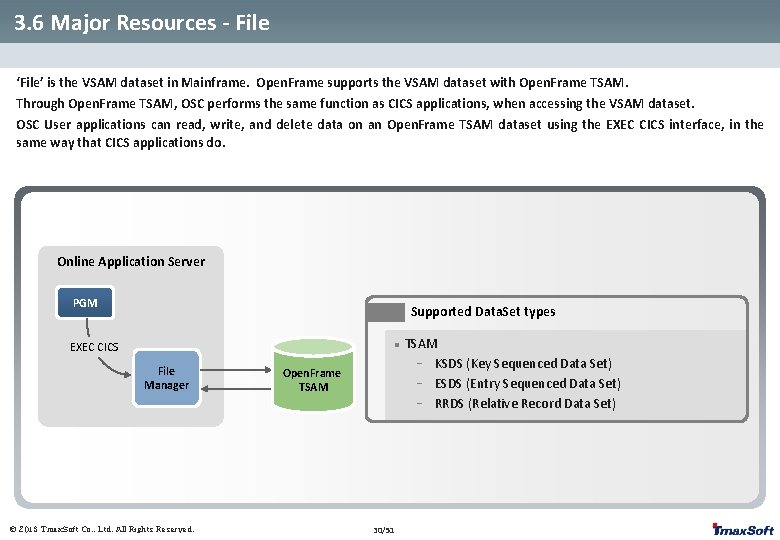
3. 6 Major Resources - File ‘File’ is the VSAM dataset in Mainframe. Open. Frame supports the VSAM dataset with Open. Frame TSAM. Through Open. Frame TSAM, OSC performs the same function as CICS applications, when accessing the VSAM dataset. OSC User applications can read, write, and delete data on an Open. Frame TSAM dataset using the EXEC CICS interface, in the same way that CICS applications do. Online Application Server PGM Supported Data. Set types EXEC CICS l File Manager © 2013 Tmax. Soft Co. , Ltd. All Rights Reserved. Open. Frame TSAM 30/51 TSAM - KSDS (Key Sequenced Data Set) - ESDS (Entry Sequenced Data Set) - RRDS (Relative Record Data Set)
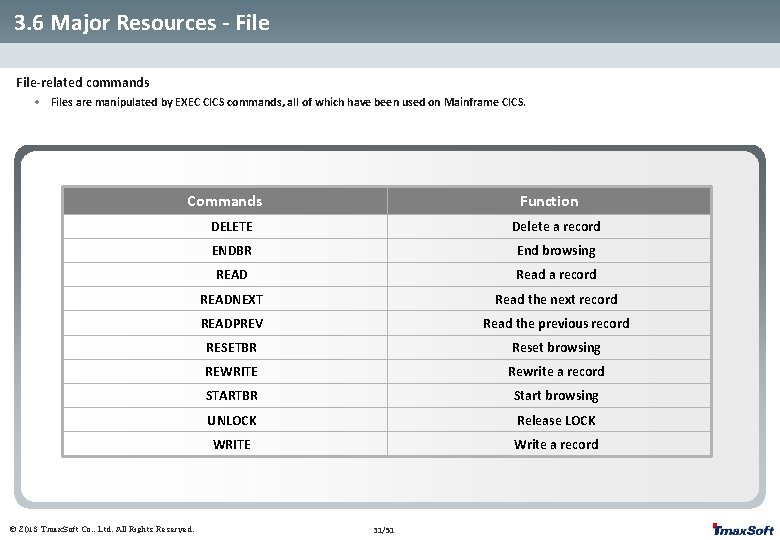
3. 6 Major Resources - File-related commands • Files are manipulated by EXEC CICS commands, all of which have been used on Mainframe CICS. Commands © 2013 Tmax. Soft Co. , Ltd. All Rights Reserved. Function DELETE Delete a record ENDBR End browsing READ Read a record READNEXT Read the next record READPREV Read the previous record RESETBR Reset browsing REWRITE Rewrite a record STARTBR Start browsing UNLOCK Release LOCK WRITE Write a record 31/51
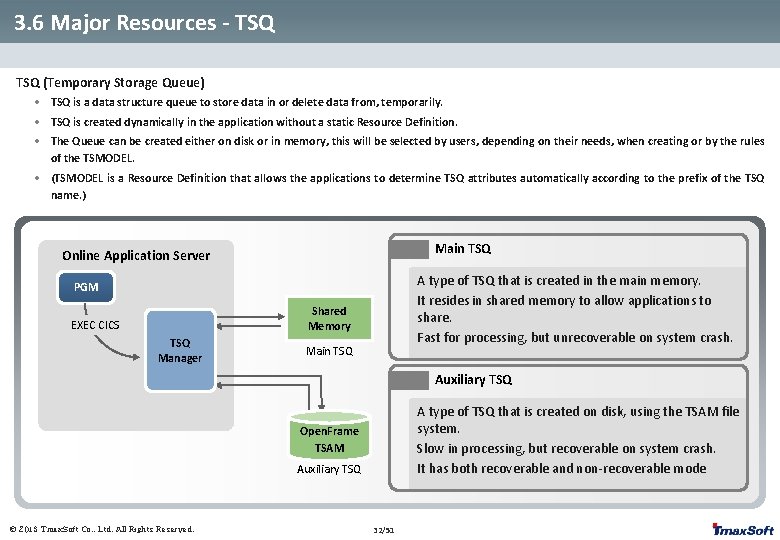
3. 6 Major Resources - TSQ (Temporary Storage Queue) • TSQ is a data structure queue to store data in or delete data from, temporarily. • TSQ is created dynamically in the application without a static Resource Definition. • The Queue can be created either on disk or in memory, this will be selected by users, depending on their needs, when creating or by the rules of the TSMODEL. • (TSMODEL is a Resource Definition that allows the applications to determine TSQ attributes automatically according to the prefix of the TSQ name. ) Main TSQ Online Application Server A type of TSQ that is created in the main memory. It resides in shared memory to allow applications to share. Fast for processing, but unrecoverable on system crash. PGM Shared Memory EXEC CICS TSQ Manager Main TSQ Auxiliary TSQ A type of TSQ that is created on disk, using the TSAM file system. Slow in processing, but recoverable on system crash. It has both recoverable and non-recoverable mode Open. Frame TSAM Auxiliary TSQ © 2013 Tmax. Soft Co. , Ltd. All Rights Reserved. 32/51
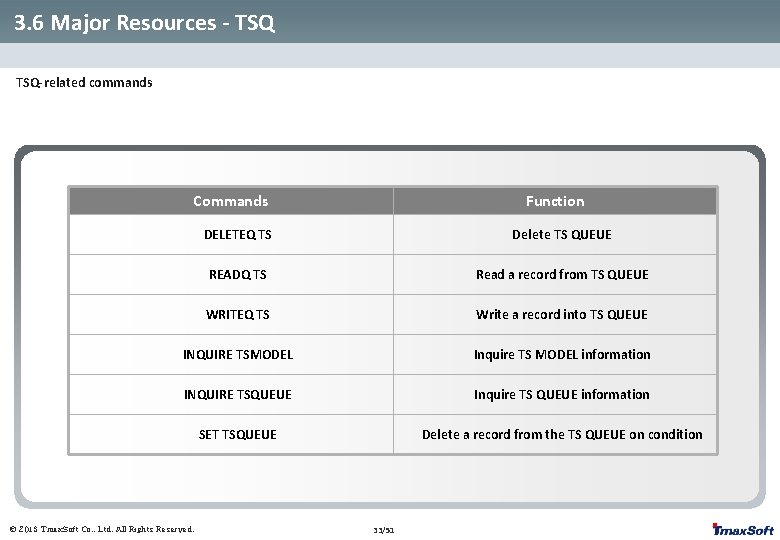
3. 6 Major Resources - TSQ-related commands Commands Function DELETEQ TS Delete TS QUEUE READQ TS Read a record from TS QUEUE WRITEQ TS Write a record into TS QUEUE INQUIRE TSMODEL Inquire TS MODEL information INQUIRE TSQUEUE Inquire TS QUEUE information SET TSQUEUE Delete a record from the TS QUEUE on condition © 2013 Tmax. Soft Co. , Ltd. All Rights Reserved. 33/51
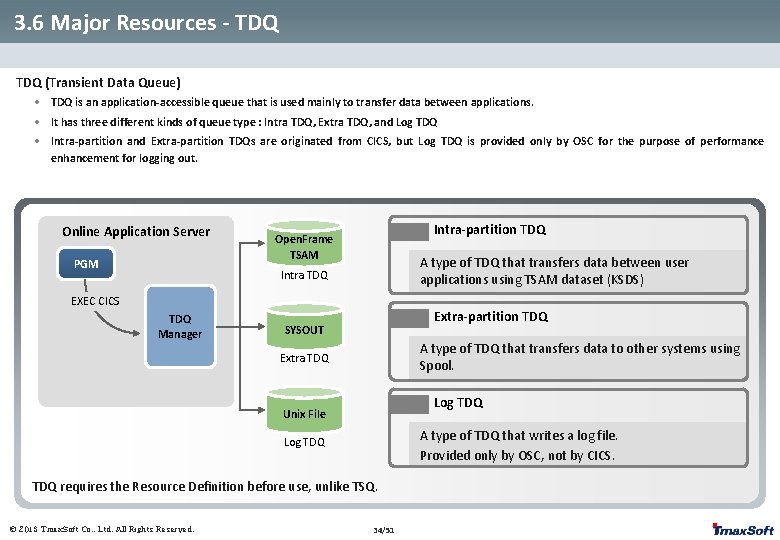
3. 6 Major Resources - TDQ (Transient Data Queue) • TDQ is an application-accessible queue that is used mainly to transfer data between applications. • It has three different kinds of queue type : Intra TDQ, Extra TDQ, and Log TDQ • Intra-partition and Extra-partition TDQs are originated from CICS, but Log TDQ is provided only by OSC for the purpose of performance enhancement for logging out. Online Application Server PGM Intra-partition TDQ Open. Frame TSAM A type of TDQ that transfers data between user applications using TSAM dataset (KSDS) Intra TDQ EXEC CICS TDQ Manager Extra-partition TDQ SYSOUT A type of TDQ that transfers data to other systems using Spool. Extra TDQ Log TDQ Unix File A type of TDQ that writes a log file. Provided only by OSC, not by CICS. Log TDQ requires the Resource Definition before use, unlike TSQ. © 2013 Tmax. Soft Co. , Ltd. All Rights Reserved. 34/51
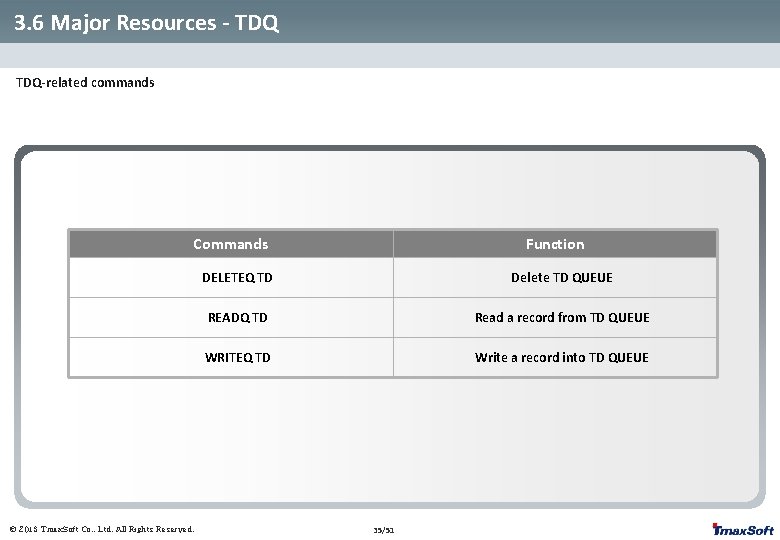
3. 6 Major Resources - TDQ-related commands Commands © 2013 Tmax. Soft Co. , Ltd. All Rights Reserved. Function DELETEQ TD Delete TD QUEUE READQ TD Read a record from TD QUEUE WRITEQ TD Write a record into TD QUEUE 35/51
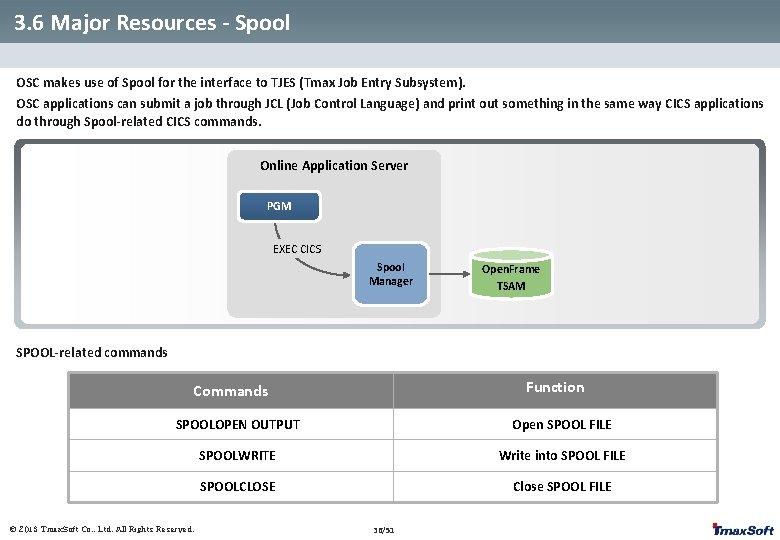
3. 6 Major Resources - Spool OSC makes use of Spool for the interface to TJES (Tmax Job Entry Subsystem). OSC applications can submit a job through JCL (Job Control Language) and print out something in the same way CICS applications do through Spool-related CICS commands. Online Application Server PGM EXEC CICS Spool Manager Open. Frame TSAM SPOOL-related commands Function Commands SPOOLOPEN OUTPUT Open SPOOL FILE SPOOLWRITE Write into SPOOL FILE SPOOLCLOSE Close SPOOL FILE © 2013 Tmax. Soft Co. , Ltd. All Rights Reserved. 36/51
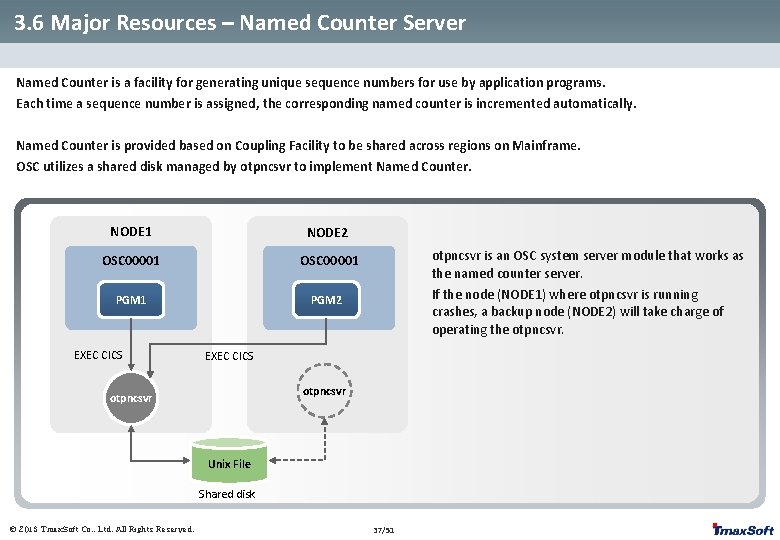
3. 6 Major Resources – Named Counter Server Named Counter is a facility for generating unique sequence numbers for use by application programs. Each time a sequence number is assigned, the corresponding named counter is incremented automatically. Named Counter is provided based on Coupling Facility to be shared across regions on Mainframe. OSC utilizes a shared disk managed by otpncsvr to implement Named Counter. NODE 1 NODE 2 OSC 00001 PGM 2 EXEC CICS otpncsvr is an OSC system server module that works as the named counter server. If the node (NODE 1) where otpncsvr is running crashes, a backup node (NODE 2) will take charge of operating the otpncsvr. EXEC CICS otpncsvr Unix File Shared disk © 2013 Tmax. Soft Co. , Ltd. All Rights Reserved. 37/51
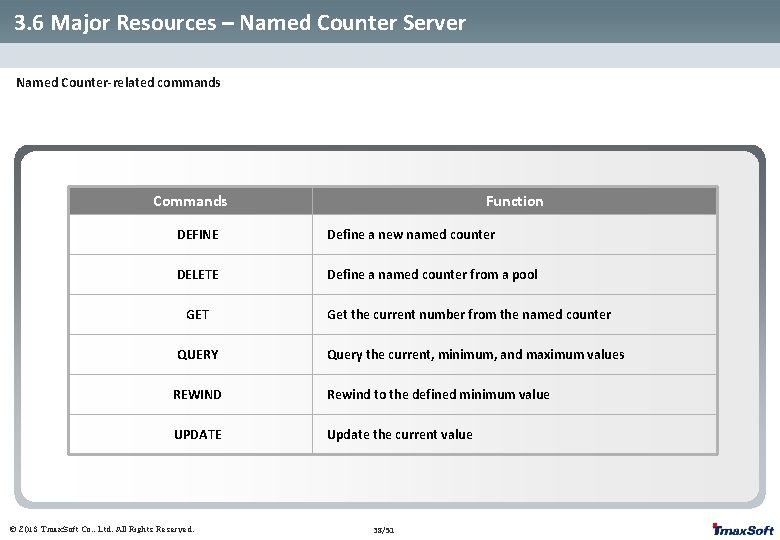
3. 6 Major Resources – Named Counter Server Named Counter-related commands Commands Function DEFINE Define a new named counter DELETE Define a named counter from a pool GET QUERY Get the current number from the named counter Query the current, minimum, and maximum values REWIND Rewind to the defined minimum value UPDATE Update the current value © 2013 Tmax. Soft Co. , Ltd. All Rights Reserved. 38/51
4. OSC Supplied Transactions 4. 1 What is an OSC Supplied Transaction? 4. 2 OSC Supplied Transactions - OEBR - OEDF - OSDM - OEMT - OESN/OESF © 2013 Tmax. Soft Co. , Ltd. All Rights Reserved.
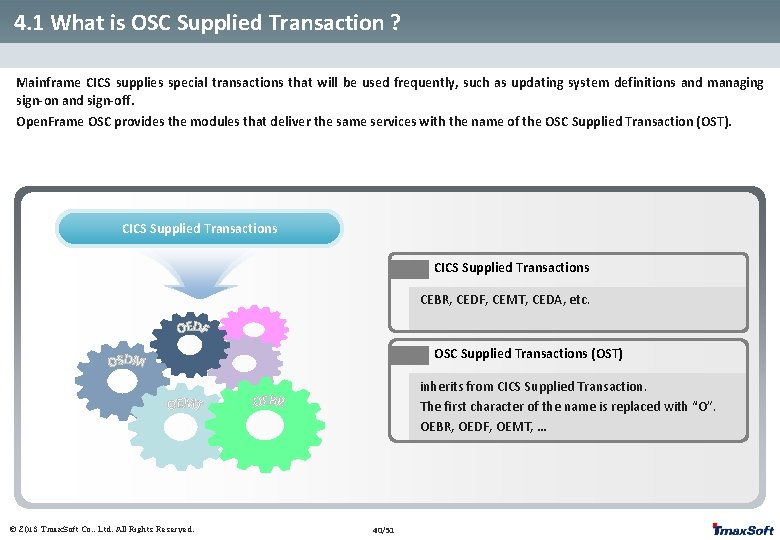
4. 1 What is OSC Supplied Transaction ? Mainframe CICS supplies special transactions that will be used frequently, such as updating system definitions and managing sign-on and sign-off. Open. Frame OSC provides the modules that deliver the same services with the name of the OSC Supplied Transaction (OST). CICS Supplied Transactions CEBR, CEDF, CEMT, CEDA, etc. OSC Supplied Transactions (OST) inherits from CICS Supplied Transaction. The first character of the name is replaced with “O”. OEBR, OEDF, OEMT, … © 2013 Tmax. Soft Co. , Ltd. All Rights Reserved. 40/51
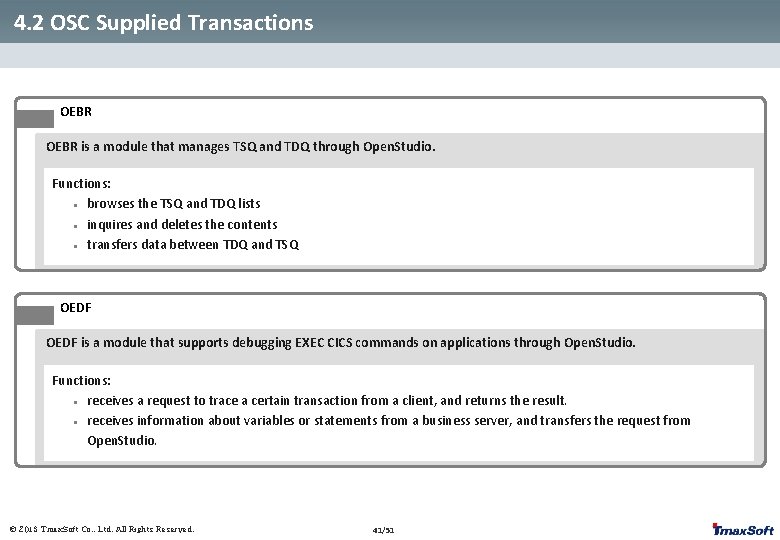
4. 2 OSC Supplied Transactions OEBR is a module that manages TSQ and TDQ through Open. Studio. Functions: l browses the TSQ and TDQ lists l inquires and deletes the contents l transfers data between TDQ and TSQ OEDF is a module that supports debugging EXEC CICS commands on applications through Open. Studio. Functions: l receives a request to trace a certain transaction from a client, and returns the result. l receives information about variables or statements from a business server, and transfers the request from Open. Studio. © 2013 Tmax. Soft Co. , Ltd. All Rights Reserved. 41/51
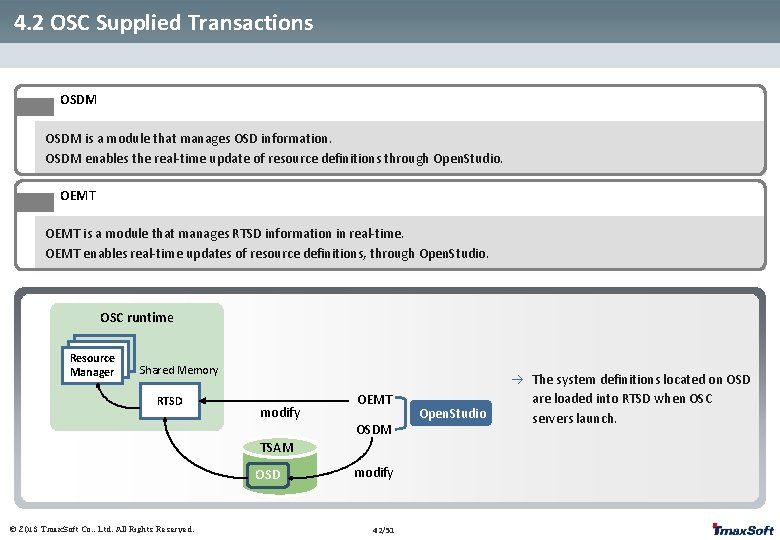
4. 2 OSC Supplied Transactions OSDM is a module that manages OSD information. OSDM enables the real-time update of resource definitions through Open. Studio. OEMT is a module that manages RTSD information in real-time. OEMT enables real-time updates of resource definitions, through Open. Studio. OSC runtime Resource Manager Shared Memory RTSD modify OEMT OSDM TSAM OSD © 2013 Tmax. Soft Co. , Ltd. All Rights Reserved. modify 42/51 Open. Studio à The system definitions located on OSD are loaded into RTSD when OSC servers launch.
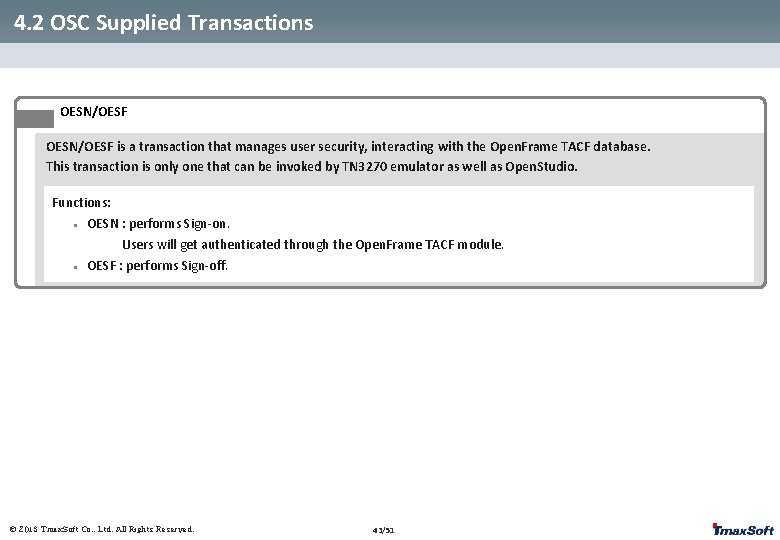
4. 2 OSC Supplied Transactions OESN/OESF is a transaction that manages user security, interacting with the Open. Frame TACF database. This transaction is only one that can be invoked by TN 3270 emulator as well as Open. Studio. Functions: l l OESN : performs Sign-on. Users will get authenticated through the Open. Frame TACF module. OESF : performs Sign-off. © 2013 Tmax. Soft Co. , Ltd. All Rights Reserved. 43/51
5. Mapping Support 5. 1 What is Mapping Support? 5. 2 Mapping Support Flow 5. 3 Mapping Support Components 5. 4 MS Characteristics © 2013 Tmax. Soft Co. , Ltd. All Rights Reserved.
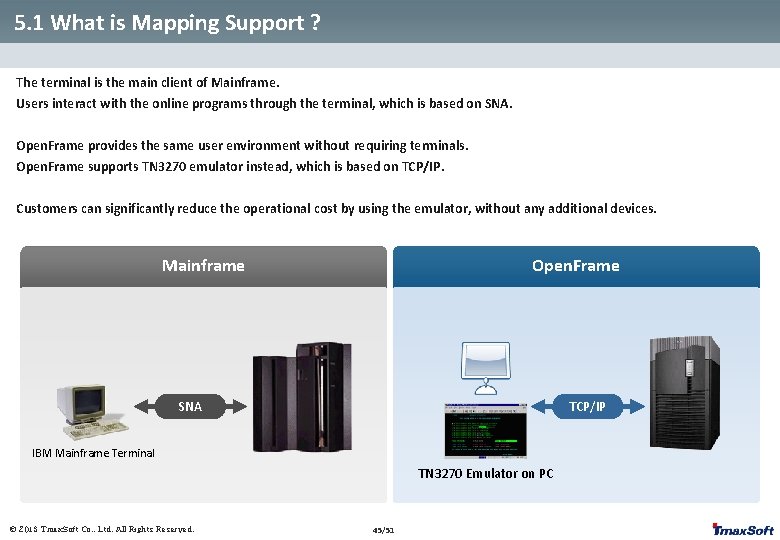
5. 1 What is Mapping Support ? The terminal is the main client of Mainframe. Users interact with the online programs through the terminal, which is based on SNA. Open. Frame provides the same user environment without requiring terminals. Open. Frame supports TN 3270 emulator instead, which is based on TCP/IP. Customers can significantly reduce the operational cost by using the emulator, without any additional devices. Mainframe Open. Frame SNA TCP/IP IBM Mainframe Terminal TN 3270 Emulator on PC © 2013 Tmax. Soft Co. , Ltd. All Rights Reserved. 45/51
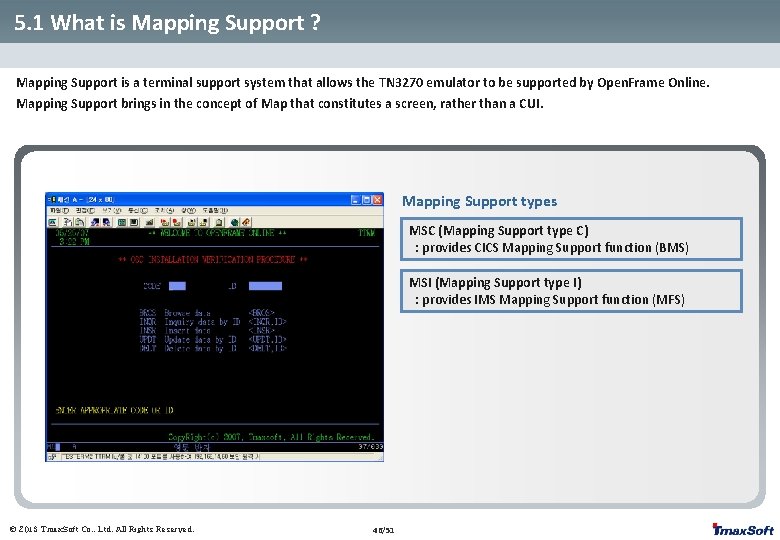
5. 1 What is Mapping Support ? Mapping Support is a terminal support system that allows the TN 3270 emulator to be supported by Open. Frame Online. Mapping Support brings in the concept of Map that constitutes a screen, rather than a CUI. Mapping Support types MSC (Mapping Support type C) : provides CICS Mapping Support function (BMS) MSI (Mapping Support type I) : provides IMS Mapping Support function (MFS) © 2013 Tmax. Soft Co. , Ltd. All Rights Reserved. 46/51
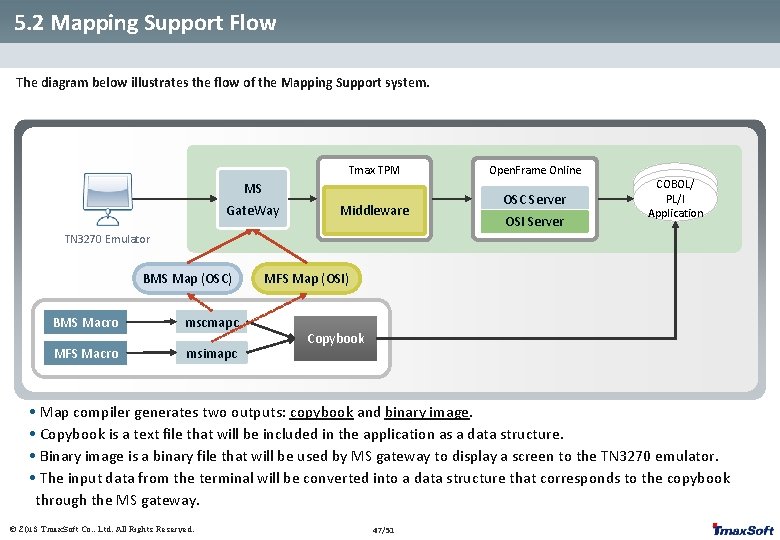
5. 2 Mapping Support Flow The diagram below illustrates the flow of the Mapping Support system. Tmax TPM MS Gate. Way Middleware Open. Frame Online OSC Server OSI Server COBOL/ PL/I Application TN 3270 Emulator BMS Map (OSC) BMS Macro mscmapc MFS Macro msimapc MFS Map (OSI) Copybook • Map compiler generates two outputs: copybook and binary image. • Copybook is a text file that will be included in the application as a data structure. • Binary image is a binary file that will be used by MS gateway to display a screen to the TN 3270 emulator. • The input data from the terminal will be converted into a data structure that corresponds to the copybook through the MS gateway. © 2013 Tmax. Soft Co. , Ltd. All Rights Reserved. 47/51
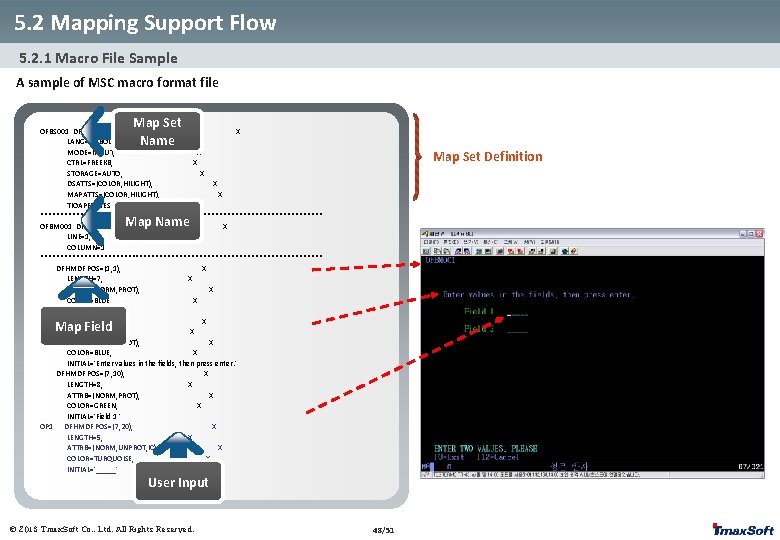
5. 2 Mapping Support Flow 5. 2. 1 Macro File Sample A sample of MSC macro format file Map Set Name OFBS 001 DFHMSD TYPE=&SYSPARM, X LANG=COBOL, X MODE=INOUT, X CTRL=FREEKB, X STORAGE=AUTO, X DSATTS=(COLOR, HILIGHT), X MAPATTS=(COLOR, HILIGHT), X TIOAPFX=YES ************************************ OFBM 001 DFHMDI SIZE=(24, 80), X LINE=1, X COLUMN=1 ************************************ DFHMDF POS=(1, 1), X LENGTH=7, X ATTRB=(NORM, PROT), X COLOR=BLUE, X INITIAL='OFBM 001' DFHMDF POS=(5, 5), X LENGTH=50, X ATTRB=(NORM, PROT), X COLOR=BLUE, X INITIAL='Enter values in the fields, then press enter. ' DFHMDF POS=(7, 10), X LENGTH=8, X ATTRB=(NORM, PROT), X COLOR=GREEN, X INITIAL='Field 1 ' OP 1 DFHMDF POS=(7, 20), X LENGTH=5, X ATTRB=(NORM, UNPROT, IC), X COLOR=TURQUOISE, X INITIAL='_____' Map Set Definition Map Name Map Field User Input © 2013 Tmax. Soft Co. , Ltd. All Rights Reserved. 48/51
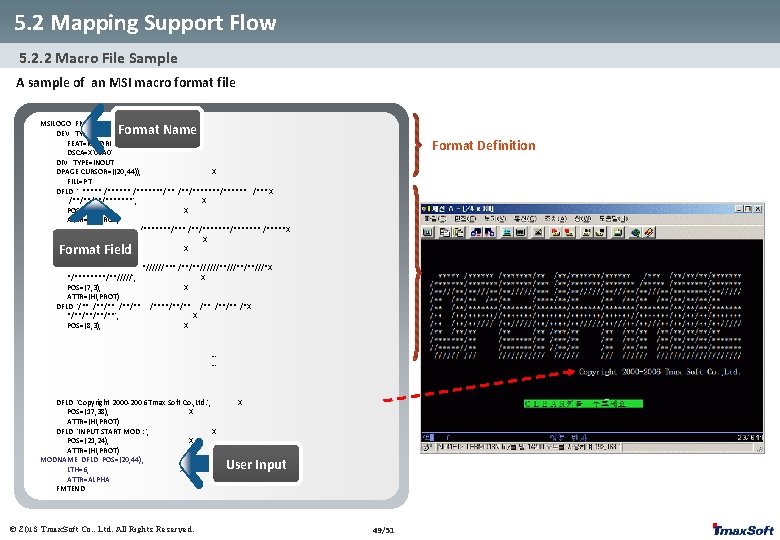
5. 2 Mapping Support Flow 5. 2. 2 Macro File Sample A sample of an MSI macro format file MSILOGO FMT DEV TYPE=(3270, 2), X FEAT=IGNORE, X DSCA=X'00 A 0' DIV TYPE=INOUT DPAGE CURSOR=((20, 44)), X FILL=PT DFLD ' ***** /*******/** /**/****** /*** X /**/*******', X POS=(5, 3), X ATTR=(HI, PROT) DFLD '/*******/*******/*** /**/******* /*****X /****/*******', X POS=(6, 3), X ATTR=(HI, PROT) DFLD '/**///**/**//////*** /**/**//////**/**///*X */****/**/////', X POS=(7, 3), X ATTR=(HI, PROT) DFLD '/** /**/** /****/**/** /*X */**/**', X POS=(8, 3), X Format Name Format Definition Format Field … … DFLD 'Copyright 2000 -2006 Tmax Soft Co. , Ltd. ', POS=(17, 38), X ATTR=(HI, PROT) DFLD 'INPUT START MOD : ', X POS=(21, 24), X ATTR=(HI, PROT) MODNAME DFLD POS=(20, 44), X LTH=6, X ATTR=ALPHA FMTEND X User Input © 2013 Tmax. Soft Co. , Ltd. All Rights Reserved. 49/51
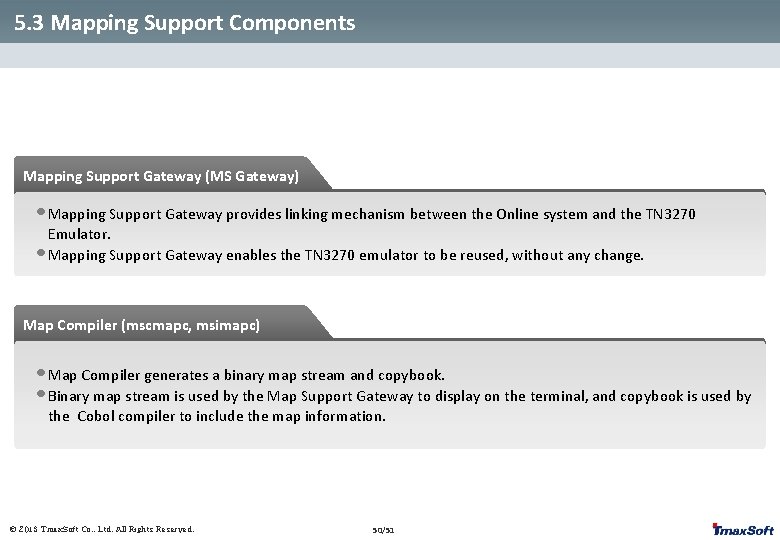
5. 3 Mapping Support Components Mapping Support Gateway (MS Gateway) • Mapping Support Gateway provides linking mechanism between the Online system and the TN 3270 Emulator. • Mapping Support Gateway enables the TN 3270 emulator to be reused, without any change. Map Compiler (mscmapc, msimapc) • Map Compiler generates a binary map stream and copybook. • Binary map stream is used by the Map Support Gateway to display on the terminal, and copybook is used by the Cobol compiler to include the map information. © 2013 Tmax. Soft Co. , Ltd. All Rights Reserved. 50/51
5. 4 Mapping Support Characteristics • Able to use the terminal environment of Mainframe as it is, without modification. • Ensures that the existing business flow between users and applications continues to work properly in previous manner. • Since Mapping Support is operated on Tmax, stable management and effective fail-over are guaranteed. • Open. Studio provides the functions to inquire and modify information regarding terminals. © 2013 Tmax. Soft Co. , Ltd. All Rights Reserved. 51/51
Thank you Tmax. Soft Co. , Ltd © 2013 Tmax. Soft Co. , Ltd. All Rights Reserved. 52/67 52/51