Microprocessors and Programming Dr Kadir ERKAN Department of

- Slides: 32
Microprocessors and Programming Dr. Kadir ERKAN Department of Mechatronics Engineering Fall : 2015 11/30/2020 1
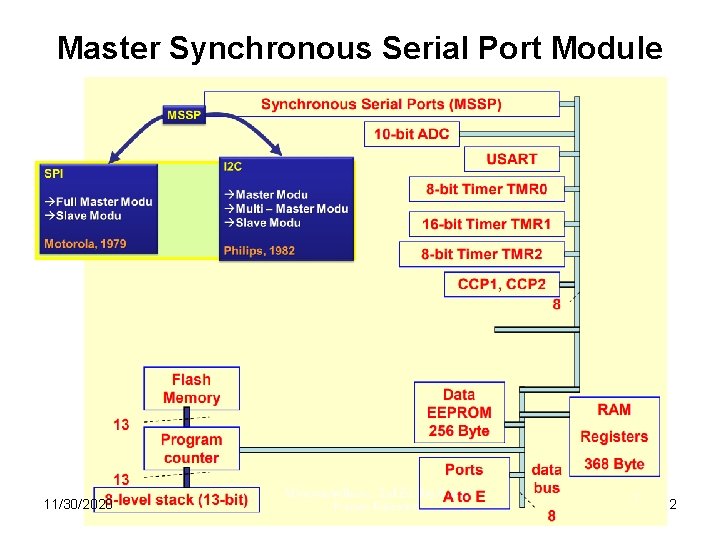
Master Synchronous Serial Port Module 11/30/2020 2
Master Synchronous Serial Port Module • MSSP module (Master Synchronous Serial Port) is a very useful, but at the same time one of the most complex circuit within the microcontroller. It enables high speed communication between a microcontroller and other peripherals or microcontroller devices by using few input/output lines (maximum two or three). Therefore, it is commonly used to connect the microcontroller to LCD displays, A/D converters, serial EEPROMs, shift registers etc. • The main feature of this type of communication is that it is synchronous and suitable for use in systems with a single master and one or more slaves. A master device contains the necessary circuitry for baud rate generation and supplies the clock for all devices in the system. Slave devices may in that way eliminate the internal clock generation circuitry. The MSSP module can operate in one of two modes: • I²C mode (Inter-Integrated Circuit) • SPI mode (Serial Peripheral Interface) 11/30/2020 3
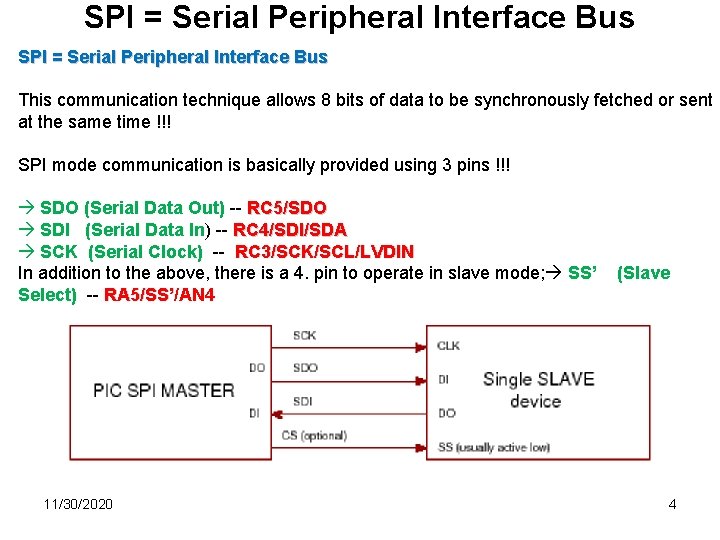
SPI = Serial Peripheral Interface Bus This communication technique allows 8 bits of data to be synchronously fetched or sent at the same time !!! SPI mode communication is basically provided using 3 pins !!! SDO (Serial Data Out) -- RC 5/SDO SDI (Serial Data In) -- RC 4/SDI/SDA SCK (Serial Clock) -- RC 3/SCK/SCL/LVDIN In addition to the above, there is a 4. pin to operate in slave mode; SS’ Select) -- RA 5/SS’/AN 4 11/30/2020 (Slave 4
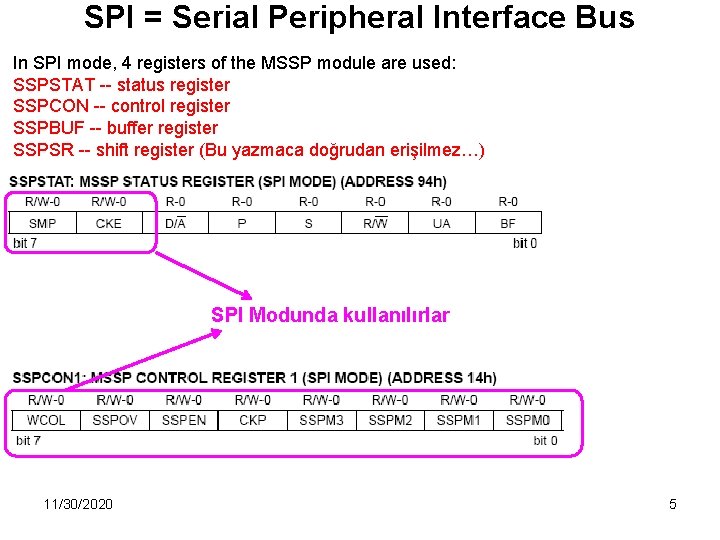
SPI = Serial Peripheral Interface Bus In SPI mode, 4 registers of the MSSP module are used: SSPSTAT -- status register SSPCON -- control register SSPBUF -- buffer register SSPSR -- shift register (Bu yazmaca doğrudan erişilmez…) SPI Modunda kullanılırlar 11/30/2020 5
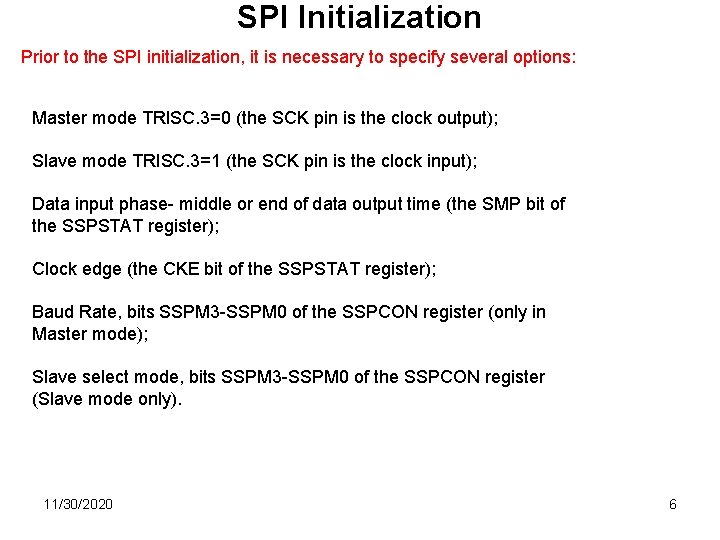
SPI Initialization Prior to the SPI initialization, it is necessary to specify several options: Master mode TRISC. 3=0 (the SCK pin is the clock output); Slave mode TRISC. 3=1 (the SCK pin is the clock input); Data input phase- middle or end of data output time (the SMP bit of the SSPSTAT register); Clock edge (the CKE bit of the SSPSTAT register); Baud Rate, bits SSPM 3 -SSPM 0 of the SSPCON register (only in Master mode); Slave select mode, bits SSPM 3 -SSPM 0 of the SSPCON register (Slave mode only). 11/30/2020 6
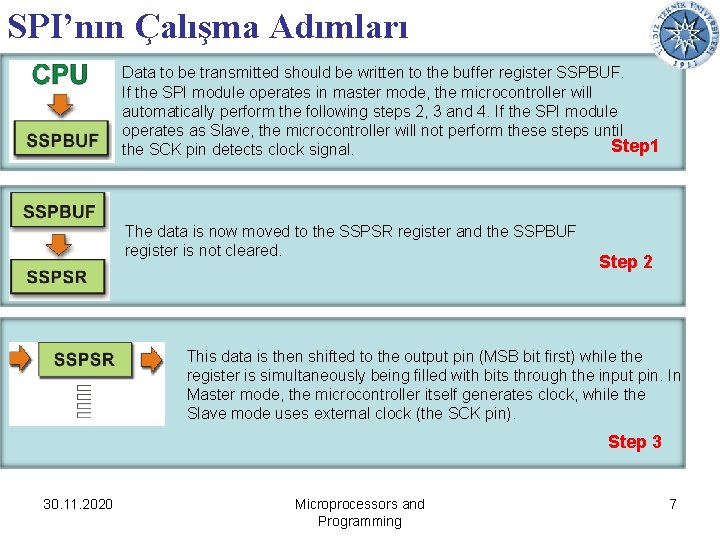
SPI’nın Çalışma Adımları Data to be transmitted should be written to the buffer register SSPBUF. If the SPI module operates in master mode, the microcontroller will automatically perform the following steps 2, 3 and 4. If the SPI module operates as Slave, the microcontroller will not perform these steps until Step 1 the SCK pin detects clock signal. The data is now moved to the SSPSR register and the SSPBUF register is not cleared. Step 2 This data is then shifted to the output pin (MSB bit first) while the register is simultaneously being filled with bits through the input pin. In Master mode, the microcontroller itself generates clock, while the Slave mode uses external clock (the SCK pin). Step 3 30. 11. 2020 Microprocessors and Programming 7
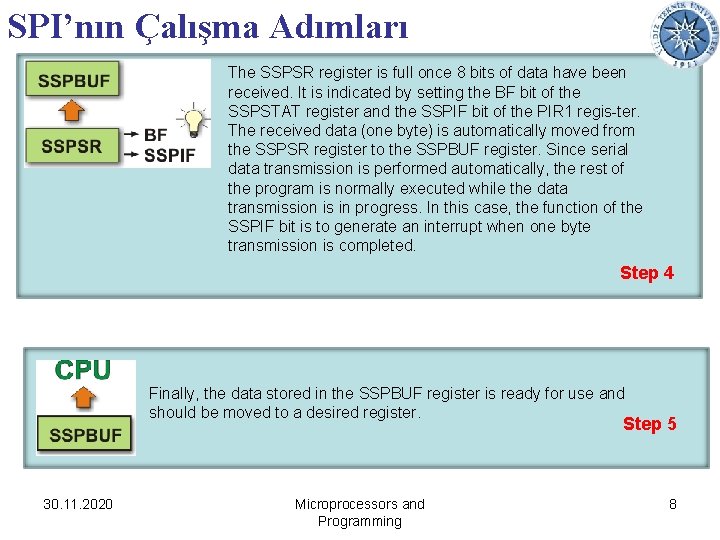
SPI’nın Çalışma Adımları The SSPSR register is full once 8 bits of data have been received. It is indicated by setting the BF bit of the SSPSTAT register and the SSPIF bit of the PIR 1 regis-ter. The received data (one byte) is automatically moved from the SSPSR register to the SSPBUF register. Since serial data transmission is performed automatically, the rest of the program is normally executed while the data transmission is in progress. In this case, the function of the SSPIF bit is to generate an interrupt when one byte transmission is completed. Step 4 Finally, the data stored in the SSPBUF register is ready for use and should be moved to a desired register. Step 5 30. 11. 2020 Microprocessors and Programming 8
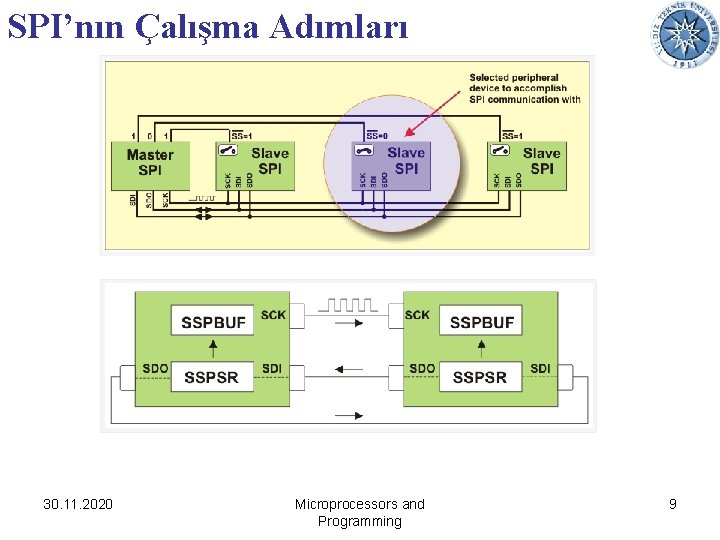
SPI’nın Çalışma Adımları 30. 11. 2020 Microprocessors and Programming 9
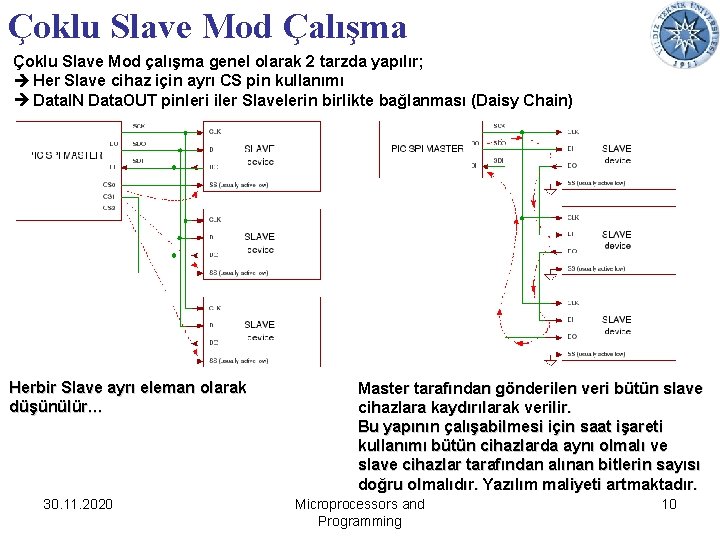
Çoklu Slave Mod Çalışma Çoklu Slave Mod çalışma genel olarak 2 tarzda yapılır; Her Slave cihaz için ayrı CS pin kullanımı Data. IN Data. OUT pinleri iler Slavelerin birlikte bağlanması (Daisy Chain) Herbir Slave ayrı eleman olarak düşünülür… 30. 11. 2020 Master tarafından gönderilen veri bütün slave cihazlara kaydırılarak verilir. Bu yapının çalışabilmesi için saat işareti kullanımı bütün cihazlarda aynı olmalı ve slave cihazlar tarafından alınan bitlerin sayısı doğru olmalıdır. Yazılım maliyeti artmaktadır. Microprocessors and Programming 10
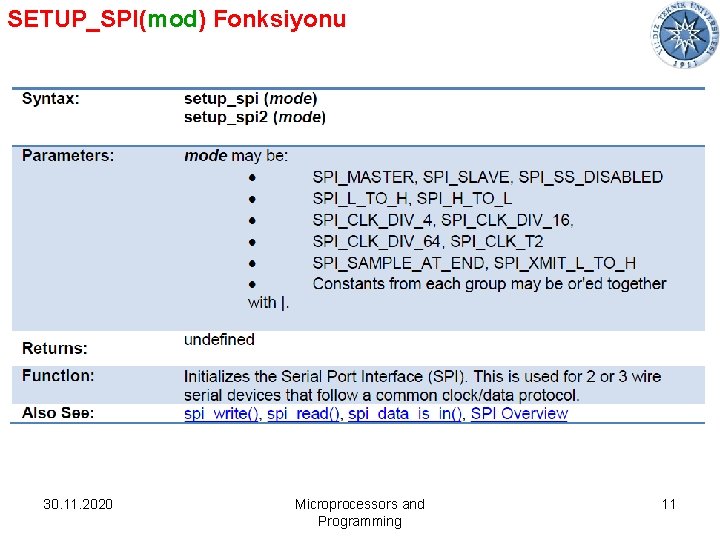
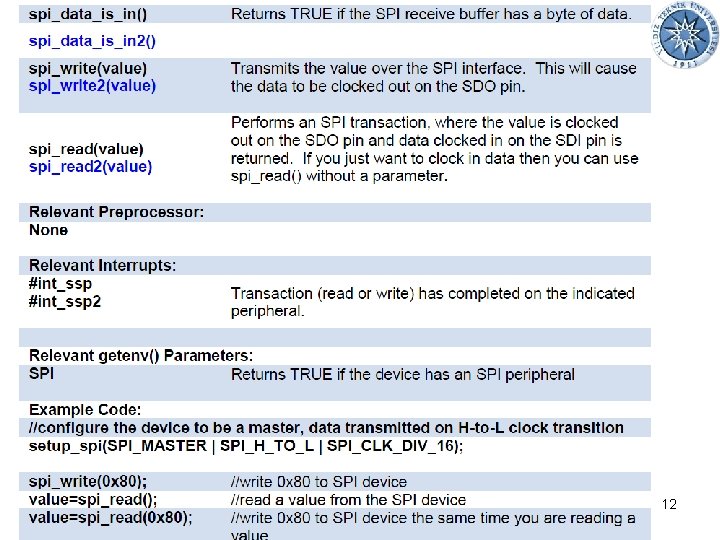
SETUP_SPI(mod) Fonksiyonu 30. 11. 2020 Microprocessors and Programming 11
30. 11. 2020 Microprocessors and Programming 12
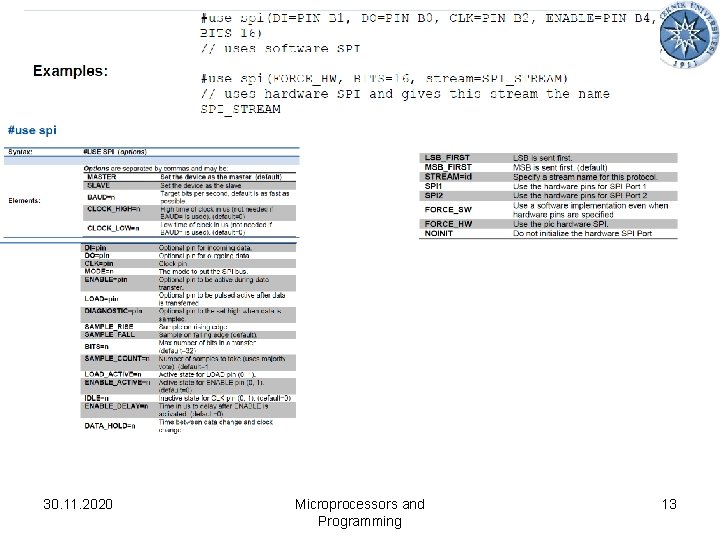
30. 11. 2020 Microprocessors and Programming 13
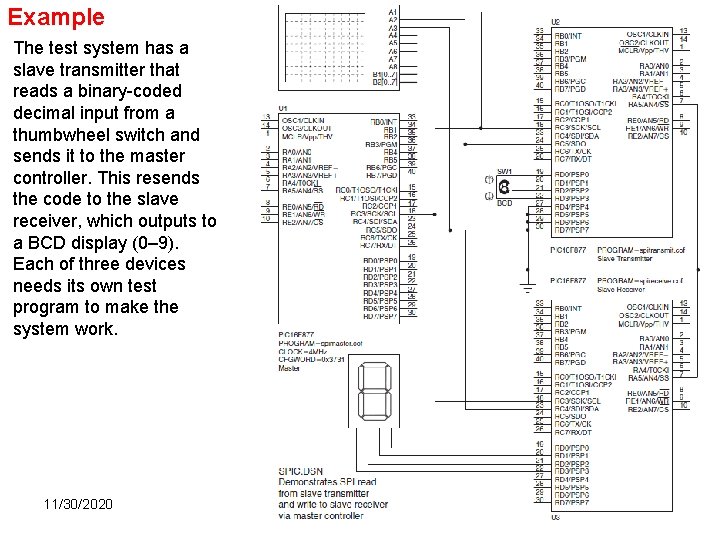
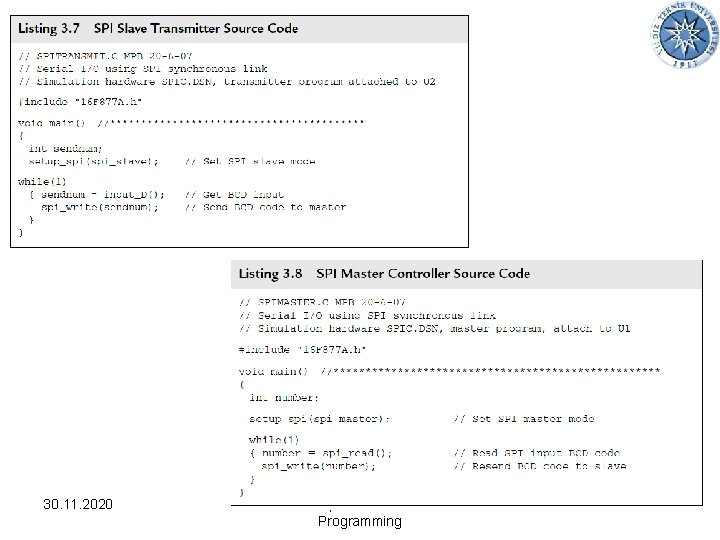
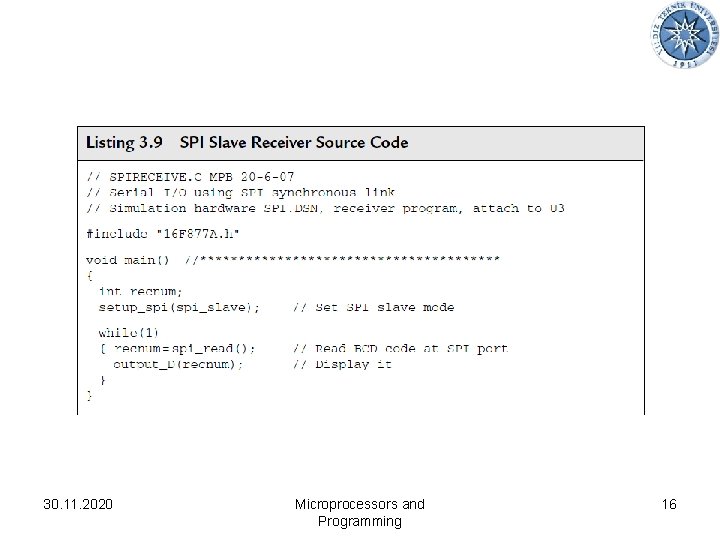
Example The test system has a slave transmitter that reads a binary-coded decimal input from a thumbwheel switch and sends it to the master controller. This resends the code to the slave receiver, which outputs to a BCD display (0– 9). Each of three devices needs its own test program to make the system work. 11/30/2020 14
30. 11. 2020 Microprocessors and Programming 15
30. 11. 2020 Microprocessors and Programming 16
I²C mode (Inter-Integrated Circuit) • I²C mode (Inter IC Bus) is especially suitable when the microcontroller and integrated circuit, which the microcontroller should exchange data with, are within the same device. It is commonly about another microcontrollers or specialized, cheap integrated circuits belonging to the new generation of so called "smart peripheral components" (memories, temperature sensors, real-time clocks etc. ) • Data transfer in I²C mode is synchronous and bidirectional. This time only two pins are used for data transfer. These are the SDA (Serial Data) and SCL (Serial Clock) pins. The user must configure these pins as inputs or outputs through the TRISC bits. • By observing particular rules (protocols), this mode enables up to 122 different components to be simultaneously connected in a simple way by using only two valuable I/O pins. • Clock, necessary to synchronize the operation of both devices, is always generated by a master device (a microcontroller) and its frequency directly affects the baud rate. 11/30/2020 17
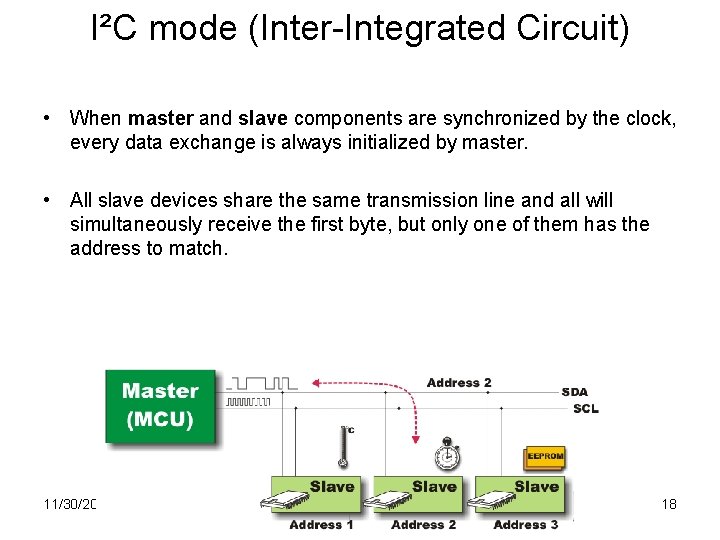
I²C mode (Inter-Integrated Circuit) • When master and slave components are synchronized by the clock, every data exchange is always initialized by master. • All slave devices share the same transmission line and all will simultaneously receive the first byte, but only one of them has the address to match. 11/30/2020 18
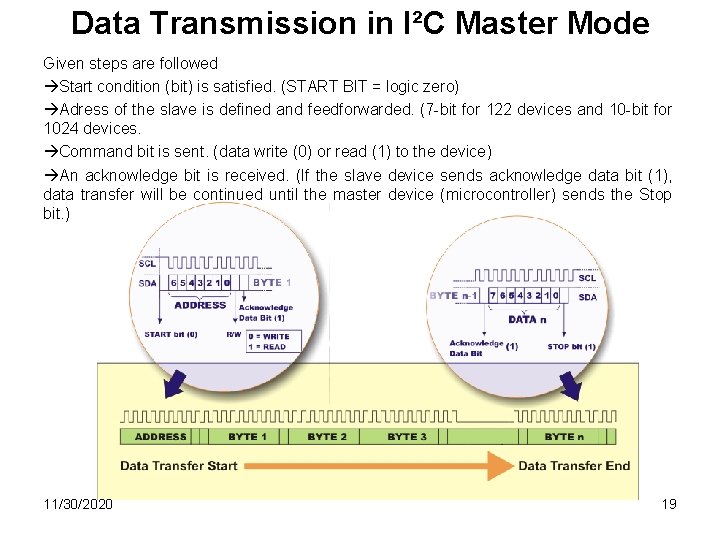
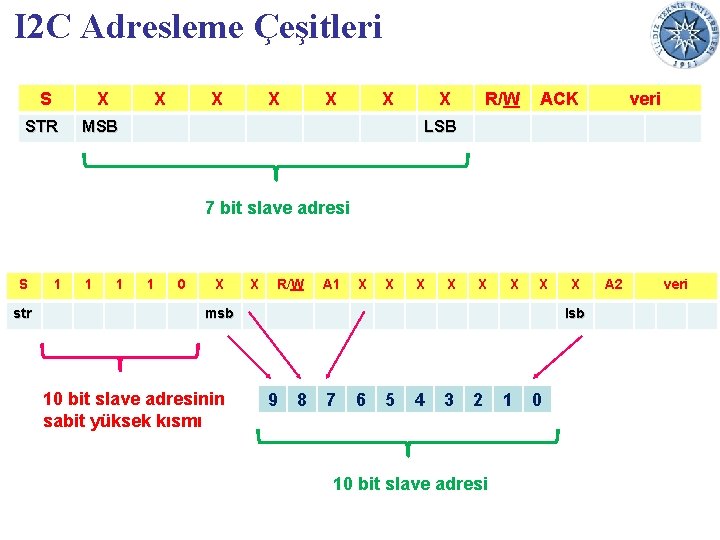
Data Transmission in I²C Master Mode Given steps are followed Start condition (bit) is satisfied. (START BIT = logic zero) Adress of the slave is defined and feedforwarded. (7 -bit for 122 devices and 10 -bit for 1024 devices. Command bit is sent. (data write (0) or read (1) to the device) An acknowledge bit is received. (If the slave device sends acknowledge data bit (1), data transfer will be continued until the master device (microcontroller) sends the Stop bit. ) 11/30/2020 19
I 2 C Adresleme Çeşitleri S X STR X X X MSB X R/W ACK veri LSB 7 bit slave adresi S str 1 1 0 X X R/W A 1 X X X X msb 10 bit slave adresinin sabit yüksek kısmı X lsb 9 8 7 6 5 4 3 2 10 bit slave adresi 1 0 A 2 veri
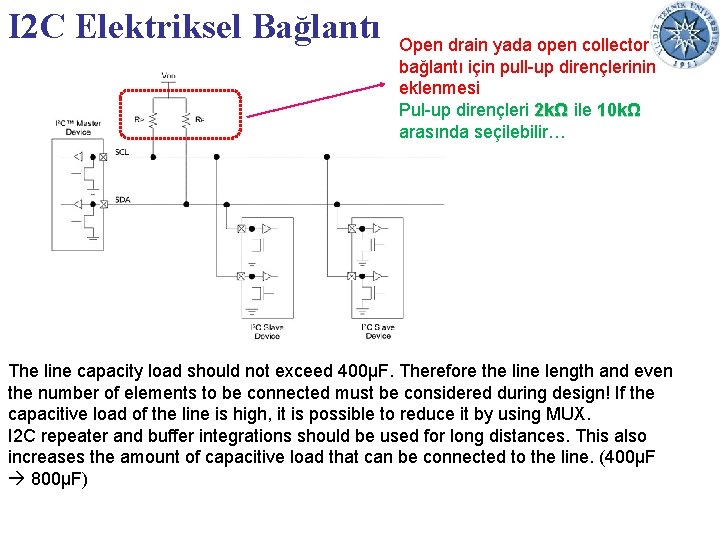
I 2 C Elektriksel Bağlantı Open drain yada open collector bağlantı için pull-up dirençlerinin eklenmesi Pul-up dirençleri 2 kΩ ile 10 kΩ arasında seçilebilir… The line capacity load should not exceed 400μF. Therefore the line length and even the number of elements to be connected must be considered during design! If the capacitive load of the line is high, it is possible to reduce it by using MUX. I 2 C repeater and buffer integrations should be used for long distances. This also increases the amount of capacitive load that can be connected to the line. (400μF 800μF)
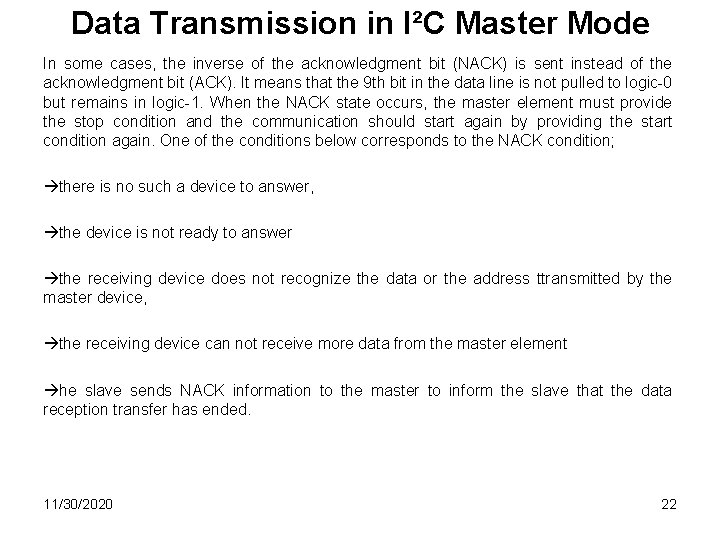
Data Transmission in I²C Master Mode In some cases, the inverse of the acknowledgment bit (NACK) is sent instead of the acknowledgment bit (ACK). It means that the 9 th bit in the data line is not pulled to logic-0 but remains in logic-1. When the NACK state occurs, the master element must provide the stop condition and the communication should start again by providing the start condition again. One of the conditions below corresponds to the NACK condition; there is no such a device to answer, the device is not ready to answer the receiving device does not recognize the data or the address ttransmitted by the master device, the receiving device can not receive more data from the master element he slave sends NACK information to the master to inform the slave that the data reception transfer has ended. 11/30/2020 22
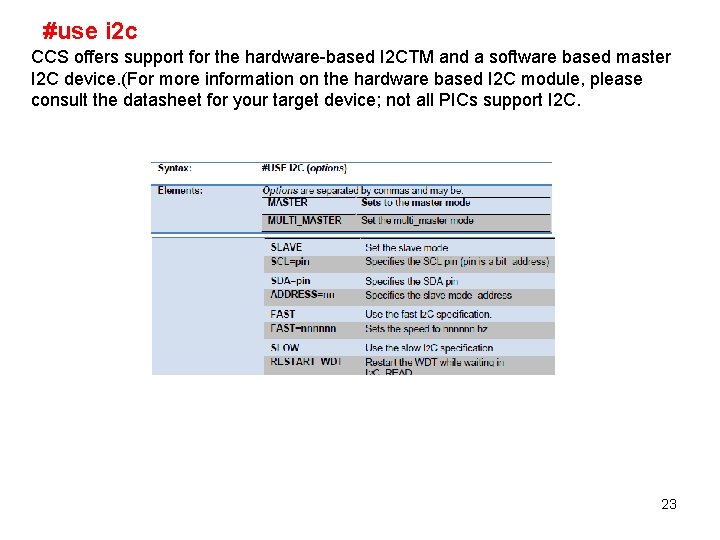
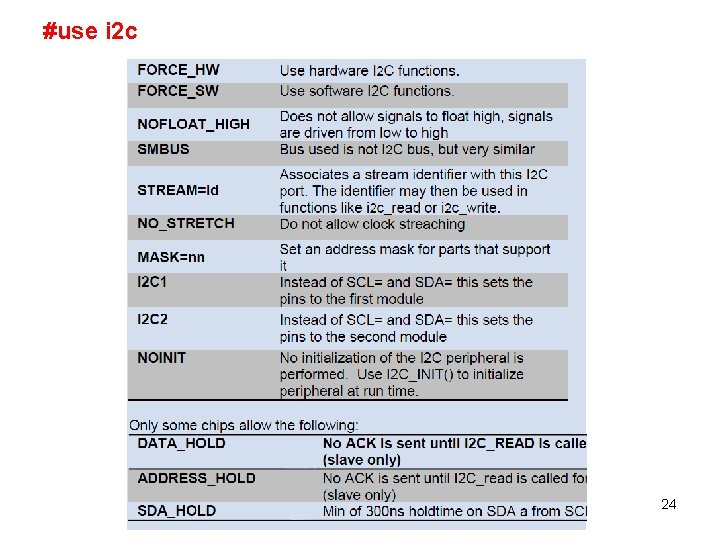
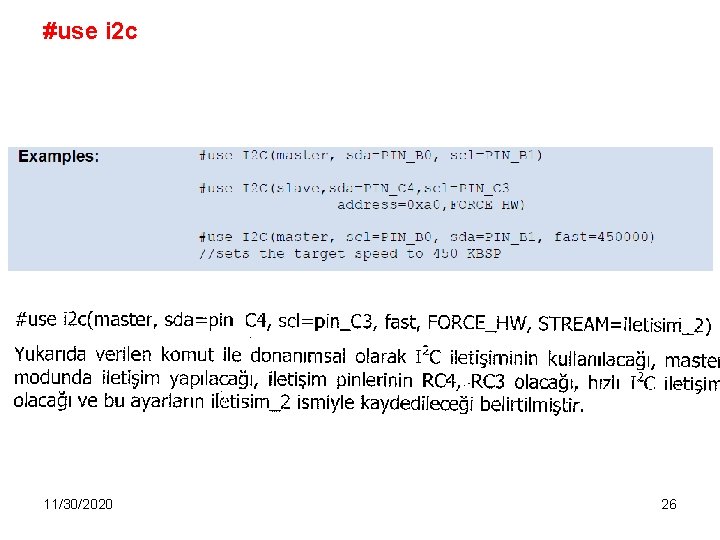
#use i 2 c CCS offers support for the hardware-based I 2 CTM and a software based master I 2 C device. (For more information on the hardware based I 2 C module, please consult the datasheet for your target device; not all PICs support I 2 C. 23
#use i 2 c 24
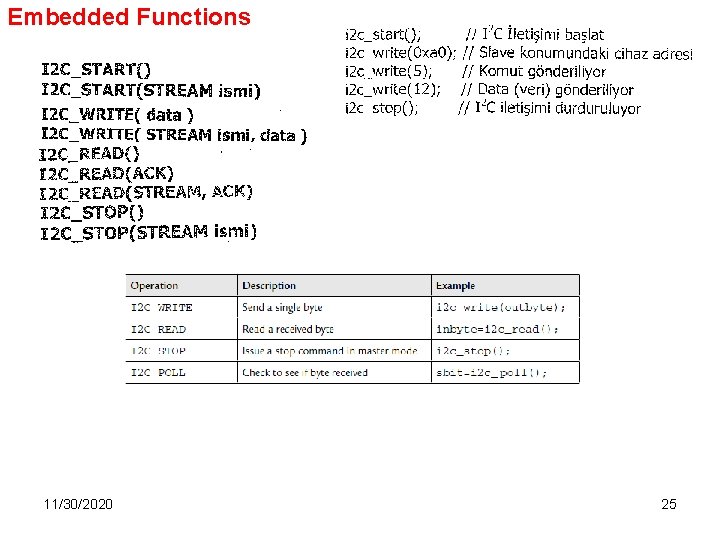
Embedded Functions 11/30/2020 25
#use i 2 c 11/30/2020 26
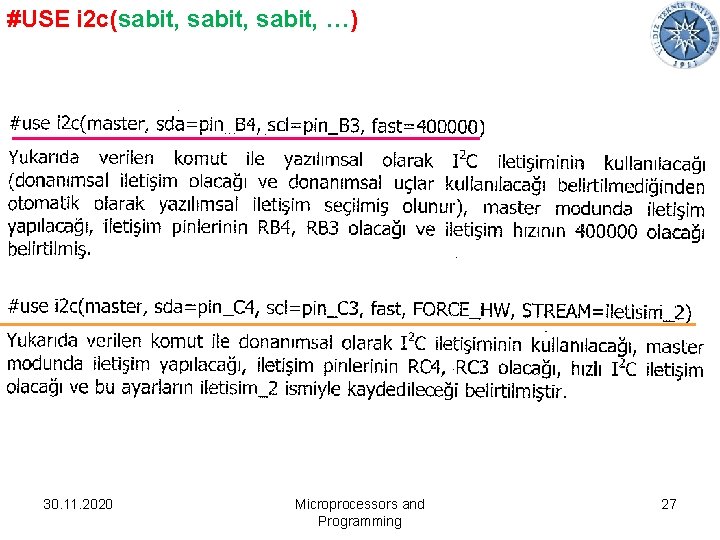
#USE i 2 c(sabit, …) 30. 11. 2020 Microprocessors and Programming 27
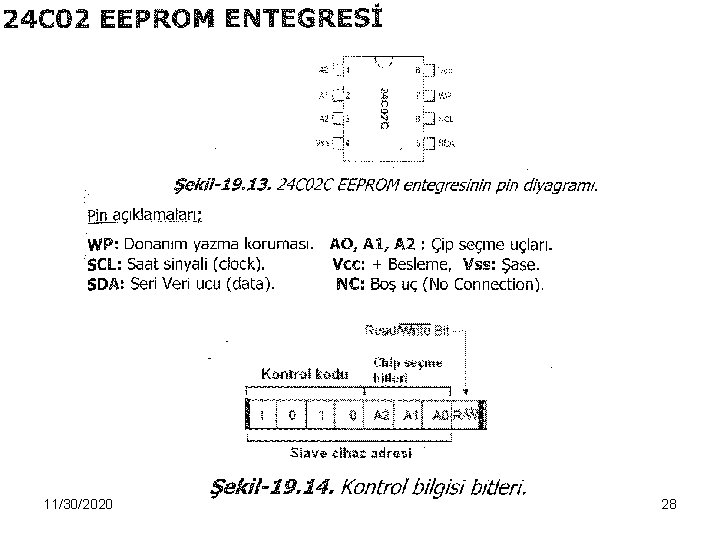
11/30/2020 28
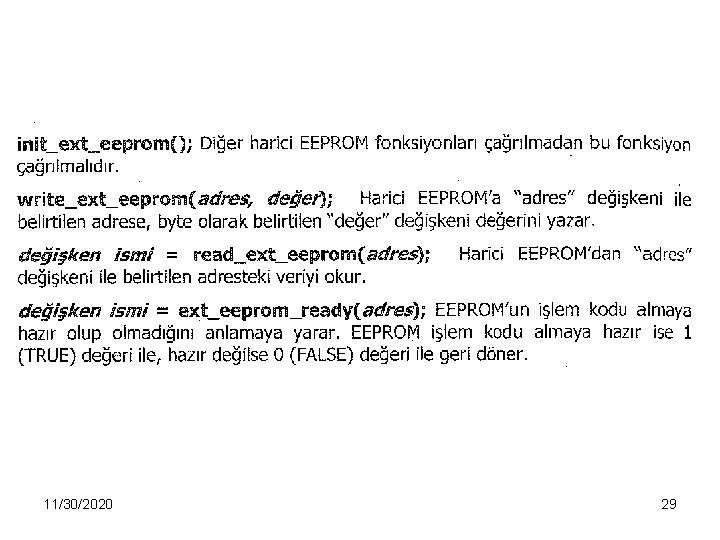
11/30/2020 29
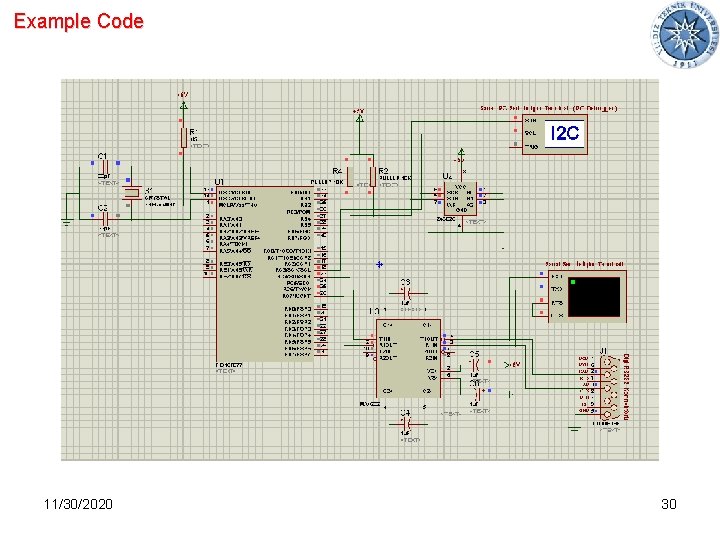
Example Code 11/30/2020 30
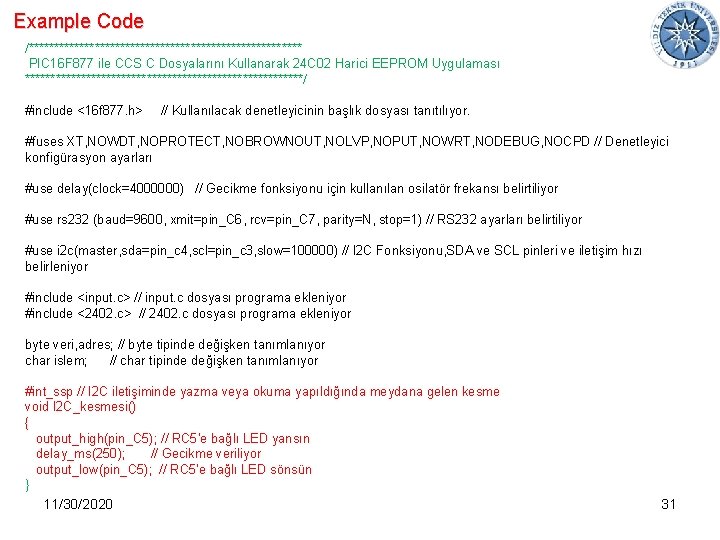
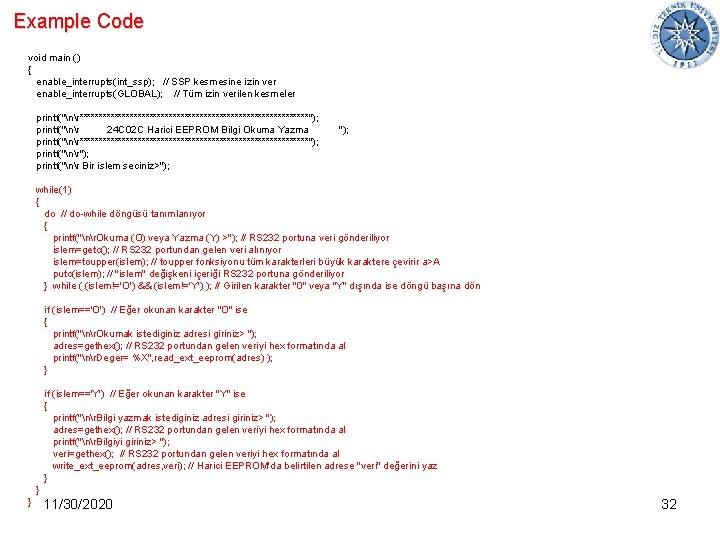
Example Code /*************************** PIC 16 F 877 ile CCS C Dosyalarını Kullanarak 24 C 02 Harici EEPROM Uygulaması ****************************/ #include <16 f 877. h> // Kullanılacak denetleyicinin başlık dosyası tanıtılıyor. #fuses XT, NOWDT, NOPROTECT, NOBROWNOUT, NOLVP, NOPUT, NOWRT, NODEBUG, NOCPD // Denetleyici konfigürasyon ayarları #use delay(clock=4000000) // Gecikme fonksiyonu için kullanılan osilatör frekansı belirtiliyor #use rs 232 (baud=9600, xmit=pin_C 6, rcv=pin_C 7, parity=N, stop=1) // RS 232 ayarları belirtiliyor #use i 2 c(master, sda=pin_c 4, scl=pin_c 3, slow=100000) // I 2 C Fonksiyonu, SDA ve SCL pinleri ve iletişim hızı belirleniyor #include <input. c> // input. c dosyası programa ekleniyor #include <2402. c> // 2402. c dosyası programa ekleniyor byte veri, adres; // byte tipinde değişken tanımlanıyor char islem; // char tipinde değişken tanımlanıyor #int_ssp // I 2 C iletişiminde yazma veya okuma yapıldığında meydana gelen kesme void I 2 C_kesmesi() { output_high(pin_C 5); // RC 5'e bağlı LED yansın delay_ms(250); // Gecikme veriliyor output_low(pin_C 5); // RC 5'e bağlı LED sönsün } 11/30/2020 31
Example Code void main () { enable_interrupts(int_ssp); // SSP kesmesine izin ver enable_interrupts(GLOBAL); // Tüm izin verilen kesmeler printf("nr******************************"); printf("nr 24 C 02 C Harici EEPROM Bilgi Okuma Yazma printf("nr******************************"); printf("nr Bir islem seciniz>"); while(1) { do // do-while döngüsü tanımlanıyor { printf("nr. Okuma (O) veya Yazma (Y) >"); // RS 232 portuna veri gönderiliyor islem=getc(); // RS 232 portundan gelen veri alınıyor islem=toupper(islem); // toupper fonksiyonu tüm karakterleri büyük karaktere çevirir a>A putc(islem); // "islem" değişkeni içeriği RS 232 portuna gönderiliyor } while ( (islem!='O') && (islem!='Y') ); // Girilen karakter "0" veya "Y" dışında ise döngü başına dön if (islem=='O') // Eğer okunan karakter "O" ise { printf("nr. Okumak istediginiz adresi giriniz> "); adres=gethex(); // RS 232 portundan gelen veriyi hex formatında al printf("nr. Deger= %X", read_ext_eeprom(adres) ); } if (islem=='Y') // Eğer okunan karakter "Y" ise { printf("nr. Bilgi yazmak istediginiz adresi giriniz> "); adres=gethex(); // RS 232 portundan gelen veriyi hex formatında al printf("nr. Bilgiyi giriniz> "); veri=gethex(); // RS 232 portundan gelen veriyi hex formatında al write_ext_eeprom(adres, veri); // Harici EEPROM'da belirtilen adrese "veri" değerini yaz } } } 11/30/2020 32