Catalyst 2950 Switch System Configuration Dialog At any

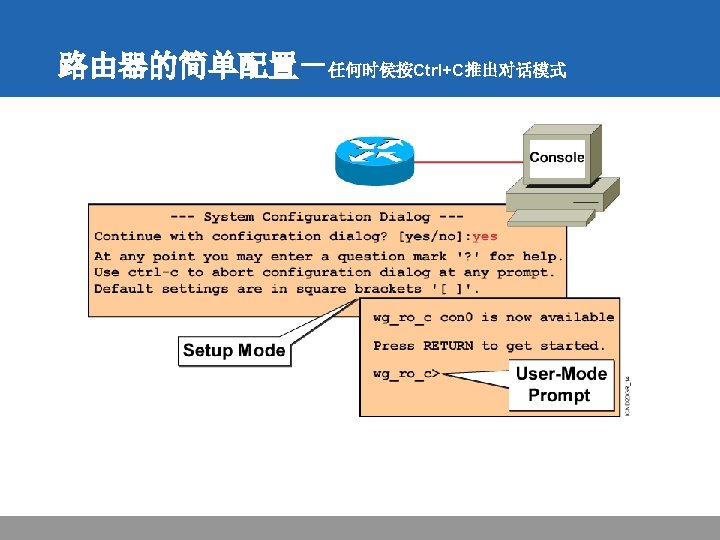
![出厂时的缺省配置 Router#setup --- System Configuration Dialog --Continue with configuration dialog? [yes/no]: yes At any](https://slidetodoc.com/presentation_image/ad049082a6009ced07d88319785ea353/image-14.jpg "出厂时的缺省配置 Router#setup --- System Configuration Dialog --Continue with configuration dialog? [yes/no]: yes At any")
![Setup Interface Summary First, would you like to see the current interface summary? [yes]:](https://slidetodoc.com/presentation_image/ad049082a6009ced07d88319785ea353/image-15.jpg "Setup Interface Summary First, would you like to see the current interface summary? [yes]:")
![Setup Initial Global Parameters Configuring global parameters: Enter host name [Router]: wg_ro_c The enable](https://slidetodoc.com/presentation_image/ad049082a6009ced07d88319785ea353/image-16.jpg "Setup Initial Global Parameters Configuring global parameters: Enter host name [Router]: wg_ro_c The enable")
![Setup Initial Protocol Configurations Configure LAT? [yes]: no Configure Apple. Talk? [no]: Configure DECnet?](https://slidetodoc.com/presentation_image/ad049082a6009ced07d88319785ea353/image-17.jpg "Setup Initial Protocol Configurations Configure LAT? [yes]: no Configure Apple. Talk? [no]: Configure DECnet?")
![保存配置 wg_ro_c#copy running-config startup-config Destination filename [startup-config]? Building configuration… wg_ro_c# • Copies the current](https://slidetodoc.com/presentation_image/ad049082a6009ced07d88319785ea353/image-32.jpg "保存配置 wg_ro_c#copy running-config startup-config Destination filename [startup-config]? Building configuration… wg_ro_c# • Copies the current")

- Slides: 55
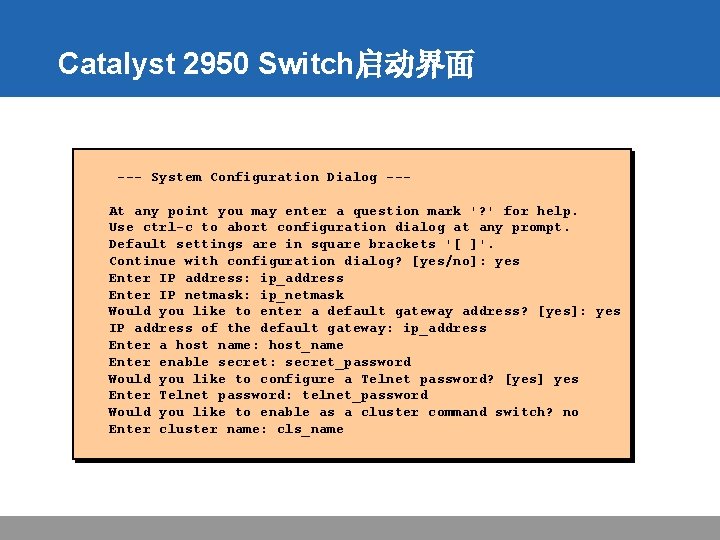
Catalyst 2950 Switch启动界面 --- System Configuration Dialog --At any point you may enter a question mark '? ' for help. Use ctrl-c to abort configuration dialog at any prompt. Default settings are in square brackets '[ ]'. Continue with configuration dialog? [yes/no]: yes Enter IP address: ip_address Enter IP netmask: ip_netmask Would you like to enter a default gateway address? [yes]: yes IP address of the default gateway: ip_address Enter a host name: host_name Enter enable secret: secret_password Would you like to configure a Telnet password? [yes] yes Enter Telnet password: telnet_password Would you like to enable as a cluster command switch? no Enter cluster name: cls_name
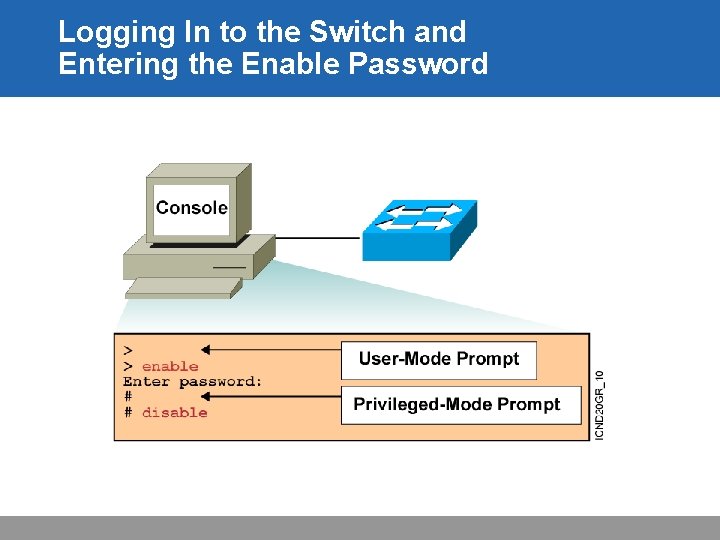
Logging In to the Switch and Entering the Enable Password
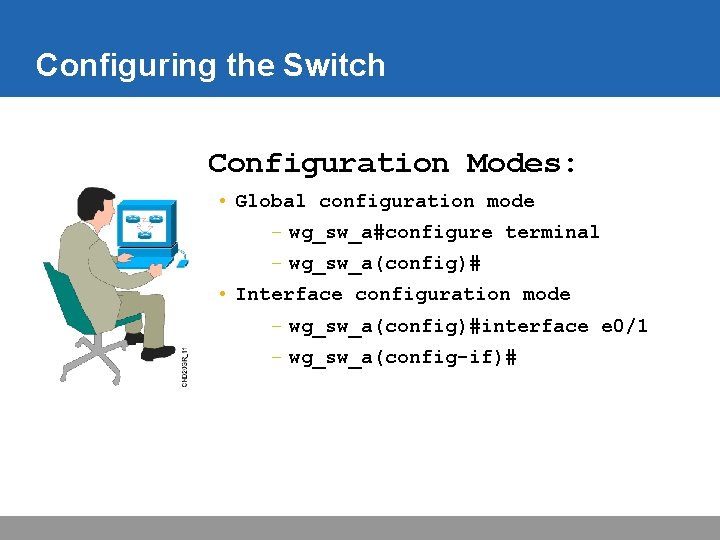
Configuring the Switch Configuration Modes: • Global configuration mode – wg_sw_a#configure terminal – wg_sw_a(config)# • Interface configuration mode – wg_sw_a(config)#interface e 0/1 – wg_sw_a(config-if)#
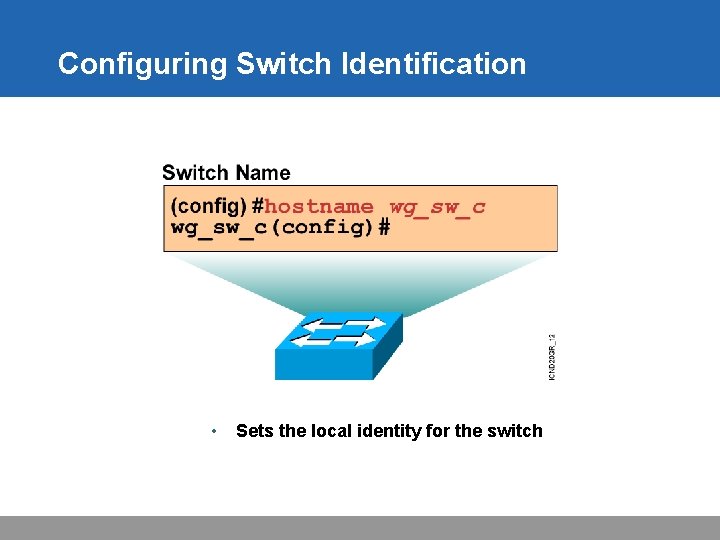
Configuring Switch Identification • Sets the local identity for the switch
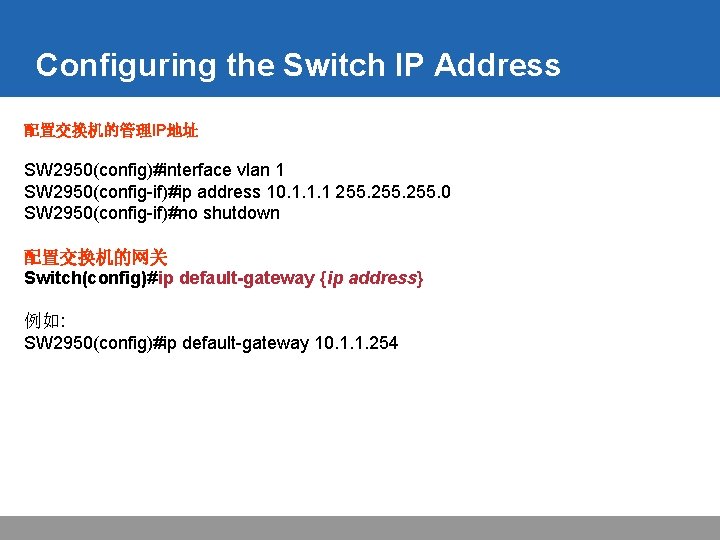
Configuring the Switch IP Address 配置交换机的管理IP地址 SW 2950(config)#interface vlan 1 SW 2950(config-if)#ip address 10. 1. 1. 1 255. 0 SW 2950(config-if)#no shutdown 配置交换机的网关 Switch(config)#ip default-gateway {ip address} 例如: SW 2950(config)#ip default-gateway 10. 1. 1. 254
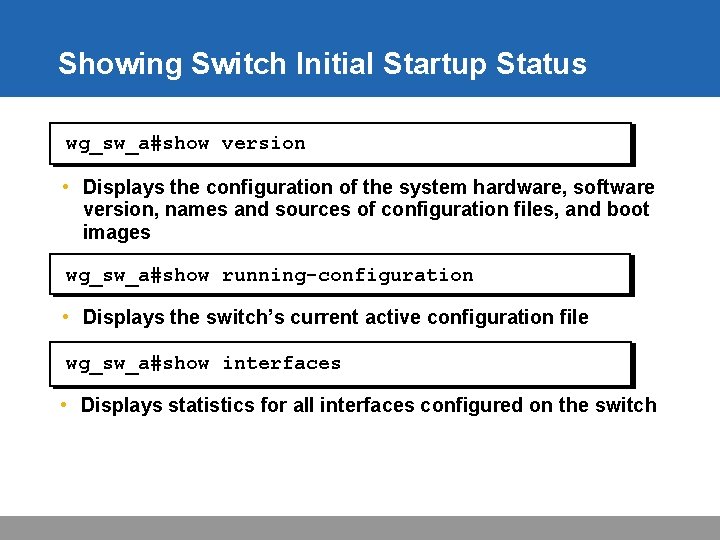
Showing Switch Initial Startup Status wg_sw_a#show version • Displays the configuration of the system hardware, software version, names and sources of configuration files, and boot images wg_sw_a#show running-configuration • Displays the switch’s current active configuration file wg_sw_a#show interfaces • Displays statistics for all interfaces configured on the switch
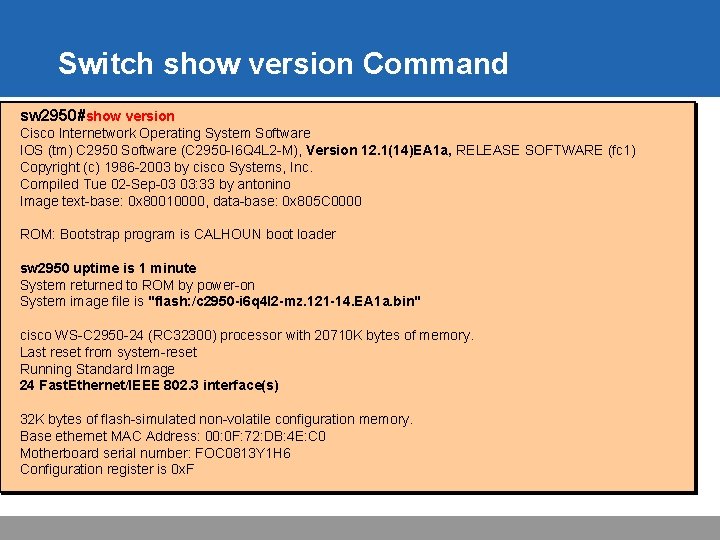
Switch show version Command sw 2950#show version Cisco Internetwork Operating System Software IOS (tm) C 2950 Software (C 2950 -I 6 Q 4 L 2 -M), Version 12. 1(14)EA 1 a, RELEASE SOFTWARE (fc 1) Copyright (c) 1986 -2003 by cisco Systems, Inc. Compiled Tue 02 -Sep-03 03: 33 by antonino Image text-base: 0 x 80010000, data-base: 0 x 805 C 0000 ROM: Bootstrap program is CALHOUN boot loader sw 2950 uptime is 1 minute System returned to ROM by power-on System image file is "flash: /c 2950 -i 6 q 4 l 2 -mz. 121 -14. EA 1 a. bin" cisco WS-C 2950 -24 (RC 32300) processor with 20710 K bytes of memory. Last reset from system-reset Running Standard Image 24 Fast. Ethernet/IEEE 802. 3 interface(s) 32 K bytes of flash-simulated non-volatile configuration memory. Base ethernet MAC Address: 00: 0 F: 72: DB: 4 E: C 0 Motherboard serial number: FOC 0813 Y 1 H 6 Configuration register is 0 x. F
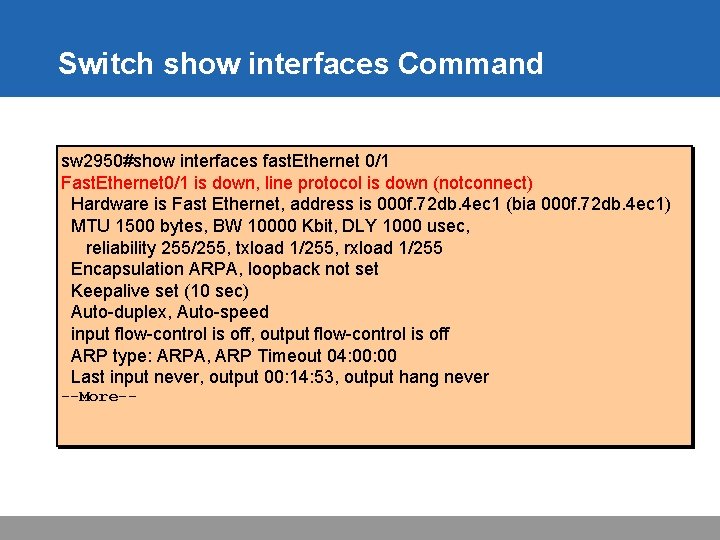
Switch show interfaces Command sw 2950#show interfaces fast. Ethernet 0/1 Fast. Ethernet 0/1 is down, line protocol is down (notconnect) Hardware is Fast Ethernet, address is 000 f. 72 db. 4 ec 1 (bia 000 f. 72 db. 4 ec 1) MTU 1500 bytes, BW 10000 Kbit, DLY 1000 usec, reliability 255/255, txload 1/255, rxload 1/255 Encapsulation ARPA, loopback not set Keepalive set (10 sec) Auto-duplex, Auto-speed input flow-control is off, output flow-control is off ARP type: ARPA, ARP Timeout 04: 00 Last input never, output 00: 14: 53, output hang never --More--
出厂时的缺省配置 Router#setup --- System Configuration Dialog --Continue with configuration dialog? [yes/no]: yes At any point you may enter a question mark '? ' for help. Use ctrl-c to abort configuration dialog at any prompt. Default settings are in square brackets '[]'. Basic management setup configures only enough connectivity for management of the system, extended setup will ask you to configure each interface on the system Would you like to enter basic management setup? [yes/no]: no
Setup Interface Summary First, would you like to see the current interface summary? [yes]: Interface IP-Address OK? Method Status Protocol BRI 0 unassigned YES unset administratively down BRI 0: 1 unassigned YES unset administratively down BRI 0: 2 unassigned YES unset administratively down Ethernet 0 unassigned YES unset administratively down Serial 0 unassigned YES unset administratively down Interfaces Found During Startup
Setup Initial Global Parameters Configuring global parameters: Enter host name [Router]: wg_ro_c The enable secret is a password used to protect access to privileged EXEC and configuration modes. This password, after entered, becomes encrypted in the configuration. Enter enable secret: cisco The enable password is used when you do not specify an enable secret password, with some older software versions, and some boot images. Enter enable password: sanfran The virtual terminal password is used to protect access to the router over a network interface. Enter virtual terminal password: sanjose Configure SNMP Network Management? [no]:
Setup Initial Protocol Configurations Configure LAT? [yes]: no Configure Apple. Talk? [no]: Configure DECnet? [no]: Configure IP? [yes]: Configure IGRP routing? [yes]: no Configure RIP routing? [no]: Configure CLNS? [no]: Configure IPX? [no]: Configure Vines? [no]: Configure XNS? [no]: Configure Apollo? [no]:
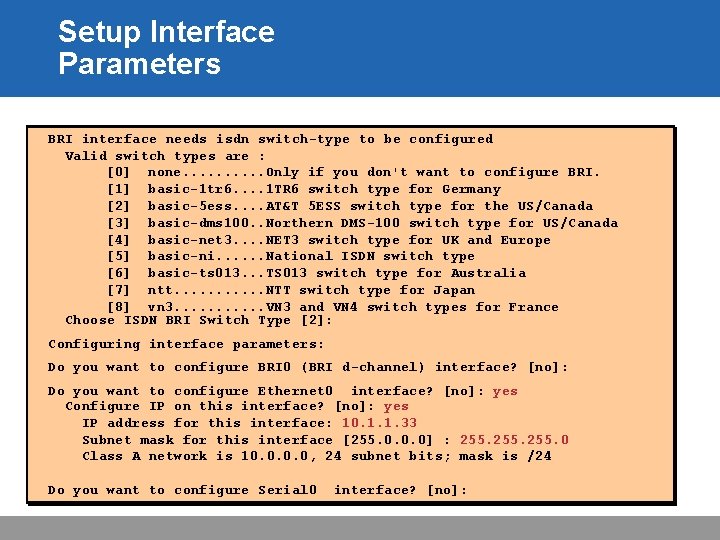
Setup Interface Parameters BRI interface needs isdn switch-type to be configured Valid switch types are : [0] none. . Only if you don't want to configure BRI. [1] basic-1 tr 6. . 1 TR 6 switch type for Germany [2] basic-5 ess. . AT&T 5 ESS switch type for the US/Canada [3] basic-dms 100. . Northern DMS-100 switch type for US/Canada [4] basic-net 3. . NET 3 switch type for UK and Europe [5] basic-ni. . . National ISDN switch type [6] basic-ts 013. . . TS 013 switch type for Australia [7] ntt. . . NTT switch type for Japan [8] vn 3. . . VN 3 and VN 4 switch types for France Choose ISDN BRI Switch Type [2]: Configuring interface parameters: Do you want to configure BRI 0 (BRI d-channel) interface? [no]: Do you want to configure Ethernet 0 interface? [no]: yes Configure IP on this interface? [no]: yes IP address for this interface: 10. 1. 1. 33 Subnet mask for this interface [255. 0. 0. 0] : 255. 0 Class A network is 10. 0, 24 subnet bits; mask is /24 Do you want to configure Serial 0 interface? [no]:
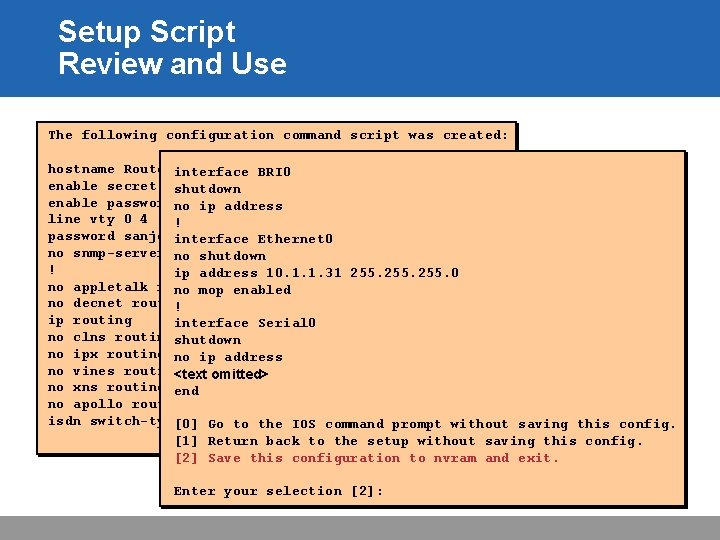
Setup Script Review and Use The following configuration command script was created: hostname Routerinterface BRI 0 enable secret 5 shutdown $1$/CCk$4 r 7 z. Dw. DNeqkx. FO. k. Jx. C 3 G 0 enable passwordno sanfran ip address line vty 0 4 ! password sanjose interface Ethernet 0 no snmp-server no shutdown ! ip address 10. 1. 1. 31 255. 0 no appletalk routing no mop enabled no decnet routing ! ip routing interface Serial 0 no clns routingshutdown no ipx routing no ip address no vines routing <text omitted> no xns routing end no apollo routing isdn switch-type [0]basic-5 ess Go to the IOS command prompt without saving this config. [1] Return back to the setup without saving this config. [2] Save this configuration to nvram and exit. Enter your selection [2]:
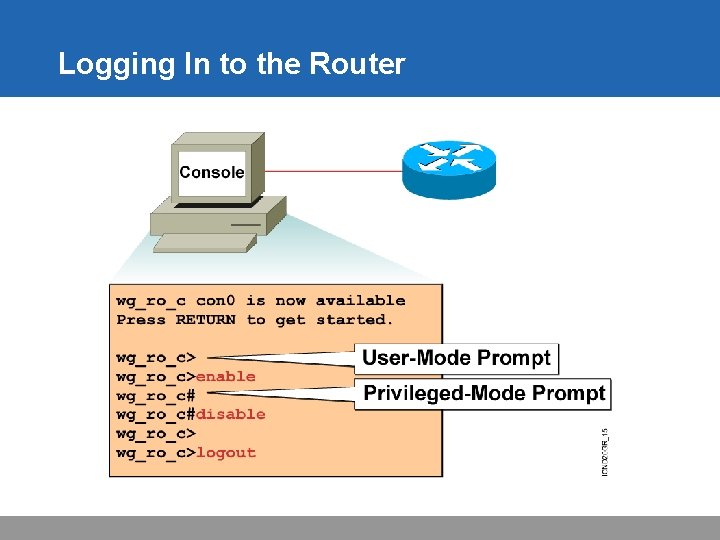
Logging In to the Router
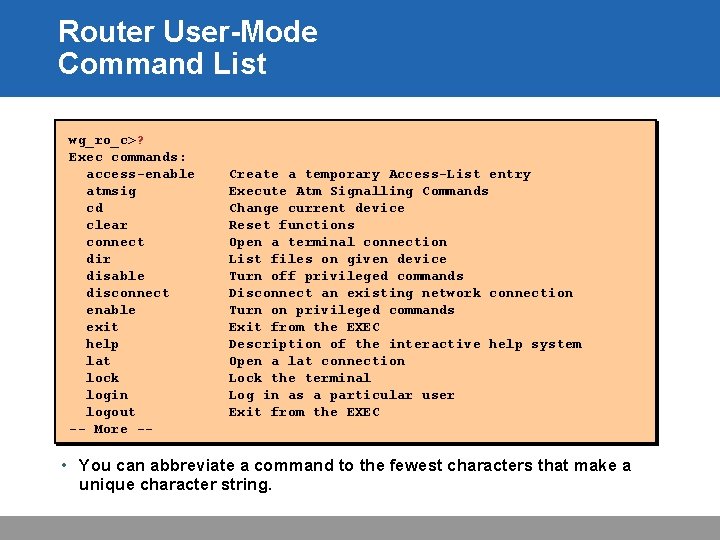
Router User-Mode Command List wg_ro_c>? Exec commands: access-enable atmsig cd clear connect dir disable disconnect enable exit help lat lock login logout -- More -- Create a temporary Access-List entry Execute Atm Signalling Commands Change current device Reset functions Open a terminal connection List files on given device Turn off privileged commands Disconnect an existing network connection Turn on privileged commands Exit from the EXEC Description of the interactive help system Open a lat connection Lock the terminal Log in as a particular user Exit from the EXEC • You can abbreviate a command to the fewest characters that make a unique character string.
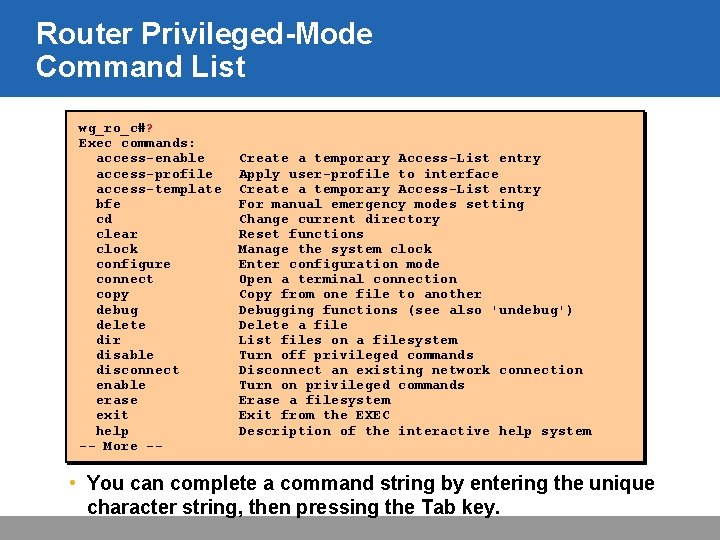
Router Privileged-Mode Command List wg_ro_c#? Exec commands: access-enable access-profile access-template bfe cd clear clock configure connect copy debug delete dir disable disconnect enable erase exit help -- More -- Create a temporary Access-List entry Apply user-profile to interface Create a temporary Access-List entry For manual emergency modes setting Change current directory Reset functions Manage the system clock Enter configuration mode Open a terminal connection Copy from one file to another Debugging functions (see also 'undebug') Delete a file List files on a filesystem Turn off privileged commands Disconnect an existing network connection Turn on privileged commands Erase a filesystem Exit from the EXEC Description of the interactive help system • You can complete a command string by entering the unique character string, then pressing the Tab key.
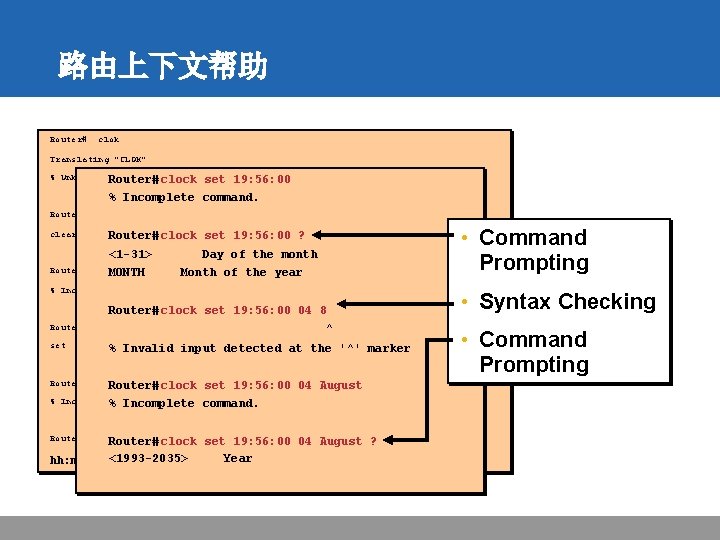
路由上下文帮助 Router# clok Translating "CLOK" % Unknown command or clock computerset name, or unable to find computer address Router# 19: 56: 00 % Incomplete command. Router# clear Router# clock <1 -31> MONTH • Command Prompting set 19: 56: 00 ? Day of the month Month of the year % Incomplete command. Router# clock set 19: 56: 00 04 8 ^ Router# set Router# Set%the time and input date Invalid detected at the '^' marker Router# clock set 19: 56: 00 04 August command. % Incomplete % command. Incomplete Router# clock set 19: 56: 00 04 August ? hh: mm: ss <1993 -2035> Current Time Year • Syntax Checking • Command Prompting
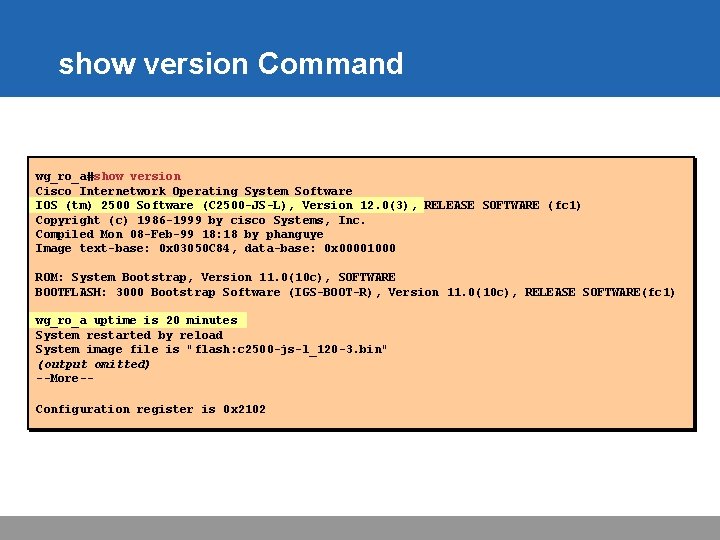
show version Command wg_ro_a#show version Cisco Internetwork Operating System Software IOS (tm) 2500 Software (C 2500 -JS-L), Version 12. 0(3), RELEASE SOFTWARE (fc 1) Copyright (c) 1986 -1999 by cisco Systems, Inc. Compiled Mon 08 -Feb-99 18: 18 by phanguye Image text-base: 0 x 03050 C 84, data-base: 0 x 00001000 ROM: System Bootstrap, Version 11. 0(10 c), SOFTWARE BOOTFLASH: 3000 Bootstrap Software (IGS-BOOT-R), Version 11. 0(10 c), RELEASE SOFTWARE(fc 1) wg_ro_a uptime is 20 minutes System restarted by reload System image file is "flash: c 2500 -js-l_120 -3. bin" (output omitted) --More-Configuration register is 0 x 2102
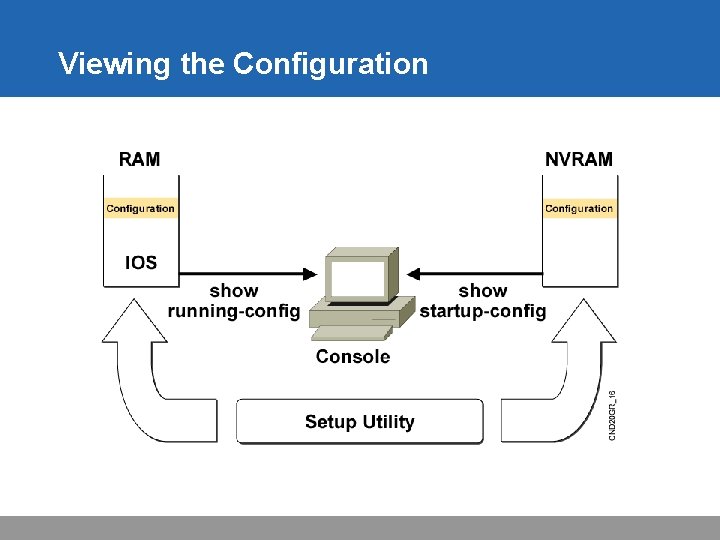
Viewing the Configuration
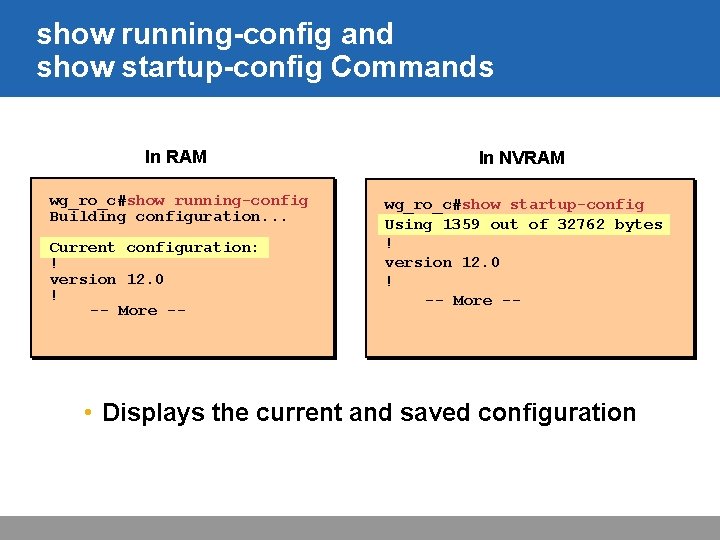
show running-config and show startup-config Commands In RAM In NVRAM wg_ro_c#show running-config Building configuration. . . wg_ro_c#show startup-config Using 1359 out of 32762 bytes ! version 12. 0 ! -- More -- Current configuration: ! version 12. 0 ! -- More -- • Displays the current and saved configuration
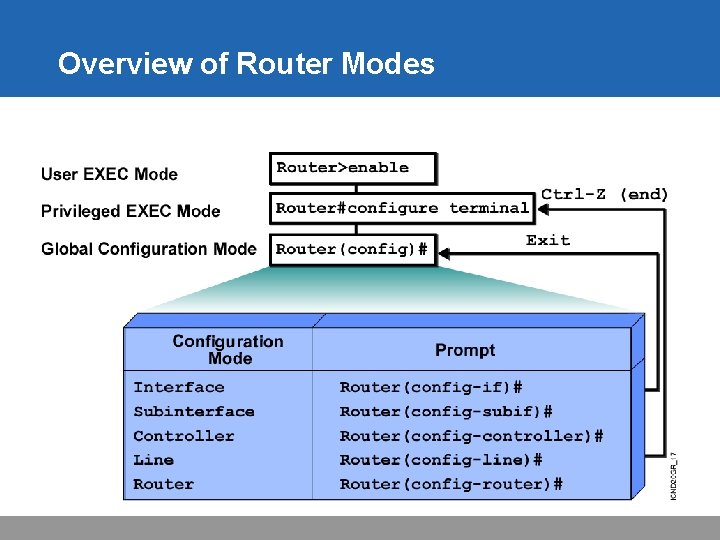
Overview of Router Modes
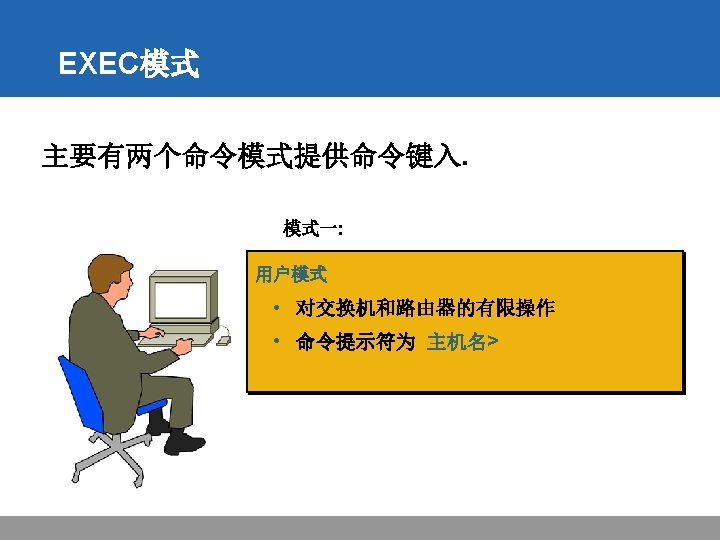
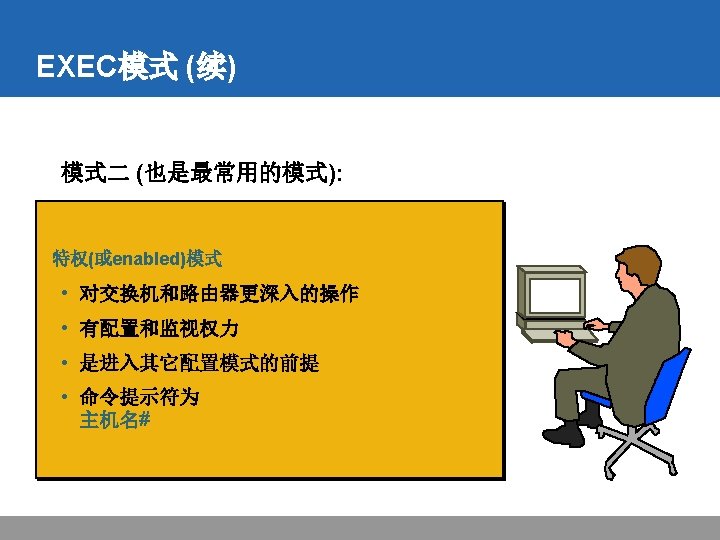
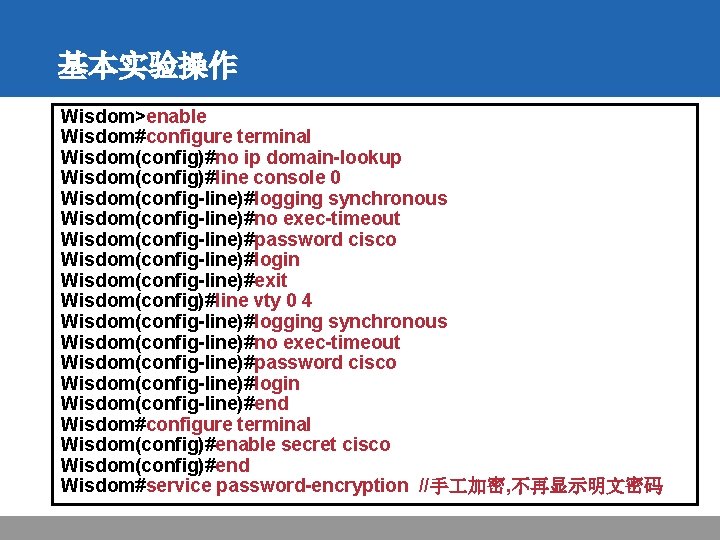
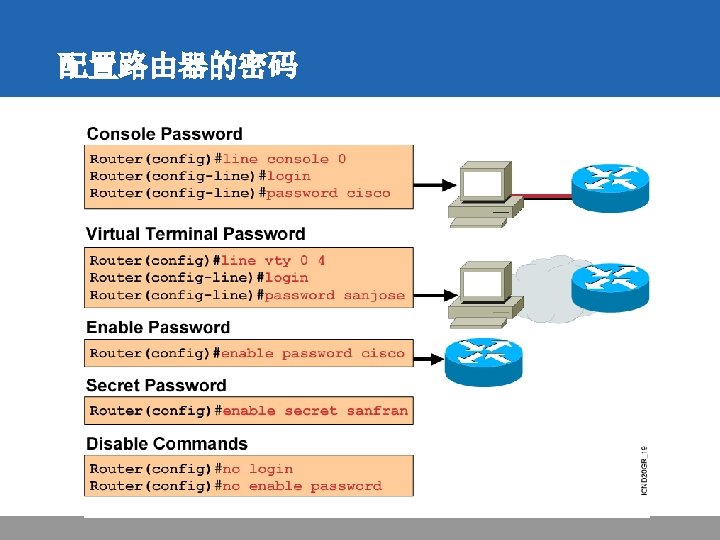
基本实验操作 Wisdom>enable Wisdom#configure terminal Wisdom(config)#no ip domain-lookup Wisdom(config)#line console 0 Wisdom(config-line)#logging synchronous Wisdom(config-line)#no exec-timeout Wisdom(config-line)#password cisco Wisdom(config-line)#login Wisdom(config-line)#exit Wisdom(config)#line vty 0 4 Wisdom(config-line)#logging synchronous Wisdom(config-line)#no exec-timeout Wisdom(config-line)#password cisco Wisdom(config-line)#login Wisdom(config-line)#end Wisdom#configure terminal Wisdom(config)#enable secret cisco Wisdom(config)#end Wisdom#service password-encryption //手 加密, 不再显示明文密码
保存配置 wg_ro_c#copy running-config startup-config Destination filename [startup-config]? Building configuration… wg_ro_c# • Copies the current configuration to NVRAM 保存命令Copy running-config startup-config=write
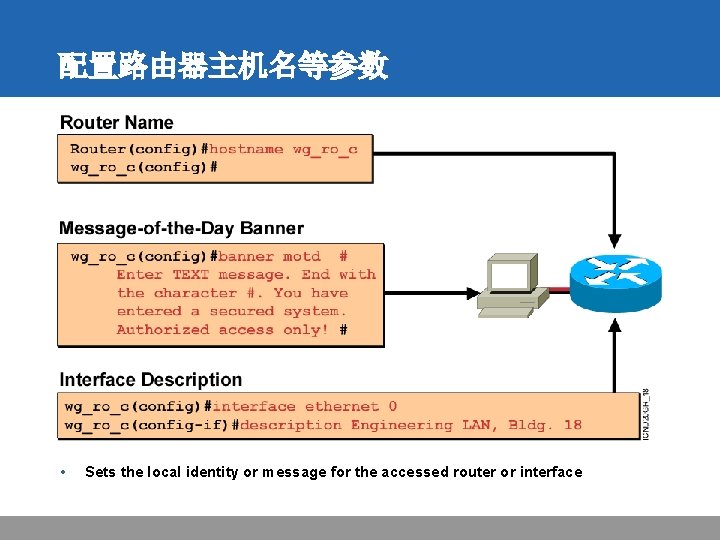
配置路由器主机名等参数 • Sets the local identity or message for the accessed router or interface
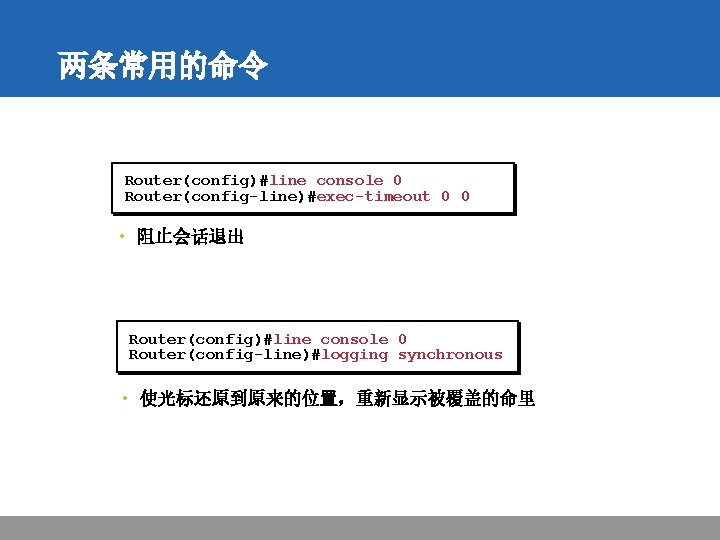
两条常用的命令 Router(config)#line console 0 Router(config-line)#exec-timeout 0 0 • 阻止会话退出 Router(config)#line console 0 Router(config-line)#logging synchronous • 使光标还原到原来的位置,重新显示被覆盖的命里
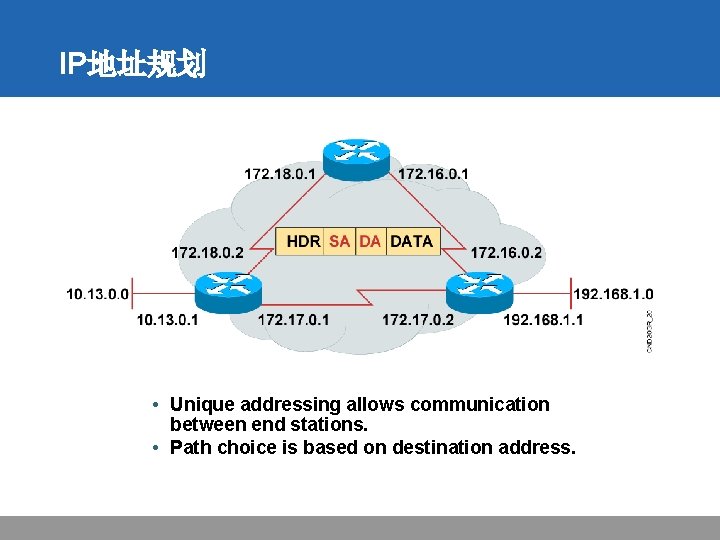
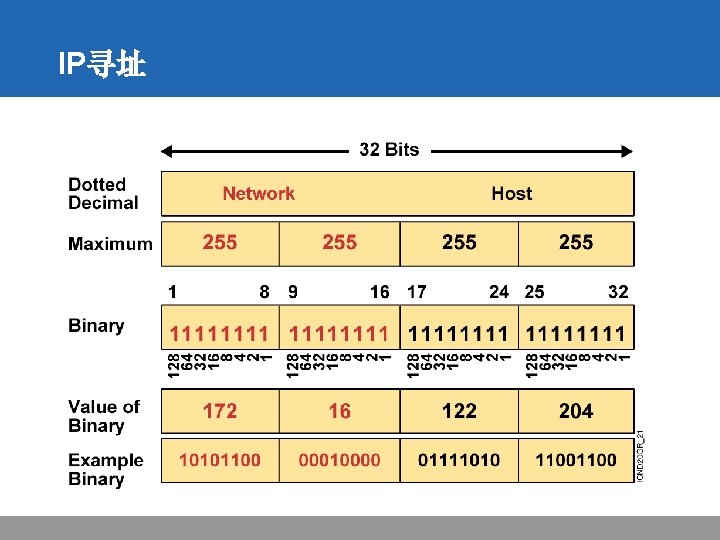
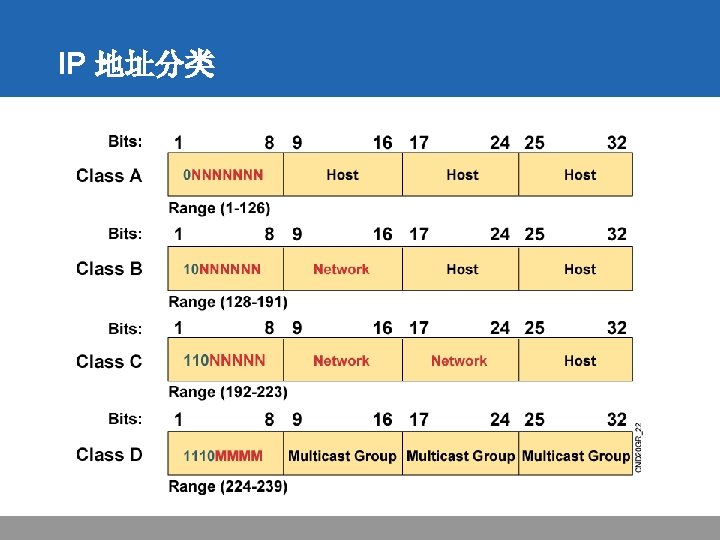
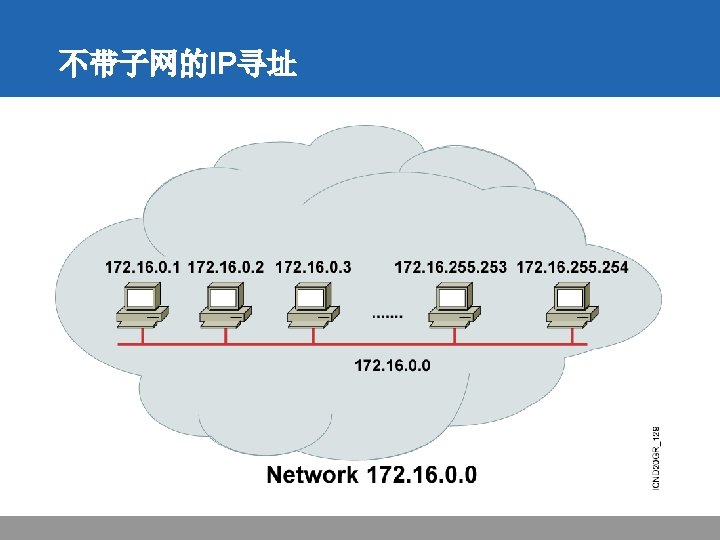
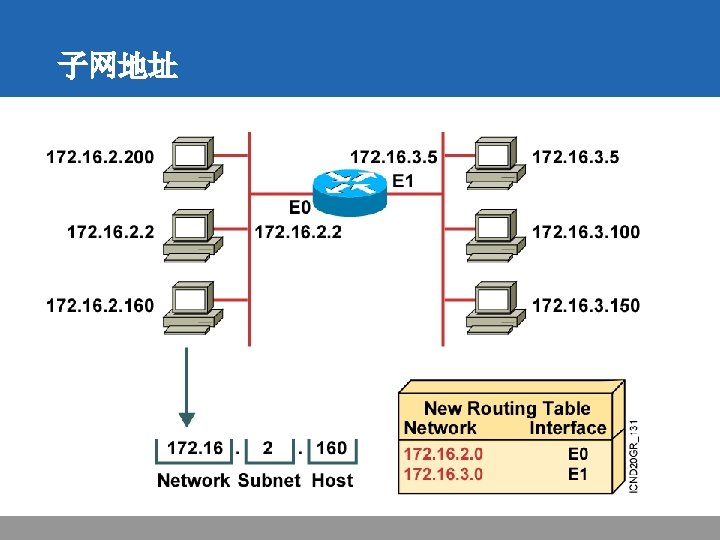
IP地址规划 • Unique addressing allows communication between end stations. • Path choice is based on destination address. Location is represented by an address
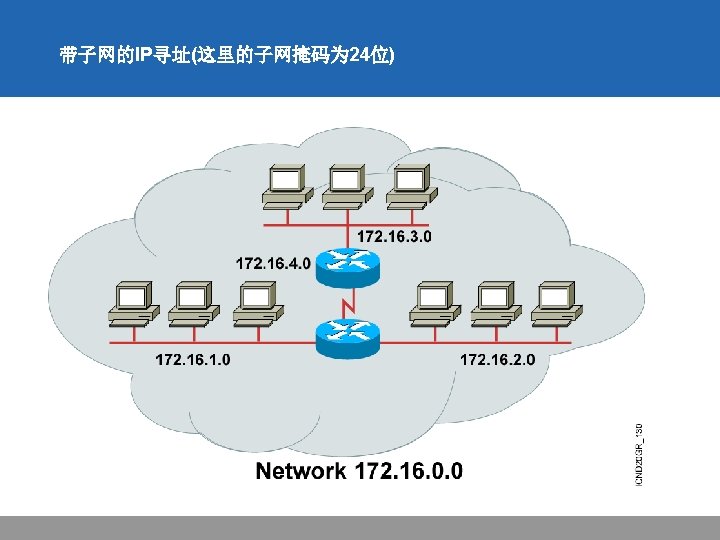
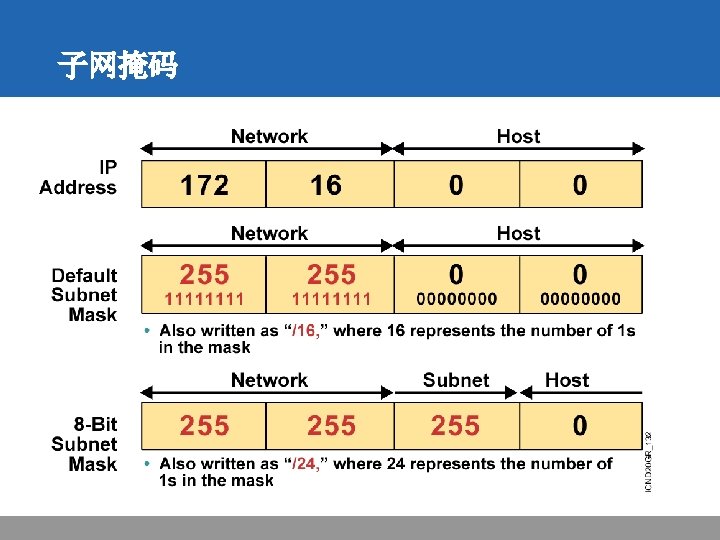
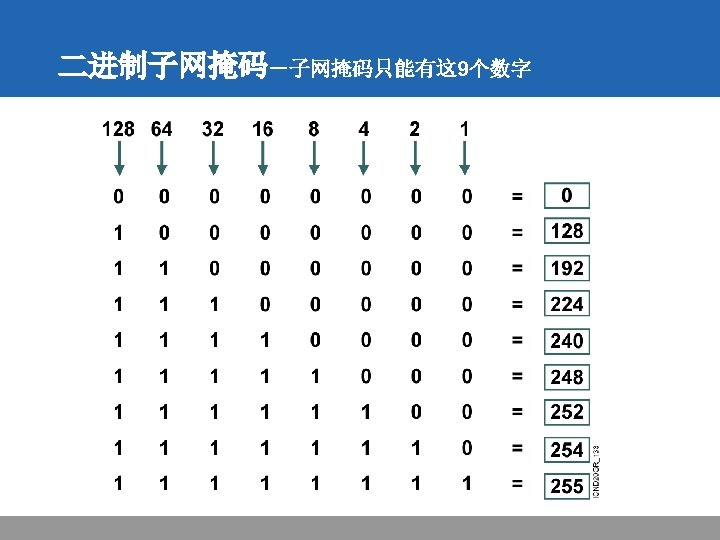
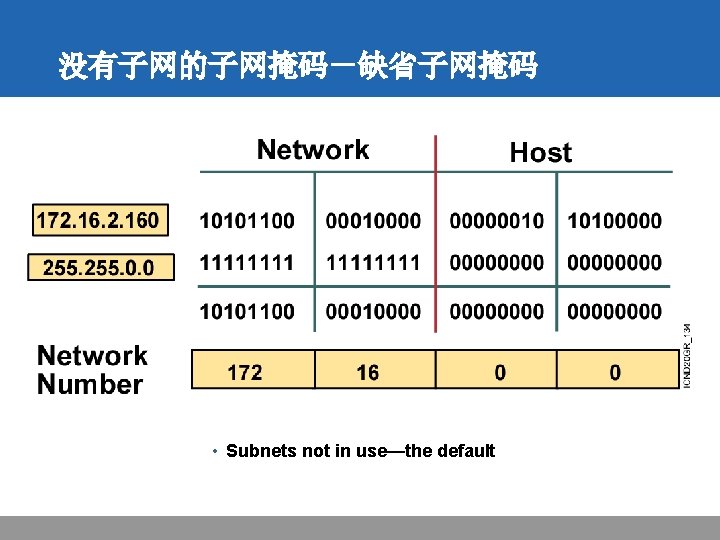
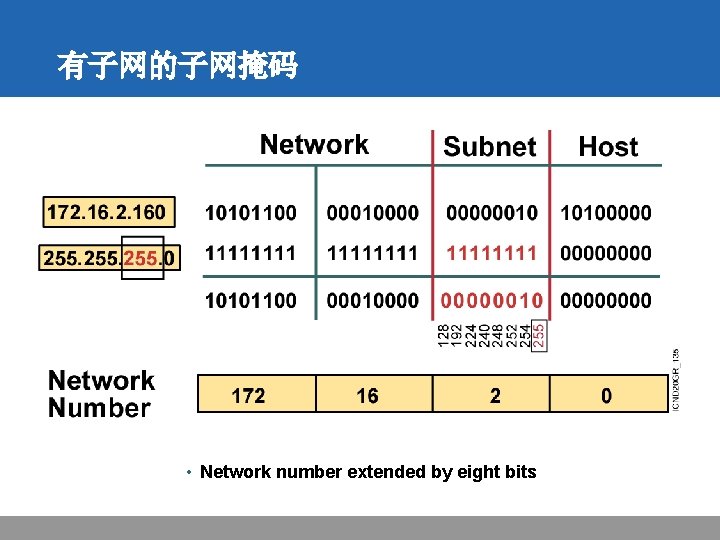
有子网的子网掩码 • Network number extended by eight bits
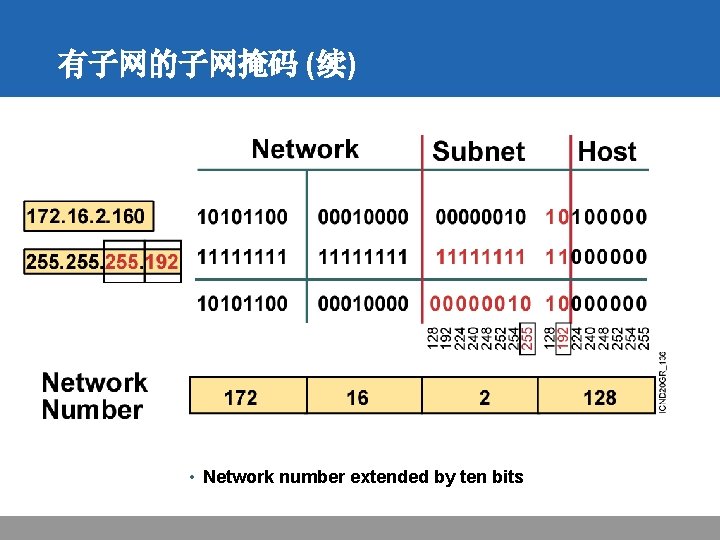
有子网的子网掩码 (续) • Network number extended by ten bits
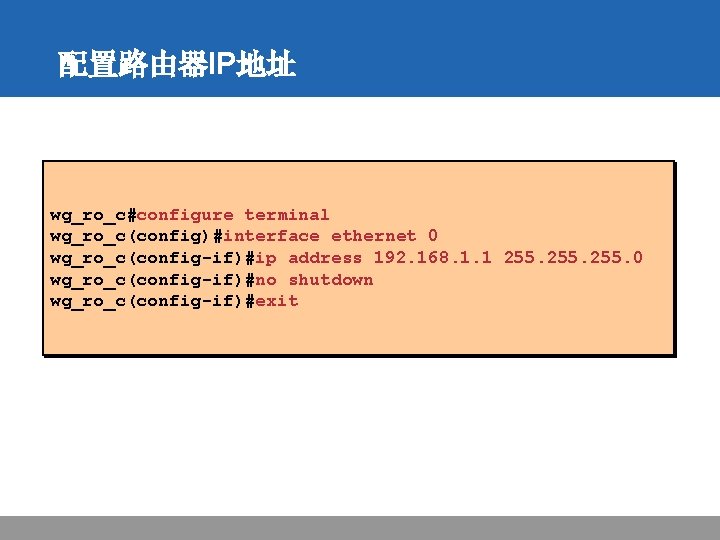
配置路由器IP地址 wg_ro_c#configure terminal wg_ro_c(config)#interface ethernet 0 wg_ro_c(config-if)#ip address 192. 168. 1. 1 255. 0 wg_ro_c(config-if)#no shutdown wg_ro_c(config-if)#exit
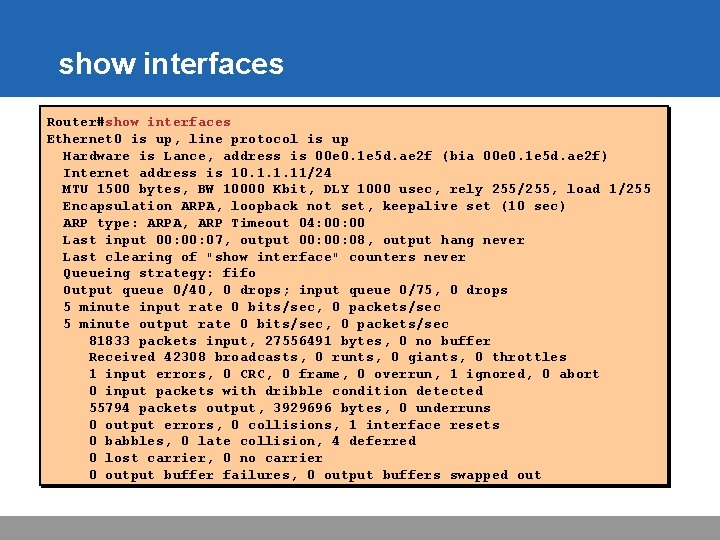
show interfaces Router#show interfaces Ethernet 0 is up, line protocol is up Hardware is Lance, address is 00 e 0. 1 e 5 d. ae 2 f (bia 00 e 0. 1 e 5 d. ae 2 f) Internet address is 10. 1. 1. 11/24 MTU 1500 bytes, BW 10000 Kbit, DLY 1000 usec, rely 255/255, load 1/255 Encapsulation ARPA, loopback not set, keepalive set (10 sec) ARP type: ARPA, ARP Timeout 04: 00 Last input 00: 07, output 00: 08, output hang never Last clearing of "show interface" counters never Queueing strategy: fifo Output queue 0/40, 0 drops; input queue 0/75, 0 drops 5 minute input rate 0 bits/sec, 0 packets/sec 5 minute output rate 0 bits/sec, 0 packets/sec 81833 packets input, 27556491 bytes, 0 no buffer Received 42308 broadcasts, 0 runts, 0 giants, 0 throttles 1 input errors, 0 CRC, 0 frame, 0 overrun, 1 ignored, 0 abort 0 input packets with dribble condition detected 55794 packets output, 3929696 bytes, 0 underruns 0 output errors, 0 collisions, 1 interface resets 0 babbles, 0 late collision, 4 deferred 0 lost carrier, 0 no carrier 0 output buffer failures, 0 output buffers swapped out
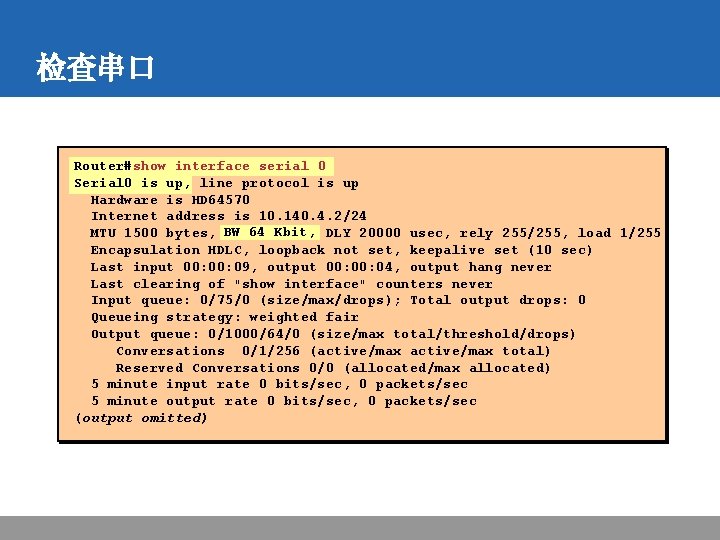
检查串口 Router#show interface serial 0 Serial 0 is up, line protocol is up Hardware is HD 64570 Internet address is 10. 140. 4. 2/24 MTU 1500 bytes, BW 64 Kbit, DLY 20000 usec, rely 255/255, load 1/255 Encapsulation HDLC, loopback not set, keepalive set (10 sec) Last input 00: 09, output 00: 04, output hang never Last clearing of "show interface" counters never Input queue: 0/75/0 (size/max/drops); Total output drops: 0 Queueing strategy: weighted fair Output queue: 0/1000/64/0 (size/max total/threshold/drops) Conversations 0/1/256 (active/max total) Reserved Conversations 0/0 (allocated/max allocated) 5 minute input rate 0 bits/sec, 0 packets/sec 5 minute output rate 0 bits/sec, 0 packets/sec (output omitted)
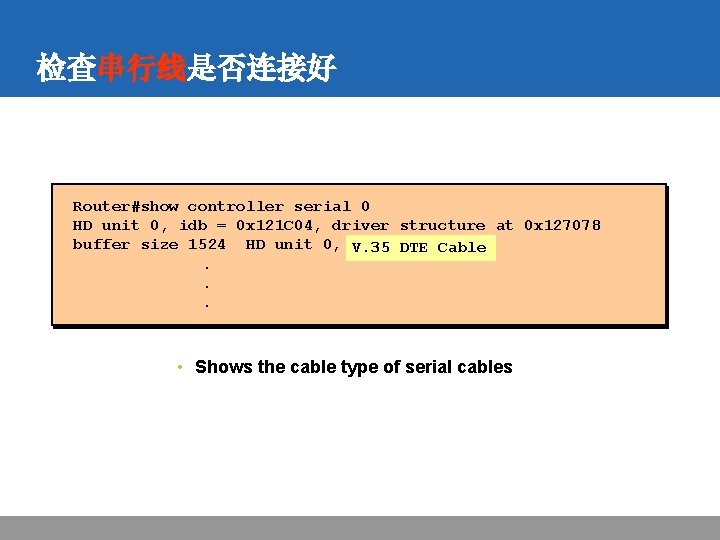
检查串行线是否连接好 Router#show controller serial 0 HD unit 0, idb = 0 x 121 C 04, driver structure at 0 x 127078 buffer size 1524 HD unit 0, V. 35 DTE cable Cable. . . • Shows the cable type of serial cables