Cashtags Protecting the Input and Display of Sensitive

- Slides: 34
Cashtags: Protecting the Input and Display of Sensitive Data Session: Knock. Who's There? Icy Who? I See You Too August 14 (Friday) @ 4: 30 PM Michael Mitchell, An-I Wang Florida State University Peter Reiher University of California, Los Angeles
Overview • Shoulder surfing is an increasing concern for mobile computing – Users frequently compute in public, risk visual leaks • Existing solutions inadequate – Only handle authentication, other threat vectors • Cashtags permits input and access of sensitive data in public Introduction Design Implementation Evaluation Conclusion
Shoulder Surfing 3
The Dangers are Everywhere • Observation-based attacks come in many forms – 3 billion digital camera phones in circulation • Becoming more capable, 40+ megapixels, 10 x+ optical zoom • Observation-based attacks can be complex – Sophisticated tools to capture user data – OCR solutions cheap & capable • Exposure can make other attacks possible – Social engineering attacks, phishing, etc. Introduction Design Implementation Evaluation Conclusion
The Threat is Real • >80% of IT professionals: – Had seen unauthorized sensitive data on screen – Had own sensitive on-screen data seen – Had no confidence their users protect their screens • Modern work habits are increasing the threat – Mobile devices sales now >70% of tech sales – 80% of US workforce is now mobile – ~70% access sensitive data outside of workplace – Screen tech near 180 degree viewability Introduction Design Implementation Evaluation Conclusion 5
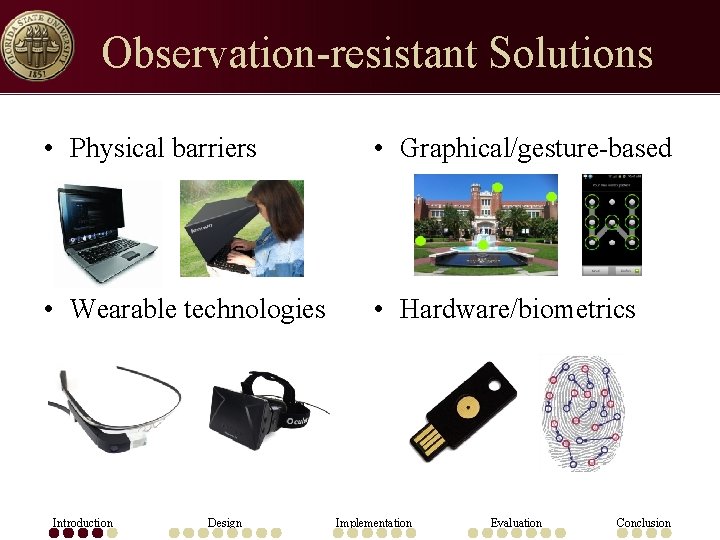
Observation-resistant Solutions • Physical barriers • Graphical/gesture-based • Wearable technologies • Hardware/biometrics Introduction Design Implementation Evaluation Conclusion
Existing Solutions Inadequate • No general purpose solution exists for protection of any/all sensitive on-screen data – The visual channel remains open Introduction Design Implementation Evaluation Conclusion
The Consequences can be Severe • Actual shoulder surf losses – S&P 500 company’s profit forecasts – Sensitive British government documents – Private data of Bo. A clients • Productivity suffering too – ~60% stopped work in public over privacy concerns – 70% can be more productive if no one could see their screen Introduction Design Implementation Evaluation Conclusion 8
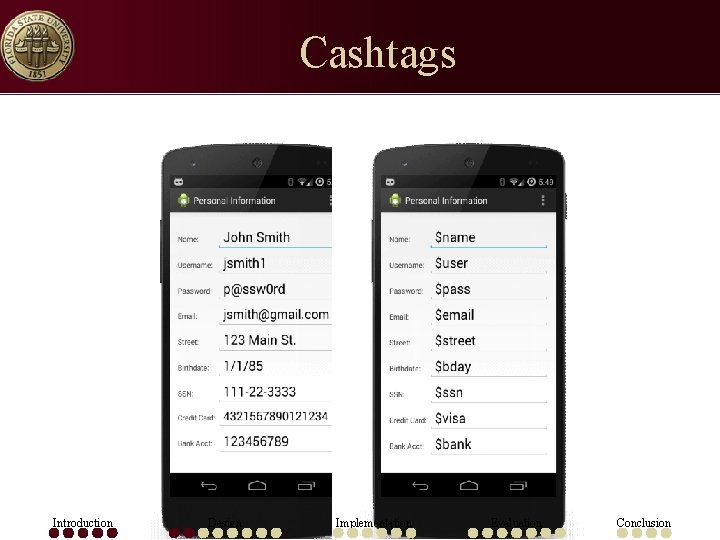
Cashtags • Cashtags: a system that defends against observation-based attacks – Easy-to-remember aliases for personally identifiable information (PII) – Alias consists of $ + text • E. g. $visa to represent a 16 -digit credit-card number • Permits access to sensitive data in public – Without the fear of screen leaks Introduction Design Implementation Evaluation Conclusion
Cashtags Introduction Design Implementation Evaluation Conclusion
Threat Model • Passive, observation-based attacks – Direct human observation – Live or recorded video • Can view screen & key presses from keyboards, keypads, screen, etc. • Absence of active attack – Observer is not able to influence user Introduction Design Implementation Evaluation Conclusion
Design Overview • • • Interception of sensitive data display Simple user interface Access to sensitive data Data format variants Deployment model Per-application behavior Introduction Design Implementation Evaluation Conclusion
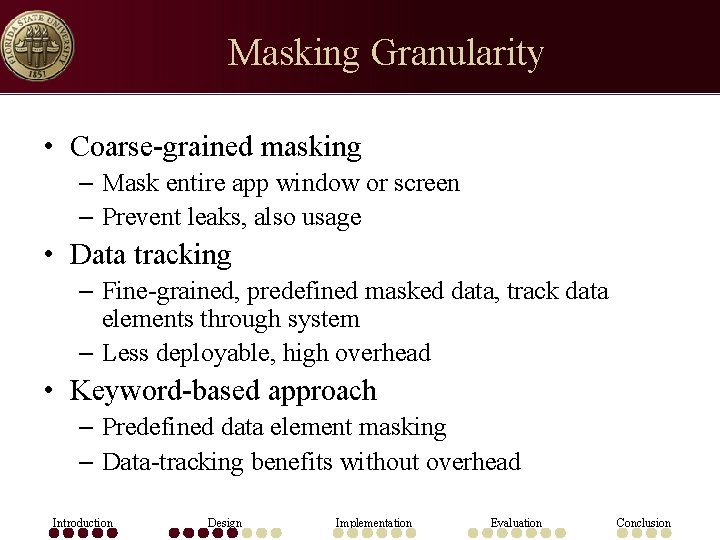
Masking Granularity • Coarse-grained masking – Mask entire app window or screen – Prevent leaks, also usage • Data tracking – Fine-grained, predefined masked data, track data elements through system – Less deployable, high overhead • Keyword-based approach – Predefined data element masking – Data-tracking benefits without overhead Introduction Design Implementation Evaluation Conclusion
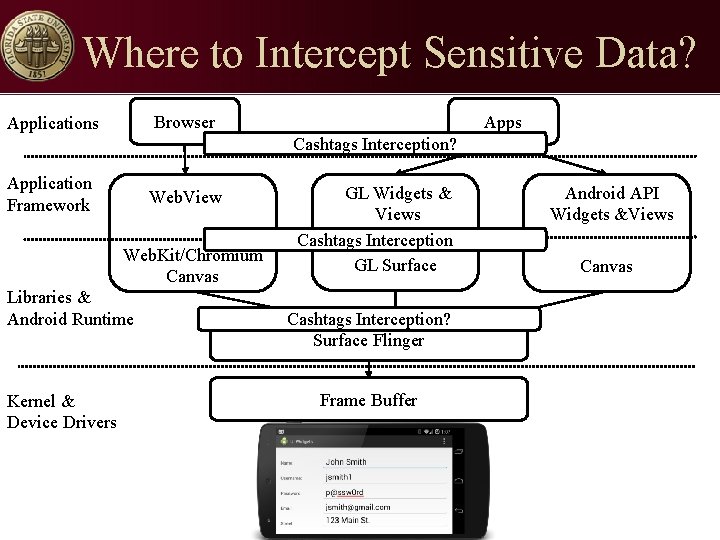
Where to Intercept Sensitive Data? Browser Applications Apps Cashtags Interception? Application Framework Web. View Web. Kit/Chromium Canvas Libraries & Android Runtime Kernel & Device Drivers GL Widgets & Views Cashtags Interception GL Surface Cashtags Interception? Surface Flinger Frame Buffer Android API Widgets &Views Canvas
User Interface • Early design – Code words, e. g. Joe John – Separate secure entry keyboard app – Replace default keyboard app • Direct input of cashtags – Alias pre-pended with $, to represent PII • Direct input of sensitive data – Support for auto-complete, detects first few letters – Some potential for information leak Introduction Design Implementation Evaluation Conclusion
Additional Cashtags Semantics • Recursion support – $signature $fname $lname $gmail John Smith, jsmith@gmail. com • Circular mapping prevention – $John $Joe $John. . . • Accounts, SSNs, etc. with different schemes – 123456789; 123 -45 -6789; 123 45 6789) – Regular expression libraries (java. util. regex. *) Introduction Design Implementation Evaluation 16 Conclusion
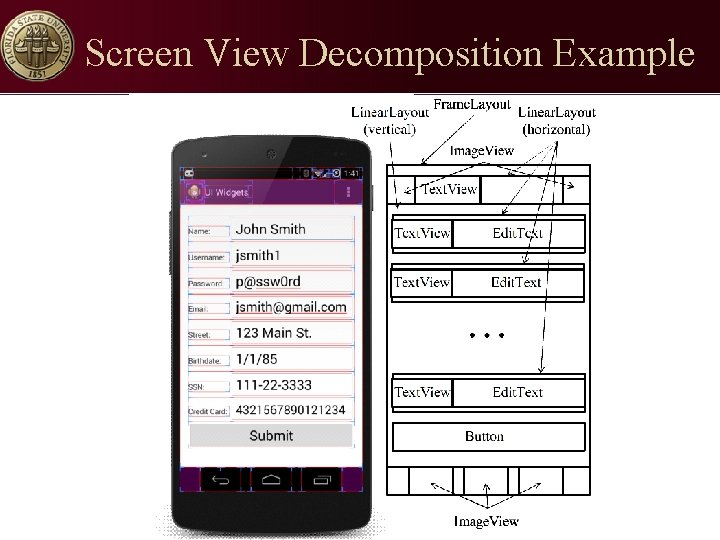
Screen View Decomposition Example
Xposed Code-injection Framework • Xposed code-injection intercepts and modifies runtime behavior – Change code without loss of portability • Individual class methods/constructors hooked – Execute code before, after, or instead of base function call – Alters function params, or return values – Access control changes Introduction Design Implementation Evaluation Conclusion
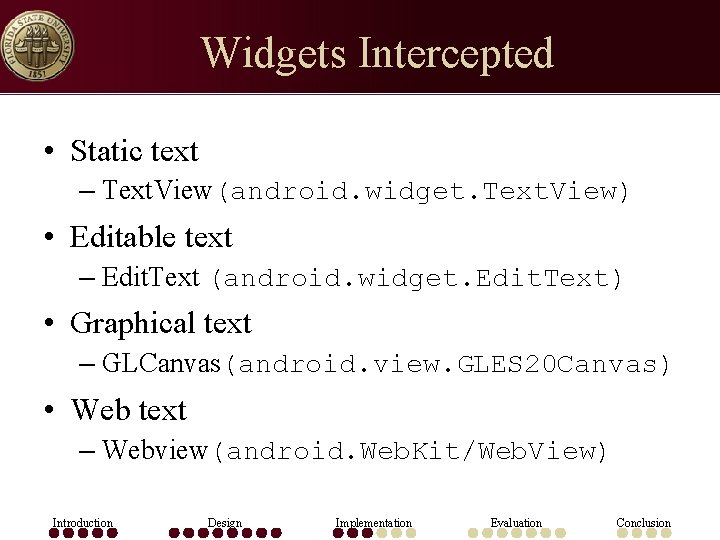
Widgets Intercepted • Static text – Text. View(android. widget. Text. View) • Editable text – Edit. Text (android. widget. Edit. Text) • Graphical text – GLCanvas(android. view. GLES 20 Canvas) • Web text – Webview(android. Web. Kit/Web. View) Introduction Design Implementation Evaluation Conclusion
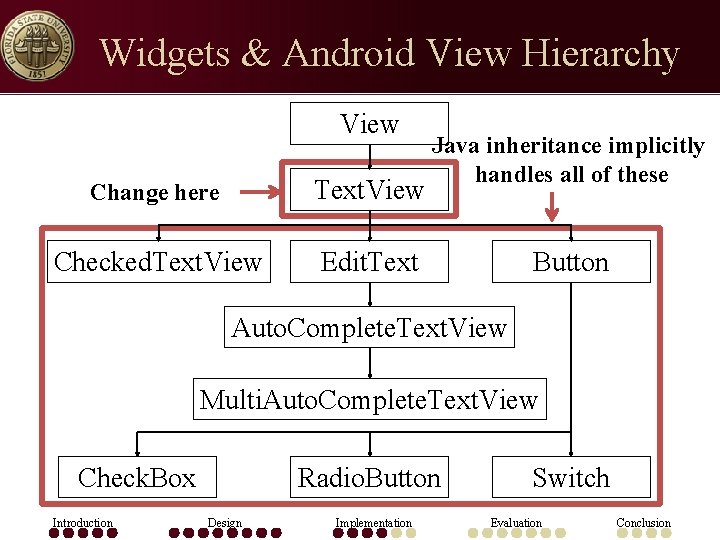
Widgets & Android View Hierarchy View Change here Text. View Checked. Text. View Edit. Text Java inheritance implicitly handles all of these Button Auto. Complete. Text. View Multi. Auto. Complete. Text. View Check. Box Introduction Radio. Button Design Implementation Switch Evaluation Conclusion
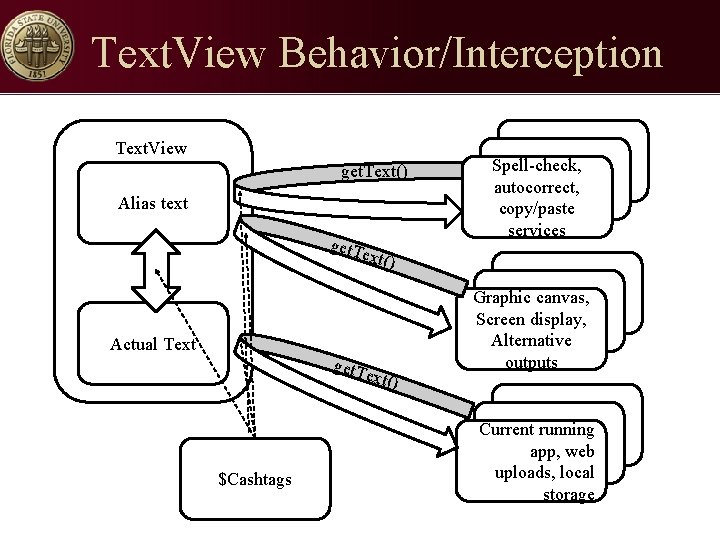
Text. View Behavior/Interception Text. View get. Text() Alias text get. T Spell-check, autocorrect, copy/paste services ext() Actual Text get. T ext() $Cashtags Graphic canvas, Screen display, Alternative outputs Current running app, web uploads, local storage
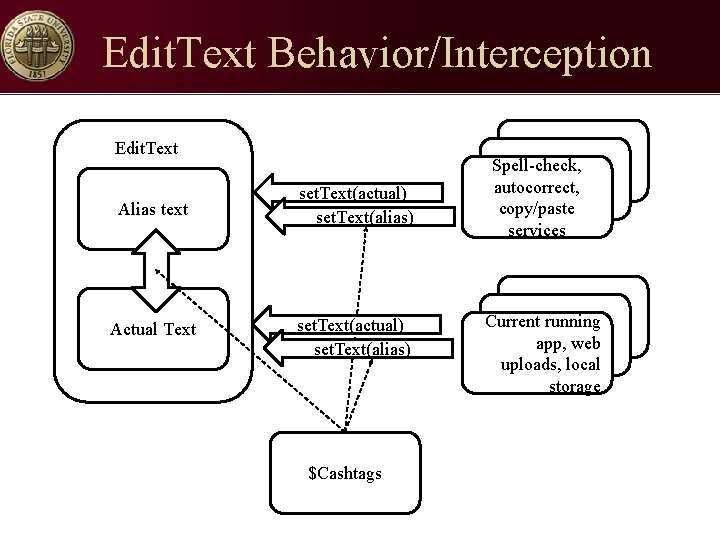
Edit. Text Behavior/Interception Edit. Text Alias text set. Text(actual) set. Text(alias) Actual Text set. Text(actual) set. Text(alias) $Cashtags Spell-check, autocorrect, copy/paste services Current running app, web uploads, local storage
Evaluation • Display and input accuracy – API coverage evaluation – Market app coverage evaluation • Performance overhead • Usability overhead Introduction Design Implementation Evaluation Conclusion
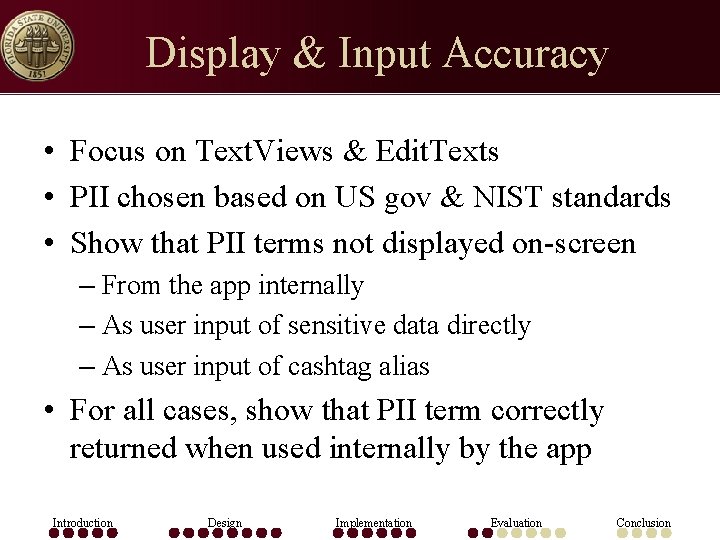
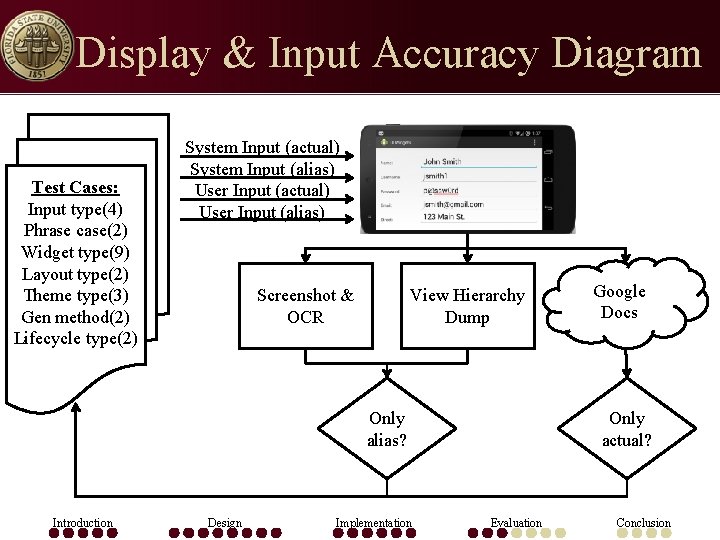
Display & Input Accuracy • Focus on Text. Views & Edit. Texts • PII chosen based on US gov & NIST standards • Show that PII terms not displayed on-screen – From the app internally – As user input of sensitive data directly – As user input of cashtag alias • For all cases, show that PII term correctly returned when used internally by the app Introduction Design Implementation Evaluation Conclusion
Display & Input Accuracy Diagram Test Cases: Input type(4) Phrase case(2) Widget type(9) Layout type(2) Theme type(3) Gen method(2) Lifecycle type(2) System Input (actual) System Input (alias) User Input (actual) User Input (alias) Screenshot & OCR View Hierarchy Dump Only alias? Introduction Design Implementation Google Docs Only actual? Evaluation Conclusion
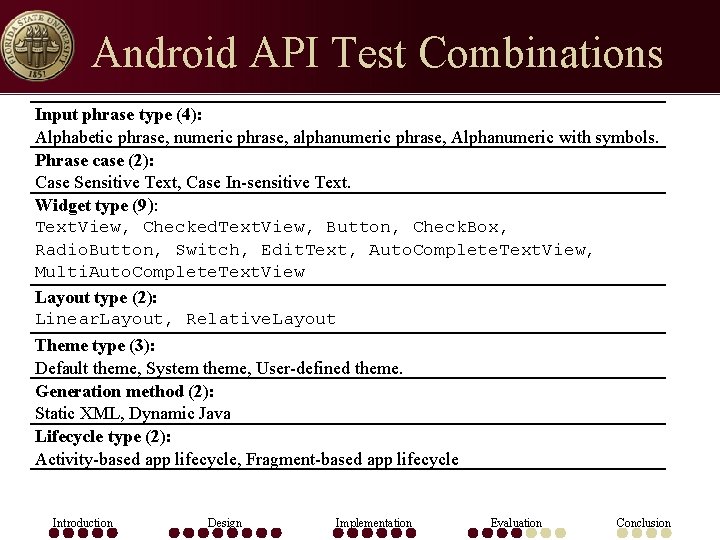
Android API Test Combinations Input phrase type (4): Alphabetic phrase, numeric phrase, alphanumeric phrase, Alphanumeric with symbols. Phrase case (2): Case Sensitive Text, Case In-sensitive Text. Widget type (9): Text. View, Checked. Text. View, Button, Check. Box, Radio. Button, Switch, Edit. Text, Auto. Complete. Text. View, Multi. Auto. Complete. Text. View Layout type (2): Linear. Layout, Relative. Layout Theme type (3): Default theme, System theme, User-defined theme. Generation method (2): Static XML, Dynamic Java Lifecycle type (2): Activity-based app lifecycle, Fragment-based app lifecycle Introduction Design Implementation Evaluation Conclusion
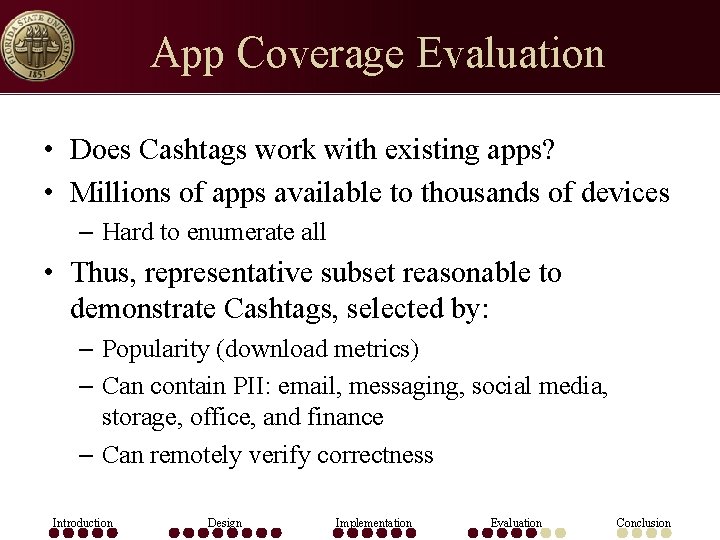
App Coverage Evaluation • Does Cashtags work with existing apps? • Millions of apps available to thousands of devices – Hard to enumerate all • Thus, representative subset reasonable to demonstrate Cashtags, selected by: – Popularity (download metrics) – Can contain PII: email, messaging, social media, storage, office, and finance – Can remotely verify correctness Introduction Design Implementation Evaluation Conclusion
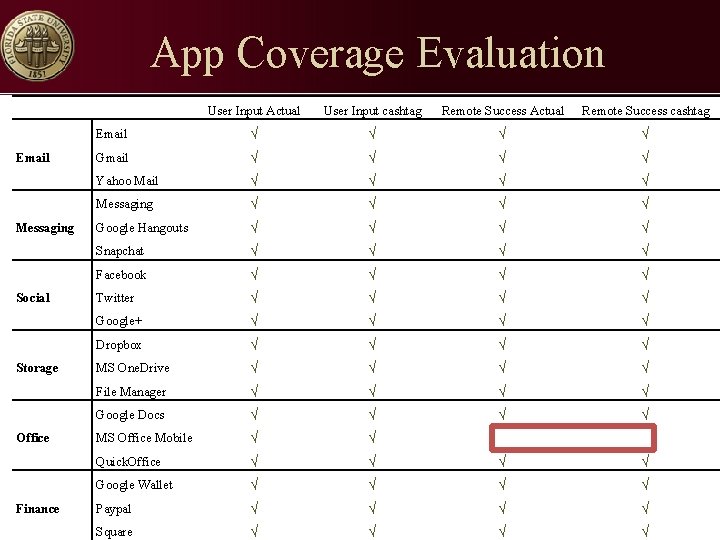
App Coverage Evaluation Email Messaging Social Storage Office Finance User Input Actual User Input cashtag Remote Success Actual Remote Success cashtag Email √ √ Gmail √ √ Yahoo Mail √ √ Messaging √ √ Google Hangouts √ √ Snapchat √ √ Facebook √ √ Twitter √ √ Google+ √ √ Dropbox √ √ MS One. Drive √ √ File Manager √ √ Google Docs √ √ MS Office Mobile √ √ Quick. Office √ √ Google Wallet √ √ Paypal √ √ Square √ √
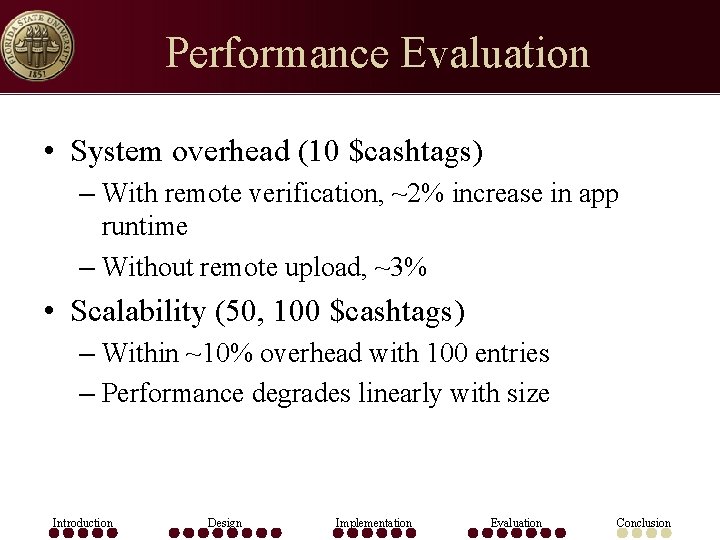
Performance Evaluation • System overhead (10 $cashtags) – With remote verification, ~2% increase in app runtime – Without remote upload, ~3% • Scalability (50, 100 $cashtags) – Within ~10% overhead with 100 entries – Performance degrades linearly with size Introduction Design Implementation Evaluation Conclusion
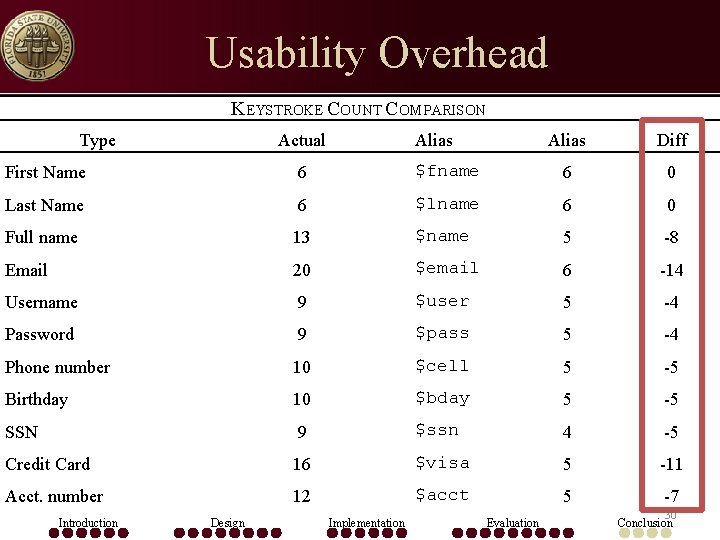
Usability Overhead KEYSTROKE COUNT COMPARISON Type Actual Alias Diff First Name 6 $fname 6 0 Last Name 6 $lname 6 0 Full name 13 $name 5 -8 Email 20 $email 6 -14 Username 9 $user 5 -4 Password 9 $pass 5 -4 Phone number 10 $cell 5 -5 Birthday 10 $bday 5 -5 SSN 9 $ssn 4 -5 Credit Card 16 $visa 5 -11 Acct. number 12 $acct 5 -7 Introduction Design Implementation Evaluation 30 Conclusion
Future Work • Increase coverage – API deviations need case-specific solutions • Address common name issue – John $fname – Googles for John Adams, John Travolta, or John Williams • Results $fname Adams, $fname Travolta, or $fname Williams • Handle more data formats – Field expands across multiple Text. Views not recognized, (e. g. , credit card split into parts) – Can be handled by adding each part to Cashtags repository Introduction Design Implementation Evaluation Conclusion
Handling Business Use Cases • Cashtags envisioned to protect PII – Not limited to this narrow view, generalizes to others • Recursive alias expansions support complex hierarchies • Simple modifications would permit wildcards – E. g. mask accounts with prefixes, patterns for SSNs, CCs, etc. Introduction Design Implementation Evaluation Conclusion
Conclusion • Cashtags is a first step toward protection against visual leaks of on-screen data • Feasible to compute in public without exposing sensitive personal data • System is efficient, maintains full functionality, near universal app compatibility • Unified, device-wide protection against shoulder surfing threat Introduction Design Implementation Evaluation Conclusion
Thank You Questions? Cashtags: Protecting the Input and Display of Sensitive Data Michael J. Mitchell mitchell@cs. fsu. edu • This work is sponsored by NSF CNS-1065127. • Opinions, findings, conclusions or recommendations expressed in this document do not necessarily reflect the views of the NSF, FSU, UCLA, or the U. S. government. Introduction Design Implementation Evaluation Conclusion