Using Cori Steve Leak and Zhengji Zhao NESAP



![What to link • NERSC convention: /usr/common/software/<name>/<version>/<arch>/[<Prg. Env>] • Eg: /usr/common/software/petsc/3. 7. 2/hsw/intel /usr/common/software/petsc/3.](https://slidetodoc.com/presentation_image_h/22cbc8fa9188169cc88c3d11c244c52a/image-14.jpg "What to link • NERSC convention: /usr/common/software/<name>/<version>/<arch>/[<Prg. Env>] • Eg: /usr/common/software/petsc/3. 7. 2/hsw/intel /usr/common/software/petsc/3.")






- Slides: 73
Using Cori Steve Leak, and Zhengji Zhao NESAP Hack-a-thon November 29, 2016, Berkeley CA
How to Compile & MCDRAM Steve Leak - 2 -
Building for Cori KNL nodes • What’s different? • How to compile –. . to use the new wide vector instructions • What to link • Making use of MCDRAM – High Bandwidth Memory
Building for Cori KNL nodes Don’t Panic (much)
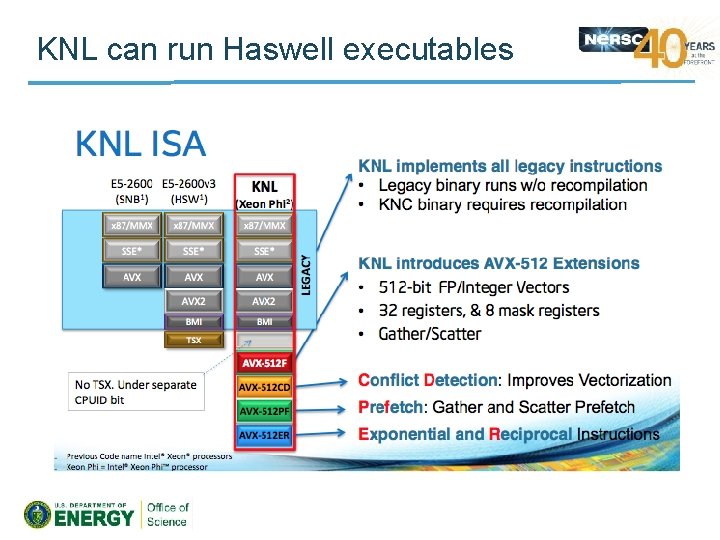
KNL can run Haswell executables
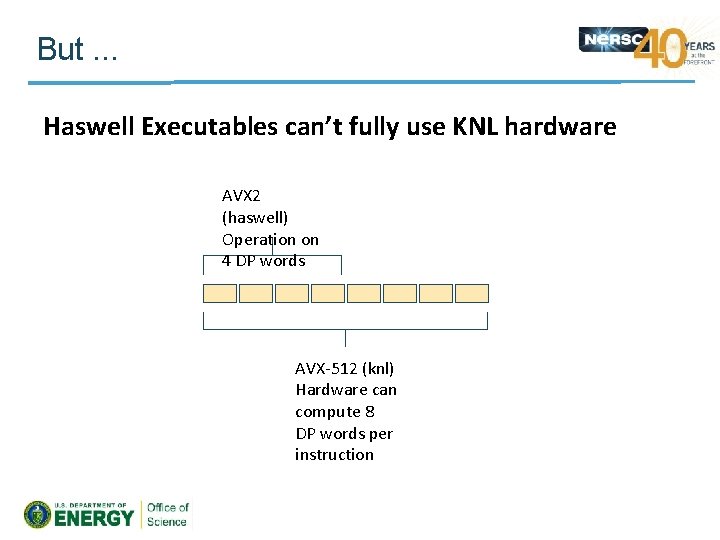
But. . . Haswell Executables can’t fully use KNL hardware AVX 2 (haswell) Operation on 4 DP words AVX-512 (knl) Hardware can compute 8 DP words per instruction
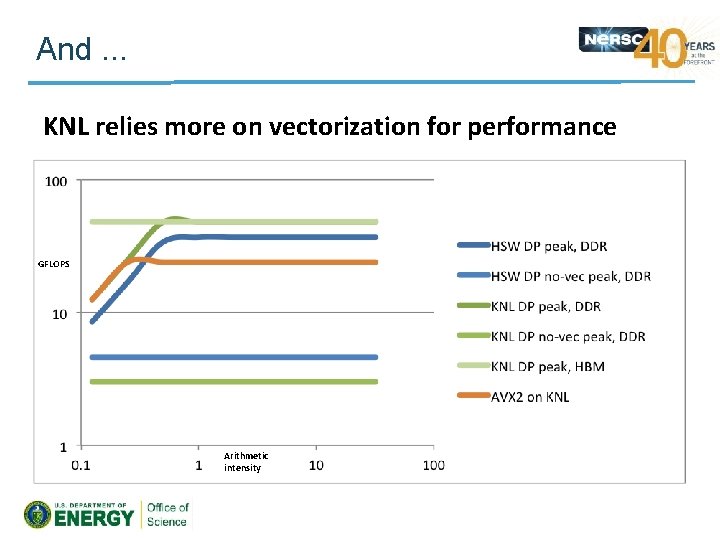
And. . . KNL relies more on vectorization for performance GFLOPS Arithmetic intensity
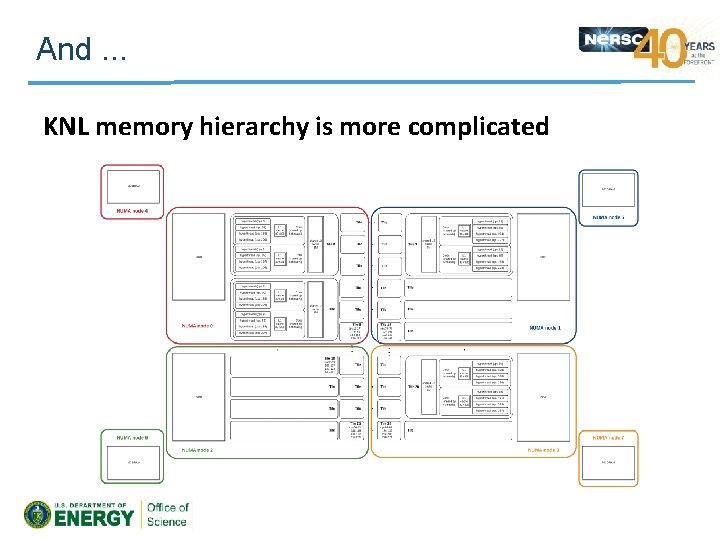
And. . . KNL memory hierarchy is more complicated
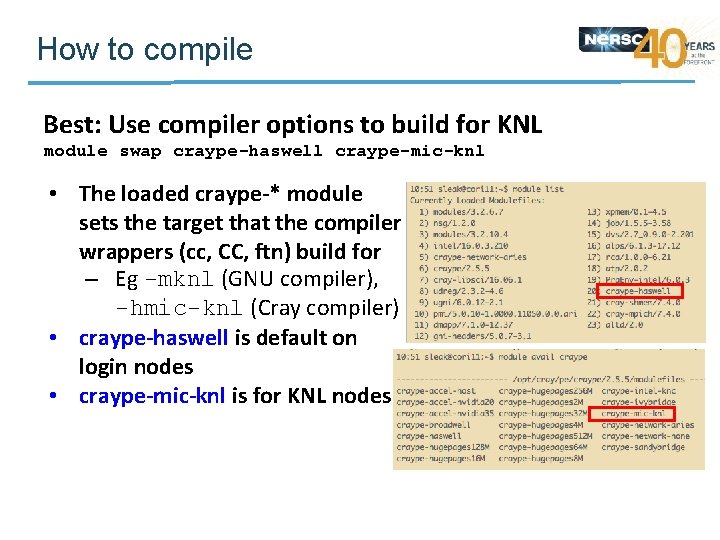
How to compile Best: Use compiler options to build for KNL module swap craype-haswell craype-mic-knl • The loaded craype-* module sets the target that the compiler wrappers (cc, CC, ftn) build for – Eg -mknl (GNU compiler), -hmic-knl (Cray compiler) • craype-haswell is default on login nodes • craype-mic-knl is for KNL nodes
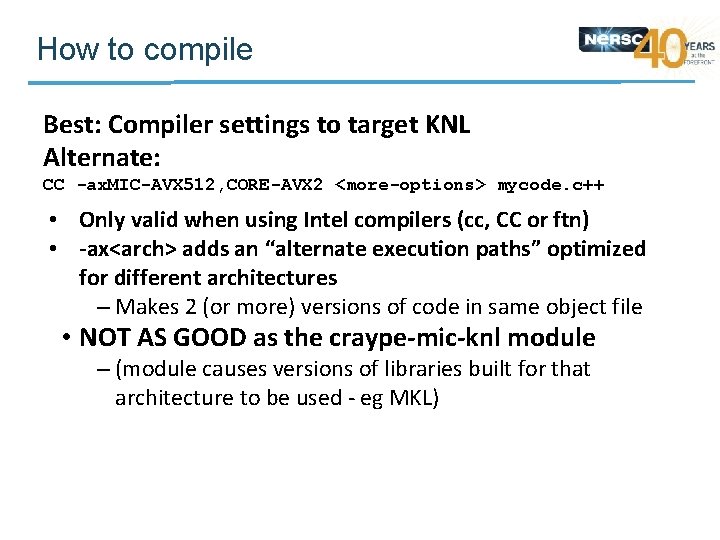
How to compile Best: Compiler settings to target KNL Alternate: CC -ax. MIC-AVX 512, CORE-AVX 2 <more-options> mycode. c++ • Only valid when using Intel compilers (cc, CC or ftn) • -ax<arch> adds an “alternate execution paths” optimized for different architectures – Makes 2 (or more) versions of code in same object file • NOT AS GOOD as the craype-mic-knl module – (module causes versions of libraries built for that architecture to be used - eg MKL)
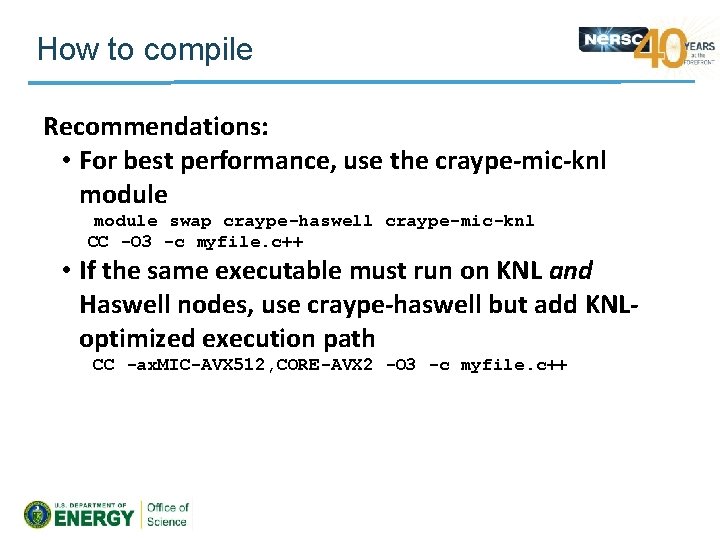
How to compile Recommendations: • For best performance, use the craype-mic-knl module swap craype-haswell craype-mic-knl CC -O 3 -c myfile. c++ • If the same executable must run on KNL and Haswell nodes, use craype-haswell but add KNLoptimized execution path CC -ax. MIC-AVX 512, CORE-AVX 2 -O 3 -c myfile. c++
What to link Utility libraries • Not performance-critical (by definition) – KNL can run Xeon binaries. . can use Haswell-targeted versions • I/O libraries (HDF 5, Net. CDF, etc) should fit in this category too – (for Cray-provided libraries, compiler wrapper will use craype-* to select best build anyway)
What to link Performance-critical libraries • MKL: has KNL-targeted optimizations – Note: need to link with -lmemkind (more soon) • PETsc, SLEPc, Caffe, Metis, etc: – (soon) has KNL-targeted builds • Modulefiles will use craype-{haswell, mic-knl} to find appropriate library • Key points: – Someone else has already prepared libraries for KNL – No need to do-it-yourself – Load the right craype- module
What to link • NERSC convention: /usr/common/software/<name>/<version>/<arch>/[<Prg. Env>] • Eg: /usr/common/software/petsc/3. 7. 2/hsw/intel /usr/common/software/petsc/3. 7. 2/knl/intel • KNL subfolder may be a symlink to hsw – Libraries compiled with -ax. MIC-AVX 512, CORE-AVX 2 • Modulefiles should do the right thing. TM – Using CRAY_CPU_TARGET, set by craype-{haswell, micknl}
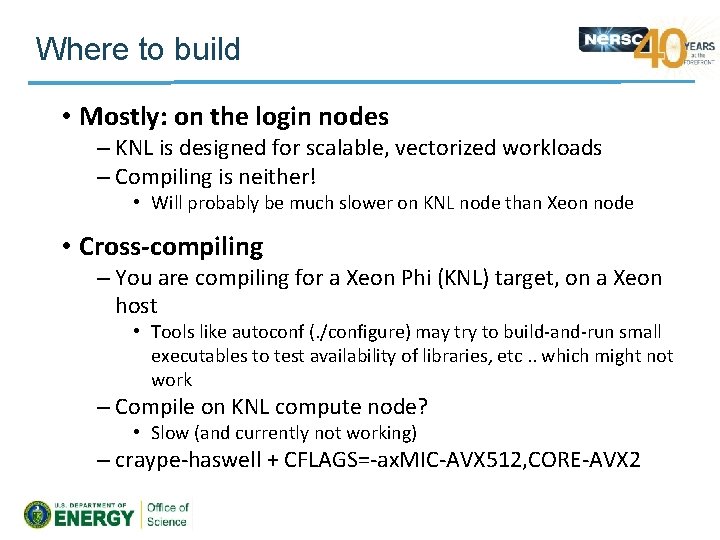
Where to build • Mostly: on the login nodes – KNL is designed for scalable, vectorized workloads – Compiling is neither! • Will probably be much slower on KNL node than Xeon node • Cross-compiling – You are compiling for a Xeon Phi (KNL) target, on a Xeon host • Tools like autoconf (. /configure) may try to build-and-run small executables to test availability of libraries, etc. . which might not work – Compile on KNL compute node? • Slow (and currently not working) – craype-haswell + CFLAGS=-ax. MIC-AVX 512, CORE-AVX 2
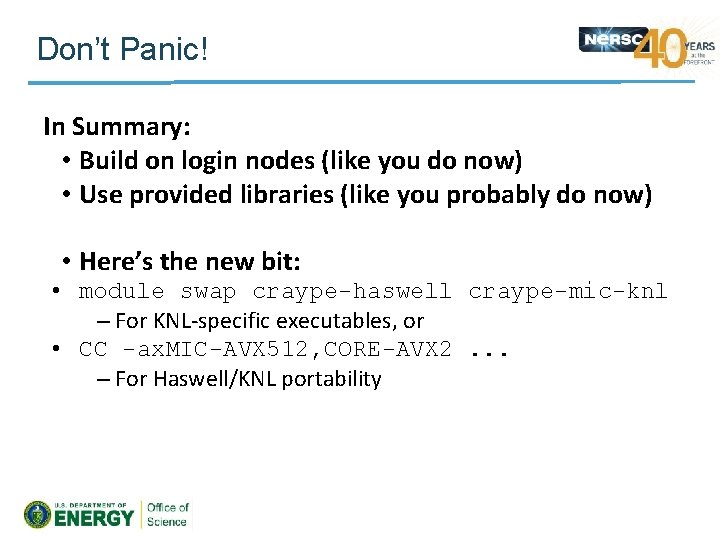
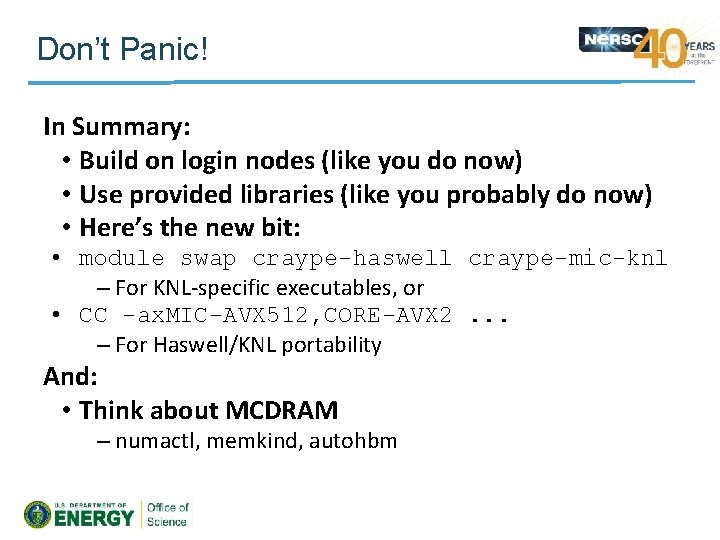
Don’t Panic! In Summary: • Build on login nodes (like you do now) • Use provided libraries (like you probably do now) • Here’s the new bit: • module swap craype-haswell craype-mic-knl – For KNL-specific executables, or • CC -ax. MIC-AVX 512, CORE-AVX 2. . . – For Haswell/KNL portability
What about MCDRAM? • What’s different? • How to compile –. . to use the new wide vector instructions • What to link • Making use of MCDRAM – High Bandwidth Memory
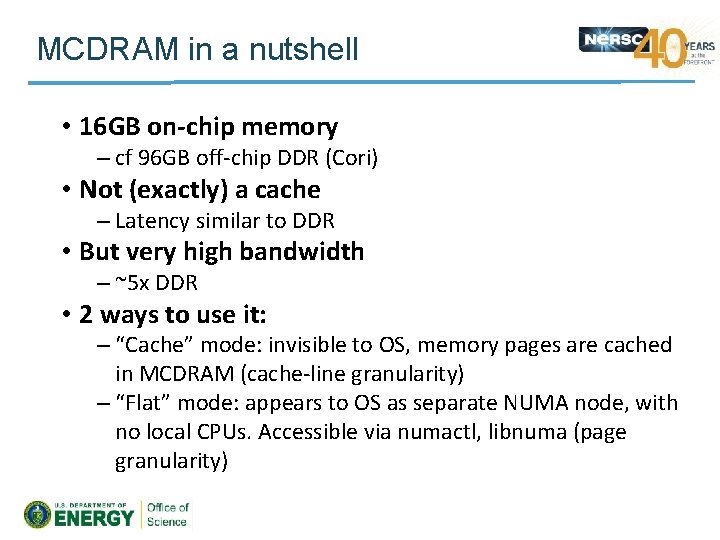
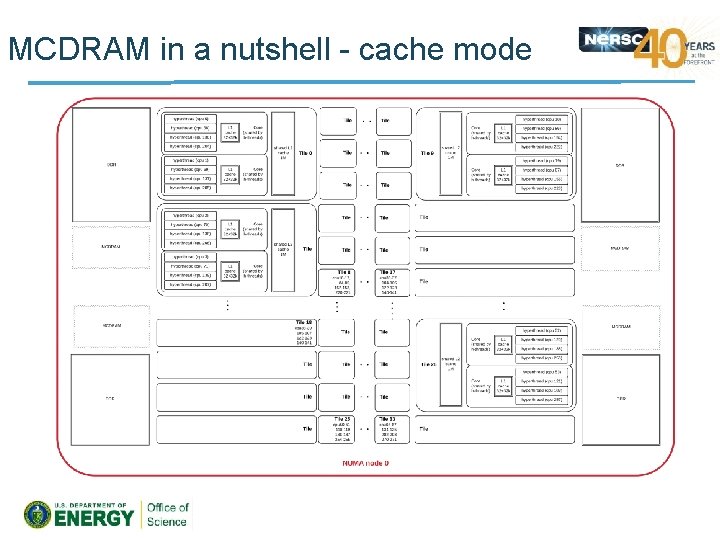
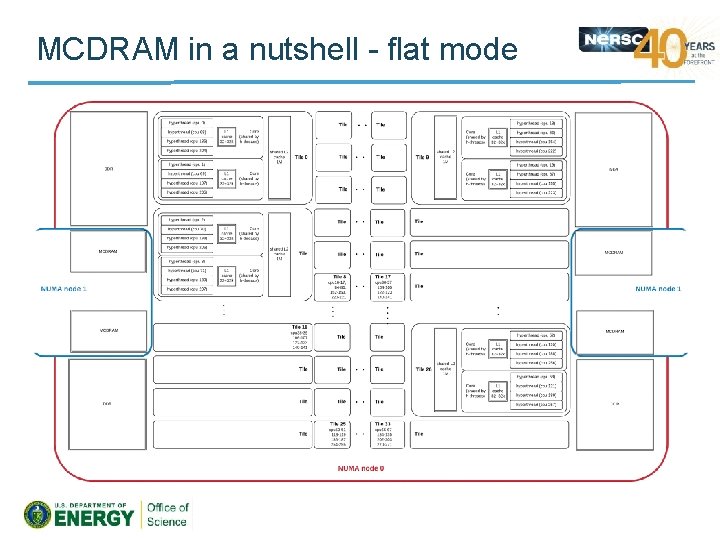
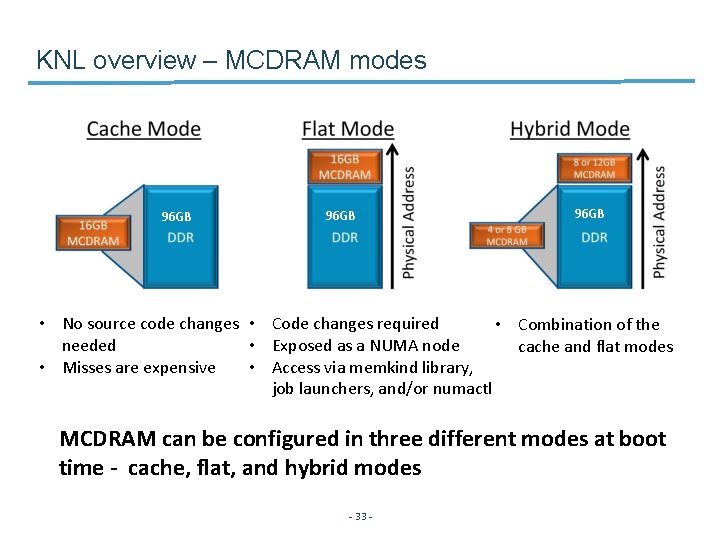
MCDRAM in a nutshell • 16 GB on-chip memory – cf 96 GB off-chip DDR (Cori) • Not (exactly) a cache – Latency similar to DDR • But very high bandwidth – ~5 x DDR • 2 ways to use it: – “Cache” mode: invisible to OS, memory pages are cached in MCDRAM (cache-line granularity) – “Flat” mode: appears to OS as separate NUMA node, with no local CPUs. Accessible via numactl, libnuma (page granularity)
MCDRAM in a nutshell - cache mode
MCDRAM in a nutshell - flat mode
How to use MCDRAM • Option 1: Let the system figure it out – Cache mode, no changes to code, build procedure or run procedure – Most of the benefit, free, most of the time
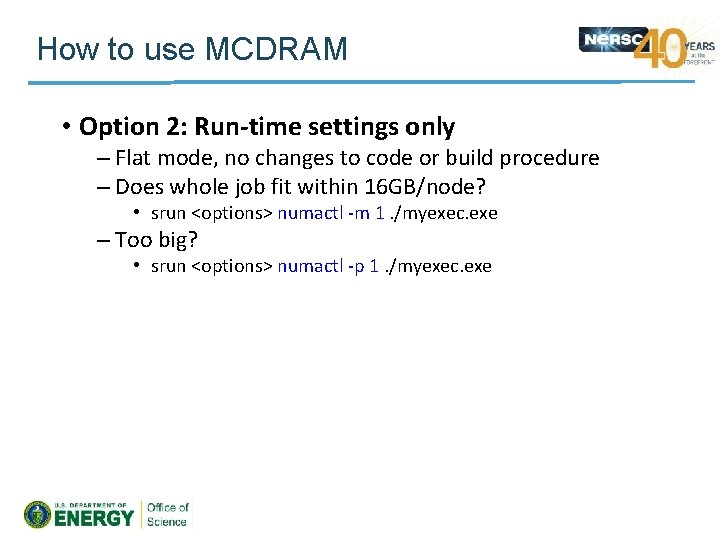
How to use MCDRAM • Option 2: Run-time settings only – Flat mode, no changes to code or build procedure – Does whole job fit within 16 GB/node? • srun <options> numactl -m 1. /myexec. exe – Too big? • srun <options> numactl -p 1. /myexec. exe
How to use MCDRAM • Option 3: Make your application NUMA-aware – Flat mode – Use libmemkind to explicitly allocate selected arrays in MCDRAM NUMA-aware extensible heap manager #include <hbwmalloc. h> memkind jemalloc Malloc implementation emphasizing fragmentation avoidance and concurrency libnuma malloc(size) -> hbw_malloc(size) API for NUMA allocation policy in Linux kernel
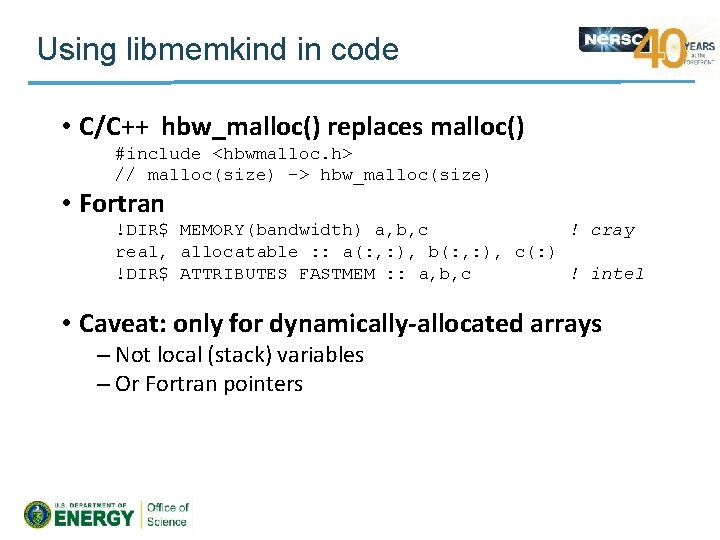
Using libmemkind in code • C/C++ hbw_malloc() replaces malloc() #include <hbwmalloc. h> // malloc(size) -> hbw_malloc(size) • Fortran !DIR$ MEMORY(bandwidth) a, b, c ! cray real, allocatable : : a(: , : ), b(: , : ), c(: ) !DIR$ ATTRIBUTES FASTMEM : : a, b, c ! intel • Caveat: only for dynamically-allocated arrays – Not local (stack) variables – Or Fortran pointers
Using libmemkind in code • Which arrays to put in MCDRAM? – Vtune memory-access measurements: – amplxe-cl -collect memory-access …
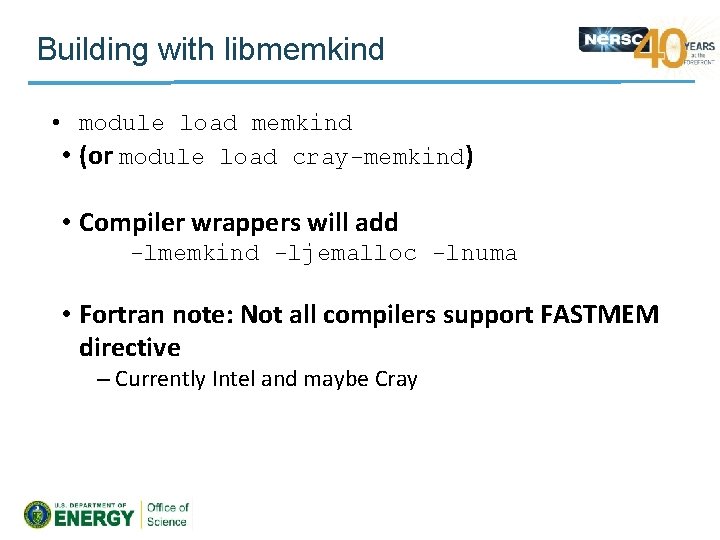
Building with libmemkind • module load memkind • (or module load cray-memkind) • Compiler wrappers will add -lmemkind -ljemalloc -lnuma • Fortran note: Not all compilers support FASTMEM directive – Currently Intel and maybe Cray
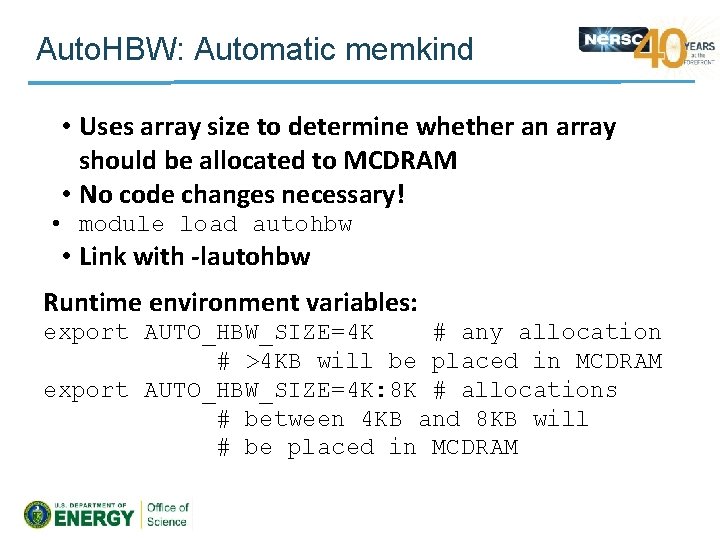
Auto. HBW: Automatic memkind • Uses array size to determine whether an array should be allocated to MCDRAM • No code changes necessary! • module load autohbw • Link with -lautohbw Runtime environment variables: export AUTO_HBW_SIZE=4 K # any allocation # >4 KB will be placed in MCDRAM export AUTO_HBW_SIZE=4 K: 8 K # allocations # between 4 KB and 8 KB will # be placed in MCDRAM
Don’t Panic! In Summary: • Build on login nodes (like you do now) • Use provided libraries (like you probably do now) • Here’s the new bit: • module swap craype-haswell craype-mic-knl – For KNL-specific executables, or • CC -ax. MIC-AVX 512, CORE-AVX 2. . . – For Haswell/KNL portability And: • Think about MCDRAM – numactl, memkind, autohbm
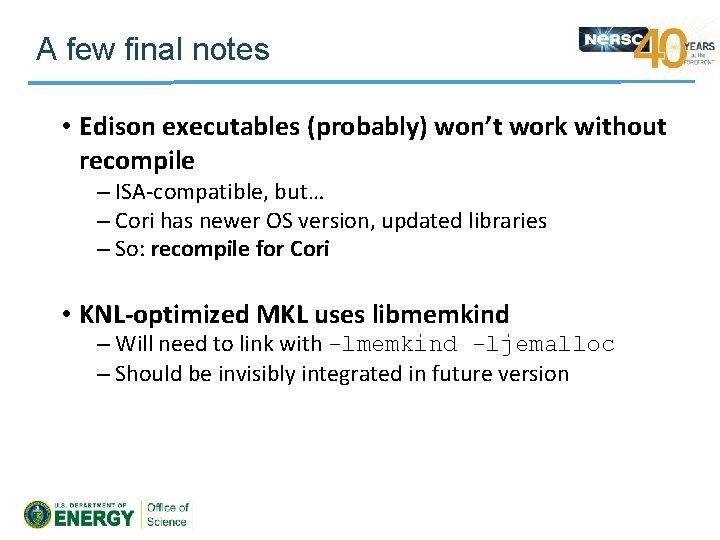
A few final notes • Edison executables (probably) won’t work without recompile – ISA-compatible, but… – Cori has newer OS version, updated libraries – So: recompile for Cori • KNL-optimized MKL uses libmemkind – Will need to link with -lmemkind -ljemalloc – Should be invisibly integrated in future version
Running jobs on Cori KNL nodes Zhengji Zhao - 30 -
Agenda • • What’s new on KNL nodes Process/thread/memory affinity Sample job scripts Summary - 31 -
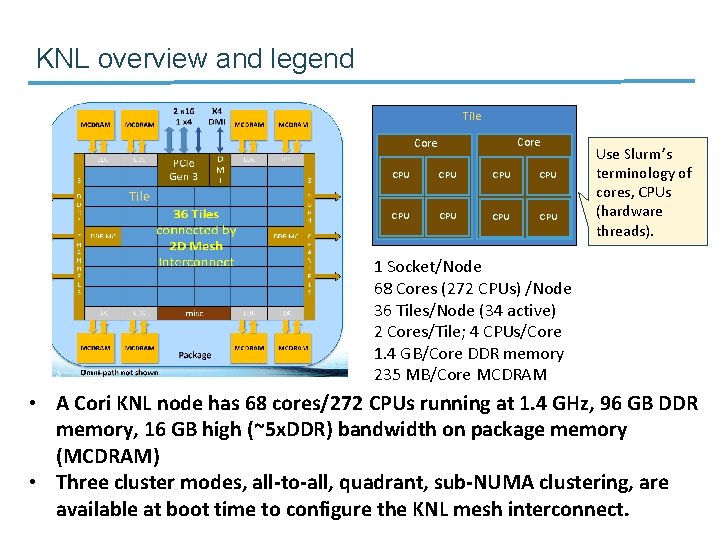
KNL overview and legend Tile Core CPU CPU CPU Use Slurm’s terminology of cores, CPUs (hardware threads). 1 Socket/Node 68 Cores (272 CPUs) /Node 36 Tiles/Node (34 active) 2 Cores/Tile; 4 CPUs/Core 1. 4 GB/Core DDR memory 235 MB/Core MCDRAM • A Cori KNL node has 68 cores/272 CPUs running at 1. 4 GHz, 96 GB DDR memory, 16 GB high (~5 x. DDR) bandwidth on package memory (MCDRAM) • Three cluster modes, all-to-all, quadrant, sub-NUMA clustering, are available at boot time to configure the KNL mesh interconnect. - 32 -
KNL overview – MCDRAM modes 96 GB • No source code changes • Code changes required • Combination of the needed • Exposed as a NUMA node cache and flat modes • Misses are expensive • Access via memkind library, job launchers, and/or numactl MCDRAM can be configured in three different modes at boot time - cache, flat, and hybrid modes - 33 -
with Cori Haswell nodes from the perspective of running jobs) 1. A lot more (slower) cores on the node 2. Much reduced per core memory 3. Dynamically configurable NUMA and MCDRAM modes … - 34 -
A proper process/thread/memory affinity is the basis for optimal performance • Process affinity (or CPU pinning): bind a (MPI) process to a CPU or a range of CPUs on the node, so that the process executes within the designated CPUs instead of drifting around to other CPUs on the node. • Thread affinity: fine pin each thread of a process to a CPU or CPUs within the CPUs that are designated to the process. – Threads live in the process that owns them, so the process and thread affinity are not separable. • Memory affinity: restrict processes to allocate memories from the designated NUMA nodes only rather than any NUMA nodes. - 35 -
The minimum goal of process/thread/memory affinity is to achieve best resource utilization and to avoid NUMA performance penalty • Spread MPI tasks and threads onto the cores and CPUs on the nodes as evenly as possible so that no cores and CPUs are oversubscribed while others stay idle. This can ensure the resources available on the node, such as cores, CPUs, NUMA nodes, memory and network bandwidths, etc. , can be best utilized. • Avoid accessing remote NUMA nodes as much as possible so to avoid performance penalty. • In context of KNL, enable and control the MCDRAM access. - 36 -
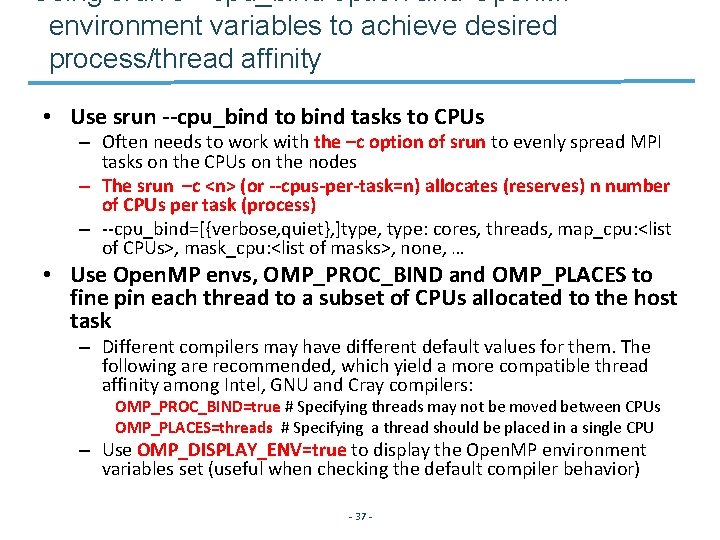
Using srun’s --cpu_bind option and Open. MP environment variables to achieve desired process/thread affinity • Use srun --cpu_bind to bind tasks to CPUs – Often needs to work with the –c option of srun to evenly spread MPI tasks on the CPUs on the nodes – The srun –c <n> (or --cpus-per-task=n) allocates (reserves) n number of CPUs per task (process) – --cpu_bind=[{verbose, quiet}, ]type, type: cores, threads, map_cpu: <list of CPUs>, mask_cpu: <list of masks>, none, … • Use Open. MP envs, OMP_PROC_BIND and OMP_PLACES to fine pin each thread to a subset of CPUs allocated to the host task – Different compilers may have different default values for them. The following are recommended, which yield a more compatible thread affinity among Intel, GNU and Cray compilers: OMP_PROC_BIND=true # Specifying threads may not be moved between CPUs OMP_PLACES=threads # Specifying a thread should be placed in a single CPU – Use OMP_DISPLAY_ENV=true to display the Open. MP environment variables set (useful when checking the default compiler behavior) - 37 -
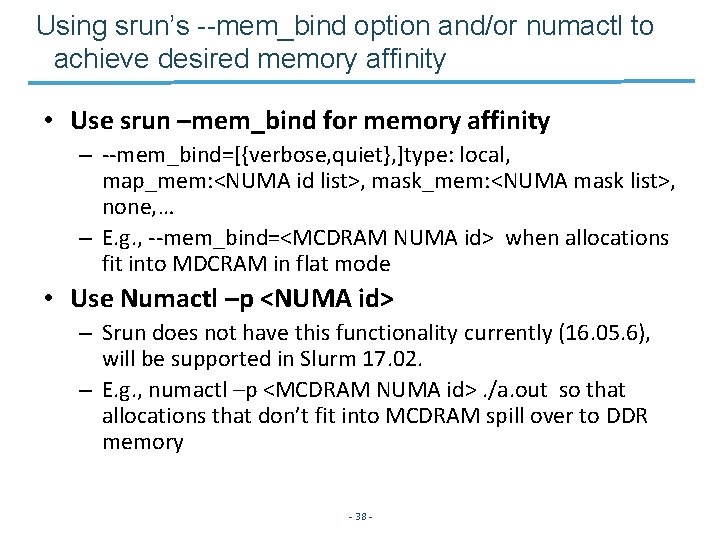
Using srun’s --mem_bind option and/or numactl to achieve desired memory affinity • Use srun –mem_bind for memory affinity – --mem_bind=[{verbose, quiet}, ]type: local, map_mem: <NUMA id list>, mask_mem: <NUMA mask list>, none, … – E. g. , --mem_bind=<MCDRAM NUMA id> when allocations fit into MDCRAM in flat mode • Use Numactl –p <NUMA id> – Srun does not have this functionality currently (16. 05. 6), will be supported in Slurm 17. 02. – E. g. , numactl –p <MCDRAM NUMA id>. /a. out so that allocations that don’t fit into MCDRAM spill over to DDR memory - 38 -
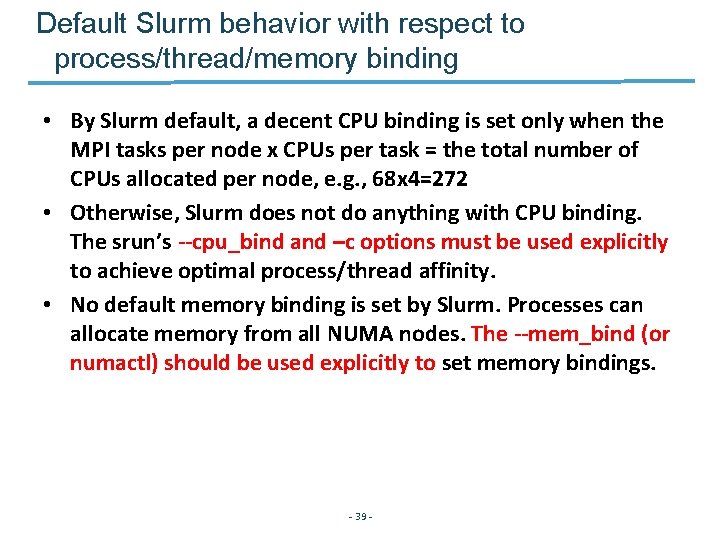
Default Slurm behavior with respect to process/thread/memory binding • By Slurm default, a decent CPU binding is set only when the MPI tasks per node x CPUs per task = the total number of CPUs allocated per node, e. g. , 68 x 4=272 • Otherwise, Slurm does not do anything with CPU binding. The srun’s --cpu_bind and –c options must be used explicitly to achieve optimal process/thread affinity. • No default memory binding is set by Slurm. Processes can allocate memory from all NUMA nodes. The --mem_bind (or numactl) should be used explicitly to set memory bindings. - 39 -
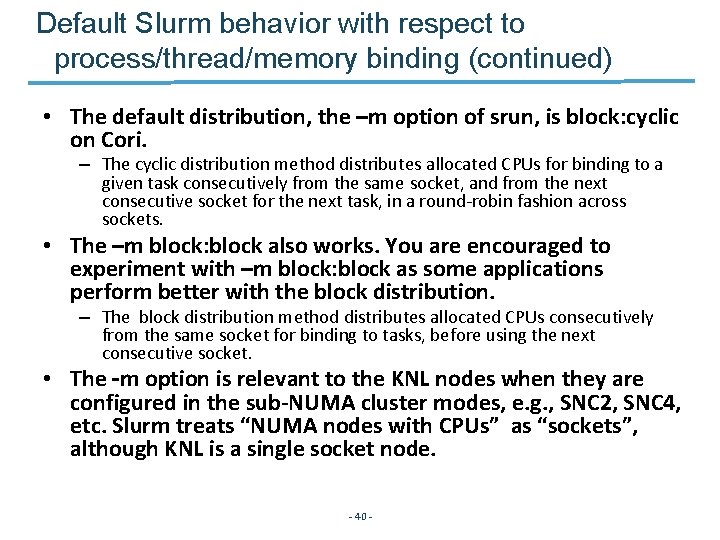
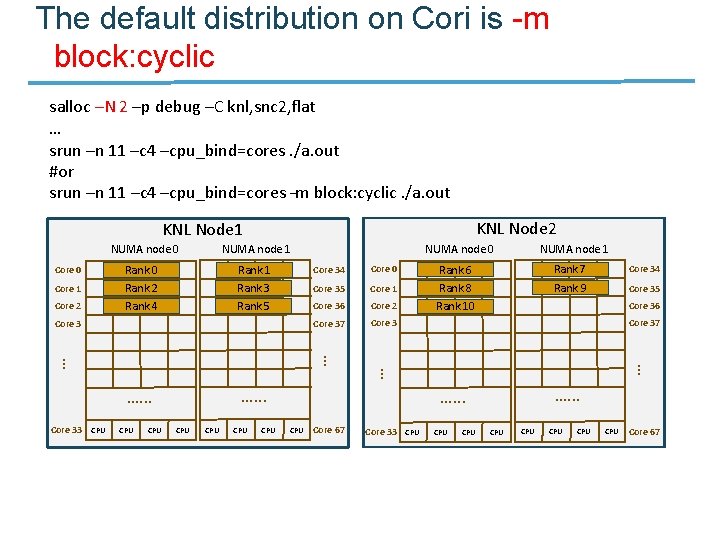
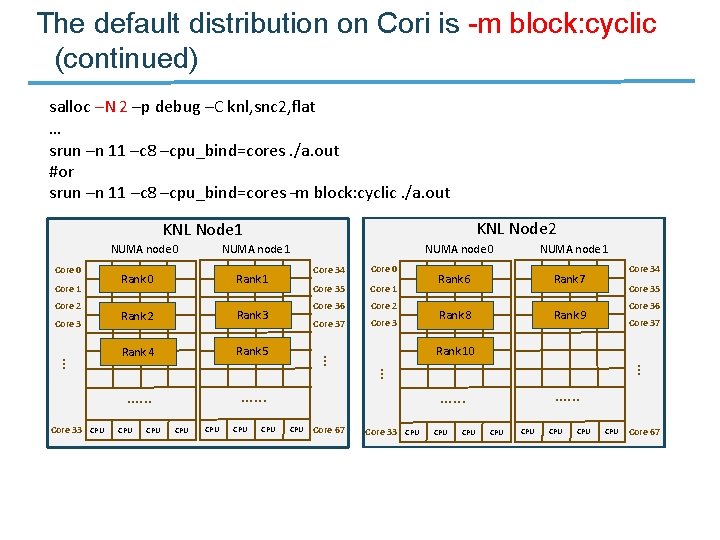
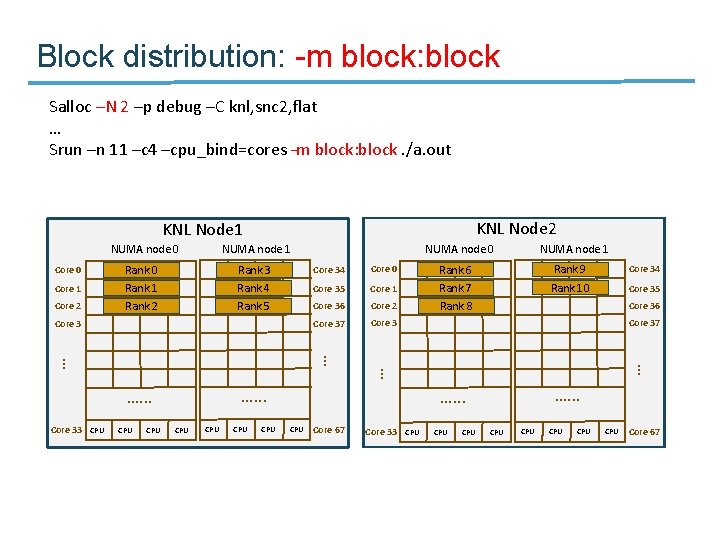
Default Slurm behavior with respect to process/thread/memory binding (continued) • The default distribution, the –m option of srun, is block: cyclic on Cori. – The cyclic distribution method distributes allocated CPUs for binding to a given task consecutively from the same socket, and from the next consecutive socket for the next task, in a round-robin fashion across sockets. • The –m block: block also works. You are encouraged to experiment with –m block: block as some applications perform better with the block distribution. – The block distribution method distributes allocated CPUs consecutively from the same socket for binding to tasks, before using the next consecutive socket. • The –m option is relevant to the KNL nodes when they are configured in the sub-NUMA cluster modes, e. g. , SNC 2, SNC 4, etc. Slurm treats “NUMA nodes with CPUs” as “sockets”, although KNL is a single socket node. - 40 -
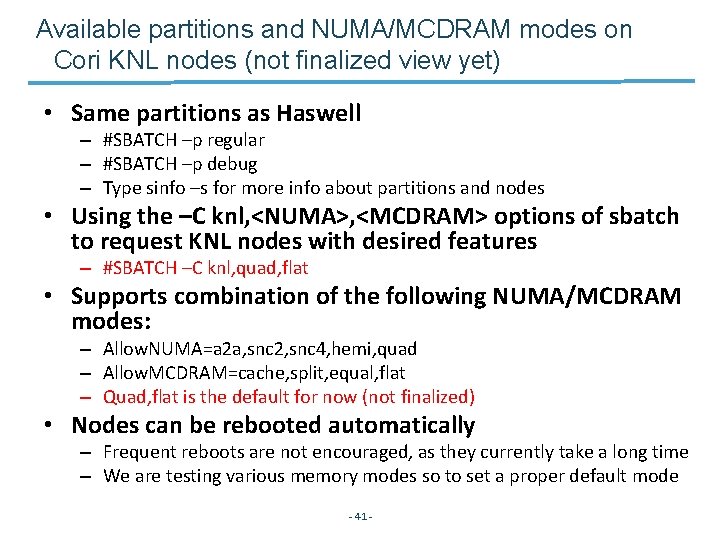
Available partitions and NUMA/MCDRAM modes on Cori KNL nodes (not finalized view yet) • Same partitions as Haswell – #SBATCH –p regular – #SBATCH –p debug – Type sinfo –s for more info about partitions and nodes • Using the –C knl, <NUMA>, <MCDRAM> options of sbatch to request KNL nodes with desired features – #SBATCH –C knl, quad, flat • Supports combination of the following NUMA/MCDRAM modes: – Allow. NUMA=a 2 a, snc 2, snc 4, hemi, quad – Allow. MCDRAM=cache, split, equal, flat – Quad, flat is the default for now (not finalized) • Nodes can be rebooted automatically – Frequent reboots are not encouraged, as they currently take a long time – We are testing various memory modes so to set a proper default mode - 41 -
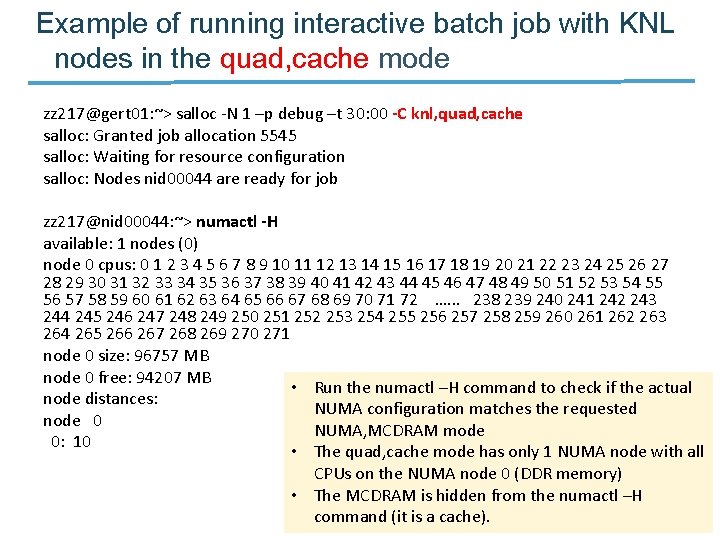
Example of running interactive batch job with KNL nodes in the quad, cache mode zz 217@gert 01: ~> salloc -N 1 –p debug –t 30: 00 -C knl, quad, cache salloc: Granted job allocation 5545 salloc: Waiting for resource configuration salloc: Nodes nid 00044 are ready for job zz 217@nid 00044: ~> numactl -H available: 1 nodes (0) node 0 cpus: 0 1 2 3 4 5 6 7 8 9 10 11 12 13 14 15 16 17 18 19 20 21 22 23 24 25 26 27 28 29 30 31 32 33 34 35 36 37 38 39 40 41 42 43 44 45 46 47 48 49 50 51 52 53 54 55 56 57 58 59 60 61 62 63 64 65 66 67 68 69 70 71 72 …. . . 238 239 240 241 242 243 244 245 246 247 248 249 250 251 252 253 254 255 256 257 258 259 260 261 262 263 264 265 266 267 268 269 270 271 node 0 size: 96757 MB node 0 free: 94207 MB • Run the numactl –H command to check if the actual node distances: NUMA configuration matches the requested node 0 NUMA, MCDRAM mode 0: 10 • The quad, cache mode has only 1 NUMA node with all CPUs on the NUMA node 0 (DDR memory) • The MCDRAM is hidden from the numactl –H - 42 command (it is a cache).
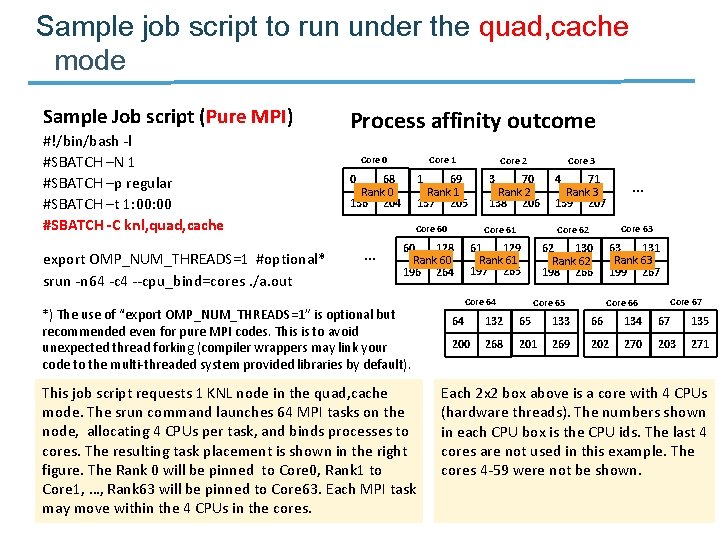
Sample job script to run under the quad, cache mode Sample Job script (Pure MPI) #!/bin/bash -l #SBATCH –N 1 #SBATCH –p regular #SBATCH –t 1: 00 #SBATCH -C knl, quad, cache export OMP_NUM_THREADS=1 #optional* srun -n 64 -c 4 --cpu_bind=cores. /a. out Process affinity outcome Core 1 Core 2 69 Rank 1 137 205 3 70 Rank 2 138 206 Core 0 0 68 Rank 0 136 204 1 Core 60 … Core 61 60 128 Rank 60 196 264 *) The use of “export OMP_NUM_THREADS=1” is optional but recommended even for pure MPI codes. This is to avoid unexpected thread forking (compiler wrappers may link your code to the multi-threaded system provided libraries by default). This job script requests 1 KNL node in the quad, cache mode. The srun command launches 64 MPI tasks on the node, allocating 4 CPUs per task, and binds processes to cores. The resulting task placement is shown in the right figure. The Rank 0 will be pinned to Core 0, Rank 1 to Core 1, …, Rank 63 will be pinned to Core 63. Each MPI task may move within the 4 CPUs in the cores. - 43 - Core 3 4 71 Rank 3 139 207 … Core 63 Core 62 61 129 Rank 61 197 265 Core 64 62 130 Rank 62 198 266 Core 65 63 131 Rank 63 199 267 Core 66 64 132 65 133 66 134 67 135 200 268 201 269 202 270 203 271 Each 2 x 2 box above is a core with 4 CPUs (hardware threads). The numbers shown in each CPU box is the CPU ids. The last 4 cores are not used in this example. The cores 4 -59 were not be shown.
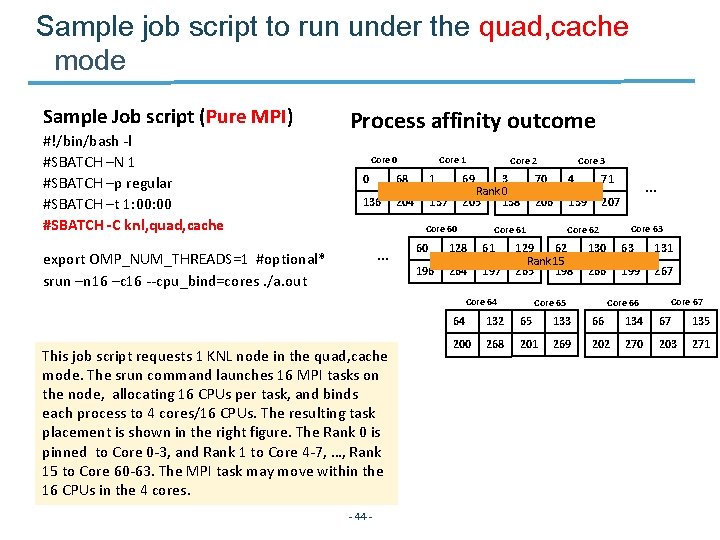
Sample job script to run under the quad, cache mode Sample Job script (Pure MPI) #!/bin/bash -l #SBATCH –N 1 #SBATCH –p regular #SBATCH –t 1: 00 #SBATCH -C knl, quad, cache Process affinity outcome Core 1 Core 0 0 68 1 136 204 137 69 3 Rank 0 205 138 Core 60 … export OMP_NUM_THREADS=1 #optional* srun –n 16 –c 16 --cpu_bind=cores. /a. out - 44 - 70 4 71 206 139 207 Core 61 60 128 61 196 264 197 … Core 63 Core 62 129 62 Rank 15 265 198 Core 64 This job script requests 1 KNL node in the quad, cache mode. The srun command launches 16 MPI tasks on the node, allocating 16 CPUs per task, and binds each process to 4 cores/16 CPUs. The resulting task placement is shown in the right figure. The Rank 0 is pinned to Core 0 -3, and Rank 1 to Core 4 -7, …, Rank 15 to Core 60 -63. The MPI task may move within the 16 CPUs in the 4 cores. Core 3 Core 2 130 63 131 266 199 267 Core 65 Core 67 Core 66 64 132 65 133 66 134 67 135 200 268 201 269 202 270 203 271
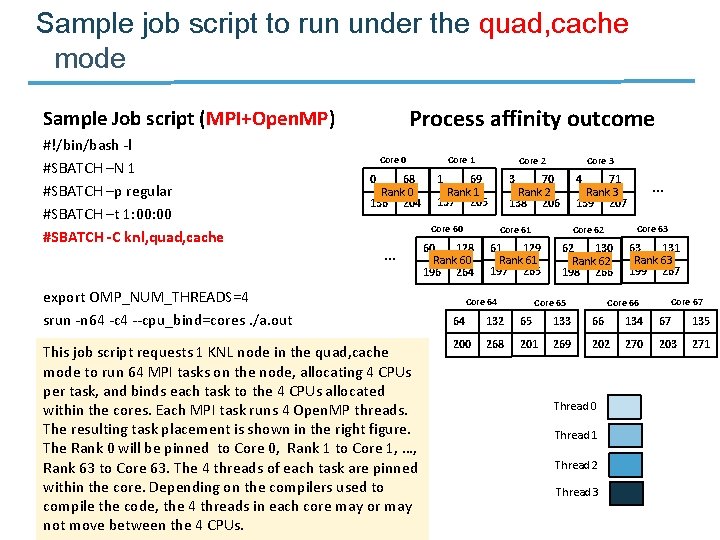
Sample job script to run under the quad, cache mode Process affinity outcome Sample Job script (MPI+Open. MP) #!/bin/bash -l #SBATCH –N 1 #SBATCH –p regular #SBATCH –t 1: 00 #SBATCH -C knl, quad, cache Core 1 Core 2 69 Rank 1 137 205 3 70 Rank 2 138 206 Core 0 0 68 Rank 0 136 204 … export OMP_NUM_THREADS=4 srun -n 64 -c 4 --cpu_bind=cores. /a. out This job script requests 1 KNL node in the quad, cache mode to run 64 MPI tasks on the node, allocating 4 CPUs per task, and binds each task to the 4 CPUs allocated within the cores. Each MPI task runs 4 Open. MP threads. The resulting task placement is shown in the right figure. The Rank 0 will be pinned to Core 0, Rank 1 to Core 1, …, Rank 63 to Core 63. The 4 threads of each task are pinned within the core. Depending on the compilers used to compile the code, the 4 threads in each core may or may not move between the 4 CPUs. - 45 - 1 Core 3 4 71 Rank 3 139 207 … Core 60 Core 61 Core 62 Core 63 60 128 Rank 60 196 264 61 129 Rank 61 197 265 62 130 Rank 62 198 266 63 131 Rank 63 199 267 Core 64 Core 65 Core 67 Core 66 64 132 65 133 66 134 67 135 200 268 201 269 202 270 203 271 Thread 0 Thread 1 Thread 2 Thread 3
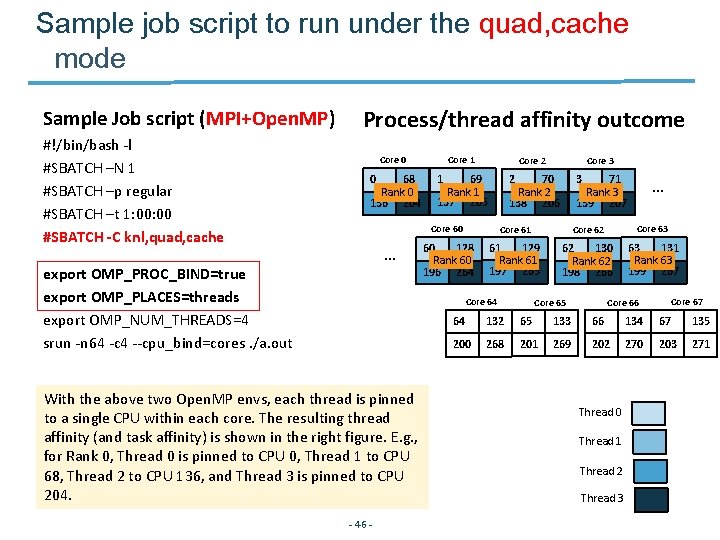
Sample job script to run under the quad, cache mode Sample Job script (MPI+Open. MP) #!/bin/bash -l #SBATCH –N 1 #SBATCH –p regular #SBATCH –t 1: 00 #SBATCH -C knl, quad, cache Process/thread affinity outcome Core 1 Core 2 69 Rank 1 137 205 2 70 Rank 2 138 206 Core 0 0 68 Rank 0 136 204 … export OMP_PROC_BIND=true export OMP_PLACES=threads export OMP_NUM_THREADS=4 srun -n 64 -c 4 --cpu_bind=cores. /a. out 1 - 46 - 3 71 Rank 3 139 207 … Core 60 Core 61 Core 62 Core 63 60 128 Rank 60 196 264 61 129 Rank 61 197 265 62 130 Rank 62 198 266 63 131 Rank 63 199 267 Core 64 With the above two Open. MP envs, each thread is pinned to a single CPU within each core. The resulting thread affinity (and task affinity) is shown in the right figure. E. g. , for Rank 0, Thread 0 is pinned to CPU 0, Thread 1 to CPU 68, Thread 2 to CPU 136, and Thread 3 is pinned to CPU 204. Core 3 Core 65 Core 67 Core 66 64 132 65 133 66 134 67 135 200 268 201 269 202 270 203 271 Thread 0 Thread 1 Thread 2 Thread 3
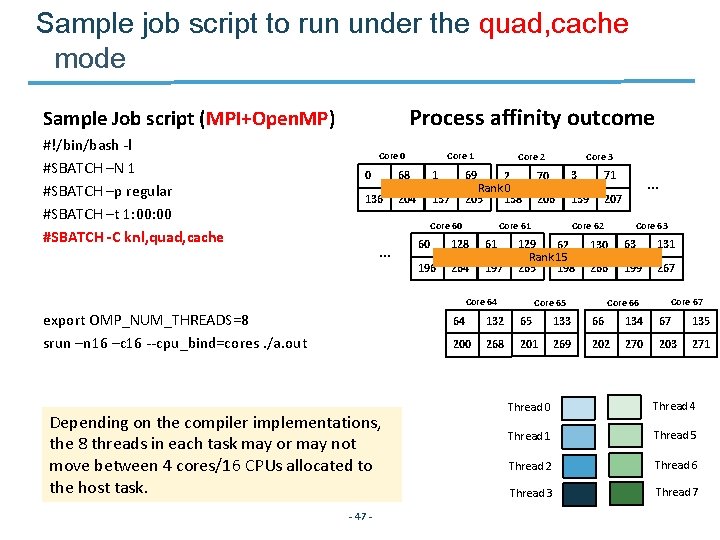
Sample job script to run under the quad, cache mode Process affinity outcome Sample Job script (MPI+Open. MP) #!/bin/bash -l #SBATCH –N 1 #SBATCH –p regular #SBATCH –t 1: 00 #SBATCH -C knl, quad, cache Core 1 Core 0 0 68 1 136 204 137 69 2 Rank 0 205 138 Core 60 … Depending on the compiler implementations, the 8 threads in each task may or may not move between 4 cores/16 CPUs allocated to the host task. - 47 - 70 3 71 206 139 207 Core 61 60 128 61 196 264 197 … Core 63 Core 62 129 62 Rank 15 265 198 Core 64 export OMP_NUM_THREADS=8 srun –n 16 –c 16 --cpu_bind=cores. /a. out Core 3 Core 2 130 63 131 266 199 267 Core 65 Core 67 Core 66 64 132 65 133 66 134 67 135 200 268 201 269 202 270 203 271 Thread 0 Thread 4 Thread 1 Thread 5 Thread 2 Thread 6 Thread 3 Thread 7
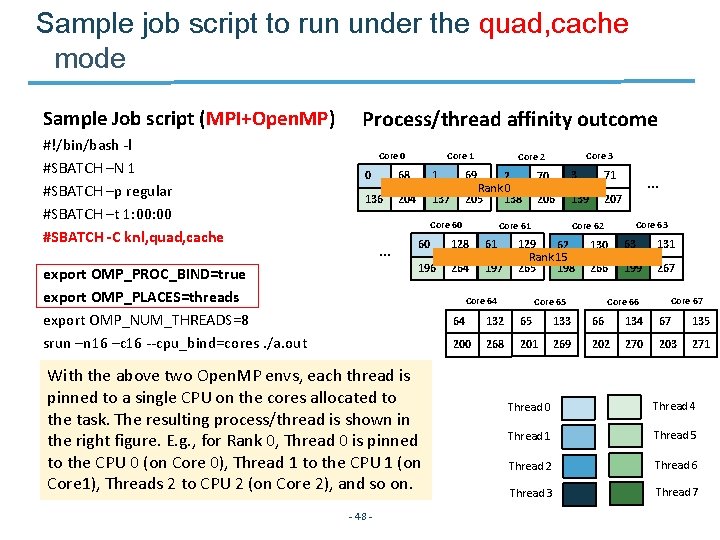
Sample job script to run under the quad, cache mode Sample Job script (MPI+Open. MP) #!/bin/bash -l #SBATCH –N 1 #SBATCH –p regular #SBATCH –t 1: 00 #SBATCH -C knl, quad, cache Process/thread affinity outcome Core 1 Core 0 0 68 1 136 204 137 69 2 Rank 0 205 138 Core 60 … export OMP_PROC_BIND=true export OMP_PLACES=threads export OMP_NUM_THREADS=8 srun –n 16 –c 16 --cpu_bind=cores. /a. out 128 61 3 71 206 139 207 196 264 197 … Core 63 Core 62 129 62 Rank 15 265 198 Core 64 - 48 - 70 Core 61 60 With the above two Open. MP envs, each thread is pinned to a single CPU on the cores allocated to the task. The resulting process/thread is shown in the right figure. E. g. , for Rank 0, Thread 0 is pinned to the CPU 0 (on Core 0), Thread 1 to the CPU 1 (on Core 1), Threads 2 to CPU 2 (on Core 2), and so on. Core 3 Core 2 130 63 131 266 199 267 Core 65 Core 67 Core 66 64 132 65 133 66 134 67 135 200 268 201 269 202 270 203 271 Thread 0 Thread 4 Thread 1 Thread 5 Thread 2 Thread 6 Thread 3 Thread 7
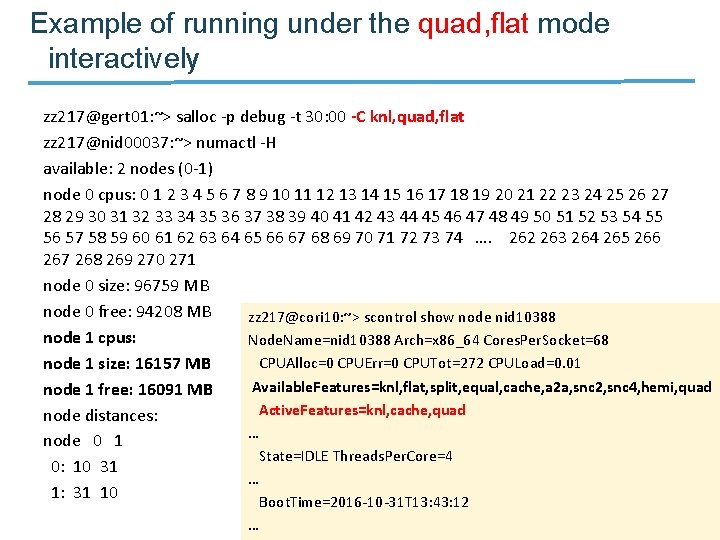
Example of running under the quad, flat mode interactively zz 217@gert 01: ~> salloc -p debug -t 30: 00 -C knl, quad, flat zz 217@nid 00037: ~> numactl -H available: 2 nodes (0 -1) node 0 cpus: 0 1 2 3 4 5 6 7 8 9 10 11 12 13 14 15 16 17 18 19 20 21 22 23 24 25 26 27 28 29 30 31 32 33 34 35 36 37 38 39 40 41 42 43 44 45 46 47 48 49 50 51 52 53 54 55 56 57 58 59 60 61 62 63 64 65 66 67 68 69 70 71 72 73 74 …. 262 263 264 265 266 267 268 269 270 271 node 0 size: 96759 MB node 0 free: 94208 MB zz 217@cori 10: ~> scontrol show node nid 10388 node 1 cpus: Node. Name=nid 10388 Arch=x 86_64 Cores. Per. Socket=68 CPUAlloc=0 CPUErr=0 CPUTot=272 CPULoad=0. 01 node 1 size: 16157 MB Available. Features=knl, flat, split, equal, cache, a 2 a, snc 2, snc 4, hemi, quad node 1 free: 16091 MB Active. Features=knl, cache, quad node distances: … node 0 1 State=IDLE Threads. Per. Core=4 0: 10 31 … 1: 31 10 Boot. Time=2016 -10 -31 T 13: 43: 12 … - 49 -
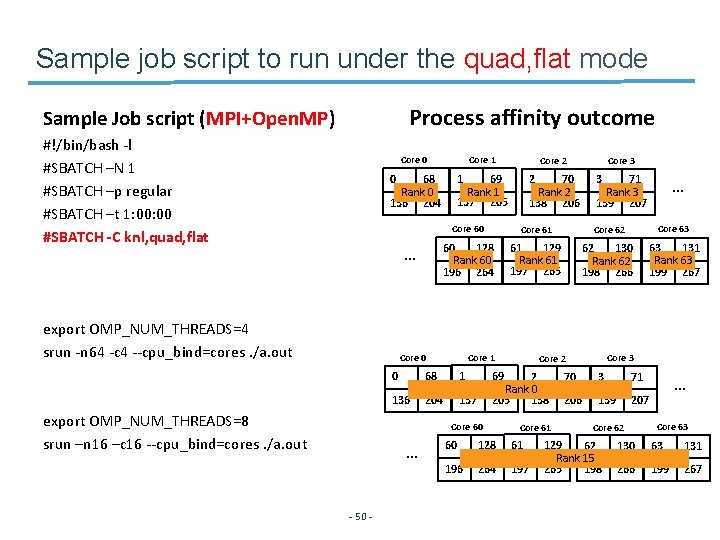
Sample job script to run under the quad, flat mode Process affinity outcome Sample Job script (MPI+Open. MP) #!/bin/bash -l #SBATCH –N 1 #SBATCH –p regular #SBATCH –t 1: 00 #SBATCH -C knl, quad, flat Core 1 Core 2 69 Rank 1 137 205 2 70 Rank 2 138 206 Core 0 1 0 68 Rank 0 136 204 … export OMP_NUM_THREADS=4 srun -n 64 -c 4 --cpu_bind=cores. /a. out … Core 62 Core 63 60 128 Rank 60 196 264 61 129 Rank 61 197 265 62 130 Rank 62 198 266 63 131 Rank 63 199 267 Core 1 68 1 136 204 137 Core 3 Core 2 69 2 Rank 0 205 138 Core 60 - 50 - 71 Rank 3 139 207 Core 61 0 … 3 Core 60 Core 0 export OMP_NUM_THREADS=8 srun –n 16 –c 16 --cpu_bind=cores. /a. out Core 3 Core 61 60 128 61 196 264 197 70 3 71 206 139 207 Core 62 129 62 Rank 15 265 198 … Core 63 130 63 131 266 199 267
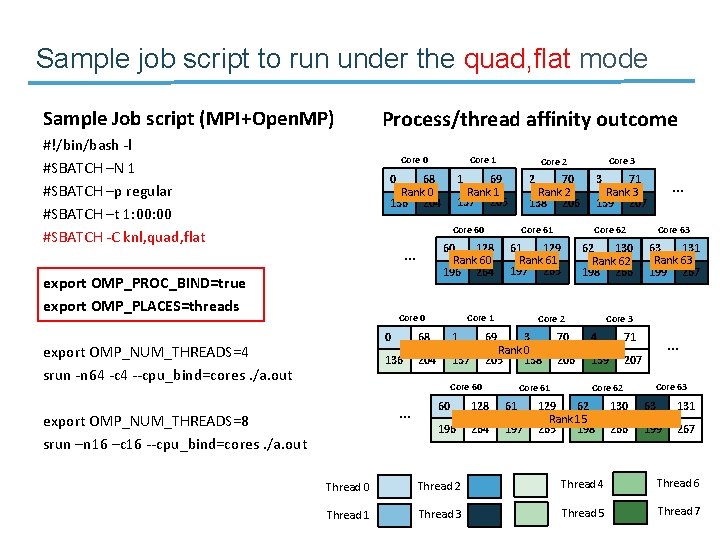
Sample job script to run under the quad, flat mode Sample Job script (MPI+Open. MP) #!/bin/bash -l #SBATCH –N 1 #SBATCH –p regular #SBATCH –t 1: 00 #SBATCH -C knl, quad, flat Process/thread affinity outcome Core 1 Core 2 69 Rank 1 137 205 2 70 Rank 2 138 206 Core 0 1 0 68 Rank 0 136 204 … export OMP_PROC_BIND=true export OMP_PLACES=threads … Core 62 Core 63 60 128 Rank 60 196 264 61 129 Rank 61 197 265 62 130 Rank 62 198 266 63 131 Rank 63 199 267 Core 1 68 1 136 204 137 Core 3 Core 2 69 3 Rank 0 205 138 Core 60 export OMP_NUM_THREADS=8 srun –n 16 –c 16 --cpu_bind=cores. /a. out 71 Rank 3 139 207 Core 61 0 … 3 Core 60 Core 0 export OMP_NUM_THREADS=4 srun -n 64 -c 4 --cpu_bind=cores. /a. out Core 3 Core 61 60 128 61 196 264 197 70 4 71 206 139 207 … Core 63 Core 62 129 62 Rank 15 265 198 130 63 131 266 199 267 Thread 0 Thread 2 Thread 4 Thread 6 Thread 1 - 51 - Thread 3 Thread 5 Thread 7
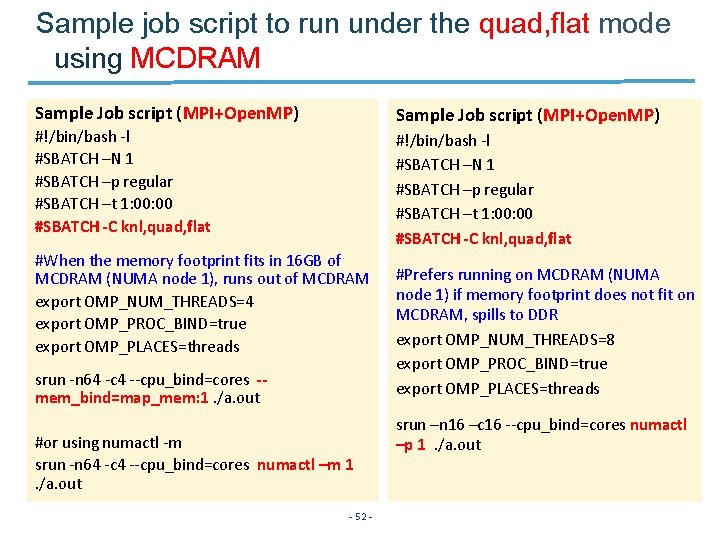
Sample job script to run under the quad, flat mode using MCDRAM Sample Job script (MPI+Open. MP) #!/bin/bash -l #SBATCH –N 1 #SBATCH –p regular #SBATCH –t 1: 00: 00 #SBATCH -C knl, quad, flat #When the memory footprint fits in 16 GB of MCDRAM (NUMA node 1), runs out of MCDRAM export OMP_NUM_THREADS=4 export OMP_PROC_BIND=true export OMP_PLACES=threads srun -n 64 -c 4 --cpu_bind=cores -mem_bind=map_mem: 1. /a. out #or using numactl -m srun -n 64 -c 4 --cpu_bind=cores numactl –m 1 . /a. out - 52 - #Prefers running on MCDRAM (NUMA node 1) if memory footprint does not fit on MCDRAM, spills to DDR export OMP_NUM_THREADS=8 export OMP_PROC_BIND=true export OMP_PLACES=threads srun –n 16 –c 16 --cpu_bind=cores numactl –p 1 . /a. out
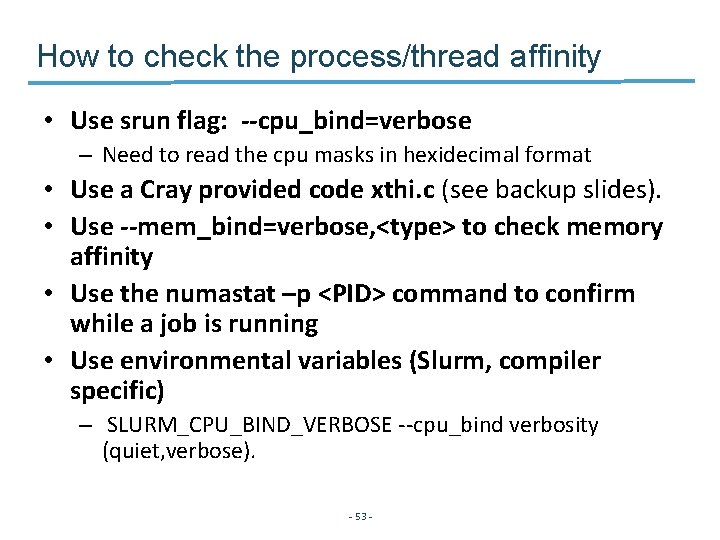
How to check the process/thread affinity • Use srun flag: --cpu_bind=verbose – Need to read the cpu masks in hexidecimal format • Use a Cray provided code xthi. c (see backup slides). • Use --mem_bind=verbose, <type> to check memory affinity • Use the numastat –p <PID> command to confirm while a job is running • Use environmental variables (Slurm, compiler specific) – SLURM_CPU_BIND_VERBOSE --cpu_bind verbosity (quiet, verbose). - 53 -
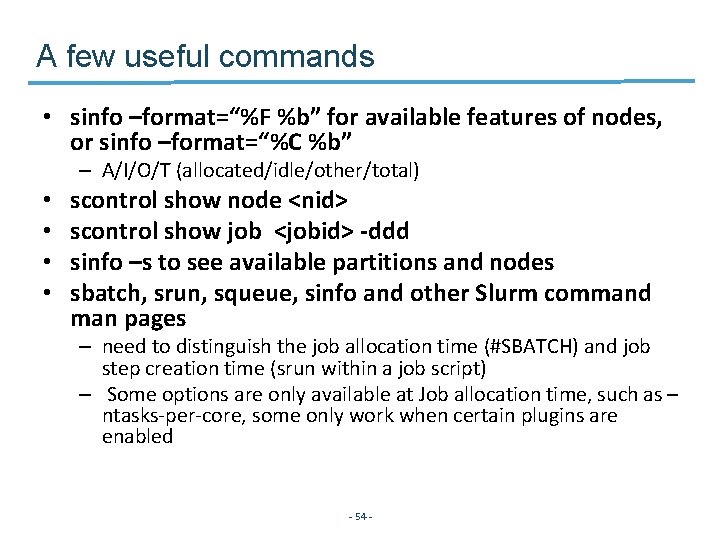
A few useful commands • sinfo –format=“%F %b” for available features of nodes, or sinfo –format=“%C %b” – A/I/O/T (allocated/idle/other/total) • • scontrol show node <nid> scontrol show job <jobid> -ddd sinfo –s to see available partitions and nodes sbatch, srun, squeue, sinfo and other Slurm command man pages – need to distinguish the job allocation time (#SBATCH) and job step creation time (srun within a job script) – Some options are only available at Job allocation time, such as – ntasks-per-core, some only work when certain plugins are enabled - 54 -
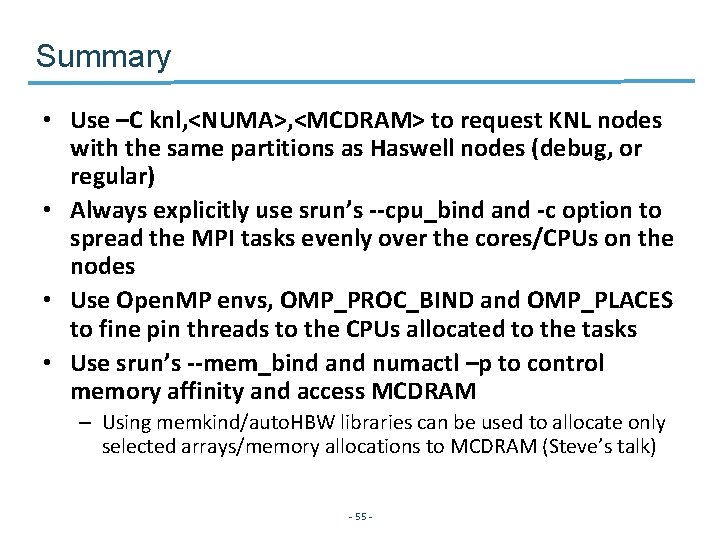
Summary • Use –C knl, <NUMA>, <MCDRAM> to request KNL nodes with the same partitions as Haswell nodes (debug, or regular) • Always explicitly use srun’s --cpu_bind and -c option to spread the MPI tasks evenly over the cores/CPUs on the nodes • Use Open. MP envs, OMP_PROC_BIND and OMP_PLACES to fine pin threads to the CPUs allocated to the tasks • Use srun’s --mem_bind and numactl –p to control memory affinity and access MCDRAM – Using memkind/auto. HBW libraries can be used to allocate only selected arrays/memory allocations to MCDRAM (Steve’s talk) - 55 -
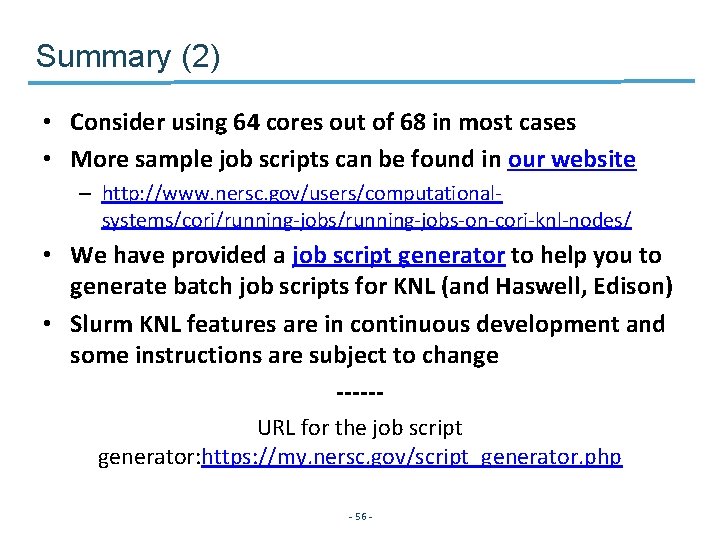
Summary (2) • Consider using 64 cores out of 68 in most cases • More sample job scripts can be found in our website – http: //www. nersc. gov/users/computationalsystems/cori/running-jobs-on-cori-knl-nodes/ • We have provided a job script generator to help you to generate batch job scripts for KNL (and Haswell, Edison) • Slurm KNL features are in continuous development and some instructions are subject to change -----URL for the job script generator: https: //my. nersc. gov/script_generator. php - 56 -
Backup slides - 57 -
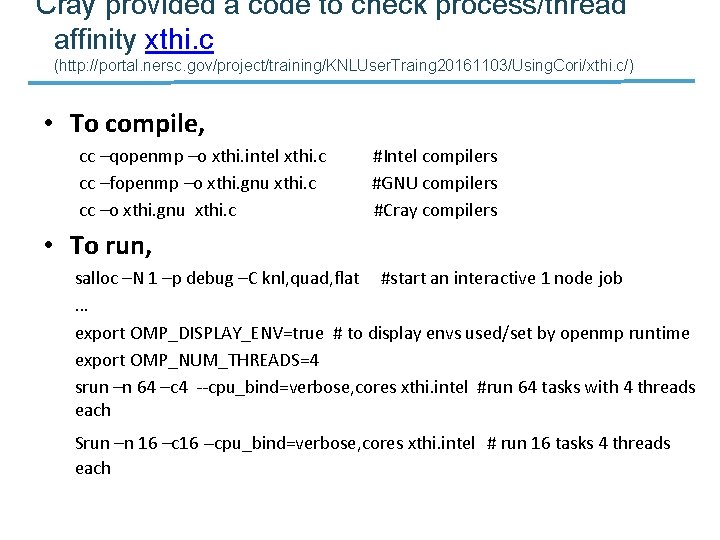
Cray provided a code to check process/thread affinity xthi. c (http: //portal. nersc. gov/project/training/KNLUser. Traing 20161103/Using. Cori/xthi. c/) • To compile, cc –qopenmp –o xthi. intel xthi. c #Intel compilers cc –fopenmp –o xthi. gnu xthi. c #GNU compilers cc –o xthi. gnu xthi. c #Cray compilers • To run, salloc –N 1 –p debug –C knl, quad, flat #start an interactive 1 node job … export OMP_DISPLAY_ENV=true # to display envs used/set by openmp runtime export OMP_NUM_THREADS=4 srun –n 64 –c 4 --cpu_bind=verbose, cores xthi. intel #run 64 tasks with 4 threads each Srun –n 16 –c 16 --cpu_bind=verbose, cores xthi. intel # run 16 tasks 4 threads each
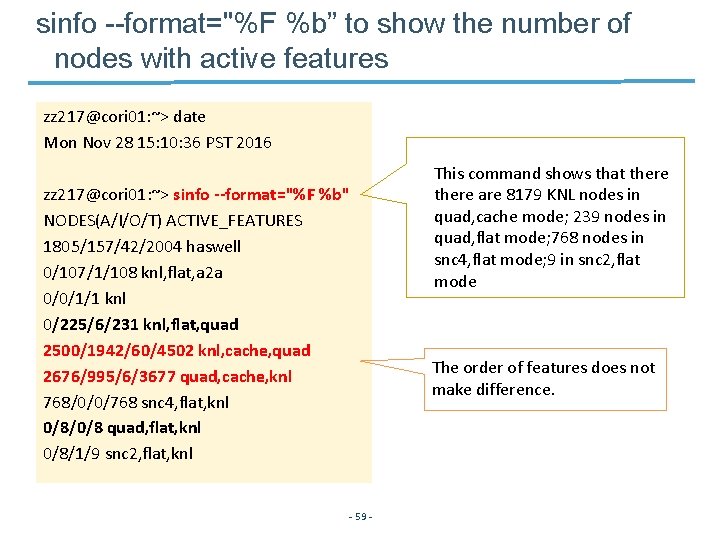
sinfo --format="%F %b” to show the number of nodes with active features zz 217@cori 01: ~> date Mon Nov 28 15: 10: 36 PST 2016 zz 217@cori 01: ~> sinfo --format="%F %b" NODES(A/I/O/T) ACTIVE_FEATURES 1805/157/42/2004 haswell 0/107/1/108 knl, flat, a 2 a 0/0/1/1 knl 0/225/6/231 knl, flat, quad 2500/1942/60/4502 knl, cache, quad 2676/995/6/3677 quad, cache, knl 768/0/0/768 snc 4, flat, knl 0/8/0/8 quad, flat, knl 0/8/1/9 snc 2, flat, knl - 59 - This command shows that there are 8179 KNL nodes in quad, cache mode; 239 nodes in quad, flat mode; 768 nodes in snc 4, flat mode; 9 in snc 2, flat mode The order of features does not make difference.
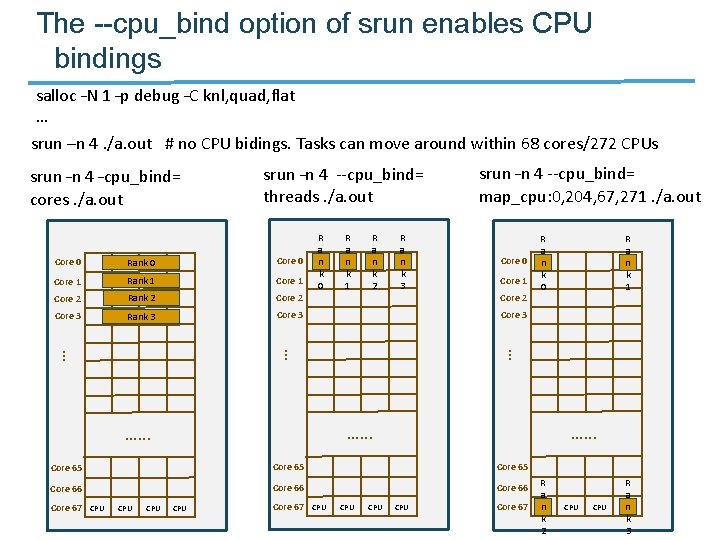
The --cpu_bind option of srun enables CPU bindings salloc –N 1 –p debug –C knl, quad, flat … srun –n 4. /a. out # no CPU bidings. Tasks can move around within 68 cores/272 CPUs srun –n 4 --cpu_bind= threads. /a. out Rank 0 Core 1 Rank 1 Core 2 Rank 2 Core 3 Rank 3 Core 3 R a n k 1 R a n k 2 R a n k 3 … Core 0 Core 1 Core 2 …. . . Core 65 Core 66 CPU Core 67 R a n k 1 …. . . Core 65 Core 67 R a n k 0 Core 3 … Core 0 R a n k 0 srun –n 4 --cpu_bind= map_cpu: 0, 204, 67, 271. /a. out … srun –n 4 –cpu_bind= cores. /a. out CPU R R a a n n Core 67 CPU k k 3 2
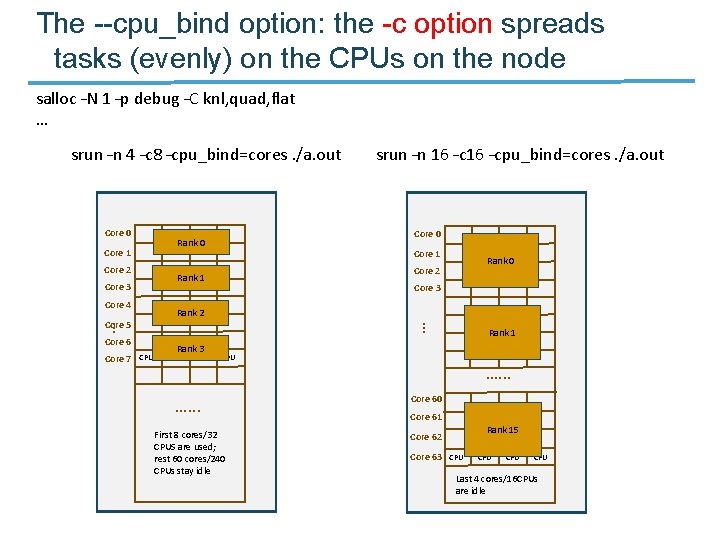
The --cpu_bind option: the -c option spreads tasks (evenly) on the CPUs on the node salloc –N 1 –p debug –C knl, quad, flat … srun –n 4 –c 8 –cpu_bind=cores. /a. out Core 0 Core 1 Core 2 Core 3 Core 4 Rank 1 Core 6 Core 7 Core 0 Core 1 Core 2 Rank 0 Core 3 Rank 2 … … Core 5 Rank 0 srun –n 16 –cpu_bind=cores. /a. out Rank 1 Rank 3 CPU …. . . First 8 cores/32 CPUS are used; rest 60 cores/240 CPUs stay idle …. . . Core 60 Core 61 Core 62 Core 63 Rank 15 CPU Last 4 cores/16 CPUs are idle
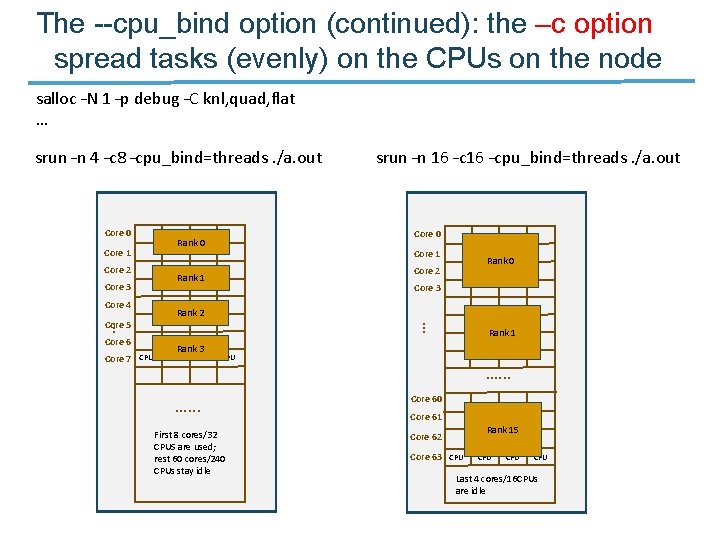
The --cpu_bind option (continued): the –c option spread tasks (evenly) on the CPUs on the node salloc –N 1 –p debug –C knl, quad, flat … srun –n 4 –c 8 –cpu_bind=threads. /a. out Core 0 Core 1 Core 2 Core 3 Core 4 Rank 1 Core 6 Core 7 Core 0 Core 1 Core 2 Rank 0 Core 3 Rank 2 … … Core 5 Rank 0 srun –n 16 –cpu_bind=threads. /a. out Rank 1 Rank 3 CPU …. . . First 8 cores/32 CPUS are used; rest 60 cores/240 CPUs stay idle …. . . Core 60 Core 61 Core 62 Core 63 Rank 15 CPU Last 4 cores/16 CPUs are idle
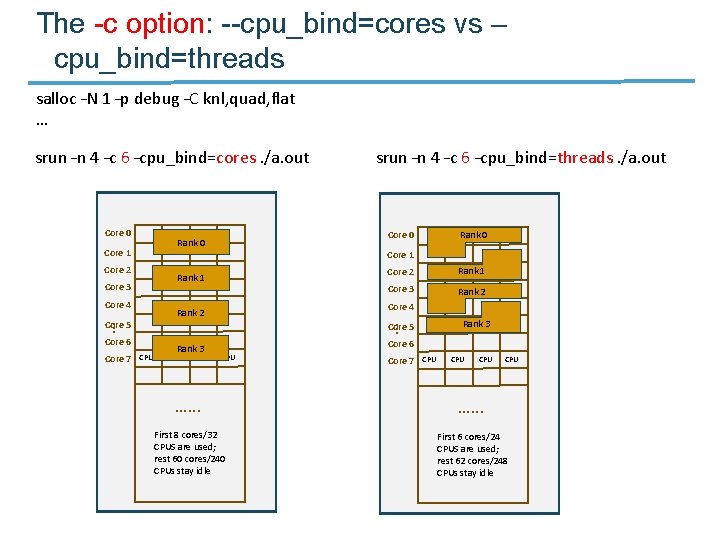
The -c option: --cpu_bind=cores vs – cpu_bind=threads salloc –N 1 –p debug –C knl, quad, flat … srun –n 4 –c 6 –cpu_bind=cores. /a. out Core 0 Core 1 Core 2 Core 3 Core 4 Core 6 Core 7 Core 0 Rank 0 Core 1 Rank 2 Core 2 Rank 1 Core 3 Rank 2 Core 4 Core 5 … … Core 5 Rank 0 srun –n 4 –c 6 –cpu_bind=threads. /a. out Rank 3 CPU Rank 3 Core 6 Core 7 CPU …. . . First 8 cores/32 CPUS are used; rest 60 cores/240 CPUs stay idle First 6 cores/24 CPUS are used; rest 62 cores/248 CPUs stay idle
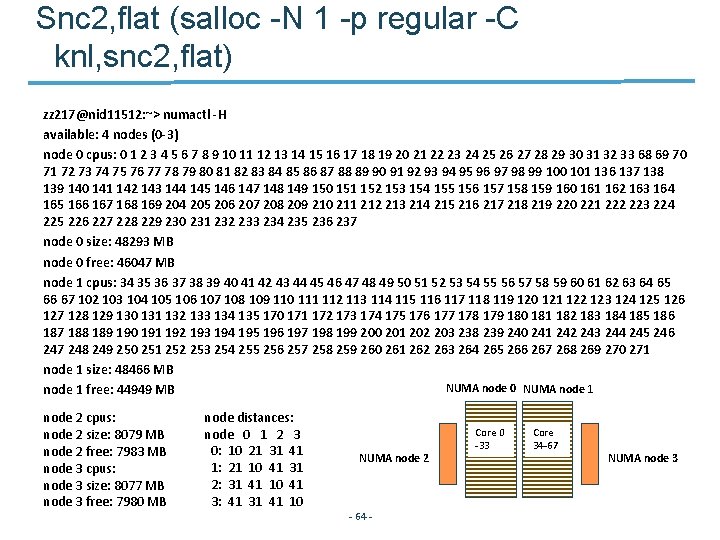
Snc 2, flat (salloc -N 1 -p regular -C knl, snc 2, flat) zz 217@nid 11512: ~> numactl -H available: 4 nodes (0 -3) node 0 cpus: 0 1 2 3 4 5 6 7 8 9 10 11 12 13 14 15 16 17 18 19 20 21 22 23 24 25 26 27 28 29 30 31 32 33 68 69 70 71 72 73 74 75 76 77 78 79 80 81 82 83 84 85 86 87 88 89 90 91 92 93 94 95 96 97 98 99 100 101 136 137 138 139 140 141 142 143 144 145 146 147 148 149 150 151 152 153 154 155 156 157 158 159 160 161 162 163 164 165 166 167 168 169 204 205 206 207 208 209 210 211 212 213 214 215 216 217 218 219 220 221 222 223 224 225 226 227 228 229 230 231 232 233 234 235 236 237 node 0 size: 48293 MB node 0 free: 46047 MB node 1 cpus: 34 35 36 37 38 39 40 41 42 43 44 45 46 47 48 49 50 51 52 53 54 55 56 57 58 59 60 61 62 63 64 65 66 67 102 103 104 105 106 107 108 109 110 111 112 113 114 115 116 117 118 119 120 121 122 123 124 125 126 127 128 129 130 131 132 133 134 135 170 171 172 173 174 175 176 177 178 179 180 181 182 183 184 185 186 187 188 189 190 191 192 193 194 195 196 197 198 199 200 201 202 203 238 239 240 241 242 243 244 245 246 247 248 249 250 251 252 253 254 255 256 257 258 259 260 261 262 263 264 265 266 267 268 269 270 271 node 1 size: 48466 MB NUMA node 0 NUMA node 1 free: 44949 MB node 2 cpus: node 2 size: 8079 MB node 2 free: 7983 MB node 3 cpus: node 3 size: 8077 MB node 3 free: 7980 MB node distances: node 0 1 2 3 0: 10 21 31 41 1: 21 10 41 31 2: 31 41 10 41 3: 41 31 41 10 NUMA node 2 - 64 - Core 0 -33 Core 34 -67 NUMA node 3
The default distribution on Cori is -m block: cyclic salloc –N 2 –p debug –C knl, snc 2, flat … srun –n 11 –c 4 –cpu_bind=cores. /a. out #or srun –n 11 –c 4 –cpu_bind=cores –m block: cyclic. /a. out KNL Node 2 KNL Node 1 NUMA node 0 NUMA node 1 Core 0 Rank 1 Core 34 Core 0 Rank 6 Rank 7 Core 34 Core 1 Rank 2 Rank 4 Rank 3 Rank 5 Core 35 Core 1 Rank 8 Rank 9 Core 35 Core 36 Core 2 Rank 10 Core 37 Core 3 … … Core 33 Core 37 … Core 36 … Core 2 …. . . CPU CPU Core 67 Core 33 …. . . CPU CPU Core 67
The default distribution on Cori is -m block: cyclic (continued) salloc –N 2 –p debug –C knl, snc 2, flat … srun –n 11 –c 8 –cpu_bind=cores. /a. out #or srun –n 11 –c 8 –cpu_bind=cores –m block: cyclic. /a. out KNL Node 2 KNL Node 1 Core 2 Rank 0 Rank 1 Rank 2 Rank 3 Rank 4 Rank 5 …. . . CPU CPU Core 33 Core 34 Core 0 Core 35 Core 1 Core 36 Core 2 Core 37 Core 3 NUMA node 1 Rank 6 Rank 7 Rank 8 Rank 9 Core 67 Core 34 Core 35 Core 36 Core 37 Rank 10 … … Core 3 NUMA node 0 … Core 0 NUMA node 1 … NUMA node 0 Core 33 …. . . CPU CPU Core 67
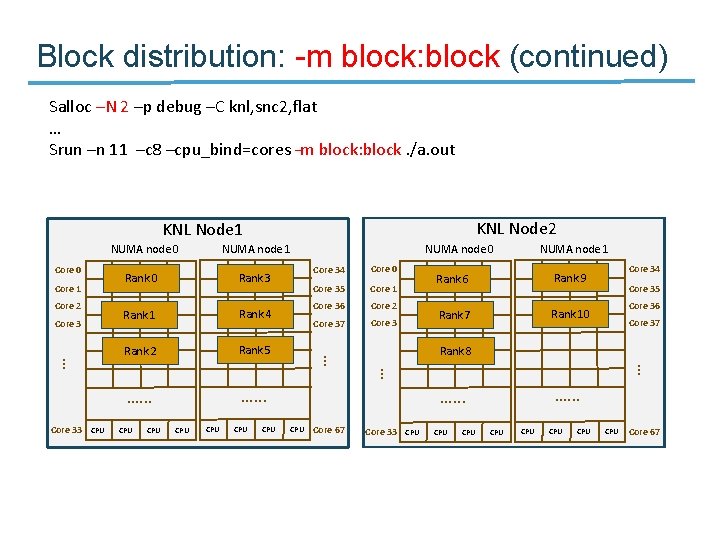
Block distribution: -m block: block Salloc –N 2 –p debug –C knl, snc 2, flat … Srun –n 11 –c 4 –cpu_bind=cores –m block: block. /a. out KNL Node 2 KNL Node 1 NUMA node 0 NUMA node 1 Core 0 Rank 3 Core 34 Core 0 Rank 6 Rank 9 Core 34 Core 1 Rank 2 Rank 4 Rank 5 Core 35 Core 1 Rank 7 Rank 10 Core 35 Core 36 Core 2 Rank 8 Core 37 Core 3 … … Core 33 Core 37 … Core 36 … Core 2 …. . . CPU CPU Core 67 Core 33 …. . . CPU CPU Core 67
Block distribution: -m block: block (continued) Salloc –N 2 –p debug –C knl, snc 2, flat … Srun –n 11 –c 8 –cpu_bind=cores –m block: block. /a. out KNL Node 2 KNL Node 1 Core 2 Rank 0 Rank 3 Rank 1 Rank 4 Rank 2 Rank 5 …. . . CPU CPU Core 33 Core 34 Core 0 Core 35 Core 1 Core 36 Core 2 Core 37 Core 3 NUMA node 1 Rank 6 Rank 9 Rank 7 Rank 10 Core 67 Core 34 Core 35 Core 36 Core 37 Rank 8 … … Core 3 NUMA node 0 … Core 0 NUMA node 1 … NUMA node 0 Core 33 …. . . CPU CPU Core 67
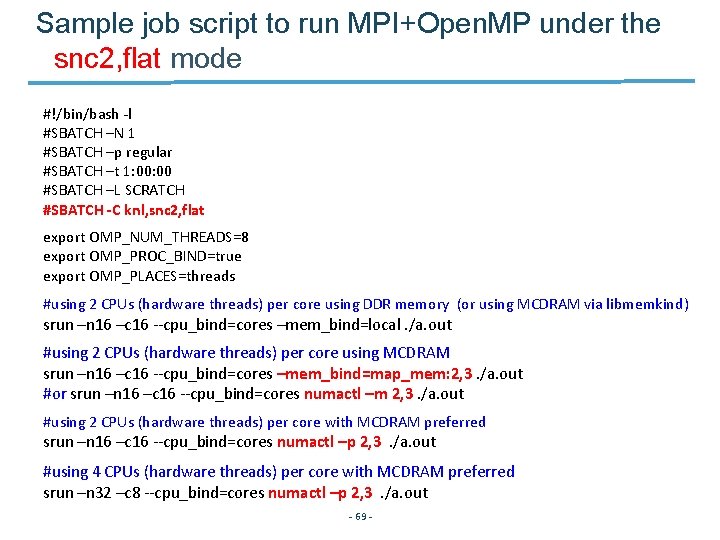
Sample job script to run MPI+Open. MP under the snc 2, flat mode #!/bin/bash -l #SBATCH –N 1 #SBATCH –p regular #SBATCH –t 1: 00 #SBATCH –L SCRATCH #SBATCH -C knl, snc 2, flat export OMP_NUM_THREADS=8 export OMP_PROC_BIND=true export OMP_PLACES=threads #using 2 CPUs (hardware threads) per core using DDR memory (or using MCDRAM via libmemkind) srun –n 16 –c 16 --cpu_bind=cores –mem_bind=local. /a. out #using 2 CPUs (hardware threads) per core using MCDRAM srun –n 16 –c 16 --cpu_bind=cores –mem_bind=map_mem: 2, 3. /a. out #or srun –n 16 –c 16 --cpu_bind=cores numactl –m 2, 3. /a. out #using 2 CPUs (hardware threads) per core with MCDRAM preferred srun –n 16 –c 16 --cpu_bind=cores numactl –p 2, 3 . /a. out #using 4 CPUs (hardware threads) per core with MCDRAM preferred srun –n 32 –c 8 --cpu_bind=cores numactl –p 2, 3 . /a. out - 69 -
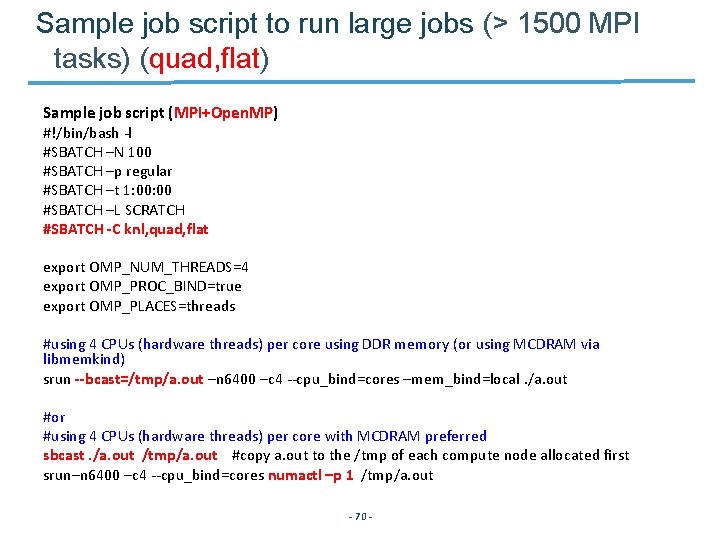
Sample job script to run large jobs (> 1500 MPI tasks) (quad, flat) Sample job script (MPI+Open. MP) #!/bin/bash -l #SBATCH –N 100 #SBATCH –p regular #SBATCH –t 1: 00 #SBATCH –L SCRATCH #SBATCH -C knl, quad, flat export OMP_NUM_THREADS=4 export OMP_PROC_BIND=true export OMP_PLACES=threads #using 4 CPUs (hardware threads) per core using DDR memory (or using MCDRAM via libmemkind) srun --bcast=/tmp/a. out –n 6400 –c 4 --cpu_bind=cores –mem_bind=local. /a. out #or #using 4 CPUs (hardware threads) per core with MCDRAM preferred sbcast. /a. out /tmp/a. out #copy a. out to the /tmp of each compute node allocated first srun–n 6400 –c 4 --cpu_bind=cores numactl –p 1 /tmp/a. out - 70 -
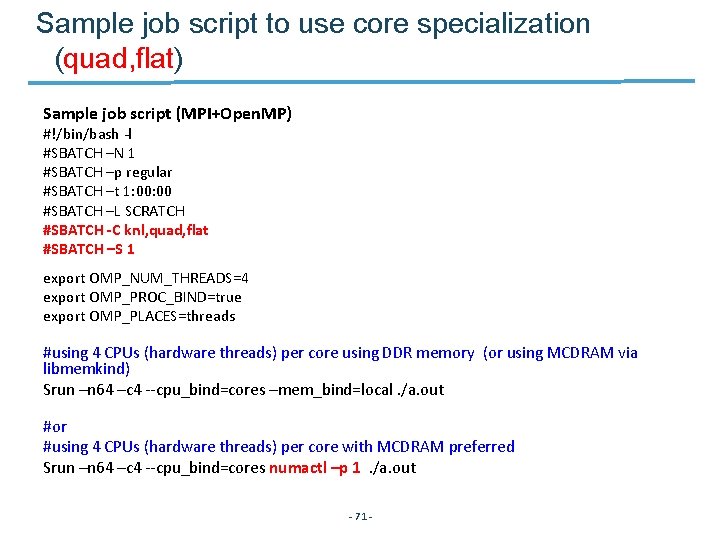
Sample job script to use core specialization (quad, flat) Sample job script (MPI+Open. MP) #!/bin/bash -l #SBATCH –N 1 #SBATCH –p regular #SBATCH –t 1: 00 #SBATCH –L SCRATCH #SBATCH -C knl, quad, flat #SBATCH –S 1 export OMP_NUM_THREADS=4 export OMP_PROC_BIND=true export OMP_PLACES=threads #using 4 CPUs (hardware threads) per core using DDR memory (or using MCDRAM via libmemkind) Srun –n 64 –c 4 --cpu_bind=cores –mem_bind=local. /a. out #or #using 4 CPUs (hardware threads) per core with MCDRAM preferred Srun –n 64 –c 4 --cpu_bind=cores numactl –p 1 . /a. out - 71 -
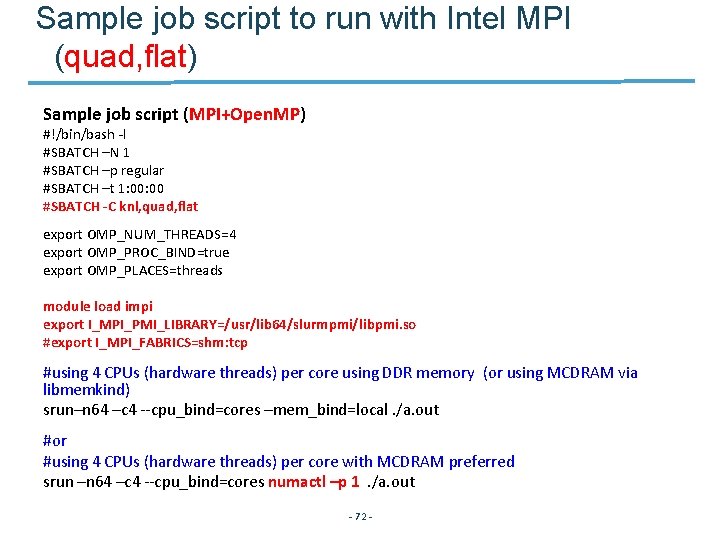
Sample job script to run with Intel MPI (quad, flat) Sample job script (MPI+Open. MP) #!/bin/bash -l #SBATCH –N 1 #SBATCH –p regular #SBATCH –t 1: 00 #SBATCH -C knl, quad, flat export OMP_NUM_THREADS=4 export OMP_PROC_BIND=true export OMP_PLACES=threads module load impi export I_MPI_PMI_LIBRARY=/usr/lib 64/slurmpmi/libpmi. so #export I_MPI_FABRICS=shm: tcp #using 4 CPUs (hardware threads) per core using DDR memory (or using MCDRAM via libmemkind) srun–n 64 –c 4 --cpu_bind=cores –mem_bind=local. /a. out #or #using 4 CPUs (hardware threads) per core with MCDRAM preferred srun –n 64 –c 4 --cpu_bind=cores numactl –p 1 . /a. out - 72 -
Thank you! - 73 -