SKF Io T Cloud Services First Steps Login

- Slides: 17
SKF Io. T Cloud Services First Steps
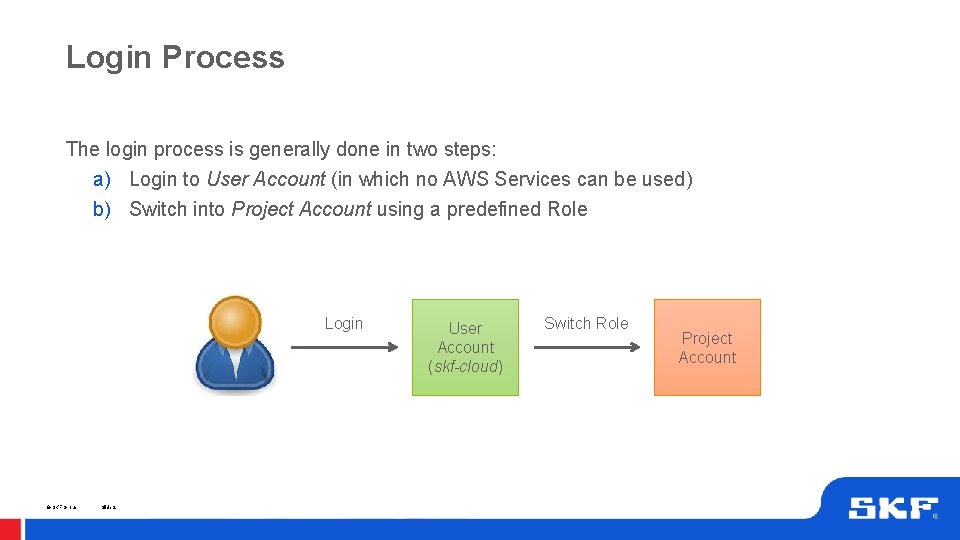
Login Process The login process is generally done in two steps: a) Login to User Account (in which no AWS Services can be used) b) Switch into Project Account using a predefined Role Login © SKF Group Slide 2 User Account (skf-cloud) Switch Role Project Account
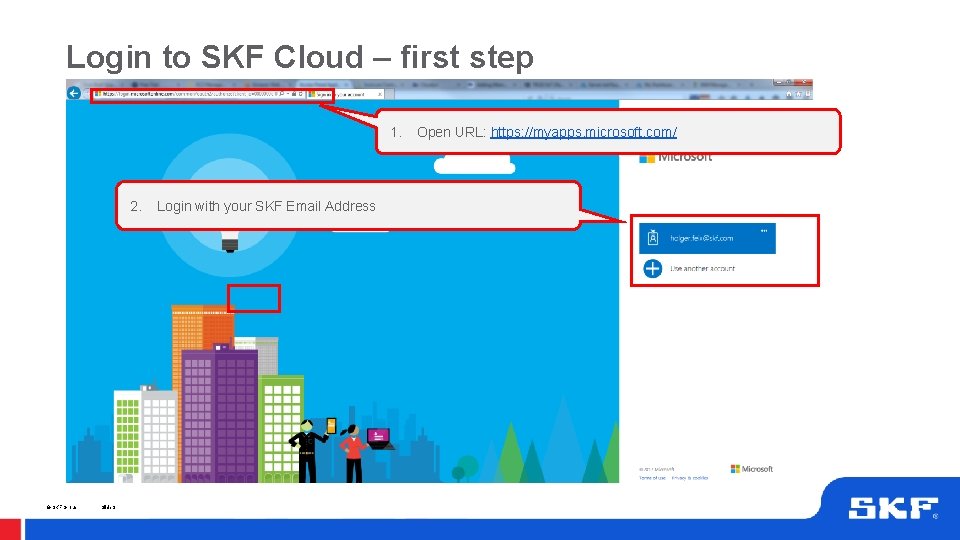
Login to SKF Cloud – first step 1. 2. © SKF Group Slide 3 Login with your SKF Email Address Open URL: https: //myapps. microsoft. com/
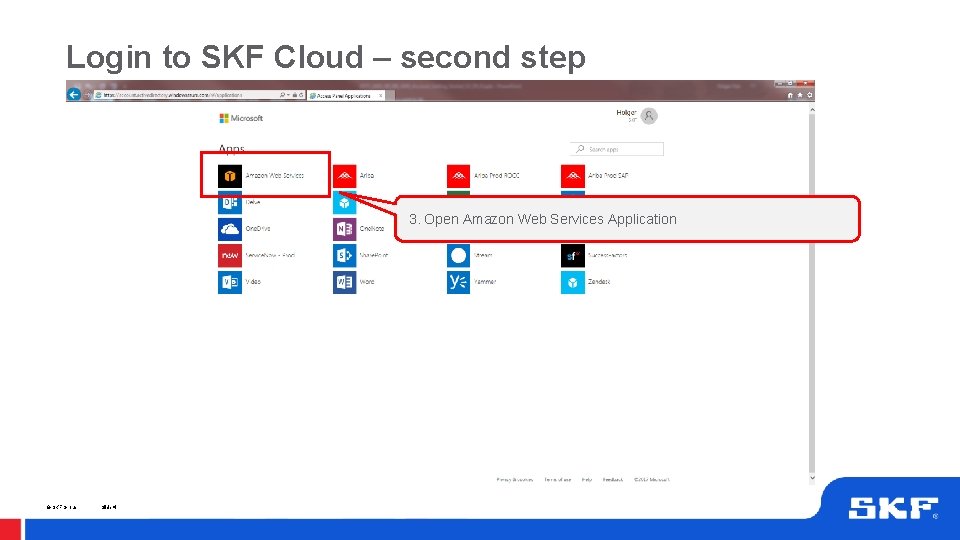
Login to SKF Cloud – second step 3. Open Amazon Web Services Application © SKF Group Slide 4
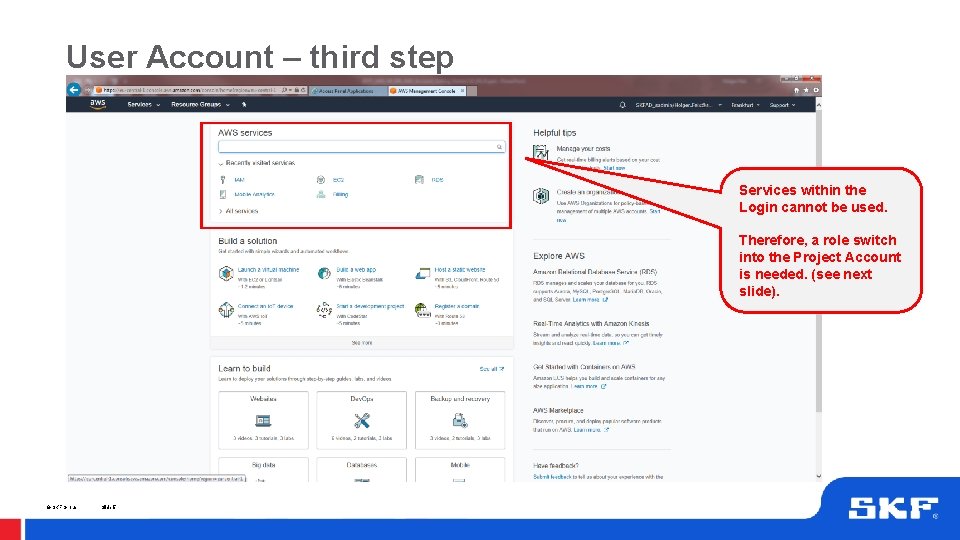
User Account – third step Services within the Login cannot be used. Therefore, a role switch into the Project Account is needed. (see next slide). © SKF Group Slide 5
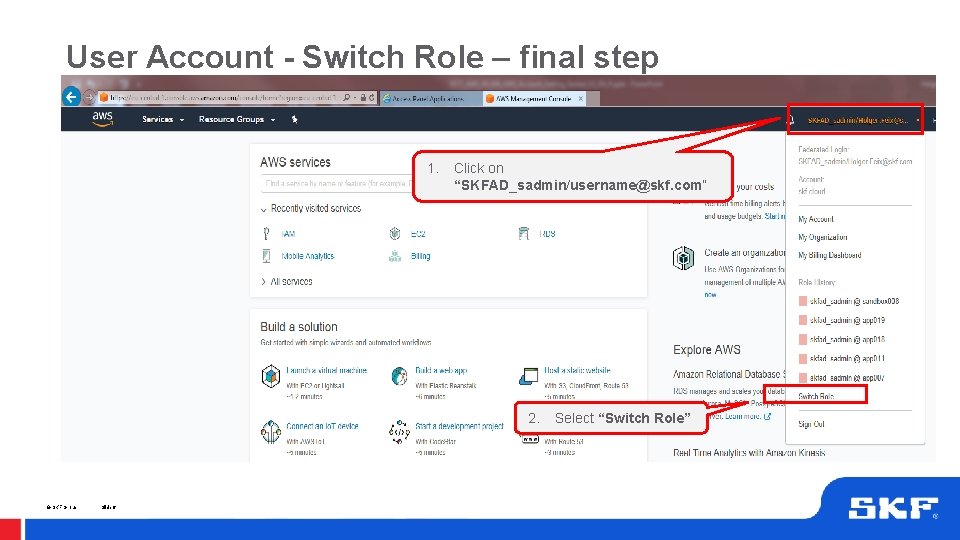
User Account - Switch Role – final step 1. Click on “SKFAD_sadmin/username@skf. com“ 2. © SKF Group Slide 6 Select “Switch Role”
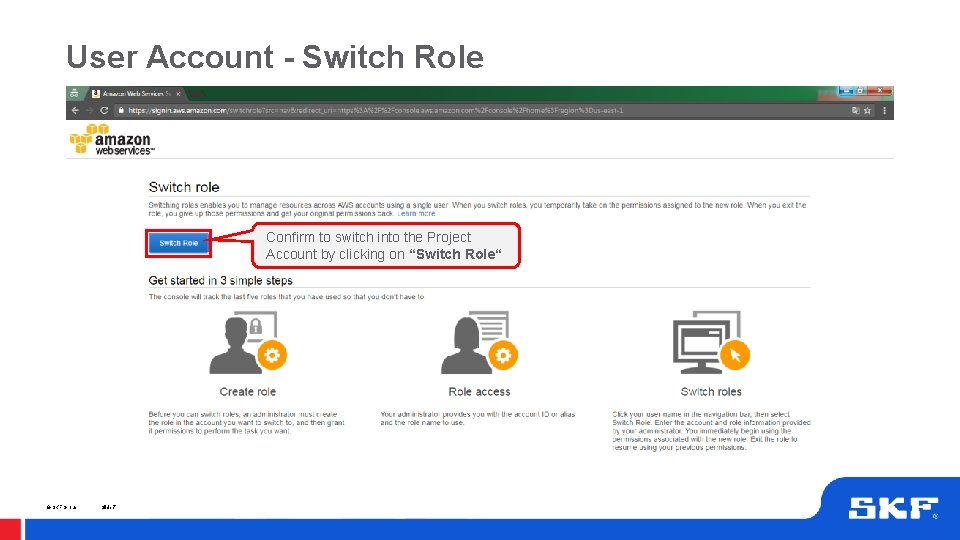
User Account - Switch Role Confirm to switch into the Project Account by clicking on “Switch Role“ © SKF Group Slide 7
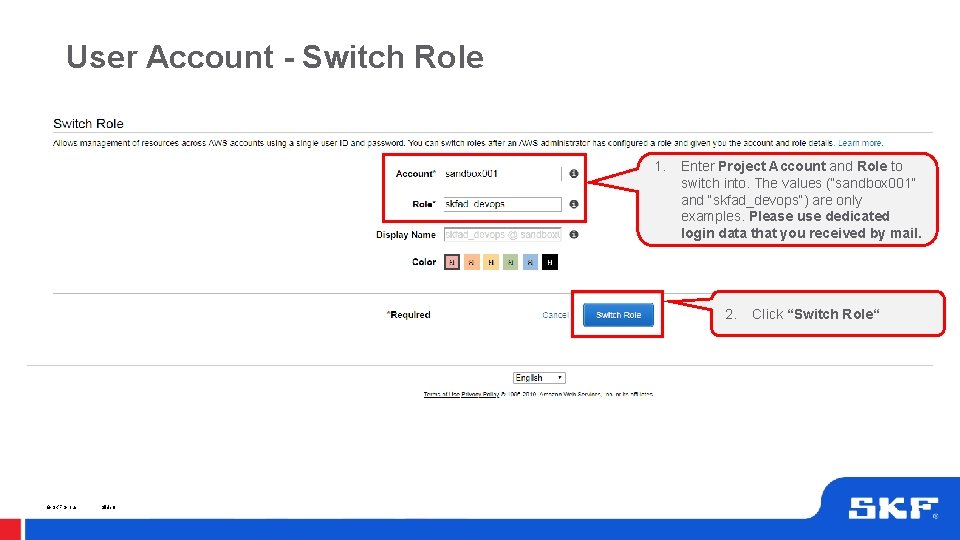
User Account - Switch Role 1. Enter Project Account and Role to switch into. The values (“sandbox 001“ and “skfad_devops“) are only examples. Please use dedicated login data that you received by mail. 2. © SKF Group Slide 8 Click “Switch Role“
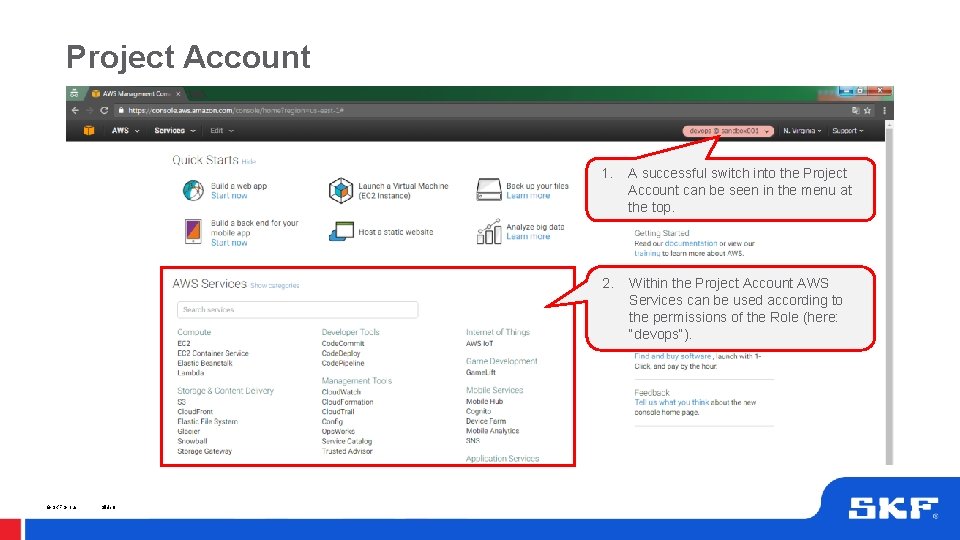
Project Account © SKF Group Slide 9 1. A successful switch into the Project Account can be seen in the menu at the top. 2. Within the Project Account AWS Services can be used according to the permissions of the Role (here: “devops“).
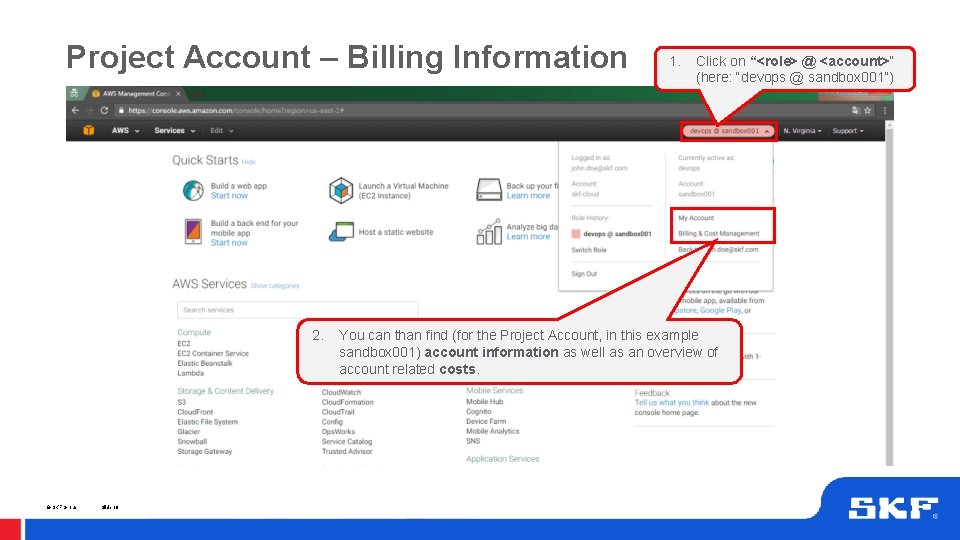
Project Account – Billing Information 2. © SKF Group Slide 10 1. Click on “<role> @ <account>“ (here: “devops @ sandbox 001”) You can than find (for the Project Account, in this example sandbox 001) account information as well as an overview of account related costs.
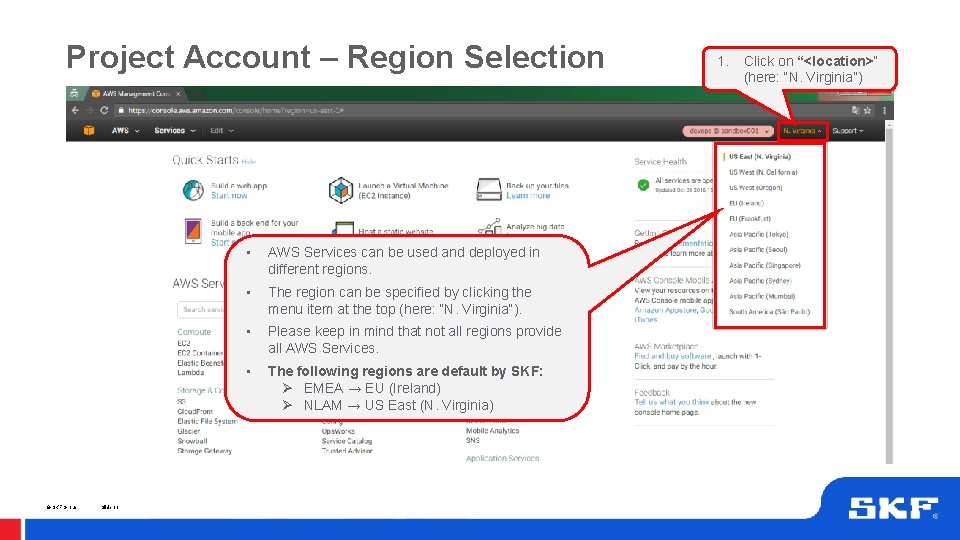
Project Account – Region Selection © SKF Group Slide 11 • AWS Services can be used and deployed in different regions. • The region can be specified by clicking the menu item at the top (here: “N. Virginia“). • Please keep in mind that not all regions provide all AWS Services. • The following regions are default by SKF: Ø EMEA → EU (Ireland) Ø NLAM → US East (N. Virginia) 1. Click on “<location>“ (here: “N. Virginia”)
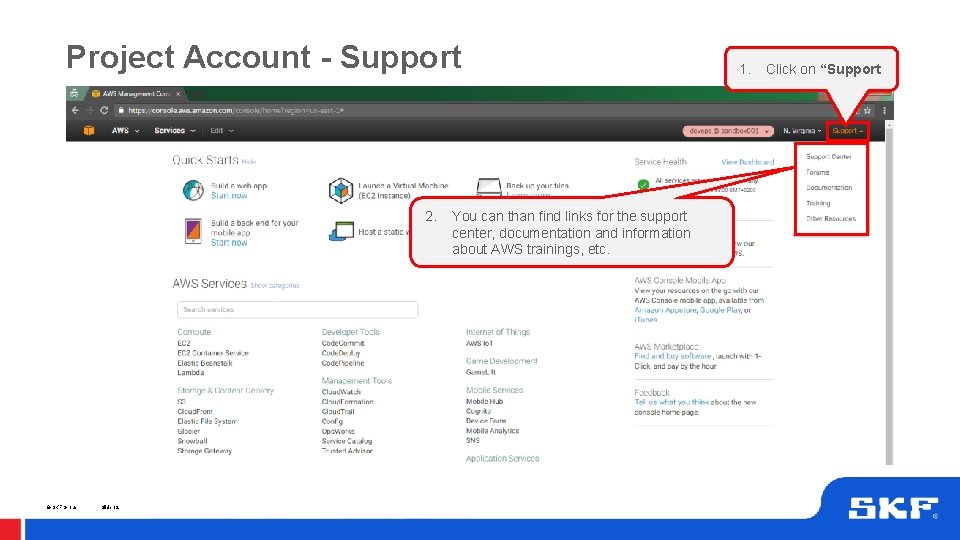
Project Account - Support 2. © SKF Group Slide 12 You can than find links for the support center, documentation and information about AWS trainings, etc. 1. Click on “Support
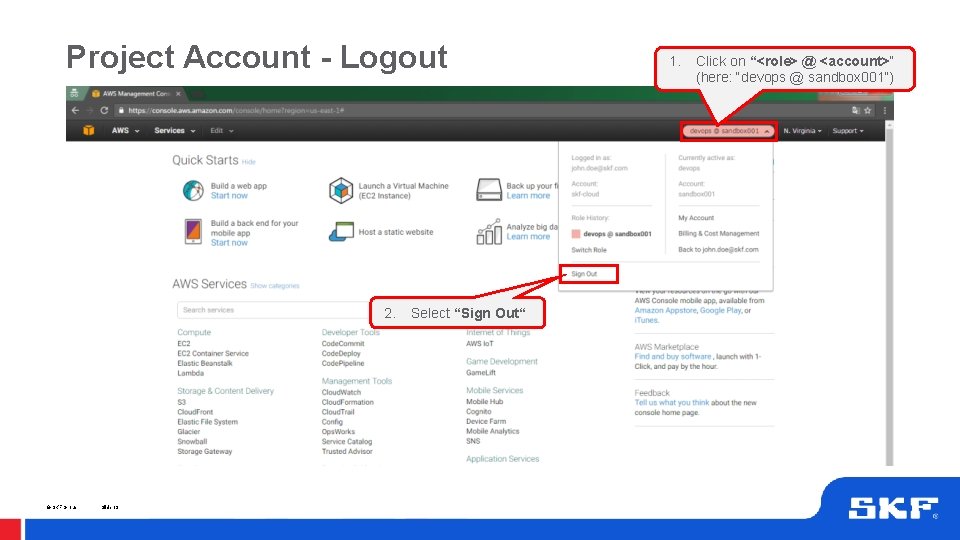
Project Account - Logout 2. © SKF Group Slide 13 Select “Sign Out“ 1. Click on “<role> @ <account>“ (here: “devops @ sandbox 001”)
Security & Usage Considerations Please be aware that: • Costs can be generated depending on the usage of the AWS Project Account • The business owner is responsible for monitoring overall costs, whereas the account owner is responsible for service consumption, meeting security aspects, and all activities within the Project Account • By using an AWS Project Account you agree on principles and responsibilities described in the “SKF Io. T Cloud Services” document • https: //skfgroup. sharepoint. com/sites/IOTT/_layouts/15/guestaccess. aspx? g uestaccesstoken=GLb. EIa. Awl. Zvov 3 zlucp. Ff 0 ITi. PPFVWDhn. Cf 2 b 6 Wo. Rg. Q%3 d&docid=2_007080 fcce 425 4 f 69 ae 0420 b 78553034 f&rev=1 © SKF Group Slide 14
Help & Support For Help and Support you can contact: 1. SKF Department Io. T Technology - For general questions regarding account and infrastructure setup For actions within the Project Account that require super user or administrator authorization Via E-Mail: digital. solutions@skf. com 2. AWS Support and Documentation - © SKF Group Slide 15 For detailed questions regarding AWS services and usage Via Support Center (see slide 11) or AWS Documentation (see https: //aws. amazon. com/documentation/)
Important Links Getting Started with AWS: https: //aws. amazon. com/start-now/ AWS Documentation: https: //aws. amazon. com/documentation/ AWS Trainings: https: //aws. amazon. com/training/ AWS Pricing: https: //aws. amazon. com/pricing/ AWS Monthly Calculator: http: //calculator. s 3. amazonaws. com/index. html Example Use Cases: https: //aws. amazon. com/solutions/ AWS Services by Region: https: //aws. amazon. com/about-aws/global-infrastructure/regional-product-services/ AWS Security Best Practices: https: //d 0. awsstatic. com/whitepapers/Security/AWS_Security_Best_Practices. pdf © SKF Group Slide 16