Fundamentals of Computer Graphics Part 2 prof ing
![GL specifications To store 3 D vertex using an array GLfloat vertex[3] can be](https://slidetodoc.com/presentation_image_h/dc1a1ae427f19093ad47b79002be529f/image-9.jpg "GL specifications To store 3 D vertex using an array GLfloat vertex[3] can be")
![Sierpinski Gasket & GL specifications typedef GLfloat point 2 [2]; /* defines a point](https://slidetodoc.com/presentation_image_h/dc1a1ae427f19093ad47b79002be529f/image-11.jpg "Sierpinski Gasket & GL specifications typedef GLfloat point 2 [2]; /* defines a point")
![Functions main, display & myinit void display(void) { typedef GLfloat point 2 [2]; /*](https://slidetodoc.com/presentation_image_h/dc1a1ae427f19093ad47b79002be529f/image-46.jpg "Functions main, display & myinit void display(void) { typedef GLfloat point 2 [2]; /*")
- Slides: 58
Fundamentals of Computer Graphics Part 2 prof. ing. Václav Skala, CSc. University of West Bohemia Plzeň, Czech Republic © 2002 Prepared with Angel, E. : Interactive Computer Graphics – A Top Down Approach with Open. GL, Addison Wesley, 2001 Fundamentals of Computer Graphics
Graphics programming • Open. GL API will be used for development • principles presented are valid also for – Java 3 D (some modifications needed), – Graphical Kernel System- GKS, – Programmer’s Hierarchical Graphics Interface – PHIGS • functionality sufficient for writing sophisticated 2 D programs without users interaction • example of a simple 3 D application Fundamentals of Computer Graphics 2
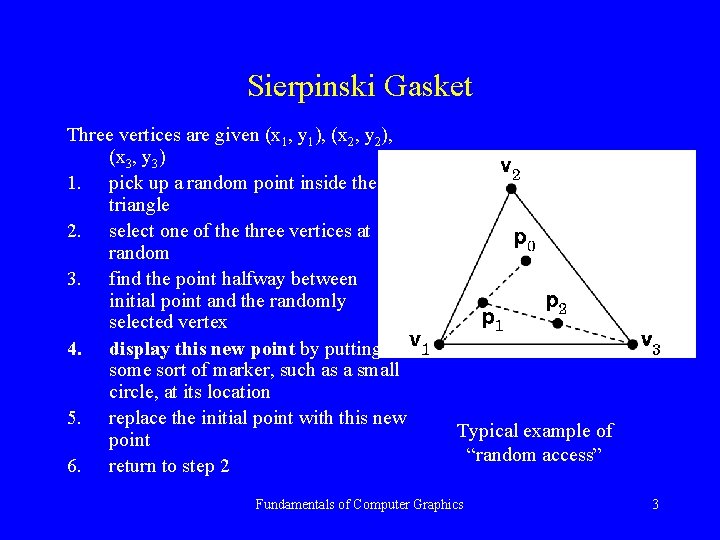
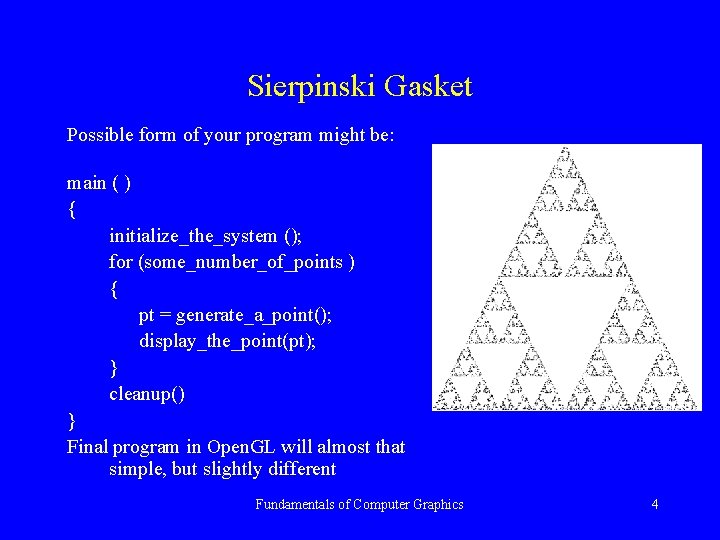
Sierpinski Gasket Three vertices are given (x 1, y 1), (x 2, y 2), (x 3, y 3) 1. pick up a random point inside the triangle 2. select one of the three vertices at random 3. find the point halfway between initial point and the randomly selected vertex 4. display this new point by putting some sort of marker, such as a small circle, at its location 5. replace the initial point with this new point 6. return to step 2 Typical example of “random access” Fundamentals of Computer Graphics 3
Sierpinski Gasket Possible form of your program might be: main ( ) { initialize_the_system (); for (some_number_of_points ) { pt = generate_a_point(); display_the_point(pt); } cleanup() } Final program in Open. GL will almost that simple, but slightly different Fundamentals of Computer Graphics 4
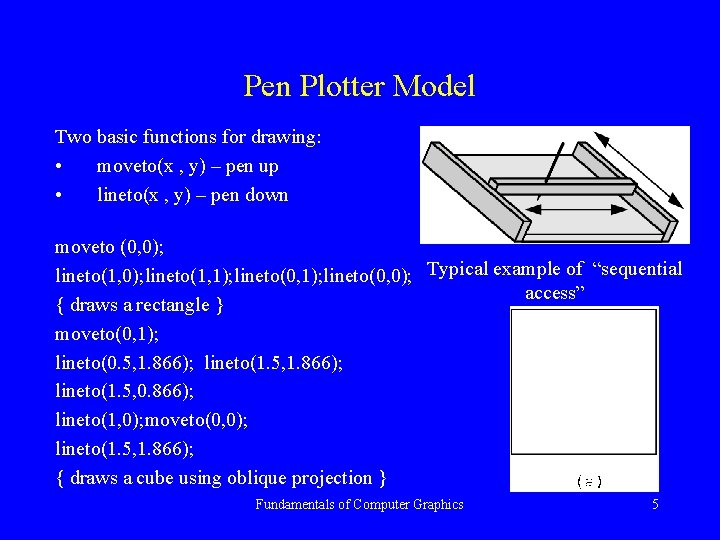
Pen Plotter Model Two basic functions for drawing: • moveto(x , y) – pen up • lineto(x , y) – pen down moveto (0, 0); lineto(1, 1); lineto(0, 0); Typical example of “sequential access” { draws a rectangle } moveto(0, 1); lineto(0. 5, 1. 866); lineto(1. 5, 0. 866); lineto(1, 0); moveto(0, 0); lineto(1. 5, 1. 866); { draws a cube using oblique projection } Fundamentals of Computer Graphics 5
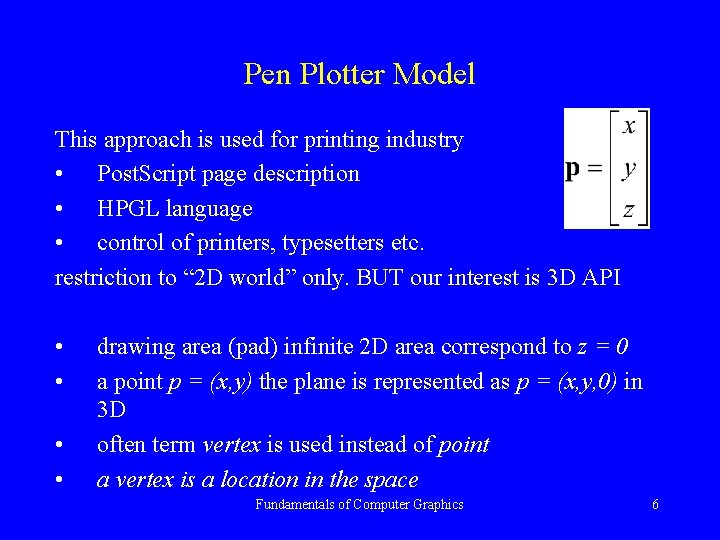
Pen Plotter Model This approach is used for printing industry • Post. Script page description • HPGL language • control of printers, typesetters etc. restriction to “ 2 D world” only. BUT our interest is 3 D API • • drawing area (pad) infinite 2 D area correspond to z = 0 a point p = (x, y) the plane is represented as p = (x, y, 0) in 3 D often term vertex is used instead of point a vertex is a location in the space Fundamentals of Computer Graphics 6
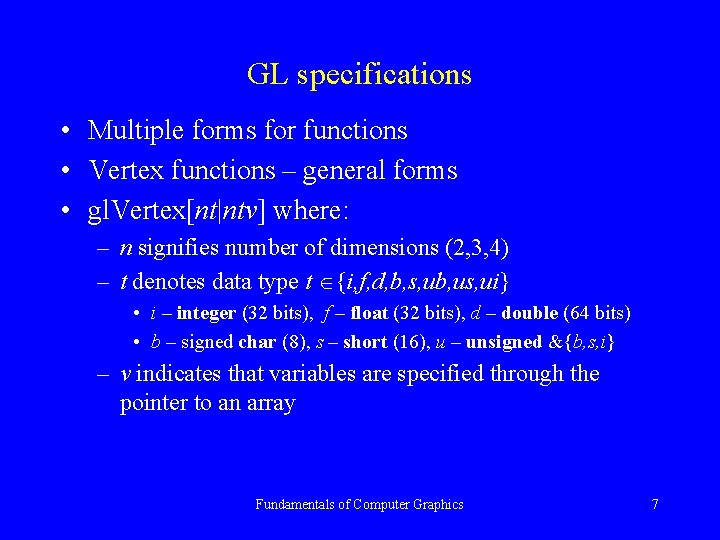
GL specifications • Multiple forms for functions • Vertex functions – general forms • gl. Vertex[nt|ntv] where: – n signifies number of dimensions (2, 3, 4) – t denotes data type t {i, f, d, b, s, ub, us, ui} • i – integer (32 bits), f – float (32 bits), d – double (64 bits) • b – signed char (8), s – short (16), u – unsigned &{b, s, i} – v indicates that variables are specified through the pointer to an array Fundamentals of Computer Graphics 7
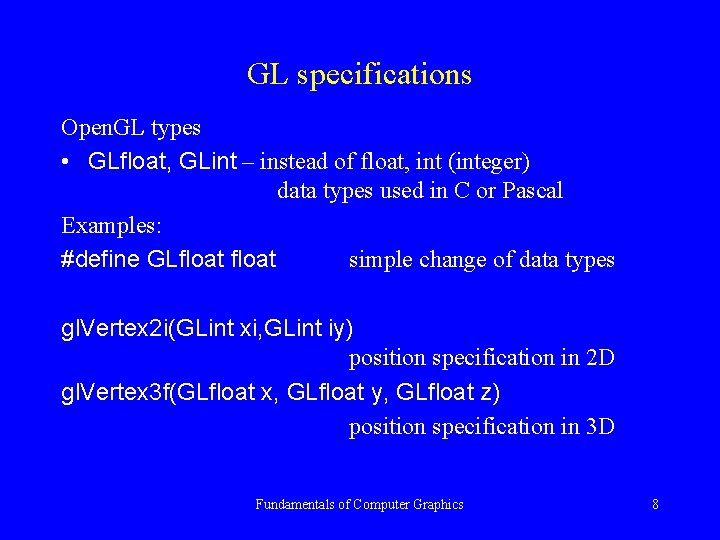
GL specifications Open. GL types • GLfloat, GLint – instead of float, int (integer) data types used in C or Pascal Examples: #define GLfloat simple change of data types gl. Vertex 2 i(GLint xi, GLint iy) position specification in 2 D gl. Vertex 3 f(GLfloat x, GLfloat y, GLfloat z) position specification in 3 D Fundamentals of Computer Graphics 8
GL specifications To store 3 D vertex using an array GLfloat vertex[3] can be used as gl. Vertex 3 fv(vertex) using vertices variety of objects is defined. The can be “grouped” together using gl. Begin(argument); . . . gl. End( ); argument – specifies geometric type that is specified by vertices Fundamentals of Computer Graphics 9
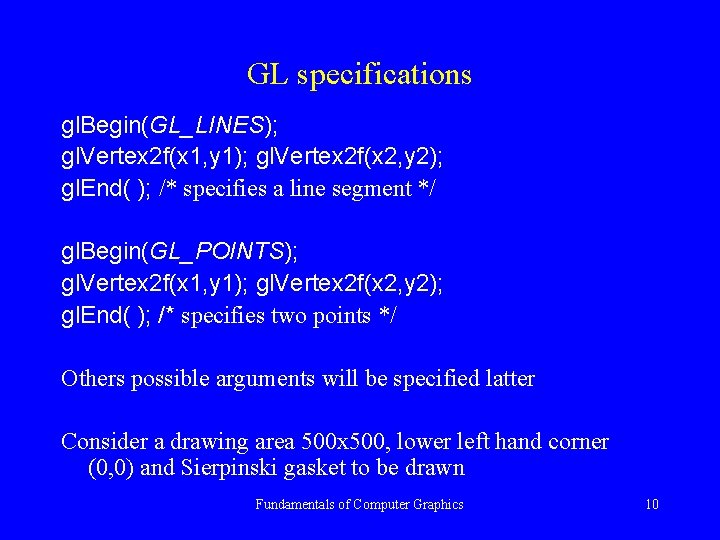
GL specifications gl. Begin(GL_LINES); gl. Vertex 2 f(x 1, y 1); gl. Vertex 2 f(x 2, y 2); gl. End( ); /* specifies a line segment */ gl. Begin(GL_POINTS); gl. Vertex 2 f(x 1, y 1); gl. Vertex 2 f(x 2, y 2); gl. End( ); /* specifies two points */ Others possible arguments will be specified latter Consider a drawing area 500 x 500, lower left hand corner (0, 0) and Sierpinski gasket to be drawn Fundamentals of Computer Graphics 10
Sierpinski Gasket & GL specifications typedef GLfloat point 2 [2]; /* defines a point as two dimensional array */ void display(void); { /* an arbitrary triangle */ point 2 vertices[3]= { {0. 0, 0. 0}, {250. 500}, {500. 0, 0. 0}}; static point 2 p = {75. 0, 50. 0}; /* set to any initial point */ int j, k; int rand( ); {* standard random number generator */ for (k=0; k<5000; k++) { j = rand ( )%3; /* pick a random vertex from 0, 1, 2 */ p[0] = (p[0]+ vertices[ j ][0])/2; p[1] = (p[1]+ vertices[ j ][1])/2; /* display the new point */ gl. Begin(GL_POINTS); gl. Vertex 2 fv(p); gl. End(); } gl. Flush(); /* points are to be displayed as soon as possible */ } Fundamentals of Computer Graphics 11
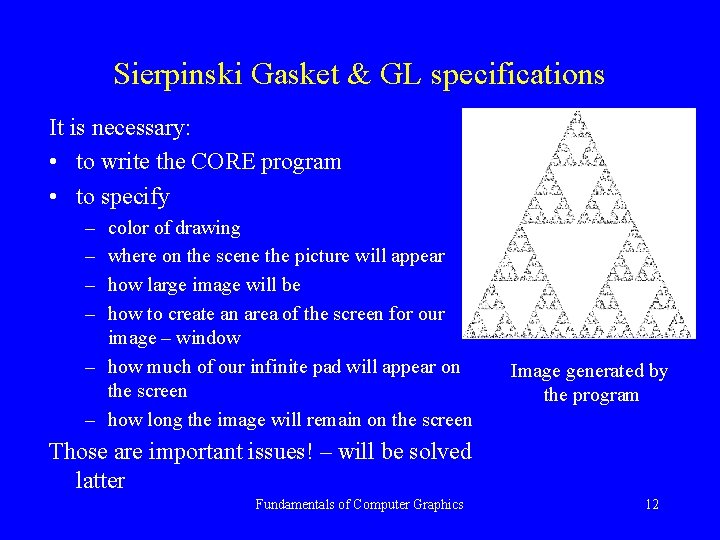
Sierpinski Gasket & GL specifications It is necessary: • to write the CORE program • to specify – – color of drawing where on the scene the picture will appear how large image will be how to create an area of the screen for our image – window – how much of our infinite pad will appear on the screen – how long the image will remain on the screen Image generated by the program Those are important issues! – will be solved latter Fundamentals of Computer Graphics 12
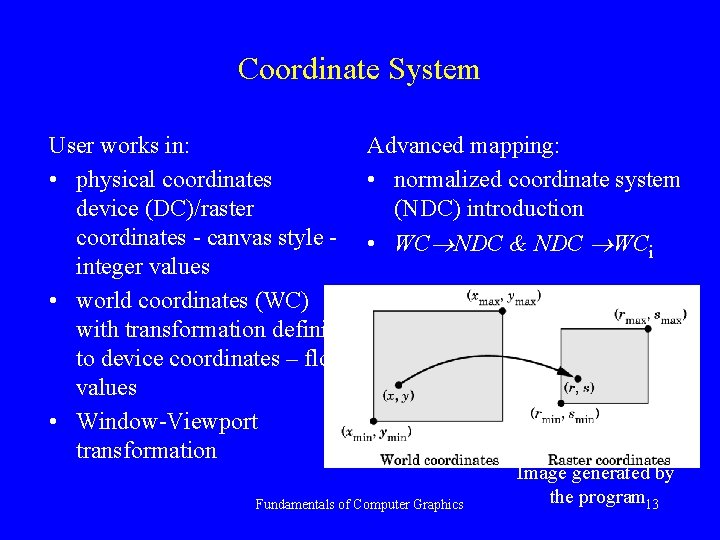
Coordinate System User works in: Advanced mapping: • physical coordinates • normalized coordinate system device (DC)/raster (NDC) introduction coordinates - canvas style - • WC NDC & NDC WC i integer values • world coordinates (WC) with transformation definition to device coordinates – float values • Window-Viewport transformation Fundamentals of Computer Graphics Image generated by the program 13
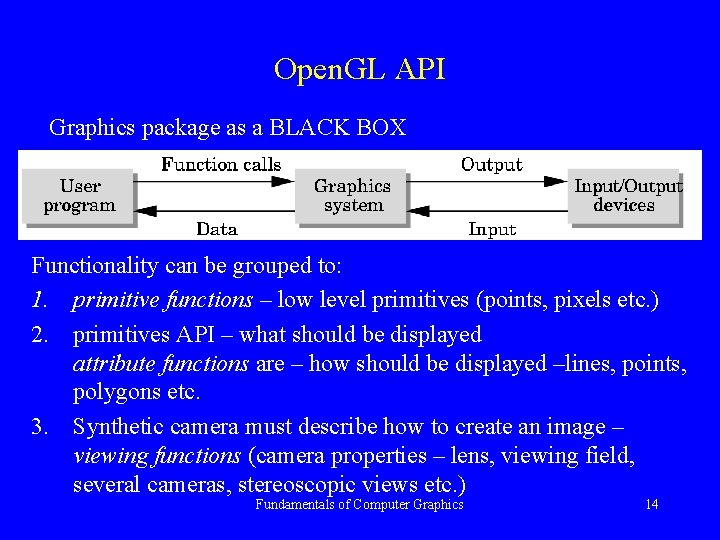
Open. GL API Graphics package as a BLACK BOX Functionality can be grouped to: 1. primitive functions – low level primitives (points, pixels etc. ) 2. primitives API – what should be displayed attribute functions are – how should be displayed –lines, points, polygons etc. 3. Synthetic camera must describe how to create an image – viewing functions (camera properties – lens, viewing field, several cameras, stereoscopic views etc. ) Fundamentals of Computer Graphics 14
Open. GL API 4. geometric transformation – scaling, rotation, translation, sheering etc. and use of transformation matrix. This forms the main advantage as the geometric engine can be used for substantial speed up. 5. input functions – allow interaction with graphics primitives or objects; functions for communication with a keyboard, mouse, data tablets etc. 6. control functions – initialization, errors handling etc. in multiprocessor multi-window & network environment Fundamentals of Computer Graphics 15
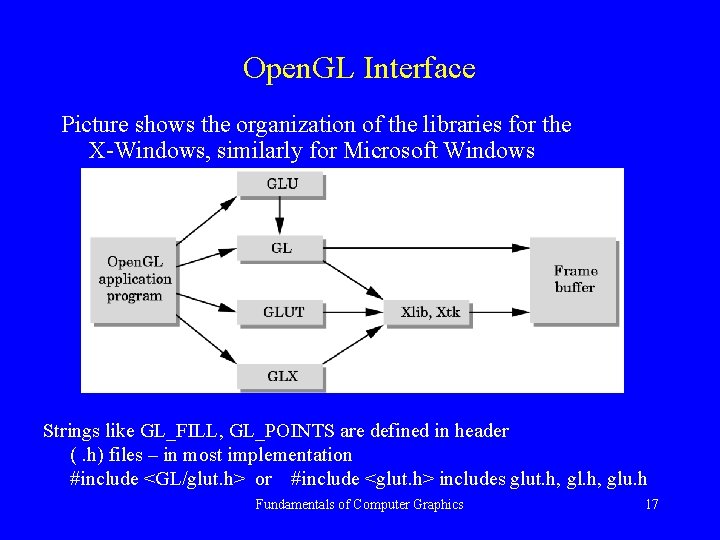
Open. GL Interface Open. GL function names begin with gl and are stored in library referred as GL Libraries: • GLU - graphics utility library – uses only GL primitives but contains code for common objects like spheres etc. – available in all Open. GL implementations • GLUT – GL Utility Toolkit / provides minimum functionality to be expected from any modern windowing system • others libraries are called from Open. GL libraries – but indirectly, hidden from the user. Fundamentals of Computer Graphics 16
Open. GL Interface Picture shows the organization of the libraries for the X-Windows, similarly for Microsoft Windows Strings like GL_FILL, GL_POINTS are defined in header (. h) files – in most implementation #include <GL/glut. h> or #include <glut. h> includes glut. h, glu. h Fundamentals of Computer Graphics 17
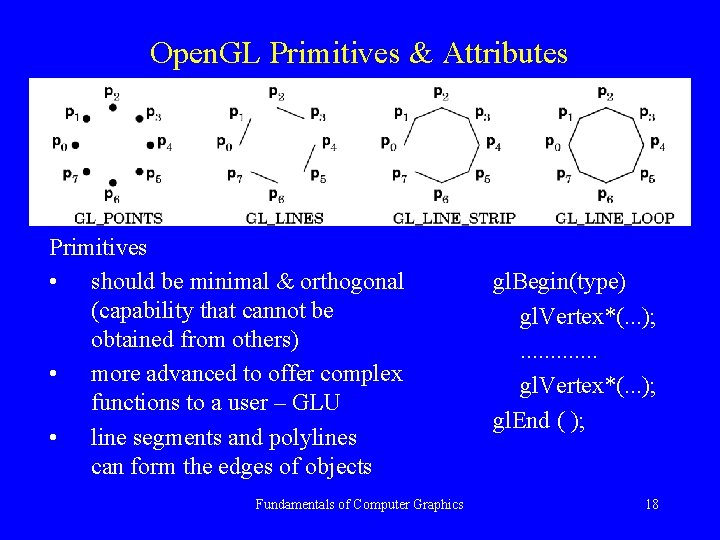
Open. GL Primitives & Attributes Primitives • should be minimal & orthogonal (capability that cannot be obtained from others) • more advanced to offer complex functions to a user – GLU • line segments and polylines can form the edges of objects Fundamentals of Computer Graphics gl. Begin(type) gl. Vertex*(. . . ); . . . gl. Vertex*(. . . ); gl. End ( ); 18
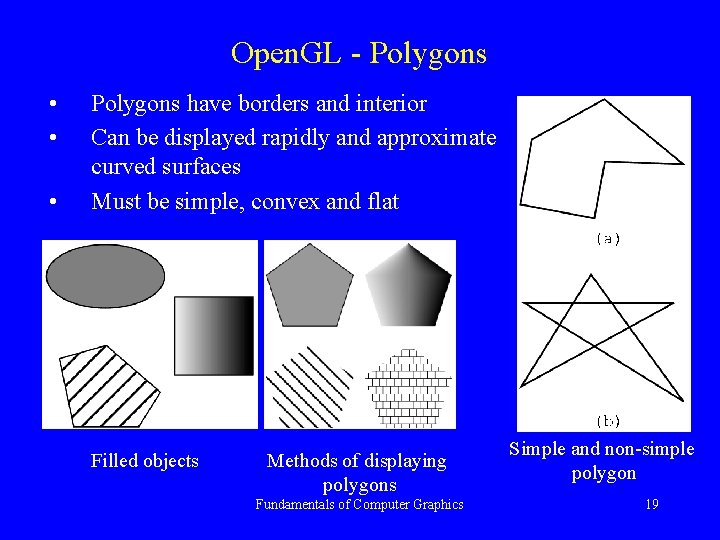
Open. GL - Polygons • • • Polygons have borders and interior Can be displayed rapidly and approximate curved surfaces Must be simple, convex and flat Filled objects Methods of displaying polygons Fundamentals of Computer Graphics Simple and non-simple polygon 19
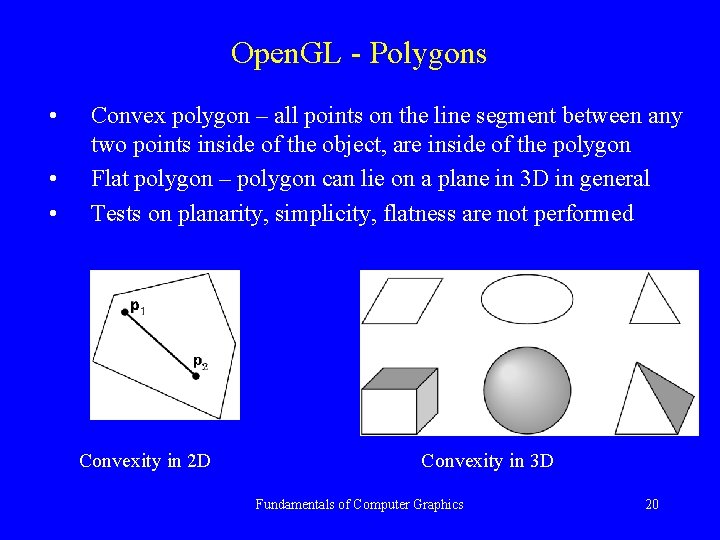
Open. GL - Polygons • • • Convex polygon – all points on the line segment between any two points inside of the object, are inside of the polygon Flat polygon – polygon can lie on a plane in 3 D in general Tests on planarity, simplicity, flatness are not performed Convexity in 2 D Convexity in 3 D Fundamentals of Computer Graphics 20
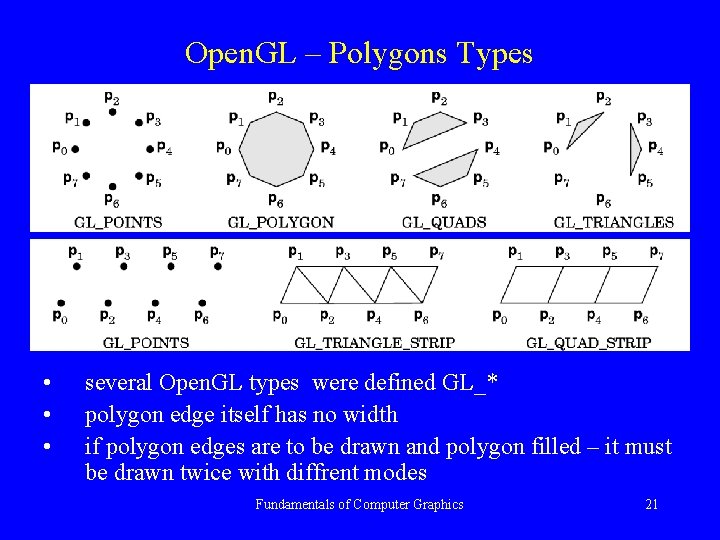
Open. GL – Polygons Types • • • several Open. GL types were defined GL_* polygon edge itself has no width if polygon edges are to be drawn and polygon filled – it must be drawn twice with diffrent modes Fundamentals of Computer Graphics 21
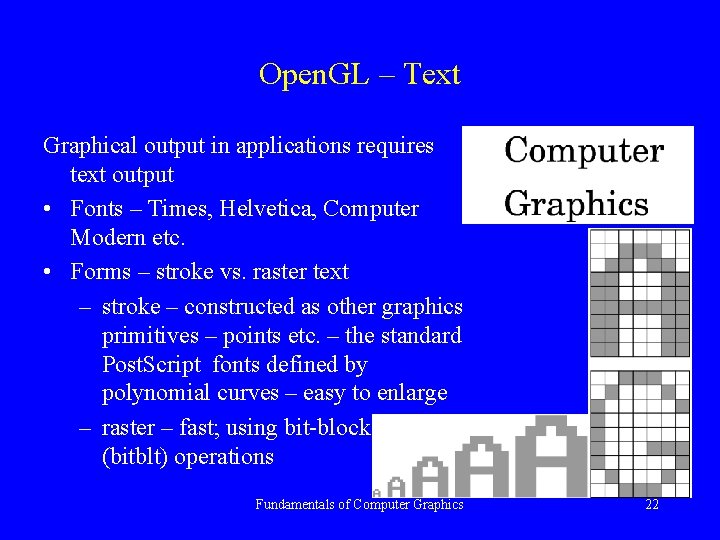
Open. GL – Text Graphical output in applications requires text output • Fonts – Times, Helvetica, Computer Modern etc. • Forms – stroke vs. raster text – stroke – constructed as other graphics primitives – points etc. – the standard Post. Script fonts defined by polynomial curves – easy to enlarge – raster – fast; using bit-block-transfer (bitblt) operations Fundamentals of Computer Graphics 22
Open. GL – Curved Objects • Curved primitives (like circles, spheres, curves and surfaces etc. ) are not directly supported – must be approximated by a mesh polygons – a tessellation – at the rendering stage or within the user program • GLU can be used to approximate common curved surfaces • Advanced Open. GL functions can be used to work with parametric curves and surfaces Fundamentals of Computer Graphics 23
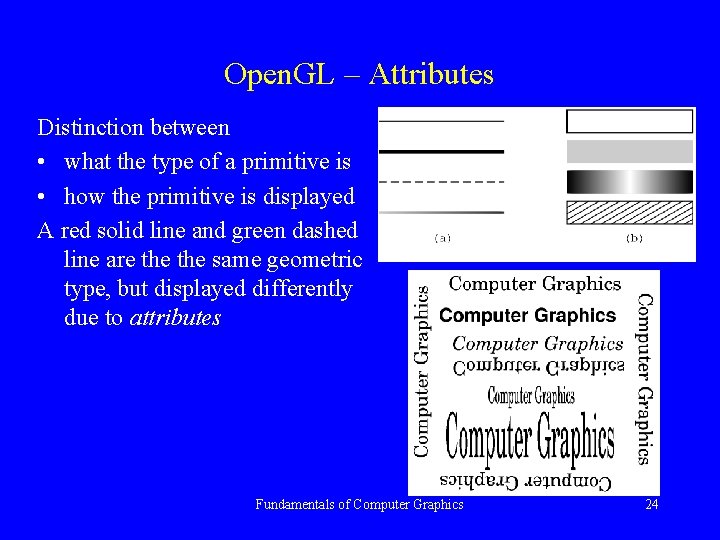
Open. GL – Attributes Distinction between • what the type of a primitive is • how the primitive is displayed A red solid line and green dashed line are the same geometric type, but displayed differently due to attributes Fundamentals of Computer Graphics 24
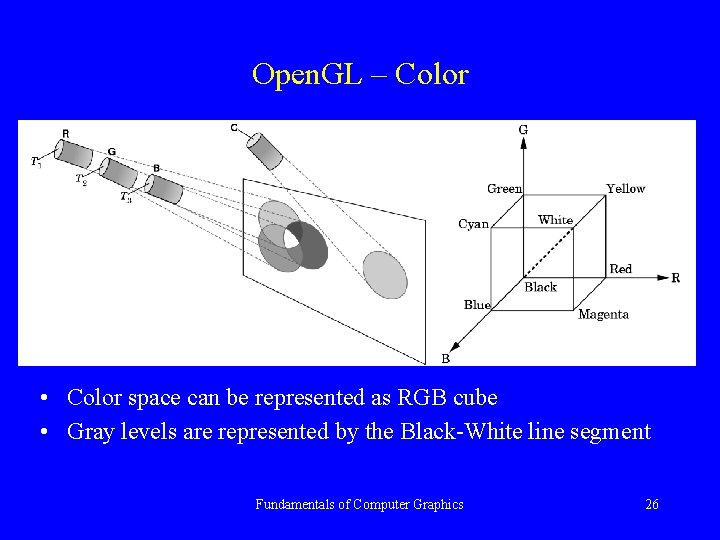
Open. GL – Color is one of the most interesting aspects of both human perception and computer graphics • Light is a part of electromagnetic spectrum 350 – 780 nm • Color C = r. R + g. G + b. B r, g, b are tristimulus values • assumption of three-color theory if two colors produce the same tristimulus values then they are visually indistinguishable Fundamentals of Computer Graphics 25
Open. GL – Color • Color space can be represented as RGB cube • Gray levels are represented by the Black-White line segment Fundamentals of Computer Graphics 26
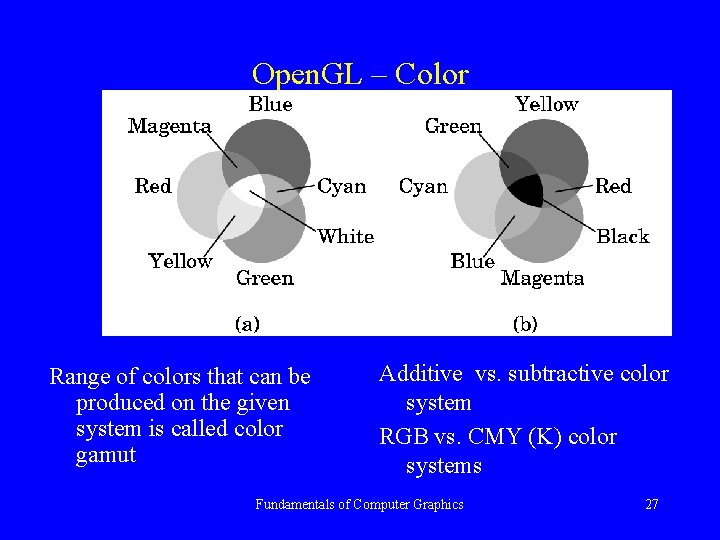
Open. GL – Color Range of colors that can be produced on the given system is called color gamut Additive vs. subtractive color system RGB vs. CMY (K) color systems Fundamentals of Computer Graphics 27
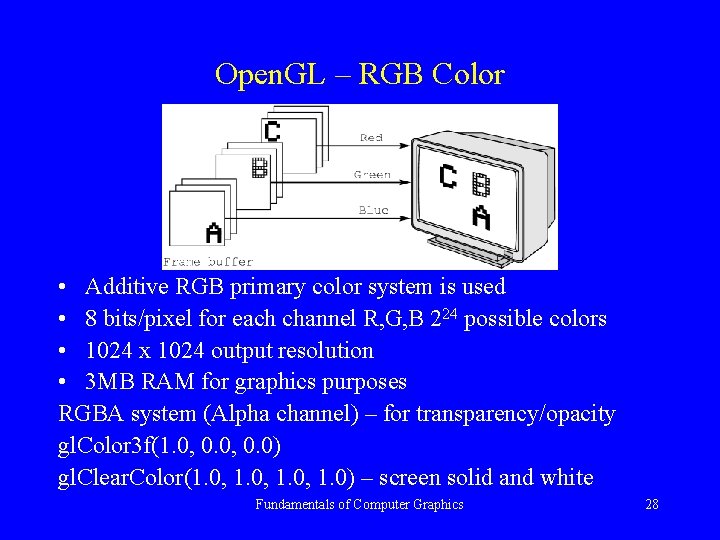
Open. GL – RGB Color • Additive RGB primary color system is used • 8 bits/pixel for each channel R, G, B 224 possible colors • 1024 x 1024 output resolution • 3 MB RAM for graphics purposes RGBA system (Alpha channel) – for transparency/opacity gl. Color 3 f(1. 0, 0. 0) gl. Clear. Color(1. 0, 1. 0) – screen solid and white Fundamentals of Computer Graphics 28
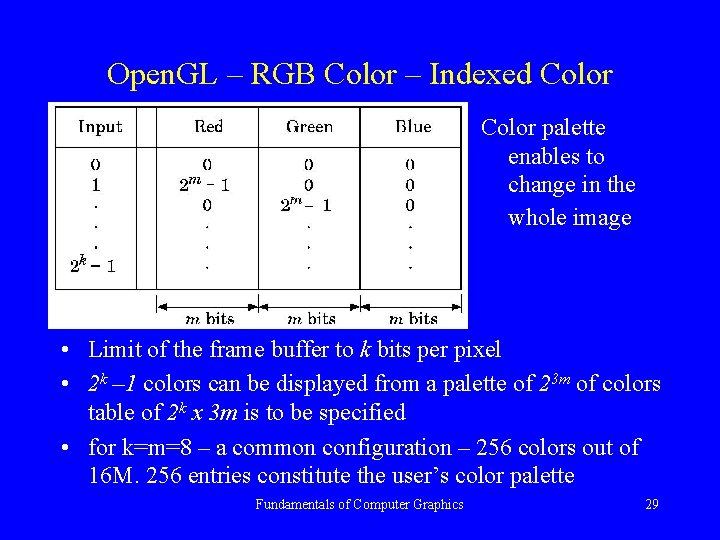
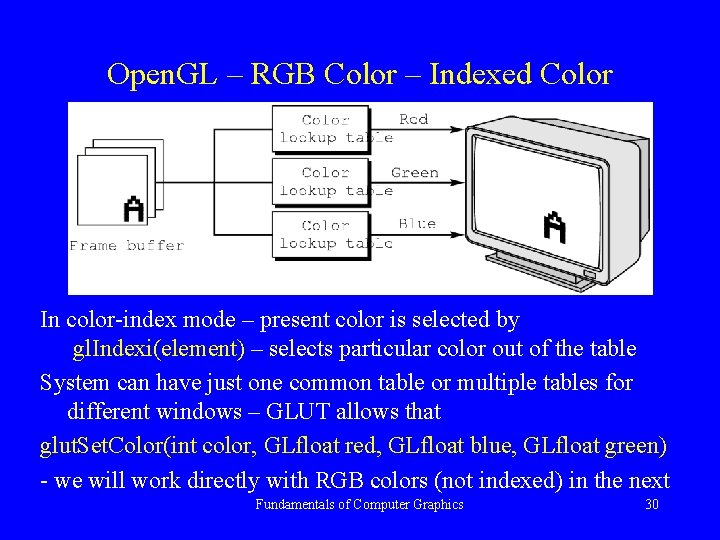
Open. GL – RGB Color – Indexed Color palette enables to change in the whole image • Limit of the frame buffer to k bits per pixel • 2 k – 1 colors can be displayed from a palette of 23 m of colors table of 2 k x 3 m is to be specified • for k=m=8 – a common configuration – 256 colors out of 16 M. 256 entries constitute the user’s color palette Fundamentals of Computer Graphics 29
Open. GL – RGB Color – Indexed Color In color-index mode – present color is selected by gl. Indexi(element) – selects particular color out of the table System can have just one common table or multiple tables for different windows – GLUT allows that glut. Set. Color(int color, GLfloat red, GLfloat blue, GLfloat green) - we will work directly with RGB colors (not indexed) in the next Fundamentals of Computer Graphics 30
Setting of Color Attributes For the Sierpinski gasket program we need to set: • clear color gl. Clear. Color(1. 0, 1. 0); • rendering color for points – set to RED gl. Color 3 f(1. 0, 0. 0); • set point size – let us use 2 pixels size gl. Point. Size(2. 0); /* size is in pixels not in [mm] */ These attributes will be valid for all the time if not changed explicitly. Fundamentals of Computer Graphics 31
Viewing In the synthetic camera concept the object specification is completely independent from – the camera specification – lights properties and positions used – material properties as well We used some default settings for those expecting that objects are placed “in the right position”, sufficiently far from the camera etc. We will concentrate on – 2 D viewing, – orthographic projection, – matrix mode application Fundamentals of Computer Graphics 32
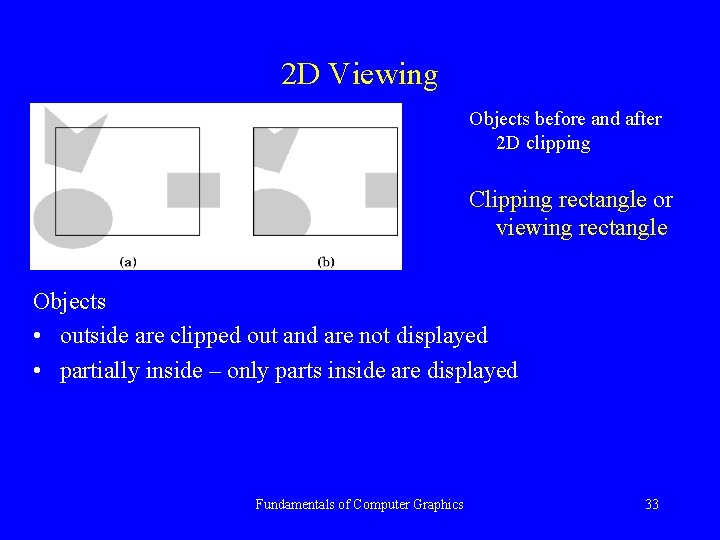
2 D Viewing Objects before and after 2 D clipping Clipping rectangle or viewing rectangle Objects • outside are clipped out and are not displayed • partially inside – only parts inside are displayed Fundamentals of Computer Graphics 33
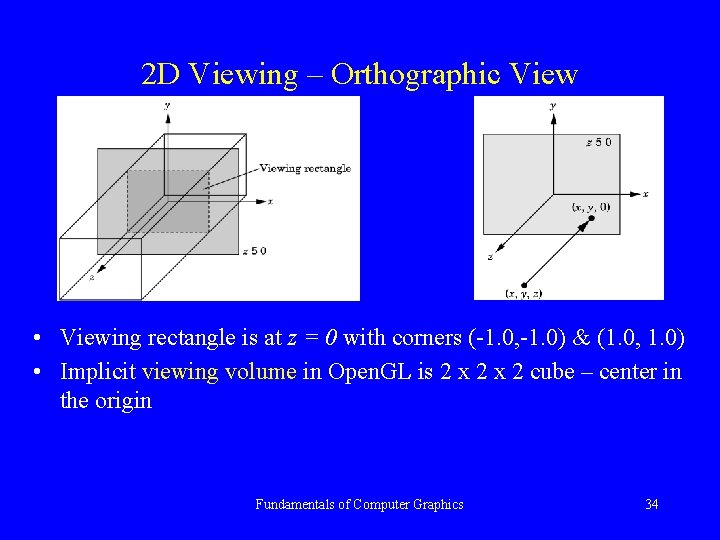
2 D Viewing – Orthographic View • Viewing rectangle is at z = 0 with corners (-1. 0, -1. 0) & (1. 0, 1. 0) • Implicit viewing volume in Open. GL is 2 x 2 cube – center in the origin Fundamentals of Computer Graphics 34
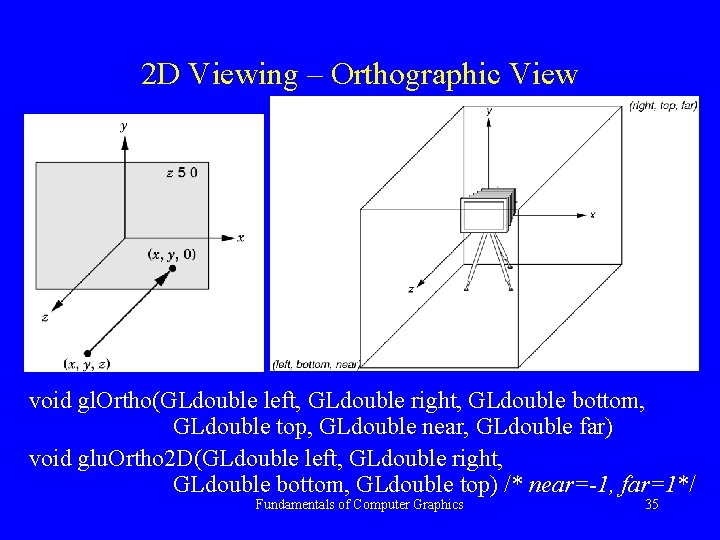
2 D Viewing – Orthographic View void gl. Ortho(GLdouble left, GLdouble right, GLdouble bottom, GLdouble top, GLdouble near, GLdouble far) void glu. Ortho 2 D(GLdouble left, GLdouble right, GLdouble bottom, GLdouble top) /* near=-1, far=1*/ Fundamentals of Computer Graphics 35
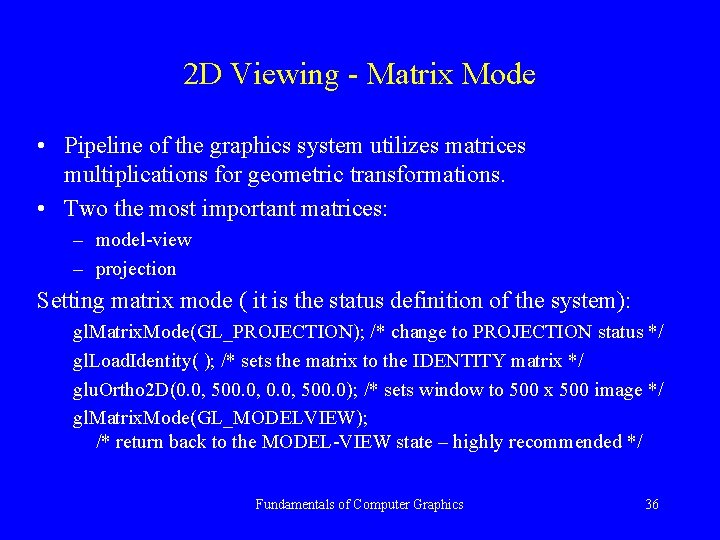
2 D Viewing - Matrix Mode • Pipeline of the graphics system utilizes matrices multiplications for geometric transformations. • Two the most important matrices: – model-view – projection Setting matrix mode ( it is the status definition of the system): gl. Matrix. Mode(GL_PROJECTION); /* change to PROJECTION status */ gl. Load. Identity( ); /* sets the matrix to the IDENTITY matrix */ glu. Ortho 2 D(0. 0, 500. 0); /* sets window to 500 x 500 image */ gl. Matrix. Mode(GL_MODELVIEW); /* return back to the MODEL-VIEW state – highly recommended */ Fundamentals of Computer Graphics 36
Control Functions • Minimal interaction between the program and the particular OS must be used (X-Windows - UNIX, Windows) • GLUT library provides minimal & simple interface between API and particular OS (full functionality for interaction between a program and OS is not a part of this course) • Programs using GLUT interface should run under multiple window system. Some details will be in the following parts Fundamentals of Computer Graphics 37
Interaction with the Window System • Window or screen window – rectangular area of a display • Window system – refers to X-Windows or MS Windows • The origin – not always lower-left corner – Open. GL style (some have orientation: top to bottom, left to right as TV sets or position information returned from input devices like mouse) glut. Init(int *argcp, char *argv) – enables to pass command-line arguments as in the standard C main function glut. Create. Window(char *title) – creates a window with the name specified in the string title with default values (size, position etc. ) Fundamentals of Computer Graphics 38
Interaction with the Window System BEFORE creating the window GLUT functions can be used to specify properties: glut. Display. Mode(GLUT_RGB|GLUT_DEPTH|GLUT_DOUBLE); /* parameters or-ed and stored in the argument to glut. Init. Display. Mode */ glut. Window. Size(480, 640); glut. Window. Position(0 , 0); specifies the windows 480 x 640 in the top-left corner of the display GLUT_RGB x GLUT_INDEX – type of color system to be used GLUT_DEPTH – a depth buffer for hidden-line removal GLUT_DOUBLE x GLUT_SINGLE – double x single buffering Implicit options: RGB color, no hidden-line removal, single buffer Fundamentals of Computer Graphics 39
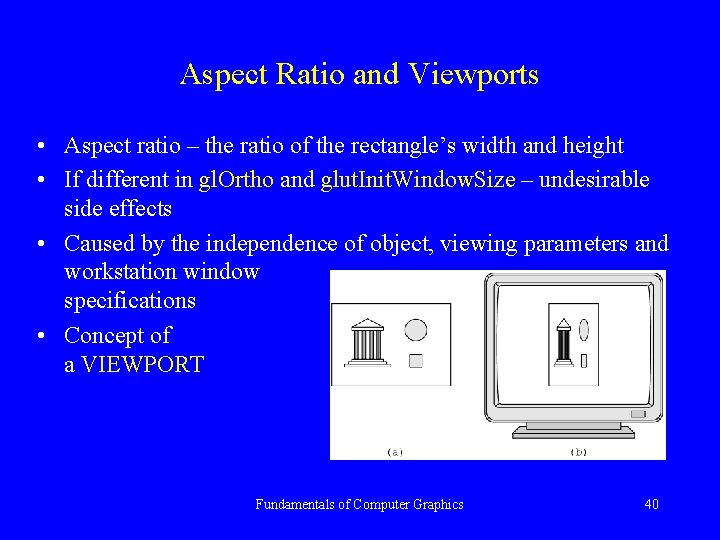
Aspect Ratio and Viewports • Aspect ratio – the ratio of the rectangle’s width and height • If different in gl. Ortho and glut. Init. Window. Size – undesirable side effects • Caused by the independence of object, viewing parameters and workstation window specifications • Concept of a VIEWPORT Fundamentals of Computer Graphics 40
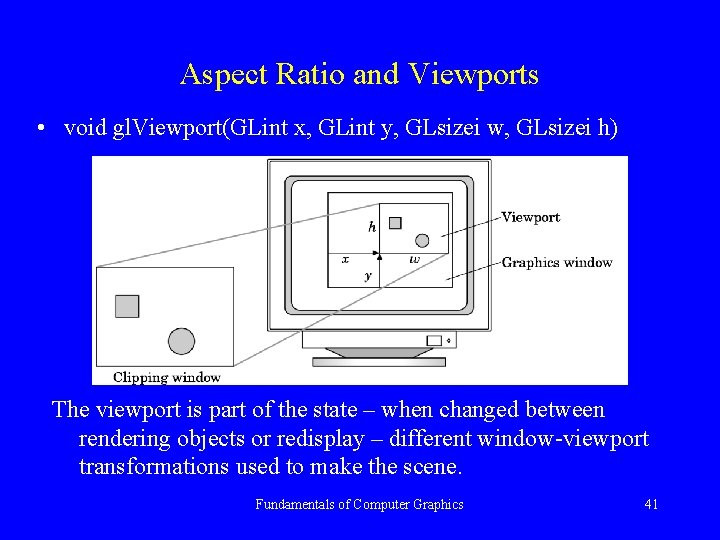
Aspect Ratio and Viewports • void gl. Viewport(GLint x, GLint y, GLsizei w, GLsizei h) The viewport is part of the state – when changed between rendering objects or redisplay – different window-viewport transformations used to make the scene. Fundamentals of Computer Graphics 41
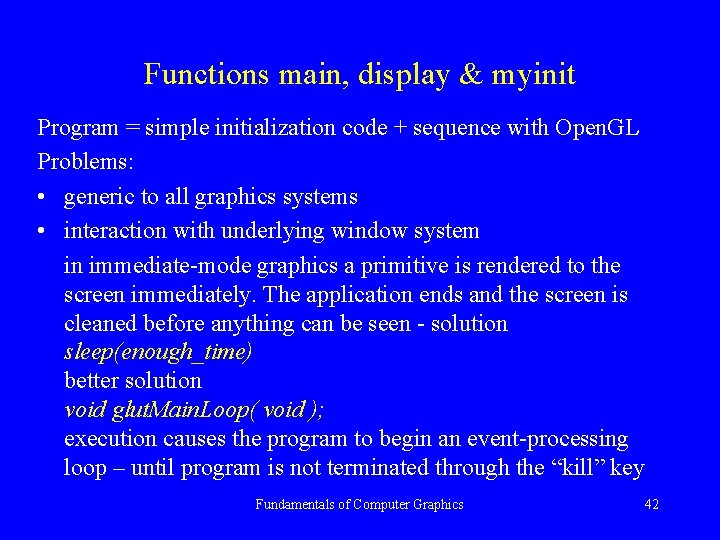
Functions main, display & myinit Program = simple initialization code + sequence with Open. GL Problems: • generic to all graphics systems • interaction with underlying window system in immediate-mode graphics a primitive is rendered to the screen immediately. The application ends and the screen is cleaned before anything can be seen - solution sleep(enough_time) better solution void glut. Main. Loop( void ); execution causes the program to begin an event-processing loop – until program is not terminated through the “kill” key Fundamentals of Computer Graphics 42
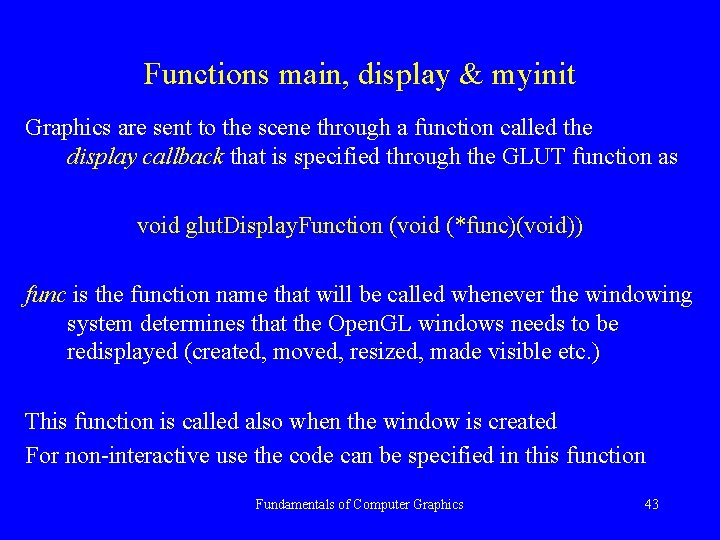
Functions main, display & myinit Graphics are sent to the scene through a function called the display callback that is specified through the GLUT function as void glut. Display. Function (void (*func)(void)) func is the function name that will be called whenever the windowing system determines that the Open. GL windows needs to be redisplayed (created, moved, resized, made visible etc. ) This function is called also when the window is created For non-interactive use the code can be specified in this function Fundamentals of Computer Graphics 43
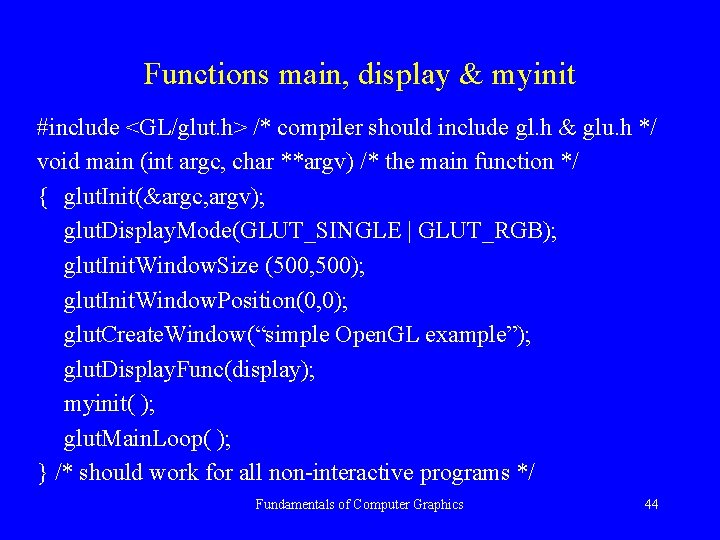
Functions main, display & myinit #include <GL/glut. h> /* compiler should include gl. h & glu. h */ void main (int argc, char **argv) /* the main function */ { glut. Init(&argc, argv); glut. Display. Mode(GLUT_SINGLE | GLUT_RGB); glut. Init. Window. Size (500, 500); glut. Init. Window. Position(0, 0); glut. Create. Window(“simple Open. GL example”); glut. Display. Func(display); myinit( ); glut. Main. Loop( ); } /* should work for all non-interactive programs */ Fundamentals of Computer Graphics 44
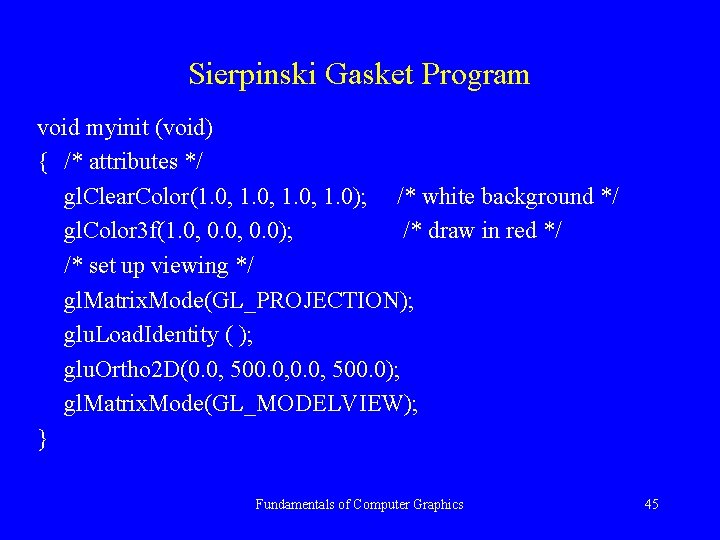
Sierpinski Gasket Program void myinit (void) { /* attributes */ gl. Clear. Color(1. 0, 1. 0); /* white background */ gl. Color 3 f(1. 0, 0. 0); /* draw in red */ /* set up viewing */ gl. Matrix. Mode(GL_PROJECTION); glu. Load. Identity ( ); glu. Ortho 2 D(0. 0, 500. 0); gl. Matrix. Mode(GL_MODELVIEW); } Fundamentals of Computer Graphics 45
Functions main, display & myinit void display(void) { typedef GLfloat point 2 [2]; /* defines a point as 2 D array */ point 2 vertices[3]= { {0. 0, 0. 0}, {250. 500}, {500. 0, 0. 0}}; /*triangle*/ int i, j, k; int rand( ); {* standard random number generator */ point 2 p = {75. 0, 50. 0}; /* set to any initial point */ gl. Clear(GL_COLOR_BUFFER_BIT); /* clear the window */ for (k=0; k<5000; k++) { j = rand ( )%3; /* pick a random vertex from 0, 1, 2 */ /* compute a point halfway between vertex and old point */ p[0] = (p[0]+vertices[ j ][0])/2; p[1] = (p[1]+vertices[ j ][1])/2; /* display the new point */ gl. Begin(GL_points); gl. Vertex 2 fv(p); gl. End( ); } gl. Flush(); /* points are to be displayed as soon as possible */ } Fundamentals of Computer Graphics 46
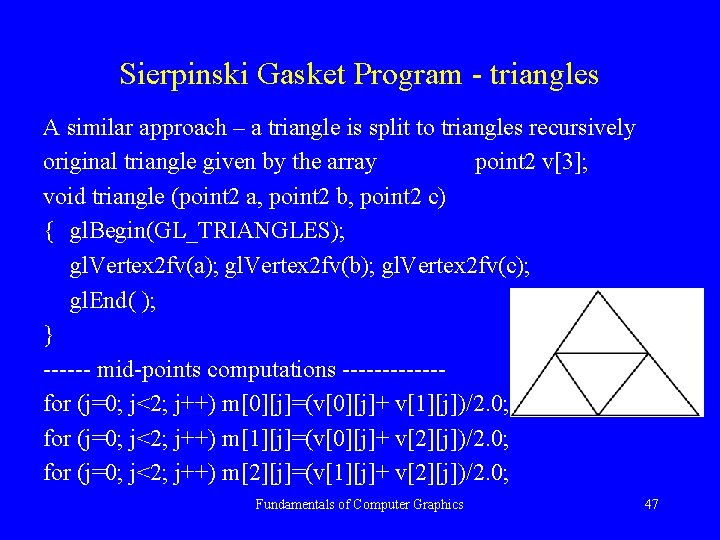
Sierpinski Gasket Program - triangles A similar approach – a triangle is split to triangles recursively original triangle given by the array point 2 v[3]; void triangle (point 2 a, point 2 b, point 2 c) { gl. Begin(GL_TRIANGLES); gl. Vertex 2 fv(a); gl. Vertex 2 fv(b); gl. Vertex 2 fv(c); gl. End( ); } ------ mid-points computations ------for (j=0; j<2; j++) m[0][j]=(v[0][j]+ v[1][j])/2. 0; for (j=0; j<2; j++) m[1][j]=(v[0][j]+ v[2][j])/2. 0; for (j=0; j<2; j++) m[2][j]=(v[1][j]+ v[2][j])/2. 0; Fundamentals of Computer Graphics 47
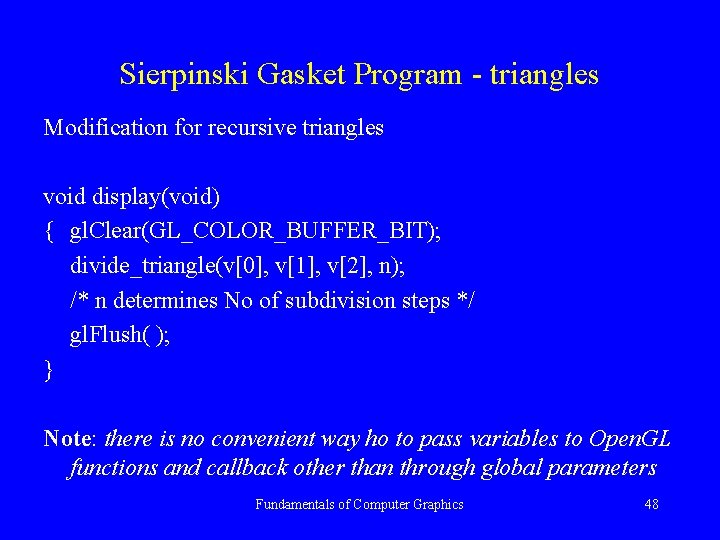
Sierpinski Gasket Program - triangles Modification for recursive triangles void display(void) { gl. Clear(GL_COLOR_BUFFER_BIT); divide_triangle(v[0], v[1], v[2], n); /* n determines No of subdivision steps */ gl. Flush( ); } Note: there is no convenient way ho to pass variables to Open. GL functions and callback other than through global parameters Fundamentals of Computer Graphics 48
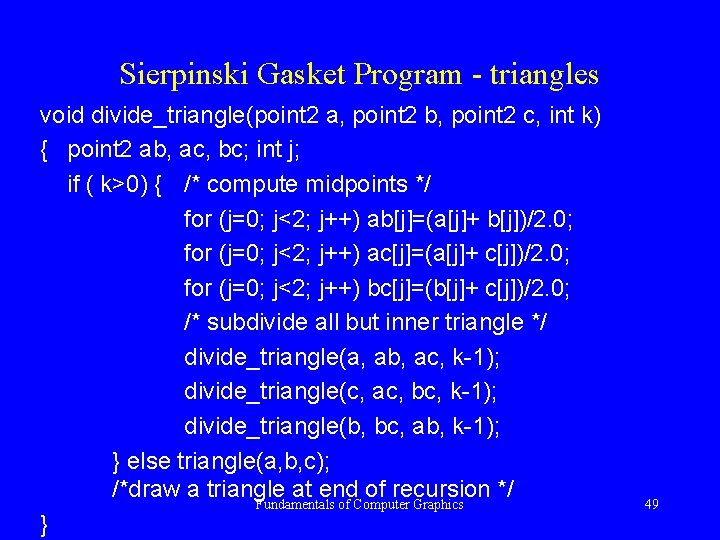
Sierpinski Gasket Program - triangles void divide_triangle(point 2 a, point 2 b, point 2 c, int k) { point 2 ab, ac, bc; int j; if ( k>0) { /* compute midpoints */ for (j=0; j<2; j++) ab[j]=(a[j]+ b[j])/2. 0; for (j=0; j<2; j++) ac[j]=(a[j]+ c[j])/2. 0; for (j=0; j<2; j++) bc[j]=(b[j]+ c[j])/2. 0; /* subdivide all but inner triangle */ divide_triangle(a, ab, ac, k-1); divide_triangle(c, ac, bc, k-1); divide_triangle(b, bc, ab, k-1); } else triangle(a, b, c); /*draw a triangle at end of recursion */ Fundamentals of Computer Graphics } 49
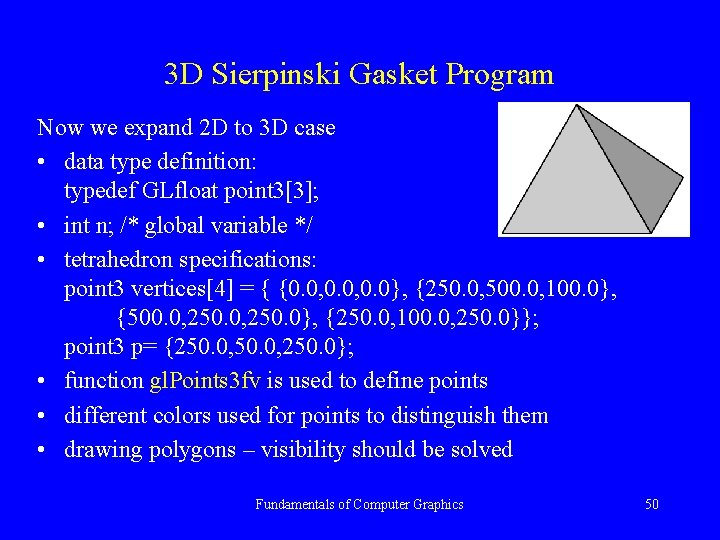
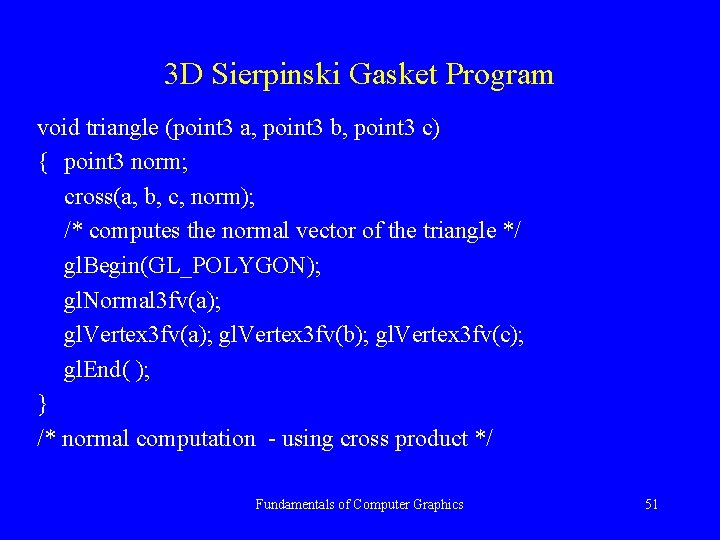
3 D Sierpinski Gasket Program Now we expand 2 D to 3 D case • data type definition: typedef GLfloat point 3[3]; • int n; /* global variable */ • tetrahedron specifications: point 3 vertices[4] = { {0. 0, 0. 0}, {250. 0, 500. 0, 100. 0}, {500. 0, 250. 0}, {250. 0, 100. 0, 250. 0}}; point 3 p= {250. 0, 250. 0}; • function gl. Points 3 fv is used to define points • different colors used for points to distinguish them • drawing polygons – visibility should be solved Fundamentals of Computer Graphics 50
3 D Sierpinski Gasket Program void triangle (point 3 a, point 3 b, point 3 c) { point 3 norm; cross(a, b, c, norm); /* computes the normal vector of the triangle */ gl. Begin(GL_POLYGON); gl. Normal 3 fv(a); gl. Vertex 3 fv(b); gl. Vertex 3 fv(c); gl. End( ); } /* normal computation - using cross product */ Fundamentals of Computer Graphics 51
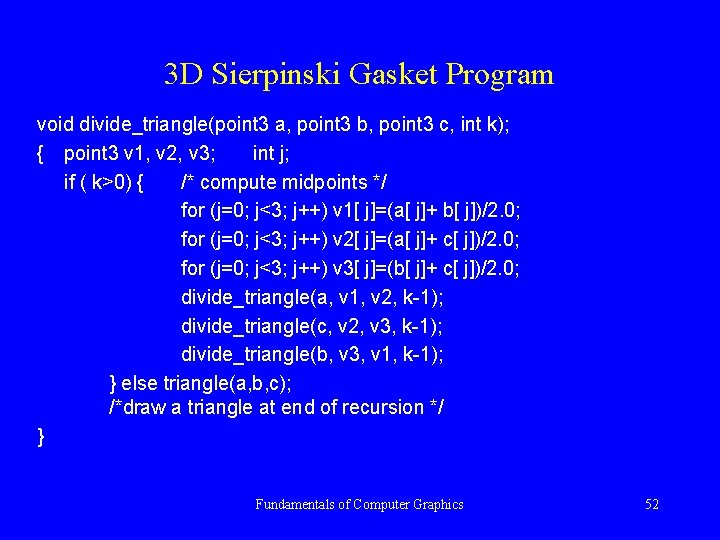
3 D Sierpinski Gasket Program void divide_triangle(point 3 a, point 3 b, point 3 c, int k); { point 3 v 1, v 2, v 3; int j; if ( k>0) { /* compute midpoints */ for (j=0; j<3; j++) v 1[ j]=(a[ j]+ b[ j])/2. 0; for (j=0; j<3; j++) v 2[ j]=(a[ j]+ c[ j])/2. 0; for (j=0; j<3; j++) v 3[ j]=(b[ j]+ c[ j])/2. 0; divide_triangle(a, v 1, v 2, k-1); divide_triangle(c, v 2, v 3, k-1); divide_triangle(b, v 3, v 1, k-1); } else triangle(a, b, c); /*draw a triangle at end of recursion */ } Fundamentals of Computer Graphics 52
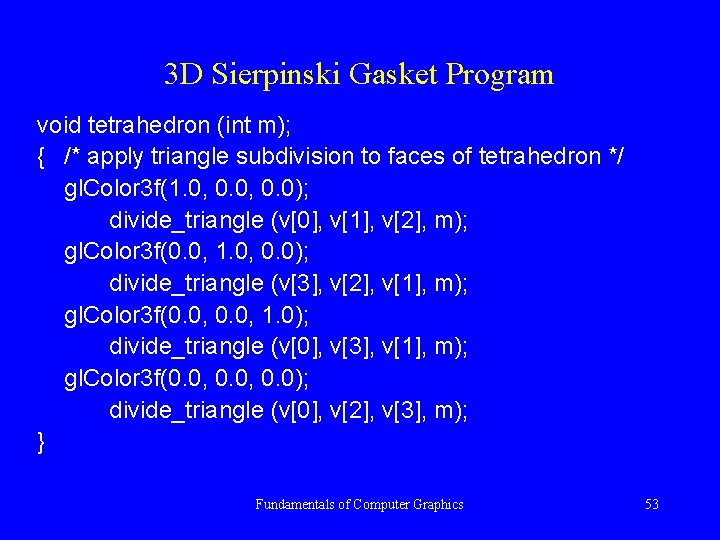
3 D Sierpinski Gasket Program void tetrahedron (int m); { /* apply triangle subdivision to faces of tetrahedron */ gl. Color 3 f(1. 0, 0. 0); divide_triangle (v[0], v[1], v[2], m); gl. Color 3 f(0. 0, 1. 0, 0. 0); divide_triangle (v[3], v[2], v[1], m); gl. Color 3 f(0. 0, 1. 0); divide_triangle (v[0], v[3], v[1], m); gl. Color 3 f(0. 0, 0. 0); divide_triangle (v[0], v[2], v[3], m); } Fundamentals of Computer Graphics 53
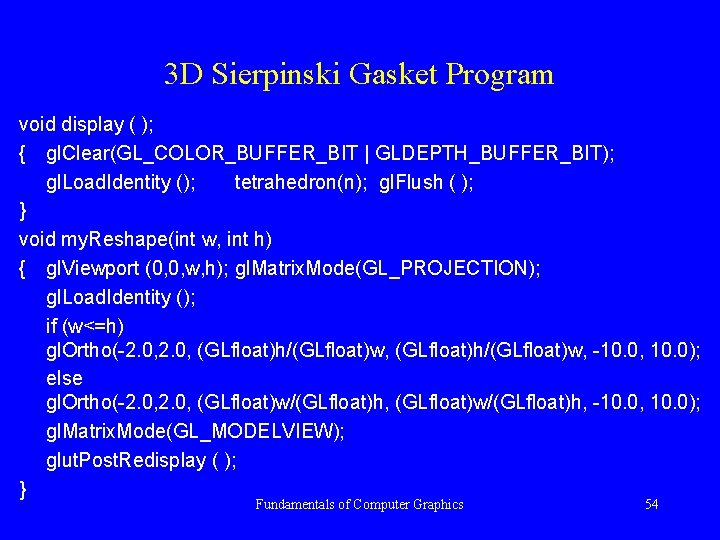
3 D Sierpinski Gasket Program void display ( ); { gl. Clear(GL_COLOR_BUFFER_BIT | GLDEPTH_BUFFER_BIT); gl. Load. Identity (); tetrahedron(n); gl. Flush ( ); } void my. Reshape(int w, int h) { gl. Viewport (0, 0, w, h); gl. Matrix. Mode(GL_PROJECTION); gl. Load. Identity (); if (w<=h) gl. Ortho(-2. 0, (GLfloat)h/(GLfloat)w, -10. 0, 10. 0); else gl. Ortho(-2. 0, (GLfloat)w/(GLfloat)h, -10. 0, 10. 0); gl. Matrix. Mode(GL_MODELVIEW); glut. Post. Redisplay ( ); } Fundamentals of Computer Graphics 54
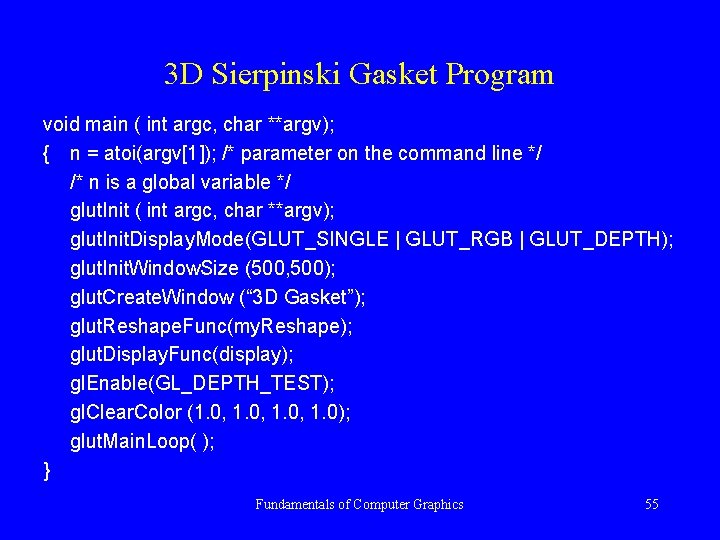
3 D Sierpinski Gasket Program void main ( int argc, char **argv); { n = atoi(argv[1]); /* parameter on the command line */ /* n is a global variable */ glut. Init ( int argc, char **argv); glut. Init. Display. Mode(GLUT_SINGLE | GLUT_RGB | GLUT_DEPTH); glut. Init. Window. Size (500, 500); glut. Create. Window (“ 3 D Gasket”); glut. Reshape. Func(my. Reshape); glut. Display. Func(display); gl. Enable(GL_DEPTH_TEST); gl. Clear. Color (1. 0, 1. 0); glut. Main. Loop( ); } Fundamentals of Computer Graphics 55
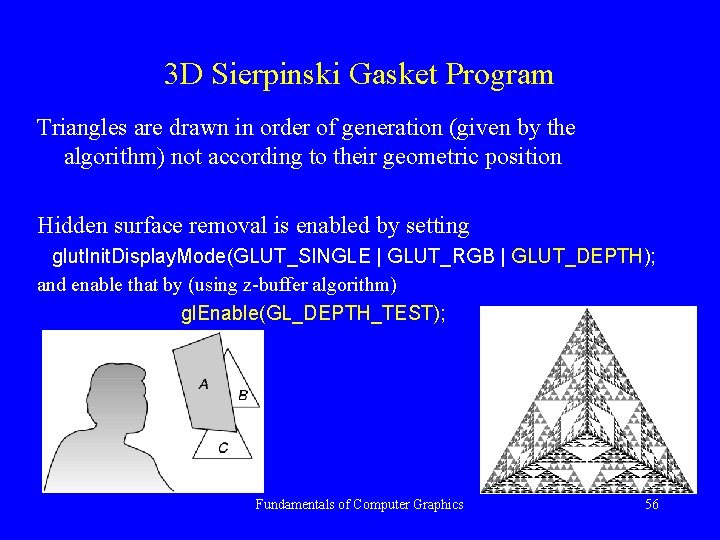
3 D Sierpinski Gasket Program Triangles are drawn in order of generation (given by the algorithm) not according to their geometric position Hidden surface removal is enabled by setting glut. Init. Display. Mode(GLUT_SINGLE | GLUT_RGB | GLUT_DEPTH); and enable that by (using z-buffer algorithm) gl. Enable(GL_DEPTH_TEST); Fundamentals of Computer Graphics 56
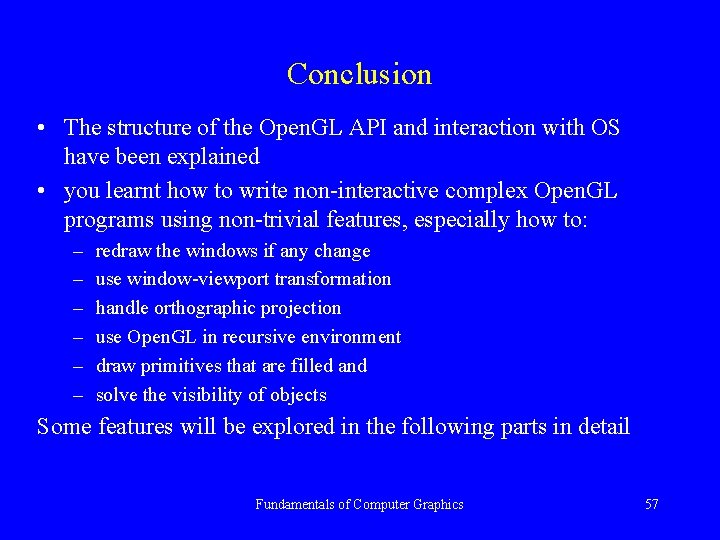
Conclusion • The structure of the Open. GL API and interaction with OS have been explained • you learnt how to write non-interactive complex Open. GL programs using non-trivial features, especially how to: – – – redraw the windows if any change use window-viewport transformation handle orthographic projection use Open. GL in recursive environment draw primitives that are filled and solve the visibility of objects Some features will be explored in the following parts in detail Fundamentals of Computer Graphics 57
Conclusion • Read the book • Study examples in the Appendices in detail • Pass exercises at the end of Chapter 2 and try to answer all questions • Learn how to compute a normal of a triangle using the cross-product Fundamentals of Computer Graphics 58