EMT 2484 EMT 2453 INTRODUCTION TO MICROPROCESSOR DESIGN




- Slides: 45
EMT 248/4 & EMT 245/3 INTRODUCTION TO MICROPROCESSOR DESIGN : : ppk micro. e : : 4 ½ : : Assembly Language (continue)
Instruction, Data Format, And Storage • Instruction is a command to the microprocessor to perform a given task on specified data. • Each instruction has two parts: – one is the task to be performed, called the operation code (opcode), – the second is the data to be operated on, called the operand. • The operand (or data) can be specified in various ways. • It may include 8 -bit (or 16 -bit) data, an internal register, a memory location, or an 8 -bit (or 16 -bit) address. In some instructions, the operand is implicit.
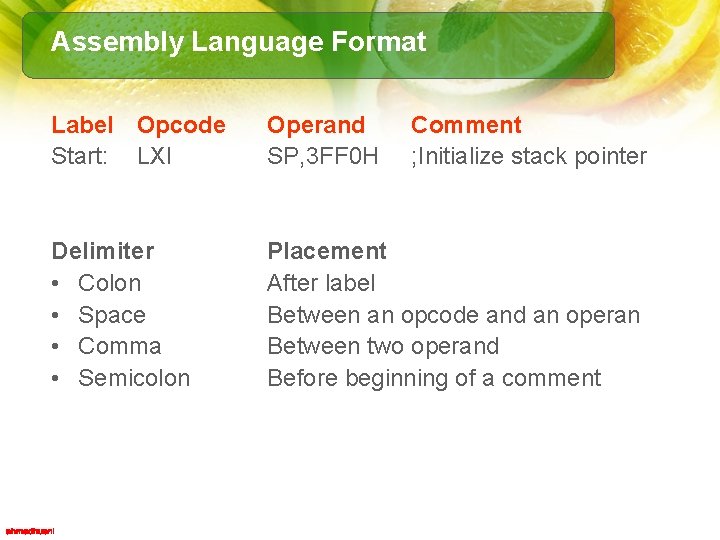
Assembly Language Format Label Opcode Start: LXI Operand SP, 3 FF 0 H Comment ; Initialize stack pointer Delimiter • Colon • Space • Comma • Semicolon Placement After label Between an opcode and an operan Between two operand Before beginning of a comment
Instruction, Data Format, And Storage • In the 8085, “byte” and “word” are synonymous because it is an 8 -bit microprocessor. • However, instructions are commonly referred to in terms of bytes rather than words. – 1 -byte instructions – 2 -byte instructions – 3 -byte instructions
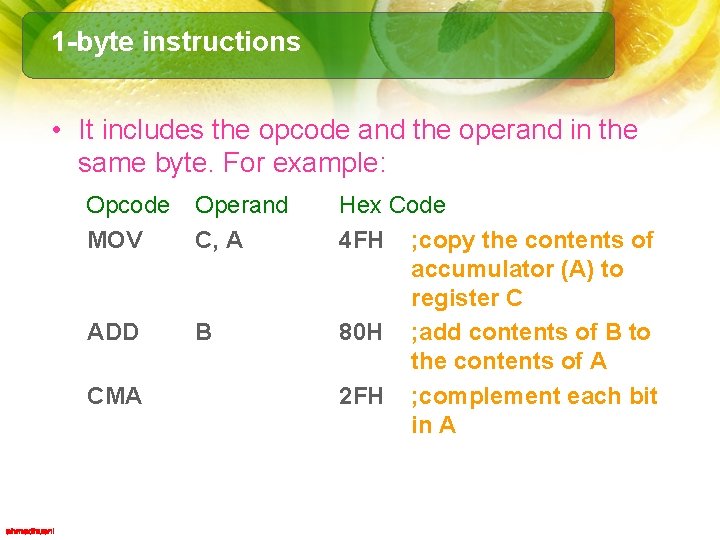
1 -byte instructions • It includes the opcode and the operand in the same byte. For example: Opcode MOV Operand C, A ADD B CMA Hex Code 4 FH ; copy the contents of accumulator (A) to register C 80 H ; add contents of B to the contents of A 2 FH ; complement each bit in A
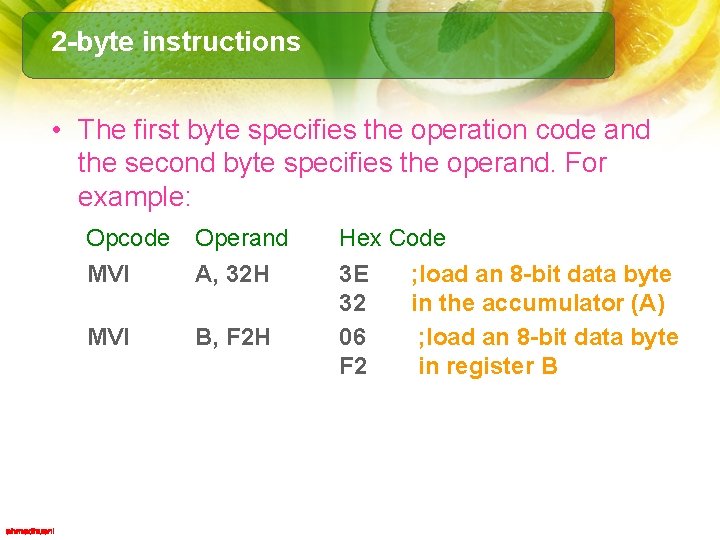
2 -byte instructions • The first byte specifies the operation code and the second byte specifies the operand. For example: Opcode MVI Operand A, 32 H MVI B, F 2 H Hex Code 3 E ; load an 8 -bit data byte 32 in the accumulator (A) 06 ; load an 8 -bit data byte F 2 in register B
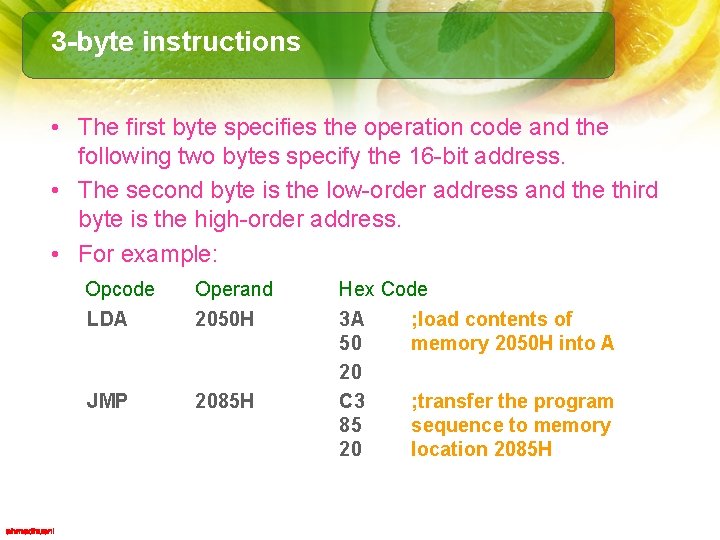
3 -byte instructions • The first byte specifies the operation code and the following two bytes specify the 16 -bit address. • The second byte is the low-order address and the third byte is the high-order address. • For example: Opcode LDA Operand 2050 H JMP 2085 H Hex Code 3 A ; load contents of 50 memory 2050 H into A 20 C 3 ; transfer the program 85 sequence to memory 20 location 2085 H
Addressing Modes • Instructions can be categorized according to their method of addressing the hardware registers and/or memory. – Implied Addressing – Register Addressing – Immediate Addressing – Direct Addressing – Register Indirect Addressing – Combined Addressing Modes
Implied Addressing • The addressing mode of certain instructions is implied by the instruction’s function. – For example: • the STC (set carry flag) instruction deals only with the carry flag • the DAA (decimal adjust accumulator) instruction deals with the accumulator.
Register Addressing • Quite a large set of instructions call for register addressing. • We must specify one of the registers A through E, H or L as well as the operation code. • The accumulator is implied as a second operand. – For example, the instruction CMP E may be interpreted as 'compare the contents of the E register with the contents of the accumulator. • Most of the instructions that use register addressing deal with 8 -bit values. • However, a few of these instructions deal with 16 -bit register pairs. – For example, the PCHL instruction exchanges the contents of the program counter with the contents of the H and L registers.
Immediate Addressing • These instructions have data assembled as a part of the instruction itself. – For example, the instruction CPI 'C' may be interpreted as ‘compare the contents of the accumulator with the letter C. • When assembled, this instruction has the hexadecimal value FE 43. • Hexadecimal 43 is the internal representation for the letter C. • When this instruction is executed, the processor fetches the first instruction byte and determines that it must fetch one more byte. • The processor fetches the next byte into one of its internal registers and then performs the compare operation. CPI : Compare immediate with accumulator
Direct Addressing • These instructions require three bytes of storage: one for the instruction code, and two for the 16 -bit address. • Example: – JMP 1000 H causes a jump to the hexadecimal address 1000 H by replacing the current contents of the PC with the new value 1000 H.
Register Indirect Addressing • These instructions reference memory via a register pair. • For example: MOV M, C – moves the contents of the C register into the memory address stored in the H and L register pair. • The instruction LDAX B loads the accumulator with the byte of data specified by the address in the B and C register pair.
Combined Addressing Modes • Some instructions use a combination of addressing modes. – A CALL instruction, for example, combines direct addressing and register indirect addressing. – The direct address in a CALL instruction specifies the address of the desired subroutine; – the register indirect address is the stack pointer. The CALL instruction pushes the current contents of the program counter into the memory location specified by the stack pointer. .
Timing Effects of Addressing Modes • Addressing modes affect both the amount of time required for executing an instruction and the amount of memory required for its storage. • For example, instructions that use implied or register addressing, execute very quickly since they deal directly with the processor’s hardware or with data already present in hardware registers. – Most important, however is that the entire instruction can be fetched with a single memory access. The number of memory accesses required is the single greatest factor in determining execution timing. • More memory accesses require more execution time. – A CALL instruction for example, requires five memory accesses: three to access the entire instruction and two more to push the contents of the program counter onto the stack.
Data Format • Signed Integer - A signed integer is either a positive number or a negative number. – In an 8 -bit processor, the most significant digit, D 7, is used for the sign; 0 represents the positive sign and I represents the negative sign. – The remaining seven bits, D 6—D 0, represent the magnitude of an integer. Therefore, the largest positive integer that can be processed by the 8085 at one time is 0111 1111 (7 FH); the remaining Hex numbers, 80 H to FFH, are considered negative numbers.
Data Format • Unsigned Integers - An integer without a sign can be represented by all the 8 bits in a microprocessor register. – Therefore, the largest number that can be processed at one time is FFH. – However, this does not imply that the 8085 microprocessor is limited to handling only 8 -bit numbers. Numbers larger than 8 bits (such as 16 bit or 24 -bit numbers) are processed by dividing them in groups of 8 bits.
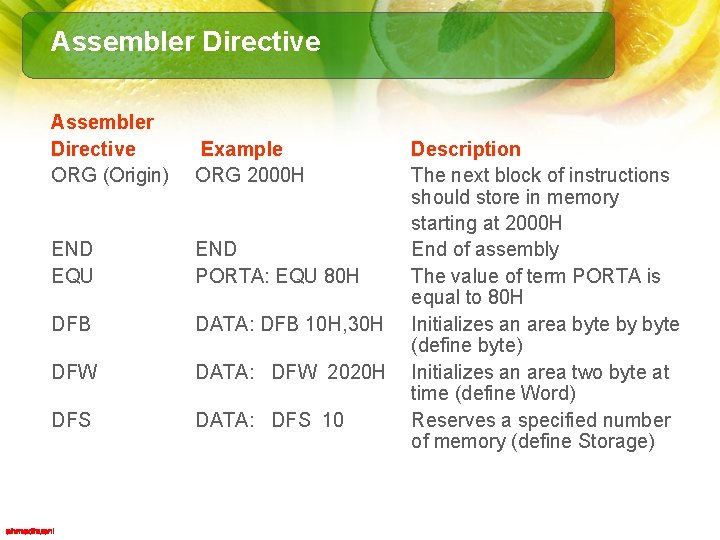
Assembler Directive ORG (Origin) Example ORG 2000 H END EQU END PORTA: EQU 80 H DFB DATA: DFB 10 H, 30 H DFW DATA: DFW 2020 H DFS DATA: DFS 10 Description The next block of instructions should store in memory starting at 2000 H End of assembly The value of term PORTA is equal to 80 H Initializes an area byte by byte (define byte) Initializes an area two byte at time (define Word) Reserves a specified number of memory (define Storage)
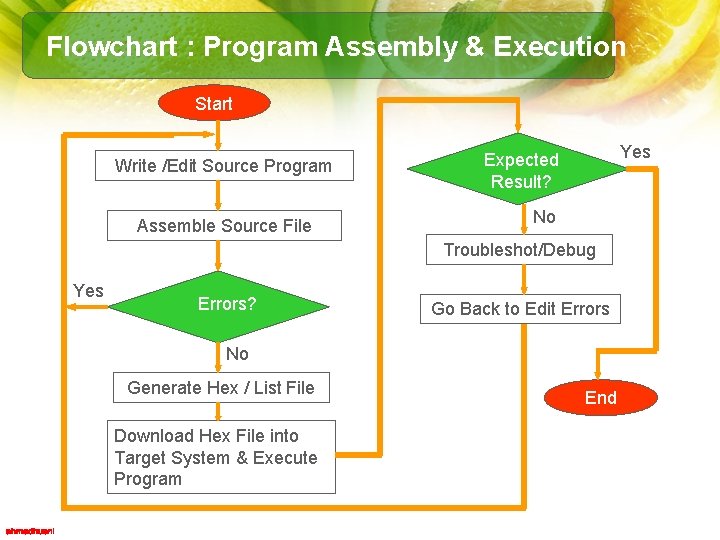
Flowchart : Program Assembly & Execution Start Write /Edit Source Program Assemble Source File Yes Expected Result? No Troubleshot/Debug Yes Errors? Go Back to Edit Errors No Generate Hex / List File Download Hex File into Target System & Execute Program End
How To Write, Assemble, And Execute a Simple Program • A program is a sequence of instructions written to tell a computer to perform a specific function. • The instructions are selected from the instruction set of the microprocessor. • To write a program: – divide a given problem in small steps in terms of the operations the 8085 can perform; – then translate these steps into instructions.
Example: Writing a simple program • PROBLEM STATEMENT – Write instructions to load the two hexadecimal numbers 32 H and 48 H in registers A and B, respectively. – Add the numbers, and display the sum at the LED output Port. B of the 8255 Device.
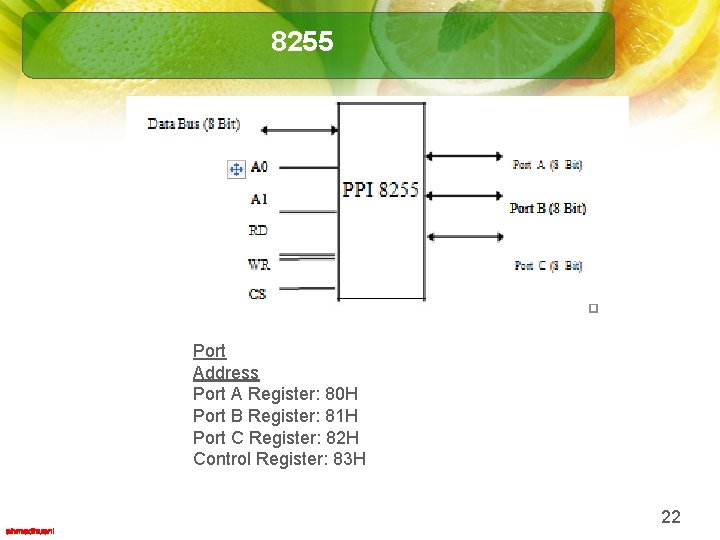
8255 Port Address Port A Register: 80 H Port B Register: 81 H Port C Register: 82 H Control Register: 83 H 22
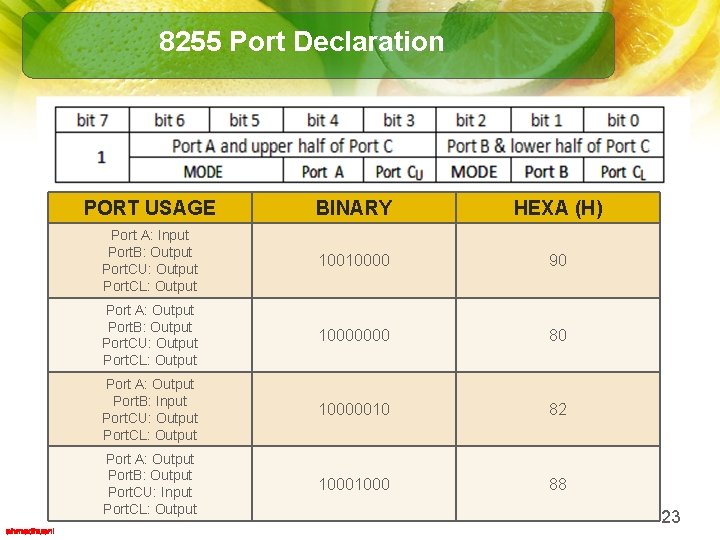
8255 Port Declaration PORT USAGE BINARY HEXA (H) Port A: Input Port. B: Output Port. CU: Output Port. CL: Output 10010000 90 Port A: Output Port. B: Output Port. CU: Output Port. CL: Output 10000000 80 Port A: Output Port. B: Input Port. CU: Output Port. CL: Output 10000010 82 Port A: Output Port. B: Output Port. CU: Input Port. CL: Output 1000 88 23
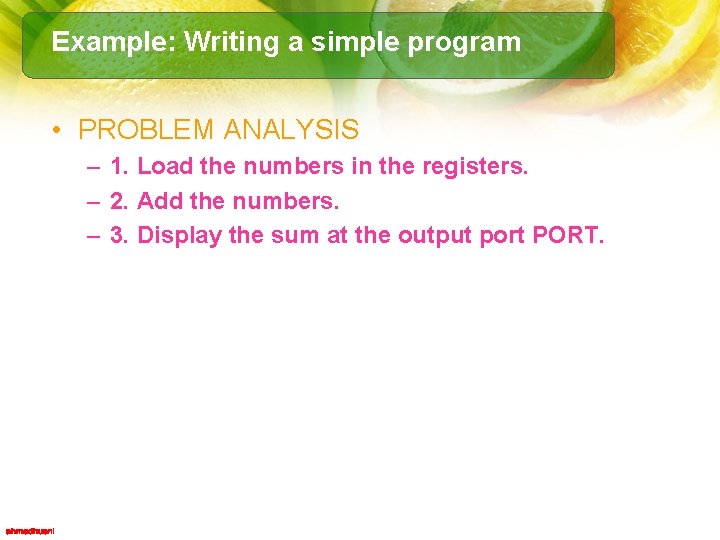
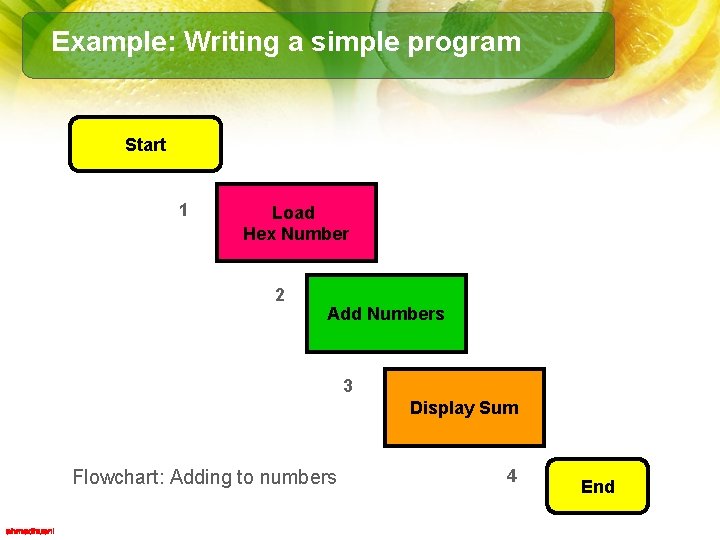
Example: Writing a simple program • PROBLEM ANALYSIS – 1. Load the numbers in the registers. – 2. Add the numbers. – 3. Display the sum at the output port PORT.
Example: Writing a simple program Start 1 Load Hex Number 2 Add Numbers 3 Display Sum Flowchart: Adding to numbers 4 End
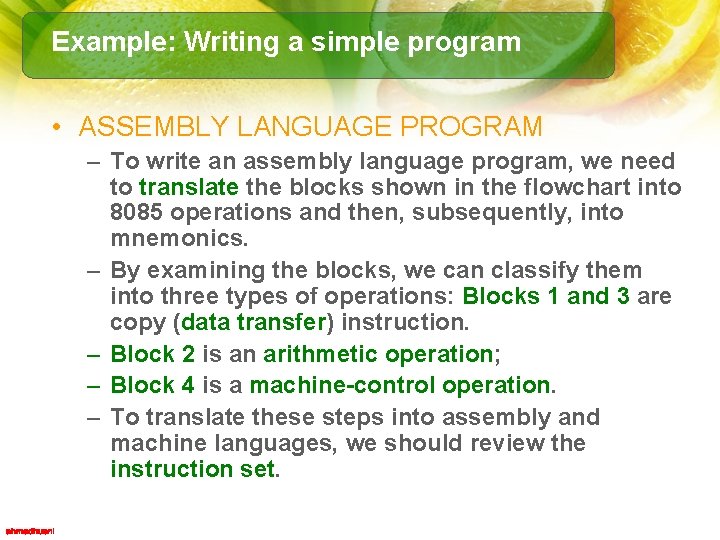
Example: Writing a simple program • ASSEMBLY LANGUAGE PROGRAM – To write an assembly language program, we need to translate the blocks shown in the flowchart into 8085 operations and then, subsequently, into mnemonics. – By examining the blocks, we can classify them into three types of operations: Blocks 1 and 3 are copy (data transfer) instruction. – Block 2 is an arithmetic operation; – Block 4 is a machine-control operation. – To translate these steps into assembly and machine languages, we should review the instruction set.
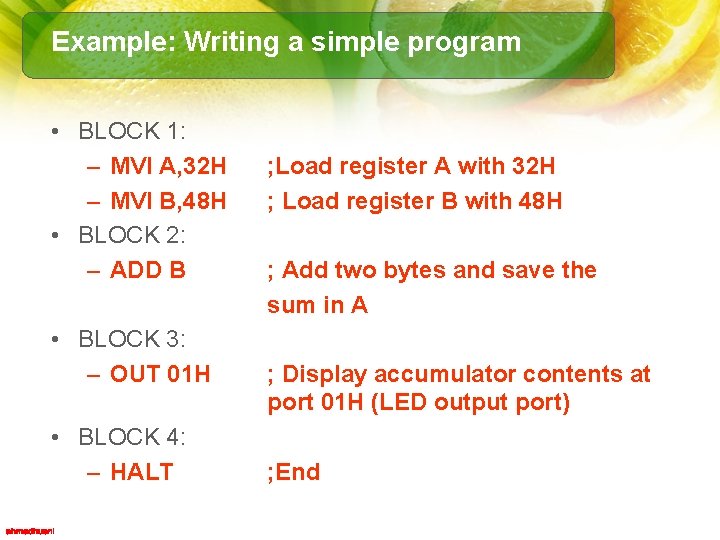
Example: Writing a simple program • BLOCK 1: – MVI A, 32 H – MVI B, 48 H • BLOCK 2: – ADD B • BLOCK 3: – OUT 01 H • BLOCK 4: – HALT ; Load register A with 32 H ; Load register B with 48 H ; Add two bytes and save the sum in A ; Display accumulator contents at port 01 H (LED output port) ; End
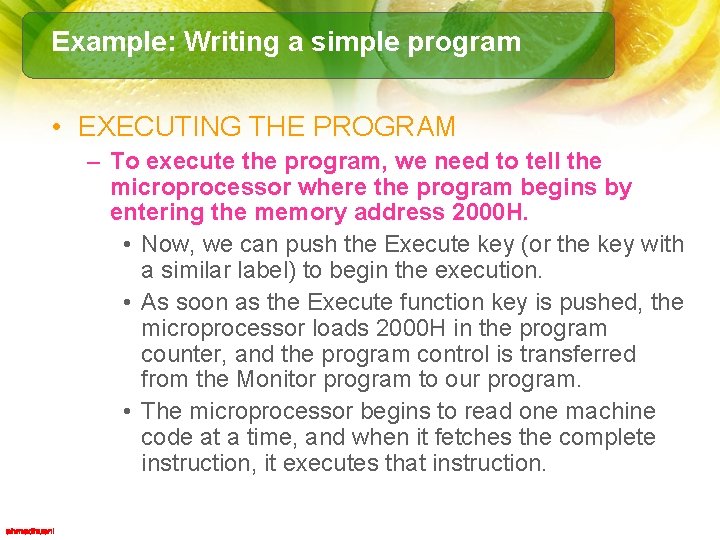
Example: Writing a simple program • EXECUTING THE PROGRAM – To execute the program, we need to tell the microprocessor where the program begins by entering the memory address 2000 H. • Now, we can push the Execute key (or the key with a similar label) to begin the execution. • As soon as the Execute function key is pushed, the microprocessor loads 2000 H in the program counter, and the program control is transferred from the Monitor program to our program. • The microprocessor begins to read one machine code at a time, and when it fetches the complete instruction, it executes that instruction.
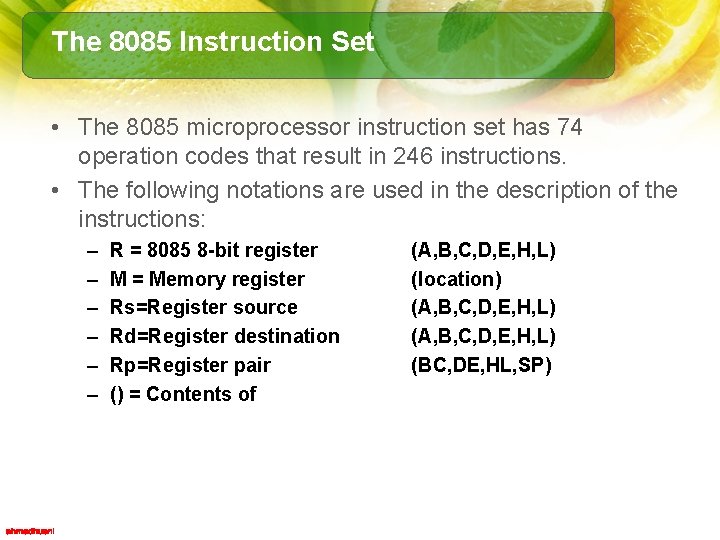
The 8085 Instruction Set • The 8085 microprocessor instruction set has 74 operation codes that result in 246 instructions. • The following notations are used in the description of the instructions: – – – R = 8085 8 -bit register M = Memory register Rs=Register source Rd=Register destination Rp=Register pair () = Contents of (A, B, C, D, E, H, L) (location) (A, B, C, D, E, H, L) (BC, DE, HL, SP)
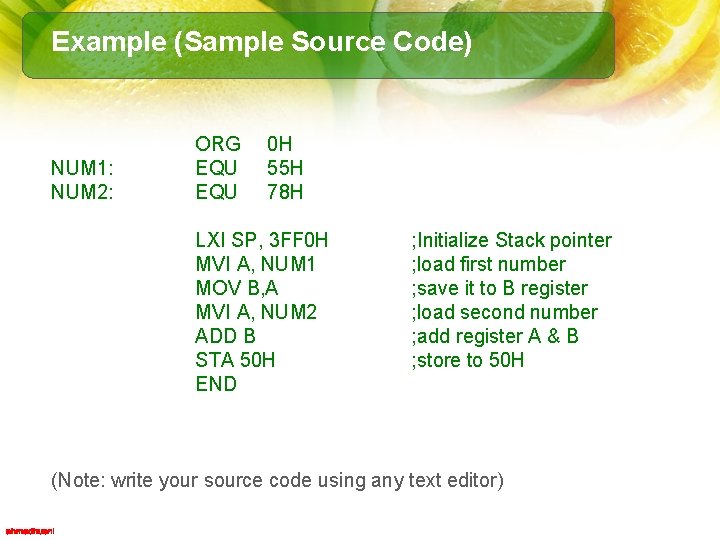
Example (Sample Source Code) NUM 1: NUM 2: ORG EQU 0 H 55 H 78 H LXI SP, 3 FF 0 H MVI A, NUM 1 MOV B, A MVI A, NUM 2 ADD B STA 50 H END ; Initialize Stack pointer ; load first number ; save it to B register ; load second number ; add register A & B ; store to 50 H (Note: write your source code using any text editor)
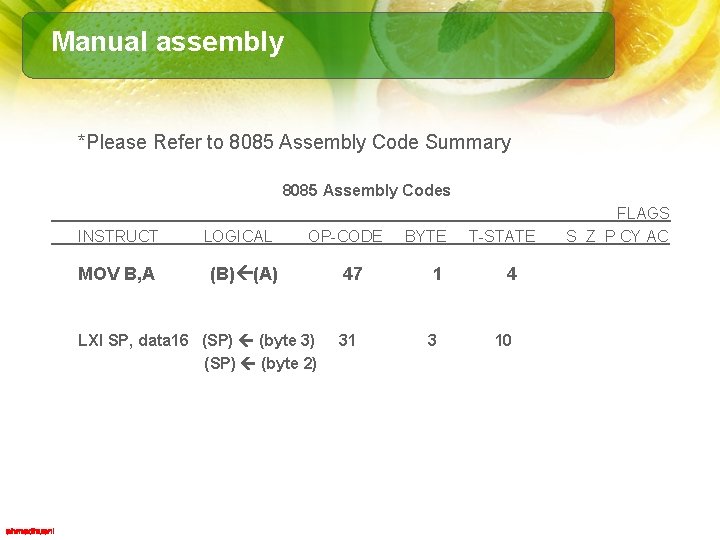
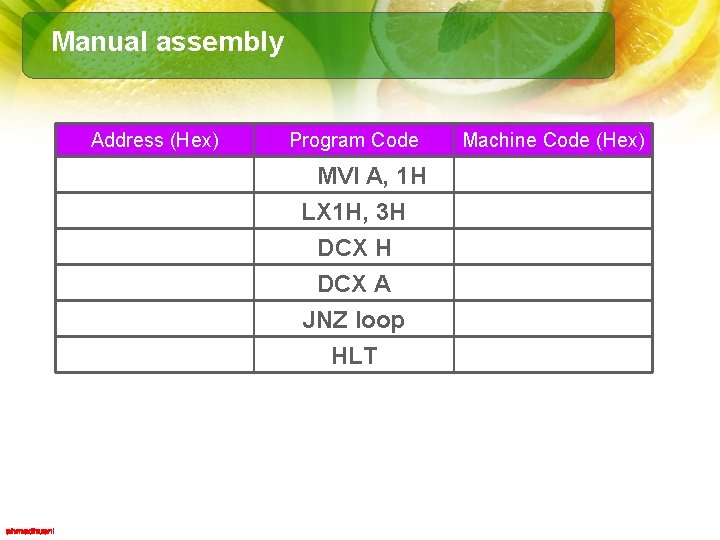
Manual assembly *Please Refer to 8085 Assembly Code Summary 8085 Assembly Codes INSTRUCT MOV B, A LOGICAL OP-CODE (B) (A) LXI SP, data 16 (SP) (byte 3) (SP) (byte 2) BYTE 47 1 31 3 T-STATE 4 10 FLAGS S Z P CY AC
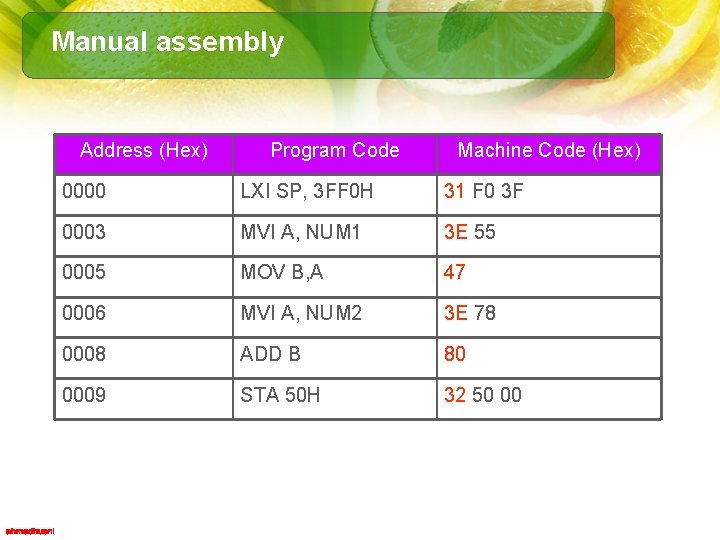
Manual assembly Address (Hex) Program Code Machine Code (Hex) 0000 LXI SP, 3 FF 0 H 31 F 0 3 F 0003 MVI A, NUM 1 3 E 55 0005 MOV B, A 47 0006 MVI A, NUM 2 3 E 78 0008 ADD B 80 0009 STA 50 H 32 50 00
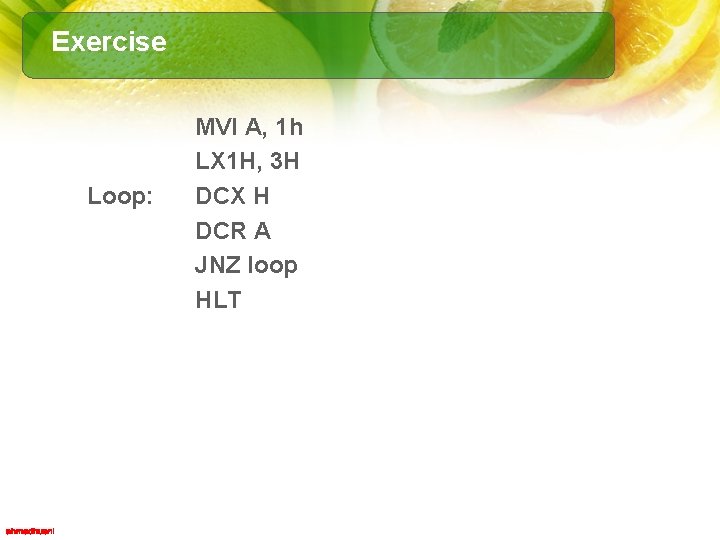
Exercise Loop: MVI A, 1 h LX 1 H, 3 H DCX H DCR A JNZ loop HLT
Manual assembly Address (Hex) Program Code MVI A, 1 H LX 1 H, 3 H DCX A JNZ loop HLT Machine Code (Hex)
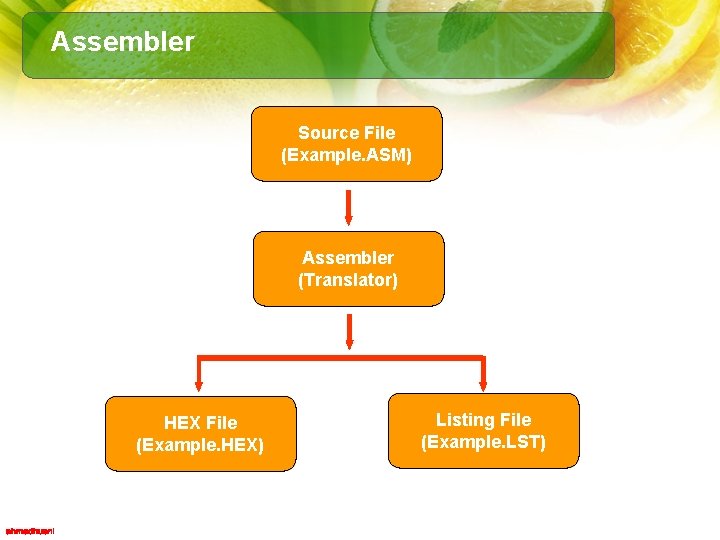
Assembler • The Assembler is a program that translates source code or mnemonics into the binary code (machine code). • In addition to translating mnemonics, the Assembler performs various functions, such as error checking and memory allocations.
Assembler Source File (Example. ASM) Assembler (Translator) HEX File (Example. HEX) Listing File (Example. LST)
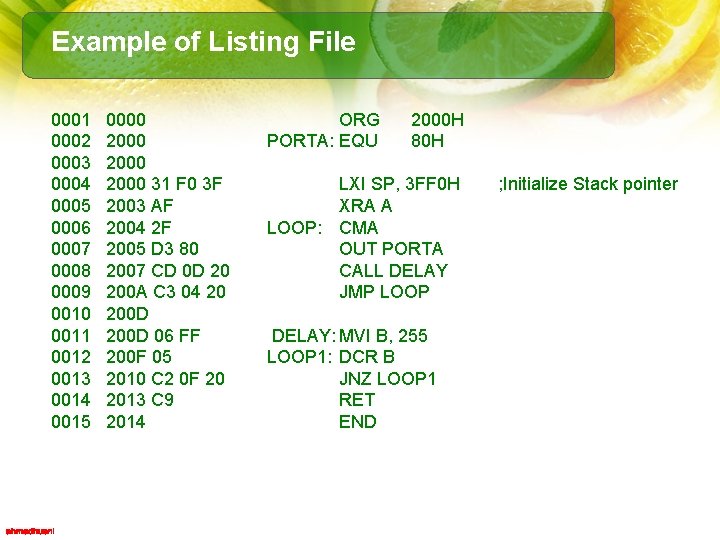
Example of Listing File 0001 0002 0003 0004 0005 0006 0007 0008 0009 0010 0011 0012 0013 0014 0015 0000 2000 31 F 0 3 F 2003 AF 2004 2 F 2005 D 3 80 2007 CD 0 D 20 200 A C 3 04 20 200 D 06 FF 200 F 05 2010 C 2 0 F 20 2013 C 9 2014 ORG PORTA: EQU 2000 H 80 H LXI SP, 3 FF 0 H XRA A LOOP: CMA OUT PORTA CALL DELAY JMP LOOP DELAY: MVI B, 255 LOOP 1: DCR B JNZ LOOP 1 RET END ; Initialize Stack pointer
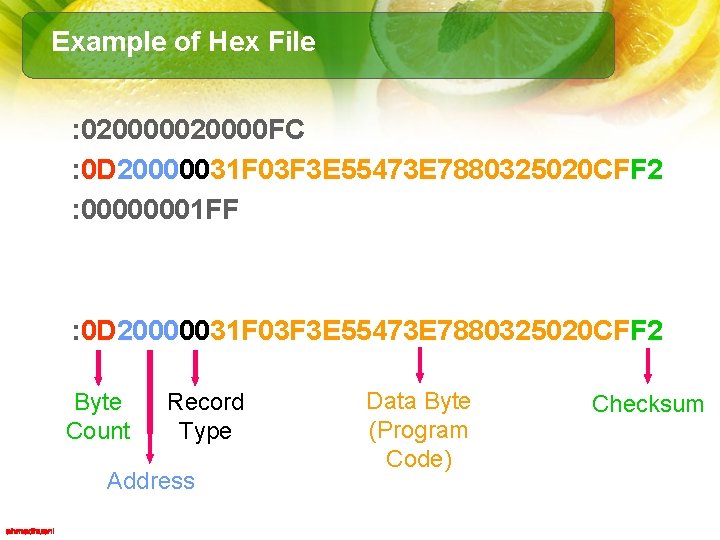
Example of Hex File : 020000 FC : 0 D 20000031 F 03 F 3 E 55473 E 7880325020 CFF 2 : 00000001 FF : 0 D 20000031 F 03 F 3 E 55473 E 7880325020 CFF 2 Byte Count Record Type Address Data Byte (Program Code) Checksum
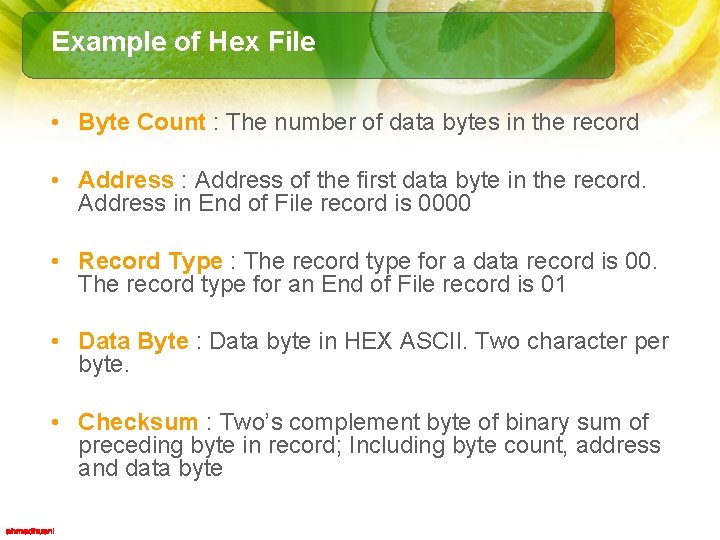
Example of Hex File • Byte Count : The number of data bytes in the record • Address : Address of the first data byte in the record. Address in End of File record is 0000 • Record Type : The record type for a data record is 00. The record type for an End of File record is 01 • Data Byte : Data byte in HEX ASCII. Two character per byte. • Checksum : Two’s complement byte of binary sum of preceding byte in record; Including byte count, address and data byte
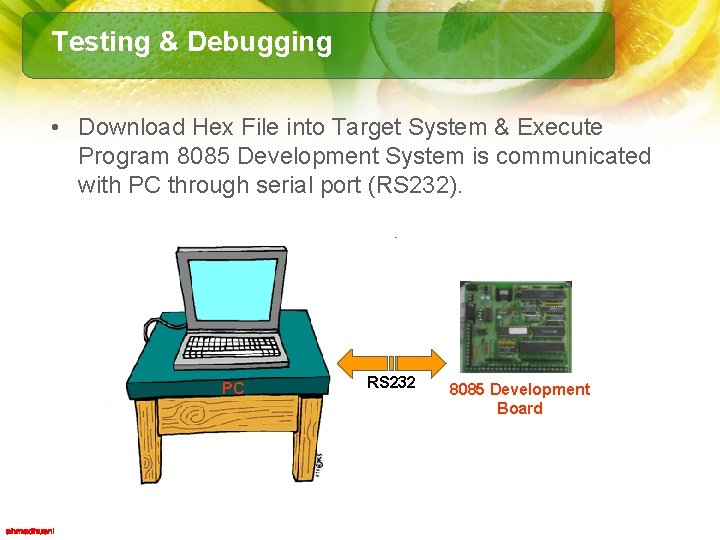
Testing & Debugging • Download Hex File into Target System & Execute Program 8085 Development System is communicated with PC through serial port (RS 232). PC RS 232 8085 Development Board
Summary • The 8085 microprocessor operations are classified into five major groups: data transfer (copy), arithmetic, logic, branch, and machine control. • An instruction has two parts: – opcode (operation to be performed) – operand (data to be operated on) - The operand can be data (8 - or 16 -bit), address, or register, or it can be implicit. • The method of specifying an operand (directly, indirectly, etc. ) is called the addressing mode. • The instruction set is classified in three groups according to the word size: 1 -, 2 -, or 3 -byte instructions. • To write an assembly language program, divide the given problem into small steps in terms of the microprocessor operations, translate these steps into assembly language instructions, and then translate them into the 8085 machine code.
Cheers!!
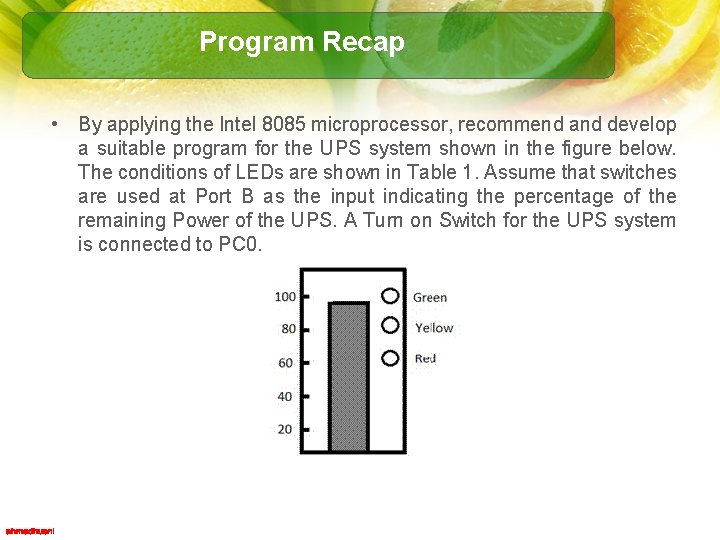
Program Recap • By applying the Intel 8085 microprocessor, recommend and develop a suitable program for the UPS system shown in the figure below. The conditions of LEDs are shown in Table 1. Assume that switches are used at Port B as the input indicating the percentage of the remaining Power of the UPS. A Turn on Switch for the UPS system is connected to PC 0.
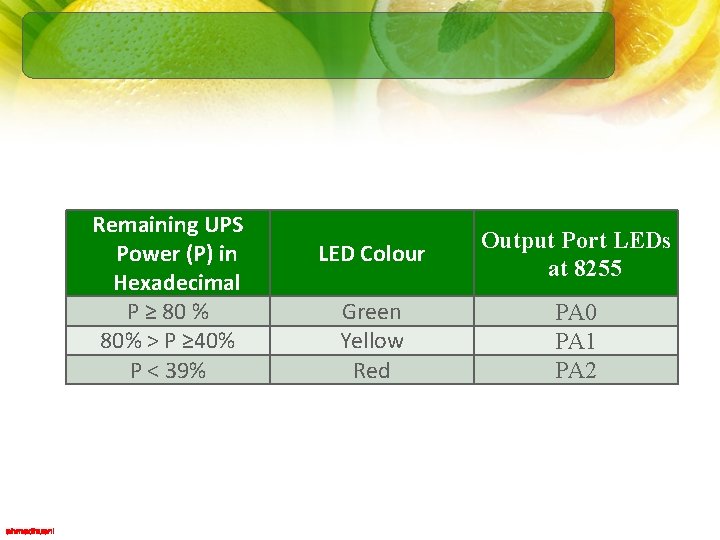
Remaining UPS Power (P) in Hexadecimal P ≥ 80 % 80% > P ≥ 40% P < 39% LED Colour Output Port LEDs at 8255 Green Yellow Red PA 0 PA 1 PA 2
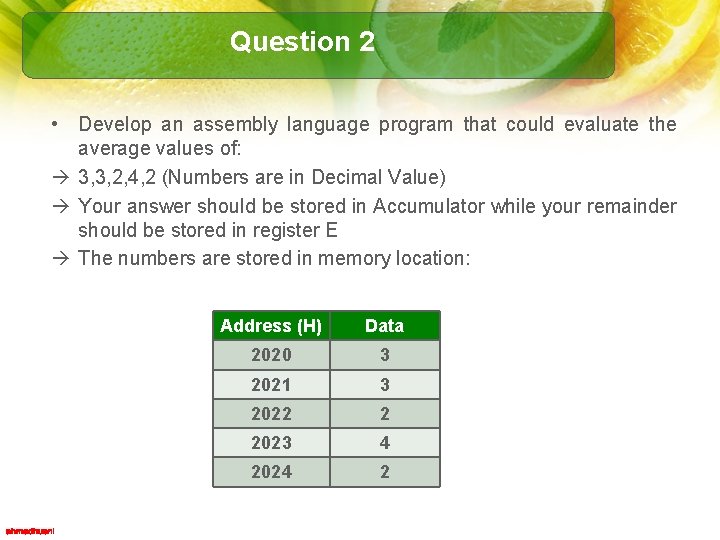
Question 2 • Develop an assembly language program that could evaluate the average values of: à 3, 3, 2, 4, 2 (Numbers are in Decimal Value) à Your answer should be stored in Accumulator while your remainder should be stored in register E à The numbers are stored in memory location: Address (H) Data 2020 3 2021 3 2022 2 2023 4 2024 2