CMPT 300 Introduction to Operating Systems Course Organization
![CMPT 300: Operating Systems ] Time: Wed 5: 30 -8: 20 pm ] Location:](https://slidetodoc.com/presentation_image_h/00d607d850676d48b7ce4aa34f4d561f/image-2.jpg "CMPT 300: Operating Systems ] Time: Wed 5: 30 -8: 20 pm ] Location:")
![Contact Information ] Instructor: Zonghua Gu ] Office: TASC 1, Room 9215 ] Office](https://slidetodoc.com/presentation_image_h/00d607d850676d48b7ce4aa34f4d561f/image-3.jpg "Contact Information ] Instructor: Zonghua Gu ] Office: TASC 1, Room 9215 ] Office")
![Web-site ] All the information discussed today and more can always be found on](https://slidetodoc.com/presentation_image_h/00d607d850676d48b7ce4aa34f4d561f/image-4.jpg "Web-site ] All the information discussed today and more can always be found on")
![Topics ] History, Evolution, and Philosophies ] The User's View of Operating System ]](https://slidetodoc.com/presentation_image_h/00d607d850676d48b7ce4aa34f4d561f/image-5.jpg "Topics ] History, Evolution, and Philosophies ] The User's View of Operating System ]")
![Hardware and Software ] A computer is a machine designed to perform operations specified](https://slidetodoc.com/presentation_image_h/00d607d850676d48b7ce4aa34f4d561f/image-7.jpg "Hardware and Software ] A computer is a machine designed to perform operations specified")
![Computer Hardware ] Computer-system operation S One or more CPUs, device controllers connect through](https://slidetodoc.com/presentation_image_h/00d607d850676d48b7ce4aa34f4d561f/image-8.jpg "Computer Hardware ] Computer-system operation S One or more CPUs, device controllers connect through")
![How do we tame complexity? ] Every piece of computer hardware different S Different](https://slidetodoc.com/presentation_image_h/00d607d850676d48b7ce4aa34f4d561f/image-11.jpg "How do we tame complexity? ] Every piece of computer hardware different S Different")
![Virtual Machine Abstraction Application Virtual Machine Interface Operating System Hardware Physical Machine Interface ]](https://slidetodoc.com/presentation_image_h/00d607d850676d48b7ce4aa34f4d561f/image-12.jpg "Virtual Machine Abstraction Application Virtual Machine Interface Operating System Hardware Physical Machine Interface ]")
![Virtual Machines ] Software emulation of an abstract machine ] Programming simplicity ] S](https://slidetodoc.com/presentation_image_h/00d607d850676d48b7ce4aa34f4d561f/image-13.jpg "Virtual Machines ] Software emulation of an abstract machine ] Programming simplicity ] S")
![What does an OS do? ] Silberschatz and Gavin: “An OS is Similar to](https://slidetodoc.com/presentation_image_h/00d607d850676d48b7ce4aa34f4d561f/image-14.jpg "What does an OS do? ] Silberschatz and Gavin: “An OS is Similar to")
![What is an Operating System, … Really? ] Most Likely: S S S Memory](https://slidetodoc.com/presentation_image_h/00d607d850676d48b7ce4aa34f4d561f/image-15.jpg "What is an Operating System, … Really? ] Most Likely: S S S Memory")
![Operating System Definition (Cont’d) ] No universally accepted definition ] “Everything a vendor ships](https://slidetodoc.com/presentation_image_h/00d607d850676d48b7ce4aa34f4d561f/image-16.jpg "Operating System Definition (Cont’d) ] No universally accepted definition ] “Everything a vendor ships")
![Summary ] Operating systems provide a virtual machine abstraction to handle diverse hardware ]](https://slidetodoc.com/presentation_image_h/00d607d850676d48b7ce4aa34f4d561f/image-17.jpg "Summary ] Operating systems provide a virtual machine abstraction to handle diverse hardware ]")
![Machine language ] Each type of processor (like Pentium 4, Athalon, Z 80, …)](https://slidetodoc.com/presentation_image_h/00d607d850676d48b7ce4aa34f4d561f/image-18.jpg "Machine language ] Each type of processor (like Pentium 4, Athalon, Z 80, …)")
![Machine Language programs ] A machine language program is a list of instructions S](https://slidetodoc.com/presentation_image_h/00d607d850676d48b7ce4aa34f4d561f/image-19.jpg "Machine Language programs ] A machine language program is a list of instructions S")
![Assembly ] Assembly languages make it easier for the programmer. S Assembly is easier](https://slidetodoc.com/presentation_image_h/00d607d850676d48b7ce4aa34f4d561f/image-20.jpg "Assembly ] Assembly languages make it easier for the programmer. S Assembly is easier")
![Computer Software: Languages ] Some Computer Languages S S S Machine language (machine instruction](https://slidetodoc.com/presentation_image_h/00d607d850676d48b7ce4aa34f4d561f/image-21.jpg "Computer Software: Languages ] Some Computer Languages S S S Machine language (machine instruction")
![Computer Software: Applications ] Application Software (Software Tools) S Word processors (Microsoft Word, Word.](https://slidetodoc.com/presentation_image_h/00d607d850676d48b7ce4aa34f4d561f/image-22.jpg "Computer Software: Applications ] Application Software (Software Tools) S Word processors (Microsoft Word, Word.")
![User mode / kernel mode ] Most application software runs in user mode. Applications](https://slidetodoc.com/presentation_image_h/00d607d850676d48b7ce4aa34f4d561f/image-23.jpg "User mode / kernel mode ] Most application software runs in user mode. Applications")
![Memory Hierarchy ] Different types of memory have different access speeds and costs ]](https://slidetodoc.com/presentation_image_h/00d607d850676d48b7ce4aa34f4d561f/image-25.jpg "Memory Hierarchy ] Different types of memory have different access speeds and costs ]")
![Registers in CPU ] Data registers ] Accumulator ] Address registers ] Control/Status registers](https://slidetodoc.com/presentation_image_h/00d607d850676d48b7ce4aa34f4d561f/image-27.jpg "Registers in CPU ] Data registers ] Accumulator ] Address registers ] Control/Status registers")
![Controller ] Fetch, Decode, Execute cycle (each instruction) S Fetch next instruction: Instruction contains](https://slidetodoc.com/presentation_image_h/00d607d850676d48b7ce4aa34f4d561f/image-28.jpg "Controller ] Fetch, Decode, Execute cycle (each instruction) S Fetch next instruction: Instruction contains")
![Executing an instruction (1) ] Examine program counter ] Fetch instruction indicated by program](https://slidetodoc.com/presentation_image_h/00d607d850676d48b7ce4aa34f4d561f/image-29.jpg "Executing an instruction (1) ] Examine program counter ] Fetch instruction indicated by program")
![Executing an instruction (2) ] Decode the instruction opcode Address(es) of data instruction ]](https://slidetodoc.com/presentation_image_h/00d607d850676d48b7ce4aa34f4d561f/image-30.jpg "Executing an instruction (2) ] Decode the instruction opcode Address(es) of data instruction ]")
![Executing an instruction (3) ] Execute the instruction in the instruction register, may result](https://slidetodoc.com/presentation_image_h/00d607d850676d48b7ce4aa34f4d561f/image-31.jpg "Executing an instruction (3) ] Execute the instruction in the instruction register, may result")
![Adding 2 numbers (Z=X+Y) ] ] ] ] ] Program counter points to instruction](https://slidetodoc.com/presentation_image_h/00d607d850676d48b7ce4aa34f4d561f/image-32.jpg "Adding 2 numbers (Z=X+Y) ] ] ] ] ] Program counter points to instruction")
![Memory ] Modern computers use several kinds of storage 1 nsec registers < 1](https://slidetodoc.com/presentation_image_h/00d607d850676d48b7ce4aa34f4d561f/image-33.jpg "Memory ] Modern computers use several kinds of storage 1 nsec registers < 1")
![Memory Hierarchy ] As you go down the pyramid a) b) Decreasing cost per](https://slidetodoc.com/presentation_image_h/00d607d850676d48b7ce4aa34f4d561f/image-34.jpg "Memory Hierarchy ] As you go down the pyramid a) b) Decreasing cost per")
![Registers and cache ] Parts of the CPU ] Register access speed comparable to](https://slidetodoc.com/presentation_image_h/00d607d850676d48b7ce4aa34f4d561f/image-35.jpg "Registers and cache ] Parts of the CPU ] Register access speed comparable to")
![Concept of Cache ] Provide memory on the CPU that is slower that the](https://slidetodoc.com/presentation_image_h/00d607d850676d48b7ce4aa34f4d561f/image-36.jpg "Concept of Cache ] Provide memory on the CPU that is slower that the")
![Using Cache ] Instructions (and data) are generally moved from main memory to cache](https://slidetodoc.com/presentation_image_h/00d607d850676d48b7ce4aa34f4d561f/image-38.jpg "Using Cache ] Instructions (and data) are generally moved from main memory to cache")
![Cache design ] Cache size and Cache line size S Determined to optimize access](https://slidetodoc.com/presentation_image_h/00d607d850676d48b7ce4aa34f4d561f/image-39.jpg "Cache design ] Cache size and Cache line size S Determined to optimize access")
![Hit ratio ] A hit occurs when a memory access finds its information in](https://slidetodoc.com/presentation_image_h/00d607d850676d48b7ce4aa34f4d561f/image-40.jpg "Hit ratio ] A hit occurs when a memory access finds its information in")
![Cache Line size ] As cache line size increases from a single byte, the](https://slidetodoc.com/presentation_image_h/00d607d850676d48b7ce4aa34f4d561f/image-42.jpg "Cache Line size ] As cache line size increases from a single byte, the")
![Cache specifications on common systems ] Most modern CPUs have an on-chip cache called](https://slidetodoc.com/presentation_image_h/00d607d850676d48b7ce4aa34f4d561f/image-44.jpg "Cache specifications on common systems ] Most modern CPUs have an on-chip cache called")
![Memory ] Main memory is typically DRAM (Dynamic Random Access Memory) ] Cache is](https://slidetodoc.com/presentation_image_h/00d607d850676d48b7ce4aa34f4d561f/image-48.jpg "Memory ] Main memory is typically DRAM (Dynamic Random Access Memory) ] Cache is")
![Disk ] Hard disk ] CD, DVD, Blu-Ray Disk storage is much cheaper that](https://slidetodoc.com/presentation_image_h/00d607d850676d48b7ce4aa34f4d561f/image-49.jpg "Disk ] Hard disk ] CD, DVD, Blu-Ray Disk storage is much cheaper that")
![Input / Output ] Reading or writing data from a perepheral device is not](https://slidetodoc.com/presentation_image_h/00d607d850676d48b7ce4aa34f4d561f/image-50.jpg "Input / Output ] Reading or writing data from a perepheral device is not")
![Busy Waiting ] Reading or writing data to a device is SLOW in comparison](https://slidetodoc.com/presentation_image_h/00d607d850676d48b7ce4aa34f4d561f/image-51.jpg "Busy Waiting ] Reading or writing data to a device is SLOW in comparison")
![Alternatives to Busy waiting ] Busy waiting does not use CPU resources efficiently ]](https://slidetodoc.com/presentation_image_h/00d607d850676d48b7ce4aa34f4d561f/image-52.jpg "Alternatives to Busy waiting ] Busy waiting does not use CPU resources efficiently ]")
![Interrupts ] Interrupts are a mechanism by which other modules (memory, I/0, timers …)](https://slidetodoc.com/presentation_image_h/00d607d850676d48b7ce4aa34f4d561f/image-53.jpg "Interrupts ] Interrupts are a mechanism by which other modules (memory, I/0, timers …)")
![Some types of interrupts ] I/0 S S Signaling normal completion of an operation](https://slidetodoc.com/presentation_image_h/00d607d850676d48b7ce4aa34f4d561f/image-54.jpg "Some types of interrupts ] I/0 S S Signaling normal completion of an operation")
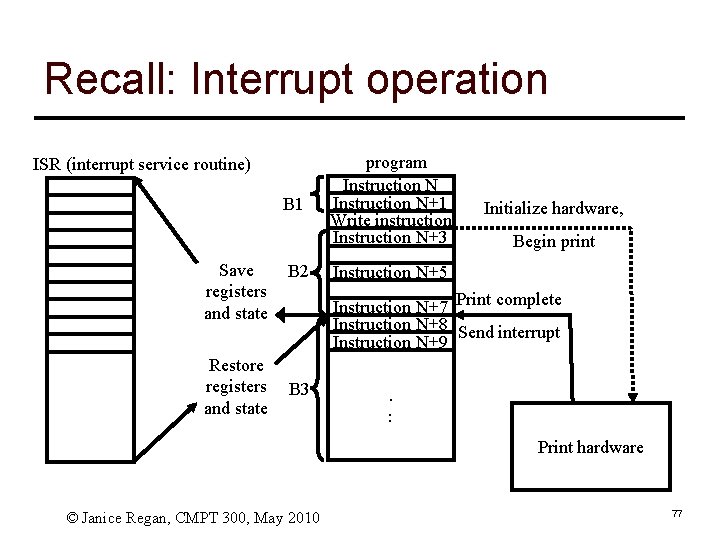
![Interrupt example: Output (1) ] Program executes until it reaches a write instruction ]](https://slidetodoc.com/presentation_image_h/00d607d850676d48b7ce4aa34f4d561f/image-56.jpg "Interrupt example: Output (1) ] Program executes until it reaches a write instruction ]")
![Interrupt example Output (2) ] When the currently executing instruction ] ] completes, the](https://slidetodoc.com/presentation_image_h/00d607d850676d48b7ce4aa34f4d561f/image-57.jpg "Interrupt example Output (2) ] When the currently executing instruction ] ] completes, the")
![Interrupt processing (1) ] A device issues an interrupt request ] The CPU (processor)](https://slidetodoc.com/presentation_image_h/00d607d850676d48b7ce4aa34f4d561f/image-60.jpg "Interrupt processing (1) ] A device issues an interrupt request ] The CPU (processor)")
![Interrupt processing (2) ] The CPU executes the ISR ] When the ISR finishes,](https://slidetodoc.com/presentation_image_h/00d607d850676d48b7ce4aa34f4d561f/image-61.jpg "Interrupt processing (2) ] The CPU executes the ISR ] When the ISR finishes,")
![History of Operating Systems ] First generation 1945 - 1955 S vacuum tubes, plug](https://slidetodoc.com/presentation_image_h/00d607d850676d48b7ce4aa34f4d561f/image-63.jpg "History of Operating Systems ] First generation 1945 - 1955 S vacuum tubes, plug")
![The earliest computers (1945 -55) ] Built of relays, vacuum tubes ] Very large,](https://slidetodoc.com/presentation_image_h/00d607d850676d48b7ce4aa34f4d561f/image-64.jpg "The earliest computers (1945 -55) ] Built of relays, vacuum tubes ] Very large,")
![The next generation (1955 -65) ] Transistor based, increased reliability ] The first commercial](https://slidetodoc.com/presentation_image_h/00d607d850676d48b7ce4aa34f4d561f/image-65.jpg "The next generation (1955 -65) ] Transistor based, increased reliability ] The first commercial")
![Single Job to Batch ] Earliest machines had very rudimentary OS. S To run](https://slidetodoc.com/presentation_image_h/00d607d850676d48b7ce4aa34f4d561f/image-66.jpg "Single Job to Batch ] Earliest machines had very rudimentary OS. S To run")
![Early Batch processing ] Collect a group of jobs S Each job was submitted](https://slidetodoc.com/presentation_image_h/00d607d850676d48b7ce4aa34f4d561f/image-67.jpg "Early Batch processing ] Collect a group of jobs S Each job was submitted")
![Operating System ] Commands to S Read a single card to memory S Compile](https://slidetodoc.com/presentation_image_h/00d607d850676d48b7ce4aa34f4d561f/image-69.jpg "Operating System ] Commands to S Read a single card to memory S Compile")
![Problems with early batch processing ] Input and output, particularly from peripheral I/0 devices](https://slidetodoc.com/presentation_image_h/00d607d850676d48b7ce4aa34f4d561f/image-70.jpg "Problems with early batch processing ] Input and output, particularly from peripheral I/0 devices")
![Improving batch processing ] Offload the slow I/0 tasks to less costly and powerful](https://slidetodoc.com/presentation_image_h/00d607d850676d48b7ce4aa34f4d561f/image-71.jpg "Improving batch processing ] Offload the slow I/0 tasks to less costly and powerful")
![The next generation (1965 -1980) ] More complicated OS S Deal both with I/0](https://slidetodoc.com/presentation_image_h/00d607d850676d48b7ce4aa34f4d561f/image-73.jpg "The next generation (1965 -1980) ] More complicated OS S Deal both with I/0")
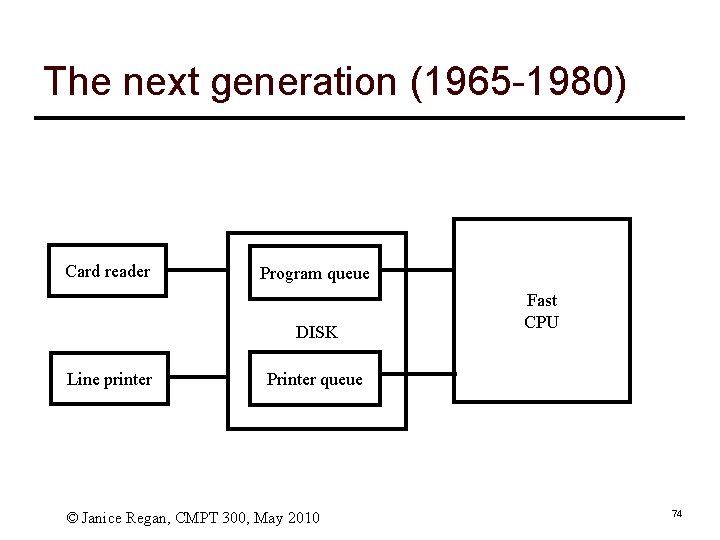
![Simultaneous Peripheral Operation On Line (Spooling) ] Spooling refers to the process of placing](https://slidetodoc.com/presentation_image_h/00d607d850676d48b7ce4aa34f4d561f/image-75.jpg "Simultaneous Peripheral Operation On Line (Spooling) ] Spooling refers to the process of placing")
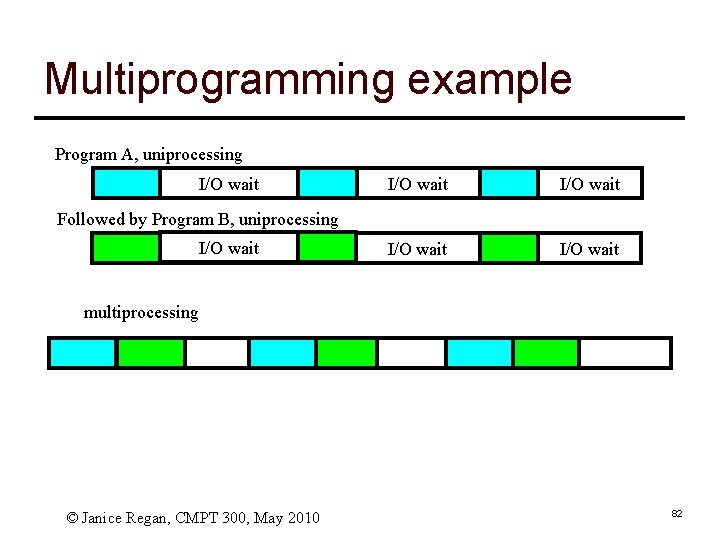
![Multiprogramming ] Partition memory into pieces (often of different sizes) ] Load one job](https://slidetodoc.com/presentation_image_h/00d607d850676d48b7ce4aa34f4d561f/image-76.jpg "Multiprogramming ] Partition memory into pieces (often of different sizes) ] Load one job")
![Interrupts for input ] The example of using an interrupt to facilitate output could](https://slidetodoc.com/presentation_image_h/00d607d850676d48b7ce4aa34f4d561f/image-78.jpg "Interrupts for input ] The example of using an interrupt to facilitate output could")
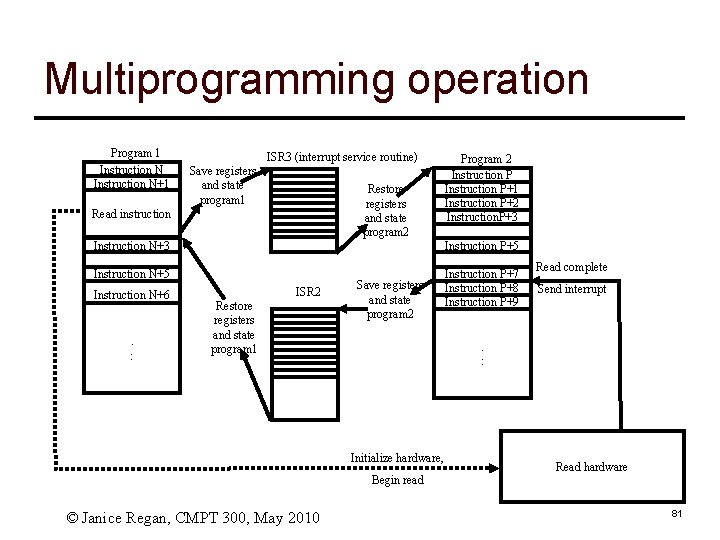
![Multiprogramming: Interrupt example (1) ] Program executes until it reaches a read instruction ]](https://slidetodoc.com/presentation_image_h/00d607d850676d48b7ce4aa34f4d561f/image-79.jpg "Multiprogramming: Interrupt example (1) ] Program executes until it reaches a read instruction ]")
![Multiprogramming: Interrupt example (2) ] When the input hardware device completes ] ] ]](https://slidetodoc.com/presentation_image_h/00d607d850676d48b7ce4aa34f4d561f/image-80.jpg "Multiprogramming: Interrupt example (2) ] When the input hardware device completes ] ] ]")
![Time sharing: Scheduling, fair sharing ] Once multiple jobs can share the CPU (sequentially,](https://slidetodoc.com/presentation_image_h/00d607d850676d48b7ce4aa34f4d561f/image-83.jpg "Time sharing: Scheduling, fair sharing ] Once multiple jobs can share the CPU (sequentially,")
![Time sharing and scheduling ] In the previous example the simplest case (only two](https://slidetodoc.com/presentation_image_h/00d607d850676d48b7ce4aa34f4d561f/image-85.jpg "Time sharing and scheduling ] In the previous example the simplest case (only two")
![Minicomputers ] Near the end of this generation (1965 -1980) small, less ] ]](https://slidetodoc.com/presentation_image_h/00d607d850676d48b7ce4aa34f4d561f/image-86.jpg "Minicomputers ] Near the end of this generation (1965 -1980) small, less ] ]")
![The next generation(1980 - now) ] Use VLSI (very large scale integrated circuits) to](https://slidetodoc.com/presentation_image_h/00d607d850676d48b7ce4aa34f4d561f/image-87.jpg "The next generation(1980 - now) ] Use VLSI (very large scale integrated circuits) to")
![Commonly used OSs ] Versions of commonly used OSs like Windows, Unix, Linux are](https://slidetodoc.com/presentation_image_h/00d607d850676d48b7ce4aa34f4d561f/image-88.jpg "Commonly used OSs ] Versions of commonly used OSs like Windows, Unix, Linux are")
- Slides: 88
CMPT 300 Introduction to Operating Systems Course Organization 0
CMPT 300: Operating Systems ] Time: Wed 5: 30 -8: 20 pm ] Location: RCB 8100 ] Textbook: S Modern Operating Systems, Third edition, Andrew S. Tanenbaum, Prentice Hall 2008 © Zonghua Gu, CMPT 300, Fall 2011 1
Contact Information ] Instructor: Zonghua Gu ] Office: TASC 1, Room 9215 ] Office Hours: Wed 3: 00 -5: 30 pm or by appointment ] ] Email/MSN: zonghua(at)gmail. com ] QQ: 59331972 © Zonghua Gu, CMPT 300, Fall 2011 2
Web-site ] All the information discussed today and more can always be found on the class web-site ] To find the class web site go to http: //www. cs. sfu. ca/Course. Central S Select Course Home pages S Select the Homepage for CMPT 300 l 2 sections: Dr. Evans (300 D) and Dr. Gu (300 E) l http: //www. cs. sfu. ca/Course. Central/300/csguestk is 300 E © Zonghua Gu, CMPT 300, Fall 2011 3
Topics ] History, Evolution, and Philosophies ] The User's View of Operating System ] ] ] Services Tasking and Processes Inter-process Communication, Concurrency Control and Resource Allocation Scheduling and Dispatch Physical and Virtual Memory Organization File Systems Security and Protection © Zonghua Gu, CMPT 300, Fall 2011 5
CMPT 300 Introduction to Operating Systems Introduction / Review 6
Hardware and Software ] A computer is a machine designed to perform operations specified with a set of instructions called a program. ] Hardware refers to the computer equipment. S keyboard, mouse, terminal, hard disk, printer, CPU ] Software refers to the programs that describe the steps we want the computer to perform. ] The software that manages the hardware and shares the hardware between different application programs is called the operating system. © Janice Regan, CMPT 300, May 2010 7
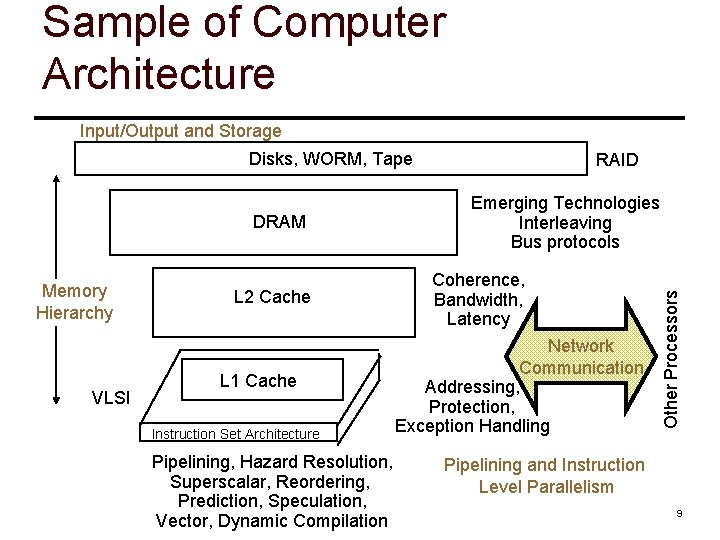
Computer Hardware ] Computer-system operation S One or more CPUs, device controllers connect through common bus providing access to shared memory S Concurrent execution of CPUs and devices competing for memory cycles © Zonghua Gu, CMPT 300, Fall 2011 8
Sample of Computer Architecture Input/Output and Storage Disks, WORM, Tape Memory Hierarchy VLSI L 2 Cache L 1 Cache Instruction Set Architecture Pipelining, Hazard Resolution, Superscalar, Reordering, Prediction, Speculation, Vector, Dynamic Compilation Emerging Technologies Interleaving Bus protocols Coherence, Bandwidth, Latency Network Communication Addressing, Protection, Exception Handling Other Processors DRAM RAID Pipelining and Instruction Level Parallelism 9
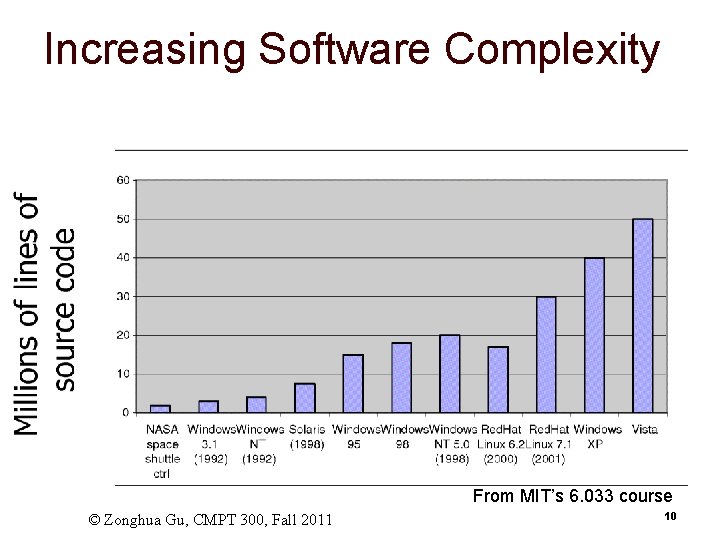
Increasing Software Complexity From MIT’s 6. 033 course © Zonghua Gu, CMPT 300, Fall 2011 10
How do we tame complexity? ] Every piece of computer hardware different S Different CPU l Pentium, Power. PC, Cold. Fire, ARM, MIPS S Different amounts of memory, disk, … S Different types of devices l Mice, Keyboards, Sensors, Cameras, Fingerprint readers, touch screen S Different networking environment l Cable, DSL, Wireless, Firewalls, … ] Questions: S Does the programmer need to write a single program that performs many independent activities? S Does every program have to be altered for every piece of hardware? S Does a faulty program crash everything? S Does every program have access to all hardware? © Zonghua Gu, CMPT 300, Fall 2011 11
Virtual Machine Abstraction Application Virtual Machine Interface Operating System Hardware Physical Machine Interface ] Software Engineering Problem: S Turn hardware/software quirks what programmers want/need S Optimize for convenience, utilization, security, reliability, etc… ] For any OS area (e. g. file systems, virtual memory, networking, scheduling): S What’s the hardware interface? (physical reality) S What’s the application interface? (nicer abstraction) © Zonghua Gu, CMPT 300, Fall 2011 12
Virtual Machines ] Software emulation of an abstract machine ] Programming simplicity ] S S Make it look like hardware has features you want Programs from one hardware & OS on another one S S S Each process thinks it has all memory/CPU time Different Devices appear to have same interface Device Interfaces more powerful than raw hardware l l Bitmapped display windowing system Ethernet card reliable, ordered, networking (TCP/IP) Fault Isolation S S Processes unable to directly impact other processes Bugs cannot crash whole machine © Zonghua Gu, CMPT 300, Fall 2011 13
What does an OS do? ] Silberschatz and Gavin: “An OS is Similar to a government” S Begs the question: does a government do anything useful by itself? ] Coordinator and Traffic Cop: S Manages all resources S Settles conflicting requests for resources S Prevents errors and improper use of the computer ] Facilitator (“useful” abstractions): S Provides facilities/services that everyone needs S Standard Libraries like Windowing systems S Make application programming easier, faster, less error-prone ] Some features reflect both tasks: S File system is needed by everyone (Facilitator) … S … but File system must be protected (Traffic Cop) © Zonghua Gu, CMPT 300, Fall 2011 14
What is an Operating System, … Really? ] Most Likely: S S S Memory Management I/O Management CPU Scheduling Synchronization / Mutual exclusion primitives Communications? (Does Email belong in OS? ) Multitasking/multiprogramming? ] What about? S S File System? Multimedia Support? User Interface? Internet Browser? © Zonghua Gu, CMPT 300, Fall 2011 15
Operating System Definition (Cont’d) ] No universally accepted definition ] “Everything a vendor ships when you order an operating system” is good approximation S But varies wildly ] “The one program running at all times on the computer” is the OS kernel S Everything else is either a system program (ships with the operating system) or an application program © Zonghua Gu, CMPT 300, Fall 2011 16
Summary ] Operating systems provide a virtual machine abstraction to handle diverse hardware ] Operating systems coordinate resources and protect users from each other ] Operating systems simplify application development by providing standard services and abstractions ] Operating systems can provide an array of fault containment, fault tolerance, and fault recovery © Zonghua Gu, CMPT 300, Fall 2011 17
Machine language ] Each type of processor (like Pentium 4, Athalon, Z 80, …) has its own instruction set ] Each instruction in an instruction set does a single thing like access a piece of data, add two pieces of data, compare two pieces of data … ] Each instruction is represented by a unique number. This # may be different for different instruction sets, but no two instructions in the same instruction set should have the same # © Janice Regan, CMPT 300, May 2010 18 18
Machine Language programs ] A machine language program is a list of instructions S Each instruction is represented by a number S Inside the memory of the computer, each number is represented in binary (as a string of 1’s and 0’s) S The long string of 0’s and 1’s is easy for the computer to understand, but difficult for a human to read or write © Janice Regan, CMPT 300, May 2010 19
Assembly ] Assembly languages make it easier for the programmer. S Assembly is easier for humans to read/write S Use mnemonics like ADD, CMP, … to replace the numbers that identify each of the instructions in the instruction set S The code for an Assembly program is written into a text file, which is translated into machine language program and executed. © Janice Regan, CMPT 300, May 2010 20
Computer Software: Languages ] Some Computer Languages S S S Machine language (machine instruction set) assembly language high level languages (Compilers/Interpreters) l l l C, C++, Ada, Fortran, Basic, Java Do YOU know of any others? mathematical computation tools (MATLAB, Mathematica, . . . ) ] Application software is written using computer languages. ] Operating systems are also written using computer languages (often C, some assembly) © Janice Regan, CMPT 300, May 2010 21
Computer Software: Applications ] Application Software (Software Tools) S Word processors (Microsoft Word, Word. Perfect, . . . ) S Spreadsheet programs (Excel, Lotus 1 -2 -3, . . . ) S Computer games S Communication software (email, chat, web browser…) S Telecommunication software (VOIP, …) S Integrated programming environments © Janice Regan, CMPT 300, May 2010 22
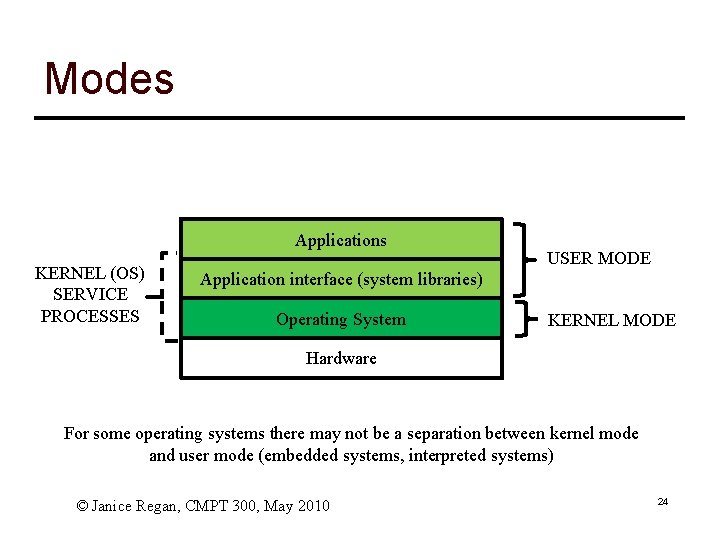
User mode / kernel mode ] Most application software runs in user mode. Applications have access to a subset of the instruction set that does not include most direct hardware access ] Operating systems run in kernel mode (supervisor mode) and have access to the complete instruction set, including the instructions used to directly manage the hardware ] Application software running in user mode can used system calls to access hardware managed by the Operating System ] User mode programs may perform duties for the OS © Janice Regan, CMPT 300, May 2010 23
Modes Applications KERNEL (OS) SERVICE PROCESSES USER MODE Application interface (system libraries) Operating System KERNEL MODE Hardware For some operating systems there may not be a separation between kernel mode and user mode (embedded systems, interpreted systems) © Janice Regan, CMPT 300, May 2010 24
Memory Hierarchy ] Different types of memory have different access speeds and costs ] Faster access speed implies higher cost ] Greater capacity often implies lower access speed ] From fastest access to slowest access S S S Registers Cache Memory Disk Tapes © Janice Regan, CMPT 300, May 2010 25
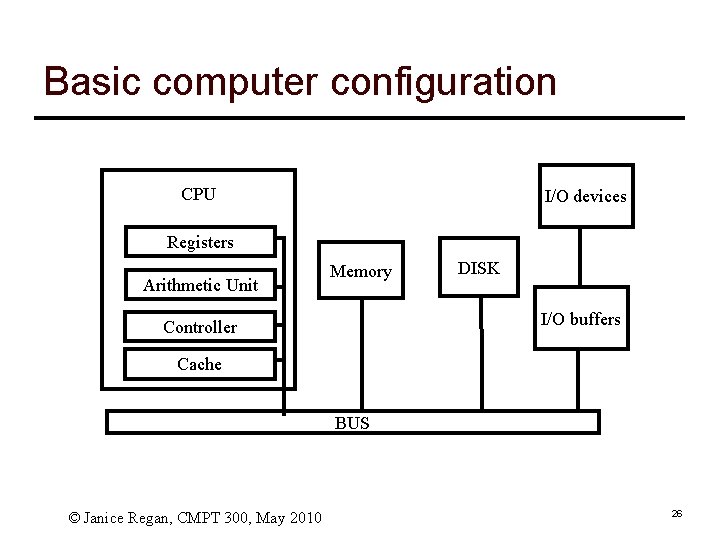
Basic computer configuration CPU I/O devices Registers Arithmetic Unit Memory DISK I/O buffers Controller Cache BUS © Janice Regan, CMPT 300, May 2010 26
Registers in CPU ] Data registers ] Accumulator ] Address registers ] Control/Status registers S Program counter S Stack pointer S Instruction register S Status registers ] Index register (segment pointer, stack pointer) © Janice Regan, CMPT 300, May 2010 27
Controller ] Fetch, Decode, Execute cycle (each instruction) S Fetch next instruction: Instruction contains op-code and possibly data S Decode op-code S Execute op-code (using data if necessary) ] Instructions S access data, moving it from memory (or disk or cache) to/from registers, and between registers S Complete arithmetic and logical manipulations of data in registers © Janice Regan, CMPT 300, May 2010 28
Executing an instruction (1) ] Examine program counter ] Fetch instruction indicated by program counter opcode N binary digits integer Address(es) of data instruction ] Increment program counter to point at next instruction to be executed ] Place fetched instruction in instruction register © Janice Regan, CMPT 300, May 2010 29
Executing an instruction (2) ] Decode the instruction opcode Address(es) of data instruction ] Determine what is to be done ] If needed, load address into an address register © Janice Regan, CMPT 300, May 2010 30
Executing an instruction (3) ] Execute the instruction in the instruction register, may result in one or more of the following S Fetch any data from memory (locations given in instruction) and place into the appropriate data registers S Place results from a data register or the accumulator into a memory location indicated in the instruction S Operate (arithmetic or logical operation) on data in data registers and save the result in the indicated register S Control the flow of the program (for example change the value in the program counter register) © Janice Regan, CMPT 300, May 2010 31
Adding 2 numbers (Z=X+Y) ] ] ] ] ] Program counter points to instruction to load value at location X Instruction is fetched into the instruction register, decoded and executed to load the first number into data register A Program counter is incremented and now points to an instruction to load value at location Y Instruction is fetched into the instruction register, decoded and executed to load the second number into data register B Program counter is incremented and now points to an instruction to add the values in data register A and B Instruction is fetched into the instruction register, decoded and executed to add the two numbers and place the result in the accumulator register. Program counter is incremented and now points to an instruction to place the value in the accumulator register into memory location Z Instruction is fetched, decoded and executed to place result in Z (See animation) © Janice Regan, CMPT 300, May 2010 32
Memory ] Modern computers use several kinds of storage 1 nsec registers < 1 KB 1. 5 nsec Cache 8 MByte 6 nsec Main Memory ( RAM volatile. ROM non volatile) 10 GByte Flash Memory (non volatile, rewritable) 5 msec DISK 3000 GByte CD, DVD, USB memory stick © Janice Regan, CMPT 300, May 2010 33
Memory Hierarchy ] As you go down the pyramid a) b) Decreasing cost per bit, Increasing capacity Increasing access time, Decreasing frequency of access S Note that the fastest memory, sometimes referred to as primary memory, is usually volatile (register, cache, main memory) Non-volatile (continues to store information when the power is off) memory is usually slower. Referred to as secondary or auxiliary memory. Examples flash memory (flash that holds the BIOS, or removable flash), internal and external hard drives, CD, tape, … S © Janice Regan, CMPT 300, May 2010 34
Registers and cache ] Parts of the CPU ] Register access speed comparable to CPU clock speed ] Cache memory may be as fast or as much as several times slower ] Registers S Usually 64 x 64 for 64 -bit machine, 32 x 32 for 32 -bit machine S Usually < 1 Kbyte ] Cache S As much as 8 Mbytes © Janice Regan, CMPT 300, May 2010 35
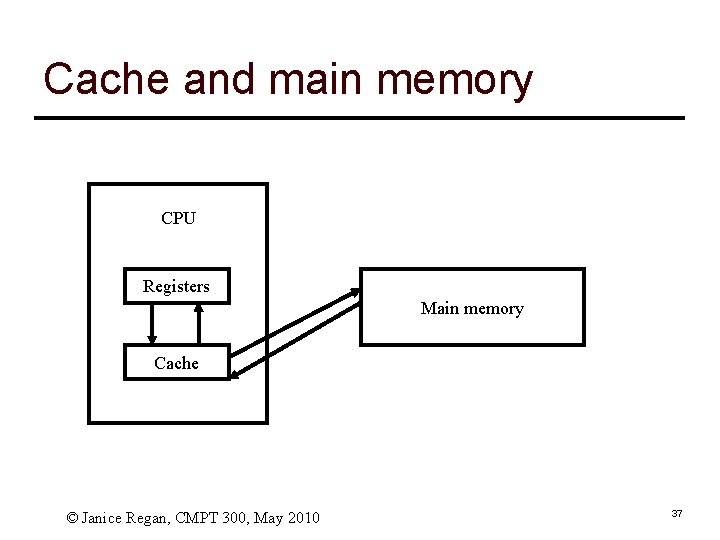
Concept of Cache ] Provide memory on the CPU that is slower that the registers, cheaper and larger than registers, but can be accessed much faster than main memory ] The next few instructions, and data that will be needed will be loaded into cache in anticipation of faster access by the processor. © Janice Regan, CMPT 300, May 2010 36
Cache and main memory CPU Registers Main memory Cache © Janice Regan, CMPT 300, May 2010 37
Using Cache ] Instructions (and data) are generally moved from main memory to cache in blocks; one such block (N bytes of memory) is called a cache line ] Cache has a series of slots, each N byes long, and can hold a copy of one cache line. ] The main memory can contain many more cache lines than there are slots in the cache. ] Each time a copy of a new cache line is loaded into a cache slot, the original content of that slot is overwritten © Janice Regan, CMPT 300, May 2010 38
Cache design ] Cache size and Cache line size S Determined to optimize access time ] Mapping function S Which cache lines may be loaded into which cache slots l can any line go in any slot, or is there a mapping function to define rules governing which line can be place in which slot ] Replacement algorithm S When is a cache line in a cache slot replaced by another cache line © Janice Regan, CMPT 300, May 2010 39
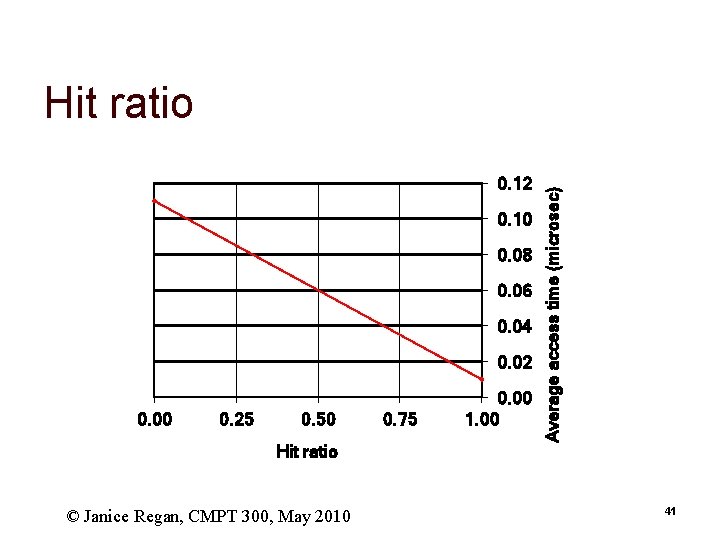
Hit ratio ] A hit occurs when a memory access finds its information in the cache. ] A miss occurs when it is necessary to access the slower main memory (or lower level cache) to find the information. ] The proportion of accesses that are hits is called the hit ratio ] Consider an example, S S S Assume that any access to the cache takes. 01μs, any access to main memory takes 0. 1μs (100 nsec) Any instruction or piece of data not in cache will have to be accessed in main memory and moved to cache before being accessed (0. 1+0. 01)μs For a hit ratio of x% what is the average memory access time? l 0. 01*x%+0. 11*(1 -x%) © Janice Regan, CMPT 300, May 2010 40
0. 12 0. 10 0. 08 0. 06 0. 04 0. 02 0. 00 0. 25 0. 50 Hit ratio © Janice Regan, CMPT 300, May 2010 0. 75 0. 00 1. 00 Average access time (microsec) Hit ratio 41
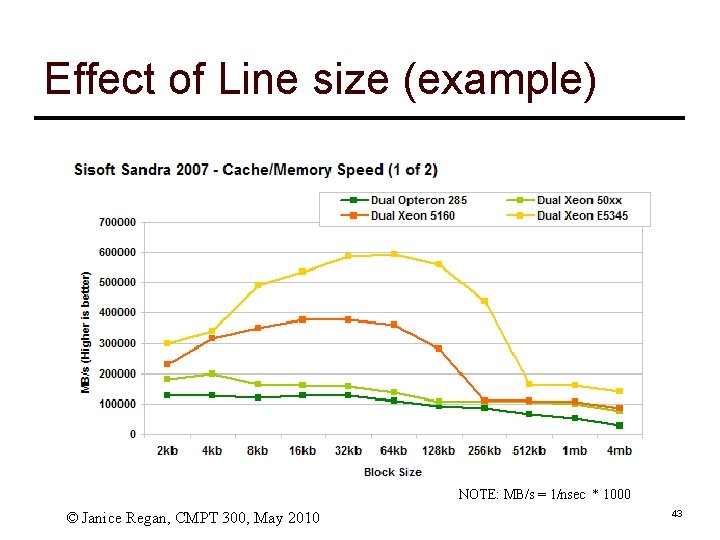
Cache Line size ] As cache line size increases from a single byte, the hit ratio will increase at first. S S It is very likely that bytes near a needed byte will be accessed at about the same time But as cache line size increases the number of lines decreases ] As cache line size increases past it’s optimal value then the hit ratio will begin to decrease S This happens when it becomes more probable that the next access will involve the cache line that was just removed, i. e. , the useful cache line was kicked out prematurely. ] Performance heavily depends on the application workload, mapping function and replacement algorithm, hence difficult to generalize. © Janice Regan, CMPT 300, May 2010 42
Effect of Line size (example) NOTE: MB/s = 1/nsec * 1000 © Janice Regan, CMPT 300, May 2010 43
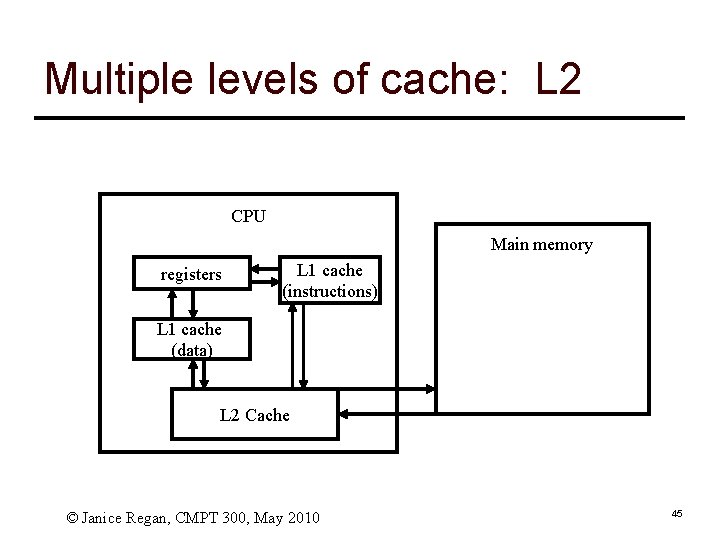
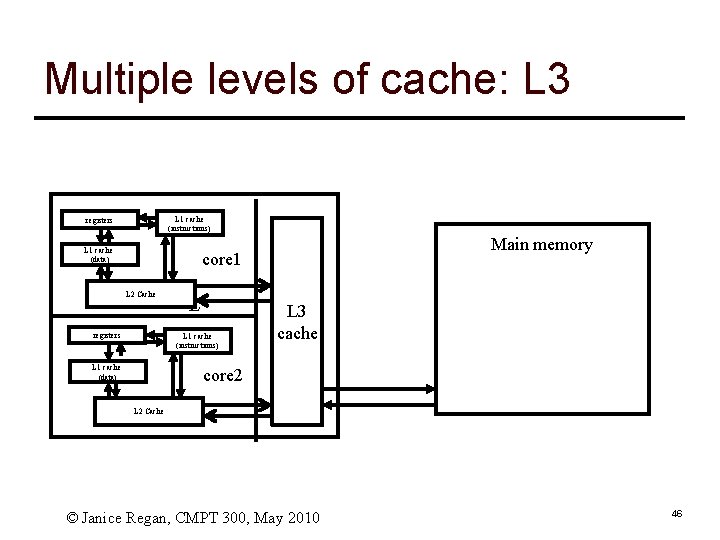
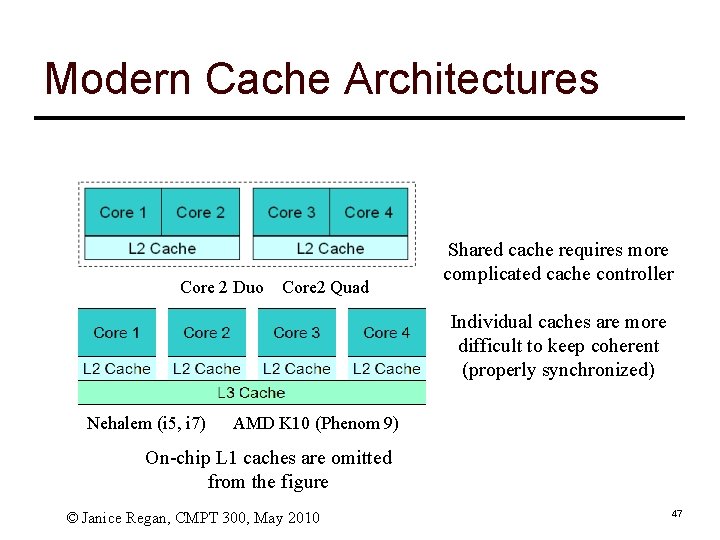
Cache specifications on common systems ] Most modern CPUs have an on-chip cache called an L 1 cache ] Many modern systems also have a 2 nd , and even 3 rd level of cache between the L 1 cache and the main memory called the L 2 (L 3) cache. S L 2 cache can be on-chip or off-chip (connected to the CPU via a bus) S L 3 cache is typically off-chip © Janice Regan, CMPT 300, May 2010 44
Multiple levels of cache: L 2 CPU Main memory registers L 1 cache (instructions) L 1 cache (data) L 2 Cache © Janice Regan, CMPT 300, May 2010 45
Multiple levels of cache: L 3 L 1 cache (instructions) registers L 1 cache (data) Main memory core 1 L 2 Cache registers L L 1 cache (instructions) L 1 cache (data) L 3 cache core 2 L 2 Cache © Janice Regan, CMPT 300, May 2010 46
Modern Cache Architectures Core 2 Duo Core 2 Quad Shared cache requires more complicated cache controller Individual caches are more difficult to keep coherent (properly synchronized) Nehalem (i 5, i 7) AMD K 10 (Phenom 9) On-chip L 1 caches are omitted from the figure © Janice Regan, CMPT 300, May 2010 47
Memory ] Main memory is typically DRAM (Dynamic Random Access Memory) ] Cache is typically SRAM (Static Random Access Memory) S Smaller and faster than DRAM ] Both are volatile: contents lost when power is turned off © Janice Regan, CMPT 300, May 2010 48
Disk ] Hard disk ] CD, DVD, Blu-Ray Disk storage is much cheaper that memory ] (3 GB memory or 2000 GB disk about the same cost) ] Access time for disk is at least one order of magnitude slower than for memory © Janice Regan, CMPT 300, May 2010 49
Input / Output ] Reading or writing data from a perepheral device is not simple S Each device has its own controller (hardware) S Each device is managed by a device driver (software to use the controller) l Device drivers are specific to hardware and to the operating system using the device S Input and output is SLOW in comparison to CPU operations. © Janice Regan, CMPT 300, May 2010 50
Busy Waiting ] Reading or writing data to a device is SLOW in comparison to the time it takes to complete one CPU operation ] The CPU must send one or more instructions to the controller to make the I/O device begin to read or write. These instructions tell the controller where to find the data and/or where to store the data ] The CPU can then wait until the I/O operation is finishes. S S S While it waits the CPU will be in a loop Each time through the loop the CPU will check a register in the controller to see if the I/O operation is complete This is called busy waiting. © Janice Regan, CMPT 300, May 2010 51
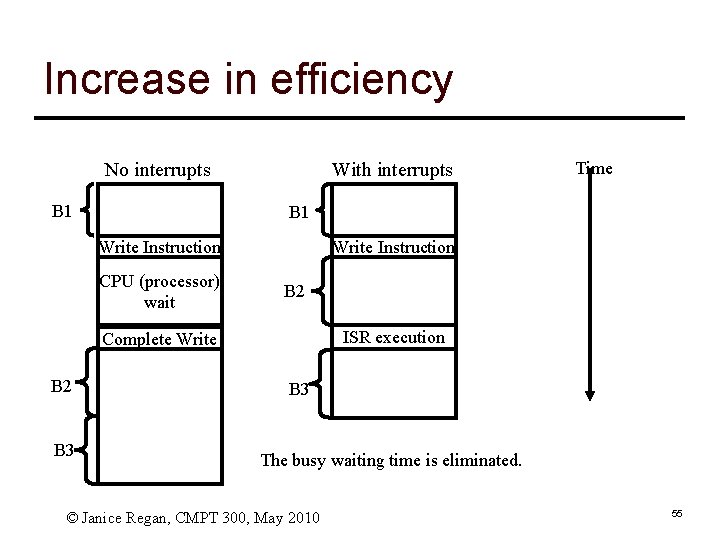
Alternatives to Busy waiting ] Busy waiting does not use CPU resources efficiently ] Want to use the CPU to execute other instructions while the I/O operation is being completed by the I/O device (instead of executing the busy waiting loop) ] To use the CPU for other calculations while to I/O device controller completes the I/0 operation, we need to use interrupts (a mechanism to tell the CPU when the controller completes the I/O) © Janice Regan, CMPT 300, May 2010 52
Interrupts ] Interrupts are a mechanism by which other modules (memory, I/0, timers …) may interrupt the normal sequence of instructions being executed by the processor ] Interrupts are a critical component of the operation of spooling and multiprogramming (more later). ] Interrupts allow the transfer of control between different programs (remember the OS is also a program) ] Interrupts are generated by hardware (asynchronous) S Exceptions are generated by particular instructions in software (synchronous), e. g. , divide by 0, overflow, illegal instruction or address… © Janice Regan, CMPT 300, May 2010 53
Some types of interrupts ] I/0 S S Signaling normal completion of an operation (read or write) Signaling error during operation ] Timer expiry S S Begin regularly scheduled task End task that has exceeded allocated time ] Hardware failure © Janice Regan, CMPT 300, May 2010 54
Increase in efficiency With interrupts No interrupts B 1 Write Instruction CPU (processor) wait Write Instruction B 2 ISR execution Complete Write B 2 B 3 Time B 3 The busy waiting time is eliminated. © Janice Regan, CMPT 300, May 2010 55
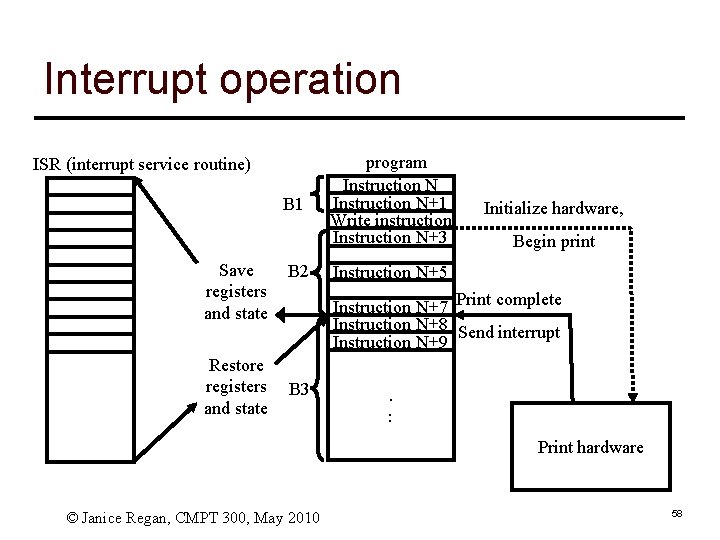
Interrupt example: Output (1) ] Program executes until it reaches a write instruction ] The write instruction sets up the hardware output device operation then leaves the output device controller (not the CPU) processing the output ] The program continues execution of additional instructions (N+3 to N+7 next slide) ] When the hardware device completes the output operation, it generates and sends an interrupt signal to the CPU, signaling normal completion of output © Janice Regan, CMPT 300, May 2010 56
Interrupt example Output (2) ] When the currently executing instruction ] ] completes, the program is interrupted The program’s registers and state are saved An ISR (interrupt service routine) completes the output operation Rgisters and state are restored The original program continues executing © Janice Regan, CMPT 300, May 2010 57
Interrupt operation ISR (interrupt service routine) B 1 Save registers and state Restore registers and state B 2 program Instruction N+1 Write instruction Instruction N+3 Initialize hardware, Begin print Instruction N+5 Instruction N+7 Print complete Instruction N+8 Send interrupt Instruction N+9 B 3 . : Print hardware © Janice Regan, CMPT 300, May 2010 58
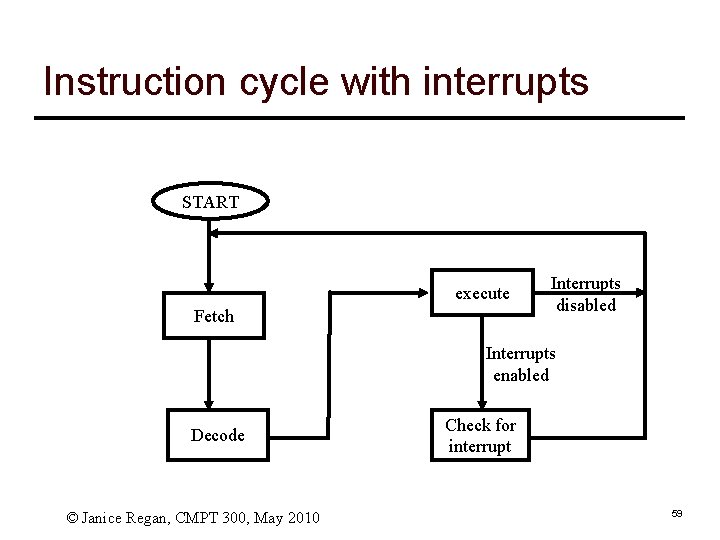
Instruction cycle with interrupts START execute Fetch Interrupts disabled Interrupts enabled Decode © Janice Regan, CMPT 300, May 2010 Check for interrupt 59
Interrupt processing (1) ] A device issues an interrupt request ] The CPU (processor) finishes execution of the present instruction ] The CPU tests to see if there is a pending interrupt, determines there is, and sends a acknowledgement to the device requesting the interrupt ] The CPU saves registers and state to the stack (including the program counter register value) ] The CPU loads the address of the appropriate ISR into the address register © Janice Regan, CMPT 300, May 2010 60
Interrupt processing (2) ] The CPU executes the ISR ] When the ISR finishes, the saved register and state information is restored to the CPU registers ] The program counter is reset to point to the next instruction ] The original program continues execution REMEMBER: the time when an interrupt occurs is not known in advance!! Interrupts are asynchronous © Janice Regan, CMPT 300, May 2010 61
CMPT 300 Introduction to Operating Systems Overview Part 2: History 62
History of Operating Systems ] First generation 1945 - 1955 S vacuum tubes, plug boards ] Second generation 1955 - 1965 S transistors, batch systems ] Third generation 1965 – 1980 S ICs and multiprogramming ] Fourth generation 1980 – present S personal computers © Zonghua Gu, CMPT 300, Fall 2011 63
The earliest computers (1945 -55) ] Built of relays, vacuum tubes ] Very large, Very slow by today’s standards ] Built, programmed and maintained by the same people ] Programmed by using switches, paper tape, etc) ] No operating system, single operation, single problem, sequential access © Janice Regan, CMPT 300, May 2010 64
The next generation (1955 -65) ] Transistor based, increased reliability ] The first commercial mainframes, still very large and very expensive ] Used assembler or even early high level languages like Fortran or ALGOL ] Rudimentary operating system, one program at a time, with control commands to compile, load, execute, terminate, basic compilers ] Input using cards, paper tape, magnetic tape … © Janice Regan, CMPT 300, May 2010 65
Single Job to Batch ] Earliest machines had very rudimentary OS. S To run a job, needed to load the compiler as well as the code for the job. S Required a great deal of operator intervention S CPU not efficiently used S Batch processing evolved to reduce the amount of time wasted setting up single jobs © Janice Regan, CMPT 300, May 2010 66
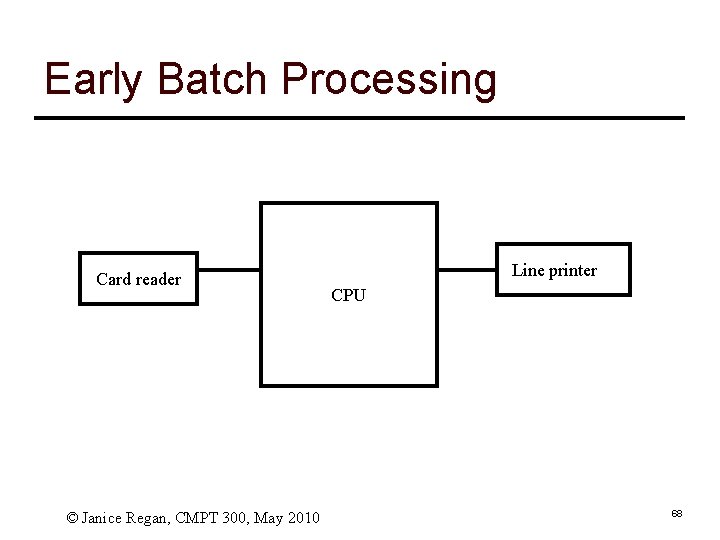
Early Batch processing ] Collect a group of jobs S Each job was submitted as a stack of punched cards. l l l Job card, language definition card One card per line of code in program Cards for load and run instructions Cards containing data for program End card indicating end of job ] A group of jobs was submitted as a batch to the card reader ] Each job was read in, executed, produced it output, terminated, then the next job took over the machine © Janice Regan, CMPT 300, May 2010 67
Early Batch Processing Card reader © Janice Regan, CMPT 300, May 2010 Line printer CPU 68
Operating System ] Commands to S Read a single card to memory S Compile to machine language S Place machine language code in memory S Start execution (load address of first instruction in program in Program counter then begin execution) S Write output to the line printer (or other output device) S Trap condition switches control from program to OS l l END card being executed Illegal opcode, divide by zero, … © Janice Regan, CMPT 300, May 2010 69
Problems with early batch processing ] Input and output, particularly from peripheral I/0 devices (card reader, line printer), are very slow when compared to the execution of other instructions ] When input and output is happening the CPU is mostly idle. An expensive resource is being wasted ] A program trapped in a infinite loop would never terminate © Janice Regan, CMPT 300, May 2010 70
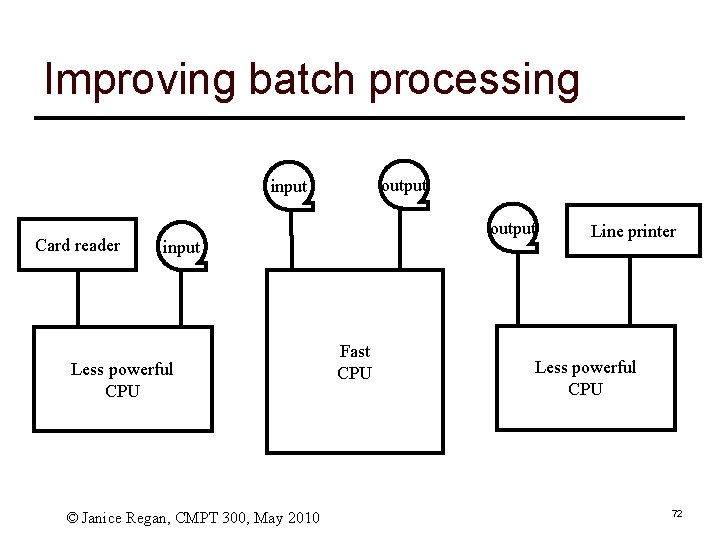
Improving batch processing ] Offload the slow I/0 tasks to less costly and powerful computers ] Use faster I/O media (like tapes) for input to fast powerful machine ] Add timers, if your time runs out an interrupt is generated which terminates your program (deals with infinite loops) ] Adds complexity, improves efficiency © Janice Regan, CMPT 300, May 2010 71
Improving batch processing output input Card reader output input Less powerful CPU © Janice Regan, CMPT 300, May 2010 Fast CPU Line printer Less powerful CPU 72
The next generation (1965 -1980) ] More complicated OS S Deal both with I/0 intensive and CPU intensive jobs efficiently S Multi-programming (with partitioned memory) S Switches between tasks l l l Load and run jobs Read cards to job queue on disk (whenever card reader is ready) Print results to printer from printer queue on disk (only when printer is available and job is complete) S Changes enabled by going from tape to disk l Tape is sequential-access l Disk is random-access, hence faster for general workload © Janice Regan, CMPT 300, May 2010 73
The next generation (1965 -1980) Card reader Program queue DISK Line printer Fast CPU Printer queue © Janice Regan, CMPT 300, May 2010 74
Simultaneous Peripheral Operation On Line (Spooling) ] Spooling refers to the process of placing data in a temporary working area for another program to process. S Send jobs from card reader to program queue on disk S Send job outputs into printer queue on disk S When card reader or printer are available, it can add to/print from queue S When a job is finished, the next job is loaded from the queue © Janice Regan, CMPT 300, May 2010 75
Multiprogramming ] Partition memory into pieces (often of different sizes) ] Load one job into each partition (choose partition according to needs of job) ] Have multiple jobs executing simultaneously, one in each partition ] When one job is I/O bound, another can be using the CPU © Janice Regan, CMPT 300, May 2010 76
Recall: Interrupt operation ISR (interrupt service routine) B 1 Save registers and state Restore registers and state B 2 program Instruction N+1 Write instruction Instruction N+3 Initialize hardware, Begin print Instruction N+5 Instruction N+7 Print complete Instruction N+8 Send interrupt Instruction N+9 B 3 . : Print hardware © Janice Regan, CMPT 300, May 2010 77
Interrupts for input ] The example of using an interrupt to facilitate output could be used as part of a spooling application. ] What about input? Can we do the same? ] If we do the same we have problems S S If we execute the code following the read, the value being read may be used in that code If the value being read has not yet been placed in the variable, results will not be correct ] How to solve the problem? S Instead of executing the next block of code in the same program we let a different program run until the I/O has completed. © Janice Regan, CMPT 300, May 2010 78
Multiprogramming: Interrupt example (1) ] Program executes until it reaches a read instruction ] The read routine sets up the input operation, then returns leaving the input hardware device (not the CPU) processing the input ] Because successive instructions in the program may use the input value, the program itself cannot continue until the read is complete. ] The read routine then interrupts program 1, saving its registers and state. Then the ISR loads the registers and state for program 2 and continues execution of its instructions (P to P+7 next slide) © Janice Regan, CMPT 300, May 2010 79
Multiprogramming: Interrupt example (2) ] When the input hardware device completes ] ] ] operation, it generates and sends an interrupt to the system (signaling normal completion) When the currently-executing instruction in program 2 completes, program 2 is interrupted The registers and state of program 2 are saved An interrupt service routine completes the input operation The registers and state of program 1 are restored The original program continues executing © Janice Regan, CMPT 300, May 2010 80
Multiprogramming operation Program 1 Instruction N+1 ISR 3 (interrupt service routine) Save registers and state program 1 Restore registers and state program 2 Read instruction Program 2 Instruction P+1 Instruction P+2 Instruction. P+3 Instruction N+3 Instruction P+5 Instruction N+5 Instruction P+7 Instruction P+8 Instruction P+9 Instruction N+6 Instruction N+8 Instruction N+9. : ISR 2 Restore registers and state program 1 Save registers and state program 2 Send interrupt . : Initialize hardware, Begin read © Janice Regan, CMPT 300, May 2010 Read complete Read hardware 81
Multiprogramming example Program A, uniprocessing I/O wait I/O wait Followed by Program B, uniprocessing I/O wait multiprocessing I/O wait © Janice Regan, CMPT 300, May 2010 82
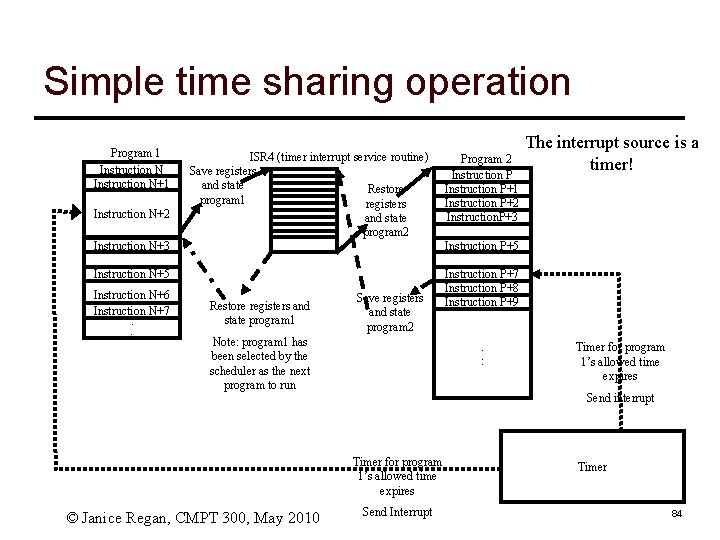
Time sharing: Scheduling, fair sharing ] Once multiple jobs can share the CPU (sequentially, not at the same time) it becomes necessary to determine how time is shared between the processes ] The simplest approach to time sharing(taken by CTSS (Compatible Time-Sharing System) and some later OS’s) is time-sliced round-robin S Each process is given N seconds of CPU, after N seconds the next processes takes its turn ] There are many other variants of scheduling, some of which we will discuss later. © Janice Regan, CMPT 300, May 2010 83
Simple time sharing operation Program 1 Instruction N+1 Instruction N+2 ISR 4 (timer interrupt service routine) Save registers and state Restore program 1 registers and state program 2 Program 2 Instruction P+1 Instruction P+2 Instruction. P+3 Instruction N+3 Instruction P+5 Instruction N+5 Instruction P+7 Instruction P+8 Instruction P+9 Instruction N+6 Instruction N+7 Instruction. N+8 : Restore registers and state program 1 Save registers and state program 2 Note: program 1 has been selected by the scheduler as the next program to run . : Timer for program 1’s allowed time expires Send interrupt Timer for program 1’s allowed time expires © Janice Regan, CMPT 300, May 2010 The interrupt source is a timer! Send Interrupt Timer 84
Time sharing and scheduling ] In the previous example the simplest case (only two programs) was considered ] In a real system there will be many programs running. S Each time an ISR runs, at the end of the interrupt servicing, the OS scheduler must run to determine which program to give the CPU to next, and/or what to set the timer to © Janice Regan, CMPT 300, May 2007 85
Minicomputers ] Near the end of this generation (1965 -1980) small, less ] ] ] expensive machines came into common use (for example the DEC PDP and VAX series) Costs were reduced from millions to 100’s of thousands (about a factor of 20). Memory in Kbytes, small words Used to develop UNIX operating system (multi-user) Problems as mini-computers proliferated: each vendor had their own flavor of UNIX (BSD, system 5, POSIX …) or their own proprietary OS (VMS … ), compatibility was an issue Mainframes and supercomputers were still necessary for computationally intensive applications. © Janice Regan, CMPT 300, May 2010 86
The next generation(1980 - now) ] Use VLSI (very large scale integrated circuits) to build microcomputers ] Reduced price (thousands not 100’s of thousands) ] First used early operating systems like CP/M (control program for microcomputers) or DOS (disk operating system) ] First uses of user friendly GUIs © Janice Regan, CMPT 300, May 2010 87
Commonly used OSs ] Versions of commonly used OSs like Windows, Unix, Linux are available for different types of platforms (PCs, Handhelds, Embedded systems) ] Specialized OSs for purposes such as real time embedded systems or large servers © Janice Regan, CMPT 300, May 2007 88