CHAPTER 5 FUNCTION OF OUTPUT CONTROLLER AND APPLICATION




- Slides: 57
CHAPTER 5 FUNCTION OF OUTPUT CONTROLLER AND APPLICATION
TIMERS • Many applications in industrial control systems need timer functions. • Timer is used to activate or de-activate a device after a preset time interval.
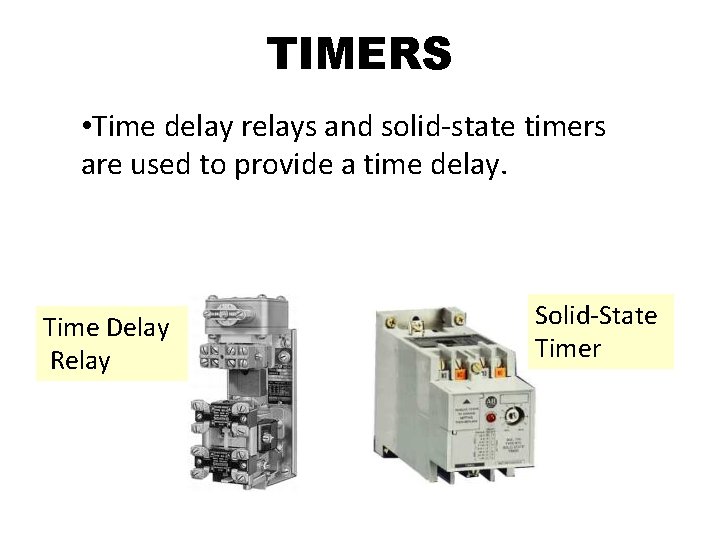
TIMERS • Time delay relays and solid-state timers are used to provide a time delay. Time Delay Relay Solid-State Timer
QUANTITIES IN TIMER INSTRUCTION Preset Time • Represents the time duration of the timing circuit. • e. g. if a time delay of 10 s is required, the timer wil have a preset of 10 s. Accumulated Time • Represents the amount of time that has elapsed since it is energized.
Time Base • Timers can typically be programmed with several different time bases: 1 s, 0. 1 s, and 0. 01 s are typical time bases. • E. g. if you enter 0. 1 for the time base and 50 for the preset time the timer would have a 5 s delay (50 x 0. 1 s = 5 s).
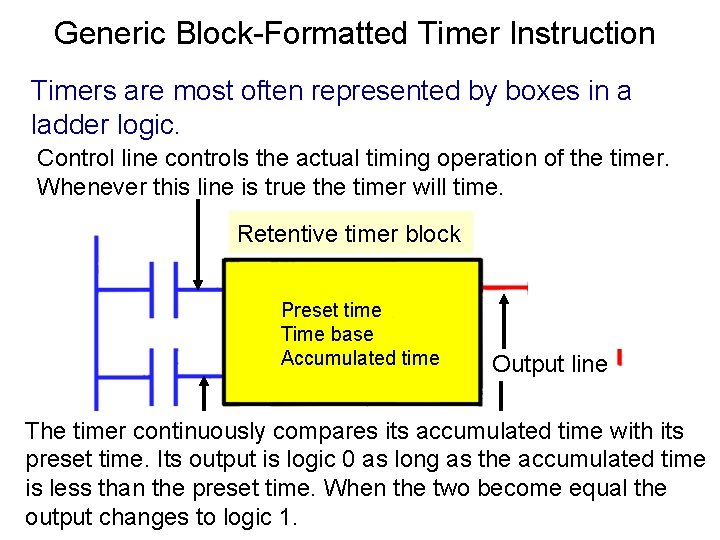
Generic Block-Formatted Timer Instruction Timers are most often represented by boxes in a ladder logic. Control line controls the actual timing operation of the timer. Whenever this line is true the timer will time. Retentive timer block Preset time Time base Accumulated time Output line The timer continuously compares its accumulated time with its preset time. Its output is logic 0 as long as the accumulated time is less than the preset time. When the two become the Reset line resets the timer's accumulated valueequal to zero. output changes to logic 1.
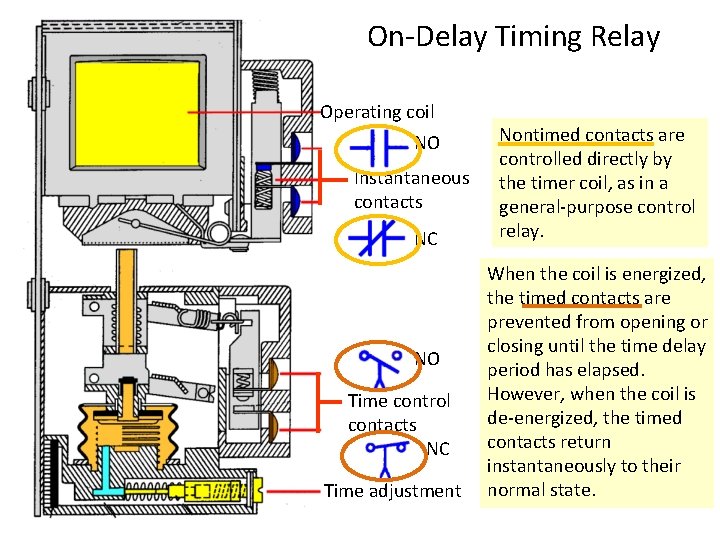
On-Delay Timing Relay Operating coil NO Instantaneous contacts NC NO Time control contacts NC Time adjustment Nontimed contacts are controlled directly by the timer coil, as in a general-purpose control relay. When the coil is energized, the timed contacts are prevented from opening or closing until the time delay period has elapsed. However, when the coil is de-energized, the timed contacts return instantaneously to their normal state.
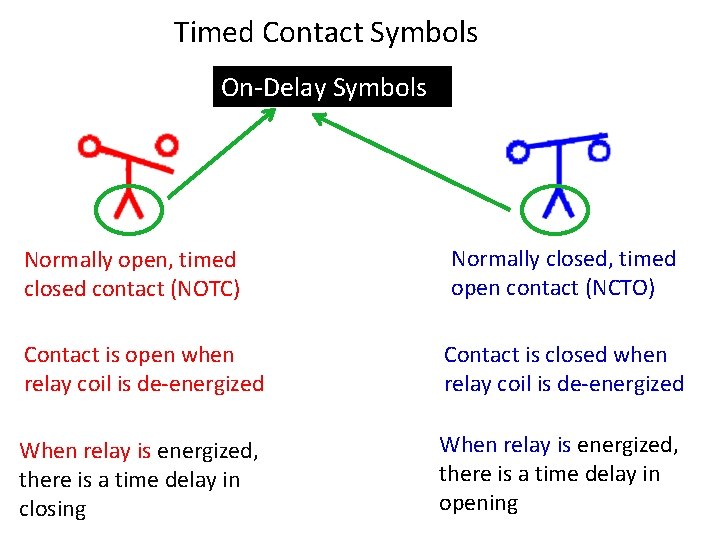
Timed Contact Symbols On-Delay Symbols Normally open, timed closed contact (NOTC) Normally closed, timed open contact (NCTO) Contact is open when relay coil is de-energized Contact is closed when relay coil is de-energized When relay is energized, there is a time delay in closing When relay is energized, there is a time delay in opening
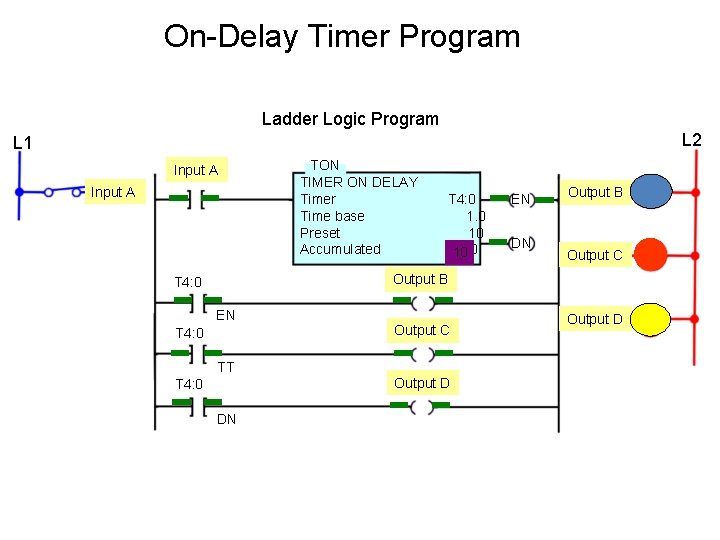
On-Delay Timer Program Ladder Logic Program L 2 L 1 Input A TON TIMER ON DELAY Timer Time base Preset Accumulated T 4: 0 10 10 0 EN DN Output B G Output C R Output D Y Output B T 4: 0 EN T 4: 0 Output C TT Output D T 4: 0 DN
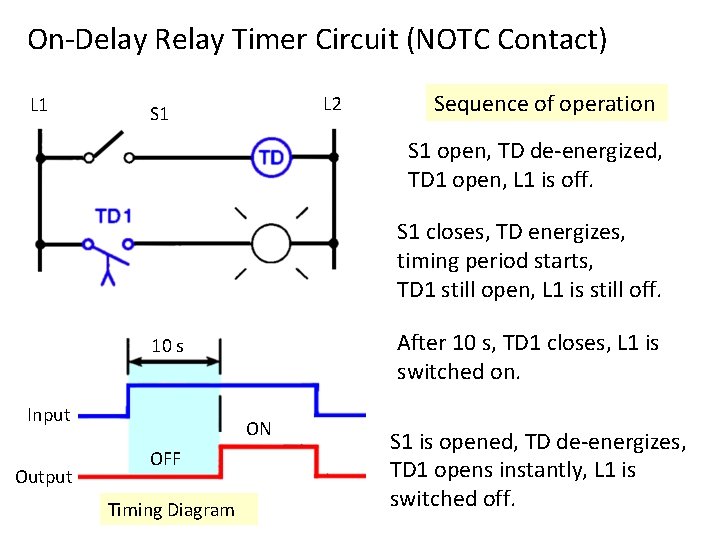
On-Delay Relay Timer Circuit (NOTC Contact) L 1 L 2 S 1 L 1 After 10 s, TD 1 closes, L 1 is switched on. 10 s Output ON OFF Timing Diagram S 1 open, TD de-energized, TD 1 open, L 1 is off. S 1 closes, TD energizes, timing period starts, TD 1 still open, L 1 is still off. 10 s Input Sequence of operation S 1 is opened, TD de-energizes, TD 1 opens instantly, L 1 is switched off.
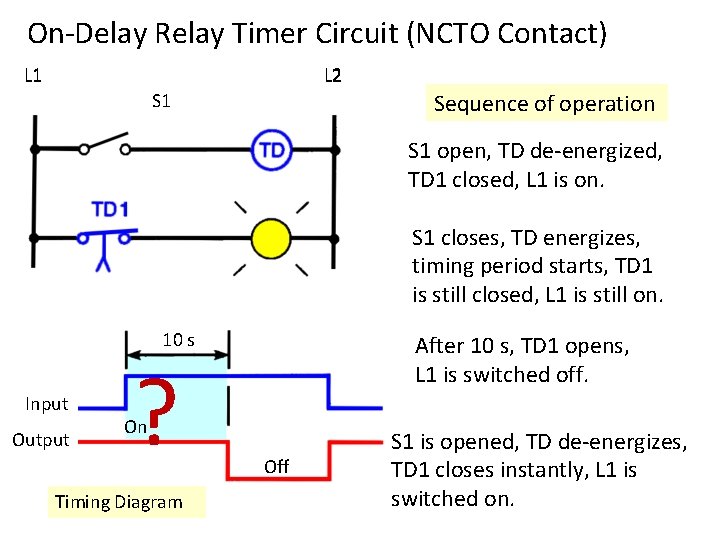
On-Delay Relay Timer Circuit (NCTO Contact) L 1 L 2 Sequence of operation S 1 L 1 S 1 closes, TD energizes, timing period starts, TD 1 is still closed, L 1 is still on. 10 s Input Output ? After 10 s, TD 1 opens, L 1 is switched off. On Timing Diagram S 1 open, TD de-energized, TD 1 closed, L 1 is on. Off S 1 is opened, TD de-energizes, TD 1 closes instantly, L 1 is switched on.
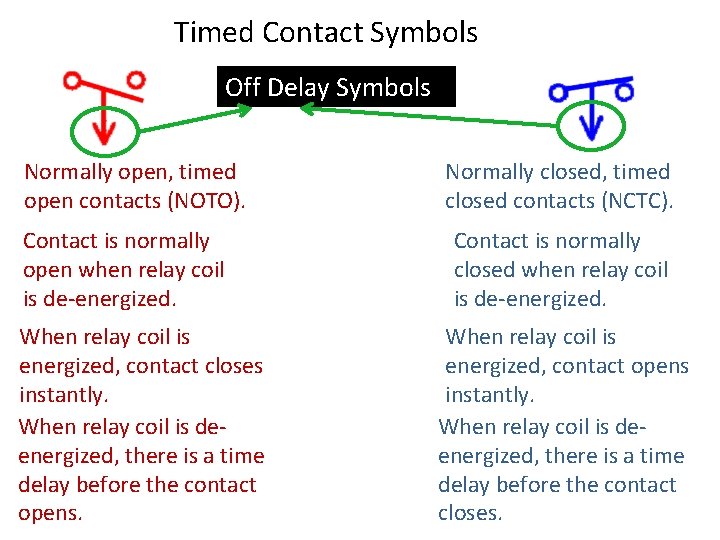
Timed Contact Symbols Off Delay Symbols Normally open, timed open contacts (NOTO). Contact is normally open when relay coil is de-energized. When relay coil is energized, contact closes instantly. When relay coil is deenergized, there is a time delay before the contact opens. Normally closed, timed closed contacts (NCTC). Contact is normally closed when relay coil is de-energized. When relay coil is energized, contact opens instantly. When relay coil is deenergized, there is a time delay before the contact closes.
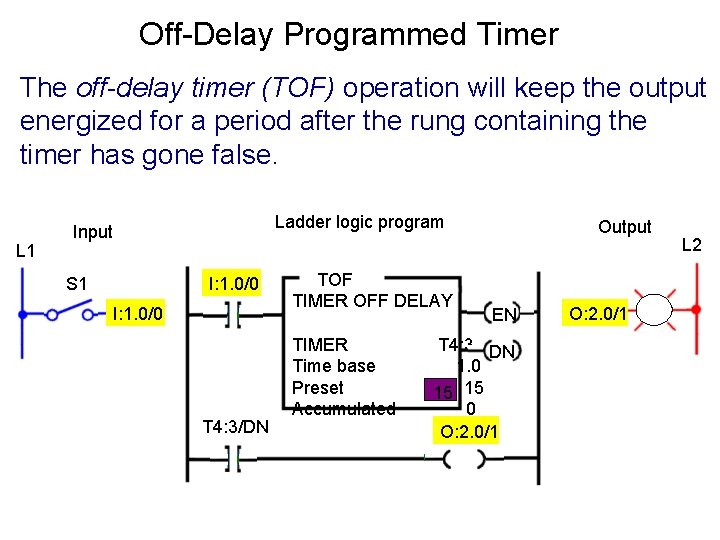
Off-Delay Programmed Timer The off-delay timer (TOF) operation will keep the output energized for a period after the rung containing the timer has gone false. L 1 Ladder logic program Input S 1 I: 1. 0/0 T 4: 3/DN TOF TIMER OFF DELAY TIMER Time base Preset Accumulated Output EN T 4: 3 DN 1. 0 15 15 0 O: 2. 0/1 PL L 2
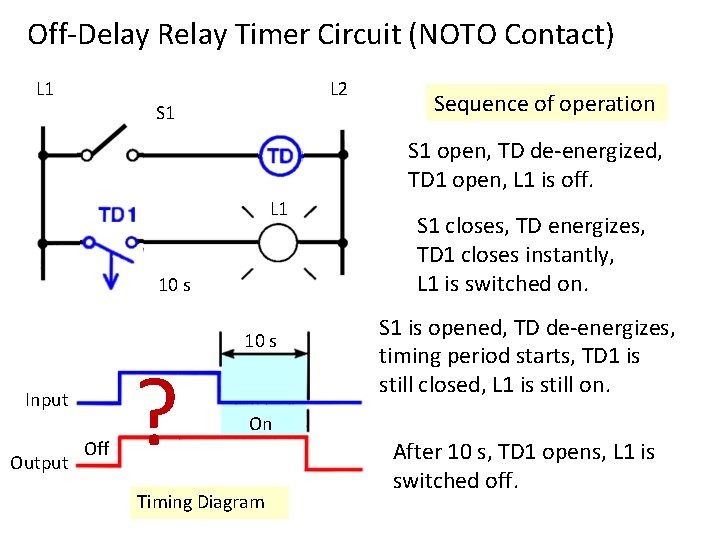
Off-Delay Relay Timer Circuit (NOTO Contact) L 1 L 2 S 1 Sequence of operation S 1 open, TD de-energized, TD 1 open, L 1 is off. L 1 10 s Input Output Off ? 10 s S 1 closes, TD energizes, TD 1 closes instantly, L 1 is switched on. S 1 is opened, TD de-energizes, timing period starts, TD 1 is still closed, L 1 is still on. On Timing Diagram After 10 s, TD 1 opens, L 1 is switched off.
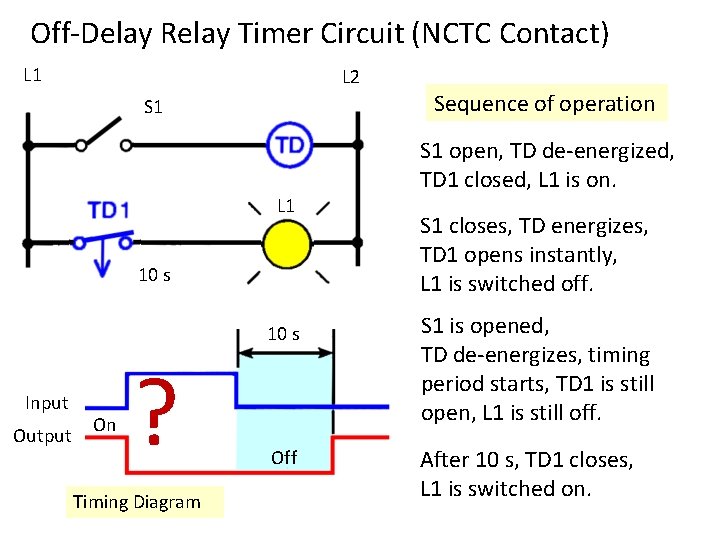
Off-Delay Relay Timer Circuit (NCTC Contact) L 1 L 2 S 1 Sequence of operation S 1 open, TD de-energized, TD 1 closed, L 1 is on. L 1 10 s Input Output On ? Timing Diagram Off S 1 closes, TD energizes, TD 1 opens instantly, L 1 is switched off. S 1 is opened, TD de-energizes, timing period starts, TD 1 is still open, L 1 is still off. After 10 s, TD 1 closes, L 1 is switched on.
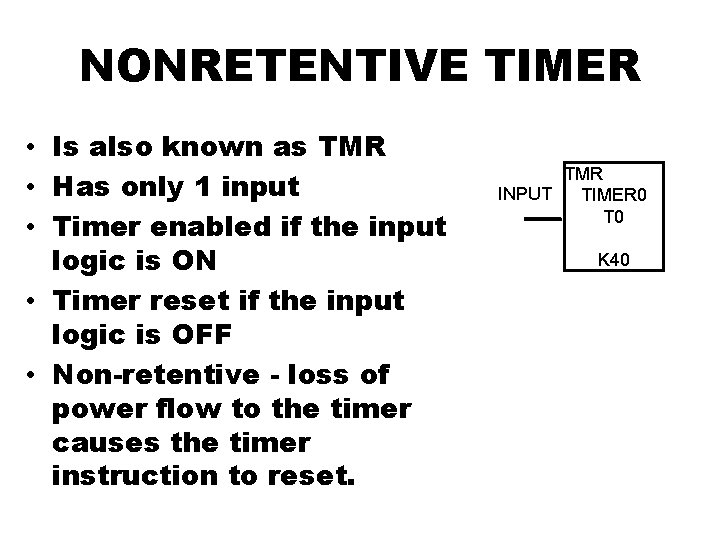
NONRETENTIVE TIMER • Is also known as TMR • Has only 1 input • Timer enabled if the input logic is ON • Timer reset if the input logic is OFF • Non-retentive - loss of power flow to the timer causes the timer instruction to reset. TMR INPUT TIMER 0 T 0 K 40
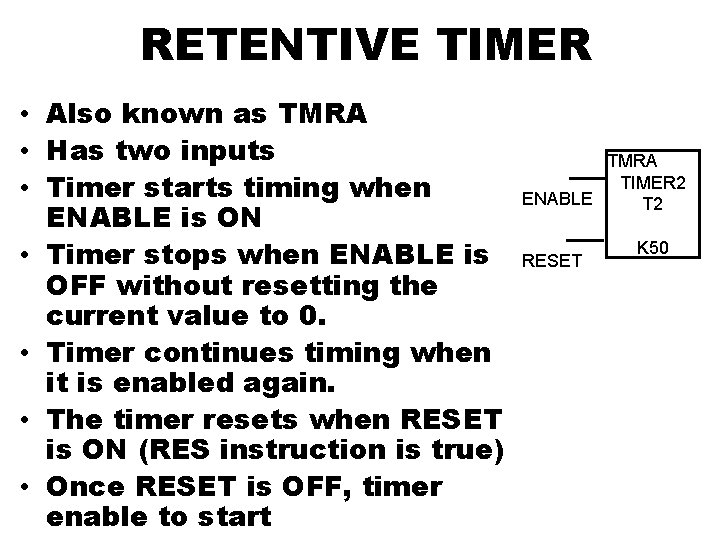
RETENTIVE TIMER • Also known as TMRA • Has two inputs • Timer starts timing when ENABLE is ON • Timer stops when ENABLE is OFF without resetting the current value to 0. • Timer continues timing when it is enabled again. • The timer resets when RESET is ON (RES instruction is true) • Once RESET is OFF, timer enable to start TMRA TIMER 2 ENABLE T 2 RESET K 50
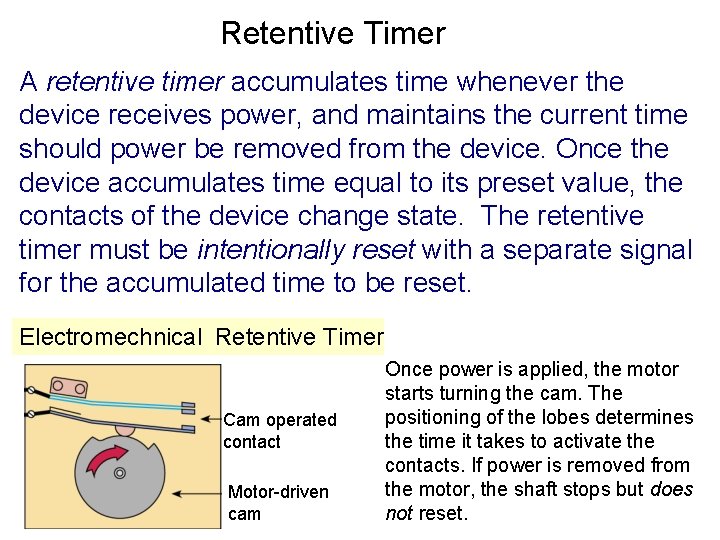
Retentive Timer A retentive timer accumulates time whenever the device receives power, and maintains the current time should power be removed from the device. Once the device accumulates time equal to its preset value, the contacts of the device change state. The retentive timer must be intentionally reset with a separate signal for the accumulated time to be reset. Electromechnical Retentive Timer Cam operated contact Motor-driven cam Once power is applied, the motor starts turning the cam. The positioning of the lobes determines the time it takes to activate the contacts. If power is removed from the motor, the shaft stops but does not reset.
EXERCISE
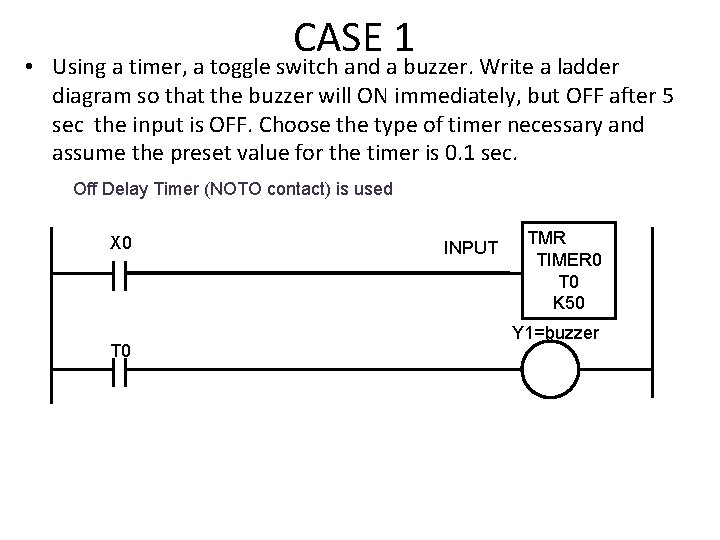
CASE 1 • Using a timer, a toggle switch and a buzzer. Write a ladder diagram so that the buzzer will ON immediately, but OFF after 5 sec the input is OFF. Choose the type of timer necessary and assume the preset value for the timer is 0. 1 sec. Off Delay Timer (NOTO contact) is used X 0 T 0 INPUT TMR TIMER 0 T 0 K 50 Y 1=buzzer
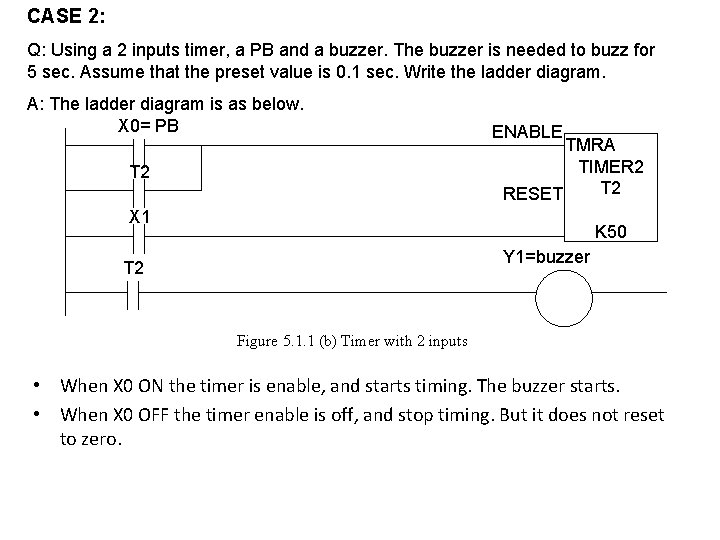
CASE 2: Q: Using a 2 inputs timer, a PB and a buzzer. The buzzer is needed to buzz for 5 sec. Assume that the preset value is 0. 1 sec. Write the ladder diagram. A: The ladder diagram is as below. X 0= PB T 2 ENABLE TMRA TIMER 2 T 2 RESET X 1 K 50 Y 1=buzzer T 2 Figure 5. 1. 1 (b) Timer with 2 inputs • When X 0 ON the timer is enable, and starts timing. The buzzer starts. • When X 0 OFF the timer enable is off, and stop timing. But it does not reset to zero.
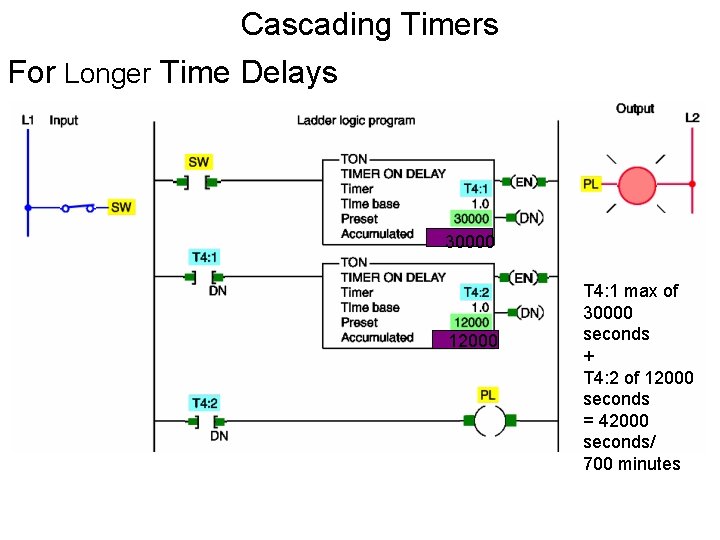
5. 1. 2 Cascading Timer • Applications sometimes require longer time delays than one timer can accomplish. • Multiple timers can then be used to achieve a longer delay than would otherwise be possible. • One timer acts as the input to another. • When the first timer times out, it becomes the input to start the second timer timing. • This is called cascading.
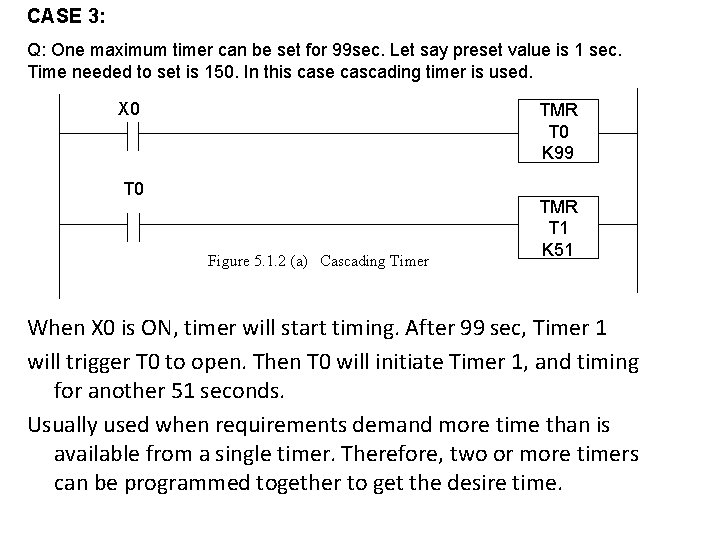
CASE 3: Q: One maximum timer can be set for 99 sec. Let say preset value is 1 sec. Time needed to set is 150. In this case cascading timer is used. X 0 TMR T 0 K 99 T 0 Figure 5. 1. 2 (a) Cascading Timer TMR T 1 K 51 When X 0 is ON, timer will start timing. After 99 sec, Timer 1 will trigger T 0 to open. Then T 0 will initiate Timer 1, and timing for another 51 seconds. Usually used when requirements demand more time than is available from a single timer. Therefore, two or more timers can be programmed together to get the desire time.
CASCADING
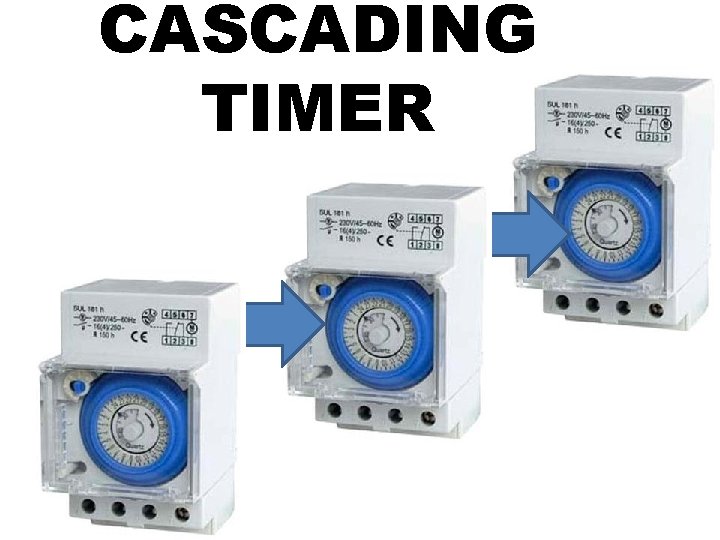
CASCADING TIMER
• The programming of two or more timers together is called cascading. • Timers may be interconnected, or cascaded to satisfy any required control logic.
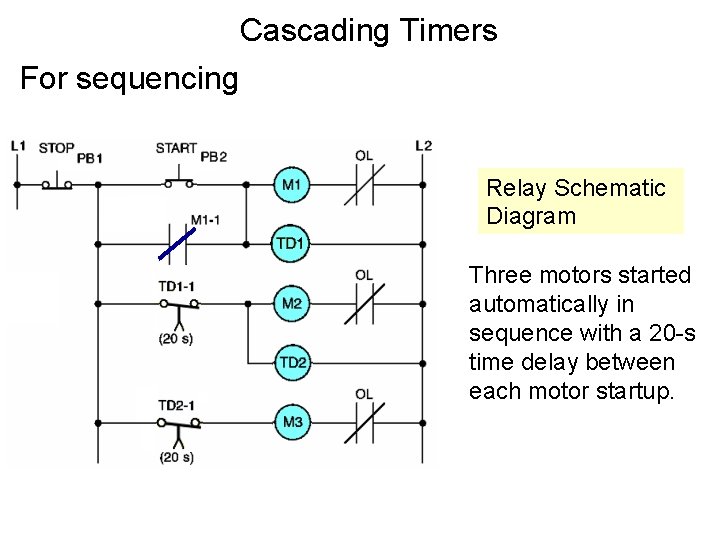
Cascading Timers For sequencing Relay Schematic Diagram Three motors started automatically in sequence with a 20 -s time delay between each motor startup.
Cascading Timers For Longer Time Delays 30000 12000 T 4: 1 max of 30000 seconds + T 4: 2 of 12000 seconds = 42000 seconds/ 700 minutes
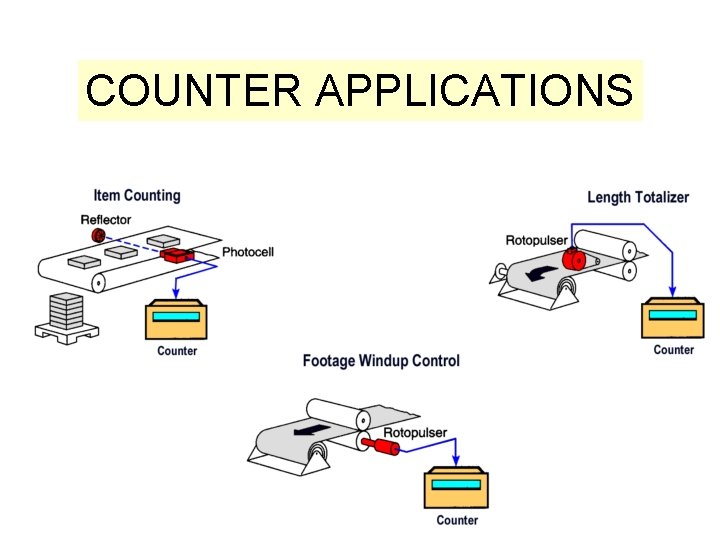
COUNTER • Electronic counters can count up, count down, or be combined to count up and down. • They are dependent on external sources, such as parts traveling past a sensor or actuating a limit switch for counting.
COUNTER APPLICATIONS
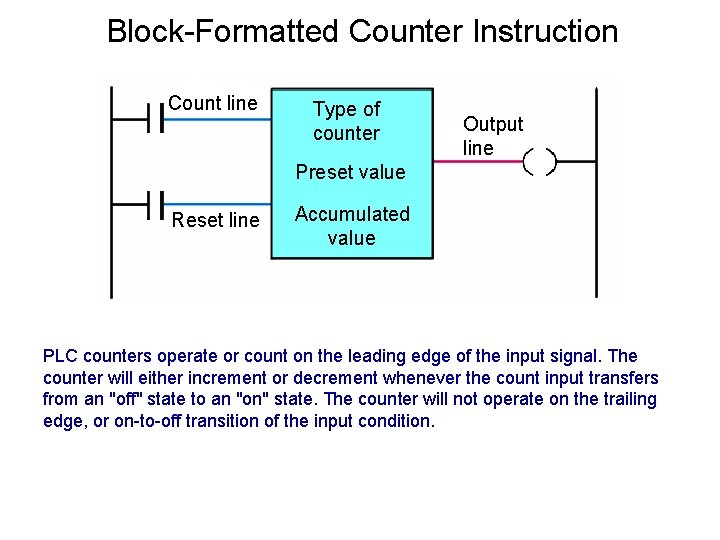
Block-Formatted Counter Instruction Count line Type of counter Output line Preset value Reset line Accumulated value PLC counters operate or count on the leading edge of the input signal. The counter will either increment or decrement whenever the count input transfers from an "off" state to an "on" state. The counter will not operate on the trailing edge, or on-to-off transition of the input condition.
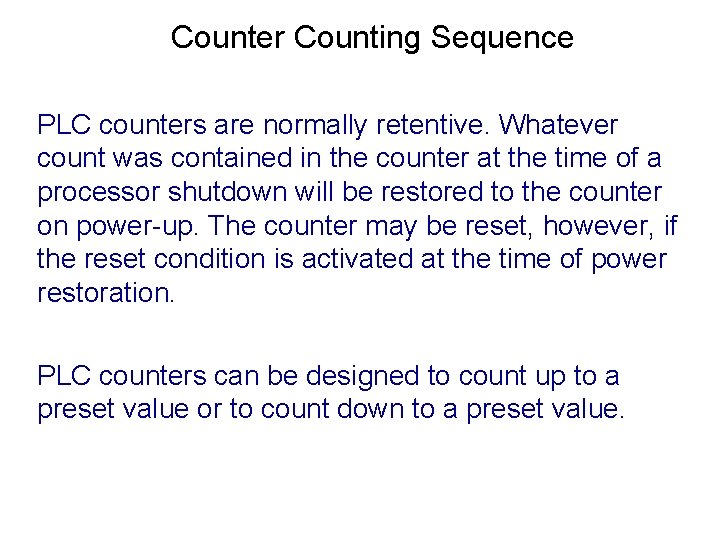
Counter Counting Sequence PLC counters are normally retentive. Whatever count was contained in the counter at the time of a processor shutdown will be restored to the counter on power-up. The counter may be reset, however, if the reset condition is activated at the time of power restoration. PLC counters can be designed to count up to a preset value or to count down to a preset value.
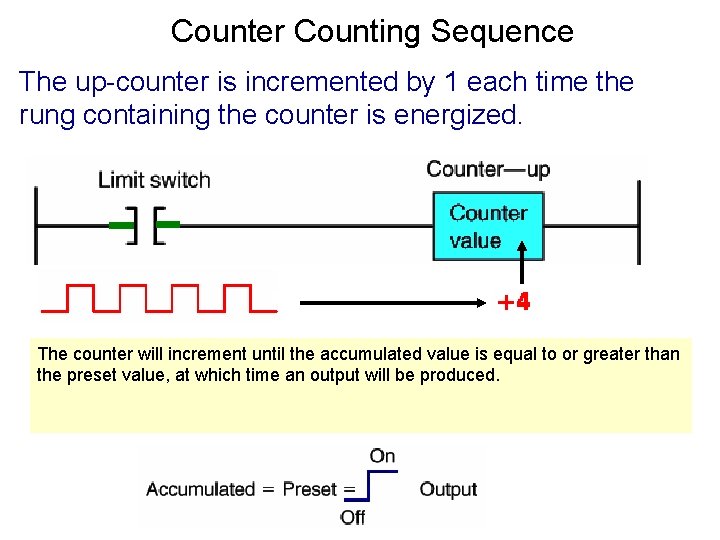
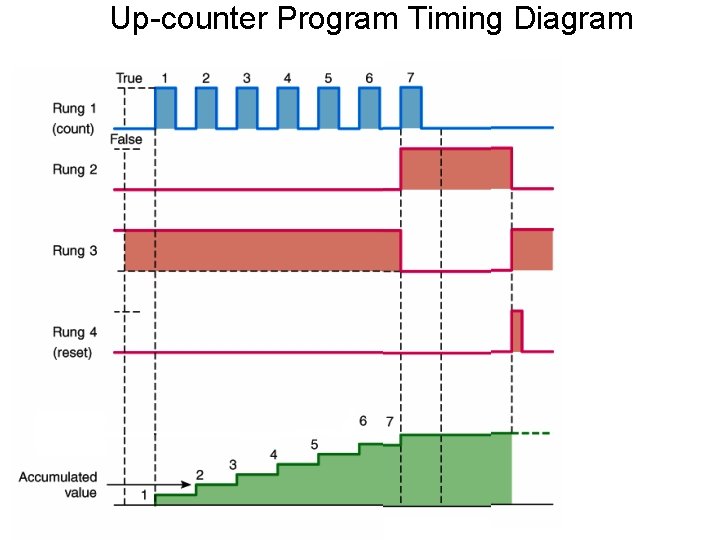
Counter Counting Sequence The up-counter is incremented by 1 each time the rung containing the counter is energized. The counter will increment until the accumulated value is equal to or greater than the preset value, at which time an output will be produced.
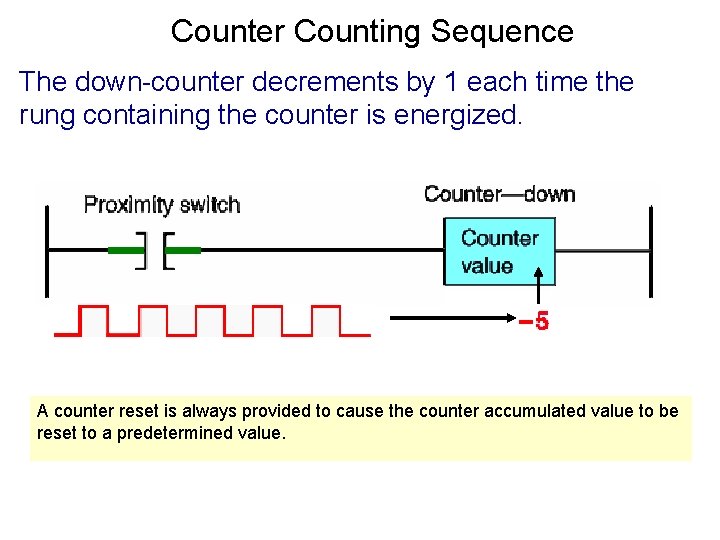
Counter Counting Sequence The down-counter decrements by 1 each time the rung containing the counter is energized. A counter reset is always provided to cause the counter accumulated value to be reset to a predetermined value.
UPCOUNTER
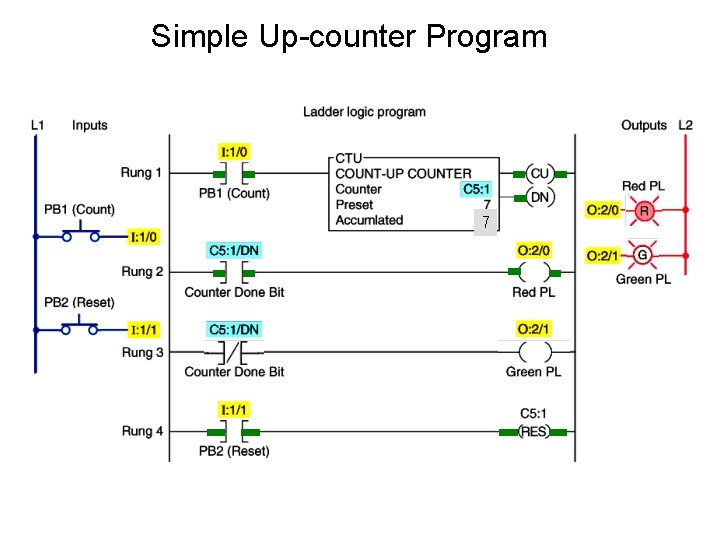
Simple Up-counter Program 7
Up-counter Program Timing Diagram
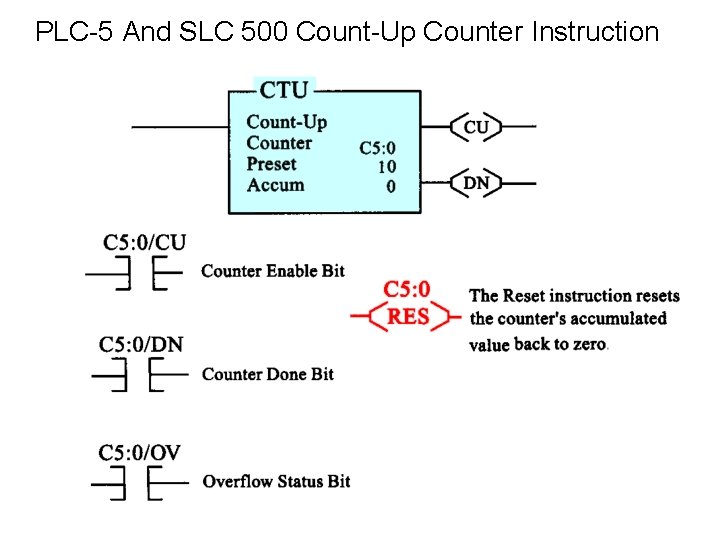
PLC-5 And SLC 500 Count-Up Counter Instruction
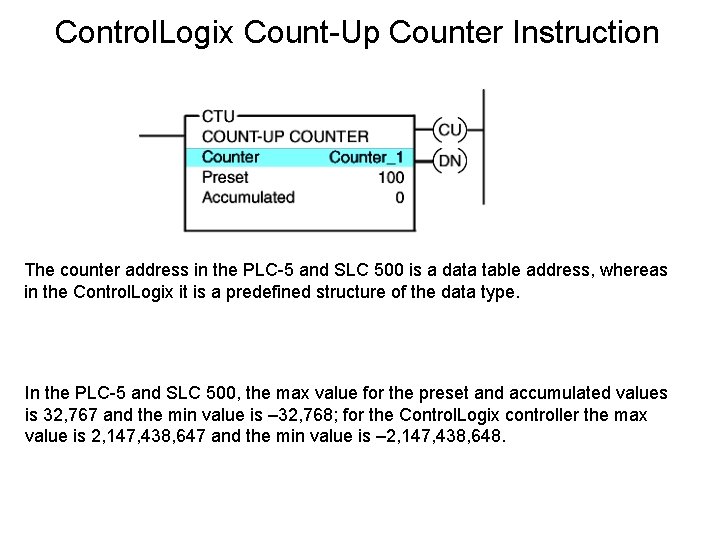
Control. Logix Count-Up Counter Instruction The counter address in the PLC-5 and SLC 500 is a data table address, whereas in the Control. Logix it is a predefined structure of the data type. In the PLC-5 and SLC 500, the max value for the preset and accumulated values is 32, 767 and the min value is – 32, 768; for the Control. Logix controller the max value is 2, 147, 438, 647 and the min value is – 2, 147, 438, 648.
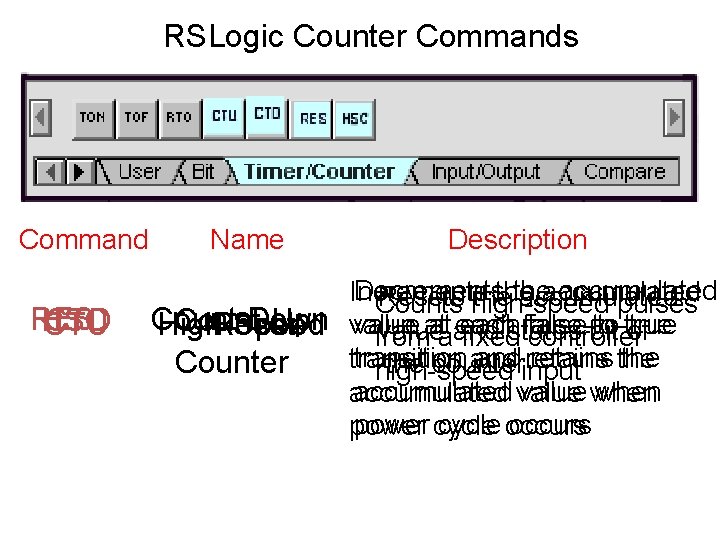
RSLogic Counter Commands Command RES HSC CTD CTU Name Description Decrements the accumulated Increments the accumulated Resets high-speed the accumulated Counts pulses Count-Down Count-Up value ataand each false-to-true value at each false-to-true High-Speed Reset value bit of from fixedstatus controller transition andinput retains the transition and retains Counter the counter high-speed accumulated value when accumulated power cycle occurs power
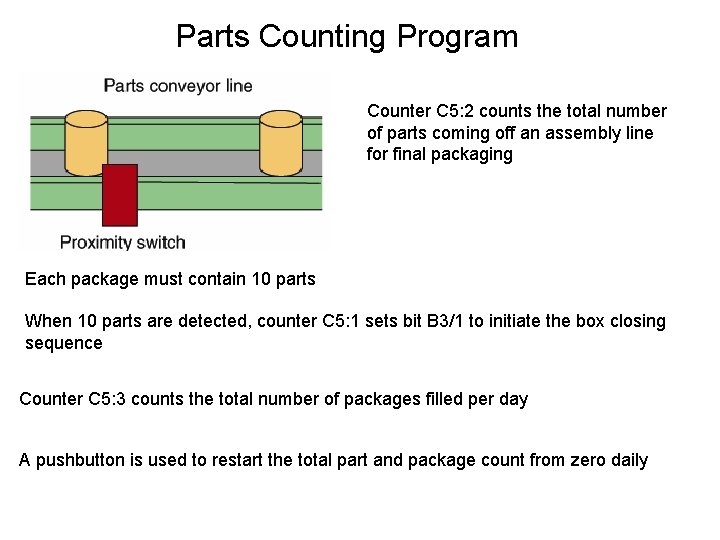
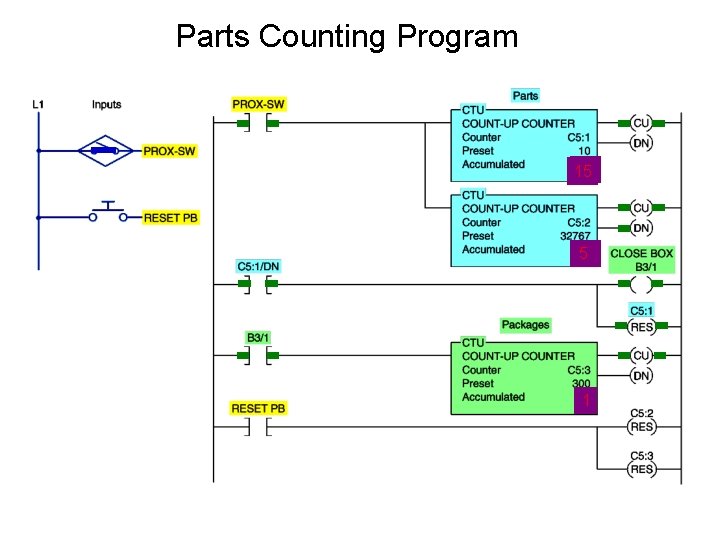
Parts Counting Program Counter C 5: 2 counts the total number of parts coming off an assembly line for final packaging Each package must contain 10 parts When 10 parts are detected, counter C 5: 1 sets bit B 3/1 to initiate the box closing sequence Counter C 5: 3 counts the total number of packages filled per day A pushbutton is used to restart the total part and package count from zero daily
Parts Counting Program 9 10 15 10 59 1
DOWNCOUNTER
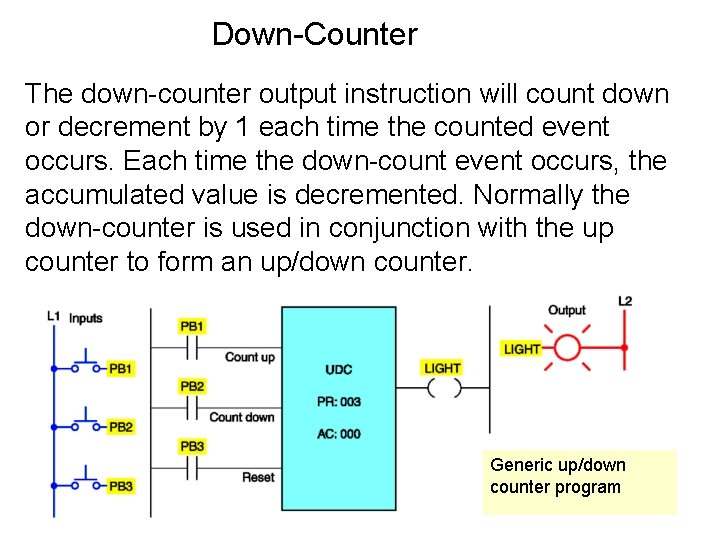
Down-Counter The down-counter output instruction will count down or decrement by 1 each time the counted event occurs. Each time the down-count event occurs, the accumulated value is decremented. Normally the down-counter is used in conjunction with the up counter to form an up/down counter. Generic up/down counter program
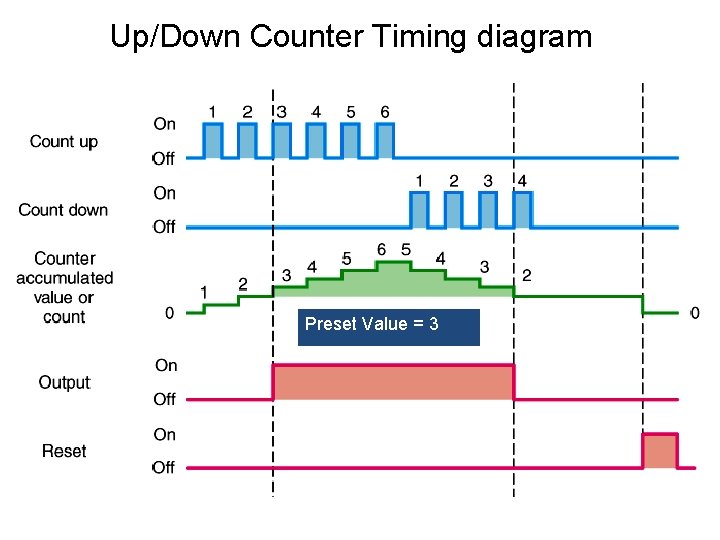
Up/Down Counter Timing diagram Preset Value = 3
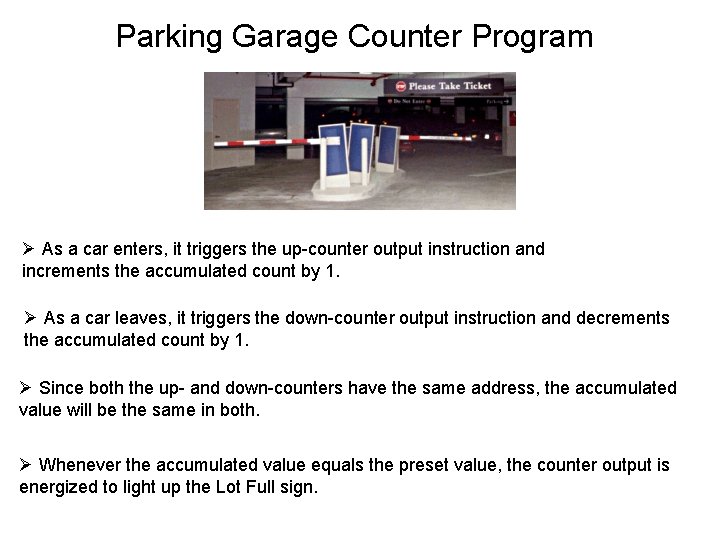
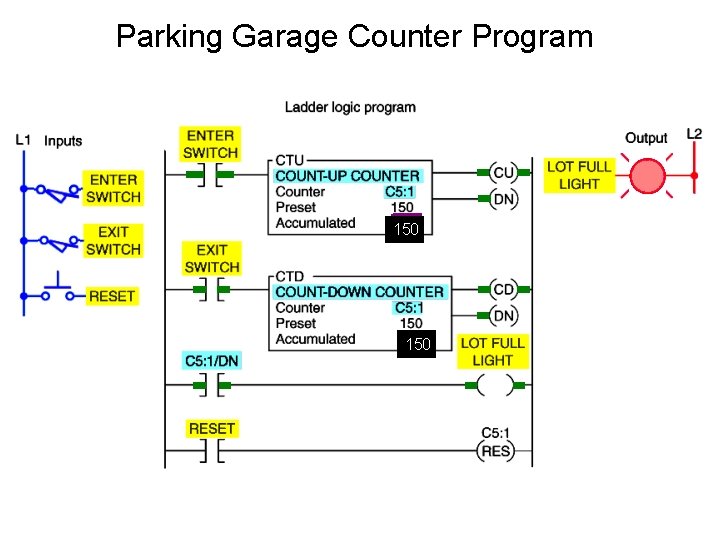
Parking Garage Counter Program Ø As a car enters, it triggers the up-counter output instruction and increments the accumulated count by 1. Ø As a car leaves, it triggers the down-counter output instruction and decrements the accumulated count by 1. Ø Since both the up- and down-counters have the same address, the accumulated value will be the same in both. Ø Whenever the accumulated value equals the preset value, the counter output is energized to light up the Lot Full sign.
Parking Garage Counter Program 50 38 150 50 150 38
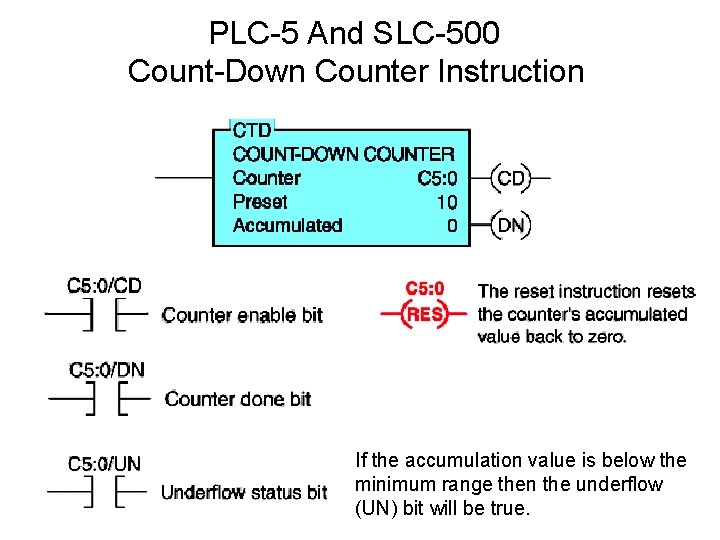
PLC-5 And SLC-500 Count-Down Counter Instruction If the accumulation value is below the minimum range then the underflow (UN) bit will be true.
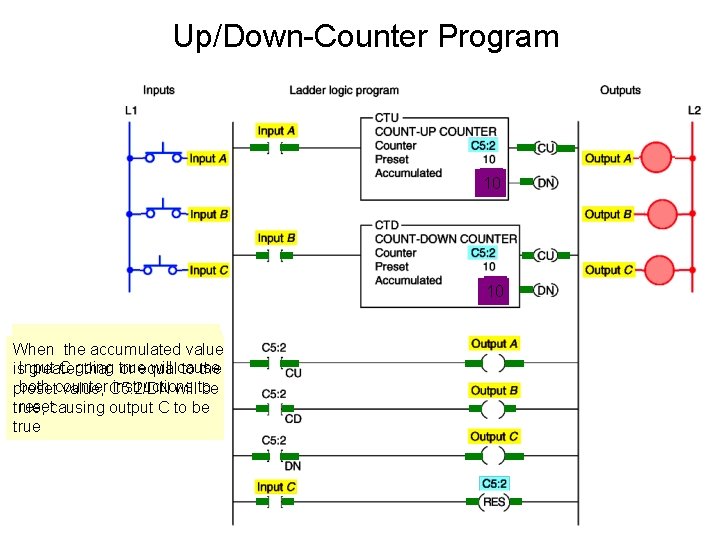
Up/Down-Counter Program 1 10 When the CTU When theaccumulated CTD instruction When value is true, C 5: 2/CU will be true isgreater true, will true C C 5: 2/CD going true willbecause is. Input than or equal to the causing output A to be true causing output B to be true both counter instructions preset value, C 5: 2/DN will to be resetcausing output C to be true, true
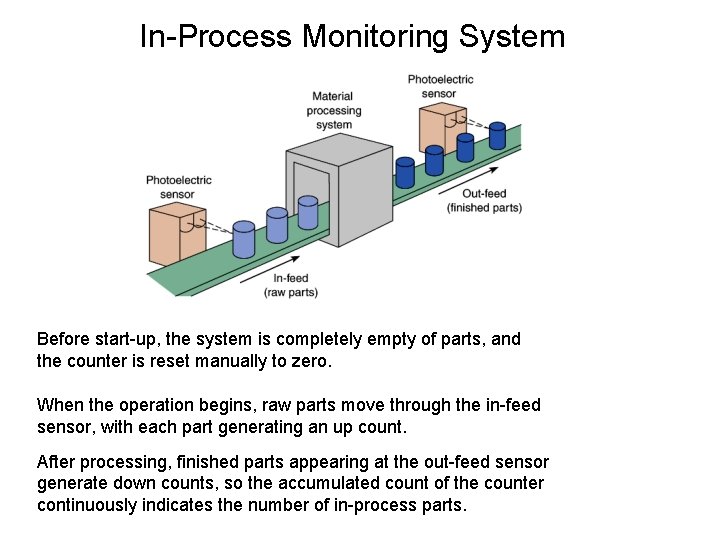
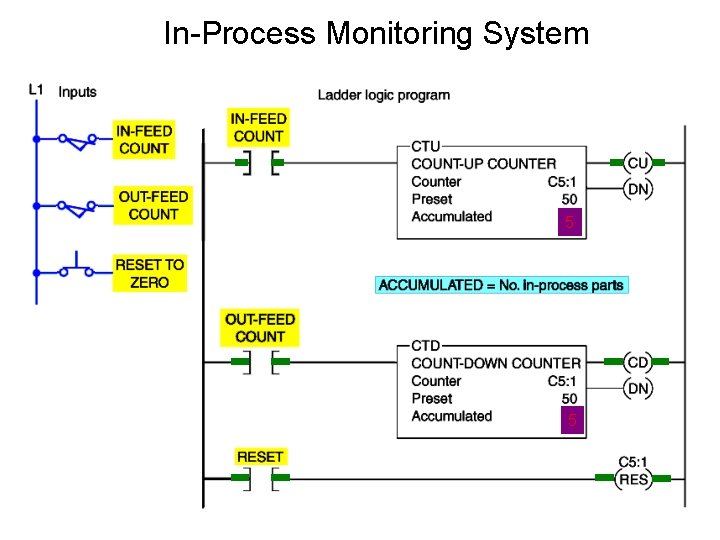
In-Process Monitoring System Before start-up, the system is completely empty of parts, and the counter is reset manually to zero. When the operation begins, raw parts move through the in-feed sensor, with each part generating an up count. After processing, finished parts appearing at the out-feed sensor generate down counts, so the accumulated count of the counter continuously indicates the number of in-process parts.
In-Process Monitoring System 58 8 5
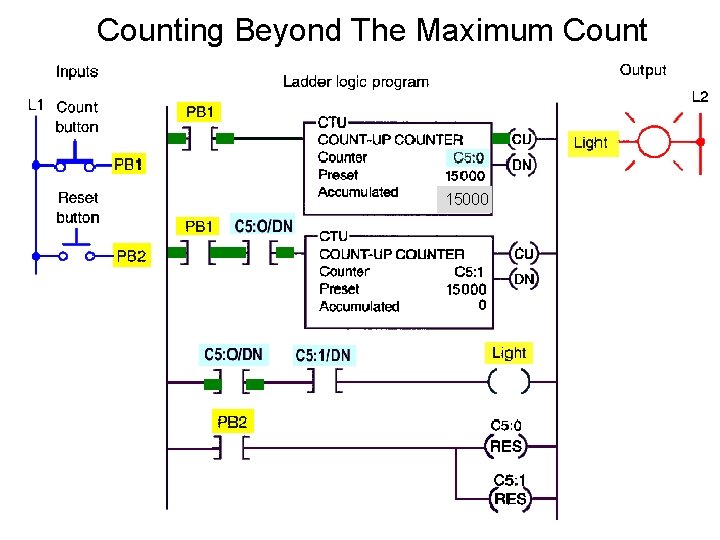
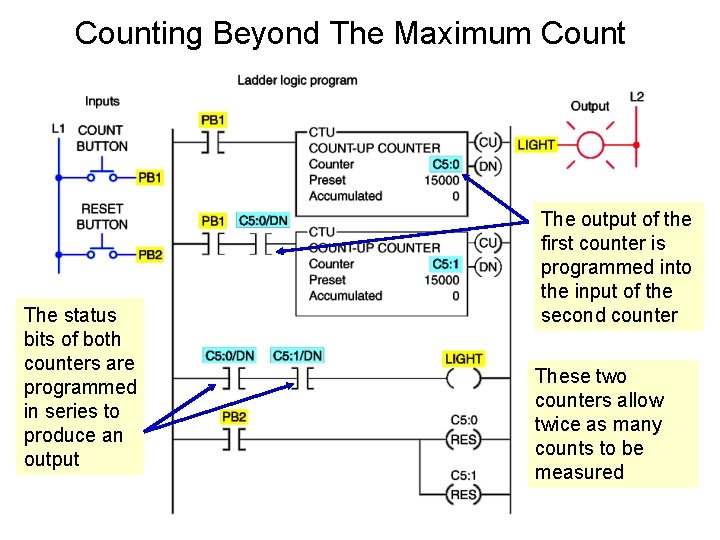
Counting Beyond The Maximum Count 15000
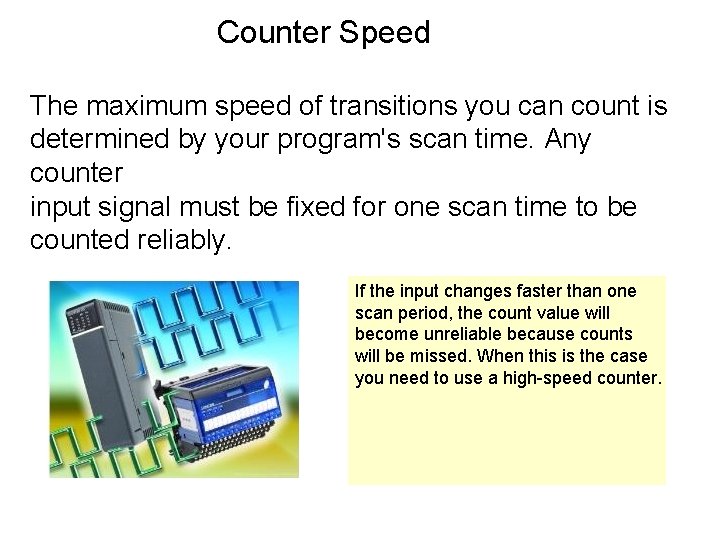
Counter Speed The maximum speed of transitions you can count is determined by your program's scan time. Any counter input signal must be fixed for one scan time to be counted reliably. If the input changes faster than one scan period, the count value will become unreliable because counts will be missed. When this is the case you need to use a high-speed counter.
CASCADING COUNTER
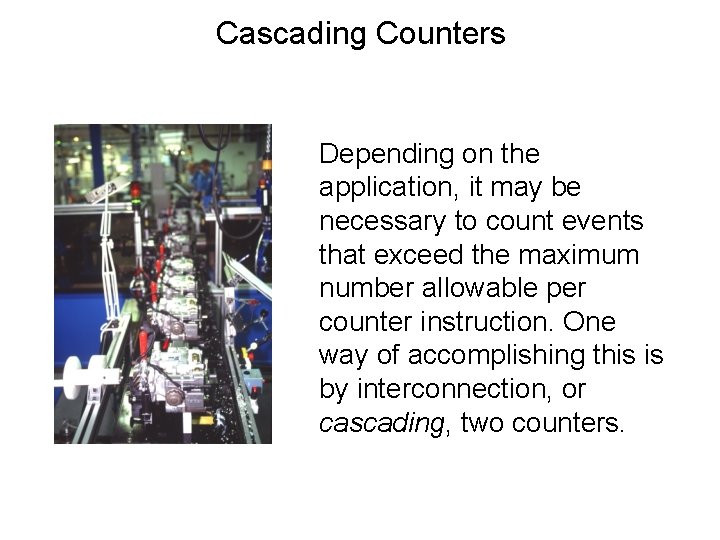
Cascading Counters Depending on the application, it may be necessary to count events that exceed the maximum number allowable per counter instruction. One way of accomplishing this is by interconnection, or cascading, two counters.
Counting Beyond The Maximum Count The status bits of both counters are programmed in series to produce an output The output of the first counter is programmed into the input of the second counter These two counters allow twice as many counts to be measured
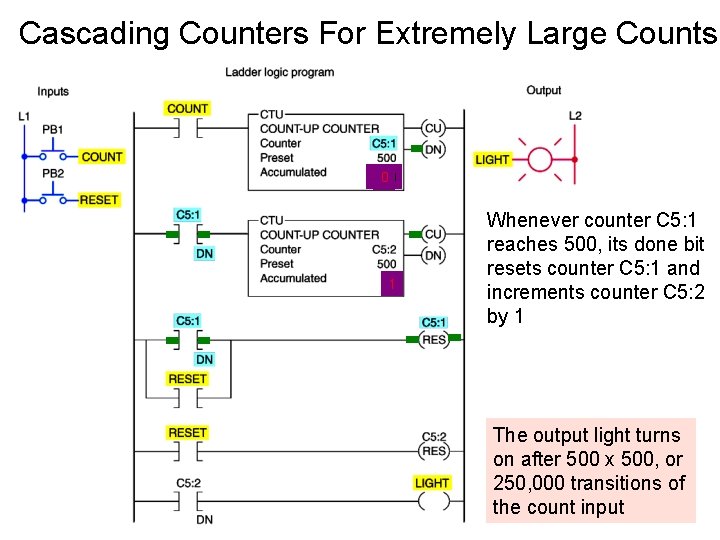
Cascading Counters For Extremely Large Counts 500 0 1 Whenever counter C 5: 1 reaches 500, its done bit resets counter C 5: 1 and increments counter C 5: 2 by 1 The output light turns on after 500 x 500, or 250, 000 transitions of the count input