P 09311 Interface for Multipurpose Driver Data Acquisition
![UART System Signal Description CLK System Clock RST Asynchronous active-high reset. Din[7: 0] Eight-bits](https://slidetodoc.com/presentation_image_h/0756f3d45b824812aefa2d399bb03b73/image-19.jpg "UART System Signal Description CLK System Clock RST Asynchronous active-high reset. Din[7: 0] Eight-bits")
- Slides: 26
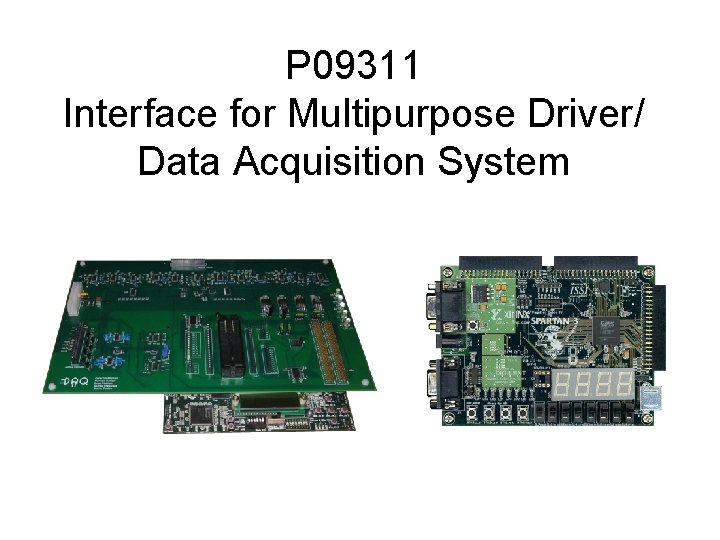
P 09311 Interface for Multipurpose Driver/ Data Acquisition System
Team • Adam Van Fleet (EE) – DAQ Hardware Development – FPGA/DAQ Hardware Interface Development – Project Leader • David Howe (EE) – DAQ Interfacing & USB Hardware Development – FPGA/DAQ Hardware Interface Development • Michael Doroski (CE) – DAQ Interface Development (software) – Custom FPGA logic • Thomas (TJ) Antonoff (CE) – USB interface development (software) • Andrew Weida (CE) – FPGA Bluetooth interface development (UART) – GUI Development and PC Serial Communication
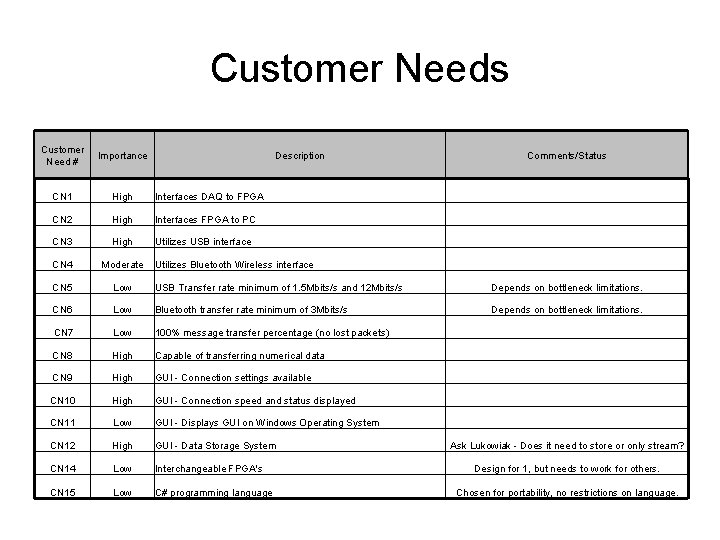
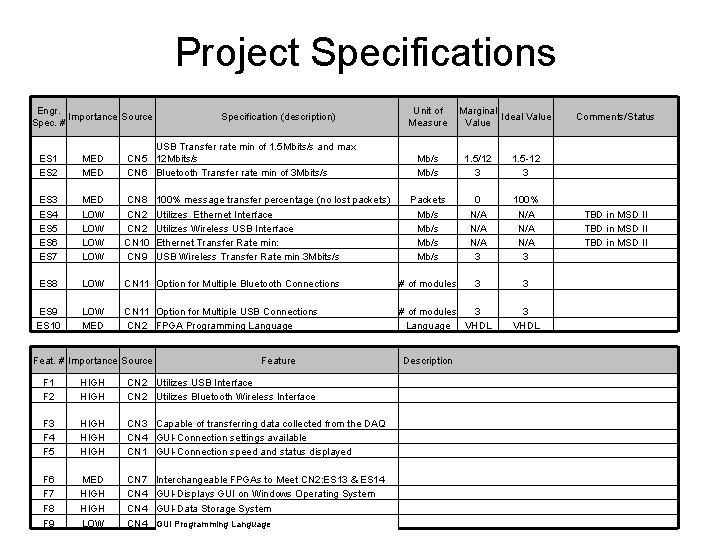
Customer Needs Customer Need # Importance CN 1 High Interfaces DAQ to FPGA CN 2 High Interfaces FPGA to PC CN 3 High Utilizes USB interface CN 4 Moderate Utilizes Bluetooth Wireless interface CN 5 Low USB Transfer rate minimum of 1. 5 Mbits/s and 12 Mbits/s Depends on bottleneck limitations. CN 6 Low Bluetooth transfer rate minimum of 3 Mbits/s Depends on bottleneck limitations. CN 7 Low 100% message transfer percentage (no lost packets) CN 8 High Capable of transferring numerical data CN 9 High GUI - Connection settings available CN 10 High GUI - Connection speed and status displayed CN 11 Low GUI - Displays GUI on Windows Operating System CN 12 High GUI - Data Storage System CN 14 Low Interchangeable FPGA's CN 15 Low C# programming language Description Comments/Status Ask Lukowiak - Does it need to store or only stream? Design for 1, but needs to work for others. Chosen for portability, no restrictions on language.
Project Specifications Engr. Importance Source Spec. # Specification (description) ES 1 ES 2 MED USB Transfer rate min of 1. 5 Mbits/s and max CN 5 12 Mbits/s CN 6 Bluetooth Transfer rate min of 3 Mbits/s ES 3 ES 4 ES 5 ES 6 ES 7 MED LOW LOW CN 8 CN 2 CN 10 CN 9 ES 8 LOW ES 9 ES 10 LOW MED Unit of Measure Marginal Ideal Value Comments/Status Mb/s 1. 5/12 3 1. 5 -12 3 Packets Mb/s 0 N/A N/A 3 100% N/A N/A 3 TBD in MSD II CN 11 Option for Multiple Bluetooth Connections # of modules 3 3 CN 11 Option for Multiple USB Connections CN 2 FPGA Programming Language # of modules 3 Language VHDL 3 VHDL Feat. # Importance Source 100% message transfer percentage (no lost packets) Utilizes Ethernet Interface Utilizes Wireless USB Interface Ethernet Transfer Rate min: USB Wireless Transfer Rate min 3 Mbits/s Feature Description F 1 F 2 HIGH CN 2 Utilizes USB Interface CN 2 Utilizes Bluetooth Wireless Interface F 3 F 4 F 5 HIGH CN 3 Capable of transferring data collected from the DAQ CN 4 GUI-Connection settings available CN 1 GUI-Connection speed and status displayed F 6 F 7 MED HIGH CN 7 Interchangeable FPGAs to Meet CN 2: ES 13 & ES 14 CN 4 GUI-Displays GUI on Windows Operating System F 8 F 9 HIGH LOW CN 4 GUI-Data Storage System CN 4 GUI Programming Language
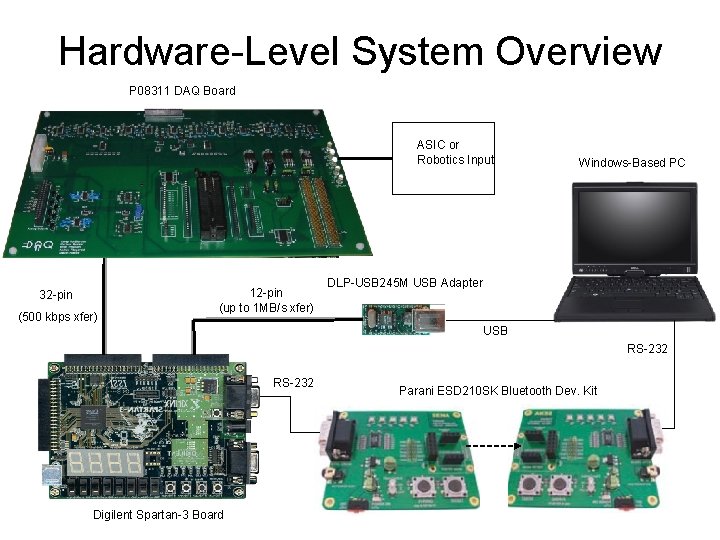
Hardware-Level System Overview P 08311 DAQ Board ASIC or Robotics Input 32 -pin (500 kbps xfer) 12 -pin (up to 1 MB/s xfer) Windows-Based PC DLP-USB 245 M USB Adapter USB RS-232 Digilent Spartan-3 Board Parani ESD 210 SK Bluetooth Dev. Kit
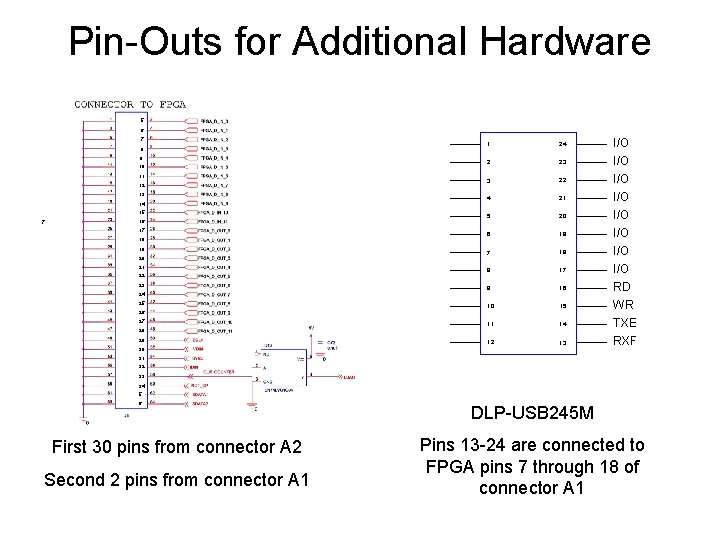
Pin-Outs for Additional Hardware 5 6 7 8 9 10 11 12 13 14 15 7 16 17 18 19 20 21 22 23 1 24 2 23 3 22 4 21 5 20 6 19 I/O I/O I/O 7 18 I/O 8 17 9 16 10 15 11 14 12 13 24 25 26 27 28 29 30 I/O RD WR TXE RXF 31 32 33 34 5 6 First 30 pins from connector A 2 Second 2 pins from connector A 1 DLP-USB 245 M Pins 13 -24 are connected to FPGA pins 7 through 18 of connector A 1
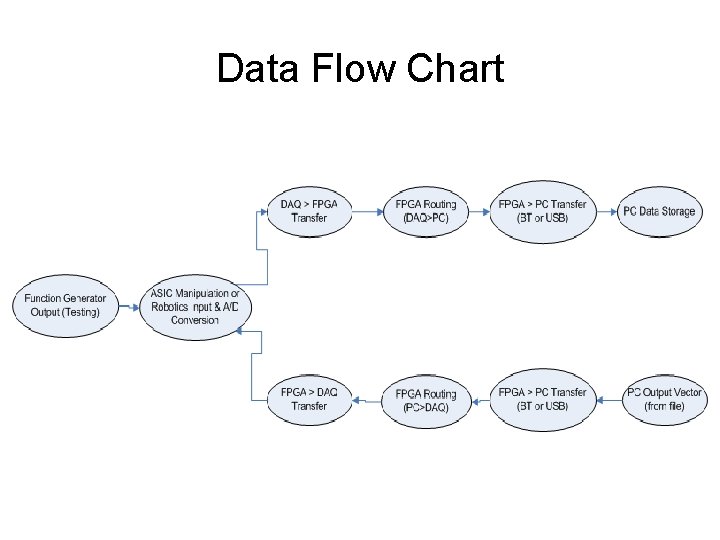
Data Flow Chart
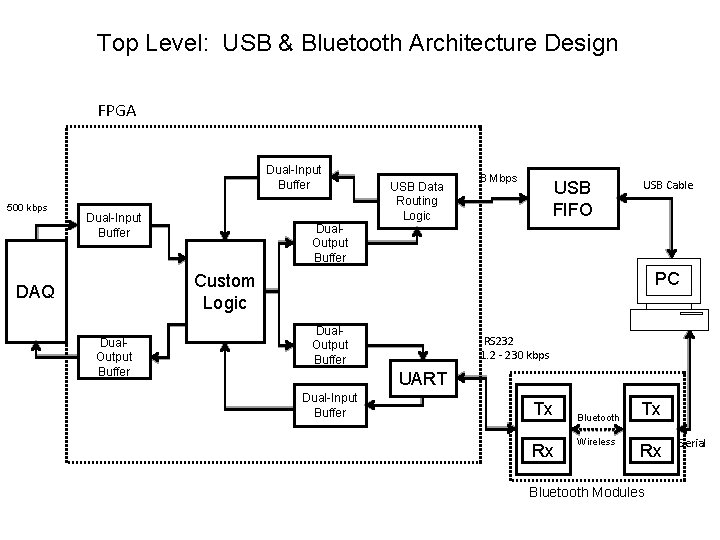
Top Level: USB & Bluetooth Architecture Design FPGA Dual-Input Buffer 500 kbps Dual-Input Buffer Dual. Output Buffer USB Data Routing Logic 8 Mbps USB FIFO USB Cable PC Custom Logic DAQ Dual. Output Buffer RS 232 1. 2 - 230 kbps UART Dual-Input Buffer Tx Rx Bluetooth Wireless Tx Rx Bluetooth Modules Serial
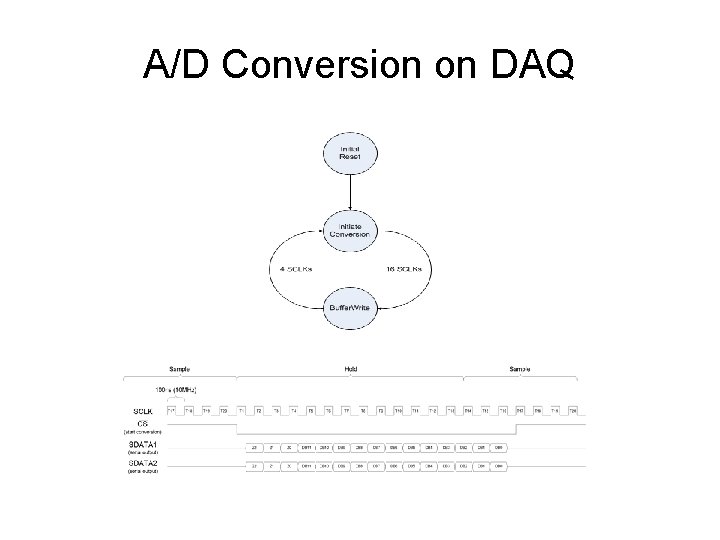
A/D Conversion on DAQ
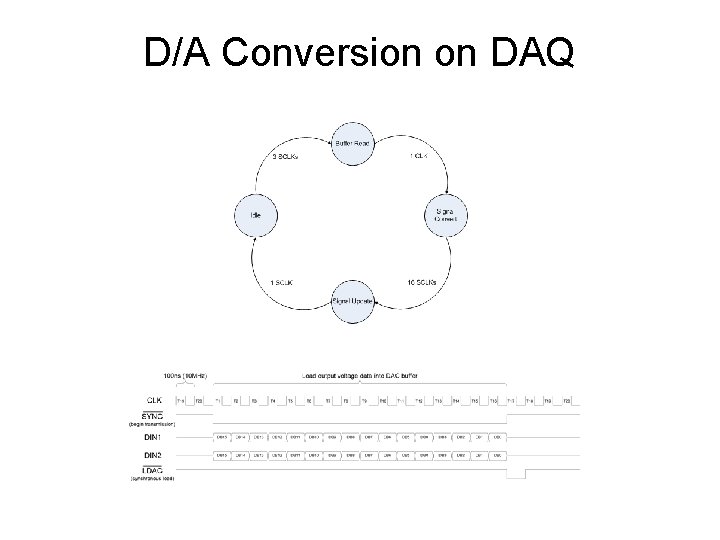
D/A Conversion on DAQ
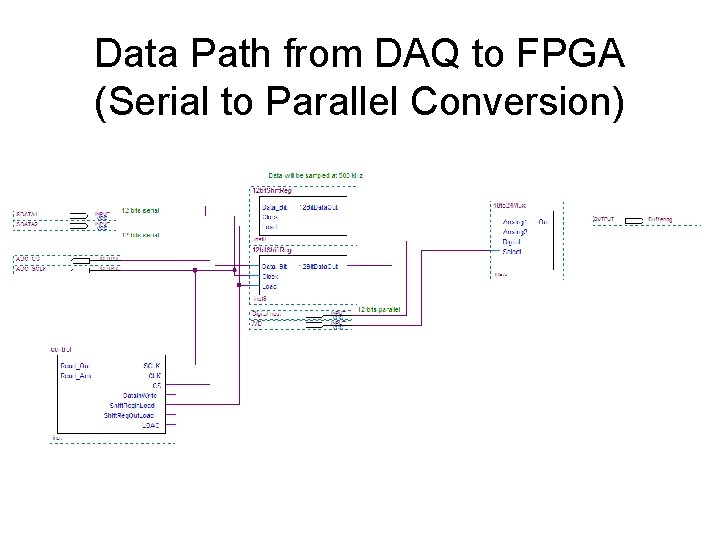
Data Path from DAQ to FPGA (Serial to Parallel Conversion)
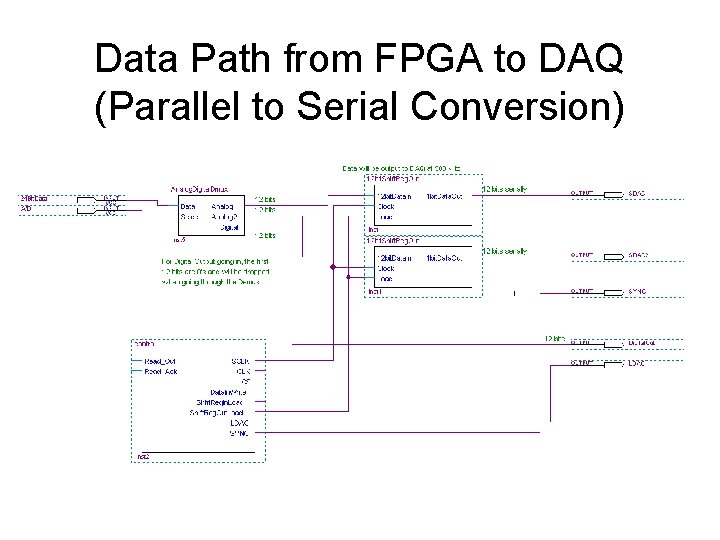
Data Path from FPGA to DAQ (Parallel to Serial Conversion)
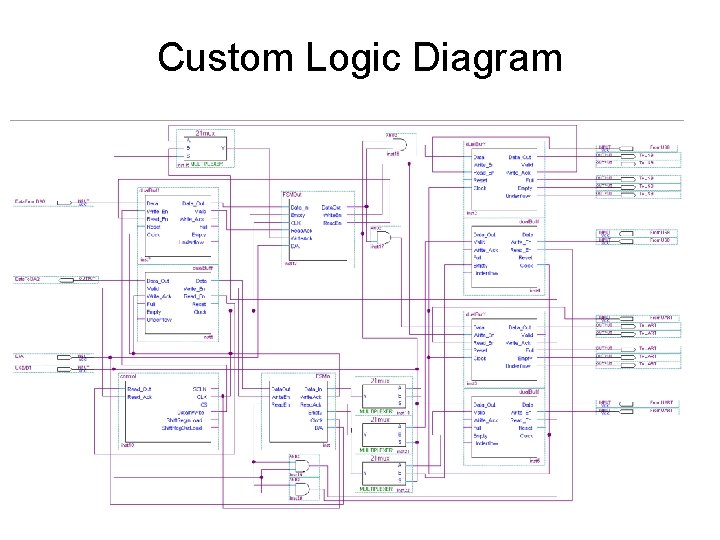
Custom Logic Diagram
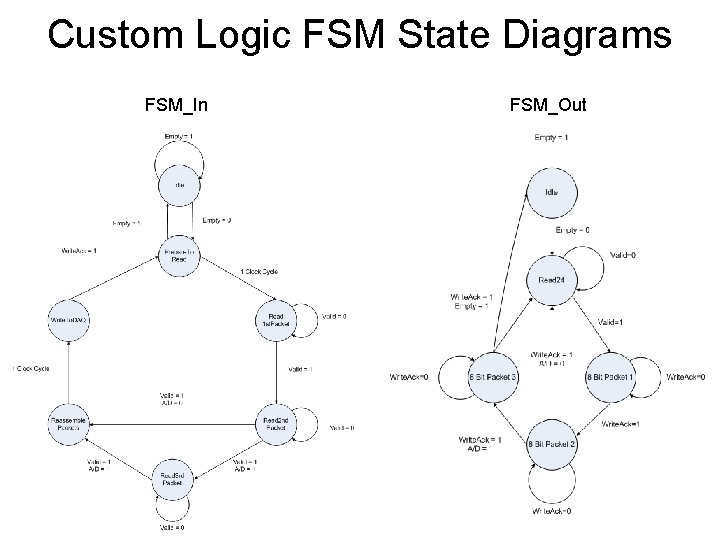
Custom Logic FSM State Diagrams FSM_In FSM_Out
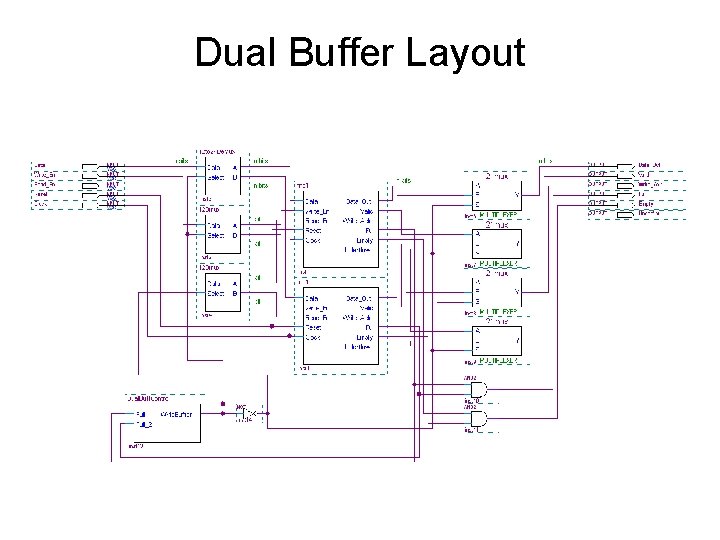
Dual Buffer Layout
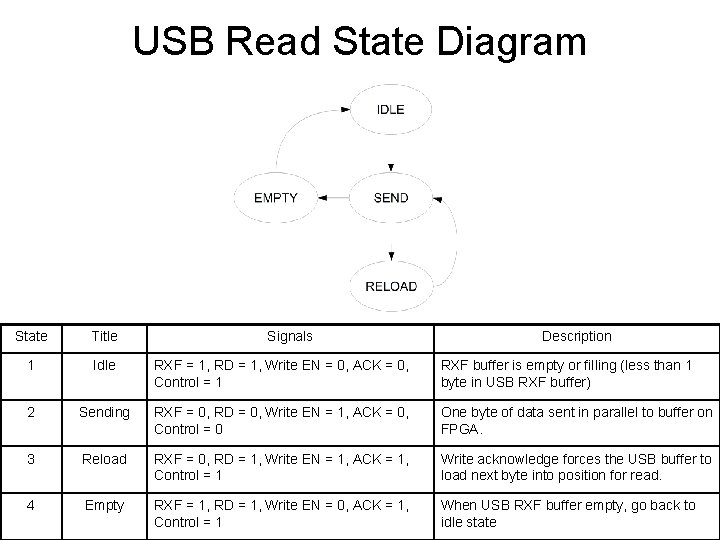
USB Read State Diagram State Title Signals Description 1 Idle RXF = 1, RD = 1, Write EN = 0, ACK = 0, Control = 1 RXF buffer is empty or filling (less than 1 byte in USB RXF buffer) 2 Sending RXF = 0, RD = 0, Write EN = 1, ACK = 0, Control = 0 One byte of data sent in parallel to buffer on FPGA. 3 Reload RXF = 0, RD = 1, Write EN = 1, ACK = 1, Control = 1 Write acknowledge forces the USB buffer to load next byte into position for read. 4 Empty RXF = 1, RD = 1, Write EN = 0, ACK = 1, Control = 1 When USB RXF buffer empty, go back to idle state
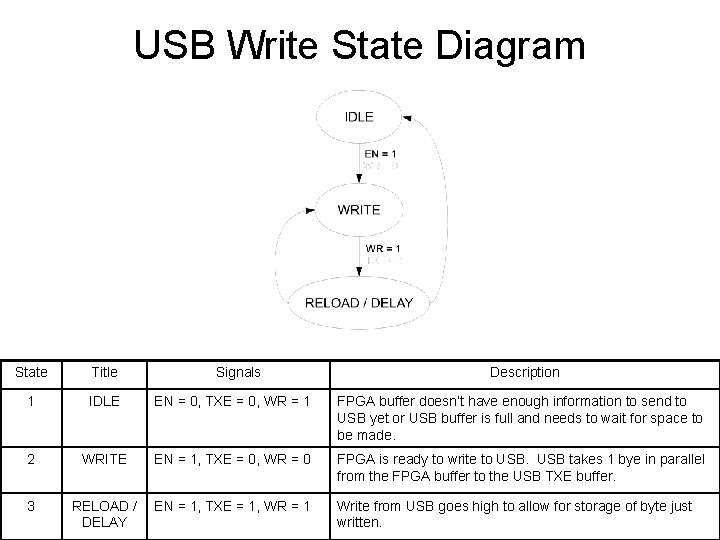
USB Write State Diagram State Title 1 IDLE EN = 0, TXE = 0, WR = 1 FPGA buffer doesn’t have enough information to send to USB yet or USB buffer is full and needs to wait for space to be made. 2 WRITE EN = 1, TXE = 0, WR = 0 FPGA is ready to write to USB takes 1 bye in parallel from the FPGA buffer to the USB TXE buffer. 3 Signals RELOAD / EN = 1, TXE = 1, WR = 1 DELAY Description Write from USB goes high to allow for storage of byte just written.
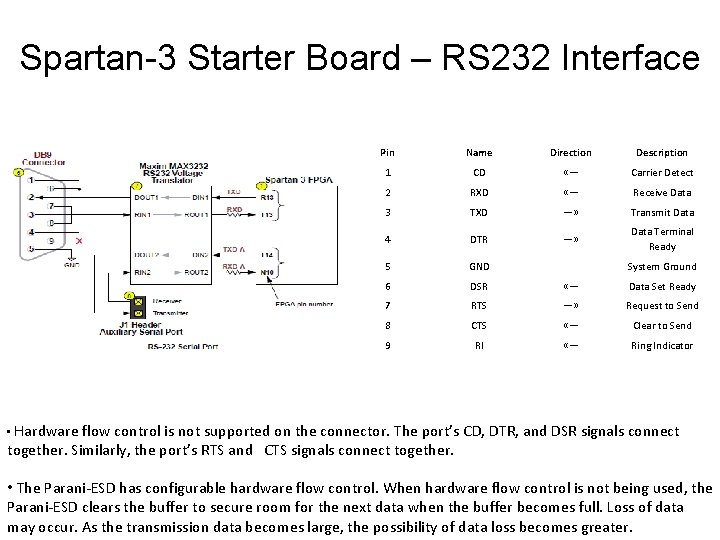
Spartan-3 Starter Board – RS 232 Interface Pin Name Direction Description 1 CD «— Carrier Detect 2 RXD «— Receive Data 3 TXD —» Transmit Data 4 DTR —» Data Terminal Ready 5 GND 6 DSR «— Data Set Ready 7 RTS —» Request to Send 8 CTS «— Clear to Send 9 RI «— Ring Indicator System Ground • Hardware flow control is not supported on the connector. The port’s CD, DTR, and DSR signals connect together. Similarly, the port’s RTS and CTS signals connect together. • The Parani-ESD has configurable hardware flow control. When hardware flow control is not being used, the Parani-ESD clears the buffer to secure room for the next data when the buffer becomes full. Loss of data may occur. As the transmission data becomes large, the possibility of data loss becomes greater.
UART System Signal Description CLK System Clock RST Asynchronous active-high reset. Din[7: 0] Eight-bits Data From Buffer LD Load pulse to load Din in the Transmitter and start the transmission Rx RS 232 receive signal input. Is ’ 1’ when the line is idle. Tx RS 232 transmit signal output. Is ’ 1’ when the line is idle. Dout[7: 0] Data received. Rx. RDY A ‘ 1’ pulse (one system clock cycle long) indicates that a character is received and is available at Dout. Tx. Busy Indicates that the UART is busy sending data. Will ignore any LD request. SDin[7: 0] / SDout[7: 0] Data received from RS-232 Buff. Din[7: 0] / Buff. Dout[7: 0] Data From dual buffer, to be transmitted by UART Write. Buff / Read. Buff Control signal to write or read to/from Dual Buffer Buff. Full / Buff. Empty Indicates if Buffers are Full or Empty.
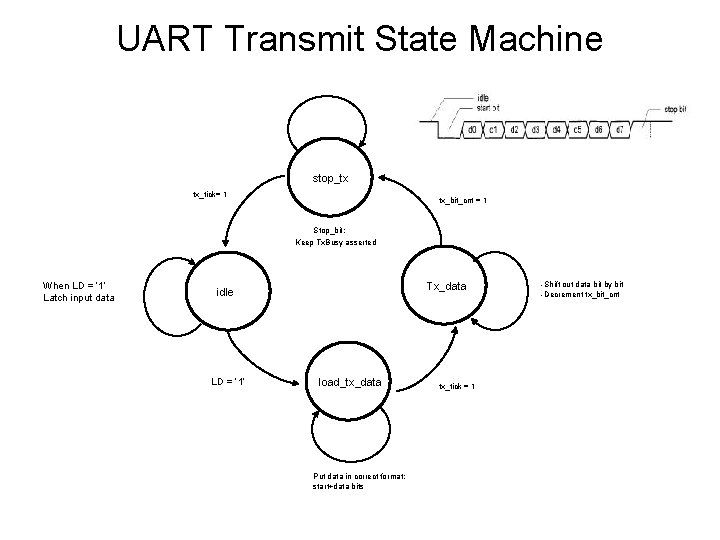
UART Transmit State Machine stop_tx tx_tick= 1 tx_bit_cnt = 1 Stop_bit: Keep Tx. Busy asserted When LD = ‘ 1’ Latch input data Tx_data idle LD = ‘ 1’ load_tx_data Put data in correct format: start+data bits tx_tick = 1 -Shift out data bit by bit -Decrement tx_bit_cnt
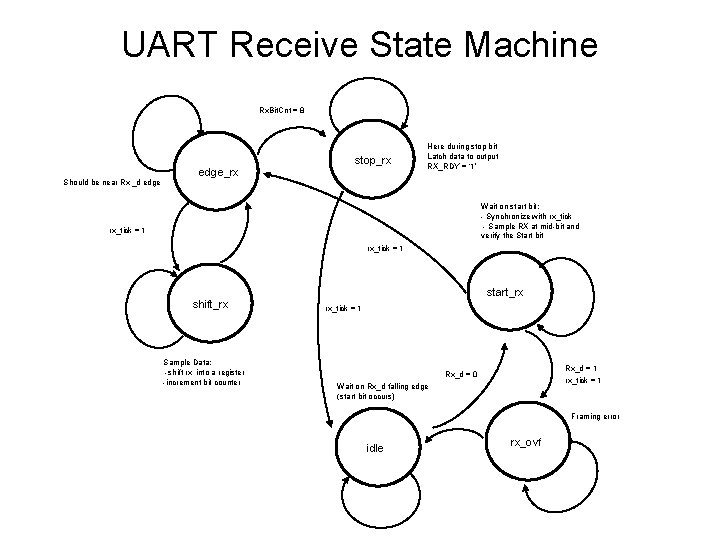
UART Receive State Machine Rx. Bit. Cnt = 8 Should be near Rx _d edge_rx stop_rx Here during stop bit Latch data to output RX_RDY = ‘ 1’ Wait on start bit: - Synchronize with rx_tick - Sample RX at mid-bit and verify the Start bit rx_tick = 1 shift_rx Sample Data: -shift rx into a register -increment bit counter start_rx rx_tick = 1 Rx_d = 1 rx_tick = 1 Rx_d = 0 Wait on Rx_d falling edge (start bit occurs) Framing error idle rx_ovf
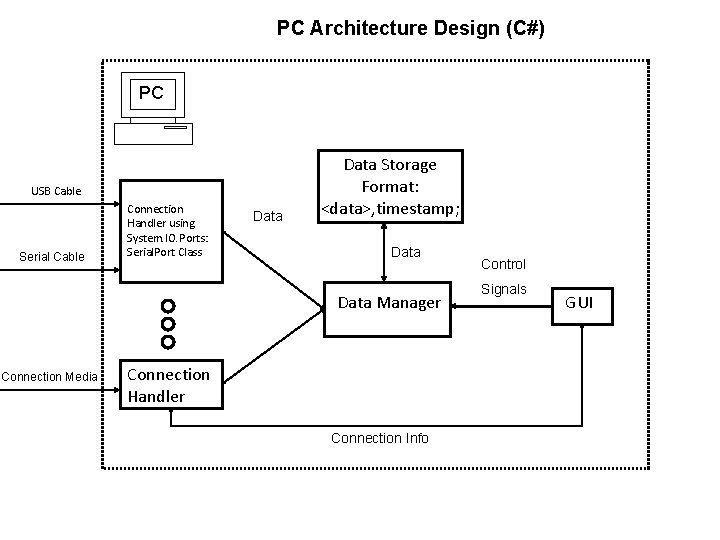
PC Architecture Design (C#) PC USB Cable Serial Cable Connection Handler using System. IO. Ports: Serial. Port Class Data Storage Format: <data>, timestamp; Data Manager Connection Media Connection Handler Connection Info Control Signals GUI
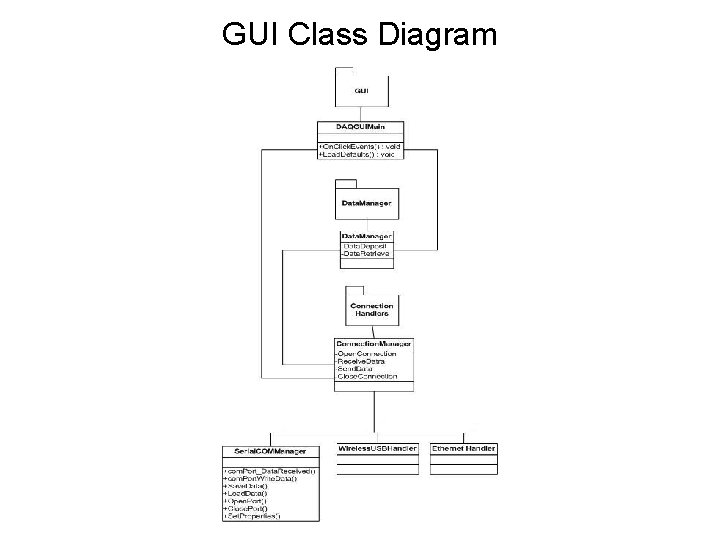
GUI Class Diagram
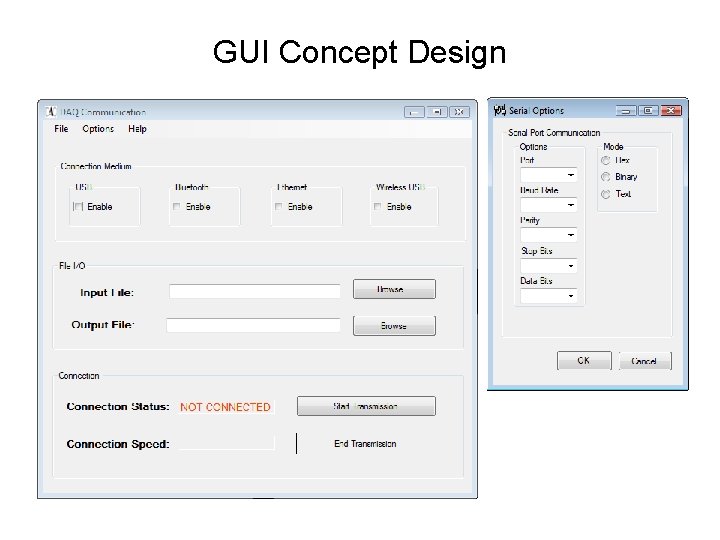
GUI Concept Design
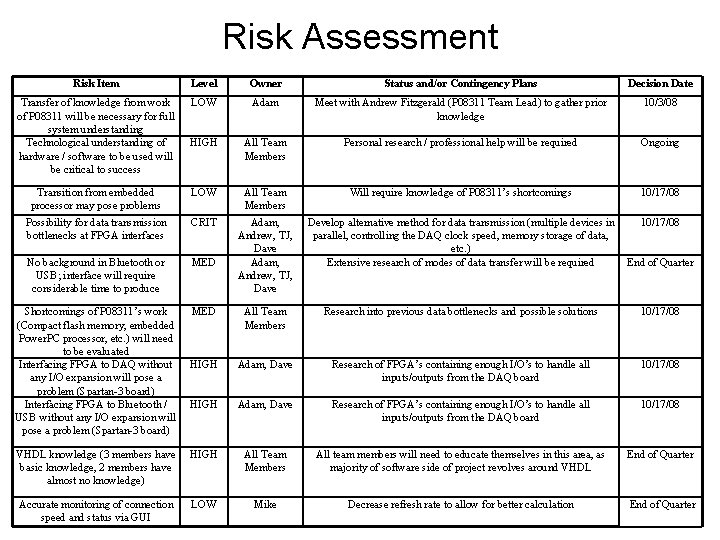
Risk Assessment Risk Item Level Owner Status and/or Contingency Plans Decision Date Transfer of knowledge from work of P 08311 will be necessary for full system understanding Technological understanding of hardware / software to be used will be critical to success LOW Adam Meet with Andrew Fitzgerald (P 08311 Team Lead) to gather prior knowledge 10/3/08 HIGH All Team Members Personal research / professional help will be required Ongoing Transition from embedded processor may pose problems LOW All Team Members Will require knowledge of P 08311’s shortcomings 10/17/08 Possibility for data transmission bottlenecks at FPGA interfaces CRIT MED Develop alternative method for data transmission (multiple devices in parallel, controlling the DAQ clock speed, memory storage of data, etc. ) Extensive research of modes of data transfer will be required 10/17/08 No background in Bluetooth or USB; interface will require considerable time to produce Adam, Andrew, TJ, Dave End of Quarter Shortcomings of P 08311’s work (Compact flash memory, embedded Power. PC processor, etc. ) will need to be evaluated Interfacing FPGA to DAQ without any I/O expansion will pose a problem (Spartan-3 board) Interfacing FPGA to Bluetooth / USB without any I/O expansion will pose a problem (Spartan-3 board) MED All Team Members Research into previous data bottlenecks and possible solutions 10/17/08 HIGH Adam, Dave Research of FPGA’s containing enough I/O’s to handle all inputs/outputs from the DAQ board 10/17/08 VHDL knowledge (3 members have basic knowledge, 2 members have almost no knowledge) HIGH All Team Members All team members will need to educate themselves in this area, as majority of software side of project revolves around VHDL End of Quarter Accurate monitoring of connection speed and status via GUI LOW Mike Decrease refresh rate to allow for better calculation End of Quarter
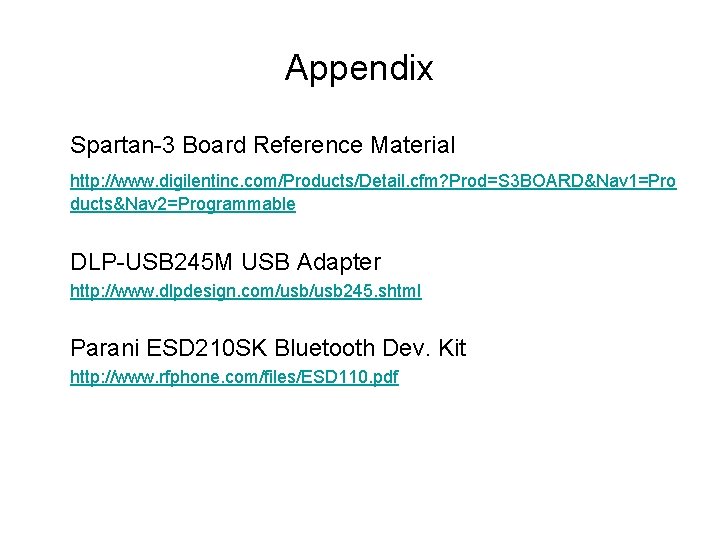
Appendix Spartan-3 Board Reference Material http: //www. digilentinc. com/Products/Detail. cfm? Prod=S 3 BOARD&Nav 1=Pro ducts&Nav 2=Programmable DLP-USB 245 M USB Adapter http: //www. dlpdesign. com/usb 245. shtml Parani ESD 210 SK Bluetooth Dev. Kit http: //www. rfphone. com/files/ESD 110. pdf