Network Security 2 Module 8 PIX Security Appliance
![Assigning the Management IP Address ciscoasa(config)# ip address ip_address [mask] [standby ip_address] § Sets](https://slidetodoc.com/presentation_image_h/c633d60abfd9bad356cdb7d4faae219a/image-11.jpg "Assigning the Management IP Address ciscoasa(config)# ip address ip_address [mask] [standby ip_address] § Sets")
![ARP Inspection ciscoasa(config)# arp interface_name ip_address mac_address [alias] § A static ARP entry maps](https://slidetodoc.com/presentation_image_h/c633d60abfd9bad356cdb7d4faae219a/image-14.jpg "ARP Inspection ciscoasa(config)# arp interface_name ip_address mac_address [alias] § A static ARP entry maps")
![Viewing the MAC Address Table ciscoasa# show mac-address-table [interface_name | count | static] §](https://slidetodoc.com/presentation_image_h/c633d60abfd9bad356cdb7d4faae219a/image-19.jpg "Viewing the MAC Address Table ciscoasa# show mac-address-table [interface_name | count | static] §")

- Slides: 22
Network Security 2 Module 8 – PIX Security Appliance Contexts, Failover, and Management © 2006 Cisco Systems, Inc. All rights reserved.
Module 8 – PIX Security Appliance Contexts, Failover, and Management Lesson 8. 3 Configure Transparent Firewall Mode © 2006 Cisco Systems, Inc. All rights reserved.
Transparent Firewall Mode Overview © 2007 Cisco Systems, Inc. All rights reserved. SNPA v 5. 0— 16 -3
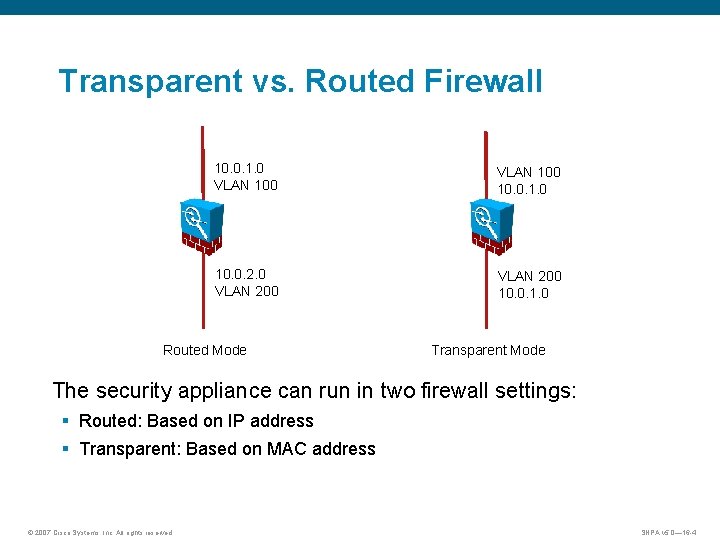
Transparent vs. Routed Firewall 10. 0. 1. 0 VLAN 100 10. 0. 1. 0 10. 0. 2. 0 VLAN 200 10. 0. 1. 0 Routed Mode Transparent Mode The security appliance can run in two firewall settings: § Routed: Based on IP address § Transparent: Based on MAC address © 2007 Cisco Systems, Inc. All rights reserved. SNPA v 5. 0— 16 -4
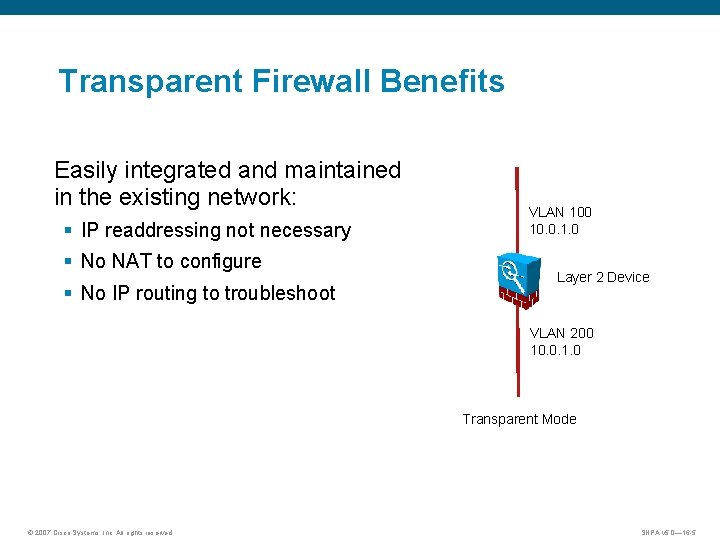
Transparent Firewall Benefits Easily integrated and maintained in the existing network: § IP readdressing not necessary § No NAT to configure § No IP routing to troubleshoot VLAN 100 10. 0. 1. 0 Layer 2 Device VLAN 200 10. 0. 1. 0 Transparent Mode © 2007 Cisco Systems, Inc. All rights reserved. SNPA v 5. 0— 16 -5
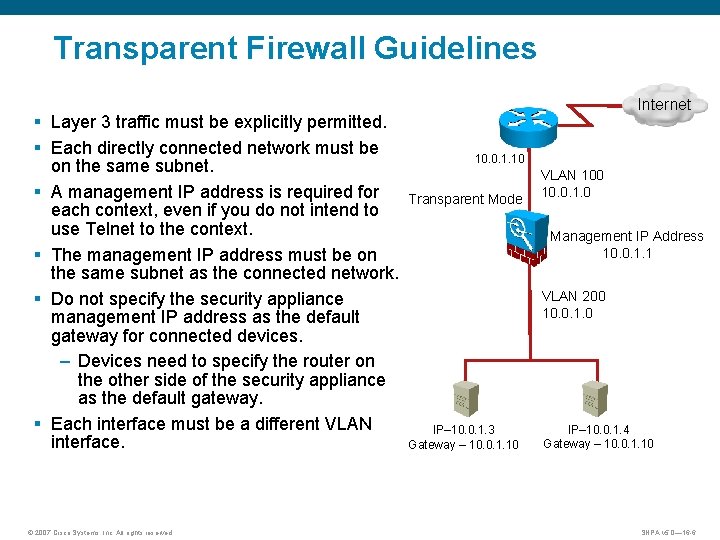
Transparent Firewall Guidelines § Layer 3 traffic must be explicitly permitted. § Each directly connected network must be on the same subnet. § A management IP address is required for each context, even if you do not intend to use Telnet to the context. § The management IP address must be on the same subnet as the connected network. § Do not specify the security appliance management IP address as the default gateway for connected devices. – Devices need to specify the router on the other side of the security appliance as the default gateway. § Each interface must be a different VLAN interface. © 2007 Cisco Systems, Inc. All rights reserved. Internet 10. 0. 1. 10 Transparent Mode VLAN 100 10. 0. 1. 0 Management IP Address 10. 0. 1. 1 VLAN 200 10. 0. 1. 0 IP– 10. 0. 1. 3 Gateway – 10. 0. 1. 10 IP– 10. 0. 1. 4 Gateway – 10. 0. 1. 10 SNPA v 5. 0— 16 -6
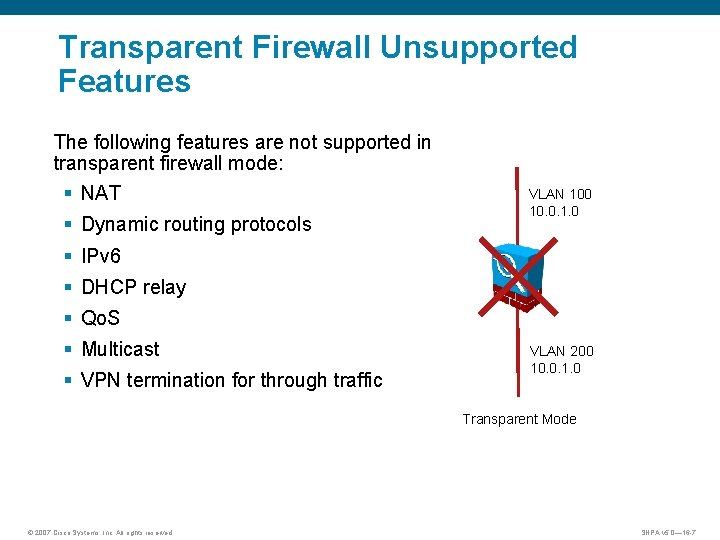
Transparent Firewall Unsupported Features The following features are not supported in transparent firewall mode: § NAT § Dynamic routing protocols VLAN 100 10. 0. 1. 0 § IPv 6 § DHCP relay § Qo. S § Multicast § VPN termination for through traffic VLAN 200 10. 0. 1. 0 Transparent Mode © 2007 Cisco Systems, Inc. All rights reserved. SNPA v 5. 0— 16 -7
Enabling Transparent Firewall Mode © 2007 Cisco Systems, Inc. All rights reserved. SNPA v 5. 0— 16 -8
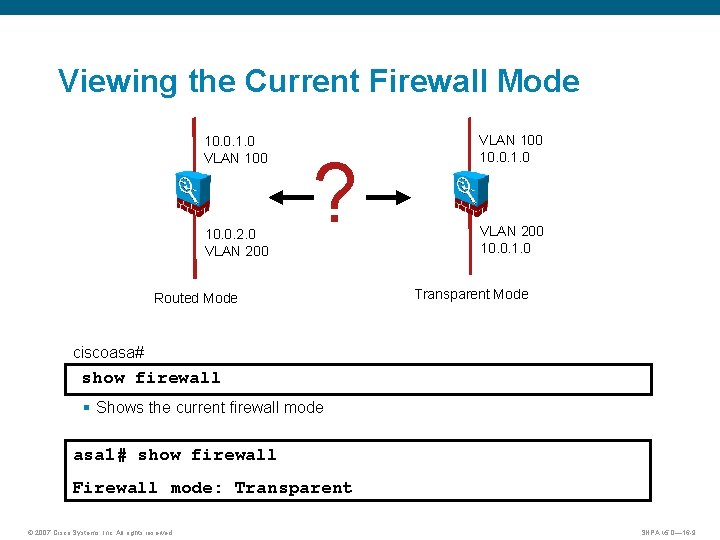
Viewing the Current Firewall Mode 10. 0. 1. 0 VLAN 100 10. 0. 2. 0 VLAN 200 ? Routed Mode VLAN 100 10. 0. 1. 0 VLAN 200 10. 0. 1. 0 Transparent Mode ciscoasa# show firewall § Shows the current firewall mode asa 1# show firewall Firewall mode: Transparent © 2007 Cisco Systems, Inc. All rights reserved. SNPA v 5. 0— 16 -9
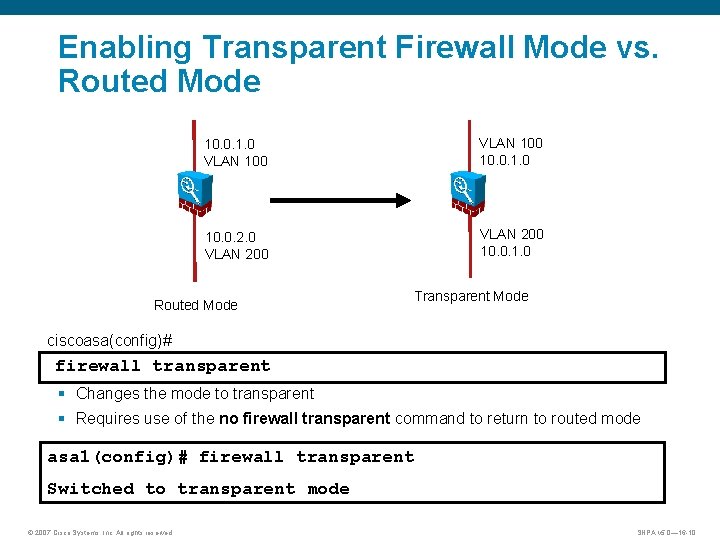
Enabling Transparent Firewall Mode vs. Routed Mode 10. 0. 1. 0 VLAN 100 10. 0. 1. 0 10. 0. 2. 0 VLAN 200 10. 0. 1. 0 Routed Mode Transparent Mode ciscoasa(config)# firewall transparent § Changes the mode to transparent § Requires use of the no firewall transparent command to return to routed mode asa 1(config)# firewall transparent Switched to transparent mode © 2007 Cisco Systems, Inc. All rights reserved. SNPA v 5. 0— 16 -10
Assigning the Management IP Address ciscoasa(config)# ip address ip_address [mask] [standby ip_address] § Sets the IP address for an interface (in routed mode) or for the management address (transparent mode). § For routed mode, enter this command in interface configuration mode. § In transparent mode, enter this command in global configuration mode. asa 1(config)# ip address 10. 0. 1. 1 255. 0 asa 1(config)# show ip address Management System IP Address: ip address 10. 0. 1. 1 255. 0 Management Current IP Address: ip address 10. 0. 1. 1 255. 0 © 2007 Cisco Systems, Inc. All rights reserved. SNPA v 5. 0— 16 -11
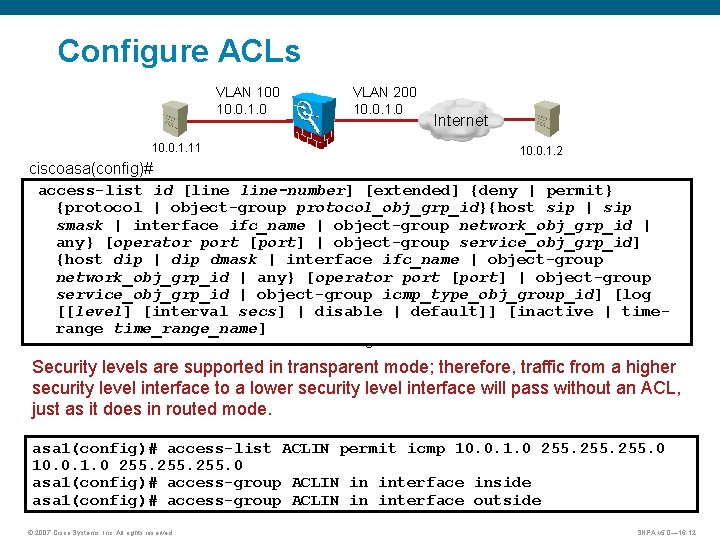
Configure ACLs VLAN 100 10. 0. 1. 0 VLAN 200 10. 0. 1. 0 Internet 10. 0. 1. 11 10. 0. 1. 2 ciscoasa(config)# access-list id [line-number] [extended] {deny | permit} {protocol | object-group protocol_obj_grp_id}{host sip | sip smask | interface ifc_name | object-group network_obj_grp_id | any} [operator port [port] | object-group service_obj_grp_id] {host dip | dip dmask | interface ifc_name | object-group network_obj_grp_id | any} [operator port [port] | object-group service_obj_grp_id | object-group icmp_type_obj_group_id] [log [[level] [interval secs] | disable | default]] [inactive | timerange time_range_name] § Determines which traffic should be allowed through the firewall Security levels are supported in transparent mode; therefore, traffic from a higher security level interface to a lower security level interface will pass without an ACL, just as it does in routed mode. asa 1(config)# access-list ACLIN permit icmp 10. 0. 1. 0 255. 0 asa 1(config)# access-group ACLIN in interface inside asa 1(config)# access-group ACLIN in interface outside © 2007 Cisco Systems, Inc. All rights reserved. SNPA v 5. 0— 16 -12
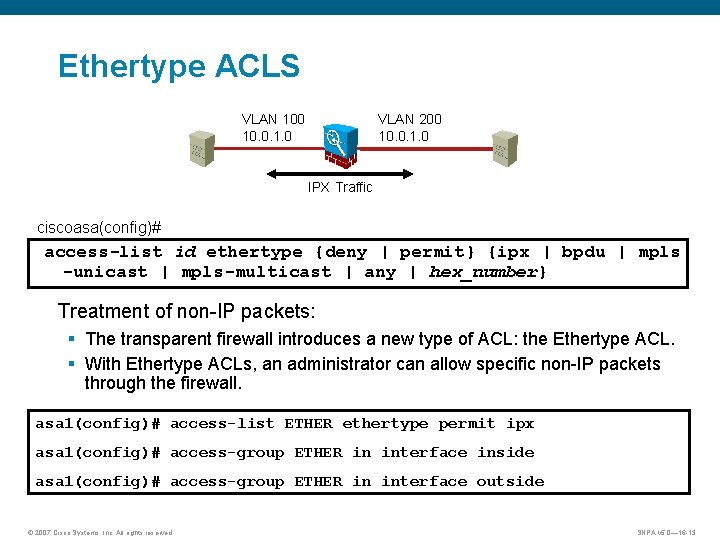
Ethertype ACLS VLAN 100 10. 0. 1. 0 VLAN 200 10. 0. 1. 0 IPX Traffic ciscoasa(config)# access-list id ethertype {deny | permit} {ipx | bpdu | mpls -unicast | mpls-multicast | any | hex_number} Treatment of non-IP packets: § The transparent firewall introduces a new type of ACL: the Ethertype ACL. § With Ethertype ACLs, an administrator can allow specific non-IP packets through the firewall. asa 1(config)# access-list ETHER ethertype permit ipx asa 1(config)# access-group ETHER in interface inside asa 1(config)# access-group ETHER in interface outside © 2007 Cisco Systems, Inc. All rights reserved. SNPA v 5. 0— 16 -13
ARP Inspection ciscoasa(config)# arp interface_name ip_address mac_address [alias] § A static ARP entry maps a MAC address to an IP address and identifies the interface through which the host is reached. asa 1(config)# arp outside 10. 0. 1. 1 0009. 7 cbe. 2100 ciscoasa(config)# arp-inspection interface_name enable [flood | no-flood] § ARP inspection checks all ARP packets against static ARP entries and blocks mismatched packets. § This feature prevents ARP spoofing. asa 1(config)# arp-inspection outside enable arp inspection enabled on outside © 2007 Cisco Systems, Inc. All rights reserved. SNPA v 5. 0— 16 -14
Monitoring and Maintaining Transparent Firewall Mode © 2007 Cisco Systems, Inc. All rights reserved. SNPA v 5. 0— 16 -15
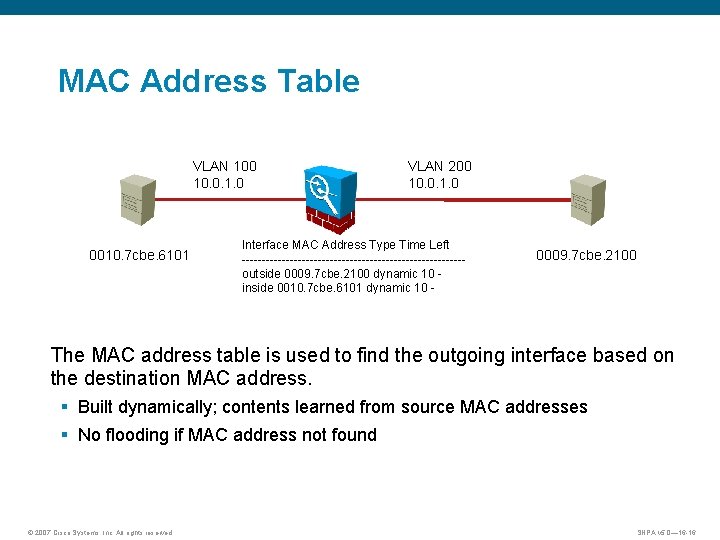
MAC Address Table VLAN 100 10. 0. 1. 0 0010. 7 cbe. 6101 VLAN 200 10. 0. 1. 0 Interface MAC Address Type Time Left ----------------------------outside 0009. 7 cbe. 2100 dynamic 10 inside 0010. 7 cbe. 6101 dynamic 10 - 0009. 7 cbe. 2100 The MAC address table is used to find the outgoing interface based on the destination MAC address. § Built dynamically; contents learned from source MAC addresses § No flooding if MAC address not found © 2007 Cisco Systems, Inc. All rights reserved. SNPA v 5. 0— 16 -16
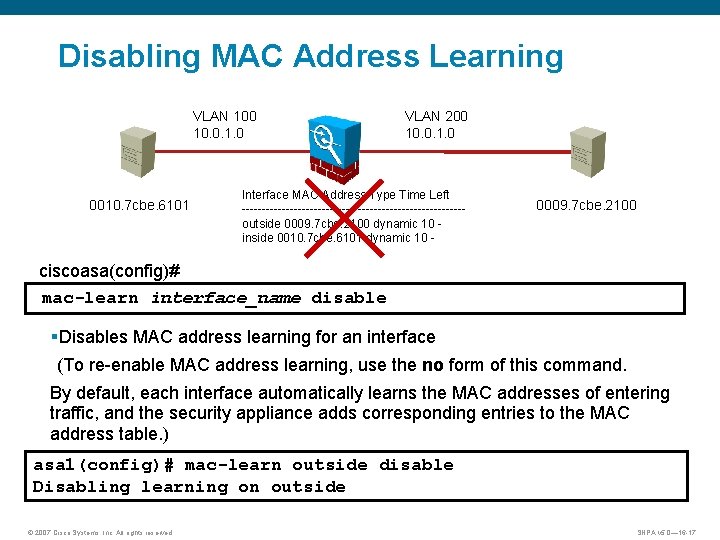
Disabling MAC Address Learning VLAN 100 10. 0. 1. 0 0010. 7 cbe. 6101 VLAN 200 10. 0. 1. 0 Interface MAC Address Type Time Left ----------------------------outside 0009. 7 cbe. 2100 dynamic 10 inside 0010. 7 cbe. 6101 dynamic 10 - 0009. 7 cbe. 2100 ciscoasa(config)# mac-learn interface_name disable §Disables MAC address learning for an interface (To re-enable MAC address learning, use the no form of this command. By default, each interface automatically learns the MAC addresses of entering traffic, and the security appliance adds corresponding entries to the MAC address table. ) asa 1(config)# mac-learn outside disable Disabling learning on outside © 2007 Cisco Systems, Inc. All rights reserved. SNPA v 5. 0— 16 -17
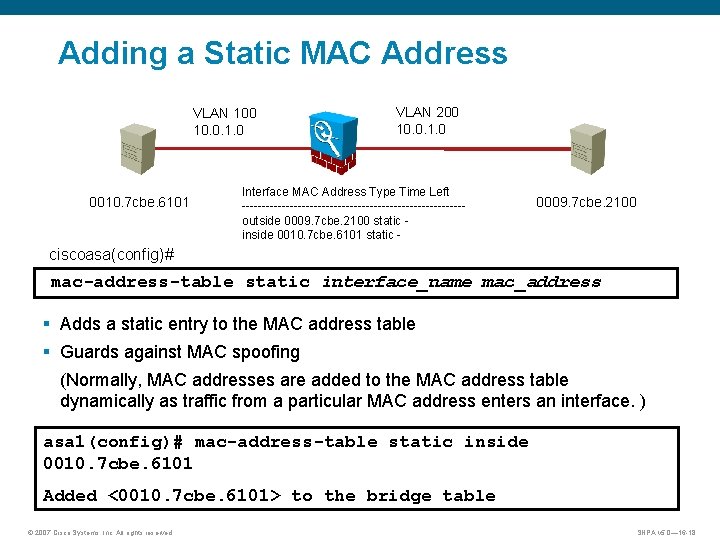
Adding a Static MAC Address VLAN 100 10. 0. 1. 0 0010. 7 cbe. 6101 VLAN 200 10. 0. 1. 0 Interface MAC Address Type Time Left ----------------------------outside 0009. 7 cbe. 2100 static inside 0010. 7 cbe. 6101 static - 0009. 7 cbe. 2100 ciscoasa(config)# mac-address-table static interface_name mac_address § Adds a static entry to the MAC address table § Guards against MAC spoofing (Normally, MAC addresses are added to the MAC address table dynamically as traffic from a particular MAC address enters an interface. ) asa 1(config)# mac-address-table static inside 0010. 7 cbe. 6101 Added <0010. 7 cbe. 6101> to the bridge table © 2007 Cisco Systems, Inc. All rights reserved. SNPA v 5. 0— 16 -18
Viewing the MAC Address Table ciscoasa# show mac-address-table [interface_name | count | static] § Displays the MAC address table asa 1# show mac-address-table interface mac address type Age(min) -----------------------------inside 0010. 7 cbe. 6101 static inside 0008. e 3 bc. 5 ee 0 dynamic © 2007 Cisco Systems, Inc. All rights reserved. 5 SNPA v 5. 0— 16 -19
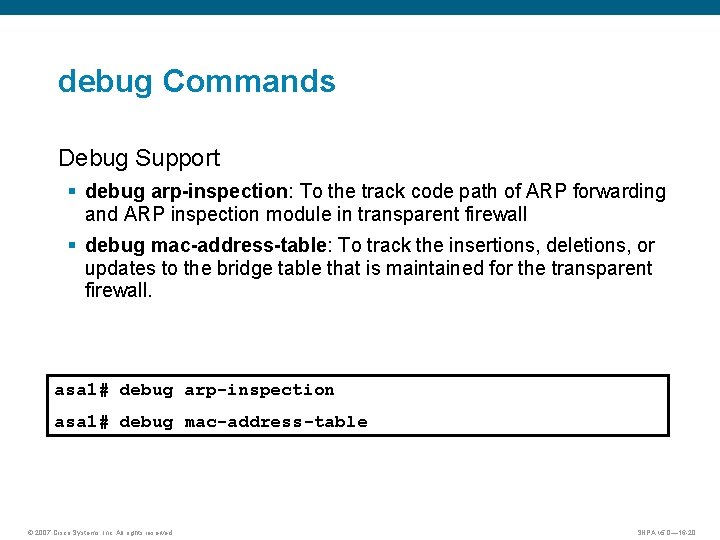
debug Commands Debug Support § debug arp-inspection: To the track code path of ARP forwarding and ARP inspection module in transparent firewall § debug mac-address-table: To track the insertions, deletions, or updates to the bridge table that is maintained for the transparent firewall. asa 1# debug arp-inspection asa 1# debug mac-address-table © 2007 Cisco Systems, Inc. All rights reserved. SNPA v 5. 0— 16 -20
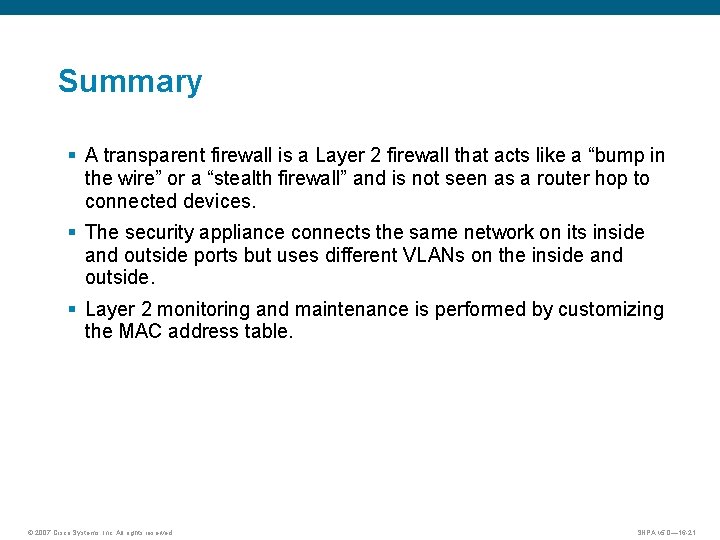
Summary § A transparent firewall is a Layer 2 firewall that acts like a “bump in the wire” or a “stealth firewall” and is not seen as a router hop to connected devices. § The security appliance connects the same network on its inside and outside ports but uses different VLANs on the inside and outside. § Layer 2 monitoring and maintenance is performed by customizing the MAC address table. © 2007 Cisco Systems, Inc. All rights reserved. SNPA v 5. 0— 16 -21
© 2007 Cisco Systems, Inc. All rights reserved. SNPA v 5. 0— 16 -22