MAKING DSPACE 1 5 X YOUR OWN CUSTOMIZATION






![Enable your new theme… [dspace. dir] config xmlui. xconf … <themes> … <theme name="My](https://slidetodoc.com/presentation_image_h/a4a6ee9b544ae63c3f0b92523528e722/image-34.jpg "Enable your new theme… [dspace. dir] config xmlui. xconf … <themes> … <theme name=\"My")


![Enable your new aspect… [dspace. dir] config xmlui. xconf … <aspects> … <aspect name=“Trail”](https://slidetodoc.com/presentation_image_h/a4a6ee9b544ae63c3f0b92523528e722/image-46.jpg "Enable your new aspect… [dspace. dir] config xmlui. xconf … <aspects> … <aspect name=“Trail”")


- Slides: 50
MAKING DSPACE 1. 5. X YOUR OWN CUSTOMIZATION VIA OVERLAYS Tim Donohue Research Programmer IDEALS University of Illinois DSUG @ Open Repositories 2009
DSpace 1. 5. x Overview Maven Build Architecture DSpace “modules” Application “Overlays” XMLUI (aka. Manakin) JSPUI SWORD Interface LNI (Lightweight Network Interface) OAI-PMH Interface
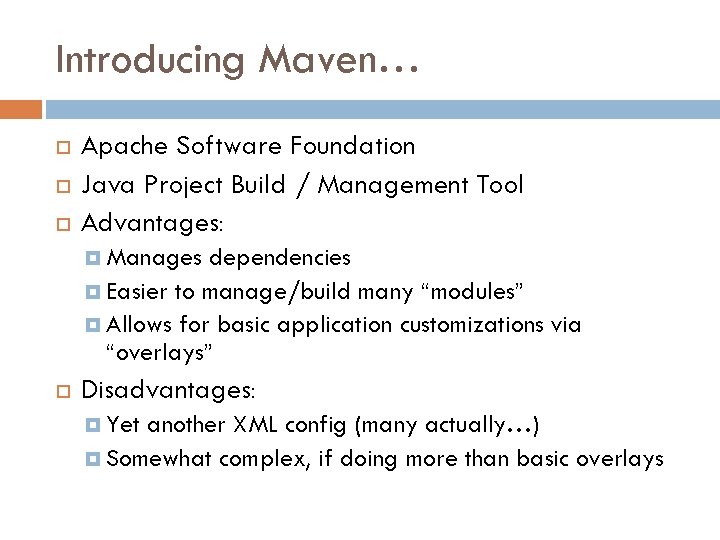
Introducing Maven… Apache Software Foundation Java Project Build / Management Tool Advantages: Manages dependencies Easier to manage/build many “modules” Allows for basic application customizations via “overlays” Disadvantages: Yet another XML config (many actually…) Somewhat complex, if doing more than basic overlays
Maven v. Ant DSpace 1. x-1. 4 used Ant to build & install DSpace 1. 5 uses both Maven & Ant Maven – Builds / Assembles DSpace “package” Includes applying “overlays” and pulling down all the necessary 3 rd party dependencies Ant – Installs or Updates your DSpace Installation directory ([dspace. dir] in dspace. cfg)
Ok, so what really is Maven? Build DSpace <dependencies/ > pom. xml mvn package Maven Repository local copies build Here’s what I need… target dspace-1. 5 -build. dir JAR WAR Dependencies! Here you go…
Maven Concepts: An Overview pom. xml (Project Object Model) config file Standard directory layout src main target java (Java Source Code) resources (Application Resources) webapp (Web Application Source) (Build / Package Output)
DSpace 1. 5. x Release Structure dspace-1. 5 dspace bin For those who only want to make minor (non-Java) customizations config docs etc modules (Module Overlays) src (Maven Build Settings – no Java here…) pom. xml (Maven Project Object Model config)
DSpace 1. 5. x “Modules” dspace-1. 5 modules dspace jspui …. lni src / main / resources src / main / webapp (empty directories) modules …. oai sword xmlui Where’s the actual source code? src / main / java?
DSpace 1. 5. x Source (SVN) dspace-1. 5 dspace (Same as release version – see previous slides) dspace-api dspace-jspui dspace-lni Source code for DSpace “modules” dspace-oai dspace-sword dspace-xmlui In Release Version: Maven pulls down pre-compiled versions of these modules
DSpace 1. 5. x Overlays Overview of Overlays • How to take advantage of them •
Customization via Overlays… Overlay is Maven term (“Maven WAR Overlays”) Simple way to override defaults with your own customizations and code Allow you to more easily manage your customizations separate from DSpace core code What can you “overlay”? User interface look-and-feel (JSPUI, XMLUI Themes) Language / terminology (messages. xml) Java code to add functionality (XMLUI Aspect) Although, this may be better built into a custom “module”
DSpace 1. 5 + Maven = “Overlays” Build DSpace pom. xml <dependencies/> dspace Can you give me the JSPUI Web application? <build/> modules Maven Repository jspui messages. properties jsp Overlay My JSPUI WAR Here you go…
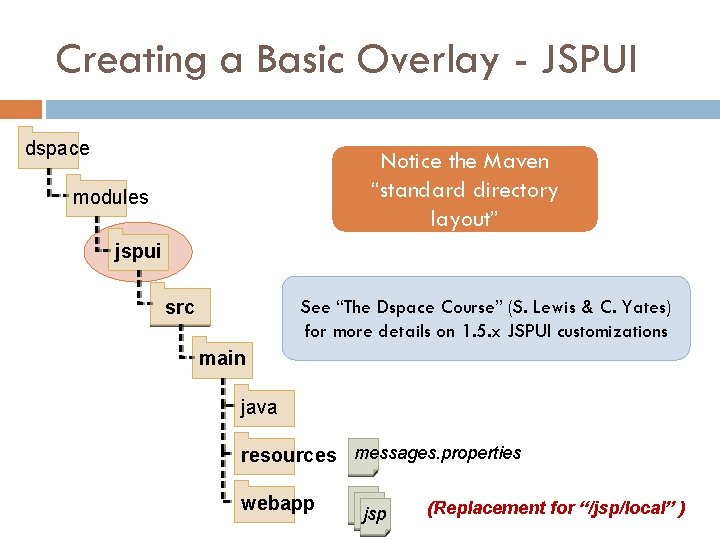
Creating a Basic Overlay - JSPUI dspace Notice the Maven “standard directory layout” modules jspui src See “The Dspace Course” (S. Lewis & C. Yates) for more details on 1. 5. x JSPUI customizations main java resources messages. properties webapp jsp (Replacement for “/jsp/local” )
Creating a Basic Overlay - XMLUI dspace webapp modules messages. xml i 18 n xmlui themes src My-Custom-Theme main java resources webapp css xsl images sitemap. xmap
Building/Installing an Overlay Add your files to appropriate “/dspace/modules/” directory (see previous slides) Rebuild DSpace: mvn package Builds to [dspace-src]/dspace/target/ Update DSpace installation: ant update Installs to [dspace. dir] (as specified in dspace. cfg)
Review: Why Overlays? Essentially, they came along with move to Maven You can manage your own customizations separate from DSpace source code “/dspace/modules” subdirectories empty by default JSPUI replacement for “/jsp/local” from pre-1. 5 It is possible to overlay most *anything* (Java code, JSPs, XMLUI Aspects/Themes, sitemaps, etc. )
Overlays: things to watch out for… We don’t recommend overlaying core APIs Be very careful to merge in new code changes during your next upgrade A local SVN code repository is helpful (“SVN vendor branch”) Image borrowed from: http: //www. flickr. com/photos/valgonzarp/ It is recommended to only place overlays in [dspace-src]/dspace/modules/ (and subdirectories)
Quick XMLUI Review Cocoon • DRI • Aspects • Themes •
XMLUI Architecture Review Built on Apache Cocoon Modular, web-development framework Pipeline based architecture DRI (Digital Repository Interface) Schema Structure based on TEI (light) Metadata referenced in METS Aspects and Themes Aspects = functionality in system (Java or XSL) Themes = style / look & feel (XSL, CSS, images)
Cocoon’s Pipeline Model Sitemaps are used by both XMLUI Aspects and Themes. Diagram Credit: Scott Phillips, Texas Digital Library
XMLUI Architecture Overview defines aspect chain & themes xmlui. xconf Diagram Credit: Scott Phillips, Texas Digital Library Notice the similarities to Cocoon Pipeline model…
Three “tiers” of customization… Style Tier (CSS only) Simple Themes: change basic look & feel Theme Tier (XSL, CSS) More Complex Themes: change page layout, what/how content is displayed Aspect Tier (Java or XSL, sitemap) Add new features via Java (and Cocoon) Change XML (DRI) structure/hierarchy via XSL
Creating an XMLUI Theme A few hints and tips on starting an XMLUI theme • Creating a theme via overlay •
Create a new Theme via overlay dspace webapp modules messages. xml i 18 n xmlui themes src My-Custom-Theme main java resources webapp css xsl images sitemap. xmap
Tips on creating a theme Start with an existing theme and tweak it Use ? XML to view XML/DRI source document Firebug (http: //getfirebug. com/) for CSS/XHTML Locate appropriate <xsl: template> in dri 2 xhtml = matches METS containing DIM General-Handler. xsl = matches METS <file. Sec> MODS-Handler. xsl = matches METS containing MODS QDC-Handler. xsl = matches METS containing QDC structural. xsl = defines layout/page structure DIM-Handler. xsl
Tips on creating a theme Four metadata display “modes” Summary. List (E. g. ) Community/Collection listing, item browse/search Summary. View (E. g. ) Detail. List = Detailed list of objects used: (E. g. ) “item appears in following collections” Detail. View (E. g. ) = Summarized view of single object Item homepage (summary metadata only) Rarely = Summarized list of objects = Detailed view of single object Item “full record” page, collection/community pages
Homepage Structural Breakdown build. Header dri: trail dri: body dri: options dri: list community. Summary. List-DIM (DIM-Handler. xsl) build. Footer
Item Page Structural Breakdown item. Summary. View-DIM (DIM-Handler. xsl) mets: filegrp (General-Handler. xsl) collection. Detail. List-DIM (DIM-Handler. xsl)
Simple XMLUI Theme Overlay Task: Modify file display to show a format icon • (E. g. ) PDF icon is displayed next to PDF files •
Review: Create a new Theme dspace webapp modules messages. xml i 18 n xmlui themes src My-Custom-Theme main java resources webapp css xsl images sitemap. xmap
Creating a new theme folder dspace/modules/xmlui/src/main/webapp themes Copy the default “Reference” theme into a new folder called “My. Theme” My. Theme sitemap. xmap images lib (CSS is stored here)
Adding File Format icons to theme Copy of “mets: file” template from General-Handler. xsl /src/main/webapp themes My. Theme my-theme. xsl sitemap. xmap images pdf. png lib <xsl: template match=“mets: file”> … <xsl: call-template name="get. File. Format. Icon"> <xsl: with-param name="mimetype"> <xsl: value-of select="@MIMETYPE "/> </xsl: with-param> </xsl: call-template> … </xsl: template> <xsl: template name=“get. File. Format. Icon”> … <xsl: when test=“$mimetype=‘application/pdf’"> <xsl: value-of select="$theme-path"/> <xsl: text>/images/pdf. png</xsl: text> </xsl: when> Snippet from get. File. Format. Icon
Adding File Format icons to theme /src/main/webapp themes My. Theme my-theme. xsl sitemap. xmap images pdf. png lib <map: sitemap> <map: pipelines> <map: pipeline> … <map: transform src=“my-theme. xsl"/> … <map: serialize type="xhtml"/> </map: pipelines> </map: sitemap>
Enable your new theme… [dspace. dir] config xmlui. xconf … <themes> … <theme name="My New Theme" regex=". *" path="My. Theme/" /> … </themes> … Restart web server for changes to take effect Other sample theme settings: • regex=“^$” • regex=“^browse$” • handle=“ 2142/2” (Theme for homepage ONLY) (Theme for all global “Browse By” pages) (Theme for Community/Collection/Item)
File Format icon in new theme
Creating an XMLUI Aspect A few (high-level) hints and tips on starting an XMLUI aspect •
Options for adding custom Java via Overlay Little more simplistic Sitemap (XMLUI) Compiled in WAR Only one “module” (UI) can use via Maven Module Little more complex pom. xml & sitemap (XMLUI) Compiled in JAR Multiple “modules” can use via dependencies Easier to share with others
Create a simple Aspect via overlay Good for simple aspects dspace java modules xmlui (Custom java source code) resources src aspects main java My. Aspect sitemap. xmap resources My-aspect. xsl webapp
Aspect via a new Maven module For complex aspects or for easier sharing dspace java modules my-module (Custom java source code) resources src aspects main java resources pom. xml My. Aspect sitemap. xmap
Aspect via a new Maven module Very simple example of a valid pom. xml dspace modules my-module src main <project> <group. Id>edu. myu. modules</group. Id> <artifact. Id>my-aspect</artifact. Id> <packaging>jar</packaging> <name>My Aspect’s API</name> <version>1. 0 -SNAPSHOT</version> <dependencies>…</dependencies> </project> java resources pom. xml More pom. xml details: http: //cocoon. apache. org/
Add new Module as a Dependency Add it to /dspace/modules/pom. xml so it is built alongside other modules dspace modules my-module …. pom. xml <project> … <modules> … <module>my-module</module> </modules> </project> Also add it as a <dependency> in pom. xml of UI modules (XMLUI, JSPUI, etc) Rebuild DSpace for changes to take effect
Simple Aspect via Overlay Modify Breadcrumb Trail to link to our Library’s Homepage • Do this at the “aspect” level so that it will apply across all of our XMLUI Themes • No Java…just XSLT • Credit: Conal Tuohy, New Zealand Electronic Text Centre
Review: Simple Aspect via overlay XSLT-only Aspect, so everything will go in dspace /src/main/resources modules xmlui resources src aspects main java My. Aspect sitemap. xmap resources My-aspect. xsl webapp
Aspect Overlay – Breadcrumb trail src/main/resources aspects Trail sitemap. xmap modify-trail. xsl <map: sitemap> <map: pipelines> <map: pipeline> <map: generate/> <map: transform src="modify-trail. xsl"/> <map: serialize type="xml"/> </map: pipelines> </map: sitemap> Remember: Aspects generate XML/DRI
Aspect Overlay – Breadcrumb trail src/main/resources aspects Trail sitemap. xmap modify-trail. xsl <xsl: template match="*"> <xsl: copy-of select="@*"/> <xsl: apply-templates/> </xsl: copy> </xsl: template> <xsl: template match="dri: page. Meta"> <xsl: copy-of select="@*"/> <dri: trail target="www. library. my. edu/"> My Library </dri: trail> <xsl: apply-templates/> </xsl: copy> </xsl: template>
Enable your new aspect… [dspace. dir] config xmlui. xconf … <aspects> … <aspect name=“Trail” path=“resource: //aspects/Trail/”/> </aspects> … Restart DSpace for changes to take effect
Simple aspectbased content Complex aspectbased content
Useful Resources http: //wiki. dspace. org/index. php/Category: HOWTO http: //www. dspace. org (“Training Materials”) “The DSpace Course” (Stuart Lewis & Chris Yates): http: //hdl. handle. net/2160/615 (Also linked to from www. dspace. org under “Training Materials”) “Learning to Use Manakin” Tutorial (Scott Phillips): http: //di. tamu. edu/publications/resources/dsug 07/Learning. To. Use. Manakin. pdf http: //di. tamu. edu/publications/resources/dsug 07/Learning. To. Use. Manakin. zip (Also linked to from www. dspace. org under “Training Materials”)
Contact Info Tim Donohue University of Illinois tdonohue@illinois. edu http: //ideals. uiuc. edu/ DSpace Mailing Lists Technical Questions: dspace-tech@lists. sourceforge. net Development Questions / Suggestions: dspace-devel@lists. sourceforge. net This work is licensed under a Creative Commons Attribution. Noncommercial-Share Alike 3. 0 United States License.