Juniper Networks Simply Connected Workshop Agenda 10 h
- Slides: 60
Juniper Networks Simply Connected Workshop
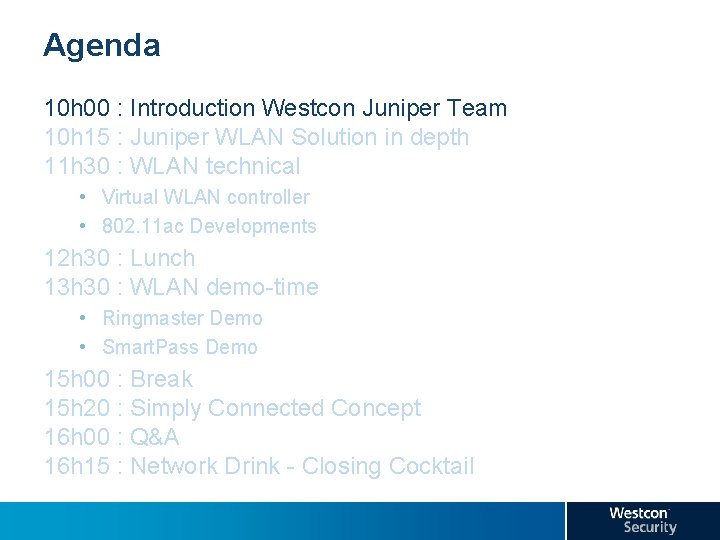
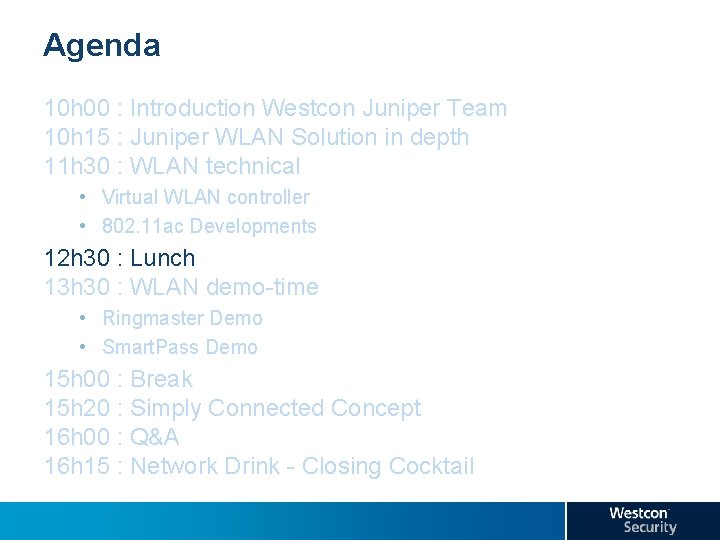
Agenda 10 h 00 : Introduction Westcon Juniper Team 10 h 15 : Juniper WLAN Solution in depth 11 h 30 : WLAN technical • Virtual WLAN controller • 802. 11 ac Developments 12 h 30 : Lunch 13 h 30 : WLAN demo-time • Ringmaster Demo • Smart. Pass Demo 15 h 00 : Break 15 h 20 : Simply Connected Concept 16 h 00 : Q&A 16 h 15 : Network Drink - Closing Cocktail
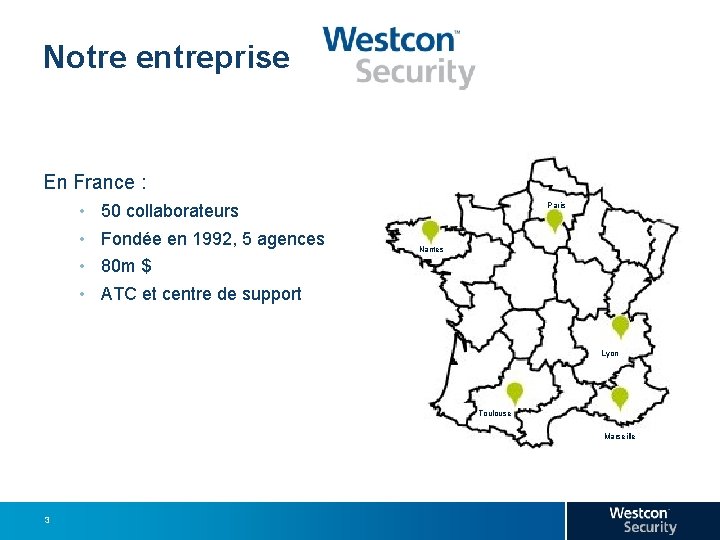
Our Company Notre entreprise En France : • • Paris 50 collaborateurs Fondée en 1992, 5 agences Nantes 80 m $ ATC et centre de support Lyon Toulouse Marseille 3
Our Company Notre entreprise Produits ● Services ● Formations • Partenariats avec les leaders du marché de la sécurité • Des services innovants : • • • Prestations d’installation Support téléphonique 24 x 7 et support matériel sous 4 h Centre de formation agréé • Nous intervenons sur des problématiques de : • • • 4 Sécurité (réseau, web, postes clients, nomadisme…) Mobilité Disponibilité et optimisation des applications Conformité légale Wifi
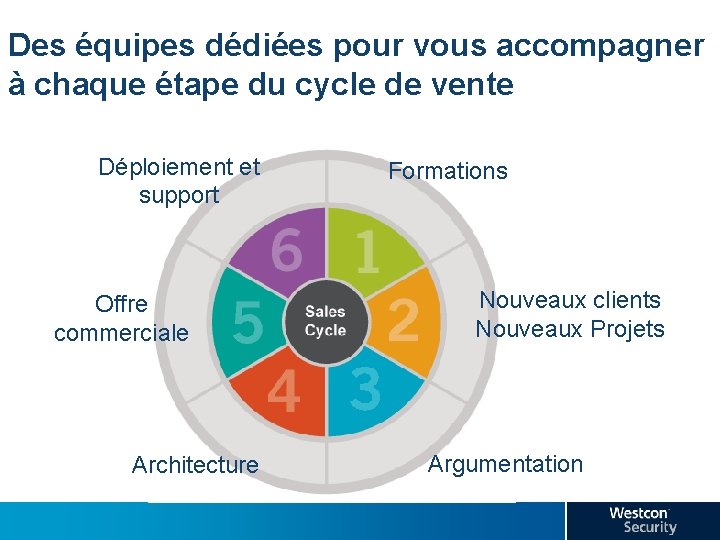
Des équipes dédiées pour vous accompagner à chaque étape du cycle de vente Déploiement et support Offre commerciale Architecture Formations Nouveaux clients Nouveaux Projets Argumentation
Agenda 10 h 00 : Introduction Westcon Juniper Team 10 h 15 : Juniper WLAN Solution in depth 11 h 30 : WLAN technical • Virtual WLAN controller • 802. 11 ac Developments 12 h 30 : Lunch 13 h 30 : WLAN demo-time • Ringmaster Demo • Smart. Pass Demo 15 h 00 : Break 15 h 20 : Simply Connected Concept 16 h 00 : Q&A 16 h 15 : Network Drink - Closing Cocktail
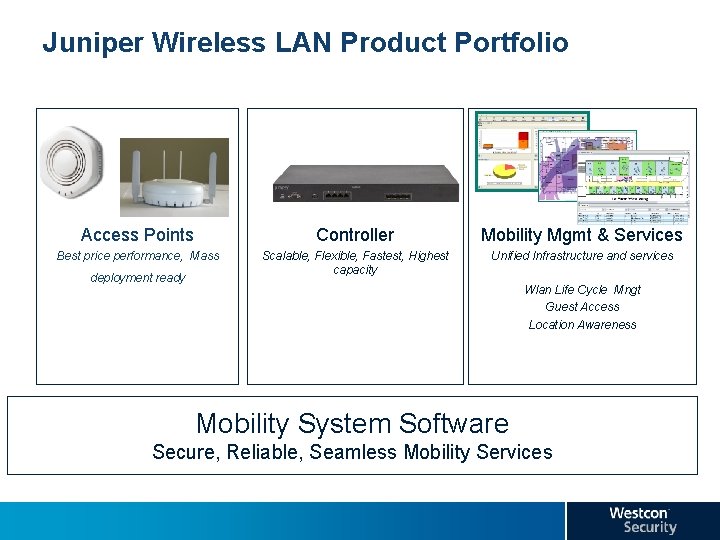
Juniper Wireless LAN Product Portfolio Access Points Controller Mobility Mgmt & Services Best price performance, Mass Scalable, Flexible, Fastest, Highest capacity Unified Infrastructure and services deployment ready Wlan Life Cycle Mngt Guest Access Location Awareness Mobility System Software Secure, Reliable, Seamless Mobility Services
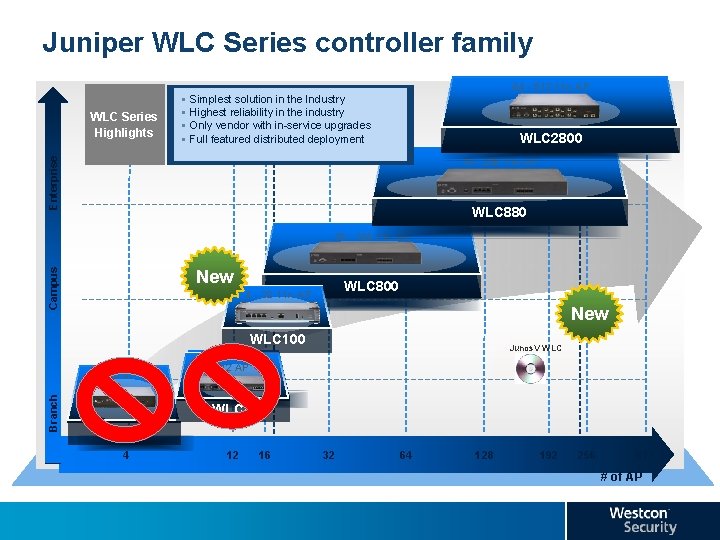
Juniper WLC Series controller family 64 - 512 11 n AP WLC Series Highlights § § Simplest solution in the Industry Highest reliability in the industry Only vendor with in-service upgrades Full featured distributed deployment WLC 2800 Enterprise 16 - 256 11 n AP WLC 880 16 - 128 11 n AP Campus New WLC 800 4 - 32 11 n AP New WLC 100 Branch 4 AP Junos. V WLC 12 AP WLC 8 WLC 2 4 12 16 32 64 128 192 256 512 # of AP
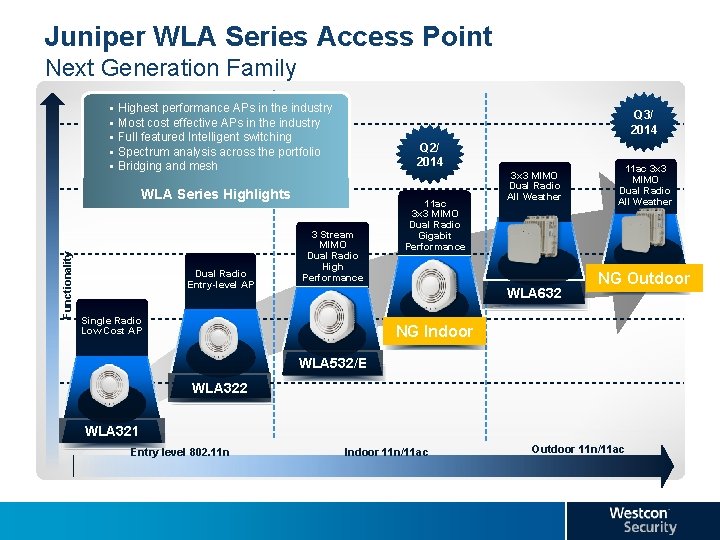
Juniper WLA Series Access Point Next Generation Family § § § Highest performance APs in the industry Most cost effective APs in the industry Full featured Intelligent switching Spectrum analysis across the portfolio Bridging and mesh Q 3/ 2014 Q 2/ 2014 Functionality WLA Series Highlights Dual Radio Entry-level AP 3 Stream MIMO Dual Radio High Performance 11 ac 3 x 3 MIMO Dual Radio Gigabit Performance 3 x 3 MIMO Dual Radio All Weather WLA 632 Single Radio Low Cost AP 11 ac 3 x 3 MIMO Dual Radio All Weather NGFirefox Outdoor NG Indoor RAPTOR WLA 532/E WLA 322 WLA 321 Entry level 802. 11 n Indoor 11 n/11 ac Outdoor 11 n/11 ac
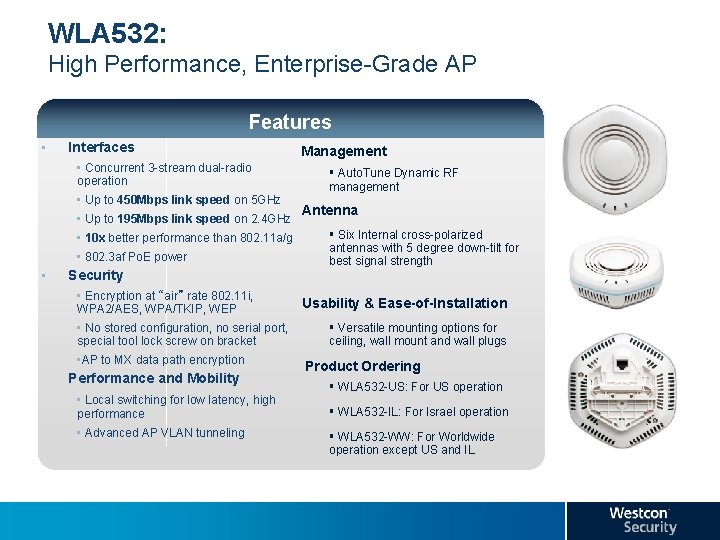
WLA 532: High Performance, Enterprise-Grade AP Features • Interfaces Management • Concurrent 3 -stream dual-radio operation § Auto. Tune Dynamic RF management • Up to 450 Mbps link speed on 5 GHz • Up to 195 Mbps link speed on 2. 4 GHz • 10 x better performance than 802. 11 a/g • 802. 3 af Po. E power • Security • Encryption at “air” rate 802. 11 i, WPA 2/AES, WPA/TKIP, WEP • No stored configuration, no serial port, special tool lock screw on bracket • AP to MX data path encryption Performance and Mobility • Local switching for low latency, high performance • Advanced AP VLAN tunneling Antenna § Six Internal cross-polarized antennas with 5 degree down-tilt for best signal strength Usability & Ease-of-Installation § Versatile mounting options for ceiling, wall mount and wall plugs Product Ordering § WLA 532 -US: For US operation § WLA 532 -IL: For Israel operation § WLA 532 -WW: For Worldwide operation except US and IL
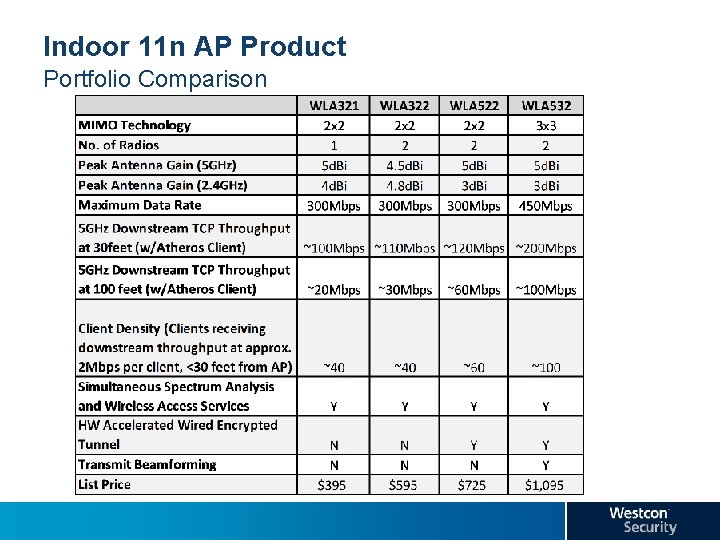
Indoor 11 n AP Product Portfolio Comparison
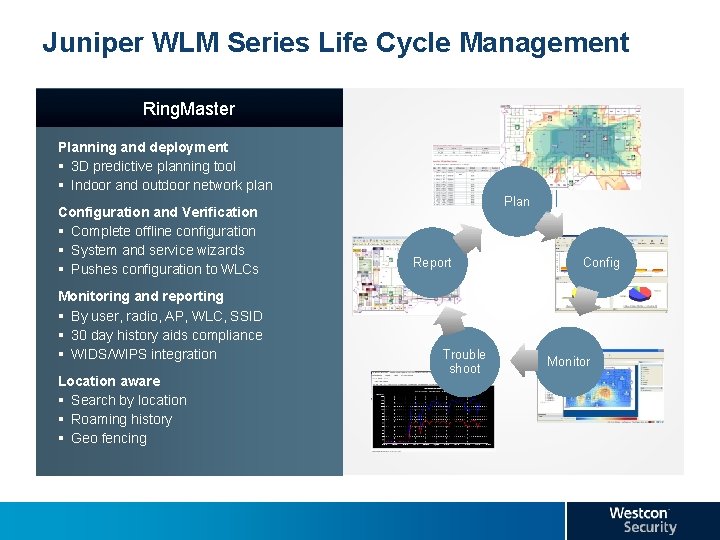
Juniper WLM Series Life Cycle Management Ring. Master Planning and deployment § 3 D predictive planning tool § Indoor and outdoor network plan Configuration and Verification § Complete offline configuration § System and service wizards § Pushes configuration to WLCs Monitoring and reporting § By user, radio, AP, WLC, SSID § 30 day history aids compliance § WIDS/WIPS integration Location aware § Search by location § Roaming history § Geo fencing Plan Report Trouble shoot Config Monitor
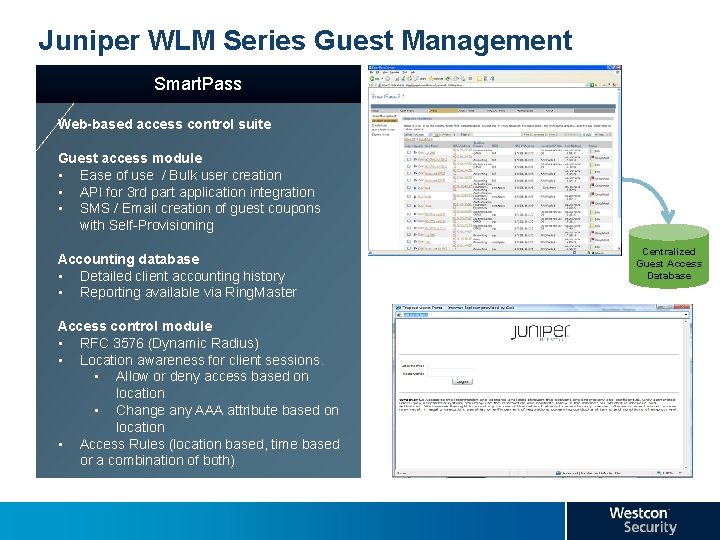
Juniper WLM Series Guest Management Smart. Pass Web-based access control suite Guest access module • Ease of use / Bulk user creation • API for 3 rd part application integration • SMS / Email creation of guest coupons with Self-Provisioning Accounting database • Detailed client accounting history • Reporting available via Ring. Master Access control module • RFC 3576 (Dynamic Radius) • Location awareness for client sessions. • Allow or deny access based on location • Change any AAA attribute based on location • Access Rules (location based, time based or a combination of both) Centralized Guest Access Database
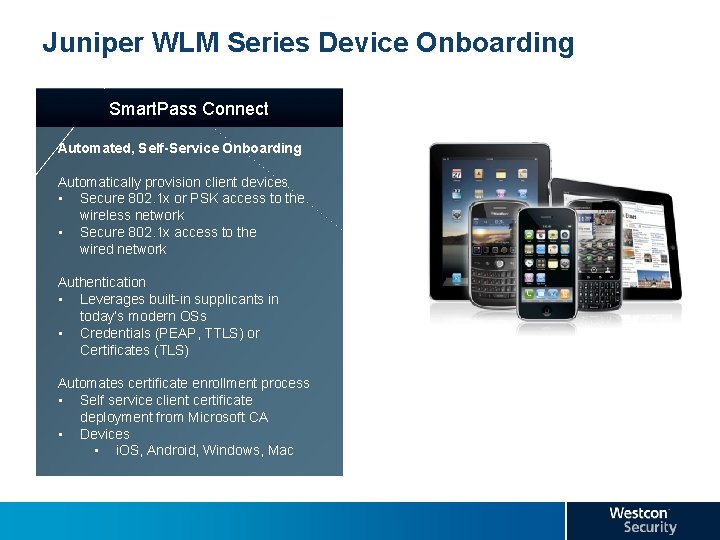
Juniper WLM Series Device Onboarding Smart. Pass Connect Automated, Self-Service Onboarding Automatically provision client devices • Secure 802. 1 x or PSK access to the wireless network • Secure 802. 1 x access to the wired network Authentication • Leverages built-in supplicants in today’s modern OSs • Credentials (PEAP, TTLS) or Certificates (TLS) Automates certificate enrollment process • Self service client certificate deployment from Microsoft CA • Devices • i. OS, Android, Windows, Mac
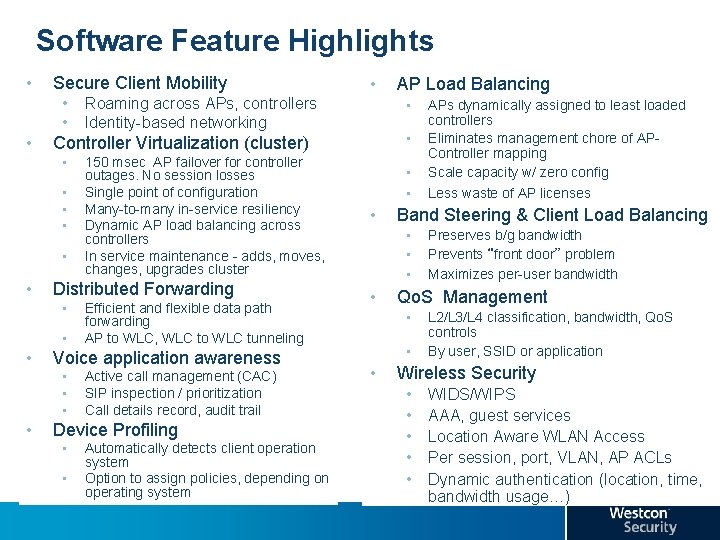
Software Feature Highlights • Secure Client Mobility • • Distributed Forwarding • • • Efficient and flexible data path forwarding AP to WLC, WLC to WLC tunneling Voice application awareness • • 150 msec AP failover for controller outages. No session losses Single point of configuration Many-to-many in-service resiliency Dynamic AP load balancing across controllers In service maintenance - adds, moves, changes, upgrades cluster Active call management (CAC) SIP inspection / prioritization Call details record, audit trail Device Profiling • • Automatically detects client operation system Option to assign policies, depending on operating system AP Load Balancing • • Controller Virtualization (cluster) • • Roaming across APs, controllers Identity-based networking • • Band Steering & Client Load Balancing • • Preserves b/g bandwidth Prevents “front door” problem Maximizes per-user bandwidth Qo. S Management • • • APs dynamically assigned to least loaded controllers Eliminates management chore of APController mapping Scale capacity w/ zero config Less waste of AP licenses L 2/L 3/L 4 classification, bandwidth, Qo. S controls By user, SSID or application Wireless Security • • • WIDS/WIPS AAA, guest services Location Aware WLAN Access Per session, port, VLAN, AP ACLs Dynamic authentication (location, time, bandwidth usage…)
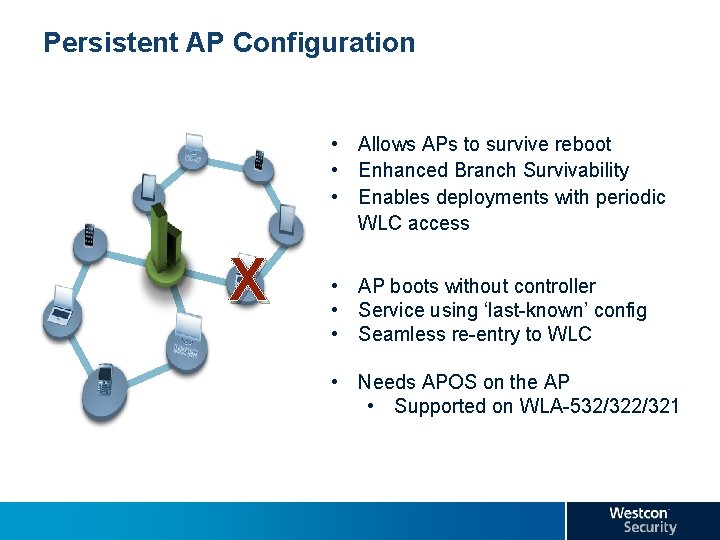
Persistent AP Configuration • Allows APs to survive reboot • Enhanced Branch Survivability • Enables deployments with periodic WLC access X Feature Description • AP boots without controller • Service using ‘last-known’ config • Seamless re-entry to WLC • Needs APOS on the AP • Supported on WLA-532/321
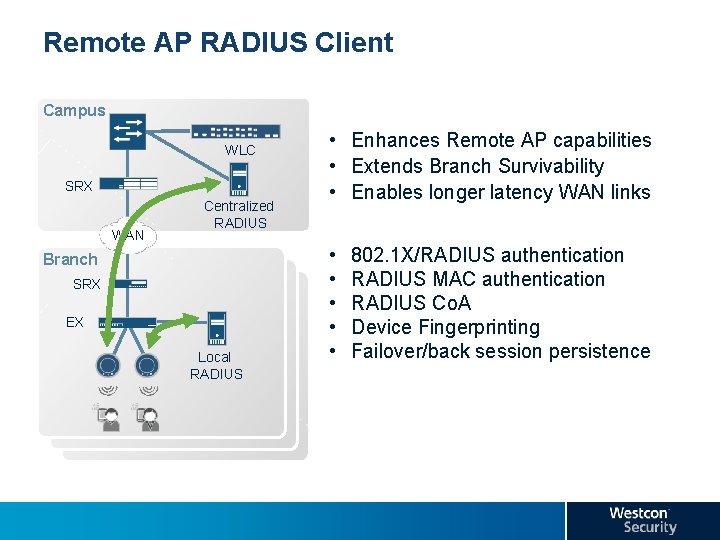
Remote AP RADIUS Client Campus Overview WLC SRX WAN Centralized RADIUS • Enhances Remote AP capabilities • Extends Branch Survivability • Enables longer latency WAN links • Feature Description Branch SRX EX Local RADIUS • • • 802. 1 X/RADIUS authentication RADIUS MAC authentication RADIUS Co. A Device Fingerprinting Failover/back session persistence
Controller Clustering Why order the HA-license? • The cluster/HA feature is always available • Why do I need the license? • The cluster/HA license adds AP-count redundancy: • Scenario: redundant setup for 250 AP’s • Without the license: – Each controller needs 256 AP licenses • With the license: – Each controller needs 128 AP licenses + HA license – During a fail situation, the remaining controller will support 256 AP’s – On WLC-880: HA license = $ 3895 // 128 AP licenses = $ 18580
Juniper Wireless Desinged to scale • Vlan Pooling • Ability to setup a pool of 32 VLANs per pool and 16 pools per Cluster • Users connecting to that pool will be balanced across the member VLANs • Vlan assignment is done using Round Robin mechanism
MICROSOFT LYNC WIFI PARTNER PROGRAM Set of certifications intended to ensure compatibility between Lync software and Wi. Fi infrastructure networks 3 levels of certification requirements • • • Fixed data: IM, web-conference, file-sharing Fixed Real. Time Multimedia: audio or video conferencing from desk/conference room Mobile Real. Time Multimedia: audio/video while on the move Juniper and a few other vendors have completed certification for wired networking products
Agenda 10 h 00 : Introduction Westcon Juniper Team 10 h 15 : Juniper WLAN Solution in depth 11 h 30 : WLAN technical • Virtual WLAN controller • 802. 11 ac Developments 12 h 30 : Lunch 13 h 30 : WLAN demo-time • Ringmaster Demo • Smart. Pass Demo 15 h 00 : Break 15 h 20 : Simply Connected Concept 16 h 00 : Q&A 16 h 15 : Network Drink - Closing Cocktail
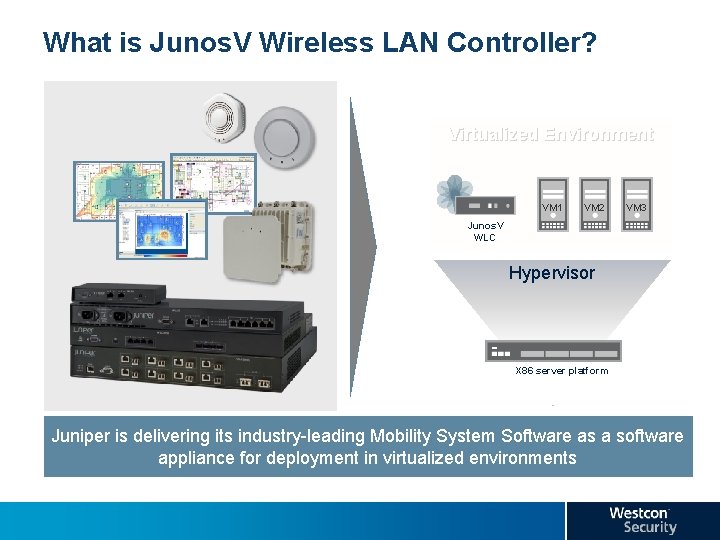
What is Junos. V Wireless LAN Controller? Virtualized Environment VM 1 VM 2 VM 3 Junos. V WLC Hypervisor X 86 server platform Juniper is delivering its industry-leading Mobility System Software as a software appliance for deployment in virtualized environments
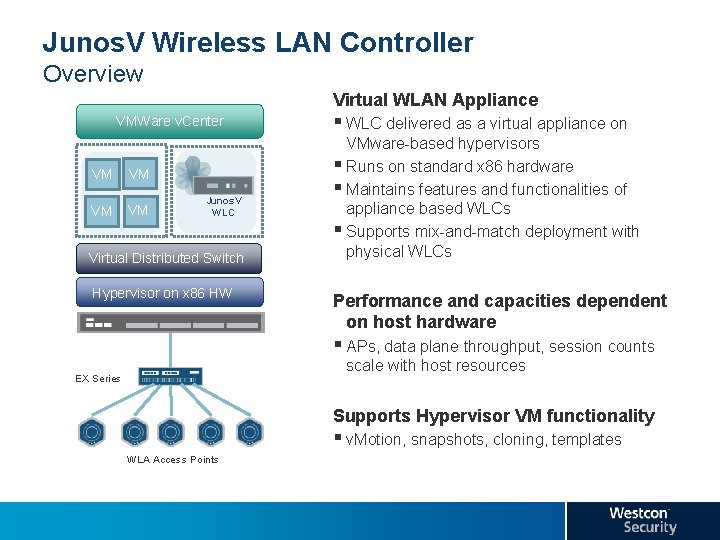
Junos. V Wireless LAN Controller Overview Virtual WLAN Appliance § WLC delivered as a virtual appliance on VMWare v. Center VM VM Junos. V WLC Virtual Distributed Switch Hypervisor on x 86 HW VMware-based hypervisors § Runs on standard x 86 hardware § Maintains features and functionalities of appliance based WLCs § Supports mix-and-match deployment with physical WLCs Performance and capacities dependent on host hardware § APs, data plane throughput, session counts scale with host resources EX Series Supports Hypervisor VM functionality § v. Motion, snapshots, cloning, templates WLA Access Points
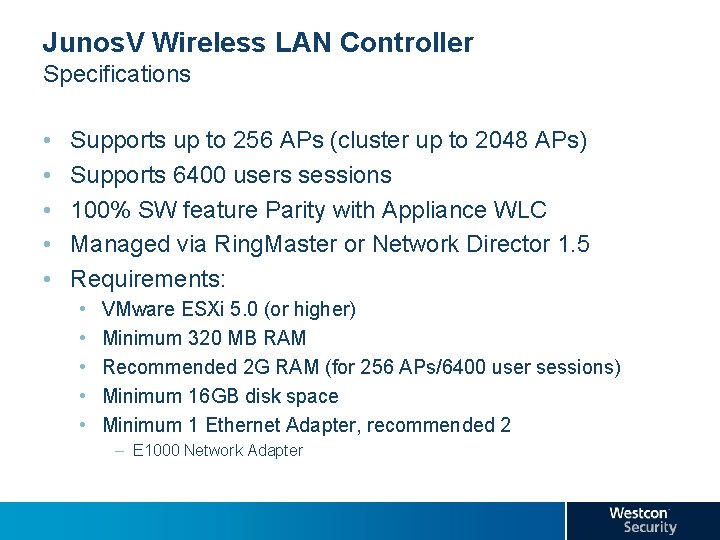
Junos. V Wireless LAN Controller Specifications • • • Supports up to 256 APs (cluster up to 2048 APs) Supports 6400 users sessions 100% SW feature Parity with Appliance WLC Managed via Ring. Master or Network Director 1. 5 Requirements: • • • VMware ESXi 5. 0 (or higher) Minimum 320 MB RAM Recommended 2 G RAM (for 256 APs/6400 user sessions) Minimum 16 GB disk space Minimum 1 Ethernet Adapter, recommended 2 – E 1000 Network Adapter
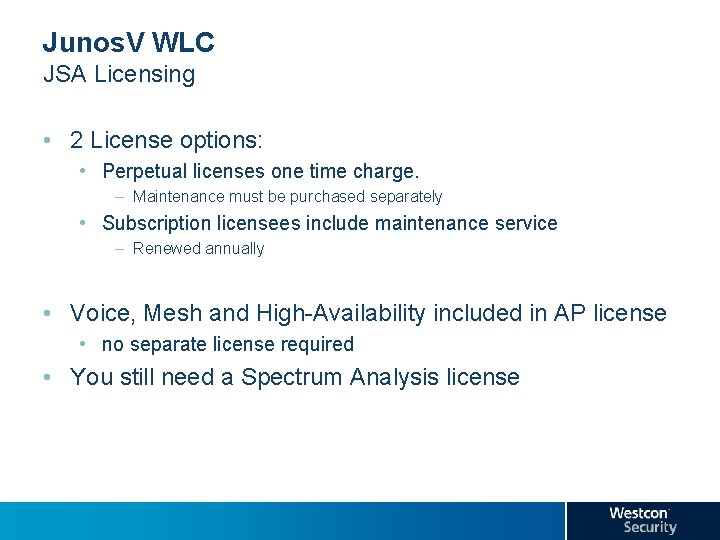
Junos. V WLC JSA Licensing • 2 License options: • Perpetual licenses one time charge. – Maintenance must be purchased separately • Subscription licensees include maintenance service – Renewed annually • Voice, Mesh and High-Availability included in AP license • no separate license required • You still need a Spectrum Analysis license
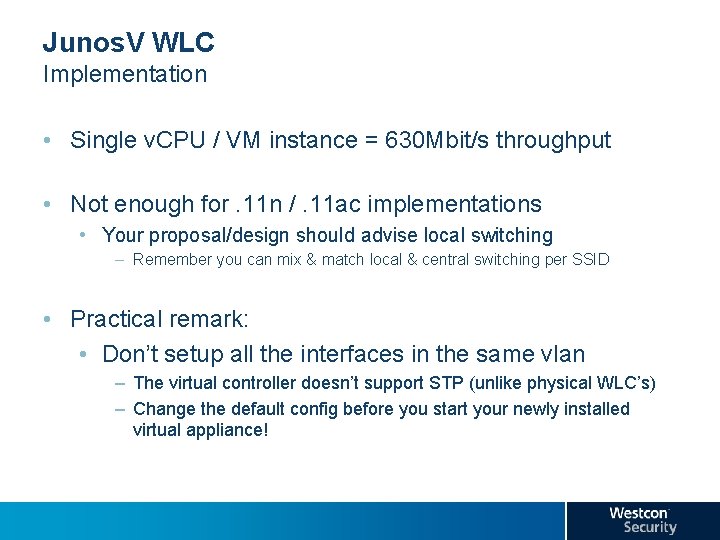
Junos. V WLC Implementation • Single v. CPU / VM instance = 630 Mbit/s throughput • Not enough for. 11 n /. 11 ac implementations • Your proposal/design should advise local switching – Remember you can mix & match local & central switching per SSID • Practical remark: • Don’t setup all the interfaces in the same vlan – The virtual controller doesn’t support STP (unlike physical WLC’s) – Change the default config before you start your newly installed virtual appliance!
Junos. V WLC Limitations • • No Webview interface in FRS (will return in MR 1) No support for port groups No Spanning Tree No LLDP support
Junos. V WLC Why? • Junos. V WLC is another step towards virtualisation of the control plane • What will be next? • Sooner – CAPWAP tunnel termination on EX 9200 – New control-plane controller (used with EX 9200) • Later – Tunnel termination on the access layer – Embedded WLAN service on the access layer
Agenda 10 h 00 : Introduction Westcon Juniper Team 10 h 15 : Juniper WLAN Solution in depth 11 h 30 : WLAN technical • Virtual WLAN controller • 802. 11 ac Developments 12 h 30 : Lunch 13 h 30 : WLAN demo-time • Ringmaster Demo • Smart. Pass Demo 15 h 00 : Break 15 h 20 : Simply Connected Concept 16 h 00 : Q&A 16 h 15 : Network Drink - Closing Cocktail
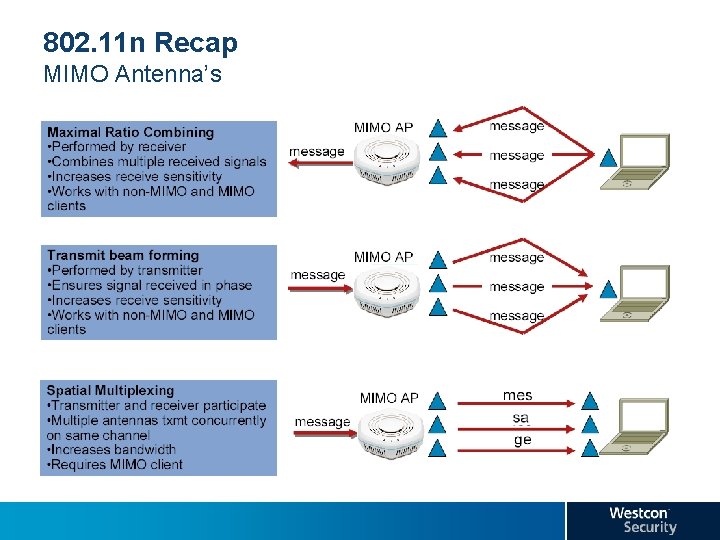
802. 11 n Recap MIMO Antenna’s
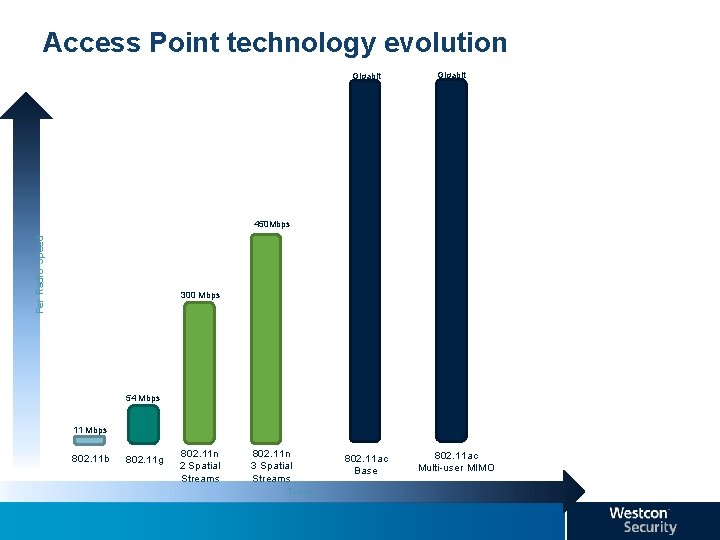
Access Point technology evolution Gigabit Per Radio Speed 450 Mbps 300 Mbps 54 Mbps 11 Mbps 802. 11 b 802. 11 g 802. 11 n 2 Spatial Streams 802. 11 n 3 Spatial Streams Time 802. 11 ac Base 802. 11 ac Multi-user MIMO
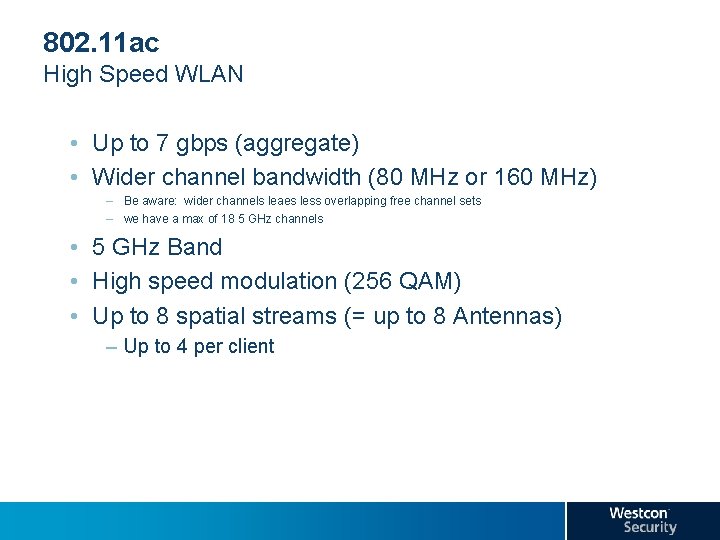
802. 11 ac High Speed WLAN • Up to 7 gbps (aggregate) • Wider channel bandwidth (80 MHz or 160 MHz) – Be aware: wider channels leaes less overlapping free channel sets – we have a max of 18 5 GHz channels • 5 GHz Band • High speed modulation (256 QAM) • Up to 8 spatial streams (= up to 8 Antennas) – Up to 4 per client
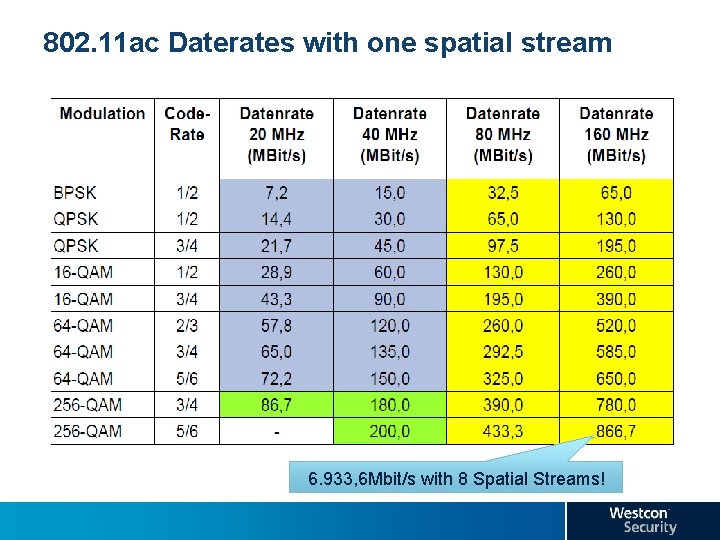
802. 11 ac Daterates with one spatial stream 6. 933, 6 Mbit/s with 8 Spatial Streams!
Agenda 10 h 00 : Introduction Westcon Juniper Team 10 h 15 : Juniper WLAN Solution in depth 11 h 30 : WLAN technical • Virtual WLAN controller • 802. 11 ac Developments 12 h 30 : Lunch 13 h 30 : WLAN demo-time • Ringmaster Demo • Smart. Pass Demo 15 h 00 : Break 15 h 20 : Simply Connected Concept 16 h 00 : Q&A 16 h 15 : Network Drink - Closing Cocktail
Agenda 10 h 00 : Introduction Westcon Juniper Team 10 h 15 : Juniper WLAN Solution in depth 11 h 30 : WLAN technical • Virtual WLAN controller • 802. 11 ac Developments 12 h 30 : Lunch 13 h 30 : WLAN demo-time • Ringmaster Demo • Smart. Pass Demo 15 h 00 : Break 15 h 20 : Simply Connected Concept 16 h 00 : Q&A 16 h 15 : Network Drink - Closing Cocktail
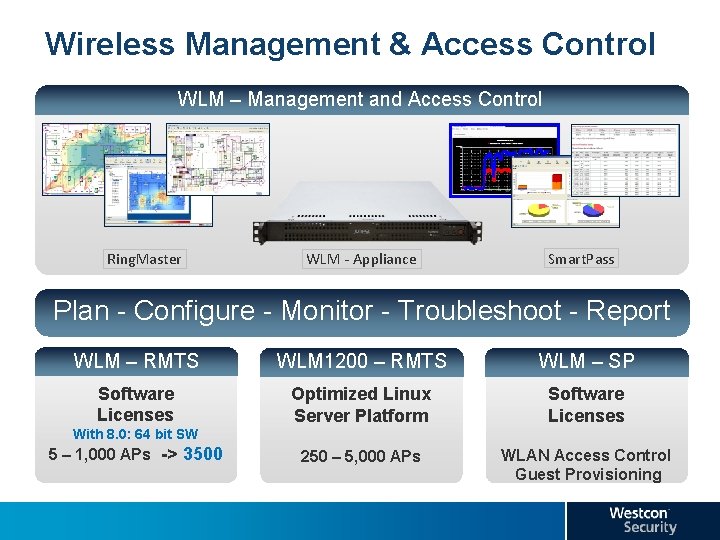
Wireless Management & Access Control WLM – Management and Access Control Ring. Master WLM - Appliance Smart. Pass Plan - Configure - Monitor - Troubleshoot - Report WLM – RMTS WLM 1200 – RMTS WLM – SP Software Licenses Optimized Linux Server Platform Software Licenses 250 – 5, 000 APs WLAN Access Control Guest Provisioning With 8. 0: 64 bit SW 5 – 1, 000 APs -> 3500
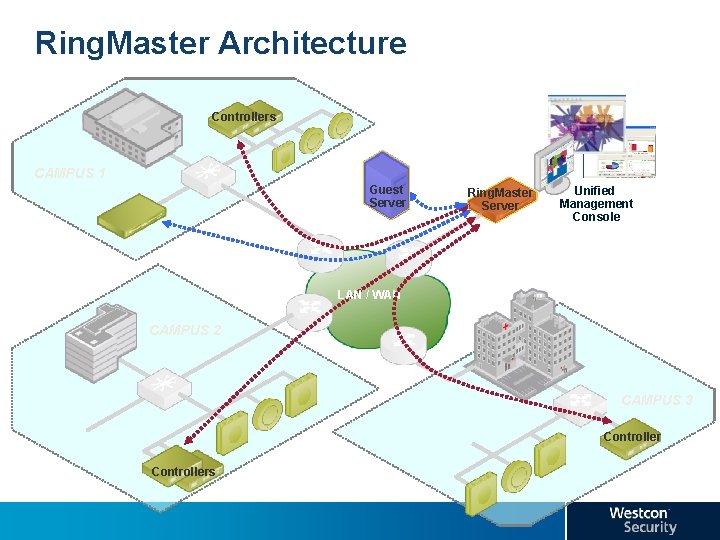
Ring. Master Architecture Controllers CAMPUS 1 Guest Server Ring. Master Server Unified Management Console LAN / WAN CAMPUS 2 CAMPUS 3 Controllers
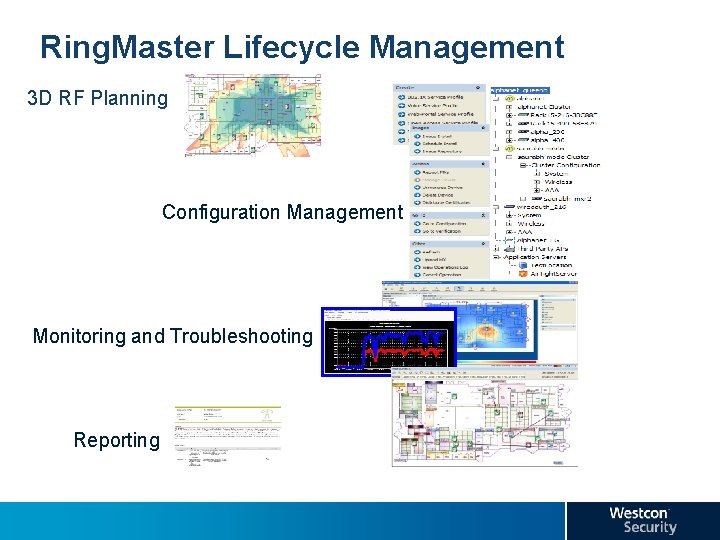
Ring. Master Lifecycle Management 3 D RF Planning Configuration Management Monitoring and Troubleshooting Reporting
Ring. Master 9. 0 Demo
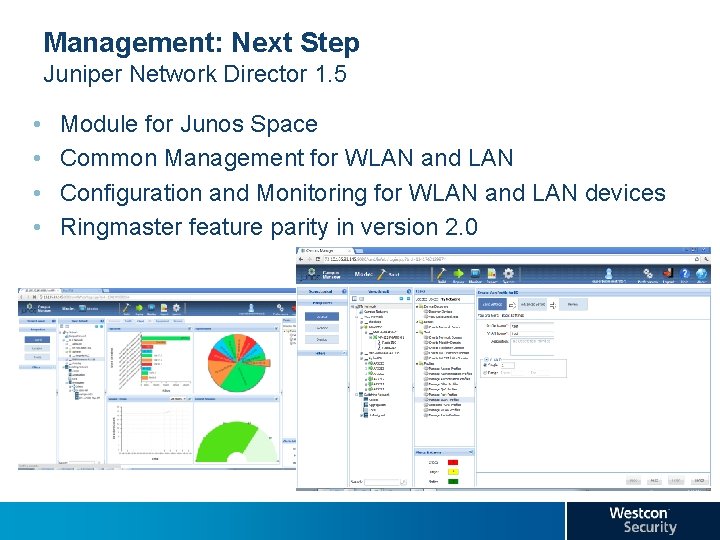
Management: Next Step Juniper Network Director 1. 5 • • Module for Junos Space Common Management for WLAN and LAN Configuration and Monitoring for WLAN and LAN devices Ringmaster feature parity in version 2. 0
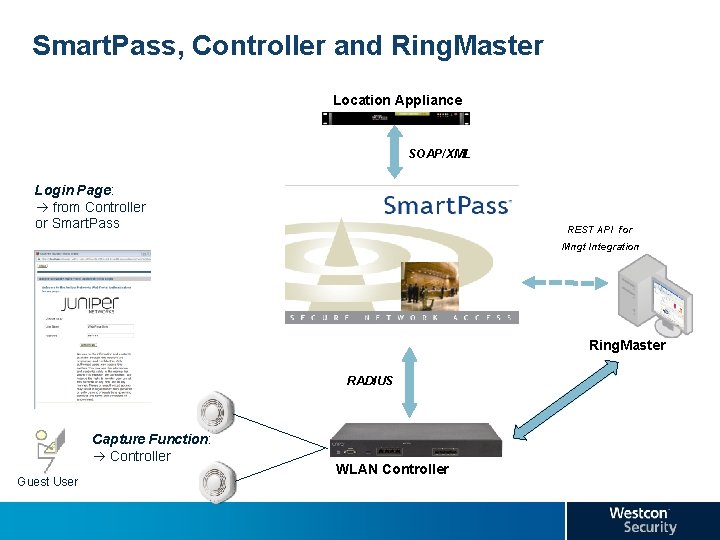
Smart. Pass, Controller and Ring. Master Location Appliance SOAP/XML Login Page: from Controller or Smart. Pass REST API for Mngt Integration Ring. Master RADIUS Capture Function: Controller Guest User WLAN Controller
BYOD Issues to solve Provisioning • How to configure high number of personal devices for access to secure SSID? Smart. Pass Connect • Automated self-service onboarding of (mobile) devices: • Windows, Linux, MAC, i. OS, Andoid • Vanishing Agent • downloads from web server, performs configuration tasks, then deletes itself • Java, Active. X or html based • depending on platform and capabilities (SPC server automatically figures out the best vehicle for a given platform) • Credentials (PEAP) or Certificates (TLS) • Install Client Certificates & Trusted Root CAs • Handle Additional Dependencies (Software, Proxies, etc. ) • Cloud based service with local configuration server
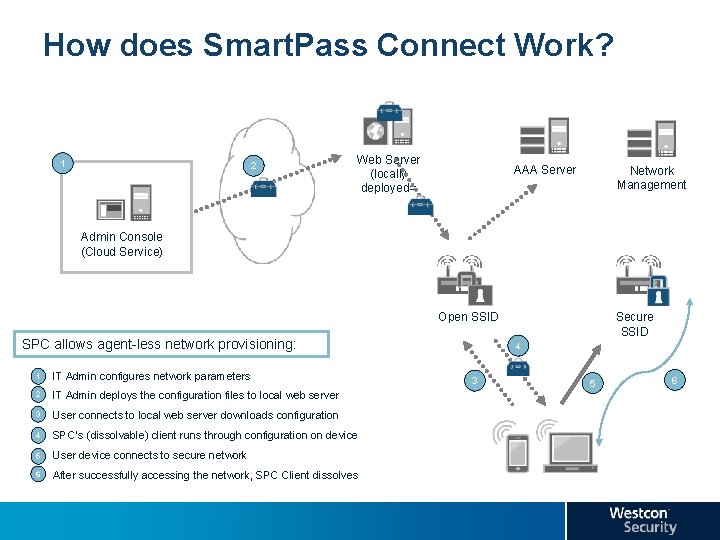
How does Smart. Pass Connect Work? 1 2 Web Server (locally deployed= AAA Server Network Management Admin Console (Cloud Service) Open SSID SPC allows agent-less network provisioning: § 1 IT Admin configures network parameters § 2 IT Admin deploys the configuration files to local web server § 3 User connects to local web server downloads configuration § 4 SPC’s (dissolvable) client runs through configuration on device § 5 User device connects to secure network § 6 After successfully accessing the network, SPC Client dissolves Secure SSID 4 3 5 6
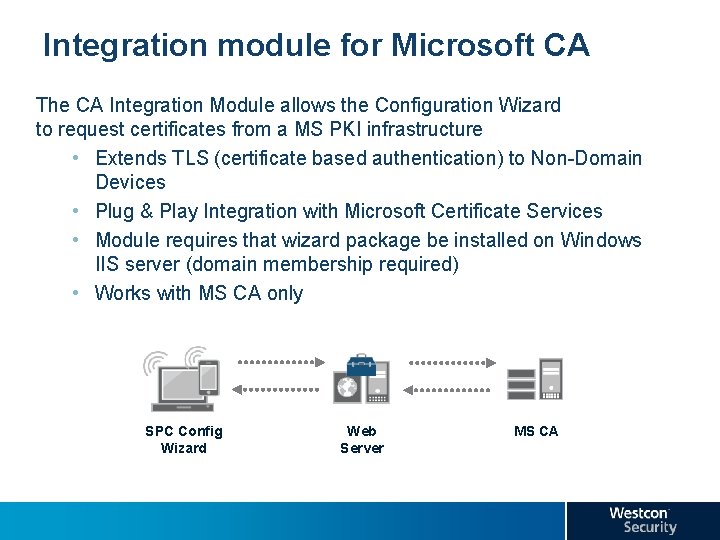
Integration module for Microsoft CA The CA Integration Module allows the Configuration Wizard to request certificates from a MS PKI infrastructure • Extends TLS (certificate based authentication) to Non-Domain Devices • Plug & Play Integration with Microsoft Certificate Services • Module requires that wizard package be installed on Windows IIS server (domain membership required) • Works with MS CA only SPC Config Wizard Web Server MS CA
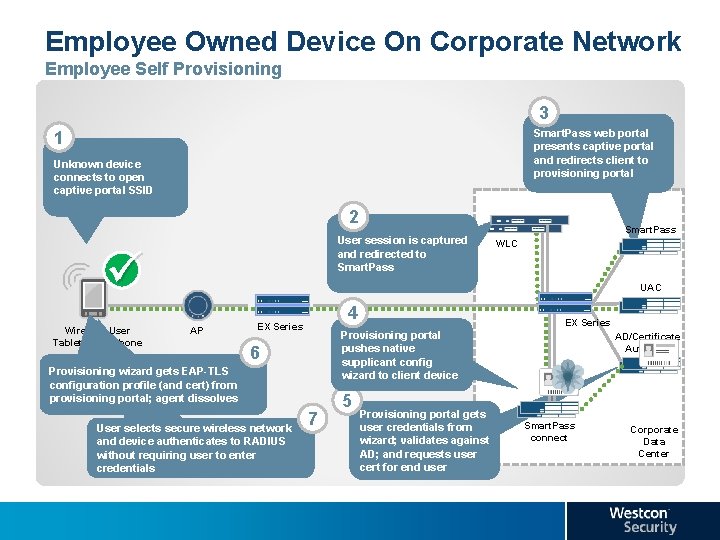
Employee Owned Device On Corporate Network Employee Self Provisioning 3 Smart. Pass web portal presents captive portal and redirects client to provisioning portal 1 Unknown device connects to open captive portal SSID 2 User session is captured and redirected to Smart. Pass Wireless User Tablet/smartphone Smart. Pass WLC UAC AP 4 EX Series 6 Provisioning wizard gets EAP-TLS configuration profile (and cert) from provisioning portal; agent dissolves User selects secure wireless network and device authenticates to RADIUS without requiring user to enter credentials EX Series Provisioning portal pushes native supplicant config wizard to client device 7 5 Provisioning portal gets user credentials from wizard; validates against AD; and requests user cert for end user AD/Certificate Authority Smart. Pass connect Corporate Data Center
Smart. Pass Connect Demo
Agenda 10 h 00 : Introduction Westcon Juniper Team 10 h 15 : Juniper WLAN Solution in depth 11 h 30 : WLAN technical • Virtual WLAN controller • 802. 11 ac Developments 12 h 30 : Lunch 13 h 30 : WLAN demo-time • Ringmaster Demo • Smart. Pass Demo 15 h 00 : Break 15 h 20 : Simply Connected Concept 16 h 00 : Q&A 16 h 15 : Network Drink - Closing Cocktail
Agenda 10 h 00 : Introduction Westcon Juniper Team 10 h 15 : Juniper WLAN Solution in depth 11 h 30 : WLAN technical • Virtual WLAN controller • 802. 11 ac Developments 12 h 30 : Lunch 13 h 30 : WLAN demo-time • Ringmaster Demo • Smart. Pass Demo 15 h 00 : Break 15 h 20 : Simply Connected Concept 16 h 00 : Q&A 16 h 15 : Network Drink - Closing Cocktail
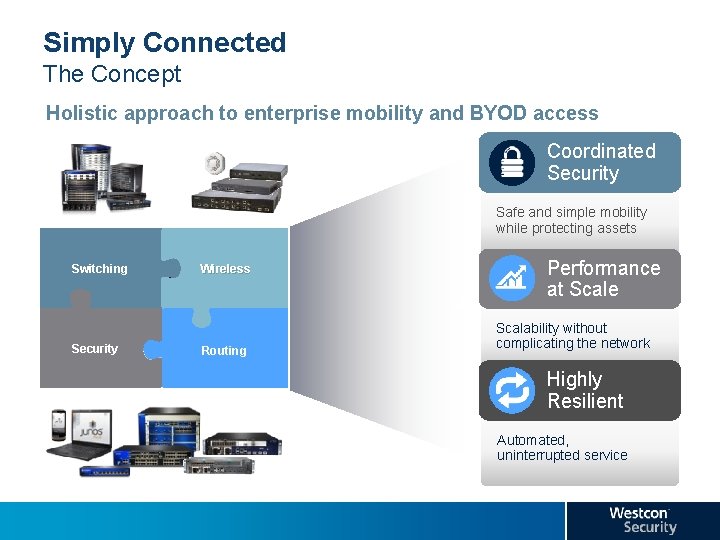
Simply Connected The Concept Holistic approach to enterprise mobility and BYOD access Coordinated Security Safe and simple mobility while protecting assets Switching Security Wireless Routing Performance at Scale Scalability without complicating the network Highly Resilient Automated, uninterrupted service
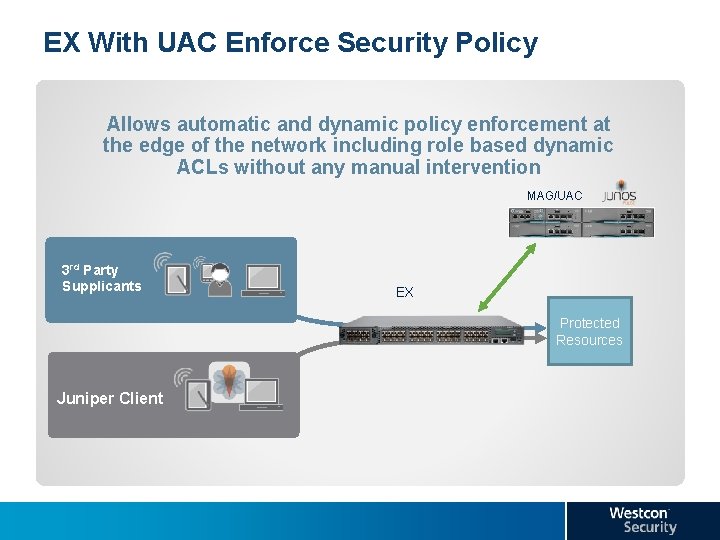
EX With UAC Enforce Security Policy Allows automatic and dynamic policy enforcement at the edge of the network including role based dynamic ACLs without any manual intervention MAG/UAC 3 rd Party Supplicants EX Protected Resources Juniper Client
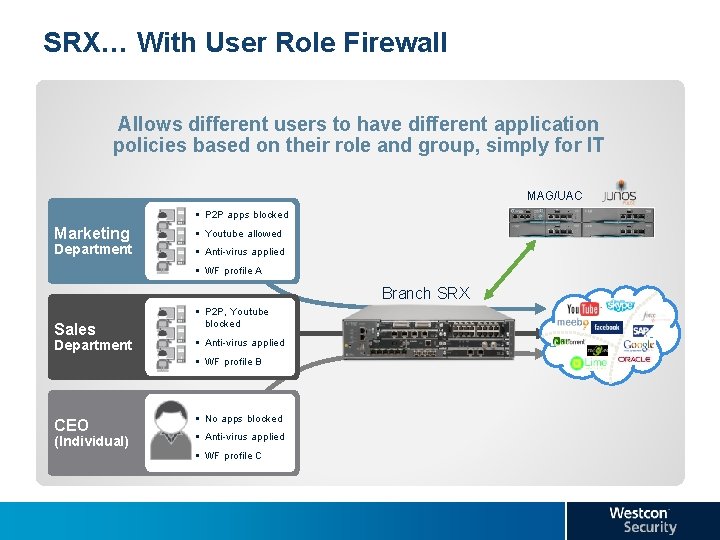
SRX… With User Role Firewall Allows different users to have different application policies based on their role and group, simply for IT MAG/UAC § P 2 P apps blocked Marketing Department § Youtube allowed § Anti-virus applied § WF profile A Branch SRX Sales Department § P 2 P, Youtube blocked § Anti-virus applied § WF profile B CEO (Individual) § No apps blocked § Anti-virus applied § WF profile C
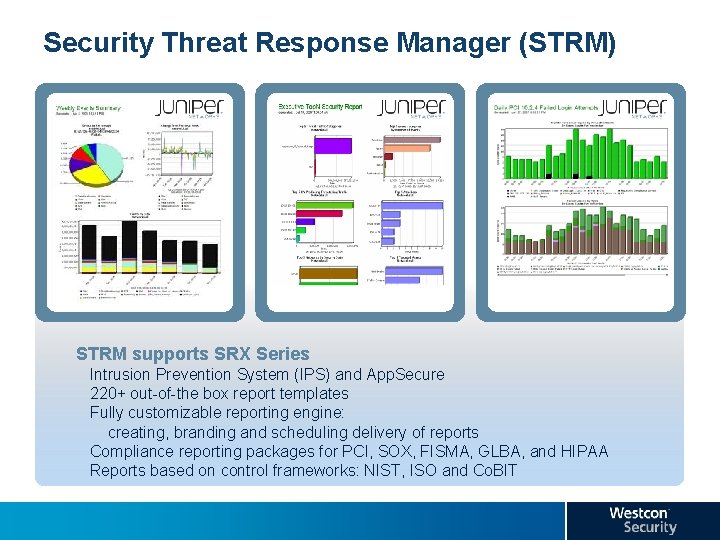
Security Threat Response Manager (STRM) STRM supports SRX Series Intrusion Prevention System (IPS) and App. Secure 220+ out-of-the box report templates Fully customizable reporting engine: creating, branding and scheduling delivery of reports Compliance reporting packages for PCI, SOX, FISMA, GLBA, and HIPAA Reports based on control frameworks: NIST, ISO and Co. BIT
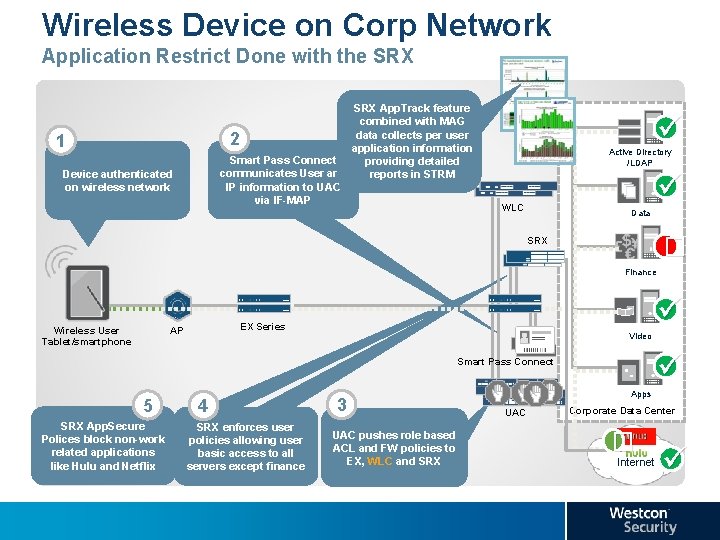
Wireless Device on Corp Network Application Restrict Done with the SRX App. Track feature combined with MAG data collects per user application information Smart Pass Connect providing detailed communicates User and reports in STRM IP information to UAC via IF-MAP 2 1 Device authenticated on wireless network Active Directory /LDAP WLC Data � SRX Finance EX Series AP Wireless User Tablet/smartphone Video Smart Pass Connect 5 SRX App. Secure Polices block non-work related applications like Hulu and Netflix 4 SRX enforces user policies allowing user basic access to all servers except finance 3 UAC pushes role based ACL and FW policies to EX, WLC and SRX Apps UAC Corporate Data Center � Internet
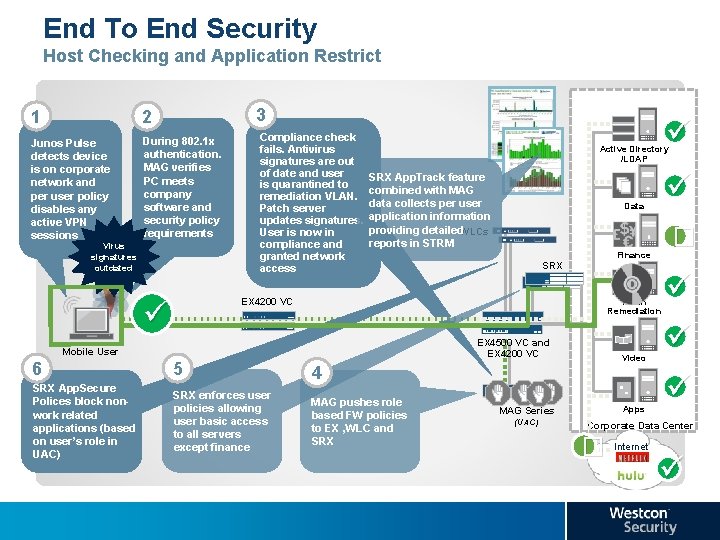
End To End Security Host Checking and Application Restrict 3 1 2 Junos Pulse detects device is on corporate network and per user policy disables any active VPN sessions During 802. 1 x authentication. MAG verifies PC meets company software and security policy requirements Virus signatures outdated Compliance check fails. Antivirus signatures are out of date and user is quarantined to remediation VLAN. Patch server updates signatures. User is now in compliance and granted network access Active Directory /LDAP SRX App. Track feature combined with MAG data collects per user application information providing detailed. WLCs reports in STRM � Finance SRX EX 4200 VC Data Patch Remediation EX 4500 VC and EX 4200 VC Mobile User 6 5 SRX App. Secure Polices block nonwork related applications (based on user’s role in UAC) 4 SRX enforces user policies allowing user basic access to all servers except finance MAG pushes role based FW policies to EX , WLC and SRX MAG Series (UAC) Video Apps Corporate Data Center � Internet
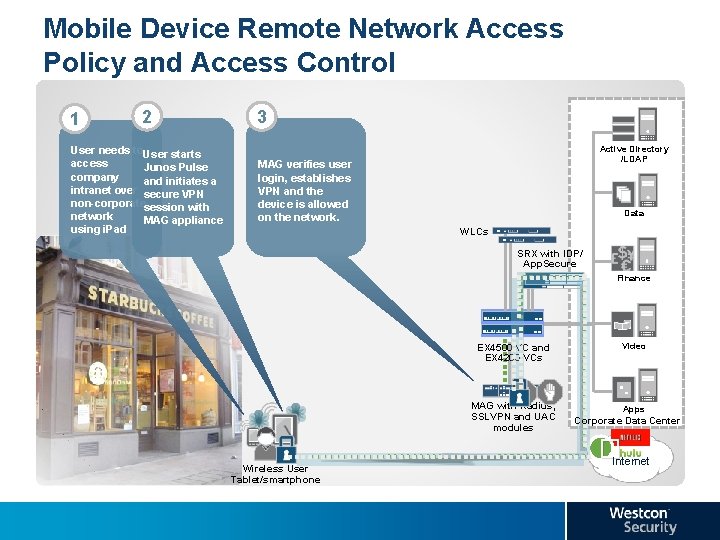
Mobile Device Remote Network Access Policy and Access Control 1 2 User needs to. User starts access Junos Pulse company and initiates a intranet over secure VPN non-corporatesession with network MAG appliance using i. Pad 3 Active Directory /LDAP MAG verifies user login, establishes VPN and the device is allowed on the network. Data WLCs SRX with IDP/ App. Secure Finance Wireless User Tablet/smartphone EX 4500 VC and EX 4200 VCs Video MAG with Radius, SSLVPN and UAC modules Apps Corporate Data Center �Internet
Juniper Wireless LAN Technical Education
Juniper Wireless LAN Technical Education Westcon Academy courses: Introduction to Juniper Wireless LANs (IJWL) • 3 days • Understand the requirements for a secure, Enterprisegrade Wireless LAN system and configure secure services. • Use Ring. Master management to plan, deploy, configure, manage, monitor and report on a WLS. • Effectively troubleshoot a WLS system deployment and user connectivity
Juniper Wireless LAN Technical Education Westcon Academy courses: Advanced Juniper Wireless LANs (AJWL) • 4 days • Configure secure WLAN services using digital certificate-based authentications and machine authentication. • Configure voice optimized services • Deploy and manage remote APs • Troubleshoot all aspects of a deployed WLS system
Agenda 10 h 00 : Introduction Westcon Juniper Team 10 h 15 : Juniper WLAN Solution in depth 11 h 30 : WLAN technical • Virtual WLAN controller • 802. 11 ac Developments 12 h 30 : Lunch 13 h 30 : WLAN demo-time • Ringmaster Demo • Smart. Pass Demo 15 h 00 : Break 15 h 20 : Simply Connected Concept 16 h 00 : Q&A 16 h 15 : Network Drink - Closing Cocktail
Agenda 10 h 00 : Introduction Westcon Juniper Team 10 h 15 : Juniper WLAN Solution in depth 11 h 30 : WLAN technical • Virtual WLAN controller • 802. 11 ac Developments 12 h 30 : Lunch 13 h 30 : WLAN demo-time • Ringmaster Demo • Smart. Pass Demo 15 h 00 : Break 15 h 20 : Simply Connected Concept 16 h 00 : Q&A 16 h 15 : Network Drink - Closing Cocktail