Chapter 4 Network Layer Chapter goals r understand
- Slides: 45
Chapter 4: Network Layer Chapter goals: r understand principles behind network layer services: m routing (path selection) m dealing with scale m how a router works m advanced topics: IPv 6, mobility r instantiation and implementation in the Internet Network Layer 1
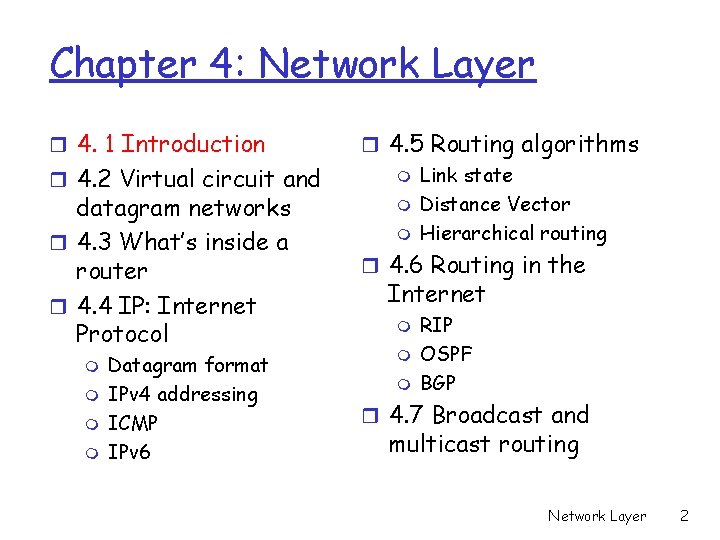
Chapter 4: Network Layer r 4. 1 Introduction r 4. 2 Virtual circuit and datagram networks r 4. 3 What’s inside a router r 4. 4 IP: Internet Protocol m m Datagram format IPv 4 addressing ICMP IPv 6 r 4. 5 Routing algorithms m Link state m Distance Vector m Hierarchical routing r 4. 6 Routing in the Internet m m m RIP OSPF BGP r 4. 7 Broadcast and multicast routing Network Layer 2
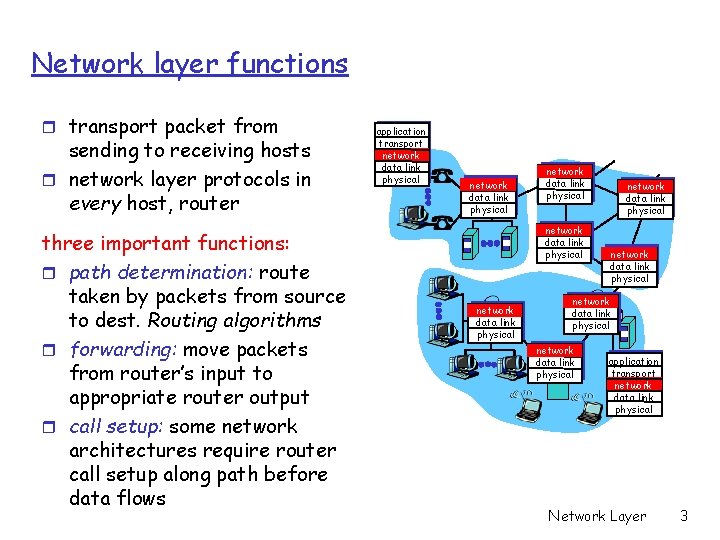
Network layer functions r transport packet from sending to receiving hosts r network layer protocols in every host, router three important functions: r path determination: route taken by packets from source to dest. Routing algorithms r forwarding: move packets from router’s input to appropriate router output r call setup: some network architectures require router call setup along path before data flows application transport network data link physical network data link physical network data link physical application transport network data link physical Network Layer 3
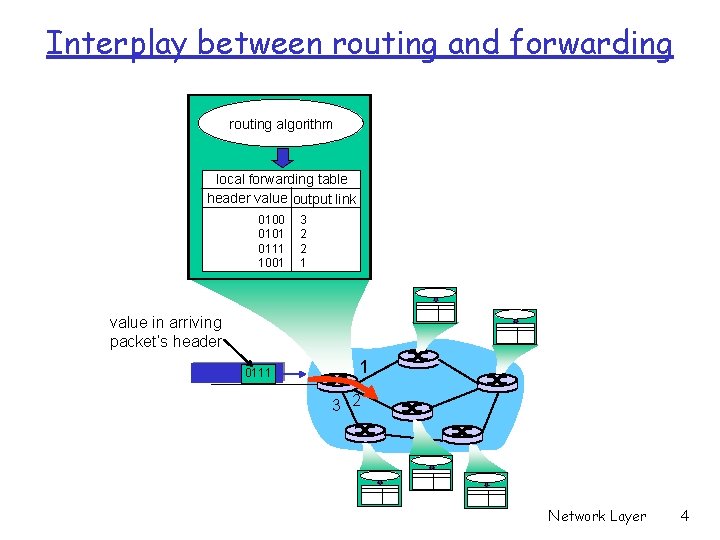
Interplay between routing and forwarding routing algorithm local forwarding table header value output link 0100 0101 0111 1001 3 2 2 1 value in arriving packet’s header 0111 1 3 2 Network Layer 4
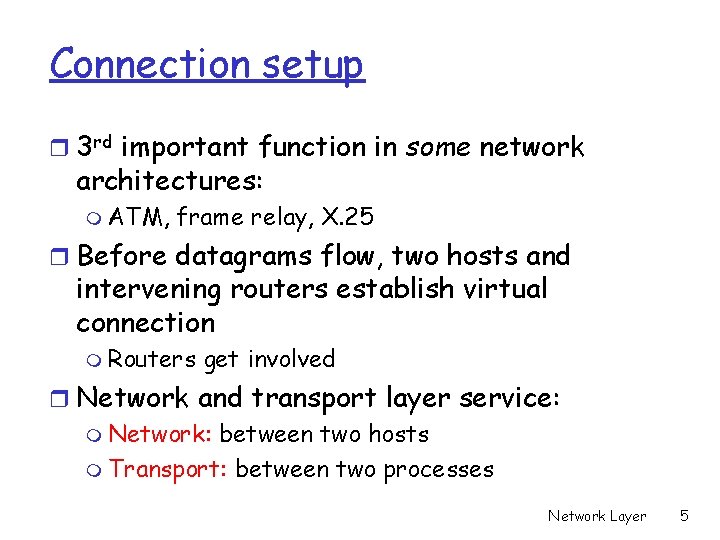
Connection setup r 3 rd important function in some network architectures: m ATM, frame relay, X. 25 r Before datagrams flow, two hosts and intervening routers establish virtual connection m Routers get involved r Network and transport layer service: m Network: between two hosts m Transport: between two processes Network Layer 5
Network service model Q: What service model for “channel” transporting packets from sender to receiver? r guaranteed bandwidth? r preservation of inter-packet timing (no jitter)? r loss-free delivery? r in-order delivery? r congestion feedback to sender? Network Layer 6
Chapter 4: Network Layer r 4. 1 Introduction r 4. 2 Virtual circuit and datagram networks r 4. 3 What’s inside a router r 4. 4 IP: Internet Protocol m m Datagram format IPv 4 addressing ICMP IPv 6 r 4. 5 Routing algorithms m Link state m Distance Vector m Hierarchical routing r 4. 6 Routing in the Internet m m m RIP OSPF BGP r 4. 7 Broadcast and multicast routing Network Layer 7
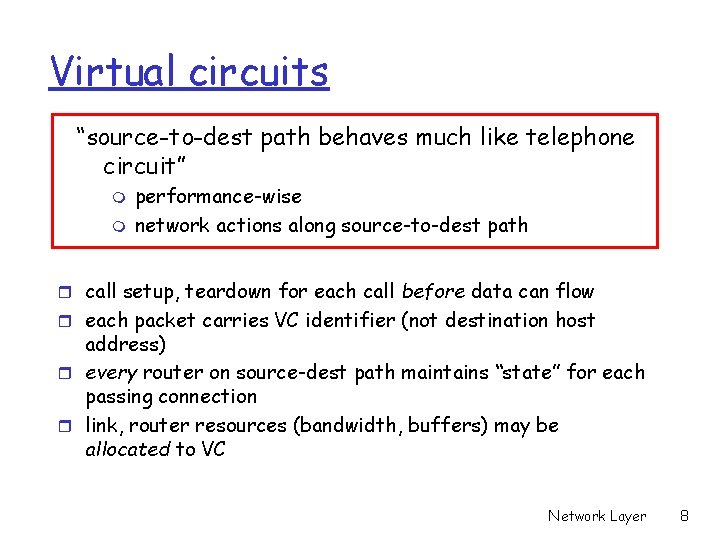
Virtual circuits “source-to-dest path behaves much like telephone circuit” m m performance-wise network actions along source-to-dest path r call setup, teardown for each call before data can flow r each packet carries VC identifier (not destination host address) r every router on source-dest path maintains “state” for each passing connection r link, router resources (bandwidth, buffers) may be allocated to VC Network Layer 8
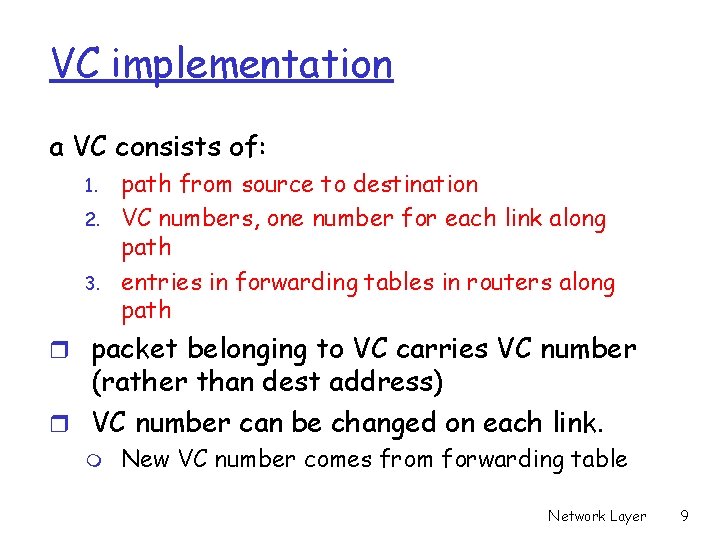
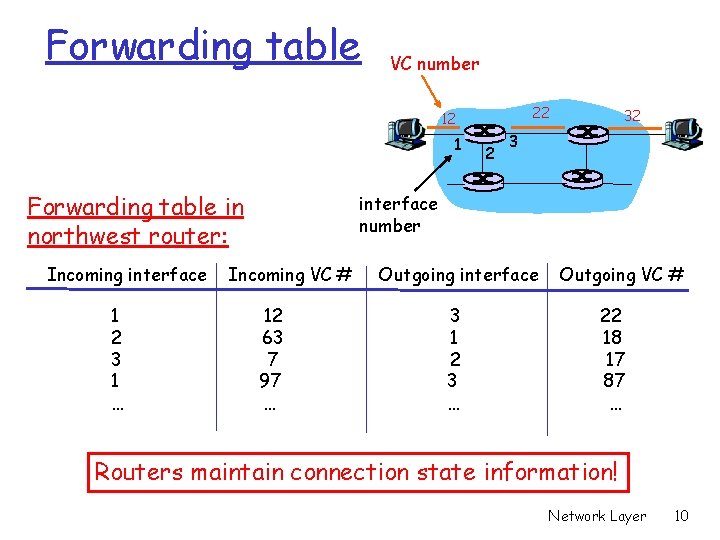
VC implementation a VC consists of: 1. 2. 3. path from source to destination VC numbers, one number for each link along path entries in forwarding tables in routers along path r packet belonging to VC carries VC number (rather than dest address) r VC number can be changed on each link. m New VC number comes from forwarding table Network Layer 9
Forwarding table VC number 22 12 1 Forwarding table in northwest router: Incoming interface 1 2 3 1 … 2 32 3 interface number Incoming VC # 12 63 7 97 … Outgoing interface 3 1 2 3 … Outgoing VC # 22 18 17 87 … Routers maintain connection state information! Network Layer 10
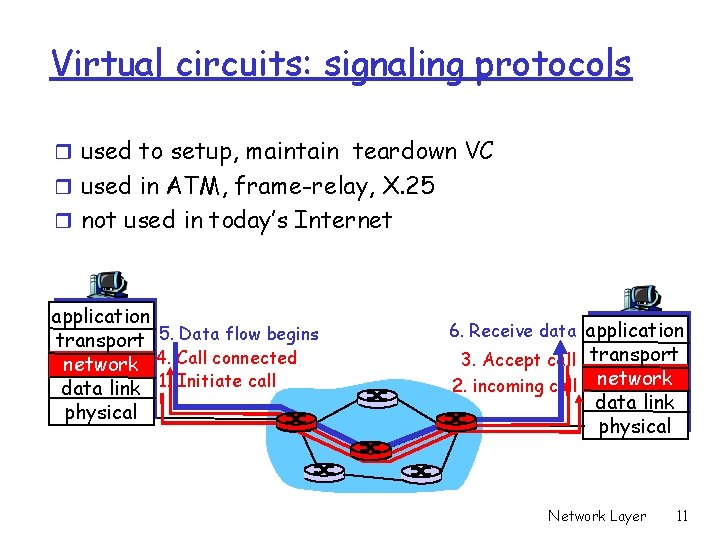
Virtual circuits: signaling protocols r used to setup, maintain teardown VC r used in ATM, frame-relay, X. 25 r not used in today’s Internet application transport 5. Data flow begins network 4. Call connected data link 1. Initiate call physical 6. Receive data application 3. Accept call transport 2. incoming call network data link physical Network Layer 11
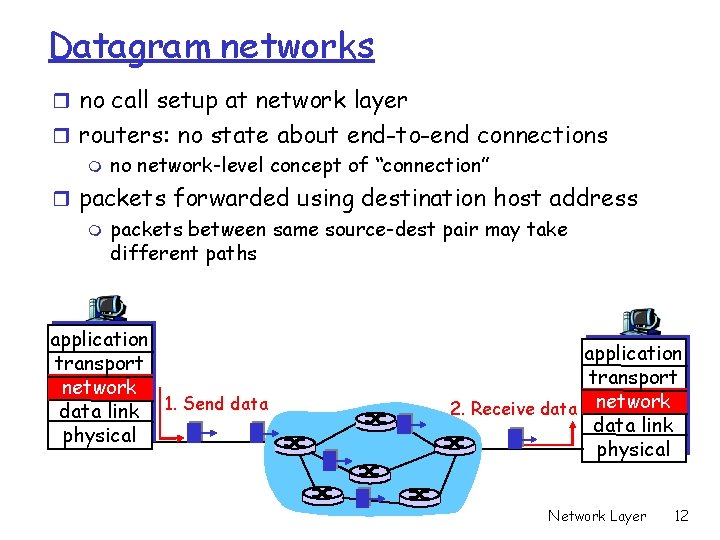
Datagram networks r no call setup at network layer r routers: no state about end-to-end connections m no network-level concept of “connection” r packets forwarded using destination host address m packets between same source-dest pair may take different paths application transport network data link 1. Send data physical application transport 2. Receive data network data link physical Network Layer 12
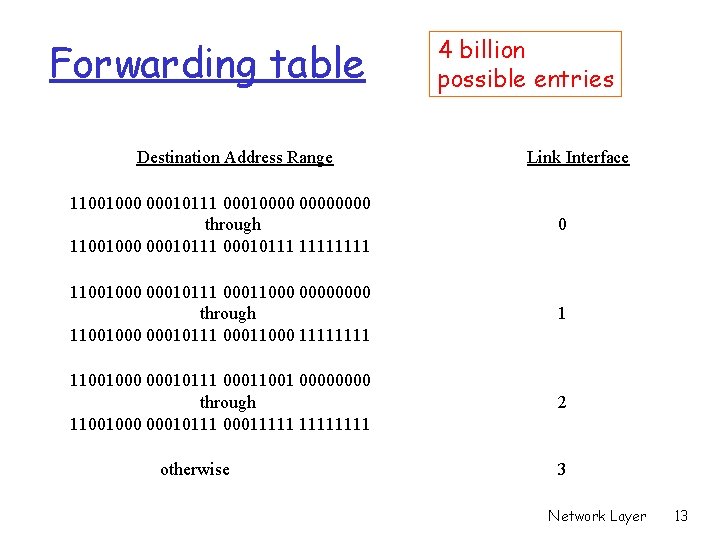
Forwarding table Destination Address Range 4 billion possible entries Link Interface 11001000 00010111 00010000 through 11001000 00010111 1111 0 11001000 00010111 00011000 0000 through 11001000 00010111 00011000 1111 1 11001000 00010111 00011001 0000 through 11001000 00010111 00011111 2 otherwise 3 Network Layer 13
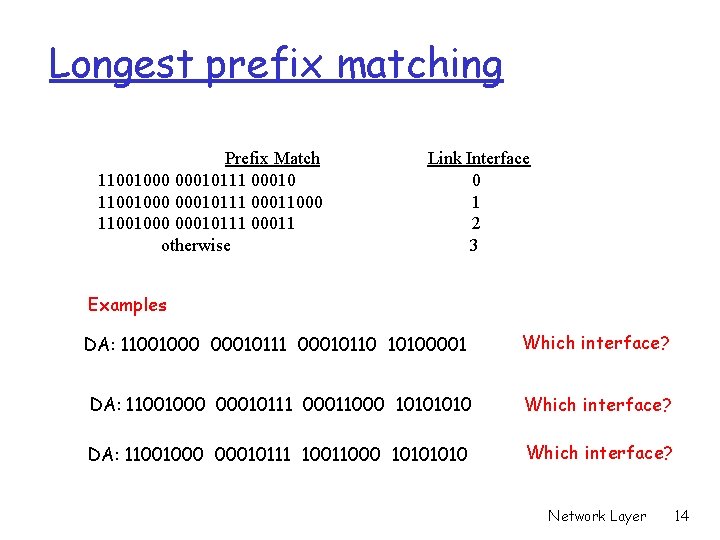
Longest prefix matching Prefix Match 11001000 00010111 00010 11001000 00010111 00011000 11001000 00010111 00011 otherwise Link Interface 0 1 2 3 Examples DA: 11001000 00010111 00010110 10100001 Which interface? DA: 11001000 00010111 00011000 1010 Which interface? DA: 11001000 00010111 10011000 1010 Which interface? Network Layer 14
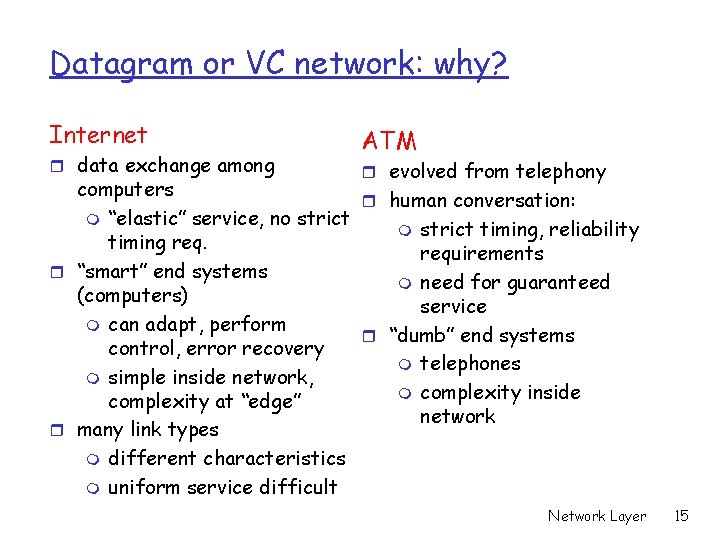
Datagram or VC network: why? Internet r data exchange among ATM r evolved from telephony computers r human conversation: m “elastic” service, no strict m strict timing, reliability timing requirements r “smart” end systems m need for guaranteed (computers) service m can adapt, perform r “dumb” end systems control, error recovery m telephones m simple inside network, m complexity inside complexity at “edge” network r many link types m different characteristics m uniform service difficult Network Layer 15
Chapter 4: Network Layer r 4. 1 Introduction r 4. 2 Virtual circuit and datagram networks r 4. 3 What’s inside a router r 4. 4 IP: Internet Protocol m m Datagram format IPv 4 addressing ICMP IPv 6 r 4. 5 Routing algorithms m Link state m Distance Vector m Hierarchical routing r 4. 6 Routing in the Internet m m m RIP OSPF BGP r 4. 7 Broadcast and multicast routing Network Layer 16
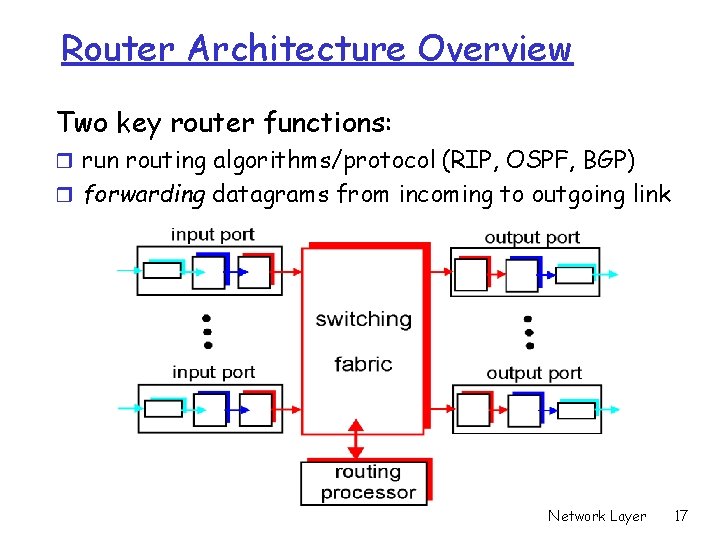
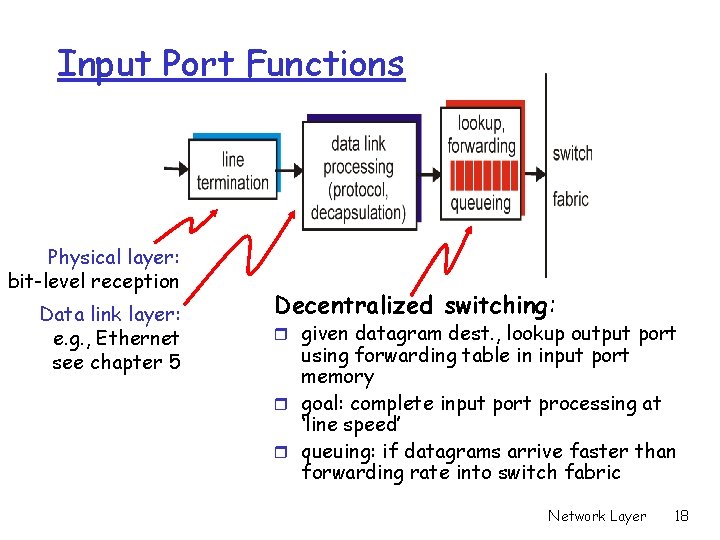
Router Architecture Overview Two key router functions: r run routing algorithms/protocol (RIP, OSPF, BGP) r forwarding datagrams from incoming to outgoing link Network Layer 17
Input Port Functions Physical layer: bit-level reception Data link layer: e. g. , Ethernet see chapter 5 Decentralized switching: r given datagram dest. , lookup output port using forwarding table in input port memory r goal: complete input port processing at ‘line speed’ r queuing: if datagrams arrive faster than forwarding rate into switch fabric Network Layer 18
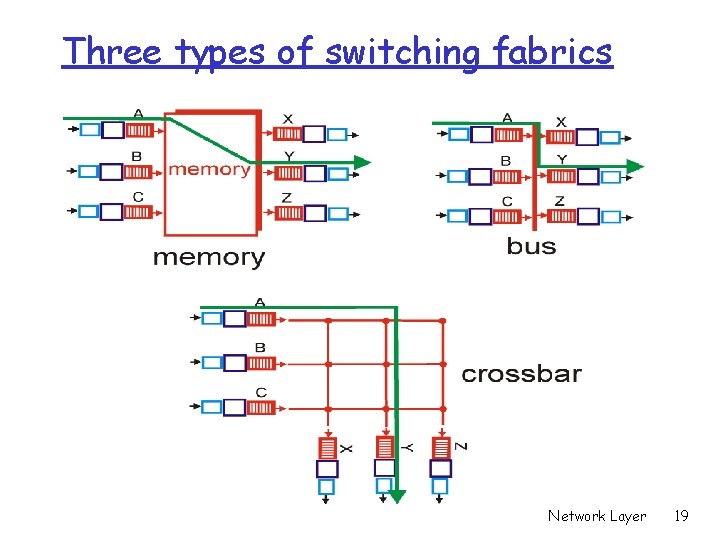
Three types of switching fabrics Network Layer 19
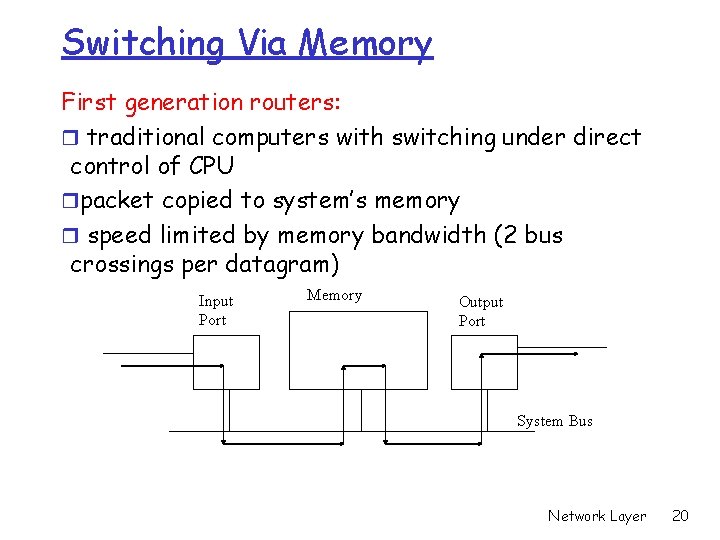
Switching Via Memory First generation routers: r traditional computers with switching under direct control of CPU rpacket copied to system’s memory r speed limited by memory bandwidth (2 bus crossings per datagram) Input Port Memory Output Port System Bus Network Layer 20
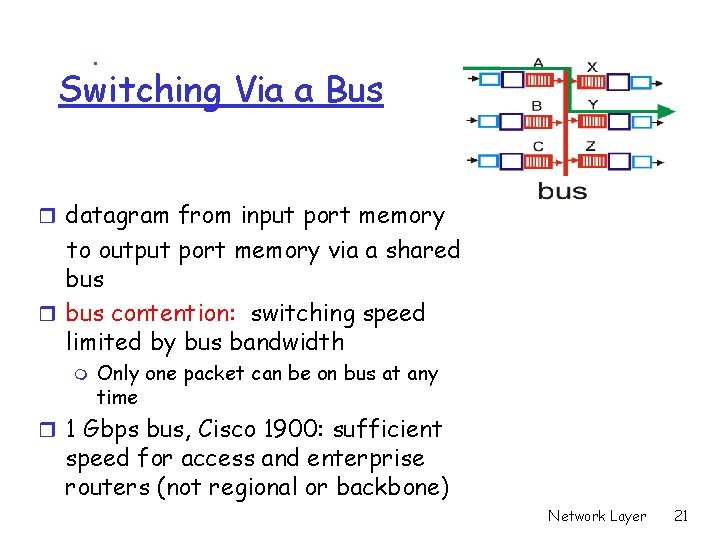
Switching Via a Bus r datagram from input port memory to output port memory via a shared bus r bus contention: switching speed limited by bus bandwidth m Only one packet can be on bus at any time r 1 Gbps bus, Cisco 1900: sufficient speed for access and enterprise routers (not regional or backbone) Network Layer 21
Switching Via An Interconnection Network r overcome bus bandwidth limitations r Can pass multiple packets at the same time r Cisco 12000: switches Gbps through the interconnection network Network Layer 22
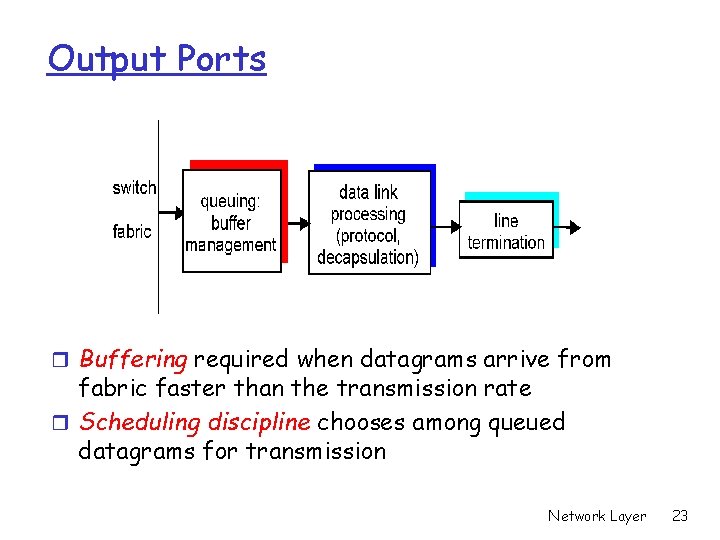
Output Ports r Buffering required when datagrams arrive from fabric faster than the transmission rate r Scheduling discipline chooses among queued datagrams for transmission Network Layer 23
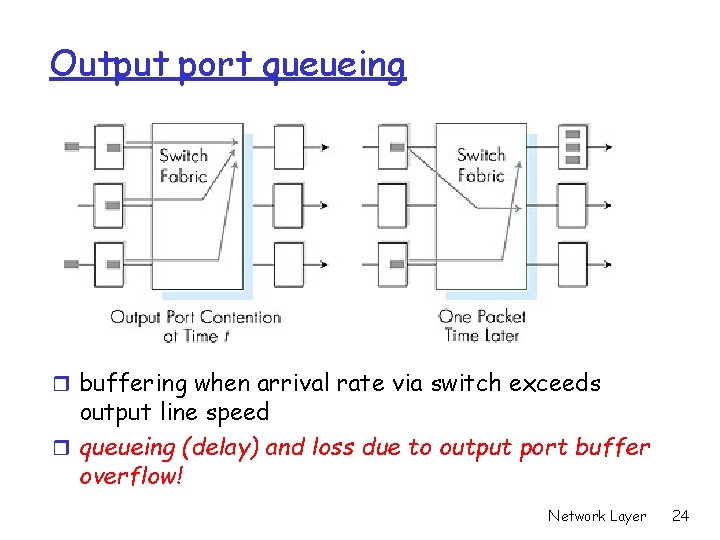
Output port queueing r buffering when arrival rate via switch exceeds output line speed r queueing (delay) and loss due to output port buffer overflow! Network Layer 24
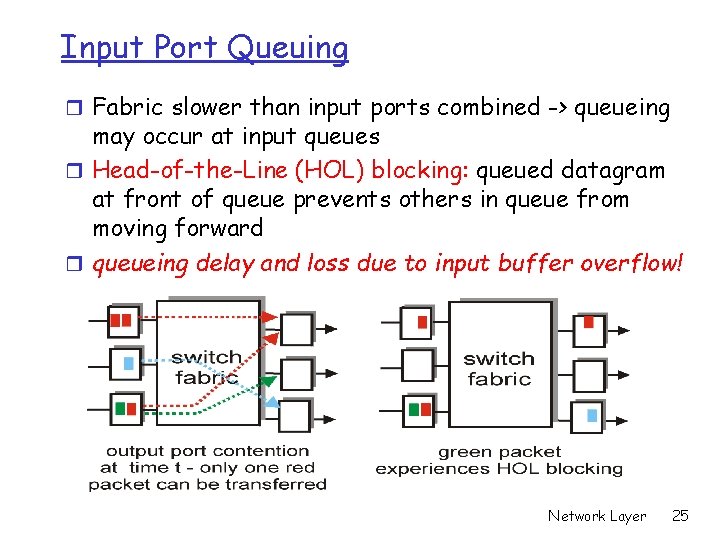
Input Port Queuing r Fabric slower than input ports combined -> queueing may occur at input queues r Head-of-the-Line (HOL) blocking: queued datagram at front of queue prevents others in queue from moving forward r queueing delay and loss due to input buffer overflow! Network Layer 25
Chapter 4: Network Layer r 4. 1 Introduction r 4. 2 Virtual circuit and datagram networks r 4. 3 What’s inside a router r 4. 4 IP: Internet Protocol m m Datagram format IPv 4 addressing ICMP IPv 6 r 4. 5 Routing algorithms m Link state m Distance Vector m Hierarchical routing r 4. 6 Routing in the Internet m m m RIP OSPF BGP r 4. 7 Broadcast and multicast routing Network Layer 26
Chapter 4: Network Layer r 4. 1 Introduction r 4. 2 Virtual circuit and datagram networks r 4. 3 What’s inside a router r 4. 4 IP: Internet Protocol m m Datagram format IPv 4 addressing ICMP IPv 6 r 4. 5 Routing algorithms m Link state m Distance Vector m Hierarchical routing r 4. 6 Routing in the Internet m m m RIP OSPF BGP r 4. 7 Broadcast and multicast routing Network Layer 27
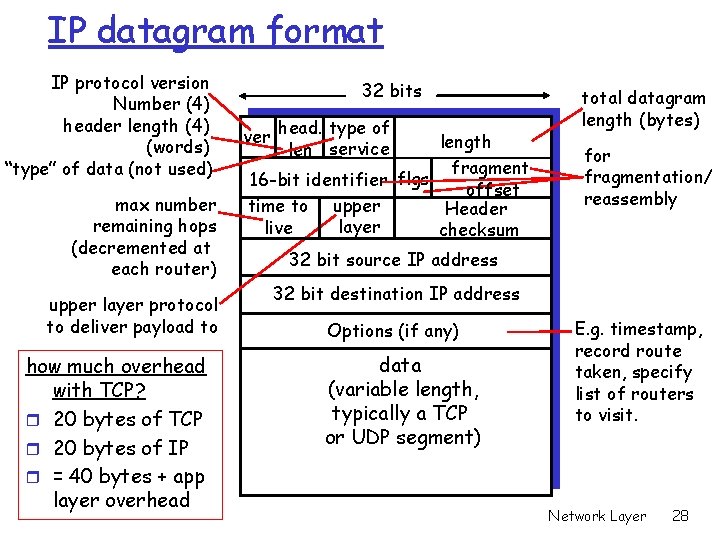
IP datagram format IP protocol version Number (4) header length (4) (words) “type” of data (not used) max number remaining hops (decremented at each router) upper layer protocol to deliver payload to how much overhead with TCP? r 20 bytes of TCP r 20 bytes of IP r = 40 bytes + app layer overhead 32 bits ver head. type of len service length fragment 16 -bit identifier flgs offset upper time to Header layer live checksum total datagram length (bytes) for fragmentation/ reassembly 32 bit source IP address 32 bit destination IP address Options (if any) data (variable length, typically a TCP or UDP segment) E. g. timestamp, record route taken, specify list of routers to visit. Network Layer 28
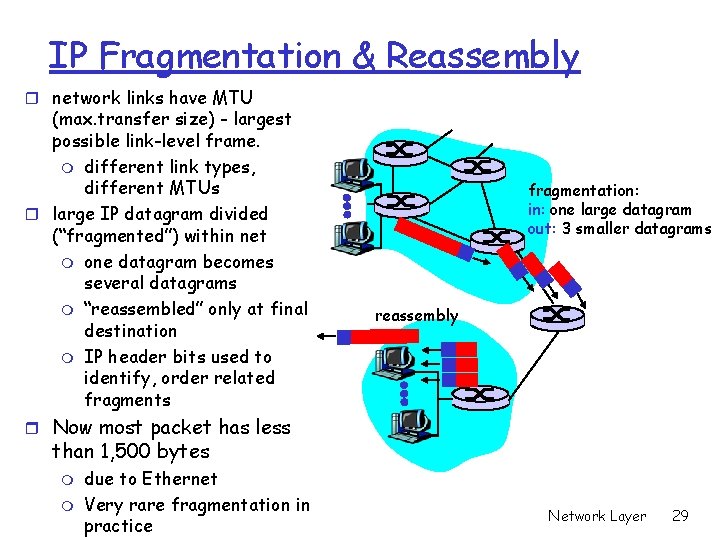
IP Fragmentation & Reassembly r network links have MTU (max. transfer size) - largest possible link-level frame. m different link types, different MTUs r large IP datagram divided (“fragmented”) within net m one datagram becomes several datagrams m “reassembled” only at final destination m IP header bits used to identify, order related fragments fragmentation: in: one large datagram out: 3 smaller datagrams reassembly r Now most packet has less than 1, 500 bytes m m due to Ethernet Very rare fragmentation in practice Network Layer 29
Chapter 4: Network Layer r 4. 1 Introduction r 4. 2 Virtual circuit and datagram networks r 4. 3 What’s inside a router r 4. 4 IP: Internet Protocol m m Datagram format IPv 4 addressing ICMP IPv 6 r 4. 5 Routing algorithms m Link state m Distance Vector m Hierarchical routing r 4. 6 Routing in the Internet m m m RIP OSPF BGP r 4. 7 Broadcast and multicast routing Network Layer 30
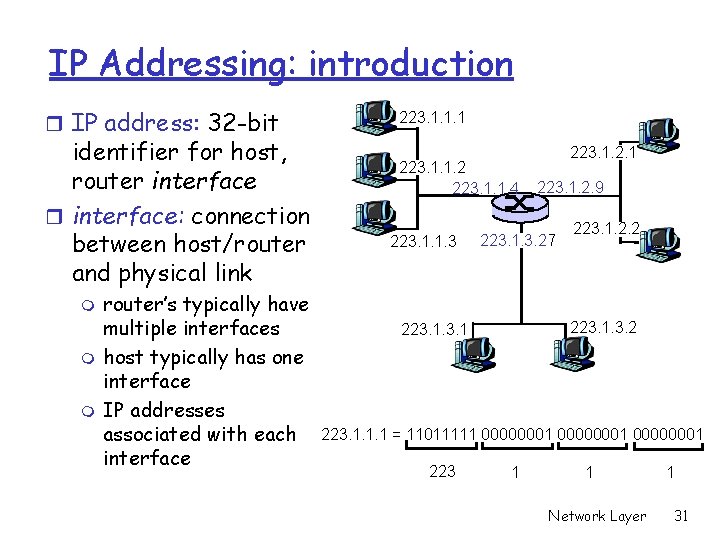
IP Addressing: introduction r IP address: 32 -bit identifier for host, router interface: connection between host/router and physical link m m m router’s typically have multiple interfaces host typically has one interface IP addresses associated with each interface 223. 1. 1. 1 223. 1. 1. 2 223. 1. 1. 4 223. 1. 1. 3 223. 1. 2. 1 223. 1. 2. 9 223. 1. 3. 27 223. 1. 2. 2 223. 1. 1. 1 = 11011111 00000001 223 1 1 Network Layer 1 31
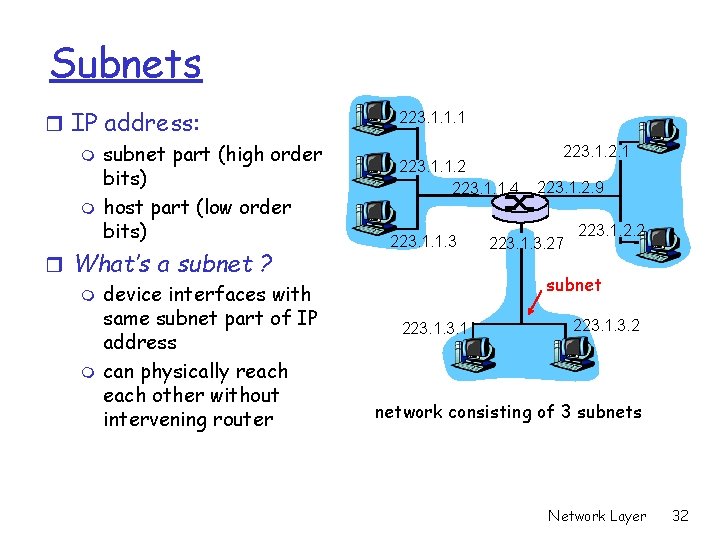
Subnets r IP address: m subnet part (high order bits) m host part (low order bits) r What’s a subnet ? m device interfaces with same subnet part of IP address m can physically reach other without intervening router 223. 1. 1. 1 223. 1. 1. 2 223. 1. 1. 4 223. 1. 1. 3 223. 1. 2. 1 223. 1. 2. 9 223. 1. 3. 27 223. 1. 2. 2 subnet 223. 1. 3. 2 network consisting of 3 subnets Network Layer 32
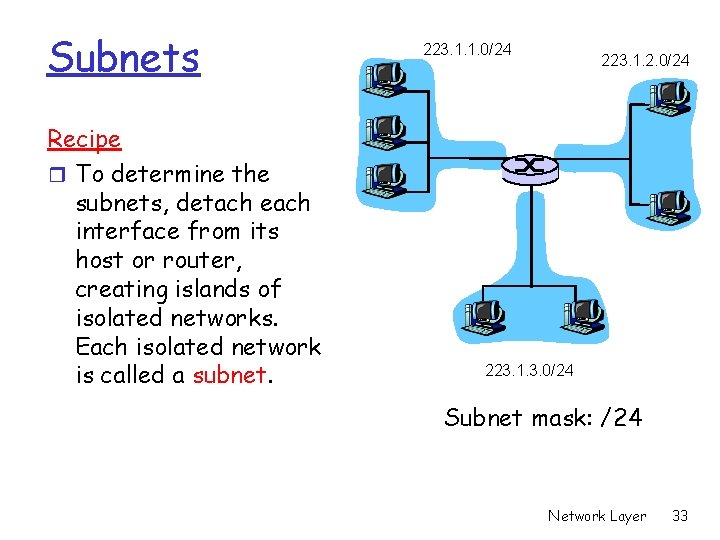
Subnets Recipe r To determine the subnets, detach each interface from its host or router, creating islands of isolated networks. Each isolated network is called a subnet. 223. 1. 1. 0/24 223. 1. 2. 0/24 223. 1. 3. 0/24 Subnet mask: /24 Network Layer 33
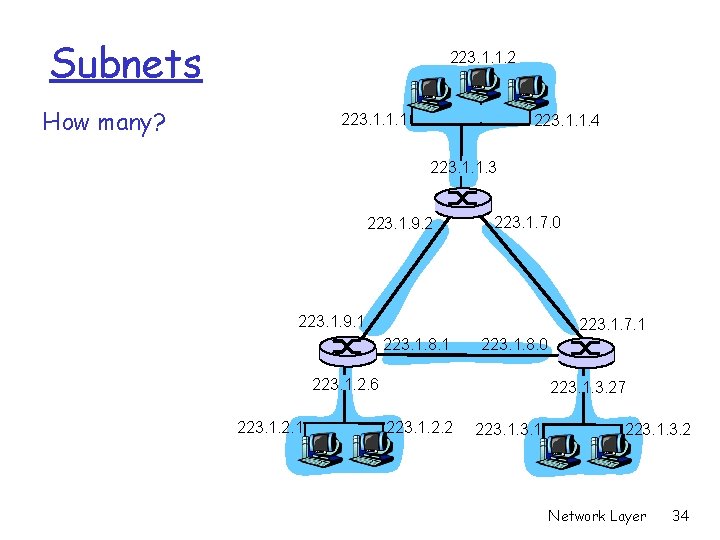
Subnets 223. 1. 1. 2 How many? 223. 1. 1. 1 223. 1. 1. 4 223. 1. 1. 3 223. 1. 9. 2 223. 1. 7. 0 223. 1. 9. 1 223. 1. 7. 1 223. 1. 8. 0 223. 1. 2. 6 223. 1. 2. 1 223. 1. 3. 27 223. 1. 2. 2 223. 1. 3. 2 Network Layer 34
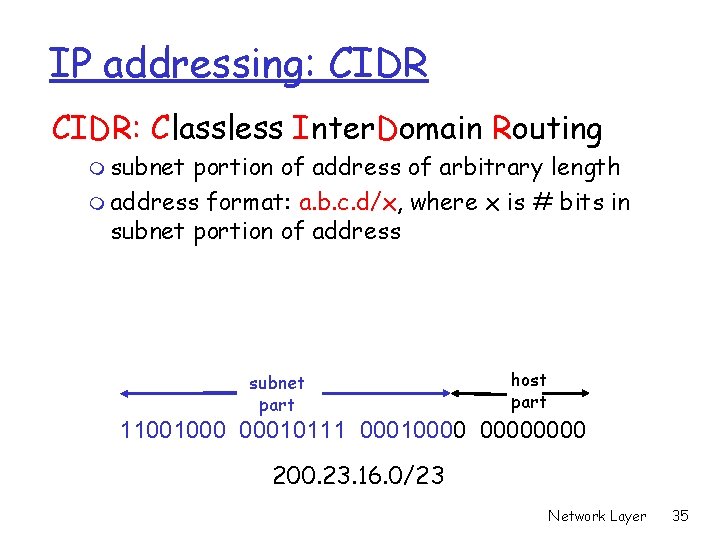
IP addressing: CIDR: Classless Inter. Domain Routing m subnet portion of address of arbitrary length m address format: a. b. c. d/x, where x is # bits in subnet portion of address subnet part host part 11001000 00010111 00010000 200. 23. 16. 0/23 Network Layer 35
IP addresses: how to get one? Q: How does host get IP address? r hard-coded by system admin in a file m Wintel: control-panel->network->configuration>tcp/ip->properties m UNIX: /etc/rc. config r DHCP: Dynamic Host Configuration Protocol: dynamically get address from a server in subnet m “plug-and-play” (more in next chapter) Network Layer 36
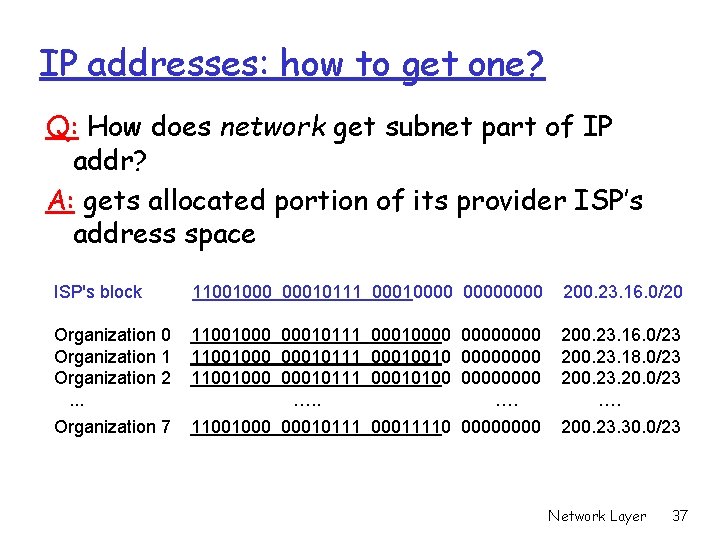
IP addresses: how to get one? Q: How does network get subnet part of IP addr? A: gets allocated portion of its provider ISP’s address space ISP's block 11001000 00010111 00010000 200. 23. 16. 0/20 Organization 1 Organization 2. . . 11001000 00010111 00010000 11001000 00010111 00010010 0000 11001000 00010111 00010100 0000 …. 200. 23. 16. 0/23 200. 23. 18. 0/23 200. 23. 20. 0/23 …. Organization 7 11001000 00010111 00011110 0000 200. 23. 30. 0/23 Network Layer 37
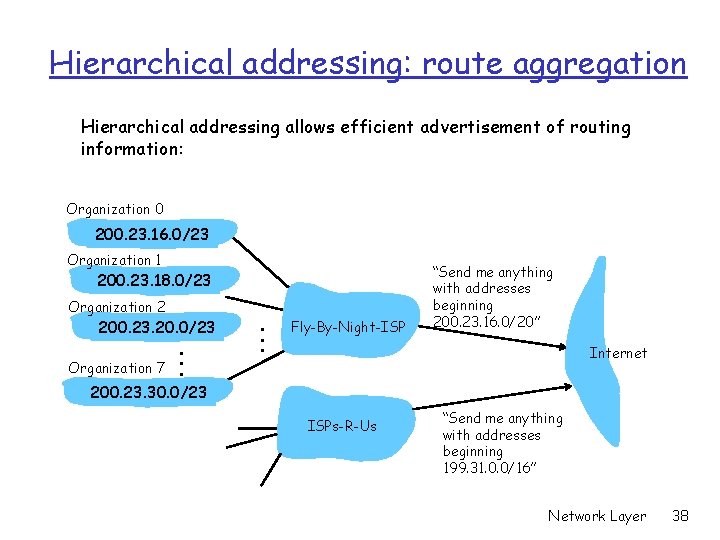
Hierarchical addressing: route aggregation Hierarchical addressing allows efficient advertisement of routing information: Organization 0 200. 23. 16. 0/23 Organization 1 200. 23. 18. 0/23 Organization 2 200. 23. 20. 0/23 Organization 7 . . . Fly-By-Night-ISP “Send me anything with addresses beginning 200. 23. 16. 0/20” Internet 200. 23. 30. 0/23 ISPs-R-Us “Send me anything with addresses beginning 199. 31. 0. 0/16” Network Layer 38
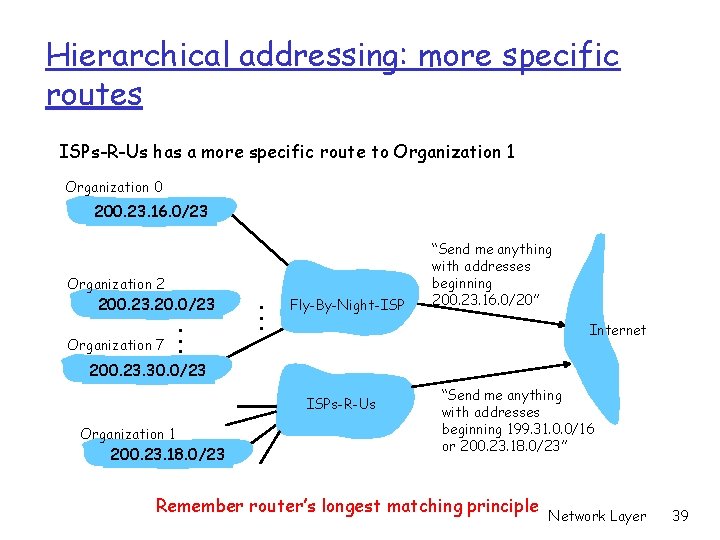
Hierarchical addressing: more specific routes ISPs-R-Us has a more specific route to Organization 1 Organization 0 200. 23. 16. 0/23 Organization 2 200. 23. 20. 0/23 Organization 7 . . . Fly-By-Night-ISP “Send me anything with addresses beginning 200. 23. 16. 0/20” Internet 200. 23. 30. 0/23 ISPs-R-Us Organization 1 200. 23. 18. 0/23 “Send me anything with addresses beginning 199. 31. 0. 0/16 or 200. 23. 18. 0/23” Remember router’s longest matching principle Network Layer 39
IP addressing: the last word. . . Q: How does an ISP get block of addresses? A: ICANN: Internet Corporation for Assigned Names and Numbers m allocates addresses m manages DNS m assigns domain names, resolves disputes r ICANN publishes /8 address allocation r You can use online “IP address locator” to find out where a packet comes from m m http: //www. geobytes. com/Ip. Locator. htm www. ip 2 location. com/free. asp Network Layer 40
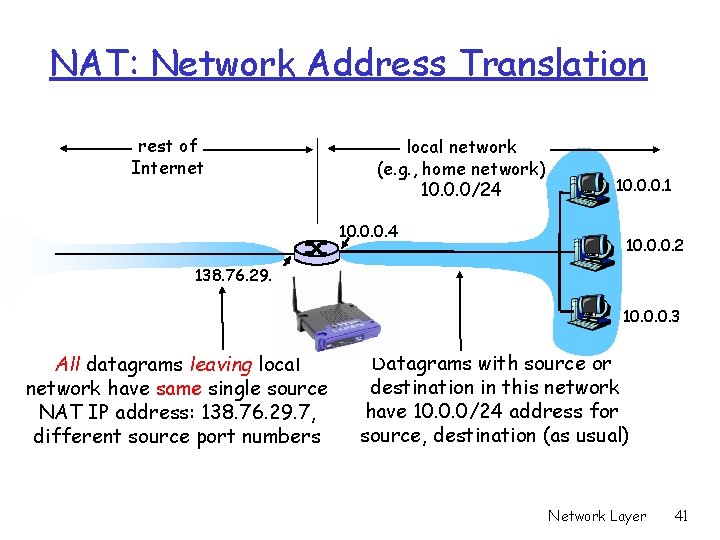
NAT: Network Address Translation rest of Internet local network (e. g. , home network) 10. 0. 0/24 10. 0. 0. 1 10. 0. 0. 2 138. 76. 29. 7 10. 0. 0. 3 All datagrams leaving local network have same single source NAT IP address: 138. 76. 29. 7, different source port numbers Datagrams with source or destination in this network have 10. 0. 0/24 address for source, destination (as usual) Network Layer 41
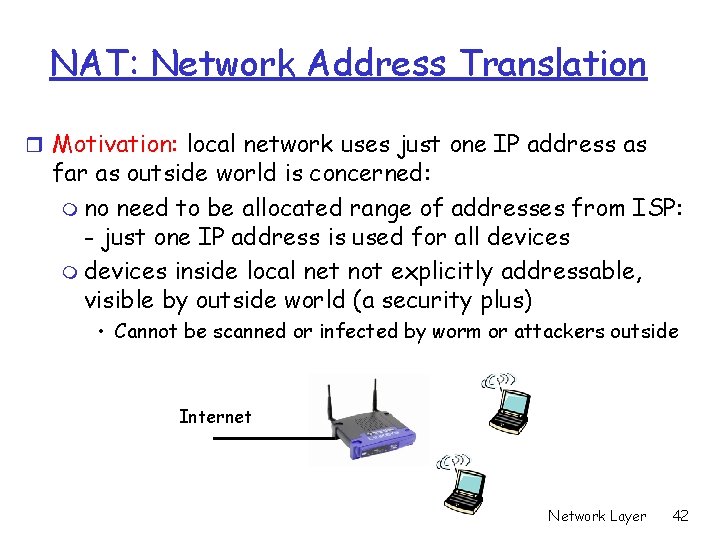
NAT: Network Address Translation r Motivation: local network uses just one IP address as far as outside world is concerned: m no need to be allocated range of addresses from ISP: - just one IP address is used for all devices m devices inside local net not explicitly addressable, visible by outside world (a security plus) • Cannot be scanned or infected by worm or attackers outside Internet Network Layer 42
NAT: Network Address Translation Implementation: NAT router must: m outgoing datagrams: replace (source IP address, port #) of every outgoing datagram to (NAT IP address, new port #). . . remote clients/servers will respond using (NAT IP address, new port #) as destination addr. m remember (in NAT translation table) every (source IP address, port #) to (NAT IP address, new port #) translation pair m incoming datagrams: replace (NAT IP address, new port #) in dest fields of every incoming datagram with corresponding (source IP address, port #) stored in NAT table Network Layer 43
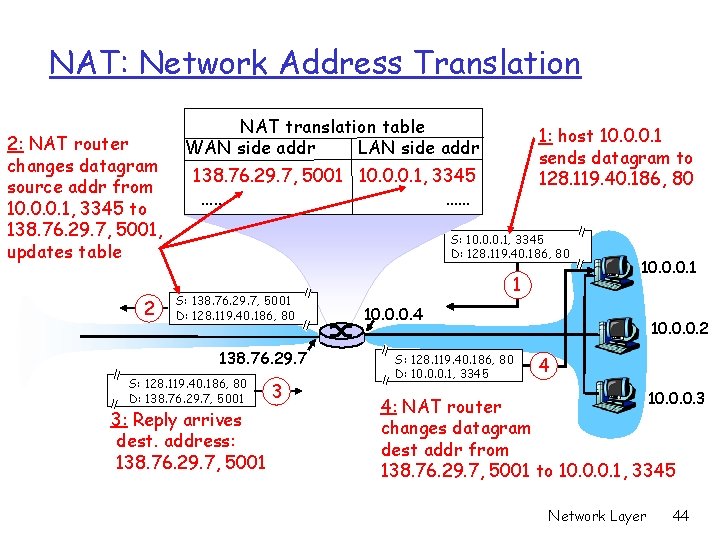
NAT: Network Address Translation 2: NAT router changes datagram source addr from 10. 0. 0. 1, 3345 to 138. 76. 29. 7, 5001, updates table 2 NAT translation table WAN side addr LAN side addr 1: host 10. 0. 0. 1 sends datagram to 128. 119. 40. 186, 80 138. 76. 29. 7, 5001 10. 0. 0. 1, 3345 …… …… S: 10. 0. 0. 1, 3345 D: 128. 119. 40. 186, 80 S: 138. 76. 29. 7, 5001 D: 128. 119. 40. 186, 80 138. 76. 29. 7 S: 128. 119. 40. 186, 80 D: 138. 76. 29. 7, 5001 3: Reply arrives dest. address: 138. 76. 29. 7, 5001 3 1 10. 0. 0. 4 S: 128. 119. 40. 186, 80 D: 10. 0. 0. 1, 3345 10. 0. 0. 2 4 10. 0. 0. 3 4: NAT router changes datagram dest addr from 138. 76. 29. 7, 5001 to 10. 0. 0. 1, 3345 Network Layer 44
NAT: Network Address Translation r 16 -bit port-number field: m 60, 000 simultaneous connections with a single LAN-side address! r NAT is controversial: m violates end-to-end argument • Internal computers not visible to outside • Outside hosts have trouble to request service from local computers, e. g. , P 2 P, video conference, web hosting. m address IPv 6 shortage should instead be solved by Network Layer 45