Short Introduction to Rules David Edwards WW Tech
- Slides: 50
Short Introduction to Rules David Edwards WW Tech Enablement SME for Identity Products, IBM Security
Agenda • Introduction to Rules Why do we need rules? Rules in IGI and the Drools Java engine • Event-based Rules and Queues, IN, OUT, TARGET and INTERNAL queues • Enterprise Connector Mapping Rules • Other Rules Campaign, Hierarchy, Account, Password, Tasks and Jobs, Workflow • Documentation and Other Reference Information • Summary of Rules Concepts Terminology and screens Managing Rules Error Handling, Debugging, Logging and Log Files 2 IBM Security
Rules Topics • This module is one of a series looking at Rules in IGI • The complete set of modules is: D 200 – Introduction to Rules* D 210 – Rules Conventions and Common Practices* D 220 – Rules and Queues for Enhancing Data Flows D 230 – Data Mapping Rules for Enterprise Connector Flows D 240 – Rules for other Operations in IGI D 250 – Scenario-Based Examples * Content for this module taken from these modules • These modules can be found in the “ 300 - IGI Deployment Class (aka Delivery)” folder of https: //ibm. box. com/v/IGI-Enablement-ppts • There is also a Rules Guide at: https: //ibm. box. com/v/IGI-Rules-Guide 3 IBM Security
Why Do We Need Rules?
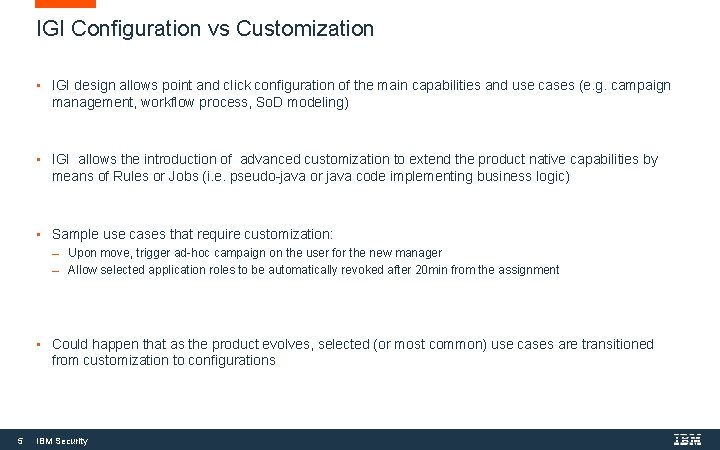
IGI Configuration vs Customization • IGI design allows point and click configuration of the main capabilities and use cases (e. g. campaign management, workflow process, So. D modeling) • IGI allows the introduction of advanced customization to extend the product native capabilities by means of Rules or Jobs (i. e. pseudo-java or java code implementing business logic) • Sample use cases that require customization: Upon move, trigger ad-hoc campaign on the user for the new manager Allow selected application roles to be automatically revoked after 20 min from the assignment • Could happen that as the product evolves, selected (or most common) use cases are transitioned from customization to configurations 5 IBM Security
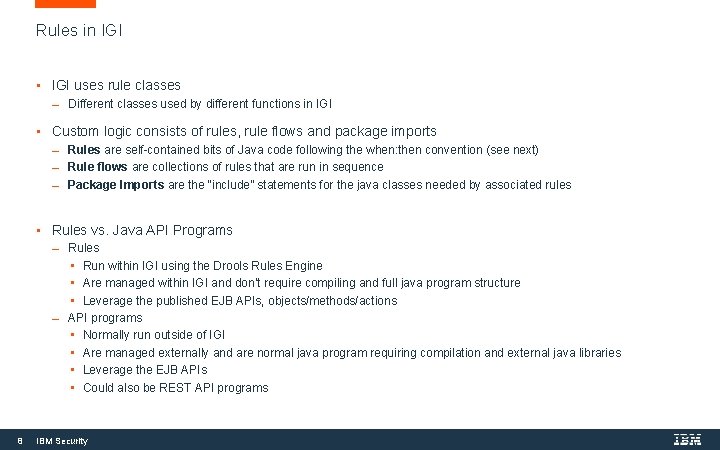
Rules in IGI • IGI uses rule classes Different classes used by different functions in IGI • Custom logic consists of rules, rule flows and package imports Rules are self-contained bits of Java code following the when: then convention (see next) Rule flows are collections of rules that are run in sequence Package Imports are the “include” statements for the java classes needed by associated rules • Rules vs. Java API Programs 8 Rules • Run within IGI using the Drools Rules Engine • Are managed within IGI and don’t require compiling and full java program structure • Leverage the published EJB APIs, objects/methods/actions API programs • Normally run outside of IGI • Are managed externally and are normal java program requiring compilation and external java libraries • Leverage the EJB APIs • Could also be REST API programs IBM Security
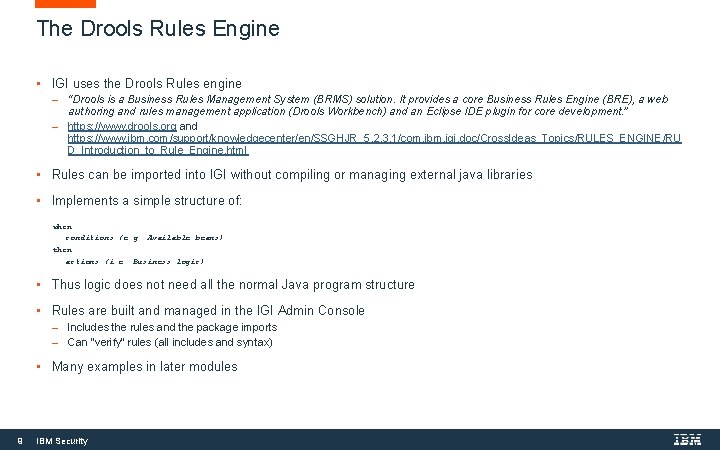
The Drools Rules Engine • IGI uses the Drools Rules engine “Drools is a Business Rules Management System (BRMS) solution. It provides a core Business Rules Engine (BRE), a web authoring and rules management application (Drools Workbench) and an Eclipse IDE plugin for core development. ” https: //www. drools. org and https: //www. ibm. com/support/knowledgecenter/en/SSGHJR_5. 2. 3. 1/com. ibm. igi. doc/Cross. Ideas_Topics/RULES_ENGINE/RU D_Introduction_to_Rule_Engine. html • Rules can be imported into IGI without compiling or managing external java libraries • Implements a simple structure of: when conditions (e. g. Available beans) then actions (i. e. Business logic) • Thus logic does not need all the normal Java program structure • Rules are built and managed in the IGI Admin Console Includes the rules and the package imports Can “verify” rules (all includes and syntax) • Many examples in later modules 9 IBM Security
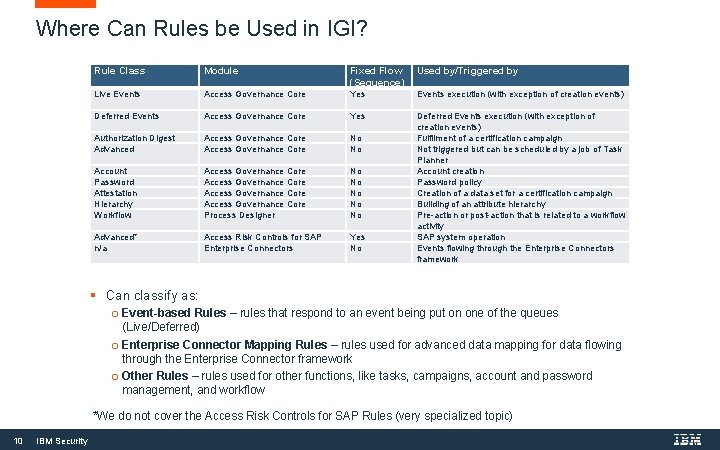
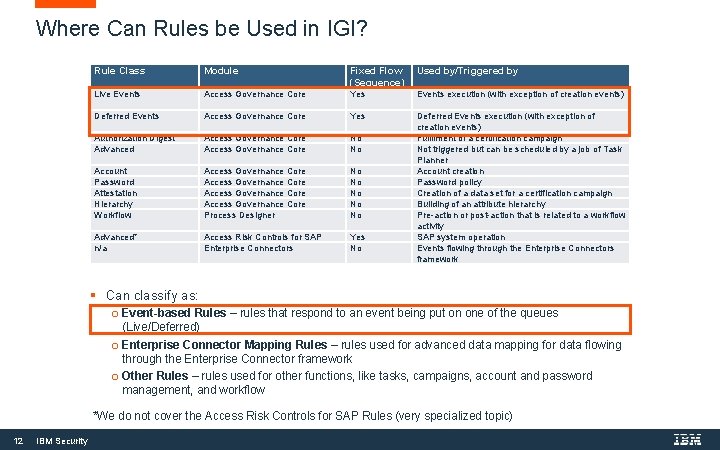
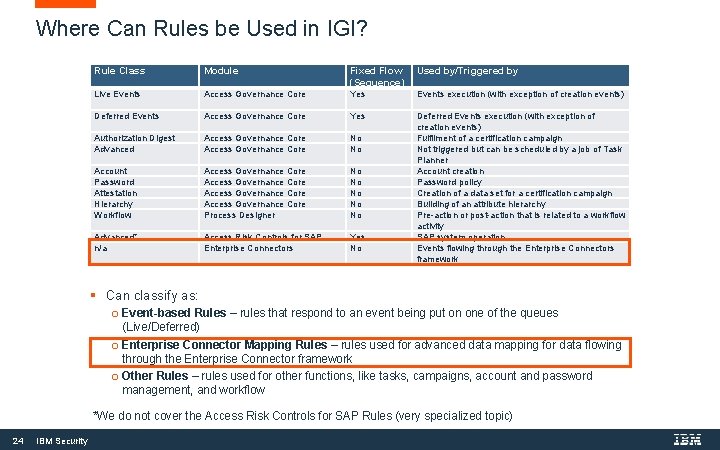
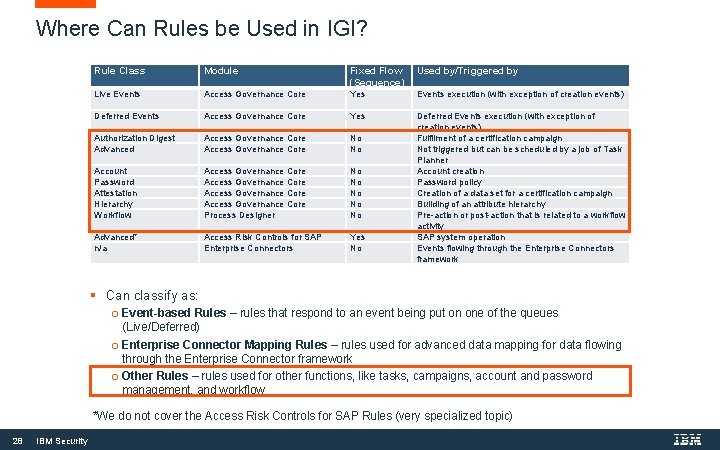
Where Can Rules be Used in IGI? Rule Class Module Fixed Flow (Sequence) Used by/Triggered by Live Events Access Governance Core Yes Events execution (with exception of creation events) Deferred Events Access Governance Core Yes Authorization Digest Advanced Access Governance Core No No Account Password Attestation Hierarchy Workflow Access Governance Core Process Designer No No No Advanced* n/a Access Risk Controls for SAP Enterprise Connectors Yes No Deferred Events execution (with exception of creation events) Fulfilment of a certification campaign Not triggered but can be scheduled by a job of Task Planner Account creation Password policy Creation of a data set for a certification campaign Building of an attribute hierarchy Pre-action or post-action that is related to a workflow activity SAP system operation Events flowing through the Enterprise Connectors framework § Can classify as: o Event-based Rules – rules that respond to an event being put on one of the queues o o (Live/Deferred) Enterprise Connector Mapping Rules – rules used for advanced data mapping for data flowing through the Enterprise Connector framework Other Rules – rules used for other functions, like tasks, campaigns, account and password management, and workflow *We do not cover the Access Risk Controls for SAP Rules (very specialized topic) 10 IBM Security
Event-Driven Rules
Where Can Rules be Used in IGI? Rule Class Module Fixed Flow (Sequence) Used by/Triggered by Live Events Access Governance Core Yes Events execution (with exception of creation events) Deferred Events Access Governance Core Yes Authorization Digest Advanced Access Governance Core No No Account Password Attestation Hierarchy Workflow Access Governance Core Process Designer No No No Advanced* n/a Access Risk Controls for SAP Enterprise Connectors Yes No Deferred Events execution (with exception of creation events) Fulfilment of a certification campaign Not triggered but can be scheduled by a job of Task Planner Account creation Password policy Creation of a data set for a certification campaign Building of an attribute hierarchy Pre-action or post-action that is related to a workflow activity SAP system operation Events flowing through the Enterprise Connectors framework § Can classify as: o Event-based Rules – rules that respond to an event being put on one of the queues o o (Live/Deferred) Enterprise Connector Mapping Rules – rules used for advanced data mapping for data flowing through the Enterprise Connector framework Other Rules – rules used for other functions, like tasks, campaigns, account and password management, and workflow *We do not cover the Access Risk Controls for SAP Rules (very specialized topic) 12 IBM Security
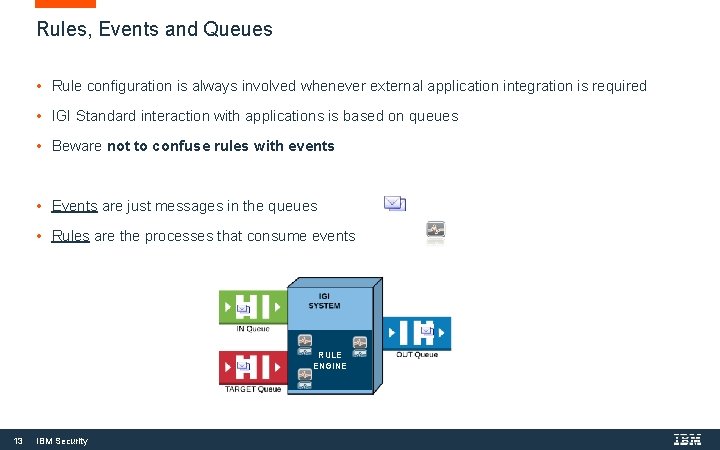
Rules, Events and Queues • Rule configuration is always involved whenever external application integration is required • IGI Standard interaction with applications is based on queues • Beware not to confuse rules with events • Events are just messages in the queues • Rules are the processes that consume events RULE ENGINE 13 IBM Security
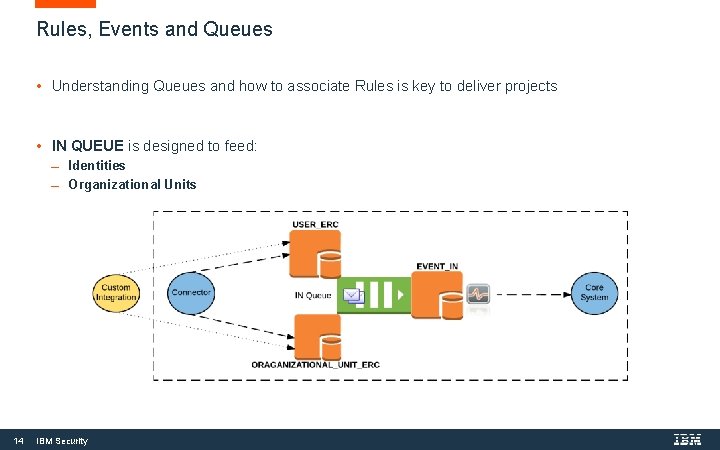
Rules, Events and Queues • Understanding Queues and how to associate Rules is key to deliver projects • IN QUEUE is designed to feed: Identities Organizational Units 14 IBM Security
Input Events and the IN Queue • Input events are for changes flowing from a HR system (or other source of truth) Perhaps some external HR Feed mechanism Or one of the Identity Adapters (like SAP, People. Soft adapters or CSV connector) • Is for Users (people) and OUs (organizational units) • Events include: Create/Modify/Delete/Move User Create/Modify/Remove Org Unit • Example of Rules uses for Input Events 15 Set random password for Ideas Account for New User Set a new user into the role of Department Manager if they are flagged as a manager A user move (e. g. new department) triggers an access review IBM Security
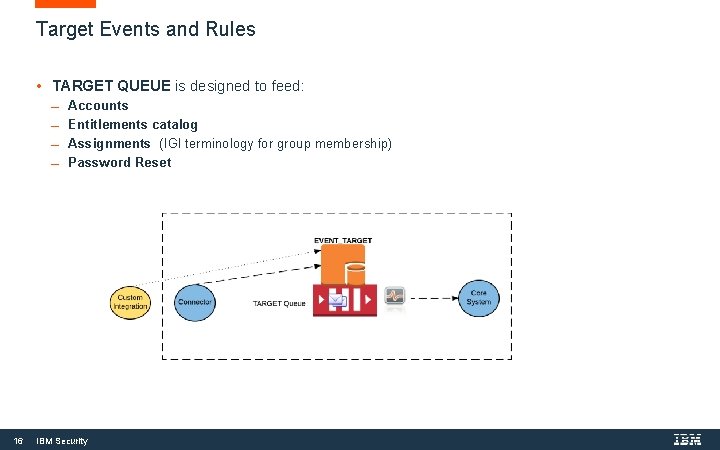
Target Events and Rules • TARGET QUEUE is designed to feed: Accounts Entitlements catalog Assignments (IGI terminology for group membership) Password Reset 16 IBM Security
Target Events and the TARGET Queue • Target events are for changes flowing from a target system (or other source of truth) Would normally be from a reconciliation from target Involves Identity Brokerage Adapters (“adapters”) or Enterprise Connectors (“connectors”) May also be some custom mechanism talking to the IGI Target queue • Is for Accounts (target system accounts), sometimes referred to (confusingly) as “Users” Permission (account mapping to target system permission/access right) Right (normally a scoping on an account-permission mapping), and Role (target system permissions) • Events include: Create/Modify/Remove/Enable/Disable/Password Change/Remove Account Add/Remove Permission (assignment) Add/Remove Right Create/Remove Role, and Role Add/Remove Child • Example of Rules uses for Target Events 17 For new account on target, run a set of rules to find the user this account belongs to (e. g. search users by account id, email address and name) New permission assignment found on a target system is reviewed by manager through a continuous campaign IBM Security
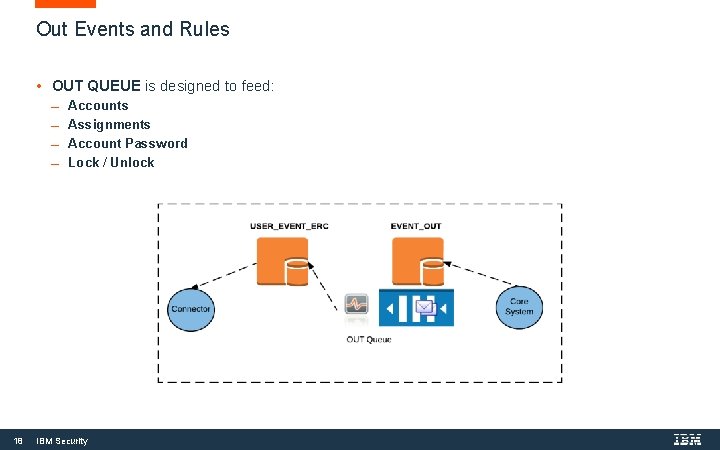
R u l e s C o n c e p t 18 Out Events and Rules • OUT QUEUE is designed to feed: Accounts Assignments Account Password Lock / Unlock IBM Security
Out Events and the OUT Queue • Out events are for changes flowing to a target system (or other source of truth) Would normally be from an access or account change in IGI Involves Identity Brokerage Adapters (“adapters”) or Enterprise Connectors (“connectors”) May also be some custom mechanism talking to the IGI Out queue • Is for Accounts (target system accounts), sometimes referred to (confusingly) as “Users” Permission (account mapping to target system permission/access right) Right (normally a scoping on an account-permission mapping), and some lesser used objects (delegations, resources, user roles) • Events include: Create/Modify/Remove/Enable/Disable/Password Change/Remove Account Add/Remove Permission (assignment) Add/Remove Right • Example of Rules uses for Out Events 19 Could be used for account attribute mapping/management – but normally this is done in the Enterprise Connector mapping rules New permission added to a user requires special approval (outside of the normal workflow associated with an access request) IBM Security
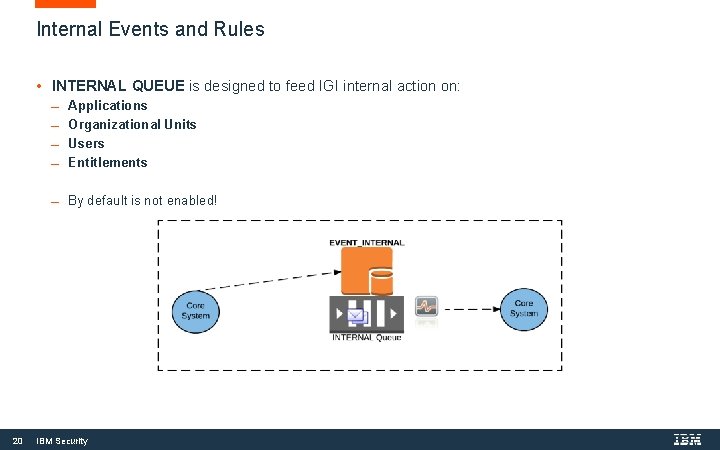
R u l e s C o n c e p t Internal Events and Rules • INTERNAL QUEUE is designed to feed IGI internal action on: Applications Organizational Units Users Entitlements By default is not enabled! 20 IBM Security
Internal Out Events and the INTERNAL Queue • Internal events are for changes flowing within IGI Would normally be from an access or account change in IGI • Is for Applications – changes to application definitions in IGI Entitlements – changes to roles (business and IT roles) Org Units – changes to the internal org structure Users – changes to users internally • Events include: Create/Modify/Delete Application Create/Modify/Delete Entitlement Create/Modify/Delete Org Unit Create/Modify/Delete User • Example of Rules uses for Internal Events 21 New department is created in IGI, need to assign users to the Department Manager role for the new department IBM Security
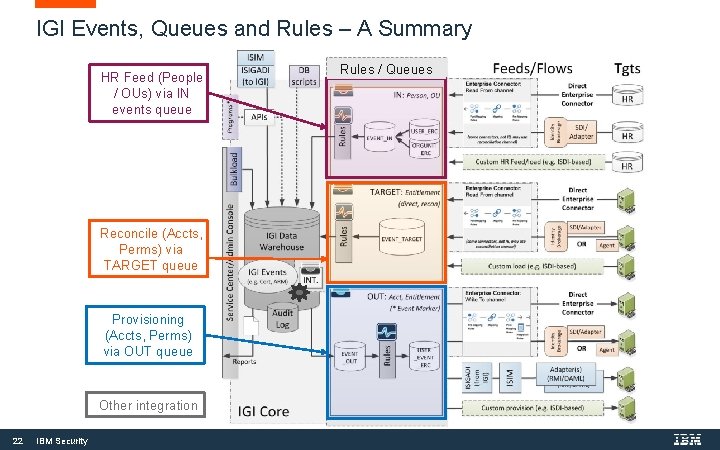
IGI Events, Queues and Rules – A Summary HR Feed (People / OUs) via IN events queue Reconcile (Accts, Perms) via TARGET queue Provisioning (Accts, Perms) via OUT queue Other integration 22 IBM Security Rules / Queues
ENTERPRISE CONNECTOR FRAMEWORK Data Mapping Rules
Where Can Rules be Used in IGI? Rule Class Module Fixed Flow (Sequence) Used by/Triggered by Live Events Access Governance Core Yes Events execution (with exception of creation events) Deferred Events Access Governance Core Yes Authorization Digest Advanced Access Governance Core No No Account Password Attestation Hierarchy Workflow Access Governance Core Process Designer No No No Advanced* n/a Access Risk Controls for SAP Enterprise Connectors Yes No Deferred Events execution (with exception of creation events) Fulfilment of a certification campaign Not triggered but can be scheduled by a job of Task Planner Account creation Password policy Creation of a data set for a certification campaign Building of an attribute hierarchy Pre-action or post-action that is related to a workflow activity SAP system operation Events flowing through the Enterprise Connectors framework § Can classify as: o Event-based Rules – rules that respond to an event being put on one of the queues o o (Live/Deferred) Enterprise Connector Mapping Rules – rules used for advanced data mapping for data flowing through the Enterprise Connector framework Other Rules – rules used for other functions, like tasks, campaigns, account and password management, and workflow *We do not cover the Access Risk Controls for SAP Rules (very specialized topic) 24 IBM Security
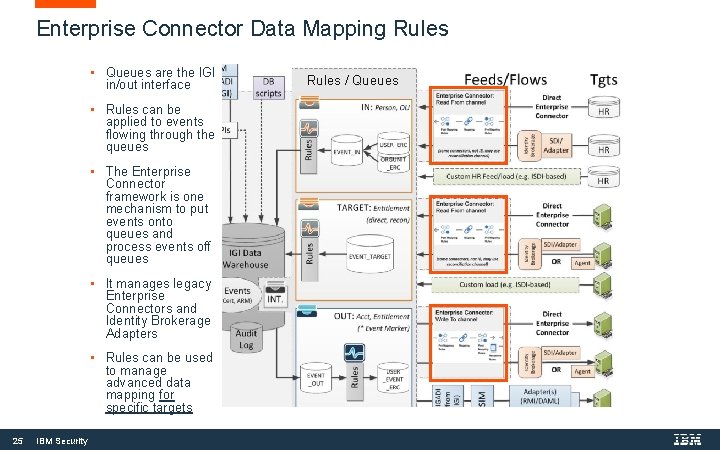
Enterprise Connector Data Mapping Rules • Queues are the IGI in/out interface • Rules can be applied to events flowing through the queues • The Enterprise Connector framework is one mechanism to put events onto queues and process events off queues • It manages legacy Enterprise Connectors and Identity Brokerage Adapters • Rules can be used to manage advanced data mapping for specific targets 25 IBM Security Rules / Queues
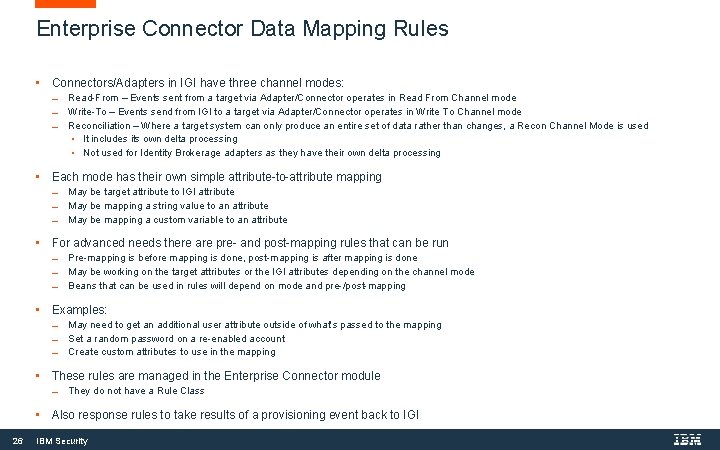
Enterprise Connector Data Mapping Rules • Connectors/Adapters in IGI have three channel modes: Read-From – Events sent from a target via Adapter/Connector operates in Read From Channel mode Write-To – Events send from IGI to a target via Adapter/Connector operates in Write To Channel mode Reconciliation – Where a target system can only produce an entire set of data rather than changes, a Recon Channel Mode is used • It includes its own delta processing • Not used for Identity Brokerage adapters as they have their own delta processing • Each mode has their own simple attribute-to-attribute mapping May be target attribute to IGI attribute May be mapping a string value to an attribute May be mapping a custom variable to an attribute • For advanced needs there are pre- and post-mapping rules that can be run Pre-mapping is before mapping is done, post-mapping is after mapping is done May be working on the target attributes or the IGI attributes depending on the channel mode Beans that can be used in rules will depend on mode and pre-/post-mapping • Examples: May need to get an additional user attribute outside of what’s passed to the mapping Set a random password on a re-enabled account Create custom attributes to use in the mapping • These rules are managed in the Enterprise Connector module They do not have a Rule Class • Also response rules to take results of a provisioning event back to IGI 26 IBM Security
LEVERAGING RULES FOR ACCESS GOVERNANCE CORE AND ACCESS REQUEST MANAGEMENT Other Rules
Where Can Rules be Used in IGI? Rule Class Module Fixed Flow (Sequence) Used by/Triggered by Live Events Access Governance Core Yes Events execution (with exception of creation events) Deferred Events Access Governance Core Yes Authorization Digest Advanced Access Governance Core No No Account Password Attestation Hierarchy Workflow Access Governance Core Process Designer No No No Advanced* n/a Access Risk Controls for SAP Enterprise Connectors Yes No Deferred Events execution (with exception of creation events) Fulfilment of a certification campaign Not triggered but can be scheduled by a job of Task Planner Account creation Password policy Creation of a data set for a certification campaign Building of an attribute hierarchy Pre-action or post-action that is related to a workflow activity SAP system operation Events flowing through the Enterprise Connectors framework § Can classify as: o Event-based Rules – rules that respond to an event being put on one of the queues o o (Live/Deferred) Enterprise Connector Mapping Rules – rules used for advanced data mapping for data flowing through the Enterprise Connector framework Other Rules – rules used for other functions, like tasks, campaigns, account and password management, and workflow *We do not cover the Access Risk Controls for SAP Rules (very specialized topic) 28 IBM Security
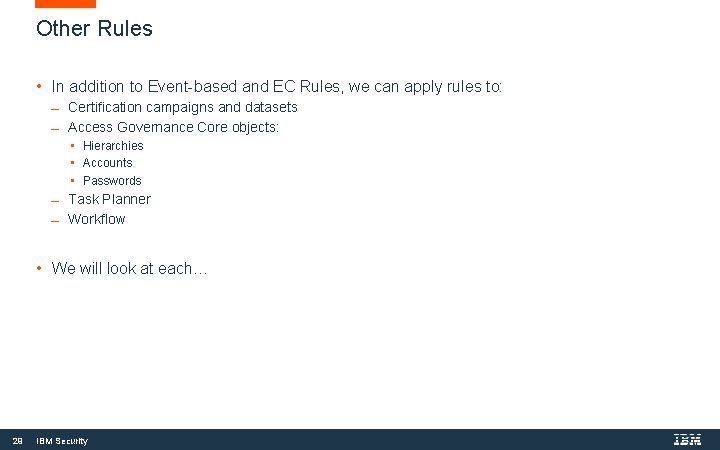
Other Rules • In addition to Event-based and EC Rules, we can apply rules to: Certification campaigns and datasets Access Governance Core objects: • Hierarchies • Accounts • Passwords Task Planner Workflow • We will look at each… 29 IBM Security
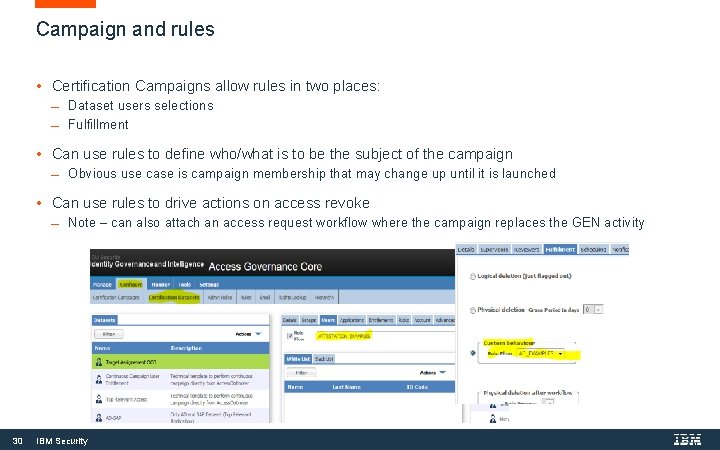
R u l e s C o n c e p t Campaign and rules • Certification Campaigns allow rules in two places: Dataset users selections Fulfillment • Can use rules to define who/what is to be the subject of the campaign Obvious use case is campaign membership that may change up until it is launched • Can use rules to drive actions on access revoke Note – can also attach an access request workflow where the campaign replaces the GEN activity 30 IBM Security
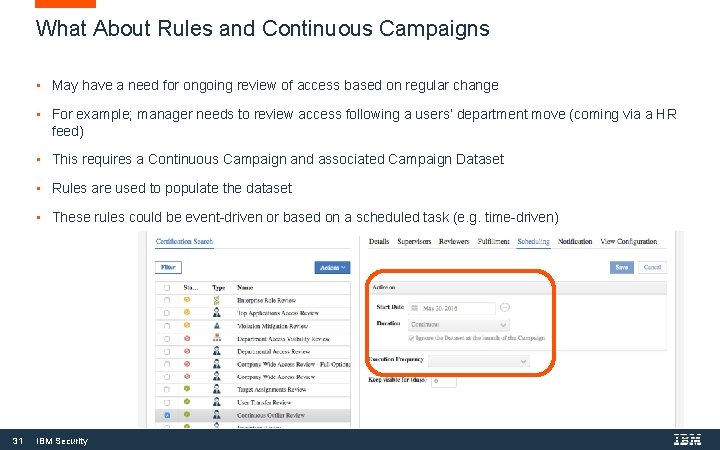
What About Rules and Continuous Campaigns • May have a need for ongoing review of access based on regular change • For example; manager needs to review access following a users’ department move (coming via a HR feed) • This requires a Continuous Campaign and associated Campaign Dataset • Rules are used to populate the dataset • These rules could be event-driven or based on a scheduled task (e. g. time-driven) 31 IBM Security
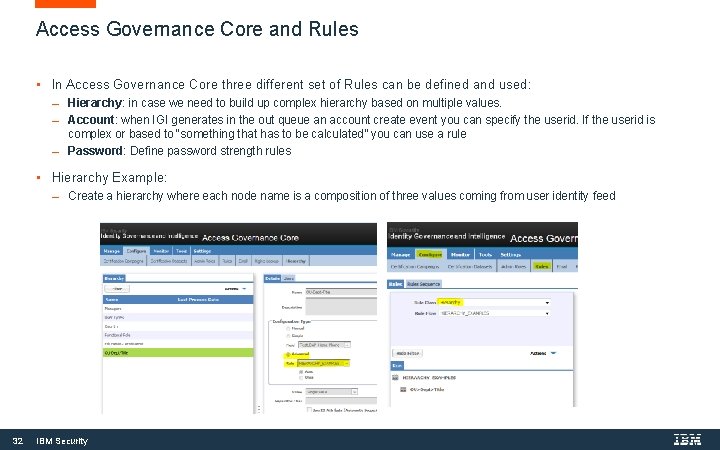
R u l e s C o n c e p t Access Governance Core and Rules • In Access Governance Core three different set of Rules can be defined and used: Hierarchy: in case we need to build up complex hierarchy based on multiple values. Account: when IGI generates in the out queue an account create event you can specify the userid. If the userid is complex or based to “something that has to be calculated” you can use a rule Password: Define password strength rules • Hierarchy Example: 32 Create a hierarchy where each node name is a composition of three values coming from user identity feed IBM Security
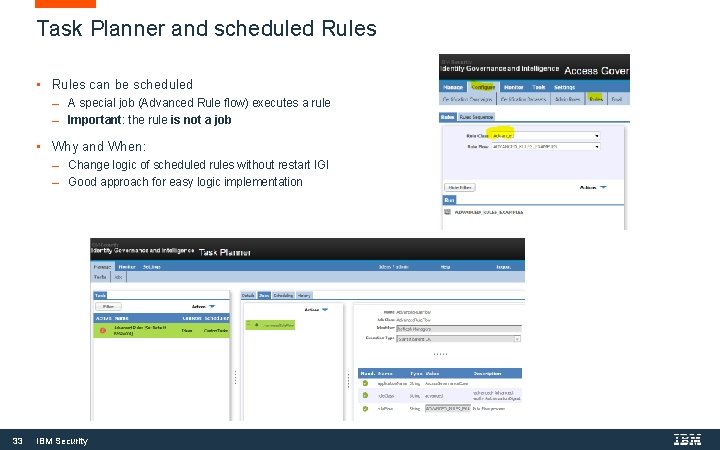
R u l e s C o n c e p t Task Planner and scheduled Rules • Rules can be scheduled A special job (Advanced Rule flow) executes a rule Important: the rule is not a job • Why and When: 33 Change logic of scheduled rules without restart IGI Good approach for easy logic implementation IBM Security
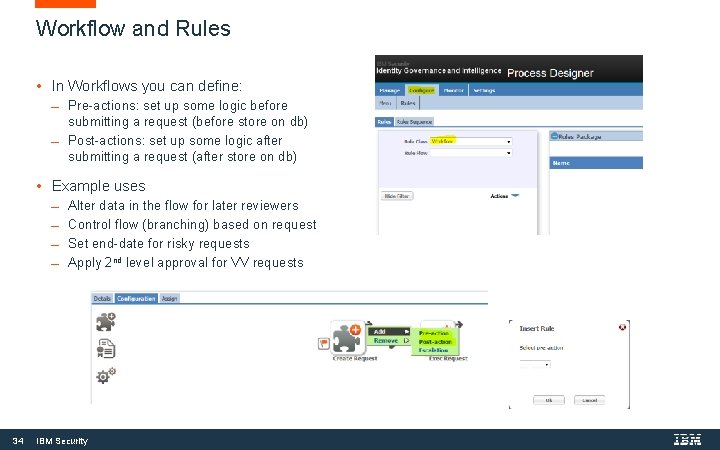
R u l e s C o n c e p t Workflow and Rules • In Workflows you can define: Pre-actions: set up some logic before submitting a request (before store on db) Post-actions: set up some logic after submitting a request (after store on db) • Example uses Alter data in the flow for later reviewers Control flow (branching) based on request Set end-date for risky requests Apply 2 nd level approval for VV requests 34 IBM Security
Reference Information
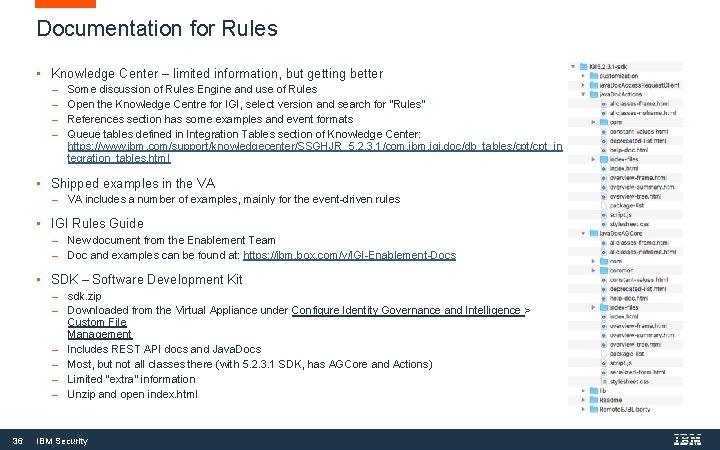
Documentation for Rules • Knowledge Center – limited information, but getting better Some discussion of Rules Engine and use of Rules Open the Knowledge Centre for IGI, select version and search for “Rules” References section has some examples and event formats Queue tables defined in Integration Tables section of Knowledge Center: https: //www. ibm. com/support/knowledgecenter/SSGHJR_5. 2. 3. 1/com. ibm. igi. doc/db_tables/cpt_in tegration_tables. html • Shipped examples in the VA includes a number of examples, mainly for the event-driven rules • IGI Rules Guide New document from the Enablement Team Doc and examples can be found at: https: //ibm. box. com/v/IGI-Enablement-Docs • SDK – Software Development Kit 36 sdk. zip Downloaded from the Virtual Appliance under Configure Identity Governance and Intelligence > Custom File Management Includes REST API docs and Java. Docs Most, but not all classes there (with 5. 2. 3. 1 SDK, has AGCore and Actions) Limited “extra” information Unzip and open index. html IBM Security
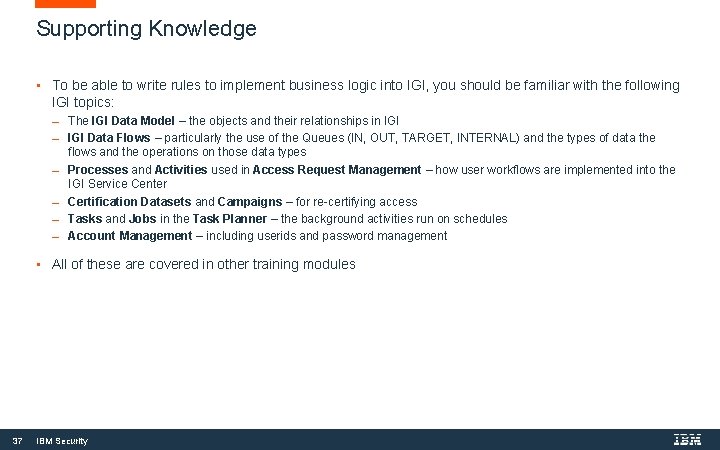
Supporting Knowledge • To be able to write rules to implement business logic into IGI, you should be familiar with the following IGI topics: The IGI Data Model – the objects and their relationships in IGI Data Flows – particularly the use of the Queues (IN, OUT, TARGET, INTERNAL) and the types of data the flows and the operations on those data types Processes and Activities used in Access Request Management – how user workflows are implemented into the IGI Service Center Certification Datasets and Campaigns – for re-certifying access Tasks and Jobs in the Task Planner – the background activities run on schedules Account Management – including userids and password management • All of these are covered in other training modules 37 IBM Security
A Summary of Rules Concepts
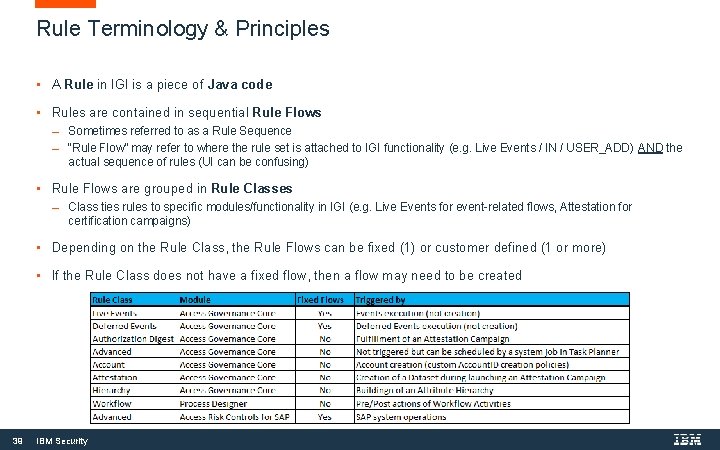
Rule Terminology & Principles • A Rule in IGI is a piece of Java code • Rules are contained in sequential Rule Flows Sometimes referred to as a Rule Sequence “Rule Flow” may refer to where the rule set is attached to IGI functionality (e. g. Live Events / IN / USER_ADD) AND the actual sequence of rules (UI can be confusing) • Rule Flows are grouped in Rule Classes Class ties rules to specific modules/functionality in IGI (e. g. Live Events for event-related flows, Attestation for certification campaigns) • Depending on the Rule Class, the Rule Flows can be fixed (1) or customer defined (1 or more) • If the Rule Class does not have a fixed flow, then a flow may need to be created 39 IBM Security
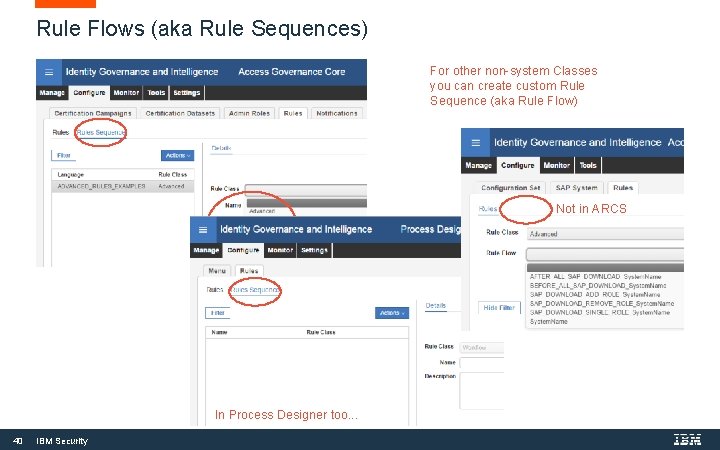
Rule Flows (aka Rule Sequences) For other non-system Classes you can create custom Rule Sequence (aka Rule Flow) Not in ARCS In Process Designer too. . . 40 IBM Security
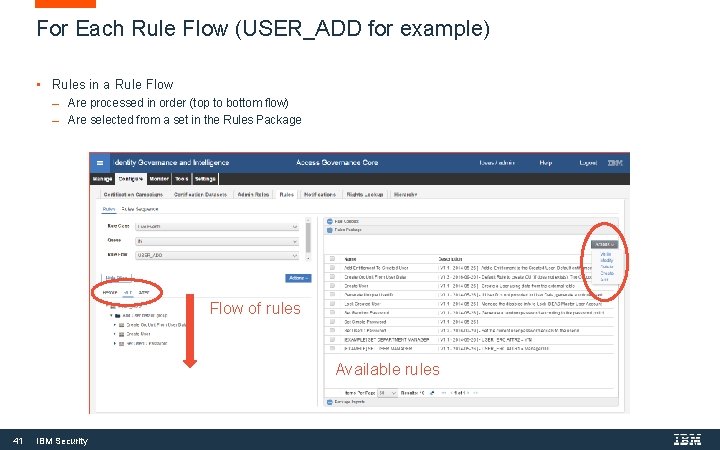
For Each Rule Flow (USER_ADD for example) • Rules in a Rule Flow Are processed in order (top to bottom flow) Are selected from a set in the Rules Package Flow of rules Available rules 41 IBM Security
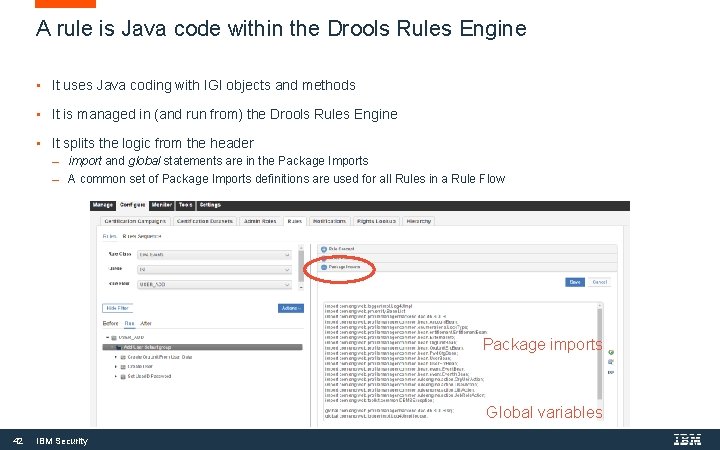
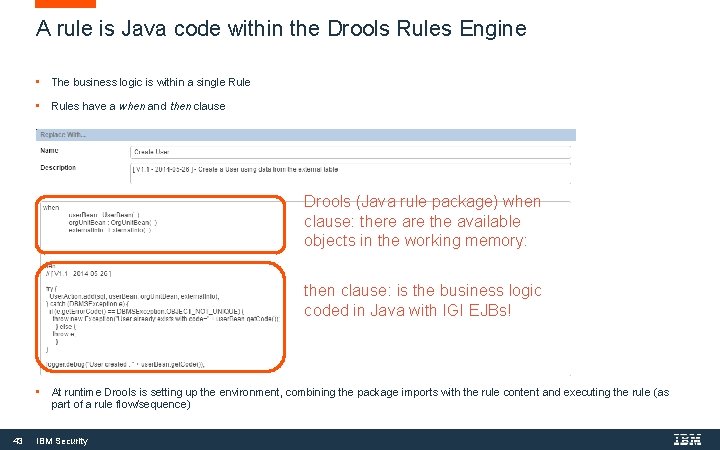
A rule is Java code within the Drools Rules Engine • It uses Java coding with IGI objects and methods • It is managed in (and run from) the Drools Rules Engine • It splits the logic from the header import and global statements are in the Package Imports A common set of Package Imports definitions are used for all Rules in a Rule Flow Package imports Global variables 42 IBM Security
A rule is Java code within the Drools Rules Engine • The business logic is within a single Rule • Rules have a when and then clause Drools (Java rule package) when clause: there are the available objects in the working memory: then clause: is the business logic coded in Java with IGI EJBs! • 43 At runtime Drools is setting up the environment, combining the package imports with the rule content and executing the rule (as part of a rule flow/sequence) IBM Security
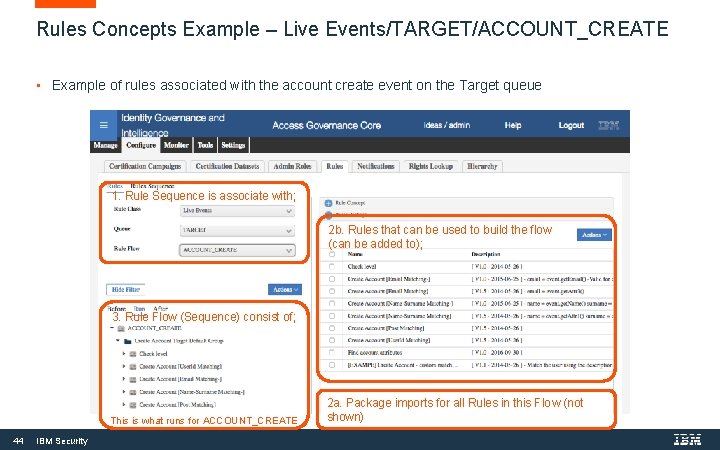
Rules Concepts Example – Live Events/TARGET/ACCOUNT_CREATE • Example of rules associated with the account create event on the Target queue 1. Rule Sequence is associate with; 2 b. Rules that can be used to build the flow (can be added to); 3. Rule Flow (Sequence) consist of; This is what runs for ACCOUNT_CREATE 44 IBM Security 2 a. Package imports for all Rules in this Flow (not shown)
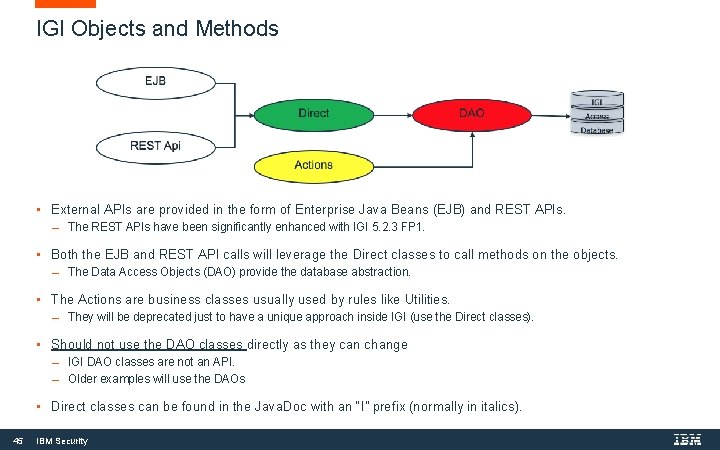
IGI Objects and Methods • External APIs are provided in the form of Enterprise Java Beans (EJB) and REST APIs. The REST APIs have been significantly enhanced with IGI 5. 2. 3 FP 1. • Both the EJB and REST API calls will leverage the Direct classes to call methods on the objects. The Data Access Objects (DAO) provide the database abstraction. • The Actions are business classes usually used by rules like Utilities. They will be deprecated just to have a unique approach inside IGI (use the Direct classes). • Should not use the DAO classes directly as they can change IGI DAO classes are not an API. Older examples will use the DAOs • Direct classes can be found in the Java. Doc with an “I” prefix (normally in italics). 45 IBM Security
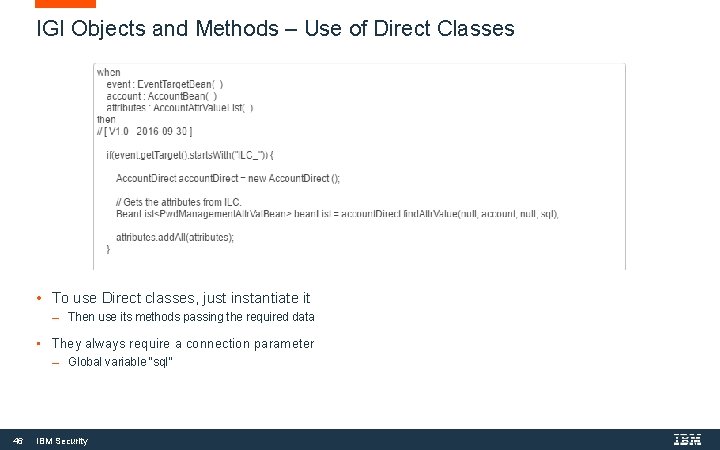
IGI Objects and Methods – Use of Direct Classes • To use Direct classes, just instantiate it Then use its methods passing the required data • They always require a connection parameter 46 Global variable “sql” IBM Security
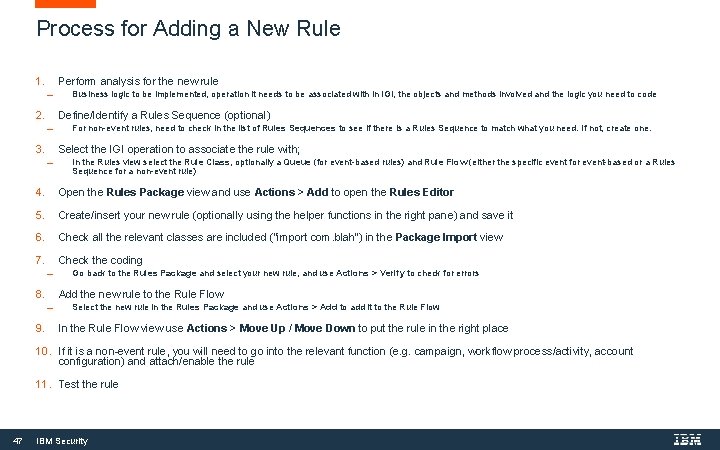
Process for Adding a New Rule 1. Perform analysis for the new rule 2. Business logic to be implemented, operation it needs to be associated with in IGI, the objects and methods involved and the logic you need to code Define/Identify a Rules Sequence (optional) 3. For non-event rules, need to check in the list of Rules Sequences to see if there is a Rules Sequence to match what you need. If not, create one. Select the IGI operation to associate the rule with; In the Rules view select the Rule Class, optionally a Queue (for event-based rules) and Rule Flow (either the specific event for event-based or a Rules Sequence for a non-event rule) 4. Open the Rules Package view and use Actions > Add to open the Rules Editor 5. Create/insert your new rule (optionally using the helper functions in the right pane) and save it 6. Check all the relevant classes are included (“import com. blah”) in the Package Import view 7. Check the coding 8. Go back to the Rules Package and select your new rule, and use Actions > Verify to check for errors Add the new rule to the Rule Flow 9. Select the new rule in the Rules Package and use Actions > Add to add it to the Rule Flow In the Rule Flow view use Actions > Move Up / Move Down to put the rule in the right place 10. If it is a non-event rule, you will need to go into the relevant function (e. g. campaign, workflow process/activity, account configuration) and attach/enable the rule 11. Test the rule 47 IBM Security
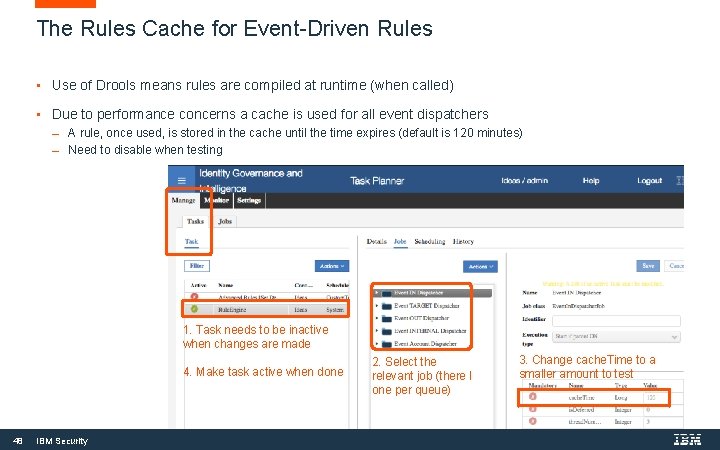
The Rules Cache for Event-Driven Rules • Use of Drools means rules are compiled at runtime (when called) • Due to performance concerns a cache is used for all event dispatchers A rule, once used, is stored in the cache until the time expires (default is 120 minutes) Need to disable when testing 1. Task needs to be inactive when changes are made 4. Make task active when done 48 IBM Security 2. Select the relevant job (there I one per queue) 3. Change cache. Time to a smaller amount to test
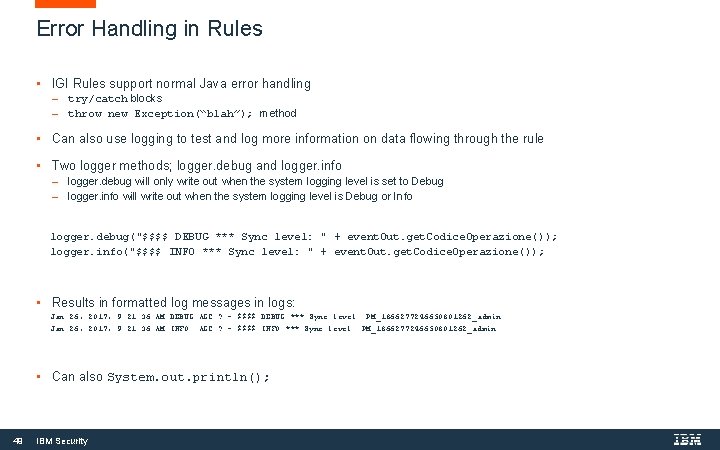
Error Handling in Rules • IGI Rules support normal Java error handling try/catch blocks throw new Exception(“blah”); method • Can also use logging to test and log more information on data flowing through the rule • Two logger methods; logger. debug and logger. info logger. debug will only write out when the system logging level is set to Debug logger. info will write out when the system logging level is Debug or Info logger. debug("$$$$ DEBUG *** Sync level: " + event. Out. get. Codice. Operazione()); logger. info("$$$$ INFO *** Sync level: " + event. Out. get. Codice. Operazione()); • Results in formatted log messages in logs: Jan 26, 2017, 9: 21: 36 AM DEBUG AGC: ? - $$$$ DEBUG *** Sync level: PM_1866277246650801262_admin Jan 26, 2017, 9: 21: 36 AM INFO AGC: ? - $$$$ INFO *** Sync level: PM_1866277246650801262_admin • Can also System. out. println(); 49 IBM Security
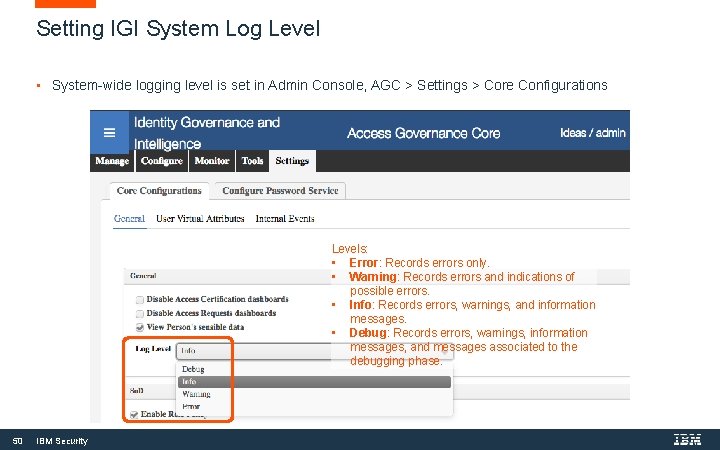
Setting IGI System Log Level • System-wide logging level is set in Admin Console, AGC > Settings > Core Configurations Levels: • Error: Records errors only. • Warning: Records errors and indications of possible errors. • Info: Records errors, warnings, and information messages. • Debug: Records errors, warnings, information messages, and messages associated to the debugging phase. 50 IBM Security
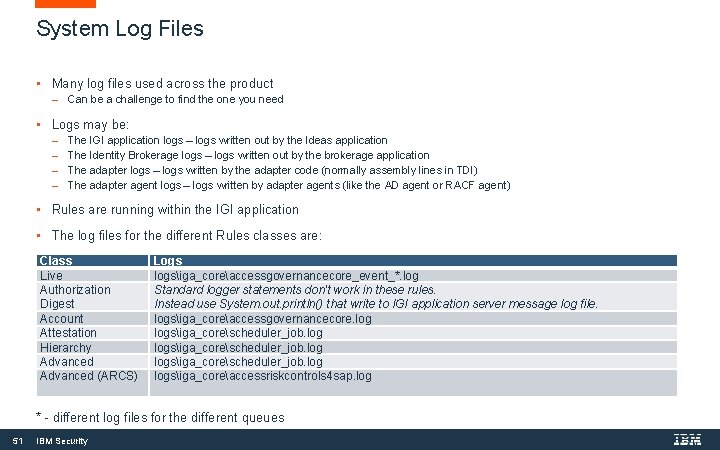
System Log Files • Many log files used across the product Can be a challenge to find the one you need • Logs may be: The IGI application logs – logs written out by the Ideas application The Identity Brokerage logs – logs written out by the brokerage application The adapter logs – logs written by the adapter code (normally assembly lines in TDI) The adapter agent logs – logs written by adapter agents (like the AD agent or RACF agent) • Rules are running within the IGI application • The log files for the different Rules classes are: Class Live Authorization Digest Account Attestation Hierarchy Advanced (ARCS) Logs logsiga_coreaccessgovernancecore_event_*. log Standard logger statements don't work in these rules. Instead use System. out. println() that write to IGI application server message log file. logsiga_coreaccessgovernancecore. log logsiga_corescheduler_job. logsiga_coreaccessriskcontrols 4 sap. log * - different log files for the different queues 51 IBM Security
THANK YOU FOLLOW US ON: ibm. com/securityintelligence. com xforce. ibmcloud. com @ibmsecurity youtube/user/ibmsecuritysolutions © Copyright IBM Corporation 2016. All rights reserved. The information contained in these materials is provided for informational purposes only, and is provided AS IS without warranty of any kind, express or implied. IBM shall not be responsible for any damages arising out of the use of, or otherwise related to, these materials. Nothing contained in these materials is intended to, nor shall have the effect of, creating any warranties or representations from IBM or its suppliers or licensors, or altering the terms and conditions of the applicable license agreement governing the use of IBM software. References in these materials to IBM products, programs, or services do not imply that they will be available in all countries in which IBM operates. Product release dates and / or capabilities referenced in these materials may change at any time at IBM’s sole discretion based on market opportunities or other factors, and are not intended to be a commitment to future product or feature availability in any way. IBM, the IBM logo, and other IBM products and services are trademarks of the International Business Machines Corporation, in the United States, other countries or both. Other company, product, or service names may be trademarks or service marks of others. Statement of Good Security Practices: IT system security involves protecting systems and information through prevention, detection and response to improper access from within and outside your enterprise. Improper access can result in information being altered, destroyed, misappropriated or misused or can result in damage to or misuse of your systems, including for use in attacks on others. No IT system or product should be considered completely secure and no single product, service or security measure can be completely effective in preventing improper use or access. IBM systems, products and services are designed to be part of a lawful, comprehensive security approach, which will necessarily involve additional operational procedures, and may require other systems, products or services to be most effective. IBM DOES NOT WARRANT THAT ANYSYSTEMS, PRODUCTS OR SERVICES ARE IMMUNE FROM, OR WILL MAKE YOUR ENTERPRISE IMMUNE FROM, THE MALICIOUS OR ILLEGAL CONDUCT OF ANY PARTY.