Scopus Elsevier Advanced Course Module 8 03 March
- Slides: 32
Scopus - Elsevier (Advanced Course Module 8) 03 March 2018 This work is licensed under a Creative Commons Attribution 4. 0 International License
Table of Contents • • Background of Scopus (Elsevier) Using Scopus • Search Page • Results/Refine Search Pages • Download, PDF, Export, Print and Email options • Advanced Search • Other options: Affiliation & Author Search 03 March 2018
Scopus (Elsevier) Coverage • Scopus is a large abstract and citation database of peer-reviewed literature with smart tools that track, analyze and visualize research • Contains 21, 500 journals (4, 200 full open access) & 113, 000 books from 500 publishers plus more than 49 million records – 78% with abstracts; over 5. 3 million conference papers; coverage back to 2003 • Some of the journal titles and full-text articles are available from Hinari; return to the Journal collections A -Z list. • Most of the conference papers will be available directly from Scopus. 03 March 2018
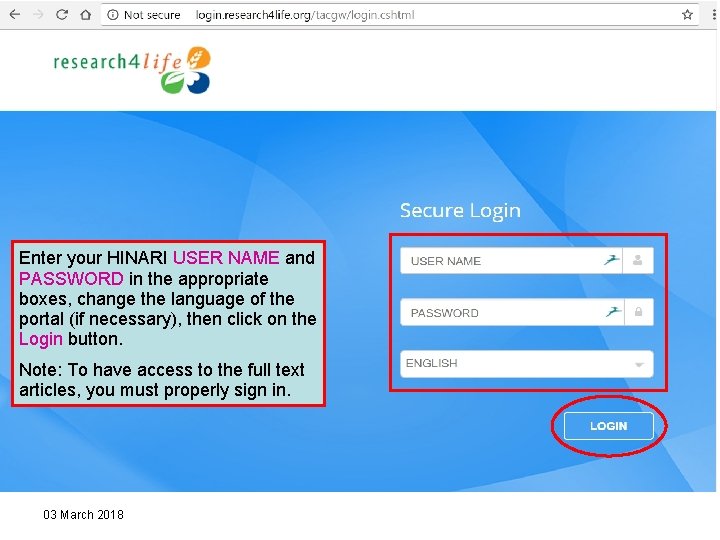
Enter your HINARI USER NAME and PASSWORD in the appropriate boxes, change the language of the portal (if necessary), then click on the Login button. Note: To have access to the full text articles, you must properly sign in. 03 March 2018
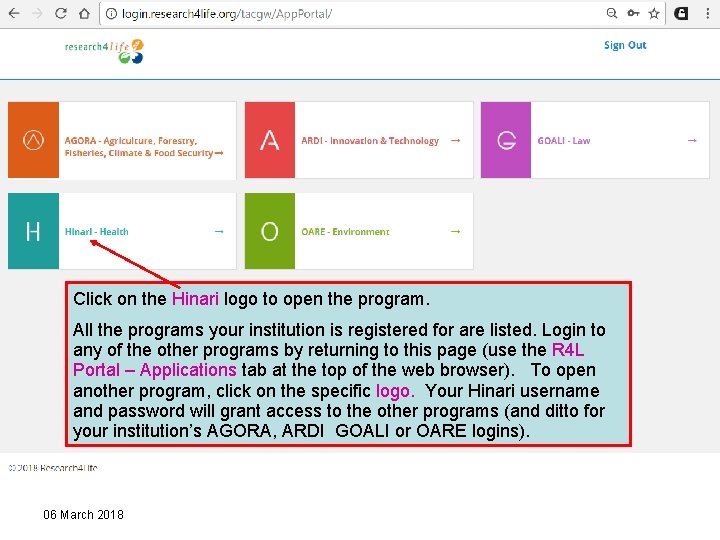
Click on the Hinari logo to open the program. All the programs your institution is registered for are listed. Login to any of the other programs by returning to this page (use the R 4 L Portal – Applications tab at the top of the web browser). To open another program, click on the specific logo. Your Hinari username and password will grant access to the other programs (and ditto for your institution’s AGORA, ARDI GOALI or OARE logins). 06 March 2018
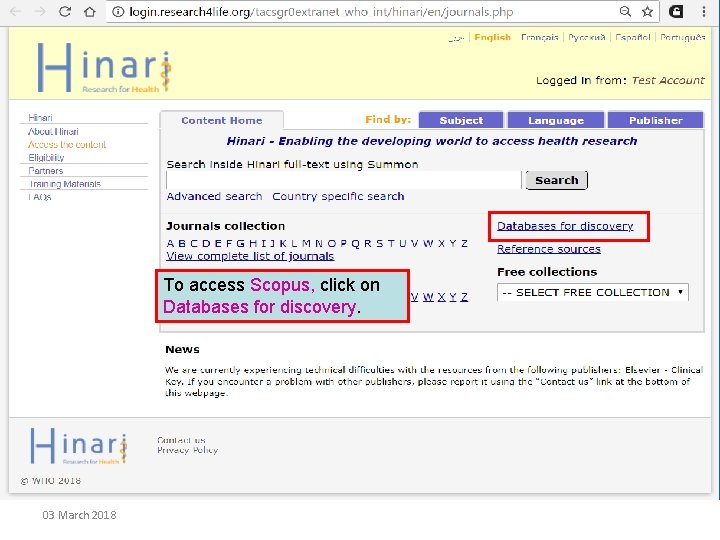
To access Scopus, click on Databases for discovery. 03 March 2018
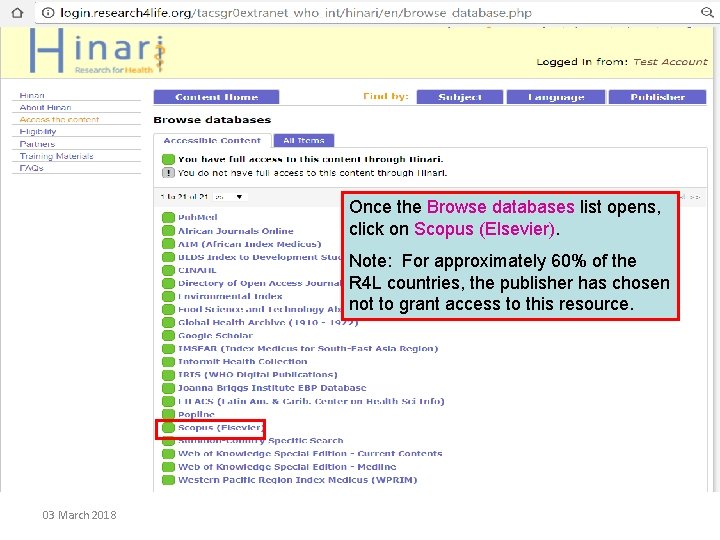
Once the Browse databases list opens, click on Scopus (Elsevier). Note: For approximately 60% of the R 4 L countries, the publisher has chosen not to grant access to this resource. 03 March 2018
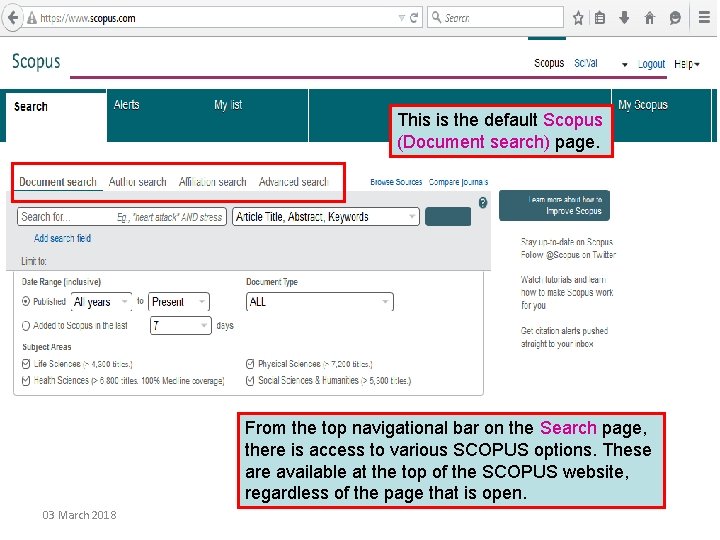
This is the default Scopus (Document search) page. From the top navigational bar on the Search page, there is access to various SCOPUS options. These are available at the top of the SCOPUS website, regardless of the page that is open. 03 March 2018
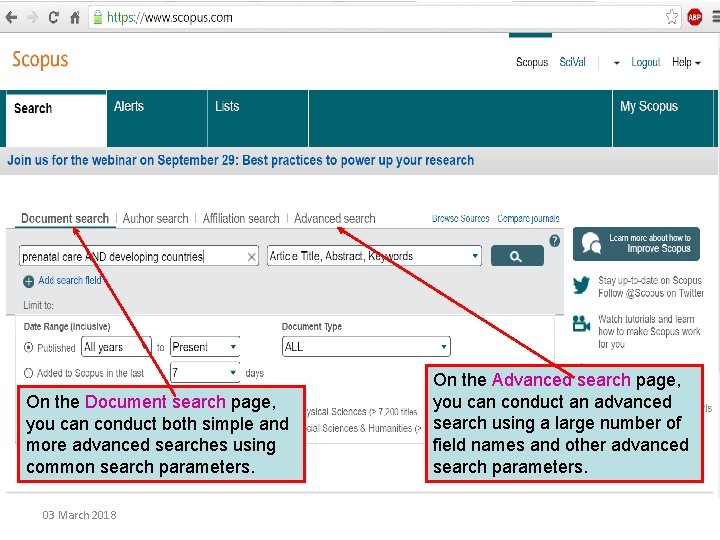
On the Document search page, you can conduct both simple and more advanced searches using common search parameters. 03 March 2018 On the Advanced search page, you can conduct an advanced search using a large number of field names and other advanced search parameters.
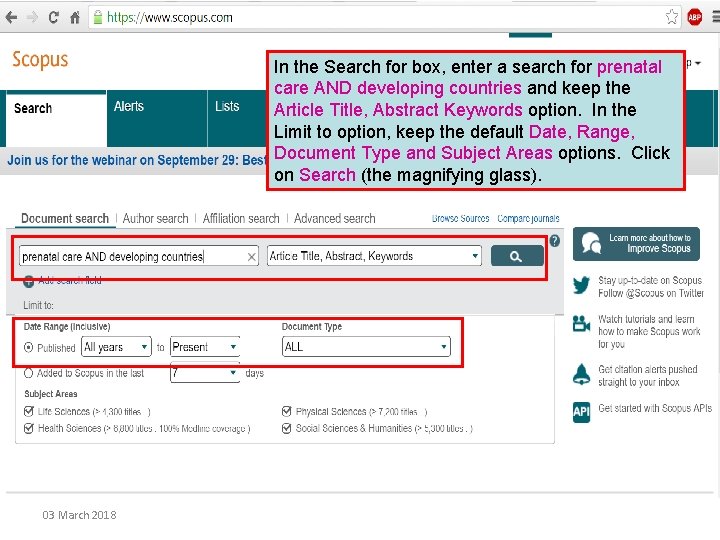
In the Search for box, enter a search for prenatal care AND developing countries and keep the Article Title, Abstract Keywords option. In the Limit to option, keep the default Date, Range, Document Type and Subject Areas options. Click on Search (the magnifying glass). 03 March 2018
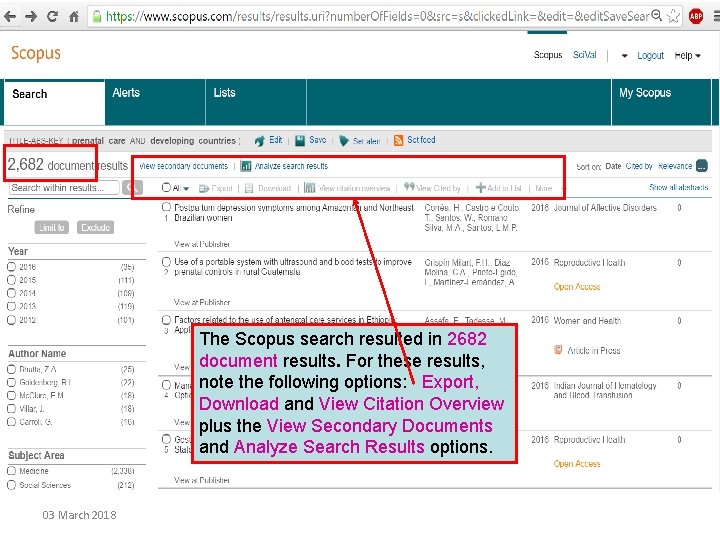
The Scopus search resulted in 2682 document results. For these results, note the following options: Export, Download and View Citation Overview plus the View Secondary Documents and Analyze Search Results options. 03 March 2018
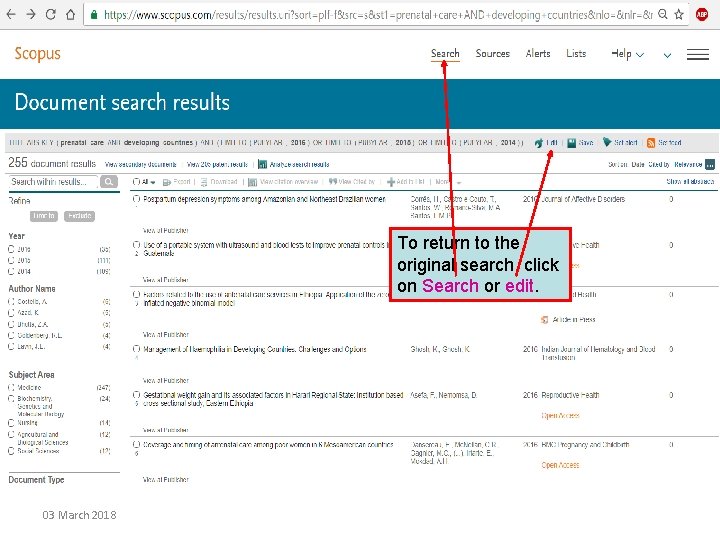
To return to the original search, click on Search or edit. 03 March 2018
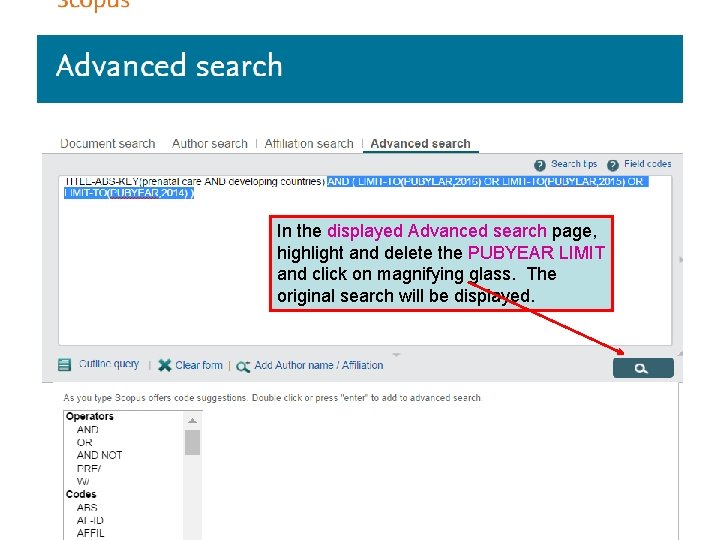
In the displayed Advanced search page, highlight and delete the PUBYEAR LIMIT and click on magnifying glass. The original search will be displayed. 03 March 2018
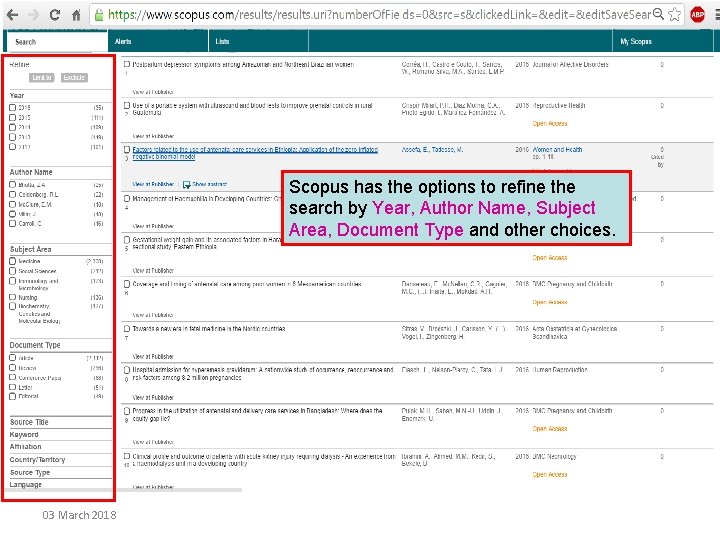
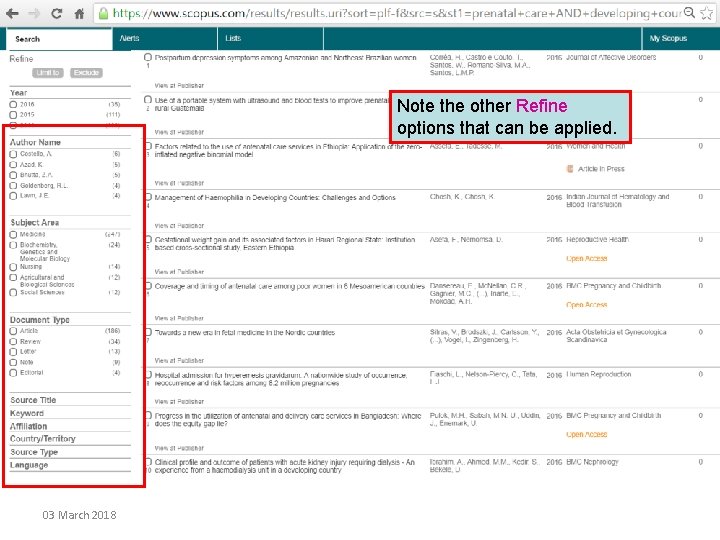
Scopus has the options to refine the search by Year, Author Name, Subject Area, Document Type and other choices. 03 March 2018
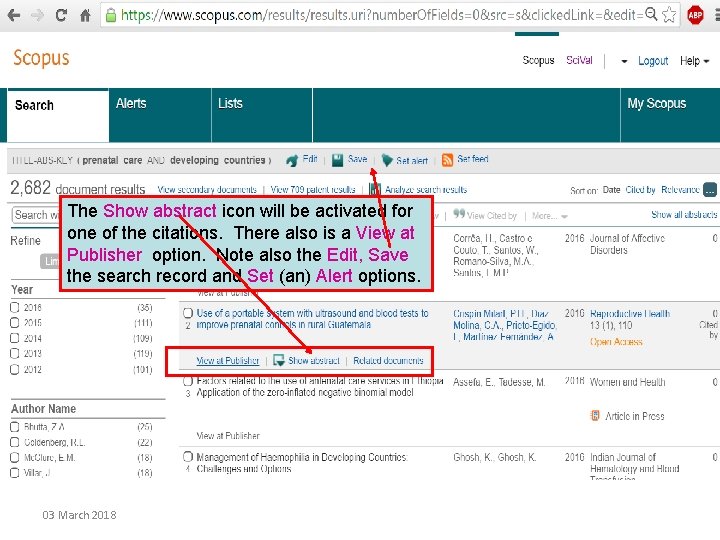
The Show abstract icon will be activated for one of the citations. There also is a View at Publisher option. Note also the Edit, Save the search record and Set (an) Alert options. 03 March 2018
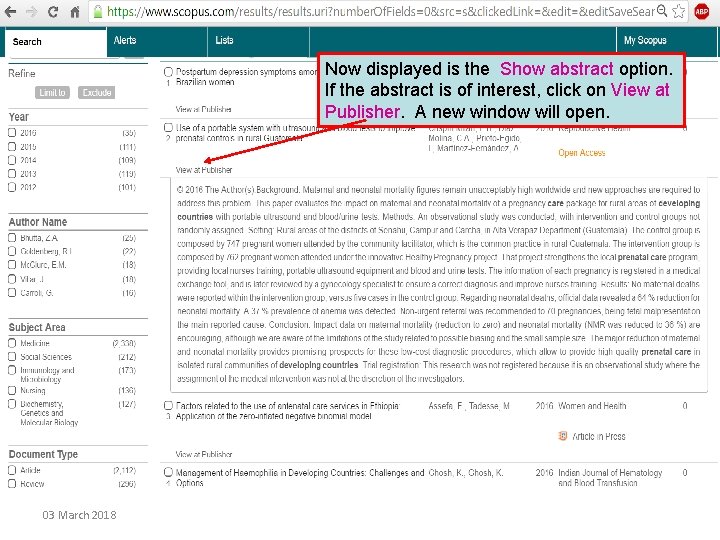
Now displayed is the Show abstract option. If the abstract is of interest, click on View at Publisher. A new window will open. 03 March 2018
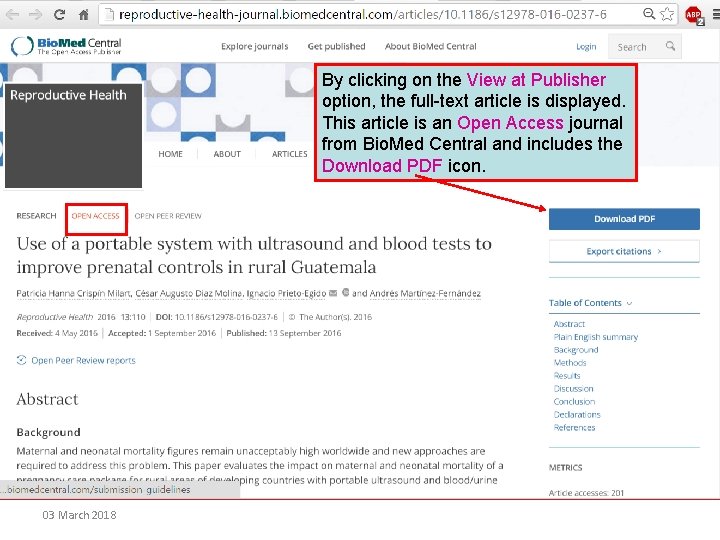
By clicking on the View at Publisher option, the full-text article is displayed. This article is an Open Access journal from Bio. Med Central and includes the Download PDF icon. 03 March 2018
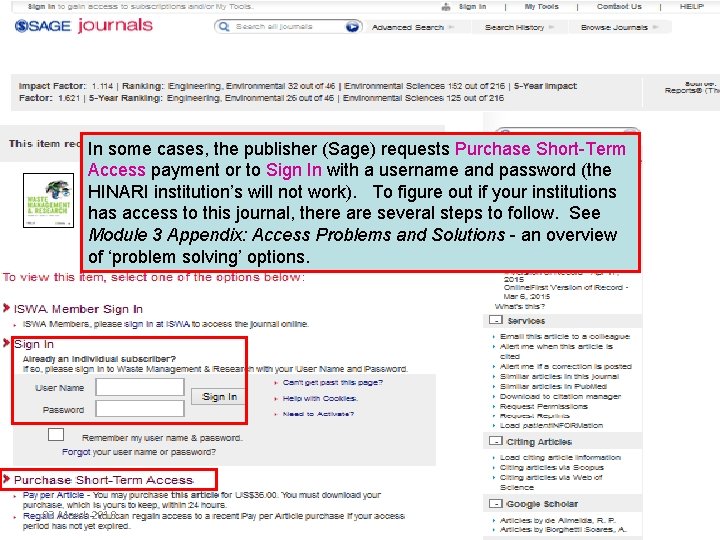
In some cases, the publisher (Sage) requests Purchase Short-Term Access payment or to Sign In with a username and password (the HINARI institution’s will not work). To figure out if your institutions has access to this journal, there are several steps to follow. See Module 3 Appendix: Access Problems and Solutions - an overview of ‘problem solving’ options. 03 March 2018
Basic Course Module 3 Appendix 1 See the appendix for the: • HINARI – Accessing Articles: Problems and Solutions • HINARI – Printing, Copying, Saving and Emailing Articles: Problems and Solutions 03 March 2018
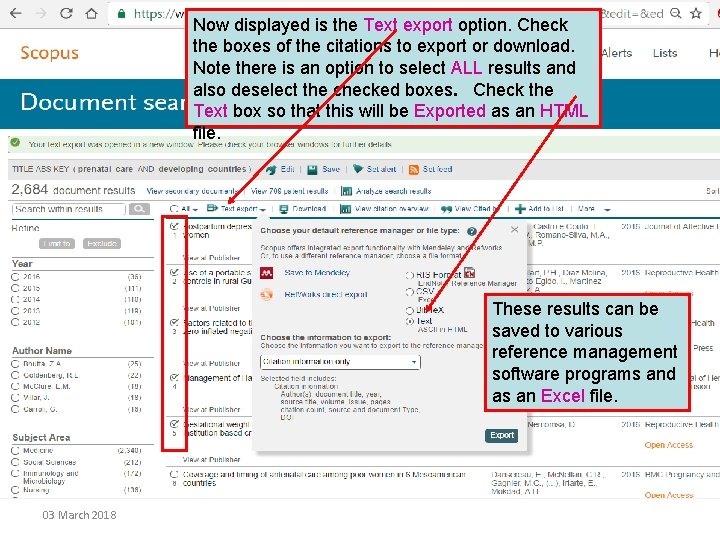
Now displayed is the Text export option. Check the boxes of the citations to export or download. Note there is an option to select ALL results and also deselect the checked boxes. Check the Text box so that this will be Exported as an HTML file. These results can be saved to various reference management software programs and as an Excel file. 03 March 2018
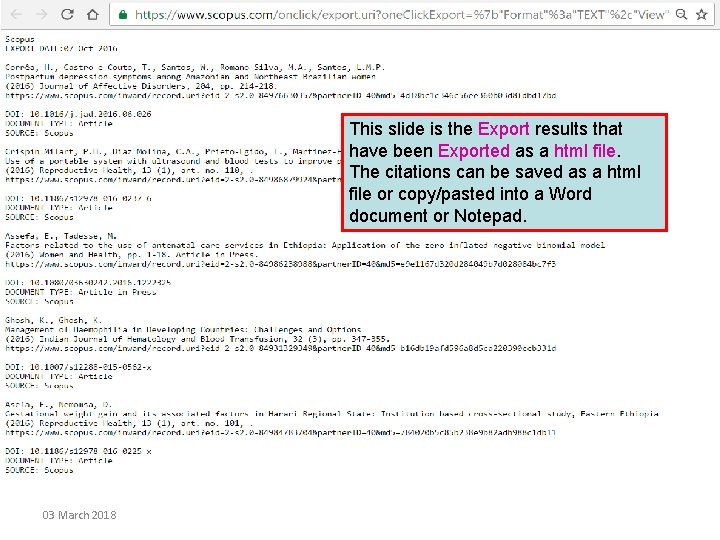
This slide is the Export results that have been Exported as a html file. The citations can be saved as a html file or copy/pasted into a Word document or Notepad. 03 March 2018
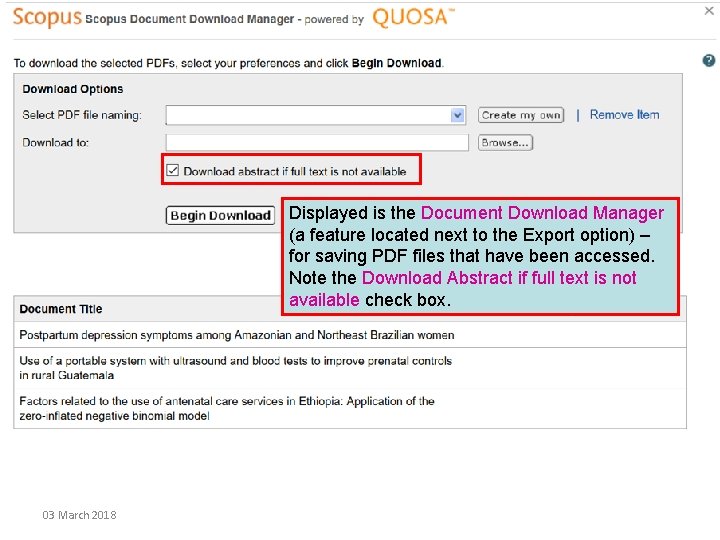
Displayed is the Document Download Manager (a feature located next to the Export option) – for saving PDF files that have been accessed. Note the Download Abstract if full text is not available check box. 03 March 2018
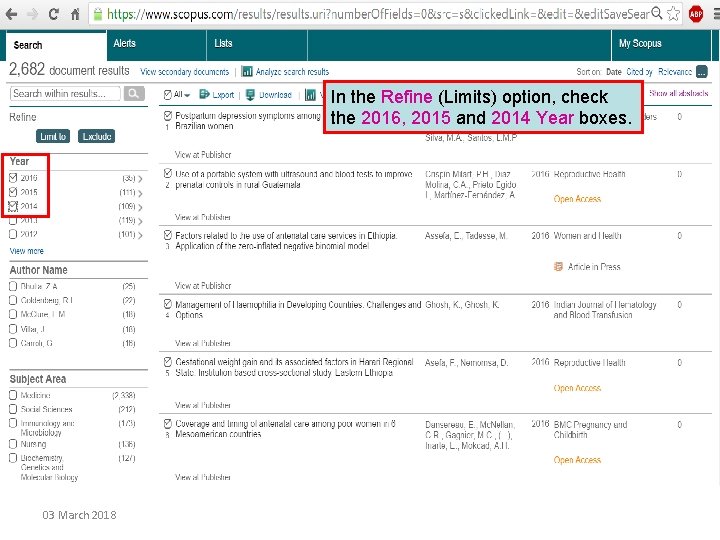
In the Refine (Limits) option, check the 2016, 2015 and 2014 Year boxes. 03 March 2018
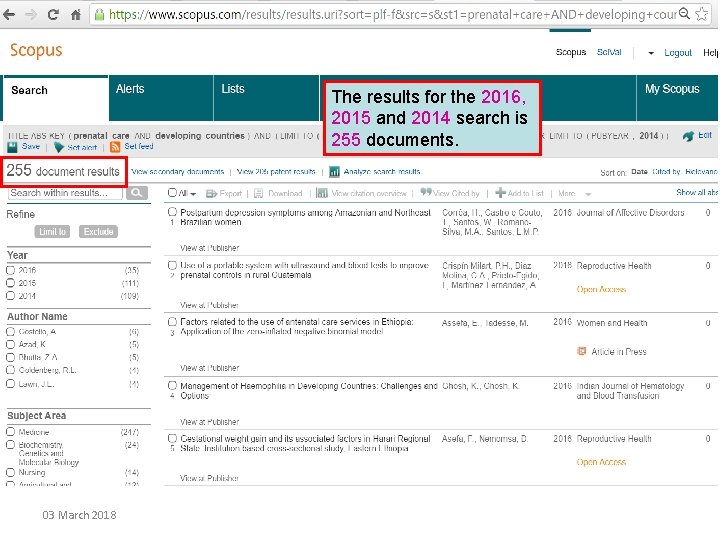
The results for the 2016, 2015 and 2014 search is 255 documents. 03 March 2018
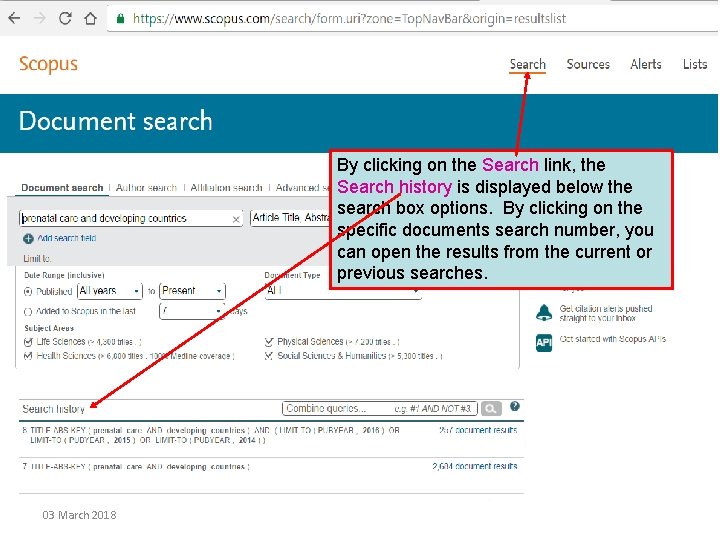
By clicking on the Search link, the Search history is displayed below the search box options. By clicking on the specific documents search number, you can open the results from the current or previous searches. 03 March 2018
Note the other Refine options that can be applied. 03 March 2018
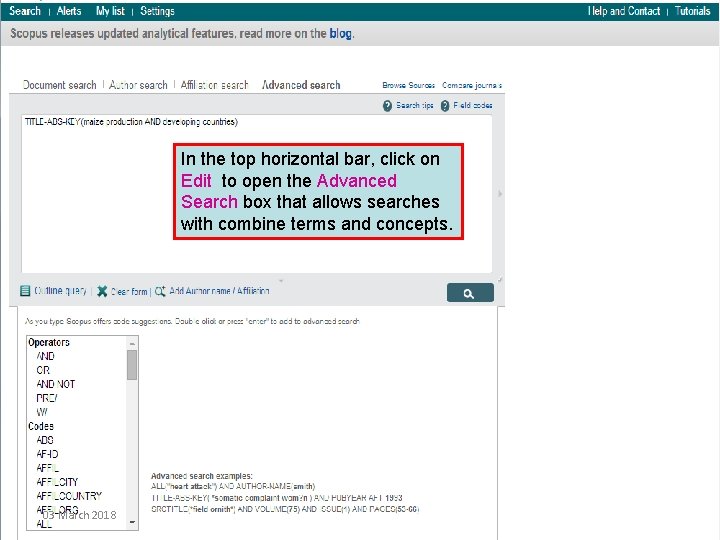
In the top horizontal bar, click on Edit to open the Advanced Search box that allows searches with combine terms and concepts. Using the Scopus list of citations, access the fulltext articles from the ‘Journals collections’ list or Publishers’ list 03 March 2018
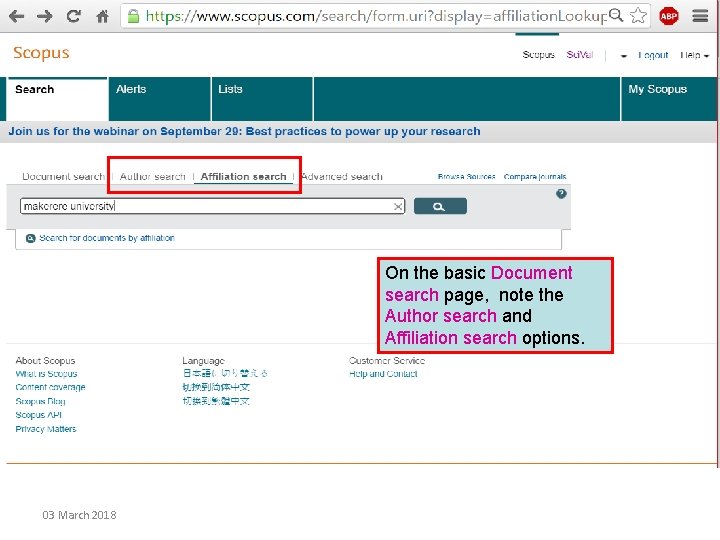
On the basic Document search page, note the Author search and Affiliation search options. 03 March 2018
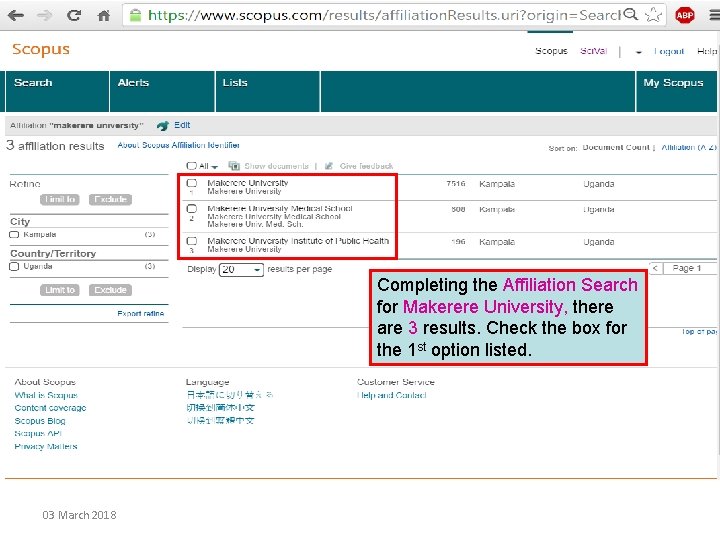
Completing the Affiliation Search for Makerere University, there are 3 results. Check the box for the 1 st option listed. 03 March 2018
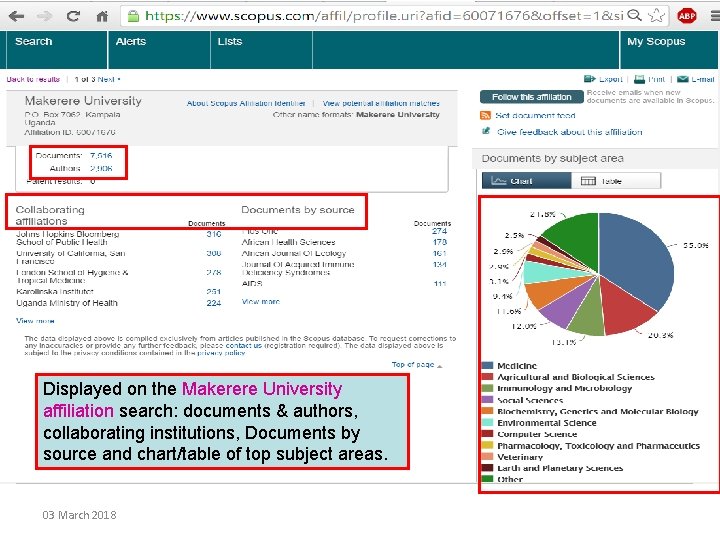
Displayed on the Makerere University affiliation search: documents & authors, collaborating institutions, Documents by source and chart/table of top subject areas. 03 March 2018
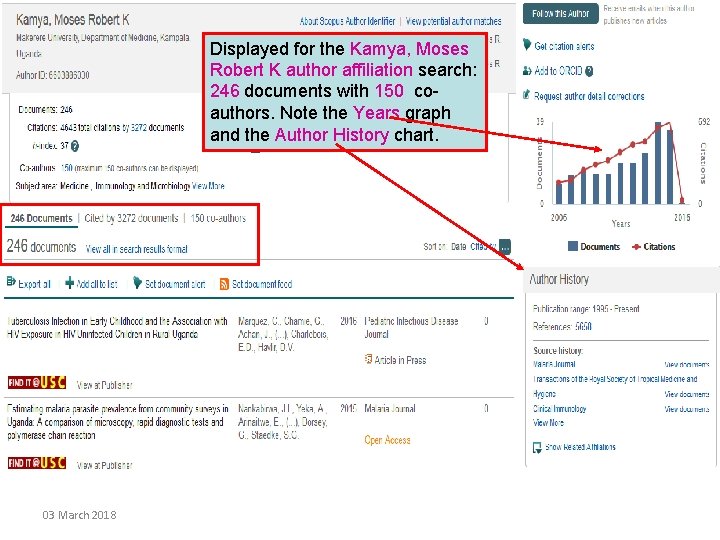
Displayed for the Kamya, Moses Robert K author affiliation search: 246 documents with 150 coauthors. Note the Years graph and the Author History chart. 03 March 2018
This is the end of HINARI Advanced Course Module 9 There is a Work Book to accompany this part of the module. The workbook will take you through a live session covering the topics included in this demonstration with working examples. Updated 2018 03 03 March 2018