Introduction to Apache Spark CIS 5517 DataIntensive and
![Airports. merge(Flights, left_on=[‘IATA’], right_on=[‘To’]) Flights Airports IATA City PHL Philadelphia BOS Boston JFK New](https://slidetodoc.com/presentation_image/e10df0646ceb7f95773ede2ca8600617/image-9.jpg "Airports. merge(Flights, left_on=[‘IATA’], right_on=[‘To’]) Flights Airports IATA City PHL Philadelphia BOS Boston JFK New")
![Airports. merge(Flights, left_on=[‘IATA’], right_on=[‘To’]) Flights Airports IATA City From To IATA S BOS PHL](https://slidetodoc.com/presentation_image/e10df0646ceb7f95773ede2ca8600617/image-11.jpg "Airports. merge(Flights, left_on=[‘IATA’], right_on=[‘To’]) Flights Airports IATA City From To IATA S BOS PHL")
![Projecting Data • sdf[‘my_col’]] or sdf[[‘my_col’]] or sdf[sdf. my_col] • sdf. select(sdf[‘my_col’]) or sdf.](https://slidetodoc.com/presentation_image/e10df0646ceb7f95773ede2ca8600617/image-35.jpg "Projecting Data • sdf[‘my_col’]] or sdf[[‘my_col’]] or sdf[sdf. my_col] • sdf. select(sdf[‘my_col’]) or sdf.")
- Slides: 49
Introduction to Apache Spark CIS 5517 – Data-Intensive and Cloud Computing Lecture 7 Reading: https: //medium. com/@jeeyoungk/how-sharding-works-b 4 dec 46 b 3 f 6 https: //cacm. org/magazines/2016/11/209116 -apache-spark/fulltext Slides based on Z. Ives’ at University of Pennsylvania 1
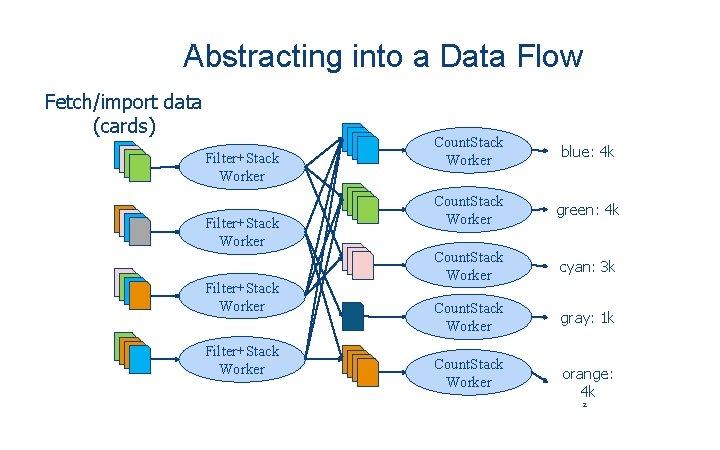
Abstracting into a Data Flow Fetch/import data (cards) Filter+Stack Worker Count. Stack Worker blue: 4 k Count. Stack Worker green: 4 k Count. Stack Worker cyan: 3 k Count. Stack Worker gray: 1 k Count. Stack Worker orange: 4 k 2
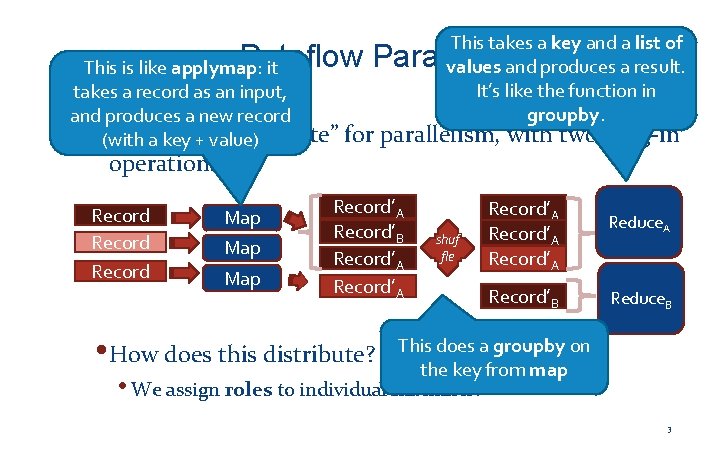
This takes a key and a list of values and produces a result. It’s like the function in groupby. Dataflow Parallelism This is like applymap: it takes a record as an input, and produces a new record A standard “template” (with a key + value) • operations Record Map Map for parallelism, with two plug-in Record’A Record’B Record’A shuf fle Record’A Record’B Reduce. A Reduce. B • How does this distribute? This does a groupby on the key from map • We assign roles to individual machines! 3
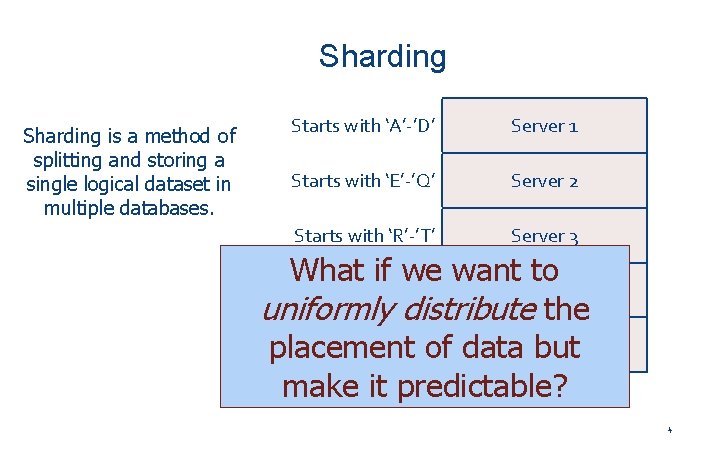
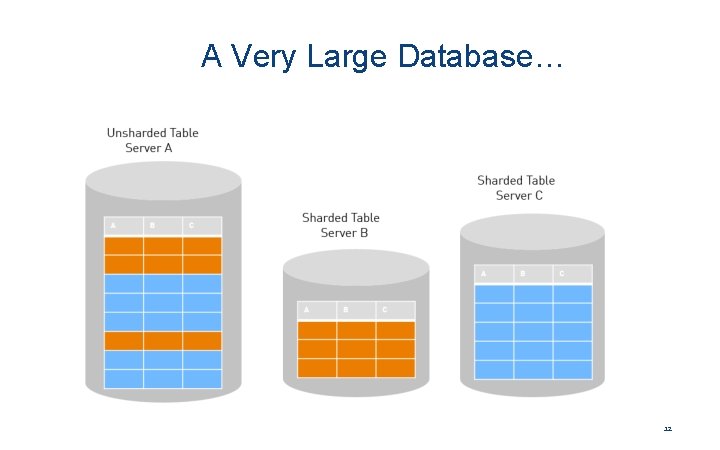
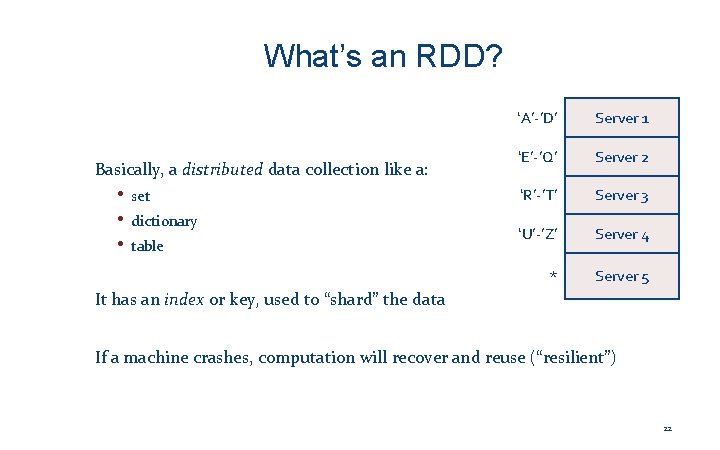
Sharding is a method of splitting and storing a single logical dataset in multiple databases. Starts with ‘A’-’D’ Server 1 Starts with ‘E’-’Q’ Server 2 Starts with ‘R’-’T’ Server 3 What if we want to Starts with ‘U’-’Z’ Server 4 uniformly distribute the Starts with anything else placement of data. Server but 5 make it predictable? 4
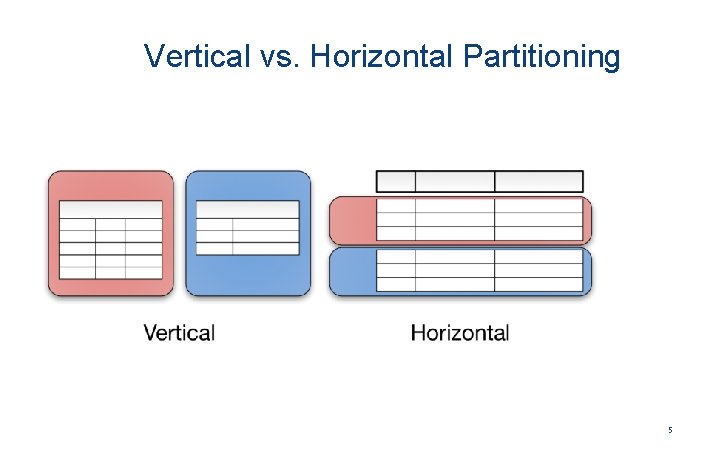
Vertical vs. Horizontal Partitioning 5
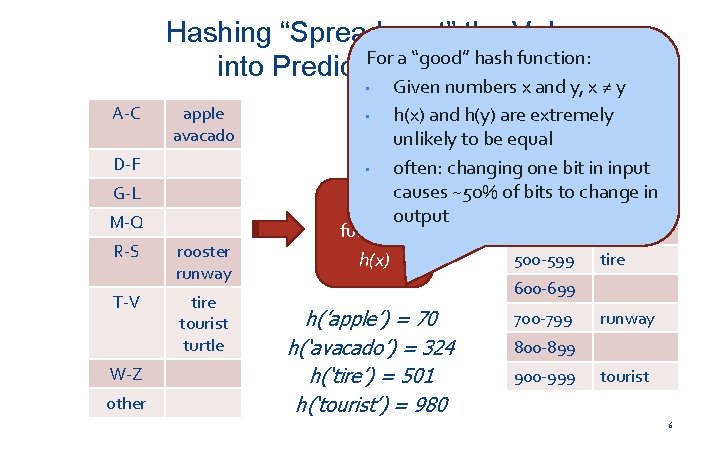
Hashing “Spreads out” the Values For a “good” hash function: into Predictable Locations Given numbers x and y, x ≠ y 0 -99 tire • h(x) and h(y) are extremely unlikely to be equal 100 -199 apple • often: changing 200 -299 one bit inrooster input causes ~50% of 300 -399 bits to change in avacado hashoutput 400 -499 function 500 -599 tire h(x) • A-C apple avacado D-F G-L M-Q R-S rooster runway T-V tire tourist turtle W-Z other 600 -699 h(’apple’) = 70 h(‘avacado’) = 324 h(‘tire’) = 501 h(‘tourist’) = 980 700 -799 runway 800 -899 900 -999 tourist 6
How Does This Relate to Computing over Data. Frames? • Let’s come back to the notion of indexing • In Pandas Data. Frames, when we do: A. merge(B, left_on=‘x’, right_on=‘y’) • How does Pandas make this efficient? Let’s see this with an example using a map / index… 7
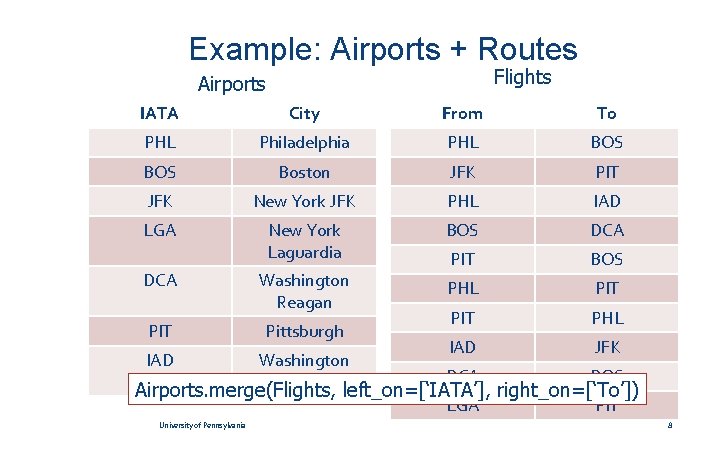
Example: Airports + Routes Flights Airports IATA City From To PHL Philadelphia PHL BOS Boston JFK PIT JFK New York JFK PHL IAD LGA New York Laguardia BOS DCA Washington Reagan PIT BOS PHL PIT PHL IAD JFK DCA BOS LGA PIT DCA PIT Pittsburgh IAD Washington Dulles Airports. merge(Flights, left_on=[‘IATA’], right_on=[‘To’]) University of Pennsylvania 8
Airports. merge(Flights, left_on=[‘IATA’], right_on=[‘To’]) Flights Airports IATA City PHL Philadelphia BOS Boston JFK New York JFK LGA New York Laguardia DCA Washington Reagan PIT Pittsburgh IAD Washington Dulles BOS DCA IAD JFK PIT PHL From To PHL BOS JFK PIT PHL IAD BOS DCA PIT BOS PHL PIT PHL IAD JFK DCA BOS LGA PIT 9
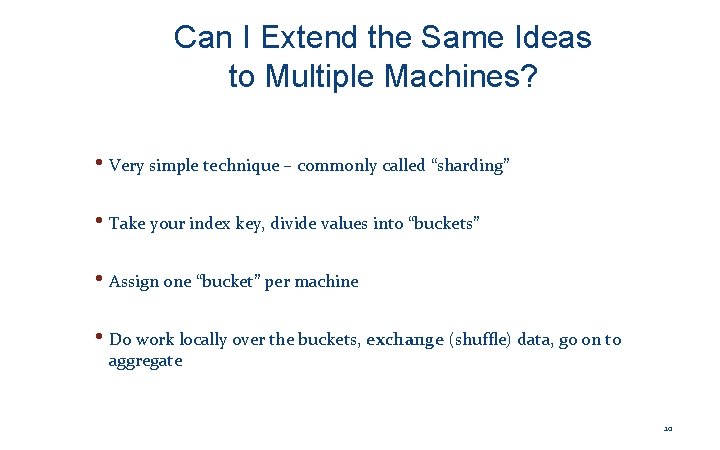
Can I Extend the Same Ideas to Multiple Machines? • Very simple technique – commonly called “sharding” • Take your index key, divide values into “buckets” • Assign one “bucket” per machine • Do work locally over the buckets, exchange (shuffle) data, go on to aggregate 10
Airports. merge(Flights, left_on=[‘IATA’], right_on=[‘To’]) Flights Airports IATA City From To IATA S BOS PHL Boston Philadelphia DCA PHL BOS 0 DCA BOS PHL JFK BOS PIT DCA 0 PHL PIT BOS IAD 1 JFK IAD LGA Washington Boston Reagan New York JFK BOS DCA JFK 1 PHL PIT BOS IAD LGA 2 PHL IAD PIT JFK PHL 2 PIT PHL PIT 3 IAD JFK PIT DCA PHL BOS PIT LGA PIT JFK DCA LGA PIT PHL IAD PIT Washington New York Dulles Laguardia New York JFK Washington New York Reagan Laguardia Pittsburgh Philadelphia Washington Pittsburgh Dulles 11
A Very Large Database… 12
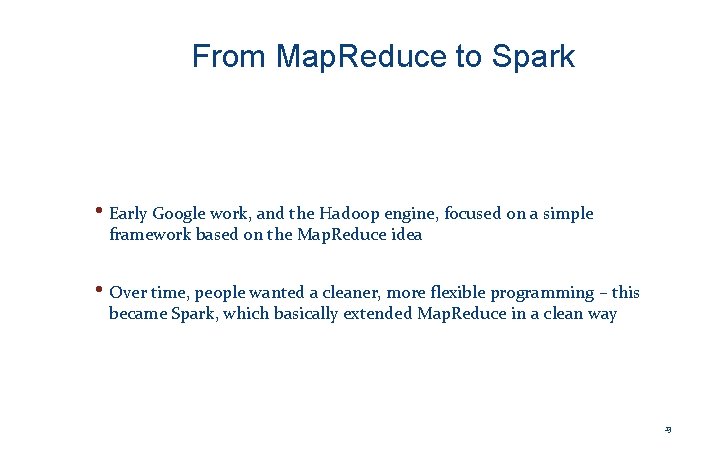
From Map. Reduce to Spark • Early Google work, and the Hadoop engine, focused on a simple framework based on the Map. Reduce idea • Over time, people wanted a cleaner, more flexible programming – this became Spark, which basically extended Map. Reduce in a clean way 13
Computation in Spark: Support for Sharded Data 14
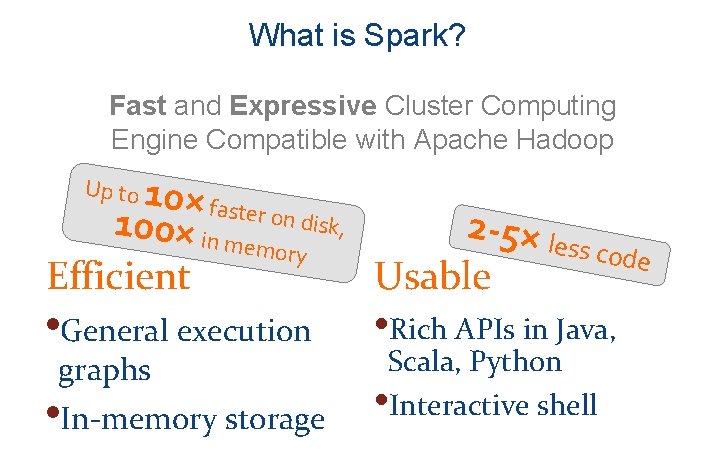
What is Spark? Fast and Expressive Cluster Computing Engine Compatible with Apache Hadoop 10× faster o 100× in m n disk, 2 -5× less emory code Efficient Usable Up to • General execution graphs • In-memory storage • Rich APIs in Java, Scala, Python • Interactive shell
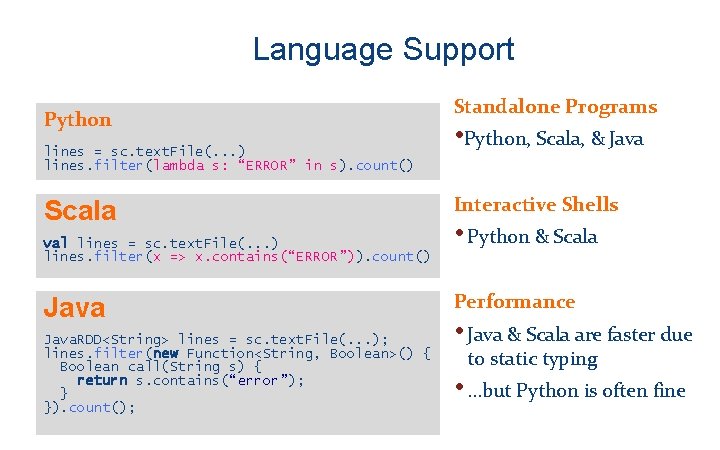
Language Support Python lines = sc. text. File(. . . ) lines. filter(lambda s: “ERROR” in s). count() Scala val lines = sc. text. File(. . . ) lines. filter(x => x. contains(“ERROR”)). count() Java. RDD<String> lines = sc. text. File(. . . ); lines. filter(new Function<String, Boolean>() { Boolean call(String s) { return s. contains(“error”); } }). count(); Standalone Programs • Python, Scala, & Java Interactive Shells • Python & Scala Performance • Java & Scala are faster due to static typing • …but Python is often fine
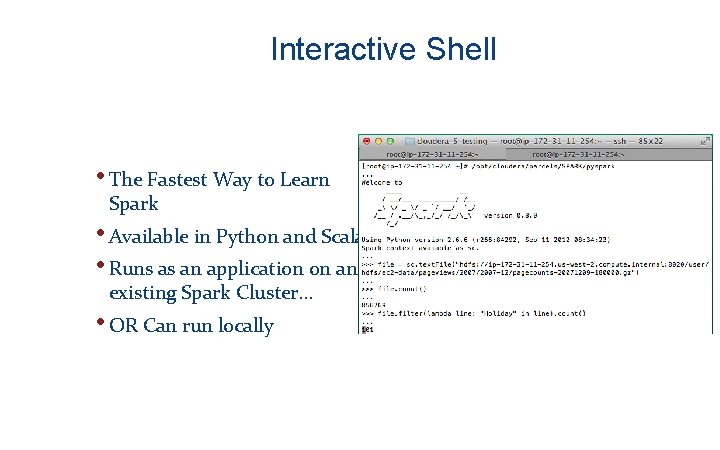
Interactive Shell • The Fastest Way to Learn Spark • Available in Python and Scala • Runs as an application on an existing Spark Cluster… • OR Can run locally
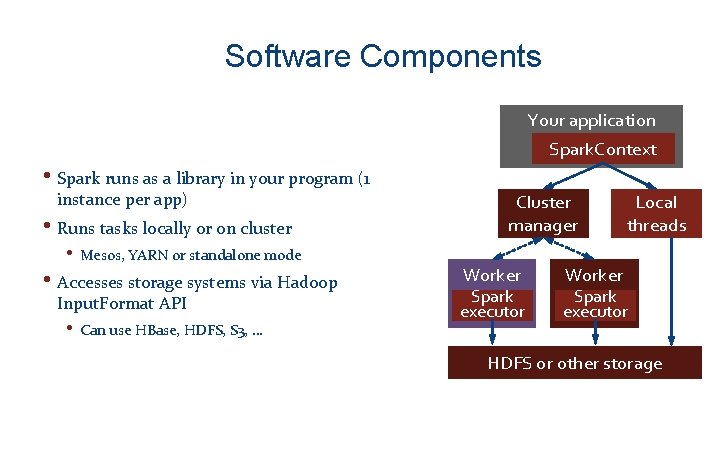
Software Components Your application Spark. Context • Spark runs as a library in your program (1 instance per app) • Runs tasks locally or on cluster • Mesos, YARN or standalone mode • Accesses storage systems via Hadoop Input. Format API • Can use HBase, HDFS, S 3, … Cluster manager Worker Spark executor Local threads Worker Spark executor HDFS or other storage
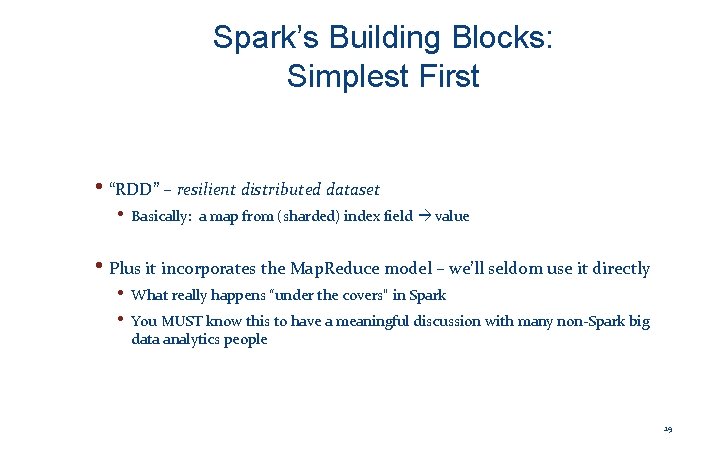
Spark’s Building Blocks: Simplest First • “RDD” – resilient distributed dataset • Basically: a map from (sharded) index field value • Plus it incorporates the Map. Reduce model – we’ll seldom use it directly • What really happens “under the covers” in Spark • You MUST know this to have a meaningful discussion with many non-Spark big data analytics people 19
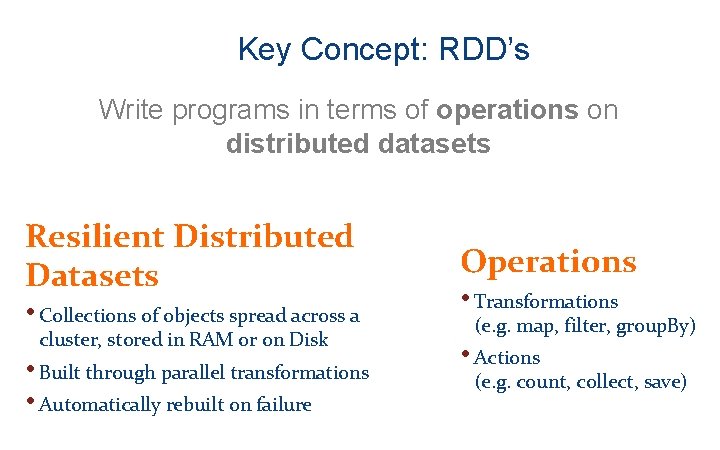
Key Concept: RDD’s Write programs in terms of operations on distributed datasets Resilient Distributed Datasets Operations • Collections of objects spread across a • Transformations • Built through parallel transformations • Automatically rebuilt on failure • Actions cluster, stored in RAM or on Disk (e. g. map, filter, group. By) (e. g. count, collect, save)
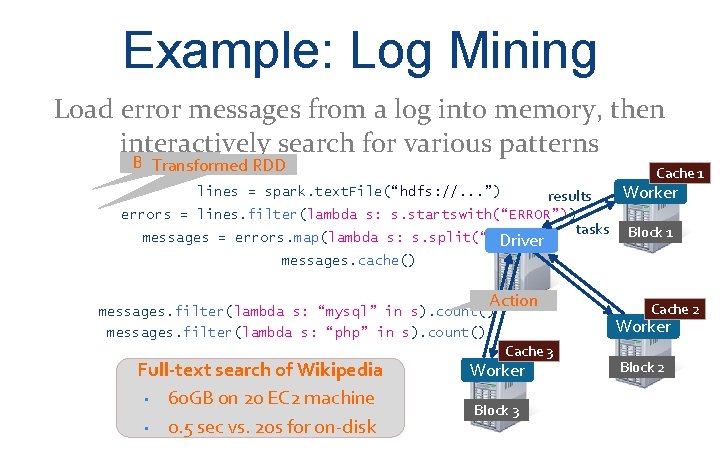
Example: Log Mining Load error messages from a log into memory, then interactively search for various patterns Base RDD Transformed RDD Cache 1 lines = spark. text. File(“hdfs: //. . . ”) results Worker errors = lines. filter(lambda s: s. startswith(“ERROR”)) messages = errors. map(lambda s: s. split(“t”)[2]) Driver tasks Block 1 messages. cache() Action messages. filter(lambda s: “mysql” in s). count() Worker messages. filter(lambda s: “php” in s). count(). . . Full-text search of Wikipedia • 60 GB on 20 EC 2 machine • 0. 5 sec vs. 20 s for on-disk Cache 2 Cache 3 Worker Block 3 Block 2
What’s an RDD? Basically, a distributed data collection like a: • set • dictionary • table ‘A’-’D’ Server 1 ‘E’-’Q’ Server 2 ‘R’-’T’ Server 3 ‘U’-’Z’ Server 4 * Server 5 It has an index or key, used to “shard” the data If a machine crashes, computation will recover and reuse (“resilient”) 22
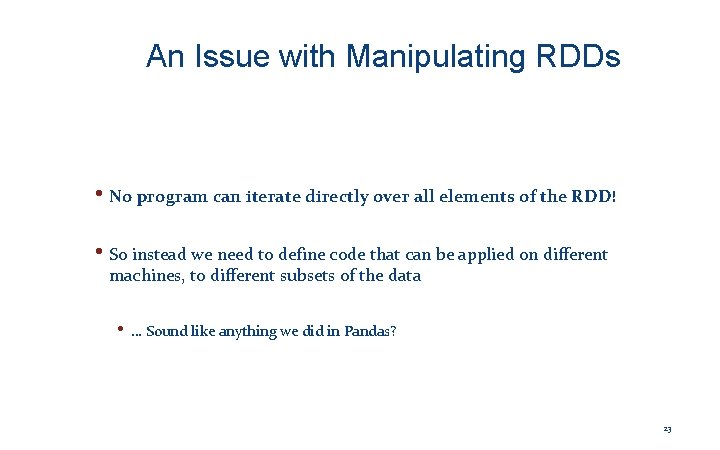
An Issue with Manipulating RDDs • No program can iterate directly over all elements of the RDD! • So instead we need to define code that can be applied on different machines, to different subsets of the data • … Sound like anything we did in Pandas? 23
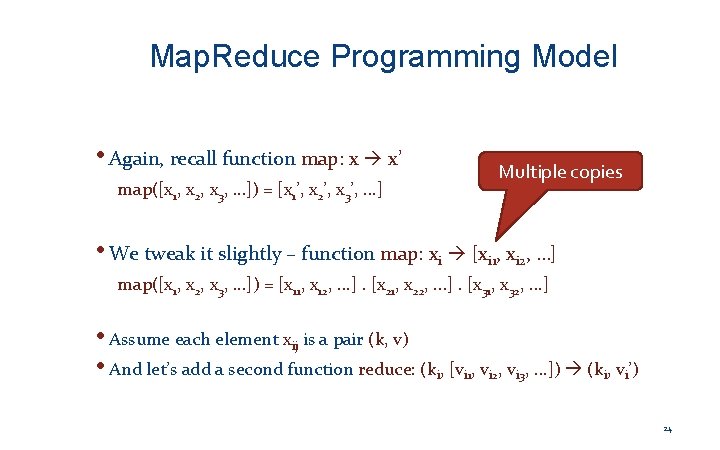
Map. Reduce Programming Model • Again, recall function map: x x’ map([x 1, x 2, x 3, …]) = [x 1’, x 2’, x 3’, . . . ] Multiple copies • We tweak it slightly – function map: xi [xi 1, xi 2, …] map([x 1, x 2, x 3, . . . ]) = [x 11, x 12, . . . ]. [x 21, x 22, . . . ]. [x 31, x 32, . . . ] • Assume each element xij is a pair (k, v) • And let’s add a second function reduce: (ki, [vi 1, vi 2, vi 3, . . . ]) (ki, vi’) 24
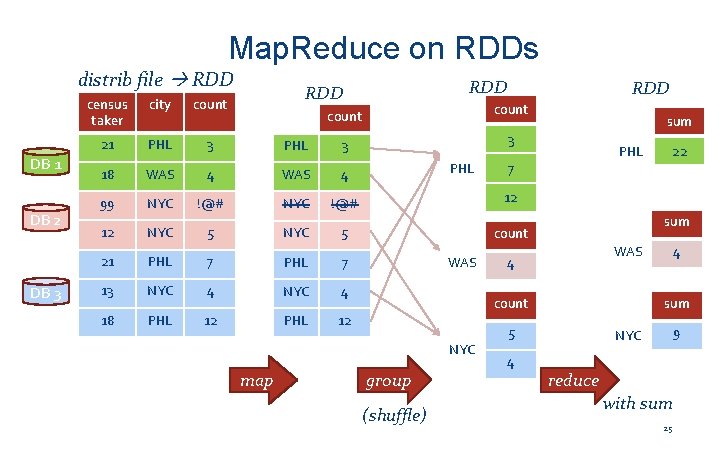
Map. Reduce on RDDs distrib file RDD DB 1 DB 2 DB 3 census taker city 21 PHL 3 18 WAS 99 RDD count PHL 3 3 4 WAS 4 NYC !@# 12 12 NYC 5 count 21 PHL 7 13 NYC 4 18 PHL 12 PHL WAS PHL sum WAS 4 (shuffle) 4 4 sum 5 group 22 7 count NYC map sum 9 NYC reduce with sum 25
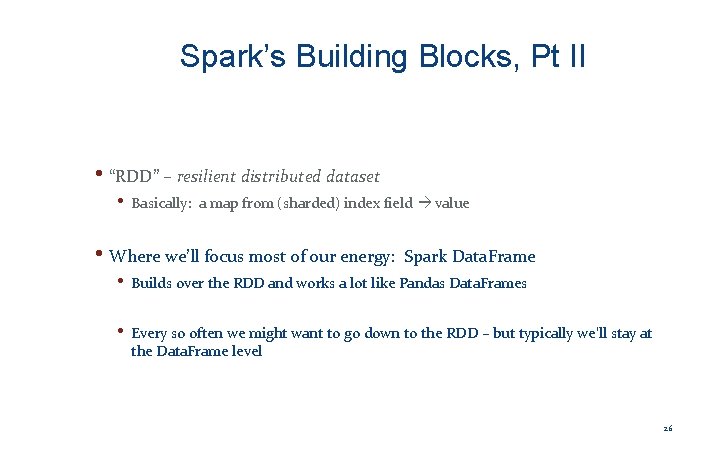
Spark’s Building Blocks, Pt II • “RDD” – resilient distributed dataset • Basically: a map from (sharded) index field value • Where we’ll focus most of our energy: Spark Data. Frame • Builds over the RDD and works a lot like Pandas Data. Frames • Every so often we might want to go down to the RDD – but typically we’ll stay at the Data. Frame level 26
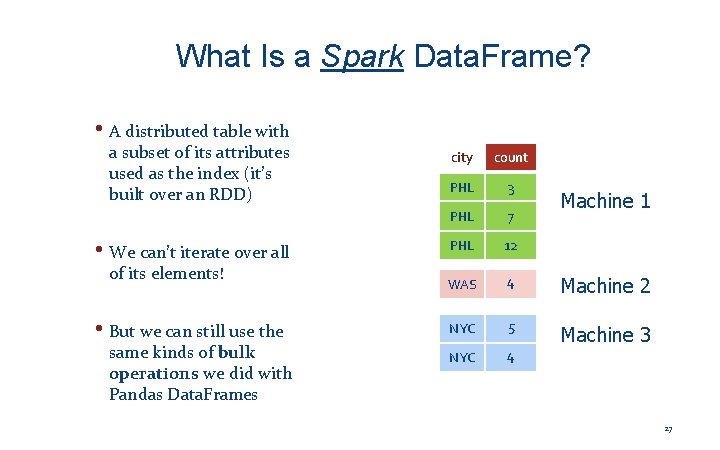
What Is a Spark Data. Frame? • A distributed table with a subset of its attributes used as the index (it’s built over an RDD) • We can’t iterate over all of its elements! • But we can still use the same kinds of bulk operations we did with Pandas Data. Frames city count PHL 3 PHL 7 PHL 12 WAS 4 Machine 2 NYC 5 NYC 4 Machine 3 Machine 1 27
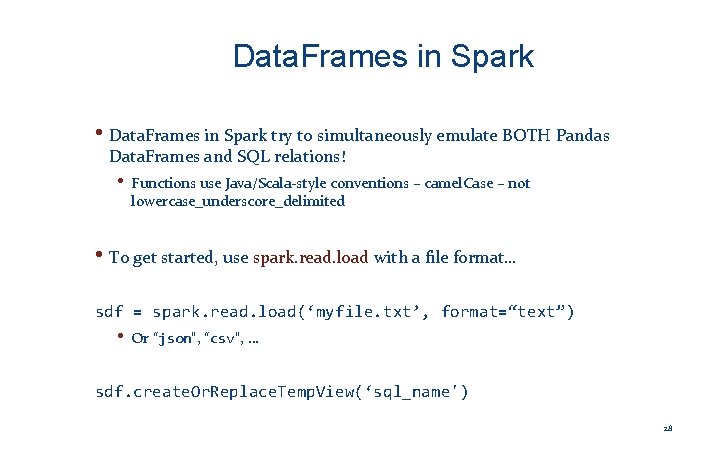
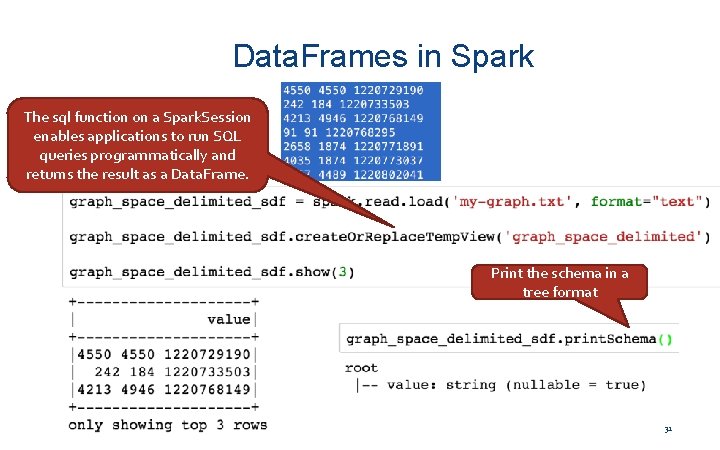
Data. Frames in Spark • Data. Frames in Spark try to simultaneously emulate BOTH Pandas Data. Frames and SQL relations! • Functions use Java/Scala-style conventions – camel. Case – not lowercase_underscore_delimited • To get started, use spark. read. load with a file format… sdf = spark. read. load(‘myfile. txt’, format=“text”) • Or “json”, “csv”, … sdf. create. Or. Replace. Temp. View(‘sql_name') 28
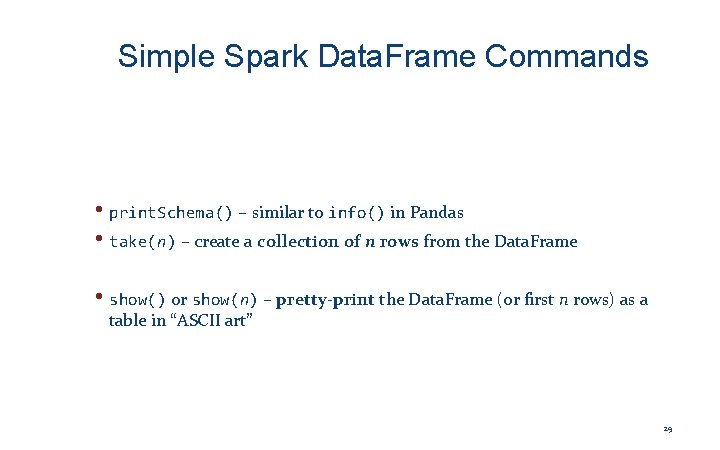
Simple Spark Data. Frame Commands • print. Schema() – similar to info() in Pandas • take(n) – create a collection of n rows from the Data. Frame • show() or show(n) – pretty-print the Data. Frame (or first n rows) as a table in “ASCII art” 29
Using Data. Frames 30
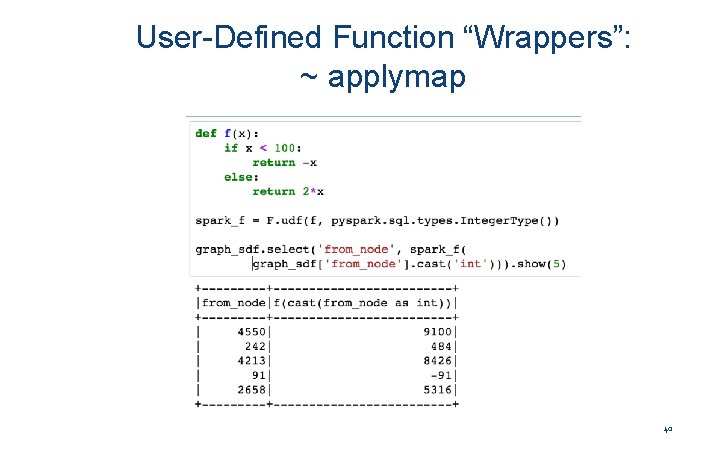
Data. Frames in Spark The sql function on a Spark. Session my-graph. txt enables applications to run SQL (not csv!) queries programmatically and returns the result as a Data. Frame. Print the schema in a tree format 31
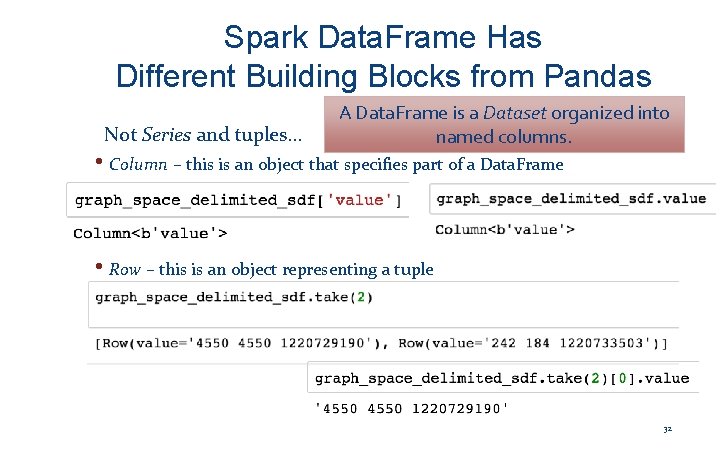
Spark Data. Frame Has Different Building Blocks from Pandas Not Series and tuples… A Data. Frame is a Dataset organized into named columns. • Column – this is an object that specifies part of a Data. Frame • Row – this is an object representing a tuple 32
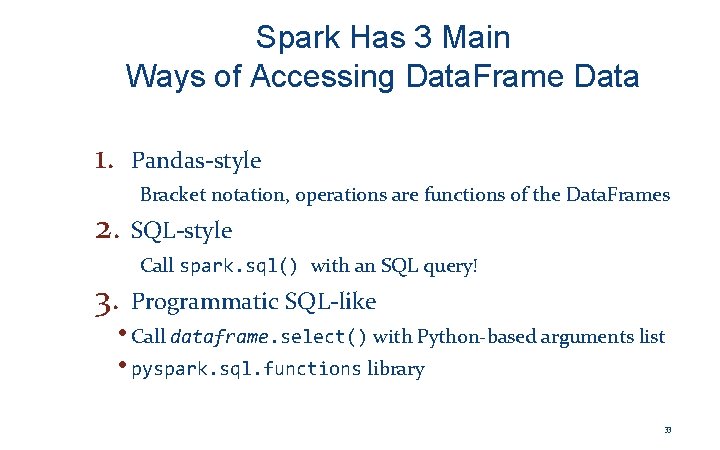
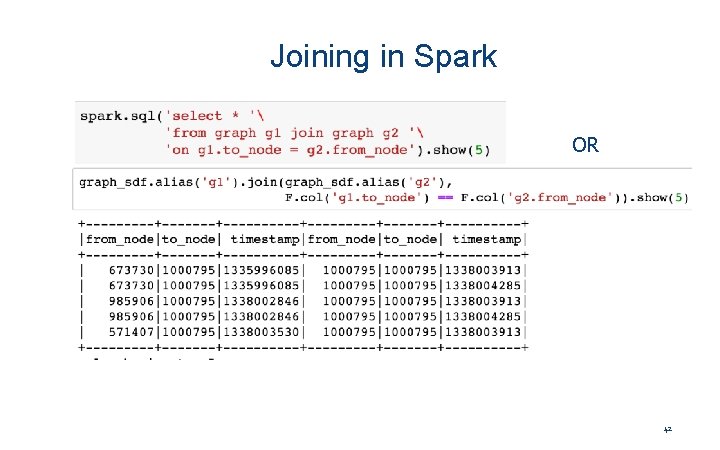
Spark Has 3 Main Ways of Accessing Data. Frame Data 1. Pandas-style Bracket notation, operations are functions of the Data. Frames 2. SQL-style 3. Call spark. sql() with an SQL query! Programmatic SQL-like • Call dataframe. select() with Python-based arguments list • pyspark. sql. functions library 33
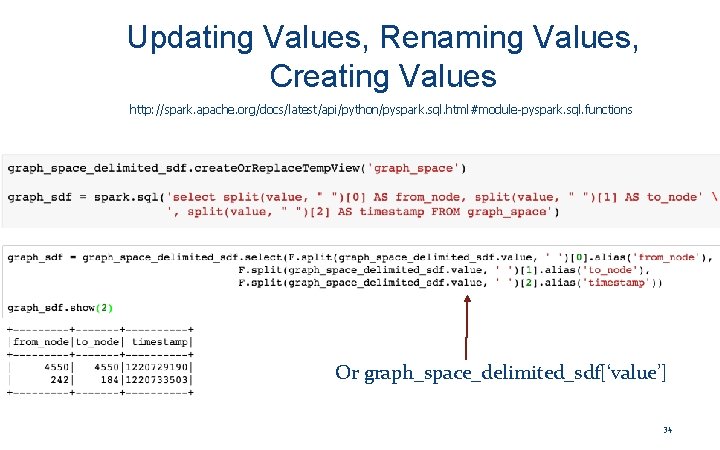
Updating Values, Renaming Values, Creating Values http: //spark. apache. org/docs/latest/api/python/pyspark. sql. html#module-pyspark. sql. functions Or graph_space_delimited_sdf[‘value’] 34
Projecting Data • sdf[‘my_col’]] or sdf[[‘my_col’]] or sdf[sdf. my_col] • sdf. select(sdf[‘my_col’]) or sdf. select(‘my_col’) • sdf. create. Or. Replace. Temp. View(‘sql_name') spark. sql(‘select my_col from sql_name’) 35
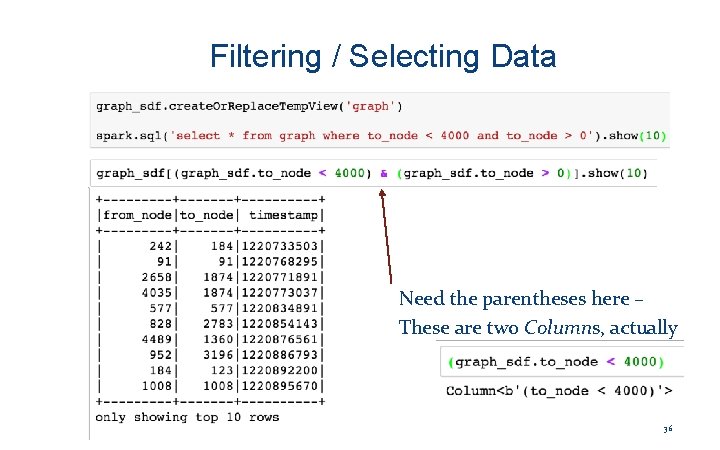
Filtering / Selecting Data Need the parentheses here – These are two Columns, actually 36
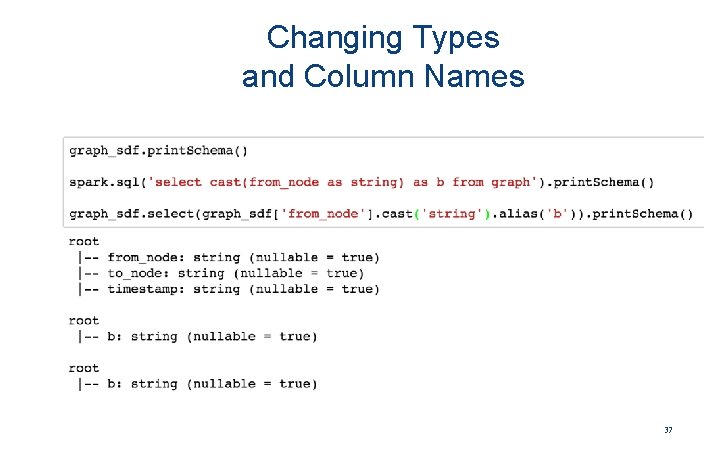
Changing Types and Column Names 37
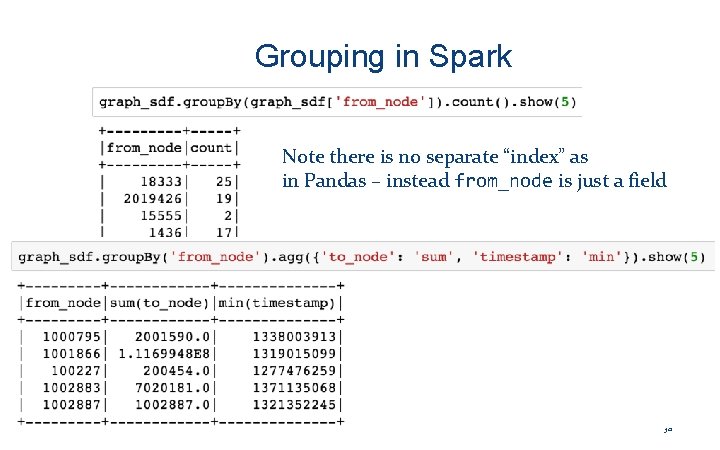
Grouping in Spark Note there is no separate “index” as in Pandas – instead from_node is just a field 38
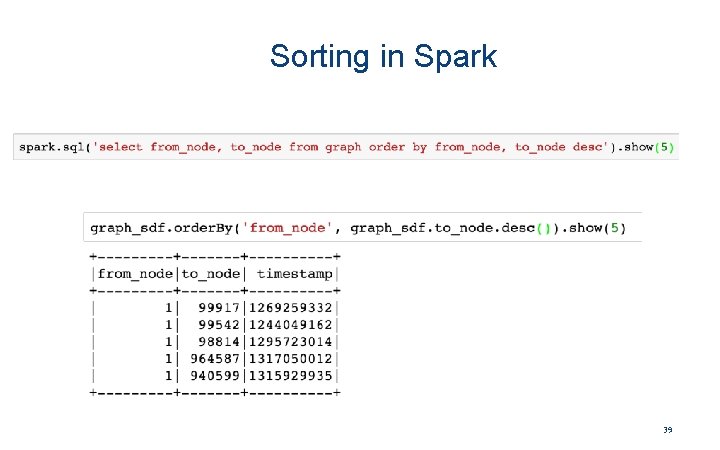
Sorting in Spark 39
User-Defined Function “Wrappers”: ~ applymap 40
Partitions and Spark 41
Joining in Spark OR 42
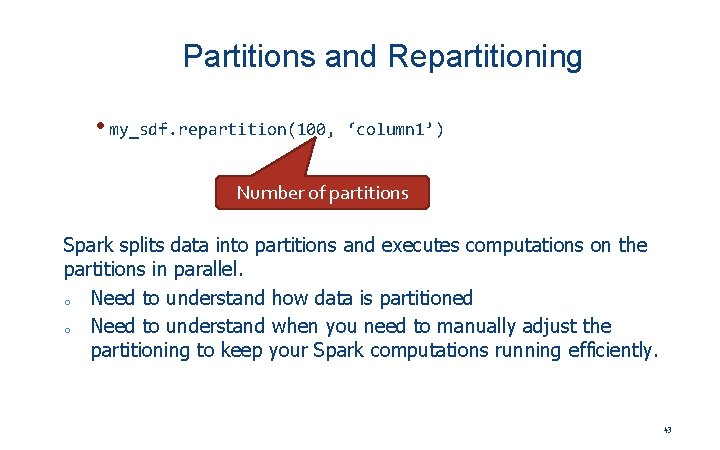
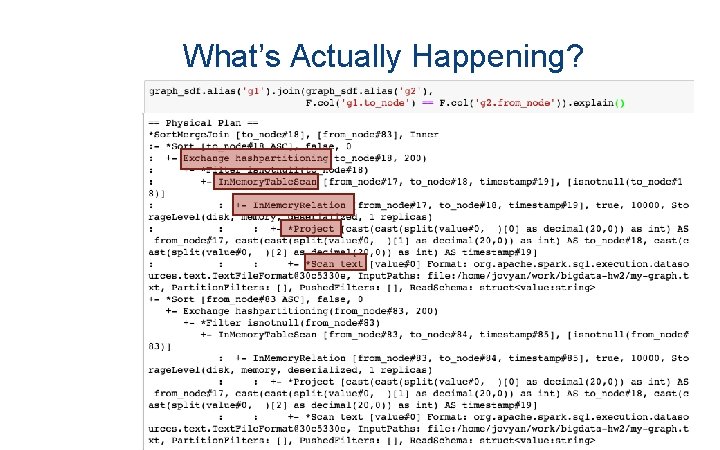
Partitions and Repartitioning • my_sdf. repartition(100, ‘column 1’) Number of partitions Spark splits data into partitions and executes computations on the partitions in parallel. o Need to understand how data is partitioned o Need to understand when you need to manually adjust the partitioning to keep your Spark computations running efficiently. 43
What’s Actually Happening? University of Pennsylvania 44
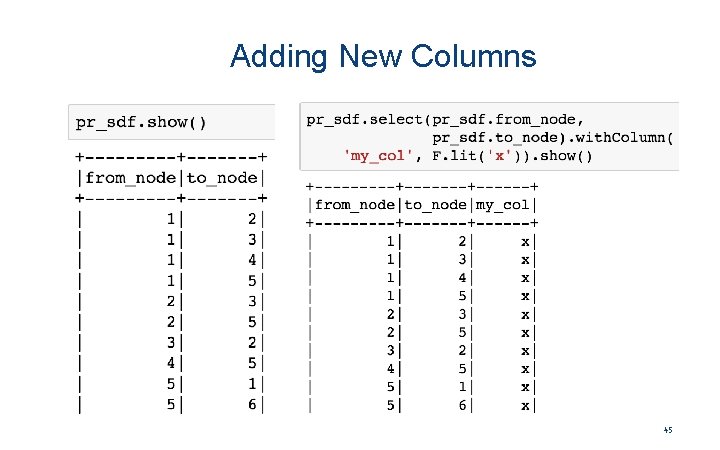
Adding New Columns 45
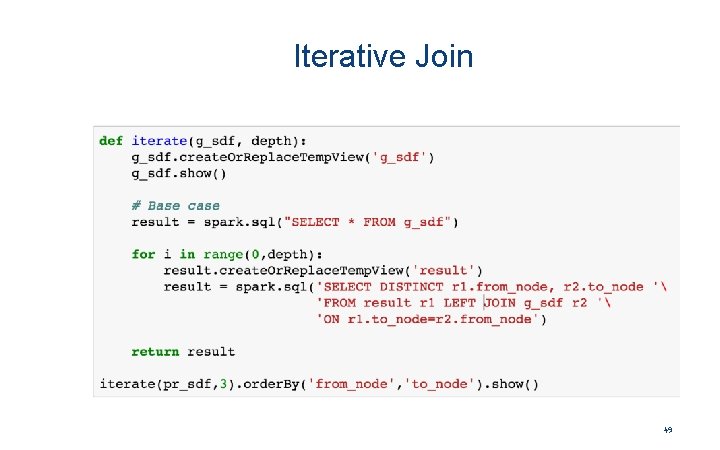
Something New: Iteration! 46
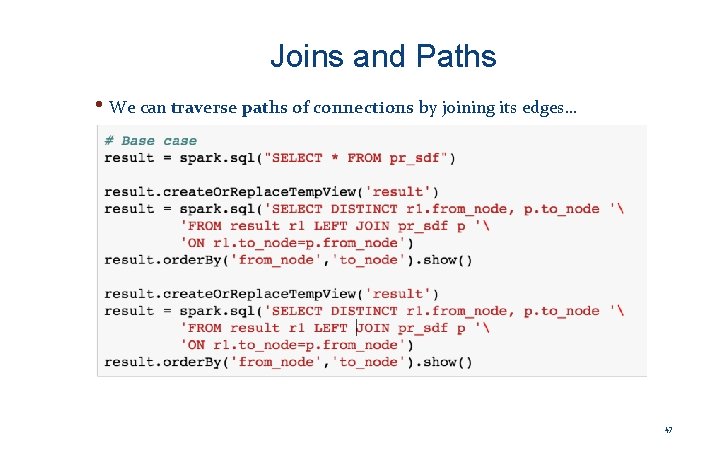
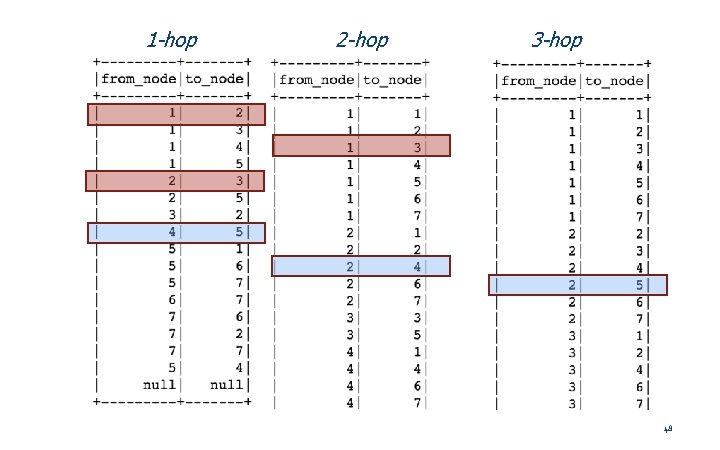
Joins and Paths • We can traverse paths of connections by joining its edges… 47
1 -hop 2 -hop 3 -hop 48
Iterative Join 49