ICMS User Orientation Training Infocomm Competency Management System
- Slides: 34
ICMS User Orientation Training Infocomm Competency Management System (ICMS) SECTION D: TRAINEE ENROLMENT For Course Providers Apr 2018 Confidential
ICMS Trainee Enrolment: Content Page § Endorsed Course Providers (CP) are able to perform the following functions in ICMS: i. Create Trainee Enrolment Record ii. Update Trainee Enrolment Record Details iii. Search/View Trainee Enrolment Record Infocomm Competency Management System (ICMS) 2
ICMS Trainee Enrolment § Trainee Enrolment Defined Window Period Ø CP Approving Officer (AO) has the option to create the trainee enrolment record(s) in ICMS: Ø 30 calendar days before the course and/or examination start date OR Ø Up to 5 calendar days from the course and/or examination start date. § Amend/Update trainee enrolment records Ø CP AO is able to amend/update changes in the trainee enrolment records within the defined enrolment window period § Amend/Changes required after the enrolment window period Ø Amendment requested by CP AO will be routed to IMDA for approval. Infocomm Competency Management System (ICMS) 3
ICMS Trainee Enrolment § Please note that the course/exam start date reflected in the enrolment record cannot be changed to an earlier date. E. g. Initial Date in enrolment record: 10 Dec 2015 Cannot be changed to 9 Dec 2015 or earlier. § Reason(s) must be provided for such change and IMDA reserves the rights to approve/reject the change request. Infocomm Competency Management System (ICMS) 4
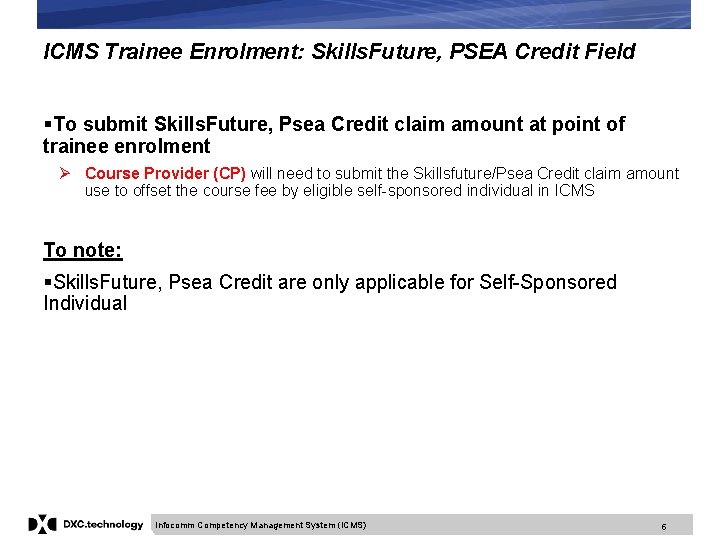
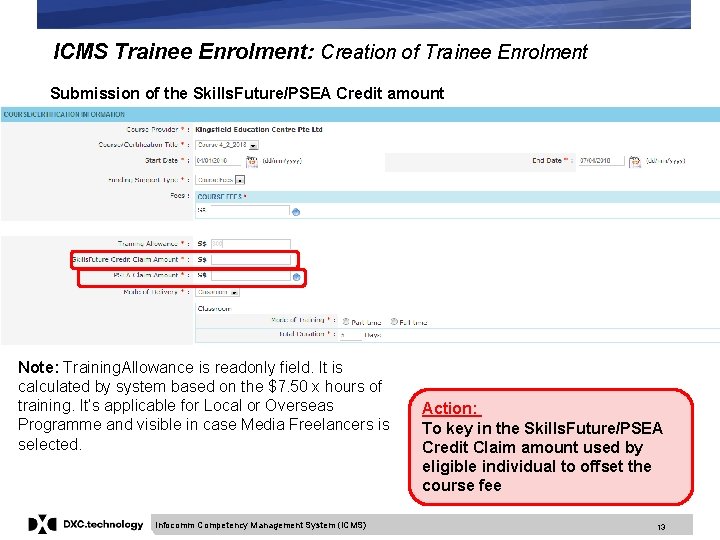
ICMS Trainee Enrolment: Skills. Future, PSEA Credit Field §To submit Skills. Future, Psea Credit claim amount at point of trainee enrolment Ø Course Provider (CP) will need to submit the Skillsfuture/Psea Credit claim amount use to offset the course fee by eligible self-sponsored individual in ICMS To note: §Skills. Future, Psea Credit are only applicable for Self-Sponsored Individual Infocomm Competency Management System (ICMS) 5
ICMS Trainee Enrolment: Creation of Trainee Enrolment 1. Create Trainee Enrolment Infocomm Competency Management System (ICMS) 6
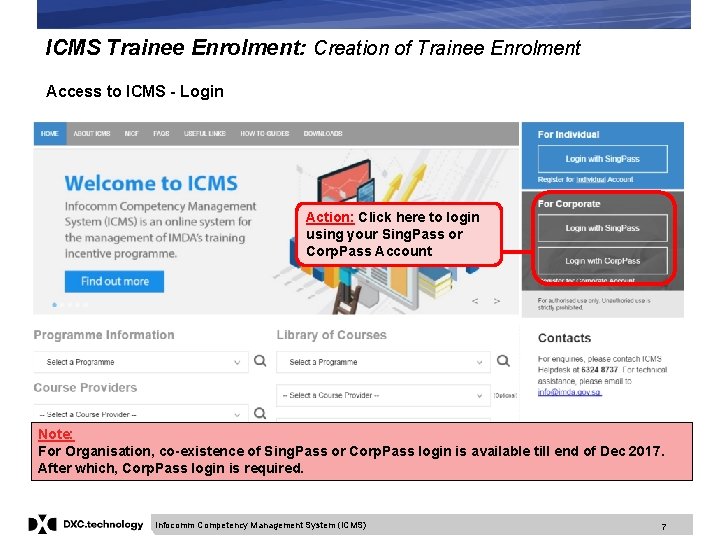
ICMS Trainee Enrolment: Creation of Trainee Enrolment Access to ICMS - Login Action: Click here to login using your Sing. Pass or Corp. Pass Account Note: For Organisation, co-existence of Sing. Pass or Corp. Pass login is available till end of Dec 2017. After which, Corp. Pass login is required. Infocomm Competency Management System (ICMS) 7
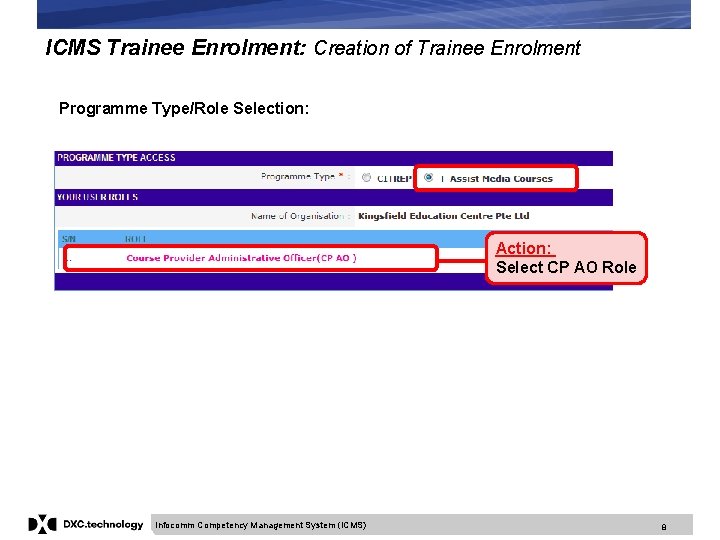
ICMS Trainee Enrolment: Creation of Trainee Enrolment Programme Type/Role Selection: Action: Select CP AO Role Infocomm Competency Management System (ICMS) 8
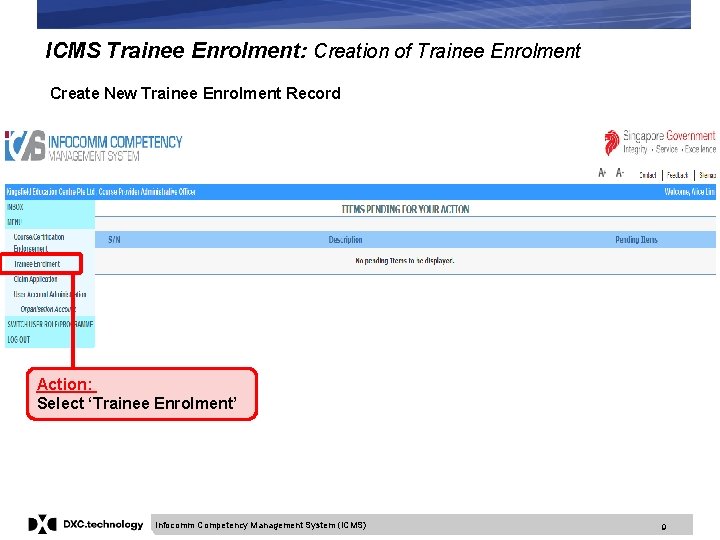
ICMS Trainee Enrolment: Creation of Trainee Enrolment Create New Trainee Enrolment Record Action: Select ‘Trainee Enrolment’ Infocomm Competency Management System (ICMS) 9
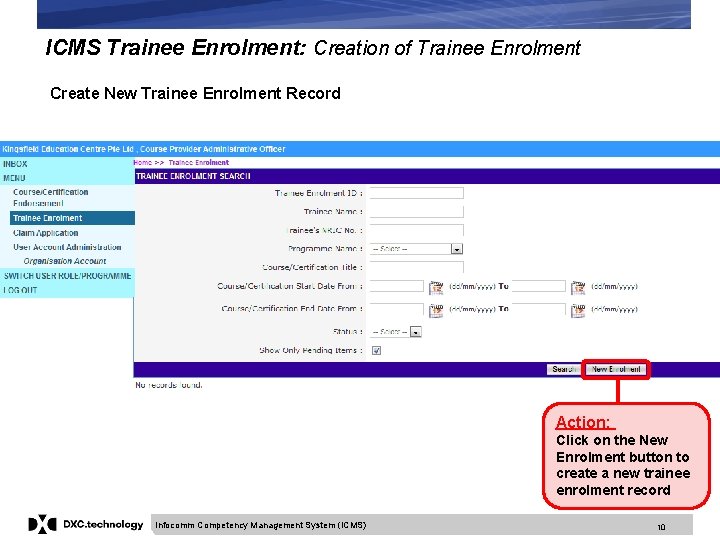
ICMS Trainee Enrolment: Creation of Trainee Enrolment Create New Trainee Enrolment Record Action: Click on the New Enrolment button to create a new trainee enrolment record Infocomm Competency Management System (ICMS) 10
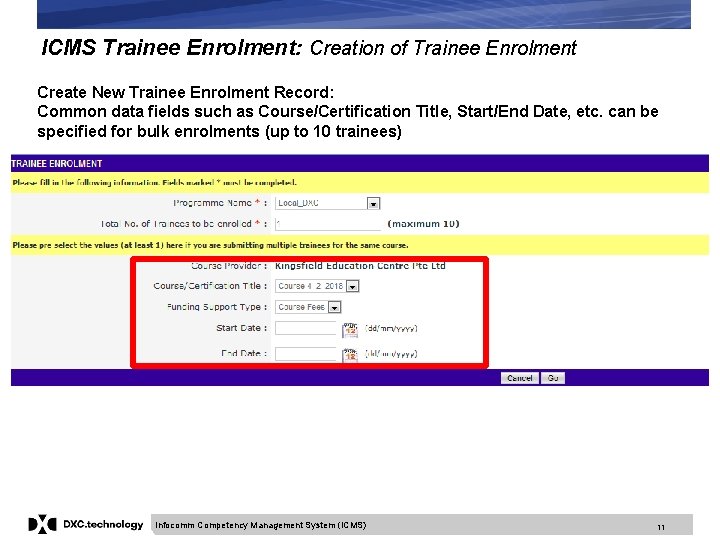
ICMS Trainee Enrolment: Creation of Trainee Enrolment Create New Trainee Enrolment Record: Common data fields such as Course/Certification Title, Start/End Date, etc. can be specified for bulk enrolments (up to 10 trainees) Infocomm Competency Management System (ICMS) 11
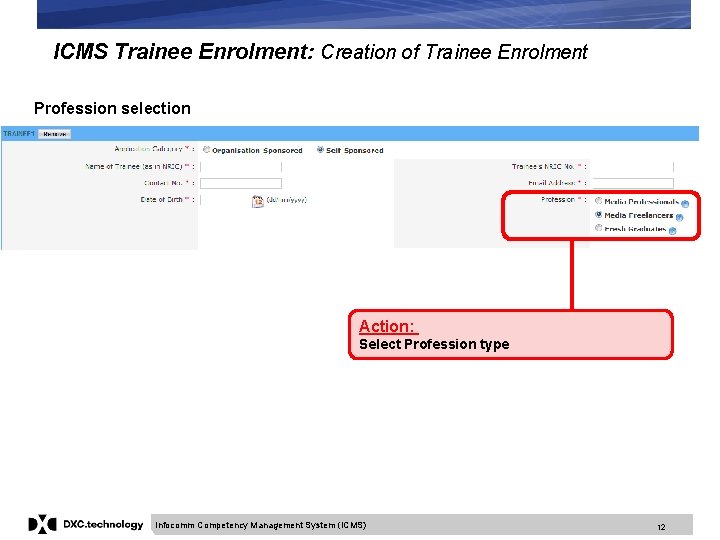
ICMS Trainee Enrolment: Creation of Trainee Enrolment Profession selection Action: Select Profession type Infocomm Competency Management System (ICMS) 12
ICMS Trainee Enrolment: Creation of Trainee Enrolment Submission of the Skills. Future/PSEA Credit amount Note: Training. Allowance is readonly field. It is calculated by system based on the $7. 50 x hours of training. It’s applicable for Local or Overseas Programme and visible in case Media Freelancers is selected. Infocomm Competency Management System (ICMS) Action: To key in the Skills. Future/PSEA Credit Claim amount used by eligible individual to offset the course fee 13
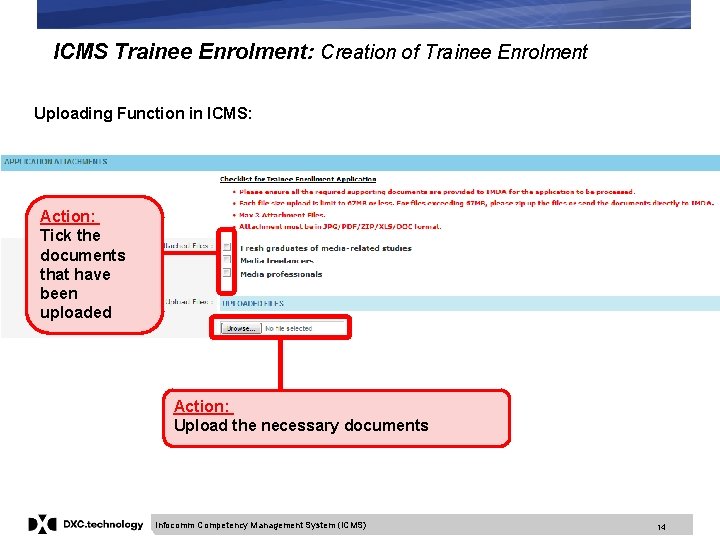
ICMS Trainee Enrolment: Creation of Trainee Enrolment Uploading Function in ICMS: Action: Tick the documents that have been uploaded Action: Upload the necessary documents Infocomm Competency Management System (ICMS) 14
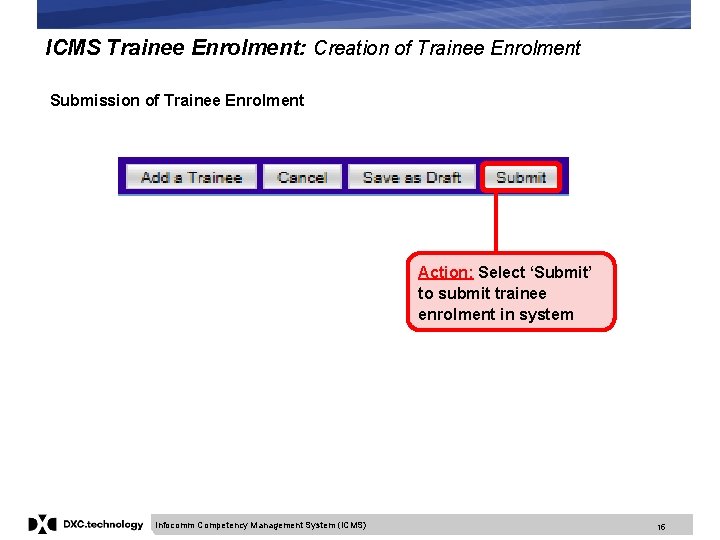
ICMS Trainee Enrolment: Creation of Trainee Enrolment Submission of Trainee Enrolment Action: Select ‘Submit’ to submit trainee enrolment in system Infocomm Competency Management System (ICMS) 15
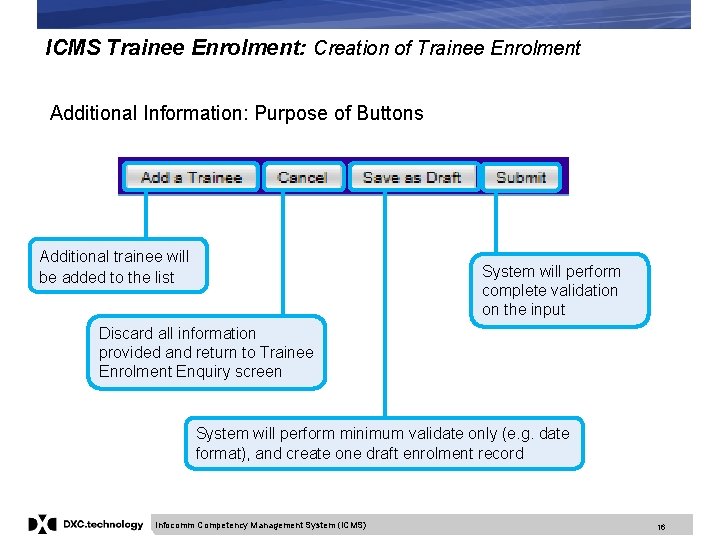
ICMS Trainee Enrolment: Creation of Trainee Enrolment Additional Information: Purpose of Buttons Additional trainee will be added to the list System will perform complete validation on the input Discard all information provided and return to Trainee Enrolment Enquiry screen System will perform minimum validate only (e. g. date format), and create one draft enrolment record Infocomm Competency Management System (ICMS) 16
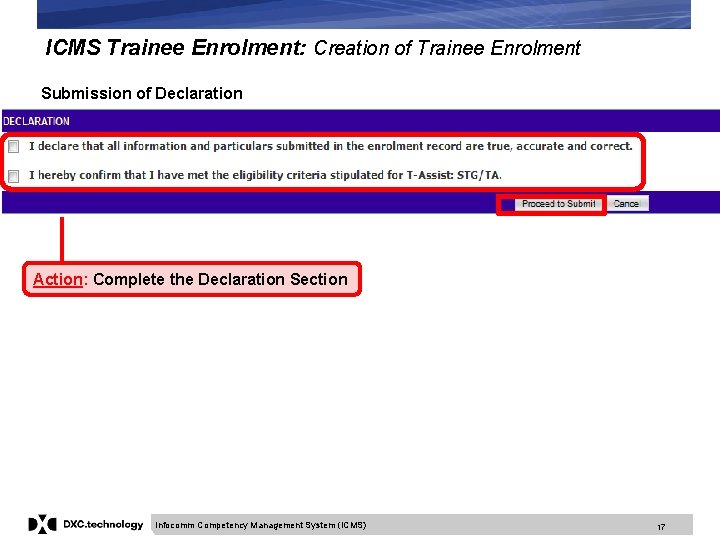
ICMS Trainee Enrolment: Creation of Trainee Enrolment Submission of Declaration Action: Complete the Declaration Section Infocomm Competency Management System (ICMS) 17
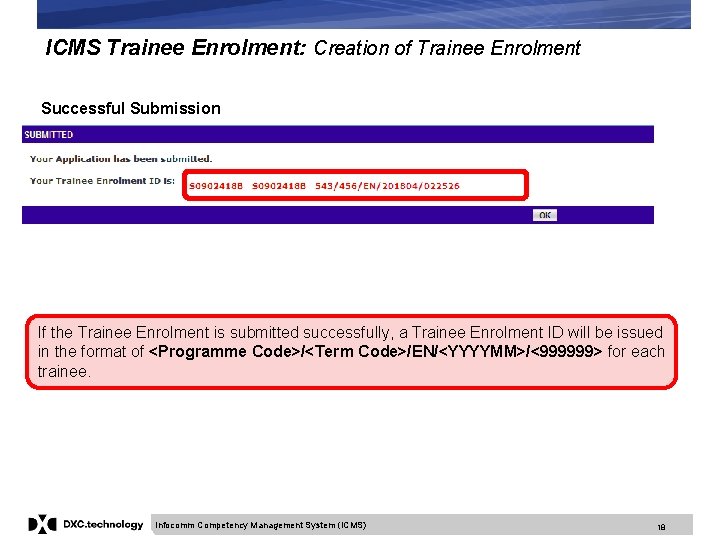
ICMS Trainee Enrolment: Creation of Trainee Enrolment Successful Submission If the Trainee Enrolment is submitted successfully, a Trainee Enrolment ID will be issued in the format of <Programme Code>/<Term Code>/EN/<YYYYMM>/<999999> for each trainee. Infocomm Competency Management System (ICMS) 18
ICMS Trainee Enrolment: Update Trainee Enrolment 2. Update Trainee Enrolment Infocomm Competency Management System (ICMS) 19
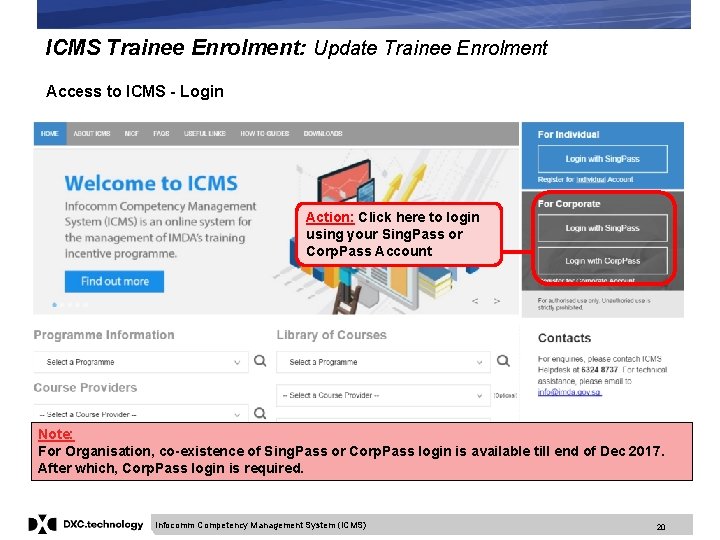
ICMS Trainee Enrolment: Update Trainee Enrolment Access to ICMS - Login Action: Click here to login using your Sing. Pass or Corp. Pass Account Note: For Organisation, co-existence of Sing. Pass or Corp. Pass login is available till end of Dec 2017. After which, Corp. Pass login is required. Infocomm Competency Management System (ICMS) 20
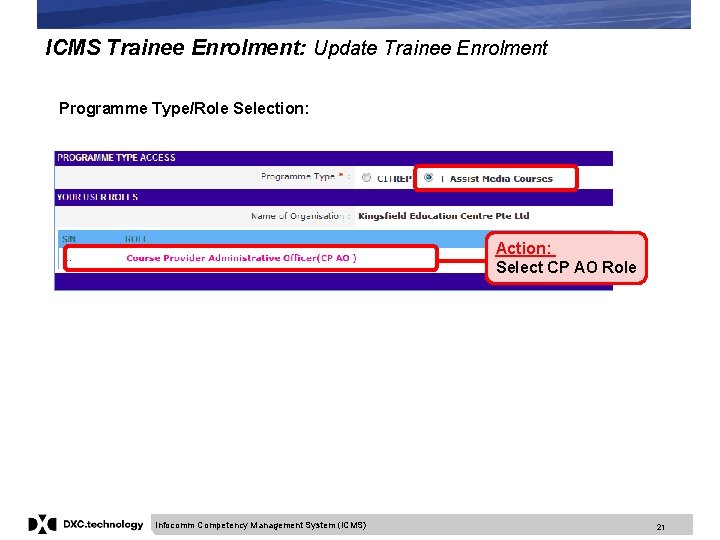
ICMS Trainee Enrolment: Update Trainee Enrolment Programme Type/Role Selection: Action: Select CP AO Role Infocomm Competency Management System (ICMS) 21
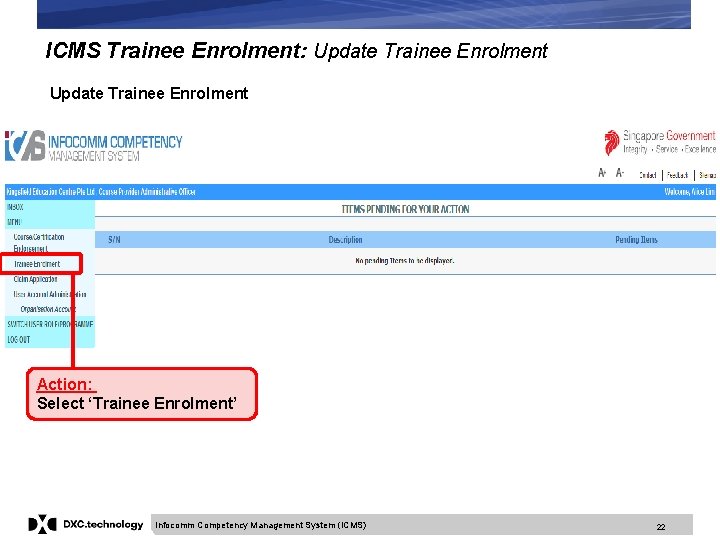
ICMS Trainee Enrolment: Update Trainee Enrolment Action: Select ‘Trainee Enrolment’ Infocomm Competency Management System (ICMS) 22
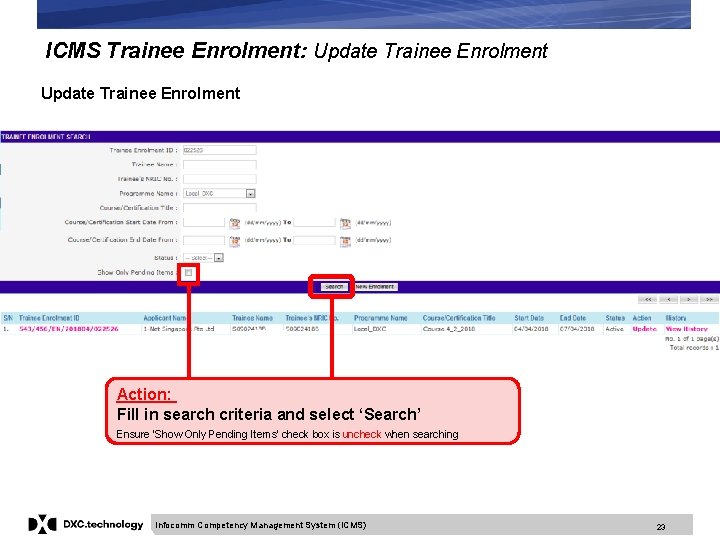
ICMS Trainee Enrolment: Update Trainee Enrolment Action: Fill in search criteria and select ‘Search’ Ensure ‘Show Only Pending Items’ check box is uncheck when searching Infocomm Competency Management System (ICMS) 23
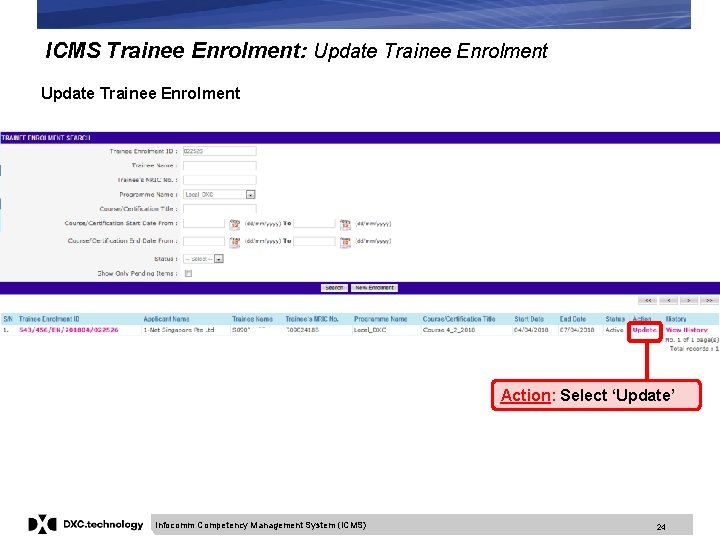
ICMS Trainee Enrolment: Update Trainee Enrolment Action: Select ‘Update’ Infocomm Competency Management System (ICMS) 24
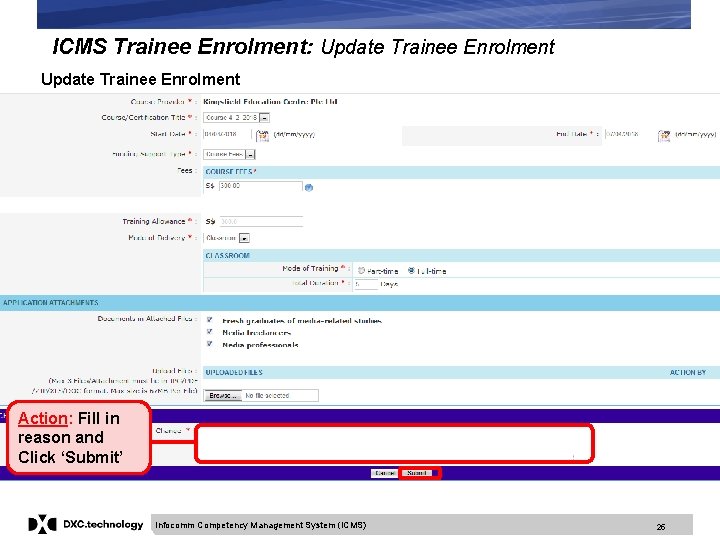
ICMS Trainee Enrolment: Update Trainee Enrolment Action: Fill in reason and Click ‘Submit’ Infocomm Competency Management System (ICMS) 25
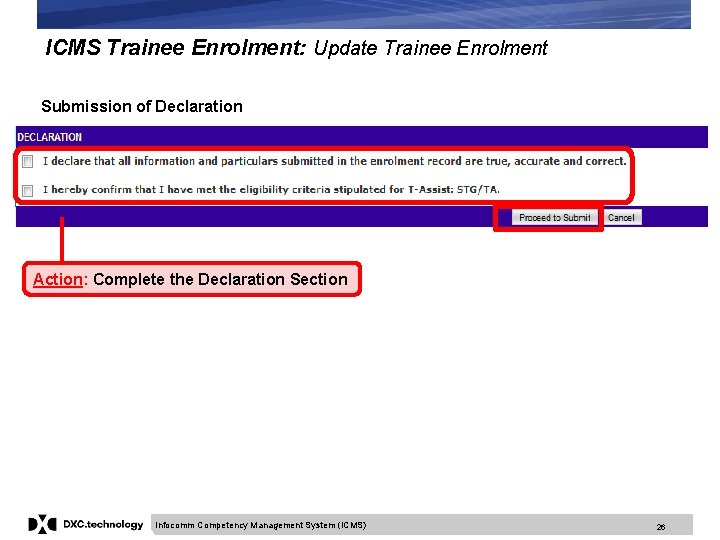
ICMS Trainee Enrolment: Update Trainee Enrolment Submission of Declaration Action: Complete the Declaration Section Infocomm Competency Management System (ICMS) 26
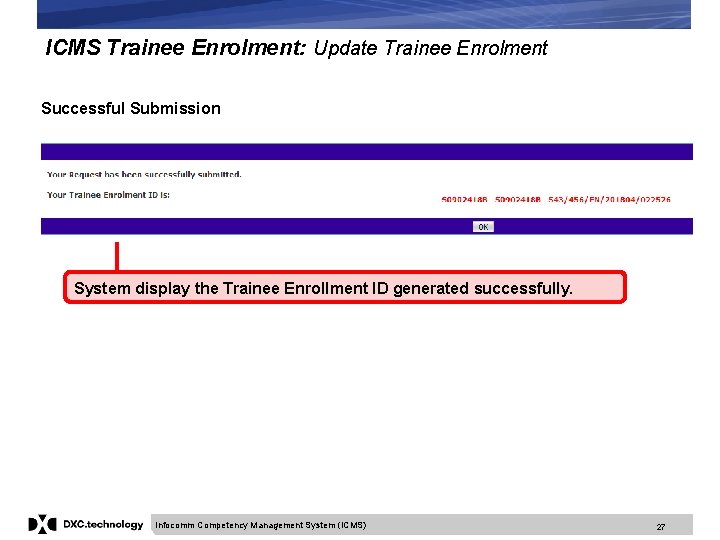
ICMS Trainee Enrolment: Update Trainee Enrolment Successful Submission System display the Trainee Enrollment ID generated successfully. Infocomm Competency Management System (ICMS) 27
ICMS Trainee Enrolment: Search/View Trainee Enrolment 3. Search/View Trainee Enrolment Infocomm Competency Management System (ICMS) 28
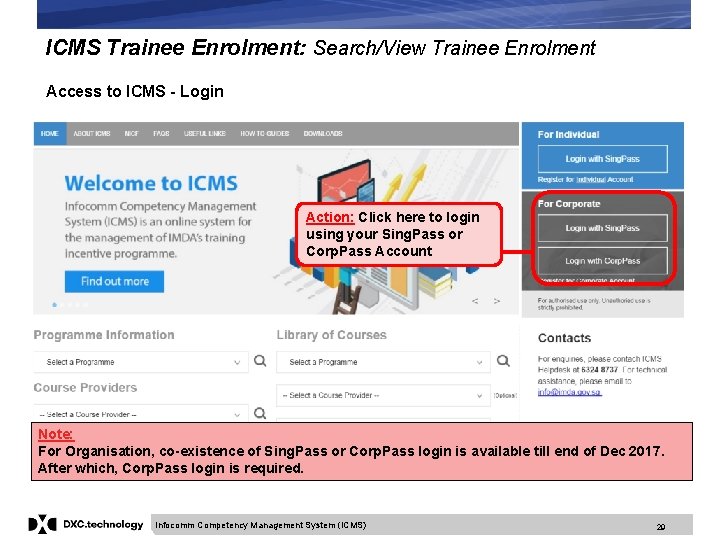
ICMS Trainee Enrolment: Search/View Trainee Enrolment Access to ICMS - Login Action: Click here to login using your Sing. Pass or Corp. Pass Account Note: For Organisation, co-existence of Sing. Pass or Corp. Pass login is available till end of Dec 2017. After which, Corp. Pass login is required. Infocomm Competency Management System (ICMS) 29
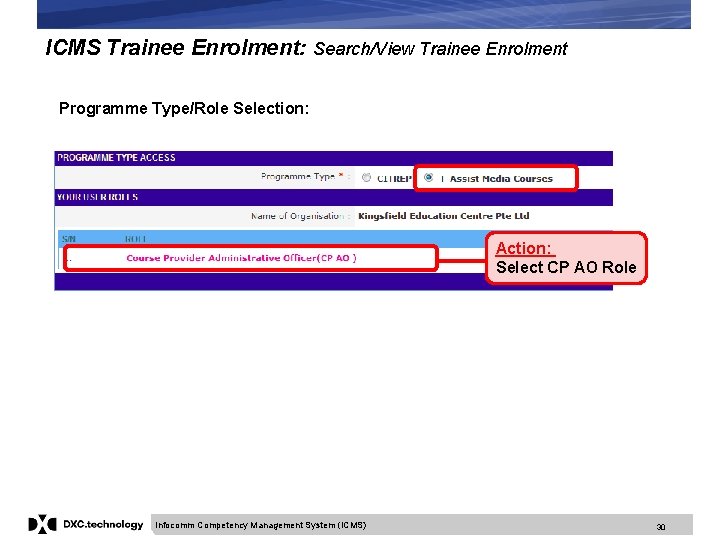
ICMS Trainee Enrolment: Search/View Trainee Enrolment Programme Type/Role Selection: Action: Select CP AO Role Infocomm Competency Management System (ICMS) 30
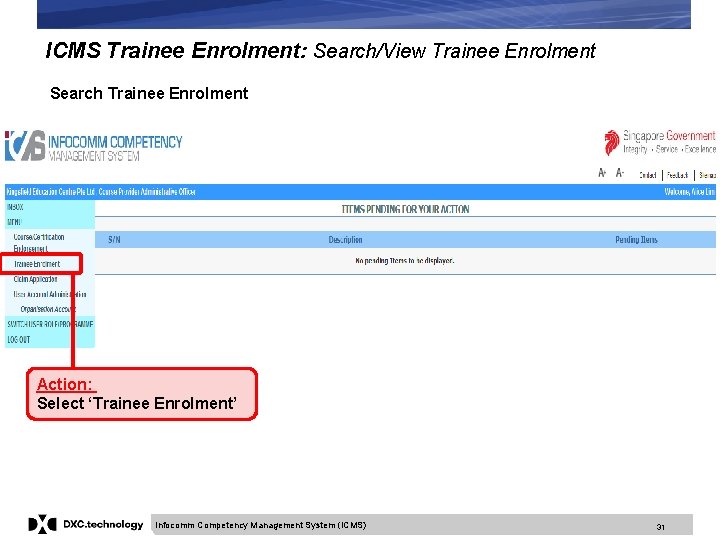
ICMS Trainee Enrolment: Search/View Trainee Enrolment Search Trainee Enrolment Action: Select ‘Trainee Enrolment’ Infocomm Competency Management System (ICMS) 31
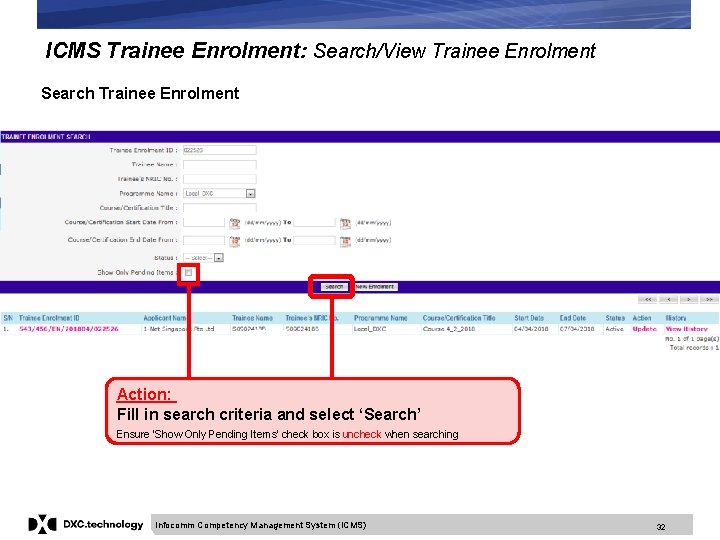
ICMS Trainee Enrolment: Search/View Trainee Enrolment Search Trainee Enrolment Action: Fill in search criteria and select ‘Search’ Ensure ‘Show Only Pending Items’ check box is uncheck when searching Infocomm Competency Management System (ICMS) 32
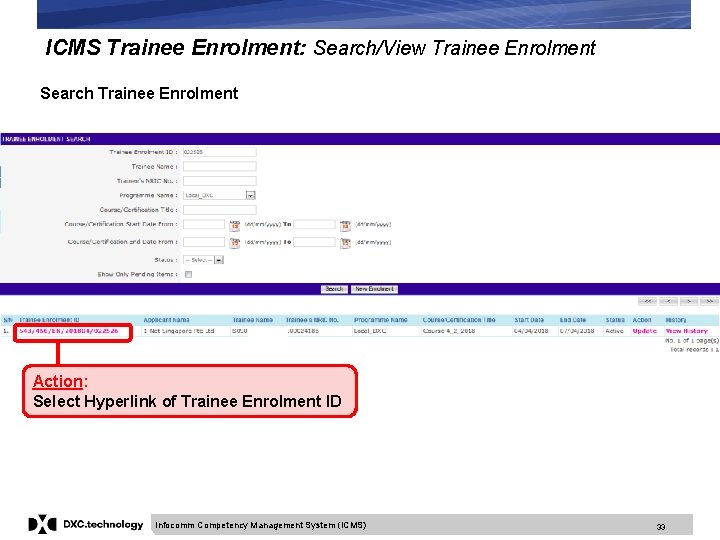
ICMS Trainee Enrolment: Search/View Trainee Enrolment Search Trainee Enrolment Action: Select Hyperlink of Trainee Enrolment ID Infocomm Competency Management System (ICMS) 33
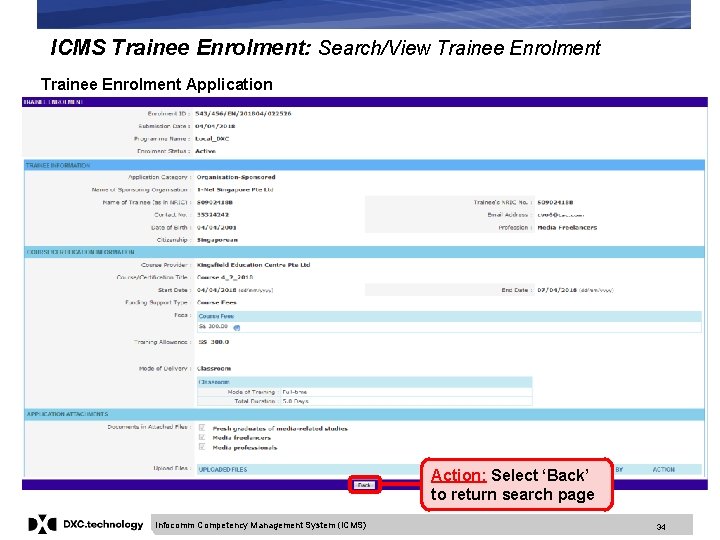
ICMS Trainee Enrolment: Search/View Trainee Enrolment Application Action: Select ‘Back’ to return search page Infocomm Competency Management System (ICMS) 34