Chapter 22 Simple Mail Transfer Protocol SMTP Kyung
- Slides: 37
Chapter 22 Simple Mail Transfer Protocol (SMTP) Kyung Hee University 1
Introduction q TCP/IP protocol that supports electronic mail on the Internet is called Simple Mail Transfer Protocol (SMTP) It is a system for sending messages to other computer users based on e-mail addresses. SMTP supports : l l l Kyung Hee University Sending a single message to one or more recipients. Sending messages that include text, voice, video, or graphics. Sending messages to users on networks outside the Internet 2
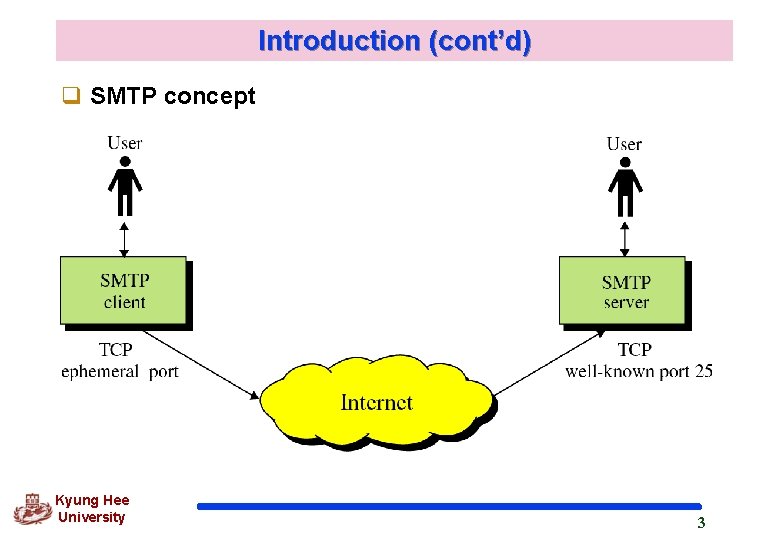
Introduction (cont’d) q SMTP concept Kyung Hee University 3
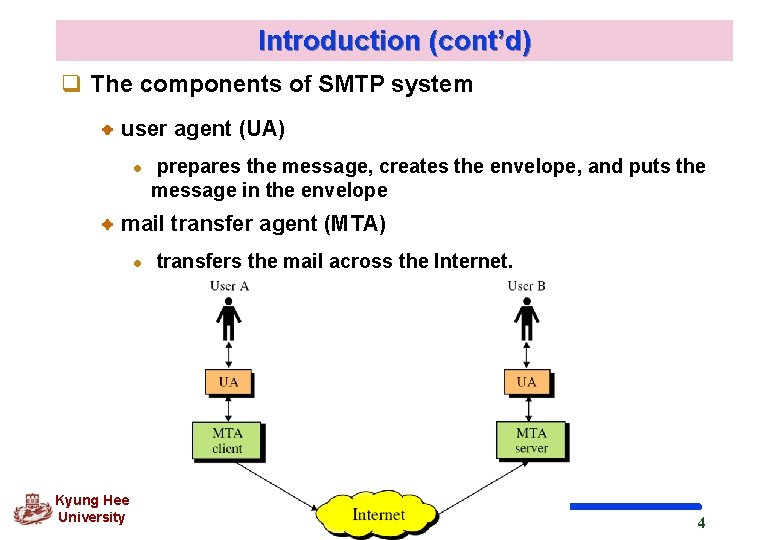
Introduction (cont’d) q The components of SMTP system user agent (UA) l prepares the message, creates the envelope, and puts the message in the envelope mail transfer agent (MTA) l Kyung Hee University transfers the mail across the Internet. 4
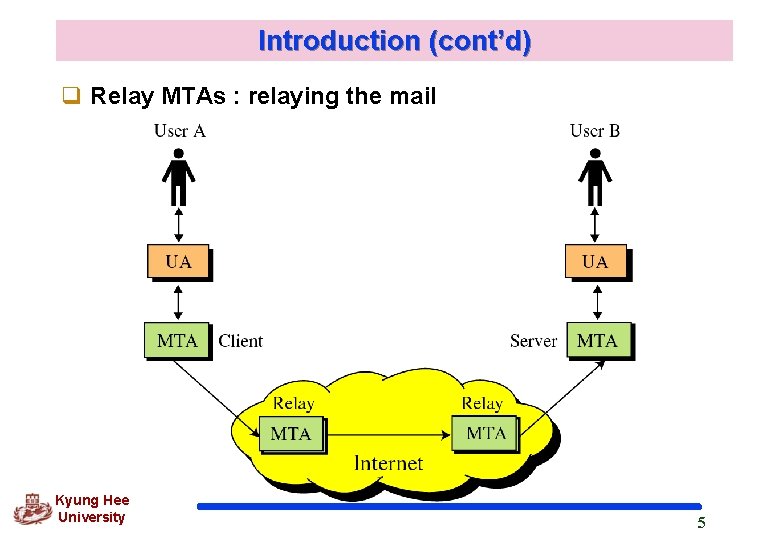
Introduction (cont’d) q Relay MTAs : relaying the mail Kyung Hee University 5
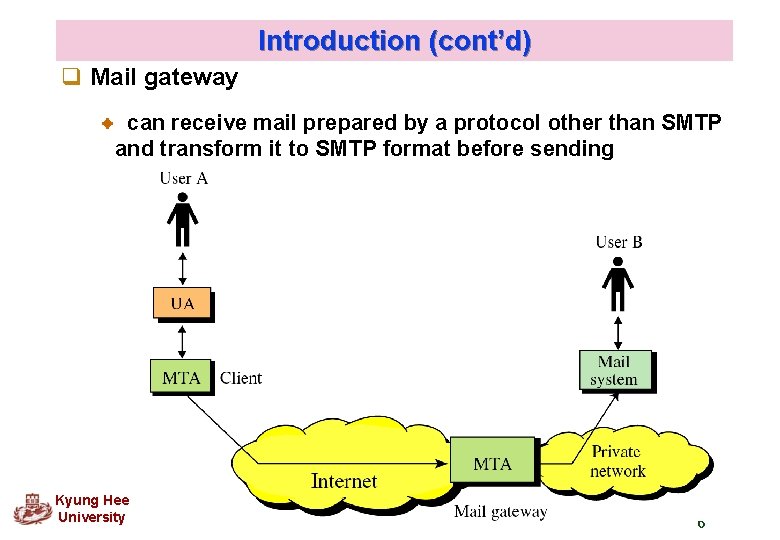
Introduction (cont’d) q Mail gateway can receive mail prepared by a protocol other than SMTP and transform it to SMTP format before sending Kyung Hee University 6
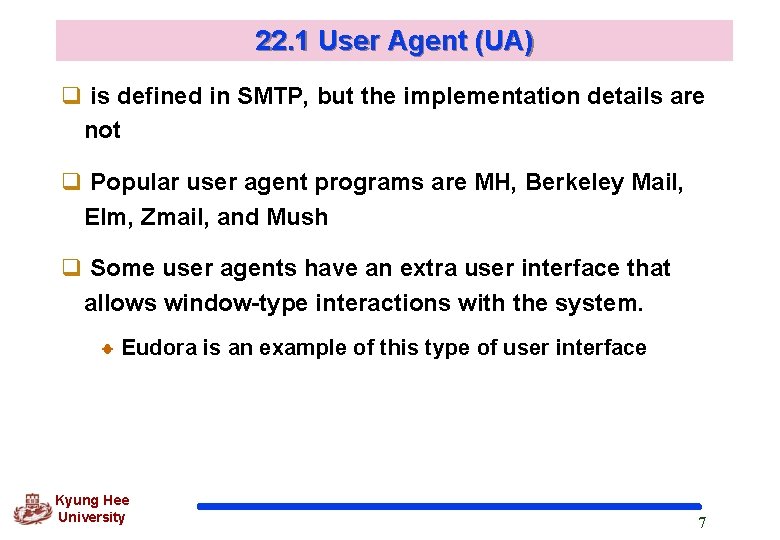
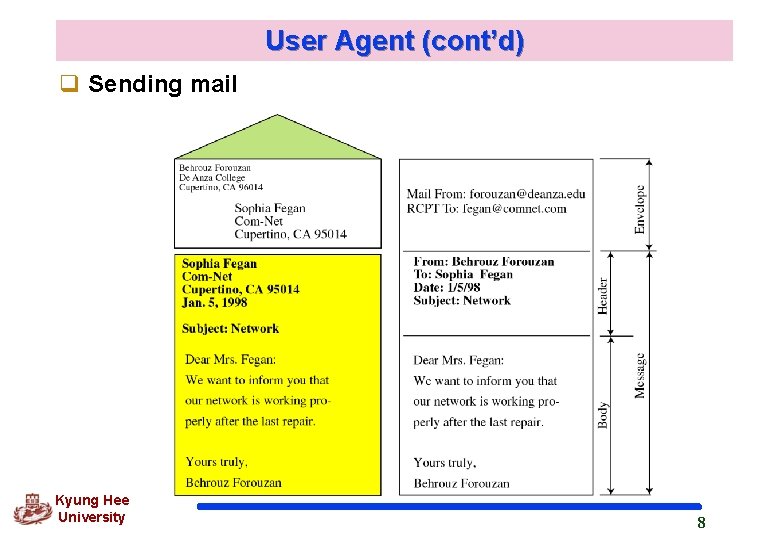
22. 1 User Agent (UA) q is defined in SMTP, but the implementation details are not q Popular user agent programs are MH, Berkeley Mail, Elm, Zmail, and Mush q Some user agents have an extra user interface that allows window-type interactions with the system. Eudora is an example of this type of user interface Kyung Hee University 7
User Agent (cont’d) q Sending mail Kyung Hee University 8
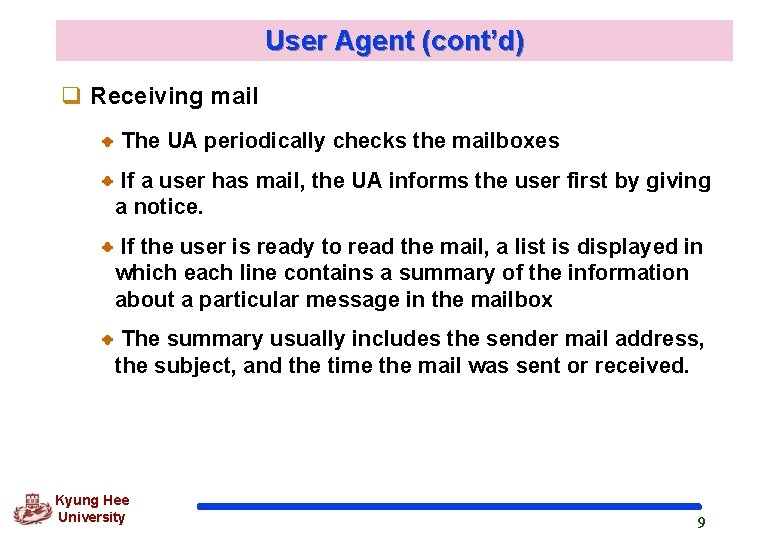
User Agent (cont’d) q Receiving mail The UA periodically checks the mailboxes If a user has mail, the UA informs the user first by giving a notice. If the user is ready to read the mail, a list is displayed in which each line contains a summary of the information about a particular message in the mailbox The summary usually includes the sender mail address, the subject, and the time the mail was sent or received. Kyung Hee University 9
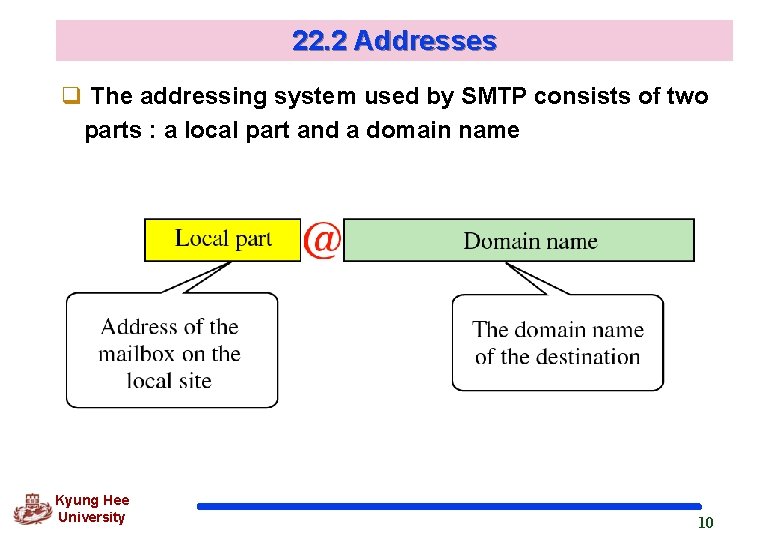
22. 2 Addresses q The addressing system used by SMTP consists of two parts : a local part and a domain name Kyung Hee University 10
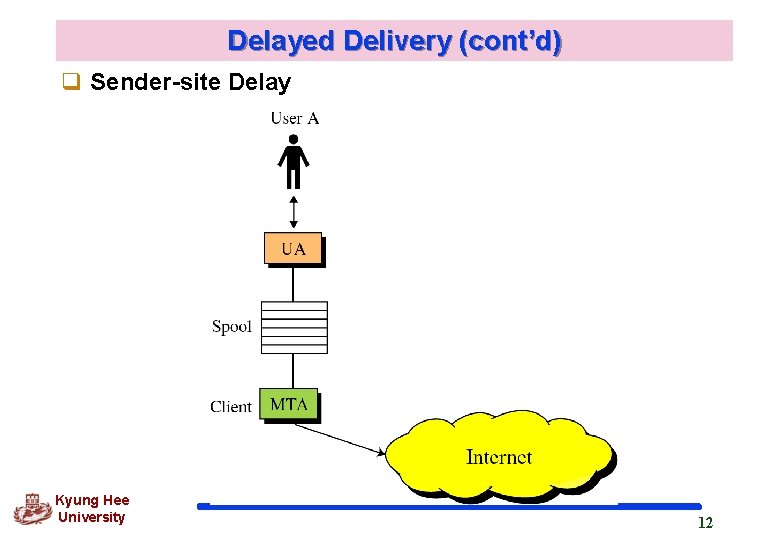
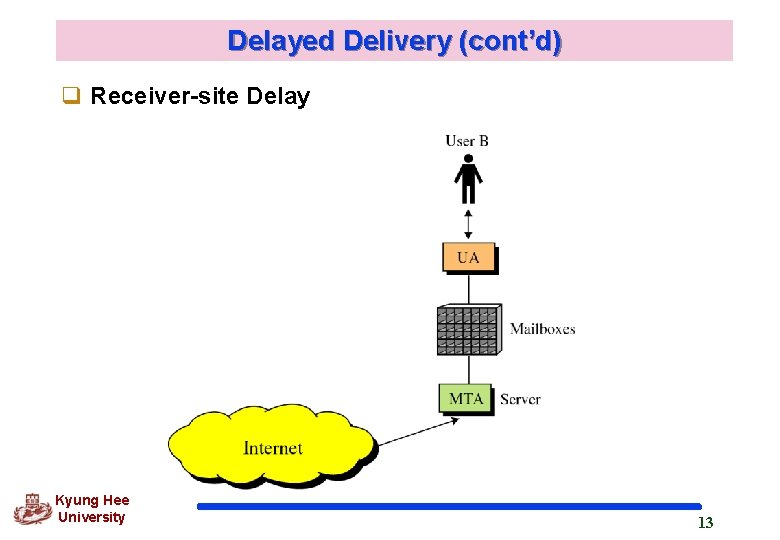
22. 3 Delayed Delivery q The message does not necessarily have to be delivered immediately but can be delayed at the sender site, receiver site, or the intermediate servers. q Sender-site Delay SMTP specifies that the sender site must accommodate a spooling system in which messages are stored before being sent. The mail transfer system periodically checks the mail stored in the pool to see if the mail can be sent. Kyung Hee University 11
Delayed Delivery (cont’d) q Sender-site Delay Kyung Hee University 12
Delayed Delivery (cont’d) q Receiver-site Delay Kyung Hee University 13
Delayed Delivery (cont’d) q Intermediate Delay receiving mail, keeping mail messages in their own mailboxes and spooling and sending them appropriate. Kyung Hee University 14
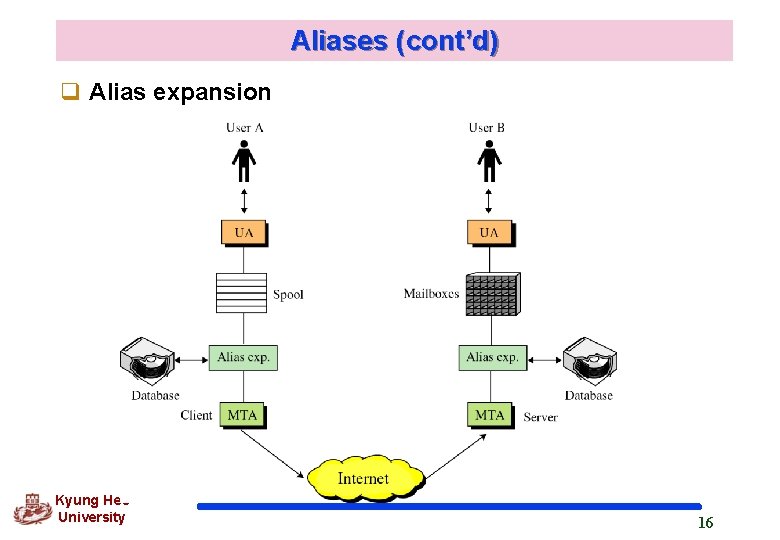
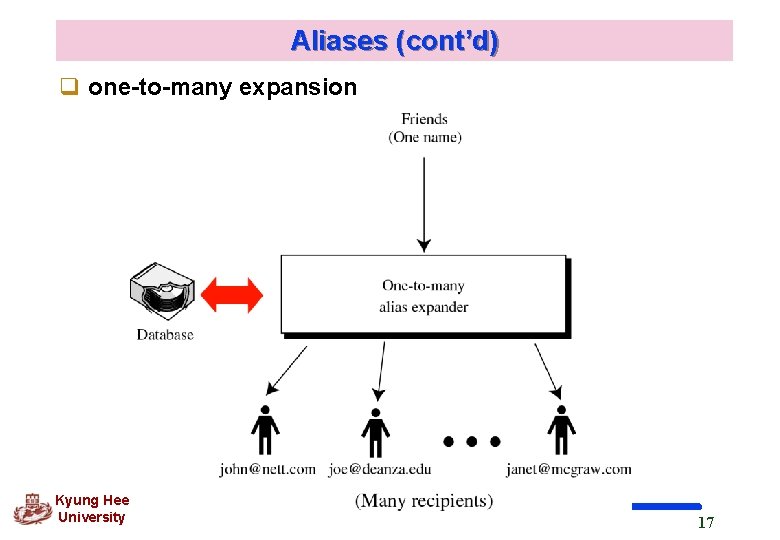
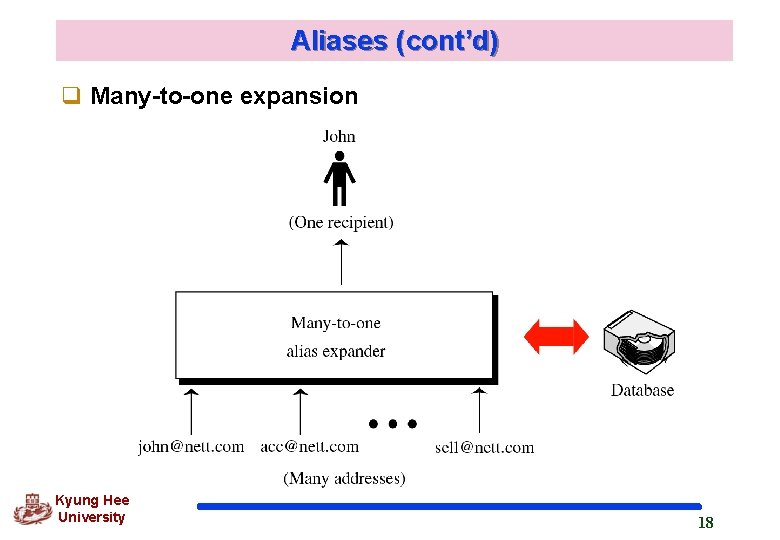
22. 4 Aliases q SMTP allows one name, an alias, to represent several different e-mail addresses; this is called one-to-many alias expansion. q Also, a single user can be defined by several different e -mail addresses, called many-to-one alias expansion. q To handle these, the system must include an alias expansion facility at both the sender and receiver site Kyung Hee University 15
Aliases (cont’d) q Alias expansion Kyung Hee University 16
Aliases (cont’d) q one-to-many expansion Kyung Hee University 17
Aliases (cont’d) q Many-to-one expansion Kyung Hee University 18
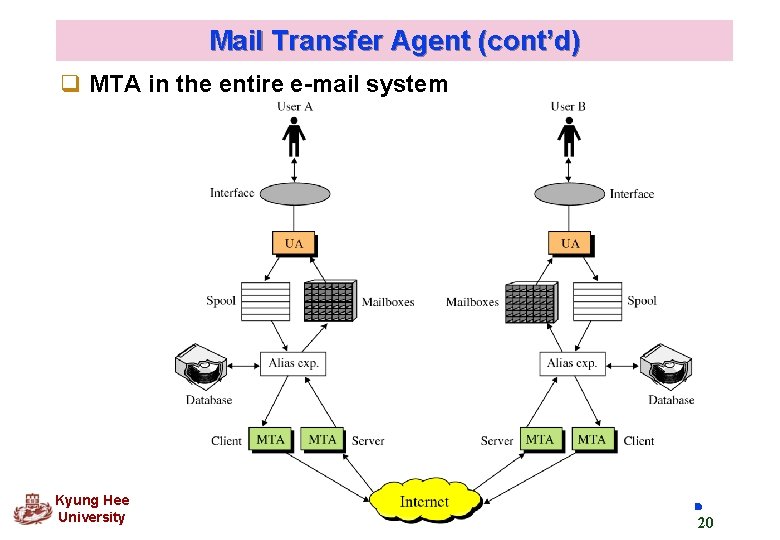
22. 5 Mail Transfer Agent (MTA) q Doing the actual mail transfer. q SMTP simply defines how commands and responses must be sent back and forth. Kyung Hee University 19
Mail Transfer Agent (cont’d) q MTA in the entire e-mail system Kyung Hee University 20
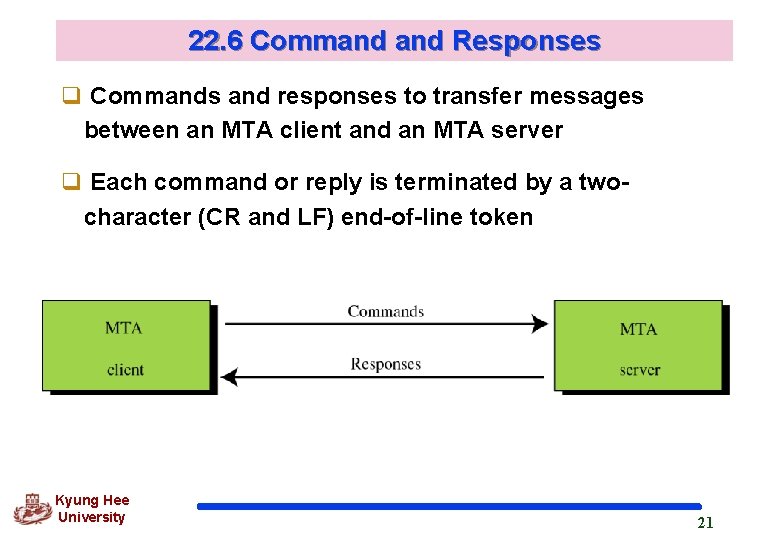
22. 6 Command Responses q Commands and responses to transfer messages between an MTA client and an MTA server q Each command or reply is terminated by a twocharacter (CR and LF) end-of-line token Kyung Hee University 21
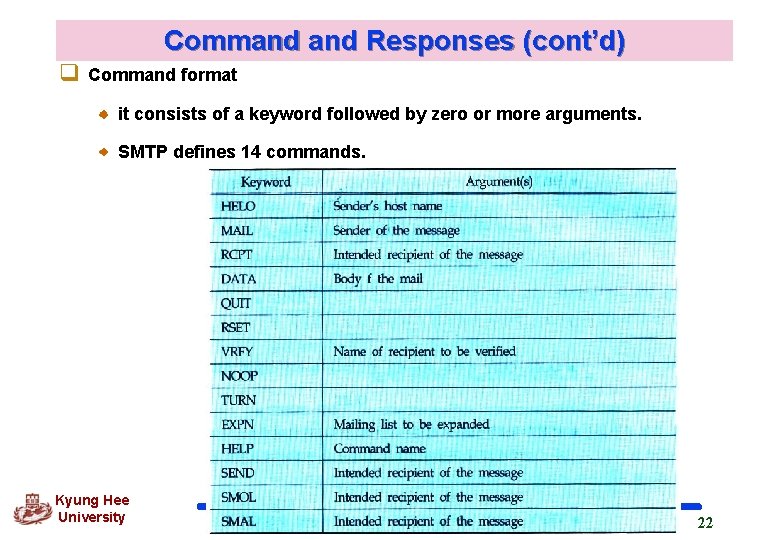
Command Responses (cont’d) q Command format it consists of a keyword followed by zero or more arguments. SMTP defines 14 commands. Kyung Hee University 22
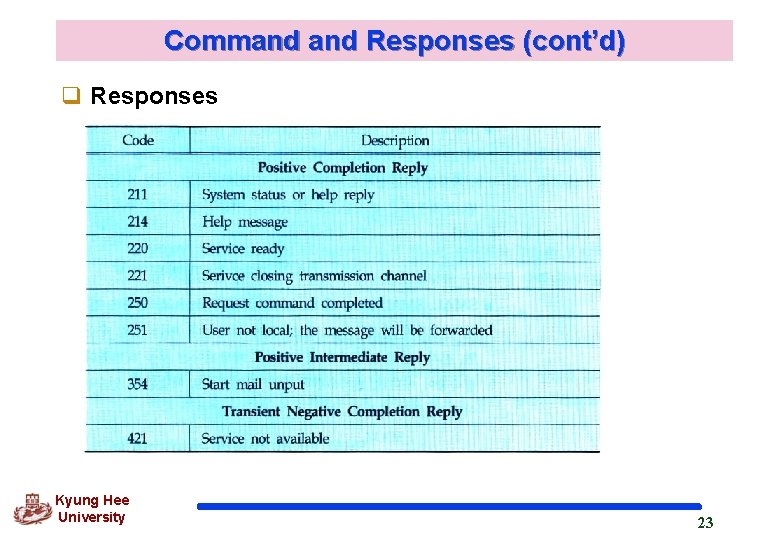
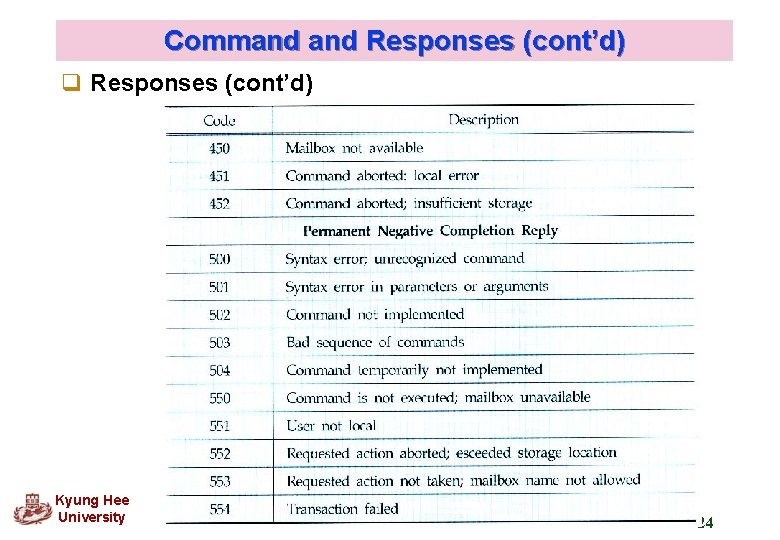
Command Responses (cont’d) q Responses Kyung Hee University 23
Command Responses (cont’d) q Responses (cont’d) Kyung Hee University 24
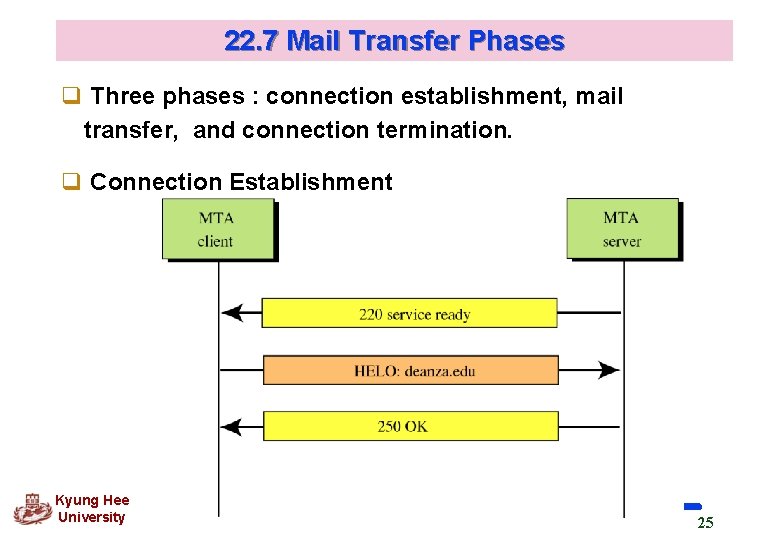
22. 7 Mail Transfer Phases q Three phases : connection establishment, mail transfer, and connection termination. q Connection Establishment Kyung Hee University 25
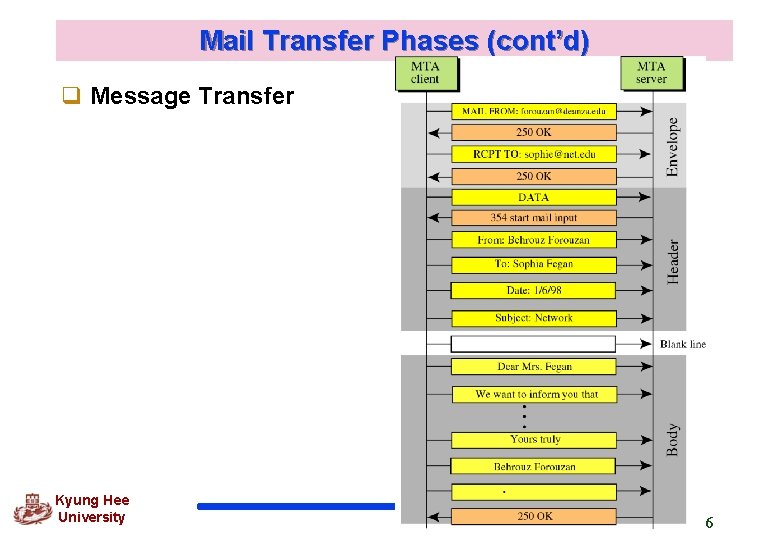
Mail Transfer Phases (cont’d) q Message Transfer Kyung Hee University 26
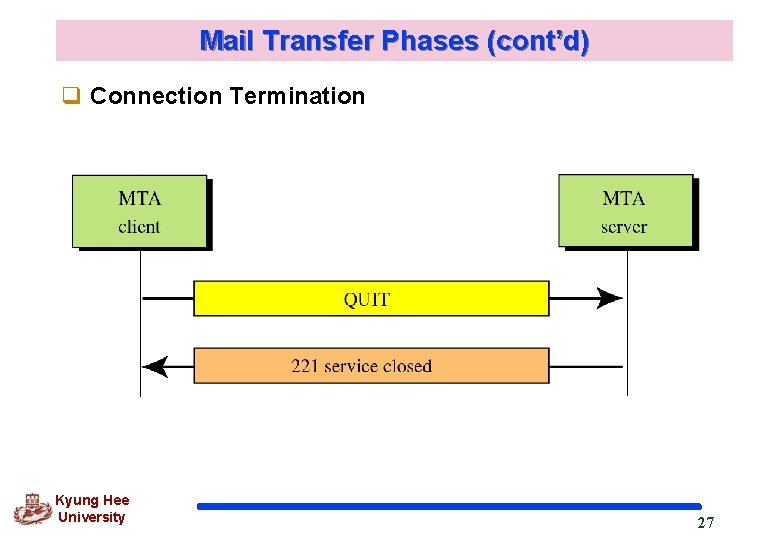
Mail Transfer Phases (cont’d) q Connection Termination Kyung Hee University 27
22. 8 Multipurpose Internet Mail Extensions (MINE) q SMTP cannot be used for languages that are not supported by seven-bit ASCII characters (such as French, German, Hebrew, Russian, Chinese, and Japanese, Korea) q Also, SMTP cannot be used to send binary files or to send video or audio data. q MIME is supplementary protocol that allows non-ASCII data to be sent through SMTP. it is not mail protocol and cannot replace SMTP; it is only an extension to SMTP Kyung Hee University 28
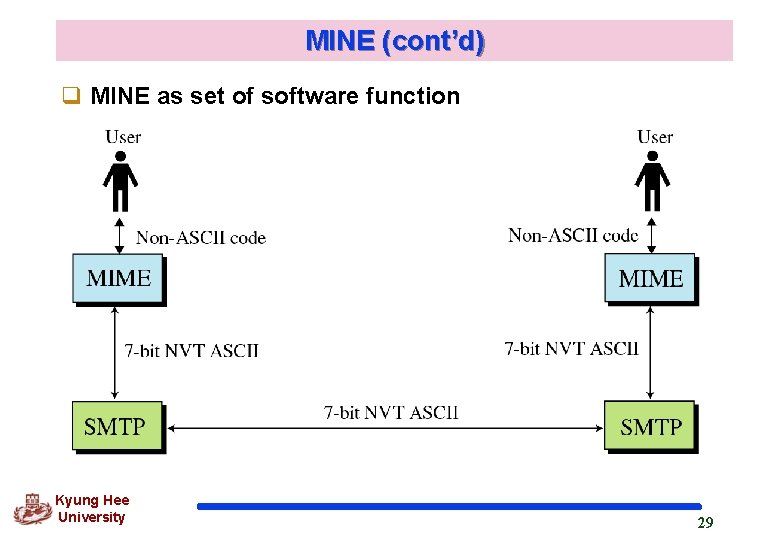
MINE (cont’d) q MINE as set of software function Kyung Hee University 29
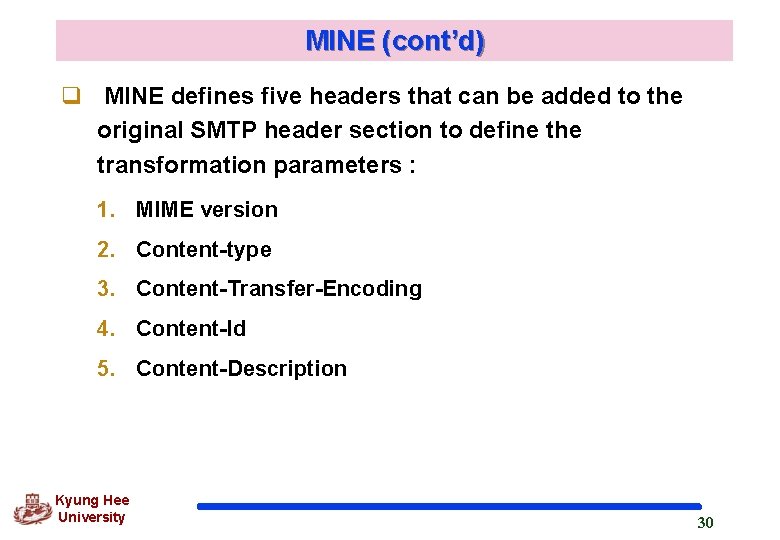
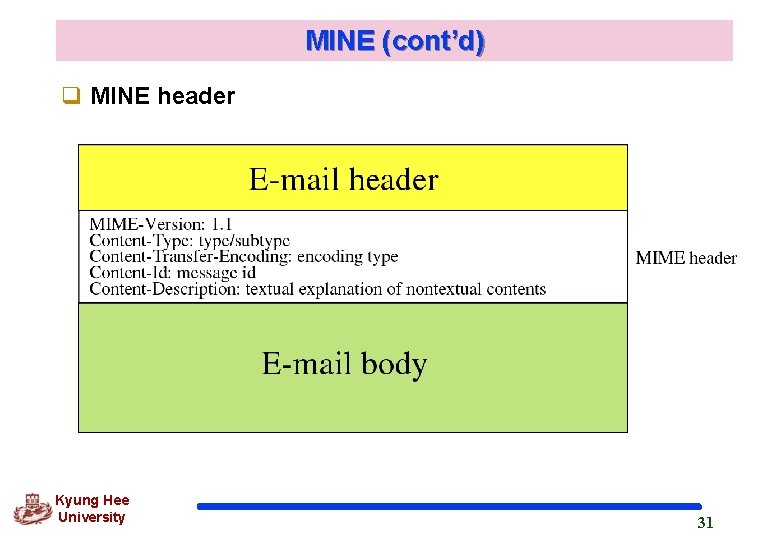
MINE (cont’d) q MINE defines five headers that can be added to the original SMTP header section to define the transformation parameters : 1. MIME version 2. Content-type 3. Content-Transfer-Encoding 4. Content-Id 5. Content-Description Kyung Hee University 30
MINE (cont’d) q MINE header Kyung Hee University 31
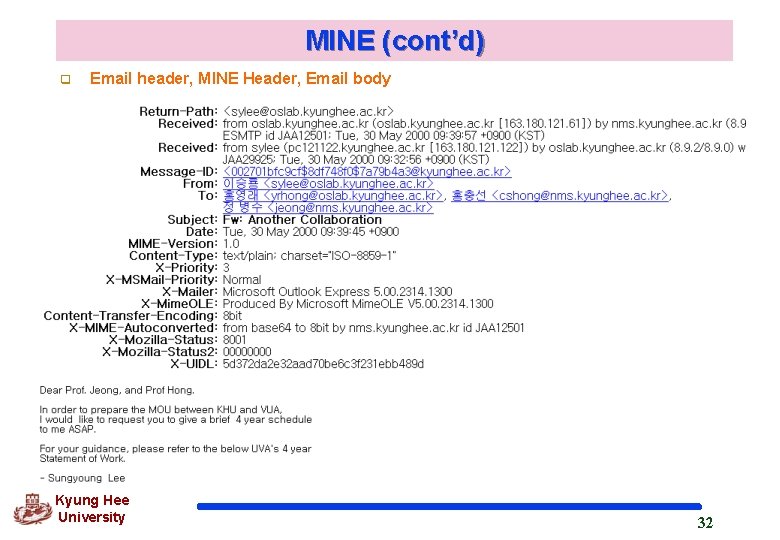
MINE (cont’d) q Email header, MINE Header, Email body Kyung Hee University 32
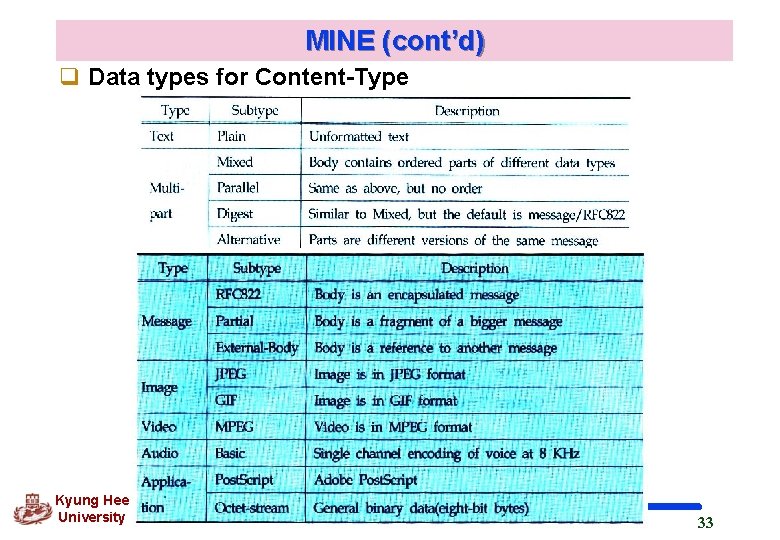
MINE (cont’d) q Data types for Content-Type Kyung Hee University 33
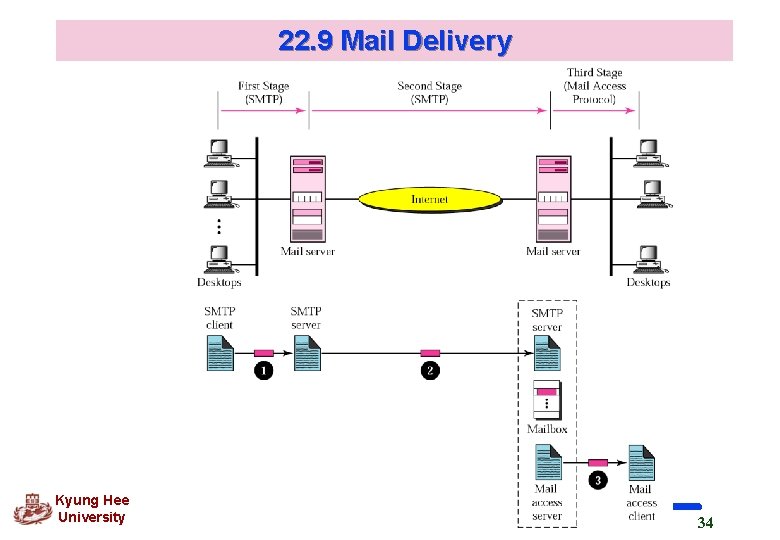
22. 9 Mail Delivery Kyung Hee University 34
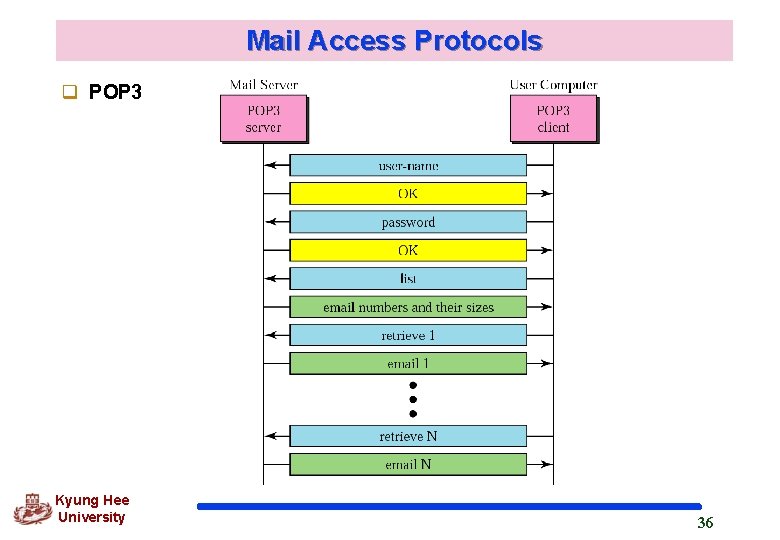
22. 10 Mail Access Protocols q In many organization, mail is received by an SMTP sever that is always on-line this SMTP sever provides a mail-drop service Workstations interact with the SMTP host to retrieve messages by using a client-server protocol such as POP, version 3 POP 3 uses TCP well-known port 110 Kyung Hee University 35
Mail Access Protocols q POP 3 Kyung Hee University 36
Mail Access Protocols q IMAP 4 More powerful and more complex than POP 3 Extra functions l l l Kyung Hee University A user can check the email header prior to downloading. A use can search the contents of the email for a specific string of characteristics prior to downloading. A user can partially download email A user can create, delete, or rename mailboxes on the mail server A user can create a hierarchy of mailboxes in a folder for email storage 37