
Jango Mail Broadcast MessageCampaign Workflow UI or API
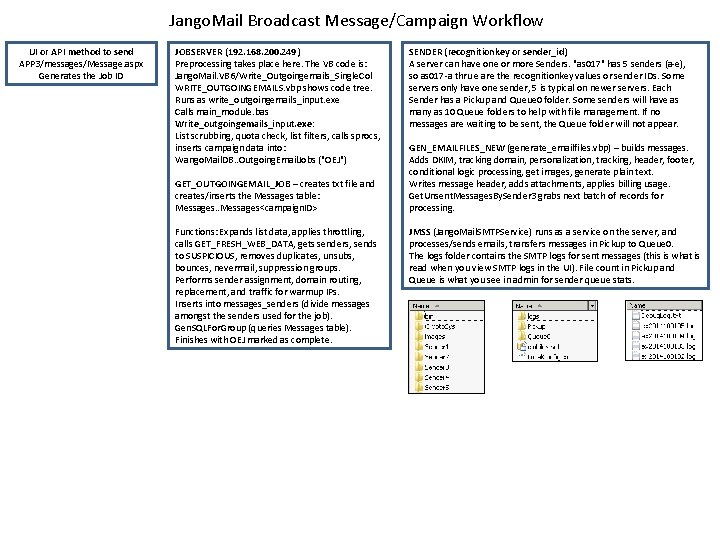
Jango. Mail Broadcast Message/Campaign Workflow UI or API method to send APP 3/messages/Message. aspx Generates the Job ID JOBSERVER (192. 168. 200. 249) Preprocessing takes place here. The VB code is: Jango. Mail. VB 6/Write_Outgoingemails_Single. Col WRITE_OUTGOINGEMAILS. vbp shows code tree. Runs as write_outgoingemails_input. exe Calls main_module. bas Write_outgoingemails_input. exe: List scrubbing, quota check, list filters, calls sprocs, inserts campaign data into: Wango. Mail. DB. . Outgoing. Email. Jobs ("OEJ") GET_OUTGOINGEMAIL_JOB – creates txt file and creates/inserts the Messages table: Messages. . Messages<campaign. ID> Functions: Expands list data, applies throttling, calls GET_FRESH_WEB_DATA, gets senders, sends to SUSPICIOUS, removes duplicates, unsubs, bounces, nevermail, suppression groups. Performs sender assignment, domain routing, replacement, and traffic for warmup IPs. Inserts into messages_senders (divide messages amongst the senders used for the job). Gen. SQLFor. Group (queries Messages table). Finishes with OEJ marked as complete. SENDER (recognitionkey or sender_id) A server can have one or more Senders. "as 017" has 5 senders (a-e), so as 017 -a thru e are the recognitionkey values or sender IDs. Some servers only have one sender, 5 is typical on newer servers. Each Sender has a Pickup and Queue 0 folder. Some senders will have as many as 10 Queue folders to help with file management. If no messages are waiting to be sent, the Queue folder will not appear. GEN_EMAILFILES_NEW (generate_emailfiles. vbp) – builds messages. Adds DKIM, tracking domain, personalization, tracking, header, footer, conditional logic processing, get images, generate plain text. Writes message header, adds attachments, applies billing usage. Get. Unsent. Messages. By. Sender 3 grabs next batch of records for processing. JMSS (Jango. Mail. SMTPService) runs as a service on the server, and processes/sends emails, transfers messages in Pickup to Queue 0. The logs folder contains the SMTP logs for sent messages (this is what is read when you view SMTP logs in the UI). File count in Pickup and Queue is what you see in admin for sender queue stats.
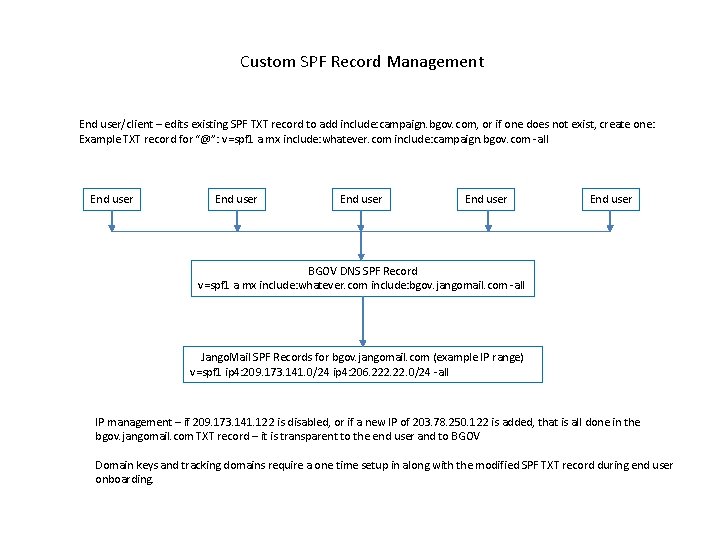
Custom SPF Record Management End user/client – edits existing SPF TXT record to add include: campaign. bgov. com, or if one does not exist, create one: Example TXT record for “@”: v=spf 1 a mx include: whatever. com include: campaign. bgov. com -all End user End user BGOV DNS SPF Record v=spf 1 a mx include: whatever. com include: bgov. jangomail. com -all Jango. Mail SPF Records for bgov. jangomail. com (example IP range) v=spf 1 ip 4: 209. 173. 141. 0/24 ip 4: 206. 222. 0/24 -all IP management – if 209. 173. 141. 122 is disabled, or if a new IP of 203. 78. 250. 122 is added, that is all done in the bgov. jangomail. com TXT record – it is transparent to the end user and to BGOV Domain keys and tracking domains require a one time setup in along with the modified SPF TXT record during end user onboarding.
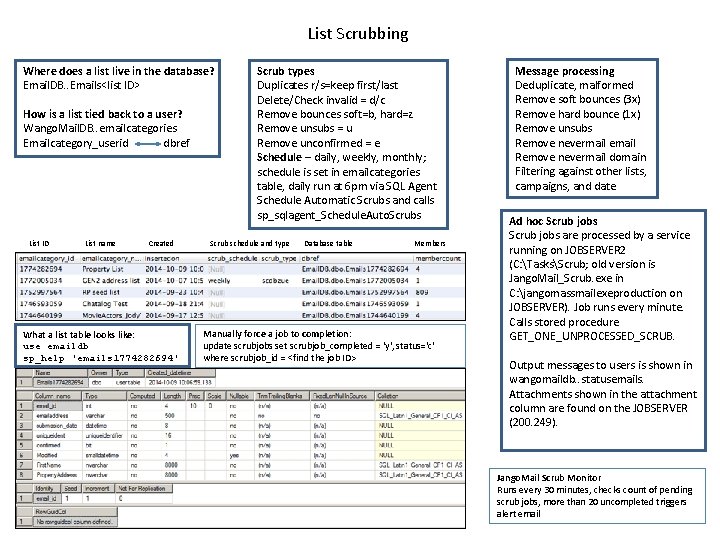
List Scrubbing Where does a list live in the database? Email. DB. . Emails<list ID> How is a list tied back to a user? Wango. Mail. DB. . emailcategories Emailcategory_userid dbref Scrub types Duplicates r/s=keep first/last Delete/Check invalid = d/c Remove bounces soft=b, hard=z Remove unsubs = u Remove unconfirmed = e Schedule – daily, weekly, monthly; schedule is set in emailcategories table, daily run at 6 pm via SQL Agent Schedule Automatic Scrubs and calls sp_sqlagent_Schedule. Auto. Scrubs List ID List name Created Scrub schedule and type Database table What a list table looks like: use emaildb sp_help 'emails 1774282694' Members Manually force a job to completion: update scrubjobs set scrubjob_completed = 'y', status='c' where scrubjob_id = <find the job ID> Message processing Deduplicate, malformed Remove soft bounces (3 x) Remove hard bounce (1 x) Remove unsubs Remove nevermail email Remove nevermail domain Filtering against other lists, campaigns, and date Ad hoc Scrub jobs are processed by a service running on JOBSERVER 2 (C: TasksScrub; old version is Jango. Mail_Scrub. exe in C: jangomassmailexeproduction on JOBSERVER). Job runs every minute. Calls stored procedure GET_ONE_UNPROCESSED_SCRUB. Output messages to users is shown in wangomaildb. . statusemails. Attachments shown in the attachment column are found on the JOBSERVER (200. 249). Jango. Mail Scrub Monitor Runs every 30 minutes, checks count of pending scrub jobs, more than 20 uncompleted triggers alert email
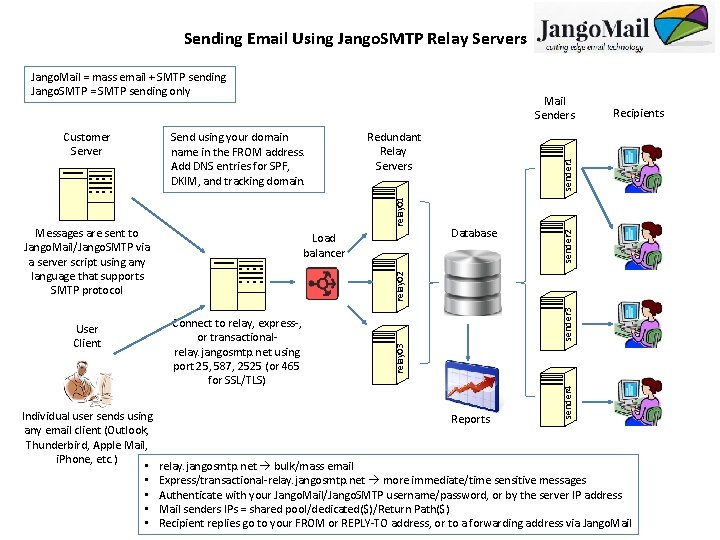
Sending Email Using Jango. SMTP Relay Servers Jango. Mail = mass email + SMTP sending Jango. SMTP = SMTP sending only Individual user sends using any email client (Outlook, Thunderbird, Apple Mail, i. Phone, etc. ) • • • sender 1 Database sender 2 relay 01 Load balancer sender 3 Connect to relay, express-, or transactional- relay. jangosmtp. net using port 25, 587, 2525 (or 465 for SSL/TLS) Reports sender 4 User Client Redundant Relay Servers relay 02 Messages are sent to Jango. Mail/Jango. SMTP via a server script using any language that supports SMTP protocol Send using your domain name in the FROM address. Add DNS entries for SPF, DKIM, and tracking domain. Recipients relay 03 Customer Server Mail Senders relay. jangosmtp. net bulk/mass email Express/transactional-relay. jangosmtp. net more immediate/time sensitive messages Authenticate with your Jango. Mail/Jango. SMTP username/password, or by the server IP address Mail senders IPs = shared pool/dedicated($)/Return Path($) Recipient replies go to your FROM or REPLY-TO address, or to a forwarding address via Jango. Mail
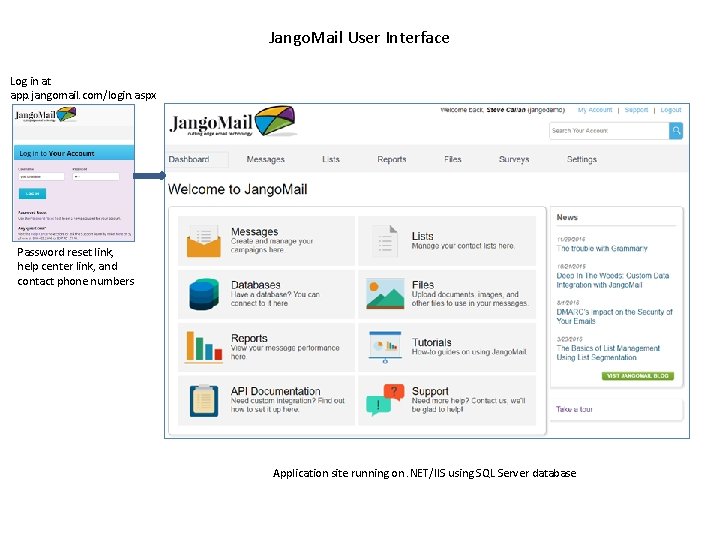
Jango. Mail User Interface Log in at app. jangomail. com/login. aspx Password reset link, help center link, and contact phone numbers Application site running on. NET/IIS using SQL Server database
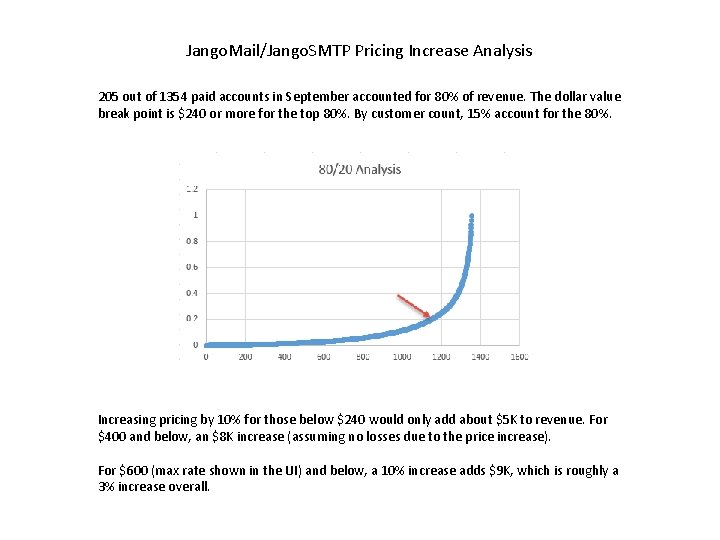
Jango. Mail/Jango. SMTP Pricing Increase Analysis 205 out of 1354 paid accounts in September accounted for 80% of revenue. The dollar value break point is $240 or more for the top 80%. By customer count, 15% account for the 80%. Increasing pricing by 10% for those below $240 would only add about $5 K to revenue. For $400 and below, an $8 K increase (assuming no losses due to the price increase). For $600 (max rate shown in the UI) and below, a 10% increase adds $9 K, which is roughly a 3% increase overall.
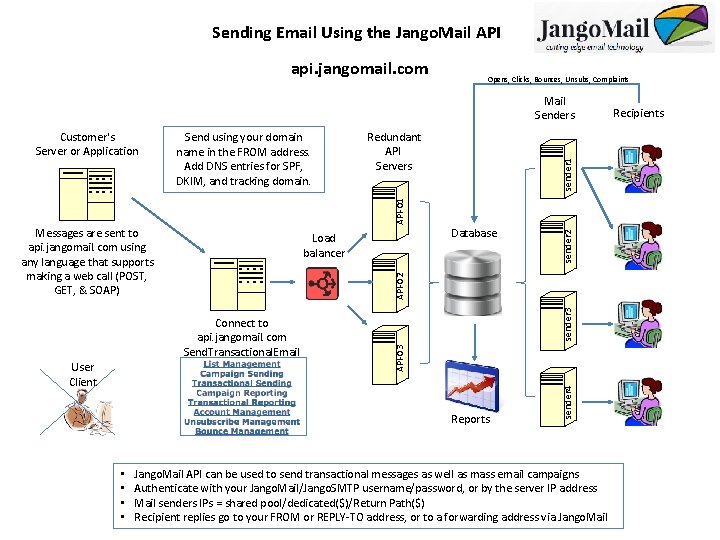
Sending Email Using the Jango. Mail API api. jangomail. com Opens, Clicks, Bounces, Unsubs, Complaints Mail Senders Redundant API Servers sender 1 Send using your domain name in the FROM address. Add DNS entries for SPF, DKIM, and tracking domain. Messages are sent to api. jangomail. com using any language that supports making a web call (POST, GET, & SOAP) sender 3 API-02 Reports • • sender 4 API-03 Connect to api. jangomail. com Send. Transactional. Email User Client Database Load balancer sender 2 API-01 Customer's Server or Application Jango. Mail API can be used to send transactional messages as well as mass email campaigns Authenticate with your Jango. Mail/Jango. SMTP username/password, or by the server IP address Mail senders IPs = shared pool/dedicated($)/Return Path($) Recipient replies go to your FROM or REPLY-TO address, or to a forwarding address via Jango. Mail Recipients
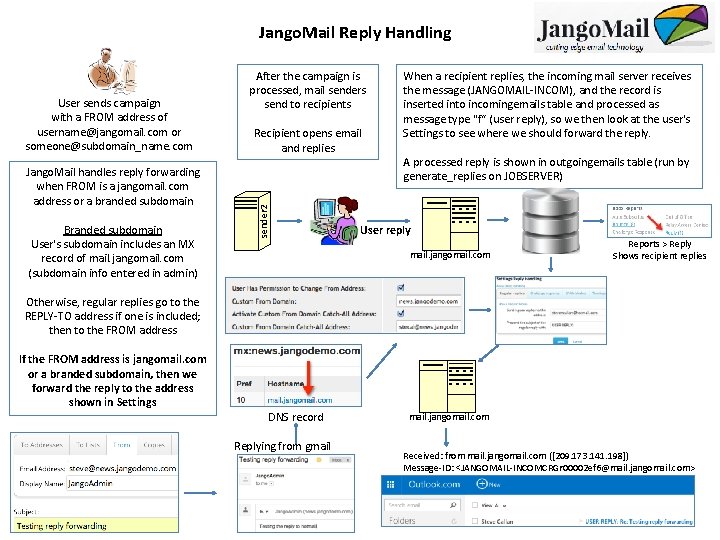
Jango. Mail Reply Handling Jango. Mail handles reply forwarding when FROM is a jangomail. com address or a branded subdomain Branded subdomain User's subdomain includes an MX record of mail. jangomail. com (subdomain info entered in admin) Recipient opens email and replies sender 2 User sends campaign with a FROM address of username@jangomail. com or someone@subdomain_name. com After the campaign is processed, mail senders send to recipients When a recipient replies, the incoming mail server receives the message (JANGOMAIL-INCOM), and the record is inserted into incomingemails table and processed as message type "f“ (user reply), so we then look at the user's Settings to see where we should forward the reply. A processed reply is shown in outgoingemails table (run by generate_replies on JOBSERVER) User reply mail. jangomail. com Reports > Reply Shows recipient replies Otherwise, regular replies go to the REPLY-TO address if one is included; then to the FROM address If the FROM address is jangomail. com or a branded subdomain, then we forward the reply to the address shown in Settings DNS record Replying from gmail. jangomail. com Received: from mail. jangomail. com ([209. 173. 141. 198]) Message-ID: <JANGOMAIL-INCOMCRGr 00002 ef 6@mail. jangomail. com>
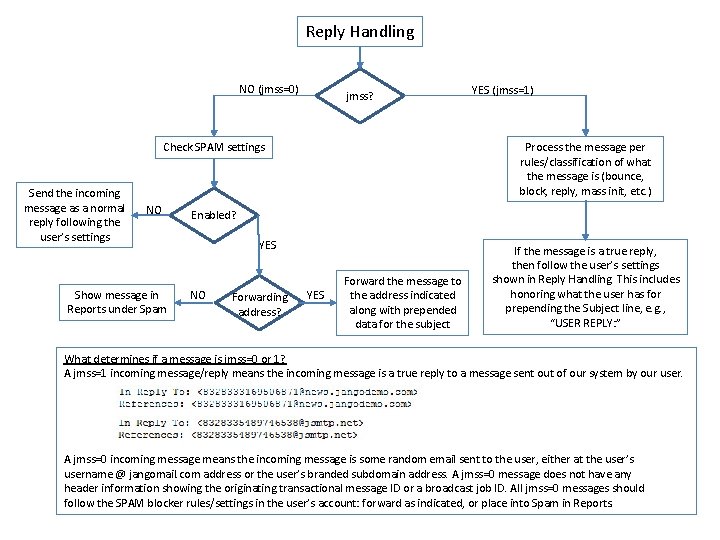
Reply Handling NO (jmss=0) jmss? Check SPAM settings Send the incoming message as a normal reply following the user’s settings NO Show message in Reports under Spam YES (jmss=1) Process the message per rules/classification of what the message is (bounce, block, reply, mass init, etc. ) Enabled? YES NO Forwarding address? YES Forward the message to the address indicated along with prepended data for the subject If the message is a true reply, then follow the user’s settings shown in Reply Handling. This includes honoring what the user has for prepending the Subject line, e. g. , “USER REPLY: ” What determines if a message is jmss=0 or 1? A jmss=1 incoming message/reply means the incoming message is a true reply to a message sent out of our system by our user. A jmss=0 incoming message means the incoming message is some random email sent to the user, either at the user’s username @ jangomail. com address or the user’s branded subdomain address. A jmss=0 message does not have any header information showing the originating transactional message ID or a broadcast job ID. All jmss=0 messages should follow the SPAM blocker rules/settings in the user’s account: forward as indicated, or place into Spam in Reports.
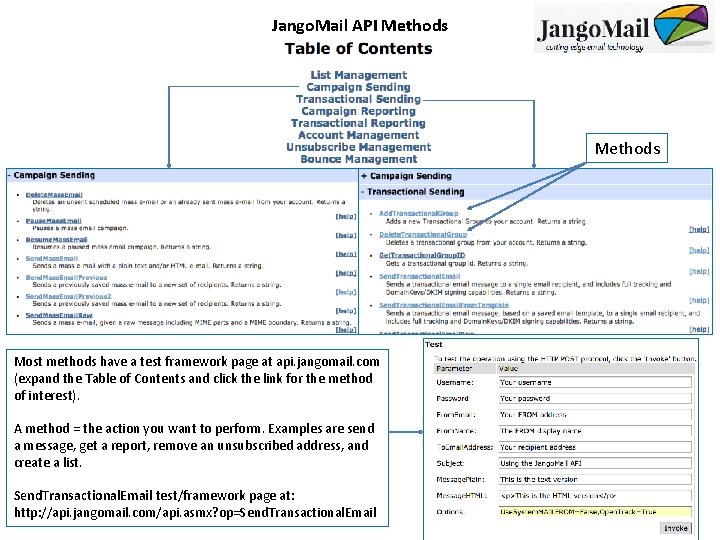
Jango. Mail API Methods Most methods have a test framework page at api. jangomail. com (expand the Table of Contents and click the link for the method of interest). A method = the action you want to perform. Examples are send a message, get a report, remove an unsubscribed address, and create a list. Send. Transactional. Email test/framework page at: http: //api. jangomail. com/api. asmx? op=Send. Transactional. Email
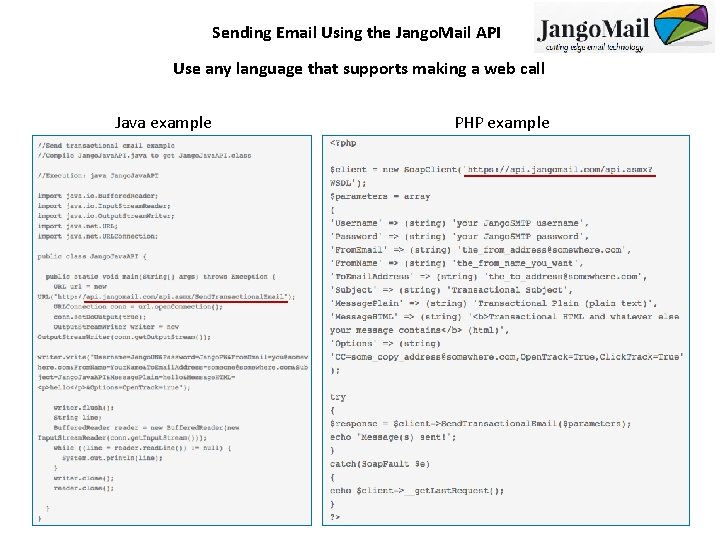
Sending Email Using the Jango. Mail API Use any language that supports making a web call Java example PHP example
IT Center of Excellence Key focus areas: Performance, Reliability, & Stability – customers expect us to deliver Implementing better code – GEN 2 (in production), list import and pre-processing High-availability solutions – scaling SMTP and API usage, documenting failover steps Better use of resources – sever and provider consolidation, upgrading servers, using more IPs, monetizing Return Path usage, non-renewal of 100 s of tracking domains, monitoring API usage (millions of failed calls, millions of unnecessary successful calls) Better reporting – developing and exposing reports/data Enhanced monitoring – Mx. Tool. Box mailflow, open source monitoring applications Dissemination of knowledge – documenting how-to and troubleshooting articles Office productivity – Office 365 with calendaring, display monitor for system status, cross -training and skill development Planning for the future – what is Jango. Mail 2. 0?
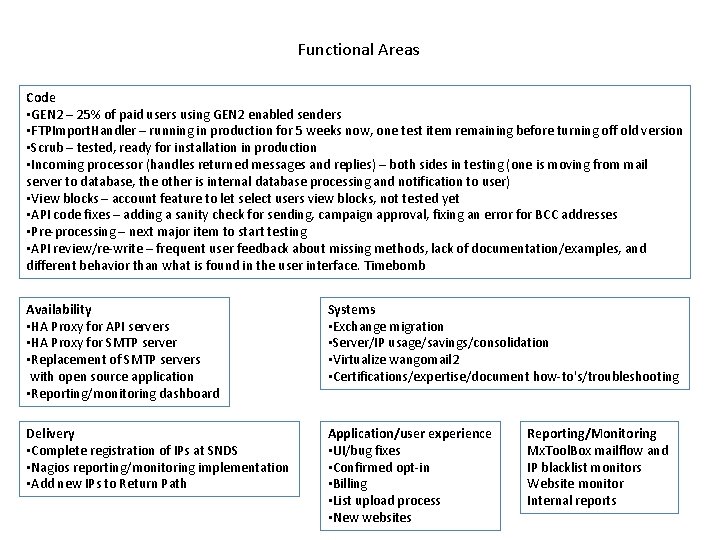
Functional Areas Code • GEN 2 – 25% of paid users using GEN 2 enabled senders • FTPImport. Handler – running in production for 5 weeks now, one test item remaining before turning off old version • Scrub – tested, ready for installation in production • Incoming processor (handles returned messages and replies) – both sides in testing (one is moving from mail server to database, the other is internal database processing and notification to user) • View blocks – account feature to let select users view blocks, not tested yet • API code fixes – adding a sanity check for sending, campaign approval, fixing an error for BCC addresses • Pre-processing – next major item to start testing • API review/re-write – frequent user feedback about missing methods, lack of documentation/examples, and different behavior than what is found in the user interface. Timebomb Availability • HA Proxy for API servers • HA Proxy for SMTP server • Replacement of SMTP servers with open source application • Reporting/monitoring dashboard Systems • Exchange migration • Server/IP usage/savings/consolidation • Virtualize wangomail 2 • Certifications/expertise/document how-to's/troubleshooting Delivery • Complete registration of IPs at SNDS • Nagios reporting/monitoring implementation • Add new IPs to Return Path Application/user experience • UI/bug fixes • Confirmed opt-in • Billing • List upload process • New websites Reporting/Monitoring Mx. Tool. Box mailflow and IP blacklist monitors Website monitor Internal reports
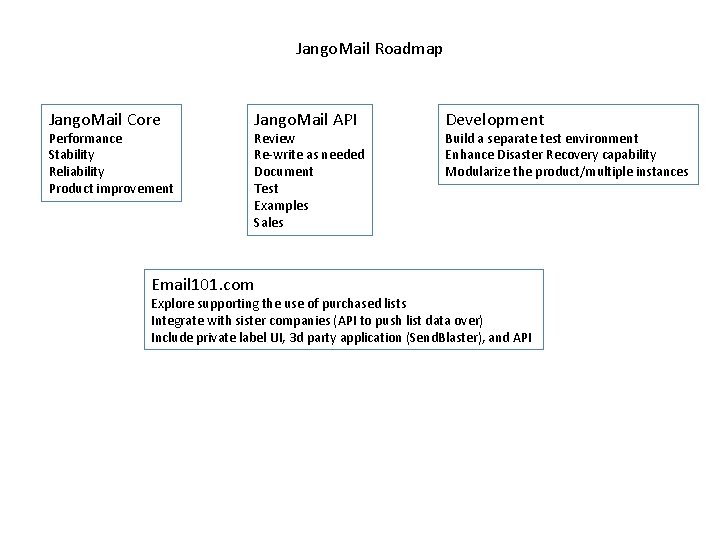
Jango. Mail Roadmap Jango. Mail Core Performance Stability Reliability Product improvement Jango. Mail API Review Re-write as needed Document Test Examples Sales Email 101. com Development Build a separate test environment Enhance Disaster Recovery capability Modularize the product/multiple instances Explore supporting the use of purchased lists Integrate with sister companies (API to push list data over) Include private label UI, 3 d party application (Send. Blaster), and API
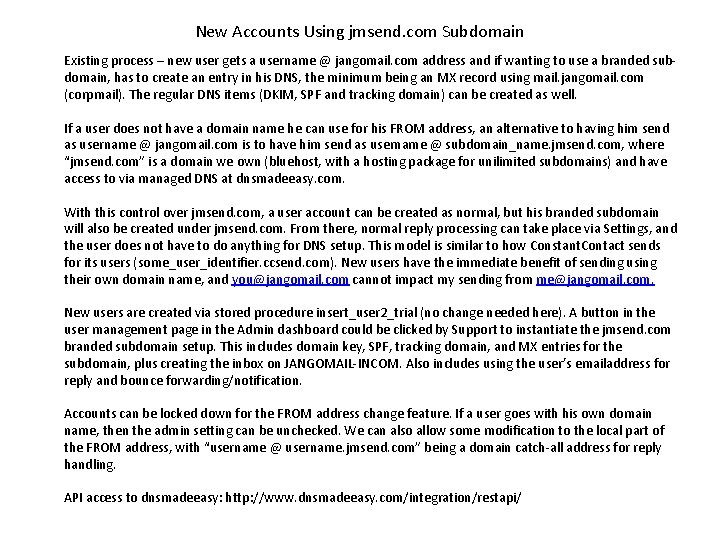
New Accounts Using jmsend. com Subdomain Existing process – new user gets a username @ jangomail. com address and if wanting to use a branded subdomain, has to create an entry in his DNS, the minimum being an MX record using mail. jangomail. com (corpmail). The regular DNS items (DKIM, SPF and tracking domain) can be created as well. If a user does not have a domain name he can use for his FROM address, an alternative to having him send as username @ jangomail. com is to have him send as username @ subdomain_name. jmsend. com, where “jmsend. com” is a domain we own (bluehost, with a hosting package for unilimited subdomains) and have access to via managed DNS at dnsmadeeasy. com. With this control over jmsend. com, a user account can be created as normal, but his branded subdomain will also be created under jmsend. com. From there, normal reply processing can take place via Settings, and the user does not have to do anything for DNS setup. This model is similar to how Constant. Contact sends for its users (some_user_identifier. ccsend. com). New users have the immediate benefit of sending using their own domain name, and you@jangomail. com cannot impact my sending from me@jangomail. com. New users are created via stored procedure insert_user 2_trial (no change needed here). A button in the user management page in the Admin dashboard could be clicked by Support to instantiate the jmsend. com branded subdomain setup. This includes domain key, SPF, tracking domain, and MX entries for the subdomain, plus creating the inbox on JANGOMAIL-INCOM. Also includes using the user’s emailaddress for reply and bounce forwarding/notification. Accounts can be locked down for the FROM address change feature. If a user goes with his own domain name, then the admin setting can be unchecked. We can also allow some modification to the local part of the FROM address, with “username @ username. jmsend. com” being a domain catch-all address for reply handling. API access to dnsmadeeasy: http: //www. dnsmadeeasy. com/integration/restapi/
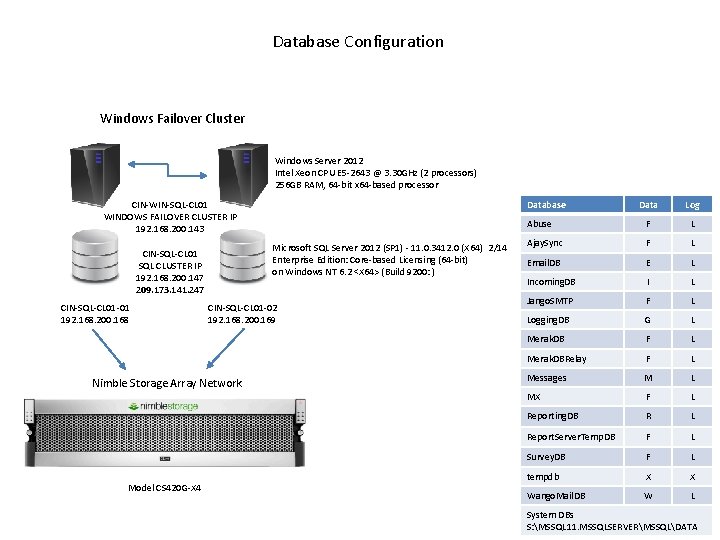
Database Configuration Windows Failover Cluster Windows Server 2012 Intel Xeon CPU E 5 -2643 @ 3. 30 GHz (2 processors) 256 GB RAM, 64 -bit x 64 -based processor Database CIN-WIN-SQL-CL 01 WINDOWS FAILOVER CLUSTER IP 192. 168. 200. 143 Microsoft SQL Server 2012 (SP 1) - 11. 0. 3412. 0 (X 64) 2/14 Enterprise Edition: Core-based Licensing (64 -bit) on Windows NT 6. 2 <X 64> (Build 9200: ) CIN-SQL-CL 01 SQL CLUSTER IP 192. 168. 200. 147 209. 173. 141. 247 CIN-SQL-CL 01 -01 192. 168. 200. 168 CIN-SQL-CL 01 -02 192. 168. 200. 169 Nimble Storage Array Network Model CS 420 G-X 4 Data Log Abuse F L Ajay. Sync F L Email. DB E L Incoming. DB I L Jango. SMTP F L Logging. DB G L Merak. DB F L Merak. DBRelay F L Messages M L MX F L Reporting. DB R L Report. Server. Temp. DB F L Survey. DB F L tempdb X X Wango. Mail. DB W L System DBs S: MSSQL 11. MSSQLSERVERMSSQLDATA
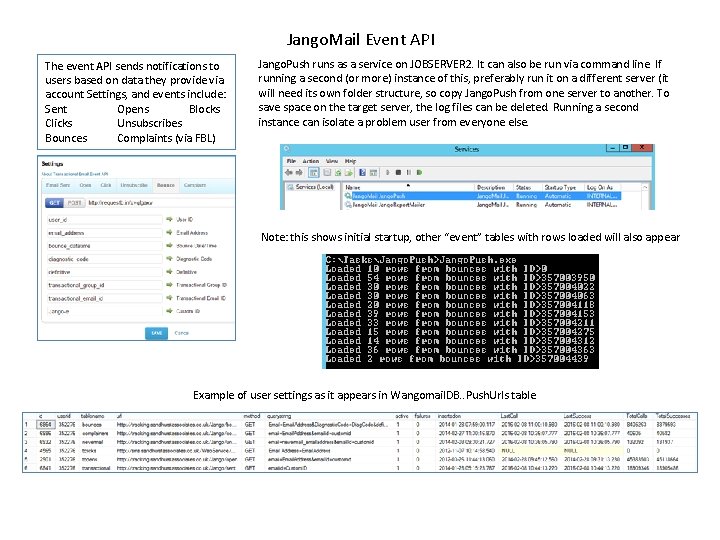
Jango. Mail Event API The event API sends notifications to users based on data they provide via account Settings, and events include: Sent Opens Blocks Clicks Unsubscribes Bounces Complaints (via FBL) Jango. Push runs as a service on JOBSERVER 2. It can also be run via command line. If running a second (or more) instance of this, preferably run it on a different server (it will need its own folder structure, so copy Jango. Push from one server to another. To save space on the target server, the log files can be deleted. Running a second instance can isolate a problem user from everyone else. Note: this shows initial startup, other “event” tables with rows loaded will also appear Example of user settings as it appears in Wangomail. DB. . Push. Urls table
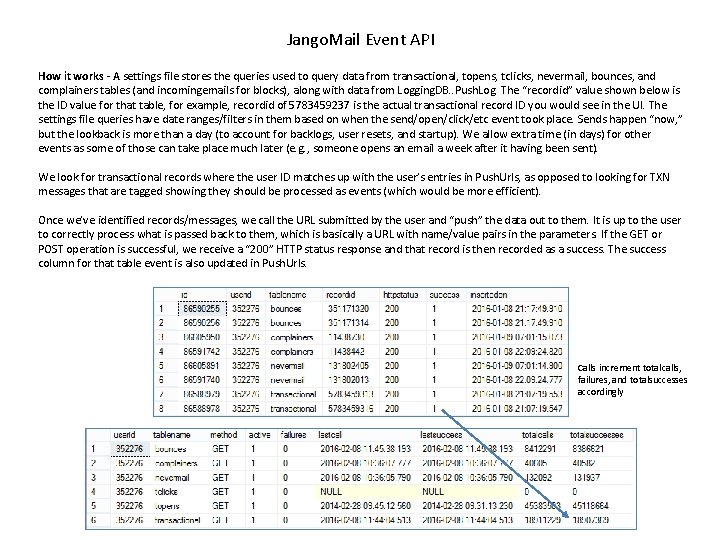
Jango. Mail Event API How it works - A settings file stores the queries used to query data from transactional, topens, tclicks, nevermail, bounces, and complainers tables (and incomingemails for blocks), along with data from Logging. DB. . Push. Log. The “recordid” value shown below is the ID value for that table, for example, recordid of 5783459237 is the actual transactional record ID you would see in the UI. The settings file queries have date ranges/filters in them based on when the send/open/click/etc event took place. Sends happen “now, ” but the lookback is more than a day (to account for backlogs, user resets, and startup). We allow extra time (in days) for other events as some of those can take place much later (e. g. , someone opens an email a week after it having been sent). We look for transactional records where the user ID matches up with the user’s entries in Push. Urls, as opposed to looking for TXN messages that are tagged showing they should be processed as events (which would be more efficient). Once we’ve identified records/messages, we call the URL submitted by the user and “push” the data out to them. It is up to the user to correctly process what is passed back to them, which is basically a URL with name/value pairs in the parameters. If the GET or POST operation is successful, we receive a “ 200” HTTP status response and that record is then recorded as a success. The success column for that table event is also updated in Push. Urls. Calls increment totalcalls, failures, and totalsuccesses accordingly
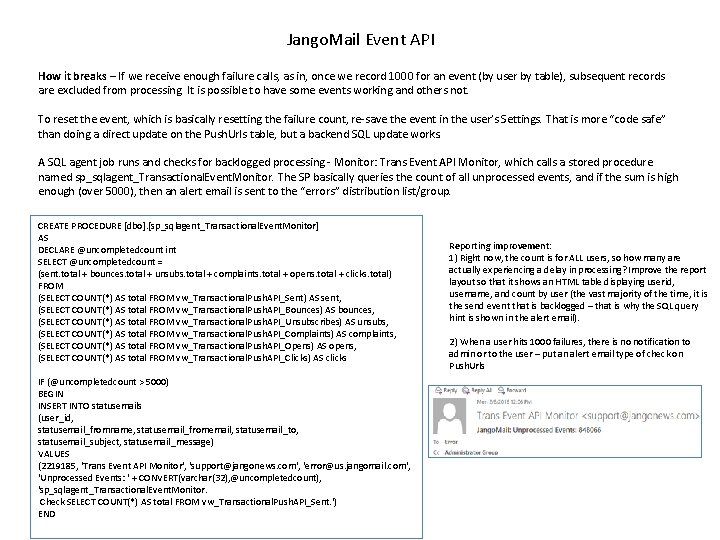
Jango. Mail Event API How it breaks – If we receive enough failure calls, as in, once we record 1000 for an event (by user by table), subsequent records are excluded from processing. It is possible to have some events working and others not. To reset the event, which is basically resetting the failure count, re-save the event in the user’s Settings. That is more “code safe” than doing a direct update on the Push. Urls table, but a backend SQL update works. A SQL agent job runs and checks for backlogged processing - Monitor: Trans Event API Monitor, which calls a stored procedure named sp_sqlagent_Transactional. Event. Monitor. The SP basically queries the count of all unprocessed events, and if the sum is high enough (over 5000), then an alert email is sent to the “errors” distribution list/group. CREATE PROCEDURE [dbo]. [sp_sqlagent_Transactional. Event. Monitor] AS DECLARE @uncompletedcount int SELECT @uncompletedcount = (sent. total + bounces. total + unsubs. total + complaints. total + opens. total + clicks. total) FROM (SELECT COUNT(*) AS total FROM vw_Transactional. Push. API_Sent) AS sent, (SELECT COUNT(*) AS total FROM vw_Transactional. Push. API_Bounces) AS bounces, (SELECT COUNT(*) AS total FROM vw_Transactional. Push. API_Unsubscribes) AS unsubs, (SELECT COUNT(*) AS total FROM vw_Transactional. Push. API_Complaints) AS complaints, (SELECT COUNT(*) AS total FROM vw_Transactional. Push. API_Opens) AS opens, (SELECT COUNT(*) AS total FROM vw_Transactional. Push. API_Clicks) AS clicks IF (@uncompletedcount > 5000) BEGIN INSERT INTO statusemails (user_id, statusemail_fromname, statusemail_fromemail, statusemail_to, statusemail_subject, statusemail_message) VALUES (2219185, 'Trans Event API Monitor', 'support@jangonews. com', 'error@us. jangomail. com', 'Unprocessed Events: ' + CONVERT(varchar(32), @uncompletedcount), 'sp_sqlagent_Transactional. Event. Monitor. Check SELECT COUNT(*) AS total FROM vw_Transactional. Push. API_Sent. ') END Reporting improvement: 1) Right now, the count is for ALL users, so how many are actually experiencing a delay in processing? Improve the report layout so that it shows an HTML table displaying userid, username, and count by user (the vast majority of the time, it is the send event that is backlogged – that is why the SQL query hint is shown in the alert email). 2) When a user hits 1000 failures, there is no notification to admin or to the user – put an alert email type of check on Push. Urls
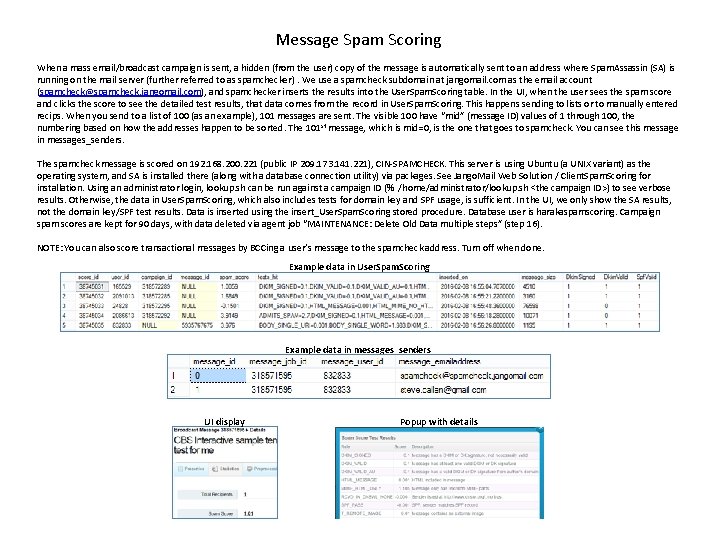
Message Spam Scoring When a mass email/broadcast campaign is sent, a hidden (from the user) copy of the message is automatically sent to an address where Spam. Assassin (SA) is running on the mail server (further referred to as spamchecker). We use a spamcheck subdomain at jangomail. com as the email account (spamcheck@spamcheck. jangomail. com), and spamchecker inserts the results into the User. Spam. Scoring table. In the UI, when the user sees the spam score and clicks the score to see the detailed test results, that data comes from the record in User. Spam. Scoring. This happens sending to lists or to manually entered recips. When you send to a list of 100 (as an example), 101 messages are sent. The visible 100 have “mid” (message ID) values of 1 through 100, the numbering based on how the addresses happen to be sorted. The 101 st message, which is mid=0, is the one that goes to spamcheck. You can see this message in messages_senders. The spamcheck message is scored on 192. 168. 200. 221 (public IP 209. 173. 141. 221), CIN-SPAMCHECK. This server is using Ubuntu (a UNIX variant) as the operating system, and SA is installed there (along with a database connection utility) via packages. See Jango. Mail Web Solution / Client. Spam. Scoring for installation. Using an administrator login, lookup. sh can be run against a campaign ID (% /home/administrator/lookup. sh <the campaign ID>) to see verbose results. Otherwise, the data in User. Spam. Scoring, which also includes tests for domain key and SPF usage, is sufficient. In the UI, we only show the SA results, not the domain key/SPF test results. Data is inserted using the insert_User. Spam. Scoring stored procedure. Database user is harakaspamscoring. Campaign spam scores are kept for 90 days, with data deleted via agent job “MAINTENANCE: Delete Old Data multiple steps” (step 16). NOTE: You can also score transactional messages by BCCing a user’s message to the spamcheck address. Turn off when done. Example data in User. Spam. Scoring Example data in messages_senders UI display Popup with details
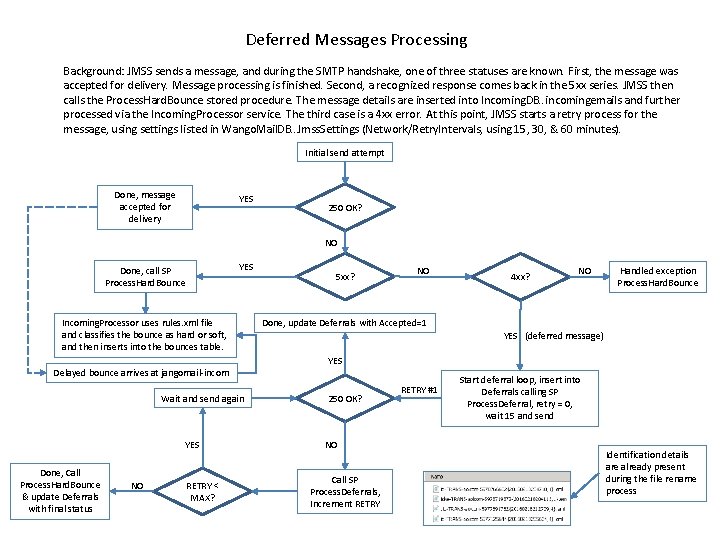
Deferred Messages Processing Background: JMSS sends a message, and during the SMTP handshake, one of three statuses are known. First, the message was accepted for delivery. Message processing is finished. Second, a recognized response comes back in the 5 xx series. JMSS then calls the Process. Hard. Bounce stored procedure. The message details are inserted into Incoming. DB. . incomingemails and further processed via the Incoming. Processor service. The third case is a 4 xx error. At this point, JMSS starts a retry process for the message, using settings listed in Wango. Mail. DB. . Jmss. Settings (Network/Retry. Intervals, using 15, 30, & 60 minutes). Initial send attempt Done, message accepted for delivery YES 250 OK? NO YES Done, call SP Process. Hard. Bounce Incoming. Processor uses rules. xml file and classifies the bounce as hard or soft, and then inserts into the bounces table. 5 xx? NO 4 xx? NO Handled exception Process. Hard. Bounce Done, update Deferrals with Accepted=1 YES (deferred message) YES Delayed bounce arrives at jangomail-incom Wait and send again YES Done, Call Process. Hard. Bounce & update Deferrals with final status NO RETRY < MAX? 250 OK? NO Call SP Process. Deferrals, Increment RETRY #1 Start deferral loop, insert into Deferrals calling SP Process. Deferral, retry = 0, wait 15 and send Identification details are already present during the file rename process
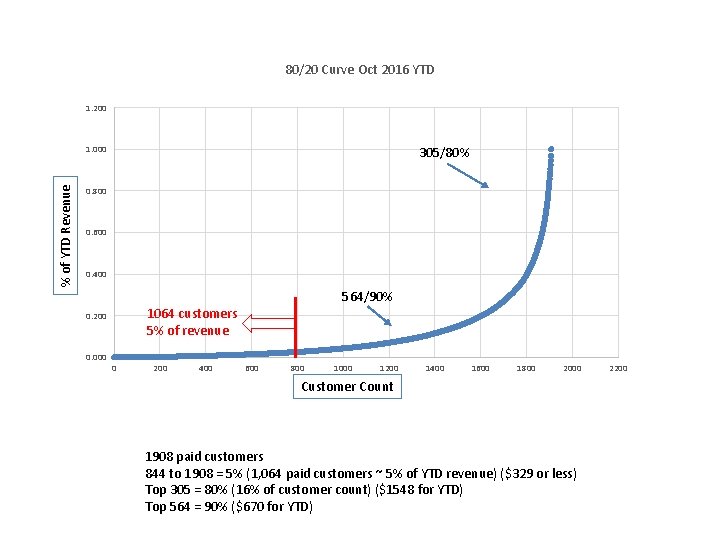
80/20 Curve Oct 2016 YTD 1. 200 % of YTD Revenue 1. 000 305/80% 0. 800 0. 600 0. 400 564/90% 1064 customers 5% of revenue 0. 200 0. 000 0 200 400 600 800 1000 1200 1400 1600 1800 2000 Customer Count 1908 paid customers 844 to 1908 = 5% (1, 064 paid customers ~ 5% of YTD revenue) ($329 or less) Top 305 = 80% (16% of customer count) ($1548 for YTD) Top 564 = 90% ($670 for YTD) 2200
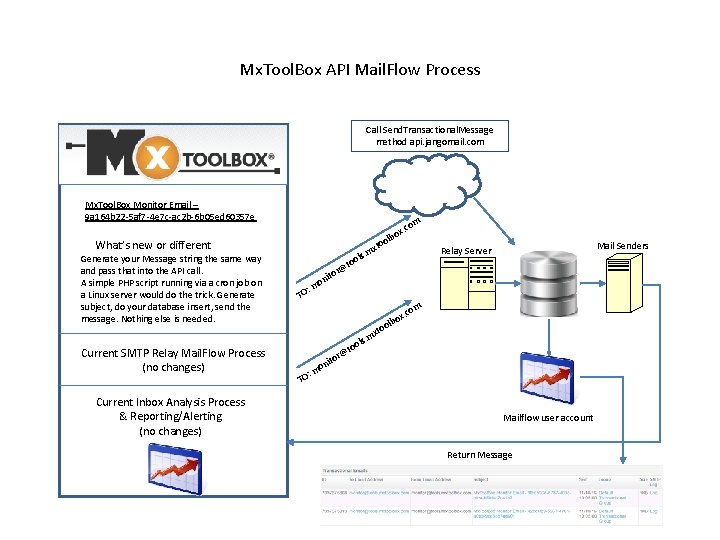
Mx. Tool. Box API Mail. Flow Process Call Send. Transactional. Message method api. jangomail. com Mx. Tool. Box Monitor Email – 9 a 164 b 22 -5 af 7 -4 e 7 c-ac 2 b-6 b 05 ed 60357 e om What’s new or different Generate your Message string the same way and pass that into the API call. A simple PHP script running via a cron job on a Linux server would do the trick. Generate subject, do your database insert, send the message. Nothing else is needed. Current SMTP Relay Mail. Flow Process (no changes) Current Inbox Analysis Process & Reporting/Alerting (no changes) x. c lbo o xto . m ols Mail Senders Relay Server o @t or nit o : m TO om o xto o @t o : m TO or nit . m ols x. c lbo Mailflow user account Return Message
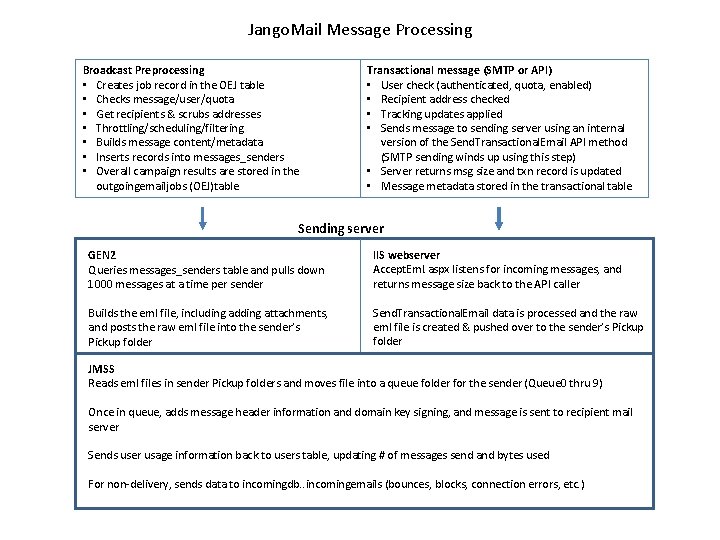
Jango. Mail Message Processing Broadcast Preprocessing • Creates job record in the OEJ table • Checks message/user/quota • Get recipients & scrubs addresses • Throttling/scheduling/filtering • Builds message content/metadata • Inserts records into messages_senders • Overall campaign results are stored in the outgoingemailjobs (OEJ)table Transactional message (SMTP or API) • User check (authenticated, quota, enabled) • Recipient address checked • Tracking updates applied • Sends message to sending server using an internal version of the Send. Transactional. Email API method (SMTP sending winds up using this step) • Server returns msg size and txn record is updated • Message metadata stored in the transactional table Sending server GEN 2 Queries messages_senders table and pulls down 1000 messages at a time per sender IIS webserver Accept. Eml. aspx listens for incoming messages, and returns message size back to the API caller Builds the eml file, including adding attachments, and posts the raw eml file into the sender’s Pickup folder Send. Transactional. Email data is processed and the raw eml file is created & pushed over to the sender’s Pickup folder JMSS Reads eml files in sender Pickup folders and moves file into a queue folder for the sender (Queue 0 thru 9) Once in queue, adds message header information and domain key signing, and message is sent to recipient mail server Sends user usage information back to users table, updating # of messages send and bytes used For non-delivery, sends data to incomingdb. . incomingemails (bounces, blocks, connection errors, etc. )
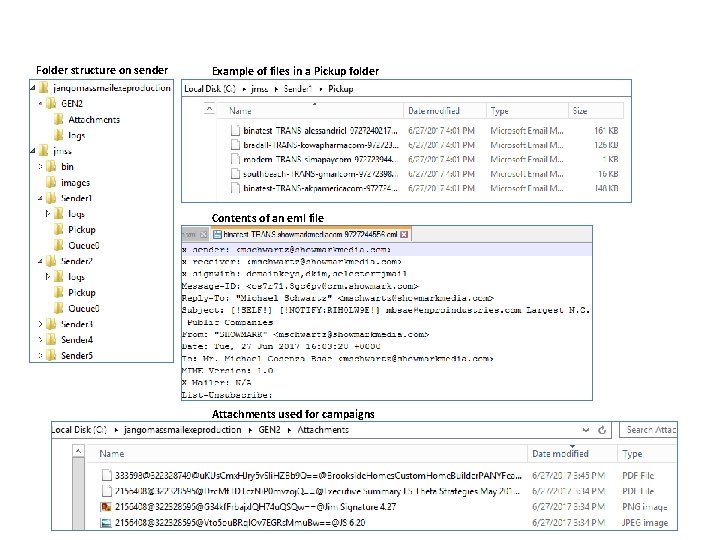
Folder structure on sender Example of files in a Pickup folder Contents of an eml file Attachments used for campaigns
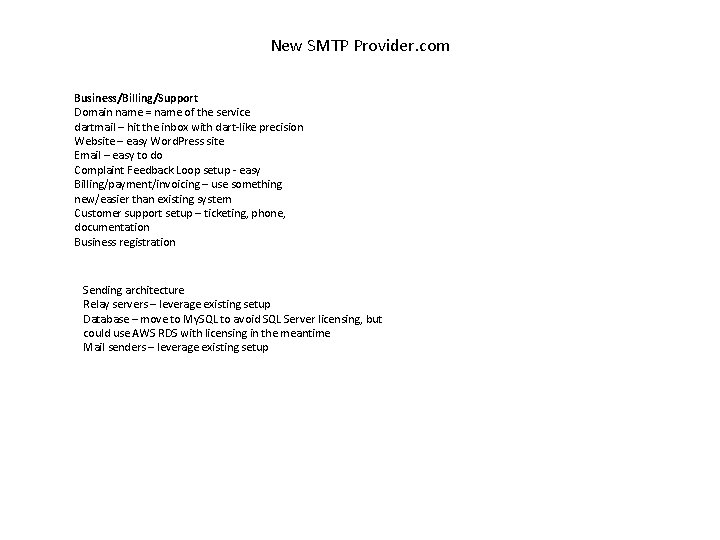
New SMTP Provider. com Business/Billing/Support Domain name = name of the service dartmail – hit the inbox with dart-like precision Website – easy Word. Press site Email – easy to do Complaint Feedback Loop setup - easy Billing/payment/invoicing – use something new/easier than existing system Customer support setup – ticketing, phone, documentation Business registration Sending architecture Relay servers – leverage existing setup Database – move to My. SQL to avoid SQL Server licensing, but could use AWS RDS with licensing in the meantime Mail senders – leverage existing setup
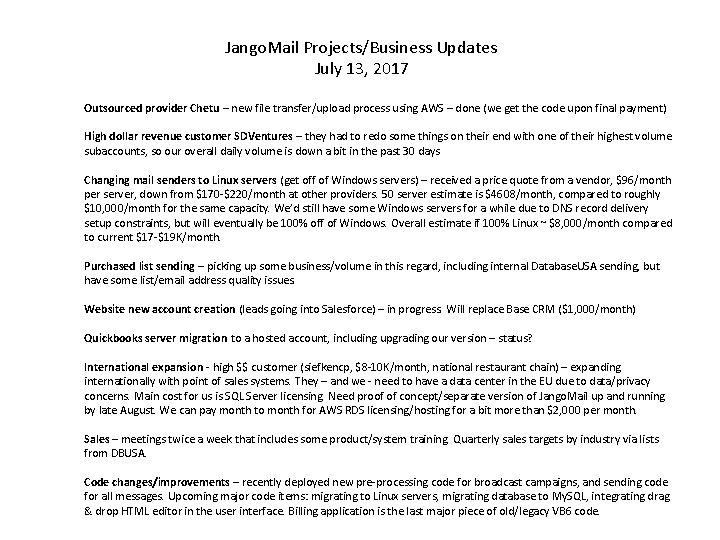
Jango. Mail Projects/Business Updates July 13, 2017 Outsourced provider Chetu – new file transfer/upload process using AWS – done (we get the code upon final payment) High dollar revenue customer SDVentures – they had to redo some things on their end with one of their highest volume subaccounts, so our overall daily volume is down a bit in the past 30 days Changing mail senders to Linux servers (get off of Windows servers) – received a price quote from a vendor, $96/month per server, down from $170 -$220/month at other providers. 50 server estimate is $4608/month, compared to roughly $10, 000/month for the same capacity. We’d still have some Windows servers for a while due to DNS record delivery setup constraints, but will eventually be 100% off of Windows. Overall estimate if 100% Linux ~ $8, 000/month compared to current $17 -$19 K/month. Purchased list sending – picking up some business/volume in this regard, including internal Database. USA sending, but have some list/email address quality issues. Website new account creation (leads going into Salesforce) – in progress. Will replace Base CRM ($1, 000/month) Quickbooks server migration to a hosted account, including upgrading our version – status? International expansion - high $$ customer (siefkencp, $8 -10 K/month, national restaurant chain) – expanding internationally with point of sales systems. They – and we - need to have a data center in the EU due to data/privacy concerns. Main cost for us is SQL Server licensing. Need proof of concept/separate version of Jango. Mail up and running by late August. We can pay month to month for AWS RDS licensing/hosting for a bit more than $2, 000 per month. Sales – meetings twice a week that includes some product/system training. Quarterly sales targets by industry via lists from DBUSA. Code changes/improvements – recently deployed new pre-processing code for broadcast campaigns, and sending code for all messages. Upcoming major code items: migrating to Linux servers, migrating database to My. SQL, integrating drag & drop HTML editor in the user interface. Billing application is the last major piece of old/legacy VB 6 code.
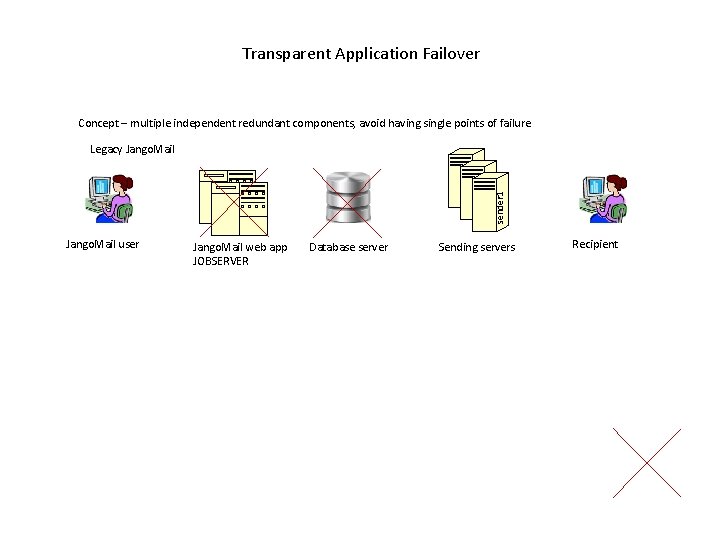
Transparent Application Failover Concept – multiple independent redundant components, avoid having single points of failure sender 1 Legacy Jango. Mail user Jango. Mail web app JOBSERVER Database server Sending servers Recipient
- Slides: 28