Winlink 2000 An Introduction to e Mail over
- Slides: 30
Winlink 2000 An Introduction to e. Mail over Ham Radio Presented by Bud Semon N 7 CW
Contributors Steve Waterman, K 4 CJX n Scott Pederson, KI 5 DR n Alex Kelly, WU 2 W n Bill Gerth, W 4 RK n Howard White, KY 6 LA n Victor Poor, W 5 SMM n Rick Meuthing, KN 6 KB n Alan Jorgenson, KE 6 SQS n
Why e. Mail? n n n Using e-mail is universal. Minimum training required. Large amounts of data/information may be exchanged, accurately: • Detailed damage or status reports. • Detailed work assignments & shift changes. • Lists of equipment and supplies needed. • Graphic or text-based Medical information. • Anything else that may be handled routinely by e-mail, including attachments. Every transfer is a permanently stored record. Data/information is secure from casual 3 monitoring.
For complex messages, voice, Morse code, Radiograms, won’t do… WHY? § § text only very slow n translation required n inflexible, prone to error n no permanent record n not self-originating n not reliably point-to-multipoint
Why Winlink? July, 2003: In cooperation with its partnership with the Department of Homeland Security, and at their recommendation, the ARRL Board has agreed to provide a nationwide digital system to enhance the communications capability of the Amateur Radio Emergency Service (ARES®). There are situations, the Board said, when ARES® "must have the capability to pass digital traffic across the nation quickly and accurately. ”
Purpose of Winlink 2000 in the ARES Environment: To supply de facto e-mail for served agencies: • from inside a disaster area • without normal e-mail servers or Internet connections being available within the “last mile” affected area.
What is it? Winlink is basically an improvement to packet radio. It uses message drafting software similar in appearance to standard e-mail handling applications and transmits them in various digital modes § VHF/UHF Packet (using Airmail or Paclink freeware) § HF Pactor (using Airmail freeware) § and Telnet (from a normal Internet connection). At the receiving end of VHF/UHF and HF transmissions, it is either held for other participating stations or it enters the Internet for further transmission anywhere as normal email.
Winlink 2000 Today n n n n Created seven years ago for open water boaters and RV users Approximately 150, 000 radio message/260, 000 minutes through system, monthly. Over 7, 200 weekly users to over 85, 000 e-mail recipients. Over 50 standard participating locations (PMBOs) with 25 in USA. Many locations contain both VHF Telpac and HF Winlink capabilities. HF radio access, VHF/UHF radio access, Telnet internet access, WEB browser access. 2. 1 minute average delivery time Endorsed by the ARRL as a viable emergency digital communication system
Benefits to Served Agencies n Backup, radio SMTP e-mail until “last mile” is restored n VHF/UHF for local area connection to Internet n HF for distant connection to Internet n Familiar e-mail interface n Local “Hubbing” even with no Internet access n No software or hardware necessary behind Firewall n Control operator need not be present for third-party digital traffic. (§ 97. 109 Station control, for 3 rd Party traffic rules) Not directly accountable for content (§ 97. 219(c. )
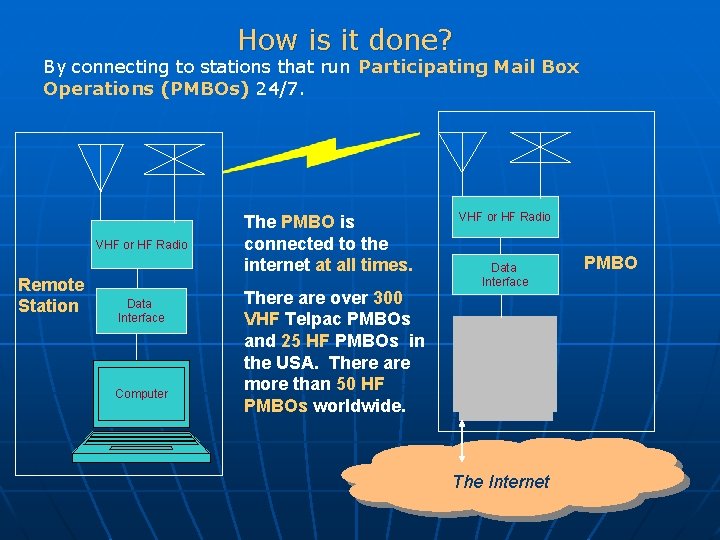
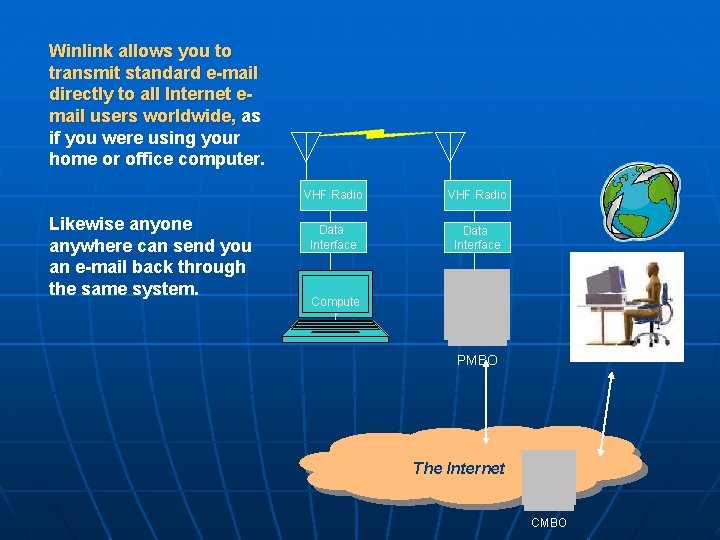
How is it done? By connecting to stations that run Participating Mail Box Operations (PMBOs) 24/7. VHF or HF Radio Remote Station Data Interface Computer The PMBO is connected to the internet at all times. There are over 300 VHF Telpac PMBOs and 25 HF PMBOs in the USA. There are more than 50 HF PMBOs worldwide. VHF or HF Radio Data Interface The Internet PMBO
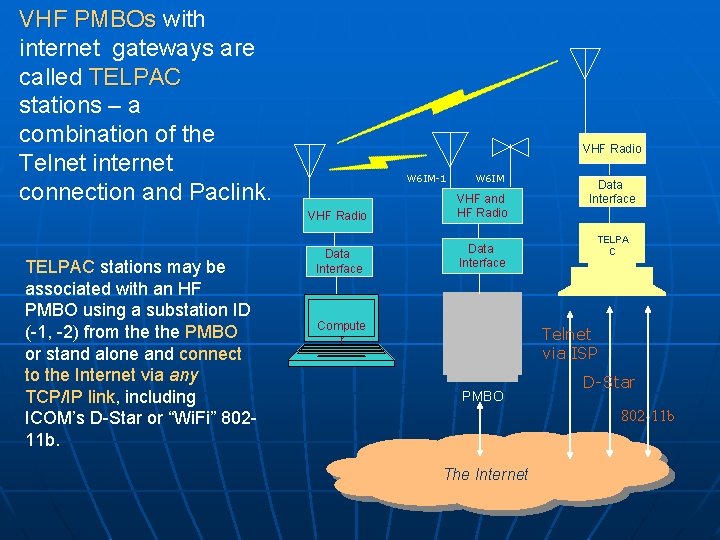
VHF PMBOs with internet gateways are called TELPAC stations – a combination of the Telnet internet connection and Paclink. TELPAC stations may be associated with an HF PMBO using a substation ID (-1, -2) from the PMBO or stand alone and connect to the Internet via any TCP/IP link, including ICOM’s D-Star or “Wi. Fi” 80211 b. VHF Radio W 6 IM-1 W 6 IM VHF Radio VHF and HF Radio Data Interface Compute r Data Interface TELPA C Telnet via ISP PMBO D-Star 802 -11 b The Internet
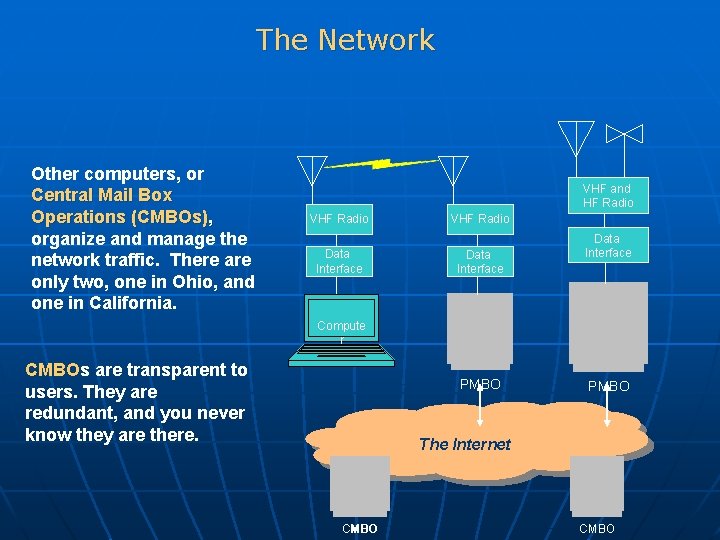
The Network Other computers, or Central Mail Box Operations (CMBOs), organize and manage the network traffic. There are only two, one in Ohio, and one in California. VHF and HF Radio VHF Radio Data Interface Compute r CMBOs are transparent to users. They are redundant, and you never know they are there. PMBO The Internet CMBO
Winlink allows you to transmit standard e-mail directly to all Internet email users worldwide, as if you were using your home or office computer. Likewise anyone anywhere can send you an e-mail back through the same system. VHF Radio Data Interface Compute r PMBO The Internet CMBO
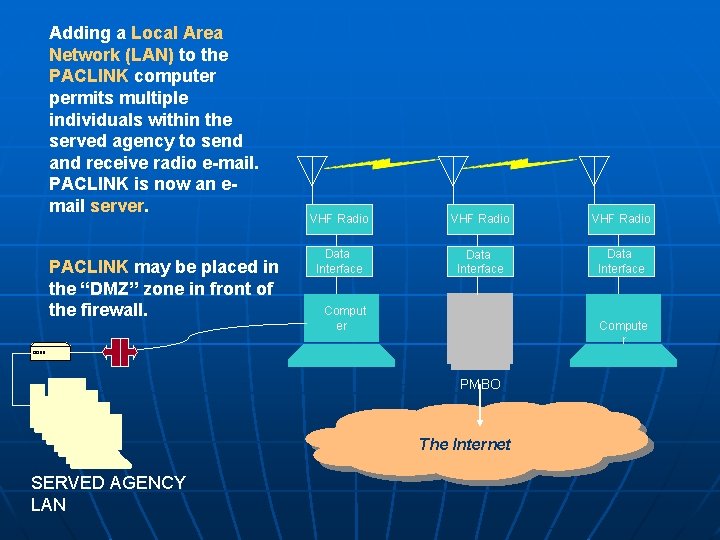
Adding a Local Area Network (LAN) to the PACLINK computer permits multiple individuals within the served agency to send and receive radio e-mail. PACLINK is now an email server. PACLINK may be placed in the “DMZ” zone in front of the firewall. VHF Radio Data Interface Comput er Compute r PMBO The Internet SERVED AGENCY LAN
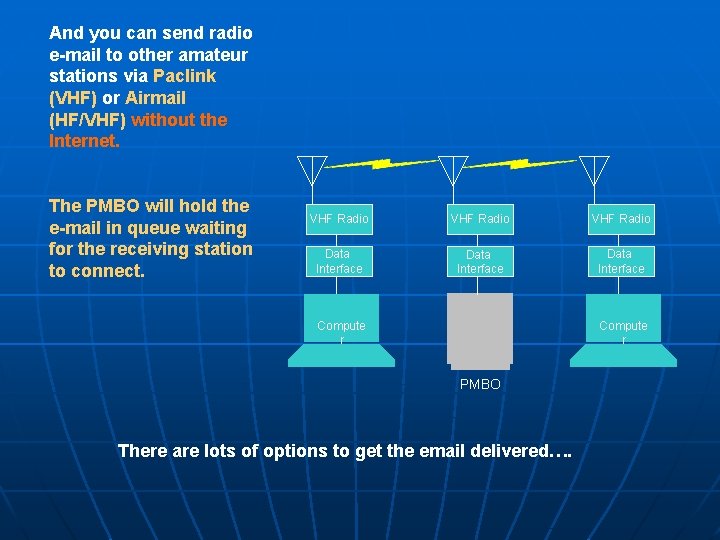
And you can send radio e-mail to other amateur stations via Paclink (VHF) or Airmail (HF/VHF) without the Internet. The PMBO will hold the e-mail in queue waiting for the receiving station to connect. VHF Radio Data Interface Compute r PMBO There are lots of options to get the email delivered….
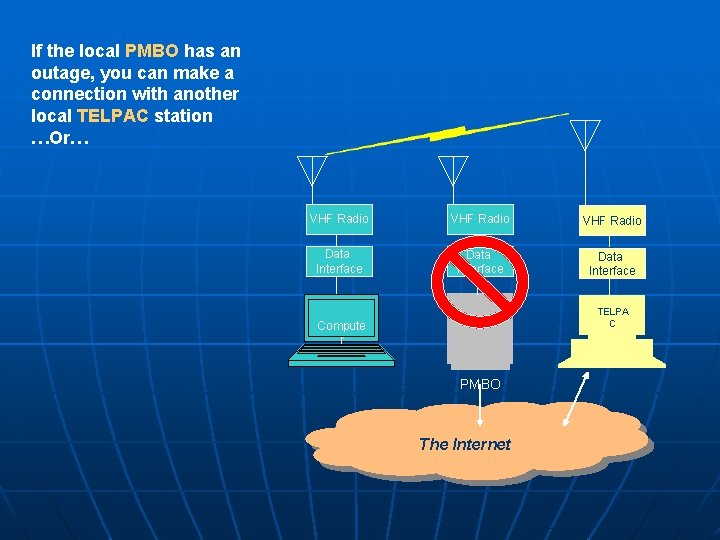
If the local PMBO has an outage, you can make a connection with another local TELPAC station …Or… VHF Radio Data Interface TELPA C Compute r PMBO The Internet
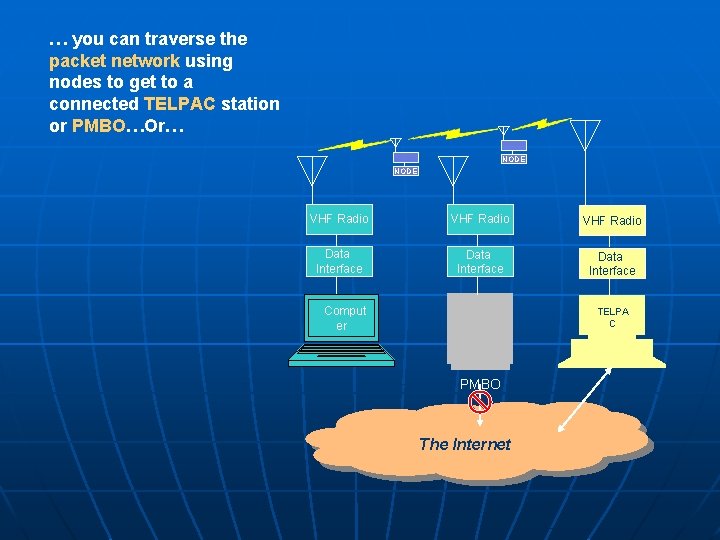
… you can traverse the packet network using nodes to get to a connected TELPAC station or PMBO…Or… NODE VHF Radio Data Interface Comput er TELPA C PMBO The Internet
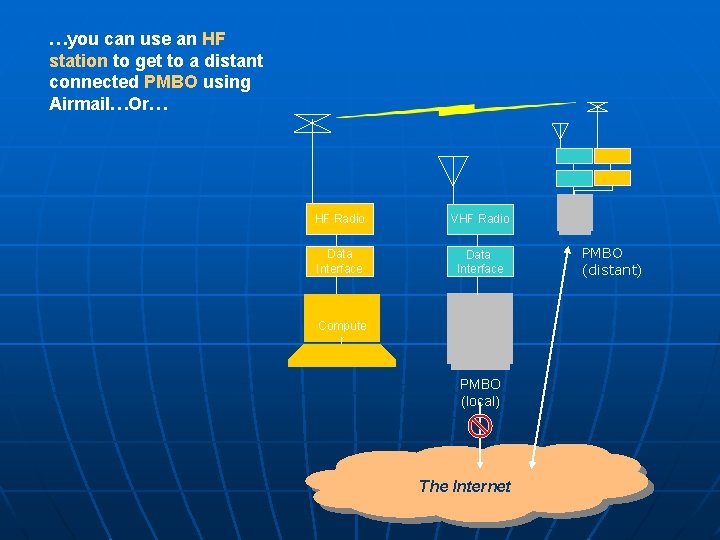
…you can use an HF station to get to a distant connected PMBO using Airmail…Or… HF Radio VHF Radio Data Interface Compute r PMBO (local) The Internet PMBO (distant)
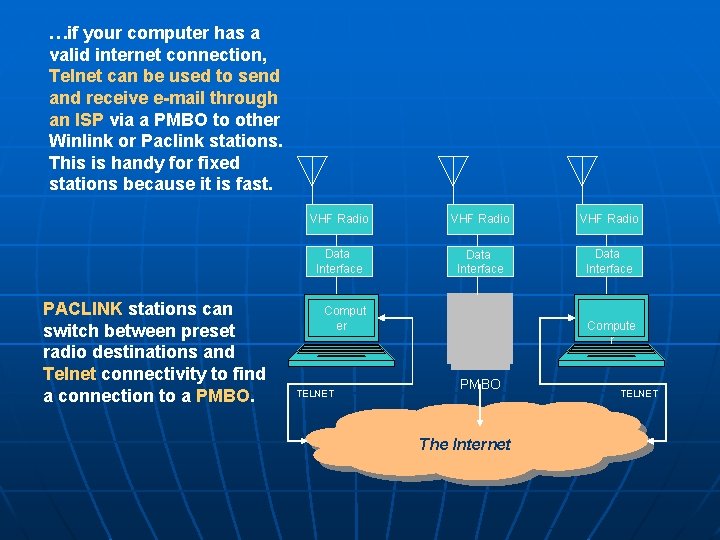
…if your computer has a valid internet connection, Telnet can be used to send and receive e-mail through an ISP via a PMBO to other Winlink or Paclink stations. This is handy for fixed stations because it is fast. PACLINK stations can switch between preset radio destinations and Telnet connectivity to find a connection to a PMBO. VHF Radio Data Interface Comput er TELNET Compute r PMBO The Internet TELNET
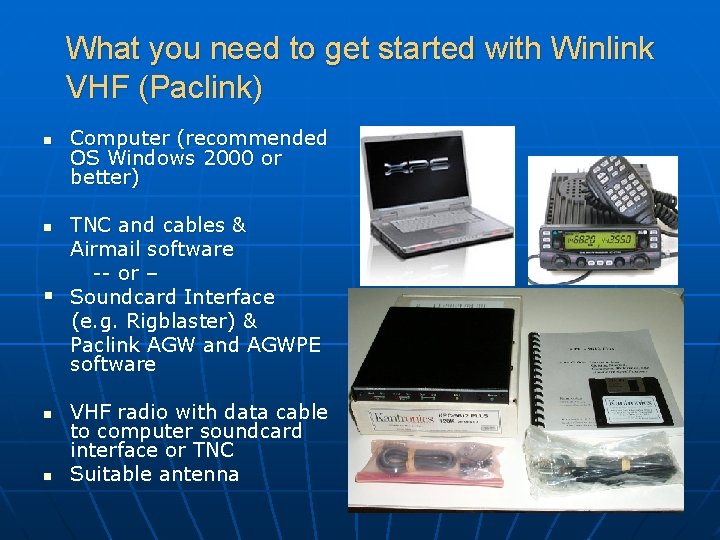
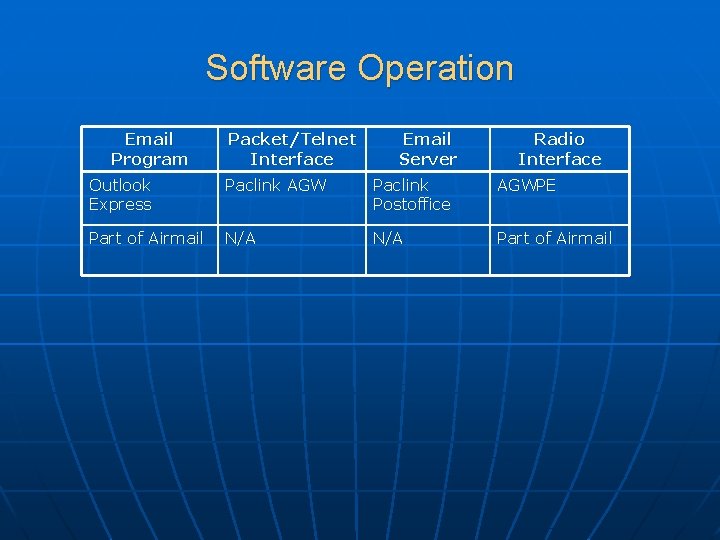
What you need to get started with Winlink VHF (Paclink) n Computer (recommended OS Windows 2000 or better) TNC and cables & Airmail software -- or – § Soundcard Interface (e. g. Rigblaster) & Paclink AGW and AGWPE software n n n VHF radio with data cable to computer soundcard interface or TNC Suitable antenna
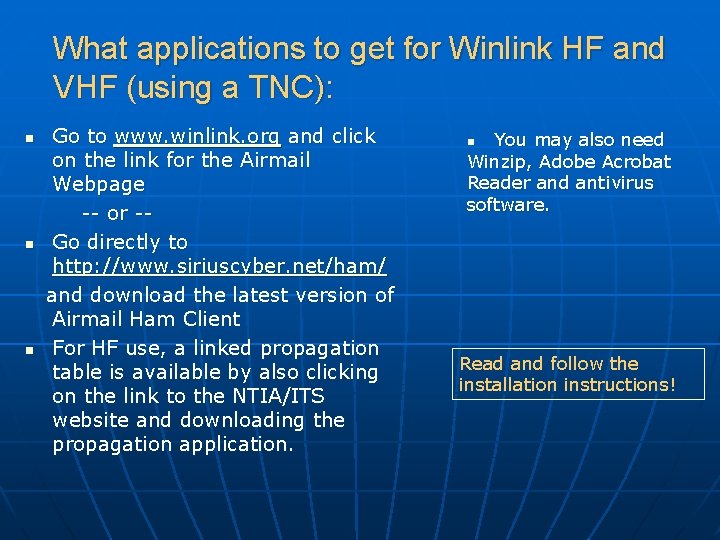
What applications to get for Winlink HF and VHF (using a TNC): Go to www. winlink. org and click on the link for the Airmail Webpage -- or -- n Go directly to http: //www. siriuscyber. net/ham/ and download the latest version of Airmail Ham Client n For HF use, a linked propagation table is available by also clicking on the link to the NTIA/ITS website and downloading the propagation application. n n You may also need Winzip, Adobe Acrobat Reader and antivirus software. Read and follow the installation instructions!
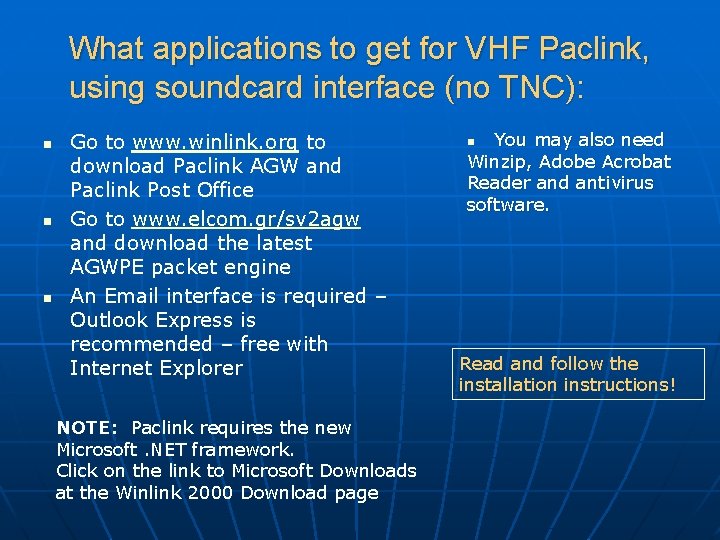
What applications to get for VHF Paclink, using soundcard interface (no TNC): n n n Go to www. winlink. org to download Paclink AGW and Paclink Post Office Go to www. elcom. gr/sv 2 agw and download the latest AGWPE packet engine An Email interface is required – Outlook Express is recommended – free with Internet Explorer NOTE: Paclink requires the new Microsoft. NET framework. Click on the link to Microsoft Downloads at the Winlink 2000 Download page n You may also need Winzip, Adobe Acrobat Reader and antivirus software. Read and follow the installation instructions!
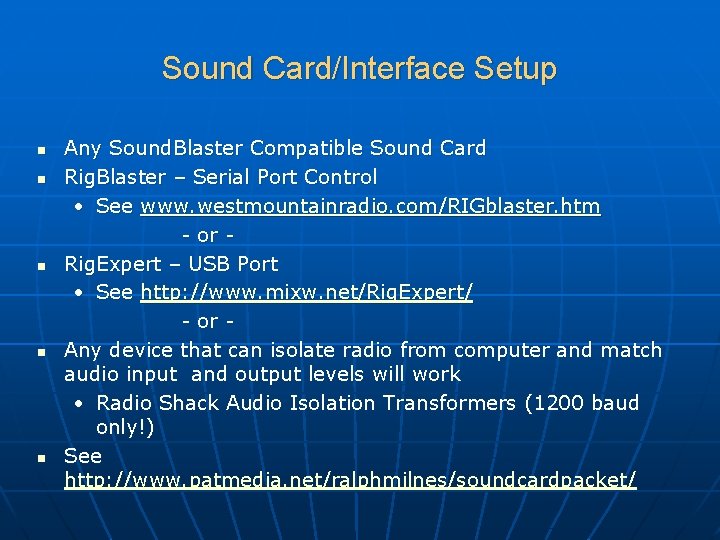
Sound Card/Interface Setup n n n Any Sound. Blaster Compatible Sound Card Rig. Blaster – Serial Port Control • See www. westmountainradio. com/RIGblaster. htm - or Rig. Expert – USB Port • See http: //www. mixw. net/Rig. Expert/ - or Any device that can isolate radio from computer and match audio input and output levels will work • Radio Shack Audio Isolation Transformers (1200 baud only!) See http: //www. patmedia. net/ralphmilnes/soundcardpacket/
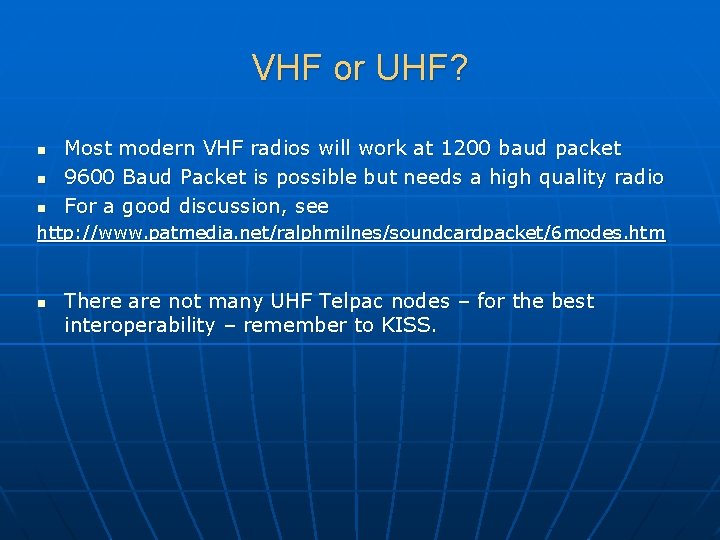
VHF or UHF? n n n Most modern VHF radios will work at 1200 baud packet 9600 Baud Packet is possible but needs a high quality radio For a good discussion, see http: //www. patmedia. net/ralphmilnes/soundcardpacket/6 modes. htm n There are not many UHF Telpac nodes – for the best interoperability – remember to KISS.
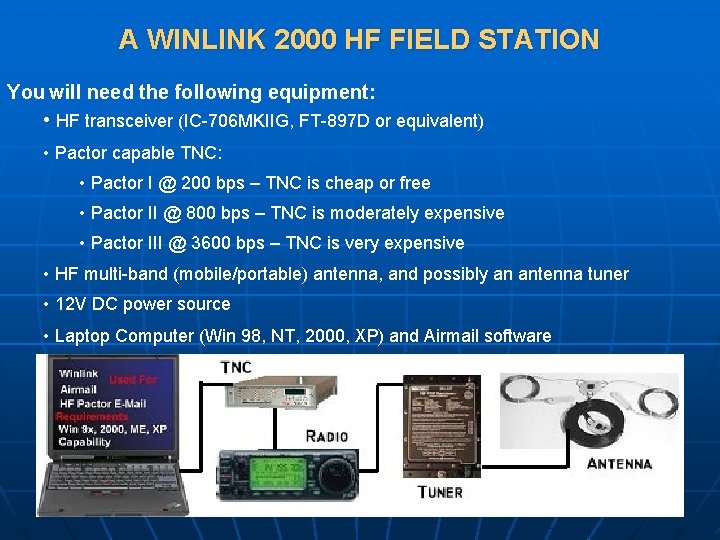
A WINLINK 2000 HF FIELD STATION You will need the following equipment: • HF transceiver (IC-706 MKIIG, FT-897 D or equivalent) • Pactor capable TNC: • Pactor I @ 200 bps – TNC is cheap or free • Pactor II @ 800 bps – TNC is moderately expensive • Pactor III @ 3600 bps – TNC is very expensive • HF multi-band (mobile/portable) antenna, and possibly an antenna tuner • 12 V DC power source • Laptop Computer (Win 98, NT, 2000, XP) and Airmail software
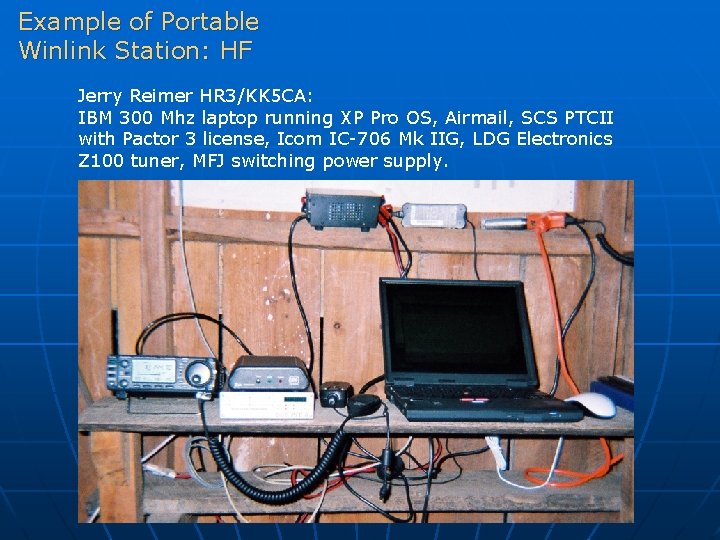
Example of Portable Winlink Station: HF Jerry Reimer HR 3/KK 5 CA: IBM 300 Mhz laptop running XP Pro OS, Airmail, SCS PTCII with Pactor 3 license, Icom IC-706 Mk IIG, LDG Electronics Z 100 tuner, MFJ switching power supply.
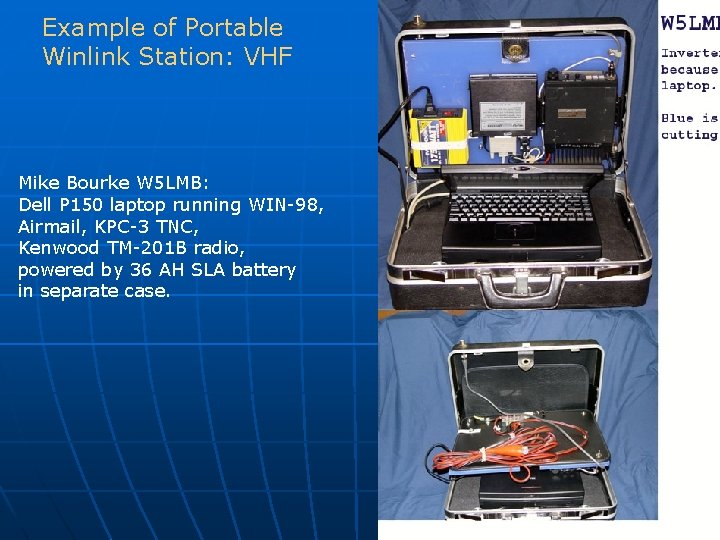
Example of Portable Winlink Station: VHF Mike Bourke W 5 LMB: Dell P 150 laptop running WIN-98, Airmail, KPC-3 TNC, Kenwood TM-201 B radio, powered by 36 AH SLA battery in separate case.
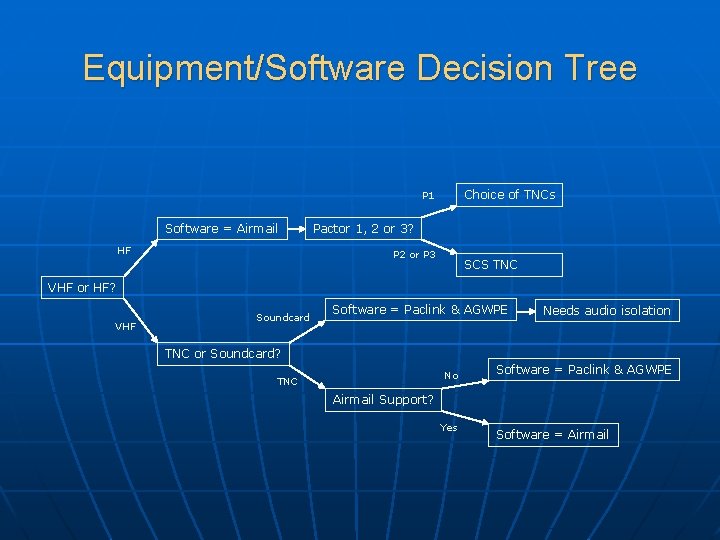
Equipment/Software Decision Tree Choice of TNCs P 1 Software = Airmail HF Pactor 1, 2 or 3? P 2 or P 3 SCS TNC VHF or HF? VHF Soundcard Software = Paclink & AGWPE Needs audio isolation TNC or Soundcard? No TNC Software = Paclink & AGWPE Airmail Support? Yes Software = Airmail
Software Operation Email Program Packet/Telnet Interface Email Server Radio Interface Outlook Express Paclink AGW Paclink Postoffice AGWPE Part of Airmail N/A Part of Airmail
Questions? See: www. winlink. org Or call Bud, N 7 CW, at 928 -771 -8267 or n 7 cw@cableone. net