projectopen Rollout Plan Methodology and Learned Lessons Frank
![]project-open[ Rollout Plan, Methodology and Learned Lessons Frank Bergmann, frank. bergmann@project-open. com Klaus Hofeditz,](https://slidetodoc.com/presentation_image_h/e105d2c78fe8332e07f730c4321d9a88/image-1.jpg "]project-open[ Rollout Plan, Methodology and Learned Lessons Frank Bergmann, frank. bergmann@project-open. com Klaus Hofeditz,")
![Contents 1. 2. 3. 4. 5. 6. What is ]project-open[? People issues – lessons](https://slidetodoc.com/presentation_image_h/e105d2c78fe8332e07f730c4321d9a88/image-2.jpg "Contents 1. 2. 3. 4. 5. 6. What is ]project-open[? People issues – lessons")
![1. What is ]project-open[? ]po[ is an enterprise open-source project management application for both](https://slidetodoc.com/presentation_image_h/e105d2c78fe8332e07f730c4321d9a88/image-3.jpg "1. What is ]project-open[? ]po[ is an enterprise open-source project management application for both")
![What is or does ]project-open[? What is ]project-open[? § ]po[ is an enterprise open](https://slidetodoc.com/presentation_image_h/e105d2c78fe8332e07f730c4321d9a88/image-4.jpg "What is or does ]project-open[? What is ]project-open[? § ]po[ is an enterprise open")


![]project-open[ Deployment Options Public Cloud § ]po[ offers Saa. S hosting for V 5.](https://slidetodoc.com/presentation_image_h/e105d2c78fe8332e07f730c4321d9a88/image-9.jpg "]project-open[ Deployment Options Public Cloud § ]po[ offers Saa. S hosting for V 5.")
![Functionality ]project-open[ consists of ~200 different modules covering all areas of PMBOK](https://slidetodoc.com/presentation_image_h/e105d2c78fe8332e07f730c4321d9a88/image-10.jpg "Functionality ]project-open[ consists of ~200 different modules covering all areas of PMBOK")
![]project-open[ V 5. 0 Highlights § HTML 5 Gantt Editor: Drag-and-drop editing of project](https://slidetodoc.com/presentation_image_h/e105d2c78fe8332e07f730c4321d9a88/image-12.jpg "]project-open[ V 5. 0 Highlights § HTML 5 Gantt Editor: Drag-and-drop editing of project")
![]project-open[ V 5. 0 Diagram Gallery § Project Earned Value: Planned vs. actual value](https://slidetodoc.com/presentation_image_h/e105d2c78fe8332e07f730c4321d9a88/image-13.jpg "]project-open[ V 5. 0 Diagram Gallery § Project Earned Value: Planned vs. actual value")
![]project-open[ is Open Source Software § Download ]project-open[ „Community“: http: //www. sourceforge. net/projects/projec t-open/files/project-open/V](https://slidetodoc.com/presentation_image_h/e105d2c78fe8332e07f730c4321d9a88/image-14.jpg "]project-open[ is Open Source Software § Download ]project-open[ „Community“: http: //www. sourceforge. net/projects/projec t-open/files/project-open/V")
![]project-open[ Rollout – Conceptual Model Project managers, project team, . . . Project Data](https://slidetodoc.com/presentation_image_h/e105d2c78fe8332e07f730c4321d9a88/image-17.jpg "]project-open[ Rollout – Conceptual Model Project managers, project team, . . . Project Data")
![„Principal – Agent“ Problem The “principal – agent” problem […] occurs when one person](https://slidetodoc.com/presentation_image_h/e105d2c78fe8332e07f730c4321d9a88/image-18.jpg "„Principal – Agent“ Problem The “principal – agent” problem […] occurs when one person")



![]po[ Project Definition § § § The decision “Adapt ]po[ or adapt the company”](https://slidetodoc.com/presentation_image_h/e105d2c78fe8332e07f730c4321d9a88/image-33.jpg "]po[ Project Definition § § § The decision “Adapt ]po[ or adapt the company”")
![]po[ Implementation and Go-Live § § Each of the factors below need to be](https://slidetodoc.com/presentation_image_h/e105d2c78fe8332e07f730c4321d9a88/image-34.jpg "]po[ Implementation and Go-Live § § Each of the factors below need to be")
![]po[ Operations § § § The #1 issue after the go-live is the quality](https://slidetodoc.com/presentation_image_h/e105d2c78fe8332e07f730c4321d9a88/image-35.jpg "]po[ Operations § § § The #1 issue after the go-live is the quality")


![Installation Phase Work Package Objective Deliverables § Install the ]po[ application on a production](https://slidetodoc.com/presentation_image_h/e105d2c78fe8332e07f730c4321d9a88/image-42.jpg "Installation Phase Work Package Objective Deliverables § Install the ]po[ application on a production")

![]po[ Implementation Phases Definition Extensions (optional) Installation Training Go-Live After Go-Live Scope & Application](https://slidetodoc.com/presentation_image_h/e105d2c78fe8332e07f730c4321d9a88/image-46.jpg "]po[ Implementation Phases Definition Extensions (optional) Installation Training Go-Live After Go-Live Scope & Application")
![]po[ Rollout Options Man. Dir. Sales Manager Customer 1 2 Project Mgmt Processes Resource](https://slidetodoc.com/presentation_image_h/e105d2c78fe8332e07f730c4321d9a88/image-48.jpg "]po[ Rollout Options Man. Dir. Sales Manager Customer 1 2 Project Mgmt Processes Resource")


- Slides: 55
]project-open[ Rollout Plan, Methodology and Learned Lessons Frank Bergmann, frank. bergmann@project-open. com Klaus Hofeditz, klaus. hofeditz@project-open. com A guide to perform ]po[ tool rollouts based on the learned lessons from more than 300 projects. A large part of this guide will apply to software rollout projects in general.
Contents 1. 2. 3. 4. 5. 6. What is ]project-open[? People issues – lessons learned Rollout goal hierarchy – all the things you need to do right Checklists for project definition, implementation and operations Detailed rollout activities Rollout strategies
1. What is ]project-open[? ]po[ is an enterprise open-source project management application for both project management of individual projects and project portfolio management
What is or does ]project-open[? What is ]project-open[? § ]po[ is an enterprise open source project management application. Collabo§ It’s main purpose is to coordinate the ration work of project managers, project members and stake holders across multiple projects. CRM HR § Target organizations include companies and corporate departments that need to track finances, tasks, and resources for oject-open. org/en/module_project_management a large number of concurrently running projects. Reporting ITSM & BI Finance Integration Interfaces SAP/Navision, MS-Project, LDAP, … Achievements § ~6. 000 Customers in production § EOS directory: “ 3 stars – mature” enterprise readiness § Heise. de: “Germany’s #3 open-source ERP/CRM application” § Ohloh: “#1 open-source web application with 2. 500. 000 lines of code” § Source. Forge: 150. 000 downloads of ]po[ V 4. 0
~6. 000 Customers Worldwide Selected Installations § § § § Ne. ST IT (~2. 500 users) <large Spanish bank> (~1. 500 users) <large Swiss bank> (~300 users) Champ Cargosystems (~200 users) <Spanish supermarket chain> (~300 users) Weber Engineering (~200 users) DHL Malaysia (~150 users) <Spanish insurance> (~150 users) <Macau casino> (~150 users) <large European airport> (~100 users) <German software> (Bechtle AG) (~100 users) <American aviation> (~100 users) <American financial consulting> (~100 users) VAW arvato S. L. (Bertelsmann) (~60 users) <large Swiss manufacturing> (~50 users) <German IT security> (~50 users)
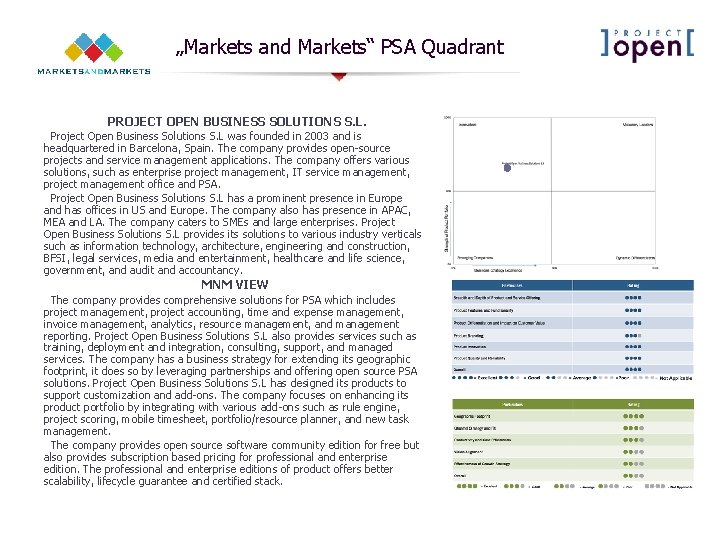
„Markets and Markets“ PSA Quadrant PROJECT OPEN BUSINESS SOLUTIONS S. L. Project Open Business Solutions S. L was founded in 2003 and is headquartered in Barcelona, Spain. The company provides open-source projects and service management applications. The company offers various solutions, such as enterprise project management, IT service management, project management office and PSA. Project Open Business Solutions S. L has a prominent presence in Europe and has offices in US and Europe. The company also has presence in APAC, MEA and LA. The company caters to SMEs and large enterprises. Project Open Business Solutions S. L provides its solutions to various industry verticals such as information technology, architecture, engineering and construction, BFSI, legal services, media and entertainment, healthcare and life science, government, and audit and accountancy. MNM VIEW The company provides comprehensive solutions for PSA which includes project management, project accounting, time and expense management, invoice management, analytics, resource management, and management reporting. Project Open Business Solutions S. L also provides services such as training, deployment and integration, consulting, support, and managed services. The company has a business strategy for extending its geographic footprint, it does so by leveraging partnerships and offering open source PSA solutions. Project Open Business Solutions S. L has designed its products to support customization and add-ons. The company focuses on enhancing its product portfolio by integrating with various add-ons such as rule engine, project scoring, mobile timesheet, portfolio/resource planner, and new task management. The company provides open source software community edition for free but also provides subscription based pricing for professional and enterprise edition. The professional and enterprise editions of product offers better scalability, lifecycle guarantee and certified stack.
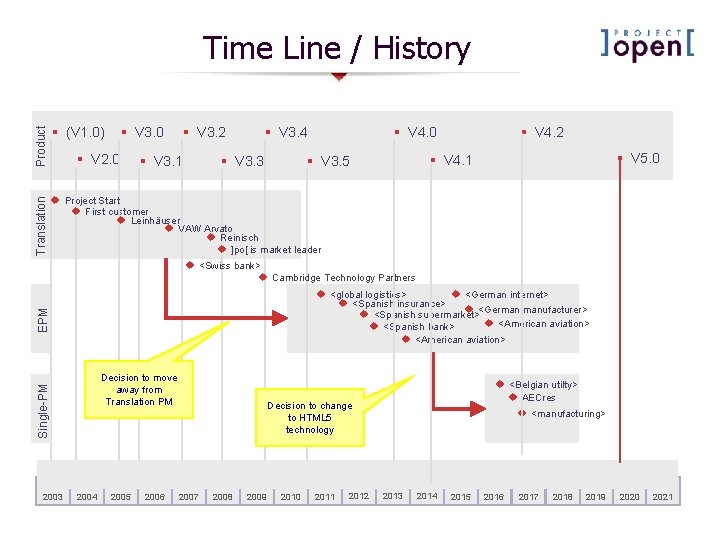
Product § (V 1. 0) Translation Time Line / History § V 3. 0 u Project Start u First customer u Leinhäuser u VAW Arvato u Reinisch u ]po[ is market leader § V 2. 0 § V 3. 2 § V 3. 1 § V 3. 4 § V 3. 3 § V 4. 2 § V 4. 0 § V 5. 0 § V 4. 1 § V 3. 5 u <Swiss bank> u Cambridge Technology Partners EPM u <global logistics> u <German internet> u <Spanish insurance> u <German manufacturer> u <Spanish supermarket> u <American aviation> u <Spanish bank> u <American aviation> Single-PM Decision to move away from Translation PM 2003 2004 2005 2006 u <Belgian utilty> u AECres u <manufacturing> Decision to change to HTML 5 technology 2007 2008 2009 2010 2011 2012 2013 2014 2015 2016 2017 2018 2019 2020 2021
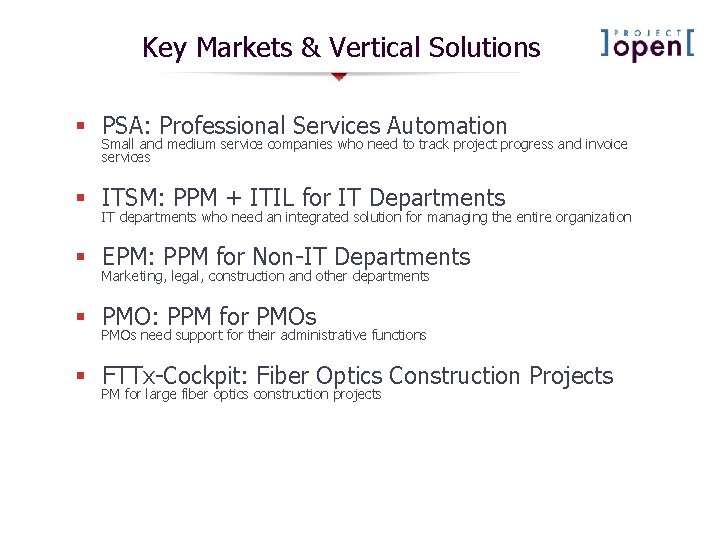
Key Markets & Vertical Solutions § PSA: Professional Services Automation Small and medium service companies who need to track project progress and invoice services § ITSM: PPM + ITIL for IT Departments IT departments who need an integrated solution for managing the entire organization § EPM: PPM for Non-IT Departments Marketing, legal, construction and other departments § PMO: PPM for PMOs need support for their administrative functions § FTTx-Cockpit: Fiber Optics Construction Projects PM for large fiber optics construction projects
]project-open[ Deployment Options Public Cloud § ]po[ offers Saa. S hosting for V 5. 0 Private Cloud § A VMware virtual machine is available suitable for VMware private clouds. Dedicated Server § Installers for Windows and Linux are available for (high-performance) on premise installations Mixed § A private cloud server containing a backup of a public cloud server. § One or more public cloud servers containing active projects, while data are consolidated for reporting in a private cloud.
Functionality ]project-open[ consists of ~200 different modules covering all areas of PMBOK
Key Markets & Vertical Solutions § PSA: Professional Services Automation Small and medium service companies who need to track project progress and invoice services § ITSM: PPM + ITIL for IT Departments IT departments who need an integrated solution for managing the entire organization § EPM: PPM for Non-IT Departments Marketing, legal, construction and other departments § PMO: PPM for PMOs need support for their administrative functions § FTTx-Cockpit: Fiber Optics Construction Projects PM for large fiber optics construction projects
]project-open[ V 5. 0 Highlights § HTML 5 Gantt Editor: Drag-and-drop editing of project schedules similar to Project Libre, Gantt-Project or Microsoft Project. § HTML 5 Portfolio Planner: Editor for project portfolios including what-if scenarios, cross-project dependencies and resource forecasting § HTML 5 Task Management: Easy overview of tasks to do for the current user or tasks to be done for the PM
]project-open[ V 5. 0 Diagram Gallery § Project Earned Value: Planned vs. actual value § Program Project Status: History of status of projects in a program § § Finance Top Customers: Top 10 customers § Revenue by Dept/BU § CRM Sales Portfolio: Including drag-anddrop editing § DIY: Instructions available to build diagrams yourself: www. projectopen. net/en/en: tutori al-sencha-ajax-portlets Portfolio Scoring: – Risk vs. ROI – Strategic vs. ROI – …
]project-open[ is Open Source Software § Download ]project-open[ „Community“: http: //www. sourceforge. net/projects/projec t-open/files/project-open/V 5. 0/ § 90% of customers use the community edition, even large ones § We earn 90% of our money from consulting, training and customizations § Enterprise edition available at 1/10 th of any competing product.
2. People Issues – Lessons Learned Not all users may be happy about the introduction of a new software. They may just not like the GUI, or may have something to loose.
People Issues Learned Lessons § § § #1: #2: #3: #4: #5: #6: Reasons for Resistence Change Management Buy-In Six Types of Power Force-Field Analysis Gradual Roll-Out
]project-open[ Rollout – Conceptual Model Project managers, project team, . . . Project Data Decisions, corrective action, . . . MS-Project Jira, . . . ]project-open[ Other Task Management, project tracking, budget control, . . . SAP . . . Active Directory Executive Reports Stakeholders
„Principal – Agent“ Problem The “principal – agent” problem […] occurs when one person or entity (the "agent"), is able to make decisions and/or take actions on behalf of, or that impact, another person or entity: the "principal". Wikipedia § Principal: Corporate Management § Agent: PM, Department heads, …
Power The capacity or ability to direct or influence the behavior of others or the course of events. OXFORD English Dictionary Power Shift Improving the quality/sophistication of a PMO leads to a shift of power: § Senior management will gain power by better reports which will improve the oversight of projects. § Project managers and department heads may loose certain independence and therefore power
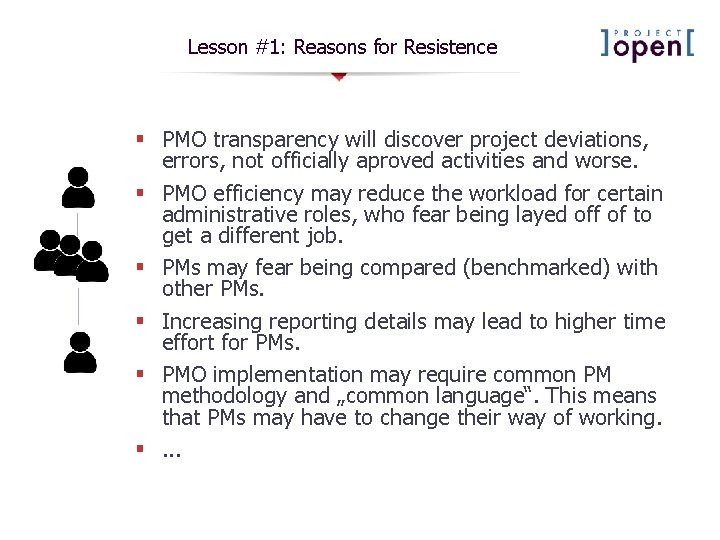
Lesson #1: Reasons for Resistence § PMO transparency will discover project deviations, errors, not officially aproved activities and worse. § PMO efficiency may reduce the workload for certain administrative roles, who fear being layed off of to get a different job. § PMs may fear being compared (benchmarked) with other PMs. § Increasing reporting details may lead to higher time effort for PMs. § PMO implementation may require common PM methodology and „common language“. This means that PMs may have to change their way of working. §. . .
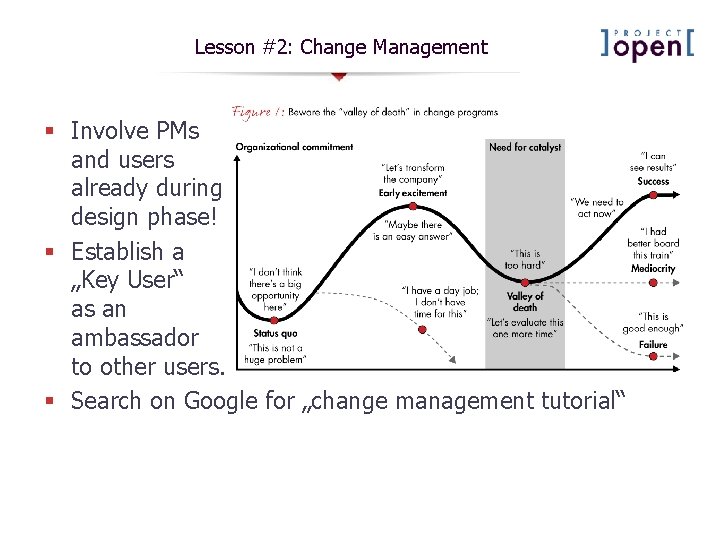
Lesson #2: Change Management § Involve PMs and users already during design phase! § Establish a „Key User“ as an ambassador to other users. § Search on Google for „change management tutorial“
Lesson #3: Management Buy-In Common knowledge: § Management buy-in is most important PMO project success factor. Not completely wrong. But what if you just don‘t have the buy-in (yet)? Here is the way to get it: § § § Check if somebody important is looking at your data. Can you make additional stake-holders look at you data? – – – Financial managers are your friends! Do the internal „customers“ of the PMO projects get regular reports? What about BU heads or departments affected by projects? – – – What input data are needed for the reports? How to get this data? Who has the knowledge to produce this data? How to get the appropriate quality? How can you make the knowledge bearers enter (and update!) them happily? What reports/indicators are they used to see or want to see? From there you have to work backwards:
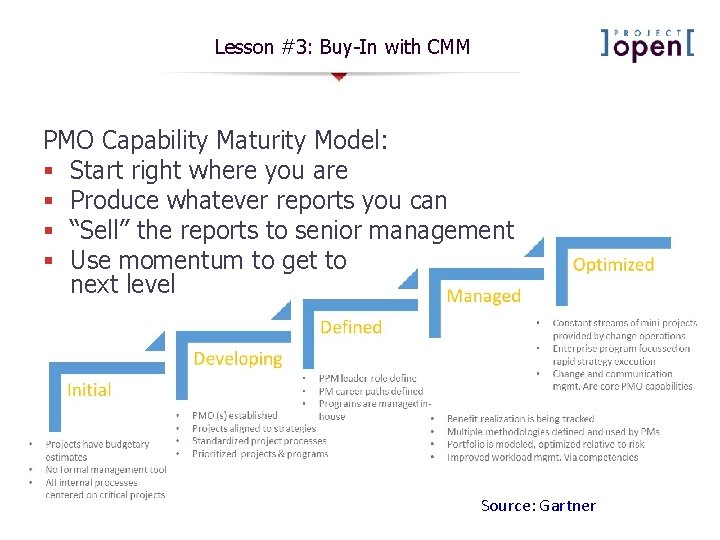
Lesson #3: Buy-In with CMM PMO Capability Maturity Model: § Start right where you are § Produce whatever reports you can § “Sell” the reports to senior management § Use momentum to get to next level Source: Gartner
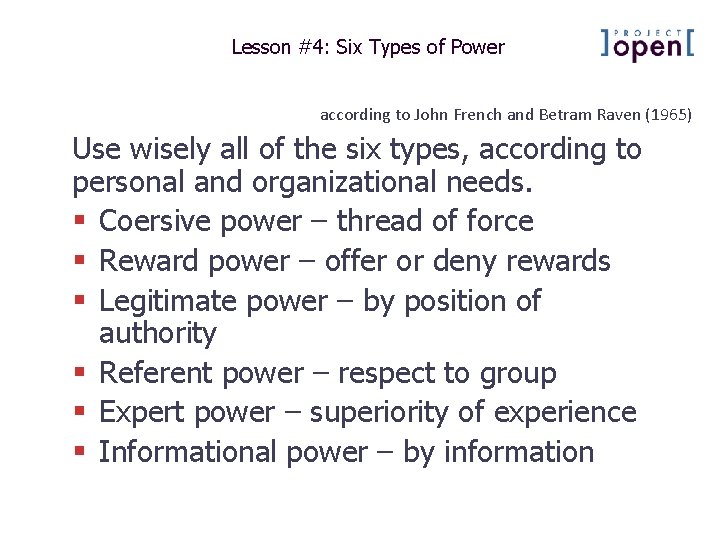
Lesson #4: Six Types of Power according to John French and Betram Raven (1965) Use wisely all of the six types, according to personal and organizational needs. § Coersive power – thread of force § Reward power – offer or deny rewards § Legitimate power – by position of authority § Referent power – respect to group § Expert power – superiority of experience § Informational power – by information
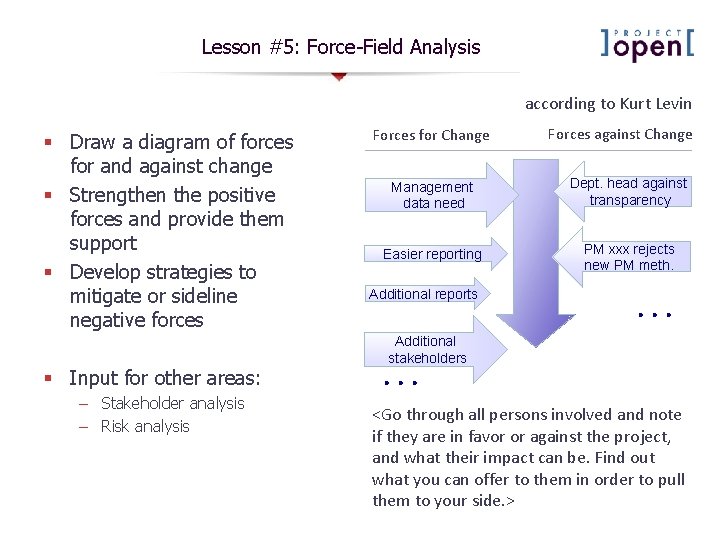
Lesson #5: Force-Field Analysis according to Kurt Levin § Draw a diagram of forces for and against change § Strengthen the positive forces and provide them support § Develop strategies to mitigate or sideline negative forces § Input for other areas: – Stakeholder analysis – Risk analysis Forces for Change Forces against Change Management data need Dept. head against transparency Easier reporting PM xxx rejects new PM meth. Additional reports . . . Additional stakeholders . . . <Go through all persons involved and note if they are in favor or against the project, and what their impact can be. Find out what you can offer to them in order to pull them to your side. >
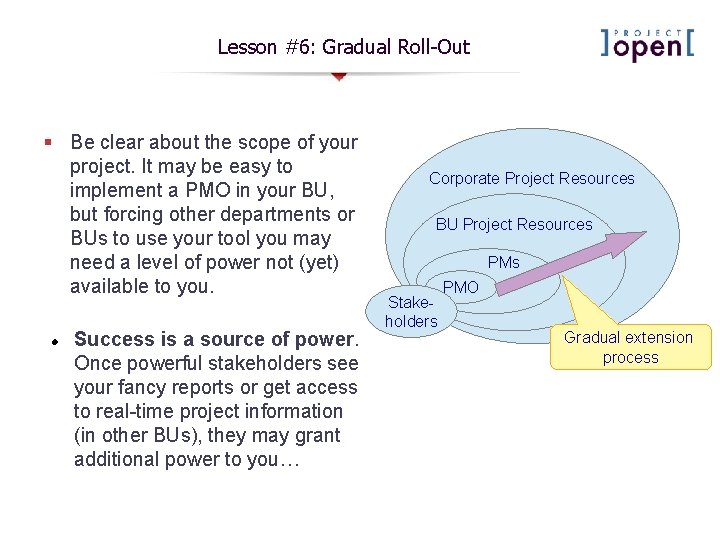
Lesson #6: Gradual Roll-Out § Be clear about the scope of your project. It may be easy to implement a PMO in your BU, but forcing other departments or BUs to use your tool you may need a level of power not (yet) available to you. Success is a source of power. Once powerful stakeholders see your fancy reports or get access to real-time project information (in other BUs), they may grant additional power to you… Corporate Project Resources BU Project Resources PMs Stakeholders PMO Gradual extension process
3. Rollout Goal Hierarchy Not all users may be happy about the introduction of a new software. They may just not like the GUI, or may have something to loose.
Rollout Goal Hierarchy Objectives Overview Operational efficiency Goals Users take advantage of system capabilities Progress Processes Improved process visibility Clean data in the system User buy-In Rollout Enough slack time for training Stable and well configured system Successful installation Base No major issues with the system Better portfolio decisions Improved processes Clear instructions to users Training Users perceive a familiar environment Users don’t feel threatened by the system Legacy data migration Sound support Time Sound and specific reports
Goal Hierarchy - Technical Base § Successful Installation: The installation has to be finished technically: – ]po[ is running well and with good performance – ]po[ is accessible via URL „http: //project-open. <company>. com“ § Successful Configuration: ]po[ out of the box is a “toolkit”. In order to create a “solution” you have to: Successful installation No major issues with the system – Removed unnecessary functionality – Configure permissions and categories § Legacy Data Migration: Legacy data migration – Imported existing “master data” including users, departments customers, … – Import existing projects – Import old financial data Stable and well configured system
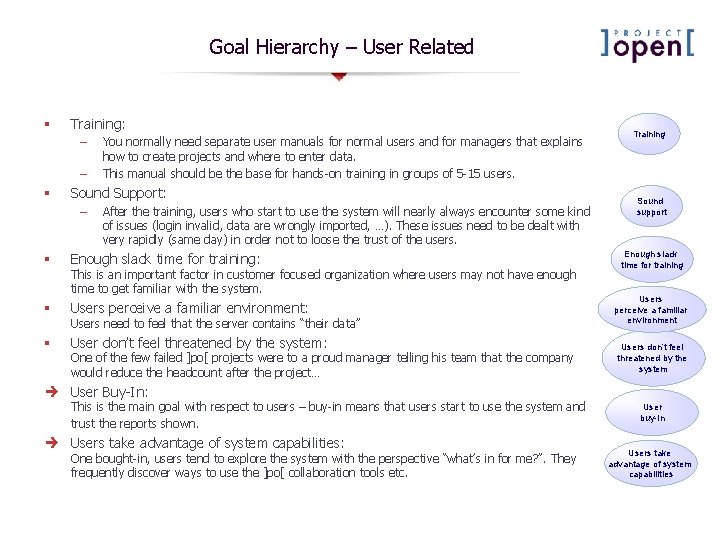
Goal Hierarchy – User Related § Training: – – § You normally need separate user manuals for normal users and for managers that explains how to create projects and where to enter data. This manual should be the base for hands-on training in groups of 5 -15 users. Sound Support: – After the training, users who start to use the system will nearly always encounter some kind of issues (login invalid, data are wrongly imported, …). These issues need to be dealt with very rapidly (same day) in order not to loose the trust of the users. § Enough slack time for training: § Users perceive a familiar environment: § User don’t feel threatened by the system: This is an important factor in customer focused organization where users may not have enough time to get familiar with the system. Users need to feel that the server contains “their data” One of the few failed ]po[ projects were to a proud manager telling his team that the company would reduce the headcount after the project… Training Sound support Enough slack time for training Users perceive a familiar environment Users don’t feel threatened by the system User Buy-In: This is the main goal with respect to users – buy-in means that users start to use the system and trust the reports shown. Users take advantage of system capabilities: One bought-in, users tend to explore the system with the perspective “what’s in for me? ”. They frequently discover ways to use the ]po[ collaboration tools etc. User buy-In Users take advantage of system capabilities
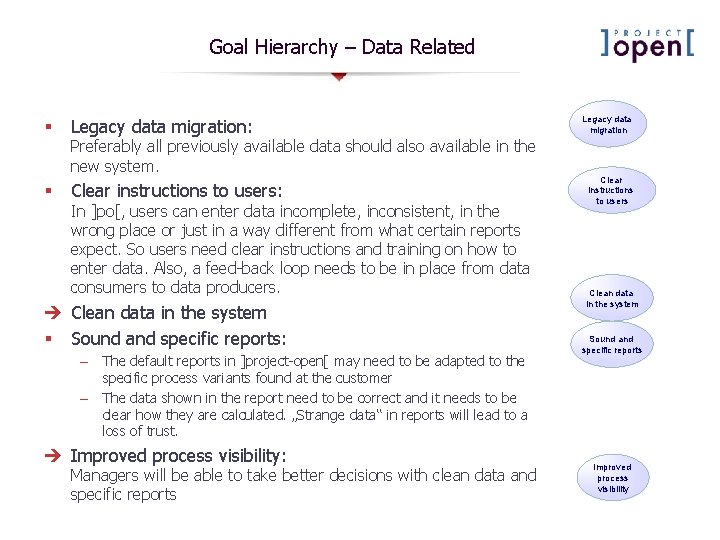
Goal Hierarchy – Data Related § § Legacy data migration: Preferably all previously available data should also available in the new system. Clear instructions to users: In ]po[, users can enter data incomplete, inconsistent, in the wrong place or just in a way different from what certain reports expect. So users need clear instructions and training on how to enter data. Also, a feed-back loop needs to be in place from data consumers to data producers. Clean data in the system § Sound and specific reports: – The default reports in ]project-open[ may need to be adapted to the specific process variants found at the customer – The data shown in the report need to be correct and it needs to be clear how they are calculated. „Strange data“ in reports will lead to a loss of trust. Improved process visibility: Managers will be able to take better decisions with clean data and specific reports Legacy data migration Clear instructions to users Clean data in the system Sound and specific reports Improved process visibility
4. Checklists for Project Definition, Implementation and Operations
]po[ Project Definition § § § The decision “Adapt ]po[ or adapt the company” is the single most important factor to determine the project cost and implementation speed. The “Strong Key User” is the most important factor in a project’s success. A strong Key User is somebody with detailed knowledge of all company processes and has some technology skills, quickly understanding the logic of a software. The outcome of the Project Definition is used in the following phases, so it is important to document the decisions here.
]po[ Implementation and Go-Live § § Each of the factors below need to be covered about 80% in order to allow a successful “go-live”. Small modifications (20%) are usually fine after the go-live if expectations are managed accordingly. The key for a successful golive is the “Training Manual” that explains how users should use ]po[. Writing this manual can take 5 -10 net days of work. .
]po[ Operations § § § The #1 issue after the go-live is the quality of data in the system. Please make sure that user can “trust” the data inside the system and know who entered these data, so that complaints can be converted in improvements. The key for successful long-term ]po[ operations is a Support Team that is capable of modifying/ extending ]po[. This team can be either in-house with 3 rd level support from ]po[ (recommended) of outsourced. System Admin is usually not an issue anymore after the go-live. But please make sure to test recovery operations every 2 -3 month.
5. Detailed Rollout Activities
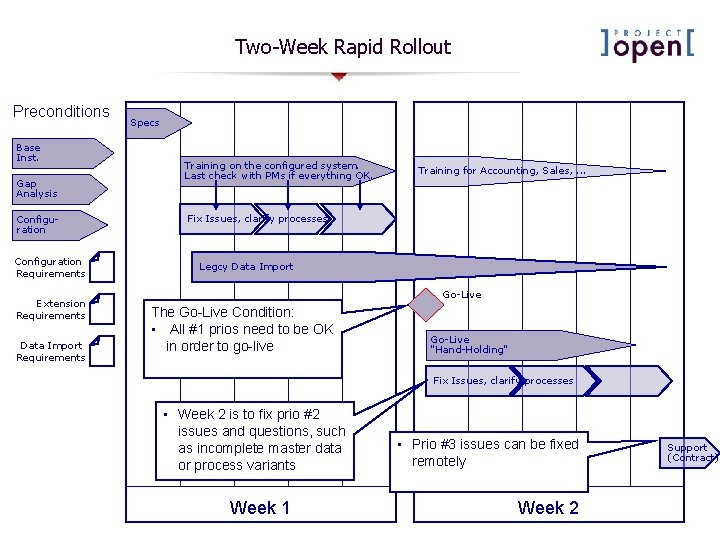
Two-Week Rapid Rollout Preconditions Base Inst. Gap Analysis Configuration Requirements Extension Requirements Data Import Requirements Specs Training on the configured system. Last check with PMs if everything OK. Training for Accounting, Sales, . . . Fix Issues, clarify processes Legcy Data Import Go-Live The Go-Live Condition: • All #1 prios need to be OK in order to go-live Go-Live "Hand-Holding" Fix Issues, clarify processes • Week 2 is to fix prio #2 issues and questions, such as incomplete master data or process variants Week 1 • Prio #3 issues can be fixed remotely Week 2 Support (Contract)
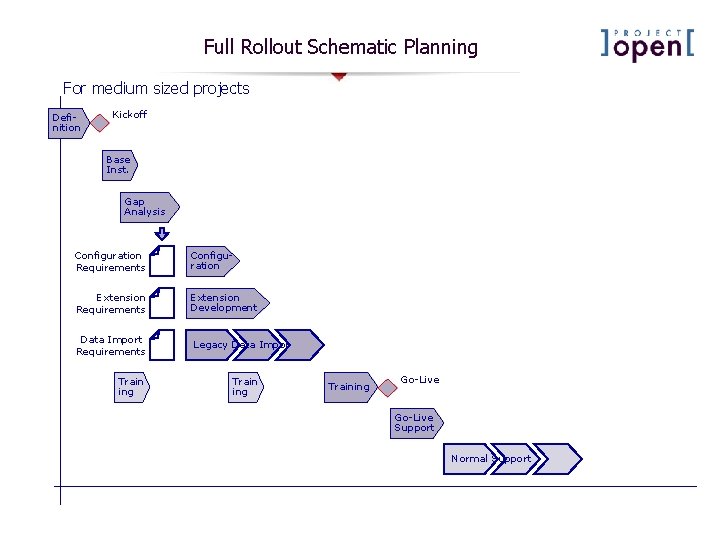
Full Rollout Schematic Planning For medium sized projects Definition Kickoff Base Inst. Gap Analysis Configuration Requirements Configuration Extension Requirements Extension Development Data Import Requirements Legacy Data Import Train ing Training Go-Live Support Normal Support
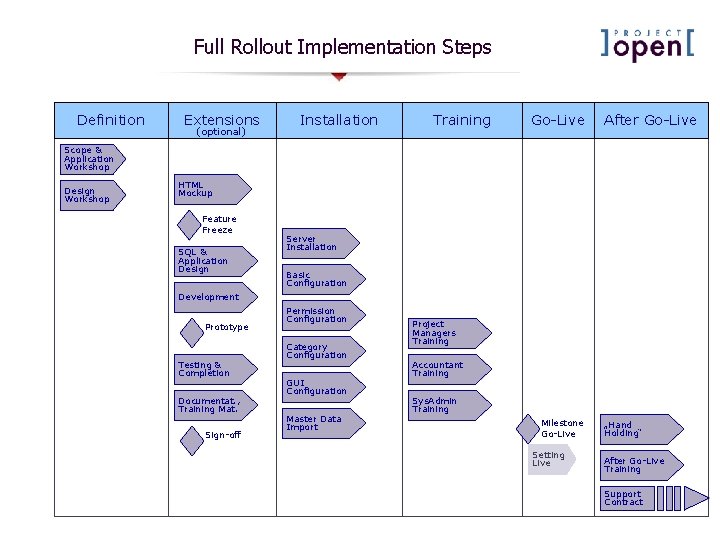
Full Rollout Implementation Steps Definition Extensions (optional) Installation Training Go-Live After Go-Live Scope & Application Workshop Design Workshop HTML Mockup Feature Freeze SQL & Application Design Server Installation Basic Configuration Development Prototype Testing & Completion Documentat. , Training Mat. Sign-off Permission Configuration Category Configuration GUI Configuration Master Data Import Project Managers Training Accountant Training Sys. Admin Training Milestone Go-Live Setting Live „Hand Holding“ After Go-Live Training Support Contract
Definition Phase Work Package Scope & Application Workshop Design Workshop Objective Deliverables § Customer’s Senior Management learns about the application and identifies the ]po[ modules to be implemented. § Identification of extension development necessities. § Scope of project § Input for first cost estimate § Decision structure § Senior Management or Key Users specify configuration and customization necessities. § Scoping and functional requirement definition for extension development. § Configuration requirements § Extension requirements § Input for detailed quote
Extensions Phase Work Package Objective Deliverables § Build a functional “mockup” using static HTML pages based on input from the “Design Workshop”. § HTML mockup § Mockup confirmation in a functional design workshop and freeze of specifications. § Functional specifications SQL & Application Design § Define how extensions should relate to existing ]po[ modules. § Design a SQL data model. § Reutilization Concept § Data Model Development § Implement the specified extensions. § Working code § Presentation of a prototype to the customer. § Confirmation of functionality § Working system HTML Mockup Feature Freeze Prototype Testing & Completion § Completion of the prototype functionality and testing in the customer’s context. Documentat. , Training Mat. § Documentation of the extensions and development / adaptation of training material. Sign-off § Extensions sign-off. § Documentation & training material § Working extensions
Installation Phase Work Package Objective Deliverables § Install the ]po[ application on a production server and (optionally) on a development/test server. Security configuration. § Installed applications Basic Configuration § Configuration of Admin / Parameters section according to customer requirements. § Working application Permission Configuration § Setup of user profiles and user profile privileges according. § Secure application Category Configuration § Adapt ]po[ categories (project types, customer types, …) to the specific business. § Adapted application GUI Configuration § Adapt GUI colors and font styles to the customer’s corporate design (optional). § Attractive application Master Data Import § Create ]po[ customers, providers, customer contacts, freelancers, employees and prices from existing data. § Usable application Server Installation
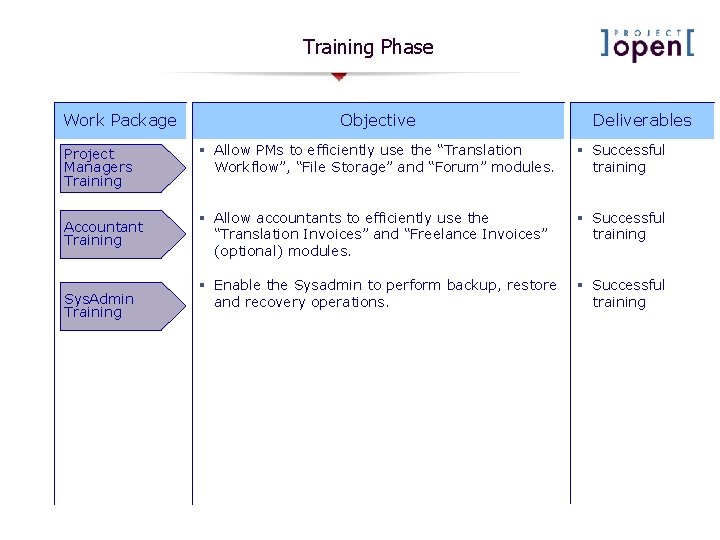
Training Phase Work Package Project Managers Training Accountant Training Sys. Admin Training Objective Deliverables § Allow PMs to efficiently use the “Translation Workflow”, “File Storage” and “Forum” modules. § Successful training § Allow accountants to efficiently use the “Translation Invoices” and “Freelance Invoices” (optional) modules. § Successful training § Enable the Sysadmin to perform backup, restore and recovery operations. § Successful training
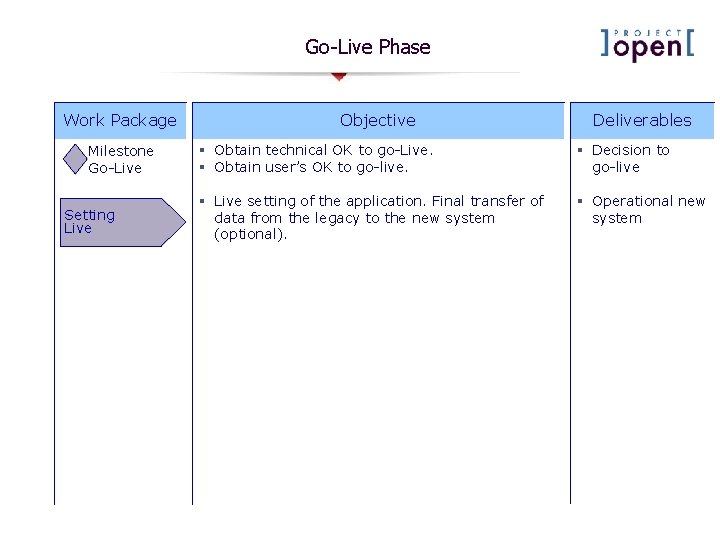
Go-Live Phase Work Package Milestone Go-Live Setting Live Objective Deliverables § Obtain technical OK to go-Live. § Obtain user’s OK to go-live. § Decision to go-live § Live setting of the application. Final transfer of data from the legacy to the new system (optional). § Operational new system
After Go-Live Work Package Objective Deliverables „Hand Holding“ § Presence of implementation team members during the first days after going live in order to deal with questions and issues. § Successful completion of the first project cycles After Go-Live Training § Training to deal with unanticipated or unresolved questions after the go-live. § All users are capable of using the system § Ongoing support. § A stable and updated system Support Contract
]po[ Implementation Phases Definition Extensions (optional) Installation Training Go-Live After Go-Live Scope & Application Workshop Design Workshop HTML Mockup Feature Freeze SQL & Application Design Server Installation Basic Configuration Development Prototype Testing & Completion Documentat. , Training Mat. Sign-off Permission Configuration Category Configuration GUI Configuration Master Data Import Project Managers Training Accountant Training Sys. Admin Training Milestone Go-Live Setting Live „Hand Holding“ After Go-Live Training Support Contract
6. Rollout Strategies
]po[ Rollout Options Man. Dir. Sales Manager Customer 1 2 Project Mgmt Processes Resource Mgmt Task Mgmt Operations Manager PM 1 PM 2 PM 3 Finance PM 4 Resource Manager Freelance 1 2 Vertical Rollout Option: One project manager starts using the system, possibly only for a limited number of customers CRM Management Accounting Budget Mgmt Travel Mgmt. . . Horizontal Rollout Option: A single process (PM, CRM, filestorage, . . . ) is being used by all PMs
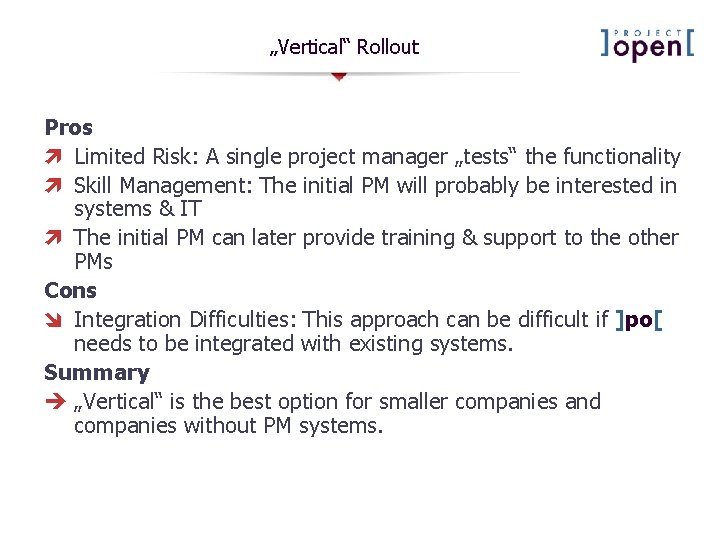
„Vertical“ Rollout Pros ì Limited Risk: A single project manager „tests“ the functionality ì Skill Management: The initial PM will probably be interested in systems & IT ì The initial PM can later provide training & support to the other PMs Cons î Integration Difficulties: This approach can be difficult if ]po[ needs to be integrated with existing systems. Summary „Vertical“ is the best option for smaller companies and companies without PM systems.
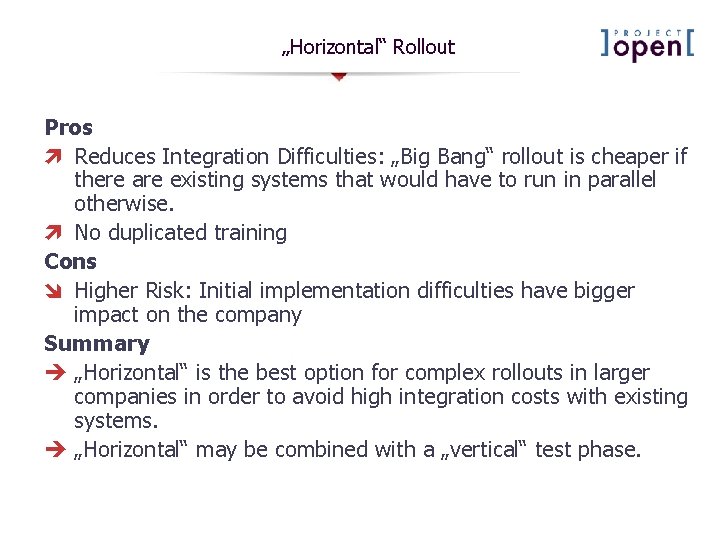
„Horizontal“ Rollout Pros ì Reduces Integration Difficulties: „Big Bang“ rollout is cheaper if there are existing systems that would have to run in parallel otherwise. ì No duplicated training Cons î Higher Risk: Initial implementation difficulties have bigger impact on the company Summary „Horizontal“ is the best option for complex rollouts in larger companies in order to avoid high integration costs with existing systems. „Horizontal“ may be combined with a „vertical“ test phase.
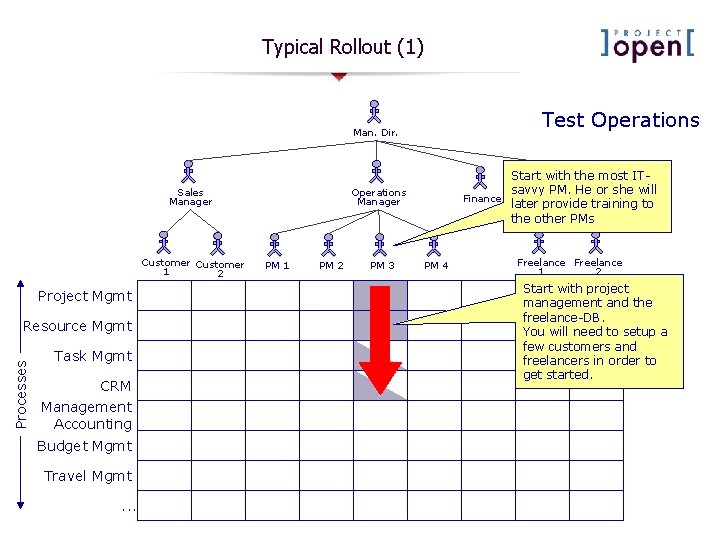
Typical Rollout (1) Test Operations Man. Dir. Sales Manager Customer 1 2 Project Mgmt Processes Resource Mgmt Task Mgmt CRM Management Accounting Budget Mgmt Travel Mgmt. . . Start with the most ITsavvy PM. He or she will Resource Finance later provide Manager training to the other PMs Operations Manager PM 1 PM 2 PM 3 PM 4 Freelance 1 2 Start with project management and the freelance-DB. You will need to setup a few customers and freelancers in order to get started.
Typical Rollout (2) Accounting Integration Man. Dir. Sales Manager Customer 1 2 Project Mgmt Processes Resource Mgmt Task Mgmt CRM Management Accounting Budget Mgmt Travel Mgmt. . . Operations Manager PM 1 PM 2 PM 3 Finance PM 4 Resource Manager Freelance 1 2 Integrate with your financial backend. Train your ccountant(s) to import information from ]po[ and how to track bills & invoices from within the system.
Typical Rollout (3) Workflow Rollout Man. Dir. Sales Manager Customer 1 2 Project Mgmt Processes Resource Mgmt Task Mgmt CRM Management Accounting Budget Mgmt Travel Mgmt. . . Operations Manager PM 1 PM 2 PM 3 Finance PM 4 Resource Manager Freelance 1 2 Now one option is to start using the translation workflow and to involve the first freelancers in the process. However, this is not a necessary step.
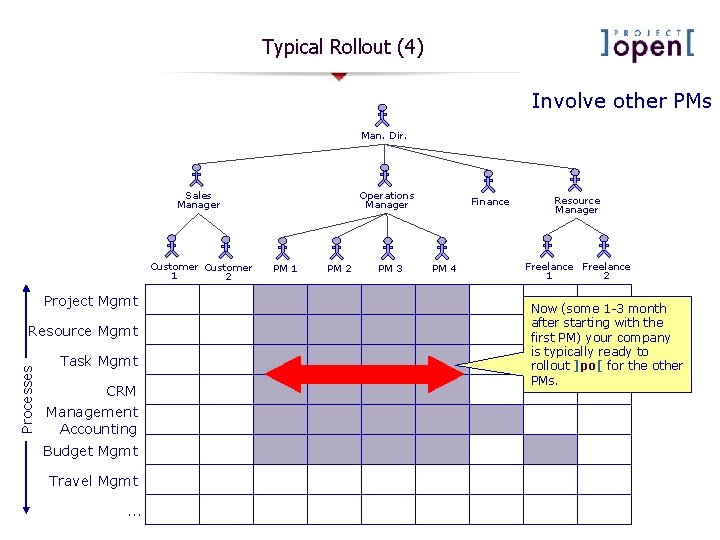
Typical Rollout (4) Involve other PMs Man. Dir. Sales Manager Customer 1 2 Project Mgmt Processes Resource Mgmt Task Mgmt CRM Management Accounting Budget Mgmt Travel Mgmt. . . Operations Manager PM 1 PM 2 PM 3 Finance PM 4 Resource Manager Freelance 1 2 Now (some 1 -3 month after starting with the first PM) your company is typically ready to rollout ]po[ for the other PMs.
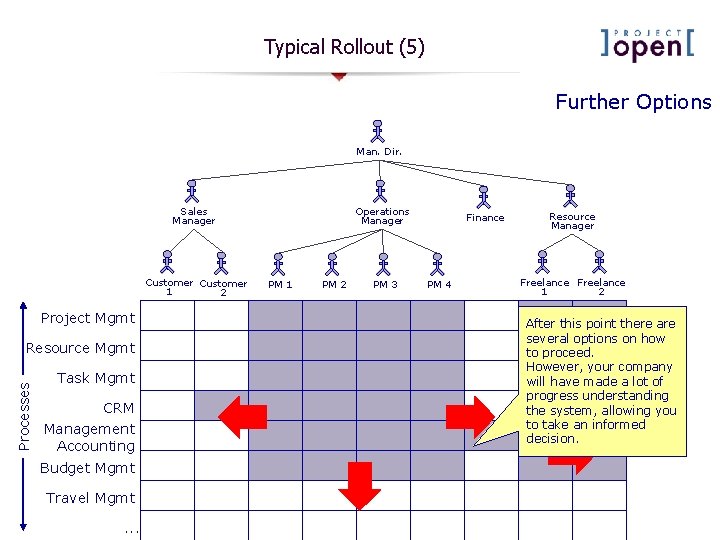
Typical Rollout (5) Further Options Man. Dir. Sales Manager Customer 1 2 Project Mgmt Processes Resource Mgmt Task Mgmt CRM Management Accounting Budget Mgmt Travel Mgmt. . . Operations Manager PM 1 PM 2 PM 3 Finance PM 4 Resource Manager Freelance 1 2 After this point there are several options on how to proceed. However, your company will have made a lot of progress understanding the system, allowing you to take an informed decision.