Opportunity Creation in ez Fed Grants GM 102





- Slides: 41
Opportunity Creation in ez. Fed. Grants GM 102 Version 1. 0 Transforming Financials at the People’s Department
Training Purpose Transforming Financials at the People’s Department § To review the processes involved in creating an opportunity in ez. Fed. Grants. 2
Objectives Transforming Financials at the People’s Department Upon completion of this training attendees will be able to: § Create, submit, and publish a Notice of Funding Opportunity in ez. Fed. Grants 3
Creating NOFOs Transforming Financials at the People’s Department § PM or AGMO creates a Notice of Funding Opportunity. § Once an opportunity is saved or submitted a unique identifier is assigned. 4
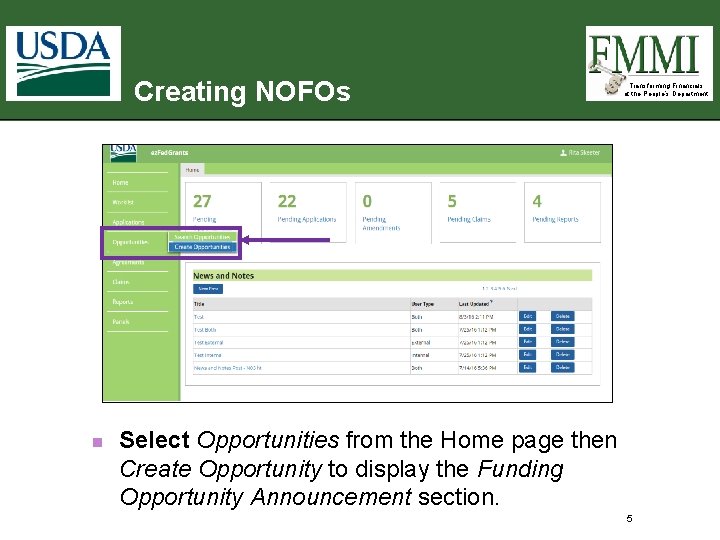
Creating NOFOs n Transforming Financials at the People’s Department Select Opportunities from the Home page then Create Opportunity to display the Funding Opportunity Announcement section. 5
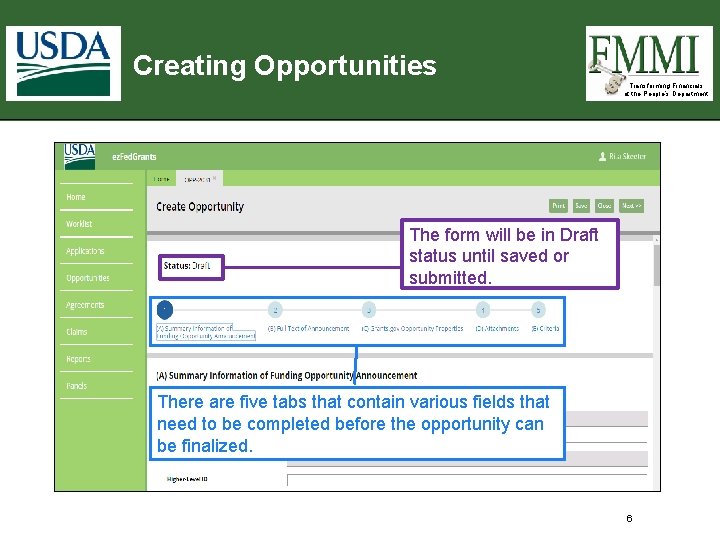
Creating Opportunities Transforming Financials at the People’s Department The form will be in Draft status until saved or submitted. There are five tabs that contain various fields that need to be completed before the opportunity can be finalized. 6
Transforming Financials at the People’s Department FUNDING OPPORTUNITY SUMMARY INFORMATION 7
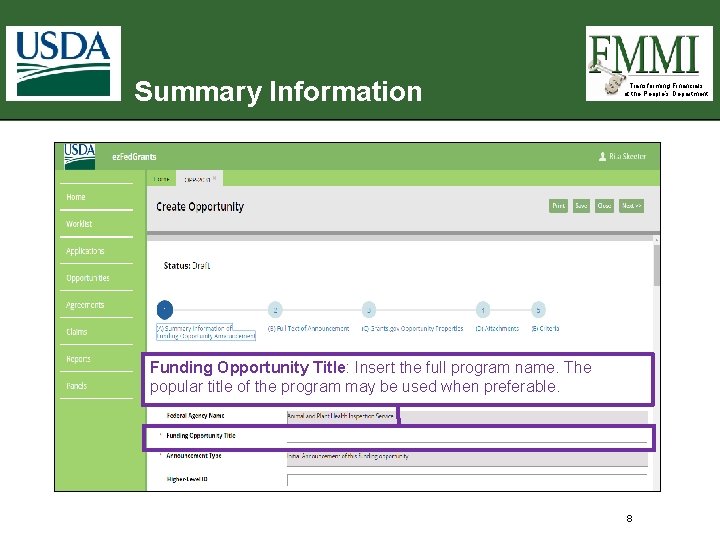
Summary Information Transforming Financials at the People’s Department Funding Opportunity Title: Insert the full program name. The popular title of the program may be used when preferable. 8
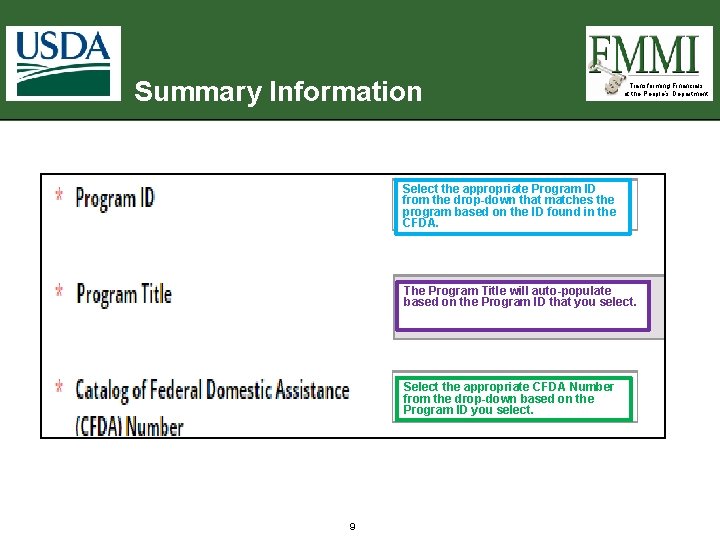
Summary Information Transforming Financials at the People’s Department Select the appropriate Program ID from the drop-down that matches the program based on the ID found in the CFDA. The Program Title will auto-populate based on the Program ID that you select. Select the appropriate CFDA Number from the drop-down based on the Program ID you select. 9
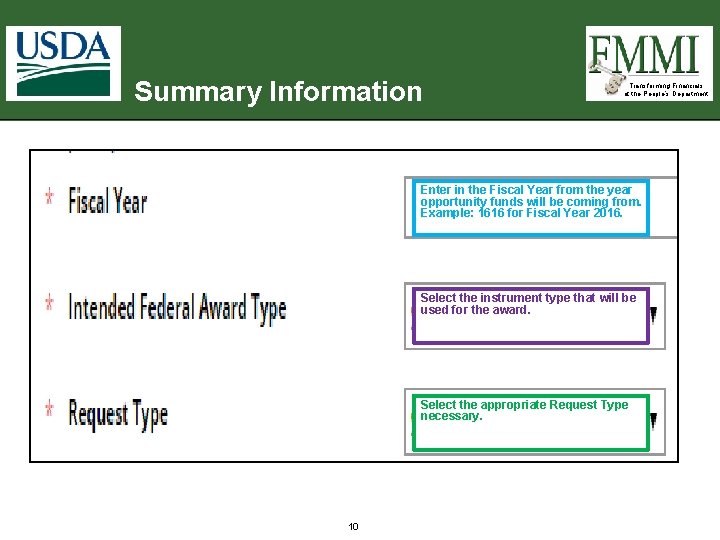
Summary Information Transforming Financials at the People’s Department Enter in the Fiscal Year from the year opportunity funds will be coming from. Example: 1616 for Fiscal Year 2016. Select the instrument type that will be used for the award. Select the appropriate Request Type necessary. 10
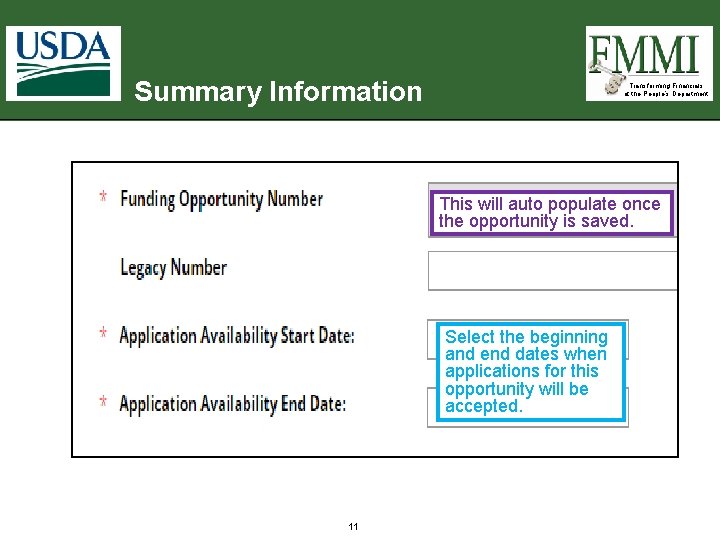
Summary Information Transforming Financials at the People’s Department This will auto populate once the opportunity is saved. Select the beginning and end dates when applications for this opportunity will be accepted. 11
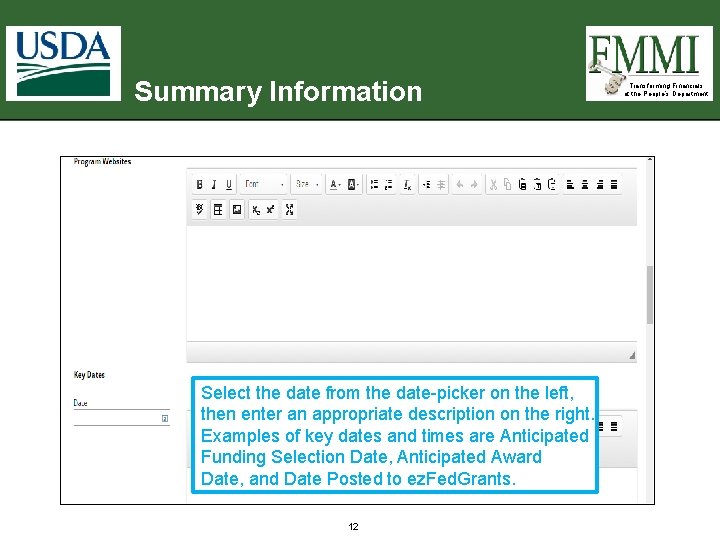
Summary Information Select the date from the date-picker on the left, then enter an appropriate description on the right. Examples of key dates and times are Anticipated Funding Selection Date, Anticipated Award Date, and Date Posted to ez. Fed. Grants. 12 Transforming Financials at the People’s Department
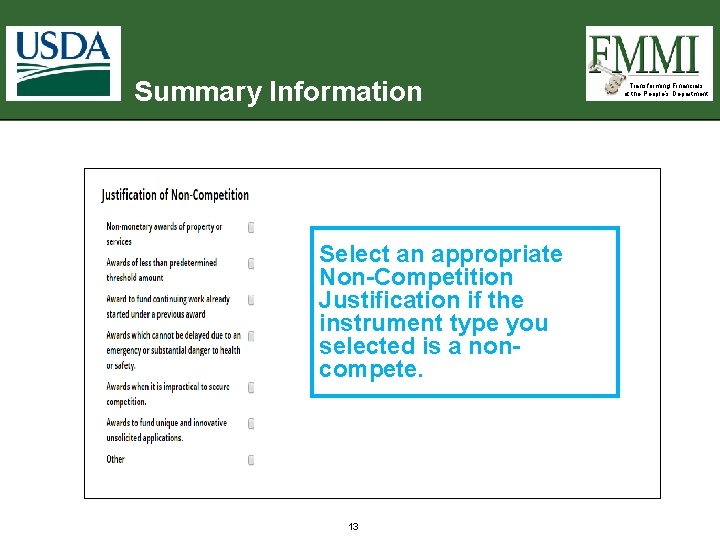
Summary Information Select an appropriate Non-Competition Justification if the instrument type you selected is a noncompete. 13 Transforming Financials at the People’s Department
Transforming Financials at the People’s Department FULL TEXT OF ANNOUNCEMENT 14
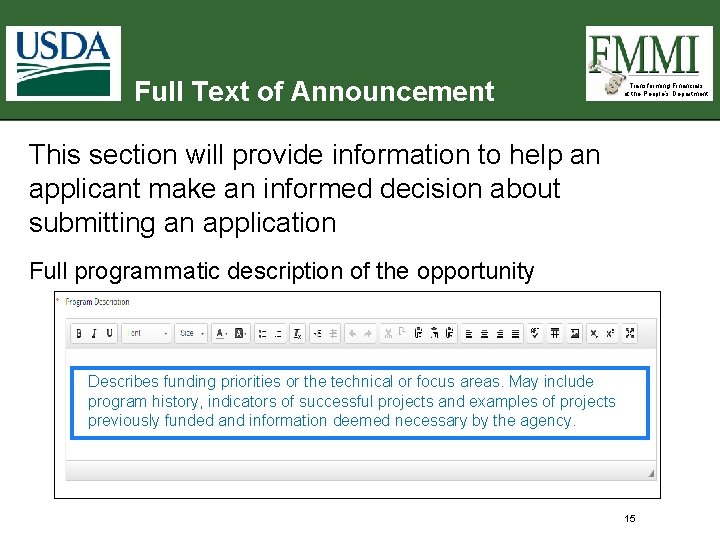
Full Text of Announcement Transforming Financials at the People’s Department This section will provide information to help an applicant make an informed decision about submitting an application Full programmatic description of the opportunity Describes funding priorities or the technical or focus areas. May include program history, indicators of successful projects and examples of projects previously funded and information deemed necessary by the agency. 15
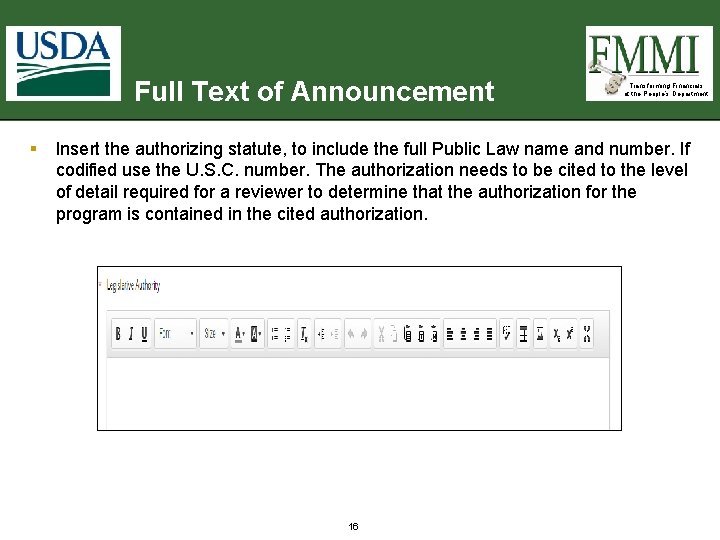
Full Text of Announcement § Transforming Financials at the People’s Department Insert the authorizing statute, to include the full Public Law name and number. If codified use the U. S. C. number. The authorization needs to be cited to the level of detail required for a reviewer to determine that the authorization for the program is contained in the cited authorization. 16
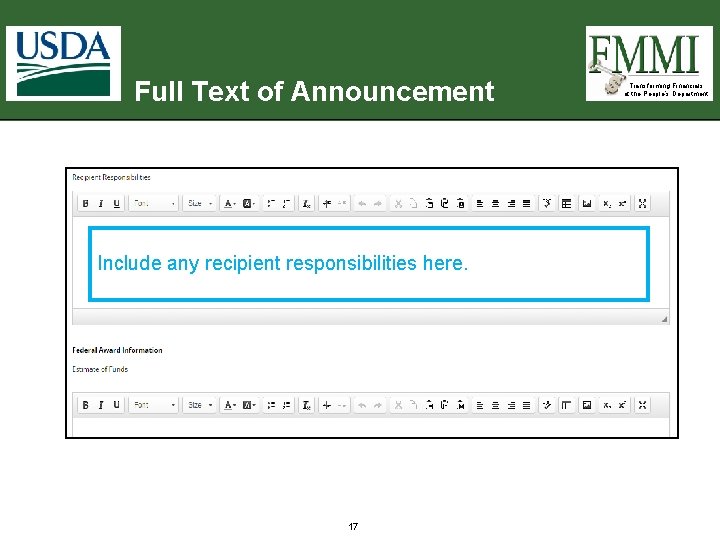
Full Text of Announcement Include any recipient responsibilities here. 17 Transforming Financials at the People’s Department
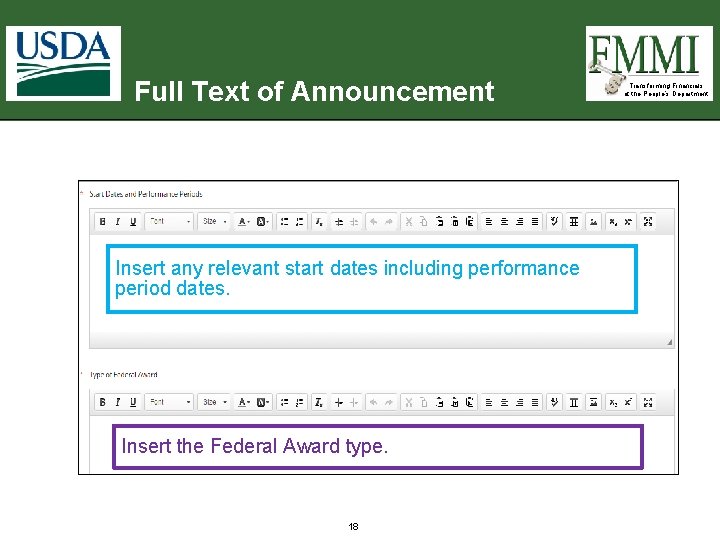
Full Text of Announcement Insert any relevant start dates including performance period dates. Insert the Federal Award type. 18 Transforming Financials at the People’s Department
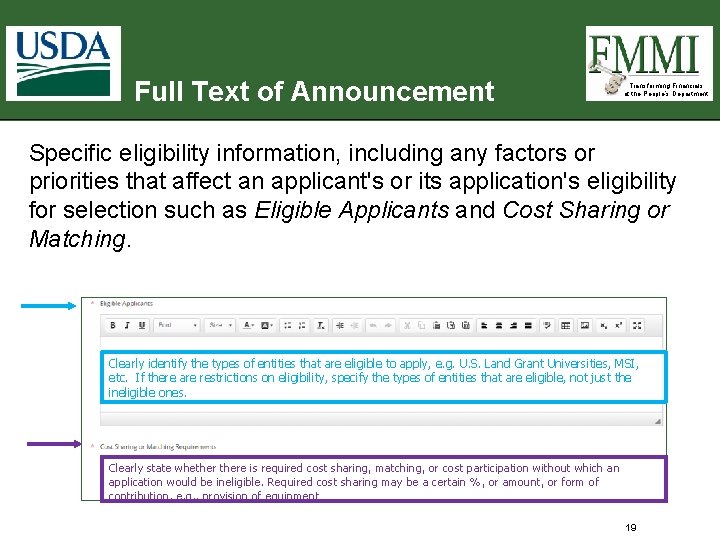
Full Text of Announcement Transforming Financials at the People’s Department Specific eligibility information, including any factors or priorities that affect an applicant's or its application's eligibility for selection such as Eligible Applicants and Cost Sharing or Matching. Clearly identify the types of entities that are eligible to apply, e. g. U. S. Land Grant Universities, MSI, etc. If there are restrictions on eligibility, specify the types of entities that are eligible, not just the ineligible ones. Clearly state whethere is required cost sharing, matching, or cost participation without which an application would be ineligible. Required cost sharing may be a certain %, or amount, or form of contribution, e. g. , provision of equipment 19
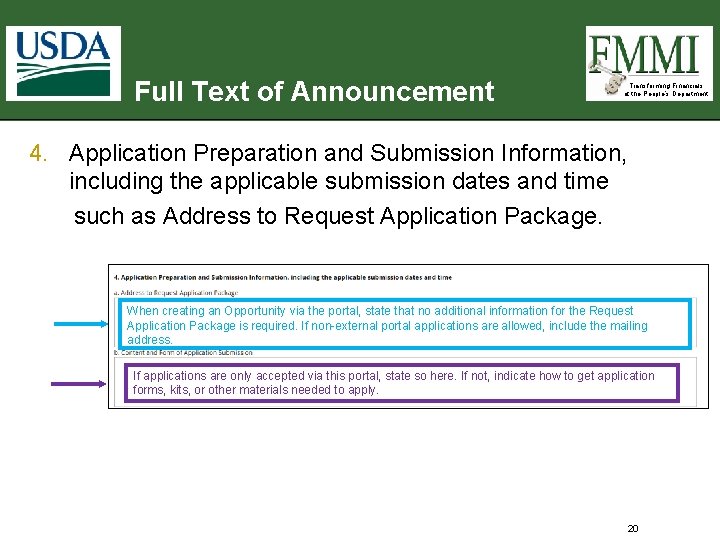
Full Text of Announcement Transforming Financials at the People’s Department 4. Application Preparation and Submission Information, including the applicable submission dates and time such as Address to Request Application Package. When creating an Opportunity via the portal, state that no additional information for the Request Application Package is required. If non-external portal applications are allowed, include the mailing address. If applications are only accepted via this portal, state so here. If not, indicate how to get application forms, kits, or other materials needed to apply. 20
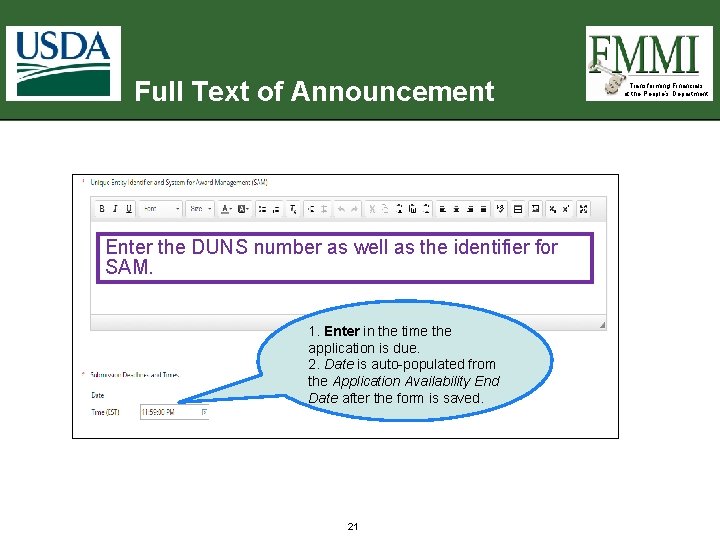
Full Text of Announcement Enter the DUNS number as well as the identifier for SAM. 1. Enter in the time the application is due. 2. Date is auto-populated from the Application Availability End Date after the form is saved. 21 Transforming Financials at the People’s Department
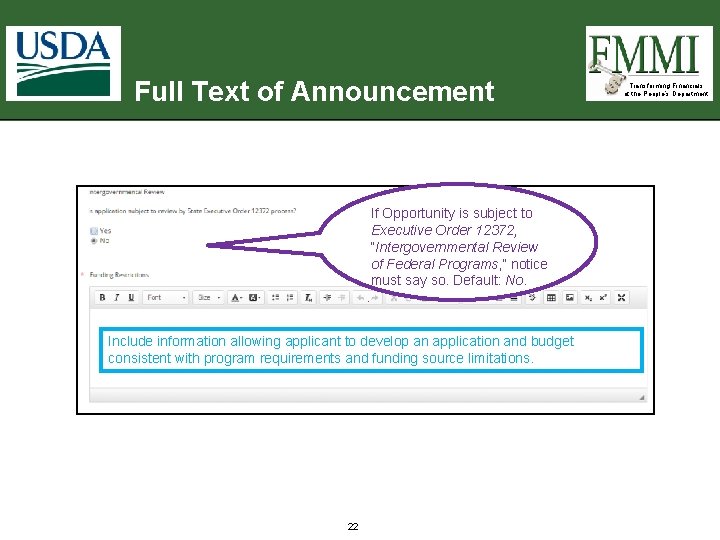
Full Text of Announcement If Opportunity is subject to Executive Order 12372, “Intergovernmental Review of Federal Programs, ” notice must say so. Default: No. . Include information allowing applicant to develop an application and budget consistent with program requirements and funding source limitations. 22 Transforming Financials at the People’s Department
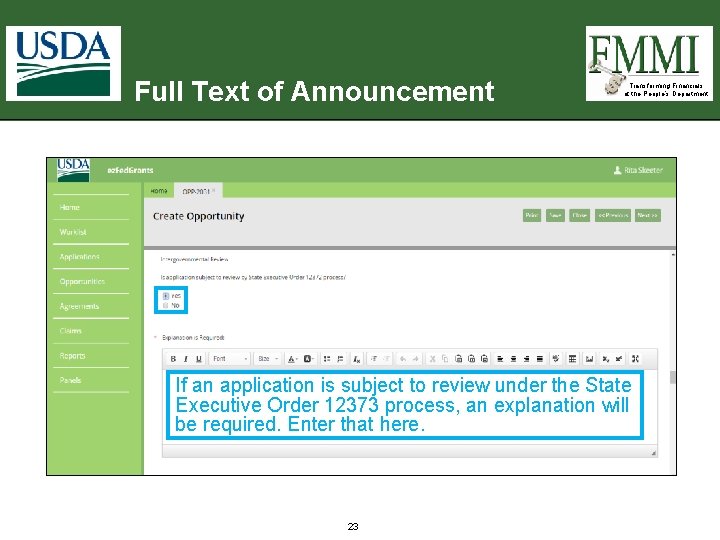
Full Text of Announcement Transforming Financials at the People’s Department If an application is subject to review under the State Executive Order 12373 process, an explanation will be required. Enter that here. 23
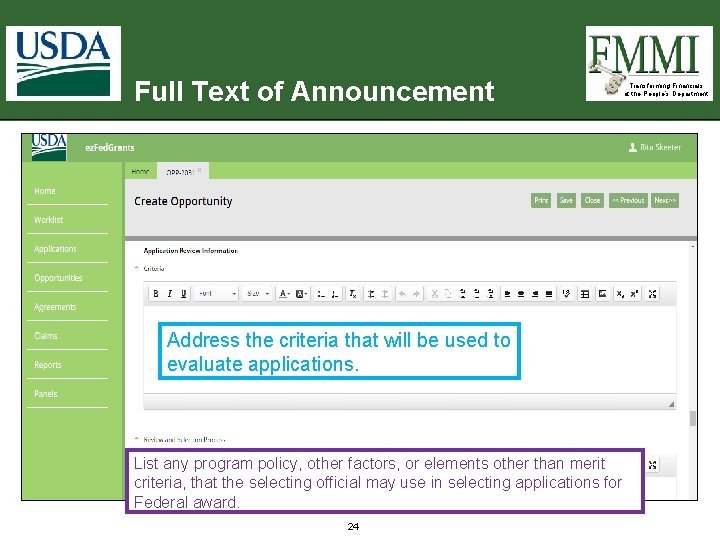
Full Text of Announcement Address the criteria that will be used to evaluate applications. List any program policy, other factors, or elements other than merit criteria, that the selecting official may use in selecting applications for Federal award. 24 Transforming Financials at the People’s Department
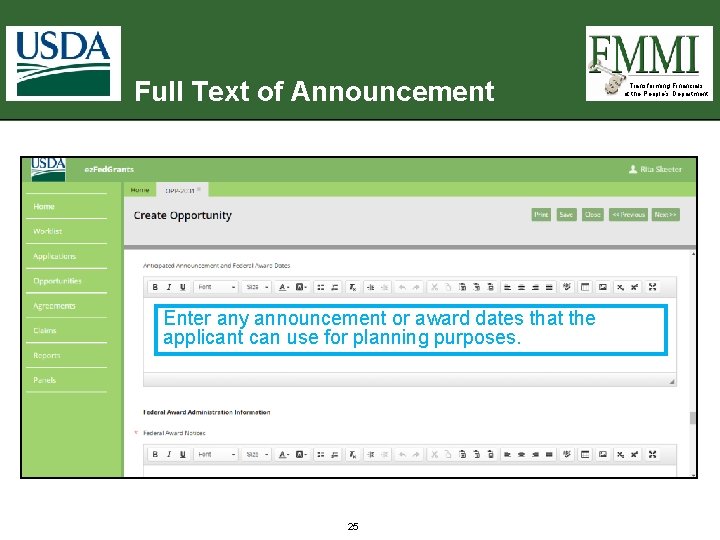
Full Text of Announcement Enter any announcement or award dates that the applicant can use for planning purposes. 25 Transforming Financials at the People’s Department
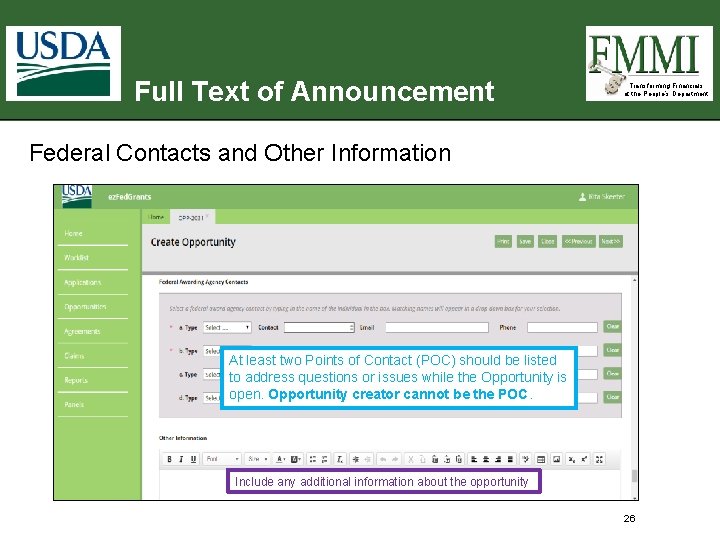
Full Text of Announcement Transforming Financials at the People’s Department Federal Contacts and Other Information At least two Points of Contact (POC) should be listed to address questions or issues while the Opportunity is open. Opportunity creator cannot be the POC. Include any additional information about the opportunity 26
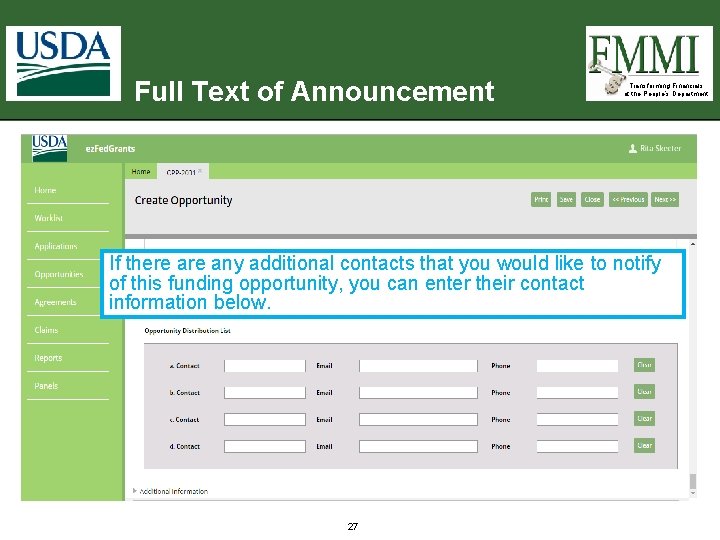
Full Text of Announcement Transforming Financials at the People’s Department If there any additional contacts that you would like to notify of this funding opportunity, you can enter their contact information below. 27
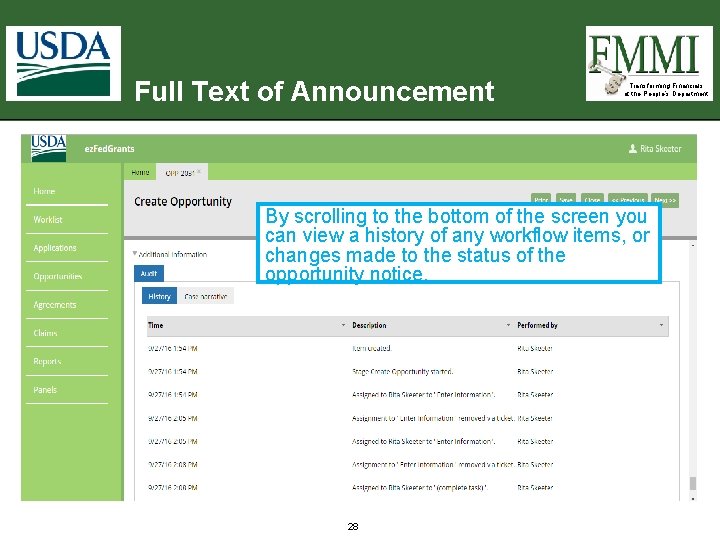
Full Text of Announcement Transforming Financials at the People’s Department By scrolling to the bottom of the screen you can view a history of any workflow items, or changes made to the status of the opportunity notice. 28
Transforming Financials at the People’s Department GRANTS. GOV OPPORTUNITY PROPERTIES 29
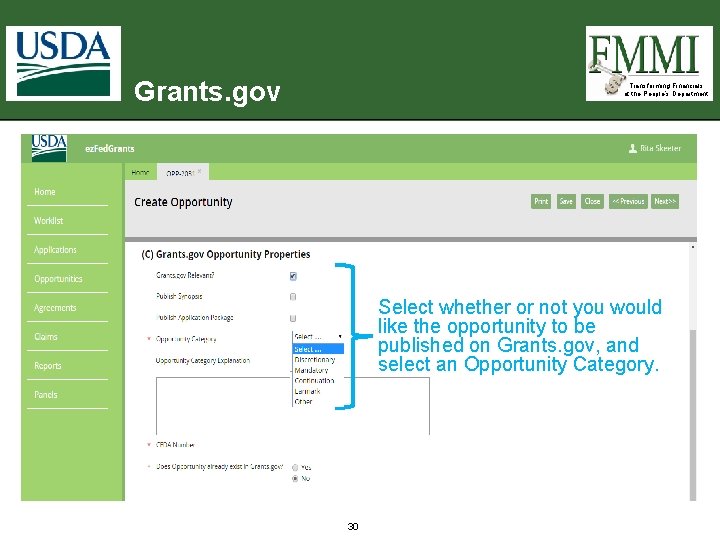
Grants. gov Transforming Financials at the People’s Department Select whether or not you would like the opportunity to be published on Grants. gov, and select an Opportunity Category. 30
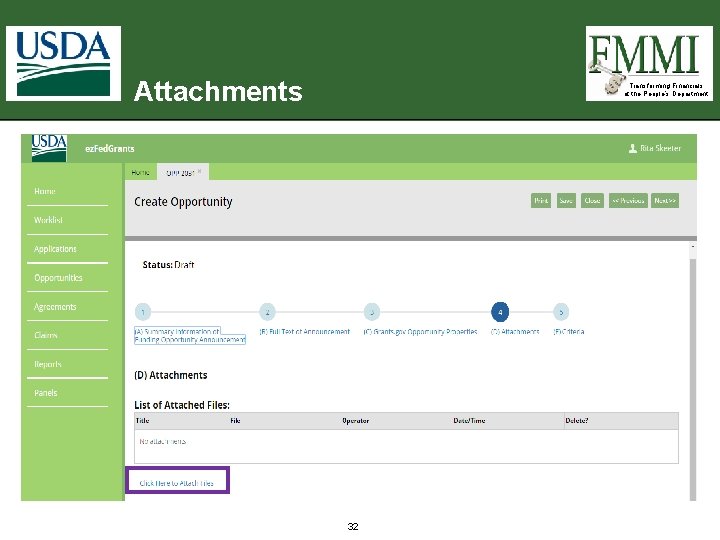
Transforming Financials at the People’s Department ATTACHMENTS 31
Attachments Transforming Financials at the People’s Department 32
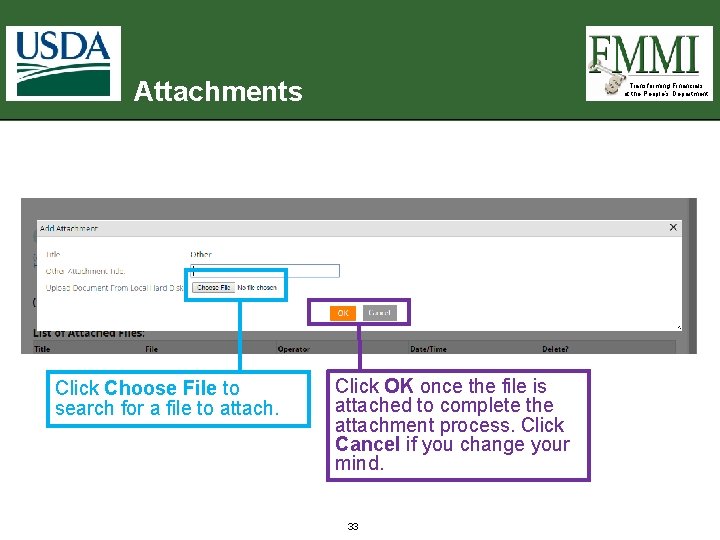
Attachments Click Choose File to search for a file to attach. Transforming Financials at the People’s Department Click OK once the file is attached to complete the attachment process. Click Cancel if you change your mind. 33
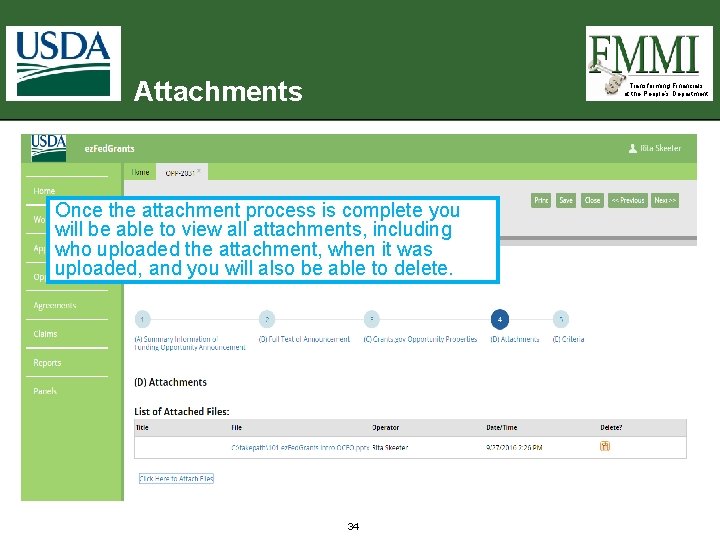
Attachments Transforming Financials at the People’s Department Once the attachment process is complete you will be able to view all attachments, including who uploaded the attachment, when it was uploaded, and you will also be able to delete. 34
Transforming Financials at the People’s Department CRITERIA 35
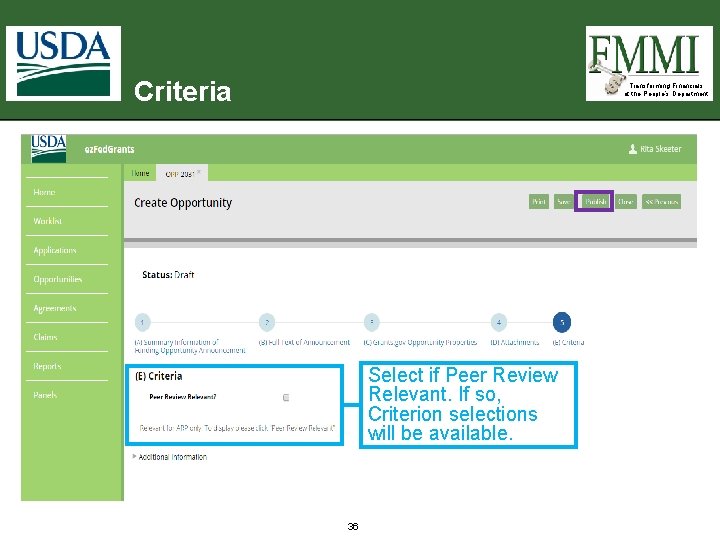
Criteria Transforming Financials at the People’s Department Select if Peer Review Relevant. If so, Criterion selections will be available. 36
Opportunity Submission § § Transforming Financials at the People’s Department After completing the Summary Information of Funding Opportunity Announcement and Full Text of Announcement forms click Publish. The system validates that all the required fields are completed. – If there are no errors, a unique identifier is assigned and the submission confirmation displays. – If information is missing, a red Error notice will be displayed indicating all the field(s) that require attention. 37
Summary Transforming Financials at the People’s Department § During this training, we learned about: – Creating a notice of funding opportunity in ez. Fed. Grants 38
Questions Transforming Financials at the People’s Department 39
Transforming Financials at the People’s Department APPENDIX 40
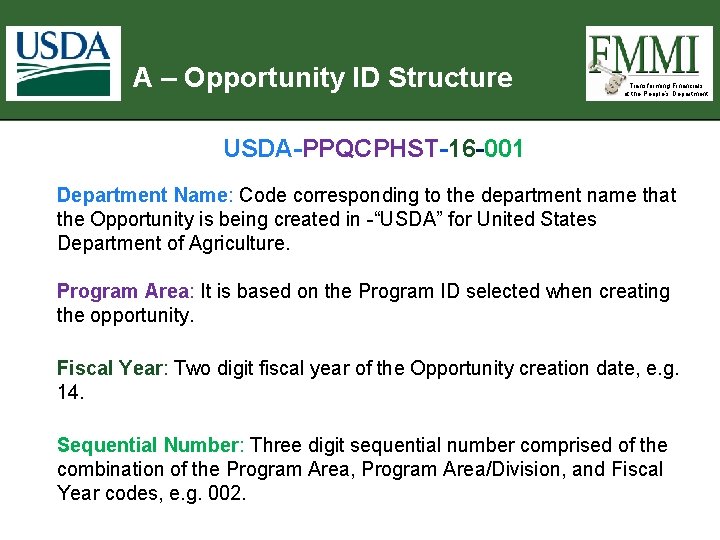
A – Opportunity ID Structure Transforming Financials at the People’s Department USDA-PPQCPHST-16 -001 Department Name: Code corresponding to the department name that the Opportunity is being created in -“USDA” for United States Department of Agriculture. Program Area: It is based on the Program ID selected when creating the opportunity. Fiscal Year: Two digit fiscal year of the Opportunity creation date, e. g. 14. Sequential Number: Three digit sequential number comprised of the combination of the Program Area, Program Area/Division, and Fiscal Year codes, e. g. 002. 41