eduroam security and authentication Paul Dekkers 5 th
- Slides: 34
eduroam, security and authentication Paul Dekkers 5 th of April, Eurocamp, Ljubljana High-quality Internet for higher education and research
Contents • 802. 1 x and wireless innovations • Authentication protocols – Types – Authentication servers – Examples • Eduroam Infrastructure • Conclusion High-quality Internet for higher education and research
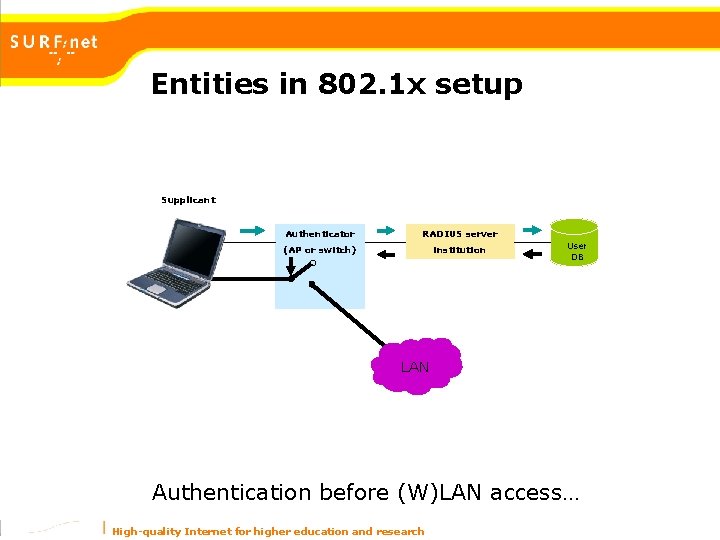
Entities in 802. 1 x setup Supplicant Authenticator RADIUS server (AP or switch) institution User DB Guest LAN VLAN Authentication before (W)LAN access… High-quality Internet for higher education and research
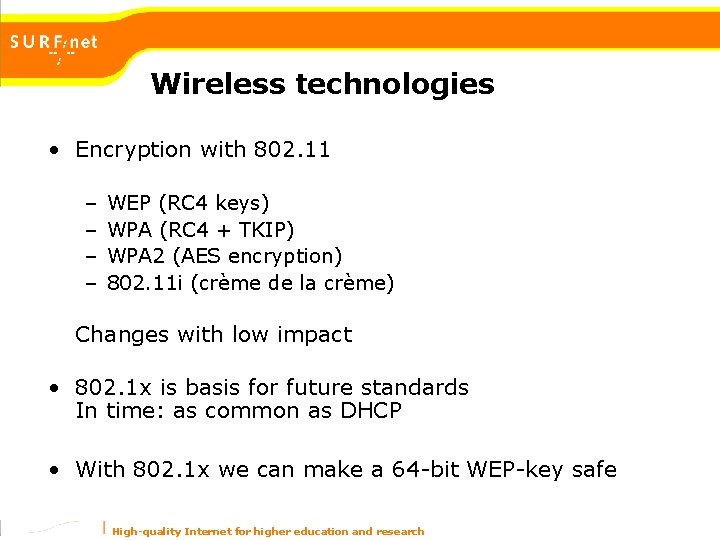
Wireless technologies • Encryption with 802. 11 – – WEP (RC 4 keys) WPA (RC 4 + TKIP) WPA 2 (AES encryption) 802. 11 i (crème de la crème) Changes with low impact • 802. 1 x is basis for future standards In time: as common as DHCP • With 802. 1 x we can make a 64 -bit WEP-key safe High-quality Internet for higher education and research
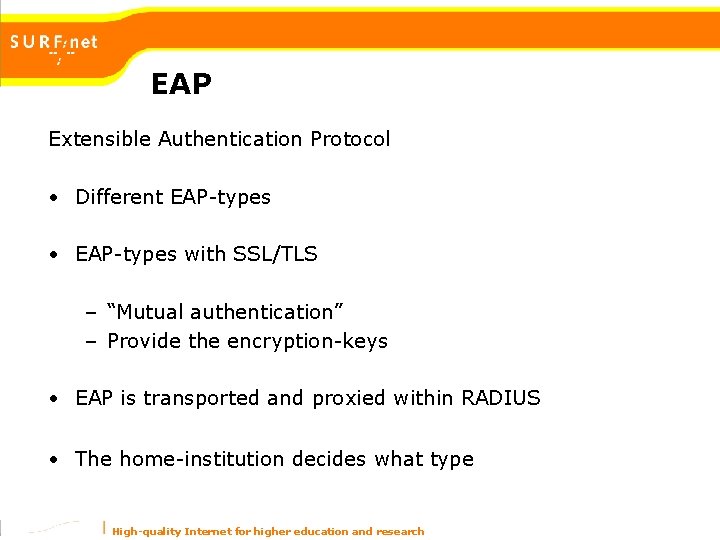
EAP Extensible Authentication Protocol • Different EAP-types • EAP-types with SSL/TLS – “Mutual authentication” – Provide the encryption-keys • EAP is transported and proxied within RADIUS • The home-institution decides what type High-quality Internet for higher education and research
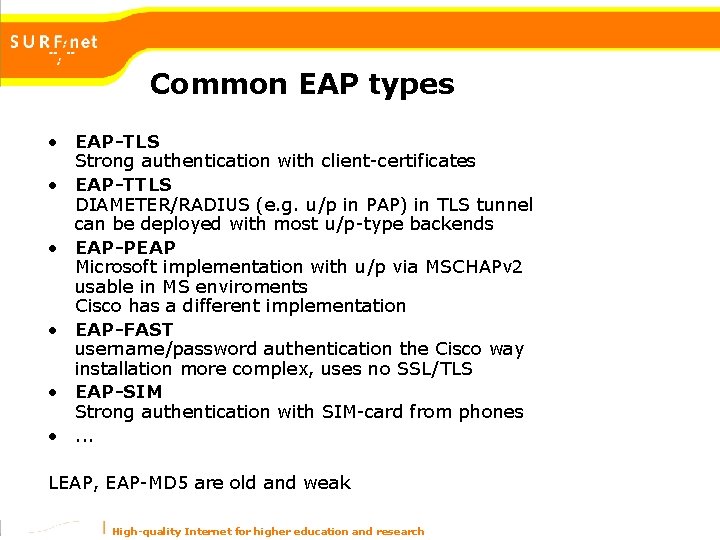
Common EAP types • EAP-TLS Strong authentication with client-certificates • EAP-TTLS DIAMETER/RADIUS (e. g. u/p in PAP) in TLS tunnel can be deployed with most u/p-type backends • EAP-PEAP Microsoft implementation with u/p via MSCHAPv 2 usable in MS enviroments Cisco has a different implementation • EAP-FAST username/password authentication the Cisco way installation more complex, uses no SSL/TLS • EAP-SIM Strong authentication with SIM-card from phones • . . . LEAP, EAP-MD 5 are old and weak High-quality Internet for higher education and research
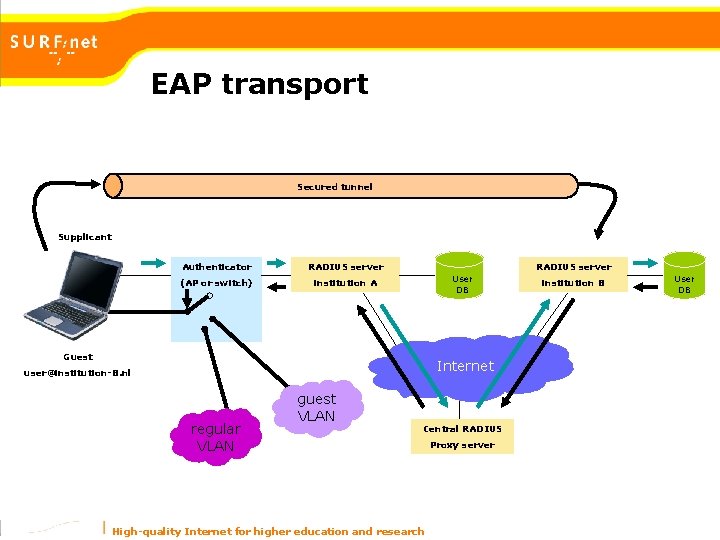
EAP transport Secured tunnel Supplicant Authenticator (AP or switch) RADIUS server User DB institution A Guest Internet user@institution-B. nl regular VLAN guest VLAN Central RADIUS High-quality Internet for higher education and research Proxy server institution B User DB
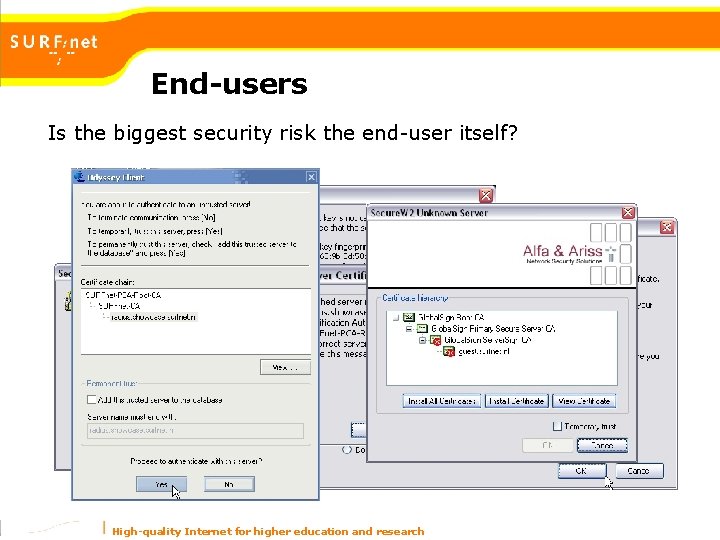
End-users Is the biggest security risk the end-user itself? High-quality Internet for higher education and research
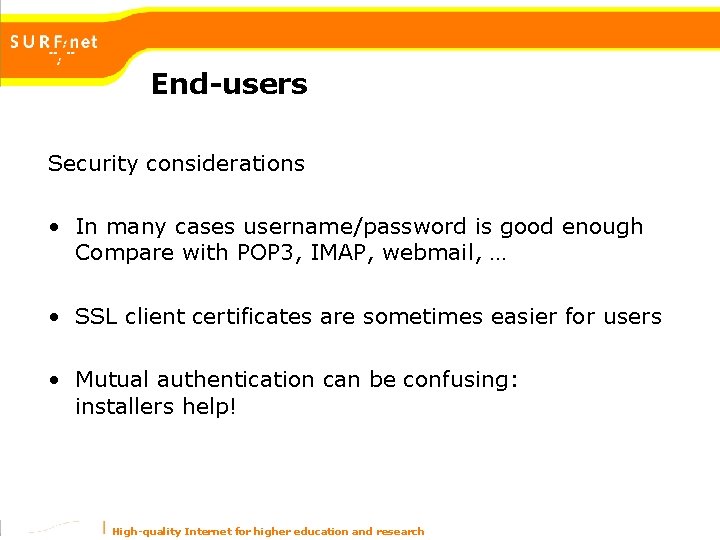
End-users Security considerations • In many cases username/password is good enough Compare with POP 3, IMAP, webmail, … • SSL client certificates are sometimes easier for users • Mutual authentication can be confusing: installers help! High-quality Internet for higher education and research
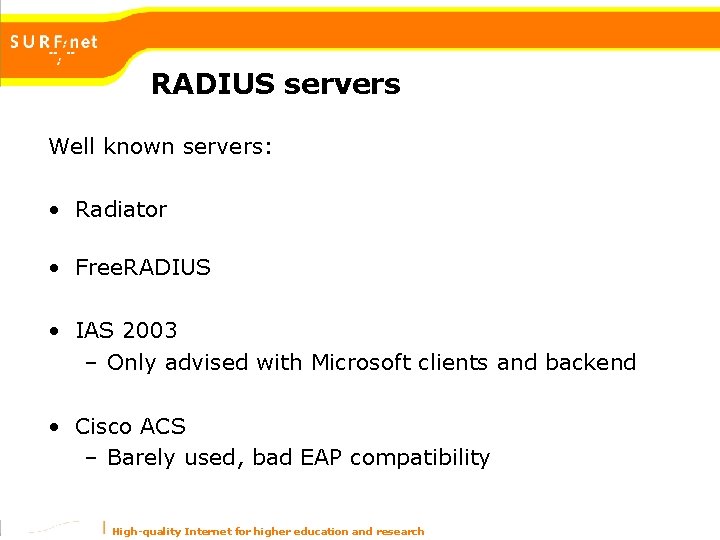
RADIUS servers Well known servers: • Radiator • Free. RADIUS • IAS 2003 – Only advised with Microsoft clients and backend • Cisco ACS – Barely used, bad EAP compatibility High-quality Internet for higher education and research
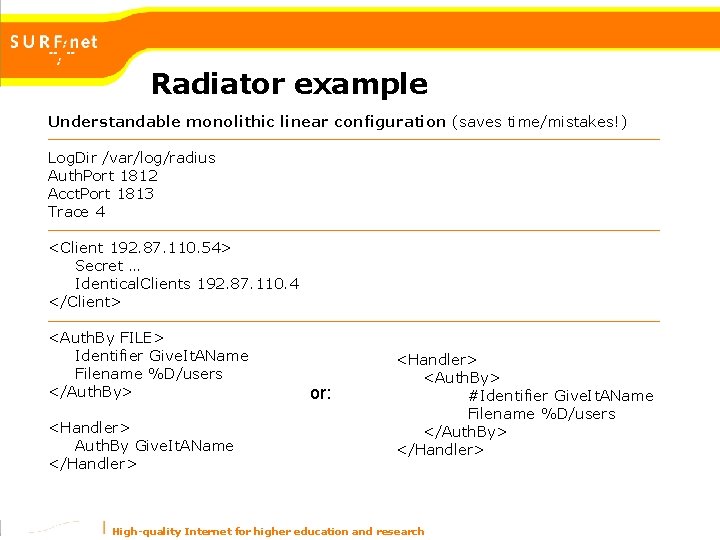
Radiator example Understandable monolithic linear configuration (saves time/mistakes!) Log. Dir /var/log/radius Auth. Port 1812 Acct. Port 1813 Trace 4 <Client 192. 87. 110. 54> Secret … Identical. Clients 192. 87. 110. 4 </Client> <Auth. By FILE> Identifier Give. It. AName Filename %D/users </Auth. By> <Handler> Auth. By Give. It. AName </Handler> or: <Handler> <Auth. By> #Identifier Give. It. AName Filename %D/users </Auth. By> </Handler> High-quality Internet for higher education and research
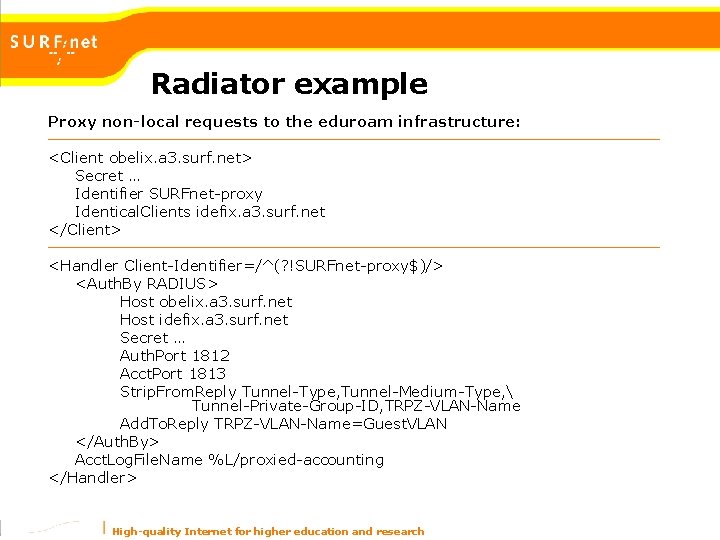
Radiator example Proxy non-local requests to the eduroam infrastructure: <Client obelix. a 3. surf. net> Secret … Identifier SURFnet-proxy Identical. Clients idefix. a 3. surf. net </Client> <Handler Client-Identifier=/^(? !SURFnet-proxy$)/> <Auth. By RADIUS> Host obelix. a 3. surf. net Host idefix. a 3. surf. net Secret … Auth. Port 1812 Acct. Port 1813 Strip. From. Reply Tunnel-Type, Tunnel-Medium-Type, Tunnel-Private-Group-ID, TRPZ-VLAN-Name Add. To. Reply TRPZ-VLAN-Name=Guest. VLAN </Auth. By> Acct. Log. File. Name %L/proxied-accounting </Handler> High-quality Internet for higher education and research
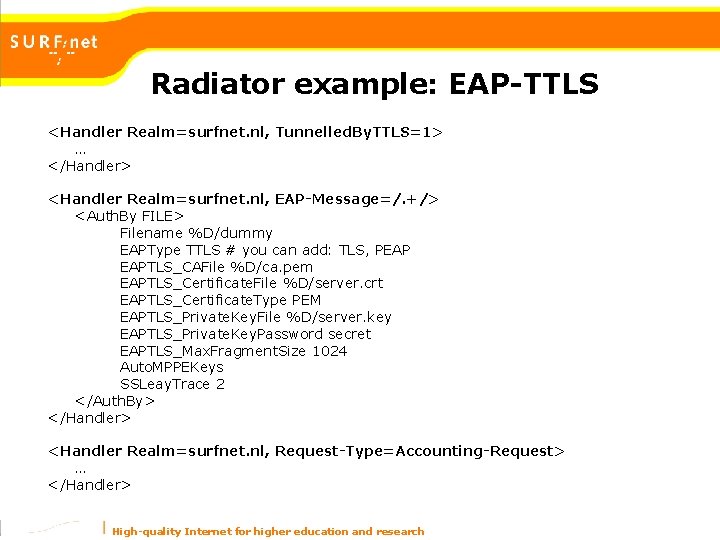
Radiator example: EAP-TTLS <Handler Realm=surfnet. nl, Tunnelled. By. TTLS=1> … </Handler> <Handler Realm=surfnet. nl, EAP-Message=/. +/> <Auth. By FILE> Filename %D/dummy EAPType TTLS # you can add: TLS, PEAP EAPTLS_CAFile %D/ca. pem EAPTLS_Certificate. File %D/server. crt EAPTLS_Certificate. Type PEM EAPTLS_Private. Key. File %D/server. key EAPTLS_Private. Key. Password secret EAPTLS_Max. Fragment. Size 1024 Auto. MPPEKeys SSLeay. Trace 2 </Auth. By> </Handler> <Handler Realm=surfnet. nl, Request-Type=Accounting-Request> … </Handler> High-quality Internet for higher education and research
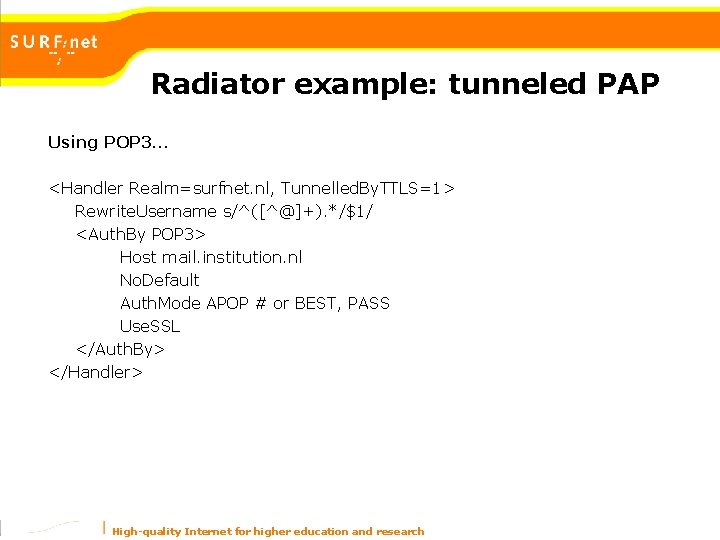
Radiator example: tunneled PAP Using POP 3… <Handler Realm=surfnet. nl, Tunnelled. By. TTLS=1> Rewrite. Username s/^([^@]+). */$1/ <Auth. By POP 3> Host mail. institution. nl No. Default Auth. Mode APOP # or BEST, PASS Use. SSL </Auth. By> </Handler> High-quality Internet for higher education and research
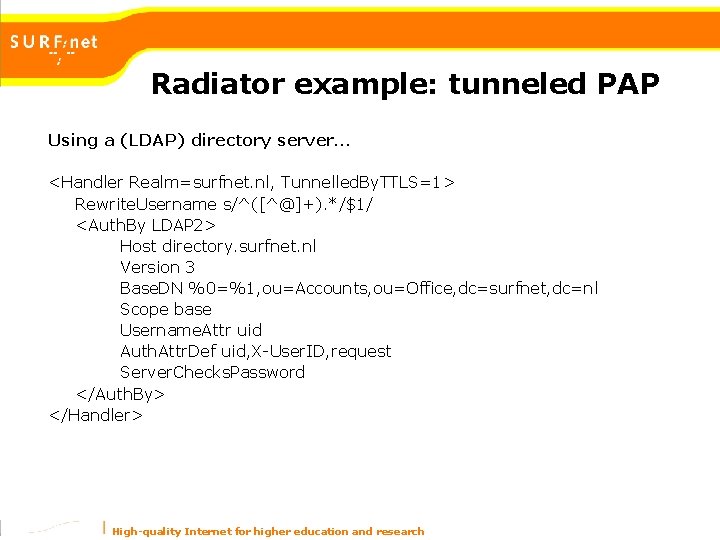
Radiator example: tunneled PAP Using a (LDAP) directory server… <Handler Realm=surfnet. nl, Tunnelled. By. TTLS=1> Rewrite. Username s/^([^@]+). */$1/ <Auth. By LDAP 2> Host directory. surfnet. nl Version 3 Base. DN %0=%1, ou=Accounts, ou=Office, dc=surfnet, dc=nl Scope base Username. Attr uid Auth. Attr. Def uid, X-User. ID, request Server. Checks. Password </Auth. By> </Handler> High-quality Internet for higher education and research
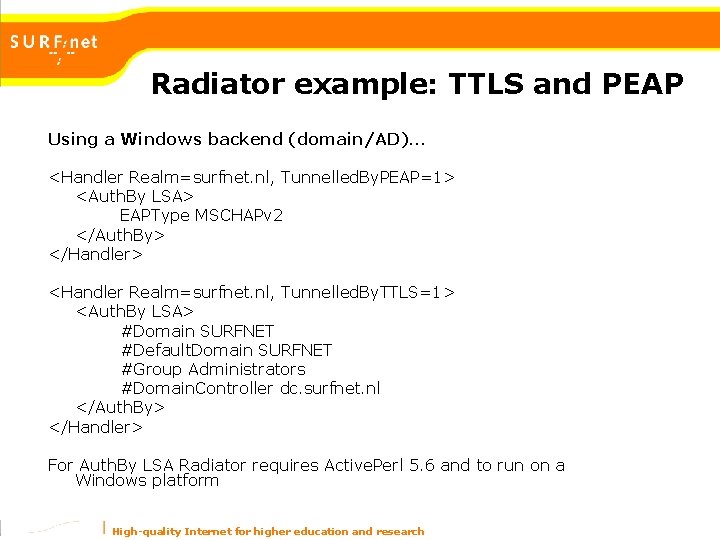
Radiator example: TTLS and PEAP Using a Windows backend (domain/AD)… <Handler Realm=surfnet. nl, Tunnelled. By. PEAP=1> <Auth. By LSA> EAPType MSCHAPv 2 </Auth. By> </Handler> <Handler Realm=surfnet. nl, Tunnelled. By. TTLS=1> <Auth. By LSA> #Domain SURFNET #Default. Domain SURFNET #Group Administrators #Domain. Controller dc. surfnet. nl </Auth. By> </Handler> For Auth. By LSA Radiator requires Active. Perl 5. 6 and to run on a Windows platform High-quality Internet for higher education and research
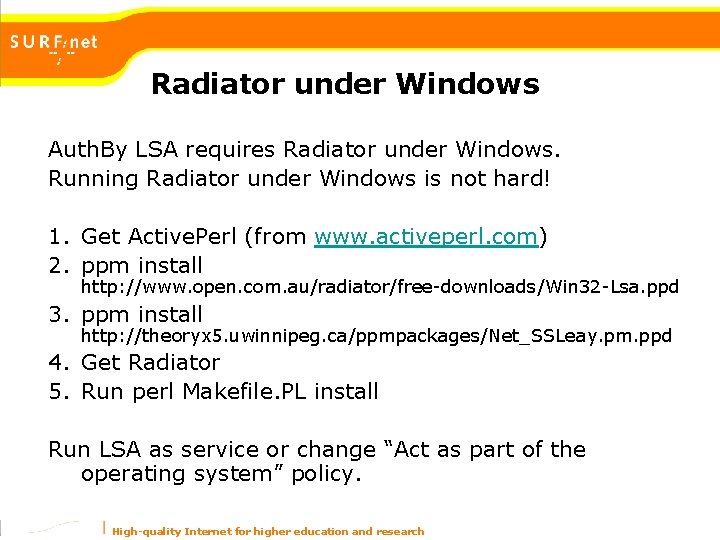
Radiator under Windows Auth. By LSA requires Radiator under Windows. Running Radiator under Windows is not hard! 1. Get Active. Perl (from www. activeperl. com) 2. ppm install http: //www. open. com. au/radiator/free-downloads/Win 32 -Lsa. ppd 3. ppm install http: //theoryx 5. uwinnipeg. ca/ppmpackages/Net_SSLeay. pm. ppd 4. Get Radiator 5. Run perl Makefile. PL install Run LSA as service or change “Act as part of the operating system” policy. High-quality Internet for higher education and research
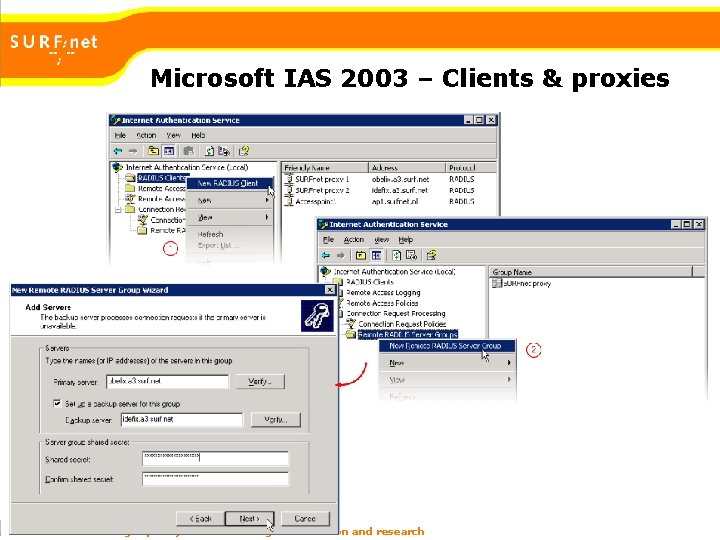
Microsoft IAS 2003 – Clients & proxies High-quality Internet for higher education and research
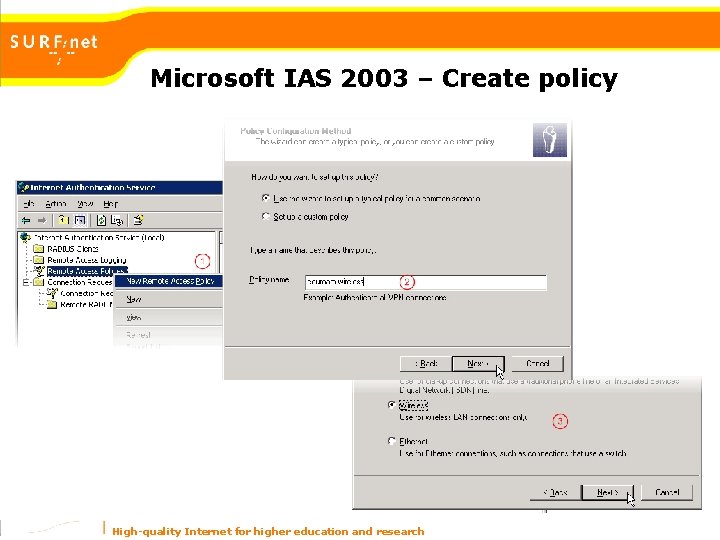
Microsoft IAS 2003 – Create policy High-quality Internet for higher education and research
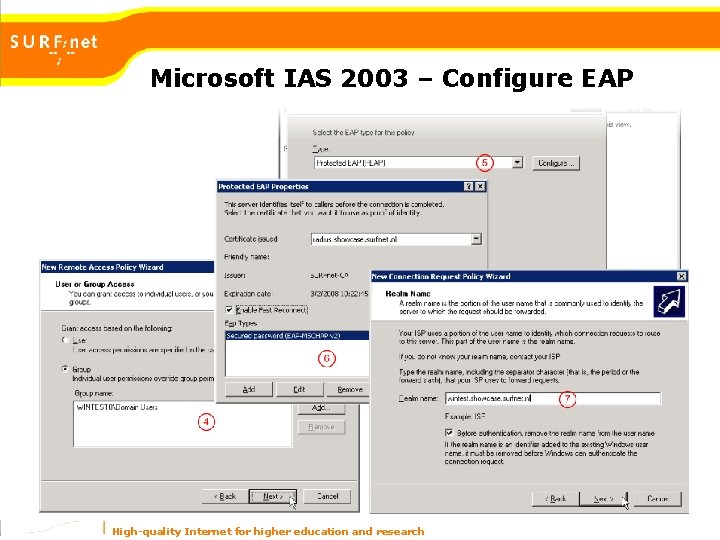
Microsoft IAS 2003 – Configure EAP High-quality Internet for higher education and research
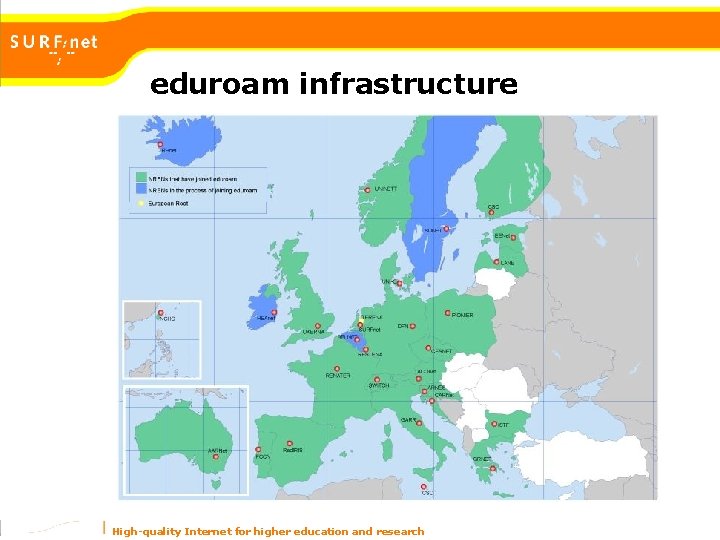
eduroam infrastructure High-quality Internet for higher education and research
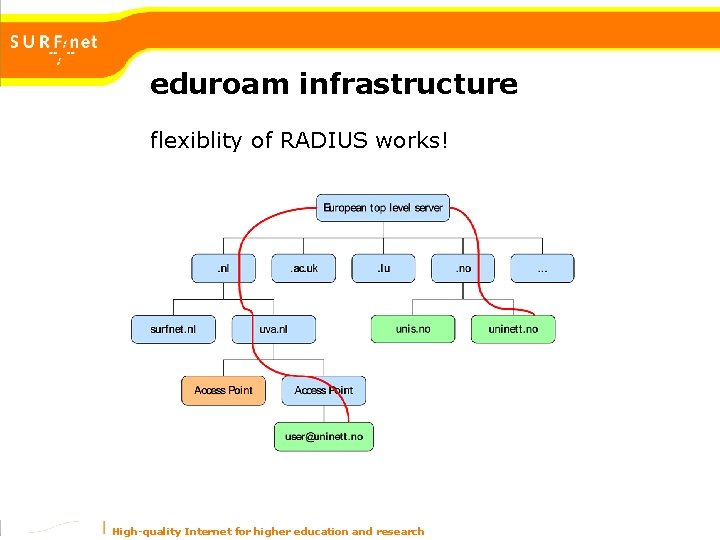
eduroam infrastructure flexiblity of RADIUS works! High-quality Internet for higher education and research
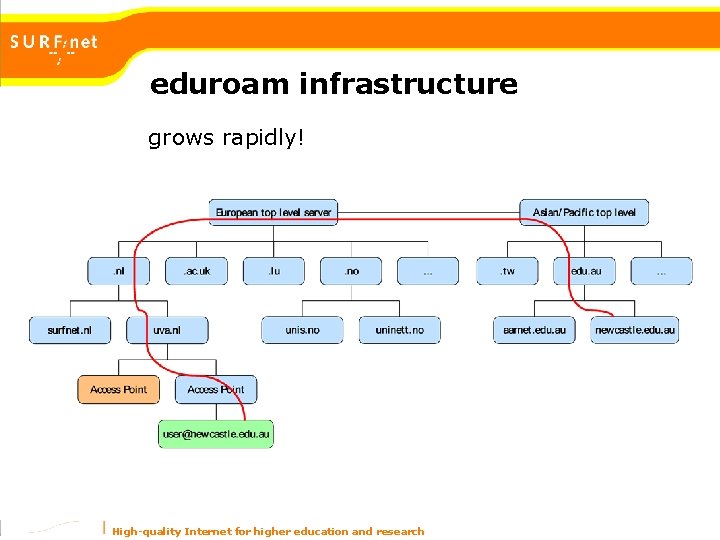
eduroam infrastructure grows rapidly! High-quality Internet for higher education and research
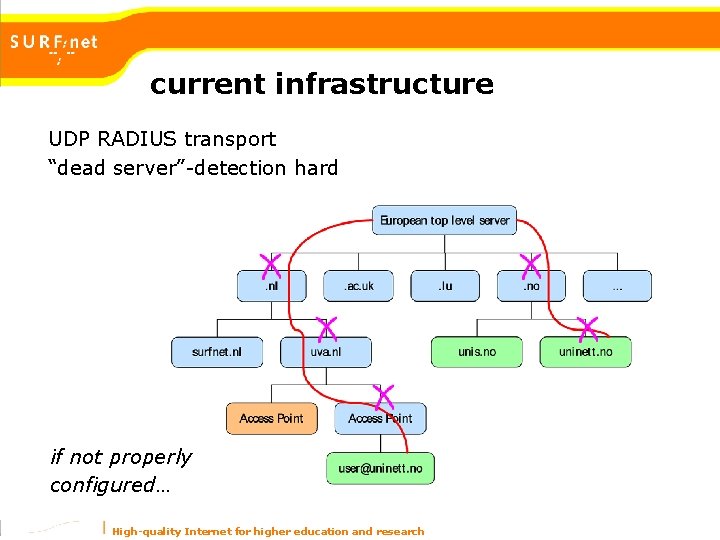
current infrastructure RADIUS has its drawbacks • RADIUS packet is “visible” on every hop this is not bad with EAP… • Traffic between hops is poor this is not bad with EAP… • Static routing (based on a @realm) requires configuration at institution and research network • Schalable, but: more connections = – more configuration – more load on the top-level servers more… High-quality Internet for higher education and research
current infrastructure UDP RADIUS transport “dead server”-detection hard if not properly configured… High-quality Internet for higher education and research
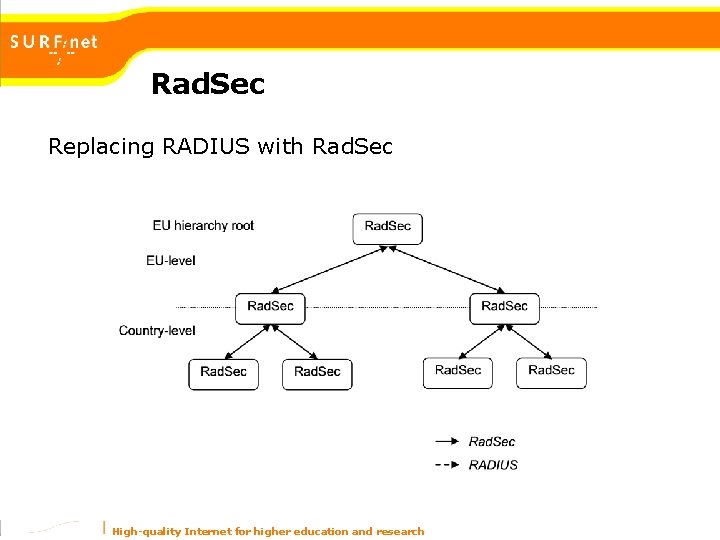
Something better… • Disabling redundant hierarchy – Faster – More secure (few places that see the data) – More reliable (less “points of failure”) • Better security on the transport-layer (tcp/ssl? ) • Flexible configuration (lookup-service? ) High-quality Internet for higher education and research
Options • Diameter RADIUS successor (Been around for quite some time…) • Rad. Sec Part of Radiator • DNSROAM & Rad. Sec Experimental part of Radiator High-quality Internet for higher education and research
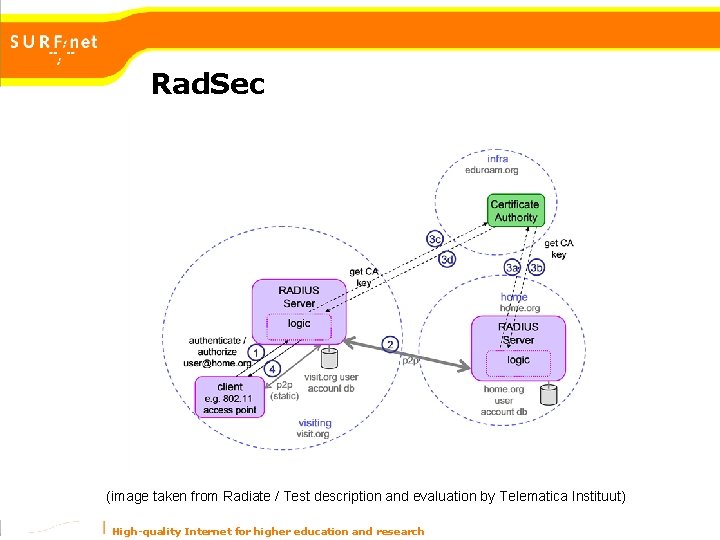
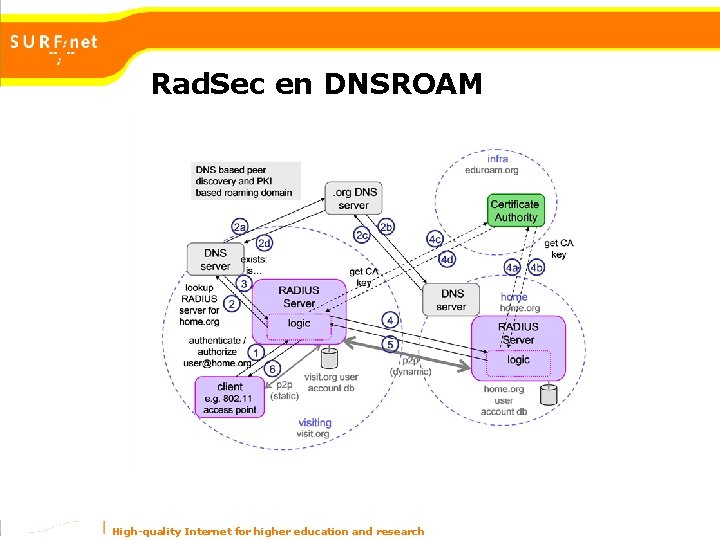
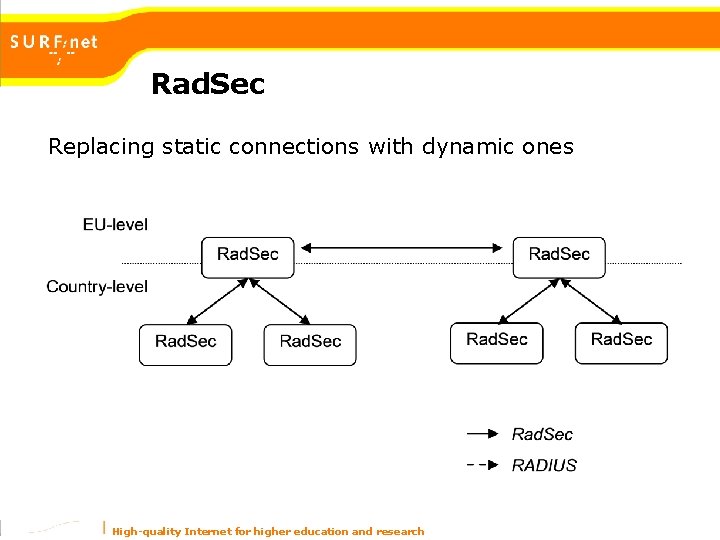
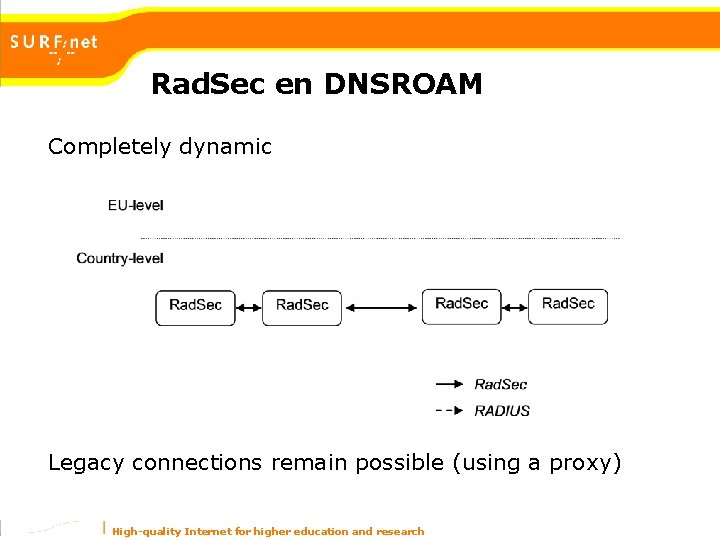
Rad. Sec and DNSROAM • RADIUS packet in TCP of SCTP more reliable, dead peer detection • Secured with TLS/PKI (optional) offers options for limiting participation/federation: – by certificates signed by a specific CA – validated by attributes in the certificate (not yet) • DNSROAM uses DNS as lookup-service – dynamic routing based on the RADIUS realm – possible to deploy for just a part of the infrastructure High-quality Internet for higher education and research
Rad. Sec (image taken from Radiate / Test description and evaluation by Telematica Instituut) High-quality Internet for higher education and research
Rad. Sec Replacing RADIUS with Rad. Sec High-quality Internet for higher education and research
Rad. Sec en DNSROAM High-quality Internet for higher education and research
Rad. Sec Replacing static connections with dynamic ones High-quality Internet for higher education and research
Rad. Sec en DNSROAM Completely dynamic Legacy connections remain possible (using a proxy) High-quality Internet for higher education and research
Conclusion • Clients and Institutions won’t have to worry about wireless technology: 802. 1 x is the future… while WPA is becoming commodity WEP is fine too. • No radical improvements required for the current infrastructure at an institution. • EAP is flexible and fits almost every existing backend, the future will bring more EAP-types (like SSO). High-quality Internet for higher education and research